
CONTENTS
1. Introduction
.......................................................................................................................- 1 -
2. Highlights
......................................................................................................................... - 2 -
3.Knobs and Switches
.......................................................................................................- 4 -
Hidden Parameters
.....................................................................................................- 5 -
4. REAR PANEL I/O
............................................................................................................. - 6 -
5. Signal Path
....................................................................................................................... - 7 -
Output Configuration
................................................................................................. - 7 -
6.Description of the LED Button
......................................................................................- 9 -
What the LED Colors Mean
....................................................................................... - 9 -
What the Button Can Adjust
..................................................................................... - 9 -
7.Freeze
..............................................................................................................................- 10 -
8.Ramp
............................................................................................................................... - 11 -
Ramp Modes
.............................................................................................................. - 11 -
9. Power-Up Modes
...........................................................................................................- 12 -
Bypass & Trails Modes
............................................................................................. - 12 -
Freeze Release Switching
.......................................................................................- 12 -
Ramp Lock
..................................................................................................................- 12 -
Dry Path Mode
........................................................................................................... - 12 -
Freeze Lock
................................................................................................................- 13 -
Envelope Filter
...........................................................................................................- 13 -
LED Brightness
.......................................................................................................... - 13 -
10.External Control
...........................................................................................................- 14 -
Connection & Activation
.......................................................................................... - 14 -
External Footswitch Compatibility
.........................................................................- 14 -
Expression Pedal Compatibility
..............................................................................- 14 -
11.Specifications
............................................................................................................... - 15 -

- 1 -
1. Introduction
Thank you for choosing the Verdict Polyphonic Octave by Klowra.
Verdict is a polyphonic octave pedal that blends your guitar’s original signal with
multiple generated octaves, enabling a wide palette of tones and instrument
emulations. From high solo lines to multi-string ensembles, from stacked harmonies to
low-end support, Verdict captures every detail of your performance with precision and
stability.
Swell and synth-like Filter functions provide versatile options for shaping the attack
and texture of your sound, while Detune and Low Cut add thickness and tightness.
Adjusting these parameters opens up virtually limitless tonal possibilities, from violin
and bass to organ and synthesizer emulations.
The Freeze function allows notes or chords to sustain, creating rich, resonant harmonic
layers, while the Ramp feature lets you morph seamlessly between different tones and
instrument simulations. Paired with an expression pedal or external footswitch, Verdict
responds dynamically to your playing, generating polyphonic textures full of depth and
exploration.
Featuring Analog Dry-Through, selectable True Bypass/Buffered Bypass, and an
independent dry-signal output, Verdict ensures clean, consistent performance across
various stage and studio setups, keeping every interval clear, balanced, and powerful.

- 2 -
2. Highlights
●
Bloom Infinity Series - Original artist hand-painted silkscreen artwork, with
individual model stories and concepts, all strung together into a cohesive product line.
●
Four-Voice Polyphonic Octave - The volumes of +1 OCT, +2 OCT, -1 OCT,
and -2 OCT are independently controllable, building rich octave layers with stable
polyphonic tracking and precise phase alignment. Paired with multi-phase Detune and
precise Low-Cut, it delivers everything from high solo lines and bass foundations to
multi-string ensembles, double-bass textures, and organ-like tones - one step, a
whole new world of sound.
●
Adjustable Swell & Synth-Like Filter - Swell allows precise shaping of
note attacks, while the synth-inspired filter lets you glide seamlessly between
bow-like gradual swells and thick, rich synthesized tones. When switched to Envelope
Filter mode, the filter responds in real time to your playing dynamics, making the
sound exactly as you perform it. From ambient pads to funky bass lines and synth
leads, you can effortlessly achieve a wide range of synthesizer tones.
●
Selectable Analog Dry-Through - The dry signal remains fully analog
throughout, never passing through A/D conversion, and is only mixed with the wet
signal, preserving the pure, original tone. You can also choose to process the dry
signal when creating “non-guitar” soundscapes, producing a more sculpted and
layered hybrid tone.
●
Freeze for Infinite Sustain - Hold the footswitch to instantly lock notes or

- 3 -
chords in place. Use it to create warm, full-bodied pad backgrounds, sculpt envelopes
with dynamic, surreal atmospheres, or extend a fleeting moment of inspiration to float
indefinitely over harmonies.
●
Ramp - The Ramp function provides linear parameter variation, controlling
the fading back and forth between settings to create a dynamic, evolving effect.
●
External Control - You can use an external TS/TRS footswitch and
expression pedal for multifunctional continuous control.
●
Analog Dry-Through - Keeps the dry signal analog, never converting it to
digital, while mixing with the wet signal.
●
Versatile Output Options - Support Dry/Wet Separation outputs,
compatible with a variety of audio systems and complex signal chains.
●
Bypass Modes - Switchable True Bypass (trails off) and Buffered Bypass
(trails on), with Analog Dry-Through.
●
WildSeed Engine - Class-leading sound quality with 24-bit AD/DA and
32-bit DSP floating-point processing.
●
Built to Last - Premium aluminum alloy chassis, sturdy and reliable,
designed for heavy-duty use and life on the road.
- 4 -
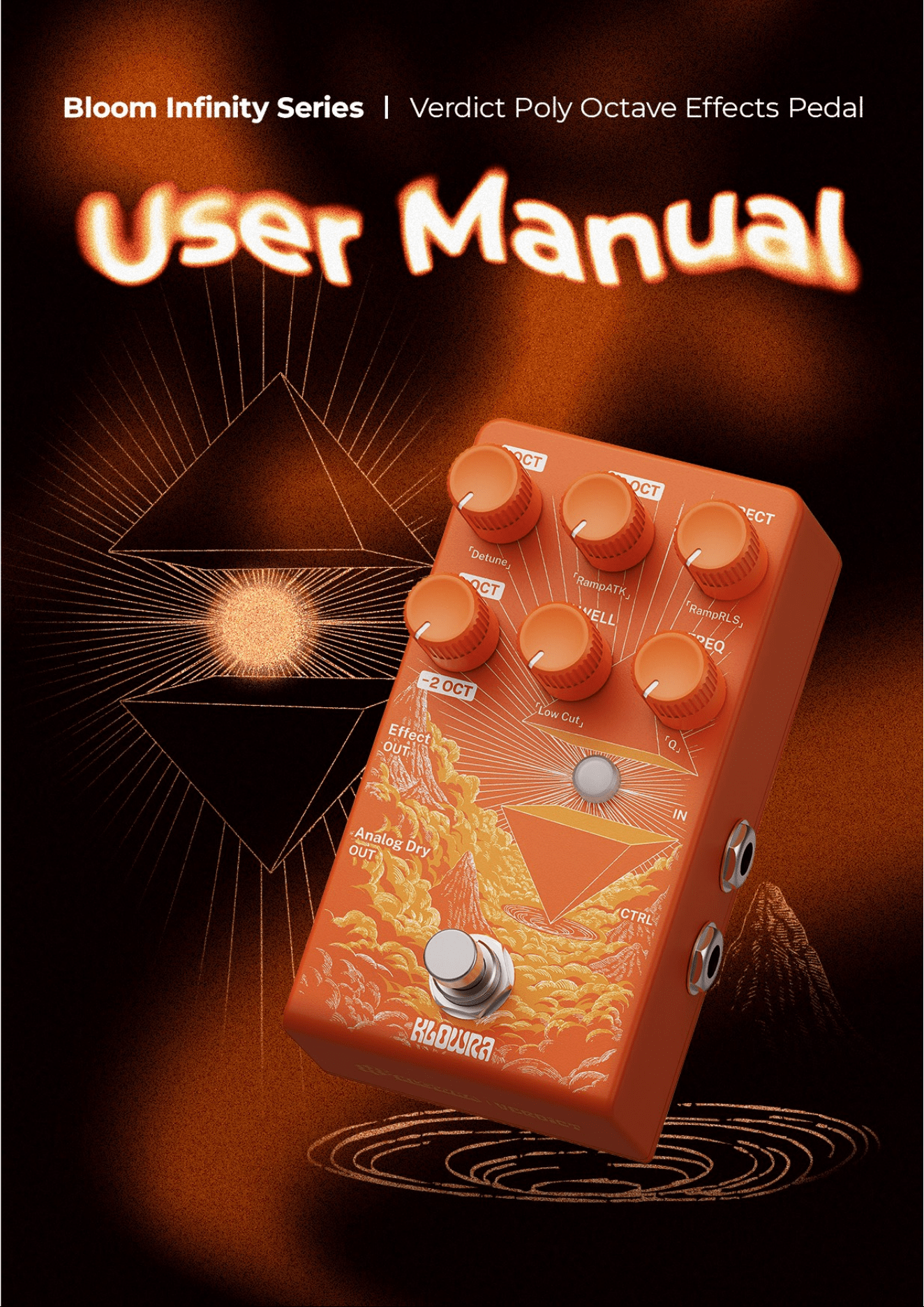
3. Knobs and Switches
+OCT
Adjusts the level of the +1 octave voice. Turn clockwise to increase the level; turn
counterclockwise to decrease it.
+2 OCT
Adjusts the level of the +2 octave voice. Turn clockwise to increase the level; turn
counterclockwise to decrease it.
-OCT
Adjusts the overall level of the lower-octave voices. Turn clockwise to increase the
lower-octave level; turn counterclockwise to decrease it.
Note: The relative balance of the -2 octave voice is controlled by the hidden
parameter -2 OCT.
DIRECT
Adjusts the level of the dry signal. Use this to retain pick attack and clarity while
blending in the octave voices.
In Power-Up Mode, you can choose how the dry signal is routed to the Effect OUT:
Analog Dry-Through: The dry signal stays unprocessed. It bypasses SWELL
and FILTER.
Processed Dry: The dry signal runs through SWELL and FILTER. It is then
mixed at the Effect OUT.
Note: Analog Dry-Out always outputs the unprocessed dry signal and is not
affected by this setting.
SWELL
Adjusts the effect attack time. Higher settings create a slower, more pad-like swell.
Lower settings respond more immediately.
*Envelope Filter: In Power-Up Mode, you can link the low-pass filter cutoff to the
SWELL envelope, allowing longer swells to create a matching filter sweep.*
FREQ
Adjusts the low-pass filter cutoff for the effect and shapes brightness. Lower
settings sound darker and smoother; higher settings sound brighter and more open.
Resonance is adjusted by the hidden parameter Q.
Footswitch
Control effect ON/OFF. Press & hold to trigger Freeze or Ramp.
Refer to the *Freeze*or *Ramp*section for details.

- 5 -
The LED Button
Lit when active, press & hold this button while turning other knobs to adjust various
functions and hidden parameters.
Hidden Parameters
*To adjust the hidden parameters, press & hold the LED Button while turning the
knob. A successful adjustment is indicated by the LED blinking yellow.*
Detune
Adjusts the detune amount of the effect voices. Higher settings add width and
a more chorused/synth-like character; lower settings stay tighter and more
precise.
RampATK
Controls the attack time of the Ramp modulation, determining how quickly the
fade reaches the Snap-Set. A shorter attack time results in a quicker transition
to the Snap-Set, while a longer attack time creates a smoother, more gradual
fade.
RampRLS
Controls the release time of the Ramp modulation, determining how gradually
the transition fades back to the Panel-Set. A shorter release time results in a
quicker return to the Panel-Set, while a longer release time provides a more
drawn-out, fluid return to the Panel-Set.
-2 OCT
Adjusts the -2 octave level as a ratio of the -1 octave level, letting you blend
from a subtle low foundation to a stronger sub-octave weight.
Low Cut
Adjusts the low-cut frequency for the octave effect. Higher settings reduce
boom and muddiness; lower settings preserve more low-end weight.
Q
Adjusts the resonance of the low-pass filter controlled by FREQ. Higher Q
adds more emphasis at the cutoff point; lower Q keeps the roll-off smoother
and more natural.
For adjustments to hidden parameters, please refer to the *Description of the LED
Button*section.

- 6 -
4. REAR PANEL I/O
9V DC
Connect a 9V DC power supply with a center-negative polarity and a minimum
current rating of 250mA.
Note: Insufficient power may cause the pedal to malfunction.
IN (Mono)
1/4" TS mono input for your instrument.
Effect OUT (Mono)
1/4" TS output carrying the effected signal.
Analog Dry-Out (Mono)
1/4" TS output carrying the analog dry signal.
CTRL
1/4" stereo (TRS) input for connecting an expression pedal or external footswitch.
Note: Please refer to the *External Control* section for information on how the
connected device is detected.
- 7 -
5. Signal Path
For optimal performance, place the Verdict first in your signal chain. Placing other
effects before it may interfere with its pitch-shifting accuracy.
Output Configuration
Effect OUT: Outputs a blend of the dry and wet signals, determined by the
DIRECT and Octave controls.
Analog Dry-Out: Always outputs the direct dry signal only. It does not pass
through any effect processing.
Note: Please refer to the *Power-Up Mode*section for information on how to select the
dry signal at Effect OUT by selecting Analog Dry-Through or Processed Dry.
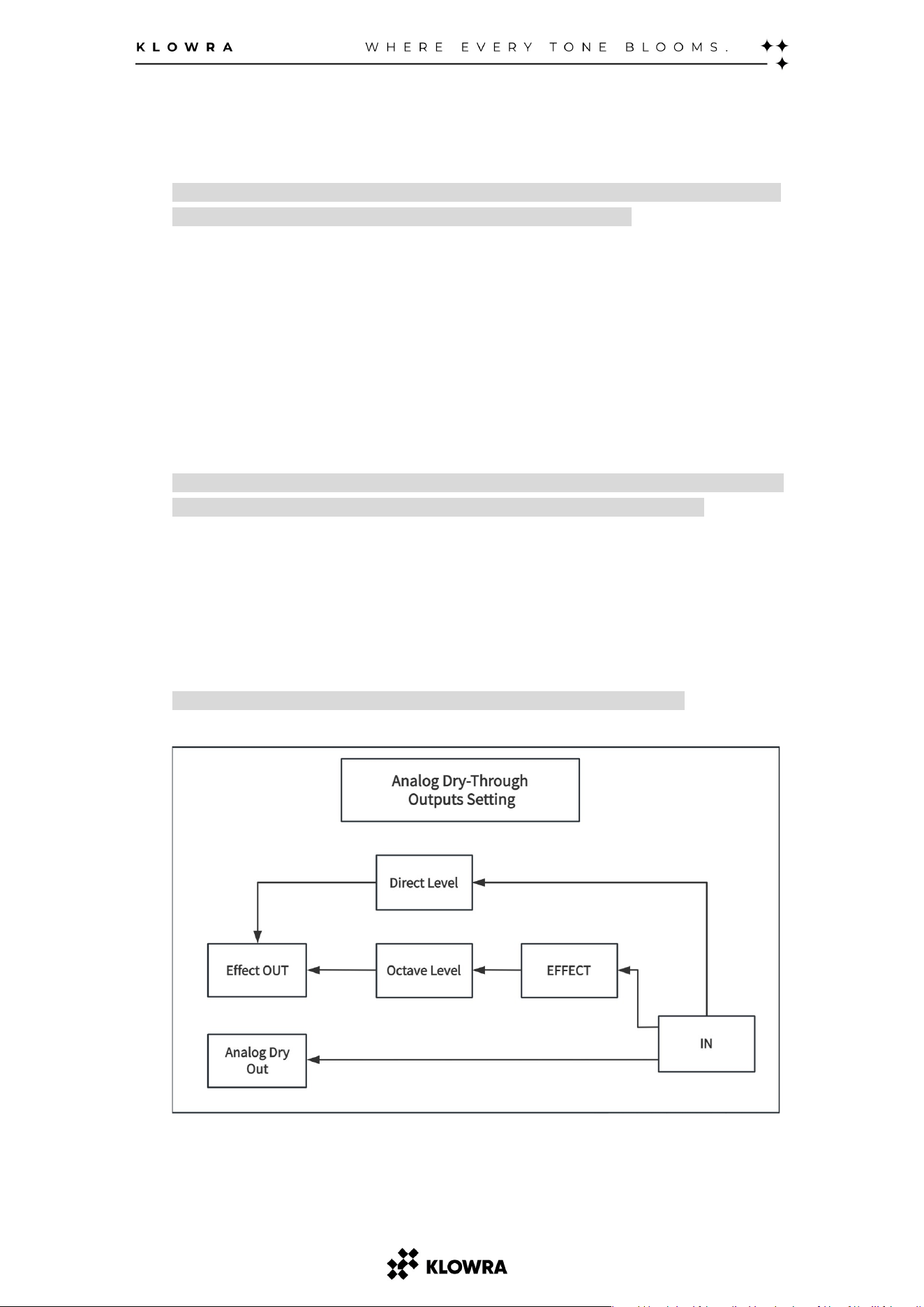
Analog Dry-Through Outputs Setting
In this setting, the dry signal routed to the Effect OUT remains unprocessed
and stays on the analog path. Only the octave voices pass through the digital
processing chain and are mixed at the Effect OUT.
Note: The Analog Dry-Out always outputs the unprocessed dry signal.
- 8 -
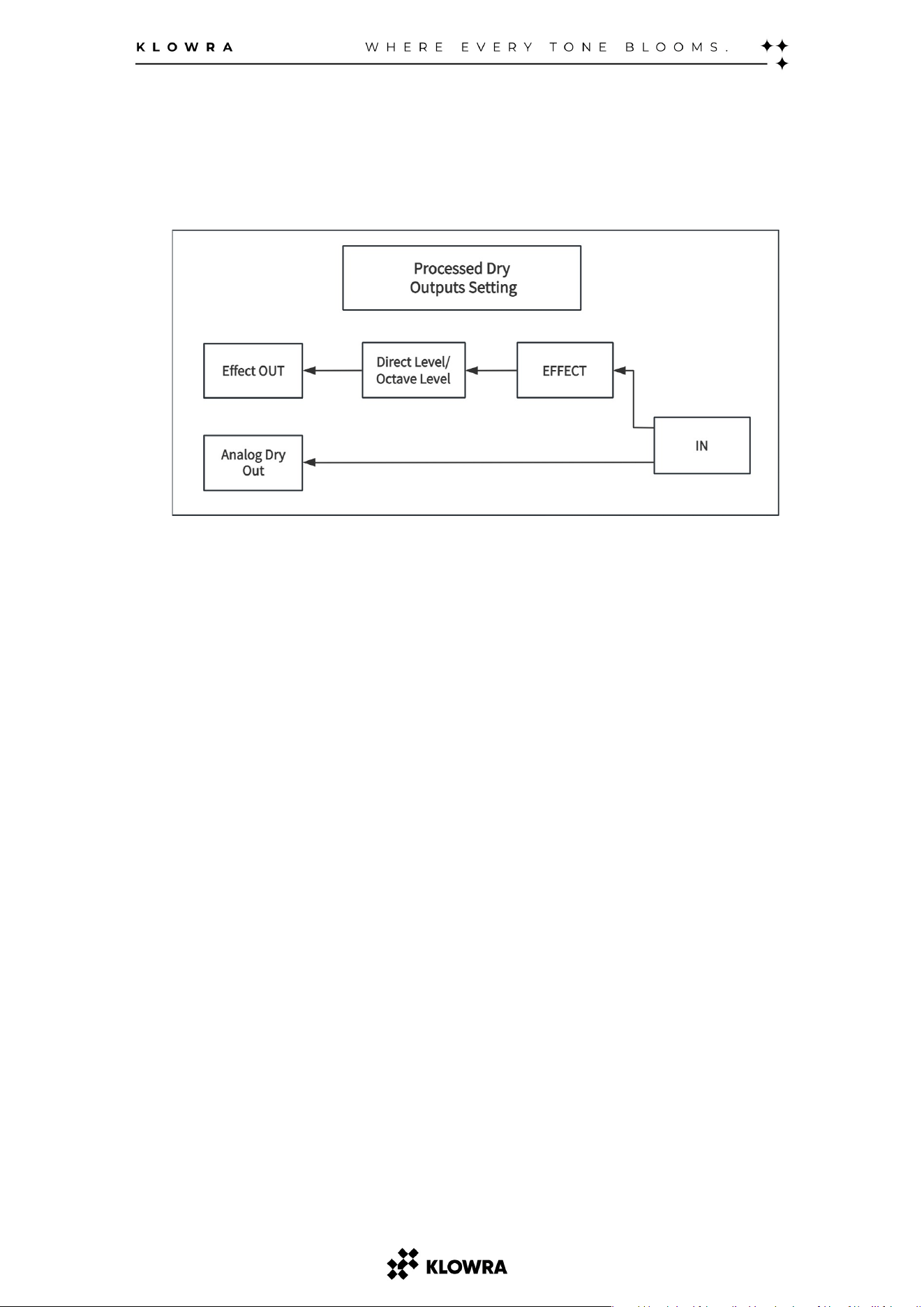
Processed Dry Outputs Setting
In this setting, the dry signal routed to the Effect OUT is converted to digital and
processed by SWELL and FILTER before it is mixed with the octave voices.

- 9 -
6. Description of the LED Button
The LED Button is the heart of the Verdict.
You can determine the current operating status of the Verdict by observing the
color of the LED Button. The LED Button can be pressed briefly or in combination
with other knobs to adjust various functions or parameters.
Learning to interpret the LED colors and understanding the different ways the
button can be pressed are essential for familiarizing yourself with the Verdict’s
operation.
What the LED Colors Mean
White: Freeze function active.
Blue: Freeze is actively being triggered.
Orange: Ramp function active.
Violet: Ramp is actively being triggered.
What the Button Can Adjust
Toggle the Freeze or Ramp
Press once to toggle between Freeze and Ramp.
Save Snap-Set
Press & hold to save the current parameter settings as Snap-Set.
The LED blinks violet to confirm the Snap-Set has been saved.
Adjustment of Hidden Parameters
Press & hold while rotating the knob above the hidden parameters.
Successful adjustment is indicated by the LED blinking yellow.

-
10 -
7. Freeze
*Press & hold the footswitch while the LED is white. When the LED turns blue, you have
entered Freeze. Release the footswitch to exit Freeze and return to normal operation. *
Freeze captures the current sound and holds it like an organ sustain, creating a
continuous pad under your playing until you release the footswitch. It is ideal for
ambient pads, sustained textures, and creative layering.
- How It Works
When you press & hold the footswitch, Verdict captures a moment of your playing
and sustains it as a continuous, frozen tone. The held tone continues until you
release the footswitch.
- Freeze Release
In Power-Up Mode, you can select how the frozen sound releases when you let go
of the footswitch:
Fast Release: The held sound stops quickly for tight, rhythmic breaks.
Slow Release: The held sound fades out gradually for smoother transitions.
- Freeze Latching
In Power-Up Mode, you can select how the footswitch triggers the freeze effect:
Momentary Mode: The effect is active only while the footswitch is held down.
Latched Mode: The effect toggles on or off each time you press the
footswitch.
Note: Please refer to the Power-Up Mode section for instructions on configuring Freeze
Release and Freeze Latching.
-Signal Path Notes
Freeze applies only to the processed (wet) signal path. This setting determines how
the held layer decays but does not affect your dry signal routing.

-
11 -
8. Ramp
*Press & hold the footswitch while the LED is orange. When the LED turns violet,
you have entered Ramp. *
Ramp allows for smooth, dynamic transitions between two sets of parameters:
Panel-Set–Your current front-panel parameter settings.
Snap-Set–A saved set of parameters stored using the LED Button.
This feature creates expressive, evolving fades that add depth, movement, and
emotion to your sound. The speed and character of the transition are defined by
two parameters:
RampATK (Attack Time):
Controls how quickly the effect fades from the Panel-Set to the Snap-Set.
- A shorter attack gives a fast, sharp transition.
- A longer attack creates a smoother, more gradual fade.
RampRLS (Release Time):
Controls how quickly the sound returns from the Snap-Set to the Panel-Set.
- A shorter release results in a quick recovery.
- A longer release provides a more drawn-out, fluid return.
Ramp Modes
Ramp supports two switching modes - Momentary and Latched—giving you
flexibility to match your performance style.
Momentary Mode:
Press & hold the footswitch to fade into the Snap-Set over RampATK time. Release
the footswitch to return to the Panel-Set over RampRLS time.
Latched Mode:
Press once to transition to the Snap-Set (RampATK), and press again to return to
the Panel-Set (RampRLS).
To select between Momentary and Latched modes, see the *Power-Up Modes*section.

-
12 -
9. Power-Up Modes
How to enter Power-Up Modes
Press & hold the footswitch while powering on the pedal. A flashing LED indicates
successful entry.
Once your settings are configured, short press the footswitch again to exit
Power-Up Modes.
In this mode, you can adjust the following settings:
Bypass &Trails Modes
Switch between modes by short press the LED Button.
True Bypass
The signal is routed directly through the pedal with no buffering or coloration.
LED Green flashes to indicate True Bypass mode.
Buffered Bypass (Trails on)
The signal is routed through a buffer with Analog Dry-Through, allowing delay
trails to continue after the effect is bypassed.
LED Red flashes to indicate Buffered Bypass mode.
Freeze Release Switching
Select by rotating the +OCT knob.
- Turn fully left for Fast Release (LED yellow flashes 3x).
- Turn fully right for Slow Release (LED blue flashes 3x).
Ramp Lock
Select by rotating the +2 OCT knob.
- Turn fully left for Momentary (LED flashes yellow 3x).
- Turn fully right for Latched (LED flashes blue 3x).
Momentary:
Hold the footswitch to transition to Snap-Set over RampATK time. Release to
return to the current set over RampRLS time.
Latched:
The first press transitions to Snap-Set over RampATK time. The second press
returns to the current set over RampRLS time.
Dry Path Mode
Select by rotating the DIRECT knob.
- Turn fully left for Analog Dry-Through (LED yellow flashes 3x).
- Turn fully right for Processed Dry (LED blue flashes 3x).
Note: This setting affects Effect OUT only. Analog Dry-Out is always analog dry signal
and unprocessed.

-
13 -
Freeze Lock
Select by rotating the -OCT knob.
- Turn fully left for Momentary (LED flashes yellow 3x).
- Turn fully right for Latched (LED flashes blue 3x).
Momentary: The effect is active only while the footswitch is held down.
Latched: The effect toggles on or off each time you press the footswitch.
Envelope Filter
Select by rotating the SWELL knob.
- Turn fully left to turn Envelope Filter off.
- Turn fully right to turn Envelope Filter on.
*Envelope Filter: Links the low-pass filter cutoff to the Swell envelope, so slow
swells produce a matching filter sweep.*
LED Brightness
Adjust by rotating the FREQ knob.
- Turn fully left for dimmest.
- Turn fully right for brightest.

-
14 -
10.External Control
Connection &Activation
When connecting an external TS/TRS footswitch or expression pedal, the LED
indicator will flash red. Trigger the footswitch or pedal repeatedly during this state.
Once the connection is successfully recognized, the Verdict will return to normal
operation.
Note: If the External Control is not fully activated, it may result in limited functionality.
External Footswitch Compatibility
When connecting an external TS/TRS footswitch, there are two specific functional
settings, depending on the color of the LED indicator:
LED White
- The current footswitch-specific function is Freeze.
TS Footswitch
: Momentary triggers Ramp.
TRS Footswitch:
Tip Position: Momentary triggers Ramp.
Ring Position: Momentary triggers Freeze.
LED Orange
- The current footswitch-specific function is Ramp
TS Footswitch: Momentary triggers Freeze.
TRS Footswitch:
Tip Position: Momentary triggers Ramp.
Ring Position: Momentary triggers Freeze.
Expression Pedal Compatibility
When an expression pedal is connected, it takes direct control over the Ramp by
blending between the Panel-Set and Snap-Set. In this mode:
The RampATK and RampRLS parameters are disabled.
Ramp cannot be triggered by pressing & holding the footswitch.
The expression pedal locks the Verdict into LED White (Freeze active), and
mode switching to LED Orange (Ramp active) is disabled.
-
15 -
11. Specifications
Input
1 x 1/4" TS Instrument jack
Outputs
2 x 1/4" TS Instrument jacks
Input Impedance
500k Ohm
Output Impedance
100 Ohm
A/D &D/A
24 Bits 44.1 kHz
Max Input Level
+10 dBu
Power Source
9V DC power supply required
Minimum Current
Rating
250 mA
External Control
TS/TRS Momentary footswitch, or
TRS expression pedal
Bypass Mode
Switchable: True Bypass,
Buffered Bypass (Analog
Dry-Through)
Hardware
Interface
USB-C
Dimensions
54.7mm H x 124.8mm D x 69.2mm
W (2.0" H x 4.9" D x 2.7" W)