
Company Name:M5Stack Technology Co.,Ltd
Address: Block A10, Expo Bay South Coast, Fuhai Street, Bao'an District, Shenzhen,Guangdong,China
StopWatch
Company Name:M5Stack Technology Co.,Ltd
Address: Block A10, Expo Bay South Coast, Fuhai Street, Bao'an District, Shenzhen,Guangdong,China
1.
Description
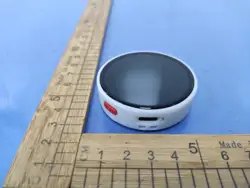
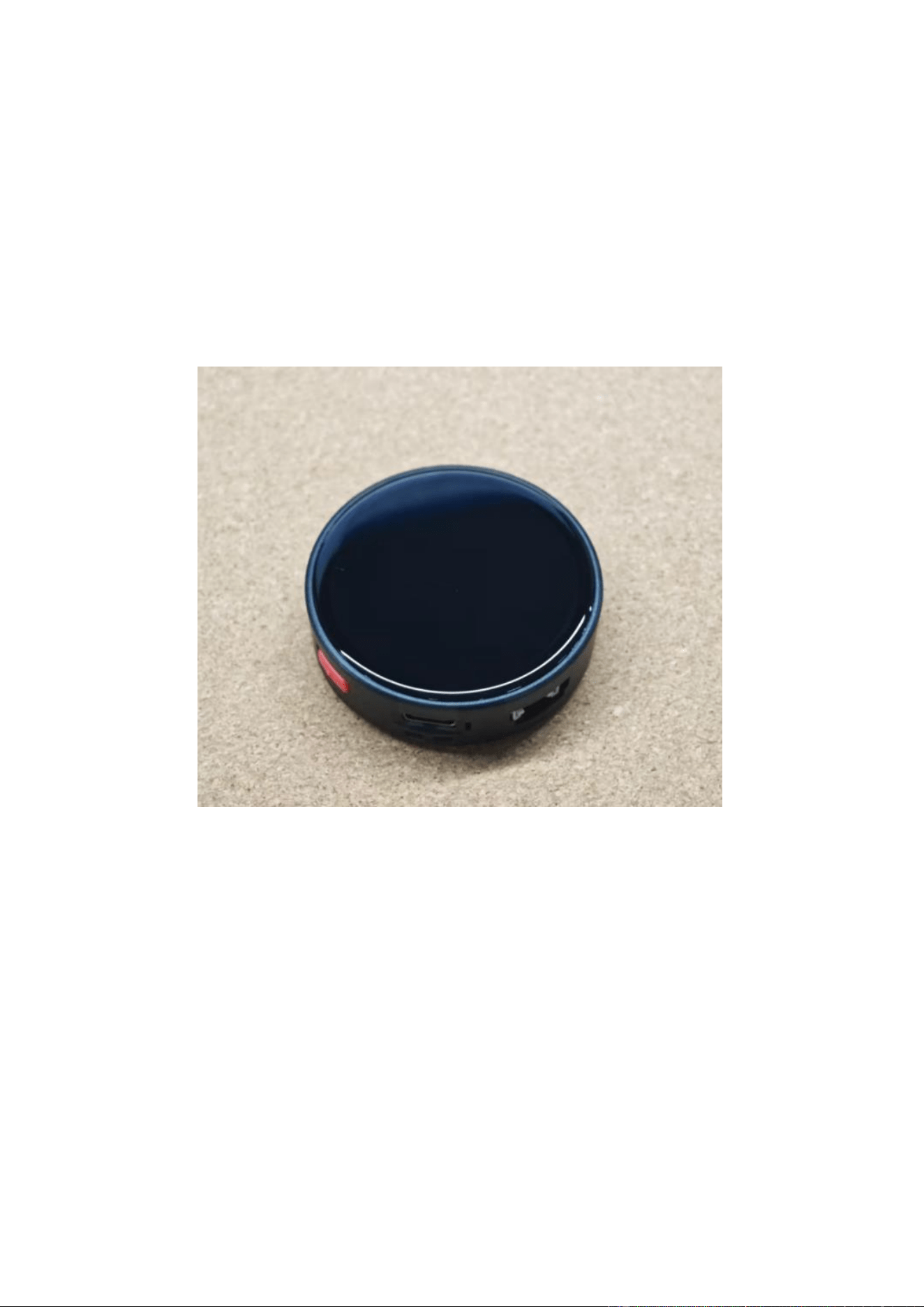
StopWatch is a compact round smart terminal built for on-the-go interaction. Featuring an
ESP32-S3R8 with 16MB Flash and
8MB
PSRAM,
it
supports
reliable
2.4GHz
W
i
-
Fi
+BLE
communication. Its AMOLED touch display, programmable keys, and haptic vibration
motor
create a responsive and user-friendly experience. Combined with audio I/O, IMU sensing,
RTC support, and versatile expansion options, StopWatch is a practical platform for timing
tools,
wearable interfaces, portable dashboards, and embedded IoT projects.
Company Name:M5Stack Technology Co.,Ltd
Address: Block A10, Expo Bay South Coast, Fuhai Street, Bao'an District, Shenzhen,Guangdong,China
2.
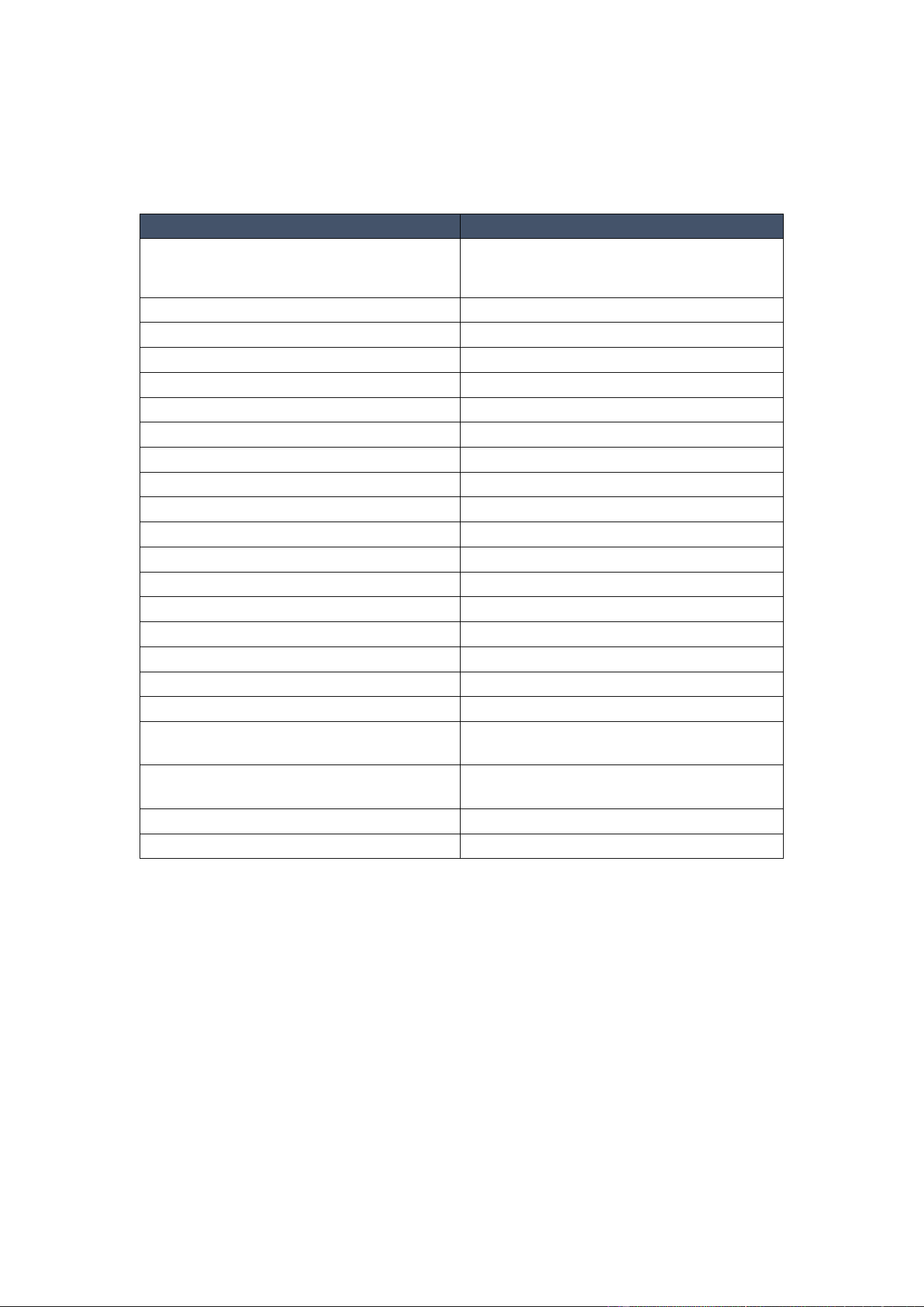
Specifications
Specification
Parameters
SoC
ESP32-S3R8
@
Dual-core Xtensa LX7
Processor,
up
to
240MHz
PSRAM
8MB
Flash
16MB
Communication
2.4
GHz
W
i
-
Fi;BLE
Display
Touch-enabled circular AMOLED display
Keys
2 x programmable keys + 1 x power key
Haptic
Feedback
Built-in vibration motor
Audio Codec
ES8311
Microphone
MEMS MIC
Audio Amplifier
AW8737A
IMU
BMI270 + BMM150
RTC
RX8130CE
Expansion Port
HY2.0-4P
Rear Expansion Bus
2.54 1x7P, 2.54 1x6P
Mechanical Design
Lanyard hole
Power
Management
M5PM1 multi-stage power management
Battery
Capacity
450mAh
Power Input
USB Type-C, DC 5V
Frequency Range for CE
2.4GWi-Fi:2412-2472MHz
BLE:2402-2480MHz
Maximum EIRP for CE
2.4GWi-Fi: 15.25 dBm
BLE:7.26 dBm
Hardware version NO.
V1.0
Software version NO.
V1.0
Company Name:M5Stack Technology Co.,Ltd
Address: Block A10, Expo Bay South Coast, Fuhai Street, Bao'an District, Shenzhen,Guangdong,China
3.
Quick Start
3.1
Preparation
1.
Visit the official Arduino website and install the Arduino IDE
https://www.arduino.cc/en/Main/Software
2.
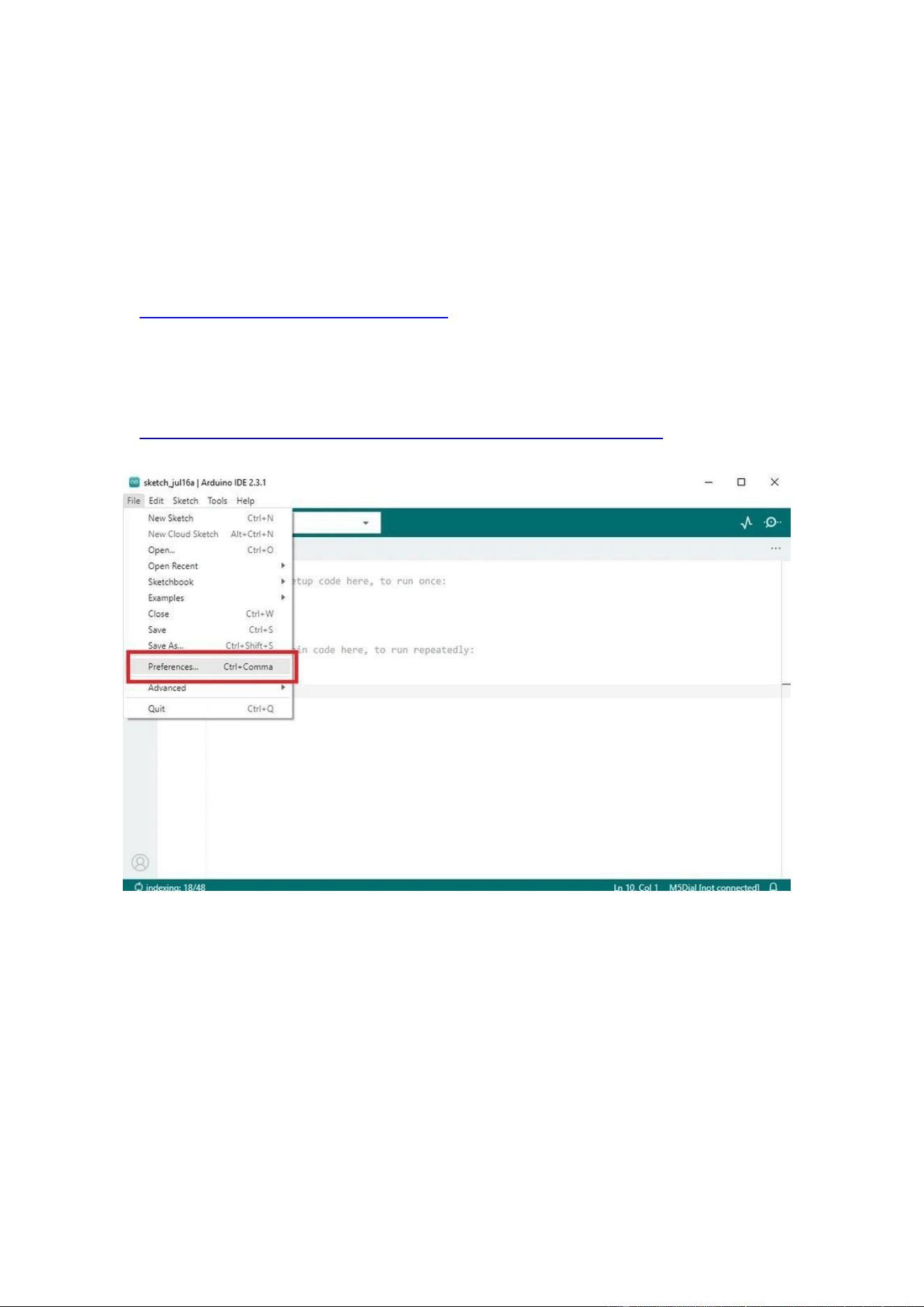
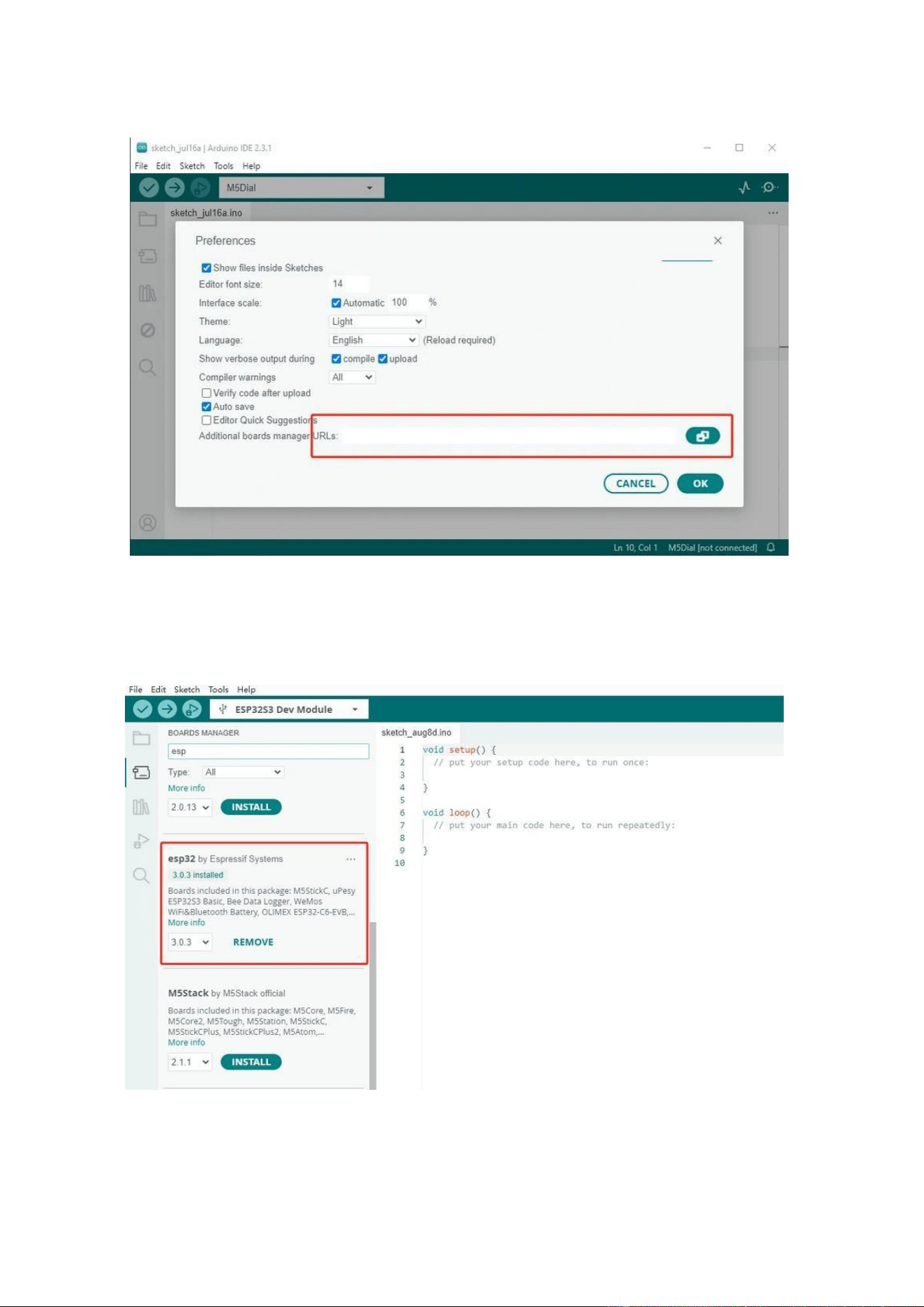
Add the following Board Manager URL to File → Preferences → Additional Boards
Manager URLs:
https://espressif.github.io/arduino-esp32/package_esp32_dev_index.json
Company Name:M5Stack Technology Co.,Ltd
Address: Block A10, Expo Bay South Coast, Fuhai Street, Bao'an District, Shenzhen,Guangdong,China
3.
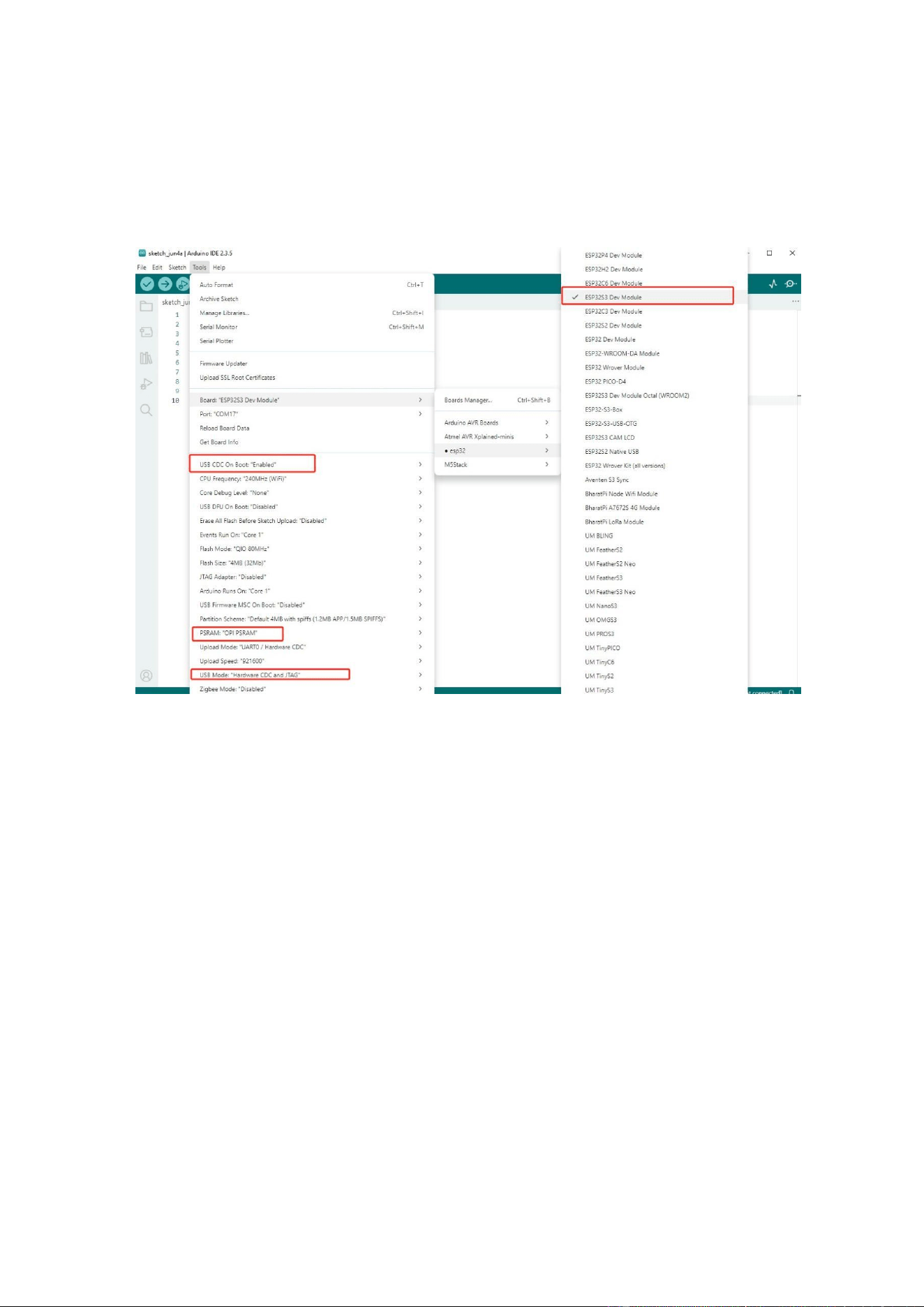
Open the Boards Manager, search for "ESP32", and click install.
Company Name:M5Stack Technology Co.,Ltd
Address: Block A10, Expo Bay South Coast, Fuhai Street, Bao'an District, Shenzhen,Guangdong,China
4.
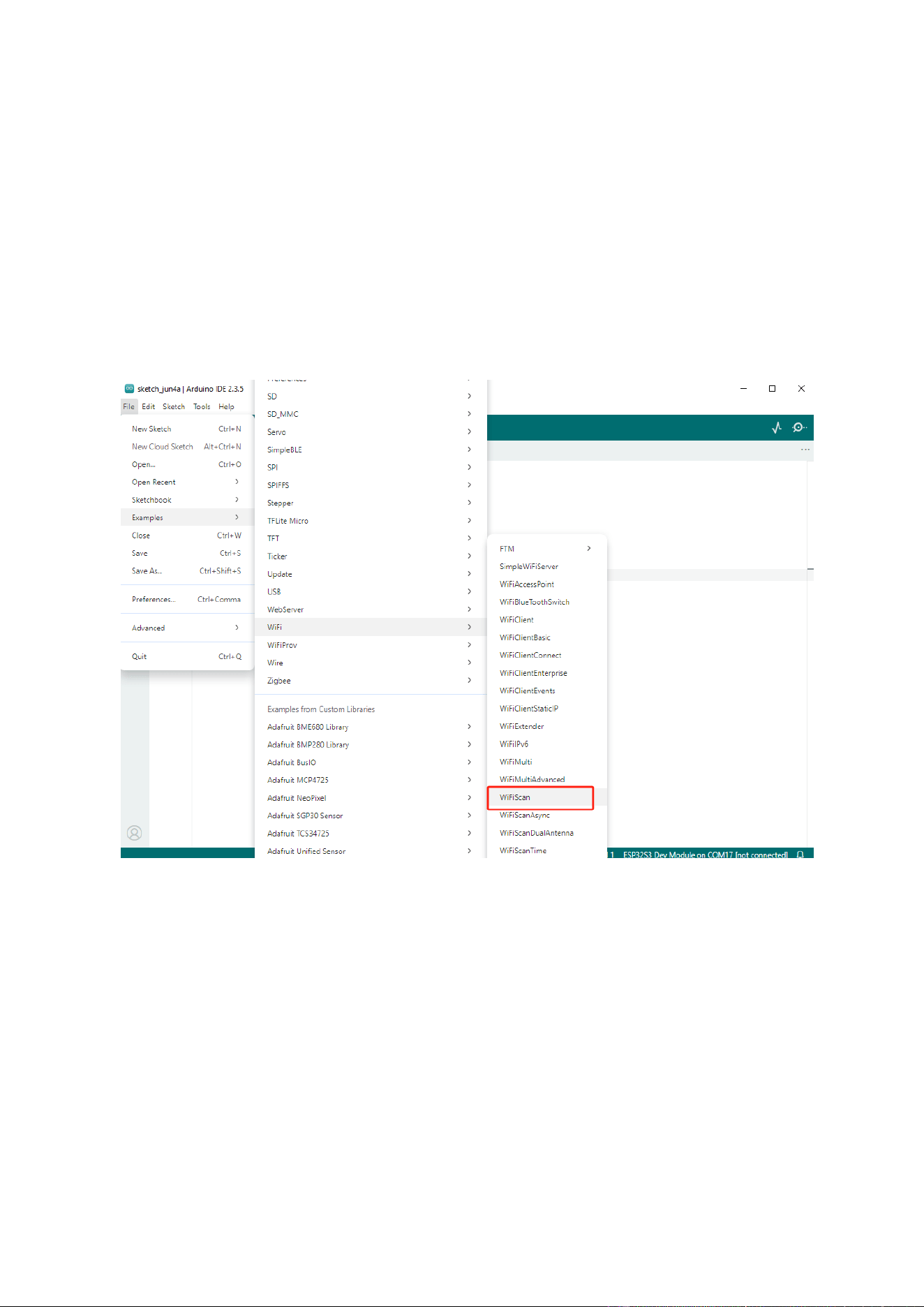
After installation, select the board "ESP32S3 Dev Module"
5.
Configure the following options. USB CDC On Boot: "Enabled",
PSRAM:"OPI PSRAM",
USB Mode: "Hardware CDC and JTAG"
Company Name:M5Stack Technology Co.,Ltd
Address: Block A10, Expo Bay South Coast, Fuhai Street, Bao'an District, Shenzhen,Guangdong,China
3.2
Wi-Fi Scan
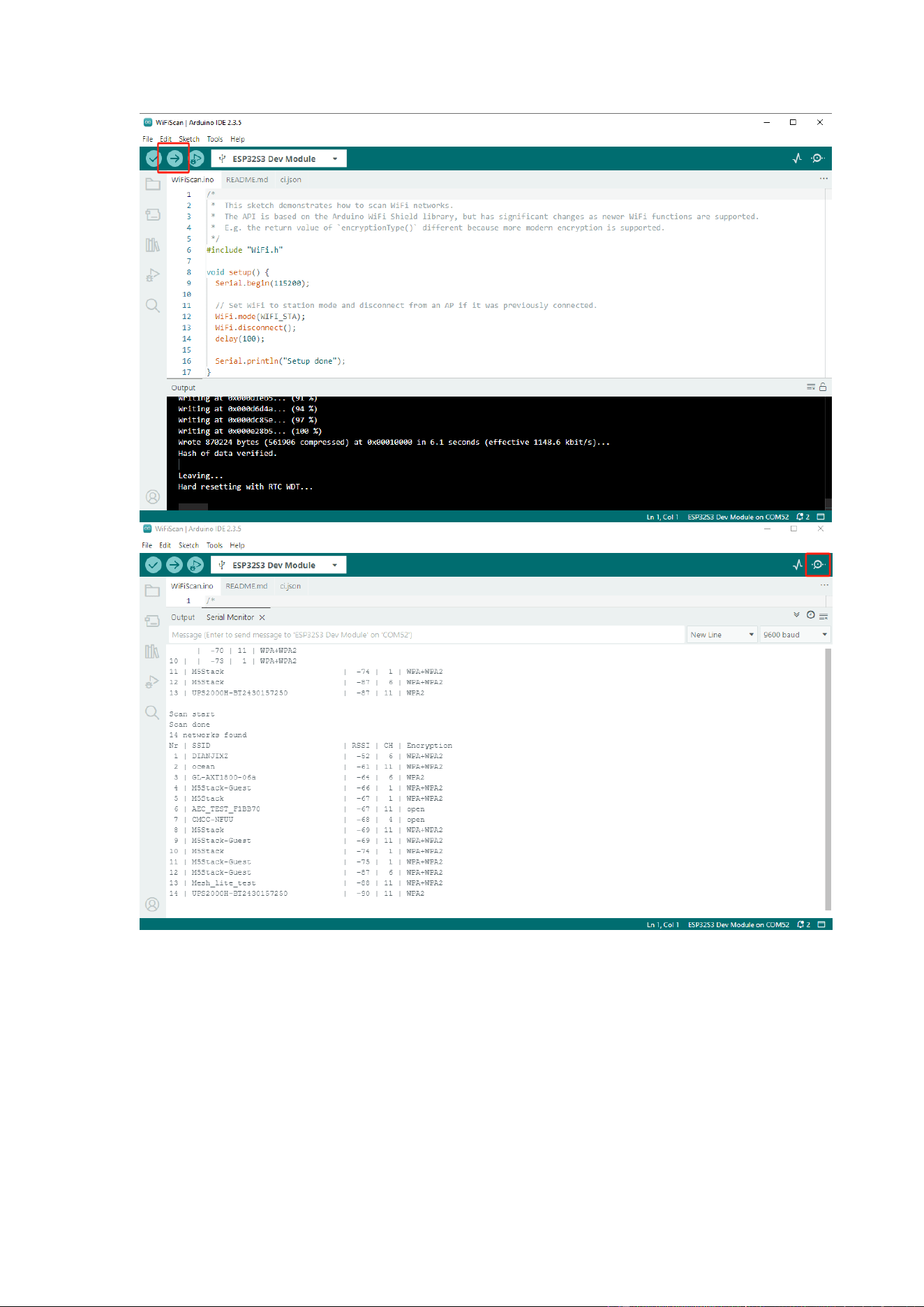
Select the example program "Examples" → "WiFi" → "WiFiScan", choose the port
corresponding to your device, and click the compile and upload button in the top-left
corner.
After uploading is complete, open the Serial Monitor to view
W
i
-
Fi scan information.
Company Name:M5Stack Technology Co.,Ltd
Address: Block A10, Expo Bay South Coast, Fuhai Street, Bao'an District, Shenzhen,Guangdong,China
3.3
BLE Scan
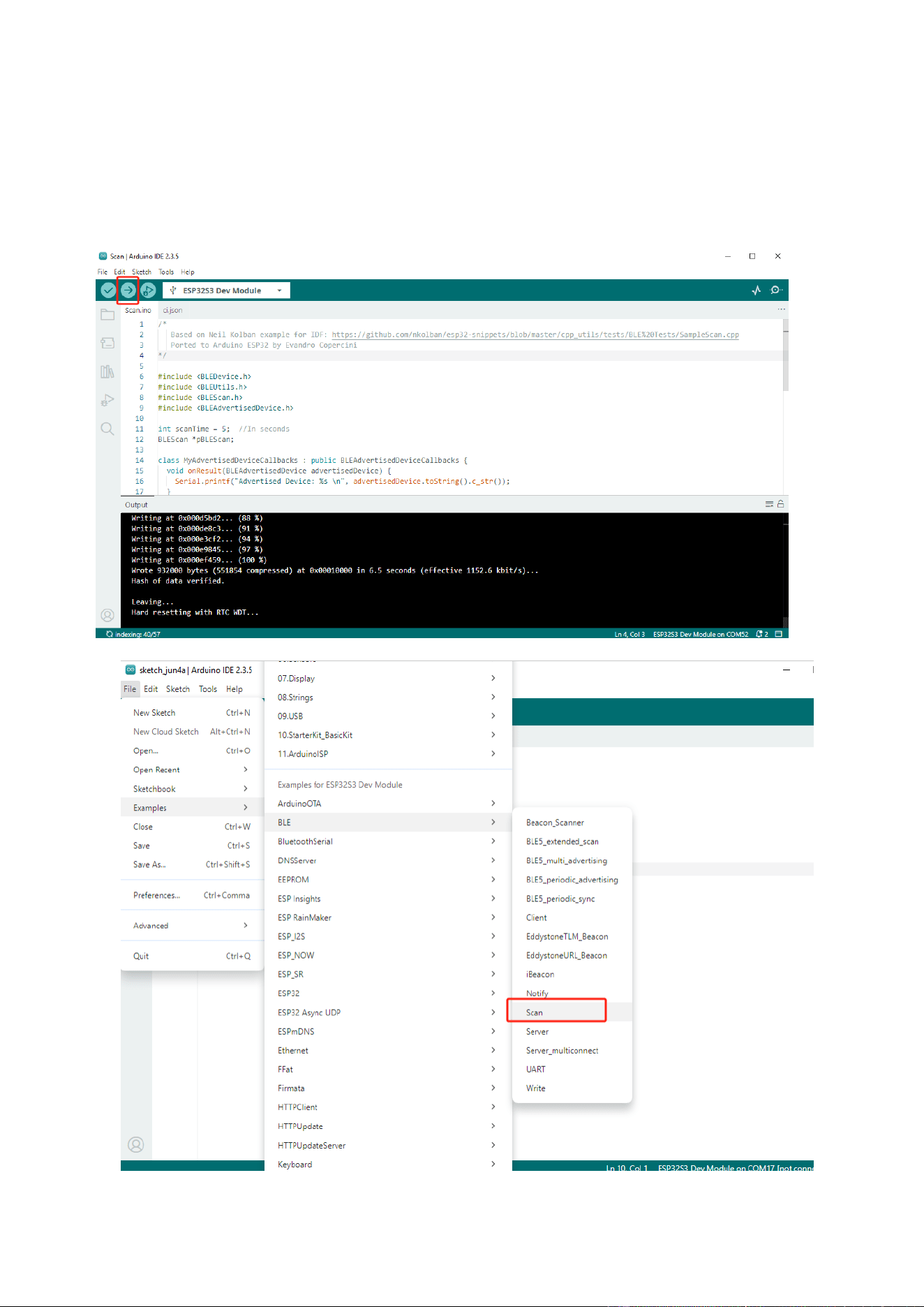
Select the example program "Examples" → "BLE" → ”Scan”, choose the port corresponding
to your device, and click the compile and upload button in the top-left corner.
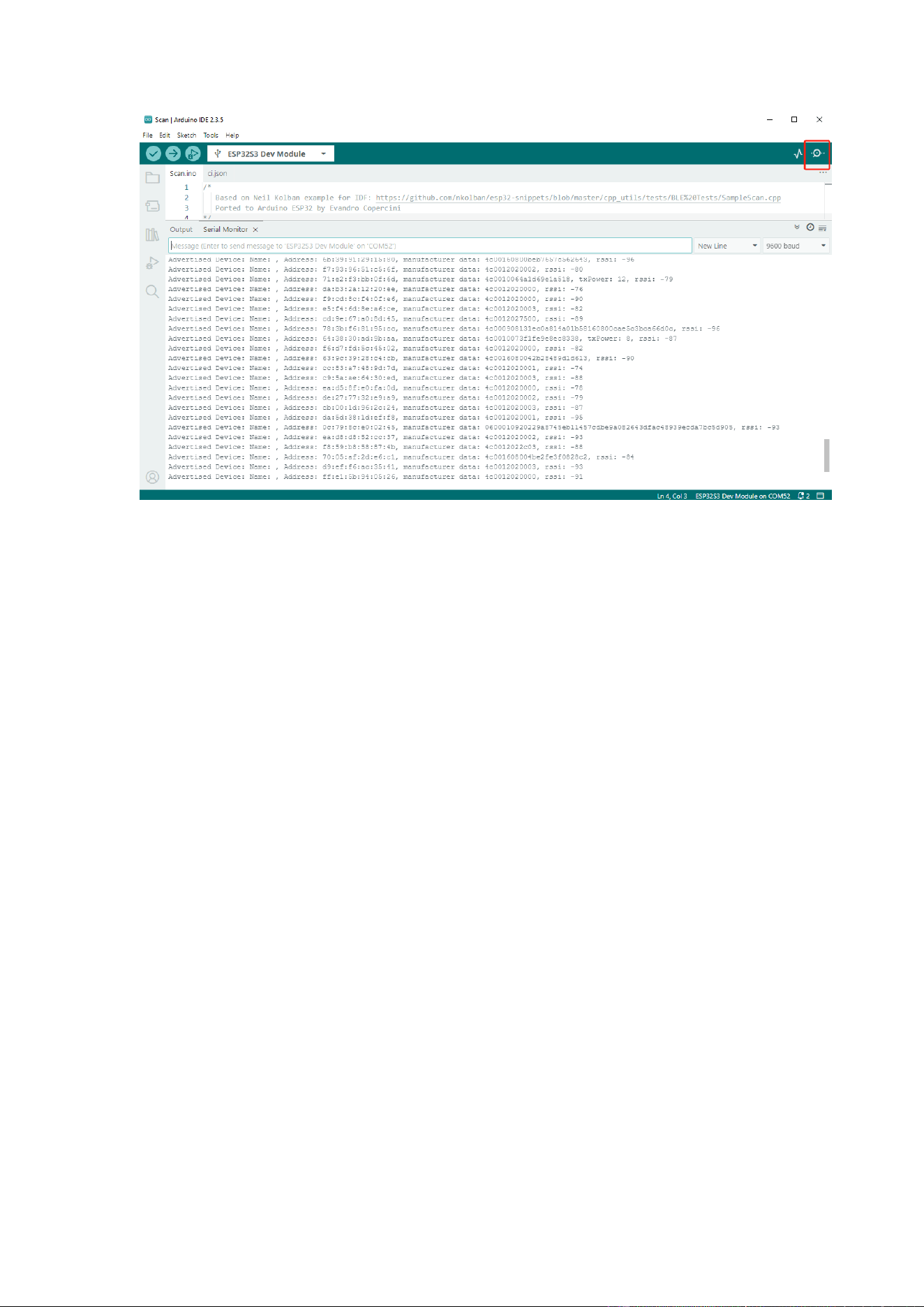
After uploading is complete, open the Serial Monitor to view BLE scan information.
Company Name:M5Stack Technology Co.,Ltd
Address: Block A10, Expo Bay South Coast, Fuhai Street, Bao'an District, Shenzhen,Guangdong,China
Company Name:M5Stack Technology Co.,Ltd
Address: Block A10, Expo Bay South Coast, Fuhai Street, Bao'an District, Shenzhen,Guangdong,China

Company Name:M5Stack Technology Co.,Ltd
Address: Block A10, Expo Bay South Coast, Fuhai Street, Bao'an District, Shenzhen,Guangdong,China
4.
FCC Warning
FCC Caution:
Any Changes or modifications not expressly approved by the party responsible for
compliance could void the user's authority to operate the equipment.
This device complies with part 15 of the FCC Rules. Operation is subject to the following two
conditions: (1) This device may not cause harmful interference, and (2) this device must accept
any interference received, including interference that may cause undesired operation.
IMPORTANT NOTE:
Note: This equipment has been tested and found to comply with the limits for a Class B digital
device, pursuant to part 15 of the FCC Rules. These limits are designed to provide reasonable
protection against harmful interference in a residential installation. This equipment generates,
uses and can radiate radio frequency energy and, if not installed and used in accordance with
the instructions, may cause harmful interference to radio communications. However, there is
no guarantee that interference will not
occur in a particular installation. If this equipment does
cause harmful interference to radio or television reception, which can be determined by
turning the equipment off and on, the user is encouraged to try to correct the interference
by one
or
more
of the following measures:
—
Reorient or relocate the receiving antenna. —
Increase the separation between the
equipment and receiver.
—
Connect the equipment into an outlet on a circuit different from
that to which the receiver is connected.
—
Consult the dealer or an experienced radio/TV technician for help.
FCC Radiation Exposure Statement: This equipment complies with FCC radiation exposure
limits set forth for an uncontrolled environment. The device has been tested and comply
with FCC SAR limits.