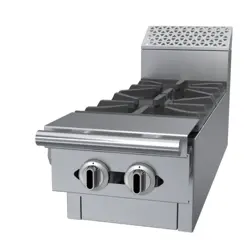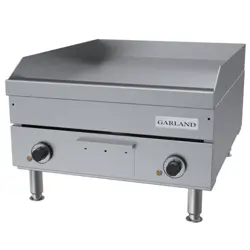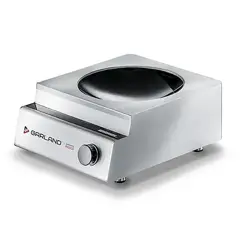

Instructions For Installation And Use
,
CAUTION: Read the instruction before using the machine.
n
WARNING: If the surface is cracked, immediately disconnect the appliance or appropriate
of the appliance from supply.
Note: This device line is intended for professional use only.
INSTINCT User Manual rev 01 06/20
Induction Counter-Top Series
Single & Dual Cook Zones
models
INSTINCT Hob 3
INSTINCT Hob 3.5
INSTINCT Hob 5
INSTINCT Hob 7 (only 3Ph. 208VAC)
INSTINCT Hob 10
INSTINCT Wok 3
INSTINCT Wok 3.5
INSTINCT Wok 5
INSTINCT Wok 8
Translation of Original Instruction – English
This Manual can also be
found on www.inducs.com

READ THIS MANUAL
n
Warning
Read this manual thoroughly before instal
ling, operating, or performing maintenance
on the equipment. Failure to follow instruc
tions in this manual can cause property dam
age, injury or death.
This manual must always be available for ref
erence at the place of operation.
This manual is intended for kitchen consultants,
cabinet designers, fabricators, installers, owners
and operators of our appliances.
Owners, consultants, fabricators and designers:
In order for the appliance to function safely
and normally, you must read and understand
all specific and critical requirements (such as
location, ventilation, clearance) when design
ing the location and/or the electrical cabinet
for the appliance.
Installers, operators and staff:
For your safety and safety of the others, you
must observe all safety instructions during
installation, operation and maintenance of
the equipment.
Should you require technical assistance, call your
factory authorized service agent or distributor.
Always have your model and serial number
available when you call.
Your Factory Authorized Service Company and
Contact Information
Your Equipment Supplier and Contact Informa
tion
Model Number
Serial Number
Date of Installation

ABOUT THIS MANUAL
Throughout this manual, the induction appli
ance model indicated on the cover page is re
ferred to as appliance, induction appliance or
equipment.
A period (.) is used in this manual as the decimal
separator.
Original measurements are in metrics. Measure
ments in imperial are provided for reference.
Not ALL models, options and accessories are
available in all geographical regions. Please con
sult your equipment supplier for the availability
of the specific products in your region.
INSPECT THE SHIPMENT
Thoroughly inspect the equipment upon deliv
ery. Immediately report to the delivery carrier,
any damage that occurred during transportation
and request for a written inspection report from
a claim inspector.
Keep all packages.
KEEP THE PACKING SLIP
The packing slip attached to the shipment con
tains detailed information on all components.
Keep the packing slip for reference.
4 INSTINCT User Manual rev 01 06/20
Safety Notices
Safety Notices
DEFINITIONS
n
DANGER
Indicates a hazardous situation that, if not
avoided, will result in death or serious injury.
This applies to the most extreme situations.
n
Warning
Indicates a hazardous situation that, if not
avoided, could result in death or serious in-
jury.
,
Caution
Indicates a hazardous situation that, if not
avoided, could result in minor or moderate
injury.
Notice
Indicates information considered important,
and is used to address practices not related
to physical injury. For example, messages re-
lating to property damage.
NOTE: Indicates useful, extra information about
the procedure you are performing.
Reference: ANZI Z535.6-2011
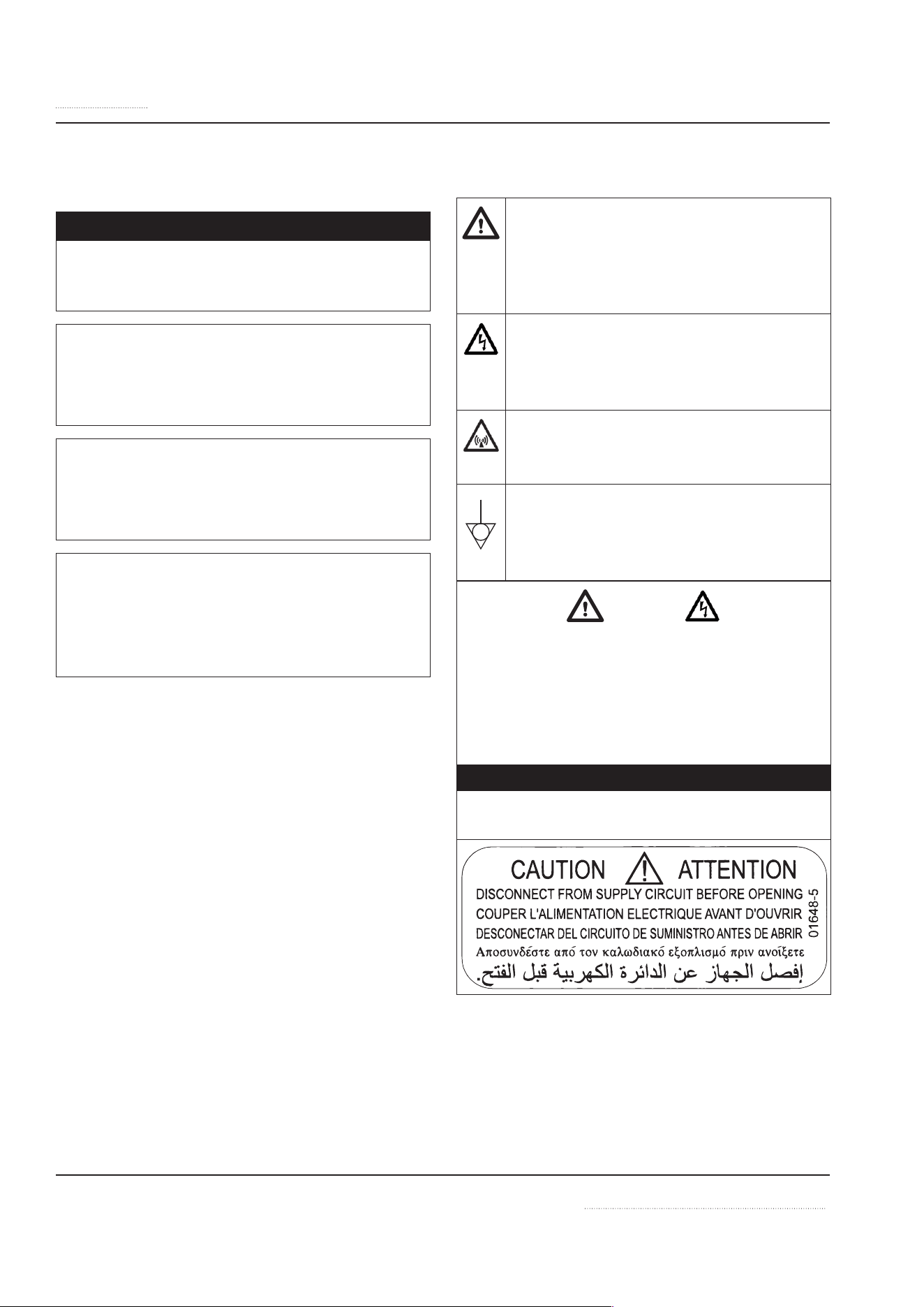
SAFETY SYMBOLS AND WARNINGS ON THE
APPLIANCE
This symbol alerts you to a hazardous
situation that WILL or COULD cause
serious bodily harm or death. Be alert
and implement relevant safety precau-
tions.
DANGER - HIGH VOLTAGE
This dangerous voltage warning sym-
bol indicates a risk of electric shock
and hazards from dangerous voltage.
Electromagnetic Field
This symbol warns against non-ioniz-
ing electromagnetic radiation.
Equipotential bonding
This symbol marks the terminal which
has to be connected with the equipo-
tential bonding system.
Warning
RISK OF FIRE OR ELECTRIC SHOCK! DO NOT
OPEN!
To reduce the risk of fire or electric shock, do
not remove or open cover. No user-serviceable
parts inside.
Refer servicing to qualified personnel.
n
DANGER
Disconnect from supply circuit before
opening.
INSTINCT User Manual rev 01 06/20 5
Safety Notices
DISCLAIMERS
n
DANGER
Disregarding any safety instructions may
cause harm to people, the surroundings, and
the equipment. The manufacturer and/or au-
thorized representative are not responsible
for any damages or personal injury caused
by failure to observe any safety instructions.
Risks involved when disregarding safety in-
structions include, but not limiting to:
• Death or injury caused by electric shock.
• Burn injury caused by contacting hot cook-
ing surface, cookware, or oil and grease.
• Damage to the equipment caused by using
unsuitable cookware.
n
DANGER
Do not install or operate equipment and/or
accessories that have been misused, abused,
neglected, damaged, or altered from that of
original manufactured specifications.
n
DANGER
Contact the manufacturer if you intend to
make any changes on the equipment. For
safety reasons, always use genuine parts and
accessories approved by the manufacturer or
authorized representative. Refer to the war-
ranty documents for your equipment.
n
Warning
The single phase models have a power inlet
intended to make the model universal. Using
a cord that is not factory supplied can lead
to several hazards if the wrong cord and plug
attachment is installed and used. Example
fire and burn hazard, risk of electric shock,
risk or failure to function correctly.
n
DANGER
Owners and operators are cautioned that
maintenance and repairs must be performed
by an authorized service agent using only
genuine replacement parts. The manufactur-
er will have no obligation with respect to any
product that has been improperly installed,
adjusted, operated or not maintained in ac-
cordance with national and local codes and/
or installation instructions provided with
the product or any product that has its seri-
al number defaced, obliterated or removed,
and/or which has been modified or repaired
using unauthorized parts or by unauthorized
service agents.
n
DANGER
Improper installation, adjustment, alteration,
service, or maintenance of this appliance or
installation of a damaged appliance can re-
sult in DEATH, INJURY, EQUIPMENT DAMAGE,
and void the warranty.
n
DANGER
All utility connections and fixtures must be
maintained in accordance with local and na-
tional codes.
n
Warning
Do not store or use gasoline or other flamma-
ble vapors or liquids in the vicinity of this or
any other appliance. Never use flammable oil
soaked cloths or combustible cleaning solu-
tions for cleaning.
n
Warning
This appliance is not intended for use by per-
sons (including children) with reduced phys-
ical, sensory or mental capabilities, or lack
of experience and knowledge, unless they
have been given supervision concerning use
of the appliance by a person responsible for
their safety. Do not allow children to play
with this appliance.
6 INSTINCT User Manual rev 01 06/20
Safety Notices
n
Warning
This product contains chemical known to
the State of California to cause cancer and/
or birth defects or other reproductive harm.
Operation, installation, and servicing of this
product could expose you to airborne parti-
cles of glass-wool or ceramic fibers, crystalline
silica, and/or carbon monoxide. Inhalation of
airborne particles of glass-wool or ceramic
fibers is known to the State of California to
cause cancer. Inhalation of carbon monoxide
is known to the State of California to cause
birth defects or other reproductive harm.
n
Warning
Authorized Service Representatives are obli-
gated to follow industry standard safety pro-
cedures, including, but not limited to, local/
national regulations for disconnection / lock
out / tag out procedures for all utilities in-
cluding electric, gas, water and steam.
Notice
This appliance is not approved or authorized
for home or residential use, but is intended
for commercial applications only. The man-
ufacturer and/or authorized representative
will not provide service, warranty, mainte-
nance or support of any kind other than in
commercial applications.
Notice
Routine adjustments and maintenance pro-
cedures outlined in this manual are not cov-
ered by the warranty.
NOTE: Proper installation, care and main-
tenance are essential for maximum per-
formance and trouble-free operation
of your equipment. Visit our website
for manual updates, translations, or contact in-
formation for service agents in your area.
CORRECT DISPOSAL OF THIS PRODUCT
This marking shown on the prod-
uct indicates that the product
should not be disposed as
household waste or regular
commercial waste. Instead it
shall be handed over to the applicable collec-
tion point for the recycling of electrical and
electronic equipment. By ensuring this prod-
uct is disposed correctly, you will help prevent
potential harm to the environment or human
health, which could otherwise be caused by in-
appropriate waste handling of this product.
For more detailed information regarding recy-
cling of the product, please contact your local
city office or your waste disposal service.
n
DANGER
Induction appliances, sent for disposal, can
be brought back into operation and their use
must be avoided.
NOTE: The appliance is built with common elec-
trical, electromechanical and electronic parts. No
batteries are used.
NOTE: The owner and operator are responsible
for the proper and safe disposal of the appliance.
Important
Additional Safety Notices are stated in the
relevant sections throughout the manual.

INSTINCT User Manual rev 01 06/20 7
Safety Notices
Definitions ............................................................................................................... 4
Safety symbols and Warnings on the Appliance ....................................... 4
Disclaimers .............................................................................................................. 5
Correct Disposal of this Product ...................................................................... 6
Table of Contents
Section 1
General Information
Description of Product ..........................................................................10
Application ............................................................................................10
Compliances ..........................................................................................10
Serial Plate Location .............................................................................11
Model Number ......................................................................................11
Reading the Model Number .................................................................11
Serial Number ........................................................................................11
Accessories ............................................................................................11
Section 2
Installation
Installation Safety—Disclaimer ......................................................................12
Installation Safety—Clearance and Ventilation .......................................12
Installation Safety—Electrical .........................................................................13
Personal Protection ............................................................................................14
Specifications ........................................................................................15
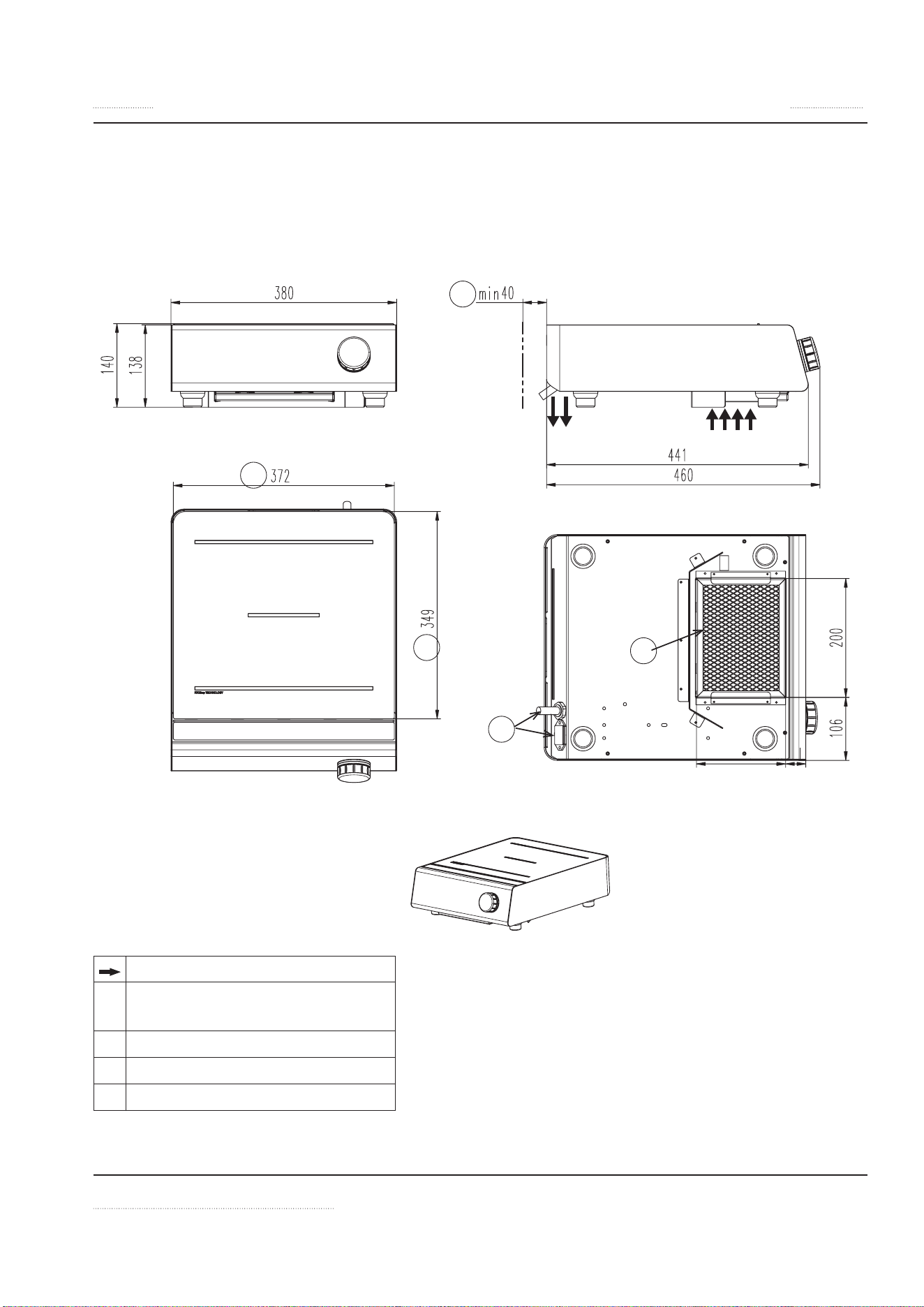
Dimensions: INSTINCT Hob 3, INSTINCT Hob 3.5, INSTINCT Hob 5 ..15
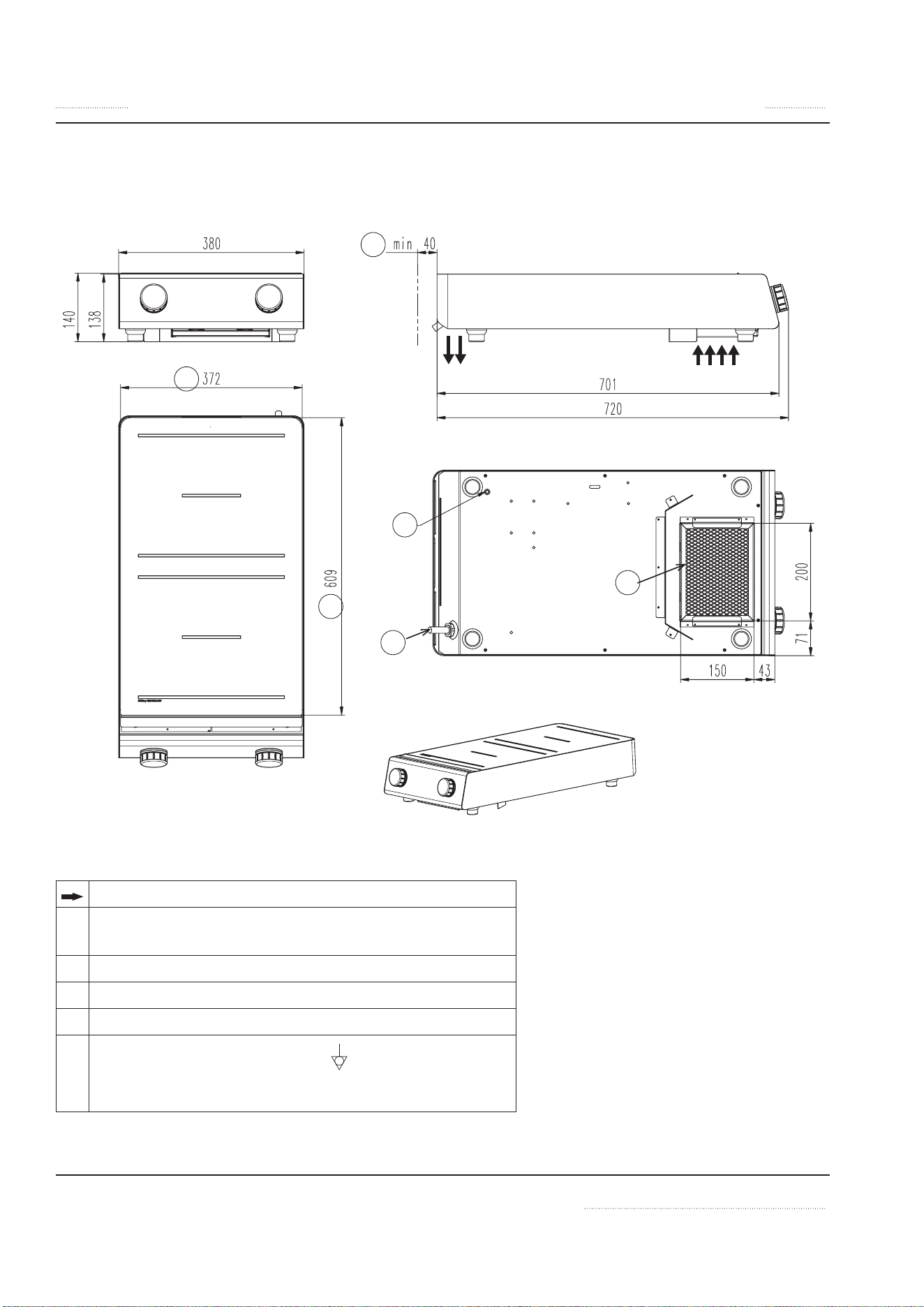
Dimensions: INSTINCT Hob 7, INSTINCT Hob 10 .....................................16
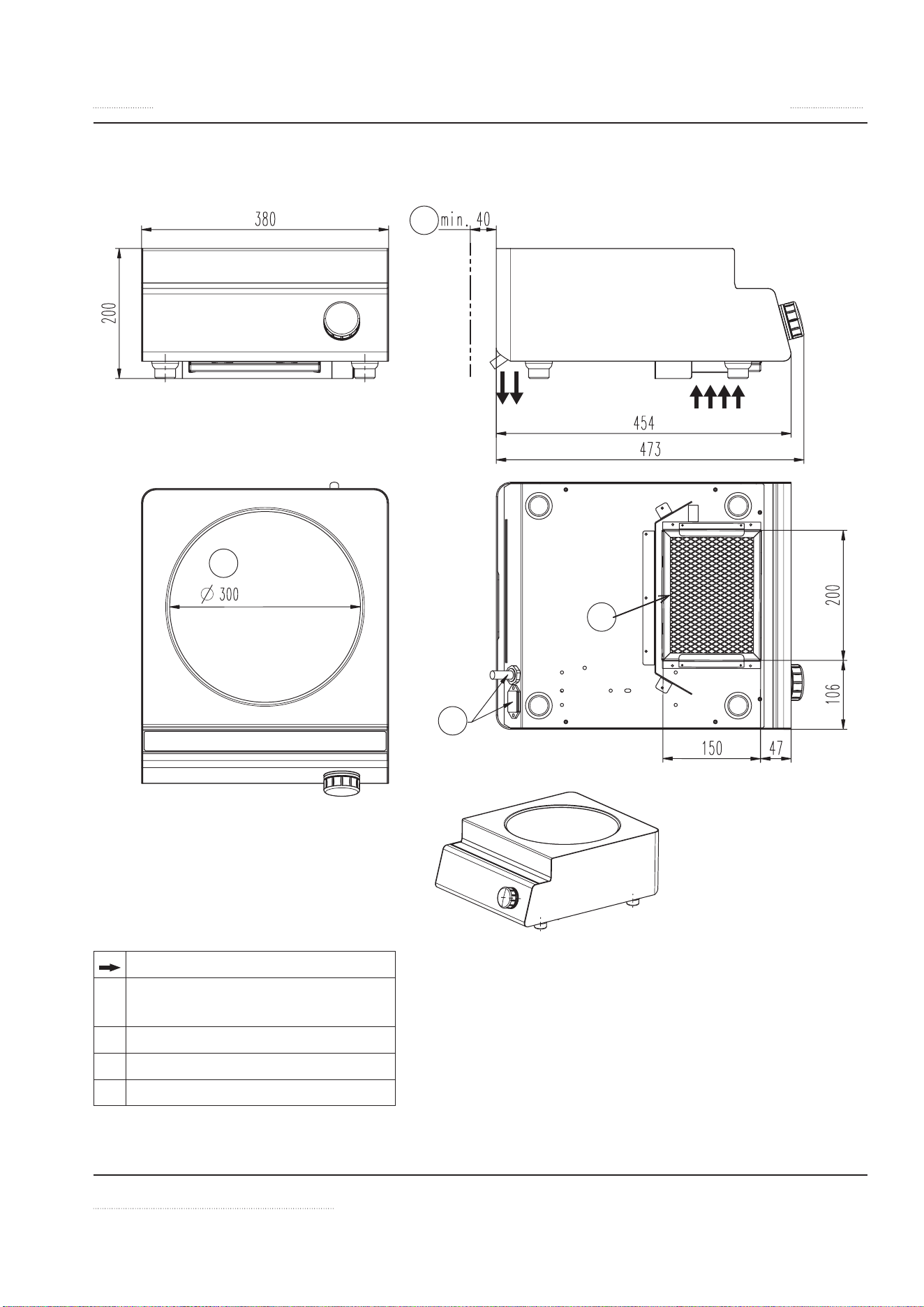
Dimensions: INSTINCT Wok3, INSTINCT Wok3.5, INSTINCT Wok 5,
INSTINCT Wok 8 ...................................................................................................17
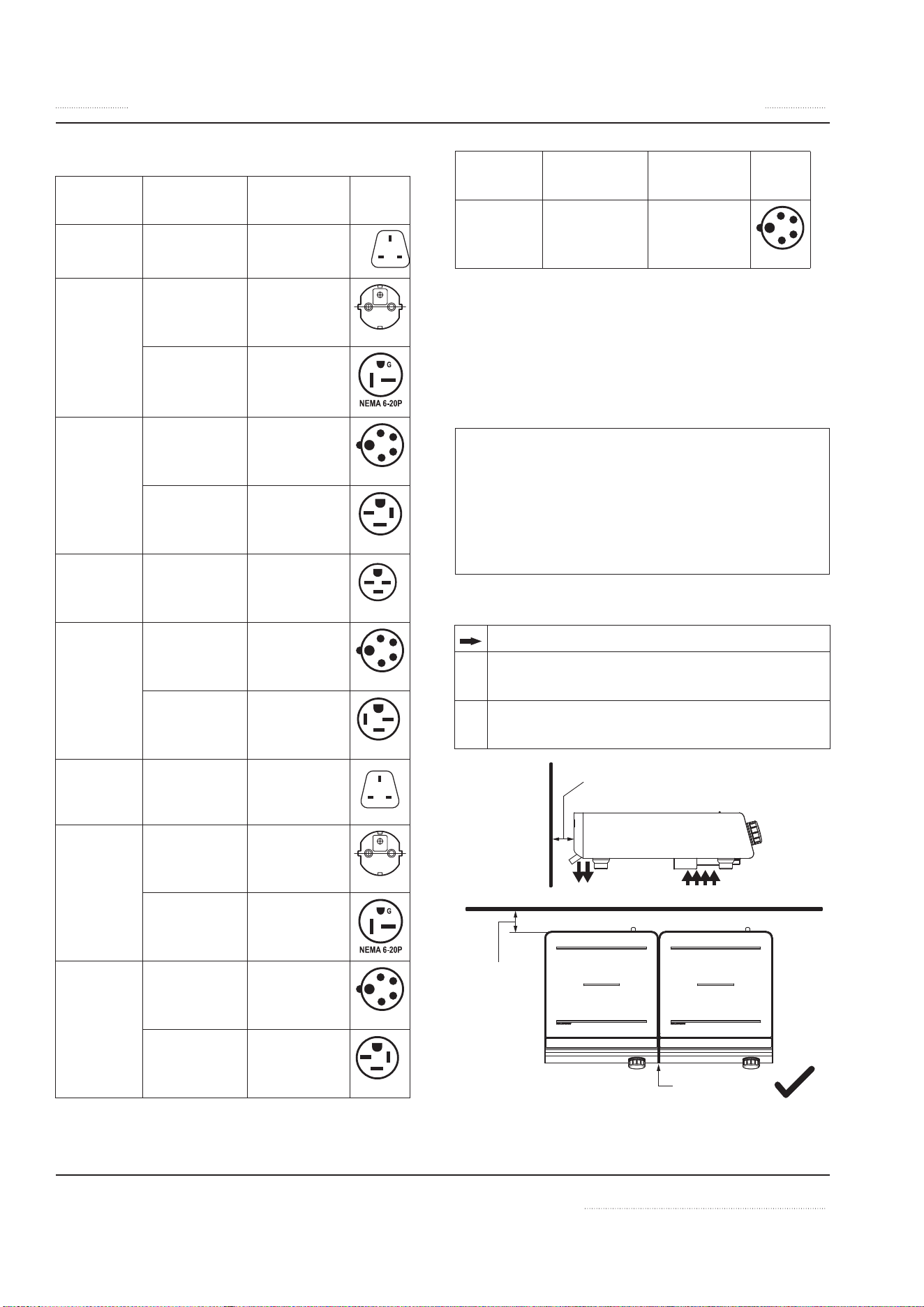
Electrical Specifications ....................................................................................18
Electrical Cables ................................................................................................... 18
Installation Clearance ........................................................................................18
Operating Conditions ........................................................................................19
Weights ................................................................................................................... 19
Installation Instructions .......................................................................20
Location of the Induction Appliance ...........................................................20
Ventilation Requirements ................................................................................20
Adjusting Legs ......................................................................................................20
Commissioning ....................................................................................................21
Function Test .........................................................................................21
Table of Contents

8 INSTINCT User Manual rev 01 06/20
Table of Contents (continued)
Section 3
Operation
Operation Safety—Disclaimer ........................................................................22
Operation Safety—Personal Protection......................................................23
Important Rules—Operation and Maintenance .................................25
Proper Induction Cookware .................................................................26
Condition ..............................................................................................................26
Round bottom Wok pans .................................................................................26
Material ................................................................................................................... 26
Boil Test ...................................................................................................................26
Size of Pan ..............................................................................................................27
Placing Pan On A Cook Zone ................................................................27
Display and Control Quick Reference ..................................................29
Control ...................................................................................................30
Turn unit on ...........................................................................................................30
LED Ring .................................................................................................................30
Switching Between cooking and holding modes ...................................30
Setting Power Level (1 to 12) and Lock/Unlock .......................................30
Selecting hold Temperature and Lock/Unlock .........................................30
Setting the Timer .................................................................................................31
Turning off .............................................................................................................31
Additional Settings ...............................................................................31
Automatic Pan Detection, No Pan No Heat .........................................32
When Appliance Is Idle .........................................................................32
Decommissioning .................................................................................32
Section 4
Maintenance
Maintenance Safety—Disclaimer .................................................................. 33
Dangerous Electrical Voltage .......................................................................... 33
Maintenance Safety—Cleaning ..................................................................... 33
Personal Protection ............................................................................................34
Daily Cleaning and Maintenance .........................................................35
Glass Cleaning ......................................................................................................35
Stainless Steel ...................................................................................................... 35
Visual Inspection of Silicone Seal ..................................................................35
Weekly Cleaning and Maintenance .....................................................36
Air Intake Filter .....................................................................................................36
Yearly Maintenance ...............................................................................37

INSTINCT User Manual rev 01 06/20 9
Table of Contents (continued)
Section 5
Troubleshooting
Dangerous Electrical Voltage .......................................................................... 38
Common Problems ................................................................................38
Symptoms ..............................................................................................38
Boil Test ..................................................................................................39
Dangers avoidance in case of accidents or malfunctions ..................39
Troubleshooting Without Error Code .................................................40
Troubleshooting — Error Code ............................................................42

10 INSTINCT User Manual rev 01 06/20
Description of Product
Built with a robust construction, our induction
appliances are compact and powerful with the
revolutionary RTCSmp® Technology (Realtime
Temperature Control System).
The RTCSmp® Technology monitors continuous-
ly in realtime, the energy supply, temperature of
the cook zone and the state of the components
such as the induction coil. This monitoring sys-
tem ensures the most efficient energy transfer, as
well as maximizes safety:
• Safety functions such as Pan Detection and
Boil Dry Protection are therefore guaranteed.
• The appliance starts heating only when a pan
is placed in the cook zone.
• When a malfunction occurs, the integrated
fault diagnostic system reports the malfunc-
tion instantly.
Application
The RTCSmp® induction appliances are designed
as compact equipment for use on the surface of
a counter or table.
Many applications throughout the day with your
appliance are possible, such as cooking, warm-
ing up, keeping warm, flambéing, and roasting
of food. All these applications are possible be-
cause:
• Temperature control is instantaneous and
precise. Instant energy transmission from in-
duction coil to the bottom of cookware, al-
lows for fast startup time.
• High power is possible for braising applica-
tion and quick sauté.
• High power also means you can heat up a
large stockpot quickly.
NOTE: To guarantee the reliability and perfor-
mance of the appliance, you must use the rec-
ommended types and sizes of pans with the ap-
pliance. See section 3 Operation.
Compliances
400V and 208V-230V models comply with the
latest European Norms:
EN 55014-1 EN 55014-2
EN 60529 EN 62233 (EMC/EMV)
EN 60335-1 EN 60335-2-36
EN 61000-3-11 EN 61000-3-12
208V and 208V-240V models comply with the
latest North American Norms:
UL 197
cULus Listed to CSA 22.2 109-M1981
UL 746C
FCC (CFR Title 47 Part 8 and Part 15B)
ICES-001 (Issue 4)
ICES-003 (Issue 6)
UL Sanitation to NSF 4
This device complies with Part 15 and 18 of the
FCC Rules. Operation is subject to the following
conditions: (1) This device may not cause harm-
ful interference, and (2) This device must accept
any interference received, including interference
that may cause undesired operation.
This ISM device complies with Canadian ICES-
001.
Cet appareil ISM est conforme à la norme NMB-
001 du Canada.
UL File No: E502348, E505967
Section 1
General Information
INSTINCT User Manual rev 01 06/20 11
Serial Plate Location
The serial plate is located on the bottom panel
of the unit. It specifies the model number, serial
number, and electrical specifications of the ap-
pliance.
Model Number
The model number is located on the serial plate.
This manual covers only the models specified on
the front cover of this manual.
Reading the Model Number
INSTINCT
Hob
Cooktop
INSTINCT
Wok
Single Wok
3.5 / 5 / 8 / 7
/ 10
Total power in kW
NOTE: 10 kW indicates dual
cooktops
Serial Number
Serial number is located on the serial plate.
Accessories
Induction cooking equipment requires Induc-
tion Ready pans to operate. Please consult your
equipment supplier for a list of our pan selection
and prices.
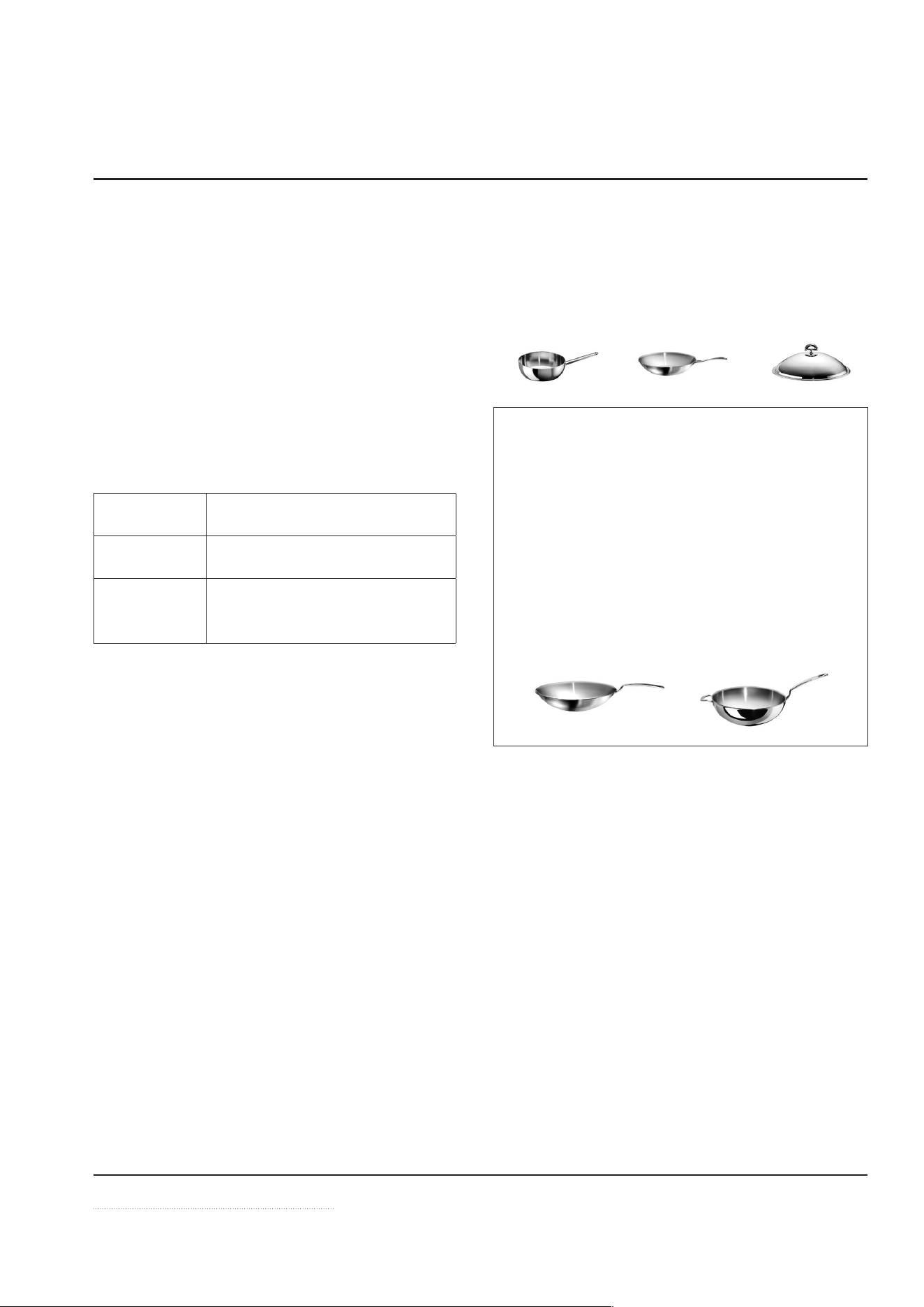
Notice —Wok Equipment
Use Wok Pans with Correct Contour
The wok pans used must be the correct con-
tour to the Ceran
® glass wok bowl. To reduce
premature failures such as overheating, wok
pans should not touch the glass but only sit
on the upper flange.
To guarantee the correct contour, we offer a
selection of induction wok pans. Please con-
sult your equipment supplier for details.

LIMITED WARRANTY
During the warranty period, Garland shall repair or, at Garland’s option, replace
parts determined by Garland to be defective in material or workmanship, and
with respect to services, shall re-perform any defective portion of said services.
The foregoing shall be the sole obligation of Garland under this Limited
Warranty with respect to the equipment, products and services. With
respect to equipment, materials, parts and accessories manufactured by
others, Garland’s sole obligation shall be to use reasonable efforts to obtain
the full benefit of the manufacturers’ warranties. Garland shall have no
liability, whether in contract, tort, negligence, or otherwise, with respect to non-
Garland manufactured products.
EXCLUSIONS FROM COVERAGE
LIMITATIONS OF LIABILITY
•The preceding paragraphs set forth the exclusive remedy for all claims based on failure of,
or defect in, products or services sold hereunder, whether the failure or defect arises before
or during the warranty period, and whether a claim, however instituted, is based on
contract, indemnity, warranty, tort (including negligence), strict liability, implied by statute,
common-law or otherwise. Garland, its servants and agents shall not be liable for any claims
for personal injuries or consequential damages or loss, howsoever caused. Upon the
expiration of the warranty period, all such liability shall terminate. THE FOREGOING
WARRANTIES ARE EXCLUSIVE AND IN LIEU OF ALL OTHER WARRANTIES, WHETHER WRITTEN,
ORAL, IMPLIED OR STATUTORY. NO IMPLIED WARRANTY OF MERCHANTABILITY OR FITNESS
FOR PARTICULAR PURPOSE SHALL APPLY. GARLAND DOES NOT WARRANT ANY PRODUCTS
OR SERVICES OF OTHERS.
REMEDIES
•The liability of Garland for breach of any warranty obligation hereunder is limited to: (i) the
repair or replacement of the equipment on which the liability is based, or with respect to
services, re-performance of the services; or (ii) at Garland’s option, the refund of the amount
paid for said equipment or services.
•Any breach by Garland with respect to any item or unit of equipment or services shall be
deemed a breach with respect to that item or unit or service only.
ALL GARLAND PRODUCTS
•Garland Commercial Ranges Limited (“Garland”) warrants all products to be free from
defects in material and workmanship for a period of 1 year from the date the product is
installed or 18 months from the date of shipment from our factories, whichever comes first,
unless stated otherwise for specific models or product lines.
LIMITED WARRANTY FOR INDUCTION PRODUCTS
(U.S.A & Canada)
PRODUCT SPECIFIC LIMITED WARRANTY
Heavy duty equipment, Garland Master Series, Garland Induction, U.S. Range Cuisine are warranted to
be free from defects in material and workmanship for a period of two (2) years from the date the product is
installed or thirty (30) months from the date of shipment from our factory, whichever comes first and one (1)
year parts and/or labor.
Stainless steel fry pots are warranted to be free from defects that would cause shortening leaks due to weld
failures for the period of one (1) year parts and labor. The stainless- steel fry pots are warranted for five (5) years,
however, after one (1) year the warranty is limited to replacement parts only.
General Market Clamshell Grills/Broilers:
In Canada/USA, are warranted to be free from defects in material and workmanship for a period of two (2)
years from the date the product is installed or thirty (30) months from the date of shipment from our factory,
whichever comes first and two (2) years parts and/or labor.
All other regions, are warranted to be free from defects in material and workmanship for a period of one (1)
year from the date the product is installed or thirty (30) months from the date of shipment from our factory,
whichever comes first and two (2) years parts and one (1) year labor.
Convection oven warranty coverage:
• Garland MCO (full size only) models: two (2) years limited parts and one (1) year labor.
•T
his Limited Warranty is available only to the original purchaser of the product and is not
transferable. You must have your original sales receipt for warranty coverage.
•
Repair or replacement of parts required because of misuse, improper care or storage,
negligence, alteration, accident, damage in shipment, fire, floods, power changes, use of
incompatible supplies or lack of specified maintenance, other hazards or acts of God
shall
be excluded.
•
Warranty protection is only offered for equipment installed with the procedures described
in the Garland operations and installation manual.
•
Normal maintenance items, including but not limited to, light bulbs, fuses, gaskets, O-rings,
interior and exterior finishes, lubrication, de-liming, broken glass, etc.
•
Adjustments and calibration of temperatures, speed and air flows.
•
Failures caused by erratic voltages or gas supplies.
•
Where equipment is being used for applications other than those approved by Garland
Equipment exported to foreign countries.
•
Consequential damages (the cost of repairing other property which is damaged), loss of
time, profits, use or any other non-cooking related incidental damages of any kind.
•
Travel costs beyond 100 miles in the USA and 150 km in Canada, or two (2) hours, travel
other than overland, overtime, holiday charges, and any special arrangements.
•
Any travel costs above actual time (One-way travel ONLY paid).
•Any charges additional to the SRT (Standard Repair Times) will be authorized and paid at the
discretion of Garland.
•Improper or unauthorized repair.
•Flame safety components on all ranges – 90 days from the original equipment installation
date.
•This Limited Warranty does not apply and shall not cover any products or equipment
manufactured or sold by Garland when such products or commercial equipment is installed or
used in a non-commercial application. Installation not within the applicable building or fire
codes render this Limited Warranty and any responsibility or obligations associated therein
null and void. This includes any damage, costs or legal actions resulting from the installation of
any Garland manufactured commercial cooking or warming equipment in a non-commercial
application or installation.
Door warranty five (5) years limited parts except window.
• U.S. Range Summit models: one (1) year limited parts and one (1) year labor. Door warranty
five (5) years limited parts except window.
• Sunfire models: one year (1) limited parts and one (1) year labor. Door warranty three (3)
years limited parts except window.
During the warranty period, Garland shall repair or, at Garland’s option, replace parts
determined by Garland to be defective in material or workmanship, and with respect to
services, shall re-perform any defective portion of said services.
The foregoing shall be the sole obligation of Garland under this Limited Warranty with
respect to the equipment, products and services. With respect to equipment, materials, parts
and accessories manufactured by others, Garland’s sole obligation shall be to use reasonable
efforts to obtain the full benefit of the manufacturers’ warranties. Garland shall have no
liability, whether in contract, tort, negligence, or otherwise, with respect to non-Garland
manufactured products.
Note: Warranty terms may vary based on agreement at time of purchase.
OVERVIEW OF GENERAL WARRANTY STATEMENTS
WHAT WE WILL DO
We will repair or replace the defective appliance, component or part. Such repair or
replacement will be at the expense of Garland except for any travel costs above actual time
(one-way travel ONLY paid).
REPLACEMENT PARTS
Parts, 90 days, no labor. KitchenCare 1-844-724-2273 Fax:1-812-406-4100.
HOW TO GET SERVICE
Contact our Factory Authorized Service agent to obtain warranty service. To find the name
and location of the nearest FAS call your dealer, or call the Garland Service Line at
1-844-724-2273. You can also go the Garland website, www.garland-group.com, select
Service, select Locator, key in zip code and you will be given the FAS for the zip code entered.
When calling for service, please ensure you have the model number, serial number and date
of purchase or installation and description of the problem. You must keep sales receipts for
proof of the date of purchase.
WARRANTY CLAIM PROCEDURE
Customer shall be responsible to:
•
Immediately advise the Dealer or Garland Factory Authorized Service Agency
of the equipment serial number and the nature of the problem. For a list of authorized
service agents, please refer to the Garland web site at www. garland-group.com
•
Verify the problem is a factory responsibility. Improper installation, gas
adjustments or misuse of equipment are not covered under this Limited Warranty.
•
Cooperate with the Service Agency so that warranty service may be completed
during normal working hours.
•
Submit sufficient documentation on a timely manner for reimbursement.
G
OVERNING LAW
For equipment, products and services sold in Canada this Limited Warranty shall be
governed by the laws of the province of Ontario, Canada; otherwise this Limited Warranty
shall be governed by the laws of the state of Delaware, U.S.A., excluding their conflicts of law
principles. The United Nations Convention on Contracts for the International Sale of Goods is
hereby excluded in its entirety from application to this Limited Warranty.
Garland Commercial Ranges Ltd.
1177 Kamato Road, Mississauga, Ontario, Canada L4W 1X4
844-724-CARE
WWW.GARLAND-GROUP.COM
Part # 4530446 Rev. 1 (June 11/20)
Garland Commercial Ranges Ltd. reserves the right
to change prices, accessories, or products without notice.

Section 2
Installation
INSTALLATION SAFETY—DISCLAIMER
n
DANGER
Installation must be carried out by registered
installation contractors only.
The contractors are responsible for interpret-
ing all instructions correctly and performing
the installation in compliance with all appli-
cable national and local regulations.
The warning signs and serial plates on the
equipment must strictly be followed.
n
Warning
This equipment is intended for indoor use
only. Do not install or operate this equip-
ment in outdoor areas.
n
Warning
To avoid instability, the installation area must
be capable of supporting the combined
weight of the equipment and food product.
The equipment must be level side to side and
front to back.
,
Caution
Consultants, fabricators and designers must
consult their counter-top suppliers when de-
signing an appropriate support structure and
clearance for the counter-top and the instal-
lation.
Notice
Induction equipment that is not installed
correctly will have warranty voided.
INSTALLATION SAFETY—CLEARANCE AND
VENTILATION
n
DANGER
Risk of Fire or Shock or Equipment Failure
All minimum clearances must be maintained.
Air intake vents and exhaust vents must not
be blocked or be restricted by the installa-
tion.
,
Caution
This equipment must only be operated un-
der an approved ventilation system in accor-
dance with all applicable national and local
regulations. Exceptions may apply.
Notice
The maximum ambient temperature for
the induction appliance to operate must
not exceed 40°C [104°F].
Failure to provide adequate ventilation
will cause the appliance to overheat, to re-
duce power, or to shutdown.
NOTE: Always maintain enough space be-
tween and around the equipment for mainte-
nance and service.

INSTINCT User Manual rev 01 06/20 13
Section 2 Installation
INSTALLATION SAFETY—ELECTRICAL
n
DANGER
All electrical connections must be carried out
by a certified electrical contractor, who is re-
sponsible for the correct rating and installa-
tion of the appliance. The contractor has to
comply with all legal safety regulations and
all applicable national and local electrical
codes.
n
Warning
Markings and warning labels mounted di-
rectly on the equipment must be observed at
all times and kept in a fully legible condition.
n
Warning
This equipment must be positioned so that
the plug is accessible unless other means for
disconnection from the power supply, such
as circuit breaker or disconnect switch, is pro-
vided.
n
Warning
CE Induction Appliance only: If ground
fault current protective switches are used,
they must be designed for a minimum fault
current of 30mA, Type B or B+.
Notice
Ensure the supply voltage and the line cur-
rent match the specifications given on the
serial plate affixed to the appliance. Wrong
voltage will damage the appliance. A stable
power supply must be provided.
Notice
Always refer to the serial plate on the appli-
ance to verify the electrical data. When the
data listed on the serial plate is different than
that listed in this manual, contact the manu-
facturer or the authorized representative.
Notice
All cables must be routed, protected and ten-
sion free.
14 INSTINCT User Manual rev 01 06/20
Installation Section 2
PERSONAL PROTECTION
n
DANGER
All utilities (gas, electric, water and steam)
must be OFF to all equipment and locked
out of operation according to national/re-
gional, as well as company approved practic-
es during installation, maintenance and ser-
vicing. Always allow appliance to cool.
n
DANGER
Use appropriate safety equipment during in-
stallation, maintenance and servicing.
n
DANGER
Never stand, sit, or lean on the equipment!
They are not designed to hold the weight of
an adult, and may collapse or tip if misused in
this manner.
n
DANGER
To avoid cardiac pacemaker malfunction,
consult your physician or pacemaker man-
ufacture about effects of electromagnetic
field on your pacemaker.
n
DANGER
Replace defective power cables immediately
by an authorized service agency.
n
Warning
Markings and warning labels mounted di-
rectly on the equipment must be observed at
all times and kept in a fully legible condition.
n
Warning
Risk of burns from high temperatures. You
may get burnt if you touch any of the parts
during operation. Surfaces close to the cook-
ing area including side panels may get hot
enough to burn skin. Use extreme caution to
avoid coming in contact with hot surfaces or
hot grease. Wear personal protective equip-
ment.
,
Caution
Use caution when handling metal edges of
all equipment.
INSTINCT User Manual rev 01 06/20 15
Section 2 Installation
Specifications
DIMENSIONS: INSTINCT HOb 3, INSTINCT HOb 3.5, INSTINCT HOb 5
Dimensions are specified in mm [inches].
1
2
2
3
4
[14.96]
[5.51]
[5.43]
[14.65]
[13.74]
[18.11]
[17.36]
[1.57]
[7.87][4.17]
150
[5.91]
34
[1.34]
Indicates the direction of airflow
1 Distance to wall or other obstruc-
tion, minimum = 40mm [1.57”]
2 Ceran Glass Cook Top Dimensions
3 Power Cable Connection
4 Air Filter
16 INSTINCT User Manual rev 01 06/20
Installation Section 2
DIMENSIONS: INSTINCT HOb 7, INSTINCT HOb 10
Dimensions are specified in mm [inches].
[14.96]
1
[1.57]
[5.51]
[5.43]
[14.65]
2
2
[23.98]
[28.35]
[27.59]
[5.91]
[1.69]
[7.87][2.80]
3
4
5
Indicates the direction of airflow
1 Distance to wall or other obstruction, minimum =
40mm [1.57”]
2 Ceran Glass Cook Top Dimensions
3 Power Cable Connection
4 Air Filter
5 Equipotential bonding point (EN60335)
INSTINCT User Manual rev 01 06/20 17
Section 2 Installation
DIMENSIONS: INSTINCT WOk3, INSTINCT WOk3.5, INSTINCT WOk 5, INSTINCT WOk 8
[14.96]
[5.91]
[1.85]
[7.87][4.17]
[7.87]
1
[1.57]
[18.62]
[17.87]
2
3
4
[11.81]
Indicates the direction of airflow
1 Distance to wall or other obstruc-
tion, minimum = 40mm [1.57”]
2 Ceran Glass Wok Bowl Diameter
3 Power Cable Connection
4 Air Filter
18 INSTINCT User Manual rev 01 06/20
Installation Section 2
ELECTRICAL SPECIFICATIONS
Model Power /
Current
Voltage /
Phases
Plug
INSTINCT
Hob 3
3000W /
13A
230V / 1Φ
TYP G
PE
INSTINCT
Hob 3.5
3500W /
16A
230V / 1Φ
EU1-16P
3500W /
17A
208V / 1Φ
208V / 2Φ
INSTINCT
Hob 5
5000W / 8A 400V / 3Φ
EU 5-Pole
5000W /
14A
208V / 3Φ
NEMA 15-20P
G
X
Y
Z
INSTINCT
Hob 7
7000W /
20A
208V / 3Φ
NEMA 15-30P
G
X
Y
Z
INSTINCT
Hob 10
10000W /
16A
400V / 3Φ
EU 5-Pole
10000W /
28A
208V / 3Φ
NEMA 15-50P
G
X
Y
Z
INSTINCT
Wok 3
3000W /
13A
230V / 1Φ
TYP G
PE
INSTINCT
Wok 3.5
3500W /
16A
230V / 1Φ
EU1-16P
3500W /
17A
208V / 1Φ
208V / 2Φ
INSTINCT
Wok 5
5000W / 8A 400V / 3Φ
EU 5-Pole
5000W /
14A
208V / 3Φ
NEMA 15-20P
G
X
Y
Z
Model Power /
Current
Voltage /
Phases
Plug
INSTINCT
Wok 8
8000W /
12A
400V / 3Φ
EU 5-Pole
ELECTRICAL CAbLES
Power supply cable and plug are included,
1.8-meter [6-foot] long.
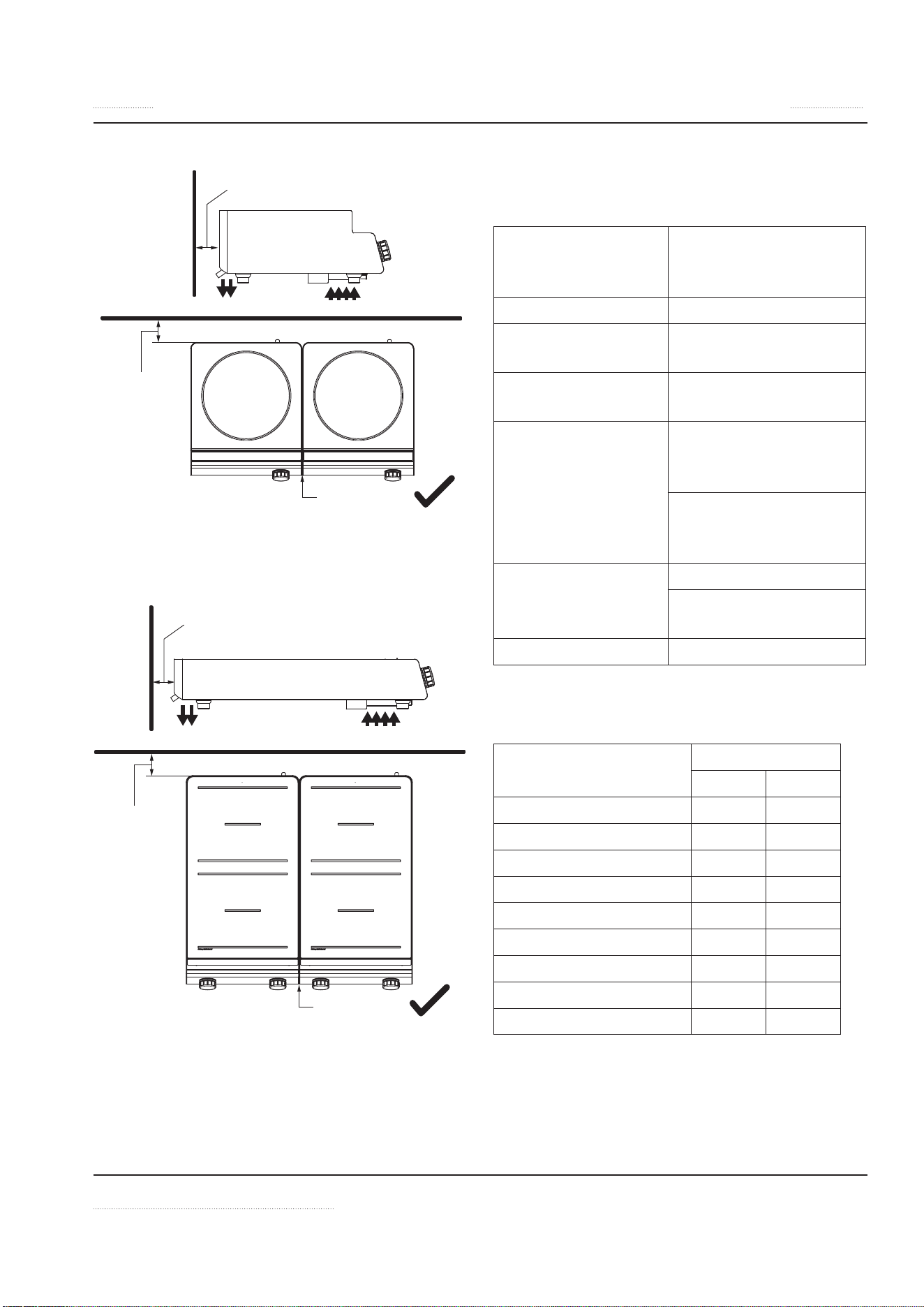
INSTALLATION CLEARANCE
Notice
The orientation of each appliance in a par-
allel configuration will affect the ventilation
requirements. Ensure the final installation
meets all operating and ventilation require-
ments.
Refer to example below:
Indicates the direction of airflow
a Distance to wall or other obstruction, mini-
mum = 40mm [1.57”]
y A gap between two countertop units is not
required.
y = min 0mm [0”]
a = min 40mm
[1.57”]
a = min 40mm [1.57”]
INSTINCT User Manual rev 01 06/20 19
Section 2 Installation
y = min 0mm [0”]
a = min 40mm
[1.57”]
a = min 40mm [1.57”]
y = min 0mm [0”]
a = min 40mm
[1.57”]
a = min 40mm [1.57”]
OPERATING CONDITIONS
For the appliance to function properly, the fol-
lowing conditions must be maintained.
Maximum Tolerance
of the Nominal Sup-
ply Voltage
+6 /-10 %
Supply frequency 50/60 Hz
Ingress Protection
class
IP X3
Minimal Diameter of
Induction Pan
12cm [5”]
Maximum Ambient
Temperature
In Storage,
-20°C to +70°C
[-4°F to +158°F]
In Operation,
+5°C to +40°C
[+41°F to +104°F]
Maximum Relative
Air Humidity
In Storage, 10% to 90%
In Operation, 30% to
90%
Noise level < 43dB
WEIGHTS
Model Net Weight
kg lb
INSTINCT Hob 3 12 27
INSTINCT Hob 3.5 12 27
INSTINCT Hob 5 14 31
INSTINCT Hob 7 21 47
INSTINCT Hob 10 21 47
INSTINCT Wok 3 14 31
INSTINCT Wok 3.5 14 31
INSTINCT Wok 5 16 36
INSTINCT Wok 8 18 40
20 INSTINCT User Manual rev 01 06/20
Installation Section 2
Installation Instructions
LOCATION OF THE INDUCTION APPLIANCE
,
Caution
Do not position the air intake vent near steam
or heat exhaust of another appliance.
• The induction appliance must be installed on
an even, flat, non-combustible surface.
• The surface must be able to hold a load of
40kg [88.2lb] per appliance that is listed in
this manual.
• Ensure the induction appliance is stable and
will not slide or fall down.
• The induction appliance must not be installed
or placed near or on a hot surface.
• The induction appliance must be leveled.
• Similar to other electronic equipment, induc-
tion equipment is sensitive to moisture and
high heat. Protect the induction appliance
from heat, steam and grease generated by
other equipment, such as oven, deep fryer,
pasta cooker, steamers, and water bath.
• The control switches on the front panel must
not be blocked or obstructed.
• Keep the induction appliance away from com-
bustible materials, vapors or liquids.
VENTILATION REQUIREMENTS
Read and understand all installation
safety instructions regarding Clearance
and Ventilation at the beginning of this
chapter.
• Ensure the induction appliance does not take
in hot ambient air or steam from another ap-
pliance, especially when the appliance is in-
stalled next to heat generating equipment
such as fryers or ovens.
• See also Installation Clearance
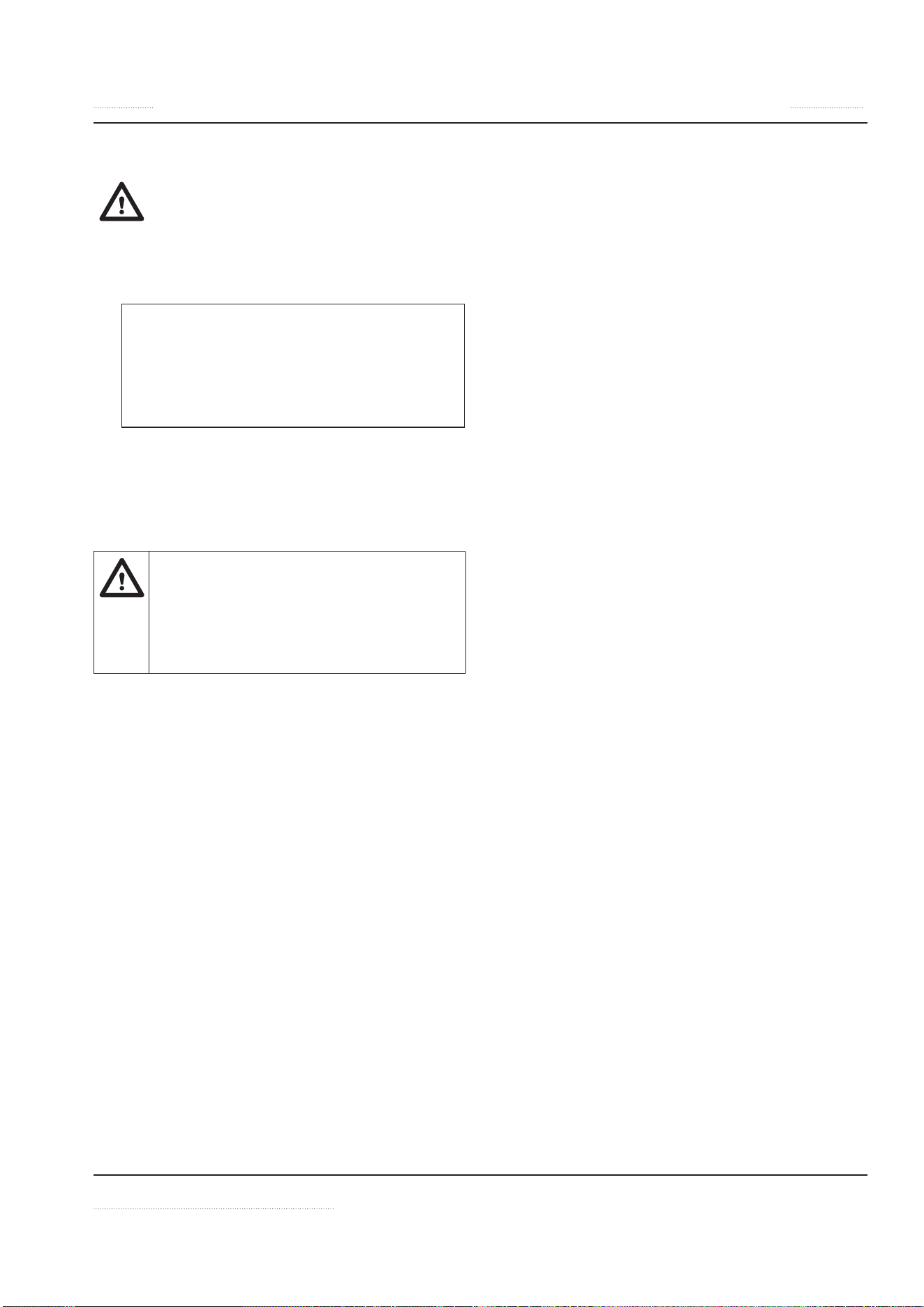
ADJUSTING LEGS
Adjust the height of the leg by turning the bot-
tom part as shown:
2. Adjust the height of the leg by turning the bot-
tom part as shown.
1. Open the leg
screw
INSTINCT User Manual rev 01 06/20 21
Section 2 Installation
COMMISSIONING
Read and understand all installation
safety instructions regarding Electrical
and Personal Protection.
1. Remove all objects from the glass-top and
examine the glass.
,
Caution
Do not continue if the glass-top is
cracked, chipped or damaged in any oth-
er way. Contact an authorized service
agency for assistance.
2. Connect the appliance to power supply.
3. Test different functions of the appliance.
Function Test
• Read and understand all installation
safety instructions regarding Per-
sonal Protection.
• Observe also ALL operation safety
requirements in section 3 Operation.
Testing procedure:
1. Examine the cookware for induction cooking:
• Pans must be induction ready. See details
in section 3 Operation.
• Minimum pan size: Pan must have bot-
tom diameter larger than 12cm [5”]. Oth-
erwise, the pan will not be heated. This is
a safety feature. The sensors do not de-
tect pan smaller than this minimum size.
2. Put some water in an induction pan and place
it in the center of the cook-zone.
3. Follow operational instructions in section 3
to test:
• Cook Mode with different power levels.
• Hold Mode with set temperatures.
• Lock Function
• Timer Function
4. Remove pan away from the cook-zone, the
No Pan Icon is shown on display.
5. Place the pan back on the cook-zone and the
heating process resumes.
NOTE: The LED ring illuminates continuous-
ly again when energy is being transferred to
the pan.
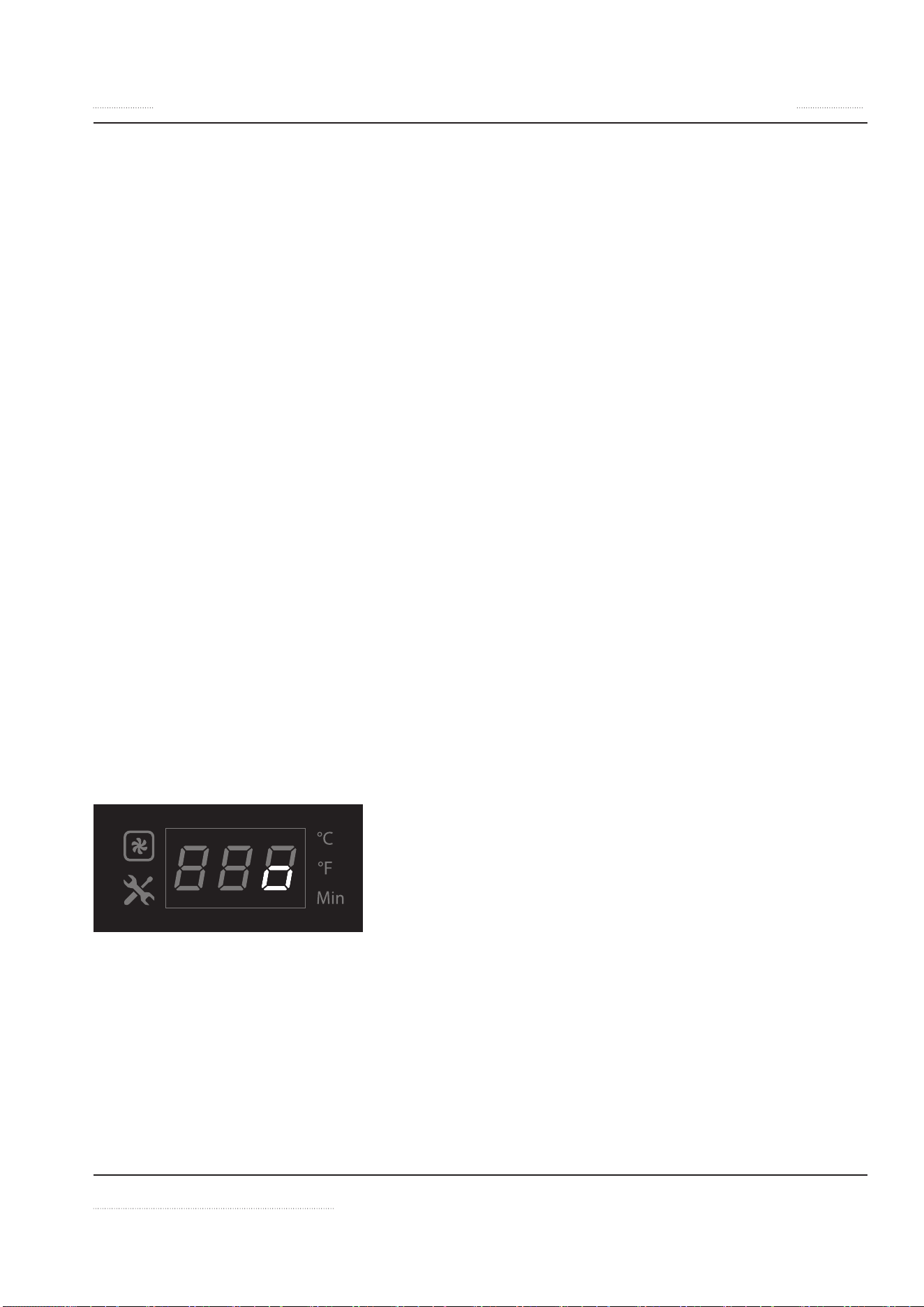
6. Turn the appliance off. When the unit is
switched off, a
o appears on the display.
If the appliance does not function as expected
despite using quality induction pans, refer to
section 5 Troubleshooting.
To test the efficiency of a pan for induction cook-
ing, refer to section 5 Troubleshooting.

22 INSTINCT User Manual rev 01 06/20
OPERATION SAFETY—DISCLAIMER
n
DANGER
The on-site supervisor is responsible to train
operators for operating, maintaining and en-
suring that operators are made aware of the
inherent dangers of operating this equip-
ment.
n
DANGER
Risk of fire/shock/equipment failure. All min-
imum clearances must be maintained. Do
not obstruct vents or openings.
n
Warning
This equipment is intended for indoor use
only. Do not install or operate this equip-
ment in outdoor areas.
Notice
The reliability of the appliance can only be
guaranteed when it is used properly. The ap-
pliance must always be operated within the
limits and/or the operating conditions pro-
vided in this manual.
Notice
Avoid dropping any hard objects onto the
equipment. Damages to the heating surface
will shortened the life cycle of the equipment
or incur high service costs.
Notice —Models with Glass-Top
Use Only Induction Suitable Cookware
Use only induction suitable cookware with
proper sizes and made of proper material.
The induction suitable cookware must be in
good condition without any uneven, arched
or partially detached bottoms.
Using unsuitable cookware can cause the ap-
pliance to fail prematurely, void your warran-
ty, and incur high service costs.
Section 3
Operation

INSTINCT User Manual rev 01 06/20 23
Section 3 Operation
OPERATION SAFETY—PERSONAL
PROTECTION
Notice
Induction appliances are more powerful,
heat up pans quicker, and cook food faster
than conventional cooking equipment. Your
induction appliance will require different use
and care than other conventional equipment.
Do not operate the equipment without read-
ing this manual and understanding all safety
requirements.
n
DANGER
If any part of the appliance is cracked or bro-
ken, turn off directly the appliance and Im-
mediately disconnect the appliance from
supply. Only if it is possible and safe, discon-
nect the equipment from main power supply.
Do not touch any parts inside the appliance.
Disconnect electric power at the main power
disconnect for all equipment being serviced.
Failure to disconnect the power at the main
power supply disconnect could result in seri-
ous injury or death. The knob DOES NOT dis-
connect incoming power.
Contact an authorized service agency for as-
sistance.
n
DANGER
Do not operate any appliance with a dam-
aged or pinched cord or a damaged plug. All
repairs must be performed by a qualified ser-
vice company.
n
DANGER
Keep power cord AWAY from HEATED sur-
faces. DO NOT immerse power cord or plug
in water. DO NOT let power cord hang over
edge of table or counter.
n
DANGER
To avoid cardiac pacemaker malfunction,
consult your physician or pacemaker man-
ufacture about effects of electromagnetic
field on your pacemaker.
n
DANGER
Never stand, site, or lean on the equipment!
They are not designed to hold the weight of
an adult, and may collapse or tip if misused in
this manner.
,
Caution
Short Cook Time
Induction appliances cook food faster than
conventional cooking equipment. To avoid
overheating and burning, check the cooking
process frequently. Never leave the appliance
unattended during operation.
,
Caution
Metallic objects are heated up very quick-
ly when placed on the induction cook zone
during operation. To avoid injury,
DO NOT place any objects such as closed
cans, aluminum objects (aluminum foils),
cutlery, jewelry, or watches on the appliance.
DO NOT place any object such as paper, card-
board, or cloth on the cooking surface, be-
cause this creates a fire hazard.
DO NOT place credit cards, phone cards,
tapes, or any objects that are sensitive to
magnetism on the appliance.
DO NOT use the appliance for storage.
DO NOT place any paper products, cooking
utensils, cutlery, plastic vessels or food on the
appliance.
DO NOT place metallic objects such as kitch-
en utensils, cutlery etc. on the hob surface
within the cooking zones since they could
get hot.

24 INSTINCT User Manual rev 01 06/20
Operation Section 3
,
Caution
Aluminum foil must not be used with induc-
tion cook-top! Aluminum foil may ignite and
cause a fire!
Notice
Do not use the cooktop for food preparation
such as cutting and chopping.
n
Warning
Risk of burns from high temperatures. You
may get burnt if you touch any of the parts
during operation. Surfaces close to the cook-
ing area including side panels may get hot
enough to burn skin. Use extreme caution to
avoid coming in contact with hot surfaces or
hot grease. Wear personal protective equip-
ment.
n
Warning
Take care when operating the appliance, as
rings, watches and similar objects worn by
the user could get hot when in close proxim-
ity to the hob surface.
n
Warning
During operation, it is possible that the floor
around the unit become slippery. Wear suit-
able footwear and clean the floor if necessary.
Cooking with Induction Counter-Tops Models
n
Warning
Never Leave An Empty Pan On Cooktop
Induction appliances heat up empty pans
very quickly. Never operate the appliance
with an empty pan. Do not pre-heat pan. Al-
ways put food products, water or oil into the
pan before turning on the appliance. Failure
to do so will result in irreparable damage.
Notice
Broil-Dry Protection
Cook zones are monitored by temperature
sensors. The sensors can detect overheating
at the base of a cooking pan.
When an overheated pan (overheated oil,
empty pan) is detected, the appliance stops
transferring energy to the pan immediately.
You must turn off the appliance and let it cool
down before re-starting the appliance.
,
Caution
Do Not Touch Overheated Appliance
To avoid burn injuries, do not touch the ap-
pliance when a pan is overheated and take
all the necessary precautions when removing
the overheated pan.
n
Warning
Steam can cause serious burns. Always wear
some type of protective covering on your
hands and arms when removing lids or pans
from the appliance. Lift the lid or pan in a way
that will direct escaping steam away from
your face and body.
n
Warning
Never leave any pan during the cooking pro-
cess unattended.
INSTINCT User Manual rev 01 06/20 25
Section 3 Operation
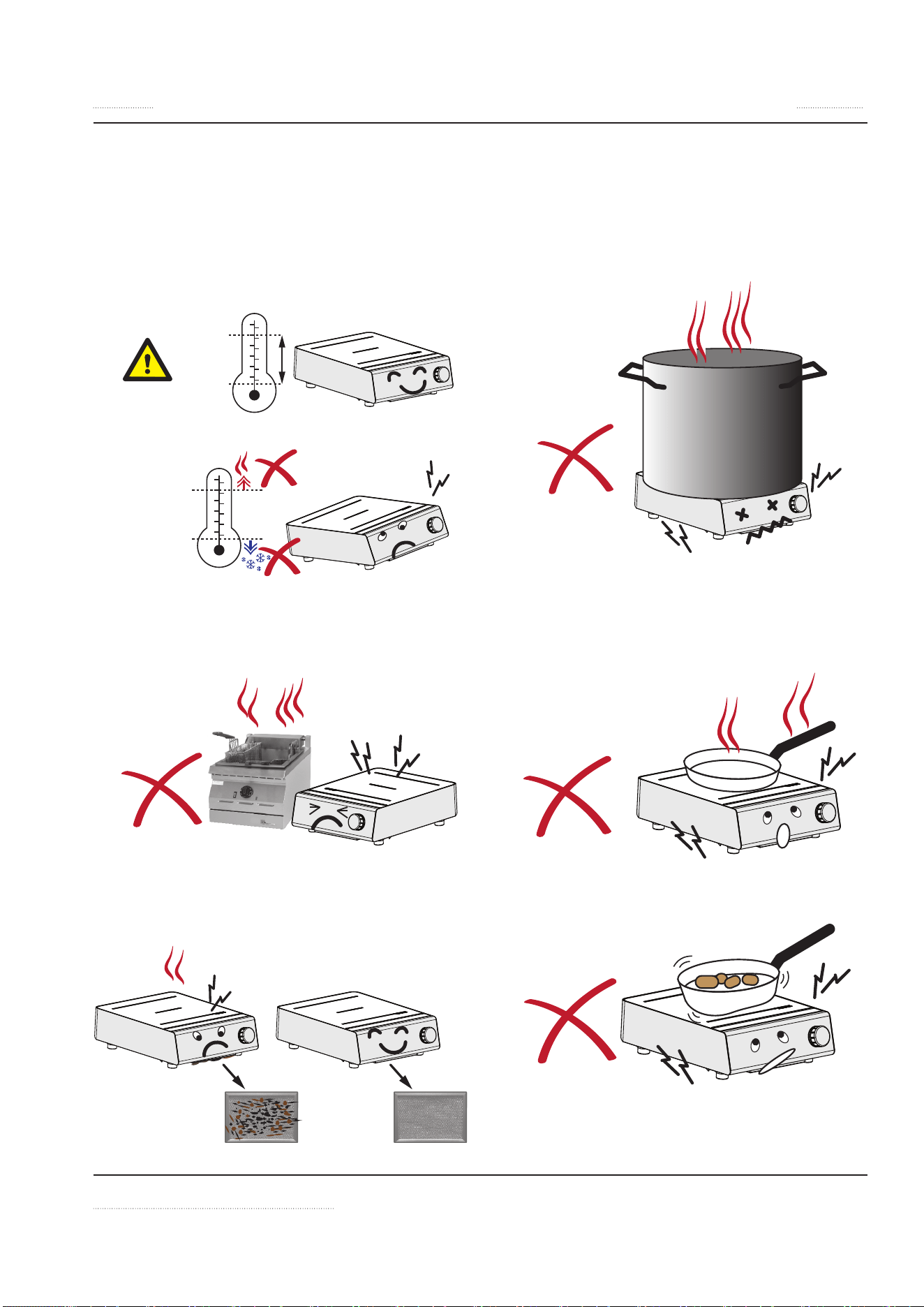
Important Rules—Operation and Maintenance
Follow these simple rules to ensure reliable and repeatable performance of your induction equip-
ment:
1
Keep kitchen temperature below 40°C
[104°F].
40
o
C/104
o
F
5
o
C/41
o
F
40
o
C/104
o
F
5
o
C/41
o
F
2
Never place your induction equipment
next to any grease generating or heat
generating equipment.
3
Clean the intake filter at least once a
week or as often as required.
4
Use only pans that fits the glass. Do not
use oversized pans.
5
Never pre-heat the pan. Place the pan on
the cook zone only when you are ready
to cook.
6
Do not use dented pans because it will
cause damages to the electronics.
26 INSTINCT User Manual rev 01 06/20
Operation Section 3
Proper Induction Cookware
CONDITION
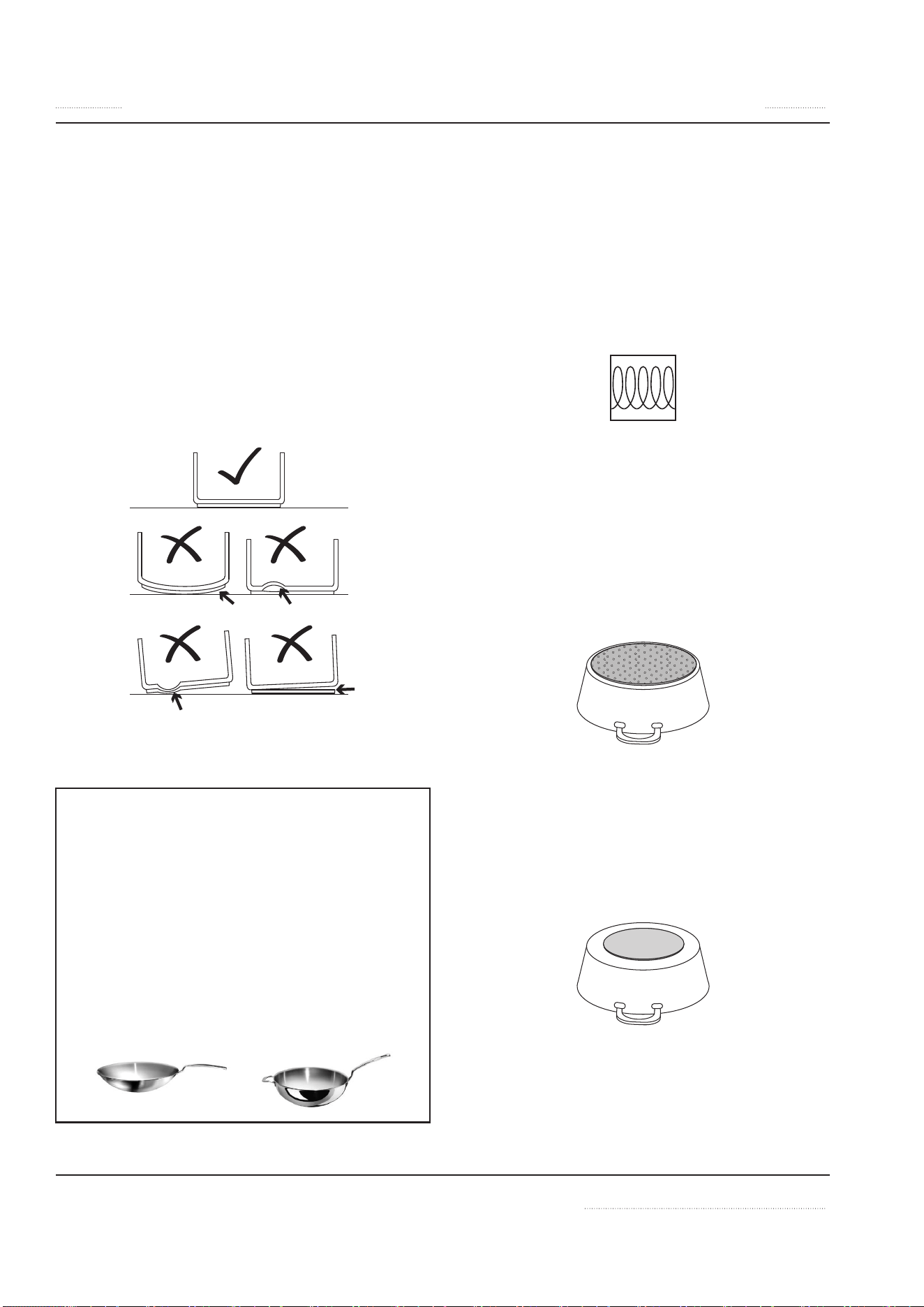
• Pans with layer separation (outward and in-
ward bubbles), arching or partially detached
bottoms must be replaced.
• When these pans are used, the sensors under
the glass-top cannot detect temperature cor-
rectly. These pans will overheat the sensors
and eventually will damage the sensors and
the generator. (Below, examples of good and
bad pans in cross-sections.)
ROUND BOTTOM WOK PANS
• For models with Ceran® Glass Wok Bowls:
Notice -Wok Equipment
Use Wok Pans with Correct Contour
The wok pans used must be the correct con-
tour to the Ceran® glass bowl. To reduce pre-
mature failures such as overheating, wok
pans should not touch the glass but only sit
onto the upper flange.
To guarantee the correct contour, we offer a
selection of wok induction pans. Please con-
sult your equipment supplier for details.
MATERIAL
• USE cookware made of conductive and mag-
netic materials. If the pan bottom attracts
a magnet, the pan is suitable for induction
cooking. Look for cookware that is labeled
suitable for induction or with an induction
compatible symbol.
Induction
• DO NOT USE cookware made of aluminum,
copper, glass or ceramics.
• NOTE—Steel inserts on bottom:
Cookware base inserted with areas of alumi-
num reduces the magnetic area for induction
cooking. The appliance may supply less en-
ergy to the cookware or have difficulties in
detecting the pan.
• NOTE—Non-magnetic cookware with a small
magnetic base:
The exposed non-magnetic metal on the
base may affect the induction field and sub-
sequently, less energy may be suppled to the
cookware.
BOIL TEST
To test the efficiency of a pan for induction cook-
ing, perform a boil test. See instructions in sec-
tion 5 Troubleshooting.
INSTINCT User Manual rev 01 06/20 27
Section 3 Operation
SIZE OF PAN
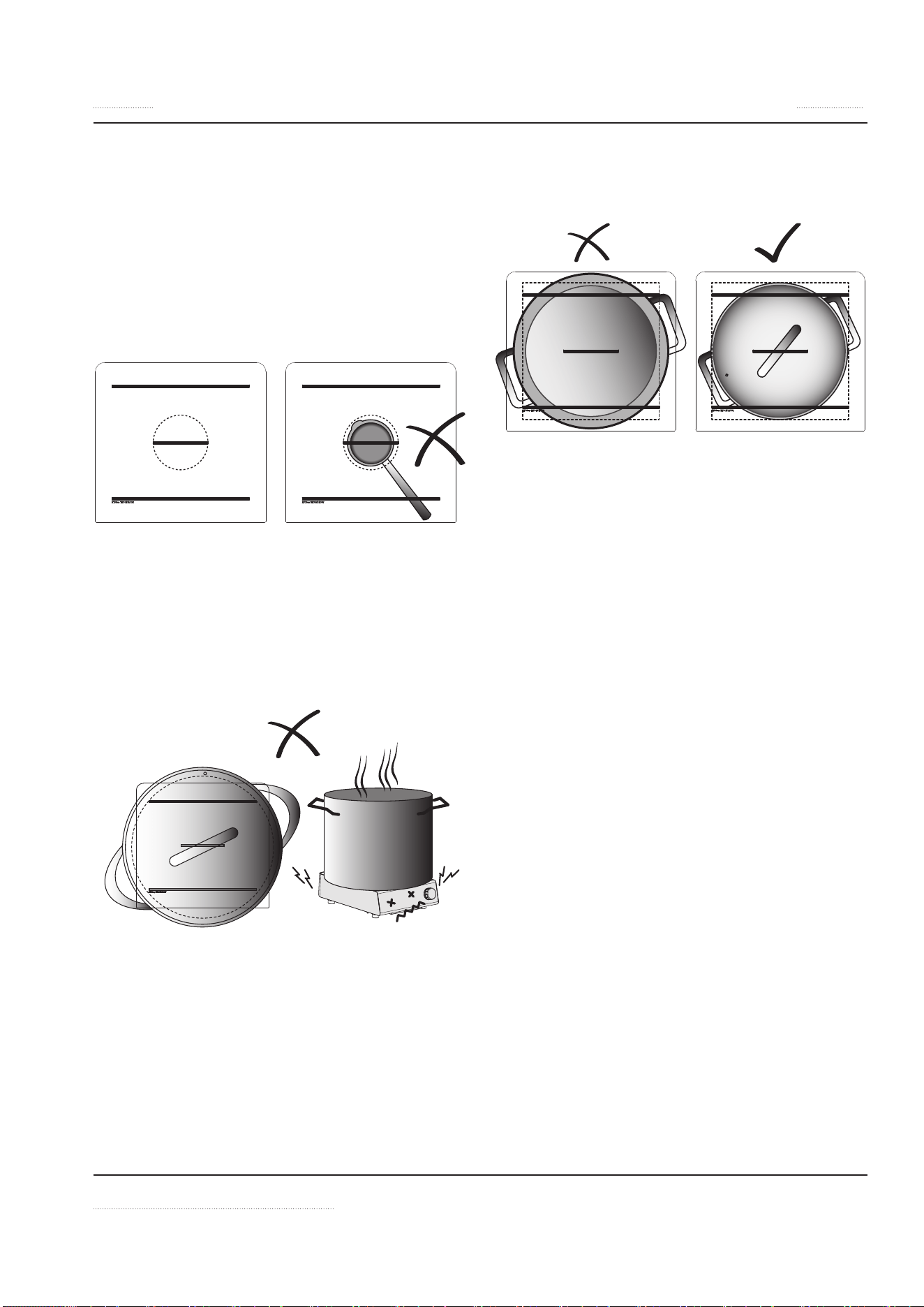
• MINIMUM SIZE: The bottom of pan must
have a minimum diameter of 12cm [5”] (be-
low, dotted lines). Otherwise, the pan will not
be heated. This is a safety feature such that the
unit do not detect and heat up small metal
objects, such as jewelery. NOTE: For personal
safety, never place any small metallic objects
on a cook zone.
• DO NOT USE OVERSIZED PAN! The bottom
of the pan must fit the glass. When a hot,
oversized pan covers the silicone seal under-
neath, the heat from the pan may dry out the
silicone overtime. When the silicone seal drys
out and breaks, liquid can penetrate into the
appliance and damage the electronics.
• PAN MUST FIT THE GLASS! The best pan to
use is the one with a bottom that fits the coil
(below, dotted lines).
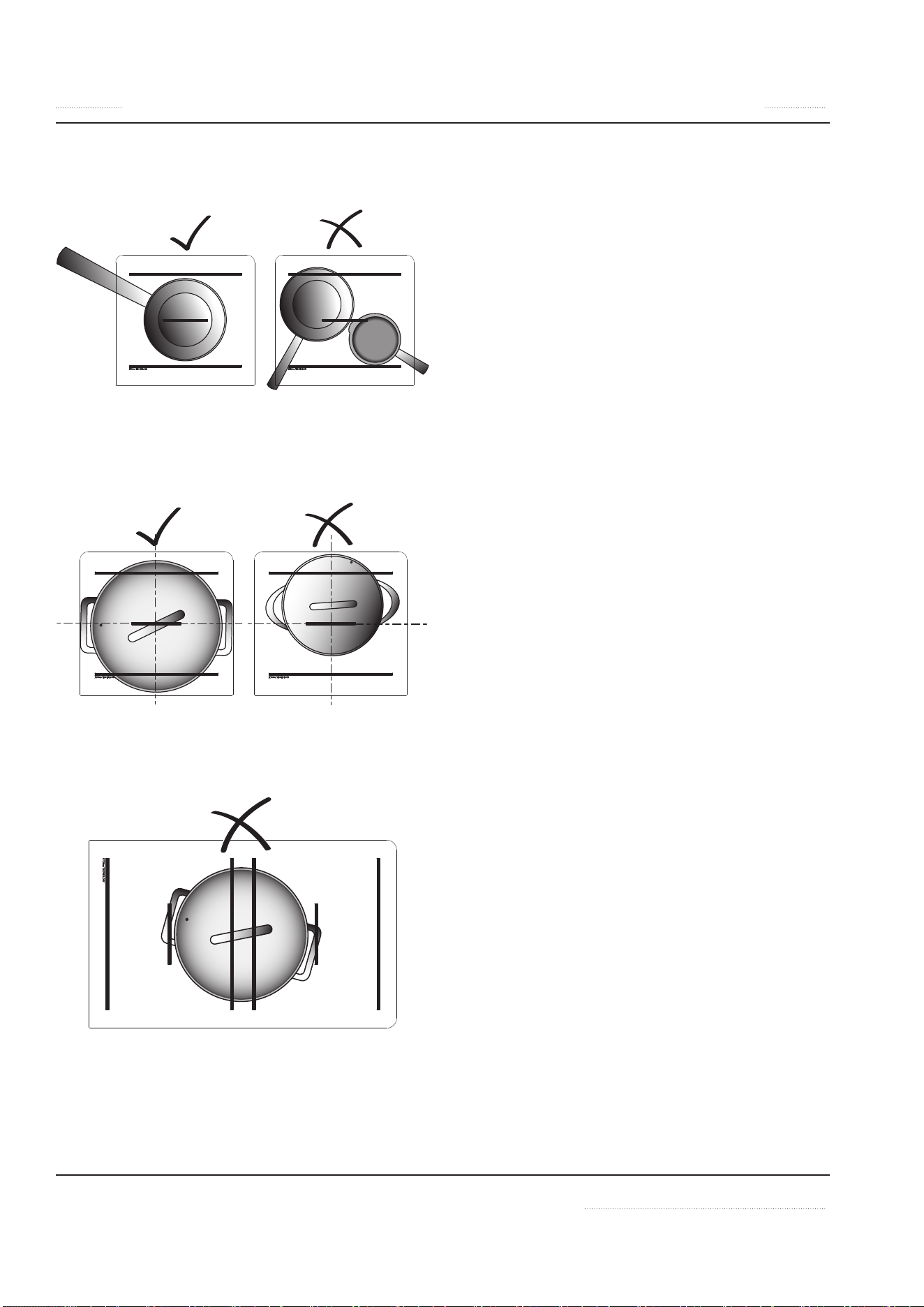
Placing Pan On A Cook Zone
Each cook zone of our appliances is equipped
with the latest RTCS® or RTCSmp® sensors. These
sensors monitor temperature and cookware con-
tinuously in realtime.
To obtain optimal results from the sensors, you
must always place pan in the center of the
cook zone. Otherwise, the bottom of the pan is
heated unequally and the food inside the pan
may burn.
28 INSTINCT User Manual rev 01 06/20
Operation Section 3
• PLACE MAXIMUM ONE PAN PER COOK
ZONE.
• ALWAYS PLACE PAN IN THE CENTER OF A
COOK ZONE.
• PAN MUST NOT COVER MORE THAN ONE
COOK ZONE ON A DUAL/QUAD OR ON TWO
SINGLE UNITS.
INSTINCT User Manual rev 01 06/20 29
Section 3 Operation
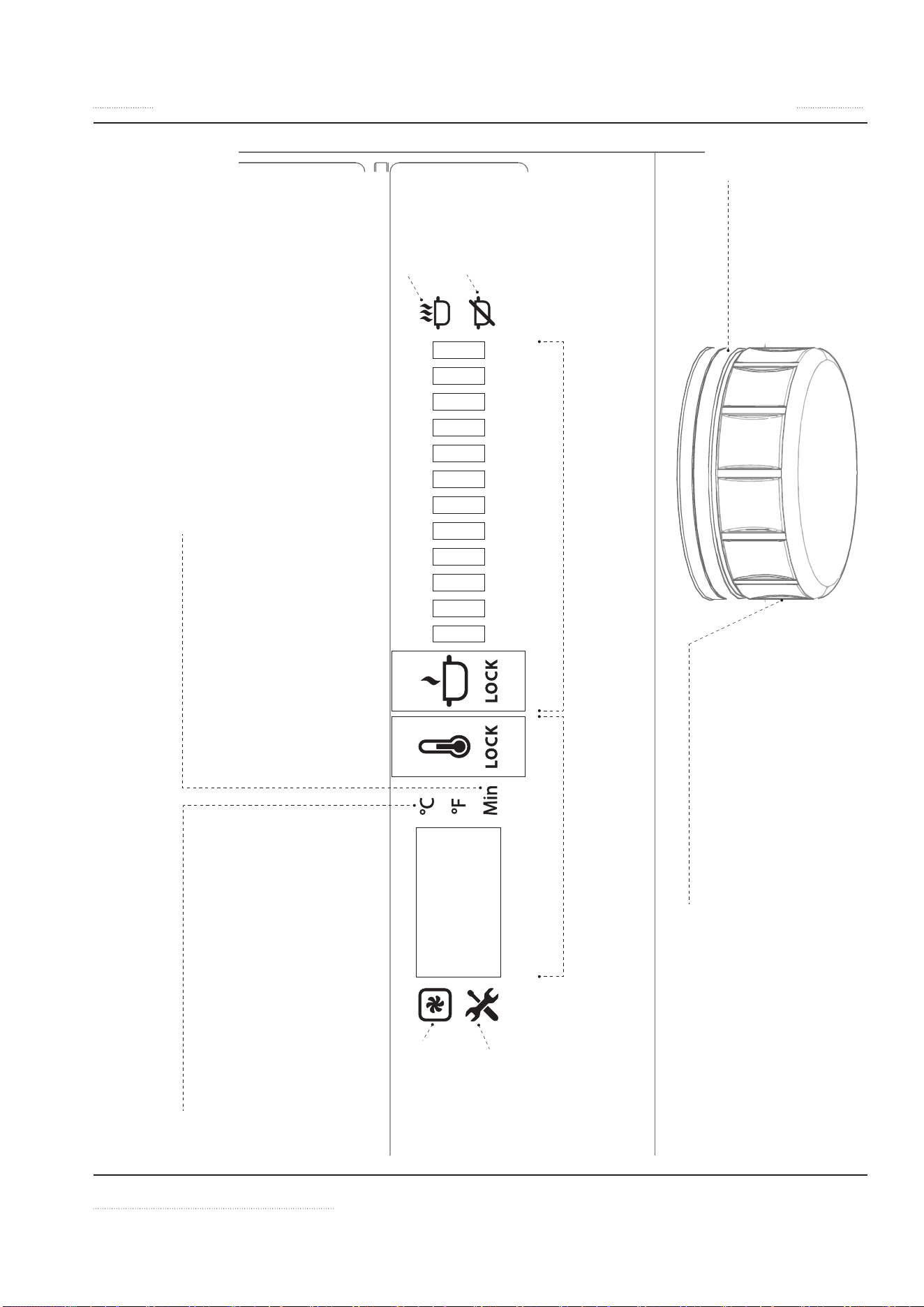
Display and Control Quick Reference
Note: Hold mode and Temperature function are not available for Wok Models
12
11
10
987654321
Temperature, °C or °F
• To set °C or °F, press down knob while connecting
unit to power outlet.
• Turn knob to select P2 option on display.
• Click knob 1 time (1x) to confirm.
• Turn knob to select °C or °F and click knob 1x to
confirm.
• To return to cook/hold mode, click and hold knob
until other icons are shown on display.
Timer, Minutes
• After selecting temperature or power
level, double click knob to switch to
Timer Mode.
• Turn knob to select time in minutes.
• Click knob 1 time (1x) to confirm and
start count-down.
Error:
Overheated Unit!
Error:
Call for Service.
Error Code on
Display
Error:
Overheated Pan!
Error:
No Pan Detected!
Hold Mode, Set Temperature
• Turn knob to select temperature.
• To lock / unlock at selected temperature,
click and hold down knob for 2 seconds.
Cook Mode, Power Level from 1 to 12
• Turn knob to select power level.
• To lock / unlock at selected power level,
click and hold knob for 2 seconds.
Turn Unit ON
• Click knob 1 time
Turn Unit OFF
• Turn knob to the lowest power or
lowest temperature. When LED
ring is flashing, turn knob slightly
to turn unit off.
Control Knob
TURN
• Turn knob to select temperature / power /
option.
CLICK
• 1 time (1x) to switch from Cook to Hold
mode or to confirm selection.
• double (2x) to switch to Timer function
• and hold for 2 seconds to lock or unlock
unit.
LED ring
• Lights up during power
output.
• Flashes when waiting for
operator input.

30 INSTINCT User Manual rev 01 06/20
Operation Section 3
Control
TURN UNIT ON
Click knob and turn to select power level.
LED RING
• The LED ring flashes if operator input is need-
ed.
• The LED ring lights up continuously during
cooking or holding.
SWITCHING BETWEEN COOKING AND
HOLDING MODES
Holding mode is not available for INSTINCT Wok.
1. During operation, click knob once. The LED
flashes.
2. While watching the display, turn knob clock-
wise or counter-clockwise to activate Power
Level Mode or Hold-Mode.
3. Click knob again to confirm selection.
SETTING POWER LEVEL (1 TO 12) AND
LOCK/UNLOCK
1. In Power Level Mode, turn knob clockwise to
choose power level:
• Power level (1) = lowest power
• Power level (12) = highest power
2. To lock power at set level, press down knob
until the word “LOCK” on the display lights
up. This takes 2 seconds.
3. To unlock, press down knob again until the
word “LOCK” on the display goes dark. This
takes 2 seconds.
Power Level Settings
The Power Diagrams (below) show that the dif-
ference in power output between two higher
power levels is much larger than that between
two lower power levels.
This power level and output relationship gives
you a fine simmer-rate control in the low power
range, and an instant response in the high power
range.
POWER DIAGRAM 1: POWER LEVEL 0 TO 12
POWER
OUTPUT
0123456789 10 11 12
P O W E R LEVEL
100%
50%
10%
20%
30%
40%
60%
70%
80%
90%
The settings from (1) to (9) span the lower
50% of the total Power Output; the settings
from (10) to (12) cover the 50% to 100% out-
put range.
SELECTING HOLD TEMPERATURE AND
LOCK/UNLOCK
1. In Hold-Mode, turn knob until the desired
temperature is shown on the display.
2. Leave the knob for approximate 5 seconds,
the display will show the actual detected
temperature.
3. To lock temperature at set level, press down
knob until the word “LOCK” on the display
lights up. This takes 2 seconds.
4. To unlock, press down knob again until the
word “LOCK” on the display goes dark. This
takes 2 seconds.
INSTINCT User Manual rev 01 06/20 31
Section 3 Operation
SETTING THE TIMER
The timer function can be set for both Cooking
or Holding Modes.
1. After setting power level or temperature,
double click the knob to switch to Timer
Mode.
2. Turn knob to set the timer from minimum 1
minute to maximum 240 minutes. The LED
ring will flash.
3. Click knob 1 time to confirm and start the
count-down.
4. Note when using Hold-Mode with Timer, the
display will show alternately the actual tem-
perature and the count-down.
5. After the set time is elapsed, the appliance
will sound a beeping signal and the unit will
automatically shut down if the operator takes
no action.
TURNING OFF
When in Cook or Hold Mode, turn knob to go to
the lowest power level or lowest temperature.
When LED ring is flashing, turn knob slightly to
turn off the appliance.
When the unit is switched off, a
o appears in the
display.
Additional Settings
Additional settings are available to reduce power
level, and to set display to °C or °F.
To activate the additional settings:
1. Press down knob while connecting unit to
power outlet.
2. Then turn knob to select setting P1 or P2:
• P1 = Reduce nominal max power from
100% to 25%
• P2 = Change temperature from °C to °F
(function not available on Wok models)
• P3 = Shows the actual Firmware number.
• P4 = Enable / Disable buzzer (timer func-
tion)
3. Click knob 1 time (1x) to confirm selection.
4. In P1, turn knob to select power.
In P2, turn knob to select °C or °F.
In P4, turn knob to select “on” or “oFF”
5. Click knob 1 time (1x) to confirm selection.
6. To leave the special setting function, keep
pressing down the knob until the normal
cooking or hold mode is shown on display.

32 INSTINCT User Manual rev 01 06/20
Operation Section 3
Automatic Pan Detection, No Pan No
Heat
When a temperature or a power level is selected,
the appliance supplies energy only when a pan is
placed in the cook zone.
When you remove the pan from the cook zone,
the appliance stops power output immediate-
ly. The power output resumes, when the pan is
placed back on the cooking zone.
Notice
Switch off the cook-top by means of the con-
trol. Do not rely on the Pan Detection as the
ON-OFF control.
Notice
Pan with a bottom diameter smaller than 12cm
or 5” is not detected by the system.
When Appliance Is Idle
When the induction appliance is not in use, al-
ways turn off the appliance.
Notice
Switch the appliance off if you take the cook-
ware away for a while. This will prevent the
heating process to start automatically and un-
intentionally when a pan is placed back on the
heating area. If any person needs to use the in-
duction appliance, he/she will have to turn the
appliance ON intentionally.
Decommissioning
Procedure if the device is not needed for a long
time.
1. Switch off the device on the knob.
(See Section 3 Turning Off)
2. Disconnect the device from the mains.
n
DANGER
If the plug is not safely accessible, the de-
vice must be switched off at the main circuit
breaker.
INSTINCT User Manual rev 01 06/20 33
MAINTENANCE SAFETY—DISCLAIMER
n
DANGER
It is the responsibility of the equipment own-
er to perform a Personal Protective Equip-
ment Hazard Assessment to ensure adequate
protection during maintenance procedures.
n
Warning
A good maintenance of the appliance re-
quires regular cleaning, care and servicing.
The site-supervisor and the operator must
ensure all components relevant to safety are
in perfect working order at all times.
NOTE: Cleaning tools and supplies are not pro-
vided.
DANGEROUS ELECTRICAL VOLTAGE
n
DANGER
Do not open the appliance. Maintenance
and servicing work other than cleaning as
described in this manual must be done by an
authorized service personnel.
n
DANGER
If any part of the appliance is cracked or bro-
ken, turn off directly the appliance and Im-
mediately disconnect the appliance from
supply. Only if it is possible and safe, discon-
nect the equipment from main power supply.
Do not touch any parts inside the appliance.
Disconnect electric power at the main power
disconnect for all equipment being serviced.
Failure to disconnect the power at the main
power supply disconnect could result in seri-
ous injury or death. The knob DOES NOT dis-
connect incoming power.
Contact an authorized service agency for as-
sistance.
MAINTENANCE SAFETY—CLEANING
n
Warning
Never use a high-pressure water jet for clean-
ing or hose down or flood interior or exterior
of the equipment with water. Ensure that no
liquid can enter into the equipment.
n
Warning
Allow heated equipment / glass surface to
cool down before attempting to clean, ser-
vice or move.
n
Warning
When cleaning the exterior, care should be
taken to avoid front power switch and the
electrical cords. Keep water and cleaning
solutions away from these parts.
,
Caution
Do not use caustic cleaners on any part of
the equipment. Use mild, non abrasive soaps
or detergents, applied with a sponge or soft
cloth.
,
Caution
Ensure to remove all residues of cleaning
agents from the cooking surfaces. Use a clean
moist cloth to wipe off any such surfaces.
,
Caution
Using commercial cleaning fluids or chemi-
cals: Read the directions for use and precau-
tionary statements before use. Pay atten-
tion to the concentration of cleaner and the
length of time the cleaner remains on the
food-contact surfaces or equipment surfac-
es.
Section 4
Maintenance

34 INSTINCT User Manual rev 01 06/20
Maintenance Section 4
Notice
Inspect and Clean Fresh Air Intake Filter
We strongly recommend using air intake fil-
ters in all installations to protect the equip-
ment from grease particles. A dirty, blocked
air intake filter blocks the air vent and can
cause damages to the electronic compo-
nents. Inspect, clean or replace the air intake
filters at least once a week or as often as nec-
essary.
n
Warning
Inspect Silicone Seal
When the silicone seal is broken, water pene-
tration could cause the appliance to fail, and
any malfunction could cause personal harm.
PERSONAL PROTECTION
n
DANGER
All utilities (gas, electric, water and steam)
must be OFF to all equipment and locked
out of operation according to national/re-
gional, as well as company approved practic-
es during installation, maintenance and ser-
vicing. Always allow appliance to cool.
n
DANGER
Use appropriate safety equipment during in-
stallation, maintenance and servicing.
n
DANGER
Never stand, sit, or lean on the equipment!
They are not designed to hold the weight of
an adult, and may collapse or tip if misused in
this manner.
n
DANGER
To avoid cardiac pacemaker malfunction,
consult your physician or pacemaker man-
ufacture about effects of electromagnetic
field on your pacemaker.
n
DANGER
Replace defective power cables immediately
by an authorized service agency.
n
Warning
Markings and warning labels mounted di-
rectly on the equipment must be observed at
all times and kept in a fully legible condition.
n
Warning
Risk of burns from high temperatures. You
may get burnt if you touch any of the parts
during operation. Surfaces close to the cook-
ing area including side panels may get hot
enough to burn skin. Use extreme caution to
avoid coming in contact with hot surfaces or
hot grease. Wear personal protective equip-
ment.
,
Caution
Use caution when handling metal edges of
all equipment.
INSTINCT User Manual rev 01 06/20 35
Section 4 Maintenance
Daily Cleaning and Maintenance
GLASS CLEANING
NOTE: The cleaning of Ceran® glass is identical
to cleaning other similar glass surfaces. You may
use any regular glass cleaning products available
from a hardware store.
You may use a razor blade scraper or a
non-scratching sponge to remove tough res-
idues. When scraping, place your razor blade
scraper at an angle of about 20
o
to 30
o
from the
glass. Then wipe clean the glass with a cleaning
product.
20
o
- 30
o
STAINLESS STEEL
1. Clean the stainless steel surface using a soft
cloth with a mild detergent and/or a food-
safe liquid cleaner designed to clean stain-
less steel.
2. Wipe dry with a soft clean cloth.
VISUAL INSPECTION OF SILICONE SEAL
Inspect the silicone seal around the glass perim-
eter. Call for service immediately if you notice:
• Cracks on the silicone seal.
• The silicone seal comes away from the glass/
housing or moves when you press down on
the seal.
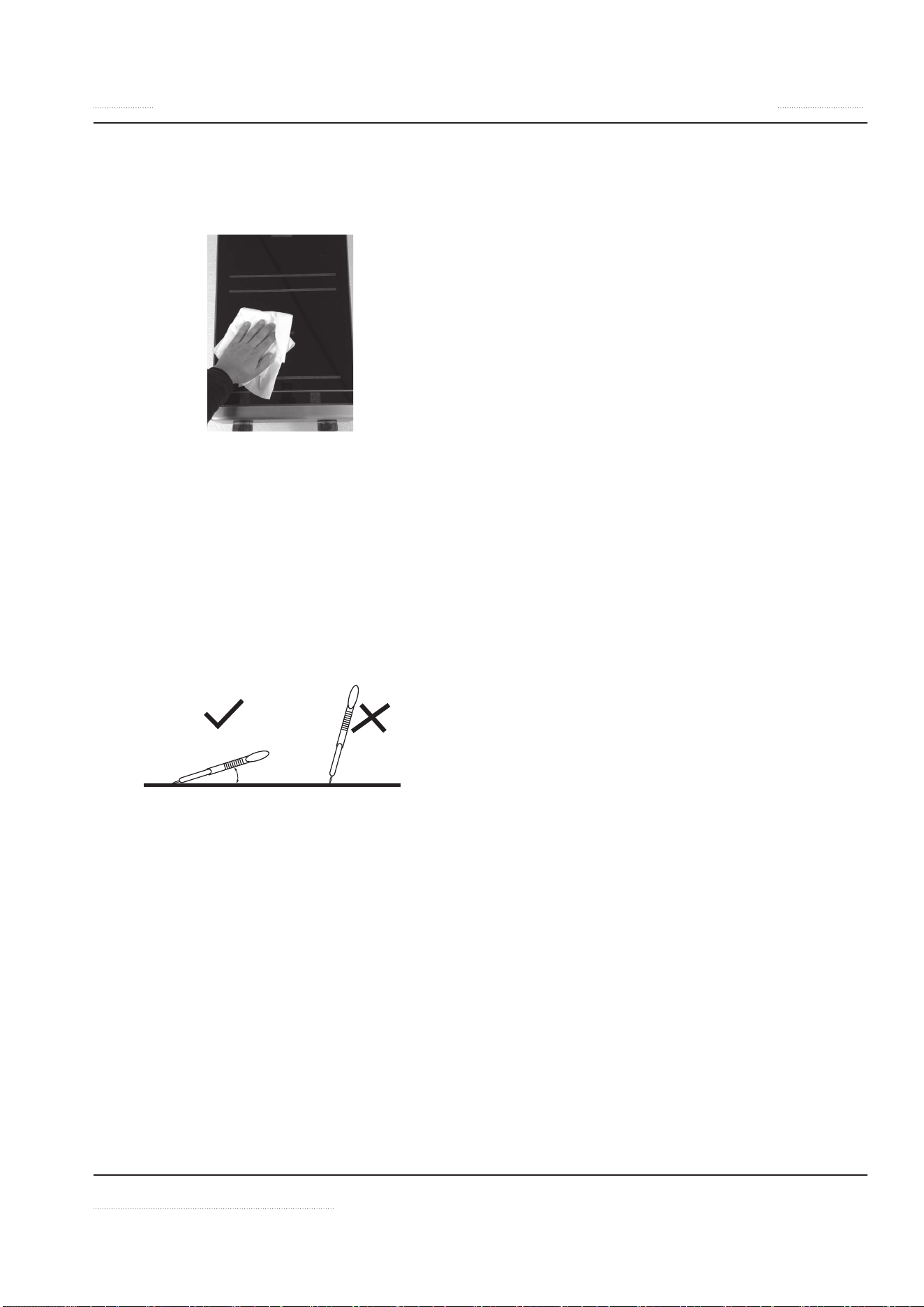
A Simple Wipe
Will Do It
36 INSTINCT User Manual rev 01 06/20
Maintenance Section 4
Weekly Cleaning and Maintenance
AIR INTAKE FILTER
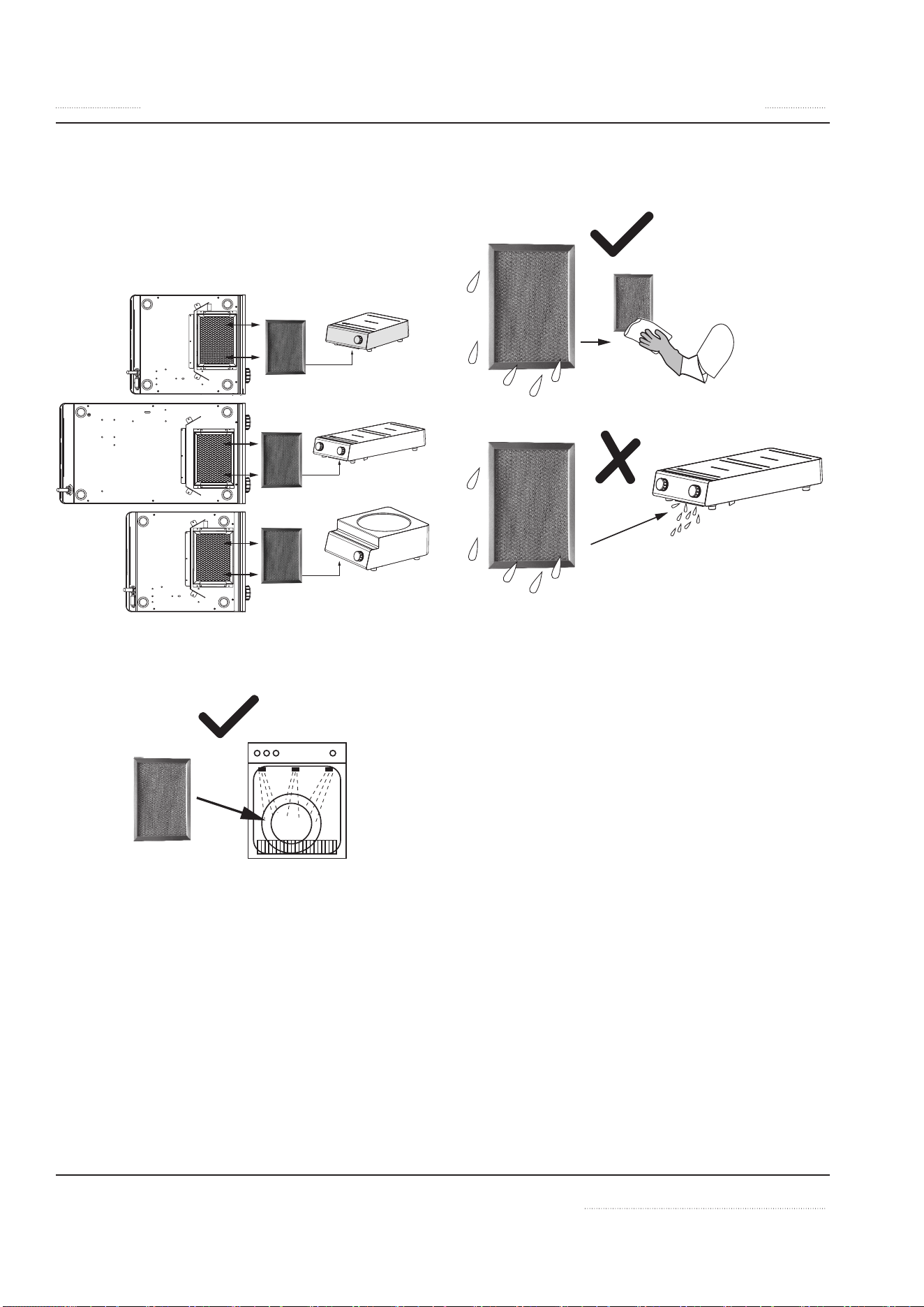
1. The air intake filter is located on the bottom
of the appliance. To remove, slid out the filter
from the holder.
2. The filter is dishwasher-safe.
3. MUST DRY the filter before putting it back
into the holder.
In case of insufficient cleaning of the device,
the warranty expires.

INSTINCT User Manual rev 01 06/20 37
Section 4 Maintenance
Yearly Maintenance
Best Practice: Have the induction appliance ex-
amined once a year by an authorized technician.
General Maintenance Tips:
• Inspect all induction cookware to ensure
proper condition.
• Have an authorized technician to inspect and
ensure that:
• All ventilation fans are working properly.
• No grease built-up around the equip-
ment and air filter.

38 INSTINCT User Manual rev 01 06/20
Section 5
Troubleshooting
DANGEROUS ELECTRICAL VOLTAGE
n
DANGER
If any part of the appliance is cracked or bro-
ken, turn off directly the appliance and Im-
mediately disconnect the appliance from
supply. Only if it is possible and safe, discon-
nect the equipment from main power supply.
Do not touch any parts inside the appliance.
Disconnect electric power at the main power
disconnect for all equipment being serviced.
Failure to disconnect the power at the main
power supply disconnect could result in se-
rious injury or death. The power switch DOES
NOT disconnect all incoming power.
Contact an authorized service agency for as-
sistance.
n
DANGER
Do not open the appliance. Maintenance
and servicing work other than cleaning as
described in this manual must be done by an
authorized service personnel.
n
Warning
Markings and warning labels mounted di-
rectly on the equipment must be observed at
all times and kept in a fully legible condition.
NOTE: If a problem arises during operation of
your induction appliance, follow the Trouble-
shooting Charts before calling service. Routine
adjustments and maintenance procedures are
not covered by the warranty.
Common Problems
One or more of the following conditions may af-
fect the function or cause the induction equip-
ment to fail:
• Using unsuitable cookware such as non-in-
duction pans, oversized pans, or damaged
pans.
• High ambient temperature.
• Inadequate ventilation causing hot air to
re-enter through the air intake slots.
• Dirty air intake filter.
• Empty pan is left on the hob when the appli-
ance is ON.
Symptoms
• When a malfunction occurs, the appliance
may be in one of the following states:
• The appliance switches off immediate-
ly.
• The appliance continues to operate in a
power reduction mode.
• The appliance continues to operate
normally.
• NOTE:
The cooling fan starts when the ambient
temperature in the control area exceeds 55ºC
[130ºF].
At heat sink temperature higher than 70ºC
[160ºF], the controller automatically reduces
power to keep the appliance in normal oper-
ating conditions.

INSTINCT User Manual rev 01 06/20 39
Section 5 Troubleshooting
Boil Test
To test the quality of a pan for induction cooking,
perform a boil test.
This test is not applicable to griddles and
braising pans. NEVER heat any cooking pan
on a griddle plate or in a braising pan.
(Test for 3.5kW or 5.0kW Induction Coil)
Perform a boil test to verify the performance of a
pan for induction cooking.
• Add one liter of cold water into the pan (op-
timal when use pan with bottom diameter of
24cm) and bring it to boil. Compare the total
boil time to the guideline below:
• 3.5kW Coil, approx. 140 seconds
• 5.0kW Coil, approx. 85 seconds
If time to boil exceeds the above guideline, then
the pan is not suitable for achieving optimal effi-
ciency. Please contact your supplier to purchase
suitable induction pans.
If the induction appliance does not function as
expected despite using quality induction pans,
refer to the troubleshooting charts.
Dangers avoidance in case of accidents
or malfunctions
To avoid hazards in the event of a malfunction
or accident related to the device, proceed as fol-
lows.
1. Disconnect the power supply from the circuit
breaker provided for the device.
2. Disconnect the mains plug of the affected
device to prevent it from being switched on
again.
n
DANGER
If the plug is not safely accessible, the de-
vice must be switched off at the main circuit
breaker.

40 INSTINCT User Manual rev 01 06/20
Troubleshooting Section 5
Troubleshooting Without Error Code
Symptom Possible Cause Action
Pan does not heat up on
glass-top.
Digital display is OFF (dark).
No power supply. Check incoming power supply (Example, power cable plugged into
the wall socket). Check kitchen main fuse box.
Unit is turned off. Turn control knob to an ON-position.
Defective unit. Only if possible and safe, disconnect the appliance from the power
supply. Contact an authorized service agency. (1)
Pan does not heat up and no
pan symbol is on.
(Not applicable to griddles
or braising pans.)
Pan is too small. Use a suitable pan with bottom diameter larger than 12cm[5”].
Pan is not placed in the
center of the hob; pan is not
detected by sensor. (2)
Move the pan to the center of the hob.
Unsuitable pan. Select only induction-ready cookware.
Defective unit. Only if possible and safe, disconnect the appliance from the power
supply. Contact an authorized service agency. (1)
Poor heating, LED ring is ON Air-cooling system is
obstructed.
Verify that air vents are not obstructed. Ensure the fresh air filter is
clean.
Unsuitable pan. (Not
applicable to griddles or
braising pans.)
Select various induction-ready cookware for induction cooking.
Then compare the results.
Ambient temperature is too
high. The cooling system
is not able to keep the
appliance in normal operating
conditions.
Verify that no hot air is taken in by the fan. Reduce the ambient
temperature. The intake air temperature must be lower than 40°C
[104°F].
One phase is missing (for
equipment with three phase
supply only).
Check incoming power supply (Example, power cable plugged into
the wall socket). Check kitchen main fuse box.
Reduced Power adj. Check Additional Setting “P1”.
Defective unit. Only if possible and safe, disconnect the appliance from the power
supply.
Contact an authorized service agency. (1)
Appliance does not react to
control knob positions
Defective control knob. Only if possible and safe, disconnect the appliance from the power
supply. Contact an authorized service agency. (1)
Overheated unit symbol is
ON, fan is working
Air-cooling system is
obstructed. Internal fan is
dirty.
Verify that air vents are not obstructed. Ensure the fresh air filter is
clean.
Contact an authorized service agency.
INSTINCT User Manual rev 01 06/20 41
Section 5 Troubleshooting
Symptom Possible Cause Action
Overheated unit symbol is
ON, fan does not work
Defective fan or fan control. Only if possible and safe, disconnect the appliance from the power
supply. Contact an authorized service agency. (1)
Overheated unit symbol is
ON
Overheated induction coil;
cooking area is too hot.
Overheated pan. Pan is empty.
Switch the appliance off. Safely remove pan. Wait until the appliance
has cooled down before turning it ON.
Small metallic objects (e.g.
spoon) are heated up in the
cook zone.
Pan detection function is
defective.
Only if possible and safe, disconnect the appliance from the power
supply. Contact an authorized service agency. (1)
(1)
n
DANGER If the plug is not safely accessible, the device must be switched off at the main circuit breaker.
(2) The appliance switches off immediately.
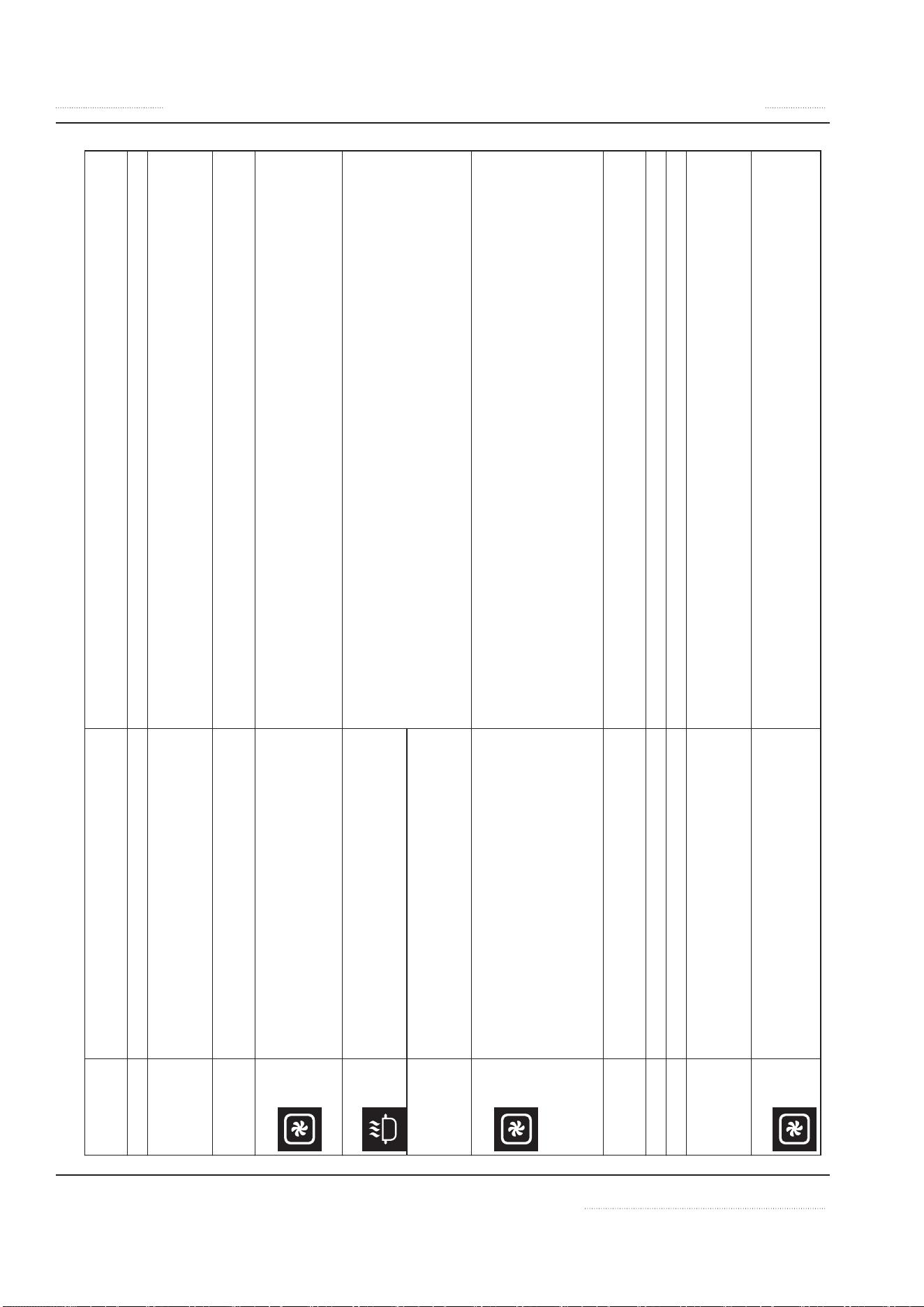
42 INSTINCT User Manual rev 01 06/20
Troubleshooting Section 5
Troubleshooting — Error Code
Error Code
( Display)
Problem Action
Normal Operation. Normal Operation.
E01 Unsuitable induction cooking pan.
Internal wiring/coil connection
malfunction. (2)
Check pan material.
Contact an authorized service agency.
E02 Unsuitable induction cooking pan.
Coil overcurrent. (2)
Check pan material.
Contact an authorized service agency.
E03 + Air-cooling system obstructed. Fan
malfunction.
Heat sink overheated. (2)
Let appliance cool down.
Verify that air vents are not obstructed.
Check and clean air filter.
Contact an authorized service agency.
E04 + Overheated cook zone. Overheated pan
detected. Sensor failure.
Let appliance and/or pan cool down.
Check pan material.
Verify that air vents are not obstructed.
Check and clean air filter.
Contact an authorized service agency.
E41, E42,
E43, E44,
E45, E46
Overheated or defective sensor. (2)
NOTE: Errors E41 to E46, griddles and
braising pans may continue to operate.
E06, E30 + Ambient temperature too high (the
cooling system is not able to keep the
induction appliance in normal operating
conditions). Internal component
overheated. (2)
Let appliance cool down.
Verify that air vents are not obstructed.
Check and clean air filter.
Verified that no hot air is taken in by the fan. Reduce the ambient
temperature. The intake air temperature must be lower than 40°C [104°F].
Contact an authorized service agency.
E07 Phase failure. Check the fuses belonging to the socket to which the device is connected.
Contact an authorized service agency.
E08 Over- or undervoltage. Contact an authorized service agency.
E29 Generator component failure. (2) Contact an authorized service agency.
E47 Warning from overheated pan / cooking
empty sensor or coil connection failed. (2)
Let equipment / pan cool down.
Check pan material.
Check food in the pan or empty pan.
E21 + Sensor error from heat sink. Ambient
temperature beyond normal operating
range. (2)
Verify that air vents are not obstructed. Check air filter. Reduce ambient
temperature.
Contact an authorized service agency.
INSTINCT User Manual rev 01 06/20 43
Section 5 Troubleshooting
Error Code
( Display)
Problem Action
E24 + Sensor error from CPU. Board overheated.
Ambient temperature beyond normal
operating range. (2)
Verify that air vents are not obstructed. Check air filter. Reduce ambient
temperature.
Contact an authorized service agency.
(1)
n
DANGER If the plug is not safely accessible, the device must be switched off at the main circuit breaker.
(2) The appliance switches off immediately.
GARLAND
1177 KAMATO ROAD, MISSISSAUGA, ONTARIO, CANADA, L4W1XA
888-442-7526
WWW.GARLAND-GROUP.COM
©2017 Welbilt Inc. except where explicitly stated otherwise. All rights reserved. Continuing product improvement may necessitate change of specications without notice.
Welbilt provides the world’s top chefs, and premier chain operators or growing independents with industry leading equipment and
solutions. Our cutting-edge designs and lean manufacturing tactics are powered by deep knowledge, operator insights, and culinary
expertise.
All of our products are backed by KitchenCare® – our aftermarket, repair, and parts service.
CLEVELAND
CONVOTHERM®
DELFIELD®
FITKITCHEN™
FRYMASTER®
GARLAND
KOLPAK®
LINCOLN
MANITOWOC®
MERCO®
MERRYCHEF®
MULTIPLEX®
WWW.WELBILT.COM