Dual Mode
Activate/Stop the
voice assistant:
Triple click the MFB
on R earbud
Reject call:
Press and hold the MFB on L/R
earbud for 2s
Answer/End call:
Click MFB once
Play/Pause:
Click MFB once
Power on:
Pick up the earbud from charging case/
Preass and hold the MFB for 2s in
power-off state
Power off:
Standby/Non-playing music, press and
hold the MFB for 5s. Put into the charging
case/Not connected to any devices over 5
minutes
Previous song:
Double click MFB on
L earbud
Volume -:
Long press L earbud
Next track:
Double click MFB
on R earbud
Volume +:
Long press
R earbud
Charge the case easily without cables,
just put your charging case on the
wireless charging pad. If the charging
case is not being charged, please try to
reposition it. (Wireless Charging Pad
Not Included)
Wireless Charging
Troubleshooting Guide
What should I do when the earbuds can't be paired with my mobile
device?
Reset your earbuds and pair the earbuds with your mobile device
again.
What should I do if there is no sound from one earbud?
Turn off Bluetooth on the device and turn it on, then pair your
earbuds with the mobile device again.
For Android devices, if there is no sound from one earbud after
connecting, you need to check whether the phone volume is too
low. If the phone volume is normal, it may be that the volume of
the earbud has been turned to the minimum. Please try to adjust
the volume of the earbud.
What to do when the earbuds can't be charged?
The charging case may run out of power. Please charge it for at
least one hour, then put the earbuds into it to charge.
Try to take out the earbuds and clean the charging pins, then put
the earbuds into the charging case to see if the display panels on
the case light up or not. There may be some malfunction with
your charging case. If your charging case can't charge for earbuds
after many attempts, please contact us.
What device can the earbuds be connected to?
Devices with BT version over 5.0
Can my earbuds be paired with multiple devices?
The earbuds don't support this feature currently.
Can I use one earbud at a time?
Yes. After connecting the earbuds to your mobile device, you
can use them together or just use one earbud alone.
Can I activate voice assistant through my earbuds?
Yes. You can wake up the voice assistant by tapping the Touch
pad of either earbud 3 times after pairing the earbud with your
mobile device.
There is a Type-C USB charging cable in the package, please use it to
charge the case directly. During charging, the digital display will
flash and show the battery in real-time. After being fully charged,
the number is displayed as 100.
The right display panel indicates the charging status per headset.
There are separated power consumption indicators by 4 grids in
total, the indicator light will always flash during charging.
Type-C USB Charging
How to Charge?
Functions on
“L/R Earbuds”
Mono Mode
Music Mode
Volume+ Long Press (R/L)
Volume- Unsupported
Voice Assistant Press three times(R/L)
Play/Pause Press Once (R/L)
Next Track Press Twice (R/L)
Previous Track Unsupported
interference in a residential installation. This equipment generates, uses
and can radiate radio frequency energy and, if not installed and used in
accordance with the instructions, may cause harmful interference to radio
communications.
However, there is no guarantee that interference will not occur in a
particular installation. If this equipment does cause harmful interference
to radio or television reception,which can be determined by turning the
equipment off and on, the user is encouraged to try to correct the
interference by one or more of the following measures:
— Reorient or relocate the receiving antenna.
— Increase the separation between the equipment and receiver.
— Connect the equipment into an outlet on a circuit different from that to
which the receiver is connected.
— Consult the dealer or an experienced radio/TV technician for help.
This equipment complies with FCC radiation exposure limits set forth for
an uncontrolled environment.
This transmitter must not be co-located or operating in conjunction with
any other antenna or transmitter.
Any Changes or modifications not expressly approved by the party
responsible for compliance could void the user's authority to operate the
equipment. This device complies with part 15 of the FCC Rules.
Operation is subject to the following two conditions:
(1)This device may not cause harmful interference,and
(2) this device must accept any interference received,including
interference that may cause undesired operation.
Note:This equipment has been tested and found to comply with the limits
for a Class B digital device,pursuant to part 15 of the FCC Rules. These
limits are designed to provide reasonable protection against harmful
FCC Caution
Battery Warning
Using the wrong battery can cause fire and other hazards (for
example,in the case of some lithium battery types)
1. disposal of a battery into fire or a hot oven, or mechanically
crushing or cutting of a battery, that can result in an explosion
2. Do not leaving a battery in an extremely high temperature
surrounding environment that can result in an explosion or the
leakage of flammable liquid or gas
3. a battery subjected to extremely low air pressure that may result
in an explosion or the leakage of flammable liquid or gas.
ISED Warning
This device complies with Industry Canada licence-exempt RSS standard(s).
Operation is subject to the following two conditions:
(1) this device may not cause interference, and
DISPOSE OF USED BATTERIES ACCORDING TO THE INSTRUCTIONS
The symbol indicates DC voltage
RECYCLING
This product bears the selective sorting symbol for Waste electrical and
electronic equipment (WEEE).
This means that this product must be handled pursuant to European
directive 2012/19/EU in order to be recycled or dismantled to minimize its
impact on the environment. User has the choice to give his product to a
competent recycling organization or to the retailer when he buys a new
electrical or electronic equipment.
This product can be used across EU member states.
The device is low power device, it can meet the requirement of the RF
exposure.
NOTES:
1. High Sound Pressure
2. Hearing Damage Risk
3. Do not listen at high volume levels for long periods.
(2) this device must accept any interference, including interference that
may cause undesired operation of the device.
Le présent appareil est conforme aux CNR d'Industrie Canada applicables
aux appareils radio exempts de licence. L'exploitation est autorisée aux
deux conditions suivantes :
(1) l'appareil ne doit pas produire de brouillage, et
(2) l'utilisateur de l'appareil doit accepter tout brouillage radioélectrique
subi, même si le brouillage est susceptible d'en compromettre le
fonctionnement.
The device is compliance with RF exposure guidelines, users can obtain
Canadian information on RF exposure and compliance.
Le présent appareil est conforme Après examen de ce matériel aux
conformité ou aux limites d’intensité de champ RF, les utilisateurs
peuvent sur l’exposition aux radiofréquences et la conformité and
compliance d’acquérir les informations correspondantes.
Caution
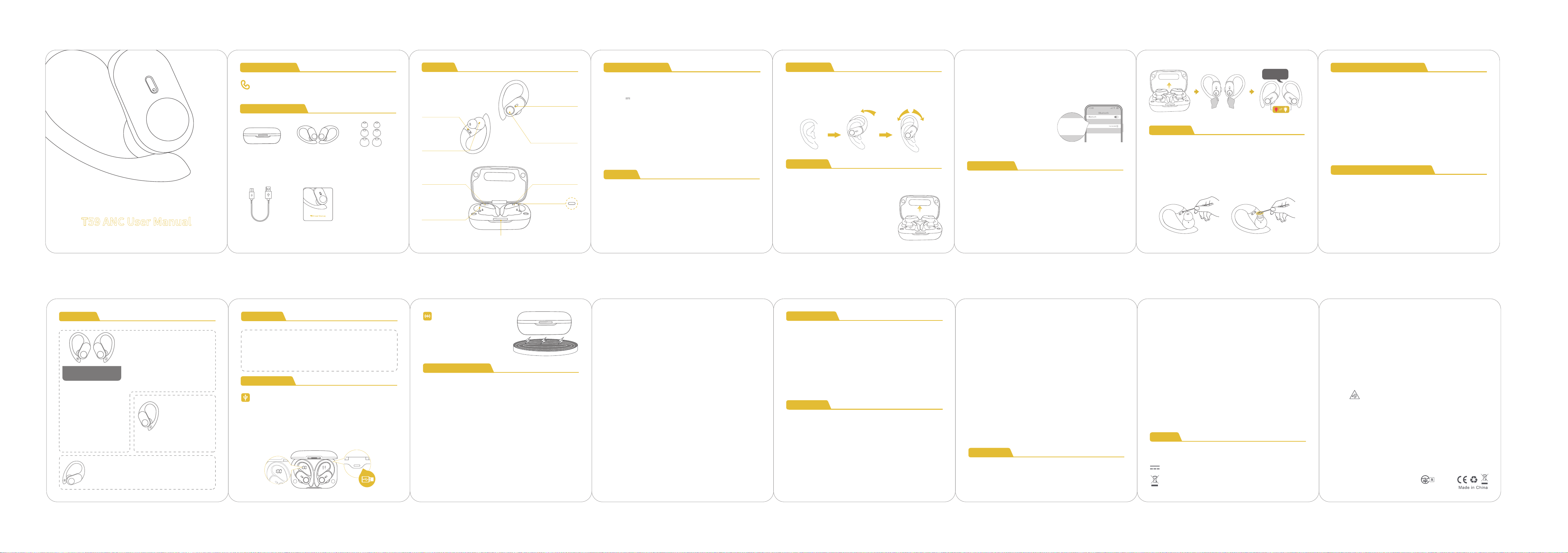
T59 ANC User Manual
TRUE WIRELESS EARBUDS
Overview
Type-C
Charging Port
Multi-functional
Button (MFB)
LED Indicator
of Earbud
Charging Contacts
on Earbud
Microphone
Battery LED Display
of Charging Case
Earbud L&R
Charging Status
Charging Pins
on Charging Case
Charging Case Power Status
Product Parameters
1. Before the first use, please tear off the isolating film on the
earbuds. Put the earbuds into the case, then charge both earbuds
and charging case via supplied Type-C charging cable for at least
10mins (or after not use for a long time); do not take out the earbuds
during this period.
2. The earbuds are installed with a pair of size M ear tips by default.
You can select other suitable sizes for a secure fit.
First Use
Product Name: T59 Headset
Model No.: T59
Input: 5V 1A
Battery Capacity: 3.7V 600mAh, 2.22Wh
FCC ID: 2A33A-T59
IC: 32589-T60
HVIN: T59
Charging Cord Type: Type-C
Transmission Range: 33feet (Without Obstacles)
Frequency Response: 20Hz - 20kHz
How to Wear?
Step 1: Adjust earbuds downwards to a proper position and push
earbuds into your ears.
Step 2: Slightly adjust earbuds to fit you best.
How to Pair?
1. Pick up two earbuds from the charging case. They will auto power
on and pair with each other in 10s.
If the earbuds are not connected to your device
over 5 minutes, the earbuds will power off
automatically. Turn on the earbuds manually
by pressing the MFB button for about 2 seconds
to hear the prompt "power on".
Method 1:
2. The LED indicators on the buds will flash white-red in sequence
continuously, the other bud will blink white slowly.
3. On phone, search for "T59" and tap to connect.
You will hear "connected" from both earbuds. Then the indicator
lights will turn off after the earbuds are connected.
* In the unconnected state, double
click the MFB of two earbuds to enter
pairging mode.
Method 2:
T59
T59
How to Reset?
1. Take out the earbuds and make sure they are disconnected from all
devices.
2. Simultaneously click the buttons on both earbuds five times.
3. The earbuds will play the "power off" prompt tone, and the red and
white indicator lights will flash three times simultaneously. The earbuds
shut down, indicating a successful reset.
Click it x5
Maintenance
After a period of use, the charging metal contacts of the earbuds
may be contaminated with sweat and dirt, resulting in the earbuds
aren't able to power on, charge, or having connection issues, and
the protective grille of both earbuds may accumulate earwax and
dust, resulting in muffled volume. Please use the cleaning swab to
remove dust or earwax from the charging contacts and the
protective grille.
User Manual x1
Charging Case x1
Type-C
Charging Cable x1
Ear Tips Set x3
(Size M has been
preinstalled on earbuds)
Earbuds x2
Package Accessories
T59 User Manual
TRUE WIRELESS EARBUDS
Customer Service
Power-on: White light for 1s;
Power-off: Red light for 1s;
Pairing mode of the earphones: White light of dual earbuds flash;
Device to be connected mode: White light of the main earphone flashes;
Connected to the standby state: White light on the L/R earphone for
1s after connected, then goes out;
Phone state: White light goes out.
Indicator status of the earphone
Indicator status of the battery case
1. Charge the case: After plugging in the USB charging cable, the LED
bar on the front will flash slowly during the charging process.
2. Charge the earphone with charging case (without external
charger): Put the earphone into the charging case, the earbuds will
be charged immediately and the red indicator flashes.
3. Charging case is fully charged (plug cable): LED indicator bar is
steady on (flash slowly during charging).
220-JP6406
V1.2 2025.11.26
Flash 3 times
ANC On /ANC Off / Transparency:
Triple click the MFB on L earbud
Tips: The ANC function cannot be used in Mono Mode.
Power Off
FCC Warning
15.19 Labeling requirements.
This device complies with part 15 of the FCC
Rules. Operation is subject to the following two
conditions: (1) This device may not cause
harmful interference, and (2) this device must
accept any interference received, including
interference that may cause undesired operation.
radiate
15.21 Information to user.
Any Changes or modifications not expressly
approved by the party responsible for
compliance could void the user's authority to
operate the equipment.
15.105 Information to the user.Note: This
equipment has been tested and found to
comply with the limits for a Class B digital
device, pursuant to part 15 of the FCC Rules.
These limits are designed to provide
reasonable protection against harmful
interference in a residential installation.
This equipment generates uses and can
radio frequency energy and, if not
installed and used in accordance with the
instructions, may cause harmful interference to
radio communications. However, there is no
guarantee that interference will not occur in a
particular installation. If this equipment does
cause harmful interference to radio or
television reception, which can be determined by
turning the equipment off and on, the user is
encouraged to try to correct the interference by
one or more of the following measures:
-Reorient or relocate the receiving antenna.
-Increase the separation between the equipment
and receiver.
-Connect the equipment into an outlet on a circuit
different from that to which the receiver is
connected.
-Consult the dealer or an
experienced radio/TV
technician for help.
FCC ID: 2A33A-T590