To ensure correct operation and avoid damage, please read this user manual
Bluctooth Speaker
USER GUIDE
carefully before using this product.
Features:
● 2.2CH portable Bluetooth speaker
● Water resistant IPX5, perfect for beach, poolside, boat and more outdoor activities
● TWS function, achieve true wireless playing with double enhanced stereo sound
● Optimized voice assistant control
● Hands-free Mic for easy picking up the call
● RGB Lighting
● With A2DP Bluetooth, wireless stream music from any Bluetooth-enabled device
● USB support
● EQ function offering dynamic sound effect
● Line-in function, suitable for PC, MID, TV and other audio devices
● Built-in lithium rechargeable battery 7.4V 4800mAh
Package Contents:
•
1xPortable Bluetooth Speaker
•
1xType-C Charging cable
•
1xAudio cable
•
1xUser manual
Product Details:
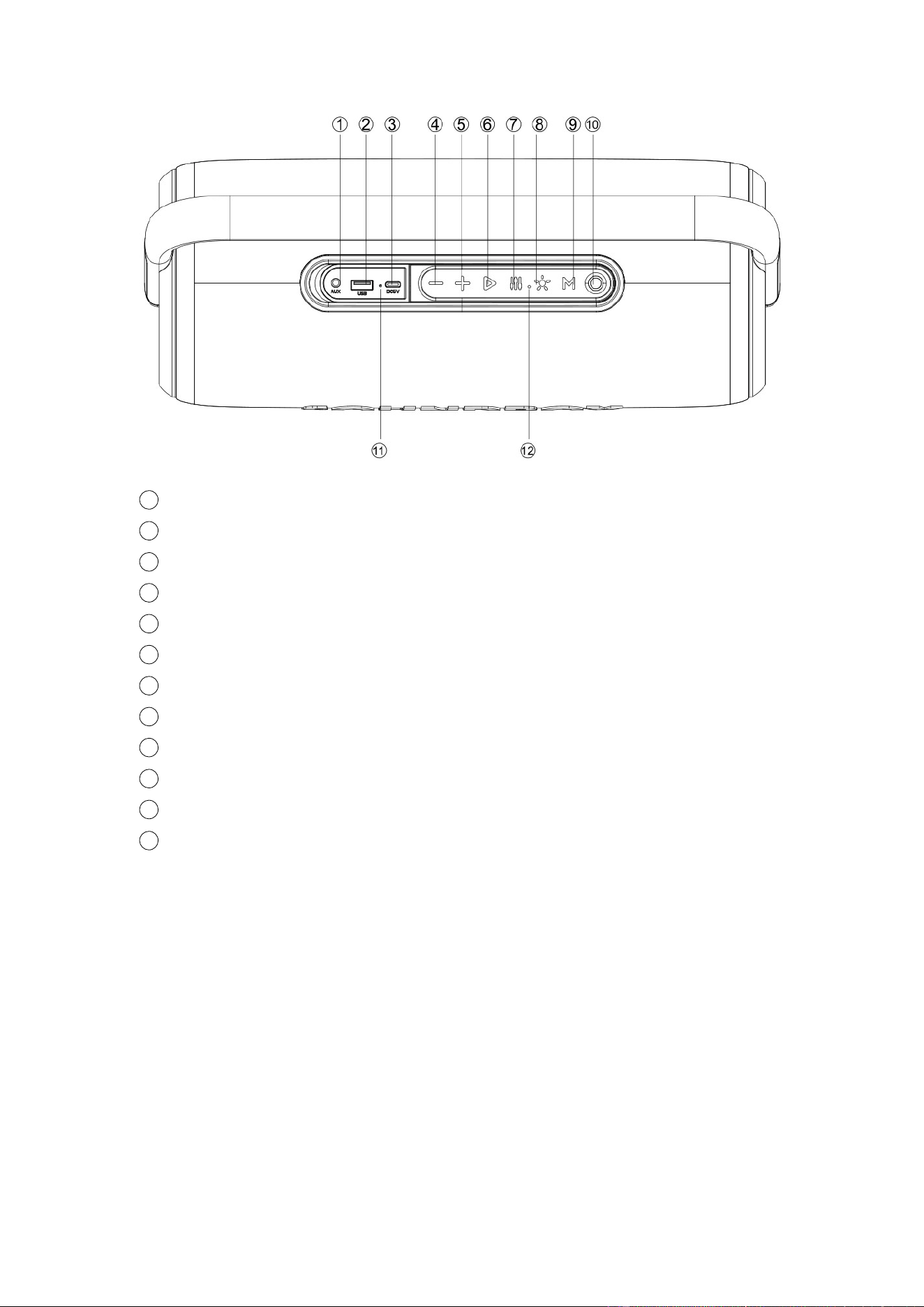
1
AUX Port
2
USB Port
3
Type-C Charging Jack
4
Backward/Volume Down
5
Forward/Volume Up
6
Play/Pause
7
EQ Button
8
RGB Light
9
Mode Button / TWS Button
10
Power Button
11
Charging Indicator
12
Built-in Microphone
Bluetooth Mode:
Power Button: Long-press for Power On/Off.
Activate Bluetooth of mobile phone and pair with the speaker 4001805, 4001804.
Mode Button: Short-press to switch the function modes, Long-press to pair or
disconnect TWS.
Play/Pause: Short-press to play or pause, Long-press to disconnect the Bluetooth
connection.
Backward/Volume Down: Short-press for volume down, Long-press for last song.
Forward/Volume Up: Short-press for volume up, Long-press for next song.
EQ Button: Short press to switch between the 2 EQ modes.
Light Button: Short press to switch the 2 kinds of RGB light modes and turn RGB light
on/off;

TWS Mode:
Turn on 2 identical speakers, both under BT mode.
Select one speaker and long-press TWS Button to pair TWS, the speaker will make a
tone to start to pair, and make a tone again after paired successfully.
Connect the paired speaker with your phone via Bluetooth and play wirelessly.
Long-press TWS Button again to disconnect TWS.
USB Playback Mode:
Power Button: Long-press for Power On/Off.
Connect your USB device to the USB port, it will switch to USB mode automatically.
Mode Button: Short-press to switch the function modes. Long-press no function.
Play/Pause: Short-press to play or pause. Long-press no function.
Backward/Volume Down: Short-press for volume down, Long-press for last song.
Forward/Volume Up: Short-press for volume up, Long-press for next song.
EQ Button: Short press to switch between the 2 EQ modes.
Light Button: Short press to switch the 2 kinds of RGB light modes and turn on/off
RGB light;
AUX-IN Mode:
Power Button: Long-press for Power On/Off.
Connect your audio device to the AUX port, it will switch to AUX-IN mode
automatically.
Mode Button: Short-press to switch the function modes. Long-press no function.
Play/Pause: Short-press to mute. Long-press no function.
Volume Down: Short-press for volume down, Long-press no function.
Volume Up: Short-press for volume up, Long-press no function.
EQ Button: Short press to switch between the 2 EQ modes.
Light Button: Short press to switch the 2 kinds of RGB light modes and turn on/off
RGB light;
Hands-free call:
● Under Bluetooth connection status, if there is an incoming call, user can
short-press Play/Pause button to accept the call or long-press Play/Pause button to
reject the call.
● During the call, user can long-press Play/Pause button to switch to talking on the
phone.
● Short-press Play/Pause button to end the call.
Activating Voice Assistant:
● Make Bluetooth connection with your mobile phone.
● Double-click Play/Pause button to activate voice assistant.

Reset Functionality:
● Under any model, Long-press Backward button for 5 seconds to clear BT and TWS
connection memory, and restore factory setting. The speaker will turn off also.
More Remarks:
● Default volume is at 50% status of max volume.
● Play time may vary depending on volume level and music style.
How to charge:
● When battery voltage low, the speaker will make prompt sound, charging indicator
will blink. Please Recharge In Time.
● The charger is not included in the package, please charge this speaker via a rated
5V/2A charger or via a PC. Fast charger (rated 9V/2A) is supported as well.
● After inserting charging cable and start charging, the charging indicator will keep
lighting.
● Charge time should be 4-6 hours. Once the speaker is full charged, charging
indicator will switch off.
● To protect the battery, please do not use the speaker while it is charging.
Warning:
● Please store and use this product in an environment of normal temperature.
● Please do not expose this product to rain or moisture environment.
● Please do not disassemble, repair or modify this product by yourself without
authorization.
● When cleaning this product, please use a soft cloth or with little water if needed,
please do not use chemicals for cleaning.
● In order to have an extended product life and protect your hearing, please avoid
listening to songs on maximum volume for long time.
● The product is with built-in lithium battery, to avoid dangers, please do not discard
or put it in the fire.

FCC STATEMENT
1. This device complies with Part 15 of the FCC Rules. Operation is subject to the following two
conditions:
(1) This device may not cause harmful interference.
(2) This device must accept any interference received, including interference that may cause
undesired operation.
2. any Changes or modifications not expressly approved by the party responsible for compliance
could void the user's authority to operate the equipment.
NOTE: This equipment has been tested and found to comply with the limits for a Class B digital
device, pursuant to Part 15 of the FCC Rules. These limits are designed to provide reasonable
protection against harmful interference in a residential installation.
This equipment generates uses and can radiate radio frequency energy and, if not installed and
used in accordance with the instructions, may cause harmful interference to radio communications.
However, there is no guarantee that interference will not occur in a particular installation. If this
equipment does cause harmful interference to radio or television reception, which can be
determined by turning the equipment off and on, the user is encouraged to try to correct the
interference by one or more of the following measures:
Reorient or relocate the receiving antenna.
Increase the separation between the equipment and receiver.
Connect the equipment into an outlet on a circuit different from that to which the receiver is
connected.
Consult the dealer or an experienced radio/TV technician for help.
RF warning statement:
The device has been evaluated to meet general RF exposure requirement. The device can be used
in portable exposure condition without restriction.