User Manual
ELEHEAR Beyond
OTC

WELCOME

Thank you for choosing ELEHEAR Beyond Hearing Aids to enhance
your hearing experience and improve your quality of life.
These hearing aids are individually fitted and fine-tuned to meet
your specific hearing needs; therefore, they are not suitable for use
by others.
Carefully and thoroughly read the user guide before using your
hearing aids. It is essential to operate the devices according to the
instructions provided. Improper handling may result in damage.
Should you have any questions regarding the use or maintenance of
your hearing aids, please do not hesitate to contact your hearing
care professional.

01
INSTRUCTIONS FOR USE
PRECAUTIONS
FEEDBACK
ACCESSORIES
PRODUCT STRUCTURE
OPERATION GUIDE
MAINTENANCE AND CLEANING
TROUBLESHOOTING GUIDE
GENERAL WARNINGS
TECHNICAL SPECIFICATIONS
EXPLANATION OF GRAPHICAL SYMBOLS
USED IN MEDICAL DEVICE LABELING
FCC REQUIREMENT
CYBERSECURITY
PRODUCT WARRANTY
CONTENTS
02
05
07
09
12
16
35
40
45
55
59
61
64
66

INSTRUCTIONS
FOR USE
02

ELEHEAR Beyond Hearing Aids utilize the microphone to capture
environmental sounds, which are then converted into electrical signals.
These signals are transmitted to a digital chip within the hearing aids,
where they undergo advanced processing, including filtering and
amplification. The result is a clear and amplified electrical
representation of the external sound. This processed signal is then
delivered to the receiver (speaker) located in the earpiece, where it is
converted back into acoustic sound waves. These sound waves travel
through the middle ear to the inner ear, where they are detected by the
auditory nerve and transmitted to the brain for sound perception.
PRINCIPLES OF HEARING AIDS
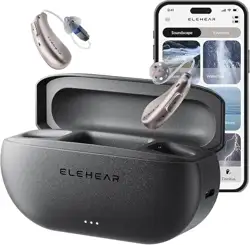
The primary components of hearing aids include the main unit (housing
the microphone and battery), receiver, ear domes, and charging case.
HEARING AIDS STRUCTURAL COMPONENTS
Empirical fitting, for hearing compensation in patients with air-conduct-
ed hearing loss.
HEARING AIDS SCOPE OF APPLICATION
03

Individuals under the age of 18 require specialized care. Using this
device without a proper medical evaluation could potentially exacer-
bate hearing impairment or related conditions. It is essential that
hearing aid users under 18 undergo a recent medical evaluation
conducted by a qualified physician, preferably an ear, nose, and throat
(ENT) specialist. The physician should assess and confirm whether the
use of a hearing aid is appropriate prior to initiating use.
INDIVIDUALS UNDER THE AGE OF 18
SHOULD CONSULT A PHYSICIAN BEFORE
USING THIS PRODUCT
Individuals with acute external otitis, tympanitis, acute suppurative
otitis media, chronic suppurative otitis media (in the stage of purulent
infection), and those allergic to the materials of this product are not
suitable for wearing.
CONTRAINDICATIONS
04

PRECAUTIONS
05

1. Hearing conditions professionally examined and audiologically tested
before, and hearing aids should be under the guidance of a doctor or a
professional dispenser of hearing aids.
2. Pay attention to the moisture-proof, shock-proof,
high-temperature-proof, light-proof, and drop-proof features of the
products.
3. Never immerse your hearing aids in any liquid. Remove your hearing
aids before swimming and washing your hair and showering; wait for
the ear canal to dry after swimming or showering before putting on
your hearing aids.
4. Avoid proximity to strong magnetic objects, as this may affect the
sensitivity of the hearing aids.
5. If you feel uncomfortable during the use, please try to choose the
appropriate ear cap replacement under the premise of comfort, or
consult after-sales service.
6. Hearing aids surfaces should be kept clean and earwax should be
removed from ear domes or other acoustic devices frequently.
7. You should correctly use the program and the volume switch to
control the program.
8. Please use the accessories provided by our company or authorized
dealers, the use of other accessories may affect the safety and
effectiveness of the product.
PRECAUTIONS
06

FEEDBACK
(ACOUSTIC FEEDBACK)
07
COMMON CAUSES OF ACOUSTIC FEEDBACK INCLUDE:
New hearing aids users often experience an effect known as acoustic
feedback, commonly referred to as "whistling." This occurs when
amplified sound leaks out of the ear canal and is picked up by the
hearing aids' microphone, creating a feedback loop. It is more likely to
occur at higher volume settings.
Excessive earwax buildup in the ear canal
Improper hearing aids fit or placement
Deterioration of hearing aids components over time
Incorrect ear tip size or style
Obstruction or compression of the hearing aids microphone
08

ACCESSORIES
09
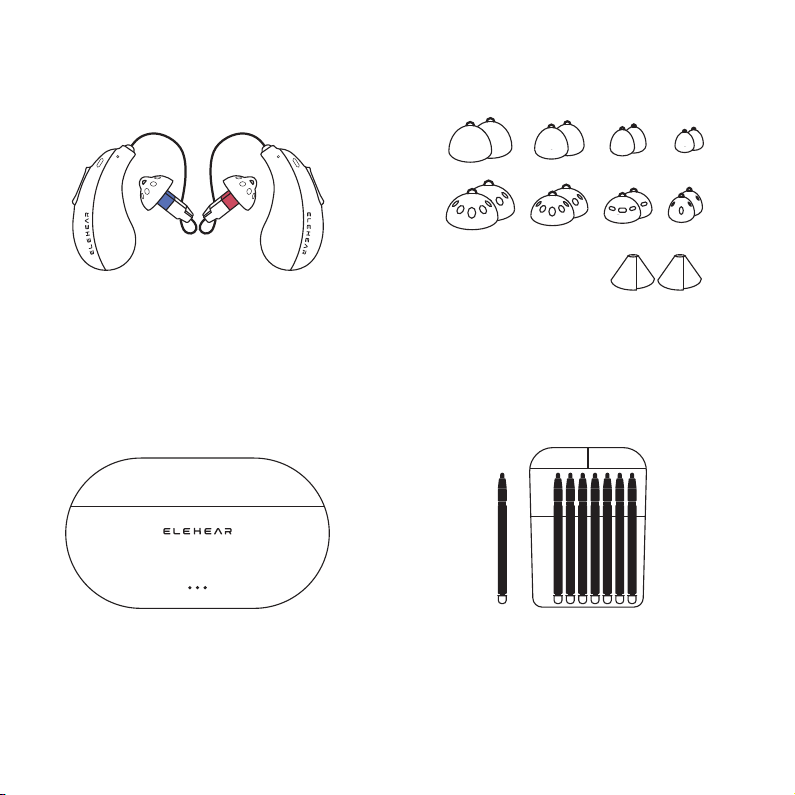
Hearing Aid x2
Charging Case x1
Wax Cap Tool x1
Close/Open Domes (S / M / L / XL) x2
Tulip Domes x2
10
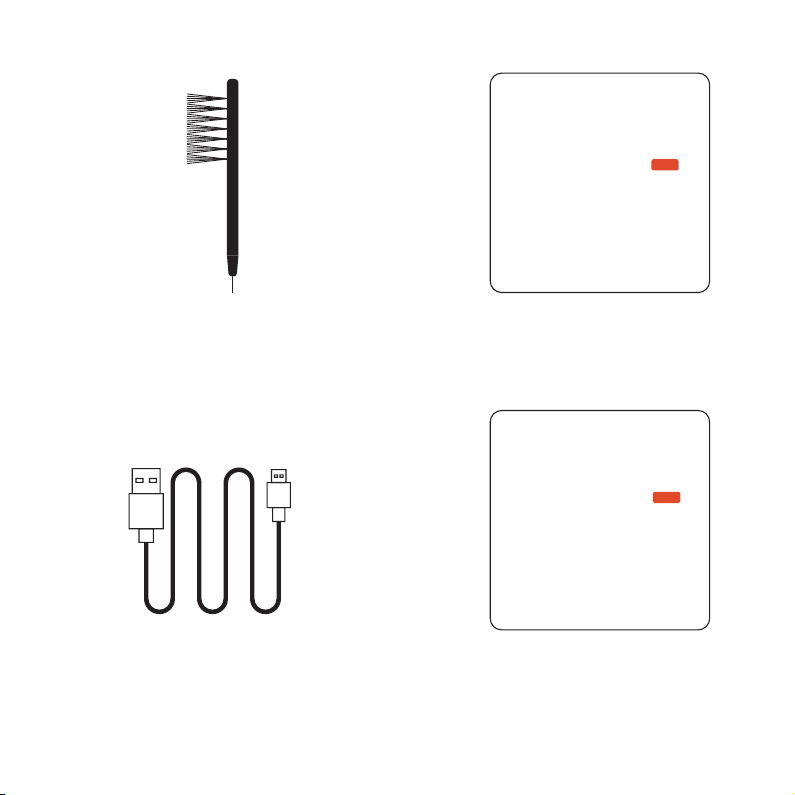
Multi-function Tool Pen x1
USB Type-C to USB-A Cable x1 Quick Start Guide x1
User Manual x1
Quick Start Guide
User Manual
ELEHEAR Beyond
OTC
ELEHEAR Beyond
OTC
11

PRODUCT STRUCTURE
12
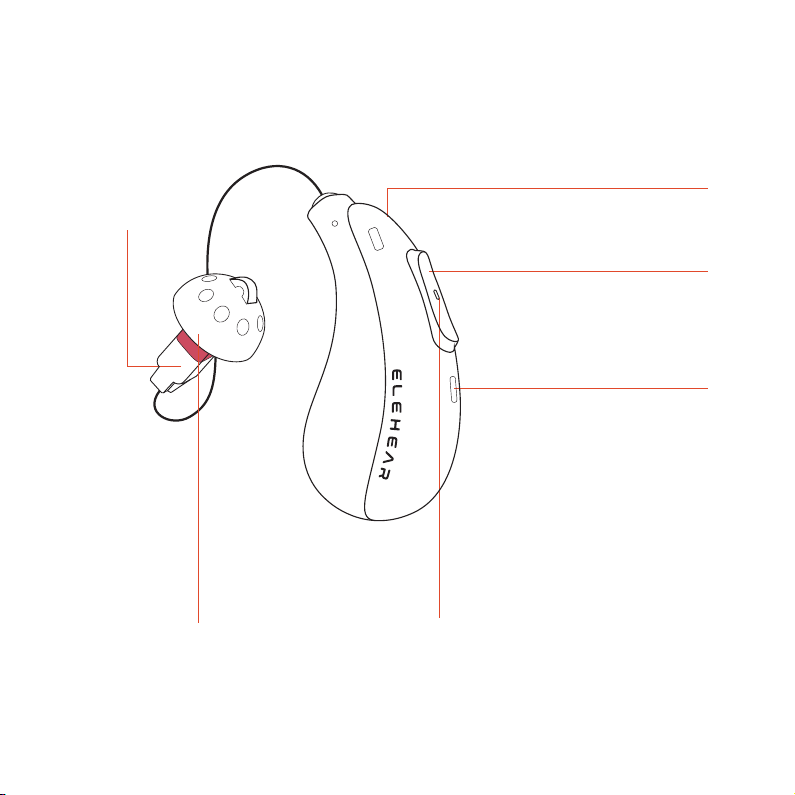
ELEHEAR BEYOND (FRONT)
13
Receiver
Microphone 2
Microphone 1
Power & Switch Button
On / off, volume up / down
Hearing Aid Indicator
Ear Dome
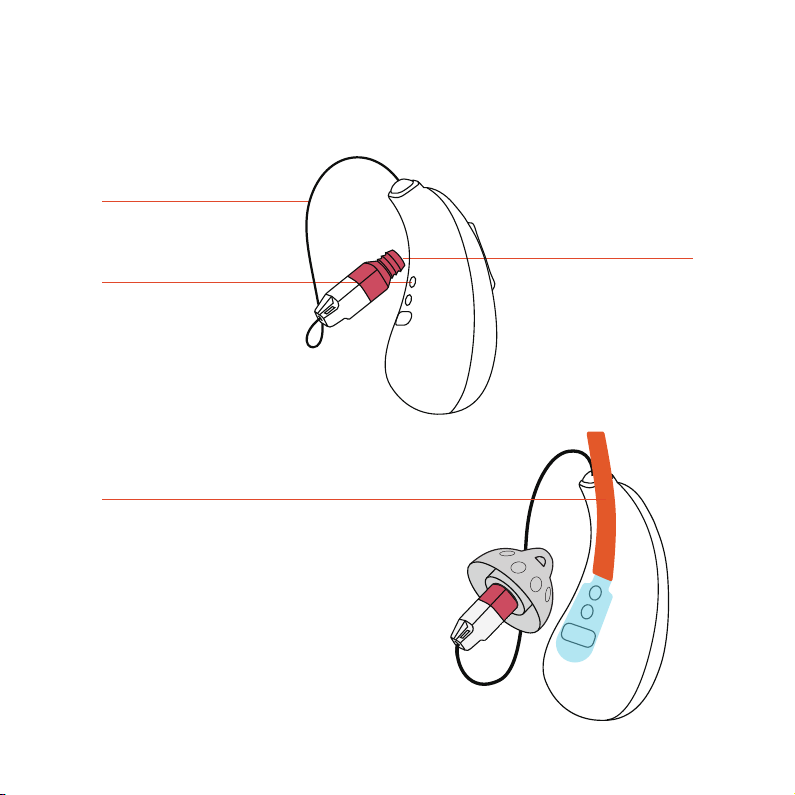
ELEHEAR BEYOND (BACK)
Charging Contact
Wax Cap
Receiver Wire
14
Protector
Remove the protectors from
the hearing aids before use
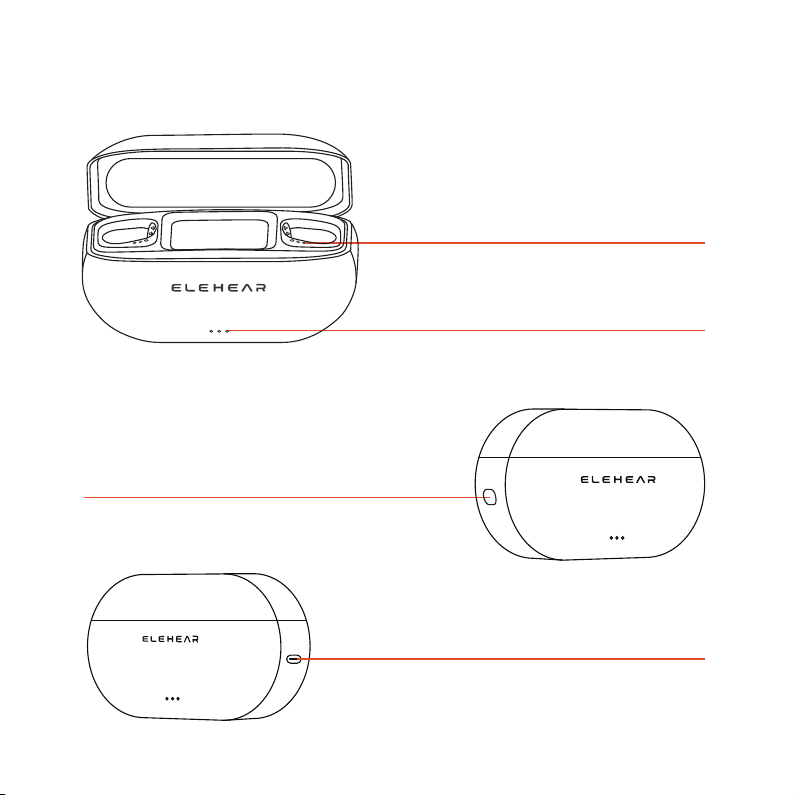
CHARGING CASE
Charging Case
Charging Indicator
Hearing Aids
Charging Indicator
Reset Button
15
Charging Port

OPERATION GUIDE
16
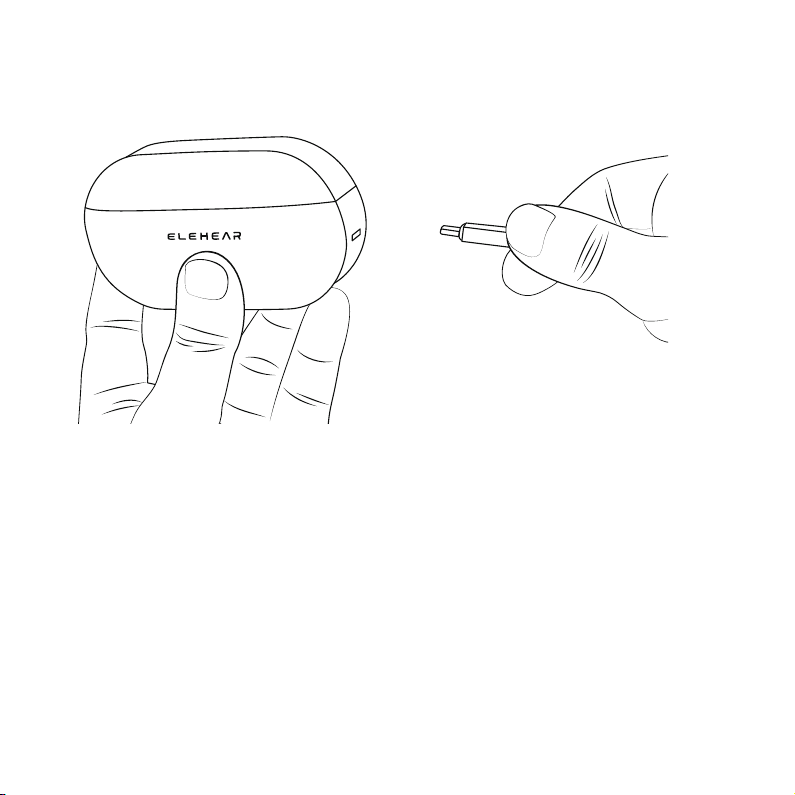
It is recommended to fully charge both the charging case and hearing
aids for 2.5 hours before initial use.
CHARGING PRIOR TO FIRST USE
17
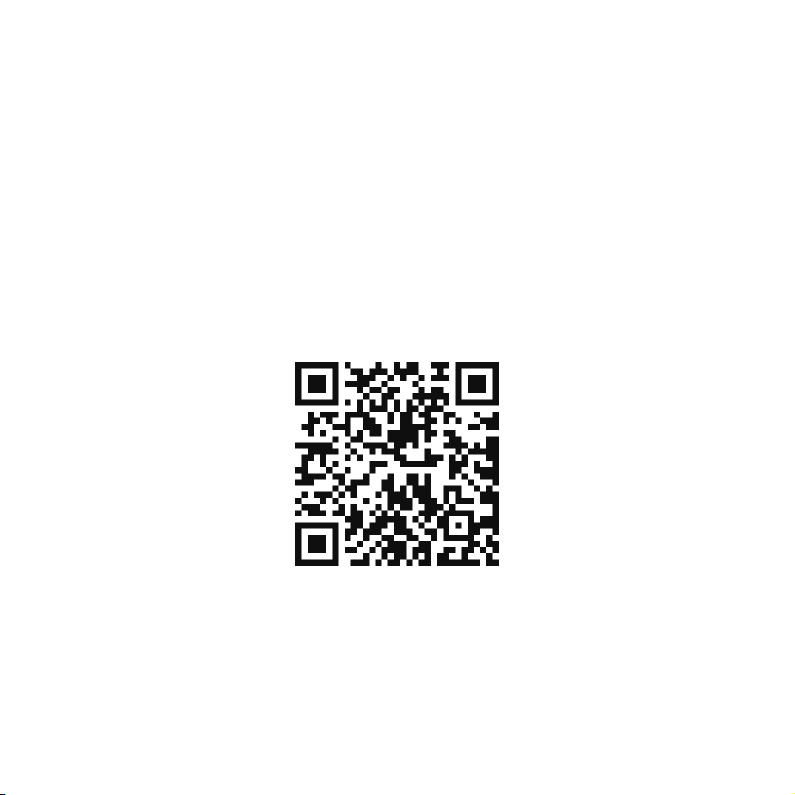
The App enables you to set up and personalize your hearing aids
according to your hearing preferences and manage its settings. Ensure
that you download the App before using the product.
(1) Open the web browser on your phone and go to:
https://elehear.com/pages/app-page to download the App. You can also
use the QR code below.
(2) Connect your hearing aids to your cell phone.
(3) Follow the instructions in the App to complete the setup of your
hearing aids.
DOWNLOAD THE ELEHEAR APP
18

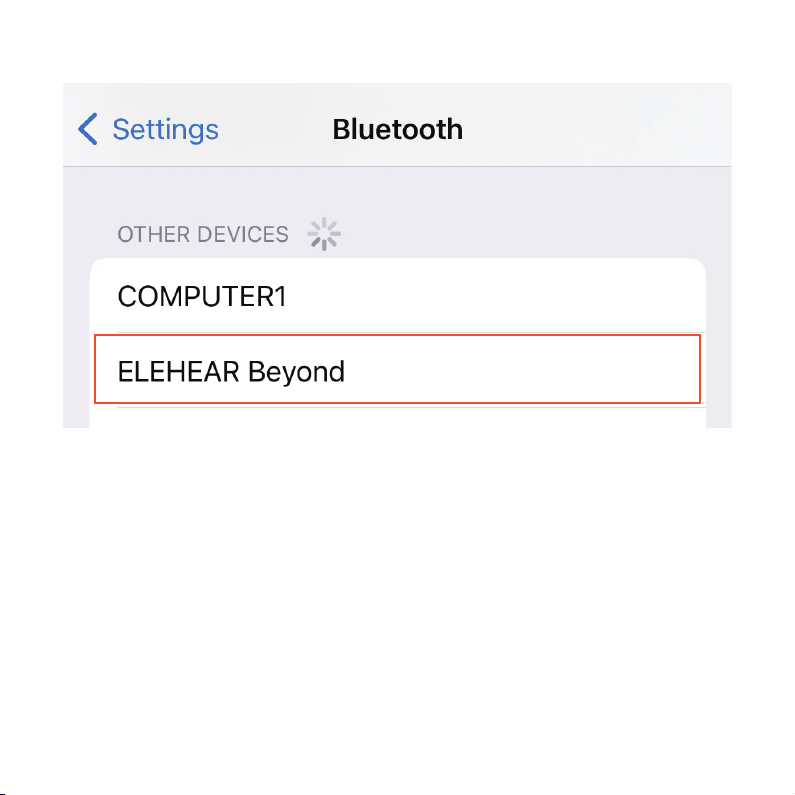
The ELEHEAR Beyond has Bluetooth® to connect with devices like
Apple iOS or Android phones. When connected to a phone, it can play
music and answer calls hands-free.
(1) On your phone:
· Turn on Bluetooth
· Search for devices
(2) Take out the hearing aids from the case, and it will start pairing with
Bluetooth, making a "pairing" sound.
(3) When connected, you'll hear "connected," and your phone will show
"ELEHEAR Beyond Connected."
The Bluetooth connection is ready, you can now use the hearing aids for
calls, music, and more.
Answer Calls
Press volume down button for 2 seconds to answer/end the call.
Play Music
Press volume down button for 2 seconds to play/pause the music.
BLUETOOTH STREAMING
19
Note:
· Connect the hearing aids to the phone within 30 minutes after taking
them out. After this time, the ELEHEAR Beyond Bluetooth won't be
detectable. If this occurs, return them to the charging case and then
take them out to reconnect.
· Before boarding a flight, ensure to deactivate the Bluetooth function
unless you receive authorization from the flight crew.
· The ELEHEAR Beyond is compatible with versions prior to Bluetooth
5.3.
20
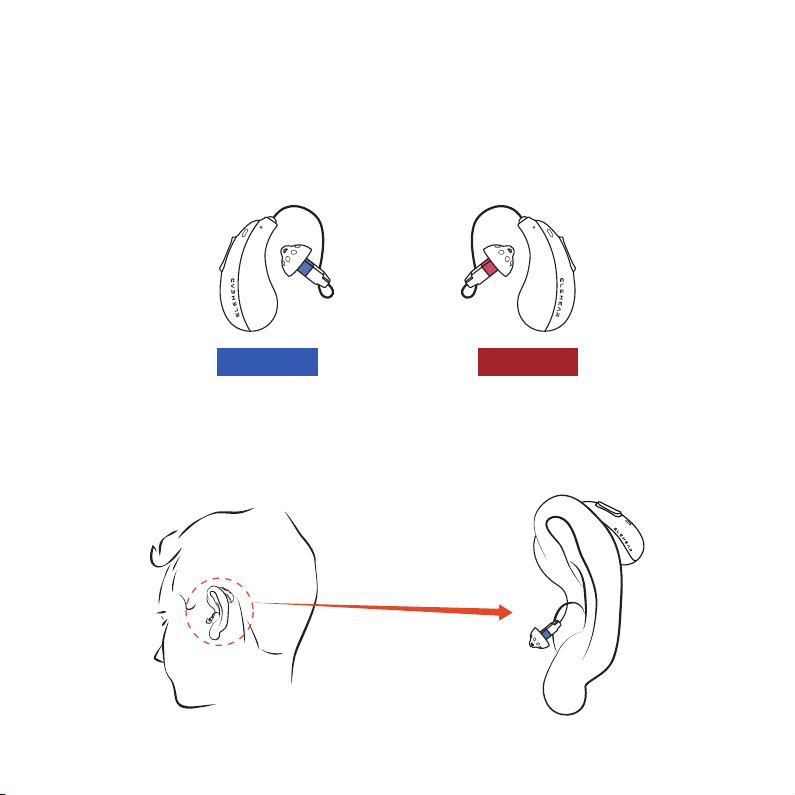
(1) Differentiate between the left and right hearing aids. The left ear
device features a blue receiver, while the right ear device is equipped
with a red receiver.
(2) Position the hearing aid on the corresponding ear. The hearing aid
body should rest near the upper part of your ear. The curved segment of
the receiver wire should encircle the front of your ear.
WEARING
21
Left: Blue Right: Red
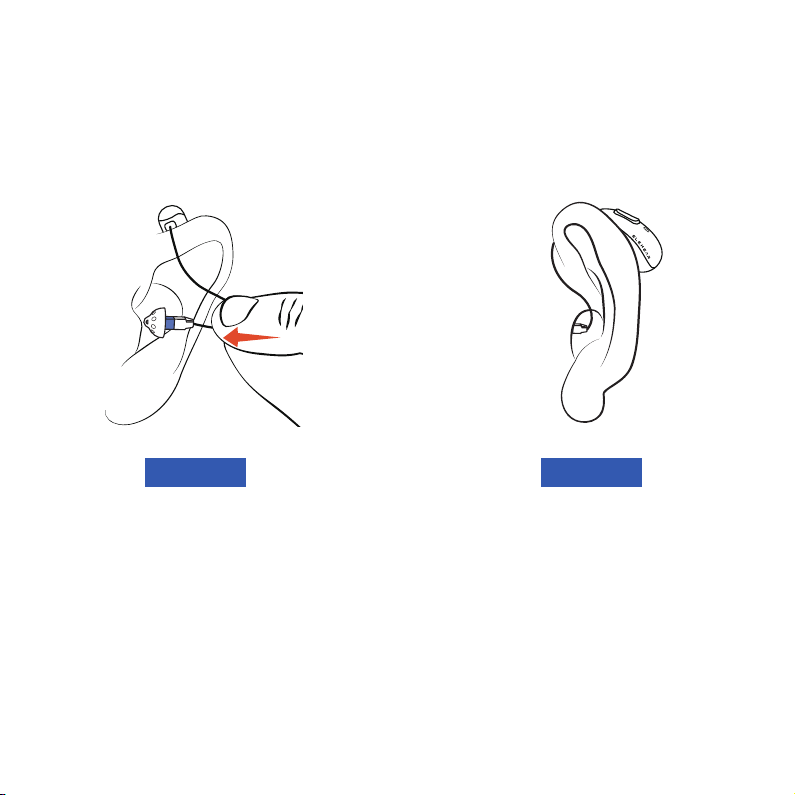
(3) Completely insert the ear
dome into your ear canal.
(4) Refine the position of the
receiver wire to ensure a
comfortable fit.
Note: Initially, the ear domes might feel unusual or cause slight itchiness
in your ear canal. If discomfort arises, replace the ear domes in other
sizes which fits your ear better.
The structure of the ear canal varies from person to person, and selecting an inappropriate
ear dome size may result in difficulty removing the ear domes. If you have any concerns
regarding the selection of the ear dome size, please contact us or consult a doctor for
assistance.
Left: Blue Left: Blue
22
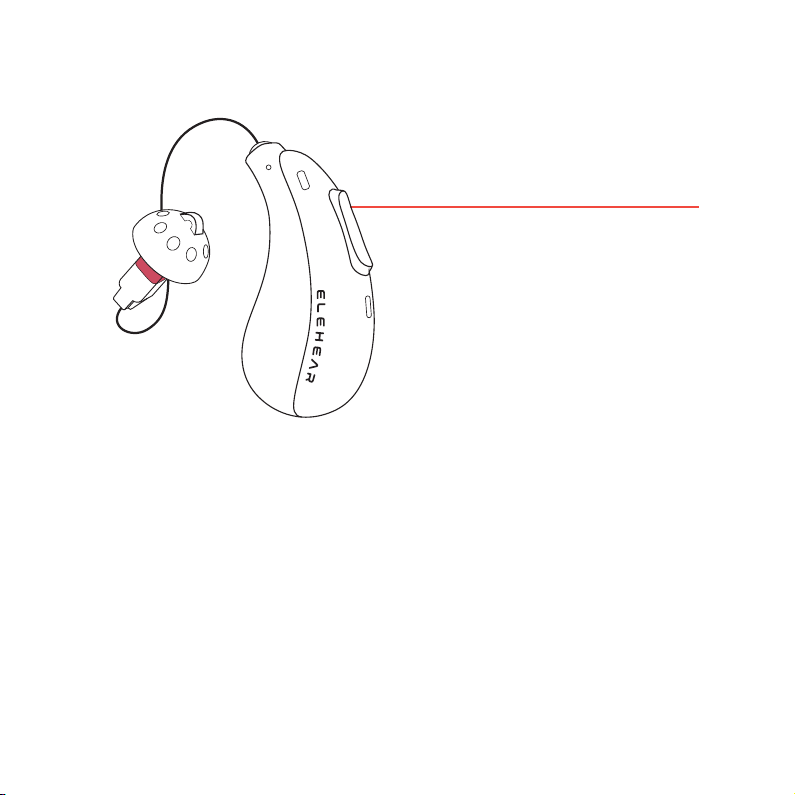
Power On:
The hearing aids will power on automatically when removed from the
charging case. Alternatively, when powered off, press and hold the
volume up button for 3 seconds.
Power Off:
Place the hearing aids into the charging case and close the lid securely.
The hearing aids will power off automatically. To power off manually,
press and hold the volume up button for 5 seconds.
POWERING ON/OFF
23
Press the volume
up button for 3s
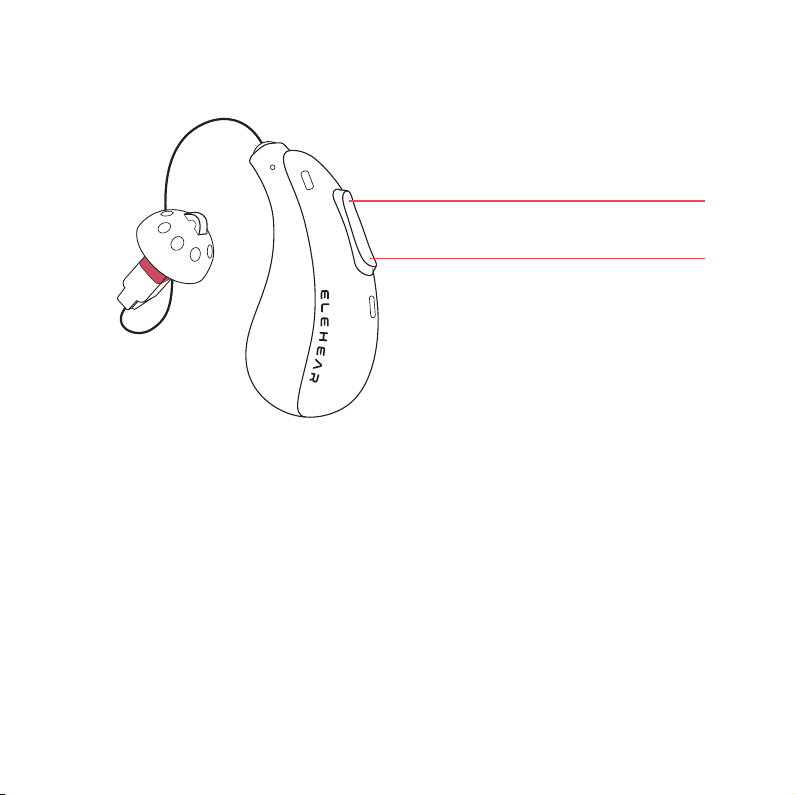
Short press the volume up button to raise the volume, short press once
to raise the volume by one notch (20 notches in total), every time you
raise the volume by one notch, the hearing aids will emit a "ding"
sound, and when it reaches the highest volume, you will hear a "ding-
ding" sound.
Short press the volume down button to turn down the volume, short
press once to turn down the volume by one notch, every time you turn
down the volume by one notch, the hearing aids will emit a "ding"
sound, and when it reaches the lowest volume, you will hear a "
dingding" sound.
VOLUME ADJUSTMENT
24
Volume up button
makes sound louder
Volume down button
makes sound softer
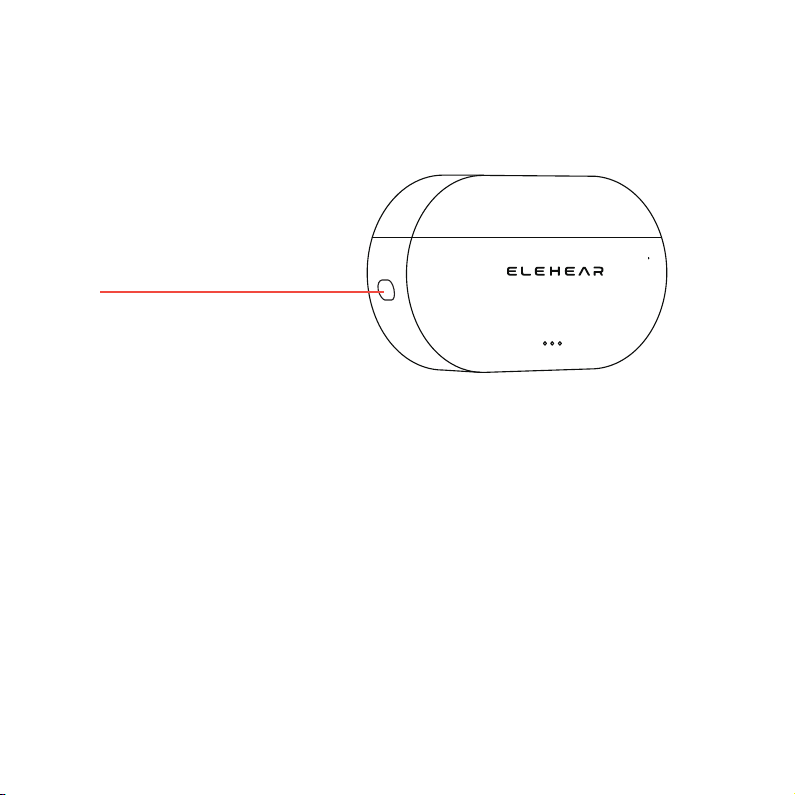
RESTORING FACTORY SETTINGS
To restore your hearing aids to factory settings, press and hold the reset
button on the charging case for 7 seconds, at which time the white light
will flash on and off after 5 seconds.
25
Reset Button
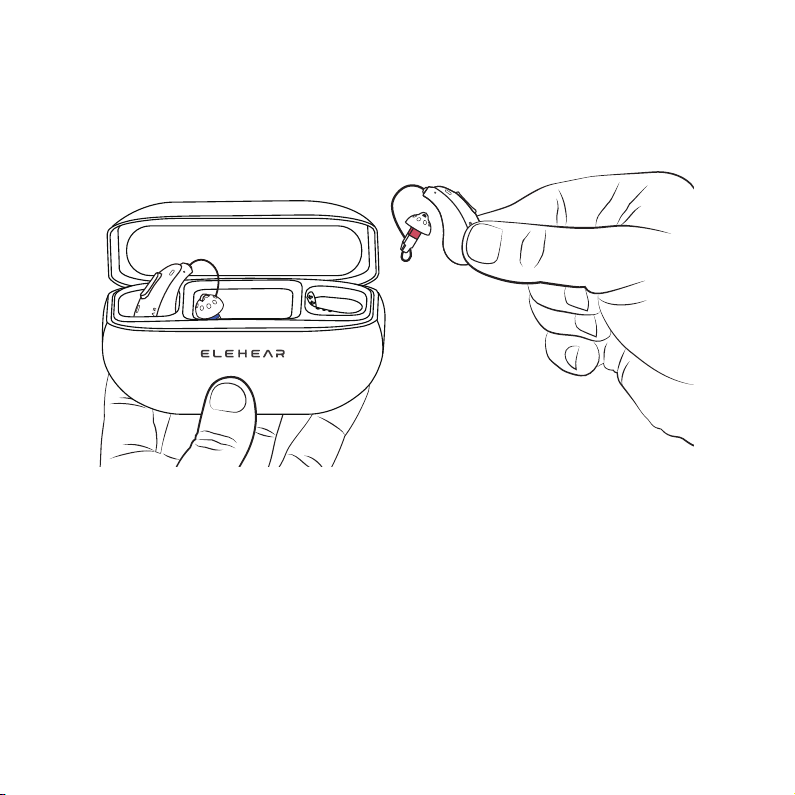
CHARGING
Place the hearing aids in the charging case and make sure the lid is
tightly closed; the hearing aids will charge automatically. It takes 1.5
hours to fully charge the hearing aids. In the default setting (hearing aid
mode), the battery life is up to 20 hours.
26
(1)Charging The Hearing Aids
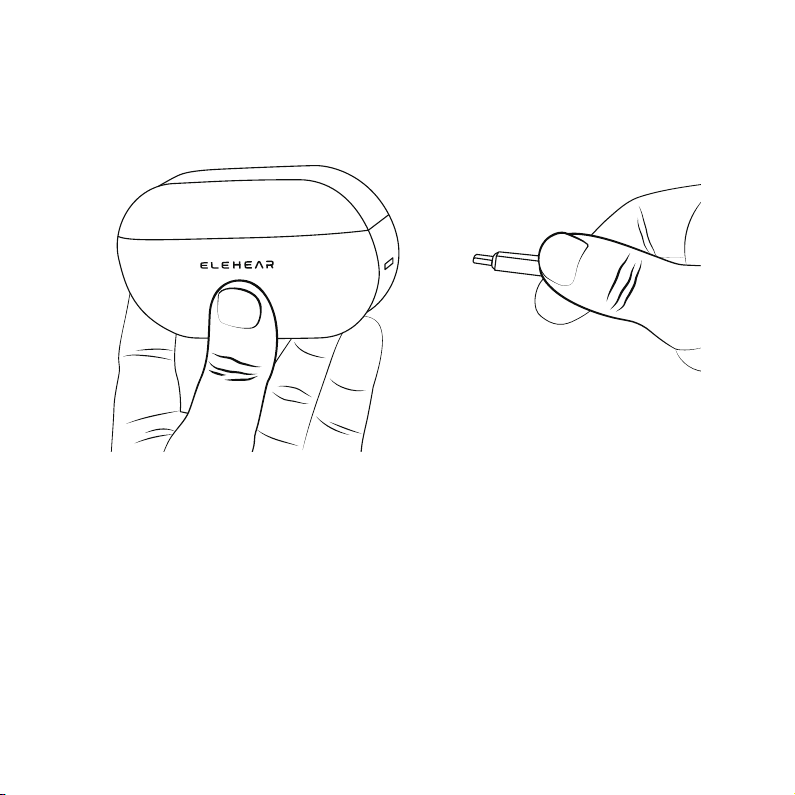
Connect the charging box to the power outlet for full charging. This
procedure can take up to 2.5 hours to fully charge the charging box of
the hearing aids cartridge.
27
(2)Charging The Charging Box
Note: Risk of injury, fire, or explosion during shipment. Shipping hearing
instruments needs to abide by local regulations. Please use this product
within the specified temperature range. It may cause equipment failure
if the temperature is too high or too low. If the temperature is too high or
too low, it may cause equipment failure. When the temperature is lower
than 5°C, battery performance is limited.
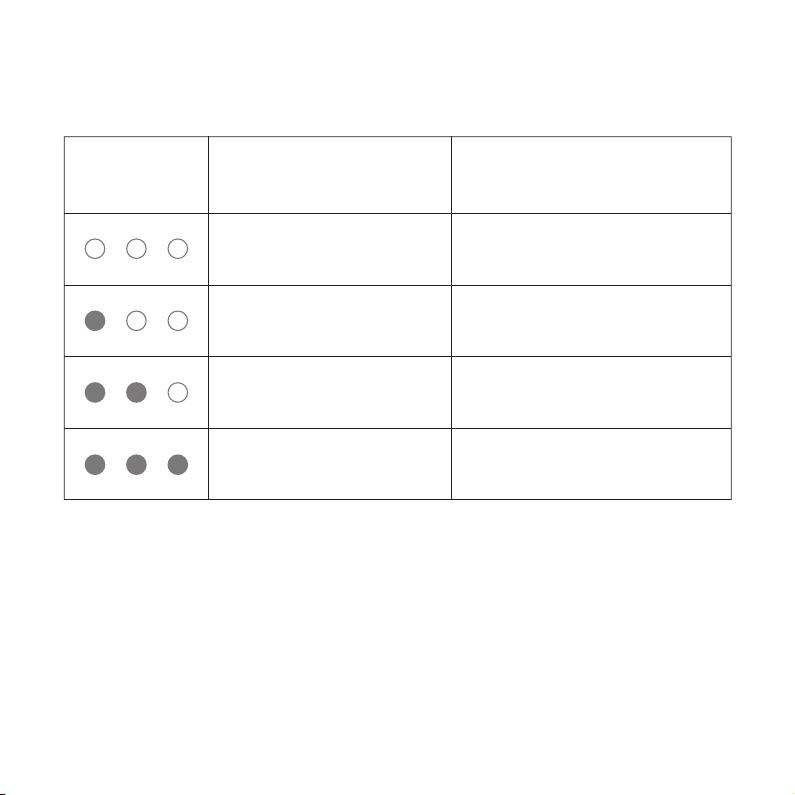
(3)Battery status
Hearing Aid
1 light on for 10 seconds
3 lights on for 10 seconds
Battery level < 30%
2 lights on for 10 seconds Battery level < 60%
Battery level ≥ 60%
Hearing Aid
Indicator
Indicator Status Battery Level
All indicators off No battery
28
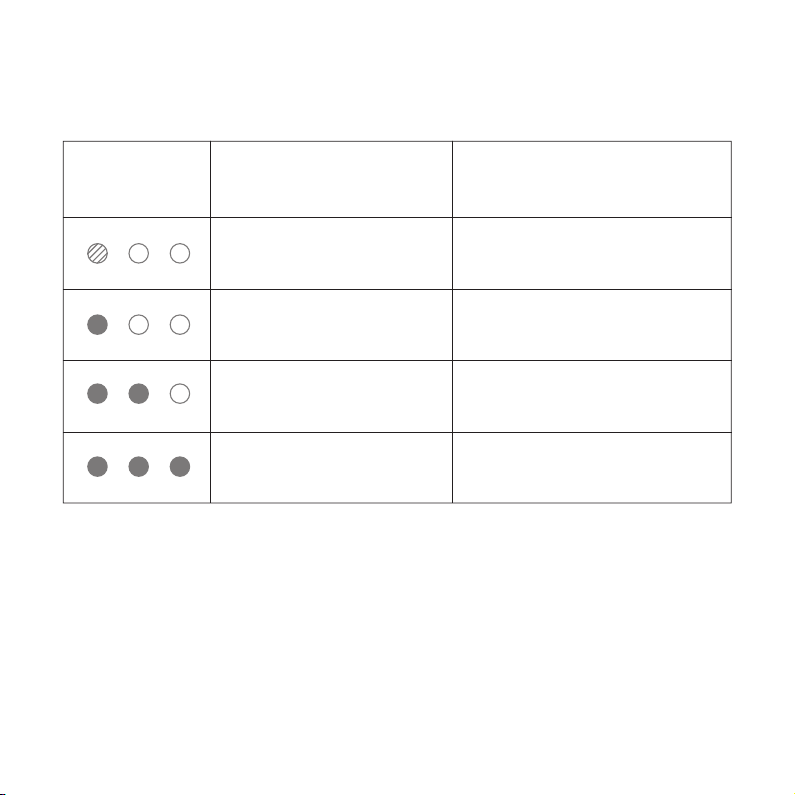
Charging Case
1 light blinking for 5 seconds
2 lights on for 10 seconds
3 lights on for 10 seconds
Battery level < 10%
1 light on for 10 seconds Battery level < 30%
Battery level < 60%
Battery level ≥ 60%
Charging Case
Indicator
Indicator Status Battery Level
The charging case can recharge the hearing aids up to 4 times.
29
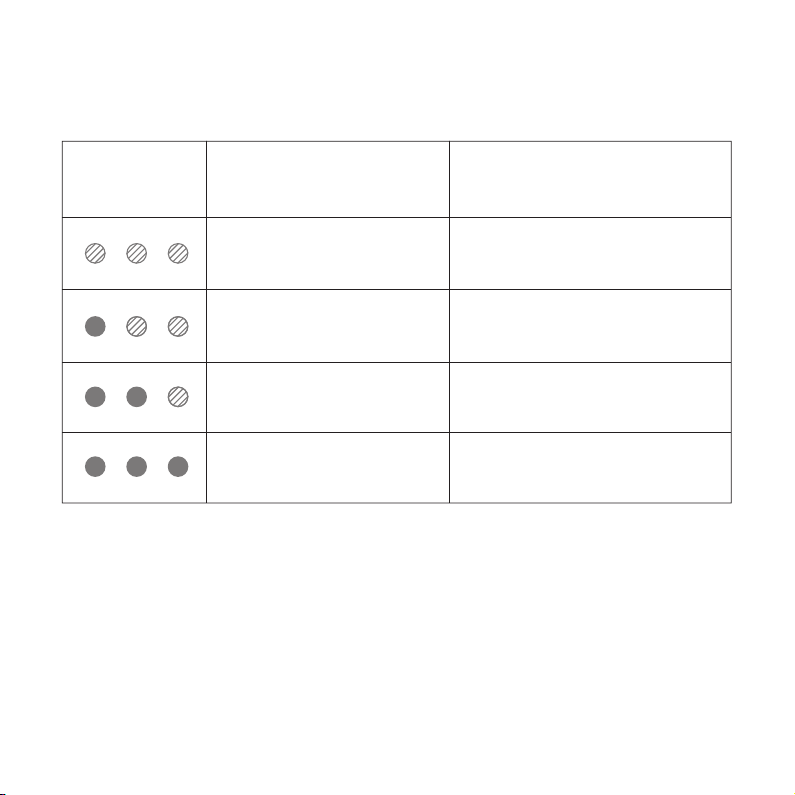
Hearing Aid & Charging Case
Active flashing mode
1 light always on,
2 lights on active flashing mode
2 lights always on,
1 light on active flashing mode
3 lights always on
Battery level < 30%
Battery level < 60%
Battery level < 90%
Battery level ≥ 90%
Hearing Aid
Indicator
Indicator Status Battery Level
Note: Use the specified power adapter (DC 5V/1A) and power
cord (3A). When charging in a safe environment, make sure the
device system meets the requirements of the GB9706.1-2020
standard.
30
(4)Charging status
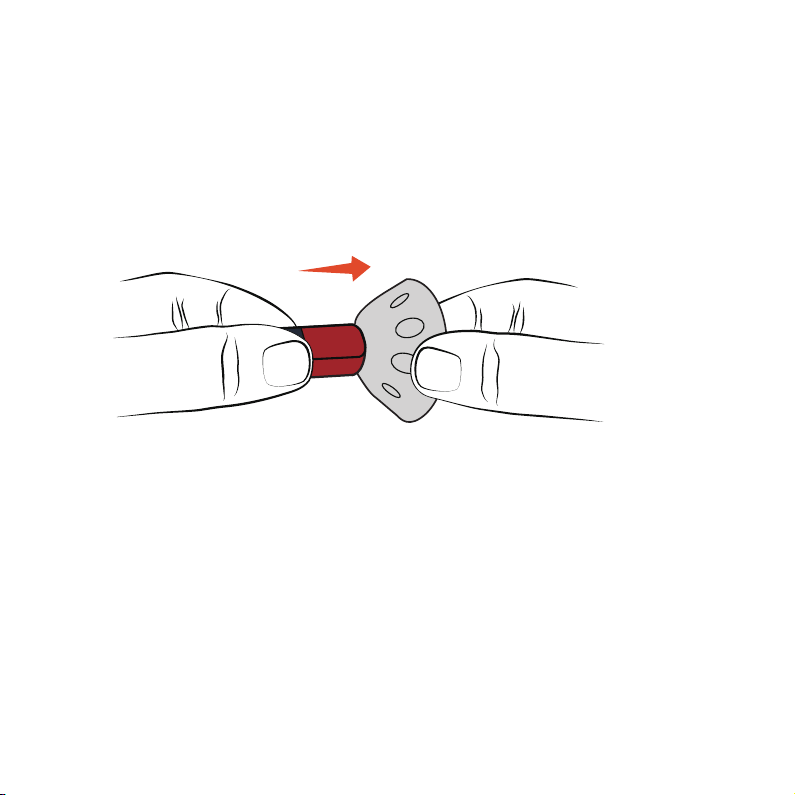
To ensure the best sound, wear hearing aids properly with the
right-sized ear dome. Try different sizes if it feels uncomfortable or the
sound is not clear.
REPLACEMENT OF EAR DOMES
(1) Hold one end of the receiver and gently remove the ear dome.
31
R
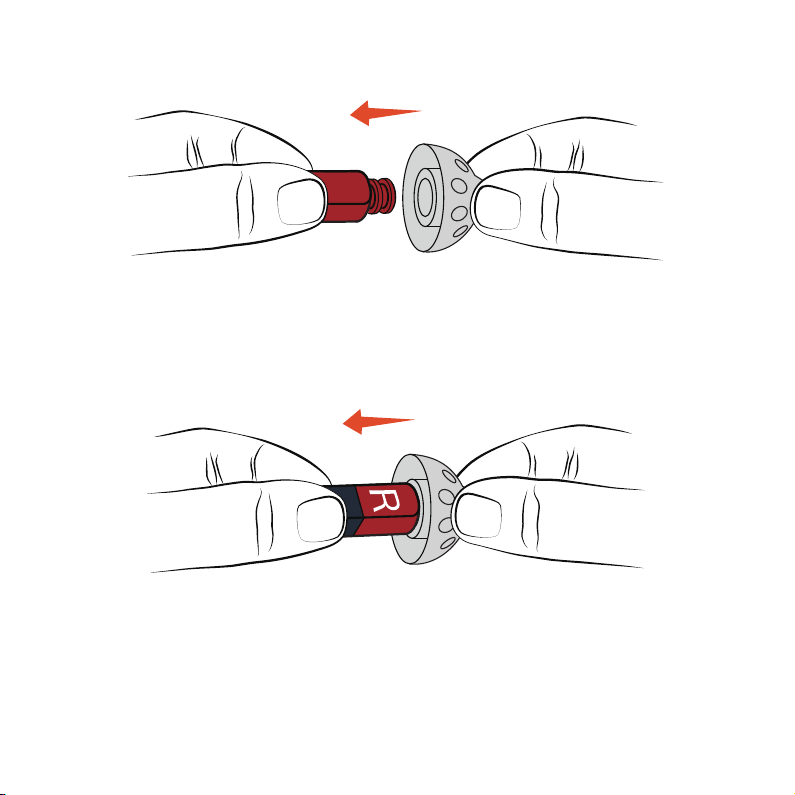
(2) Take a new ear dome and place the receiver at the center of it.
(3) Slide the ear dome onto the receiver outlet. The receiver and ear
dome should fit snugly together.
32
R
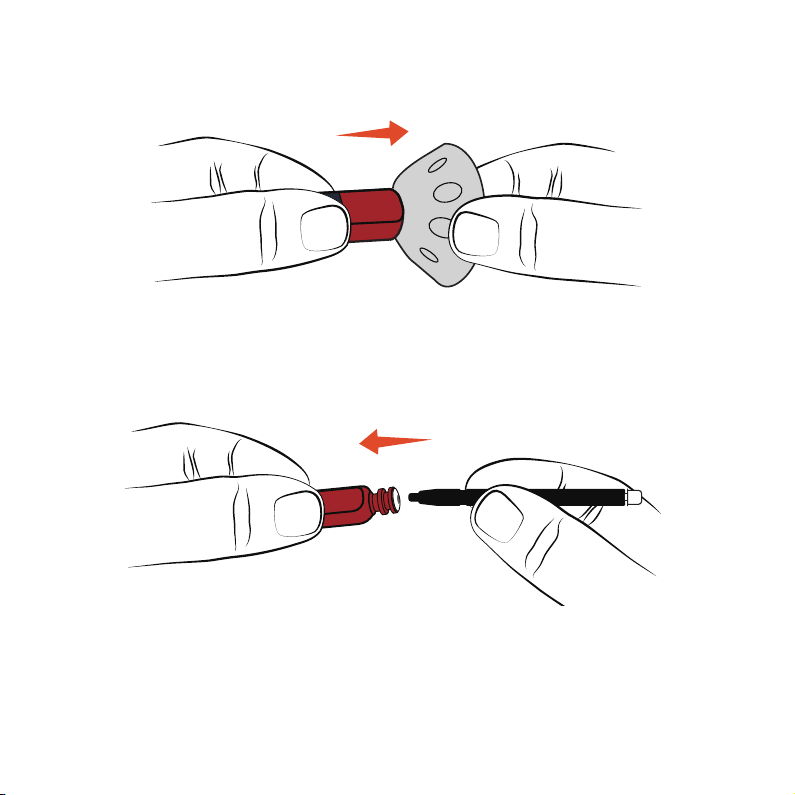
(1) Remove the ear cap from the receiver.
(2) The wax cap tool has two ends: one for removing the old wax cap
and the other for putting on the new one.
REPLACING WAX CAP
33
R
R
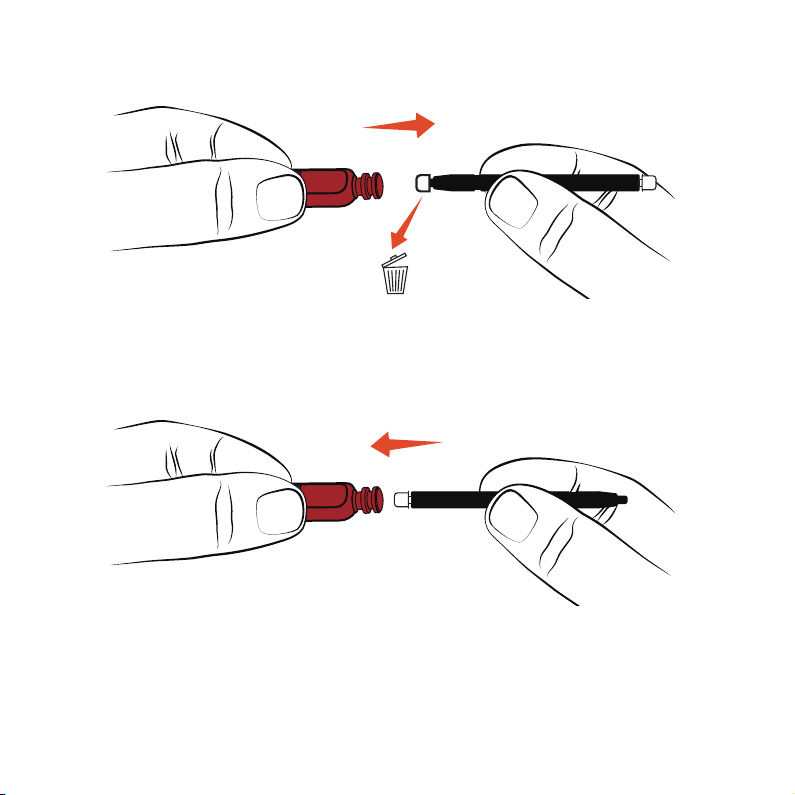
(3) Insert the empty end into the old wax cap on the hearing aids, take
out and dispose of the old wax cap.
(4) Use the other end and put the new wax cap into the receiver's end.
Press it firmly, remove the tool, and dispose it.
34
R
R

MAINTENANCE
AND CLEANING
35

CLEANING
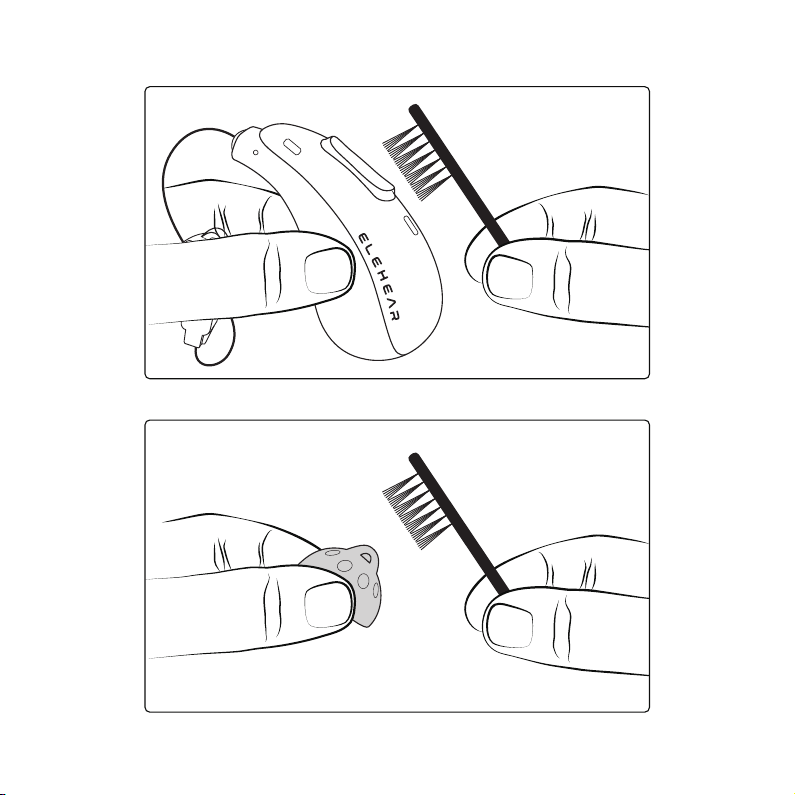
(1) Maintain the hearing aid's cleanliness and dryness is crucial. Prevent
water and liquid from entering the hearing aids during daily use.
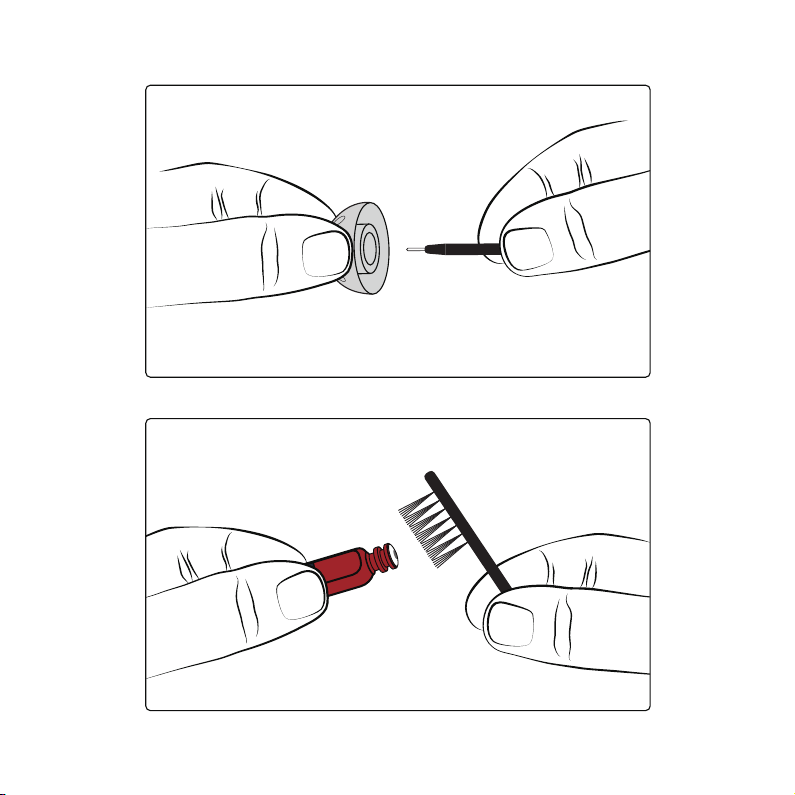
(2) Clean the hearing aid's surface daily by wiping it with a dry cloth or
paper towel. Use the provided cleaning brush to gently clean the
receiver wire and microphone.
(3) Over time, earwax might accumulate on the ear dome. Use a
cleaning brush to remove it or gently wipe it with a damp, soft cloth. Do
not wash directly with water or liquid detergent.
36
37
38
R

DAILY CLEANING
Wipe the surface of the hearing aids with a clean, dry, lint-free cloth or
the provided cleaning brush. Never use cleaning solutions, solvents, or
abrasive cleaners on the hearing aids.
WEEKLY CLEANING
Use a soft, slightly damp cloth or a specialized hearing aids cleaning
wipe to clean the surfaces of the hearing aids and receivers.
MONTHLY MAINTENANCE
Inspect the ear dome for the presence of earwax. Clean or replace the
ear dome as needed. Use only a soft, damp cloth to clean the ear dome.
Do not use water or cleaning solutions.
Check the wax cap for blockage. Replace the wax cap according to the
instructions provided to maintain optimal sound quality.
39

TROUBLESHOOTING
GUIDE
40
HOWLING
Reason: Loose ear domes
Solution: Remove the ear domes and put them back on
Reason: The ear domes are not the right size
Solution: Replace ear domes with appropriate size
Reason: Excessive earwax
Solution: Clean your ears
Reason: Hearing aids volume is too loud
Solution: Turn down the volume or consult an audiologist
Reason: Receiver wire cracked or damaged
Solution: Consult an audiologist
Reason: When the hearing aids are placed in the charging compartment,
the charging contacts are not in good contact
Solution: Clean the charging contacts of the hearing aids and the
charging case
Reason: The charging case is out of power
Solution: Charge the charging case
41
SILENT
42
Reason: The device is switched off
Solution: Power on
Reason: No battery or low battery
Solution: Timely charging
Reason: The sound outlet of the receiver is blocked
Solution: Clean the receiver sound outlet
LOW VOLUME
43
Reason: Due to the volume settings
Solution: Adjust the volume in the settings
Reason: Battery is low
Solution: Charge the battery in time
Reason: Ear domes are too loose
Solution: Replace the ear domes
Reason: Clogged ear domes
Solution: Clean the ear domes
Reason: Excessive earwax
Solution: Clean your ear canal or seek medical support
Reason: Changes in hearing condition
Solution: Consult an audiologist
44
THE INDICATOR LIGHT IS NOT ON
Reason: Hearing aids are not placed correctly
Solution: Reposition so that the charging contacts make full contact
Reason: The charging case is out of battery
Solution: Charge the charging case
BLUETOOTH CONNECTION FAILURE
Reason: Bluetooth on the phone is off
Solution: Turn on the Bluetooth
Reason: Previous Bluetooth pairing records are not cleared
Solution: Long-press on the button of the charging case for 7s and
reconnect the device

GENERAL WARNINGS
45

To ensure your safety and the proper use of your ELEHEAR Beyond
hearing aids and to avoid possible personal injury or property damage
caused by electric shock, high temperature, fire, radiation, explosion,
mechanical hazards, and improper use, please read and observe the
following items before using this product:
• Hearing aids do not restore normal hearing. They are designed to
amplify sound and improve hearing ability in individuals with hearing
loss. Hearing aids cannot reverse or prevent hearing loss caused by
underlying medical conditions.
• Hearing aids are part of a comprehensive hearing healthcare plan.
Optimal benefit may require additional interventions such as auditory
training and speechreading therapy. Consistent and regular use of
hearing aids is essential for maximizing their effectiveness.
• If you experience any adverse events while using the ELEHEAR
Beyond hearing aids, such as skin irritation in the ear, injuries caused by
the device (including cuts, scratches, or burns from an overheated
battery), device fragments becoming stuck in the ear, or a sudden
decrease in hearing after using the device, the FDA refers to these
issues as "adverse events." You should immediately discontinue use and
contact your hearing care professional. They will provide professional
guidance, address your concerns, and report the incidents to the
manufacturer
46

• Keep the volume low when using the hearing aids for the first time.
• Professional fitting and adjustment are essential. ELEHEAR Beyond
hearing aids should only be used under the guidance and supervision of
a qualified hearing care professional. Improper fitting or use can lead to
further hearing damage.
• Do not share hearing aids. Hearing aids are individually programmed
and fitted to each user's unique hearing needs. Sharing hearing aids
can result in improper amplification levels and potential harm to
another person's hearing.
and/or relevant regulatory authorities if necessary.
Instructions for reporting are available at
https://www.fda.gov/Safety/MedWatch, or call 1-888-
INFO-FDA (1-888-463-6332). You can also download a form to mail to
FDA.
USE OF HEARING AIDS
• Patients with acute otitis externa, tympanitis, chronic suppurative
otitis media (in the period of runny infection), and acute suppurative
otitis media.
• Patients who are allergic to the material of this product.
CONTRAINDICATIONS
47

• Keep hearing aids and their components out of reach of children and
individuals who may be at risk of swallowing small objects.
• If hearing aids or any of their parts are swallowed, seek immediate
medical attention.
CHOKING AND INGESTION HAZARD
ELEHEAR Beyond hearing aids are safe for use in normal environments.
However, they have not been tested or certified for use in potentially
explosive atmospheres. Do not use hearing aids in environments with
explosion hazards, such as mines, areas with high concentrations of
oxygen, or locations where flammable anesthetics are handled.
EXPLOSION HAZARD
Not that unexpected malfunction can happen on hearing aids. If you
rely on your hearing for safety-critical tasks such as driving, be mindful
that your hearing aids could stop functioning. This could be due to
various factors, including battery depletion, moisture in the sound tube,
or earwax blockage.
MALFUNCTION RISK
48

If you wear a cochlear implant (CI) in one ear and an ELEHEAR Beyond
hearing aids in the other, maintain a minimum distance of 1cm
between the two devices at all times. The magnetic fields generated by
the CI components, including the sound processor, coil, and magnet,
can permanently damage the speaker in the hearing aids. Avoid
placing the devices in close proximity, especially when removing or
cleaning them. Do not store the CI and hearing aids together in the
same container.
COCHLEAR IMPLANTS
In rare cases, the ear dome may remain in the ear canal when the
receiver is removed. To avoid pushing the ear dome against the
eardrum, do not attempt to reinsert the receiver wire into the ear canal.
If this occurs, consult an audiologist for further guidance.
IF THE EAR DOME REMAINS IN THE EAR CANAL
Avoid operating your hearing aids in situations that require your full
attention, as this may divert your focus from potential hazards. Adhere
to all local traffic laws and regulations regarding the use of electronic
devices while driving.
ENVIRONMENTAL AWARENESS
49

• ELEHEAR Beyond hearing aids have undergone rigorous testing and
meet international standards for human exposure to electromagnetic
emissions, including Specific Absorption Rate (SAR), induced
electromagnetic power, and voltage.
• The levels of these emissions are well below the internationally
recognized safety limits for human health and are safe for use in
proximity to active medical implants, such as pacemakers and
defibrillators.
• If you have an active implant, particularly a brain implant, consult with
your implant manufacturer regarding potential risks of electromagnetic
interference.
• Maintain a safe distance (at least 30cm) between multi-functional tool
pen containing magnets (e.g., pens with magnets) and your implanted
device.
• Always follow the recommendations and guidelines provided by the
manufacturer of your implantable cardiac device, including pacemakers
and defibrillators, regarding the use of magnets.
ACTIVE IMPLANTABLE DEVICES
50

Hearing aids may be damaged due to strong electromagnetic fields
exposure, remove your hearing aids before undergoing X-rays, CT, MR,
PET scans, electrotherapy, surgery, or entering other environments with
strong electromagnetic fields.
X-RAYS, CT, MR, PET SCANS,
ELECTROTHERAPY, AND SURGERY
• Hearing aids should never be exposed to extreme heat or direct
sunlight.
• Do not dry hearing aids in a microwave or with hairdryers due to the
risk of fire or explosion.
• Chemicals in cosmetics, hairspray, perfumes, lotions, sunscreens, and
insect repellents can damage hearing aids. Always remove your hearing
aids before using such products and allow them to dry thoroughly
before use.
HIGH TEMPERATURES AND CHEMICALS
51

To ensure the safety of your hearing aids and charging accessories,
follow the safety standards of GB 9706.1 : When charging your
devices, use the approved power adapter and charging cable as
described in the user guide, and ensure that the charging accessories
are not placed near an induction cooking surface. The conductive
structures inside the charging accessories could absorb inductive
energy from the cooking surface, potentially leading to thermal
destruction.
CONNECTING EXTERNAL DEVICES
Special care should be taken when selecting, fitting, and using hearing
aids with a maximum sound pressure capability of more than 132 dB
SPL (2CC coupling cavity), as there may be a risk of damage to the
hearing aids user's residual hearing.
HIGH POWER DEVICES
• Hearing aids and ear domes may lead to the accelerated
accumulation of cerumen.
• In rare cases, other non-allergenic substances used in hearing aids
may cause skin irritation or other side effects. If this occurs, consult
your doctor.
POSSIBLE ADVERSE REACTIONS
52

Your hearing aids contains Bluetooth functionality. When you are on an
airplane, you must activate flight mode or turn off your hearing aids
unless the flight crew allows.
USE IN AIRPLANES
Only use accessories, transducers, or cables supplied by the
manufacturer. Non-original accessories may reduce the electromagnetic
compatibility (EMC) of the device.
USE OF THIRD-PARTY ACCESSORIES
Changes or adjustments not expressly approved by the manufacturer
will void the equipment warranty.
NO MODIFICATION OF HEARING AIDS
53

Hearing aids have been thoroughly tested for interference in
accordance with the most stringent international standards. However,
hearing aids may be interfered with by other devices (e.g., some cell
phones, civil band systems, store alarm systems, and other devices). If
this happens, increase the distance between the hearing aids and the
interfering device.
INTERFERENCE
Please do not discard end-of-life batteries, the device, or accessories at
will. Disposal of waste and residue should be in accordance with
corresponding national laws and regulations.
ENVIRONMENTAL PROTECTION
54

TECHNICAL
SPECIFICATIONS
55
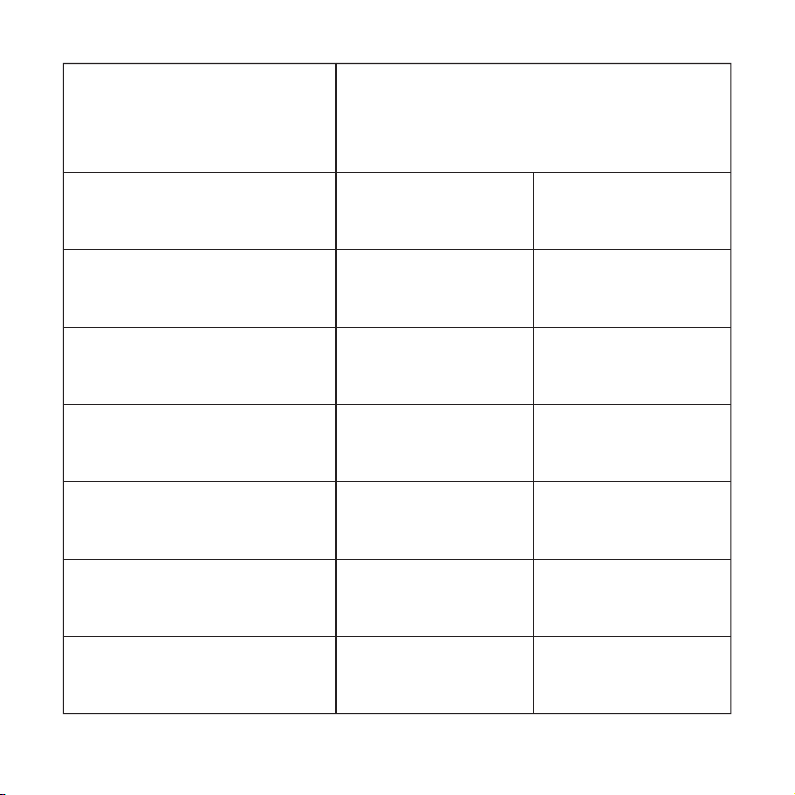
Full-on Gain
(50dB SPL Input)
Maximum Output
(90dB SPL Input)
Total Harmonic
Distortion + Noise
Self-generated
Noise Level Limits
Frequency Response
Smoothness
Frequency Range
Latency
HFA 35dB
115dB SPL
20dB SPL
5dB SPL
125-7000Hz
<11ms
<2%
<2%
Max
500Hz 100dBSPL
500Hz 70dBSPL
1500Hz
Parameter Name
ELEHEAR Beyond
Hearing Aid Values
56

Electrical Safety Classification: Internally powered equipment
Protection Against Electric Shock: Type B applied part
Mode of Operation: Continuous operation
Externally Connected Devices: Any external equipment connected to
these hearing aids and powered from the mains supply must comply
with GB 9706.1-2020 or equivalent safety standards
Bluetooth Version: 5.3
Software Version: V1.0
TECHNICAL DESCRIPTION
1. Normal Operating Conditions
a. Ambient Temperature: 0°C to 40°C (32°F to 104°F)
b. Relative Humidity: ≤ 80%, non-condensing
c. Atmospheric Pressure: 86 kPa to 106 kPa
d. Operating Voltage: 3.85V, with a relative error of +5%, -10%
OPERATING AND STORAGE CONDITIONS
57

2. Storage Conditions
Products should be stored in a well-ventilated area free from corrosive
gases and materials. The environment should meet the following
conditions.
a. Storage Temperature: -10°C to 40°C (14°F to 104°F)
b. Relative Humidity: ≤ 80%, non-condensing
c. Atmospheric Pressure: 86 kPa to 106 kPa
3. Handle with care, avoid impacts
4. It takes 1 hour to warm up from minimum storage and cool down
from maximum storage temperature before use.
58

EXPLANATION OF
GRAPHICAL SYMBOLS
USED IN MEDICAL
DEVICE LABELING
59
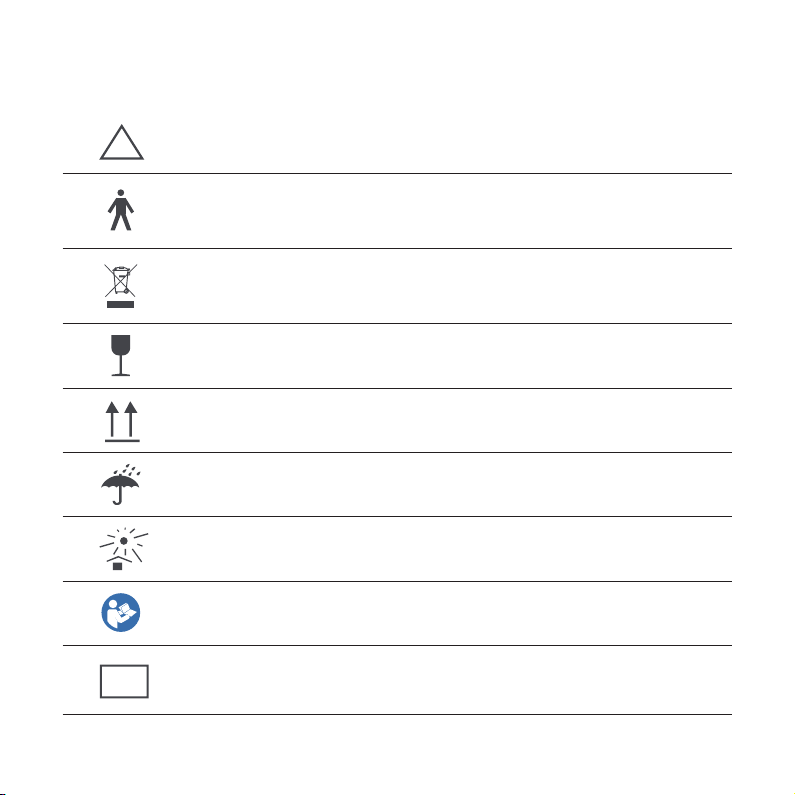
According to IEC 60601-1, the applied parts
of this device are classified as type B
Points out a situation that could lead to
serious, moderate, or minor injuries
Easily breakable
Do not dispose of the device with general domestic
waste (Read more in section 'Disposal information')
Upwards
Keep the device dry
Avoid exposure to sunlight
Follow instructions for use
Medical device
MEDICAL DEVICE IMAGES
!
MD
60

FCC REQUIREMENT
61

Note: This equipment has been tested and found to comply with the
limits for a Class B digital device, pursuant to Part 15 of the FCC Rules.
These limits are designed to provide reasonable protection against
harmful interference in a residential installation. This equipment
generates, uses, and can radiate radio frequency energy, and if not
installed and used in accordance with the instructions, may cause
harmful interference to radio communications.
Any changes or modifications not expressly approved by the party
responsible for compliance could void the user’s authority to operate
the equipment.
This device complies with Part 15 of the FCC Rules.
Operation is subjected to the following two conditions.
(1) This device may not cause harmful interference, and
(2) This device must accept any interference received, including
interference that may cause undesired operation.
This transmitter must not be co-located or operating in conjunction with
any other antenna or transmitter.
62

There is no guarantee that interference will not occur in a particular
installation. If this equipment does cause harmful interference to radio
or television reception, which can be determined by turning the
equipment off and on, the user is encouraged to try to correct the
interference by one or more of the following measures.
• Reorient or relocate the receiving antenna.
• Increase the separation between the equipment and receiver
• Connect the equipment into an outlet on a circuit different from that to
which the receiver is connected.
• Consult the dealer or an experienced radio/TV technician for help
RF Warning For Portable Device
The device has been evaluated to meet general RF exposure
requirement. The device can be used in portable exposure condition
without restriction.
63
FCC ID: 2BF4W-RIC03

CYBERSECURITY
64

Operating Environment: Digital Signal Processor (DSP) chip
Software Environment: Real-Time Operating System (RTOS)
Security Software: Not applicable
Security Software Updates: Not applicable
Data and Device Interface: Commands for adjusting hearing aids
parameters are transmitted via Bluetooth protocol. Data is stored in
binary format
User Access Control Mechanism
User Authentication: The hearing aids can be discovered and paired
with devices using Bluetooth
User Permissions: Data exchange is limited to paired and connected
devices
65

PRODUCT
WARRANTY
66
Warranty Coverage: All Receiver-in-canal hearing aids by the company
have 12-month free warranty for non-human failure from purchase
date.
Exclusions
• Damage from incorrect/improper use
• Damage from self-disassembly or part assembly
• Damage from force majeure (flood, fire, earthquake, etc.)
Note: Please refer to www.elehear.com for the latest user manual.
TECHNICAL DESCRIPTION
Date of Manual Preparation: 22/11/2024
12
Months
Warranty
suppor[email protected]
Need more help?
EleCare Customer Support is here for you.
67

68
Remove and immediately recycle or dispose of used batteries according
to local regulations and keep away from children. Do NOT dispose of
batteries in household trash or incinerate.
Even used batteries may cause severe injury or death.
Call a local poison control center for treatment information.
Battery type: LIR1254.
Battery voltage: 3.85v.
Non-rechargeable batteries are not to be recharged.
Do not force discharge, recharge, disassemble, heat above 45℃ or
incinerate. Doing so may result in injury due to venting, leakage or
explosion resulting in chemical burns.
©2024 Elehear INC.
All rights reserved. Rev A 11/24

V 1.2
(888) 669-1099
ELEHEAR Inc.
708,Building 12, Shenzhen Bay Tech-Eco Park,Nanshan District
Shenzhen Guangdong,China