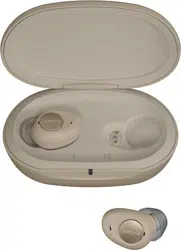

USER MANUAL
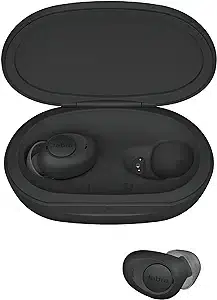
JABRA ENHANCE
TM
PLUS
WARNING: If you are younger than 18, do not use this.
You should go to a doctor, preferably an ear-nose-throat doctor (an
ENT), because your condition needs specialized care. Over-the-
counter hearing aids are only for users who are 18 or older.
This OTC hearing aid is for users who are 18 and older. People who are
younger than 18 with hearing loss should see a doctor, preferably an ENT,
because they may need medical testing and management. Hearing loss
can affect speech and learning, so professional fitting and continuing
care are also important.
WARNING: When to See a Doctor
If you have any of the problems listed below, please see a doctor, preferably
an ear-nose-throat doctor (an ENT).
• Your ear has a birth defect or an unusual shape. Your ear was injured or
deformed in an accident.
• You saw blood, pus, or fluid coming out of your ear in the past 6 months
• You ear feels painful or uncomfortable
• You have a lot of ear wax, or you think something could be in your ear
• You get really dizzy or have a feeling of spinning or swaying (called vertigo)
• Your hearing changed suddenly in the past 6 months
• Your hearing changes: it gets worse then gets better again
• You have worse hearing in one ear
• You hear ringing or buzzing in only one ear
WARNING: This hearing aid should not cause pain when inserting it.
Remove this device from your ear if it causes pain or discomfort when you
insert or place it. To try again, make sure to follow the instructions. If you feel
pain or discomfort again, contact the manufacturer. If you pain or discomfort
does not go away, contact your hearing healthcare professional. You can also
report this to FDA as an adverse event according to the instructions that
appear later.

WARNING:
• If the outer casing of your earbuds or charging case are
broken, the rechargeable batteries inside may leak. In this
case, do not attempt to use the earbuds or charging case
– contact your hearing care professional.
• Battery leakage can cause chemical burns. If you get exposed
to battery leakage material, rinse immediately with warm
water. If you get chemical burns, redness or skin irritation from
battery leakage, seek medical attention.
• If the earbuds or charging case are broken, do not use them.
• Never leave people with cognitive, intellectual or mental
challenges unsupervised while using their earbuds or
charging case.
• Different types of radiation, e.g. from NMR, MRI or CT
scanners, may damage the earbuds or charging case. It is
recommended not to wear earbuds during these or other
similar procedures. Other types of radiation, such as burglar
alarms, room surveillance systems, radio equipment, mobile
telephones, contain less energy and will not damage the
earbuds or the charging case. However, they have the
potential to momentarily affect the sound quality or
temporarily create undesired sounds from the earbuds.
• Do not wear the earbuds or use the charging case in mines, oil
fields, or other explosive areas unless those areas are certified
for hearing aid use.
• Your earbuds are tuned to your hearing. Do not allow others
to use your earbuds as this may damage their hearing.
• Swallowing an earbud or loose EarGels can result in choking
and can be harmful to your health. If an earbud or EarGel are
swallowed, seek immediate medical attention.

• Keep earbuds and EarGels away from pets, children and
people with cognitive, intellectual or mental health
challenges.
• The earbuds and charging case contain Li-Ion batteries.
Exposure or ingestion can be seriously harmful. Never put the
earbuds in your mouth.
• Do not dispose of your earbuds or charging case with ordinary
household waste. Your earbuds and charging case should be
disposed of at sites intended for electronic waste.
• Never use a damaged charging case. A damaged and
incorrectly reassembled charging case can cause electric
shock or fire when the product is subsequently used.
• Do not attempt to disassemble the charging case as it may
expose you to dangerous electric shock, and cause the
warranty to terminate.
• Avoid charging in extremely high or low temperatures and do
not use the charging case outdoors or in damp areas.
• The charging case contains a Li-Ion battery. Consult airline for
details regarding transportation of the charging case.
• Immediately discontinue using the earbuds and contact a
physician if you experience discomfort or ringing in the ears.
Prolonged use can cause damage to the residual hearing,
tinnitus or hyperacusis.
• Consult a hearing care professional if you think there may be
a foreign object in your ear canal.
• The battery is built-in and cannot be replaced. Use of other
batteries may present a risk of fire, ex plosion, or chemical burn.
• No modification of the earbuds or charging case is allowed.

• Exposing the earbuds or charging case to electrostatic
discharge may damage the earbuds or charging case or lead
to temporary malfunction.
• Connecting the charging case to a bad power adapter or a
bad powerline may damage the charging case or lead to
temporary malfunction.
• Avoid extensive vibrations or dropping the earbuds or
charging case.
• The earbuds and charging case contain Li-Ion batteries that
may get hot. The earbuds up to +110 degree Fahrenheit or
43 degree Celsius. Immediately discontinue using the
earbuds or charging case if the earbuds or charging case
feel hot.
• The earbuds should be used only as described in this user
manual. Incorrect use may result in damage to the residual
hearing, listening fatigue, or failure to provide sound
awareness.
• In general, exposure to loud sounds can damage your
hearing. The earbuds are not to be used as hearing
protection. Wear normal hearing protection in loud sound
environments.
• When wearing the earbuds, make sure to stay alert to
sounds around you.
• Tinnitus may affect your ability to successfully personalize
your earbuds.
Caution: This is not hearing protection.
You should remove this device if you experience overly loud sounds, whether
short or long-lasting. If you’re in a loud place, you should use the right kind of
hearing protection instead of wearing this device. In general, if you would use
ear plugs in a loud place, you should remove this device and use ear plugs.

Caution: The sound output should not be uncomfortable or painful.
You should turn down the volume or remove the device if the sound output
is uncomfortably loud or painful. If you consistently need to turn the volume
down, you may need to further adjust your device.
Caution: You might need medical help if a piece gets stuck in your ear.
If any part of your hearing aid, like the eartip, gets stuck in your ear, and you
can’t easily remove it with your fingers, get medical help as soon as you can.
You should not try to use tweezers or cotton swabs because they can push
the part farther into your ear, injuring your eardrum or ear canal, possibly
seriously.
Note: If you remain concerned, consult a professional.
If you try this device and continue to struggle with or remain concerned
about your hearing, you should consult with a hearing healthcare
professional.
Note: What you might expect when you start using a hearing aid.
A hearing aid can benefit many people with hearing loss. However, you should
know it will not restore normal hearing, and you may still have some difficulty
hearing over noise. Further, a hearing aid will not prevent or improve a medical
condition that causes hearing loss.
People who start using hearing aids sometimes need a few weeks to get used
to them. Similarly, many people find that training or counseling can help them
get more out of their devices.
If you have hearing loss in both ears, you might get more out of using hearing
aids in both, especially in situations that make you tired from listening – for
example, noisy environments.
Note: Tell FDA about injuries, malfunctions, or other adverse events.
To report a problem involving your hearing aid, you should submit
information to FDA as soon as possible after the problem. FDA calls them
“adverse events,” and they might include: skin irritation in your ear, injury
from the device (like cuts or scratches, or burns from an overheated
battery), pieces of the device getting stuck in your ear, suddenly
worsening hearing loss from using the device, etc.
Instructions for reporting are available at https://www.fda.gov/Safety/
MedWatch, or call 1-800-FDA-1088. You can also download a form to mail
to FDA.
CAUTION:
• When the wireless function is activated, the device uses
low-powered digitally coded transmissions in order to
communicate with other wireless devices. Although unlikely,
nearby electronic devices may be affected. In that case, move
the earbuds away from the affected electronic device.
• The earbuds are designed for occasional wear. Long term
wearing may result in discomfort and potential ear pain.
• If you experience side effects, contact a hearing care
professional. Possible side effects from wearing the earbuds
may be:
– Dizziness
– Tinnitus
– Perceived worsening of hearing loss
– Nausea
– Headache
– Skin reaction
– Excessive ear wax accumulation
• Your earbuds may be tuned differently. Do not wear the left and
the right earbuds in the wrong ear as this could damage your
hearing.
• Never attempt to modify the shape of the earbuds or the
EarGels. This can cause skin reactions or sharp edges,
leading to scratches or sores.

• Always keep your iPhone updated with the latest version of
iOS provided by Apple.
• Never use alcohol or other cleaning solutions to clean your
earbuds or charging case. This can damage the earbuds and
may cause a skin reaction.
• Ear wax or other residues on the earbuds might cause
infection. Clean the earbuds as instructed to avoid this.
• Do not attempt to dry the earbuds or charging case in an
oven, microwave or other heating equipment. This will cause
them to melt and may cause burns to your skin.
• For safety reasons, only use the charging case and charging
cable supplied with the earbuds.
• Selecting EarGels that are too small may lead to listening
fatigue, cause you to miss sound awareness, or cause the
earbuds to fall out of your ear.
• Selecting EarGels that are too big may lead to discomfort and
ear pain.
• EarGels that are not properly mounted on the earbud may
come loose in the ear.
• Use only the supplied Jabra Enhance Plus EarGels with the
Jabra Enhance Plus earbuds.
• It is important to do the setup and personalization in one go.
• Perform the personalization in a quiet place and pay full
attention to the step-by-step guidance.
• Hearing is unique and influenced by a range of factors
including gender and age. It’s important to be careful and
insert correct gender and year of birth in the personalization.

WELCOME ........................................................................................... 1
INTENDED USE ................................................................................. 2
INDICATIONS FOR USE ................................................................... 2
CLINICAL DATA 2021 .................................................................... 2
WHAT’S IN THE BOX ....................................................................... 3
GETTING TO KNOW YOUR EARBUDS ........................................ 5
GETTING TO KNOW YOUR CHARGING CASE .......................... 6
FIRST TIME USE................................................................................. 7
HOW TO WEAR ...............................................................................13
HOW TO MANUALLY PAIR ...........................................................16
HOW TO CHARGE...........................................................................19
WHAT THE LEDS MEAN ................................................................22
HOW TO USE ...................................................................................24
JABRA ENHANCE APP ...................................................................26
APP CONTROLS ..............................................................................29
HOW TO UPDATE FIRMWARE ................................................. 31
HOW TO CARE FOR YOUR DEVICE ........................................... 32
REPLACEMENT ACCESSORIES ................................................... 34
FAQS AND TROUBLESHOOTING ...............................................36
WARRANTY ......................................................................................38
SYMBOLS & ADVISORIES ..............................................................39
TECHNICAL SPECIFICATIONS ..................................................... 40
FCC AND ISED STATEMENT ......................................................... 42

1
WELCOME
Thank you for purchasing Jabra Enhance Plus. We hope
you enjoy your new earbuds!
JABRA ENHANCE PLUS FEATURES
• Enhanced hearing for clearer conversations and music
• Optimized sound for different environments
• Water and dust resistant, 1-year warranty
• Miniaturized design for a comfortable fit
• Up to 12 hours battery, 35 hours total
with charging case
• Simple setup through the Jabra Enhance app
THIS PRODUCT MAY HELP YOU IF YOU:
• Strain to follow conversations in both quiet and noisier
environments
• Miss important information during conversations
• Have trouble hearing at a distance
• Have trouble understanding the TV or telephone calls

2
INTENDED USE
The Jabra Enhance Plus self-fitting hearing aids are intended
to amplify sound for individuals 18 years of age or older with
perceived mild to moderate hearing impairment.
INDICATIONS FOR USE
The Jabra Enhance Plus self-fitting hearing aids are intended
to amplify sound for individuals 18 years of age or older with
perceived mild to moderate hearing impairment. They are
adjusted by the user to meet the user’s hearing needs. No
pre-programming or hearing test is necessary. The device is
intended for direct-to-consumer sale and use without the
assistance of a hearing care professional.
CLINICAL DATA 2021
In a clinical investigation study, people with mild to
moderate hearing impairment generally experienced
similar hearing benefit, and were equally satisfied, when
using the Jabra Enhance Plus compared with professional
fitting of the same device. There were no adverse events
encountered during this study.
3
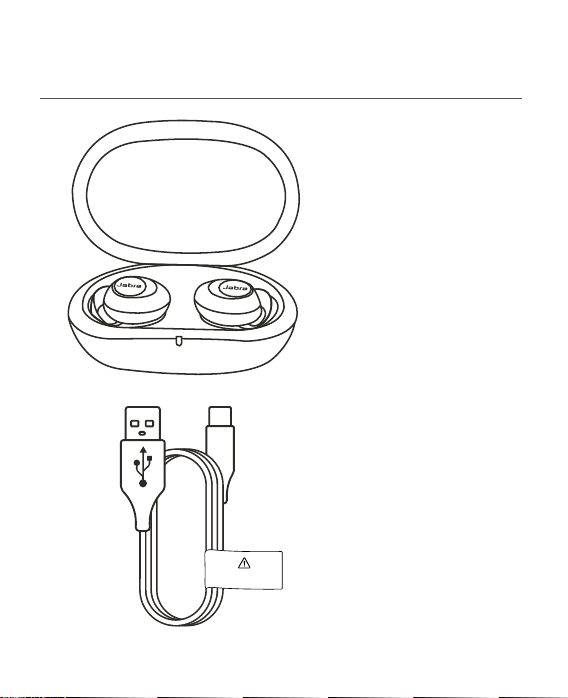
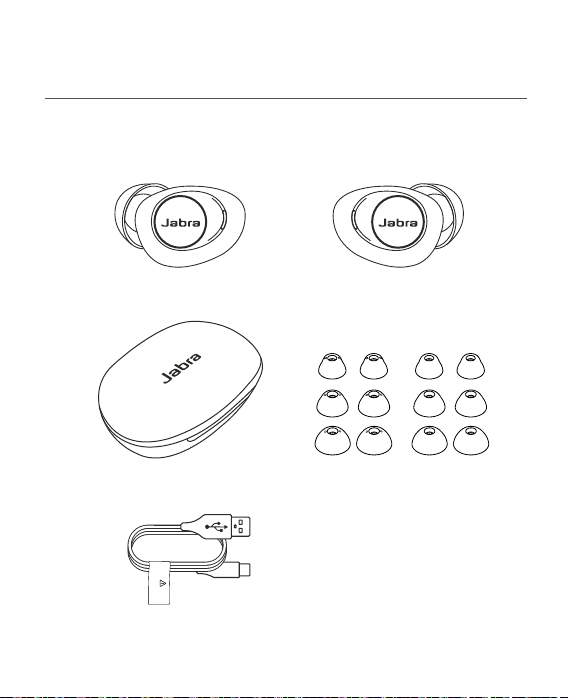
WHAT’S IN THE BOX
Earbuds & charging case
Charging cable
CAUTION:
Only use original cable
4
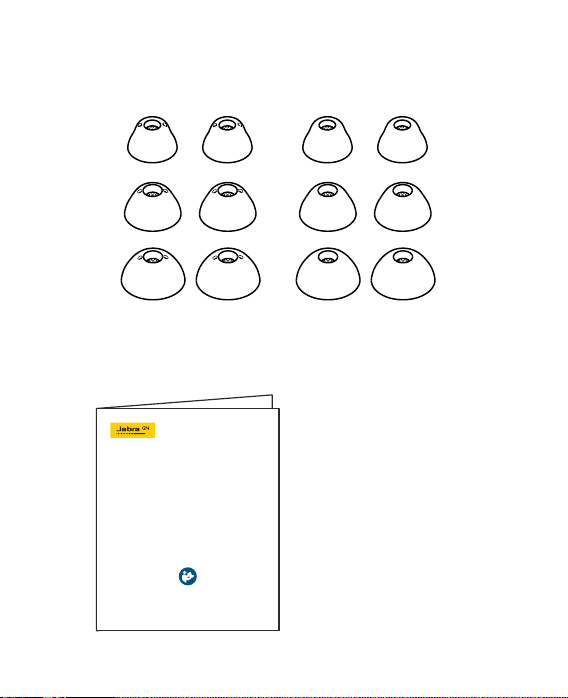
Vented EarGels Closed EarGels
(medium closed EarGels are pre-mounted on the earbuds)
User Manual
S
M
L
USER MANUAL
JABRA ENHANCE
TM
PLUS
5
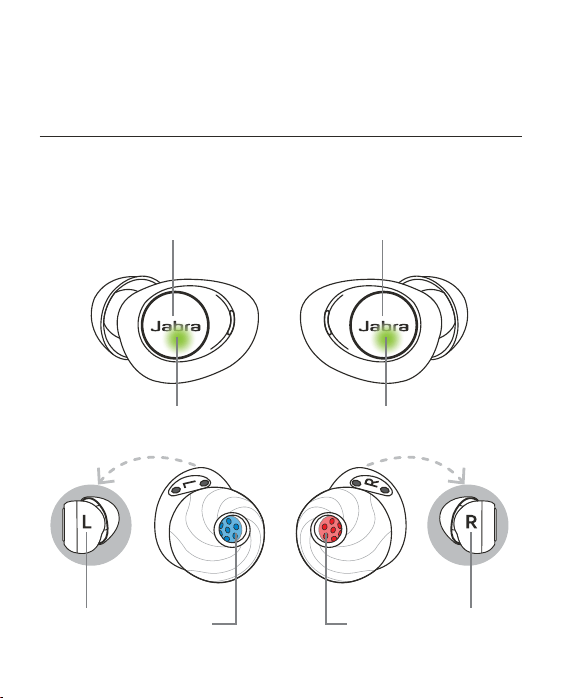
GETTING TO KNOW
YOUR EARBUDS
Left earbud Right earbud
Status LED
Left earbud indicator
Status LED
Right earbud indicator
Multi-function
button
Multi-function
Button
6
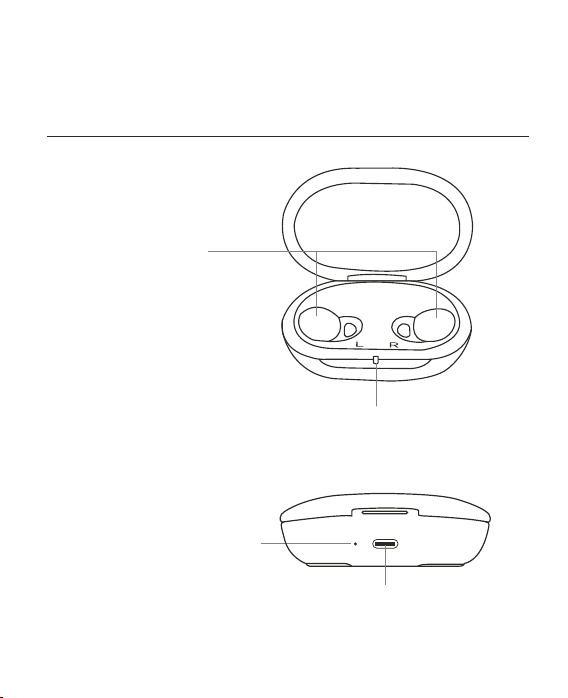
GETTING TO KNOW
YOUR CHARGING CASE
Front view
Back view
Earbud
charging bays
Charging case
battery status LED
Charging case
cable status LED
USB-C
charging port
7
FIRST TIME USE
BEFORE USING THE EARBUDS
STEP 1/10
Download the Jabra Enhance app
from the App Store to your iPhone
®
STEP 2/10
Open the Jabra Enhance app and
follow the instructions to start
pairing the earbuds to your
iPhone. iOS 14 or later is required to
use the earbuds.
8
FOLLOW THESE STEPS WHEN PROMPTED BY THE
JABRA ENHANCE APP
STEP 3/10
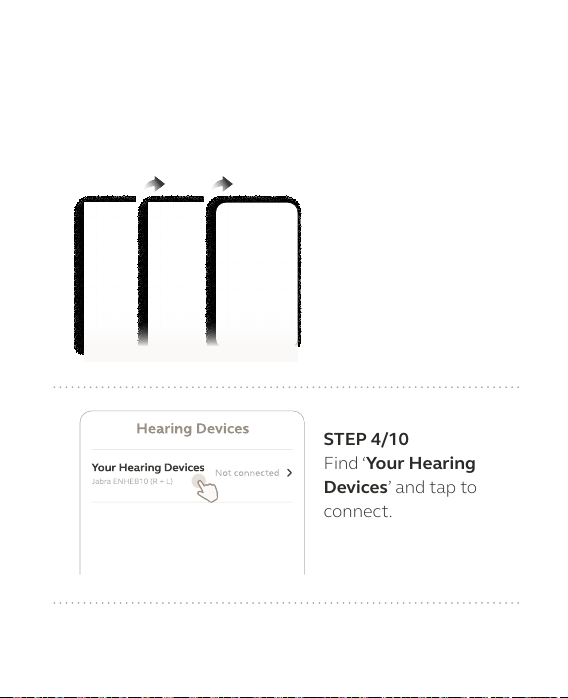
On your iPhone, open
‘Settings > Accessibility
> Hearing Devices’.
Hearing Devices
Your Hearing Devices
Jabra ENHEB10 (R + L)
Not connected
STEP 4/10
Find ‘Your Hearing
Devices’ and tap to
connect.
9
Hearing Devices
Your Hearing Devices
Jabra ENHEB10 (R + L)
Not connected
Bluetooth Pairing Request
“Your Hearing Devices” would like to
pair with your iPhone
PairCancel
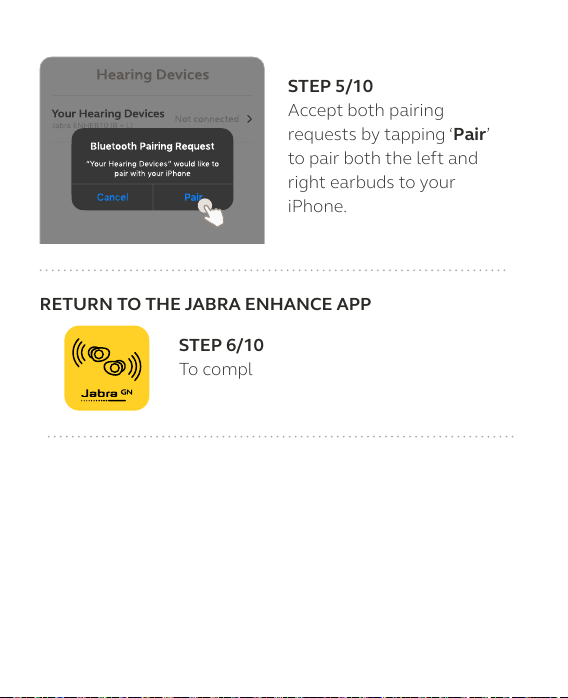
STEP 5/10
Accept both pairing
requests by tapping ‘Pair’
to pair both the left and
right earbuds to your
iPhone.
RETURN TO THE JABRA ENHANCE APP
STEP 6/10
To complete the setup of your earbuds,
return to the Jabra Enhance app.

10
STEP 7/10 Register your product to get important updates.
STEP 8/10 Learn how to wear the earbuds and
change the EarGel size for the optimal fit
and audio quality.
11
STEP 9/10 Personalize the earbuds to your unique
hearing profile.
You will be instructed to find a quiet place,
enter your gender and age (be honest,
hearing is unique and influenced by a
range of factors including age), and then
listen to a series of tones that you will
need to react to. The earbuds will then be
personalized to your hearing profile.
NOTE: To get the most accurate hearing enhancement, always
complete the personalization process with snug fitting, closed
EarGels.
12
STEP 10/10 Select your preferred speech filter.
Your earbuds are now ready for use.
13
HOW TO WEAR
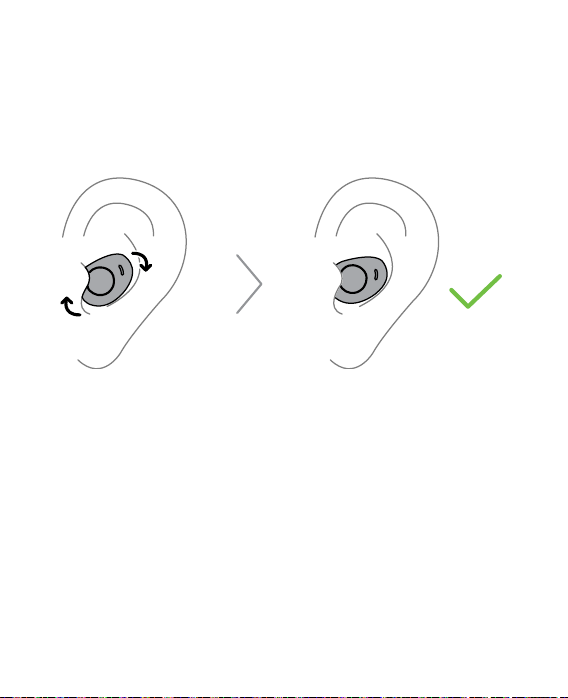
Insert the earbuds into your ears and gently rotate them as
indicated until you have a snug, yet comfortable fit.
CHANGING EARGEL SIZE
It is important to wear the earbuds correctly with the correct
EarGel size for your ears to ensure the optimal audio and
hearing experience. The medium EarGel will fit most people,
however your ear may need a different EarGel size. If you
cannot get a snug and comfortable fit, it is recommended to
try a different EarGel size. Use only the supplied Jabra
Enhance Plus EarGels.
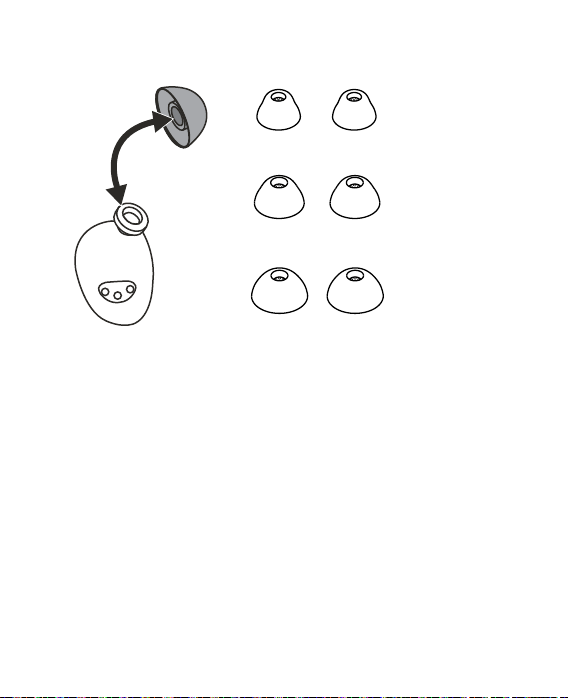
To change an EarGel, firmly pull the current EarGel off the
earbud and replace it with a different size.
14
Small
Medium
Large
Selecting EarGels that are too small may lead to listening
fatigue, cause you to miss sound awareness, or cause the
earbuds to fall out of your ear.
Selecting EarGels that are too big may lead to discomfort
and ear pain.
EarGels that are not properly mounted on the earbud may
come loose in the ear.
Due to the in-ear wearing style of the earbuds, your sound
experience may be affected by bone conduction. Bone con-
duction is the transfer of sound to the inner ear primarily
through the bones of the skull.

15
You may hear the vibrations of your own voice or chewing.
This is known as the occlusion effect.
Most people will adapt to this in time. If it continues to be
bothersome, try the vented EarGels.
Closed EarGels are recommended for optimal streaming
music quality.
16
HOW TO MANUALLY PAIR
Follow the steps below if you need to pair the earbuds to a
second iPhone, or if they have been unpaired from your
first iPhone. If you are pairing for the first time, please
follow the instructions on page 7.
STEP 1/5 Remove the earbuds from the charging case to
power them on. The LEDs will light up green.
17
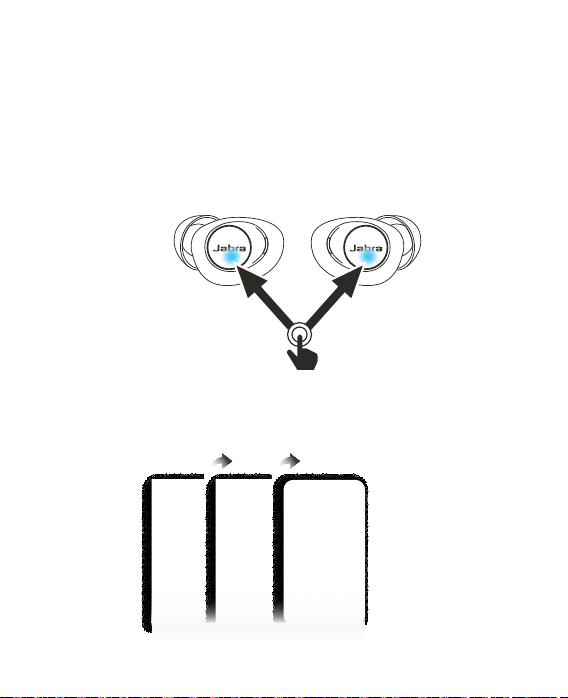
STEP 2/5 Press and hold (3 secs) both the left and the
right earbud buttons simultaneously. Do not
hold the buttons for longer than 6 seconds.
When you release the buttons, the LEDs will
flash blue to indicate the earbuds are ready to
pair to your iPhone.
3 sec
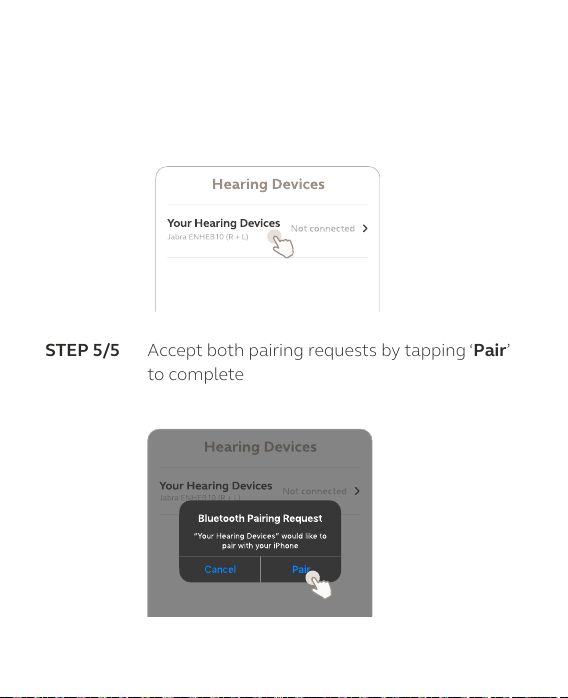
STEP 3/5 On your iPhone, open ‘Settings > Accessibility
> Hearing Devices’.
18
STEP 4/5 Find the ‘Your Hearing Devices’ and tap to
connect. The name of the earbuds may differ
depending on the name entered when
registering the product.
Hearing Devices
Your Hearing Devices
Jabra ENHEB10 (R + L)
Not connected
STEP 5/5 Accept both pairing requests by tapping ‘Pair’
to complete the pairing of both the left and
right earbuds to your iPhone.
Hearing Devices
Your Hearing Devices
Jabra ENHEB10 (R + L)
Not connected
Bluetooth Pairing Request
“Your Hearing Devices” would like to
pair with your iPhone
PairCancel
19
HOW TO CHARGE
The Jabra Enhance Plus lasts up to 12 hours on a single
charge and offers up to a total of 35 hours of on-the-go
battery life when used with the charging case.
CHARGE THE EARBUDS
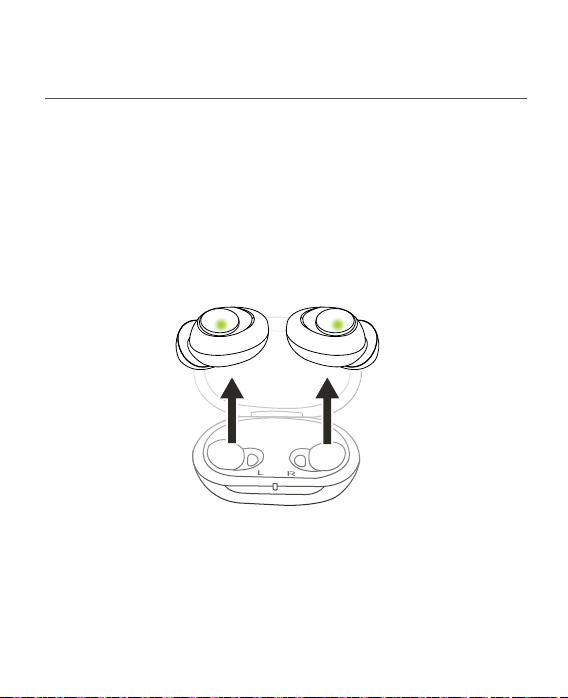
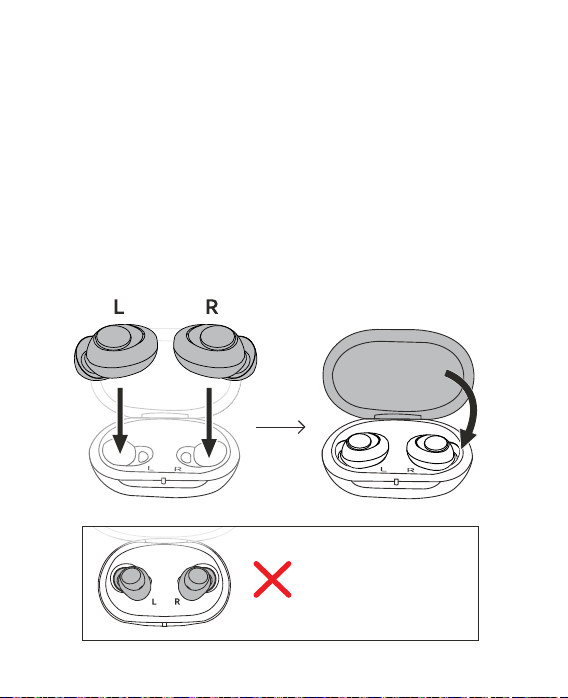
Place the earbuds in the charging case and close the lid. It
takes up to 2 hours to fully recharge the earbuds.
Do not insert the
earbuds into the
wrong charging bays.
20
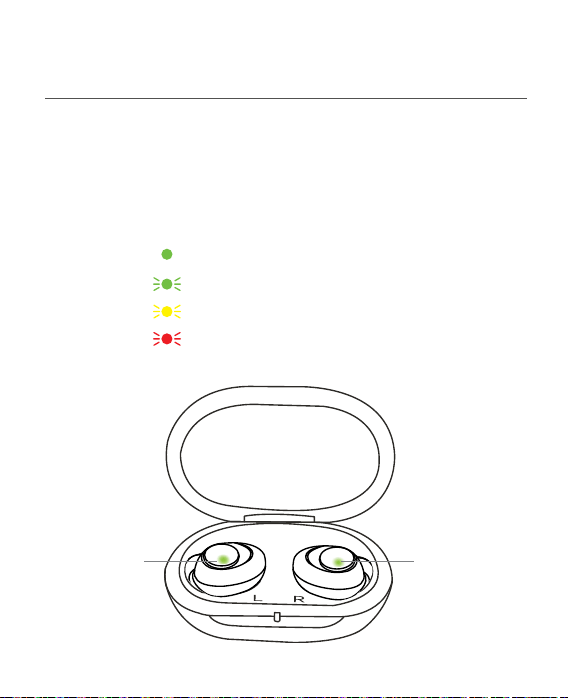
EARBUD BATTERY STATUS
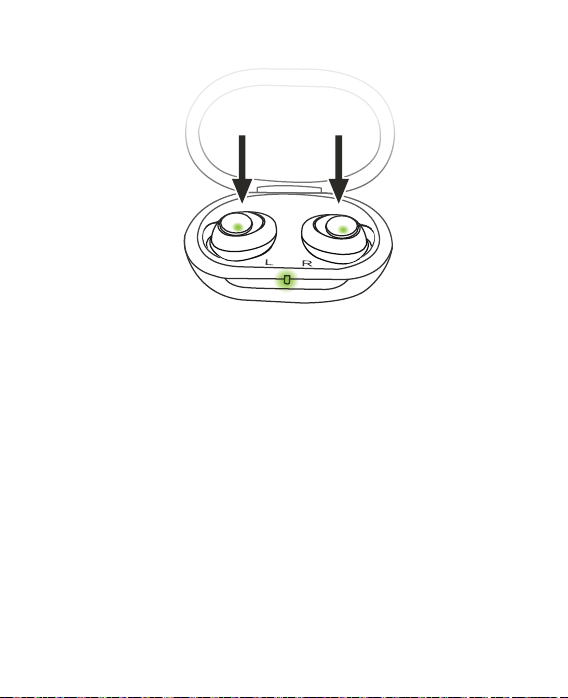
When the earbuds are placed in the charging case, the
LEDs on the earbuds will flash red, yellow or green to
indicate the battery status of the earbuds. When the
earbuds are fully charged, the LEDs will light up solid green.
When in use, the earbuds will play a melody to indicate
they need to be recharged.
CHARGING CASE BATTERY STATUS
When the lid of the charging case is opened, or the earbuds
are placed in or removed from the charging case, the LED
on the charging case will light up or flash red, yellow or
green to indicate the battery status of the charging case.
21
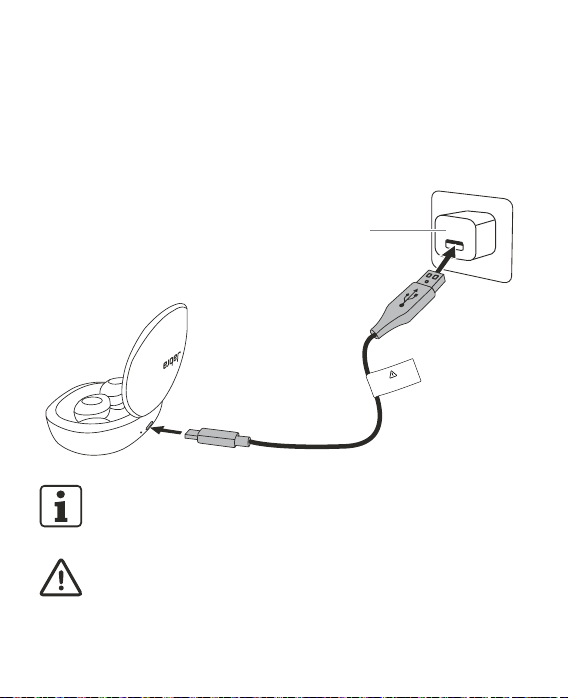
CHARGE THE CHARGING CASE VIA USB
Plug the supplied charging cable into a USB power outlet
or power adapter (not included) and then connect the
cable to the USB port on the charging case. It takes up to
3 hours to fully charge the earbuds and the charging case.
WARNING:
Only use original cable
Power adapter
not included
NOTE: The charging case uses USB voltage of 5V+- 0.25V. Do
not charge the earbuds using a power outlet with a higher
voltage
CAUTION:
Only use the charging case and charging cable supplied with
the earbuds.
22
WHAT THE LEDS MEAN
The LEDs on the charging case and earbuds have two
battery indication modes. Solid color for status, flashing
color when charging.
Earbuds in charging case
Earbuds fully charged
Charging - high battery (flashing)
Charging - medium battery (flashing)
Charging - low battery (flashing)
LED LED
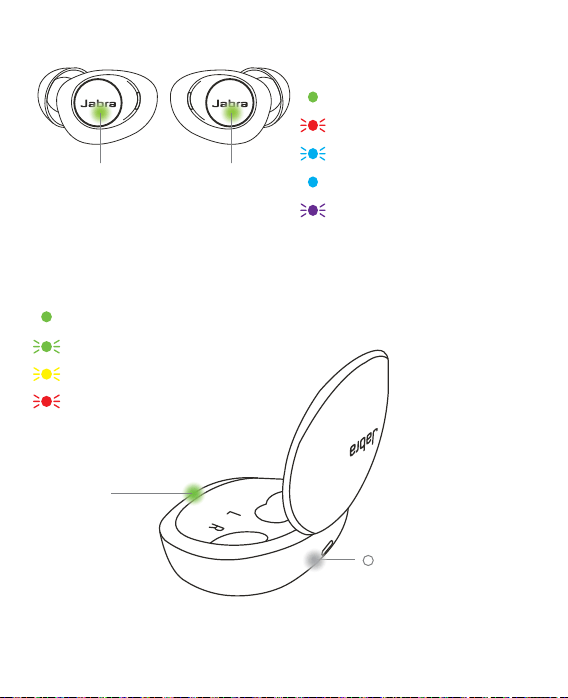
23
LED
Earbud status
Powering on
Powering off (flashing)
Pairing (flashing)
Paired/connected with app
Resetting or firmware
updating (flashing)
LED
Charging case status
Fully charged
High battery (solid or flashing)
Medium battery (solid or flashing)
Low battery (solid or flashing)
(white LED)
Charging case is
connected to power
LED
24
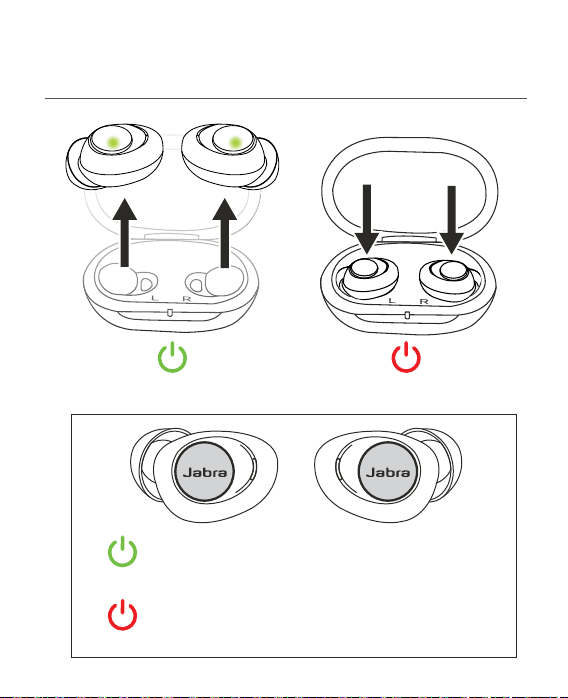
HOW TO USE
Power on Power off
Power on (hold Left or Right button for 5 secs)
The LEDs will light up green.
Power o (hold Left or Right button for 7 secs)
The LEDs will flash red.
25
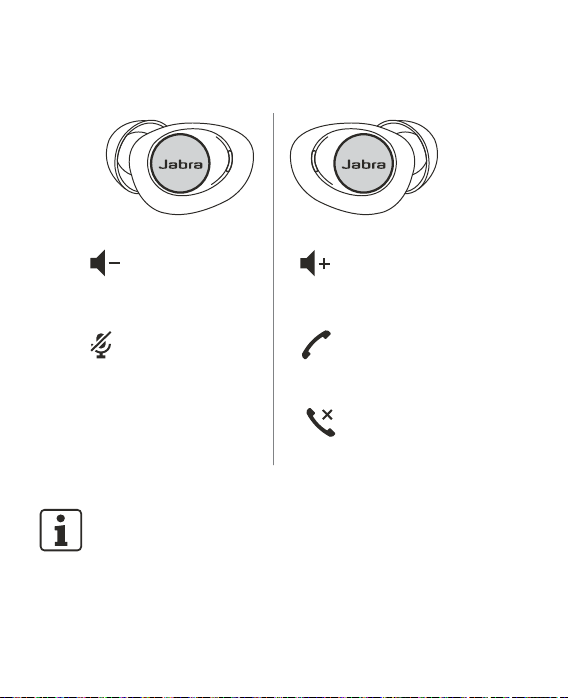
Left button
Right button
Listen Mode
volume down
(press)
Mute microphone
(double press)
Listen Mode
volume up
(press)
Answer or
terminate a call
(press)
Reject a call
(double press)
NOTE: Learn about Listen Modes in the App Controls section
on page 29.
26
JABRA ENHANCE APP
The Jabra Enhance app is the perfect companion for your
Jabra Enhance Plus earbuds – providing world-class
onboarding, adding extra features and enabling you to
personalize the way you use your Jabra Enhance Plus
earbuds. The following sections provide an overview of the
app. Detailed guidance is provided in the app.
Download the Jabra Enhance app
on the app store.
Easy setup & onboarding
Highly user-friendly setup process enabling easy onboarding.
27
Personalize your earbuds
Customize your personal listening experience using a
step-by-step process and get access to your personalized
profile. Perform the personalization in a quiet place and
pay full attention to the step-by-step guidance.
NOTE: To get the most accurate hearing enhancement, always
complete the personalization process with snug fitting, closed
EarGels.
28
Settings menu
My Profile
View your current personalization
profile or change your preferred
speech filter.
Personalization
Restart the personalization process
for your earbuds.
Earbud settings
Select auto-reset volume and
notification settings.
Firmware update
Check for firmware updates and
manage firmware update options.
Support and guides
View the user manual and set up
guides.
Contact Support
Get in contact with Jabra Support or
view technical information.
CAUTION: Always keep your iPhone updated with the latest
version of iOS provided by Apple. It is recommended to install
all Jabra Enhance app updates and to keep notifications
enabled. Only use the Jabra Enhance app with Jabra earbuds.

29
APP CONTROLS
Using the Jabra Enhance app, you can select your preferred
Listen Mode and adjust the Listen Mode volume. The Listen
Mode volume can also be adjusted using the earbud
buttons.

30
LISTEN MODES
There are three available Listen Modes: Adaptive, Focus,
and Surround.
Adaptive mode automatically enhances speech and
sounds based on your surroundings and the conversations
around you. When speech is easy to hear, your
surroundings will sound as natural as possible. When
speech is difficult to hear, adaptive mode intelligently
lowers the volume of your surroundings to enable you to
hear the person talking.
Focus mode enhances speech and sounds in a narrow
zone directly in front of you.
Surround mode enhances sounds coming from all
around you.
When you are listening to music or on a call on your
iPhone, the Listen mode is automatically locked to
Surround mode.
LISTEN MODE VOLUME
The Listen Mode volume adjusts the volume of the selected
Listen Mode. The default setting for your profile is 7.
Music or call volume on your iPhone can be adjusted using
the volume buttons on your phone.

31
HOW TO UPDATE FIRMWARE
The Jabra Enhance Plus can be updated to the latest
firmware version using the Jabra Enhance app. The app
will guide you through the process of updating the
firmware, which takes approx. 5 minutes to complete.
To ensure you receive automatic notifications whenever
a firmware update is available, it is recommended to
enable notifications in the Jabra Enhance app. Go to
Settings > Earbud settings and turn on Notifications.

32
HOW TO CARE FOR YOUR
DEVICE
Please follow the advice below for the best user experience
and to prolong the life of the earbuds and charging case.
• After removing the earbuds from your ears, or if they
become dirty, clean them with a soft, dry, lint-free cloth.
• Clean the charging case using a clean, dry cloth.
• Clean the earbud charging bays inside the charging case
using a clean cotton swab.
• Do not use liquid to clean the charging case or the
earbuds.
• Apply cosmetics, perfume, after-shave, hairspray, lotions,
etc., before wearing the earbuds. These products can
damage or discolor the earbuds.
• Never immerse your earbuds in liquid.
• Keep your earbuds away from excessive heat and direct
sunlight.
• The earbuds have IP52 limited protection against ingress
of dust and water. Avoid the earbuds getting exposed to
extensive dust or water. Do not swim, shower or sauna
while wearing the earbuds. Earbuds have an IP52 rating as

33
tested against standard IEC 60529: Degrees of protection
provided by enclosures (IP code).
• Always store the earbuds in the charging case and safely
protected.
• To prevent the deterioration of the battery lifetime or
capacity, avoid storing the earbuds in hot or cold
environments, such as a closed car in summer, or in winter
conditions.
• Never use alcohol or other cleaning solutions to clean
your earbuds or charging case. This can damage the
earbuds and may cause a skin reaction.
• Ear wax or other residues on the earbuds might cause
infection. Clean the earbuds as instructed to avoid this.
• Do not attempt to dry the earbuds or charging case in an
oven, microwave or other heating equipment. This will
cause them to melt and may cause burns to your skin.
• Do not store the earbuds for extended periods of time
without recharging them (max. three months).
34
REPLACEMENT ACCESSORIES
You can purchase replacement accessories on Jabra.com.
Use only official Jabra parts.
CAUTION:
Only use original cable
USB-C charging cable
Left earbud
Charging case EarGels
Right earbud

35
USING REPLACEMENT EARBUDS
1. Unpair the old earbuds from your iPhone. Go to
Settings > Accessibility > Hearing Devices on your
iPhone and then “forget” the previously paired
Your Hearing Devices.
2. Power on the earbuds and then press and hold the
buttons on both earbuds for 3-6 seconds until the
LEDs flash blue on both. This will connect the two
earbuds and put them into pairing mode.
3. Pair the earbuds with your iPhone. Go to Settings >
Accessibility > Hearing Devices and then select
Your Hearing Devices to pair each earbud individually
with your iPhone.
36
FAQS AND TROUBLESHOOTING
View the FAQs and full troubleshooting guide at
Jabra.com/help/enhanceplus
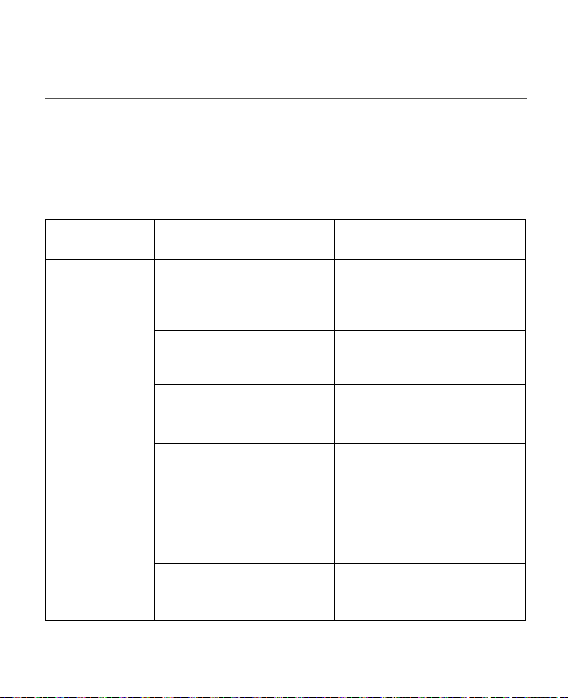
Troubleshooting
Issue Potential cause Potential solution
Feedback or
“whistling”
Are the earbuds inserted
correctly in your ears?
Reinsert the earbuds in
your ears.
Is the volume very loud? Reduce the volume.
Are the EarGels broken
or clogged?
Replace the EarGels.
Are you holding an
object (e.g. a hat or a
telephone mouthpiece)
close to the earbuds?
Move your hand away to
create more space
between the earbuds and
the object.
Is your ear full of wax? Visit your physician.
37
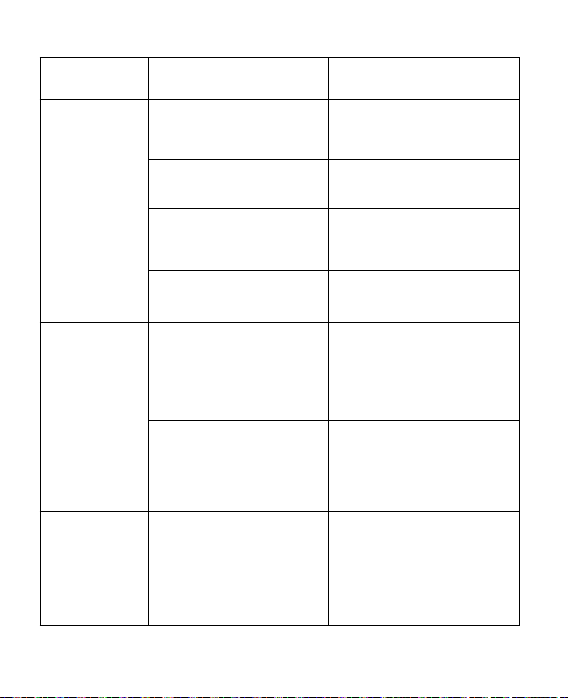
Issue Potential cause Potential solution
No sound
Are the earbuds
turned on?
Turn the earbuds on.
Are the earbuds
charged?
Charge the earbuds.
Is the charging case
charged?
Charge the charging case.
Is your ear full of wax? Visit your physician.
Earbuds are
not charging
Are the earbuds sitting
correctly in the
charging case?
Reinsert the earbuds in the
charging case.
Is the charging case
charged or plugged
into a power source?
Charge the charging case.
My voice
sounds like
I’m speaking
in a tunnel
Are you using closed
EarGels?
Try vented EarGels to
hear your own voice more
naturally.

38
WARRANTY
GN Hearing A/S warrants that the product shall be free
from defects in materials and workmanship for a limited
period of:
• Americas/Asia-Pacific/Middle East and Africa: one (1) year
• Europe / Australia: two (2) years
The limited warranty applies from the date the product has
been purchased with proof of purchase from an authorized
reseller. The limited warranty is also valid for Jabra Enhance
replacement earbuds and charging case. Earbuds that
malfunction must be repaired by a qualified technician. Do
not attempt to open the earbuds as this will invalidate the
warranty. Exempt from warranty are limited-life consumable
components and accessories subject to normal wear and
tear. For warranty and service information, visit www.jabra.
com/footerpages/warranty-and-service-consumer.
39
SYMBOLS & ADVISORIES
The Advisories contain important information which must
be fully understood, shared and followed at all times.
Non-compliance may lead to severe personal injuries and/or
equipment damages.
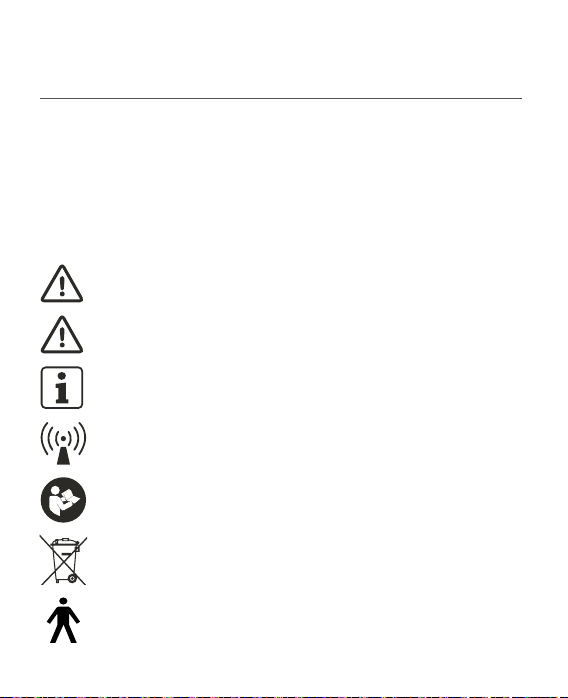
Be aware of information marked with the following symbols:
WARNINGS point out a situation that could lead to
serious injuries.
CAUTIONS indicate a situation that could lead to
minor and moderate injuries.
NOTES refer to advice and tips on how to handle your
hearing aid better.
Equipment includes an RF transmitter.
Follow instructions for use.
Product is a Type B applied part.
Do not dispose of electronic devices with ordinary
household waste.
40
TECHNICAL SPECIFICATIONS
OPERATIONAL CONDITIONS:
Temperature: +41 to +104 degree Fahrenheit or +5 to +40
degree Celsius;
Relative humidity range of 15% to 90%, non-condensing.
Water vapor partical pressure not greater than 50 hPA;
Atmospheric pressure range of 700 hPa to 1060 hPa.
TRANSPORT AND STORAGE CONDITIONS:
Temperature: -13 to +158 degree Fahrenheit or -25 to +70
degree Celsius;
+41 to +95 degree Fahrenheit or +5 to +35 degree Celsius
at a relative humidity up to 90%, non-condensing.
>+95 to +158 degree Fahrenheit or >+35 to +70 degree
Celsius at a water vapour pressure up to 50 hPa
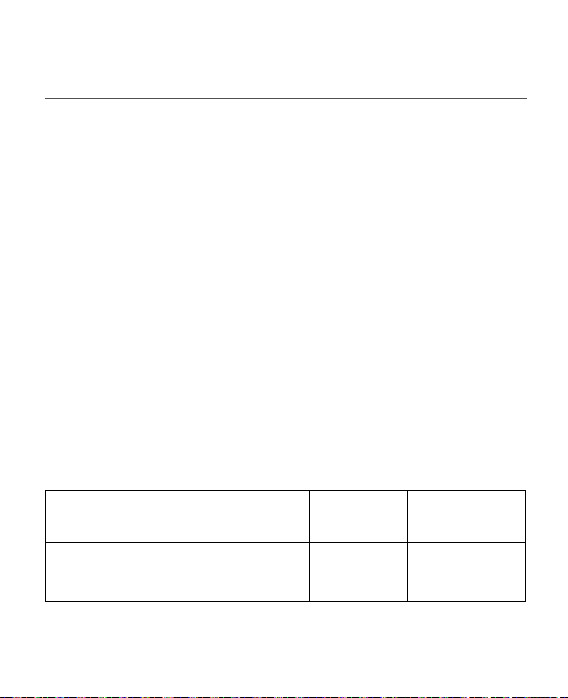
TECHNICAL SPECIFICATIONS:
Reference test gain
(60 dB SPL input)
HFA 25 dB
Full-on gain
(50 dB SPL input)
Max.
HFA
32 dB
26 dB
41
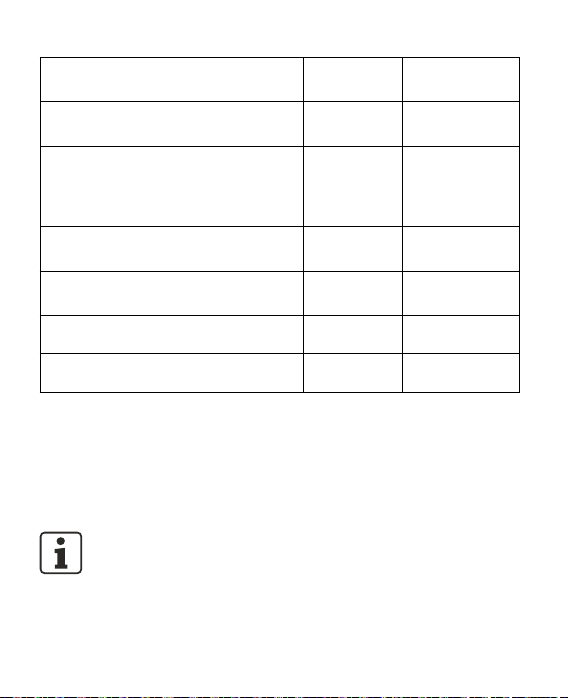
Maximum output
(90 dB SPL input)
Max.
HFA
110 dB SPL
104 dB SPL
Fitted OSPL90
Up to 110 dB
SPL
Total harmonic distortion
500 Hz
800 Hz
1600 Hz
3200 Hz
0.4%
0.4%
1.0%
0.1%
Equivalent input noise, without Noise
reduction
HFA 24 dB SPL
1/3 Octave Equivalent input noise,
without Noise reduction
1600 Hz 10 dB SPL
Frequency range 100-8700 Hz
Latency <15 ms
Data in accordance with ANSI S3.22-2014, ANSI/CTA 2051:2017, IEC 60118-0:2015 and
JIS C 5512:2015
For more technical specifications, refer to the Data Sheet at jabra.com/help/enhanceplus
The expected service life for the earbuds, charging case and App is 2 years. This includes
the battery in the earbuds.
NOTE: Exposing the earbuds or charging case to temperatures
beyond the supported range may cause permanent damages,
and the device will normally be tested beyond the minimum
storage range specified. For an extended time of storage, it is
recommended that the temperature should be kept in the
range -4 to +86 Fahrenheit or -20 to +30 degree Celsius.
42
FCC AND ISED STATEMENT
The earbuds include an RF transmitter that operates in
the frequency range of 2.4 GHz - 2.48 GHz. Maximum RF
output power transmitted is: WOE46L/R: < 6 dBm
The earbuds contain a magnetic induction radio operating
at the 10.667 MHz frequency. The magnetic field strength
of the radio for both the WOE46R and WOE46L is max -6
dBm.
The earbud complies with FCC CFR 47 Part 15, subpart C
and ICES-003 of the ISED rules.
Operation is subject to the following two conditions:
- This device may not cause harmful interference.
- This device must accept any interference received,
including interference that may cause unde sired operation.
WARNING:
Do not use in locations where radio transmission is prohibited.
43
EARBUD TYPES:
WOE46R with FCC ID: X26WOE46R and IC number:
6941C-WOE46R
WOE46L with FCC ID: X26WOE46L and IC number
6941C-WOE46L
The identification number for the mentioned device
models can be found on the surface of the earbuds.
NOTE: This equipment has been tested and found to comply
with the limits for a Class B digital device, pursuant to part 15
of the FCC rules and ISED rules. These limits are designed to
provide reasonable protection against harmful interference in
a residential installation. This equipment generates, uses and
can radiate radio frequency energy and, if not installed and
used in accordance with the instructions, may cause harmful
interference to radio communications. However, there is no
guarantee that interference will not occur in a particular
installation. If this equipment does cause harmful interference
to radio or television reception, which can be determined by
turning the equipment off and on, the user is encouraged to
try to correct the interference by one or more of the following
measures:
• Reorient or relocate the receiving antenna.
• Increase the separation between the equipment and receiver.
• Connect the equipment into an outlet on a circuit different
from the one in which the receiver is connected.
• Consult the dealer or an experienced radio/TV technician for help.
Changes or modifications can void the user´s authority to operate
the equipment.
© 2021 GN Hearing A/S. All rights reserved. Jabra
®
is a trademark of GN Audio A/S. The
Bluetooth
®
word mark and logos are registered trademarks owned by the Bluetooth SIG,
Inc. and any use of such marks by GN Audio A/S is under license.
MODEL: JABRA ENHANCE PLUS
Declaration of Conformity can be found on www.jabra.com/doc
NOTE: Use of the Made for Apple badge means that an accessory has
been designed to connect specifically to iPhone and has been certified
by the developer to meet Apple performance standards. Apple is not
responsible for the operation of this device or its compliance with safety
and regulatory standards.
Apple, the Apple logo and iPhone are trademarks of Apple Inc., registered in the U.S. and
other countries. App Store is a service mark of Apple Inc., registered in the U.S. and other
countries.

Manufacturer:
GN Hearing A/S
Lautrupbjerg 7
DK-2750 Ballerup
Denmark
Distributor:
GN Hearing Care Corporation
8001 E Bloomington Freeway
Bloomington, MN 55420
USA
Support:
For assistance, if needed, in setting up, using, or maintaining
the Jabra Enhance Plus, or to report unexpected operations
or events, please contact:
GN AUDIO USA INC
900 Chelmsford Street, Tower II, 8th Floor
Lowell, MA 01851
Tel: (833) 346-1603
www.jabra.com/support
401630011-22.08-RevH