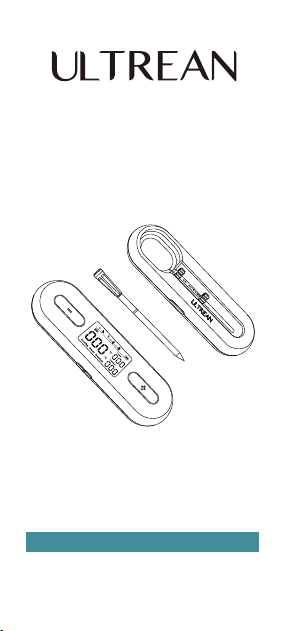
Smart Wireless
Meat Thermometer
Ultrean Support: Support@ultrean.com
Base Model No.: MT03
Probe Model No.: FM209

IMPORTANT SAFEGUARDS ........................... 1
USING FOR THE FIRST TIME......................... 4
GETTING TO KNOW YOUR MEAT
THERMOMETER ............................................ 6
OPERATION INSTRUCTIONS ........................ 9
CARE & MAINTENANCE................................. 13
TROUBLESHOOTING .................................... 14
WARRANTY INFORMATION ........................... 18
CUSTOMER SERVICE..................................... 18
TABLE OF
CONTENTS

Always insert the probe past the safety
notch (the minimum insertion point) to
avoid product damage and personal injury.
DO NOT exceed an internal temperature of
212°F / 100°C and an ambient temperature
of 572°F/ 300°C. If temperatures exceed the
allowed range, or the thermometer directly
touches open flame or hot coal, you must
wear eye protection before removing the
thermometer.
DO NOT use the Probe when cooking at
ambient temperature above 662°F/350°C
for more than 30 minutes, 752°F/400°C for
2 mins, otherwise the probe will be
damaged.
DO NOT place charging unit directly on the
grill cover, or too close to any hot surface.
DO NOT remove the probe while it is
exposed to heat. The probe must be
inserted in and removed from food away
from all heat sources.
•
•
•
•
•
IMPORTANT SAFEGUARDS
CAUTION: Please read this entire manual
before using your Thermometer.
Failure to follow these instructions could
result in property damage or bodily injury.
WARNING
Burn Hazard
1

2
DO NOT use the probe when searing.
If the probe falls into the fire or direct heat
source, turn off the cooking appliance and
close the lid immediately. Allow the probe
to cool completely before removing.
DO NOT allow the probe to come in contact
with hot charcoal or coals.
The probe will be hot during and after use.
Wear heat-resistant gloves when handling
the probe.
•
•
•
Foodborne Illness Hazard
Consuming raw or undercooked meats,
poultry, or seafood may increase your risk of
foodborne illness. Always cook your food to
USDA safe temperatures.
CAUTION
Product Damage Hazard
Always insert the probe past the safety
notch to avoid damage.
DO NOT use in hot oil, microwave ovens,
deep fryers, or pressure cookers.
DO NOT place the charging unit on any hot
surface.
DO NOT drop the probe onto hard surfaces.
DO NOT use cleaning products containing
alcohol, ammonium, benzene, or abrasives,
all of which could damage the device.
DO NOT submerge the probe in water for
long periods of time.
•
•
•
•
•
•

3
DO NOT run the probe under cold water
immediately after cooking. Let the probe
cool down prior to washing.
DO NOT expose the charging unit to
moisture. Keep it covered in inclement
weather, and do not put it in the sink.
Store the probe in a dry, cool place when
not in use.
This product is only designed for use in
food. Use it only for its intended purpose.
•
•
•
•
General Safety
DO NOT hit the probe tip against hard
surfaces to avoid causing damage.
The thermometer can be used with air
fryers, ovens, smokers, grills, BBQs, stoves,
rotisserie cookers, clay cookers, and slow
cookers.
DO NOT bend the probe. The handle is able
to withstand normal twisting and pulling
when inserting into meat.
Keep out of reach of children.
Children shall not play with the appliance.
Cleaning and user maintenance shall not be
made by children without supervision.
DO NOT poke the tip of the probe to your
fingers or body parts to avoid risk of injury.
The probe is IPX8 waterproof, and it can be
washed by hand or in a dishwasher. But the
•
•
•
•
•
•
•

SAVE THESE INSTRUCTIONS
4
Device Base is not waterproof and should
not be submerged in water or placed in the
dishwasher.
If the thermometer is used in a manner not
specified in the user manual, the protection
provided by the thermometer may be
impaired.
This appliance contains batteries that are
non-replaceable.
•
•
USING FOR THE FIRST TIME
1. Before using your meat thermometer,
ensure the product is fully charged and
you have reviewed the Important
Safeguards.
2. Scan the QR code to access the
instructional video on product usage.
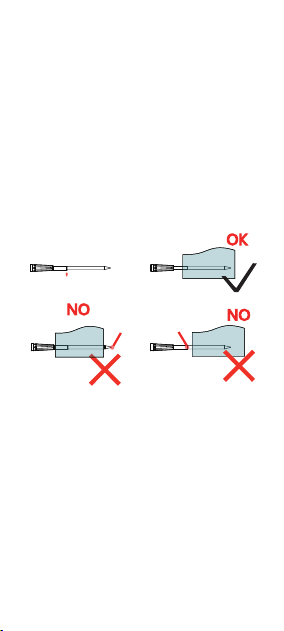
Safety notch
Insert the probe completely into the meat,
ensuring that it passes the safety notch but
does not exceed the ceramic handle and that
the internal sensors are in the center of the
meat.
Caution: Ensure the ambient temperature
has reduced to safe levels before removing
the probe.
Safety Notch
Exposed
middle
Cleaning
Ensure the charging contacts are clean before
returning the probe to its base.
5
Exposed
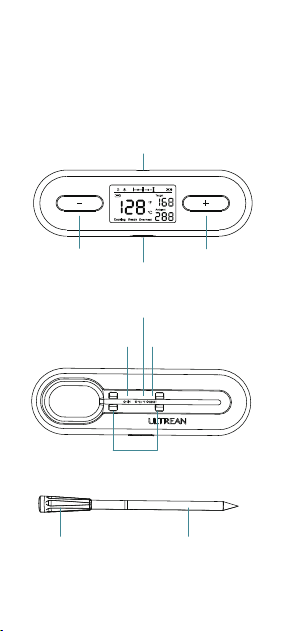
Temp. increase
button
Set button
GETTING TO KNOW YOUR
MEAT THERMOMETER
1. Product Diagram
charging port
°C/°F Button
Reset ButtonSound ON/OFF
button
Ambient sensor
Charging contacts
Temp. decrease
button
Internal sensor
6
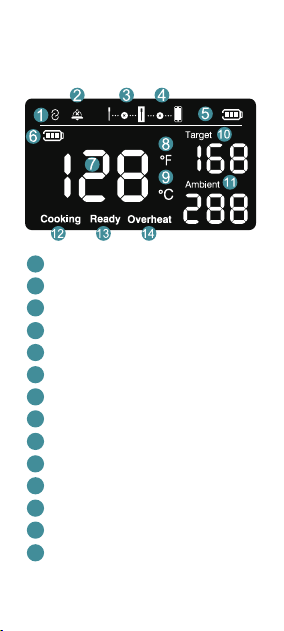
Bluetooth status
Alarm ON/OFF
Probe and base signal
Repeater and mobile phone signal
Base battery level
Probe battery level
Real - time meat temperature
°F display
°C display
Target meat temperature
Real - time oven temperature
Cooking status
Ready status
Oven overheat status
2. Display
1
2
3
4
5
6
7
8
9
10
11
12
13
14
7

*The stated transmission range is based on
tests at an ambient temperature of 77°F or
25°C without any obstructions or
electromagnetic interference. Your range can
vary depending on the number of
obstructions and electromagnetic
interference in your environment
3. Specification
Model NO.
Temperature
Range
Battery
Transmission
Range
Water
Resistance
Size
MT03
IPX8
Probe: 4.86*0.46*0.2in
(123.4*11.6*5mm)
Control Base:
6.05*1.83*0.89in
(153.6*46.5*22.5 mm)
Probe: 5mAh, rechargeable
Li-ion battery
Control Base: 1000mAh,
rechargeable Li-ion battery
Probe to Base: 328ft (100 m)
with grill lid open in open
ground, 14~40ft (4~12m)
with grill lid closed.
Control Base to Smart
Device: 525 ft (160 m) in
open ground
Internal Temperature:
14°F to 212°F (-10°C to100°C)
Ambient Temperature:
32°F to 572°F (0°C to 300°C)
8
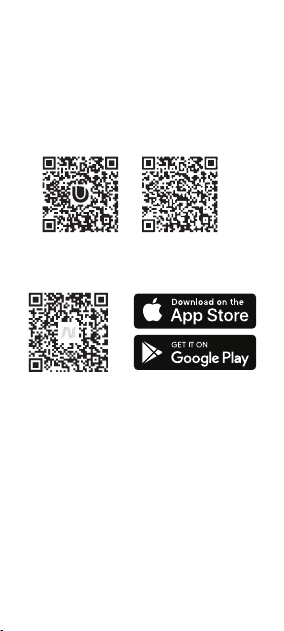
1. To download the app, scan the QR code
or search "Ultrean" in the Apple App
Store® or Google Play Store.
2. Open the app. If you already have an
account, tap Log In. To create a new
account, tap Sign Up.
3. Pair the base to your smart device: Turn
on the control base by taking the probe
from the base. And follow the instructions
in the app for adding a device.
4. You can control the product and
monitor your cooking progress with the
app or you can cook with the meat
thermometer Control Base (as below).
OPERATION INSTRUCTIONS
App Setup
9
1. Turn on the control base by taking the
probe from the base.
Cooking with the meat
thermometer Control Base
A: Insert your probe into the meat deeply
enough so only the handle of the probe is
visible. (refer to Safety notch)
Note: You can not set the cooking temperature
while the probe is in the base.
10
B: Press the SET button to enter setting
mode, and the target temperature value
(default is 60°C/140°F ) will flash.
C: Increase the temperature:
Press + to increase the value.
Decrease the temperature:
Press - to decrease the value.
Long press + or — for 2 seconds to rapidly
increase or decrease temperature.
D: Press the Set button to confirm the target
temperature or wait 15 seconds for
automatic confirmation
Temperature Memory: The device will
remember the last set temperature value.
3. Start Cooking → Cooking Completed
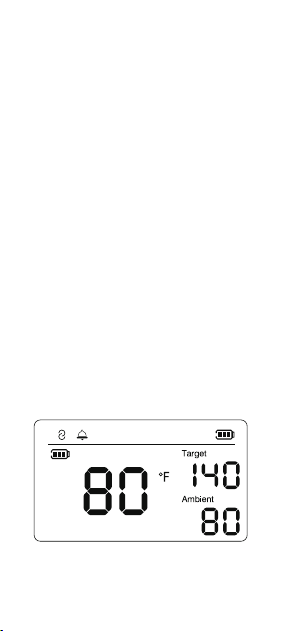
The initial cooking temperature is 80°F
2. Set the cooking temperature
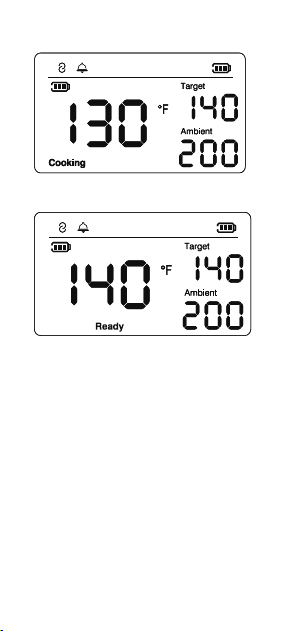
When it reaches 140°F, the cooking is
complete (the Ready icon lights up and
alarms)
It rises to 130°F during the cooking process
11
4. Take out the probe from the meat.
caution: Always wear gloves to remove the
probe from the meat when you
finish cooking.
5. Overheat reminder
The Probe has been exposed to an
overheated environment: any Internal sensor
is higher than 212°F/100°C or ambient sensor
is higher than 572°F/300°C. The Overheat

indicator slowly blinks as a reminder and an
alarm is triggered.
Remove the probe with glove from the heat
source and allow it to cool down before using
it again.
6. Battery Charging
If the blank battery icon is slowly blinking, it
means the battery of the base or probe has a
low battery.
Base charging: Use the included Type-C USB
cable to charge the Base.
Probe charging: Please insert the probe into
the base for charging
Sound On:
Sound Off:
12
Alarm
When it reaches the target temperature or
exceeds the temperature limit, the device will
alarm to remind you. To exit the alarm, press
any button or wait 180 seconds for automatic
shutoff.
Sound on/Off
Use the probe to press the Sound On/Off
button to turn the sound on or off.
More Function
°C / °F Switch
Use the probe to press °C / °F button to
switch the temperature with the probe

Reset Function
If the product encounters faults beyond the
troubleshooting scope, use the probe to
press the reset button to power on again. If
the issue persists, please contact customer
service for help.
Magnet
Built-in magnets allow you to attach the base
onto your grill, oven, smoker fridge or any
other metal surface.
Caution: make sure the surface temperature
of the appliance is not too hot to damage the
base.
13
CARE & MAINTENANCE
1. Be sure to clean the probe well and dry
them before placing them in the base.
2. Though the probe is dishwasher safe, it's
best to wash it by hand with soapy water to
avoid scratching. Also steer clear of using
very abrasive sponges and cleansers to
prevent scratches.
3. If the base gets dirty, wipe it down with a
damp cloth. The base is not dishwasher
safe and is not waterproof. Do not immerse
it in water.
14
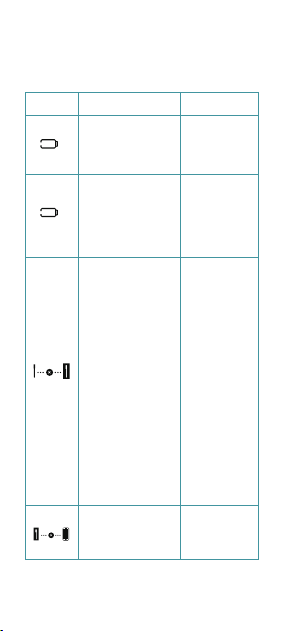
TROUBLESHOOTING
ERROR
MESSAGE
REASON SOLUTION
Probe
Disconnected.
1. The probe is too
far from the base.
Or the probe is in
a closed
environment,
such as an oven or
smoker which will
block bluetooth
signals, which will
reduce the
transmission
distance.
2. The probe has
no power.
3. The probe is
broken
1. Move the
base closer to
the probe as
possiable
2. Charge the
probe for five
minutes, then
remove it and
retry.
3. If none of
the above
measures
work, contact
Ultrean
support.
Probe Battery is
Low
Plug the
Probe into
the Base to
charge it.
Probe Battery is
Low
Use the
included
Type-C USB
cable to
charge the
Base.
Base and smart
device is
disconnected
1. Move the
base closer to
smart device.

1. The base is
too far from the
smart device. or
walls and other
obstacles can
block Bluetooth
signals, which
will reduce the
transmission
distance
2. the bluetooth
of smart device
is not turned on.
3. The probe is
broken
2. turn on the
bluetooth of
smart device
3. If none of
the above
measures
work, contact
Ultrean
support.
The food
temperature has
exceeded the set
temperature
"Over-
heat"
The
probe is
not
charging
Remove the
food and
probe as soon
as possible to
avoid
overcooking.
Probe has been
exposed to an
overheated
environment
over 572°F
( 300°C).
Remove the
Probe from the
heat source
and allow it to
cool down
before using it
again.
The probe is not
inserted into the
base properly
Fully insert the
probe into the
base
The probe's
charging
detection is
blocked by a
foreign object.
Clean the
charging
contacts on the
probe and the
charging
contacts on the
base.
15

For Base
FCC ID: 2BCBU-MT03
IC: 34396-MT03
HVIN: MT03
For Probe
FCC ID: 2BCBU-FM209
IC: 34396-FM209
HVIN: FM209
16
Interference Statement - Part 15
This device contains licence-exempt
transmitters)/receivers) that comply with Innovation,
Science and Economic Development Canada's
licence-exempt RSS(s). Operation is subject to the
following two conditions:
(1) This device may not cause interference.«
(2) This device must accept any interference, including
interference that may cause undesired operation of the
device.
L'émetteur/récepteur exempt de licence contenu dans le
présent appareil est conforme aux CNR d'Innovation,
Sciences et Développement économique Canada
applicables aux appareils radio exempts de licence.
L'exploitation est autorisée aux deux conditions
suivantes:
(1) L' appareil ne doit pas produire de brouillage;
(2) L' appareil doit accepter tout brouillage
radioélectrique subi, même si le brouillage est
susceptible d' en compromettre le fonctionnement.
ISED Radio Frequency Exposure Statement:
This equipment complies with ISED exposure limits set
forth for an uncontrolled environment. This equipment
can be used in portable exposure conditions.
ISED Déclaration d'exposition aux radiofréquences:
Cet équipement est conforme aux limites d'exposition
d'ISDE établies pour un environnement non contrôlé.
Cet équipement peut être utilisé dans des conditions
d'exposition portables.
NOTE: This equipment has been tested and found to
comply with the limits for a Class B digital device,
Federal Communication Commission

17
pursuant to part 15 of the FCC Rules. These limits are
designed to provide reasonable protection against
harmful interference in a residential installation. This
equipment generates, uses and can radiate
radio-frequency energy and, if not installed and used in
accordance with the instructions, may cause harmful
interference to radio communications.
However, there is no guarantee that interference will not
occur in a particular installation. If this equipment does
cause harmful interference to radio or television
reception, which can be determined by turning the
equipment off and on, the user is encouraged to try to
correct the interference by one or more of the following
measures:
• Reorient or relocate the receiving antenna.
• Increase the separation between the equipment and
receiver.
• Connect the equipment into an outlet on a circuit
different from that to which the receiver is connected.
• Consult the dealer or an experienced radio/TV
technician for helpe
Changes or modifications not expressly approved by the
party responsible for compliance could void the users
authority to operate the equipment.-
This device complies with Part 15 of the FCC Rules.
Operation is subject to the following two conditions:
(1) this device may not cause harmful interference, and
(2) this device must accept any interference received,
including interference that may cause undesired
operation.
FCC RF Exposure Warning Statement:
This equipment complies with FCC radiation exposure
limits set forth for an uncontrolled environment. This
equipment can be used in portable exposure
conditions.

WARRANTY INFORMATION
We grant 1 year warranty on the product commencing on
the date of purchase. Within the guarantee period, we
will eliminate any defects in the appliance resulting from
faults in materials or workmanship. Please contact us at:
support@ultrean.com to launch a warranty claim.
This guarantee does not cover: damage due to improper
use, normal wear or use as well as defects that have a
negligible effect on the value or operation of the
appliance. The guarantee becomes void if repairs are
undertaken by unauthorized persons and if original
product parts are not used.
CUSTOMER SERVICE
1. If you have any product questions or concerns, please
don't hesitate to contact us directly at
support@ultrean.com or visit our website at:
www.ultrean.com.
2. We have a hassle-free warranty and customer service
team for satisfactory solutions to any issue you might
have.
18
Shenzhen Faray InfoTech Co.,Ltd.
Room 401, Block A, Xichuang Technology Building, No.
7025, Liuxian Avenue, Xili Community, Xili Street,
Nanshan District, Shenzhen China

Ver.260317