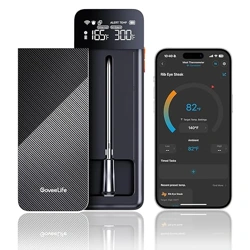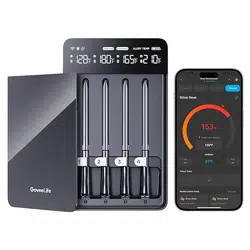
Mode:H5191/H5192
Smart Wireless
Meat Thermometer

Safety Instructions
Do not let children use this product, as there is
a risk of injuries from the temperature probes.
Avoid exposing the thermometer body to high
temperatures. Do not attach it to the surface of
a high-temperature stovetop, oven, or grill. Do
not place the thermometer body inside an
oven or grill.
Do not touch the probe directly with bare
hands during or directly after cooking. Use
heat-insulating gloves to avoid burns.
Do not submerge the thermometer or probes
in water when cleaning and do not clean them
in a dishwasher. Instead, lightly rinse them with
flowing water and wipe clean.
Do not use corrosive chemicals when cleaning.
Always insert the probe past the safety notch
(the minimum insertion point) to avoid product
damage and personal injuries.
DO NOT use the probe when cooking at
temperatures above 572˭/ 300˫, or when
cooking directly above hot coals or flames.
DO NOT place probe charging unit directly on
the grill cover or too close to any hot surface.
DO NOT remove the probe while it is exposed to
heat. The probe must be inserted in and removed
from food away from all heat sources.
Read and save these instructions:
01
1
2
3
4
5
6
7
8
9

02
10
11
12
13
14
15
16
17
18
19
Always use eye protection when removing a probe
that has exceeded the maximum temperature or
come in contact with hot charcoals or direct fames.
DO NOT use the probe when searing. If the probe
IDOOVLQWRWKHUHRUGLUHFWKHDWVRXUFHWXUQRΊWKH
cooking appliance and close the lid immediately.
Allow the probe to cool completely before removing.
DO NOT allow the probe to come in contact with
hot charcoal or coals.
The probe will be hot during and after use. Wear
heat-resistant gloves when handling the probe.
Always insert the probe past the safety notch to
avoid damage.
DO NOT use the probe in a microwave or
pressure cooker.
DO NOT place the probe charging unit on any hot
surface.
DO NOT drop the probe onto hard surfaces.
'2127XVHFOHDQLQJSURGXFWVFRQWDLQLQJDOFRKRO
DPPRQLXPEHQ]HQHRUDEUDVLYHVDOORIZKLFK
could damage the device.
DO NOT submerge the probe in water for a long
period of time.

03
20
21
22
23
Please use the original Base to charge the probe.
Make sure the temperature probe is fully charged
at least every 3 months when not in use for a
long period of time.
DO NOT beat the probe so that the ceramic,
glass and electronic components inside the
probe will not be damaged.
Consuming raw or undercooked meats, poultry,
or seafood may increase your risk of foodborne
illness. Always cook your food to USDA safe
temperatures.
Foodborne Illness Hazard
DO NOT run the probe under cold water
immediately after cooking. Let the probe cool
down prior to washing.
DO NOT exceed the probes internal sensor limit of
212°F/100˫ or the ambient sensor limit of 572°F
/300˫. Temperatures above these maximums
may damage the probe.
DO NOT expose the probe's charging unit to
moisture. Keep it covered in inclement weather
and do not put it in the sink.
6WRUHWKHSUREHLQDGU\FRROSODFHZKHQQRWLQ
use. This product is only designed for use in food.
Use it only for its intended purpose.

04
Package Includes
Always keep the probe pointed away from fingers
and body. Contact may result in injuries. Keep out
of reach of children.
Probe Sharp Point Hazard
B5191011
1
1
1
1
1
1
B5192011
2
1
1
1
1
1
Item
Temperature Probe
Probe Base
Charging Cable
User Manual
Service Card
Quick Start Guide
05
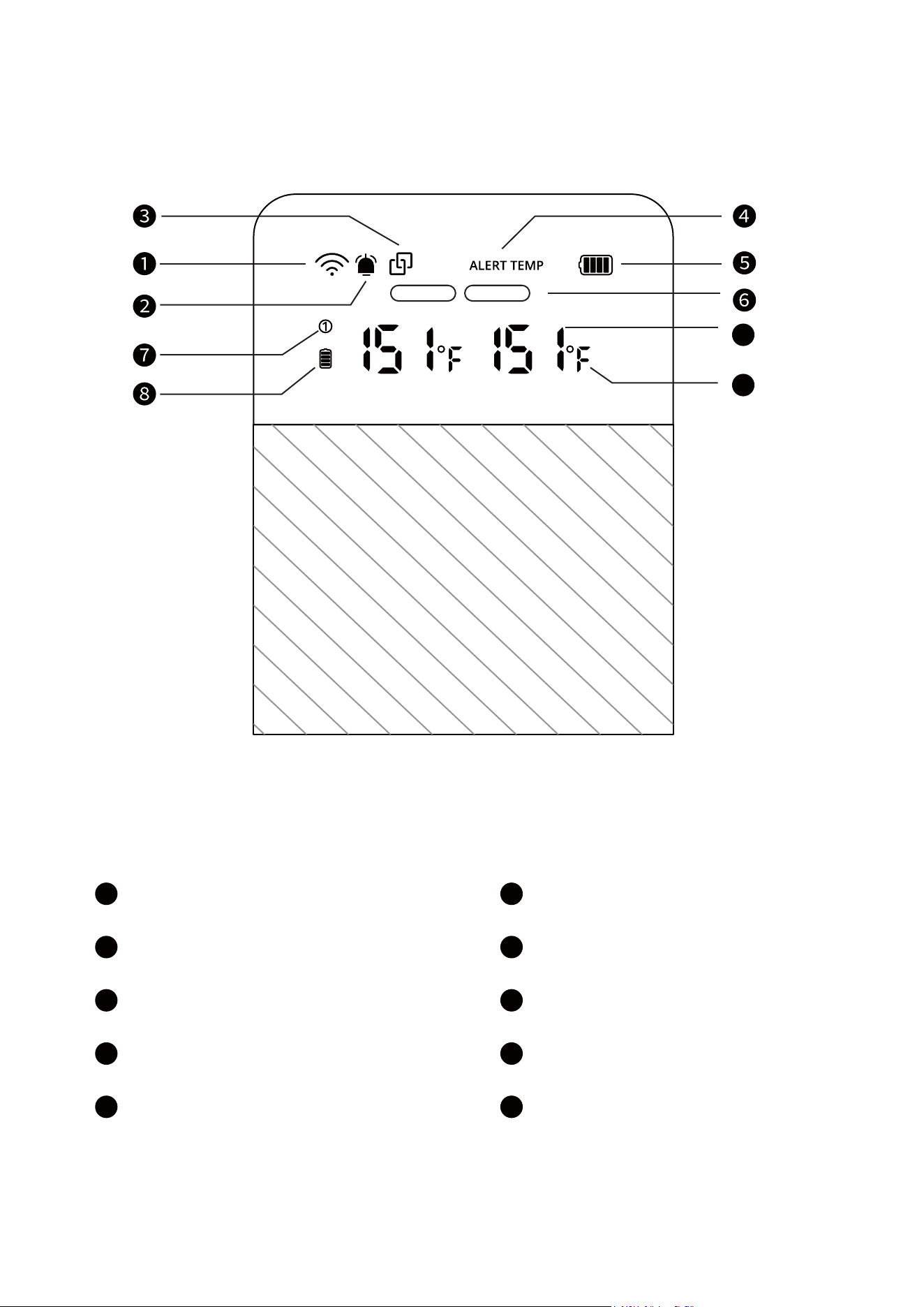
At a Glance (1-Probe)
Screen Display
1
2
3
4
5
6
7
8
9
10
9
10
Wi-Fi Signal
Alarm Mute
Bluetooth
Preset Temperature
Probe Base Battery
Internal, Ambient
Probe Number
Probe Battery
Current Temperature
Temperature Unit
Internal Ambient
06
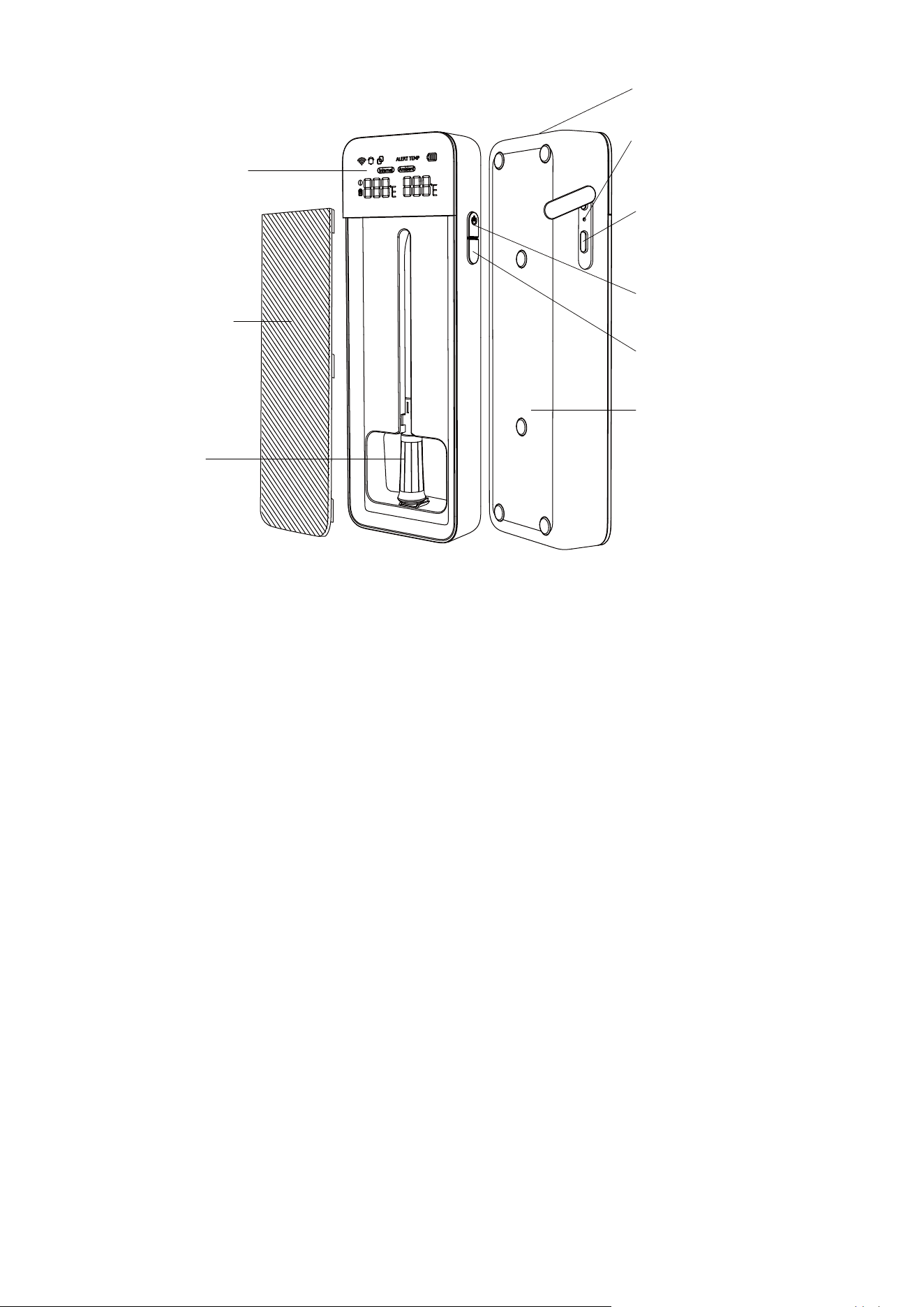
LCD Screen
Speaker Hole
Type-C
Charging Port
Power Button
Function Button
Magnet
(on the back)
Probe
Probe Base
Power Button
Magnetic
Cover
Shutdown
Button
Press for 3 seconds to turn on/o.
Function Button
Short Press to switch bettwen the current
temperature and alert temperature.
07
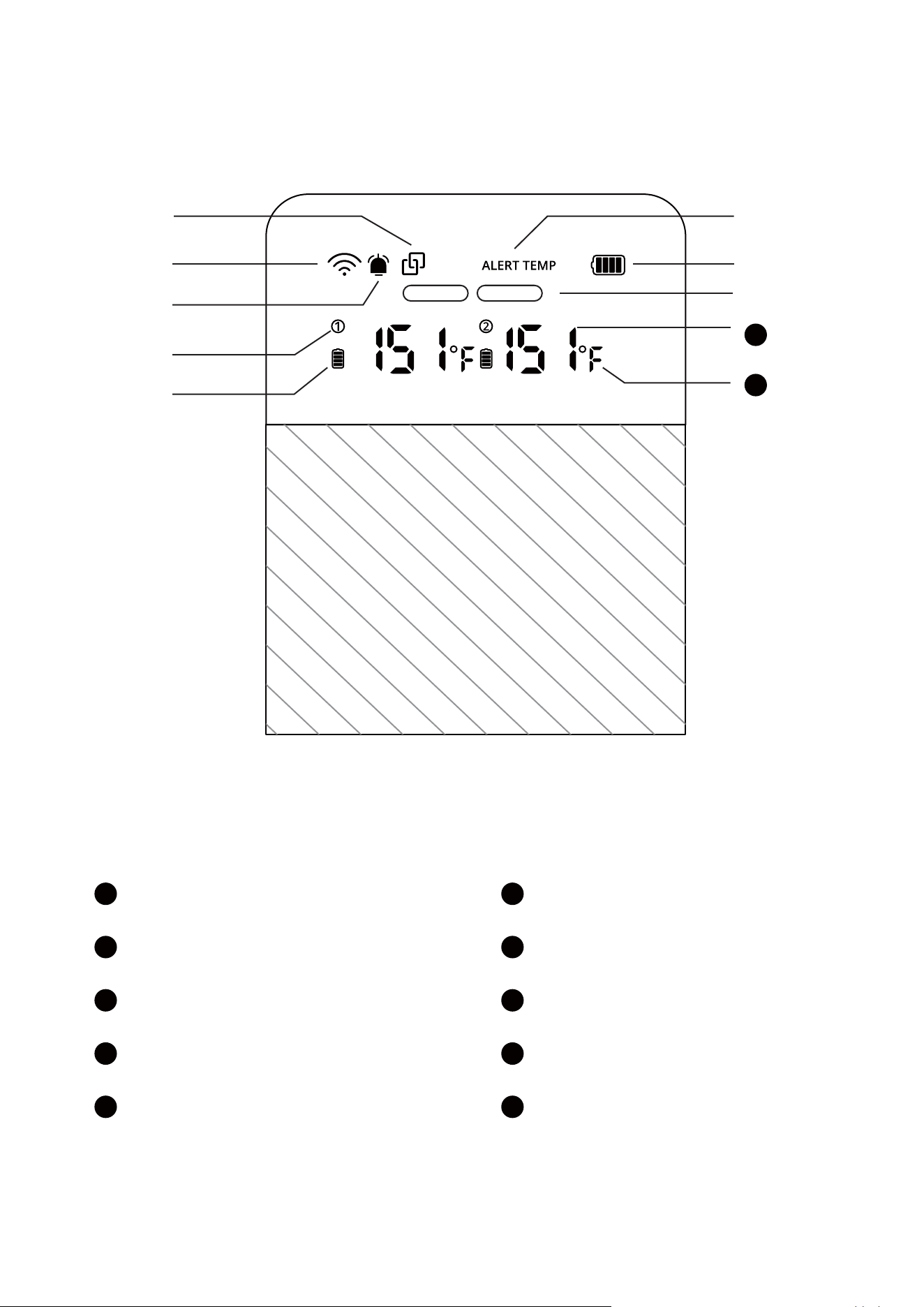
At a Glannce (2-Probe)
Screen Display
Բ
Դ
Ա
Ԯ
Գ
ԯ
Ե
1
2
3
4
5
6
7
8
9
10
9
10
Wi-Fi Signal
Alarm Mute
Bluetooth
Preset Temperature
Probe Base Battery
Internal, Ambient
Probe Number
Probe Battery
Current Temperature
Temperature Unit
Internal Ambient
Note:
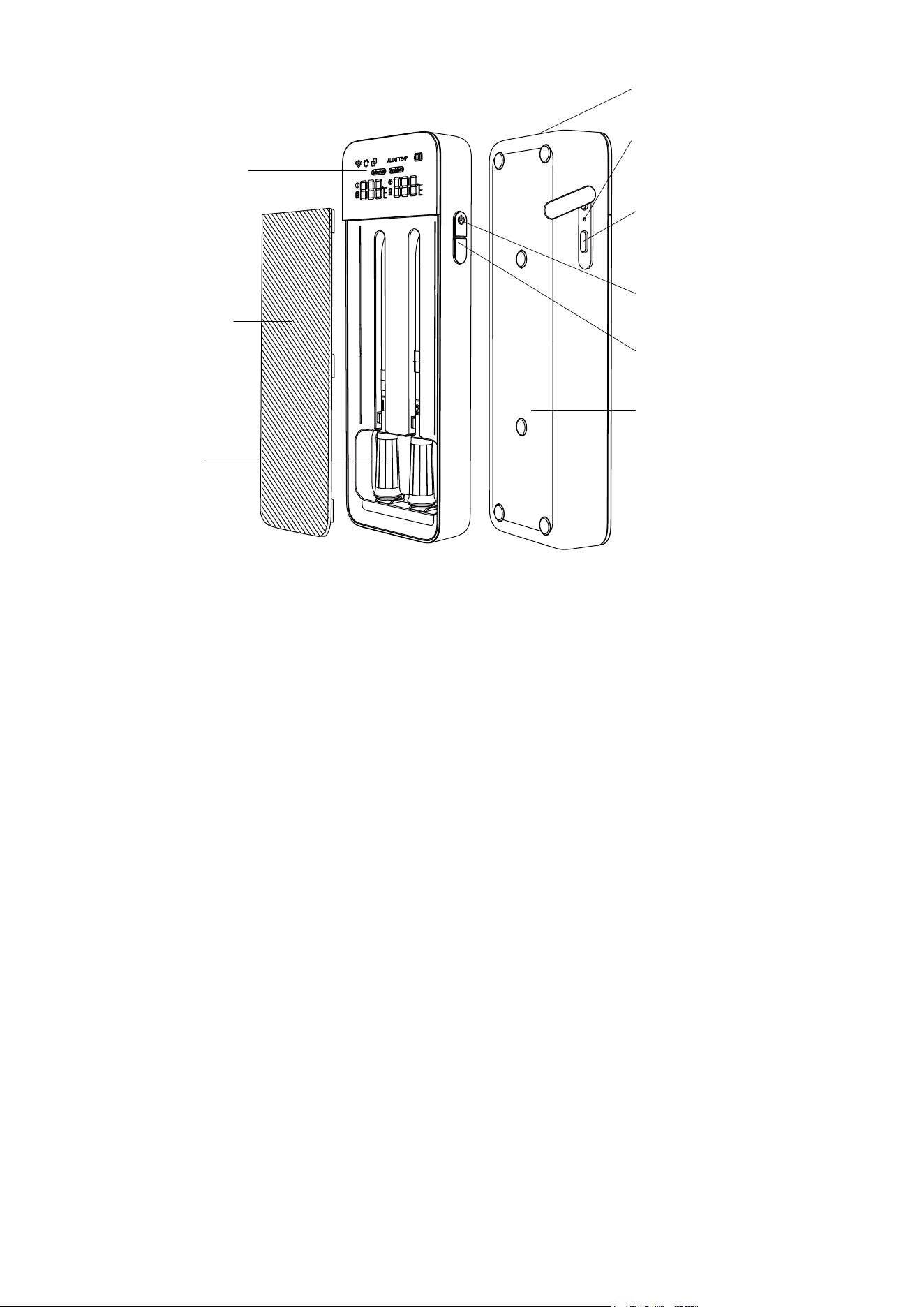
LCD Screen
Speaker Hole
Type-C
Charging Port
Power Button
Function Button
Magnet
(on the back)
Probe
Probe Base
Power Button
Magnetic
Cover
Shutdown
Button
1. Press for 3 seconds to turn on/o.
2. Short press to switch between the current
temperature and alert temperature.
Function Button
1. Short press to display the internal temperature
and ambient temperature.
1. Power Button: Press for 3 seconds to power on/o.
2. Please use the original Base to charge the
probe. Make sure the temperature probe is fully
charged at least every 3 months when not in use
for a long period of time.
3. Before using your meat thermometer, make
sure the product has been charged.
08

Note:
1. Charge the probe for 25 minutes before every use.
2. When taking out the probe from the Base
quickly, the Base screen won’t display a
number. This means the probe is disconnected
from the Base, which is normal. Please wait for
the probe to reconnect to the Base (the
connection will be faster in an open
environment).
3. If the Base screen doesn’t display a number, it
means the probe is disconnected from the
Base. Please go to the Device Settings page in
Govee Home App and follow the in-app
instructions to complete repairing.
09
Internal Sensor
For detecting the internal temperature of the food.
Ambient Sensor
For detecting the ambient temperature of the probe.
Safety Notch
Always insert the probe past the safety notch.
Probe and Bottom Indicator
Internal Sensor
Safety Notch
Ambient Sensor

10
Follow the simple steps below to set up your meat
thermometer and help you cook like a pro!
Step 1:&KDUJHWKH%DVHDQGSUREHUVW,WLV
recommended to use the Base after it is fully charged
ZLWKWKHSURYLGHGFDEOH$IWHUWXUQLQJRQWKH%DVH
the screen will start to display. Place the probe into
the Base and charge for 25 minutes before use.
Step 2: Download Govee Home App. Bind the Base
with the app by following the in-app instructions.
1RWH,IWKHSUREHLVQRWSDLUHGZLWKWKH%DVHJRWR
the Device Settings page in Govee Home App. Follow
the in-app instructions to complete repairing.
Step 3: The probes and Base are paired in advance in
the factory. In case that both probes and the Base have
SRZHUWKHVFUHHQZLOOGLVSOD\WKHSUREHQXPEHU if
you take out the probe from the Base. Wait for the
SUREHWRUHFRQQHFWWRWKH%DVHYLD%OXHWRRWKDQG
the corresponding temperature number will be
GLVSOD\HGRQWKHVFUHHQLQGLFDWLQJWKDWWKHSUREH
has been successfully connected to the charging base.
Getting started
Step 4: Insert the probe correctly into the food to detect
temperature (making sure that the probe is past the
VDIHW\QRWFK,Q*RYHH+RPH$SS\RXFDQVHWWKH
GHVLUHGPHDWWHPSHUDWXUHFKRRVHWKHW\SHRIPHDW
DQGGHJUHHRIGRQHQHVV\RXZDQWDVZHOODVVHW
your preferred ambient temperature. When the

11
detected temperature reaches the target
WHPSHUDWXUH\RXSUHYLRXVO\VHWWKH%DVHDODUPZLOO
sound and the app will push you an alert
QRWLFDWLRQ
Step 5:$IWHUXVLQJWKHSUREHPDNHVXUHWKHSUREH
indicates that the ambient temperature has dropped
to a safe level before removing it. When removing
WKHSUREHUHPHPEHUWRZHDUKHDWUHVLVWDQWJORYHV
Step 6: Use a clean damp cloth to wipe the probe
after use. Then place the probe properly into the
Base to charge for next use.
Note: Recommended distance between the probe
and the Base
1. Use the probe within 10m away from the Base. (in
an openenvironment)
2. Use the probe within 3m away from the Base (in
an enclosed environment such as an oven with
glass doors).
3. DO NOT use the probe in a microwave or pressure
cooker (i.e. an all-metal enclosed environment).
4. Place the booster at least 1ft (30cm) away from the
cooking appliance to avoid any potential damage
from the heat.
5. Make sure the temperature probe and the Base
are fully charged at least every 3 months when not
in use for a long period of time.
Open the Govee Home, tap “+” icon in the top
right corner and select “H5191/H5192”.
Ԯ
12
6. If you need to repair the with the probe for any
UHDVRQSOHDVHJRWRWKH'HYLFH6HWWLQJVSDJHLQ
Govee Home App. Follow the in-app instructions
to complete repairing.
Downloading the Govee Home App
Prepare a smart phone or tablet running iOS 9.3 (or
above) or Android 4.3 (or above);
Download the Govee Home app from the App Store
(iOS devices) or Google Play (Android devices).
Govee Home
Connecting to the Wi-Fi Network
Notice:
a. Make sure the Wi-Fi router supports 2.4GHz
and 802.11 b/g/n bands;
b. Turn on Bluetooth in your mobile phone.

13
ԯ
Follow instructions on the app to complete
connection.
Please check the above steps and try again if
connection failed.
Cooking Temperature Alert
When the monitored temperature reaches the
preset cooking temp, the alarm will sound and
the app will push an alert notification.
Ԯ
Battery High Temperature Alarm
Avoid placing the thermometer body in contact with
high-temperature surfaces or environments. If the
internal battery reaches a temperature of 131ȯ (55ȭ
the alarm will be triggered and action should be
taken to remove the thermometer from the high
temperature surface or environment. If the battery
reaches a temperature of 140ȯ (60ȭWKH
thermometer will automatically shut down.
Temperature Alerts & Alarms
ԯ
When the probe Base's battery reaches 10%,
the probe Base's battery indicator will flash at
1-second intervals. When charging, the battery
percentage keeps changing circularly. When it
is fully charged, the indicator will always be on.
Ԯ
Charging Precautions

14
When the probe's battery reaches 10%, the probe
battery indicator will flash at 1-second intervals.
When the probe is fully charged, the indicator
will always be on (please note that the probe will
enter hibernation when charging, therefore, the
screen will not show the probe battery. You can
take it out at any time and reconnect it to the
Base to check the battery).
ԯ
Charging to full takes about 3.5-4 hours and
the thermometer can be used continuously on
battery power for about 24 hours.
Charge DC input: 5V 1.5A.
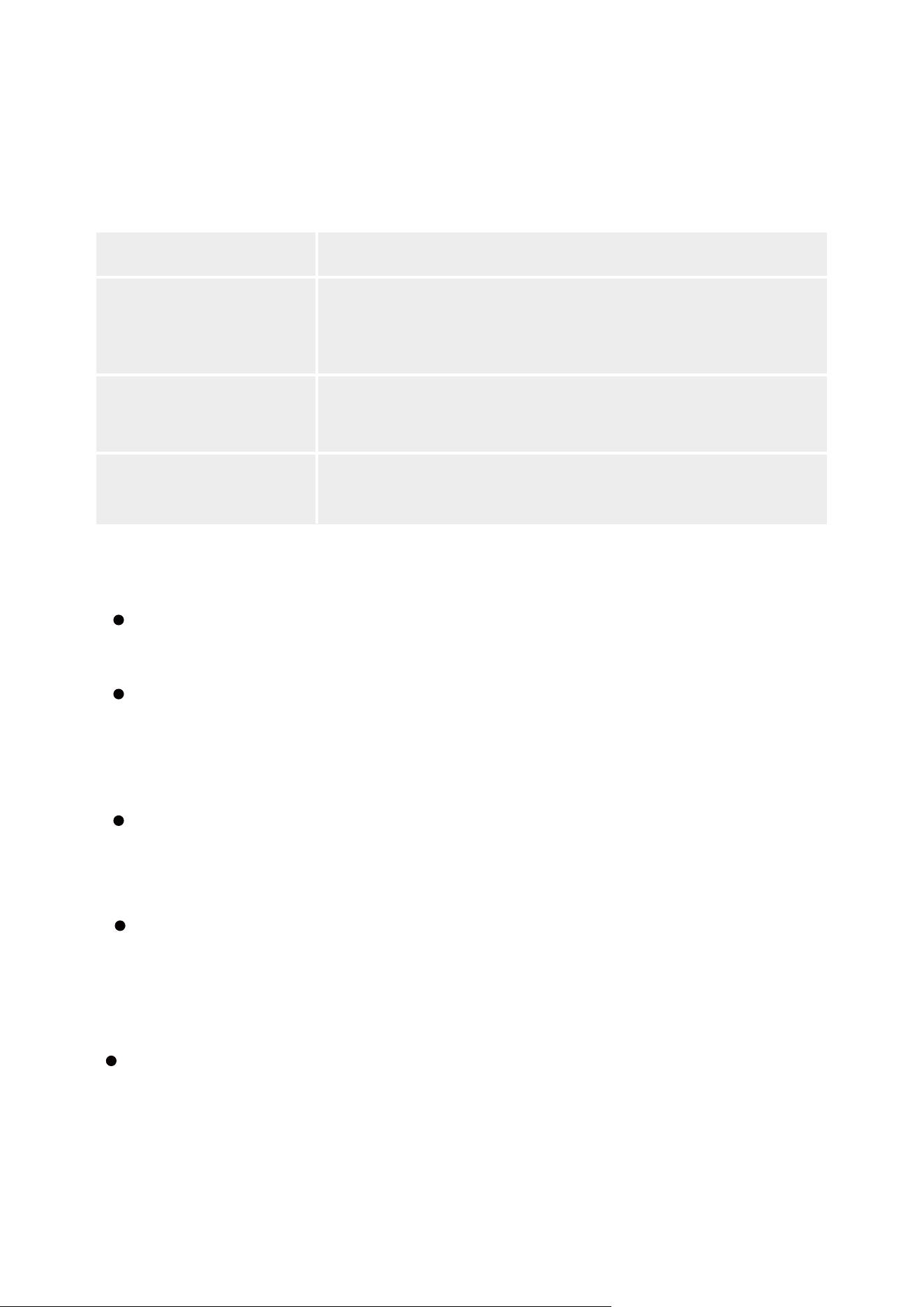
Specifications
7N"I8I
7"
˭UP˭o$UPo$
˭UP˭o$UPo$
p˫˫UP˫˭UP˭
p˫˫˫˭UP˭
p˫˫˫˭UP˭
I
I
$IBSHF5FNQFSBUVSFUP˫
˭UP˭
%JTDIBSHF5FNQFSBUVSF˫UP
˫˭UP˭
Lithium Battery Power
Base-Battery Life
Temp Tolerance
Internal Temperature
Ambient Temperature
Probe Base-Charge
and Discharge
Temperature Range
Input
Probe-Battery Life
15
Troubleshooting
Screen display Connotation
E1
E2
HHH/LLL
The probe is damaged, please contact
customer service or buy a new probe.
The base temperature is abnormal.
Probe temperature is too high/low.
1.The screen will display error codes under the following
circumstances:
2.Cannot connect to Wi-Fi.
Check that the thermometer is connected to your Wi-Fi
router’s 2.4GHz network (5GHz is not supported).
Place the thermometer as close as possible to the Wi-Fi router.
The thermometer’s Wi-Fi connection distance is up to
328 ft/100 m, so make sure your Wi-Fi router is able to
reach this signal coverage distance. Note that
obstructions can limit a router’s coverage area.
3.Cannot power on/o.
Press the power button for 3 seconds to turn the
thermometer on and o. When on, press the power button
to switch between displaying the current monitored
temperature and the preset high temperature.
If the thermometer freezes and doesn’t respond to
button presses, use a needle or similar object to press in
the shutdown button to shut o the thermometer. After,
press the power button for 3 seconds to turn the
thermometer back on again.

16
Customer Service
Warranty: 12-Month Limited Warranty
Support: Lifetime Technical Support
Email: [email protected]
2FLDO:HEVLWHZZZJRYHHFRP
@GoveeLife
@Goveelife
#*RYHHOLIHRFLDO
@GOVEE

This device complies with Part 15 of the FCC Rules.
Operation is subject to the following two conditions:
(1) this device may not cause harmful interference,
and (2) this device must accept any interference
received, including interference that may cause
undesired operation.
Warning: Any changes or modifications not
expressly approved by the party responsible for
compliance could void the user's authority to
operate the equipment.
Note: This equipment has been tested and found
to comply with the limits for a Class B digital device,
pursuant to Part 15 of the FCC Rules. These limits are
designed to provide reasonable protection against
harmful interference in a residential installation.
This equipment generates uses and can radiate
radio frequency energy and, if not installed and
used in accordance with the instructions, may
cause harmful interference to radio communica-
tions. However, there is no guarantee that
interference will not occur in a particular
installation. If this equipment does cause harmful
interference to radio or television reception,
which can be determined by turning the
equipment o and on, the user is encouraged to
try to correct the interference by one or more of
the following measures:
(1)Reorient or relocate the receiving antenna.
FCC Statement
Compliance Information

FCC Radio Frequency Exposure
Statement
Temperature Probe complies with the FCC
radiation exposure limits set forth for an
uncontrolled environment. This transmitter must
not be co-located or operating in conjunction
with any other antenna or transmitter.
Smart Wireless Meat Thermometer meets the
government's requirements for exposure to radio
waves. The guidelines are based on standards
that were developed by independent scientific
organizations through periodic and thorough
evaluation of scientific studies. The standards
include a substantial safety margin designed to
assure the safety of all persons regardless of age
or health. The SAR limit of USA (FCC) is 1.6 W/kg
averaged. Device types: H5192, H5191 (FCC ID:
2A7VD-H5192) has also been tested against this
SAR limit. SAR information can be viewed
on‐line at http://www.fcc.gov/oet/ea/fccid/.
Please use the device FCC ID number for search.
This device was tested simulation typical 20mm
to body. To maintain compliance with FCC RF
(2)Increase the separation between the
equipment and receiver.
(3)Connect the equipment into an outlet on a
circuit dierent from that to which thereceiver is
connected.
(4)Consult the dealer or an experienced radio/TV
technician for help.

FOR INDOOR USE ONLY
The Bluetooth® word mark and logos are
registered trademarks owned by Bluetooth SIG,
Inc. and any use of such marks by Shenzhen
Qianyan Technology LTD is under license.
ThetrademarkGoveeLifehasbeenauthorisedto
ShenzhenQianyanTechnologyLTD.
Copyright©2021ShenzhenQianyanTechnology
LTD. AllRightsReserved.
exposure requirements, the use of accessories
should maintain a separation distance between
the user's bodies mentioned above, the use of
accessories should not contain metallic
components in its assembly, the use of
accessories that do not satisfy these require-
ments may not comply with FCC RF exposure
requirements, and should be avoided.
The following importer is the responsible party
Name: GOVEE MOMENTS (US) TRADING
LIMITED
Address: 2501 Chatham Rd Suite R Springfield IL
62704
Email: support@govee.com
Contact information: https://www.govee.com/-
support