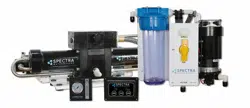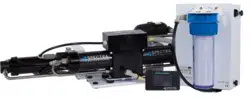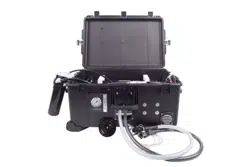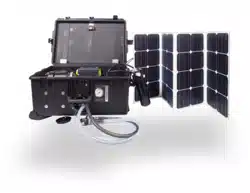
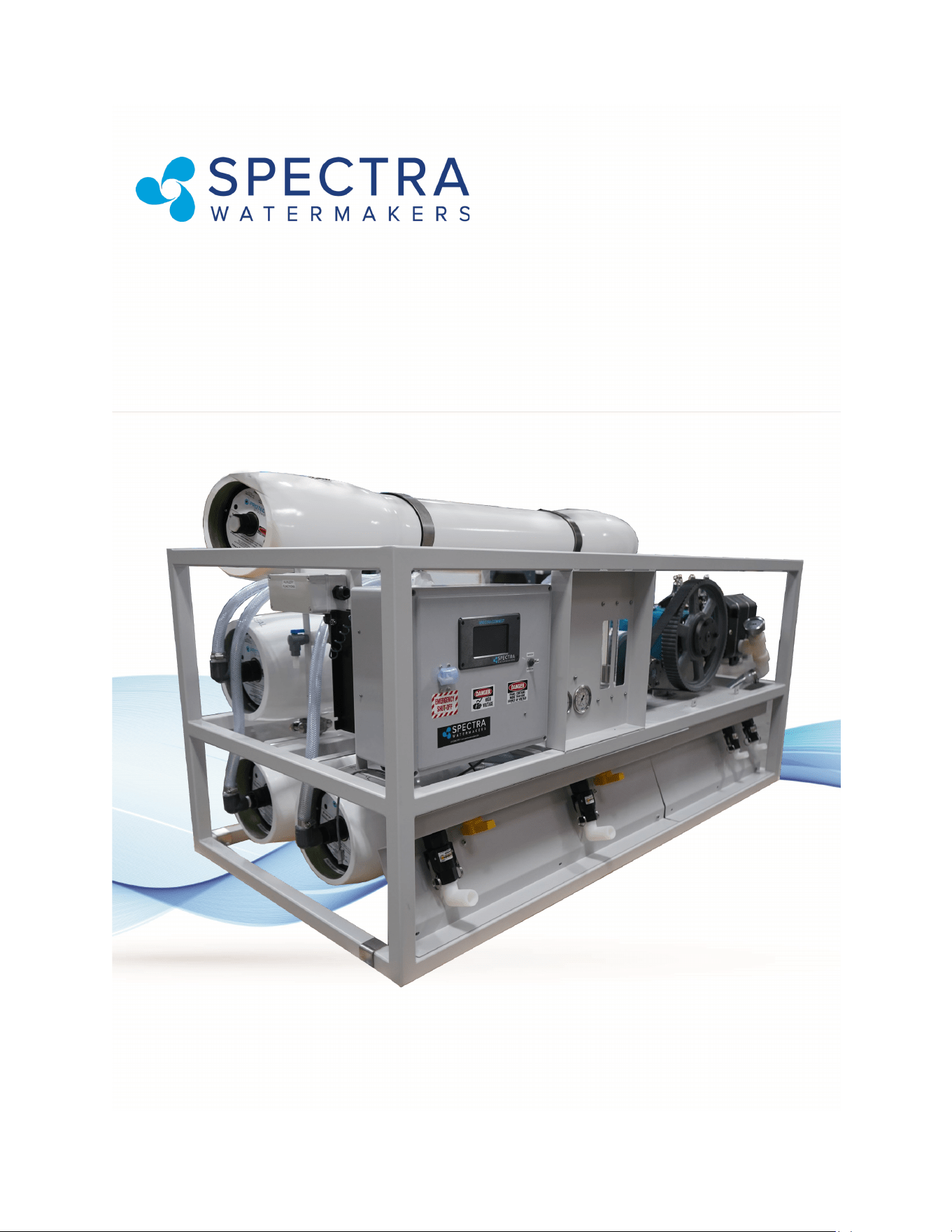
LB 14,000
With SP-20 Pearson Pump Technology and Spectra Connect
Controls
Installation and Operating Manual

2
LB-14000
With SP-20 Pearson Pump Technology and
Spectra Connect Controls
Produced by Katadyn Desalination, LLC
Manufacturer of Spectra Watermakers
Version: 1.5.1
Updated: March 2023
© 2022 Katadyn Desalination, LLC.
Katadyn Desalination, LLC.
2220 S McDowell Blvd Ext, Petaluma, CA 94954
https://www.spectraWatermakers.com
Phone: +1.415.526.2780
Fax: +1.415.526.2787
For questions regarding this manual, or any Katadyn Desalination branded Spectra Wa-
termakers, please contact customerservice@spectraWatermakers.com
All rights reserved. Subject to change without notice.

3
Table of Contents
Getting Started 5
Introduction 7
Installation Overview 11
Tank switches and
Tank Level Sensor 13
Plumbing layout 15
Optimizing Pump Performance 17
Spectra Connect Quick Start 19
New System Start-up and Test 20
Maintenance 35
Long Term Storage 39
Troubleshooting 41
Spectra Connect
Sensor Calibration 23
Networking 27
Normal Operation 29
Spectra Connect Settings 43
Dealer Access Settings 45
Spectra Connect Alarms 48
Wiring Diagram 52
Parts Identification 56

4

5
Thank you for trusng Spectra Watermakers for your water puricaon needs. The Spectra LB-
14,000 comes equipped with the revoluonary Spectra Pearson Pump, a unique high pressure
pump with integrated energy recovery that allows users to purify up to 420 gallons of
seawater per hour on as lile as 3.5 Kilowas. If properly installed and cared for, your system
will provide you with years of high quality, potable, fresh water.
LB System shipping list:
• LB-14,000 Watermaker in Powder Coated Stainless Steel Frame, Including:
• Inlet and Brine Discharge Service Connecons**
• Spectra Connect Control Box with Main Circuit Breaker**
• Feed Valve**
• 24VDC Power Supply (for controls)**
** components built into frame assembly
• Install kit;
• Service hoses and lter wrench
• Pre-ltraon assembly, two 4x20” 5 micron lters
• Oiler Kit
• User’s Manual
• Oponal items - Can be ordered with system or aer installaon;
• Boost Pump with VFD speed control
• Media Filter(s)
• UV Lamp
• Pressure Regulator for feed **
Note: See Pg. 51 for electrical specicaons.
Please take a moment to review your Spectra LB 14,000 Watermaker and this
user manual before operaon. If you have any quesons contact:
techsupport@spectraWatermakers.com
Any shipping damage must be reported to the carrier within 24 hours of receipt, so please
inspect the contents of your shipment to ensure that all parts have arrived undamaged. It is
the responsibility of the receiver to report any missing or damaged parts to Spectra within
one week of taking delivery. Spectra is not responsible for claims made outside this one
week window .
Getting Started

6
7
Introduction To Your System
The Spectra LB-14,000 Watermaker is designed for use in land-based installaons. Feed water
must be supplied to the system within the range of 19 GPM (72 lpm) and 21 GPM (79 lpm) at
10-25psi (0.7 - 1.7 Bar) pressure. The machine separates the feed water into two streams:
product and the brine stream which contains the dissolved solids, and salt separated from the
product water. Brine discharge may be as high as 13 GPM (50L/min) and should be discharged
consistent with local regulaons, please consult your applicaons engineer if you have
quesons. The brine discharge must go to a drain with an air gap so there is no possibility of
sucon on the discharge port.
The LB-14,000 frame is constructed of powder coated 304 stainless steel and includes the
Spectra Pearson Pump, Motor and Belt drive system coupled to four 8” x 40” seawater
membranes. All high pressure connecons between the membranes and the pump come pre-
assembled and tested. The high pressure hoses use 1” JIC 37 deg. are ngs.
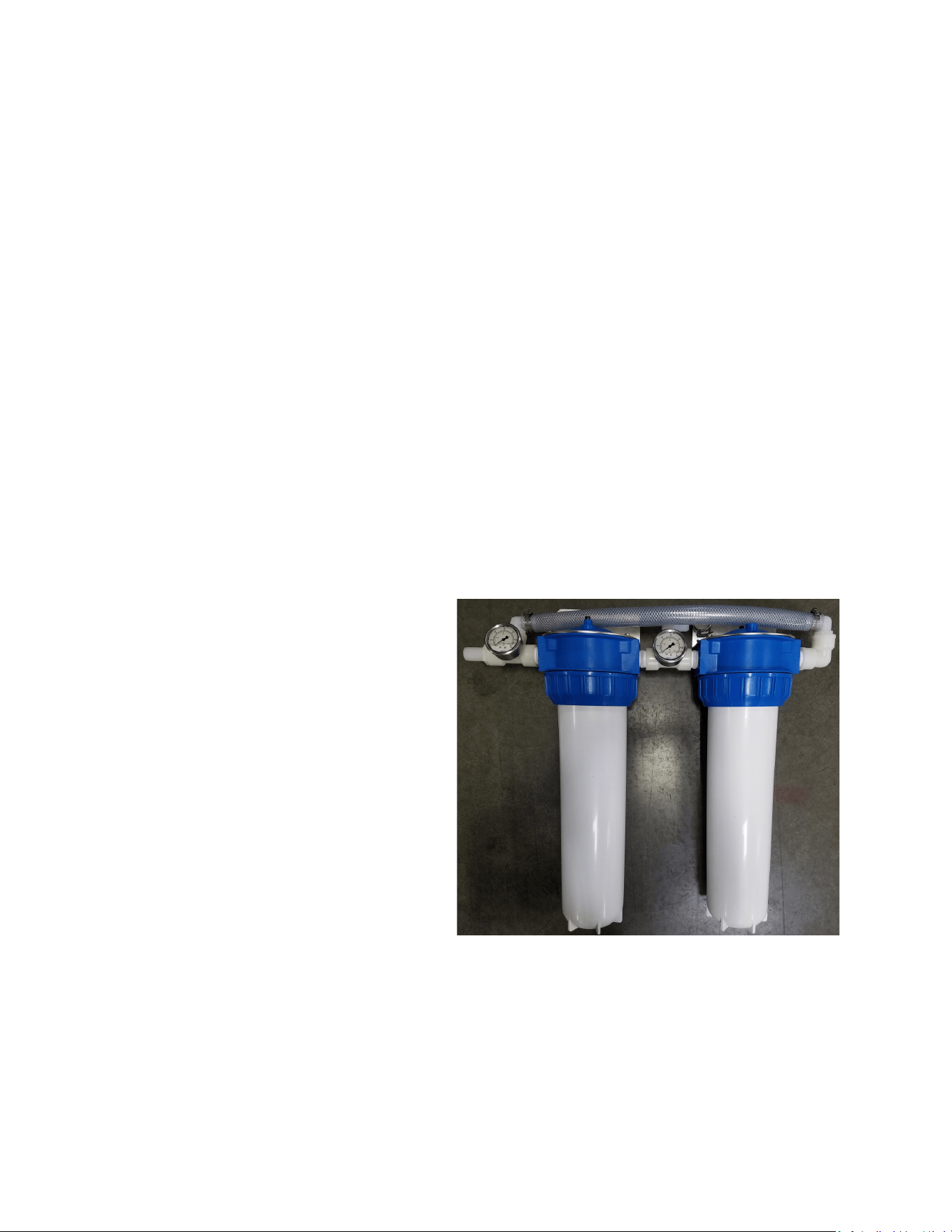
20” Prelter Housings are two 5 micron
lter housings to be plumbed in parallel,
preferably aer a Media Filter. Each lter
housing has a spring loaded “purge” buon
on top to released air from the lters. Do
not install the lters above any electrical
devices as water will be spilled when
changing the lters or purging air and allow
at least 2’ below the lter housing so the
bowl can be removed.
Note: Filter housings should always be ghtened by hand, do not use the wrench.
Overghtening the collar will not improve sealing. If the housing leaks when hand ghtened
then the O-ring needs to be cleaned and greased (silicone grease only). A small amount of
silicone grease on the threads will make it easier to remove the collar.
8
A short discussion about nomenclature
The Spectra Connect control system displays membrane pressure as “Feed Pressure”, though
when we are talking about the pressure of the “Feed” water or Feed Flow coming into the
system we refer to it as Boost Pressure. All the feed water entering the system goes through
the membrane(s) and we boost the pressure going into the Pearson Energy Recovery Pump
which increases feed (membrane) pressure so the system will make water. The pressurized
water going into the system is Boost Pressure and the membrane pressure is “Feed Pressure”.
Note: “Feed Pressure” on the Spectra Connect
can be viewed in analogue form on the “System
Pressure” Gauge.
Boost Pump requirements
The LB-14,000 Watermaker requires a reliable
feed water source that is ltered down to 5
microns and supplied at 19-21 GPM and regulated between 10-25psi. The actual boost
pressure requirement will be determined when commissioning the system and should be set
as high as possible without causing the Pearson Pump to knock. The nal boost pressure
seng depends on the nal installaon conguraon.
Warning: Excessive feed pump pressure can lead to hose failure.
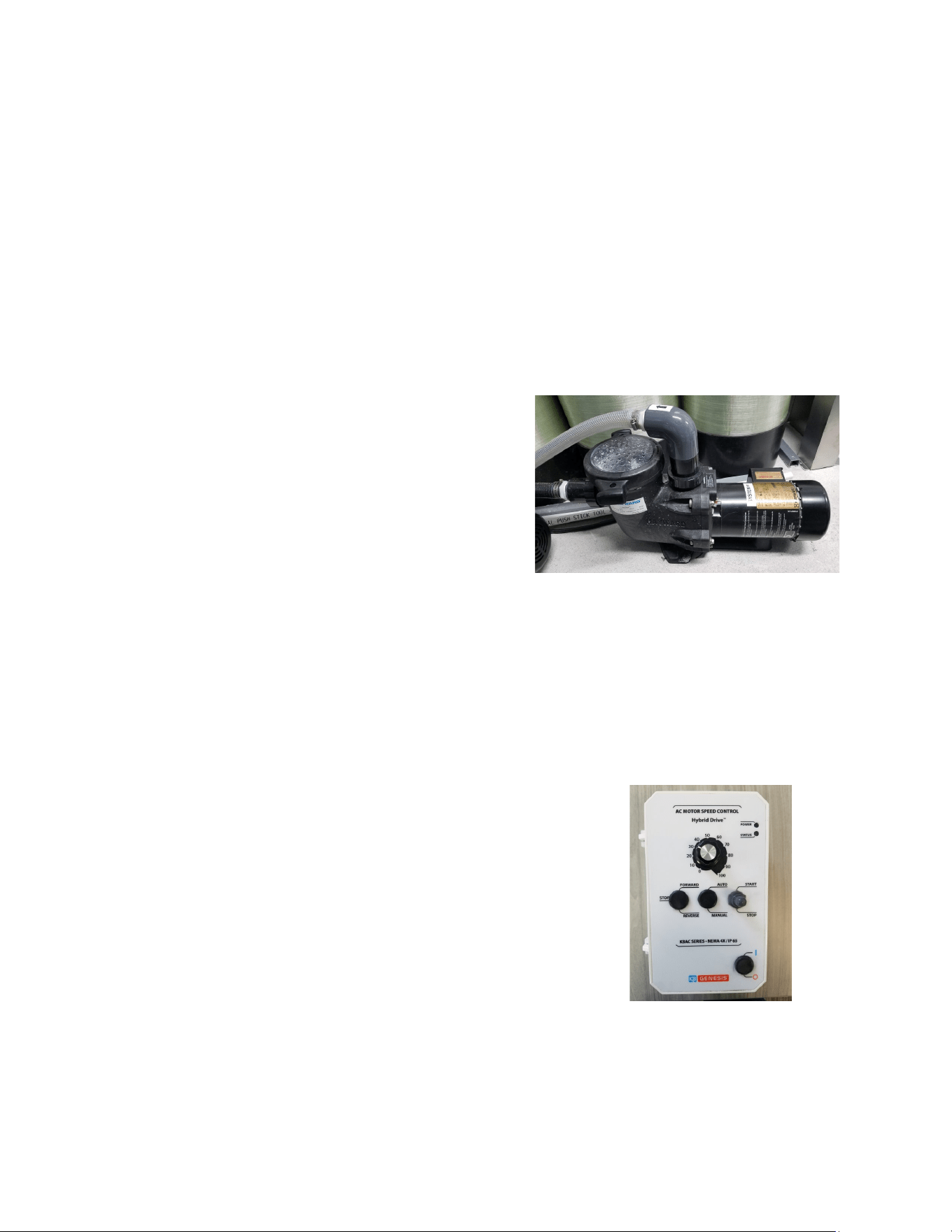
Oponal Boost Pump:
Boost Pump Speed Control
The boost pump we recommend is a Lifestar Aquac Pump
designed by Hayward for seawater and easily meets the
requirements of the LB-14,000 system. The 14,000 is provided with a
VFD speed control to allow for boost pressure adjustment.
The VFD (Variable frequency Drive) speed control for the oponal boost pump can be
mounted on a wall near the Watermaker control box or can be mounted to the frame of the
unit.
Introduction To Your System - Cont.
9
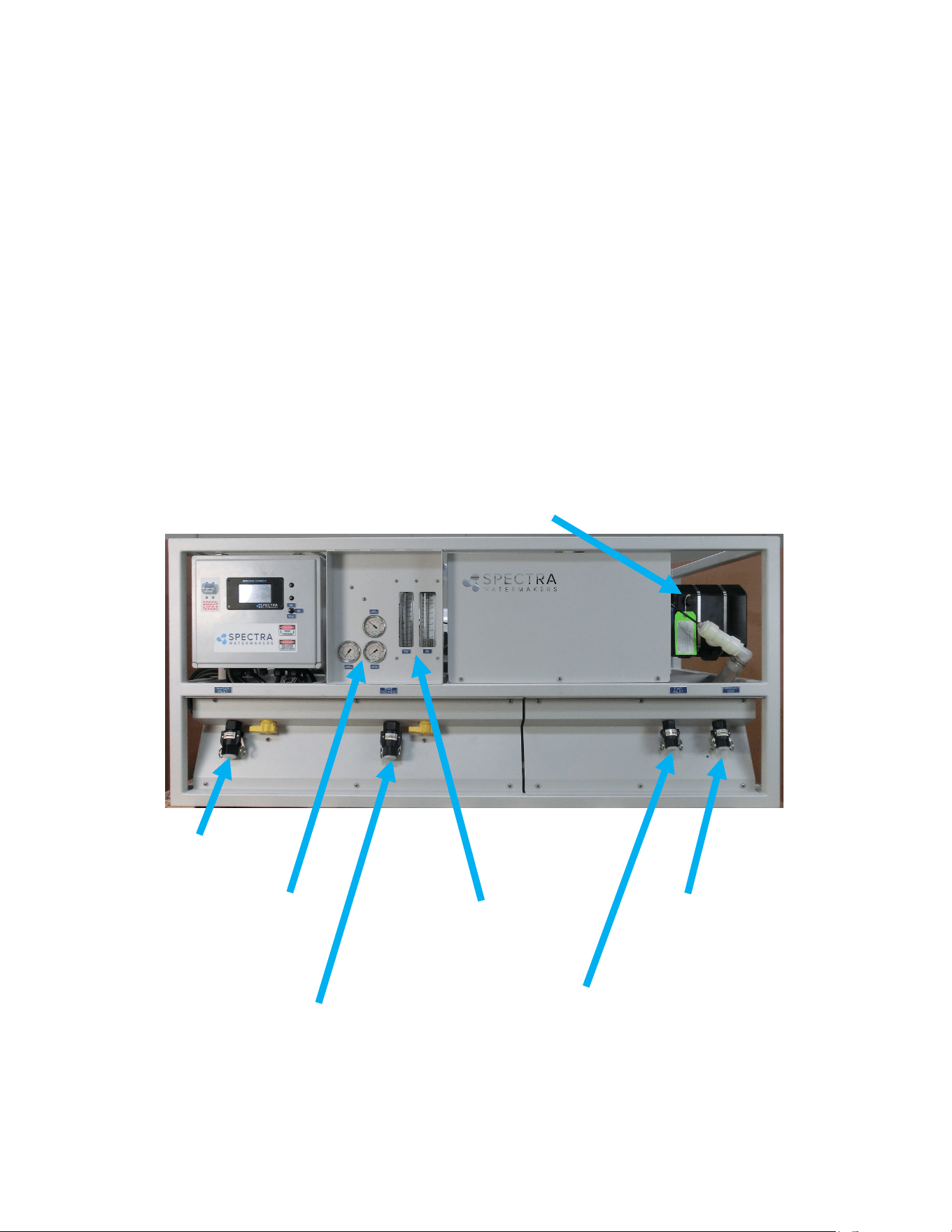
The basic system layout and controls are shown in the picture below
Control Box The molded water resistant box contains the Spectra Connect controls, relays,
and terminal blocks. Do not operate the machine with the control box open as it can be a
shock hazard. Should the need arise to open the electrical box aer installaon, use cauon as
there is live 220VAC in the box.
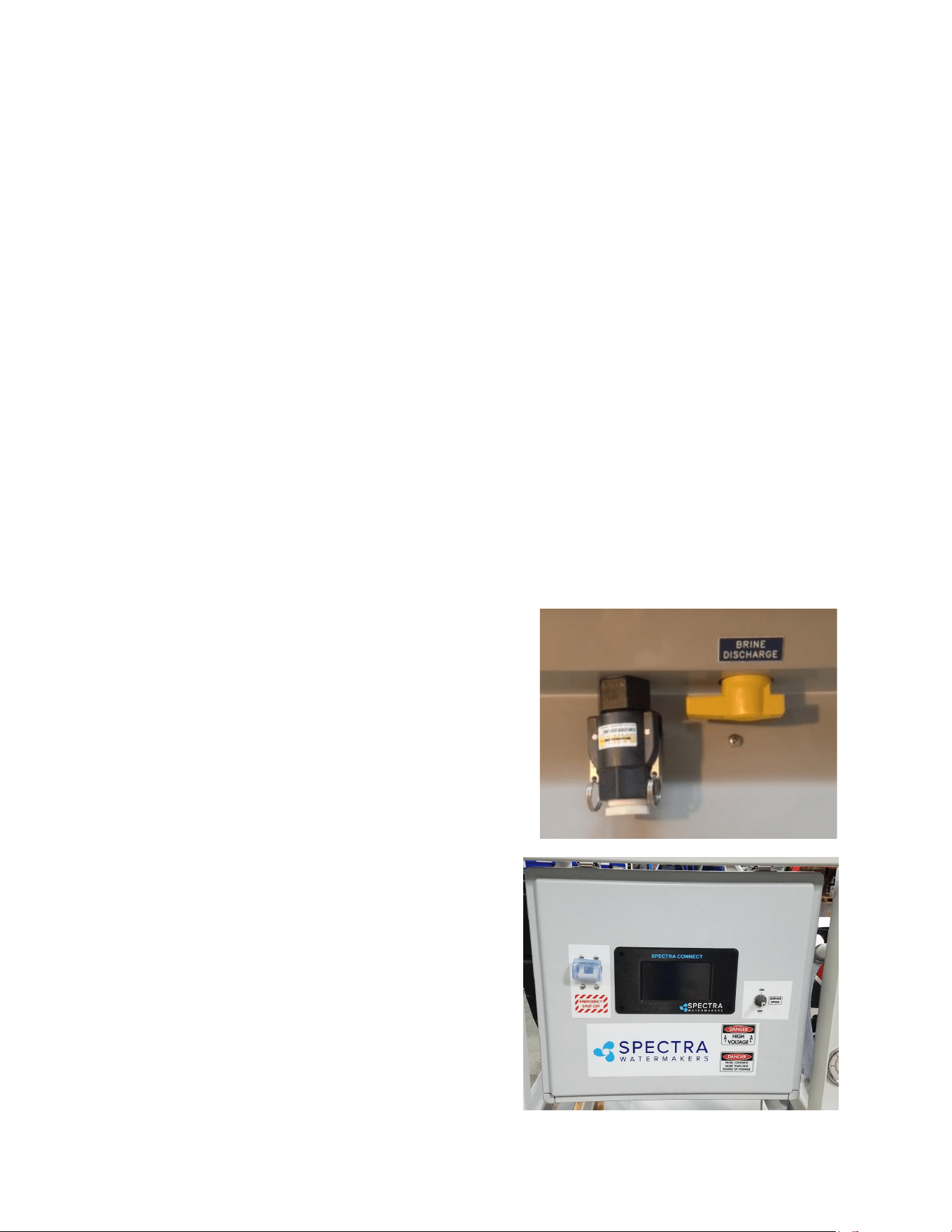
The brine discharge must lead to an open vented drain so there is no sucon on the discharge
port. A small amount of back pressure on the discharge is desirable (3-10psi).
Note: For smooth and safe operaon always open the pressure relief valve prior to starng
or stopping the Watermaker. The pressure relief valve is always open when there are
chemicals in the system, failure to do so will damage the membranes.
Front View Pressure Relief Valve
Note: The valves for the feed and the brine ports in the photo above are shown
in the ‘Run’ posion.
Introduction To Your System - Cont.
3/4” Pressurized Freshwater
Flush Input Port
1” Brine Discharge Port
Feed & Product Flow
Gauges
3/4”
Product
Water Port
Boost, Membrane and
Discharge Pressure
Gauges
1”
Feedwater
Port

10
11
Installation and Set-up
Installaon and Service Access: Your LB 14,000 system is designed to be installed on a level
surface and bolted into place. There are cleats supplied with the system or holes can be drilled
through the frame to bolt it into place.
Be sure to allow for service access to the unit, we recommend:
• A minimum of 40” (1m) to the right of the unit so membranes can be changed.
• A minimum of 24” (60cm) on the front and above the unit.
Cables and Hoses: Route all hoses and power cables in the most direct route possible and do
not allow hoses to kink or make excessive bends. Hoses should be supported to take any load
o the ngs to reduce leaks caused by vibraon. Protect all cables and hoses against chang
and size all wiring according to industry standards and local regulaons.
CAUTION: Undersized or improperly terminated cabling can result in serious injury or death.
Always follow best industry pracces when sizing, terminang, and roung both cables and
hoses.
Note: Running the system manually (not using the Spectra Connect control system)
overrides all the safety circuits and there is no system protecon for low boost pressure or
high system pressure. The system should not be le unaended when running in manual
mode.
There must be a vacuum break on the brine
discharge line so that there is no sucon. The
Pearson Pump needs a small amount of pressure
which is supplied by a restricon in the brine
discharge plumbing, more back pressure can be
applied by slightly closing the brine discharge
valve.
Inial power-up
Be sure the toggle switch is in the RUN AUTO
posion and the main breaker is o. When power is
applied to the unit and the main breaker (Emergency
Shut-O) is in the ON posion the display will light
up and go through a start up sequence. If no
instrucons appear, turn o for 30 seconds and then
back on.
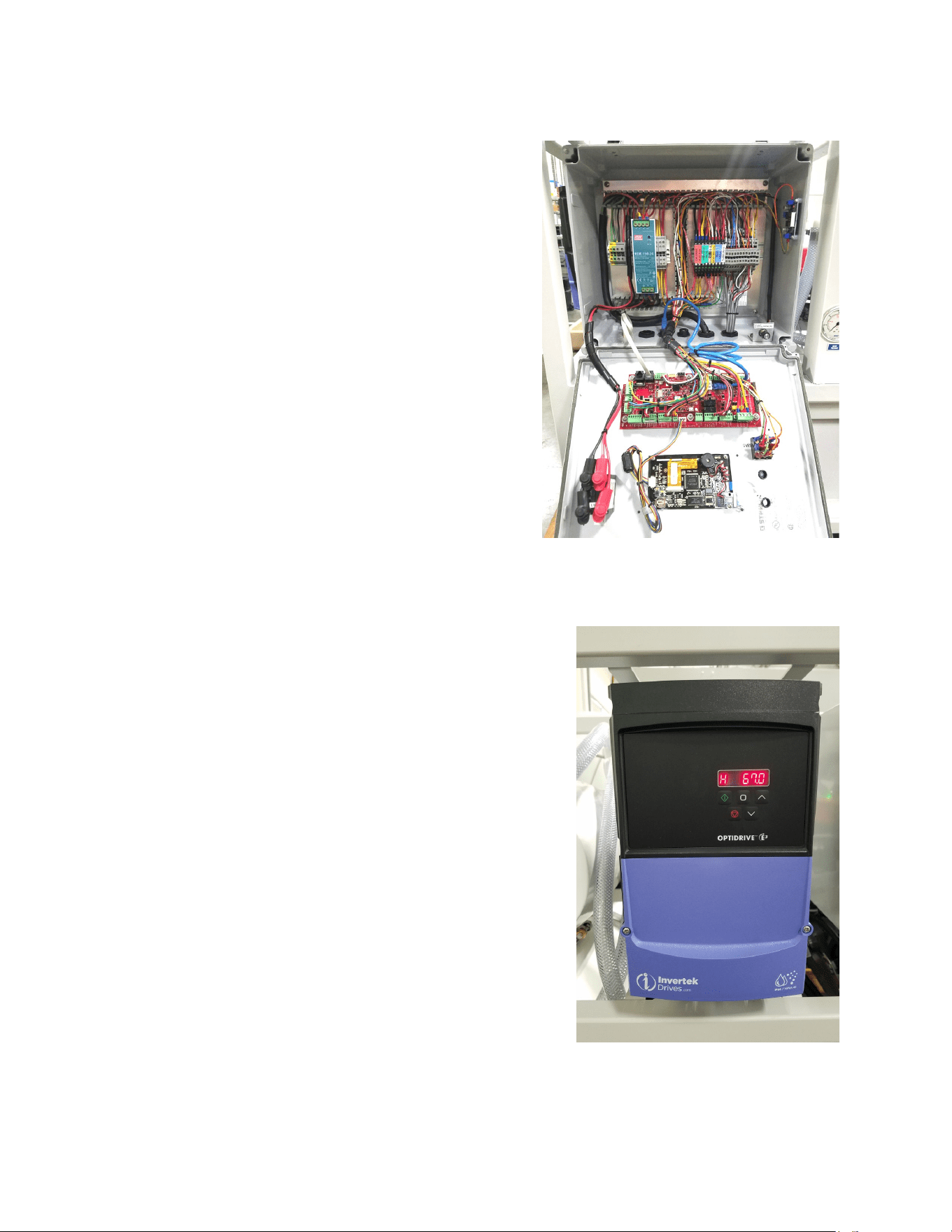
12
Spectra Connect
Electrical Cables
All units use 24V DC for the control circuits and a power
supply is included in the box. There is a cord grip in the
boom of the box for the power cable.
Oponal equipment
Depending on the conguraon ordered, the system
may have an addional control for relays or speed
controls.
Pearson Pump speed control
The VFD speed control for the Pearson Pump can be
mounted in the frame or on the wall next to the unit. The
VFD is preprogrammed at the factory so no adjustment
should be required unless the voltage is more than 5%
dierent from what was specied on the order.
If you believe you need to make an adjustment to the
VFD please contact Technical support.
Control Box Installation
13
Oponal Factory Supplied Tank Switches
The system can be started and stopped with tank level switches. The system will start when the
low level switch opens and will then stop when the high level switch closes. There are two
types of tank oat switches available depending on your installaon requirements. Oen
making an assembly as pictured below (right) is a good soluon as there is only a single
penetraon and it can be above the high water level.
Top mounted oat switch
EL-SWT-LV
Side mounted oat switch
EL-SWT-SMLV
Use the Dealer Access sengs (pg.45) to enable the tank switches
Tank Setup - Enable/disable tank level sensors.
Enable Tank Switch High - Enable/disable tank high switch high. If this is disabled Auto Fill and Fill Tank run modes
will not be available.
Enable Tank Switch Low - Enable/disable tank high switch low. If this is disabled Auto Fill mode will not be
available. Both High and Low tank switches must be enabled for Auto Fill mode.
Enable Tank Level 1 - Enable/disable
tank level sensor 1.
Enable Tank Level 2 - Enable/disable
tank level sensor 2.
Tank Switch #1
Tank Switch #2
Tank Level Sensor
Tank Switch or Tank Level Sensor Installation
14
The oponal Tank Level sensor (EL-SSR-5PSI) allows even greater control of your ship’s fresh
water systems. This unique level monitoring system requires no holes to be drilled into your
tank while measuring tank volume with greater accuracy than a standard resisve oat.
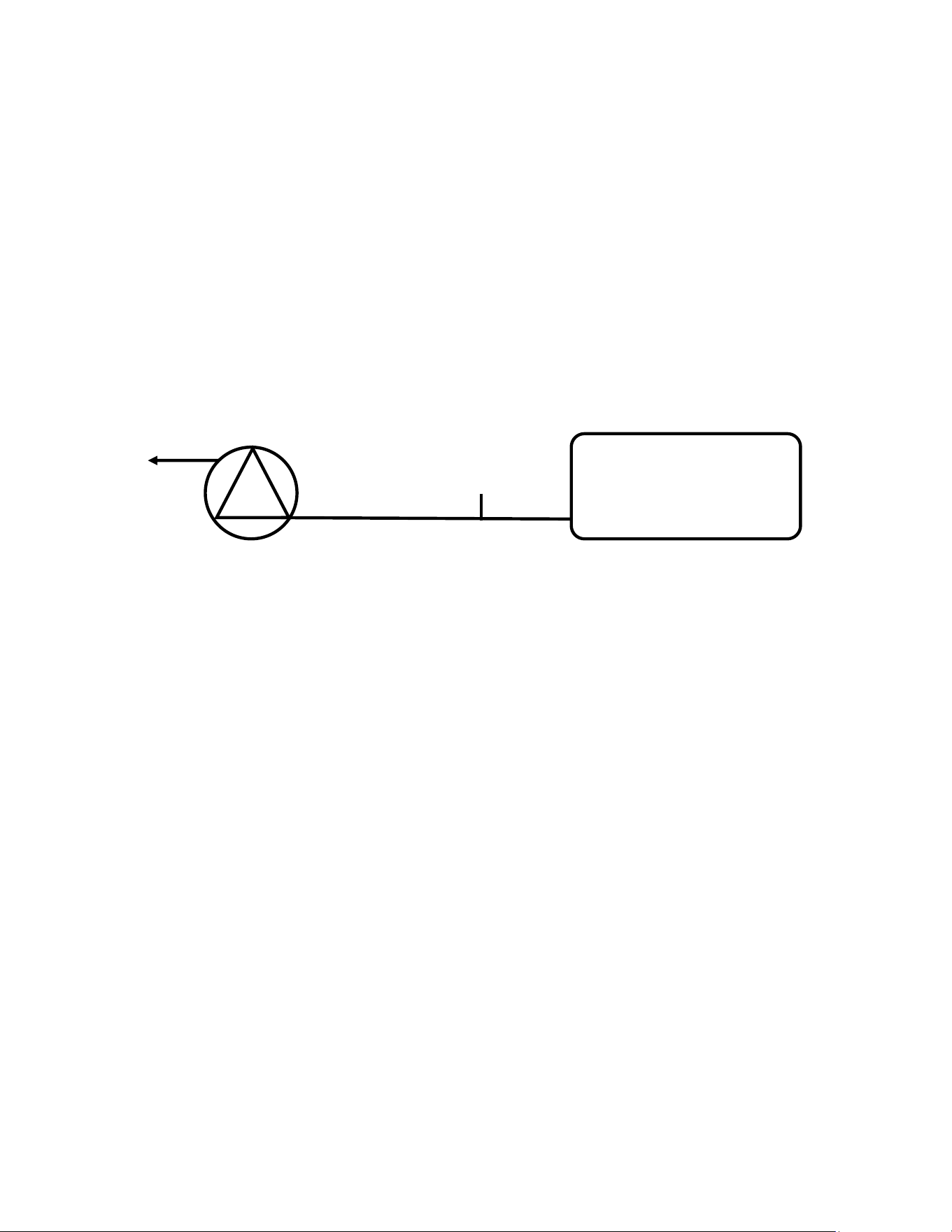
Install a tee in the water supply hose at the boom of the tank, or at the inlet to the
domesc water pump. Connect open leg of the tee to the Tank Level Sensor. Note: The tank
level sensor requires a 1/4” NPT connecon. We recommend installing a minimum 1/2” tee,
and using a reducing bushing to connect the sensor.
Tank Level
Fresh Water
Tank
Product
Water Pump
Route the 3 conductor cable back to the Spectra Connect control board at the feed pump
module. Extend the wires as necessary. If you must extend the wires beyond 50’ contact the
factory to ensure proper operaon.
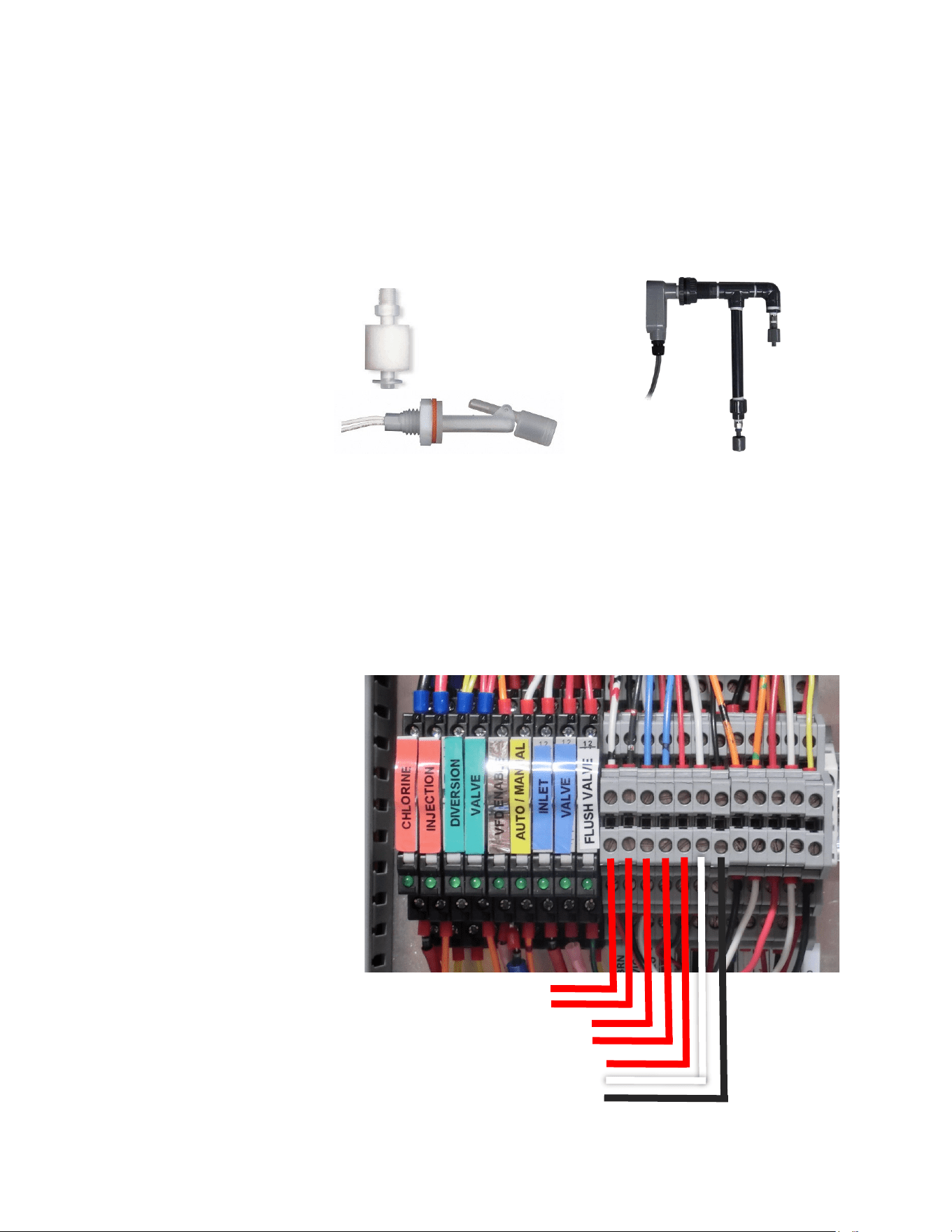
Connect the Tank Level Sensor cables to the appropriate terminals in the Control Juncon Box
(pg. 23) and refer to the wiring diagram on pg.51 to idenfy the correct terminals. Polarity
must be maintained!
If a 2nd Tank Level Sensor is going to be installed, it should be installed at the base of the
second tank. If monitoring 2 connected water tanks, they must be isolated from each other
with a valve to read properly.
The wiring connecons for the second Tank Level Sensor are located inside the Spectra
Connect control box. See System Sengs secon of this manual for instrucons on enabling
the second Tank Level Sensor.
See the Tank Level Calibraon page (pg. 24) in the manual.
Optional Tank Level Sensor Installation
Note: Be sure the pipe between the tank and the tank
level sensor is large enough to eliminate pressure drop
when the product pump is running.
15
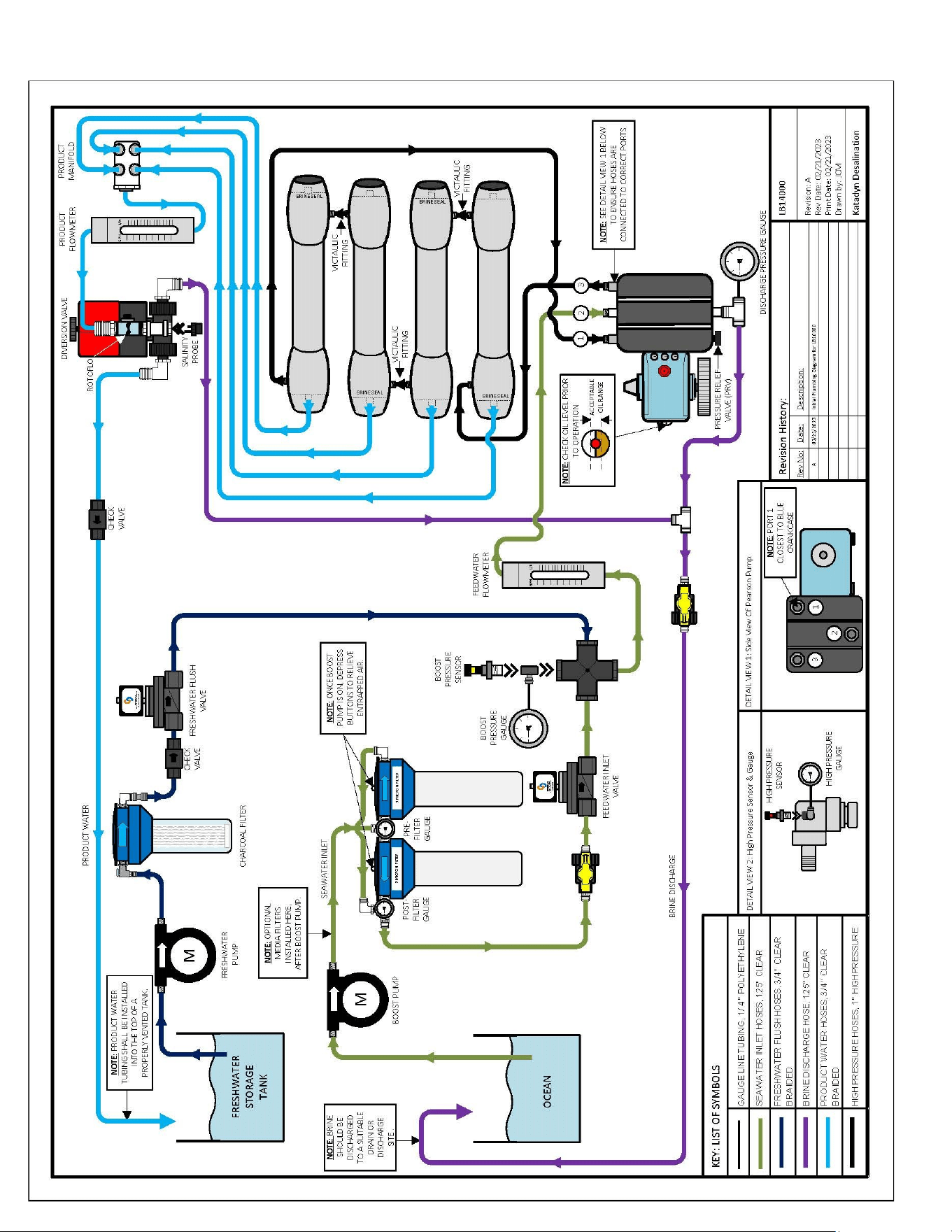
LB 14,000 Plumbing Diagram

16
Notes
17
Optimizing Pump Performance
Warning: If the Pearson Pump is making a loud “knocking” sound, the operator
must take immediate acon to understand why. Knocking can be caused when
the boost pressure is either too high or too low.
The Pearson Pump works best when there is a
balance between the boost pressure and the brine
discharge pressure. The brine discharge is
restricted slightly to create back pressure which improves
the Pearson Pump performance and the boost pressure is
adjusted to the maximum possible without the pump
knocking. Increasing the boost pressure actually lowers the
total system power consumpon and needs to be adjusted
on sight as it is impacted by the feed water plumbing and pre-ltraon conguraon.
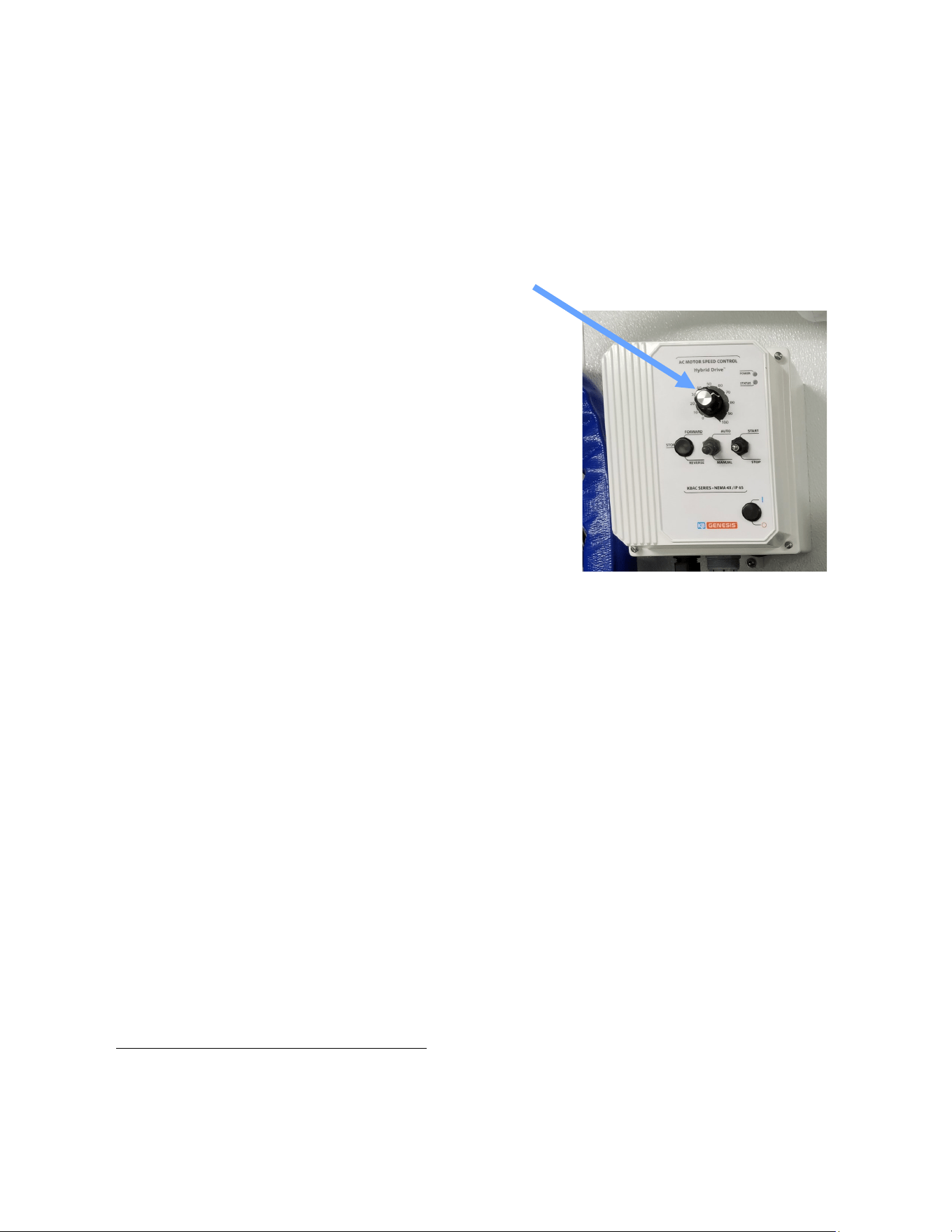
The boost pressure is adjusted with the large knob on the boost pump speed control. You will
noce that as you change the boost pressure the sound of the Pearson Pump will change.
Proper boost pressure is crical to opmize system performance. If the pressure is too low or
too high the Pearson pump will knock. When the system is running change the boost pressure
to nd where the pump sounds the smoothest. Set the boost pressure as high as possible
without knocking.
Note: Knocking will not damage the pump in the short term, but will need to be addressed
immediately if it connues for longer than a few seconds. If knocking connues and adjusng
your boost pressure does not remedy the situaon, contact Technical Support at

18
19
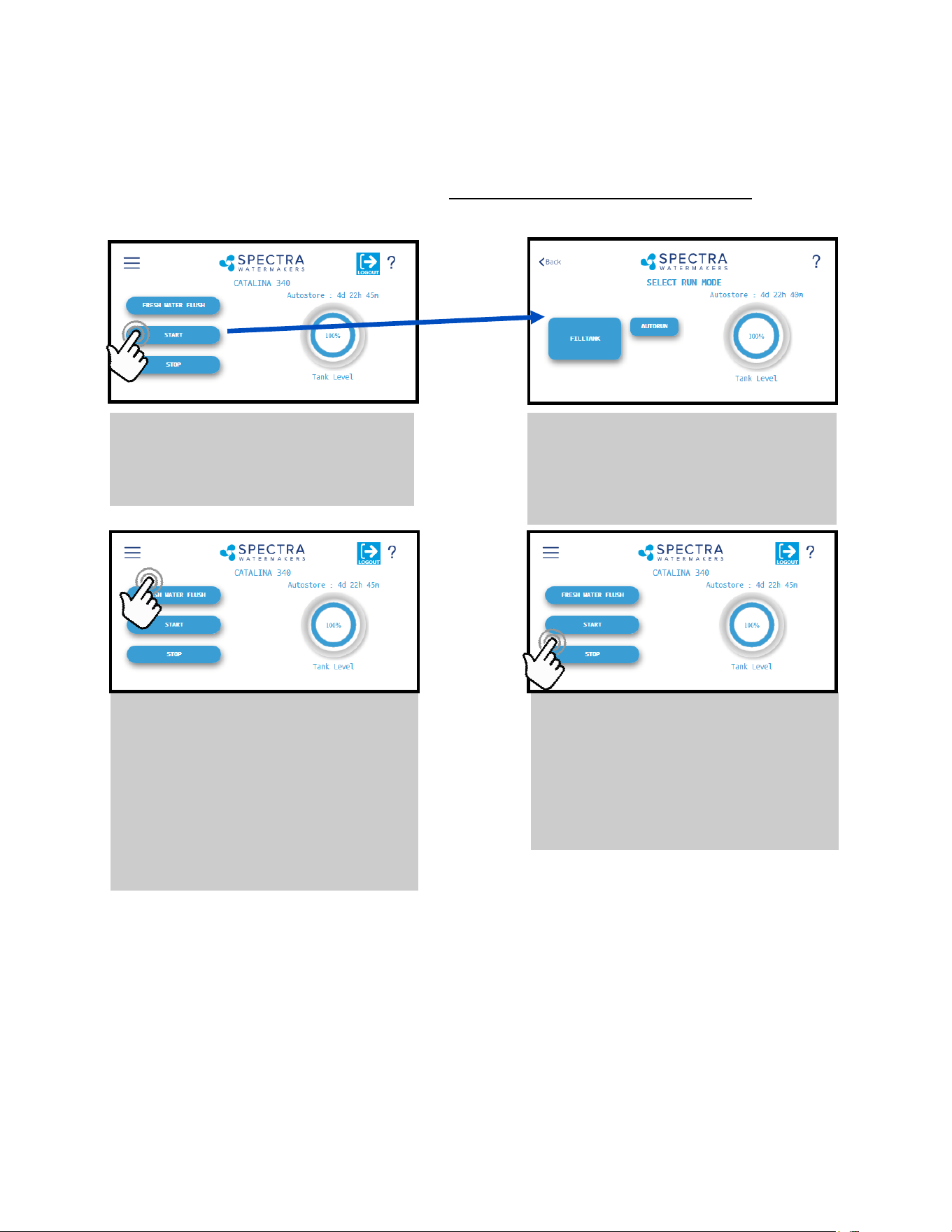
Fresh Water Flush
Pressing the ‘Fresh Water Flush’
button flushes the Watermaker with
fresh water from the vessel’s
domestic water tanks. After
completing the flush, Spectra
Connect will automatically enter the
Auto Store mode.
Stop
Pressing the ‘Stop’ button from the
Home Screen will end the Auto
Store mode countdown timer and
leave your Watermaker in Standby
mode.
When you rst power up the system, you will get a warning message, asking if the system has
been stored with chemicals. If the system has been pickled, winterized, this is the rst startup,
or the condion of the system is unknown, go to New System Start-Up and Tesng on the next
page, or serious damage may occur.
Start
Pressing the ‘Start’ button once
advances to the Run Mode
selection screen.
Spectra Connect Quick Start Guide
Run Mode
Select your desired Run Mode to
start making water and filling your
tanks. See details on Run Mode
options on p. 37
Spectra Connect Modes and Denions
Auto Store: Aer the Watermaker fresh water ushes, it will start a countdown mer that can
be seen on the Home screen. The mer indicates the next programmed fresh water ush if the
Watermaker is not started again, or the ‘Stop’ buon is not pressed.
Fill Tank: The Watermaker will automacally run unl the Tank Full switch in the water storage
tanks closes. Once the Tank Full switch closes, the Watermaker automacally fresh water
ushes, then reverts to the Auto Store mode.
Auto Run: The Watermaker can be set to run for a number of hours, or for a quanty of water to
be produced. When the desired quanty of water is produced or the run mer expires, the
Watermaker will Fresh Water Flush and enter the Auto Store mode.
20
New System Start-Up and Testing
1. First Check that:
• Brine discharge is directed to a suitable
locaon. The brine discharge will contain a
small amount of propylene glycol (non-toxic
potable an-freeze) during the purge cycle
• Conrm there is oil in the crankcase for the
Pearson pump.
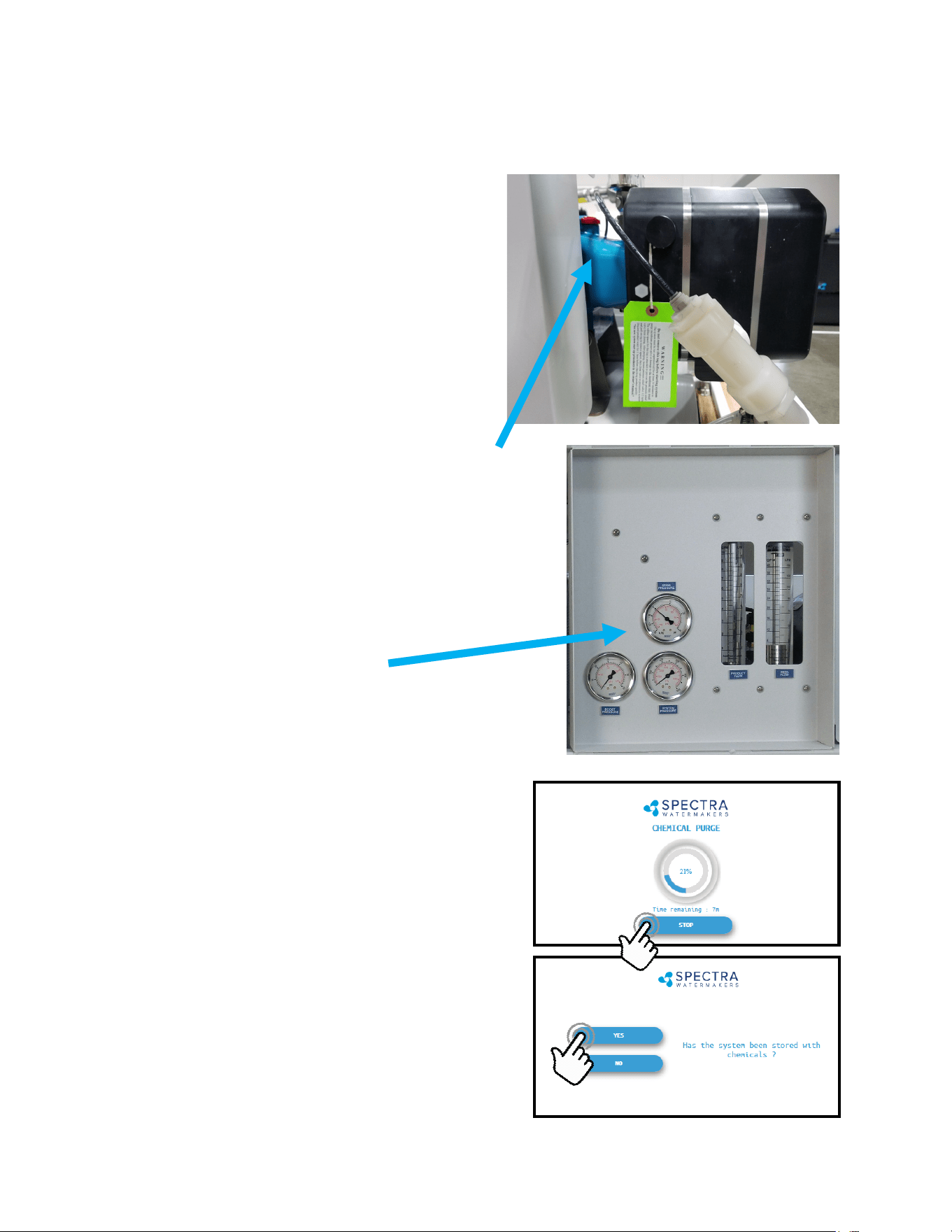
• Pressure Relief Valve is OPEN one full turn
• Feed water is set-up to be pressurized and
available to the system.
2. Feed ow and pressure gauges
During start up the feed water solenoid will open and
Boost Pressure gauge will show the boost pressure
aer the lters.
3. Conrm the Yellow Handled inlet valve is in
the RUN posion.
4. Conrm toggle switch on the control box is in
the RUN AUTO posion.
5. Turn on the power to the system and the
Spectra Connect screen will display, “Has the
system been stored with chemicals?” Press
‘Yes’, to start the Purge sequence. Note: The
Watermaker will shut down if the pressure
relief valve is le closed during the Purge
mode.
Use this procedure when the system contains preservative or cleaning chemicals.
Warning! Damage will occur if the
system is not purged of the
storage chemicals before
pressurizing the system.
21
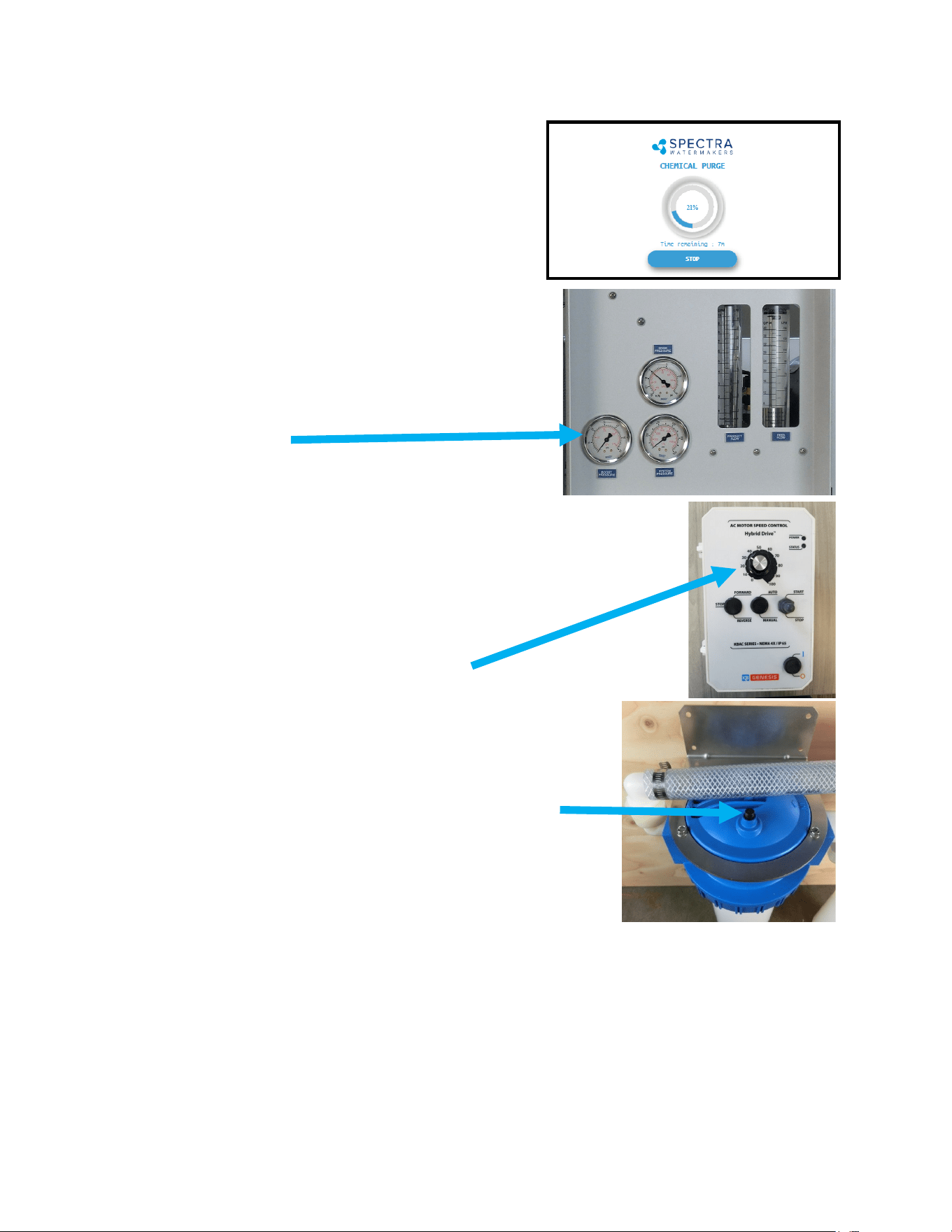
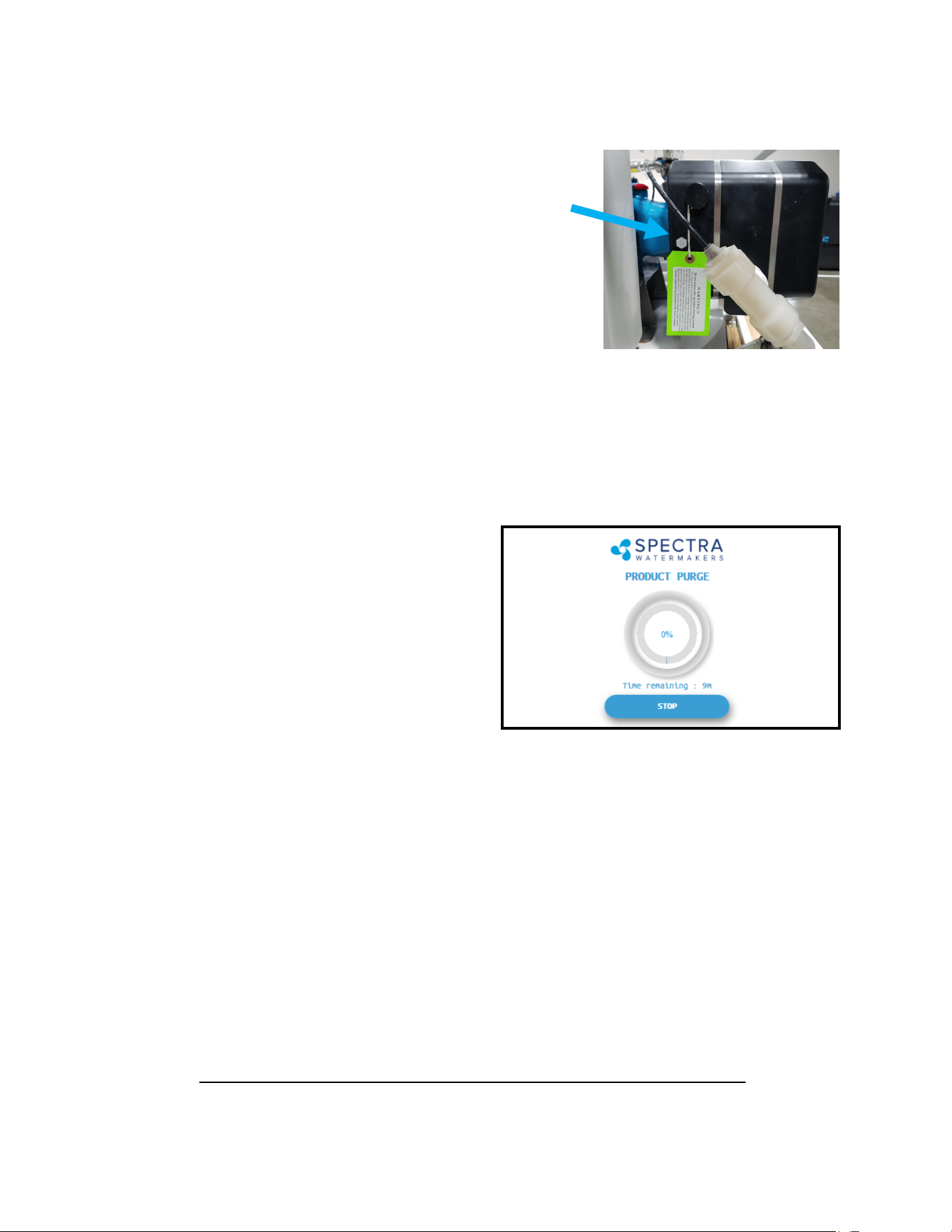
6. The system will start purging and the display will
show the progress and me remaining for the
purge cycle.
7. Note that the boost pressure gauge is aer the feed
valve so it will only show pressure aer the system
has been started and should be about 15-25 psi
during operaon.
Note: Boost pressure in excess of 25psi can cause hose
failure.
If the oponal boost pump was included the
boost pressure can be adjusted with the knob
on the boost pump control box.
8. Using the buons on top of the lter housings, bleed out
the air in the lter housings unl water is coming out.
9. Check the brine discharge for water ow. The system
should fully prime within 60-90 seconds and all air should
be out of the feed water hoses. The Pearson pump should sound smooth and if there is
any knocking adjust the boost pressure up or down unl the pump is running smoothly.
Note that if the lter pressure drops below 10 psi the system will alarm and tell you to
check the prelters.
Note: If you must stop the purge sequence for any reason, the control will default back to
New System Start-Up and Testing - Cont.
22
10. Aer the purge sequence the display will alarm with the
message “Close pressure relief valve.” Close the valve and
proceed by pressing “OK” to resume the Purge Cycle
running pressurized and purging the product water to
drain.
Technical p: Knocking in the Pearson Pump is caused by the boost pressure being either too
low or too high. Adjust the boost pressure as high as possible and close the brine discharge
valve to add 3-5psi of back pressure.
11. The system will now run under pressure
and desalinate water. This mode diverts
the product water overboard in case there
is any residual chemicals in the membrane.
Carefully inspect for leaks over the enre
system! Shut down the system and repair
any leaks you nd.
12. Aer the Product Purge cycle completes, the system will prompt to Restart, then advance
to the Main Menu. If this is a NEW INSTALLATION, connue to the Calibraon Instrucons
to nalize the installaon. If you are pung your Watermaker back into service aer
storage or cleaning your system is now ready for use.
If the system is stored with Propylene Glycol, addional purging me may be required if
there is chemical odor to the product water, or if salinity remains high aer the purge
sequence. All systems are shipped from the factory stored with Propylene Glycol.
New System Start-Up and Testing - Cont.
23
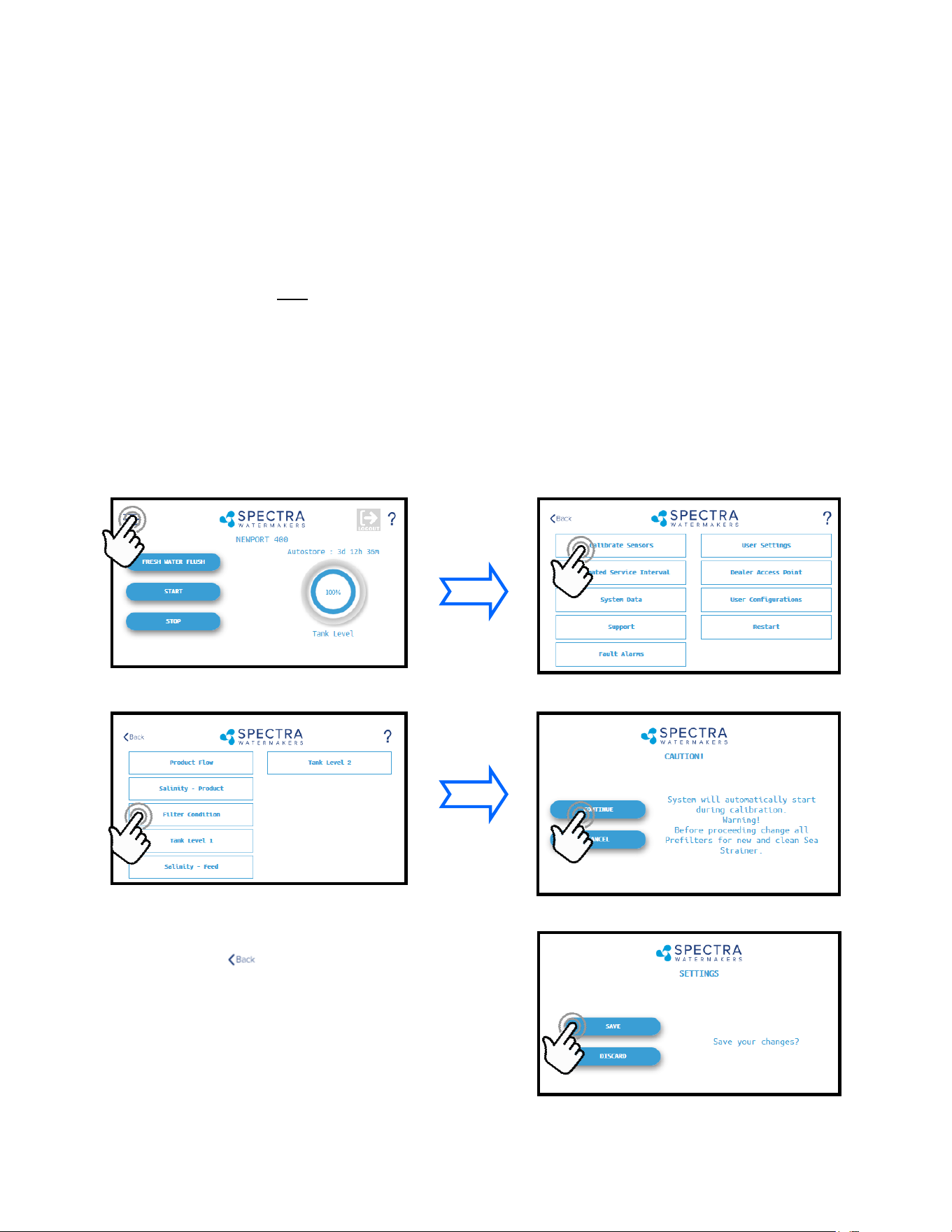
3. When the Calibraon Sequence is complete,
press the buon in the upper le corner
to return to the Main Menu.
When prompted by the display, Click Save to
make sure that the Calibraon is stored in the
system memory.
4. The Filter Condion gauge has now been
calibrated to match your installaon.
1. During the calibraon sequence the system will automacally start, begin to make water
for several minutes and then shut itself down. Make sure that new lters are in place
before proceeding.
2. Follow the steps in Figures 1-4 below to iniate the Calibraon Sequence.
Sensor Calibration
Many of the sengs on your system have been pre-calibrated during standard factory tesng,
however, there are a few sengs that will vary based on the installaon condions. If the
system has just been installed you must calibrate the prelter Condion graph before
proceeding.
This procedure does not need to be done with each lter change under normal operaon, it
should ONLY BE DONE IF THE FILTER CONDITION GAUGE WON’T RESET TO 100% WITH NEW
FILTERS.
Prefilter Gauge Calibration
Fig. 1 Fig. 2
Fig. 3 Fig. 4
24
Tank Level Sensor Calibration
(with optional transducer installed)
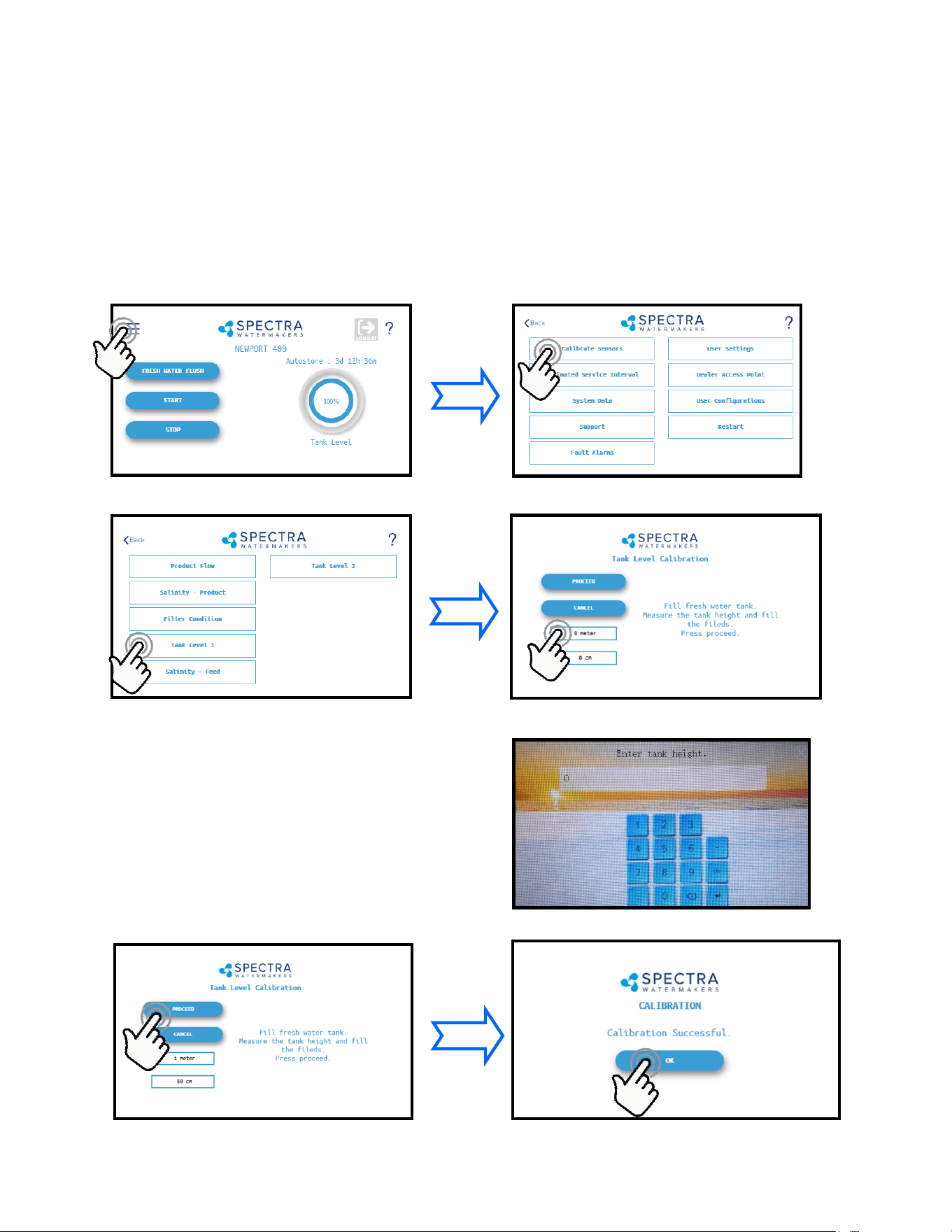
1. With a full tank, press the Menu Buon
2. Press the Calibrate Sensors Buon
3. Press the Tank Level 1 buon 4. Press to enter the tank height
Installing the oponal tank level sensor (EL-SSR-5PSI) will allow the control to display tank lev-
els in up to two tanks. Follow the steps below to enter the calibraon sequence for the op-
onal Tank Level Sensor(s).
The tank needs to be full to proceed with the calibraon process and you need to measure
the approximate height of the tank.
5. Enter the height
8. If the entry is correct press Proceed.
8. Press OK to save the sengs
Press the Feet (Meter) eld to enter the tank height in
feet (meters).
Press the Inch (cm) eld to enter the height in inches.
Ex: If the Tank height is 150cm:
Enter ‘1’ in the eld labeled ‘Meter’
Enter ‘50’ in the eld labeled ‘cm’
25
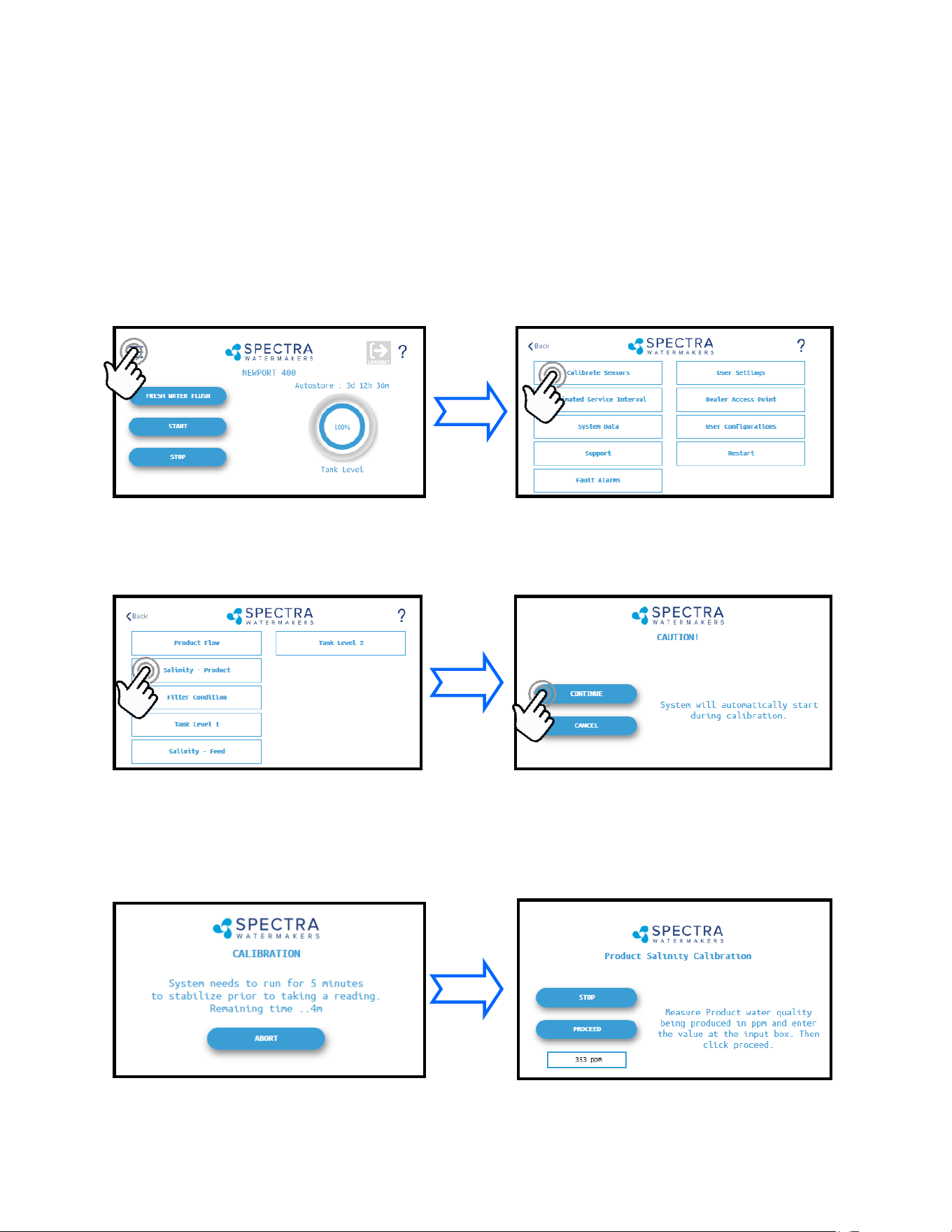
3. Press the Salinity—Product Buon 4. Press Connue to acknowledge the warning
Salinity Calibration
1. Press the Menu Buon 2. Press the Calibrate Sensors Buon
The Salinity probe has been calibrated at the factory during tesng and is not normally
required during commissioning. If the product quality is not reading accurately, follow
calibraon steps.
A handheld salinity meter (or other reliable device) is required to perform this calibraon as
you need to conrm the salinity of the product water.
5. Allow the salinity to stabilize for 5
minutes.
6. Press the PPM eld and enter the PPM
you measured. Press Proceed to save your
entry.
26
The Product Flow sensor has been calibrated at the factory during tesng and isn’t normally
required during commissioning. If the product ow is not reading accurately, conrm the
product ow rate by following the Product Flow calibraon steps.
Product Flow Calibration
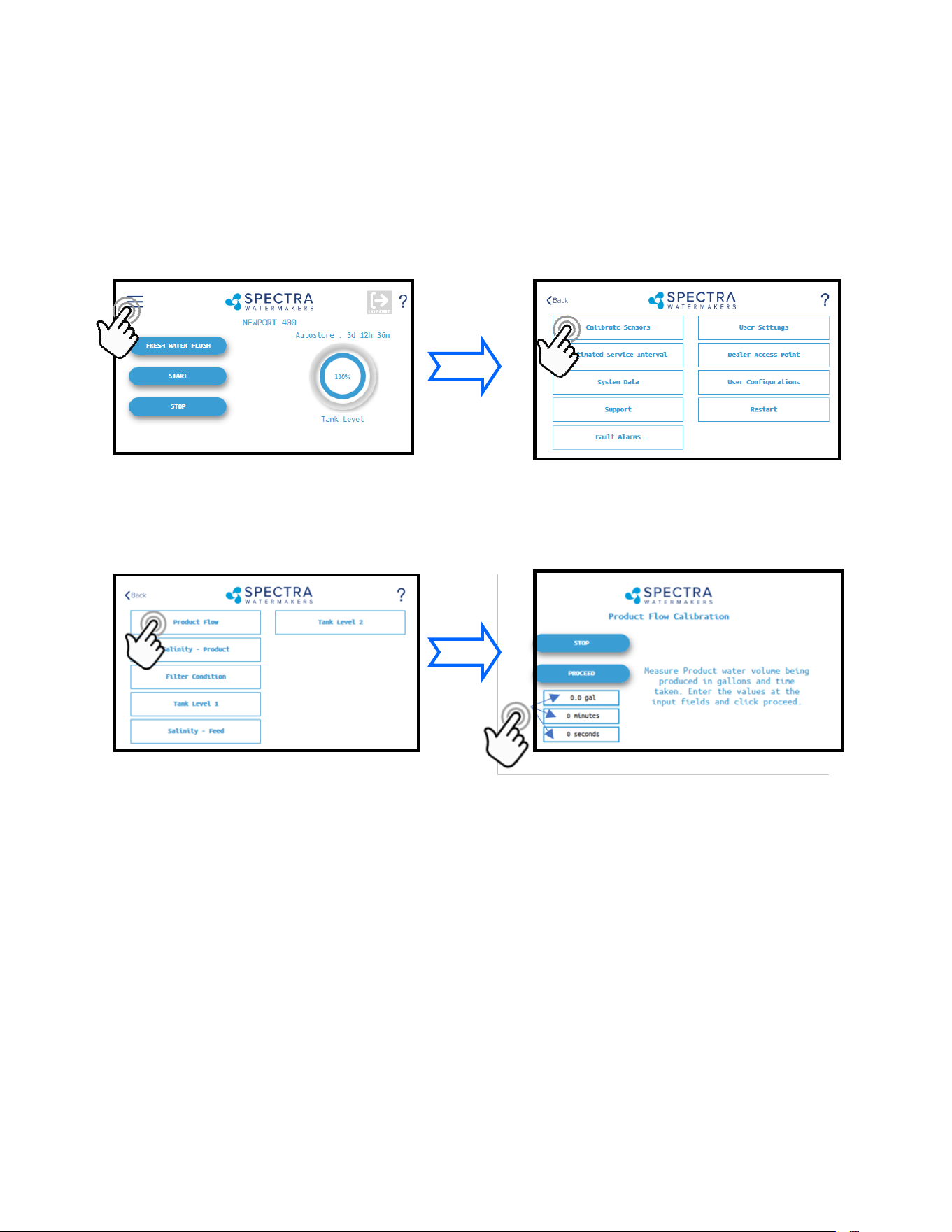
4. Allow the system to run for a few minutes to stabilize and then me in minutes and
seconds, how long it takes to ll a container of a known volume.
5. Touch the ‘Gal’ (’Liter’) eld to enter the volume of the container used.
6. Touch the ‘Minutes’ eld to enter the minutes it took to ll the container. Only enter the
minutes, ex: 3 min 15 sec should be entered as 3.
7. Touch the seconds eld to enter the seconds it took to ll the container. Only enter the
seconds, ex: 3 min 15 sec should be entered as 15.
8. Press ‘Proceed’. You must save all changes when prompted aer exing the sengs menu.
3. Press the Product Flow Buon
2. Press the Calibrate Sensors Buon
1. Press the Menu Buon
4. Measure the product ow per the pro-
cess described below, enter the numbers
below and press Proceed.
27
Networking
Your Spectra Connect is equipped with state of the art networking opons to allow the
maximum user control in a wide variety of installaons. The instrucons below will help you
get the most out of your Spectra Connect.
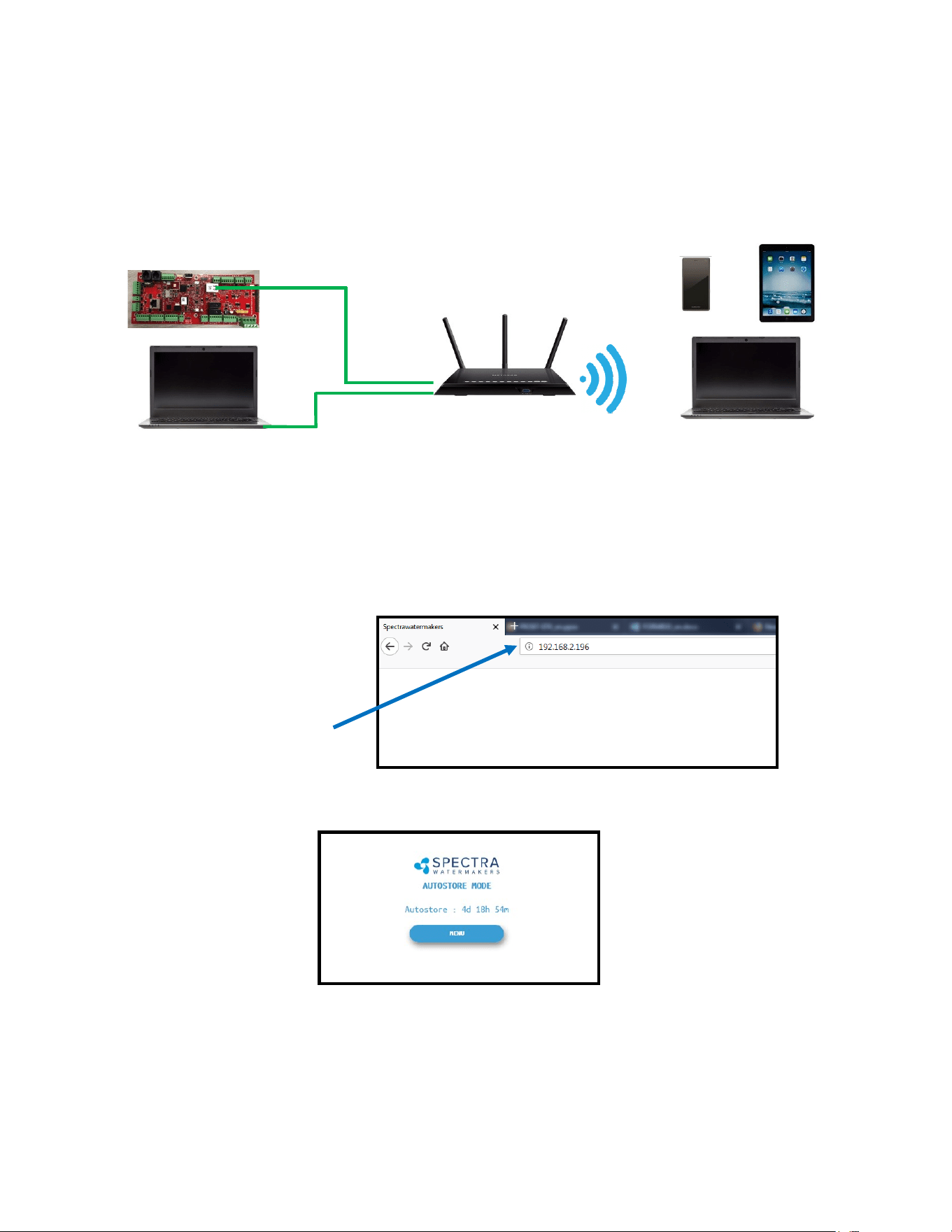
Connecng to the exisng Network
1. Turn power to the system o.
2. Connect a standard Cat5e or Cat6 ethernet cable from the control board located inside
the feed pump module to your router or networking switch.
3. Turn power to the system back on.
4. Follow the screen prompts below:
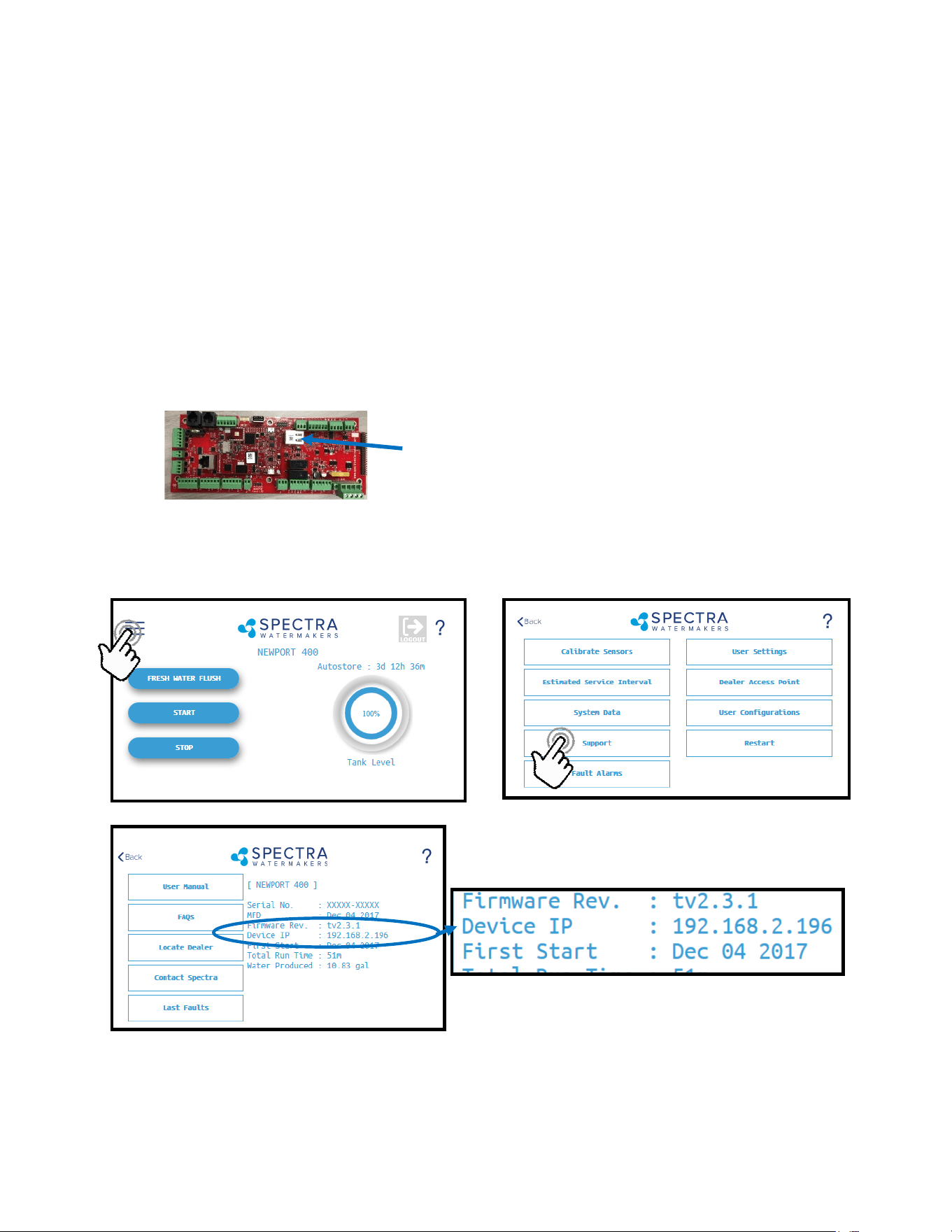
5. Note the ‘Device IP’ address shown in and record the 10-digit numerical address on the
front of this manual for future reference.
Note: Your Spectra Connect is only available when your device is connected to the same local
network as the Spectra Connect control board. If you have diculty connecng to your
Watermaker control applicaon, double check the that your device network is the same as
your Spectra Connect
Ethernet
Jack
Note: If you are connecng directly into
a wireless router, DO NOT CONNECT TO
THE WLAN (Wireless Local Area
Network) ethernet port. You must
connect to one of the LAN ports typically
labeled 1, 2, 3, 4, etc.
28
8. Your computer should now show the same image as shown on your local Spectra Connect
7. On the computer, tablet or smartphone, open a web browser such as Firefox, Chrome, or
Safari. In the web address bar at the top, type the ‘Device IP’ address previously recorded.
Press ‘Enter’.
Note: Internet Explorer may not be compable with your Spectra Connect web app. If
formang issues occur, use another browser such as Firefox, Safari, or Chrome.
Ex: Address Bar—Firefox
9. Your web browser is now synced with your Spectra Connect. Any buons you press on
your web browser will be controlling your Watermaker.
Cauon! If operang your Watermaker from a computer, phone, or tablet, you must keep
the tab open while the system is in operaon and the volume turned up on your device in
order to hear any audible alarm faults.
Connecting To The Existing Network - Cont.
Router or Switch
6. Connect your computer, tablet or smart phone to the local network your Spectra Connect
is plugged into;
Wired Connecon: simply plug your computer’s ethernet port directly into the router or
switch where you connected the Watermaker.
Wireless Connecon: make sure your device is connected to the same local wireless
network as the Spectra Connect (LAN).
Wired Connec-
Wireless Connec-
29
If the system has been pickled or stored with chemicals, use the New System Startup
procedure.
Your Watermaker will fresh water ush aer every use. Remember that you need to run the
system approximately half an hour to make enough fresh water for one ush.
1. Check to see that the inlet and brine discharge seacocks are open and the domesc
pressurized water system is turned on.
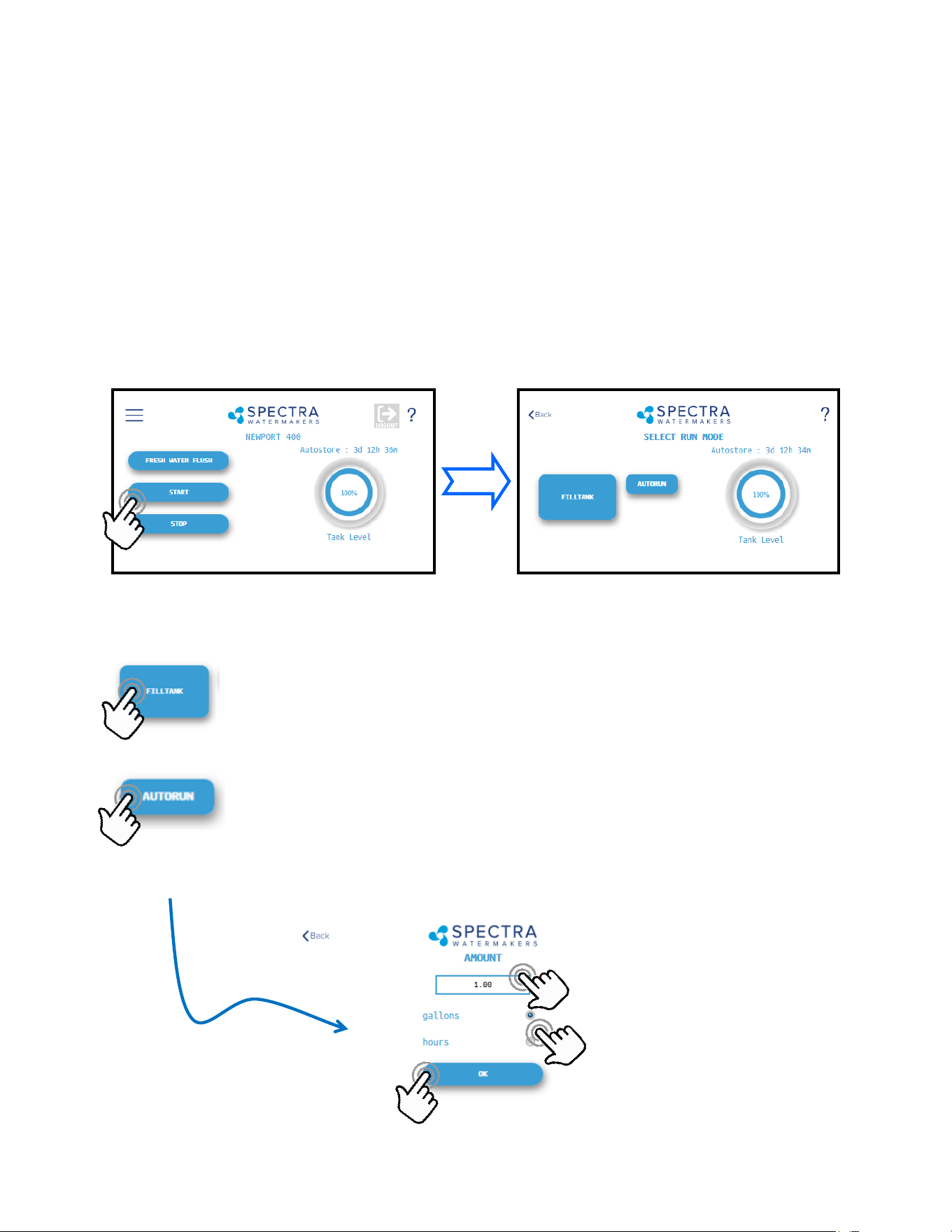
2. Press the ‘Start’ buon, then select the desired operang mode.
3. Runs your Watermaker unl the Tank Full switch closes, fresh water ushes
the system, then goes into ‘Auto Store’ mode and the Flush Interval mer starts.
This is the default mode of operaon.
-OR-
4. Gives you the opon to run for a preset amount of me, or a preset volume
of water to be produced. If no tank switches are installed, and they have
been disabled in the system sengs, this is the only Operang Mode
available.
Normal Operation
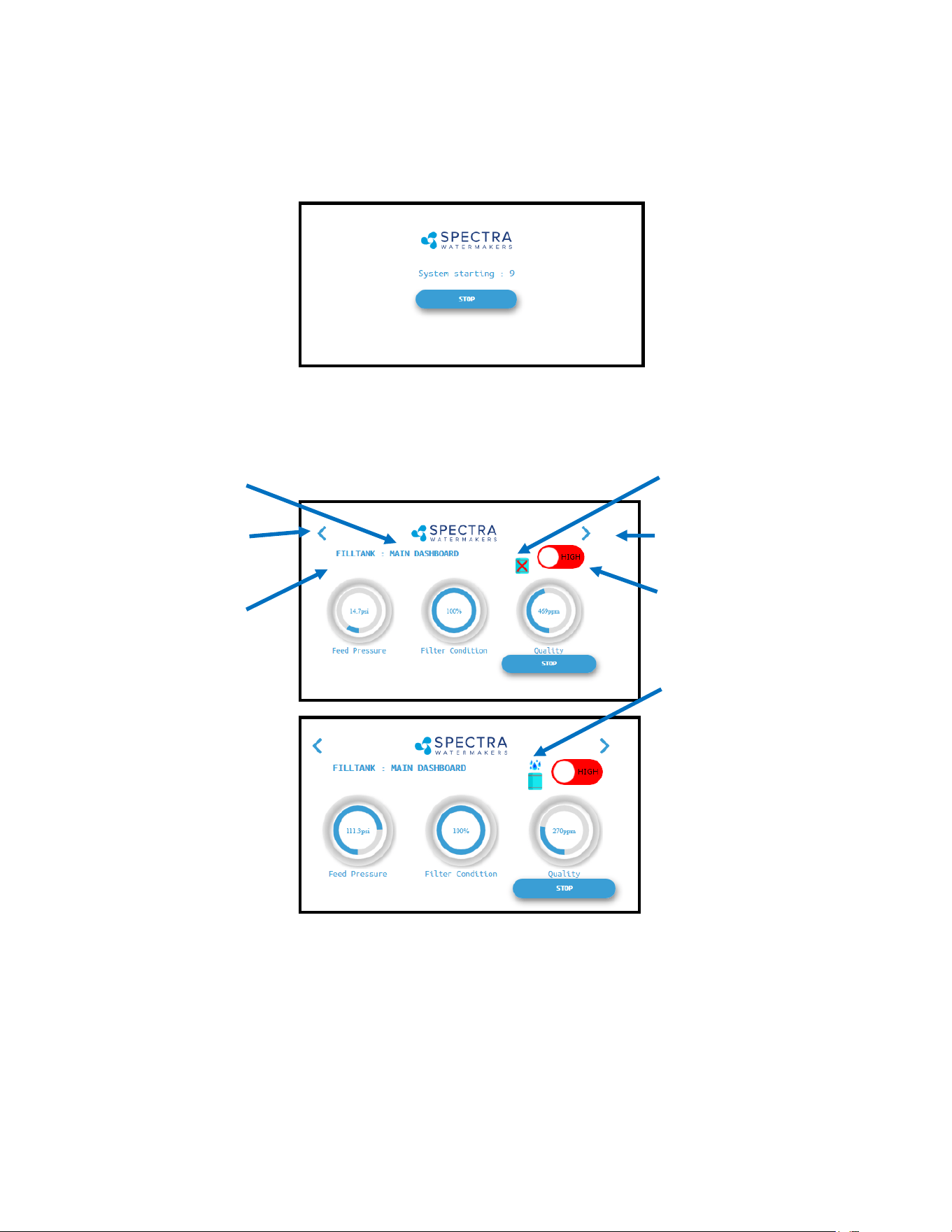
Standard Operating Modes
Enter Volume or Time desired
Select Gallons/Liters or Hours
Starts the
Watermaker
30
5. The system will now begin the start sequence and will count down to the pump starng.
Pressing ‘Stop’ will stop the sequence and bring you back to the Main Menu.
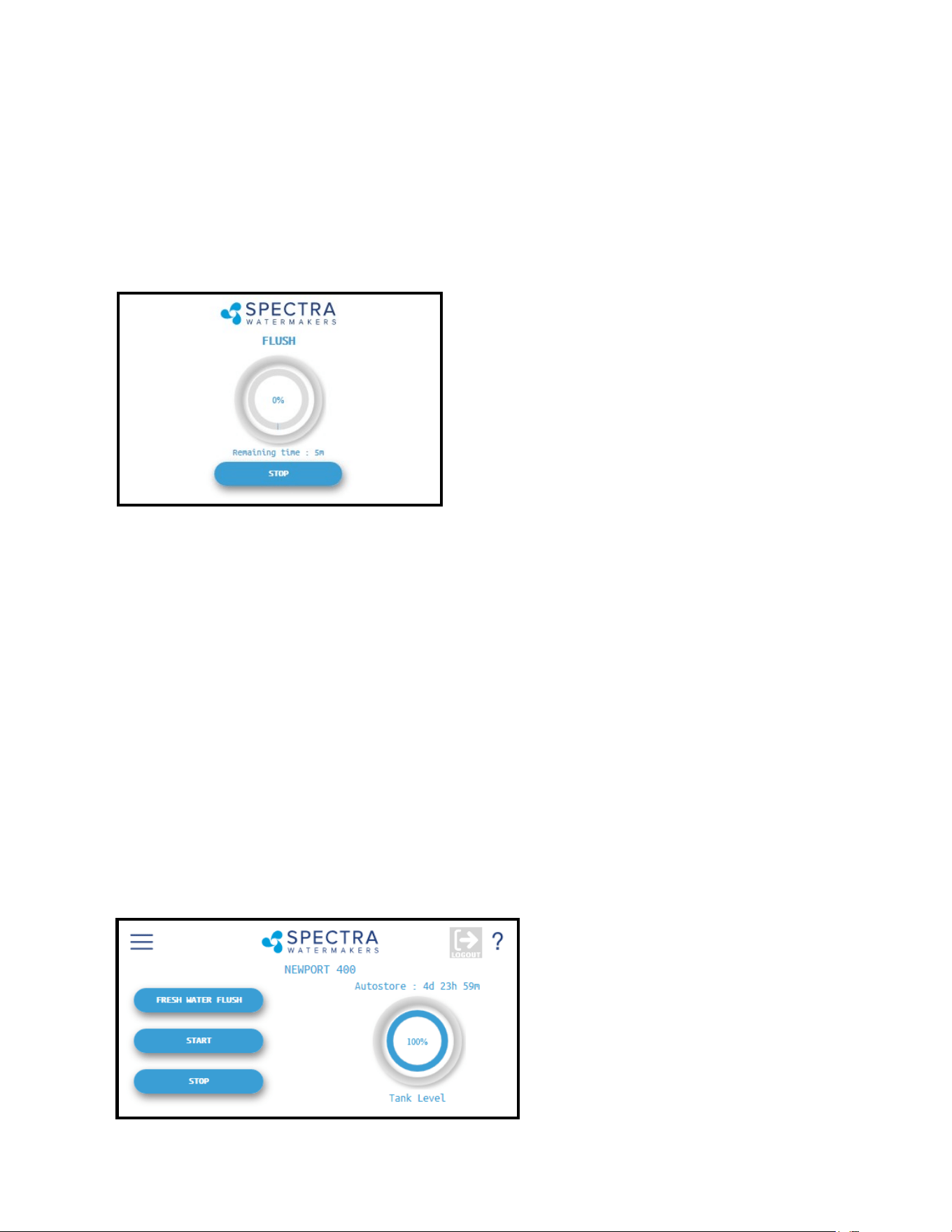
6. Once the Boost Pressure reaches the minimum threshold, the system starts operang and
you will be taken directly to the Main Dashboard which shows the current status.
7. When the Product Water Quality is beer than the programmed threshold, the Diversion
Valve opens, allowing water to enter the tanks and the screen image changes.
Verify that the system is operang according to the factory specicaons detailed on p.36. See
the Troubleshoong secon to idenfy any anomalies.
8. Pressing the < (Page Le) or > (Page Right) arrows while the system is running will scroll
through the dierent screens with operang informaon for your Watermaker.
Page Le
Page Right
Buon will toggle
between Run Modes
(High or Low)
Operang
Mode
Current
Screen
Diversion Valve Status
(showing CLOSED)
Diversion Valve Status
(showing OPEN)
Normal Operation - Cont.
31
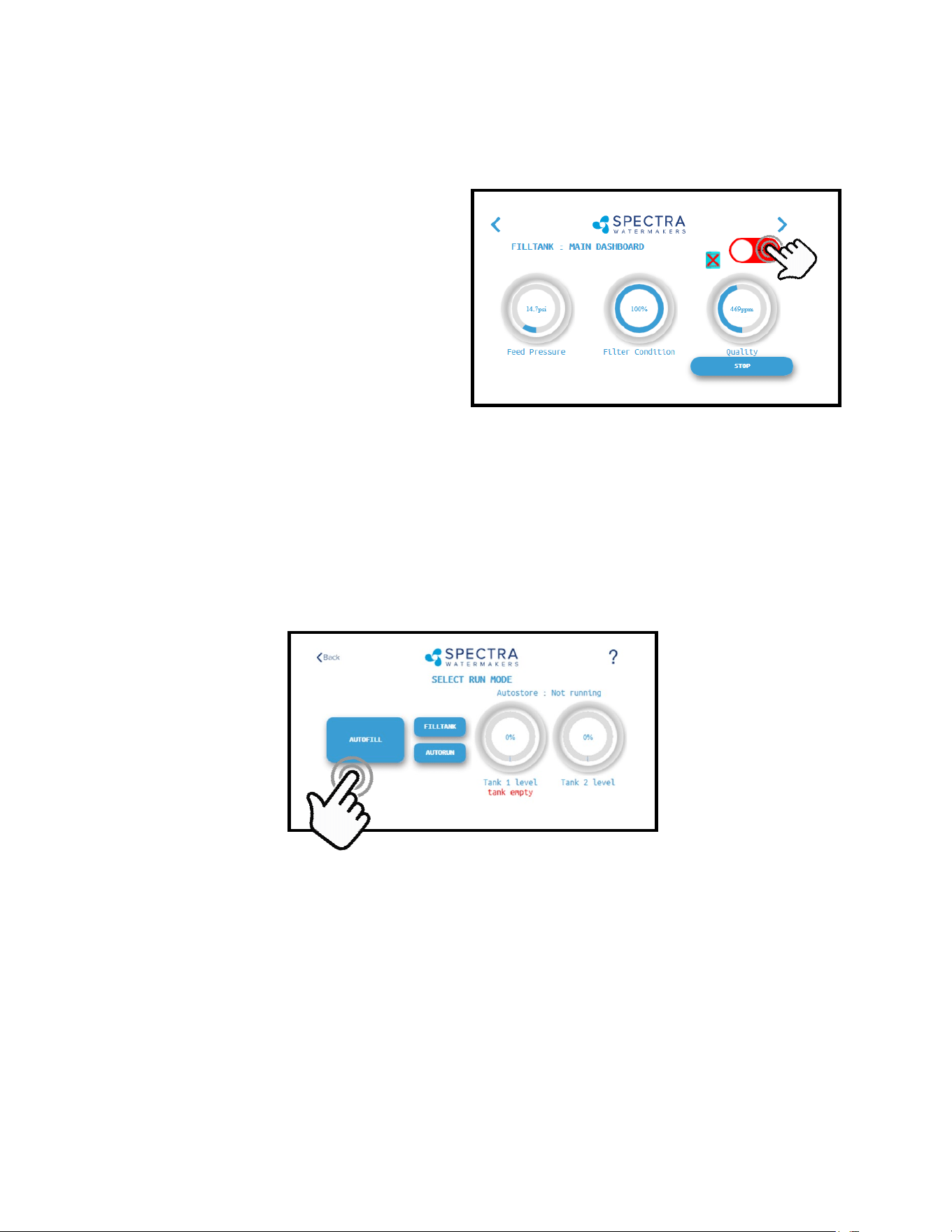
9. When the Run Cycle completes, the system will start the Fresh Water Flush cycle. If you
stop the system (interrupng the run cycle) the system will also start a ush cycle.
NOTE: The system must be FRESH WATER FLUSHED AFTER EACH USE, or serious damage can
occur.
Note: If the pump is knocking during the ush
cycle changing the pump speed (either up or
down) can help. This is done in the Dealer
Access secon by changing the “Pump 3”
sengs. Pump 3 are the voltage sengs for
the dierent run speeds, 10 volts is full speed,
5 volts is half speed. The system needs to be
stopped to make this adjustment and you need
to save the seng before restarng.
10. Aer Fresh Water Flushing, the system will enter standby mode waing for the next run
cycle.
Note: See pg. 26 for ways to ulize the Auto Store mode.
Normal Operation - Cont.
32
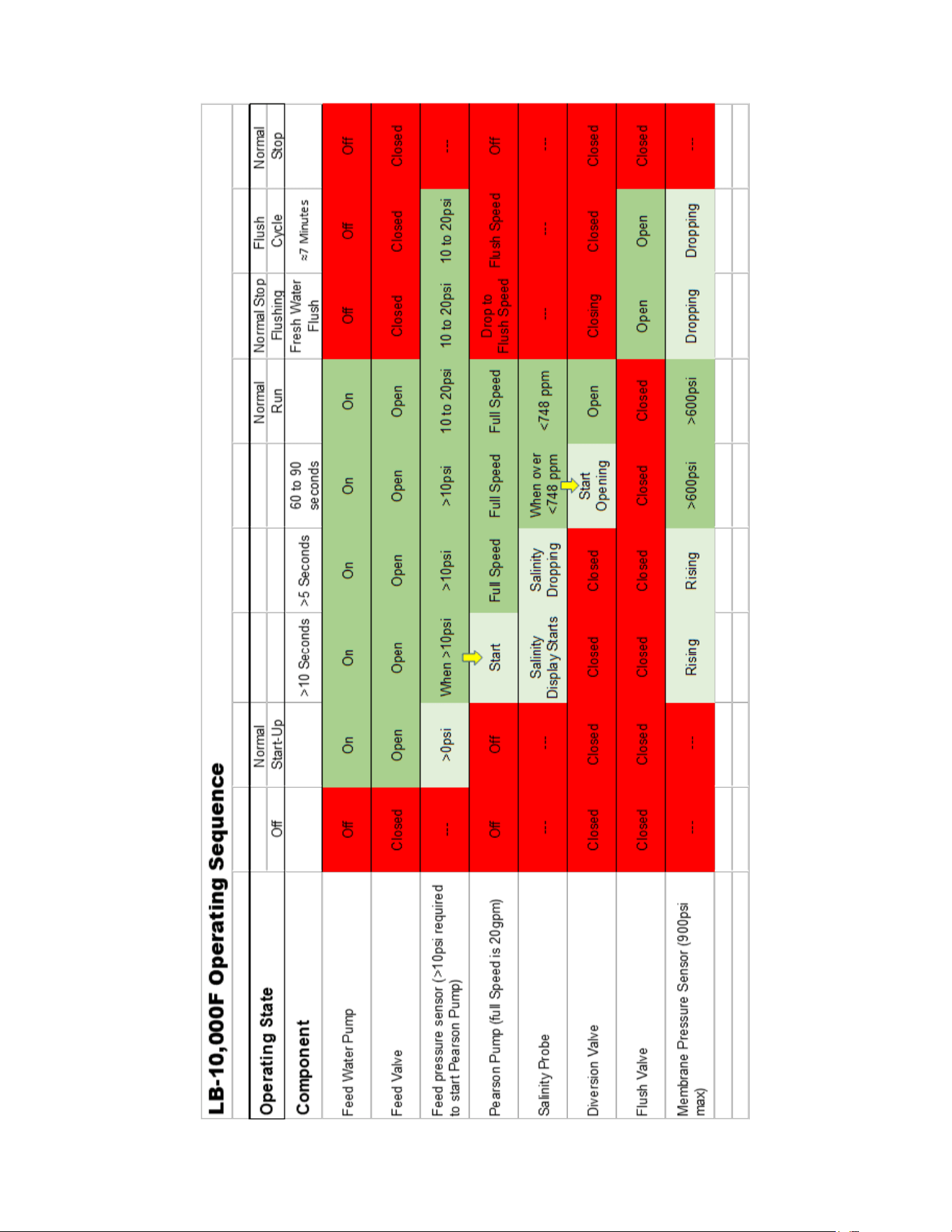
Other Operang Modes
Run Low Mode
You can toggle back and forth between
Run High Mode and Run Low Mode by
tapping the ‘High’ toggle buon.
Run Low Mode may be selected to reduce
power consumpon, lower the membrane
pressure, or prolong lter life.
Note: The system will automacally drop to Low Mode when it senses high membrane
pressure, or low boost (feed) pressure.
Normal Operation - Cont.
Auto Fill Mode
If using the Tank Low and Tank Full switches, and both are enabled in the system sengs,
then your Start Menu will allow the system to be operated in Auto Fill mode.
In Auto Fill Mode the Spectra Connect will automacally ll your water tank, stop itself, fresh
water ush, return to Auto Store mode with the ush interval mer running, and then turn
itself on again to ll the tank as soon as the water level drops below the Tank Low Switch with
no addional user commands.
Addionally, if power is interrupted at any stage of operaon, the Spectra Connect will return
to Auto Fill mode, ensuring that your tanks will always have water.
33

34

35
Maintenance
Prelters
A clogged lter will cause the controls to shut down the Watermaker. Avoid leng the lters get so
dirty the unit shuts down automacally and check the Prelter pressure drop frequently during
operaon. Knowing the pressure drop across the lters is the best way to monitor lter loading. If you
only let the pressure drop get to 5 psi you can carefully rinse the lters, let them dry and then reuse
them. They will not last as long as when they are new but you can “clean” them about 3 mes. Inspect
any lter before reusing to insure there are no rips or tears in the lter material. Damaged lters will
lead to a damaged pump or worse.
Aer a lter change it may be necessary to expel the air from the feed line using the purge buons,
located on top of the lter housings.
When the system is put into storage, remove, rinse, and re-install new dry lters to impede corrosion
and fouling. Check frequently during operaon.
The lters must be properly maintained to protect the Spectra Pearson Pump. Use only Spectra
approved lters.
Use silicone grease on the O-ring to ensure a proper seal between the lter bowl and lid. Do not use a
petroleum based product, such as petroleum jelly or mineral oil, as it will permanently damage the
lter housing bowl.
The Crankcase
Change the crankcase oil every 5000 hours or if it begins to darken in color or become milky. Milky oil
indicates seal failure so replace seals if this happens. Use high quality synthec motor oil. SAE 5W-30 or
equivalent is recommended in most climates.
General
Periodically inspect the enre system for leaks and chafe on the tubing and hoses. Repair any
leaks as soon as possible. Check for corrosion around the ngs. If any rust or salt appears,
clean and ghten the ng or remove, clean, and reassemble the ng as necessary. Rust
can lead to crevice corrosion inside the ng and must be dealt with promptly.
Some salt crystal formaon around the Spectra Pearson Pump mang surfaces is normal.
Wash down any salt encrusted areas with a damp cloth. Keep the Watermaker clean, dry, and
salt free.
The Spectra Pearson Pump should have the plunger seals replaced annually, every 2,500 hours
of operaon, or when leaks are present, whichever comes rst.
Belt Tension
The belt alignment and tension have been pre-set at the factory prior to shipping. Check both tension
and alignment weekly for signs of wear or slipping. You should just be able to just twist the belt 90
degrees when it is properly tensioned.
Replace the belt immediately if it looks worn or damaged, or if it cannot be properly tensioned.
36
Seal / Ceramic Oilers
The Pearson Pump comes with drip oilers which are used to extend the service life of the seals.
Allow the system to run for at least one hour before allowing the seal oilers to drip. Use the
same 5W-30 synthec oil as used in the Pearson Pump crankcase. Do not overll the reservoirs
with oil.
Following this procedure will dramacally increase the seal life. We have some customers with
20,000 hours on their systems and they have never replaced the seals.
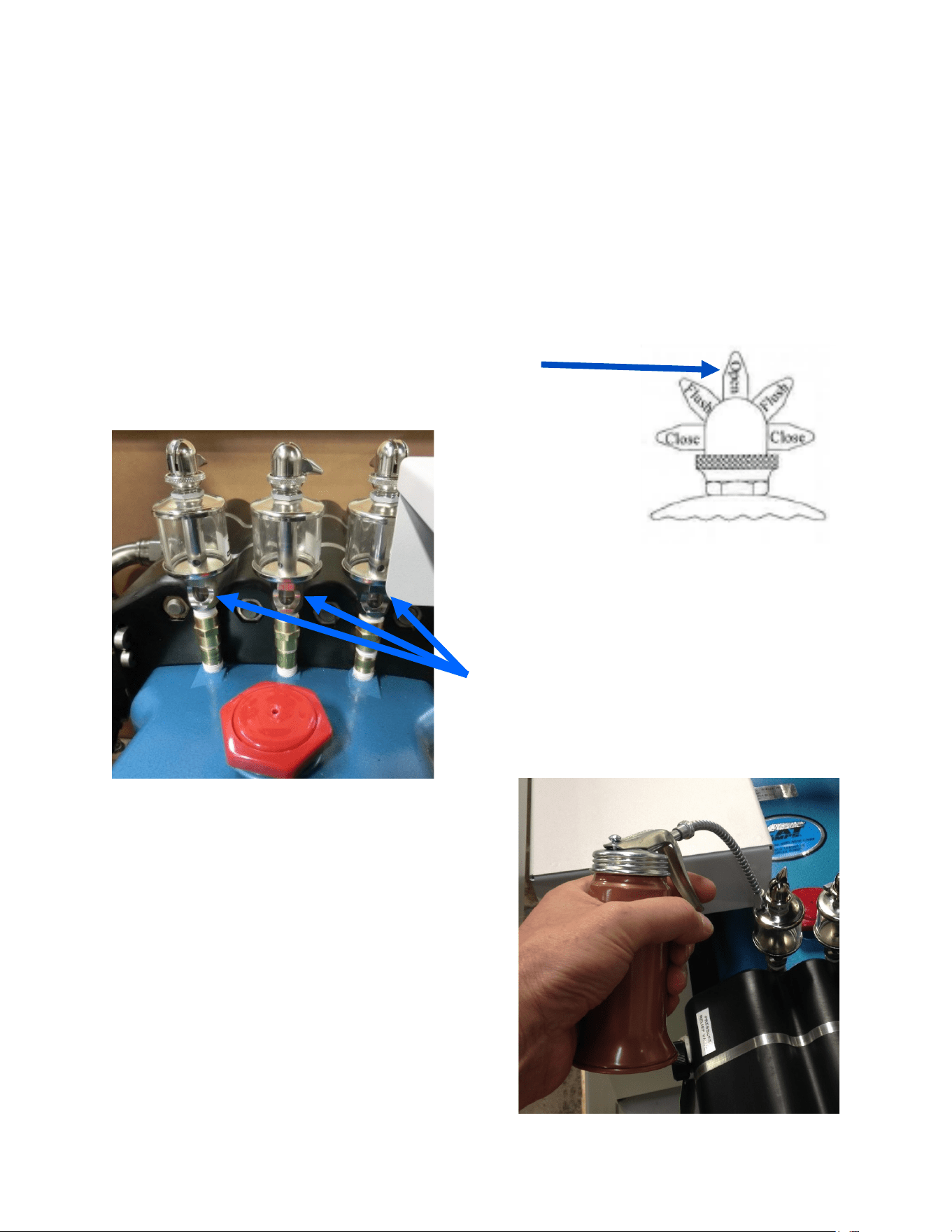
Each me you start the Watermaker open the oiler
lever (poinng up) and allow 4-5 drips to fall.
Unscrew the top of the oiler to increase the drip rate.
The oilers will drip when opened, which can be
seen in the window below the reservoir.
Another opon is to leave the drip valve open and
add two pumps each week from the supplied oil can
(1/3 oz. or 8-10 ml).
Either opon is acceptable, but make sure one of
them becomes part of the regular maintenance
schedule.
Do not use more than the recommended
amount of oil as damage to the membranes
may result.
Maintenance - Seal Oilers
Drip Windows

37
Membrane Cleaning
For normal cleaning, the SC-3 Acid Cleaning Compound is used rst, then the SC-2 Alkaline
Cleaning Compound, if necessary. If known bio-fouling is present, the SC-2 may be used rst.
Using warm water if possible, up to 120°F (50ºC) is recommended as it greatly enhances the
ability of the cleaners to do their jobs.
Note: Procedures are the same for the SC-2 and SC-3 cleaners
Warning! The pressure relief valve on the Spectra Pearson Pump must be open for this
procedure or membrane damage may result.
Spectra Cleaning Compounds (SC-2 or SC-3) must be mixed with unchlorinated fresh water at
a rao of two containers (16oz. Total) of compound to 10 gallons (45L) of water to have the
proper soluon. An LB 14,000 system has about 8 gallons of water inside it (aer being
ushed with fresh water so with about two gallons of water in a 5 gallon bucket you will use
two containers (16oz) either of compound.
SC-2 and SC-3 are never mixed together. Do not use them for storage pickling soluon.
• There are two types of cleaners: acid and alkaline. The acid cleaner (SC-3) will remove
mineral scaling. The alkaline cleaner (SC-2) is used to remove biological by-products, oil,
and dirt parcles that get past the prelters. The acid cleaner should be used rst. If the
membrane fails to respond to both cleanings, this is an indicaon of another problem with
the system, or that it is me to replace the membrane. Contact Spectra Watermakers
before removing a membrane.
• Membranes need to be cleaned only when membrane pressure has risen 10% or
producon has dropped 10% due to fouling, or the product quality degrades. Causes of
fouling are: Biological growth that occurs when the system is le unused without ushing
or pickling, and mineral scaling if the feed water contains carbonates, sulfates, silicates or
other sparingly soluble salts. Colloidal parcles can also clog the membrane. Monitor the
product salinity and boost pressure for higher than normal readings for the condions.
Look for all other causes before cleaning the membrane, i.e. feed water temperature and
salinity, pump speed, hose restricons, membrane life can be shortened by unnecessary
cleaning.
The Membranes
Membrane Maintenance
38
Cleaning Procedure:
You will need 10 gal (38 L) of chlorine free water and the system must have already been
thoroughly ushed. Mix the bag of Spectra Watermakers cleaning chemical into the water and
sr unl well dissolved. Some chemical may remain out of soluon in the bucket, this is
normal.
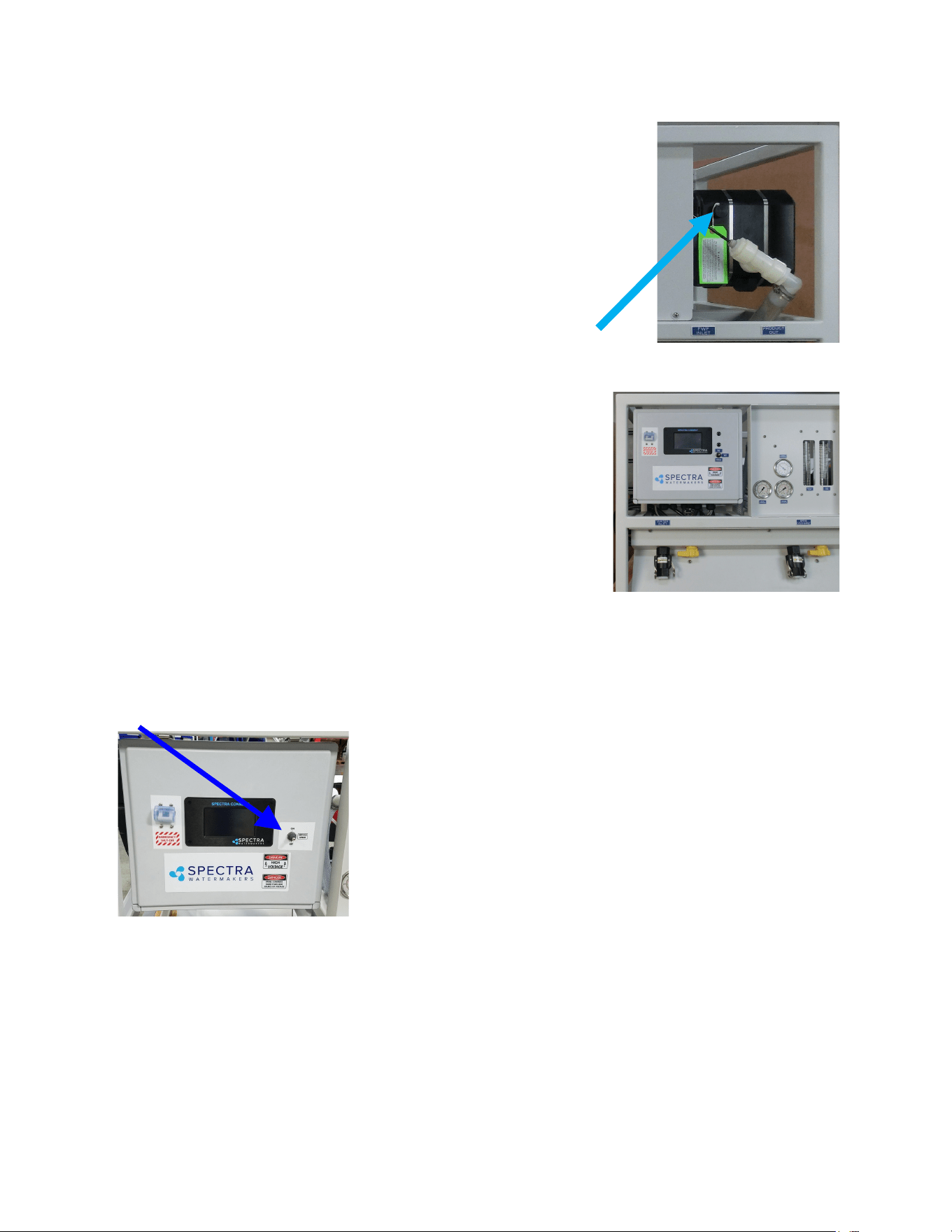
Open the Pressure Relief Valve on the
Pearson Pump.
You will need 1 bag of the cleaning
chemical to be used, 10 gal. (38L) of
chlorine free water, and the system must
have already been thoroughly ushed. The
feed water supply must be shut o.
Mix the bag of Spectra Watermakers
cleaning chemical into a bucket of the
unchlorinated water, sr unl well
dissolved.
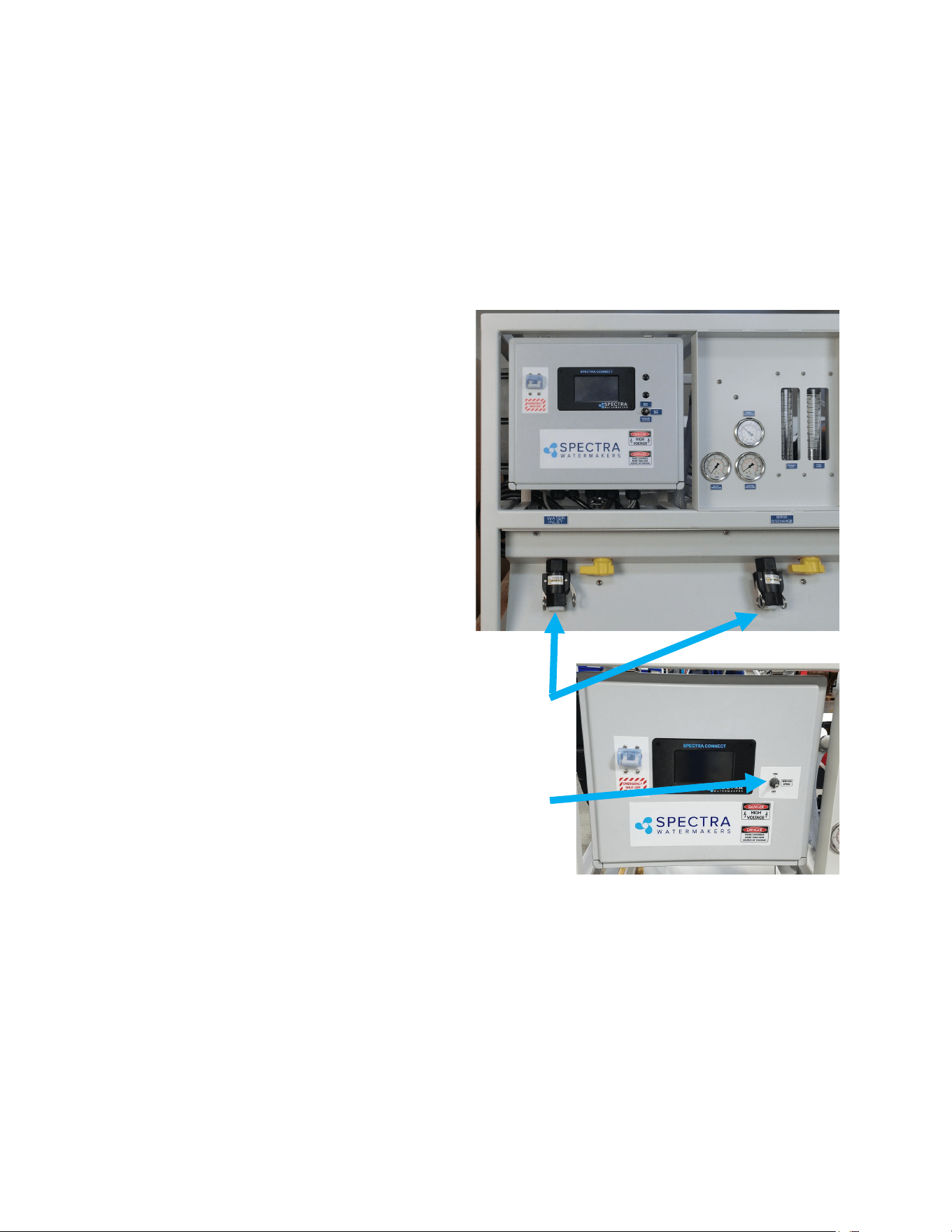
Aach the service hoses, place the open ends of the hoses
in the bucket and turn both the service valves to SERVICE
(valves in picture shown in run posion)
Use the Service toggle switch on the front of the control
panel to run the pump at slow speed.
Circulate cleaning chemicals for up to 6 hours depending on
the level of fouling present (contact Tech Support for advise on cleaning).
Turn both the service valves to the o posion (poinng straight out) and remove the service
hoses. You can reinstall the feed and discharge hoses at this me.
Leave the pressure relief knob open.
The prelter housings should be drained and new lters installed.
Leave the pressure relief knob open. The Watermaker can now be stored for up to six
Maintenance - Cont.
39
Long Term Storage
If the machine will not be used for more than seven days it should be
placed in Auto store mode to ush the system every 5 days or ll with
preservave to store. Spectra Watermakers SC-1 powdered
preservave may be used if there is no danger of freezing. Do not use
other brands of preservave, they will damage the equipment! If
there is danger of freezing use a Propylene Glycol based potable water
anfreeze instead of Spectra Watermakers SC-1.
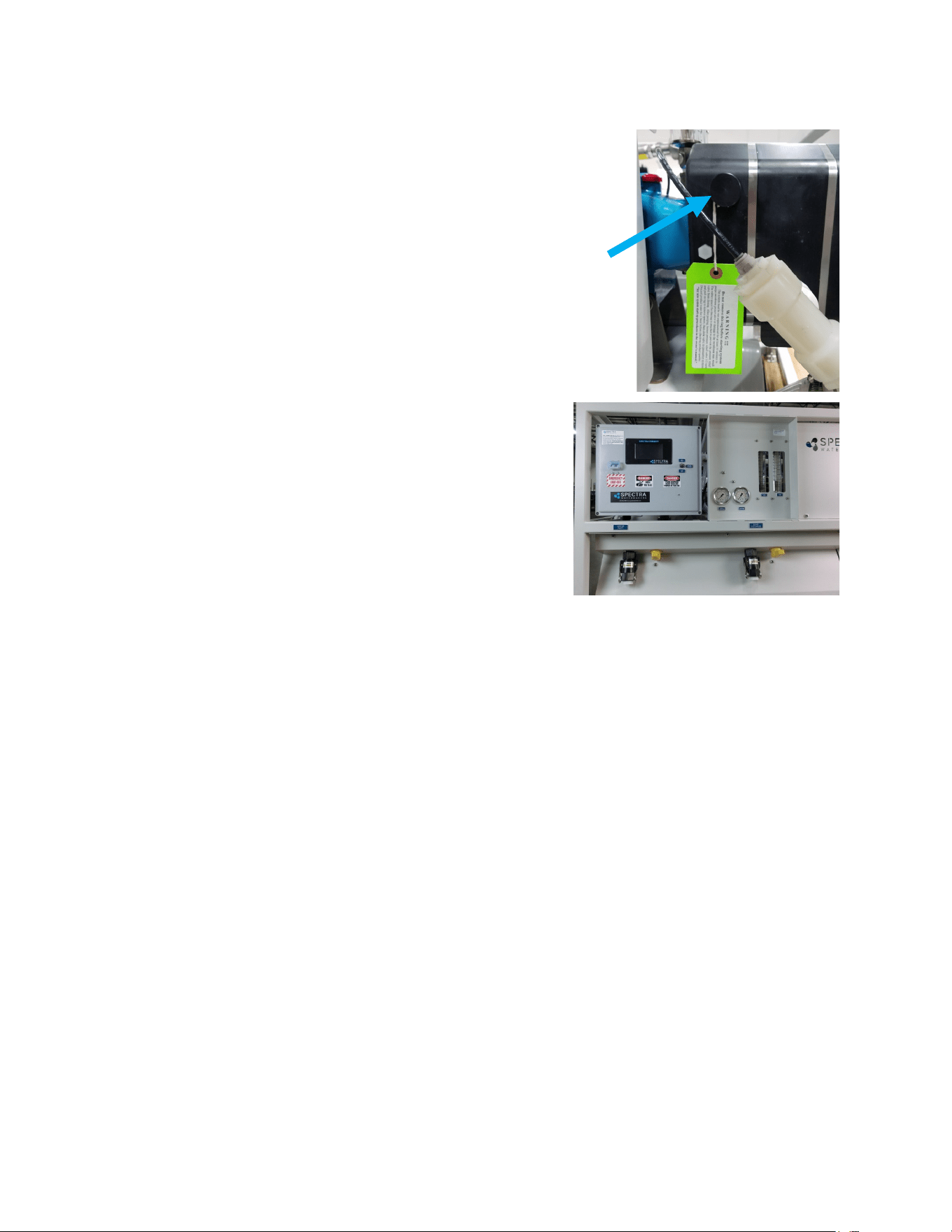
Open the Pressure Relief Knob on the Pearson Pump.
If SC-1 chemical is to be used: You will need 8 bags of SC-1, 8 gal of chlorine free water, and
the system must have already been thoroughly ushed with
fresh water. The system holds about 16 gal of water. The
total volume of water (system and chlorine free water) is 21
gal. Eight bags of SC-1 to the 21 gal of water is considered
the correct rao of SC-1 to water. The feed water supply
must be shut o.
Mix 8 bags of SC-1 storage chemical into a bucket of 8 gal of
unchlorinated water, sr unl well dissolved. Warm water
will allow the SC-1 to dissolve more quickly.
Aach the service hoses, place the open ends of the hoses in the bucket and open both valves.
Use the Service switch on the control panel to run the pump and the preservave will begin to
circulate. Circulate the soluon for about 20 minutes.
Turn the Service switch to o, remove the brine hose from the
bucket and put it to a drain.
Turn the Service switch to on again and pump the remaining
soluon out of the bucket to the drain. Turn o the Service
switch before the bucket is drained.
Turn both service valves to o (vercal) so no water will
circulate through the system. These valves will need to be turned to the Run posion so the
system is ready go through the Purge Cycle (see New System Start up) when it is me to use
the Watermaker again.
Leave the pressure relief knob open. The Watermaker can now be stored for up to six
months. If the machine has not been used for six months the preservave procedure should
be repeated.
40
Storing with Antifreeze (Winterizing)
You will need approximately 8 US gal (30L) of Propylene Glycol
potable water anfreeze*. The system must have been fresh
water ushed thoroughly.
Open the Pressure Relief Knob on the Pearson Pump.
Aach the service hoses, place the open ends of the hoses in the
bucket and turn both the service valves to SERVICE (valves in
picture shown in run posion)
Use the Service toggle switch on the front of the control
panel to run the pump at slow speed.
Circulate the anfreeze for 20 minutes.
Turn both the service valves to the o posion.
Leave the pressure relief knob open.
The prelter housings should be drained and new dry
lters installed.
*USE THE MOST CONCENTRATED FORMULA PROPYLENE GLYCOL AVAILABLE, –100
FORMULA OR HIGHER CONCENTRATION.
We recommend a sign be placed on the frame above the feedwater inlet and the brine
discharge connecons so the next person knows what is required to restart the
Watermaker.
41
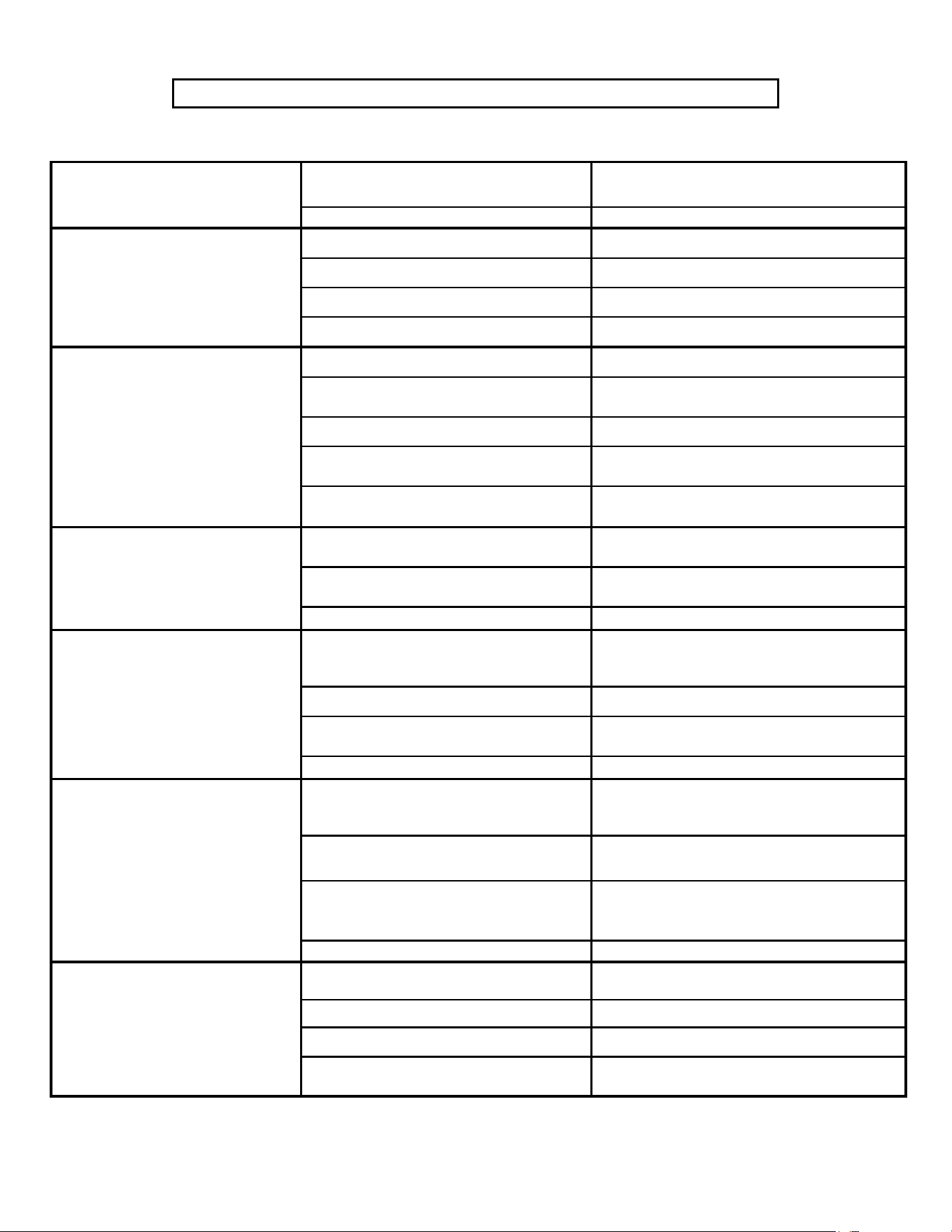
Fault Probable Cause Remedy
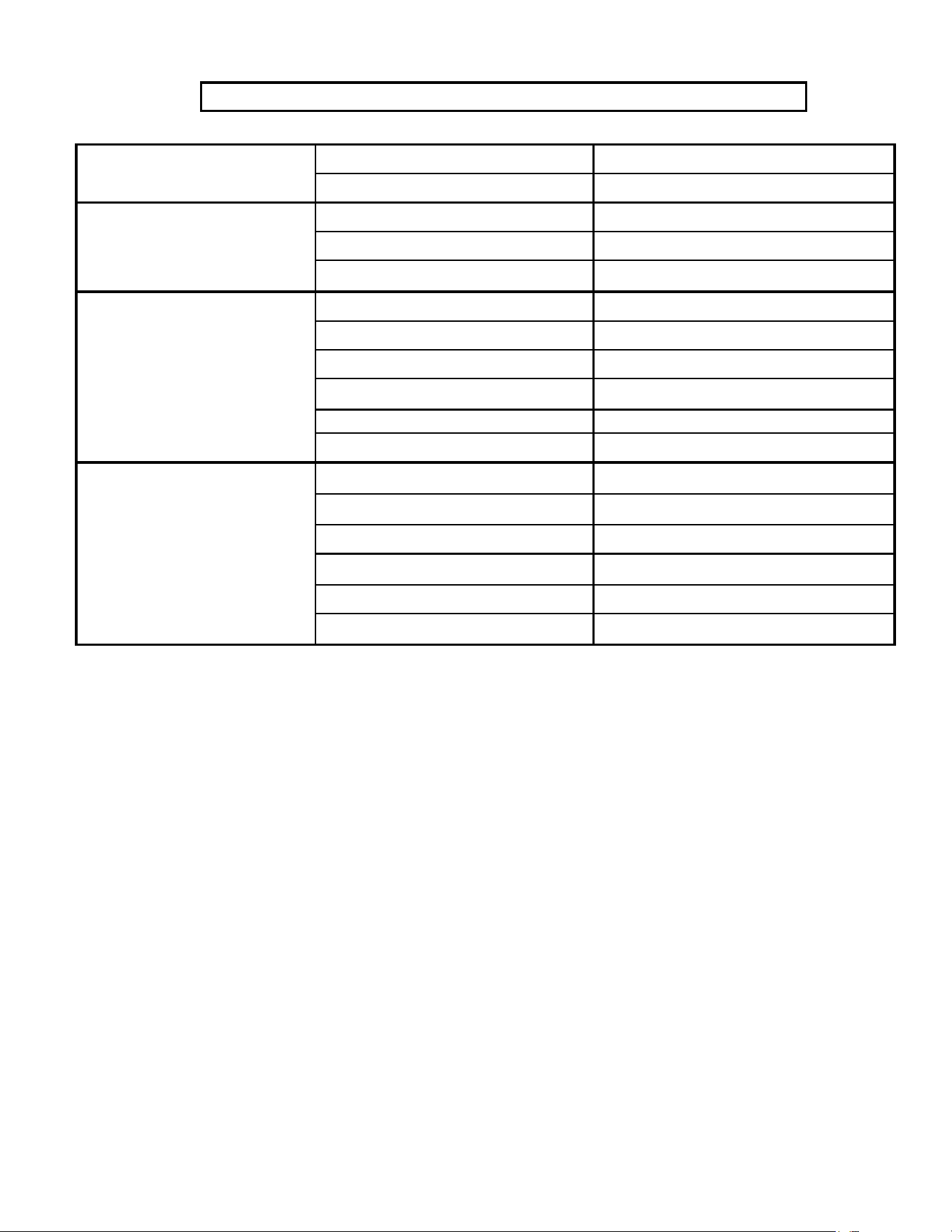
Spectra Land Based System Troublshooting
Pump runs constantly, will not
turn off
Toggle switch on control box to RUN MAN or
SERVICE
Turn switch on control box to RUN AUTO
Speed Control damaged Replace Speed Control
Pearson Pump knocking
Low or high Boost pressure Adjust Boost pressure
Intake blocked Re-prime system (restart)
Air in system Check fresh water flush module for leaks
No lights or display, system does
not operate
Display has gone to sleep Touch the screen to wake it up
Remote display not connected
Check display cable connections at back of display
and at control box
No power to control box Check and reset main DC supply breaker
Check for voltage control box, check 20A fuse on
control board.
Try manual switch on control box: If pump runs,
then control or display may be defective
Display activates, but pump will
not run
Loose or broken pump wire connection Check wiring at terminal block inside control box
Tanks are full (if equipped with tank switch)
Check tanks– system cannot be started if tanks are
full when in Auto Fill mode.
Improve cooling
System runs, no product water
delivered to water tanks, Product
volume gauge good, Diversion
valve shows activated on display
Diversion valve inoperative or wiring fault.
Check wiring at diversion valve and inside control
box
Disconnected or broken product tubing Check product tubing
Diversion valve plunger stuck
Exercise diversion valve by pressing the manual
button top, retest.
Replace diversion valve.
System runs, no product water
delivered to water tanks, Product
volume gauge good, Diversion
valve shows deactivated on
display
Poor product water quality diversion valve open
Check for low feed pressure
Salinity probe out of calibration or defective, bad
cable
Check for leaks at high pressure hoses
Chlorine damage to membranes
Test product water with hand-held tester– if over
500 PPM for 1 hour, see ‘Poor Product Quality’
Pressure relief valve partially open Close pressure relief valve
“System Stalled” alarm is caused
ty the Rotoflow not reading
properly,or no product flow
Pressure relief valve open Close pressure relief valve
Intake thru-hull closed Check thru-hull
Airlocked system Purge air
No signal from Rotoflow meter
Check wiring, confirm Rotoflow is spinning, clean or
replace Rotoflow meter
42
“High Pressure”
Blocked brine discharge or product line Check brine discharge and Product line
Fouled membrane Clean membrane
“Service Prefilter”
Clogged filters Install new filters
Loose or defective pressure sensor wires Check sensor wiring
If the error persists, follow Prefilter Calibration
instructions.
“Salinity High”
High product water salinity Confirm pressure relief valve is closed
Chlorine damage to membranes Check for low feed (membrane) pressure
Defective salinity probe or cable Check for leaks at high pressure hoses
Bad or defective connector
Remove and clean probe contacts. Check calibra-
tion
Check cable connections
Clean membrane (See Tech Bulletin)
“Can’t Connect to Watermaker
from Web Browser”
Device (phone/tablet/computer) not connected
to same network
Check the wireless network on your mobile device
or computer
Router/Switch turned off
If using a wired connection, confirm you are con-
nected to the same network.
Watermaker turned off Make sure Router/switch has power.
Connecting to wrong web address Restart Router/Switch
Make sure watermaker is powered on
Confirm Device IP address matches address
typed into browser
Spectra Land Based System Troublshooting Cont.
43
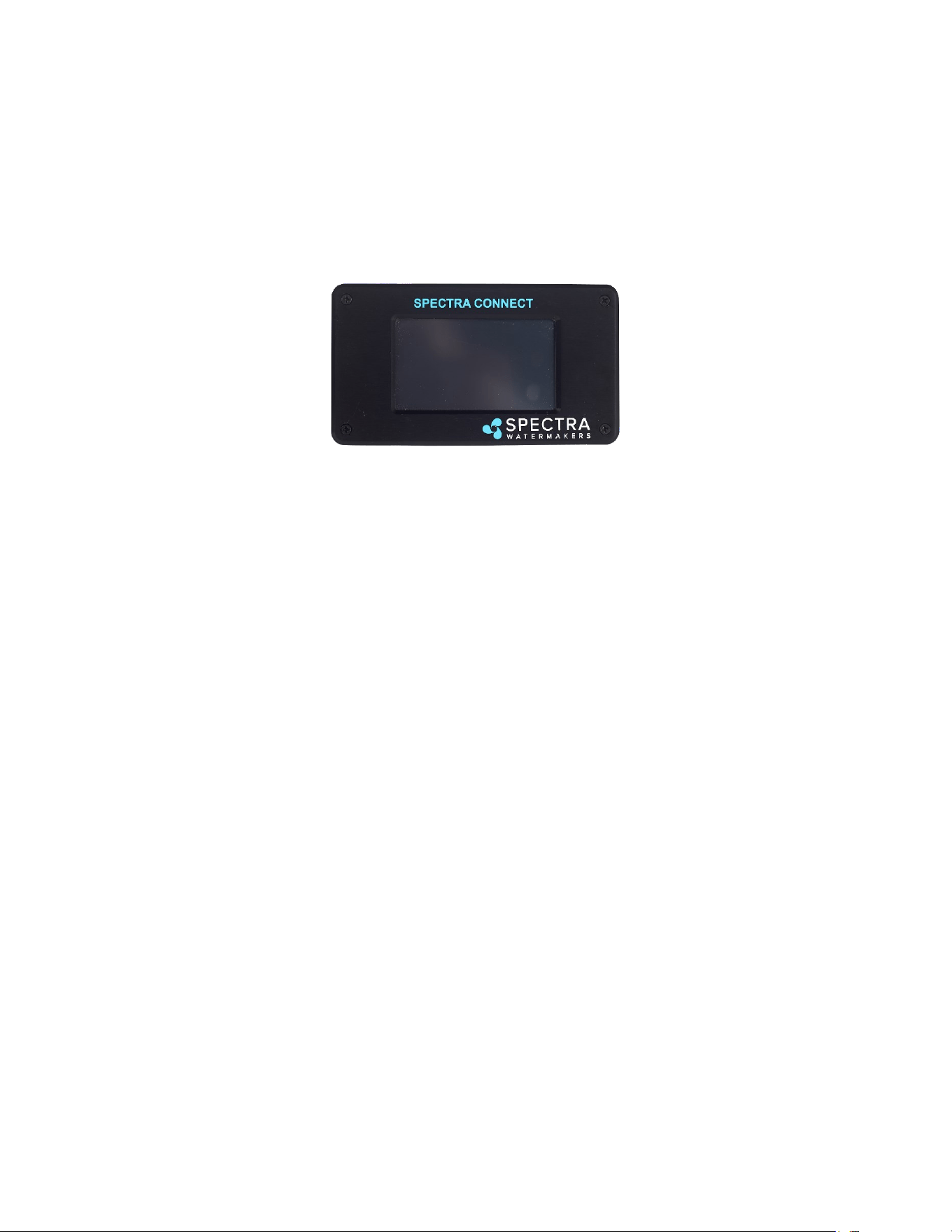
Spectra Connect Settings
Your new Spectra Connect is designed to make your Watermaker easier than ever to operate,
maintain and enjoy. This secon will guide you through some of the more advanced sengs
opons available.
Always use cauon when changing any factory default sengs, as serious damage can
occur.
The Spectra Connect automacally monitors the operaon of the system to ensure a long and
trouble-free service life. If an operang parameter changes, the Connect can switch operang
modes, shut itself down, or automacally store itself in order to protect your Watermaker.
It includes advanced calibraon sequences to make proper setup and maintenance of your
Watermaker easier than ever.
The onboard clock feature allows for temporary power interrupons without detrimental
eects on the system. In some cases your Watermaker will connue to funcon in its last
known operang state.
The Spectra Connect has built in data logging, allowing for easy access to historical operang
data—which can indicate a wearing component or spares to be carried along before a failure
occurs.
Built in warnings for preventave maintenance automacally alert a user of pending
maintenance items, helping to keep your Watermaker’s up-me to 100%! Advance warnings
are pre-programmed for Prelter Life, Pump rebuilds, membranes, Z-Ion reactor rod life, and
carbon lter life. These warnings are reseable, allowing you to perform the maintenance
before a catastrophic failure, then reset the interval—so you’re always on top of the
maintenance cycle!
44
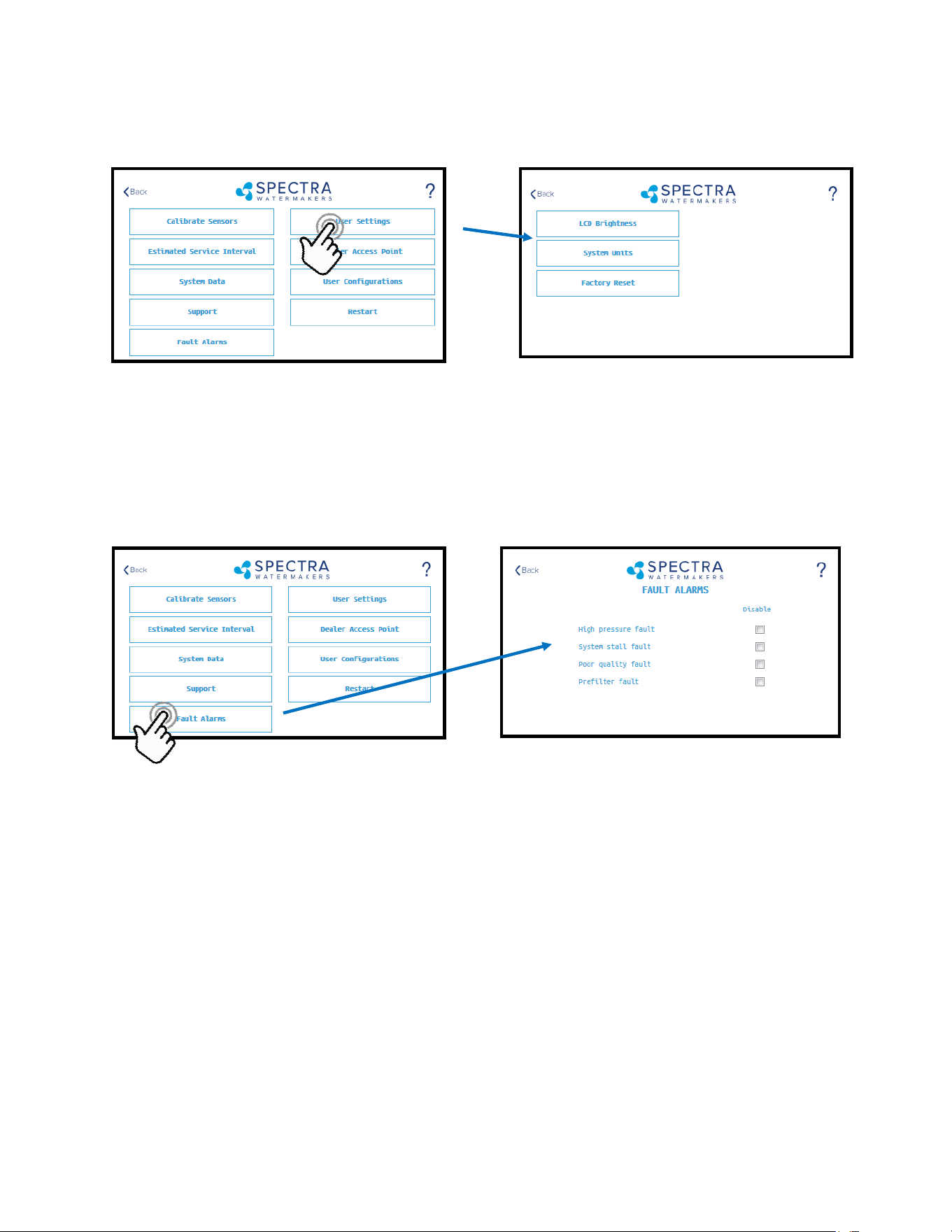
LCD Brightness: Set brightness of the hardwired display(s) from 10 - 100%
System Units: Change from US Standard units to Metric
Factory Reset: Resets any changed parameters a user has made back to the factory defaults for that
conguraon.
CAUTION! Never disable a Fault Alarm without being certain that the issue is with a bad sensor. Disabling a
fault and running the system can cause serious damage or injury.
High Pressure Fault: Disables the ‘High Pressure’ shutdown fault in the event of a feed pressure sensor
failure.
System Stall Fault: Disables the ‘System Stalled’ shutdown fault in the event of a failed rotoow sensor.
System stalled alarms occur when the control board does not sense any product water being produced,
and shuts down to protect the pump from running dry.
Poor Quality Fault: Disables the ‘High Salinity’ shut down fault in the event that the salinity probe has
failed or cannot be calibrated within range. NOTE: The diversion valve will always be acve when this
fault is disabled. ALWAYS VERIFY PRODUCT QUALITY BEFORE DRINKING. Serious health risks may
occur.
Prelter Fault: Disables the ‘Service Prelter’ shut down fault in the event that the boost pressure
sensor has failed or cannot be calibrate within range. CAUTION: Permanent damage to the feed pump
can occur if this fault is disabled, use cauon when operang this system with this fault disabled.
User Sengs
Spectra Connect Settings - Cont.
Fault Alarms
45
Dealer Access Point - Settings
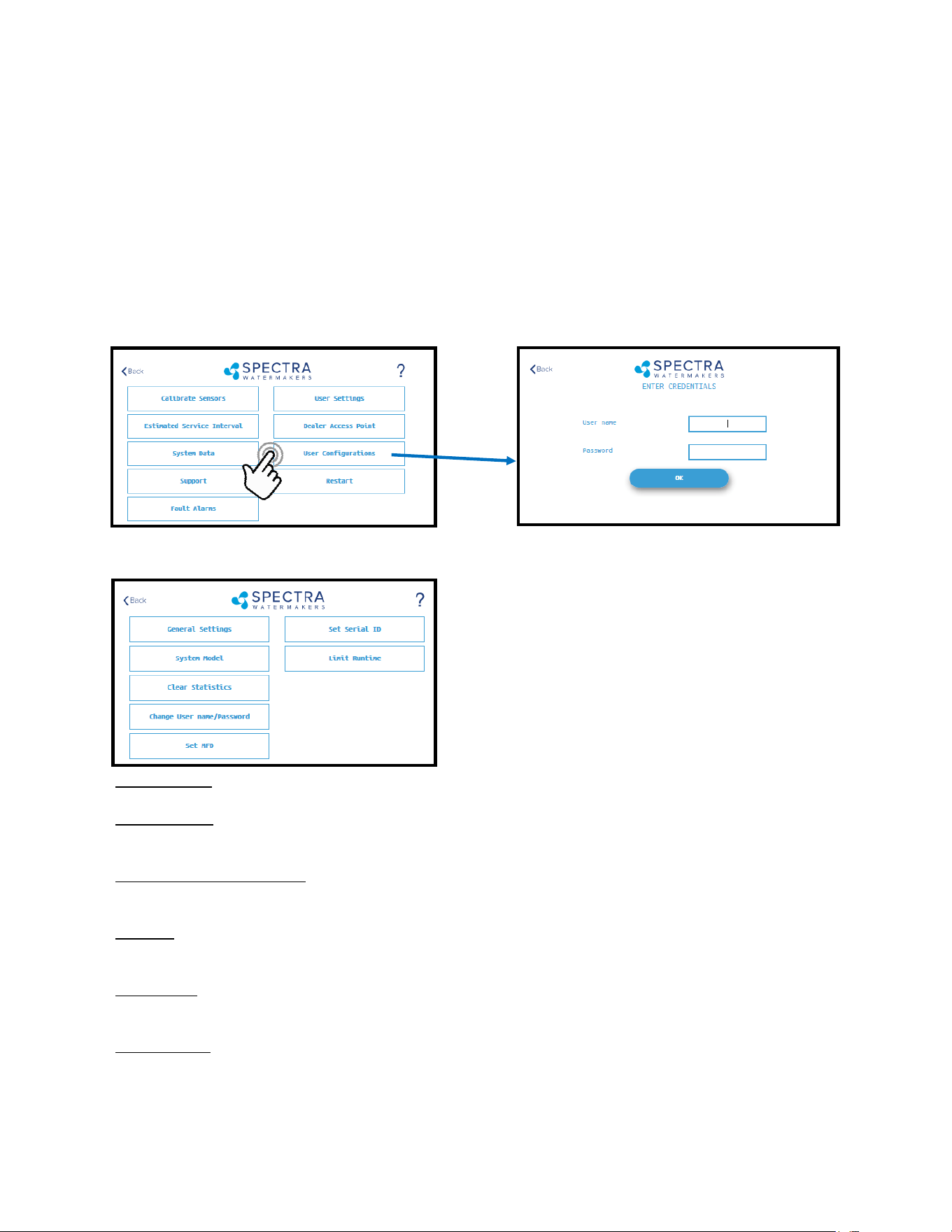
Dealer Access Sengs
It is highly recommended that users consult with a factory trained technician before altering
any sengs behind the ‘Dealer Access Point’. Changing this sengs without understanding
the full eect of each change can void the warranty of your system, and cause irreparable
damage.
If any sengs are inadvertently changed, they can be reverted back to the defaults by using
the ‘Factory Reset’ feature.
Default Login: admin
Default Password: admin
System Model: Congures the Spectra Connect for a dierent system model from a preset list of opons.
Clear Stascs: Resets all of the Esmated Maintenance Intervals back to 100%. This feature should only be used
on a brand new system.
Change Username/password: Changes the default username and password. If you forget your changed
username and password, a Factory Reset will revert back to the default username and password.
Set MFD: Changes the Manufactured Date on the system. This should only be adjusted if a control board is being
replaced on an older system.
Set Serial ID: Changes the Serial Number recorded in the Spectra Connect. This should only be adjusted if a con-
trol board is being replaced on an older system.
Limit Runme: Limits the maximum run me for the system before shung down and fresh water ushing. Disa-
bling this seng allows the Watermaker to be operated 24/7.
46
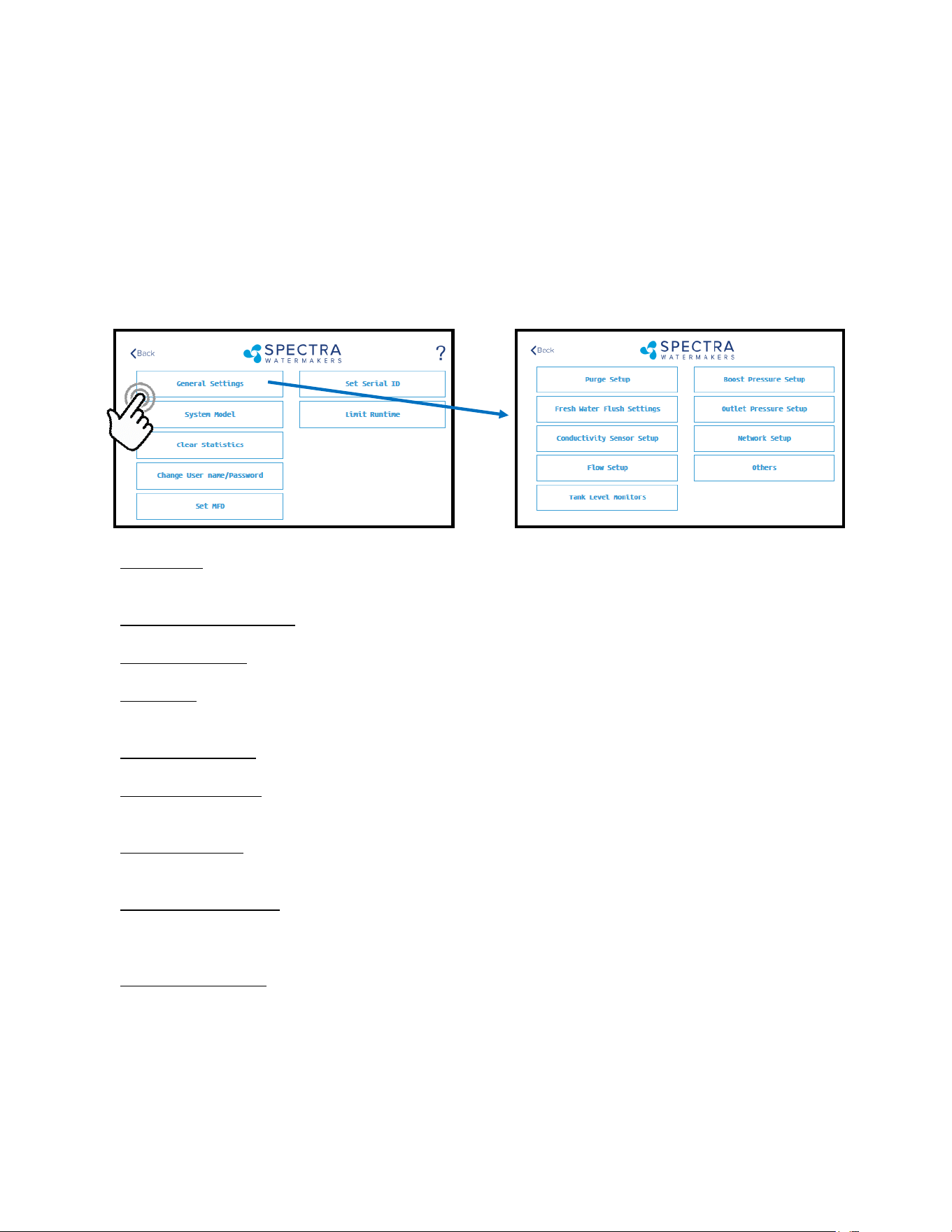
Purge Setup: Adjusts the me and maximum feed pressure allowed for the Purge Mode. CAUTION: Permanent
damage to the membrane can occur if this seng is adjusted. Consult the factory before making any
adjustments.
Fresh Water Flush Sengs: Allows adjustment of the fresh water ush duraon and the interval between
ushes. If the Z-Ion is installed, the Flush Interval should be changed to 30 days.
Conducvity Setup: Allows for enabling or disabling conducvity sensors on the feed water and product water.
Set the threshold for the diversion valve to divert water to the tanks.
Flow Setup: Allows the user to adjust the ow sensor sengs, or disable a ow sensor circuit altogether. DO
NOT USE THIS SETTING TO CALIBRATE THE PRODUCT FLOW. Follow instrucons on calibrang the ow sensor in
this manual.
Tank Level Monitors: Enable and disable the Tank Level Sensors, which read the % remaining in the tank, and the
tank switches, which allow the system to turn on/o automacally.
Boost Pressure Setup: Enable alternate Boost Pressure sensors, change the Low Vacuum Limit, or Boost Pressure
Setpoint. CAUTION: Permanent damage to the pump can occur if this seng is adjusted. Consult the factory
before making any adjustments.
Low Vacuum Limit: The minimum boost pressure required at the inlet to the pump. This seng prevents the
pump from geng damaged by running under high vacuum. Adjusng it to a lower number in creases the risk
that the pump will suer damage during normal operaon.
Boost Pressure Setpoint: During startup the controller turns on the boost pump and waits for the Boost Pressure
to reach the Boost Pressure Setpoint. If the boost pressure fails to reach this setpoint, then the main pump won’t
turn on. Reducing the Boost Pressure Setpoint may cause the system to start, then immediately shut down due
to low boost pressure.
Outlet Pressure Setup: Set High Pressure Limit, enable alternate high pressure sensors, select pressure sensor
scaling. CAUTION: Permanent damage to the pump can occur if this seng is adjusted. Consult the factory
before making any adjustments.
Network Setup: Enabling the Spectra Connect Wireless access turns on a Power Over Ethernet feature on the
wired connecon. ENABLING THIS FEATURE CAN CAUSE SERIOUS DAMAGE TO YOUR SHIP’S NETWORK. DO NOT
ENABLE THIS FEATURE WITHOUT CONSULTING A QUALIFIED TECHNICIAN OR THE FACTORY.
Dealer Access Point Settings - Cont.
Dealer Access Sengs
It is highly recommended that users consult with a factory trained technician before altering
any sengs behind the ‘Dealer Access Point’. Changing this sengs without understanding
the full eect of each change can void the warranty of your system, and cause irreparable
damage.
If any sengs are inadvertently changed, they can be reverted back to the defaults by using
the ‘Factory Reset’ feature.
47
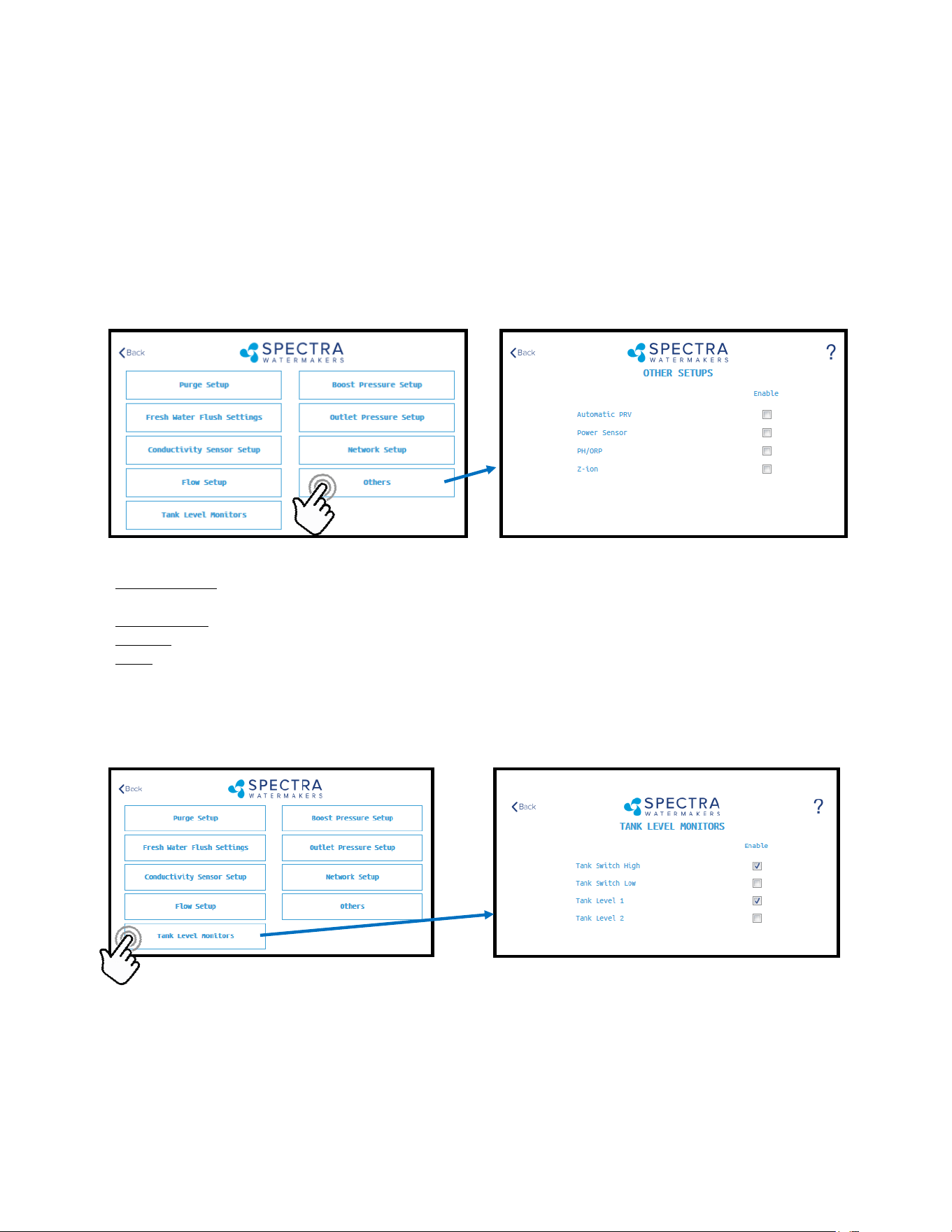
Other Setups—Default is all disabled
Automac PRV: Enables an oponal Automac Pressure Relief Valve, aer it is installed. This seng should re-
main o unless you are certain that you have this feature installed on your system.
Power Sensor: Enables or disables an oponal power sensor, aer it is installed.
PH/ORP: Enables an oponal pH or ORP meter, aer it is installed.
Z-Ion: Enables or Disables the oponal Z-Ion system, aer it is installed. If the Z-Ion is enabled, you should also
adjust the Flush Interval to 30 days.
Tank Level Monitors
Tank Setup - Enable/disable tank sensors.
Enable Tank Switch High - Enable/disable tank high switch high. If this is disabled Auto Fill and Fill Tank run
modes will not be available.
Enable Tank Switch Low - Enable/disable tank high switch low. If this is disabled Auto Fill mode will not be availa-
ble. Both High and Low tank switches must be enabled for Auto Fill mode.
Enable Tank Level 1 - Enable/disable tank level sensor 1. If this is disabled there will be no tank level reading and
tank level gauge will read “!”.
Enable Tank Level 2 - Enable/disable tank level sensor 2..
Dealer Access Point Settings - Cont.
Dealer Access Sengs
It is highly recommended that users consult with a factory trained technician before altering
any sengs behind the ‘Dealer Access Point’. Changing this sengs without understanding
the full eect of each change can void the warranty of your system, and cause irreparable
damage.
If any sengs are inadvertently changed, they can be reverted back to the defaults by
using the ‘Factory Reset’ feature.

48
Handling Spectra Connect Alarms or Faults
Faults are (potenally hazardous) condions that might occur during running of your Watermaker. The control
board has the ability to monitor these faults in real me and take necessary acons to prevent damaging your
equipment.
HIGH PRESSURE FAULT
High pressure fault is triggered if
Outlet pressure (Feed/Membrane pressure) > Pressure Limit
If a high pressure fault is triggered, the system goes to low producon mode if it is running in high producon
mode, or stops the operaon if it is already running in low producon mode. Then the system will begin
the Auto Store mode.
Resoluons
Check for kinked or blocked hoses.
Conrm “#3 Sensor PSI High limit” and “#3 Sensor PSI Oset” opons on Outlet Sengs.
Clean membrane.
SYSTEM STALL FAULT
System stall fault is triggered if
There is no product ow for 1 minute connuously.
If system stall fault is triggered, machine will stop the current run cycle and will prompt to restart. If restarted
it will retry the previous running mode. If the stall condion persists even aer restart, the system will
begin the Auto Store mode.
Resoluons
Conrm product water at membrane endcap.
Check intake line for restricons, blockages or air leaks.
Close Pressure Relief Valve on Pump.
Conrm controller sengs correct.
SERVICE PREFILTER FAULT
The Service Prelter fault is triggered if
Inlet Pressure(boost pressure) < Low Vacuum Limit
If the Service Prelter fault triggers, the system goes to low producon mode if it is running in high produc-
on mode or stops the operaon if it is already running in low producon mode. Then the system will
begin the Auto Store mode.
Resoluons
Change prelters and the sea strainer screen.
Conrm adequate boost pressure in inlet pressure sengs.
Check for obstrucons in intake line.
Check sensor for proper operaon
POOR QUALITY FAULT
The High Salinity fault triggers if
The Salinity of the product water is above the threshold (measured salinity > Salinity 1 threshold) for
more than 8 minutes.
If the High Salinity fault is triggered, the machine will stop the current run cycle and will prompt to restart. If
restarted it will retry the previous running mode. If the High Salinity fault condion persists even aer
restart, the system will begin the Auto Store mode.
Resoluons
Check pump operaon - Clark Pump (pressure relief valve closed), Feed Pump (moving water).
Conrm product water quality.
Membrane damage - clean or replace.
Salinity probe out of calibraon.
Clean or replace salinity probe.

49
Tech Bulletin Example
This is an example of the many technical service bullens available on our website.
hps://www.spectraWatermakers.com/us/us/support/downloads
Poor Product Water Quality
With any product water quality issue, you must ensure accurate calibraon if you are using a
salinity meter. For general quality evaluaon, your taste is always good enough.
Membranes are not an exact science and two idencal systems can have dierent product
quality. World health standards deem water of up to 1000 PPM of total dissolved solids
acceptable for drinking. We consider any thing below 750 PPM acceptable, and anything
below 500 PPM excellent. Factors that could aect water quality are addressed below.
LOW SYSTEM FLOW OR PRESSURE will equate to lower product quality (higher PPM).
DAMAGE TO THE MEMBRANE by chlorine contaminaon. Flushing the system with
chlorinated water will irreparably damage the membrane. Charcoal lters are used to
absorb any chlorine which might be present in ush water. They must be of proper
specicaon to be suitable. There is no test for chlorine damage except the process of
eliminaon of other causes.
DIRTY OR SCALED membranes. A dirty (foreign material), scaled (mineral deposits), or
contaminated (bacterial growth) membrane can result in poor water quality and
abnormal operang pressures. If operang pressures are above normal, then cleaning
is indicated. If the system pressures are within normal operang range, cleaning may
have lile result. Low water quality aer storage with propylene glycol can usually be
remedied by ushing with the pressure relief valve open for several hours or if that is
not eecve a SC-2 cleaning should eecvely raise the quality of the product water.
MECHANICAL LEAKAGE within the membrane pressure vessel. This is an unlikely but
possible cause of poor water quality. A pinched or damaged O-ring within the pressure
vessel, a scratch on the product tube on the membrane, a scratch within one of the
end caps, or a seal fouled by contaminaon could allow sea water into the product
water.

50

51
Specifications
Electrical Input
240 volt systems: 208-240 volts single or three phase 50/60 Hz 19.5 amps max**
** includes boost pump
Power consumpon will vary depending on feed water condions and motor RPM. Do Not Ex-
ceed Factory Recommended Max/Min values.**
Feed Water Supply
Minimum Pressure aer lters: 10 psi, .7 bar
Maximum Pressure aer lters**: 25 psi, 1.7 bar
Flow Rate: 20GPM, 76 L/min.
Total Dissolved solids: 0-45,000 mg/L
pH range: 4-11
Connuous free chlorine: 0 ppm
Temperature: 0° to 45° C
Turbidity: 1 NTU max
Silt Density Index: 1 max (aer pre-ltraon)
Product
Rejecon: 99.5%
Flow: 6.5—7.2 GPM, 24.5—27.25 lpm
Lubricant:
O-rings and seals: Dow Corning Silicon Lubricant
CAT Crankcase: 5W-30 or equivalent synthec motor oil
52
LB 14,000 Plumbing Diagram
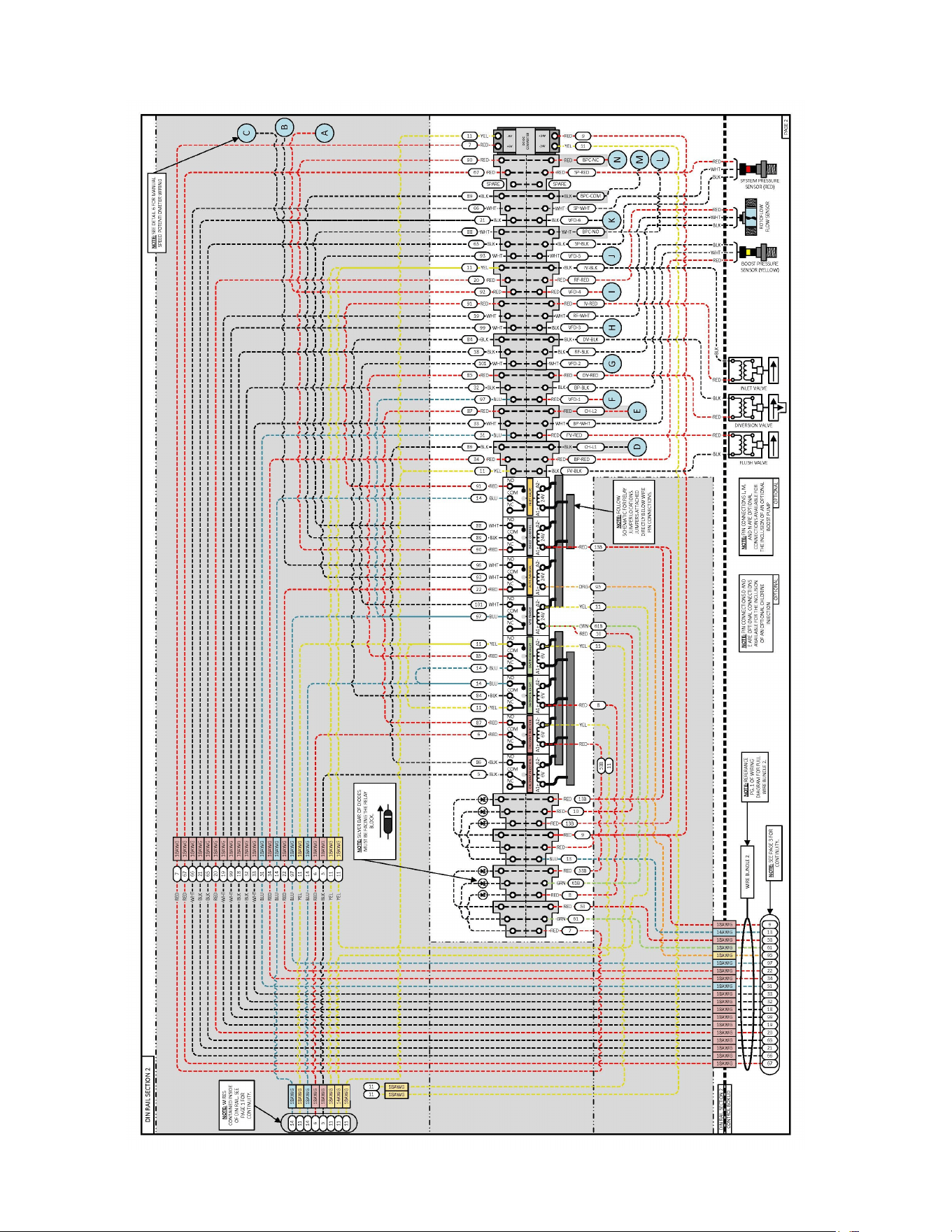
53
LB 14,000 Plumbing Diagram Cont.
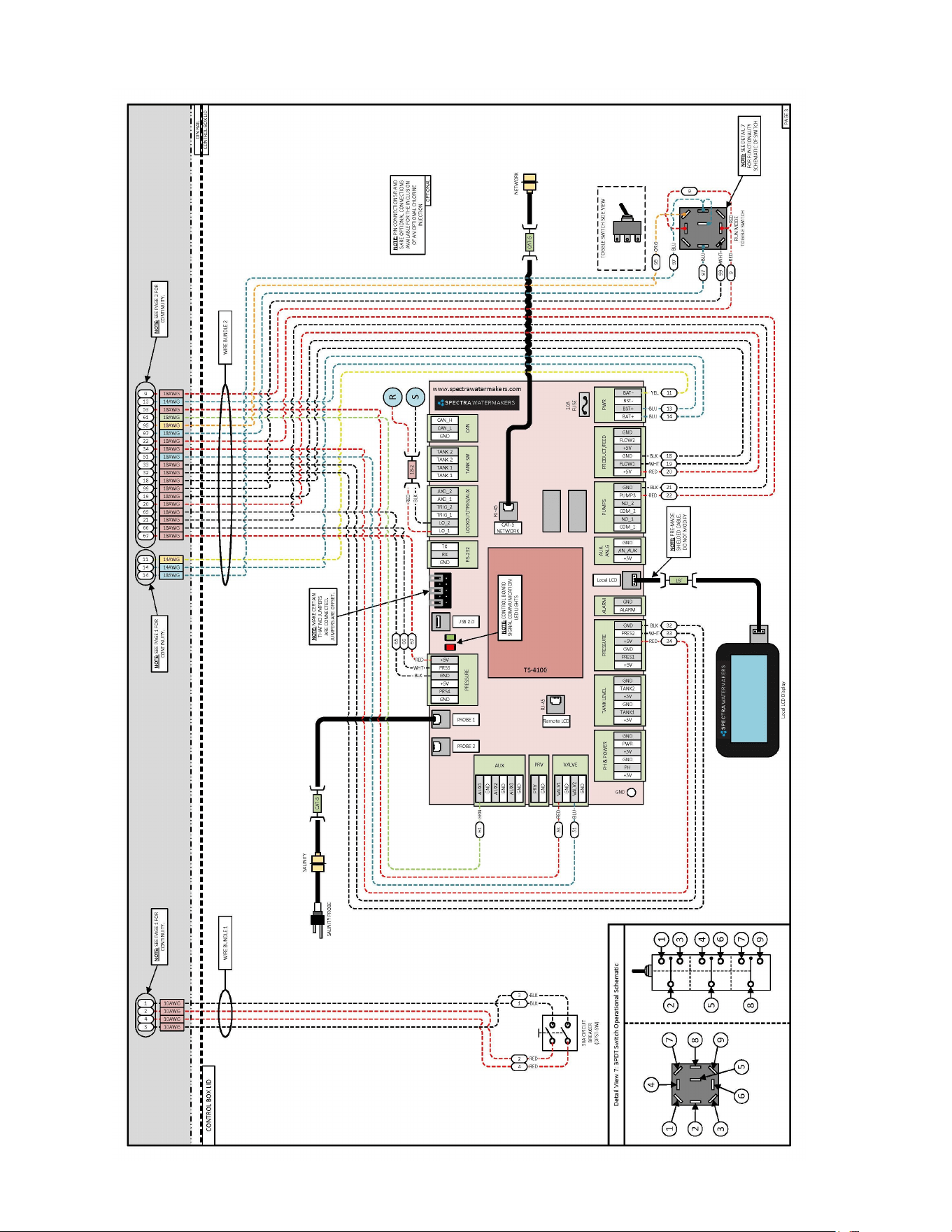
54
LB 14,000 Plumbing Diagram Cont.
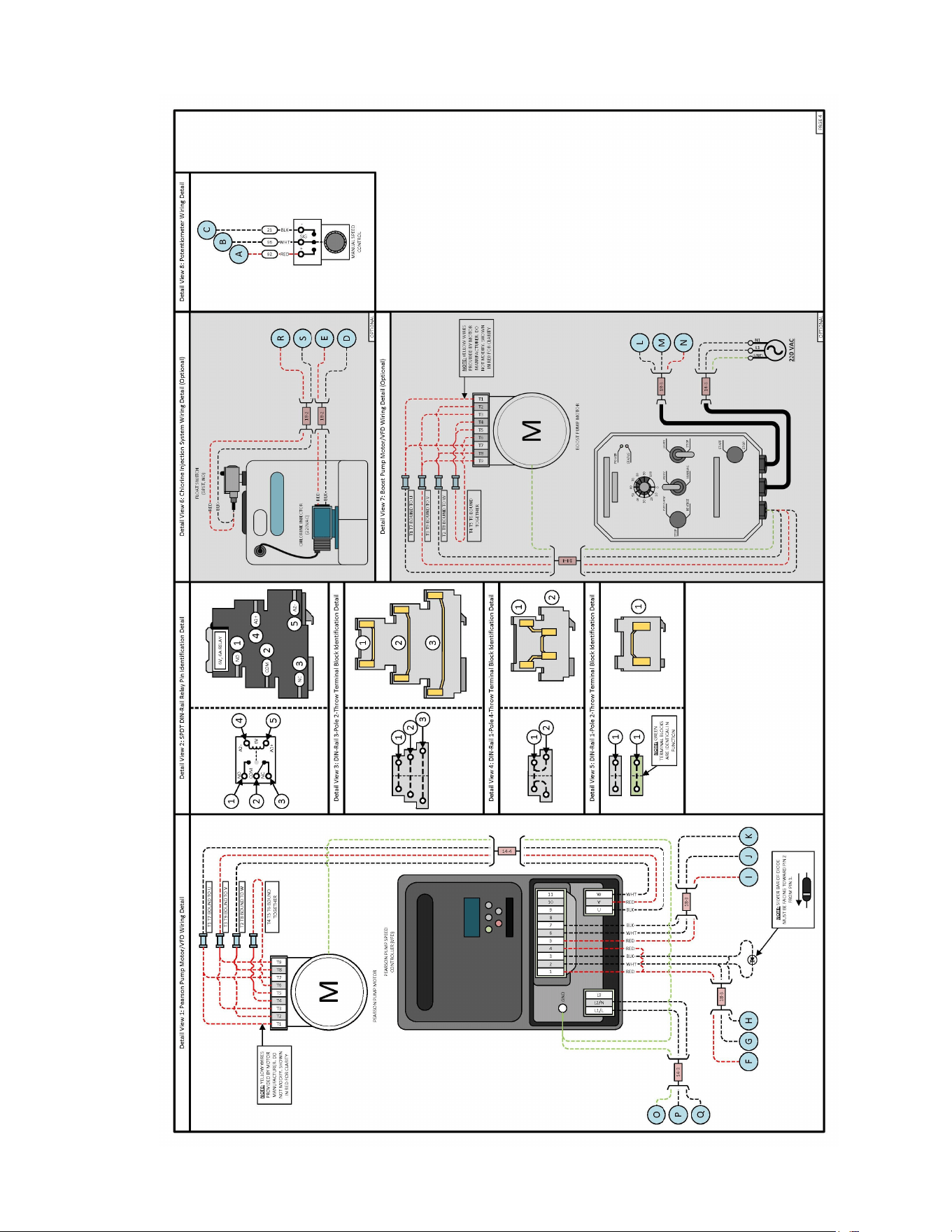
LB 14,000 Plumbing Diagram Cont.
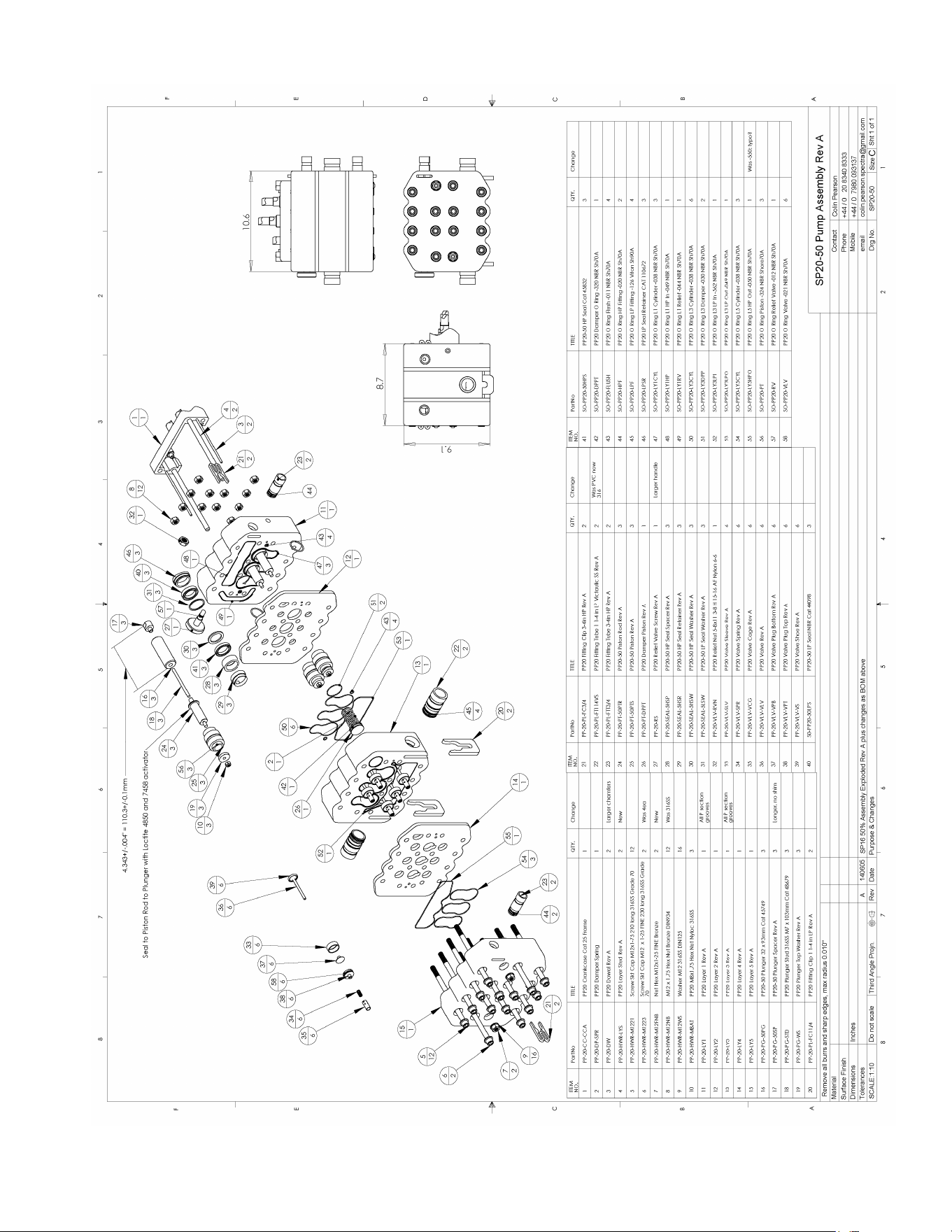
56
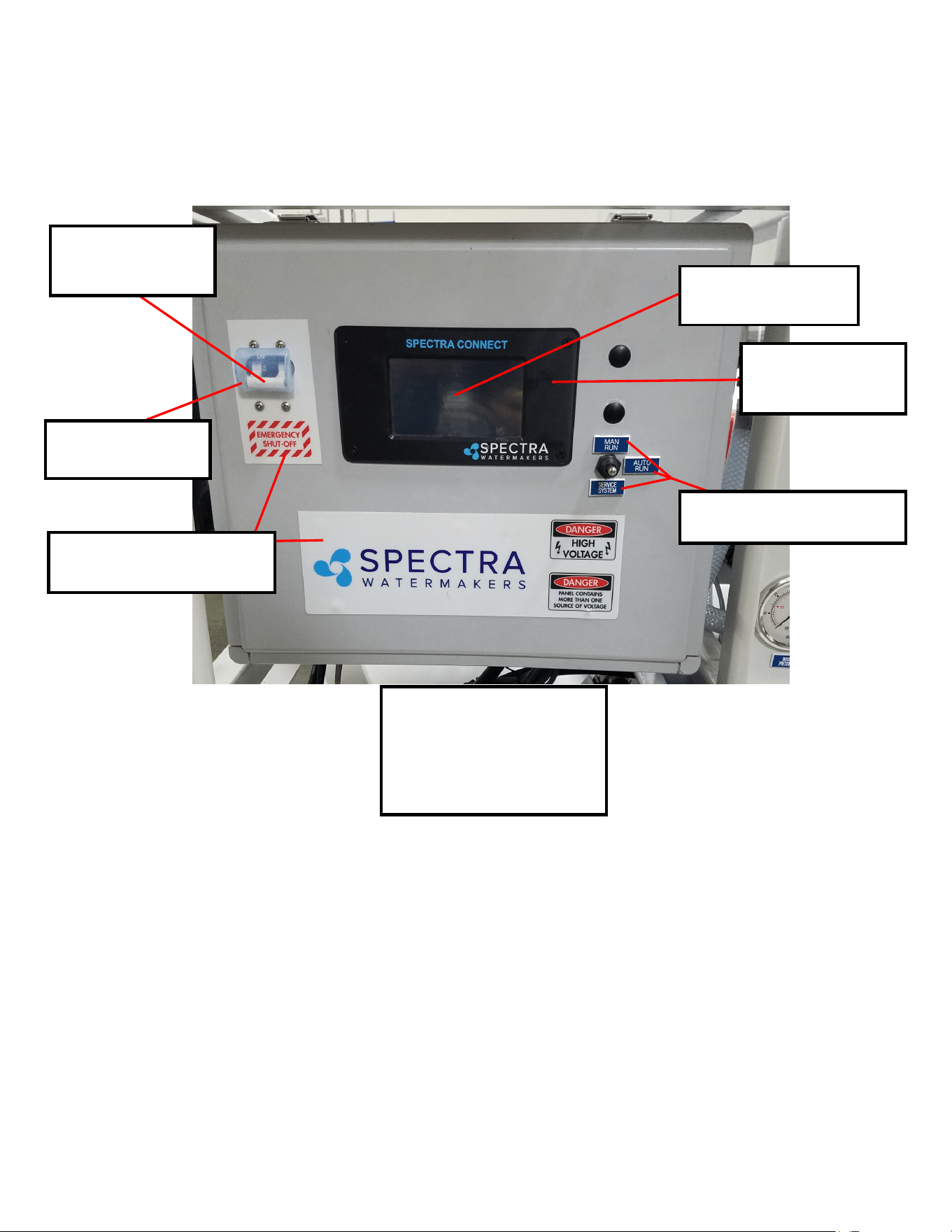
57
Parts I.D.
FM-CB-ENGVPNS
CABO ENGRAVED PANELS SET
PT-STK-LB5ECTOL
CONTOL BOX PANEL OVERLAY
EL-BRK-30ADP
30A CIRCUIT BREAKER,
2 POLE
EL-BRKBRK2P
BREAKER BOOT, 2 POLE
FM-SPC-PNBZ
SPECTRA CONNECT
PANEL BEZEL ONLY
EL-SC-DPP4.3B
HMI DISPLAY, 4.3 INCH
Control Box Mounting Hardware:
HD-WSH-5/16NL
5/16" NYLON WASHER (x4)
HD-BLT-5/16X1
5/16" X 1" SS. BOLT (x4)
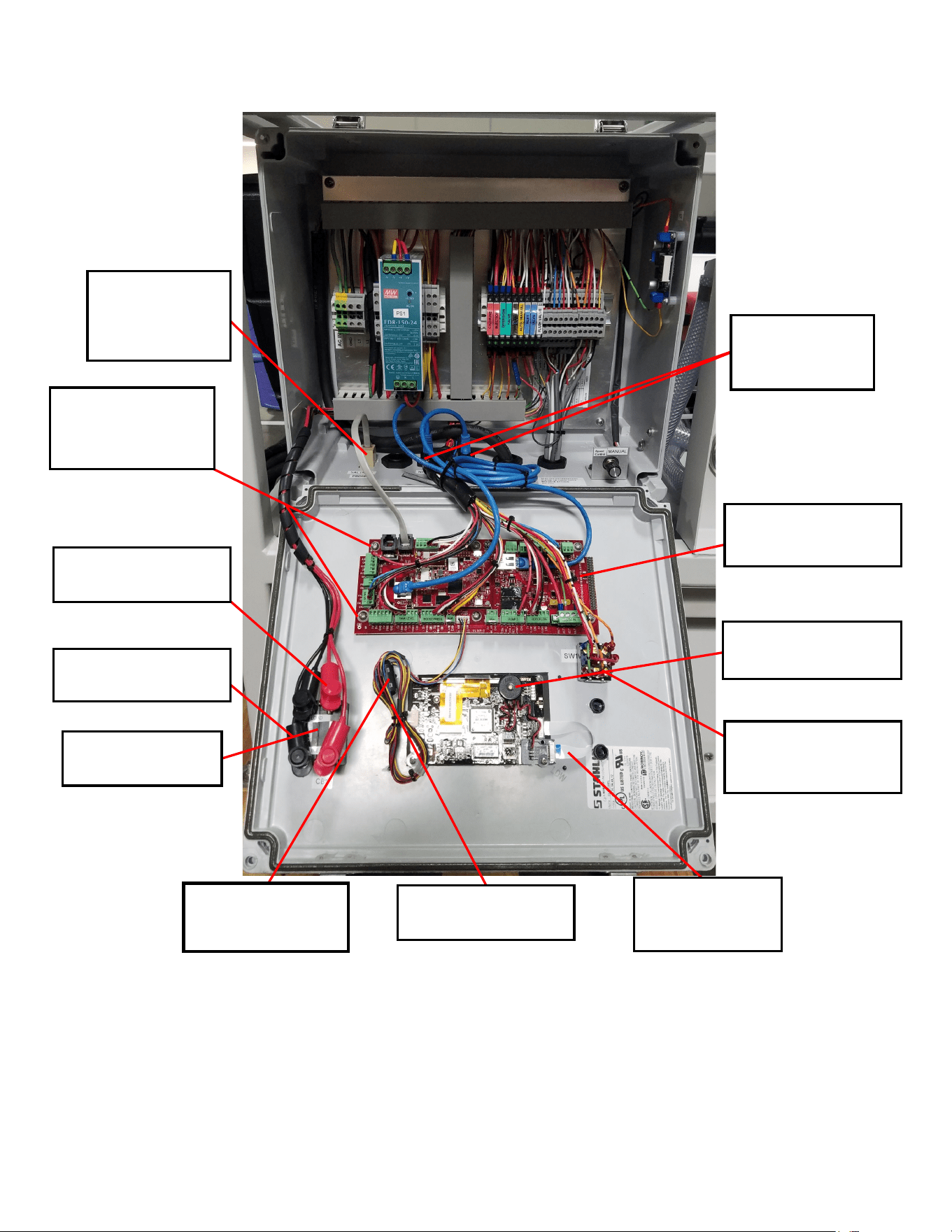
58
EL-BRK-30ADP
30A Breaker
EL-SC-48JSTMM
Display Cable
EL-SC-CTRBA
Spectra Connect Board
EL-SWT-TG-3PDT
3-POLE DOUBLE THROW
SWTICH 15A
EL-TM-1/4PPCP
1/4” Cable Cap Stud
EL-TM-1/4PPCPR
1/4” Cable Cap Stud (Red)
HD-SPN-1/4BNS
1/4” Nylon Spacers (6x)
- Under Connect Board
EL-MAG-7MNSP
7MM NOISE
SUPPRESSOR
EL-TM-RJ45BHCR
RJ-45 WATERPROOF
COUPLER STRAIGHT
EL-TM-RJ12COUP
RJ-12 MODULAR
COUPLER PANEL
MOUNT
EL-EL-SC-RMPBZ
5V BUZZER
EL-SC-DPIOA
SPECTRA CONNECT
DISPLAY I/O ADAPTER
Part Numbers
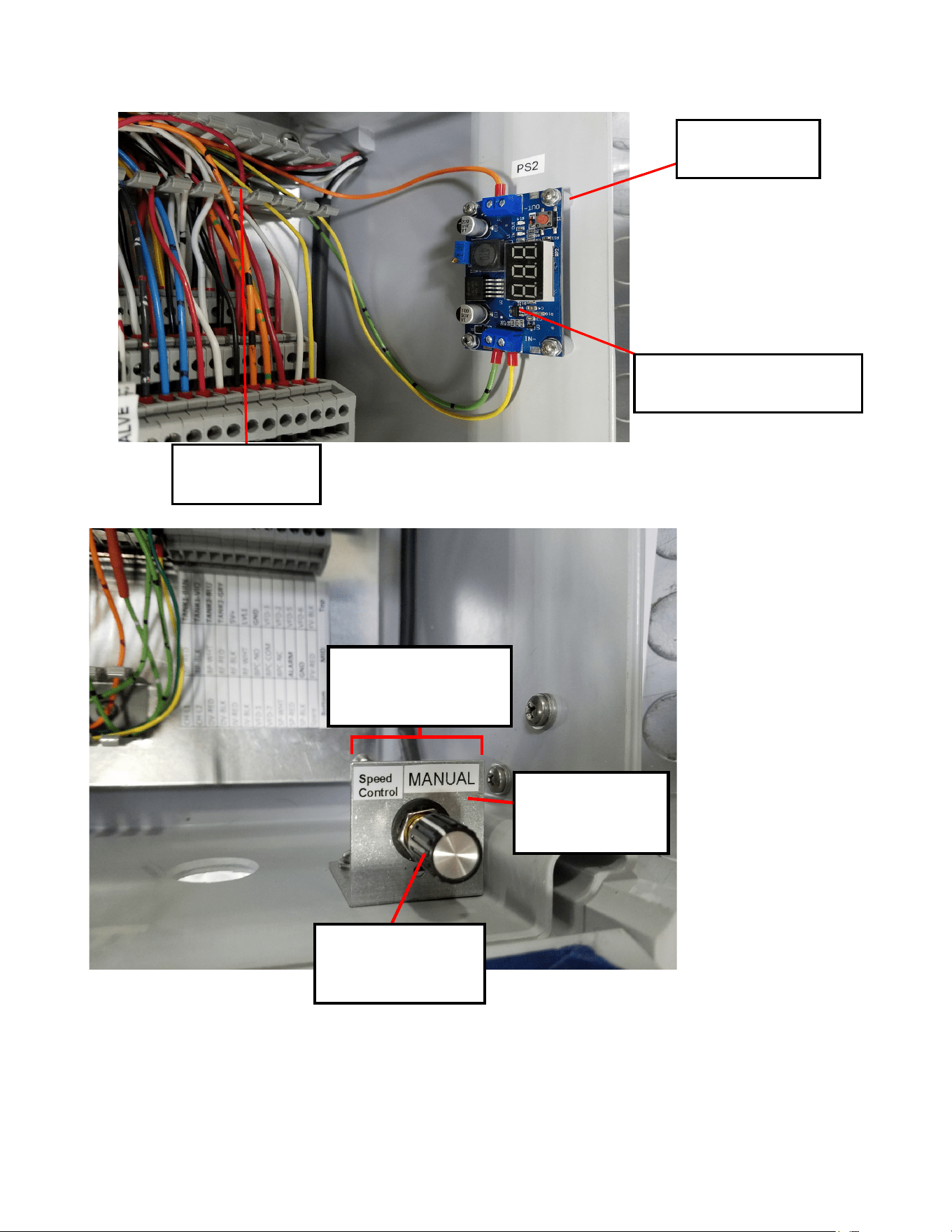
59
EL-EL-PTKNOB
POTENTIOMETER,
KNOB
FM-LB-PTOBK
POTENTIOMETER,
MNT BRACKET
EL-EL-PT10K
POTENTIOMETER, 10K
HD-SPN-1/4BNS
1/4” Nylon Spacers (4x)
EL-PS-DC2AVADJ
DC TO DC CONVERTER, 6VDC OUT
EL-CD-1X11/2G
WIRING DUCT GREY
Part Numbers
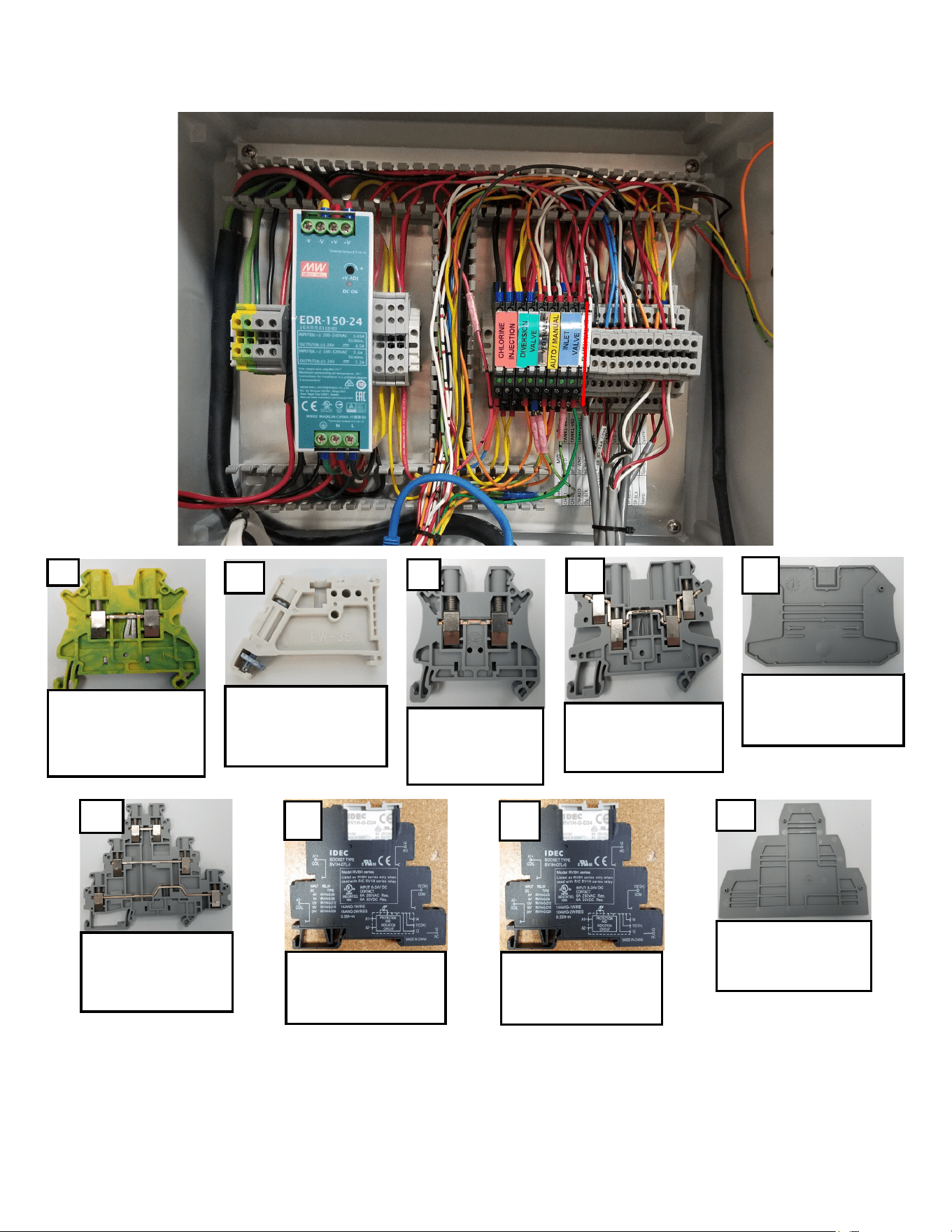
60
2x
EL-TM-DR1P12-26
DIN RAIL GROUNDING
TERMINAL 1P 12-26
AWG
EL-RL-35MMDRSP
DIN RAIL STOPPER
35MM
4x
EL-TM-DR1P8-24
DIN RAIL TERMINAL
1P 8-24 AWG
2x
EL-TM-DR1P10-26
DIN RAIL TERMINAL 1P
10-26 AWG
2x
EL-TM-DREP1P
DIN RAIL TERMINAL 1P
END COVER
1x
EL-TM-DR3P12-26
DIN RAIL TERMINAL 3P
12-26 AWG
13x
4x
EL-RL-6ASPDT24D
6A SPDT RELAY 24V DIN
MOUNT
4x
EL-RL-6ASPDT6D
6A SPDT RELAY 6V DIN
MOUNT
EL-TM-DREP3P
DIN RAIL TERMINAL 3P
END PLATE
1x
Part Numbers
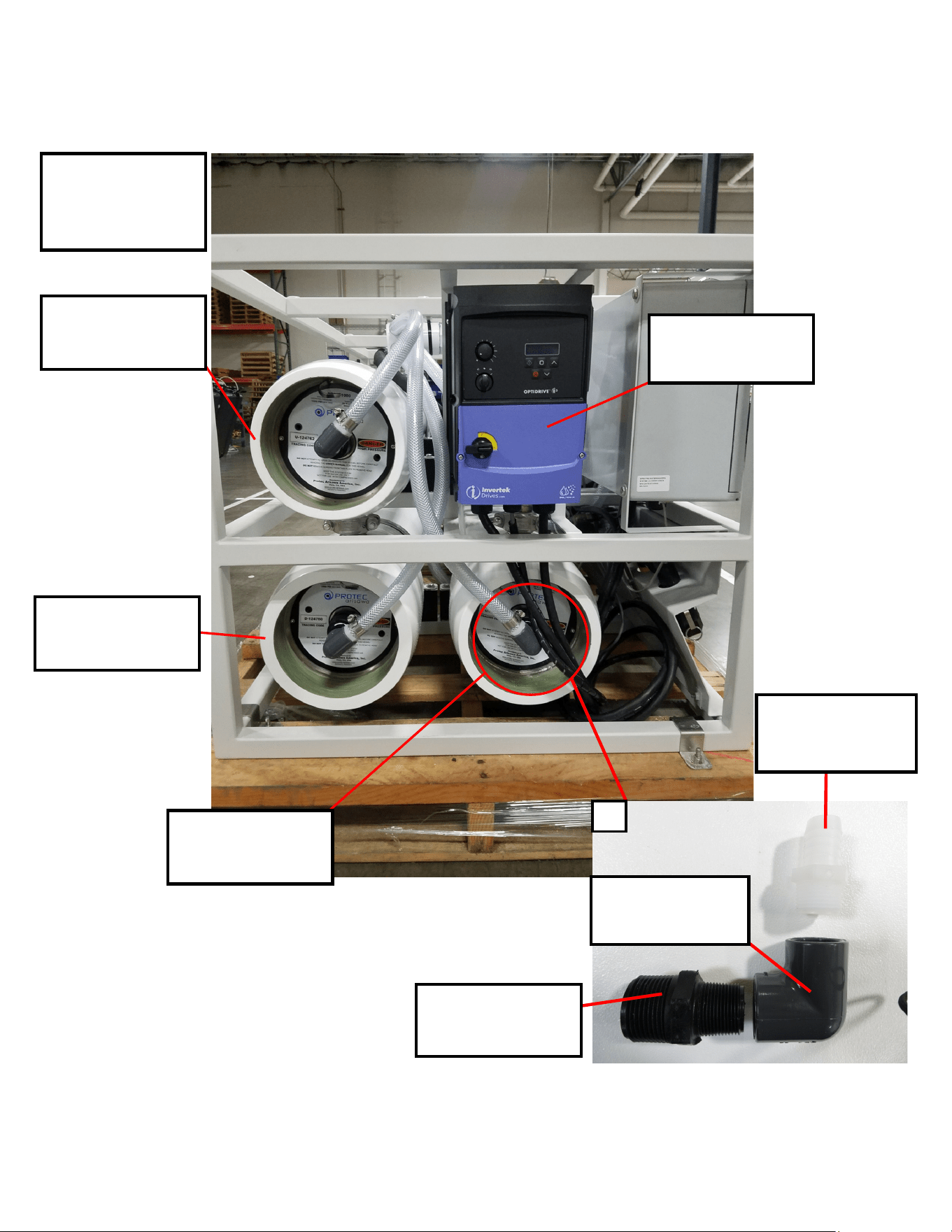
61
(Not Pictured):
FT-MB-SW8X40
8"X40" SEA WATER
MEMBRANE (3x)
EL-MTR-5HPSC2N4
Invertek Optidrive (Motor
Speed Controller)
FT-PV-CBPV#1
8"X40" CABO PRESSURE
VESSEL #1
FT-PV-CBPV#2
8"X40" CABO PRESSURE
VESSEL #2
FT-PV-CBPV#3
8"X40" CABO PRESSURE
VESSEL #3
PL-NP-1X3/4BPP
1" NPT X 3/4" NPT NIPPLE
BLACK POLY
PL-UNN-3/4FPVCE
3/4" FPT PVC SCH80
ELBOW
PL-HBS-3/4X3/4
3/4" NPT X 3/4" HOSE
BARB ST. NYLON
3x
Part Numbers
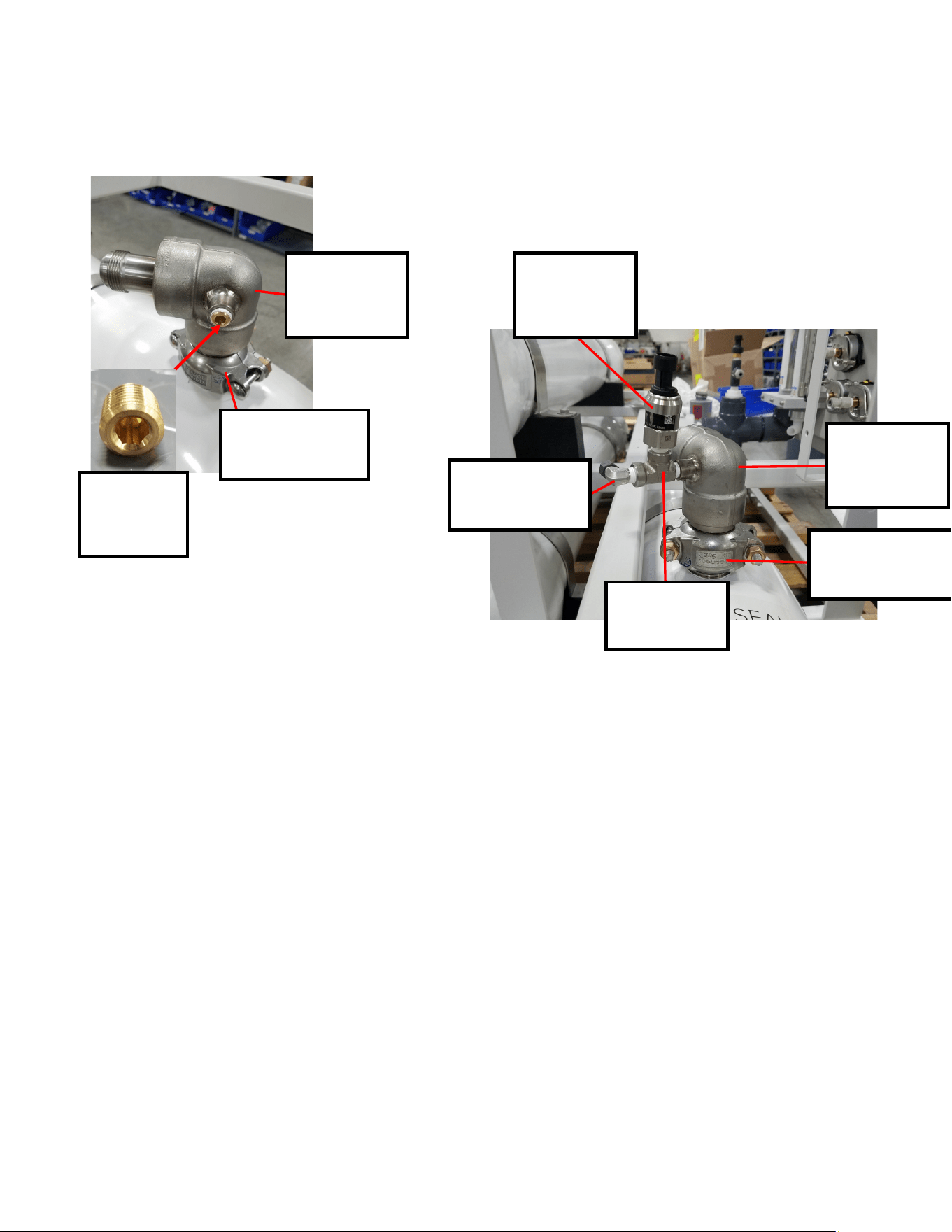
62
PL-HP-1/4BR
1/4" COUNTER
SUNK HEX
PLUG (BRASS)
PP-20-FT-HPFEFL
PP20 HP 37D JIC
ELBOW SS
W/1/4"HP
PL-UNN-1.5GEPC
1-1/2" GROOVE END
PIPE COUPLER SS
EL-SSR-1500PT1
0-1500 PSI
PRESSURE
TRANDUCER SS 1
PL-FTE-1/4X1/4S
1/4”FPT X 1/4” TUBE
FITTINGS ELL SS
PL-TEE-1/4NRSS
1/4”NPT RUN TEE
SS 316
PP-20-FT-HPFEFL
PP20 HP 37D JIC
ELBOW SS
W/1/4"HP
PL-UNN-1.5GEPC
1-1/2" GROOVE END
PIPE COUPLER SS
Part Numbers
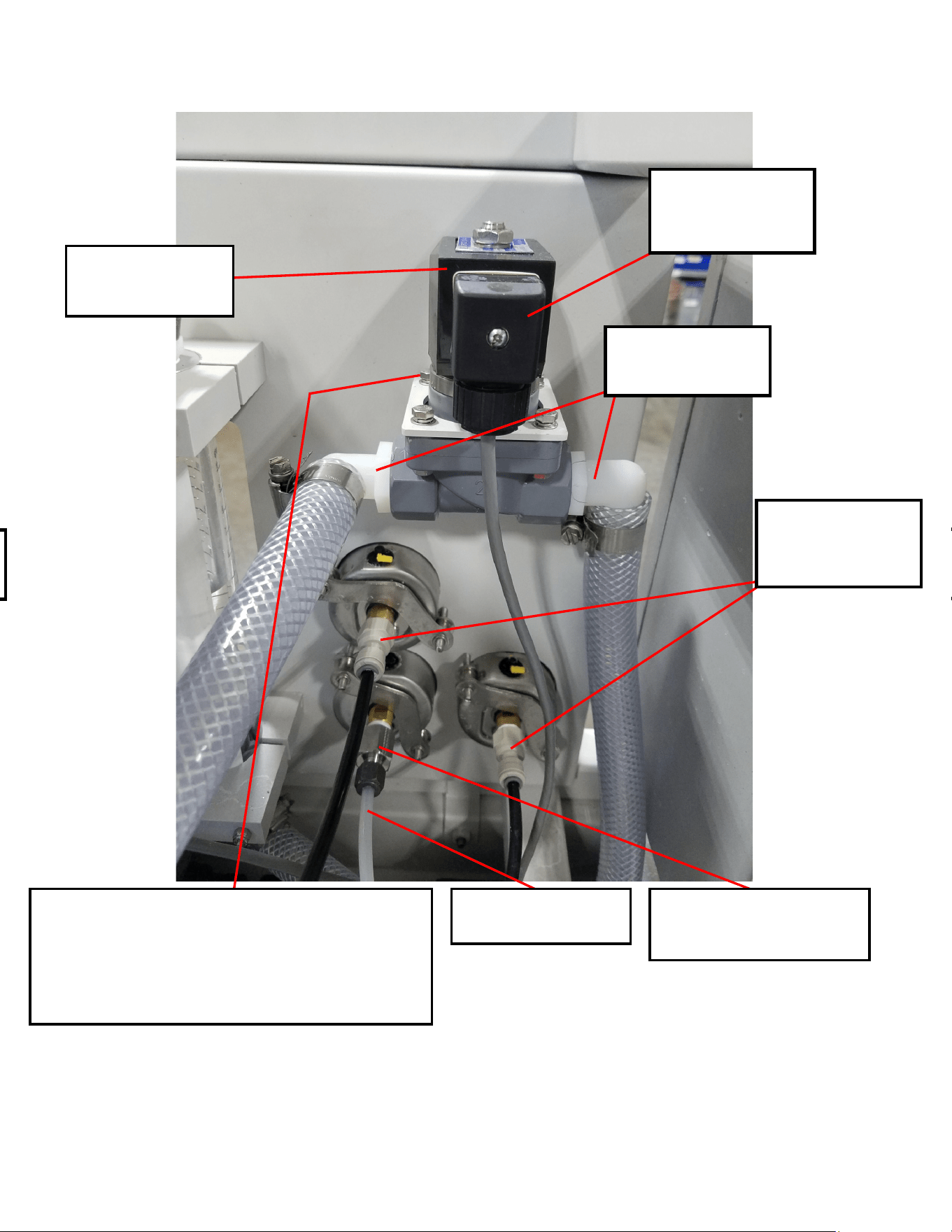
63
1/2" GROOVE END
Bracket to Panel:
(2x) HD-PMS-102412 10 X 24 X 1/2” PHMS SS
(2x) HD-WSH-10N 10 FLAT NYLON
WASHER
PL-SLN-3/4F1W24
3/4” FPT 1-WAY 24VDC
SOLENOID VALVE PCVC
PL-FTS-1/4X1/4J
1/4” FPT X 1/4” TUBE
FITTING St. JG
PL-HBE-3/4X3/4
3/4” NPT X 3/4” HOSE
BARB ELBOW NYLON
PL-FTS-1/4X1/4S
1/4” X 1/4” SS HIGH PRESSURE
TUBE FITTING JG
PL-NLT-1/4HP
1/4” HIGH PRESSURE TUBE
EL-TM-BKVC
BURKERT SOLENOID
VALVE CONNECTOR
Part Numbers
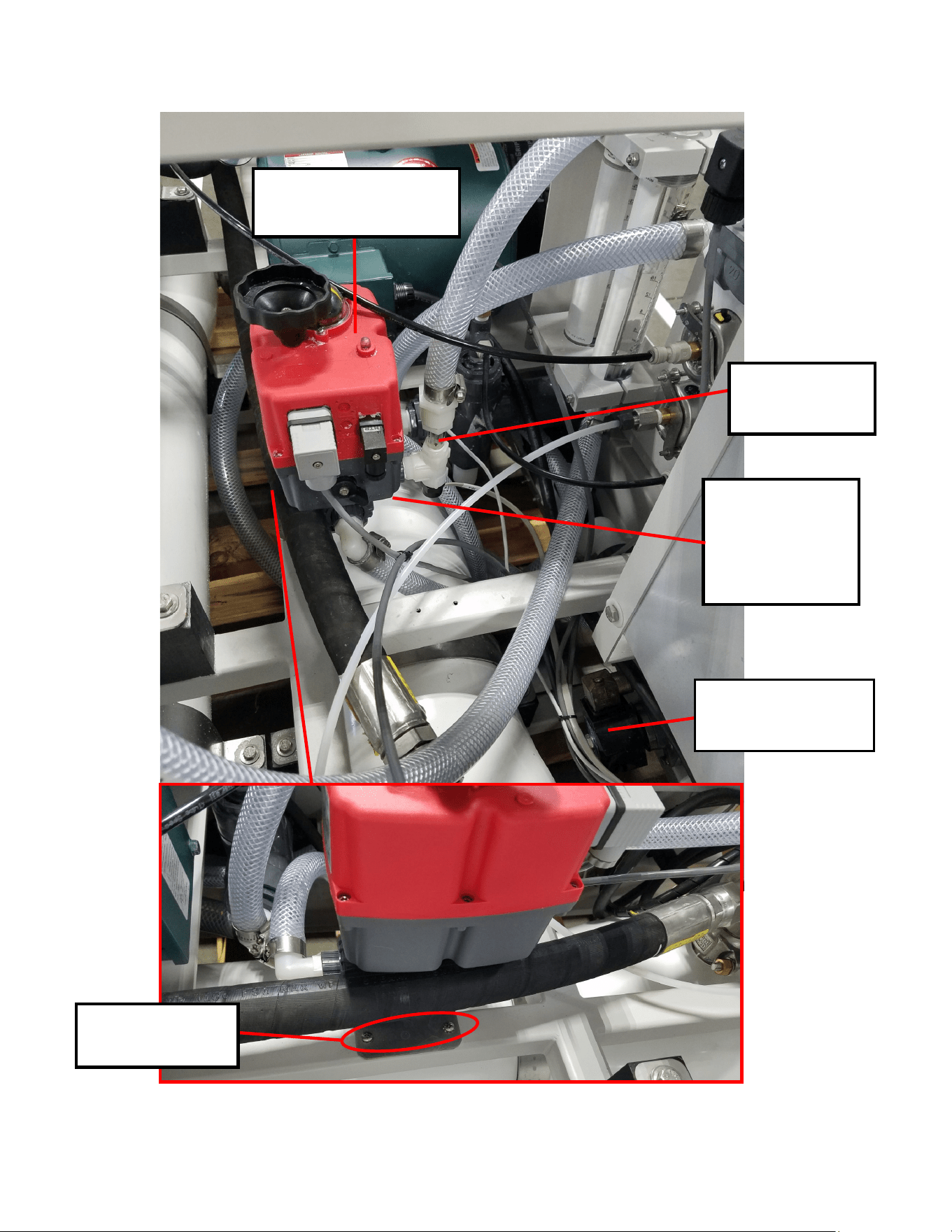
64
(Underneath)
(4x) 6-32 X 1/2”
(4x) #6 Washer
(4x) #6 Nyloc
Nut
(2x) 8-32 X 3/4”
(2x) #8 Star
PL-VLV-1/2LVVAC
1/2"FPT MOTORIZED DIVERTER
VALVE 24-240V
EL-SSR-IFM9.25
INLINE FLOW
SENSOR 9.25 GPM
PL-SLN-3/4F1W24
3/4”FPT 1-WAY SLN VLV
24V PVC INLET
Part Numbers
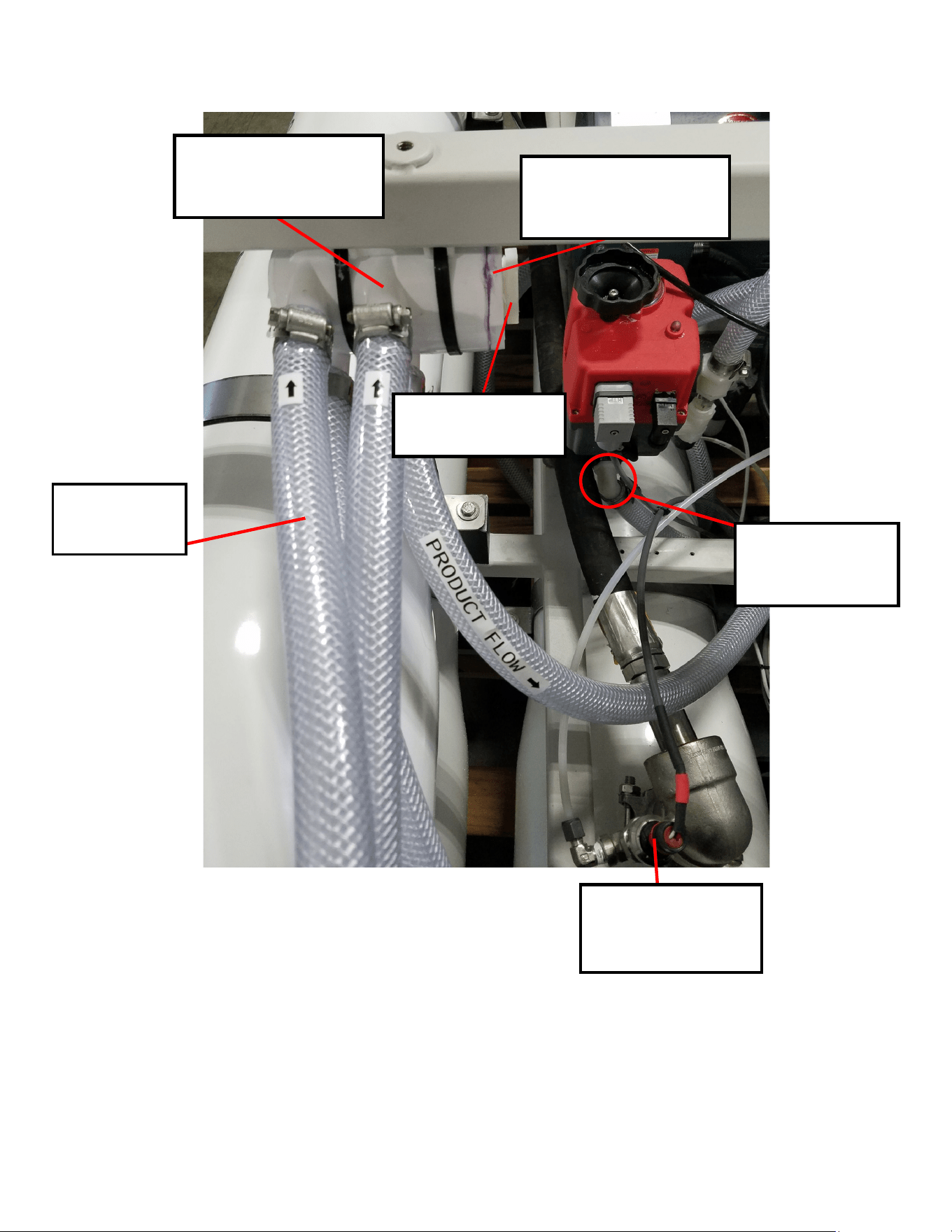
65
(2x) PL-HBE-
1/2X3/4
1/2" NPT X 3/4"
PL-MNF-3/4HB4P
PRODUCT WATER
MANIFOLD (4 PORTS)
EL-SSR-
1500PT1
0-1500 PSI
3/4”
Reinforced
PL-BSH-2SX1F4
2” S X 1” FPT
BUSHING REDUCER
PL-HP-1N
1" HEX PLUG
Part Numbers
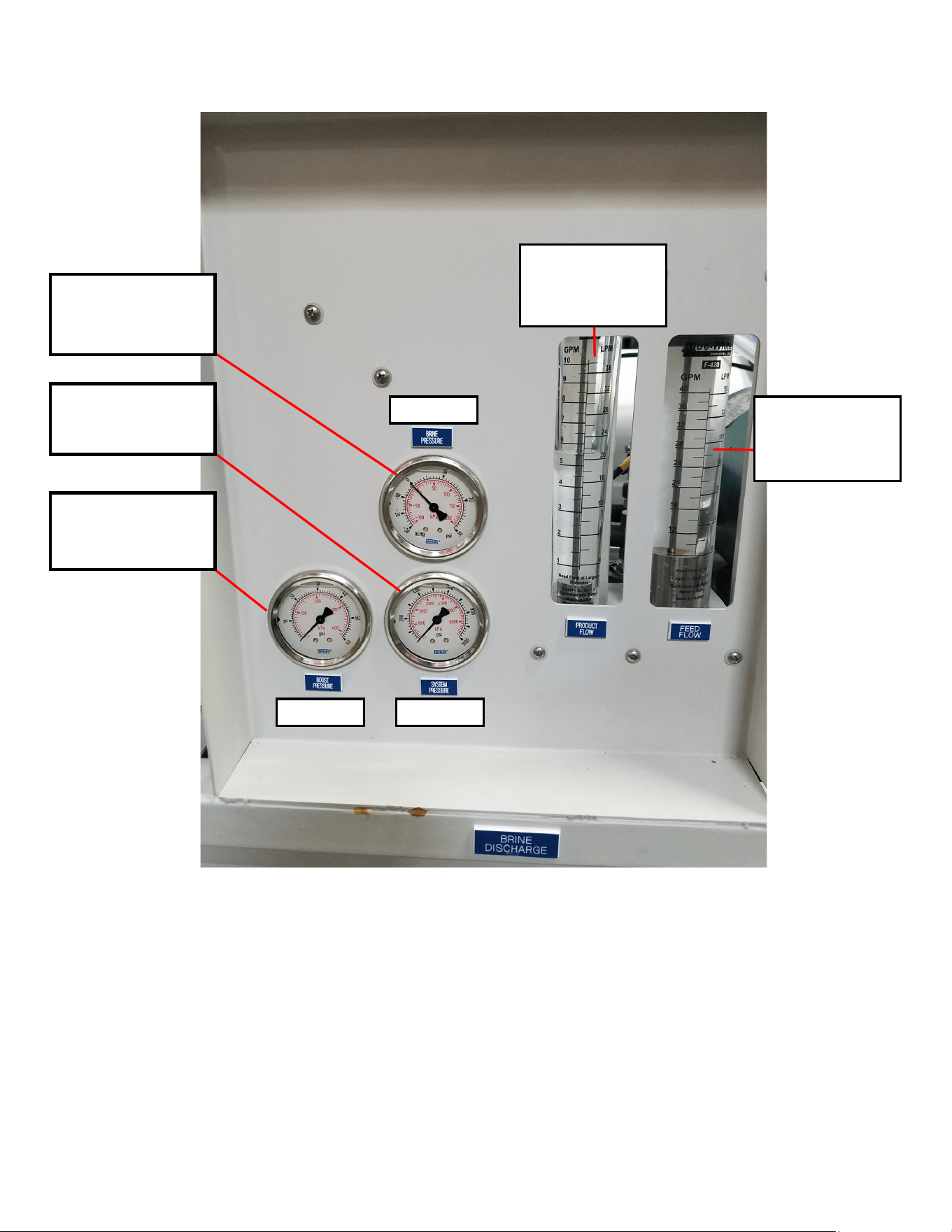
66
0-60 psi 0-1000
0-30 psi
PL-PSG-CPG30
COMPOUND PRESSURE
GAUGE 0-30
PL-PSG-2.5HP1K
2.5” 1000 PSI/BAR 1/4 B
UC SPECTRA
PL-PSG-2.5LP60
0-60 PSI PRESSURE
GAUGE 2.5”, 1/4
PL-FMT-10GPMIL
0-10 GPM FLOWME-
TER 3/4"NPT PORTS
IN LINE
PL-FMT-8-40GPM
8-40GPM INLINE
FLOWMETER 1-
1/2NPT
Part Numbers
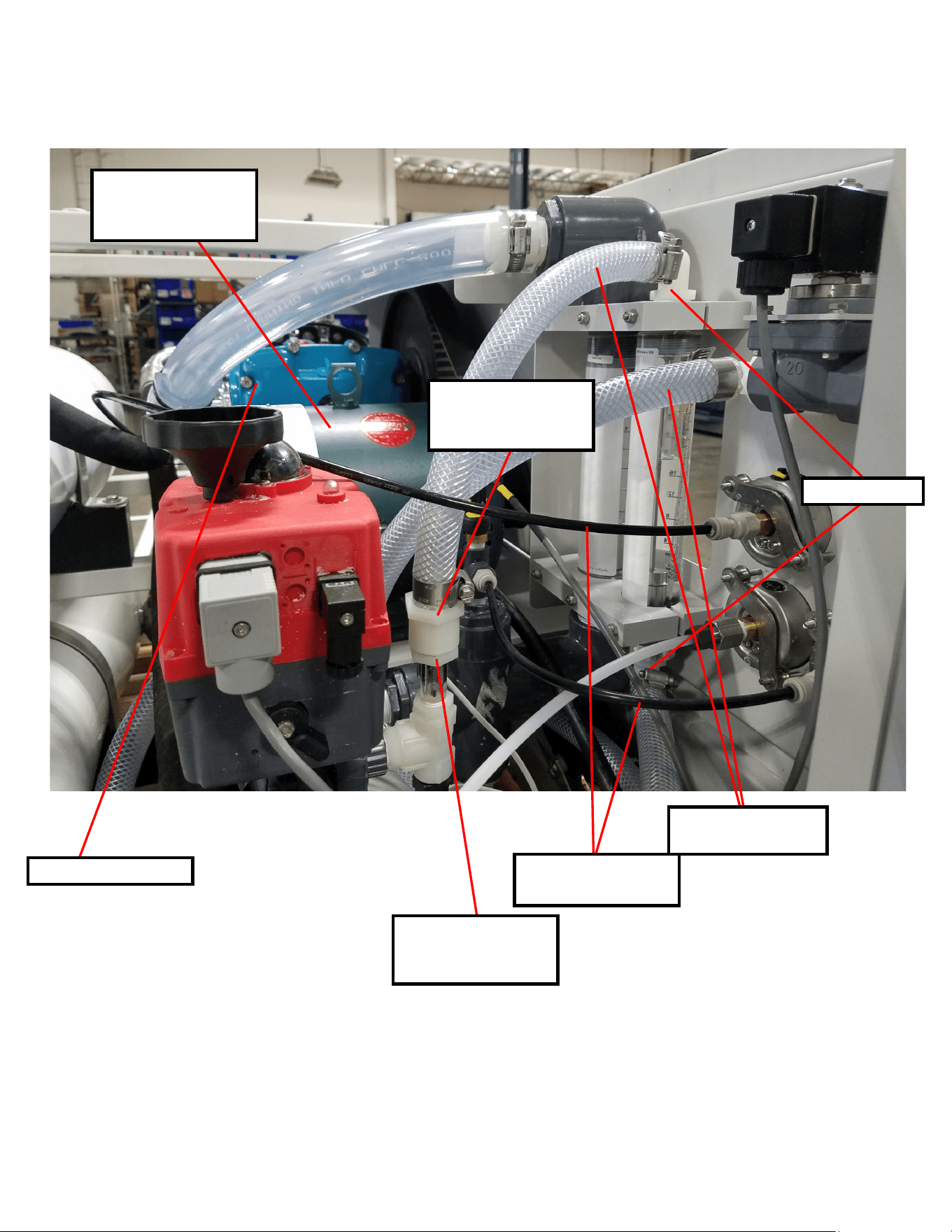
67
3/4” Reinforced Suction
Hose (Low Pressure)
EL-MTR-5HP-220AC
5HP MOTOR 220VAC 3PH
1800 RPM
SP20 Pearson Pump
PL-NLT-1/4LP
1/4” Low Pressure Tube
PL-HBE-3/4X3/4
PL-FHB-3/4X3/4
3/4"FPT X 3/4 HOSE
BARB ST. NYLON
PL-BSH-3/4X3/8N
3/4" X 3/8" HEX BUSHING
REDUCER NYL
Part Numbers
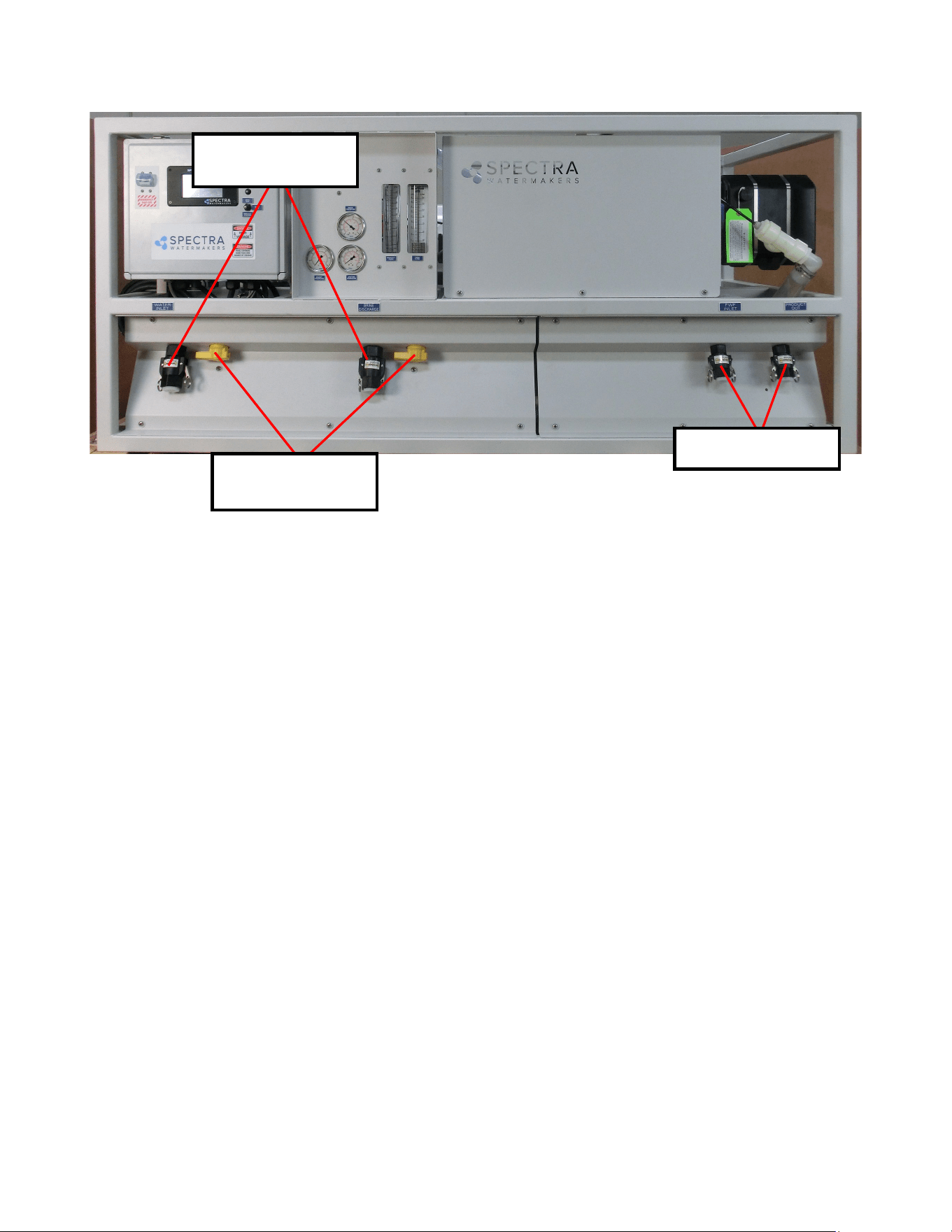
68
PL-VLV-2W1BPVC
1"FPT 2-WAY BALL PVC
VALVE
PL-QDC-CG1GCAP
1”M GROOVE CAM-LOK
CAP
PL-QDC-CG3/4CAP
3/4" CAM LOK CAP
Part Numbers