FM stereo operation
XHDATA —D-368—
USER MANUAL
AM/FM/SW 12 BANDS STEREO RADIO
USB/TF/ MP3 AND WIRELESS BT PLAY
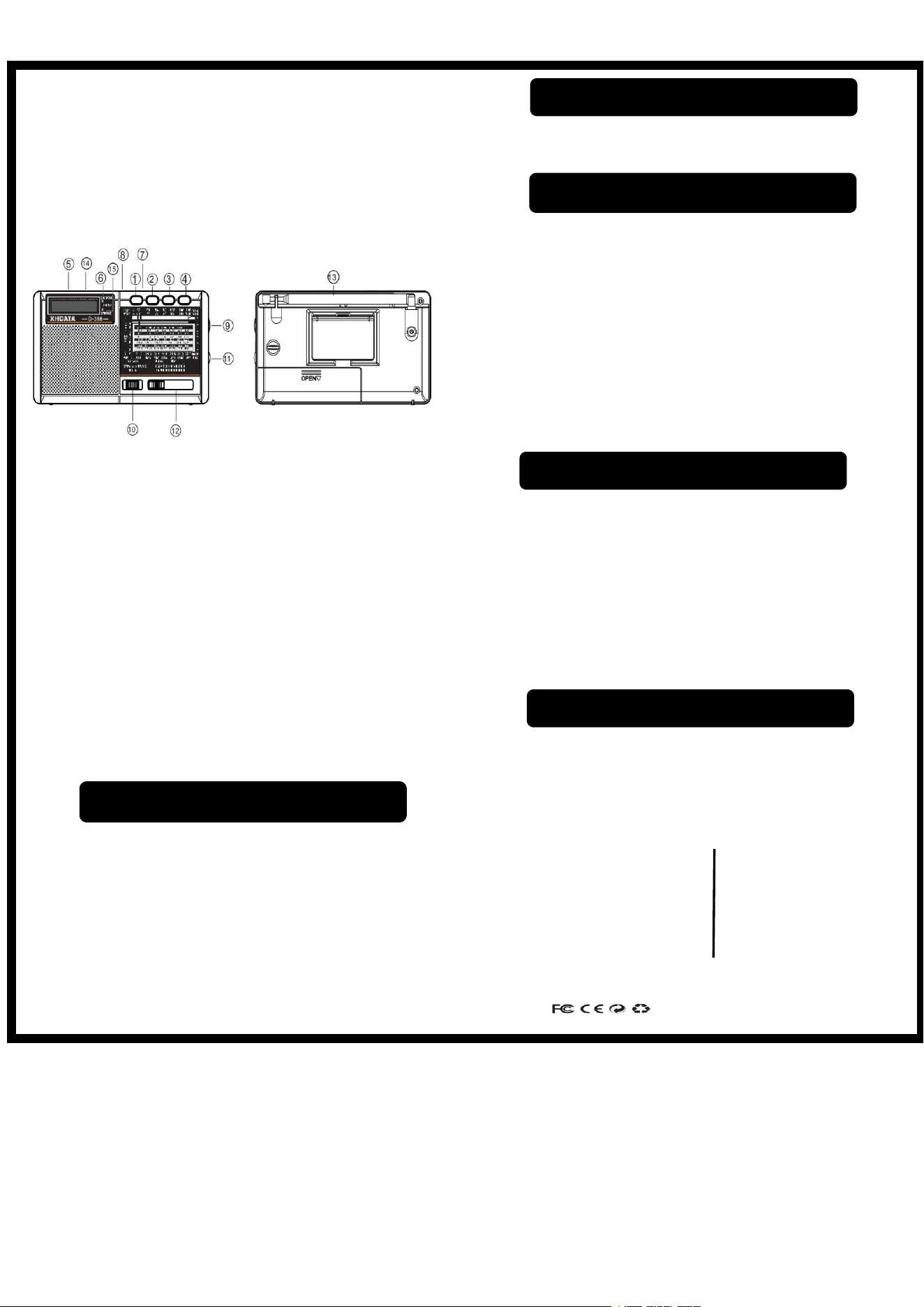
Function button description
1.Mode switch 9 . Radio tuning button
2.Previous key 10. Power/function switch
3.Play /pause key 11. Volume button
4.Next key 12. Radio band button
5.DC 5V Input socket 13 . Antenna
6.Charging LED / 14. Stereo headphone jack
Tuning led 15. Stereo led
7.TF card socket
8.USB socket
· Turn on the power switch ⑩ to the radio gear and adjust the
right volume.
· Push the function switch ⑫to your favorite band.
· When listening to FM or SW band, please pull out the rod
antenna and adjust it to the best receiving angle
⑬
.
When listening to AM band, please rotate the body to adjust
to the best receiving angle.
· Turn the tuning button ⑨ slowly to select the radio
station.
· Plug in stereo headphones during FM radio. When the stereo light
is on, you can enjoy stereo music
· Turn on the power ⑩ switch to MP3 and adjust the right volume.
· Insert the USB or TF card into the corresponding socket⑦ ⑧
· Short press the previous ② or next ④button to select the
previous or next song. Long press these two buttons for fast
reverse or fast for ward function.
· Short press ③ to pause. Press again to resume playback.
· Long press the play key for 3 seconds, and when "one" is displayed,
it is in single play status. Long press again, and "all" is displayed in
all play status.
· Long press ① is Bluetooth, short press in order to play Bluetooth
/USB.
· Turn on the power ⑩switch to MP3 and adjust the right volume.
· When the USB or TF card is not plugged in, the machine will play
Bluetooth connection by default.
· Turn on the Bluetooth connection of mobile phone “ D-368”
· Short press the previous ② or next ④ button to select the
previous or next song.
· Long press the “play” key ⑦ for 3 seconds to forcibly
disconnect the currently connected device, and then press it
again to restore the connection.
· Plug the charging cable into the “DC5V in” ⑤ charging port and
the other end into the 5V USB out put port of the mobile phone
adapter.
· When the battery is fully charged, the LED is off.
SPECIFICATIONS
Skype:radiwow
FM1:87-108MHZ SW1-9:4.75-22.0MHZ Email:xhdatacn@gmail.com
FM2:64-108MHZ DC IN:5V≧ 1000mA Facebook :XHDATA
AM:522-1620KHZ DC :3.7V (18650) https://www.xhdata.com.cn
Whatsapp:+86 18025193267
MADE IN CHINA
Radio function operation
USB/TF MP3 playing function
Wireless BT play function
Charging function operation