User Manual For
FM. AM Digital Demodulation Radio
(Model:HRD-903)
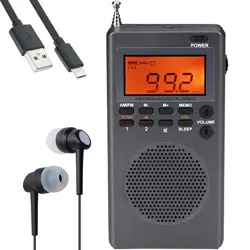
Thanks for your purchase,this is a pocket size AM/FM 2band digital demodulation
radio.please read this manual before use and keep it for future reference.
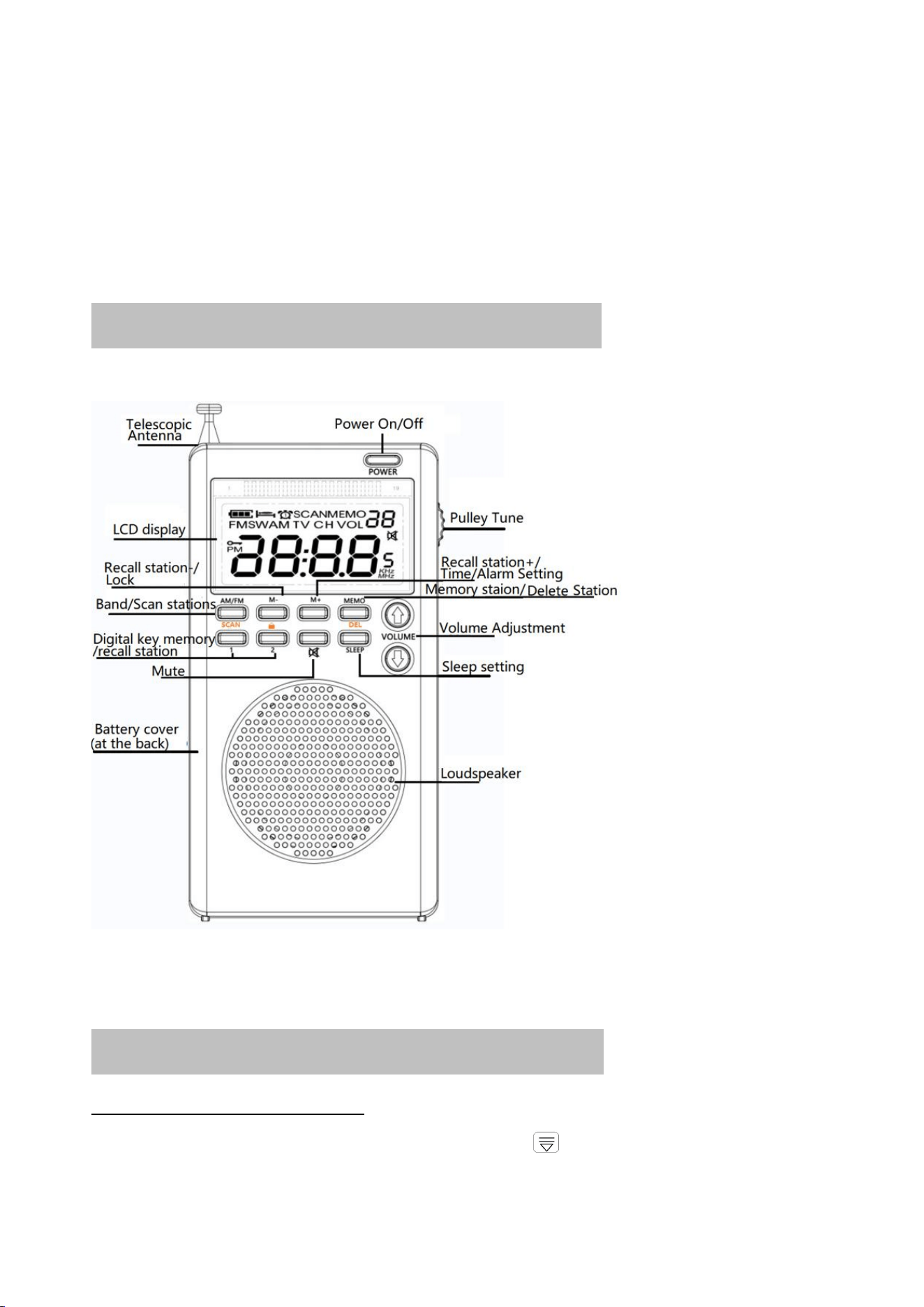
Quick operation guide schematic
Function operational specification
Install battery:
Push the battery cover off the back of the product ,place three 1.5V AA-size batteries
(not included) into the compartment and ensure that they are inserted with the correct
polarity.Alternatively, plug a USB cable into the micro USB DC5V slot to connect to an
external DC5V power supply.The LCD display will then turn on with a backlight orange
screen and the time display will also be shown
Power-on/power off:
Short【POWER】button,turn on the radio。
Power-on state,Short press【POWER】button,turn off the radio。
Band switching:
Short press【AM/FM】button,band switching。
FM1
64-108MHZ
Step value 0.1MHZ
FM2
87.5-108MHZ
Step value 0.1MHZ
AM
530-1700KHZ
Step value 9KHZ/10KHZ
methods to searching radio stations:
There are three methods to selecting stations:
— — Gently push the pulley [TUNING] button up and down slowly, and the frequency will
increase and decrease.
——Up and down push the pulley [TUNING] and let it go, the frequency is fast and automatic
search for a signal station, you can see from the LCD, the frequency is rapidly changing up
or down, and the station with a signal automatically stops searching and plays.
——long press [SCAN] key for 2 seconds, the radio from the lowest frequency point to the
highest frequency point, automatic search radio, radio with signal automatically stored in
the radio
Manual store preset station:
With the radio turned on, push pulley【tuning】to search for the desired radio frequency, Then
short press the【MEMO】button to enter manual memory station mode. the "MEMO **"
symbol will appear on the LCD display (** stands for depository address number).
press the 【MEMO 】confirm the memory station operation.
FM mode and AM mode, each band can stored: 29 stations.
Note: The depository address number ** flashes for 5 seconds. If you do not press [MEMO] to
confirm within 5 seconds, the operation will be abandoned
Recall station instruction:
Through the above described SCAN automatic search for storage station and manual storage
station method, press the【M+】button or [M-] button, select the appropriate station, the LCD
screen appears "1-29" access station address number.
* If it is not stored in the radio station, tap the [M+] key or [M-] key to display “no”symbol.
Quick numeric key store/recall station for two commonly used stations
【1】, 【2】 button. they are the two button for quick storage/ recall.
Quick storage: Long press the number key 【1 or 2】button for 2 seconds, and the frequency
number flashes once, indicating that it has been stored in the radio station.
Quick recall :short press【1 or 2】button to recall the memory station.
Delete a radio station:
press [M+] or [M-] to select the station which you need to delete, press and hold [MEMO] for
2 seconds to delete the station.
Volume adjust【VOLUME. 】:
press or hold down the [VOLUME ] button to adjust the volume at level 00-20
About Lock,unlock function:
Lock:long press【 】button 2 second,“ ”symbol display on the LCD.lock the buttons
Unlock:Long press 【 】 buttons 2 second again.“ ”symbol disappears.recovery function.
Mute :
Power-on station, tap the【 】key. The LCD screen displays the " " symbol, indicating that the
mute function has been enabled.
Then tap the 【 】 key, the LCD screen mute " " The symbol disappears, indicating that the
mute has been removed, resume normal play;
Or in the silent state, you can also cancel mute the device by press the [VOLUME ] or]
key.
Time setting
After the battery is installed, the LCD will display the time status. Long press 【MEMO】 button
for 2 seconds to display "12Hr or 24Hr" time format. Press [VOLUME ] button to select
"12Hr or 24Hr" format.
Press【MEMO】button again. When the hour digit ** is blinking, press [VOLUME ] to
adjust the current hour
Press【MEMO】 button again. The minute number "**" is blinking. Press [VOLUME ] to
adjust the minute.
Finally, tap [MEMO] to confirm the adjusted running time.
Alarm Setting(Automatic radio powered on setting)
Press [AM/FM] to enable the alarm function. The LCD displays " " symbol.
Long press [MEMO] button for 2 seconds to adjust the alarm hour. press [VOLUME ]
button to adjust hour.
press [MEMO] again to adjust the alarm minute . press the [VOLUME ] key to adjust
the minutes.
Finally, tap [MEMO] to confirm the adjusted startup time of the alarm clock.
* Running Alarm time, The radio will turn on automatically .
Cancel the alarm: After manual shutdown, the alarm function is automatically disabled
Sleep time setting
(automatic shutdown setting)
Set SLEEP: the radio working state, long press [sleep] key to start the sleep setting, LCD display
" 90" (90 is the automatic shutdown time); At this time, press the [SLEEP] button and select
the sleep time: 90-80-70-60-50-40-30-20-10-0 "minutes time can be selected, select" 0 "to
cancel the sleep shutdown setting.
After selection, the radio will automatically shut down when working to the set sleep time.
AM Frequency 9KHz/10KHz Setting
On the time display state, long press [MEMO&M-] together for about 2 seconds. The LCD
displays the current step value (9KHZ or 10KHZ). press the [VOLUME ] button to adjust
the step value. About one second, the number disappears, at which time the adjustment of the
mid-wave step value is completed.
Note: In the United States, Canada, Mexico and other North American countries and South
American countries, the mid-wave step value must be adjusted to 10KHZ, and other countries
must be adjusted to 9KHZ
The medium wave step is a 9KHZ receiving frequency range :522-1710KHZ
The receiving frequency range of the mid-wave step is 10Khz :520-1710KHZ
external power source
The radio can be powered by external DC5V power supply, and the radio can be used by
inserting TYPE-C,USB into the USB jack of the radio.
Note: If the radio is equipped with a battery, when switching to USB power & battery, please
turn off the radio before switching between USB power & battery.
Instructions for using antenna
FM broadcast:
Pull out the antenna and adjust its length and direction to obtain the best FM signal reception.
Note: Shorten the antenna when reception is affected by other stronger broadcast signals.
AM broadcast:
The radio uses a built-in antenna for AM signal reception.
Change the radio direction to obtain the best AM signal reception
Use 3.5mm earphones
Plug the 3.5mm headphones into the earphone jack on top of the radio.
After inserting the earplugs, please turn the sound to moderate.
Main Technic index:
Frequency range
FM1:64-108MHZ
FM2:87.5-108MHZ
AM: 530-1700KHZ
Receive sensitivity
FM:≤8dB
AM:86dB
Quiescent Current
≤60uA
Maximum Current
≤200mA
Loudspeaker
Ф40 mm/8Ω/1W
SNR
FM:≥40dB
AM:≥33dB
Output power from earphone
10mw
Memory stations
58pcs(FM/AM:Each 29pcs)
Minimal Working Voltage
2.5v
External input voltage
DC5.0v
Battery
1.5vx3 AA
Product size
64.1×24.5×125.5mm
Earphone
Ф3.5mm/32Ω x 2
Warnings
■Please take out remove the batteries when the radio is not in use to avoid battery leakage.
■If the radio volume is unstable or the LCD display starts to dim or flash, this indicates that
the battery power is weak and the batteries will need to be replaced.
■Do not subject the radio to hard knocks or drop it in water.
■Do not expose the radio to direct sunlight and use in high temperatures or high humidity
areas or store the radio at temperatures <-5℃ or >50℃.
■Do not use any chemical solvents to clean the radio exterior to avoid any damage to the
casing.
■Do not disassemble, change or modify any internal parts of the radio.

FCC Statement:
This device complies with part 15 of the FCC Rules. Operation is subject to the following two
conditions:
(1) This device may not cause harmful interference, and
(2) this device must accept any interference received, including interference that may cause
undesired operation.
This equipment has been tested and found to comply with the limits for a Class B digital
device, pursuant to part 15 of the FCC Rules. These limits are designed to provide
reasonable protection against harmful interference in a residential installation. This
equipment generates, uses and can radiate radio frequency energy and, if not installed and
used in accordance with the instructions, may cause harmful interference to radio
communications. However, there is no guarant ee that interference will not occur in a
particular installation. If this equipment does cause harmful interference to radio or
television reception, which can be determined by turning the equipment off and on, the
user is encouraged to try to correct the interference by one or more of the following
measures:
—Reorient or relocate the receiving antenna.
—Increase the separation between the equipment and receiver.
—Connect the equipment into an outlet on a circuit different from that to which the receiver
is connected.
—Consult the dealer or an experienced radio/TV technician for help.
Caution: Any changes or modifications not expressly approved by the party responsible
for compliance could void the user's authority to operate the equipment.
This equipment complies with FCC radiation exposure limits set forth for an uncontrolled
environm ent. This transmitter must not be co‐located or operating in conjunction with any
other antenna or transmitter.

