1
Serial Number
SG25884
Purchase Date
ITEM #6034476
MODEL #37000153
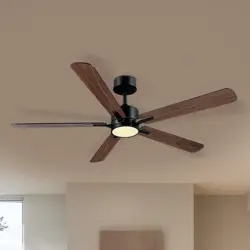
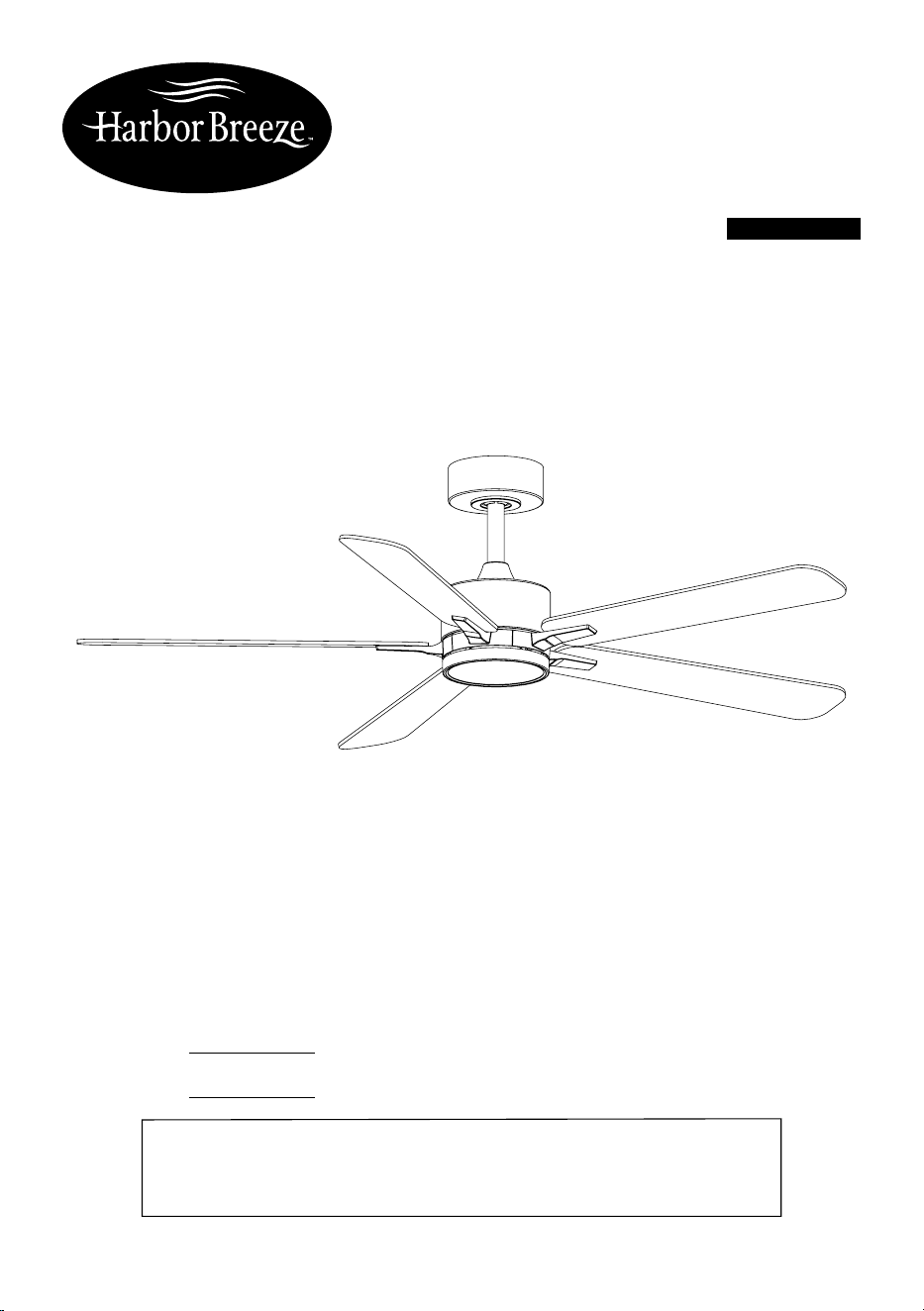
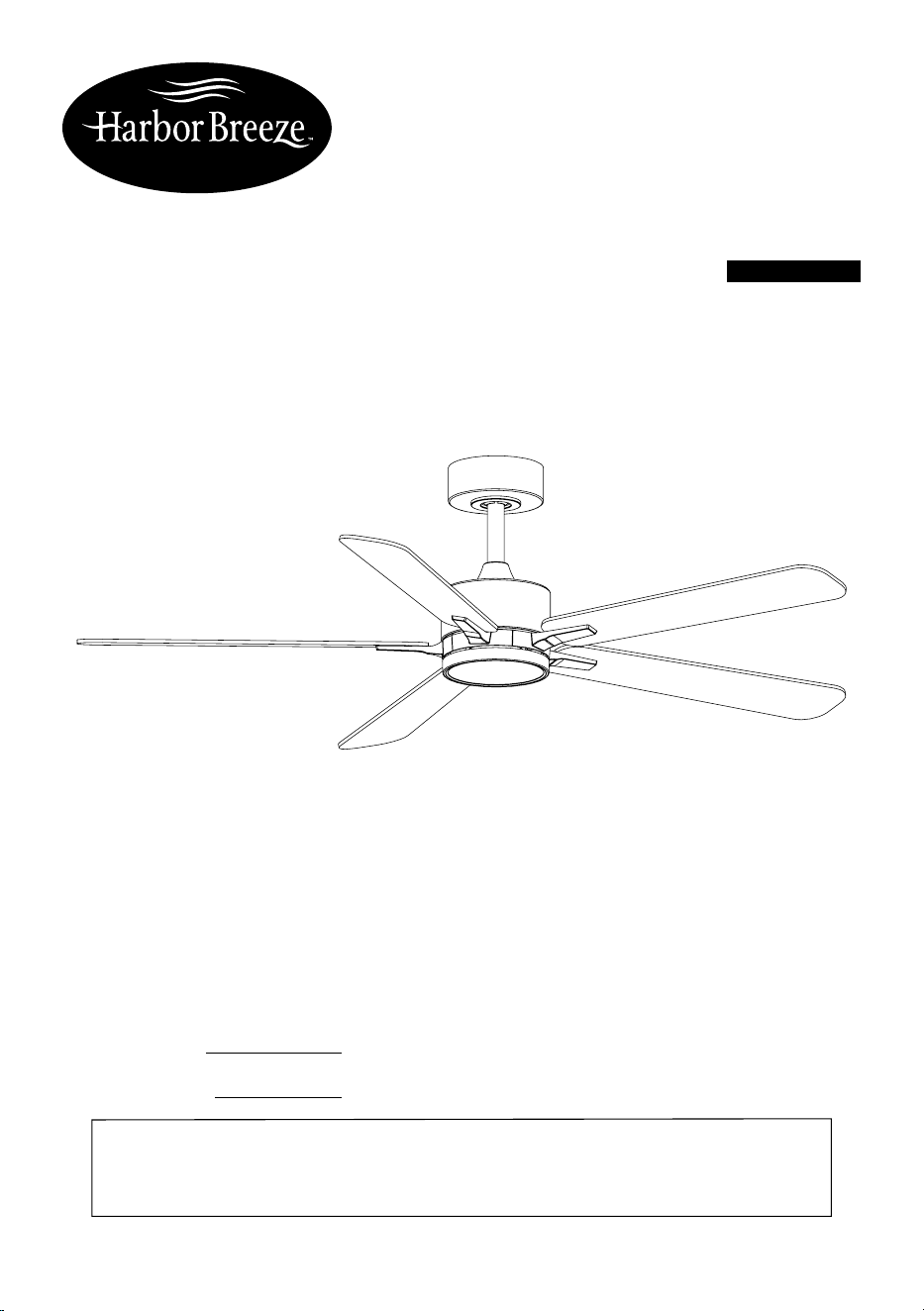
NORTHBROOK
CEILING FAN
Español p. 23
ATTACH YOUR RECEIPT HERE
Thank you for purchasing this HARBOR BREEZE product.
Questions, problems or missing parts?
Before returning, contact us on:
888-251-1003, 8 a.m. - 8 p.m., EST, Monday - Sunday or [email protected].
HARBOR BREEZE and logo design are
trademarks or registered trademarks of LF,
LLC. All rights reserved.
2
Model
Min. thickness of edges
of blades (in. / mm)
Blade length (in. / cm) RPM
Speed at tip of blades
(ft/s, m/s)
37000153 0.22 in. (5.59 mm) 21.81 in. (55.4 cm) 165 37.43 ft/s (11.41 m/s)
TABLE OF CONTENTS
Package Contents................................................................................................................................ 3
Hardware Contents.............................................................................................................................. 4
Safety Information................................................................................................................................ 5
Preparation........................................................................................................................................... 9
Pre-installation...................................................................................................................................... 9
Installation Instructions........................................................................................................................ 10
Fan and Remote Control Operation.................................................................................................... 20
Care and Maintenance........................................................................................................................ 21
Troubleshooting.................................................................................................................................... 21
Three Years Limited Warranty.............................................................................................................. 22
Technical Service................................................................................................................................. 22
PRODUCT SPECIFICATIONS
SPECIFICATIONS SPECIFICATIONS
Remote control 6 Speed
Dimmable 4743 CFM, 165 RPM
5 color select Integrated LED
Silent operation 1200 lumens, 80 CRI
DC motor 20,000 hours
Energy efcient 35 W motor 52 in. diameter (fully assembled)
Reversible motor Net weight of fan: 9.74 lbs. / 4.42 kg.
3
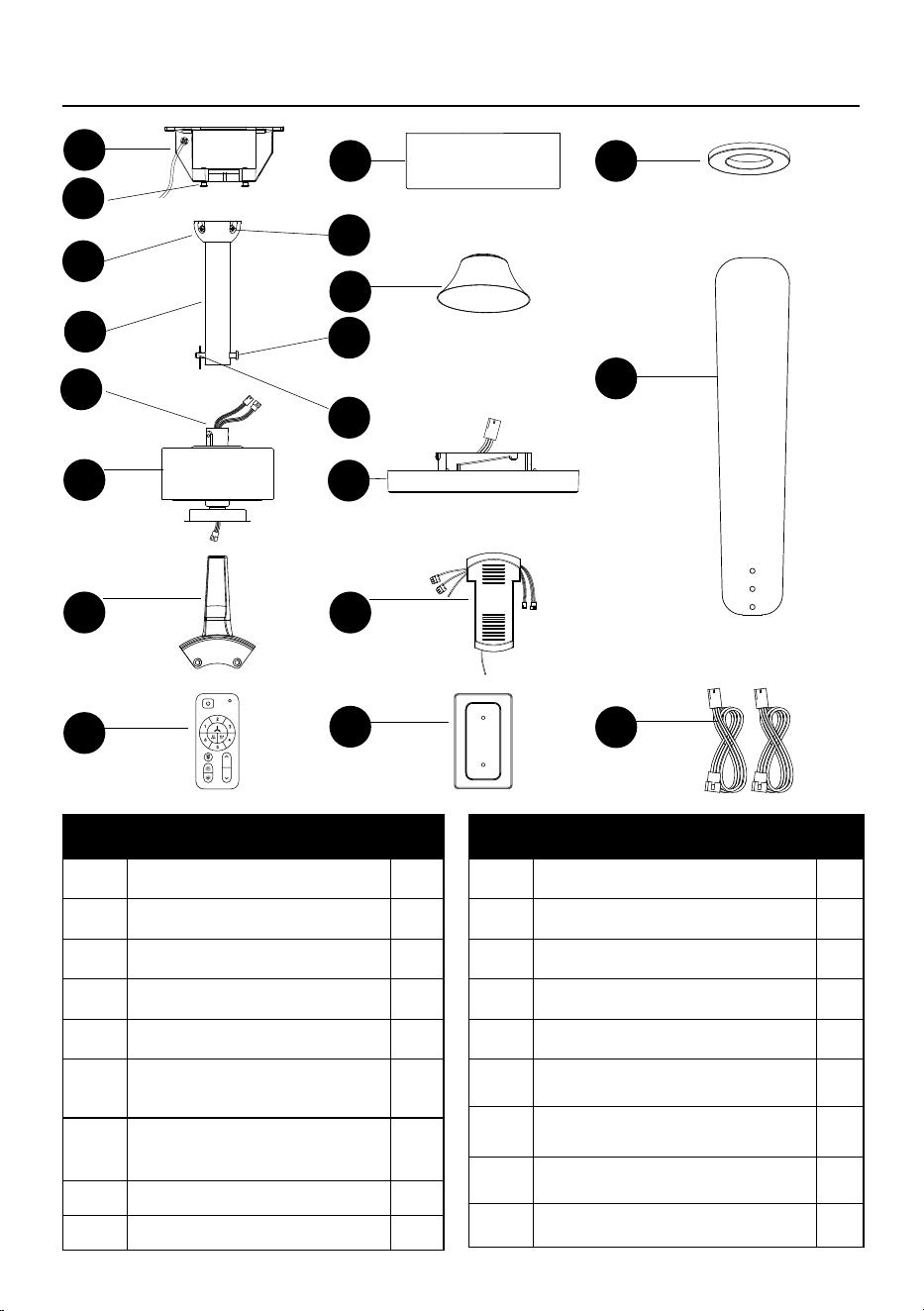
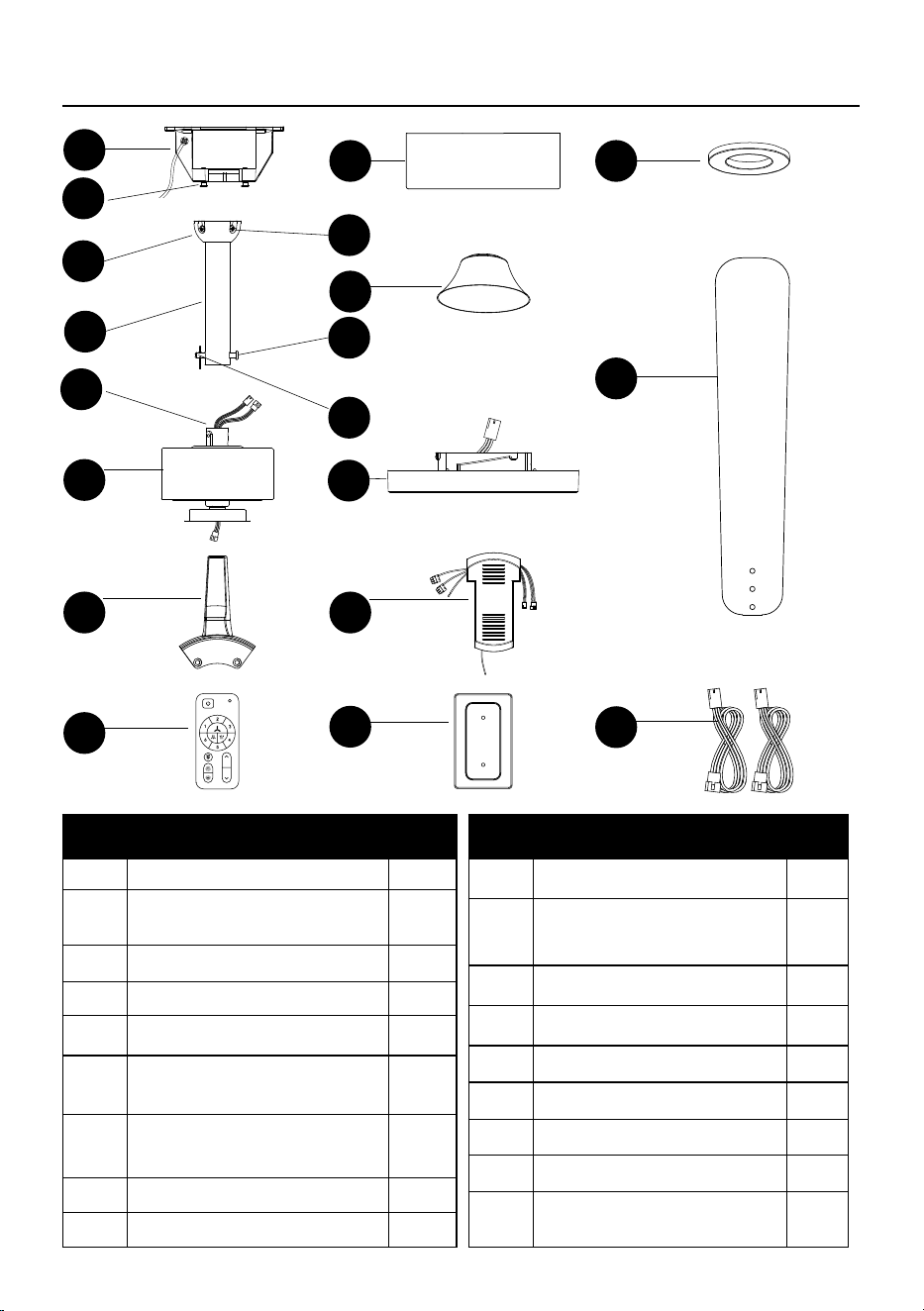
PART DESCRIPTION QTY
A Mounting bracket 1
SS
Mounting bracket screws (preassem-
bled to Mounting Bracket [A])
2
B Canopy 1
C Magnetic canopy ring 1
D
Hanger ball
(pre-assembled to Downrod [E])
1
NN
Hanger ball screws
(preassembled to Hanger Ball [D])
2
OO/PP
Downrod locking pin and
hanging pin (preassembled
to Downrod [E])
2
E Downrod 1
F Decorative cover 1
PACKAGE CONTENTS
A
B C
F
K
G
J L
M
N
O
SS
D
OO
NN
PP
QQ
E
H
PART DESCRIPTION QTY
G Motor housing 1
QQ
Set screws
(preassembled to Motor housing [G])
2
H Light kit 1
J Blade arm 5
K Blade 5
L Remote control receiver 1
M Remote control 1
N Remote control backplate 1
O
Extra 30 in. wires included for longer
downrods that are purchased separately
2
4
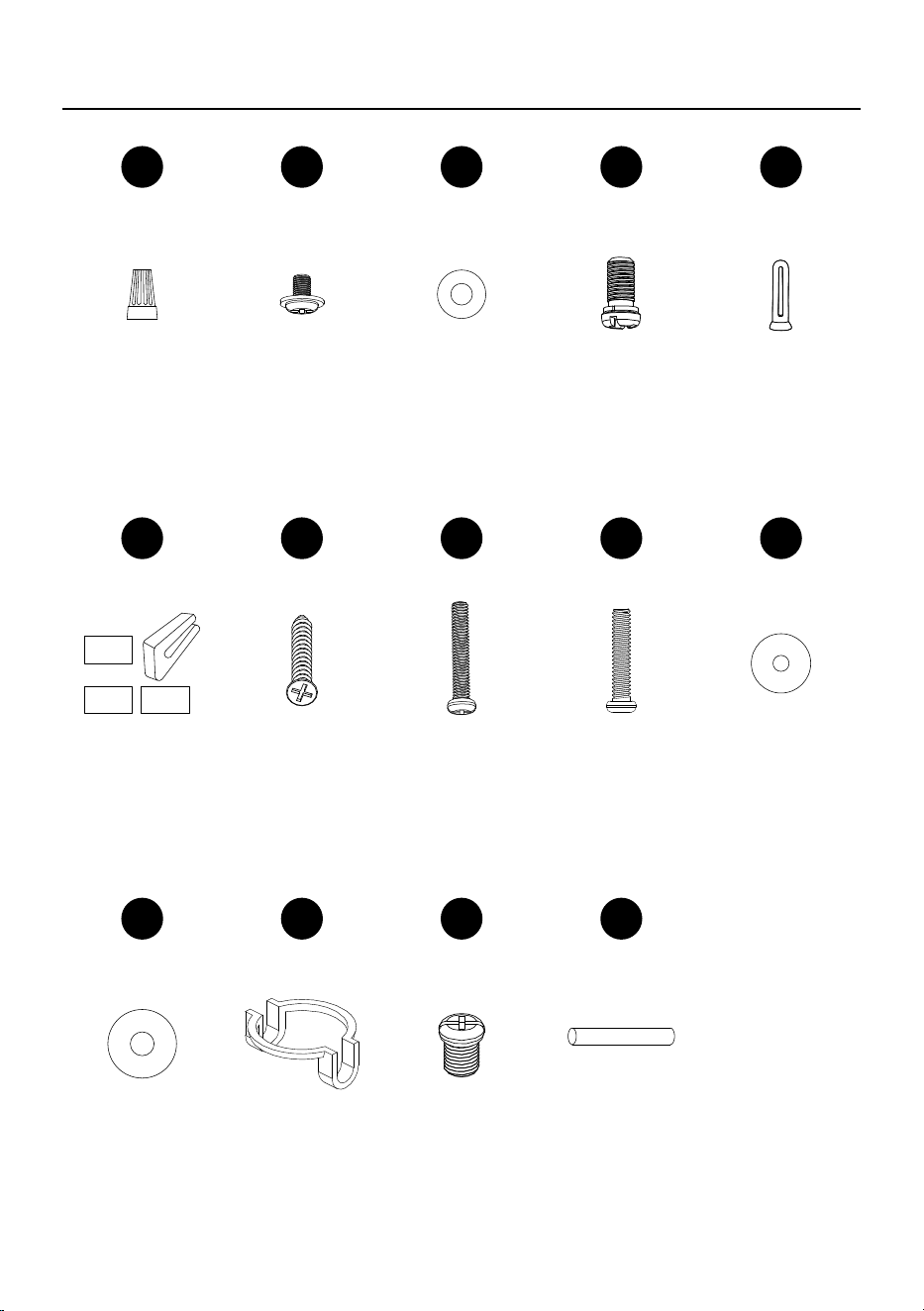
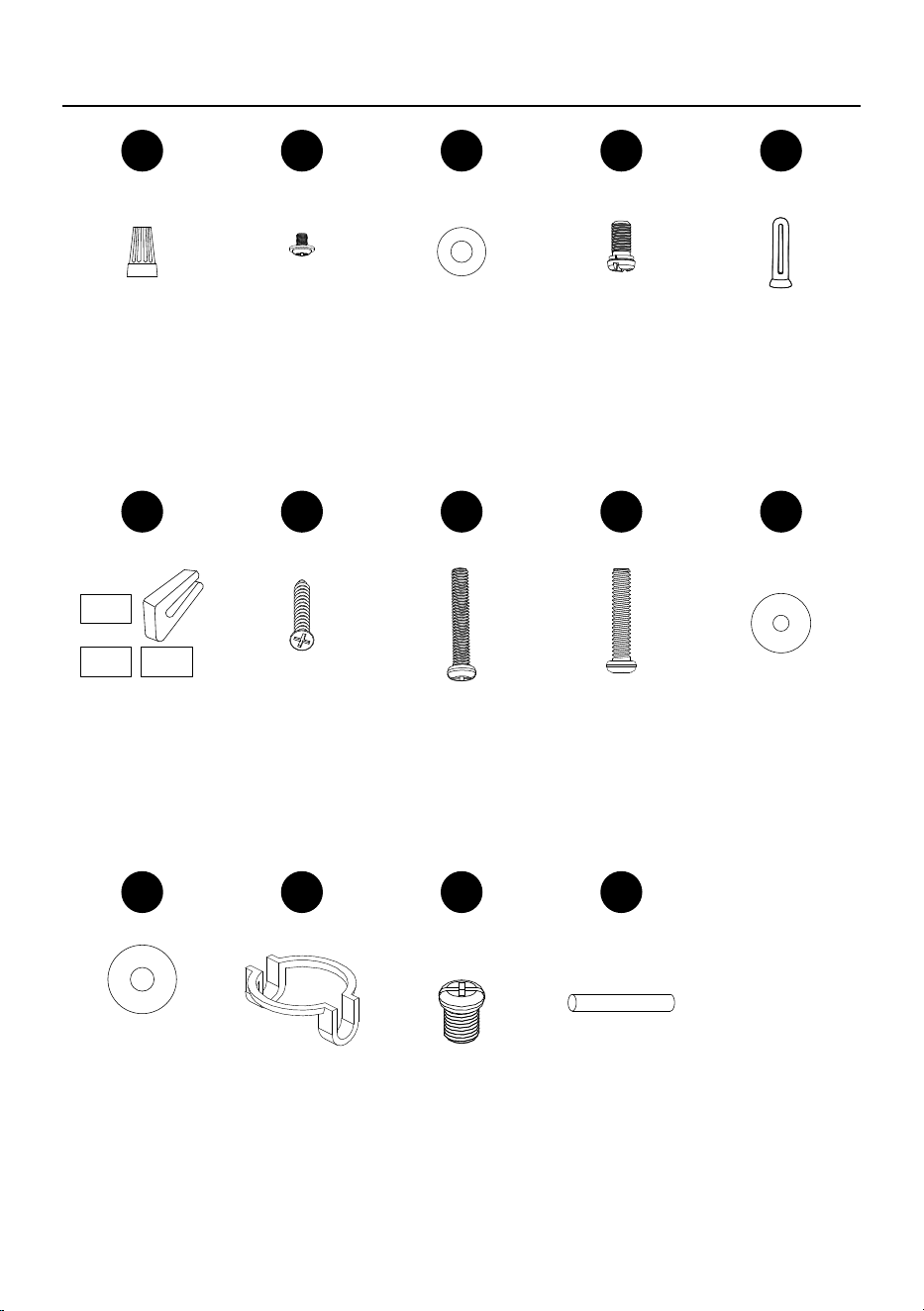
HARDWARE CONTENTS
AA BB CC DD EE
Wire nut Blade
screws
Washers for
blade screws
Blade arm
screws
Remote control
backplate screw
anchors
Qty. 2 Qty. 16 Qty. 16 Qty. 11 Qty. 2
FF GG HH II JJ
Balancing kit Remote control
backplate
screws
Extra junction
box screws
#8-32 x 1 in.
(2.54 cm)
Extra junction
box screws
#10-24 x 1 in.
(2.54 cm)
Washers for
junction box
screws #8-32
Qty. 1 Qty. 2 Qty. 2 Qty. 2 Qty. 2
KK LL MM YY
Washers for
junction box
screws #10-24
Insert for
downrod
hanger ball
Screws for
downrod
hanger ball
Cross pin
for downrod
hanger ball
Qty. 2 Qty. 1 Qty. 2 Qty. 1
5
SAFETY INFORMATION
Please read and understand this entire manual before attempting to assemble, operate or install
the product.
SAFETY INFORMATION
Most electrical accidents are caused by carelessness or ignorance. If you combine a basic
knowledge of electricity, a healthy respect for it, and a dose of common sense, you can safely tackle
many household electrical repairs. Here are some basic guidelines for working with electricity:
•
Before working on a circuit, go to the main service panel and remove the fuse or trip the breaker
that controls that circuit. Tape a sign to the panel warning others to leave the circuit alone while
you work.
•
Before touching any wire, use a voltage tester to make sure it’s not live.
•
Whenever you check for voltage in a receptacle, check both outlets – each may be controlled by a
separate wiring circuit.
•
When replacing fuses, turn off the main power rst. Make sure your hands and feet are dry, and
place one hand behind your back to prevent electricity from making a complete circuit through your
chest.
•
Touch a plug fuse only by its insulated rim. Remove cartridge fuses with a fuse puller.
•
Use tools with insulated handles and ladders made of wood or berglass.
•
Keep dry-chemical re extinguishers in the kitchen, basement, and workshop.
•
Never disable grounding devices. Make sure that all appliances requiring grounding are properly
grounded, and that the electrical system itself is properly grounded.
•
Meet or exceed all electrical code requirements that cover the work you are doing.
•
Always work with enough light to see what you are doing; it’s easy to make mistakes when you’re
working in dim light.
If in doubt, consult a qualied electrician.
6
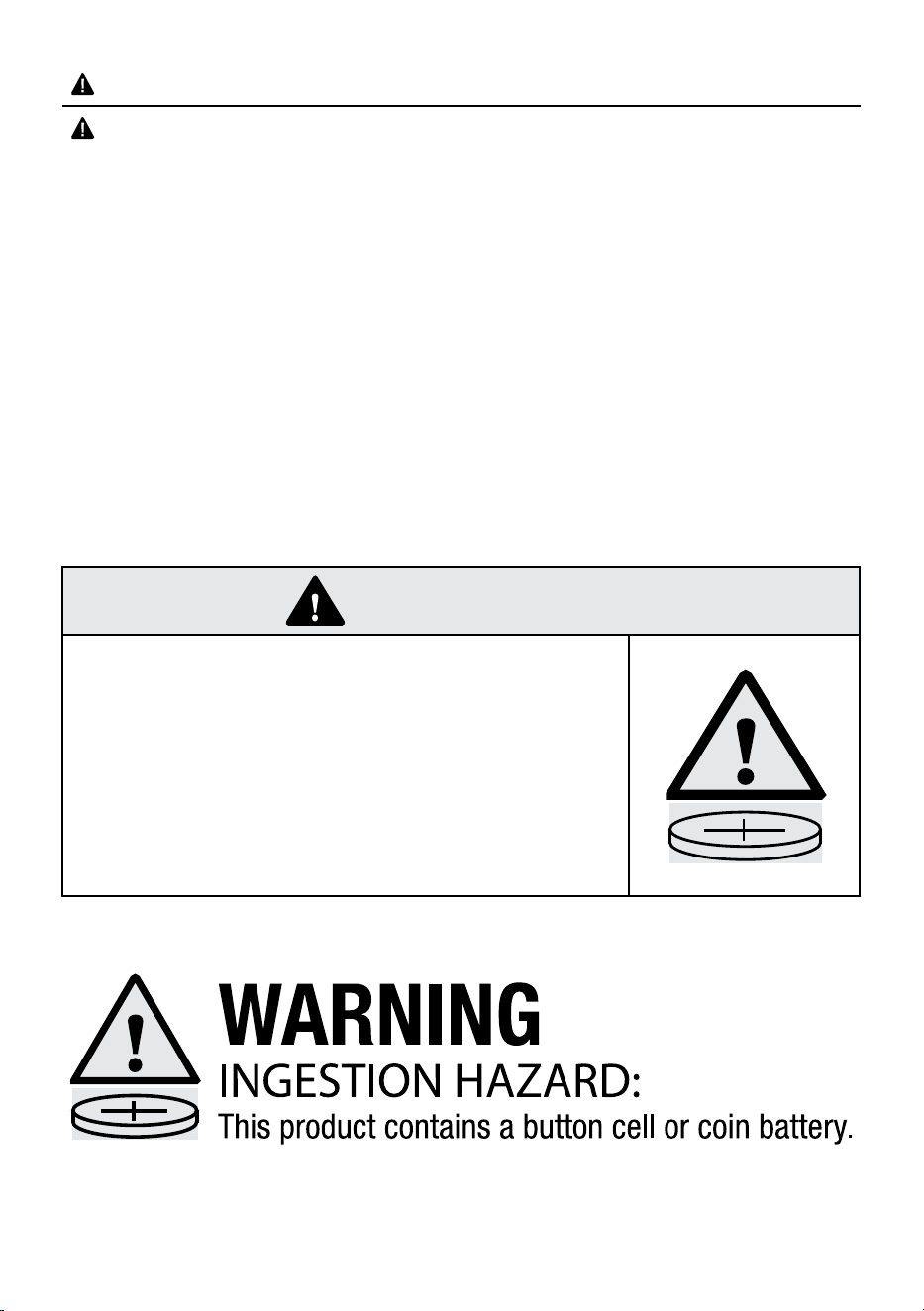
• INGESTION HAZARD: This product contains a button cell or
coin battery.
• DEATH or serious injury can occur if ingested.
• A swallowed button cell or coin battery can cause Internal
Chemical Burns in as little as 2 hours.
• KEEP new and used batteries OUT OF REACH of CHILDREN.
• Seek immediate medical attention if a battery is suspected to
be swallowed or inserted inside any part of the body.
WARNING
SAFETY INFORMATION
WARNING
• Ensure the batteries are installed correctly according to polarity (+ and -).
• Remove and immediately recycle or dispose of used batteries according to local regulations and
keep away from children. Do not dispose of batteries in household trash or incinerate.
• Do not dispose of batteries in re. Batteries may explode or leak.
• Even used batteries may cause severe injury or death.
• Call a local poison control center for treatment information.
• CR2032 3V replaceable battery.
• Non-rechargeable batteries are not to be recharged.
• Do not force discharge, recharge, disassemble, heat above (60°C) or incinerate. Doing so may
result in injury due to venting, leakage or explosion resulting in chemical burns.
• Do not mix old and new batteries, different brands or types of batteries, such as alkaline,
carbon-zinc, or rechargeable batteries.
• Remove and immediately recycle or dispose of batteries from equipment not used for an extended
period of time according to local regulations.
• Always completely secure the battery compartment. If the battery compartment does not close
securely, stop using the product, remove the batteries, and keep them away from children.
7
WARNING
READ AND SAVE THESE INSTRUCTIONS
Most electrical accidents are caused by carelessness or ignorance. If you combine a basic knowledge
of electricity, a healthy respect for it, and a dose of common sense, you can safely tackle many
household electrical repairs. Here are some basic guidelines for working with electricity:
• Before working on a circuit, go to the main service panel and remove the fuse or trip the breaker
that controls that circuit. Tape a sign to the panel warning others to leave the circuit alone while
you work.
• Before touching any wire, use a voltage tester to make sure it’s not live.
• Whenever you check for voltage in a receptacle, check both outlets – each may be controlled by a
separate wiring circuit.
• When replacing fuses, turn off the main power rst. Make sure your hands and feet are dry, and
place one hand behind your back to prevent electricity from making a complete circuit through your
chest. Touch a plug fuse only by its insulated rim. Remove cartridge fuses with a fuse puller.
• Use tools with insulated handles and ladders made of wood or berglass.
• Keep dry-chemical re extinguishers in the kitchen, basement, and workshop.
• Never disable grounding devices. Make sure that all appliances requiring grounding are properly
grounded, and that the electrical system itself is properly grounded.
• Meet or exceed all electrical code requirements that cover the work you are doing.
• Always work with enough light to see what you are doing; it’s easy to make mistakes when you’re
working in dim light.
• If in doubt, consult a qualied electrician.
Any changes or modications to this unit not expressly approved by the party responsible for
compliance could void the user’s authority to operate the equipment
This device complies with Part 15 of the FCC rules. Operation is subjected to the following two
conditions: (1) this device may not cause harmful interference, and (2) this device must accept any
interference received, including interference that may cause undesired operation.
This device contains licence-exempt transmitter(s)/receiver(s) that comply with Innovation, Science
and Economic Development (ISED) Canada’s licence-exempt RSS(s). Operation is subject to the
following two conditions: (1) this device may not cause interference, and (2) this device must accept
any interference, including interference that may cause undesired operation of the device.
The device has been evaluated to meet general RF exposure requirement.
NOTE:
This equipment has been tested and found to comply with the limits for a Class B digital device,
pursuant to Part 15 of the FCC Rules. These limits are designed to provide reasonable protection
against harmful interference in a residential installation. This equipment generates, uses and can
radiate radio frequency energy and, if not installed and used in accordance with the instructions, may
cause harmful interference to radio communications. However, there is no guarantee that interference
will not occur in a particular installation. If this equipment does cause harmful interference to radio
or television reception, which can be determined by turning the equipment off and on, the user is
encouraged to try to correct the interference by one or more of the following measures:
- Reorient or relocate the receiving antenna.
- Increase the separation between the equipment and receiver.
- Connect the equipment to an outlet on a circuit different from that to which the receiver is connected.
- Consult the dealer or an experienced radio/TV technician for help.
8
FCC Responsible Party: Globe Electric
Address: 2264 East 6th Street, San Bernardino, CA 92410 U.S.A.
www.globe-electric.com
CAN ICES (B)/NMB (B)
WARNING: to reduce the risk of re or electric shock, do not use this fan with any solid-state speed
control device.
WARNING: to reduce the risk of personal injury, do not bend the blade brackets when installing
the brackets, balancing the blades, or cleaning the fan. Do not insert foreign objects in
between rotating fan blades.
WARNING: to reduce the risk of re, electric shock, or personal injury, mount to outlet box marked
“acceptable for fan support of 15.9/22.7/31.8 kg (35/50/70 lbs.) or less” and use mounting
screws provided with the outlet box.
CAUTION: t o reduce the risk of electric shock, disconnect the electrical supply circuit to the fan before
installing light kit.
WARNING
9
PREPARATION
Before beginning assembly of product, make sure all parts are present. Compare parts with
package contents list and hardware contents list. If any part is missing or damaged, do not attempt
to assemble, install, or operate the product.
Estimated Assembly Time: 15-30 minutes
Tools Required for Assembly (not included): Phillips head screwdrivers, wire cutter, electrical tape
and step ladder.
Note: Do not use power tools for the installation to avoid damaging the screws/parts.
PRE-INSTALLATION
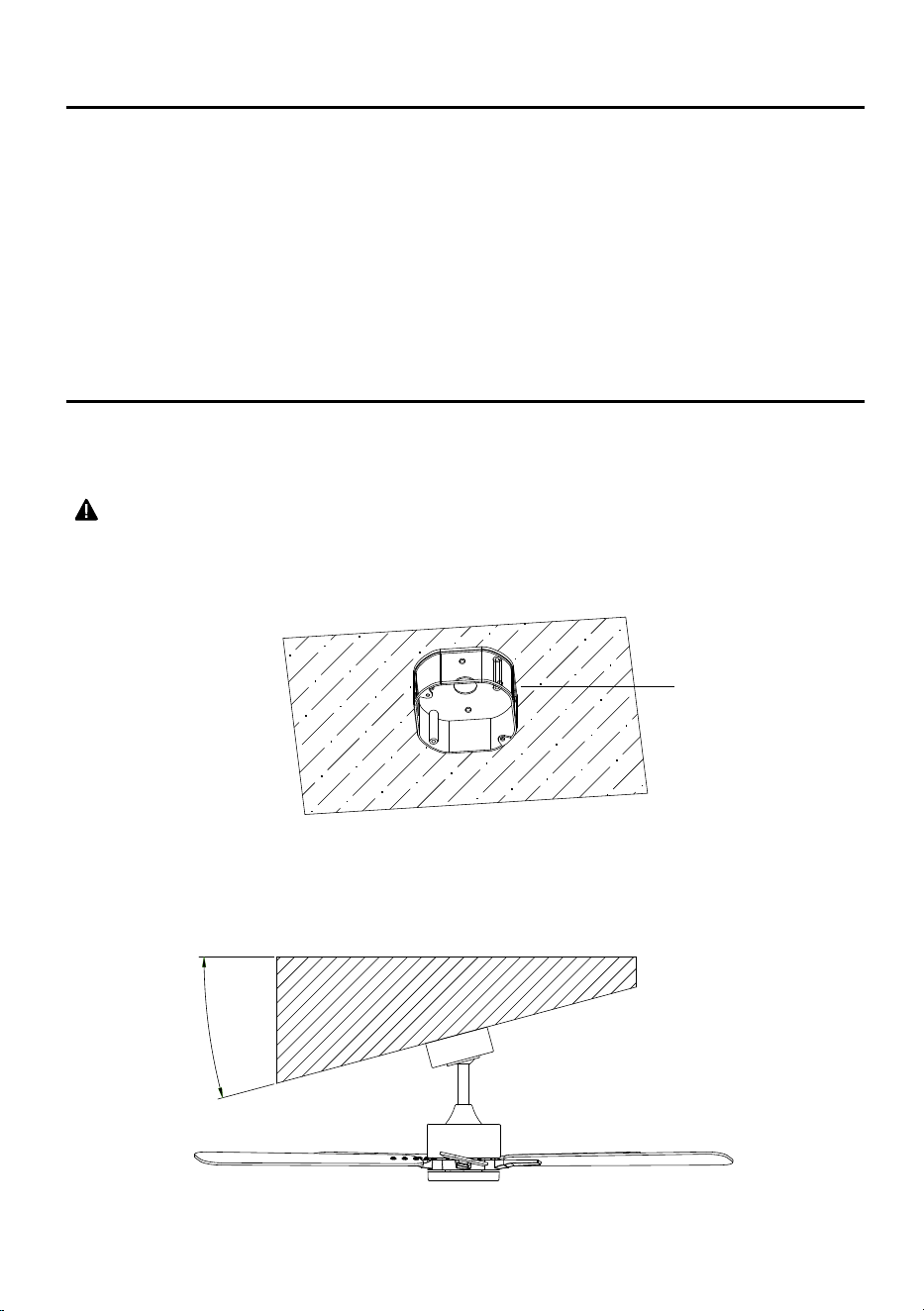
Fan must be able to be secured to a fan-rated outlet box. If none exists, contact a qualied
electrician for installation.
WARNING
• To reduce the risk of re, electric shock, or personal injury, mount to outlet box marked “acceptable
for fan support of 15.9/22.7/31.8 kg. (35/50/70 lbs.) or less” and use mounting screws provided with
the outlet box.
NOTE:
•
Fan can be mounted on a sloped ceiling up to a maximum angle of 15 degrees.
15°
Outlet Box
10
INSTALLATION INSTRUCTIONS
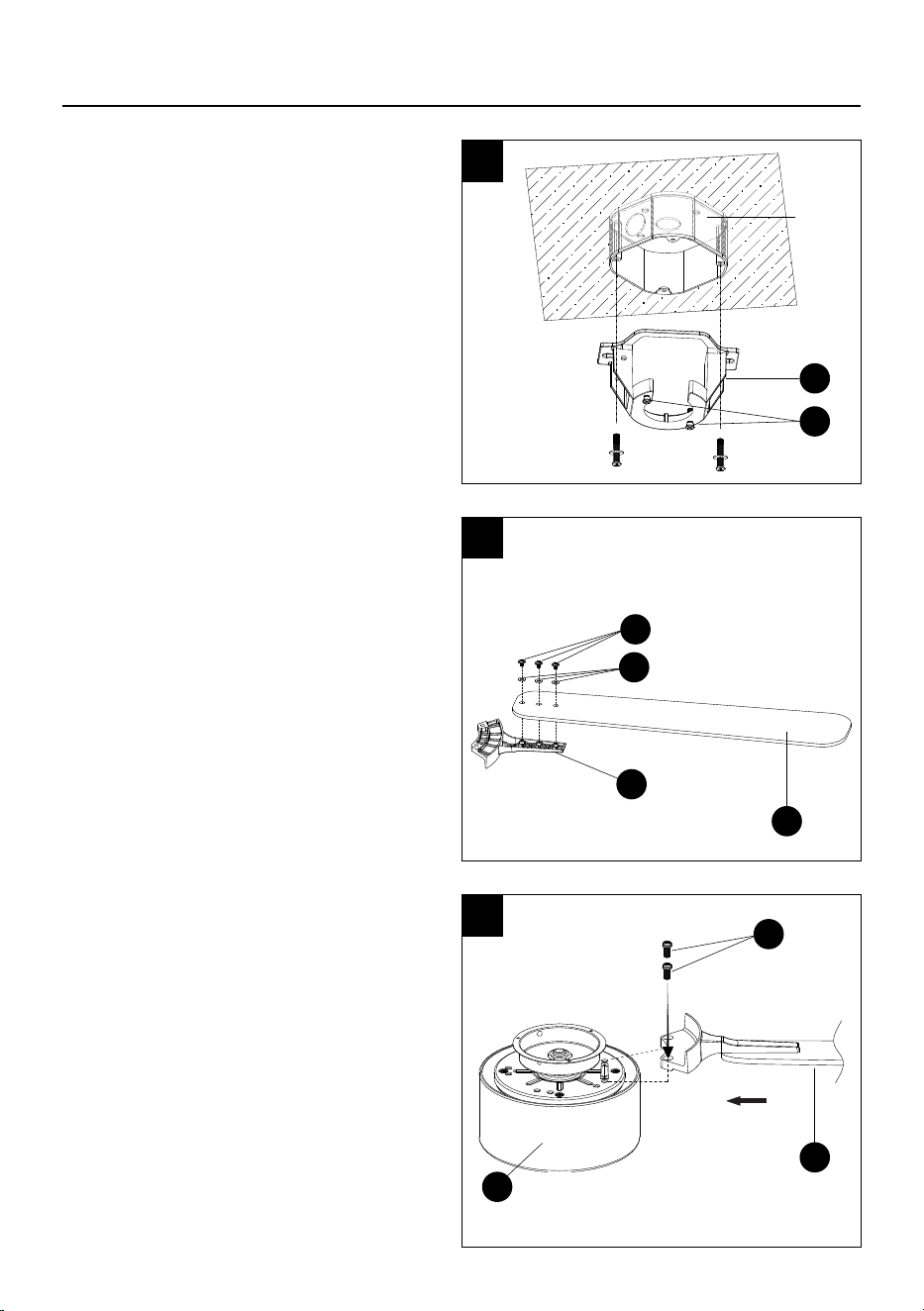
1. Installing the mounting bracket to the outlet
box.
Secure the mounting bracket (A) to the outlet
box with the screws and washers provided
with your outlet box.
Loosen (do not remove) the 2 mounting
bracket screws (SS).
NOTE: Extra junction box screws #8-32 x 1 in.
(2.54 cm) and washers (HH/JJ), and #10-24
x 1 in. (2.54 cm) and washers (II/KK) found in
bag "AA" included if needed.
2. Attaching the blade to the blade arm.
Secure the blade arm (J) to the blade (K)
using the blade screws (BB) and washers
(CC) from the accessory bag "BBB". Repeat
for the other 4 blades.
3. Attaching the assembled blades to the motor
housing.
Line up the assembled blade (K) to the motor
housing (G) between the 2 arrows, as shown,
and attach using the blade arm screws (DD)
from the accessory bag "BB". Repeat for the
remaining 4 blade arms.
NOTE: The inside of the ceiling fan box can
be used to stabilize the fan, to avoid potential
damage.
1
Outlet
Box
A
SS
2
3
J
K
BB
CC
DD
K
G
11
INSTALLATION INSTRUCTIONS
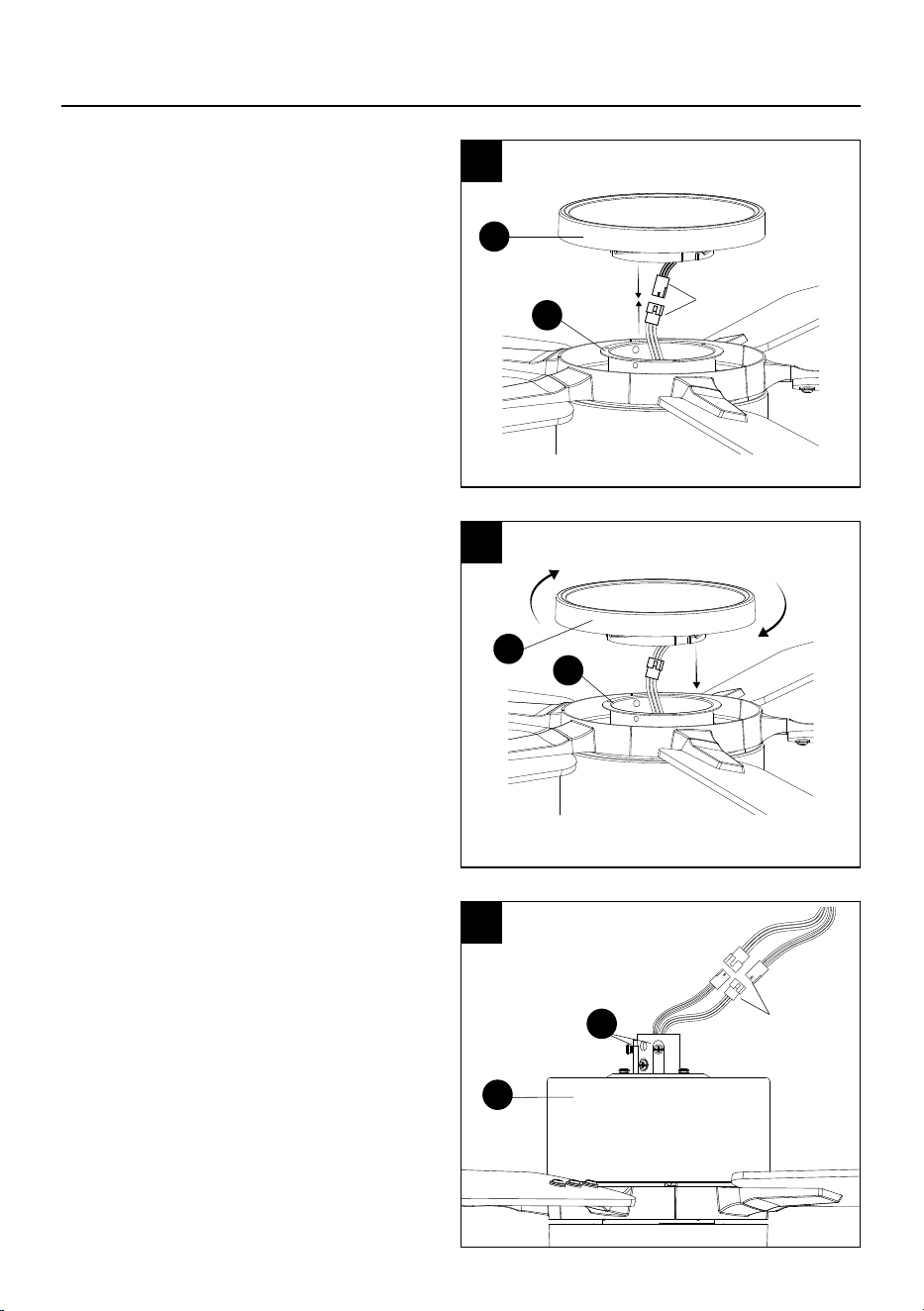
4. Connecting the light kit.
Connect the light kit wires (H) to the motor
housing wires (G).
5. Secure the light kit (H) to the motor housing
(G) by twisting clockwise until tight.
6. Prep motor housing for downrod installation.
Turn the fan over and loosen the 2 set screws
(QQ) on the motor housing (G).
NOTE: If you are using a longer downrod
(not included, must be purchased separately),
attach the extra 30 in. wires (O) to the motor
housing (G) before installing the longer
downrod.
Connect
Connect
4
5
6
H
H
G
G
G
QQ
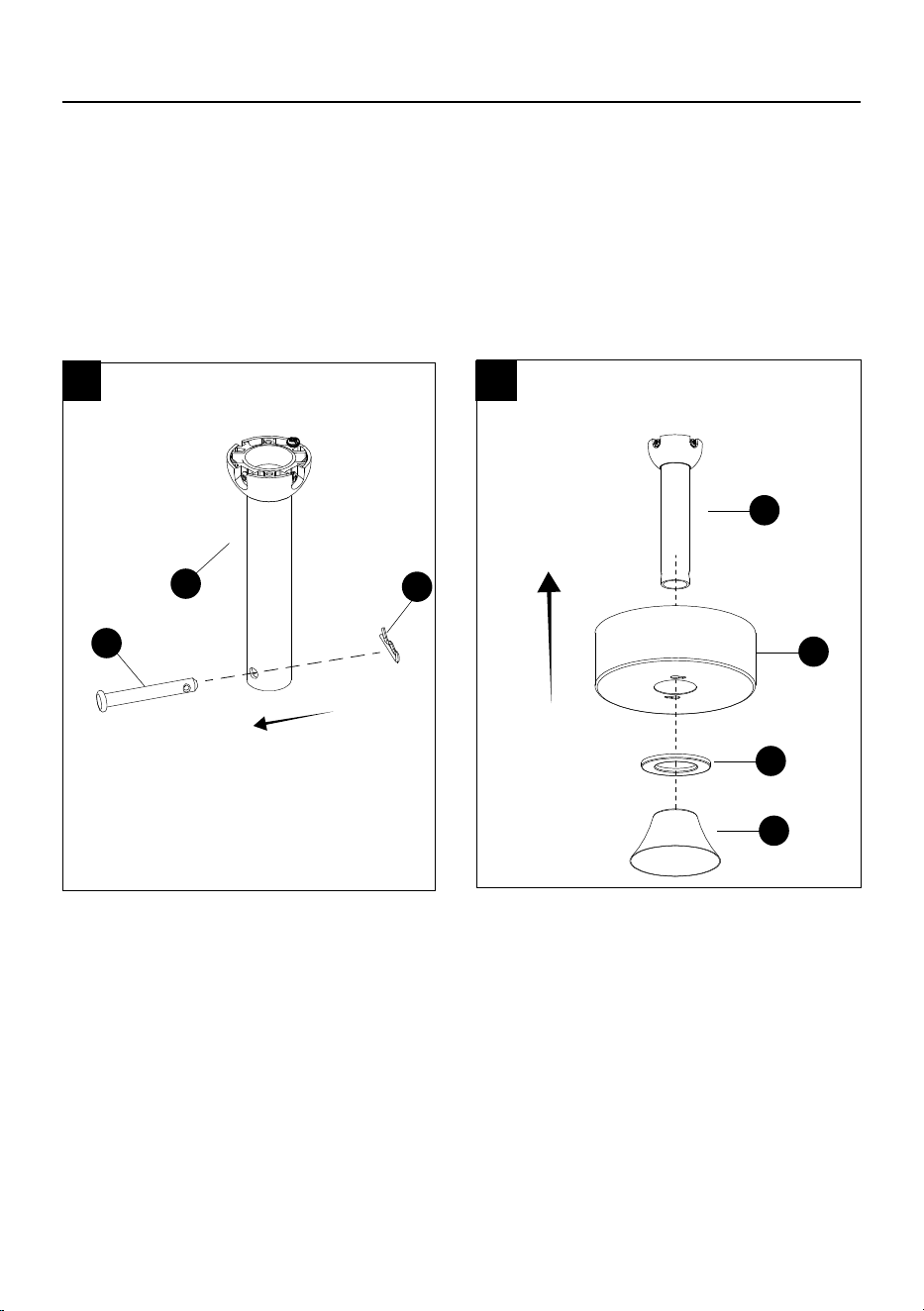
12
7
8
INSTALLATION INSTRUCTIONS
Continue with steps 7 and 8 to install the downrod that is included.
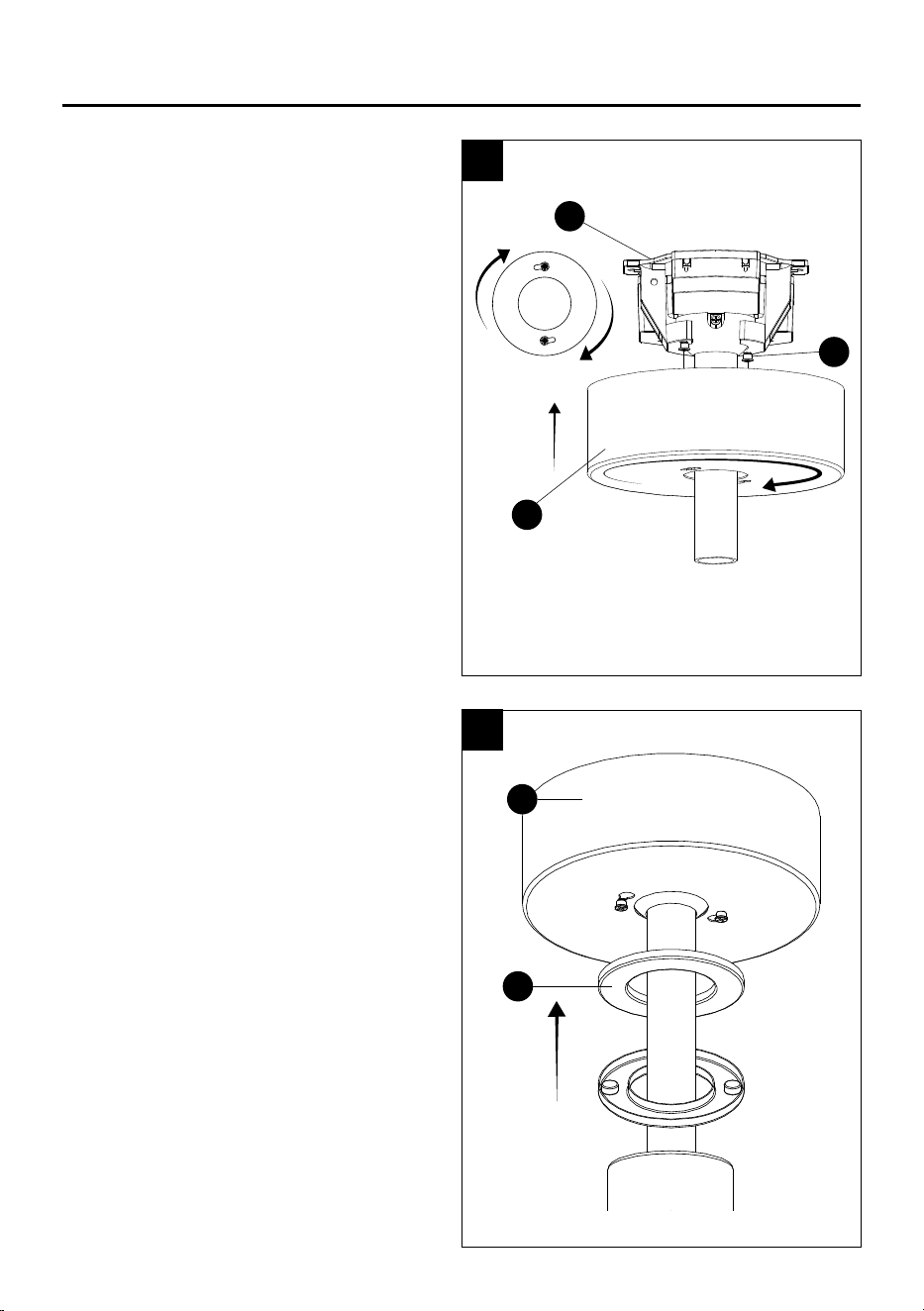
7. Remove the locking pin (PP) and the
hanging pin (OO) from the downrod (E).
8. Slide the canopy (B) and the
magnetic canopy ring (C), both
facing upwards onto the downrod.
Then slide the decorative cover (F)
onto the downrod facing downwards.
OO
E
PP
E
B
C
F
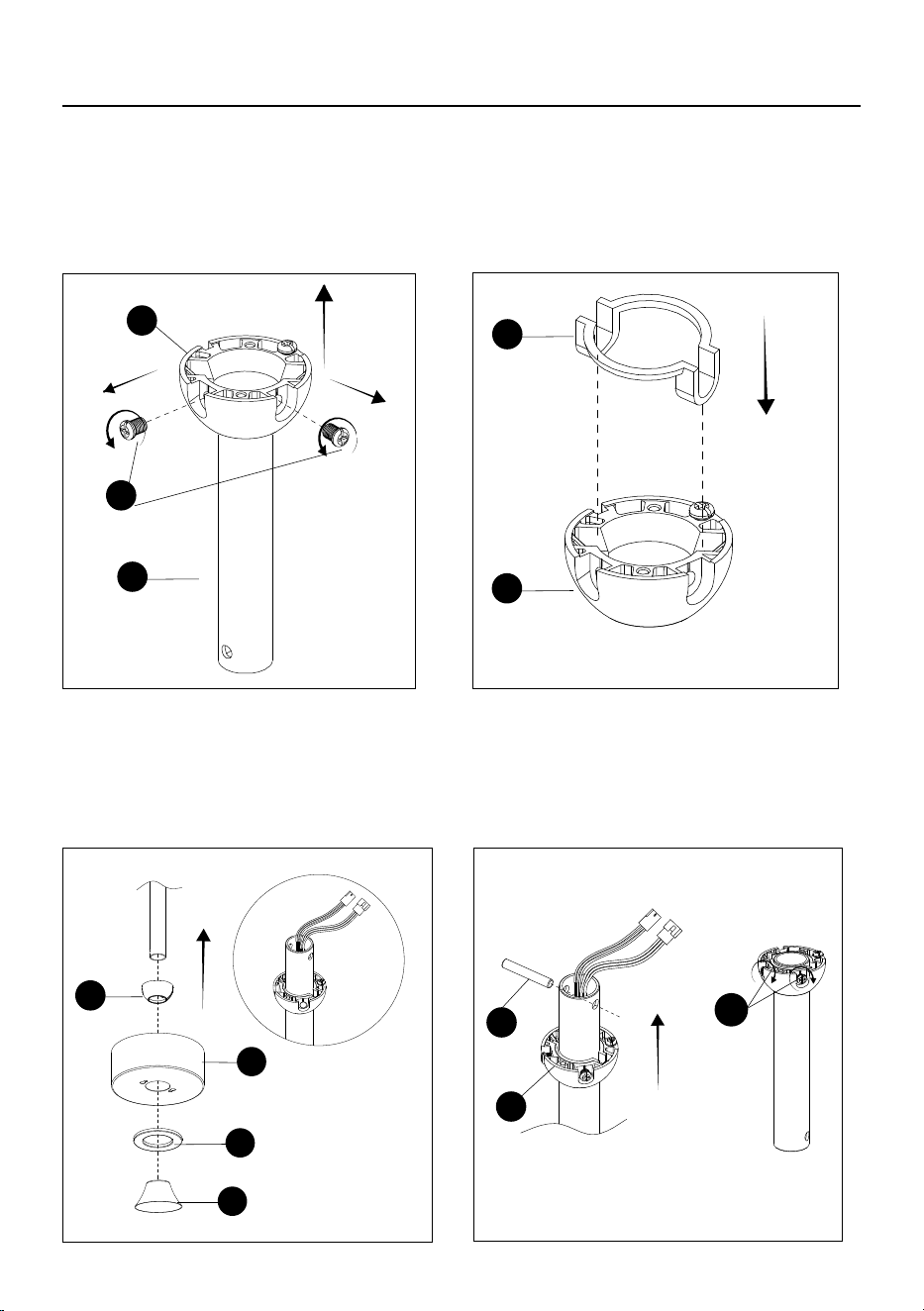
13
D
NN
E
LL
D
IF YOU ARE USING A LONGER DOWNROD CONTINUE WITH THE NEXT STEPS.
(Not included, must be purchased separately)
YY
D
MM
B
C
INSTALLATION INSTRUCTIONS
Remove the hanger ball screws (NN), then
slide the hanger ball (D) off the included
downrod (E).
Place the insert (LL) found in bag "CC" into the
hanger ball (D).
Slide the hanger ball (D), canopy (B) and
magnetic canopy ring (C) onto the longer
downrod facing upwards. Next slide the
decorative cover (F) onto the downrod facing
downwards. Lastly, carefully feed the motor
housing wires up through the longer downrod
as shown.
Insert the cross pin (YY) found in bag "CC"
into the large hole at the top of the downrod.
Slide the hanger ball (D) up to secure the cross
pin (YY) within the groove. Ensure the screw
holes are aligned using screws (MM) found in
bag "CC" and tighten. Continue to step 9.
F
D
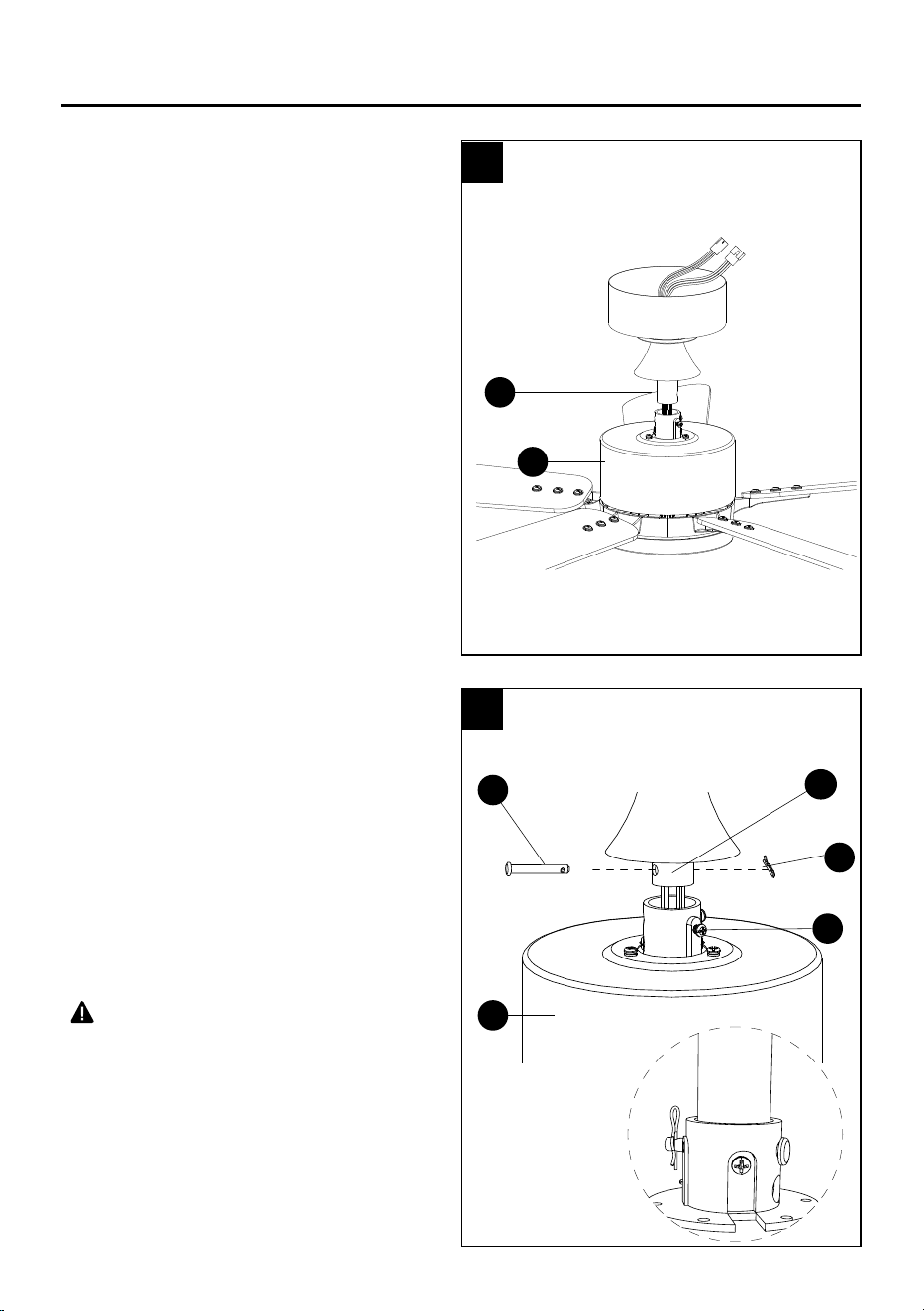
14
INSTALLATION INSTRUCTIONS
9. Assembling the downrod to the motor housing.
Carefully feed the motor housing (G) wires up
through the downrod (E).
10. Insert the downrod (E) into the motor
housing (G) and align the holes. Reinstall the
hanging pin (OO), secure it with the locking
pin (PP), and tighten the set screws (QQ).
NOTE: If you feel resistance while installing
the hanging pin, push down or aside the
cable wires.
CAUTION
• To avoid damage and to ensure a wobble-
free operation, the set screws must be fully
tightened until you feel resistance.
WARNING
• Failure to properly install the motor housing
locking pin could result in the fan becoming
loose and possibly falling.
QQ
PP
G
OO
G
E
E
9
10
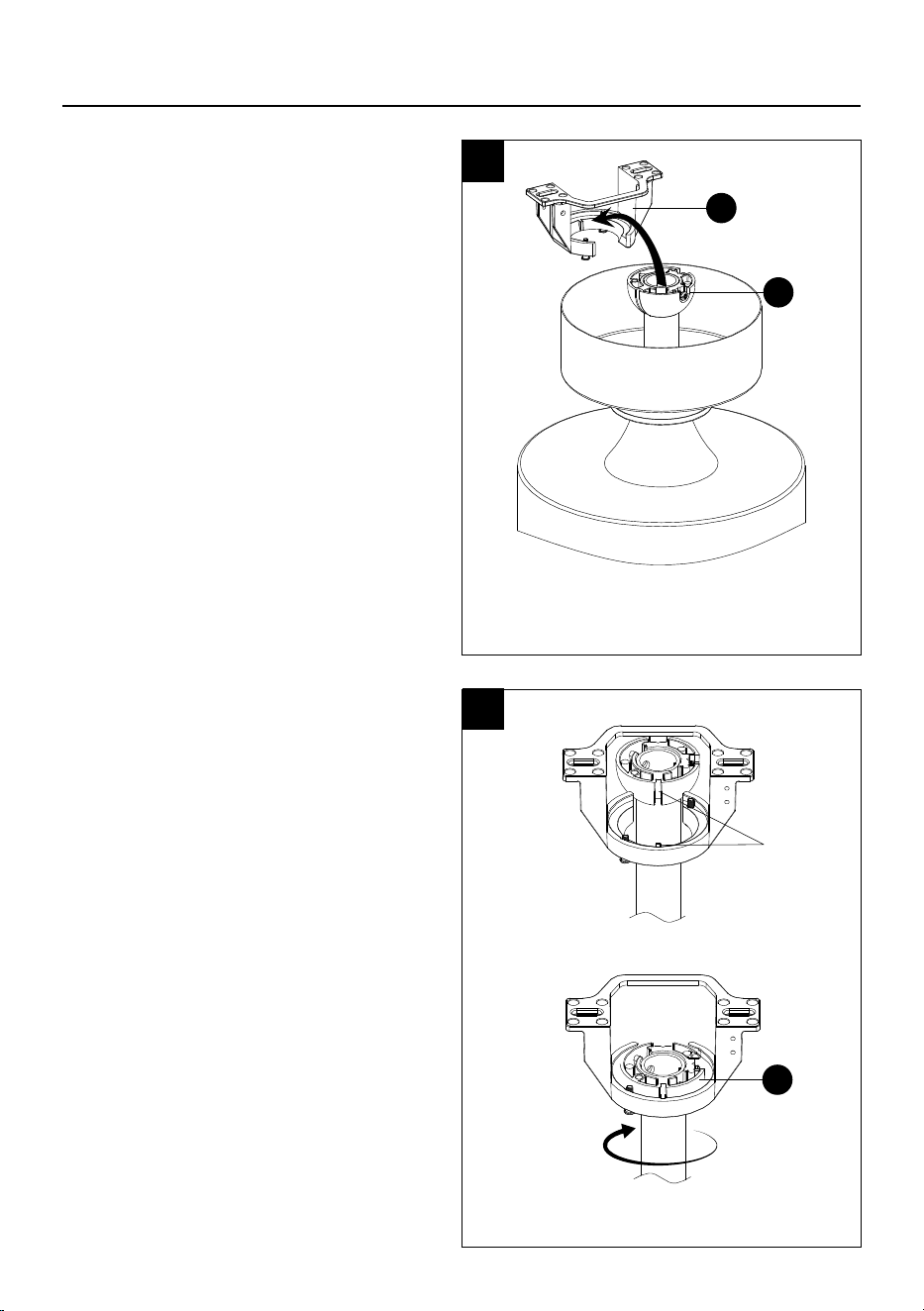
15
INSTALLATION INSTRUCTIONS
11. Installing the assembled fan into the
mounting bracket.
Lift the assembled fan into the mounting
bracket by placing the hanger ball (D) into
the mounting bracket (A) opening.
CAUTION
• To prevent damage to the fan, always lift up the
fan by the downrod or motor housing
12. Rotate the assembled fan until the groove
on the hanger ball aligns and drops into the
slot on the mounting bracket and sits rmly.
The hanger ball (D) should not rotate if this is
done correctly.
CAUTION
• Failure to align groove on the hanger ball with
the slot could result in wobbling.
11
12
A
D
Groove
D
16
INSTALLATION INSTRUCTIONS
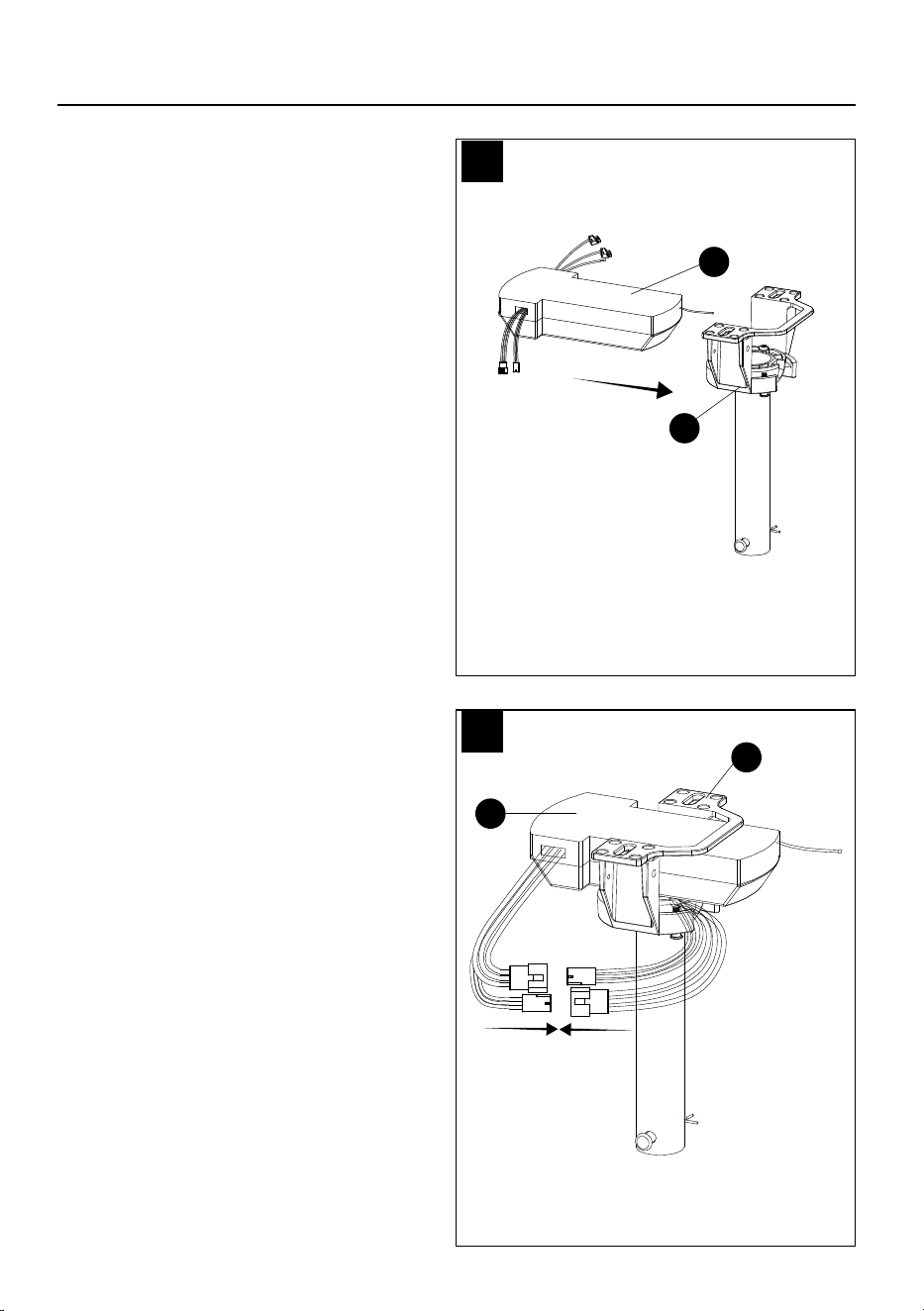
13. Wire the fan.
Insert the receiver (L) into the mounting
bracket (A) as shown.
14. Connecting the motor housing wires to the
receiver wires
Connect the 2 connectors from the receiver
(L) to the connectors from the motor housing,
matching the wire colors. Black, red and
white connects to same color wires and red,
yellow and white connect to same color
wires.
L
13
14
A
L
A
17
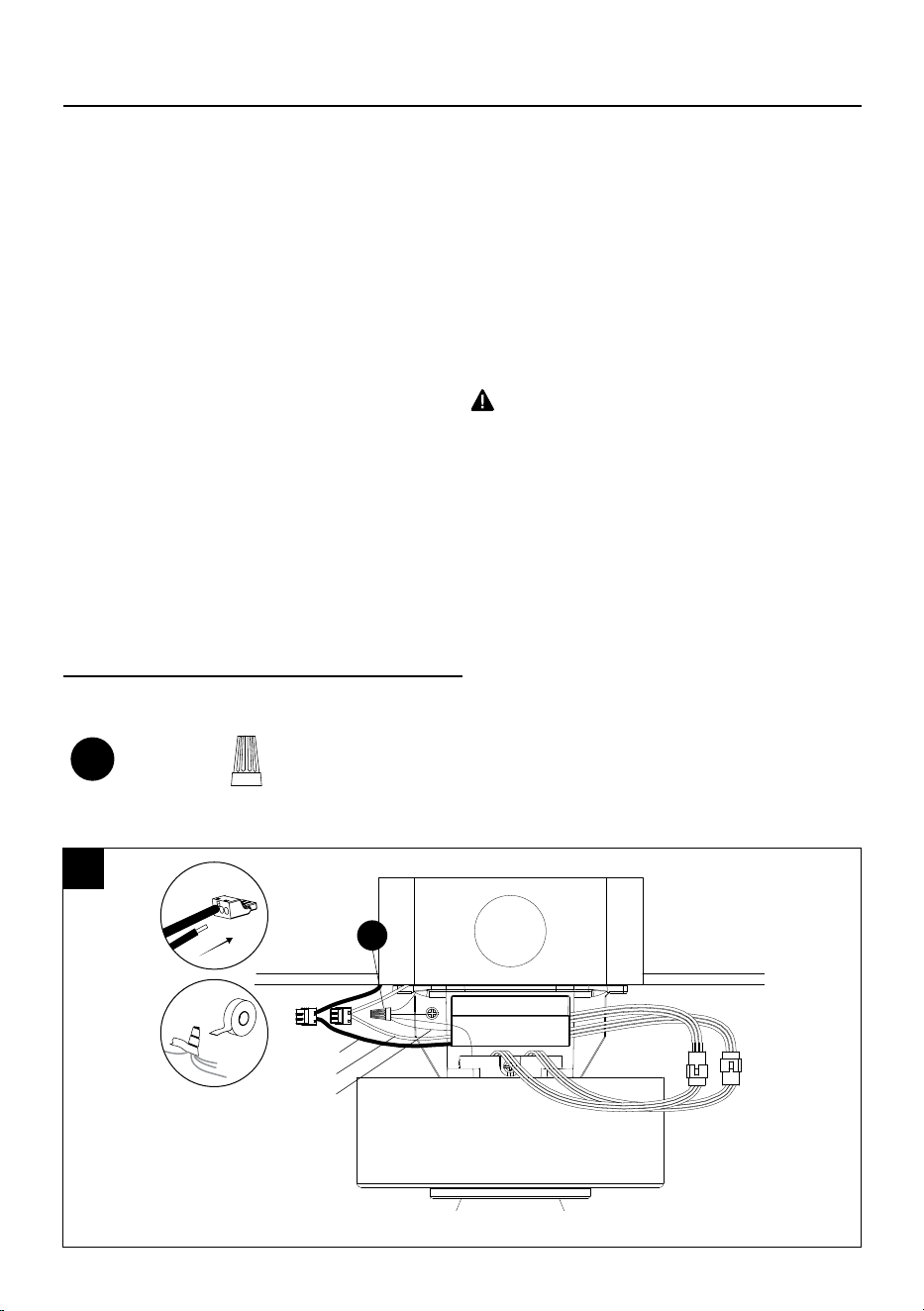
INSTALLATION INSTRUCTIONS
15. Connect the ceiling wires to the receiver wires as follows:
Insert the hot (black) wire from the ceiling into one of the free holes of the black wire quick
connect from the receiver and push the wire in all the way. Gently tug on wire to ensure it is
secure in connector.
Insert the neutral (white) wire from the ceiling into one of the free holes of the white wire quick
connect from the receiver and push the wire in all the way. Gently tug on wire to ensure it is
secure in connector.
Connect all ground wires to ceiling ground wire, as shown below, using the wire nut (AA) found
in accessory bag "AA" and wrap it with electrical tape. If your ceiling does not have a ground
wire, consult a qualied electrician.
NOTE: After connecting the wires, spread
them apart so that the ground / white wires
are on one side and the black wires are on
the other side.
WARNING
• All wiring must be in accordance with the
National Electrical Code, ANSI/NFPA 70. If
wires at the installation site are any other color
than what is listed here, have this fan installed
by a qualied electrician.
• The ceiling fan must be grounded. If there
is no ground wire present on the installation
site (example, from the ceiling), STOP the
installation immediately and consult a qualied
electrician.
Hardware Used
CAUTION
•
T
o reduce the risk of electric shock, disconnect
the electrical supply circuit to the fan before
wiring. if you do not feel your electrical wiring
knowledge or experience is sufcient, contact a
qualied electrician.
•
Do not install in a wet location.
Black
White
Ground
AA
Wire nuts x 1
AA
15
18
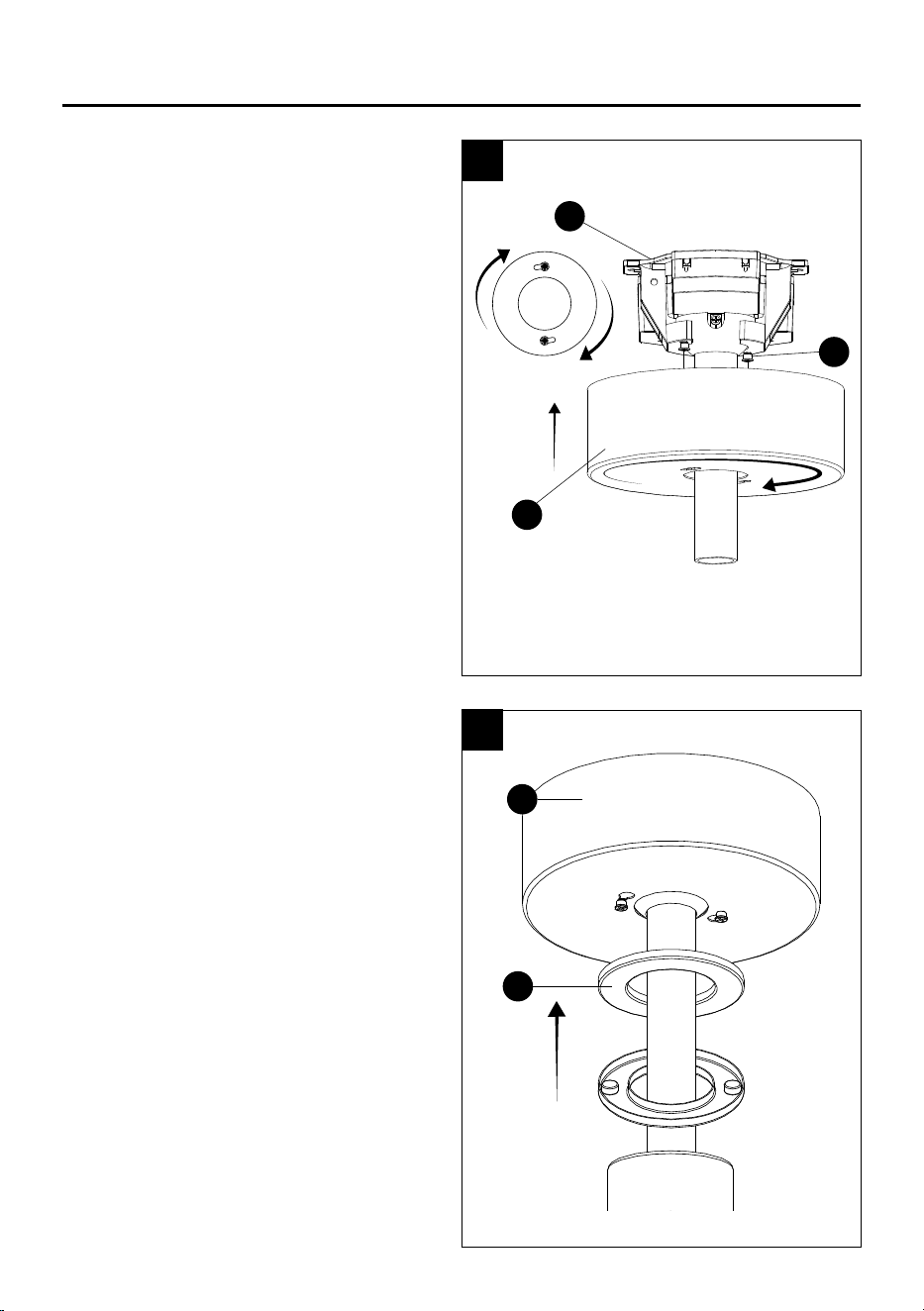
INSTALLATION INSTRUCTIONS
16. Attach the canopy.
Attach the canopy (B) to the mounting
bracket (A) by aligning the mounting bracket
screws (SS) with the canopy keyholes and
twist, then tighten the mounting bracket
screws (SS).
17. Attach the magnetic canopy ring to the
canopy.
Lift the magnetic canopy ring (C) up to the
canopy (B).
16
17
C
B
B
A
SS
19
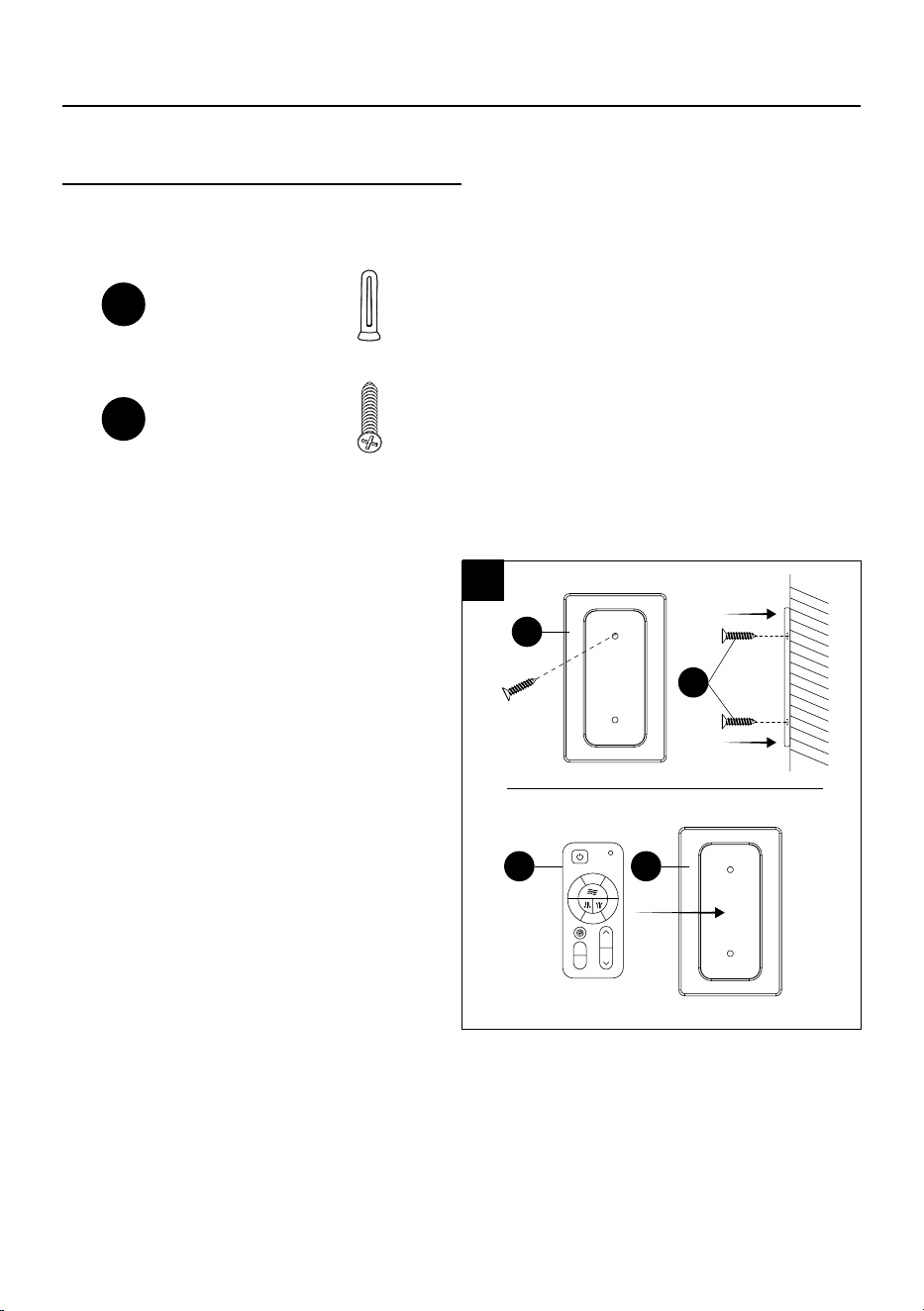
INSTALLATION INSTRUCTIONS
Hardware Used
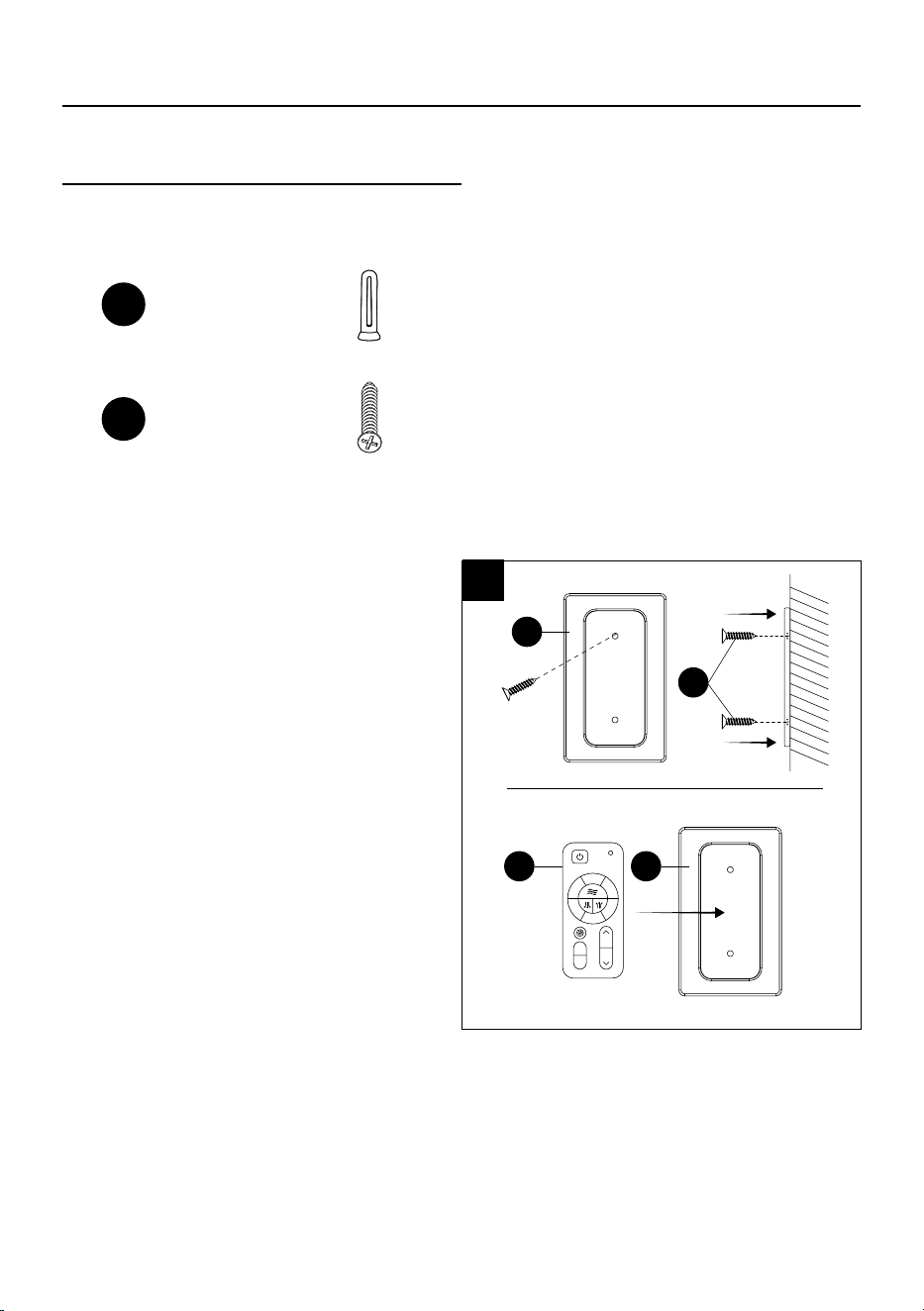
19.18. Secure the remote control backplate
(N) to preferred location with the screw
anchors (EE) and screws (GG) found in
the remote control accessory bag. Once
the backplate (N) is securely mounted,
place the remote control (M) in the
backplate (N) to hold in place.
M N
N
GG
Remote control
backplate screw
anchors
EE
x 2
Remote control
backplate screw
GG
x 2
18
2
3
4
5
6
1
2h
4h
20
NOTE: Remote uses 1 CR2032 button cell battery (included). Remove the plastic tab on battery door
before using remote. When replacing the battery, ensure the battery door is closed all the way (you will
hear a click).
NOTE: The device has been evaluated to meet RF exposure requirements. The device can be used in
portable exposure conditions without restriction.
This equipment complies with FCC radiation exposure limits set forth for an uncontrolled environment.
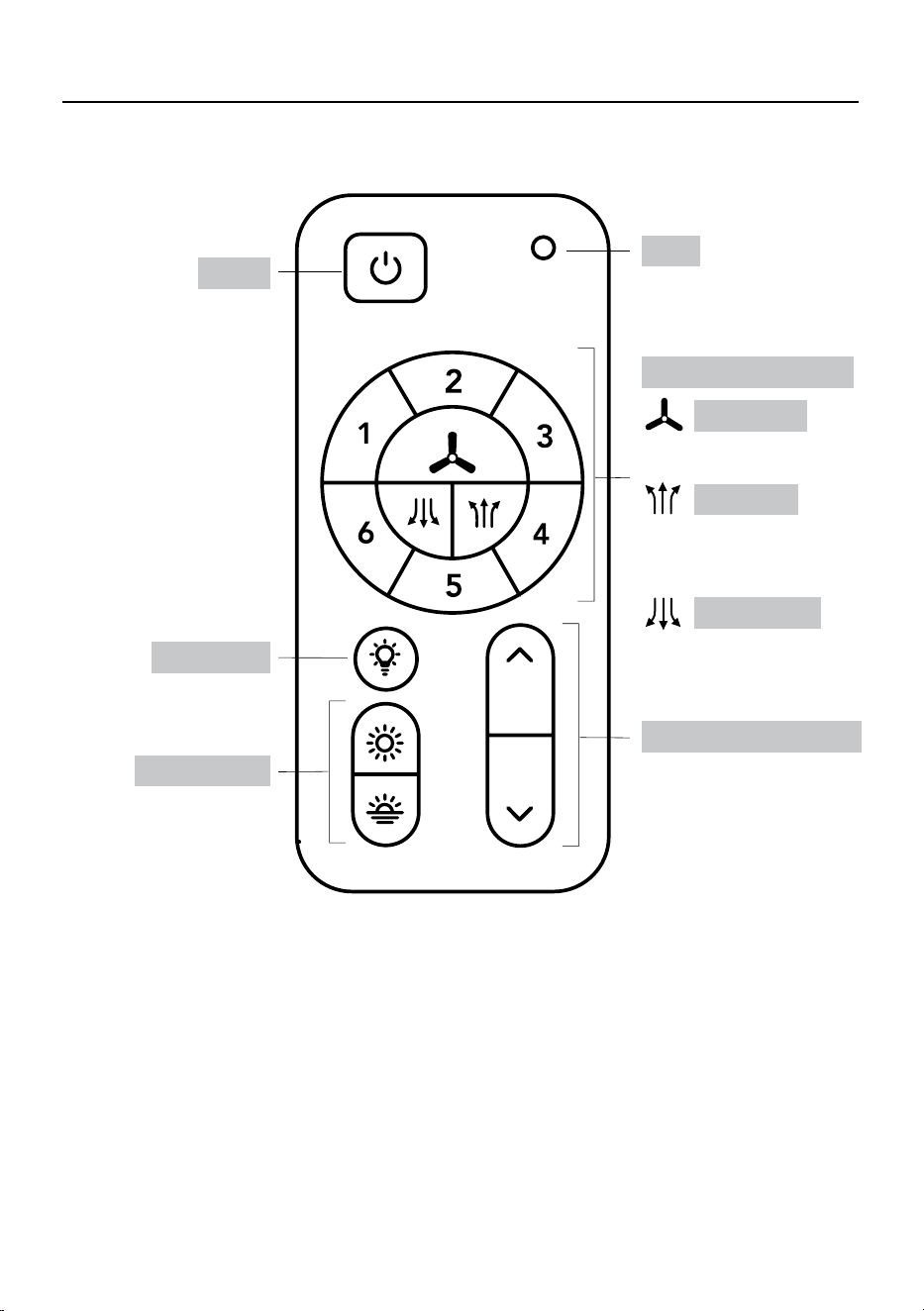
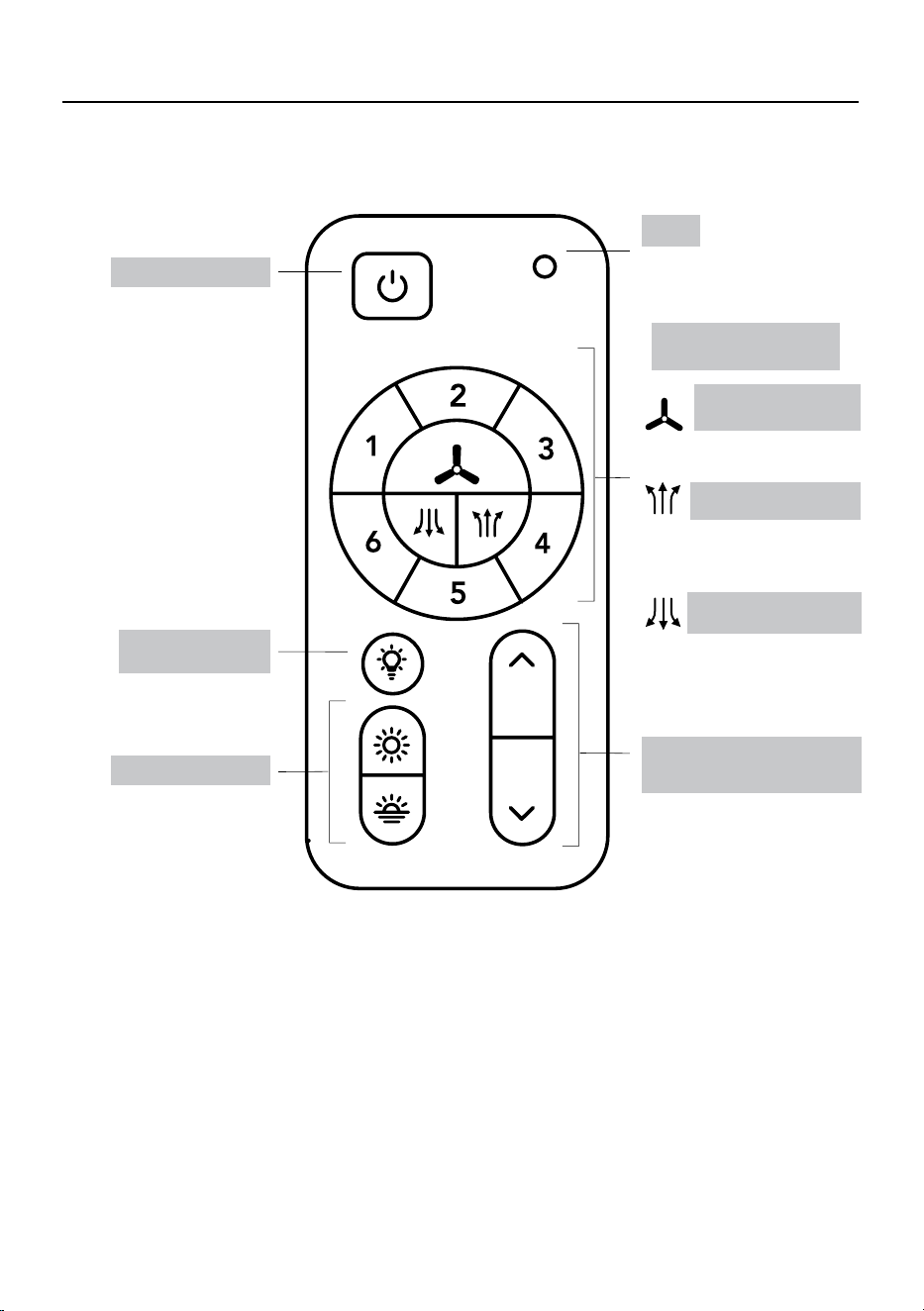
Press to switch fan’s
rotation upward to circulate
rising warm air.
Press to switch fan’s
rotation downward for a
cool downdraft.
Light On/Off
Tunable white
Power
LED
#1-6: 6 fan speed levels
Light dimmer up and down
Press to turn fan and
light on or off.
NOTE: Fan and light
will turn on to last state.
Press to turn
light on or off.
Press up or down to cycle
through 5 ambient White
colors: Cool Daylight,
Daylight, Cool White,
Warm White or Soft White.
Blue LED indicator light will
illuminate when any button
is pressed.
Press to turn fan on or off.
Press up or down to
increase or decrease
brightness.
Fan On/Off
Fan air up
Fan air down
FAN AND REMOTE CONTROL OPERATION
Remote model name: 304 Remote Control
Remote model number: GL37152
21
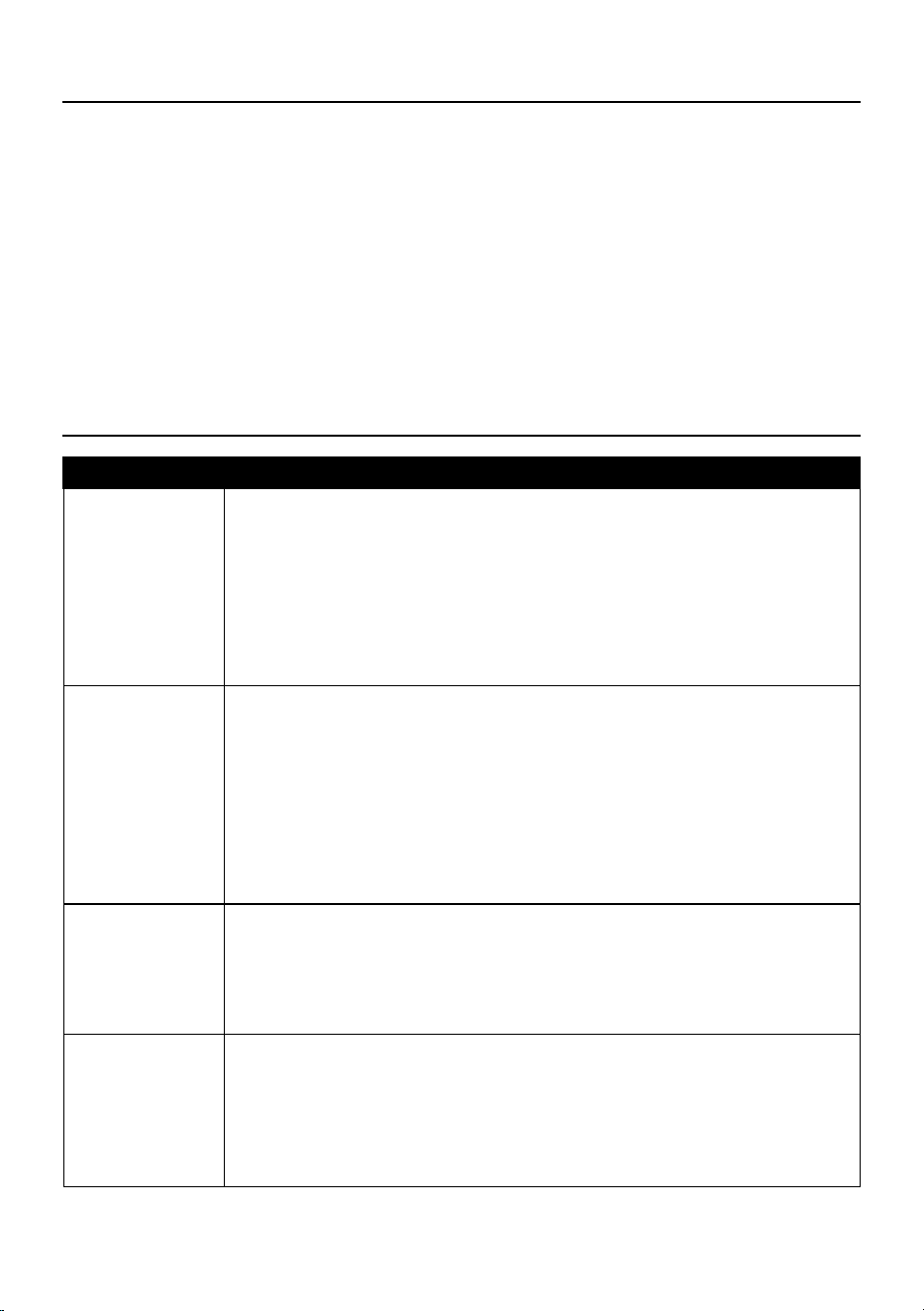
PROBLEM SOLUTION
Fan / light does
not start.
1. Ensure wall switch is turned on.
2. Check all fuses/circuit breakers.
3. Turn off electrical power and ensure the wiring is correct and connectors
secured, as shown in steps 13, 14 and 15 of assembly.
4. Conrm that the remote is working; LED indicator light should illuminate
when any button is pressed.
5. If fan still will not start, contact a qualied electrician. Do not attempt to
troubleshoot internal electrical connections yourself.
Fan is noisy. 1. Allow a 24-hour “break in” period. Any level of noise louder than ambient
levels should disappear during that time.
2. Check the electrical outlet box and ensure it is securely fastened.
3. Check all screws/wire connections on the fan to ensure they are securely
fastened.
4. Use of an unapproved light dimmer or wall control can cause the fan to act
irregularly and produce excess noise. Check to ensure that if installed, the
wall control is approved for ceiling fan use; however, it is not suggested to
use a dimmer switch with the fan.
Fan moves
backwards and
forwards when
turned on.
1. This is a normal start-up procedure for DC motor fans. The partial
movement during start-up is the result of the DC motor aligning the internal
magnetic poles for proper motor operation. This design saves electricity
and allows the fan to operate much more quietly than standard AC motor
fans.
Fan does not
move much air.
1. Check the direction of the fan blades when running. If needed, change
the direction of the fan blades to ensure the ceiling fan is moving air in the
desired direction.
2. Ensure no household items are obstructing the airow of the ceiling fan.
3. Check to ensure the ceiling fan is appropriate for the size of the room in
which it is installed.
CARE AND MAINTENANCE
• The fan’s natural movements may cause some connections to come loose. A clicking or rattling
noise is a certain sign of loosening screws. Check the support connections, brackets and blade
attachment twice a year, and tighten all screws as necessary.
• Make sure to disconnect the fan from the power supply before servicing or cleaning.
• Clean your fan periodically. Use only a damp cloth, never use solvents, and dust with a soft cloth
or brush.
• You will never need to oil your fan; its permanently sealed bearing will prevent noise.
• Do not operate when product is damaged. Discard fan or return to an authorized service facility for
inspection and/or repair.
• Total light xture wattage is 18 watts; do not attempt to replace LED
.
TROUBLESHOOTING
22
Printed in Cambodia
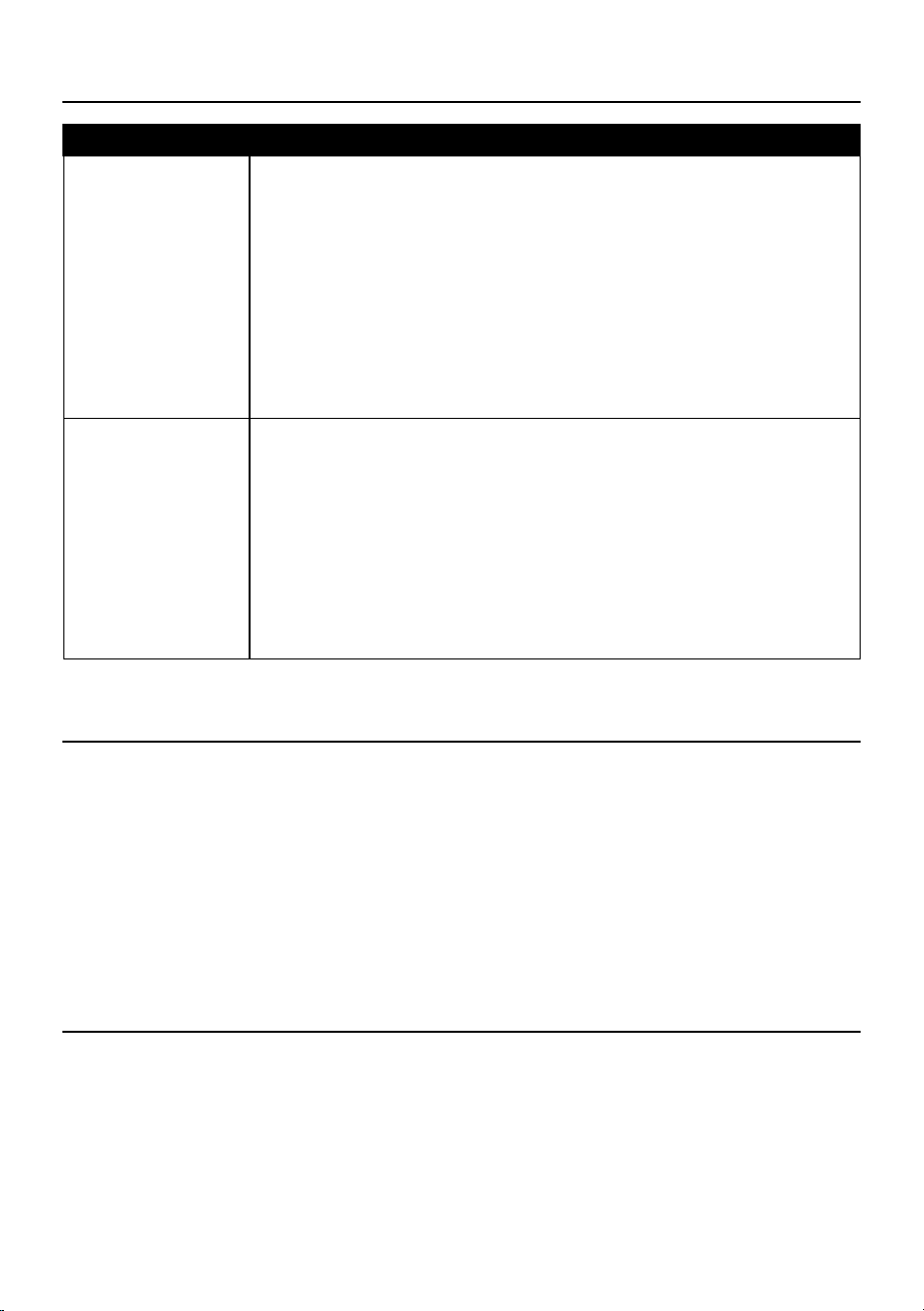
PROBLEM SOLUTION
Fan shakes or
wobbles.
1. A small amount of wobble is typical and acceptable and is not indicative
of a defect. Run fan for at least 10 minutes before verifying level of
wobble.
2. Ensure the electrical outlet box and hanging bracket are securely
fastened, as shown in step 1 of assembly.
3. Ensure the groove in the hanger ball is properly sitting in the bracket
slot; if not, turn hanger ball clockwise until ball drops into the slot, as
shown in step 12 of assembly.
4. Install the included balancing kit (FF). If undesired movement persists,
simply change the location of the balancing kit (FF) until the excess
movement ceases.
Remote control is
not working.
1. Ensure plastic tab is removed from the battery compartment.
2. Ensure batteries are installed correctly in remote.
3. Ensure the remote/receiver are paired. If the batteries are new and
the LED indicator light is working, but the fan and/or light are still not
working, the remote may have become un-paired. To pair the remote
and fan, press the main on/off button on the remote 3 times within one
minute.
4. Ensure the wires from the receiver are correctly connected to the
house wiring and ceiling fan wires, as shown in steps 13, 14 and 15 of
assembly.
TROUBLESHOOTING (CONTINUED)
3-YEAR LIMITED WARRANTY
What is covered
This product is guaranteed to be free of factory defective parts and workmanship for a period of
3 years from date of purchase. Purchase receipt is required for all warranty claims.
What is not covered
This guarantee does not include repair service, adjustment and calibration due to misuse, abuse or
negligence. Unauthorized service or modication of the product or of any furnished component will void
this warranty in its entirety. This warranty does not include reimbursement for inconvenience, installation,
setup time, loss of use, unauthorized service, or return shipping charges. This warranty is not extended to
other equipment and components that a customer uses in conjunction with this product.
TECHNICAL SERVICE
If have any questions or problems, please call our customer service department at 888-251-1003,
8 a.m. - 8 p.m., EST, Monday - Sunday. You may also contact us at [email protected].
No service parts available for this product.
Please keep your dated sales receipt, it is required for all warranty requests.
23
Número de serie
SG25884
Fecha de compra
ARTÍCULO #6034476
MODELO #37000153
VENTILADOR
DE TECHO
NORTHBROOK
English p. 1
ADJUNTE SU RECIBO AQUÍ
Gracias por comprar este producto HARBOR BREEZE.
¿Preguntas, problemas o piezas faltantes?
Antes de volver a la tienda, póngase en contacto al: 888-251-1003, de lunes a domingo,
de 8 a.m. a 8 p.m., hora estándar del Este, o al correo electrónico [email protected].
HARBOR BREEZE y el diseño del logotipo
son marcas comerciales o marcas registradas
de LF, LLC. Todos los derechos reservados.
24
ÍNDICE
Contenido del paquete.......................................................................................................................... 25
Aditamentos.......................................................................................................................................... 26
Información de seguridad..................................................................................................................... 27
Preparación........................................................................................................................................... 31
Antes de la instalación......................................................................................................................... 31
Instrucciones de instalación................................................................................................................. 32
Funcionamiento del control remoto y el ventilador.............................................................................. 42
Cuidado y mantenimiento.................................................................................................................... 43
Solución de problemas........................................................................................................................ 43
Tres años de garantía limitada............................................................................................................ 44
Servicio técnico.................................................................................................................................... 44
Modelo
Grosor mínimo de los
bordes de las aspas
(mm/pulg.)
Largo de las aspas
(cm/pulg.)
RPM
Velocidad en la punta
de las aspas
(pies/s, m/s)
37000153 5.59 mm (0.22 pulg.) 55.4 cm (21.81 pulg.) 165 11.41 m/s (37.43 pies/s)
ESPECIFICACIONES DEL PRODUCTO
ESPECIFICACIONES ESPECIFICACIONES
Control remoto 6 velocidades
Regulable 134,5 m3/min., 165 RPM
5 selecciones de color LED integrado
Funcionamiento silencioso 1200 lúmenes, 80 IPC
Motor de DC 20.000 horas
Motor de 35 W que ahorra energía
132.08 cm de diámetro
(completamente ensamblado)
Que ahorra energía Peso neto del ventilador: 4.42 kg/9.74 lb
25
PIEZA DESCRIPCIÓN CANT.
G Carcasa del motor 1
QQ
Tornillos de jación
(preensamblados en la carcasa
del motor [G])
2
H Kit de luz 1
J Brazo del aspa 5
K Aspa 5
L Recibidor del control remoto 1
M Control remoto 1
N Placa trasera para control remoto 1
O
Conductores adicionales de 76.2cm
para varillas mas larga que se com-
pran por separado
2
PIEZA DESCRIPCIÓN CANT.
A Soporte de montaje 1
SS
Tornillos para soporte de montaje
(preensamblados en el soporte de
montaje [A])
2
B Base 1
C Anillo magnético de la base 1
D
Bola para colgar
(preensamblada en la varilla [E])
1
NN
Tornillos de bola para
colgador (preensamblados en la bola
para colgar [D])
2
OO/PP
Pasador de bloqueo de la varilla y
pasador para colgar (preensamblados
en la varilla [E])
2
E Varilla 1
F Cubierta decorativa 1
CONTENIDO DEL PAQUETE
A
B C
F
K
G
J L
M
N
O
SS
D
OO
NN
PP
QQ
E
H
26
ADITAMENTOS
AA BB CC DD EE
Empalme
plástico
Tornillos para las
aspas
Arandelas para
los tornillos para
las aspas
Tornillos del
brazo de las
aspas
Anclas de
expansión para
tornillo de la
placa posterior de
control remoto
Cant. 2 Cant. 16 Cant. 16 Cant. 11 Cant. 2
FF GG HH II JJ
Kit de equilibrio Tornillos de la
placa posterior de
control remoto
Tornillos de la
caja de conex-
iones adicional
#8-32 x 1 pulg.
(2.54 cm)
Tornillos de la
caja de conex-
iones adicional
#10-24 x 1 pulg.
(2.54 cm)
Arandelas para
los tornillos de
la caja de
conexiones #8-32
Cant. 1 Cant. 2 Cant. 2 Cant. 2 Cant. 2
KK LL MM YY
Arandelas para
los tornillos de la
caja de conex-
iones #10-24
Inserto para la
varilla de la bola
para colgar
Tornillos para la
varilla de la bola
para colgar
Pasador cruzado
para la varilla
de la bola para
colgar
Cant. 2 Cant. 1 Cant. 2 Cant. 1
27
INFORMACIÓN DE SEGURIDAD
Lea y comprenda completamente este manual antes de intentar ensamblar, usar o instalar el
producto.
ADVERTENCIA
La mayoría de los accidentes eléctricos son causados por descuidos o ignorancia. Si combina un
conocimiento básico con un poco de respeto por la electricidad y una dosis de sentido común,
se pueden abordar con seguridad muchas reparaciones eléctricas domésticas. A continuación
encontrará algunas pautas básicas para trabajar con electricidad:
• Antes de trabajar en un circuito, vaya al panel de servicio principal y retire el fusible o desconecte
el interruptor que controla ese circuito. Pegue un letrero en el panel para advertir a otras personas
que no toquen el circuito mientras usted trabaja.
• Antes de tocar cualquier conductor, use un medidor de voltaje para asegurarse de que no tenga
corriente.
• Cuando verique el voltaje en un tomacorriente, revise las dos salidas, ya que cada una podría
estar controlada por un circuito de cableado separado.
• Al reemplazar los fusibles, primero desconecte el suministro principal de electricidad. Asegúrese
de que sus manos y pies estén secos y coloque una mano detrás de su espalda para evitar que la
electricidad haga un circuito completo a través de su pecho.
• Toque el fusible de un enchufe sólo en su borde aislado. Retire los fusibles del cartucho con un
extractor de fusibles.
• Utilice herramientas con mangos aislados y escaleras de madera o de bra de vidrio.
• Mantenga extintores de incendios de polvo químico seco en la cocina, sótano y taller.
• Nunca desactive los dispositivos de puesta a tierra. Asegúrese de que todos los electrodomésticos
que requieren una puesta a tierra estén debidamente conectados a tierra y que el sistema
eléctrico mismo también tenga la puesta a tierra adecuada.
• Cumpla o supere todos los requerimientos del código eléctrico que cubren el trabajo que está
haciendo.
• Siempre trabaje con luz suciente para ver lo que está haciendo. Es fácil cometer errores cuando
se trabaja con una luz tenue.
Si tiene dudas, consulte con un electricista calicado.
28
• PELIGRO DE INGESTIÓN: este producto contiene una pila de celda
o de botón.
• MUERTE: si se ingiere puede producirse la muerte o lesiones graves.
• Un pila de celda o de botón ingerida puede provocar una reacción
quemaduras químicas internas en tan solo 2 horas.
• MANTENGA las pilas nuevas y usadas FUERA DEL ALCANCE DE
LOS NIÑOS.
• Busque asistencia médica de inmediato si se sospecha que se ha
tragado o introducido una pila en cualquier parte del cuerpo.
ADVERTENCIA
INFORMACIÓN DE SEGURIDAD
ADVERTENCIA
• Asegúrese de que las pilas estén instaladas de manera correcta según la polaridad (+ y -).
• Retire y recicle o deseche de inmediato las pilas usadas de acuerdo con las regulaciones locales
y manténgalas fuera del alcance de los niños. No deseche las pilas en la basura doméstica ni las
incinere.
• No incinere las pilas. Las pilas podrían explotar o ltrarse.
• Incluso las pilas usadas pueden causar lesiones graves o la muerte.
• Llame a un centro de control de envenenamientos local para recibir información de tratamiento.
• Pila reemplazable CR2032 de 3V.
• Las pilas que no son recargables no deben recargarse.
• No fuerce la descarga, recargue, desmonte, incinere ni caliente las pilas por encima de los
(60 °C). Hacerlo puede provocar lesiones debido a la ventilación, ltraciones o explosiones que
provoquen quemaduras químicas
• No mezcle pilas antiguas y nuevas, ni diferentes marcas o tipos, como alcalinas, carbono-zinc o
pilas recargables.
• Retire y recicle o deseche de inmediato las pilas de los equipos que no se utilicen durante un
período prolongado de acuerdo con las regulaciones locales.
• Siempre vuelva a asegurar el compartimiento de las pilas. Si el compartimento de la pila no se
cierra de forma segura, deje de usar el producto, retire las pilas y manténgalas fuera del alcance
de los niños.
29
LEA Y GUARDE ESTAS INSTRUCCIONES.
La mayoría de los accidentes eléctricos son causados por descuidos o ignorancia. Si combina un
conocimiento básico de electricidad, un respeto saludable por ésta y una dosis de sentido común,
podrá abordar varias reparaciones eléctricas del hogar de manera segura. A continuación encontrará
algunas pautas básicas para trabajar con electricidad:
• Antes de trabajar en un circuito, vaya al panel de servicio principal y retire el fusible o desconecte
el interruptor que controla ese circuito. Pegue un letrero en el panel para advertir a otras personas
que no toquen el circuito mientras usted trabaja.
• Antes de tocar cualquier conductor, use un medidor de voltaje para asegurarse de que no tenga
corriente.
• Cuando verique el voltaje en un tomacorriente, revise las dos salidas, ya que cada una podría
estar controlada por un circuito de cableado separado.
• Al reemplazar los fusibles, primero desconecte el suministro principal de electricidad. Asegúrese
de que sus manos y pies estén secos y coloque una mano detrás de su espalda para evitar que la
electricidad haga un circuito completo a través de su pecho. Toque el fusible de un enchufe sólo
en su borde aislado. Retire los fusibles del cartucho con un extractor de fusibles.
• Utilice herramientas con mangos aislados y escaleras de madera o de bra de vidrio.
• Mantenga extintores de incendios de polvo químico seco en la cocina, sótano y taller.
• Nunca desactive los dispositivos de puesta a tierra. Asegúrese de que todos los electrodomésticos
que requieren una puesta a tierra estén debidamente conectados a tierra y que el sistema
eléctrico mismo también tenga la puesta a tierra adecuada.
• Cumpla o supere todos los requerimientos del código eléctrico que cubren el trabajo que está
haciendo.
• Siempre trabaje con luz suciente para ver lo que está haciendo. Es fácil cometer errores cuando
se trabaja con una luz tenue.
• Si tiene dudas, consulte con un electricista calicado.
Cualquier cambio o modicación a esta unidad que no estén expresamente aprobados por la parte
responsable del cumplimiento con las regulaciones podría anular la autorización del usuario para
utilizar el equipo
Este dispositivo cumple con la sección 15 de las reglas FCC. Su funcionamiento está sujeto a las
siguientes condiciones: (1) este dispositivo no debe causar interferencia perjudicial, y (2) debe aceptar
cualquier interferencia recibida, incluida la interferencia que pudiese causar un funcionamiento no
deseado.
Este dispositivo contiene transmisores y recibidores exentos de licencia que cumplen con los
RSS exentos de licencia de Innovación, Ciencia y Desarrollo Económico (ISED) de Canadá.
Su funcionamiento está sujeto a las siguientes condiciones: (1) este dispositivo no debe causar
interferencia perjudicial y (2) este dispositivo debe aceptar cualquier interferencia recibida, incluida la
interferencia que pudiese causar un funcionamiento no deseado.
Se ha evaluado este equipo y se ha vericado que cumple con los requisitos de exposición a
radiofrecuencias.
NOTA:
Este equipo está probado y se vericó que cumple con los límites para un dispositivo digital clase B,
conforme a la sección 15 de las reglas de la FCC. Estos límites están diseñados para proporcionar
protección razonable contra interferencias perjudiciales en una instalación residencial. Este equipo
genera, utiliza y puede irradiar energía de radiofrecuencia y, si no se instala ni se usa de acuerdo con
las instrucciones, puede causar interferencias perjudiciales para las comunicaciones de radio. Sin
embargo, no se garantiza que no se producirán interferencias en una instalación en especial. Si este
equipo causa interferencia perjudicial a la recepción
de radio o televisión, lo que se puede determinar al apagar y encender el equipo, se recomienda al
usuario que intente corregir la interferencia con una o más de las siguientes medidas:
- Reorientar o reubicar la antena de recepción.
- Aumentar la separación entre el equipo y el recibidor.
- Conectar el equipo a un tomacorriente de un circuito distinto al que usa el receptor.
- Solicitar ayuda al distribuidor o a un técnico con experiencia en radio/TV.
ADVERTENCIA
30
Parte responsable de la FCC:
Globe Electric
Dirección: 2264 East 6th Street, San Bernardino, CA 92410
www.globe-electric.com
CAN ICES (B) / NMB (B)
ADVERTENCIA: para reducir el riesgo de incendios o descargas eléctricas, no use este ventilador
con dispositivos de control de velocidad de estado sólido.
ADVERTENCIA: para reducir el riesgo de lesiones personales, no doble las abrazaderas de las
aspas al instalarlas, equilibrar las aspas o limpiar el ventilador. No introduzca
objetos extraños entre las aspas en movimiento.
ADVERTENCIA: para reducir el riesgo de incendio, descarga eléctrica o lesiones personales,
móntelo en una caja de salida marcada como apta para sostener ventiladores de
15.9/22.7/31.8 kg (35/50/70 lb) o menos, y use los tornillos de montaje provistos con
la caja de salida.
PRECAUCIÓN: para reducir el riesgo de descarga eléctrica, desconecte el circuito de suministro de
electricidad que va hacia el ventilador antes de instalar el kit de iluminación.
ADVERTENCIA
31
PREPARACIÓN
Antes de comenzar a ensamblar el producto, asegúrese de tener todas las piezas. Compare las
piezas con la lista del contenido del paquete y la lista de aditamentos. No intente ensamblar,
instalar ni operar el producto si falta alguna pieza o si estas están dañadas.
Tiempo estimado de ensamblaje: 15 a 30 minutos
Herramientas necesarias para el ensamblaje (no incluidas): destornilladores Phillips, pinzas
cortacables, cinta aislante y escalera de tijera.
NOTA: No utilice herramientas eléctricas para la instalación para evitar dañar los tornillos/piezas.
ANTES DE LA INSTALACIÓN
El ventilador debe poder asegurarse a una caja de salida apta para ventiladores. Si no hay ninguna
disponible, póngase en contacto con un electricista calicado para gestionar la instalación.
ADVERTENCIA
• Para reducir el riesgo de incendios, descargas eléctricas o lesiones corporales, monte el ventilador
en la caja de salida marcada como “apta para soportar ventiladores de 15.9/22.7/31.8 kg. (35/50/70
lbs.) o menos” y utilice los tornillos de montaje que se proporcionan con la caja de conexiones.
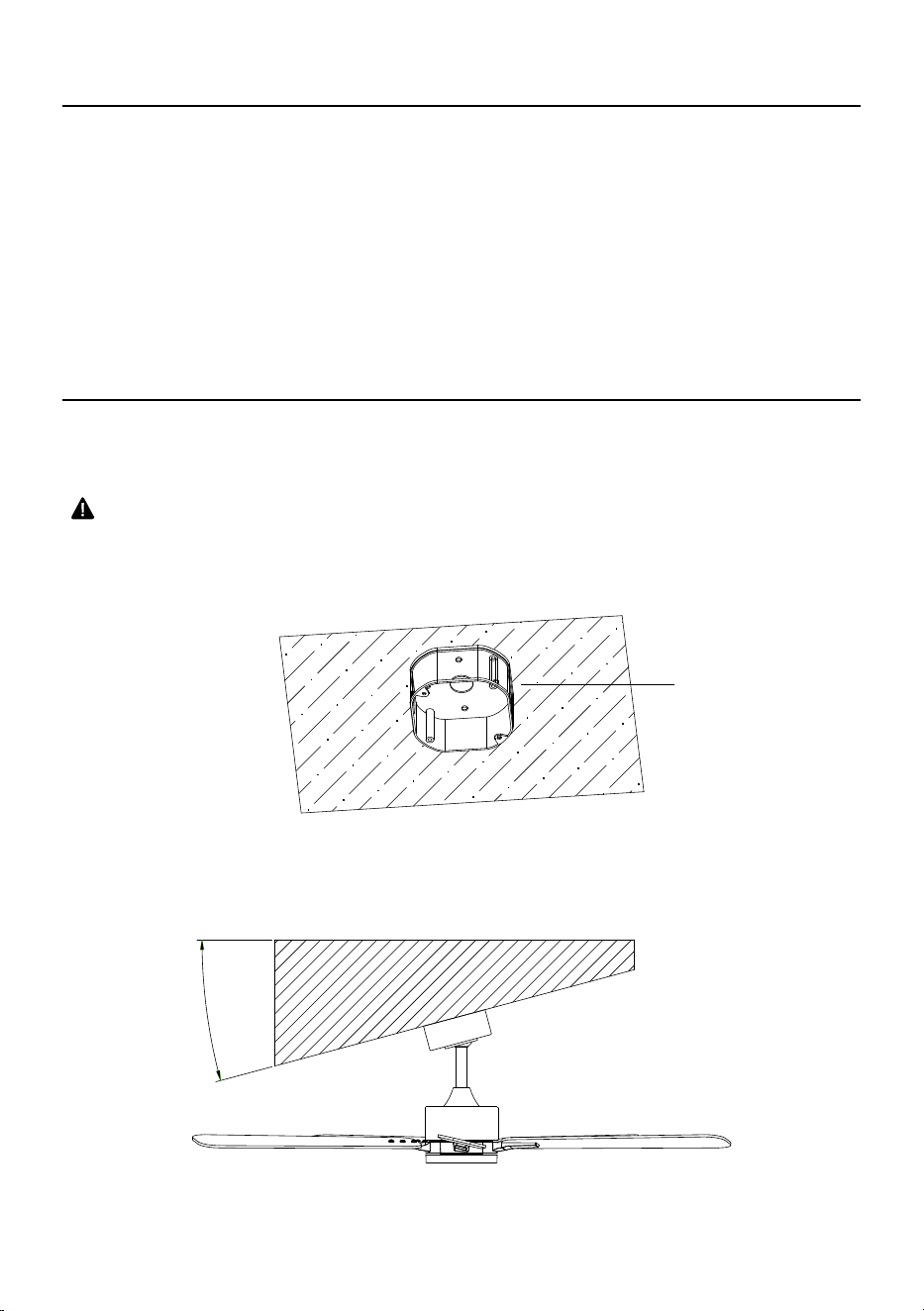
NOTA:
•
El ventilador se puede montar en un techo inclinado hasta un ángulo máximo de 15 grados.
15°
Caja de connexiones
32
INSTRUCCIONES DE INSTALACIÓN
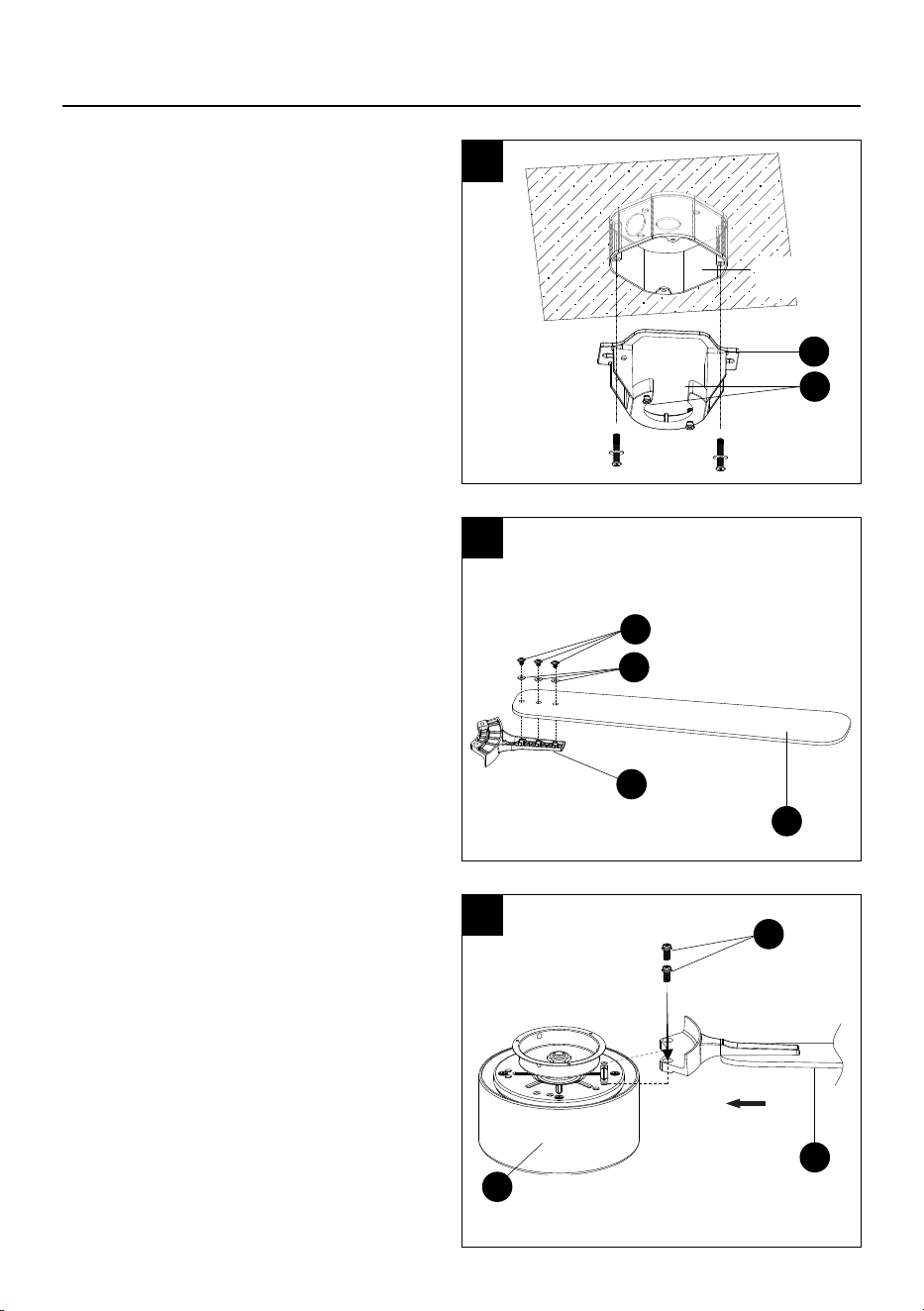
1. Instalación del soporte de montaje en la caja
de salida.
Asegure el soporte de montaje (A) a la caja
de salida con los tornillos y las arandelas que
incluyen la caja de salida.
Aoje (no retire) los 2 tornillos (SS) del
soporte de montaje.
NOTA: Tornillos adicionales para la caja de
conexiones #8-32 x 1 pulg. (2.54 cm) con
arandelas (HH/JJ), y tornillos #10-24
x 1 pulg. (2.54 cm) con arandelas (II/KK) que
se encuentran en la bolsa "AA" incluida, si se
necesitan.
2. Fije el aspa al brazo de la aspa.
Asegure el brazo de las aspas (J) a las
aspas (K) utilizando los tornillos para las
aspas (BB) y las arandelas (CC) de la bolsa
de accesorios "BBB". Repita con las otras 4
aspas.
3. Fije las aspas ensambladas con la carcasa
del motor.
Alinee las aspas ensambladas (K) con la
carcasa del motor (G) entre las 2 echas, como
se muestra, y fíjela utilizando los tornillos
del brazo de la aspa (DD) de la bolsa de
accesorios "BB". Repita los pasos para
ensamblar los 4 brazos de aspas restantes.
NOTA: El interior de la caja del ventilador de
techo puede utilizarse para estabilizar el
ventilador y evitar posibles daños.
1
Caja de
salida
A
SS
2
3
J
K
BB
CC
DD
K
G
33
INSTRUCCIONES DE INSTALACIÓN
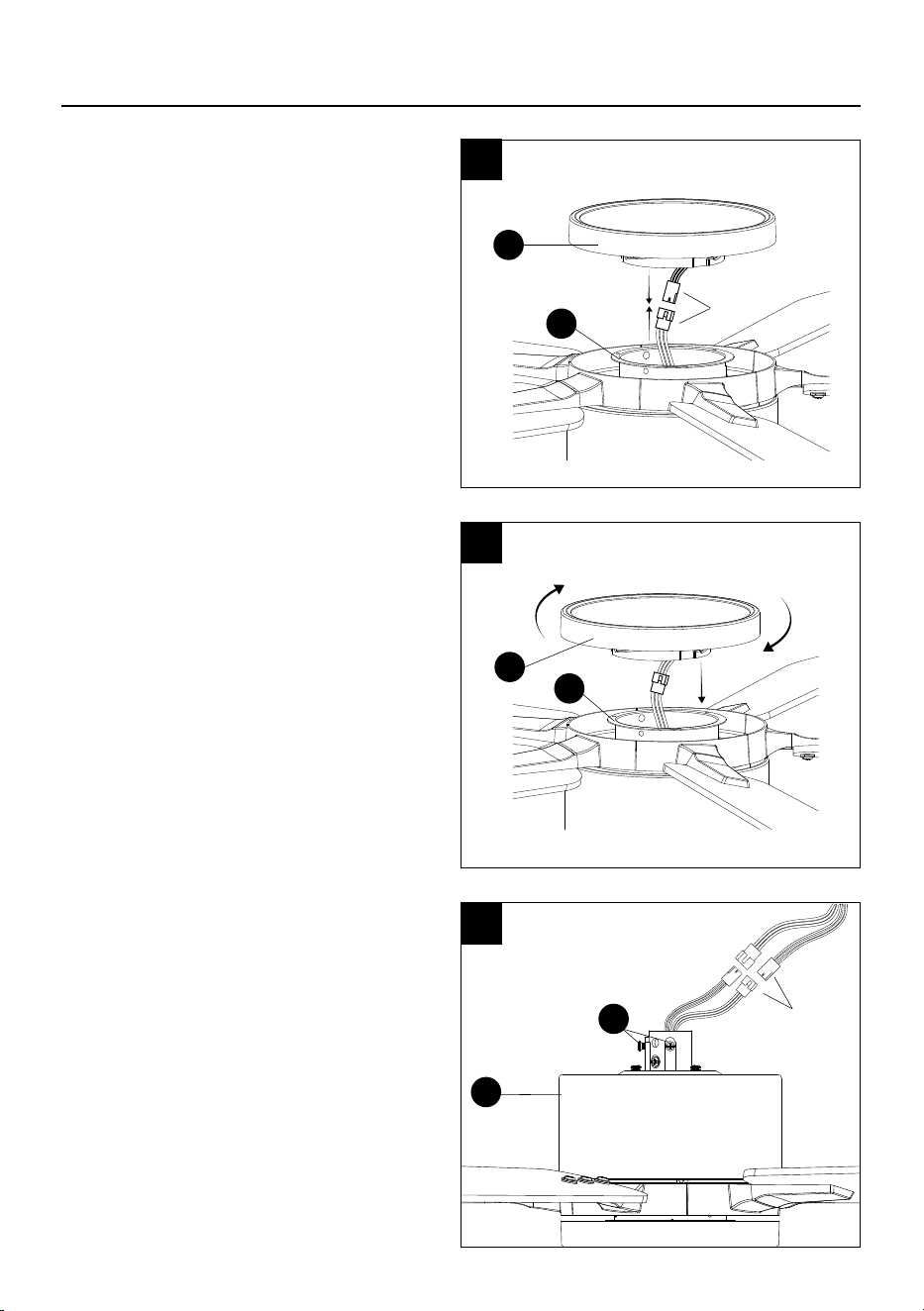
4. Conexión del kit de luz.
Conecte los cables del kit de luz (H) a los
cables de la carcasa del motor (G).
5. Asegure el kit de luz (H) a la carcasa del
motor (G) girando en dirección de las
manecillas del reloj hasta que quede rme.
6. Prepare la carcasa del motor para la
instalación de la varilla.
Dé la vuelta al ventilador y aoje los 2 tornillos
de jación (QQ) en la carcasa del motor (G).
NOTA: Si usted está utilizando una varilla
más larga (no incluida, y debe comprarse por
separado), conecte los cables adicionales de
30 pulg. (O) a la carcasa del motor (G) antes
de instalar la varilla más larga.
4
5
6
Conecte
H
G
H
G
Conecte
G
QQ
34
7
8
INSTRUCCIONES DE INSTALACIÓN
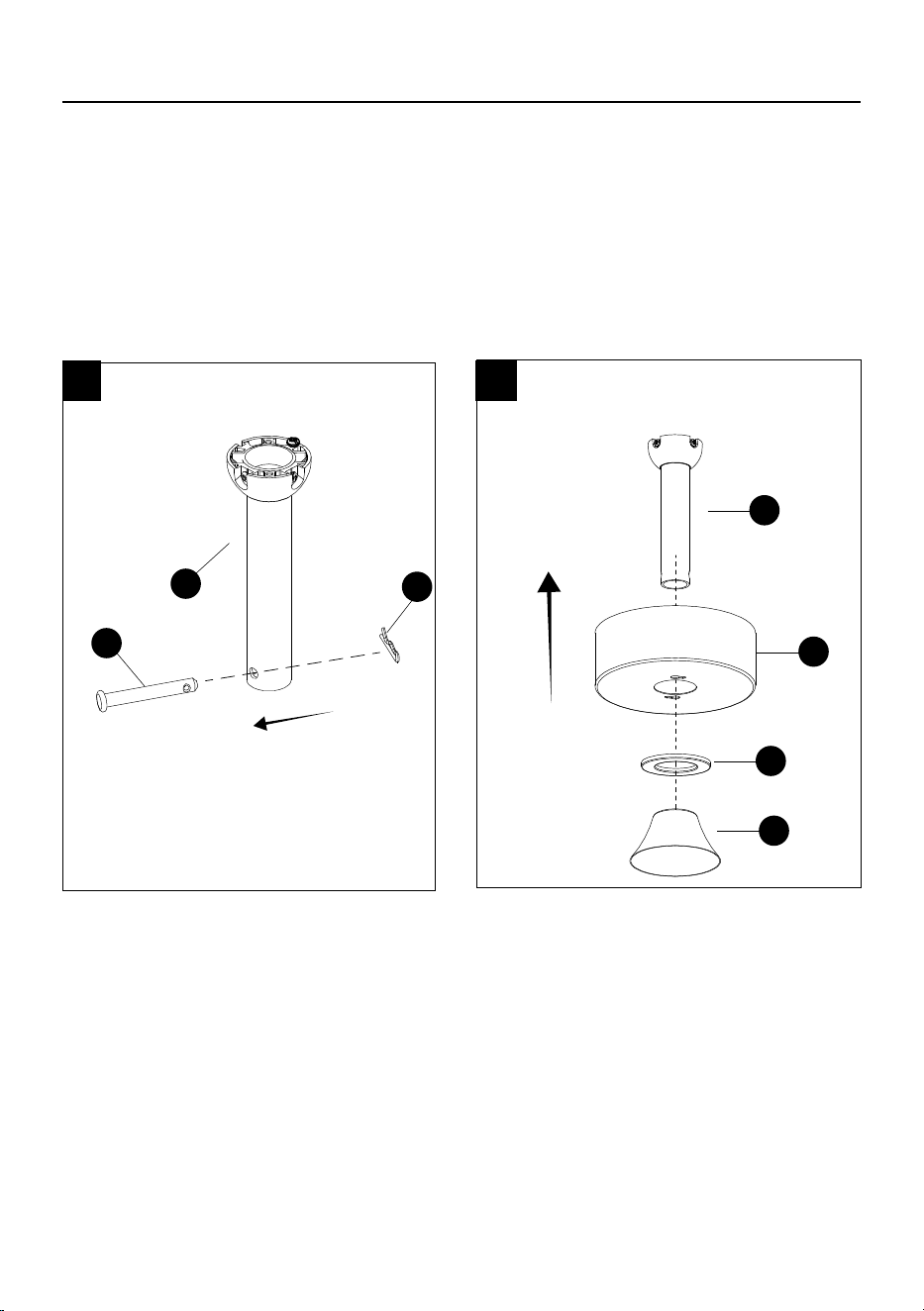
Continúe con los pasos 7 y 8 para instalar la varilla incluida.
7.Retire el pasador de bloqueo (PP)
y el pasador para colgar (OO) de la
varilla (E)
8. Deslice la base (B) y el anillo
magnético de la base (C), ambos
orientados hacia arriba, sobre la
varilla (C). Luego, deslice la cubierta
decorativa (F) sobre la varilla
mirando hacia abajo.
OO
E
PP
E
B
C
F
35
D
NN
E
LL
D
SI ESTÁ UTILIZANDO UNA VARILLA MÁS LARGA, CONTINÚE CON LOS SIGUIENTES
PASOS.
(No está incluida, y debe comprarse por separado).
YY
D
MM
INSTRUCCIONES DE INSTALACIÓN
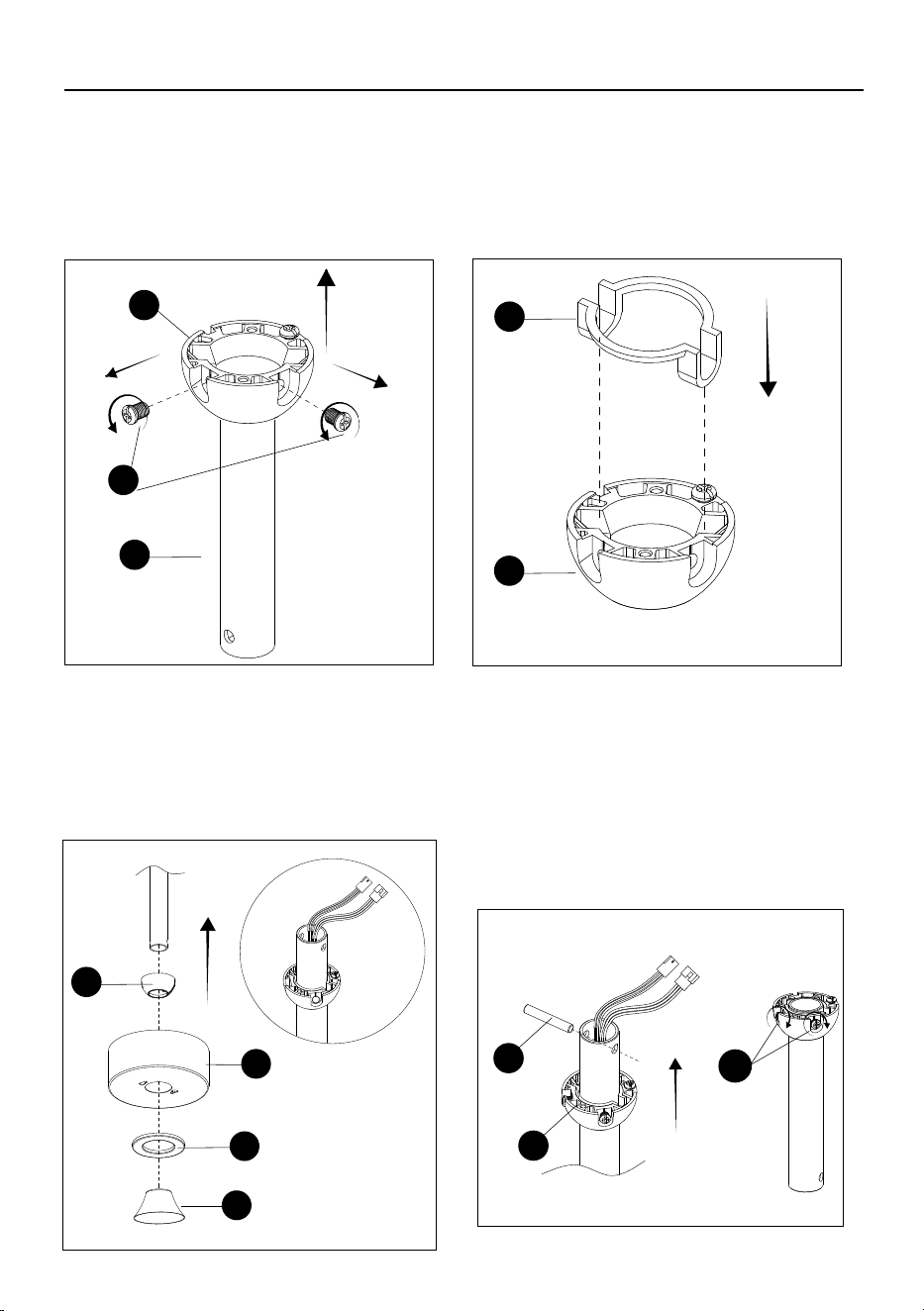
Retire los tornillos de la bola para colgar (NN),
luego deslice la bola para colgar (D) fuera de la
varilla incluida (E).
Coloque el inserto (LL) que se encuentra
en la bolsa “CC” dentro de la bola para
colgar (D).
Deslice la bola para colgar (D), la base (B) y
el anillo magnético de la base (C) sobre la
varilla más larga, ambos orientados hacia
arriba. Luego, deslice la cubierta decorativa
(F) sobre la varilla hacia abajo. Por último,
pase con cuidado los cables de la carcasa del
motor a través de la varilla más larga, tal como
se muestra.
Inserte el pasador cruzado (YY) que se
encuentra en la bolsa "CC" en el oricio grande
en la parte superior de la varilla. Deslice la bola
para colgar (D) hacia arriba para asegurar el
pasador cruzado (YY) dentro de la bola para
colgar. Asegurese de que los oricios de los
tornillos estén alineados correctamente
utilizando los tornillos (MM) que se encuentran
en la bolsa "CC" y atornille ambos tornillos.
Continue con el paso 9.
B
C
F
D
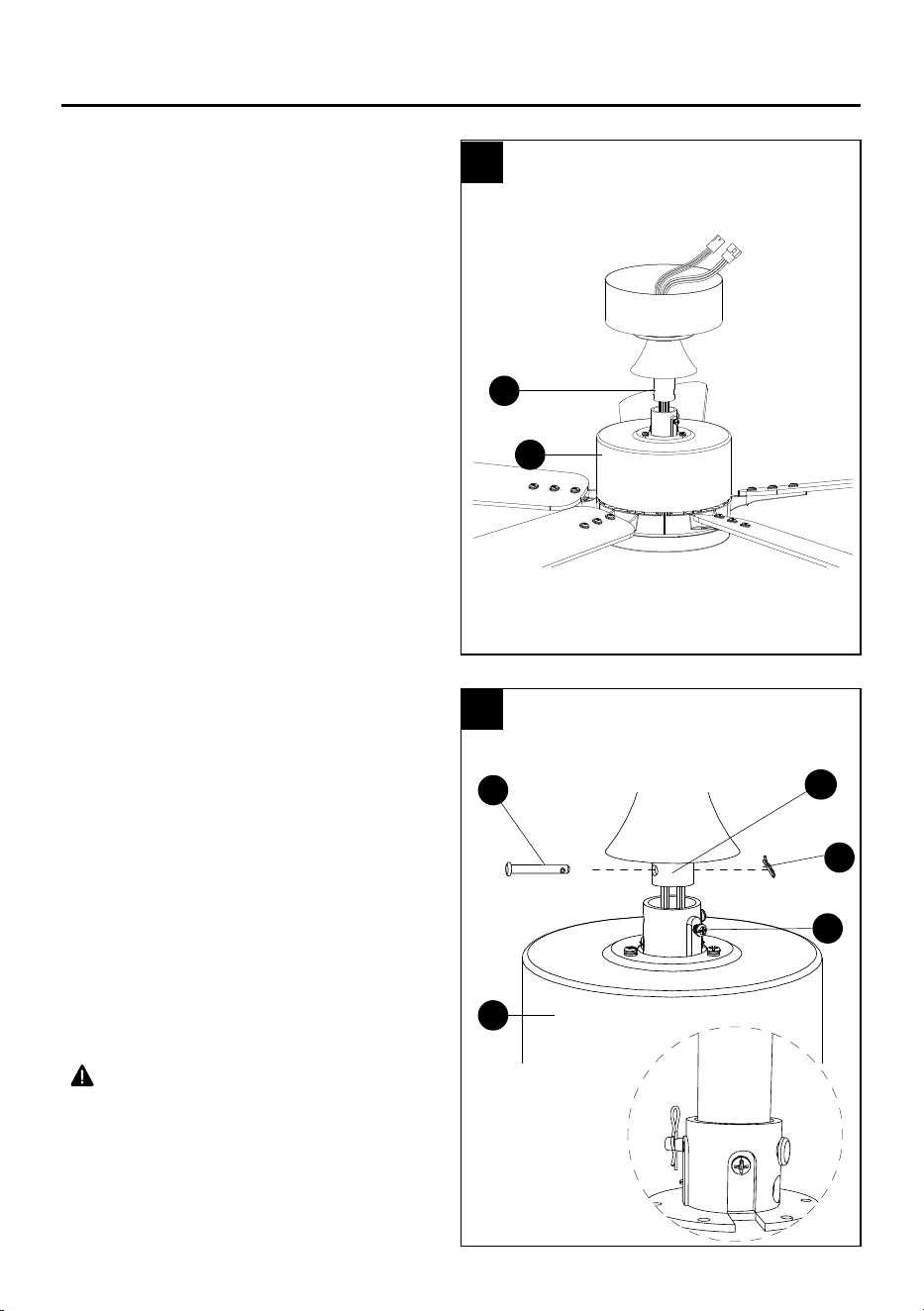
36
INSTRUCCIONES DE INSTALACIÓN
9. Ensamblaje de la varilla a la carcase del
motor.
Pase con cuidado los conductores de la carcasa
del motor (G) hacia arriba a través de la varilla
(E).
10. Inserte la varilla (E) en la carcasa del motor
(G) y alinee los oricios. Vuelva a instalar el
pasador para colgar (OO), asegúrelo con el
pasador de bloqueo (PP) y apriete los tornillos
de jación (QQ).
NOTA: Si siente resistencia al empujar el
pasador para colgar, empuje hacia abajo o a
un lado los cables.
PRECAUCIÓN
• Para evitar daños y garantizar un
funcionamiento sin tambaleo, los tornillos se
deben apretar completamente hasta sentir
resistencia.
ADVERTENCIA
• Si no se instala correctamente el pasador de
bloqueo de la carcasa del motor, el ventilador
podría aojarse y posiblemente caerse.
QQ
PP
G
OO
G
E
E
9
10
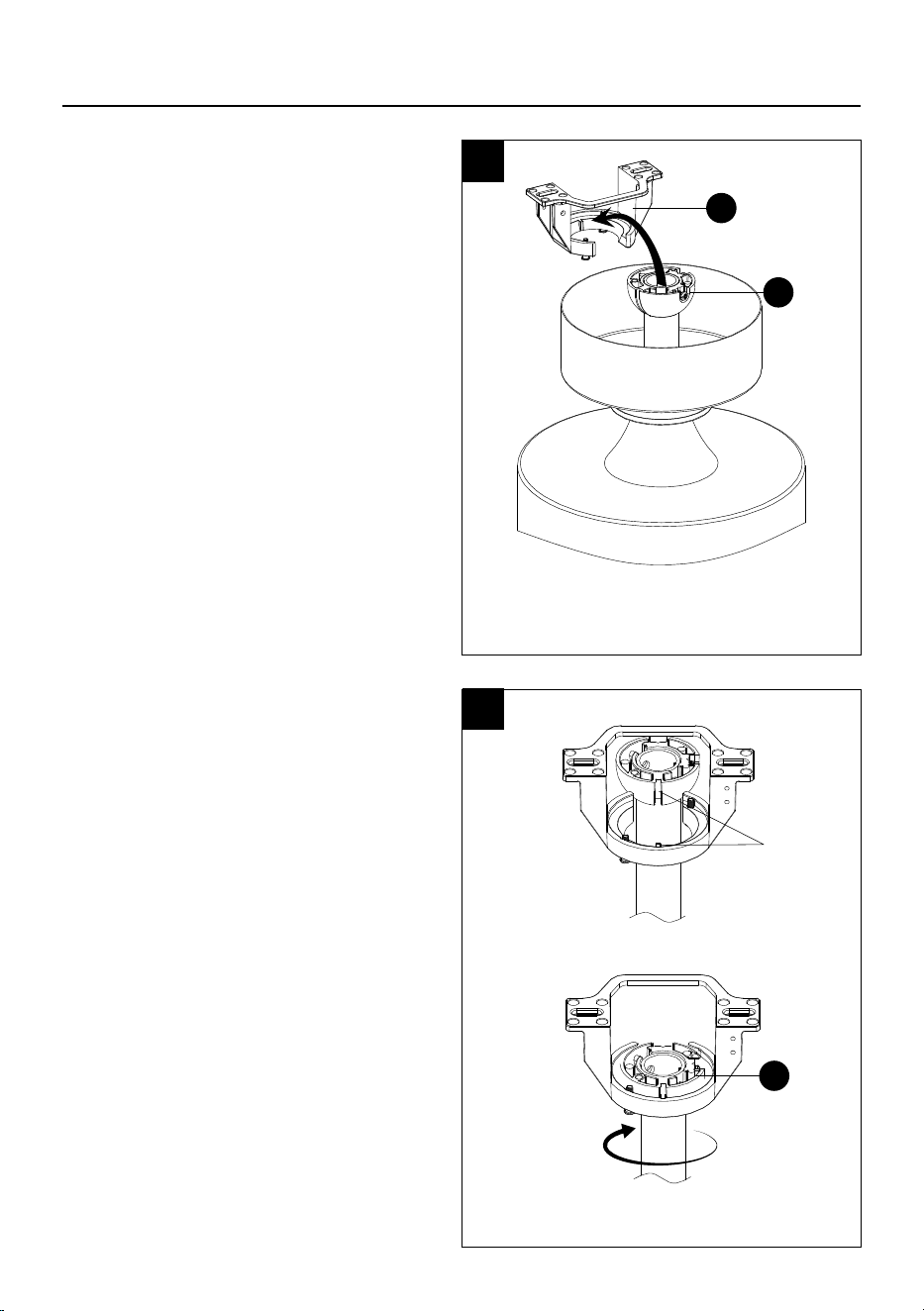
37
INSTRUCCIONES DE INSTALACIÓN
11. Instalar el ventilador ensamblado en el
soporte de montaje.
Levante el ventilador ensamblado hacia el
soporte de montaje colocando la bola para
colgar (D) en la abertura del soporte de
montaje (A).
PRECAUCIÓN
• Para evitar dañar el ventilador, levántelo
siempre por la varilla o la carcasa del motor
12. Gire el ventilador ensamblado hasta que
la ranura de la bola para colgar se alinee y
encaje en la ranura del soporte de montaje
y quede rmemente asentada. La bola para
colgar (D) no deberia girar si esto se hace
correctamente.
PRECAUCIÓN
• Si no se alinea la ranura de la bola con la cuña,
podría producirse tambaleo..
11
12
A
D
D
Ranura
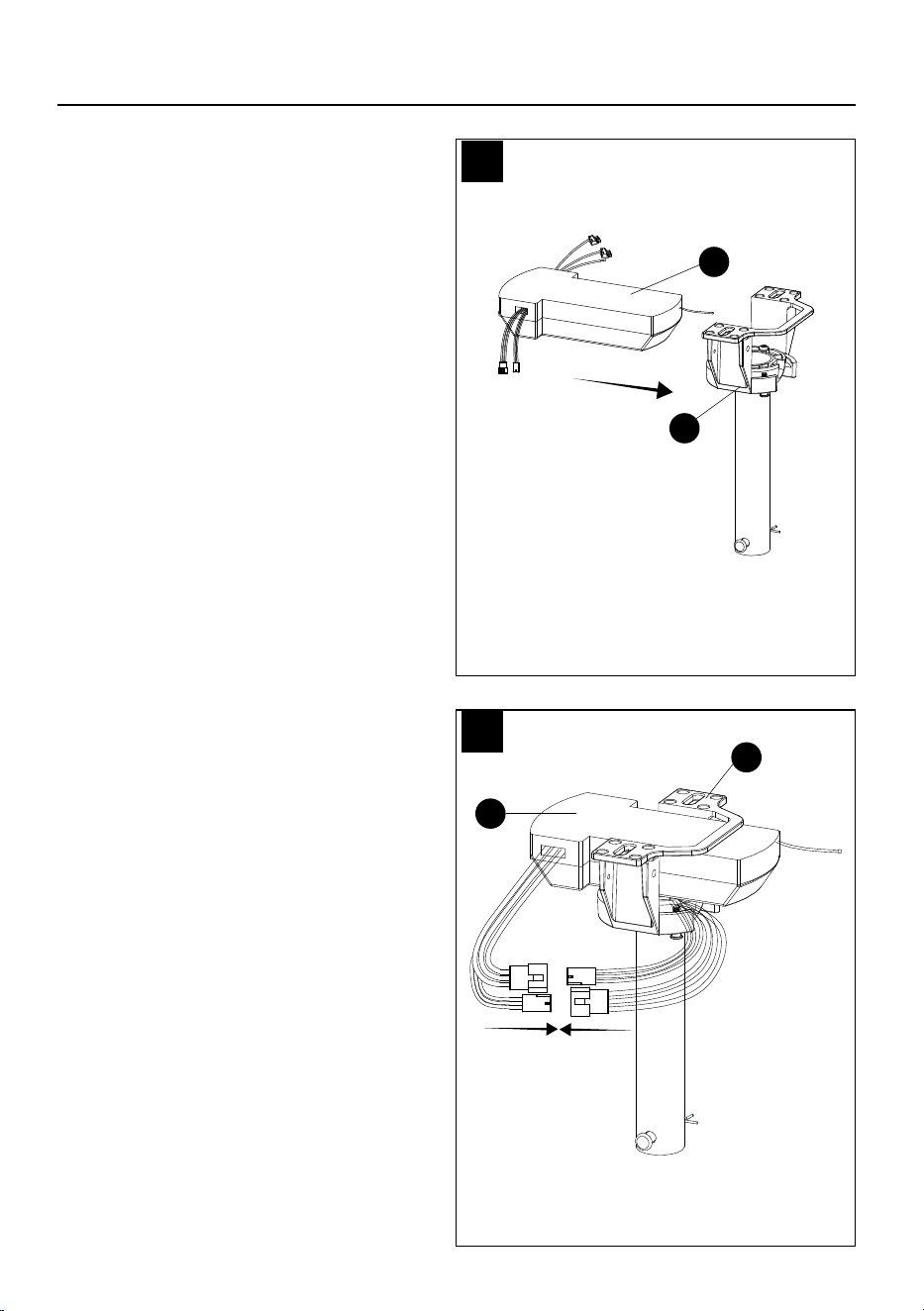
38
INSTRUCCIONES DE INSTALACIÓN
13. Cablee el ventilador.
Inserte el recibidor (L) en el soporte de
montaje (A), tal como se muestra.
14. Conexion de los cables de la carcasa del
motor a los cables del recibidor.
Conecte los 2 conectores del recibidor (L) a los
conectores de la carcasa del motor, haciendo
coincidir los colores de los cables. El negro,
el rojo y el blanco se conectan con otros cables
del mismo color, y el rojo, el amarillo y el blanco
se conectan con otros cables del mismo color.
L
13
14
A
L
A
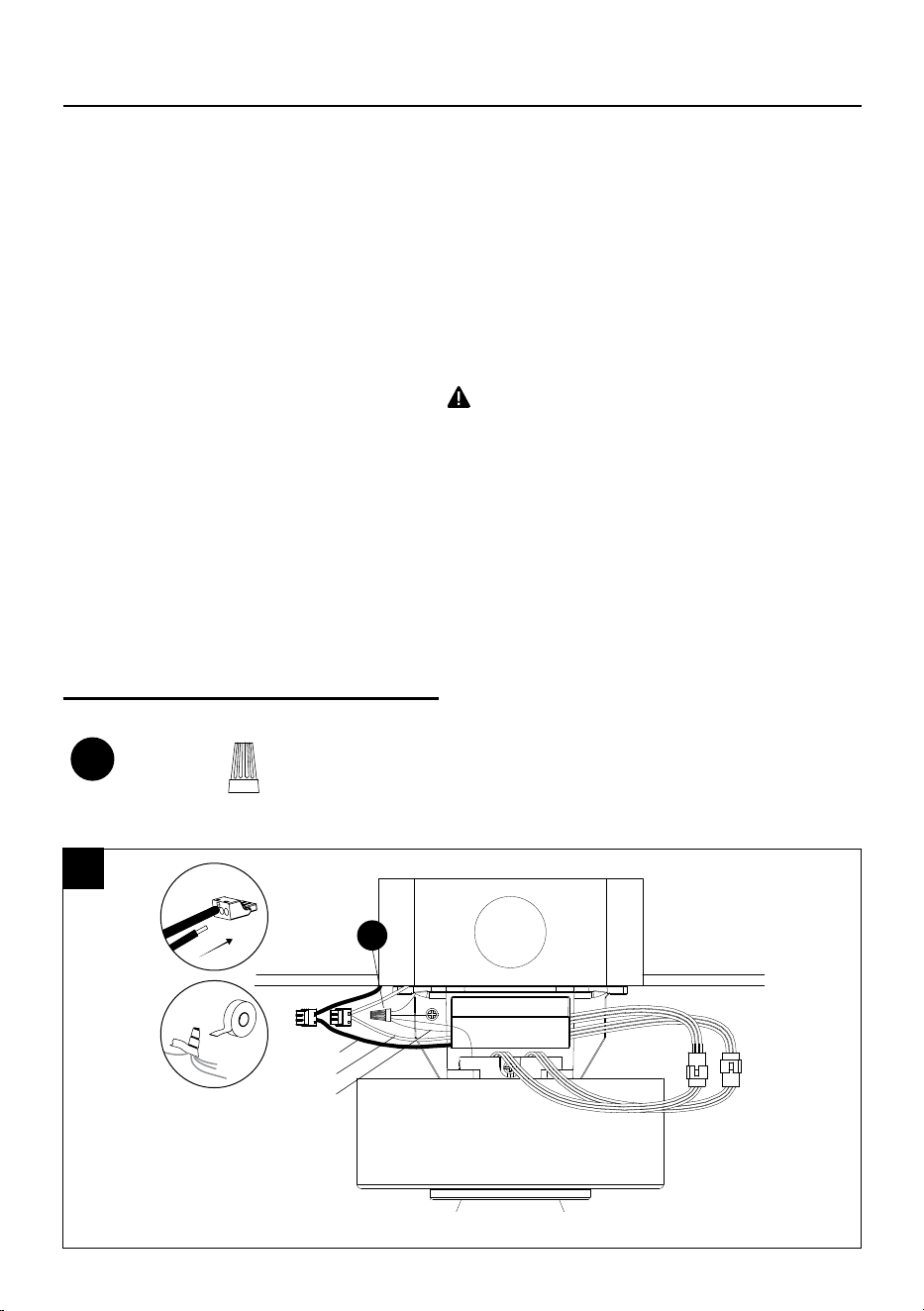
39
INSTRUCCIONES DE INSTALACIÓN
15. Conecte los conductores del techo a los conductores del recibidor de la siguiente manera:
Inserte el cable con corriente (negro) del techo en uno de los oricios libres de la conexión
rápida del cable negro del recibidor y empuje el cable hasta el fondo. Jale suavemente del
conductor para asegurarse de que esté bien sujeto al conector.
Inserte el cable neutral (blanco) del techo en uno de los oricios libres de la conexión rápida del
cable blanco del recibidor y empuje el cable hasta el fondo. Jale suavemente del conductor para
asegurarse de que esté bien sujeto al conector.
Conecte todos los conductores de puesta a tierra al conductor de puesta a tierra del techo,
como se muestra a continuación, con la tuerca mariposa (AA) que se encuentra en la bolsa
de accesorios "AA" y envuélvalos con cinta aislante. Si su techo no tiene un cable de puesta a
tierra, consulte con un electricista calicado.
NOTA: Después de conectar los
conductores, sepárelos de modo que los
conductores de puesta a tierra y blanco
queden a un lado y los conductores
negros al otro lado.
ADVERTENCIA
• Todo el cableado debe cumplir con el Código
Eléctrico Nacional, ANSI/NFPA 70. Si los
conductores en el sitio de instalación son de otro
color que los que se indican aquí, haga que un
electricista calicado instale este ventilador.
• El ventilador de techo debe estar conectado a
tierra. Si no hay un conductor de tierra presente
en el lugar de instalación (por ejemplo, desde el
techo), DETENGA la
instalación inmediatamente y consulte a un
electricista calicado.
Aditamentos utilizados
PRECAUCIÓN
•
Para reducir el riesgo de descarga eléctrica,
desconecte el circuito de suministro eléctrico
del ventilador antes de realizar el cableado. Si
considera que su conocimiento o experiencia en
cableado eléctrico no es suciente, comuníquese
con un electricista calicado.
•
No instale el producto en una ubicación mojada.
Negro
Blanco
Tierra
AA
Empalmes
plásticos
x 1
AA
15
40
INSTRUCCIONES DE INSTALACIÓN
16. Fije la base.
Fije la base (B) al soporte de montaje
(A) alineando los tornillos del soporte de
montaje (SS) con los oricios de la cerradura
de la base y gire, luego apriete los tornillos
del soporte de montaje (SS).
17. Fije el anillo magnetico de la base en la
base.
Levante el anillo magnético de la base (C) hacia
arriba para jarlo a la base (B).
16
17
C
B
B
A
SS
41
INSTRUCCIONES DE INSTALACIÓN
Aditamentos utilizados
19.18. Asegure la placa posterior del control
remoto (N) a la ubicación preferida
con las anclas de expansión para
tornillos (EE) y los tornillos (GG) que se
encuentran en la bolsa de accesorios
de aditamentos. Una vez que la placa
posterior (N) esté bien de forma segura
coloque el control remoto (M) en la placa
posterior (N) para mantenerlo en su lugar.
M N
N
GG
Anclas de expansión
para tornillos EE anclas
de expansión para
tornillos de la placa
EE
x 2
Anclas de expansión
para tornillos GG
tornillo de la placa
GG
x 2
18
2
3
4
5
6
1
2h
4h
42
NOTA: El control remoto usa 1 batería de botón CR2032 (incluida). Retire la lengüeta de plástico de
la cubierta de las baterías antes de usar el control remoto. Al reemplazar la batería, asegúrese de que
la cubierta de la batería esté completamente cerrada (escuchará un click).
NOTA: Se ha evaluado este equipo y se ha vericado que cumple con los requisitos de exposición
a radiofrecuencias. El dispositivo puede usarse en condiciones de exposición portátiles sin
restricciones.
Este equipo cumple con los límites de exposición a la radiación de FCC establecidos para un entorno
no controlado
Press to switch fan’s
rotation upward to circulate
rising warm air.
Presione para cambiar la
rotación del ventilador hacia
arriba para hacer circular
aire caliente ascendente.
Luz Encendida/
Apagada
Blanco ajustable
Encendido/apagado
LED
Regulador de luz hacia
arriba y hacia abajo
Presione para
encender y apagar el
ventilador y la luz.
NOTA: El ventilador y la
luz se encenderán en el
último estado.
Presione para encender
o apagar la luz.
Presione hacia arriba o
hacia abajo para recorrer
los 5 colores de ambiente
blanco: luz de día fría, luz
de día, blanco frío, blanco
cálido o blanco suave.
La luz indicadora LED azul
se iluminará cuando se
presione cualquier botón.
Presione para encender o
apagar el ventilador.
Presione para cambiar la
rotación del ventilador hacia
abajo para una corriente
descendente fría.
Ventilador
Encendido/Apagado
FUNCIONAMIENTO DEL CONTROL REMOTO Y EL VENTILADOR
Nombre del modelo remoto: Control Remoto 304
Número de modelo del control remoto: GL37152
#1-6: 6 niveles de
velocidad del ventilador
Ventilación ascendente
Ventilación descendente
43
PROBLEMA SOLUCIÓN
El ventilador no
encienden.
1. Asegúrese de que el interruptor de pared esté encendido.
2. Compruebe todos los fusibles e interruptores de circuito.
3. Desconecte la alimentación eléctrica y asegúrese de que el cableado sea
correcto y que los conectores estén asegurados, como se muestra en los pasos
13, 14 y 15 del ensamblaje.
4. Conrme que el control remoto esté funcionando; la luz indicadora LED debe
iluminarse cuando se presiona cualquier botón.
5. Si el ventilador continúan sin encender, comuníquese con un electricista
calicado. No intente solucionar usted mismo problemas de conexiones
eléctricas internas.
El ventilador
es ruidoso.
1. Deje transcurrir un período de “adaptación” de 24 horas. Cualquier nivel de ruido
más alto que los niveles del ambiente deberían desaparecer durante ese tiempo.
2. Revise la caja de salida de corriente eléctrica y asegúrese de que esté bien
jada.
3. Revise todos los tornillos y las conexiones de conductores en el ventilador para
asegurarse de que estén bien rmes.
4. El uso de un regulador de luz o un control de pared no aprobados puede
provocar que el ventilador funcione de forma irregular y que produzca ruido
excesivo. Compruebe que, si está instalado, el control de pared esté aprobado
para el uso con el ventilador de techo; sin embargo, no se recomienda usar un
regulador de intensidad con el ventilador.
El ventilador
se mueve
hacia atrás y
hacia adelante
cuando
se enciende.
1. Este es un procedimiento de arranque normal para ventiladores con motor
de CC. El movimiento parcial durante el arranque es el resultado de los
polos magnéticos la alineación interna del motor de CC para el correcto
funcionamiento del motor. Este diseño ahorra electricidad y permite que el
ventilador funcione mucho más silenciosamente que los ventiladores con motor
de CA estándar.
El ventilador no
mueve mucho
aire.
1. Verique la dirección de las aspas del ventilador cuando esté en funcionamiento.
Si es necesario, cambie la dirección de las aspas del ventilador para garantizar
que el ventilador de techo mueva aire en la dirección deseada.
2. Asegúrese de que no haya artículos domésticos que obstruyan el ujo de aire
del ventilador de techo.
3. Verique que el ventilador de techo sea apropiado para el tamaño de la
habitación en la que está instalado.
CUIDADO Y MANTENIMIENTO
• El movimiento natural del ventilador puede causar que se suelten algunas conexiones. Un
ruido de clic o traqueteo es una señal segura de que los tornillos se están aojando. Revise las
conexiones de soporte, los soportes y la jación de las aspas dos veces al año y apriete todos los
tornillos según sea necesario.
• Asegúrese de desconectar el ventilador del suministro de electricidad antes de realizarle
mantenimiento o limpieza.
• Limpie el ventilador periódicamente. Utilice únicamente un paño húmedo, nunca utilice solventes y
remueva el polvo con un paño suave o un cepillo.
• Nunca necesitará engrasar el ventilador; su cojinete sellado permanentemente evitará el ruido.
• No opere el producto cuando esté dañado. Deseche el ventilador o llévelo a un local de servicio
autorizado para una inspección o reparación.
• El vataje total de la lámpara es de 18 vatios; no intente reemplazar la luz LED.
SOLUCIÓN DE PROBLEMAS
44
Impreso en Camboya
PROBLEMA SOLUCIÓN
El ventilador tiembla
o se tambalea.
1. Una tambaleo leve es normal y aceptable, por lo que no es indicativo de
un defecto. Haga funcionar el ventilador durante al menos
10 minutos antes de vericar el nivel de tambaleo.
2. Asegúrese de que la caja de salida eléctrica y el soporte para colgar
estén bien sujetos, como se muestra en el paso 1 del ensamblaje.
3. Asegúrese de que la ranura de la bola para colgar esté colocada
correctamente en la ranura del soporte; de lo contrario, gire la bola para
colgar en dirección de las manecillas del reloj hasta que la bola caiga en
la ranura, como se muestra en el paso 12 del ensamblaje.
4. Instale el kit de equilibrio (FF) incluido. Si persiste el movimiento no
deseado, simplemente cambie la ubicación del kit de equilibrio (FF) hasta
que el exceso de movimiento cese.
El control remoto
no funciona.
1. Asegúrese de quitar la lengüeta de plástico del compartimiento de la pila.
2. Asegúrese de que las pilas estén instaladas correctamente en el control
remoto.
3. Asegúrese de que el control remoto y el recibidor estén emparejados. Si
las pilas son nuevas y la luz indicadora LED está funcionando, pero el
ventilador o la lámpara aún no funcionan, es posible que el control remoto
se haya desvinculado. Para emparejar el control remoto y el ventilador,
presione el botón principal de encendido y apagado en el control remoto 3
veces en un minuto.
4. Asegúrese de que los conductores del recibidor estén conectados
correctamente al cableado de la casa y a los conductores del ventilador
de techo, como se muestra en los pasos 13, 14 y 15 del ensamblaje.
SOLUCIÓN DE PROBLEMAS (CONTINUACIÓN)
GARANTÍA LIMITADA DE 3 AÑOS
Lo que está cubierto
Se garantiza que este producto estará libre de defectos de fábrica en las piezas y la mano de obra
durante un período de 3 años desde la fecha de compra. Todas las reclamaciones de garantía requieren
un recibo de compra.
¿Qué no cubre?
Esta garantía no incluye servicio de reparación, ajuste y calibración por mal uso, abuso o negligencia.
La reparación no autorizada o la modicación del producto o de cualquiera de los componentes
suministrados anularán esta garantía en su totalidad. Esta garantía no incluye reembolso por
inconvenientes, instalación, tiempo de instalación, pérdida de uso, servicio no autorizado o cargos de
envío de devolución. Esta garantía no se extiende a otros equipos y componentes que un cliente utiliza
junto con este producto.
SERVICIO TÉCNICO
Si tiene alguna pregunta o problema, llame a nuestro Departamento de Servicio al Cliente al
888-251-1003, de lunes a domingo de 8 a.m. a 8 p.m., hora estándar del Este. También puede
ponerse en contacto con nosotros a través de [email protected].
No hay piezas de recambio disponibles para este producto.
Guarde su recibo de compra con fecha, se requiere para todos los pedidos de la garantía.