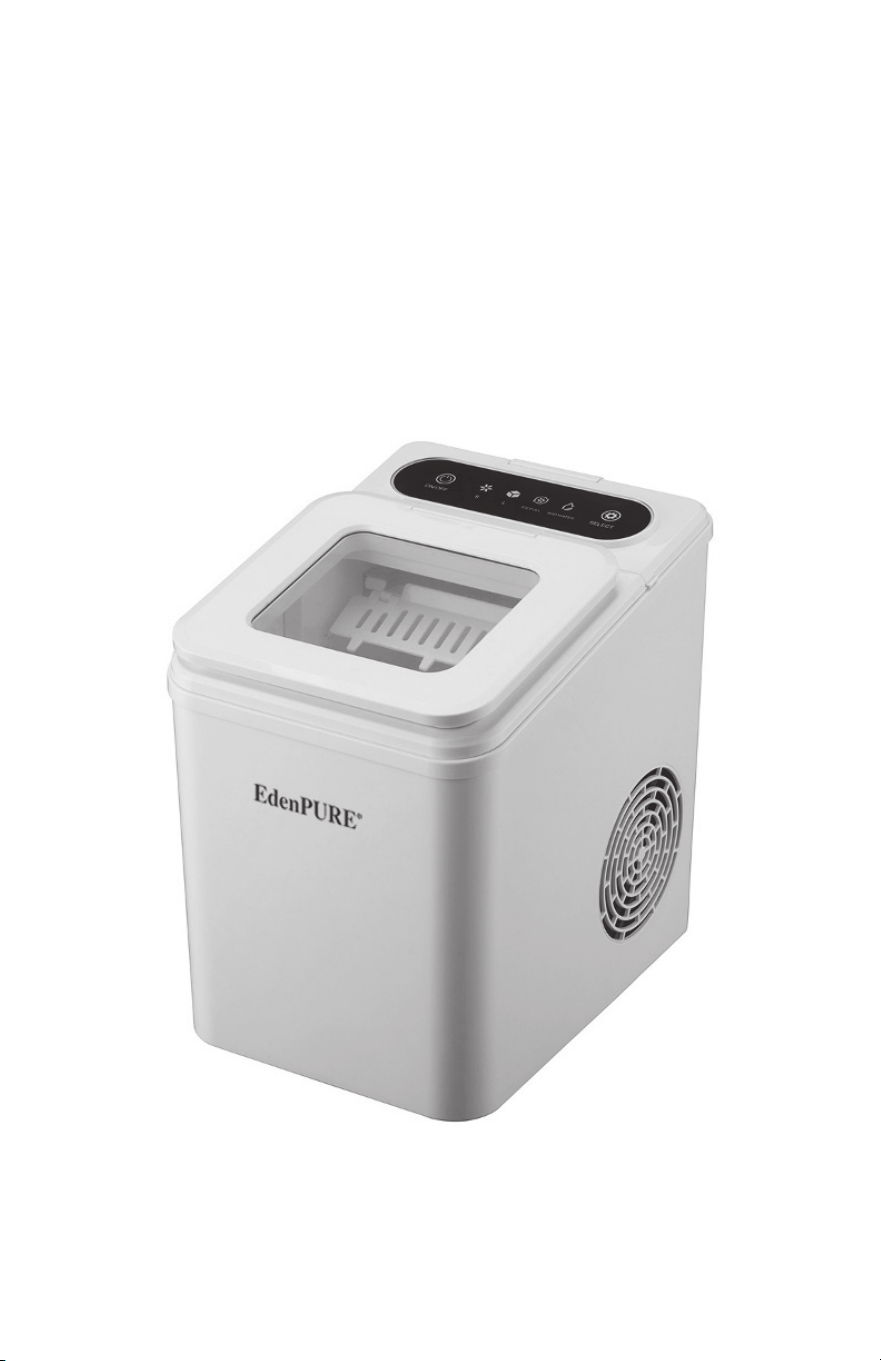
Instruction Manual
Model: BS-002
Please be sure to read all instructions
before using this appliance.
10
©2025 EdenPURE® I-5920 BR12386R-1
EdenPURE
®
7584 Whipple Avenue NW
N. Canton, OH 44720
In the event your unit does not appear to be working properly
or the trouble lights start blinking, contact customer service at
To place an order call 1-800-360-1070
or go to www.edenpure.com.
UV IcePRO
EdenPURE
®

Table of Contents
Important Safety Precautions ................. Pages 1- 2
Parts list .................................................... Page 3
Cleaning and Maintenance ...................... Page 4
Adding Water/Drainage ........................... Page 5
Before Using/Power Supply Risk ............ Page 6
How to Make Ice ....................................... Page 7
Troubleshooting ........................................ Page 8
Technical Parameters
and Electrical Schematic ...................... Page 9
9
Technical Specifications
Model BS-002
Security Level I
Power supply 120V / 60 Hz
Maximum current 2.0 A
Maximum power 165 W
Refrigerant / liquid amount R600a / 20g
Foaming agent C
5
H
12
Insulation EPS
Net weight 14.3 lbs.
Gross Weight 16 lbs.
Ice Shape Bullet
Ice Production 26.4 lb. / day
Water Tank Capacity .4 gallons
Ice Basket Capacity 1.3 lb.
Shell ABS
Machine Size (width X depth X height ) 9.134 X 12.087 X 12.087 inches

1
Important Safety Precautions
This appliance is for household use only. When using household
electrical appliances, basic safety regulations must be followed to
reduce the chance of re, electric shock and damage to people or
property. Please read the following safety tips carefully before using
the appliance.
WARNING:
q This appliance can be used by children over 8 years old and
people with reduced physical, sensory or mental capabilities or
lack of experience and knowledge if they are being supervised.
q Children should not play with the appliance. Cleaning and user
maintenance should not be made by children without supervision.
When children are around, adult supervision is required.
q Use the correct power outlet and ensure that the power plug is
fully inserted into the outlet.
q If the supply cord is damaged, do not use or operate this
machine. Contact customer service at 1-800-225-6595
q We do not recommend the use of extension cords which may
cause overheating or re.
q When in use, please do not place the power cord on top of
rugs or heat-insulating objects. Do not cover the power cord.
Keep the power cord away from walking paths and do not
immerse it in water.
q Do not use combustible items near the machine to avoid
the risk of re.
q Do not use mechanical devices or other methods to accelerate
the de-icing process except those recommended by the
manufacturer.
q Do not damage the refrigerant circuit.
q Keep ventilation openings in the equipment housing or built-in
structure free from obstruction.
q Do not use electrical appliances in the food storage compartment
of the unit unless they are recommended by the manufacturer.
q Please do not tip over the ice machine. If it tips over, place the
machine upright for 2 hours before turning it on.
8
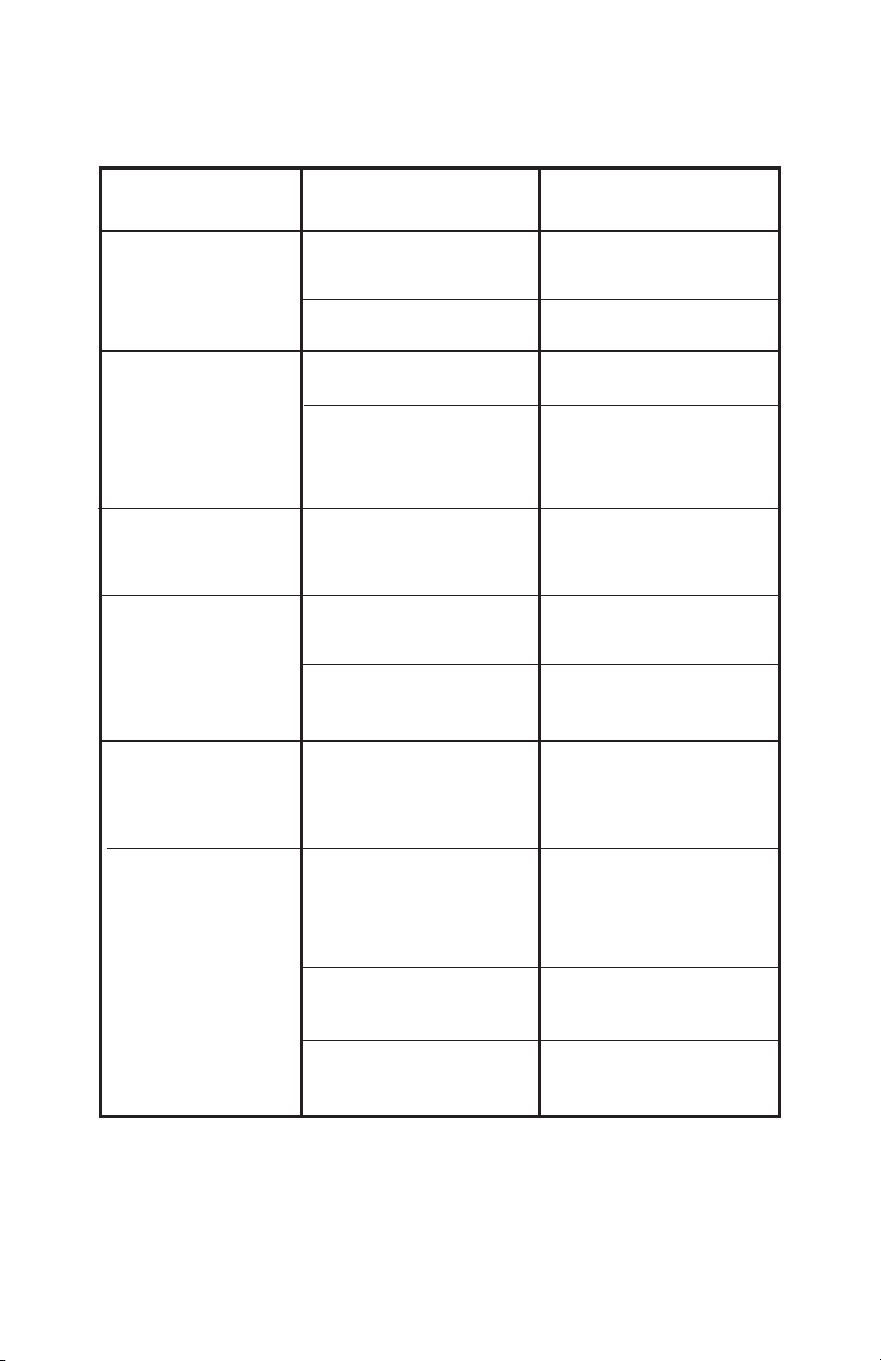
Troubleshooting
Problem Possible Causes Solution
“ADD WATER”
indicator light on
The “ICE FULL”
indicator light on
The “ICE FULL”
indicator blinking
Ice cubes
stuck together
The ice is full but the
indicator light is off
The ice making
process is normal,
but no ice is produced
The machine is
out of water
Too much ice in
the ice basket
An ice cube is stuck
The ice making cycle time
is taking too long
The machine is located
in a location where there is
a lot of sunlight, which
affects infrared detection
Turn the unit off, add water,
and press the “ON/OFF” button
to restart ice making
Press and hold the “SELECT”
button for more than 5 seconds to
force the ice machine to start and
run 10 cycles. If that doesn’t solve the
problem contact customer service.
Check if the ice cubes are stuck
on the ice shovel, and remove
the ice cubes. Otherwise,
contact customer service.
Stop making ice, wait for the ice
cubes to melt, then restart ice
making and select small ice
Move to a darker area
The ambient temperature
or water temperature
is too high
Please make ice when
the ambient room temperature
is below 90˚ F and
make sure to add cold water
into the water tank.
The filter at the bottom of
the water tank is blocked
The ice full sensor is always
on when there is no ice
The water temperature in
the water tank is too low
Refrigeration system
is blocked
Refrigeration system
is leaking
Contact customer service
Contact customer service
Clean the filter
Replace the water in the water tank.
The water temperature should be
between 46˚ F and 95˚ F .
Remove the ice cubes
from the ice basket.
2
Important Safety Precautions
7
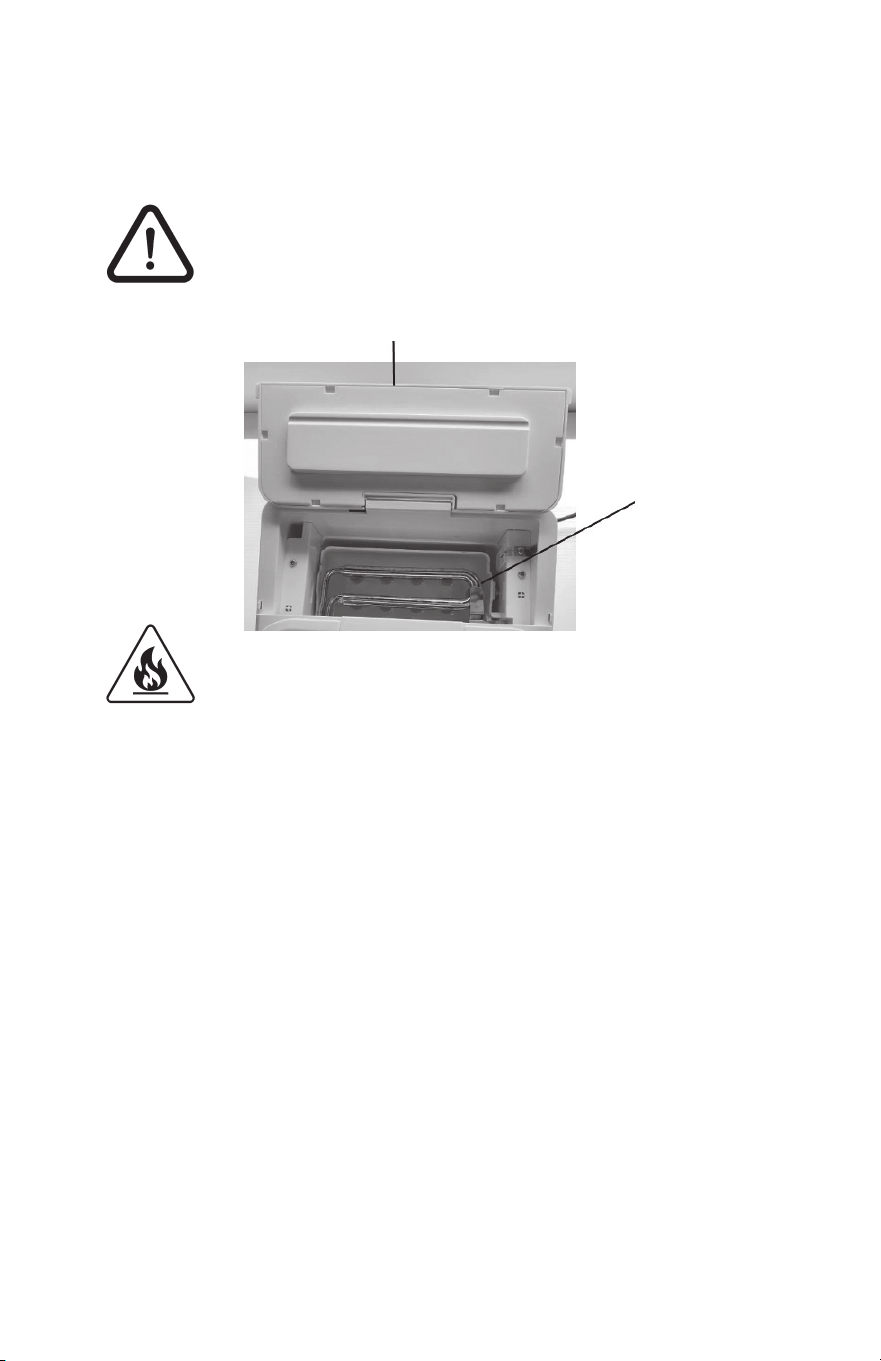
DANGER:
When the ice machine is in use or making ice,
please do not touch the evaporator and do not
open the control panel on the top of the machine
to avoid injury.
Fire/flammable material risk. Avoid igniting flammable
materials that may cause a fire.
q The thermal insulation material of the box is EPS ammable,
so keep it away from the re and do not burn it. Dispose of
it in the trash.
q The refrigerant of this product is ammable. Pay attention to
make sure there’s nothing ammable around it and that it has
proper ventilation during maintenance.
q This appliance contains refrigerants under high pressure and
maintenance of the refrigeration system should be carried out
by professionals.
q Do not store explosive items, such as aerosol cans containing
ammable propellants, in or around this appliance.
q Do not use ammable liquids to clean the ice machine;
this may cause a re or explosion.
q Please handle in accordance with local regulations regarding
the handling of ammable refrigerants and ammable gases
in the equipment.
q Unplug the power cord from the outlet before cleaning
or servicing.
Control Panel
Evaporator
How to Make Ice
1. Plug in and turn on the power.
2. Fill the machine with water, keeping the water below the
MAX Line.
3. Touch and press the “ON/OFF”button on the control panel
to start making ice.
4. Touch and press “SELECT”, then press “S” or “L” to select
the size of ice cubes. After selection, the machine enters
the ice making mode and will start to make ice.
5. Touch and press “ON/OFF” to end the ice making mode.
q If the room temperature is below 59˚ F, it is recommended
that you select small ice to prevent continuous ice making.
q Each ice making session lasts from 6 to 12 minutes,
depending on the size of the ice cubes and the room
temperature.
q The size of the ice cubes is also related to the water
temperature and ambient temperature.
q Check the water level in the water tank frequently. If the
water pump cannot pump out water, the ice maker will
automatically stop and the “ ADD WATER” light will turn
on. Press the “ON/OFF” button to turn the machine off, ll
the water tank with water and press the “ON/OFF” button
again to restart the machine.
q If the ice basket is full of ice, the machine will automatically
stop making ice and the “ICE FULL” indicator light will turn
on; When you use an ice scoop to remove ice from the ice
basket and the position of the ice is lower than the infrared
detection position, the machine will start to make ice again.
The UVC light always be lit while ice is being made.
3
Parts List
6
Before Using / Power Supply Risk
Before Using
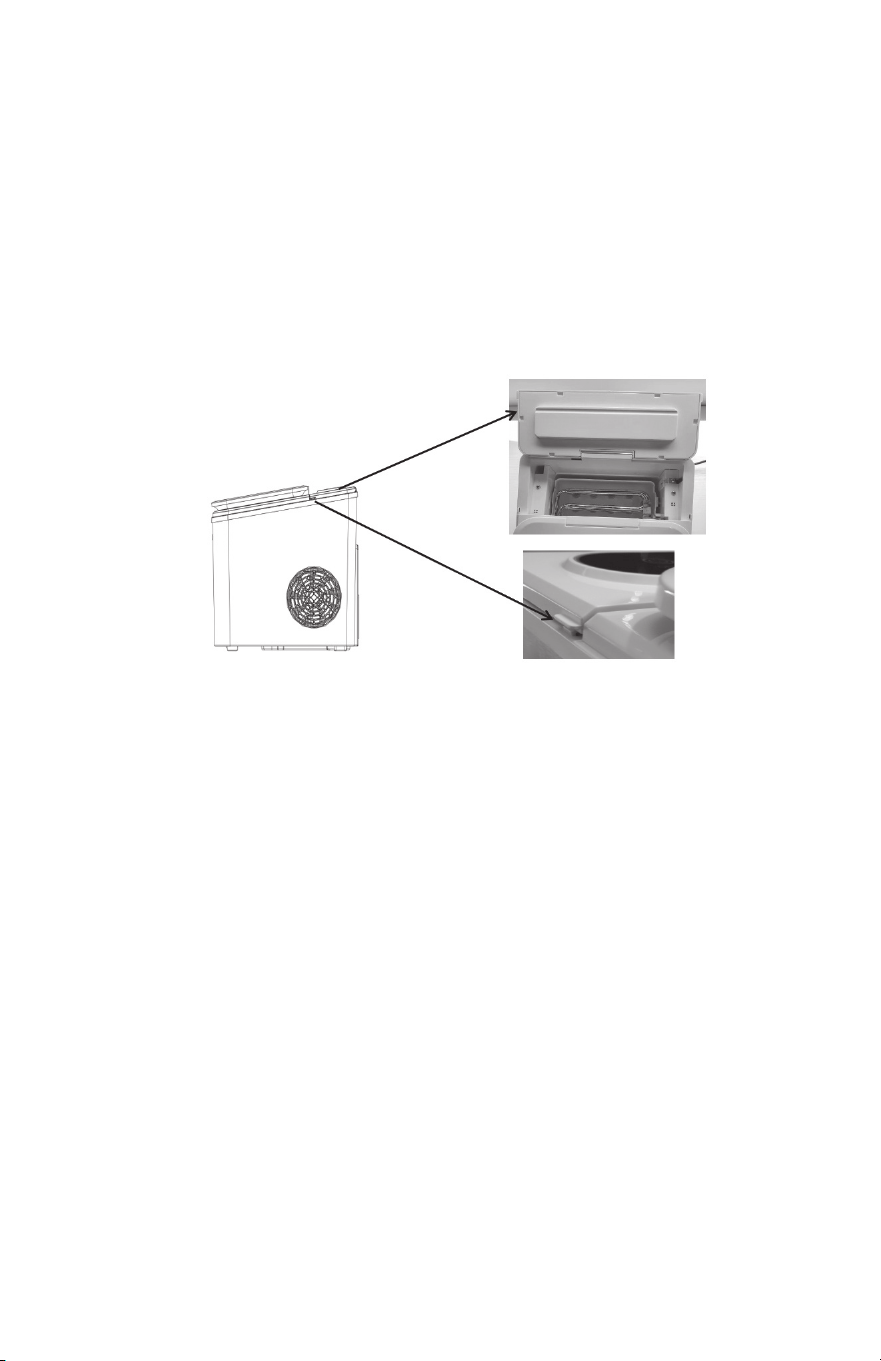
1. Before the rst use, please remove all inner and outer packaging.
Check whether there is an ice basket, ice scoop, and a handle
etc. If any accessories are missing, please contact customer
service.
2. Place the ice maker out of direct sunlight and away from heat
sources and radiation. Place the ice maker horizontally and
ensure that there is at least 6”of space on both sides and the
back.
3. The ice machine should be placed in a location that has a suitable
electrical outlet.
4. If you move the ice maker from one temperature area to another,
wait a few hours for the ice maker to reach room temperature
before turning it on.
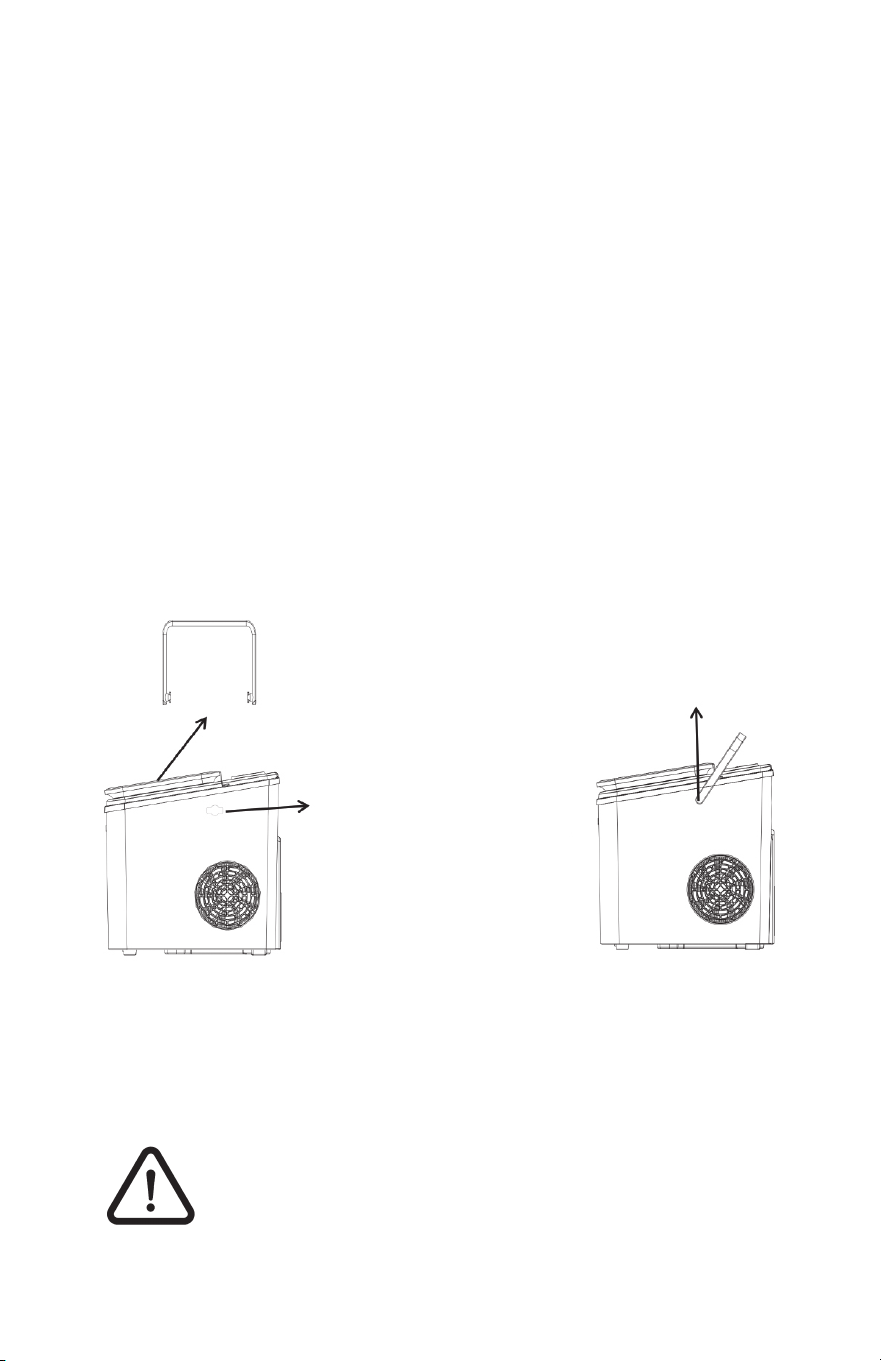
5. Install the handle on the sides of the machine before use.
.
Power Supply Risk
For your safety, this ice machine must be reliably grounded.
This machine requires a standard 120V~ 60 Hz grounded
power supply.
Improper use of the grounding wire may result
in the risk of electric shock. If the power cord
is damaged, please contact customer service
at 1-800-225-6595 or [email protected].
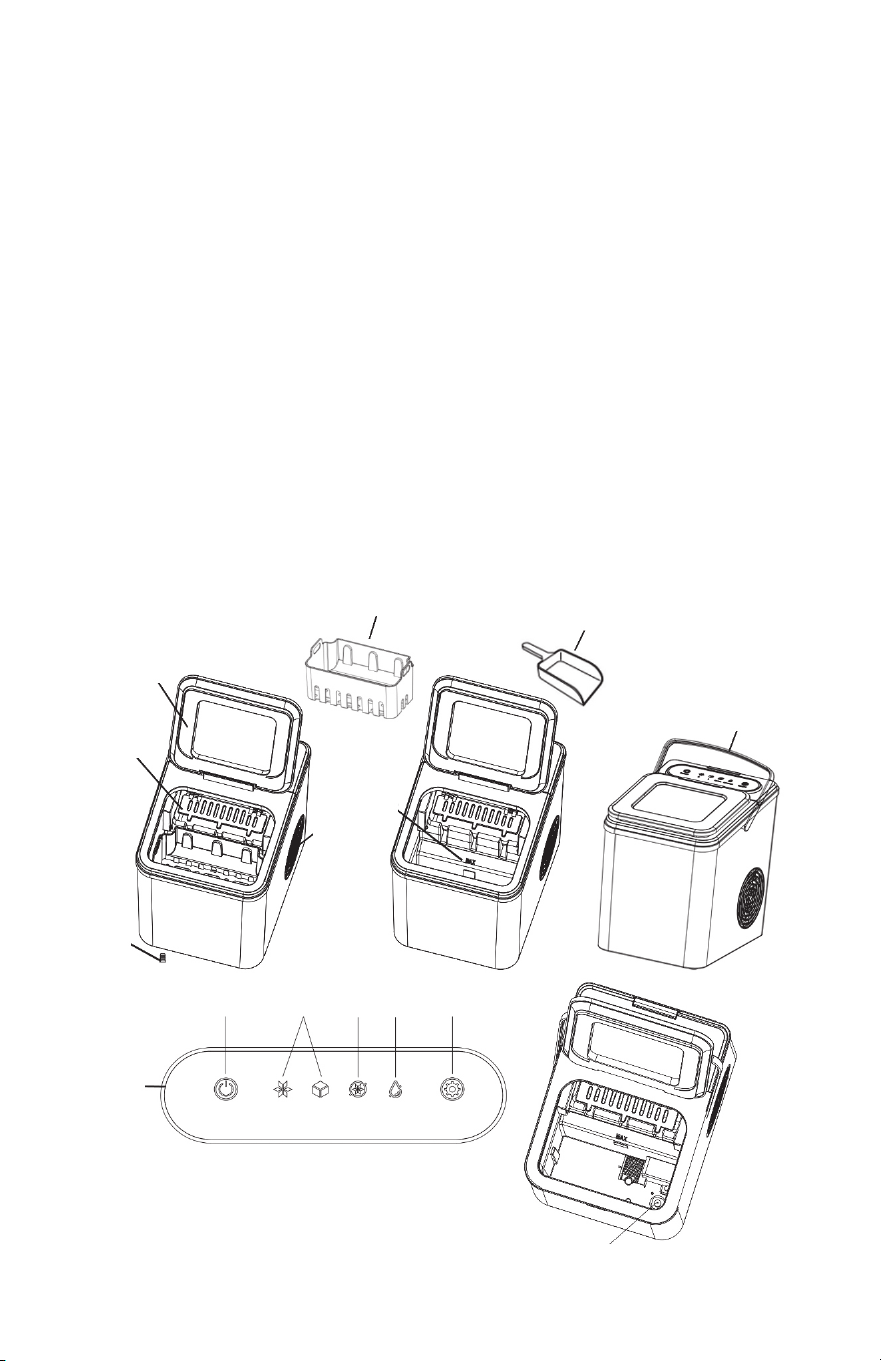
Ice Scoop: Used to scoop the ice out of the machine
Ice Basket: Used to store ice cubes.
1. Infrared detection of ice full sensor: When the ice basket is full,
the “ICE FULL” light on the display panel will turn on.
2. Upper Cover: Has a transparent window so you can see inside.
3. Air Outlet: To ensure smooth airow, the air outlet net should be
at least 6” away from any other object.
4. Drain Plug: Pull it out to drain the water in the water tank at the
bottom of the machine.
5. The water limit line: Only ll water to the “MAX” line.
6. Control Panel:
A. “S”& “L”buttons: For small cubes select “S”. For large cubes select “L”.
B. “ICE FULL”button: Will turn on when the ice bucket is full.
C. “ADD WATER”button: Will turn on when you need to add water.
D. “SELECT”button: Press before selecting the “S” or “L” button.
E. “ON/OFF” button: Power switch button.
7. UV-C Light
1.
Ice Basket
2.
3.
4.
5.
6.
A B C DE
ADD
WATER
Handle
Ice Scoop
7. UV-C
S
L
ON/OFF
SELECT
Remove all inner and outer packaging.
Check for ice baskets and scoops. If any
accessories are missing, please contact
customer service.
1. Open the top cover
and remove the handle.
3. Snap the end of
the handle into
the sides as
shown below.
2. Pull the handle left and
right with both hands so
that the end of the handle
is aligned with the two
holes on the side of
the machine.
ICE
FULL
4 5
Cleaning and Maintenance
Before using this ice machine, it is strongly recommended that you
t
horoughly clean the entire machine following the instructions below:
1. Remove the ice basket and ice scoop and scrub them in warm water with a
mild detergent.
2. Add warm water or diluted detergent to the inside of the machine and scrub
the inside of the machine with a soft cloth.
3. Pull up on the side plastic tabs of the control panel, open the control panel,
and clean the evaporator column with warm water. You can also use a soft
ne-bristle brush or soft cloth to clean the evaporator and ice water box.
4. Open the drain plug at the bottom of the machine and drain the water from
the water tank.
5. After draining is complete, reset the drain plug.
6. Use the machine’s automatic self-clean function to clean the machine.
7. After the machine is cleaned, use drinking water to make ice. Make 2 batches
of ice and throw them away. Then use any batches after that as needed.
The exterior of the machine should be scrubbed frequently with diluted
detergent and warm water.
It is recommended that you change the water every 24 hours to keep
the water clean.
If the ice machine is not used for a long time, please drain the remaining water in
the water tank and wipe the tank dry with a clean cloth.
Warning: Cleaning and user maintenance must not be carried out by
unsupervised children.
Warning: Before cleaning, turn the power off and disconnect the power cord
from the wall outlet.
Machine Auto Self-Clean
To activate the Auto Self-Clean Mode, touch and hold the “ON/OFF” button for 3
seconds until the S and L indicators ash alternately, then release it and the ma-
chine will enter automatic cleaning mode. One cleaning cycle: about one minute;
this cycle will repeat continuously for around 15 minutes.
In the self-cleaning mode, manually press the “ON/OFF” key to turn off the
self-cleaning program if you want to end it before 15 minutes.
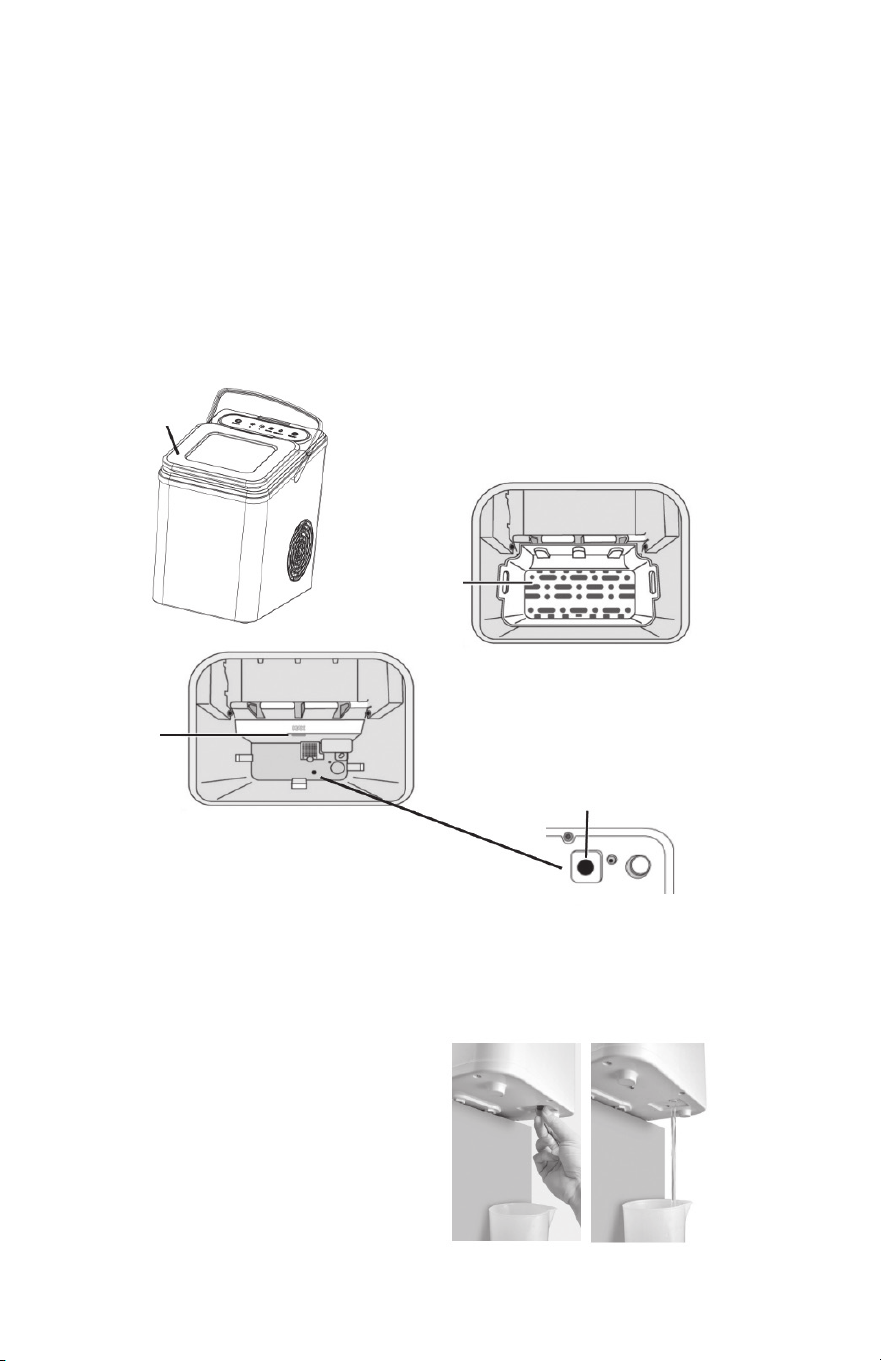
Adding Water / Drainage
Add Water
Open the top cover, remove the ice basket, add water to the water
tank of the machine to keep the water level below the highest water
level marked “ MAX “ and close the top cover.
Before adding water, please make sure the silicone drain plug at the
bottom of the machine is installed.
Warning: Fill with drinking water only.
Drainage
Prepare a water container rst, then unplug the silicone drain plug at
the bottom of the machine to drain the water from the water tank.
After draining the water,
put the drain plug back in.
tab
Control Panel
Top cover
Ice basket
MAX
Drain plug at the bottom of machine
4 5
Cleaning and Maintenance
Before using this ice machine, it is strongly recommended that you
t
horoughly clean the entire machine following the instructions below:
1. Remove the ice basket and ice scoop and scrub them in warm water with a
mild detergent.
2. Add warm water or diluted detergent to the inside of the machine and scrub
the inside of the machine with a soft cloth.
3. Pull up on the side plastic tabs of the control panel, open the control panel,
and clean the evaporator column with warm water. You can also use a soft
ne-bristle brush or soft cloth to clean the evaporator and ice water box.
4. Open the drain plug at the bottom of the machine and drain the water from
the water tank.
5. After draining is complete, reset the drain plug.
6. Use the machine’s automatic self-clean function to clean the machine.
7. After the machine is cleaned, use drinking water to make ice. Make 2 batches
of ice and throw them away. Then use any batches after that as needed.
The exterior of the machine should be scrubbed frequently with diluted
detergent and warm water.
It is recommended that you change the water every 24 hours to keep
the water clean.
If the ice machine is not used for a long time, please drain the remaining water in
the water tank and wipe the tank dry with a clean cloth.
Warning: Cleaning and user maintenance must not be carried out by
unsupervised children.
Warning: Before cleaning, turn the power off and disconnect the power cord
from the wall outlet.
Machine Auto Self-Clean
To activate the Auto Self-Clean Mode, touch and hold the “ON/OFF” button for 3
seconds until the S and L indicators ash alternately, then release it and the ma-
chine will enter automatic cleaning mode. One cleaning cycle: about one minute;
this cycle will repeat continuously for around 15 minutes.
In the self-cleaning mode, manually press the “ON/OFF” key to turn off the
self-cleaning program if you want to end it before 15 minutes.
Adding Water / Drainage
Add Water
Open the top cover, remove the ice basket, add water to the water
tank of the machine to keep the water level below the highest water
level marked “ MAX “ and close the top cover.
Before adding water, please make sure the silicone drain plug at the
bottom of the machine is installed.
Warning: Fill with drinking water only.
Drainage
Prepare a water container rst, then unplug the silicone drain plug at
the bottom of the machine to drain the water from the water tank.
After draining the water,
put the drain plug back in.
tab
Control Panel
Top cover
Ice basket
MAX
Drain plug at the bottom of machine
3
Parts List
6
Before Using / Power Supply Risk
Before Using
1. Before the rst use, please remove all inner and outer packaging.
Check whether there is an ice basket, ice scoop, and a handle
etc. If any accessories are missing, please contact customer
service.
2. Place the ice maker out of direct sunlight and away from heat
sources and radiation. Place the ice maker horizontally and
ensure that there is at least 6”of space on both sides and the
back.
3. The ice machine should be placed in a location that has a suitable
electrical outlet.
4. If you move the ice maker from one temperature area to another,
wait a few hours for the ice maker to reach room temperature
before turning it on.
5. Install the handle on the sides of the machine before use.
.
Power Supply Risk
For your safety, this ice machine must be reliably
grounded. This machine requires a standard 120V~60Hz
grounded power supply.
Improper use of the grounding wire may result
in the risk of electric shock. If the power cord
is damaged, please contact customer service
at 1-800-225-6595 or [email protected].
Ice Scoop: Used to scoop the ice out of the machine
Ice Basket: Used to store ice cubes.
1. Infrared detection of ice full sensor: When the ice basket is full,
the “ICE FULL” light on the display panel will turn on.
2. Upper Cover: Has a transparent window so you can see inside.
3. Air Outlet: To ensure smooth airow, the air outlet net should be
at least 6” away from any other object.
4. Drain Plug: Pull it out to drain the water in the water tank at the
bottom of the machine.
5. The water limit line: Only ll water to the “MAX” line.
6. Control Panel:
A. “S”& “L”buttons: For small cubes select “S”. For large cubes select “L”.
B. “ICE FULL”button: Will turn on when the ice bucket is full.
C. “ADD WATER”button: Will turn on when you need to add water.
D. “SELECT”button: Press before selecting the “S” or “L” button.
E. “ON/OFF” button: Power switch button.
7. UV-C Light
1.
Ice Basket
2.
3.
4.
5.
6.
A B C DE
ADD
WATER
Handle
Ice Scoop
7. UV-C
S
L
ON/OFF
SELECT
Remove all inner and outer packaging.
Check for ice baskets and scoops. If any
accessories are missing, please contact
customer service.
1. Open the top cover
and remove the handle.
3. Snap the end of
the handle into
the sides as
shown below.
2. Pull the handle left and
right with both hands so
that the end of the handle
is aligned with the two
holes on the side of
the machine.
ICE
FULL

2
Important Safety Precautions
7
DANGER:
When the ice machine is in use or making ice,
please do not touch the evaporator and do not
open the control panel on the top of the machine
to avoid injury.
Fire/flammable material risk. Avoid igniting flammable
materials that may cause a fire.
q The thermal insulation material of the box is EPS ammable,
so keep it away from the re and do not burn it. Dispose of
it in the trash.
q The refrigerant of this product is ammable. Pay attention to
make sure there’s nothing ammable around it and that it has
proper ventilation during maintenance.
q This appliance contains refrigerants under high pressure and
maintenance of the refrigeration system should be carried out
by professionals.
q Do not store explosive items, such as aerosol cans containing
ammable propellants, in or around this appliance.
q Do not use ammable liquids to clean the ice machine;
this may cause a re or explosion.
q Please handle in accordance with local regulations regarding
the handling of ammable refrigerants and ammable gases
in the equipment.
q Unplug the power cord from the outlet before cleaning
or servicing.
Control Panel
Evaporator
How to Make Ice
1. Plug in and turn on the power.
2. Fill the machine with water, keeping the water below the
MAX Line.
3. Touch and press the “ON/OFF”button on the control panel
to start making ice.
4. Touch and press “SELECT”, then press “S” or “L” to select
the size of ice cubes. After selection, the machine enters
the ice making mode and will start to make ice.
5. Touch and press “ON/OFF” to end the ice making mode.
q If the room temperature is below 59˚ F, it is recommended
that you select small ice to prevent continuous ice making.
q Each ice making session lasts from 6 to 12 minutes,
depending on the size of the ice cubes and the room
temperature.
q The size of the ice cubes is also related to the water
temperature and ambient temperature.
q Check the water level in the water tank frequently. If the
water pump cannot pump out water, the ice maker will
automatically stop and the “ ADD WATER” light will turn
on. Press the “ON/OFF” button to turn the machine off, ll
the water tank with water and press the “ON/OFF” button
again to restart the machine.
q If the ice basket is full of ice, the machine will automatically
stop making ice and the “ICE FULL” indicator light will turn
on; When you use an ice scoop to remove ice from the ice
basket and the position of the ice is lower than the infrared
detection position, the machine will start to make ice again.
The UVC light always be lit while ice is being made.
1
Important Safety Precautions
This appliance is for household use only. When using household
electrical appliances, basic safety regulations must be followed to
reduce the chance of re, electric shock and damage to people or
property. Please read the following safety tips carefully before using
the appliance.
WARNING:
q This appliance can be used by children over 8 years old and
people with reduced physical, sensory or mental capabilities or
lack of experience and knowledge if they are being supervised.
q Children should not play with the appliance. Cleaning and user
maintenance should not be made by children without supervision.
When children are around, adult supervision is required.
q Use the correct power outlet and ensure that the power plug is
fully inserted into the outlet.
q If the supply cord is damaged, do not use or operate this
machine. Contact customer service at 1-800-225-6595
or custserv@edenpure.com.
q We do not recommend the use of extension cords which may
cause overheating or re.
q When in use, please do not place the power cord on top of
rugs or heat-insulating objects. Do not cover the power cord.
Keep the power cord away from walking paths and do not
immerse it in water.
q Do not use combustible items near the machine to avoid
the risk of re.
q Do not use mechanical devices or other methods to accelerate
the de-icing process except those recommended by the
manufacturer.
q Do not damage the refrigerant circuit.
q Keep ventilation openings in the equipment housing or built-in
structure free from obstruction.
q Do not use electrical appliances in the food storage compartment
of the unit unless they are recommended by the manufacturer.
q Please do not tip over the ice machine. If it tips over, place the
machine upright for 2 hours before turning it on.
8
Troubleshooting
Problem Possible Causes Solution
“ADD WATER”
indicator light on
The “ICE FULL”
indicator light on
The “ICE FULL”
indicator blinking
Ice cubes
stuck together
The ice is full but the
indicator light is off
The ice making
process is normal,
but no ice is produced
The machine is
out of water
Too much ice in
the ice basket
An ice cube is stuck
The ice making cycle time
is taking too long
The machine is located
in a location where there is
a lot of sunlight, which
affects infrared detection
Turn the unit off, add water,
and press the “ON/OFF” button
to restart ice making
Press and hold the “SELECT”
button for more than 5 seconds to
force the ice machine to start and
run 10 cycles. If that doesn’t solve the
problem contact customer service.
Check if the ice cubes are stuck
on the ice shovel, and remove
the ice cubes. Otherwise,
contact customer service.
Stop making ice, wait for the ice
cubes to melt, then restart ice
making and select small ice
Move to a darker area
The ambient temperature
or water temperature
is too high
Please make ice when
the ambient room temperature
is below 90˚ F and
make sure to add cold water
into the water tank.
The filter at the bottom of
the water tank is blocked
The ice full sensor is always
on when there is no ice
The water temperature in
the water tank is too low
Refrigeration system
is blocked
Refrigeration system
is leaking
Contact customer service
Contact customer service
Clean the filter
Replace the water in the water tank.
The water temperature should be
between 46˚ F and 95˚ F .
Remove the ice cubes
from the ice basket.
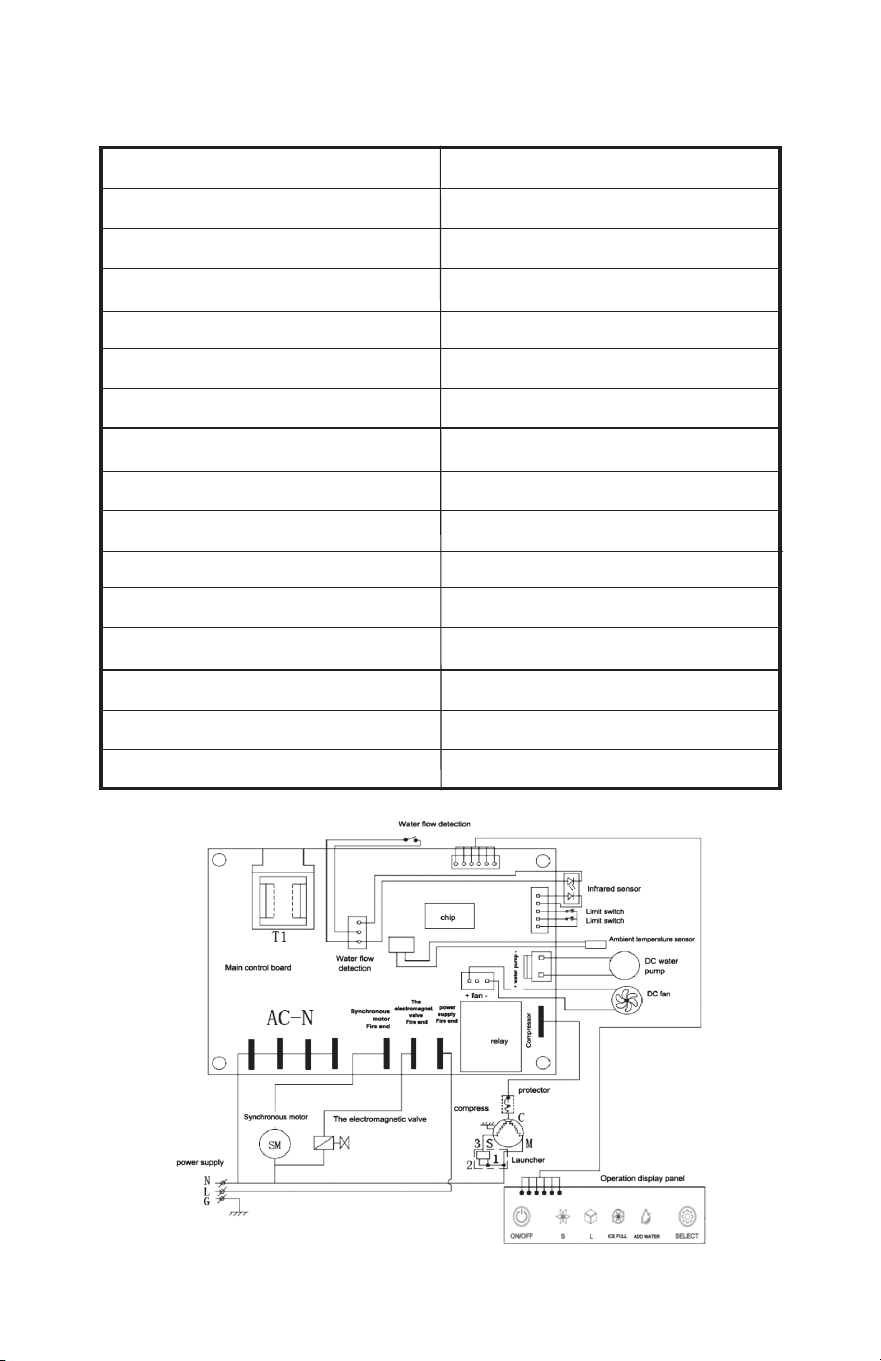
Table of Contents
Important Safety Precautions ................. Pages 1- 2
Parts list .................................................... Page 3
Cleaning and Maintenance ...................... Page 4
Adding Water/Drainage ........................... Page 5
Before Using/Power Supply Risk ............ Page 6
How to Make Ice ....................................... Page 7
Troubleshooting ........................................ Page 8
Technical Parameters
and Electrical Schematic ...................... Page 9
9
Technical Specifications
Model BS-002
Security Level I
Power supply 120V / 60 Hz
Maximum current 2.0 A
Maximum power 165 W
Refrigerant / liquid amount R600a / 20g
Foaming agent C
5
H
12
Insulation EPS
Net weight 14.3 lbs.
Gross Weight 16 lbs.
Ice Shape Bullet
Ice Production 26.4 lb. / day
Water Tank Capacity .4 gallons
Ice Basket Capacity 1.3 lb.
Shell ABS
Machine Size (width X depth X height ) 9.134 X 12.087 X 12.087 inches

Instruction Manual
Model: BS-002
Please be sure to read all instructions
before using this appliance.
10
©2025 EdenPURE® I-5920 BR12386R-1
EdenPURE
®
7584 Whipple Avenue NW
N. Canton, OH 44720
In the event your unit does not appear to be working properly
or the trouble lights start blinking, contact customer service at
To place an order call 1-800-360-1070
or go to www.edenpure.com.
UV IcePRO
EdenPURE
®