II Wireless Extension
Quick Installation Guide
Wi-Fi Range Extender
A18/A18 Pro
Scan the QR code or visit www.tendacn.com for
installation videos, technical specifications, user
guides and more information.
You can see the product name and model on the
product label.
The label can be found on the back of the device.
Get Support
and Services
A18 Pro is used for illustrations here unless otherwise specified. The actual product
prevails.
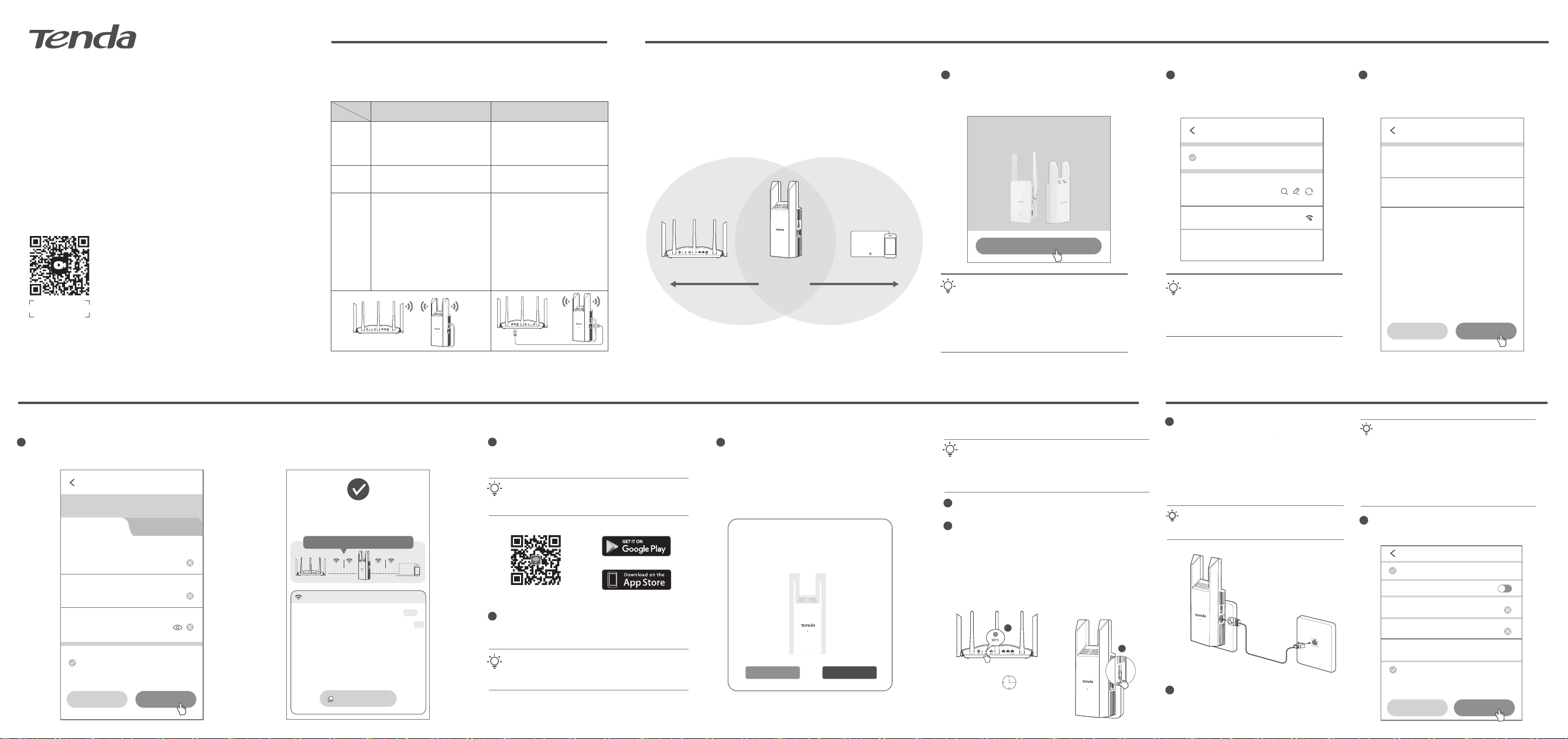
The App will automatically discover the extender,
follow the onscreen instructions to set the extender.
When the indicator of the extender turns solid on, the
extension is successful.
3
2
The extender supports dual-band extension. If the
upstream router offers dual-band Wi-Fi, you can select
either band to extend (5G Wi-Fi recommended), and the
extender will automatically extend the other band with the
same Wi-Fi password.
Tips
Select the Wi-Fi you want to extend.
2
Enter the Wi-Fi password of the router, and tap Next.
3
Change the Wi-Fi name and Wi-Fi password of the extender
as required, and tap Next.
4
Select the extender location
Wireless Extension
Wireless Extension
Upstream WiFi Name
Tenda_XXXXXX
Upstream WiFi Password
••••••••
Cancel Next
Cancel Next
* Configure the extender network, tap Next if no
changes are required
Extender 2.4 GHz Wi-Fi Name
Tenda_XXXXXX_EXT
Add New Wi-Fi
Set Wi-Fi password to the management
password
Extender 5 GHz Wi-Fi Name
Tenda_XXXXXX_5G_EXT
Extender Wi-Fi Password
XXXXXXXX
Use upstream Wi-Fi
name/password
Wireless Extension
Your working mode has been detected as:
Wireless Extension Switch
Select the Wi-Fi to be extended
Recommended to select
5 GHz Wi-Fi
Tenda_XXXXXX 5G/2.4G
• If the above page does not appear, start a web browser, and
access re.tenda.cn in the address bar to log in to the web UI.
If you are configuring through the smartphone, disable your
mobile data traffic and try to log in.
• If your smartphone displays the prompt “Current Wi-Fi is not
available, continue using this Wi-Fi?". Please continue using
this Wi-Fi.
Tips
Connect the smartphone to the Wi-Fi network of
the extender: Tenda_EXT. When the web UI of the
extender is displayed automatically, tap Start Now.
1
Set Up the Extender
Thanks for Choosing Tenda
WiFi Range Extender
Faster, Safer, Smoother, Smarter
Start Now
The extension is completed. Follow the onscreen instructions.
Copy Information
Extended Successfully
Wi-Fi restarting may last about 20 seconds. Connect
to a new Wi-Fi later.
2.4G
5G
*It is recommended to take a screenshot
to save Wi-Fi information
Extender Info
Wi-Fi Name: Tenda_XXXXXX_EXT
Tenda_XXXXXX_5G_EXT
Wi-Fi Password: XXXXXXXX
Management Address: re.tenda.cn
Management Password: XXXXXXXX
Download the Tenda WiFi App onto your mobile device
by scanning the QR code or searching for Tenda WiFi
in the Google Play or App Store.
1
Method 2: Through Tenda WiFi App
Tips
If already installed the Tenda WiFi App, ensure that the App is the latest
version.
Tips
If your smartphone displays the prompt “Current Wi-Fi is not available,
continue using this Wi-Fi?". Please continue using this Wi-Fi.
Connect the smartphone to the Wi-Fi network of the
extender: Tenda_EXT.
QR code
Or
Signal Extender is found unconfigured.
Configure it now?
Not Now Configure
Press the WPS button of the router for about 1 to 3
seconds to enable its WPS function.
Within 2 minutes, press the WPS button on the
extender for about 1 to 3 seconds, and its indicator
blinks green fast.
When the indicator lights solid on, the setup is
successful. The extender's Wi-Fi name is "Upstream
router Wi-Fi name _EXT (or 5G_EXT)," and the Wi-Fi
password is the same as the upstream router.
1
1
2
Tips
• Ensure that the encryption used by the router's Wi-Fi includes WPA-PSK
or WPA2-PSK.
• The WPS design may differ with different manufacturers. If this method
fails, use another method to configure.
Method 3: Through WPS Button
2
1
Within 2 minutes
WPS/RESET
WPS/RESET
III AP Mode
Ensure that the Ethernet cable has been deployed
in the place that needs Wi-Fi coverage and can
access the internet normally. Connect the Ethernet
cable to the Ethernet port of the extender, and plug
the extender into the power socket. The indicator
changes from blinks green to solid on to indicate
successful extension.
WPS/RESET
Extender
In the middle
Wi-Fi router Wireless clients
5G2.4G5G2.4G
WPS/RESET
Dual-band mode: 5 GHz Wi-Fi network is currently
preferred for transmission of the device.
Tips
If the deployed Ethernet cable is for wiring in the wall, prepare
the Ethernet cable by yourself.
2
Connect the smartphone to the Wi-Fi network of
the extender: Tenda_EXT. When the web UI of the
extender is displayed automatically, tap Start Now.
Tips
• If the smartphone does not automatically redirect to the
extender's web UI, start a web browser, and access
re.tenda.cn in the address bar to log in to the web UI. If you
are configuring through the smartphone, disable your
mobile data traffic and try to log in.
• If your smartphone displays the prompt “Current Wi-Fi is
not available, continue using this Wi-Fi?". Please continue
using this Wi-Fi.
3
Set the Wi-Fi name, Wi-Fi password and login
password of the extender as required, and tap Next.
WPS/RESET
Ethernet cable
Your working mode has been detected as:
Wireless Extension Switch
Cancel Next
Wired Extension
Extender 2.4 GHz Wi-Fi Name
Tenda_EXT
Set Wi-Fi password to the management
password
Extender 5 GHz Wi-Fi Name
Tenda_5G_EXT
Extender Wi-Fi Password
Please enter
Unify 2.4 GHz & 5GHz
Management Password
Please enter
I Product Introduction
The extender supports both wireless and wired extension. If you have Ethernet
cables deployed in your home, it is recommended to use the AP Mode.
Otherwise, opt for the Wireless Extension. Choose the extension type as
required, and refer to the following section for configuration.
Place the extender in the middle between the router and the wireless dead
zone (As far as possible to reduce the obstacle between the extender and the
router, ensure that the smartphone is connected to the router's Wi-Fi and
access the internet smoothly), then plug the extender into a power outlet, and
the system will start up when the indicator blinks green.
Wireless Extension
The extender connects to the
upstream router through Wi-Fi
and extends the router's Wi-Fi
coverage range
The extender connects to the
upstream router through an
Ethernet cable and converts the
router's wired network to Wi-Fi
Rooms requiring Wi-Fi coverage
without Ethernet cables deployed
Rooms requiring Wi-Fi coverage
with Ethernet cables deployed
AP Mode
Extension
Type
Scenario
1. It is recommended to select 5G
Wi-Fi for extension, achieving
better experience
2. After successful wireless
extension, the dead zone will be
covered by Wi-Fi, and the
Ethernet port can be used to
provide wired network access for
other devices such as set-top
boxes, computers, and TVs.
After successful wired extension,
high-speed and stable Wi-Fi
network access can be provided
for various wireless such as
smartphones, tablets, and smart
devices.
Features
WPS/RESET
Wireless Extension
Wired Extension
WPS/RESET
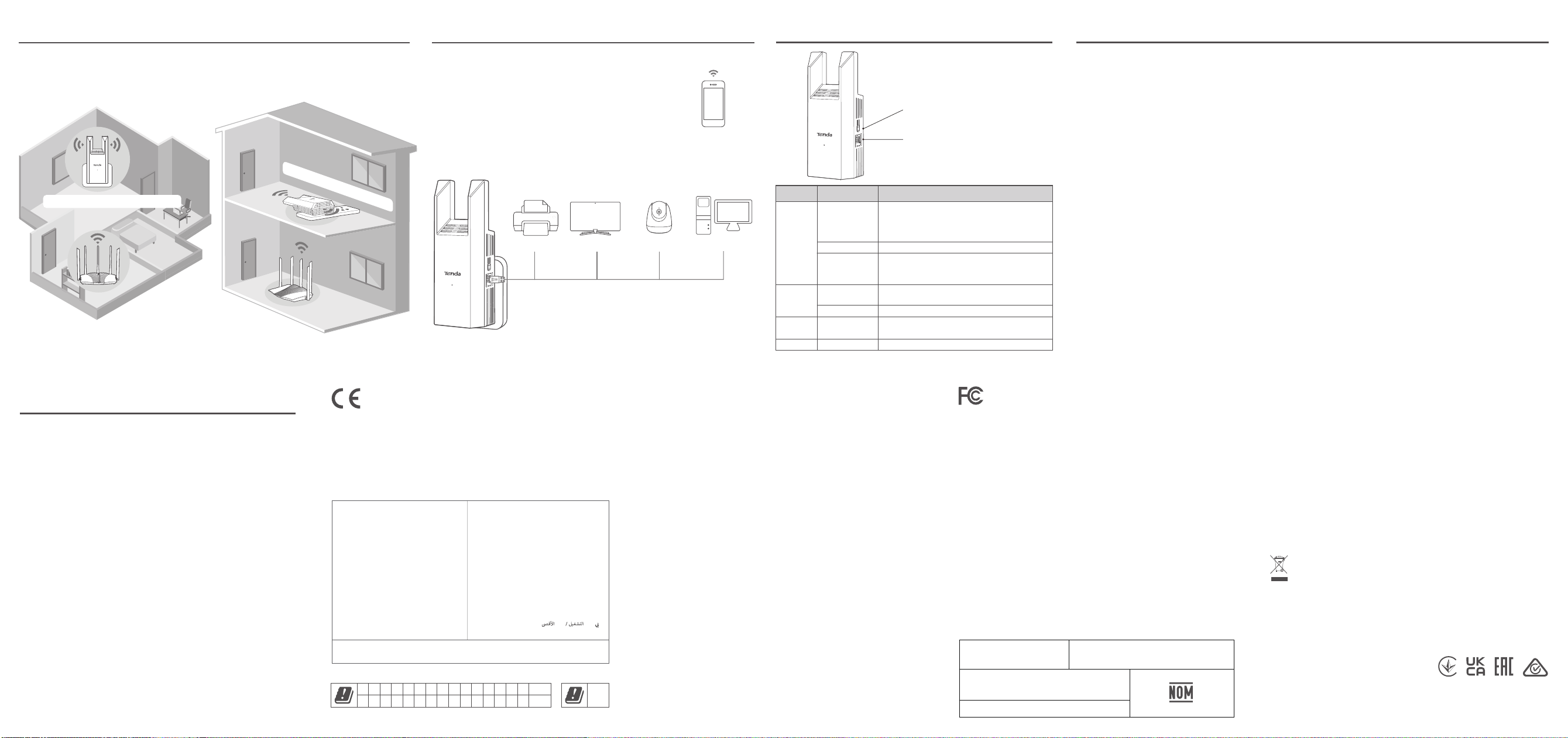
Appearance
WPS/RESET
Scenario Status
Solid on
Blinking green fast WPS extension
Blinking red slowly
Failed to extend (Check whether the Wi-Fi
name/password of the upstream router is correct or
place the extender close to the router)
Solid green for
15 seconds
Power on and starting up
Extension success
− Green: Proper position.
− Yellow: Fair position. Move the extender closer to the router.
− Red: Too far from the router.
Description
Network
extension
Start up
Internet
connection
Blinking green slowly
Startup complete
Blinking yellow
slowly
Failed to connect to the internet (Check whether the
upstream router can access the internet normally)
Blinking yellow fastReset Restoring the extender to factory settings
Safety Precautions
Reset button and WPS button
(Reset method: Refer to Q5 in the FAQ)
Ethernet port
Used to connect to such devices as
routers, computers, game consoles, TV,
set-top boxes, printers, and so on.
FAQ
Q1. I cannot log in to the web UI of the extender. What should I do?
A1. First, try the following solutions:
− Visit http://re.tenda.cn in your browser.
− If you are using a wireless client, such as a smartphone, ensure that
the Mobile Data (if any) function is disabled.
If the problem persists, try the following solutions:
Before extension:
− If you are using a wireless client, such as a smartphone, ensure that
your smartphone has connected to the Wi-Fi network of the
extender: Tenda_EXT.
− If you are using a wired device, such as a computer, ensure that your
computer is set to Obtain an IP address automatically and
Obtain DNS server address automatically.
− Reset the extender by referring to Q5 in the FAQ, and log in again.
After extension:
− If you are using a wireless client, such as a smartphone, ensure that
your smartphone has connected to the Wi-Fi network of the
extender. If the Wi-Fi name of the extender is the same as the
upstream router, stand nearby the extender and connect to its Wi-Fi
network (the extender should not be too close to the router, or
temporarily power off the router).
− If you are using a wired device, such as a computer, ensure that your
computer is set to Obtain an IP address automatically and Obtain
DNS server address automatically.
Q2. My extender cannot find the Wi-Fi network of my router.
What should I do?
A2. Try the following solutions:
− Ensure that your smartphone is near the extender and can search
and connect to the Wi-Fi network of the router.
− Change the channel of your router, and try again.
− Change the encryption type of the router to WPA-PSK or
WPA2-PSK, and try again.
Q3. I cannot find the Wi-Fi name of the extender after
extending network successfully (the indicator is solid on).
What should I do?
A3. The possible reason is that you did not customize the extender
Wi-Fi name when extending the network. In this case, the Wi-Fi
name of the extender is the same as the upstream router
or _EXT (or 5G_EXT) of the upstream router Wi-Fi name after
the extension is successful.
Q4. After the wireless extension is successful (the indicator is
solid on), the network speed through the extender is slower
than when directly connected to the router. What should I
do?
A4. The network speed may decrease during wireless extension due
to upstream signal attenuation, but this is a normal phenomenon
that does not affect normal use. To maximize the extension
effect, ensure that the extender indicator is solid green, and
reduce the obstacles between the extender and the router. If an
Ethernet cable has been deployed at home, a wired extension is
recommended.
Q5. How to reset the extender?
A5. When the extender completes startup, press the RESET button
for about 8 seconds. When the indicator blinks yellow fast, the
extender is restored to factory settings.
Before operating, read the operation instructions and precautions to be taken, and
follow them to prevent accidents. The warning and danger items in other documents
do not cover all the safety precautions that must be followed. They are only
supplementary information, the installation and maintenance personnel need to
understand the basic safety precautions to be taken.
− Do not use the device in a place where wireless devices are not allowed.
− Clean only with dry cloth.
− Do not block any ventilation openings, such as newspapers, table-cloth, curtains.
− To avoid electrical shocks, do not insert any object into the ventilation openings.
− Unplug this device during lightning storms or when unused for long periods of time.
− The mains plug is used as the disconnect device, which shall remain readily operable.
− The power socket shall be installed near the device and easily accessible.
− Operating environment: Temperature: 0℃ - 40℃ (32℉ - 104℉);
Humidity: (10% - 90%) RH, non-condensing; Storage environment:
Temperature: -40℃ - 70℃ (-40℉ - 158℉); Humidity: (5% - 90%) RH,
non-condensing.
− If such phenomena as smoke, abnormal sound or smell appear when you use the
device, immediately stop using it and disconnect its power supply, and contact the
after-sales service personnel.
− Warning: To reduce the risk of electric shock, do not remove cover as there are no
user-serviceable parts inside. Refer servicing to qualified personnel.
− Refer all servicing to qualified service personnel.
− Disconnect the power source during servicing.
− Keep this device out of reach of children to prevent children from using it as a toy and
causing personal injury.
− Keep the device away from water, fire, high electric field, high magnetic field, and
inflammable and explosive items.
For the latest safety precautions, see Safety and Regulatory Information on
www.tendacn.com.
English-Attention: In EU member states, EFTA countries, Northern Ireland and Great Britain, the operation in the frequency
range 5150 MHz - 5250 MHz is only permitted indoors.
Deutsch-Achtung: In den EU-Mitgliedsstaaten, den EFTA-Ländern, Nordirland und Großbritannien ist der Betrieb im
Frequenzbereich 5150 MHz - 5250 MHz nur in Innenräumen erlaubt.
Italiano-Attenzione: Negli Stati membri dell'UE, nei Paesi EFTA, nell'Irlanda del Nord e in Gran Bretagna, il funzionamento
nella gamma di frequenze 5150 MHz - 5250 MHz è consentito solo in ambienti chiusi.
Español-Atención: En los estados miembros de la UE, los países de la AELC, Irlanda del Norte y Gran Bretaña, el rango de
frecuencia operativa de 5150 MHz - 5250 MHz solo está permitido en interiores.
Português-Atenção: Nos estados membros da UE, países da EFTA, Irlanda do Norte e Grã-Bretanha, o funcionamento na
gama de frequências 5150 MHz - 5250 MHz só é permitido no interior.
Français-Attention: Dans les États membres de l’UE, les pays de l’AELE, l’Irlande du Nord et la Grande-Bretagne, l’utilisation
dans la gamme de fréquences 5150 MHz - 5250 MHz n’est autorisée qu’en intérieur.
Nederlands-Aandacht: In de EU-lidstaten, de EVA-landen, Noord-Ierland en Groot-Brittannië is gebruik in het
5150 MHz - 5250 MHz frequentiebereik alleen binnenshuis toegestaan.
Svenska-Uppmärksamhet: I EU medlemsstater, EFTA - länderna, Nordirland och Storbritannien är det endast tillåtet att
använda frekvensområdet 5150 MHz - 5250 MHz inomhus.
Dansk-Bemærk: I EU-medlemslandene, EFTA-landene, Nordirland og Storbritannien er drift i frekvensområdet
5150 MHz - 5250 MHz kun tilladt indendørs.
Suomi-Huom: Eu-maissa, EFTA-maissa sekä Isossa-Britanniassa ja Pohjois-Irlannissa taajuusaluetta 5150 MHz - 5250 MHz
on sallittua käyttää ainoastaan sisätiloissa.
Magyar-Figyelem: Az EU-tagállamokban, az EFTA-országokban, Észak-Írországban és Nagy-Britanniában az
5150 MHz - 5250 MHz és frekvenciatartományban való működtetés csak beltérben engedélyezett.
Polski-Uwaga: W państwach członkowskich UE, krajach Europejskiego Stowarzyszenia Wolnego Handlu (EFTA), Irlandii
Północnej i Wielkiej Brytanii praca w zakresie częstotliwości 5150 MHz - 5250 MHz jest dozwolona tylko w pomieszczeniach.
Čeština-Pozor: V členských státech EU, zemích ESVO, Severním Irsku a Velké Británii je provoz ve frekvenčním rozsahu
5150 MHz - 5250 MHz povolen pouze v interiéru.
-: μ , , ,
5150 MHz - 5250 MHz μ .
Română-Atenţie: În statele membre UE, ţările EFTA, Irlanda de Nord și Marea Britanie, operarea în intervalul de
frecvenţă 5150 MHz - 5250 MHz este permisă numai în interior.
Български-Внимание: В страните-членки на ЕС, страните от ЕАСТ, Северна Ирландия и Великобритания,
работата в честотния диапазон 5150 MHz - 5250 MHz е разрешена само на закрито.
Eesti-Tähelepanu: EL-o liikmesriikides, EFTA riikides, Põhja-Iirimaal ja Suurbritannias on sagedusvahemikus
5150 MHz - 5250 MHz kasutamine lubatud ainult siseruumides.
Slovenščina-Pozor: V državah članicah EU, državah EFTA, Severni Irski in Veliki Britaniji je delovanje v frekvenčnem območju
5150 MHz - 5250 MHz dovoljeno samo v zaprtih prostorih.
Slovenčina-Pozor: V členských štátoch EÚ, krajinách EFTA, Severnom Írsku a Veľkej Británii je prevádzka vo frekvenčnom
pásme 5150 MHz - 5250 MHz povolená len v interiéri.
Hrvatski-Pozornost: U državama članicama EU, zemljama EFTA-e, Sjevernoj Irskoj i Velikoj Britaniji, rad u frekvencijskom
rasponu od 5150 MHz - 5250 MHz dopušten je samo u zatvorenom prostoru.
Latviešu-Uzmanību: ES valstīs, EBTA valstīs, Ziemeļīrijā un Lielbritānijā, operēšana iekštelpās ir atļauta tikai
5150 MHz - 5250 MHz diapazonā.
Lietuvių-Dėmesio: ES valstybėse narėse, ELPA šalyse, Šiaurės Airijoje ir Didžiojoje Britanijoje 5150 MHz - 5250 MHz dažnių
diapazone leidžiama veikti tik patalpose.
Norsk-OBS: I EUs medlemsland, EFTA-land, Nord-Irland og Storbritannia er drift i frekvensområdet 5150 MHz - 5250 MHz
kun tillatt innendørs.
Íslenska-Athugið: Í aðildarríkjum ESB, EFTA-löndum, Norður-Írlandi og Bretlandi er rekstur á tíðnisviðinu 5150 MHz - 5250
MHz aðeins leyfður innandyra.
This is a Class B product.
In a domestic environment, this product may cause radio interference, in which case the user may be required to take
adequate measures.
This equipment should be installed and operated with a minimum distance 20cm between the device and your body.
NOTE: (1) The manufacturer is not responsible for any radio or TV interference caused by unauthorized
modifications to this equipment. (2) To avoid unnecessary radiation interference, it is recommended to use a
shielded RJ45 cable.
Declaration of Conformity
Hereby, SHENZHEN TENDA TECHNOLOGY CO., LTD. declares that the device (Extender) is in compliance with
Directive 2014/53/EU. The full text of the EU Declaration of Conformity is available at the following internet address:
https://www.tendacn.com/download/list-9.html
Operating Frequency/Max Output Power
CE Mark Warning
English: Operating Frequency/Max Output Power
Italiano: Frequenza operativa/Potenza di uscita
massima
Français: Fréquence de fonctionnement/Puissance de
sortie maximale
Español: Frecuencia operativa/Potencia de salida
máxima
Deutsch: Betriebsfrequenz/Max. Ausgangsleistung
Polski: Częstotliwość pracy /Maksymalna moc
wyjściowa
Nederlands: Bedrijfsfrequentie/Maximaal
uitgangsvermogen
Čeština: Provozní frekvence/maximální výstupní
výkon
Română: Frecvenţa de funcţionare/Puterea maximă de
ieșire
Português: Frequência de Funcionamento/Potência
Máxima de Saída
Svenska: Driftsfrekvens/Max Uteffekt
Slovenčina: Prevádzková frekvencia/maximálny
výstupný výkon
: ±/
²
Magyar: Működési frekvencia/Maximális kimeneti
teljesítmény
Български: Работна честота/максимална из´одна
мощност
Eesti: Töösagedus/Max väljundvõimsus
Dansk: Driftsfrekvens/Maks. Udgangseffekt
Suomi: Toimintataajuus/maksimilähtöteho
Hrvatski: Radna frekvencija/Maksimalna izlazna snaga
Latviešu: Operējošās frekvences/Maksimālā jauda
Lietuvių: Darbinis dažnis /maksimali išėjimo galia
Slovenščina: Delovna frekvenca/Največja izhodna moč
Türkçe: Çalışma Frekansı/Maks. Çıkış Gücü
Русский: Рабочая частота/макс. вы´одная мощность
2412MHz-2472MHz/20dBm
5150MHz-5250MHz(indoor use only)/23dBm
Restrictions in the 5 GHz Band
UK(NI)
UK
AT BE BG CH CY CZ DE DK EE EL ES FI FR HR HU
IS IT LI LT LU LV MT NL NO PL PT RO SE SI SK
IE
This equipment has been tested and found to comply with the limits for a Class B digital device, pursuant to Part 15 of the
FCC Rules. These limits are designed to provide reasonable protection against harmful interference in a residential
installation. This equipment generates, uses and can radiate radio frequency energy and, if not installed and used in
accordance with the instructions, may cause harmful interference to radio communications. However, there is no guarantee
that interference will not occur in a particular installation. If this equipment does cause harmful interference to radio or
television reception, which can be determined by turning the equipment off and on, the user is encouraged to try to correct
the interference by one or more of the following measures:
— Reorient or relocate the receiving antenna.
— Increase the separation between the equipment and receiver.
— Connect the equipment into an outlet on a circuit different from that to which the receiver is connected.
— Consult the dealer or an experienced radio/TV technician for help.
The device is for indoor usage only.
Operation is subject to the following two conditions: (1) this device may not cause harmful interference, and (2) this device
must accept any interference received, including interference that may cause undesired operation.
Radiation Exposure Statement
This device complies with FCC radiation exposure limits set forth for an uncontrolled environment and it also complies with
Part 15 of the FCC RF Rules.
This equipment should be installed and operated with minimum distance 20cm between the device and your body.
Caution:
Any changes or modifications not expressly approved by the party responsible for compliance could void the user's authority
to operate this equipment.
This transmitter must not be co-located or operating in conjunction with any other antenna or transmitter.
Operating frequency: 2412-2462MHz, 5150-5250MHz, 5725-5850MHz
NOTE: (1) The manufacturer is not responsible for any radio or TV interference caused by unauthorized modifications to this
equipment. (2) To avoid unnecessary radiation interference, it is recommended to use a shielded RJ45 cable.
FCC Statement
CAN ICES-3 (B) / NMB-3 (B)
Canadian Compliance Statement
This device complies with Innovation, Science and Economic Development Canada licence-exempt RSS standard (s).
Operation is subject to the following two conditions: (1) this device may not cause interference, and (2) this device must
accept any interference, including interference that may cause undesired operation of the device.
Le onjunc areil est conforme aux CNR d’ l’innovation, la science et le développement économique Canada licables aux areils
radio exempts de licence. L’exploitation est autorisée aux deux conditions suivantes :
(1) l’areil ne doit pas produire de brouillage, et
(2) l’utilisateur de l’appareil doit accepter tout brouillage radioélectrique subi, onj si le brouillage est susceptible d’en
compromettre le fonctionnement.
Any changes or modifications not expressly approved by the party responsible for compliance could void the user’s authority
to operate the equipment.
Tous les changements ou modifications non expressément approuvée par le responsible de la conformité pourrait vider
l’utilisateur est habilité à exploiter l’équipemen.
ISEDC Radiation Exposure Statement:
The equipment complies with ISEDC RF radiation exposure limits set forth for an uncontrolled environment.
Cet appareil est conforme aux limitesd’exposition de rayonnement RF ISEDC établiespour un environnement non contrôlé.
This transmitter must not be co-located or operating in conjunction with any other antenna or transmitter. This equipment
should be installed and operated with a minimum distance of 20cm between the radiator and your body.
Operation of 5150-5250MHz is restricted to indoor use only.
le fonctionnement de 5150-5250MHz est limité à une utilisation en intérieur uniquement.
IC
LA OPERACIóN DE ESTE DISPOSITIVO ESTA SUJETA A LAS SIGUIENTES CONDICIONES:
a) Es posible que este equipo o dispositivo no cause interferencia perjudicial.
b) Este equipo o dispositivo debe aceptar cualquier tipo de interferencia, incluyendo la que pueda causar su operación no
deseada.
Estimado usuario: Antes de utilizar este producto lo invitamos a leer el siguiente manual para que conozca todas sus
funciones y caracteristicas.
NOM
Technical Support
Shenzhen Tenda Technology Co., Ltd.
Floor 6-8, Tower E3, No.1001, Zhongshanyuan Road, Nanshan District, Shenzhen, China. 518052
Website: www.tendacn.com
E-mail: support@tenda.com.cn
[email protected] (North America)
[email protected] (United Kingdom)
Copyright © 2024 Shenzhen Tenda Technology Co., Ltd. All rights reserved.
Tenda is a registered trademark legally held by Shenzhen Tenda Technology Co., Ltd. Other brand and product names
mentioned herein are trademarks or registered trademarks of their respective holders. Specifications are subject to
change without notice.
ﺮﻋ
:
ﺗﺮدد اﻟﺤﺪ ﺔﻗﺎﻄﻟ جاﺮﺧﻹا
Producto
NOMBRE DEL PRODUCTO:
Repetidor WiFi de banda dupla
MODELO: A18 Pro/A18
Alimentador de Energía:
Alimentación: 100V - 240V ca 50Hz/60Hz, 0.4A
Salida: 12V cc 1A
PAIS DE ORIGEN: CHINA
RECYCLING
This product bears the selective sorting symbol for Waste Electrical and Electronic Equipment (WEEE). This means that this
product must be handled pursuant to European directive 2012/19/EU in order to be recycled or dismantled to minimize its
impact on the environment.
User has the choice to give his product to a competent recycling organization or to the retailer when he buys a new electrical
or electronic equipment.
V1.0 Keep for future reference
IV Extender installation recommendations V Connect Clients to the Internet
Wired clients
(Only wireless extension mode can be connected, if
using wired extension mode, connect with Wi-Fi)
Wireless clients
(such as a smartphone)
Wi-Fi Name: Wi-Fi name you set, Tenda_EXT (Or
5G_EXT), router’s Wi-Fi name_EXT
(or 5G_EXT), or the same as the router
Wi-Fi Password: Wi-Fi password you set or
same as the router
WPS/RESET
Large flat floor network coverage Cross-floor network coverage
Printer Smart TV Camera Computer
Extender parallel to the ground
Extender perpendicular to the ground