1/4
A
H I
J
K L
M N
B C
C
C
D
D
D
D D
E
E E
A
B
B
B
B
G
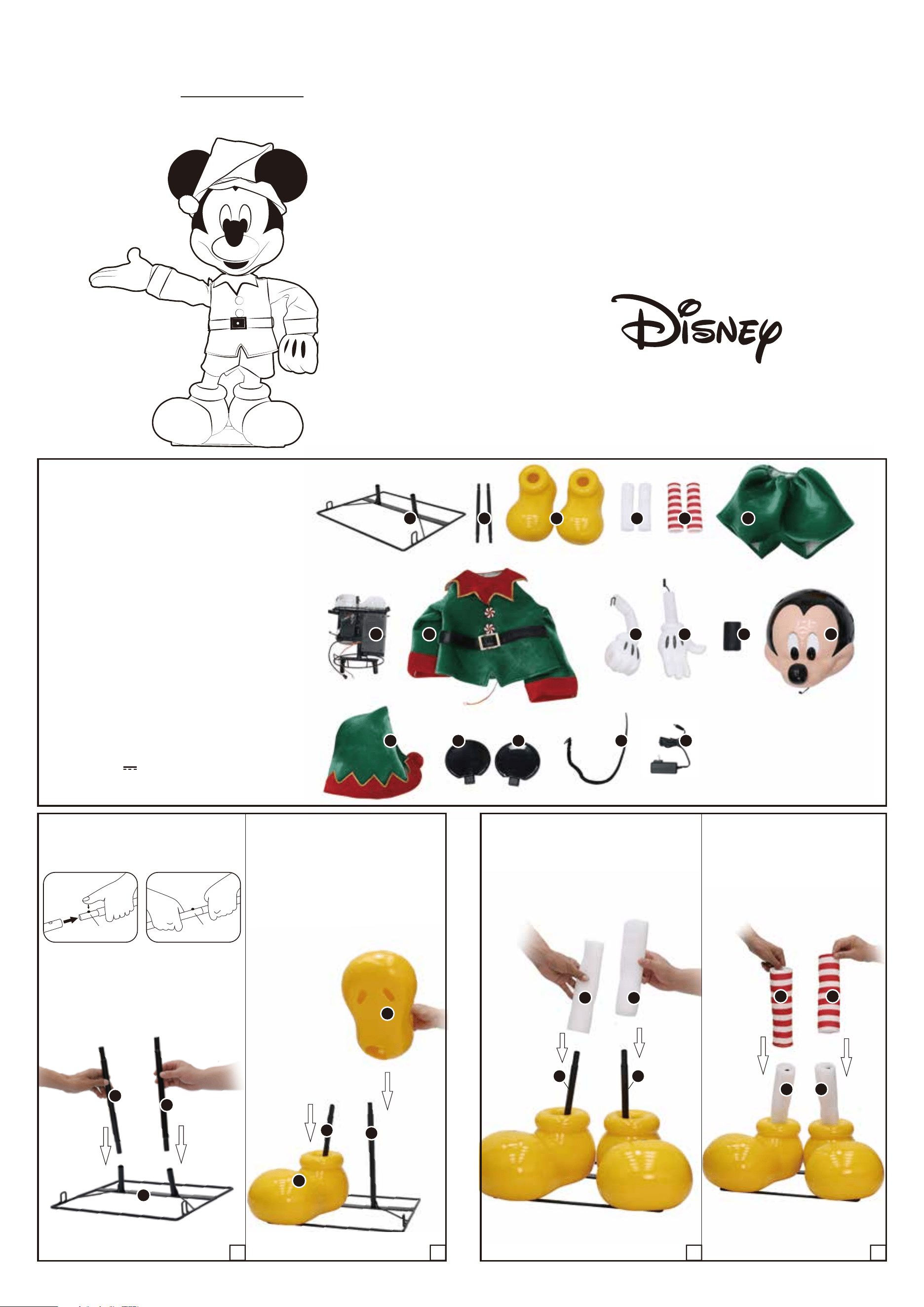
PARTS LIST
A. Base x 1
B. Poles x 2
C. Shoes x 2
D. Foam Tubes x 2
E. Stockings x 2
F. Pants x 1
G. Body Frame x 1
H. Shirt x 1
I. Left Arm x 1
J. Right Arm x 1
K. Neck x 1
L. Head x 1
M. Hat x 1
N. Left Ear x 1
O. Right Ear x 1
P. Tail x 1
Q. Adapter * Indoor
1.1 1.2 2.1 2.2
FRONT
BACK
RIGHT
LEFT
NOTE: Throughout the instructions,
Right and Left are relative to the
character.
Canada Item 1001969783
Mexico Item 204014
USA Item 1015397048
O
P
Q
©Disney
Means It's
Locked
Click
Locking Pin
F
Model 26SV25369
USE AND CARE GUIDE
4 FT ANIMATED INTERACTIVE HOLIDAY MICKEY MOUSE
BB
Power Adapter * Spec
Input: 100-240V~50/60Hz
Output: 5.9V 2.0A
Wattage: 11.8W
Questions or feedback? Our customer support team is ready
to help! To learn more about our policies, get assembly
assistance, shop parts, and connect to our community, visit
sviservice.com or email us at [email protected].
H
H
H
H
H
E
E
F
G
G
2/4
3.23.1
5.2
5.1
6.3
6.2
4.24.1
4.3
R
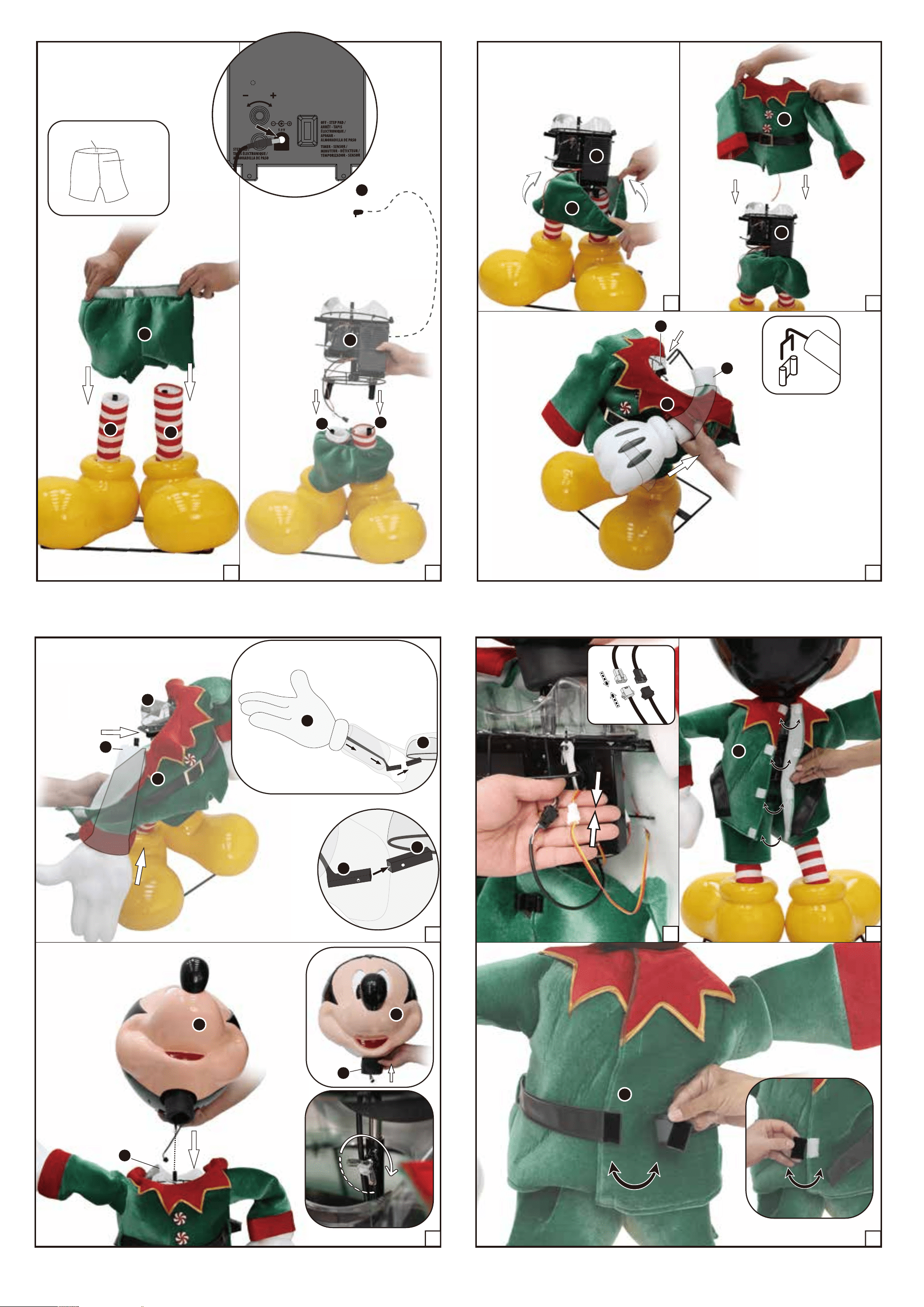
NOTE: Pull the (F) Pants up over
the hip hoop available on the (G)
Body Frame.
ADAPTER
Plug the
adapter into
the Function
Control Box.
©Disney
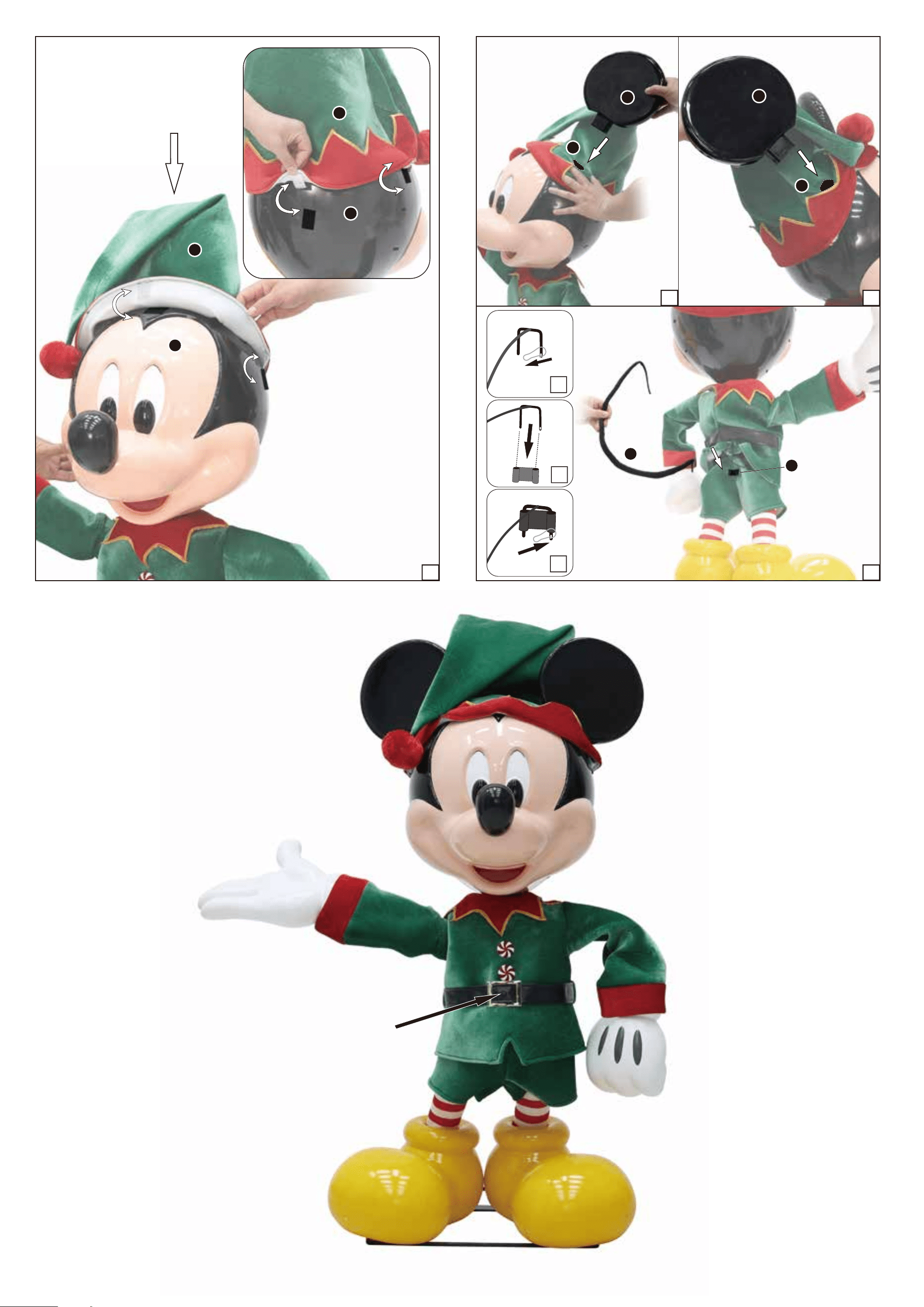
NOTE: Make sure the (L)
Head is fully seated
before tightening.
NOTE: Slide the (F) Pants onto
the assembly with the tag at the
back of the (F) Pants facing
towards the back.
FRONT
BACK
B
B
I
J
G
J
F
G
6.1
L
L
K
G
G
G
G
J
G
L
L
M
M
3/4
7
.
1
4 FT ANIMATED INTERACTIVE HOLIDAY
MICKEY MOUSE IS NOW FULLY
ASSEMBLED. PLUG IN AND TURN ON TO
LET THE FUN BEGIN!
©Disney
IR SENSOR
Be sure nothing is
blocking the
sensor.
M
M
N
P
8
.
3
8
.
1 8
.
2
O
2
1
3
G
4/4
©Disney
IMPORTANT TIPS:
• A one-to-one connection is required. Please note that if multiple
products are connected (one-to-many) or placed together, interference
may occur, preventing a successful connection.
• If you change the connection target or the signal is interrupted, unplug
the power and reconnect. Please note that turning the switch to the
OFF position will not work; the power must be disconnected before
reconnecting.
• Please ensure the product is kept away from routers, Bluetooth
devices, microwave ovens, and other 2.4G interference sources to
avoid signal interruptions and disconnections.
• Ensure that the item's adapter is plugged in at the function control box
and in the wall.
• Ensure that the switch on the function control box is on the desired
setting.
• lf not functioning properly (Head or right arm doesn't move, doesn't
make sound), vensure that cables are connected.
• Be sure nothing is blocking movement or caught in moving parts.
• Ensure that the floor or surface that the item sits on is flat and level.
• Ensure that the volume is not all the way down.
OPERATION INSTRUCTIONS:
1. Plug the power adapter into a standard power outlet and adjust the settings on the
Function Control Box, located on the (G) Body Frame, as desired.
2. Settings:
THIS PRODUCT IS COMPATIBLE WITH EXTERNAL TIMERS AND PRESERVES ITS
SETTING WHEN THE POWER IS TURNED OFF/ON.
WARNING
This item is not a toy and should be used for decoration only. This item contains small
parts that can be a choking hazard. Keep all plastic and wire parts away from
children.
1. Please use the adapter supplied by manufacturer.
2. Please assemble item according to instructions. Connect all wires according to
matching color.
3. Children should be supervised by adults. Item should not be grabbed, as it
becomes a tipping hazard. Keep flammables away from the adapter, as it heats up
during operation.
Please view all instructions carefully before assembling. Save this instruction sheet for future reference.
CARE AND STORAGE INSTRUCTIONS
For best performance operate your item indoors. When not in use, store this product in its original packing. Keep away from heat and moisture.
This device complies with Part 15 of the FCC Rules. Operation is subject to the following two conditions: (1) This device may not cause harmful interference, and (2) this device
must accept any interference received, including interference that may cause undesired operation.
CAUTION:
Changes or modifications not expressly approved by the party responsible for compliance could void the user’s authority to operate the equipment.
NOTE:
This equipment has been tested and found to comply with the limits for a Class B digital device, pursuant to Part 15 of the FCC Rules. These limits are designed to provide
reasonable protection against harmful interference in a residential installation. This equipment generates, uses, and can radiate radio frequency energy and, if not installed and
used in accordance with the instructions, may cause harmful interference to radio communications. However, there is no guarantee that interference will not occur in a particular
installation. If this equipment does cause harmful interference to radio or television reception, which can be determined by turning the equipment off and on, the user is encouraged
to try to correct the interference by one or more of the following measures: Reorient or relocate the receiving antenna, Increase the separation between the equipment and receiver.
Connect the equipment into an outlet on a circuit different from that to which the receiver is connected. Consult the dealer or experienced radio/TV technician for help.
CAN ICES (B) / NMB (B)
This device contains licence-exempt transmitter(s)/receiver(s) that comply
with Innovation, Science and Economic Development Canada’s
licence-exempt RSS(s). Operation is subject to the following two
conditions:
(1) This device may not cause interference.
(2) This device must accept any interference, including interference that
may cause undesired operation of the device.
©Disney
©Disney
Questions or feedback? Our customer support team is ready to help! To learn more
about our policies, get assembly assistance, shop parts, and connect to our
community, visit sviservice.com or email us at [email protected].
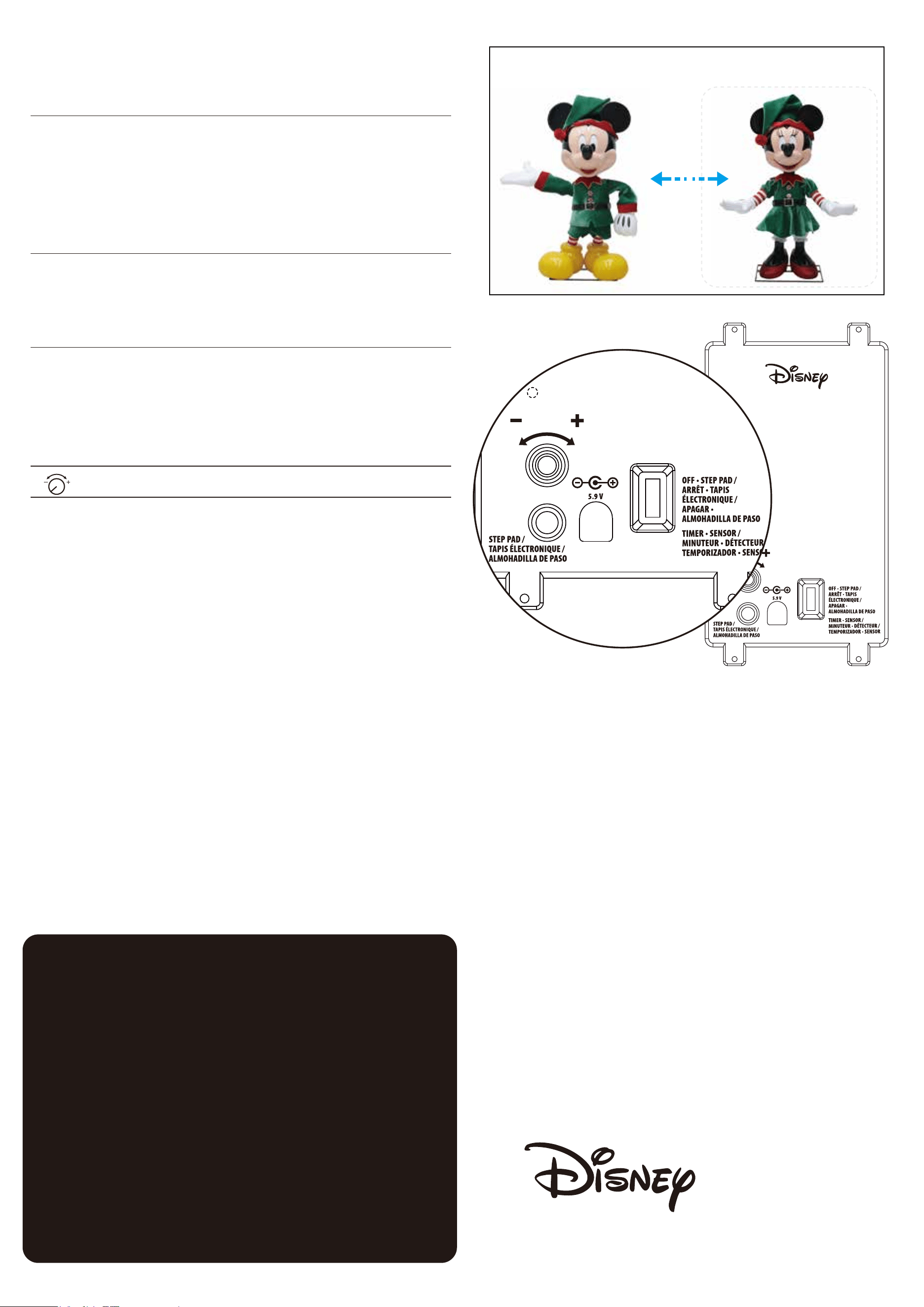
OFF • STEP PAD /
ARRÊT • TAPIS
ÉLECTRONIQUE /
APAGAR •
ALMOHADILLA DE PASO
TIMER • SENSOR /
MINUTEUR • DÉTECTEUR /
TEMPORIZADOR • SENSOR
INTERACTIVE /
INTERACTIF /
INTERACTIVA
This switch mode allows the item to be activated only if
triggered by using a Step Here Try Me Activation Pad (Not
Included). The first press will activate the activity cycle. If
pressed a second time during the activity cycle, the activity
cycle will end immediately. If pressed a third time, the
following activity cycle will be activated. It will do the
Mickey standalone dialogue only.
This switch mode will activate SENSOR mode for 6 hours
followed by a deactivated period of 18 hours. This cycle
will continue indefinitely unless the setting is changed.
During the 6-hour active period, the Infra-red (IR) sensor
can be triggered. If the Infra-red (IR) sensor is activated,
the prop will activate for one activity cycle. The infra-red
(IR) sensor has a range of up to 4 m/13 ft and will activate
when someone comes within an 80-degree angle from left
to right as well as from above or below. It will do the
Mickey standalone dialogue only.
Raise or lower the volume using the volume control turn
dial, turn all the way down to turn the volume off .
NOTE: 2026 Holiday Mickey can only connect with 2026 Holiday Minnie (sold
separately). Set both props to INTERACTIVE mode to establish a connection
for dialogue.
Model 26SV25370
(sold separately)
When both products are set to Interactive mode; the
Interactive indicator light changes from flashing to steady on.
A steady on light indicates a successful connection. Ensure
that the two products are within 10 m/32.5 ft of each other,
then trigger the sensor on either product. The infra-red (IR)
sensor has a range of up to 4 m/13 ft and will activate when
someone comes within an 80-degree angle of either
character from left, right, above or below. The interactive
products will hold a brief conversation. Triggering the sensor
again will produce a different conversation.