Air Quality Monitor
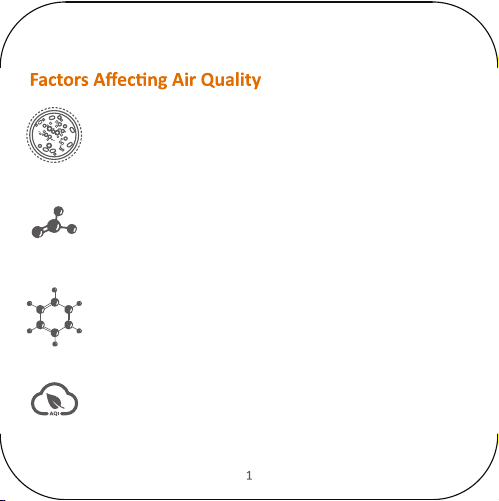
PM2.5 (Par�culate Ma�er 2.5) refers to fine par�cles with a diameter
of 2.5 microns or less. Due to its �ny size, PM2.5 can get absorbed into
the bloodstream and lungs, so long-term exposure to high levels of PM2.5
may cause eye and nose irrita�on, coughing, asthma, emphysema, lung
disease, heart a�acks, cancer, and more.
HCHO
(Formaldehyde) is a colorless, strong-smelling chemical with the
chemical formula CH2O or H-CHO, which has been classified as a Group
1 carcinogen by the Interna�onal Agency for Research on Cancer due to
its significant health risks. Long-term exposure to low doses can cause
chronic respiratory disease, nasopharyngeal cancer, colon cancer, brain
tumors, and nuclear gene�c muta�ons.
TVOC (Total Vola�le Organic Compounds) refers to various common VOCs,
including benzene, toluene, styrene, formaldehyde, etc. Due to its vola�lity,
toxicity, irritability, and carcinogenicity, long-term exposure to TVOC can
cause damage to the skin, liver, kidney, central nervous system, etc.
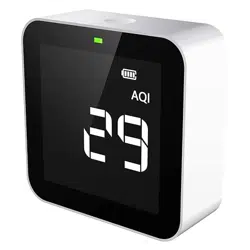
AQI (Air quality index) is a quick guide to air quality levels. It aims to indicate
the cleanliness or pollu�on level of the air in an easy-to-understand way. It
ranges from 0 to 500, with higher values indica�ng higher levels of air
pollu�on and adverse health effects. AQI assessments can show PM2.5,
PM10, O3, SO2, NO2, CO, etc. Temtop calculates AQI according to EPA
standards and focuses only on PM2.5 and PM10.

★ Do not expose the detector to heavily contaminated environments for long
periods, as this can damage the sensor.
★ Do not use the detector in wet condi�ons for extended periods to ensure
accurate measurements.
★
Do not use the detector for long periods in environments with a strong, irrita�ng
smell to ensure accurate measurements.
★ Do not cover the vents of the detector and keep lint out of the detector, as the
par�cle sensor may not work correctly.
★ Do not dismantle the unit yourself. In the event of a defect, contact your
dealer instead, who will liaise with the service centre and, if necessary, send
the device in for repair.
★ Children should only use this device under adult supervision. Keep packaging
materials, such as plas�c bags and plas�c wrap, out of the reach of children as
they present a choking hazard.
★ It is usual for the detector to show higher values when first switched on or not
used for an extended period. Please place it in a ven�lated area and turn it on
for around 30 minutes before tes�ng (for M10 or M10i).
★ This product is intended for monitoring the health of the indoor environment
only and should not be considered a professional measurement tool.
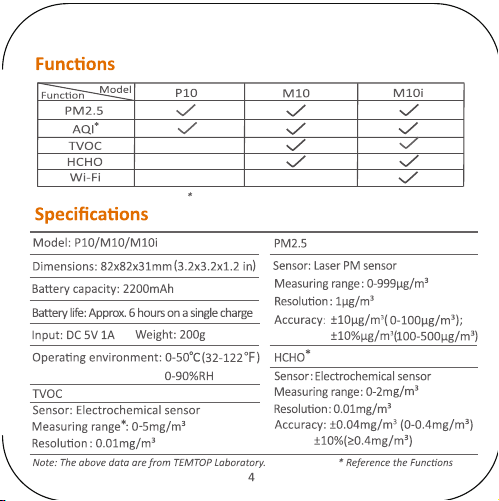
(0.44 lb)
Follow US EPA parculate polluon standards to calculate AQI.
● For indoor use: Keep the room/area air�ght for 10 minutes to obtain more accurate results.
● On the switch-off screen, the indicator light flashes yellow during charging and is always
green when charging is complete.
● If the ba�ery level shows , please charge the detector in �me to avoid being affected
during use (it can also recharge when switched off).
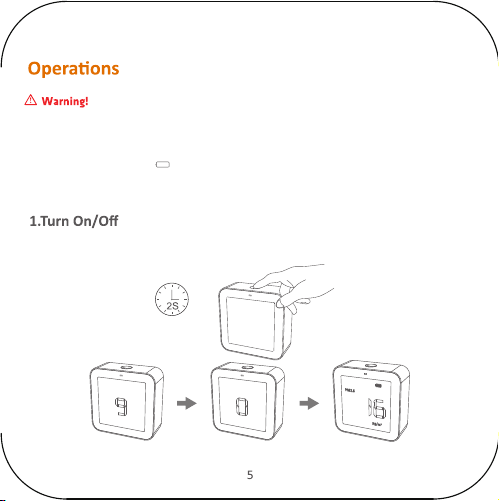
Press and hold the Home bu�on for 2 seconds to turn on/off the detector.
A�er start-up, please wait for the countdowns.
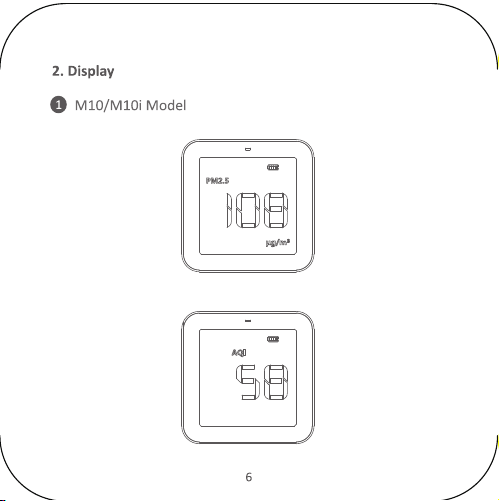
PM2.5 concentra�on will auto-display a�er the countdowns:
Then press Home Bu�on to display AQI concentra�ons:
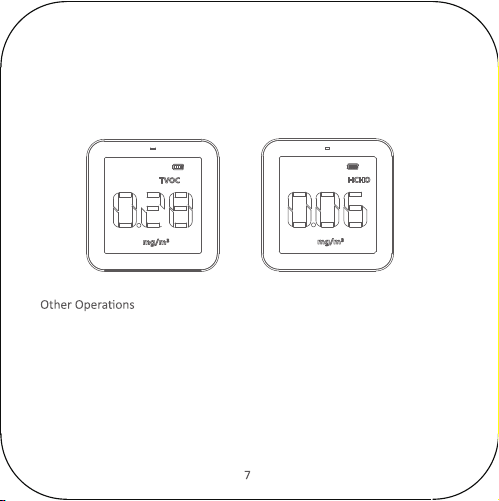
Then press the Home bu�on to display the TVOC concentra�on.
Then press the Home bu�on again to display the HCHO index:
Manual Loop: Repeat the above steps can manually loop the display in order
of PM2.5, AQI, TVOC, and HCHO.
Auto Loop: Double press the Home Bu�on can loop each display every 3s.
Double press again to exit Auto Loop mode.
Note: Please refer to the accompanying manual for further Wi-Fi connecon
instrucons for M10i products (M10i Add Device and Connect Wi-Fi).
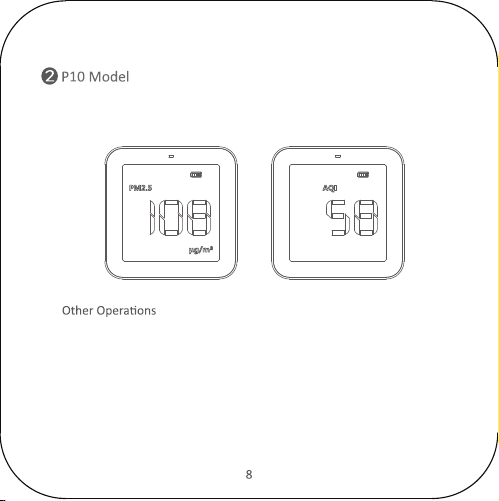
PM2.5 concentra�on will auto-display a�er turning on countdowns;
Then press Home Bu�on to display the AQI index:
Manual Loop: Repeat the above steps can manually loop the display in order
of PM2.5, AQI.
Auto Loop: Double press the Home Bu�on can loop each display every 3s.
Double press again to exit Auto Loop mode.
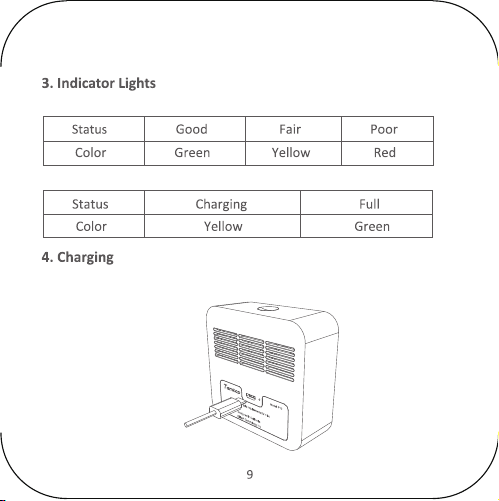
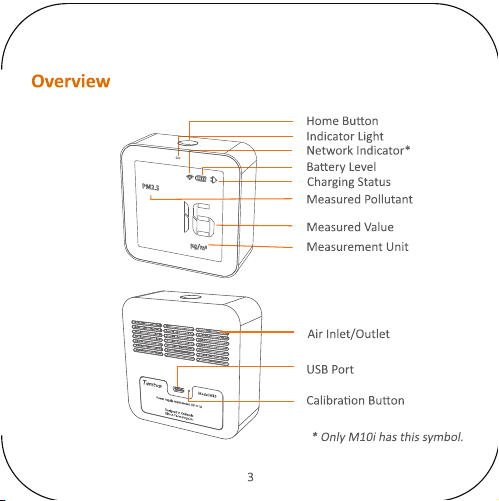
The indicator lights on the panel indicate the corresponding air quality:
The ba�ery level indicator on the screen indicates the device charging status:
When the ba�ery level is low, please charge it by connec�ng it to the USB
cable and power supply.
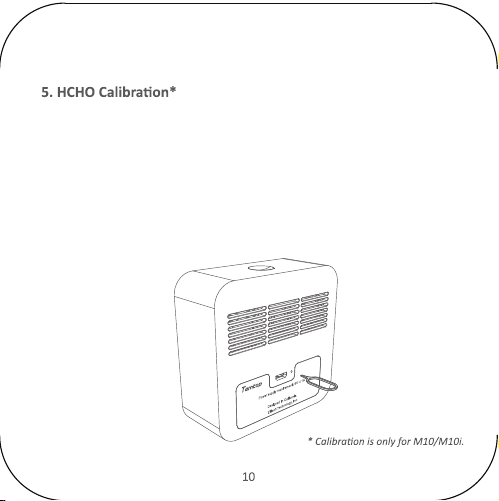
It is advisable to calibrate the detector a�er three months of use. Calibra�on
instruc�ons are as follows:
a) Switch on the detector and wait for approximately 10 minutes.
b) Press and hold the calibra�on bu�on for more than 1 second using the
needle tool un�l the HCHO icon on the screen flashes.
c) Place the detector outside for 10 minutes for ven�la�on. d) When the HCHO
icon is not flashing, calibra�on is complete.
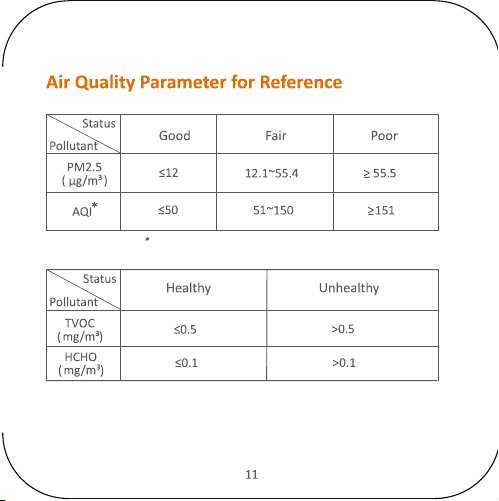
Follow EPA parcle polluon standards to calculate the AQI for PM2.5.

Q: Why is the PM2.5 reading constantly changing?
A: PM2.5 concentra�ons in the environment are constantly changing, not only
due to environmental factors such as changes in airflow, moisture, and wind
pa�erns but also due to the presence of such familiar sources as smoking,
cooking, vehicle emissions, smoke from coal burning/chimney/stoves, etc. All
these may affect the concentra�on of PM2.5 and lead to differences in the
readings.
A: ① Please check that the air inlet or outlet is not covered or that liquid has entered.
② Gently shake the detector during detec�on to increase interac�on with the
surrounding air.
③ The sensor may not recover, so please place the detector outside in a ven�lated
area.
Q: Why is the test result abnormal ?
Q: Why is data reading unstable?
A: As the airflow in the environment changes, the distribu�on of the concentra�on
of the measured substance may not be uniform. It may be advisable to try again in
an environment with a stable airflow.
Q: Is it possible to accelerate the calibraon if the detector faces the exit of
the air condioner/fan?
A: Not. A rela�vely high-temperature difference or airflow speed from the air
condi�oner/fan outlet may cause condensa�on or temperature changes on the
sensor, affec�ng its detec�on performance. Please place the detector outside
in a cool, ven�lated area.
Interference Gas
Hydrogen (H
2)
Ethyl alcohol
Phenols
Sulphur dioxide( SO
2)
Ammoniak (NH
3)
Rela�ve Sensi�vity (%)
1
0.1
50
7
12
0
Carbon
Q: Why are the data readings very high/out of range when with the detectors on?
A: Being packed in an ink-printed box may interfere with the sensor over �me
due to the organic vola�les le� in the packaging. Therefore, once unpacked,
please place the detector in a ven�lated area to help speed up its data
recovery.
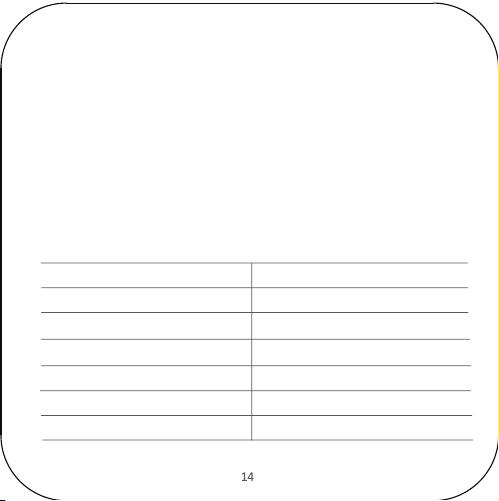
Q: Which HCHO readings are inaccurate or overesmated at certain mes?
A: Since Temtop uses a high-precision electrochemical HCHO sensor, its
electrochemical response characteris�cs can also respond to gases other than
formaldehyde. The table lists the most common gases that interfere with the
rela�ve sensi�vity of HCHO sensors.
V3.2