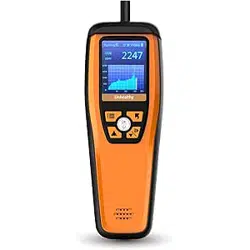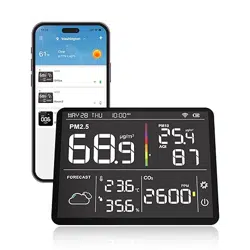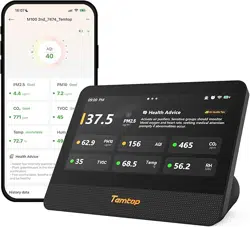

M100 2nd
Air Quality Monitor
User Manual
Get More Information
Scan the QR code for multi-language manuals and more.
Scan for multi-language manuals and more product support.
Scannen Sie nach mehrsprachigen Handbüchern und mehr Produktsupport.
Numérisez pour obtenir des manuels multilingues et plus d'assistance sur les produits.
Scansione per manuali multilingue e maggiore supporto al prodotto.
Busque manuales en varios idiomas y más asistencia sobre productos.
1

2
Factory Aecting Air Quality
PM2.5 (Particulate Matter 2.5) refers to fine particles with a diameter of 2.5
microns or less. Due to its tiny size, PM2.5 can get absorbed into the bloodstream
and lungs, so long-term exposure to high levels of PM2.5 may cause eye and
nose irritation, coughing, asthma, emphysema, lung disease, heart attacks,
cancer, and more.
PM10 (Particulate Matter 10) relates to particulate matter with a diameter of
10 microns or less. Due to its larger particle size, PM10 can be inhaled and does
not penetrate the bronchial tubes because larger particles can be made available
by the cilia and mucus in the nose and throat. It is usually considered less of a
health hazard than PM2.5.
Carbon dioxide(CO2) is a colorless and odorless gas usually derived from the breath
of humans and animals. High CO2 concentration means that fresh air or ventilation
is required; otherwise, it may cause problems such as drowsiness, dizziness, loss
of attention, and cognitive impairment.
TVOC (Total Volatile Organic Compounds) are a wide range of chemicals that readily
evaporate into the air at room temperature. TVOC sensors behave similarly to the
human nose, responding to changes in the relative intensity of indoor TVOCs on
a scale from 1 to 500.

3
Factory Aecting Air Quality
Temperature & Humidity may often be ignored however they do have a
significant impact on individual's well-being, comfort, health and safety as
well as your property. High humidity may lead to an increase in household
air pollutants especially the biological contaminants such as molds, bacteria,
viruses and dust mites; cold, low humidity may cause nosebleeds, skin and
respiratory irritations, dyspnea, static electricity and etc.
AQI(Air Quality Index) is a quick guide on air quality levels. It aims to indicates
how clean or polluted the air is in a way that's easy to understand. It ranges
from 0 to 500 that higher values indicate higher air pollution levels and more
adverse for health. AQI assessment can indicated for PM2.5, PM10, O
3, SO2,
NO
2, CO etc. Temtop follows EPA Standards to calculate and focus only for
AQI of PM2.5&10.

4
Important
★ To ensure accurate measurements, do not use the detector for extended periods
in humid environments or those with strong pungent odors.
★ Do not cover the vents of the detector and keep lint out of the detector, as the
particle sensor may not work correctly.
★ Do not come into contact with organic solvents, which include silica gel and other
adhesives, paintings, drugs, oil, and high-concentration gases.
★ To ensure optimal communication performance, please avoid placing the device
on metal objects or near thick walls, as metal and thick walls may block signal
transmission.
★ Do not dismantle the unit yourself. In the event of a defect, contact your dealer
instead, who will liaise with the service center and, if necessary, send the device in
for repair.
★ Children should only use this device under adult supervision. Keep packaging
materials, such as plastic bags and plastic wrap, out of the reach of children as they
present a choking hazard.
★ This product can help monitor the health of the indoor environment, but should
not be used as a professional measurement tool.
★ Due to the upgrade and update of the product program, the actual operation
interface may dier slightly from the description in this manual. Please refer to the
actual operation interface of the product for accuracy.
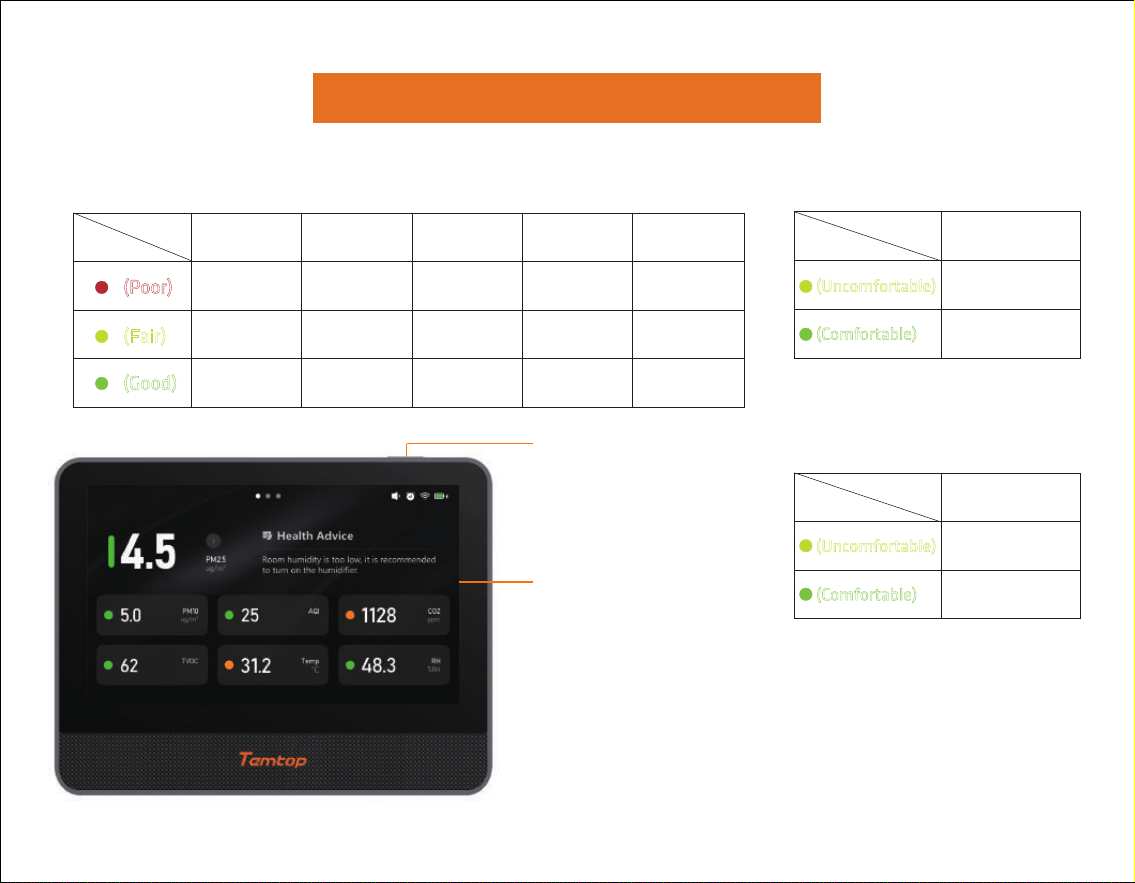
Overview
Air Quality Parameter For Reference
(Good)
PM2.5
(µg/m
3
)
AQI
≥55.5
9.1~55.4
0~9
≥255
55~254.9
0~54.9
≥151
51~150
0~50
≥1501
1001~1500
400~1000
Pollutant
Status
(Poor)
(Fair)
TVOC
PM10
(µg/m
3
)
CO2
(ppm)
≥351
101~350
1~100
Pollutant
Status
(Comfortable)
(Uncomfortable)
Temp (℃)
<20 or >26
20~26
(Comfortable)
(Uncomfortable)
Pollutant
Status
RH (%RH)
<30 or >60
30~60
5
Power Button
7-inch touch screen
09:00 AM

Specifications
6
Dimensions: 182x140x70mm
Battery capacity: 4000mAh
Input: DC 5V 2A Battery Life: >4h
WiFi: 2.4GHz
Operation environment: -10-60°C, 0-99.9%RH
AQI
Measuring range: 0-500
Resolution: 1
CO
2
Measuring range: 400-5000ppm
Resolution: 1ppm
Accuracy: ±(40ppm+5% of reading)
TVOC
Index range: 1-500
Resolution: 1
Temperature
Measuring range: -10-60°C (14-140°F)
Resolution: 0.1°C (0.1°F)
Accuracy: ±1°C (±1.8°F)
Humidity
Measuring range: 0-99.9%RH
Resolution: 0.1%RH
Accuracy: ±5%RH
Note: The above data are from Temtop Laboratory.
LoRa
Frequency: US(915.8MHz), EU(868.3MHz)
Transmission Distance: 1000 m (open area)
PM2.5
Measuring range: 0-999.9 µg/m
3
Resolution: 0.1 µg/m
3
Accuracy: ±10µg/m
3
(0-100µg/m
3
)
±10%(100-500µg/m
3
)
PM10
Measuring range: 0-999.9 µg/m
3
Resolution: 0.1 µg/m
3
Accuracy: ±15µg/m
3
(0-100µg/m
3
)
±15%(100-500µg/m
3
)
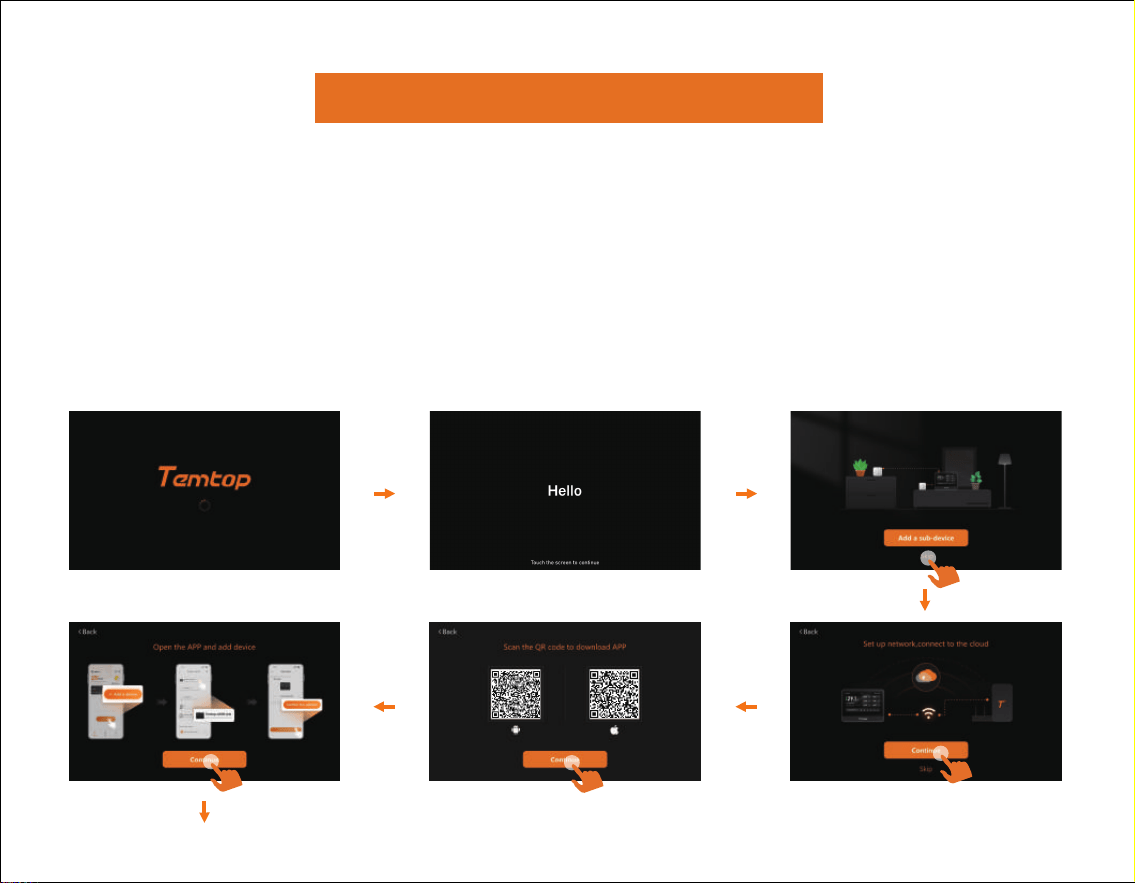
Operations
1. On/O
●
Press and hold the power button for 3 seconds to turn the detector on/o.
7
2. Connection
●
If it is the first time to power on, please follow the steps prompted on the page to
perform the following operations.
●
Sub-devices need to be purchased separately. If no sub-device is available, please
click "Skip".
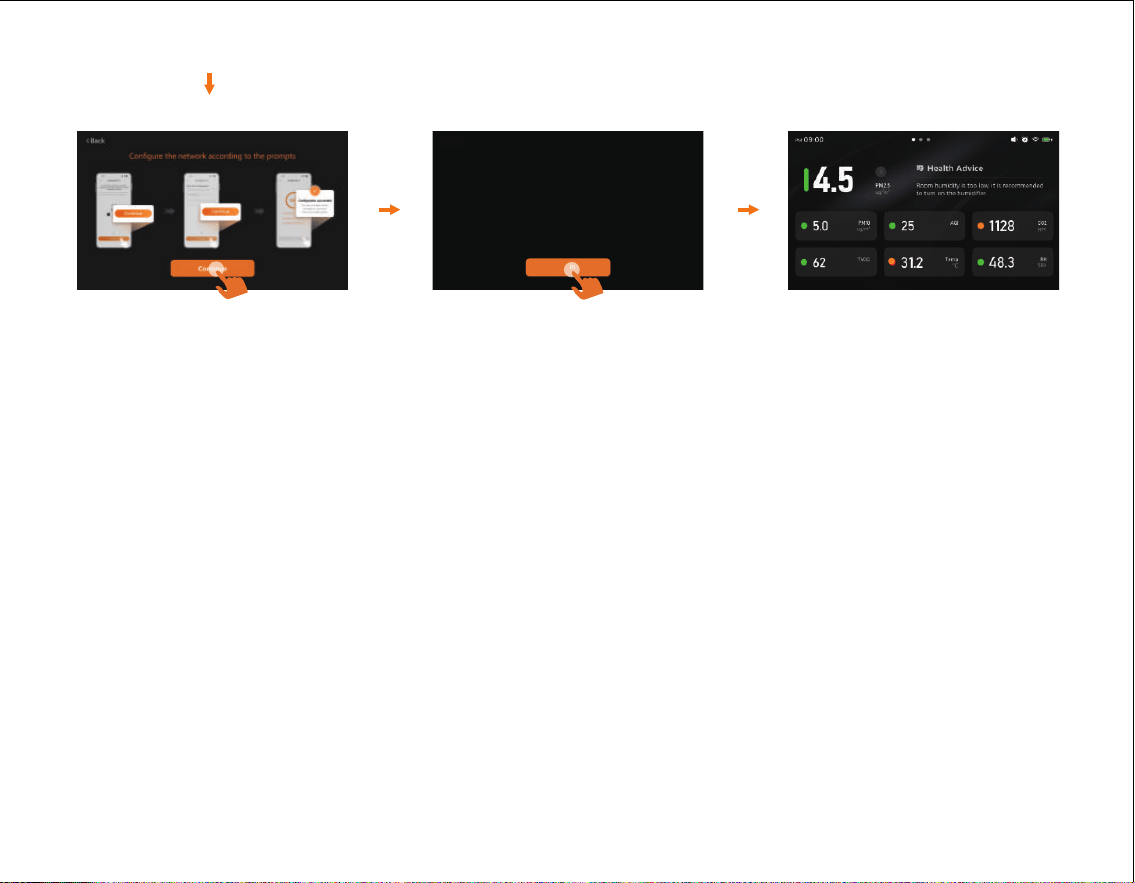
8
Notes:
1. Users should scan the corresponding QR code via the mobile phone program to download
the Temtop App.
2. When adding a device through the App, select the M100 2nd model.
3. Follow the App prompts to enter the correct name and password of your home 2.4GHz WiFi.
Ensure the mobile phone and the device are connected to the same 2.4GHz network.
4. Keep the mobile phone close to the device (recommended distance ≤ 1 meter) to avoid
connection failure.
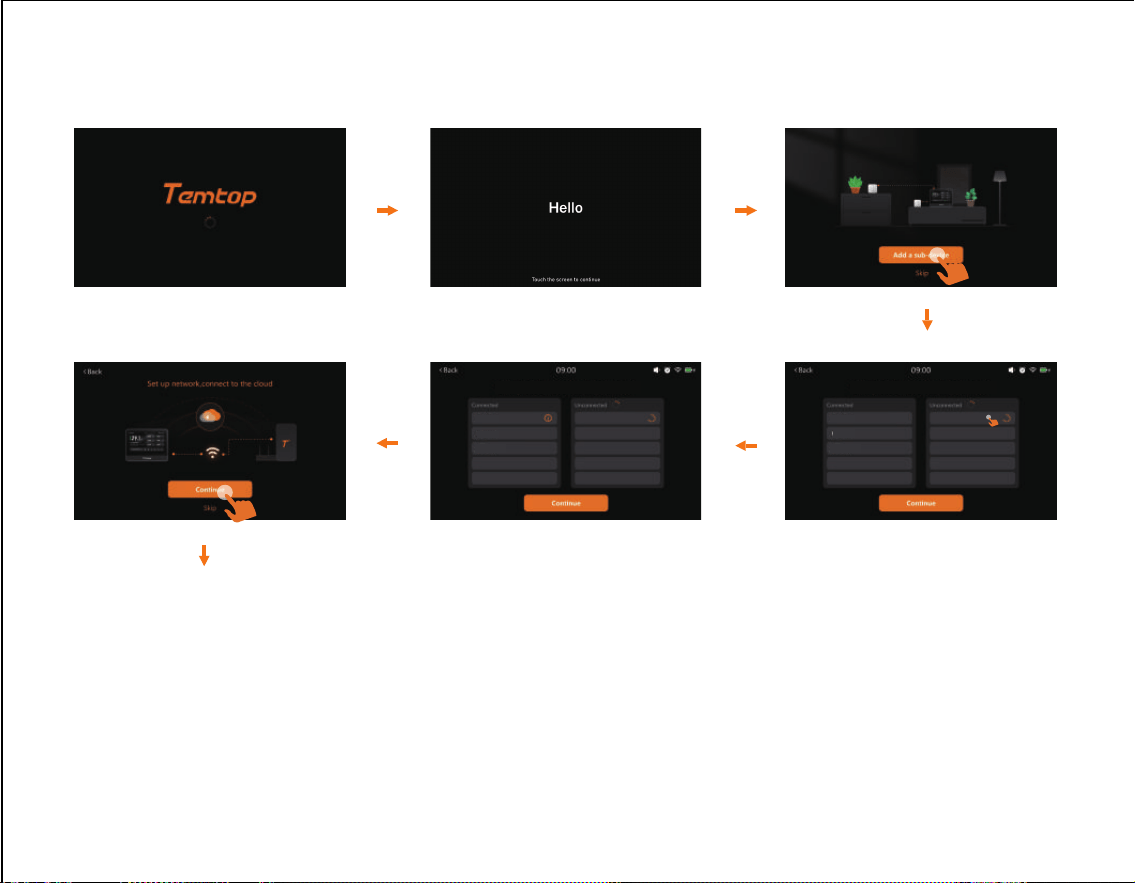
9
Add a sub-device (if available):
P1_90014389102918782366
P2_90835064942851180522
P1_90014389102918782366
Please refer to "2. Connection" for the remaining steps.
Notes:
1. The above steps will only be displayed during the first startup.
2.
The main device can add up to 10 sub-devices. Please complete the addition within 30 minutes
after the sub-device is powered on. If the sub-device cannot be found, turn it o and restart it,
then try adding it again.
3. Sub-devices need to be purchased separately. Skip this step if no sub-device is available.
P2_90835064942851180522
Make sure all Sub-device are connectedMake sure all Sub-device are connected
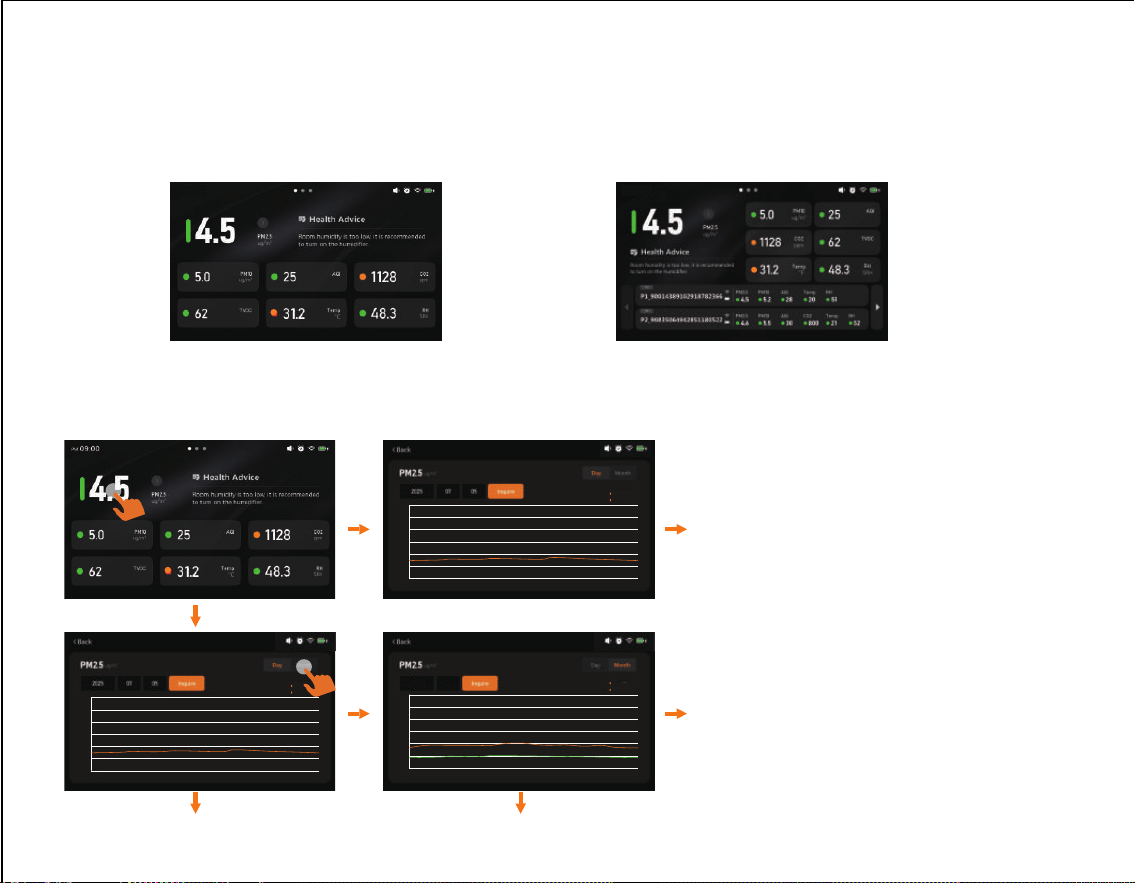
3. Data Display
●
The data display interface visible based on the number of products purchased by the
user is as follows:
M100 2nd
M100 2nd + P1/P2
Operation examples(PM2.5):
10
09:00 AM 09:00 AM
Note:
For both the daily and monthly line charts,
data corresponding to future time points
shall be represented by "0" (special case for
temperature: ℃ : -10, ℉: 14). On the line
charts, this shall be reflected as follows:
1. For the daily line chart: a drop to the orange
horizontal line at the bottom.
2. For the monthly line chart: a drop to the
green horizontal line at the bottom. (The
monthly line chart includes two lines: the
orange line represents the maximum value
(max), and the green line represents the
minimum value (min). When the two lines
align at this position, the green line will
overlay the orange line.).
0
20.0
40.0
00:00 02:00 04:00 06:00 08:00 10:00 12:00 20:0018:0016:0014:00 23:5922:00
min
max
9.9
11.7
0
20.0
40.0
min
max
8.8
15.2
2025 07
1 2 3 1410 129
7
15131186
5
4
302928272625242322212019181716 31
0
20.0
40.0
00:00 02:00 04:00 06:00 08:00 10:00 12:00 20:0018:0016:0014:00 23:5922:00
min
max
9.9
11.7
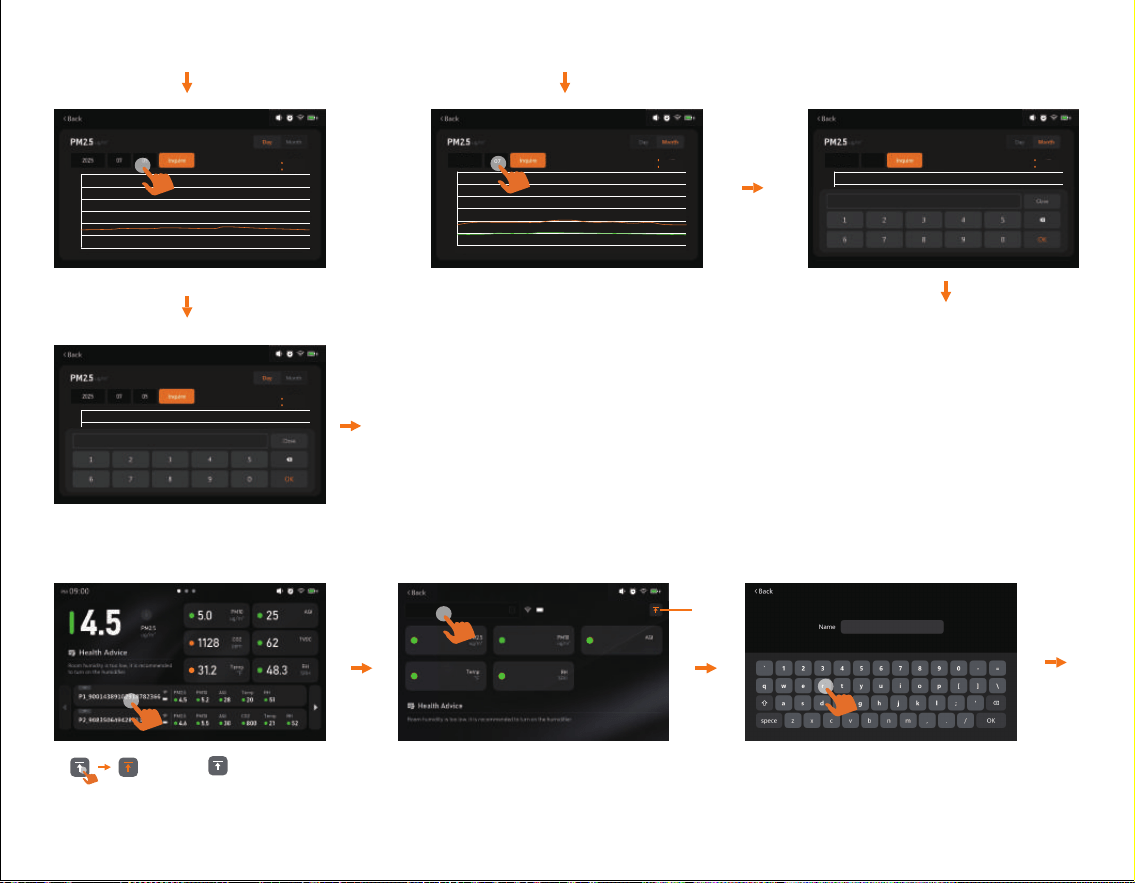
Data Curve Query:
●
Can be queried by month or by day.Click the values on the
numeric keypad, click "OK" to confirm after completion, and
finally click "Inquire" to query the curve graph.
For monthly query:
●
You can set the year and month, with precision to the month.
For daily query:
●
You can set the specific date, with precision to the day.
Operation examples(P1):
* : Click to pin the sub-device to the top as the first one, making it convenient for users to
monitor the air quality at the location where this sub-device is placed.
*
P1_90014389102918782366
11
0
20.0
40.0
00:00 02:00 04:00 06:00 08:00 10:00 12:00 20:0018:0016:0014:00 23:5922:00
min
max
9.9
11.7
0
20.0
40.0
min
max
8.8
15.2
2025 07
1 2 3 1410 129
7
15131186
5
4
302928272625242322212019181716 31
0
20.0
40.0
min
max
8.8
15.2
2025 07
1 2 3 1410 129
7
15131186
5
4
302928272625242322212019181716 31
0
20.0
40.0
00:00 02:00 04:00 06:00 08:00 10:00 12:00 20:0018:0016:0014:00 23:5922:00
min
max
9.9
11.7
4.5 5.2 28
20 51
P1_90014389102918782366
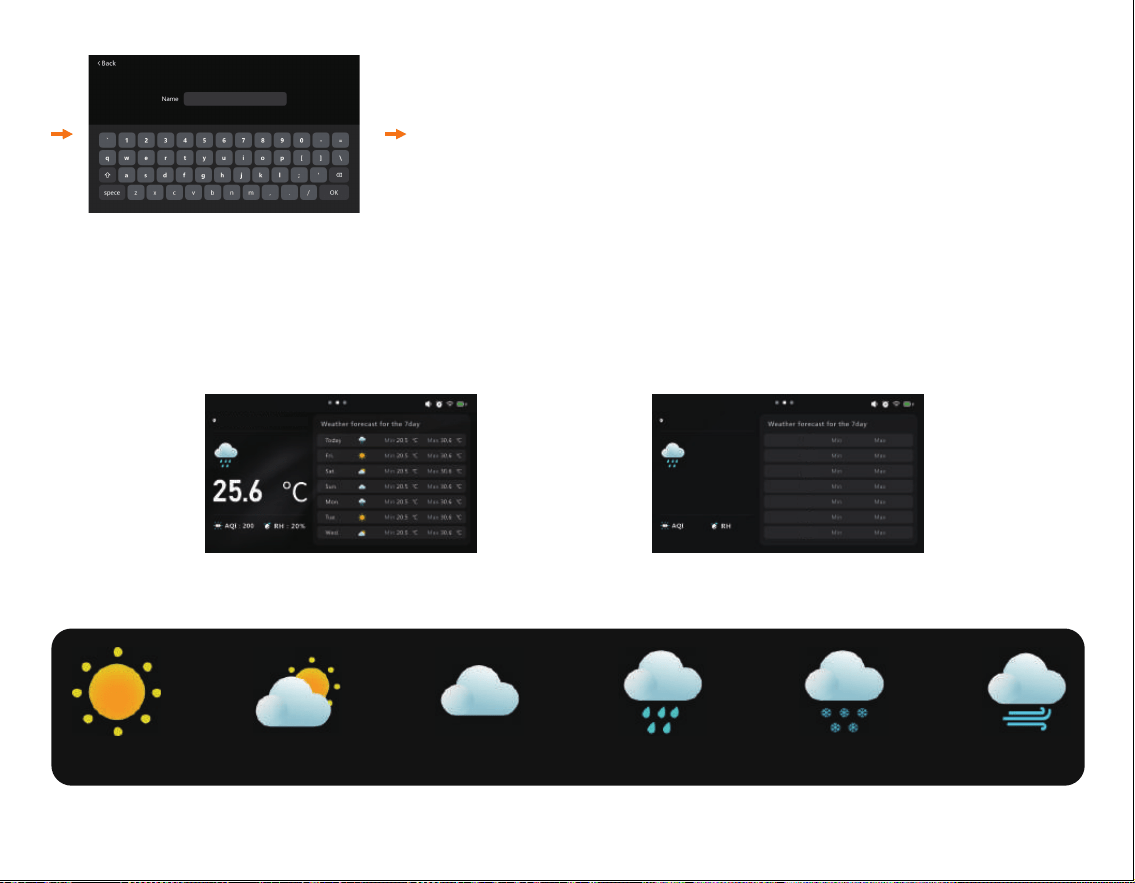
P1-room1
The user can set the desired name by clicking the
keyboard. After setting, click OK to save the settings.
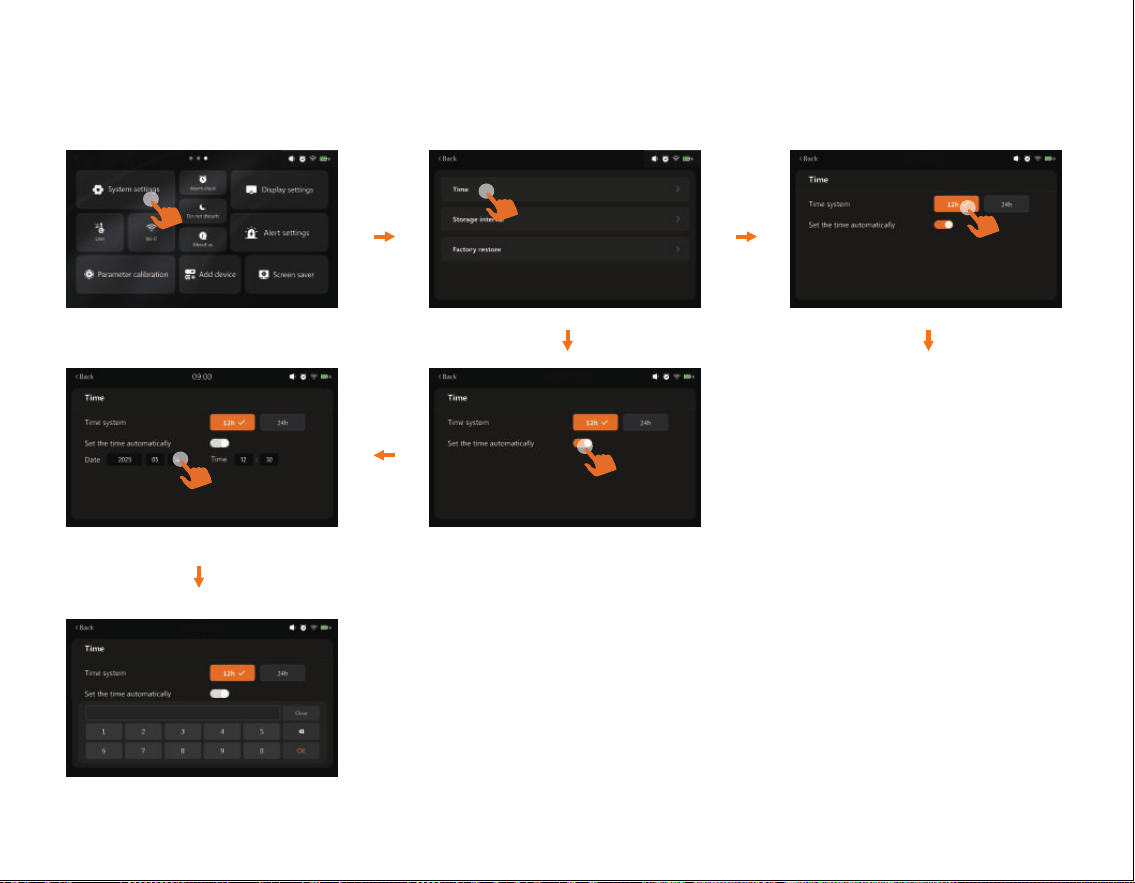
4. Weather Display
●
Once the product is connected to the internet, it will automatically locate the current
position and display the weather conditions for the next 7 days, including today.
Network Connection Not Connected
Sunny Day
Cloudy
Overcast
Rainy Day
Snowy Day
Foggy Day
12
Xuzhou
May 8, 2025
09:00 AM
May 8, 2025
09:00 AM
-- --
-- --
-- --
-- --
-- --
-- --
-- --
-- --
-- ℉
5. Settings
5.1 System settings
Time can be divided into
12-hour format and
24-hour format.
Auto-Set Date and Time*Set Date and Time**
* Automatically synchronize network time after connecting to the internet.
** The date and time can be set via the numeric keypad.
13
09:00 AM
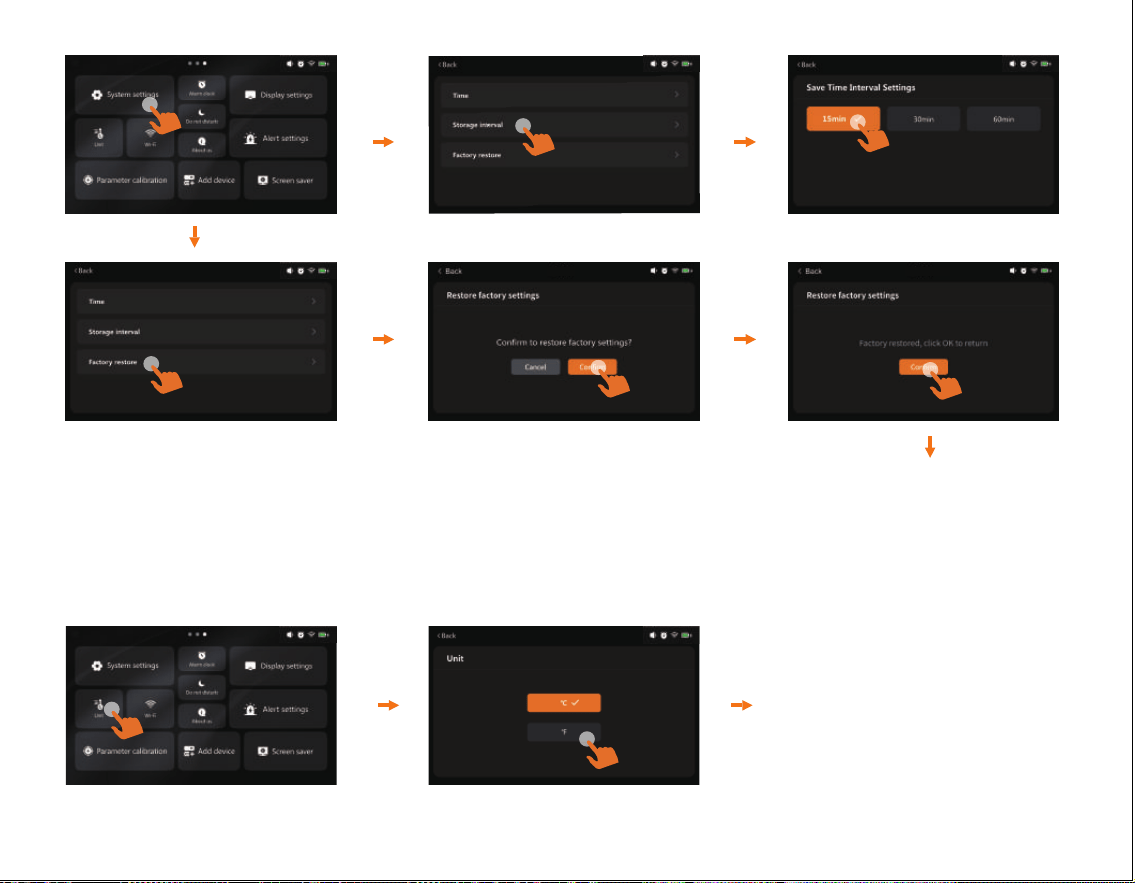
Restore Factory Settings
After restoring factory
settings, click Confirm
to return.
14
5.2 Unit
Users can switch between
℃ and ℉ as needed.
09:00 AM
09:00 AM
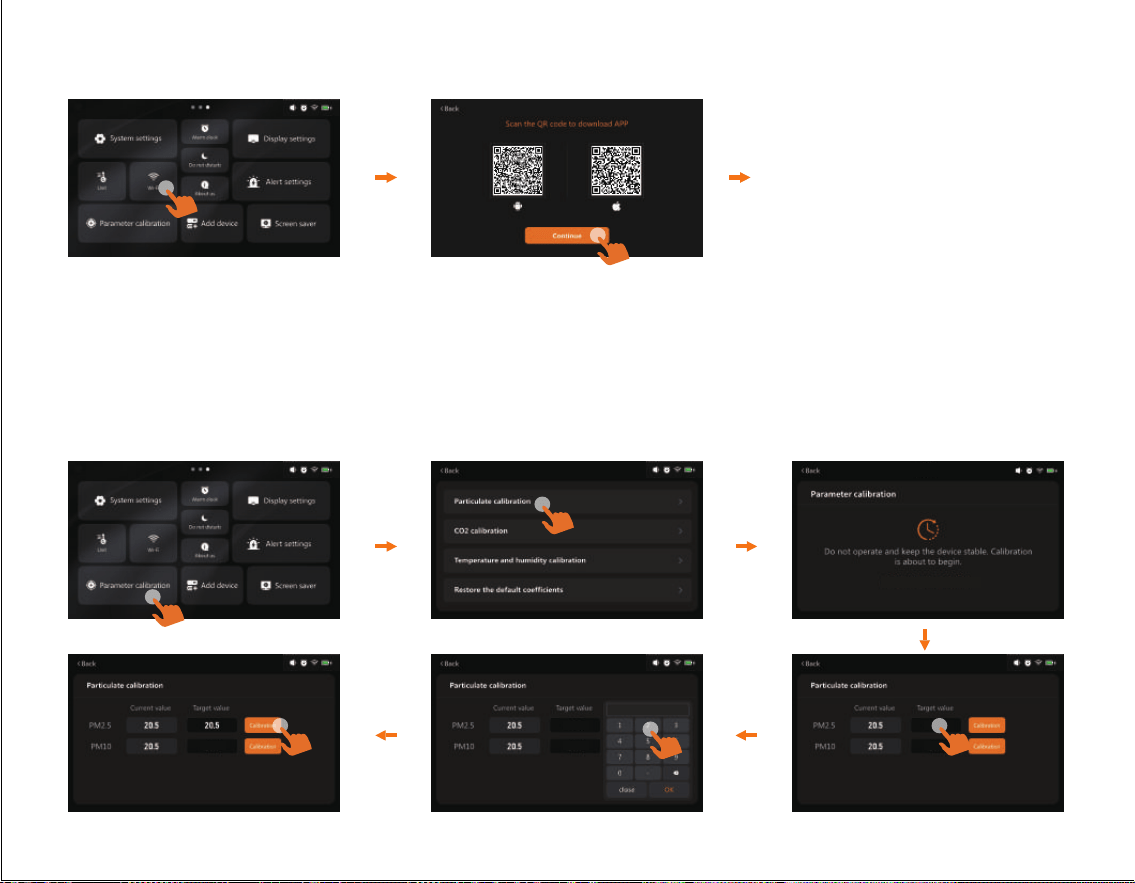
5.3 Wi-Fi
15
For subsequent networking
steps, please refer to the
relevant procedures in
"2. Connection".
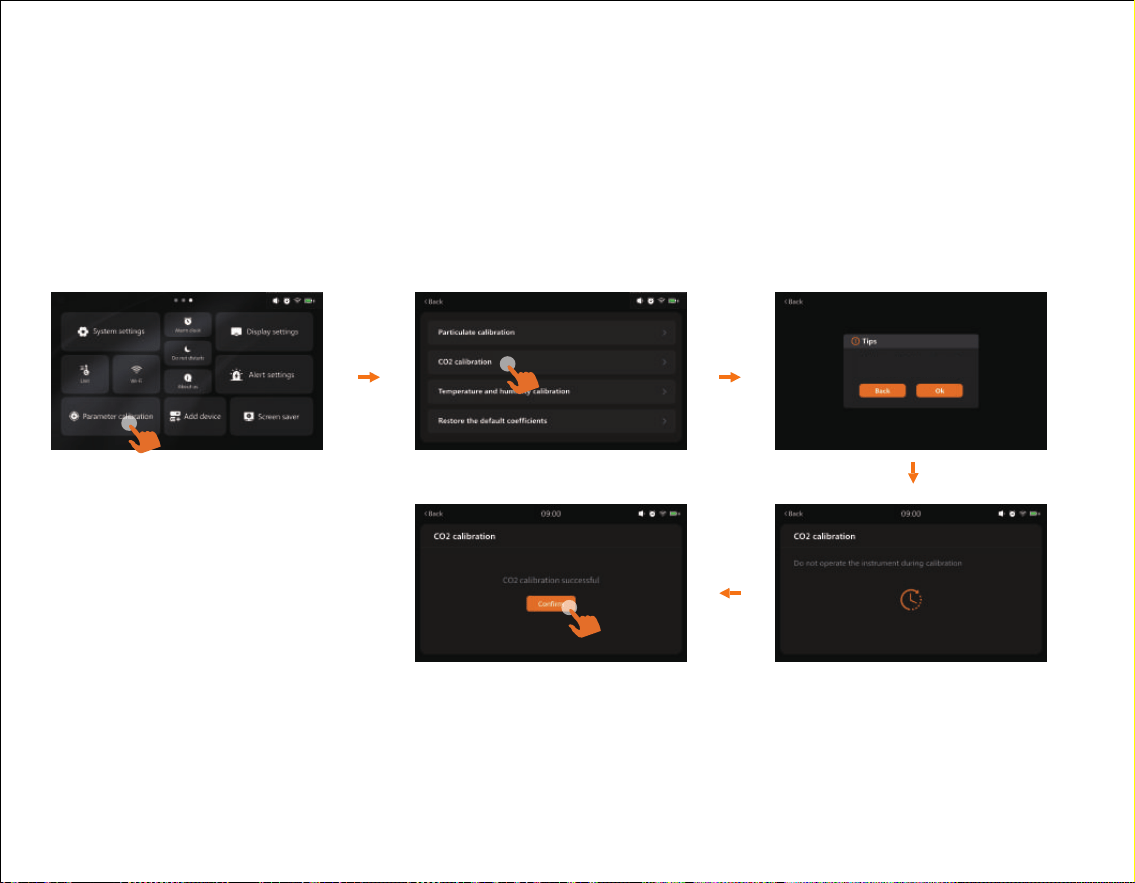
5.4 Parameter calibration
90
Parameter calibration
0.0
0.0
0.0
0.00.0
Calibration is recommended under the following circumstances:
1. Before the first use of the device;
2. When there is a significant deviation between the measured data and the known accurate
value (e.g., the dierence from the data of ocial monitoring stations exceeds 20%).
09:00 AM
09:00 AM
16
Calibration example (PM2.5)
● Use the numeric keypad to set the target value you intend to calibrate, then click OK
to confirm.
● Click Calibrate to start the calibration process. If successful: A "Calibration Successful"
prompt will appear. If failed: A "Calibration failed" prompt will be displayed.
● After calibration is completed, click Confirm to return to the previous interface.
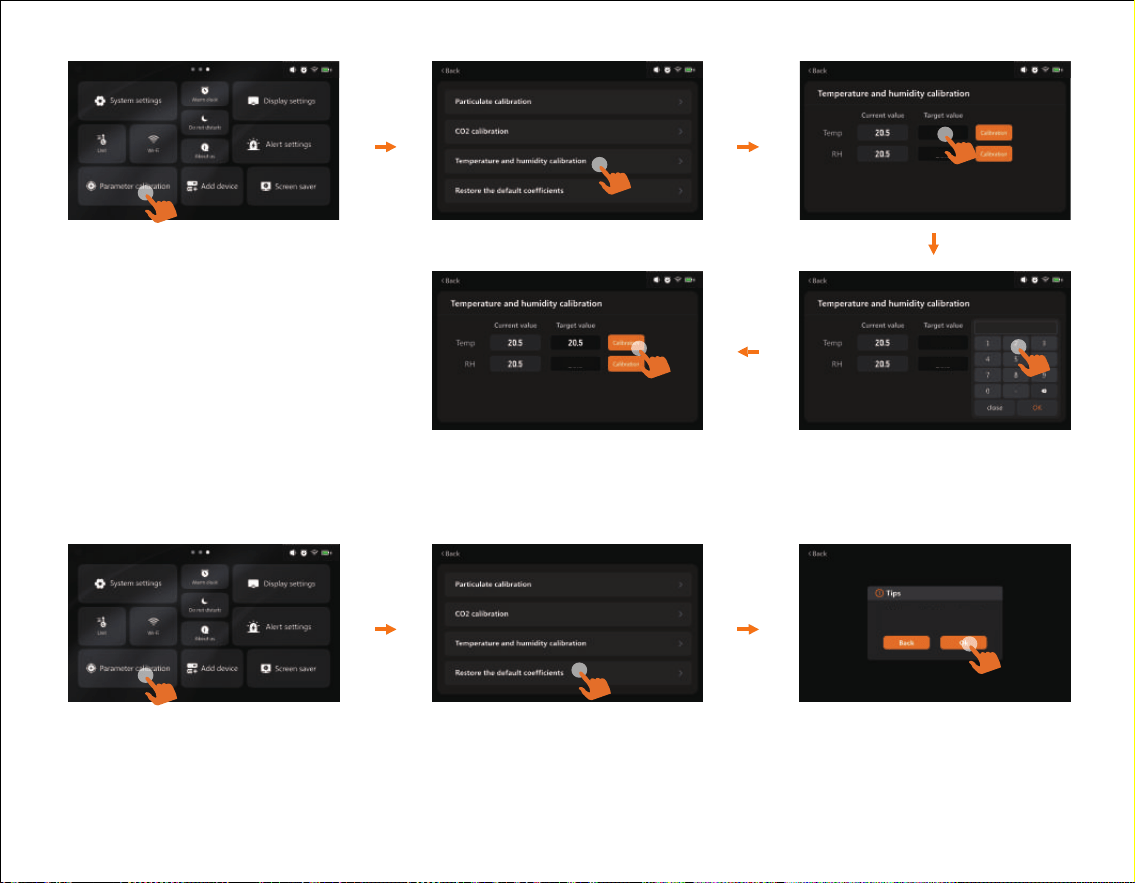
CO2 zero calibration
Please ensure that the equipment has
been placed in a well-ventilated area
200
Notes:
1) CO2 calibration must be performed in an outdoor fresh air environment (with an approximate
CO2 concentration of 400 ppm). Before calibration, the device shall be kept running stably for 10
minutes and placed at least 1 meter away from crowds.
2) Ensure sucient power supply. Otherwise, the calibration will be terminated due to shutdown
or power failure, resulting in calibration failure, inaccurate data, and the need for re-calibration.
09:00 AM
17
Temperature and humidity calibration
Take the calibrator temperature as an example here; the specific step-by-step
instructions are the same as those in "Calibration example (PM2.5)".
This function will restore each sensor of the
device to the factory calibration coefficient
Restore the default coecients
When performing the "Restore the default coecients" function, the factory-calibrated
coecients of each sensor in the device will be restored.
0.0
0.0
0.0
0.00.0
09:00 AM
09:00 AM
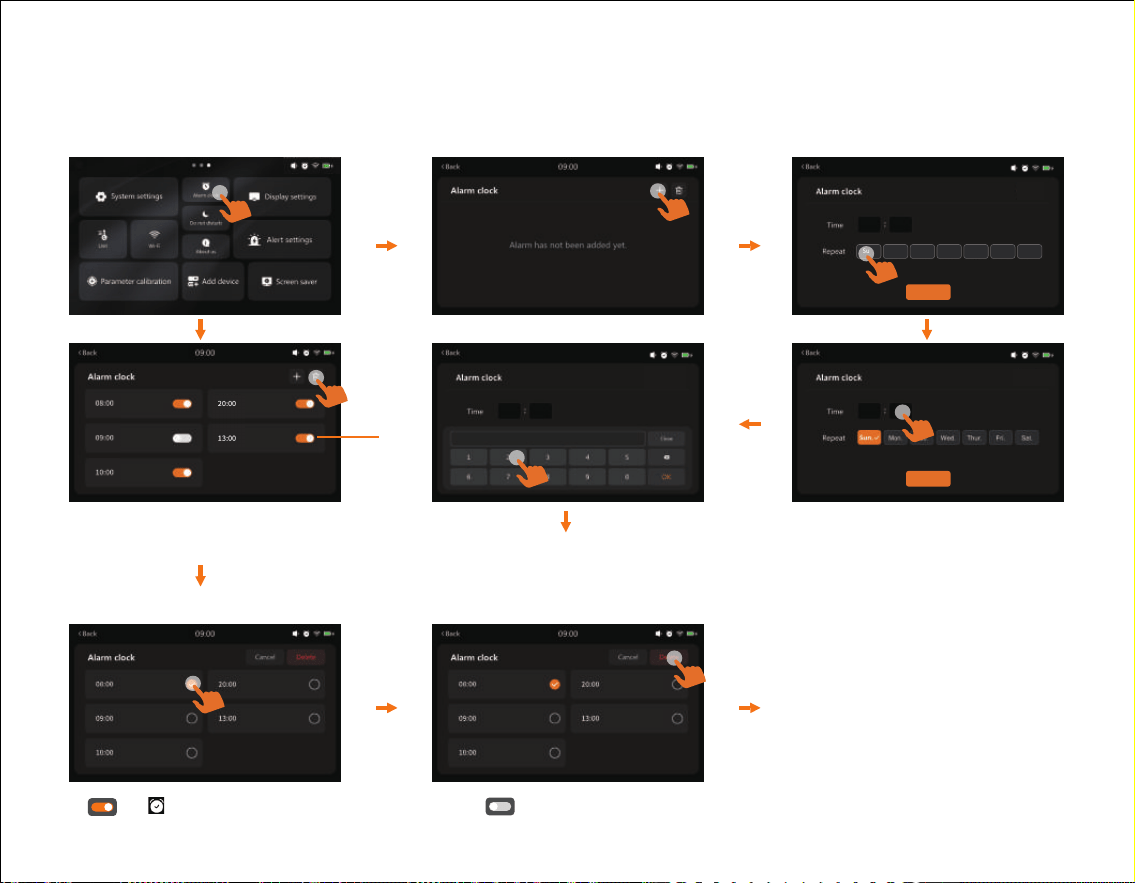
Users can set the alarm time by clicking the numeric keypad.
After setting, click "OK" to save the settings. Once the
settings are completed, click "Save" to add the alarm.
5.5 Alarm clock
18
08 00
Sun.
Mon. Tue.
Wed.
Thur.
Fri.
Sat.
Save
08 00
Save
08 00
Save
Add Alarm
Delete Alarm
Users can delete one or more
alarms as needed.
*
*
& :Alarm function activated. :Alarm function deactivated.
You can set a fixed daily time (e.g., 8:00) to receive a reminder for checking the current air
quality data, thus avoiding missing key monitoring information.
09:00 AM
19
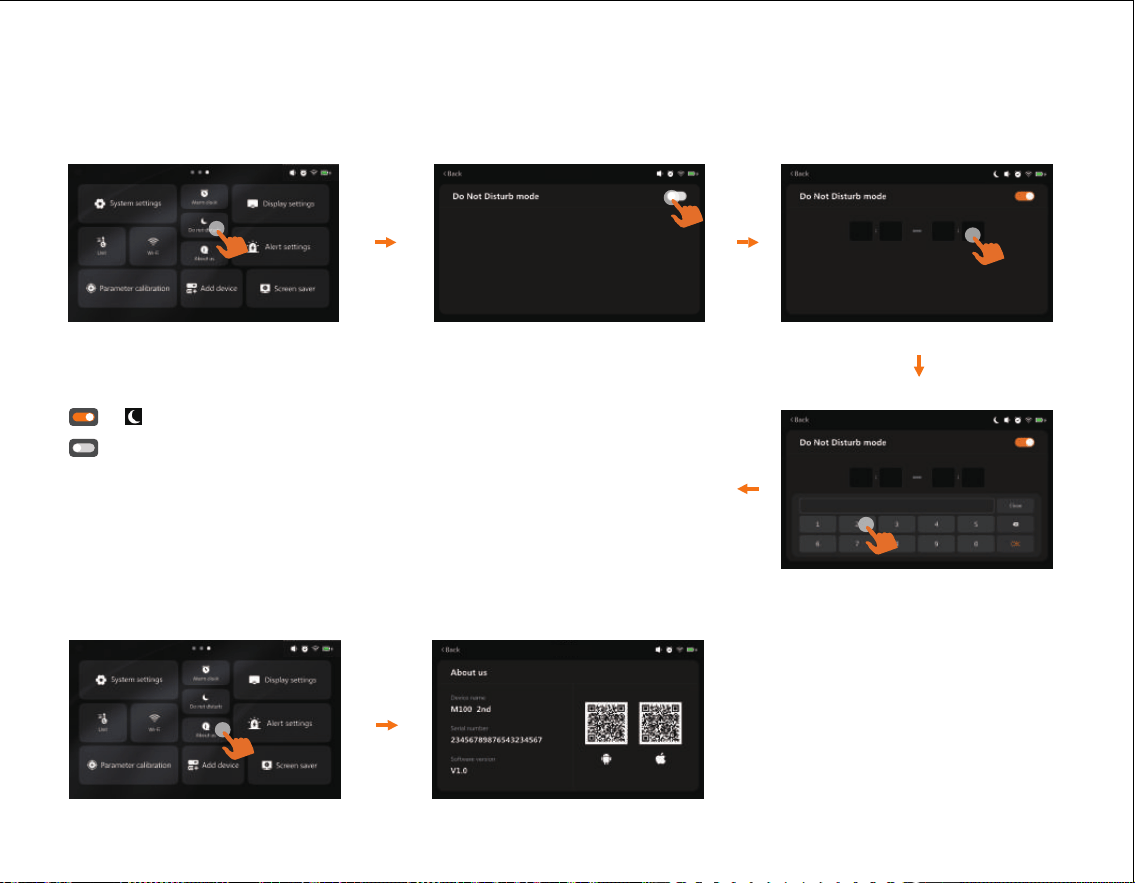
5.6 Do not disturb
Users can set the Do Not Disturb time by clicking the
numeric keypad. After completion, click OK to save the
settings.
& :Do Not Disturb mode activated.
:Do Not Disturb mode deactivated.
Do Not Disturb mode is not currently on.
5.7 About us
20 00 08 00
20 00 08 00
When enabled (e.g., 20:00–08:00), the device will turn o the prompt tone and automatically
turn o the screen, preventing disturbance to your rest at night.
09:00 AM
09:00 AM
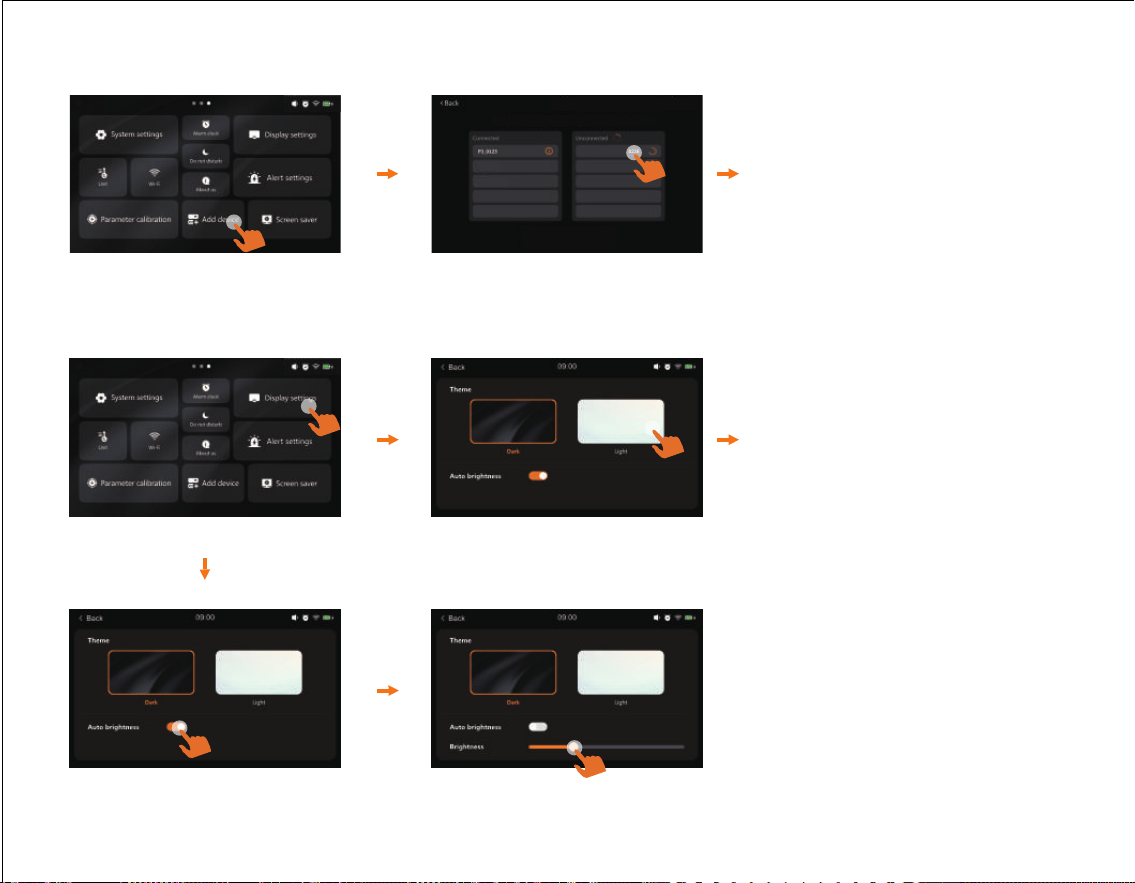
5.8 Add device
P1_90014389102918782366
P2_90835064942851180522
For the steps to add devices
later, please refer to the
relevant operation procedures
in "2. Connection-Add a
sub-device".
5.9 Display settings
20
Users can switch the display
theme according to their
preferences.
Make sure all Sub-device are connected
09:00 AM
09:00 AM
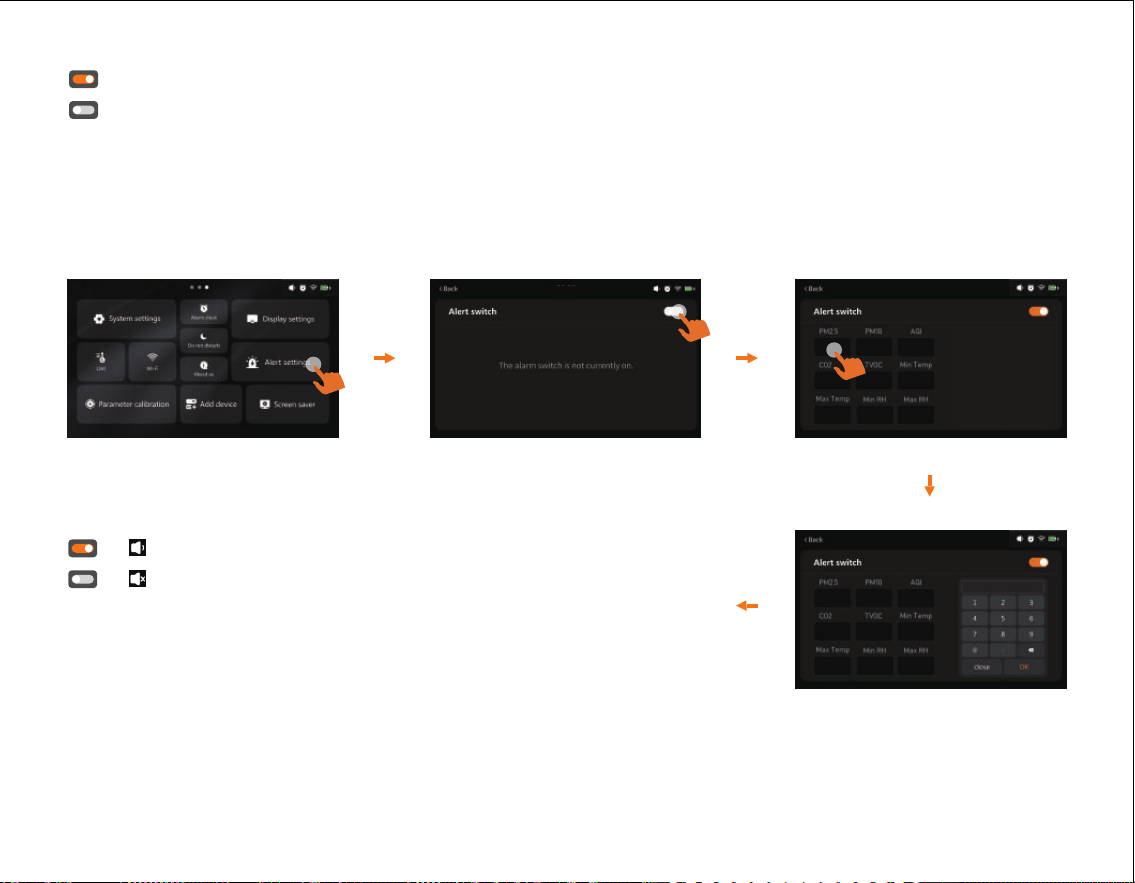
5.10 Alert settings
21
Users can set the alarm value using the numeric keypad.
After setting, click OK to save the settings (PM2.5 is
used as an example here).
& :Parameter alarm setting function activated.
& :Parameter alarm setting function deactivated.
Users can set the display brightness by sliding the slider; the brightness increases
from left to right.
:Auto brightness function activated.
:Auto brightness function deactivated.
9.0 54.9 50
1000 100 68.0
78.8 30 60
℉
9.0 54.9 50
1000 100 68.0
78.8 30 60
℉
09:00 AM
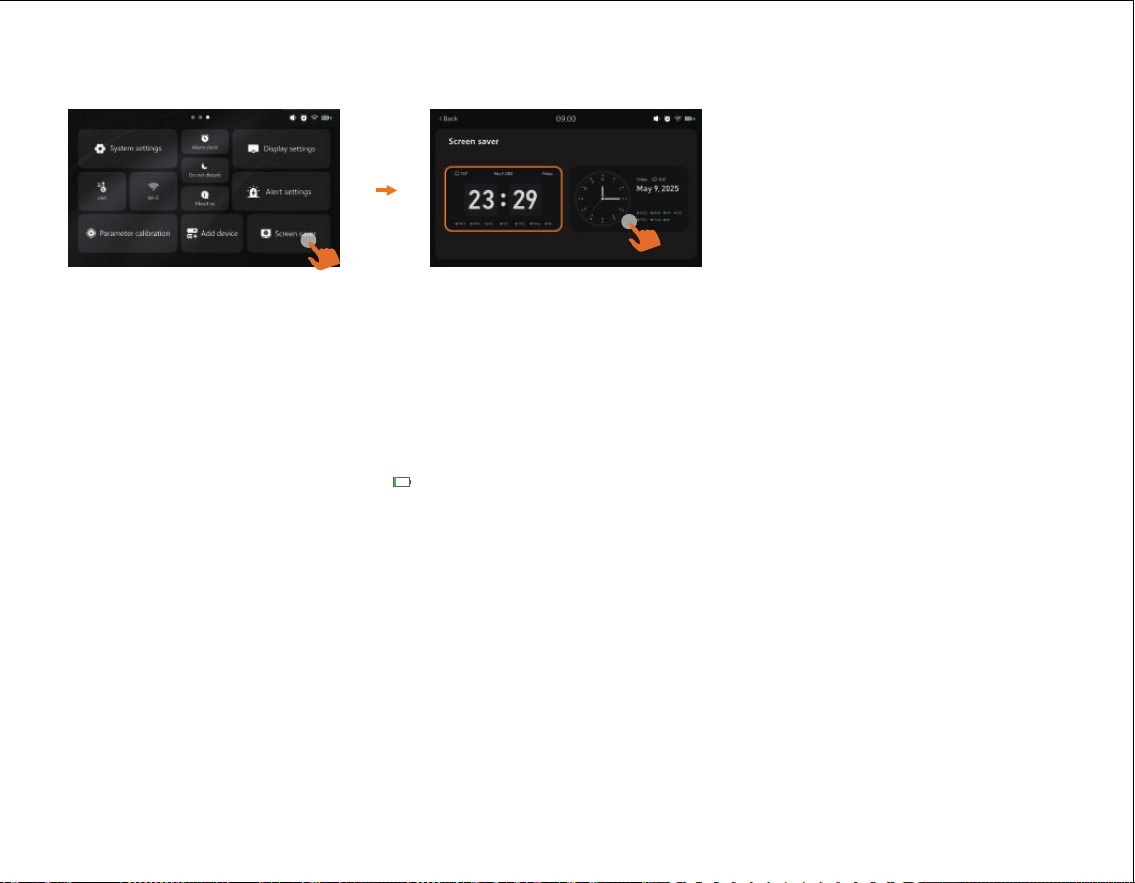
5.11 Screen saver
22
Users can set the screensaver according to their preferred screensaver style. After the
settings are completed, the device will enter screensaver mode if there is no operation
for 5 minutes.
6. Charging
●
When the battery is low ( ), please charge the device by connecting a USB data cable
and a power adapter.
●
For long-term operation, it is recommended to use DC power supply continuously.
●
When the device is not in use for an extended period, fully charge it first, store it in a
dry and cool place, and recharge it every 3 months to extend the battery life.
09:00 AM

23
Q: Why can't I receive the verification code when I sign up for an APP account?
A: ①
Please check the advertisement mails and spam mails, your mailbox may automatically.
A: ① classify the CAPTCHA mails into advertisement mails and spam mails.
A: ② Google Mail, Outlook, and other major mailboxes are recommended.
A: ③ You can also log in directly using third-party accounts such as Google or Apple.
Q: Why can't the APP connect to the device?
A: ①
Make sure your phone and device are in the same room and as close to the device as possible.
A: ② Try restarting the device or connecting with another phone.
A: ③
If the issue is still not resolved, please contact our customer service for further support.
Q: Why does the indicator light stay o?
A: As PM2.5 concentration in the environment is changing all the time not only due to
environmental factors like changes in airflow, humidity, wind direction, etc. but also due
to common pollutant sources like smoking, cooking; exhaust emissions from vehicles,
smoke from burning coal/chimneys/ furnaces, etc. All these may influence the PM2.5
concentrations and give dierences in the readings.
FAQ

Q: AQI/ PM2.5/PM10 and other values, why the measured value is inconsistent with
the ocial announcement?
A: The AQI/PM2.5/PM10 shown on the display is a measurement of the space where
the device is located. The measured value published on the Internet or ocial websites
is the average value of several monitoring points, and each measurement point will be
dierent. At the same time, according to the regulations of EPA and WHO, the AQI value
is calculated based on the highest value among the five pollutants in the atmosphere
on that day. In the past ten years, the local AQI in the United States has basically been
calculated with the value of PM2.5/PM10, and sometimes with the value of O
3.
Q: Is it true that AQI calculations are not scientific?
A: We calculate the AQI based on PM2.5/PM10, which is MAX (AQI-PM2.5, AQI-PM10),
and there are corresponding AQIs for O
3, CO, SO2, NO2, and so on, and the ocial one
is released with the maximum of these AQI-PM2.5, AQI-PM10 and other 6 AQIs. The
main source of indoor pollution is particulate matter so AQI-Particulate Matter can
respond well to indoor AQI.
Q: Why is CO
2 data high?
A: The user's environment may be poorly ventilated,resulting in high CO
2 concentration;
it is recommended that the user place the product in an outdoor ventilated place for 10
minutes. If the data is still high, the customer is advised to perform a CO
2 calibration
via the APP.
24

Q: What is TVOC and what are the common sources in households?
A: TVOC (Total Volatile Organic Compounds) refers to a variety of chemical substances
that easily evaporate into the air at room temperature. The TVOC sensor behaves
similarly to the human nose and reflects changes in the relative intensity of indoor
TVOC on a scale from 1 to 500. Common sources of TVOCs in the home include alcohol,
air fresheners, citrus fruits, scented candles, paints, cleaning supplies, pesticides, building
materials and furniture, inks, glues, and various cosmetics.
Q: Why are the TVOC data readings very high/out of range when with the detectors on?
A: Being packed in an ink-printed box may interfere with the sensor over time due to
the organic volatiles left in the packaging. Therefore, once unpacked, please place the
detector in a ventilated area to help speed up its data recovery.
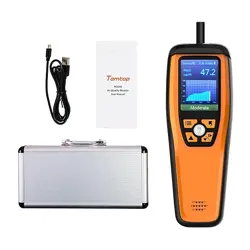
What’s Included
● Air Quality Detector x 1
● Detector manual x 1
● Adapter & USB Cable x 1
25

26
FCC Requirement
FCC Warning statement:
This device complies with part 15 of the FCC Rules. Operation is subject to the following
two conditions:
(1) This device may not cause harmful interference, and (2) this device must accept any
interference received,including interference that may cause undesired operation.
Any Changes or modifications not expressly approved by the party responsible for
compliance could void the user's authority to operate the equipment.
Note:
This equipment has been tested and found to comply with the limits for a Class B
digital device, pursuant to part 15 of the FCC Rules. These limits are designed to
provide reasonable protection against harmful interference in a residential installation.
This equipment generates uses and can radiate radio frequency energy and, if not
installed and used in accordance with the instructions, may cause harmful interference
to radio communications.

27
FCC Requirement
However, there is no guarantee that interference will not occur in a particular installation.
lf this equipment does cause harmful interference to radio or television reception, which
can be determined by turning the equipment o and on, the user is encouraged to try to
correct the interference by one or more of the following measures:
- Reorient or relocate the receiving antenna.
- Increase the separation between the equipment and receiver.
- Connect the equipment into an outlet on a circuit dierent from that to which the
receiver is connected.
- Consult the dealer or an experienced radio/TV technician for help.
FCC RF exposure statement:
The device has been evaluated to meet general RF exposure requirement.This equipment
should be installed and operated with minimum distance 20cm between the radiator &
your body.
28
Warranty
Temtop warrants the included detector for 1 year from the date of original purchase.
The item can be exchanged or returned within 30 days if the defect is not caused by
artificial damage.
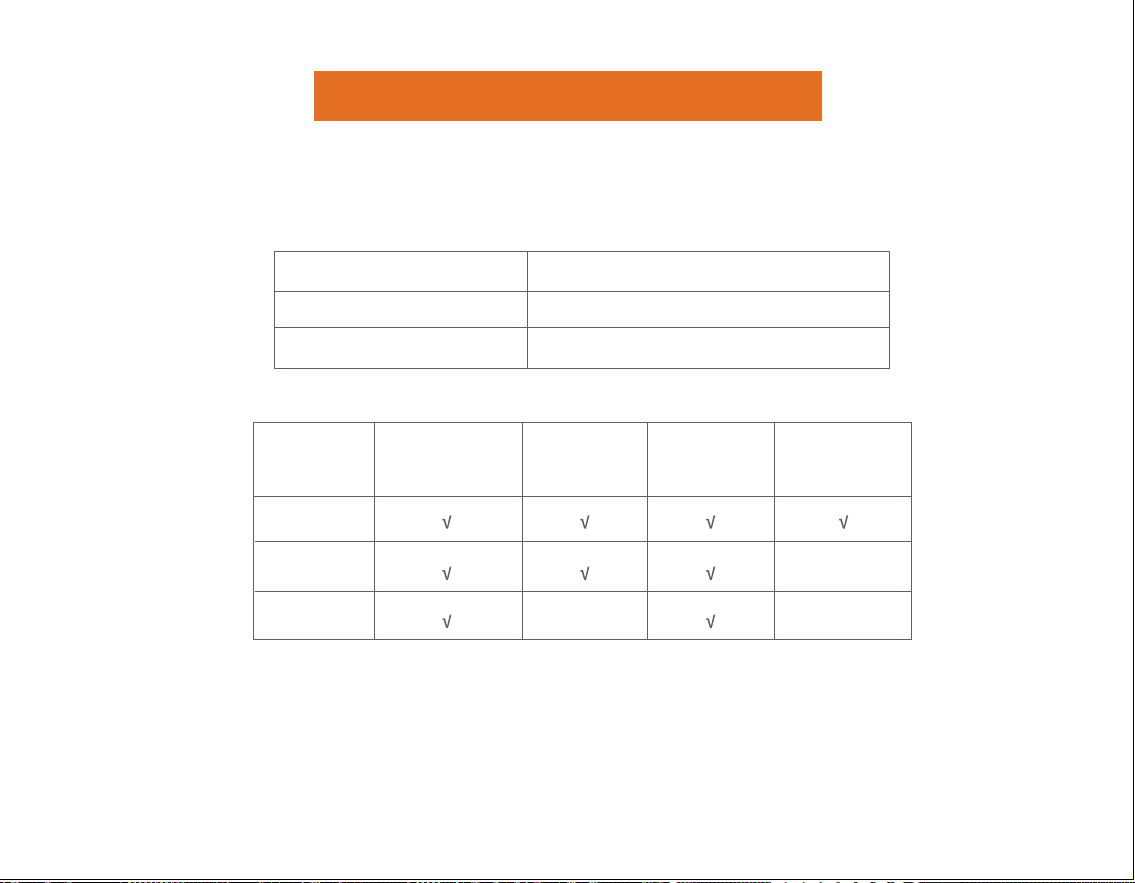
Before return or delivery for repair, please check if the following √ items are ready:
* Including invoice, order number and etc.
Temtop warranty does NOT include:
• Malfunction or damages caused by artificial damage or modification.
• Other deliberate damages.
• Damage caused by natural events.
ltem
Detector
Accessories
Warranty Period
1 year
N/A
Return
Exchange
Repair
Detector &
Accessories
Complete
Package
Proof of
Purchase*
Gift (if any)

V1.0
Made In China
Elitech Technology, Inc
2528 Qume Dr, Ste 2
San Jose, CA 95131 USA
Tel: (+1) 408-898-2866
Facebook: www.facebook.com/temtopus
Instagram: www.instagram.com/temtopaqm/
youtube: www.youtube.com/@Temtopus
linkedin: www.linkedin.com/company/temtop-us/
X: x.com/temtopus48285
Sales: [email protected]
Website: www.temtopus.com
Elitech Brazil Ltda
R.Dona Rosalina,90-Lgara, Canoas-RS
92410-695,Brazil
Tel: (+55)51-3939-8634
Sales: [email protected]
Website: www.elitechbrasil.com.br
Elitech (UK) Limited
Unit 13 Greenwich Business Park,
53 Norman Road,London, SE10 9QF
Tel: (+44)208-858-1888
Youtube: @elitech_uk
Instagram:@elitechuk_
Facebook: @hvaccontrol
Sales:[email protected]
Website: www.temtop.co.uk