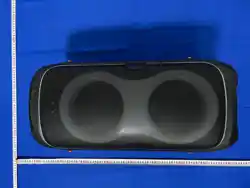

FINEGO
GoSurge 8
Karaoke peaker
USER MANUAL
Model: FG-2602T

FINEGO GoSurge 8 User Manual
2 / 15
FINEGO USER MANUAL
Contents
1. Product Informaon
2. Package Contents
3. Important Safety Informaon
4. Main Speci'caons
5. Parts and Bu*on Funcons
6. Quick Start
7. Bluetooth / TWS / USB / TF / AUX / Microphone Use
8. Charging, Maintenance and Cleaning
9. Troubleshoong
10. Compliance and Environment
11. Warranty and A8er-Sales Service
Keep this manual for future reference. Specicaons and operang instrucons in this booklet
apply to product model FG-2802T.
FINEGO USER MANUAL
1. Product Informa on
Brand FINEGO
Product Name Karaoke speaker
Product Model FG-2602T
Bluetooth Name FINEGO GoSurge 8
Category Karaoke Speaker
FINEGO GoSurge 8 is a portable karaoke speaker designed for indoor and outdoor use. It
supports Bluetooth 5.3, TWS speaker linking, USB and TF card playback, 3.5 mm AUX
input, microphone controls, LED lighng e=ects and infrared remote control.

FINEGO GoSurge 8 User Manual
3 / 15
Key Features
• 240 W RMS power and 500 W peak power.
• Up to 8 hours of music playback at 50% volume.
• Two 8-inch woofers and two 3-inch drivers.
• Durable, stable telescopic trolley handle designed for repeated extension and retracon.
• Heavy-duty built-in wheels with bearings support the speaker’s weight and roll smoothly.
• Bluetooth 5.3, TWS linking, and MP3 playback from USB drives and TF cards up to 32 GB.
• Microphone controls, LED lighng, three sound modes, and a 23-key remote control.
FINEGO USER MANUAL
2. Package Contents
• FINEGO GoSurge 8 speaker × 1
• Microphones × 2
• Remote control × 1
• USB charging cable × 1
• User manual × 1
• Warranty card × 1
Before First Use
1. Remove all packing materials and inspect the speaker, cable and accessories.
2. Place the speaker upright on a stable, dry and level surface.
3. Charge the built-in ba*ery with a cer'ed 5 V DC, 3 A USB power source; maximum
input power is 15 W.
4. Set VOLUME and MIC.VOL to low levels before beginning playback or using
microphones.
5. Retain the proof of purchase and warranty card.
FINEGO USER MANUAL
3. Important Safety Informa on
General Safety
Read and retain these instruc ons. Use the product only as described in this manual.
• Do not expose the speaker to rain, splashes, wet areas or excessive humidity.
• Place the speaker upright on a stable, level surface. Secure it during transport so it cannot roll
or fall.
• Keep all venlaon openings clear. Do not cover the speaker while it is operang or charging.
• Keep away from open Hames, heaters, hot vehicles and prolonged direct sunlight.

FINEGO GoSurge 8 User Manual
4 / 15
• Do not drop, crush, puncture, disassemble, modify or a*empt to repair the product.
• Do not insert foreign objects into ports, grilles or openings.
• Use only accessories approved for this model.
• Disconnect all cables before moving or cleaning the speaker.
• Stop use immediately if smoke, abnormal odor, excessive heat or unusual noise occurs.
• There are no user-serviceable parts inside. Service must be performed by quali'ed personnel.
Charging, Ba.ery, Hearing and Accessories
Charging and Ba.ery Safety
• Use the supplied charging cable or a cer'ed replacement and a compable 5 V DC, 3 A USB
power source. Maximum input power is 15 W.
• Never connect the charging port to a non-standard voltage. Do not use a damaged cable, plug
or charging port.
• Charge in a dry, venlated locaon. Disconnect power before cleaning, during electrical
storms and before long-term storage.
• Do not expose the built-in ba*ery to 're, temperatures above 60 °C (140 °F), sharp objects, or
severe impact.
• If the ba*ery swells, leaks, becomes unusually hot or produces an odor, stop using and
charging the product.
Hearing and Microphone Safety
• Start at low volume and increase gradually. Prolonged exposure to high sound levels may
damage hearing.
• Keep microphones away from the speaker drivers. Lower MIC.VOL immediately if feedback or
squealing occurs.
Accessory Ba.ery Safety
• Use only the ba*ery type and polarity indicated in each accessory ba*ery compartment.
• Do not mix new and used ba*eries or di=erent ba*ery types. Keep ba*eries away from
children.
• Remove accessory ba*eries before long-term storage and dispose of used ba*eries according
to local regulaons.
FINEGO USER MANUAL
4. Main Speci0ca ons
Product, Power and Audio
PARAMETER VALUE
Product Name Karaoke speaker
Product Model FG-2602T

FINEGO GoSurge 8 User Manual
5 / 15
Charging Input 5 V DC, 3 A, max. 15 W
Ba.ery Capacity 11.1 V, 9,000 mAh
RMS Power 240 W
Peak Power 500 W
Playback Time Up to 8 hours at 50% volume
Speaker Drivers 2 × 8-inch woofers + 2 × 3-inch drivers
Speaker Impedance 4 Ω + 6 Ω
Frequency Response 20 Hz–20 kHz
Charging input: USB Type-C, 5 V DC, 3 A, maximum 15 W.
Bluetooth and Product Data
PARAMETER VALUE
Bluetooth Version 5.3
Bluetooth Name FINEGO GoSurge 8
Transmission Range 15 m (49.2 8)
Bluetooth Frequency 2.402–2.480 GHz
Total Harmonic Distor on < 10%
Sensi vity ≥ 95 dB
Signal-to-Noise Ra o ≥ 75 dB
Opera ng Temperature -10 °C to +50 °C (14 °F to 122 °F)
Product Weight 10.68 kg (23.55 lb)
Product Dimensions
312 (W) × 666 (H) × 335 (D) mm (12.28 ×
26.22 × 13.19 in)
Bluetooth range is measured in an open area. Walls, people, wireless tra&c and other obstacles may
reduce the praccal range.
FINEGO GoSurge 8 User Manual
6 / 15
FINEGO USER MANUAL
5. Parts and Bu.on Func ons
5.1 Main Unit
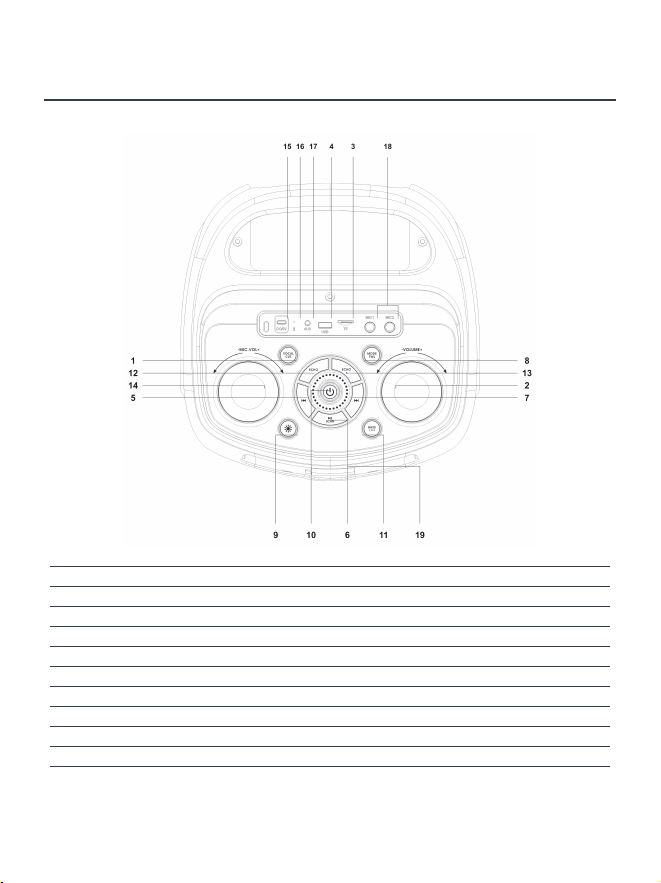
Figure 1. Main-unit controls and connecons
1 VOCAL CUT 11 BASS 1.2.3
2 VOLUME 12 ECHO−
3 TF card 13 ECHO+
4 USB port 14 MIC.VOL
5 Previous 15 DC/5V
6 Play/Pause / SCAN 16 Charging indicator
7 Next 17 AUX
8 MODE/TWS 18 MIC1 / MIC2
9 Light 19 IR receiver
10 Power
5.1.1 Main Unit — Items 1–10
1. VOCAL CUT Short press to toggle the vocal-cut e=ect for compable music tracks.

FINEGO GoSurge 8 User Manual
7 / 15
2. VOLUME Rotate toward + or − to adjust the master volume.
3. TF Insert a FAT32-forma*ed TF card containing MP3 'les. Maximum supported capacity: 32
GB.
4. USB Insert a FAT32-forma*ed USB storage device containing MP3 'les. Maximum supported
capacity: 32 GB.
5. Previous During USB, TF or Bluetooth playback, short press to return to the previous track.
6. Play/Pause / SCAN Short press to play or pause. In AUX mode, press to mute or restore
sound. In USB/TF mode, press and hold to select ALL, RAND, ONE or FOL.
7. Next During USB, TF or Bluetooth playback, short press to move to the next track.
8. MODE/TWS Short press to cycle through Bluetooth, USB, TF and AUX. In Bluetooth mode,
press and hold to start or end TWS linking.
9. Light Short press to cycle through the available LED lighng e=ects or turn the lights o=.
10. Power Press and hold to turn the speaker on or o=.
5.1.2 Main Unit — Items 11–19
11. BASS 1.2.3 Cycles through Indoor, Bass Boost and Outdoor sound modes.
12. ECHO− Short press to decrease microphone echo/reverberaon.
13. ECHO+ Short press to increase microphone echo/reverberaon.
14. MIC.VOL Rotate toward + or − to adjust microphone volume.
15. DC/5V USB Type-C charging input. Use a 5 V DC, 3 A power source (max. 15 W).
16. Charging Indicator Lights red while charging and turns o= when fully charged.
17. AUX 3.5 mm external audio input.
18. MIC1 / MIC2 Inputs for compable wired microphones.
19. IR Receiver Keep unobstructed when using the remote control.
USB/TF Playback Modes
• ALL — play all tracks in sequence.
• RAND — play tracks in random order.
• ONE — repeat the current track.
• FOL — repeat tracks in the current folder.
FINEGO GoSurge 8 User Manual
8 / 15
5.2 23-Key Remote Control
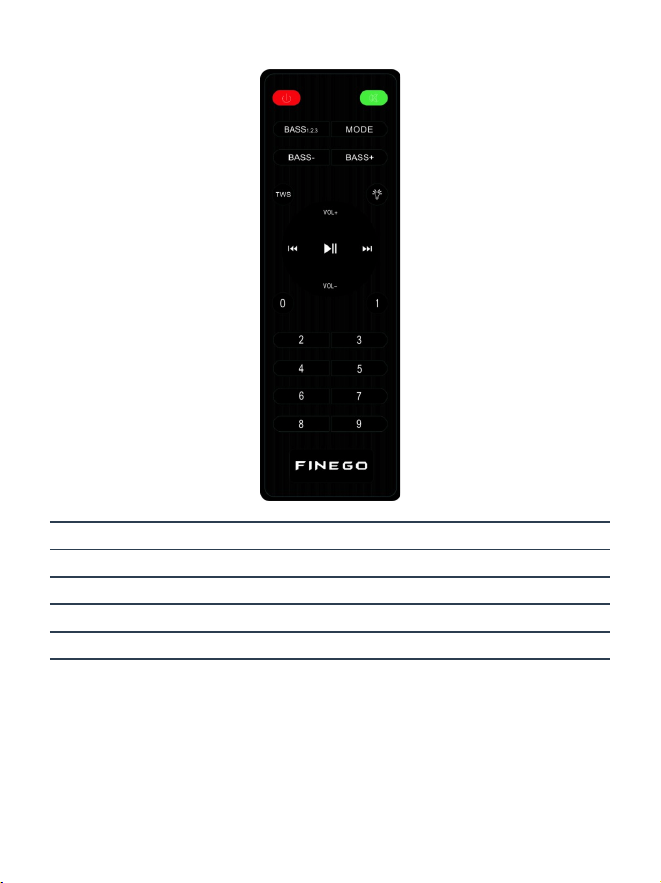
Point the remote toward the IR receiver and keep the signal path clear.
Power / Mute Speaker power-o= and mute controls
BASS 1.2.3 / BASS− / BASS+ Sound-mode and bass controls
MODE / TWS / Light Source, linking and lighng
VOL± / playback keys Volume and playback
Numeric keys 0–9 Direct USB/TF track selecon
5.2.1 Remote-Control Func ons
Power: Short press to turn the speaker o=. The remote control cannot turn the speaker back on.
To turn it on again, press and hold the Power bu*on on the main unit.
Mute: Short press to mute or restore audio in USB, TF, AUX or Bluetooth mode.
BASS 1.2.3: Same three sound modes as the main-unit BASS bu*on.
MODE: Cycles through Bluetooth, USB, TF and AUX sources.
BASS− / BASS+: Decreases or increases the bass level.

FINEGO GoSurge 8 User Manual
9 / 15
TWS: In Bluetooth mode, when no TWS connecon is acve, each short press sends a TWS
pairing signal and keeps the speaker in TWS pairing mode. When two speakers are connected
through TWS, short press to disconnect them.
Light: Short press to cycle through the available LED lighng e=ects, including turning the lights
completely o=.
VOL+ / VOL−: Adjusts the master volume.
Previous / Play/Pause / Next: Performs the same playback funcons as the corresponding main-
unit bu*ons.
Numeric Keys 0–9: Select tracks directly during USB/TF playback. For track 12, press 1, then 2,
and wait about two seconds. Track numbers higher than the number of available tracks are
ignored.
If the remote control becomes less responsive, replace its ba-ery with the type indicated in the ba-ery
compartment, observing the marked polarity.
FINEGO USER MANUAL
6. Quick Start
First-Time Setup
1. Charge before 'rst use with a cer'ed 5 V DC, 3 A source. Maximum input power is 15
W.
2. Place the speaker upright on a stable, dry and level surface.
3. Press and hold the main-unit Power bu*on to turn the speaker on.
4. Short press MODE/TWS to select Bluetooth, USB, TF or AUX.
5. Set VOLUME and MIC.VOL to low levels before starng playback or using microphones.
6. Start playback, then increase the levels gradually.
Basic Controls
Power On/OH Press and hold the main-unit Power bu*on.
Mode Selec on Short press MODE/TWS to cycle the available sources.
Master Volume Rotate VOLUME toward + or −.
Microphone Volume Rotate MIC.VOL toward + or −.
Ligh ng Short press Light to change the e=ect or turn lighng o=.
Sound Mode Short press BASS 1.2.3 to select Indoor, Bass Boost or Outdoor.
Begin at a low volume to protect hearing and reduce feedback.
FINEGO USER MANUAL
7. Bluetooth / TWS / USB / TF / AUX / Microphone Use
Bluetooth Pairing and TWS Linking
Bluetooth Pairing
1. Turn on the speaker and select Bluetooth mode with MODE/TWS.

FINEGO GoSurge 8 User Manual
10 / 15
2. Open Bluetooth seWngs on the phone, tablet or computer.
3. Select “FINEGO GoSurge 8” from the device list.
4. If a password is requested, enter 0000. Most devices will not request one.
5. A8er you hear the connecon prompt, start playback and increase the volume gradually.
TWS Wireless Stereo Linking
1. Turn on two compable GoSurge 8 speakers and set both to Bluetooth mode.
2. Do not connect the phone 'rst. Disconnect exisng phone connecons from both speakers.
3. Press and hold MODE/TWS on one speaker unl linking begins.
4. A8er the speakers link, connect the phone to “FINEGO GoSurge 8”.
5. Press and hold MODE/TWS again to end TWS linking.
Important: Establish the speaker-to-speaker TWS link before pairing the phone.
USB, TF Card and AUX Input
USB and TF Card Playback
• Use FAT32 media up to 32 GB containing MP3 'les. Back up important data.
• Insert the media. If playback does not begin, select USB or TF with MODE/TWS.
• Use Previous, Play/Pause and Next on the speaker or remote.
• Use numeric keys 0–9 for direct track selecon.
• Press and hold Play/Pause to select ALL, RAND, ONE, or FOL.
AUX Input
1. Connect a compable 3.5 mm audio cable between the AUX input and the audio source.
2. Select AUX with MODE/TWS if necessary.
3. Begin with both the source and speaker volumes set low, then adjust them gradually.
4. In AUX mode, press the Play/Pause bu*on on the main unit to mute or restore audio.
Microphone Use
Using the Microphones
• Use the microphones according to the markings and instrucons provided with them.
• If a microphone has a power switch or ba*ery compartment, follow its operang instrucons
and the marked ba*ery polarity.
• Adjust the microphone volume with MIC.VOL. Start at a low level and increase it gradually.
• Use ECHO− / ECHO+ to decrease or increase microphone echo/reverberaon.
• Use VOCAL CUT to toggle the vocal-cut e=ect for compable music tracks.
Wired Microphone Inputs
1. Turn MIC.VOL down before connecng a compable wired microphone.
2. Insert the plug fully into MIC1 or MIC2.
3. Raise MIC.VOL gradually and adjust ECHO− / ECHO+ as required.

FINEGO GoSurge 8 User Manual
11 / 15
Preven ng Feedback
• Keep microphones behind or away from the speaker drivers.
• Do not point a microphone directly at the speaker.
• If squealing occurs, lower MIC.VOL and reduce microphone echo immediately.
FINEGO USER MANUAL
8. Charging, Maintenance and Cleaning
Charging
1. Place the speaker in a dry, venlated locaon.
2. Connect the USB charging cable to the DC/5V USB Type-C port.
3. Connect to a cer'ed 5 V DC, 3 A source. Maximum input power is 15 W.
4. The indicator is red during charging and turns o= when charging is complete.
5. Disconnect the cable a8er charging.
Actual charging me varies with the power source and ba-ery condion. At 50% volume, the speaker
provides up to 8 hours of music playback. Actual playback me varies with volume, lighng and ba-ery
condion.
Cleaning and Storage
• Power o= and disconnect all cables before cleaning.
• Wipe with a so8, dry cloth. Do not use alcohol, solvents, sprays or abrasive cleaners.
• Do not allow liquids or foreign objects to enter ports, grilles, or openings.
• Store in a cool, dry place away from extreme temperatures and direct sunlight.
• Remove accessory ba*eries before long-term storage and recharge the built-in ba*ery
periodically.
• Protect knobs, ports, handles and wheels during transport.
FINEGO USER MANUAL
9. Troubleshoo ng
Power, Audio and Bluetooth
ISSUE SOLUTION
No power / cannot turn on Charge for at least 10 minutes. Check the
cable and 5 V source, then press and hold the
main-unit Power bu*on.
No sound Raise VOLUME, cancel mute, verify the
selected source and check the source-device
volume.

FINEGO GoSurge 8 User Manual
12 / 15
ISSUE SOLUTION
Distorted audio Lower VOLUME and BASS, check the audio
source and recharge the speaker if the
ba*ery is low.
Bluetooth pairing fails Select Bluetooth mode, disconnect other
devices, clear the old pairing record and
search again for FINEGO GoSurge 8.
TWS linking fails Disconnect phones from both speakers. Set
both to Bluetooth mode and link the
speakers before pairing the phone.
If a problem con nues, turn the product oH, disconnect all cables and contact the retailer or FINEGO
support.
Media, Microphones, Remote and Ligh ng
ISSUE SOLUTION
USB/TF media cannot be read Use FAT32 media up to 32 GB containing
MP3 'les. Reinsert the media or test another
device.
No AUX sound Insert the 3.5 mm cable fully at both ends,
select AUX and check the source volume.
Microphone has no sound Check the microphone’s power or ba*ery
and follow its instrucons. For a wired
microphone, fully insert the plug and raise
MIC.VOL.
Feedback or squealing Move the microphone away from the
speaker, lower MIC.VOL and reduce
microphone echo with ECHO−.
Remote does not respond Aim at the IR receiver, remove obstrucons
and replace the ba*ery using the marked
type and polarity.
LED lights do not respond Make sure the speaker is on, then short press
the Light bu*on.
Do not open the enclosure. There are no user-serviceable parts inside.

FINEGO GoSurge 8 User Manual
13 / 15
FINEGO USER MANUAL
10. Compliance and Environment
Environmental Compliance
This product is intended to meet applicable RoHS and environmental requirements. Follow local
WEEE, ba*ery and recycling regulaons.
Disposal
• Do not dispose of the speaker, built-in ba*ery or accessory ba*eries with unsorted household
waste.
• Use an authorized collecon or recycling facility.
• Do not burn, crush or puncture ba*eries.
Environmental Informa on
• Operang temperature: -10 °C to +50 °C (14 °F to 122 °F).
• Store in a dry environment away from corrosive substances.
• The following market-speci'c legal statements apply only where required.
FCC WARNING
This device complies with part 15 of the FCC Rules. Operaon is subject to the following two
condions: (1) this device may not cause harmful interference, and (2) this device must accept
any interference received, including interference that may cause undesired operaon.
Any changes or modi'caons not expressly approved by the party responsible for compliance
could void the user's authority to operate the equipment.
NOTE: This equipment has been tested and found to comply with the limits for a Class B digital
device, pursuant to Part 15 of the FCC Rules. These limits are designed to provide reasonable
protecon against harmful interference in a residenal installaon. This equipment generates,
uses and can radiate radio frequency energy and, if not installed and used in accordance with the
instrucons, may cause harmful interference to radio communicaons. However, there is no
guarantee that interference will not occur in a parcular installaon.
If this equipment does cause harmful interference to radio or television recepon, which can be
determined by turning the equipment o= and on, the user is encouraged to try to correct the
interference by one or more of the following measures:
-- Reorient or relocate the receiving antenna.
-- Increase the separaon between the equipment and receiver.
-- Connect the equipment into an outlet on a circuit di=erent from that to which the receiver is
connected.
-- Consult the dealer or an experienced radio/TV technician for help.
To maintain compliance with FCC’s RF Exposure guidelines, This equipment should be installed
and operated with minimum distance between 20cm the radiator your body: Use only the
supplied antenna.
ISED Warning
This device contains licence-exempt transmi*er(s)/receiver(s) that comply with Innovaon,
Science and Economic Development Canada’s licence-exempt RSS(s). Operaon is subject to the
following two condions:
1. This device may not cause interference.
2. This device must accept any interference, including interference that may cause undesired
operaon of the device.

14 / 15
FINEGO GoSurge 8 User Manual
Under Innovaon, Science and Economic Development Canada regulaons, this radio transmi*er
may only operate using an antenna of a type and maximum (or lesser) gain approved for the
transmi*er by Innovaon, Science and Economic Development Canada. To reduce potenal
radio interference to other users, the antenna type and its gain should be so chosen that the
equivalent isotropically radiated power (e.i.r.p.) is not more than that necessary for successful
communicaon.
This device complies with Canadian ICES-003 and RSS-GEN and RSS-247.
Radiaon Exposure: This equipment complies with Canada radiaon exposure limits set forth for
an uncontrolled environment.
ISED Radiaon Exposure Statement: The antennas used for this transmi*er must be installed to
provide a separaon distance of at least 20 cm from all persons and must not be co-located for
operang in conjuncon with any other antenna or transmi*er.
Aver ssement ISED
Cet appareil conent des éme*eurs/récepteurs exempts de licence qui sont conformes aux CNR
exempts de licence d’ Innovaon, Sciences et Développement économique Canada.
L’exploitaon est soumise aux deux condions suivantes :
1.Cet appareil ne peut pas causer d’interférences.
2.Cet appareil doit accepter toute interférence, y compris les interférences qui peuvent
provoquer un fonconnement indésirable de l’appareil.
Selon la réglementaon d’innovaon, sciences et développement économique Canada, cet
éme*eur radio ne peut fonconner qu ’en ulisant une antenne type et gain maximum (ou
inférieur) approuvés pour Industrie Canada par l'éme*eur. Réduire brouillage radioélectrique
potenel avec d’autres ulisateurs, le type d’antenne et son gain doivent être choisis que la
puissance isotrope rayonnée équivalente (e.i.r.p.) n’est pas supérieure à celle nécessaire pour
communicaon réussie.
Cet appareil est conforme aux normes canadiennes ICES-003 et RSS-GEN et RSS-247.
Exposion aux radiaons: Cet équipement est conforme à la réglementaon canadienne sur les
radiaons. limites d'exposion établies pour un environnement non contrôlé.
Déclaraon d'exposion aux radiaons ISED: Les antennes ulisées pour cet éme*eur doivent
être installées de manière à assurer une distance de séparaon d'au moins 20 cm au moins de
toute personne et ne doivent pas être co-localisés pour fonconner en conjoncon avec autre
antenne ou éme*eur.
IC: 35610-FG2602T
PMN: Karaoke speaker
HVIN: FG-2602T

FINEGO GoSurge 8 User Manual
15 / 15
FINEGO USER MANUAL
11. Warranty and AIer-Sales Service
Limited Warranty
FINEGO provides a 12-month limited warranty against defects in materials or workmanship
under normal use, beginning on the date of the original retail purchase.
Warranty Coverage
• Covers defects in materials and workmanship.
• Does not cover damage caused by accidents, misuse, abuse, liquid ingress, unauthorized
disassembly or modi'caon, improper charging, or normal wear and tear.
• Accessory warranty periods may di=er; consult the retailer.
AIer-Sales Service
Keep your proof of purchase and the product serial number. For warranty service or technical
support, contact the original retailer or FINEGO customer service.
Product Name Karaoke speaker
Product Model FG-2602T
Manufacturer FINE GO TECHNOLOGY CO., LIMITED
Address
Room E39-06, 16/F, Wong King Industrial
Building, 192–198 Choi Hung Road, San Po
Kong, Hong Kong
Email support@'negotech.com
Thank you for choosing FINEGO

