1 2 3
7
5
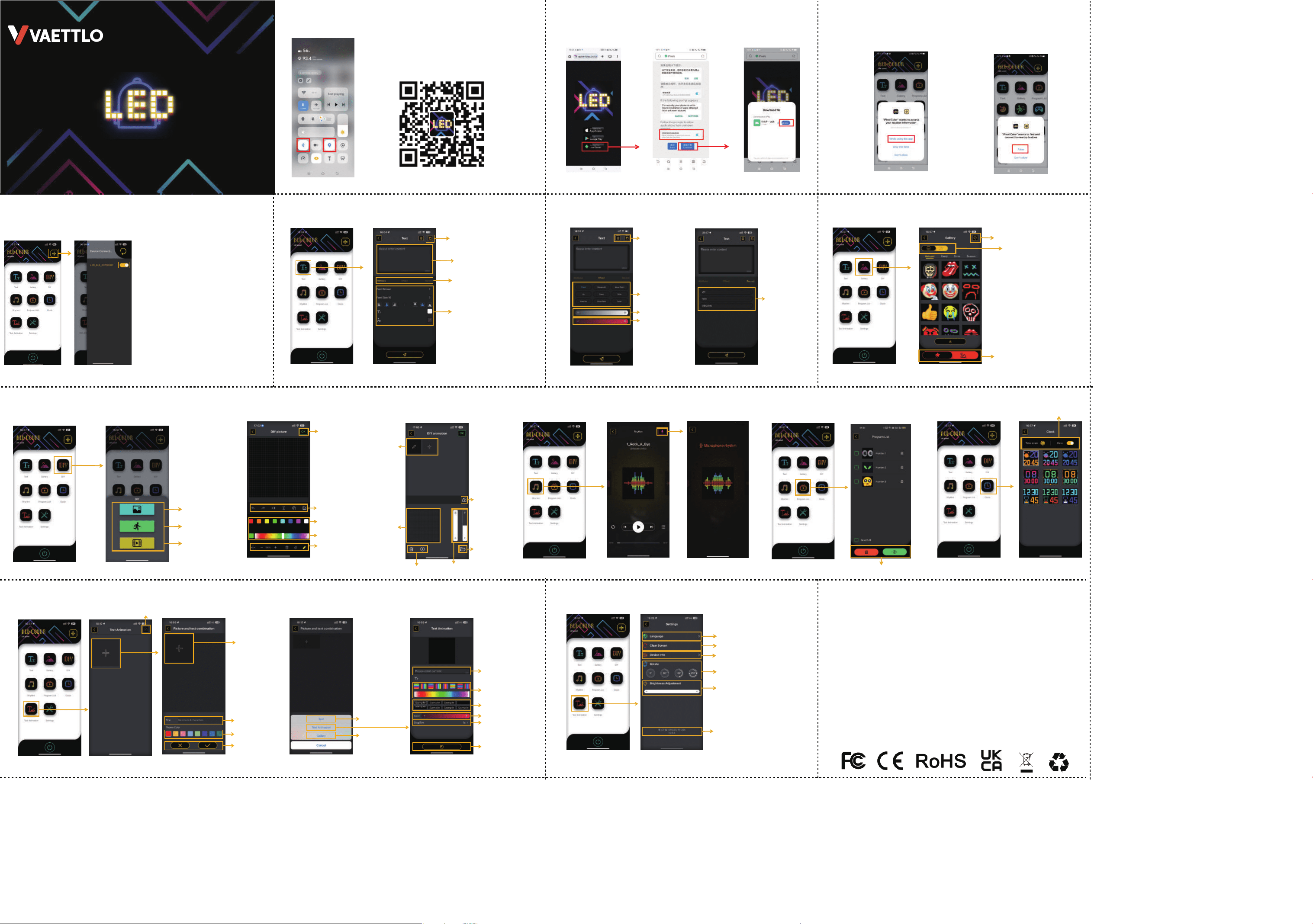
4.Connect the Device 5.Text Editing
9. DIY Picture/DIY Animation8.DIY
7.Gallery
6.Special Effects/Recording
Input Text
6
9
10.Rhythm
8
11.Program list
Delete/Play
Screen rotation
APP Version Number
Switch language
Restore factory settings
Device version information
Adjust screen Brightness
User Manual
LED smart screen
Full color LED screen/custom editing
(32x32)
4
13
Save as Record
Adj
ust Specific Parameters
Set Attributes/
Special Effects/Send Records
DIY video illustration
DIY static picture
DIY dynamic picture
Note:
1:When you open the APP
for the first time, please Allow to all permissions
2:Please click the + sign to add a Bluetooth device
3:If Bluetooth cannot be searched on your Android phone,
please check if you have turned on the GPS.
Saved records
Delete/
Save as record
Dynamic effect
Brightness
Speed
Jump to DIY interface
System gallery/
DIY saved pictures
Dynamic image/Static image
Save
Undo/Redo
Mirror horizontally/Vertically
Move layer/Insert image
Color Palette
Color wheel
Move /Zoom in /Zoom out
Delete /Eraser /Brush
Insert picture
Adjust brightness
Adjust the speed
Edit
Edit frame/Insert frame
Preview
Delete/Play
12. Clock
10
14
11 12
Time scale/Date
13.Text Animation 14.Settings
Modify/Delete Text Animation
Next page
Title Name
Skip to page 5
Text editing
Skip to page 7 Gallery
Enter text
Adjusting Colors
Dynamic Effects
Speed
Dwell time
Save
Delete/Save
Set theme colors
Warning:
This device complies with Part 15 of the FCC Rules. Operation is subject to the following two conditions:
(1) this device may not cause harmful interference, and
(2) this device must accept any interference received, including interference that may cause undesired operation.
Changes or modifications not expressly approved by the party responsible for compliance could void the user's authority to
operate the equipment.
NOTE: This equipment has been tested and found to comply with the limits for a Class B digital device, pursuant to Part 15 of
the FCC Rules. These limits are designed to provide reasonable protection against harmful interference in a residential
installation. This equipment generates, uses and can radiate radio frequency energy and, if not installed and used in accordance
with the instructions, may cause harmful interference to radio communications. However. there is no guarantee that interference
will not occur in a particular installation. If this equipment does cause harmful interference to radio or television reception which
can be determined by turning the equipment off and on, the user is encouraged to try to correct the interference by one or more
of the following measures:
--Reorient or relocate the receiving antenna.
-- Increase the separation between the equipment and receiver
--Connect the equipment into an outlet on a circuit different from that to which the receiver is connected.
--Consult the dealer or an experienced radio/TV technician for help
NOTE: This device and its antenna(s) must not be co-located or operation in conjunction with any other antenna or transmitter
RF Exposure Statement
To maintain compliance with FCC's RF Exposure guidelines, this equipment should be
installed and operated with minimum distance of 20cm the radiator your body. This device
and its antenna(s) must not be co-located or operation in conjunction with any other antenna nr transmitter.
Scan the QR code and download the APP
Scan the QR code below to download and install app with
your mobile phone, or enter Google Play/APP Store
and search for “iPixel Color” to download
1.Firstly, Please turn on Bluetooth and Location 2.If you don't have APP Store/Google Play,
please click the third one to download
from Local Server.
①
②
①
②
3.APP Authorization Permission
① Allow access to access your
location information
② Allow to find and connect
to nearby devices