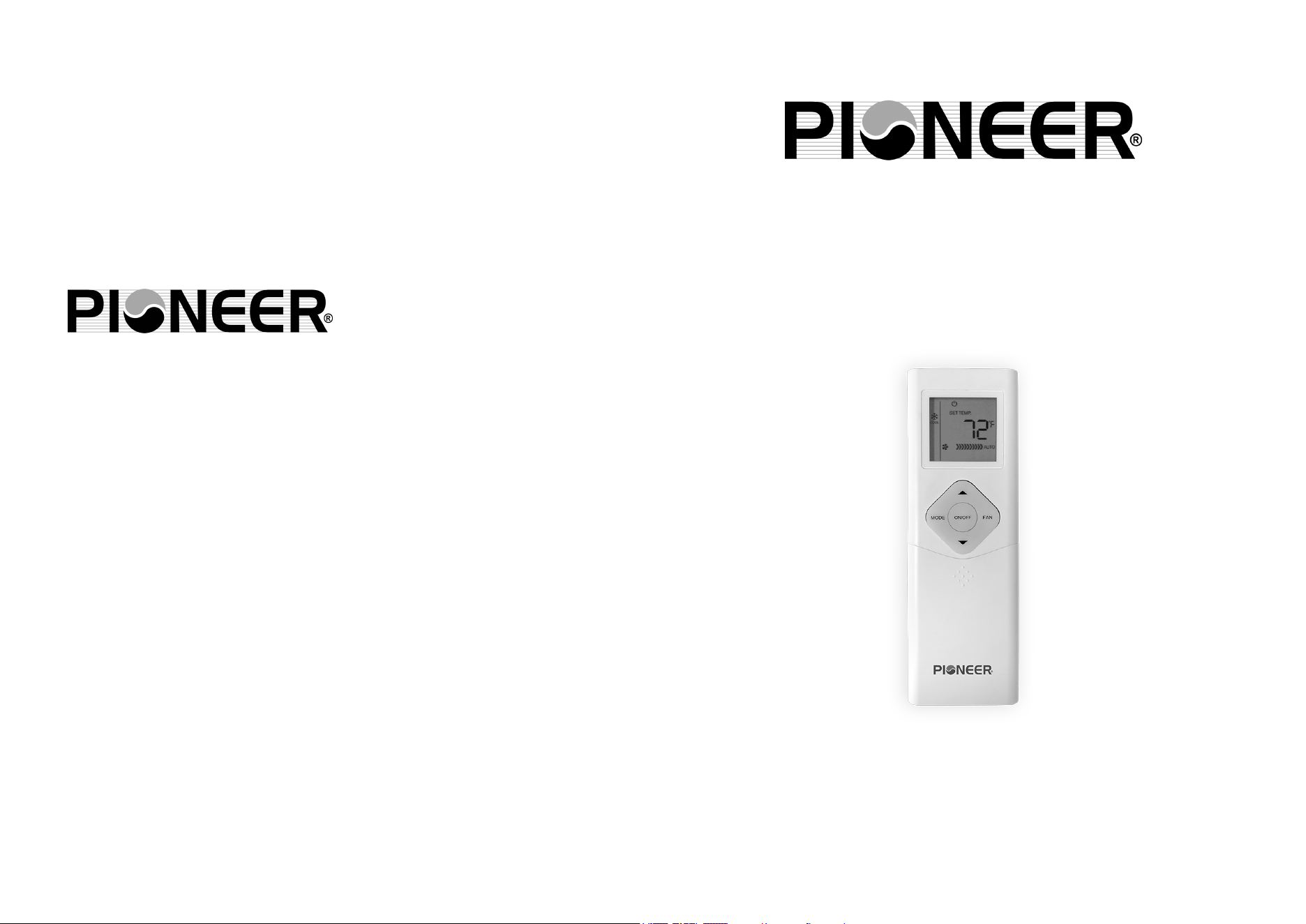
INFRARED WIRELESS MULTI-FUNCTION
REMOTE CONTROLLER
OWNER’S MANUAL
Read through and understand these instructions
thoroughly before attempting to operate your
new air conditioning unit using this remote. Be
sure to store this manual for future reference.
The design and specifications of this product are subject to change
without prior notice as development continues. Consult with the
sales agency or manufacturer for details.
is a registered trademark of Parker Davis HVAC International, Inc.
Parker Davis HVAC International, Inc.
3250 NW 107th Ave, Doral, FL 33172
USA Tel.: (305) 513-4488
Fax: (305) 513-4499
e-mail: info@pd-hvac.com
Website: www.pd-hvac.com
Copyright, Parker Davis HVAC International, Inc., 2019. All rights reserved.
1 2
Table of Contents
Remote Controller Specifications.......................................2
Button Layout and Functions..............................................3
Handling the Remote Controller.........................................4
LCD Screen Icons and Indicators.......................................5
Basic Functions.....................................................................6
Advanced Functions...........................................................13
Note:
• T
he layout of the buttons on this remote as depicted here is
for the standard model. The actual model purchased may
vary slightly from these illustrations.
• The signal output sent by this remote controller is processed
entirely by the receiving air conditioning system. In the case
that any of the functions of the remote are not available for
the specific model of the air conditioning unit, those
functions will not work.
• Your air conditioning unit’s user manual may have additional
information regarding the usage of this remote controller.
Notice:
This device complies with all relevant national regulations.
• For Canada, this device is compliant with CAN ICES-3(B)/NMB-3(B).
• For the USA, this device is compliant with section 15 of FCC law.
Operation is subject to two conditions:
(1) This device may not cause harmful interference, and
(2) This device must accept any interference received, including
interference that may cause undesired operation.
This equipment has been tested and found to comply within the limits for
a Class B digital device, pursuant to section 15 of FCC law. These limits
are designed to provide reasonable protection against harmful
interference in a residential installation. This equipment generates, uses,
and can radiate radio frequency energy and, if not installed and used in
accordance with these instructions, may cause harmful interference to
radio communications. However, there is no guarantee that interference
will not occur in a particular installation. If this equipment does cause
harmful interference to radio or television reception, which can be
determined by turning the equipment off and on again, the user is
encouraged to try and correct the interference by using one or more of
the following measures:
• Re-orient or relocate the receiving antenna.
• Increase the separation distance between the equipment and receiver.
• Connect the equipment to an outlet on a different circuit from that
which the receiver is currently connected.
• Consult the dealer or an experienced radio/TV technician for help.
Changes or modifications not approved by the party responsible for
compliance could void the user’s authority to operate the equipment.
Remote Controller Specifications
3.0V dry batteries (R03/LR03x2)(2xAAA)
8m (25 feet)
23°F - 140°F
RG66B6(B)/BGEFU1
Model Number
Rated Voltage
Signal Range
Operational
Temperature
Range
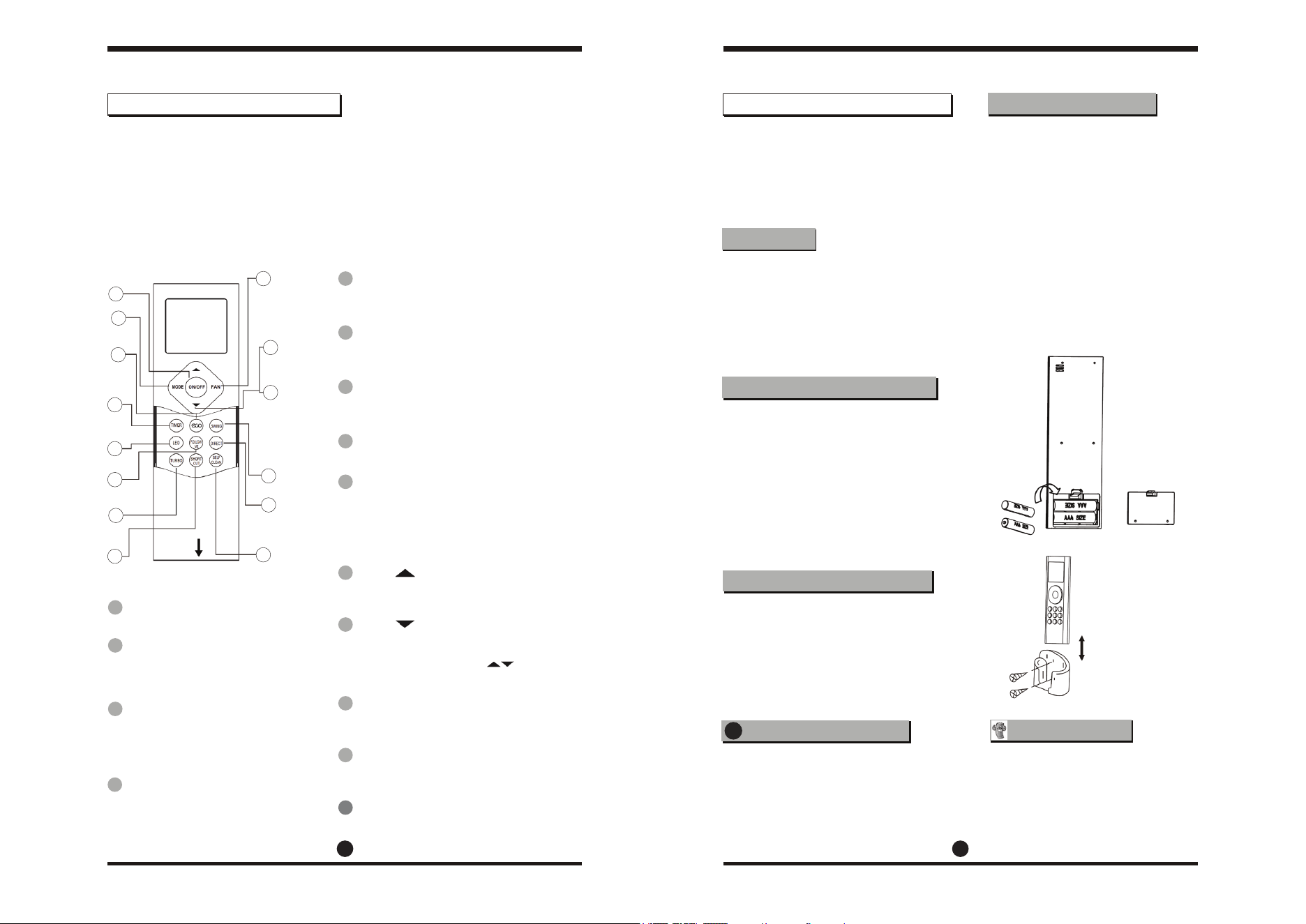
Before using your new air conditioner, be sure to familiarize yourself with
the remote control. The following is a brief overview of the remote
controller itself. For instructions on how to operate your air conditioner,
refer to the BASIC and ADVANCED functions sections of this manual.
Note: HEAT mode is not supported by your appliance if you have
purchased a cooling-only version. The HEAT mode option on this
controller will not function with cooling-only appliances.
Not sure what a function does?
Refer to the BASIC FUNCTIONS and
ADVANCED FUNCTIONS sections of
this manual for detailed descriptions
on operating your air conditioner.
• The button designs on your unit
may differ slightly from the
illustrations and examples shown.
• If the indoor unit does not have a
particular function, the function
selection on the remote will have
no effect.
Your air conditioning unit comes
with two AAA batteries, which
should be inserted into the remote.
• Remove the back cover from the
remote to expose the battery
compartment.
• Insert the batteries, paying
attention when matching the (+)
and (-) ends of the batteries with
the symbols in the compartment.
• Re-attach the back cover.
The remote control holder (which
may or may not have been included
with your unit) can be attached to a
wall or stand. Check that the air
conditioner is receiving signals
before installation. Use the two
included screws to install the holder.
For optimal product performance:
• Do not mix old and new
batteries, or ones of different types.
• Do not leave batteries in a remote
that will not be used for more than
2 months.
• The remote controller should
be used within 8 meters of
the unit.
• The unit will beep when
signals from the remote are
received.
• Curtains, direct sunlight, etc.
can interfere with the
receiver’s infrared signal.
• If the remote controller will
not be used for more than 2
months, be sure to remove its
batteries.
Do not dispose of batteries as
unsorted municipal waste. Refer
to your local laws for the proper
disposal of batteries.
3 4
Handling the Remote Controller
Special Note
Inserting/Replacing Batteries
Installing the Remote Holder
Note About the Battery
Remote Controller Tips
Button Layout and Functions
ON/OFF
Turns the unit on or off.
LED
Turns the indoor unit’s LED
display on or off.
FOLLOW ME
Activates the remote as the
thermostat instead of the unit.
TURBO
Sets the unit to reach the preset
temperature in the shortest time.
SHORTCUT
Sets/activates your own presets.
FAN
Cycles through fan speeds
in the following order:
AUTO LOW MED HIGH
Hold this button for 2 seconds
to activate silent mode.
TEMP
Raises temp. in 1˚ increments.
Max 86˚F (30˚C).
TEMP
Lowers temp. in 1˚ increments.
Min 62˚F (17˚C).
NOTE: Press and hold together
to alternate between ˚F and ˚C.
SWING
Starts/stops the horizontal louver
auto-swing feature.
DIRECT
Set the desired up/down air flow
direction. (Each press is 6 degrees)
SELF-CLEAN
Starts/stops the self-clean feature.
MODE
Cycles through the
following operation modes:
AUTO COOL DRY HEAT FAN
ECO
Starts and stops the energy
efficiency feature. Hold this
button for 2 seconds in order
to activate the sleep feature.
1
2
13
3
4
11
10
6
7
8
9
14
5
12
1
4
3
2
5
6
13
11
14
10
7
8
9
12
Front cover
slides down
TIMER
Sets the timer for turning the
unit on or off. See the BASIC
functions section for instructions.
!
Battery Disposal
Remove the back
cover to install
batteries
The remote
controller goes
into the holder
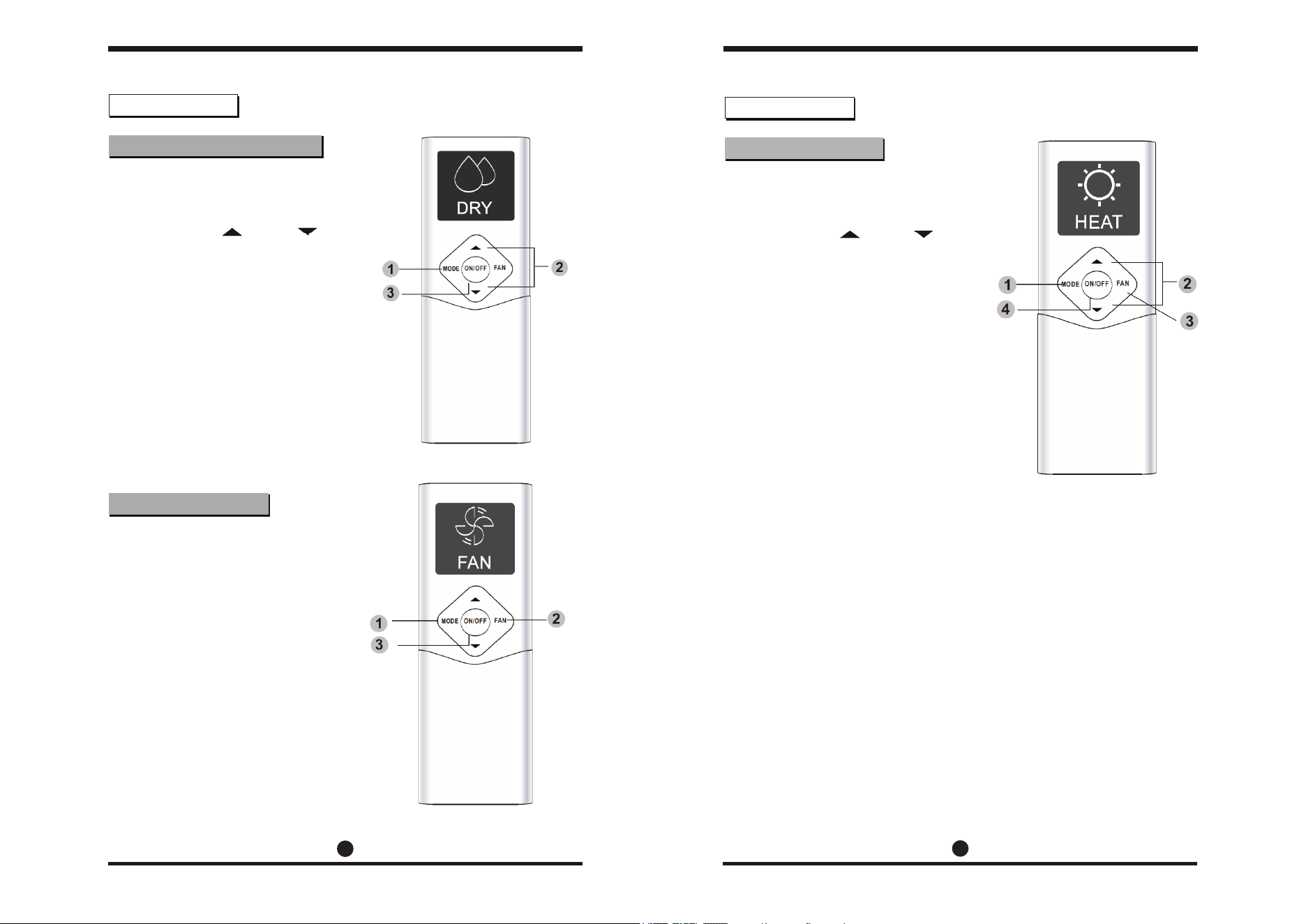
1. Press the MODE button to
select COOL mode.
2. Set your desired temperature
using the temp or temp
buttons.
3. Press the FAN button to
select the fan speed.
4. Press the ON/OFF button to
start the unit.
The operating temperature range
for your air conditioning unit is
62-86°F (17-30°C). You can
increase or decrease this set
temperature in 1° increments.
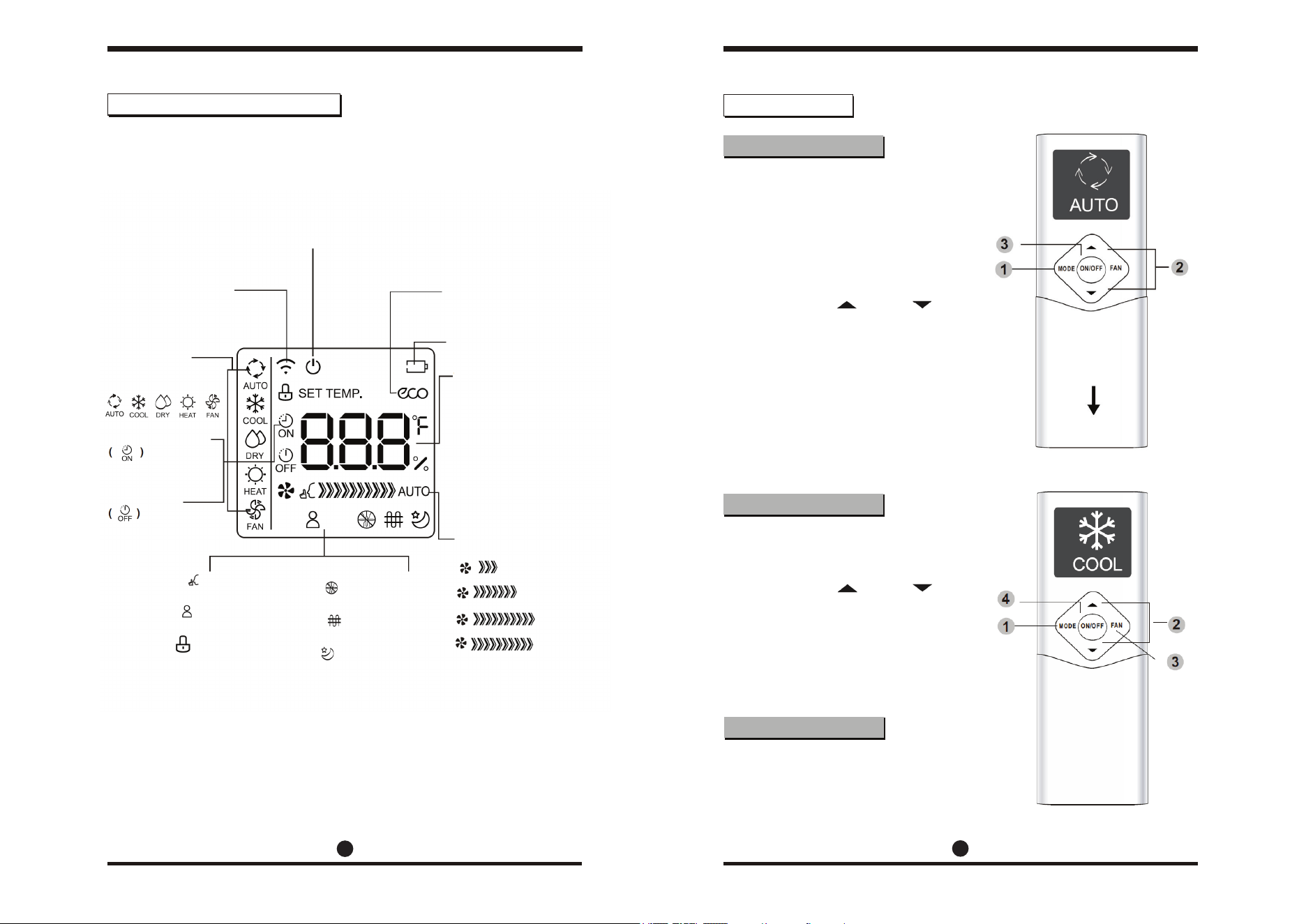
Information is displayed when the remote controller powers up.
An overview of the various icons is given below.
Note: All indicators shown in the figure above are for the purpose of clear
presentation. During actual operation, only the relative functional
icons will show on the display window.
COOL Mode Operation
In AUTO mode, the unit will
automatically select COOL, FAN,
HEAT, or DRY modes based on
the set temperature.
1. Press the MODE button to
select AUTO mode.
2. Set your desired temperature
using the temp or temp
buttons.
3. Press the ON/OFF button to
start the unit.
Note: Fan speed can’t be set
when in AUTO mode.
AUTO Mode Operation
Setting Temperatures
LCD Screen Icons/Indicators
Basic Functions
5
6
ON/OFF
The unit is on when
this is displayed.
Transmission Indicator
Displays when the
remote sends signals
to the indoor unit.
Timer ACTIVE
Displays when the
timer is set
Timer OFF
Displays when the
timer is inactive.
Silence feature active
Follow Me feature active
Lock active
Sleep mode active
Low Speed
Medium Speed
High Speed
AUTO Speed
The fan speed can’t be adjusted
in the AUTO or DRY modes.
Not applicable
to this version
Not applicable
to this version
Current Mode
Displays the
active mode
from below:
ECO
Displays when the
ECO feature is active.
Battery Status
Displays battery level.
Temperature/Timer
Displays the current
set temperature by
default, or the timer
setting when using
the timer feature.
Temp range: 65-86ºF.
Timer range: 0-24 hrs.
This is blank when
using FAN mode.
Fan Speed Indicator
Displays the fan speed.
Front cover slides down
7
8
1. Press the MODE button to
select FAN mode.
2. Press the FAN button to
select the fan speed.
3. Press the ON/OFF button to
start the unit.
Note: A temperature cannot be
set when in FAN mode. As a
result, your remote control’s
LCD screen will not display
the temperature.
FAN Mode Operation
1. Press the MODE button to
select AUTO mode.
2. Set your desired temperature
using the temp or temp
buttons.
3. Press the ON/OFF button to
start the unit.
Note: Fan speed can’t be set
when in DRY mode.
DRY (Dehumidification) Mode
Basic Functions
1. Press the MODE button to
select HEAT mode.
2. Set your desired temperature
using the temp or temp
buttons.
3. Press the FAN button to
select the fan speed.
4. Press the ON/OFF button to
start the unit.
Note: As the outdoor temperature
drops, the performance of
your unit during HEAT mode
may be affected. In such
instances, it is recommended
to use an additional heating
appliance in conjunction with
this air conditioner.
HEAT Mode Operation
Basic Functions
Basic Functions
9
10
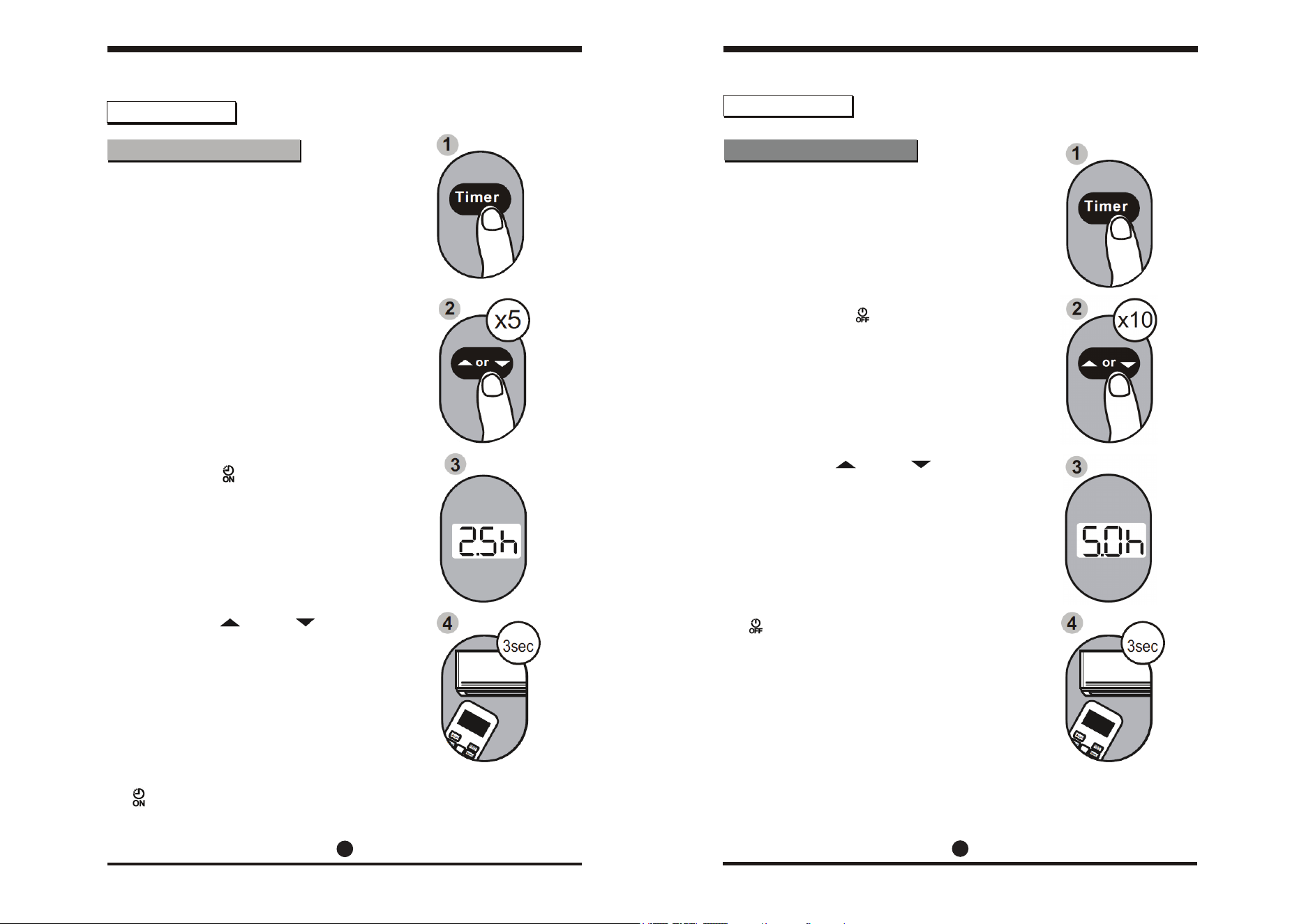
Your air conditioning unit has two
timer-related features:
• TIMER ON - Sets the amount of
delay before the unit
will automatically
turn on.
• TIMER OFF - Sets the amount of
time before the unit
will turn itself off.
TIMER ON:
The TIMER ON feature allows you to
set a fixed period of time, after
which the unit will automatically
turn itself on. For example, it can be
scheduled to turn on when the user
arrives home from work.
1. Press the TIMER button. The
timer on indicator and the time
amount will display.
Note: This value indicates the
amount of time left before
the unit turns itself on.
Activating TIMER ON with a
value of 2h at 1 p.m. will turn
the unit on at 3 p.m.
2. Press the temp or temp
buttons repeatedly to configure
the time that the unit should
turn itself on.
3-4. After 3 seconds, the TIMER ON
feature will be active. The
digital display on your remote
controller will then return to
displaying the temperature.
The indicator remains on and the
feature is now activated.
Setting the TIMER function Setting the TIMER function
Basic Functions
Ex: Setting the unit
to turn on after
2.5 hours.
Ex: Setting the unit
to turn off after
5 hours.
TIMER OFF:
The TIMER OFF feature allows you to
set a fixed period of time, after
which the unit will automatically
turn itself off. For example, it can be
scheduled to turn off when the
user leaves home for work.
1. Press the TIMER button. The
timer off indicator and
the time amount will display.
Note: This value indicates the
amount of time left before
the unit turns itself off.
Activating TIMER OFF with a
value of 5h at 2 p.m. will turn
the unit off at 7 p.m.
2. Press the temp or temp
buttons repeatedly to configure
the time that the unit should
turn itself off.
3-4. After 3 seconds, the TIMER OFF
feature will be active. The
digital display on your remote
controller will then return to
displaying the temperature.
The indicator remains on and
the feature is now activated.
Note: When configuring the TIMER
ON or TIMER OFF features,
the configuration process will
increase/decrease in 30 minute
increments until the value
reaches 10 hours. After 10
hours, the configuration will
increase/decrease in 1 hour
increments. Either function can
be turned off by setting the
timer to “0hr”. 24 hr limit max.
Basic Functions
11
12
Setting the TIMER function
Basic Functions
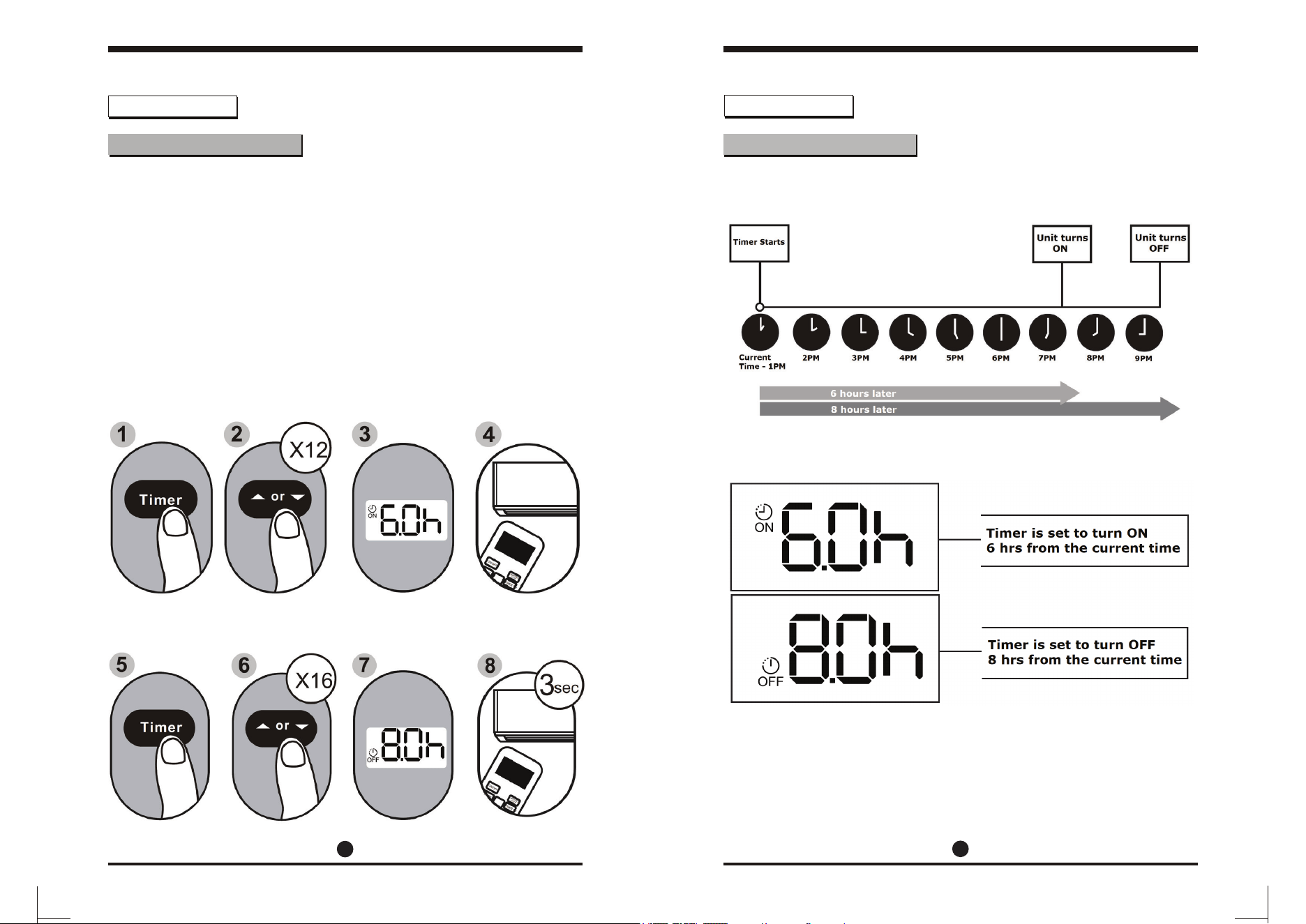
Setting TIMER ON and
TIMER OFF simultaneously:
Users are able to configure both the
ON and OFF settings of the timer
function. Be sure to note that the
time periods that are set for either
of the functions are the amount of
hours after the current time.
Ex: If the current time is 1 p.m., and
the user wants the system to
turn itself on at 7 p.m. and run
for 2 hours, they would do the
following:
Configure the TIMER ON feature of the system to turn itself on in 6 hours:
Configure the TIMER OFF feature of the system to turn itself off in 8 hours:
Setting the TIMER function
The example on page 11 shows how to set the system to turn on after 6
hours, operate for 2 hours, and then turn itself off. See the figure below:
The remote display will be as shown:
Note: If the user wishes to incorporate the scheduling feature, which
will enable the ability to set specific times of each day of the
week where the unit will turn off and on, they may purchase the
Pioneer Wireless Internet Access & Control Module. This accessory
is sold seperately, and is available at www.pioneerminisplit.com.
Advanced Functions
13 14
Advanced Functions
ECO Feature (COOL mode only)
Silent Mode
Sleep Mode
Lock Feature
“Follow Me” Feature
The ECO button is used to enter the
system’s energy-efficient mode.
When the unit is in cooling mode,
pressing this button will adjust the
temperature to 75°F (24°C) and the
fan speed will change to AUTO.
If the current set temperature is set
above 75°C/24°C, then the fan
speed will be changed to AUTO and
the set temperature will not change.
Note: Pressing the ECO button, or
modifying the mode/adjusting
the set temperature to below
75°C/24°C will take the
system out of ECO mode.
When in ECO mode, the temperature
should be set to 75°C/24°C or
greater. If this results in insufficient
cooling and discomfort, the ECO
button should be pressed again to
take the system out of ECO mode.
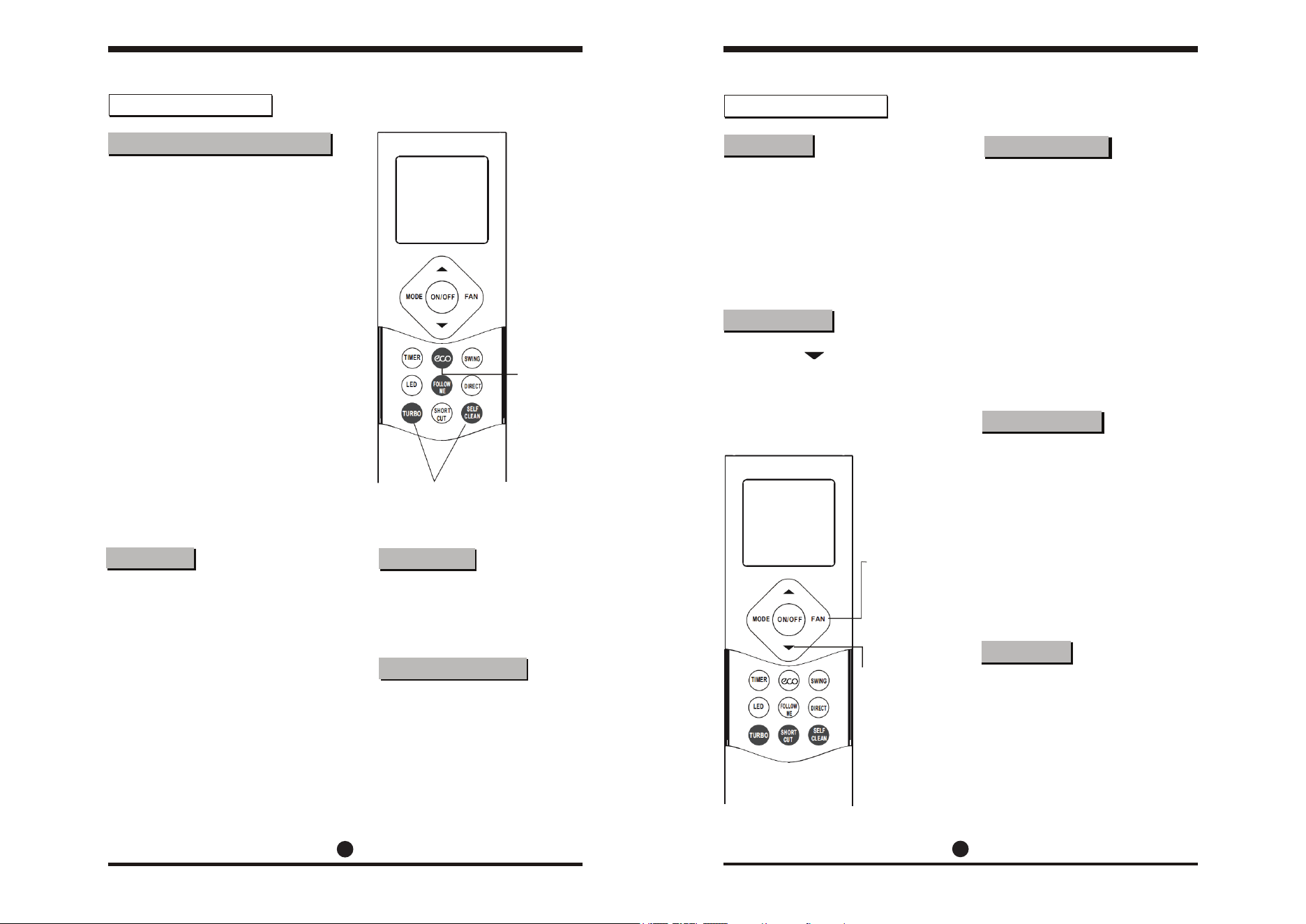
Holding the FAN button for 2 seconds
will activate/de-activate silent mode.
This feature is only available to
certain models. Use this feature to
run the system more quietly. When
running in this mode, the system
may experience a diminished heating
or cooling output capacity.
Shortcut Feature
This is used to restore current
settings or to resume previous
settings. Push the shortcut
button when the remote control
is on and the system will
automatically revert back to its
previous settings, such as its
operating mode, set temperature,
fan speed level, and the unit’s
sleep mode feature (if active).
If held for more than 2 seconds,
the system will automatically
restore its current operating
settings in use at the time.
Self-Clean Mode
Airborne bacteria can manifest in
the moisture that condenses in or
around the unit’s heat exchanger.
With regular use, most of this
moisture has usually evaporated.
When self-clean mode is active,
the system will clean itself and
afterwards will turn itself off
automatically. This feature can
be used as often as needed, but
is only available in COOL (AUTO),
or DRY mode.
Turbo Mode
Turbo mode forces the unit to
reach the set temperature in the
quickest time possible. In cooling
mode, this will result in the unit
jump-starting the process with
strong wind output. In heating
mode, the unit may employ the
use of a supplementary electric
heater, for units that are equipped
with this feature.
Vacation Mode
Pressing the button twice in one
second will put the system into
vacation mode. Under vacation mode,
the system will remain at 46°F(8°C)
and the indoor unit display will show
“FP”, meaning freeze protection.
Holding down the ECO button for 2
seconds will put the system into
sleep mode. Sleep mode is typically
meant for periods of lower cooling
requirements, such as during typical
sleeping hours. This mode will result
in decreased energy use, and can
only be activated via remote control.
For more details, please refer to the
“sleep mode” section of the system
user manual.
Note: Sleep mode is unavailable
during FAN or DRY mode.
Press the turbo button and the
self-clean button together for
one second to lock or unlock
the remote’s button board.
The “Follow Me” button enables
the remote controller to measure
the temperature at its current
location and send this value to
the air conditioning system every
3 minutes. When using AUTO,
COOL, or HEAT mode, prioritizing
the temperature nearest to the
user may ensure better comfort.
Hold this
button for
2 seconds
to activate
sleep mode
Hold down the
fan button for
2 seconds to
activate the
silent mode
Press this button
twice in 1 second
to activate the
vacation mode.
Hold these two buttons
together for 1 second
to lock the remote from
being used.