Direction before Using
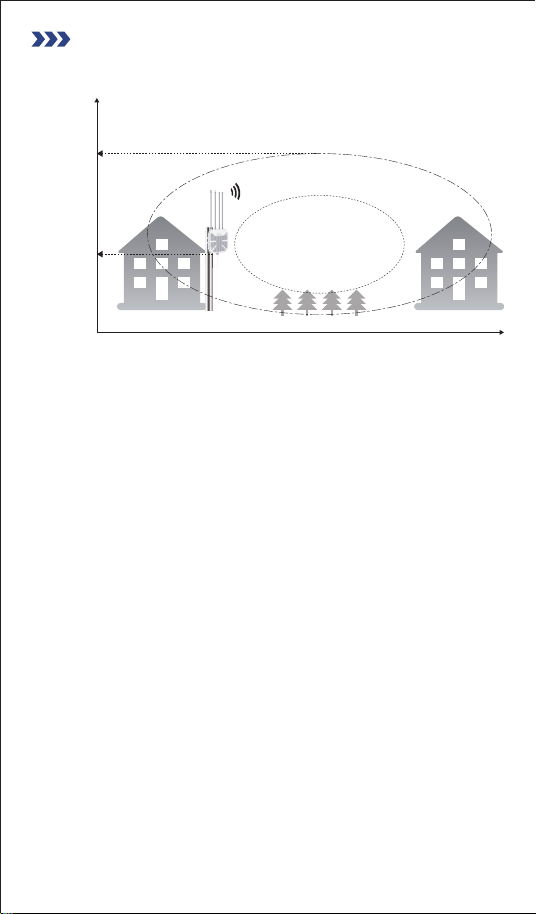
1. Ideal Height - More Detail
2. Optimal Position: Consider Environmental Factors
Principle:
Mounting the extender as high as possible helps the signal clear
ground-level obstructions (like fences, shrubs, vehicles, etc.),
reduces signal blockage, and expands the effective coverage area.
Minimize Obstructions:
- Avoid installing the extender where heavy obstructions (such as
thick concrete walls, metal sheeting, dense trees, hillsides) directly
block the signal path. Signals weaken significantly (attenuate)
when passing through barriers.
- An open, unobstructed line of sight to the main coverage area is
ideal.
Recommendations:
- Generally, aim for a height of at least 10-20 feet (3-6 meters)
above the ground, depending on your target coverage area and
surrounding environment.
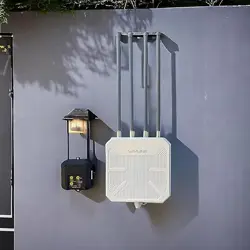
- Recommended locations include under eaves, high on an exterior
building wall, or atop a sturdy pole.
- The goal is to establish a clear Line of Sight (LoS), or minimize
obstructions, between the extender and the primary areas you
need to cover.
Fresnel Zone (60%)
(Keep as clear of obstacles as
possible)
Signal Primary Coverage Area
20 ft /6
meters)
Hight (ft)
Line of sight distance (ft)
10-13 ft
(3-4meters)
- 01 -
Choose the Best Location
Avoid Interference Sources:
- Install the extender away from other strong wireless signal
sources, like nearby Wi-Fi routers/APs, highpower wireless
devices, microwave ovens, cordless phone base stations, some
surveillance cameras, etc., to reduce signal interference.
- Also keep it away from large metal structures or air conditioning
units that can reflect or interfere with signals.
Distance & Signal Quality from Main Router:
- If using the Wi-Fi Extender in wireless repeater mode, ensure the
installation location receives a stable and reasonably strong Wi-Fi
signal from your main router (recommended signal strength better
than -70dBm; you can check this using a Wi-Fi analyzer app on
your phone near the proposed location). Placing it too far from the
main router or where the signal is weak will result in poor extended
performance.
- 02 -
PoE Power Adapter is NOT Waterproof!
Explicit Warning:
The PoE Power Adapter (PoE Injector) included with this product is
absolutely NOT waterproof! It is designed for INDOOR USE ONLY.
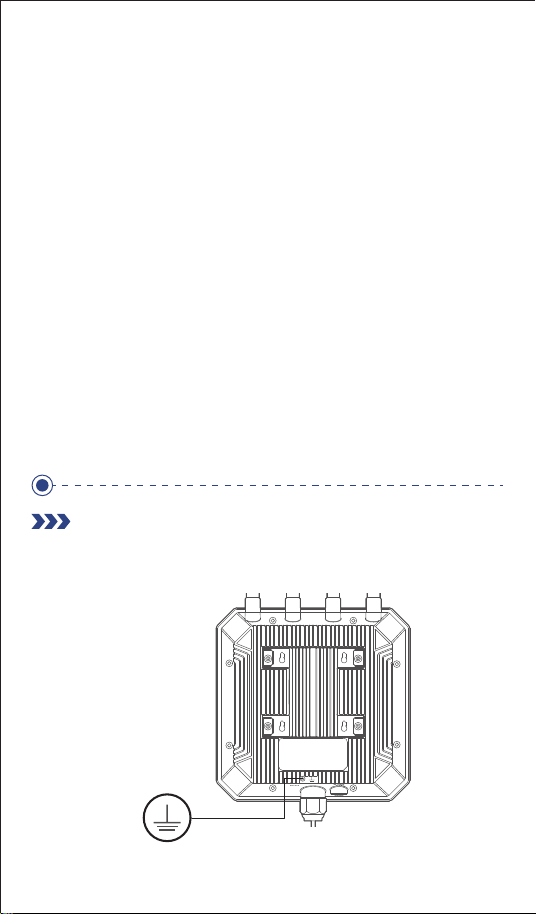
1. Device Grounding
Prohibited Actions:
- DO NOT place the PoE adapter anywhere outdoors (e.g., on an
exterior wall, open balcony, garden, roof, etc.)
- DO NOT expose it to rain, sprays, drips, moisture, condensation,
or excessive humidity.
- DO NOT place it where it could be submerged or splashed with
water.
Correct Placement:
- The PoE adapter MUST be placed in a dry, well-ventilated,
protected INDOOR location.
- Examples: Near an indoor power outlet on a wall, inside a
structured wiring enclosure (network cabinet), on a dry wall inside
a garage, or in a non-humid attic or basement area.
Severe Consequences:
Failure to heed this warning WILL lead to water ingress, short
circuits, and burnout of the PoE adapter!
Grounding Terminal
- 03 -
Lightning and ESD Protection

2. Ethernet Cable Selection
Purpose:
To provide a low-impedance path for static electricity and
lightning-induced currents to dissipate safely to earth, protecting the
equipment from damage.
Steps:
1. Locate Grounding Screw: Find the dedicated grounding screw
or terminal marked with the ground symbol on the Wi-Fi Extender
casing.
2. Prepare Grounding Wire: Use a copper wire of at least 10 AWG
(American Wire Gauge) or thicker.
Strip the insulation from one end and properly attach a suitable
grounding lug using a crimping tool.
3. Connect to Device: Securely attach the lugged grounding wire to
the device's grounding screw. Ensure the connection is tight, clean
(free of corrosion), and makes good electrical contact.
4. Connect to Earth: Connect the other end of the grounding wire
to a reliable building grounding system or a dedicated earth ground
rod.
Cable Selection:
- MUST use Outdoor-rated (CMX) Ethernet cable suitable for
outdoor exposure, with a jacket resistant to UV light and moisture
- Strongly recommend using Shielded Twisted Pair (STP / FTP)
cable, Category 5e or higher, for improved noise immunity. The
STP/FTP cable is not included in the box and must be purchased
separately.
- Waterproof Connector: When connecting the Ethernet cable to
the Wi-Fi Extender port, ensure the provided waterproof cable
gland or sealing kit is correctly installed and securely tightened to
prevent moisture ingress.
Warning: Without proper grounding, the device is extremely
vulnerable to damage from lightning strikes or strong static
discharges.
- 04 -
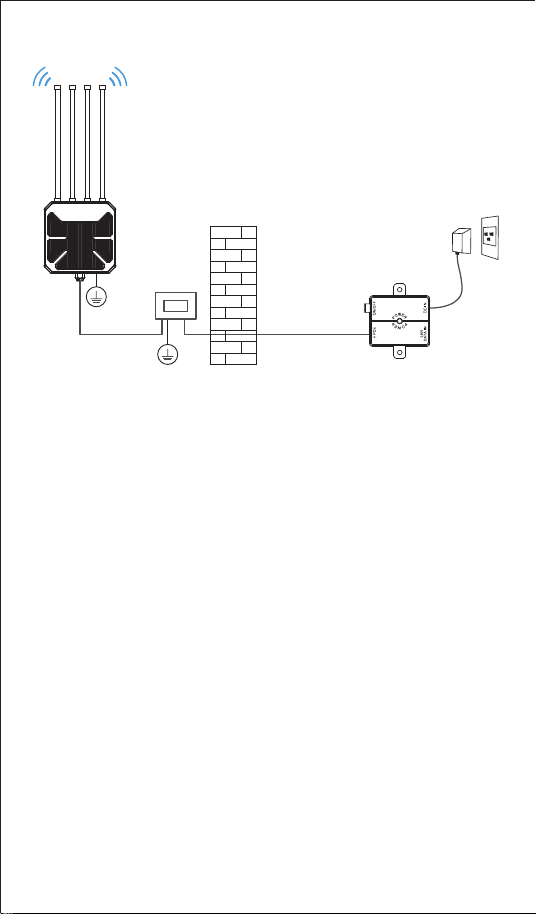
3. Ethernet Surge Protection (Highly Recommended)
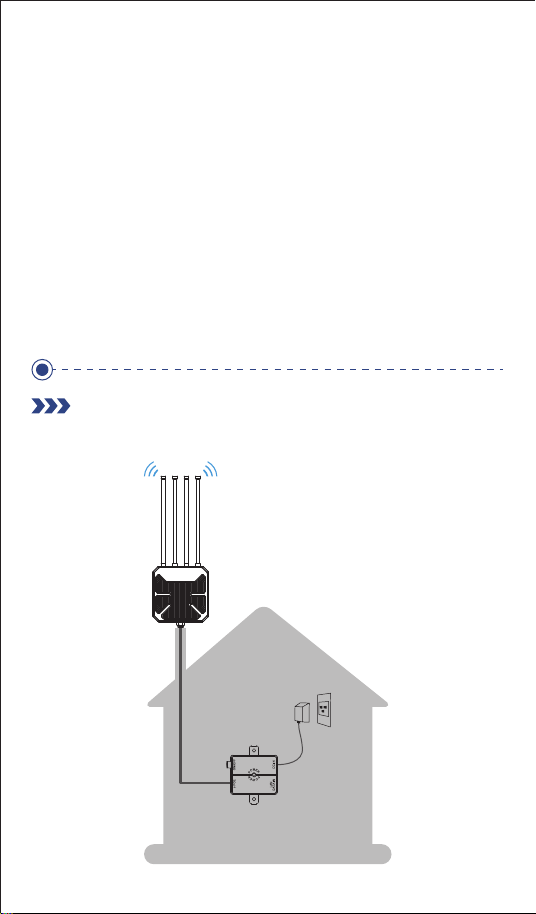
Autdoor AP
STP/FTP Cable Network Cable
PoE
Adapter
Purpose: To protect the device and connected indoor network
equipment from electrical surges and spikes traveling along the
Ethernet cable (often induced by nearby lightning or ESD).
Recommendation: Install an outdoor-rated Ethernet Surge
Protector (also known as an Ethernet Lightning Arrester) on the
Ethernet cable line before it enters the building.
Steps: [Outdoor Extender] <--- (Outdoor STP Ethernet Cable)
---> [Ethernet Surge Protector (Grounded)] <--- (Indoor Ethernet
Cable) ---> [PoE Adapter] (Active PoE adapter recommended).
- Mount the surge protector securely on an exterior wall near the
cable entry point or another suitable location.
- Connect the Ethernet cable coming from the outdoor Wi-Fi
Extender to the surge protector's "Protected" or "Device" port.
- Use a short, high-quality patch cable to connect from the surge
protector's "Unprotected" or "Line" port to the cable running
indoors or the indoor device.
- Critically Important: The surge protector itself MUST be grounded
using a short, thick wire (similar gauge to the device ground wire)
to the same reliable grounding system used for the Wi-Fi Extender
device! Without proper grounding, the surge protector is ineffective
Please note: the surge protector is not included in the box and
must be purchased separately.
- 05 -