Control code
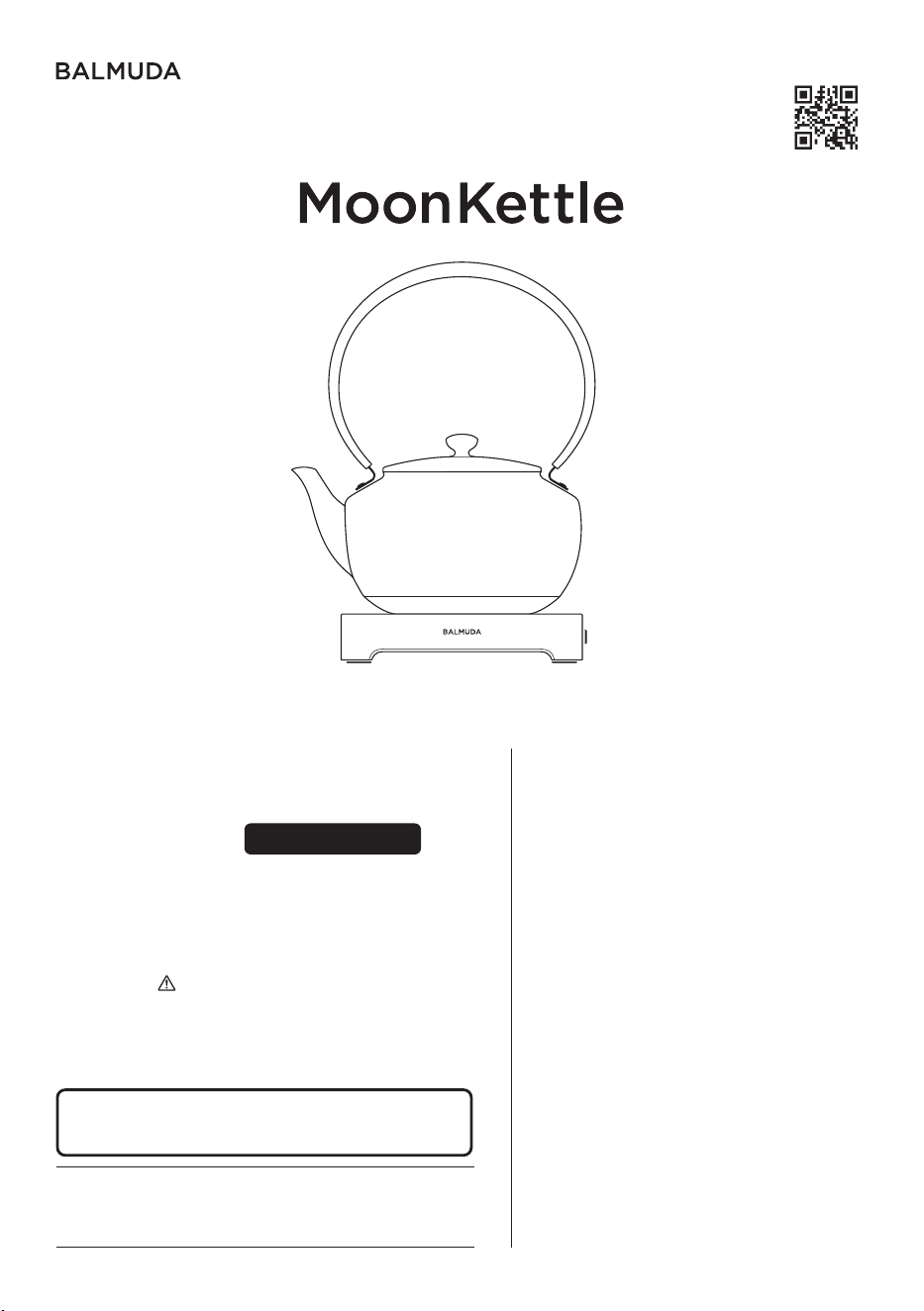
Electric Kettle (Household use only)
KPT02US Series
Instruction Manual
Limited Warranty
Thank you for purchasing MoonKettle. Before using
the appliance, be sure to read this manual thoroughly,
particularly its “Safety Precautions” section (p.2 to 7).
In addition, pay special attention to the contents
marked with .
Carefully store the manual after reading it together
with your proof of purchase, which shows the date
of purchase and dealer’s name.
WARRANTY VOID IF USED OUTSIDE U.S.
FOR USE IN U.S. ONLY
Important
Be sure to read this manual before use.
Keep it in a safe place for future reference.
For information on our warranty policy, please refer
to the BALMUDA website (https://us.balmuda.com).
Contents
IMPORTANT SAFEGUARDS ............... 1
SHORT CORD INSTRUCTIONS .......... 1
Safety Precautions .............................. 2
Contents of the Package ..................... 8
Names of Parts .................................... 8
Controls and Display ........................... 9
How to use .......................................... 9
Settings ...............................................13
Cleaning ..............................................16
Troubleshooting ...................................17
Error Indication ....................................17
Product Registration............................18
Warranty Policy and Privacy Policy .....18
Disposal ...............................................18
Product Specication ..........................18
Customer support ...............................19

1
IMPORTANT SAFEGUARDS
When using electrical appliances, basic safety precautions should always be followed,
including the following:
1. Read all instructions.
2. Do not touch hot surfaces. Use handles or knobs.
3. To protect against re, electric shock, and injury to persons, do not immerse the cord,
plugs, or main body in water or other liquid.
4. Close supervision is necessary when any appliance is used by or near children.
5. Unplug the power cord from the outlet when the appliance is not in use and before
cleaning it. Allow the appliance to cool before putting on or taking o the parts, and
before cleaning the appliance.
6. Do not operate the appliance with a damaged cord or plug, or after the appliance
malfunctions, or has been damaged in any manner. Return the appliance to the nearest
authorized service facility for examination, repair or adjustment.
7. The use of any accessory attachments not recommended by the appliance manufacturer
may result in re, electric shock or injury to persons.
8. Do not use the appliance outdoors.
9. Do not let the cord hang over the edge of a table or counter, or touch hot surfaces.
10. Do not place the appliance on or near a hot gas or electric burner, or in a heated oven.
11. Always attach plug to appliance rst, then plug cord into the wall outlet. To disconnect,
turn any control to "o," then remove plug from wall outlet.
12. Close the lid completely or it may result in scalds. Hold the handle, when removing the lid.
13. Do not remove the lid during the boiling cycle. Doing so may result in scalds.
14. Do not use appliance for other than intended use.
15. The appliance is for household use only.
SAVE THESE INSTRUCTIONS
SHORT CORD INSTRUCTIONS
• A short power-supply cord is provided to reduce risks resulting from becoming
entangled in or tripping over a longer cord.
• Extension cords may be used if care is exercised in their use.
• If an extension cord is used:
1) The marked electrical rating of extension cord should be at least as high as the
electrical rating of the appliance.
2) This appliance is equipped with a grounded plug. The extension cord should be
a grounding type 3-wire cord.
3) The extension cord should be arranged so that it does not drape over the
counter top or table top where it can be pulled on by children or tripped over.
2
Safety Precautions
Read the Safety Precautions carefully before use to ensure correct
operation. The precautions described in this manual must be followed to
ensure safe use of this appliance and prevent hazards to you and other
people, as well as damage to the appliance and your home or property.
Once you nish reading this manual, store it carefully for future reference.
Also please note that this appliance is intended for household and
indooruse only.
These symbols indicate the degree of harm or damage that may be caused
by improper use.
WARNING
Indicates “actions that could result in serious injury or death”.
CAUTION
Indicates “actions that could result in minor injury or cause
damage to a building or furniture”.
These symbols indicate requirements during use of this appliance.
Indicates prohibited actions that must not be performed.
Indicates instructed actions that must be performed.
Indicates general precautions.
WARNING
Usage
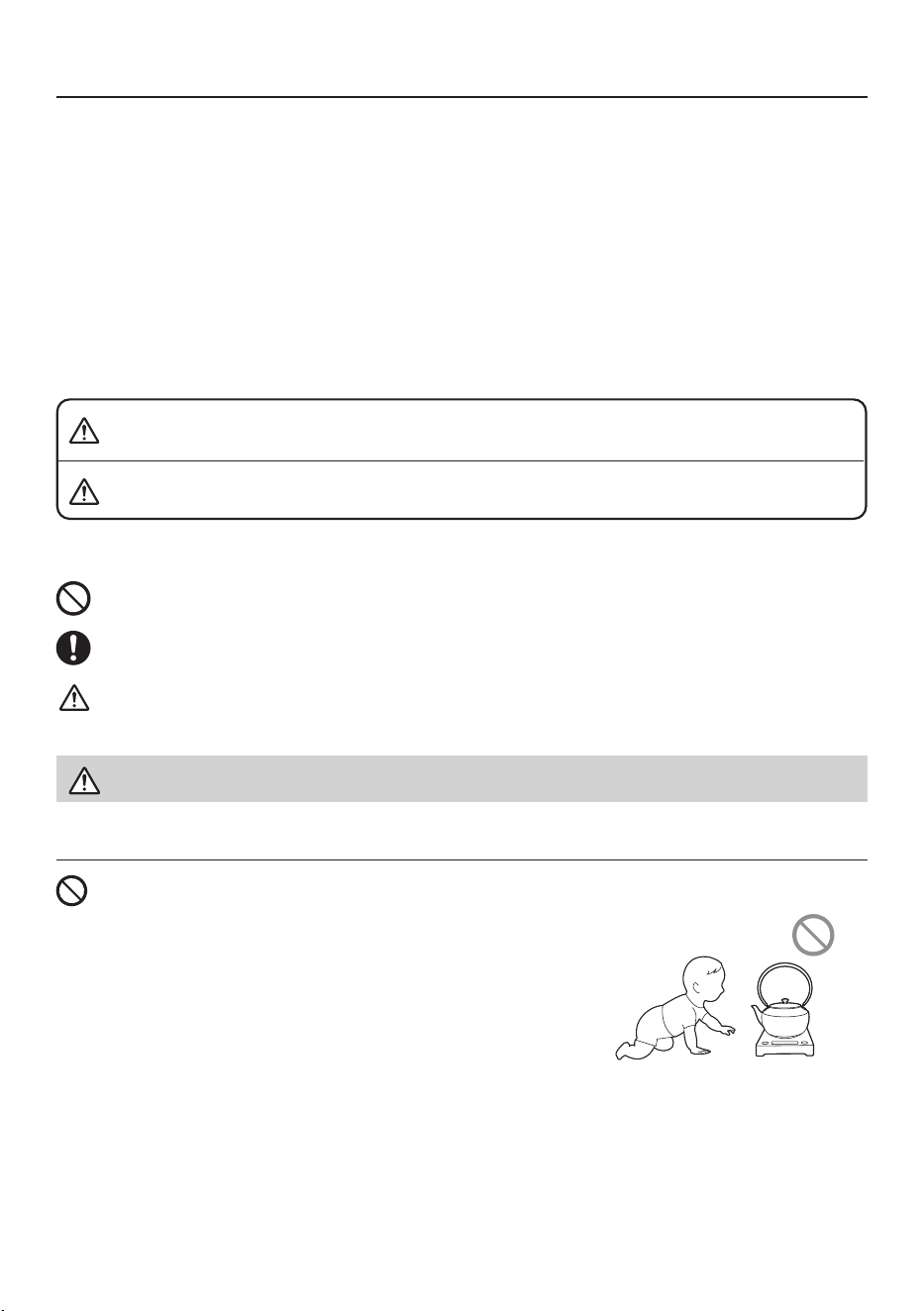
Do not let unsupervised children use the
appliance and do not use the appliance in a
place within reach of infants.
This appliance is not intended for use by
persons requiring assistance (including
children) unless under the supervision or
direction of a person responsible for their
safety.
In addition, ensure that children do not play with the appliance.
Do not let them lick the power supply base central connector (metal
part), the connector on the bottom of the main body, or the power
plug.
Failure to heed the above warnings may cause re, electric shock, burns, or
other injuries.

3
Do not submerge the bottom of the main body or the power supply
base in water or pour water on them.
Doing so may cause re, electric shock, or malfunction.
Do not touch, insert a pin in, or let foreign matter adhere to the
connector at the bottom of the main body or the power supply base
central connector (metal part).
Doing so may cause electric shock or burns, or may cause the equipment to
catch re.
Do not peek into the spout or direct the spout at other persons.
Doing so may cause burns or other injuries.
Do not use the appliance for purposes other than those described in
this instruction manual or recommended by BALMUDA.
Doing so may cause a fire, electric shock, injury, malfunction, or abnormal
operation, or may cause the equipment to catch re.
Do not use another product's power supply base with the main unit or
the power supply base with another product.
Failure to heed the above warnings may cause a re, electric shock, emission
of smoke, injury, malfunction, or abnormal operation, or may cause the
equipment to catch re.
Do not hold, tilt, or shake the main body.
Doing so may cause burns.
Do not let the main body fall over.
Doing so may cause burns.
Do not use the appliance for cold storage such as putting ice in it.
Doing so may cause electric shock or malfunction.
Do not use with a portable power supply or similar product.
Doing so may cause a fire or malfunction, or may cause the equipment to
catch re.
Do not close the lid forcefully. After boiling, do not open or close the
lid for a while.
Doing so may cause burns.
Do not move the main body by holding the lid.
Because dropping the main body may result in burns or other injuries.
Do not drop the main body or power supply base, and do not subject
them to shocks.
Doing so may cause re, electric shock, burns or other injuries, or malfunction.
4
Do not put anything other than water in the main body.
Do not do any of the following.
Put milk, alcohol, soup, teabags, or tea leaves in the main body.
Prepare instant foods in the kettle.
Warm up food in a retort pouch or put food in a plastic bag or
similar, heat it up and prepare it.
Put materials for improving water quality (e.g. water filter) in the
main body.
Put bottles or cups in the main body.
Doing so may cause re, electric shock, burns, or malfunction.
Do not do any of the following while the water is boiling.
Do not block the spout or steam outlet with a cloth or similar item.
Do not pour the hot water out.
Do not move the kettle.
Do not open and close the lid.
Do not leave the kettle unattended.
Doing so may cause burns.
Do not put water in the kettle while it is on the power supply base.
Doing so may cause electric shock, burns or other injuries, or malfunction.
Do not ll with water beyond the maximum water capacity mark. (0.9 L
maximum)
Doing so may cause electric shock, burns, or malfunction.
Close the lid securely.
Failure to do so may cause burns.
Power supply and power cord
Never use a deformed or damaged power plug or power cord.
Doing so may cause re or electric shock.
Do not scratch the power cord.
Do not bend the cord forcibly, pull on it, twist it, bundle it up, place it near
heat, place heavy items on it, squeeze it, or modify it.
Doing so may cause electric shock, burns, or malfunction, or may cause the
equipment to catch re.
Do not leave the power plug plugged into the outlet for a long time.
Doing so may cause re.
Do not touch the power plug or the power supply base with wet
hands.
Doing so may cause electric shock.
5
Do not use the appliance when the power cord is damaged or when
the plug is loosely plugged into the socket.
Doing so may cause electric shock or emission of smoke, or may cause the
equipment to catch re.
Use a dedicated outlet with a rated current of 12 A and 120 V AC.
Failure to do so may cause re.
Insert the power plug fully into the outlet.
Failure to do so may cause electric shock or emission of
smoke, or may cause the equipment to catch re.
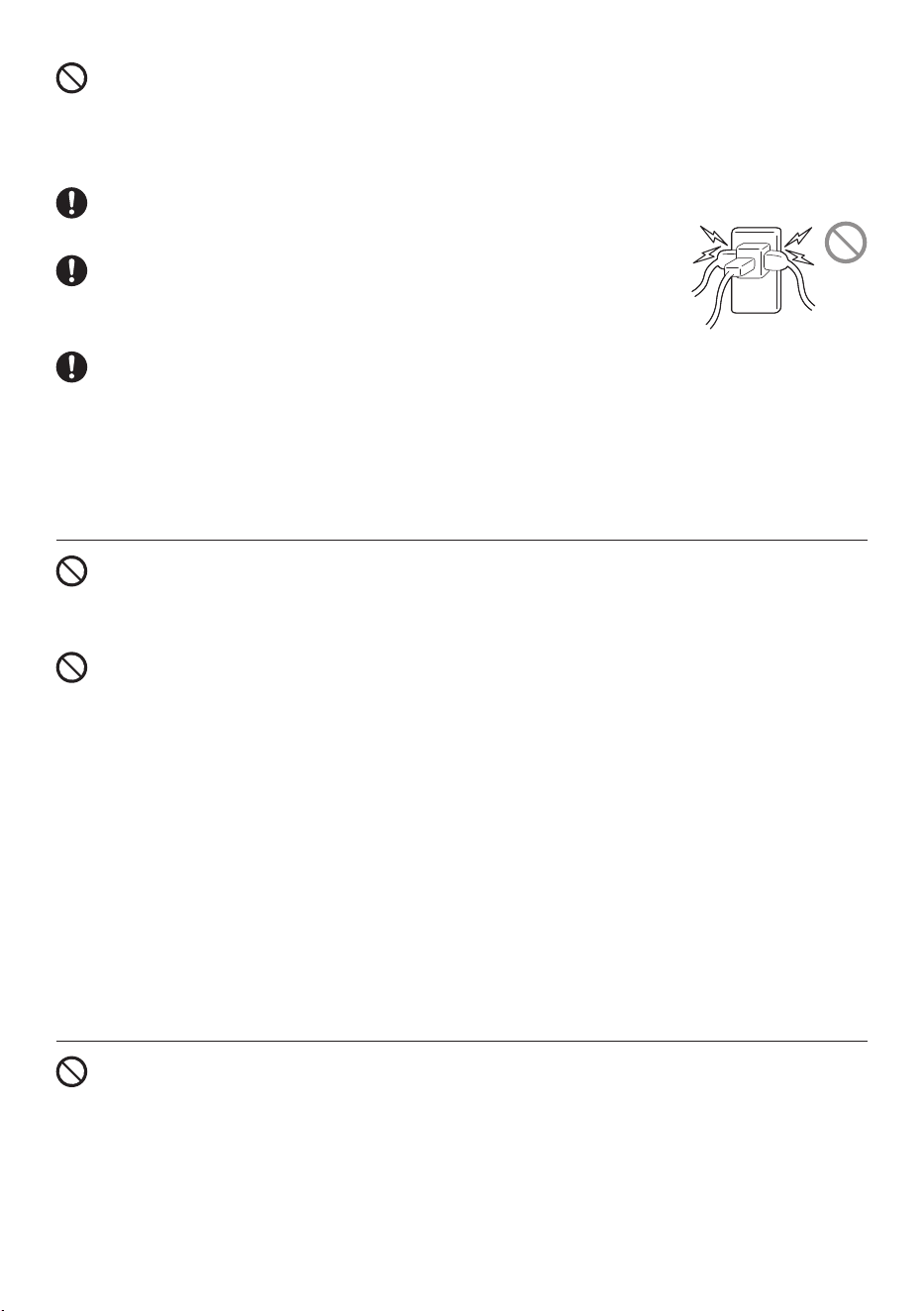
When unplugging the power plug, always pull on the power plug
rather than the cord.
Failure to do so may cause electric shock or may cause the equipment to
catch re.
Preparations for use
Do not put the main body inside a microwave oven or similar device,
and in particular do not use the oven with the main body inside.
Doing so may cause re, malfunction, deformation, or discoloration.
Do not use the appliance in the following kinds of places.
Unstable places, places where the appliance bottom will get wet, near a wall
or furniture, near ames, near sources of heat, places where the power plug
will be exposed to steam, on a table or covering with poor heat resistance,
places susceptible to getting wet, places exposed to direct sunlight,
outdoors, places with high humidity, near glass windows, places where the
appliance will come into contact with curtains, etc., or on kitchen storage
shelves
Doing so may cause a re, electric shock, burns or other injuries, malfunction,
deformation of furniture, or discoloration of furniture, or may cause the
appliance to catch re.
Abnormal operation
The appliance must never be disassembled, repaired, or modied by
anyone other than a repair engineer.
Failure to heed this warning may cause a fire, electric shock, injury,
malfunction, or abnormal operation, or may cause the equipment to catch re.
6
If there are cracks in the bottom of the main body or the handle, or
the appliance is shaky even with water in it, stop using the appliance
immediately.
If the power plug or power cord is damaged or becomes abnormally
hot during use, stop using the appliance immediately.
For replacement and repair, always contact BALMUDA Support
(p.19).
Failure to heed the above warnings may cause re, electric shock, burns, or
other injuries.
Stop using the appliance immediately if the operation is abnormal or
it is malfunctioning.
The power plug and power cord are abnormally hot.
The main body is deformed and is abnormally hot.
Smoke is coming out of the main body and there is a smell of
burning.
Part of the main body is cracked, loose or is rattling.
Boiling does not complete.
Water leaks from the main body.
Failing to stop using the appliance in these circumstances may cause a re,
electric shock, or injury, or may cause the appliance to catch re.
Cleaning
Do not wash the main body or power supply base in a dishwasher
and dryer.
Doing so may cause re, electric shock, burns, or malfunction.
Do not use detergent when cleaning this appliance.
Doing so may cause malfunction.
Do not immerse the pot in water when washing.
Doing so may cause re, electric shock, or malfunction.
CAUTION
Usage
When the water is boiling or after it has boiled, wait a while before
opening the lid, do not touch the steam outlet or spout, and do not
move your hand close to the steam.
Doing so may cause burns.
7
Do not tilt the unit excessively.
Hot water may leak from the unit, causing burns or electric shock.
Do not start the kettle with no water in.
Doing so may cause malfunction.
Do not touch the steam or condensation that emerges when the lid is
removed.
Doing so may cause burns.
After use, remove the power plug from the outlet, and discard any
remaining water to empty the main body.
Failure to do so may cause discoloration or corrosion.
When discarding the remaining water, always do so from the spout.
Failure to do so may cause burns or malfunction.
Power supply and power cord
When not using the appliance, remove the power plug from the outlet.
Failure to do so may cause re or burns.
When the power plug is plugged into the outlet, do not pull on the
power cord.
Doing so may cause injury or malfunction.
Preparations for use
Do not turn the main body upside down.
Doing so may cause malfunction.
Place the power supply base on a stable, horizontal surface.
Failure to do so may cause electric shock, burns, or other injuries.
Cleaning
Do not use cleanser, benzene, thinner, or a metal scrubbing brush.
Doing so may cause scratches or deformation.
When cleaning, remove the power plug from the outlet and allow the
appliance to cool before starting the cleaning.
Failure to do so may cause electric shock or burns.
If this product is used with several electrical appliances at the same time, the circuit breaker may trip.
Please be aware of this.
Note: The electrical current in this product is 10 A (1,200 W).
Pay attention to the power consumption.
8
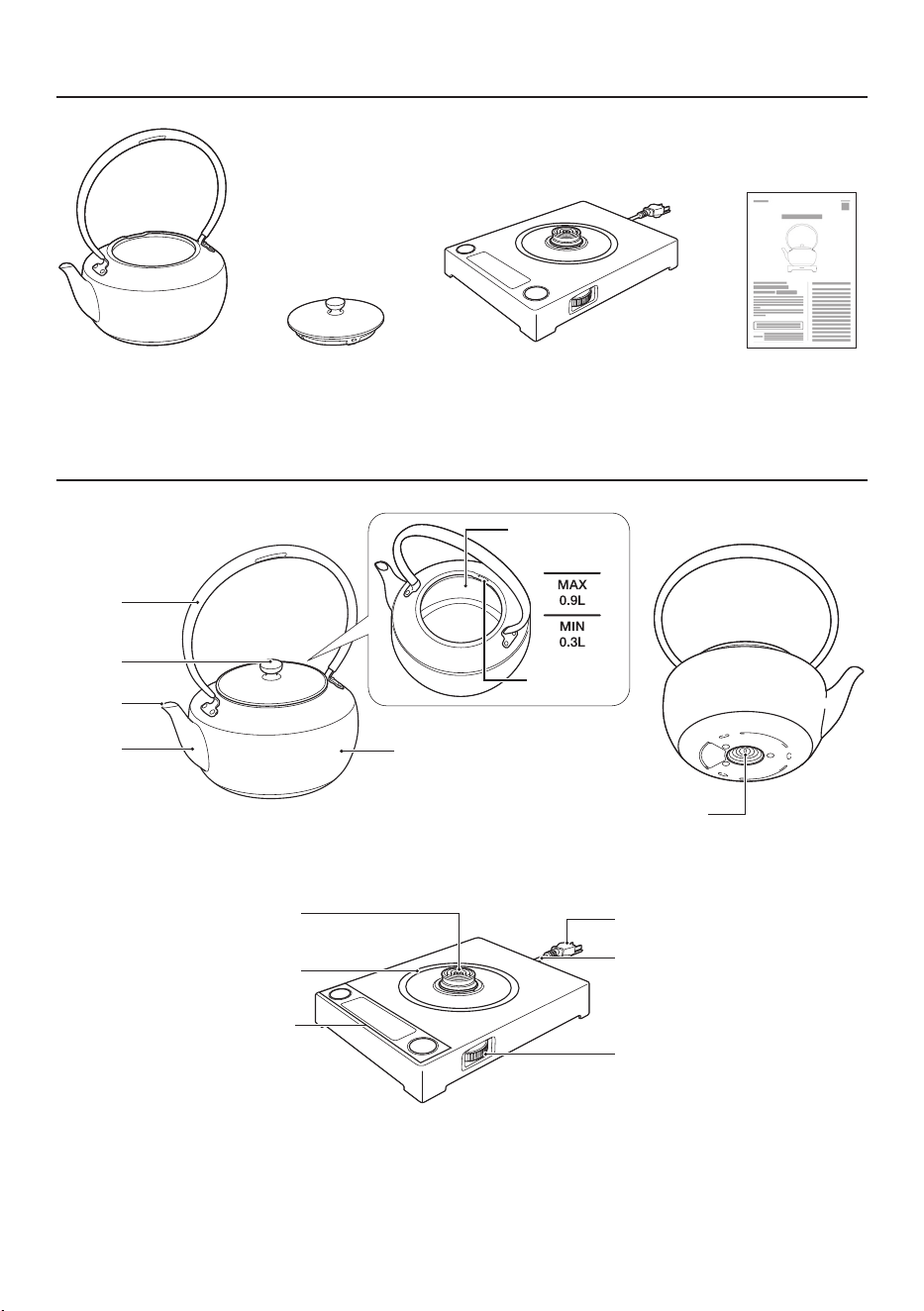
Contents of the Package
Lid Power supply baseMain body Instruction manual
(this manual)
Names of Parts
Spout
Handle
Nozzle
Lid knob
Main body trunk
Connector on the main body side
Ring light
Connector on the power
supply base side
Power plug
Dial (p.9)
Power cord
Controls / display
(p.9)
Water capacity
mark (both sides)
Steam outlet
Note: There is one of each part.
9
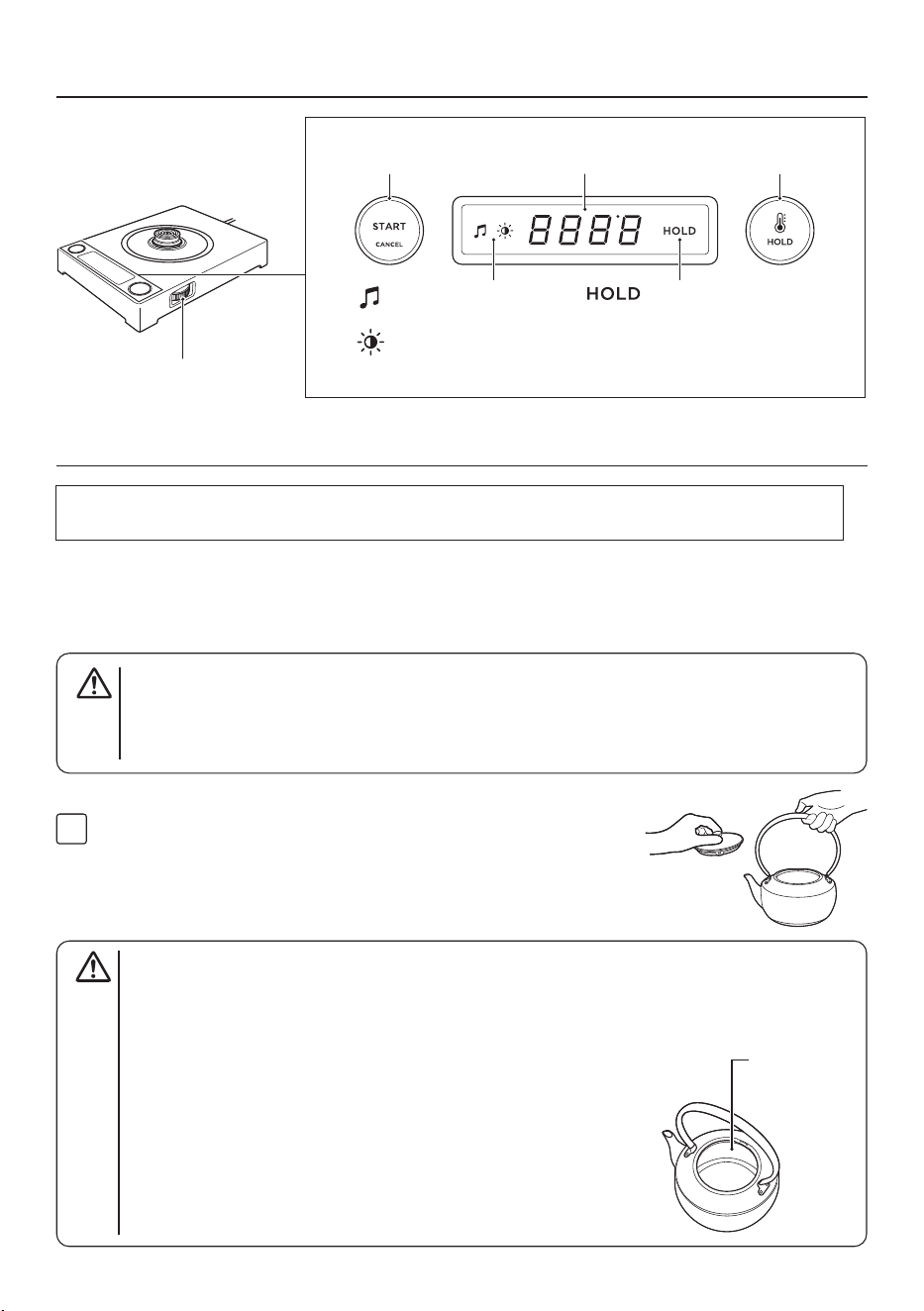
Controls and Display
Sound
Lights up during selection
Ring light brightness
Lights up during selection
Hold mode (p.11)
Lights up when set
Dial: turn to select the temperature
or setting value
START/CANCEL
START/CANCEL button
HOLD/SETTING
HOLD/SETTING button
Display
How to use
Before using for the rst time, perform the following steps at least twice to clean inside the
main body.
1. Fill the main body with water up to the maximum water capacity mark. (0.9 L)
2. Boil the water according to the procedure on p.9 to 12.
3. Discard the boiled water.
When the water is boiling or after it has boiled, wait a while before opening the
lid, do not touch the steam outlet or spout, and do not move your hand close to
the steam.
Doing so may cause burns.
Remove the lid and pour water into the main body
(a minimum of 0.3 L, a maximum of 0.9 L)
Do not put anything other than water in the main body.
Doing so may cause spurting, re, electric shock, burns, or malfunction.
Do not put water in the kettle while it is on the power supply base.
Doing so may cause electric shock, burns or other injuries, or malfunction.
Do not put more water in the main body than the
maximum water volume (0.9 L). Do not boil water under
the minimum amount (0.3 L).
If you ll the kettle with too much water, the water may overow
and cause electric shock, burns, or malfunction. If you fill the
kettle with too little water, it will not boil the water to the set
temperature.
Water capacity
mark
MAX 0.9 L
MIN 0.3 L
1
10
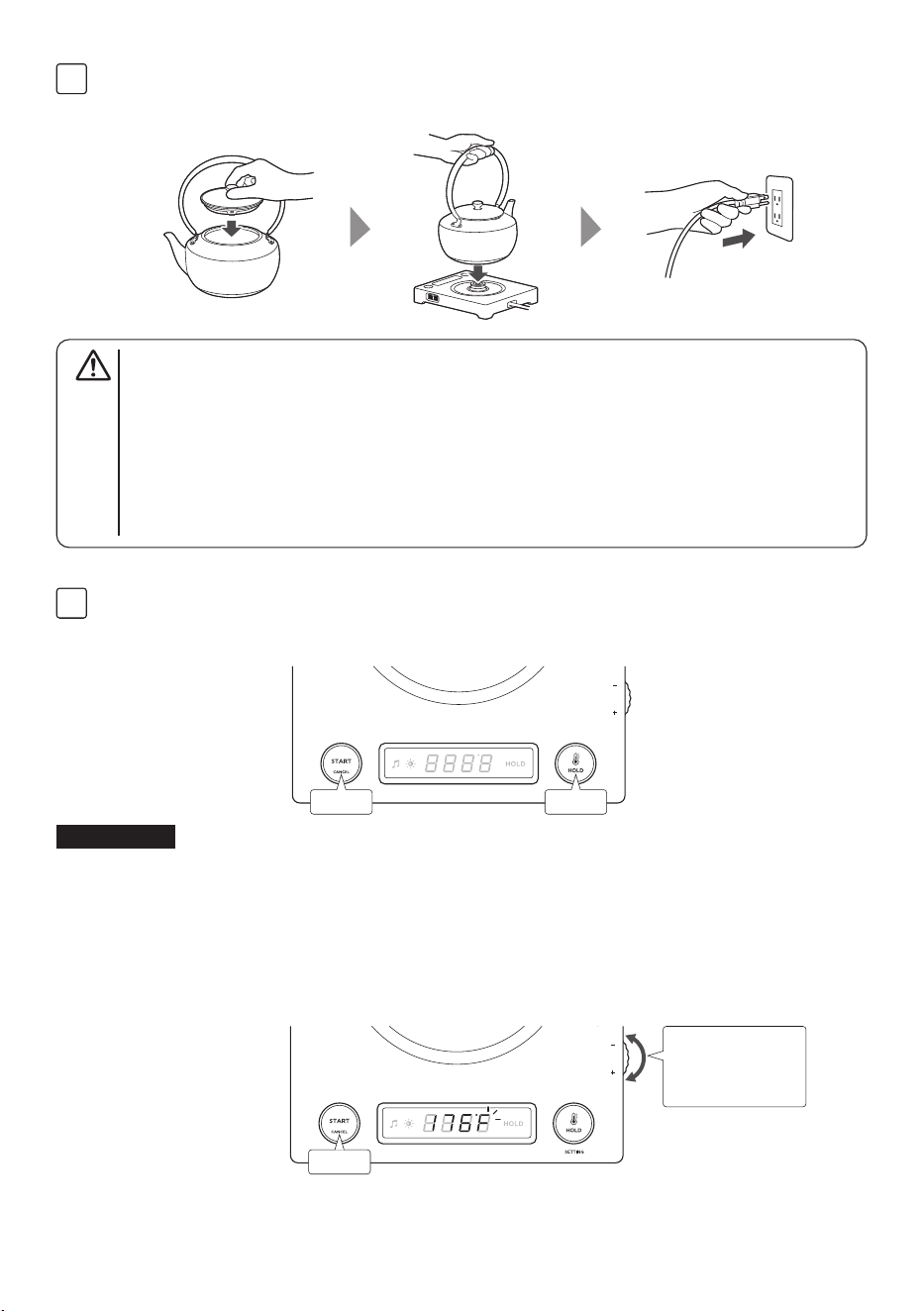
Close the lid, set the main body on the power supply base, and insert the
power plug into the outlet.
Close the lid securely.
The handle may become hot from the steam and cause burns. Also, the lid may come o
spilling hot water and causing burns.
Place the power supply base on a stable, horizontal surface.
Failure to do so may cause electric shock, burns, or other injuries.
Do not touch the power plug or the power supply base with wet hands.
Doing so may cause electric shock.
Boil the water.
Turn on the power by pressing the START/CANCEL button or the HOLD/SETTING button.
Press Press
Boiling water
Check the temperature on the display, press the START/CANCEL button, and begin boiling the
water.
To change the water temperature setting, turn the dial on the right-hand side of the power supply base
to the desired temperature, and press the START/CANCEL button.
When the Fahrenheit (℉)/Celsius (℃) setting (p.15) is set to Celsius (℃), the temperature can be
set in the range of 50℃ to 100℃ (in increments of 1℃).
Press
122℉ to 212℉
(In increments
of 2℉)
The temperature display will blink while the
temperature is being set or during boiling.
2
3
11
The boiling starts.
Once the boiling is completed, the ring light turns on and the notication sound is issued.
After the boiling is completed, the system automatically returns to standby after 5 minutes.
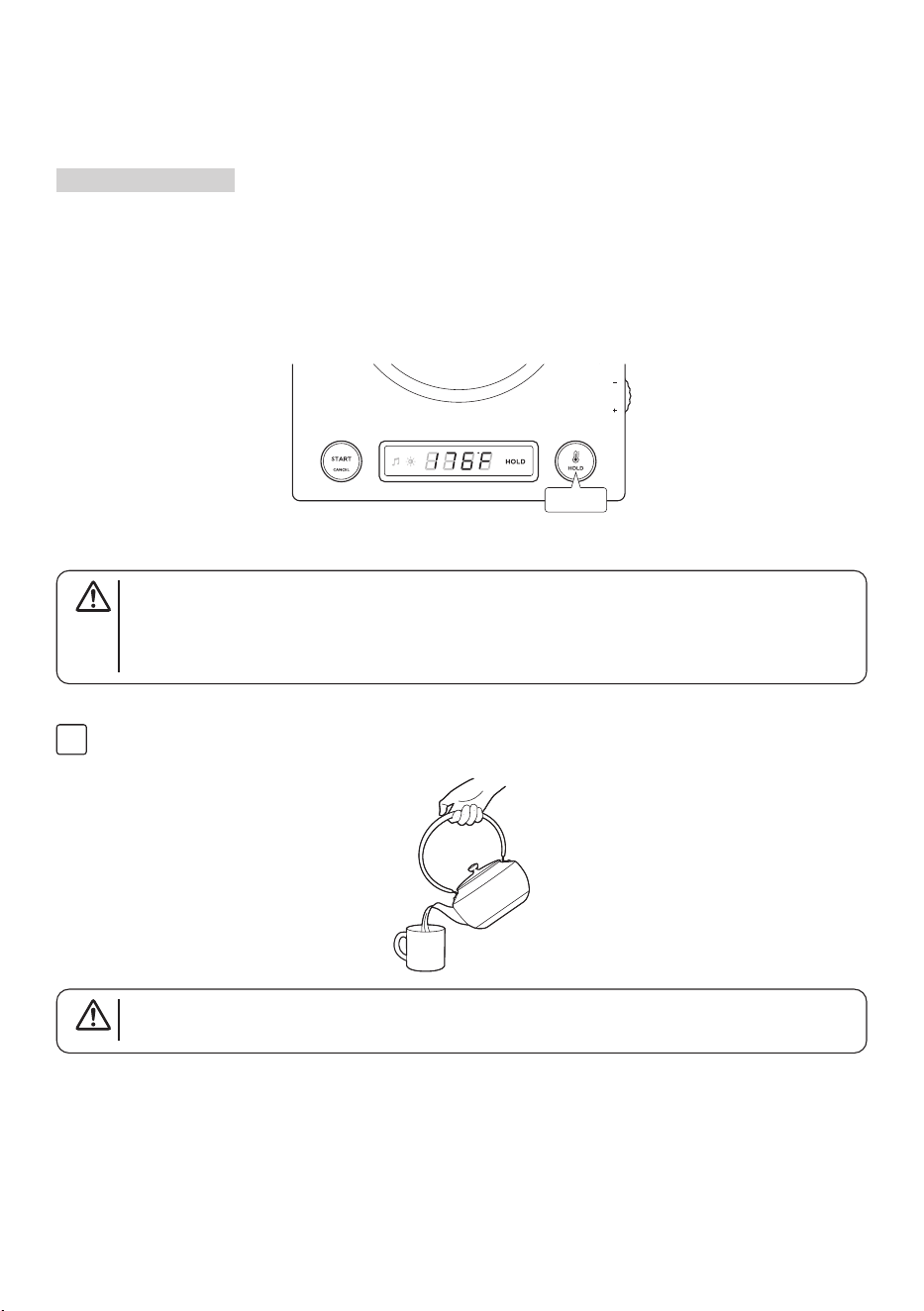
Boiling + Hold mode *This product has a Hold mode.
Press the HOLD/SETTING button when you want to keep the water warm.
After maintaining the temperature of the hot water for approximately 30 minutes, the warming stops
automatically.
Press the HOLD/SETTING button before or while boiling the water, or within 5 minutes of the boiling
completing.
The HOLD indicator lights up
Press
Do not do any of the following while the water is boiling.
Do not block the spout or steam outlet with a cloth or similar item; do not pour the hot
water out; do not move the kettle; do not open and close the lid; and, do not leave the kettle
unattended.
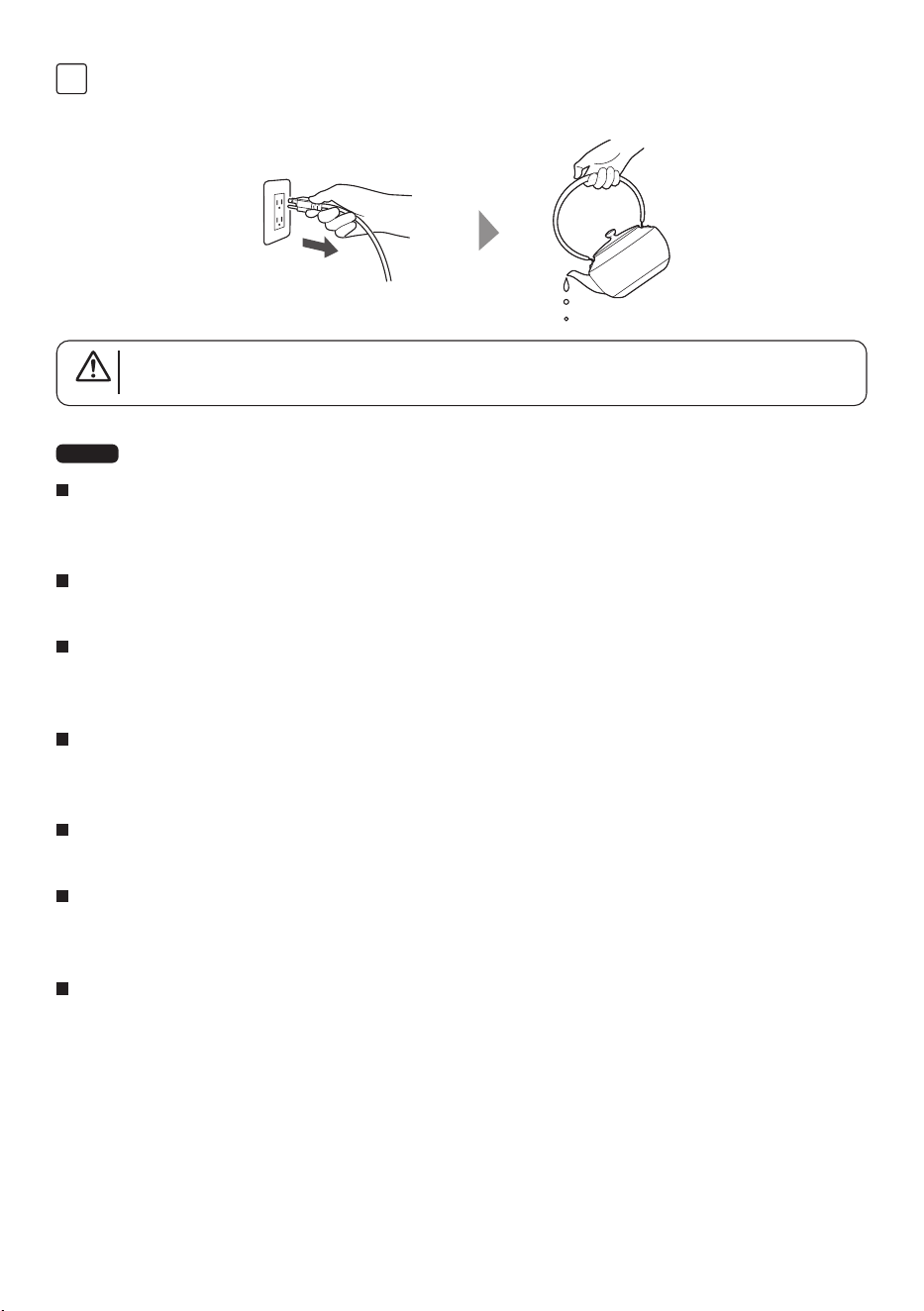
Hold the handle and pour out the hot water.
The main body is extremely hot. Do not touch anything other than the handle and the lid
knob until the kettle has cooled down.
4
12
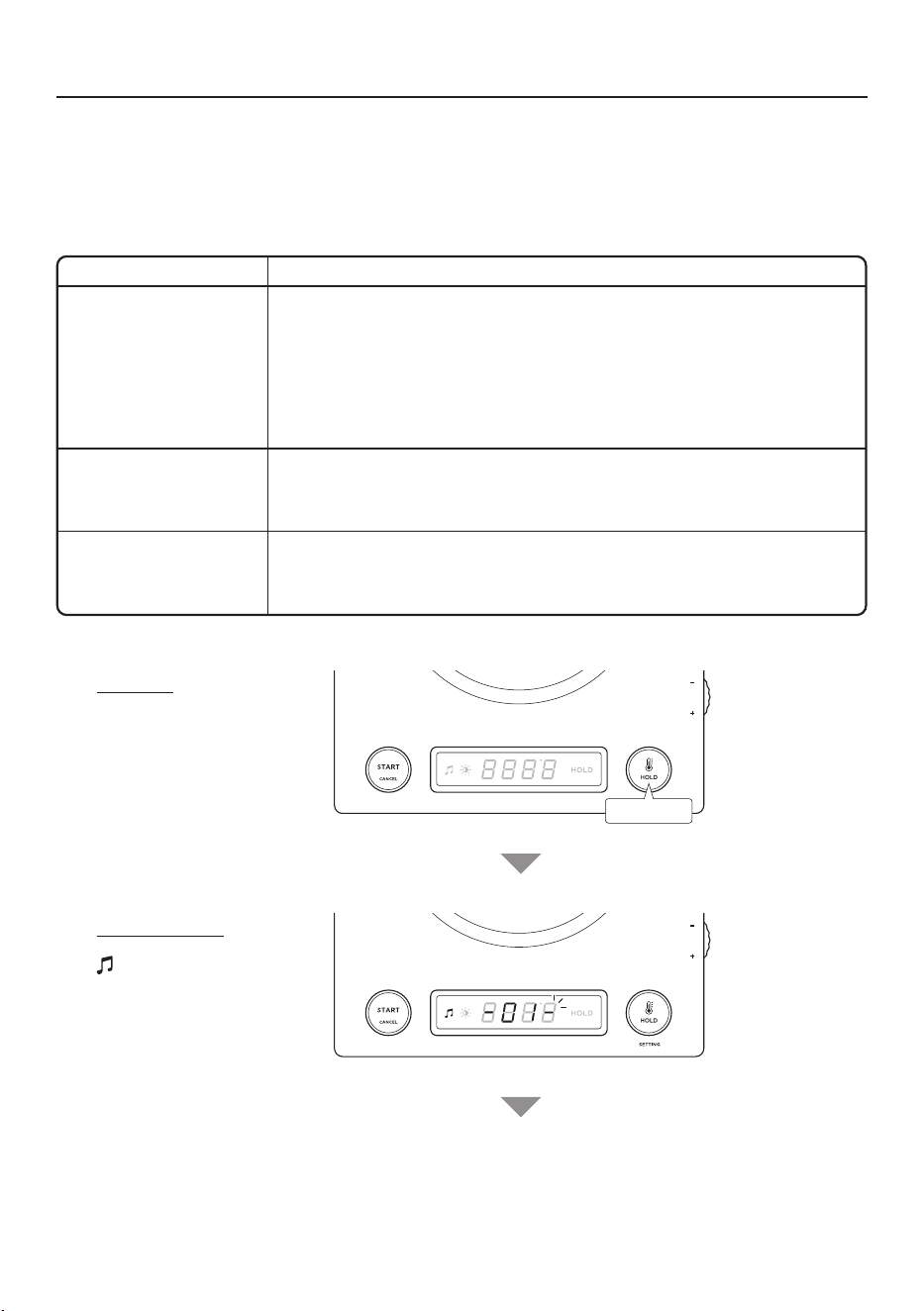
After use, unplug the power plug from the outlet, and discard any remaining
water to empty the main body.
Always discard any remaining water.
Failure to do so may cause discoloration or corrosion inside the main body.
Note
When you want to stop the boiling partway through
While the water is being boiled, press the START/CANCEL button. The display turns off and the
boiling stops.
When removing the main body from the power supply base while boiling water
The display turns o and the boiling stops.
When the water temperature has dropped while the water is being kept warm for 30
minutes
The boiling is automatically restarted and the set temperature is maintained.
When you want to stop keeping the water warm partway through
While the water is being kept warm, press the HOLD/SETTING button or the START/CANCEL button.
The display turns o and the appliance stops keeping the water warm.
When removing the base from the main body while the water is being kept warm
The display turns o and the appliance stops keeping the water warm.
When 1 minute has passed since the last operation
*Excluding when the water is being kept warm
The display turns o and returns to the standby state.
When using the appliance at high altitudes
The higher the altitude, the lower the boiling temperature of the water. The water will boil at a
temperature below 212°F, even if the boiling water temperature setting is set to 212°F, and the boiling
may stop automatically.
The current water temperature is shown on the display twice and the boiling stops.
When the Hold mode is set, the water is kept at the temperature it was at when the boiling stopped.
5
13
Settings
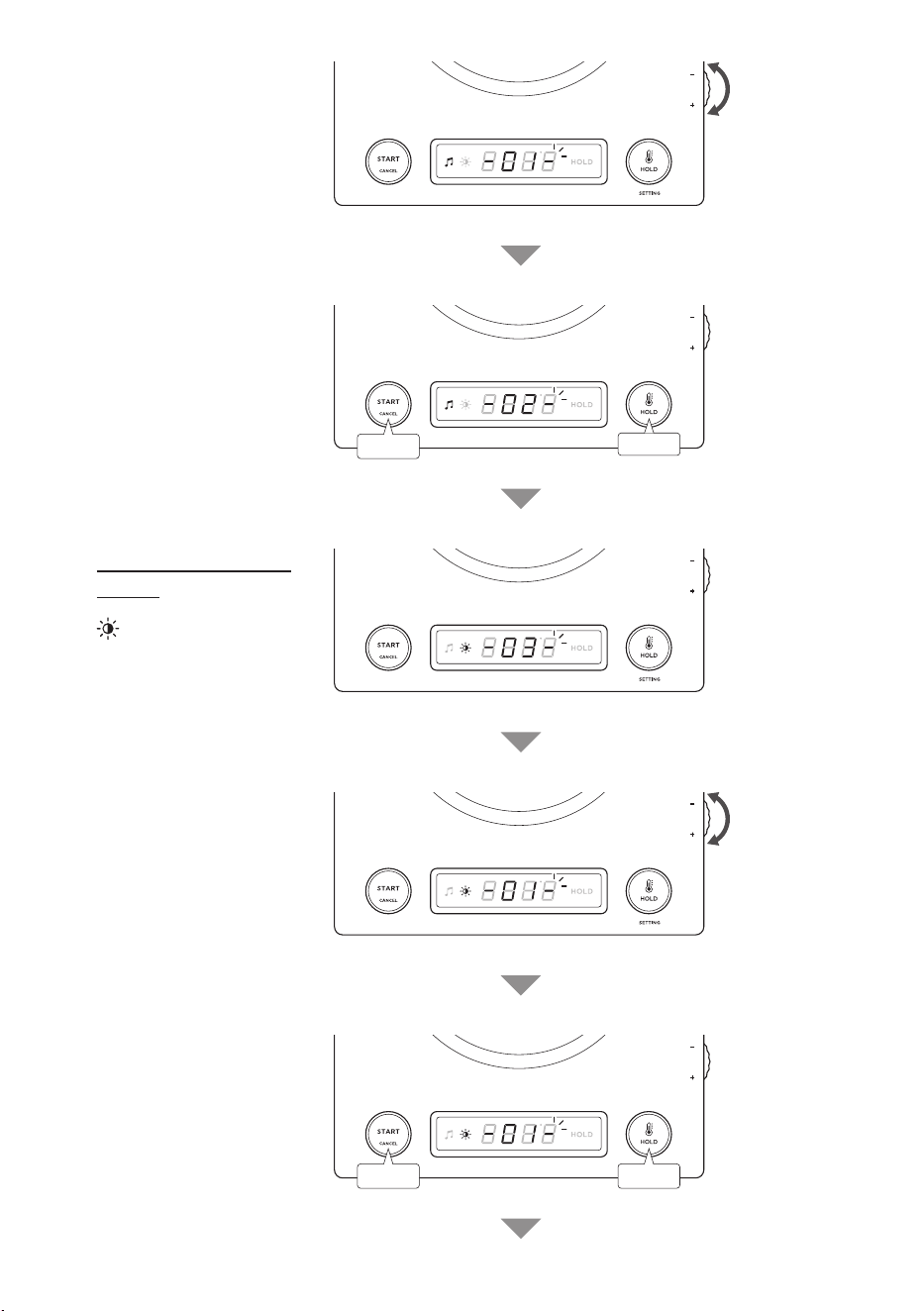
Long-pressing the HOLD/SETTING button for at least 2 seconds enables the various settings to be
performed.
The settings cannot be performed while boiling water or keeping water warm. Wait until the boiling
has nished or press the START/CANCEL button and perform the settings.
Setting Items Details
Sound setting
You can select the desired setting from 3 notification sounds or the
sound o.
If this setting is set to OFF, a sound will be produced only when an error
is displayed (p.17).
Default setting: -01-
OFF / -01- / -02- / -03-
Ring light brightness
setting
You can select the desired setting from 3 brightnesses.
Default setting: -03- HIGH
-01- LOW (dark) / -02- MID (standard) / -03- HIGH (bright)
Fahrenheit (℉)/
Celsius (℃) setting
Select the display temperature setting from Fahrenheit (℉) or Celsius
(℃).
Default setting: Fahrenheit (℉)
Long press
Continued on the next page
Standby
Long-press the HOLD/
SETTING button for at
least 2 seconds
Sound setting
The musical note icon
lights up and the sound
setting screen is displayed
14
Press Press
Conrm by pressing the
START/CANCEL button or
the HOLD/SETTING button
Press
Press
Conrm by pressing the
START/CANCEL button or
the HOLD/SETTING button
Ring light brightness
setting
The brightness icon
lights up and the ring light
brightness setting screen
is displayed
Continued on the next page
Turn the dial to select the
sound setting
OFF
-01-
-02-
-03-
Turn the dial to select the
brightness
-01- LOW (dark)
-02- MID (standard)
-03- HIGH (bright)
15
Returns to Standby (p.13)
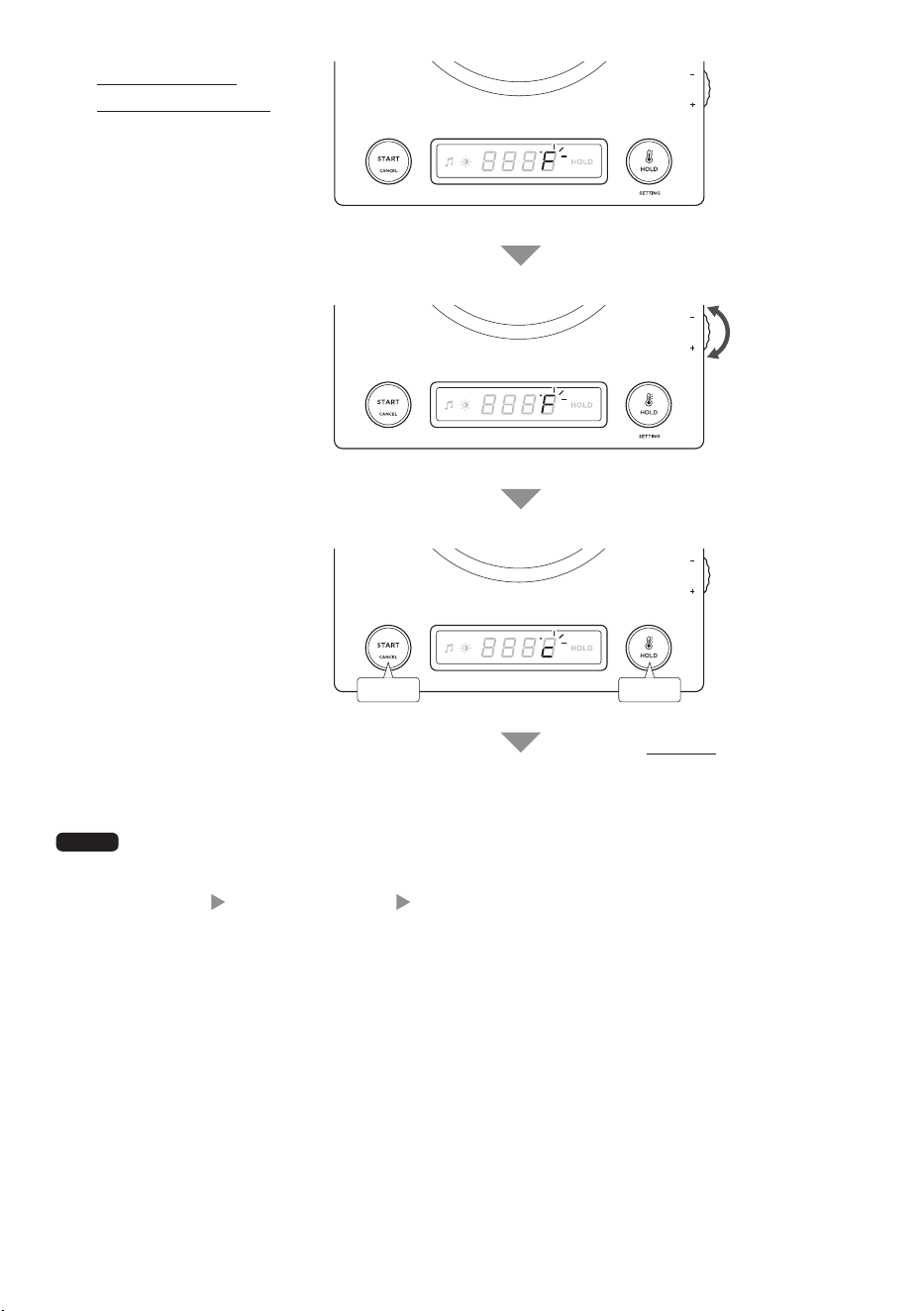
Turn the dial to select the
unit
Fahrenheit (℉)
Celsius (℃)
Conrm by pressing the
START/CANCEL button or
the HOLD/SETTING button
PressPress
Fahrenheit (℉)/
Celsius (℃) setting
“℉” lights up and the
Fahrenheit (℉)/Celsius (℃)
setting screen is displayed
Note
If the system enters standby while the settings are being performed, the settings will not be saved.
If the Sound theme Ring light brightness Fahrenheit (℉)/Celsius (℃) settings are all conrmed with
the START/ CANCEL button or the HOLD/SETTING button, the settings will be saved.
16
Cleaning
Cleaning the parts
Main body (outside), power supply base, lid Soak a soft cloth or similar item in water,
wring it out well, and wipe the part.
Main body (inside) Rinse and wash with vinegar.
Washing with vinegar
For users who are concerned about stains on the inside of the main body, remove the stains by the
following method.
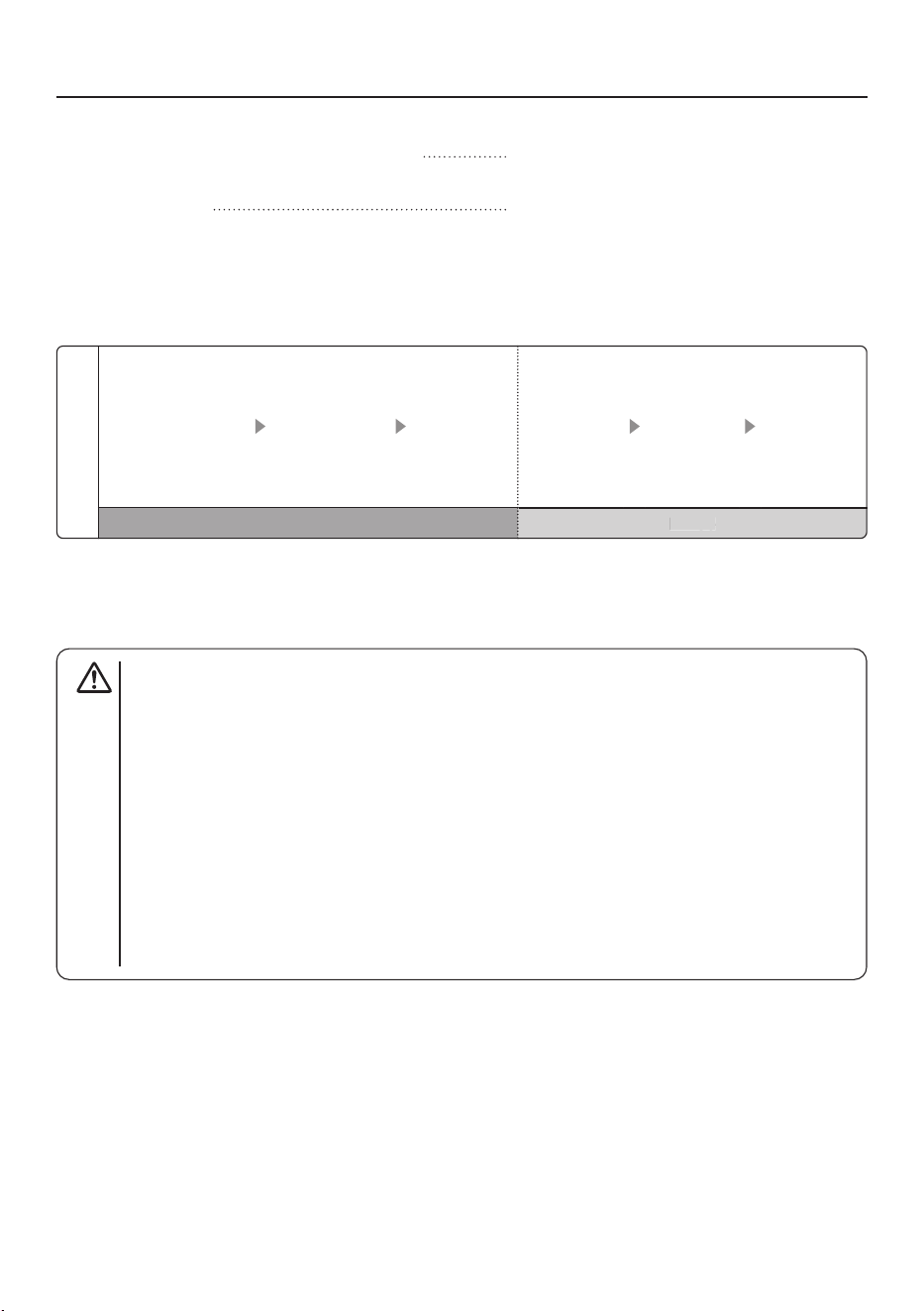
Procedure
Half vinegar
+
Half water
0.9 L in total
(maximum water
volume)
Boil
the water,
leave for
approximately
1 hour
Discard
the water
Water
0.9 L
(maximum
water
volume)
Boil
the water
Discard
the water
Wash Rinse
Rinse
Note: The stains may not be completely removed after washing the inside, but this is not a problem for use.
Note: Rinse repeatedly if an odor persists.
Note: Wash in a well-ventilated location.
Remove the power plug from the outlet and allow the appliance to cool before
cleaning.
Failure to do so may cause electric shock or burns.
Do not use detergent when cleaning this appliance.
Doing so may cause malfunction.
Do not wash the main body or power supply base in a dishwasher and dryer.
Doing so may cause re, electric shock, burns, or malfunction.
Do not immerse the pot in water when washing.
Doing so may cause re, electric shock, or malfunction.
Do not use cleanser, benzene, thinner, or a metal scrubbing brush.
Doing so may cause scratches or deformation.
17
Troubleshooting
Check the following details. If the problem is not resolved, contact BALMUDA Support (p.19).
Troubleshooting Check Response
The display remains o
and does not work.
Is the power plug plugged into
the outlet properly?
Insert the power plug into the outlet properly.
The hot water spurts and
spills out.
Have you lled the kettle with
more water than the maximum
water volume (0.9 L)?
Strictly comply with the maximum water
volume (0.9 L).
Have you lled the kettle with
something other than water?
Do not use anything other than water.
The main body is hot. —
The main body is extremely hot. Do not
touch anything other than the handle and the
lid knob until the kettle has cooled down.
The power is on, but the
water will not boil.
—
The dry burn prevention function may be
operating. Let the kettle cool for a while
before using it again.
Error Indication
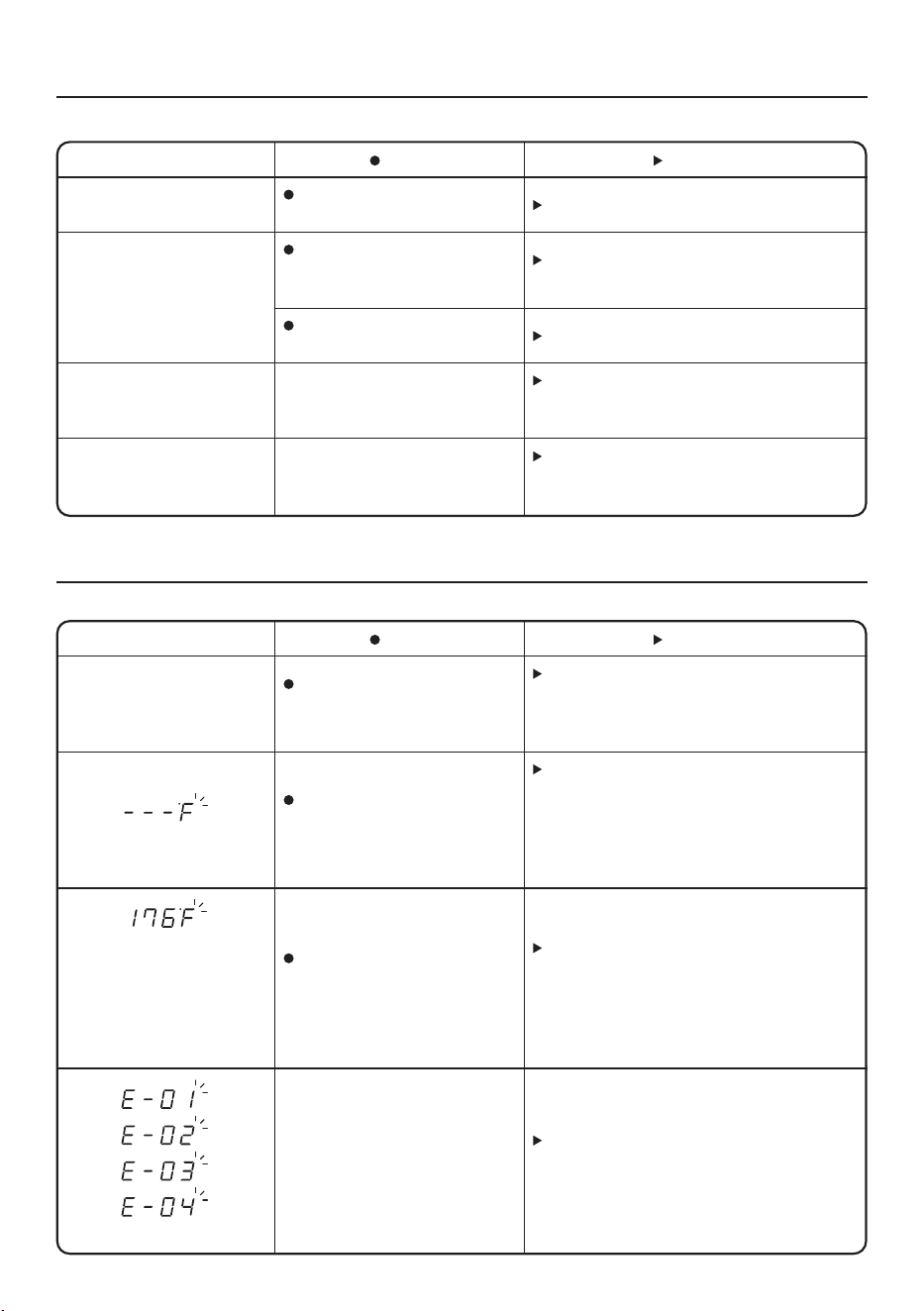
If the error sound (two consecutive electronic sounds) is produced, check the following details.
Troubleshooting Check Response
error sound
Have you started boiling water
with the main body removed
from the power supply base?
Place the main body on the power supply
base and press the START/CANCEL button.
Conrm that the temperature is shown on
the display and restart the operation.
+ error sound
Did you omit to put water in
the main body before boiling or
keeping warm?
Remove the main body from the power
supply base and let it cool for a while. Boil
the water or keep the water warm only once
you have lled the main body. When pouring
in the water, be careful not to touch the main
body.
The temperature
display (current water
temperature) blinks twice
when the START/CANCEL
button is pressed.
+ error sound
Is the hot water inside the main
body hotter than the boiling
water temperature setting?
Re-set the boiling water temperature setting
to an even higher temperature than the
current water temperature, then re-start the
boiling.
+ error sound
—
If the operation does not restart, contact
BALMUDA Support (p.19) and inform us of
the error code that is displayed.
18
Product Registration
Register your product to receive convenient product support and to sign up for news and exclusive
oers.
https://us.balmuda.com/product-register
Warranty Policy and Privacy Policy
For information on our warranty and privacy policies, please refer to the BALMUDA website
(https://us.balmuda.com).
Disposal
Observe the regulations in your region when disposing of the appliance and its parts.
Product Specication
Model KPT02US Series
Power supply 120V
60Hz
Rated power consumption 1200W
Dimensions
Approximate Width (W) 10.4 in. × Depth (D) 8.5 in. × Height (H) 11.7 in.
(including the handle and the power supply base)
Main body mass Approximately 1.7 lb.
Power supply base mass Approximately 1.5 lb. (including the power cord)
Rated capacity 0.9 L
Power cord length Approximately 2.3 ft.
Use Indoor use, household use
19
Customer support
Phone
833-333-1033
WEB
https://us.balmuda.com
BALMUDA Inc. 5-1-21 Kyonancho, Musashino, Tokyo 180-0023, JAPAN
Importer: transcosmos America, Inc. 879 West 190th Street #410, Gardena, CA 90248
Note: Store this manual with great care.