
INSTRUCTION MANUAL
Cordless Vacuum Cleaner
VC-D11B
BEFORE OPERATING THIS PRODUCT, PLEASE READ, UNDERSTAND AND FOLLOW THESE INSTRUCTIONS.
Visit our website www.farberwareVC.com

Important safety instructions
When using an electrical appliance, basic precaution should always READ ALL INSTRUCTIONS
BEFORE USING (THIS APPLIANCE)
1. The vacuum cleaner is an electric appliance. It must be used in accordance with the
operating conditions of the instructions. The instructions should be kept properly for future
reference.
2. Check and confirm that the vacuum cleaner voltage must be consistent with the supply
voltage.
3. It is strictly forbidden to inhale the following objects, otherwise it may damage the vacuum
cleaner or cause fire.
A. Heating objects. Such as carbon fire, etc.
B. Large cuts of sharp fragments, such as glass, etc.
C. Harmful substances or water and liquids (solvents, corrosives, etc.);
D. Flammable and explosive goods, such as gasoline or alcohol products;
4. When cleaning, repairing or temporarily not use the vacuum cleaner, the power supply must
be cut off. When the power supply is cut off, pull the power cord and pull the plug out by holding
the plastic part of the plug by hand.
5. Remember do not immerse the main vacuum cleaner in water, avoid approaching to heating
equipment or exposure to the sun to avoid fire.
6. Don't let children play with vacuum cleaners to avoid accidents.
7. If there is a drop and obvious damage or abnormal operation, please do not continue to use
the vacuum cleaner, and promptly send it to the maintenance department designated by our
company for repair.
8. Avoid running for a long time in the condition of the suction inlet is blocked, to avoid
damage to the motor and heat generation of the vacuum cleaner.
9. To avoid danger, if the adapter is damaged, please purchase the factory-specified charging
adapter.
10. When the vacuum cleaner does not use for a long time, it is recommended to charge it once
every three months. Before the product is scrapped, the battery must be taken out and safely
recycled. Do not discard it.
WARNING:
Only allow to use a dedicated adapter. During charging, it needs to be ventilated and
heat-dissipated. It is strictly prohibited to be placed in a high temperature environment above 50
degrees or 122 degrees Fahrenheit. It is strictly forbidden to rely on fire source to avoid
explosion. The battery pack cannot be detachable.

Parameter
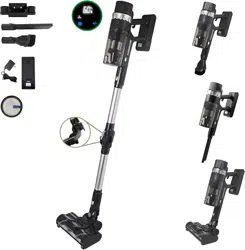
Product Parts List
1. Mainframe
2. On/OFF Button
3. Cotton Filter
4. Dust cup release button
5. Dust cup
6. Metal Tube
7. Floor Brush
8. Wall bracket
9. Battery Pack
10. Two in One Brush
11. Crevice Nozzle
12. Adapter
Item
Cordless Vacuum Cleaner
Model No.
VC-D11B
Input
100-240V
Power
500W
Output
35VDC,1A
Battery Capacity
2500mAh
3
3

Assembling & Disassembling
1. Attach the dust cup assembly with main frame as shown in figure 1. When hearing the sound
of "click",the main engine is locked.
2. Press the dust cup unloading button, and disassemble the dust cup from the main frame as
shown in figure 2.
1. Insert the metal tube with the connection part of main frame till hearing the sound "click".
2. Connect the floor brush with connection part of metal tube till hearing the sound "click".
1. The 2-in-1 brush and crevice nozzle can be directly connect to the main frame or metal tube
for handheld use.
2. Insert the 2-in-1 brush or crevice nozzle to the connection part of main frame or metal tube,
till hearing the sound "click".
Tips: Long crevice nozzle is suitable for cleaning small crevice like windows, corners, stairs, etc.
2-in-1 brush is suitable for cleaning dust on sofa, cupboard, or desk, etc.
Dust cup
Main frame
Dust cup unloading
button
Dust cup unloading
button

Using
Power on / Power off
Press the on/off button, the vacuum cleaner will star working in automatic dust sensing mode.
When in dust sensing mode, the screen shows dust percentage and the vacuum cleaner will
automatically adjust the suction power.
Press the on/off button again, the vacuum cleaner will shut down.
Mode Switching
1. Switch the mode by pressing "+/-", “ ” for low speed mode, “ ” for standard speed, “ ”
for high speed mode.
2. Startup mode is autom dust sensing mode" ", and pressing the "+/-" button can adjust the
mode.
3. The left sid button" " represent automatic mode. When pressing the " "button, the
machine will switch to automatic mode.
Indicator light description
1. Normal working condition: The power indicator light is steady on, power decreases by 5%.
2. Power OFF: The digital screen indicator light is off.
3. Dust cup is blocked: The red dust full indicator light " " flashes. The indicator light will stop
flashing after cleaning the dust.
4. Vacuum cleaner breaks down: the display screen shows default code.
5. Vacuum cleaner in automaic mode: The color of LED light will change according to amount of
dust, when there are no dust besides the floor brush, the LED light shows blue color, when there
are certain amount of dust, the LED light shows red color.
Speed mode display
Light strip
Power Percentage Display
Automatic Mode
Automatic Mode
Indicator Light
Dust Full
Indicator Light
Mode Switching
Button

Charging:
1. Before charging, please make sure the adapter has good connection with the socket and
vacuum cleaner charging port.
2. During charging, signal light strip shows green color, power percentage indicator blinks, and
shows power percentage until fully charged.
3. When charging with the individual battery pack, the light on battery pack blinks red color, and
turns to blue color when fully charged.
Maintaining:
Note:
Before cleaning the vacuum cleaner, please shut down the machine and take out the battery
pack.
Tips:
1. Please clean the dust cup regularly, to avoid air ducts blocking, resulting in suction power
reducing.
Dust Cup Cleaning
1. Press the dust cup release button, drop the dust into the dustbin(as show in fig. 1).
2. Press the dust cup unloading button, and disassemble the dust cup from the main frame as
shown in figure 2.
3. Take out the cotton filter from the dust cup(fig.3).
4. Take out the cyclone separation filter(fig.4).
5. Clean the cotton filter and cyclone filter, air dry them(fig.5).
6. After filter cleaning, install the cyclone and cotton filter back to the dust cup, connect dust
cup to the main frame until hearing the sound of "click",the main engine is locked(fig.6).
Dust cup release
button
Fig.2
Fig.1
Fig.3
Dust cup
unloading button
Dust cup
Cotton Filter
Fig.4
Fig.5
Fig.6

1. Press roller release button and take out the roller, clean rubbish like. Clean up linear garbage
like hair, string, and install the roller back to the brush.
Troubleshooting
If it still doesn't work with the following solutions, please contact us.
Problem
Solution
Vacuum cleaner doesn't work
Make sure cleaner is fully powered.
Push charger securely into electrical outlet, try another outlet or
check circuit breaker.
Product suction is blocked, clean up the suction inlet.
Charging indicator lights are not lit
while charging
Make sure charger is securely inserted into electrical outlet.
Make sure charging plug is securely inserted into handle.
Indicator lights stop blinking when fully charged.
Not enough suction power
Empty dust cup and clean or change filters. Refer to maintenance
instructions.
Make sure cleaner is fully powered.
Remove clogs that restrict the airflow.
Motor has strange sound when
working
Clean up the blockage.
If it doesn't work, please contact us
Brush roll will not turn
Clean up all hair on the brush.
Roller Release Button

©2024 Farberware Licensing Company, LLC All Rights Reserved
Copyrights and Trademarks of Farberware Licensing Company, LLC
including FARBERWARE™ and FARBERWARE®, are used under license
from Farberware Licensing Company, LLC.
Distributed by Shamrock Industries, Memphis, TN 38118
3-Year Limited Warranty ● [email protected]
For more information go to www.farberwareVC.com
Made in China
