Scan the QR code to watch the
product videos

IMPORTANT SAFETY INSTRUCTIONS…………………………1
GENERAL INFORMATION……………………………………...…4
OPERATING PROCEDURES & MAINTENANCE…...............…8
OPERATION THE ICE-MAKING PROCESS…….......................11
CLEANING & MAINTENANCE……............................................15
NORMAL TROUBLE SHOOTING……........................................20
We have provided many important safety messages in the manual for your appliance.
All safety messages will tell you what the potential hazard is, how to reduce the chance of injury,
and what can happen if the instructions are not followed. Always read and obey all safety
messages.
All safety messages will follow the safety alert symbol and the word “DANGER” or “WARNING”
as shown below:
Serious injury may occur if you don't immediately follow the instructions.
1
2
3
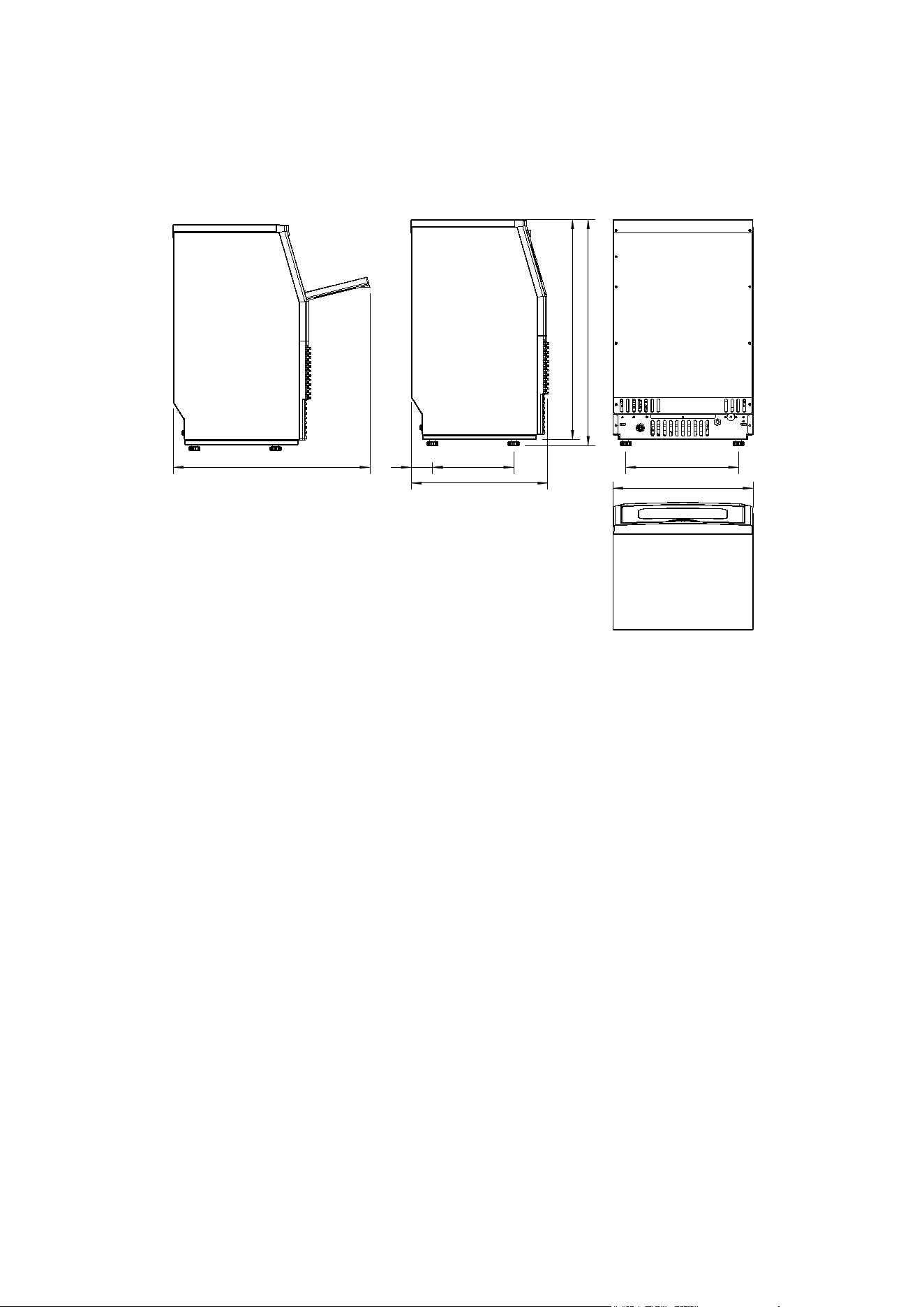
2.05” 7.87”
10.94”
13.58”
13.35”
23.07”
23.7”
GENERAL INFORMATION
1) Dimensions
19.06”
4
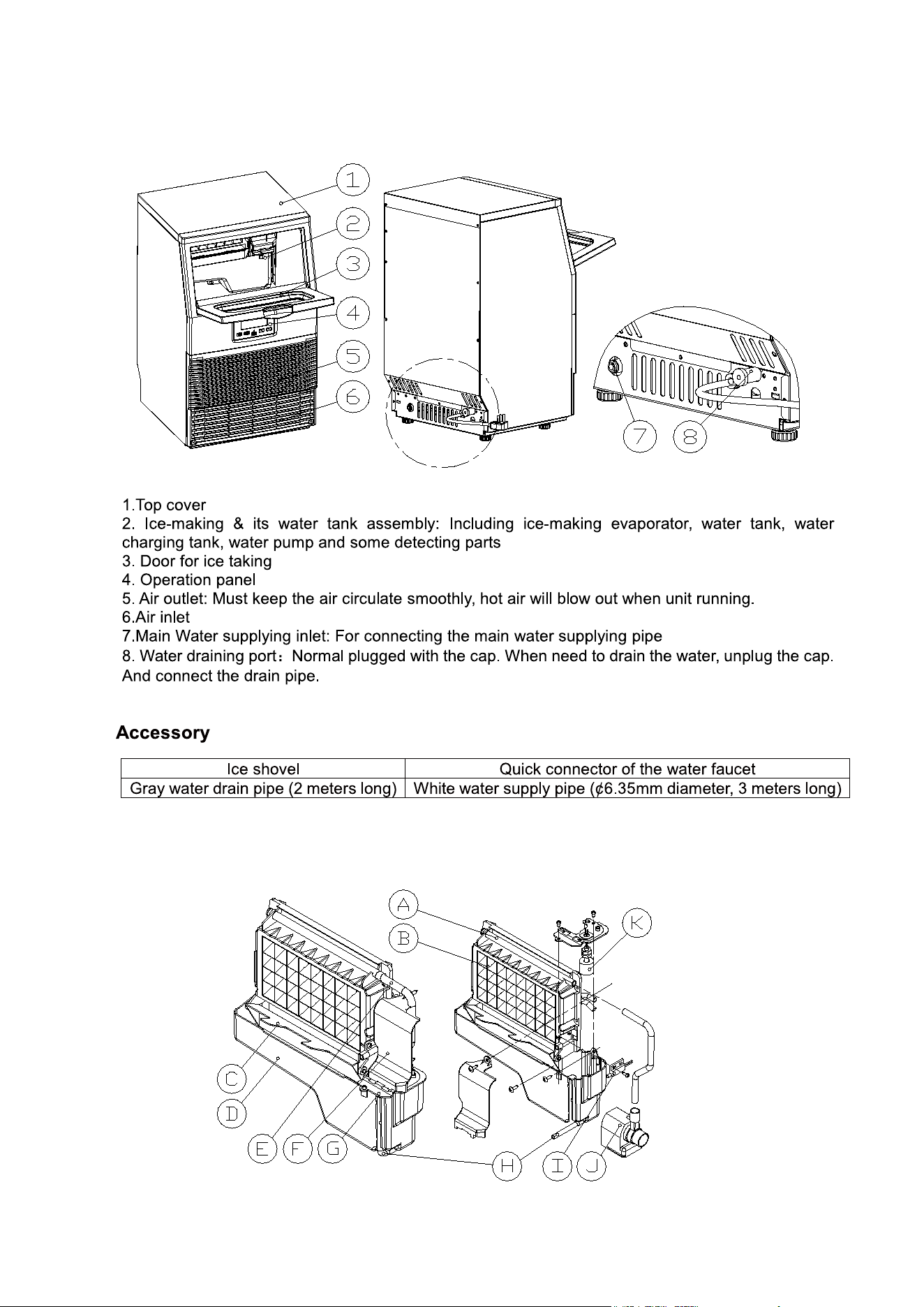
2) Main Unit Construction
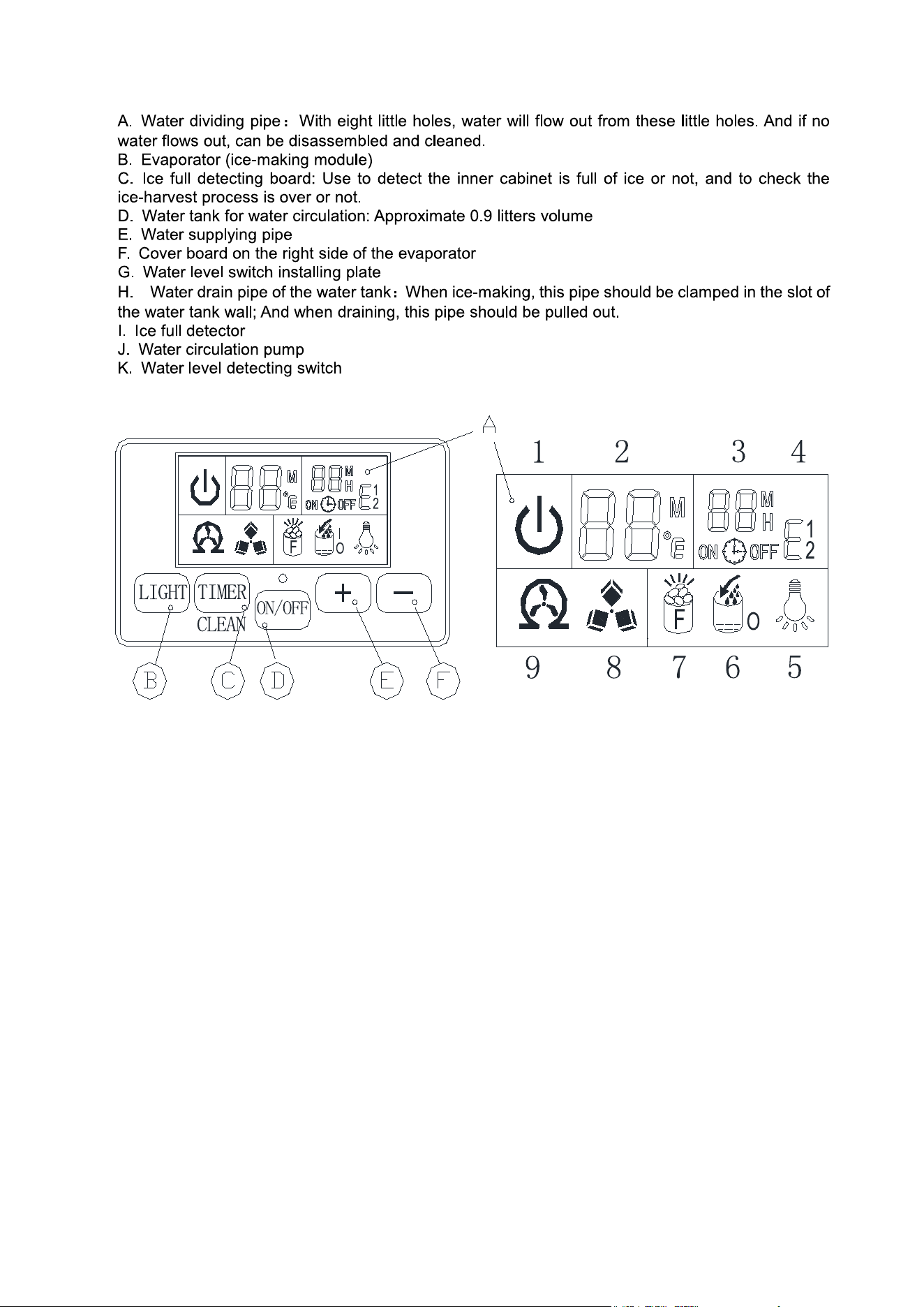
3) Ice-Making And Its Water Tank Parts
5
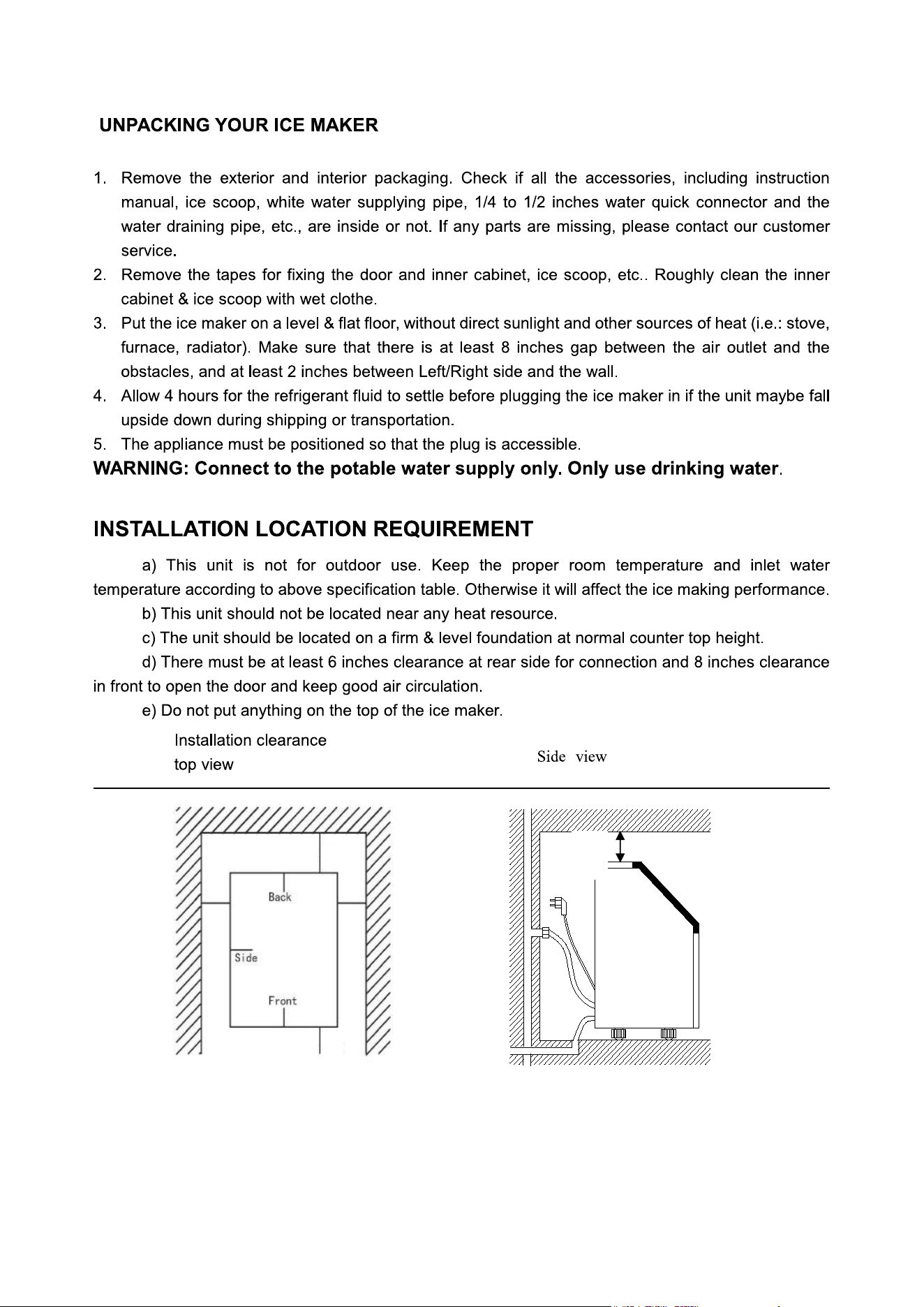
4)Operation Panel
1. ON/OFF state symbol: When the unit is turned off (standby mode), this symbol flashes. When the unit
is working, the symbol keeps lighting on.
2. Ambient temperature & ice-making countdown time display: Display ice-making countdown time with M
as the unit, and display environmental temperature with F as the unit.
3. Ice-making setting & Timer setting display: Display timing setting with the H as unit, and display ice
making time setting with M as unit.
4. Error code display: E1 means faulty ambient temperature sensor. E2 means abnormal ice-making process.
5. Light symbol: The display of this symbol means that the LED light inside the cabinet is on.
6. Water flowing & water shortage symbol: The flashing arrow of this symbol means that the water is flowing
in from main water supply. The whole symbol keeping on means that the machine is short of water.
7. Ice-full symbol: When the ice storing cabinet is full of the ice cube, this symbol keeps on and the unit will
stop ice-making process. The machine will making ice again when you take out the ice.
8. Ice making & harvesting display: The rotating ice cube symbol means the unit is making ice. Flashing
symbol means the unit is harvesting ice cubes.
9. Self-cleaning symbol display
A. LCD display window:
6

B. “Light” button:
Press the button once to turn on or off the internal LED light.
Press the button for longer than 3s, the temperature unit will automatically switch between Fahrenheit (°F)
and Celsius (°C).
C. “TIMER/CLEAN” button:
Quickly press the button once to enter the Timer setting program. Press the button for more than 5 seconds
to enter the Self-cleaning program.
D. “ON/OFF” button:
When the unit is off, press the button to turn on the unit. During self-cleaning or normal ice-making state,
press the button to turn off the unit at once. If the unit is set with a Timer, press the button to cancel the
Timer. During ice-making state, press the button for more than 5 seconds to switch to ice harvest program
by force.
E/F. “+/-"button:
Press "+/-" once to increase/decrease the ice-making time by 1 minute (the default setting is zero) or
increase/decrease the timer time by 1 hour (the default setting is zero).
7
To ensure proper ventilation for your ice maker, the sides and top of the unit must be completely unobstructed
(at least 2 inches free space). The installation should allow the ice maker to be pulled forward for servicing if
necessary.
6”
2”
2”
2”
8”
OPERATING PROCEDURES & MAINTENANCE
8
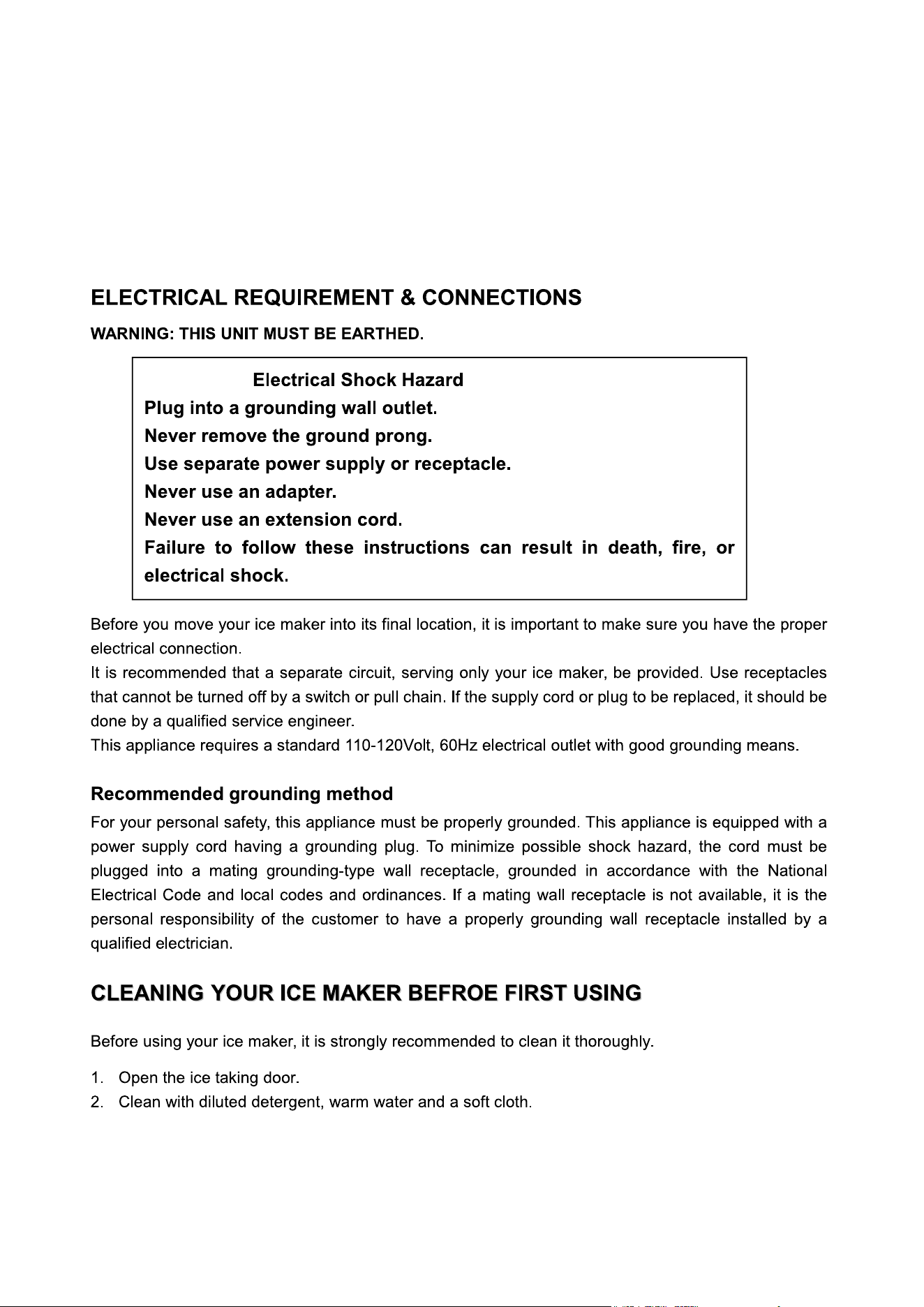
When installing the ice maker, follow the recommended spacing dimensions shown above. Place electrical and
water supplies and drain fixtures in the recommended locations as shown.
Choose a well-ventilated area with temperatures above 50 Fahrenheit and below 90 Fahrenheit. This unit MUST
be installed in an area protected from the elements, such as wind, rain, water spray or drips.
The ice maker requires a continuous water supply with pressure 1-8 Bar. The temperature of the water feeding
into the ice maker should be between 41 Fahrenheit and 77 Fahrenheit for proper operation.
9
10
11
12
13
14
15
16
17
18
19
20


ROWAN ELECTRIC APPLIANCE LLC
8:30am-5:30pm P.S.T.
Monday to Friday
V2
Web: www.electacticshop.com
Email: [email protected]