WHAT’S INCLUDED
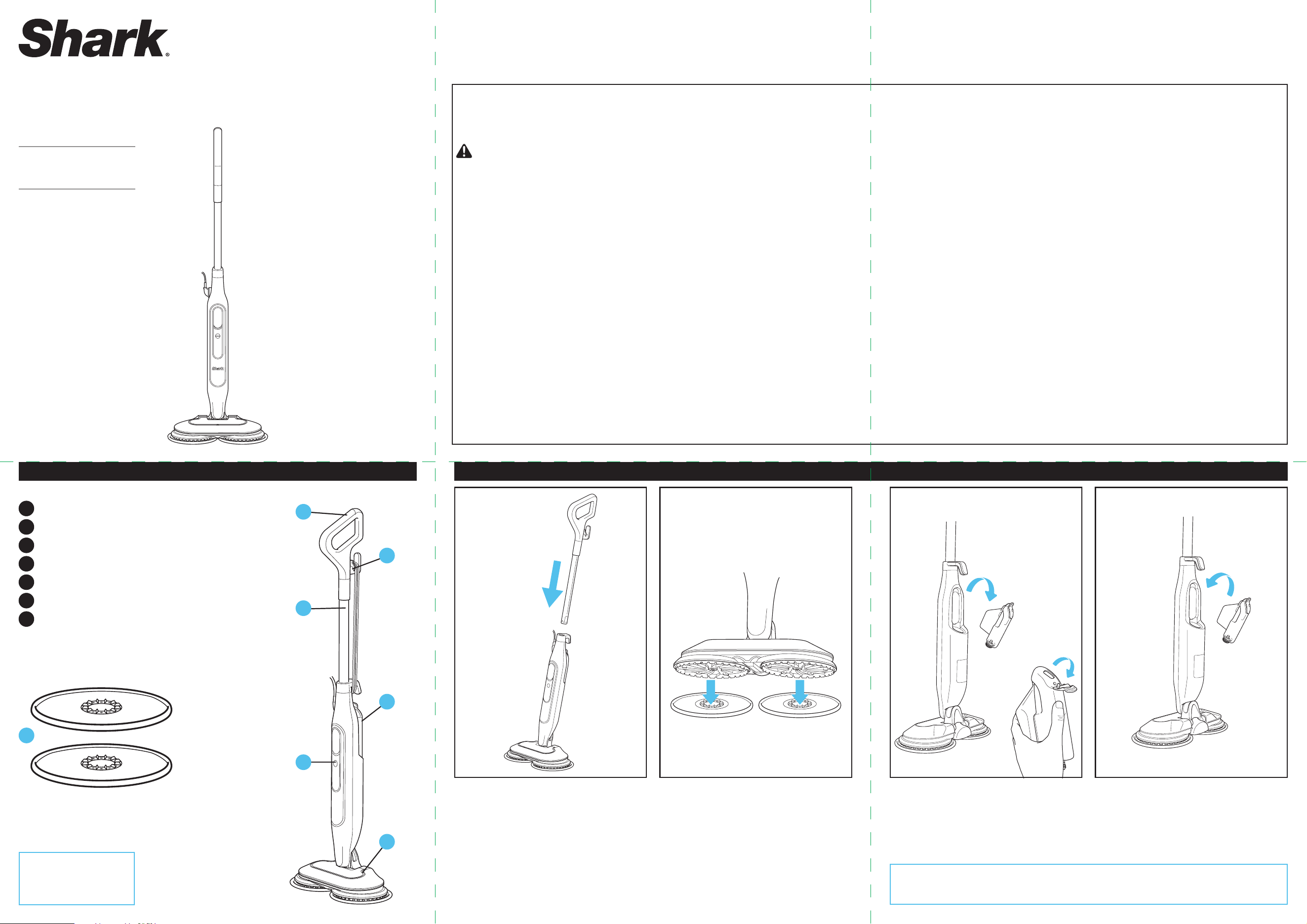
A
Steam Mop Handle
B
Quick-Release Cord Holder
C
Mop Pole
D
Water Tank
E
Mode Buttons
F
Mop Head
G
Dirt Grip® Soft Scrub Pads
1. Insert the Mop Handle into the Steam Mop Body
until it clicks into place.
2. To attach the Dirt Grip Soft Scrub Pads, place
BOTH pads flat on the floor with plastic rings
facing up. Align the unit directly over the plastic
rings on the pads. Gently lower the Mop Head
onto the pads, pressing until the pads are secure.
3. Unplug the steam mop before filling the Water
Tank. To remove the tank, pull it out, away from
the mop body (fig. 1). Pull the top rubber fill
cap back and with cold or normal temperature
WATER ONLY (fig. 2).
4. When the tank is filled, reinstall it by inserting it
back into the mop body.
This steam mop has a polarized plug (one blade is wider than the other). As a safety feature, this plug will fit into a polarized outlet only
one way. If the plug does not fit fully into the outlet, reverse the plug. If it still does not fit, contact a qualified electrician. DO NOT attempt
to defeat this safety feature. It is not recommended to use an extension cord with this product.
WARNING
To reduce the risk of fire, electric
shock, or injury:
GENERAL WARNINGS: WHEN USING YOUR SHARK® STEAM & SCRUB,
BASIC SAFETY PRECAUTIONS SHOULD ALWAYS BE FOLLOWED,
INCLUDING THE FOLLOWING:
1. DO NOT leave the steam mop unattended when plugged in.
ALWAYS unplug the power cord from the electrical outlet when not
in use and beforeservicing.
2. DO NOT use with damaged cord or plug. If steam mop is not
working as it should or has been dropped, damaged, left outdoors,
or dropped into water, return it to SharkNinja Operating LLC for
examination and repair. Incorrect reassembly or repair can cause a
risk of electrical shock or injury when the steam mop is used.
3. To protect against a risk of electric shock, DO NOT immerse the
steam mop in water or any other liquids.
4. DO NOT handle the plug or steam mop with wet hands or operate
it without wearing shoes.
5. DO NOT pull or carry by cord, use cord as a handle, close a door on
cord, or pull cord around sharp edges or corners. DO NOT run steam
mop over cord. Keep cord away from heated surfaces.
6. DO NOT unplug by pulling on power cord. To unplug, grasp the
plug, not the power cord. DO NOT use extension cords or outlets
with inadequate current-carrying capacity.
7. Unplug before servicing.
8. ALWAYS make sure the steam mop is UNPLUGGED when not in use.
9. NEVER fill the water tank or attach the mop head when the steam
mop is plugged into an electrical outlet. Unplug from the electrical
outlet and allow to cool before you fill the mop, or attach or
remove the head.
10. When cleaning the exterior of the steam mop, unplug the power
cord from the electrical outlet and clean the steam mop with a
dry or damp cloth. DO NOT pour water or use alcohol, benzene, or
paint thinner on the steam mop.
11. To avoid circuit overload, DO NOT operate another appliance on the
same socket (circuit) as the steam mop.
12. To avoid scalding injuries, ALWAYS unplug and allow the steam
mop to cool before removing or changing mop heads, accessories,
or Dirt Grip® Soft Scrub pads.
USE WARNINGS
13. When in use, NEVER turn the steam mop over on its side or direct
steam toward people, pets, or plants.
14. Use the system only for its intended use.
15. DO NOT use for space-heating purposes.
16. DO NOT use outdoors.
17. DO NOT allow the steam mop to be used by children. Close
attention is necessary when used near children, pets, or plants.
18. Use only as described in this Owner’s Guide.
19. Use only manufacturer’s recommended accessories.
20. DO NOT put any objects into the steam nozzle openings.
Discontinue use if the steam nozzle is blocked.
21. DO NOT put hands or feet under the steam mop. It gets very hot.
22. Use ONLY on flat, horizontal surfaces. DO NOT use on walls,
counters, or windows.
23. DO NOT use on leather, wax-polished furniture, synthetic fabrics,
velvet, or other delicate, steam-sensitive materials.
24. DO NOT add cleaning solutions, scented perfumes, oils, or any
other chemicals to the water used in the steam mop as this may
damage it or make it unsafe for use. If you live in a hard-water
area, we recommend using distilled water in your steam mop.
25. NEVER leave any Dirt Grip® Soft Scrub pads in one spot while
using or storing for an extended period, as this may damage your
surfaces.
26. You can release the Dirt Grip® Soft Scrub pads after you have
unplugged the steam mop and allowed it to cool.
27. Extreme caution should be exercised when using the steam mop
to clean stairs.
28. NEVER use steam mop without the Dirt Grip® Soft Scrub pads
attached.
29. Keep your work area well lit.
30. Store steam mop indoors in a cool, dry place.
31. Keep hair, loose clothing, fingers, and all parts of body away from
openings and moving parts.
32. DO NOT carry the steam mop while in use.
33. The steam emitted from the steam mop is very hot and may cause
scalding. Please use caution when using the steam mop.
34. ALWAYS test an isolated area of the surface to be cleaned before
proceeding. We also recommend that you check the use and care
instructions from the floor manufacturer.
35. DO NOT scrub any one area for an extended period.
36. DO NOT use the steam mop without attaching the Dirt Grip® Soft
Scrub pads and adding water to the water tank. When you use the
steam mop for the first time, it might take longer than the normal
20 seconds to start steaming.
37. DO NOT use on unsealed wood or unglazed ceramic floors. On
surfaces that have been treated with wax and on some unwaxed
floors, the sheen may be removed by the heat and steam
action. Test an isolated area of the surface to be cleaned before
proceeding. Check the use and care instructions from the floor
manufacturer.
38. To prolong the life of your steam mop, we recommend using
distilled water. Add ONLY water to the tank. Chemicals or cleaning
solutions (including vinegar) may damage the steam mop and
could be unsafe for you and your family.
39. The liquid or steam must not be directed towards equipment
containing electrical components, such as the interior of ovens.
Dispose of contents/container with a licensed waste disposal site
in accordance with the requirements of the local waste disposal
authority.
40. DO NOT use to pick up flammable or combustible liquids, such as
gasoline, or use in areas where they may be present.
IMPORTANT SAFETY INSTRUCTIONS – FOR HOUSEHOLD USE ONLY
SAVE THESE INSTRUCTIONS.
READ ALL INSTRUCTIONS BEFORE USING THIS CARPET CLEANER.
ASSEMBLING YOUR STEAM & SCRUB
Note: For additional
pads, please visit
sharkaccessories.com
Scrubbing & Sanitizing Mop
STEAM & SCRUB
G
D
C
F
A
B
E
Note: Adding chemicals or cleaning solutions (including vinegar) may damage the steam mop
and could be unsafe for you, your family, and your pets.
fig. 1 fig. 2
S8000
Series
ONE (1) YEAR LIMITED WARRANTY
The One (1) Year Limited Warranty applies to purchases made from authorized retailers of SharkNinja Operating LLC. Warranty coverage applies to the
original owner and to the original product only and is not transferable.
SharkNinja warrants that the unit shall be free from defects in material and workmanship for a period of one (1) year from the date of purchase when
it is used under normal household conditions and maintained according to the requirements outlined in the Owner’s Guide, subject to the following
conditions and exclusions:
What is covered by this warranty?
1. The original unit and/or non-wearable parts deemed defective, in SharkNinja’s sole discretion, will be repaired or replaced up to one (1) year from the
original purchase date.
2. In the event a replacement unit is issued, the warranty coverage ends six (6) months following the receipt date of the replacement unit or the
remainder of the existing warranty, whichever is later. SharkNinja reserves the right to replace the unit with one of equal or greater value.
What is not covered by this warranty?
1. Normal wear and tear of wearable parts (such as pads), which require regular maintenance and/or replacement to ensure the proper functioning of
your unit, are not covered by this warranty. Replacement parts are available for purchase at sharkaccessories.com.
2. Any unit that has been tampered with or used for commercial purposes.
3. Damage caused by misuse, abuse, negligent handling, failure to perform required maintenance, or damage due to mishandling in transit.
4. Consequential and incidental damages.
5. Defects caused by repair persons not authorized by SharkNinja. These defects include damages caused in the process of shipping, altering, or repairing
the SharkNinja product (or any of its parts) when the repair is performed by a repair person not authorized by SharkNinja.
6. Products purchased, used, or operated outside North America.
How to get service
If your appliance fails to operate properly while in use under normal household conditions within the warranty period, see the Troubleshooting section of
this Owner’s Guide for possible solutions. For more help, visit sharkclean.com/support to use our online self-help tools. Our Customer Service Specialists
are also available at 1-800-798-7398 to assist with product support and warranty service options, including the possibility of upgrading to our VIP
warranty service options for select product categories. So we may better assist you, please register your product online at registeryourshark.com and
have the product on hand when you call.
SharkNinja will cover the cost for the customer to send in the unit to us for repair or replacement. A fee of $25.95 (subject to change) will be charged
when SharkNinja ships the repaired or replacement unit.
How to initiate a warranty claim
You must call 1-800-798-7398 to initiate a warranty claim. You will need the receipt as proof of purchase. We also ask that you register your product online
at registeryourshark.com and have the product on hand when you call, so we may better assist you. A Customer Service Specialist will provide you with
return and packing instruction information.
How state law applies
This warranty gives you specific legal rights, and you also may have other rights that vary from state to state. Some states do not permit the exclusion or
limitation of incidental or consequential damages, so the above may not apply to you.
TECHNICAL SPECIFICATIONS:
Voltage: 120V, 60 Hz
Watts: 1120W
Water Capacity: 350 ml (11.8 oz.)
TIP: You can find the model and serial numbers on the
QR code label on the bottom of the back of the steam pod.
Benefits of registering your product and creating an account:
• Get easier, faster product support and access to warranty
information
• Access troubleshooting and product care instructions
• Be among the first to know about exclusive product promotions
RECORD THIS INFORMATION
Model Number:
������������������������������������������������������������������������������������������������������������������������������������������������������������������
Serial Number:
�������������������������������������������������������������������������������������������������������������������������������������������������������������������
Date of Purchase:
�������������������������������������������������������������������������������������������������������������������������������������������������������������
(Keep receipt)
Store of Purchase:
�����������������������������������������������������������������������������������������������������������������������������������������������������������
REGISTER YOUR PURCHASE
registeryourshark.com
Scan QR code using
mobile device
CARING FOR YOUR STEAM MOPUSING YOUR STEAM & SCRUB
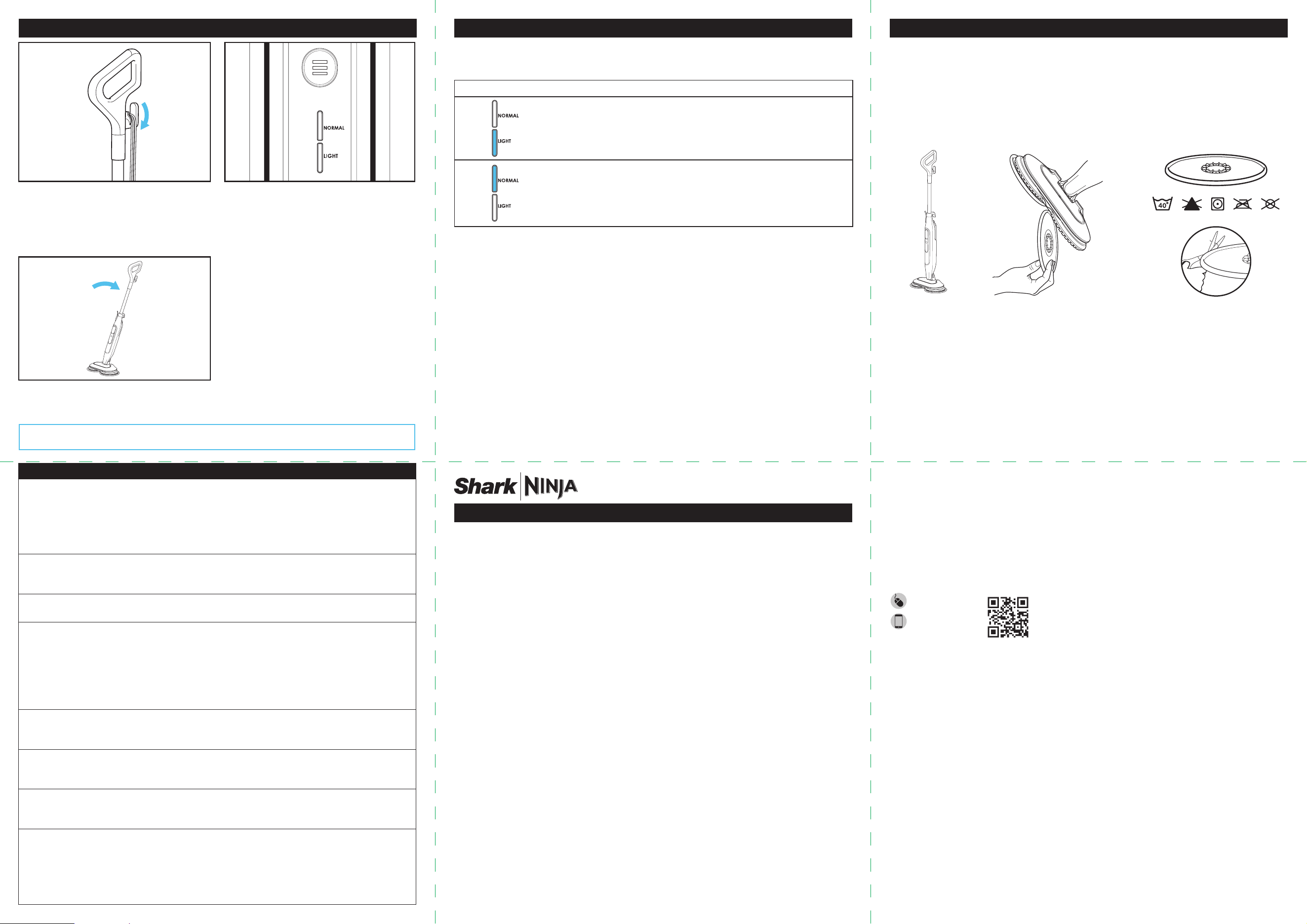
1. Twist the quick-release cord holder to unwrap
the power cord completely. Plug into an electrical
outlet.
2. Once plugged in, the mop will be in Standby
mode and both steam setting lights will blink.
Press the Mode Button to select Light or Normal
mode, then wait 20 seconds to allow steam to
release.
3. Tilt the handle back to activate the spinning pads
and begin scrubbing.
The Shark Steam Mop has 2 unique Intelligent Steam Control settings so you can select the ideal amount of steam to use for each cleaning
task. In NORMAL mode, the pads will spin faster, and more steam will be produced than in LIGHT mode. Press the Mode button to select the
steam level.
SETTING IDEAL FOR THESE SEALED SURFACES RECOMMENDED USAGE
Laminate
Hardwood
Vinyl
Cleaning delicate surfaces
Light cleaning and dusting
Loosening and lifting light dirt
Marble
Tile
Stone
Basic, everyday cleaning.
Cleaning large areas.
Cleaning moderate and heavy-trac areas.
INTELLIGENT STEAM CONTROL®
PROBLEM POSSIBLE REASONS & SOLUTIONS
The steam mop isn’t
producing any steam.
The steam mop should be securely plugged into an electrical outlet. Check your fuse or circuit breaker or
try a dierent outlet.
Make sure the water tank is full, the unit is plugged in, and the mode button is illuminated.
If the settings lights are o, try a dierent electrical outlet.
If the
settings lights
are blinking, press the mode button to select a steam setting.
If the settings lights are illuminated steadily, wait 20 seconds for the unit to warm up
.
The steam mop is
producing intermittent
steam.
For more consistent steam, select the NORMAL setting and make sure the water tank is full.
I can’t select a steam
setting.
Make sure the steam mop is plugged in and the settings lights are flashing.
Floors are cloudy, streaky,
or spotty after steaming.
The Dirt Grip® Soft Scrub Pads might be dirty. Install a clean set of pads. If you washed the Dirt Grip Soft
Scrub Pads with powdered detergent, then they could be damaged and require replacement.
Due to accumulated soap or grease residue, the floor may require several cleanings with the steam mop.
A more stubborn case may require you to rinse the floor with a mix of one part vinegar and two parts
water* (but DO NOT put any cleaning solution into the steam mop's water tank).
*Please consult your flooring manufacturer’s care and maintenance instructions before applying any
cleaning products or solutions.
It’s hard to push or pull
the mop.
Make sure the Dirt Grip Soft Scrub Pads are wet enough to move the mop across the floor after it’s been
running for a few minutes.
Overly dirty pads will make it harder to move the unit. We recommend using clean pads.
Rotating discs are not
turning or are wobbling.
The steam mop may be in the upright position. Tilt the handle down to use the mop.
The Dirt Grip Soft Scrub Pads may not be centered. Turn the power OFF, unplug the steam mop, wait for a
few moments to allow the pads to cool, then reinstall the Dirt Grip Soft Scrub Pads.
The steam mop is vibrating
or wobbling.
The Dirt Grip Soft Scrub Pads are not centered on the rotating discs. Turn the power OFF and unplug the
unit, and wait for the pads to cool. Follow the instructions in the Assembling Your Steam Mop section to
reinstall the pads.
The steam mop turns o on
its own.
If your steam mop shuts o while in use, it likely needs to cool down. Perform the following steps before you
restart cleaning:
1. Turn the steam mop o, unplug it, and remove pads.
2. Allow the unit to cool for a minimum of 30 minutes.
3. Reinstall the pads. Plug in the steam mop, select a steam mode, and
begin cleaning.
AFTER USE AND STORAGE
1. Press the mode button until the settings lights start to blink, indicating that you are in Standby mode. Unplug the cord from the
outlet and place the steam mop into the upright position. Allow it to cool completely (fig. 3).
2. Wait until the pads have cooled completely, then carefully pull them o the discs. Make sure to avoid the sharp edges on the discs
(fig. 4).
3. After the unit has cooled and the steam has been released, empty the water tank before storing.
Open the tank lid and pour the water out into a sink or bathtub. After all the water has drained out, close the lid.
4. To store the steam mop, wait until after it has cooled and the steam has been released. Lock the steam mop in an upright standing
position by raising the handle until the pole is standing straight up, perpendicular to the ground. With the unit locked in the upright
standing position, store it in a dry, protected area (e.g., in a closet or the corner of a room) until next use.
DIRT GRIP® SOFT SCRUB PADS CARE INSTRUCTIONS
Care
Machine-wash the Dirt Grip Soft Scrub Pads separately with warm water, using liquid detergent. Do not clean pads in a dishwasher, as some
detergents may cause the pads to leave streak marks on the floor.
NEVER USE BLEACH, POWDERED DETERGENT, OR FABRIC SOFTENERS
This will damage the Dirt Grip Soft Scrub Pads or leave a coating that will reduce their cleaning performance and absorbency. The pads
should be line-dried or tumble-dried on a low setting, as this will extend the life of the microfiber fabric.
(fig. 5).
Loose fibers can indicate wearing of the microfiber fabric. DO NOT pull the loose fibers, as this can cause the weave to come undone. Simply
trim the loose fibers with scissors. (fig. 6).
Replacement Dirt Grip Soft Scrub Pads
For best cleaning results, we recommend replacing the Dirt Grip Soft Scrub Pads every 3 to 4 months following normal use. As with any fabric,
dirt particles, grease, friction, and repeated washing can cause the fibers to break down, and you may notice an increase in the eort needed to
push or pull the mop.
You can purchase replacement Dirt Grip Soft Scrub Pads and other accessories by visiting sharkclean.com.
TO SANITIZE FLOORS
*
:
1. Attach clean Dirt Grip* Soft Scrub Pads to the mop head.
2. Plug in the unit, tilt the mop handle down towards you, and press the Mode button to select the NORMAL setting. The pads will then
start spinning.
3. Wait at least 20 seconds for the unit to begin producing steam.
4. To ready the unit for sanitization, start mopping with a forward and backward motion on an appropriate sealed hard floor surface. After three
minutes, your unit will be ready to sanitize.
5. Move the mop head slowly and evenly over the area to be sanitized while applying continuous downward pressure. Slowly repeat, making sure
to cover the entire area to be sanitized with at least 15 strokes.
* Sanitization studies were conducted under controlled test conditions. Be certain to follow all directions for use carefully to fully sanitize with
mop head set in the NORMAL mode.
Successful sanitization results have been demonstrated in laboratory studies performed using the following species of bacteria: Pseudomonas
aeruginosa, Staphylococcus aureus, Escherichia coli, Salmonella enterica (typhi), and Klebsiella pneumoniae.
fig. 6
fig. 3 fig. 4
fig. 5
SharkNinja Operating LLC
US: Needham, MA 02494
CAN: Ville St-Laurent, QC H4S 1A7
1-800-798-7398
sharkclean.com
Illustrations may dier from actual product. We are constantly striving to improve our products, therefore the specifications contained herein are subject to
change without notice.
This product may be covered by one or more U.S. patents. See sharkninja.com/patents for more information.
PLEASE READ CAREFULLY AND KEEP FOR FUTURE REFERENCE.
This Owner’s Guide is designed to help you get a complete understanding of your new Shark® steam mop.
© 2024 SharkNinja Operating LLC.
DIRT GRIP, INTELLIGENT STEAM CONTROL, SHARK, and STEAM BLASTER are registered trademarks of SharkNinja Operating LLC.
S8000�Series�IB�MP�Mv8
Note: Make sure both pads are properly installed before using.
