v1 5/21
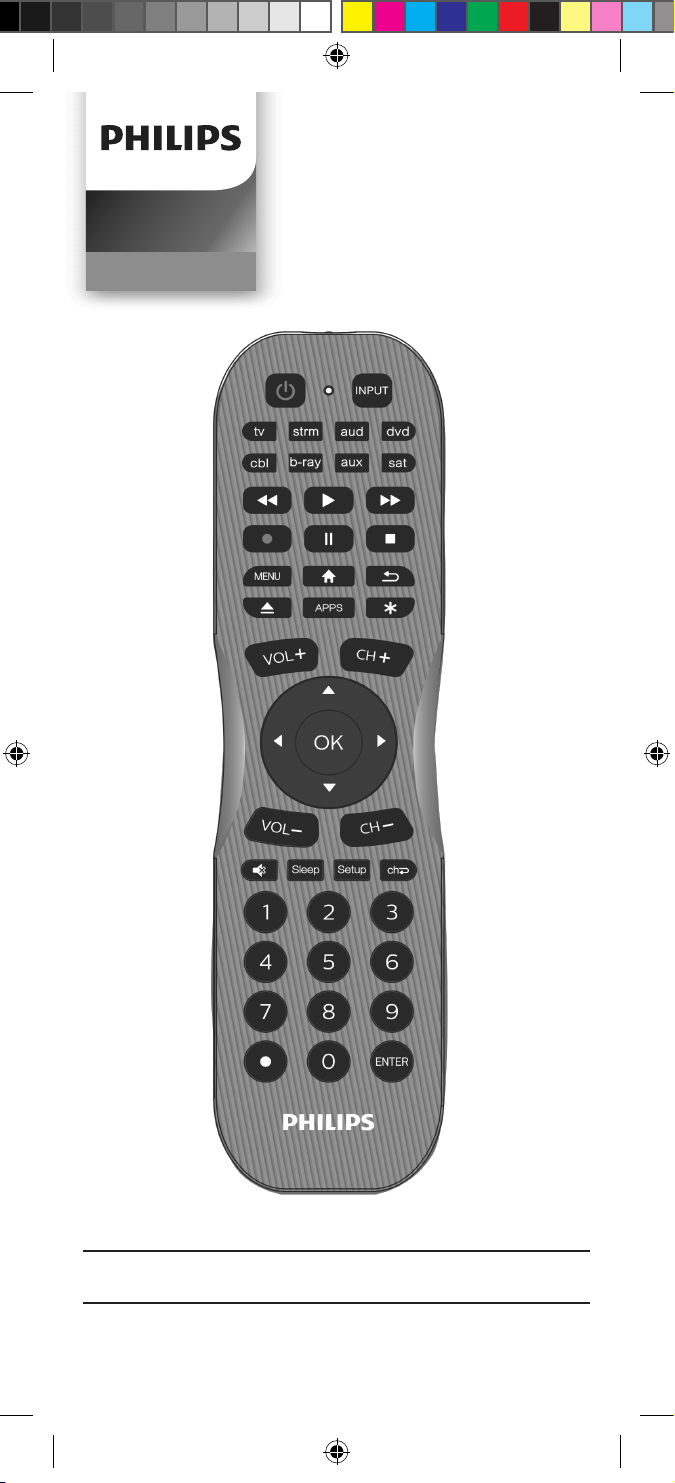
Audio/Video
SRP8121G/27
User manual
SRP8121G_27 EnSp manual v1.indd 1SRP8121G_27 EnSp manual v1.indd 1 5/24/21 6:21 PM5/24/21 6:21 PM
2
Setup ......................................................................... 3
Button Functions ....................................................4
Programming Your Remote ...................................6
Direct Code Entry ..............................................6
Auto Code Search .............................................. 7
Controlling Combo Devices .............................9
Using Your Remote ............................................... 10
Primary Audio Control .................................... 10
Code Identication ........................................... 11
Reset to Factory Settings ................................ 11
Troubleshooting .....................................................12
Warranty ..................................................................13
FCC Statement ...................................................... 14
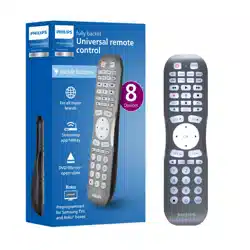
Congratulations on your purchase of this Philips
branded Universal Remote Control. This remote
is capable of operating thousands of audio/
video devices including TVs, Blu-ray™/DVD
players, streaming media players, sound bars,
cable receivers and more!
Table of Contents
Scan this code to
watch a video on how
to set up this remote
www.byjasco.com/remote
SRP8121G_27 EnSp manual v1.indd 2SRP8121G_27 EnSp manual v1.indd 2 5/24/21 6:21 PM5/24/21 6:21 PM

3
Your universal remote requires two (2) AA
batteries (not included). Alkaline batteries are
recommended.
Battery Installation
1. On the back of the remote, pull down on
the textured surface and slide battery cover
downward to remove.
2. Match the (+) and (-) marks on the batteries
to the (+) and (-) marks inside the battery
compartment, then insert two (2) AA
batteries. Be sure to use fresh batteries.
3. Position battery cover slightly below opening
and push upward to lock into place.
NOTE: If your remote stops operating properly,
replace the batteries with new ones.
Battery Precautions
• Do not mix old and new batteries.
• Do not mix alkaline, standard (carbon-
zinc), or rechargeable (Ni-Cd, Ni-MH, etc.)
batteries.
• Always remove old, weak or worn-out
batteries promptly and recycle or dispose of
them in accordance with local and national
regulations.
Battery Saver
Your remote automatically turns o if the
buttons are depressed more than 8 seconds.
This will save your batteries should your remote
get stuck in a place where the buttons remain
depressed (e.g., between the sofa cushions).
Code Saver
You have up to 10 minutes to change the
batteries in your remote without losing the
codes you have programmed.
Setup
SRP8121G_27 EnSp manual v1.indd 3SRP8121G_27 EnSp manual v1.indd 3 5/24/21 6:21 PM5/24/21 6:21 PM
4
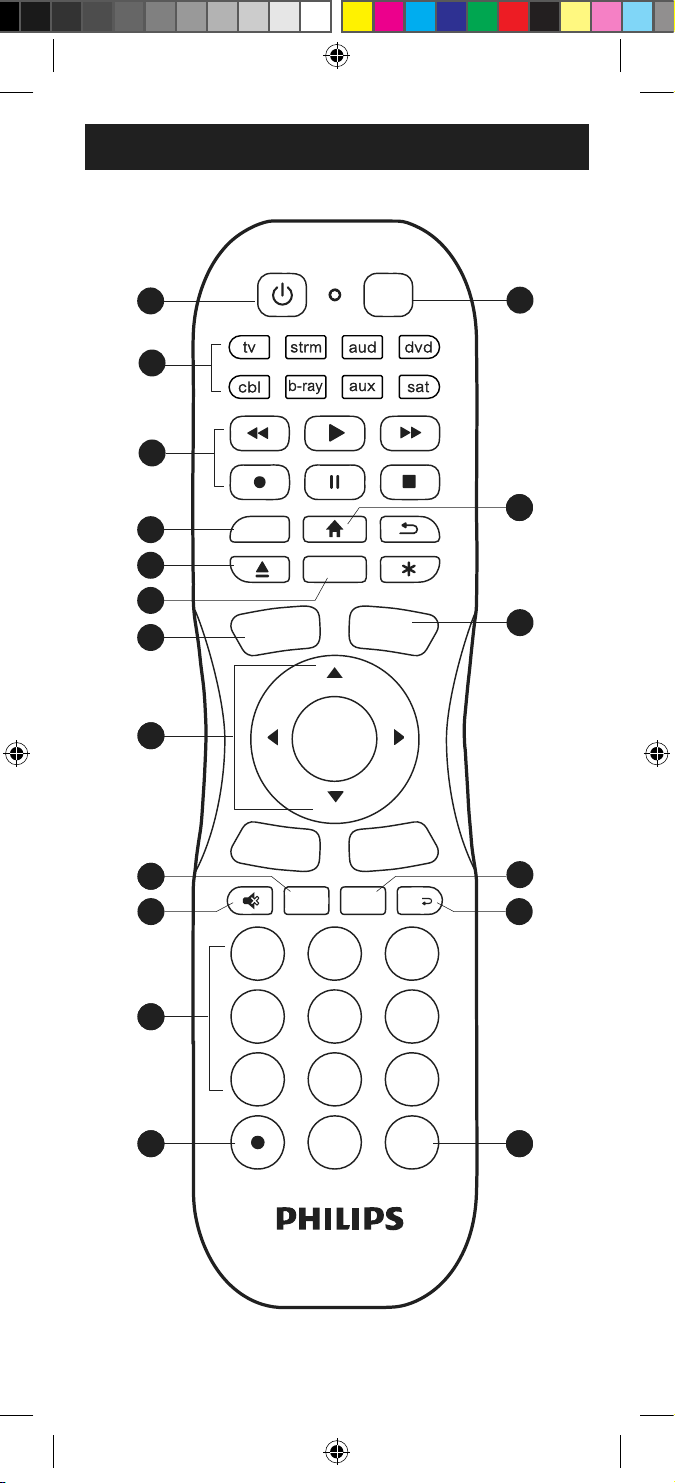
Button Functions
1
2
3
4
5
6
7
8
9
0
ENTER
INPUT
Sleep Setup
APPS
MENU
ch
OK
CH–
CH+
VOL–
VOL+
7
9
14
3
4
10
5
6
1
88
11
12
2
11
13
11 16
11 17 11 18
15
SRP8121G_27 EnSp manual v1.indd 4SRP8121G_27 EnSp manual v1.indd 4 5/24/21 6:21 PM5/24/21 6:21 PM

5
Button Functions
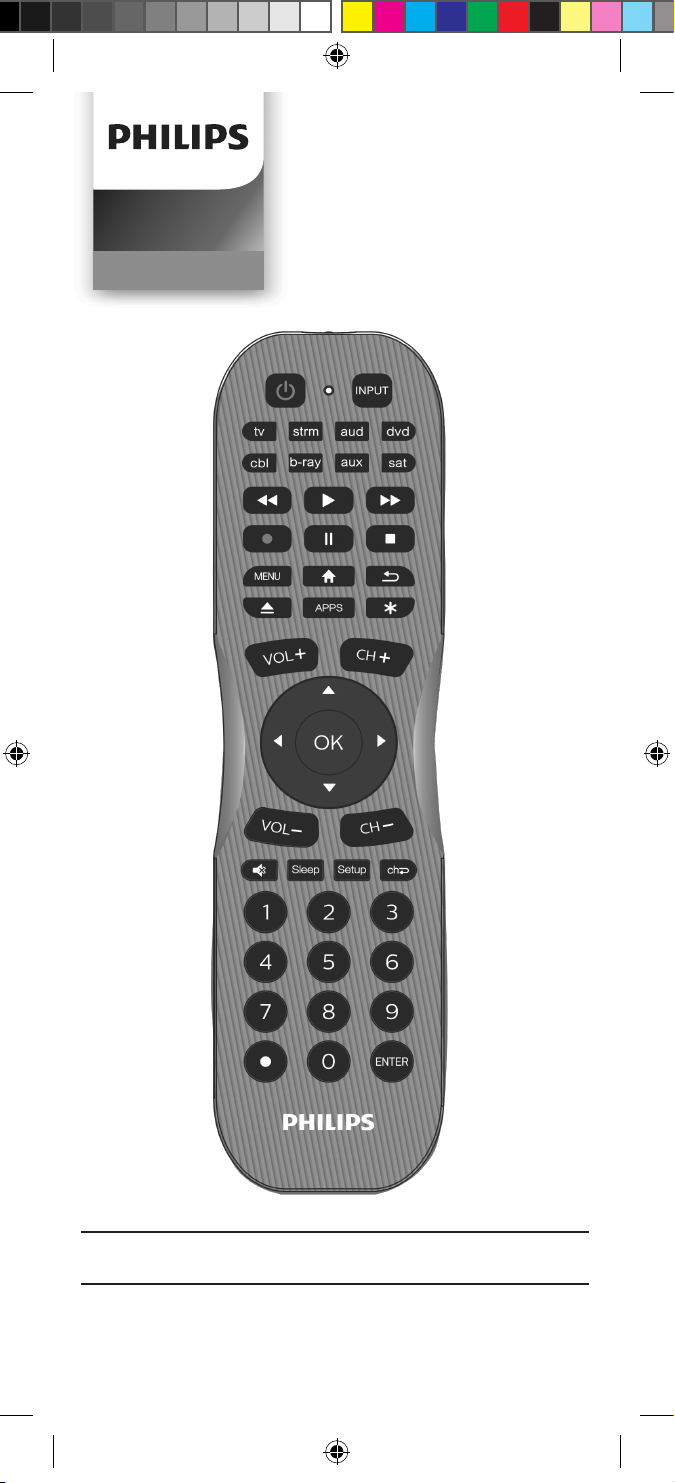
1. Power - Turns devices ON/OFF
2. tv, strm, aud, dvd, cbl, b-ray, aux, sat - Selects
the device to control
3. Record, play, stop, rewind, fast forward, pause
4. Menu - Displays the on-screen menu
5. DVD/Blu-ray
™
open/close - Open/close a
player, or List features on cable/satellite
receivers
6. Streaming App Hotkey - Access top apps like
Netix
®
, Amazon
®
Prime, Hulu
®
and more
7. Input - Selects video inputs
8. Home/Guide - Easily access features on
streaming devices, or Guide on cable/satellite
receivers
9. Channel up/down
10. Volume up/down
11. Ok/up/down/left/right - Navigate and select
menu items for the controlled device
12. Sleep - Sleep timer
13. Mute - Mutes sound
14. Setup - Used to program the remote
15. Last channel - Returns to the previously
selected channel
16. Numbers - Enter numbers for direct channel
selection
17. Dot (•) - Use to select digital channels, e.g., 4.1
18. Enter key (Some devices require Enter to be
pressed after channel selection)
SRP8121G_27 EnSp manual v1.indd 5SRP8121G_27 EnSp manual v1.indd 5 5/24/21 6:21 PM5/24/21 6:21 PM
6
Programming Your Remote
Your remote is designed to control multiple
audio/video devices. To use, you will need to
program the remote for your devices. There are
two dierent methods you can use to program
the remote, Direct Code Entry or Auto Code
Search.
• The Direct Code Entry method is the
recommended approach, as it is the simplest
and quickest process in most cases.
• The Auto Code Search method searches
through all the codes in the remote to nd a
code for your device.
NOTE: This remote comes preprogrammed for
Roku
®
boxes and Samsung TVs. Press tv for
Samsung TVs and strm for Roku boxes.
Direct Code Entry (Recommended)
1. Locate the Code List included
with your remote. Find the section
for the type of device you wish
to control, (for example tv, strm,
aud, etc). Locate the brand of your
device and circle all the remote
codes for the brand.
2. Press and hold down the Setup
button on the remote until the red
light on the remote control turns
on. Release the Setup button.
The red light will remain on.
NOTE: The red light will either be a
small light at the top of the remote or
the power ON/OFF button.
3. Press and release the device button
on the remote for the type of device
you wish to control, (for example
tv, strm, aud, etc). The red light will
blink once and remain on.
NOTE: Any of the device buttons
on the remote can be programmed
to control any of your devices. For
example, you can use the aux device
button on the remote to control a
satellite receiver, digital converter
box, streaming media player or any
device category in the Code List.
1
2
3
4
5
6
7
8
9
0
ENTER
INPUT
Sleep
Setup
APPS
MENU
ch
OK
CH–
CH+
VOL–
VOL+
1
2
3
4
5
6
7
8
9
0
ENTER
INPUT
Sleep Setup
APPS
MENU
ch
OK
CH–
CH+
VOL–
VOL+
SRP8121G_27 EnSp manual v1.indd 6SRP8121G_27 EnSp manual v1.indd 6 5/24/21 6:21 PM5/24/21 6:21 PM
7
Programming Your Remote
4. Use the number buttons on the
remote to enter the rst 4-digit
remote code you circled in the
Code List in Step 1. The red light
will turn o after entering the
fourth digit.
5. Point the remote at the device.
Test the buttons on the remote to
see if the device responds as you
would expect. If the buttons do not
operate the device, return to Step
2 above and use the next code that
you circled for that device.
6. Repeat steps 1 – 5 for each
device you wish to control.
Programming Notes
• Some codes may operate only a few functions
of your device. There may be another code in
the Code List that controls more functions.
Test other codes in the Code List for more
functionality.
• If you do not nd a remote code that works
your device or there are no codes in the
Code List for your device, use the Auto Code
Search method in the next section to program
your remote.
• For combination devices such as a TV/DVD
combo or TV/VCR combo, you may have to
enter a code for each device.
• Write down the remote codes used to
program the remote for future reference.
Auto Code Search
The Auto Code Search is a process where you can
search through all the codes stored in the remote
to nd a code for your device. It is recommended
that you read through all the steps below to
familiarize yourself with the Auto Code Search
before starting the process.
1
2
3
4
5
6
7
8
9
0
ENTER
INPUT
Sleep Setup
APPS
MENU
ch
OK
CH–
CH+
VOL–
VOL+
1
2
3
4
5
6
7
8
9
0
ENTER
INPUT
Sleep Setup
APPS
MENU
ch
OK
CH–
CH+
VOL–
VOL+
SRP8121G_27 EnSp manual v1.indd 7SRP8121G_27 EnSp manual v1.indd 7 5/24/21 6:21 PM5/24/21 6:21 PM
8
Programming Your Remote
1. Manually turn on the device you
wish to control.
NOTE: The Auto Code Search process
cannot be used for devices without
power ON/OFF capability. Use the
Direct Code Entry method in these
cases.
2. Press and hold down the Setup
button on the remote until the red
light on the remote control turns on.
Release the Setup button. The red
light will remain on.
NOTE: The red light will either be a
small light at the top of the remote or
the power ON/OFF button.
3. Press and release the device button
on the remote for the type of device
you wish to control, (for example
tv, strm, aud, etc). The red light will
blink once and remain on.
4. With the remote pointed at the
device, press and release the Power
button on the remote. The remote
will send 10 dierent codes to the
device. The red light will blink once
for each code and remain on after
sending the 10 codes.
Did the device turn o?
• If YES, go to Step 5.
• If NO, repeat Step 4 to test the
next 10 codes.
5. Manually turn the device back on.
6. With the remote pointed at the
device, press and release the
VOL+ button. The remote will re-
send the rst code of the 10 codes
from Step 4. The red light will blink
once and remain on.
Did the device turn o?
• If YES, you have found a code for
the device. Press and release the
same device button you pressed
in Step 3. This will store the code
in the remote. Go to Step 7.
1
2
3
4
5
6
7
8
9
0
ENTER
INPUT
Sleep Setup
APPS
MENU
ch
OK
CH–
CH+
VOL–
VOL+
1
2
3
4
5
6
7
8
9
0
ENTER
INPUT
Sleep
Setup
APPS
MENU
ch
OK
CH–
CH+
VOL–
VOL+
1
2
3
4
5
6
7
8
9
0
ENTER
INPUT
Sleep Setup
APPS
MENU
ch
OK
CH–
CH+
VOL–
VOL+
1
2
3
4
5
6
7
8
9
0
ENTER
INPUT
Sleep Setup
APPS
MENU
ch
OK
CH–
CH+
VOL–
VOL+
SRP8121G_27 EnSp manual v1.indd 8SRP8121G_27 EnSp manual v1.indd 8 5/24/21 6:21 PM5/24/21 6:21 PM
9
Programming Your Remote
• If NO, continue to press and
release the VOL+ button until
the device turns o to test the
other 9 codes from Step 4. Be
sure to wait approximately 3
seconds after each VOL+ button
press to allow the device time
to respond to the code. When
the device turns o, you have
found a code for your device.
Press and release the same
device button pressed in Step
3. This will store the code in the
remote. Go to Step 7.
NOTE:
• The VOL- button can be used to
go backwards through each batch
of 10 codes.
• The red indicator light will ash 2
times after testing the rst or last
code in each batch of 10.
7. Use the remote to turn the device
back on. Test the buttons on
the remote to see if the device
responds as you would expect.
If the buttons do not operate the
device, return to Step 2 and repeat
this process to search for a better
code to operate the device.
8. Repeat this process for each
device you wish to control.
Controlling Combo Devices
Some combo devices (e.g. TV/VCR, TV/DVD,
DVD/VCR, etc.) will require you to set up two
dierent device buttons to control both parts
of the combo device. For example, if you have
a TV/DVD combo, you may need to set up one
code under the tv button to control the TV
and a separate code under the b-ray button
to control the DVD.
1
2
3
4
5
6
7
8
9
0
ENTER
INPUT
Sleep Setup
APPS
MENU
ch
OK
CH–
CH+
VOL–
VOL+
1
2
3
4
5
6
7
8
9
0
ENTER
INPUT
Sleep Setup
APPS
MENU
ch
OK
CH–
CH+
VOL–
VOL+
1
2
3
4
5
6
7
8
9
0
ENTER
INPUT
Sleep Setup
APPS
MENU
ch
OK
CH–
CH+
VOL–
VOL+
SRP8121G_27 EnSp manual v1.indd 9SRP8121G_27 EnSp manual v1.indd 9 5/24/21 6:21 PM5/24/21 6:21 PM
10
Using Your Remote
Primary Audio Control
The Primary Audio Control feature allows you to
select a single device that the volume buttons
always control. For example, the remote can be
in TV mode while the volume buttons control
the volume on your audio receiver or sound bar
instead of your TV.
Enabling the Primary Audio Control
1. Press and hold down the Setup
button on the remote until the red
light on the remote control turns
on. Release the Setup button.
The red light will remain on.
2. Press and release the device
button (tv, aud, etc.) on the remote
for the device you wish to control
the volume.
3. Press and release the Mute
button.
4. Press and release the VOL+
button. The red light will blink
twice and turn o.
Disabling the Primary Audio Control
1. Press and hold down the Setup
button on the remote until the red
light on the remote control turns
on. Release the Setup button. The
red light will remain on.
2. Press and release the device
button (tv, aud, etc.) programmed
to control the Primary Audio
Control feature.
3. Press and release the Mute
button.
4. Press and release the VOL-
button. The red light will blink
twice and turn o.
1
2
3
4
5
6
7
8
9
0
ENTER
INPUT
Sleep
Setup
APPS
MENU
ch
OK
CH–
CH+
VOL–
VOL+
1
2
3
4
5
6
7
8
9
0
ENTER
INPUT
Sleep Setup
APPS
MENU
ch
OK
CH–
CH+
VOL–
VOL+
1
2
3
4
5
6
7
8
9
0
ENTER
INPUT
Sleep Setup
APPS
MENU
ch
OK
CH–
CH+
VOL–
VOL+
1
2
3
4
5
6
7
8
9
0
ENTER
INPUT
Sleep Setup
APPS
MENU
ch
OK
CH–
CH+
VOL–
VOL+
1
2
3
4
5
6
7
8
9
0
ENTER
INPUT
Sleep
Setup
APPS
MENU
ch
OK
CH–
CH+
VOL–
VOL+
1
2
3
4
5
6
7
8
9
0
ENTER
INPUT
Sleep Setup
APPS
MENU
ch
OK
CH–
CH+
VOL–
VOL+
1
2
3
4
5
6
7
8
9
0
ENTER
INPUT
Sleep Setup
APPS
MENU
ch
OK
CH–
CH+
VOL–
VOL+
1
2
3
4
5
6
7
8
9
0
ENTER
INPUT
Sleep Setup
APPS
MENU
ch
OK
CH–
CH+
VOL–
VOL+
SRP8121G_27 EnSp manual v1.indd 10SRP8121G_27 EnSp manual v1.indd 10 5/24/21 6:21 PM5/24/21 6:21 PM
11
Using Your Remote
1. Press and hold down the Setup
button on the remote until the
red light on the remote control
turns on. Release the Setup
button. The red light will
remain on.
2. Press and release the desired
device button (tv, strm, aud,
b-ray) you would like the codefor.
3. Press and release the Enter
button.
4. Press and release the #1 button.
Count the number of times the
remote light ashes. This is the
number corresponding to the
rst digit of the code. Repeat the
process by pressing the #2, #3
and #4 buttons for the remaining
digits.
5. Press and release the Enter
button to exit this mode.
Code Identication
Reset to Factory Settings
1. Press and hold down the Setup
button on the remote until the
red light on the remote control
turns on. Release the Setup button.
The red light will remain on.
2. Press and release the Mute button.
3. Press and release the number #0
button. The red indicator light will
ash twice.
1
2
3
4
5
6
7
8
9
0
ENTER
INPUT
Sleep
Setup
APPS
MENU
ch
OK
CH–
CH+
VOL–
VOL+
1
2
3
4
5
6
7
8
9
0
ENTER
INPUT
Sleep
Setup
APPS
MENU
ch
OK
CH–
CH+
VOL–
VOL+
1
2
3
4
5
6
7
8
9
0
ENTER
INPUT
Sleep Setup
APPS
MENU
ch
OK
CH–
CH+
VOL–
VOL+
1
2
3
4
5
6
7
8
9
0
ENTER
INPUT
Sleep Setup
APPS
MENU
ch
OK
CH–
CH+
VOL–
VOL+
1
2
3
4
5
6
7
8
9
0
ENTER
INPUT
Sleep Setup
APPS
MENU
ch
OK
CH–
CH+
VOL–
VOL+
1
2
3
4
5
6
7
8
9
0
ENTER
INPUT
Sleep Setup
APPS
MENU
ch
OK
CH–
CH+
VOL–
VOL+
1
2
3
4
5
6
7
8
9
0
ENTER
INPUT
Sleep Setup
APPS
MENU
ch
OK
CH–
CH+
VOL–
VOL+
1
2
3
4
5
6
7
8
9
0
ENTER
INPUT
Sleep Setup
APPS
MENU
ch
OK
CH–
CH+
VOL–
VOL+
SRP8121G_27 EnSp manual v1.indd 11SRP8121G_27 EnSp manual v1.indd 11 5/24/21 6:21 PM5/24/21 6:21 PM

12
Remote does not operate your device.
• Make sure the batteries are fresh and
installed correctly.
• Aim the remote directly at your device, and
make sure that there are no obstructions
between the remote and device.
• Make sure you select the appropriate device
on the remote you wish to control; tv for TV
and strm for streaming device.
• Try programming the remote with a dierent
code. See Direct Code Entry section.
• Remote may not be compatible with your
device.
Remote does not operate some features
of your device.
• Sometimes a particular code might operate
a few features but not all. Try programming
the remote with a dierent code from the
Code list. See Direct Code Entry section.
• Remote may not be able to operate all
features of your device or button names
may be dierent than that of your original
remotes.
Troubleshooting
SRP8121G_27 EnSp manual v1.indd 12SRP8121G_27 EnSp manual v1.indd 12 5/24/21 6:21 PM5/24/21 6:21 PM

13
90-Day Limited Warranty
This warrants this product to be free from
manufacturing defects for a period of 90 days
from the original date of consumer purchase.
This warranty is limited to the repair or
replacement of this product only and does
not extend to consequential or incidental
damage to other products that may be used
with this unit. This warranty is in lieu of all
other warranties express or implied. Some
states do not allow limitations on how long an
implied warranty lasts or permit the exclusion
or limitation of incidental or consequential
damages, so the above limitations may not
apply to you. This warranty gives you specic
rights, and you may also have other rights which
vary from state to state.
MADE IN CHINA
Philips and the Philips Shield Emblem are
registered trademarks of Koninklijke Philips N.V.
and are used under license. This product has
been manufactured by and is sold under the
responsibility of Jasco Products Company, and
Jasco Products Company LLC, 10 E. Memorial
Rd., Oklahoma City, OK 73114 is the warrantor
in relation to this product.
This product comes with a 90-day warranty.
Visit www.philips.com/support for vwarranty
details.
Questions? Contact our U.S.-based Consumer
Care at 1-844-816-0320 between 7AM-8PM,
M-F, Central Time.
SRP8121G_27 EnSp manual v1.indd 13SRP8121G_27 EnSp manual v1.indd 13 5/24/21 6:21 PM5/24/21 6:21 PM

14
Suppliers Declaration of Conformity
Model #: SRP8121G/27 | Jasco Products Co.,
10 E. Memorial Rd, Oklahoma City, OK 73114,
www.byjasco.com
This device complies with Part 15 of the FCC rules.
Operation is subject to the following two conditions:
(1) this device may not cause harmful interference,
and (2) this device must accept any interference
received, including interference that may cause
undesired operation.
FCC NOTE: The manufacturer is not responsible for
any radio or TV interference caused by unauthorized
modications to this equipment. Such modications
could void the user’s authority to operate the
equipment.
NOTE: This equipment has been tested and found
to comply with the limits for a Class B digital device,
pursuant to Part 15 of the FCC Rules. These limits are
designed to provide reasonable protection against
harmful interference in a residential installation. This
equipment generates, uses and can radiate radio
frequency energy and, if not installed and used in
accordance with the instructions, may cause harmful
interference to radio communications. However,
there is no guarantee that interference will not occur
in a particular installation. If this equipment does
cause harmful interference to radio or television
reception, which can be determined by turning the
equipment o and on, the user is encouraged to try
to correct the interference by one or more of the
following measures:
— Reorient or relocate the receiving antenna.
— Increase the separation between the equipment
and receiver.
— Connect the equipment into an outlet on a circuit
dierent from that to which the receiver is
connected.
— Consult the dealer or an experienced radio/
TV technician for help.
ICES-3(B)/NMB-3(B).
FCC Statement
SRP8121G_27 EnSp manual v1.indd 14SRP8121G_27 EnSp manual v1.indd 14 5/24/21 6:21 PM5/24/21 6:21 PM
15
Manual de usuario
Audio/Video
SRP8121G/27
SRP8121G_27 EnSp manual v1.indd 15SRP8121G_27 EnSp manual v1.indd 15 5/24/21 6:21 PM5/24/21 6:21 PM
16
Conguración .......................................................... 17
Funciones de los botones ................................... 18
Programación del control remoto ......................20
Entrada directa de códigos ............................20
Búsqueda automática de códigos ................22
Control de dispositivos integrados ..............24
Uso del control remoto ........................................ 24
Control del audio principal ............................24
Identicación de códigos ...............................25
Restablecimiento de la conguración
de fábrica ..........................................................26
Resolución de problemas .................................... 27
Garantía ..................................................................28
Declaración de la Comisión Federal
de Comunicaciones (FCC) ...................................29
Felicitaciones por haber comprado este control
remoto universal marca Philips. Este control
remoto puede operar miles de dispositivos de
audio/video, como TV, reproductores de DVD/
Blu-ray
™
, reproductores de multimedia en línea,
barras de sonido, receptores de cable, etc.
Tabla de contenido
Escanee este código para ver un
video acerca de cómo congurar
este control remoto
www.byjasco.com/remote
SRP8121G_27 EnSp manual v1.indd 16SRP8121G_27 EnSp manual v1.indd 16 5/24/21 6:21 PM5/24/21 6:21 PM

17
El control remoto universal usa dos (2) pilas
AA (no incluidas). Se recomienda usar pilas
alcalinas.
Instalación de las pilas
1. En la parte posterior del control remoto,
presione hacia abajo sobre la supercie
texturada y deslice la tapa de las pilas para
quitarla.
2. Inserte dos (2) pilas AA de modo tal que
las marcas (+) y (-) de las pilas coincidan
con las marcas (+) y (-) en el interior del
compartimento. Asegúrese de usar pilas
nuevas.
3. Coloque la tapa de las pilas levemente por
debajo de la abertura y presione hacia arriba
hasta que quede trabada.
NOTA: Si el control remoto deja de funcionar
normalmente, coloque pilas nuevas.
Precauciones respecto de las pilas
• No utilice pilas usadas y nuevas al
mismo tiempo.
• NO combine el uso de pilas alcalinas
comunes (de tipo carbono-cinc) o
recargables (Ni-Cd, Ni-MH, etc.)
• Siempre quite las pilas gastadas o agotadas
de inmediato y recíclelas o elimínelas de
conformidad con las normas locales y
nacionales.
Ahorrador de pilas
El control remoto se apaga automáticamente si
los botones permanecen presionados por más
de ocho (8) segundos. De esta forma evitará
que se consuma la energía de las pilas si el
control queda atascado en algún lugar con los
botones presionados (p. ej., entre los cojines
del sofá).
Protector de códigos
Tiene hasta 10 minutos para cambiar las pilas
del control remoto sin perder los códigos que
haya programado.
Conguración
SRP8121G_27 EnSp manual v1.indd 17SRP8121G_27 EnSp manual v1.indd 17 5/24/21 6:21 PM5/24/21 6:21 PM
18
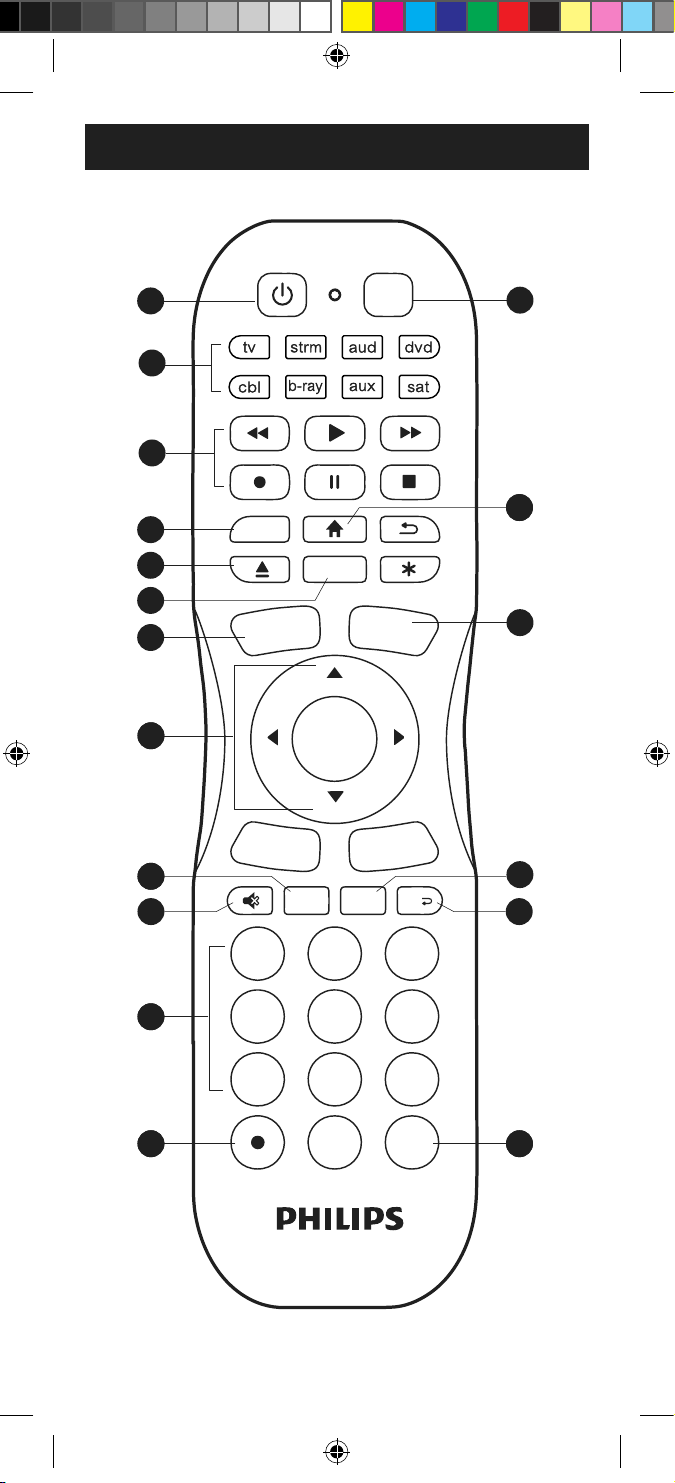
Funciones de los botones
1
2
3
4
5
6
7
8
9
0
ENTER
INPUT
Sleep Setup
APPS
MENU
ch
OK
CH–
CH+
VOL–
VOL+
7
9
14
3
4
10
5
6
1
88
11
12
2
11
13
11 16
11 17 11 18
15
SRP8121G_27 EnSp manual v1.indd 18SRP8121G_27 EnSp manual v1.indd 18 5/24/21 6:21 PM5/24/21 6:21 PM

19
Funciones de los botones
1. Power (Encendido) - enciende/apaga
(on/o) los dispositivos
2. tv, strm, aud, dvd, cbl, b-ray, aux, sat -
selecciona el dispositivo que desea controlar
3. Record (grabar), play (reproducir), stop
(detener), rewind (rebobinar), fast forward
(avanzar), pause (pausa)
4. Menu (menú) - muestra el menú en pantalla
5. DVD/Blu-ray
™
open/close (abrir/cerrar DVD/
Blu-ray
™
) - abre o cierra un reproductor, o
enumera las características de los receptores
de cable/satélite
6. Streaming App Hotkey (Tecla de acceso rápido
para aplicaciones de transmisión de contenido
web) - Acceda a las principales aplicaciones
como Netix
®
, Amazon
®
Prime, Hulu
®
y más¡
7. Input (entrada) - selecciona las entradas
de video
8. Home/Guide (inicio/guía) - acceso fácil a las
funciones de dispositivos de transmisión en
línea o a las guías de los receptores de
cable/satélite
9. Channel Up/Down (subir/bajar canal)
10. Volume Up/Down (subir/bajar volumen)
11. OK (aceptar)/Up (arriba)/Down (abajo)/
Left (izquierda)/Right (derecha) - Navegar
y seleccionar elementos de menú para el
dispositivo controlado
12. Sleep (dormir) - tiempo de dormir
13. Mute (silenciar) - desactiva el sonido
14. Setup (Conguración) - usa para programar
el control remoto
15. Last Channel (último canal) - permite volver
al canal previamente seleccionado
16. Numbers (números) - permiten ingresar
números para seleccionar el canal en
forma directa
17. Dot (•) (punto) - Se usa para seleccionar los
canales digitales, p. ej., 4.1
18. Enter - en algunos dispositivos se deberá
presionar enter una vez seleccionado el
canal deseado
SRP8121G_27 EnSp manual v1.indd 19SRP8121G_27 EnSp manual v1.indd 19 5/24/21 6:21 PM5/24/21 6:21 PM
20
Programación del control remoto
El control remoto está diseñado para controlar
varios dispositivos de audio/video. Para
usarlo, deberá programarlo para controlar los
dispositivos. Existen dos formas de programar
el control remoto: Entrada directa de códigos o
Búsqueda automática de códigos.
• La Entrada directa de códigos es el método
recomendado ya que en la mayoría de los
casos es el más sencillo y el más rápido.
• El método Búsqueda automática de códigos
busca por todos los códigos en el control
remoto para encontrar un código para el
dispositivo.
NOTA: Este control remoto está programada
para las cajas Roku
®
y los televisores Samsung.
Presione TV para los televisores Samsung y STR
para las cajas Roku.
Entrada directa de códigos (recomendado)
1. Busque la Lista de códigos incluida
con el control remoto. Encuentre la
sección para el tipo de dispositivo
que desea controlar (por ejemplo,
tv, strm, aud, etc). Ubique la marca
de su dispositivo y marque los
códigos remotos correspondientes.
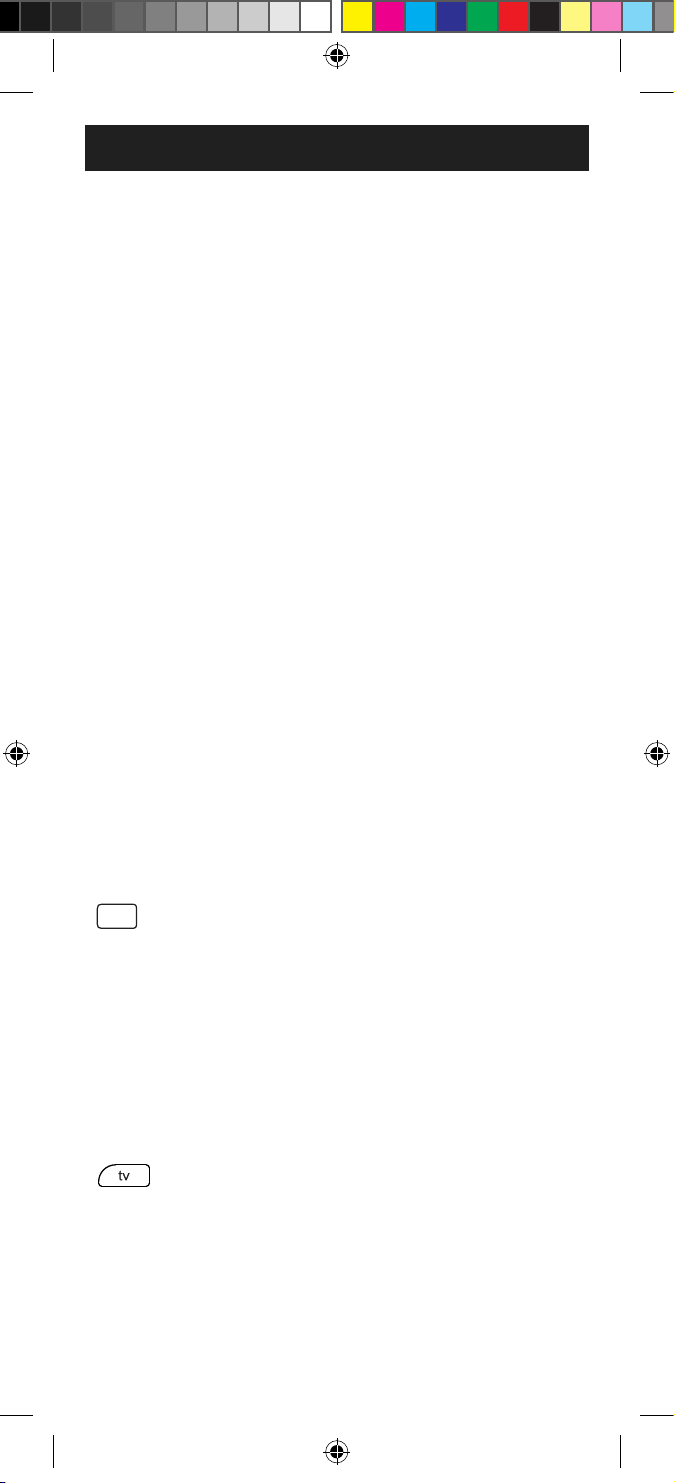
2. Presione y mantenga presionado el
botón Setup (conguración) hasta
que la luz roja del control remoto
se encienda. Suelte el botón
Setup (conguración). La luz roja
permanecerá encendida.
NOTA: La luz roja será una luz
pequeña ubicada en la parte superior
del control remoto o el botón de
encendido/apagado.
3. Presione y suelte el botón del
dispositivo en el control remoto
del dispositivo que desea controlar
(por ejemplo, tv, strm, aud, etc).
La luz roja parpadeará una vez y
permanecerá encendida.
NOTA: Cualquiera de los botones
de dispositivo en el control remoto
puede ser programado para controlar
1
2
3
4
5
6
7
8
9
0
ENTER
INPUT
Sleep
Setup
APPS
MENU
ch
OK
CH–
CH+
VOL–
VOL+
1
2
3
4
5
6
7
8
9
0
ENTER
INPUT
Sleep Setup
APPS
MENU
ch
OK
CH–
CH+
VOL–
VOL+
SRP8121G_27 EnSp manual v1.indd 20SRP8121G_27 EnSp manual v1.indd 20 5/24/21 6:21 PM5/24/21 6:21 PM
21
Programación del control remoto
cualquiera de los dispositivos. Por
ejemplo, puede usar el botón auxiliar
del control remoto para controlar un
receptor de satélite, decodicador
digital, reproductor multimedia
en línea o cualquier categoría de
dispositivos que aparezca en la lista
de códigos.
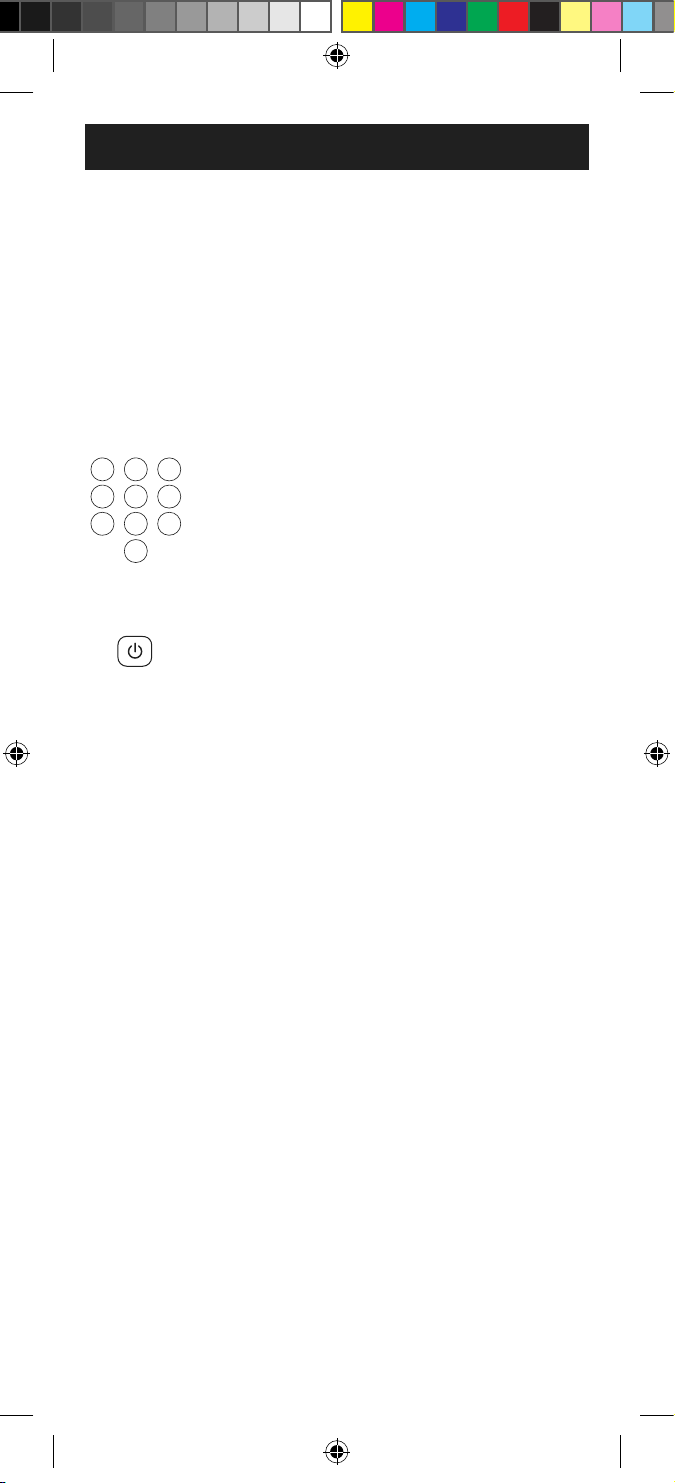
4. Use los botones de números del
control remoto para introducir el
primer código remoto de 4 dígitos
que marcó en la Lista de códigos
en el Paso 1. La luz roja se apagará
después de introducir el cuarto
dígito.
5. Apunte el control remoto hacia el
dispositivo. Pruebe los botones en
el control para ver si el dispositivo
responde como debería. Si los
botones no accionan el dispositivo,
vuelva al Paso 2 y use el siguiente
código que marcó para dicho
dispositivo.
6. Repita estos pasos para cada
dispositivo que desee controlar.
Notas de programación
• Es posible que algunos códigos solo ejecuten
algunas funciones del dispositivo. Es probable
que haya otro código en la Lista de códigos
que ejecute más funciones. Pruebe otros
códigos de la Lista de códigos para obtener
más funcionalidades.
• Si no encuentra un código que funcione con
su dispositivo o en la Lista de códigos no
aparecen códigos para el dispositivo, use el
método Búsqueda automática de códigos en
la siguiente sección para programar el control
remoto.
• En el caso de dispositivos combinados, como
combinación TV/DVD o TV/ VCR, quizá deba
ingresar un código para cada dispositivo.
• Escriba los códigos que sirven para programar
el dispositivo para consultas futuras.
1
2
3
4
5
6
7
8
9
0
ENTER
INPUT
Sleep Setup
APPS
MENU
ch
OK
CH–
CH+
VOL–
VOL+
1
2
3
4
5
6
7
8
9
0
ENTER
INPUT
Sleep Setup
APPS
MENU
ch
OK
CH–
CH+
VOL–
VOL+
SRP8121G_27 EnSp manual v1.indd 21SRP8121G_27 EnSp manual v1.indd 21 5/24/21 6:21 PM5/24/21 6:21 PM
22
Programación del control remoto
1. Encienda manualmente el
dispositivo que desea controlar.
NOTA: El proceso Búsqueda
automática de códigos no se puede
usar para dispositivos sin la capacidad
de encendido/apagado. En estos
casos, use el método Entrada directa
de códigos.
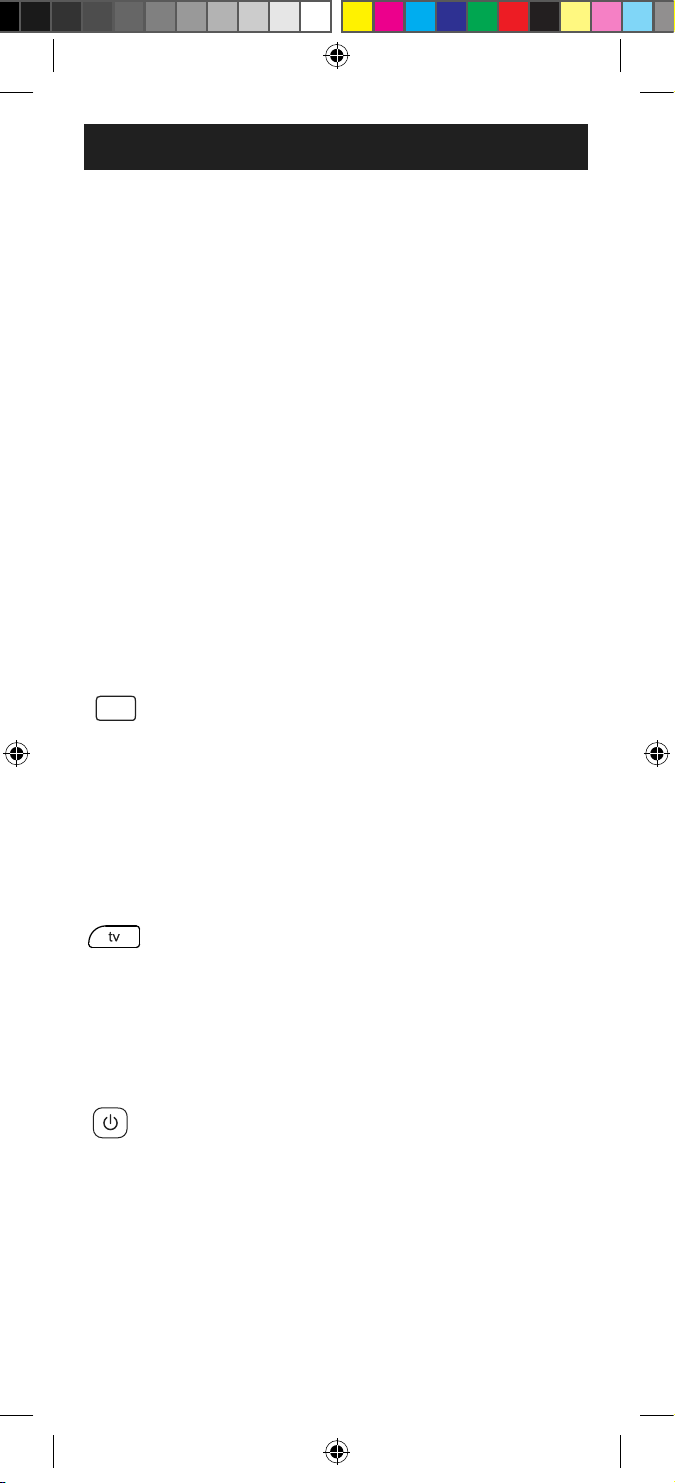
2. Presione y mantenga presionado
el botón Setup (conguración)
hasta que la luz roja del control
remoto se encienda. Suelte el botón
Setup (conguración). La luz roja
permanecerá encendida.
NOTA: La luz roja será una luz
pequeña ubicada en la parte superior
del control remoto o el botón de
encendido/apagado.
3. Presione y suelte el botón del
dispositivo en el control remoto
del dispositivo que desea controlar
(por ejemplo, tv, strm, aud, etc).
La luz roja parpadeará una vez y
permanecerá encendida.
4. Apunte el control remoto hacia el
dispositivo y presione y suelte el
botón Power en el control. El control
enviará 10 códigos diferentes al
dispositivo. La luz roja parpadeará
una vez para cada código y perman-
ecerá encendida después de enviar
los 10 códigos.
¿Se apagó el dispositivo?
• Si la respuesta es Armativa,
proceda al Paso 5.
Búsqueda automática de códigos
La Búsqueda automática de códigos es un
proceso mediante el cual puede buscar por
todos los códigos almacenados en el control
remoto para encontrar un código para el
dispositivo. Se recomienda que lea todos los
pasos a continuación para familiarizarse con
la Búsqueda automática de códigos antes de
comenzar el proceso.
1
2
3
4
5
6
7
8
9
0
ENTER
INPUT
Sleep Setup
APPS
MENU
ch
OK
CH–
CH+
VOL–
VOL+
1
2
3
4
5
6
7
8
9
0
ENTER
INPUT
Sleep
Setup
APPS
MENU
ch
OK
CH–
CH+
VOL–
VOL+
1
2
3
4
5
6
7
8
9
0
ENTER
INPUT
Sleep Setup
APPS
MENU
ch
OK
CH–
CH+
VOL–
VOL+
SRP8121G_27 EnSp manual v1.indd 22SRP8121G_27 EnSp manual v1.indd 22 5/24/21 6:21 PM5/24/21 6:21 PM
23
Programación del control remoto
• Si la respuesta es Negativa, repita
el Paso 4 para probar los 10
códigos siguientes.
5. Vuelva a encender manualmente el
dispositivo.
6. Apunte el control remoto hacia el
dispositivo y presione y suelte el
botón VOL+. El control remoto volverá
a enviar el primero de los 10 códigos
del Paso 4. La luz roja parpadeará una
vez y permanecerá encendida.
¿Se apagó el dispositivo?
• Si la respuesta es Armativa,
signica que ha encontrado
un código para el dispositivo.
Presione y suelte el mismo botón
de dispositivo que oprimió en el
Paso 3. Esta acción almacenará
el código en el control remoto.
Proceda al Paso 7.
• Si la respuesta es Negativa, siga
oprimiendo y soltando el botón
VOL+ hasta que se apague el
dispositivo para probar los otros
9 códigos del Paso 4. Asegúrese
de esperar aproximadamente tres
(3) segundos después de cada
presión del botón VOL+ para que
el dispositivo tenga tiempo de
responder al código. Cuando se
apague el dispositivo, signica que
ha encontrado un código. Presione
y suelte el mismo botón que
oprimió en el Paso 3. Esta acción
almacenará el código en el control
remoto. Proceda al Paso 7.
NOTA:
• El botón VOL- se puede usar para
retroceder por cada conjunto de
10 códigos.
• La luz roja parpadeará dos veces
después de probar el primero o el
último código de cada conjunto
de 10.
1
2
3
4
5
6
7
8
9
0
ENTER
INPUT
Sleep Setup
APPS
MENU
ch
OK
CH–
CH+
VOL–
VOL+
1
2
3
4
5
6
7
8
9
0
ENTER
INPUT
Sleep Setup
APPS
MENU
ch
OK
CH–
CH+
VOL–
VOL+
SRP8121G_27 EnSp manual v1.indd 23SRP8121G_27 EnSp manual v1.indd 23 5/24/21 6:21 PM5/24/21 6:21 PM
24
7. Use el control remoto para volver a
encender el dispositivo. Pruebe los
botones en el control para ver si el
dispositivo responde como debería.
Si los botones no accionan el
dispositivo, vuelva al Paso 2 y repita
este proceso para buscar un código
que sea mejor.
8. Repita este proceso para cada
dispositivo que desee controlar.
Control de dispositivos integrados
En algunos dispositivos integrados (p. ej., TV/
VCR, TV/DVD, DVD/VCR, etc.) deberá programar
dos botones diferentes para controlar ambas
partes del dispositivo. Por ejemplo, si tiene un
TV/DVD integrados, es probable que tenga que
programar un código en el botón de tv para
controlar la parte del TV Y un código separado
en el botón de b-ray para controlar la parte
del DVD.
Programación del control remoto
Uso del control remoto
Control del audio principal
La característica de control del audio principal
le permite seleccionar un solo dispositivo
que siempre es controlado por los botones
de volumen. Por ej., el control remoto puede
estar en el modo de televisor mientras que los
botones de volumen controlan el volumen del
receptor de audio o la barra de sonido en lugar
del televisor.
Habilitar el control del audio principal
1. Presione y mantenga presionado
el botón Setup (conguración)
hasta que la luz roja del control
remoto se encienda. Suelte el botón
Setup (conguración). La luz roja
permanecerá encendida.
2. En el control remoto, presione y
suelte el botón (tv, aud, etc.) que
corresponda al tipo de dispositivo
1
2
3
4
5
6
7
8
9
0
ENTER
INPUT
Sleep Setup
APPS
MENU
ch
OK
CH–
CH+
VOL–
VOL+
1
2
3
4
5
6
7
8
9
0
ENTER
INPUT
Sleep
Setup
APPS
MENU
ch
OK
CH–
CH+
VOL–
VOL+
1
2
3
4
5
6
7
8
9
0
ENTER
INPUT
Sleep Setup
APPS
MENU
ch
OK
CH–
CH+
VOL–
VOL+
SRP8121G_27 EnSp manual v1.indd 24SRP8121G_27 EnSp manual v1.indd 24 5/24/21 6:21 PM5/24/21 6:21 PM
25
Deshabilitar el control del
audio principal
1. Presione y mantenga presionado
el botón Setup (conguración)
hasta que la luz roja del control
remoto se encienda. Suelte el botón
Setup (conguración). La luz roja
permanecerá encendida.
2. Presione y suelte el botón del
dispositivo (tv, aud, etc.) que se
haya programado para controlar la
función de volumen maestro.
3. Presione y suelte el botón Mute
(silenciar).
4. Presione y suelte el botón
VOL- . La luz roja parpadeará dos
veces y se apagará.
Uso del control remoto
para el que desea controlar el
volumen.
3. Presione y suelte el botón Mute
(silenciar).
4. Presione y suelte el botón
VOL+. La luz roja parpadeará dos
veces y se apagará.
1. Presione y mantenga presionado
el botón Setup (conguración)
hasta que la luz roja del control
remoto se encienda. Suelte el
botón Setup (conguración). La
luz roja permanecerá encendida.
2. Presione y suelte el botón
correspondiente al dispositivo
(tv, strm, aud, etc.) para el que
desee obtener el código.
3. Presione y suelte el botón Enter.
4. Presione y suelte botón 1. Cuente
la cantidad de veces que la luz
del control remoto parpadea.
Este el número correspondiente
Identicación de códigos
1
2
3
4
5
6
7
8
9
0
ENTER
INPUT
Sleep
Setup
APPS
MENU
ch
OK
CH–
CH+
VOL–
VOL+
1
2
3
4
5
6
7
8
9
0
ENTER
INPUT
Sleep
Setup
APPS
MENU
ch
OK
CH–
CH+
VOL–
VOL+
1
2
3
4
5
6
7
8
9
0
ENTER
INPUT
Sleep Setup
APPS
MENU
ch
OK
CH–
CH+
VOL–
VOL+
1
2
3
4
5
6
7
8
9
0
ENTER
INPUT
Sleep Setup
APPS
MENU
ch
OK
CH–
CH+
VOL–
VOL+
1
2
3
4
5
6
7
8
9
0
ENTER
INPUT
Sleep Setup
APPS
MENU
ch
OK
CH–
CH+
VOL–
VOL+
1
2
3
4
5
6
7
8
9
0
ENTER
INPUT
Sleep Setup
APPS
MENU
ch
OK
CH–
CH+
VOL–
VOL+
1
2
3
4
5
6
7
8
9
0
ENTER
INPUT
Sleep Setup
APPS
MENU
ch
OK
CH–
CH+
VOL–
VOL+
1
2
3
4
5
6
7
8
9
0
ENTER
INPUT
Sleep Setup
APPS
MENU
ch
OK
CH–
CH+
VOL–
VOL+
1
2
3
4
5
6
7
8
9
0
ENTER
INPUT
Sleep Setup
APPS
MENU
ch
OK
CH–
CH+
VOL–
VOL+
SRP8121G_27 EnSp manual v1.indd 25SRP8121G_27 EnSp manual v1.indd 25 5/24/21 6:21 PM5/24/21 6:21 PM
26
Uso del control remoto
Restablecimiento de la conguración
de fábrica
al primer dígito del código. Repita
el proceso presionando los botones
2, 3 y 4 para los dígitos restantes.
5. Presione y suelte el botón Enter
para salir de este modo.button to
exit this mode.
1. Presione y mantenga presionado
el botón Setup (conguración)
hasta que la luz roja del control
remoto se encienda. Suelte el botón
Setup (conguración). La luz roja
permanecerá encendida.
2. Presione y suelte el botón Mute
(silenciar).
3. Presione y suelte el botón 0.
La luz indicadora roja parpadeará
dos veces.
1
2
3
4
5
6
7
8
9
0
ENTER
INPUT
Sleep Setup
APPS
MENU
ch
OK
CH–
CH+
VOL–
VOL+
1
2
3
4
5
6
7
8
9
0
ENTER
INPUT
Sleep
Setup
APPS
MENU
ch
OK
CH–
CH+
VOL–
VOL+
1
2
3
4
5
6
7
8
9
0
ENTER
INPUT
Sleep Setup
APPS
MENU
ch
OK
CH–
CH+
VOL–
VOL+
1
2
3
4
5
6
7
8
9
0
ENTER
INPUT
Sleep Setup
APPS
MENU
ch
OK
CH–
CH+
VOL–
VOL+
SRP8121G_27 EnSp manual v1.indd 26SRP8121G_27 EnSp manual v1.indd 26 5/24/21 6:21 PM5/24/21 6:21 PM

27
El control remoto no funciona con
su dispositivo.
• Asegúrese de que las pilas sean nuevas y
estén bien colocadas.
• Apunte a su dispositivo directamente con el
control remoto y asegúrese de que no haya
ninguna obstrucción entre el control remoto
y el dispositivo.
• Asegúrese de seleccionar en el control
remoto el dispositivo correcto que desea
controlar, por ejemplo: tv para el televisor y
strm para el dispositivo de transmisión.
• Intente programar el control remoto usando
un código distinto. Consulte la sección
Entrada directa de códigos.
• Es posible que el control remoto no sea
compatible con su dispositivo.
Algunas funciones de su dispositivo no
funciona con el control remoto.
• A veces un código puede servir para algunas
funciones del dispositivo, pero no todas.
Intente programar el control remoto con
un código distinto de la lista de códigos.
Consulte la sección Entrada directa de
códigos.
• Es posible que el control remoto no sirva
para todas las funciones de su dispositivo o
bien que algunos nombres de los botones
sean diferentes de los del control remoto
original.
Resolución de problemas
SRP8121G_27 EnSp manual v1.indd 27SRP8121G_27 EnSp manual v1.indd 27 5/24/21 6:21 PM5/24/21 6:21 PM

28
Este documento garantiza que este producto
está libre de defectos de fabricación durante un
período de noventa (90) días desde la fecha de
compra original del consumidor. Esta garantía
está limitada a la reparación o el reemplazo
de este producto solamente y no cubre los
daños consecuentes o incidentales a otros
productos que puedan usarse con esta unidad.
Esta garantía prevalecerá sobre cualquier otra
garantía expresa o implícita. Algunos estados no
permiten la aplicación de limitaciones respecto
de la duración de una garantía implícita o no
permiten la exclusión o limitación de la cláusula
sobre daños incidentales o consecuentes, por
lo que las limitaciones mencionadas pueden
no aplicarse en su caso. Esta garantía le otorga
derechos especícos y es posible que tenga
otros derechos que pueden variar según el
estado en el que vive.
HECHO EN CHINA
Philips y el emblema de escudo Philips son
marcas registradas de Koninklijke Philips N.V.
y se usan bajo licencia. Este producto ha sido
fabricado y se comercializa bajo responsabilidad
de Jasco Products Company y Jasco Products
Company LLC, 10 E. Memorial Rd., Oklahoma
City, OK 73114, es el garante en relación a
este producto.
Este producto tiene una garantía de noventa
(90) días. Visite www.philips.com/support para
conocer los detalles de la garantía.
¿Tiene preguntas? Póngase en contacto con
nuestro servicio de atención al consumidor de
EE. UU. al 1-844-816-0320, de lunes a viernes,
de 7 a. m. a 8 p. m. (hora estándar del centro).
Garantía limitada de 90 días
SRP8121G_27 EnSp manual v1.indd 28SRP8121G_27 EnSp manual v1.indd 28 5/24/21 6:21 PM5/24/21 6:21 PM

29
DECLARACIÓN DE LA COMISIÓN FEDERAL DE
COMUNICACIONES (FCC):
Declaración de conformidad del proveedor
Modelo #: SRP8121G/27 | Jasco Products Co.,
10 E. Memorial Rd, Oklahoma City, OK 73114
www.byjasco.com
Este dispositivo cumple con las Especicaciones del
apartado 15 de las normas de la FCC y con las
especicaciones de las normas radioeléctricas (RSS) del
Ministerio de Industria de Canadá aplicables a aparatos
exentos de licencia. El funcionamiento está sujeto a las
siguientes dos condiciones: (1) este dispositivo no debe
provocar interferencia perjudicial, y (2) este dispositivo
debe aceptar toda interferencia que reciba, incluso la que
pudiera causar un funcionamiento no deseado.
NOTA DE LA FCC: El fabricante no se hace responsable
de ninguna interferencia de radio o TV ocasionada por
modicaciones no autorizadas efectuadas a este equipo.
Dichas modicaciones podrían anular la autoridad del
usuario para utilizar el equipo.
NOTA: Este equipo ha sido probado y cumple con los
límites para aparatos digitales de Clase B, de conformidad
con el apartado 15 de las normas de la FCC. Estos límites
están diseñados para proveer protección razonable
contra interferencias perjudiciales en una instalación
residencial. Este equipo genera, usa y puede irradiar
energía de radiofrecuencias y, si no se instala y usa según
las instrucciones, puede provocar interferencia perjudicial
a las radiocomunicaciones. No obstante, no hay garantías
de que no ocurrirá interferencia en una instalación en
particular. Si este equipo provoca interferencia perjudicial
a la recepción de radio o televisión, lo que puede
determinarse encendiendo y apagando el equipo, se
recomienda que el usuario intente corregir la interferencia
por medio de la implementación de una o más de las
siguientes medidas:
— Reorientar o reubicar la antena receptora.
— Incrementar la separación entre el equipo y el receptor.
— Conectar el equipo a un tomacorriente de un circuito
diferente del circuito al que está conectado el receptor.
— Consultar al distribuidor o a un técnico con experiencia
en radio/televisión para solicitar asistencia.
ICES-3(B)/NMB-3(B).
Declaración de la FCC
SRP8121G_27 EnSp manual v1.indd 29SRP8121G_27 EnSp manual v1.indd 29 5/24/21 6:21 PM5/24/21 6:21 PM

SRP8121G_27 EnSp manual v1.indd 30SRP8121G_27 EnSp manual v1.indd 30 5/24/21 6:21 PM5/24/21 6:21 PM
