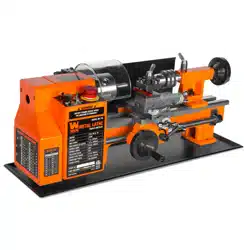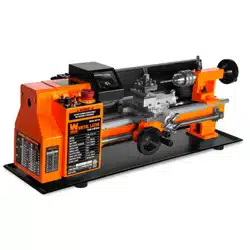
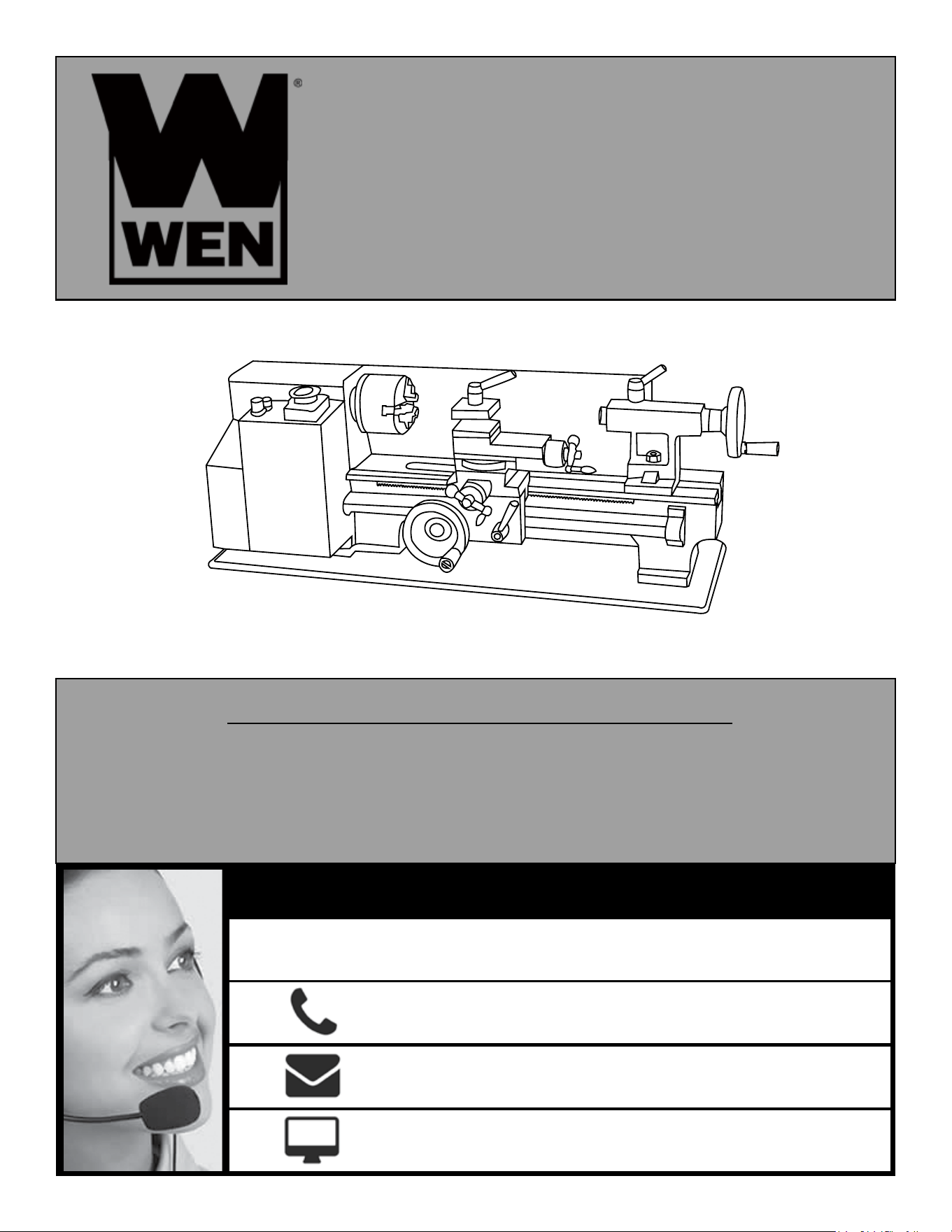
Model # 3455
VARIABLE SPEED
7 X 12 IN. METAL LATHE
bit.ly/wenvideo
Your new tool has been engineered and manufactured to WEN’s highest standards for dependability,
ease of operation, and operator safety. When properly cared for, this product will supply you years
of rugged, trouble-free performance. Pay close attention to the rules for safe operation, warnings,
and cautions. If you use your tool properly and for its intended purpose, you will enjoy years of
safe, reliable service.
IMPORTANT:
NEED HELP? CONTACT US!
Have product questions? Need technical support?
Please feel free to contact us at:
800-232-1195
WENPRODUCTS.COM
(M-F 8AM-5PM CST)

TABLE OF CONTENTS
Technical Data
2
3
4
6
7
8
9
19
20
22
25
General Safety Rules
Specific Safety Rules For Metal Lathes
Electrical Information
Know Your Lathe
Assembly
Troubleshooting Guide
Exploded View & Parts List
Warranty
TECHNICAL DATA
Model Number:
Motor:
Output Power:
Swing Over Bed:
Distance Between Centers:
Spindle Bore:
Cross Slide Travel:
Compound Slide Travel
Speeds:
Spindle Taper:
Tailstock Taper:
Longitudinal Feed Rate:
Screw Threads:
Weight:
3455
110V, 60Hz, 4A
250W
7 in. (180 mm)
12 in. (300 mm)
.79 in. (20 mm)
2-1/2 in. (65 mm)
2.16 in. (55 mm)
100 to 2500 RPM
MT3
MT2
.1 to .2 mm
15 to 52 TPI in 18 steps
81 lbs.
2
Maintenance
Operation

3
GENERAL SAFETY RULES
Safety is a combination of common sense, staying alert and knowing how your item works. SAVE THESE SAFE-
TY INSTRUCTIONS.
WARNING: To avoid mistakes and serious injury, do not plug in your tool until the following
steps have been read and understood.
1. READ and become familiar with this entire instruction manual. LEARN the tool’s applications, limitations, and
possible hazards.
2. AVOID DANGEROUS CONDITIONS. Do not use power tools in wet or damp areas or expose them to rain.
Keep work areas well lit.
3. DO NOT use power tools in the presence of flammable liquids or gases.
4. ALWAYS keep your work area clean, uncluttered, and well lit. DO NOT work on floor surfaces that are slippery
with sawdust or wax.
5. KEEP BYSTANDERS AT A SAFE DISTANCE from the work area, especially when the tool is operating.
NEVER allow children or pets near the tool.
6. DO NOT FORCE THE TOOL to do a job for which it was not designed.
7. DRESS FOR SAFETY. Do not wear loose clothing, gloves, neckties, or jewelry (rings, watches, etc.) when op-
erating the tool. Inappropriate clothing and items can get caught in moving parts and draw you in. ALWAYS wear
non-slip footwear and tie back long hair.
8. WEAR A FACE MASK OR DUST MASK to fight the dust produced by operation.
WARNING: Dust generated from certain materials can be hazardous to your health. Always oper-
ate the tool in a well-ventilated area and provide for proper dust removal. Use dust collection sys-
tems whenever possible.
9. ALWAYS remove the power cord plug from the electrical outlet when making adjustments, changing parts,
cleaning, or working on the tool.
10. KEEP GUARDS IN PLACE AND IN WORKING ORDER.
11. AVOID ACCIDENTAL START-UPS. Make sure the power switch is in the OFF position before plugging in
the power cord.
12. REMOVE ADJUSTMENT TOOLS. Always make sure all adjustment tools are removed from the tool before
turning it on.
13. NEVER LEAVE A RUNNING TOOL UNATTENDED. Turn the power switch to OFF. Do not leave the
tool until it has come to a complete stop.
14. NEVER STAND ON A TOOL. Serious injury could result if the tool tips or is accidentally hit. DO NOT store
anything above or near the tool.

4
15. DO NOT OVERREACH. Keep proper footing and balance at all times. Wear oil-resistant rubber-soled foot-
wear. Keep the floor clear of oil, scrap, and other debris.
16. MAINTAIN TOOLS PROPERLY. ALWAYS keep tools clean and in good working order. Follow instruc-
tions for lubricating and changing accessories.
17. CHECK FOR DAMAGED PARTS. Check for alignment of moving parts, jamming, breakage, improper
mounting, or any other conditions that may affect the tool’s operation. Any part that is damaged should be properly
repaired or replaced before use.
18. MAKE THE WORKSHOP CHILDPROOF. Use padlocks and master switches and ALWAYS remove start-
er keys.
19. DO NOT operate the tool if you are under the influence of drugs, alcohol, or medication that may affect your
ability to properly use the tool.
20. USE SAFETY GOGGLES AT ALL TIMES that comply with ANSI Z87.1. Normal safety glasses only have
impact resistant lenses and are not designed for safety. Wear a face or dust mask when working in a dusty environ-
ment. Use ear protection such as plugs or muffs during extended periods of operation.
GENERAL SAFETY RULES
SPECIFIC RULES FOR METAL LATHES
1. This lathe is designed and intended for use by properly trained and experienced personnel only. If you are not
familiar with the proper and safe operation of a lathe, do not use it until proper training and knowledge have been
acquired.
2. Always wear eye protection and a face shield/dust mask when using the lathe.
3. Make sure all tools, chisels and accessories are sharp enough for the task at hand before using them. Always use
the right tool at the correct speed and feed rate.
4. Turn off and unplug the machine before doing any cleaning or maintenance. Use a brush to remove chips or
debris. Never use your hands to remove excess material and debris.
5. Check the workpiece carefully for inconsistencies or obstructions. These types of blemishes may cause a safety
risk during turning.
6. Rotate the workpiece by hand to check clearance before turning the machine on.
7. Select the appropriate speed for the task at hand. Start at a low speed and allow the lathe to ramp up to the operat-
ing speed before engaging any chisels, tools or other carving accessories.
8. Never stop a rotating workpiece with your hand.
9. When turning between centers, make sure the headstock and tailstock are tight and snug against the workpiece.
10. Always use a brush or rag to clear away chips from the workpiece. Using your hand can cause serious injury.

11. Always remove the key from the chuck jaws before operation.
12. Always wear a full face mask. If a tool or workpiece breaks off, it can create a hazard to users and onlookers.
13. Always use the right cutting tool. An improper tool could break or cause unwanted strain on the machine.
14. Never attempt to stop the lathe with your hand. You will lose your hand.
15. Always use the proper feed rate for your workpiece. An overly fast feed rate can damage the lathe or the work-
piece.
16. Secure the workpiece properly, make sure the chuck is tight and secure on the workpiece before beginning to
turn. A loose workpiece can shoot out and severely injure you or anyone around.
17. Use a tailstock to support long work stock. Anything more than 2.5 times as long as it is thick needs the tailstock
to support it.
18. Never operate the lathe with damaged parts.
19. Never turn a workpiece at RPMs that are too high for the work material. This can cause the cutting tool to break
and launch off, injuring you or a bystander.
20. Never reverse motor direction while the machine is running.
21. Never change the lead screw feed direction while the machine is running.
22. Always ensure proper clearance between the workpiece and the cross slide, compound slide, and tool post.
23. Always disengage automatic feed after a cutting pass, even if it is the final cut. You can forget and hurt yourself
upon next use.
24. Always tie up long hair. Do not wear any loose/hanging clothing. Even aprons can be hazards when improperly
secured.
25. Remove any and all jewelry, rings, watches, etc. to avoid getting them caught in the lathe.
SPECIFIC RULES FOR LATHES
ELECTRICAL INFORMATION
GROUNDING INSTRUCTIONS
IN THE EVENT OF A MALFUNCTION OR BREAKDOWN, grounding provides the path of least resistance
for an electric current and reduces the risk of electric shock. This tool is equipped with an electric cord that has an
equipment grounding conductor and a grounding plug. The plug MUST be plugged into a matching outlet that is
properly installed and grounded in accordance with ALL local codes and ordinances.
DO NOT MODIFY THE PLUG PROVIDED. If it will not fit the outlet, have the proper outlet installed by a
licensed electrician.
IMPROPER CONNECTION of the equipment grounding conductor can result in electric shock. The conduc-
tor with the green insulation (with or without yellow stripes) is the equipment grounding conductor. If repair or
replacement of the electric cord or plug is necessary, DO NOT connect the equipment grounding conductor to a
live terminal.
CHECK with a licensed electrician or service personnel if you do not com-
pletely understand the grounding instructions or whether the tool is properly
grounded.
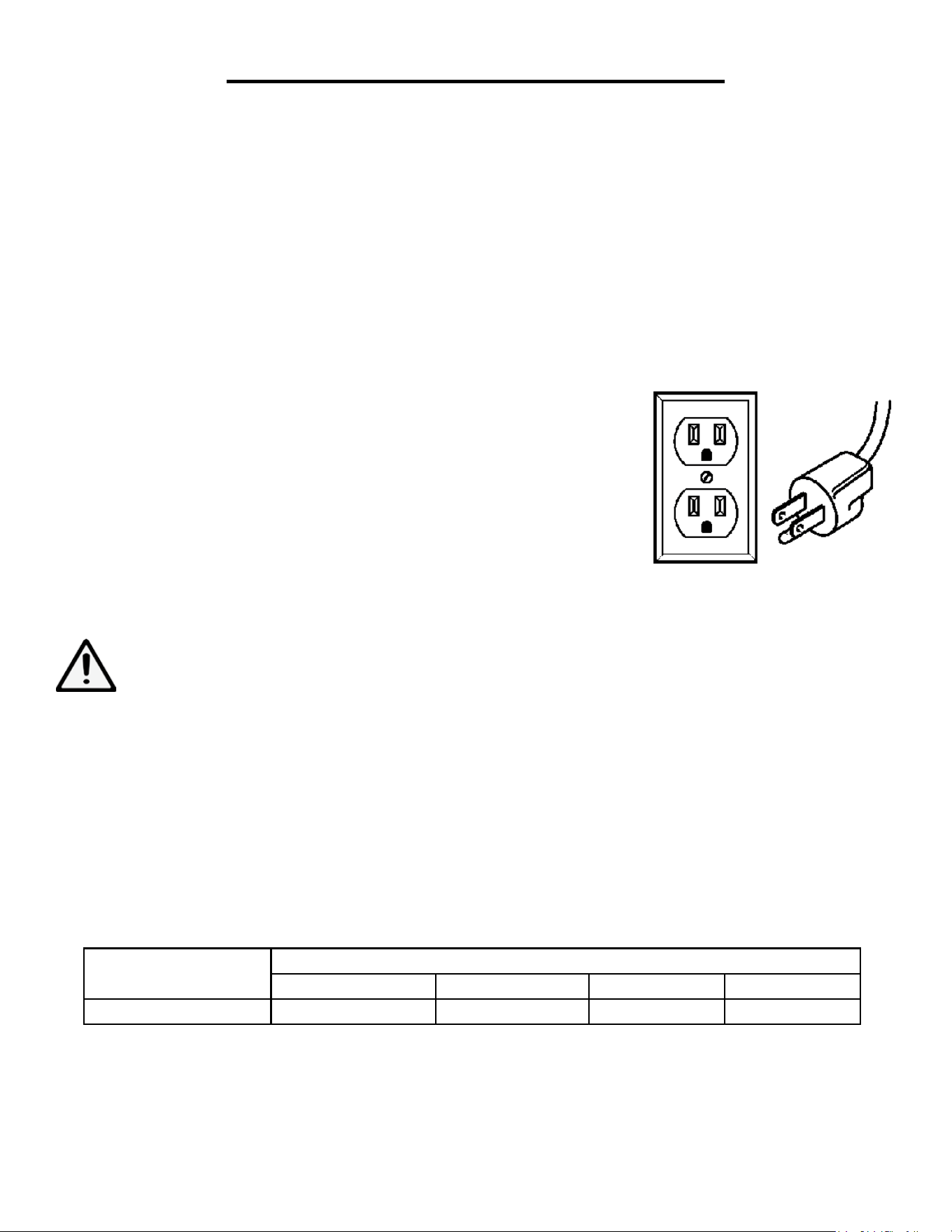
USE ONLY THREE-WIRE EXTENSION CORDS that have three-pronged
plugs and outlets that accept the tool’s plug as shown. Repair or replace a dam-
aged or worn cord immediately.
CAUTION: In all cases, make certain the outlet in question is properly grounded. If you are not sure, have a li-
censed electrician check the outlet.
WARNING: This tool is for indoor use only. Do not expose to rain or use in damp locations. This tool
must be grounded while in use to protect the operator from electric shock.
GUIDELINES FOR EXTENSION CORDS
Make sure your extension cord is in good condition. When using an extension cord, be sure to use one heavy
enough to carry the current your product will draw. An undersized cord will cause a drop in line voltage resulting
in loss of power and overheating. The table below shows the correct size to be used according to cord length and
nameplate ampere rating. When in doubt, use a heavier cord. The smaller the gauge number, the heavier the cord.
Make sure your extension cord is properly wired and in good condition. Always replace a damaged extension cord
or have it repaired by a qualified person before using it. Protect your extension cords from sharp objects, excessive
heat and damp/wet areas.
Use a separate electrical circuit for your tools. This circuit must not be less than a #12 wire and should be protected
with a 15 A time-delayed fuse. Before connecting the motor to the power line, make sure the switch is in the OFF
position and the electric current is rated the same as the current stamped on the motor nameplate. Running at a
lower voltage will damage the motor.
AMPERAGE
REQUIRED GAUGE FOR EXTENSION CORDS
25 ft. 50 ft. 100 ft. 150 ft.
4A 18 gauge 16 gauge 16 gauge 14 gauge
6
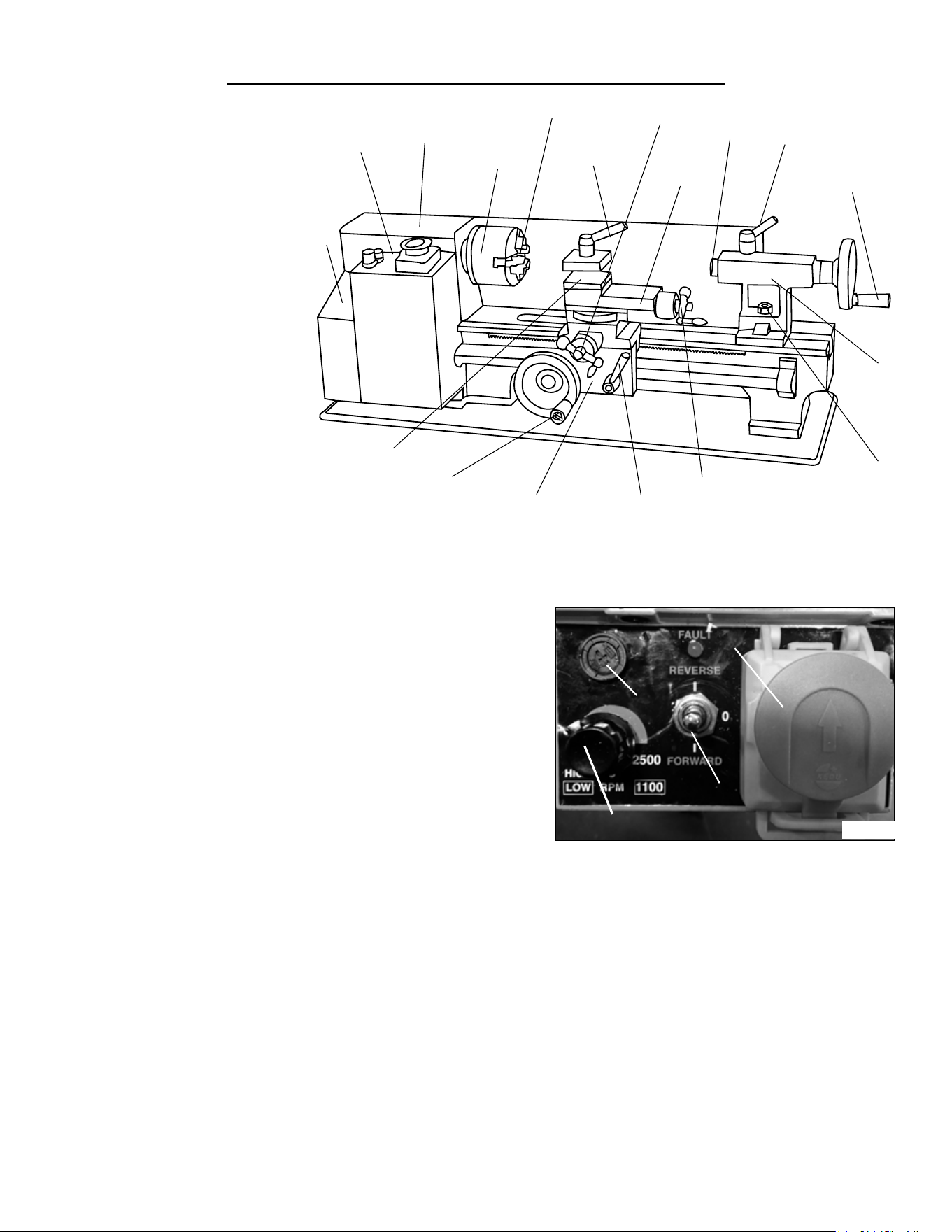
A - Running Gear Cover
B - Lathe Control Panel
C - Head Stock
D - Spindle
E - 3-Jaw Chuck
F - Tool Post Lock
G - Cross Slide Handle
H - Compound Slide
I - Quill
J - Quill Lock
K - Tailstock Hand Wheel
L - Tailstock
M - Tailstock Lock Nut
N - Compound Slide Handle
O - Automatic Feed Lever
P - Cross Slide
Q - Manual (Carriage) Feed Handle
R - Tool Post
NOT PICTURED (See page 8 for locations):
High/Low Speed Range Lever (behind headstock)
Forward/Neutral/Reverse Lever (behind headstock)
7
KNOW YOUR LATHE
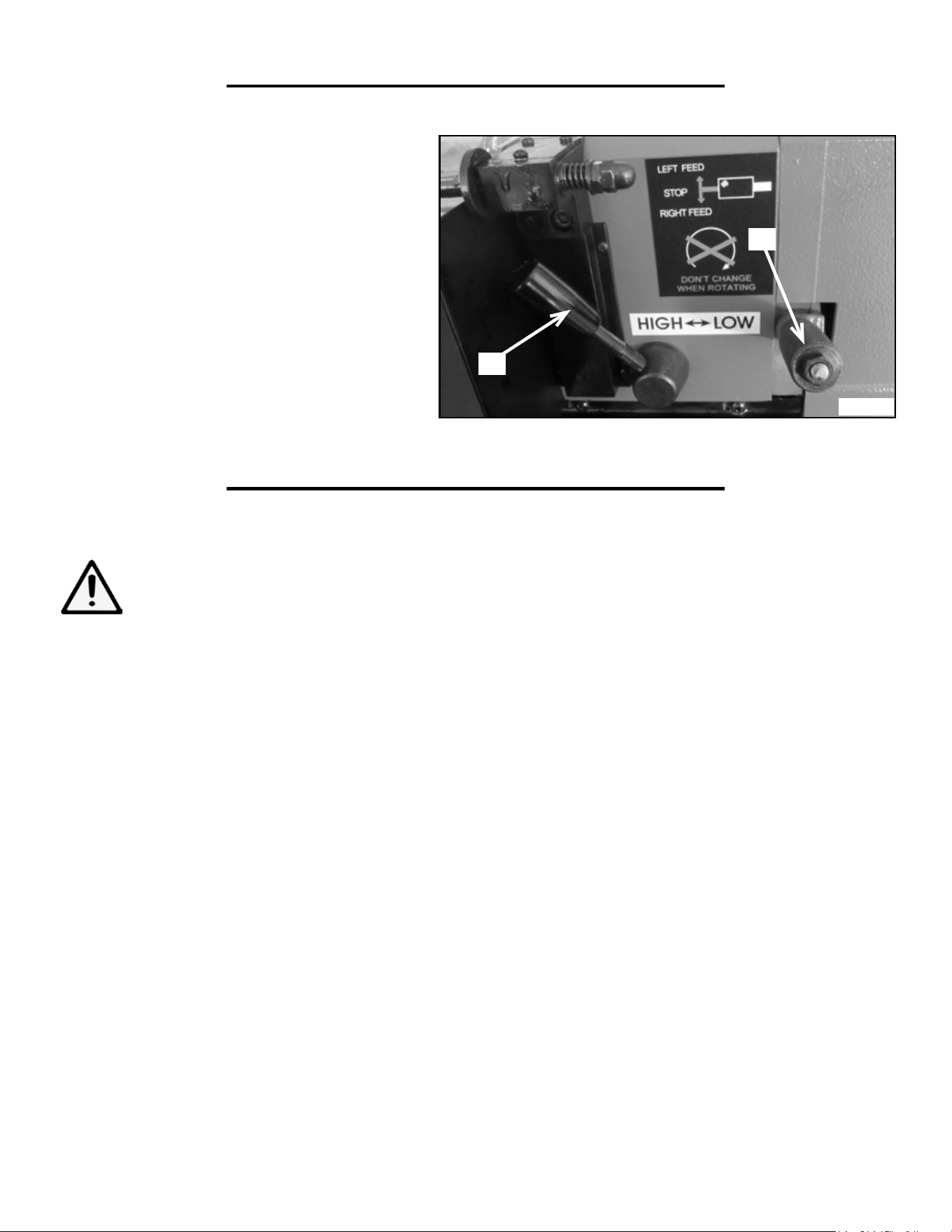
LATHE CONTROL PANEL (FIG. A)
Before operating your lathe, become familiar with the controls.
A. VARIABLE SPEED CONTROLLER: Allows the adjust-
ment of the lathe’s speed from 0 to 2500 RPM.
B. EMERGENCY SHUTOFF: Stops power to the unit when
pressed during operation. Button must be UP (clasp released)
to permit operation. Eye guard must also be DOWN to permit
operation. Raising eye guard before or during operation causes
motor fault.
D
E
H
F
G
A
Q
N
I
L
O
P
R
C
J
K
M
B
C. SPINDLE DIRECTION SELECTOR: Allows the user to select the direction of the spindle between clock-
wise (forward), neutral (O), and counterclockwise (reverse). Forward = toward operator (clockwise when viewed
from the headstock end; opposite for reverse.
DO NOT CHANGE THE SPINDLE DIRECTION WHILE THE UNIT IS RUNNING! IT WILL DAM-
AGE THE LATHE!
D. FUSE CAP: Contains the fuse (4A) that protects the unit from circuit overloads. The fuse can be removed by
turning 1/4-turn counterclockwise with Phillips-head screwdriver, then pulling fuse and cap out.
A
C
B
D
Fig. A
8
TO ASSEMBLE
NOTE: Before assembling, carefully wipe off all grease and rust-protectant coating with a soft cloth. Use kerosene
to fully remove the grease and coating. Apply a light coat of good-quality paste wax to prevent rusting and ensure
ease of movement between parts.
Attach the plastic handles to the rims of the manual feed and tailstock feed handles respectively. Ensure the nuts
are tight and the handles spin freely about the bolts without excessive end play.
The carriage, cross-slide and compound slide adjustments are all factory set to ensure smooth movement in both
directions. However the adjustments may have been misaligned during transportation. This will be indicated by
stiff or erratic movement. Refer to “Settings and Adjustments” for adjustment methods.
All hex keys and wrenches necessary to carry out various adjustments are supplied together with a chuck key for
the 3-jaw chuck. The fuse socket (Fig. A) is located on the main control panel.
The four M6 pan-head screws are used to attach the chip tray and rubber feet to the tapped holes in the under-
side of the lathe body. Insert the screws through the feet, through the chip tray, and tighten in the threaded holes.
We strongly recommend that to provide maximum stability and safety, users should secure the lathe to a firm
foundation as described under “Mounting the Lathe” below.
UNPACKING
Carefully unpack the lathe and all its parts. Compare against the list below. Do not discard the carton or any
packaging until the lathe is completely assembled.
Lathe
Rubber Feet (4)
M6 Pan Head Screws (4)
Hex Keys (4)
Chuck Key
Plastic Oil Container (Oil not included)
Spare Fuse
Plastic Handles w/ Nuts and Bolts
No. 2 Morse Taper Center (Tailstock)
External Jaws for 3-Jaw Chuck (3)
8 x 10 mm Wrench
14 x 17 mm Wrench
Gear Set
Face Shield
A
B
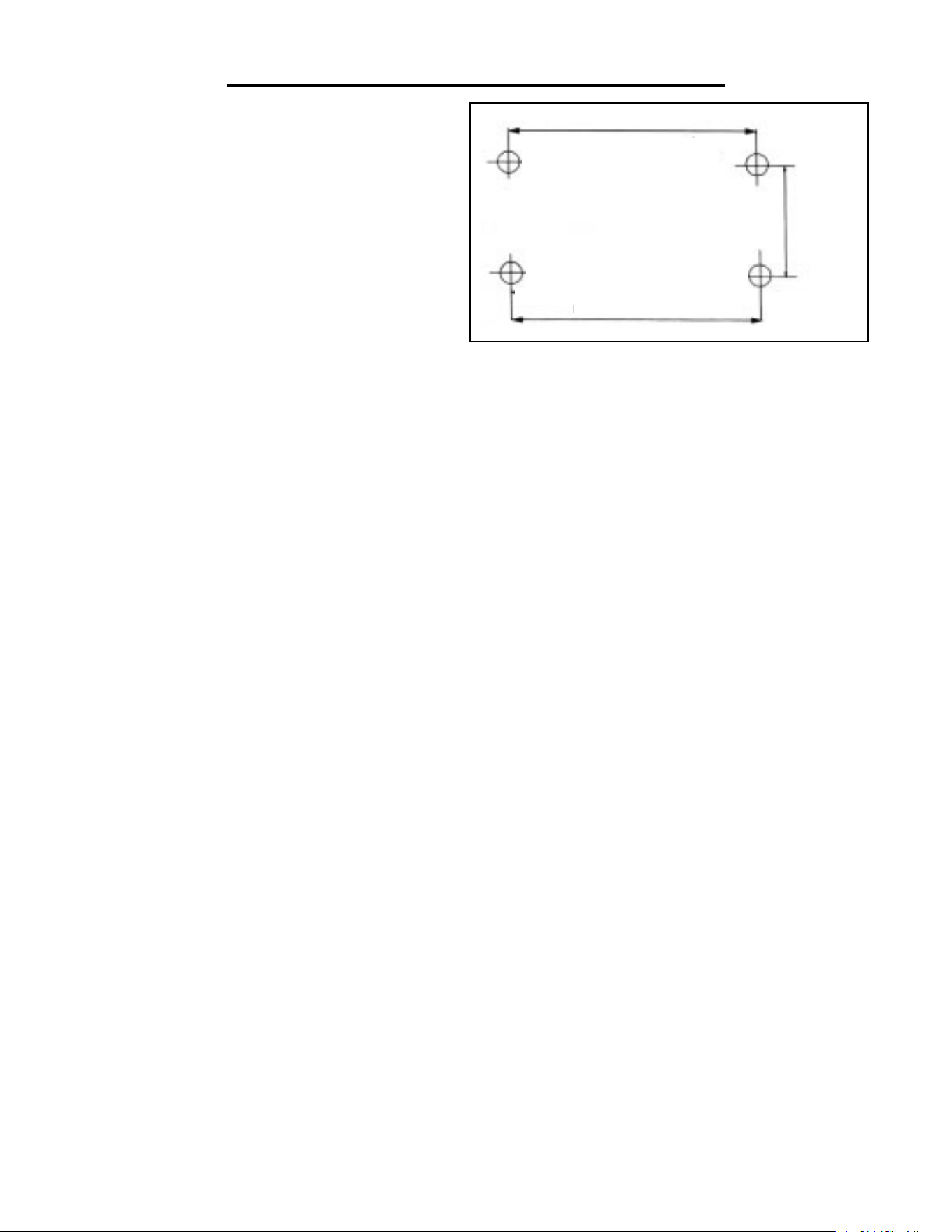
BEHIND HEADSTOCK (FIG. B)
A) : Allows the user to shift the spindle speed
range from HIGH (0-2500 RPM) to LOW (0-
1100 RPM).
DO NOT SHIFT FROM HIGH TO LOW
WHILE THE LATHE IS RUNNING!
B) LEAD SCREW DIRECTION LEVER:
Change the direction of the lead screw rotation be-
tween forward, reverse, and neutral. This is spring-
loaded, so it needs to be pulled OUT (away from
lathe body), position adjusted, and then released
DO NOT CHANGE DIRECTION OF THE
LEAD SCREW WHILE THE LATHE IS RUN-
NING!
ASSEMBLY
KNOW YOUR LATHE
WARNING: If any part is missing or damaged, do not plug in the tool until the missing or damaged
part is replaced.
Fig. B
9
OPERATION
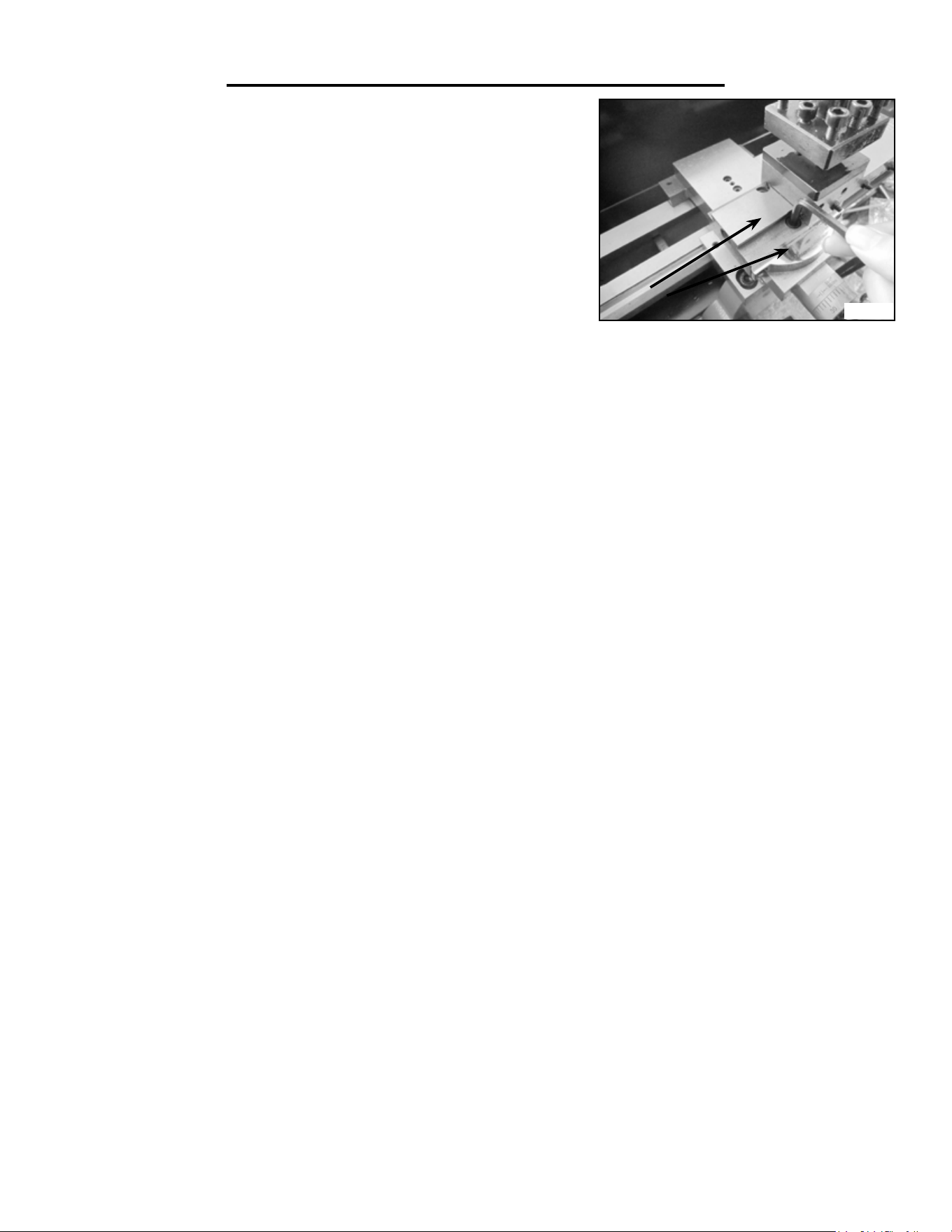
MOUNTING THE LATHE (FIG. C)
The lathe should be mounted on a strong, heavy
workbench. Take the necessary precautions when
moving the lathe. Assistance may be required.
Bolt the machine firmly to the workbench us-
ing the tapped holes. To do this remove the M6
screws securing the rubber feet in place. Drill four
M6 clearance holes in the worktop and find wash-
ers and M6 screws long enough to securely hold
the unit in place.
HEADSTOCK
The headstock contains the motor, pulleys and the drive belt that turn the spindle used to create your workpiece.
The spindle has a MT3 taper for use in conjunction with a face plate or turning clamp. The spindle has a flange
attached with 6 holes arranged to mount different fixtures, such as chuck jaws and face plates. The speed of the
spindle is adjusted via the Variable Speed Controller on the control panel. The speed ranges can be swapped
between two ranges with the lever on the back of the headstock. Do not change the speed range during operation.
CARRIAGE
The carriage is the portion of the lathe that moves the Cross Slide and Compound Slide across the bed. It can be
manually fed, or driven with the lead screw by engaging the half nuts with the automatic feed lever.
CROSS SLIDE
The cross slide is used to move the tool post and cutting tool across the bed, perpendicular to the lead screw and
the center axis of the spindle. The cross slide is adjusted via a handle with precision tick marks, each indicating
0.001”. This scale will rotate with the handle when it is turned to feed the cross slide back and forth. Before begin-
ning turning, perform the following steps to adjust and zero your cross slide:
1. Turn the handle counterclockwise to back the cross slide 0.015” away from your starting point, then slowly turn
the handle clockwise until the cross slide returns to the starting position. This removes any play in the slide to help
make the scale more accurate.
2. Now hold the handle steady and with your other hand rotate the scale so the “0” lines up with the “0.000” mark
on the cross slide. From this point the slide will remain accurate as long as you only move it forward (toward the
splash guard on the back of the lathe).
3. Any time you back the slide away from your workpiece you will have to repeat steps 1 and 2 before moving the
cross slide forward again for the next cut.
Fig. C
18-3/4 in.
2-7/8 in.
1010
OPERATION
Fig. D
COMPOUND SLIDE
The compound slide works similarly to the cross slide with a small han-
dle and a scale with tick marks every 0.001”. The compound slide can be
fed back and forth with this handle, similar to the cross slide. In addition
it can also be rotated to an angle of your choice and fed back and forth
along this angle.
ADJUSTING THE COMPOUND SLIDE
1. Rotate the handle to move the compound slide back and expose the
two screws shown in Fig. D. Loosen these two screws with one of the
included hex wrenches.
2. Rotate the compound slide to the desired angle and retighten the bolts to lock it in place.
3. Turn the handle until your slide is at its starting point. Then back the slide 0.015” from the starting point.
4. Slowly turn the handle to feed the slide forward until it returns to the starting point.
5. Hold the handle in place and rotate the scale so the “0” and “0.000” lines match and the scale is properly ze-
roed.
6. Repeat steps 3-5 for each cut and each time you adjust the slide in order to get the most accurate cuts.
CARRIAGE FEED
The feed of the carriage along the axis of the spindle can be done manually, or automatically by the lead screw
and gear train.
TO MANUALLY FEED THE CARRIAGE
Disengage the half nuts from the lead screw by pulling UP on the feed lever. Use the handle on the carriage to
move it along the bed. Turning it clockwise will move it away from the spindle and turning it counter-clockwise
will move it towards the spindle.
TO AUTOMATICALLY FEED THE CARRIAGE
1. Set the carriage to your starting point.
2. While the unit is still turned off, set the Lead Screw Direction Lever to any direction, as long as it is not neutral.
Choose your preferred direction based on the sticker next to the Lever.
3. Turn the lathe on and set it to the necessary RPM using the Variable Speed Controller
4. Push the feed lever down to engage the lead screw and the automatic feed function.
5. Once the pass of the tool is finished pull up on the lever to disengage the lead screw and the automatic feed.
NOTE: increasing the spindle speed using the Variable Speed Controller (Fig. A - A) will also increase the lead
screw feed rate proportionally.
11
ADJUSTMENTS
TAILSTOCK
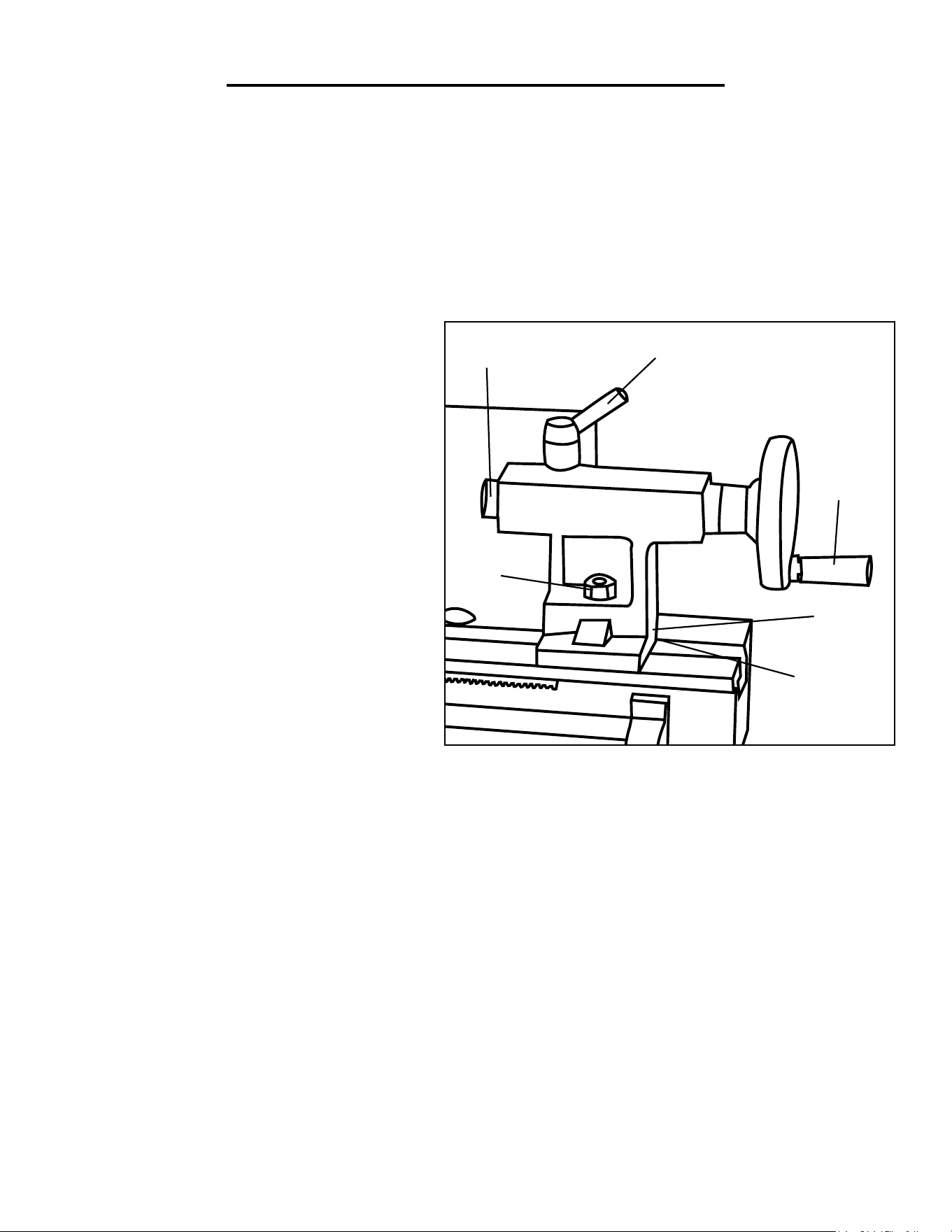
The tailstock is located on the bed opposite of the headstock. It can be moved along the bed by loosening the 17
mm nut (Fig. E - Item E) and pushing the tailstock to the desired position. When it is in the desired spot, tighten
the 17 mm nut to lock it in place. The tailstock is equipped with an MT2 taper to use with appropriate tools, like
the included center, or a properly tapered drill chuck or drill bit. The tailstock arrives properly aligned to the
headstock from the factory. This allows the use of dead or live centers, as well as on center drilling to be per-
formed on the workpiece. If you need to create a taper to the workpiece it is necessary to offset the tailstock (see
“Offsetting Your Tailstock” section on page 12 for more info).
E
F
A
B
C
D
TAILSTOCK COMPONENTS (FIG. E):
A. Tailstock Handle: Feeds the quill in and out
of the tailstock into the workpiece. Use to push a
center into the workpiece to hold it level horizon-
tally, or to feed a drill into the workpiece to create
a hole.
B. Offset Setscrew: Locks the tailstock position to
allow for offset alignment
C. Offset Cap Screw: Allows tailstock alignment
to be adjusted to right or left of center (underside
of tailstock)
D. Tailstock Lock Nut: Secures the tailstock in
place on the bed
E. Quill: Holds MT2 tapered tools in the tailstock
F. Quill Lock: Secures the quill in place
USING A CENTER WITH THE TAILSTOCK
If you are turning a workpiece with stock that hangs more than 2.5 times its diameter beyond the chuck jaws, it is
necessary to support the other end with a center and the tailstock. For projects that allow low RPM turning, a dead
center is okay. If higher RPMs are necessary, it is recommended to invest in a live center. To install:
1. Check the center and tailstock quill for any dirt, dust, debris or oil. Wipe both down, as excessive oil or dirt will
not allow the tapers to interlock.
2. Turn the tailstock handle until the quill protrudes approximately 1/2” inch from the tailstock.
3. Slide the center into the quill until it is snug, the tapers will keep the center in place. Keep the quill extended
between 0 and 1.5 on the quill scale to keep it secure.
4. To remove the center use the tailstock handle to retract the quill into the tailstock completely. This forces the
center out of the quill. Hold the head of the center with your hand to catch it as the center becomes loose.
Fig. E

12
OPERATION
OFFSETTING YOUR TAILSTOCK
WARNING: The tailstock comes from the factory properly aligned with the headstock.
The tailstock can also be used in an offset position to help turn tapers on a work piece. Adjusting the tailstock into
an offset position requires removing the tailstock from the bed and adjusting the offset screw on the bottom of the
tailstock. To properly offset the tailstock follow these steps (Refer to Fig. E on page 11):
1. Use a 17mm wrench or socket to loosen the lock nut that holds the tailstock in place. Then slide the tailstock
off the bed.
2. Loosen the offset setscrew (Fig. E, item B) on the back of the tailstock, below the handle.
3. Loosen the offset cap screw(Fig. E, item C) on the bottom of the tailstock. Only loosen it enough so the tail-
stock can slide.
4. Slide the tailstock back onto the bed and adjust it to the desired offset.
5. Tighten the offset setscrew to hold the tailstock at the proper offset position.
6. Slowly and carefully slide the tailstock off the bed and tighten the offset cap screw on the bottom.
7. Slide the tailstock back onto the bed, lock it in to the desired position and check your tolerances to makes sure
it is in the desired offset.
8. Repeat the previous steps in order to adjust the offset to the exact position necessary for your turning work
piece.
TOOL POST
The tool post is used to hold your cutting tools and run the cutting edge along the workpiece you are turning. The
tool post can hold four tools at a time and has 4 preset stops at 90 degree intervals. It can also be set at any angle
in between these four presets. To install a cutting tool into the tool post follow these steps:
1. Determine which cutting tool will create the desired cut profile.
2. Loosen the screws in the top of the tool post on the edge you will place the cutting tool. Make sure the tool will
be secured by a minimum of two of these screws.
3. Place the tool under the screws and loosely tighten them, making sure it is perpendicular (or at the proper
angle) to the axis of the workpiece.
4. Align the tip of the tool with the centerline of the workpiece. If the workpiece centerline is higher, place
shims under the tool to raise its height. This machine uses 5/16” (7.93mm) tools. To determine if the tool tip is
even with the centerline check the tool tip against the tip of the center in the tailstock. If the two tips are even or
the tool tip is below the center tip, the tool is the proper height. If the two tips are even or the tool tip is below
the center team, the tool is the proper size for the lathe. If the tool tip is below the center tip, it will need to be
shimmed up to the height of the center tip, otherwise you will see a small “button” on the workpiece when parting
off. If the tool tip is higher than the center tip, the tool is the wrong size for this lathe.
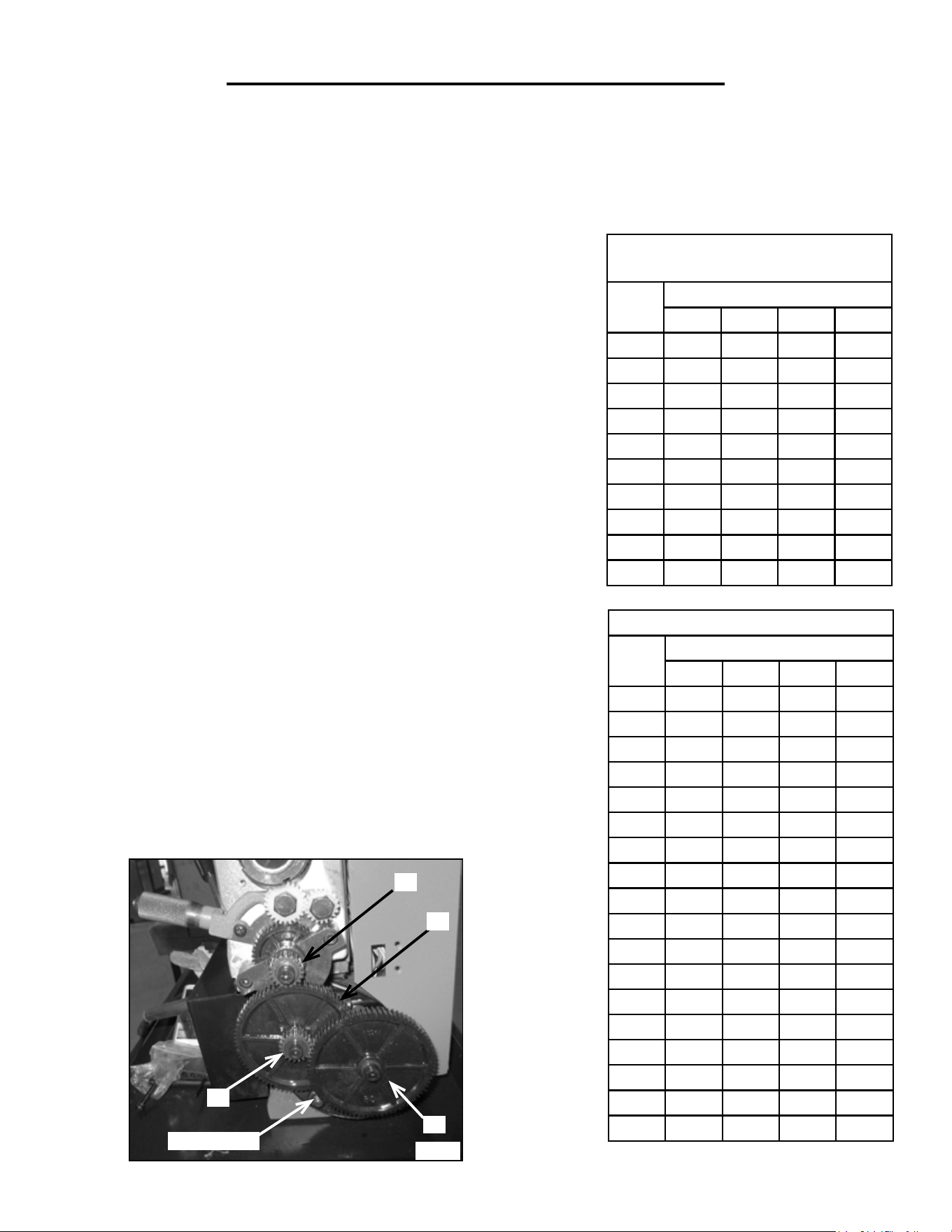
GEAR TRAIN (FIG. F)
WARNING: Before making any of these adjustments, turn off and unplug the lathe from its power source.
The gear train is located on the headstock opposite the spindle. The drive gears are located under a cover secured
by two socket head cap screws. The gear train is used to drive the lead screw that allows the auto-feed function
to operate. As the gear train turns, it turns the lead screw which moves the carriage across the bed of the lathe.
13
OPERATION
THREADS PER INCH (TPI)
TPI
Gear Size (mm)
A B C D
12 40 65 / 30
13 40 65 60 30
14 40 65 / 35
16 40 65 / 40
18 40 65 / 45
19 40 50 60 57
20 40 65 / 50
22 40 65 / 55
24 40 65 / 60
26 40 60 / 65
28 20 65 / 35
32 20 65 / 40
36 20 65 / 45
38 20 50 60 57
40 20 65 / 50
44 20 65 / 55
48 20 65 / 60
52 20 60 / 65
METRIC THREAD PITCH
CHART
Pitch Gear Size (mm)
A B C D
0.4 20 50 40 60
0.5 20 50 / 60
0.6 40 50 30 60
0.7 40 50 35 60
0.8 40 50 40 60
1.0 20 60 / 30
1.25 50 40 / 60
1.5 40 60 / 40
1.75 35 60 / 30
2.0 40 60 / 30
The direction is set using the lead screw direction lever. Adjusting it to
forward will send the carriage towards the headstock. Reverse sends it
away, and neutral disengages the lead screw so the saddle can be manu-
ally fed.
The feed rate of the lead screw can be set by changing the gears in the
gear train (Fig. F). Switching the diameter of the gears and the order
of the gears will change the torque and speed of lead screw, allowing
for different threads to be turned with the lathe. The Threading Chart
to the right shows the gear arrangements to use to achieve different
threads per inch (TPI) or metric pitches when using the lead screw.
To change the gears to match up with these gear charts follow these
steps:
1. Remove the gear cover to expose the drive gears.
2. Loosen the adjustment nut at the bottom of the gear train to disen-
gage the gears from one another. Loosen the socket head cap screws
that hold each gear (or gear pair) on its shaft. Remove the necessary
gears and replace them with the appropriate gears. That is, the gears
that have the proper number of teeth in the positions called for (30, 40,
60, and 65 teeth). Note that some configurations do not require gears
in every position, and some require you to move the bushings from one
shaft to another for gears to properly fit in place.
3. Position the gears so their teeth will mesh together properly once the
adjuster is tightened.
ADJUSTER
A
B
C
D
Fig. F

OPERATION
14
CREATING NORMAL TURNING
Before starting a turning, always plan your work ahead of time. Create a drawing or plan with all of the dimensions
you desire for the workpiece. Make sure to have all the measuring tools you will need to double and triple check
your cuts. Ensure that the feed rate, depth of cut (DOC), and spindle speed (RPM; depends on material, cutting
tool material and profile, DOC, desired surface finish, workpiece geometry, etc.) are all proper for your opera-
tion. To avoid stalling the motor, we recommend that the DOC never exceed 0.5mm (0.0196 in), and should be
kept below 0.25mm (about 0.01 in) whenever possible. Reduce spindle speed when taking a deeper cut.
Place the work into the chuck or attach to the faceplate. If necessary, use the tailstock center to support the oppo-
site end. If the tailstock is not needed, it can be removed completely by loosening the nut and sliding the tailstock
off the bed.
After you have the work planned out, select the necessary cutting tools for the feature you wish to create and
mount them to the tool post. Make sure the tool tips are aligned with the center line of the workpiece, or slightly
below them (double check the tool mounting procedure in the “Tool Post” section on page 12).
Mark the end point for the cut on the work piece using a scriber. Line up the cutting tool with the end point and
feed in the cross slide until it just touches the surface of the workpiece. Then turn the spindle by hand to make
sure there is no interference between the carriage, cross slide, tool post, cutting tool, or chuck. It may be necessary
to adjust the compound slide or the workpiece in the chuck to get the proper amount of clearance.
When you have assured there is adequate clearance, back the cross slide away from the work piece and move the
carriage away from the head stock. Next zero out the cross-slide:
1. Feed the cross slide and the cutting tool to the starting position of the cut.
2. Back the cross slide 0.015” away from the work piece.
3. Slowly feed the cross slide back to the starting point.
4. Hold the handle to move the cross slide in place with one hand, and turn the dial of the gauge to make the 0
and the 0.000 marks line up. The cross slide and cutting tool are now zeroed out.
5. If you have to back feed the cross slide at all repeat steps 1 through 4.
NOTE: Before each pass of the cutting tool, it is recommended to add oil to the work piece to reduce heat and
friction. Make sure to periodically add oil to the work piece as needed while turning.
USING MANUAL FEEDING
Double check the following before you begin turning:
1. The auto-feed lever is in the UP position, so the carriage half nuts are disengaged from the lead screw.
2. The Auto Feed Direction Lever is in NEUTRAL.
3. You are in the appropriate speed selection of HIGH/LOW for the material you are turning.
(CONTINUED ON NEXT PAGE)

OPERATION
15
(CONTINUED FROM LAST PAGE)
To know the proper RPM will take some experience. Harder metals should use a slower RPM while softer can
use a little faster RPM. If you are unsure, it is better to go slower than risk damage to the work, the cutting tool
or the lathe by using too high of an RPM. Feed rate and DOC are also very important. A deeper DOC needs a
slower feed rate and slower RPM, and vice versa.
Once you are ready to begin, switch the machine ON and set the RPM to your desired level. Slowly feed the cut-
ting tool into the work piece using the carriage handle. Slowly feed the cutting tool across the work piece until you
reach the marked end point. Retract the cross slide and cutting tool at this point one or two full revolutions. Re-
turn the carriage to the starting point, and then feed the tool back in the same number of revolutions plus a small
additional feed rate in. Repeat this process until you have the desired amount of material cut away.
USING AUTOMATIC FEED
Once you have the cross slide set in position double check the following:
1. The Auto Feed Direction Lever is set to FORWARD.
2. The auto feed lever is disengaged from the lead screw.
3. You are in the appropriate speed selection range of HIGH/LOW.
4. The gear train is in the proper configuration, as this determines the feed rate of the lead screw. The factory set-
ting is okay for normal turning, but if you have been cutting screw threads you will need to reset the gear train to
the proper configuration.
TO PERFORM THE CUT WITH THE AUTOMATIC FEED
Note: Ensure the DOC is appropriate for the cutting tool material, workpiece material, etc.
1. Position the cutting tool past the end of the work piece away from the tail stock. Make sure the tool is set to the
proper cutting depth. Always do shallow cuts, as cutting too deep too fast will damage the work piece, your cutting
tool, and your lathe. It is recommended to keep the cuts to 0.010” (0.25mm) or less at a time.
2. Double check that all the feed levers are in the proper direction.
3. Turn the unit on, set the spindle speed to the desired rate. Push the autofeed lever down to engage the half nut
with the lead screw.
4. Watch your cutting tool. When it reaches the end, quickly press UP on the auto feed lever and make sure it
stays disengaged from the lead screw.
5. Retract the cutting tool one or two turns using the cross slide handle. Feed the carriage back to the starting
point, and feed the tool back in one or two turns plus the additional cutting depth.
6. When ready for the next pass, engage the auto feed lever and repeat the previous steps until you have removed
the desired amount of material.
FACTORY SETTINGS
A 20
B 80
C 20
D 80

16
OPERATION
BEVEL CUTTING
In order to perform a bevel cut, it is necessary to use the compound slide as well as the cross slide. To align the
compound slide for a bevel cut, align it to the proper angle following the procedure in the “Compound Slide” sec-
tion on page 10.
Once the compound slide is aligned to the proper angle, follow these steps to create the bevel:
1. Mark your end point of the bevel if necessary using the methods for a normal turning.
2. Set and zero out the cross slide to the proper starting point.
3. Turn the lathe on and set the spindle to the appropriate RPM.
4. Use the handle on the compound slide to feed the cutting tool along the end of the workpiece. This will create
the bevel cut at the angle you set it to.
5. Back off the cutting tool 2 turns and reset the compound slide to the starting point. Feed the cutting tool back
in to the cutting depth.
6. Repeat until your bevel is the desired length and position.
TO CUT THREADS
1. Adjust the compound slide so the tool is at the appropriate angle for the desired
thread.
2. Place the tool tip so that it is vertically centered and perpendicular to the workpiece.
3. Engage the thread dial with the lead screw. The thread dial is located next to the
auto-feed lever on the carriage. There is a socket-head cap screw on the side; loosen
the screw using one of the included hex wrenches and adjust the body of the thread dial
so that its gear meshes with the threads on the lead screw. Tighten the socket head cap
screw, ensuring that the gear stays engaged with the lead screw threads.
4. Use the gear ratio charts to determine the proper gear ratio and install the proper
gears (See “Gear Train” on page 13).
5. Turn the lathe on and set the RPM using the Variable Speed Controller. Make sure
the lead screw is feeding in the proper direction by engaging the feed lever. When you
are sure it is going in the right direction disengage the feed lever and turn off the lathe.
Ensure that the carriage is beyond the end of the workpiece.
6. Read the settings off the thread dial chart (left) to get the proper setting for the thread
dial. Make sure the thread dial always engages the half nut on the same mark for every
pass of the cutting tool. If you don’t do this you may cut off threads created in your
THREAD DIAL
TPI SCALE
12 1, 3, 5, 7
13 1
14 1 or 5
16 1 - 8
18 1 or 5
19 1
20 1, 3, 5, 7
22 1 or 5
24 1 - 8
26 1 or 5
28 1, 3, 5, 7
32 1 - 8
36 1, 3, 5, 7
38 1 or 5
40 1 - 8
44 1, 3, 5, 7
48 1 - 8
52 1, 3, 5, 7
previous cut. That is, the lever needs to be pushed down at the same point in order to cut threads correctly. If you
engage the lever when the dial is not pointing to an indicator mark, you may stall the lead screw, which will cause
it to drop into Neutral and stop.
17
OPERATION
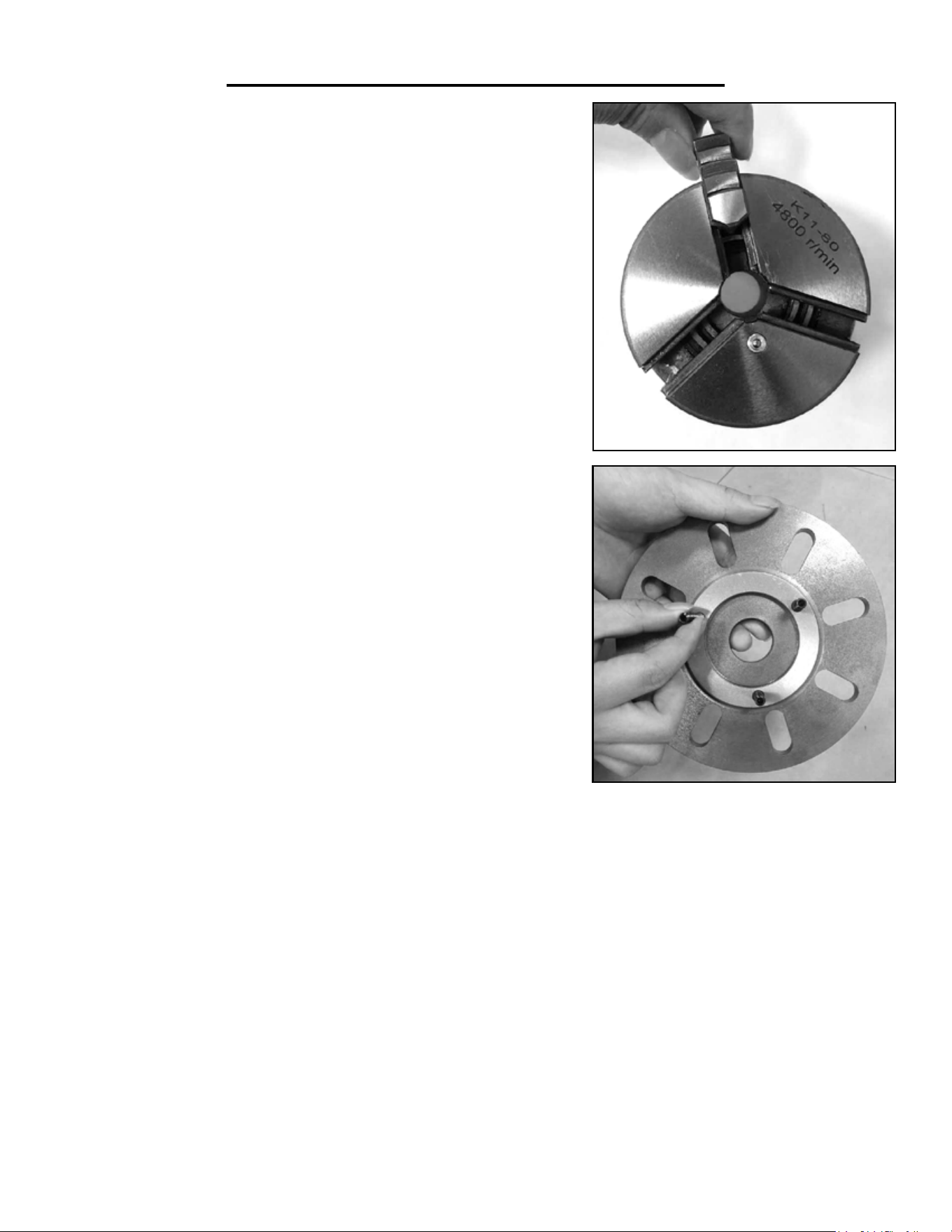
CHANGING THE JAWS IN YOUR CHUCK (FIG. G)
1. Make sure your lathe is turned off and unplugged.
2. Insert the chuck key into the square hole of the chuck. Turn the
chuck key counterclockwise until all of the jaws come out of the chuck.
3. Clean out each slot in the chuck making sure all dirt and debris are
removed.
4. Each jaw has a number or letter (1, 2, 3 or A, B, C) that corresponds
to a number in the slot.
5. Take Jaw #1 and insert the chuck key into the chuck. Turn the key
clockwise while looking directly at the chuck so you can see inside the
slot. You will see the beginning of a lead thread on the scroll of the
chuck pass the opening heading counter-clockwise.
6. Insert Jaw #1 into this slot and turn the chuck key until the thread
engages the jaw.
7. Repeat these steps for jaws 2 and 3. Make sure to always insert the
jaws in order.
REMOVING A CHUCK OR FACEPLATE
1. Turn off and unplug your lathe! It is recommended to place a piece
of plywood over the bed underneath the spindle in order to protect the
bed if you drop the chuck/faceplate.
2. Hold the chuck or faceplate with your hand while using a 10mm
wrench with your other hand to loosen and remove the three hex nuts
on the back of the spindle plate.
Fig. G
Fig. H
3. Pull the chuck/faceplate slowly off the spindle. It may be necessary to tap the back surface of the faceplate/
chuck with a rubber mallet to get it off the spindle.
4. Make sure to keep track of the studs used for positioning the chuck/faceplate, and set the piece aside.
INSTALLING THE CHUCK OR FACEPLATE (FIG. H)
1. Insert the guide studs into the chuck/faceplate you wish to install. To do this, make sure the studs extend at
least ½” from the surface of the chuck/faceplate.
2. Align the studs with the holes on the spindle and secure the chuck/faceplate in place with the nuts using a
10mm wrench.
18
OPERATION
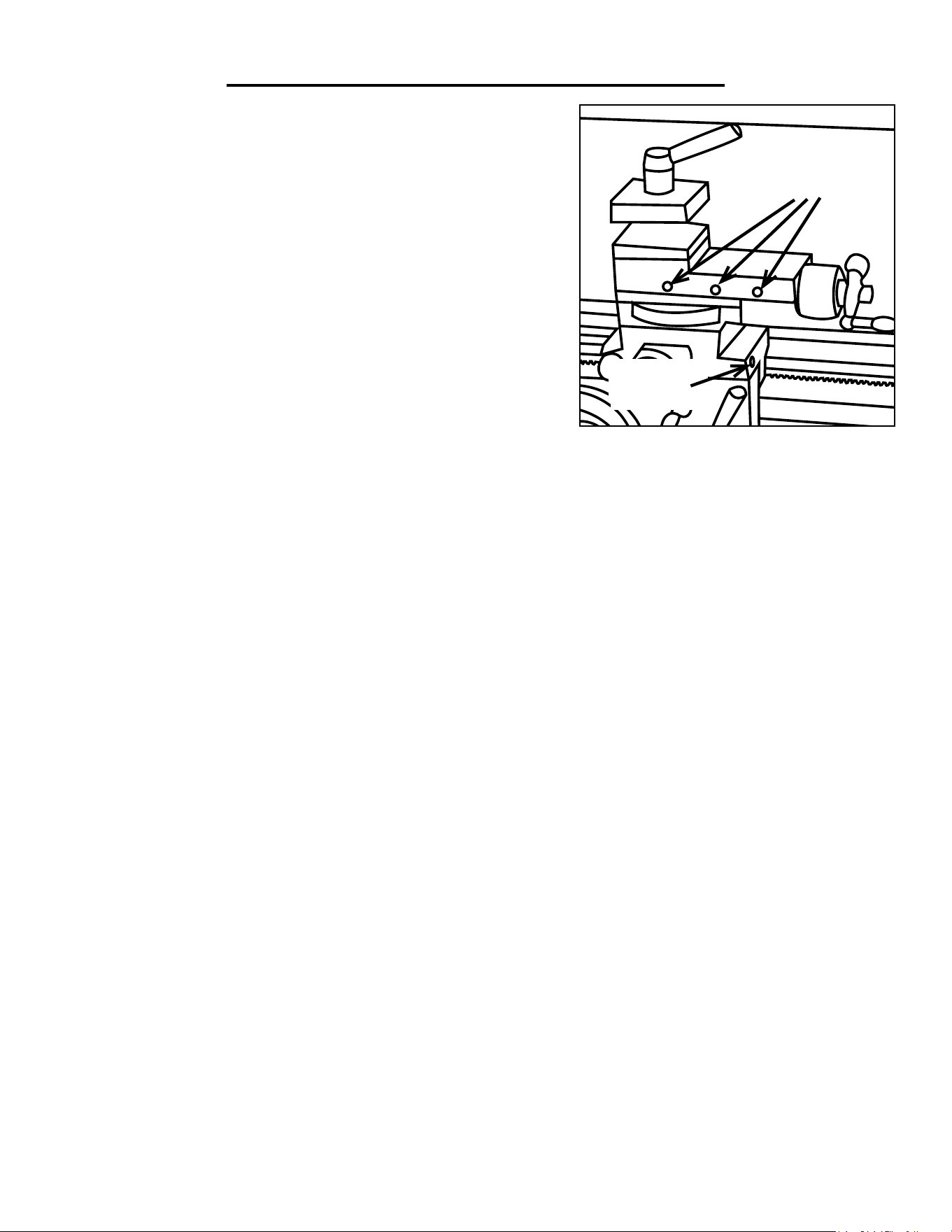
ADJUSTING THE GIBS (FIG. I)
Although the factory setting should be fine, if you are having trouble
feeding the compound or cross slide, you may want to adjust the
gib screws. To adjust the gib you will need a 2mm and a 7mm hex
wrench. Follow these steps to adjust the gibs:
1. Turn off and unplug the lathe.
2. Loosen the three locknuts.
3. Test the sliding movement. Tighten and loosen the set screws as
necessary. The slides should move smoothly without play. Readjust
the set screws as needed.
4. Tighten the locknuts to keep the gibs set
COMPOUND
SLIDE
CROSS
SLIDE
Fig. I
REPLACING MOTOR BRUSHES
To replace the brushes for the lathe’s motor:
1. Turn off and unplug the lathe.
2. Remove the front and rear brush caps from the motor. One can be accessed through the hole in the front of
the bed. The other can be accessed from the back of the headstock, where the motor is exposed.
3. Pull out the motor brushes and dispose of the old ones.
4. Insert the new motor brushes. Ensure there is good contact between the new brushes and the motor commuta-
tor.
5. Reattach the brush caps.
Note: Both brushes should be replaced simultaneously.

19
Before each use make sure to check all of the parts of the lathe for any loose bolts or connections. Leave the gear
cover on to prevent chips from interfering with the geartrain. Make any adjustments to connections as necessary to
ensure all the parts are connected and will stay together during operation. Check all of the cutting tools to make
sure they are sharp. If the edge is dull or has any nicks or cuts either sharpen it or replace it. Dull or damaged cut-
ting tools are a hazard and should never be used.
Every time you use your lathe, make sure to check that all work surfaces are clean and undamaged. If there are
any chips or dents in the surface, work them out with an oil stone. Check that all of the moving parts pass over
each smoothly and can be moved without any interference.
Use your oil can to squirt a few drops of oil into the oilways of both bearings on the ends of the leadscrew. Do the
same for the oil way on the compound slide. The opening for this oilway is located between the two hex screws to
adjust the slide.
After use make sure to clean away all metal shavings. Use a rag or brush to wipe away. It is recommended to wear
gloves while doing this to prevent getting any small metal shavings stuck in your hand. Make sure to wipe all of the
debris and dirt off the machine. Do not use an air compressor, as this can force shavings into the moving parts
of the lathe and cause damage. Make sure to remove all cutting tools and store in a safe place. Once the lathe
is clean it is recommended to lightly oil all of the surfaces to prevent any corrosion and keep the parts moving
smoothly.
AFTER EACH USE
1. Clean all machine surfaces, including the chuck, and apply a thin layer of oil.
2. Put oil in each bearing on the lead screw.
3. Clean and oil the sliding surfaces of the bed, cross slide and compound slide.
EVERY 4 TO 6 MONTHS
1. Apply white lithium grease to the cross slide and compound slide lead screws.
2. Apply white lithium grease to all the drive gears.
3. Apply white lithium grease to the tailstock quill and screw.
4. Grease all of the transmission gears with a spray on grease.
MAINTENANCE

20
PROBLEM CAUSE SOLUTION
Machine won’t
start.
1. Emergency button is stuck down.
2. Fuse blown.
3. Damaged wiring.
4. PCB Board Damaged.
5. Motor ON/OFF Switch Faulty.
6. Spindle directional switch is bad.
7. Motor is bad.
8. Brushes are bad.
9. Face shield isn’t down.
1. Try and release the button or replace it.
2. Replace Fuse.
3. Check for any visible damage, and check with a
multimeter for correct wiring.
4. Check PCB board for damage, replace if neces-
sary.
5. Replace Switch.
6. Replace Switch.
7. Test motor, repair or replace as needed.
8. Replace the brushes.
9. Lower the face shield.
Machine stalls
out during use
1. Material of workpiece is too hard.
2. PCB board is faulty.
3. Variable speed knob is bad.
4. Motor Brushes are bad.
5. Belt slipping on the pulley.
6. Motor bearings went bad.
7. Machine is too small for the job.
8. Spindle rotation switch is bad.
1. Make sure the metal isn’t too hard for the unit.
2. Inspect and replace if necessary.
3. Test and replace.
4. Replace brushes.
5. Tighten pulleys, replace if needed.
6. Test by rotating the shaft manually, grinding
noise or loose shaft indicates need to replace.
7. Make sure cutting tools are sharp, use lower
feed rate and lubricant. Decrease the spindle speed
and DOC. If problem persists the tool may be too
small.
8. Test switch, replace if needed.
Grinding or
clicking noise
from headstock
1. Set screws in the pulley aren’t tight.
2. Motor fan contacting cover.
1. Tighten set screws.
2. Check fan connection, tighten if necessary, or
replace fan/cover.
Motor Over-
heats
1. Motor is overloaded by work being
done.
2.Air circulation through motor is cut
off.
1. Reduce load on the motor, lower the RPM, cut-
ting depth and feed rates.
2. Clean all motor vents.
Motor bogs
down during
turning opera-
tion
1. Cut or feed rate too high.
2. RPM too high for the turning being
done.
3. Cutting tool is dull or damaged.
4. Gears in the gear train are too tight.
1. Reduce cut and feed rate.
2. Reduce RPM.
3. Sharpen or replace.
4. Adjust the gears to have a very small amount of
play. Test the chuck’s rotation by hand.
Machine vibrates
when started and
when allowed to
run
1. Workpiece unbalanced.
2. Loose or broken belts.
3. Pulleys misaligned.
4. Broken Gear.
5. Chuck or faceplate unbalanced.
6. Spindle bearings worn out.
1. Center the workpiece and reinstall
2. Tighten or replace.
3. Align pulleys.
4. Inspect the gears and replace if needed.
5. Rebalance or replace if needed.
6. Replace bearings.
Poor Surface
Finish
1. Feed rate or RPM wrong.
2. Dull cutting tool.
3. Too much play in gibs.
4. Cutting tool set too high.
1. Set the proper feed rate and RPM.
2. Sharpen cutting tool.
3. Tighten Gibs (See Fig. I, page 18).
4. Remove tool or use a smaller tool.
TROUBLESHOOTING

21
PROBLEM CAUSE SOLUTION
Can’t remove
center or chuck
from tailstock
1. Quill isn’t retracted completely into
tailstock.
2. Debris in the quill.
1. Turn the quill handle until the tool is forced out.
2. Always clean taper surfaces. Try and force out
with WD40 and handle.
Cross slide,
compound slide,
or carriage have
poor feed
1. Gibs are out of alignment.
2. Handles are loose.
3. Lead screw worn out or needs greas-
ing.
4. Bedways are worn and need greas-
ing.
5. Dirt, shavings or grime in bedways.
1. Adjust gib screws (See Fig. I, page 18).
2. Tighten handles.
3. Tighten fasteners on lead screw.
4. Grease bedways.
5. Clean bedways.
Surface finish
uneven from end
to end
1. Headstock and tailstock are mis-
aligned.
1. Realign the tailstock and headstock.
Chuck jaws get-
ting stuck and
hard to move
1. Debris in the chuck jaws.
1. Remove jaws and clean out the chuck threads,
lubricate.
Carriage difficult
to feed or won’t
move
1. Gibs are too tight.
2. Chips or debris in the bedway.
3. Carriage lock tightened down.
4. Bedways dry.
5. Half nuts not engaged with lead
screw.
6. Gears broken.
7. Loose feed handles.
1. Loosen gibs.
2. Clean bedways.
3. Release carriage lock.
4. Lubricate bedway.
5. Engage half nuts with lead screw.
6. Replace broken gears.
7. Tighten handle.
Gear change
lever won’t shift
1. Gears misaligned. 1. Rotate spindle until the gears rotate into place.
TROUBLESHOOTING
22
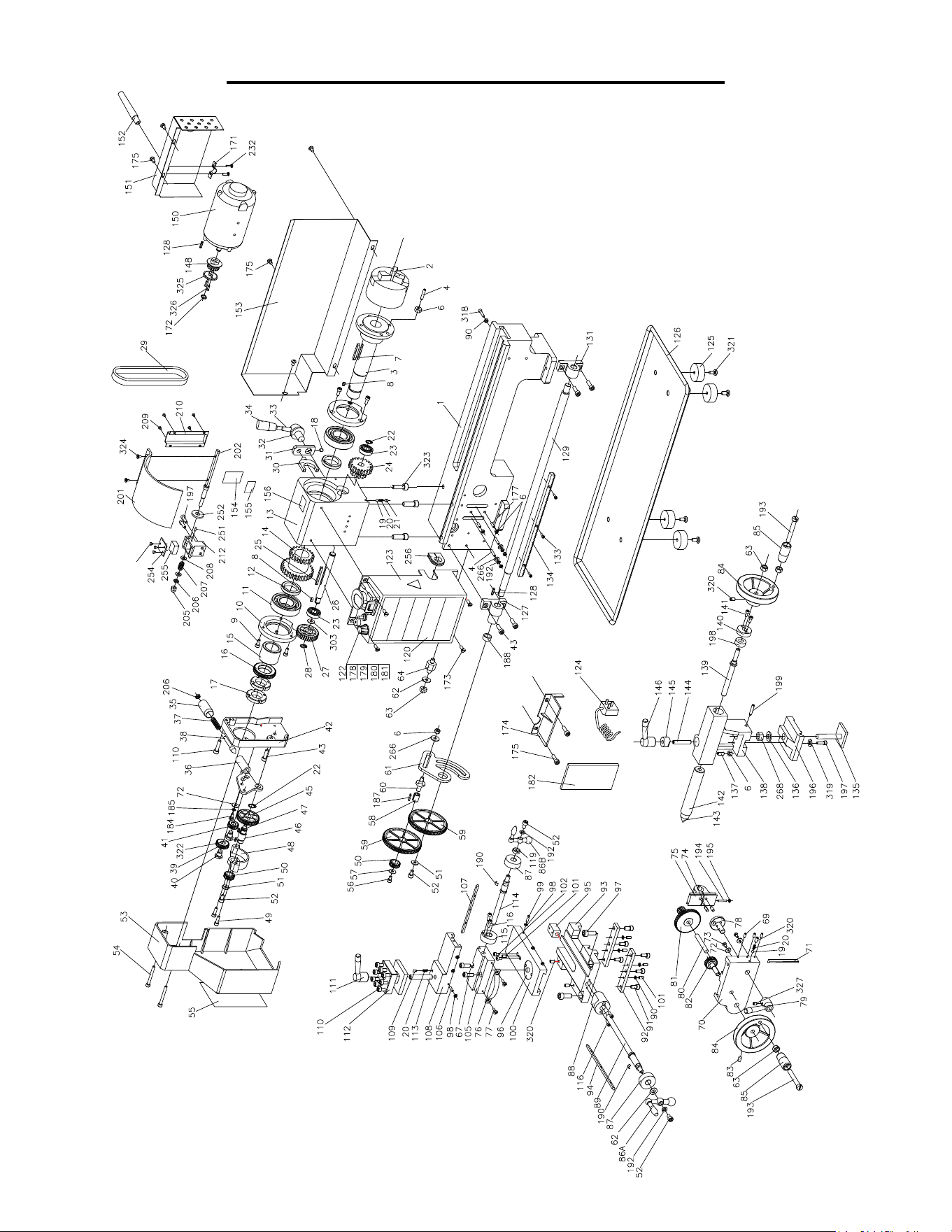
EXPLODED VIEW & PARTS LIST

23
EXPLODED VIEW & PARTS LIST
No Part Number Description QTY
1 3455-001 Bed Way 1
2 3455-002 3 Jaws Chuck 1
3 3455-003 Spindle 1
4 3455-004 Set Screw M6 × 25 5
6 3455-005 Nut M6 10
7 3455-006 Key M5 × 40 1
8 3455-007 Key M4 × 8 2
9 3455-008 Screw M5 × 12 6
10 3455-009 Cover 2
11 3455-010 Ball Bearing 6206ZZ 2
12 3455-011 Spacer 2
13 3455-012 Head Stock Casting 1
14 3455-013 High Low Transmission Gear 21/29T 1
15 3455-014 Spacer 1
16 3455-015 Spur Gear 45T 1
17 3455-016 Nut M27×1.5 2
18 3455-017 Set Screw M5×8 1
19 3455-018 Steel Ball 2
20 3455-019 Compression Spring 3
21 3455-020 Set Screw M6×6 1
22 3455-021 Retaining Ring M12 2
23 3455-022 Ball Bearing 2
24 3455-023 Transmission Gear 12T/20T 1
25 3455-024 Key M4 × 45 1
26 3455-025 H/L Gear Shaft 1
27 3455-026 Pulley 1
28 3455-027 Retaining Ring M10 1
29 3455-028 Timing Belt 136 1
30 3455-029 High/Low Shifting Fork 1
31 3455-030 High/Low Shifting Arm 1
32 3455-031 High/Low Shifting Knob 1
33 3455-032 High/Low Shifting Lever 1
34 3455-033 High/Low Shifting Grip 1
35 3455-034 Handle 1
36 3455-035 Handle Mount 1
37 3455-036 Compressive Spring 1
38 3455-037 Indicator 1
39 3455-038 Pinion 25T 1
40 3455-039 Support Screw 2
41 3455-040 Pinion 20T 1
42 3455-041 Cover 1
43 3455-042 Screw M6×20 5
45 3455-043 Gear 45T 1
46 3455-044 Shaft 1
47 3455-045 Key 4 × 8 1
48 3455-046 Mount 1
49 3455-047 Screw M5 × 18 2
50 3455-048 Pinion 20T 2
51 3455-049 Washer M6 2
52 3455-050 Screw M6 × 8 4
53 3455-051 Cover 1
54 3455-052 Screw M5 × 45 2
55 3455-053 TPI Cutting Chart 1
56 3455-054 Screw M5 × 8 1
No Part Number Description QTY
57 3455-055 Washer M5 1
58 3455-056 Bush W/Key 1
59 3455-057 Gear 80T 2
60 3455-058 Shaft 1
61 3455-059 Support Plate 1
62 3455-060 Washer M8 2
63 3455-061 Nut M8 4
64 3455-062 Shaft 1
67 3455-063 Screw M5×16 2
69 3455-064 Screw M4×10 3
70 3455-065 Apron 1
71 3455-066 Gib Strip 1
72 3455-067 Washer 3
73 3455-068 Screw M4 × 8 2
74 3455-069 Shaft 2
75 3455-070 Half Nut Base 2
76 3455-071 Angle Block 1
77 3455-072 Screw M4×10 2
78 3455-073 Groove Cam 1
79 3455-074 Handle 1
80 3455-075 Shaft 1
81 3455-076 Feeding Gear (A) 11T/54T 1
82 3455-077 Feeding Gear (B) 24T 1
83 3455-078 Screw M6 × 10 1
84 3455-079 Wheel 2
85 3455-080 Knob+Screw M8 × 55 +Nut M8 2
86A 3455-081 Three Ball Handle(big) 1
86B 3455-082 Three Ball Handle 1
87 3455-083 Dial 2
88 3455-084 Bracket 1
89 3455-085 Feeding Screw 1
90 3455-086 Nut M5 5
91 3455-087 Screw M6×12 6
92 3455-088 Slide Plate 2
93 3455-089 Saddle 1
94 3455-090 Gib Strip 1
95 3455-091 Feeding Nut 1
96 3455-092 Swivel Disk 1
97 3455-093 Screw M8 × 20 2
98 3455-094 Nut M4 8
99 3455-095 Screw M4 × 16 3
100 3455-096 Cross Slide 1
101 3455-097 Screw M5 × 10 5
102 3455-098 Screw M4 × 8 2
105 3455-099 Compound Rest 1
106 3455-100 Screw M4 × 14 3
107 3455-101 Gib Strip 1
108 3455-102 Compound Rest (A) 1
109 3455-103 Positioning Pin 1
110 3455-104 Screw M6 × 25 9
111 3455-105 Clamping Lever 1
112 3455-106 Tool Rest 1
113 3455-107 Stud M10 × 65 1
114 3455-108 Cross Feeding Screw 1

24
EXPLODED VIEW & PARTS LIST
No Part Number Description QTY
115 3455-109 Bracket 1
116 3455-110 Screw M4 × 12 4
119 3455-111 Nut M18 1
120 3455-112 Label 1
122 3455-113 Information Label 1
123 3455-114 Electronics Cover 1
124 3455-115 Plug 1
125 3455-116 Rubber Foot 4
126 3455-117 Chip Tray 1
127 3455-118 Bracket 1
128 3455-119 Key 2
129 3455-120 Lead Screw 1
131 3455-121 Bracket 1
133 3455-122 Screw M3×10 3
134 3455-123 Rack 1
135 3455-124 Clamp Plate 1
136 3455-125 Washer M10 1
137 3455-126 Screw M5 × 16 1
138 3455-127 Tailstock Casting 1
139 3455-128 Tailstock Screw 1
140 3455-129 Bracket 1
141 3455-130 Screw M4 × 10 4
142 3455-131 Tailstock Quilt 1
143 3455-132 Center 1
144 3455-133 Stud M8 × 40 1
145 3455-134 Clamp 1
146 3455-135 Handle 1
148 3455-136 Pulley 1
150 3455-137 Motor 1
151 3455-138 Motor Cover 1
152 3455-139 Power cord Guard 1
153 3455-140 Rear Splash Guard 1
154 3455-141 H/L Label 1
155 3455-142 H/L Label 1
156 3455-143 Warning Label 1
N.P. 3455-144 Gear 30T 1
N.P. 3455-145 Gear 35T 1
N.P. 3455-146 Gear 40T 2
N.P. 3455-147 Gear 45T 1
N.P. 3455-148 Gear 50T 1
N.P. 3455-149 Gear 55T 1
N.P. 3455-150 Gear 57T 1
N.P. 3455-151 Gear 60T 1
N.P. 3455-152 Gear 65T 1
N.P. 3455-153 Cover 1
N.P. 3455-154 Key 1
171 3455-155 Clamp Block 1
172 3455-156 Retaining Ring Ø9 1
173 3455-157 Screw M5 ×10 4
174 3455-158 Protector 1
175 3455-159 Screw M5 × 10 7
177 3455-160 Screw M6 × 25 2
178 3455-161 Emergency Stop Switch 1
179 3455-162 Fuse Box 1
No Part Number Description QTY
180 3455-163 Variable Speed Control Knob 1
181 3455-164 Toggle Switch 1
182 3455-165 PC Board 1
184 3455-166 Screw M5×10 1
185 3455-167 Spring washer 5 1
187 3455-168 Key 3*16 1
188 3455-169 Small spacer 1
190 3455-170 Spring 2
192 3455-171 Washer 8 4
193 3455-172 Screw M8*55 2
194 3455-173 Screw M4*38 1
195 3455-174 Nut M4 1
196 3455-175 Plate of tailstock 1
197 3455-176 Screw M5*16 3
198 3455-177 Sleeve 1
199 3455-178 Screw M5*25 1
201 3455-179 Chuck guard 1
202 3455-180 Shaft 1
205 3455-181 Screw M6 1
206 3455-182 Nut M6 2
207 3455-183 Compression Spring 1
208 3455-184 Washer 6 2
209 3455-185 Screw M3*4 4
210 3455-186 Switch Cover 1
212 3455-187 Block 1
N.P. 3455-188 Screw M4×16 7
N.P. 3455-189 Clamp Cover 1
N.P. 3455-190 Screw 1
N.P. 3455-191 Compression Spring 1
N.P. 3455-192 Screw M6×30 1
N.P. 3455-193 Washer 1
251 3455-194 Cylinder Pin 1
253 3455-195 Screw 3
254 3455-196 Cover 1
255 3455-197 Micro switch 1
256 3455-198 Dust sheet 1
257 3455-199 Lead Screw Cover 1
258 3455-200 Washer 4 3
266 3455-201 Washer 6 3
268 3455-202 Screw 10 1
270 3455-203 Support Pin 1
272 3455-204 Protective Cover 1
303 3455-205 Washer 1
318 3455-206 Screw M5*20 1
319 3455-207 Washer 1
320 3455-208 Screw M6×10 4
321 3455-209 Screw M6×16 4
322 3455-210 Key 1
323 3455-211 Screw M8×25 3
324 3455-212 Screw M4×8 2
325 3455-213 Flange 1
326 3455-214 Screw 2
327 3455-215 Screw M6×8 1

25
LIMITED TWO YEAR WARRANTY
WEN Products is committed to build tools that are dependable for years. Our warranties are consistent with this
commitment and our dedication to quality.
LIMITED WARRANTY OF WEN CONSUMER POWER TOOLS PRODUCTS FOR HOME USE
GREAT LAKES TECHNOLOGIES, LLC (“Seller”) warrants to the original purchaser only, that all WEN con-
sumer power tools will be free from defects in material or workmanship for a period of two (2) years from date of
purchase. Ninety days for all WEN products, if the tool is used for professional use.
SELLER’S SOLE OBLIGATION AND YOUR EXCLUSIVE REMEDY under this Limited Warranty and, to
the extent permitted by law, any warranty or condition implied by law, shall be the repair or replacement of parts,
without charge, which are defective in material or workmanship and which have not been misused, carelessly
handled, or misrepaired by persons other than Seller or Authorized Service Center. To make a claim under this
Limited Warranty, you must make sure to keep a copy of your proof of purchase that clearly defines the Date of
Purchase (month and year) and the Place of Purchase. Place of purchase must be a direct vendor of Great Lakes
Technologies, LLC. Third party vendors such as garage sales, pawn shops, resale shops, or any other secondhand
merchant void the warranty included with this product. Contact [email protected] or 1-800-232-
1195 to make arrangements for repairs and transportation.
When returning a product for warranty service, the shipping charges must be prepaid by the purchaser. The prod-
uct must be shipped in its original container (or an equivalent), properly packed to withstand the hazards of ship-
ment. The product must be fully insured with a copy of the warranty card and/or the proof of purchase enclosed.
There must also be a description of the problem in order to help our repairs department diagnose and fix the
issue. Repairs will be made and the product will be returned and shipped back to the purchaser at no charge.
THIS LIMITED WARRANTY DOES NOT APPLY TO ACCESSORY ITEMS THAT WEAR OUT FROM
REGULAR USAGE OVER TIME INCLUDING BELTS, BRUSHES, BLADES, ETC.
ANY IMPLIED WARRANTIES SHALL BE LIMITED IN DURATION TO ONE (1) YEAR FROM DATE
OF PURCHASE. SOME STATES IN THE U.S., SOME CANADIAN PROVINCES DO NOT ALLOW
LIMITATIONS ON HOW LONG AN IMPLIED WARRANTY LASTS, SO THE ABOVE LIMITATION
MAY NOT APPLY TO YOU.
IN NO EVENT SHALL SELLER BE LIABLE FOR ANY INCIDENTAL OR CONSEQUENTIAL DAM-
AGES (INCLUDING BUT NOT LIMITED TO LIABILITY FOR LOSS OF PROFITS) ARISING FROM
THE SALE OR USE OF THIS PRODUCT. SOME STATES IN THE U.S. AND SOME CANADIAN
PROVINCES DO NOT ALLOW THE EXCLUSION OR LIMITATION OF INCIDENTAL OR CON-
SEQUENTIAL DAMAGES, SO THE ABOVE LIMITATION OR EXCLUSION MAY NOT APPLY TO
YOU.
THIS LIMITED WARRANTY GIVES YOU SPECIFIC LEGAL RIGHTS, AND YOU MAY ALSO HAVE
OTHER RIGHTS WHICH VARY FROM STATE TO STATE IN THE U.S., PROVINCE TO PROVINCE
IN CANADA AND FROM COUNTRY TO COUNTRY.
THIS LIMITED WARRANTY APPLIES ONLY TO PORTABLE ELECTRIC TOOLS, BENCH POW-
ER TOOLS, OUTDOOR POWER EQUIPMENT AND PNEUMATIC TOOLS SOLD WITHIN THE
UNITED STATES OF AMERICA, CANADA AND THE COMMONWEALTH OF PUERTO RICO. FOR
WARRANTY COVERAGE WITHIN OTHER COUNTRIES, CONTACT THE WEN CUSTOMER SUP-
PORT LINE.

26
THANKS FOR
REMEMBERING