OPERATING MANUAL
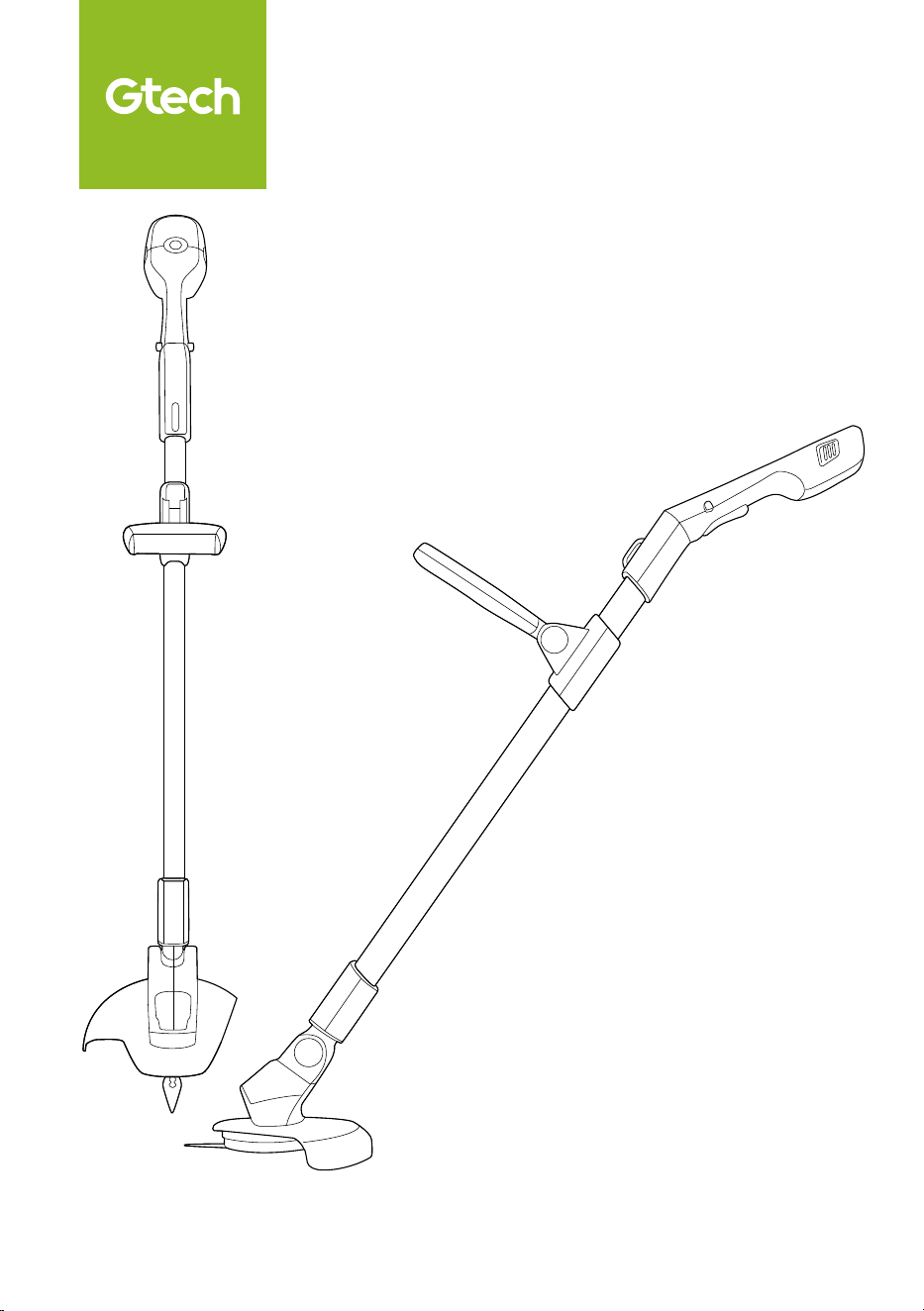
Cordless Grass Trimmer
GT Series

2
IMPORTANT SAFEGUARDS:
IMPORTANT: READ ALL INSTRUCTIONS BEFORE USE.
RETAIN INSTRUCTIONS FOR FUTURE REFERENCE.
Do not use in rain or leave outdoors whilst raining.
WARNING: Basic safety precautions should always be observed when
using an electrical appliance to reduce the risk of fire, electrical shock or
serious injury.
Personal Safety:
• Only use the trimmer in the manner
intended and for trimming grass as
described in this manual.
• Keep out of reach of children and
animals at all times.
• Only use in daylight or good artificial light.
• Always be sure of your footing on
uneven ground, slopes or in slippery
conditions.
• Do not over-reach or use on excessive
steep slopes.
• Remove any stones, loose debris and
other objects from the cutting area.
• Pay special attention to the hazards
posed to bystanders by thrown or
flyaway objects.
• Stay alert, watch what you are doing and
use common sense when operating a
power tool.
• Do not use power tools while you are
tired or under the influence of drugs,
alcohol or medication. This may result in
serious personal injury.
• Always be aware of your surroundings
and stay alert for possible hazards.
• Use protective personal equipment
such as safety glasses, non-skid safety
shoes, sturdy gloves to reduce the risk
of personal injury.
• Do not operate when barefoot or wearing
open toed shoes. Always wear substantial
footwear and long trousers.
• Dress appropriately. Do not wear loose
clothing or jewellery and keep hair, clothing
and gloves away from moving parts.
• Avoid accidental starting. Ensure the
switch is in the off position before
picking up or carrying the trimmer.
• Do not run with the trimmer.
• When operating the trimmer ensure that
both hands are correctly positioned on
the handle.
• Do not operate the trimmer if it is
incomplete or has unauthorised
modifications.
• Keep all body parts, especially hands and
feet, away from the blade at all times.
• Warning, the blade will continue to
move aer the motor is switched off.
• Ensure that the motor has fully stopped
before cleaning, clearing a blockage,
checking, or carrying out maintenance
on the trimmer.
• Carry the grass trimmer by the handle
with the blade stopped.
• The operator is responsible for accidents
or hazards occurring to other people at
their property.
• Never operate the trimmer with
damaged guards or without the guards
in place.
• This appliance is not intended for use by
persons (including children) with reduced
physical, sensory or mental capabilities or
lack of experience or knowledge.
• Keep the product and all accessories
away from hot surfaces.

3
• Never modify the trimmer in any way.
• Never fit metal cutting blades.
Electrical safety:
• Do not operate trimmers in explosive
atmospheres, such as in the presence
of flammable liquids, gases or dust.
Trimmers create sparks, which may
ignite the dust and fumes.
• Do not use the trimmer when a
thunderstorm is approaching.
• Avoid body contact with earthed or
grounded surfaces, such as pipes. There
is an increased risk of electric shock if
your body is earthed or grounded.
• Do not expose trimmers to rain or wet
conditions.
• Do not handle the charger or the
trimmer with wet hands.
• Before charging check the power
supply and charger cables for signs of
damage or ageing.
• Do not overload the trimmer. Forcing the
trimmer to cut may damage the motor. For
safety the trimmer will automatically cut
out if the motor becomes overloaded. If
this occurs, wait a few seconds for the cut
out to reset and then use lighter cuts to
trim the grass.
Battery safety:
• Do not attempt to use the charger with
any other product or to charge this
product with any other charger.
• This product contains Li-Ion batteries. Do
not incinerate batteries or expose to high
temperatures, as they may explode.
• Do not charge the battery when the
surrounding air temperature or the battery
pack is below 0°C or above 45°C.
• Aer heavy use or in high temperatures
the battery may become warm. Allow
the product to cool for 30 minutes
before charging.
• Use only with the battery pack supplied.
• Leaks from battery cells can occur under
extreme conditions. If the liquid gets on
your skin wash immediately with soap
and water. If the liquid gets into your
eyes, flush them immediately with cold
water for a minimum of 10 minutes and
seek urgent medical attention.
• Do not store the battery outside or in
cold conditions for prolonged periods of
time, especially over the winter months.
Training
• Read the instructions carefully. Be
familiar with the controls and the correct
use of the machine.
• Never allow children or people
unfamiliar with these instructions to
use the machine. Local regulations can
restrict the age of the operator.
• Keep in mind that the operator or user
is responsible for accidents or hazards
occurring to other people or their property.
Preparation
• Before use, always visually inspect
the machine for damaged, missing or
misplaced guards or shields.
• Never operate the machine while people,
especially children, or pets are nearby.
• Before use, check that a new fresh blade is
correctly fitted and the hub screw is tight.

4
Operation
• Keep supply and extension cords away
from cutting means.
• Wear eye protection and stout shoes at
all times while operating the machine.
• Avoid using the machine in bad weather
conditions especially when there is a risk
of lightning.
• Never operate the machine with
damaged guards or shields or without
guards or shields in place.
• Switch on the motor only when the hands
and feet are away from the cutting means.
• Always disconnect the machine from the
power supply (removable battery)
1) whenever the machine is le
unattended;
2) before clearing a blockage;
3) before checking, cleaning or working
on the machine;
4) aer striking a foreign object;
5) whenever the machine starts
vibrating abnormally.
• Always ensure that the ventilation
openings are kept clear of debris.
Maintenance and storage
• Disconnect the machine from the power
supply (removable battery) before carrying
out maintenance or cleaning work.
• Use only the manufacturer’s recommended
replacement parts and accessories.
• Inspect and maintain the machine
regularly. Have the machine repaired
only by an authorised repairer.
• When not in use, store the machine out
of the reach of children.
Service:
• Do not use the trimmer if the switch
does not turn it on or off. Any power
tool that cannot be controlled by
the switch is dangerous and must be
repaired or replaced.
• Check for misalignment or binding of
moving parts, breakage of parts and
any other condition that may affect the
trimmer’s operations. If damaged, have
the power tool repaired or replaced.
• Check that the blade is clean and
without damage. If the blade becomes
worn or damaged, a replacement
should be fitted before use.
• Before using the machine and aer any
impact, check for signs of wear and
damage and repair or replace as necessary.
• Always ensure that the ventilation
openings are kept clear of debris.
• Have your trimmer serviced by a qualified
repair person using only genuine
replacement parts. This will ensure that
the safety of the trimmer is maintained.
• Do not attempt to repair any damaged
parts on the trimmer unless you are
qualified to do so.
Intended Use:
• This product is intended for
trimming and edging grass and
light foliage.
• Avoid prolonged continuous use of
the product. It is recommended to
periodically rest the product.
•Avoid striking foreign objects, such
as posts, fences and walls.
• This product is intended for
DOMESTIC USE ONLY.
5
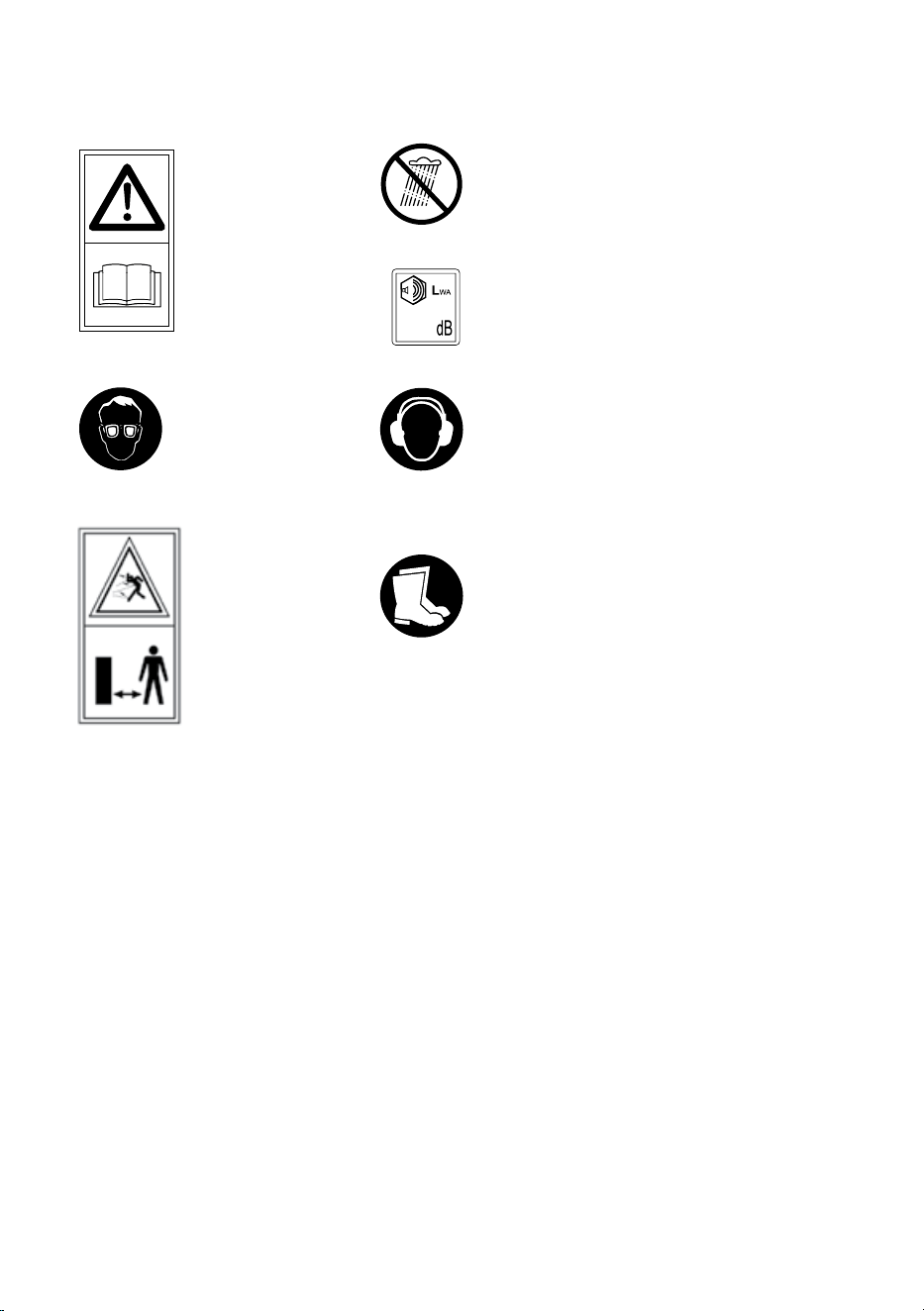
Warning Label Descriptions
94
Read instruction
manual before use
Do not use in rain or leave
outdoors whilst raining.
Wear hearing protection
when using this product.
Foot and leg protection must
be worn.
General hazard
safety alert.
Keep bystanders
away.
Wear eye protection
when using this
product.
Measured sound power level: 90.5dB(A) K=3dB(A)
Guaranteed sound power level: 94dB(A)
Note: Measured noise values determined according
to 2000/14 EC amended by 2005/88/EC
Nick Grey – Inventor, owner of Gtech
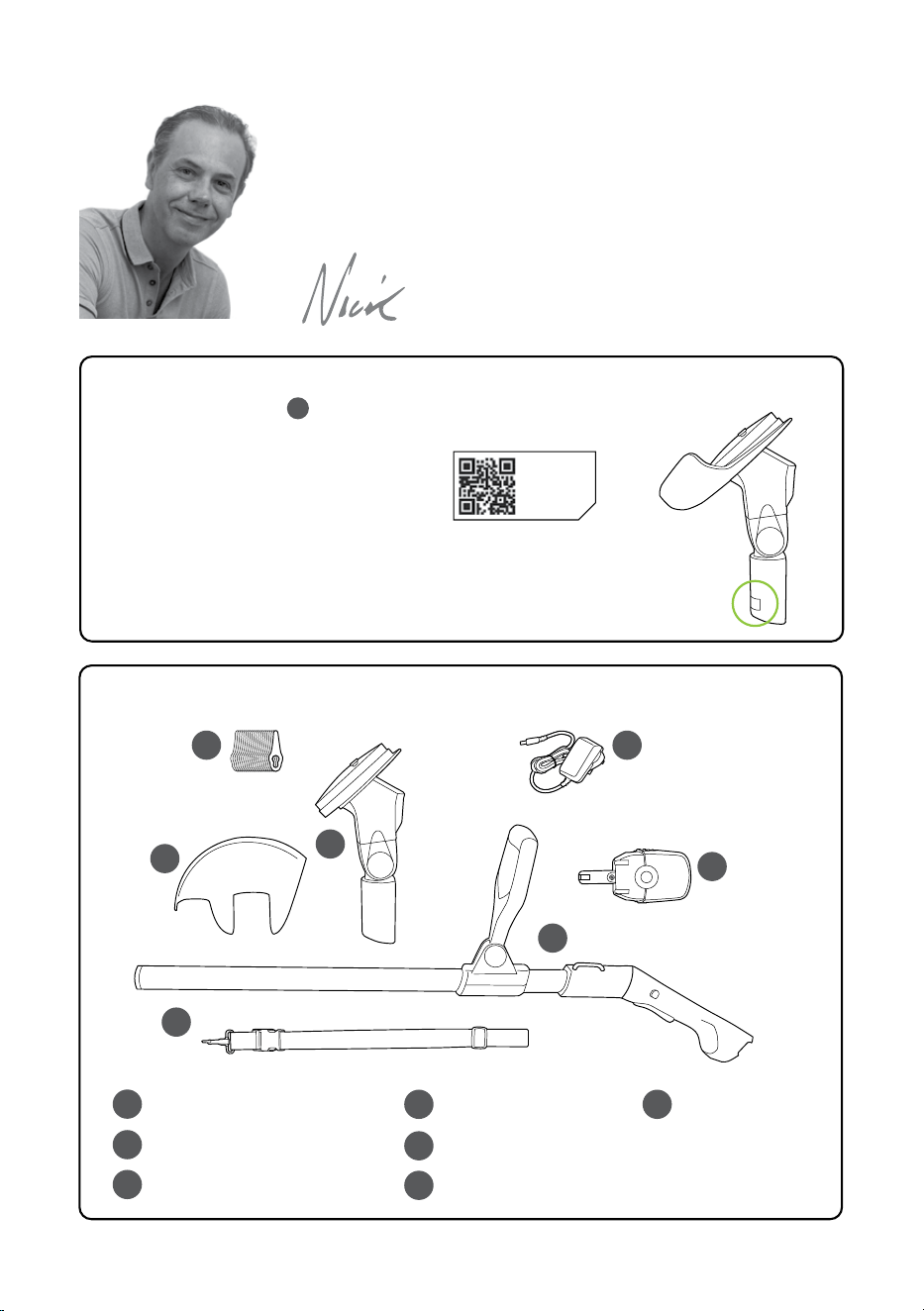
Grass trimmer main body
Grass trimmer head
Grass trimmer shroud
Battery
Battery charger
Bag of blades
Harness
1
2
3
4 7
5
6
1
3
4
7
5
6
2
What’s in the box
Thank you for choosing Gtech
“Welcome to the Gtech family. I started Gtech to create sensible, easy
to use products that do a great job, and hope you get many years of
trouble-free performance from your new product.”
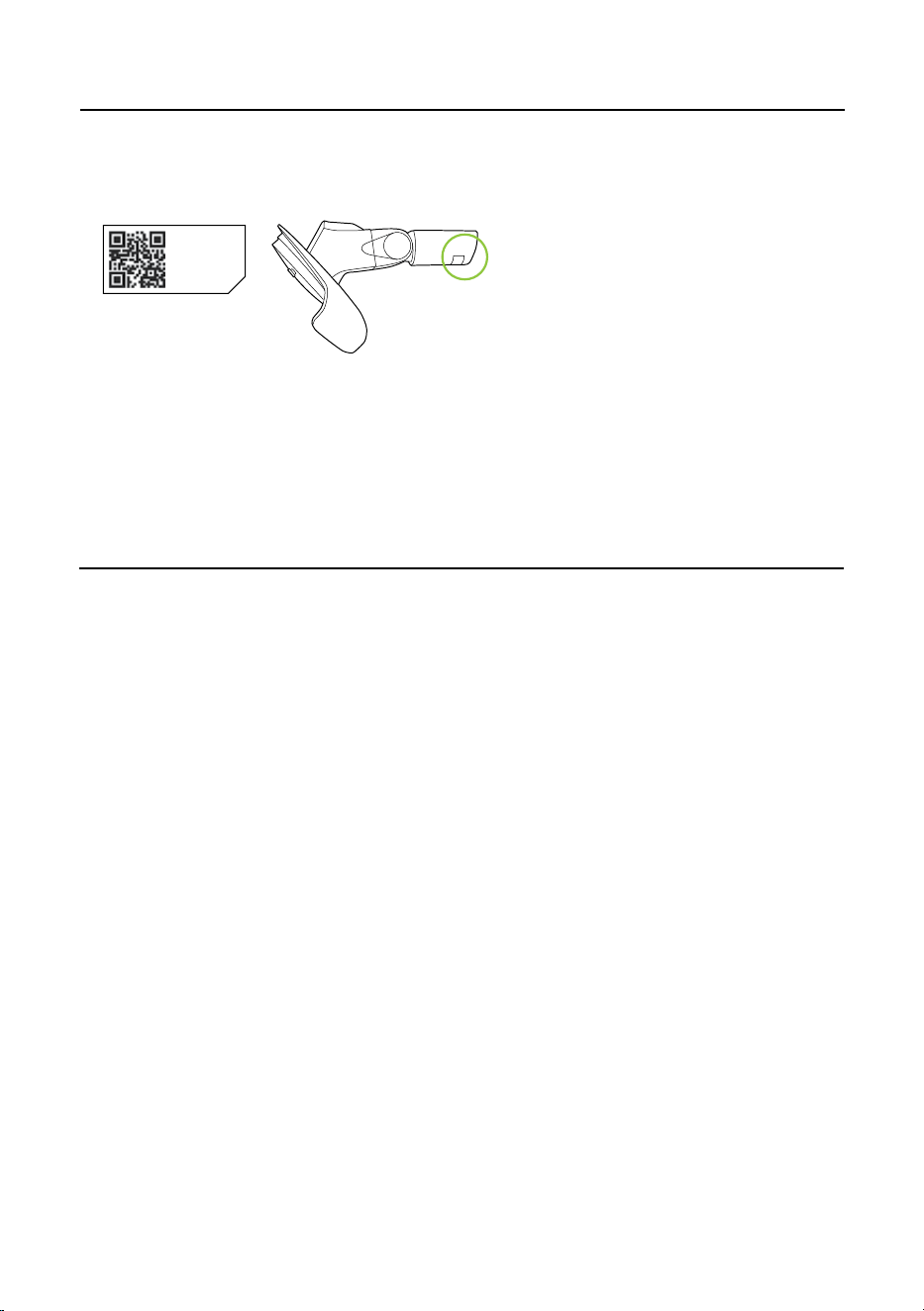
Make a note of your product serial number code for future reference. You can find this on
the underside of item
_ - _ _ - _ _ _ ~
_ _ _ _ _ ~
_ _ _ _ ~
_ _ ~ _ _ _ _ _ _ _
6
X-XX-XXX~
XXXXX~
WWYY~
00~0000000
2
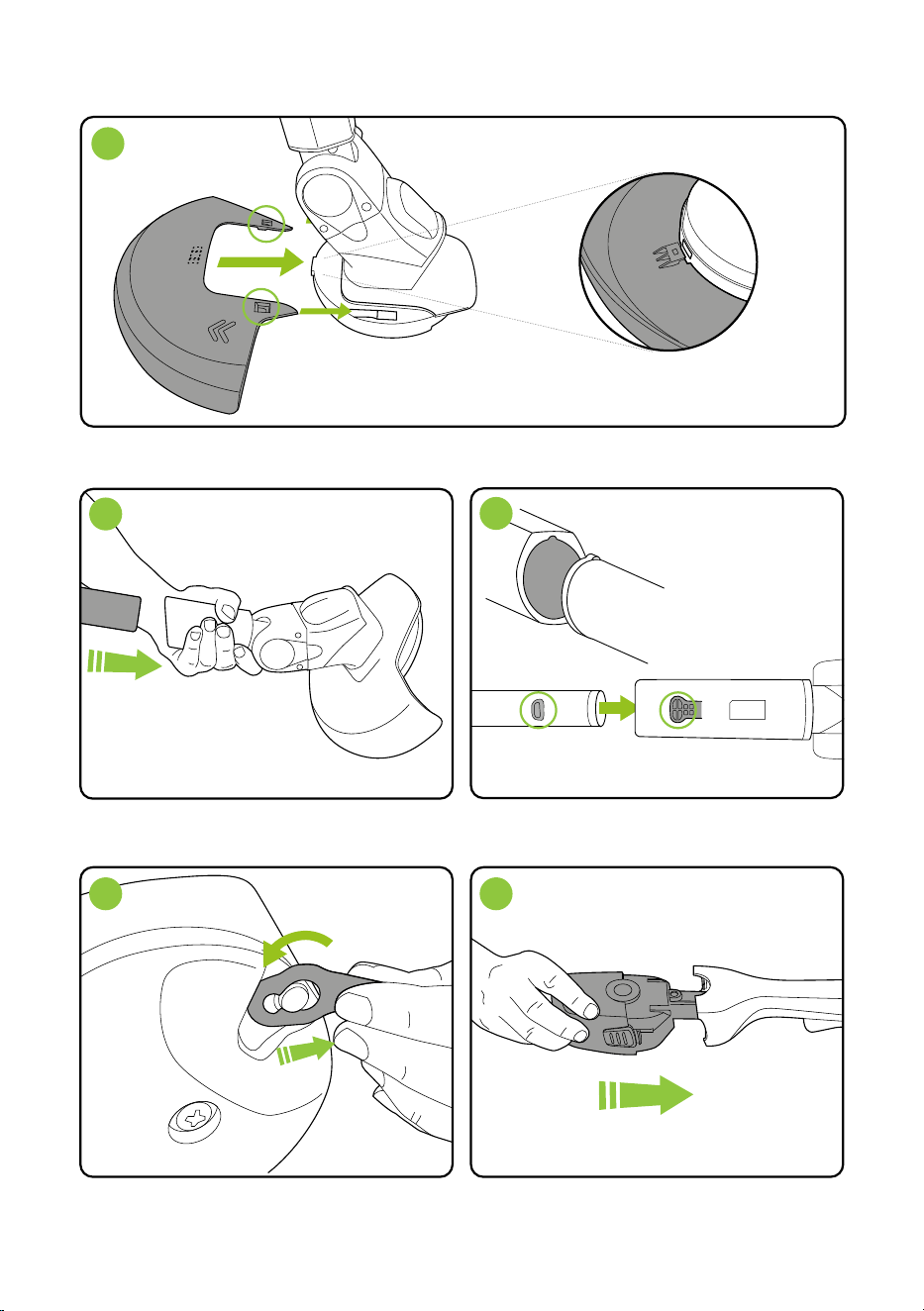
Insert the body pole into the grass trimmer
head, ensuring it is the right way up.
When the pole is fully inserted, the button (1)
will pop up into the aperture (2)
Insert the battery which will click into place.Hook a blade over the pin and pull to securely
lock into place.
The shapes need to match or
the handle will not fit.
1 2
2
View underneath
Harness
Assembly
Attach the shroud first. Align both clips on the shroud to the holes on the trimmer head and
simultaneously push them into place.
1
There is a third clip underneath
the shroud,in the centre.
7
1
3
4
8
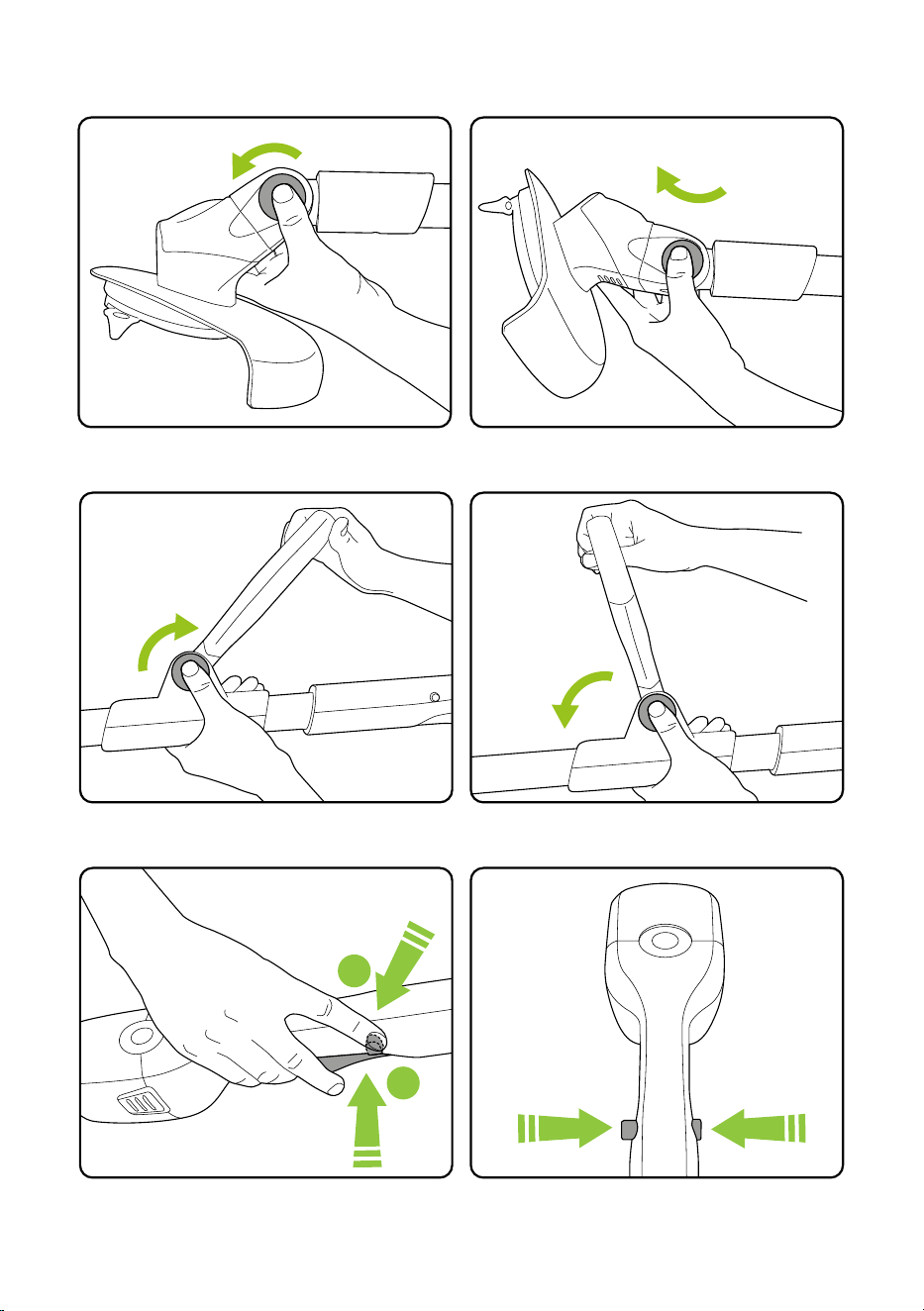
Operation
Push and hold the safety button on either side,
then press the trigger to operate.
When you release the trigger the trimmer will
stop.
Push the green button and rotate the head to
the required angle.
Release the button and ensure the head clicks
into a locked position.
Push the green button and rotate the handle to
the required angle.
Release the button and ensure the handle clicks
into a locked position.
2
1
safety button
(located both sides)
trigger
safety button
located both sides
9
WARNING: To reduce risk of personal injury, ensure the trimmer is switched off and the
blade has stopped before adjusting the cutting head.
WARNING: Ensure the cutting head is securely locked in position before starting the
trimmer.
WARNING: Do not attempt to remove the blade while the unit is running. Wait until the
blade has stopped before attempting to remove the blade. Never fit metal blades. Only
fit blades recommended by the manufacturer.
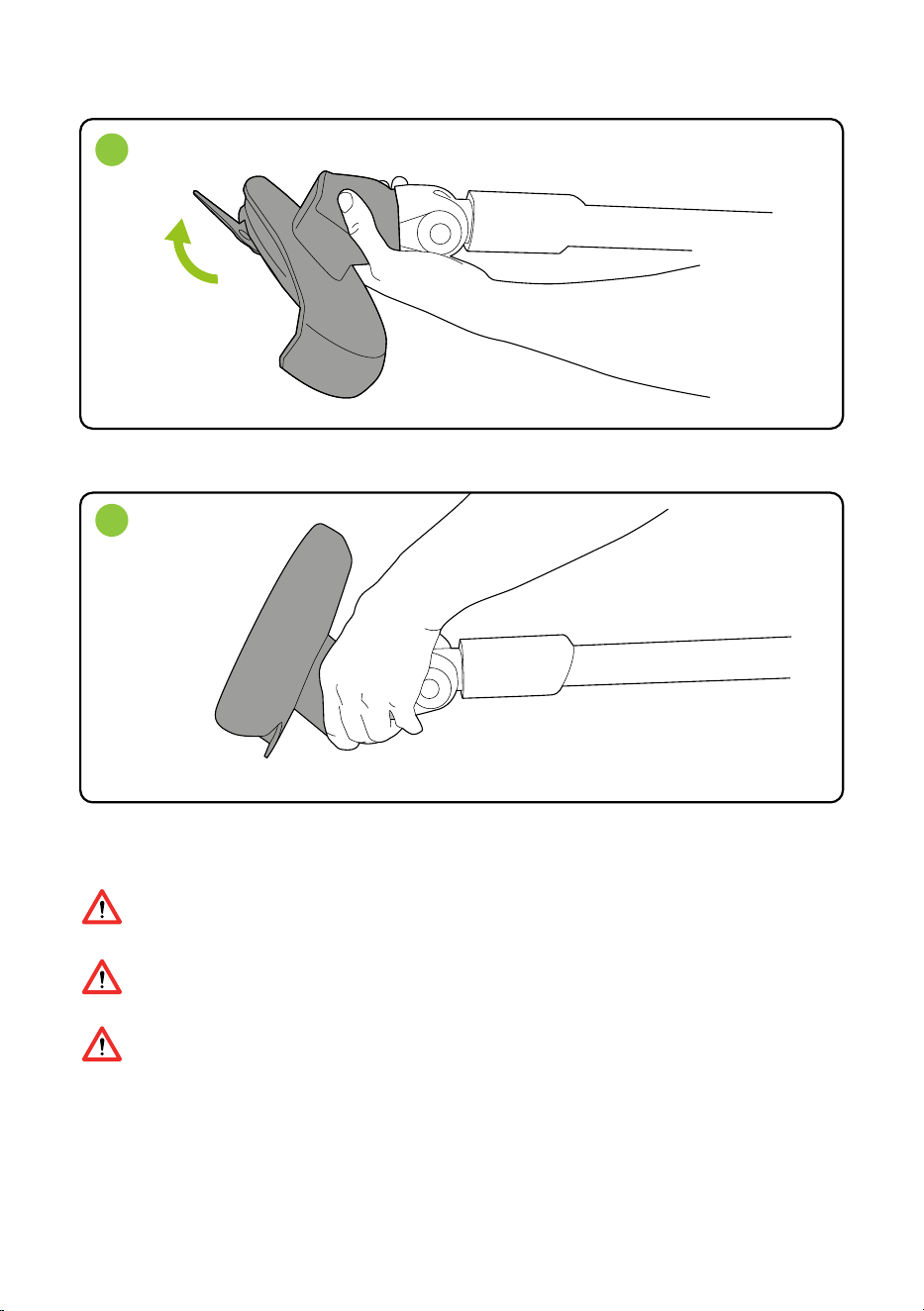
Changing to edge trimming mode
The head only rotates in one direction.
Firmly grip the main unit and rotate the head 180
0
1
2
Hold the trimmer away from your body using both hands and stand on a solid and
secure surface.
10
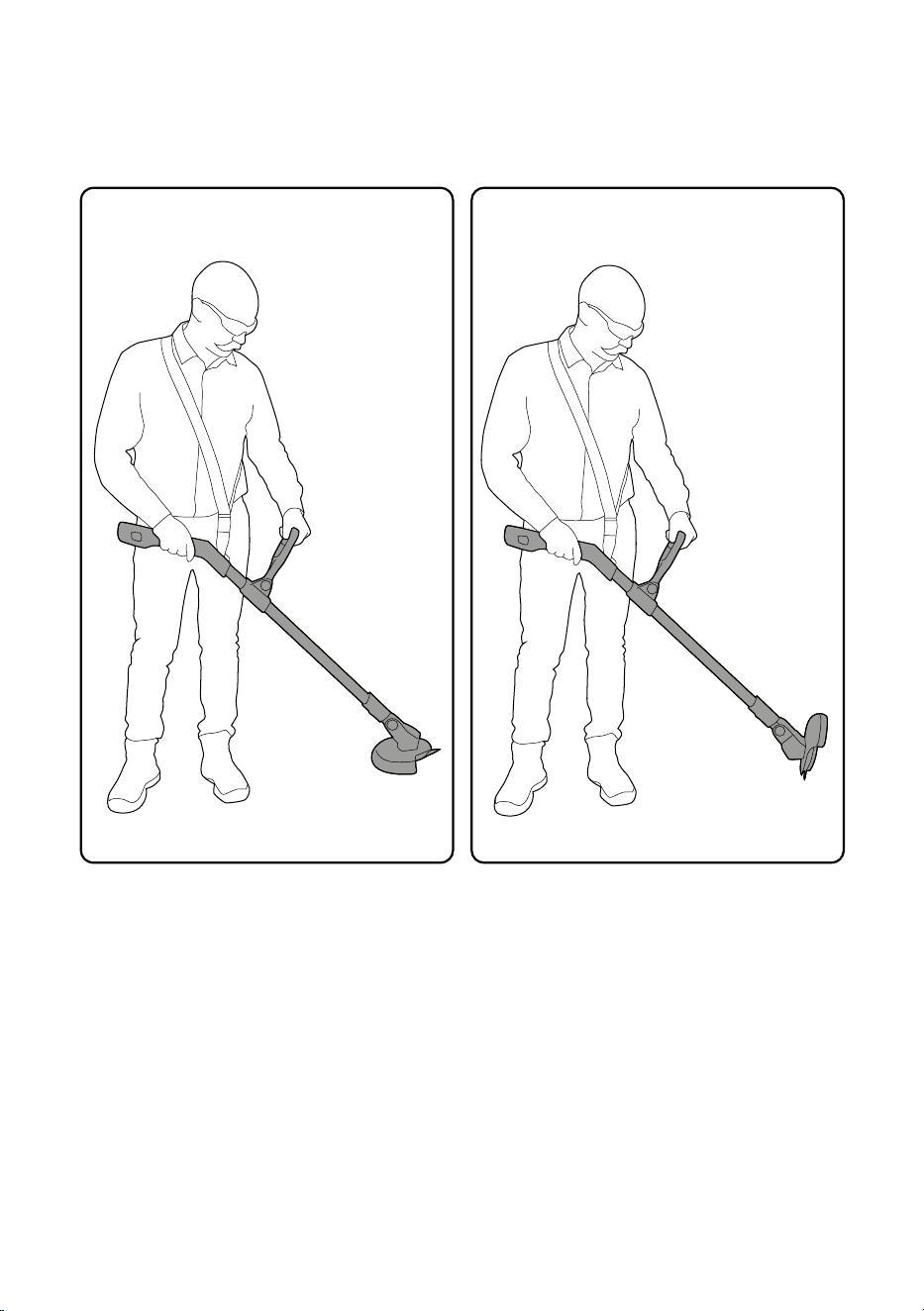
Using your Grass Trimmer
Firmly grip both handles, move slowly and
steadily using a side to side sweeping motion.
Firmly grip both handles with the head
rotated, move slowly to trim the edge
of the lawn.
Using to trim grass Using to edge
WARNING: Risk of electric shock. Pay attention to the position of garden cables.
WARNING: To reduce the risk of personal injury always wear eye protection. Personal
protective equipment such as sturdy gloves and non-slip shoes are recommended.
Pay attention to the hazard posed to third parties from the increased working area of the
trimmer.
Always take care when other people are around you. The trimmer may throw out stones
and debris at high speed.
Take care not to overload the trimmer. Attempting to force the trimmer to cut may damage
the motor. To prevent overloading cut long or difficult foliage in stages with several light
cuts.
Take care not to grind the rotating parts against the ground as this will wear parts and
cause damage to the trimmer.
Take care when trimming around objects such as stone or concrete as these can damage
the trimmer blade and parts that attach the blade.
If the blade becomes worn or damaged it should be replaced with a new blade.
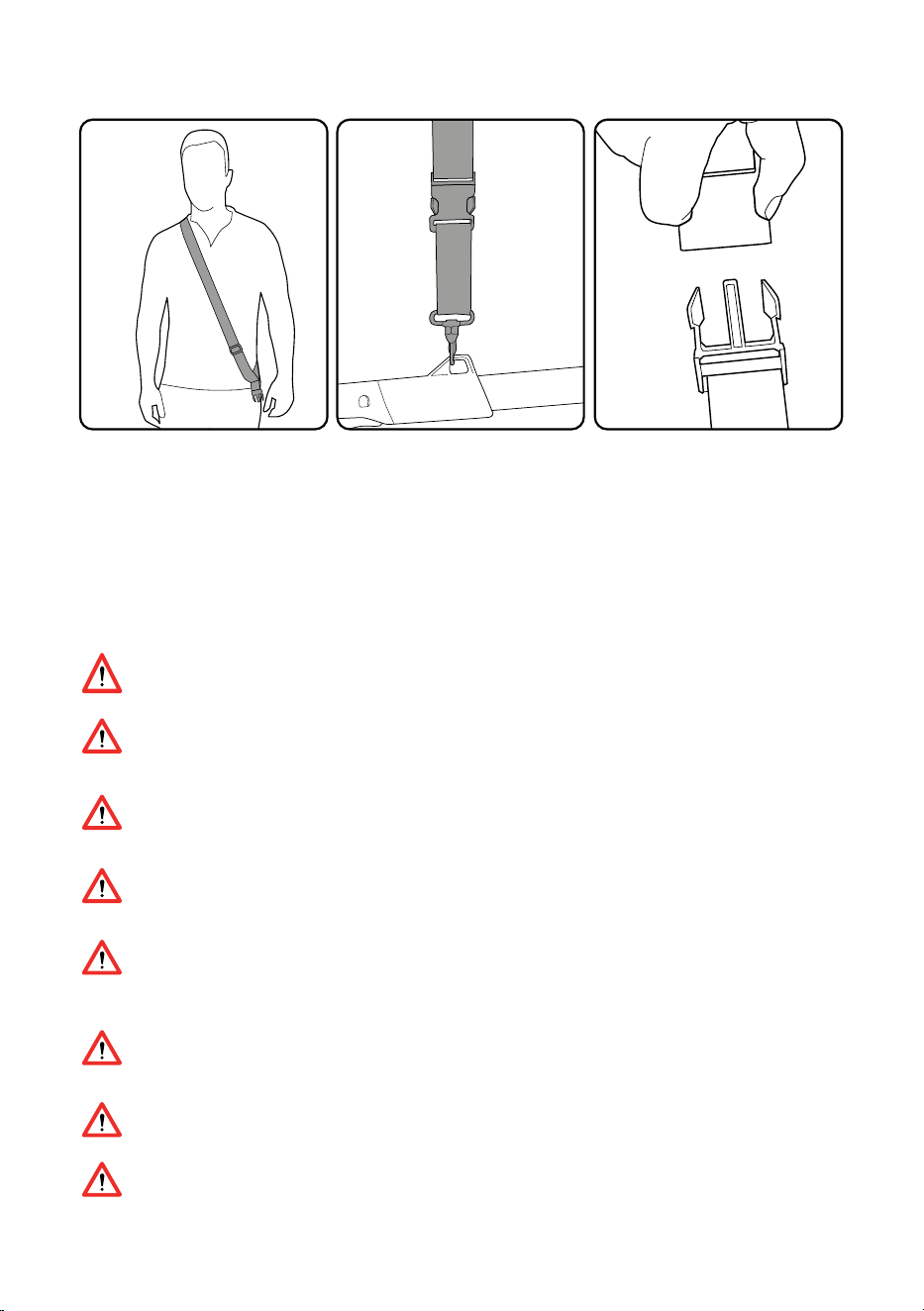
Harness
The harness can be used to
bear the load of the product.
The sling passes over your head
and rests on your shoulder
- use the sliding adjuster to
ensure the harness fits you
comfortably.
Attach the clip to the loop on
the of the handle and clip the
harness to this.
The clip can be used for
quick and easy release of the
product.
11
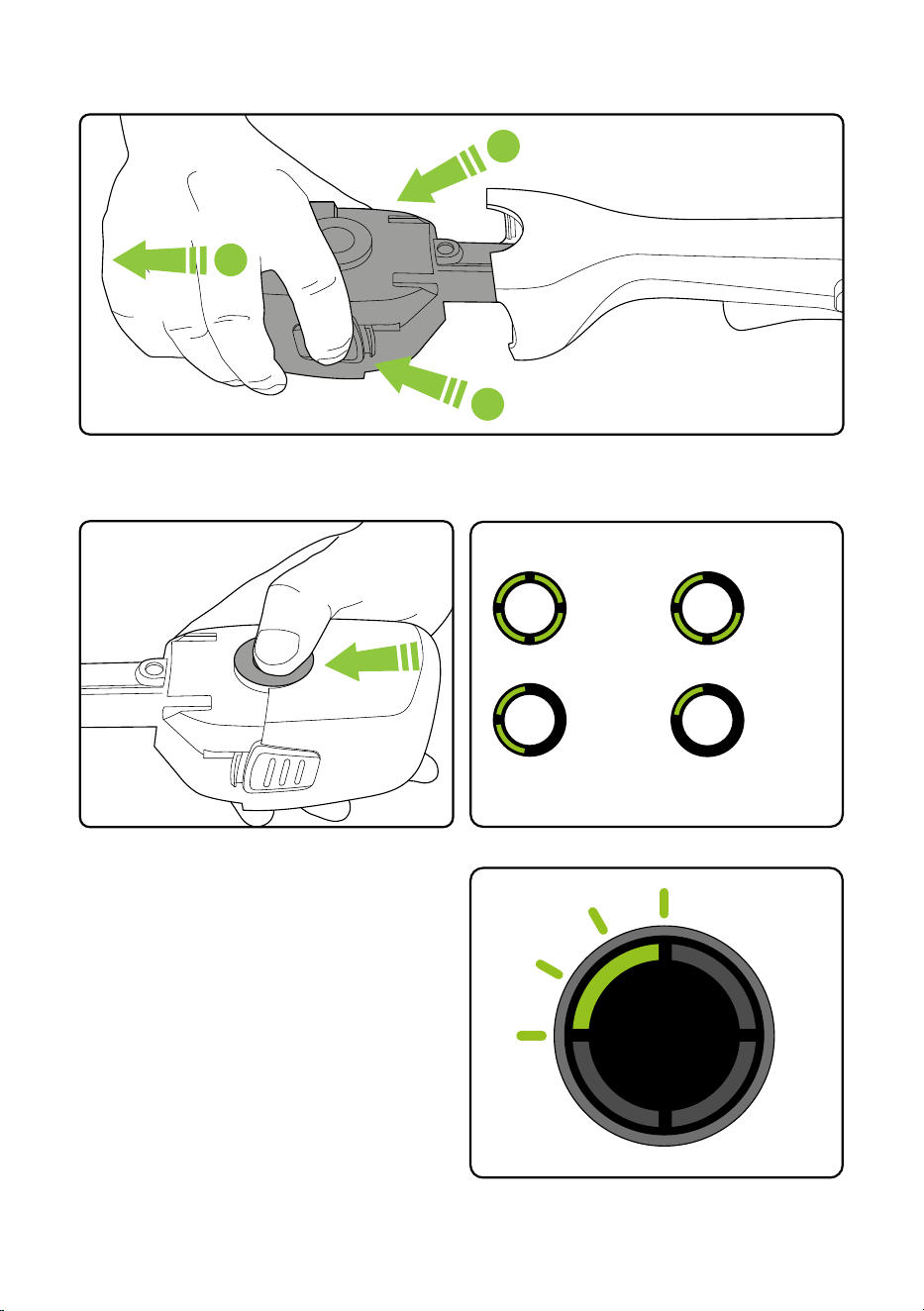
Removing the battery for charging
Press both buttons at the same time and pull to remove the battery.
1
1
2
Checking the battery charge status
Press the button to check how much
charge there is in the battery.
The number of lit LEDs shows the charge.
When there is no power le the final LED will
flash for 10 seconds and then go out.
100%
- 60%
60%
- 30%
30%
-10%
10%
- 1%
Figures are approximate.
12
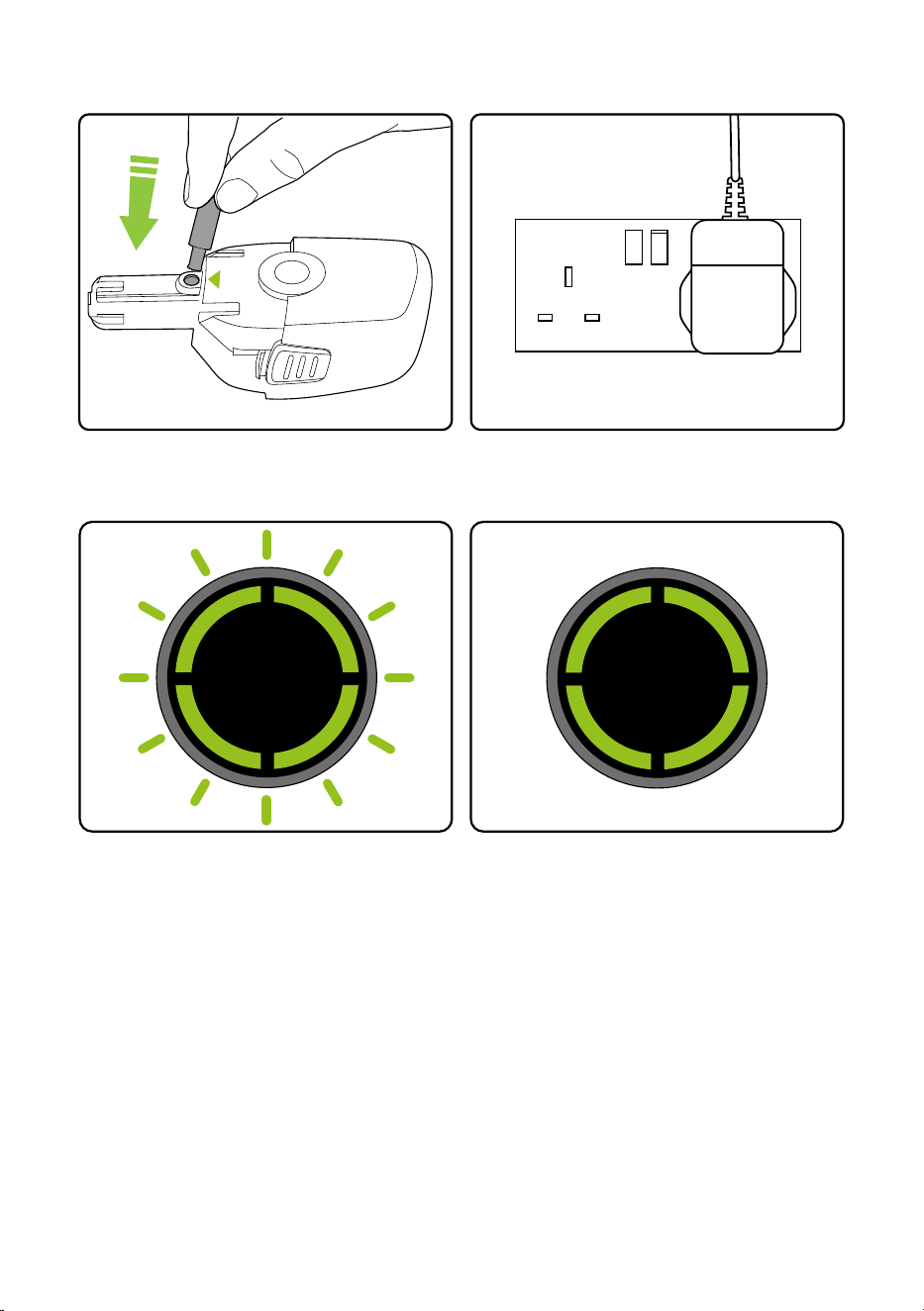
Reconnecting the battery to the Grass Trimmer
For reconnecting the battery to your grass trimmer, please refer to the instructions on page 7 of
this manual.
Charging the battery
Plug the charger into an ordinary plug socket.
While charging the LEDs will progressively
pulse until all four are lit.
The battery can be charged from flat in 4
hours. The state of charge indicator
will show 4 solid green lights when it is
charged.
Connect the charger to the battery where
indicated.
4
hours
13

14
Product Care
To ensure that your product gives you long and reliable service, carry out the following
maintenance regularly:
• Check for obvious defects such as loose, dislodged, worn or damaged blades, loose fixings,
and worn, damaged, or loose parts.
• Check that covers and guards are correctly fitted and undamaged.
• Before use check the condition of the cutting edges of the blade and that the blade fixings
are secure.
• Do not use water, solvents, or polishes to clean the trimmer. Wipe clean with a dry cloth.
• Do not use abrasive materials to clean the product, and do not immerse it in water.
• Store in a secure, dry place, out of reach of children. Do not expose to moisture.
PLEASE NOTE: If the product needs to be repaired or replaced only use replacement parts
supplied by the manufacturer.
Spare parts can be purchased from Grey Technology Ltd:
tel : 01905 345 891 www.gtech.co.uk
Troubleshooting
support@gtech.co.ukLive chat supportOnline How to Videos
Product support
If these initial tips do not solve your problem we please visit our support area where you can find
troubleshooting help including online manuals, FAQs and how-to-videos, as well as genuine
spares and replacement parts compatible with your product.
Visit: www.gtech.co.uk/support
15
Trimmer fails to operate 1. Recharge battery.
2. Check switch. It will click if operating
correctly.
3. Blade is jammed
Cutting blade will not cut 1. Blade is either worn or damaged.
2. Replace blade.
Blade will not move Replace blade
Cutting time has reduced 1. Use lighter cutting action and cut
in several stages.
2. Fully discharge and recharge battery.
3. Replace blade.
Abnormal vibrations 1. Check the hub screw is securely
screwed in.
2. Check the blade is installed.
3. Check if any obstacle is preventing normal
rotation of the hub.
Trimmer stops when cutting 1. Wait for automatic cut out to
reset. Use lighter cutting action.
2. Check blade and remove
any debris.
3. Charge battery.
LEDs show solid red 1. The grass trimmer has jammed.
2. Check blade and remove
any debris.
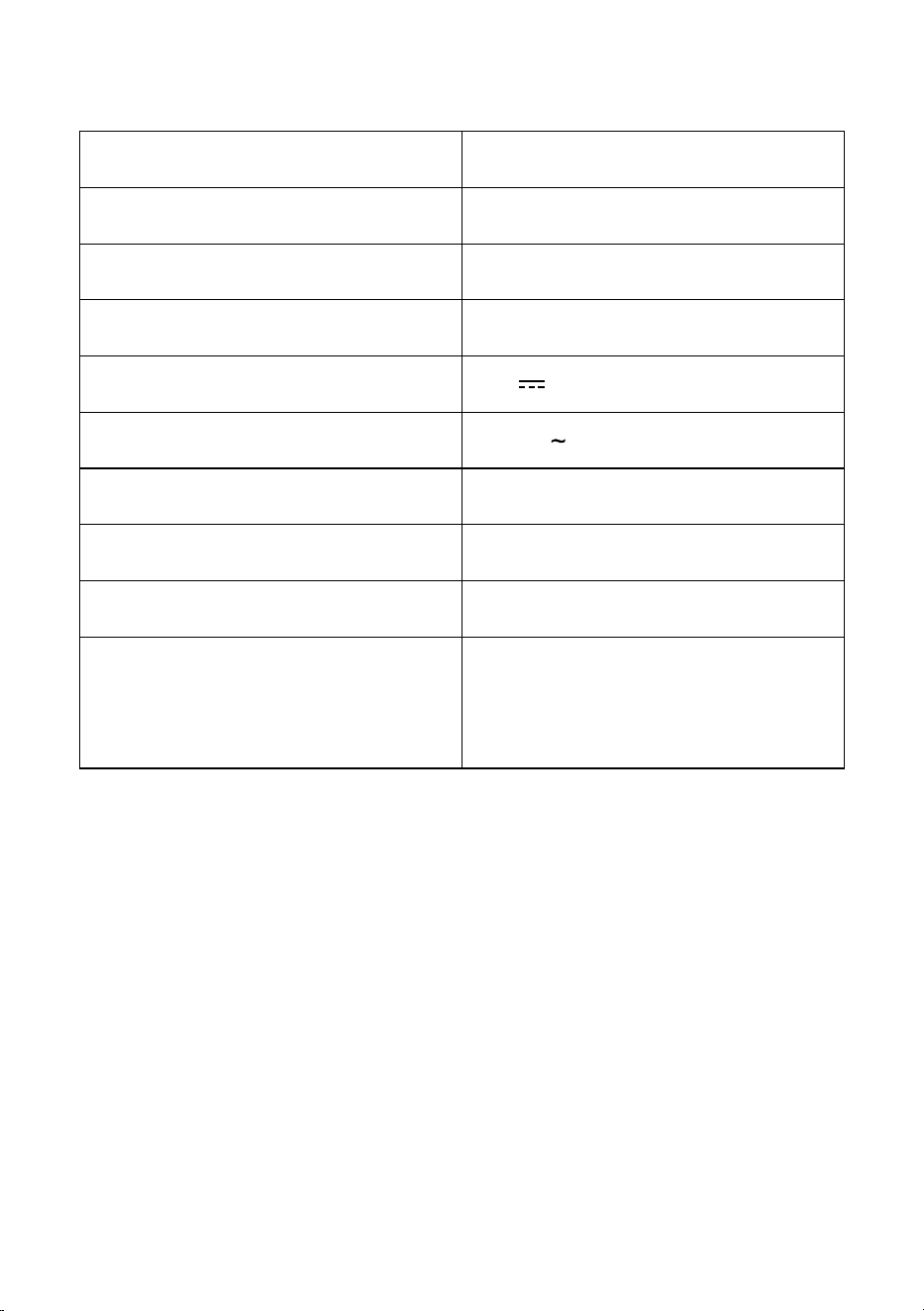
Cutting width 23cm
No load speed 9000min
-1
Battery 18V DC 2000mAh Li-ion
Charging period 4 hours
Battery charger output 21.6V 0.5A 10.8W
Battery charger input 100-240V 50/60Hz
Measure sound power level, L
WA
90.5 dB(A) K = 3dB(A)
Guaranteed sound power level, LwA,d 94dB(A)
Weight 1.85kg
Vibration Front handle a
h
=4.14 m/s²
Uncertainty k=1.5 m/s²
Rear handle a
h
=3.63 m/s²
Uncertainty k=1.5 m/s²
GRASS TRIMMER TECHNICAL SPECIFICATION
16

The symbol indicates that this product is covered by legislation for waste electrical and
electronic products (EN2012/19/EU)
When the product has reached the end of its life please do not dispose of it with general
household waste. Consider the environment and take it to a recognised recycling facility.
The product contains a Li-Ion battery which should not be disposed of with general household
waste. The battery should be disposed of properly with the product at a recycling facility.
Call your local council, civic amenity site, or recycling centre for information on the disposal and
recycling of electrical products.
Alternatively visit www.recycle-more.co.uk
for advice on recycling and to find your
nearest recycling facilities.
Environmental and Product Recycling
17
WHAT ISN’T COVEREDSUMMARY
The guarantee becomes effective at
the date of purchase (or the date of
delivery if this is later). If a product
is repaired or replaced during the
warranty period, the warranty period
is not started again.
• You must provide proof of delivery/
purchase before any work can be
carried out on the product. Without
this proof, any work carried out will be
chargeable. Please keep your receipt or
delivery note.
• All work will be carried out by Gtech or
its authorised agents.
• Any parts which are replaced will
become the property of Gtech.
• The repair or replacement of your
product is under guarantee and will not
extend the period of guarantee.
• The guarantee provides benefits which
are additional to and do not affect your
statutory rights as a consumer.
Gtech does not guarantee the repair or
replacement of a product as a result of:
• Normal wear.
• Use of consumables (e.g blades)
• Accidental damage, faults caused by negligent use or lack of care
and maintenance, misuse, neglect, careless operation or handling of
the product which is not in accordance with operating manual.
• Use of the product for anything other than the normal domestic
household purposes.
• Use of parts and accessories which are not Gtech genuine
components.
• Faulty installation (except where installed by Gtech)
• If it is modified in any way.
• Repairs or alterations carried out by parties other than Gtech or its
authorised agents.
• Purchasing your product from an unofficial third party (i.e not from
Gtech or an official Gtech retailer.
• If you are in doubt as to what is covered by your guarantee, please
call the Gtech Customer Care Helpline on UK: 08000 308 794
International orders are subject to a delivery charge for both faulty and
non faulty products.
18
Visit www.gtech.co.uk/warrantyregistration to register your product to ensure that we have all
the information required to provide you with quick and efficient support.
You will need your product’s serial code.
If you purchased directly from Gtech your details are already registered and your 2 year warranty
will start automatically.
If you purchased from an authorised Gtech retailer, please register your warranty within 3 months
and you will need to provide proof of purchase to support any claim against your warranty.
X-XX-XXX~
XXXXX~
WWYY~
00~0000000
WARRANTY – REGISTRATION
WARRANTY – TERMS AND CONDITIONS
Your Gtech product is guaranteed against material or manufacturing faults for
2 years from the date of purchase, subject to the following terms and conditions:

19
EC Declaration of Conformity
We, manufacturer/importer
Grey Technology Ltd
Brindley Road
Warndon
Worcester
WR4 9FB
declare that the product
GT4.0 Cordless Grass Trimmer
complies with the essential health and safety requirements of the following directives:
2014/30/EU - EMC Directive.
2006/42/EC - Machinery Directive
2000/14/EC amended by 2005/88/EC
- Noise emission in the environment by equipment for use outdoors Directive.
- Conformity assessment procedure as per ANNEX VI.
- Measured Sound Power Level = 90.5dB(A) K=3dB(A)
- Declared Guaranteed Sound Power Level = 94dB(A)
- Notified Body for EC Directive 2000/14/EC amended by 2005/88/EC
SNCH, 11 rue de Luxembourg L-5230 Sandweiler
2011/65/EU - RoHS directive
Technical documentation holder: Grey Technology Ltd, WR4 9FB
Standards and technical specifications referred to:
EN 60335-1:2012+A11:2014+A13:2017+A1:2019+A2:2019+A14:2019
EN 50636-2-91:2014
EN 55014-1:2017
EN 55014-2:2015
IEC 62133-2:2017
Dokumentationsbevollmächtigter:
Authorized person for the compilation
of the technical documentation:
Herstellerunterschri/Datum:
Authorized Signature/Date/ Place:
Angaben zum Unterzeichner:
Title of Signatory:
Andrew Boddy
Technical Manager
03.2020 Worcester, UK

CPN4684
Grey Technology Limited
Brindley Road, Warndon, Worcester WR4 9FB
email: support@gtech.co.uk
telephone: 08000 308 794
www.gtech.co.uk