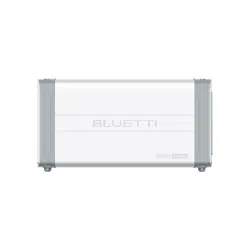
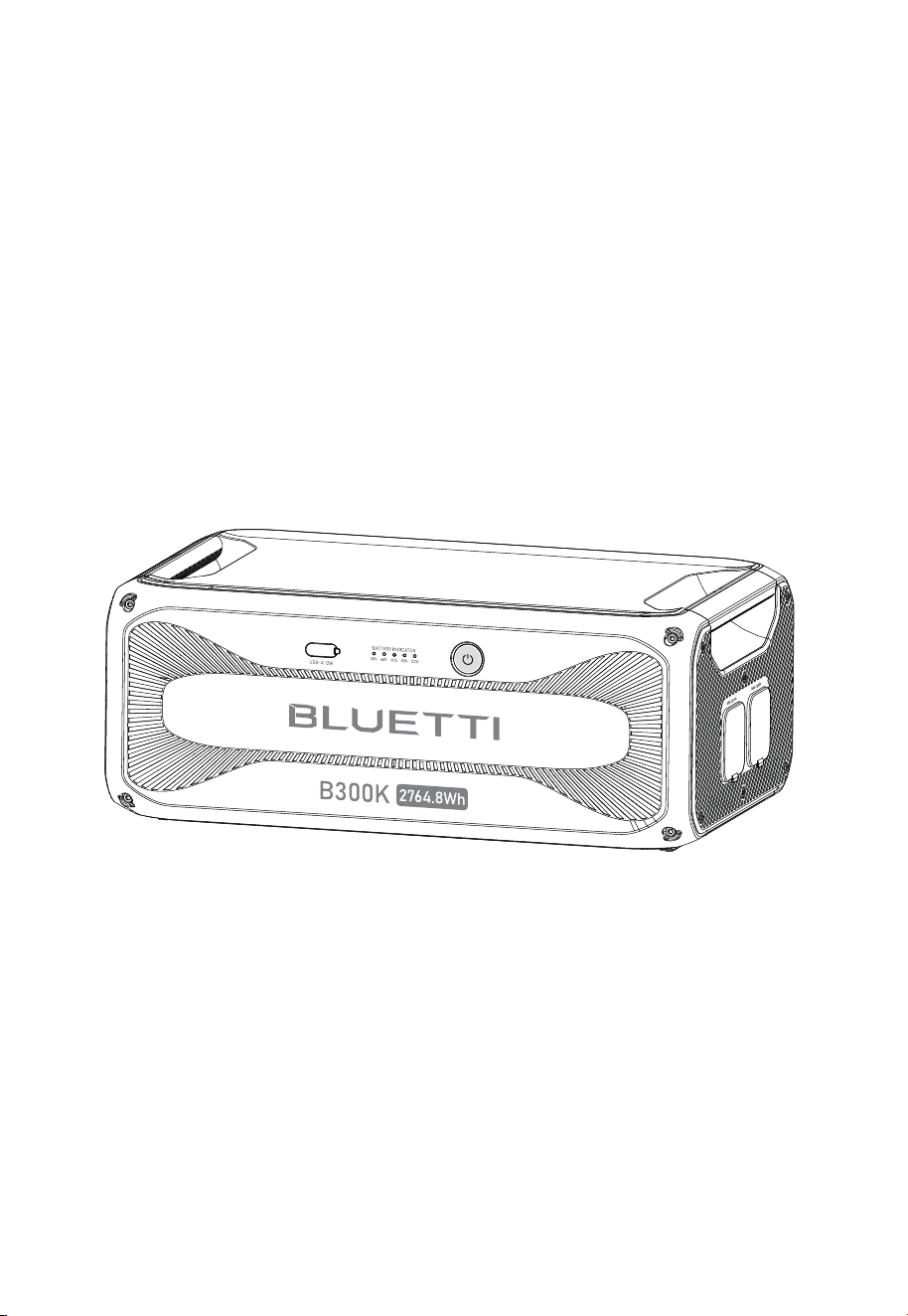
B300K
Portable Power Station
User Manual V1.0
Inspect the packaging for
damage before use.
Perform a charge cycle before first use.
Scan the QR code for the BLUETTI app.
Register for warranty at https://www.bluettipower.com/
Thank You
Thank you for making BLUETTI a part of your family.
From the very beginning, BLUETTI has tried to stay true to a sustainable future through
green energy storage solutions while delivering an exceptional eco-friendly experience
for our homes and our world.
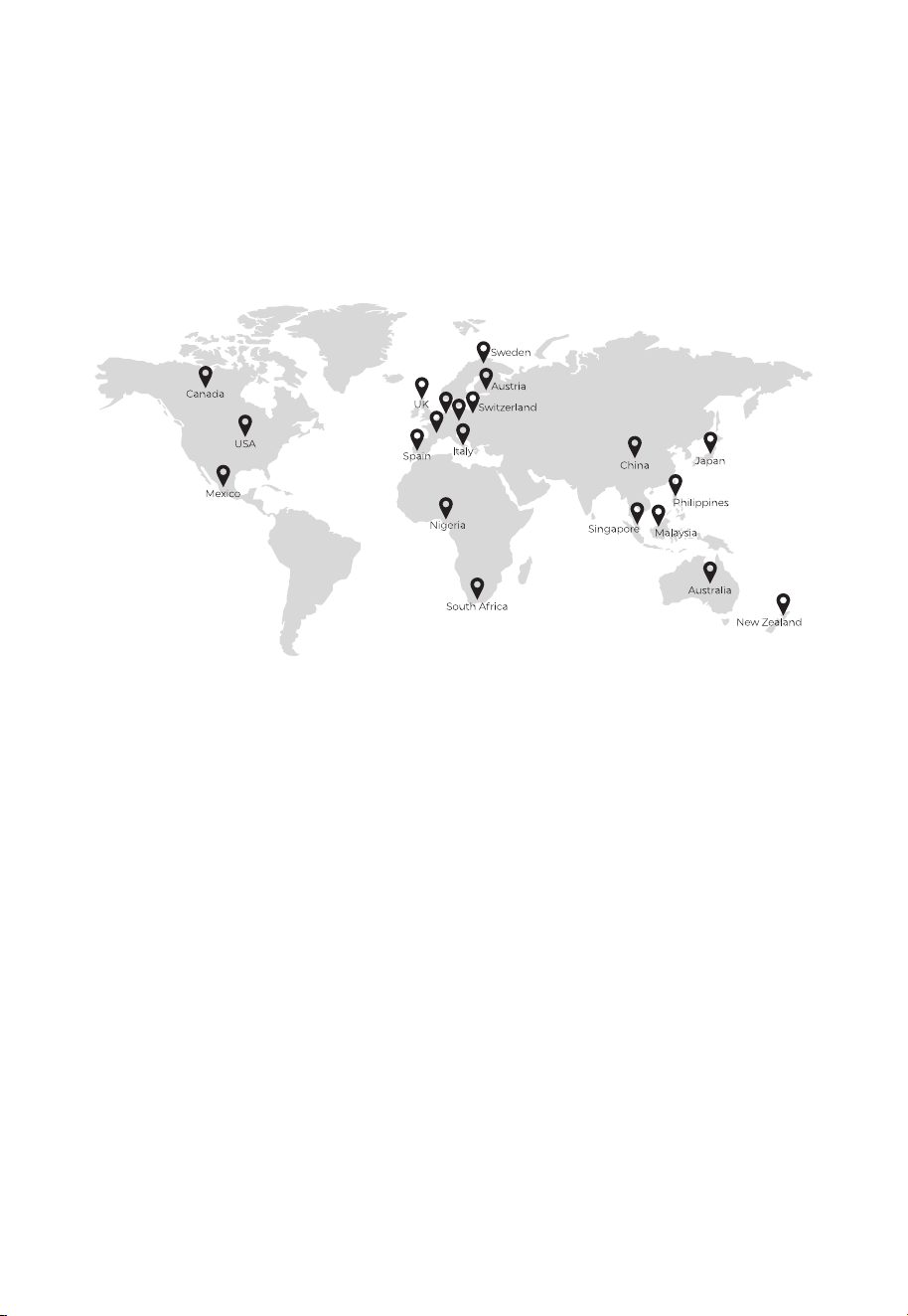
That's why BLUETTI makes its presence in 100+ countries and is trusted by millions of
customers across the globe.
Copyright © Shenzhen PowerOak Newener Co., Ltd. All Rights Reserved.
No reproduction or transmission of any part of this document is permitted without the
prior written consent of Shenzhen PowerOak Newener Co., Ltd.
Disclaimer
BLUETTI's products and services are subject to the terms and conditions agreed upon
during purchase. Some aspects described in this manual may not be available under your
purchase contract. Unless otherwise specified in the contract, BLUETTI makes no express
or implied representations or warranties regarding the contents of this manual.
BLUETTI should assume no liability for the failures, damages, or injuries resulting from force
majeure, repair attempts by unqualified personnel, or improper installation and operation.
The contents of this manual are subject to change without notice. Please obtain the
latest version from BLUETTI official website.
If you have any questions or concerns about this manual, please contact BLUETTI
support for further assistance.
France
Germany
Netherlands
Shenzhen PowerOak Newener Co., Ltd.
F19, BLD No.1, Kaidaer, Tongsha RD No.168, Xili street, Nanshan, Shenzhen, China
Web: https://www.bluettipower.com

About the Manual
Introduction
This manual provides information on the functionality, basic operation and safety
instructions of the B300K portable power station. Please read and understand all
instructions in this manual before use.
Target Audience
• Technical support engineer
• End-user

Safety Information
Packing List
Get to Know Your B300K
Use Your B300K
Power On/Off
Connect to B300K and Power Station
Charge Up
Control and Monitor
Indicators Status
Maintenance and Care
Specifications
Troubleshooting
Contents
1
2
3
4
5
6
7
8
Appx. 1 FAQ (Frequently Asked Questions)
Appx. 2 Compliance
FCC Statement
IC Caution
CAN ICES-3 (B)/NMB-3(B) (Canada)
Appx. 3 Consignes de sécurité
06
08
09
10
10
10
13
13
14
14
15
16
17
18
18
19
19
20

1. Safety Information
WARNING - When using the product, basic precautions should always be followed to
prevent the risk of fire, electric shock, or injury to persons:
• Read all the instructions before using the product.
• Use and store the product in a cool, dry place with good ventilation.
• Keep it away from flammable liquids, gases, explosives and corrosive substances.
• Do not expose it to high temperatures or heat sources like sunlight, fire, transformers,
and heaters.
• Do not insert fingers or foreign objects into the product's ports.
• Do not use damaged or modified product to prevent electric shock, injury, etc.
• Operate the product only with undamaged plugs and cables.
• Do not move the product during use to avoid internal hardware damage from vibration
and collision.
• Handle the product with care to prevent drops, violent impacts, or tilting.
• Place the product on a stable platform.
• Keep the product out of reach of children and pets.
• Avoid submerging or cleaning the product with liquids.
• Power off the product before any servicing to reduce the risk of electric shock.
• Only professionals should handle leaks or defects - seek their assistance as needed.
General Safety
• Use the battery within the specified temperature range.
• Do not disassemble, modify, or damage the battery to prevent leakage, overheating, or fire.
• Keep the positive and negative battery terminals from touching each other or metal objects.
• Avoid welding or grinding near batteries to prevent fire from sparks or arcs.
• Do not drop metal tools onto the battery to prevent sparks or short circuits.
• Lithium-ion batteries pose fire risks, so be aware of these hazards:
a. Thermal runaway can release flammable and harmful gases such as CO and HF.
Vapors from burning batteries may irritate the eyes, skin, and throat.
b. The concentration of these gases could lead to deflagration and explosion.
c. The battery electrolyte is flammable, toxic, and volatile.
• If a battery leaks chemicals or emits odors, don't approach it - contact professionals for
safe disposal. They'll need proper protective gear.
• Do not touch a battery that's been submerged in water, to avoid electric shocks. Discard
soaked batteries through proper recycling channels.
Battery Safety
JUST POWER ON06

Personal Precautions
• When working near batteries, wear eye and clothing protection.
• Avoid smoking, sparks, or flames near the battery or engine.
• In abusive conditions, liquid may eject. If contact occurs, flush with water; seek medical
help if liquid contacts eyes.
SAVE THESE INSTRUCTIONS
• Electrolyte is corrosive and can cause irritation and chemical burns. If you come into
direct contact with battery electrolyte:
a. Inhalation of Vapors: Evacuate the contaminated area, get fresh air immediately, and
seek medical attention.
b. Eye Contact: Immediately flush eyes with water for at least 15 minutes, do not rub
eyes, and seek medical attention immediately.
c. Skin Contact: Immediately wash the infected area with soap and water and seek
medical attention immediately.
d. Ingestion: Seek medical attention immediately.
• Follow local guidelines for proper battery disposal; never burn, crush, or discard them
improperly.
JUST POWER ON 07
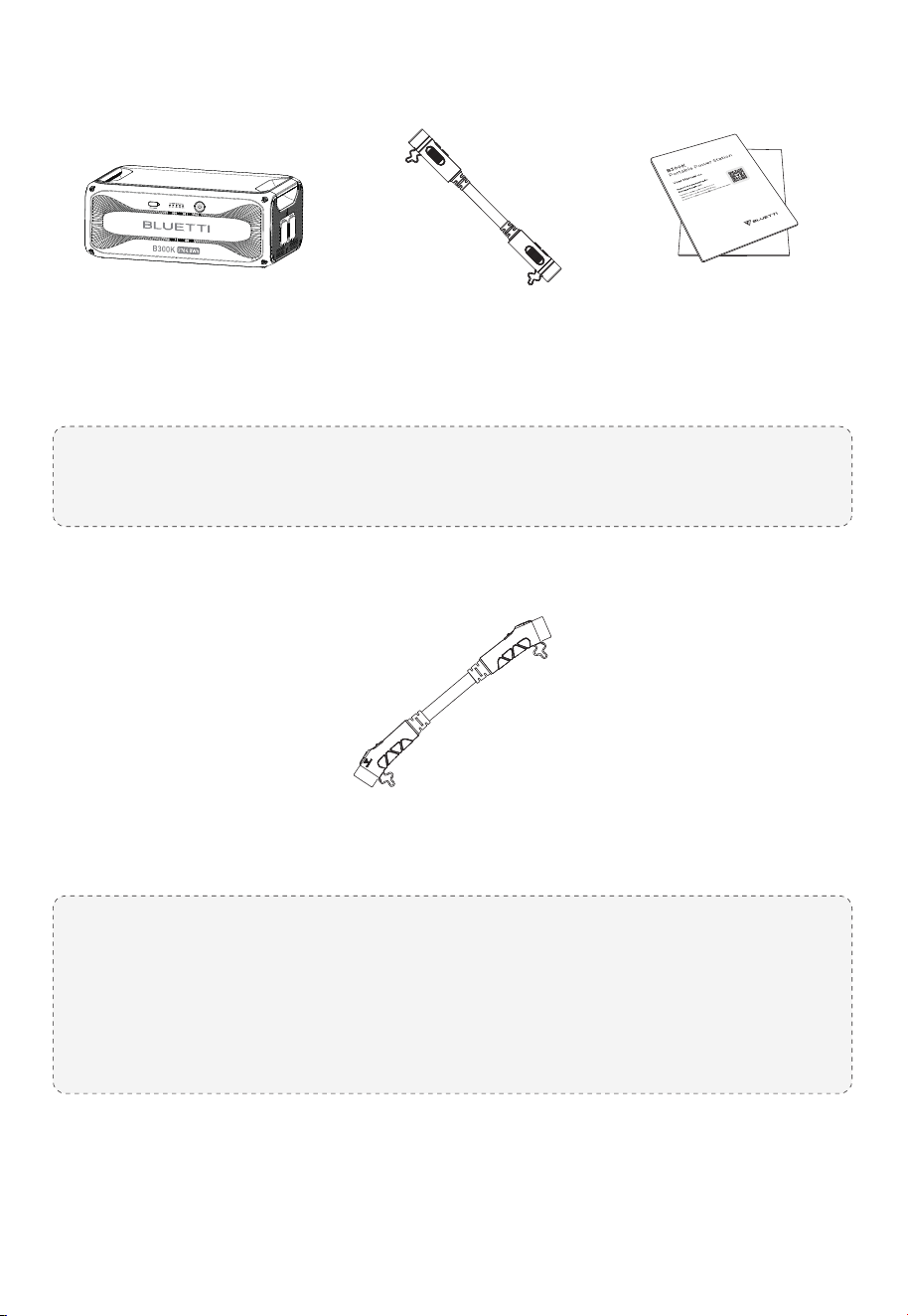
2. Packing List
Optional Accessories
The following accessories may not be included. Please purchase optional
accessories at https://www.bluettipower.com
Note:
Battery Expansion Cables:
Connect the B300K to AC300, AC200MAX, AC200L, or other B300K units with
the P090A battery expansion cable. Use the P090D to P150D cable to connect to
AC500.
JUST POWER ON08
B300K
Portable Power Station
P090A
Battery Expansion Cable
( 31.49in / 800mm )
P090D to P150D Battery Expansion Cable
( 31.49in / 800mm )
Documentation
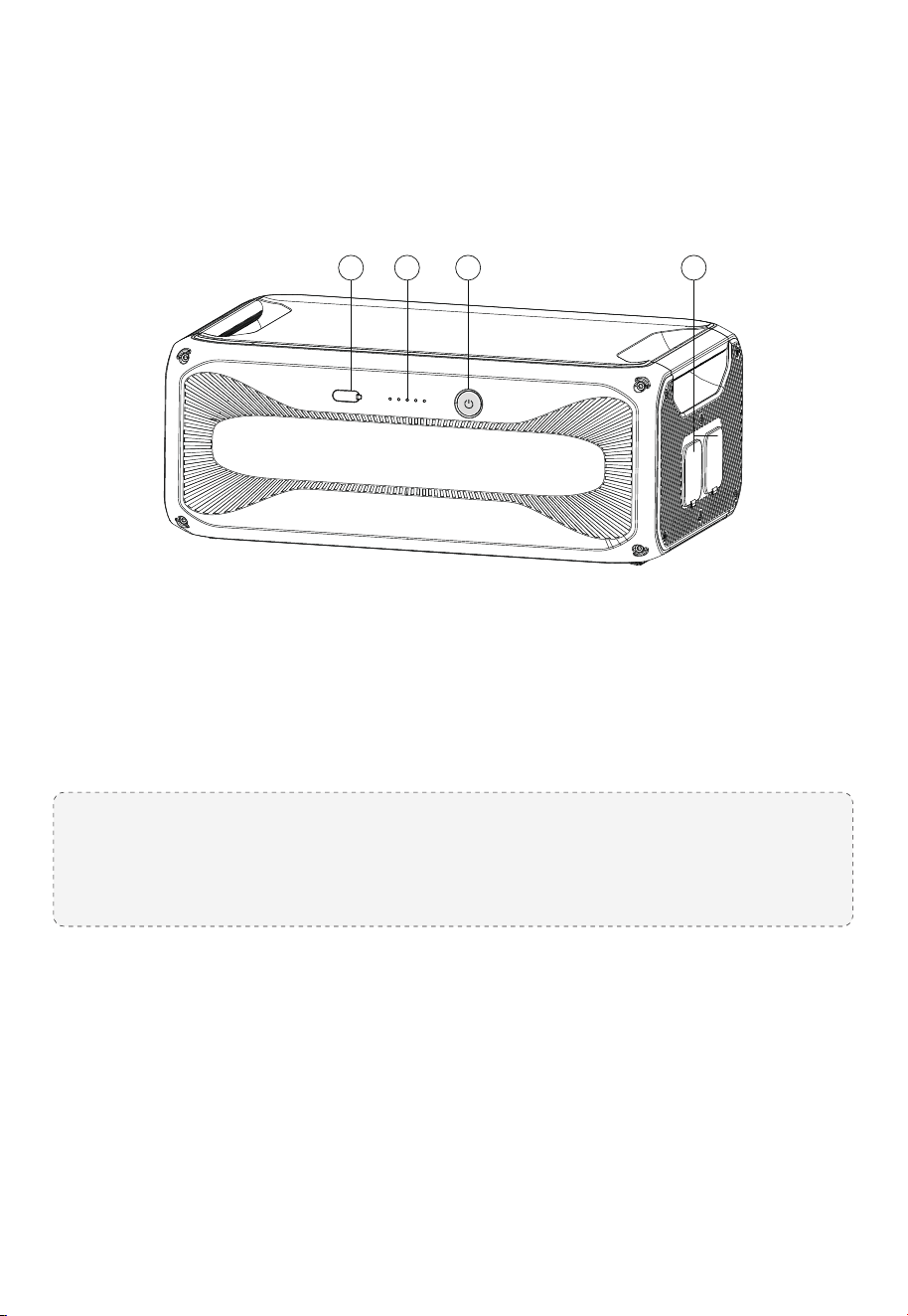
3. Get to Know Your B300K
The B300K can be used with AC300, AC500, AC200MAX, and AC200L as a 2764.8Wh
expansion pack.
USB-A Port
LED Indicators*
Power Button**
Battery Expansion Ports
①
②
③
④
* Indicate battery level and operation status.
** Button light indicates operation status with LED indicators.
Refer to Chapter 5 (Indicators Status) and Chapter 8 (Troubleshooting) for details.
JUST POWER ON 09
1 3 42
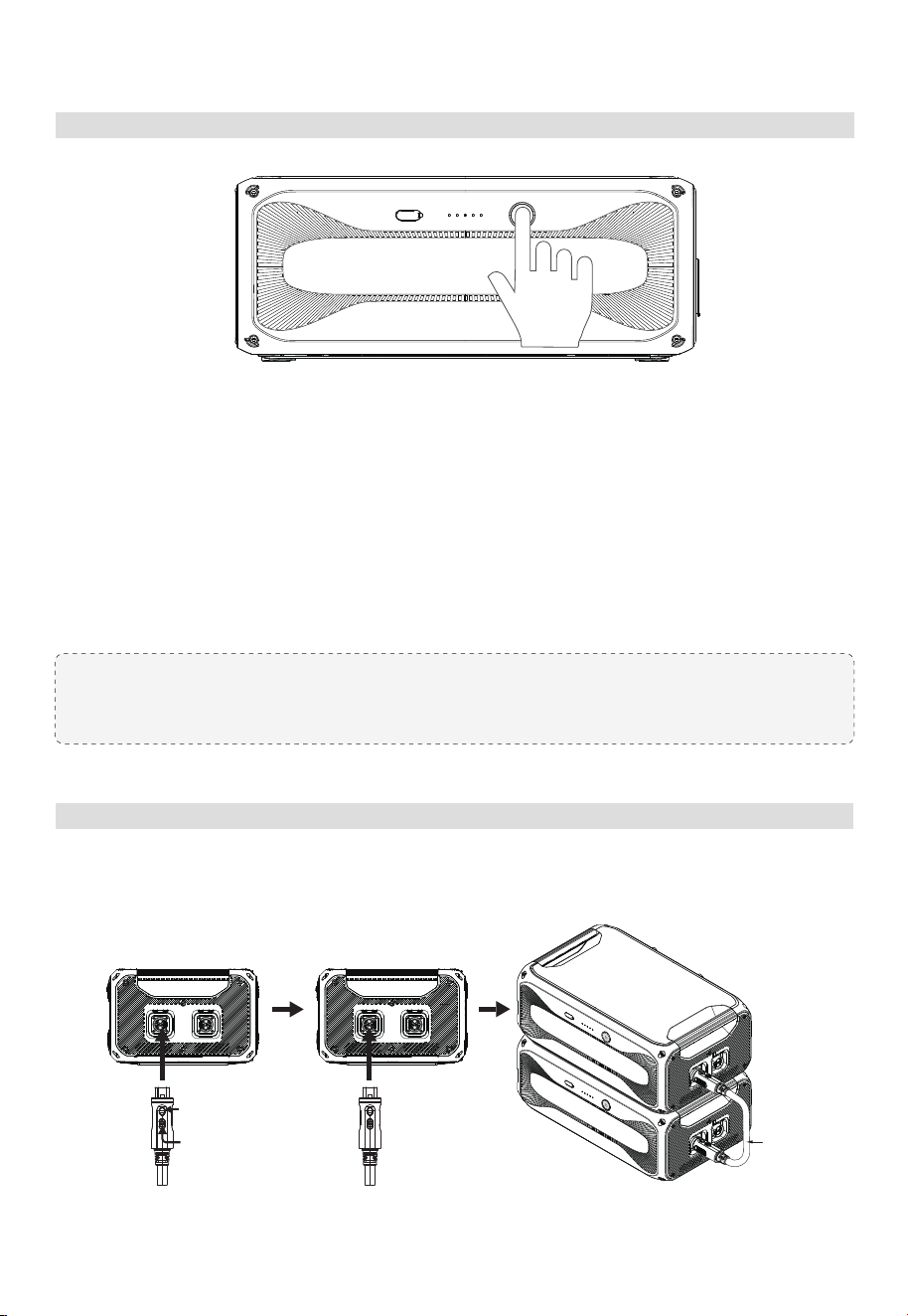
Power On/Off
Connect to B300K and Power Station
4. Use Your B300K
Power On
1. Long press the power button.
2. When the button lights up, the B300K is on standby.
3. The LED indicators show the battery level.
Power Off
1. Long press the power button.
2. The button light and indicators turn off.
Note: Connected to a power station, the B300K automatically turns on when the
combo charges with AC power or solar panels.
Connecting to B300K Battery
Use the P090A battery expansion cable to interconnect the B300K units.
JUST POWER ON10
Press down to
insert cable into port
P090A
Push to lock cable
in place
*Be sure to LOCK the connection.
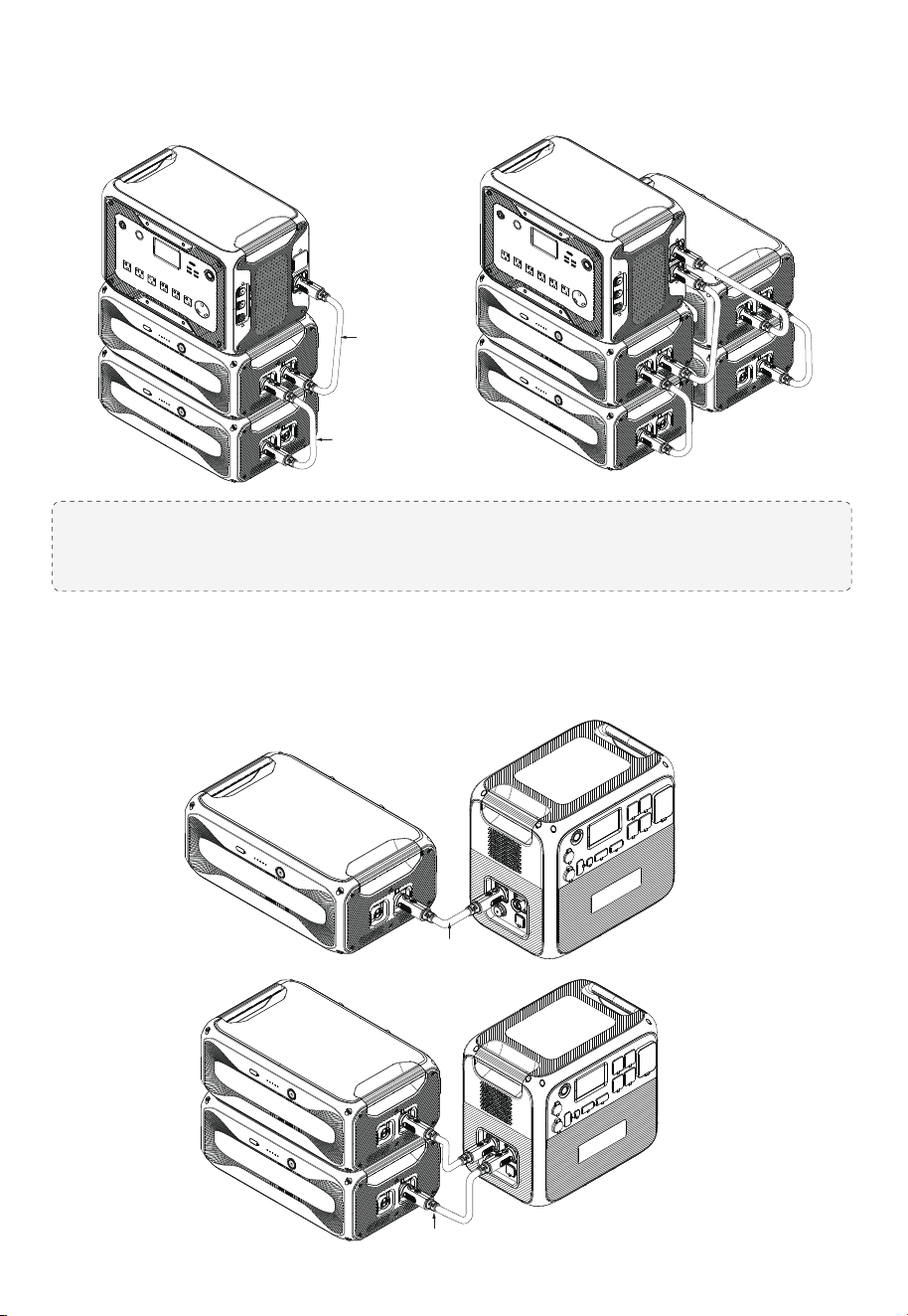
Note: The AC300 can work with B300K and B300 expansion batteries simultaneously
using P090A battery expansion cables.
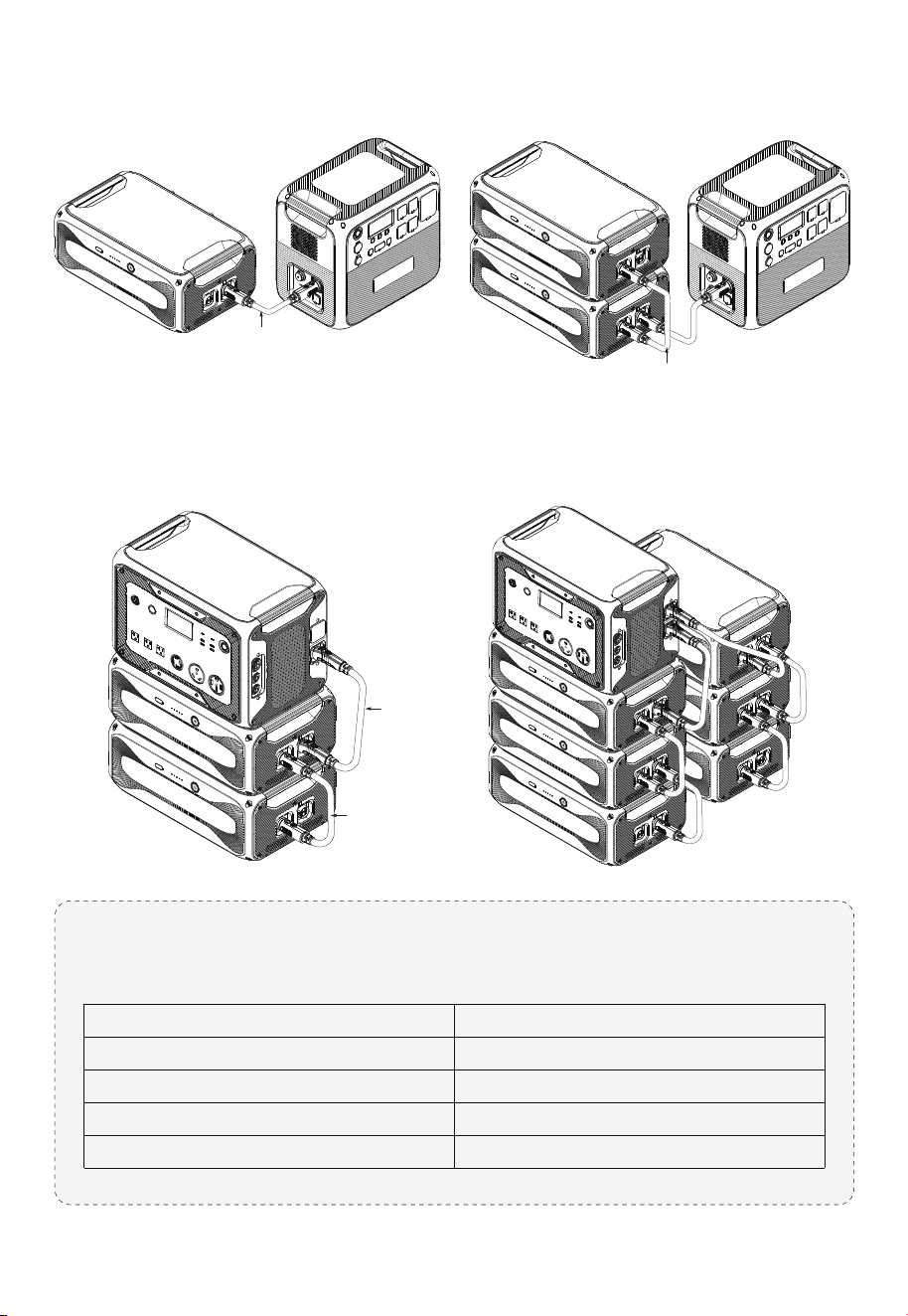
Connecting to AC300
Connect up to 4 B300K units for a maximum capacity of 11,059.2Wh.
Connecting to AC200MAX
Connect up to 2 B300K units for a maximum capacity of 5,529.6Wh.
JUST POWER ON 11
P090A
P090A
P090A
P090A
Note: The AC500 can work with B300K, B300S and B300 expansion batteries
simultaneously. To connect them:
Connecting to AC200L
Connect up to 2 B300K units for a maximum capacity of 5,529.6Wh.
Connecting to AC500
Connect up to 6 B300K units for a maximum capacity of 16,588.8Wh.
P150D battery expansion cable
P090D to P150D battery expansion cable
P090D to P150D battery expansion cable
P090A battery expansion cable
AC500 to B300S
AC500 to B300K/B300
B300K/B300 to B300S
B300K to B300
Cable RequiredConnection
JUST POWER ON12
P090A
P090D to
P150D
P090A
P090A
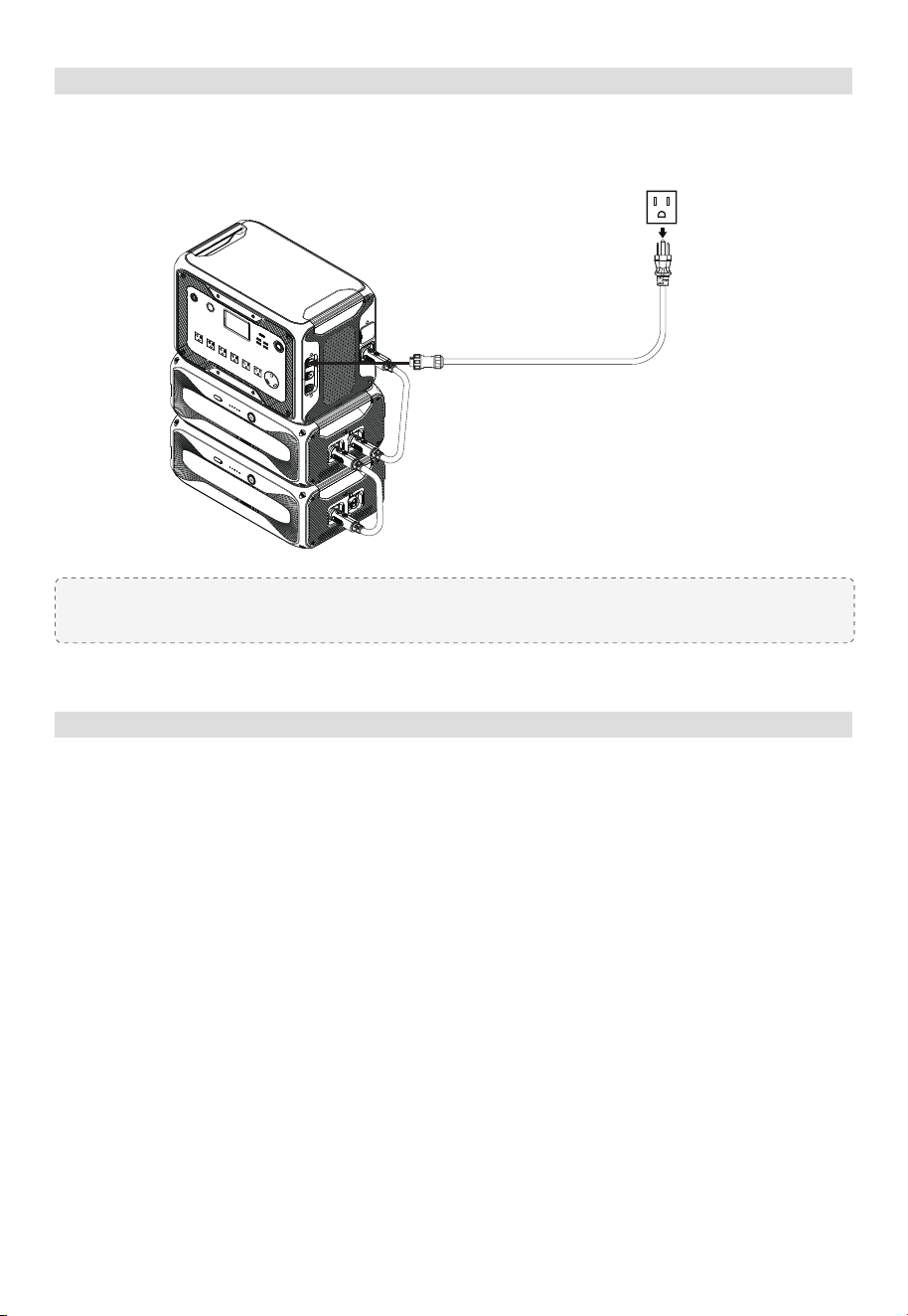
Charge Up
Note: Recommended charging temperature: 15°C to 30°C (59°F to 86°F)
Connect the B300K to a power station for charging. It charges from 5% to 80% in about
45 minutes when connected to AC300 or AC500.
Control and Monitor
Connect the B300K to a power station, and check the battery level and upgrade it using
the BLUETTI app. For more details, please refer to your power station's app user guide.
JUST POWER ON 13

5. Indicators Status
6. Maintenance and Care
Indicator Status Description
Steady green
Flashes 4 times per second
Flashes once every 1.5 seconds
Off
Flashes twice, pause for 4 seconds, and
repeat
• Each lit indicator represents 20% SoC.
• All indicators remain steady when fully charged and go off when fully discharged.
• Flashing indicators show the charging progress.
The battery expansion cable is not
locked.
Normal operation
Malfunction
Upgrading
Shutdown
• When the SoC drops to 1% without any power input, power off the unit promptly to
prevent overdischarge.
• Before storing, charge it to 60%-80% SoC and fully cycle every 6 months to maintain
battery health.
• For long-term storage over 6 months, charge it to 40%-60% SoC and fully cycle every 3
months.
• Safe storage temperature: -20°C to 40°C (-4°F to 104°F). For storage over a month, aim
for a range of -20°C to 25°C (-4°F to 77°F). Perform a cycle charge before reuse.
• Avoid extended storage periods as it can impact the battery's performance and lifespan.
• Use a dry and soft towel to clean the battery's exterior.
Power Button
LEDs
JUST POWER ON14

7. Specifications
Model
Battery Capacity
Battery Type
Net Weight
Dimensions (L × W × H)
Charging Temperature
Discharging Temperature
Working Humidity
B300K
2,764.8Wh (51.2V, 54Ah)
LFP
Approx. 29.5kg (65.04lbs)
525 × 327 × 209mm (20.67 × 12.87 × 8.23in)
0°C to 40°C (32°F to 104°F)
-20°C to 40°C (-4°F to 104°F)
5% to 95%RH
General
Discharging Current
2 × Expansion Port
70A Max.
58.4VDC Max., 90A Max.
USB-A 12W Max., 5V / 2.4A
DC Output
Storage Temperature
Up to 1 month: -20°C to 40°C (-4°F to 104°F)
Up to 6 months: -20°C to 25°C (-4°F to 77°F)
Charging Current
60A Max.
(Current may decrease outside specified temperatures)
JUST POWER ON 15
8. Troubleshooting
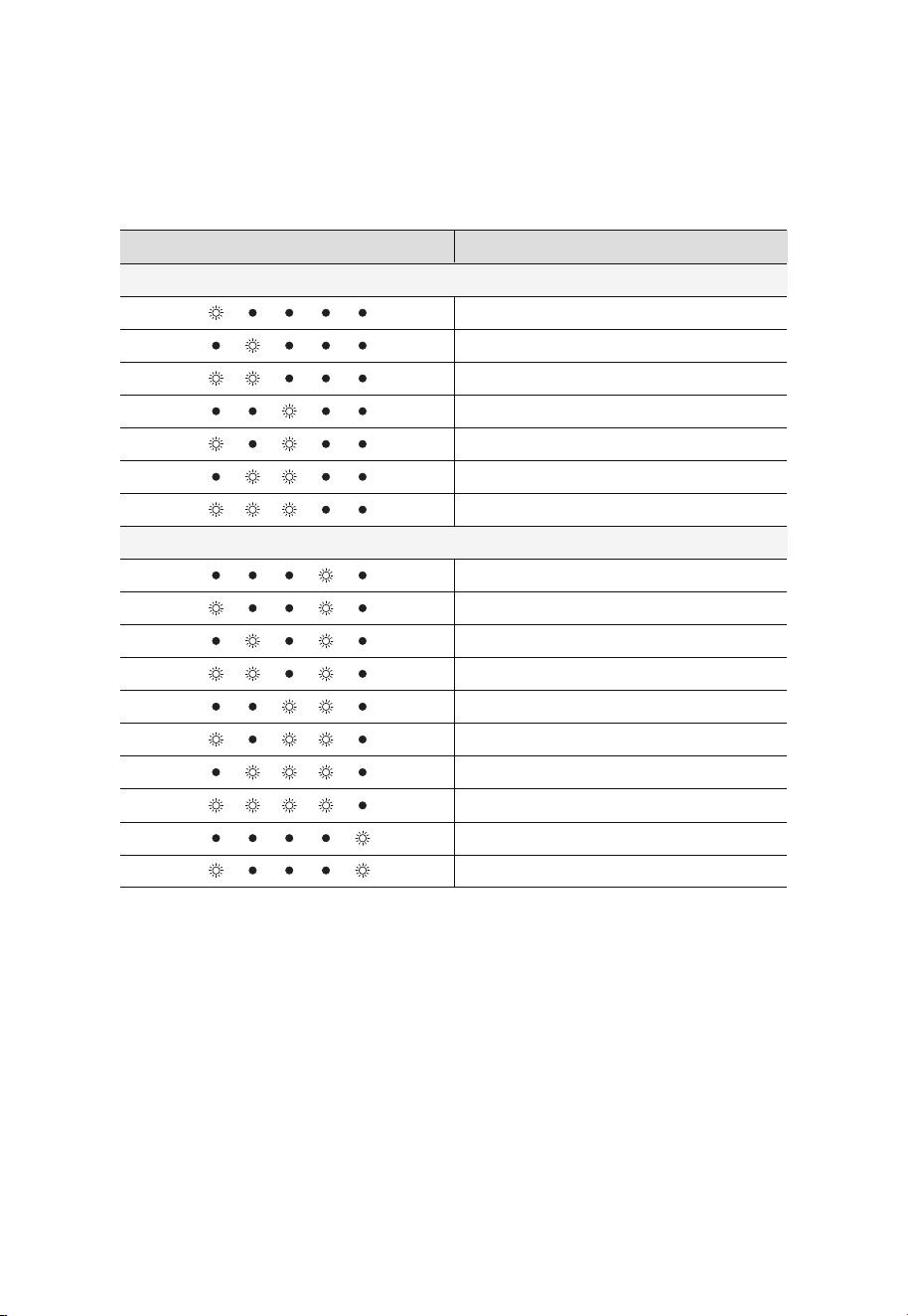
When the B300K malfunctions, the LEDs may flash or turn off in various combinations.
For soft errors, restart the unit. For hardware issues, contact BLUETTI support for repair
or replacement. See the table below for details.
Low voltage
High/low temperature
Pre-charge failure
Short circuit
Address allocation mix-up
Charging/discharging overcurrent
Overdischarging protection
Soft Errors
DescriptionIndicators Status
NTC fault
Cell fault
Voltage reference fault (3.3V)
AFE fault
Current zero point error
Battery cell disconnect
Charging MOS fault
Discharging MOS fault
Cell voltage difference fault
Current detection error
Hardware Failures
JUST POWER ON16

Appx. 1 FAQ (Frequently Asked Questions)
Q1:
A:
Q2:
A:
Q3:
A:
Q4:
A:
Q5:
A:
How to claim warranty?
Please refer to the warranty card.
How to upgrade the B300K?
Connect the B300K to the power station and upgrade it via the BLUETTI app in
Settings > Firmware Upgrade. Follow in-app instructions.
Can it charge and discharge at the same time?
Yes, the B300K supports pass-through charging.
Why doesn't the B300K drain all its power?
The B300K reserves some energy to avoid overdischarging and protect the battery's
lifespan.
Can I leave the battery uncharged after fully discharging?
No, charge promptly after use to prevent damage. Keep the battery in the environment
of at least 10°C (50°F) for at least 12 hours beforehand.
JUST POWER ON 17

FCC Statement
This device complies with part 15 of the FCC Rules. Operation is subject to the following
two conditions:
(1) This device may not cause harmful interference.
(2) This device must accept any interference received, including interference that may
cause undesired operation.
This equipment has been tested and found to comply with the limits for a Class B digital
device, pursuant to part 15 of the FCC Rules. These limits are designed to provide reasonable
protection against harmful interference in a residential installation. This equipment
generates, uses and can radiate radio frequency energy and, if not installed and used in
accordance with the instructions, may cause harmful interference to radio communications.
However, there is no guarantee that interference will not occur in a particular installation.
If this equipment does cause harmful interference to radio or television reception, which
can be determined by turning the equipment off and on, the user is encouraged to try to
correct the interference by one or more of the following measures:
- Reorient or relocate the receiving antenna.
- Increase the separation between the equipment and receiver.
- Connect the equipment into an outlet on a circuit different from that to which the
receiver is connected.
- Consult the dealer or an experienced radio/TV technician for help.
FCC Caution: Any changes or modifications not expressly approved by the party responsible
for compliance could void the user's authority to operate this equipment.
IMPORTANT NOTE: FCC Radiation Exposure Statement
This equipment complies with FCC radiation exposure limits set forth for an uncontrolled
environment. This equipment should be installed and operated with a minimum
distance of 20cm between the radiator & your body.
Appx. 2 Compliance
JUST POWER ON18

This device contains licence-exempt transmitter(s)/receiver(s) that comply with Innovation,
Science and Economic Development Canada’s licence-exempt RSS(s). Operation is
subject to the following two conditions:
1. This device may not cause interference.
2. This device must accept any interference, including interference that may cause
undesired operation of the device.
RF exposure statement (BT): The equipment complies with IC Radiation exposure limits
set forth for uncontrolled environments. This equipment should be installed and operated
with a minimum distance of 20cm between the radiator and your body.
L’émetteur/récepteur exempt de licence contenu dans le présent appareil est conforme
aux CNR d’Innovation, Sciences et Développement économique Canada applicables
aux appareils radio exempts de licence. L’exploitation est autorisée aux deux conditions
suivantes:
(1) L' appareil ne doit pas produire de brouillage;
(2) L' appareil doit accepter tout brouillage radioélectrique subi, même si le brouillage
est susceptible d' en compromettre le fonctionnement.
Déclaration d'exposition aux radiofréquences IC:
Cet équipement est conforme aux limites d'exposition IC établies pour un environnement
non contrôlé. Cet équipement doit être installé et utilisé avec une distance minimale de
20 cm entre le radiateur et le corps.
This Class B digital apparatus complies with Canadian ICES-003.
IC Warning statement
CAN ICES-3 (B)/NMB-3(B) (Canada)
JUST POWER ON 19

Appx. 3 Consignes de sécurité
AVERTISSEMENT - Lors de l'utilisation du produit, des précautions de base doivent
toujours être suivies pour éviter tout risque d'incendie, de choc électrique ou de blessure:
• Lisez toutes les instructions avant d'utiliser le produit.
• Ne l'exposez pas à des températures élevées ou à des sources de chaleur comme la
lumière du soleil, le feu, les transformateurs et les radiateurs.
• N'insérez pas les doigts ou des objets étrangers dans les ports du produit.
• N'utilisez pas de produit endommagé ou modifié pour éviter les chocs électriques , les
blessures , etc.
• Utilisez le produit uniquement avec des fiches et des cables intacts .
• Ne déplacez pas le produit pendant l'utilisation pour éviter tout dommage matériel
interne dû aux vibrations et aux collisions .
• Manipulez le produit avec précaution pour éviter les chutes, les chocs violents ou le
basculement .
• Placez le produit sur une plate-forme stable.
• Gardez le produit hors de portée des enfants et des animaux domestiques.
• évitez de submerger ou de nettoyer le produit avec des liquides.
• éteignez le produit avant tout entretien pour réduire le risque de choc électrique.
• Seuls des professionnels doivent gérer les fuites ou les défauts – demandez leur aide si
nécessaire.
Sécurité générale
• Utilisez la batterie dans la plage de température spécifiée .
• Ne démontez pas, ne modifiez pas et n'endommagez pas la batterie pour éviter une
fuite, une surchauffe ou un incendie .
• évitez que les bornes positives et négatives de la batterie ne se touchent ou ne touchent
des objets métalliques.
• évitez de souder ou de meuler à proximité des batteries pour éviter tout incendie dû à
des étincelles ou à des arcs.
• Ne laissez pas tomber d'outils métalliques sur la batterie pour éviter les étincelles ou les
courts-circuits.
• Les batteries au lithium-ion présentent des risques d'incendie, alors soyez conscient de
ces dangers:
a.L'emballement thermique peut libérer des gaz inflammables et nocifs tels que le CO et le
HF. Les vapeurs provenant des batteries en feu peuvent irriter les yeux, la peau et la gorge.
Sécurité de la batterie
JUST POWER ON20

Personnel Précautions
• Lorsque vous travaillez à proximité de batteries, portez des lunettes et des vêtements
de protection.
• évitez de fumer, d'étincelles ou de flammes à proximité de la batterie ou du moteur.
• Dans des conditions abusives, du liquide peut s'échapper. En cas de contact, rincer à
l'eau; consulter un médecin si le liquide entre en contact avec les yeux.
SAVE THESE INSTRUCTIONS
b.La concentration de ces gaz pourrait entra?ner une déflagration et une explosion .
c.L'électrolyte de la batterie est inflammable, toxique et volatil.
• Si une batterie laisse échapper des produits chimiques ou dégage des odeurs, ne vous
en approchez pas - contactez des professionnels pour une élimination en toute sécurité.
Ils auront besoin d'un équipement de protection approprié.
• Ne touchez pas une batterie qui a été immergée dans l'eau pour éviter les chocs
électriques. Jetez les piles usagées via les filières de recyclage appropriées.
• L'électrolyte est corrosif et peut provoquer des irritations et des brûlures chimiques. En
cas de contact direct avec l'électrolyte de la batterie:
a. I nhalation des vapeurs: évacuer la zone contaminée, respirer immédiatement de l'air
frais et consulter un médecin.
b. Contact avec les yeux: Rincer immédiatement les yeux à grande eau pendant au
moins 15 minutes, ne pas se frotter les yeux et consulter immédiatement un médecin.
c. Contact avec la peau: Lavez immédiatement la zone infectée avec de l'eau et du
savon et consultez immédiatement un médecin.
d. Ingestion: Consulter immédiatement un médecin.
• Suivez les directives locales pour une mise au rebut appropriée de la batterie; ne les
brûlez jamais, ne les écrasez pas et ne les jetez jamais de manière inappropriée.
JUST POWER ON 21

@ BLUETTI Official
@bluetti.inc @bluetti.inc@ bluetti_inc
Need Help? We're here for you!
Visit Us
SHENZHEN POWEROAK NEWENER CO., LTD.
19F, Block A, Kaidaer Bldg., No. 168 Tong Sha Rd, Shenzhen, China
BLUETTI Power Inc.
6185 S Valley View Blvd, Ste D, Las Vegas, NV 89118, US
+1 800-200-2980 (Mon-Sun 9:00-17:00)
service@bluettipower.com
Certificate
Inspector:
QC:
P/N:17.0303.0780-00A0