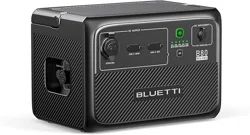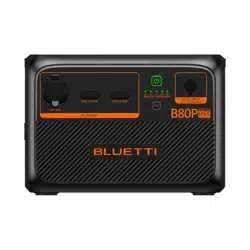

B80P
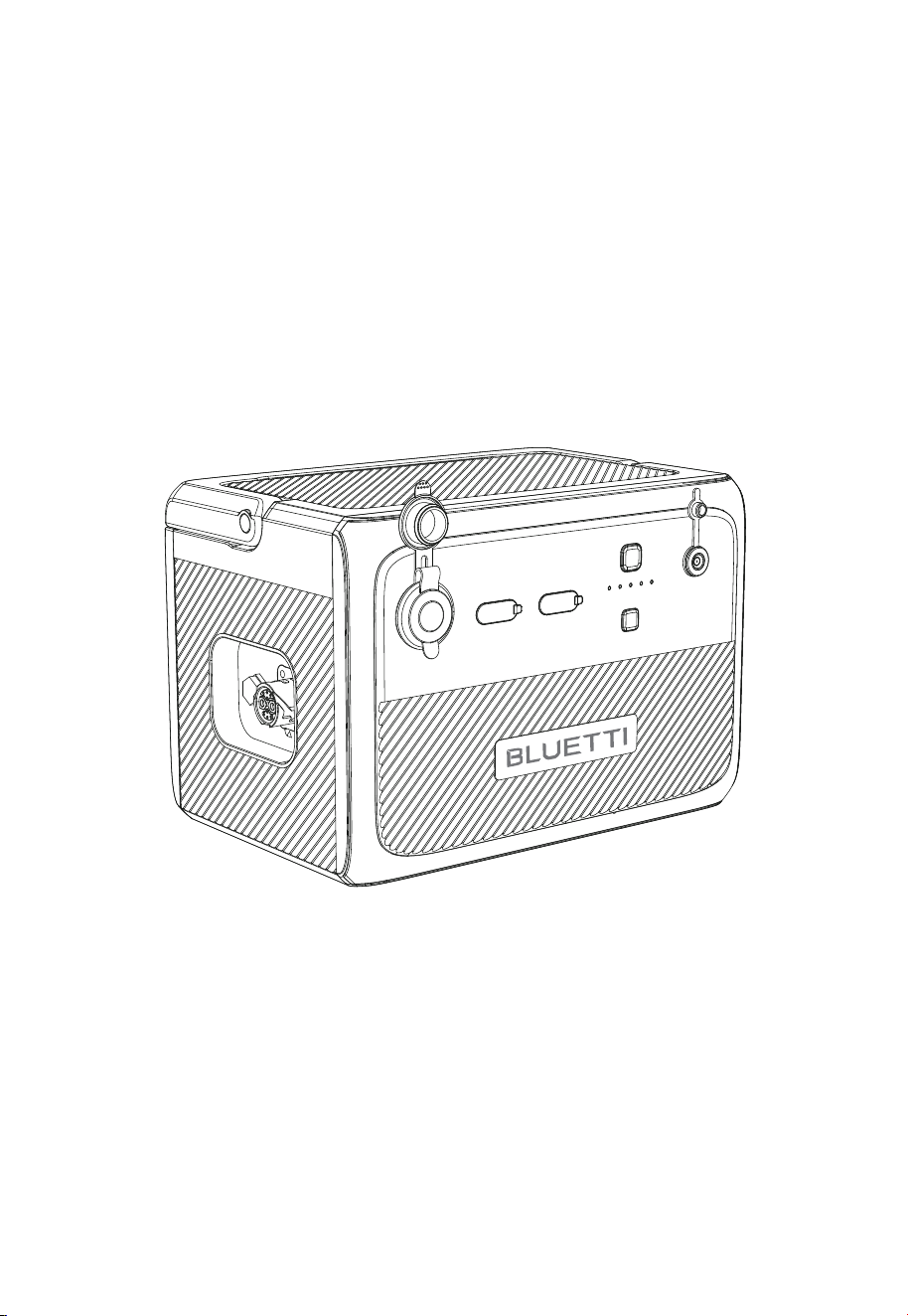
Portable Power Station
User Manual
Please Read This Manual Before Use And Follow Its Guidance.
Keep This Manual For Future Reference.
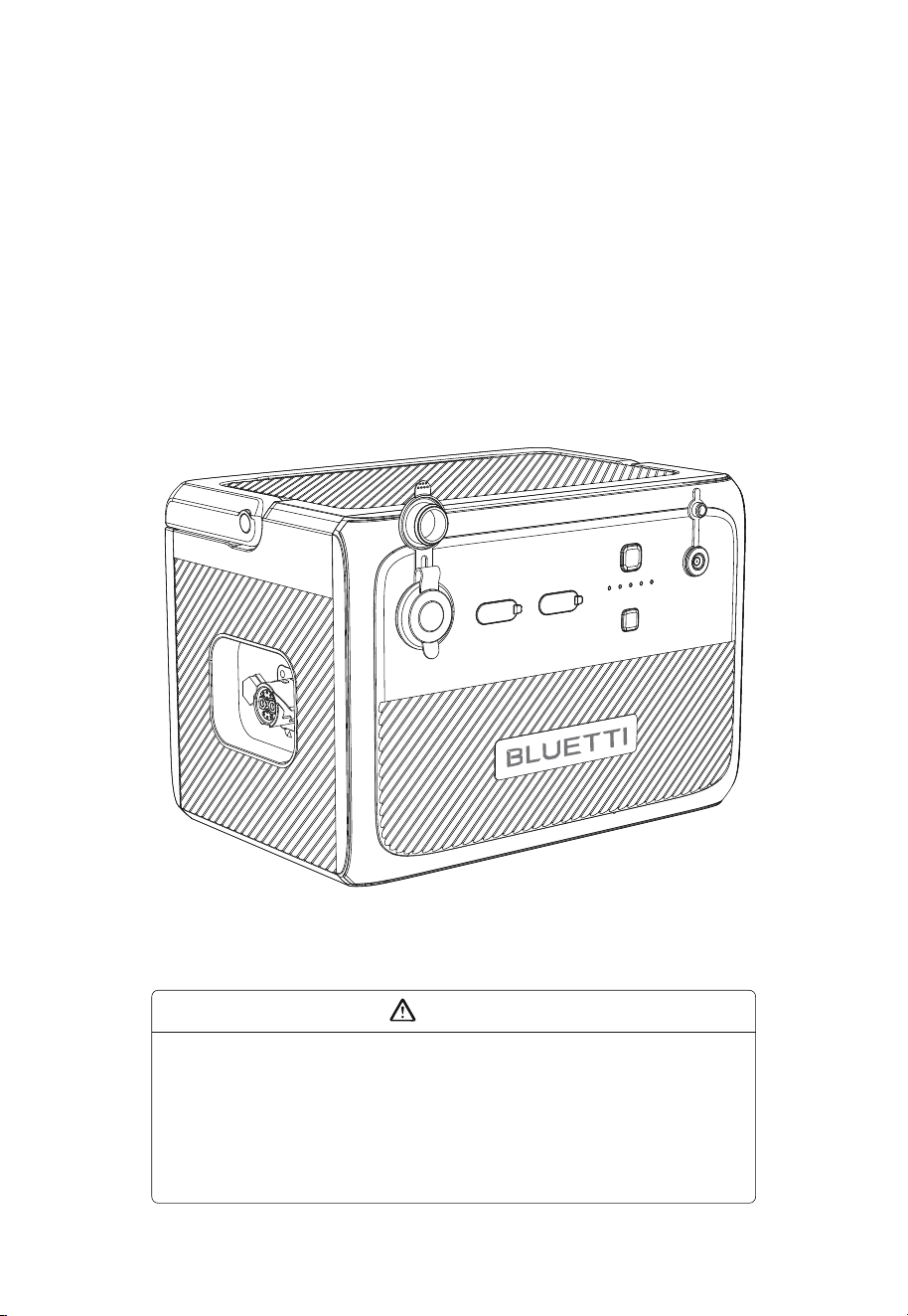
1. Charge the unit before first use.
2. Do not use solar panels with open circuit voltage higher than 28V. Solar input voltage
range for the unit is DC 12V~28V.
3. Charge the unit when the SoC drops below 5%. If the SoC drops to 0, power off the unit
and charge it for at least 30mins before restarting.
4. If not used for more than 3 months, charge the unit to 40%~60% SoC and store it with
the power off. For optimum battery life, discharge and charge the unit every 3 months.
Warning

Thank You!
Thank you for making BLUETTI a part of your family.
From the very beginning, BLUETTI has tried to stay true to a sustainable future
through green energy storage solutions for both indoor and outdoor use while
delivering an exceptional eco-friendly experience for our homes and our world.
That's why BLUETTI makes its presence in 70+ countries and is trusted by
millions of customers across the globe.
Franch
Germany
Netherlands

Safety Instructions
General Safety
Handling
Storage and Usage
What’s In The Box
Product Overview
Diagram
Specifications
Operation
Buttons
Power indicator
Charging
Discharging
Appendix
FAQs
Abbreviations
Contents
1
1.1
1.2
1.3
2
3
3.1
3.2
4
4.1
4.2
4.3
4.4
5
5.1
5.2
05
05
07
07
08
10
10
11
12
12
12
12
14
16
16
17

1. Safety Instructions
Read this manual for instructions on the proper use and safety information for the unit.
Follow the warnings and instructions marked on the unit and its accessories.
Pay attentionto the "Instruction", "Caution", "Warning" and "Danger" symbols in this
manual, and follow theinstructions carefully to avoid injury or damage.
The Safety Requirements provided herein are for illustrative purposes that include but
are not limited to those listed in this manual. Actual operation shall comply with all
applicable safety standards.
If you have any questions, feel free to contact BLUETTI support or your local BLUETTI dealers.
1.1. General Safety
•
Always operate or store the unit in the conditions specified in this manual.
• The installation and ambient conditions must comply with the regulations in the
relevant international, national or regional standards.
• Unauthorized disassembly, alteration of the equipment or modification of the software
code is not allowed.
BLUETTI shall not be liable for the following circumstances:
•
Equipment damage caused by force majeure, such as earthquake, fire, storm, flood,
mudslide, etc.
• Damage or loss during transportation.
• Damage caused by storage conditions that do not meet the requirements specified in
this manual.
• Damage to the hardware or data of the equipment due to customer negligence,
improper operation or intentional damage.
• Damage to the system caused by a third party or the customer, including handling
and installation that does not meet the requirements specified in this manual.
• The product is intended for use with audio/video, information and communication
technology equipment only.
• This product is not suitable for providing electrical service for equipment and machines
that are highly dependent on the reliability of electrical power supply and that involve
personal safety, such as atomic energy, aviation, medical, etc. Poweroak will not be held
responsible for any personal safety accidents, fire accidents, equipment failures, etc.
caused by using this product to supply power to the above equipment and machines.
• Damage caused by adjustment, alteration or removal of identification marks.
To avoid danger, please regulate the operation in the following manner:
• Do not install, use and maintain the unit in adverse weather conditions such as
lightning, rain, snow and strong breezes (including but not limited to handling and
operating the unit, plugging and unplugging signal connections to outdoor facilities,
working at height, outdoor installations, etc.).
JUST POWER ON 05

• Always turn off the power sourcebeforestartingany electrical work.
• Do not clean the unit with water.
• Do not disassemble,modify, tamper with or repairthe unit on your own.
• Regularly inspect the unit and its accessories for damage or deterioration.
• Use a tester to check for the presence of dangerous voltage before touching any
conductor or terminal.
• If the unit’s shell is cracked during transportation or use, do not use it and contact
BLUETTI support or your local BLUETTI dealers.
• Use a dry powder extinguisher if the unit catches fire.
• In case of fire, EVACUATE the building or affected area immediately, activate the closest
FIRE ALARM system and CALL 9-1-1 or your local emergency phone number.
• Use genuine cables and accessories provided by BLUETTI.
• Keep the unit away from heat sources or high temperatures, and do not expose it to
direct sunlight.
• Do not store the unit with flammable liquids, gases, or explosive materials.
• Make sure the area where you are using the unit is well ventilated and spacious.
• Do not block or cover the vents of the unit as this may cause irreversible damage to it.
• Use the unit for its intended purpose and avoid stacking objects on top of it during
storage or use.
• Do not move the unit during operation as the vibrations and shocks associated with
movement may cause damage to the internal hardware.
• In case of malfunction, turn off the unit immediately and contact BLUETTI support or your
local BLUETTI dealers if this manual cannot adequately explain the malfunction to you.
• Do not place the unit on an unstable or inclined surface.
• Do not insert foreign objects into any port and vent of the unit.
• Keep away from children and pets.
The symbol is intended to alert you to read the instructions before operating
and maintenance in the literature accompanying the product.
• The product is intended for use with audio/video, information and communication
technology equipment only.
• Connect the equipment to a socket-outlet with earthing connection by means of a
power cord.
• The socket-outlet shall be installed near the equipment and shall be easily accessible.
• Disposal of a battery into fire or a hot oven, or mechanically crushing or cutting of a
battery, that can result in an explosion.
• Leaving a battery in an extremely high temperature surrounding environment that
can result in an explosion or the leakage of flammable liquid or gas
• The battery subjected to extremely low air pressure that may result in an explosion or
JUST POWER ON06
1.2.Handling
Use mechanical assistance as needed (e.g. trolleys and adjustable height workbenches).
1.3. Storage and usage
•
When not using the unit for over 3 months, charge it to 40% to 60% SoC to keep it in
optimal condition.
• Before storing the unit, power it off and remove all electrical connections from it.
• Store the unit in a cool and dry place. The ideal temperature range is 1o
0
C to 30
0
C. The unit
can be safely charged and discharged at temperatures of -20
0
C to 40
0
C. However, it’s NOT
recommended to store the unit in harsh temperatures for extended periods of time.
• Fully cycle the unit every 6 months to maintain the battery’s health.
If the SoC drops to 0 (during operation or upon startup), take the following
actions to safely restart the unit:
1)Shut down immediately.
2)Charging within 48 hours.
3)Battery should be kept at an ambient temperature of 5
0
C to 35
0
C for 24 hours before
charging.
It is recommended to charge the unit via an AC source. If charging via solar energy,
ensure that your solar system provides an output of more than 100W.
BLUETTI shall not be liable for any equipment damage caused by the violation of above
instructions.
• The transportation, wiring and maintenance shall comply with all applicable laws,
regulations and standards.
• User-provided materials and tools required shall meet the requirements specified in
applicable laws, regulations and relevant standards.
Legal and Regulatory Requirements
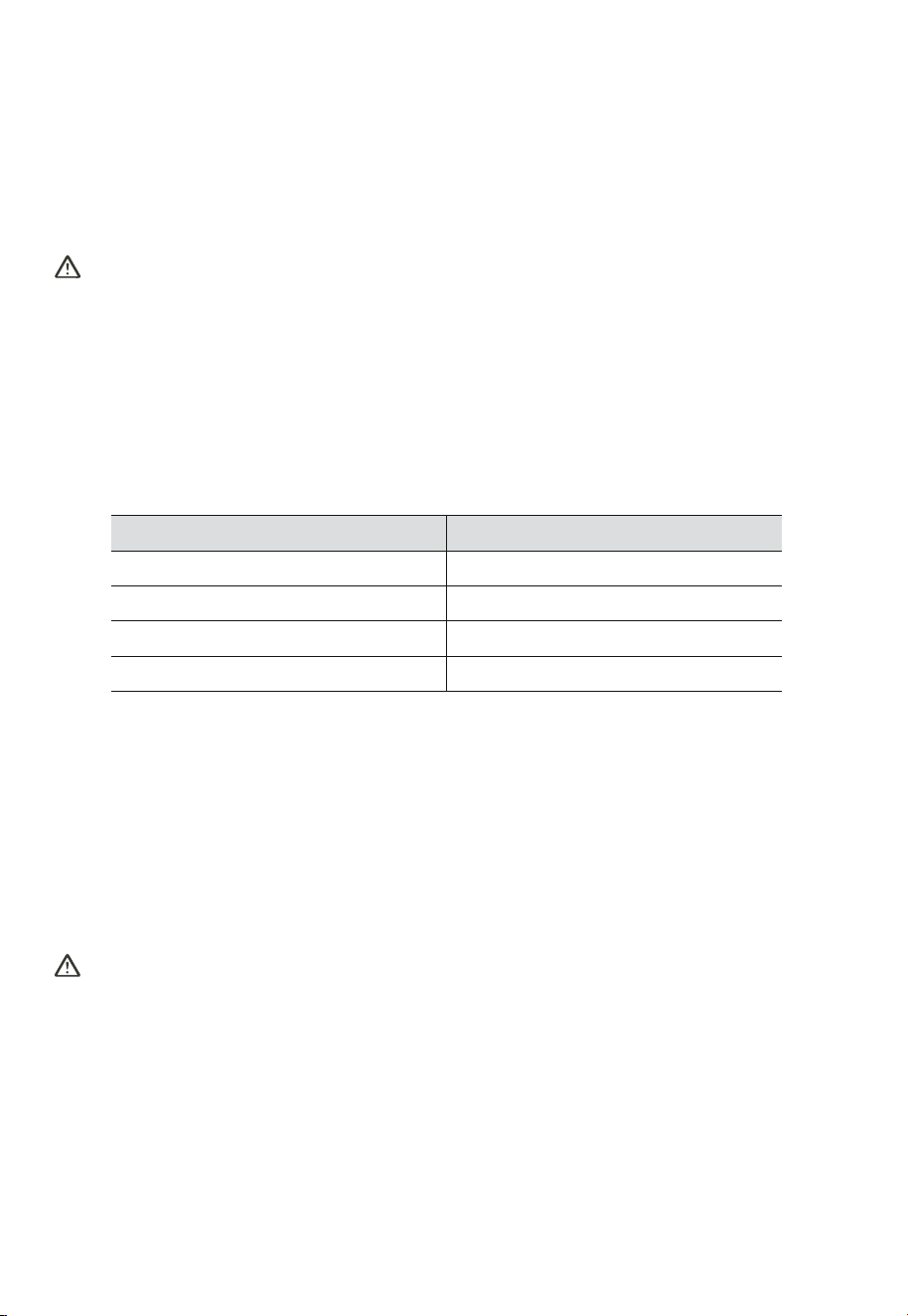
Recommended number of people based on the weight of product
Weight
<18kg
18kg~32kg
32kg~55kg
>55kg
Number of people
1
2
3
4 or a cart
the leakage of flammable liquid or gas
• Attention should be drawn to environmental aspects of battery disposal.
• Please refer the information on exterior bottom enclosure for electrical and safety
information before installing or operating the apparatus. Please refer the information
on exterior bottom enclosure for electrical and safety information before installing or
operating the apparatus
JUST POWER ON 07
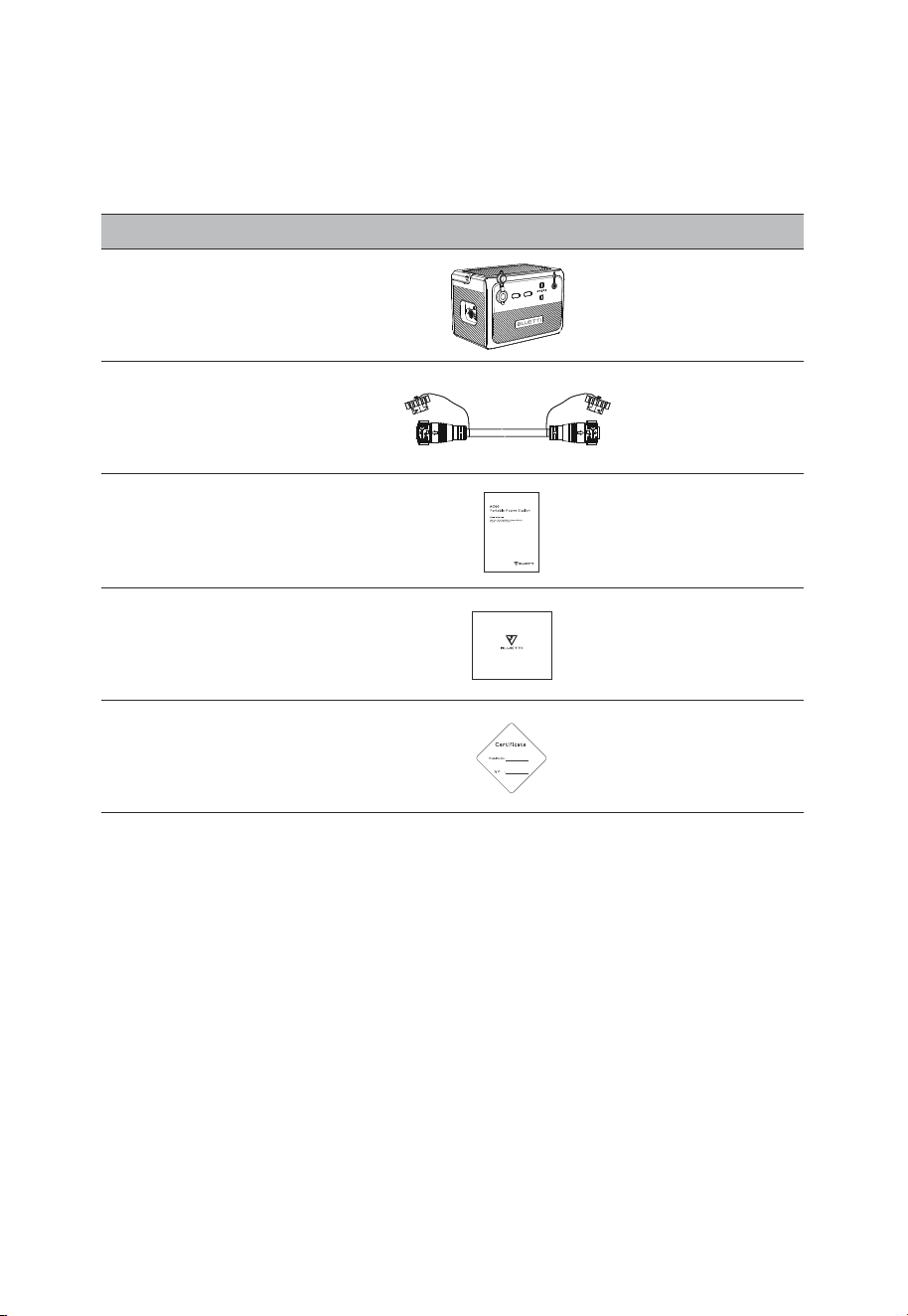
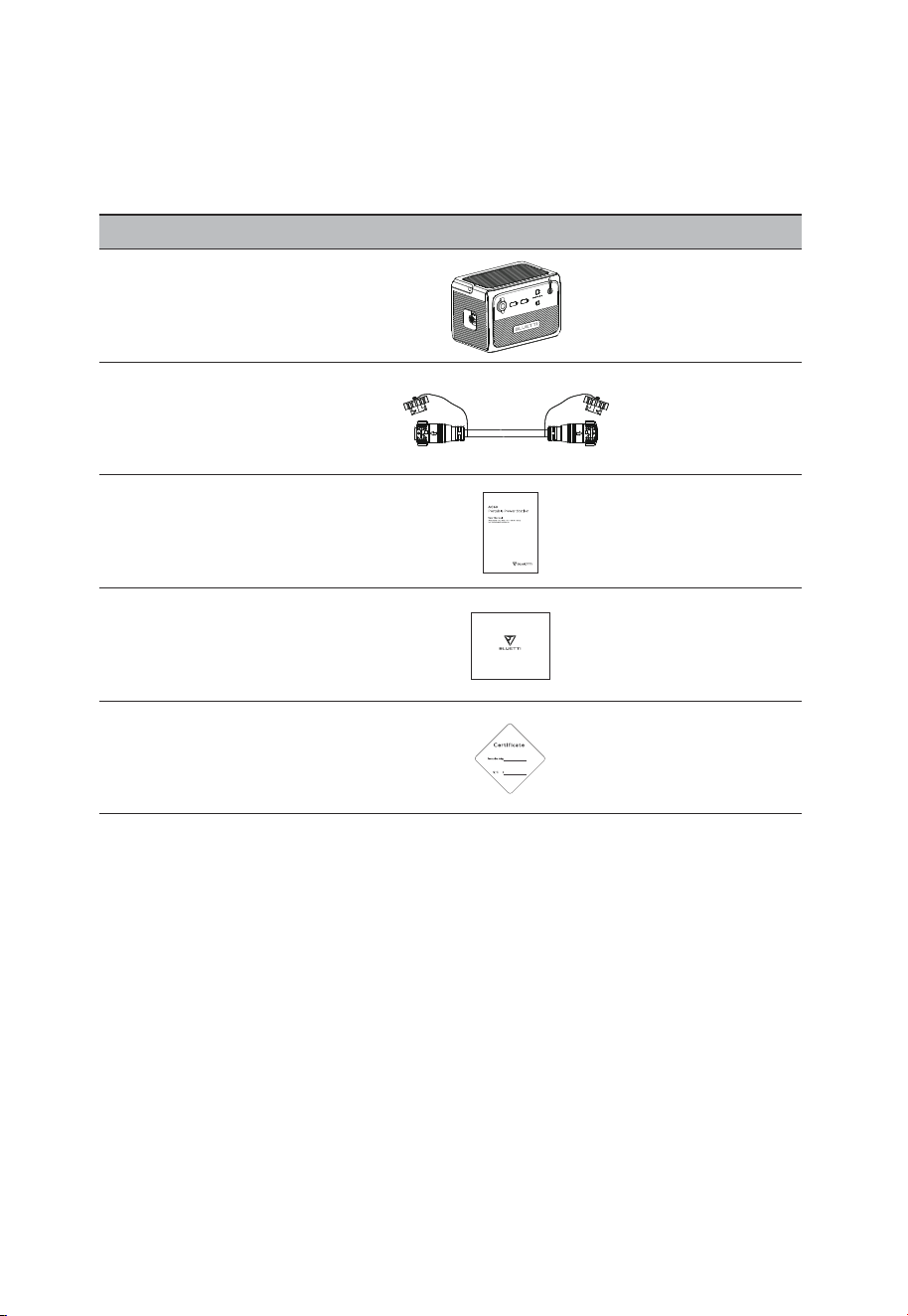
2. What’s In The Box
Item Picture Qty.
Expansion Battery
1
Battery Expansion Cable
(800mm)
1
1
User Manual
1
1
Warranty Card
Quality Certificate
Standard Packaging
JUST POWER ON08
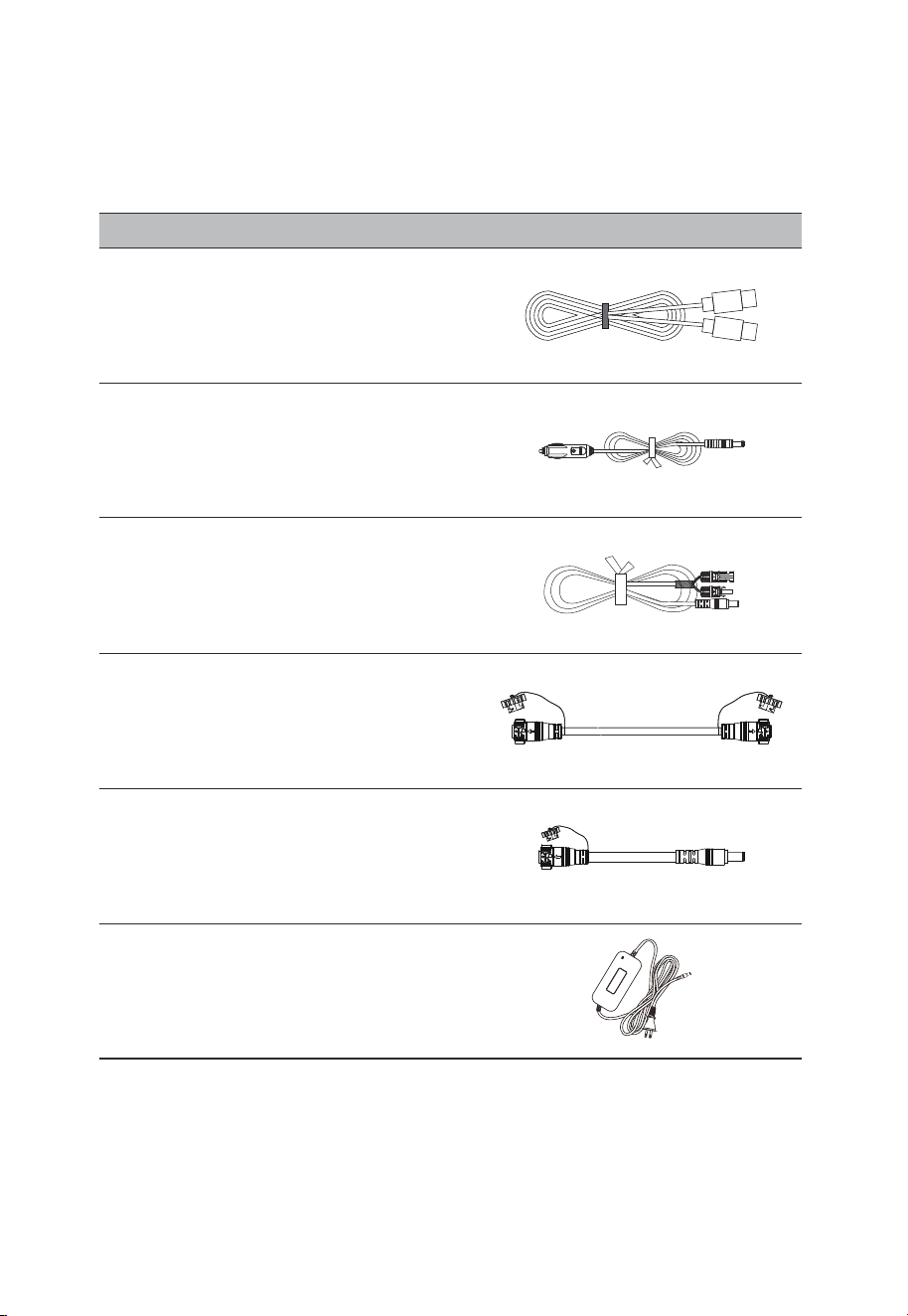
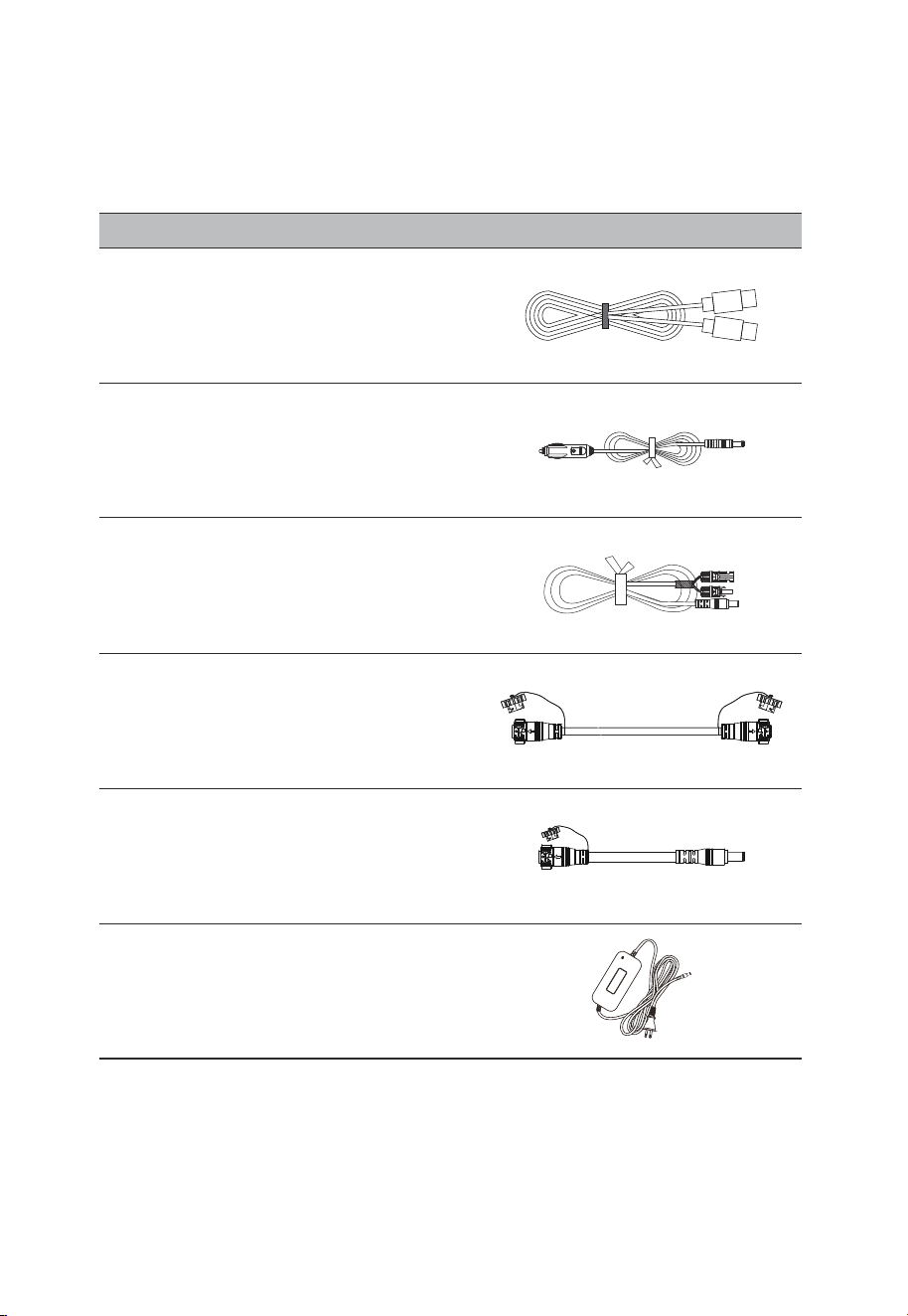
Car Charging Cable
(16AWG, 720mm)
Solar Charging Cable
(16AWG, 1500mm)
Item Picture
TYPE-C Cable
(5A/100W, 2m)
Optional
Extended Battery Expansion Cable
(1830mm)
Power Bank Output Cable
(14AWG、720mm)
200W Charger
(Available on official BLUETTI website)
JUST POWER ON 09
3. Product Overview
The BLUETTI B80P can be used with AC60P as an external expansion battery, or as a DC
power station to run your devices independently. It offers up to 120W output with 3 DC
ports - USB-A, USB-C and car cigarette lighter port, perfect for your phone, laptop, car
fridge, and more. While LiFePO4 battery cells and an advanced battery management
system (BMS) protect your device from a variety of potential risks during daily operation.
When connected to AC60P, it adds extra 806Wh capacity to the whole power system for
longer device runtime.
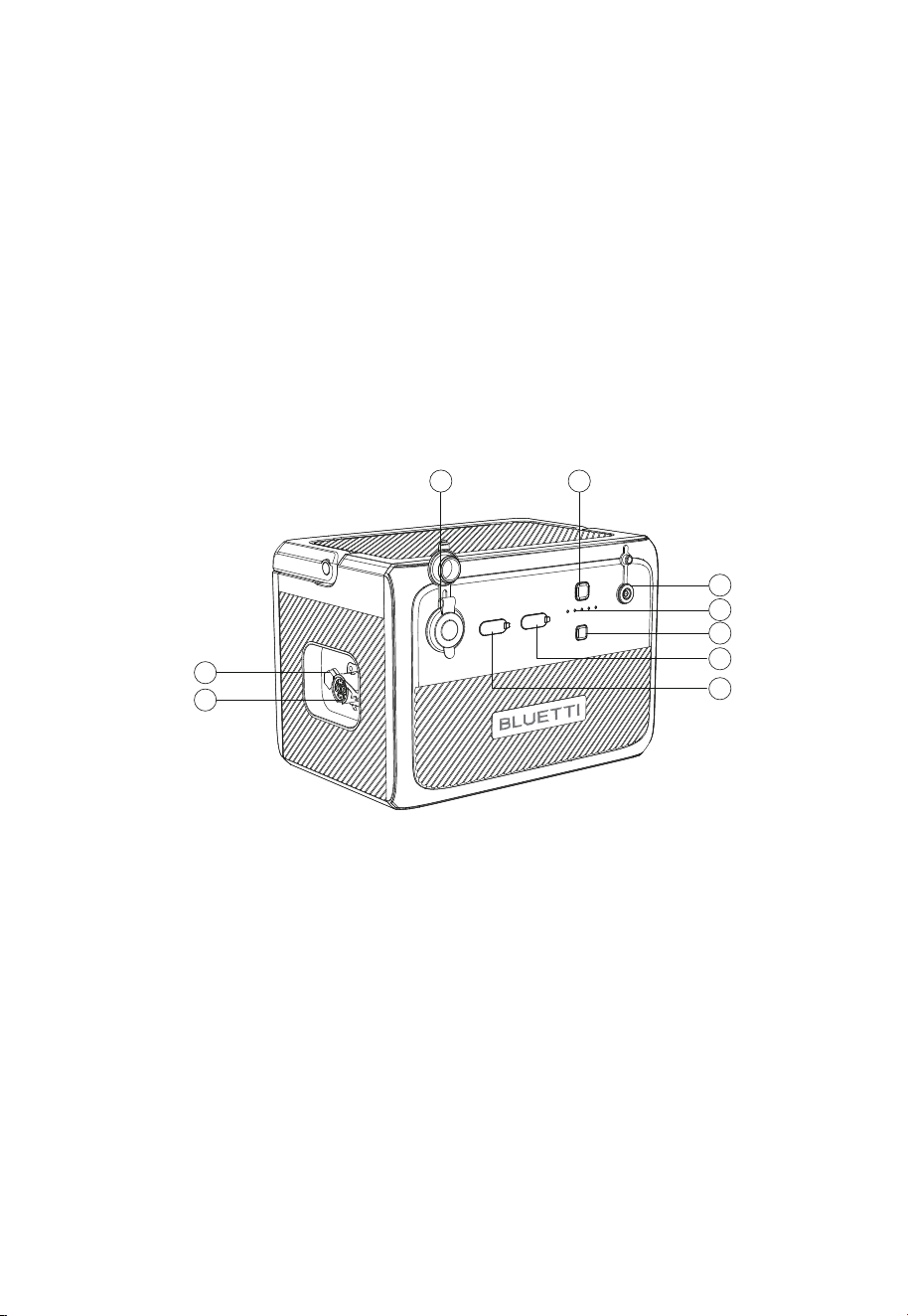
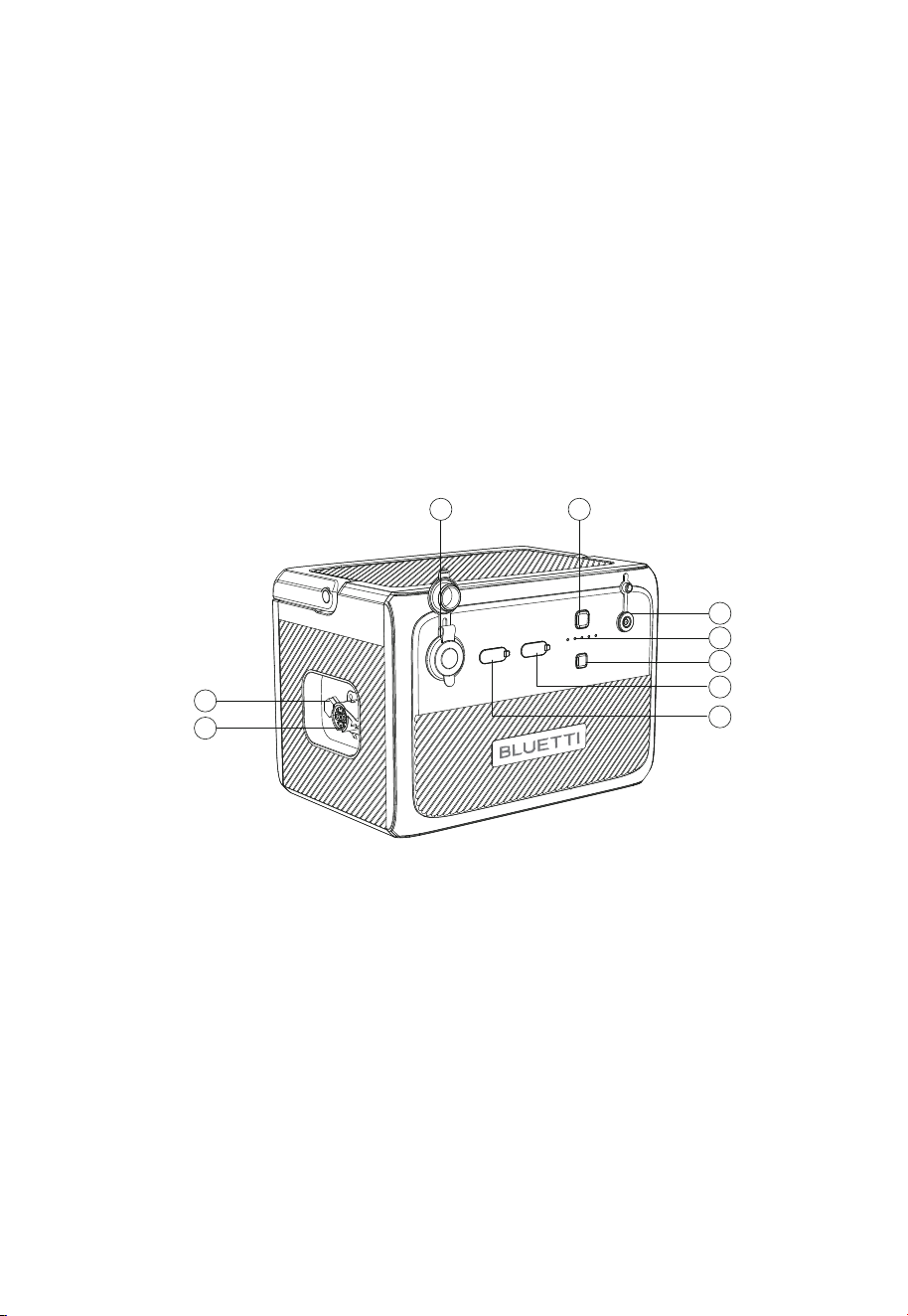
3.1 Diagram
2
5
6
9
8
7
4
3
1
Cigarette Lighter Port
Power Button
DC Input
Power Indicator
DC Power Button
USB-A Port
USB-C Port
Battery Expansion Port
Bleed Valve
①
②
③
④
⑤
⑥
⑦
⑧
⑨
JUST POWER ON10

3.2 Specifications
Battery Capacity
Cell Type
Charging Temperature
Discharging Temperature
Storage Temperature
Working Humidity
Weight
Dimensions (L*W*H)
806Wh
LiFePO4
0
o
C~40
o
C/32°F~104°F
-20
o
C~40
o
C/-4°F~104°F
-20
o
C~40
o
C/-4°F~104°F
10%~90%
About 9.9kg/21.83lbs
290mm×207mm×204mm/11.42in×8.15in×8.03in
Model B80P
General
Cigarette Lighter Port
USB-A
USB-C (Type-C)
12VDC/10A
3.6-12VDC, 3A,18W Max.
5/9/12/15/20VDC, 3A; 20VDC, 5A (Built-in eMarker chip)
DC Output
Interface
Power
Voltage
Rated voltage
Max. Input Current
Power Bank Ouput
DC7909
200W/8A MAX.
12V~28VDC
22.4VDC
30A
25.2VDC, 200W Max.
DC Input
Expansion Port
JUST POWER ON 11
4. Operation
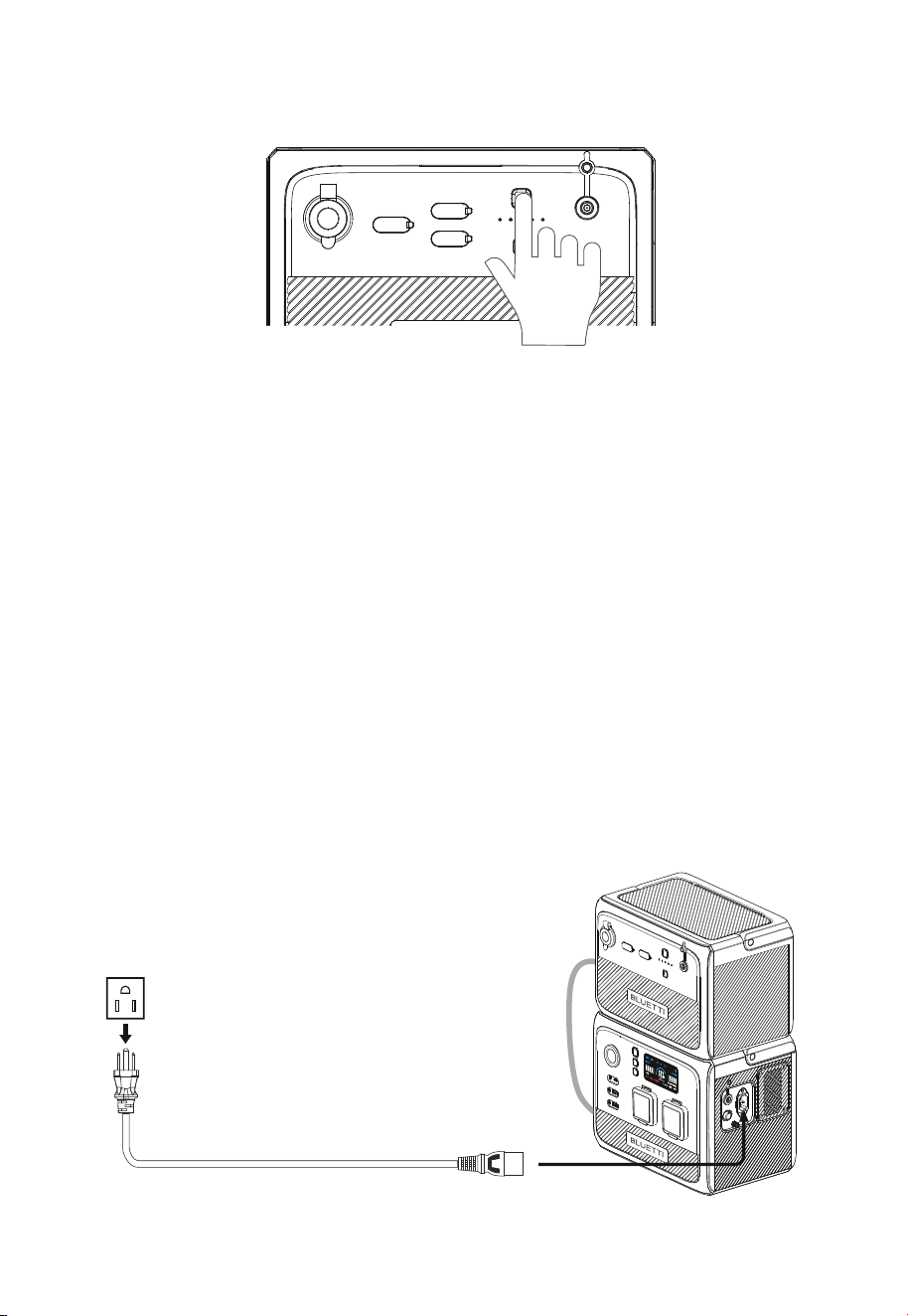
B80P has a power button and a DC output button.
• Press the power button to start up B80P. Press and hold for more than 2 seconds to
turn it off.
• Press the DC power button to turn on/off the DC output (cigarette lighter and USB
output).
BLUETTI B80P has 5 LED indicators. From left to right, they represent 20%, 40%, 60%,
80%, 100% SoC, respectively.
B80P supports 4 charging methods: AC60P charging, solar, car (cigarette lighter) and
adapter.
4.3.1. AC60P Charging
Connect the AC60P and B80P and plug the AC60P into a wall outlet via the AC charging
cable. The AC60P will automatically charge the B80P.
4.3 Charging
4.1 Buttons
4.2. Power indicator
JUST POWER ON12
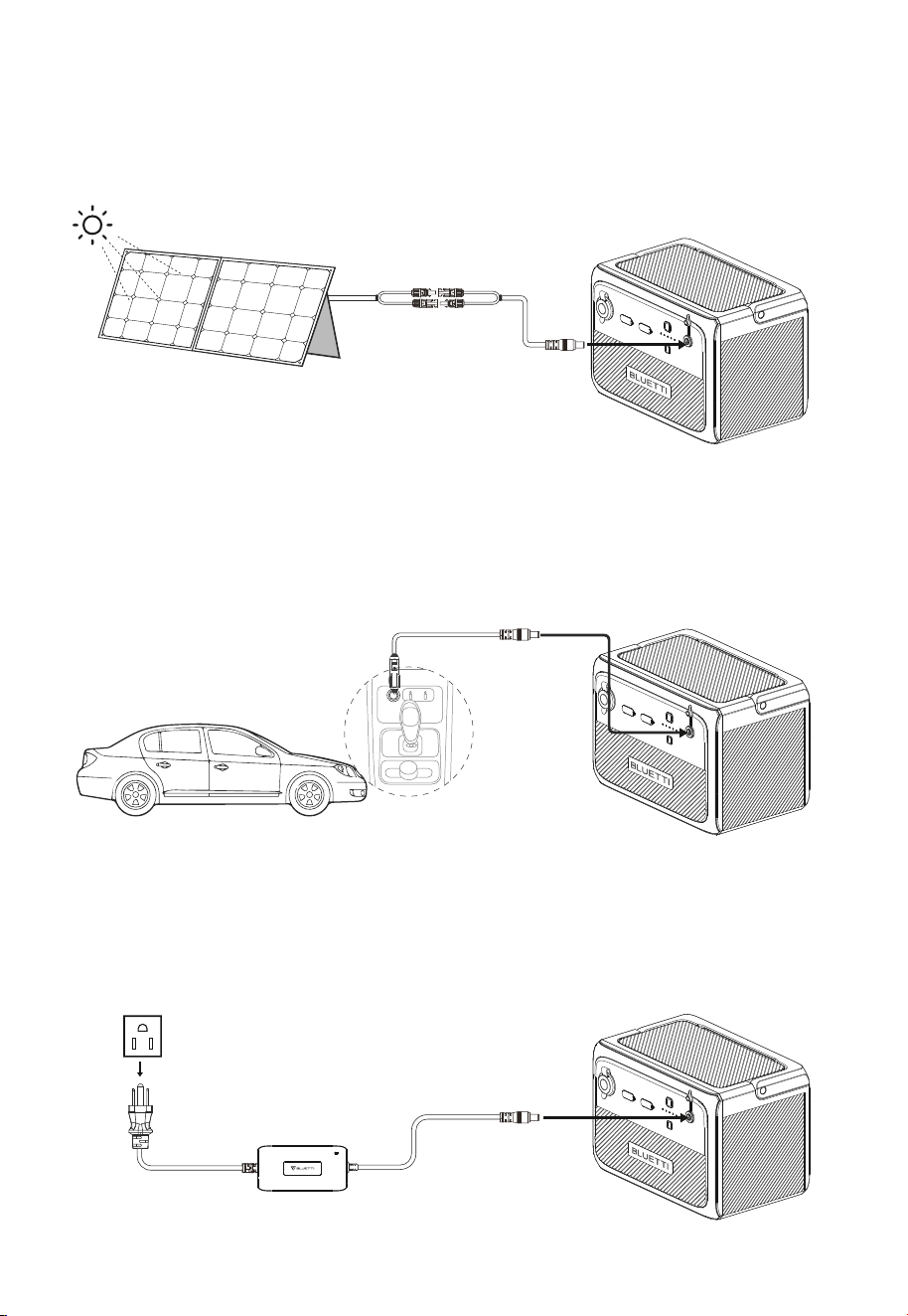
4.3.3. Car Charging
Connect the B80P to vehicle’s 12V/24V cigarette lighter port via the car charging cable.
4.3.4. Adapter Charging
The B80P can be charged via adapter. Please make sure the output voltage of adapter is
between 12V~28VDC.
Warning: The open circuit voltage of solar panels cannot exceed 28V, otherwise it will
damage the device.(Note:This is not covered in the warranty.)
Warning: Cigarette lighter must be completely plugged in, otherwise it may cause safety risks.
4.3.2. Solar Charging
Connect the solar panels (in series or parallel) to B80P via the solar charging cable.
Note: Please make sure your solar panels comply with:
Voc: 12V-28VDC Input Current: 8A Max. Input Power: 200W Max.
JUST POWER ON 13
4.4 Discharging
4.4.1. DC Output
The operation time of B80P is subject to many factors, such as ambient temperature,
discharge rate, battery capacity, altitude, load characteristics, etc.
• 12V/10A cigarette lighter
• USB-C (5/9/12/15/20VDC, 3A; 20VDC, 5A)
• USB-A (5V/3A; 9V/2A; 12V/1.5A)
• Expansion Port (17.5V-25.2VDC, 30A Max.)
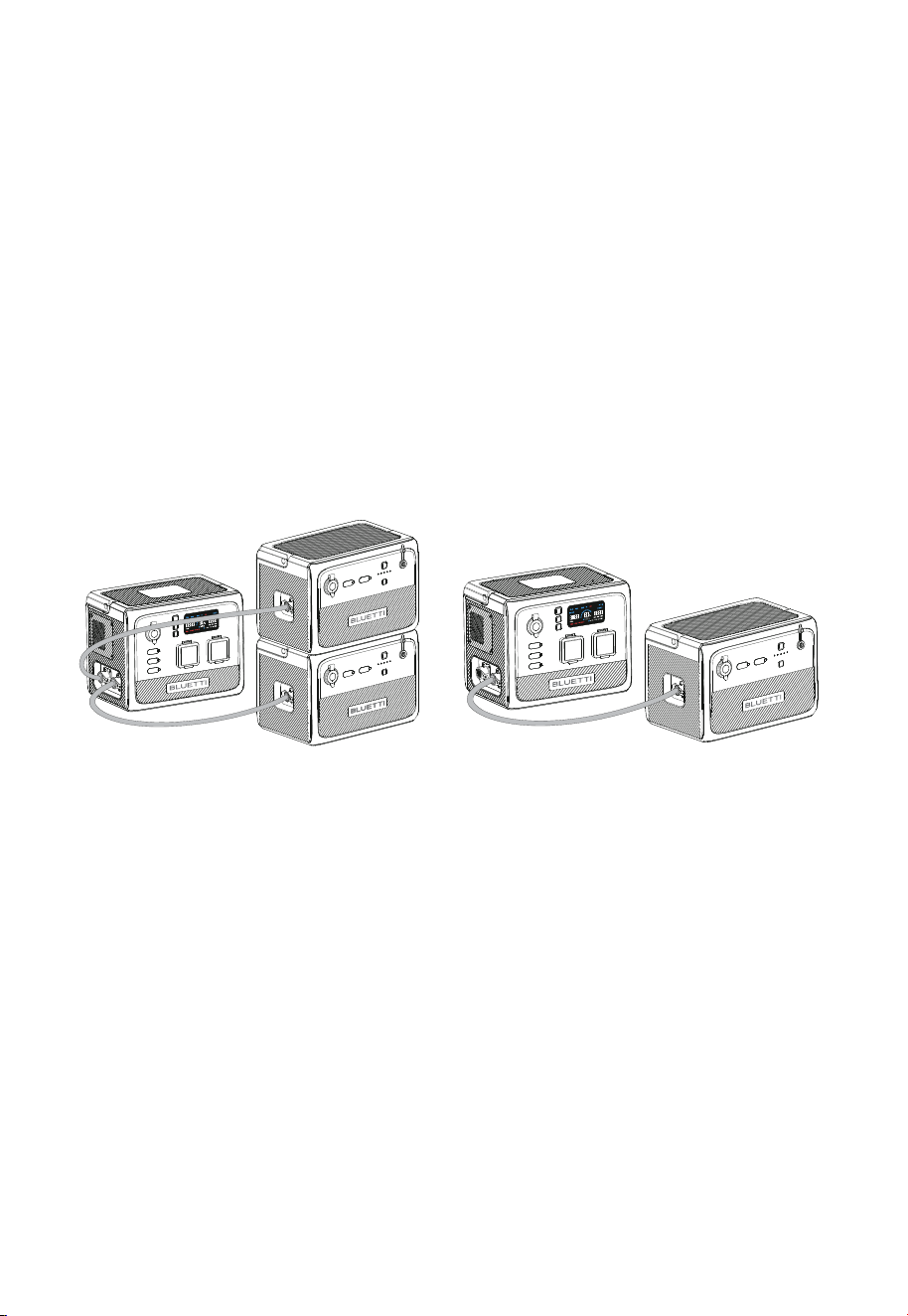
4.4.2. Connect to AC60P
With the battery expansion cable, AC60P supports up to 2 B80P expansion batteries for
a total capacity of 2015Wh. Turn on AC60P to activate the whole power system.
Note: Make sure the AC60P and B80P are off when connecting and disconnecting
AC60P+2*B80P
AC60P+1*B80P
JUST POWER ON14
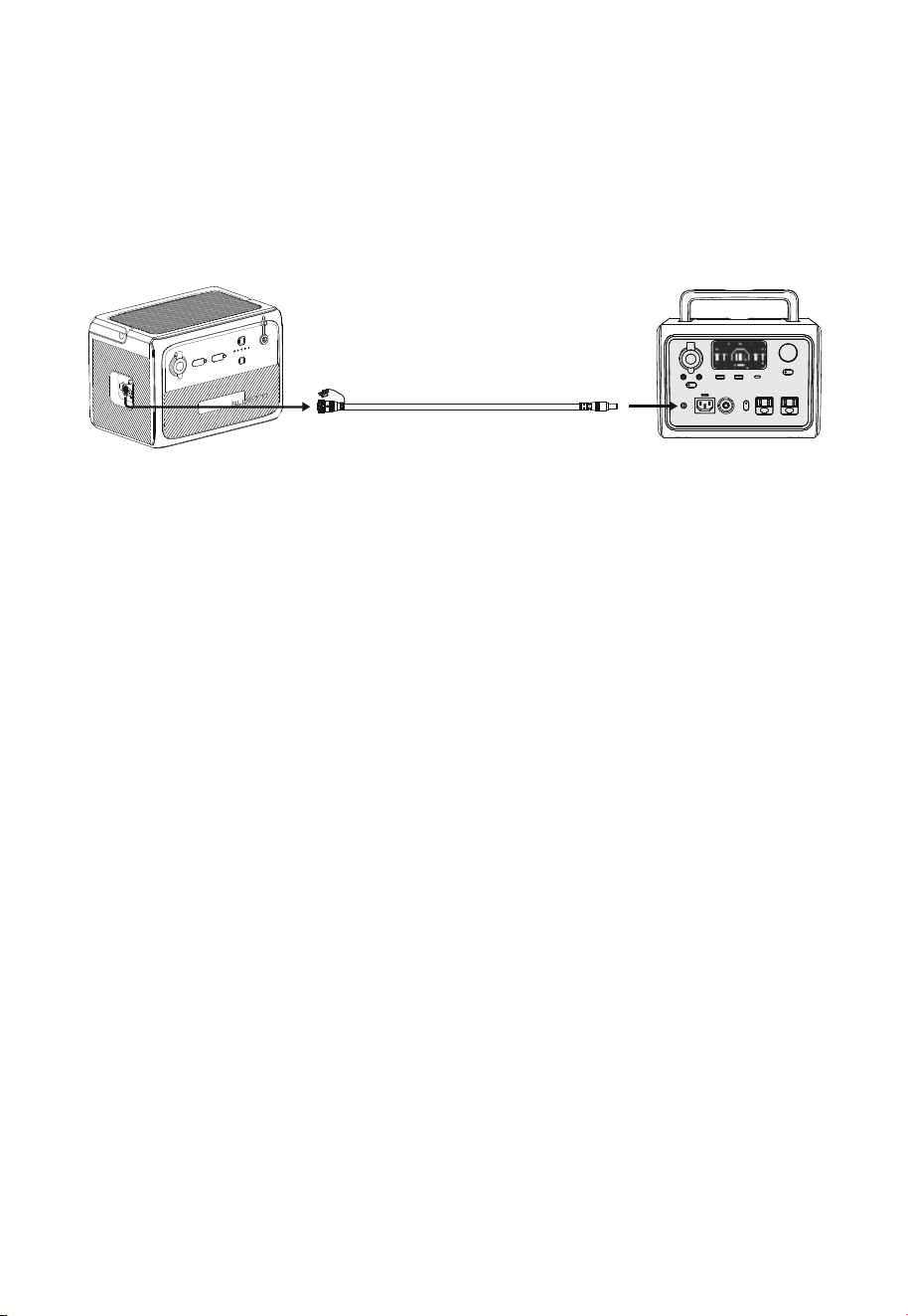
4.4.3. Power Bank Mode
Connect the B80P to a compatible power station via the power bank output cable, press
and hold its power button for about 5s, and it can recharge the power station directly.
Note:
In Power Bank mode, the B80P delivers a voltage of up to 25VDC. Please check the DC
input voltage of your BLUETTI power station for compatibility.
4.4.4. Estimated Operation Time
Operation time (estimated) = Battery capacity (Wh) × DoD × η ÷ (load power)
Note:
1)Load power and operation time are measured in watts and hours.
2)DoD refers to depth of discharge. B80P works at 90% DoD for longer battery life. η is
the conversion efficiency of the inverter, which is 90% for B80P.
E.g. If you run a 40W refrigerator with B80P, the operation time will be:
806Wh × 90% × 90% ÷ 40W ≈ 16 hrs
Note: Low temperature and excessive loads could greatly impact the battery capacity
and reduces its normal operation time.
B80P
Other BLUETTI products
JUST POWER ON 15

5. Appendix
How do I know whether my devices will work well with this product?
Please evaluate the total constant load of your devices. If it doesn't exceed the Max.
output power of B80P (120W), you can use this power station to run your devices.
Note: Some devices with built-in motor/compressor may start at 2-4 times the rated
power, which can easily overload the B80P.
Can I use third-party solar panels to charge this product?
Yes, you can. Make sure your solar panels have an open circuit voltage of 12V-28V
and have the MC4 connectors. Please do NOT mix different types of solar panels.
Note: Time required for one full charge depends on weather condition, the sunshine
intensity and the angle of solar panels.
Can it charge and discharge at the same time?
Yes. It supports pass-through charging. B80P comes with the premium LiFePO4
battery and proprietary Battery Management System to ensure that it can charge
and discharge at the same time.
Why does the B80P shut down automatically?
Two scenarios in which B80P shuts down itself:
If DC output is not turned on after power on, it will automatically shut down after 4
hours.
If DC output is less than 10W, it will automatically shut down after 24 hours.
Why is the charging power often too low?
B80P has a built-in intelligent BMS that automatically adjusts the charging power in
response to the battery temperature and SoC, thus protecting the battery and
extending its service life.
5.1 FAQs
Q1:
A:
Q3:
A:
Q2:
A:
Q4:
A:
Q5:
A:
JUST POWER ON16

5.2 Abbreviations
•
MPPT: Maximum Power Point Tracking
• SoC: State of Charge
• AC: Alternating Current
• DC: Direct Current
• PV: Photovoltaic (Solar Panels)
• DoD: Depth of Discharge
• ECO mode: It’s an energy-saving mode(It’s on by default). It can not be turned off. If DC
output is not turned on after power on, it will automatically power down after 4 hours.
JUST POWER ON 17
For more information, please visit:
@ bluetti.inc
@ bluetti_inc
@bluetti_official
@ BLUETTI Support
@ BLUETTI Official
After-sales address in EU: Lise-Meitner-Strasse 14, 28816
Stuhr, Germany
After-sales address in UK: Unit 2 Northgate, Bolsover
Busines Park, Woodhouse Line, Chesterfield England S44 6BD
SHENZHEN POWEROAK NEWENER CO., LTD.
Add: F19, BLD No.1, Kaidaer, Tongsha Rd No.168, Xili Street,
Nanshan, Shenzhen, China
Company: POWEROAK GmbH
Address: Lise-Meitner-Str. 14 28816
Stuhr Germany
Mail: [email protected]
Company: POWEROAK ENERGY UK CO.,LTD
Address: Unit 2 NorthGate, Bolsover Business Park,
Woodhouse Lane Chesterfield England, S44 6BD
Mail:poweroak.eu@bluetti.com
Customer Service(DE)
Tel:49 8006273016 (Monday to
Friday from 9 a.m. to 17 p.m. (Ger-
man local time))
Customer Service(UK)
Tel: 44 8000472906 (Monday-Friday
9:00-17:00)

B80P
Tragbare Powerstation
Benutzerhandbuch
Studieren Sie dieses Handbuch vor Gebrauch und beachten Sie die darin
enthaltenen Hinweise.
Bewahren Sie dieses Handbuch zum späteren Nachschlagen auf.

Vielen Dank!
Danke, dass Sie BLUETTI in den Kreis Ihrer Familie aufgenommen haben.
BLUETTI engagiert sich von jeher für eine nachhaltige Zukunft – mit
außergewöhnlich umweltfreundlichen Energiespeicherlösungen für den
Innen- und Außenbereich, von denen nicht nur Haushalte sondern wir alle
profitieren.
Aus diesem Grund ist BLUETTI in mehr als 70 Ländern präsent und genießt das
Vertrauen von Millionen Kunden in aller Welt.
Frankreich
Schweden
Österreich
Schweiz
Italien
Spanien
Mexiko
USA
Kanada
UK
Nigeria
Südafrika
Neuseeland
Singapur
Malaysia
Australien
Philippinen
Japan
China
Deutschland
Niederlande

Inhalt
1
1.1
1.2
1.3
2
3
3.1
3.2
4
4.1
4.2
4.3
4.4
5
5.1
5.2
23
23
25
25
26
28
28
29
30
30
30
30
32
34
34
35
Sicherheitshinweise
Allgemeine Sicherheit
Handhabung
Aufbewahrung und Gebrauch
Lieferumfang
Produktübersicht
Diagramm
Technische Daten
Bedienung
Tasten
Energieanzeige
Laden
Entladen
Anhang
Häufig gestellte Fragen
Abkürzungen

1. Sicherheitshinweise
Studieren Sie dieses Handbuch, um sich über den vorschriftsmäßigen Gebrauch des
Geräts und diesbezügliche Sicherheitshinweise zu informieren.
Beachten Sie die auf dem Gerät und dem Zubehör vermerkten Warnhinweise und
Anweisungen.
Achten Sie auf die Symbole „Anweisung“, „Vorsicht“, „Warnung“ und „Gefahr“ in dieser
Anleitung und befolgen Sie die Anweisungen sorgfältig, um Personen- oder Sach-
schäden zu vermeiden.
Die in diesem Handbuch aufgeführten Sicherheitsanforderungen dienen der Veran-
schaulichung, erheben jedoch keinen Anspruch auf Vollständigkeit. Der tatsächliche
Betrieb muss allen geltenden Sicherheitsnormen entsprechen.
Bei Fragen wenden Sie sich bitte an den BLUETTI Support oder an Ihren BLUETTI Händler.
1.1. Allgemeine Sicherheit
•
Betreiben oder lagern Sie das Gerät stets unter den in dieser Anleitung genannten
Bedingungen.
• Die Installations- und Umgebungsbedingungen müssen den Vorschriften der
einschlägigen internationalen, nationalen oder regionalen Normen entsprechen.
• Das unbefugte Zerlegen/Verändern des Geräts oder Modifizieren des Softwarecodes
ist nicht gestattet.
BLUETTI haftet nicht für die folgenden Umstände:
• Geräteschäden, die durch höhere Gewalt wie Erdbeben, Feuer, Sturm, Überschwem-
mung, Erdrutsch etc. verursacht werden.
• Beschädigung oder Verlust während des Transports.
• Schäden, die durch Lagerungsbedingungen verursacht werden, die nicht den in
diesem Handbuch genannten Anforderungen entsprechen.
• Schäden an der Hardware oder den Daten des Geräts, die durch kundenseitige
Fahrlässigkeit, unsachgemäße Handhabung oder vorsätzliche Beschädigung verur-
sacht werden.
• Schäden am System, die durch Dritte oder den Kunden verursacht wurden. Dazu
zählen auch Handhabung und Installation, die nicht den in dieser Anleitung genannt-
en Anforderungen entsprechen.
• Dieses Produkt ist nicht für die Stromversorgung von Geräten und Maschinen geeig-
net, die in hohem Maße von der Zuverlässigkeit der Stromversorgung abhängig sind
und die Sicherheit von Personen betreffen (Nukleartechnik, Luftfahrt, Medizintechnik
etc.). Poweroak haftet nicht für Unfälle im Zusammenhang mit der persönlichen
Sicherheit, Brandunfälle, Geräteausfälle etc., die dadurch verursacht werden, dass
dieses Produkts für die Stromversorgung der oben genannten Geräte und Maschinen
verwendet wird.
JUST POWER ON 23

• Schäden, die durch das Anpassen, Ändern oder Entfernen von Kennzeichnungen
verursacht werden.
Zur Vermeidung von Gefahren regeln Sie den Betrieb bitte wie folgt:
• Installieren, nutzen und warten Sie das Gerät nicht bei ungünstigen Wetterbedingungen
wie Gewitter, Regen, Schnee und starkem Wind. (Dies gilt unter anderem für die Hand-
habung und Bedienung des Geräts, das Anschließen und Trennen von Signalverbind-
ungen zu Außenanlagen, Arbeiten in der Höhe, Installationen im Freien etc.).
• Schalten Sie vor Arbeiten an der Elektrik stets den Strom ab.
• Reinigen Sie das Gerät nicht mit Wasser.
• Zerlegen oder modifizieren das Gerät nicht und führen Sie keine Reparaturen in
Eigenarbeit durch.
• Untersuchen Sie das Gerät und sein Zubehör regelmäßig auf Beschädigungen oder
Verschleißerscheinungen.
• Prüfen Sie mit einem Prüfgerät, ob gefährliche Spannungen vorhanden sind, bevor Sie
einen Leiter oder eine Klemme berühren.
• Wenn das Gehäuse des Geräts beim Transport oder im Betrieb bricht, nehmen Sie es nicht in
Gebrauch. Wenden Sie sich an den BLUETTI Support oder an Ihren BLUETTI Händler.
• Verwenden Sie einen Trockenlöscher, wenn das Gerät Brand gerät.
• Evakuieren Sie im Brandfall sofort das Gebäude oder den betroffenen Bereich, aktivie-
ren Sie den nächstgelegenen FEUERMELDER und wählen Sie die Notrufnummer 112.
• Verwenden Sie Originalkabel und -zubehör von BLUETTI.
• Halten Sie das Gerät von Wärmequellen oder hohen Temperaturen fern und setzen Sie
es nicht direkter Sonneneinstrahlung aus.
• Bewahren Sie das Gerät nicht zusammen mit brennbaren Flüssigkeiten, Gasen oder
explosiven Materialien auf.
• Vergewissern Sie sich, dass der Bereich, in dem Sie das Gerät verwenden, gut belüftet
ist und ausreichend Platz bietet.
• Die Lüftungsöffnungen des Geräts dürfen nicht blockiert oder abgedeckt werden, da
dies zu irreversiblen Schäden führen kann.
• Verwenden Sie das Gerät für den vorgesehenen Zweck und legen Sie keine Gegen-
stände darauf ab, während es in Betrieb ist oder aufbewahrt wird.
• Bewegen Sie das Gerät nicht, während es in Betrieb ist, da die damit verbundenen
Vibrationen und Stöße die Hardware im Inneren beschädigen können.
• Schalten Sie das Gerät bei einer Störung sofort aus. Kontaktieren Sie zudem den
BLUETTI Support oder Ihren BLUETTI Händler, wenn die vorliegende Anleitung keine
ausreichende Erklärung liefert.
• Stellen Sie das Gerät nicht auf eine instabile oder geneigte Fläche.
• Führen Sie keine Fremdkörper in Anschlüsse oder Belüftungsöffnungen des Geräts ein.
• Von Kindern und Haustieren fernhalten.
JUST POWER ON24

• Transport, Verdrahtung und Wartung müssen allen geltenden Gesetzen, Vorschriften
und Normen entsprechen.
• Benutzerseitig bereitgestellte Materialien und Werkzeuge müssen den Anforderungen
der geltenden Gesetze, Vorschriften und einschlägigen Normen entsprechen.
Gesetze und Vorschriften
1.2. Handhabung
Verwenden Sie bei Bedarf mechanische Hilfsmittel (Hubwagen etc.).
1.3. Aufbewahrung und Gebrauch
•
Laden Sie das Gerät bei mehr als dreimonatiger Nichtverwendung zu 40 bis 60% auf,
damit es im bestmöglichen Zustand bleibt.
• Schalten Sie das Gerät vor dem Aufbewahren aus und trennen Sie alle elektrischen
Anschlüsse.
• Bewahren Sie das Gerät an einem kühlen und trockenen Ort auf. Der ideale Tempera-
turbereich liegt zwischen 10 und 30℃. Das Gerät kann bei Temperaturen von -20 bis
40℃ sicher ge- und entladen werden. Es wird jedoch davon abgeraten, das Gerät über
einen längeren Zeitraum bei extremen Temperaturen aufzubewahren.
• Lassen Sie das Gerät alle 6 Monate einen Komplettzyklus absolvieren, um die Batterie
zu pflegen.
Wenn der Ladezustand auf 0 fällt (während des Betriebs oder beim Einschalten),
ergreifen Sie die folgenden Maßnahmen für einen sicheren Neustart des Geräts:
1)Sofort abschalten.
2)Innerhalb von 48 Stunden laden.
3)Die Batterie sollte vor dem Aufladen 24 Stunden lang bei einer Umgebungstempera-
tur von 5 bis 35℃ aufbewahrt werden.
Es wird empfohlen, das Gerät an einer Wechselstromquelle zu laden. Beim Laden mit
Solarenergie ist darauf zu achten, dass die Solaranlage mehr als 100 W Leistung liefert.
BLUETTI haftet nicht für Geräteschäden, die durch die Missachtung der vorgenannten
Hinweise verursacht werden.
Empfohlene Personenanzahl nach Produktgewicht
Gewicht
<18kg
18kg~32kg
32kg~55kg
>55kg
Anzahl Personen
1
2
3
4 oder ein Wagen
JUST POWER ON 25
2. Lieferumfang
Position Bild Anz.
Erweiterungsbatterie
1
Batterieerweiterungskabel
(800mm)
1
1
Benutzerhandbuch
1
1
Garantiekarte
Qualitätsbescheinigung
Standardpaket
JUST POWER ON26
Autoladekabel
(16AWG, 720mm)
Solarladekabel
(16AWG, 1500mm)
Position Bild
TYP-C-Kabel
(5A/100W, 2m)
Optional
Verlängertes Batterieerweiterungskabel
(1830mm)
Powerbank-Ausgangskabel
(14AWG、720mm)
200-W-Ladegerät
(auf der offiziellen BLUETTI Website verfügbar)
JUST POWER ON 27
3. Produktübersicht
Die BLUETTI B80P kann als externe Erweiterungsbatterie für die AC60P oder als
Gleichstrom-Powerstation für den unabhängigen Betrieb Ihrer Geräte verwendet werden.
Über drei Gleichstromanschlüsse (USB-A, USB-C und Zigarettenanzünderanschluss)
liefert sie bis zu 120W Leistung und eignet sich daher ideal für die Stromversorgung von
Telefonen, Laptops und Kühlaggregaten im Fahrzeug. LiFePO4-Batteriezellen und ein
ausgeklügeltes Batteriemanagementsystem (BMS) schützen Ihr Gerät vor einer Vielzahl
potenzieller Risiken im täglichen Betrieb. Wird sie an die AC60P angeschlossen, erhöht
sich die Kapazität des gesamten Energiesystems um 806Wh, was die Laufzeit des Geräts
entsprechend verlängert.
Zigarettenanzünderbuchse
Ein-/Ausschalttaste
DC-Eingang
Energieanzeige
DC-Ein-/Ausschalttaste
USB-A-Anschluss
USB-C-Anschluss
Batterieerweiterungsanschluss
Wasserdichtes und belüftetes Ventil
①
②
③
④
⑤
⑥
⑦
⑧
⑨
3.1. Diagramm
2
5
6
9
8
7
4
3
1
JUST POWER ON28

3.2. Technische Daten
Batteriekapazität
Zellentyp
Ladetemperatur
Entladetemperatur
Aufbewahrungstemperatur
Luftfeuchtigkeit im Betrieb
Gewicht
Abmessungen (LxBxH)
806Wh
LiFePO4
0°C bis 40°C/32°F bis 104°F
-20°C bis 40°C/-4°F bis 104°F
-20°C bis 40°C/-4°F bis 104°F
10%~90%
ca. 9,9kg/21.83lbs
290mm×207mm×204mm/11.42in×8.15in×8.03in
Modell B80P
Allgemein
Zigarettenanzünderbuchse
USB-A
USB-C (Typ-C)
12VDC/10A
3.6-12VDC, 3A,18W Max.
5/9/12/15/20VDC, 3A; 20VDC, 5A (integrierter eMarker-Chip)
DC-Ausgang
Schnittstelle
Leistung
Spannung
Nennspannung
Max. Eingangsstrom
Powerbank-Ausgang
DC7909
200W/8A Max.
12V-28VDC
22.4VDC
30A
25,2VDC, 200W Max.
DC-Eingang
Erweiterungsanschluss
JUST POWER ON 29
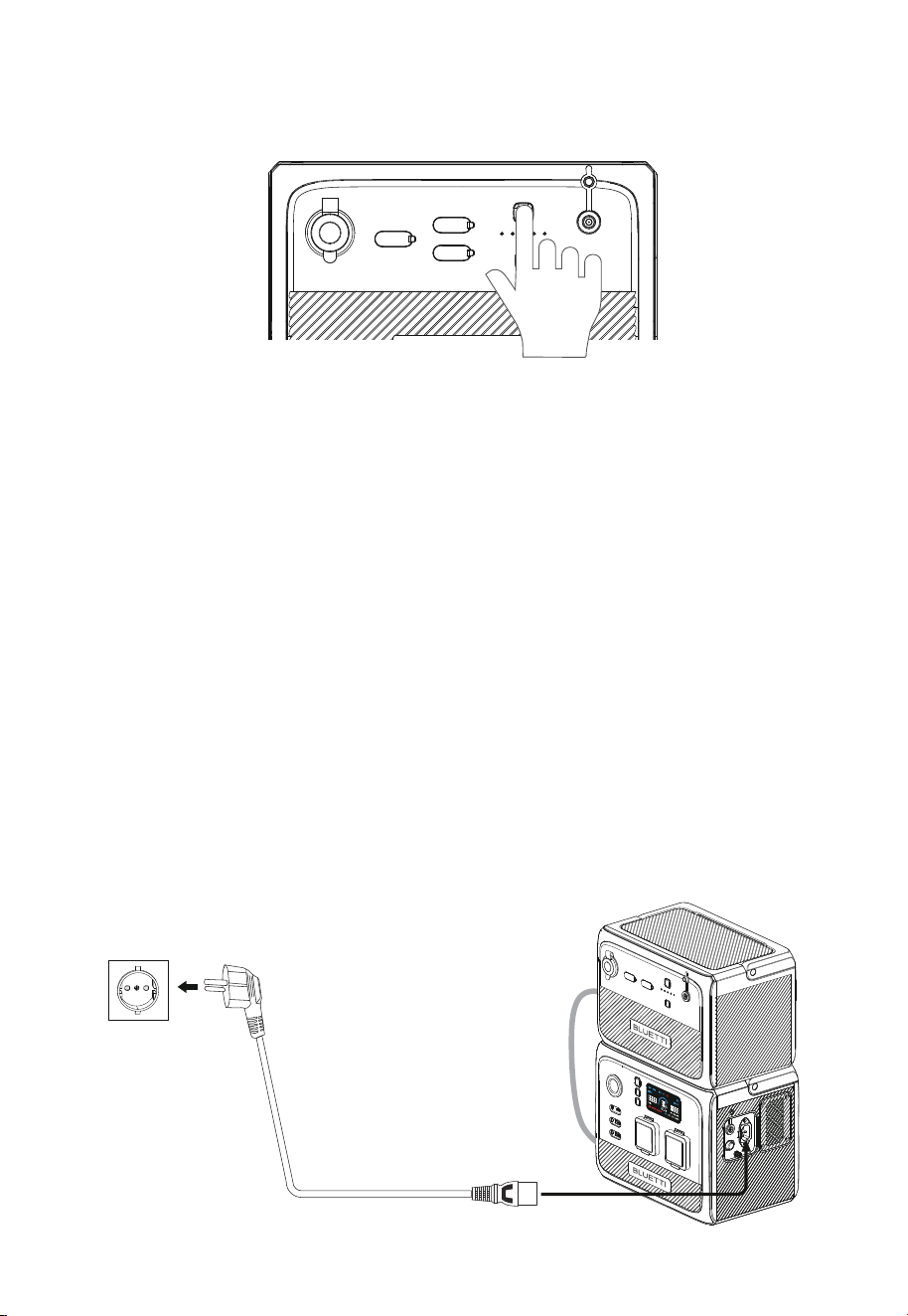
4. Bedienung
Die B80P besitzt eine Ein-/Ausschalttaste und eine Taste für den Gleichstromausgang (DC).
• Zum Hochfahren der B80P drücken Sie die Ein-/Ausschalttaste. Zum Ausschalten
halten Sie die Taste mehr als zwei Sekunden lang gedrückt.
• Zum Ein- bzw. Ausschalten des Gleichstromausgangs (Zigarettenanzünder und
USB-Ausgang) drücken Sie die DC-Taste.
Die BLUETTI B80P besitzt 5 LED-Anzeigen. Sie symbolisieren folgende Ladezustände (von
links nach rechts): 20%, 40%, 60%, 80%, 100%.
Die B80P unterstützt 4 Lademethoden: Laden über die AC60P, Laden von Strom aus
PV-Anlage oder Auto (Zigarettenanzünder) sowie Laden per Netzteil.
4.3.1. AC60P laden
Verbinden Sie AC60P und B80P und schließen Sie die AC60P über das AC-Ladekabel an
eine Wandsteckdose an. Daraufhin wird die B80P automatisch von der AC60P geladen.
4.3 Laden
4.1 Tasten
4.2. Energieanzeige
JUST POWER ON30
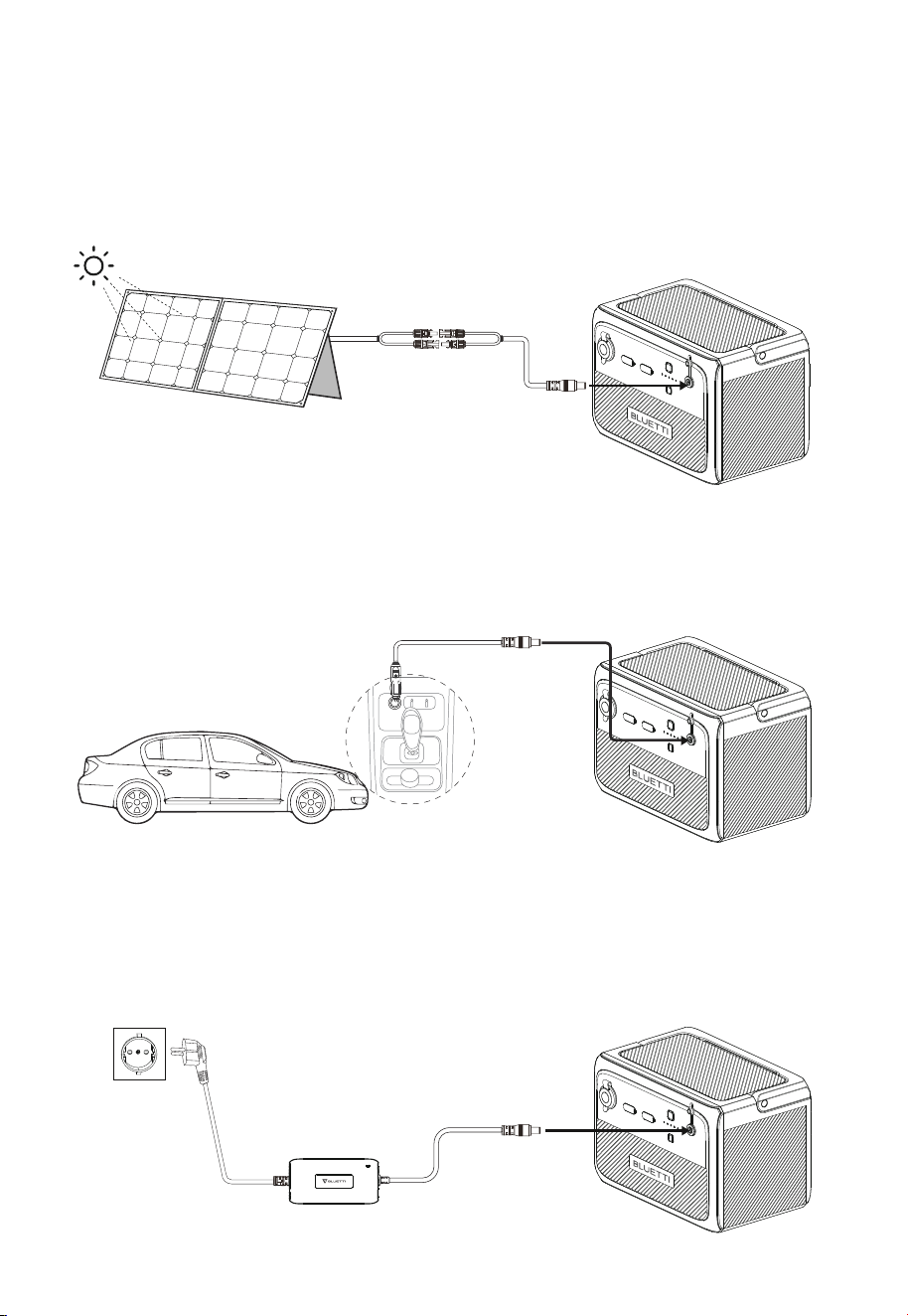
4.3.3. Laden von Strom aus einem Auto
Schließen Sie die B80P über das Autoladekabel an die 12/24-V-Zigarettenanzünderbuchse
des Fahrzeugs an.
4.3.4. Laden per Netzteil
Die B80P kann über das Netzteil von geladen werden. Achten Sie bitte darauf, dass die
Ausgangsspannung des Netzteils zwischen 12 und 28VDC liegt.
Achtung: Die Leerlaufspannung von Solarpaneelen darf 28V nicht überschreiten, da das
Gerät andernfalls Schaden nimmt (Hinweis: fällt nicht unter die Garantie.)
Achtung: Der Zigarettenanzünder muss vollständig eingesteckt sein, da andernfalls die
Möglichkeit von Sicherheitsrisiken besteht.
4.3.2. Laden von Solarstrom
Schließen Sie die Solarpaneele (in Reihe oder parallel) über das Solarladekabel an die
B80P an.
Hinweis: Vergewissern Sie sich, dass Ihre Solarpaneele die folgenden Voraussetzungen
erfüllen:
Voc: 12V-28VDC Eingangsstrom: max. 8A Eingangsleistung: max. 200W
JUST POWER ON 31
4.4 Entladen
4.4.1. DC-Ausgang
Die Betriebszeit der B80P hängt von vielen Faktoren ab, z. B. von der
Umgebungstemperatur, der Entladestromstärke, der Batteriekapazität, der Höhenlage
und der Beschaffenheit der Last.
• 12V/10A-Zigarettenanzünder
• USB-C (5/9/12/15/20VDC, 3A; 20VDC, 5A)
• USB-A (5V/3A; 9V/2A; 12V/1,5A)
• Erweiterungsanschluss (17,5V-25,2VDC, max. 30A)
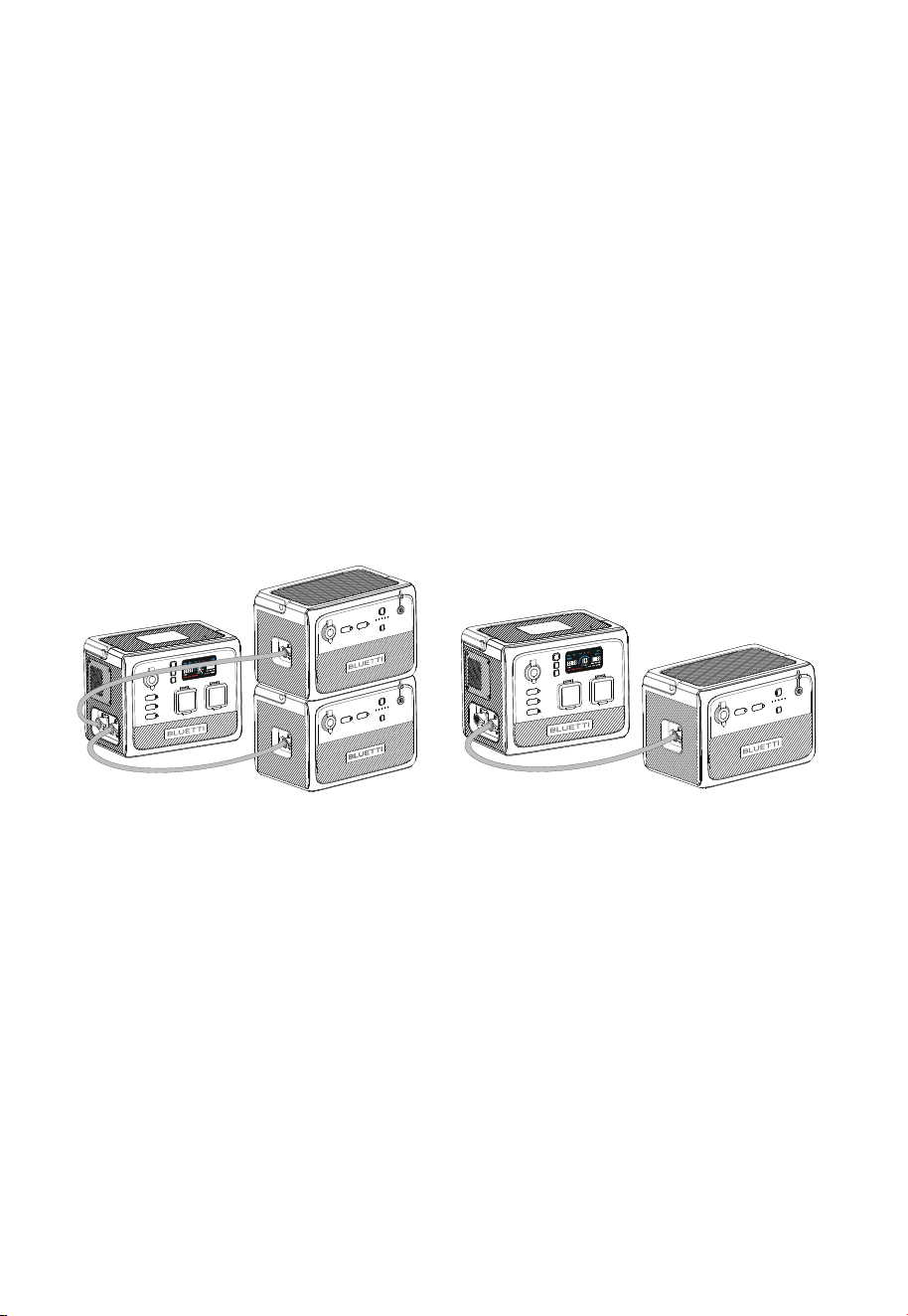
4.4.2. An AC60P anschließen
Mit dem Batterieerweiterungskabel unterstützt die AC60P bis zu zwei
Erweiterungsbatterien des Typs B80P mit einer Gesamtkapazität von 2015Wh. Schalten
Sie die AC60P ein, um das gesamte Energiesystem zu aktivieren.
Hinweis: Achten Sie beim Anschließen und Abziehen von Kabeln darauf, dass AC60P und
B80P ausgeschaltet sind.
AC60P + 2 x B80P
AC60P + 1 x B80P
JUST POWER ON32
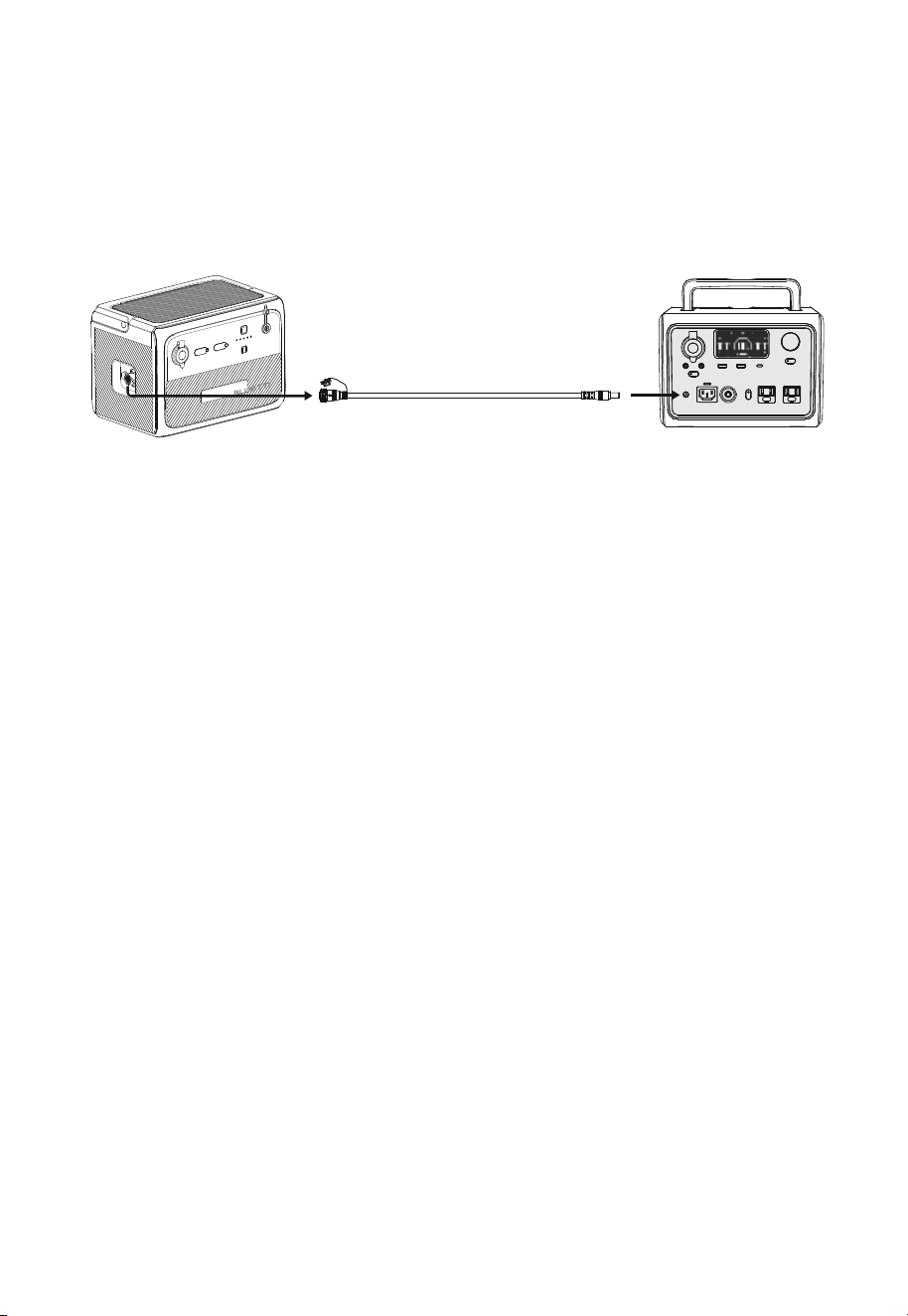
4.4.3. Powerbank-Modus
Schließen Sie die B80P über das Powerbank-Ausgangskabel an eine kompatible
Powerstation an und halten Sie etwa fünf Sekunden lang die Ein-/Ausschalttaste
gedrückt. Daraufhin kann die Powerstation direkt aufgeladen werden.
Hinweis: Im Powerbank-Modus liefert die B80P eine Spannung von bis zu 25 VDC.
Prüfen Sie die DC-Eingangsspannung Ihrer BLUETTI Powerstation auf Kompatibilität.
4.4.4. Voraussichtliche Betriebszeit
Betriebszeit (geschätzt) = Batteriekapazität (Wh) × DoD × η ÷ (Nutzleistung)
Hinweis:
1)Nutzleistung und Betriebszeit werden in Watt bzw. Stunden gemessen.
2)DoD (Depth of Discharge) steht für die Entladungstiefe. Die B80P arbeitet mit 90%
Entladungstiefe, damit die Batterie länger hält.
η bezeichnet den
Umwandlungswirkungsgrad des Wechselrichters, der bei der B80P 90% beträgt.
Beispiel: Beim Betrieb eines 40-W-Kühlaggregats mit der B80P ergibt sich folgende
Betriebszeit:
806Wh × 90% × 90% ÷ 40W ≈ 16h
Hinweis:
Niedrige Temperaturen und übermäßige Belastungen können die Kapazität der
Batterie erheblich beeinträchtigen und ihre normale Betriebszeit verkürzen.
B80P
Sonstige BLUETTI-Produkte
JUST POWER ON 33

5. Anhang
Woher weiß ich, ob meine Geräte mit diesem Produkt harmonieren?
Ermitteln Sie die Dauergesamtlast Ihrer Geräte. Wenn die maximale Ausgangsleis-
tung der B80P (120W) nicht überschritten wird, können Sie Ihre Geräte mit dieser
Powerstation betreiben.
Hinweis: Manche Geräte mit integriertem Motor/Kompressor können mit dem zwei-
bis vierfachen der Nennleistung anlaufen, was die B80P leicht überlasten kann.
Kann ich dieses Produkt mit Solarpaneelen anderer Hersteller laden?
Ja, das können Sie. Achten Sie darauf, dass Ihre Solarpaneele eine Leerlaufspannung
von 12 bis 28Volt und MC4-Stecker haben. Mischen Sie verschiedene Ausführungen
von Solarpaneelen nicht miteinander.
Hinweis: Die zum Vollladen benötigte Zeit hängt von den Wetterbedingungen, der
Sonnenintensität und dem Winkel der Sonnenkollektoren ab.
Kann damit gleichzeitig ge- und entladen werden?
Ja. Das Durchgangsladen wird unterstützt. Die B80P besitzt eine hochwertige
LiFePO4 -Batterie und ein eigenes Batteriemanagementsystem, damit sie gleich-
zeitig ge- und entladen werden kann.
Warum schaltet sich die B80P automatisch ab?
Es gibt zwei Szenarien, in denen sich die B80P selbst abschaltet:
Wenn der DC-Ausgang nach dem Einschalten nicht eingeschaltet wird, schaltet
sich das Gerät nach vier Stunden automatisch ab.
Wenn der DC-Ausgang weniger als 10 W hat, schaltet sich das Gerät nach 24
Stunden automatisch ab.
Warum ist die Ladeleistung häufig zu niedrig?
Die B80P besitzt ein integriertes intelligentes BMS, das die Ladeleistung automa-
tisch abhängig von Batterietemperatur und Ladezustand anpasst. Dadurch wird die
Batterie geschützt und ihre Haltbarkeit verlängert.
5.1 Häufig gestellte Fragen
F1:
A:
F3:
A:
F2:
A:
F4:
A:
F5:
A:
JUST POWER ON34

5.2 Abkürzungen
•
MPPT: Maximum Power Point Tracking
• SOC: Ladezustand (State of Charge)
• AC: Wechselstrom (Alternating Current)
• DC: Gleichstrom (Direct Current)
• PV: Photovoltaik (Solarpaneele)
• DOD: Entladungstiefe (Depth of Discharge)
• ECO-Modus: Dabei handelt es sich um einen Energiesparmodus (standardmäßig
aktiviert). Er kann nicht abgeschaltet werden. Wenn der DC-Ausgang nach dem
Einschalten nicht eingeschaltet wird, schaltet sich das Gerät nach vier Stunden
automatisch ab.
JUST POWER ON 35
Weitere Informationen finden Sie hier:
Kundendienstanschrift EU: Lise-Meitner-Straße 14, 28816
Stuhr, Deutschland
Kundendienstanschrift UK: Unit 2 Northgate, Bolsover
Busines Park, Woodhouse Line, Chesterfield England S44 6BD
Company: POWEROAK GmbH
Address: Lise-Meitner-Str. 14 28816
Stuhr Germany
Mail: [email protected]
Company: POWEROAK ENERGY UK CO.,LTD
Address: Unit 2 NorthGate, Bolsover Business Park,
Woodhouse Lane Chesterfield England, S44 6BD
Mail:poweroak.eu@bluetti.com
@ bluetti.inc
@ bluetti_inc
@bluetti_official
@ BLUETTI Support
@ BLUETTI Official
SHENZHEN POWEROAK NEWENER CO., LTD.
Add: F19, BLD No.1, Kaidaer, Tongsha Rd No.168, Xili Street,
Nanshan, Shenzhen, China
Customer Service(DE)
Tel:49 8006273016 (Monday to
Friday from 9 a.m. to 17 p.m. (Ger-
man local time))
Customer Service(UK)
Tel: 44 8000472906 (Monday-Friday
9:00-17:00)
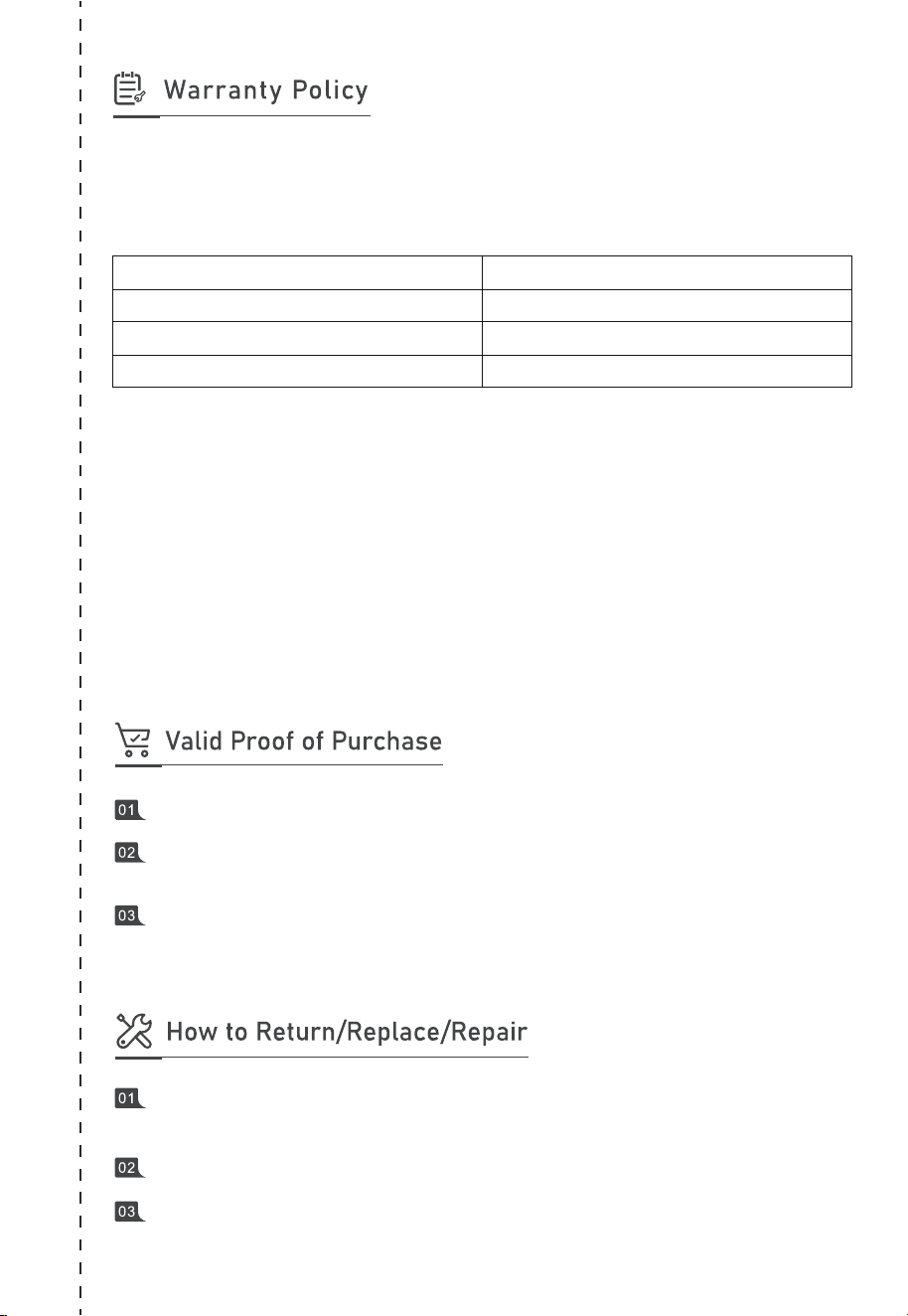
Thank you for choosing BLUETTI. Please read the terms and conditions and fill in
the warranty card. This card, together with your proof of purchase, entitles you to
the service of the product under the terms of this warranty. The warranty period
starts from the date of product receipt.
* Only applies to products purchased directly from the official BLUETTI website. If you
purchased the product from other channels, the warranty is valid for 24 months.
However, you can register for BLUETTI VIP on the official website to get a free warranty
extension.
The warranty does not cover:
• Issues arising after the warranty period has expired;
• Damage resulting from improper use, maintenance, or storage, contrary to the
user manual;
• Unauthorized disassembly, repair, or modifications;
• Damage caused by force majeure events.
Item
Main unit (including batteries)
Solar panel
Accessories (adapter/cable/others)
Warranty Period
72 months*
12 months
12 months
Order No. of purchases made through authorized platforms.
Sales invoice or order confirmation email that clearly shows the description of the
product, its price and sales channel.
The defective item’s serial number (usually on the bottom of the product) and/or
visible proof (eg. Short video) depicting the defect will be required.
Contact us for a Return Merchandise Authorization (RMA) Number. We will not
accept returned items without prior authorization and RMA.
Write the RMA number in the form below and on the outer package of the parcel.
Send the defective product to our local warehouse.
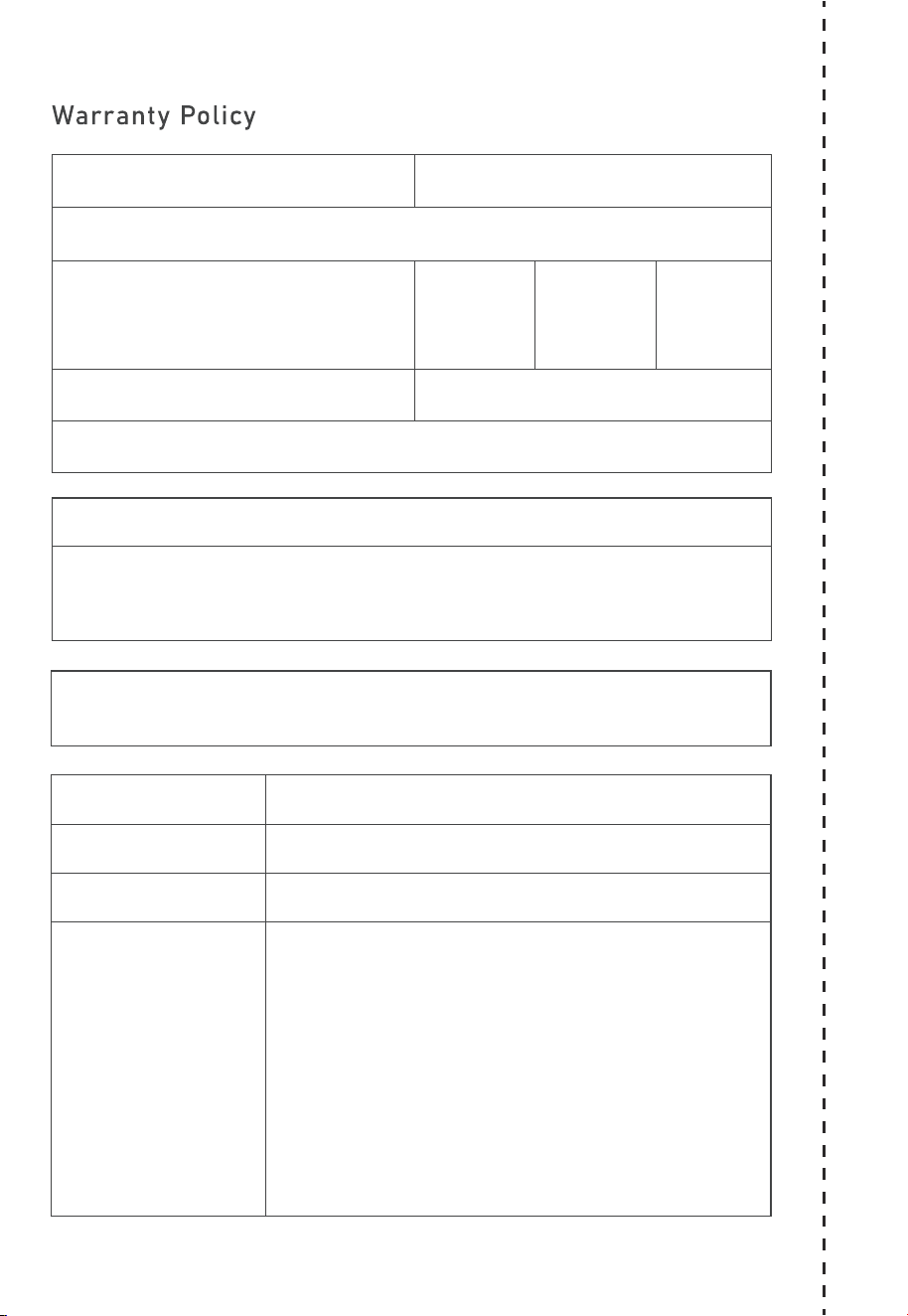
Customer Name: Date:
Compay(optional):
Address:
Phone:
Email Address:
Purchase From:
Name of Tech Support Spoken To:
Model Name:
Serial #:
Purchase Date:
Problem Description:
RMA #:
Fax:
City: State: Zip:

P/N:17.0303.0621-00A0
Certificate
Inspector:
QC: