This product earned the ENERGY
STAR label by meeting strict energy
efficiency guidelines set by the
U.S. EPA. Room air cleaners have
demonstrated the potential for
improving air quality and providing
health benefits. EPA does not endorse
manufacturer claims regarding the
degree to which a specific product will produce healthier
indoor air.
The energy efficiency of this ENERGY STAR certified model
is measured based on a ratio between the model’s CADR
for Smoke and the electrical energy it consumes, or CADR/
Watt.
Ce produit a obtenu la certification ENERGY STAR en
répondant aux directives strictes en matière d’efficacité
énergétique fixés par l’EPA des Etats-Unis. Les purificateurs
d’air ambiant ont démontré le potentiel d’améliorer la qualité
de l’air et d’offrir des avantages pour la santé. L’EPA n’appuie
pas des déclarations du fabricant concernant la mesure
dans laquelle un produit spécifique produira un air intérieur
plus sain.
L’efficacité énergétique de ce modèle certifié ENERGY
STAR est mesurée sur la base d’un rapport entre le CADR
du modèle pour la fumée de tabac et l’énergie électrique
qu’il consomme, ou CADR / Watt.
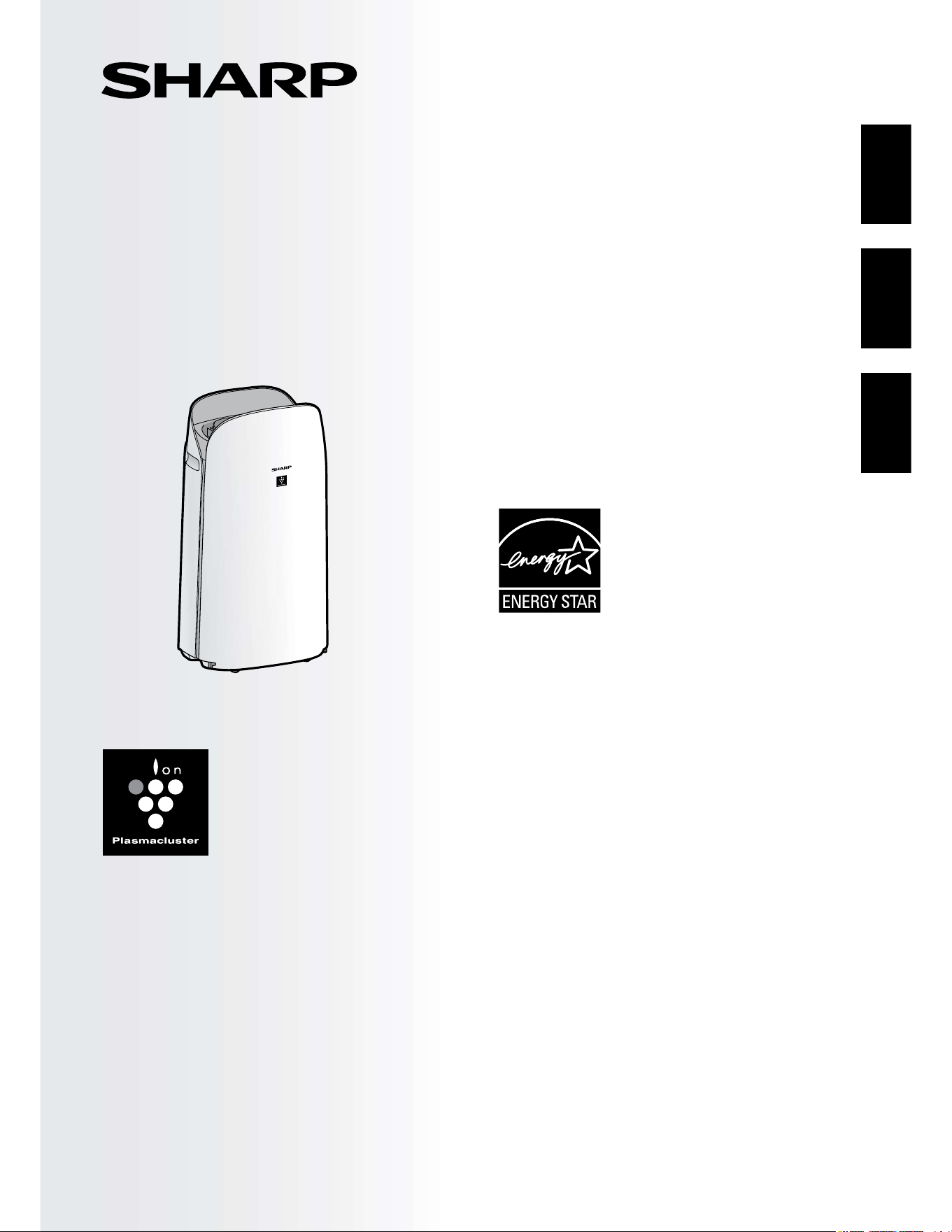
KCP110UW
KCP110CW
KCP70UW
KCP70CW
“Plasmacluster” and “Device of a
cluster of grapes” are registered
trademarks of Sharp Corporation in
Japan, USA and elsewhere.
Purificateur d’air à fonction
d’humidification
MANUEL D’UTILISATION
PURIFICADOR DE AIRE
Con función de humidificación
MANUAL DE OPERACIÓN
AIR PURIFIER
with Humidifying Function
OPERATION MANUAL
ENGLISHFRANÇAISESPAÑOL
Este producto obtuvo el sello de ENERGY STAR al cumplir
las estrictas pautas de eficiencia energética establecidas por
la EPA de EE. UU. Los purificadores del aire de la habitación
han demostrado el potencial para mejorar la calidad del aire
y proporcionar beneficios para la salud. La EPA no respalda
las afirmaciones del fabricante con respecto al grado en que
un producto específico producirá aire interior más saludable.
La eficiencia energética de este modelo con la certificación
ENERGY STAR se mide en base a una relación entre el
CADR del modelo para el humo de tabaco y la energía
eléctrica que consume, o CADR/vatio.
Thank you for purchasing this SHARP Air Purifier.
Please read this manual carefully before using the product.
This manual should be kept in a safe place for handy reference.
ENGLISH
FOR CUSTOMER ASSISTANCE
(THE UNITED STATES) .......................... 2
CONSUMER LIMITED WARRANTY
(THE UNITED STATES) .......................... 3
FOR CUSTOMER ASSISTANCE
(CANADA) ................................................ 4
CONSUMER LIMITED WARRANTY
(CANADA) ................................................ 5
IMPORTANT SAFETY INSTRUCTIONS
...... 6
PART NAMES ........................................ 10
PREPARATION ..................................... 12
OPERATION .......................................... 16
CARE AND MAINTENANCE ................ 18
TROUBLESHOOTING .......................... 22
HOW TO CHANGE VARIOUS
SETTINGS.............................................. 24
SPECIFICATIONS ................................. 29
INTELLECTUAL PROPERTY RIGHTS
FOR THIS PRODUCT ........................... 30
CONTENTS
Declaration of Conformity
SHARP AIR PURIFIER
KCP110UW / KCP70UW
This device complies with Part 18 of FCC rules.
Responsible Party:
SHARP ELECTRONICS CORPORATION
100 Paragon Drive, Montvale, NJ 07645, U.S.A.
TEL: (800) 237-4277
This Wi-Fi adapter complies with Part 15 of the
FCC rules. Operation is subject to the following two
conditions: (1) This device may not cause harmful
interference, and (2) this device must accept any
interference received, including interference that may
cause undesired operation.
•
Contains FCC ID: RX3-B01
Declaration of Conformity
SHARP AIR PURIFIER
KCP110CW / KCP70CW
CAN ICES-001B / NMB-001B
Responsible Party:
SHARP ELECTRONICS OF CANADA LTD.
335 Britannia Road East, Mississauga, Ontario L4Z
1W9 Canada
TEL: (905) 568-7140
This device contains licence-exempt transmitter(s) /
receiver(s) that comply with Innovation, Science and
Economic Development Canada’s licence-exempt
RSS(s). Operation is subject to the following two
conditions:
(1) This device may not cause interference.
(2) This device must accept any interference, including
interference that may cause undesired operation of
the device.
Contains IC: 2878F-B01
CPWB-B450JBKZ
EN-1
ENGLISH
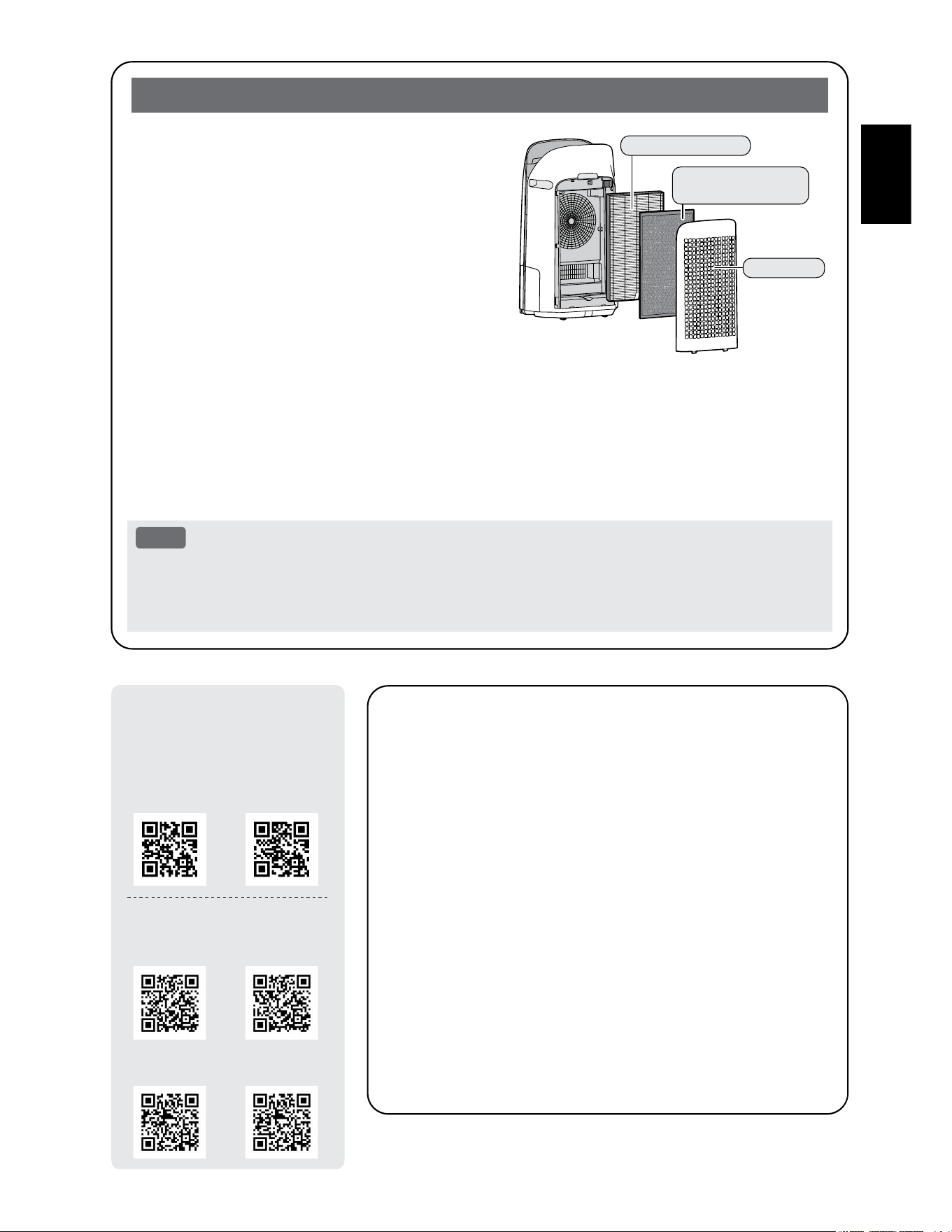
The air purifier draws in room air through the air inlet,
circulates it through a Pre-Filter, an Active Carbon
Deodorizing Filter and a True HEPA Filter inside the
product, and then discharges it through the air outlet. The
True HEPA Filter can remove 99.97% of dust particles as
small as 0.3 microns that pass through the filter and also
helps absorb odors.
The Active Carbon Deodorizing Filter gradually absorbs
odors as they pass through the filter.
Some odors absorbed by the filters will break down
over time, causing additional odors. Depending on
usage conditions, and especially if the product is used
in environments significantly more severe than a normal
household, these odors may become noticeable sooner than expected. If these odors persist, replace the
filters.
When minerals in tap water adhere to the filters and become hard and white, they absorb odors in the room
that can cause the emission of an unpleasant odor when the Humidifying Filter is dry. (Varies depending on
water quality and other environmental factors)
If this occurs, perform the Humidifying Filter maintenance. (Page 19)
NOTE
• The air purifier is designed to remove air-suspended dust and the odors.
The air purifier is not designed to remove harmful gases such as carbon monoxide contained in
cigarette smoke.
The air purifier may not completely remove an odor if the source of the odor is still present.
Please Read Before Operating Your Air Purifier
The Sharp Air Application is a helpful tool that puts
you in control of your indoor air quality.
With the Sharp Air Application:
•
You can control your air purifier from anywhere with
your smart device to do things like turn the air purifier
on and off, set a weekly schedule, and more!
•
You can monitor indoor air quality in real time to stay in
control, even if you're not home.
•
You can monitor remaining filter life and receive alerts
when it's time to replace the filters.
•
You can enable and disable the optional, "Sharp Cloud"
feature. When enabled, your usage history will be
used to adjust the Sensor Sensitivity settings of "Auto"
Mode over time in order to optimize your Air Purifiers
performance.
True HEPA Filter
Active Carbon
Deodorizing Filter
Pre-Filter
Scan the QR code for
more information about
the Sharp Air Purifiers.
KCP110UW KCP70UW
KCP110CW
(English)
KCP70CW
(English)
KCP110CW
(French)
KCP70CW
(French)
[ Canada Models ]
[ U.S. Models ]
EN-2
FOR CUSTOMER ASSISTANCE (THE UNITED STATES)
REGISTER YOUR PRODUCT
Convenience
Communication
Support
3 EASY WAYS TO REGISTER TODAY!
PRODUCT SUPPORT
FAQ’s and How-To Videos
CONTACT US
Scan this QR Code on your smart phone Visit http://www.sharpusa.com/register
ONLINE
Visit our sites to
your product at
See the Contact Us section on our sites U.S. | www.sharpusa.com/support Contact a Sharp Advisor on the phone
Contact a Sharp Advisor on the phone
CALL US
US 800-BE-SHARP
800-237-4277
CALL US
US 800-BE-SHARP
800-237-4277
EMAIL CHAT ONLINE
SCAN
QR code scanning
EN-3
ENGLISH
CONSUMER LIMITED WARRANTY (THE UNITED STATES)
CONSUMER LIMITED WARRANTY FOR U.S. USERS
(the “Product”), when shipped in its original container, will be free from defective workmanship and materials, and
agrees that it will, at its option, either repair the defect or replace the defective Product or part thereof with a new
or remanufactured equivalent at no charge to the purchaser for parts or labor for the period(s) set forth below.
This warranty does not apply to any appearance items of the Product nor to the additional excluded item(s) set
forth below nor to any Product the exterior of which has been damaged or defaced, which has been subjected to
or construction.
In order to enforce the rights under this limited warranty, the purchaser should follow the steps set forth below and
provide proof of purchase to the servicer.
The limited warranty described herein is in addition to whatever implied warranties may be granted to purchasers
by law. ALL IMPLIED WARRANTIES INCLUDING THE WARRANTIES OF MERCHANTABILITY AND FITNESS
FOR USE ARE LIMITED TO THE PERIOD(S) FROM THE DATE OF PURCHASE SET FORTH BELOW. Some
states do not allow limitations on how long an implied warranty lasts, so the above limitation may not apply to you.
Neither the sales personnel of the seller nor any other person is authorized to make any warranties other than
those described herein, or to extend the duration of any warranties beyond the time period described herein on
behalf of Sharp.
The warranties described herein shall be the sole and exclusive warranties granted by Sharp and shall be the sole
and exclusive remedy available to the purchaser. Correction of defects, in the manner and for the period of time
with respect to the Product, and shall constitute full satisfaction of all claims, whether based on contract,
negligence, strict liability or otherwise. In no event shall Sharp be liable, or in any way responsible, for any
damages or defects in the Product which were caused by repairs or attempted repairs performed by anyone other
than an authorized servicer. Nor shall Sharp be liable or in any way responsible for any incidental or consequential
economic or property damage. Some states do not allow the exclusion of incidental or consequential damages, so
the above exclusion may not apply to you.
THIS LIMITED WARRANTY IS VALID ONLY IN THE FIFTY (50) UNITED STATES THE DISTRICT OF
COLUMBIA AND PUERTO RICO.
Your Product Model Number & Description:
Warranty Period for this Product:
Additional Item(s) Excluded From Warranty
Coverage:
Where to Obtain Service:
What to Do to Obtain Service:
information available when you need service for your Product.
One (1) year parts and labor from date of purchase.
printed materials. Product which has been used for rental
and/or commercial purposes.
From a Sharp Authorized Servicer located in the United
Servicer, call Sharp Toll Free at 1-800-BE-SHARP.
Ship prepaid or carry in your Product to a Sharp Authorized
Servicer. Be sure to have Proof of Purchase available. If you
ship the Product, be sure it is insured and packaged securely.
TO OBTAIN SERVICE, SUPPLY, ACCESSORY OR PRODUCT INFORMATION, CALL 1-800-BE-SHARP, OR
VISIT OUR WEBSITE AT www.sharpusa.com
SAVE THE PROOF OF PURCHASE AS IT IS NEEDED SHOULD YOUR AIR PURIFIER EVER REQUIRE
WARRANTY SERVICE.
SHARP ELECTRONICS CORPORATION
100 Paragon Drive, Montvale, NJ 07645, U.S.A.
EN-4
FOR CUSTOMER ASSISTANCE (CANADA)
Model Number:
Serial Number:
Date of Purchase:
Dealer Name:
Address:
City:
Province:
Postal Code:
Telephone:
PRODUCT SUPPORT
If you have questions about the setup or operation of your product, please refer to
the corresponding section within this manual.
Additionally, visit http://sharp.ca/ to access exclusive content about your product
including:
Find a Dealer
Find Service Locations
Downloads including the Installation Guide, Spec Sheet, and Owner’s Manual
CONTACT US
If at any time you have questions or comments concerning your SHARP product,
please contact the SHARP Customer Assistance Center. We are available to
assist you through multiple contact methods for your convenience:
Contact a Sharp Advisor on the phone
CALL US
CA 877-278-6709
Mon-Fri: 8am-5pm EST
(except statutory holidays)
EMAIL
Available 24/7
See the Contact Us
section on our site.
SUPPORT SITE
Product Downloads,
Service Locator, Where
to Buy, Toner Recycling
Program and more.
To aid in answering questions for a service call or for reporting loss or theft, please
use the space below to record the model and serial number located on either the
side or back of the product.
www.sharp.ca
https://sharp.ca/contact-sharp CA | www.sharp.ca
EN-5
ENGLISH
CONSUMER LIMITED WARRANTY (CANADA)

EN-6
IMPORTANT SAFETY INSTRUCTIONS
READ AND SAVE THESE INSTRUCTIONS
before using this product.
When using electrical appliances, basic
safety precautions should always be
followed to reduce the risk of fire, electric
shock, and injury to persons, including the
following:
WARNING
1. Read all instructions before using the
product.
2. Use the product only for intended
household use as described in
this manual. Any other use not
recommended by the manufacturer may
cause fire, electric shock, or injury to
persons.
3. This appliance is not intended for use
by persons (including children) with
reduced physical, sensory or mental
capabilities, or lack of experience
and knowledge, unless they have
been given supervision or instruction
concerning use of the appliance by a
person responsible for their safety.
Children should be supervised to ensure
they do not play with the appliance.
4. Never operate the product if the power
cord or plug is damaged or the product
is malfunctioning or damaged.
5. If the power cord or plug is damaged, it
must be replaced by the manufacturer,
its service agent or a Sharp authorized
Service Center in order to avoid a
hazard.
Contact the nearest Service Center for
any problems, adjustments, or repairs.
6. Do not repair or disassemble the
product yourself.
7. Follow the instructions “a” to “h” below
for the power cord or plug. It may cause
short circuit, excessive heat, electric
shock or fire.
a. Use only AC 120 volt outlet.
b. Do not use the product if the power
cord or plug is damaged or the
connection to the wall outlet is
loosened.
c. Always turn off the product before
unplugging the power plug.
d. Always unplug the product before
moving or maintaining it, refilling
the Humidifying Tray, opening the
Back Panel, changing the filters and
whenever the product is not in use.
e. Be sure to pull the power plug and
not the power cord.
f. Do not touch the power plug with wet
hands when inserting or unplugging
from the wall outlet.
g. Periodically remove dust from the
power plug.
h. Always observe the following as to
not damage the power cord.
• Do not damage cord with Caster
Wheels when moving the product.
• Do not run cord under carpeting.
Do not cover the power cord with
throw rugs, runners, or similar
coverings.
• Do not put heavy things on the
power cord or pinch it.
• Do not run the power cord under
furniture or other appliances.
• Run the power cord away from
traffic area and where it will not be
tripped over.
8. To reduce the risk of electric shock, this
product has a polarized plug (one blade
is wider than the other). This plug will
fit in a polarized outlet only one way. If
the plug does not fit fully in the outlet,
reverse the plug. If it still does not fit,
contact qualified personnel to install the
proper outlet. Do not alter the plug in
any way.
9. Do not use this product near gas
appliances, fire places, candle fire,
incense or sparks from lit cigarettes.
When the product is operated with gas
appliances in the same room, Ventilate
a room periodically, otherwise it may
cause carbon monoxide poisoning.
10. Do not operate the product in a room
with flammable gas, such as oily
residue or chemical fumes.
11. Do not expose the product to rain, or
use near water, in a bathroom, laundry
area or other damp location.
12. Do not insert fingers or foreign objects
into the air inlets or air outlets.
13. Do not look into the air outlets.
14. Do not drink the water in the
Humidifying Tray.
15. Replace the water in the Humidifying

EN-7
ENGLISH
Tray daily with fresh tap water, and
regularly clean it.
When the product is not in use, dispose
of the water in the Humidifying Tray.
Leaving water in the Humidifying Tray
can cause mold, bacteria, and bad
odors. In rare cases, such bacteria can
be a health hazard.
NOTE
- Radio or TV Interference -
If the product should cause interference to
radio or television reception, try to correct
the interference by one or more of the
following measures:
1. Reorient or relocate the receiving
antenna.
2. Increase the separation between the
product and radio/TV receiver.
3. Connect the product into an outlet on
a circuit different from that to which the
receiver is connected.
4. Consult the dealer or an experienced
radio/TV technician for help.
----------------------------------------------------------
This product complies with the maximum
allowable concentration of ozone of 0.050
parts per million by volume (ppmv) in a 24-
hour period. The Health Canada Guideline
2010 recommends that the maximum
exposure limit, based on an averaging
time of 8 hours, is 0.020 ppmv or less
when tested in a sealed, controlled room
approximately 30 m³.
CAUTIONS CONCERNING
INSTALLATION
1. Place the product on a level and stable
surface with sufficient air circulation.
When placed on heavy carpet, the
product may vibrate slightly.
Place the product on a level surface
to avoid water leakage from the
Humidifying Tray.
2. Avoid a location where the sensors are
exposed to direct breeze or draft if the
product has sensors. The product may
not operate properly.
3. Avoid use in locations where furniture,
fabrics, or other items may come in
contact with and restrict the air inlets
and/or outlets.
4. Avoid locations exposed to direct
sunlight. It may cause to change shape
or color of the product.
5. Avoid locations where the product is
exposed to condensation or drastic
changes in temperature. Use under
appropriate conditions between
32 ºF - 95 ºF (0 ºC – 35 ºC).
6. Avoid use in locations where greasy
or oily smoke is generated. (such as
in a kitchen, etc.). The Main Body
surface may crack and the sensors may
malfunction as a result.
7. The dust collecting ability of the product
is effective even when the product is as
close to 1.2 inches (3 cm) from the wall,
but the surrounding walls or floor may
get dirty. Please place the product at a
distance from the wall.
The wall directly behind the air outlets
and the floor or rug on which the
product placed may become dirty over
time. When using the product for an
extended period of time at the same
location, periodically clean the walls, the
floor or the rug.
8. Do not place the product near or on
hot objects, such as stoves or heaters,
or where it may come into contact with
steam.
CAUTIONS CONCERNING
FILTER
1. Follow the instructions in this manual
for filter installation and maintenance.
(Page 12, 21)
2. Take out the filters from the plastic bag
before placing the filter in the Main
Body.
3. Do not operate the product without the
filters properly installed.
4. Do not wash and reuse the True
HEPA Filter and the Active Carbon
Deodorizing Filter.
Washing will not improve filter
performance and can also cause
electric shock or operating malfunctions.
5. Do not operate the product in a rooms
where aerosol insecticides are present.
It may cause the odor of insecticide may
be remained in the product and emitted
from the air outlets.

EN-8
CAUTIONS CONCERNING
OPERATION
1. Do not block the air inlets or air outlets.
2. Always operate the product in an
upright position.
3. When carrying the product, first remove
the Humidifying Tray not to spilt water,
and then hold the product by the
handles on both sides.
4. Always lift up the product when moving
it on easily damaged flooring, an
uneven surface, or carpet.
5.
Do not change the direction of the
product while moving using the Caster
Wheels.
6. When moving the product by its
Caster Wheels, move it slowly and in a
horizontal direction.
7. Do not operate the product without the
Humidifying Tray properly installed.
8. When refilling the Humidifying Tray,
make sure no water is leaking from the
Humidifying Tray.
9. Be sure to wipe off any excess water on
the outside of the Humidifying Tray.
10. Do not use hot water (104 ºF (40 ºC)
or more), chemical agents, aromatic
substances, dirty water, or other
damaging substances. Doing so can
deform the product or cause it to
malfunction.
11. Use only fresh tap water. Using other
water sources risks the growth of molds,
fungi, or bacteria.
12. Do not shake the Humidifying Tray with
holding the Tray Handle.
CAUTIONS CONCERNING
MAINTENANCE
1. Follow the instructions in this manual
for maintenance. (Page 18 - 21)
2. Clean the exterior with a soft cloth only.
3. Do not use detergents other than what
is mentioned in this manual (Page
20). Do not use volatile fluids and/or
detergents.
The Main Body surface may be
damaged or cracked with strong
corrosive cleansers, benzine, paint
thinner, polishing powder or grease.
The Humidifying Tray may cause
deformation, tarnishing, cracking (water
leakage). In addition, the sensors may
malfunction as a result if the product
has sensors.
4. Do not scrub the Back Panel (Pre-Filter)
hard during its maintenance.
5. The frequency of descaling maintenance
will depend on the hardness of and the
impurities in the water that you use;
the harder the water the more often
descaling will be necessary.
6. Do not remove the Humidifier Float. If
the Humidifier Float comes off, refer to
page 20.
7. When replacing filters or any
accessories, use specified parts in this
manual.

EN-9
ENGLISH
WARNING
In case of remote operation from outside,
you may not be able to check air purifier
current condition or the area around it and
the situation concerning anyone possibly
staying there, so please adequately confirm
safety before use.
• Make sure the electric plug is fully
inserted into a power socket, and there is
no dust on the plug or in the socket hole.
(It may cause heat, combustion, fire, etc.,
due to poor contact or contact failure)
• Make sure beforehand that although
there are some wind changes, no negative
impact will occur to the environment
inside the room. (such as whether there is
anything flying easily in the wind)
Because the wind may cause something
to fall down, resulting in fires, wounds,
defacement of household belongings.
CAUTION FOR USE
• Agreement with “Terms of Service” is
needed to use App.
• App will be periodically revised because of
version
upgrade.
• Screens and illustrations in this book
are for explanation, there are some
differences to the real product.
• In the case of bad connection, the App
may not be able to control the air purifier.
The current operation of the air purifier
may not be accurately reflected on the
App.
• Locking smart device display is
recommended to avoid wrong operation.
• Although the App is free, communications
expenses for download of dedicated App
and operation with smart device or tablet
are customer’s obligation.
CAUTION FOR Wi-Fi
Caution for usage about electrical wave
• In case of the usage at the following place,
the operation cannot be guaranteed:
Near Bluetooth
®
wireless communications
device using the same frequency (2.4GHz)
as this product or specified low power
wireless device. Also in the place like
magnetic field of the device such as
microwave oven, or the place with static
electricity or the place radio disturbance
is occurred, it may not be available
temporarily due to weak electrical wave.
• Wireless connection and performance
cannot be guaranteed for all routers or
housing environment. At the following
places, it is likely electrical wave cannot
reach or is disconnected: Inside of the
building made with concrete, reinforcing
steel or metal / near the obstruction /
near the wireless communications device
applying the same frequency.
• Wi-Fi of this product corresponds to
channel 1 - 11. It’s not available to
communicate with the routers set up to
other channels.
Caution for personal information
(related to Security)
• Using Wi-Fi device has the possibility of
interception as long as using electrical
wave regardless of secret code setting.
• Wi-Fi has the advantage of free LAN
connection in the service area because
of the communication between this
product and the router applying electrical
wave. On the other side, intercept of
communication or unfair intrusion are likely
to occur because electrical wave reaches
everywhere in the certain area through the
obstructions (e.g. walls).
• Do not connect to the device or network
that you do not have permission to use
when setting up Wi-Fi connection.
• The Wi-Fi function of this product should
be initialized in case of disposal or
handover to a third person.
• The Wi-Fi function of the product should
be initialized in case of handover from
a third person to avoid illegal access of
outsider. See page 26 for instructions
on how to initialize.
SAFETY / PRECAUTIONS OF THE Wi-Fi FUNCTION
EN-10
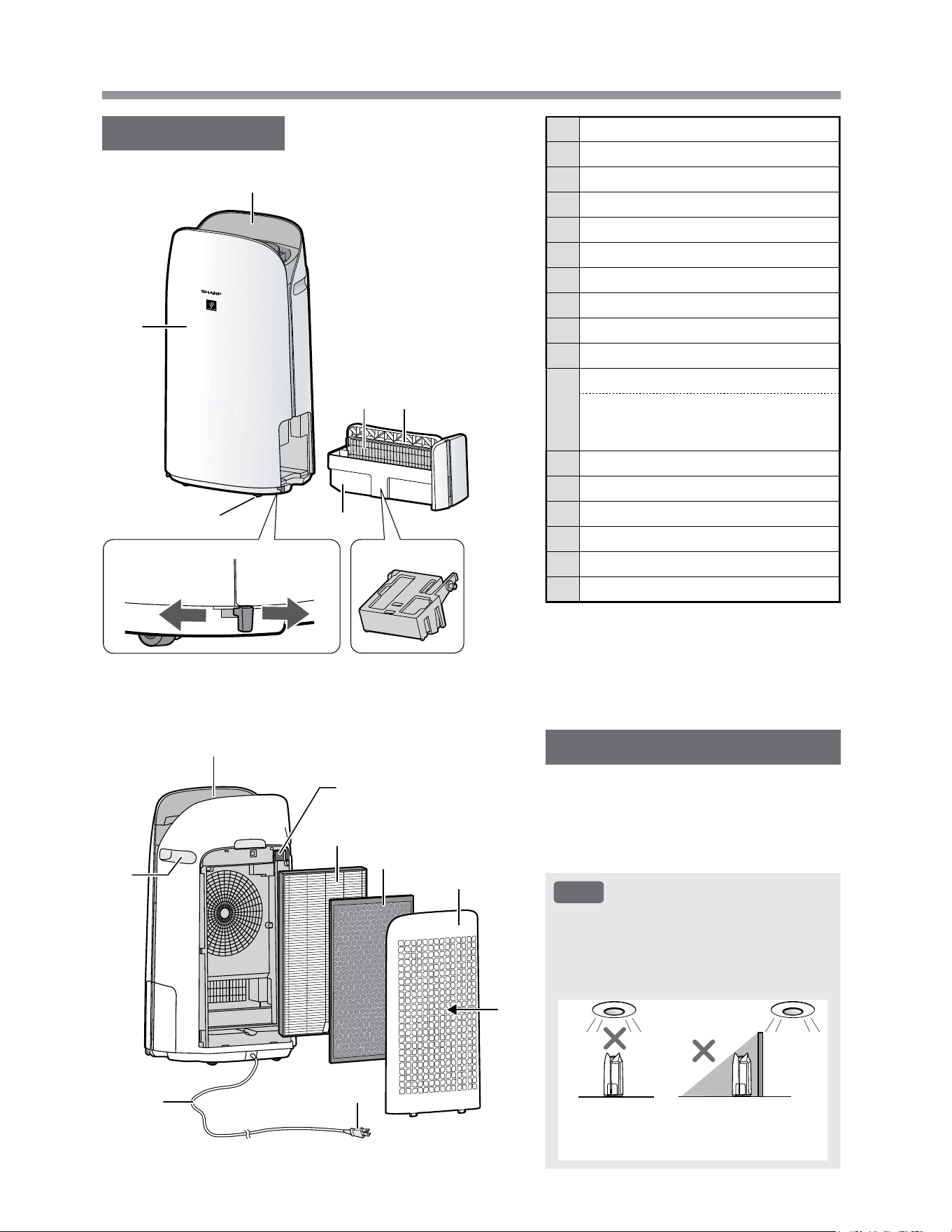
PART NAMES
MAIN BODY
1 Operation Panel / Display
2 Main Body
3 Caster Wheels
(4 Locations)
4 Caster Stopper
(Right & Left)
5 Humidifying Tray
6 Humidifying Filter
7 Tray Handle
8 Humidifier Float
9 Air Outlet
10 Handle
(2 Locations)
11
Sensor Filter
Sensor
(Internal)
Sensitive Dust / Odor / Temperature /
Humidity
12 True HEPA Filter
13 Active Carbon Deodorizing Filter
14 Back Panel
(Pre-Filter)
15 Air Inlet
16 Power Cord
17 Power Plug
LIGHT SENSOR
When the Light Control (Display Brightness)
is set to “Auto”, the brightness of the Display
and Air Quality Indicator will be switched
automatically based on room brightness.
(Page 25)
NOTE
Detection range of Light sensor
Do not install the product in the following
places. The Light Sensor may not sense
correctly.
Directly
under a
light fixture.
In shadow.
1
2
3
Unlocked
4
5
6 7
8
9
10
11
12
13
14
15
16
Locked
17
EN-11
ENGLISH
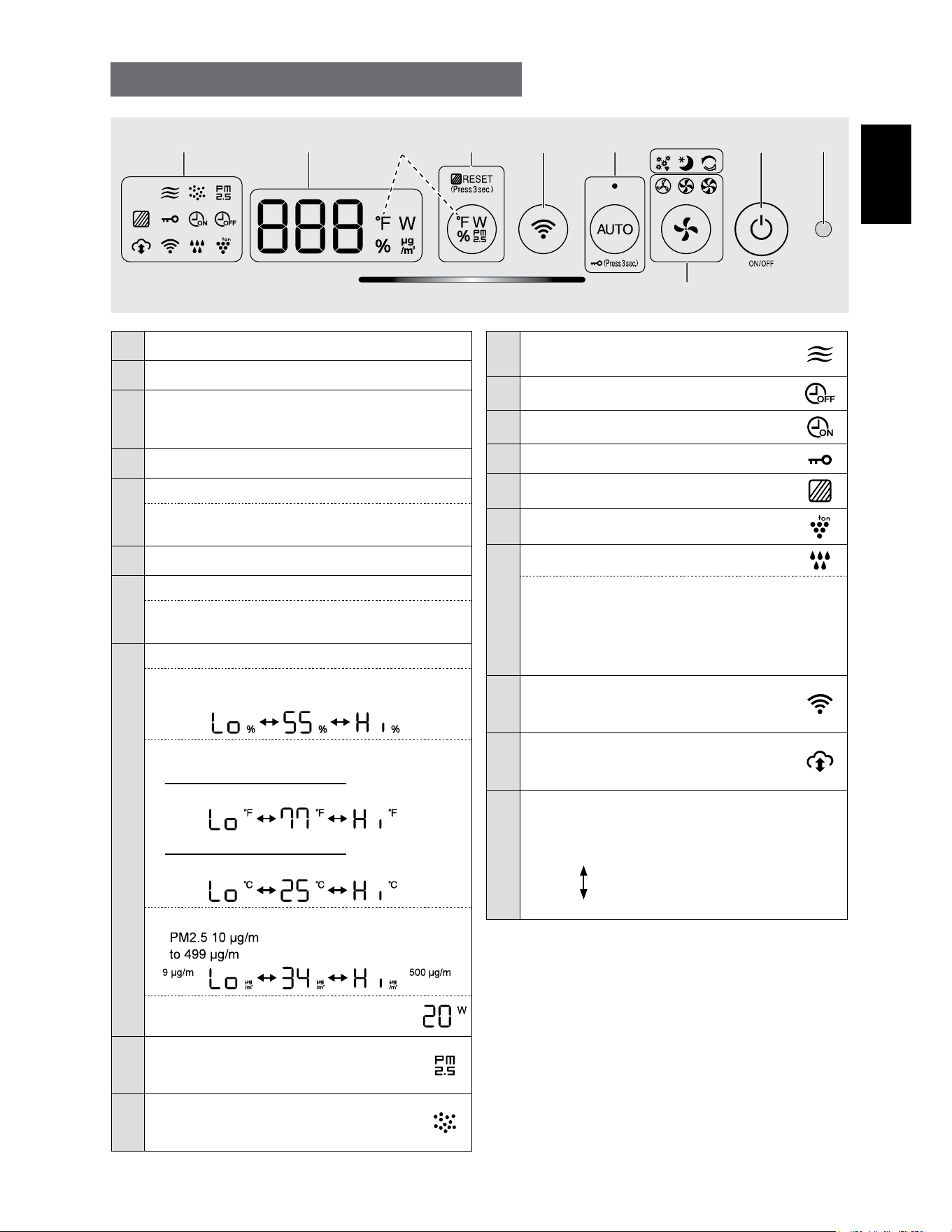
1 Light Sensor
2 Power ON/OFF Button
3
App-Only Modes: Pollen, Sleep and
Plasmacluster Express Clean Lamps
(White)
*2
4 Fan Speed Button, Lamps
(White)
5
AUTO Button, Lamp
(White)
Child-Lock Button
(Press 3 sec.)
*3
6 Wi-Fi Button
7
Switching Display Button
Filter Reset Button, Lamp
(White)
(Press 3 sec.)
*3
8
Display
*4
• Humidity
Humidity 25 % to 75 % is displayed.
24 %
or less
76 %
or more
• Temperature
For KCP110UW or KCP70UW
Temperature 32
o
F to 122
o
F is displayed.
123
o
F
or more
31
o
F
or less
For KCP110CW or KCP70CW
Temperature 0
o
C to 50
o
C is displayed.
51
o
C
or more
-1
o
C
or less
• PM2.5 Concentration
*5
3
(micrograms per cubic meter air)
3
is displayed.
3
or more
3
or less
• Wattage
Indicates wattage of current operation.
9
PM2.5 Indicator
(White)
Indicates the Sensitive Dust Sensor
detects microscopic dust.
10
Dust Indicator
(White)
Indicates the Sensitive Dust Sensor
detects usual dust.
OPERATION PANEL / DISPLAY
11
Odor Indicator
(White)
Indicates the Odor Sensor detects odors.
12 OFF Timer Indicator
(White)
*2
13 ON Timer Indicator
(White)
*2
14 Child-Lock Indicator
(White)
15 Filter Maintenance Indicator
(Orange)
16 Plasmacluster Ion Indicator
(White)
17
Humidifying Indicator
(White)
• Illuminates:
Humidify ON
• OFF:
Humidify OFF
• Flashing: the product needs water
(The indicator flashes for 10 minutes and then
goes off.)
18
Wi-Fi Indicator
(White)
Illuminates when air purifier is connected
to a router.
19
Cloud Service Indicator
(White)
*2
Illuminates when air purifier is connected
to Sharp's cloud service.
20
Air Quality Indicator
Indicates the air purity of the room in 5 levels with
color changes.
Clean
Blue
Yellow (Flashing)
Impure
Red (Flashing fast)
*1: This is an illustration of KCP110UW or KCP70UW.
For KCP110CW or KCP70CW, “
o
F ” on the control
panel is “
o
C ”.
*2: The lamps of No. 3, 12, 13 and 19 light up only when
using the App.
*3: Press and hold 3 seconds or longer.
*4: The displayed numbers are approximate.
*5: Particulate matter, particles with diameter of size 2.5
micrometers or less.
15 23
20
6789 - 19
*1
4
*4
EN-12
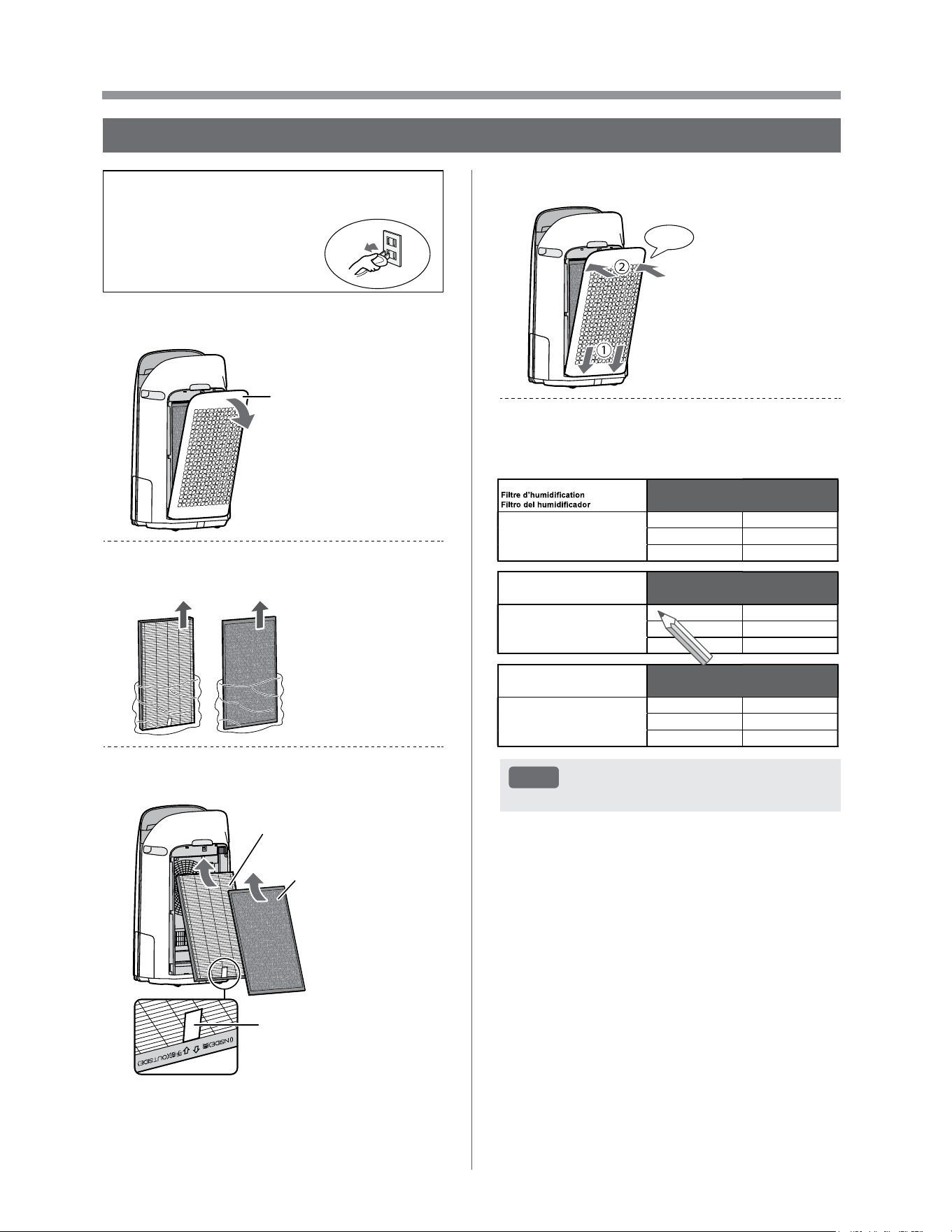
PREPARATION
• To maintain the quality of the filter, it is installed
in the product and packaged in a plastic bag.
• Be sure to stop operation
and unplug the product
before filter installation or
replacement.
1.
Remove the Back Panel.
Back Panel
2.
Take out the filters from the plastic
bag.
3.
Install the filters in the correct order
as shown.
True HEPA Filter
Active Carbon
Deodorizing Filter
Tag
4.
Install the Back Panel.
Click
5.
Record the date when you start or
replace the filters on the back cover
of this manual.
Active Carbon Deodorizing Filter
Filtre déodorant de carbone actif
Filtro desodorizante de carbón activo
Model
Modèle
Modelo
FZ-J80DFU
Starting date of use
Date de début d’utilisation
Fecha de comienzo de uso
.
.
.
.
.
.
.
.
.
.
.
.
True HEPA Filter
Filtre HEPA authentique
Filtro true HEPA
Model
Modèle
Modelo
FZ-P11HFU
Starting date of use
Date de début d’utilisation
Fecha de comienzo de uso
.
.
.
.
.
.
.
.
.
.
.
.
Humidifying Filter
Model
Modèle
Modelo
FZ-P11MFU
Starting date of use
Date de début d’utilisation
Fecha de comienzo de uso
.
.
.
.
.
.
.
.
.
.
.
.
NOTE
• Do not operate the product without the filters.
FILTER INSTALLATION
EN-13
ENGLISH
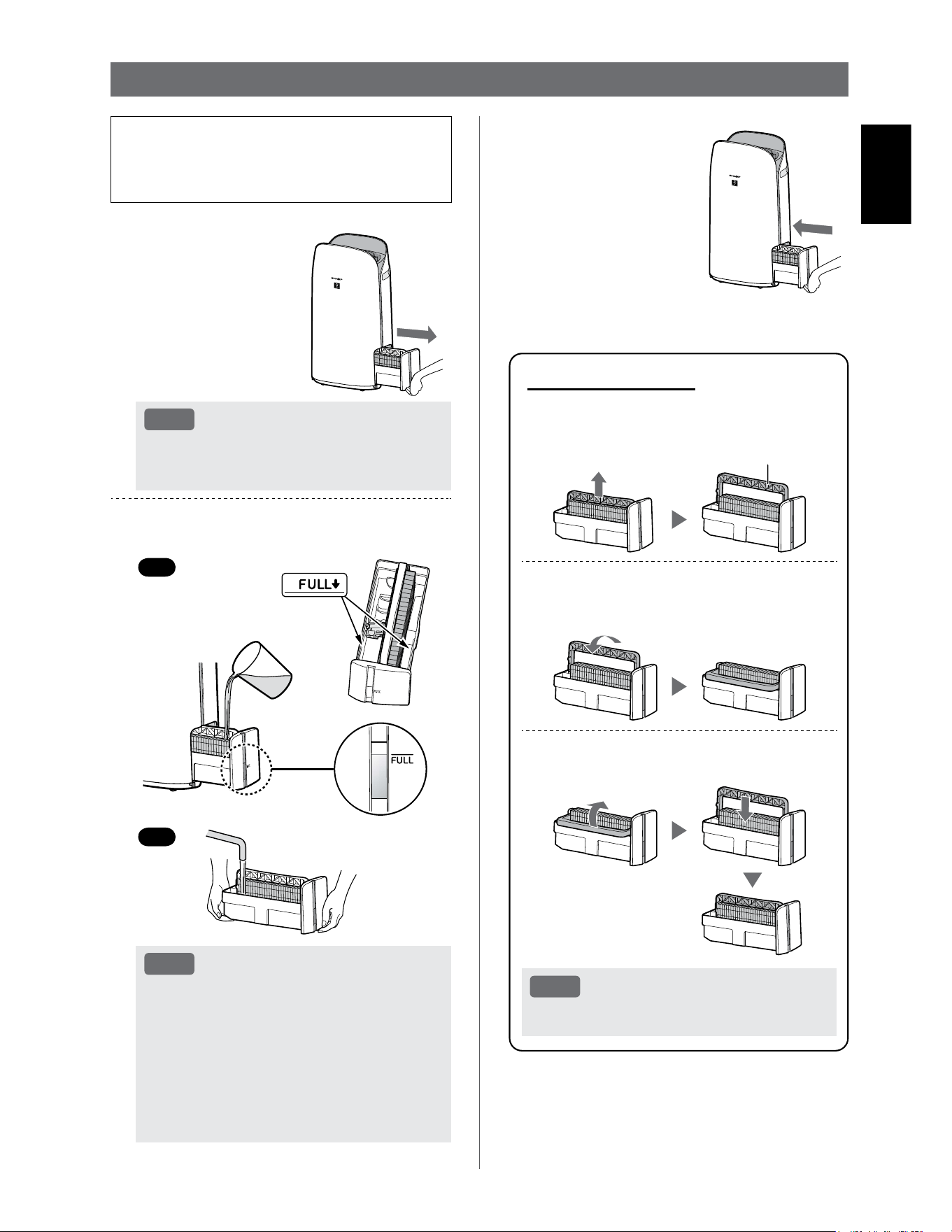
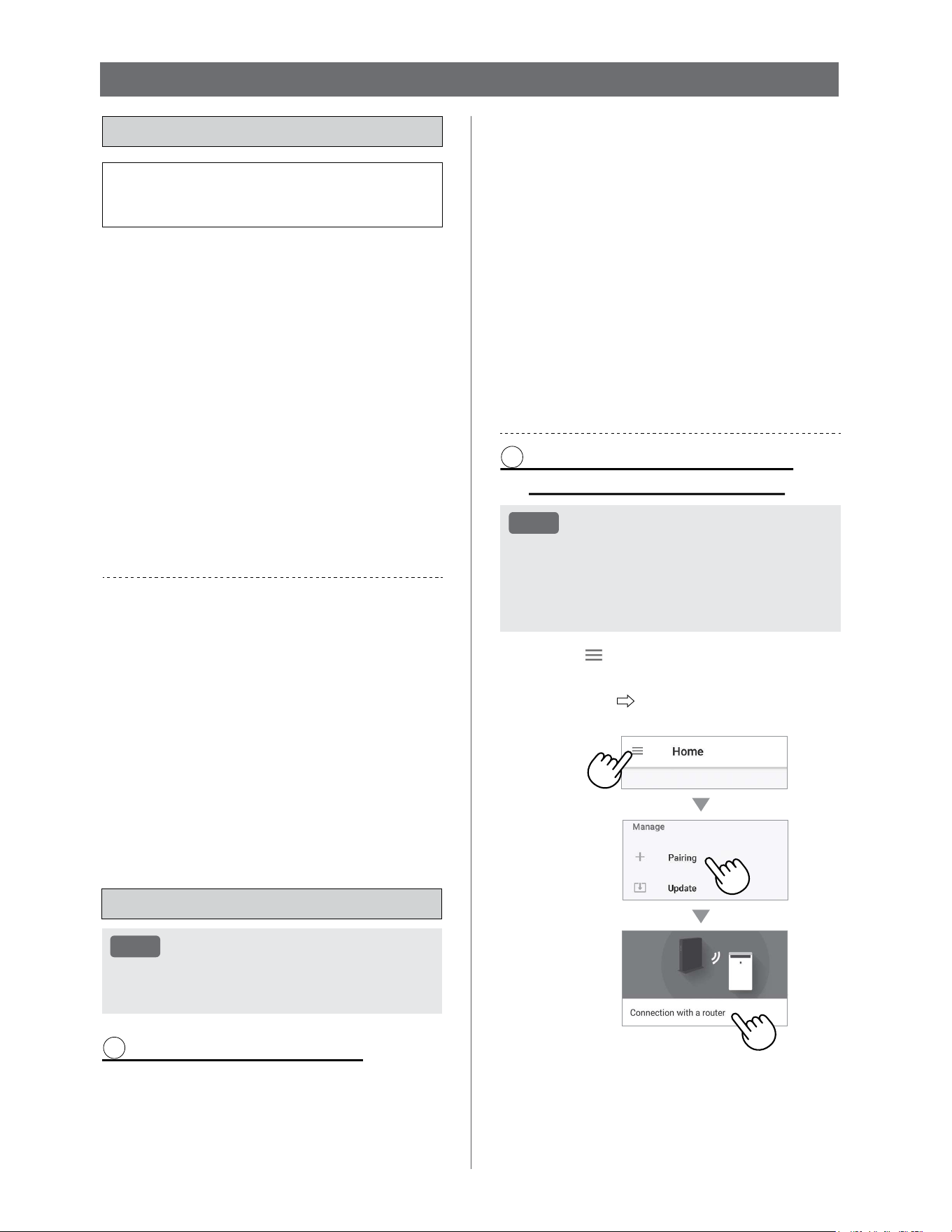
• When humidifying, fill the Humidifying Tray with
water.
• When not humidifying, discard the water in the
Humidifying Tray.
1.
Pull out the
Humidifying Tray.
NOTE
• When removing and installing the
Humidifying Tray, be careful not to spill any
water.
2.
Fill the Humidifying Tray with
tap water using method “A” or “B”.
B
A
NOTE
• The Humidifier Float will float up when tray
is filled with water.
• Slowly fill it with water to avoid splashing.
• Do not fill beyond the “FULL” indicator.
• When carrying the Humidifying Tray, hold it
with both hands or grip the Tray Handle.
• Clean the Humidifying Tray if it becomes
dirty or there is a noticeable odor.
REFILLING THE HUMIDIFYING TRAY
About Tray Handle
• When holding and carrying the
Humidifying Tray, use tray handle
Tray Handle
• When cleaning the Humidifying Filter,
you can turn the Tray Handle down on
its side.
• After cleaning, install the Tray Handle
back in its original position.
NOTE
• Return the Tray Handle to its original
position before installing.
3.
Carefully install the
Humidifying Tray.
EN-14
Wi-Fi SETTINGS
BEFORE YOU BEGIN
• By connecting your air purifier with your smart
device, you can use the air purifier more
conveniently.
Ensure your smart device is connected to a
2.4 GHz Wi-Fi Network.
Wi-Fi Protected Setup (WPS) Access Point
(Router)
• The recommended encryption method is WPA2
(AES).
Ensure your smart device meets minimum
software requirements:
• Smartphones / tablets of Android 8 or later
• iPhones, iPod touch, iPads of iOS 12 or later
Product Wi-Fi specifications
• Wireless LAN: IEEE802.11b/g/n
• Frequency range: 2.4GHz frequency band
Trademarks
•
“Wi-Fi
®
” is a registered trademark of Wi-Fi Alliance
®
.
•
“Android” is the trademark of Google Inc.
•
“iPhone”, “iPod touch”, “iPad” are the registered
trademarks or trademarks of Apple Inc.
•
The other company names, corporate names, product
names mentioned in the handling instructions are
trademarks and registered trademarks of each
company.
INITIAL SET UP
NOTE
• When pairing the smart device to the air
purifier, please ensure they are both connected
to the same router.
1 DOWNLOAD & SIGN UP
1.
Install the Sharp Air App to your
smart device.
•
Available to download from the Apple Store or
Google Play.
2.
Connect your smart device to the
router and launch the App.
Follow instructions on the App.
i. Review the “Privacy and Data
Utilization Policy” and “Terms of
Use”.
ii. Enter Your Date of Birth.
iii. Sign in using your Sharp account
(SHARP ID).
•
If you do not have a SHARP ID, please
register to create a SHARP ID.
iv. Enter a name for your smart
device.
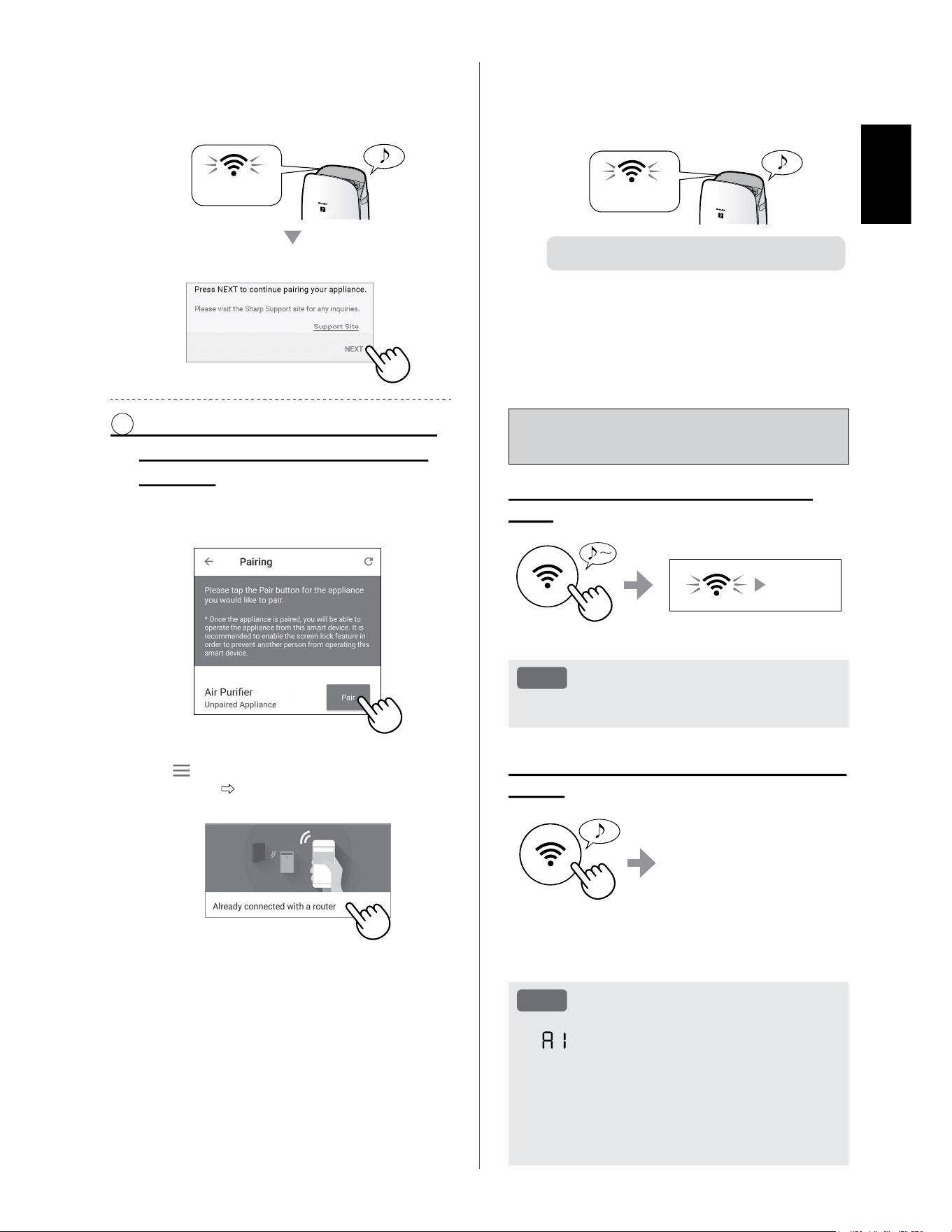
2 CONNECTION OF THE AIR
PURIFIER AND A ROUTER
NOTE
• If you have stealth settings or MAC filtering
settings on the router, please cancel them.
• The product network ID is displayed as
“AP-SHARP-XX” (where XX is a 2-digit number
below the product MAC address).
1.
Tap “ ” at the upper left part of
the “Home” screen, and select
“Pairing” “Connection with a
router”.
EN-15
ENGLISH
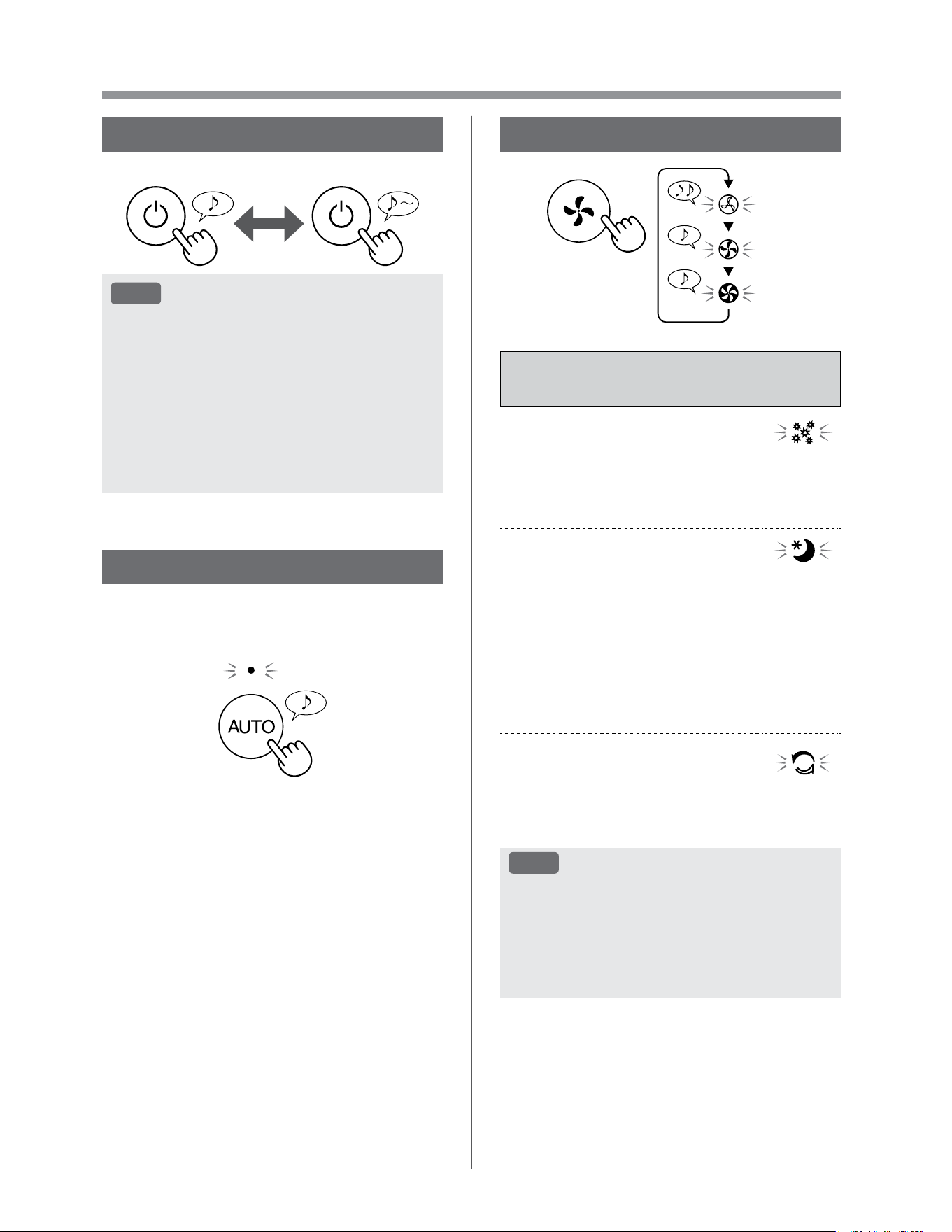
How to set Wi-Fi ON / OFF after
completing the INITIAL SET UP
If you would like to turn the Wi-Fi
OFF:
Press for 3 sec.
Goes off
NOTE
• Turning the Wi-Fi off will result in not being able
to control the air purifier with the Sharp Air App.
If you would like to turn the Wi-Fi ON
again:
Press for 3 sec.
The Wi-Fi Indicator will flash
after you press the Wi-Fi
Button. And within about 3
minutes, you will hear four
short beeps. Some time
after this beep sounds, the
Wi-Fi Indicator lights up and
the Wi-Fi connection is complete. The Sharp Air App
can now be used again to control the Air Purifier.
NOTE
• Wi-Fi ON / OFF can also be set from
“ : Wi-Fi adapter ON/OFF”.
(Page 24, 26)
In this case, Wi-Fi connection with the router
will be automatically restored.
• Reconnection to the Wireless Router may take
a few minutes to complete, after turning Wi-Fi
on again.
2.
Follow instructions on the App.
• If the Wi-Fi Indicator lights up after the
notification sound, the connection is
successfully completed.
Light up
Tap “NEXT”.
3 CONNECTION BETWEEN THE
AIR PURIFIER AND A SMART
DEVICE
1.
Tap “Pair” for the air purifier you
would like to pair.
(MODEL NAME)
• If you do not see the screen above, tap
“ ” at the “Home” screen, and select
“Pairing” “Already connected with a
router”.
2.
Follow instructions on the App.
• If the Wi-Fi Indicator lights up after the
notification sound, the connection is
successfully completed.
Light up
The INITIAL SET UP is completed.
EN-16
OPERATION
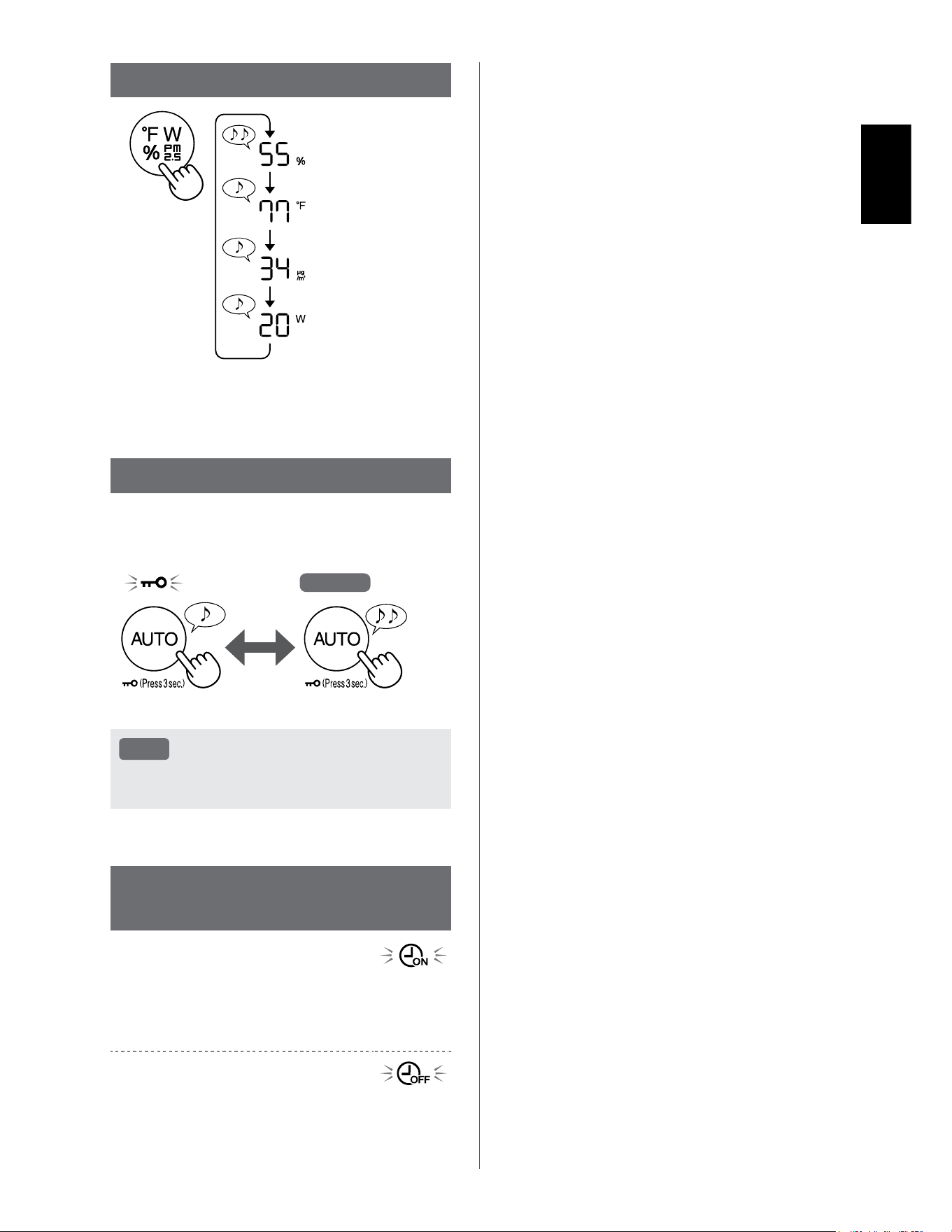
START/STOP
START STOP
NOTE
• Unless the power plug has been unplugged,
the operation will Auto Resume in the previous
mode it was operating in. (However, in the
case of Plasmacluster Express Clean mode,
the operation will resume to the mode before
Plasmacluster Express Clean mode and
settings.)
Example: if the power is lost during operation,
the operation will resume to previous operation
mode and settings if power is restored.
FAN SPEED BUTTON
LOW
MED
MAX
AUTO MODE
The fan speed is automatically controlled depending
on the six detections. (PM2.5 / Usual dust / Odor /
Temperature / Humidity / Light)
ADDITIONAL FAN SPEED
FUNCTIONS: APP ONLY
POLLEN:
The dust sensor sensitivity is automatically
increased and the dust sensor quickly detects
impurities such as dust and pollen and cleans the
air powerfully.
SLEEP:
The product will operate quietly, and the fan speed
will automatically switch depending on the amount
of impurities in the air and room brightness.
When the Light Control is set to “Auto”, the Display
and Air Quality Indicator will automatically switch
Dim or OFF based on room brightness.
Room is bright: Light is dimmed
Room is dark: Light is OFF
PLASMACLUSTER EXPRESS
CLEAN MODE:
The product releases Plasamcluster ions at max
air flow for 10 minutes. After that, the air purifier
operates for 50 minutes on high fan speed.
NOTE
• When the operation finishes after 60 minutes,
the product will return to the prior operation
mode.
It is able to change to other modes during this
operation.
• The Plasmacluster ion cannot be turned “OFF”.
EN-17
ENGLISH
SWITCH DISPLAY
Humidity
Temperature
*
1
PM2.5 Concentration
Wattage
*
1
*1: For KCP110CW or KCP70CW, “
o
F ” on the control
panel is “
o
C ”.
CHILD LOCK
The operation panel will be locked.
Goes off
ON CANCELLATION
Press
for 3 sec.
Press
for 3 sec.
NOTE
• It is possible to turn Wi-Fi off while in Child
Lock Mode.
WEEKLY SCHEDULER:
APP ONLY
ON TIMER:
You can set a weekly scheduler for the air purifier
to start a specific mode on a specific day and time.
The ON Timer Indicator will turn on while there is a
schedule set.
OFF TIMER:
You can set a weekly scheduler for the air purifier
to stop operation on a specific day and time. The
OFF Timer Indicator will turn on while there is an
schedule set.
EN-18
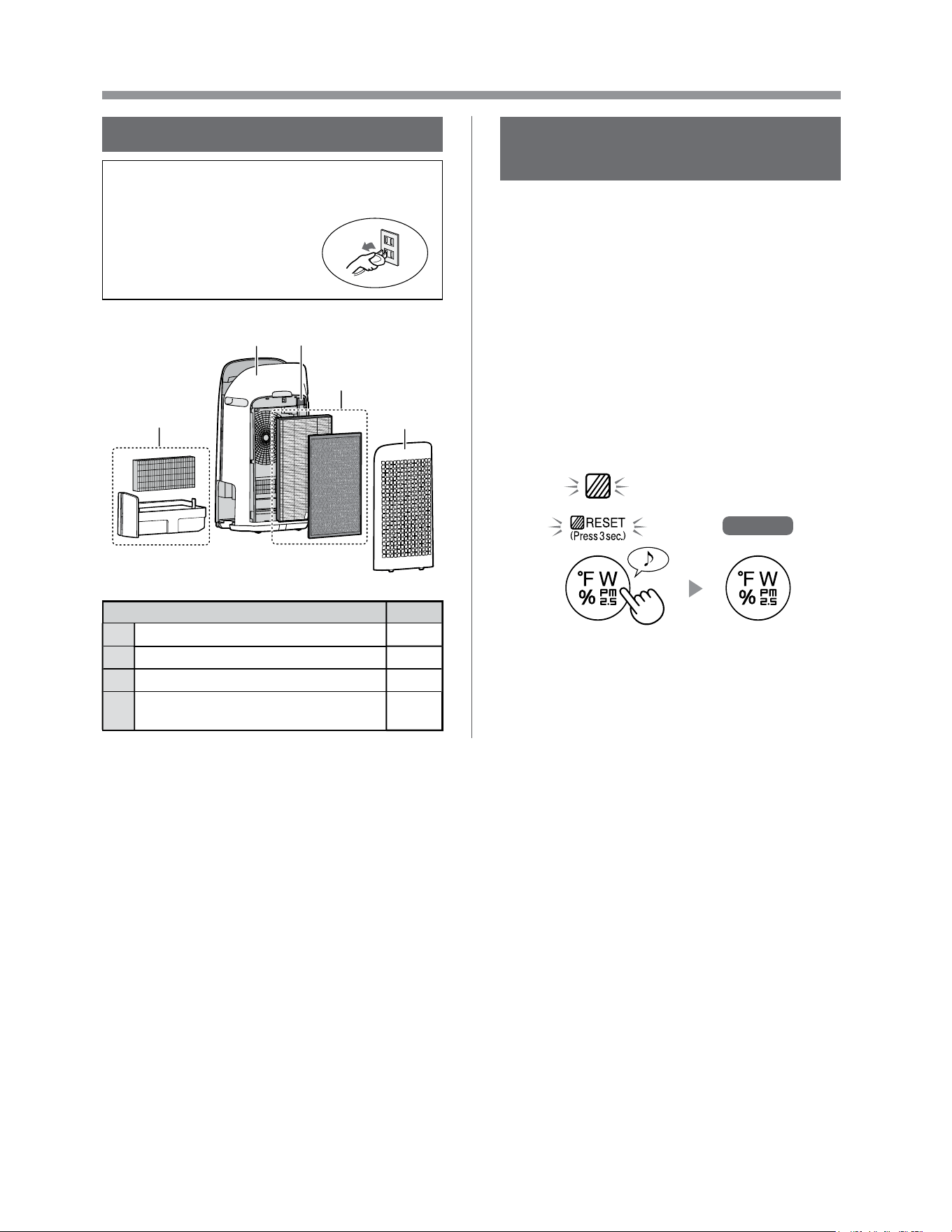
CARE AND MAINTENANCE
CARE
• To maintain optimum performance of this air
purifier, please clean the product including the
filter periodically.
• Be sure to stop operation
and unplug the product
before any maintenance or
replacing accessories.
1
23
4
2
Place Page
1
Humidifying Filter / Humidifying Tray 19
2
Back Panel / Sensor Filter 20
3
Main Body 20
4
True HEPA Filter / Active Carbon
Deodorizing Filter
21
FILTER MAINTENANCE
INDICATOR
When the cumulative operation period or the water
containing period is more than approximately 720
hours, the Filter Maintenance Indicator will turn on.
• It will not calculate the time when the product is
unplugged.
• 30 days × 24 hours = 720 hours
This is a reminder to perform the maintenance
described Humidifying Filter and Tray, Main Body,
Back Panel, and Sensors.
After maintenance, connect the power plug to the
wall outlet and press Power ON/OFF Button, then
Switching Display Button for 3 seconds.
Goes off
*
1
Press for 3 sec.
*
1
*1: For KCP110CW or KCP70CW, “
o
F ” on the control
panel is “
o
C ”.
EN-19
ENGLISH
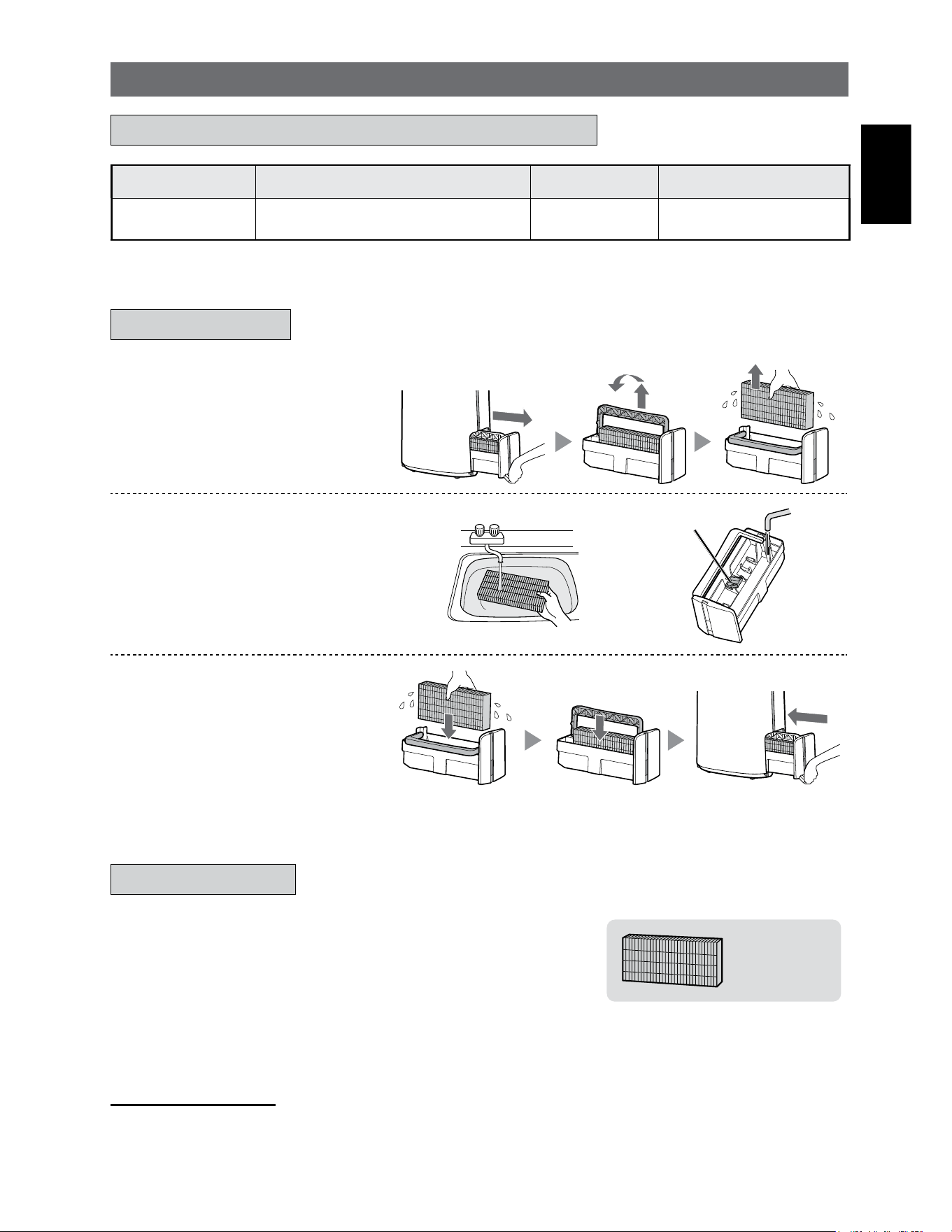
1.
Remove the Humidifying
Filter and Tray.
2.
Rinse with plenty of water.
Humidifier Float
• Do not remove the Humidifier Float.
If it comes off, refer to page 20.
• Refer to page 20 for how to
clean the Humidifying Filter when it
is very dirty.
3.
Attach the Humidifying Filter
and Tray.
• After maintenance, correctly
reattach the parts.
HUMIDIFYING FILTER / HUMIDIFYING TRAY
Filter Name Maintenance Cycle Max Service Life Replacement Filter Model
Humidifying Filter
When odor emanates from the air
outlet, or once a month.
2 years FZ-P11MFU
REPLACEMENT AND MAINTENANCE CYCLE
MAINTENANCE
REPLACEMENT
See this page for directions on how to install the filter
when replacing.
•
Please consult your dealer for purchase of replacement filter.
•
Only use filter designed for this product.
FZ-P11MFU
(1 unit)
Record the date when you replace the filters on the back cover of
this manual
.
•
Scan the QR code for product on page 1 information and accessories.
Disposal of Filters
Please dispose of the replaced filter according to the local disposal laws and regulations.
Humidifying Filter materials: Polyester, Rayon
EN-20
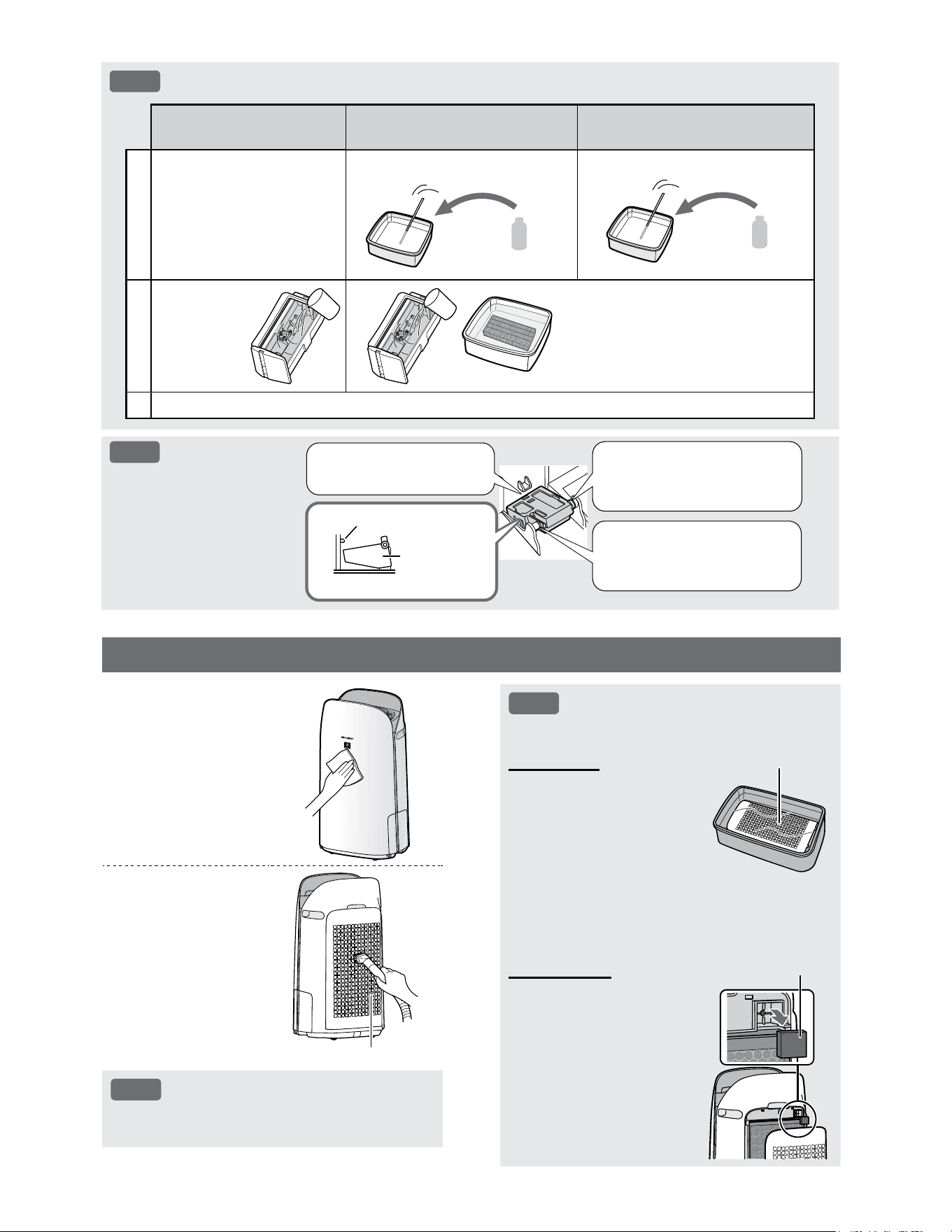
NOTE
How to Clean Hard-to-Remove Dirt.
Mild Kitchen Detergent
(only Humidifying tray)
Citric Acid
(available at some drugstores)
100% Bottled Lemon Juice
with No Pulp
1
1. Fill the tray half-way with
water.
2. Add a small amount of
mild kitchen detergent.
2 1/2 cups of water
3 teaspoons
3 cups of water
1/4 cup
2
Soak for
30 minutes.
Soak for 30 minutes.
(When using lemon juice as your
descaling solution, allow for more
soak time.)
3
Rinse off the mild kitchen detergent or the descaling solution with clean water.
NOTE
How to install the
Humidifier Float.
2. Insert the tab of the
Humidifier Float into the
hole.
1. Insert the Humidifier
Float under this tab.
Cross-Section view
Tab
Humidifier
Float
3. Insert the tab on the other
side of the Humidifier Float
into the hole.
NOTE
How to Clean Hard-to-Remove Dirt.
Back Panel
1. Add a small amount of
mild kitchen detergent to
water and soak for about
10 minutes.
2. Rinse off the mild kitchen
detergent with clean
water.
3. Completely dry the filter
in a well vented area.
Back Panel
Sensor Filter
1. Remove the Back Panel.
2. Remove the Sensor
Filter.
3. If the Sensor Filter is very
dirty, wash it with water
and dry it thoroughly.
Sensor Filter
MAIN BODY / BACK PANEL / SENSOR FILTER
Wipe with a dry,
soft cloth.
Remove the
dust gently with
a cleaning tool
such as a vacuum
cleaner.
Back Panel (Pre-Filter)
NOTE
• Do not apply excessive pressure when
scrubbing the Back Panel.
EN-21
ENGLISH
Filter Name Maintenance Cycle Max Service Life Replacement Filter Model
True HEPA Filter
Whenever dust accumulates, when
odor emanates from the air outlet, or
once a month.
2 years
*
1, 2
FZ-P11HFU
Active Carbon
Deodorizing Filter
FZ-J80DFU
*1: According to Japan Electric Manufacture’s Association JEM 1467, the Max service life is based on the equivalent
condition of the smoke from 5 cigarettes per day whereby the dust collection/deodorization power is reduced by half
compared with that of new filter. It is recommended to replace the filter more frequently under more severe conditions.
*2: Designated App notifies when filters should be replaced according to usage.
True HEPA Filter / Active Carbon Deodorizing Filter
See page 12 for directions on how to install the filter
when replacing.
•
Please consult your dealer for purchase of replacement filter.
•
Use only filter designed for this product.
FZ-P11HFU
(1 unit)
FZ-J80DFU
(1 unit)
Record the date when you replace the filters on the back cover of
this manual
.
•
Scan the QR code on page 1 for product information and accessories.
Disposal of Filters
Please dispose of the replaced filter according to the local disposal
laws and regulations.
True HEPA Filter materials: Polypropylene, Polyethylene
Active Carbon Deodorizing Filter materials: Polypropylene,
Polyester, Activated carbon
NOTE
• Do not wash and reuse replaced
filter.
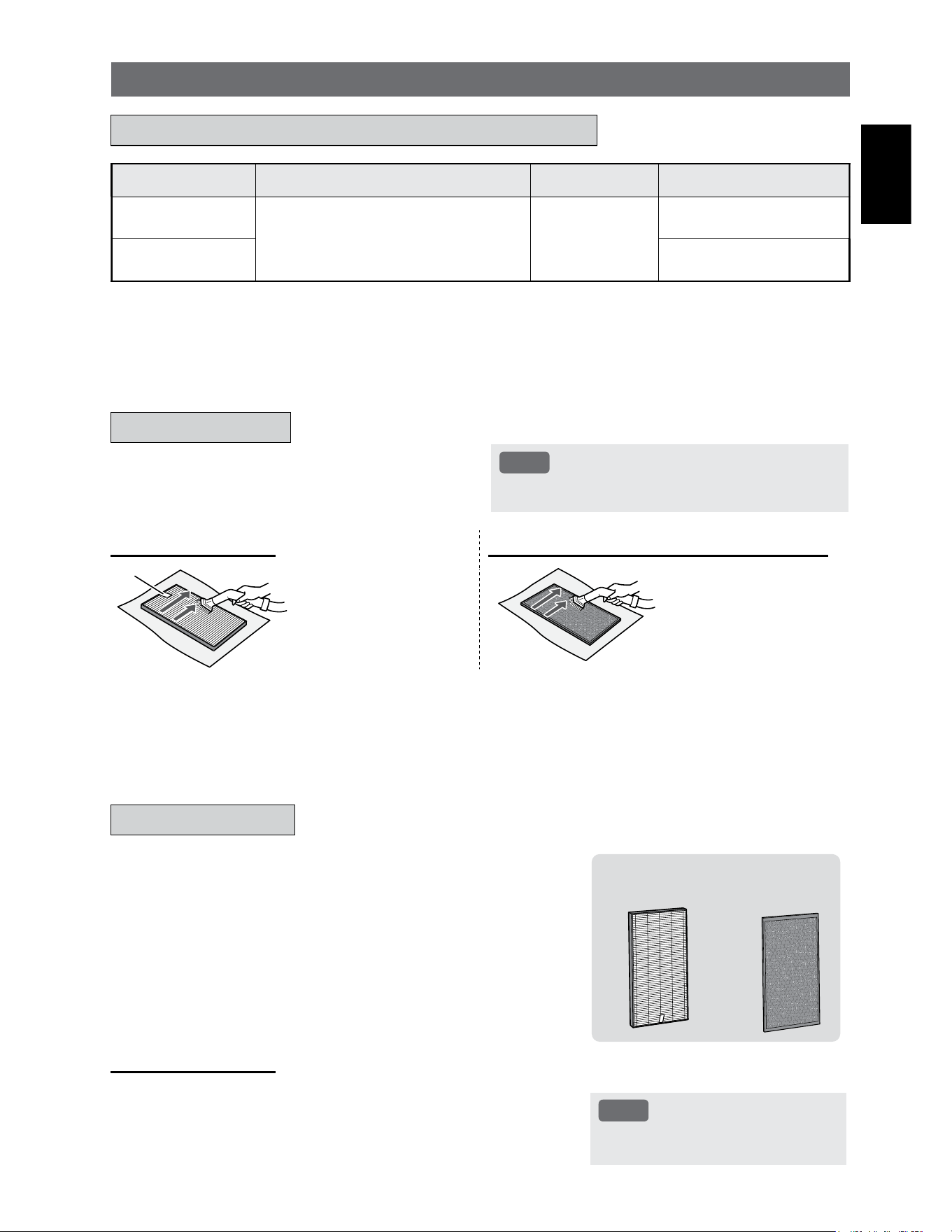
Remove the dust on the filters.
NOTE
• Do not wash the filters. Do not expose to sunlight.
(Otherwise these filters may lose efficacy.)
TRUE HEPA FILTER ACTIVE CARBON DEODORIZING FILTER
Tag
Maintain and clean only the
tagged surface. Do not clean
up the opposite surface.
The filter is fragile, so be
careful not to apply too much
pressure.
Both surfaces can be
maintained and cleaned.
The filter is fragile, so be
careful not to apply too much
pressure.
Some odors absorbed by the filters will break down over time, causing additional odors. Depending on usage conditions, and
especially if the product is used in environments significantly more severe than a normal household, these odors may become
noticeable sooner than expected.
Replace the filter in those cases or if dust is unable to be removed after maintenance.
REPLACEMENT AND MAINTENANCE CYCLE
MAINTENANCE
REPLACEMENT
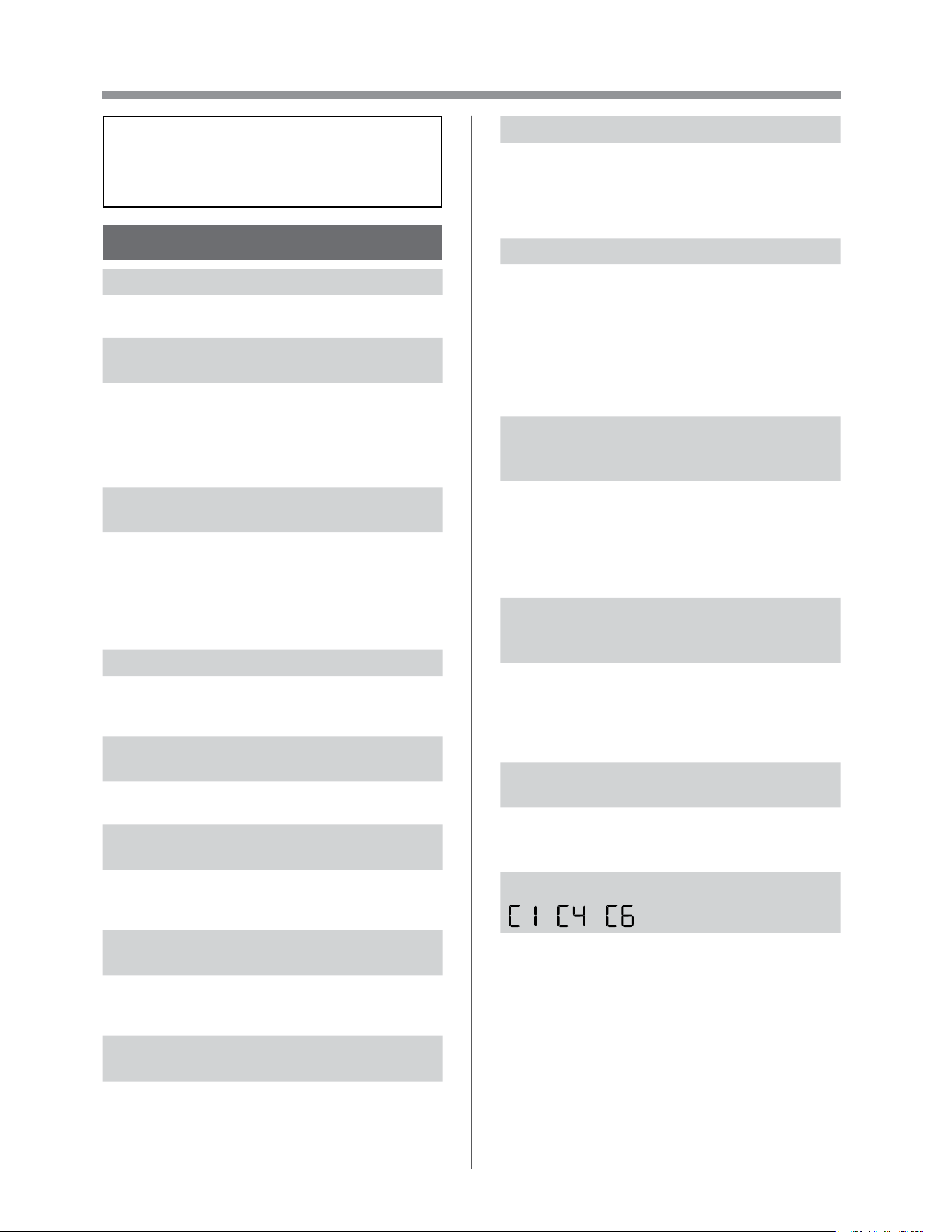
EN-22
TROUBLESHOOTING
•
Before calling for service, please review
the Troubleshooting list below, since
the problem may not be the product
malfunction.
ABOUT THE PRODUCT
Odor and smoke persists.
• Check the filters. If they appear to be extremely
dirty, clean or replace them.
Air discharged from the product has an
odor.
• Check to see if the filters are extremely dirty.
• Clean or replace the filters.
• Use only fresh tap water. Using other water
sources risks the growth of mold, fungi, or
bacteria.
The product does not operate when
cigarette smoke is in the air.
• Make sure the product is installed in a location in
which the sensors can detect cigarette smoke.
• Check to see if the Sensitive Dust Sensor
openings are blocked or clogged. If they are
blocked or clogged, clean the Sensor Filter or the
Back Panel.
Smell from a new product and/or filter.
• Immediately after removing the plastic bag, a
slight odor may occur. This odor is not harmful for
filter performance or human exposure.
The product makes a clicking or ticking
sound.
• The product may make clicking or ticking sounds
when it is generating ions.
The Air Quality Indicator is blue even
when the air is not clean.
• The air may have been dirty when the product
was plugged in. Unplug the product, wait one
minute, and then plug the product in again.
The Air Quality Indicator is red even when
the air is clean.
• Dirty or clogged Sensitive Dust Sensor openings
interfere with sensor operation. Gently clean the
Sensor Filter or the Back Panel.
The Air Quality Indicator changes color
frequently.
• The Cleanliness Indicator automatically changes
color when the Sensitive Dust Sensor and Odor
Sensor detect impurities. If you are concerned
about the change, you can change sensor
sensitivity. (Page 24, 25)
Filter Maintenance Indicator is on.
• Whenever after performing maintenance or
replacing the Humidifying Filter, connect the
power cord to an outlet and then press the Filter
Reset Button for more than 3 seconds.
(Page 18)
The Display goes off.
• When the Light Control is set to “OFF”, the light is
always off.
If you do not want the light to be off, set the Light
Control to “Auto” or “Dim” setting. (Page 24,
25)
• In Sleep mode, when the Light Control is set to
"Auto", the light will automatically switch to dim or
off based on the brightness of the room.
The Display does not match weather
report or another hygrometer or
thermometer in the room.
• Outdoor and indoor as well as the home
environment (the volume of traffic nearby, number
of stories in home, etc.) may cause a reading
different than those data.
• There is a difference in the level within the same
room.
The Humidify Indicator on the Display
does not light up when the Humidifying
Tray is empty.
• The room has reached the appropriate level of
humidity and has stopped humidifying.
• Check the Humidifier Float for impurities. Clean
the Humidifying Tray. Make sure that the product
is on a level surface.
The water level in the Humidifying Tray
does not decrease or decreases slowly.
• Check to see if the Humidifying Tray is correctly
installed. Check the Humidifying Filter.
• If the filter is extremely dirty, clean or replace it.
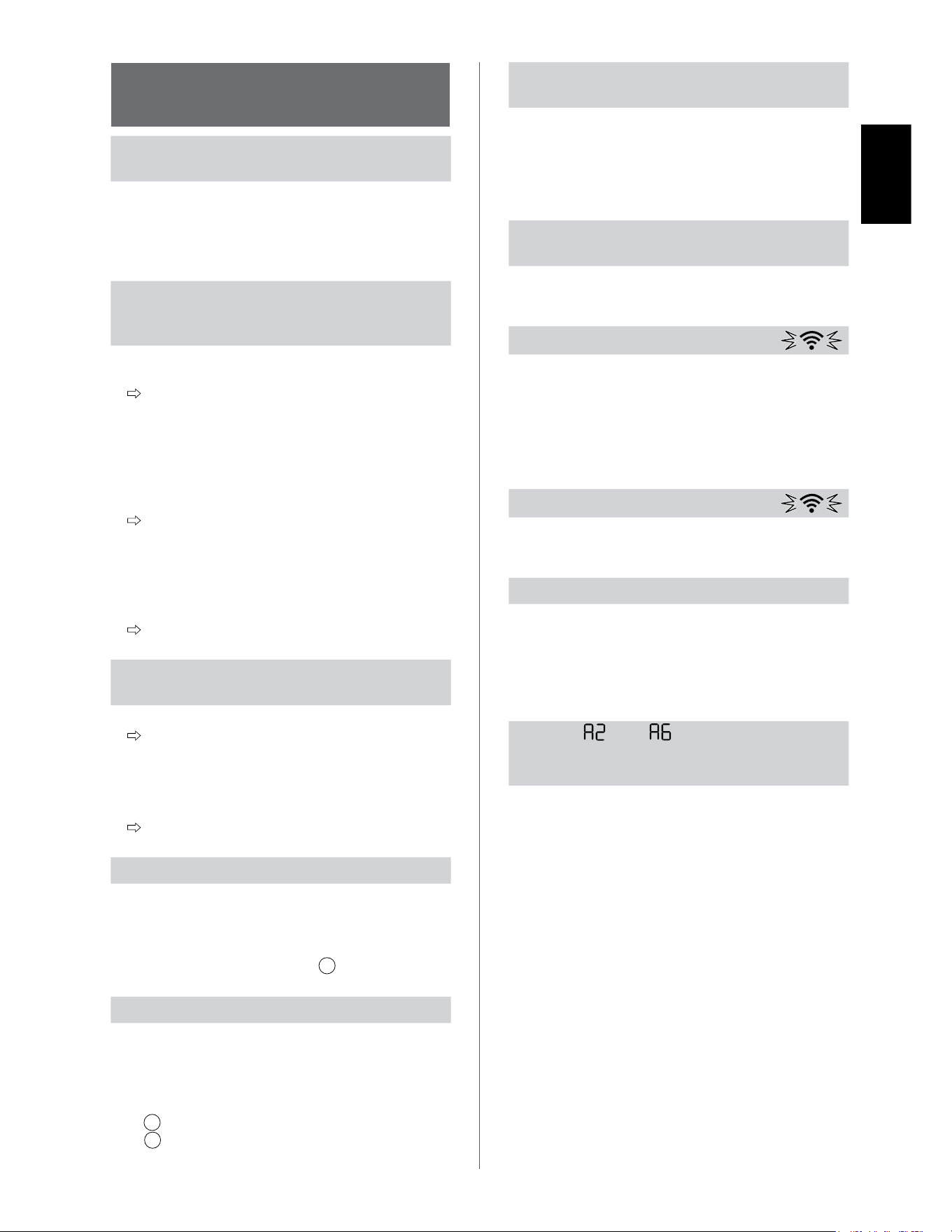
One of the following is displayed.
• Unplug the product, wait one minute, and then
plug the product in again.
EN-23
ENGLISH
ABOUT THE Wi-Fi
FUNCTION
Wi-Fi connection of the air purifier and the
router cannot be performed.
• Check the specifications of the router in use.
• Adjust the router and antenna direction, move the
router and antenna closer, and so on. After that,
reswitch to turn on the router and perform the
INITIAL SET UP again.
The connection between the air purifier
and your smart device cannot be
established.
• Are the air purifier and your smart device
connecting to the same router?
Connect the air purifier and your smart device
to the same router.
If you still can’t connect, try connecting your
smart device to the 2.4GHz band of the router.
• Is the total number of smart devices being in use
exceeding the maximum number for registration
on one air purifier?
The maximum number of smart devices that
can be registered on one air purifier is 10.
• Is the total number of products (air conditioners,
air purifiers, etc.) to be registered with one smart
device exceeding the maximum designated
number?
The maximum number of products to be
registered with one smart device is 30.
Remote operation from a smart device
cannot be performed.
• Is the Wi-Fi Indicator of the air purifier on?
If the Wi-Fi Indicator is off, please perform “A1:
Wi-Fi adapter ON/OFF” to turn on the product
Wi-Fi. (Page 26)
• Have the connection between the air purifier and
your smart device been completed?
Set up the connection between the air purifier
and your smart device. (Page 15)
When changing the router
• It is necessary to reconnect the air purifier to the
router.
1. Hold down the “Wi-Fi” Button for 3 seconds to
stop the Wi-Fi function.
2. Perform “INITIAL SET UP: 2 Connection of
the air purifier and a router”. (Page 14)
When changing the smart device
• Perform the followinf steps.
1. Delete the registration of the old smart device
from designated App.
2. Use the new smart device to perform “INITIAL
SET UP:
1 Download & Sign up, and
3 Connection between the air purifier and a
smart device”. (Page 14, 15)
When going to dispose or hand over the
air purifier
• Perform the following steps, to prevent leak of
personal information.
1. Delete the registration of the air purifier from
designated App.
2. Perform “A4: Initialization of Wi-Fi function”.
(Page 26)
In case of being handed over from a third
party
• To prevent unauthorized access from a third party,
perform “A4: Initialization of Wi-Fi function”.
(Page 26)
Wi-Fi Indicator blinks slowly
• It is one of the following status.
A. The Wi-Fi connection of the air purifier and a
router is in setup.
B. The connection of the air purifier and a smart
device is in setup.
C. The software for the Wi-Fi function in the air
purifier is being updated.
Wi-Fi Indicator blinks fast
• Network error. Please confirm the Wi-Fi network
status from “A7: Display Wi-Fi network status”.
(Page 27)
Wi-Fi Indicator goes off
• The air purifier cannot connect to the router.
Check the following.
A. Is the power plug correctly connected?
B. Has the Wi-Fi function been stopped? Confirm
the Wi-Fi network status from “A7: Display Wi-
Fi network status”. (Page 27)
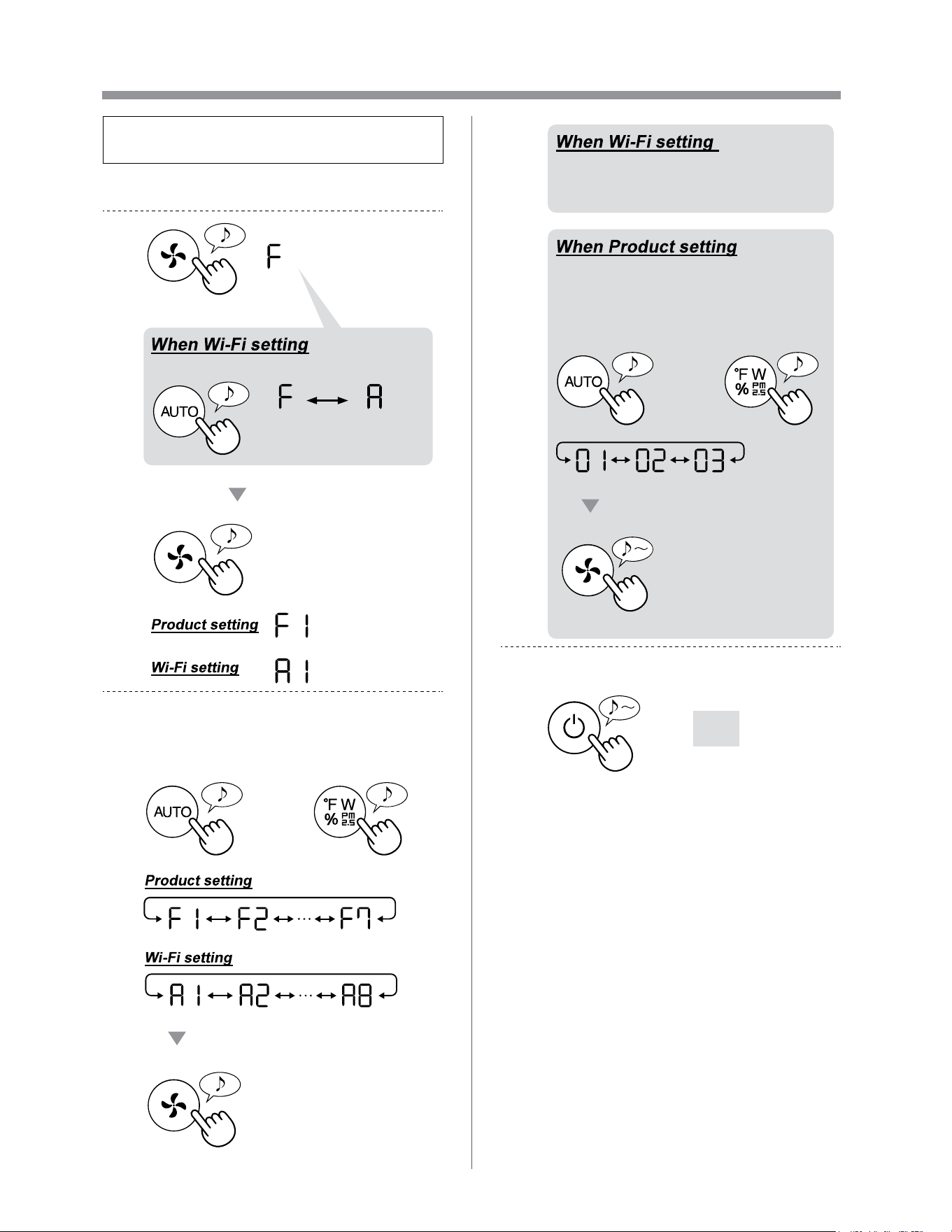
One of “ ” to “ ” cannot be selected
in the Wi-Fi setting mode.
(Page 26 - 27)
• If the Wi-Fi adapter is off, one of “A2” to “A6” may
not be selectable.
EN-24
HOW TO CHANGE VARIOUS SETTINGS
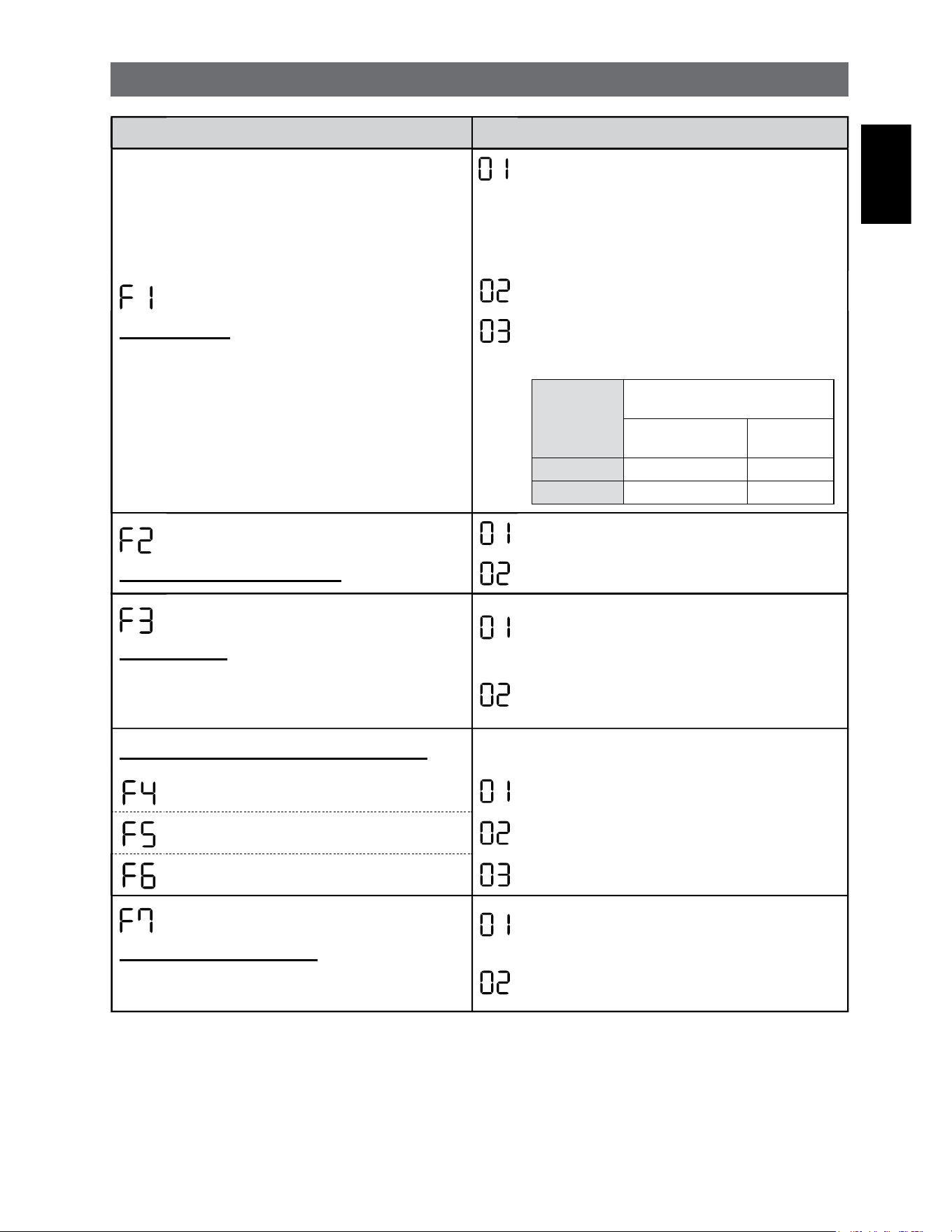
• You can change the product and Wi-Fi
functions on page 25 - 28.
1.
Turn the product OFF.
2.
Press for 3 sec.
Set
Change “F” to “A”.
Product
setting
Wi-Fi
setting
3.
Select “Function number (F1-F7 or
A1-A8)” on page 25 - 28.
or
Go Forward Go Back
Set
4.
Refer to page 26 - 28 for the
detail of each functions.
Select “Setting number
(01 - 03)” on page 25.
Set
or
Go Forward Go Back
5.
Finish the setting.
Goes off
EN-25
ENGLISH
PRODUCT FUNCTIONS (F1-F7)
Function Setting
Light Control
You can select the brightness of the Display and Air
Quality Indicator.
OFF
When set to “OFF”, the “Dim” light illuminates
for 8 seconds after operation starts and then the
light goes off.
However, some indicators that need notification
will remain dim.
Dim
Auto
(default)
Light automatically switches based on room
brightness.
Room
brightness
Display and Air Quality
Indicator
ALL MODE
(Except SLEEP)
SLEEP
MODE
Bright ON Dim
Dim Dim OFF
Plasmacluster Ion ON/OFF
OFF
ON
(default)
Auto resume
This model has Auto Resume function, where the
operation resumes at the previous operation mode
and settings if the power is restored.
Cancellation
ON
(default)
Adjusting sensor sensitivity (F4 - F6)
Light Sensor Low
Sensitive Dust Sensor Standard
(default)
Odor Sensor High
Sound Indicator Setting
You can set the product to make a beeping sound
when the Humidifying Tray is empty.
Cancellation
(default)
ON
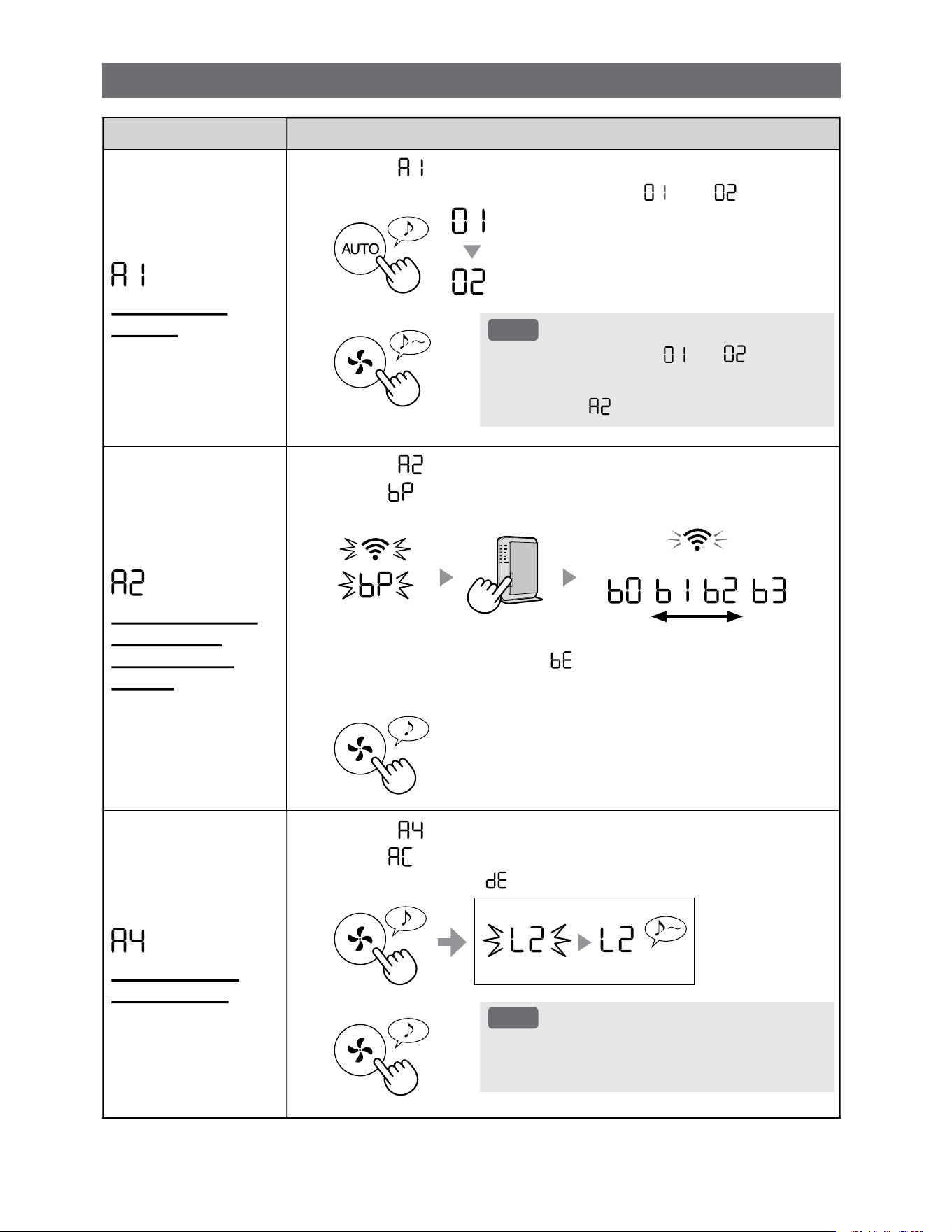
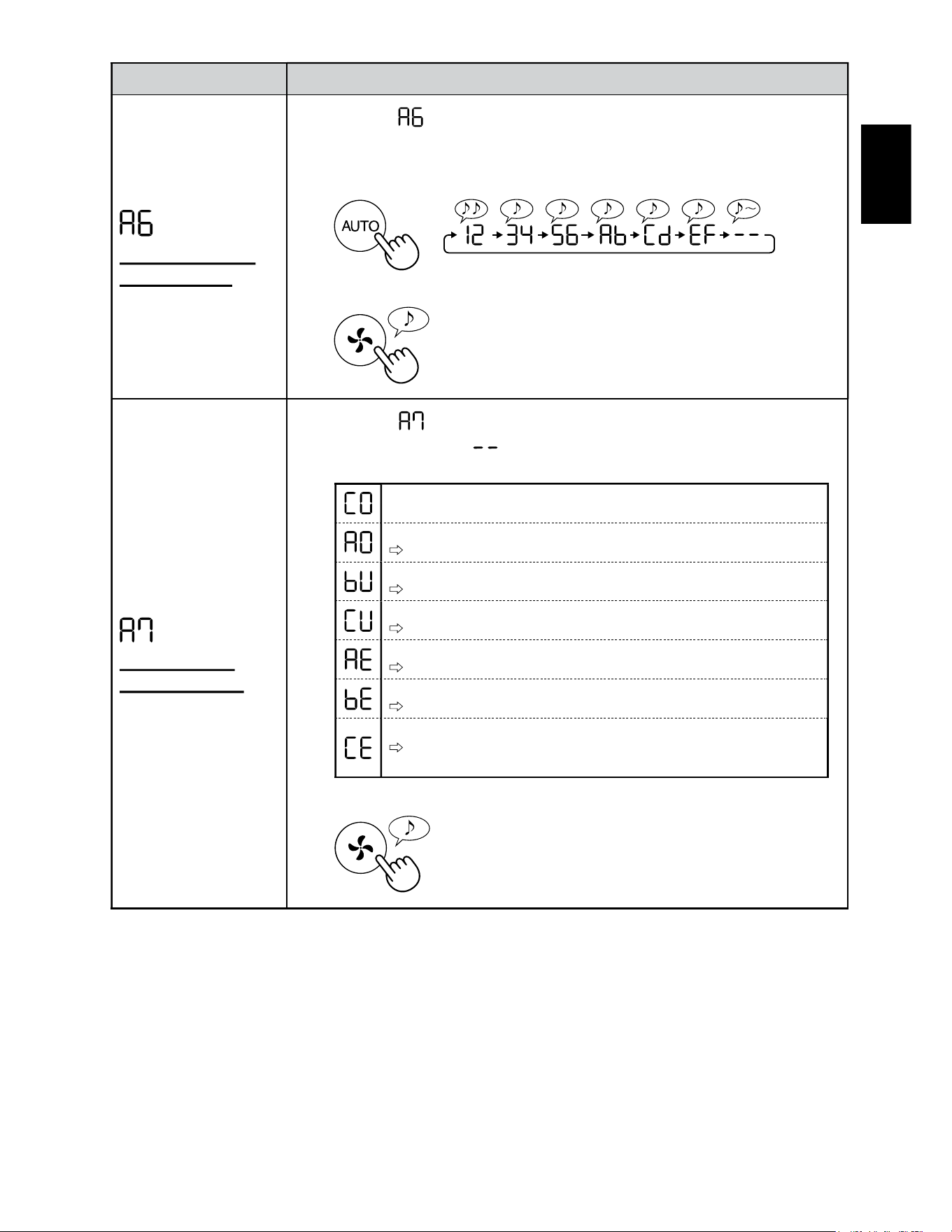
EN-26
Function Setting
Wi-Fi adapter
ON/OFF
1.
Select “ ” by following Steps 1 - 3 on page 24.
2.
Press "AUTO" Button to select Setting " " or " ".
Wi-Fi OFF
Wi-Fi ON
3.
Complete
NOTE
• When Setting number (“ ” or “ ”) is
changed, the square rotates on the display
until the setting is completed. When setting is
completed, “ ” is displayed.
Wi-Fi connection
with a router
(with the WPS
Button)
1.
Select “ ” by following Steps 1 - 3 on page 24.
2.
After “ ” is displayed, press the WPS (Wi-Fi Protected Setup)
Button of the router.
weak strong
Light up
Blink
Once connected, receiver level will be displayed.
A connection error is occuring if “ ” is displayed. Please confirm the router
and try again.
3.
Complete
Initialization of
Wi-Fi function
1.
Select “ ” by following Steps 1 - 3 on page 24.
2.
After “ ” is displayed press “Fan Speed” Button.
An error is occurring if “ ” is displayed. Please try again.
Complete
Blink
Initializing
3.
Complete
NOTE
• Please delete the device registration from the App
when initializing the air purifier which is already
connected to the Wi-Fi.
Wi-Fi FUNCTIONS (A1-A8)
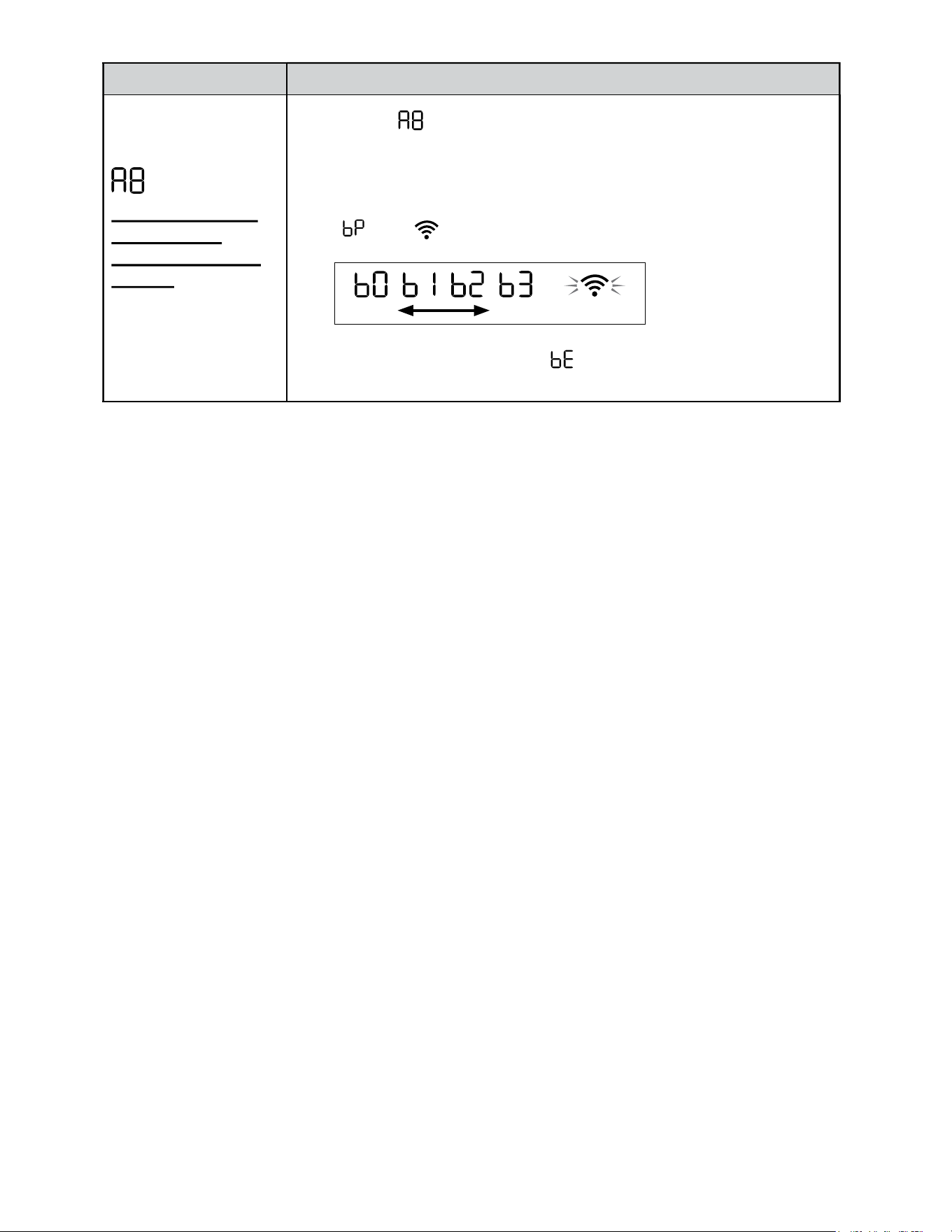
EN-27
ENGLISH
Function Setting
Confirmation of
MAC address
1.
Select “ ” by following Steps 1 - 3 on page 24.
2.
Press “AUTO” Button to display MAC address.
For example:
In case MAC address is “12:34:56:AB:CD:EF”.
3.
Complete
Display Wi-Fi
network status
1.
Select “ ” by following Steps 1 - 3 on page 24.
2.
After displaying “ ” for a few seconds, network status of
Wi-Fi adapter will be displayed.
Connection is stable
Wi-Fi adapter is off
Please turn on Wi-Fi adapter.
Router is not registered
Please perform the Wi-Fi connection with the router.
Link settings with the App is not performed
Please perform the link setting with the smart device.
Wi-Fi adapter network error
Please turn off Wi-Fi adapter and turn on again after a while.
Network error between the air purifier and the router
Please confirm the network status of the router.
Network service error
Please turn off the air purifier and confirm the internet status, then try
again.
3.
Complete
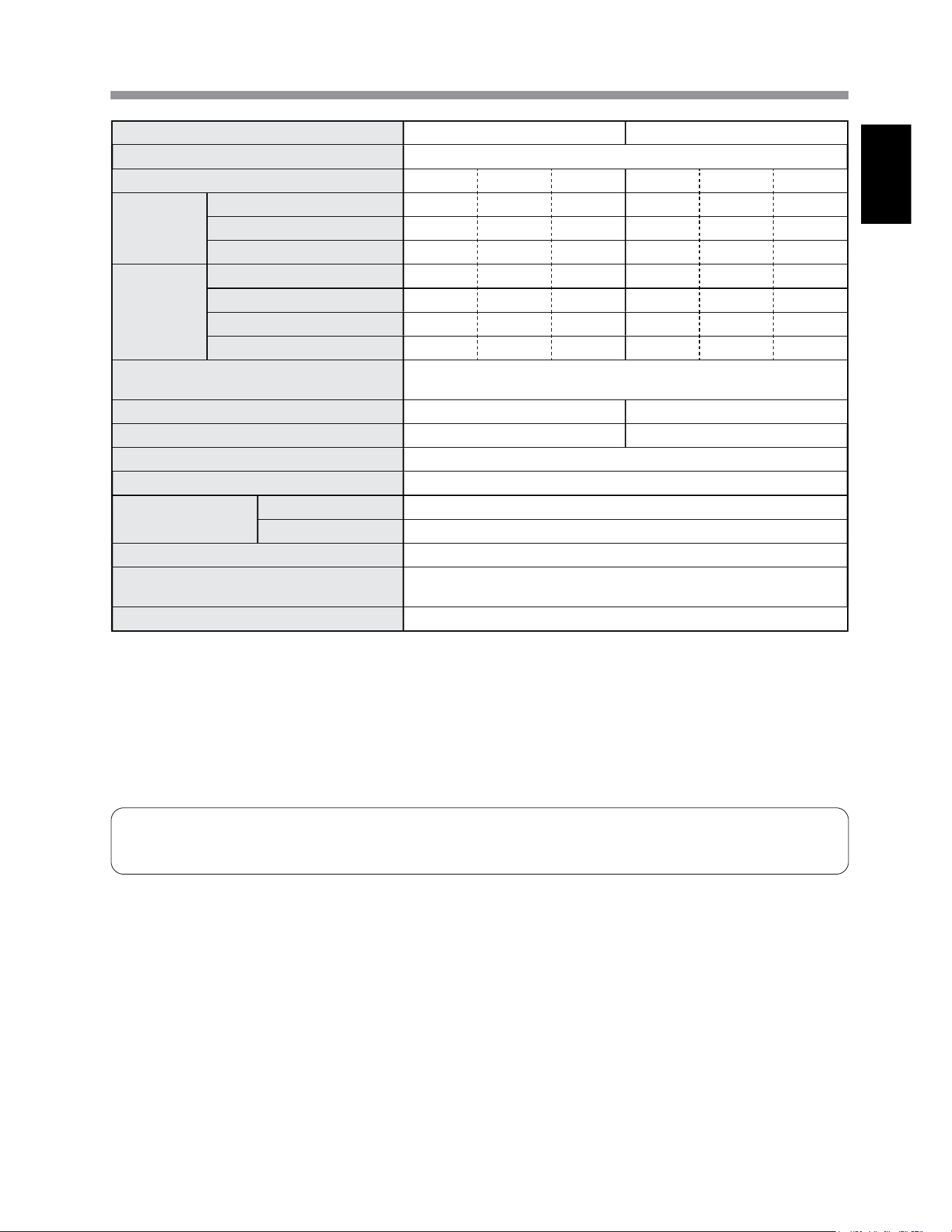
EN-28
Function Setting
Wi-Fi connection
with a router
(without the WPS
Button)
- AP (Access Point)
mode -
1.
Select “ ” by following the Steps 1 - 3 on page 24.
2.
Perform Wi-Fi connection of the air purifier and the router based
on the App screen.
Refer to the App for further operations.
“ ” and “ ” blinks while setting the connection between the product
and the router.
weak strong
Light up
Once connected, receiver level will be displayed.
A connection error is occuring if “ ” is displayed. Please confirm the router
and try again.
EN-29
ENGLISH
SPECIFICATIONS
Model KCP110UW / KCP110CW KCP70UW / KCP70CW
Power supply 120 V ~ 60 Hz
Fan Speed Adjustment MAX MED LOW MAX MED LOW
CLEAN AIR
Fan Speed (CFM) 381 222 64 272 190 64
Rated Power (W) 94 27 4.8 40 19 4.8
Noise Level (dBA)
*
1
55 42 21 47 39 21
CLEAN AIR
&
HUMIDIFY
Fan Speed (CFM) 381 222 64 272 190 64
Rated Power (W) 94 27 4.8 40 19 4.8
Noise Level (dBA)
*
1
55 42 21 47 39 21
Humidification (pints / hour)
*
2
0.70 0.47 0.15 0.55 0.42 0.15
Standby power (W)
1.1 (When Wi-Fi adapter is ON.)
0.7 (When Wi-Fi adapter is OFF.)
Recommended Room Size
*
3
538 sq. ft. (50 m
2
) 396 sq. ft. (37 m
2
)
CADR (Dust / Smoke / Pollen) 352 / 347 / 443 260 / 255 / 259
Humidifying Tray Capacity (gallon) Approx. 0.53
Sensors Sensitive Dust / Odor / Light / Temperature & Humidity
Filter Type
Dust collection True HEPA
*
4
Filter
Deodorization Active Carbon Deodorizing Filter
Cord Length 6.6 ft. (2.0 m)
Dimensions
15.8 in. (W) × 12.4 in. (D) × 28.6 in. (H)
(402 mm (W) × 315 mm (D) × 727 mm (H))
Weight Approx. 22.3 lbs. (10.1 kg)
*1
•
Noise level is measured based on the JEM1467 standard of the Japan Electrical Manufactures' Association.
*2
•
The amount of humidification changes in accordance with indoor and outdoor temperature and humidity.
The amount of humidification increases as temperatures rises or humidity decreases.
The amount of humidification decreases as temperatures decrease or humidity rises.
•
Measurement Conditions: 20 ºC, 30 % humidity (according to JEM1426).
*3
•
The recommended room size is appropriate for operating the product of maximum fan speed.
*4
•
The filter removes more than 99.97% of particles at least 0.3 microns in size.
Standby Power
When the product’s power plug is inserted in a wall outlet it consumes standby power in order to operate electrical circuits.
To conserve energy, unplug the power cord when the product is not in use.
EN-30
INTELLECTUAL PROPERTY RIGHTS FOR THIS PRODUCT
Software installed in this product is structured with multiple independent
software components, each of them has our or third-party's copyright.
Among the software components of this product, for software we
developed or created and incidental documents has our copyright. And
they are protected
by copyright law, international regulation and other related laws.
Also this product uses software components distributed as free software
with third-party's copyright.
Some software components installed in this product are required to
indicate the license by those copyright holders.
License indications of such software components are as below:
Copyright (c) 1998, 1999, 2000 Thai Open Source Software Center Ltd and Clark
Cooper
Copyright (c) 2001, 2002, 2003, 2004, 2005, 2006 Expat maintainers.
Permission is hereby granted, free of charge, to any person obtaining a copy of
this software and associated documentation files (the "Software"), to deal in the
Software without restriction, including without limitation the rights to use, copy,
modify, merge, publish, distribute, sublicense, and/or sell copies of the Software,
and to permit persons to whom the Software is furnished to do so, subject to the
following conditions:
The above copyright notice and this permission notice shall be included in all
copies or substantial portions of the Software.
THE SOFTWARE IS PROVIDED "AS IS", WITHOUT WARRANTY OF ANY KIND,
EXPRESS OR IMPLIED, INCLUDING BUT NOT LIMITED TO THE WARRANTIES
OF MERCHANTABILITY, FITNESS FOR A PARTICULAR PURPOSE AND
NONINFRINGEMENT. IN NO EVENT SHALL THE AUTHORS OR COPYRIGHT
HOLDERS BE LIABLE FOR ANY CLAIM, DAMAGES OR OTHER LIABILITY,
WHETHER IN AN ACTION OF CONTRACT, TORT OR OTHERWISE, ARISING
FROM, OUT OF OR IN CONNECTION WITH THE SOFTWARE OR THE USE OR
OTHER DEALINGS IN THE SOFTWARE.
The MIT License
Copyright (c) 2011, 2012 Tatsuhiro Tsujikawa
Permission is hereby granted, free of charge, to any person obtaining a copy of
this software and associated documentation files (the "Software"), to deal in the
Software without restriction, including without limitation the rights to use, copy,
modify, merge, publish, distribute, sublicense, and/or sell copies of the Software,
and to permit persons to whom the Software is furnished to do so, subject to the
following conditions:
The above copyright notice and this permission notice shall be included in all
copies or substantial portions of the Software.
THE SOFTWARE IS PROVIDED "AS IS", WITHOUT WARRANTY OF ANY KIND,
EXPRESS OR IMPLIED, INCLUDING BUT NOT LIMITED TO THE WARRANTIES
OF MERCHANTABILITY, FITNESS FOR A PARTICULAR PURPOSE AND
NONINFRINGEMENT. IN NO EVENT SHALL THE AUTHORS OR COPYRIGHT
HOLDERS BE LIABLE FOR ANY CLAIM, DAMAGES OR OTHER LIABILITY,
WHETHER IN AN ACTION OF CONTRACT,TORT OR OTHERWISE, ARISING
FROM, OUT OF OR IN CONNECTION WITH THE SOFTWARE OR THE USE OR
OTHER DEALINGS IN THE SOFTWARE.
Copyright (C) 2000-2009 Josh Coalson
Copyright (C) 2011-2014 Xiph.Org Foundation
Redistribution and use in source and binary forms, with or without modification,
are permitted provided that the following conditions are met:
- Redistributions of source code must retain the above copyright notice, this list of
conditions and the following disclaimer.
- Redistributions in binary form must reproduce the above copyright notice, this
list of conditions and the following disclaimer in the documentation and/or other
materials provided with the distribution.
- Neither the name of the Xiph.org Foundation nor the names of its contributors
may be used to endorse or promote products derived from this software without
specific prior written permission.
THIS SOFTWARE IS PROVIDED BY THE COPYRIGHT HOLDERS AND
CONTRIBUTORS ``AS IS'' AND ANY EXPRESS OR IMPLIED WARRANTIES,
INCLUDING, BUT NOT LIMITED TO, THE IMPLIED WARRANTIES OF
MERCHANTABILITY AND FITNESS FOR A PARTICULAR PURPOSE ARE
DISCLAIMED. IN NO EVENT SHALL THE FOUNDATION OR CONTRIBUTORS
BE LIABLE FOR ANY DIRECT, INDIRECT, INCIDENTAL, SPECIAL, EXEMPLARY,
OR CONSEQUENTIAL DAMAGES (INCLUDING, BUT NOT LIMITED TO,
PROCUREMENT OF SUBSTITUTE GOODS OR SERVICES; LOSS OF USE,
DATA, OR PROFITS; OR BUSINESS INTERRUPTION) HOWEVER CAUSED
AND ON ANY THEORY OF LIABILITY, WHETHER IN CONTRACT, STRICT
LIABILITY, OR TORT (INCLUDING NEGLIGENCE OR OTHERWISE) ARISING IN
ANY WAY OUT OF THE USE OF THIS SOFTWARE, EVEN IF ADVISED OF THE
POSSIBILITY OF SUCH DAMAGE.
Copyright (c) 2001, 2002 Swedish Institute of Computer Science.
All rights reserved.
Redistribution and use in source and binary forms, with or without modification,
are permitted provided that the following conditions are met:
1. Redistributions of source code must retain the above copyright notice, this list
of conditions and the following disclaimer.
2. Redistributions in binary form must reproduce the above copyright notice, this
list of conditions and the following disclaimer in the documentation and/or other
materials provided with the distribution.
3. The name of the author may not be used to endorse or promote products
derived from this software without specific prior written permission.
THIS SOFTWARE IS PROVIDED BY THE AUTHOR ``AS IS'' AND ANY EXPRESS
OR IMPLIED WARRANTIES, INCLUDING, BUT NOT LIMITED TO, THE IMPLIED
WARRANTIES OF MERCHANTABILITY AND FITNESS FOR A PARTICULAR
PURPOSE ARE DISCLAIMED. IN NO EVENT SHALL THE AUTHOR BE
LIABLE FOR ANY DIRECT, INDIRECT, INCIDENTAL, SPECIAL, EXEMPLARY,
OR CONSEQUENTIAL DAMAGES(INCLUDING, BUT NOT LIMITED TO,
PROCUREMENT OF SUBSTITUTE GOODS OR SERVICES; LOSS OF USE,
DATA, OR PROFITS; OR BUSINESS INTERRUPTION) HOWEVER CAUSED
AND ON ANY THEORY OF LIABILITY, WHETHER IN CONTRACT, STRICT
LIABILITY, OR TORT (INCLUDING NEGLIGENCE OR OTHERWISE) ARISING IN
ANY WAY OUT OF THE USE OF THIS SOFTWARE, EVEN IF ADVISED OF THE
POSSIBILITY OF SUCH DAMAGE.
This file is part of the lwIP TCP/IP stack.
Author: Adam Dunkels <[email protected]e>
Copyright (c) 2010 Serge A. Zaitsev
Permission is hereby granted, free of charge, to any person obtaining a copy of
this software and associated documentation files (the "Software"), to deal in the
Software without restriction, including without limitation the rights to use, copy,
modify, merge, publish, distribute, sublicense, and/or sell copies of the Software,
and to permit persons to whom the Software is furnished to do so, subject to the
following conditions:
The above copyright notice and this permission notice shall be included in all
copies or substantial portions of the Software.
THE SOFTWARE IS PROVIDED "AS IS", WITHOUT WARRANTY OF ANY KIND,
EXPRESS OR IMPLIED, INCLUDING BUT NOT LIMITED TO THE WARRANTIES
OF MERCHANTABILITY, FITNESS FOR A PARTICULAR PURPOSE AND
NONINFRINGEMENT. IN NO EVENT SHALL THE AUTHORS OR COPYRIGHT
HOLDERS BE LIABLE FOR ANY CLAIM, DAMAGES OR OTHER LIABILITY,
WHETHER IN AN ACTION OF CONTRACT, TORT OR OTHERWISE, ARISING
FROM, OUT OF OR IN CONNECTION WITH THE SOFTWARE OR THE USE OR
OTHER DEALINGS IN THE SOFTWARE.
Copyright (C) 2006-2015, ARM Limited, All Rights Reserved
Licensed under the Apache License, Version 2.0 (the "License");
you may not use this file except in compliance with the License.
You may obtain a copy of the License at
http://www.apache.org/licenses/LICENSE-2.0
Unless required by applicable law or agreed to in writing, software distributed
under the License is distributed on an "AS IS" BASIS, WITHOUT WARRANTIES
OR CONDITIONS OF ANY KIND, either express or implied. See the License for
the specific language governing permissions and limitations under the License.
Copyright (c) 2003-2017, Jouni Malinen <j@w1.fi> and contributors
All Rights Reserved.
Redistribution and use in source and binary forms, with or without modification,
are permitted provided that the following conditions are met:
1. Redistributions of source code must retain the above copyright notice, this list of
conditions and the following disclaimer.
2. Redistributions in binary form must reproduce the above copyright notice, this
list of conditions and the following disclaimer in the documentation and/or other
materials provided with the distribution.
3. Neither the name(s) of the above-listed copyright holder(s) nor the names of
its contributors may be used to endorse or promote products derived from this
software without specific prior written permission.
THIS SOFTWARE IS PROVIDED BY THE COPYRIGHT HOLDERS AND
CONTRIBUTORS "AS IS" AND ANY EXPRESS OR IMPLIED WARRANTIES,
INCLUDING, BUT NOT LIMITED TO, THE IMPLIED WARRANTIES OF
MERCHANTABILITY AND FITNESS FOR A PARTICULAR PURPOSE
ARE DISCLAIMED. IN NO EVENT SHALL THE COPYRIGHT OWNER OR
CONTRIBUTORS BE LIABLE FOR ANY DIRECT, INDIRECT, INCIDENTAL,
SPECIAL, EXEMPLARY, OR CONSEQUENTIAL DAMAGES (INCLUDING, BUT
NOT LIMITED TO, PROCUREMENT OF SUBSTITUTE GOODS OR SERVICES;
LOSS OF USE, DATA, OR PROFITS; OR BUSINESS INTERRUPTION)
HOWEVER CAUSED AND ON ANY THEORY OF LIABILITY, WHETHER IN
CONTRACT, STRICT LIABILITY, OR TORT (INCLUDING NEGLIGENCE OR
OTHERWISE) ARISING IN ANY WAY OUT OF THE USE OF THIS SOFTWARE,
EVEN IF ADVISED OF THE POSSIBILITY OF SUCH DAMAGE.
(1) Red Hat Incorporated

EN-31
ENGLISH
Copyright (c) 1994-2009 Red Hat, Inc. All rights reserved.
This copyrighted material is made available to anyone wishing to use, modify,
copy, or redistribute it subject to the terms and conditions of the BSD License.
This program is distributed in the hope that it will be useful, but WITHOUT
ANY WARRANTY expressed or implied, including the implied warranties of
MERCHANTABILITY or FITNESS FOR A PARTICULAR PURPOSE. A copy of this
license is available at
http://www.opensource.org/licenses. Any Red Hat trademarks that are incorporated
in the source code or documentation are not subject to the BSD License and may
only be used or replicated with the express permission of Red Hat, Inc.
(2) University of California, Berkeley
Copyright (c) 1981-2000 The Regents of the University of California.
All rights reserved.
Redistribution and use in source and binary forms, with or without modification,
are permitted provided that the following conditions are met:
* Redistributions of source code must retain the above copyright notice, this list
of conditions and the following disclaimer.
* Redistributions in binary form must reproduce the above copyright notice,
this list of conditions and the following disclaimer in the documentation and/or
other materials provided with the distribution.
* Neither the name of the University nor the names of its contributors may
be used to endorse or promote products derived from this software without
specific prior written permission.
THIS SOFTWARE IS PROVIDED BY THE COPYRIGHT HOLDERS AND
CONTRIBUTORS "AS IS" AND ANY EXPRESS OR IMPLIED WARRANTIES,
INCLUDING, BUT NOT LIMITED TO, THE IMPLIED WARRANTIES OF
MERCHANTABILITY AND FITNESS FOR A PARTICULAR PURPOSE
ARE DISCLAIMED. IN NO EVENT SHALL THE COPYRIGHT OWNER OR
CONTRIBUTORS BE LIABLE FOR ANY DIRECT, INDIRECT, INCIDENTAL,
SPECIAL, EXEMPLARY, OR CONSEQUENTIAL DAMAGES (INCLUDING, BUT
NOT LIMITED TO, PROCUREMENT OF SUBSTITUTE GOODS OR SERVICES;
LOSS OF USE, DATA, OR PROFITS; OR BUSINESS INTERRUPTION)
HOWEVER CAUSED AND ON ANY THEORY OF LIABILITY, WHETHER IN
CONTRACT, STRICT LIABILITY, OR TORT (INCLUDING NEGLIGENCE OR
OTHERWISE) ARISING IN ANY WAY OUT OF THE USE OF THIS SOFTWARE,
EVEN IF ADVISED OF THE POSSIBILITY OF SUCH DAMAGE.
(3) David M. Gay (AT&T 1991, Lucent 1998)
The author of this software is David M. Gay.
Copyright (c) 1991 by AT&T.
Permission to use, copy, modify, and distribute this software for any purpose
without fee is hereby granted, provided that this entire notice is included in all
copies of any software which is or includes a copy or modification of this software
and in all copies of the supporting documentation for such software.
THIS SOFTWARE IS BEING PROVIDED "AS IS", WITHOUT ANY EXPRESS OR
IMPLIED WARRANTY. IN PARTICULAR, NEITHER THE AUTHOR NOR AT&T
MAKES ANY REPRESENTATION OR WARRANTY OF ANY KIND CONCERNING
THE MERCHANTABILITY OF THIS SOFTWARE OR ITS FITNESS FOR ANY
PARTICULAR PURPOSE.
-------------------------------------------------------------------
The author of this software is David M. Gay.
Copyright (C) 1998-2001 by Lucent Technologies
All Rights Reserved
Permission to use, copy, modify, and distribute this software and its documentation
for any purpose and without fee is hereby granted, provided that the above
copyright notice appear in all copies and that both that the copyright notice and this
permission notice and warranty disclaimer appear in supporting documentation,
and that the name of Lucent or any of its entities not be used in advertising or
publicity pertaining to distribution of the software without specific, written prior
permission.
LUCENT DISCLAIMS ALL WARRANTIES WITH REGARD TO THIS SOFTWARE,
INCLUDING ALL IMPLIED WARRANTIES OF MERCHANTABILITY AND
FITNESS. IN NO EVENT SHALL LUCENT OR ANY OF ITS ENTITIES BE
LIABLE FOR ANY SPECIAL, INDIRECT OR CONSEQUENTIAL DAMAGES OR
ANY DAMAGES WHATSOEVER RESULTING FROM LOSS OF USE, DATA
OR PROFITS, WHETHER IN AN ACTION OF CONTRACT, NEGLIGENCE OR
OTHER TORTIOUS ACTION, ARISING OUT OF OR IN CONNECTION WITH
THE USE OR PERFORMANCE OF THIS SOFTWARE.
(4) Advanced Micro Devices
Copyright 1989, 1990 Advanced Micro Devices, Inc.
This software is the property of Advanced Micro Devices, Inc (AMD) which
specifically grants the user the right to modify, use and distribute this software
provided this notice is not removed or altered. All other rights are reserved by
AMD.
AMD MAKES NO WARRANTY OF ANY KIND, EXPRESS OR IMPLIED, WITH
REGARD TO THIS SOFTWARE. IN NO EVENT SHALL AMD BE LIABLE FOR
INCIDENTAL OR CONSEQUENTIAL DAMAGES IN CONNECTION WITH OR
ARISING FROM THE FURNISHING, PERFORMANCE, OR USE OF THIS
SOFTWARE.
So that all may benefit from your experience, please report any problems or
suggestions about this software to the 29K Technical Support Center at 800-29-
29-AMD (800-292-9263) in the USA, or 0800-89-1131 in the UK, or 0031-11-1129
in Japan, toll free. The direct dial number is 512-462-4118.
Advanced Micro Devices, Inc.
29K Support Products
Mail Stop 573
5900 E. Ben White Blvd.
Austin, TX 78741
800-292-9263
(7) Sun Microsystems
Copyright (C) 1993 by Sun Microsystems, Inc. All rights reserved.
Developed at SunPro, a Sun Microsystems, Inc. business. Permission to use,
copy, modify, and distribute this software is freely granted, provided that this notice
is preserved.
(8) Hewlett Packard
(c) Copyright 1986 HEWLETT-PACKARD COMPANY
To anyone who acknowledges that this file is provided "AS IS" without any express
or implied warranty:
permission to use, copy, modify, and distribute this file for any purpose is hereby
granted without fee, provided that the above copyright notice and this notice
appears in all copies, and that the name of Hewlett-Packard Company not be used
in advertising or publicity pertaining to distribution of the software without specific,
written prior permission. Hewlett-Packard Company makes no representations
about the suitability of this software for any purpose.
(9) Hans-Peter Nilsson
Copyright (C) 2001 Hans-Peter Nilsson
Permission to use, copy, modify, and distribute this software is freely granted,
provided that the above copyright notice, this notice and the following disclaimer
are preserved with no changes.
THIS SOFTWARE IS PROVIDED ``AS IS'' AND WITHOUT ANY EXPRESS OR
IMPLIED WARRANTIES, INCLUDING, WITHOUT LIMITATION, THE IMPLIED
WARRANTIES OF MERCHANTABILITY AND FITNESS FOR A PARTICULAR
PURPOSE.
(11) Christopher G. Demetriou
Copyright (c) 2001 Christopher G. Demetriou
All rights reserved.
Redistribution and use in source and binary forms, with or without modification,
are permitted provided that the following conditions are met:
1. Redistributions of source code must retain the above copyright notice, this list of
conditions and the following disclaimer.
2. Redistributions in binary form must reproduce the above copyright notice, this
list of conditions and the following disclaimer in the documentation and/or other
materials provided with the distribution.
3. The name of the author may not be used to endorse or promote products
derived from this software without specific prior written permission.
THIS SOFTWARE IS PROVIDED BY THE AUTHOR ``AS IS'' AND ANY EXPRESS
OR IMPLIED WARRANTIES, INCLUDING, BUT NOT LIMITED TO, THE IMPLIED
WARRANTIES OF MERCHANTABILITY AND FITNESS FOR A PARTICULAR
PURPOSE ARE DISCLAIMED. IN NO EVENT SHALL THE AUTHOR BE
LIABLE FOR ANY DIRECT, INDIRECT, INCIDENTAL, SPECIAL, EXEMPLARY,
OR CONSEQUENTIAL DAMAGES (INCLUDING, BUT NOT LIMITED TO,
PROCUREMENT OF SUBSTITUTE GOODS OR SERVICES; LOSS OF USE,
DATA, OR PROFITS; OR BUSINESS INTERRUPTION) HOWEVER CAUSED
AND ON ANY THEORY OF LIABILITY, WHETHER IN CONTRACT, STRICT
LIABILITY, OR TORT (INCLUDING NEGLIGENCE OR OTHERWISE) ARISING IN
ANY WAY OUT OF THE USE OF THIS SOFTWARE, EVEN IF ADVISED OF THE
POSSIBILITY OF SUCH DAMAGE.
(12) SuperH, Inc.
Copyright 2002 SuperH, Inc. All rights reserved
This software is the property of SuperH, Inc (SuperH) which specifically grants the
user the right to modify, use and distribute this software provided this notice is not
removed or altered. All other rights are reserved by SuperH.
SUPERH MAKES NO WARRANTY OF ANY KIND, EXPRESS OR IMPLIED,
WITH REGARD TO THIS SOFTWARE. IN NO EVENT SHALL SUPERH BE
LIABLE FOR INDIRECT, SPECIAL, INCIDENTAL OR CONSEQUENTIAL
DAMAGES IN CONNECTION WITH OR ARISING FROM THE FURNISHING,
PERFORMANCE, OR USE OF THIS SOFTWARE.
So that all may benefit from your experience, please report any problems or
suggestions about this software to the SuperH Support Center via e-mail at
softwaresupport@superh.com .
SuperH, Inc.
405 River Oaks Parkway
San Jose
CA 95134
USA
(13) Royal Institute of Technology
Copyright (c) 1999 Kungliga Tekniska Högskolan
(Royal Institute of Technology, Stockholm, Sweden).
All rights reserved.

EN-32
Redistribution and use in source and binary forms, with or without modification,
are permitted provided that the following conditions are met:
1. Redistributions of source code must retain the above copyright notice, this list of
conditions and the following disclaimer.
2. Redistributions in binary form must reproduce the above copyright notice, this
list of conditions and the following disclaimer in the documentation and/or other
materials provided with the distribution.
3. Neither the name of KTH nor the names of its contributors may be used to
endorse or promote products derived from this software without specific prior
written permission.
THIS SOFTWARE IS PROVIDED BY KTH AND ITS CONTRIBUTORS ``AS
IS'' AND ANY EXPRESS OR IMPLIED WARRANTIES, INCLUDING, BUT NOT
LIMITED TO, THE IMPLIED WARRANTIES OF MERCHANTABILITY AND
FITNESS FOR A PARTICULAR PURPOSE ARE DISCLAIMED. IN NO EVENT
SHALL KTH OR ITS CONTRIBUTORS BE LIABLE FOR ANY DIRECT, INDIRECT,
INCIDENTAL, SPECIAL, EXEMPLARY, OR CONSEQUENTIAL DAMAGES
(INCLUDING, BUT NOT LIMITED TO, PROCUREMENT OF SUBSTITUTE
GOODS OR SERVICES; LOSS OF USE, DATA, OR PROFITS; OR BUSINESS
INTERRUPTION) HOWEVER CAUSED AND ON ANY THEORY OF LIABILITY,
WHETHER IN CONTRACT, STRICT LIABILITY, OR TORT (INCLUDING
NEGLIGENCE OR OTHERWISE) ARISING IN ANY WAY OUT OF THE USE
OF THIS SOFTWARE, EVEN IF ADVISED OF THE POSSIBILITY OF SUCH
DAMAGE.
(14) Alexey Zelkin
Copyright (c) 2000, 2001 Alexey Zelkin <phantom@FreeBSD.org>
All rights reserved.
Redistribution and use in source and binary forms, with or without modification,
are permitted provided that the following conditions are met:
1. Redistributions of source code must retain the above copyright notice, this list
of conditions and the following disclaimer.
2. Redistributions in binary form must reproduce the above copyright notice, this
list of conditions and the following disclaimer in the documentation and/or
other materials provided with the distribution.
THIS SOFTWARE IS PROVIDED BY THE AUTHOR AND CONTRIBUTORS
``AS IS'' AND ANY EXPRESS OR IMPLIED WARRANTIES, INCLUDING, BUT
NOT LIMITED TO, THE IMPLIED WARRANTIES OF MERCHANTABILITY AND
FITNESS FOR A PARTICULAR PURPOSE ARE DISCLAIMED. IN NO EVENT
SHALL THE AUTHOR OR CONTRIBUTORS BE LIABLE FOR ANY DIRECT,
INDIRECT, INCIDENTAL, SPECIAL, EXEMPLARY, OR CONSEQUENTIAL
DAMAGES (INCLUDING, BUT NOT LIMITED TO, PROCUREMENT OF
SUBSTITUTE GOODS OR SERVICES; LOSS OF USE, DATA, OR PROFITS;
OR BUSINESS INTERRUPTION) HOWEVER CAUSED AND ON ANY THEORY
OF LIABILITY, WHETHER IN CONTRACT, STRICT LIABILITY, OR TORT
(INCLUDING NEGLIGENCE OR OTHERWISE) ARISING IN ANY WAY OUT OF
THE USE OF THIS SOFTWARE, EVEN IF ADVISED OF THE POSSIBILITY OF
SUCH DAMAGE.
(15) Andrey A. Chernov
Copyright (C) 1997 by Andrey A. Chernov, Moscow, Russia.
All rights reserved.
Redistribution and use in source and binary forms, with or without modification,
are permitted provided that the following conditions are met:
1. Redistributions of source code must retain the above copyright notice, this list of
conditions and the following disclaimer.
2. Redistributions in binary form must reproduce the above copyright notice, this
list of conditions and the following disclaimer in the documentation and/or other
materials provided with the distribution.
THIS SOFTWARE IS PROVIDED BY THE AUTHOR ``AS IS'' AND ANY EXPRESS
OR IMPLIED WARRANTIES, INCLUDING, BUT NOT LIMITED TO, THE IMPLIED
WARRANTIES OF MERCHANTABILITY AND FITNESS FOR A PARTICULAR
PURPOSE ARE DISCLAIMED. IN NO EVENT SHALL THE REGENTS OR
CONTRIBUTORS BE LIABLE FOR ANY DIRECT, INDIRECT, INCIDENTAL,
SPECIAL, EXEMPLARY, OR CONSEQUENTIAL DAMAGES (INCLUDING, BUT
NOT LIMITED TO, PROCUREMENT OF SUBSTITUTE GOODS OR SERVICES;
LOSS OF USE, DATA, OR PROFITS; OR BUSINESS INTERRUPTION)
HOWEVER CAUSED AND ON ANY THEORY OF LIABILITY, WHETHER IN
CONTRACT, STRICT LIABILITY, OR TORT (INCLUDING NEGLIGENCE OR
OTHERWISE) ARISING IN ANY WAY OUT OF THE USE OF THIS SOFTWARE,
EVEN IF ADVISED OF THE POSSIBILITY OF SUCH DAMAGE.
(16) FreeBSD
Copyright (c) 1997-2002 FreeBSD Project.
All rights reserved.
Redistribution and use in source and binary forms, with or without modification,
are permitted provided that the following conditions are met:
1. Redistributions of source code must retain the above copyright notice, this list of
conditions and the following disclaimer.
2. Redistributions in binary form must reproduce the above copyright notice, this
list of conditions and the following disclaimer in the documentation and/or other
materials provided with the distribution.
THIS SOFTWARE IS PROVIDED BY THE AUTHOR AND CONTRIBUTORS
``AS IS'' AND ANY EXPRESS OR IMPLIED WARRANTIES, INCLUDING, BUT
NOT LIMITED TO, THE IMPLIED WARRANTIES OF MERCHANTABILITY AND
FITNESS FOR A PARTICULAR PURPOSE ARE DISCLAIMED. IN NO EVENT
SHALL THE AUTHOR OR CONTRIBUTORS BE LIABLE FOR ANY DIRECT,
INDIRECT, INCIDENTAL, SPECIAL, EXEMPLARY, OR CONSEQUENTIAL
DAMAGES (INCLUDING, BUT NOT LIMITED TO, PROCUREMENT OF
SUBSTITUTE GOODS OR SERVICES; LOSS OF USE, DATA, OR PROFITS;
OR BUSINESS INTERRUPTION) HOWEVER CAUSED AND ON ANY THEORY
OF LIABILITY, WHETHER IN CONTRACT, STRICT LIABILITY, OR TORT
(INCLUDING NEGLIGENCE OR OTHERWISE) ARISING IN ANY WAY OUT OF
THE USE OF THIS SOFTWARE, EVEN IF ADVISED OF THE POSSIBILITY OF
SUCH DAMAGE.
(17) S. L. Moshier
Author: S. L. Moshier.
Copyright (c) 1984,2000 S.L. Moshier
Permission to use, copy, modify, and distribute this software for any purpose
without fee is hereby granted, provided that this entire notice is included in all
copies of any software which is or includes a copy or modification of this software
and in all copies of the supporting documentation for such software.
THIS SOFTWARE IS BEING PROVIDED "AS IS", WITHOUT ANY EXPRESS
OR IMPLIED WARRANTY. IN PARTICULAR, THE AUTHOR MAKES NO
REPRESENTATION OR WARRANTY OF ANY KIND CONCERNING THE
MERCHANTABILITY OF THIS SOFTWARE OR ITS FITNESS FOR ANY
PARTICULAR PURPOSE.
(18) Citrus Project
Copyright (c)1999 Citrus Project,
All rights reserved.
Redistribution and use in source and binary forms, with or without modification,
are permitted provided that the following conditions are met:
1. Redistributions of source code must retain the above copyright notice, this list of
conditions and the following disclaimer.
2. Redistributions in binary form must reproduce the above copyright notice, this
list of conditions and the following disclaimer in the documentation and/or other
materials provided with the distribution.
THIS SOFTWARE IS PROVIDED BY THE AUTHOR AND CONTRIBUTORS
``AS IS'' AND ANY EXPRESS OR IMPLIED WARRANTIES, INCLUDING, BUT
NOT LIMITED TO, THE IMPLIED WARRANTIES OF MERCHANTABILITY AND
FITNESS FOR A PARTICULAR PURPOSE ARE DISCLAIMED. IN NO EVENT
SHALL THE AUTHOR OR CONTRIBUTORS BE LIABLE FOR ANY DIRECT,
INDIRECT, INCIDENTAL, SPECIAL, EXEMPLARY, OR CONSEQUENTIAL
DAMAGES (INCLUDING, BUT NOT LIMITED TO, PROCUREMENT OF
SUBSTITUTE GOODS OR SERVICES; LOSS OF USE, DATA, OR PROFITS;
OR BUSINESS INTERRUPTION) HOWEVER CAUSED AND ON ANY THEORY
OF LIABILITY, WHETHER IN CONTRACT, STRICT LIABILITY, OR TORT
(INCLUDING NEGLIGENCE OR OTHERWISE) ARISING IN ANY WAY OUT OF
THE USE OF THIS SOFTWARE, EVEN IF ADVISED OF THE POSSIBILITY OF
SUCH DAMAGE.
(19) Todd C. Miller
Copyright (c) 1998 Todd C. Miller <Todd.Miller@courtesan.com>
All rights reserved.
Redistribution and use in source and binary forms, with or without modification,
are permitted provided that the following conditions are met:
1. Redistributions of source code must retain the above copyright notice, this list of
conditions and the following disclaimer.
2. Redistributions in binary form must reproduce the above copyright notice, this
list of conditions and the following disclaimer in the documentation and/or other
materials provided with the distribution.
3. The name of the author may not be used to endorse or promote products
derived from this software without specific prior written permission.
THIS SOFTWARE IS PROVIDED ``AS IS'' AND ANY EXPRESS OR IMPLIED
WARRANTIES, INCLUDING, BUT NOT LIMITED TO, THE IMPLIED
WARRANTIES OF MERCHANTABILITY AND FITNESS FOR A PARTICULAR
PURPOSE ARE DISCLAIMED. IN NO EVENT SHALL THE AUTHOR BE
LIABLE FOR ANY DIRECT, INDIRECT, INCIDENTAL, SPECIAL, EXEMPLARY,
OR CONSEQUENTIAL DAMAGES (INCLUDING, BUT NOT LIMITED TO,
PROCUREMENT OF SUBSTITUTE GOODS OR SERVICES; LOSS OF USE,
DATA, OR PROFITS; OR BUSINESS INTERRUPTION) HOWEVER CAUSED
AND ON ANY THEORY OF LIABILITY, WHETHER IN CONTRACT, STRICT
LIABILITY, OR TORT (INCLUDING NEGLIGENCE OR OTHERWISE) ARISING IN
ANY WAY OUT OF THE USE OF THIS SOFTWARE, EVEN IF ADVISED OF THE
POSSIBILITY OF SUCH DAMAGE.
(26) Mike Barcroft
Copyright (c) 2001 Mike Barcroft <mike@FreeBSD.org>
All rights reserved.
Redistribution and use in source and binary forms, with or without modification,
are permitted provided that the following conditions are met:
1. Redistributions of source code must retain the above copyright notice, this list of
conditions and the following disclaimer.
2. Redistributions in binary form must reproduce the above copyright notice, this
list of conditions and the following disclaimer in the documentation and/or other
materials provided with the distribution.
THIS SOFTWARE IS PROVIDED BY THE AUTHOR AND CONTRIBUTORS
``AS IS'' AND ANY EXPRESS OR IMPLIED WARRANTIES, INCLUDING, BUT
NOT LIMITED TO, THE IMPLIED WARRANTIES OF MERCHANTABILITY AND
FITNESS FOR A PARTICULAR PURPOSE ARE DISCLAIMED. IN NO EVENT
SHALL THE AUTHOR OR CONTRIBUTORS BE LIABLE FOR ANY DIRECT,
INDIRECT, INCIDENTAL, SPECIAL, EXEMPLARY, OR CONSEQUENTIAL
DAMAGES (INCLUDING, BUT NOT LIMITED TO, PROCUREMENT OF
SUBSTITUTE GOODS OR SERVICES; LOSS OF USE, DATA, OR PROFITS;

EN-33
ENGLISH
OR BUSINESS INTERRUPTION) HOWEVER CAUSED AND ON ANY THEORY
OF LIABILITY, WHETHER IN CONTRACT, STRICT LIABILITY, OR TORT
(INCLUDING NEGLIGENCE OR OTHERWISE) ARISING IN ANY WAY OUT OF
THE USE OF THIS SOFTWARE, EVEN IF ADVISED OF THE POSSIBILITY OF
SUCH DAMAGE.
(35) - ARM Ltd (arm and thumb variant targets only)
Copyright (c) 2009 ARM Ltd
All rights reserved.
Redistribution and use in source and binary forms, with or without modification,
are permitted provided that the following conditions are met:
1. Redistributions of source code must retain the above copyright notice, this list
of conditions and the following disclaimer.
2. Redistributions in binary form must reproduce the above copyright notice, this
list of conditions and the following disclaimer in the documentation and/or other
materials provided with the distribution.
3. The name of the company may not be used to endorse or promote products
derived from this software without specific prior written permission.
THIS SOFTWARE IS PROVIDED BY ARM LTD ``AS IS'' AND ANY EXPRESS OR
IMPLIED WARRANTIES, INCLUDING, BUT NOT LIMITED TO, THE IMPLIED
WARRANTIES OF MERCHANTABILITY AND FITNESS FOR A PARTICULAR
PURPOSE ARE DISCLAIMED. IN NO EVENT SHALL ARM LTD BE LIABLE
FOR ANY DIRECT, INDIRECT, INCIDENTAL, SPECIAL, EXEMPLARY,
OR CONSEQUENTIAL DAMAGES (INCLUDING, BUT NOT LIMITED TO,
PROCUREMENT OF SUBSTITUTE GOODS OR SERVICES; LOSS OF USE,
DATA, OR PROFITS; OR BUSINESS INTERRUPTION) HOWEVER CAUSED
AND ON ANY THEORY OF LIABILITY, WHETHER IN CONTRACT, STRICT
LIABILITY, OR TORT (INCLUDING NEGLIGENCE OR OTHERWISE) ARISING IN
ANY WAY OUT OF THE USE OF THIS SOFTWARE, EVEN IF ADVISED OF THE
POSSIBILITY OF SUCH DAMAGE.
(41) Ed Schouten - Free BSD
Copyright (c) 2008 Ed Schouten <ed@FreeBSD.org>
All rights reserved.
Redistribution and use in source and binary forms, with or without modification,
are permitted provided that the following conditions are met:
1. Redistributions of source code must retain the above copyright notice, this list of
conditions and the following disclaimer.
2. Redistributions in binary form must reproduce the above copyright notice, this
list of conditions and the following disclaimer in the documentation and/or other
materials provided with the distribution.
THIS SOFTWARE IS PROVIDED BY THE AUTHOR AND CONTRIBUTORS
``AS IS'' AND ANY EXPRESS OR IMPLIED WARRANTIES, INCLUDING, BUT
NOT LIMITED TO, THE IMPLIED WARRANTIES OF MERCHANTABILITY AND
FITNESS FOR A PARTICULAR PURPOSE ARE DISCLAIMED. IN NO EVENT
SHALL THE AUTHOR OR CONTRIBUTORS BE LIABLE FOR ANY DIRECT,
INDIRECT, INCIDENTAL, SPECIAL, EXEMPLARY, OR CONSEQUENTIAL
DAMAGES (INCLUDING, BUT NOT LIMITED TO, PROCUREMENT OF
SUBSTITUTE GOODS OR SERVICES; LOSS OF USE, DATA, OR PROFITS;
OR BUSINESS INTERRUPTION) HOWEVER CAUSED AND ON ANY THEORY
OF LIABILITY, WHETHER IN CONTRACT, STRICT LIABILITY, OR TORT
(INCLUDING NEGLIGENCE OR OTHERWISE) ARISING IN ANY WAY OUT OF
THE USE OF THIS SOFTWARE, EVEN IF ADVISED OF THE POSSIBILITY OF
SUCH DAMAGE.
(1) Red Hat Incorporated
Copyright (c) 1994-2009 Red Hat, Inc. All rights reserved.
This copyrighted material is made available to anyone wishing to use, modify,
copy, or redistribute it subject to the terms and conditions of the BSD License. This
program is distributed in the hope that it will be useful,
but WITHOUT ANY WARRANTY expressed or implied, including the implied
warranties of MERCHANTABILITY or FITNESS FOR A PARTICULAR PURPOSE.
A copy of this license is available at http://www.opensource.org/licenses. Any Red
Hat trademarks that are incorporated in the source code or documentation are not
subject to the BSD License and may only be used or replicated with the express
permission of Red Hat, Inc.
.
(2) University of California, Berkeley
Copyright (c) 1981-2000 The Regents of the University of California.
All rights reserved.
Redistribution and use in source and binary forms, with or without modification,
are permitted provided that the following conditions are met:
* Redistributions of source code must retain the above copyright notice, this list
of conditions and the following disclaimer.
* Redistributions in binary form must reproduce the above copyright notice,
this list of conditions and the following disclaimer in the documentation and/or
other materials provided with the distribution.
* Neither the name of the University nor the names of its contributors may
be used to endorse or promote products derived from this software without
specific prior written permission.
THIS SOFTWARE IS PROVIDED BY THE COPYRIGHT HOLDERS AND
CONTRIBUTORS "AS IS" AND ANY EXPRESS OR IMPLIED WARRANTIES,
INCLUDING, BUT NOT LIMITED TO, THE IMPLIED WARRANTIES OF
MERCHANTABILITY AND FITNESS FOR A PARTICULAR PURPOSE
ARE DISCLAIMED. IN NO EVENT SHALL THE COPYRIGHT OWNER OR
CONTRIBUTORS BE LIABLE FOR ANY DIRECT, INDIRECT, INCIDENTAL,
SPECIAL, EXEMPLARY, OR CONSEQUENTIAL DAMAGES (INCLUDING, BUT
NOT LIMITED TO, PROCUREMENT OF SUBSTITUTE GOODS OR SERVICES;
LOSS OF USE, DATA, OR PROFITS; OR BUSINESS INTERRUPTION)
HOWEVER CAUSED AND ON ANY THEORY OF LIABILITY, WHETHER IN
CONTRACT, STRICT LIABILITY, OR TORT (INCLUDING NEGLIGENCE OR
OTHERWISE) ARISING IN ANY WAY OUT OF THE USE OF THIS SOFTWARE,
EVEN IF ADVISED OF THE POSSIBILITY OF SUCH DAMAGE.
(3) DJ Delorie
Copyright (C) 1993 DJ Delorie
All rights reserved.
Redistribution, modification, and use in source and binary forms is permitted
provided that the above copyright notice and following paragraph are duplicated in
all such forms.
This file is distributed WITHOUT ANY WARRANTY; without even the implied
warranty of MERCHANTABILITY or FITNESS FOR A PARTICULAR PURPOSE.
(4) (formerly GPL for fr30)
The GPL is no longer applicable to the fr30 platform. The piece of code (syscalls.c)
referencing the GPL has been officially relicensed.
(5) Advanced Micro Devices
Copyright 1989, 1990 Advanced Micro Devices, Inc.
This software is the property of Advanced Micro Devices, Inc (AMD) which
specifically grants the user the right to modify, use and distribute this software
provided this notice is not removed or altered. All other rights are reserved by
AMD.
AMD MAKES NO WARRANTY OF ANY KIND, EXPRESS OR IMPLIED, WITH
REGARD TO THIS SOFTWARE. IN NO EVENT SHALL AMD BE LIABLE FOR
INCIDENTAL OR CONSEQUENTIAL DAMAGES IN CONNECTION WITH OR
ARISING FROM THE FURNISHING, PERFORMANCE, OR USE OF THIS
SOFTWARE.
So that all may benefit from your experience, please report any problems or
suggestions about this software to the 29K Technical Support Center at
800-29-29-AMD (800-292-9263) in the USA, or 0800-89-1131 in the UK,
or 0031-11-1129 in Japan, toll free. The direct dial number is 512-462-4118.
Advanced Micro Devices, Inc.
29K Support Products
Mail Stop 573
5900 E. Ben White Blvd.
Austin, TX 78741
800-292-9263
(8) Sun Microsystems
Copyright (C) 1993 by Sun Microsystems, Inc. All rights reserved.
Developed at SunPro, a Sun Microsystems, Inc. business.
Permission to use, copy, modify, and distribute this software is freely granted,
provided that this notice is preserved.
(9) Hewlett Packard
(c) Copyright 1986 HEWLETT-PACKARD COMPANY
To anyone who acknowledges that this file is provided "AS IS" without any express
or implied warranty:
permission to use, copy, modify, and distribute this file for any purpose is hereby
granted without fee, provided that the above copyright notice and this notice
appears in all copies, and that the name of Hewlett-Packard Company not be used
in advertising or publicity pertaining to distribution of the software without specific,
written prior permission. Hewlett-Packard Company makes no representations
about the suitability of this software for any purpose.
(10) Hans-Peter Nilsson
Copyright (C) 2001 Hans-Peter Nilsson
Permission to use, copy, modify, and distribute this software is freely granted,
provided that the above copyright notice, this notice and the following disclaimer
are preserved with no changes.
THIS SOFTWARE IS PROVIDED ``AS IS'' AND WITHOUT ANY EXPRESS OR
IMPLIED WARRANTIES, INCLUDING, WITHOUT LIMITATION, THE IMPLIED
WARRANTIES OF MERCHANTABILITY AND FITNESS FOR A PARTICULAR
PURPOSE.
(14) - National Semiconductor Corporation
Copyright (c) 2004 National Semiconductor Corporation
The authors hereby grant permission to use, copy, modify, distribute, and license
this software and its documentation for any purpose, provided that existing
copyright notices are retained in all copies and that this notice is included
verbatim in any distributions. No written agreement, license, or royalty fee is
required for any of the authorized uses.
Modifications to this software may be copyrighted by their authors and need not
follow the licensing terms described here, provided that the new terms are clearly
indicated on the first page of each file where they apply.
