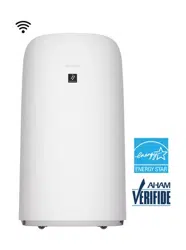
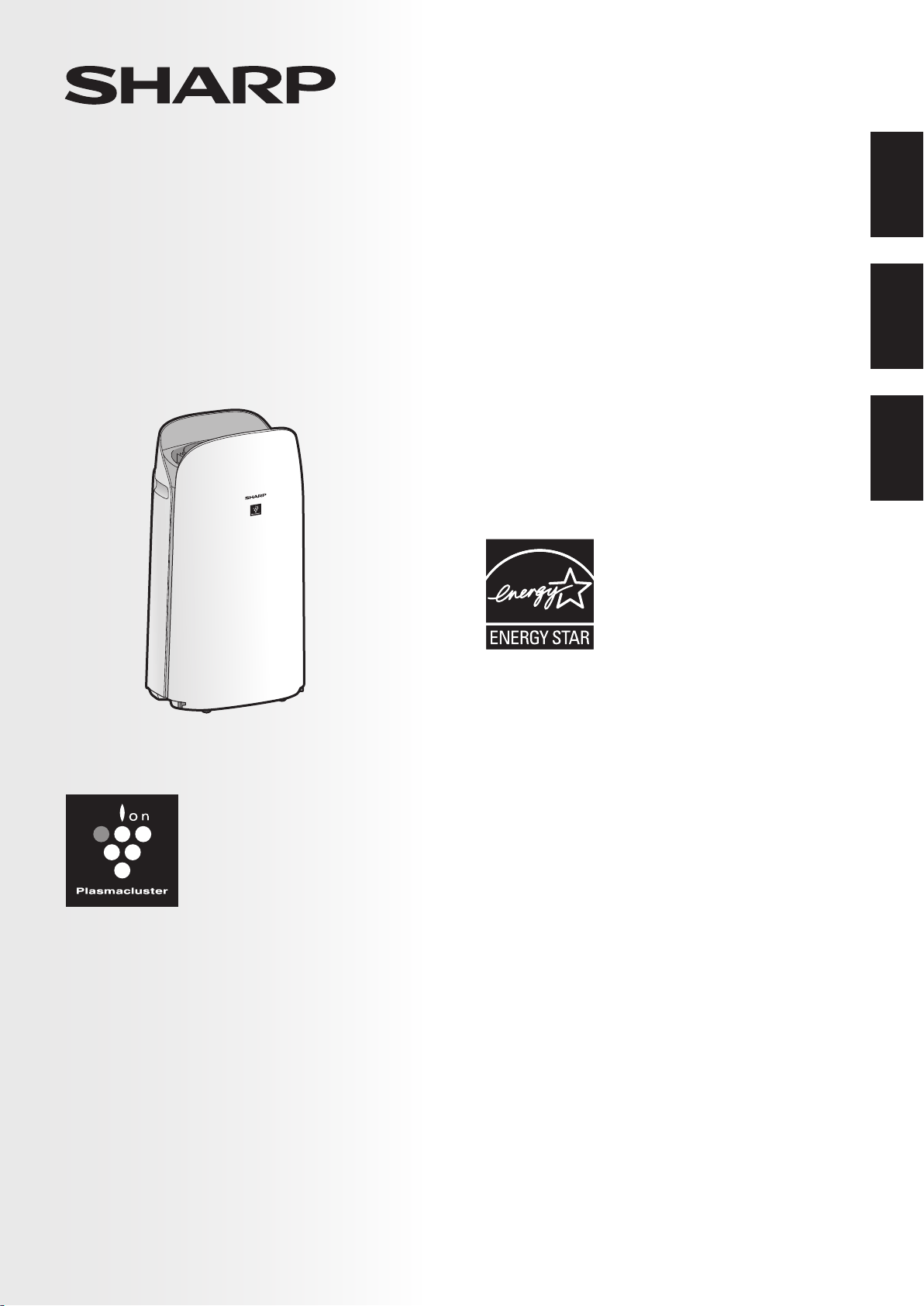
This product earned the ENERGY
STAR label by meeting strict energy
efficiency guidelines set by the
U.S. EPA. Room air cleaners have
demonstrated the potential for
improving air quality and providing
health benefits. EPA does not endorse
manufacturer claims regarding the
degree to which a specific product will produce healthier
indoor air.
The energy efficiency of this ENERGY STAR certified model
is measured based on a ratio between the model’s CADR
for Smoke and the electrical energy it consumes, or CADR/
Watt.
Ce produit a obtenu la certification ENERGY STAR en
répondant aux directives strictes en matière d’efficacité
énergétique fixés par l’EPA des Etats-Unis. Les purificateurs
d’air ambiant ont démontré le potentiel d’améliorer la qualité
de l’air et d’offrir des avantages pour la santé. L’EPA n’appuie
pas des déclarations du fabricant concernant la mesure
dans laquelle un produit spécifique produira un air intérieur
plus sain.
L’efficacité énergétique de ce modèle certifié ENERGY
STAR est mesurée sur la base d’un rapport entre le CADR
du modèle pour la fumée de tabac et l’énergie électrique
qu’il consomme, ou CADR / Watt.
KCP110UW
KCP110CW
KCP70UW
KCP70CW
“Plasmacluster” and “Device of a
cluster of grapes” are registered
trademarks of Sharp Corporation in
Japan, USA and elsewhere.
Purificateur d’air à fonction
d’humidification
MANUEL D’UTILISATION
PURIFICADOR DE AIRE
Con función de humidificación
MANUAL DE OPERACIÓN
AIR PURIFIER
with Humidifying Function
OPERATION MANUAL
ENGLISHFRANÇAISESPAÑOL
Este producto obtuvo el sello de ENERGY STAR al cumplir
las estrictas pautas de eficiencia energética establecidas por
la EPA de EE. UU. Los purificadores del aire de la habitación
han demostrado el potencial para mejorar la calidad del aire
y proporcionar beneficios para la salud. La EPA no respalda
las afirmaciones del fabricante con respecto al grado en que
un producto específico producirá aire interior más saludable.
La eficiencia energética de este modelo con la certificación
ENERGY STAR se mide en base a una relación entre el
CADR del modelo para el humo de tabaco y la energía
eléctrica que consume, o CADR/vatio.
KCP110UW_70UW_110CW_70CW_2nd.indb 1KCP110UW_70UW_110CW_70CW_2nd.indb 1 2022/03/23 11:16:082022/03/23 11:16:08

Thank you for purchasing this SHARP Air Purifier.
Please read this manual carefully before using the product.
This manual should be kept in a safe place for handy reference.
ENGLISH
FOR CUSTOMER ASSISTANCE
(THE UNITED STATES) .......................... 2
CONSUMER LIMITED WARRANTY
(THE UNITED STATES) .......................... 3
FOR CUSTOMER ASSISTANCE
(CANADA) ................................................ 4
CONSUMER LIMITED WARRANTY
(CANADA) ................................................ 5
IMPORTANT SAFETY INSTRUCTIONS
...... 6
PART NAMES ........................................ 10
PREPARATION ..................................... 12
OPERATION .......................................... 16
CARE AND MAINTENANCE ................ 18
TROUBLESHOOTING .......................... 22
HOW TO CHANGE VARIOUS
SETTINGS.............................................. 24
SPECIFICATIONS ................................. 29
INTELLECTUAL PROPERTY RIGHTS
FOR THIS PRODUCT ........................... 30
CONTENTS
Declaration of Conformity
SHARP AIR PURIFIER
KCP110UW / KCP70UW
This device complies with Part 18 of FCC rules.
Responsible Party:
SHARP ELECTRONICS CORPORATION
100 Paragon Drive, Montvale, NJ 07645, U.S.A.
TEL: (800) 237-4277
This Wi-Fi adapter complies with Part 15 of the
FCC rules. Operation is subject to the following two
conditions: (1) This device may not cause harmful
interference, and (2) this device must accept any
interference received, including interference that may
cause undesired operation.
•
Contains FCC ID: RX3-B01
Declaration of Conformity
SHARP AIR PURIFIER
KCP110CW / KCP70CW
CAN ICES-001B / NMB-001B
Responsible Party:
SHARP ELECTRONICS OF CANADA LTD.
335 Britannia Road East, Mississauga, Ontario L4Z
1W9 Canada
TEL: (905) 568-7140
This device contains licence-exempt transmitter(s) /
receiver(s) that comply with Innovation, Science and
Economic Development Canada’s licence-exempt
RSS(s). Operation is subject to the following two
conditions:
(1) This device may not cause interference.
(2) This device must accept any interference, including
interference that may cause undesired operation of
the device.
Contains IC: 2878F-B01
CPWB-B450JBKZ
KCP110UW_70UW_110CW_70CW_2nd.indb 2KCP110UW_70UW_110CW_70CW_2nd.indb 2 2022/03/23 11:16:082022/03/23 11:16:08
EN-1
ENGLISH
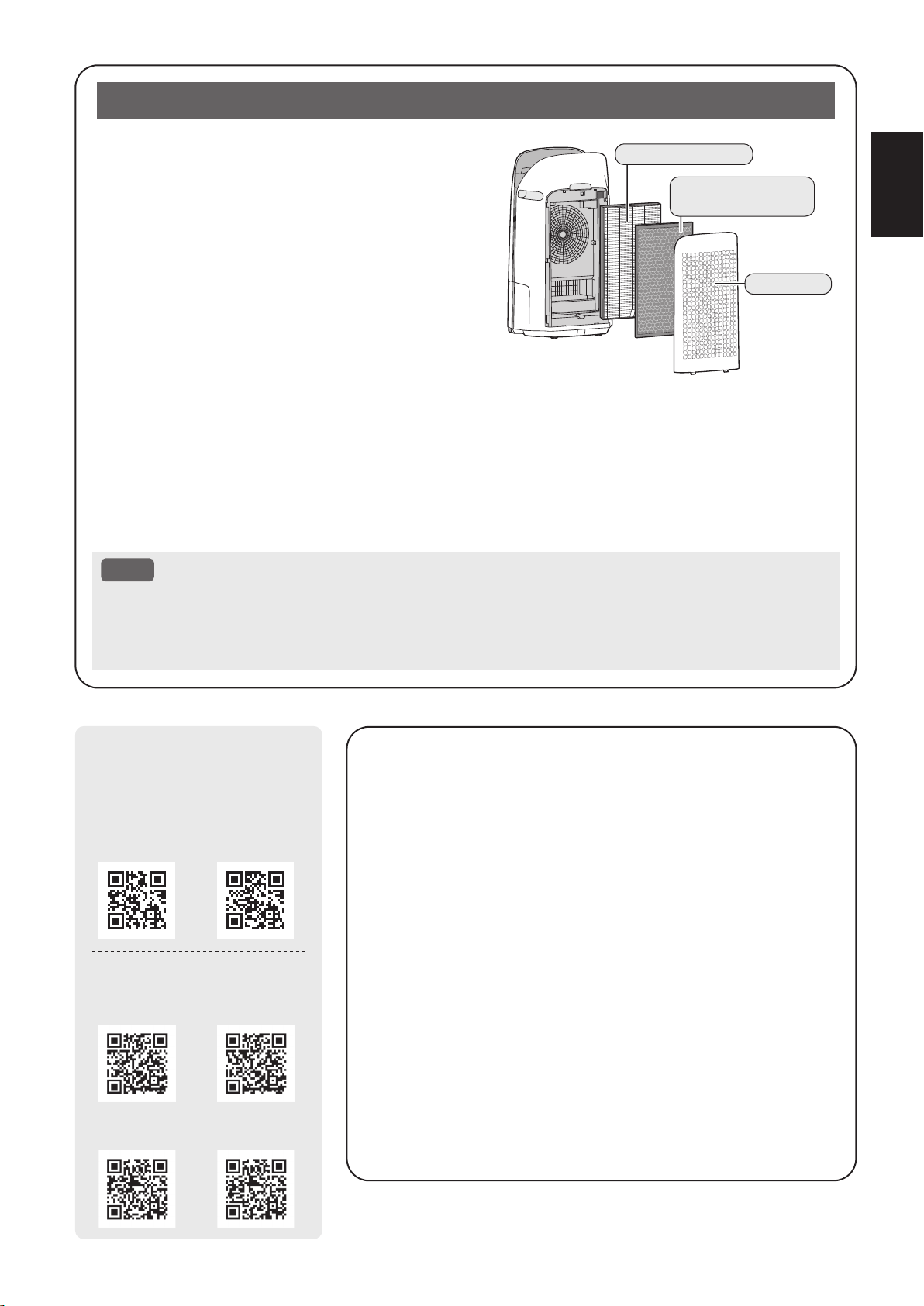
The air purifier draws in room air through the air inlet,
circulates it through a Pre-Filter, an Active Carbon
Deodorizing Filter and a True HEPA Filter inside the
product, and then discharges it through the air outlet. The
True HEPA Filter can remove 99.97% of dust particles as
small as 0.3 microns that pass through the filter and also
helps absorb odors.
The Active Carbon Deodorizing Filter gradually absorbs
odors as they pass through the filter.
Some odors absorbed by the filters will break down
over time, causing additional odors. Depending on
usage conditions, and especially if the product is used
in environments significantly more severe than a normal
household, these odors may become noticeable sooner than expected. If these odors persist, replace the
filters.
When minerals in tap water adhere to the filters and become hard and white, they absorb odors in the room
that can cause the emission of an unpleasant odor when the Humidifying Filter is dry. (Varies depending on
water quality and other environmental factors)
If this occurs, perform the Humidifying Filter maintenance. (Page 19)
NOTE
• The air purifier is designed to remove air-suspended dust and the odors.
The air purifier is not designed to remove harmful gases such as carbon monoxide contained in
cigarette smoke.
The air purifier may not completely remove an odor if the source of the odor is still present.
Please Read Before Operating Your Air Purifier
The Sharp Air Application is a helpful tool that puts
you in control of your indoor air quality.
With the Sharp Air Application:
•
You can control your air purifier from anywhere with
your smart device to do things like turn the air purifier
on and off, set a weekly schedule, and more!
•
You can monitor indoor air quality in real time to stay in
control, even if you're not home.
•
You can monitor remaining filter life and receive alerts
when it's time to replace the filters.
•
You can enable and disable the optional, "Sharp Cloud"
feature. When enabled, your usage history will be
used to adjust the Sensor Sensitivity settings of "Auto"
Mode over time in order to optimize your Air Purifiers
performance.
True HEPA Filter
Active Carbon
Deodorizing Filter
Pre-Filter
Scan the QR code for
more information about
the Sharp Air Purifiers.
KCP110UW KCP70UW
KCP110CW
(English)
KCP70CW
(English)
KCP110CW
(French)
KCP70CW
(French)
[ Canada Models ]
[ U.S. Models ]
KCP110UW_70UW_110CW_70CW_2nd.indb 1KCP110UW_70UW_110CW_70CW_2nd.indb 1 2022/03/23 11:16:102022/03/23 11:16:10
EN-2
FOR CUSTOMER ASSISTANCE (THE UNITED STATES)
REGISTER YOUR PRODUCT
Registering your new product is easy and offers benefi ts that help you get the most
out of your Sharp product including:
Convenience: If you ever need warranty support, your product information is already on fi le.
Communication: Stay up to date with important notifi cations and special offers from SHARP.
Support: Quickly access support content including Owners Manuals, FAQ’s,
How-to Videos, and much more.
3 EASY WAYS TO REGISTER TODAY!
PRODUCT SUPPORT
If you have questions about the setup or operation of your product, please refer to
the corresponding section within this manual.
Additionally, visit www.sharpusa.com/support to access exclusive content about your
product including:
FAQ’s and How-To Videos
Find or Request Service
Downloads including the Installation Guide, Spec Sheet, and Owner’s Manual
CONTACT US
If at any time you have questions or comments concerning your SHARP product,
please contact the SHARP Customer Assistance Center. We are available to
assist you through multiple contact methods for your convenience:
Scan this QR Code on your smart phone Visit http://www.sharpusa.com/register
ONLINE
Visit our sites to
learn more about
your product at
sharpusa.com and
sbl.sharpusa.com
See the Contact Us section on our sites U.S. | www.sharpusa.com/support Contact a Sharp Advisor on the phone
Contact a Sharp Advisor on the phone
CALL US
US 800-BE-SHARP
800-237-4277
Mon-Fri: 7am-7pm CST
Sat-Sun: 9am-7pm CST
CALL US
US 800-BE-SHARP
800-237-4277
Mon-Fri: 7am-7pm CST
Sat-Sun: 9am-7pm CST
EMAIL
Available 24/7
US: sharpusa.com
CHAT ONLINE
Mon-Fri: 7am-7pm CST
Sat-Sun: 9am-7pm CST
SCAN
Use the camera or
QR code scanning
application on your
smart phone
customer_assistance_consumer_us(EN)_取説用_2021September_mono.indd 1customer_assistance_consumer_us(EN)_取説用_2021September_mono.indd 1 2021/09/01 13:13:172021/09/01 13:13:17
KCP110UW_70UW_110CW_70CW_2nd.indb 2KCP110UW_70UW_110CW_70CW_2nd.indb 2 2022/03/23 11:16:112022/03/23 11:16:11
EN-3
ENGLISH
CONSUMER LIMITED WARRANTY (THE UNITED STATES)
CONSUMER LIMITED WARRANTY FOR U.S. USERS
SHARP ELECTRONICS CORPORATION warrants to the rst consumer purchaser that this Sharp brand product
(the “Product”), when shipped in its original container, will be free from defective workmanship and materials, and
agrees that it will, at its option, either repair the defect or replace the defective Product or part thereof with a new
or remanufactured equivalent at no charge to the purchaser for parts or labor for the period(s) set forth below.
This warranty does not apply to any appearance items of the Product nor to the additional excluded item(s) set
forth below nor to any Product the exterior of which has been damaged or defaced, which has been subjected to
improper voltage or other misuse, abnormal service or handling, or which has been altered or modied in design
or construction.
In order to enforce the rights under this limited warranty, the purchaser should follow the steps set forth below and
provide proof of purchase to the servicer.
The limited warranty described herein is in addition to whatever implied warranties may be granted to purchasers
by law. ALL IMPLIED WARRANTIES INCLUDING THE WARRANTIES OF MERCHANTABILITY AND FITNESS
FOR USE ARE LIMITED TO THE PERIOD(S) FROM THE DATE OF PURCHASE SET FORTH BELOW. Some
states do not allow limitations on how long an implied warranty lasts, so the above limitation may not apply to you.
Neither the sales personnel of the seller nor any other person is authorized to make any warranties other than
those described herein, or to extend the duration of any warranties beyond the time period described herein on
behalf of Sharp.
The warranties described herein shall be the sole and exclusive warranties granted by Sharp and shall be the sole
and exclusive remedy available to the purchaser. Correction of defects, in the manner and for the period of time
described herein, shall constitute complete fulllment of all liabilities and responsibilities of Sharp to the purchaser
with respect to the Product, and shall constitute full satisfaction of all claims, whether based on contract,
negligence, strict liability or otherwise. In no event shall Sharp be liable, or in any way responsible, for any
damages or defects in the Product which were caused by repairs or attempted repairs performed by anyone other
than an authorized servicer. Nor shall Sharp be liable or in any way responsible for any incidental or consequential
economic or property damage. Some states do not allow the exclusion of incidental or consequential damages, so
the above exclusion may not apply to you.
THIS LIMITED WARRANTY IS VALID ONLY IN THE FIFTY (50) UNITED STATES
,
THE DISTRICT OF
COLUMBIA AND PUERTO RICO.
Your Product Model Number & Description:
Warranty Period for this Product:
Additional Item(s) Excluded From Warranty
Coverage:
Where to Obtain Service:
What to Do to Obtain Service:
KCP110UW / KCP70UW Air Purier. Be sure to have this
information available when you need service for your Product.
One (1) year parts and labor from date of purchase.
Appearance items of the Product, lters, accessories, or any
printed materials. Product which has been used for rental
and/or commercial purposes.
From a Sharp Authorized Servicer located in the United
States. To nd the location of the nearest Sharp Authorized
Servicer, call Sharp Toll Free at 1-800-BE-SHARP.
Ship prepaid or carry in your Product to a Sharp Authorized
Servicer. Be sure to have Proof of Purchase available. If you
ship the Product, be sure it is insured and packaged securely.
TO OBTAIN SERVICE, SUPPLY, ACCESSORY OR PRODUCT INFORMATION, CALL 1-800-BE-SHARP, OR
VISIT OUR WEBSITE AT www.sharpusa.com
SAVE THE PROOF OF PURCHASE AS IT IS NEEDED SHOULD YOUR AIR PURIFIER EVER REQUIRE
WARRANTY SERVICE.
SHARP ELECTRONICS CORPORATION
100 Paragon Drive, Montvale, NJ 07645, U.S.A.
KCP110UW_70UW_110CW_70CW_2nd.indb 3KCP110UW_70UW_110CW_70CW_2nd.indb 3 2022/03/23 11:16:112022/03/23 11:16:11
EN-4
FOR CUSTOMER ASSISTANCE (CANADA)
Model Number:
Serial Number:
Date of Purchase:
Dealer Name:
Address:
City:
Province:
Postal Code:
Telephone:
PRODUCT SUPPORT
If you have questions about the setup or operation of your product, please refer to
the corresponding section within this manual.
Additionally, visit http://sharp.ca/ to access exclusive content about your product
including:
Find a Dealer
Find Service Locations
Downloads including the Installation Guide, Spec Sheet, and Owner’s Manual
CONTACT US
If at any time you have questions or comments concerning your SHARP product,
please contact the SHARP Customer Assistance Center. We are available to
assist you through multiple contact methods for your convenience:
Contact a Sharp Advisor on the phone
CALL US
CA 877-278-6709
Mon-Fri: 8am-5pm EST
(except statutory holidays)
EMAIL
Available 24/7
See the Contact Us
section on our site.
SUPPORT SITE
Product Downloads,
Service Locator, Where
to Buy, Toner Recycling
Program and more.
To aid in answering questions for a service call or for reporting loss or theft, please
use the space below to record the model and serial number located on either the
side or back of the product.
www.sharp.ca
https://sharp.ca/contact-sharp CA | www.sharp.ca
KCP110UW_70UW_110CW_70CW_2nd.indb 4KCP110UW_70UW_110CW_70CW_2nd.indb 4 2022/03/23 11:16:122022/03/23 11:16:12
EN-5
ENGLISH
CONSUMER LIMITED WARRANTY (CANADA)
ENGLISH
OM_FP-K50U_EN_genko.indd 5
2020/07/13
Sharp Electronics of Canada Ltd. (“Sharp”) warrants to the first purchaser for this Sharp brand product (“Product”), when shipped
in its original container and sold or distributed in Canada by Sharp or by an authorized Sharp dealer, and Product was not sold “as
is” or “sales final” that the Product will during the applicable warranty period, be free from defects in material and workmanship,
and will within the applicable warranty period, either repair the defective Product or provide the first purchaser a replacement of
the defective Product.
Conditions: This limited warranty shall not apply to:
(a) Any defects caused or repairs required as a result of abusive operation, negligence, accident, improper installation or
inappropriate use as outlined in the owner’s manual or other applicable Product documentation.
(b) Any defects caused or repairs required as a result of any Product that has been tampered with, modified, adjusted or repaired
by any person other than Sharp, a Sharp authorized service centre or a Sharp authorized servicing dealer.
(c) Any defects caused or repairs required as a result of the use of the Product with items not specified or approved by Sharp,
including but not limited to chemical cleaning agents.
(d) Any replacement of accessories required through normal use of the Product, including but not limited to, remote controls, AC
adapters, batteries, temperature probe, trays, filters, belts, ribbons, cables and paper.
(e) Any cosmetic damage to the Product surface or exterior that has been defaced or caused by normal wear and tear.
(f) Any defects caused or repairs required as a result of damage caused by any external or environmental conditions, including
but not limited to, transmission line/power line voltage or liquid spillage or acts of God.
(g) If the serial number or model number affixed to Product has been removed, defaced, changed, altered or tampered with.
(h) This limited warranty will not apply if the Product has been used or is being used in a commercial setting or application; this
warranty is meant solely for the non-commercial, household use of the Product by consumers in their home or residence.
(i) Any installation, delivery, setup and/or programming charges
(j) The removal and reinstallation of Over-The-Range Microwave, Microwave Drawer or Steam Oven if it is installed in an
inaccessible location or requiring removal of cupboards, handles or other cosmetic parts, or is not installed in accordance with
installation instructions included with Product.
How to get service: Warranty service may be obtained upon delivery of the Product, together with proof of purchase (including
date of purchase) and a copy of this limited warranty statement, to an authorized Sharp service centre or an authorized Sharp
servicing dealer. In home warranty service will be carried out to locations accessible by on-road service vehicle and within 50 km
of an authorized Sharp service centre on any Over-The-Range Microwave Oven, Microwave Drawer Oven or Steam Oven. The
servicer may if necessary take the unit for repair at the servicer's facility. No other person (including any Sharp dealer or service
centre) is authorized to extend, enlarge or transfer this warranty on behalf of Sharp. The purchaser will be responsible for any and
all removal, reinstallation, transportation and insurance costs incurred with exception for Over-The-Range Microwave Oven,
Microwave Drawer Oven or Steam Oven whereby Sharp will be responsible for the removal and reinstallation.
The express warranties in this limited warranty are, except for consumer purchasers domiciled in Quebec, in lieu of and, except
to the extent prohibited by applicable law, Sharp disclaims all other warranties and conditions, express or implied, whether arising
by law, statute, by course of dealing or usage of trade, including, without limitation, implied warranties or conditions of
merchantability and/or quality, fitness for a particular use or purpose, and/or noninfringement. Limitations (not applicable to
consumer purchasers domiciled in Quebec to the extent prohibited under Quebec law): (a) Sharp shall not be liable for any
incidental, special, consequential, economic, exemplary or indirect damages of any kind or nature (including lost profits or
damages for loss of time or loss of use or loss of data) arising from or in any connection with the use or performance of a Product
or a failure of a Product, even if Sharp is aware of or has been advised of the possibility of such damages; (b) the remedies
described in this limited warranty constitute complete fulfillment of all obligations and responsibilities of Sharp to the purchaser
with respect to the Product and shall constitute full satisfaction of all claims, whether based on contract, negligence, strict liability
or otherwise. Some provinces may not allow the exclusion or limitation of certain damages, or limits on the duration or voiding of
implied warranties or conditions; in such provinces, the exclusions and limits herein may not apply. This limited warranty is, except
for consumer purchasers domiciled in Quebec, governed by the laws of the Province in Canada in which the purchaser has
purchased the Product. For consumer purchasers domiciled in Quebec this limited warranty is governed by the laws of Quebec.
WARRANTY PERIODS (calculated from the date of original purchase): Parts & Labour (exceptions noted)
Microwave Oven 1 year (magnetron - 4 additional years)
Steam Oven 1 year
Small Kitchen Appliances 1 year
Air Purifiers 1 year
To obtain the name and address of the nearest Authorized Sharp Service Centre or Dealer, or for more information on this Limited
Warranty, Sharp Extended Warranty Offers, Sharp Canada Products or Accessory Sales, please contact Sharp:
• By writing to Sharp Electronics Of Canada Ltd. at 335 Britannia Road East, Mississauga, Ontario L4Z 1W9
• Calling: at 905-568-7140
• Visiting our Web site: www.sharp.ca
THIS LIMITED WARRANTY IS VALID ONLY IN CANADA
LIMITED WARRANTY
Consumer Electronics Products
Congratulations on your purchase!
KCP110UW_70UW_110CW_70CW_2nd.indb 5KCP110UW_70UW_110CW_70CW_2nd.indb 5 2022/03/23 11:16:122022/03/23 11:16:12
EN-6
IMPORTANT SAFETY INSTRUCTIONS
READ AND SAVE THESE INSTRUCTIONS
before using this product.
When using electrical appliances, basic
safety precautions should always be
followed to reduce the risk of fire, electric
shock, and injury to persons, including the
following:
WARNING
1. Read all instructions before using the
product.
2. Use the product only for intended
household use as described in
this manual. Any other use not
recommended by the manufacturer may
cause fire, electric shock, or injury to
persons.
3. This appliance is not intended for use
by persons (including children) with
reduced physical, sensory or mental
capabilities, or lack of experience
and knowledge, unless they have
been given supervision or instruction
concerning use of the appliance by a
person responsible for their safety.
Children should be supervised to ensure
they do not play with the appliance.
4. Never operate the product if the power
cord or plug is damaged or the product
is malfunctioning or damaged.
5. If the power cord or plug is damaged, it
must be replaced by the manufacturer,
its service agent or a Sharp authorized
Service Center in order to avoid a
hazard.
Contact the nearest Service Center for
any problems, adjustments, or repairs.
6. Do not repair or disassemble the
product yourself.
7. Follow the instructions “a” to “h” below
for the power cord or plug. It may cause
short circuit, excessive heat, electric
shock or fire.
a. Use only AC 120 volt outlet.
b. Do not use the product if the power
cord or plug is damaged or the
connection to the wall outlet is
loosened.
c. Always turn off the product before
unplugging the power plug.
d. Always unplug the product before
moving or maintaining it, refilling
the Humidifying Tray, opening the
Back Panel, changing the filters and
whenever the product is not in use.
e. Be sure to pull the power plug and
not the power cord.
f. Do not touch the power plug with wet
hands when inserting or unplugging
from the wall outlet.
g. Periodically remove dust from the
power plug.
h. Always observe the following as to
not damage the power cord.
• Do not damage cord with Caster
Wheels when moving the product.
• Do not run cord under carpeting.
Do not cover the power cord with
throw rugs, runners, or similar
coverings.
• Do not put heavy things on the
power cord or pinch it.
• Do not run the power cord under
furniture or other appliances.
• Run the power cord away from
traffic area and where it will not be
tripped over.
8. To reduce the risk of electric shock, this
product has a polarized plug (one blade
is wider than the other). This plug will
fit in a polarized outlet only one way. If
the plug does not fit fully in the outlet,
reverse the plug. If it still does not fit,
contact qualified personnel to install the
proper outlet. Do not alter the plug in
any way.
9. Do not use this product near gas
appliances, fire places, candle fire,
incense or sparks from lit cigarettes.
When the product is operated with gas
appliances in the same room, Ventilate
a room periodically, otherwise it may
cause carbon monoxide poisoning.
10. Do not operate the product in a room
with flammable gas, such as oily
residue or chemical fumes.
11. Do not expose the product to rain, or
use near water, in a bathroom, laundry
area or other damp location.
12. Do not insert fingers or foreign objects
into the air inlets or air outlets.
13. Do not look into the air outlets.
14. Do not drink the water in the
Humidifying Tray.
15. Replace the water in the Humidifying
KCP110UW_70UW_110CW_70CW_2nd.indb 6KCP110UW_70UW_110CW_70CW_2nd.indb 6 2022/03/23 11:16:122022/03/23 11:16:12

EN-7
ENGLISH
Tray daily with fresh tap water, and
regularly clean it.
When the product is not in use, dispose
of the water in the Humidifying Tray.
Leaving water in the Humidifying Tray
can cause mold, bacteria, and bad
odors. In rare cases, such bacteria can
be a health hazard.
NOTE
- Radio or TV Interference -
If the product should cause interference to
radio or television reception, try to correct
the interference by one or more of the
following measures:
1. Reorient or relocate the receiving
antenna.
2. Increase the separation between the
product and radio/TV receiver.
3. Connect the product into an outlet on
a circuit different from that to which the
receiver is connected.
4. Consult the dealer or an experienced
radio/TV technician for help.
----------------------------------------------------------
This product complies with the maximum
allowable concentration of ozone of 0.050
parts per million by volume (ppmv) in a 24-
hour period. The Health Canada Guideline
2010 recommends that the maximum
exposure limit, based on an averaging
time of 8 hours, is 0.020 ppmv or less
when tested in a sealed, controlled room
approximately 30 m³.
CAUTIONS CONCERNING
INSTALLATION
1. Place the product on a level and stable
surface with sufficient air circulation.
When placed on heavy carpet, the
product may vibrate slightly.
Place the product on a level surface
to avoid water leakage from the
Humidifying Tray.
2. Avoid a location where the sensors are
exposed to direct breeze or draft if the
product has sensors. The product may
not operate properly.
3. Avoid use in locations where furniture,
fabrics, or other items may come in
contact with and restrict the air inlets
and/or outlets.
4. Avoid locations exposed to direct
sunlight. It may cause to change shape
or color of the product.
5. Avoid locations where the product is
exposed to condensation or drastic
changes in temperature. Use under
appropriate conditions between
32 ºF - 95 ºF (0 ºC – 35 ºC).
6. Avoid use in locations where greasy
or oily smoke is generated. (such as
in a kitchen, etc.). The Main Body
surface may crack and the sensors may
malfunction as a result.
7. The dust collecting ability of the product
is effective even when the product is as
close to 1.2 inches (3 cm) from the wall,
but the surrounding walls or floor may
get dirty. Please place the product at a
distance from the wall.
The wall directly behind the air outlets
and the floor or rug on which the
product placed may become dirty over
time. When using the product for an
extended period of time at the same
location, periodically clean the walls, the
floor or the rug.
8. Do not place the product near or on
hot objects, such as stoves or heaters,
or where it may come into contact with
steam.
CAUTIONS CONCERNING
FILTER
1. Follow the instructions in this manual
for filter installation and maintenance.
(Page 12, 21)
2. Take out the filters from the plastic bag
before placing the filter in the Main
Body.
3. Do not operate the product without the
filters properly installed.
4. Do not wash and reuse the True
HEPA Filter and the Active Carbon
Deodorizing Filter.
Washing will not improve filter
performance and can also cause
electric shock or operating malfunctions.
5. Do not operate the product in a rooms
where aerosol insecticides are present.
It may cause the odor of insecticide may
be remained in the product and emitted
from the air outlets.
KCP110UW_70UW_110CW_70CW_2nd.indb 7KCP110UW_70UW_110CW_70CW_2nd.indb 7 2022/03/23 11:16:122022/03/23 11:16:12
EN-8
CAUTIONS CONCERNING
OPERATION
1. Do not block the air inlets or air outlets.
2. Always operate the product in an
upright position.
3. When carrying the product, first remove
the Humidifying Tray not to spilt water,
and then hold the product by the
handles on both sides.
4. Always lift up the product when moving
it on easily damaged flooring, an
uneven surface, or carpet.
5.
Do not change the direction of the
product while moving using the Caster
Wheels.
6. When moving the product by its
Caster Wheels, move it slowly and in a
horizontal direction.
7. Do not operate the product without the
Humidifying Tray properly installed.
8. When refilling the Humidifying Tray,
make sure no water is leaking from the
Humidifying Tray.
9. Be sure to wipe off any excess water on
the outside of the Humidifying Tray.
10. Do not use hot water (104 ºF (40 ºC)
or more), chemical agents, aromatic
substances, dirty water, or other
damaging substances. Doing so can
deform the product or cause it to
malfunction.
11. Use only fresh tap water. Using other
water sources risks the growth of molds,
fungi, or bacteria.
12. Do not shake the Humidifying Tray with
holding the Tray Handle.
CAUTIONS CONCERNING
MAINTENANCE
1. Follow the instructions in this manual
for maintenance. (Page 18 - 21)
2. Clean the exterior with a soft cloth only.
3. Do not use detergents other than what
is mentioned in this manual (Page
20). Do not use volatile fluids and/or
detergents.
The Main Body surface may be
damaged or cracked with strong
corrosive cleansers, benzine, paint
thinner, polishing powder or grease.
The Humidifying Tray may cause
deformation, tarnishing, cracking (water
leakage). In addition, the sensors may
malfunction as a result if the product
has sensors.
4. Do not scrub the Back Panel (Pre-Filter)
hard during its maintenance.
5. The frequency of descaling maintenance
will depend on the hardness of and the
impurities in the water that you use;
the harder the water the more often
descaling will be necessary.
6. Do not remove the Humidifier Float. If
the Humidifier Float comes off, refer to
page 20.
7. When replacing filters or any
accessories, use specified parts in this
manual.
KCP110UW_70UW_110CW_70CW_2nd.indb 8KCP110UW_70UW_110CW_70CW_2nd.indb 8 2022/03/23 11:16:122022/03/23 11:16:12

EN-9
ENGLISH
WARNING
In case of remote operation from outside,
you may not be able to check air purifier
current condition or the area around it and
the situation concerning anyone possibly
staying there, so please adequately confirm
safety before use.
• Make sure the electric plug is fully
inserted into a power socket, and there is
no dust on the plug or in the socket hole.
(It may cause heat, combustion, fire, etc.,
due to poor contact or contact failure)
• Make sure beforehand that although
there are some wind changes, no negative
impact will occur to the environment
inside the room. (such as whether there is
anything flying easily in the wind)
Because the wind may cause something
to fall down, resulting in fires, wounds,
defacement of household belongings.
CAUTION FOR USE
• Agreement with “Terms of Service” is
needed to use App.
• App will be periodically revised because of
version
upgrade.
• Screens and illustrations in this book
are for explanation, there are some
differences to the real product.
• In the case of bad connection, the App
may not be able to control the air purifier.
The current operation of the air purifier
may not be accurately reflected on the
App.
• Locking smart device display is
recommended to avoid wrong operation.
• Although the App is free, communications
expenses for download of dedicated App
and operation with smart device or tablet
are customer’s obligation.
CAUTION FOR Wi-Fi
Caution for usage about electrical wave
• In case of the usage at the following place,
the operation cannot be guaranteed:
Near Bluetooth
®
wireless communications
device using the same frequency (2.4GHz)
as this product or specified low power
wireless device. Also in the place like
magnetic field of the device such as
microwave oven, or the place with static
electricity or the place radio disturbance
is occurred, it may not be available
temporarily due to weak electrical wave.
• Wireless connection and performance
cannot be guaranteed for all routers or
housing environment. At the following
places, it is likely electrical wave cannot
reach or is disconnected: Inside of the
building made with concrete, reinforcing
steel or metal / near the obstruction /
near the wireless communications device
applying the same frequency.
• Wi-Fi of this product corresponds to
channel 1 - 11. It’s not available to
communicate with the routers set up to
other channels.
Caution for personal information
(related to Security)
• Using Wi-Fi device has the possibility of
interception as long as using electrical
wave regardless of secret code setting.
• Wi-Fi has the advantage of free LAN
connection in the service area because
of the communication between this
product and the router applying electrical
wave. On the other side, intercept of
communication or unfair intrusion are likely
to occur because electrical wave reaches
everywhere in the certain area through the
obstructions (e.g. walls).
• Do not connect to the device or network
that you do not have permission to use
when setting up Wi-Fi connection.
• The Wi-Fi function of this product should
be initialized in case of disposal or
handover to a third person.
• The Wi-Fi function of the product should
be initialized in case of handover from
a third person to avoid illegal access of
outsider. See page 26 for instructions
on how to initialize.
SAFETY / PRECAUTIONS OF THE Wi-Fi FUNCTION
KCP110UW_70UW_110CW_70CW_2nd.indb 9KCP110UW_70UW_110CW_70CW_2nd.indb 9 2022/03/23 11:16:132022/03/23 11:16:13
EN-10
PART NAMES
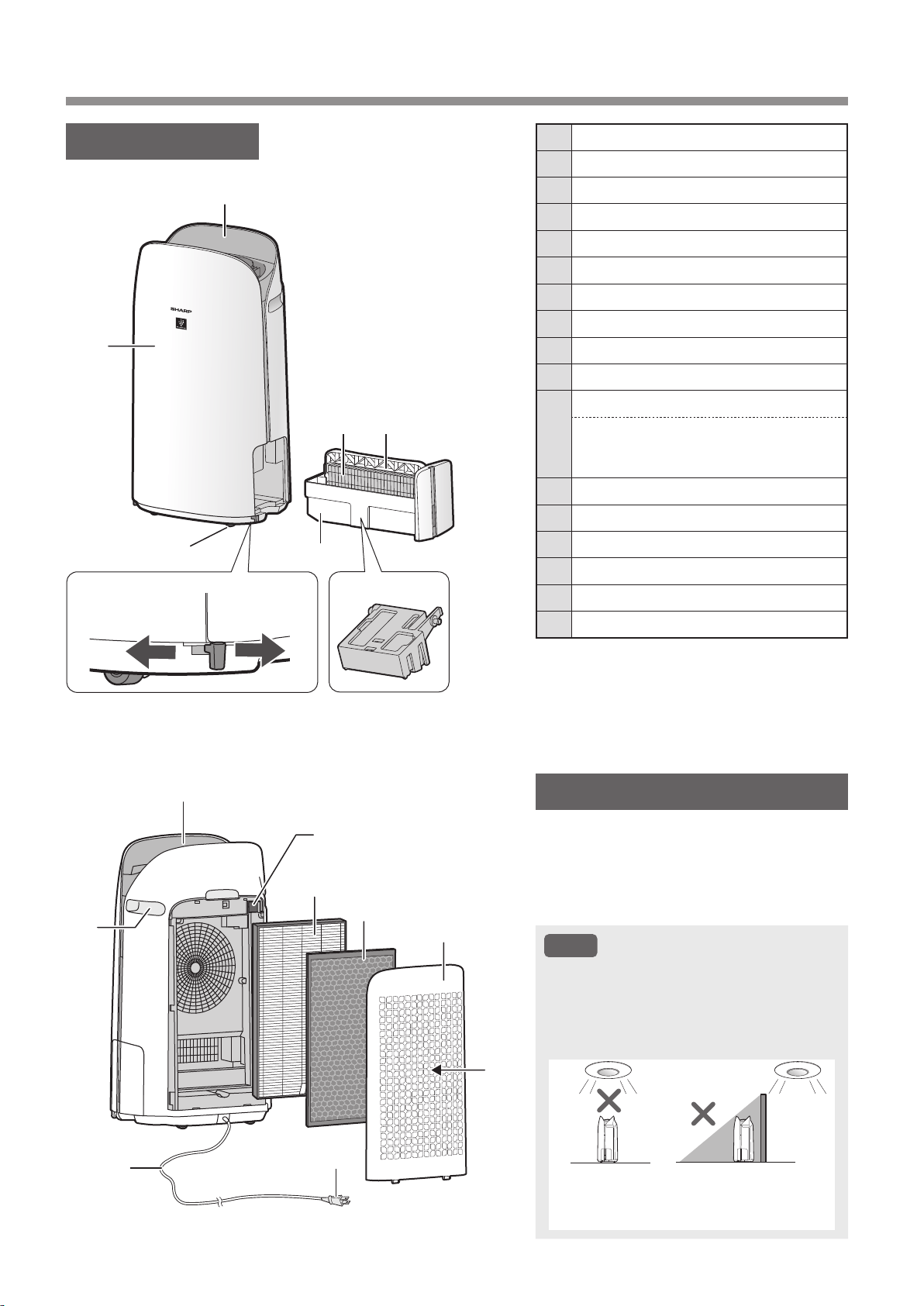
MAIN BODY
1 Operation Panel / Display
2 Main Body
3 Caster Wheels
(4 Locations)
4 Caster Stopper
(Right & Left)
5 Humidifying Tray
6 Humidifying Filter
7 Tray Handle
8 Humidifier Float
9 Air Outlet
10 Handle
(2 Locations)
11
Sensor Filter
Sensor
(Internal)
Sensitive Dust / Odor / Temperature /
Humidity
12 True HEPA Filter
13 Active Carbon Deodorizing Filter
14 Back Panel
(Pre-Filter)
15 Air Inlet
16 Power Cord
17 Power Plug
LIGHT SENSOR
When the Light Control (Display Brightness)
is set to “Auto”, the brightness of the Display
and Air Quality Indicator will be switched
automatically based on room brightness.
(Page 25)
NOTE
Detection range of Light sensor
Do not install the product in the following
places. The Light Sensor may not sense
correctly.
Directly
under a
light fixture.
In shadow.
1
2
3
Unlocked
4
5
6 7
8
9
10
11
12
13
14
15
16
Locked
17
KCP110UW_70UW_110CW_70CW_2nd.indb 10KCP110UW_70UW_110CW_70CW_2nd.indb 10 2022/03/23 11:16:142022/03/23 11:16:14
EN-11
ENGLISH
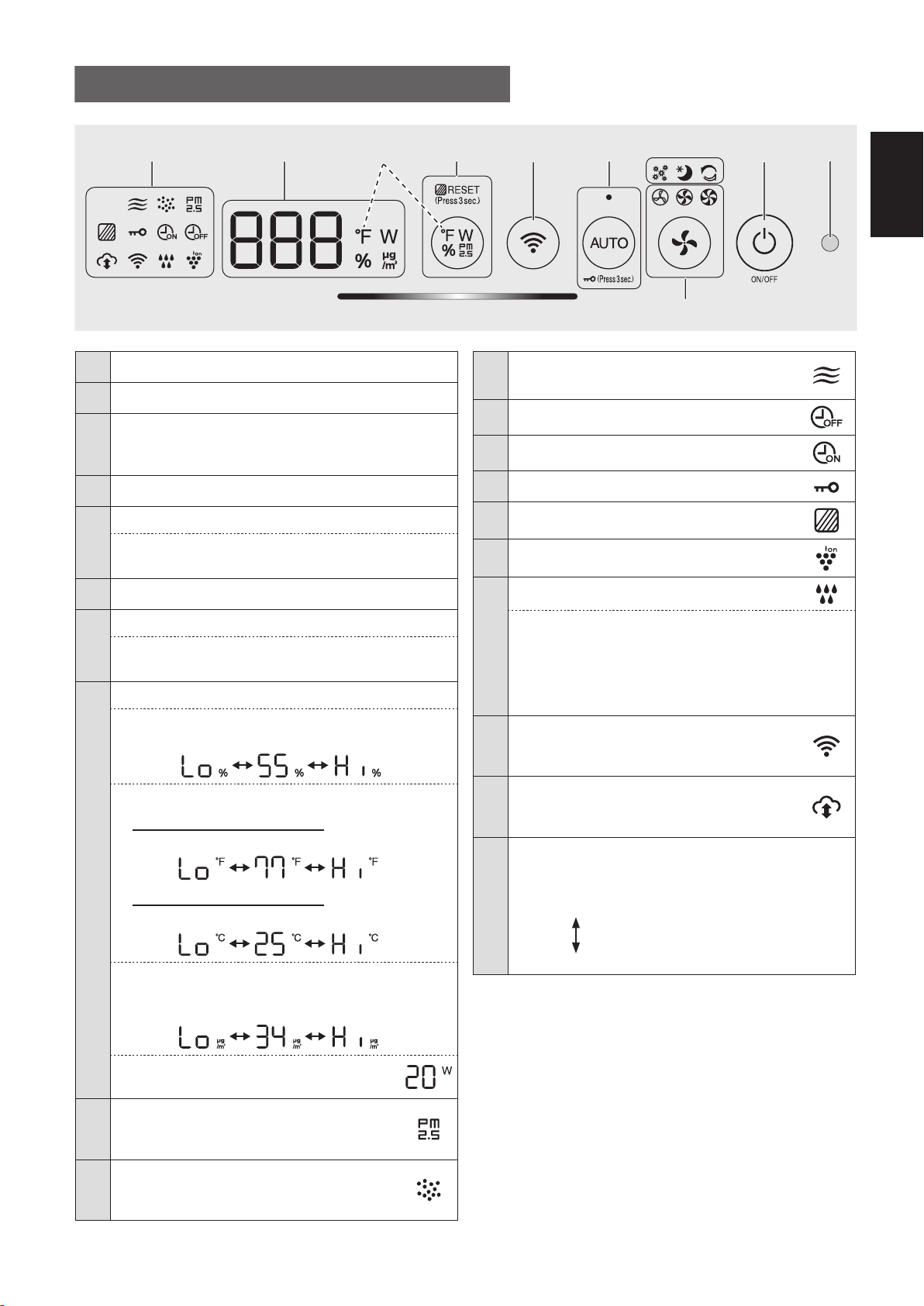
1 Light Sensor
2 Power ON/OFF Button
3
App-Only Modes: Pollen, Sleep and
Plasmacluster Express Clean Lamps
(White)
*2
4 Fan Speed Button, Lamps
(White)
5
AUTO Button, Lamp
(White)
Child-Lock Button
(Press 3 sec.)
*3
6 Wi-Fi Button
7
Switching Display Button
Filter Reset Button, Lamp
(White)
(Press 3 sec.)
*3
8
Display
*4
• Humidity
Humidity 25 % to 75 % is displayed.
24 %
or less
76 %
or more
• Temperature
For KCP110UW or KCP70UW
Temperature 32
o
F to 122
o
F is displayed.
123
o
F
or more
31
o
F
or less
For KCP110CW or KCP70CW
Temperature 0
o
C to 50
o
C is displayed.
51
o
C
or more
-1
o
C
or less
• PM2.5 Concentration
*5
PM2.5 10 μg/m
3
(micrograms per cubic meter air)
to 499 μg/m
3
is displayed.
500 μg/m
3
or more
9 μg/m
3
or less
• Wattage
Indicates wattage of current operation.
9
PM2.5 Indicator
(White)
Indicates the Sensitive Dust Sensor
detects microscopic dust.
10
Dust Indicator
(White)
Indicates the Sensitive Dust Sensor
detects usual dust.
OPERATION PANEL / DISPLAY
11
Odor Indicator
(White)
Indicates the Odor Sensor detects odors.
12 OFF Timer Indicator
(White)
*2
13 ON Timer Indicator
(White)
*2
14 Child-Lock Indicator
(White)
15 Filter Maintenance Indicator
(Orange)
16 Plasmacluster Ion Indicator
(White)
17
Humidifying Indicator
(White)
• Illuminates:
Humidify ON
• OFF:
Humidify OFF
• Flashing: the product needs water
(The indicator flashes for 10 minutes and then
goes off.)
18
Wi-Fi Indicator
(White)
Illuminates when air purifier is connected
to a router.
19
Cloud Service Indicator
(White)
*2
Illuminates when air purifier is connected
to Sharp's cloud service.
20
Air Quality Indicator
Indicates the air purity of the room in 5 levels with
color changes.
Clean
Blue
Yellow (Flashing)
Impure
Red (Flashing fast)
*1: This is an illustration of KCP110UW or KCP70UW.
For KCP110CW or KCP70CW, “
o
F ” on the control
panel is “
o
C ”.
*2: The lamps of No. 3, 12, 13 and 19 light up only when
using the App.
*3: Press and hold 3 seconds or longer.
*4: The displayed numbers are approximate.
*5: Particulate matter, particles with diameter of size 2.5
micrometers or less.
15 23
20
6
789 - 19
*1
4
*4
KCP110UW_70UW_110CW_70CW_2nd.indb 11KCP110UW_70UW_110CW_70CW_2nd.indb 11 2022/03/23 11:16:182022/03/23 11:16:18
EN-12
PREPARATION
• To maintain the quality of the filter, it is installed
in the product and packaged in a plastic bag.
• Be sure to stop operation
and unplug the product
before filter installation or
replacement.
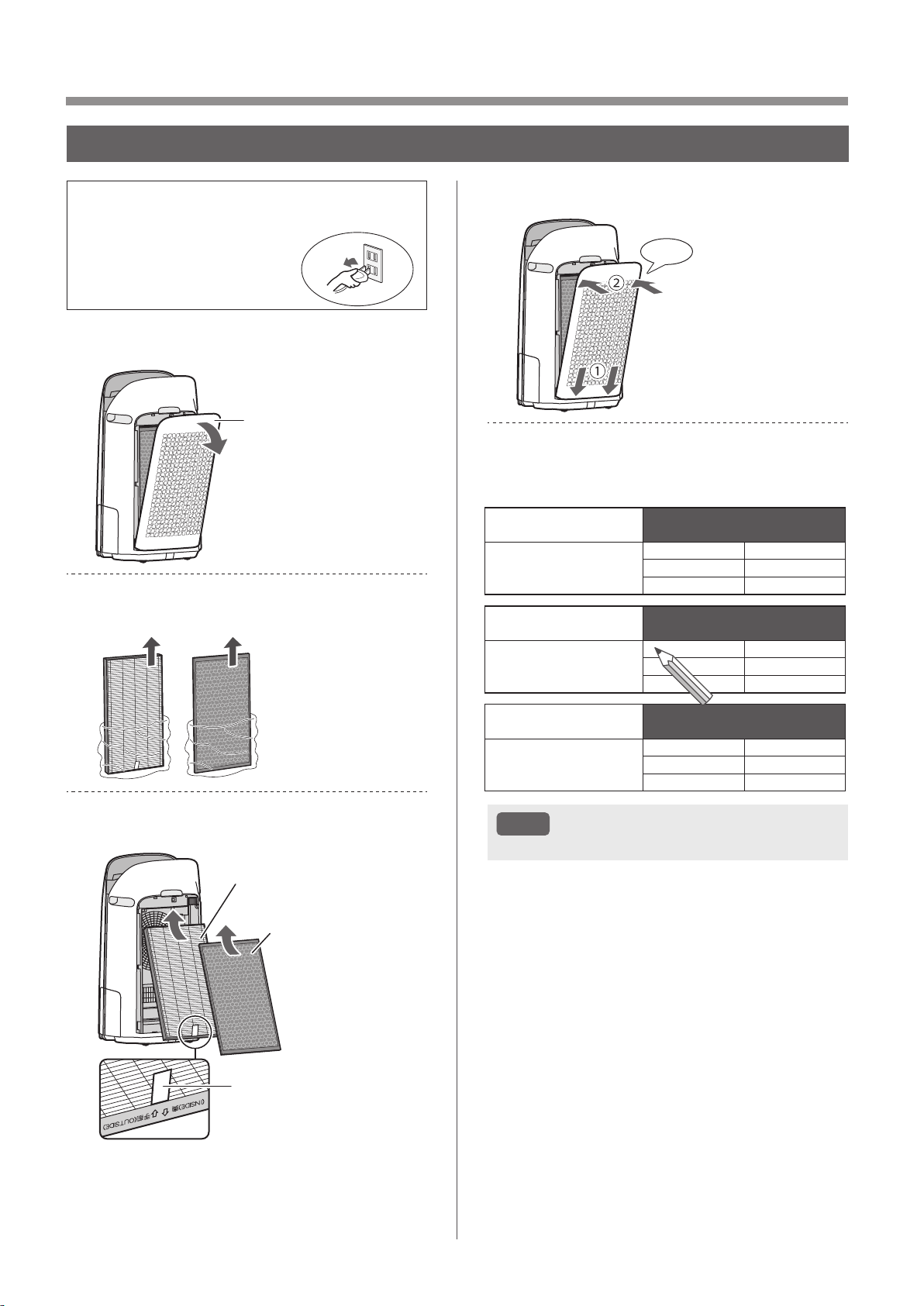
1.
Remove the Back Panel.
Back Panel
2.
Take out the filters from the plastic
bag.
3.
Install the filters in the correct order
as shown.
True HEPA Filter
Active Carbon
Deodorizing Filter
Tag
4.
Install the Back Panel.
Click
5.
Record the date when you start or
replace the filters on the back cover
of this manual.
Active Carbon Deodorizing Filter
Filtre déodorant de carbone actif
Filtro desodorizante de carbón activo
Model
Modèle
Modelo
FZ-J80DFU
Starting date of use
Date de début d’utilisation
Fecha de comienzo de uso
.
.
.
.
.
.
.
.
.
.
.
.
True HEPA Filter
Filtre HEPA authentique
Filtro true HEPA
Model
Modèle
Modelo
FZ-P11HFU
Starting date of use
Date de début d’utilisation
Fecha de comienzo de uso
.
.
.
.
.
.
.
.
.
.
.
.
Humidifying Filter
Filtre d’humidication
Filtro del humidicador
Model
Modèle
Modelo
FZ-P11MFU
Starting date of use
Date de début d’utilisation
Fecha de comienzo de uso
.
.
.
.
.
.
.
.
.
.
.
.
NOTE
• Do not operate the product without the filters.
FILTER INSTALLATION
KCP110UW_70UW_110CW_70CW_2nd.indb 12KCP110UW_70UW_110CW_70CW_2nd.indb 12 2022/03/23 11:16:212022/03/23 11:16:21
EN-13
ENGLISH
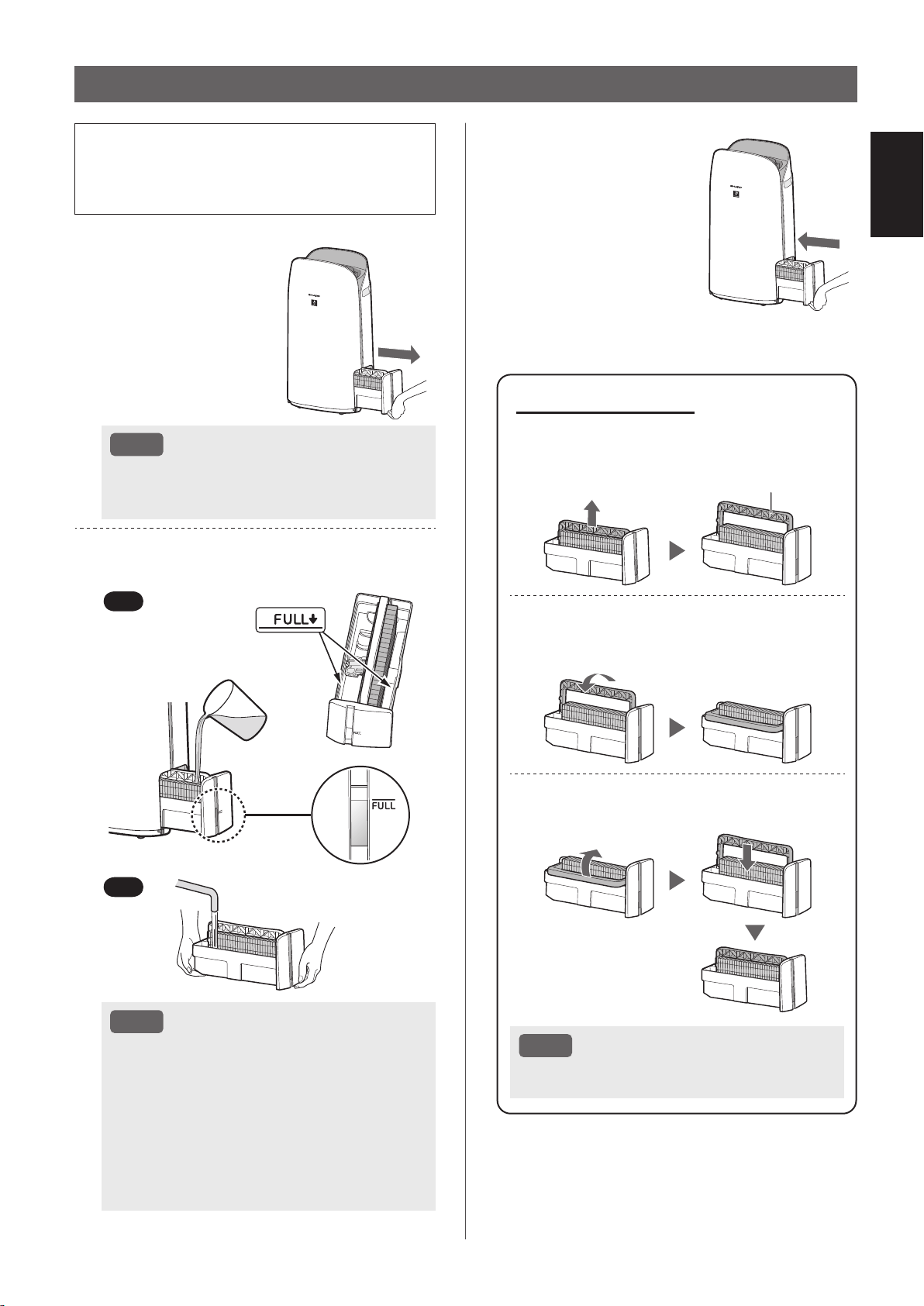
• When humidifying, fill the Humidifying Tray with
water.
• When not humidifying, discard the water in the
Humidifying Tray.
1.
Pull out the
Humidifying Tray.
NOTE
• When removing and installing the
Humidifying Tray, be careful not to spill any
water.
2.
Fill the Humidifying Tray with
tap water using method “A”
or “B”.
B
A
NOTE
• The Humidifier Float will float up when tray
is filled with water.
• Slowly fill it with water to avoid splashing.
• Do not fill beyond the “FULL” indicator.
• When carrying the Humidifying Tray, hold it
with both hands or grip the Tray Handle.
• Clean the Humidifying Tray if it becomes
dirty or there is a noticeable odor.
REFILLING THE HUMIDIFYING TRAY
About Tray Handle
• When holding and carrying the
Humidifying Tray, use tray handle
Tray Handle
• When cleaning the Humidifying Filter,
you can turn the Tray Handle down on
its side.
• After cleaning, install the Tray Handle
back in its original position.
NOTE
• Return the Tray Handle to its original
position before installing.
3.
Carefully install the
Humidifying Tray.
KCP110UW_70UW_110CW_70CW_2nd.indb 13KCP110UW_70UW_110CW_70CW_2nd.indb 13 2022/03/23 11:16:262022/03/23 11:16:26
EN-14
Wi-Fi SETTINGS
BEFORE YOU BEGIN
• By connecting your air purifier with your smart
device, you can use the air purifier more
conveniently.
Ensure your smart device is connected to a
2.4 GHz Wi-Fi Network.
Wi-Fi Protected Setup (WPS) Access Point
(Router)
• The recommended encryption method is WPA2
(AES).
Ensure your smart device meets minimum
software requirements:
• Smartphones / tablets of Android 8 or later
• iPhones, iPod touch, iPads of iOS 12 or later
Product Wi-Fi specifications
• Wireless LAN: IEEE802.11b/g/n
• Frequency range: 2.4GHz frequency band
Trademarks
•
“Wi-Fi
®
” is a registered trademark of Wi-Fi Alliance
®
.
•
“Android” is the trademark of Google Inc.
•
“iPhone”, “iPod touch”, “iPad” are the registered
trademarks or trademarks of Apple Inc.
•
The other company names, corporate names, product
names mentioned in the handling instructions are
trademarks and registered trademarks of each
company.
INITIAL SET UP
NOTE
• When pairing the smart device to the air
purifier, please ensure they are both connected
to the same router.
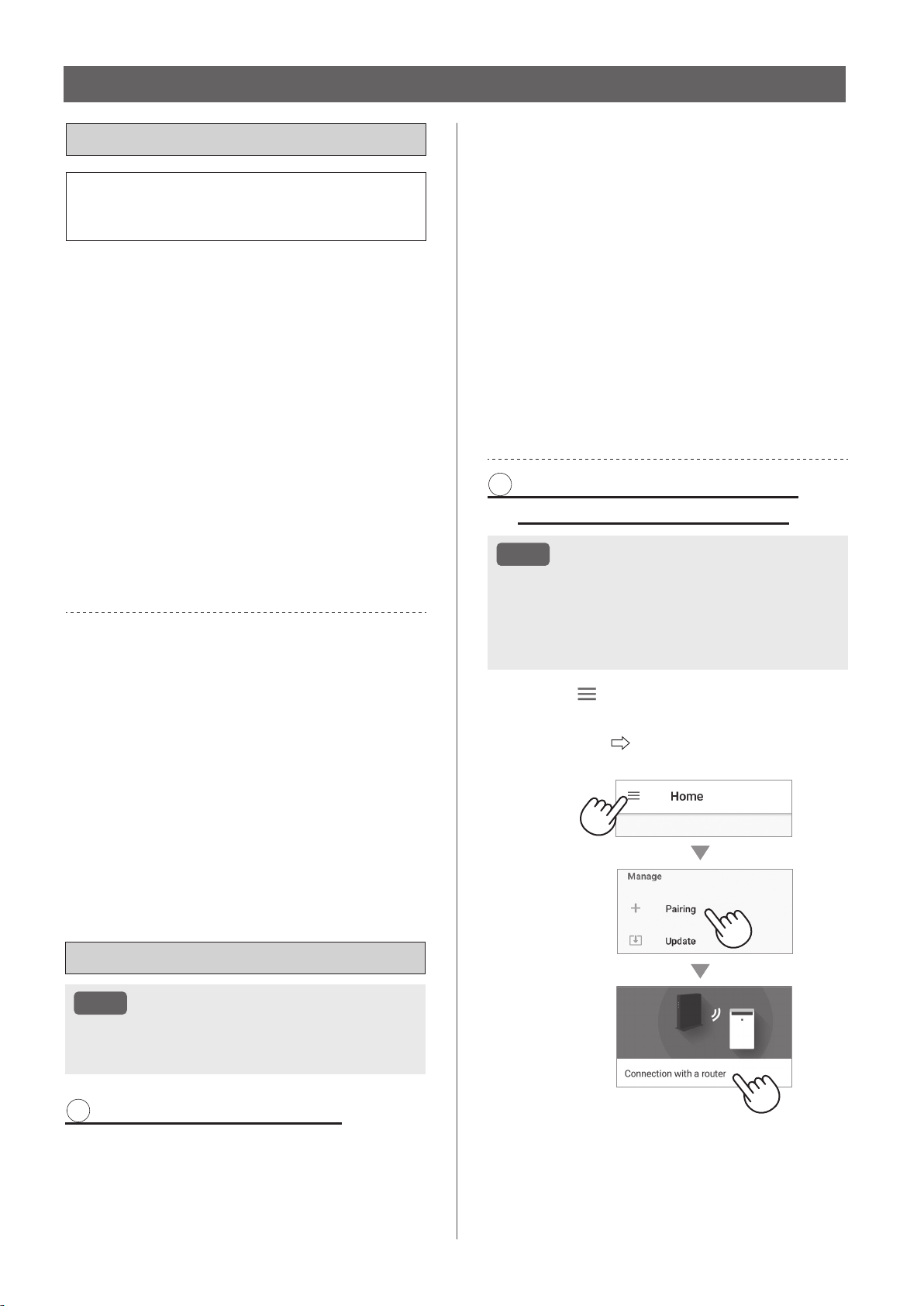
1 DOWNLOAD & SIGN UP
1.
Install the Sharp Air App to your
smart device.
•
Available to download from the Apple Store or
Google Play.
2.
Connect your smart device to the
router and launch the App.
Follow instructions on the App.
i. Review the “Privacy and Data
Utilization Policy” and “Terms of
Use”.
ii. Enter Your Date of Birth.
iii. Sign in using your Sharp account
(SHARP ID).
•
If you do not have a SHARP ID, please
register to create a SHARP ID.
iv. Enter a name for your smart
device.
2 CONNECTION OF THE AIR
PURIFIER AND A ROUTER
NOTE
• If you have stealth settings or MAC filtering
settings on the router, please cancel them.
• The product network ID is displayed as
“AP-SHARP-XX” (where XX is a 2-digit number
below the product MAC address).
1.
Tap “ ” at the upper left part of
the “Home” screen, and select
“Pairing” “Connection with a
router”.
KCP110UW_70UW_110CW_70CW_2nd.indb 14KCP110UW_70UW_110CW_70CW_2nd.indb 14 2022/03/23 11:16:282022/03/23 11:16:28
EN-15
ENGLISH
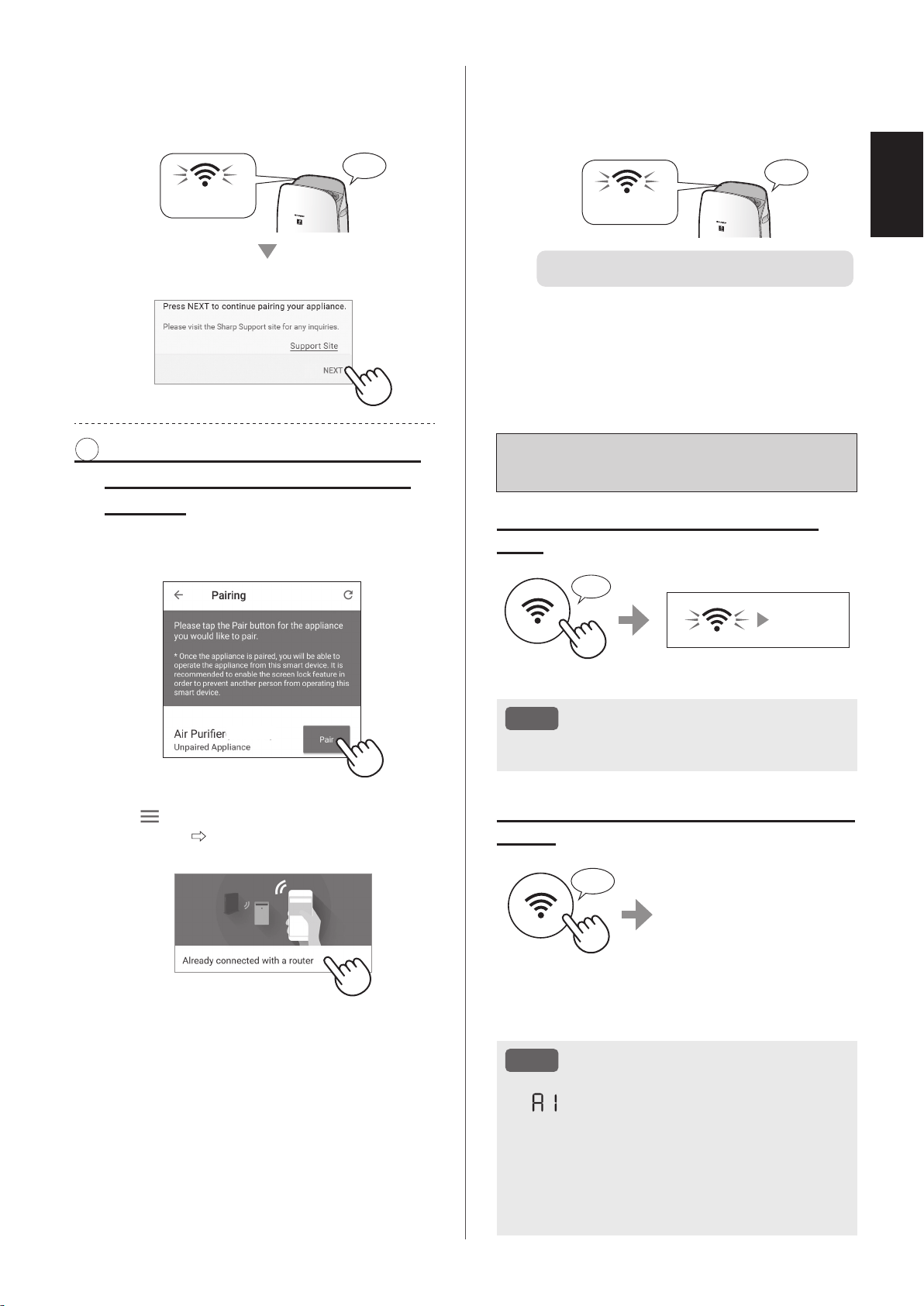
How to set Wi-Fi ON / OFF after
completing the INITIAL SET UP
If you would like to turn the Wi-Fi
OFF:
Press for 3 sec.
♪
~
Goes off
NOTE
• Turning the Wi-Fi off will result in not being able
to control the air purifier with the Sharp Air App.
If you would like to turn the Wi-Fi ON
again:
Press for 3 sec.
♪
The Wi-Fi Indicator will flash
after you press the Wi-Fi
Button. And within about 3
minutes, you will hear four
short beeps. Some time
after this beep sounds, the
Wi-Fi Indicator lights up and
the Wi-Fi connection is complete. The Sharp Air App
can now be used again to control the Air Purifier.
NOTE
• Wi-Fi ON / OFF can also be set from
“
: Wi-Fi adapter ON/OFF”.
(Page 24, 26)
In this case, Wi-Fi connection with the router
will be automatically restored.
• Reconnection to the Wireless Router may take
a few minutes to complete, after turning Wi-Fi
on again.
2.
Follow instructions on the App.
• If the Wi-Fi Indicator lights up after the
notification sound, the connection is
successfully completed.
Light up
♪
Tap “NEXT”.
3 CONNECTION BETWEEN THE
AIR PURIFIER AND A SMART
DEVICE
1.
Tap “Pair” for the air purifier you
would like to pair.
(MODEL NAME)
• If you do not see the screen above, tap
“
” at the “Home” screen, and select
“Pairing”
“Already connected with a
router”.
2.
Follow instructions on the App.
• If the Wi-Fi Indicator lights up after the
notification sound, the connection is
successfully completed.
Light up
♪
The INITIAL SET UP is completed.
KCP110UW_70UW_110CW_70CW_2nd.indb 15KCP110UW_70UW_110CW_70CW_2nd.indb 15 2022/03/23 11:16:372022/03/23 11:16:37
EN-16
OPERATION
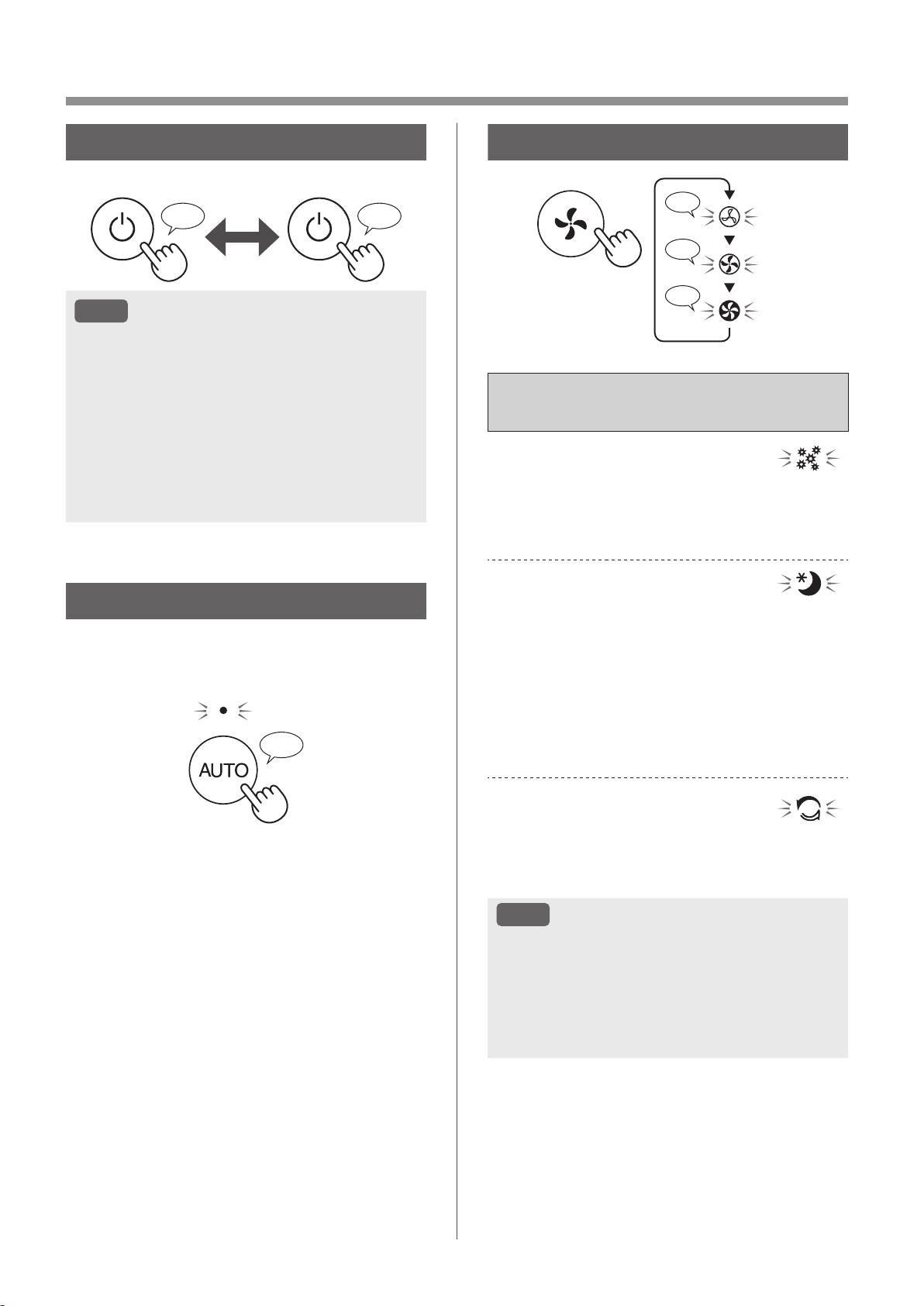
START/STOP
START STOP
♪
♪
~
NOTE
• Unless the power plug has been unplugged,
the operation will Auto Resume in the previous
mode it was operating in. (However, in the
case of Plasmacluster Express Clean mode,
the operation will resume to the mode before
Plasmacluster Express Clean mode and
settings.)
Example: if the power is lost during operation,
the operation will resume to previous operation
mode and settings if power is restored.
FAN SPEED BUTTON
♪
♪
♪♪
LOW
MED
MAX
AUTO MODE
The fan speed is automatically controlled depending
on the six detections. (PM2.5 / Usual dust / Odor /
Temperature / Humidity / Light)
♪
ADDITIONAL FAN SPEED
FUNCTIONS: APP ONLY
POLLEN:
The dust sensor sensitivity is automatically
increased and the dust sensor quickly detects
impurities such as dust and pollen and cleans the
air powerfully.
SLEEP:
The product will operate quietly, and the fan speed
will automatically switch depending on the amount
of impurities in the air and room brightness.
When the Light Control is set to “Auto”, the Display
and Air Quality Indicator will automatically switch
Dim or OFF based on room brightness.
Room is bright: Light is dimmed
Room is dark: Light is OFF
PLASMACLUSTER EXPRESS
CLEAN MODE:
The product releases Plasamcluster ions at max
air flow for 10 minutes. After that, the air purifier
operates for 50 minutes on high fan speed.
NOTE
• When the operation finishes after 60 minutes,
the product will return to the prior operation
mode.
It is able to change to other modes during this
operation.
• The Plasmacluster ion cannot be turned “OFF”.
KCP110UW_70UW_110CW_70CW_2nd.indb 16KCP110UW_70UW_110CW_70CW_2nd.indb 16 2022/03/23 11:16:412022/03/23 11:16:41
EN-17
ENGLISH
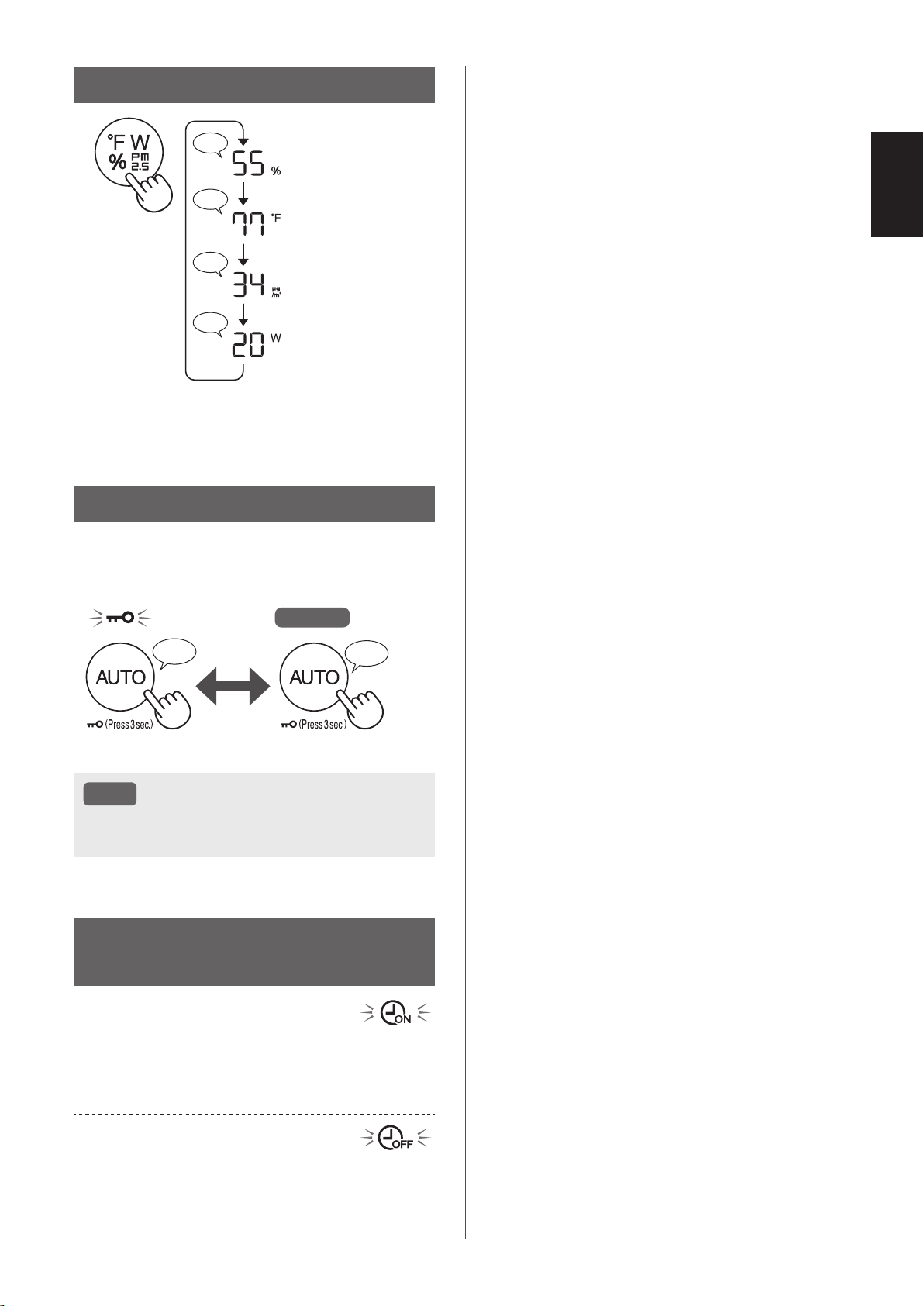
SWITCH DISPLAY
♪
♪♪
♪
♪
Humidity
Temperature
*
1
PM2.5 Concentration
Wattage
*
1
*1: For KCP110CW or KCP70CW, “
o
F ” on the control
panel is “
o
C ”.
CHILD LOCK
The operation panel will be locked.
Goes off
ON CANCELLATION
♪
♪♪
Press
for 3 sec.
Press
for 3 sec.
NOTE
• It is possible to turn Wi-Fi off while in Child
Lock Mode.
WEEKLY SCHEDULER:
APP ONLY
ON TIMER:
You can set a weekly scheduler for the air purifier
to start a specific mode on a specific day and time.
The ON Timer Indicator will turn on while there is a
schedule set.
OFF TIMER:
You can set a weekly scheduler for the air purifier
to stop operation on a specific day and time. The
OFF Timer Indicator will turn on while there is an
schedule set.
KCP110UW_70UW_110CW_70CW_2nd.indb 17KCP110UW_70UW_110CW_70CW_2nd.indb 17 2022/03/23 11:16:452022/03/23 11:16:45
EN-18
CARE AND MAINTENANCE
CARE
• To maintain optimum performance of this air
purifier, please clean the product including the
filter periodically.
• Be sure to stop operation
and unplug the product
before any maintenance or
replacing accessories.
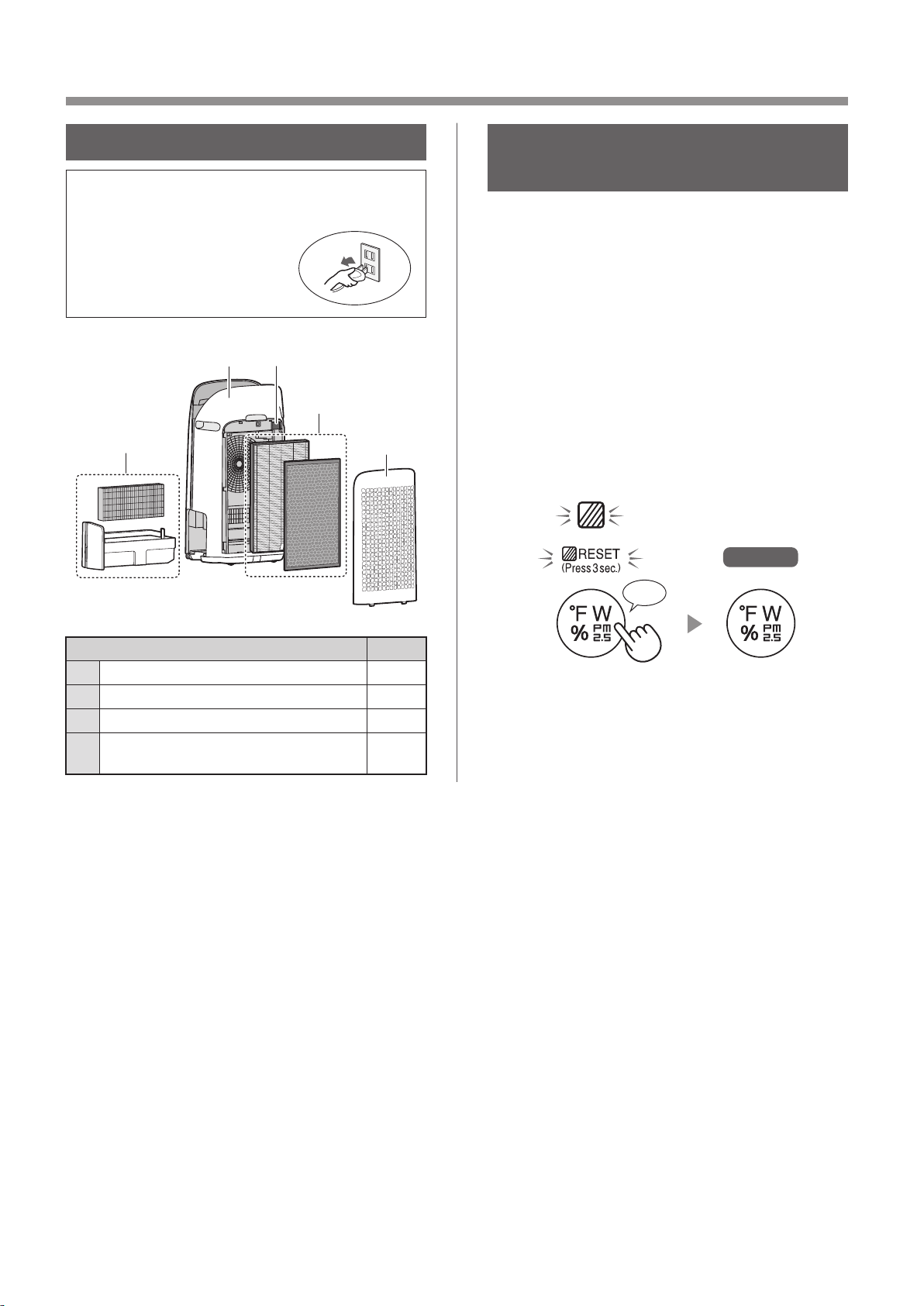
1
23
4
2
Place Page
1
Humidifying Filter / Humidifying Tray 19
2
Back Panel / Sensor Filter 20
3
Main Body 20
4
True HEPA Filter / Active Carbon
Deodorizing Filter
21
FILTER MAINTENANCE
INDICATOR
When the cumulative operation period or the water
containing period is more than approximately 720
hours, the Filter Maintenance Indicator will turn on.
• It will not calculate the time when the product is
unplugged.
• 30 days × 24 hours = 720 hours
This is a reminder to perform the maintenance
described Humidifying Filter and Tray, Main Body,
Back Panel, and Sensors.
After maintenance, connect the power plug to the
wall outlet and press Power ON/OFF Button, then
Switching Display Button for 3 seconds.
Goes off
*
1
Press for 3 sec.
♪
*
1
*1: For KCP110CW or KCP70CW, “
o
F ” on the control
panel is “
o
C ”.
KCP110UW_70UW_110CW_70CW_2nd.indb 18KCP110UW_70UW_110CW_70CW_2nd.indb 18 2022/03/23 11:16:472022/03/23 11:16:47
EN-19
ENGLISH
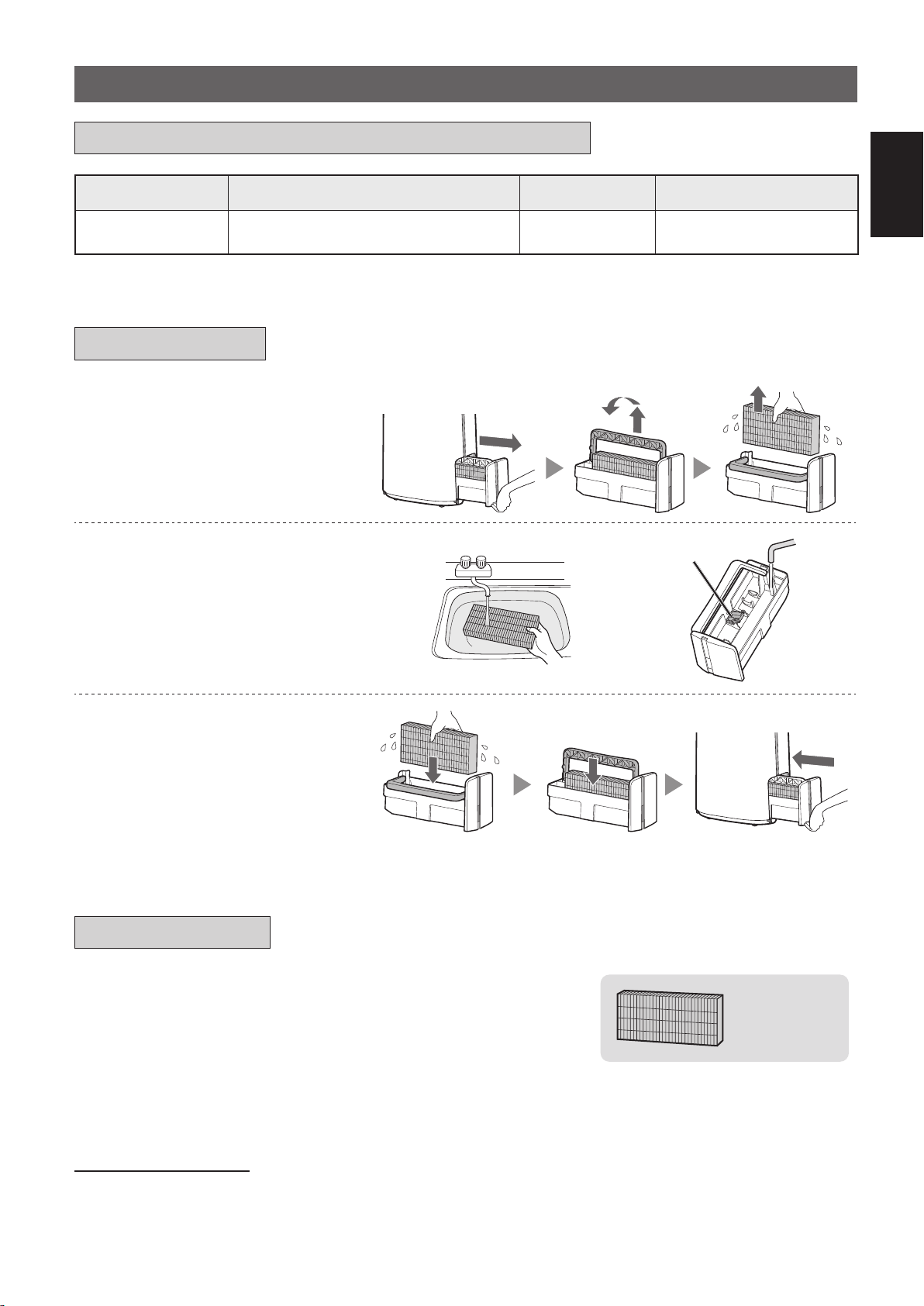
1.
Remove the Humidifying
Filter and Tray.
2.
Rinse with plenty of water.
Humidifier Float
• Do not remove the Humidifier Float.
If it comes off, refer to page 20.
• Refer to page 20 for how to
clean the Humidifying Filter when it
is very dirty.
3.
Attach the Humidifying Filter
and Tray.
• After maintenance, correctly
reattach the parts.
HUMIDIFYING FILTER / HUMIDIFYING TRAY
Filter Name Maintenance Cycle Max Service Life Replacement Filter Model
Humidifying Filter
When odor emanates from the air
outlet, or once a month.
2 years FZ-P11MFU
REPLACEMENT AND MAINTENANCE CYCLE
MAINTENANCE
REPLACEMENT
See this page for directions on how to install the filter
when replacing.
•
Please consult your dealer for purchase of replacement filter.
•
Only use filter designed for this product.
FZ-P11MFU
(1 unit)
Record the date when you replace the filters on the back cover of
this manual
.
•
Scan the QR code for product on page 1 information and accessories.
Disposal of Filters
Please dispose of the replaced filter according to the local disposal laws and regulations.
Humidifying Filter materials: Polyester, Rayon
KCP110UW_70UW_110CW_70CW_2nd.indb 19KCP110UW_70UW_110CW_70CW_2nd.indb 19 2022/03/23 11:16:512022/03/23 11:16:51
EN-20
NOTE
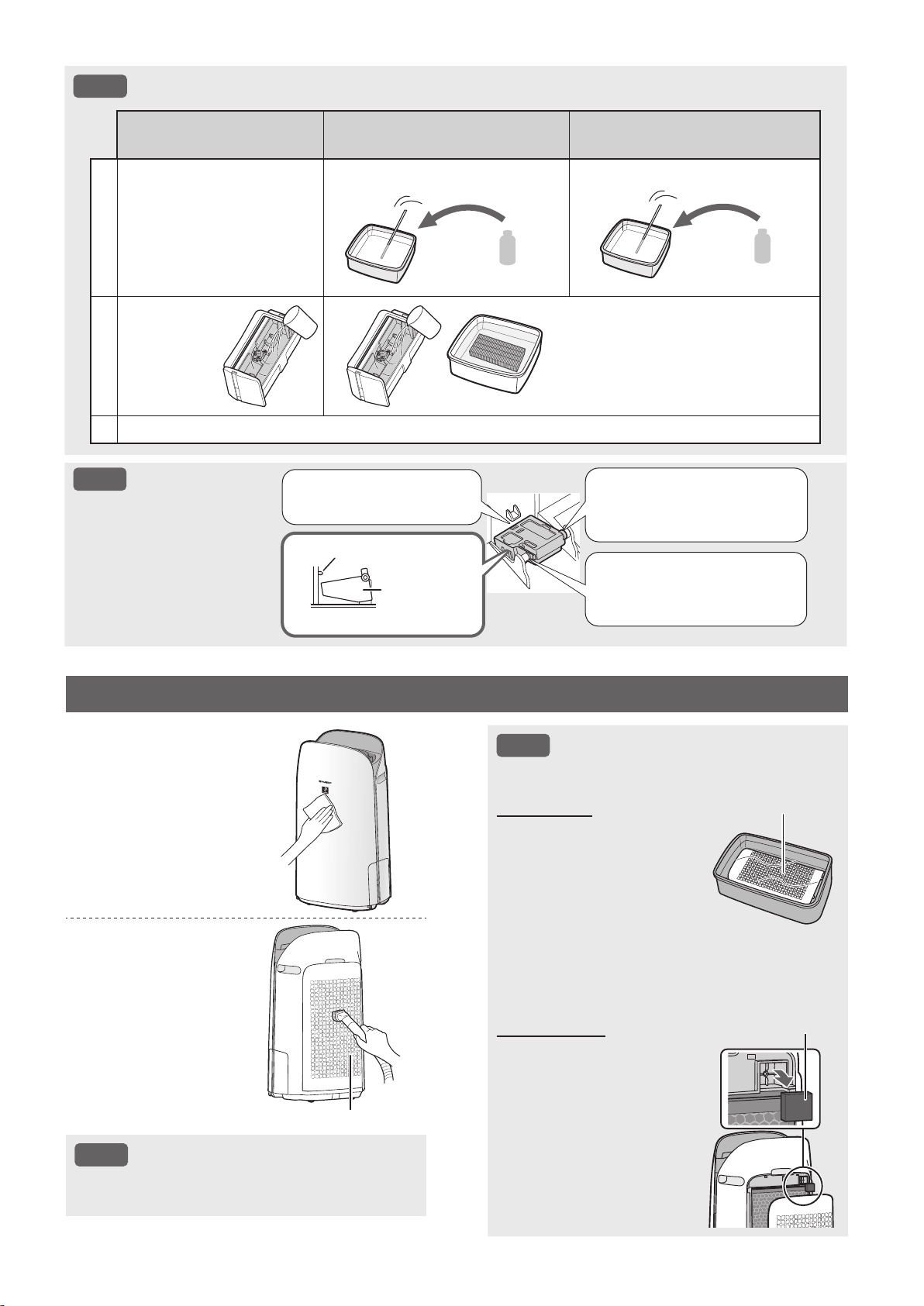
How to Clean Hard-to-Remove Dirt.
Mild Kitchen Detergent
(only Humidifying tray)
Citric Acid
(available at some drugstores)
100% Bottled Lemon Juice
with No Pulp
1
1. Fill the tray half-way with
water.
2. Add a small amount of
mild kitchen detergent.
2 1/2 cups of water
3 teaspoons
3 cups of water
1/4 cup
2
Soak for
30 minutes.
Soak for 30 minutes.
(When using lemon juice as your
descaling solution, allow for more
soak time.)
3
Rinse off the mild kitchen detergent or the descaling solution with clean water.
NOTE
How to install the
Humidifier Float.
2. Insert the tab of the
Humidifier Float into the
hole.
1. Insert the Humidifier
Float under this tab.
Cross-Section view
Tab
Humidifier
Float
3. Insert the tab on the other
side of the Humidifier Float
into the hole.
NOTE
How to Clean Hard-to-Remove Dirt.
Back Panel
1. Add a small amount of
mild kitchen detergent to
water and soak for about
10 minutes.
2. Rinse off the mild kitchen
detergent with clean
water.
3. Completely dry the filter
in a well vented area.
Back Panel
Sensor Filter
1. Remove the Back Panel.
2. Remove the Sensor
Filter.
3. If the Sensor Filter is very
dirty, wash it with water
and dry it thoroughly.
Sensor Filter
MAIN BODY / BACK PANEL / SENSOR FILTER
Wipe with a dry,
soft cloth.
Remove the
dust gently with
a cleaning tool
such as a vacuum
cleaner.
Back Panel (Pre-Filter)
NOTE
• Do not apply excessive pressure when
scrubbing the Back Panel.
KCP110UW_70UW_110CW_70CW_2nd.indb 20KCP110UW_70UW_110CW_70CW_2nd.indb 20 2022/03/23 11:16:582022/03/23 11:16:58
EN-21
ENGLISH
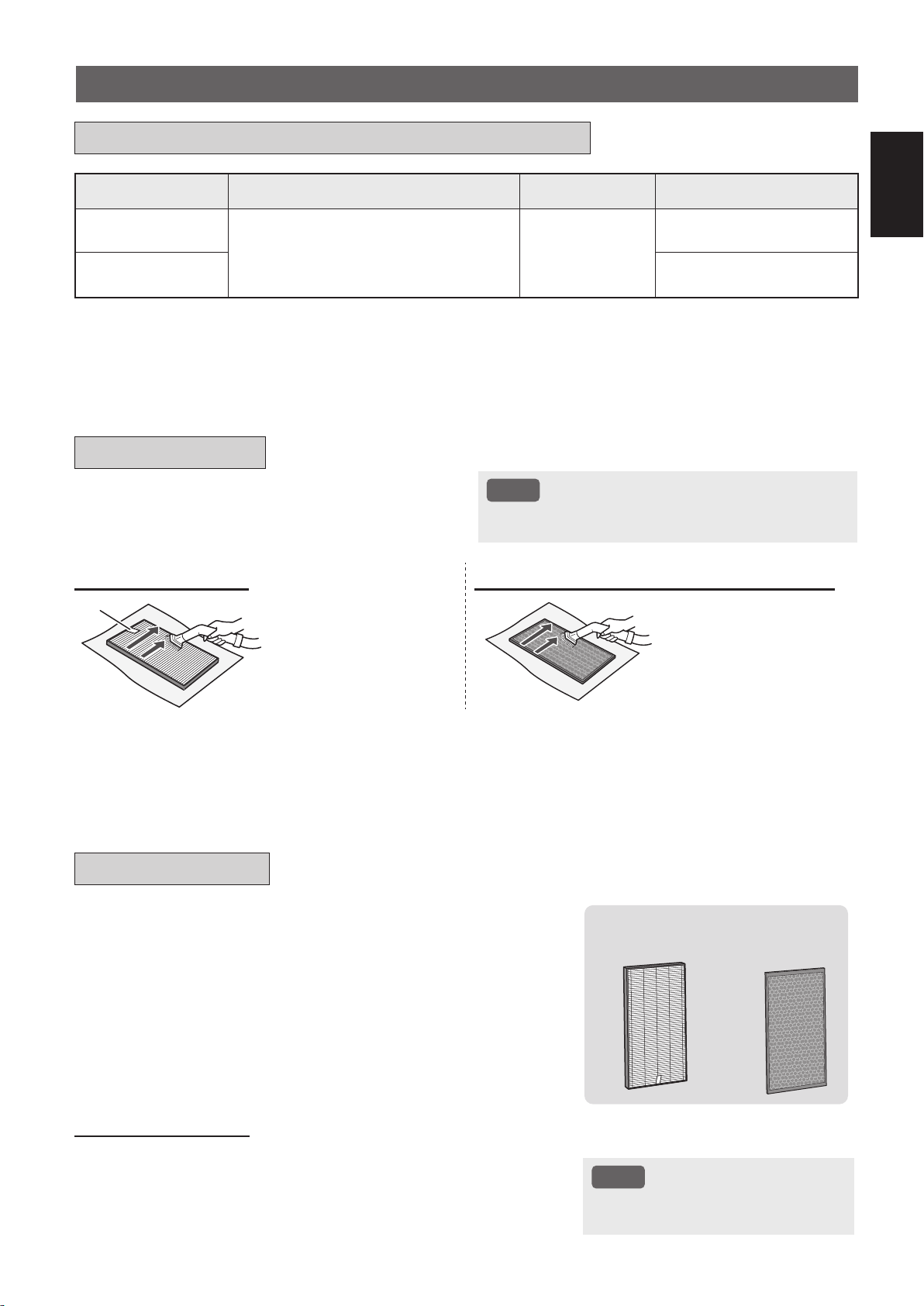
Filter Name Maintenance Cycle Max Service Life Replacement Filter Model
True HEPA Filter
Whenever dust accumulates, when
odor emanates from the air outlet, or
once a month.
2 years
*
1, 2
FZ-P11HFU
Active Carbon
Deodorizing Filter
FZ-J80DFU
*1: According to Japan Electric Manufacture’s Association JEM 1467, the Max service life is based on the equivalent
condition of the smoke from 5 cigarettes per day whereby the dust collection/deodorization power is reduced by half
compared with that of new filter. It is recommended to replace the filter more frequently under more severe conditions.
*2: Designated App notifies when filters should be replaced according to usage.
True HEPA Filter / Active Carbon Deodorizing Filter
See page 12 for directions on how to install the filter
when replacing.
•
Please consult your dealer for purchase of replacement filter.
•
Use only filter designed for this product.
FZ-P11HFU
(1 unit)
FZ-J80DFU
(1 unit)
Record the date when you replace the filters on the back cover of
this manual
.
•
Scan the QR code on page 1 for product information and accessories.
Disposal of Filters
Please dispose of the replaced filter according to the local disposal
laws and regulations.
True HEPA Filter materials: Polypropylene, Polyethylene
Active Carbon Deodorizing Filter materials: Polypropylene,
Polyester, Activated carbon
NOTE
• Do not wash and reuse replaced
filter.
Remove the dust on the filters.
NOTE
• Do not wash the filters. Do not expose to sunlight.
(Otherwise these filters may lose efficacy.)
TRUE HEPA FILTER ACTIVE CARBON DEODORIZING FILTER
Tag
Maintain and clean only the
tagged surface. Do not clean
up the opposite surface.
The filter is fragile, so be
careful not to apply too much
pressure.
Both surfaces can be
maintained and cleaned.
The filter is fragile, so be
careful not to apply too much
pressure.
Some odors absorbed by the filters will break down over time, causing additional odors. Depending on usage conditions, and
especially if the product is used in environments significantly more severe than a normal household, these odors may become
noticeable sooner than expected.
Replace the filter in those cases or if dust is unable to be removed after maintenance.
REPLACEMENT AND MAINTENANCE CYCLE
MAINTENANCE
REPLACEMENT
KCP110UW_70UW_110CW_70CW_2nd.indb 21KCP110UW_70UW_110CW_70CW_2nd.indb 21 2022/03/23 11:17:002022/03/23 11:17:00
EN-22
TROUBLESHOOTING
•
Before calling for service, please review
the Troubleshooting list below, since
the problem may not be the product
malfunction.
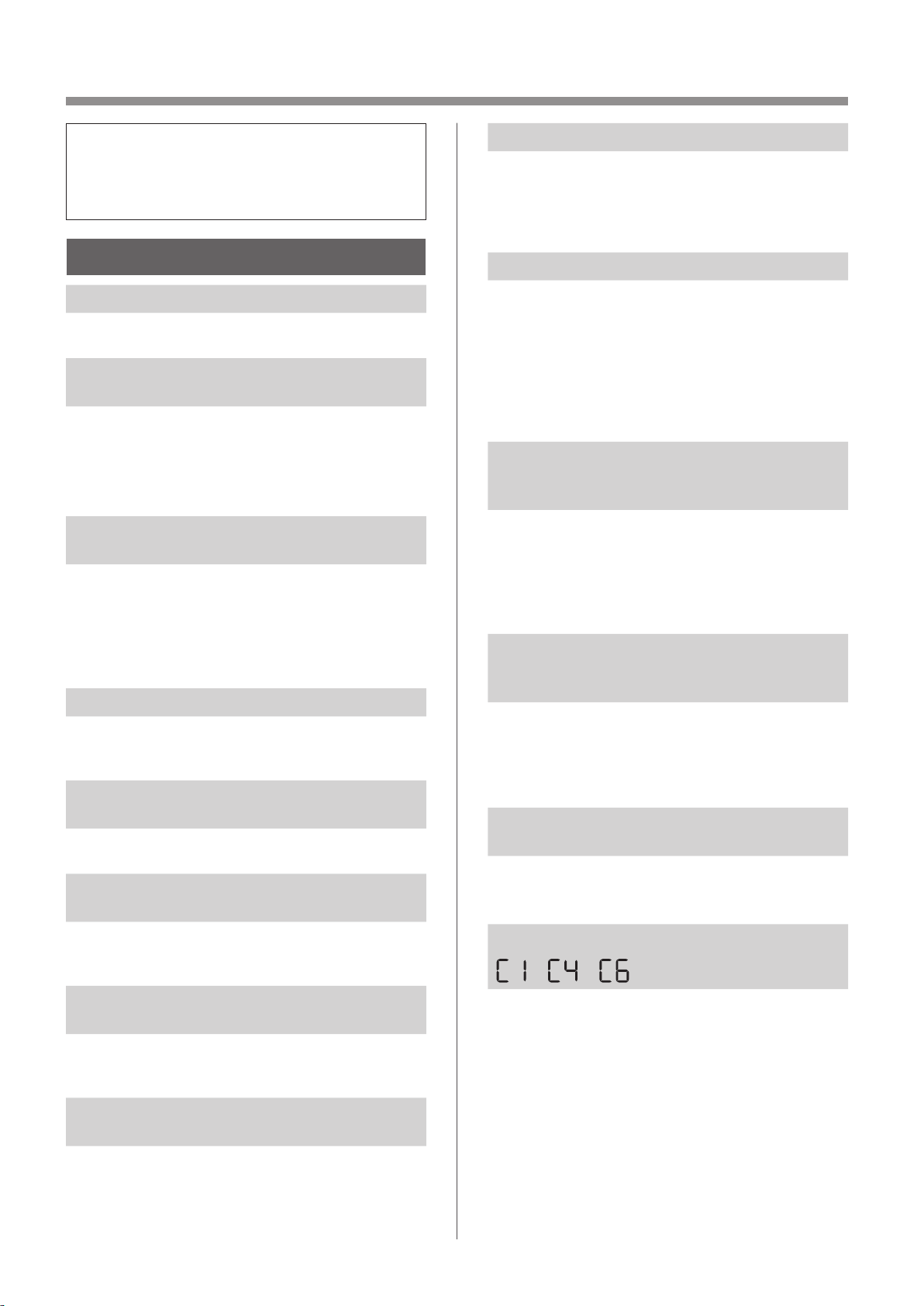
ABOUT THE PRODUCT
Odor and smoke persists.
• Check the filters. If they appear to be extremely
dirty, clean or replace them.
Air discharged from the product has an
odor.
• Check to see if the filters are extremely dirty.
• Clean or replace the filters.
• Use only fresh tap water. Using other water
sources risks the growth of mold, fungi, or
bacteria.
The product does not operate when
cigarette smoke is in the air.
• Make sure the product is installed in a location in
which the sensors can detect cigarette smoke.
• Check to see if the Sensitive Dust Sensor
openings are blocked or clogged. If they are
blocked or clogged, clean the Sensor Filter or the
Back Panel.
Smell from a new product and/or filter.
• Immediately after removing the plastic bag, a
slight odor may occur. This odor is not harmful for
filter performance or human exposure.
The product makes a clicking or ticking
sound.
• The product may make clicking or ticking sounds
when it is generating ions.
The Air Quality Indicator is blue even
when the air is not clean.
• The air may have been dirty when the product
was plugged in. Unplug the product, wait one
minute, and then plug the product in again.
The Air Quality Indicator is red even when
the air is clean.
• Dirty or clogged Sensitive Dust Sensor openings
interfere with sensor operation. Gently clean the
Sensor Filter or the Back Panel.
The Air Quality Indicator changes color
frequently.
• The Cleanliness Indicator automatically changes
color when the Sensitive Dust Sensor and Odor
Sensor detect impurities. If you are concerned
about the change, you can change sensor
sensitivity. (Page 24, 25)
Filter Maintenance Indicator is on.
• Whenever after performing maintenance or
replacing the Humidifying Filter, connect the
power cord to an outlet and then press the Filter
Reset Button for more than 3 seconds.
(Page 18)
The Display goes off.
• When the Light Control is set to “OFF”, the light is
always off.
If you do not want the light to be off, set the Light
Control to “Auto” or “Dim” setting. (Page 24,
25)
• In Sleep mode, when the Light Control is set to
"Auto", the light will automatically switch to dim or
off based on the brightness of the room.
The Display does not match weather
report or another hygrometer or
thermometer in the room.
• Outdoor and indoor as well as the home
environment (the volume of traffic nearby, number
of stories in home, etc.) may cause a reading
different than those data.
• There is a difference in the level within the same
room.
The Humidify Indicator on the Display
does not light up when the Humidifying
Tray is empty.
• The room has reached the appropriate level of
humidity and has stopped humidifying.
• Check the Humidifier Float for impurities. Clean
the Humidifying Tray. Make sure that the product
is on a level surface.
The water level in the Humidifying Tray
does not decrease or decreases slowly.
• Check to see if the Humidifying Tray is correctly
installed. Check the Humidifying Filter.
• If the filter is extremely dirty, clean or replace it.
One of the following is displayed.
• Unplug the product, wait one minute, and then
plug the product in again.
KCP110UW_70UW_110CW_70CW_2nd.indb 22KCP110UW_70UW_110CW_70CW_2nd.indb 22 2022/03/23 11:17:002022/03/23 11:17:00
EN-23
ENGLISH
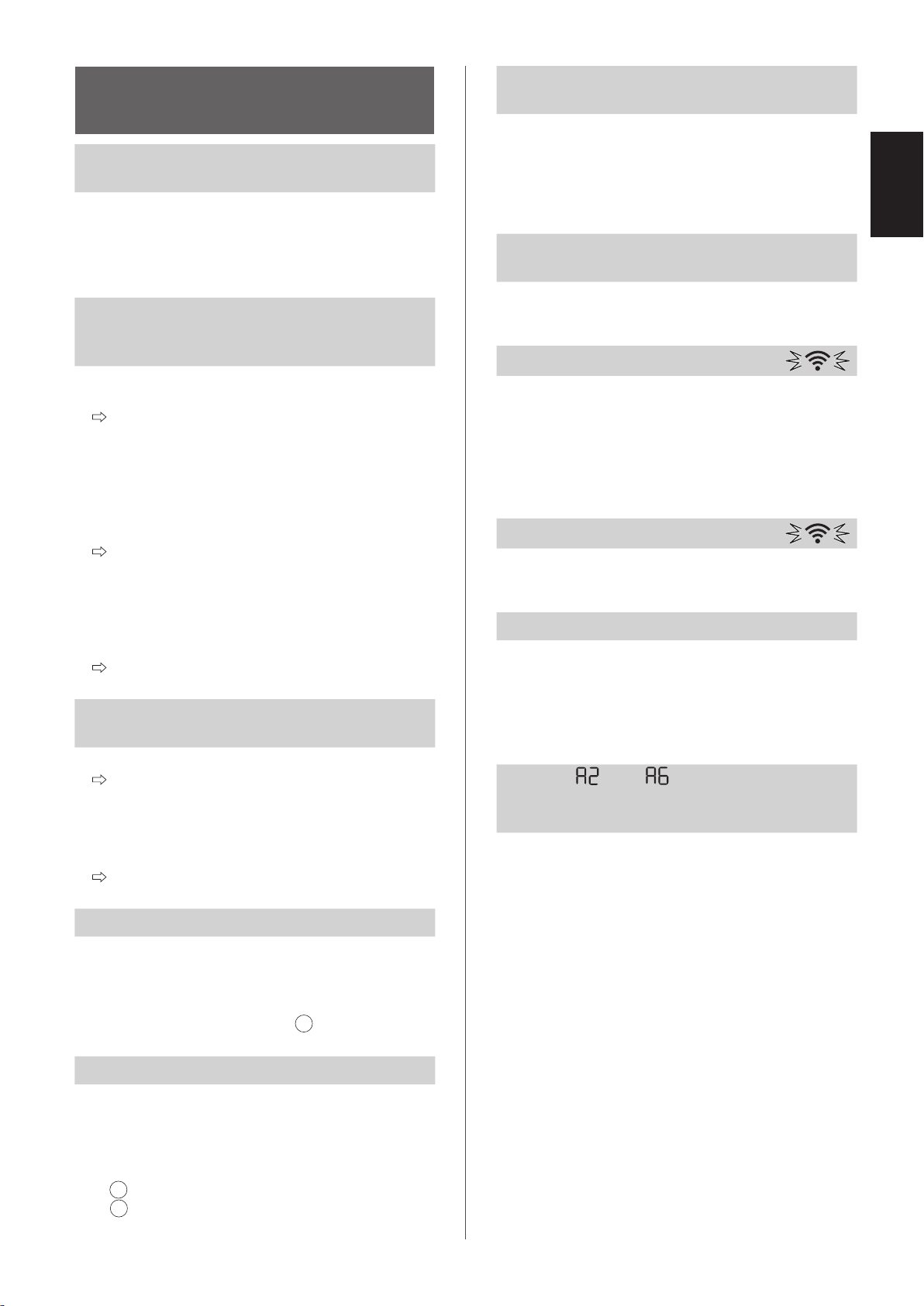
ABOUT THE Wi-Fi
FUNCTION
Wi-Fi connection of the air purifier and the
router cannot be performed.
• Check the specifications of the router in use.
• Adjust the router and antenna direction, move the
router and antenna closer, and so on. After that,
reswitch to turn on the router and perform the
INITIAL SET UP again.
The connection between the air purifier
and your smart device cannot be
established.
• Are the air purifier and your smart device
connecting to the same router?
Connect the air purifier and your smart device
to the same router.
If you still can’t connect, try connecting your
smart device to the 2.4GHz band of the router.
• Is the total number of smart devices being in use
exceeding the maximum number for registration
on one air purifier?
The maximum number of smart devices that
can be registered on one air purifier is 10.
• Is the total number of products (air conditioners,
air purifiers, etc.) to be registered with one smart
device exceeding the maximum designated
number?
The maximum number of products to be
registered with one smart device is 30.
Remote operation from a smart device
cannot be performed.
• Is the Wi-Fi Indicator of the air purifier on?
If the Wi-Fi Indicator is off, please perform “A1:
Wi-Fi adapter ON/OFF” to turn on the product
Wi-Fi. (Page 26)
• Have the connection between the air purifier and
your smart device been completed?
Set up the connection between the air purifier
and your smart device. (Page 15)
When changing the router
• It is necessary to reconnect the air purifier to the
router.
1. Hold down the “Wi-Fi” Button for 3 seconds to
stop the Wi-Fi function.
2. Perform “INITIAL SET UP: 2 Connection of
the air purifier and a router”. (Page 14)
When changing the smart device
• Perform the followinf steps.
1. Delete the registration of the old smart device
from designated App.
2. Use the new smart device to perform “INITIAL
SET UP:
1 Download & Sign up, and
3 Connection between the air purifier and a
smart device”. (Page 14, 15)
When going to dispose or hand over the
air purifier
• Perform the following steps, to prevent leak of
personal information.
1. Delete the registration of the air purifier from
designated App.
2. Perform “A4: Initialization of Wi-Fi function”.
(Page 26)
In case of being handed over from a third
party
• To prevent unauthorized access from a third party,
perform “A4: Initialization of Wi-Fi function”.
(Page 26)
Wi-Fi Indicator blinks slowly
• It is one of the following status.
A. The Wi-Fi connection of the air purifier and a
router is in setup.
B. The connection of the air purifier and a smart
device is in setup.
C. The software for the Wi-Fi function in the air
purifier is being updated.
Wi-Fi Indicator blinks fast
• Network error. Please confirm the Wi-Fi network
status from “A7: Display Wi-Fi network status”.
(Page 27)
Wi-Fi Indicator goes off
• The air purifier cannot connect to the router.
Check the following.
A. Is the power plug correctly connected?
B. Has the Wi-Fi function been stopped? Confirm
the Wi-Fi network status from “A7: Display Wi-
Fi network status”. (Page 27)
One of “ ” to “ ” cannot be selected
in the Wi-Fi setting mode.
(Page 26 - 27)
• If the Wi-Fi adapter is off, one of “A2” to “A6” may
not be selectable.
KCP110UW_70UW_110CW_70CW_2nd.indb 23KCP110UW_70UW_110CW_70CW_2nd.indb 23 2022/03/23 11:17:032022/03/23 11:17:03
EN-24
HOW TO CHANGE VARIOUS SETTINGS
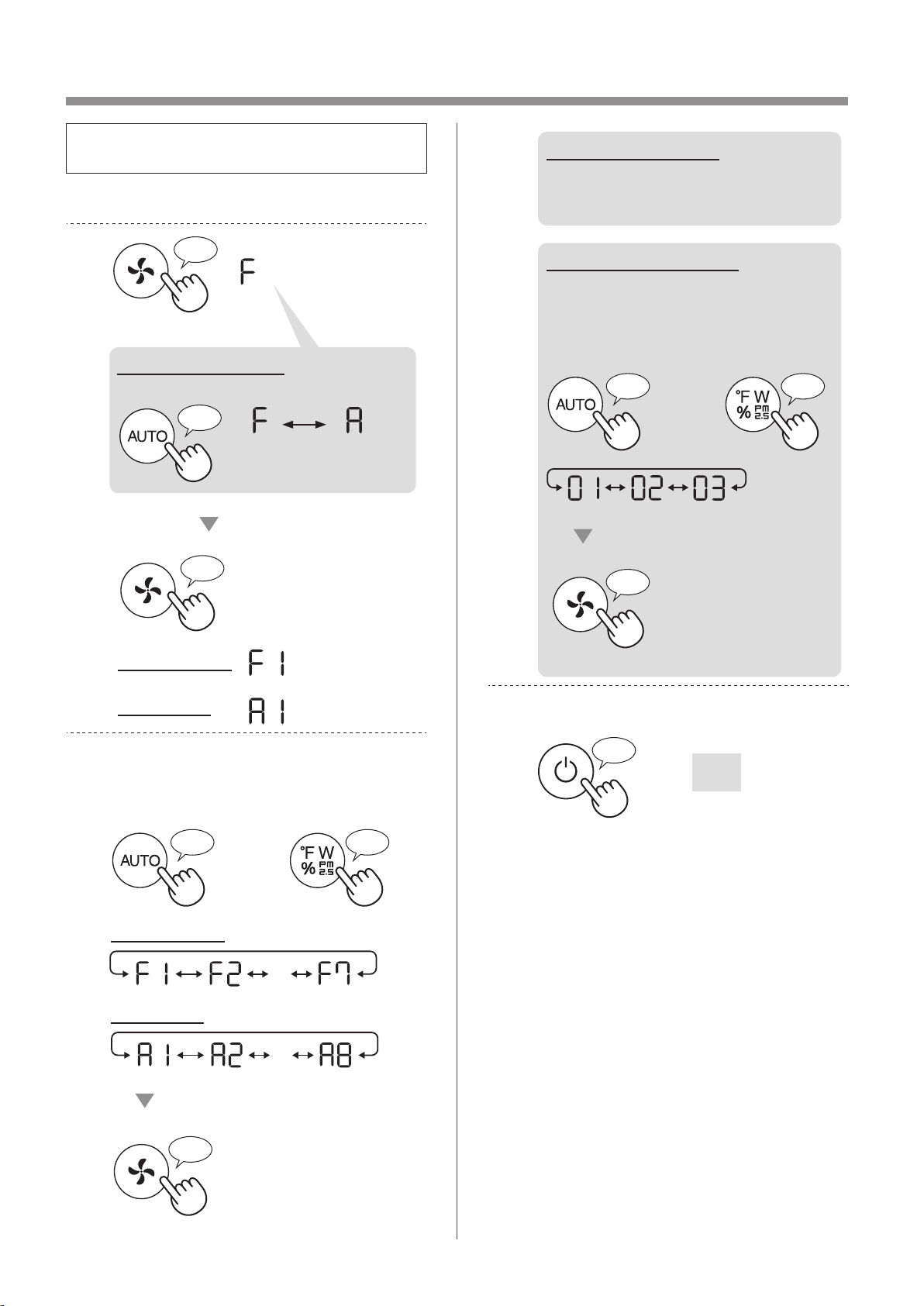
• You can change the product and Wi-Fi
functions on page 25 - 28.
1.
Turn the product OFF.
2.
Press for 3 sec.
♪
♪
Set
Wi-Fi setting
Product setting
♪
When Wi-Fi setting
Change “F” to “A”.
Product
setting
Wi-Fi
setting
3.
Select “Function number (F1-F7 or
A1-A8)” on page 25 - 28.
or
Go Forward
♪
Go Back
♪
・・・
Set
♪
Wi-Fi setting
Product setting
・・・
4.
When Wi-Fi setting
Refer to page 26 - 28 for the
detail of each functions.
When Product setting
Select “Setting number
(01 - 03)” on page 25.
Set
♪
~
or
Go Forward
♪
Go Back
♪
5.
Finish the setting.
Goes off
♪
~
KCP110UW_70UW_110CW_70CW_2nd.indb 24KCP110UW_70UW_110CW_70CW_2nd.indb 24 2022/03/23 11:17:192022/03/23 11:17:19
EN-25
ENGLISH
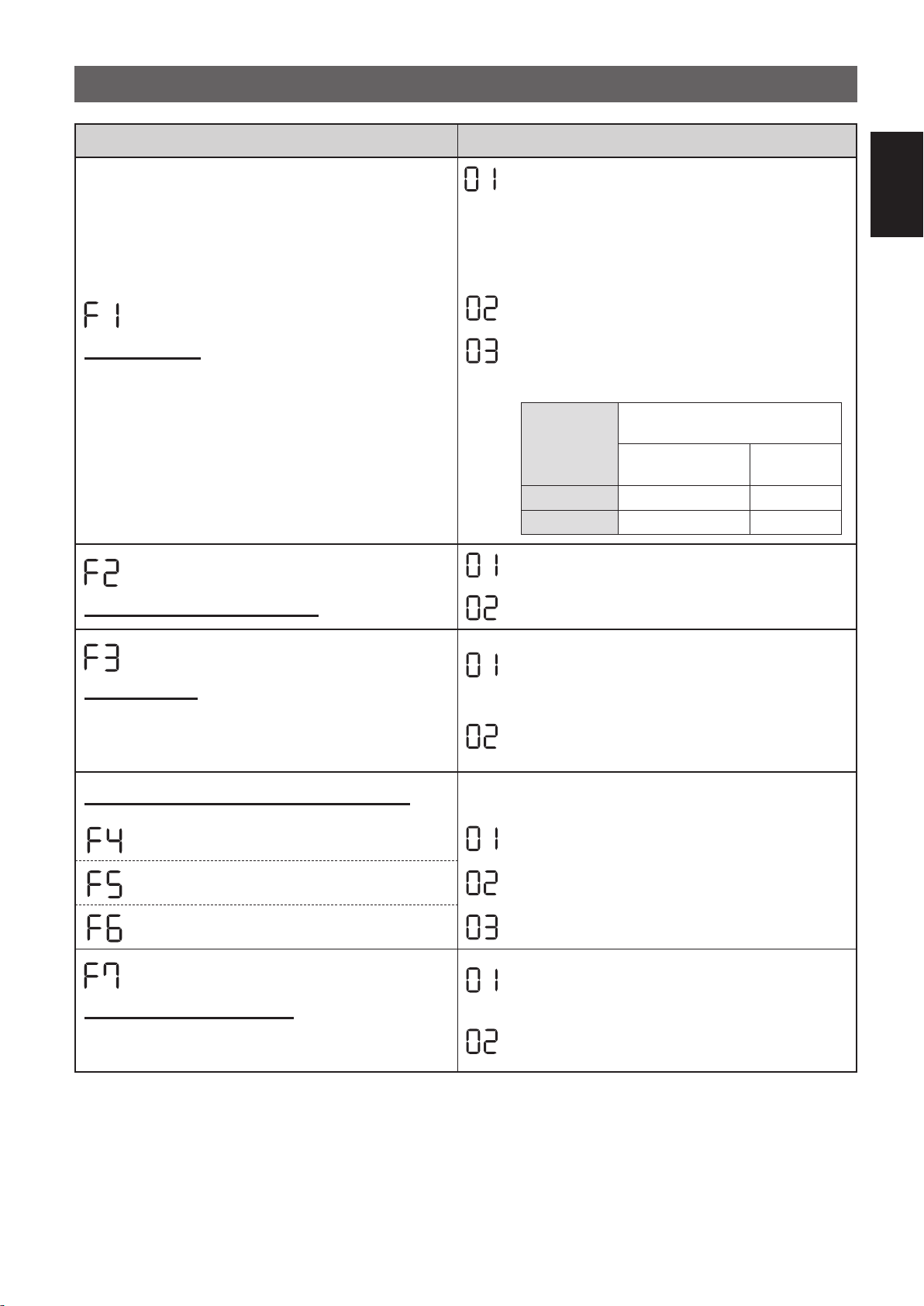
PRODUCT FUNCTIONS (F1-F7)
Function Setting
Light Control
You can select the brightness of the Display and Air
Quality Indicator.
OFF
When set to “OFF”, the “Dim” light illuminates
for 8 seconds after operation starts and then the
light goes off.
However, some indicators that need notification
will remain dim.
Dim
Auto
(default)
Light automatically switches based on room
brightness.
Room
brightness
Display and Air Quality
Indicator
ALL MODE
(Except SLEEP)
SLEEP
MODE
Bright ON Dim
Dim Dim OFF
Plasmacluster Ion ON/OFF
OFF
ON
(default)
Auto resume
This model has Auto Resume function, where the
operation resumes at the previous operation mode
and settings if the power is restored.
Cancellation
ON
(default)
Adjusting sensor sensitivity (F4 - F6)
Light Sensor Low
Sensitive Dust Sensor Standard
(default)
Odor Sensor High
Sound Indicator Setting
You can set the product to make a beeping sound
when the Humidifying Tray is empty.
Cancellation
(default)
ON
KCP110UW_70UW_110CW_70CW_2nd.indb 25KCP110UW_70UW_110CW_70CW_2nd.indb 25 2022/03/23 11:17:262022/03/23 11:17:26
EN-26
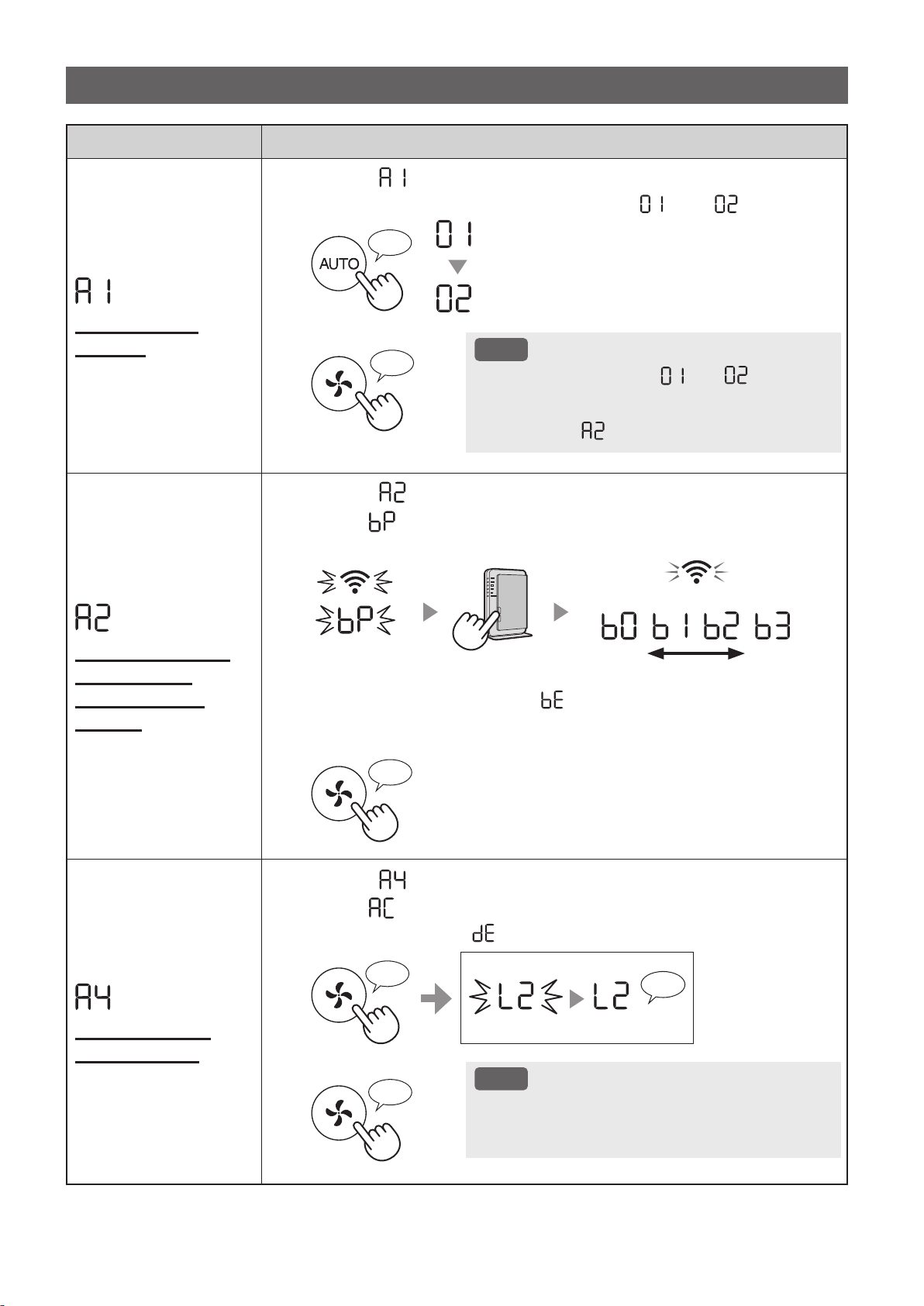
Function Setting
Wi-Fi adapter
ON/OFF
1.
Select “ ” by following Steps 1 - 3 on page 24.
2.
Press "AUTO" Button to select Setting " " or " ".
Wi-Fi OFF
Wi-Fi ON
♪
3.
Complete
NOTE
• When Setting number (“ ” or “ ”) is
changed, the square rotates on the display
until the setting is completed. When setting is
completed, “
” is displayed.
♪
~
Wi-Fi connection
with a router
(with the WPS
Button)
1.
Select “ ” by following Steps 1 - 3 on page 24.
2.
After “ ” is displayed, press the WPS (Wi-Fi Protected Setup)
Button of the router.
weak strong
Light up
Blink
Once connected, receiver level will be displayed.
A connection error is occuring if “ ” is displayed. Please confirm the router
and try again.
3.
Complete
♪
Initialization of
Wi-Fi function
1.
Select “ ” by following Steps 1 - 3 on page 24.
2.
After “ ” is displayed press “Fan Speed” Button.
An error is occurring if “ ” is displayed. Please try again.
♪
♪
~
Complete
Blink
Initializing
3.
Complete
NOTE
• Please delete the device registration from the App
when initializing the air purifier which is already
connected to the Wi-Fi.
♪
Wi-Fi FUNCTIONS (A1-A8)
KCP110UW_70UW_110CW_70CW_2nd.indb 26KCP110UW_70UW_110CW_70CW_2nd.indb 26 2022/03/23 11:17:382022/03/23 11:17:38
EN-27
ENGLISH
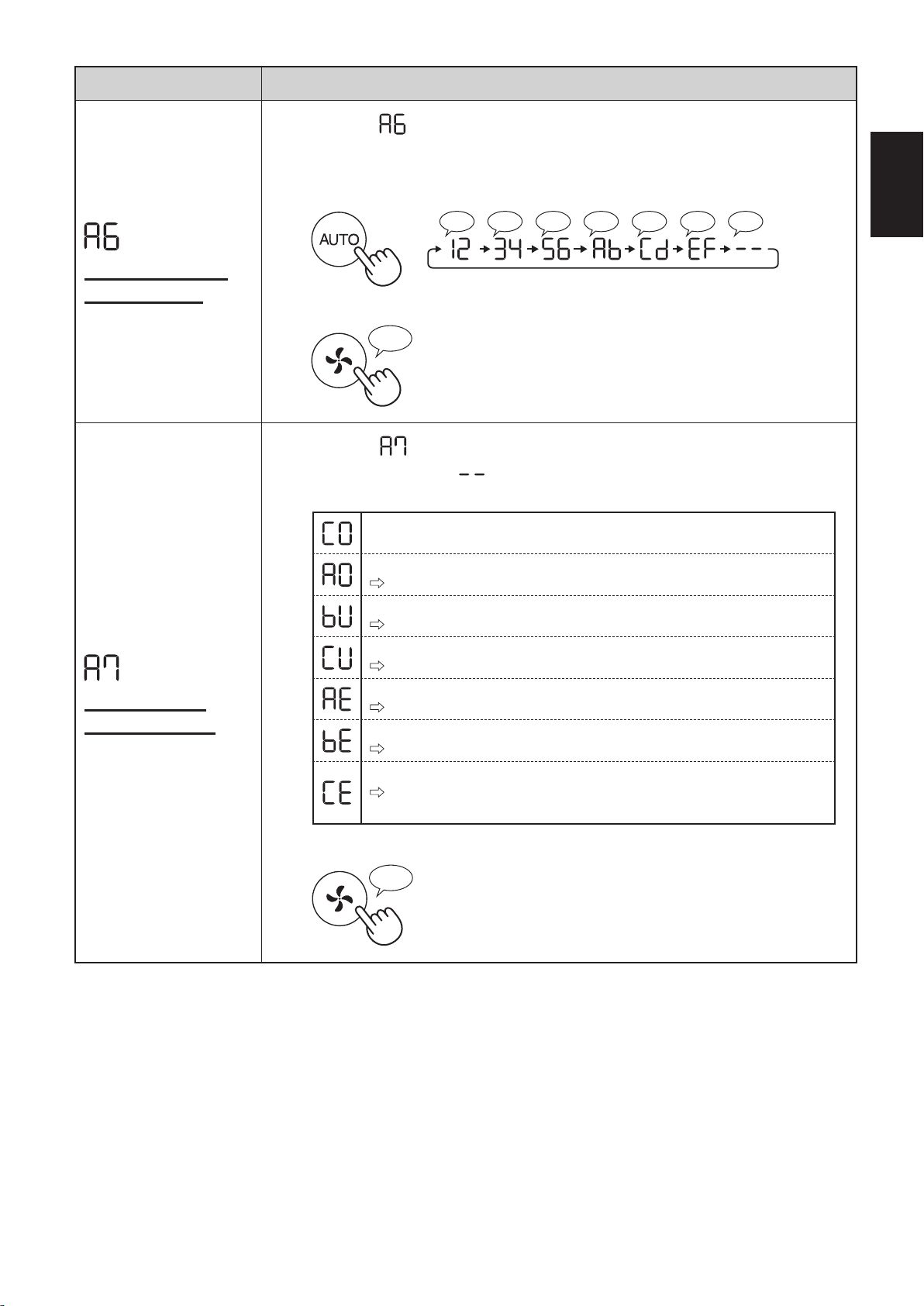
Function Setting
Confirmation of
MAC address
1.
Select “ ” by following Steps 1 - 3 on page 24.
2.
Press “AUTO” Button to display MAC address.
For example:
In case MAC address is “12:34:56:AB:CD:EF”.
♪♪♪♪♪♪♪
♪
~
3.
Complete
♪
Display Wi-Fi
network status
1.
Select “ ” by following Steps 1 - 3 on page 24.
2.
After displaying “ ” for a few seconds, network status of
Wi-Fi adapter will be displayed.
Connection is stable
Wi-Fi adapter is off
Please turn on Wi-Fi adapter.
Router is not registered
Please perform the Wi-Fi connection with the router.
Link settings with the App is not performed
Please perform the link setting with the smart device.
Wi-Fi adapter network error
Please turn off Wi-Fi adapter and turn on again after a while.
Network error between the air purifier and the router
Please confirm the network status of the router.
Network service error
Please turn off the air purifier and confirm the internet status, then try
again.
3.
Complete
♪
KCP110UW_70UW_110CW_70CW_2nd.indb 27KCP110UW_70UW_110CW_70CW_2nd.indb 27 2022/03/23 11:17:462022/03/23 11:17:46
EN-28
Function Setting
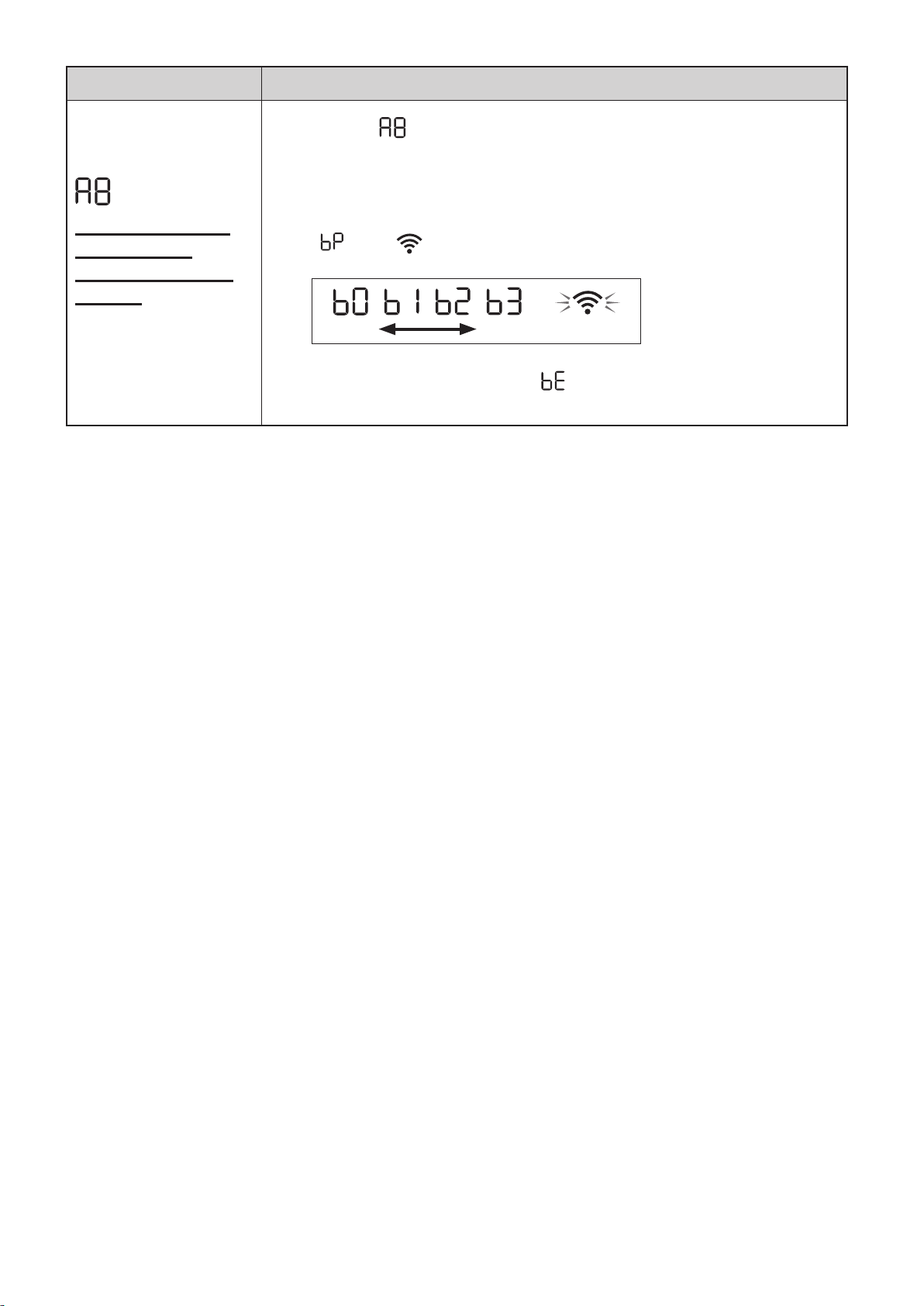
Wi-Fi connection
with a router
(without the WPS
Button)
- AP (Access Point)
mode -
1.
Select “ ” by following the Steps 1 - 3 on page 24.
2.
Perform Wi-Fi connection of the air purifier and the router based
on the App screen.
Refer to the App for further operations.
“ ” and “ ” blinks while setting the connection between the product
and the router.
weak strong
Light up
Once connected, receiver level will be displayed.
A connection error is occuring if “ ” is displayed. Please confirm the router
and try again.
KCP110UW_70UW_110CW_70CW_2nd.indb 28KCP110UW_70UW_110CW_70CW_2nd.indb 28 2022/03/23 11:17:492022/03/23 11:17:49
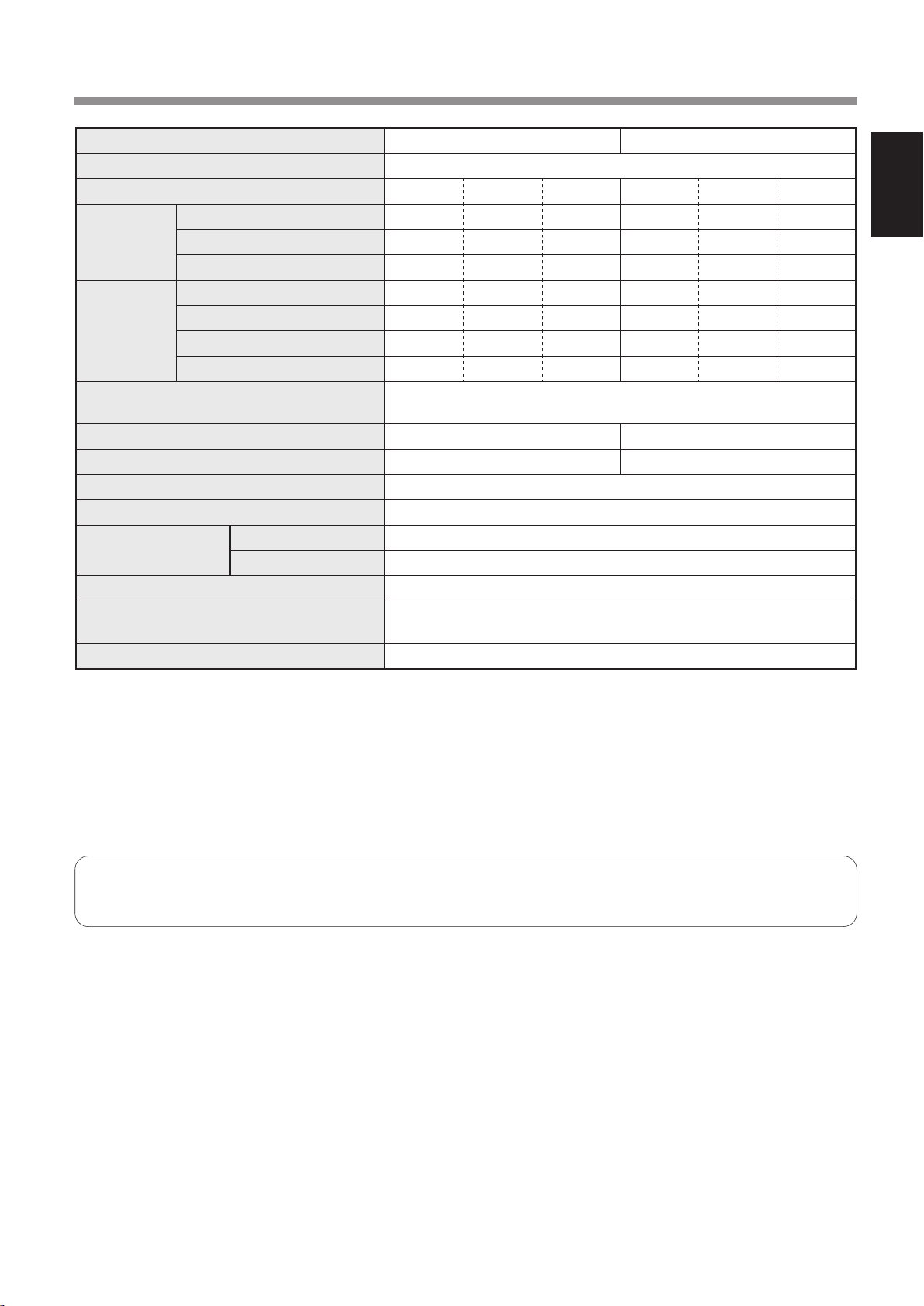
EN-29
ENGLISH
SPECIFICATIONS
Model KCP110UW / KCP110CW KCP70UW / KCP70CW
Power supply 120 V ~ 60 Hz
Fan Speed Adjustment MAX MED LOW MAX MED LOW
CLEAN AIR
Fan Speed (CFM) 381 222 64 272 190 64
Rated Power (W) 94 27 4.8 40 19 4.8
Noise Level (dBA)
*
1
55 42 21 47 39 21
CLEAN AIR
&
HUMIDIFY
Fan Speed (CFM) 381 222 64 272 190 64
Rated Power (W) 94 27 4.8 40 19 4.8
Noise Level (dBA)
*
1
55 42 21 47 39 21
Humidification (pints / hour)
*
2
0.70 0.47 0.15 0.55 0.42 0.15
Standby power (W)
1.1 (When Wi-Fi adapter is ON.)
0.7 (When Wi-Fi adapter is OFF.)
Recommended Room Size
*
3
538 sq. ft. (50 m
2
) 396 sq. ft. (37 m
2
)
CADR (Dust / Smoke / Pollen) 352 / 347 / 443 260 / 255 / 259
Humidifying Tray Capacity (gallon) Approx. 0.53
Sensors Sensitive Dust / Odor / Light / Temperature & Humidity
Filter Type
Dust collection True HEPA
*
4
Filter
Deodorization Active Carbon Deodorizing Filter
Cord Length 6.6 ft. (2.0 m)
Dimensions
15.8 in. (W) × 12.4 in. (D) × 28.6 in. (H)
(402 mm (W) × 315 mm (D) × 727 mm (H))
Weight Approx. 22.3 lbs. (10.1 kg)
*1
•
Noise level is measured based on the JEM1467 standard of the Japan Electrical Manufactures' Association.
*2
•
The amount of humidification changes in accordance with indoor and outdoor temperature and humidity.
The amount of humidification increases as temperatures rises or humidity decreases.
The amount of humidification decreases as temperatures decrease or humidity rises.
•
Measurement Conditions: 20 ºC, 30 % humidity (according to JEM1426).
*3
•
The recommended room size is appropriate for operating the product of maximum fan speed.
*4
•
The filter removes more than 99.97% of particles at least 0.3 microns in size.
Standby Power
When the product’s power plug is inserted in a wall outlet it consumes standby power in order to operate electrical circuits.
To conserve energy, unplug the power cord when the product is not in use.
KCP110UW_70UW_110CW_70CW_2nd.indb 29KCP110UW_70UW_110CW_70CW_2nd.indb 29 2022/03/23 11:17:492022/03/23 11:17:49

EN-30
INTELLECTUAL PROPERTY RIGHTS FOR THIS PRODUCT
■ Software structure
Software installed in this product is structured with multiple independent
software components, each of them has our or third-party's copyright.
■ Software of our development and free software
Among the software components of this product, for software we
developed or created and incidental documents has our copyright. And
they are protected
by copyright law, international regulation and other related laws.
Also this product uses software components distributed as free software
with third-party's copyright.
■ Obligation of license indication
Some software components installed in this product are required to
indicate the license by those copyright holders.
License indications of such software components are as below:
●Expat
Copyright (c) 1998, 1999, 2000 Thai Open Source Software Center Ltd and Clark
Cooper
Copyright (c) 2001, 2002, 2003, 2004, 2005, 2006 Expat maintainers.
Permission is hereby granted, free of charge, to any person obtaining a copy of
this software and associated documentation files (the "Software"), to deal in the
Software without restriction, including without limitation the rights to use, copy,
modify, merge, publish, distribute, sublicense, and/or sell copies of the Software,
and to permit persons to whom the Software is furnished to do so, subject to the
following conditions:
The above copyright notice and this permission notice shall be included in all
copies or substantial portions of the Software.
THE SOFTWARE IS PROVIDED "AS IS", WITHOUT WARRANTY OF ANY KIND,
EXPRESS OR IMPLIED, INCLUDING BUT NOT LIMITED TO THE WARRANTIES
OF MERCHANTABILITY, FITNESS FOR A PARTICULAR PURPOSE AND
NONINFRINGEMENT. IN NO EVENT SHALL THE AUTHORS OR COPYRIGHT
HOLDERS BE LIABLE FOR ANY CLAIM, DAMAGES OR OTHER LIABILITY,
WHETHER IN AN ACTION OF CONTRACT, TORT OR OTHERWISE, ARISING
FROM, OUT OF OR IN CONNECTION WITH THE SOFTWARE OR THE USE OR
OTHER DEALINGS IN THE SOFTWARE.
●Wslay
The MIT License
Copyright (c) 2011, 2012 Tatsuhiro Tsujikawa
Permission is hereby granted, free of charge, to any person obtaining a copy of
this software and associated documentation files (the "Software"), to deal in the
Software without restriction, including without limitation the rights to use, copy,
modify, merge, publish, distribute, sublicense, and/or sell copies of the Software,
and to permit persons to whom the Software is furnished to do so, subject to the
following conditions:
The above copyright notice and this permission notice shall be included in all
copies or substantial portions of the Software.
THE SOFTWARE IS PROVIDED "AS IS", WITHOUT WARRANTY OF ANY KIND,
EXPRESS OR IMPLIED, INCLUDING BUT NOT LIMITED TO THE WARRANTIES
OF MERCHANTABILITY, FITNESS FOR A PARTICULAR PURPOSE AND
NONINFRINGEMENT. IN NO EVENT SHALL THE AUTHORS OR COPYRIGHT
HOLDERS BE LIABLE FOR ANY CLAIM, DAMAGES OR OTHER LIABILITY,
WHETHER IN AN ACTION OF CONTRACT,TORT OR OTHERWISE, ARISING
FROM, OUT OF OR IN CONNECTION WITH THE SOFTWARE OR THE USE OR
OTHER DEALINGS IN THE SOFTWARE.
●libFLAC
Copyright (C) 2000-2009 Josh Coalson
Copyright (C) 2011-2014 Xiph.Org Foundation
Redistribution and use in source and binary forms, with or without modification,
are permitted provided that the following conditions are met:
- Redistributions of source code must retain the above copyright notice, this list of
conditions and the following disclaimer.
- Redistributions in binary form must reproduce the above copyright notice, this
list of conditions and the following disclaimer in the documentation and/or other
materials provided with the distribution.
- Neither the name of the Xiph.org Foundation nor the names of its contributors
may be used to endorse or promote products derived from this software without
specific prior written permission.
THIS SOFTWARE IS PROVIDED BY THE COPYRIGHT HOLDERS AND
CONTRIBUTORS ``AS IS'' AND ANY EXPRESS OR IMPLIED WARRANTIES,
INCLUDING, BUT NOT LIMITED TO, THE IMPLIED WARRANTIES OF
MERCHANTABILITY AND FITNESS FOR A PARTICULAR PURPOSE ARE
DISCLAIMED. IN NO EVENT SHALL THE FOUNDATION OR CONTRIBUTORS
BE LIABLE FOR ANY DIRECT, INDIRECT, INCIDENTAL, SPECIAL, EXEMPLARY,
OR CONSEQUENTIAL DAMAGES (INCLUDING, BUT NOT LIMITED TO,
PROCUREMENT OF SUBSTITUTE GOODS OR SERVICES; LOSS OF USE,
DATA, OR PROFITS; OR BUSINESS INTERRUPTION) HOWEVER CAUSED
AND ON ANY THEORY OF LIABILITY, WHETHER IN CONTRACT, STRICT
LIABILITY, OR TORT (INCLUDING NEGLIGENCE OR OTHERWISE) ARISING IN
ANY WAY OUT OF THE USE OF THIS SOFTWARE, EVEN IF ADVISED OF THE
POSSIBILITY OF SUCH DAMAGE.
●Iw-IP
Copyright (c) 2001, 2002 Swedish Institute of Computer Science.
All rights reserved.
Redistribution and use in source and binary forms, with or without modification,
are permitted provided that the following conditions are met:
1. Redistributions of source code must retain the above copyright notice, this list
of conditions and the following disclaimer.
2. Redistributions in binary form must reproduce the above copyright notice, this
list of conditions and the following disclaimer in the documentation and/or other
materials provided with the distribution.
3. The name of the author may not be used to endorse or promote products
derived from this software without specific prior written permission.
THIS SOFTWARE IS PROVIDED BY THE AUTHOR ``AS IS'' AND ANY EXPRESS
OR IMPLIED WARRANTIES, INCLUDING, BUT NOT LIMITED TO, THE IMPLIED
WARRANTIES OF MERCHANTABILITY AND FITNESS FOR A PARTICULAR
PURPOSE ARE DISCLAIMED. IN NO EVENT SHALL THE AUTHOR BE
LIABLE FOR ANY DIRECT, INDIRECT, INCIDENTAL, SPECIAL, EXEMPLARY,
OR CONSEQUENTIAL DAMAGES(INCLUDING, BUT NOT LIMITED TO,
PROCUREMENT OF SUBSTITUTE GOODS OR SERVICES; LOSS OF USE,
DATA, OR PROFITS; OR BUSINESS INTERRUPTION) HOWEVER CAUSED
AND ON ANY THEORY OF LIABILITY, WHETHER IN CONTRACT, STRICT
LIABILITY, OR TORT (INCLUDING NEGLIGENCE OR OTHERWISE) ARISING IN
ANY WAY OUT OF THE USE OF THIS SOFTWARE, EVEN IF ADVISED OF THE
POSSIBILITY OF SUCH DAMAGE.
This file is part of the lwIP TCP/IP stack.
Author: Adam Dunkels <[email protected]>
●JSMN
Copyright (c) 2010 Serge A. Zaitsev
Permission is hereby granted, free of charge, to any person obtaining a copy of
this software and associated documentation files (the "Software"), to deal in the
Software without restriction, including without limitation the rights to use, copy,
modify, merge, publish, distribute, sublicense, and/or sell copies of the Software,
and to permit persons to whom the Software is furnished to do so, subject to the
following conditions:
The above copyright notice and this permission notice shall be included in all
copies or substantial portions of the Software.
THE SOFTWARE IS PROVIDED "AS IS", WITHOUT WARRANTY OF ANY KIND,
EXPRESS OR IMPLIED, INCLUDING BUT NOT LIMITED TO THE WARRANTIES
OF MERCHANTABILITY, FITNESS FOR A PARTICULAR PURPOSE AND
NONINFRINGEMENT. IN NO EVENT SHALL THE AUTHORS OR COPYRIGHT
HOLDERS BE LIABLE FOR ANY CLAIM, DAMAGES OR OTHER LIABILITY,
WHETHER IN AN ACTION OF CONTRACT, TORT OR OTHERWISE, ARISING
FROM, OUT OF OR IN CONNECTION WITH THE SOFTWARE OR THE USE OR
OTHER DEALINGS IN THE SOFTWARE.
●mbedTLS
Copyright (C) 2006-2015, ARM Limited, All Rights Reserved
Licensed under the Apache License, Version 2.0 (the "License");
you may not use this file except in compliance with the License.
You may obtain a copy of the License at
http://www.apache.org/licenses/LICENSE-2.0
Unless required by applicable law or agreed to in writing, software distributed
under the License is distributed on an "AS IS" BASIS, WITHOUT WARRANTIES
OR CONDITIONS OF ANY KIND, either express or implied. See the License for
the specific language governing permissions and limitations under the License.
●wpa supplicant
Copyright (c) 2003-2017, Jouni Malinen <[email protected]> and contributors
All Rights Reserved.
Redistribution and use in source and binary forms, with or without modification,
are permitted provided that the following conditions are met:
1. Redistributions of source code must retain the above copyright notice, this list of
conditions and the following disclaimer.
2. Redistributions in binary form must reproduce the above copyright notice, this
list of conditions and the following disclaimer in the documentation and/or other
materials provided with the distribution.
3. Neither the name(s) of the above-listed copyright holder(s) nor the names of
its contributors may be used to endorse or promote products derived from this
software without specific prior written permission.
THIS SOFTWARE IS PROVIDED BY THE COPYRIGHT HOLDERS AND
CONTRIBUTORS "AS IS" AND ANY EXPRESS OR IMPLIED WARRANTIES,
INCLUDING, BUT NOT LIMITED TO, THE IMPLIED WARRANTIES OF
MERCHANTABILITY AND FITNESS FOR A PARTICULAR PURPOSE
ARE DISCLAIMED. IN NO EVENT SHALL THE COPYRIGHT OWNER OR
CONTRIBUTORS BE LIABLE FOR ANY DIRECT, INDIRECT, INCIDENTAL,
SPECIAL, EXEMPLARY, OR CONSEQUENTIAL DAMAGES (INCLUDING, BUT
NOT LIMITED TO, PROCUREMENT OF SUBSTITUTE GOODS OR SERVICES;
LOSS OF USE, DATA, OR PROFITS; OR BUSINESS INTERRUPTION)
HOWEVER CAUSED AND ON ANY THEORY OF LIABILITY, WHETHER IN
CONTRACT, STRICT LIABILITY, OR TORT (INCLUDING NEGLIGENCE OR
OTHERWISE) ARISING IN ANY WAY OUT OF THE USE OF THIS SOFTWARE,
EVEN IF ADVISED OF THE POSSIBILITY OF SUCH DAMAGE.
●newLib
(1) Red Hat Incorporated
KCP110UW_70UW_110CW_70CW_2nd.indb 30KCP110UW_70UW_110CW_70CW_2nd.indb 30 2022/03/23 11:17:492022/03/23 11:17:49

EN-31
ENGLISH
Copyright (c) 1994-2009 Red Hat, Inc. All rights reserved.
This copyrighted material is made available to anyone wishing to use, modify,
copy, or redistribute it subject to the terms and conditions of the BSD License.
This program is distributed in the hope that it will be useful, but WITHOUT
ANY WARRANTY expressed or implied, including the implied warranties of
MERCHANTABILITY or FITNESS FOR A PARTICULAR PURPOSE. A copy of this
license is available at
http://www.opensource.org/licenses. Any Red Hat trademarks that are incorporated
in the source code or documentation are not subject to the BSD License and may
only be used or replicated with the express permission of Red Hat, Inc.
(2) University of California, Berkeley
Copyright (c) 1981-2000 The Regents of the University of California.
All rights reserved.
Redistribution and use in source and binary forms, with or without modification,
are permitted provided that the following conditions are met:
* Redistributions of source code must retain the above copyright notice, this list
of conditions and the following disclaimer.
* Redistributions in binary form must reproduce the above copyright notice,
this list of conditions and the following disclaimer in the documentation and/or
other materials provided with the distribution.
* Neither the name of the University nor the names of its contributors may
be used to endorse or promote products derived from this software without
specific prior written permission.
THIS SOFTWARE IS PROVIDED BY THE COPYRIGHT HOLDERS AND
CONTRIBUTORS "AS IS" AND ANY EXPRESS OR IMPLIED WARRANTIES,
INCLUDING, BUT NOT LIMITED TO, THE IMPLIED WARRANTIES OF
MERCHANTABILITY AND FITNESS FOR A PARTICULAR PURPOSE
ARE DISCLAIMED. IN NO EVENT SHALL THE COPYRIGHT OWNER OR
CONTRIBUTORS BE LIABLE FOR ANY DIRECT, INDIRECT, INCIDENTAL,
SPECIAL, EXEMPLARY, OR CONSEQUENTIAL DAMAGES (INCLUDING, BUT
NOT LIMITED TO, PROCUREMENT OF SUBSTITUTE GOODS OR SERVICES;
LOSS OF USE, DATA, OR PROFITS; OR BUSINESS INTERRUPTION)
HOWEVER CAUSED AND ON ANY THEORY OF LIABILITY, WHETHER IN
CONTRACT, STRICT LIABILITY, OR TORT (INCLUDING NEGLIGENCE OR
OTHERWISE) ARISING IN ANY WAY OUT OF THE USE OF THIS SOFTWARE,
EVEN IF ADVISED OF THE POSSIBILITY OF SUCH DAMAGE.
(3) David M. Gay (AT&T 1991, Lucent 1998)
The author of this software is David M. Gay.
Copyright (c) 1991 by AT&T.
Permission to use, copy, modify, and distribute this software for any purpose
without fee is hereby granted, provided that this entire notice is included in all
copies of any software which is or includes a copy or modification of this software
and in all copies of the supporting documentation for such software.
THIS SOFTWARE IS BEING PROVIDED "AS IS", WITHOUT ANY EXPRESS OR
IMPLIED WARRANTY. IN PARTICULAR, NEITHER THE AUTHOR NOR AT&T
MAKES ANY REPRESENTATION OR WARRANTY OF ANY KIND CONCERNING
THE MERCHANTABILITY OF THIS SOFTWARE OR ITS FITNESS FOR ANY
PARTICULAR PURPOSE.
-------------------------------------------------------------------
The author of this software is David M. Gay.
Copyright (C) 1998-2001 by Lucent Technologies
All Rights Reserved
Permission to use, copy, modify, and distribute this software and its documentation
for any purpose and without fee is hereby granted, provided that the above
copyright notice appear in all copies and that both that the copyright notice and this
permission notice and warranty disclaimer appear in supporting documentation,
and that the name of Lucent or any of its entities not be used in advertising or
publicity pertaining to distribution of the software without specific, written prior
permission.
LUCENT DISCLAIMS ALL WARRANTIES WITH REGARD TO THIS SOFTWARE,
INCLUDING ALL IMPLIED WARRANTIES OF MERCHANTABILITY AND
FITNESS. IN NO EVENT SHALL LUCENT OR ANY OF ITS ENTITIES BE
LIABLE FOR ANY SPECIAL, INDIRECT OR CONSEQUENTIAL DAMAGES OR
ANY DAMAGES WHATSOEVER RESULTING FROM LOSS OF USE, DATA
OR PROFITS, WHETHER IN AN ACTION OF CONTRACT, NEGLIGENCE OR
OTHER TORTIOUS ACTION, ARISING OUT OF OR IN CONNECTION WITH
THE USE OR PERFORMANCE OF THIS SOFTWARE.
(4) Advanced Micro Devices
Copyright 1989, 1990 Advanced Micro Devices, Inc.
This software is the property of Advanced Micro Devices, Inc (AMD) which
specifically grants the user the right to modify, use and distribute this software
provided this notice is not removed or altered. All other rights are reserved by
AMD.
AMD MAKES NO WARRANTY OF ANY KIND, EXPRESS OR IMPLIED, WITH
REGARD TO THIS SOFTWARE. IN NO EVENT SHALL AMD BE LIABLE FOR
INCIDENTAL OR CONSEQUENTIAL DAMAGES IN CONNECTION WITH OR
ARISING FROM THE FURNISHING, PERFORMANCE, OR USE OF THIS
SOFTWARE.
So that all may benefit from your experience, please report any problems or
suggestions about this software to the 29K Technical Support Center at 800-29-
29-AMD (800-292-9263) in the USA, or 0800-89-1131 in the UK, or 0031-11-1129
in Japan, toll free. The direct dial number is 512-462-4118.
Advanced Micro Devices, Inc.
29K Support Products
Mail Stop 573
5900 E. Ben White Blvd.
Austin, TX 78741
800-292-9263
(7) Sun Microsystems
Copyright (C) 1993 by Sun Microsystems, Inc. All rights reserved.
Developed at SunPro, a Sun Microsystems, Inc. business. Permission to use,
copy, modify, and distribute this software is freely granted, provided that this notice
is preserved.
(8) Hewlett Packard
(c) Copyright 1986 HEWLETT-PACKARD COMPANY
To anyone who acknowledges that this file is provided "AS IS" without any express
or implied warranty:
permission to use, copy, modify, and distribute this file for any purpose is hereby
granted without fee, provided that the above copyright notice and this notice
appears in all copies, and that the name of Hewlett-Packard Company not be used
in advertising or publicity pertaining to distribution of the software without specific,
written prior permission. Hewlett-Packard Company makes no representations
about the suitability of this software for any purpose.
(9) Hans-Peter Nilsson
Copyright (C) 2001 Hans-Peter Nilsson
Permission to use, copy, modify, and distribute this software is freely granted,
provided that the above copyright notice, this notice and the following disclaimer
are preserved with no changes.
THIS SOFTWARE IS PROVIDED ``AS IS'' AND WITHOUT ANY EXPRESS OR
IMPLIED WARRANTIES, INCLUDING, WITHOUT LIMITATION, THE IMPLIED
WARRANTIES OF MERCHANTABILITY AND FITNESS FOR A PARTICULAR
PURPOSE.
(11) Christopher G. Demetriou
Copyright (c) 2001 Christopher G. Demetriou
All rights reserved.
Redistribution and use in source and binary forms, with or without modification,
are permitted provided that the following conditions are met:
1. Redistributions of source code must retain the above copyright notice, this list of
conditions and the following disclaimer.
2. Redistributions in binary form must reproduce the above copyright notice, this
list of conditions and the following disclaimer in the documentation and/or other
materials provided with the distribution.
3. The name of the author may not be used to endorse or promote products
derived from this software without specific prior written permission.
THIS SOFTWARE IS PROVIDED BY THE AUTHOR ``AS IS'' AND ANY EXPRESS
OR IMPLIED WARRANTIES, INCLUDING, BUT NOT LIMITED TO, THE IMPLIED
WARRANTIES OF MERCHANTABILITY AND FITNESS FOR A PARTICULAR
PURPOSE ARE DISCLAIMED. IN NO EVENT SHALL THE AUTHOR BE
LIABLE FOR ANY DIRECT, INDIRECT, INCIDENTAL, SPECIAL, EXEMPLARY,
OR CONSEQUENTIAL DAMAGES (INCLUDING, BUT NOT LIMITED TO,
PROCUREMENT OF SUBSTITUTE GOODS OR SERVICES; LOSS OF USE,
DATA, OR PROFITS; OR BUSINESS INTERRUPTION) HOWEVER CAUSED
AND ON ANY THEORY OF LIABILITY, WHETHER IN CONTRACT, STRICT
LIABILITY, OR TORT (INCLUDING NEGLIGENCE OR OTHERWISE) ARISING IN
ANY WAY OUT OF THE USE OF THIS SOFTWARE, EVEN IF ADVISED OF THE
POSSIBILITY OF SUCH DAMAGE.
(12) SuperH, Inc.
Copyright 2002 SuperH, Inc. All rights reserved
This software is the property of SuperH, Inc (SuperH) which specifically grants the
user the right to modify, use and distribute this software provided this notice is not
removed or altered. All other rights are reserved by SuperH.
SUPERH MAKES NO WARRANTY OF ANY KIND, EXPRESS OR IMPLIED,
WITH REGARD TO THIS SOFTWARE. IN NO EVENT SHALL SUPERH BE
LIABLE FOR INDIRECT, SPECIAL, INCIDENTAL OR CONSEQUENTIAL
DAMAGES IN CONNECTION WITH OR ARISING FROM THE FURNISHING,
PERFORMANCE, OR USE OF THIS SOFTWARE.
So that all may benefit from your experience, please report any problems or
suggestions about this software to the SuperH Support Center via e-mail at
SuperH, Inc.
405 River Oaks Parkway
San Jose
CA 95134
USA
(13) Royal Institute of Technology
Copyright (c) 1999 Kungliga Tekniska Högskolan
(Royal Institute of Technology, Stockholm, Sweden).
All rights reserved.
KCP110UW_70UW_110CW_70CW_2nd.indb 31KCP110UW_70UW_110CW_70CW_2nd.indb 31 2022/03/23 11:17:502022/03/23 11:17:50

EN-32
Redistribution and use in source and binary forms, with or without modification,
are permitted provided that the following conditions are met:
1. Redistributions of source code must retain the above copyright notice, this list of
conditions and the following disclaimer.
2. Redistributions in binary form must reproduce the above copyright notice, this
list of conditions and the following disclaimer in the documentation and/or other
materials provided with the distribution.
3. Neither the name of KTH nor the names of its contributors may be used to
endorse or promote products derived from this software without specific prior
written permission.
THIS SOFTWARE IS PROVIDED BY KTH AND ITS CONTRIBUTORS ``AS
IS'' AND ANY EXPRESS OR IMPLIED WARRANTIES, INCLUDING, BUT NOT
LIMITED TO, THE IMPLIED WARRANTIES OF MERCHANTABILITY AND
FITNESS FOR A PARTICULAR PURPOSE ARE DISCLAIMED. IN NO EVENT
SHALL KTH OR ITS CONTRIBUTORS BE LIABLE FOR ANY DIRECT, INDIRECT,
INCIDENTAL, SPECIAL, EXEMPLARY, OR CONSEQUENTIAL DAMAGES
(INCLUDING, BUT NOT LIMITED TO, PROCUREMENT OF SUBSTITUTE
GOODS OR SERVICES; LOSS OF USE, DATA, OR PROFITS; OR BUSINESS
INTERRUPTION) HOWEVER CAUSED AND ON ANY THEORY OF LIABILITY,
WHETHER IN CONTRACT, STRICT LIABILITY, OR TORT (INCLUDING
NEGLIGENCE OR OTHERWISE) ARISING IN ANY WAY OUT OF THE USE
OF THIS SOFTWARE, EVEN IF ADVISED OF THE POSSIBILITY OF SUCH
DAMAGE.
(14) Alexey Zelkin
Copyright (c) 2000, 2001 Alexey Zelkin <[email protected]>
All rights reserved.
Redistribution and use in source and binary forms, with or without modification,
are permitted provided that the following conditions are met:
1. Redistributions of source code must retain the above copyright notice, this list
of conditions and the following disclaimer.
2. Redistributions in binary form must reproduce the above copyright notice, this
list of conditions and the following disclaimer in the documentation and/or
other materials provided with the distribution.
THIS SOFTWARE IS PROVIDED BY THE AUTHOR AND CONTRIBUTORS
``AS IS'' AND ANY EXPRESS OR IMPLIED WARRANTIES, INCLUDING, BUT
NOT LIMITED TO, THE IMPLIED WARRANTIES OF MERCHANTABILITY AND
FITNESS FOR A PARTICULAR PURPOSE ARE DISCLAIMED. IN NO EVENT
SHALL THE AUTHOR OR CONTRIBUTORS BE LIABLE FOR ANY DIRECT,
INDIRECT, INCIDENTAL, SPECIAL, EXEMPLARY, OR CONSEQUENTIAL
DAMAGES (INCLUDING, BUT NOT LIMITED TO, PROCUREMENT OF
SUBSTITUTE GOODS OR SERVICES; LOSS OF USE, DATA, OR PROFITS;
OR BUSINESS INTERRUPTION) HOWEVER CAUSED AND ON ANY THEORY
OF LIABILITY, WHETHER IN CONTRACT, STRICT LIABILITY, OR TORT
(INCLUDING NEGLIGENCE OR OTHERWISE) ARISING IN ANY WAY OUT OF
THE USE OF THIS SOFTWARE, EVEN IF ADVISED OF THE POSSIBILITY OF
SUCH DAMAGE.
(15) Andrey A. Chernov
Copyright (C) 1997 by Andrey A. Chernov, Moscow, Russia.
All rights reserved.
Redistribution and use in source and binary forms, with or without modification,
are permitted provided that the following conditions are met:
1. Redistributions of source code must retain the above copyright notice, this list of
conditions and the following disclaimer.
2. Redistributions in binary form must reproduce the above copyright notice, this
list of conditions and the following disclaimer in the documentation and/or other
materials provided with the distribution.
THIS SOFTWARE IS PROVIDED BY THE AUTHOR ``AS IS'' AND ANY EXPRESS
OR IMPLIED WARRANTIES, INCLUDING, BUT NOT LIMITED TO, THE IMPLIED
WARRANTIES OF MERCHANTABILITY AND FITNESS FOR A PARTICULAR
PURPOSE ARE DISCLAIMED. IN NO EVENT SHALL THE REGENTS OR
CONTRIBUTORS BE LIABLE FOR ANY DIRECT, INDIRECT, INCIDENTAL,
SPECIAL, EXEMPLARY, OR CONSEQUENTIAL DAMAGES (INCLUDING, BUT
NOT LIMITED TO, PROCUREMENT OF SUBSTITUTE GOODS OR SERVICES;
LOSS OF USE, DATA, OR PROFITS; OR BUSINESS INTERRUPTION)
HOWEVER CAUSED AND ON ANY THEORY OF LIABILITY, WHETHER IN
CONTRACT, STRICT LIABILITY, OR TORT (INCLUDING NEGLIGENCE OR
OTHERWISE) ARISING IN ANY WAY OUT OF THE USE OF THIS SOFTWARE,
EVEN IF ADVISED OF THE POSSIBILITY OF SUCH DAMAGE.
(16) FreeBSD
Copyright (c) 1997-2002 FreeBSD Project.
All rights reserved.
Redistribution and use in source and binary forms, with or without modification,
are permitted provided that the following conditions are met:
1. Redistributions of source code must retain the above copyright notice, this list of
conditions and the following disclaimer.
2. Redistributions in binary form must reproduce the above copyright notice, this
list of conditions and the following disclaimer in the documentation and/or other
materials provided with the distribution.
THIS SOFTWARE IS PROVIDED BY THE AUTHOR AND CONTRIBUTORS
``AS IS'' AND ANY EXPRESS OR IMPLIED WARRANTIES, INCLUDING, BUT
NOT LIMITED TO, THE IMPLIED WARRANTIES OF MERCHANTABILITY AND
FITNESS FOR A PARTICULAR PURPOSE ARE DISCLAIMED. IN NO EVENT
SHALL THE AUTHOR OR CONTRIBUTORS BE LIABLE FOR ANY DIRECT,
INDIRECT, INCIDENTAL, SPECIAL, EXEMPLARY, OR CONSEQUENTIAL
DAMAGES (INCLUDING, BUT NOT LIMITED TO, PROCUREMENT OF
SUBSTITUTE GOODS OR SERVICES; LOSS OF USE, DATA, OR PROFITS;
OR BUSINESS INTERRUPTION) HOWEVER CAUSED AND ON ANY THEORY
OF LIABILITY, WHETHER IN CONTRACT, STRICT LIABILITY, OR TORT
(INCLUDING NEGLIGENCE OR OTHERWISE) ARISING IN ANY WAY OUT OF
THE USE OF THIS SOFTWARE, EVEN IF ADVISED OF THE POSSIBILITY OF
SUCH DAMAGE.
(17) S. L. Moshier
Author: S. L. Moshier.
Copyright (c) 1984,2000 S.L. Moshier
Permission to use, copy, modify, and distribute this software for any purpose
without fee is hereby granted, provided that this entire notice is included in all
copies of any software which is or includes a copy or modification of this software
and in all copies of the supporting documentation for such software.
THIS SOFTWARE IS BEING PROVIDED "AS IS", WITHOUT ANY EXPRESS
OR IMPLIED WARRANTY. IN PARTICULAR, THE AUTHOR MAKES NO
REPRESENTATION OR WARRANTY OF ANY KIND CONCERNING THE
MERCHANTABILITY OF THIS SOFTWARE OR ITS FITNESS FOR ANY
PARTICULAR PURPOSE.
(18) Citrus Project
Copyright (c)1999 Citrus Project,
All rights reserved.
Redistribution and use in source and binary forms, with or without modification,
are permitted provided that the following conditions are met:
1. Redistributions of source code must retain the above copyright notice, this list of
conditions and the following disclaimer.
2. Redistributions in binary form must reproduce the above copyright notice, this
list of conditions and the following disclaimer in the documentation and/or other
materials provided with the distribution.
THIS SOFTWARE IS PROVIDED BY THE AUTHOR AND CONTRIBUTORS
``AS IS'' AND ANY EXPRESS OR IMPLIED WARRANTIES, INCLUDING, BUT
NOT LIMITED TO, THE IMPLIED WARRANTIES OF MERCHANTABILITY AND
FITNESS FOR A PARTICULAR PURPOSE ARE DISCLAIMED. IN NO EVENT
SHALL THE AUTHOR OR CONTRIBUTORS BE LIABLE FOR ANY DIRECT,
INDIRECT, INCIDENTAL, SPECIAL, EXEMPLARY, OR CONSEQUENTIAL
DAMAGES (INCLUDING, BUT NOT LIMITED TO, PROCUREMENT OF
SUBSTITUTE GOODS OR SERVICES; LOSS OF USE, DATA, OR PROFITS;
OR BUSINESS INTERRUPTION) HOWEVER CAUSED AND ON ANY THEORY
OF LIABILITY, WHETHER IN CONTRACT, STRICT LIABILITY, OR TORT
(INCLUDING NEGLIGENCE OR OTHERWISE) ARISING IN ANY WAY OUT OF
THE USE OF THIS SOFTWARE, EVEN IF ADVISED OF THE POSSIBILITY OF
SUCH DAMAGE.
(19) Todd C. Miller
Copyright (c) 1998 Todd C. Miller <T[email protected]>
All rights reserved.
Redistribution and use in source and binary forms, with or without modification,
are permitted provided that the following conditions are met:
1. Redistributions of source code must retain the above copyright notice, this list of
conditions and the following disclaimer.
2. Redistributions in binary form must reproduce the above copyright notice, this
list of conditions and the following disclaimer in the documentation and/or other
materials provided with the distribution.
3. The name of the author may not be used to endorse or promote products
derived from this software without specific prior written permission.
THIS SOFTWARE IS PROVIDED ``AS IS'' AND ANY EXPRESS OR IMPLIED
WARRANTIES, INCLUDING, BUT NOT LIMITED TO, THE IMPLIED
WARRANTIES OF MERCHANTABILITY AND FITNESS FOR A PARTICULAR
PURPOSE ARE DISCLAIMED. IN NO EVENT SHALL THE AUTHOR BE
LIABLE FOR ANY DIRECT, INDIRECT, INCIDENTAL, SPECIAL, EXEMPLARY,
OR CONSEQUENTIAL DAMAGES (INCLUDING, BUT NOT LIMITED TO,
PROCUREMENT OF SUBSTITUTE GOODS OR SERVICES; LOSS OF USE,
DATA, OR PROFITS; OR BUSINESS INTERRUPTION) HOWEVER CAUSED
AND ON ANY THEORY OF LIABILITY, WHETHER IN CONTRACT, STRICT
LIABILITY, OR TORT (INCLUDING NEGLIGENCE OR OTHERWISE) ARISING IN
ANY WAY OUT OF THE USE OF THIS SOFTWARE, EVEN IF ADVISED OF THE
POSSIBILITY OF SUCH DAMAGE.
(26) Mike Barcroft
Copyright (c) 2001 Mike Barcroft <[email protected]>
All rights reserved.
Redistribution and use in source and binary forms, with or without modification,
are permitted provided that the following conditions are met:
1. Redistributions of source code must retain the above copyright notice, this list of
conditions and the following disclaimer.
2. Redistributions in binary form must reproduce the above copyright notice, this
list of conditions and the following disclaimer in the documentation and/or other
materials provided with the distribution.
THIS SOFTWARE IS PROVIDED BY THE AUTHOR AND CONTRIBUTORS
``AS IS'' AND ANY EXPRESS OR IMPLIED WARRANTIES, INCLUDING, BUT
NOT LIMITED TO, THE IMPLIED WARRANTIES OF MERCHANTABILITY AND
FITNESS FOR A PARTICULAR PURPOSE ARE DISCLAIMED. IN NO EVENT
SHALL THE AUTHOR OR CONTRIBUTORS BE LIABLE FOR ANY DIRECT,
INDIRECT, INCIDENTAL, SPECIAL, EXEMPLARY, OR CONSEQUENTIAL
DAMAGES (INCLUDING, BUT NOT LIMITED TO, PROCUREMENT OF
SUBSTITUTE GOODS OR SERVICES; LOSS OF USE, DATA, OR PROFITS;
KCP110UW_70UW_110CW_70CW_2nd.indb 32KCP110UW_70UW_110CW_70CW_2nd.indb 32 2022/03/23 11:17:502022/03/23 11:17:50

EN-33
ENGLISH
OR BUSINESS INTERRUPTION) HOWEVER CAUSED AND ON ANY THEORY
OF LIABILITY, WHETHER IN CONTRACT, STRICT LIABILITY, OR TORT
(INCLUDING NEGLIGENCE OR OTHERWISE) ARISING IN ANY WAY OUT OF
THE USE OF THIS SOFTWARE, EVEN IF ADVISED OF THE POSSIBILITY OF
SUCH DAMAGE.
(35) - ARM Ltd (arm and thumb variant targets only)
Copyright (c) 2009 ARM Ltd
All rights reserved.
Redistribution and use in source and binary forms, with or without modification,
are permitted provided that the following conditions are met:
1. Redistributions of source code must retain the above copyright notice, this list
of conditions and the following disclaimer.
2. Redistributions in binary form must reproduce the above copyright notice, this
list of conditions and the following disclaimer in the documentation and/or other
materials provided with the distribution.
3. The name of the company may not be used to endorse or promote products
derived from this software without specific prior written permission.
THIS SOFTWARE IS PROVIDED BY ARM LTD ``AS IS'' AND ANY EXPRESS OR
IMPLIED WARRANTIES, INCLUDING, BUT NOT LIMITED TO, THE IMPLIED
WARRANTIES OF MERCHANTABILITY AND FITNESS FOR A PARTICULAR
PURPOSE ARE DISCLAIMED. IN NO EVENT SHALL ARM LTD BE LIABLE
FOR ANY DIRECT, INDIRECT, INCIDENTAL, SPECIAL, EXEMPLARY,
OR CONSEQUENTIAL DAMAGES (INCLUDING, BUT NOT LIMITED TO,
PROCUREMENT OF SUBSTITUTE GOODS OR SERVICES; LOSS OF USE,
DATA, OR PROFITS; OR BUSINESS INTERRUPTION) HOWEVER CAUSED
AND ON ANY THEORY OF LIABILITY, WHETHER IN CONTRACT, STRICT
LIABILITY, OR TORT (INCLUDING NEGLIGENCE OR OTHERWISE) ARISING IN
ANY WAY OUT OF THE USE OF THIS SOFTWARE, EVEN IF ADVISED OF THE
POSSIBILITY OF SUCH DAMAGE.
(41) Ed Schouten - Free BSD
Copyright (c) 2008 Ed Schouten <[email protected]>
All rights reserved.
Redistribution and use in source and binary forms, with or without modification,
are permitted provided that the following conditions are met:
1. Redistributions of source code must retain the above copyright notice, this list of
conditions and the following disclaimer.
2. Redistributions in binary form must reproduce the above copyright notice, this
list of conditions and the following disclaimer in the documentation and/or other
materials provided with the distribution.
THIS SOFTWARE IS PROVIDED BY THE AUTHOR AND CONTRIBUTORS
``AS IS'' AND ANY EXPRESS OR IMPLIED WARRANTIES, INCLUDING, BUT
NOT LIMITED TO, THE IMPLIED WARRANTIES OF MERCHANTABILITY AND
FITNESS FOR A PARTICULAR PURPOSE ARE DISCLAIMED. IN NO EVENT
SHALL THE AUTHOR OR CONTRIBUTORS BE LIABLE FOR ANY DIRECT,
INDIRECT, INCIDENTAL, SPECIAL, EXEMPLARY, OR CONSEQUENTIAL
DAMAGES (INCLUDING, BUT NOT LIMITED TO, PROCUREMENT OF
SUBSTITUTE GOODS OR SERVICES; LOSS OF USE, DATA, OR PROFITS;
OR BUSINESS INTERRUPTION) HOWEVER CAUSED AND ON ANY THEORY
OF LIABILITY, WHETHER IN CONTRACT, STRICT LIABILITY, OR TORT
(INCLUDING NEGLIGENCE OR OTHERWISE) ARISING IN ANY WAY OUT OF
THE USE OF THIS SOFTWARE, EVEN IF ADVISED OF THE POSSIBILITY OF
SUCH DAMAGE.
●libgloss
(1) Red Hat Incorporated
Copyright (c) 1994-2009 Red Hat, Inc. All rights reserved.
This copyrighted material is made available to anyone wishing to use, modify,
copy, or redistribute it subject to the terms and conditions of the BSD License. This
program is distributed in the hope that it will be useful,
but WITHOUT ANY WARRANTY expressed or implied, including the implied
warranties of MERCHANTABILITY or FITNESS FOR A PARTICULAR PURPOSE.
A copy of this license is available at http://www.opensource.org/licenses. Any Red
Hat trademarks that are incorporated in the source code or documentation are not
subject to the BSD License and may only be used or replicated with the express
permission of Red Hat, Inc.
.
(2) University of California, Berkeley
Copyright (c) 1981-2000 The Regents of the University of California.
All rights reserved.
Redistribution and use in source and binary forms, with or without modification,
are permitted provided that the following conditions are met:
* Redistributions of source code must retain the above copyright notice, this list
of conditions and the following disclaimer.
* Redistributions in binary form must reproduce the above copyright notice,
this list of conditions and the following disclaimer in the documentation and/or
other materials provided with the distribution.
* Neither the name of the University nor the names of its contributors may
be used to endorse or promote products derived from this software without
specific prior written permission.
THIS SOFTWARE IS PROVIDED BY THE COPYRIGHT HOLDERS AND
CONTRIBUTORS "AS IS" AND ANY EXPRESS OR IMPLIED WARRANTIES,
INCLUDING, BUT NOT LIMITED TO, THE IMPLIED WARRANTIES OF
MERCHANTABILITY AND FITNESS FOR A PARTICULAR PURPOSE
ARE DISCLAIMED. IN NO EVENT SHALL THE COPYRIGHT OWNER OR
CONTRIBUTORS BE LIABLE FOR ANY DIRECT, INDIRECT, INCIDENTAL,
SPECIAL, EXEMPLARY, OR CONSEQUENTIAL DAMAGES (INCLUDING, BUT
NOT LIMITED TO, PROCUREMENT OF SUBSTITUTE GOODS OR SERVICES;
LOSS OF USE, DATA, OR PROFITS; OR BUSINESS INTERRUPTION)
HOWEVER CAUSED AND ON ANY THEORY OF LIABILITY, WHETHER IN
CONTRACT, STRICT LIABILITY, OR TORT (INCLUDING NEGLIGENCE OR
OTHERWISE) ARISING IN ANY WAY OUT OF THE USE OF THIS SOFTWARE,
EVEN IF ADVISED OF THE POSSIBILITY OF SUCH DAMAGE.
(3) DJ Delorie
Copyright (C) 1993 DJ Delorie
All rights reserved.
Redistribution, modification, and use in source and binary forms is permitted
provided that the above copyright notice and following paragraph are duplicated in
all such forms.
This file is distributed WITHOUT ANY WARRANTY; without even the implied
warranty of MERCHANTABILITY or FITNESS FOR A PARTICULAR PURPOSE.
(4) (formerly GPL for fr30)
The GPL is no longer applicable to the fr30 platform. The piece of code (syscalls.c)
referencing the GPL has been officially relicensed.
(5) Advanced Micro Devices
Copyright 1989, 1990 Advanced Micro Devices, Inc.
This software is the property of Advanced Micro Devices, Inc (AMD) which
specifically grants the user the right to modify, use and distribute this software
provided this notice is not removed or altered. All other rights are reserved by
AMD.
AMD MAKES NO WARRANTY OF ANY KIND, EXPRESS OR IMPLIED, WITH
REGARD TO THIS SOFTWARE. IN NO EVENT SHALL AMD BE LIABLE FOR
INCIDENTAL OR CONSEQUENTIAL DAMAGES IN CONNECTION WITH OR
ARISING FROM THE FURNISHING, PERFORMANCE, OR USE OF THIS
SOFTWARE.
So that all may benefit from your experience, please report any problems or
suggestions about this software to the 29K Technical Support Center at
800-29-29-AMD (800-292-9263) in the USA, or 0800-89-1131 in the UK,
or 0031-11-1129 in Japan, toll free. The direct dial number is 512-462-4118.
Advanced Micro Devices, Inc.
29K Support Products
Mail Stop 573
5900 E. Ben White Blvd.
Austin, TX 78741
800-292-9263
(8) Sun Microsystems
Copyright (C) 1993 by Sun Microsystems, Inc. All rights reserved.
Developed at SunPro, a Sun Microsystems, Inc. business.
Permission to use, copy, modify, and distribute this software is freely granted,
provided that this notice is preserved.
(9) Hewlett Packard
(c) Copyright 1986 HEWLETT-PACKARD COMPANY
To anyone who acknowledges that this file is provided "AS IS" without any express
or implied warranty:
permission to use, copy, modify, and distribute this file for any purpose is hereby
granted without fee, provided that the above copyright notice and this notice
appears in all copies, and that the name of Hewlett-Packard Company not be used
in advertising or publicity pertaining to distribution of the software without specific,
written prior permission. Hewlett-Packard Company makes no representations
about the suitability of this software for any purpose.
(10) Hans-Peter Nilsson
Copyright (C) 2001 Hans-Peter Nilsson
Permission to use, copy, modify, and distribute this software is freely granted,
provided that the above copyright notice, this notice and the following disclaimer
are preserved with no changes.
THIS SOFTWARE IS PROVIDED ``AS IS'' AND WITHOUT ANY EXPRESS OR
IMPLIED WARRANTIES, INCLUDING, WITHOUT LIMITATION, THE IMPLIED
WARRANTIES OF MERCHANTABILITY AND FITNESS FOR A PARTICULAR
PURPOSE.
(14) - National Semiconductor Corporation
Copyright (c) 2004 National Semiconductor Corporation
The authors hereby grant permission to use, copy, modify, distribute, and license
this software and its documentation for any purpose, provided that existing
copyright notices are retained in all copies and that this notice is included
verbatim in any distributions. No written agreement, license, or royalty fee is
required for any of the authorized uses.
Modifications to this software may be copyrighted by their authors and need not
follow the licensing terms described here, provided that the new terms are clearly
indicated on the first page of each file where they apply.
KCP110UW_70UW_110CW_70CW_2nd.indb 33KCP110UW_70UW_110CW_70CW_2nd.indb 33 2022/03/23 11:17:502022/03/23 11:17:50

Merci d'avoir acheté un purificateur d’ air SHARP.
Veuillez lire attentivement ce manuel avant d’utiliser le purificateur d’air.
Après avoir lu le manuel, gardez-le à portée de main pour future référence.
FRANÇAIS
POUR VOUS PROTÉGER (CANADA)
...... 2
GARANTIE LIMITÉE (CANADA) ........... 3
INSTRUCTIONS DE SÉCURITÉ
IMPORTANTES
.......................................... 4
NOMS DES PARTIES ............................. 8
PRÉPARATION ..................................... 10
FONCTIONNEMENT ............................. 14
SOIN ET ENTRETIEN ........................... 16
DANS CE CAS ....................................... 20
COMMENT MODIFIER DIVERS
RÉGLAGES ........................................... 22
CARACTÉRISTIQUES.......................... 27
Table des matières
Déclaration de conformité
PURIFICATEUR D’AIR KCP110UW / KCP70UW
DE SHARP
Cet appareil satisfait à la partie 18 des règles de la
FCC.
Partie responsable:
SHARP ELECTRONICS CORPORATION
100 Paragon Drive, Montvale, NJ 07645, U.S.A.
TÉL.: (800) 237-4277
Cet adaptateur Wi-Fi est conforme à la partie 15 des
règles FCC. Son fonctionnement est soumis aux deux
conditions suivantes : (1) Cet appareil ne doit pas
causer d'interférences nuisibles et (2) cet appareil
doit accepter toute interférence reçue, y compris
les interférences susceptibles de provoquer un
fonctionnement indésirable.
•
Contient FCC ID: RX3-B01
Déclaration de conformité
PURIFICATEUR D’AIR KCP110UW / KCP70UW
DE SHARP
CAN ICES-001B / NMB-001B
Partie responsable:
SHARP ELECTRONICS OF CANADA LTD.
335 Britannia Road East, Mississauga, Ontario L4Z
1W9 Canada
TÉL.: (905) 568-7140
Cet appareil contient un/des émetteur(s)/récepteur(s)
exempt(s) de licence conforme(s) aux RSS exempts
de licence d’Innovation, Science et Développement
Économique Canada. Son fonctionnement est soumis
aux deux conditions suivantes :
(1) Cet appareil ne doit pas provoquer d'interférences.
(2) Cet appareil doit accepter toute interférence, y
compris les interférences pouvant provoquer un
fonctionnement indésirable de l'appareil.
Contient IC: 2878F-B01
CPWB-B450JBKZ
KCP110UW_70UW_110CW_70CW_2nd.indb 36KCP110UW_70UW_110CW_70CW_2nd.indb 36 2022/03/23 11:17:512022/03/23 11:17:51
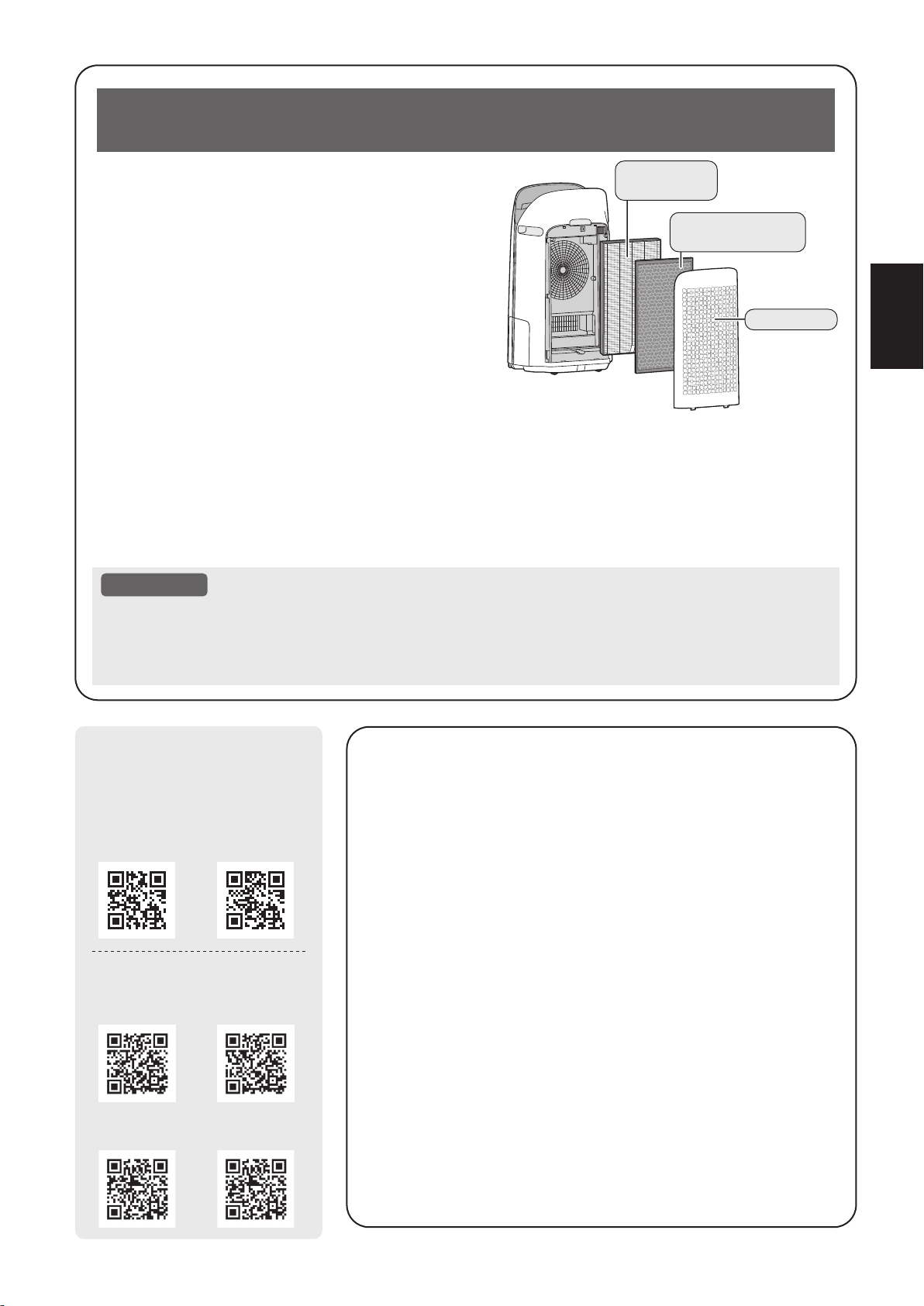
FR-1
FRANÇAIS
Le purificateur d’air aspire l’air de la pièce par l’entrée d’air,
fait passer l’air à travers un pré-filtre, un filtre déodorant
de carbone actif et un filtre HEPA authentique à l’intérieur
de l’unité, puis rejette l’air par la sortie d’échappement.
Le filtre HEPA authentique peut intercepter 99,97 % des
particules de poussière qui le traversent, d’une taille
aussi petite que 0,3 micron, en plus d’aider à absorber
les odeurs. Le filtre déodorant de carbone actif absorbe
graduellement les odeurs qui le traversent.
Certaines odeurs absorbées par les filtres peuvent se
dégrader avec le temps et se dégager sous forme de
nouvelle odeur. Suivant le lieu d’utilisation, surtout dans
des conditions extrêmes (beaucoup plus exigeantes
qu’une utilisation domestique normale), cette odeur risque de devenir forte dans un laps de temps plus court
qu’à la normale. Si l’odeur persiste, les filtres devraient être remplacés.
Lorsque les minéraux de l'eau du robinet adhèrent aux filtres et deviennent durs et blancs, ils absorbent
les odeurs dans la pièce qui peuvent provoquer l'émission d'une odeur désagréable lorsque le filtre
humidificateur est sec. (Varie selon la qualité de l'eau et d'autres facteurs environnementaux)
Si cela se produit, effectuez l'entretien du filtre d'humidification. (Page 17)
ATTENTION
• Le purificateur d'air est conçu pour éliminer la poussière en suspension dans l'air et les odeurs.
Le purificateur d'air n'est pas conçu pour éliminer les gaz nocifs tels que le monoxyde de carbone
contenu dans la fumée de cigarette. Le purificateur d'air peut ne pas éliminer complètement une odeur
si la source de l'odeur est toujours présente.
Veuillez lire ces instructions avant de faire fonctionner
votren ouveau purificateur d’air
L'application Sharp Air est un outil utile qui vous
permet de contrôler la qualité de l'air intérieur.
Avec l'application Sharp Air :
•
Vous pouvez contrôler votre purificateur d'air de
n'importe où avec votre appareil intelligent pour faire des
choses comme allumer et éteindre le purificateur d'air,
définir un programme hebdomadaire, et plus encore !
•
Vous pouvez surveiller la qualité de l'air intérieur en
temps réel pour garder le contrôle, même si vous
n'êtes pas chez vous.
•
Vous pouvez surveiller la durée de vie restante du filtre et
recevoir des alertes lorsqu'il est temps de remplacer les filtres.
•
Vous pouvez activer et désactiver la fonction facultative
"Sharp Cloud". Lorsqu'il est activé, votre historique
d'utilisation sera utilisé pour ajuster les paramètres de
sensibilité du capteur du mode "Auto" au fil du temps afin
d'optimiser les performances de vos purificateurs d'air.
Filtre HEPA
authentique
Filtre déodorant
de carbone actif
Panneau arrière
KCP110UW KCP70UW
KCP110CW
(English)
KCP70CW
(English)
KCP110CW
(French)
KCP70CW
(French)
[ Modèles américains ]
Scannez le code QR pour
plus d'informations sur les
purificateurs d'air Sharp.
[ Modèles canadiens ]
KCP110UW_70UW_110CW_70CW_2nd.indb 1KCP110UW_70UW_110CW_70CW_2nd.indb 1 2022/03/23 11:17:542022/03/23 11:17:54
FR-2
POUR VOUS PROTÉGER (CANADA)
Numéro de modèle :
Numéro de série :
Date d’achat :
Nom du détaillant :
Adresse :
Ville :
Province :
Code postal :
Téléphone :
SOUTIEN TECHNIQUE
Si vous avez des questions au sujet de la confi guration ou du fonctionnement de
votre produit, veuillez consulter la section pertinente dans ce manuel.
Vous pouvez également visiter le http://sharp.ca/support-home.aspx pour accéder à
du contenu exclusif sur votre produit, notamment pour :
Trouver un détaillant
Trouver des points de service
Télécharger notamment le Guide d’installation, la Fiche technique et le Manuel
de l’utilisateur
CONTACTEZ-NOUS
Si, à tout moment, vous avez des questions ou commentaires concernant votre
produit SHARP, veuillez contacter le Centre d’assistance à la clientèle SHARP.
Nous pouvons vous fournir de l’assistance par divers moyens de communication,
pour mieux vous servir :
Contactez un conseiller Sharp par téléphone
APPELEZ-NOUS
CA 877 278-6709
Du lundi au vendredi : de 7
h à 19 h HNC
COURRIEL
Tous les jours, 24
heures sur 24
Consultez la section
Contactez-nous sur notre
site.
SITE DE SOUTIEN
Téléchargements de
produits, Localisateur
de service, Où acheter,
Programme de
recyclage de toner et
plus encore.
Pour mieux vous répondre à vos questions lorsque vous appelez pour demander
la visite d’un technicien ou pour signaler une perte ou un vol, veuillez consigner
dans l’espace ci-dessous les numéros de modèle et de série qui se trouvent sur le
côté ou sur le dos du produit.
http://sharp.ca/support-home.aspx
http://sharp.ca/contact-emailus.aspx CA | sharp.ca/support-home.aspx
KCP110UW_70UW_110CW_70CW_2nd.indb 2KCP110UW_70UW_110CW_70CW_2nd.indb 2 2022/03/23 11:17:542022/03/23 11:17:54
FR-3
FRANÇAIS
GARANTIE LIMITÉE (CANADA)
FR-3
FRANÇAIS
GARANTIE LIMITÉE
(
Canada
)
Sharp Électronique du Canada Ltée (« Sharp ») garantit à l'acheteur initial de ce Produit de marque Sharp (le « Produit ») que, s’il est
emballé dans son contenant original et s’il est vendu ou distribué au Canada par Sharp ou par un détaillant agréé Sharp, et s’il n’a pas été
vendu « tel quel » ou s’il ne s’agissait pas d’une « vente ferme », ledit Produit est exempt de défaut de fabrication et de vice de matériau
pour la période de garantie stipulée et s'engage auprès de l’acheteur initial, durant ladite période de garantie applicable, à réparer la
défectuosité ou à remplacer le Produit défectueux.
Conditions : La présente garantie limitée ne s’applique pas :
(a) Aux dommages occasionnés ou aux réparations requises sur les appareils qui ont fait l’objet d’un emploi abusif, de négligence, d’un
accident, d’une installation inadéquate ou d’une utilisation non appropriée, tel qu’il est mentionné dans le manuel du propriétaire ou dans
toute autre documentation applicable sur le Produit;
(b) Aux dommages occasionnés ou aux réparations requises sur les produits Sharp trafiqués, modifiés, réglés ou réparés par une
entité autre que Sharp, un centre agréé de service après-vente Sharp ou un détaillant agréé de service après-vente Sharp;
(c) Aux dommages occasionnés ou aux réparations requises à la suite de l’utilisation du Produit avec des articles non désignés
ou approuvés par Sharp, y compris, mais sans en être limité aux des agents de nettoyage chimiques;
(d)
Au remplacement des accessoires devenu nécessaire dans le contexte d’une utilisation normale du Produit, y compris, mais
sans en être limité aux télécommandes, adaptateurs c.a., piles, sonde de température, plateaux, filtres, courroies, rubans, câbles ou papier;
(e) Aux défauts cosmétiques à la surface ou au boîtier extérieur du Produit, et qui sont attribuables à une dégradation volontaire
ou à une détérioration une sure résultant d’un usage normal;
(f) Aux défectuosités occasionnées ou aux réparations requises à la suite de dommages occasionnés par des conditions
extérieures et relatives à l'environnement, y compris, mais sans en être limité à surtension de la ligne électrique ou de transmission,
liquide répandu ou force majeure;
(g) Si le numéro de série ou de modèle indiqué sur le Produit a été enlevé, dégradé, modifié, altéré ou varié;
(h) La présente garantie limitée ne s’applique pas si le Produit a été utilisé ou est utilisé dans un environnement commercial ou
aux fins commerciales, puisque la présente garantie s’applique uniquement aux produits non commerciaux et utilisés dans un
contexte ménager ou personnel, par des consommateurs dans leur résidence;
(i) Aux frais d’installation, de livraison, de configuration et/ou de programmation.
(j)
Au démontage et à la réinstallation des fours à micro-ondes à hotte intégrée, du tiroir à micro-ondes Microwave Drawer, ou du
four à vapeur si l’appareil est installé dans un endroit inaccessible, si des armoires, des poignées ou d’autres pièces d’appoint
doivent être enlevées pour l’accès au Produit, ou si l’appareil n’est pas installé conformément aux directives d’installation du Produit.
Pour obtenir le service après-vente : La réparation sous garantie se fera à la condition que le Produit Sharp soit livré accompagné de la
preuve d’achat (sur laquelle est indiquée la date d’achat) et d’une copie de la présente garantie limitée, à un centre agréé de service
après-vente Sharp ou chez un détaillant agréé de service après-vente Sharp. Pour les fours à micro-ondes à hotte intégrée, les tiroirs à
micro-ondes Microwave Drawer, ou les fours à vapeur, la réparation sur place sous garantie sera effectuée aux endroits accessibles par
véhicule routier et situés à moins de 50 km d’un centre agréé de service Sharp. Le technicien peut, au besoin, ramener l’appareil à son
atelier pour en faire la réparation. Aucun autre agent (y compris les détaillants et les centres de service après-vente Sharp) n'est autorisé
à prolonger la durée de la garantie, à proposer des garanties additionnelles ou à transférer cette garantie au nom de Sharp. L’acheteur est
redevable de tous les frais de démontage, de réinstallation, de transport et d’assurance de l’appareil, à l’exception des fours à micro-ondes
à hotte intégrée, du tiroir à micro-ondes Microwave Drawer, ou du four à vapeur, auquel cas Sharp est responsable du démontage et de la
réinstallation.
Les garanties expresses de la présente garantie limitée constituent, sauf pour les consommateurs-acheteurs domiciliés au Québec, et à
l’exception des cas où la loi en vigueur l’interdit, la garantie entière du Produit. Sharp décline toute autre garantie et condition, explicite ou
implicite, découlant de la loi, d’un règlement, de la conduite habituelle ou de l’usage du commerce, y compris, mais sans en être limité, les
garanties ou les conditions implicites de qualité marchande et d’adaptabilité à une utilisation ou à une fin particulière, et/ou de non-violation.
Limitations (non applicables aux consommateurs-acheteurs domiciliés au Québec, dans la mesure où la loi en vigueur au Québec
l’interdit) : a) Sharp ne se tiendra en aucun cas responsable des dommages accessoires, spéciaux, consécutifs, économiques, exemplaires
ou indirects de quelque type ou nature que ce soit (y compris la perte de profits ou les dommages par suite de la perte de temps,
d’utilisation ou de données) relatifs à l’utilisation ou au rendement d’un Produit ou à la défectuosité d’un Produit, même si Sharp est informé
ou a été avisé de la possibilité de tels dommages; b) les recours mentionnés dans la présente garantie limitée constituent l’exécution
intégrale de toutes les obligations et responsabilités de Sharp envers l’acheteur à l’égard du Produit et constitueront la satisfaction entière
de toutes les réclamations, qu’elles relèvent d’un contrat, de négligence, de responsabilité stricte ou autre. Dans certaines provinces, il est
interdit d’exclure ou de limiter l’application de certains dommages ou de certaines limites sur la durée ou l’annulation de certaines garanties
ou conditions implicite. Par conséquent, dans ces provinces, les exclusions et les limites indiquées aux présentes peuvent ne pas
s’appliquer. La présente garantie limitée est, sauf pour les consommateurs-acheteurs domiciliés au Québec, régie par les lois de la
province canadienne dans laquelle l’acheteur a acquis le Produit. Pour les consommateurs-acheteurs domiciliés au Québec, la présente
garantie limitée est régie par les lois du Québec.
PÉRIODES DE GARANTIE (calculées à partir de la date de l’achat original) : Pièces et main-d’oeuvre (exceptions relevées)
Four à micro-ondes 1 an (magnétron – 4 ans supplémentaires)
Four à vapeur 1 an
Petits électroménagers de cuisine 1 an
Purificateur d’air 1 an
Pour savoir les coordonnées du détaillant agréé de service après-vente ou du centre agréé de service après-vente Sharp près de chez
vous, ou pour obtenir davantage de renseignements sur la présente garantie limitée, sur les offres de garantie prolongée de Sharp ou sur
les ventes de produits ou d’accessoires Sharp, veuillez communiquer avec Sharp :
•
Par écrit : Sharp Électronique du Canada Ltée, 335, rue Britannia Est, Mississauga (Ontario) L4Z 1W9
•
Par téléphone : 905 568-7140
•
Sur Internet : www.sharp.ca
CETTE GARANTIE LIMITÉE EST VALABLE UNIQUEMENT AU CANADA.
GARANTIE LIMITÉE
Produits électroniques de grande consommation
Merci d’avoir choisi la marque Sharp!
KCP110UW_70UW_110CW_70CW_2nd.indb 3KCP110UW_70UW_110CW_70CW_2nd.indb 3 2022/03/23 11:17:552022/03/23 11:17:55
FR-4
INSTRUCTIONS DE SÉCURITÉ IMPORTANTES
LISEZ CES INSTRUCTIONS avant
d'utiliser ce produit et conservez-les
pour références futures.
Lors de l’utilisation d’appareils électriques,
les précautions de sécurité de base
suivantes doivent être suivies afin de
réduire le risque d’électrocution, d’incendie
ou de blessures corporelles:
AVERTISSEMENT
1. Lisez toutes les instructions avant
d’utiliser l’appareil.
2. Utilisez le produit uniquement pour
l‘usage domestique auquel il est destiné
tel que décrit dans ce manuel. Toute
autre utilisation non recommandée par le
fabricant peut provoquer un incendie, une
décharge électrique ou des blessures.
3. Cet appareil n'est pas destiné à être
utilisé par des personnes (y compris les
enfants) ayant des capacités physiques,
sensorielles ou intellectuelles réduites,
ou ayant un manque d'expérience et de
connaissances, à moins qu'elles n’aient
reçu la supervision ou des instructions
quant à l'utilisation de l’appareil par une
personne responsable de leur sécurité.
Les enfants doivent être surveillés afin
de s'assurer qu'ils ne jouent pas avec
l'appareil.
4. N’utilisez pas l’appareil si le câble
d’alimentation ou sa fiche a subi des
dommages ou encore si le produit est
endommagé ou défectueux.
5. Si le cordon d'alimentation est
endommagé, il doit être remplacé par
le fabricant, son agent de service ou un
centre de service autorisé Sharp afin
d'éviter tout risque d’accident.
Contactez le centre de service le plus
proche dans le cas de problèmes, de
réglages nécessaires ou de réparations
quelconques.
6. Ne réparez ou ne désassemblez pas
vous-même l’appareil.
7. Suivez les instructions de a à h, ci-dessous,
pour le cordon d’alimentation et la prise.
Si elles ne sont pas respectées, un
court-circuit, une chaleur excessive,
une décharge électrique ou un incendie
pourrait se produire.
a. Ne branchez qu’à une prise de 120
volts.
b. N’utilisez pas le produit si le câble
d’alimentation ou sa fiche a subi des
dommages ou encore si le raccordement
à la prise du secteur n’est pas sûr.
c. Mettez toujours le produit hors tension
avant de débrancher la prise de courant.
d. Débranchez toujours l'appareil avant
de le déplacer ou pour son entretien,
ouvrir le panneau arrière, changer les
filtres et chaque fois que le produit
n'est pas utilisé.
e. Veillez à tirer sur la fiche d'alimentation
et non pas sur le cordon d'alimentation.
f. Ne touchez pas la fiche d'alimentation
en ayant les mains humides lors du
branchement ou du débranchement
de la prise murale.
g. Dépoussiérez régulièrement la fiche
d’alimentation.
h. Observez toujours les instructions
suivantes afin de ne pas endommager
le cordon d'alimentation.
• Ne placez pas
endommager le
cordon avec les roulettes lors du
déplacement du produit.
• Ne placez pas le cordon
d’alimentation sous la moquette.
Ne recouvrez pas le cordon
d'alimentation avec un tapis, tapis
long, ou des revêtements similaires.
• Ne placez pas d'objets lourds sur
le cordon d'alimentation ou ne le
pliez pas.
• Ne placez pas le cordon d'alimentation
sous les meubles ou autres appareils.
• Placez le cordon d'alimentation à
l'écart de la circulation et dans un
endroit où il ne présentera pas un
risque de trébuchement.
8. Pour réduire le risque d'électrocution, ce
produit est équipé d'une fiche polarisée
(une lame est plus large que l'autre).
Cette fiche s'adapte dans une prise
polarisée d'une seule façon. Si la fiche
ne rentre pas complètement dans la
prise, inversez la fiche. Si elle ne rentre
toujours pas, contactez un personnel
qualifié pour installer la prise appropriée.
Ne modifiez en aucun cas la fiche.
9. N'utilisez pas ce produit à proximité
d'appareils à gaz, foyers, bougies,
encens ou d'étincelles pouvant provenir
de cigarettes allumées.
KCP110UW_70UW_110CW_70CW_2nd.indb 4KCP110UW_70UW_110CW_70CW_2nd.indb 4 2022/03/23 11:17:562022/03/23 11:17:56
FR-5
FRANÇAIS
Lorsque le produit est utilisé avec
des appareils à gaz dans la même
pièce, ventilez périodiquement une
pièce, sinon cela peut provoquer une
intoxication au monoxyde de carbone.
10. N’utilisez pas le produit dans une pièce
où des gaz inflammables sont présents,
tels que des résidus d'huile ou des
vapeurs chimiques.
11. N’exposez le produit à la pluie, et ne
l’utilisez pas près de l'eau, dans une
salle de bains, une buanderie ou autre
endroit humide.
12. N’introduisez pas les doigts ou le
moindre objet dans les bouches d’entrée
d’air ou d’évacuation.
13. Ne regardez pas dans la sortie
d’échappement de l’air.
14. Ne buvez pas l'eau présente dans le
bac d'humidification.
15. Remplacez quotidiennement l'eau du
bac d'humidification avec de l'eau fraîche
du robinet et nettoyez-le régulièrement.
Lorsque le produit n'est pas utilisé, videz
l'eau du bac d'humidification. Si de l'eau
reste dans le bac d'humidification, cela
peut entraîner le développement de
moisissures et de bactéries et l’apparition
de mauvaises odeurs. Dans de rares
cas, ces bactéries peuvent constituer un
danger pour la santé.
NOTE
- Brouillage de la radio ou de la télévision -
Si le produit perturbe la réception en radio
ou en télévision, essayez de remédier aux
interférences en prenant l’une des mesures
suivantes ou plus :
1. Réorientez ou déplacez l’antenne de
réception.
2. Augmentez la distance entre le produit
et le récepteur radio/TV.
3. Branchez le produit et le récepteur sur
des circuits électriques différents.
4. Consultez le revendeur ou un technicien
radio/TV confirmé pour obtenir de l’aide.
----------------------------------------------------------
Ce produit est conforme avec la concentration
maximale premise d’ozone de 0,050 parties
par million par volume (ppmv) pendant une
période de 24 heures. La Ligne directrice
(2010) de Santé Canada recommande un
niveau maximal d'exposition, basé sur un
moyen de 8 heures, soit 0,020 ppmv ou
moins dans une chambre de teste étanchée
et contrôlée de 30 m³.
PRÉCAUTIONS CONCERNANT
L’INSTALLATION
1. Placez le produit sur une surface plane et
stable où la circulation d'air est suffisante.
Lorsqu’il est placé sur la moquette, le
produit peut vibrer légèrement.
Placez l'appareil sur une surface plane
pour éviter les fuites d'eau du bac
d'humidification.
2. Évitez les endroits où les capteurs sont
exposés directement à la brise ou au
vent si le produit possède des capteurs.
Le produit risque de ne pas fonctionner
correctement.
3. Évitez d'utiliser aux endroits où des
rideaux ou autres choses pourraient entrer
en contact avec les bouches d’entrée, les
bouches d’évacuation ou les deux.
4. Évitez les endroits exposés directement
à la lumière du soleil. Elle peut provoquer
un changement de forme ou de couleur
du produit.
5. Évitez les endroits où le produit est exposé
à la condensation ou à d’importants
changements de température. Utilisation
dans les conditions appropriées de la
pièce entre 32 et 95°F (0 et 35°C).
6. Évitez les emplacements où de la fumée
graisseuse ou huileuse est générée. (tel
qu’une cuisine, etc.) La surface de corps
principal. principale peut craqueler ou le
capteur risque de ne plus fonctionner.
7. La capacité de captage de poussière
du produit est efficace même lorsque le
produit est aussi près du mur que de 1,2
pouce (3 cm), cependant les murs ou le
plancher peuvent se salir. Veuillez placer
le produit à une certaine distance du mur.
Le mur directement derrière les sorties
d'air et le sol ou le tapis sur lequel le
produit est placé peuvent se salir avec
le temps. Lorsque vous utilisez le produit
pendant une période prolongée au
même endroit, nettoyer régulièrement
les murs, le plancher ou le tapis.
8. Ne placez pas l’appareil à proximité ou sur
des objets chauds, tels que des poêles ou
des radiateurs, ou encore dans un endroit où
il pourrait entrer en contact avec la vapeur.
KCP110UW_70UW_110CW_70CW_2nd.indb 5KCP110UW_70UW_110CW_70CW_2nd.indb 5 2022/03/23 11:17:562022/03/23 11:17:56

FR-6
PRÉCAUTIONS CONCERNANT
LE FILTRE
1. Suivez les instructions de ce manuel
pour bien assurer le soin et l’entretien
des filtres. (Page 10, 19)
2. Retirez les filtres des sacs en plastique
avant de placer le filtre dans corps
principal.
3. Ne faites jamais fonctionner le produit
sans avoir les filtres bien installés.
4. Ne pas laver ni réutiliser le filtre HEPA
authentique et le filtre déodorant de
carbone actif.
Le nettoyage n’améliorera pas les
performances du filtre et il peut également
causer une décharge électrique ou des
incidents de fonctionnement.
5. Ne faites pas fonctionner le produit dans
les pièces où des insecticides en aérosol
sont présents. L'odeur de l'insecticide
pourrait demeurer dans l’appareil
et se disperser à partir des sorties
d'échappement.
PRÉCAUTIONS CONCERNANT
LE FONCTIONNEMENT
1. N'obstruez pas les entrées et les sorties d'air.
2. Exploitez toujours le produit en position
verticale.
3. Lorsque vous transportez l'appareil,
retirez tout d'abord le bac d'humidification
pour ne pas renverser d'eau, puis tenez-le
par les poignées situées de part et d'autre.
4. Soulevez toujours le produit lors de
son déplacement sur des revêtements
facilement dommageables, une surface
inégale, ou des tapis.
5.
Ne changez pas l'orientation de
l’appareil pendant son déplacement à
l'aide des roulettes pivotantes.
6. Lorsque vous déplacez l’appareil à l’aide
des roulettes pivotantes, déplacez-le
lentement et horizontalement.
7. N'utilisez pas l’appareil si le bac
d'humidification n'est pas correctement
installé.
8. Lorsque vous remplissez le bac
d'humidification, assurez-vous qu'il n'y a
pas de fuite d'eau du bac d'humidification.
9. Veillez à essuyer l'excédent d'eau à
l'extérieur du bac d'humidification.
10. N'utilisez pas d'eau chaude (40 °C (104 °F)
ou plus), de produits chimiques, de
substances aromatiques, d'eau sale
ou d'autres substances nuisibles.
Cela pourrait déformer l’appareil ou
provoquer un dysfonctionnement.
11. Utilisez uniquement de l'eau fraîche du
robinet. L'utilisation d'autres sources
d'eau risque entraîner le développement
de moisissures, de champignons ou de
bactéries
12. Ne secouez pas le bac d'humidification
en tenant la poignée du bac.
PRÉCAUTIONS CONCERNANT
L'ENTRETIEN
1. Suivez les instructions de ce manuel
pour bien assurer son entretien.
(Page 16 - 19)
2. Ne nettoyez l’extérieur qu’avec un
chiffon doux.
3. N'utilisez pas de détergents autres
que ceux mentionnés dans ce manuel
(Page 18). N'utilisez pas de liquides
volatiles et/ou de détergents.
Corps principal peut être endommagée
ou fissurée lors de l’utilisation de nettoyants
corrosifs puissants, de benzène, de diluant
à peinture, de poudre à polir ou de graisse.
Le bac d'humidification peut provoquer
des déformations, un ternissement, des
fissures (fuite d'eau). En outre, si le
produit possède des capteurs, cela peut
entraîner un mauvais fonctionnement
de ceux-ci.
4. Ne frottez pas le panneau arrière (pré-
filtre) pendant son entretien.
5. La fréquence de l'entretien de
détartrage dépend de la dureté et des
impuretés dans l'eau que vous utilisez;
plus l'eau est dure, plus le détartrage
est souvent nécessaire.
6. Ne retirez pas le flotteur d'humidification.
Si le flotteur d'humidification se détache,
reportez-vous à la page 18.
7. Lors du remplacement des filtres
ou accessoires, utilisez les pièces
spécifiées dans ce manuel.
KCP110UW_70UW_110CW_70CW_2nd.indb 6KCP110UW_70UW_110CW_70CW_2nd.indb 6 2022/03/23 11:17:562022/03/23 11:17:56

FR-7
FRANÇAIS
AVERTISSEMENT
En cas de fonctionnement à distance depuis
l'extérieur, il se peut que vous ne soyez pas en
mesure de vérifier l'état actuel du purificateur
d'air ou la zone qui l'entoure et la situation de
toute personne qui pourrait éventuellement s’y
trouver, veuillez vous assurer correctement de la
sécurité avant utilisation.
• Assurez-vous que la fiche électrique est
complètement insérée dans une prise de
courant et qu'il n'y a pas de poussière sur la
fiche ou dans le trou de la prise. (Cela peut
provoquer de la chaleur, une combustion, un
incendie, etc., en raison d'un mauvais contact
ou d'une défaillance de contact)
• Assurez-vous au préalable que, malgré les
changements de vent, aucun impact négatif ne
se produira dans l'environnement à l'intérieur
de la pièce. (par exemple, si un élément
vole facilement avec le vent). Le vent risque
de faire tomber des objets, provoquant des
incendies, des blessures, des dégradations
des biens matériels.
PRÉCAUTIONS D'UTILISATION
• Une acceptation des « Conditions de service »
est nécessaire pour utiliser l'application.
• L'application est régulièrement révisée en
raison de la mise à jour de la version.
• Les écrans et les illustrations de ce manuel
sont fournis à titre explicatif; il y a des
différences avec le produit réel.
• En cas de mauvaise connexion, il se peut
que l'application ne puisse pas contrôler le
purificateur d'air. Le fonctionnement actuel du
purificateur d'air peut ne pas être reflété avec
précision sur l'application.
• LLe verrouillage de l'affichage de l’appareil
intelligent est recommandé pour éviter toute
opération erronée.
• Bien que l'application soit gratuite, les frais
de communication pour le téléchargement de
l'application dédiée et le fonctionnement avec
l’appareil intelligent ou la tablette sont à la charge
du client.
MISE EN GARDE POUR LE Wi-Fi
Précautions d'utilisation relatives aux ondes
électriques
• Dans le cas d'une utilisation dans les endroits
suivants, le fonctionnement n'est pas garanti
: À proximité d'un dispositif de communication
sans fil Bluetooth® utilisant la même fréquence
(2,4 GHz) que ce produit ou un dispositif sans
fil à faible puissance spécifié. De plus, dans
un endroit comme un champ magnétique de
l'appareil tel qu'un four à micro-ondes, ou un
endroit contenant de l'électricité statique ou
des perturbations radioélectriques, il peut ne
pas être disponible temporairement en raison
d'ondes électriques faibles.
• La connexion sans fil et les performances
ne peuvent pas être garanties pour tous les
routeurs ou l'environnement du boîtier. Dans
les lieux suivants, il est probable que les ondes
électriques ne puissent pas atteindre le point
visé ou soient déconnectées : à l'intérieur d’un
bâtiment en béton, acier renforcé ou métal/
à proximité de l'obstruction/à proximité de
l'appareil de communication sans fil appliquant
la même fréquence.
• Le Wi-Fi de ce produit correspond aux
canaux 1 - 11. Il n'est pas disponible pour
communiquer avec les routeurs configurés
pour d'autres canaux.
Attention aux informations personnelles
(relatif à la sécurité)
• L'utilisation d'un appareil Wi-Fi a la possibilité
d'être interceptée tant qu'elle utilise une onde
électrique, quel que soit le réglage du code
secret.
• Le Wi-Fi a l'avantage d'une connexion LAN
gratuite dans la zone de service en raison de
la communication entre ce produit et le routeur
appliquant une onde électrique. De l'autre côté,
l'interception de la communication ou l'intrusion
déloyale sont susceptibles de se produire parce
que les ondes électriques atteignent partout
dans la certaine zone à travers les obstructions
(par exemple les murs).
• Ne vous connectez pas à l'appareil ou au
réseau que vous n'êtes pas autorisé à utiliser
lors de la configuration de la connexion Wi-Fi.
• La fonction Wi-Fi de ce produit doit être
initialisée en cas de mise au rebut ou de
remise à une tierce personne.
• La fonction Wi-Fi de ce produit doit être
initialisée en cas de remise par une tierce
personne pour éviter l'accès illégal d'une
personne extérieure. Voir page 24 pour les
instructions sur la façon d'initialiser l'appareil.
SÉCURITÉ / PRÉCAUTIONS DE LA FONCTION Wi-Fi
KCP110UW_70UW_110CW_70CW_2nd.indb 7KCP110UW_70UW_110CW_70CW_2nd.indb 7 2022/03/23 11:17:562022/03/23 11:17:56
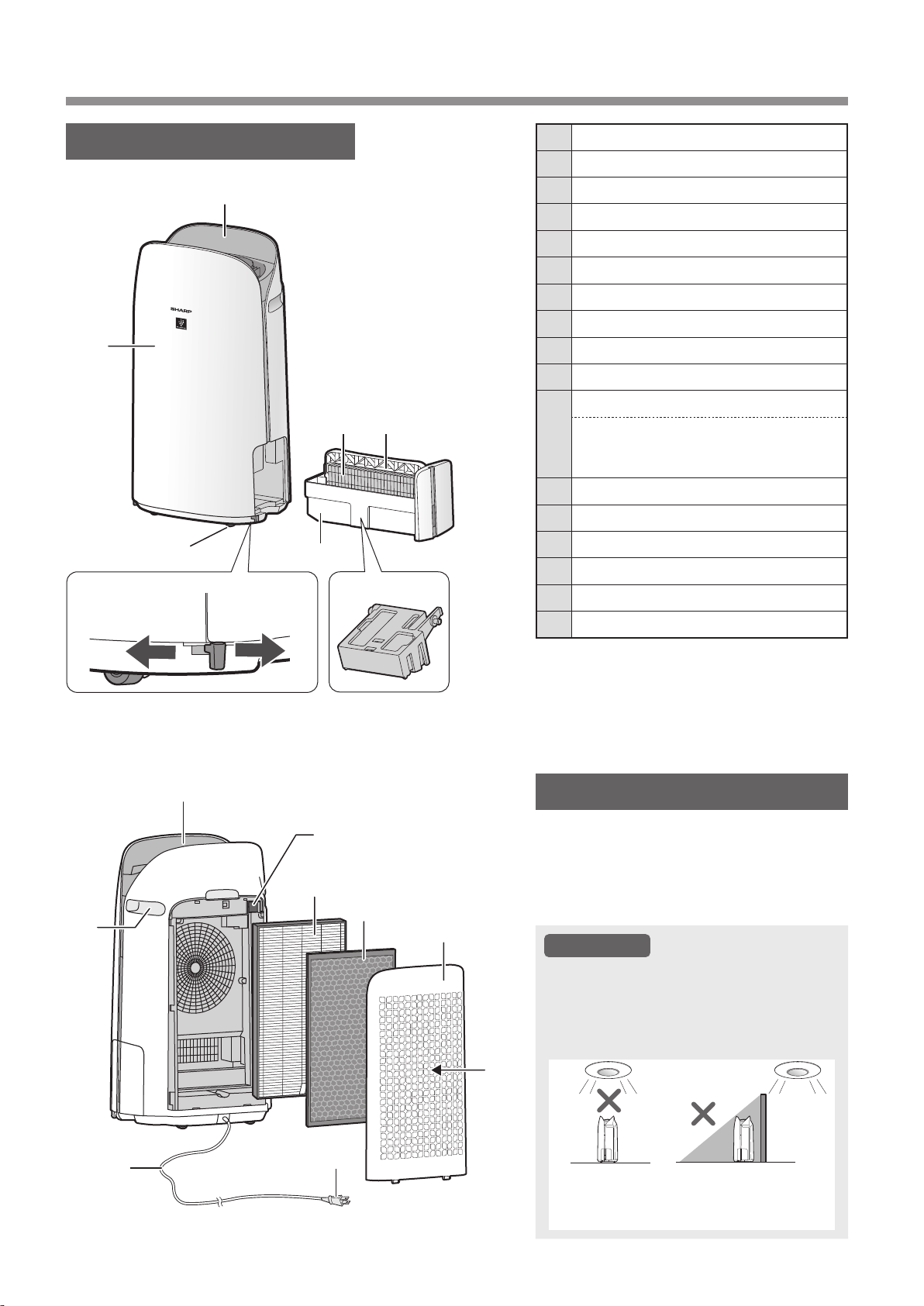
FR-8
NOMS DES PARTIES
CORPS PRINCIPAL
1 Panneau de commande / Affichage
2 Corps principal
3 Roues pivotantes
(4 emplacements)
4 Butée de roulette
(droite et gauche)
5 Bac d'humidification
6 Filtre d'humidification
7 Poignée du bac
8 Flotteur d'humidification
9 Sortie d'air
10 Anse
(2 emplacements)
11
Filtre du capteur
Capteur
(interne)
Poussière sensible/Odeur/Température/
Humidité
12 Filtre HEPA authentique
13 Filtre déodorant de carbone actif
14 Panneau arrière
(Pré-filtre)
15 Admission D'air
16 Cable d'alimentation
17 Prise électronique
CAPTEUR DE LUMIÈRE
Lorsque la commande d'éclairage (luminosité
de l'écran) est réglée sur « Auto », la luminosité
de l'écran et de l'indicateur de qualité de l'air
changera automatiquement en fonction de la
luminosité de la pièce
.(Page 23)
ATTENTION
Portée de détection du capteur de lumière
N’installez pas l’appareil dans les endroits
suivants. Le capteur de lumière risque de
ne pas fonctionner correctement.
Directement
sous une
lampe.
Dans l'ombre.
1
2
3
Débloqué
4
5
6 7
8
9
10
11
12
13
14
15
16
Verrouillé
17
KCP110UW_70UW_110CW_70CW_2nd.indb 8KCP110UW_70UW_110CW_70CW_2nd.indb 8 2022/03/23 11:17:582022/03/23 11:17:58
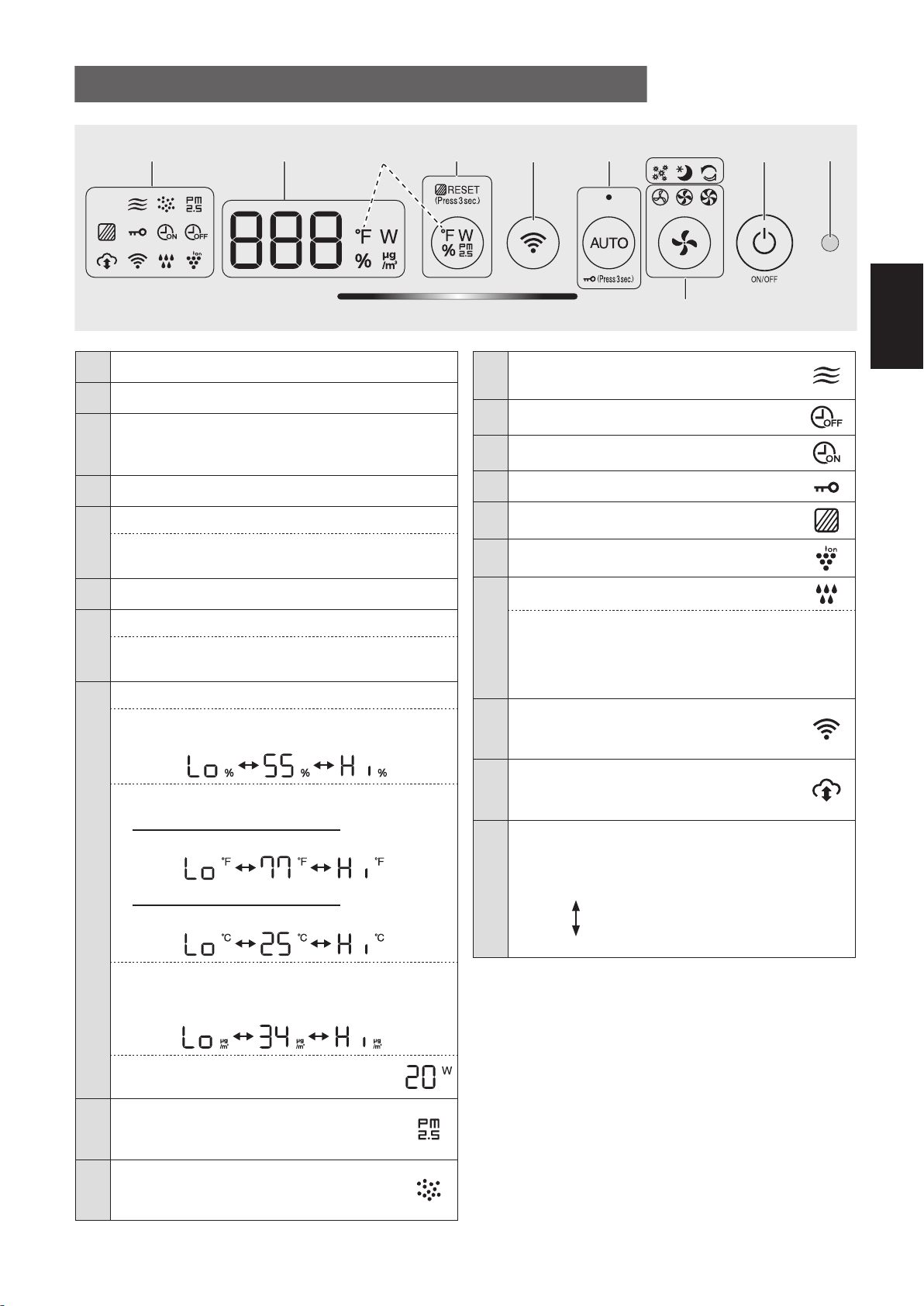
FR-9
FRANÇAIS
1 Capteur de lumière
2 Bouton d'alimentation MARCHE/ARRÊT
3
Modes « application seulement » : Voyants
Pollen, Veille et Nettoyage express Plasmacluster
(blanc)
*2
4
Bouton de vitesse du ventilateur, voyants
(blanc)
5
Bouton AUTO, voyant
(blanc)
Bouton de sécurité enfants
(Appuyez pendant 3 sec.)
*3
6 Bouton Wi-Fi
7
Bouton de commutation de l'affichage
Bouton de réinitialisation du filtre, Lampe
(blanc)
(Appuyez pendant 3 sec.)
*3
8
Affichage
*4
• Humidité
Une humidité de 25 % à 75 % s'affiche.
24 %
ou moins
76 %
ou plus
• Température
Pour KCP110UW ou KCP70UW
Une température de 32 ºF à 122 ºF s'affiche.
123
o
F
ou plus
31
o
F
ou moins
Pour KCP110CW ou KCP70CW
Une température de 0
o
C to 50
o
C is s'affiche.
51
o
C
ou plus
-1
o
C
ou moins
• Concentration PM2.5
*5
PM2.5 10 μg/m
3
(microgrammes par mètre cube
d'air) à 499 μg/m
3
s'affiche.
500 μg/m
3
ou plus
9 μg/m
3
ou moins
• Puissance
Indique la puissance de fonctionnement en cours.
9
Indicateur PM2.5
(blanc)
Indique que le capteur de poussière sensible
détecte des poussières microscopiques.
10
Indicateur de poussière
(blanc)
Indique que le capteur de poussière
sensible détecte des poussières habituelles.
PANNEAU DE COMMANDE / AFFICHAGE
11
Indicateur d’odeur
(blanc)
Indique que le capteur d'odeur détecte des odeurs.
12
Indicateur d'arrêt de minuterie
(blanc)
*2
13
Indicateur d’activation de minuterie
(blanc)
*2
14 Indicateur de sécurité enfants
(blanc)
15 Indicateur d'entretien du filtre
(orange)
16
Indicateur d'ions Plasmacluster
(blanc)
17
Indicateur d’humidification
(blanc)
• Allumé :
Humidification MARCHE
• ARRÊT:
Humidification ARRÊT
• Clignotant : l’appareil a besoin d'eau
(L’indicateur clignote pendant 10 minutes puis s'éteint.)
18
Indicateur Wi-Fi
(blanc)
S'allume lorsque le purificateur d'air est
connecté à un routeur.
19
Indicateur de service Cloud
(blanc)
*2
S'allume lorsque le purificateur d'air est
connecté à un service cloud de Sharp.
20
Indicateur de qualité de l'air
Indique la pureté de l'air de la pièce sous forme de
5 niveaux avec des changements de couleur.
Propre
Bleu
Jaune (clignotant)
Impur
Rouge (clignotement rapide)
*1: Voici une illustration de KCP110UW ou KCP70UW.
Pour KCP110CW ou KCP70CW “
o
F ” sur le panneau de
commande es “
o
C ”.
*2: Les voyants des N° 3, 12, 13 et 19 s'allument
uniquement lors de l'utilisation de l'application.
*3: Appuyez et maintenez pendant 3 secondes ou plus.
*4: Les numéros affichés sont approximatifs.
*5: Matière particulaire, particules de diamètre de
2,5 micromètres ou moins.
15 23
20
6
789 - 19
*1
4
*4
KCP110UW_70UW_110CW_70CW_2nd.indb 9KCP110UW_70UW_110CW_70CW_2nd.indb 9 2022/03/23 11:18:022022/03/23 11:18:02
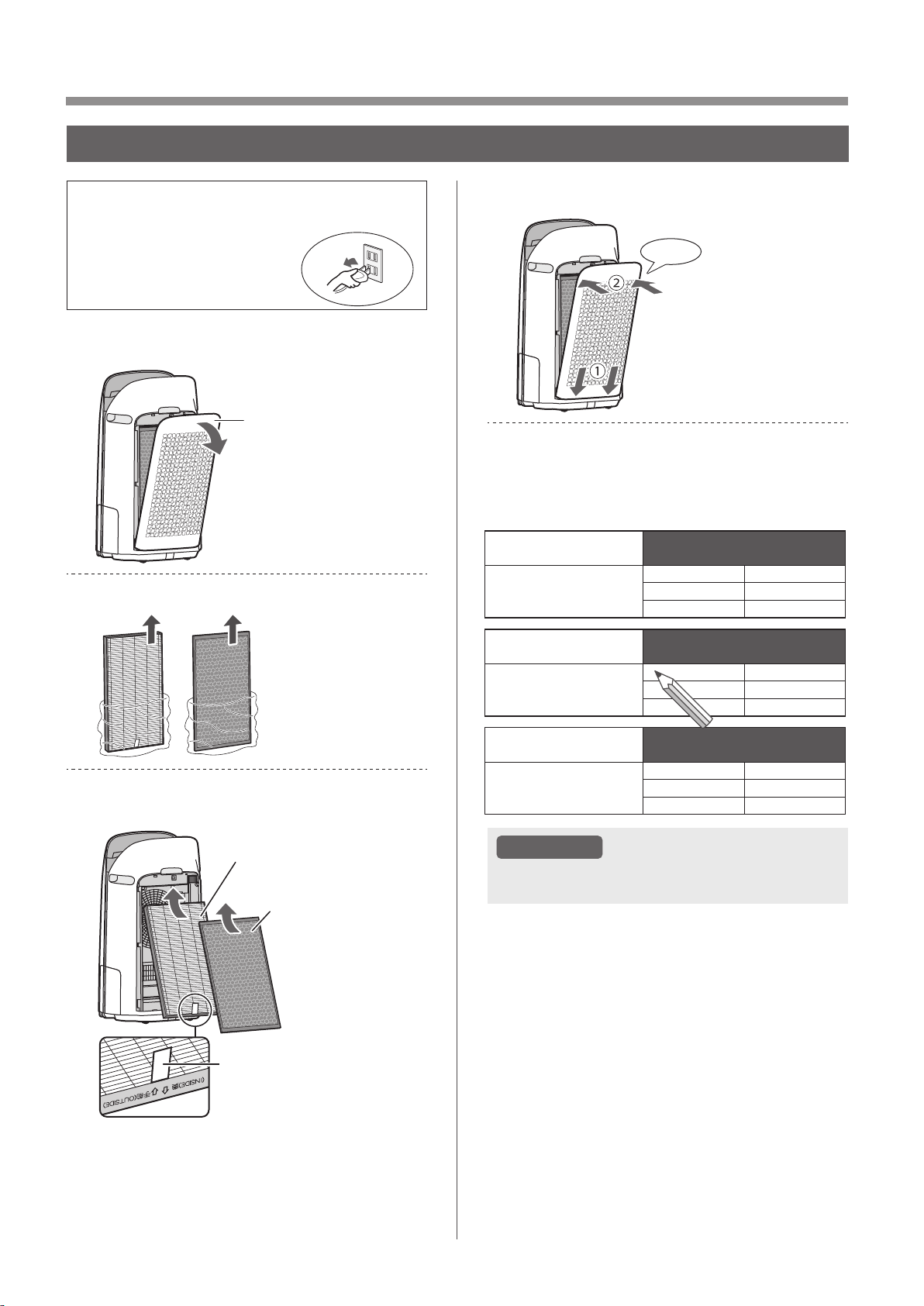
FR-10
PRÉPARATION
• Pour maintenir la qualité du filtre, il est installé
dans l'unité et emballé
dans un sac en plastique.
• Assurez-vous de mettre
l’appareil hors tension et de le
débrancher avant d'installer
ou de remplacer le filtre.
1.
Enlevez le panneau arrière
Panneau arrière
2.
Prenez les filtres le sac en plastique.
3.
Installez les filtres dans l'ordre
correct comme indiqué.
Filtre HEPA authentique
Filtre déodorant
de carbone actif
Étiqueter
4.
Installez le panneau arrière.
Cliquez
5.
Notez la date à laquelle vous
commencez ou remplacez les
filtres sur le couvercle arrière de ce
manuel.
Active Carbon Deodorizing Filter
Filtre déodorant de carbone actif
Filtro desodorizante de carbón activo
Model
Modèle
Modelo
FZ-J80DFU
Starting date of use
Date de début d’utilisation
Fecha de comienzo de uso
.
.
.
.
.
.
.
.
.
.
.
.
True HEPA Filter
Filtre HEPA authentique
Filtro true HEPA
Model
Modèle
Modelo
FZ-P11HFU
Starting date of use
Date de début d’utilisation
Fecha de comienzo de uso
.
.
.
.
.
.
.
.
.
.
.
.
Humidifying Filter
Filtre d’humidication
Filtro del humidicador
Model
Modèle
Modelo
FZ-P11MFU
Starting date of use
Date de début d’utilisation
Fecha de comienzo de uso
.
.
.
.
.
.
.
.
.
.
.
.
ATTENTION
• Ne faites pas fonctionner le produit sans les
filtres.
INSTALLATION DU FILTRE
KCP110UW_70UW_110CW_70CW_2nd.indb 10KCP110UW_70UW_110CW_70CW_2nd.indb 10 2022/03/23 11:18:062022/03/23 11:18:06
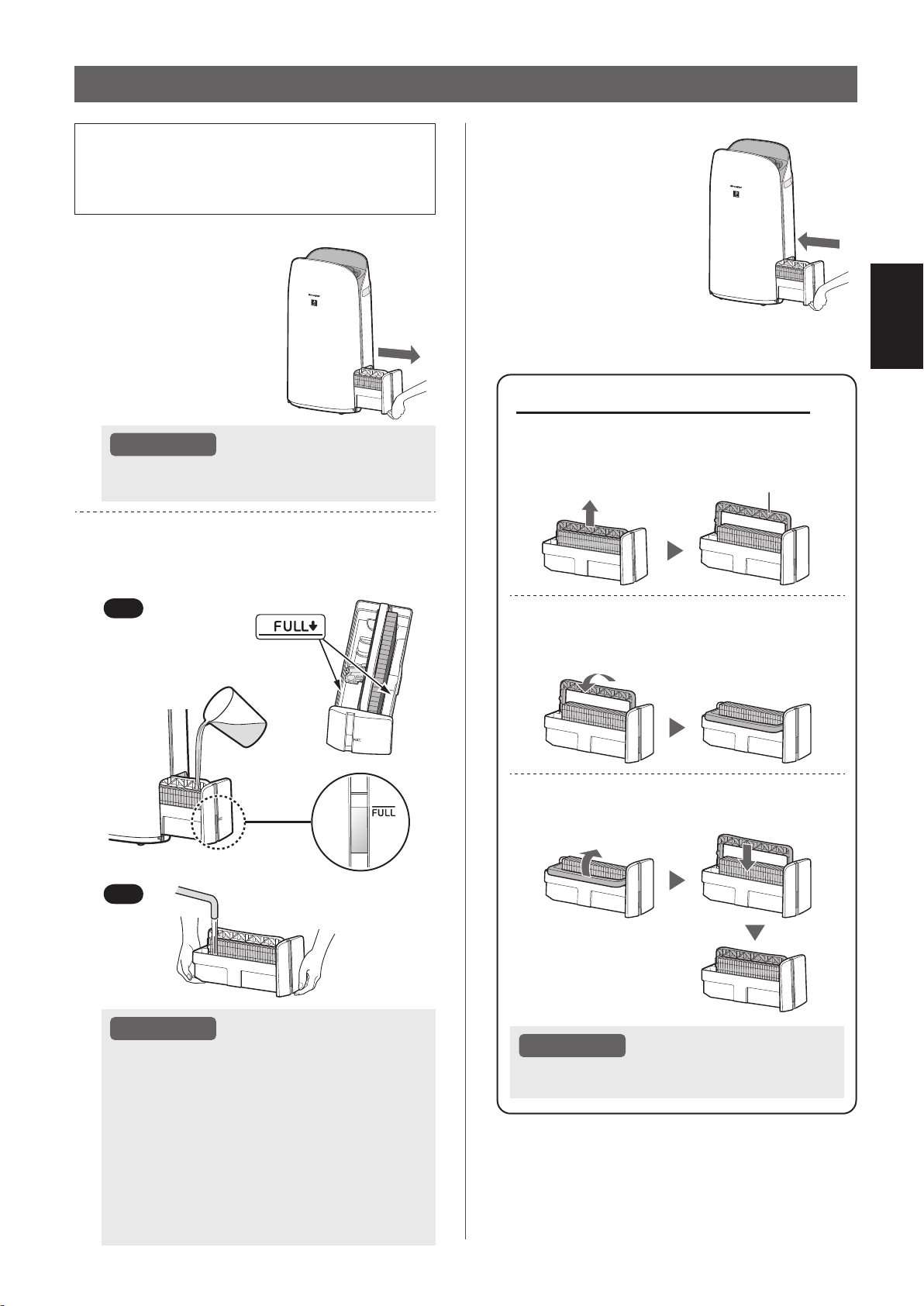
FR-11
FRANÇAIS
• Lors de l’humidification, remplissez le bac
d'humidification avec de l'eau.
• Lorsque vous ne l'humidifiez pas, jetez l'eau se
trouvant dans le bac d'humidification.
1.
Retirez le bac
d'humidification.
ATTENTION
• Lors du retrait et de l'installation du bac
d'humidification, veillez à ne pas renverser d'eau.
2.
Remplissez le bac d'humidification
avec de l'eau du robinet en utilisant
la méthode “A”
or “B”.
B
A
ATTENTION
• Le flotteur d'humidification flotte lorsque le
bac est rempli d'eau.
• Remplissez lentement avec de l'eau pour
éviter les éclaboussures.
• Ne remplissez pas au-delà de l'indicateur “FULL”.
• Lorsque vous transportez le bac
d'humidification, tenez-le avec les deux
mains ou saisissez la poignée du bac.
• Nettoyez le bac d'humidification s'il est sale
ou si une odeur perceptible se fait sentir.
REMPLISSAGE DU BAC D'HUMIDIFICATION
À propos de la poignée du bac
• Lorsque vous tenez et transportez le bac
d'humidification, utilisez la poignée du bac
Poignée du bac
• Lorsque vous nettoyez le filtre
d'humidification, vous pouvez tourner la
poignée du bac vers le bas sur le côté.
• Après le nettoyage, remettez la poignée
du bac dans sa position d'origine.
ATTENTION
• Remettez la poignée du bac à sa position
d'origine avant l'installation.
3.
Installez le bac
d'humidification
avec précaution.
KCP110UW_70UW_110CW_70CW_2nd.indb 11KCP110UW_70UW_110CW_70CW_2nd.indb 11 2022/03/23 11:18:102022/03/23 11:18:10
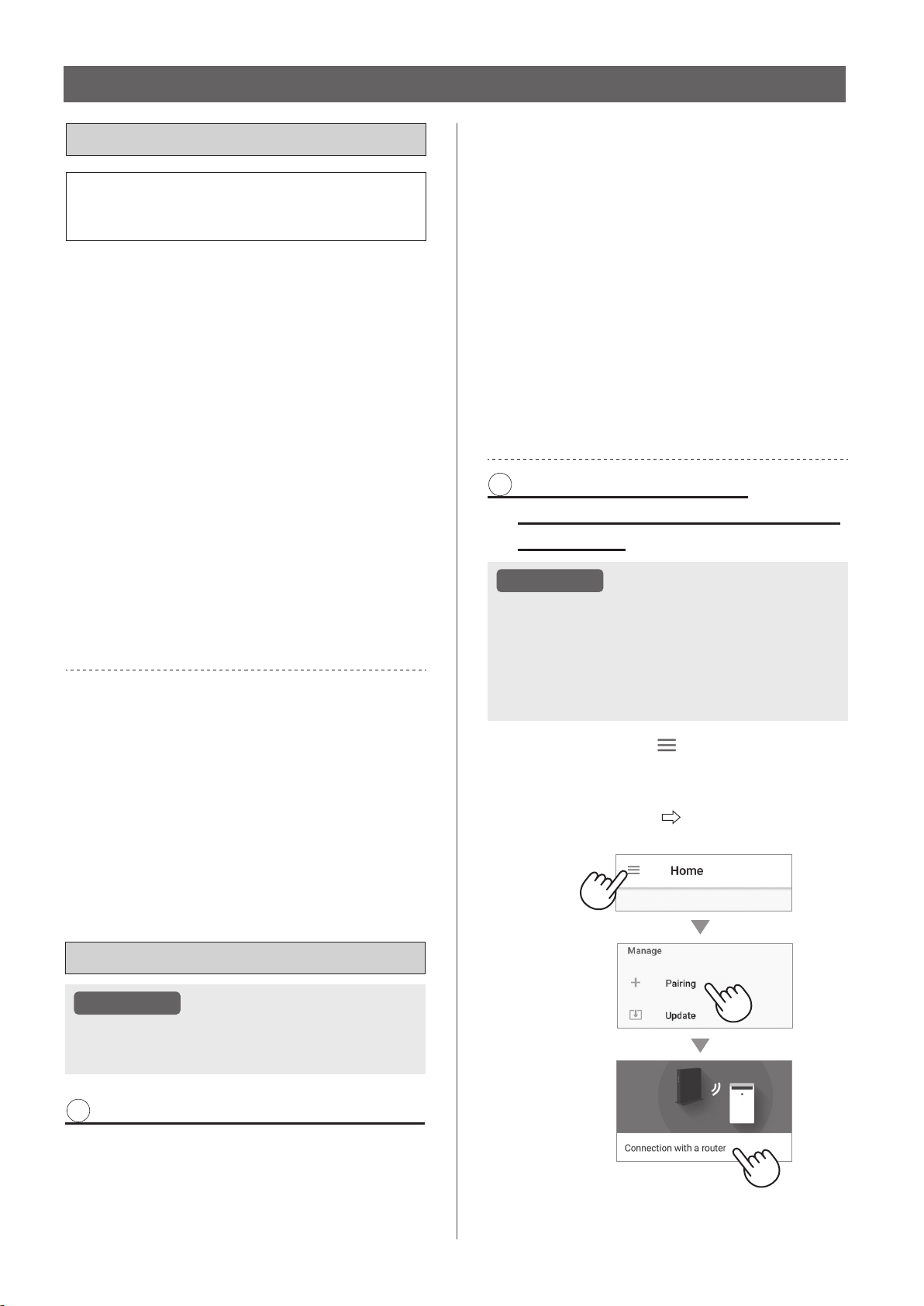
FR-12
PARAMÈTRES Wi-Fi
AVANT DE COMMENCER
• En connectant votre purificateur d'air à votre
appareil intelligent, vous pouvez utiliser le
purificateur d'air de manière pratique.
Assurez-vous que votre appareil intelligent
est connecté à un réseau Wi-Fi 2,4 GHz.
Wi-Fi Protected Setup (WPS) Point d’accès
(routeur)
• La méthode de cryptage recommandée est
WPA2 (AES).
Vérifiez que votre appareil intelligent
répond à la configuration logicielle
minimale requise :
• Smartphones/tablettes Android 8 ou version
ultérieure
• iPhones, iPod touch, iPads de iOS 12 ou
versions ultérieures
Spécifications Wi-Fi du produit
• Réseau local sans fil : IEEE802.11b/g/n
• Gamme de fréquences : Bande de fréquences 2,4 GHz
Marques commerciales
•
“Wi-Fi
®
” est une marque déposée de Wi-Fi Alliance
®
.
•
“Android” est une marque commerciale de Google Inc.
•
“iPhone”, “iPod touch”, “iPad” sont des marques
déposées ou des marques commerciales de Apple Inc.
•
Les autres noms de sociétés, noms d'entreprises et
noms de produits mentionnés dans les instructions de
manipulation sont des marques commerciales et des
marques déposées de chaque société.
CONFIGURATION INITIALE
ATTENTION
• Lors de l’appariement de l’appareil intelligent
avec le purificateur d'air, veuillez vous assurer
qu'ils sont tous deux connectés au même routeur.
1
TÉLÉCHARGEMENT & CONNEXION
1.
Installez l'application Sharp Air sur
votre appareil intelligent.
•
Disponible pour un téléchargement depuis Apple
Store ou Google Play.
2.
Connectez votre appareil intelligent
au routeur et lancez l'application.
Suivez les instructions de l'application.
i. Consultez la “Politique de confidentialité
et d'utilisation des données” et les
“Conditions d'utilisation”.
ii. Entrez votre date de naissance.
iii. Connectez-vous avec votre
compte Sharp (ID SHARP).
•
Si vous n'avez pas d'ID SHARP, veuillez vous
inscrire pour créer un ID SHARP.
iv. Saisissez un nom pour votre
appareil intelligent.
2 RACCORDEMENT DU
PURIFICATEUR D'AIR ET D'UN
ROUTEUR
ATTENTION
• Si vous avez des réglages Stealth ou des
réglages de filtrage MAC sur le routeur, veuillez
les annuler.
• L'ID réseau de l’appareil est affiché comme
“AP-SHARP-XX” (
où XX est un numéro à 2 chiffres
en dessous de l'adresse MAC de l’appareil).
1.
Appuyez sur “ ” dans la partie
supérieure gauche de l'écran
“Accueil”, puis sélectionnez
“Appariement” “Connexion avec
un routeur”.
KCP110UW_70UW_110CW_70CW_2nd.indb 12KCP110UW_70UW_110CW_70CW_2nd.indb 12 2022/03/23 11:18:132022/03/23 11:18:13
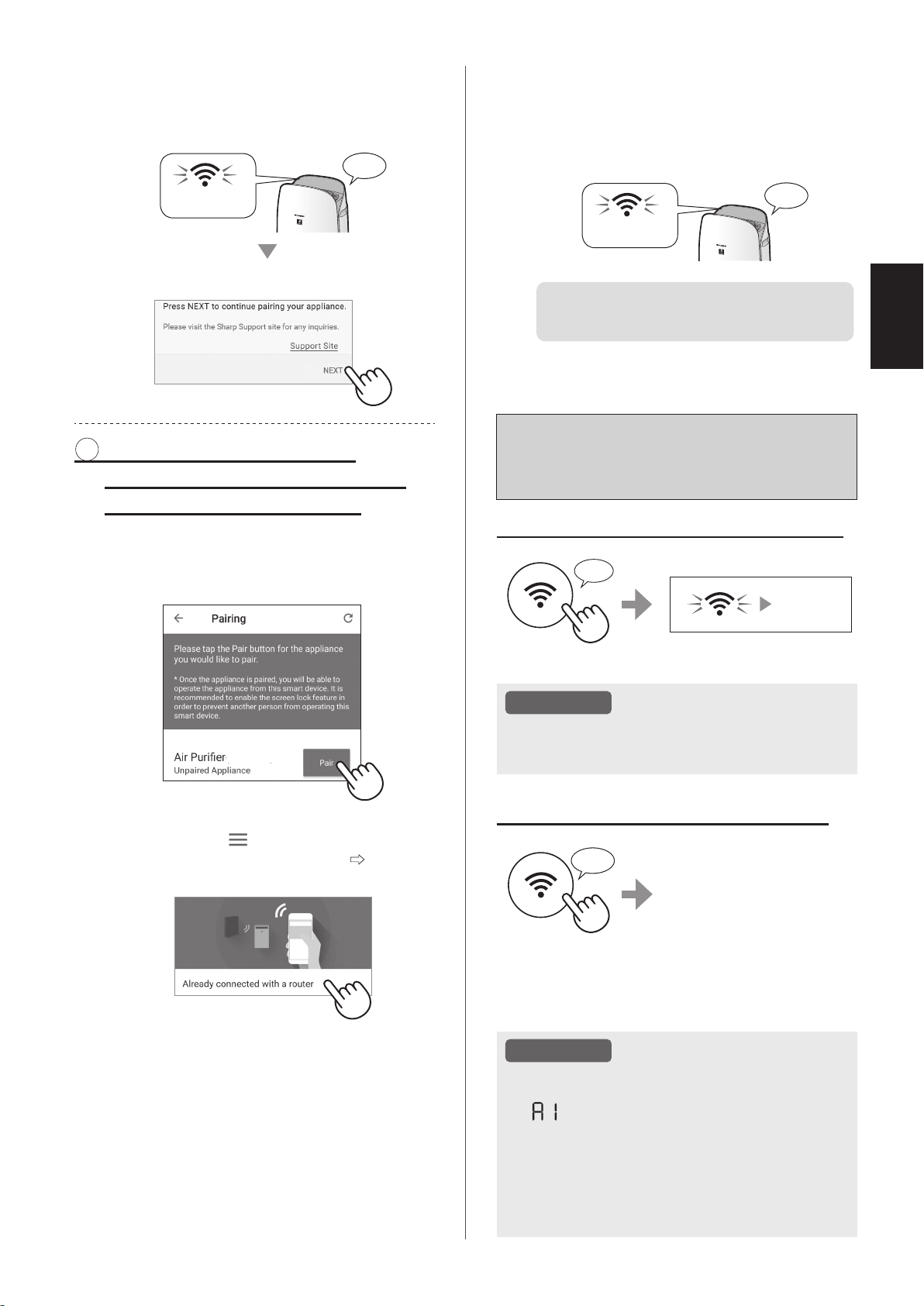
FR-13
FRANÇAIS
Comment activer/désactiver le
Wi-Fi après avoir terminé les
réglages initiaux
Si vous souhaitez désactiver le Wi-Fi :
Appuyez pendant 3 sec.
♪
~
S'éteint
ATTENTION
• Si vous désactivez le Wi-Fi, vous ne pourrez pas
contrôler le purificateur d'air avec l'application
Sharp Air.
Si vous souhaitez réactiver le Wi-Fi :
Appuyez pendant
3 sec.
♪
L'indicateur Wi-Fi clignotera
après que vous aurez
appuyé sur le bouton Wi-Fi.
Et dans environ 3 minutes,
vous entendrez quatre bips
courts. Quelque temps
après ce bip, le voyant Wi-Fi
s'allume et la connexion Wi-
Fi est établie. L'application Sharp Air peut à nouveau
être utilisée pour contrôler le purificateur d'air.
ATTENTION
• L’activation/désactivation du Wi-Fi peut
également être réglée à partir de
“
: Adaptateur Wi-Fi MARCHE/ARRÊT”
.
(Page 22, 24)
Dans ce cas, la connexion Wi-Fi avec le
routeur est automatiquement rétablie.
• La reconnexion au routeur sans fil peut prendre
quelques minutes, après avoir réactivé le Wi-Fi.
2.
Suivez les instructions de l'application.
• Si le voyant Wi-Fi s'allume après la
notification sonore, la connexion est établie
avec succès.
Allumer
♪
Tapez sur “SUIVANT”.
3 CONNEXION ENTRE LE
PURIFICATEUR D'AIR ET UN
APPAREIL INTELLIGENT
1.
Appuyez sur “ Apparier” pour le
purificateur d'air que vous souhaitez
apparier.
(MODEL NAME)
• Si vous ne voyez pas l'écran ci-dessus,
appuyez sur “
” sur l'écran “Accueil”,
puis sélectionnez “Appariemen”
“Déjà
connecté avec un routeur”.
2.
Suivez les instructions de
l'application.
• Si le voyant Wi-Fi s'allume après la
notification sonore, la connexion est établie
avec succès.
Allumer
♪
Les réglages initiaux sont
terminés.
KCP110UW_70UW_110CW_70CW_2nd.indb 13KCP110UW_70UW_110CW_70CW_2nd.indb 13 2022/03/23 11:18:212022/03/23 11:18:21
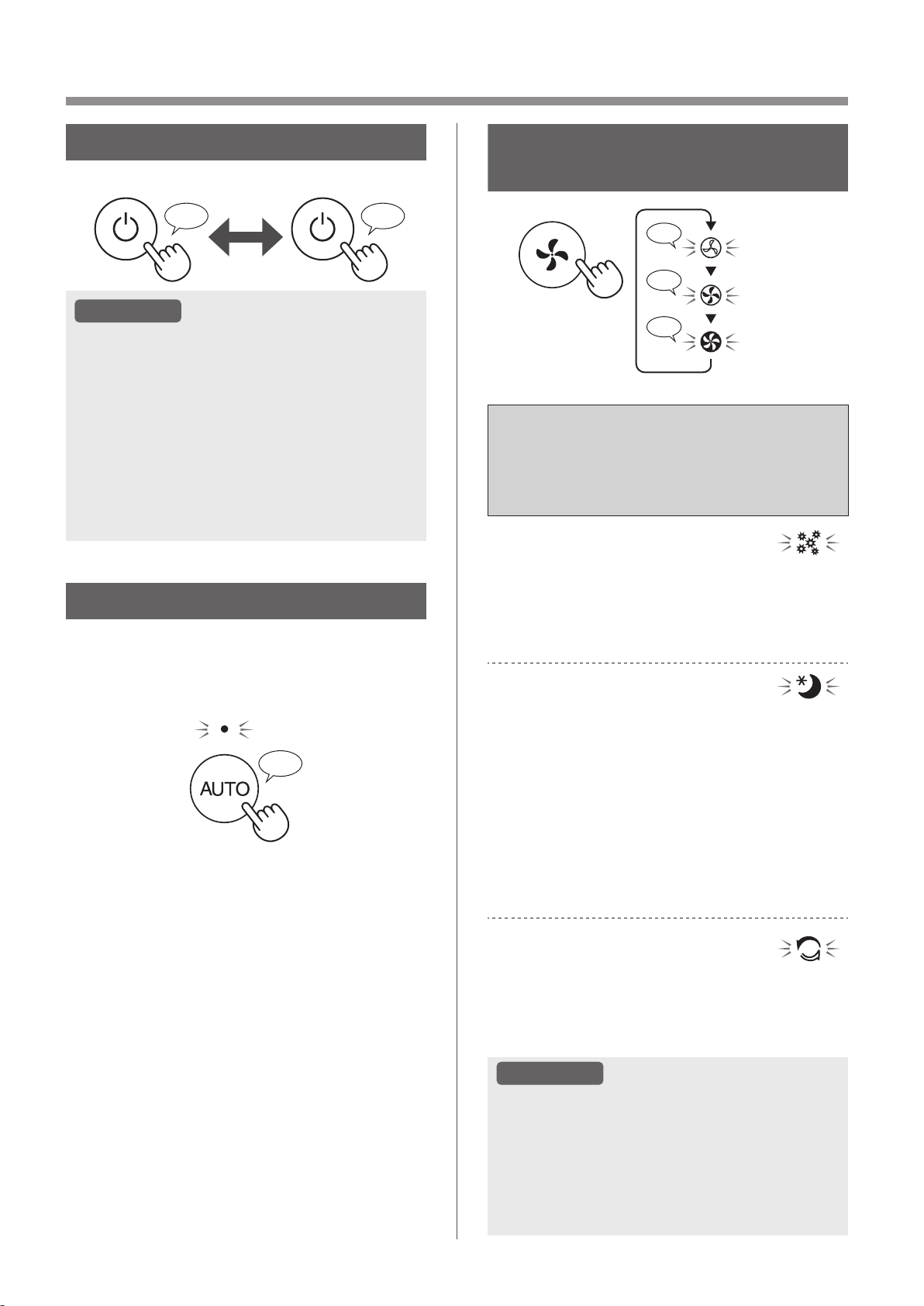
FR-14
FONCTIONNEMENT
MARCHE/ARRÊT
MARCHE ARRÊT
♪
♪
~
ATTENTION
• À moins que la prise d'alimentation n’ait été
débranchée, l'appareil rétablit l’opération
précédente lors de son redémarrage.
(Cependant, dans le cas du mode de nettoyage
express Plasmacluster, l'opération reprend son
mode avant le mode de nettoyage express
Plasmacluster et les réglages.)
Par exemple : si l'alimentation est coupée
pendant le fonctionnement, il redémarrera en
mode de fonctionnement et selon les paramètres
précédents si l'alimentation est rétablie.
TOUCHE DE VITESSE
DU VENTILATEUR
♪
♪
♪♪
MEUGLER
MOYEN
MAX
MODE AUTO
La vitesse du ventilateur est automatiquement
contrôlée en fonction des six détections. (PM2.5/
Poussière normale/Odeur/Température/Humidité/
Lumière)
♪
FONCTIONS DE VITESSE
DE VENTILATEUR
SUPPLÉMENTAIRES :
APPLICATION UNIQUEMENT
POLLEN :
La sensibilité du capteur de poussière est
automatiquement augmentée et le capteur de
poussière détecte rapidement les impuretés telles
que la poussière et le pollen et nettoie l'air de
manière puissante.
VEILLE :
Le produit fonctionne silencieusement, et la vitesse
du ventilateur change automatiquement en fonction
de la quantité d'impuretés dans l'air et de la
luminosité de la pièce
Lorsque la commande d'éclairage est réglée sur
“Auto”, l'écran et l'indicateur de qualité de l'air
changent automatiquement de luminosité ou
d'extinction en fonction de la luminosité de la pièce.
La pièce est lumineuse : L'éclairage est atténué
La pièce est sombre : L’éclairage est désactivé
MODE DE NETTOYAGE
EXPRESS PLASMACLUSTER :
Le produit dégage des ions Plasmacluster au débit
d'air maximal pendant 10 minutes. Ensuite, le
purificateur d'air fonctionne pendant 50 minutes à
vitesse élevée du ventilateur.
ATTENTION
• Lorsque le fonctionnement s’arrête au bout
de 60 minutes, le produit revient au mode de
fonctionnement précédent.
Il est possible de passer à d'autres modes
pendant cette opération.
• Le groupe d'ions Plasmacluster ne peut pas
être désactivé.
KCP110UW_70UW_110CW_70CW_2nd.indb 14KCP110UW_70UW_110CW_70CW_2nd.indb 14 2022/03/23 11:18:262022/03/23 11:18:26
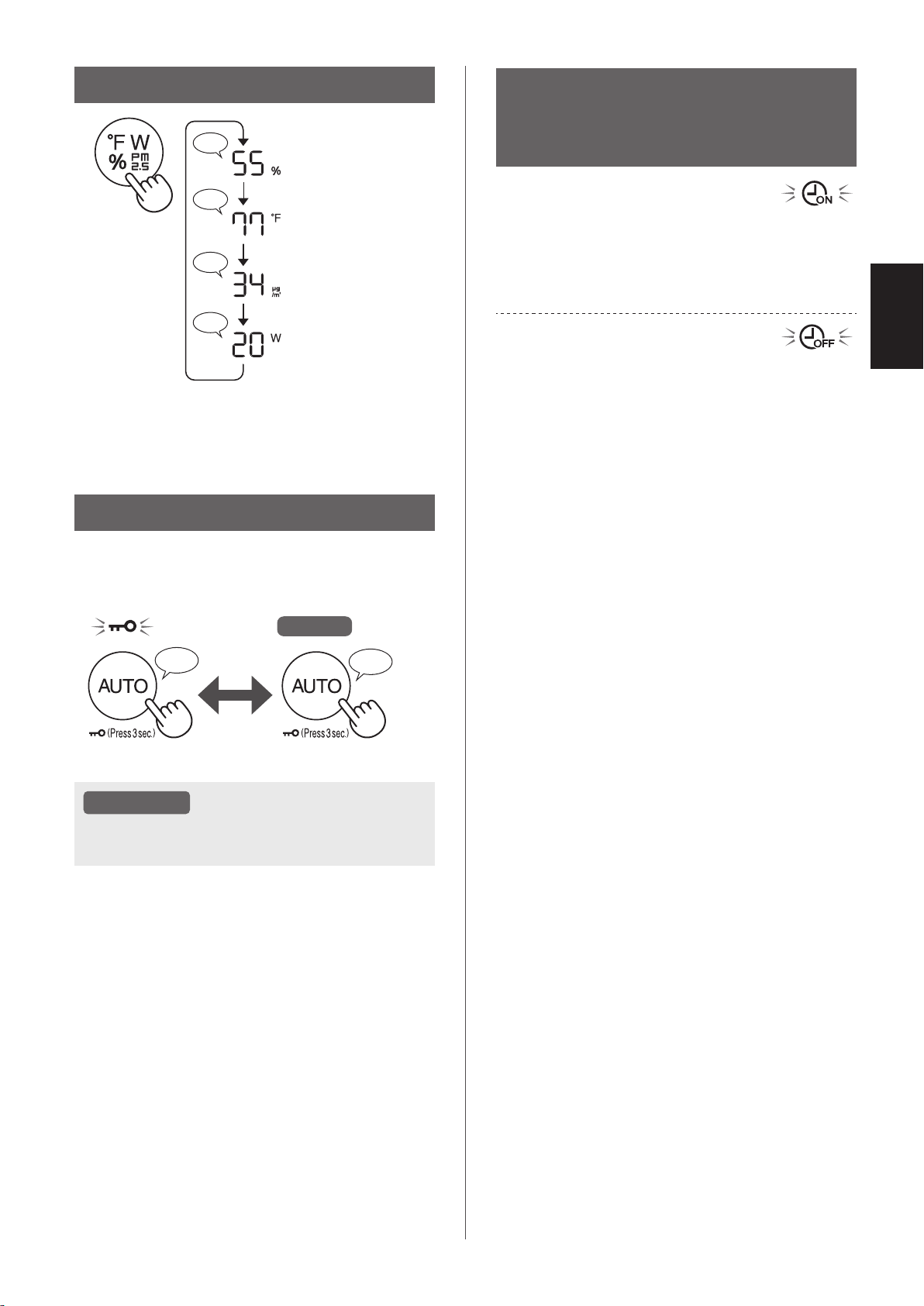
FR-15
FRANÇAIS
CHANGER L'AFFICHAGE
♪
♪♪
♪
♪
Humidité
Température
*
1
Concentration PM2.5
Puissance
*
1
*1: Pour KCP110CW ou KCP70CW, “
o
F ” sur le panneau
de commande est “
o
C ”.
SÉCURITÉ ENFANTS
Le panneau de commande est verrouillé.
S'éteint
MARCHE ANNULATION
♪
♪♪
Appuyez
pendant 3 sec.
Appuyez
pendant 3 sec.
ATTENTION
• Il est possible de désactiver le Wi-Fi en mode
de sécurité enfants.
PROGRAMMATEUR
HEBDOMADAIRE :
APPLICATION UNIQUEMENT
MINUTEUR D'ACTIVATION :
Vous pouvez établir un programme hebdomadaire
pour que le purificateur d'air démarre avec un
mode spécifique à un jour et une heure spécifiques.
L'indicateur d’activation de minuterie s'allume
lorsqu'un programme est défini.
MINUTERIE DE DÉSACTIVATION :
Vous pouvez établir un programme hebdomadaire
pour que le purificateur d'air arrête son
fonctionnement à un jour et une heure spécifiques.
L'indicateur de désactivation de minuterie s'allume
lorsqu'un programme est défini.
KCP110UW_70UW_110CW_70CW_2nd.indb 15KCP110UW_70UW_110CW_70CW_2nd.indb 15 2022/03/23 11:18:292022/03/23 11:18:29
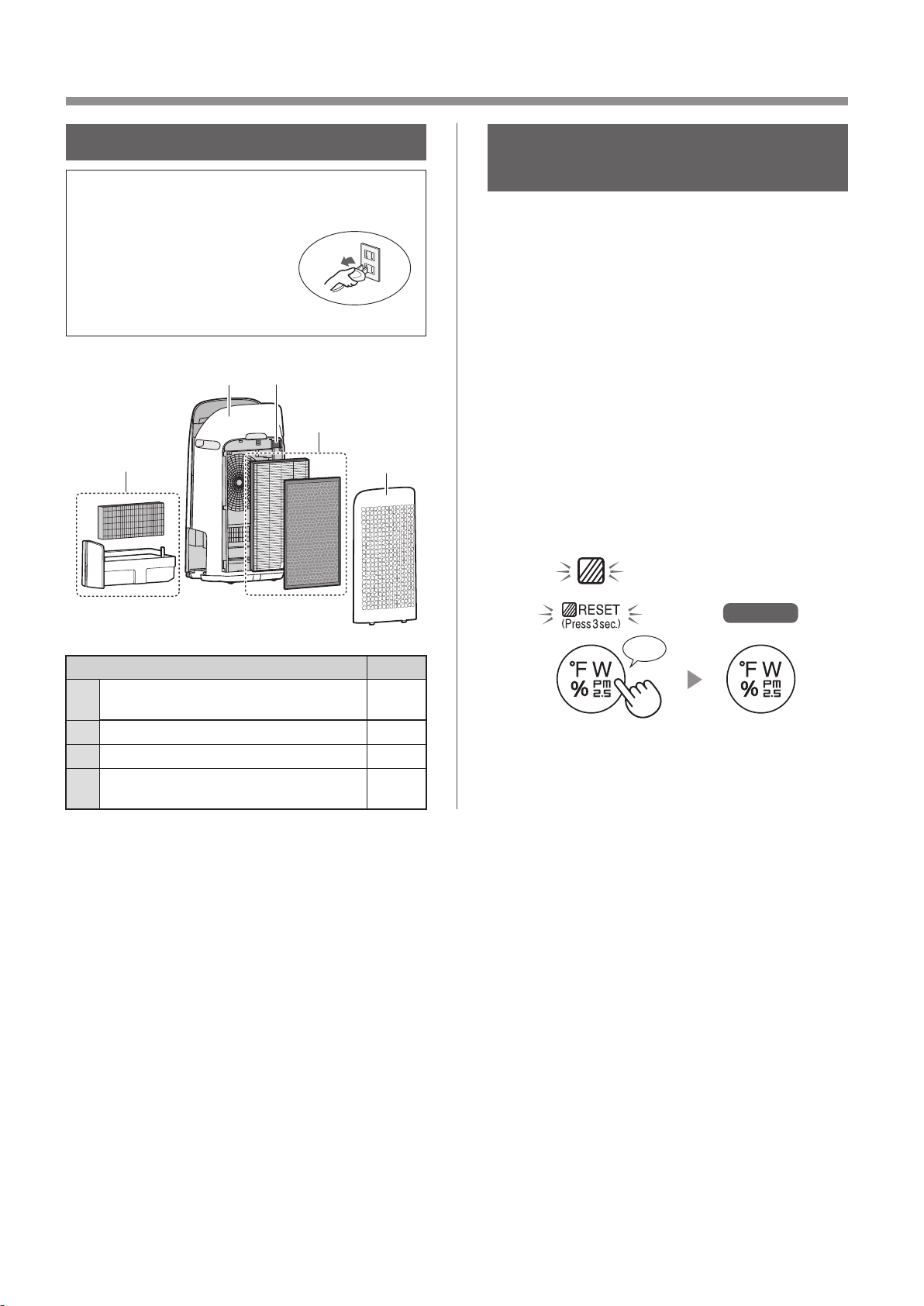
FR-16
SOIN ET ENTRETIEN
ENTRETIEN
• Afin de maintenir une efficacité optimale de ce
purificateur d'air, veuillez nettoyer le produit
ainsi que le filtre régulièrement.
• Assurez-vous de mettre
l’appareil hors tension et
de le débrancher avant de
procéder à son entretien ou
remplacer ses accessoires.
1
23
4
2
Positionnement Page
1
Filtre d'humidification/
Bac d'humidification
17
2
Panneau arrière/Filtre de capteur 18
3
Corps principal 18
4
Filtre HEPA authentique /
Filtre déodorant de carbone actif
19
INDICATEUR
D’ENTRETIEN DU FILTRE
Lorsque la durée de fonctionnement cumulée ou la
période de contenance d’eau est supérieure à plus
de 720 heures environ, l'indicateur d'entretien du
filtre s'allume.
• La durée de déconnexion de l’appareil n’est pas
calculée.
• 30 jours × 24 heures = 720 heures
Ceci est un rappel pour effectuer l’entretien décrit
du filtre d'humidification et du bac, du boîtier
principal, du panneau arrière et des capteurs.
Après l'entretien, branchez la fiche d'alimentation
dans la prise murale et appuyez sur le bouton
D'ALLUMER/D'ETEINDRE, puis maintenez le
bouton d'ÉPURATION RAPIDE PLASMACLUSTER
enfoncé pendant 3 secondes.
S'éteint
*
1
Appuyez pendant 3 sec.
♪
*
1
*1: Pour KCP110CW ou KCP70CW, “
o
F ” sur le panneau
de commande est “
o
C ”.
KCP110UW_70UW_110CW_70CW_2nd.indb 16KCP110UW_70UW_110CW_70CW_2nd.indb 16 2022/03/23 11:18:312022/03/23 11:18:31
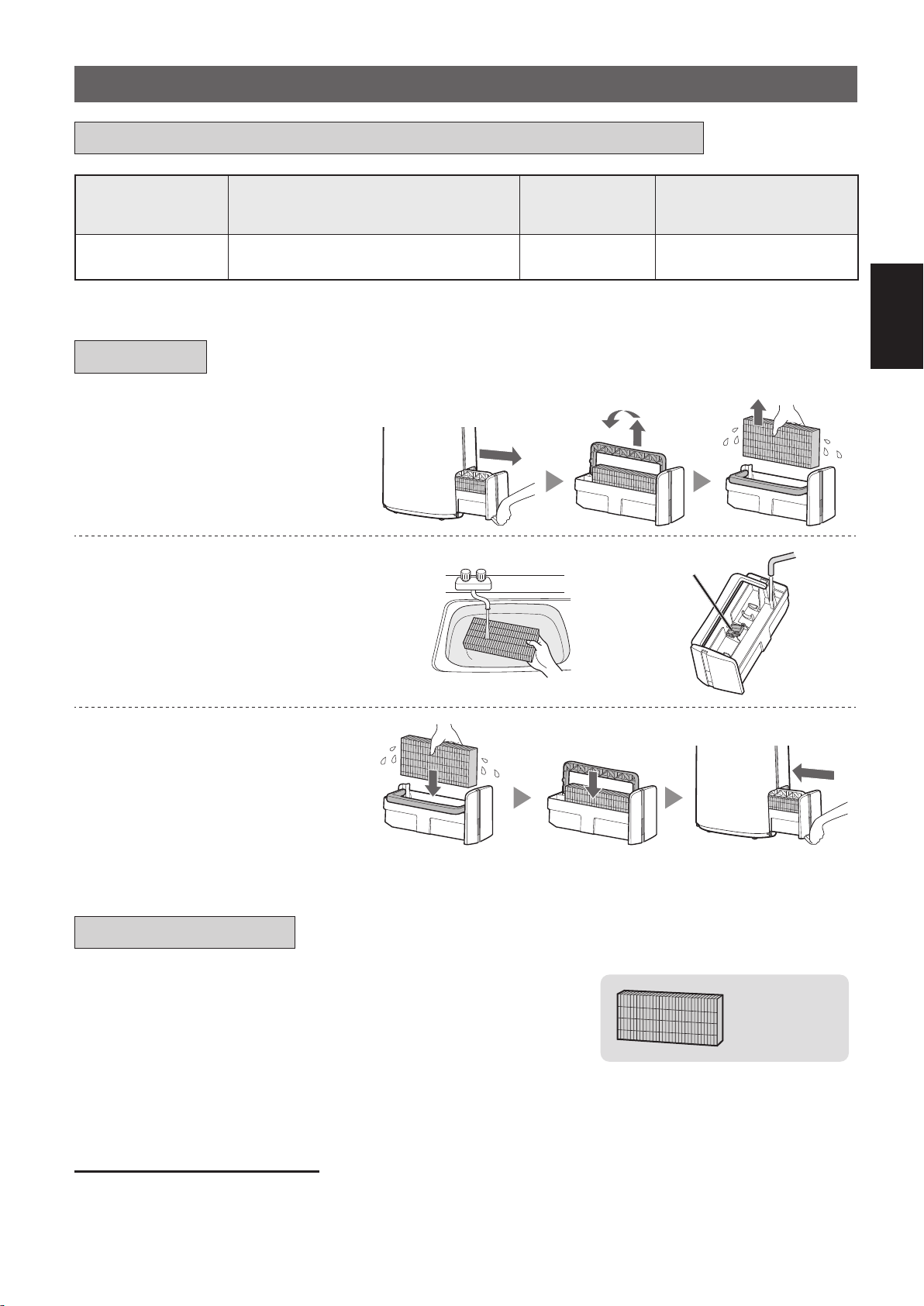
FR-17
FRANÇAIS
1.
Retirez le filtre
d'humidification et le bac.
2.
Rincez abondamment à l'eau.
Flotteur d'humidification
• Ne retirez pas le flotteur
d'humidification. S'il se détache,
reportez-vous à la page 18.
• Reportez-vous à la page 18 pour
savoir comment nettoyer le filtre
d'humidification lorsqu'il est très sale.
3.
Fixez le filtre d'humidification
et le bac.
• Après l'entretien, remontez
correctement les pièces.
FILTRE D’HUMIDIFICATION/BAC D’HUMIDIFICATION
Nom de filtre Cycle de maintien
Durée
d'utilisation
au maximum
Modèle du filtre
à remplacer
Filtre
d'humidification
Lorsqu'une odeur se dégage de la
sortie d'air ou une fois par mois.
2 ans FZ-P11MFU
LE TEMPS A REMPLACER ET ENTRETENIR LE FILTRE
MAINTIEN
REMPLACEMENT
Consultez cette page pour savoir comment installer le
filtre lors du remplacement.
•
Veuillez consulter votre revendeur pour acheter un filtre de remplacement.
•
N'utilisez que des filtres conçus pour cet appareil.
FZ-P11MFU
(1 unité)
Notez la date lorsque vous remplacez les filtres sur la couverture
arrière de ce manuel.
•
Scannez le code QR du produit à
la page
1 des informations et des
accessoires.
Mise au rebut des filtres
Mettez au rebut le filtre remplacé conformément aux lois et réglementations locales relatives à la mise au rebut.
Matériaux du filtre d'humidification : polyester, rayonne
KCP110UW_70UW_110CW_70CW_2nd.indb 17KCP110UW_70UW_110CW_70CW_2nd.indb 17 2022/03/23 11:18:352022/03/23 11:18:35
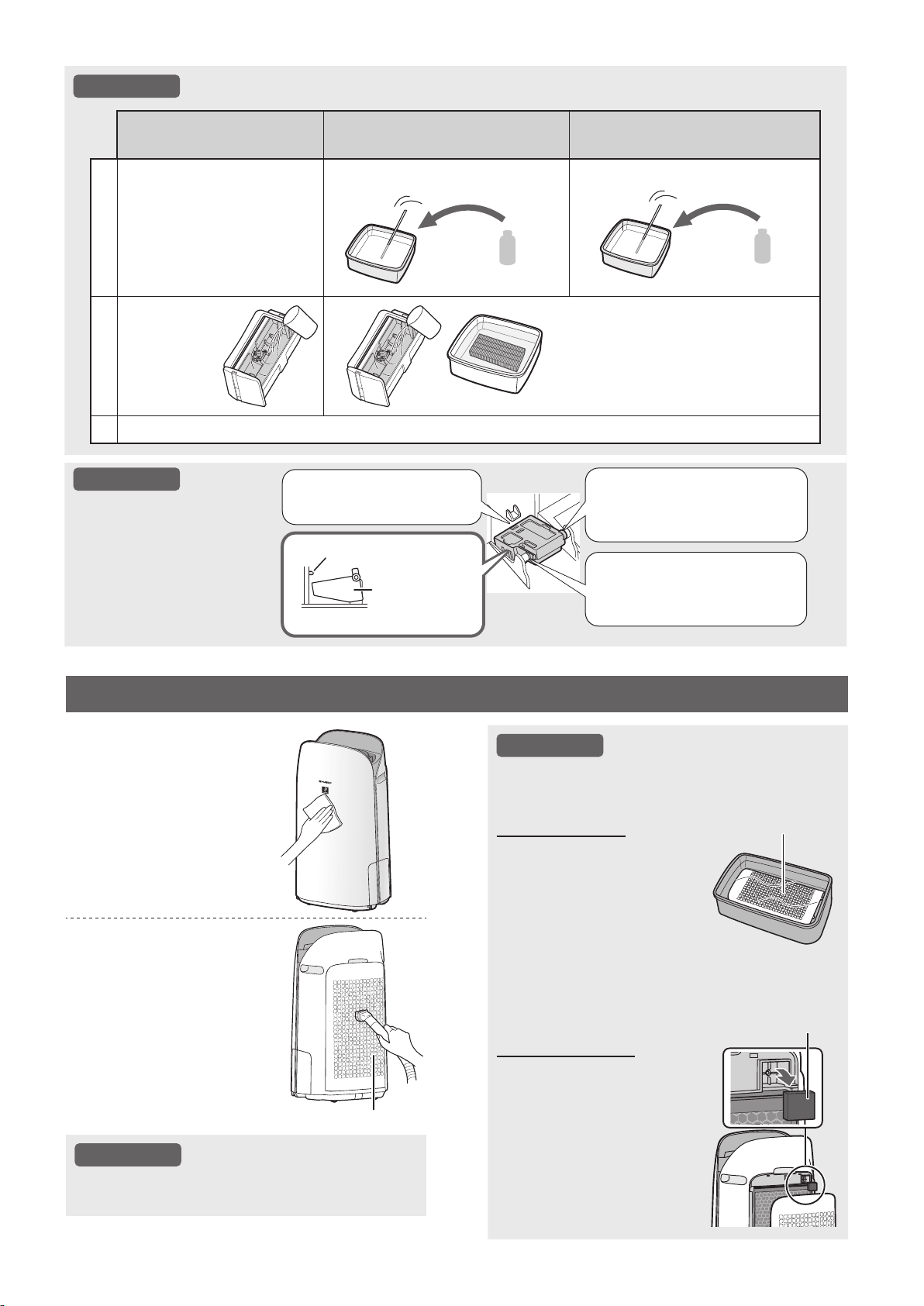
FR-18
ATTENTION
Comment nettoyer pour bien éliminer la saleté.
Détergent doux ménager
(bac d'humidification uniquement)
Acide citrique
(disponible dans certaines pharmacies)
Jus de citron 100% en
bouteille sans pulpe
1
1. Remplissez le bac à
moitié avec de l'eau.
2. Ajoutez une petite
quantité de détergent
ménager doux.
2 1/2 tasses d'eau
3 cuillères à café
3 tasses d'eau
1/4 tasse
2
Laissez tremper
pendant
30 minutes.
Laissez tremper pendant 30 minutes.
(Lorsque vous utilisez le jus de
citron comme solution de détartrage,
laissez tremper plus longtemps.)
3
Rincez le détergent ménager doux ou la solution de détartrage avec de l'eau propre.
ATTENTION
Comment installer
le flotteur
d'humidification.
2. Insérez la languette du
flotteur d'humidification
dans l'orifice.
1.
Insérez le flotteur de l'humidificateur
sous cette languette.
Vue en coupe
Languette
Flotteur
d'humidification
3. Insérez la languette de
l'autre côté du flotteur
d'humidification dans l'orifice.
ATTENTION
Comment nettoyer pour bien éliminer la
saleté tenace.
Panneau arrière
1. Versez une petite quantité
de détergent ménager
doux dans l'eau et laissez
tremper pendant environ
10 minutes.
2. Rincez le détergent ménager
doux avec de l'eau propre.
3. Séchez complètement le filtre
dans une zone bien ventilée.
Panneau arrière
Filtre du capteur
1. Retirez le panneau arrière.
2. Retirez le filtre du capteur.
3. Si le filtre du capteur
est très sale, nettoyez-
le à l'eau et séchez-le
soigneusement..
CORPS PRINCIPAL/PANNEAU ARRIÈRE/FILTRE DE CAPTEUR
Essuyez avec un
chiffon doux et sec.
Retirez délicatement
la poussière à
l'aide d'un outil de
nettoyage tel qu'un
aspirateur.
Panneau arrière (Préfiltre)
ATTENTION
• N'exercez pas de pression excessive
lorsque vous frottez le panneau arrière.
Filtre du capteur
KCP110UW_70UW_110CW_70CW_2nd.indb 18KCP110UW_70UW_110CW_70CW_2nd.indb 18 2022/03/23 11:18:422022/03/23 11:18:42
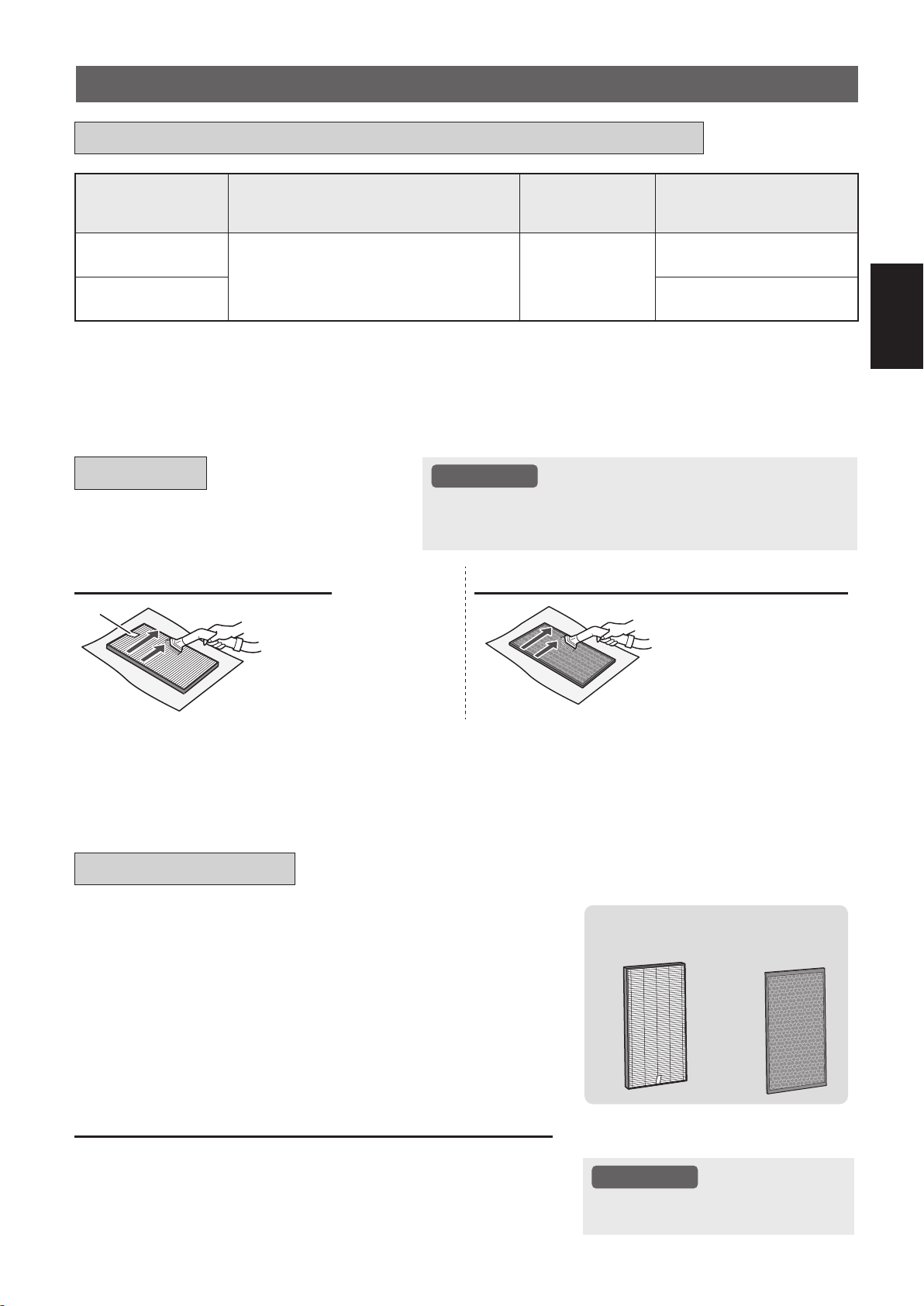
FR-19
FRANÇAIS
Nom de filtre Cycle de maintien
Durée
d'utilisation
au maximum
Modèle du filtre
à remplacer
Filtre HEPA
authentique
Chaque fois que la poussière
s'accumule, lorsque des odeurs émanent
de la sortie d'air, ou une fois par mois.
2 ans
*
1, 2
FZ-P11HFU
Filtre déodorant
de carbone actif
FZ-J80DFU
*1: Selon le format JEM 1476 de l'association de l'industrie électrique de Japon, la durée de vie maximale est basée
sur l'absorption de poussières équivalentes à la fumée de cinq cigarettes. Par rapport au nouveau filtre, sa capacité
d'absorber va être réduit au 50%. Dans les conditions dures, le rechangement du filtre doit être plus fréquent.
*2: L'application désignée avertit lorsque les filtres doivent être remplacés en fonction de l'utilisation.
Filtre HEPA authentique / Filtre déodorant de carbone actif
Consultez la page 10 pour obtenir les instructions
d’installation du filtre de remplacement.
•
Veuillez consulter votre distributeur pour l'achat de filtre de rechange.
•
Utiliser seulement le filtre conçus pour ce produit.
FZ-P11HFU
(1 unité)
FZ-J80DFU
(1 unité)
Notez la date à laquelle vous remplacez les filtres sur le
couvercle arrière de ce manuel.
•
Veuillez scanner le code QR à l
a page
1 pour obtenir des informations
sur le produit et les accessoires.
Traitement pour les filtres utilisés et remplacés
Veuillez éliminer le filtre usagé selon les lois et règlements locaux sur
l'élimination.
Matériel de filtre HEPA authentique: Polypropylène, Polyester
Matériel de filtre déodorant de carbone actif: Polypropylène,
Polyester, Carbone actif
ATTENTION
• Ne lavez pas et ne réutilisez pas
le filtre usagé.
Éliminez la poussière sur les filtres.
ATTENTION
• Ne lavez pas les filtres. Ne pas exposer à la lumière du soleil.
(Dans le cas contraire, ces filtres pourraient perdre leur
efficacité.)
FILTRE HEPA AUTHENTIQUE
FILTRE DÉSODORISANT À CHARBON ACTIF
Tag
Entretenez et nettoyez
uniquement la surface
marquée. Ne nettoyez pas la
surface opposée. Le filtre est
fragile, c’est pourquoi vous
devez faire attention de ne pas
appliquer trop de pression.
Les deux surfaces peuvent
être entretenues et nettoyées.
Le filtre est fragile, c’est
pourquoi vous devez faire
attention de ne pas appliquer
trop de pression.
Certaines odeurs absorbées par les filtres se dégradent au fil du temps, provoquant des odeurs supplémentaires.
En fonction des conditions d'utilisation, et en particulier si le produit est utilisé dans des environnements beaucoup plus
contraignants qu'un domicile normal, ces odeurs peuvent être perceptibles plus tôt que prévu.
Remplacez le filtre en pareil cas ou si la poussière ne peut pas être éliminée après l'entretien.
LE TEMPS A REMPLACER ET ENTRETENIR LE FILTRE
MAINTIEN
REMPLACEMENT
KCP110UW_70UW_110CW_70CW_2nd.indb 19KCP110UW_70UW_110CW_70CW_2nd.indb 19 2022/03/23 11:18:442022/03/23 11:18:44
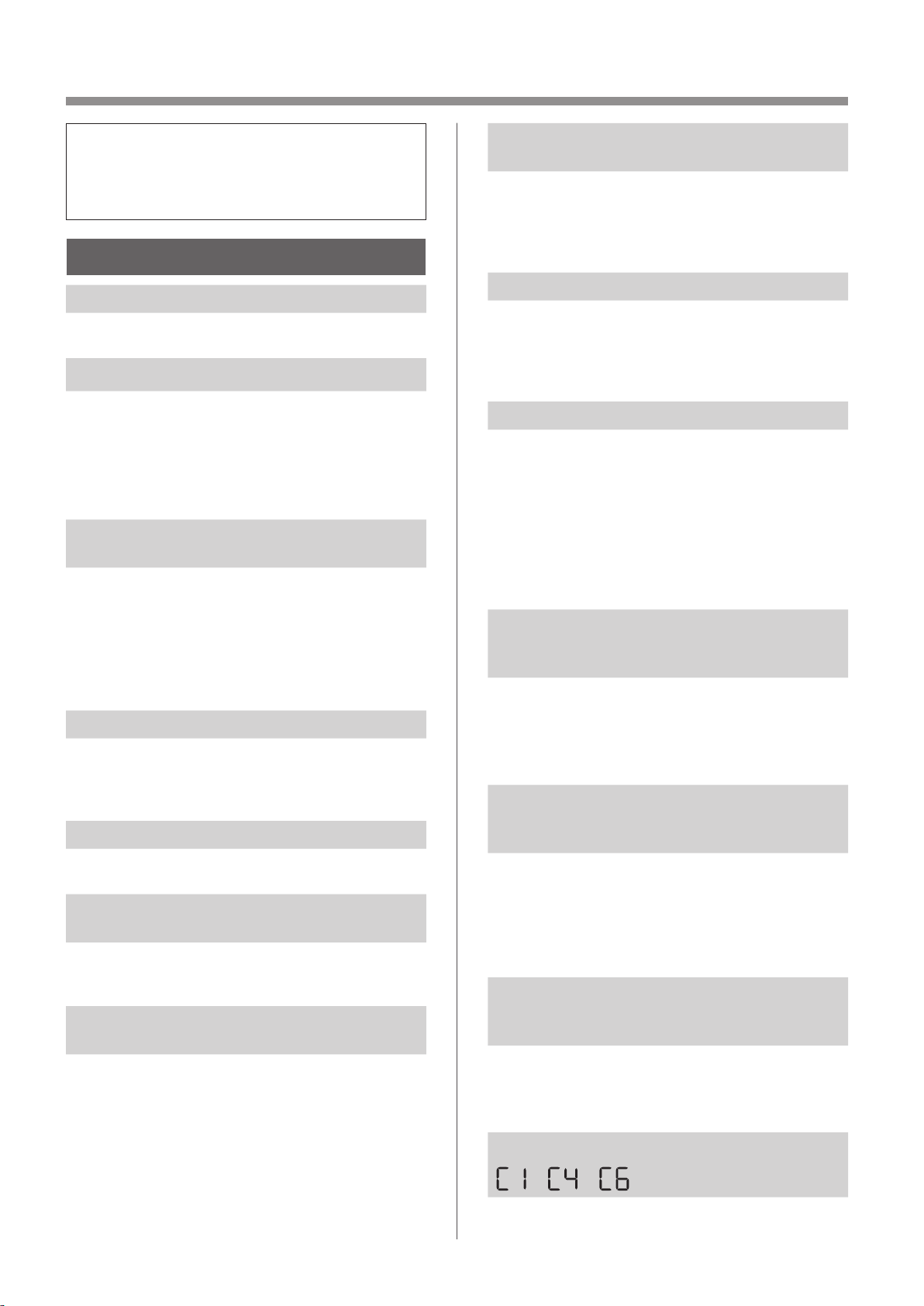
FR-20
DANS CE CAS
•
Avant de demander la réparation, veuillez
consulter la liste ci-dessous, car le
problème n'est peut-être pas dû à une
défectuosité du produit.
À PROPOS DU PRODUIT
L'odeur et la fumée persistent.
• Vérifiez les filtres. Si le filtre semble extrêmement
sale, nettoyez-le ou remplacez-le.
L'air refoulé par le produit a une odeur.
• Vérifiez si les filtres sont extrêmement sales.
• Nettoyez ou remplacez les filtres.
• Utilisez uniquement de l'eau fraîche du robinet.
L'utilisation d'autres sources d'eau risque
d’entraîner le développement de moisissures,
de champignons ou de bactéries.
Le produit ne fonctionne pas lorsqu’il y a
de la fumée de cigarette dans l'air.
• Assurez-vous que le produit est installé dans un
endroit où les capteurs peuvent détecter la fumée
de cigarette.
• Vérifiez si les ouvertures du capteur de poussière
sensible sont bloquées ou obstruées. Si elles
sont bloquées ou obstruées, nettoyez le filtre du
capteur ou le panneau arrière.
Odeur provenant d'un produit et/ou d'un filtre neuf.
• Immédiatement après avoir retiré le sac en
plastique, une légère odeur peut se dégager.
Cette odeur n'est pas nocive pour la performance
du filtre ou l'exposition humaine.
Le produit émet un son de cliquetis.
• Le produit peut émettre un son de cliquetis
lorsqu'il est en train de générer des ions.
L'indicateur de qualité de l'air est bleu
même lorsque l'air n'est pas propre.
• L'air était peut-être sale lorsque le produit a été
branché. Débranchez l'appareil, attendez une
minute, puis rebranchez-le.
L'indicateur de qualité de l'air est rouge
même lorsque l'air est propre.
• Les ouvertures sales ou obstruées du capteur de
poussière sensible perturbent le fonctionnement
du capteur. Nettoyez doucement le filtre du
capteur ou le panneau arrière.
L'indicateur de qualité de l'air change
fréquemment de couleur.
• L'indicateur de propreté change automatiquement de
couleur lorsque le capteur de poussière sensible et
le capteur d'odeur détectent des impuretés. Si vous
avez des doutes sur le changement, vous pouvez
modifier la sensibilité du capteur. (Pages 22, 23)
L’indicateur d'entretien du filtre est allumé.
• Chaque fois que vous avez effectué un entretien ou
un remplacement du filtre d'humidification, branchez
le cordon d'alimentation sur une prise secteur, puis
appuyez sur le bouton de réinitialisation du filtre
pendant plus de 3 secondes. (Page 16)
L'écran s'éteint.
• Lorsque la commande d'éclairage est réglée sur
“ ARRÊT”, le voyant est toujours éteint.
Si vous ne voulez pas que la lumière soit éteinte,
réglez la commande d'éclairage sur “Auto” ou
“Faiblement allumé”. (Pages 22, 23)
• En mode Veille, lorsque la commande d'éclairage
est réglée sur “Auto”, l'éclairage devient
automatiquement plus faible ou nul en fonction de
la luminosité de la pièce.
L'affichage ne correspond pas au rapport
météo ou à un autre hygromètre ou
thermomètre dans la pièce.
• L'extérieur et l'intérieur ainsi que l'environnement
domestique (le volume de trafic à proximité, le
nombre d’étages dans une maison, etc.) peuvent
entraîner une lecture différente de ces données.
• Il y a une différence de niveau dans la même pièce.
L'indicateur d'humidification de
l'écran ne s'allume pas lorsque le bac
d'humidification est vide.
• La pièce a atteint le niveau approprié d'humidité
et l’humidification a cessé.
• Vérifiez l'absence d'impuretés sur le flotteur
d'humidification. Nettoyez le bac d’humidification.
Assurez-vous que l’appareil se trouve sur une
surface plane.
Le niveau d'eau dans le bac
d'humidification ne diminue pas ou
diminue lentement.
• Vérifiez si le bac d'humidification est correctement
installé. Vérifiez le filtre d'humidification.
• Si le filtre est extrêmement sale, nettoyez-le ou
remplacez-le.
L'un des éléments suivants s'affiche.
• Débranchez l’appareil, attendez une minute, puis
rebranchez-le.
KCP110UW_70UW_110CW_70CW_2nd.indb 20KCP110UW_70UW_110CW_70CW_2nd.indb 20 2022/03/23 11:18:452022/03/23 11:18:45
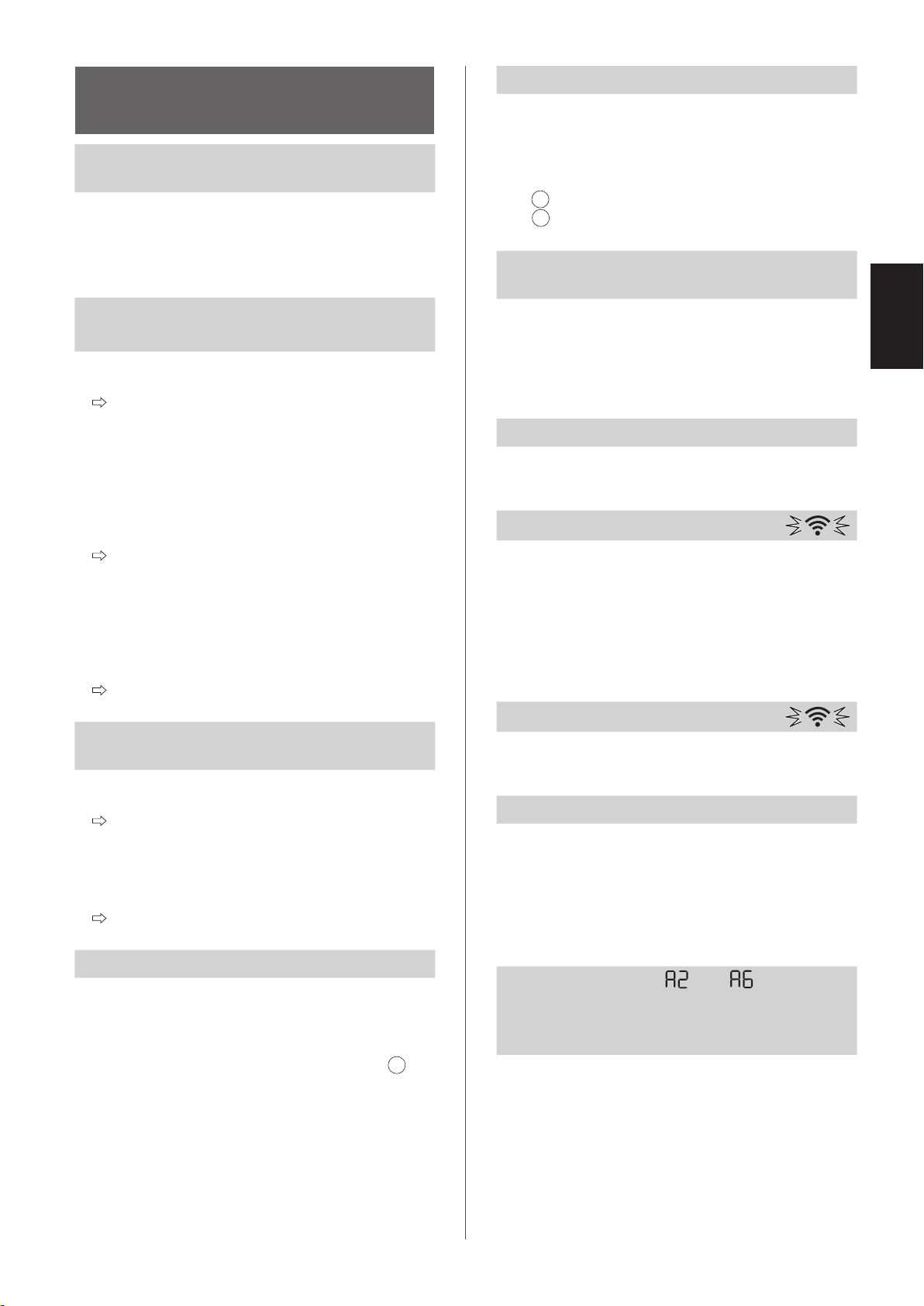
FR-21
FRANÇAIS
À PROPOS DE LA
FONCTION Wi-Fi
La connexion Wi-Fi du purificateur d'air et
du routeur ne peut pas être effectuée.
• Vérifiez les spécifications du routeur utilisé.
• Ajustez la direction du routeur et de l'antenne,
rapprochez le routeur et l'antenne, etc. Ensuite,
remettez le routeur sous tension et effectuez à
nouveau la CONFIGURATION INITIALE.
La connexion entre le purificateur d'air et votre
appareil intelligent ne peut pas être établie.
• Le purificateur d'air et votre appareil intelligent
sont-ils connectés au même routeur ?
Connectez le purificateur d'air et votre appareil
intelligent au même routeur.
Si vous ne pouvez toujours pas vous connecter,
essayez de connecter votre appareil intelligent
à la bande 2,4 GHz du routeur.
• Est-ce que le nombre total d’appareils intelligents
en cours d'utilisation excède le nombre maximum
pour l’enregistrement sur un purificateur d'air ?
Le nombre maximum d’appareils intelligents
pouvant être enregistrés sur un purificateur
d'air est de 10.
• Est-ce que le nombre total de produits
(climatiseurs, purificateurs d'air, etc.) à enregistrer
avec un appareil intelligent excède le nombre
maximal spécifié ?
Le nombre maximal de produits à enregistrer
sur un appareil intelligent est de 30.
L'opération à distance à partir d'un appareil
intelligent ne peut pas être effectuée.
• Est-ce que l'indicateur Wi-Fi du purificateur d'air
est allumé ?
Si l'indicateur Wi-Fi est éteint, veuillez effectuer
“A1 : Adaptateur Wi-Fi MARCHE/ARRÊT
”
pour allumer l’appareil Wi-Fi. (Page 24)
• Est-ce que la connexion entre le purificateur d'air
et votre appareil intelligent a été établie ?
Configurez la connexion entre le purificateur
d'air et votre appareil intelligent. (Page 13)
Lors du changement du routeur
• Il est nécessaire de rebrancher le purificateur d'air
au routeur.
1. Maintenez le bouton « Wi-Fi » enfoncé pendant
3 secondes pour arrêter la fonction Wi-Fi.
2. Effectuez “CONFIGURATION INITIALE: 2
Raccordement du purificateur d'air et d'un
routeur”. (Page 12)
Lors du changement de l'appareil intelligent
• Effectuez les étapes suivantes.
1. Supprimez l'enregistrement de l'ancien appareil
intelligent de l'application désignée.
2. Utilisez le nouvel appareil intelligent pour
effectuer “CONFIGURATION INITIALE:
1 Téléchargement et connexion, et
3 Connexion entre le purificateur d'air et un
appareil intelligent”. (Pages 12, 13)
Lors de la mise au rebut ou de la cession
du purificateur d'air
• Effectuez les étapes suivantes afin d'éviter toute
fuite d'informations personnelles.
1. Supprimez l'enregistrement du purificateur d’air
de l'application désignée.
2. Effectuez “A4: Initialisation de la fonction Wi-Fi”.
(Page 24)
En cas d’une cession par un tiers
• Pour éviter tout accès non autorisé par un tiers,
effectuer “A4: Initialisation de la fonction Wi-Fi”.
(Page 24)
L’indicateur Wi-Fi clignote lentement
• Il s'agit de l'un des états suivants.
A. La connexion Wi-Fi du purificateur d'air et d'un
routeur est en cours de configuration.
B. La connexion du purificateur d'air et
d'un appareil intelligent est en cours de
configuration.
C. Le logiciel de la fonction Wi-Fi du purificateur
d'air est en cours de mise à jour.
L’indicateur Wi-Fi clignote rapidement
• Erreur réseau. Veuillez confirmer l'état du réseau
Wi-Fi à partir de “A7: Afficher l'état du réseau Wi-Fi”.
(Page 25)
L’indicateur Wi-Fi s’éteint
• Le purificateur d'air ne peut pas se connecter au
routeur. Vérifiez les points suivants.
A. La fiche d'alimentation est-elle correctement
branchée ?
B. La fonction Wi-Fi a-t-elle été arrêtée ?
Confirmez l'état du réseau Wi-Fi à partir de “A7:
Afficher l'état du réseau Wi-Fi”. (Page 25)
L'une des options “ ” à “ ” ne
peut pas être sélectionnée en mode de
configuration Wi-Fi..
(Pages 24 - 25)
• Si l'adaptateur Wi-Fi est désactivé, l'une
des options “A2” à “A6” peut ne pas être
sélectionnable.
KCP110UW_70UW_110CW_70CW_2nd.indb 21KCP110UW_70UW_110CW_70CW_2nd.indb 21 2022/03/23 11:18:472022/03/23 11:18:47
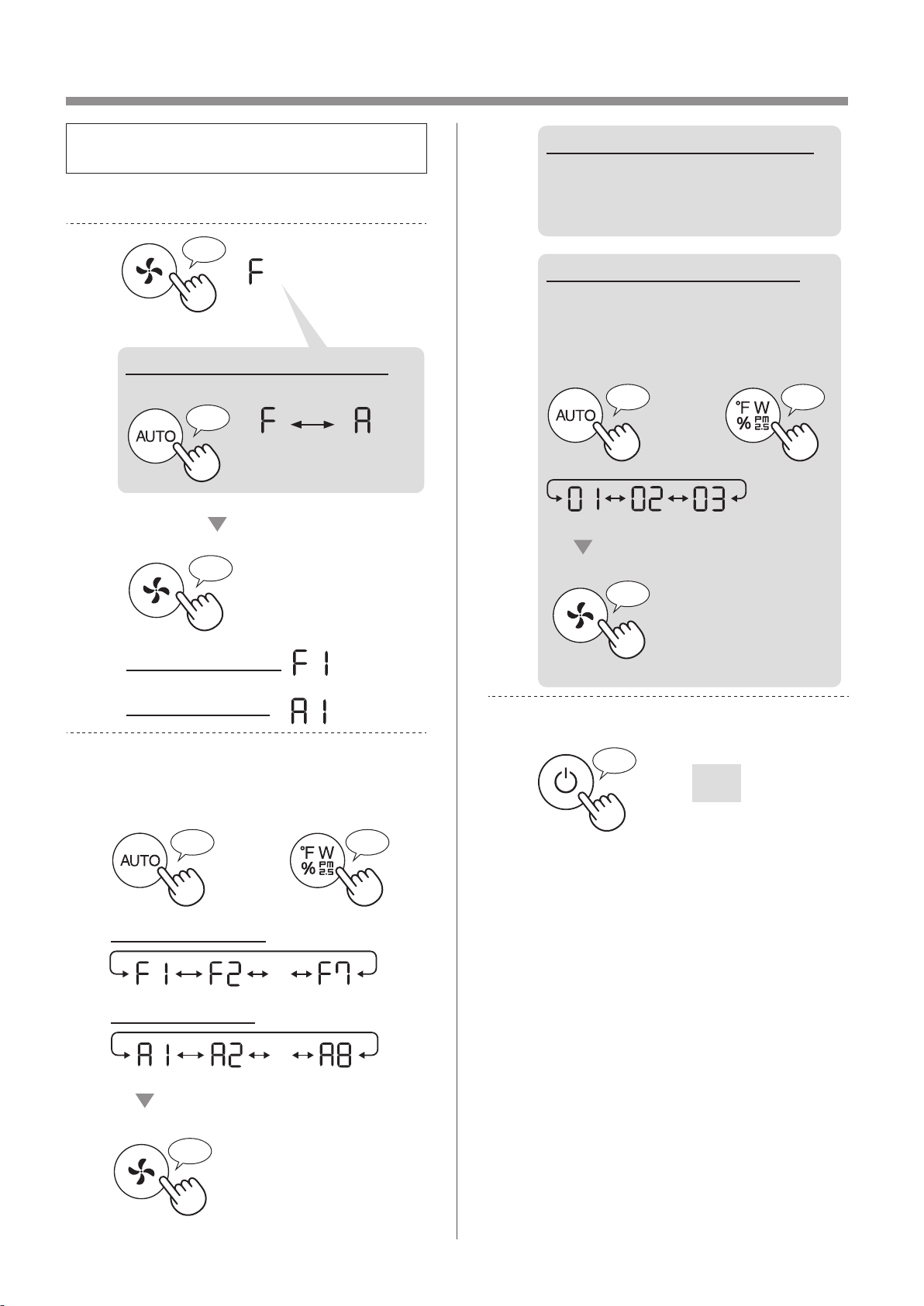
FR-22
COMMENT MODIFIER DIVERS RÉGLAGES
• Vous pouvez changer les fonctions de l’appareil
et du Wi-Fi à la page 23 - 26.
1.
Mettez le produit hors tension.
2.
Appuyez pendant 3 sec.
♪
♪
Ensemble
Configuration Wi-Fi
Réglage de l’appareil
♪
Lors de la configuration Wi-Fi
Passez de «F» à «A».
Réglage de
l’appareil
Con guration
Wi-Fi
3.
Sélectionnez «Numéro de fonction
(F1-F7 ou A1-A8)» à la page 23 - 26.
ou
Continuer
♪
Revenir
♪
・・・
Ensemble
♪
Configuration Wi-Fi
Réglage de l’appareil
・・・
4.
Lors de la configuration Wi-Fi
Reportez-vous aux pages 24
- 26 pour plus de détails sur
chaque fonction.functions.
Lors du réglage de l’appareil
Sélectionnez «Numéro de
réglage (01 - 03)» à la page 23.
Ensemble
♪
~
ou
Continuer
♪
Revenir
♪
5.
Terminez le réglage.
S'éteint
♪
~
KCP110UW_70UW_110CW_70CW_2nd.indb 22KCP110UW_70UW_110CW_70CW_2nd.indb 22 2022/03/23 11:19:022022/03/23 11:19:02
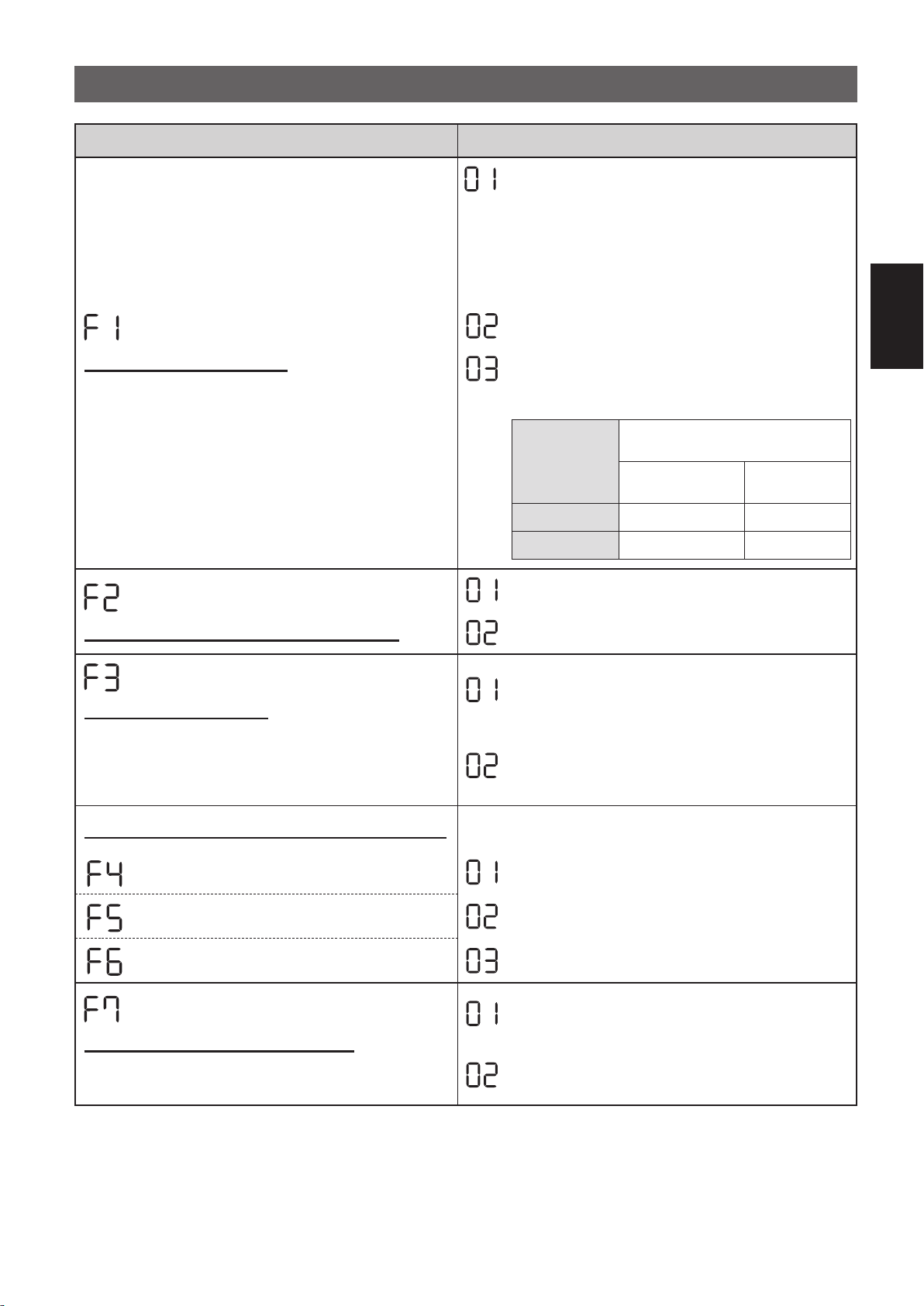
FR-23
FRANÇAIS
FONCTIONS DU PRODUIT (F1-F7)
Fonction Réglage
Commande d’éclairage
Vous pouvez sélectionner la luminosité de l'affichage
et de l'indicateur de qualité de l'air.
ARRÊT
Lorsqu'il est réglé sur «ARRÊT», le voyant
“Faiblement allumé” s'allume pendant
8 secondes après le fonctionnement,
puis le témoin s'éteint.
Toutefois, certains indicateurs qui nécessitent
une notification restent faiblement allumés.
Faiblement allumé
Auto
(par défaut)
L'éclairage change automatiquement en fonction
de la luminosité de la pièce.
Luminosité
de la pièce
Affichage et indicateur de
qualité de l'air
TOUS LES MODES
(sauf VEILLE)
MODE
VEILLE
Lumineux MARCHE
Faiblement allumé
Faiblement allumé Faiblement allumé
ARRÊT
MARCHE/ARRÊT Plasmacluster Ion
ARRÊT
MARCHE
(par défaut)
Reprise automatique
Ce modèle est doté d’une fonction de reprise
automatique, dans laquelle le fonctionnement
reprend avec le mode et les réglages précédents
lorsque le courant est rétabli.
Annulation
MARCHE
(par défaut)
Réglage de la sensibilité du capteur (F4 - F6)
Capteur de lumière Bas
Capteur de poussière sensible Standard
(par défaut)
Capteur d’odeur Haut
Réglage de l'indicateur sonore
Vous pouvez régler l’appareil pour émettre un signal
sonore lorsque le bac d'humidification est vide.
Annulation
(par défaut)
MARCHE
KCP110UW_70UW_110CW_70CW_2nd.indb 23KCP110UW_70UW_110CW_70CW_2nd.indb 23 2022/03/23 11:19:082022/03/23 11:19:08
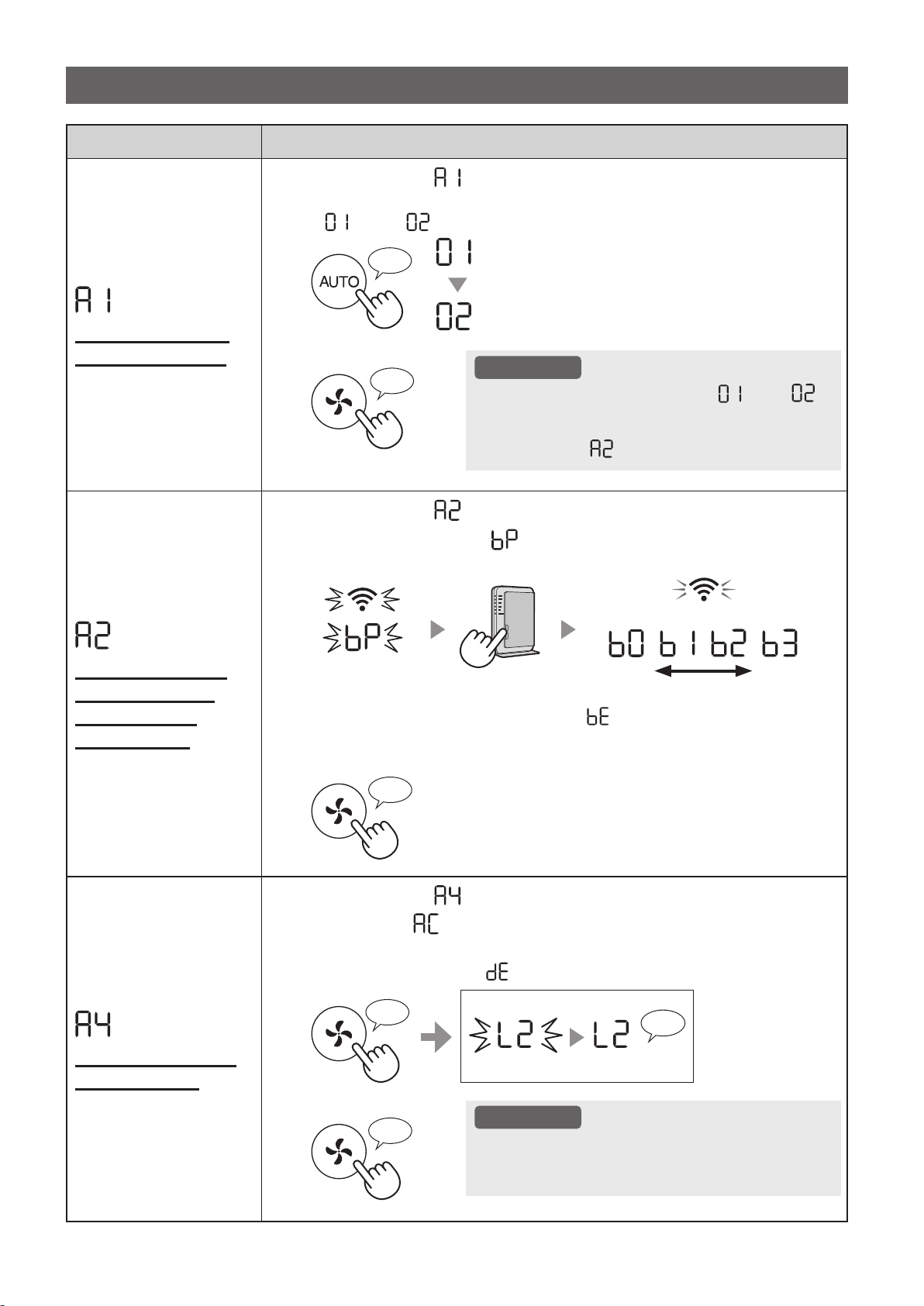
FR-24
Fonction Réglage
Adaptateur Wi-Fi
MARCHE/ARRÊT
1.
Sélectionnez « » en suivant les étapes 1 - 3 de la page 22.
2.
Appuyez sur le bouton «AUTO» pour sélectionner le réglage
«
» ou « ».
Wi-Fi ARRÊT
Wi-Fi MARCHE
♪
3.
Terminer
ATTENTION
• Lorsque le numéro de réglage (« » ou « »)
est modifié, le carré tourne sur l'affichage jusqu'à
ce que le réglage soit terminé. Lorsque le réglage
est terminé, «
» s'affiche.
♪
~
Connexion Wi-Fi
avec un routeur
(à l'aide de la
touche WPS)
1.
Sélectionnez « » en suivant les étapes 1 - 3 de la page 22.
2.
Après l'affichage de « », appuyez sur la touche WPS (Wi-Fi
Protected Setup) Bouton du routeur.
faible fort
Allumé
Clignotement
Une fois connecté, le niveau du récepteur s'affiche.
Une erreur de connexion se produit si « » est affiché. Validez le routeur et
réessayez.
3.
Terminer
♪
Initialisation de la
fonction Wi-Fi
1.
Sélectionnez « » en suivant les étapes 1 - 3 de la page 22.
2.
Après que « » s'affiche, appuyez sur la touche «Vitesse du
ventilateur».
Une erreur se produit si « » est affiché. Veuillez réessayer.
♪
♪
~
Terminer
Clignotement
Initialisation
3.
Terminer
ATTENTION
• Supprimez l'enregistrement de l’appareil depuis
l'application lors de l'initialisation du purificateur
d'air qui est déjà connecté au Wi-Fi.
♪
FONCTIONS Wi-Fi (A1-A8)
KCP110UW_70UW_110CW_70CW_2nd.indb 24KCP110UW_70UW_110CW_70CW_2nd.indb 24 2022/03/23 11:19:202022/03/23 11:19:20
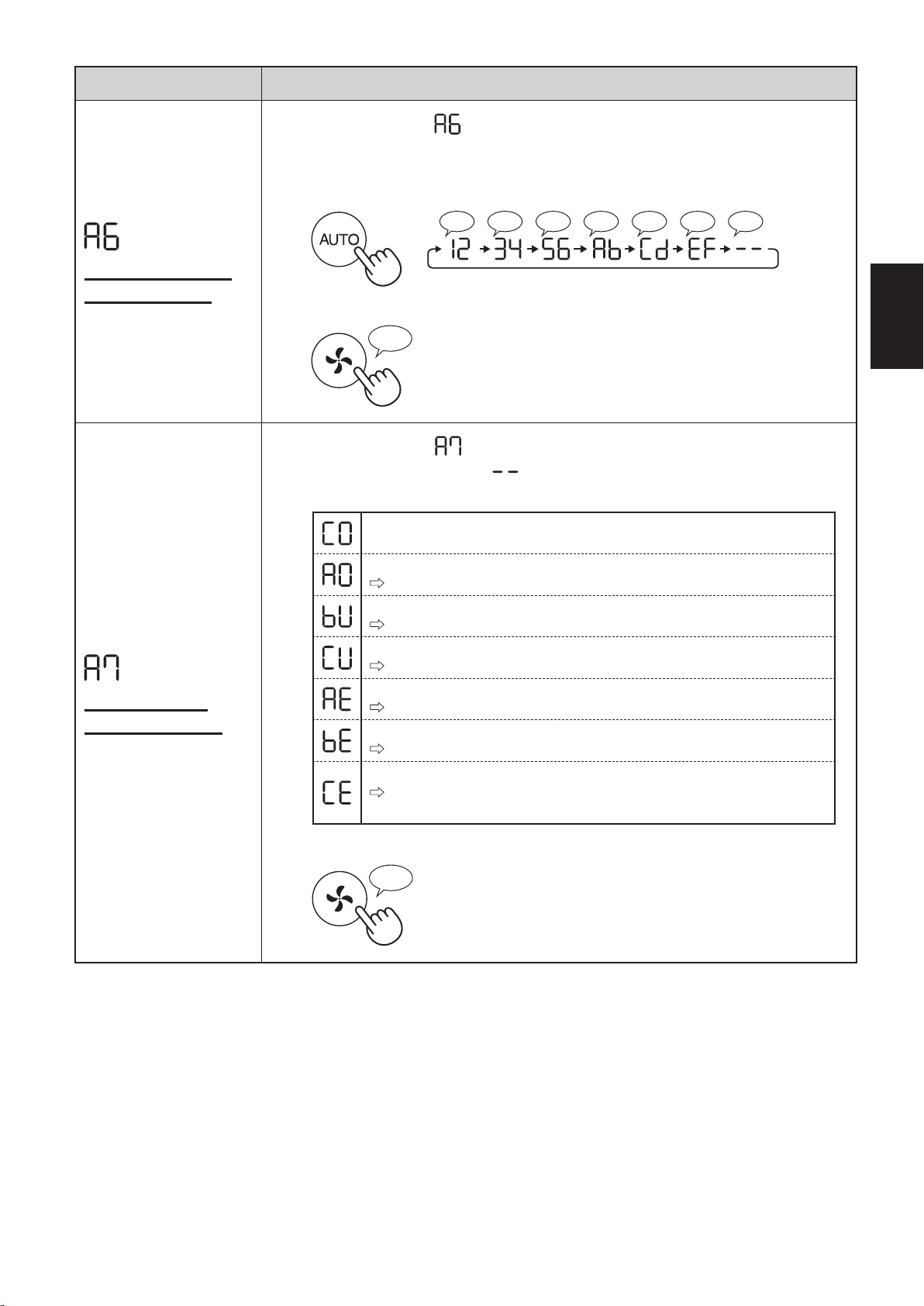
FR-25
FRANÇAIS
Fonction Réglage
Confirmation de
l'adresse MAC
1.
Sélectionnez « » en suivant les étapes 1 - 3 de la page 22.
2.
Appuyez sur le bouton «AUTO» pour afficher l'adresse MAC.
Par exemple :
Si l'adresse MAC est «12:34:56:AB:CD:EF».
♪♪♪♪♪♪♪
♪
~
3.
Terminer
♪
Afficher l'état
du réseau Wi-Fi
1.
Sélectionnez « » en suivant les étapes 1 - 3 de la page 22.
2.
Après l'affichage de « » pendant quelques secondes,
l'état du réseau de l'adaptateur Wi-Fi s'affiche.
La connexion est stable
L’adaptateur Wi-Fi est désactivé
Activez l'adaptateur Wi-Fi.
Le routeur n'est pas enregistré
Effectuez la connexion Wi-Fi avec le routeur.
La création de lien avec l'application n’est pas effectuée
Effectuez la création de lien avec l’appareil intelligent.
Erreur de réseau de l’adaptateur Wi-Fi
Éteignez l'adaptateur Wi-Fi et rallumez-le au bout de quelques instants.
Erreur réseau entre le purificateur d'air et le routeur
Vérifiez l'état du réseau du routeur.
Erreur de service réseau
Désactivez le purificateur d'air et vérifiez l'état d’Internet, puis essayez
à nouveau.
3.
Terminer
♪
KCP110UW_70UW_110CW_70CW_2nd.indb 25KCP110UW_70UW_110CW_70CW_2nd.indb 25 2022/03/23 11:19:292022/03/23 11:19:29
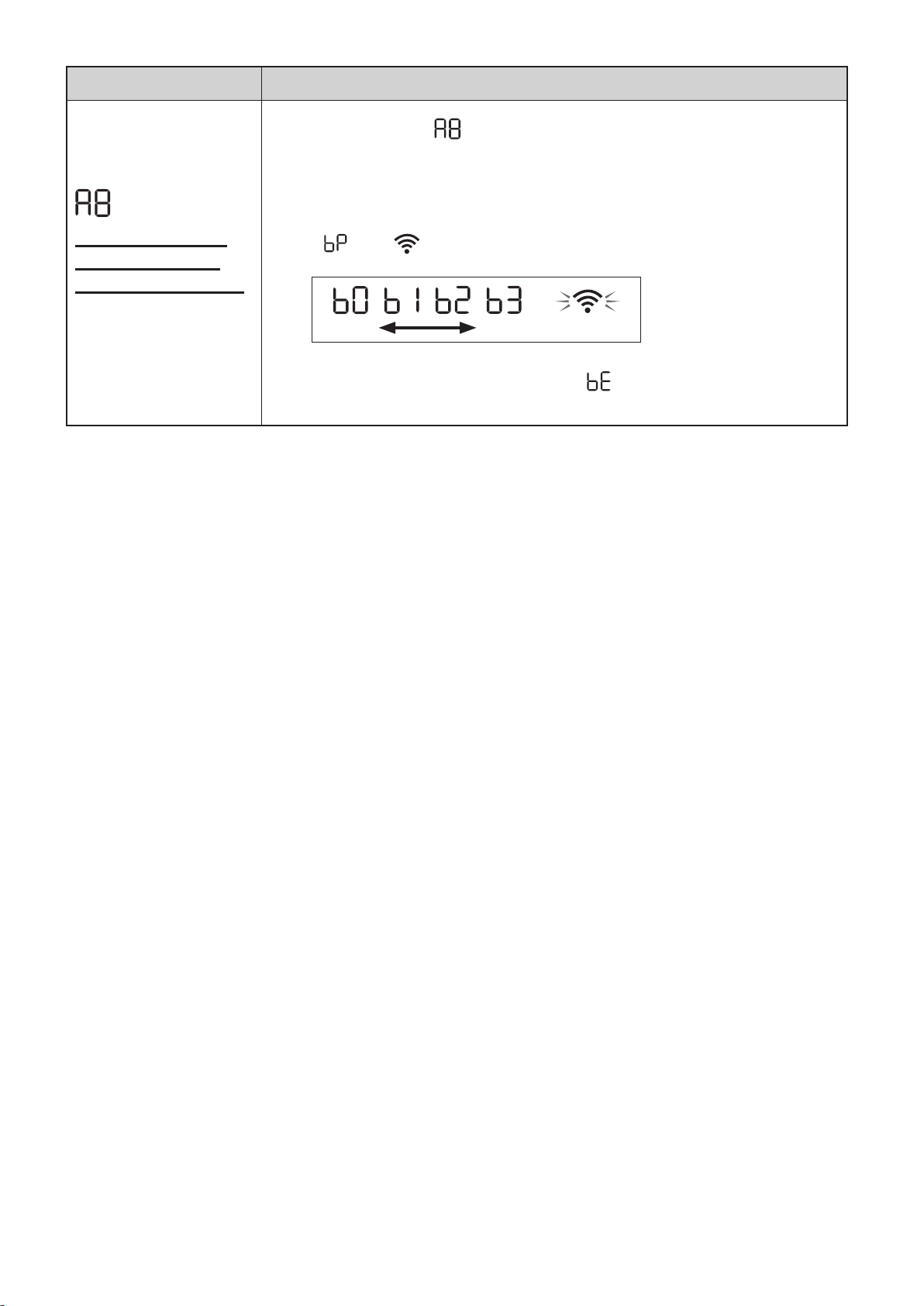
FR-26
Fonction Réglage
Connexion Wi-Fi
avec un routeur
(sans touche WPS)
- Mode AP (Point
d'accès) -
1.
Sélectionnez « » en suivant les étapes 1 - 3 de la page 22.
2.
Effectuez la connexion Wi-Fi du purificateur d'air et du routeur en
fonction de l'écran de l’application.
Reportez-vous à l'application pour plus d'opérations.
« » et « » clignotent lors de la configuration de la connexion entre le
produit et le routeur.
faible fort
Allumé
Une fois connecté, le niveau du récepteur s'affiche.
Une erreur de connexion se produit si «
» est affiché. Vérifiez le routeur
et réessayez.
KCP110UW_70UW_110CW_70CW_2nd.indb 26KCP110UW_70UW_110CW_70CW_2nd.indb 26 2022/03/23 11:19:322022/03/23 11:19:32
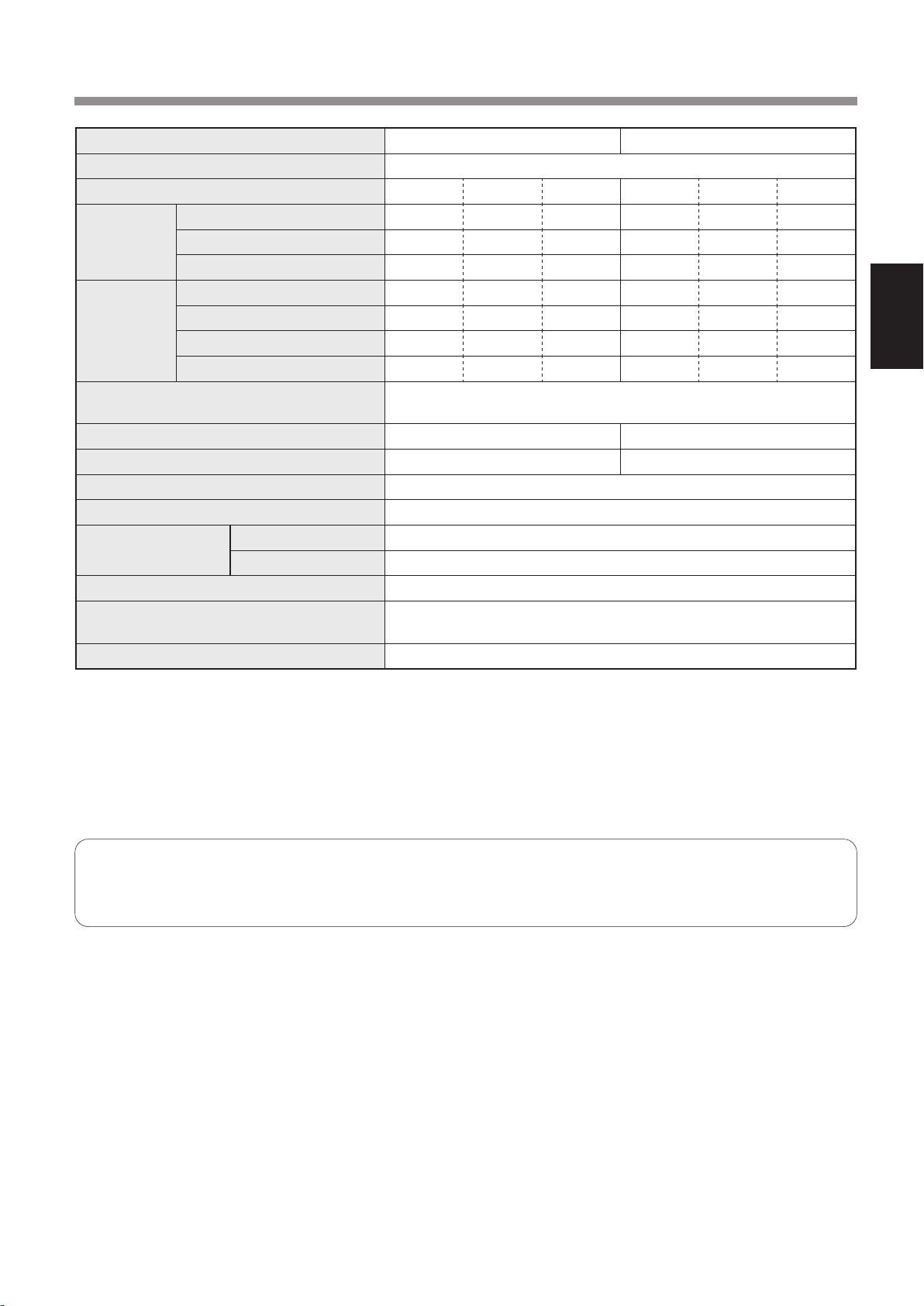
FR-27
FRANÇAIS
CARACTÉRISTIQUES
Modèle KCP110UW / KCP110CW KCP70UW / KCP70CW
Alimentation 120 V ~ 60 Hz
Opération de la vitesse du ventilateur MAX MOYEN MEUGLER MAX MOYEN MEUGLER
CLEAN AIR
Vitesse du ventilateur (CFM) 381 222 64 272 190 64
Puissance nominale (W) 94 27 4,8 40 19 4,8
Niveau de bruit (dBA)
*
1
55 42 21 47 39 21
CLEAN AIR
&
HUMIDIFY
Vitesse du ventilateur (CFM) 381 222 64 272 190 64
Puissance nominale (W) 94 27 4,8 40 19 4,8
Niveau de bruit (dBA)
*
1
55 42 21 47 39 21
Humidification (pintes / heure)
*
2
0,70 0,47 0,15 0,55 0,42 0,15
Alimentation de secours(W)
1,1 (Lorsque l'adaptateur Wi-Fi est activé.)
0,7 (Lorsque l'adaptateur Wi-Fi est désactivé.)
La surface recommandé pour la chambre
*
3
538 sq. ft. (50 m
2
) 396 sq. ft. (37 m
2
)
CADR (poussière/fumée/pollen) 352 / 347 / 443 260 / 255 / 259
Capacité du bac d'humidification (gallon) Environ. 0,53
Sensors Poussière sensible / Odeur / Lumière / Température et humidité
Type de filtre
Collecte de poussière Filtre HEPA
*
4
authentique
Désodorisation Filtre déodorant de carbone actif
La longueur du chambre 6,6 ft. (2,0 m)
Dimensiones
15,8 in. (W) × 12,4 in. (D) × 28,6 in. (H)
(402 mm (W) × 315 mm (D) × 727 mm (H))
Peso Environ. 22,3 lbs. (10,1 kg)
*1
•
Le niveau sonore est mesuré conformément à la norme JEM1467 de l'Association des fabricants électriques du Japon.
*2
•
La quantité d'humidification change en fonction de la température et de l'humidité intérieures et extérieures.
La quantité d'humidification augmente à mesure que la température augmente ou que l'humidité diminue.
La quantité d'humidification diminue lorsque la température diminue ou lorsque l'humidité augmente.
•
Conditions de mesure : 20 ºC, humidité de 30 % (conformément à JEM1426).
*3
•
La taille de la pièce recommandée est appropriée pour faire fonctionner l’appareil à la vitesse maximale du ventilateur.
*4
•
Le filtre retire plus de 99,97% de particules d'au moins 0,3 microns.
Alimentation de secours
Lorsque la prise d'alimentation de l’appareil est insérée dans une prise murale, il consomme de l'énergie en veille afin
d’actionner les circuits électriques.
Pour économiser de l'énergie, débranchez le cordon d'alimentation lorsque l’appareil n'est pas utilisé.
KCP110UW_70UW_110CW_70CW_2nd.indb 27KCP110UW_70UW_110CW_70CW_2nd.indb 27 2022/03/23 11:19:322022/03/23 11:19:32

Gracias por comprar este Purificador de aire SHARP.
Lea este manual detenidamente antes de utilizar el producto.
Este manual debe guardarse en un lugar seguro para consultarlo en el futuro.
ESPAÑOL
INSTRUCCIONES DE SEGURIDAD
IMPORTANTES ....................................... 2
NOMBRE DE LAS PARTES ................... 6
PREPARACIÓN ....................................... 8
OPERACIÓN .......................................... 12
CUIDADO Y MANTENIMIENTO .......... 14
EN ESTA SITUACIÓN ........................... 18
CÓMO CAMBIAR VARIOS AJUSTES
... 20
ESPECIFICACIONES ........................... 25
CONTENIDO
Declaración de conformidad
PURIFICADOR DE AIRE SHARP
KCP110UW / KCP70UW
Este dispositivo cumple con la Parte 18 del reglamento
FCC.
Parte responsable:
SHARP ELECTRONICS CORPORATION
100 Paragon Drive, Montvale, NJ 07645, U.S.A
TEL: (800) 237-4277
Este adaptador Wi-Fi cumple con la Parte 15 del
reglamento FCC. Su funcionamiento está sujeto a
las dos condiciones siguientes: (1) Este dispositivo
puede no causar interferencias perjudiciales y
(2) debe aceptar cualquier interferencia recibida,
incluyendo interferencias que puedan causar un
funcionamiento no deseado.
•
Contiene FCC: RX3-B01
Declaración de conformidad
PURIFICADOR DE AIRE SHARP
KCP110CW / KCP70CW
CAN ICES-001B / NMB-001B
Parte responsable:
SHARP ELECTRONICS OF CANADA LTD.
335 Britannia Road Este, Mississauga, Ontario L4Z
1W9 Canadá
TEL: (905) 568-7140
Este dispositivo contiene un transmisor(es)/
receptor(es) exento(s) de licencia que cumple con la(s)
norma(s) RSS exenta(s) de licencia del Departamento
de Innovación, Ciencia y Desarrollo Económico de
Canadá. El funcionamiento está sujeto a las dos
condiciones siguientes:
(1) Este dispositivo no puede causar interferencias.
(2) Este dispositivo debe aceptar cualquier
interferencia, incluidas las interferencias que
puedan causar un funcionamiento no deseado del
dispositivo.
Contiene IC: 2878F-B01
CPWB-B450JBKZ
KCP110UW_70UW_110CW_70CW_2nd.indb 64KCP110UW_70UW_110CW_70CW_2nd.indb 64 2022/03/23 11:19:322022/03/23 11:19:32
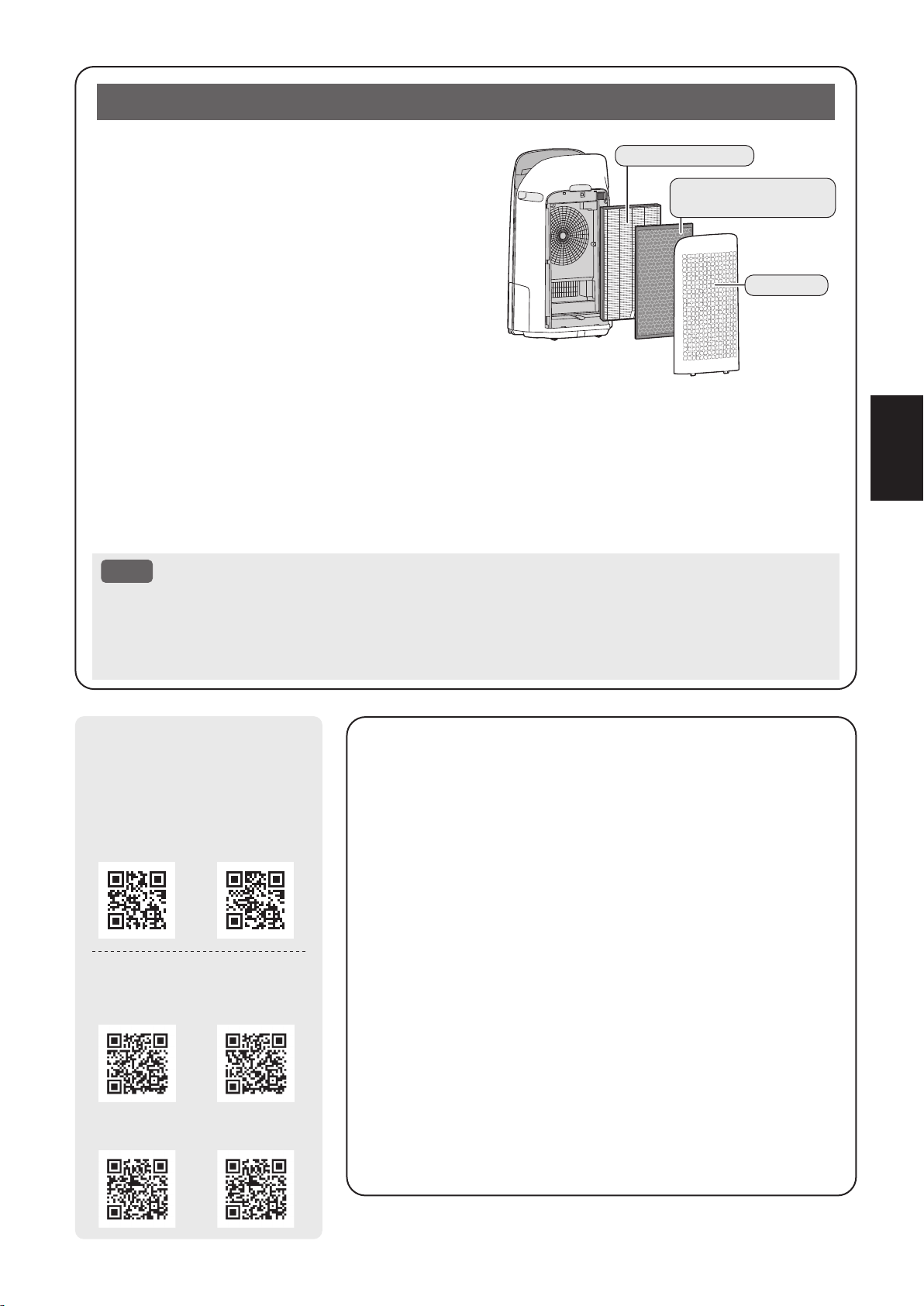
ES-1
ESPAÑOL
El purificador de aire absorbe el aire de la entrada de aire
y éste pasa a través del pre-filtro, un Filtro desodorizante
de carbón activo y un Filtro True HEPA en la parte interna
de la unidad, y luego lo descargar a través del orificio de
descarga de aire. El Filtro True HEPA puede eliminar el
99,97% de las partículas de polvo de tamaño tan pequeño
como 0,3 micrones que atraviesan el filtro y también
ayuda a absorber los olores. El filtro desodorizante de
carbón activo absorbe gradualmente los olores a medida
que atraviesan el filtro.
Algunos olores absorbidos por los filtros pueden
descomponerse con el paso del tiempo, causando olores
adicionales. Dependiendo del ambiente en el que se use el producto, especialmente cuando es usado en
ambientes considerablemente más severo que el uso doméstico normal, estos olores pueden volverse más
perceptibles antes de lo esperado. Si los olores persisten, debe reemplazar los filtros.
Cuando los minerales contenidos en el agua del grifo se adhieren a los filtros y se vuelven blancos y duros,
absorben lo olores de la habitación, los cuales pueden causar la emisión de un olor desagradable cuando el
filtro humidificador está seco. (Varía dependiendo de la calidad del agua y otros factores ambientales).
Si esto ocurre, lleve a cabo el mantenimiento del filtro humidificador. (Página 15)
NOTA
• El purificador de aire está diseñado para eliminar el polvo en suspensión en el aire y los olores.
• El purificador de aire no está diseñado para eliminar gases nocivos como el monóxido de carbono
contenido en el humo de un cigarrillo.
• Si aún continúa la fuente de los olores, el purificador de aire no los podrá eliminar completamente.
Lea antes de operar su nuevo Purificador de aire
La aplicación Sharp Air es una herramienta útil que
te pone en control de tu aire interior Calidad
Con la aplicación Sharp,
•
Puede controlar su purificador de aire desde cualquier
lugar con su dispositivo inteligente para hacer cosas
como encender y apagar el purificador de aire,
establecer un horario semanal, y mucho más.
•
Puede supervisar la calidad del aire interior en tiempo
real para mantener el control, incluso si no está en casa.
•
Puede supervisar la vida restante del filtro y recibir alertas
cuando llegue el momento de reemplazar los filtros.
•
Puede activar y desactivar la función opcional “Sharp
Cloud”. Cuando está activado, el historial de uso se
utilizará para ajustar los ajustes de sensibilidad del
sensor del modo “Automático” a lo largo del tiempo con el
fin de optimizar el rendimiento de su purificador de aire.
Filtro True HEPA
Filtro desodorizante
de carbón activo
Pre-filtro
KCP110UW KCP70UW
KCP110CW
(English)
KCP70CW
(English)
KCP110CW
(French)
KCP70CW
(French)
[ Modelos de Canadá ]
[ Modelos de Estados Unidos ]
Escanee el código QR para
obtener más información
sobre los purificadores de
aire de Sharp.
KCP110UW_70UW_110CW_70CW_2nd.indb 1KCP110UW_70UW_110CW_70CW_2nd.indb 1 2022/03/23 11:19:342022/03/23 11:19:34

ES-2
INSTRUCCIONES DE SEGURIDAD IMPORTANTES
LEA Y GUARDE ESTAS INSTRUCCIONES
antes de utilizar este producto.
Al usar artefactos eléctricos, se deben cumplir
precauciones de seguridad básicas, para reducir
el riesgo de choques eléctricos, incendios o
lesiones a personas incluyendo las siguientes:
ADVERTENCIA
1. Lea todas las instrucciones antes de
usar el producto.
2. Utilice este producto solo para uso
doméstico previsto como se describe
en este manual. Cualquier otro uso no
recomendado por el fabricante puede
causar choques eléctricos, incendios o
lesiones a personas.
3. Este dispositivo no está hecho para ser
utilizado por personas (incluyendo a niños)
con capacidades físicas, sensoriales
o mentales disminuidas, o con falta de
experiencia y conocimiento, a no ser que
hayan sido supervisados o instruidos con
respecto al uso del dispositivo por una
persona responsable de su seguridad.
Los niños deben supervisarse para
asegurar que no jueguen con el dispositivo.
4. No opere nunca el producto si el cable de
alimentación o el enchufe están dañados o
si el producto funciona mal o está dañado.
5. Si el cable de alimentación está dañado,
debe ser reemplazado por el fabricante,
su agente de servicio, centro de servicio
autorizado Sharp o una persona calificada
para evitar peligros.
Comuníquese con el Centro de servicio
autorizado más cercano para cualquier
problema, ajuste o reparación.
6. No repare o desmonte el producto usted.
7. Siga las instrucciones a continuación
para el cable de alimentación o el
enchufe. Puede causar cortocircuito,
calor excesivo, choques eléctricos o
incendios.
a. Use únicamente en un tomacorriente
de 120 voltios.
b. No use el producto si el cable de
alimentación o el enchufe están
dañados o si la conexión en el
tomacorriente no es segura.
c. Apague siempre el producto
antes de desenchufar el cable de
alimentación.
d. Desenchufe siempre el producto antes
de moverlo o mantenerlo, abrir el panel
posterior, cambiar los filtros y siempre
que no esté usando el producto.
e. Asegúrese de tirar del enchufe y no
del cable de alimentación.
f. No toque el enchufe con las manos
húmedas cuando inserte o desenchufe
del tomacorriente de pared.
g. Elimine periódicamente el polvo del
enchufe.
h. Siempre tenga en cuenta lo siguiente
para no dañar el cable de alimentación.
• No dañe el cable con las ruedas
giratorias cuando mueva el producto.
• No coloque el cable debajo de
una alfombra No cubra el cable de
alimetación con alfombras, tapetes
u otros cobertores similares.
• No coloque cosas pesadas encima
del cable de alimentación o lo
pellizque.
• No conduzca el cable de alimentación
debajo de muebles u otros artefactos.
• Coloque el cable de manera que
quede alejado de zonas transitadas
o donde pueda ocasionar tropiezos.
8. Para reducir el riesgo de descarga
eléctrica, este producto tiene un enchufe
polarizado (una clavija es más ancha
que la otra). Este enchufe encajará en
un tomacorriente polarizado de una
sola manera. Si el enchufe no encaja
completamente en el tomacorriente,
invierta el enchufe. Si aún no encaja,
comuníquese con personal calificado
para instalar el tomacorriente adecuado.
No altere el enchufe de ninguna manera.
9. No utilice este producto cerca de
artefactos de gas, hogueras, velas
encendidas, incienso o chispas de
cigarrillos encendidos.
Cuando el producto se utiliza con
aparatos de gas en la misma habitación,
ventile la habitación periódicamente, de lo
contrario, puede causar envenenamiento
por monóxido de carbono.
10. No opera el producto en una habitación
con gases inflamables, como residuos
de aceite o vapores químicos.
11. No exponga el producto a la lluvia, o
lo utilice cerca del agua, en un baño,
lavandería u otra ubicación mojada.
KCP110UW_70UW_110CW_70CW_2nd.indb 2KCP110UW_70UW_110CW_70CW_2nd.indb 2 2022/03/23 11:19:342022/03/23 11:19:34
ES-3
ESPAÑOL
12. No introduzca los dedos ni objetos
extraños en la entrada o la salida de aire.
13. No mire en las descargas de aire.
14. No beba el agua de la bandeja de
humidificación.
15. Cambie el agua de la bandeja de
humidificación diariamente con agua
corriente y límpiela con regularidad. Cuando
el producto no esté en uso, deseche el
agua en la bandeja de humidificación. Dejar
el agua en la bandeja de humidificación
puede causar la aparición de moho,
bacterias y malos olores. En casos
excepcionales, dichas bacterias pueden
presentar un peligro para la salud.
NOTA
- Interferencia de radio o televisión -
Si el producto causa alguna interferencia
con la recepción de la radio o televisión,
intente corregir la interferencia por medio
de una o más de las medidas siguientes:
1. Reoriente o reubique la antena de
recepción.
2. Aumente la separación entre el
producto y el receptor de radio/TV.
3. Conecte el producto en un tomacorriente
de un circuito diferente al circuito en el
cual se conecta el receptor.
4. Consulte al distribuidor o a un técnico de
radio/TV con experiencia si requiere ayuda.
----------------------------------------------------------
El producto cumple la máxima concentración
admisible del ozono de 0,050 partes por
millón del volumen dentro de 24 horas.
La guía de Salud de Canadá (2010)
recomienda que el límite máximo de
exposición, basada en el tiempo promedio
de 8 horas, es 0,020 ppmv o menos cuando
se prueba en un ambiente hermético
controlado del aproximadamente 30 metros
cúbicos.
PRECAUCIONES RELACIONADAS
CON LA INSTALACIÓN
1. Coloque el producto sobre una superficie
estable con circulación de aire suficiente.
Al colocar la unidad en una zona muy
alfombrada, puede hacer que la unidad
vibre ligeramente.
Coloque el producto en una superficie
nivelada para evitar fugas de agua de
la bandeja de humidificación.
2. Evite lugares donde el sensor esté
expuesto a la corriente directa de la
brisa o el proyecto. En caso contrario
el producto podría no funcionar
correctamente.
3. Evite usar la unidad en lugares donde
las cortinas, etc. puedan entrar en
contacto con la entrada y/o salidas de aire.
4. Evite lugares expuestos a la luz directa
del sol. Puede causar que cambie la
forma o el color del producto.
5. Evite sitios en donde la unidad esté
expuesta a una condensación, debido a
cambios de temperatura rápidos. Utilice
la unidad en condiciones apropiadas
que estén entre 32 -95 ºF (0 – 35 ºC).
6. Evite los lugares donde se genere grasa
o humo aceitoso. (como por ejemplo
en la cocina, etc.). Esto puede causar
grietas en la superficie de la unidad
principal y fallas en el funcionamiento
del sensor.
7. La capacidad del producto de recoger
polvo es efectiva incluso si el producto
está tan cerca de 1,2 pulgadas (3 cm)
de la pared, pero las paredes alrededor
o el suelo se puede poner sucia.
Por favor, coloque el producto a
una distancia de la pared. La pared
directamente detrás de las descargas
de aire y el suelo o tapete sobre el
que el producto está colocado se pone
sucio con el paso del tiempo. Al usar el
producto durante un periodo de tiempo
ampliado en el mismo lugar, limpie
periódicamente las paredes, el suelo o
el tapete.
8. No coloque el producto cerca o sobre
objetos calientes, como estufas o
calefactores, o donde pueda entrar en
contacto con vapor.
PRECAUCIONES
RELACIONADAS CON EL FILTRO
1. Siga las instrucciones en este manual
para la instalación del filtro y el
mantenimiento. (Página 8, 17)
2. Retire la bolsa plástica del filtros antes
de colocar el filtro en la unidad principal.
3. No opere el producto sin los filtros
instalados correctamente.
KCP110UW_70UW_110CW_70CW_2nd.indb 3KCP110UW_70UW_110CW_70CW_2nd.indb 3 2022/03/23 11:19:342022/03/23 11:19:34

ES-4
4. No lave ni reutilice el filtro True HEPA y
el filtro desodorizante de carbón activo.
Lavarlo no mejorará el rendimiento del
filtro y también puede provocar choque
eléctrico o mal funcionamiento.
5. No opere el producto en una habitación
donde haya insecticidas en aerosol.
Puede causar que el olor de insecticida
permanezca en el producto y se emita
desde las descargas de aire.
PRECAUCIONES RELACIONADAS
CON LA OPERACIÓN
1. No bloquee la entrada y/o salida de aire.
2. Siempre opere el producto en posición
vertical.
3. Cuando transporte el producto, retire
primero la bandeja de humidificación
para no derramar agua y, a continuación,
sujete el producto por las asas de
ambos lados.
4. Eleve siempre el producto cuando lo
mueva en suelo dañado fácilmente,
superficie irregular y alfombras.
5.
No cambie la dirección del producto
mientras lo mueve usando las ruedas
giratorias.
6. Al mover el producto por sus ruedas
giratorias, muévalo lentamente y en
dirección horizontal.
7. No utilice el producto sin la bandeja de
humidificación correctamente instalada.
8. Al rellenar la bandeja de humidificación,
asegúrese de que no se filtre agua de
la bandeja de humidificación.
9. Asegúrese de limpiar el exceso de
agua del exterior de la bandeja de
humidificación.
10. No utilice agua caliente (104 ºF (40 ºC)
o más), agentes químicos, sustancias
aromáticas, agua sucia u otras
sustancias dañinas. De lo contrario,
podría deformar el producto o provocar
un fallo de funcionamiento.
11. Utilice únicamente agua corriente. El
uso de otras fuentes de agua aumenta
el riesgo de aparición de moho, hongos
o bacterias.
12. No agite la bandeja de humidificación
sujetando el asa de la bandeja.
PRECAUCIONES
RELACIONADAS CON EL
MANTENIMIENTO
1. Siga las instrucciones para
mantenimiento en este manual.
(Página 14 - 17)
2. Sólo limpie la parte externa con un
paño suave.
3. No utilice detergentes distintos a los
mencionados en este manual (página 16).
No utilice líquidos ni detergentes volátiles.
Puede causar daños o grietas en la
superficie de la cuerpo principalsi
se usan limpiadores fuertes de tipo
corrosivo, benceno, diluyente de
pintura, polvo de pulido o grasa.
La bandeja de humidificación puede
causar deformaciones, manchas o
grietas (fugas de agua). Además, puede
dañar los sensores como resultado si el
producto tiene sensores.
4. No fregar el panel posterior (pre-filtro)
fuerte durante su mantenimiento.
5. La frecuencia de la descalcificación
dependerá de la dureza y de las
impurezas del agua que utilice; cuanto
más dura sea el agua, más frecuente
deberá realizar la descalcificación.
6. No retire el flotador del humidificador.
Si el flotador del humidificador se sale,
consulte la página 16.
7. Cuando reemplace filtros o cualquier
accesorio, utiliza las partes
especificadas en este manual.
KCP110UW_70UW_110CW_70CW_2nd.indb 4KCP110UW_70UW_110CW_70CW_2nd.indb 4 2022/03/23 11:19:342022/03/23 11:19:34
ES-5
ESPAÑOL
ADVERTENCIA
En caso de una operación remota desde el
exterior, es posible que no pueda verificar la
condición actual del purificador de aire o el área
a su alrededor y la situación relacionada con la
posibilidad de que alguien se quede allí, por lo
tanto, confirme adecuadamente la seguridad
antes de usarlo.
• Asegúrese de que el enchufe eléctrico esté
completamente insertado en un tomacorriente
y que no haya polvo en el enchufe o en el
orificio de la toma.
(Puede causar calor, combustión, fuego, etc.,
debido a un mal contacto o fallo de contacto)
• Asegúrese por adelantado de que, aunque
haya algunos cambios de viento, no se
producirá ningún impacto negativo en el medio
ambiente dentro de la habitación. (como ...
si hay algo volando fácilmente en el viento)
Debido a que el viento puede hacer que algo
se caiga, dando como resultado incendios,
heridas, desfiguración de enseres domésticos.
PRECAUCIONES DE USO
• Se necesita estar de acuerdo con los “Términos
de servicio” para usar la aplicación.
• La aplicación se revisará periódicamente
debido a la actualización de la versión.
• Las pantallas e ilustraciones en este libro son
para la explicación, hay algunas diferencias
con el producto real.
• En el caso de una mala conexión, es
posible que la aplicación no pueda controlar
el purificador de aire. Es posible que el
funcionamiento actual del purificador de aire
no se refleje con precisión en la aplicación.
• Se recomienda bloquear la pantalla del
teléfono inteligente para evitar una operación
errónea.
• Aunque la aplicación es gratuita, el cliente
tiene que pagar los gastos de comunicaciones
para la descarga de la aplicación dedicada y
el funcionamiento con un teléfono inteligente o
tableta.
PRECAUCIÓN PARA Wi-Fi
Precaución para el uso sobre onda eléctrica
• En caso de uso en la siguiente ubicación, no
se puede garantizar la operación: Cerca del
dispositivo de comunicaciones inalámbricas
Bluetooth® que utiliza la misma frecuencia
(2,4GHz) que este producto o dispositivo
inalámbrico de baja potencia especificado.
También en la ubicación como el campo
magnético del dispositivo, como el horno de
microondas, o el lugar con electricidad estática
o donde hay una perturbación de radio, es
posible que no esté disponible temporalmente
debido a una onda eléctrica débil.
• La conexión inalámbrica y el rendimiento no se
pueden garantizar para todos los enrutadores
o entornos de vivienda. En los siguientes
lugares, es probable que no se pueda alcanzar
la onda eléctrica o se desconecte: Dentro del
edificio hecho de hormigón, acero reforzado
o metal / cerca de la obstrucción / cerca del
dispositivo de comunicaciones inalámbricas
que aplica la misma frecuencia.
• La conexión Wi-Fi de este producto se
corresponde con el canal 1 - 11. No está
disponible para comunicarse con los
enrutadores configurados para otros canales.
Precaución para la información personal
(relacionada con la seguridad)
• Si se utiliza el dispositivo Wi-Fi es posible
que sea interceptada siempre que se utilice
una onda eléctrica independientemente de la
configuración del código secreto.
• El Wi-Fi tiene la ventaja de una conexión
LAN gratuita en el área de servicio porque
la comunicación entre este producto y el
enrutador aplica una onda eléctrica. Por otra
parte, se podría interceptar la comunicación
o la intrusión injusta porque la onda eléctrica
llega a todas partes en una área determinada a
través de las obstrucciones (p. ej., paredes).
• No se conecte al dispositivo o red que no tiene
permiso para usar al configurar la conexión
Wi-Fi.
• La función Wi-Fi para este producto debe
inicializarse en caso de eliminación o que se
entregue a una tercera persona.
• La función Wi-Fi para este producto debe
inicializarse en caso de que se entregue a una
tercera persona para evitar el acceso ilegal
de extraños. Consulte la página 22 para
obtener instrucciones sobre cómo inicializar.
SEGURIDAD/PRECAUCIONES DE LA FUNCIÓN Wi-Fi
KCP110UW_70UW_110CW_70CW_2nd.indb 5KCP110UW_70UW_110CW_70CW_2nd.indb 5 2022/03/23 11:19:352022/03/23 11:19:35
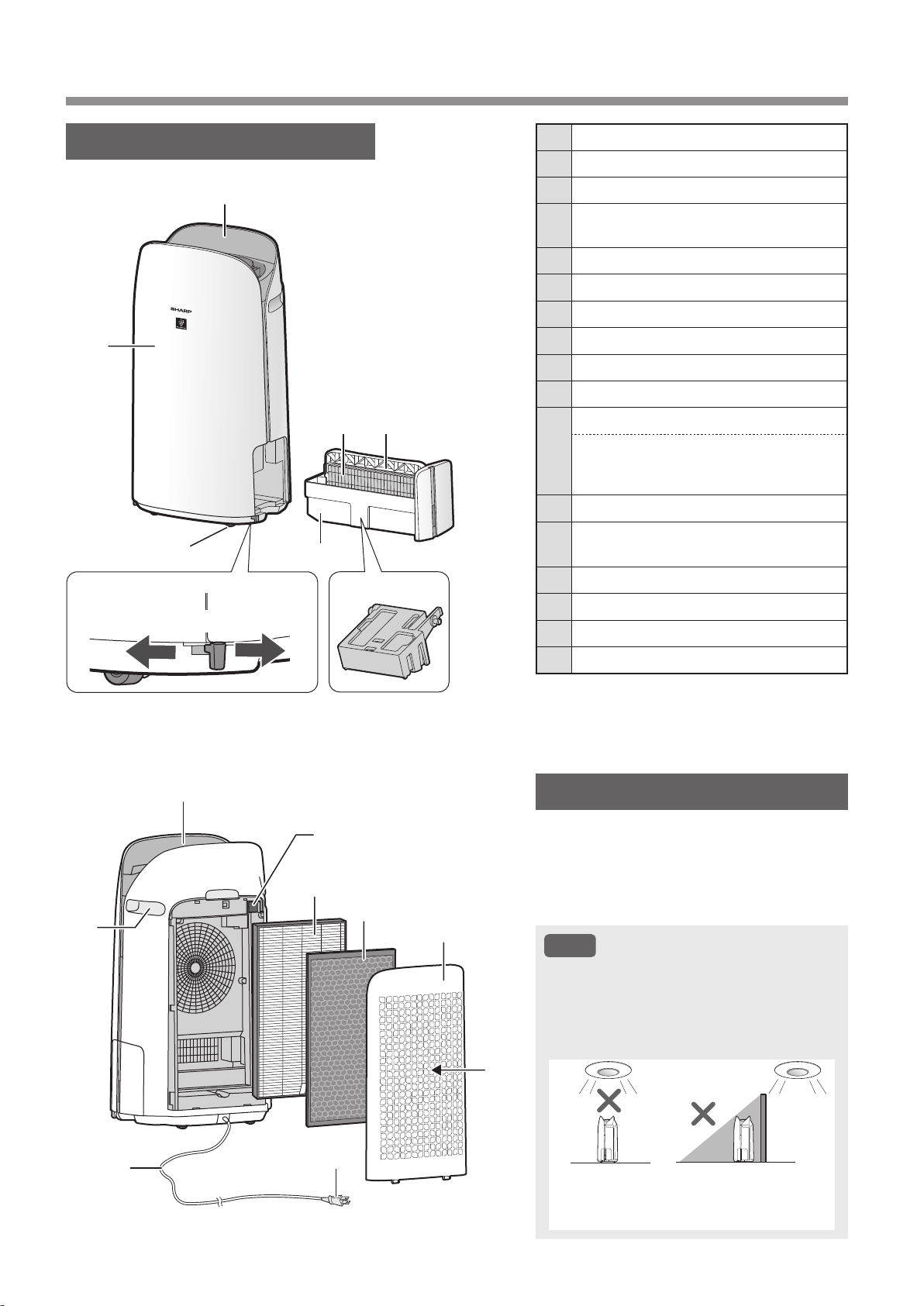
ES-6
NOMBRE DE LAS PARTES
CUERPO PRINCIPAL
SENSOR DE LUZ
Si el control de luces (brillo de la pantalla)
está ajustado en “Auto”, el brillo de la
pantalla y el indicador de calidad del aire
pueden cambiar automáticamente en función
de la luminosidad de la sala. (Página 21)
NOTA
Margen de detección del sensor de luz
No instale el producto en los siguientes
lugares. Es posible que el sensor de luz no
detecte correctamente.
Directamente
bajo un accesorio
luminoso.
A la sombra
1
2
3
Desbloqueado
4
5
6 7
8
9
10
11
12
13
14
15
16
Bloqueado
17
1 Panel de operación / Pantalla
2 Cuerpo principal
3 Ruedas giratorias
(4 ubicaciones)
4
Tope de la rueda giratoria
(derecho e izquierdo)
5 Bandeja de humidificación
6 Filtro del humidificador
7 Asa de la bandeja
8 Flotador del humidificador
9 Salida de aire
10 Manija
(2 ubicaciones:)
11
Filtro de sensor
Sensor
(Interno)
Sensible al polvo / Olor / Temperatura /
Humedad
12 Filtro True HEPA
13
Filtro desodorizante de carbón
activo
14 Panel posterior
(Pre-filtro)
15 Toma de aire
16 Cable de alimetación
17 Enchufe de alimetación
KCP110UW_70UW_110CW_70CW_2nd.indb 6KCP110UW_70UW_110CW_70CW_2nd.indb 6 2022/03/23 11:19:362022/03/23 11:19:36
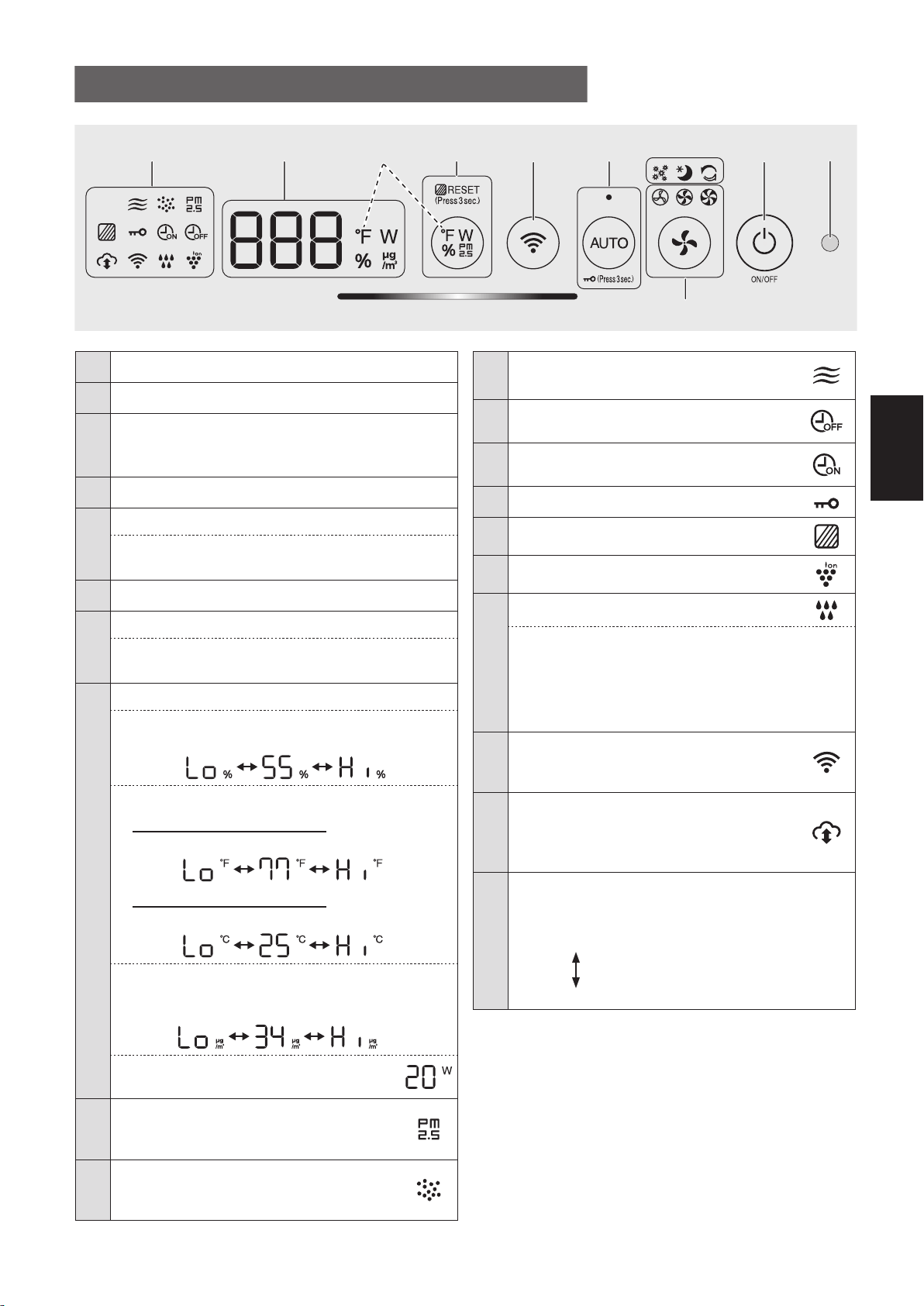
ES-7
ESPAÑOL
1 Sensor de luz
2 Botón ENCENDIDO / APAGADO
3
Modos de aplicación solamente: polen,
suspensión y lámparas de limpieza rápida
Plasmacluster
(blanco)
*2
4
Botón velocidad del ventilador, Lámparas
(blanco)
5
Botón AUTO, Lámparas
(blanco)
Botón
bloqueo para niños
(Pulsar 3 seg.)
*3
6 Botón Wi-Fi
7
Botón de cambio de pantalla
Botón de restablecimiento del filtro, luz
(blanco)
(Pulsar 3 seg.)
*3
8
PANTALLA
*4
• Humedad
Se muestra la humedad del 25 % al 75 %.
24 %
o menos
76 %
o más
• Temperatura
Para KCP110UW o KCP70UW
Se muestra la temperatura de 32
o
F a 122
o
F.
123
o
F
o más
31
o
F
o menos
Para KCP110CW o KCP70CW
Se muestra la temperatura de 0
o
C a 50
o
C.
51
o
C
o más
-1
o
C
o menos
• Concentración de PM2.5
*5
Se muestra PM2.5 10 μg/m3 (microgramos por
metro cúbico de aire) a 499 μg/m
3
.
500 μg/m
3
o más
9 μg/m
3
o menos
• Potencia
Indica el potencia de la operación actual.
9
Indicador PM2.5
(blanco)
Indica que el sensor de polvo detecta
polvo microscópico..
10
Indicador de polvo
(blanco)
Indica que el sensor de polvo detecta
polvo normal.
PANEL DE OPERACIÓN / PANTALLA
11
Indicador de olores
(blanco)
Indica que el sensor de olores detecta olores.
12
Indicador del temporizador de apagado
(blanco)
*2
13
Indicador del temporizador de encendido
(blanco)
*2
14
Indicadora de bloqueo para niños
(blanco)
15
Indicador de mantenimiento de filtro
(naranja)
16
Indicador de ión Plasmacluster
(blanco)
17
Indicador de humidificación
(blanco)
• Iluminado:
Humidificación activada
• Apagado:
Humidificación desactivada
• Parpadeando: El producto necesita agua
(El indicador parpadea durante 10 minutos y luego
se apaga).
18
Indicador de
Wi-Fi
(blanco)
Se ilumina cuando el purificador de aire
está conectado a un enrutador.
19
Indicador de servicio en la nube
(blanco)
*2
Se ilumina cuando el purificador de aire está
conectado al servicio en la nube de Sharp.
20
Indicador
de calidad de aire
Indica la pureza del aire de la habitación en
5 niveles concambios de color.
Limpio
Azul
Amarillo (Parpadeando)
Impuro
Rojo (Parpadeando rápido)
*1: Esta es una ilustración del KCP110UW o KCP70UW.
Para el KCP110CW o KCP70CW, “
o
F ” en el panel de
control es “
o
C ”.
*2: Las luces de los núm. 3, 12, 13 y 19 se encienden solo
cuando se utiliza la aplicación.
*3: Mantenga pulsado durante 3 segundos o más.
*4: Los números mostrados son aproximados.
*5: Materia particulada, partículas con diámetro de 2,5
micras o menos.
15 23
20
6
789 - 19
*1
4
*4
KCP110UW_70UW_110CW_70CW_2nd.indb 7KCP110UW_70UW_110CW_70CW_2nd.indb 7 2022/03/23 11:19:422022/03/23 11:19:42
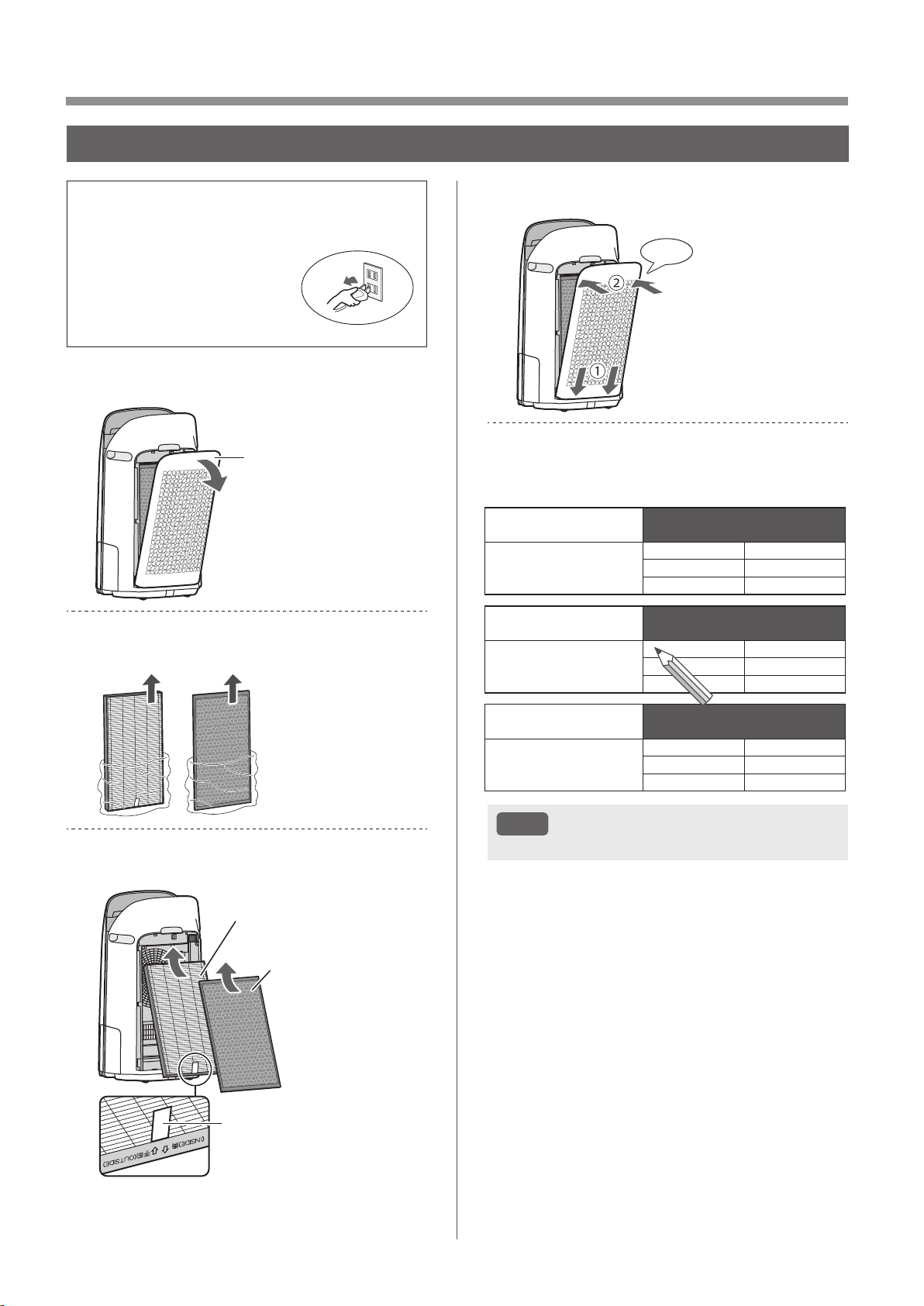
ES-8
PREPARACIÓN
• Para mantener la calidad de los filtros, estos
están instalados en la unidad principal y
empacados en bolsas plásticas.
• Asegúrese de detener la
operación y desenchufar
el producto antes de
instalación o reemplazo el
filtro.
1.
Retire el panel posterior.
Panel posterior
2.
Retire los filtros de la bolsa de
plástico.
3.
Instale los filtros en el orden
correcto como se muestra.
Filtro True HEPA
Filtro desodorizante
de carbón activo
Etiqueta
4.
Instale el panel posterior.
Clic
5.
Registre la fecha en la que inició
o reemplazó los ltros en la
contraportada de este manual.
Active Carbon Deodorizing Filter
Filtre déodorant de carbone actif
Filtro desodorizante de carbón activo
Model
Modèle
Modelo
FZ-J80DFU
Starting date of use
Date de début d’utilisation
Fecha de comienzo de uso
.
.
.
.
.
.
.
.
.
.
.
.
True HEPA Filter
Filtre HEPA authentique
Filtro true HEPA
Model
Modèle
Modelo
FZ-P11HFU
Starting date of use
Date de début d’utilisation
Fecha de comienzo de uso
.
.
.
.
.
.
.
.
.
.
.
.
Humidifying Filter
Filtre d’humidication
Filtro del humidicador
Model
Modèle
Modelo
FZ-P11MFU
Starting date of use
Date de début d’utilisation
Fecha de comienzo de uso
.
.
.
.
.
.
.
.
.
.
.
.
NOTA
• No opere el producto sin filtros.
INSTALACIÓN DEL FILTRO
KCP110UW_70UW_110CW_70CW_2nd.indb 8KCP110UW_70UW_110CW_70CW_2nd.indb 8 2022/03/23 11:19:452022/03/23 11:19:45
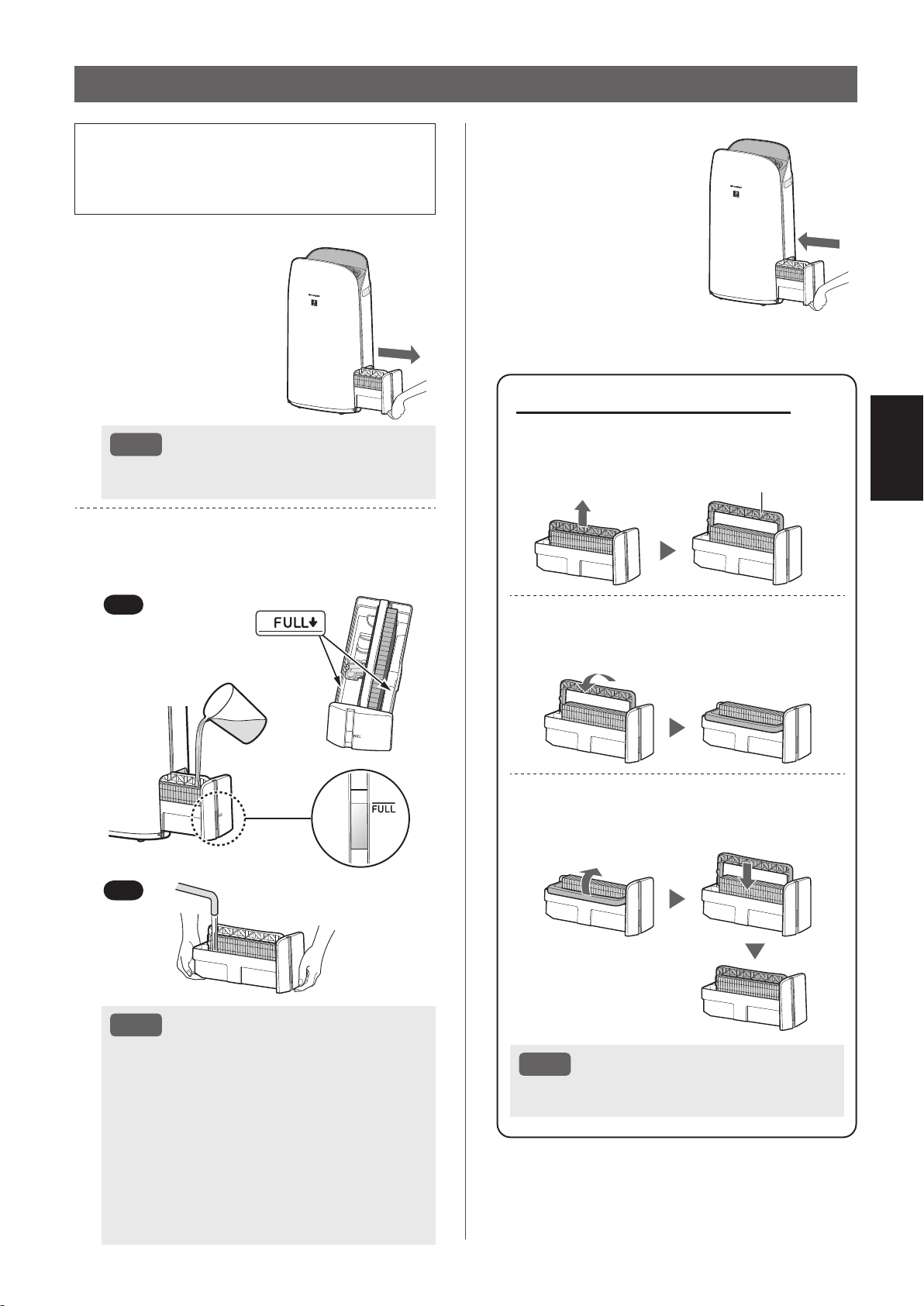
ES-9
ESPAÑOL
• Cuando vaya a humidificar, llene la bandeja de
humidificación con agua.
• Cuando no esté humidificando, deseche el
agua en la bandeja de humidificación.
1.
Extraiga la bandeja
de humidificación.
NOTA
• Al extraer e instalar la bandeja de humidificación,
tenga cuidado de no derramar agua.
2.
Llene la bandeja de humidificación
con agua corriente utilizando el
método “A” o “B”.
B
A
NOTA
• El flotador del humidificador flotará cuando
la bandeja esté llena de agua.
• Llene lentamente con agua para evitar
salpicaduras.
• No rellene más allá del indicador “FULL”.
• Cuando transporte la bandeja de
humidificación, sujétela con ambas manos
o sujete el asa de la bandeja.
• Limpie la bandeja de humidificación si se
ensucia o se percibe un olor.
LLENADO DE LA BANDEJA DE HUMIDIFICACIÓN
Acerca del asa de la bandeja
• Al sujetar y transportar la bandeja de
humidificación, utilice el asa de la bandeja
Asa de la bandeja
• Al limpiar el filtro del humidificador,
puede girar el asa de la bandeja hacia
abajo por su lado.
• Después de la limpieza, vuelva a colocar
el asa de la bandeja en su posición
original.
NOTA
• Vuelva a colocar el asa de la bandeja en su
posición original antes de instalarla.
3.
Instale con cuidado
la bandeja de
humidificación.
KCP110UW_70UW_110CW_70CW_2nd.indb 9KCP110UW_70UW_110CW_70CW_2nd.indb 9 2022/03/23 11:19:492022/03/23 11:19:49
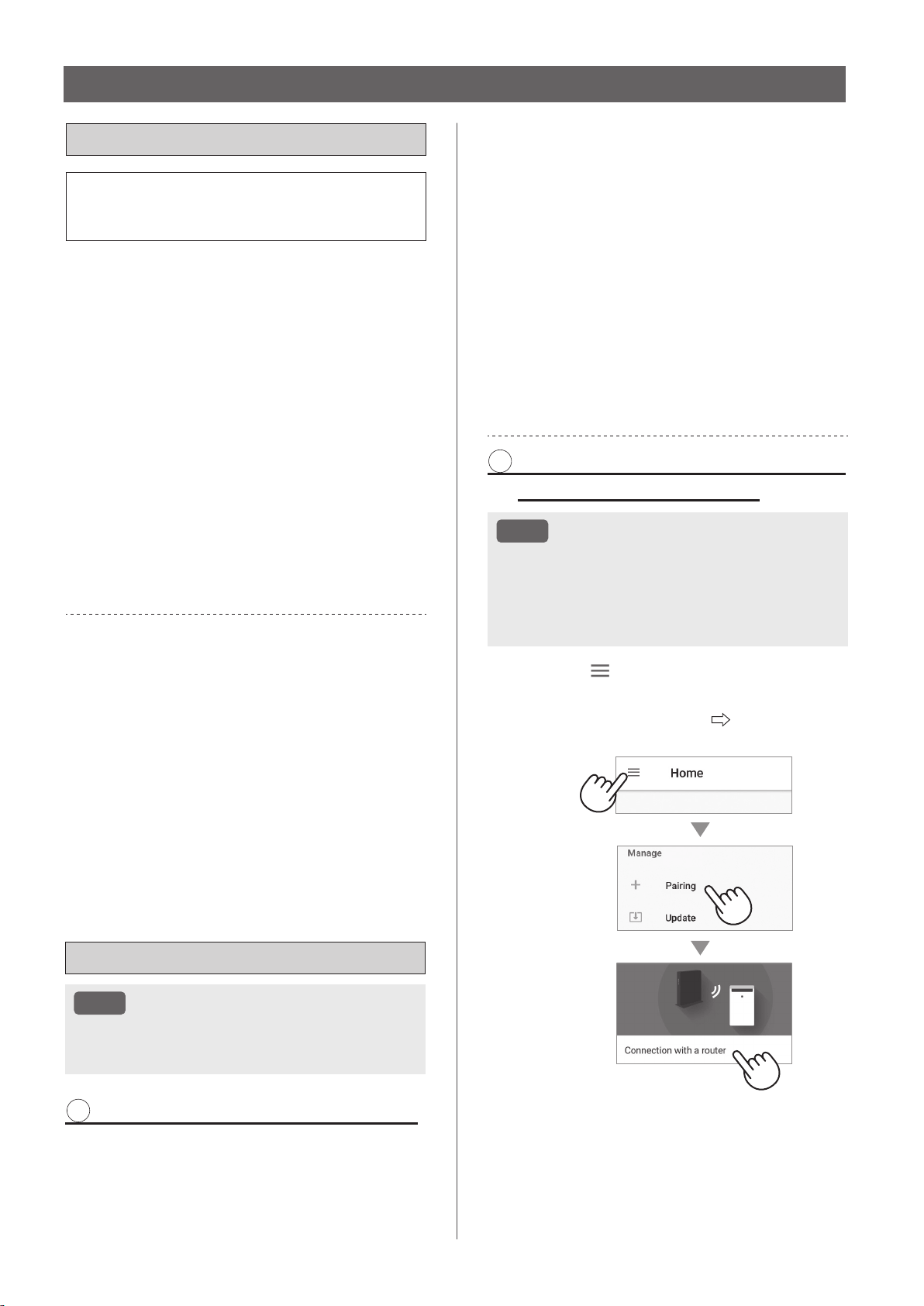
ES-10
AJUSTES DE Wi-Fi
ANTES DE EMPEZAR
• Si conecta su purificador de aire con su
dispositivo inteligente, podrá utilizar el
purificador de aire más prácticamente.
Asegúrese de que su dispositivo inteligente
esté conectado a una red Wi-Fi de 2,4 GHz.
Configuración Wi-Fi protegida (WPS) Punto
de acceso (Router)
• El método de cifrado recomendado es WPA2
(AES).
Asegúrese de que su dispositivo inteligente
cumpla con los requisitos mínimos de
software:
• Smartphones / tabletas de Android 8 o posterior
• iiPhones, iPod touch, iPads de iOS 12 o posterior
Especificaciones Wi-Fi del producto
• LAN inalámbrico: IEEE802.11b/g/n
• Rango de frecuencia: banda de frecuencia de 2,4 GHz
MARCAS
•
“Wi-Fi
®
” es una marca registrada de Wi-Fi Alliance
®
.
•
“Android” es la marca comercial de Google Inc.
•
“iPhone”, “iPod touch”, “iPad” son marcas comerciales
registradas o marcas comerciales de Apple Inc.
•
Los otros nombres de empresas, nombres corporativos,
nombres de productos mencionados en las instrucciones
de manejo son marcas comerciales y marcas
comerciales registradas de cada empresa.
CONFIGURACIÓN INICIAL
NOTA
• Al emparejar el dispositivo inteligente con el
purifi cador de aire, asegúrese de que ambos
estén conectados al mismo router.
1 DESCARGAR Y REGISTRARSE
1.
Instale la aplicación Sharp Air a su
dispositivo inteligente.
•
Disponible para descargar desde la Apple Store
o Google Play.
2.
Conecte el dispositivo inteligente al
enrutador e inicie la aplicación.
Siga las instrucciones de la aplicación.
i. Revise la “Privacy and Data
Utilization Policy” y los “Terms of Use”.
ii. Introduzca su fecha de nacimiento.
iii. Inicie sesión con su cuenta de
Sharp (ID de Sharp).
•
Si no tiene un SHARP ID, regístrese para
crear un SHARP ID.
iv. Introduzca un nombre para su
dispositivo inteligente.
2 CONEXIÓN DEL PURIFICADOR
DE AIRE Y UN ROUTER
NOTA
• Si tiene configuraciones de cautela o de filtrado
MAC en el enrutador, cancélelas.
•
El ID de red del producto se visualiza como
“AP-SHARP-XX” (donde XX es un número de 2
dígitos debajo de la dirección MAC del producto).
1.
Pulse“ ” en la parte superior
izquierda de la pantalla “Home”, y
seleccione “Pairing” “Connection
with a router”.
KCP110UW_70UW_110CW_70CW_2nd.indb 10KCP110UW_70UW_110CW_70CW_2nd.indb 10 2022/03/23 11:19:522022/03/23 11:19:52
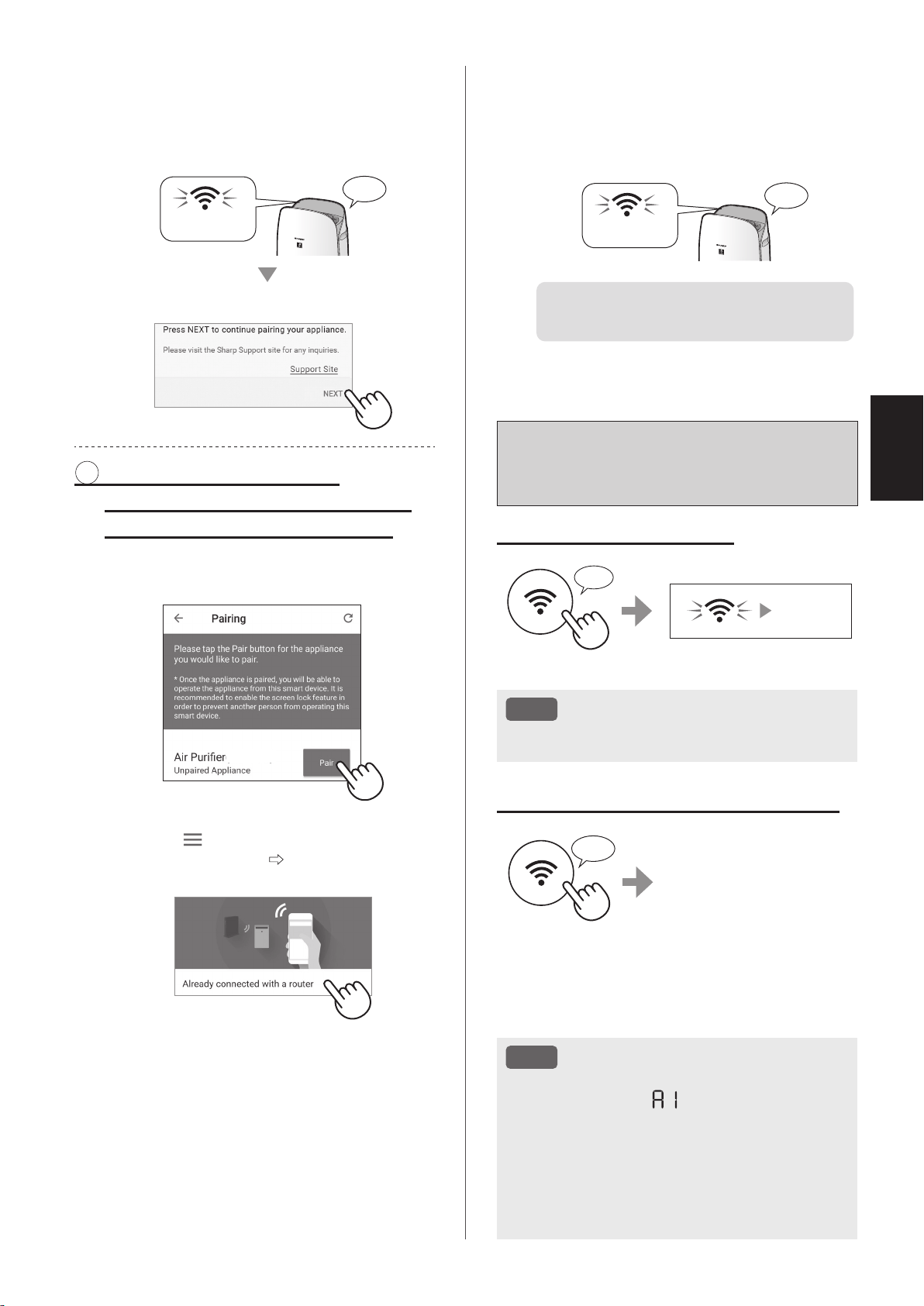
ES-11
ESPAÑOL
Cómo ajustar Wi-Fi activado/
desactivado después de
completar la configuración inicial
Si desea apagar el Wi-Fi:
Pulsar durante 3 seg.
♪
~
Se apaga
NOTA
• Si apaga el Wi-Fi, no podrá controlar el
purificador de aire con la aplicación Sharp Air.
Si desea volver a encender el Wi-Fi:
Pulsar durante
3 seg.
♪
El indicador Wi-Fi
parpadeará después de
presionar el botón
Wi-Fi. Y dentro de unos 3
minutos, escuchará cuatro
pitidos cortos. Algún tiempo
después de que suene este
pitido, el indicador
Wi-Fi se enciende y la conexión Wi-Fi se completa.
La aplicación Sharp Air ahora se puede usar
nuevamente para controlar el purificador de aire.
NOTA
• Wi-Fi activado/desactivado también se puede
configurar desde “
: Adaptador Wi-Fi
ENCENDIDO/APAGADO”. (página 20, 22)
En este caso, la conexión Wi-Fi con el
enrutador se restaurará automáticamente.
• La reconexión al enrutador inalámbrico puede
tardar unos minutos en completarse después
de volver a activar el Wi-Fi.
2.
Siga las instrucciones de la
aplicación.
• Si el indicador Wi-Fi se ilumina después del
sonido de la notificación, la conexión se ha
completado correctamente.
Encender
♪
Pulse “NEXT”.
3 CONEXIÓN ENTRE EL
PURIFICADOR DE AIRE Y UN
DISPOSITIVO INTELIGENTE
1.
Pulse “Pair” para el purificador de
aire que desea emparejar.
(MODEL NAME)
• Si no puede visualizar la pantalla anterior,
toque “
” en la pantalla “Home” y
seleccione “Pairing”
“Already connected
with a router”.
2.
Siga las instrucciones de la
aplicación.
• Si el indicador Wi-Fi se ilumina después del
sonido de la notificación, la conexión se ha
completado correctamente.
Encender
♪
Se han completado la
configuración inicial.
KCP110UW_70UW_110CW_70CW_2nd.indb 11KCP110UW_70UW_110CW_70CW_2nd.indb 11 2022/03/23 11:20:002022/03/23 11:20:00
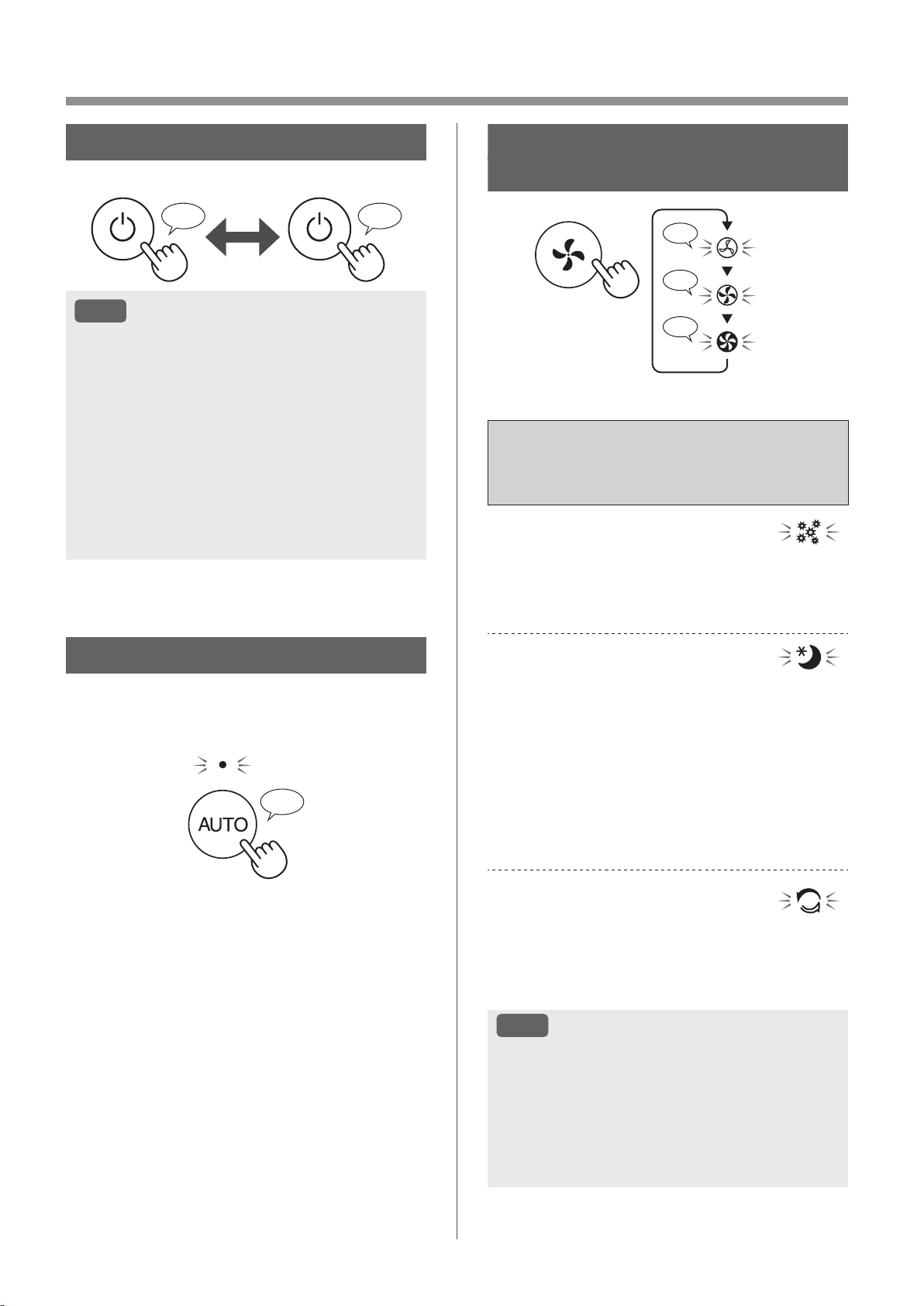
ES-12
OPERACIÓN
INICIAR/DETENER
INICIAR DETENER
♪
♪
~
NOTA
• A no ser que se haya desconectado el cable
de alimentación, la operación se reanudará
automáticamente en el modo anterior en el que
estaba funcionando. (Sin embargo, en el caso
del modo de limpieza Plasmacluster Express,
la operación se reanudará al modo anterior al
modo de limpieza Plasmacluster Express y los
ajustes).
Ejemplo: si se pierde la energía durante la
operación, se reanudará al modo de operación
y configuración anteriores una vez que se
restaura la energía.
BOTÓN VELOCIDAD
DEL VENTILADOR
♪
♪
♪♪
BAJO
MED
MAX
MODO AUTOMÁTICO
La velocidad del ventilador se controla
automáticamente dependiendo de las seis detecciones.
(PM2.5/Polvo normal/Olor/Temperatura/Humedad/Luz)
♪
FUNCIONES ADICIONALES
DE
VELOCIDAD DEL VENTILADOR:
SOLO APLICACIÓN
POLEN:
La sensibilidad del sensor de polvo aumenta
automáticamente y el sensor de polvo detecta
rápidamente impurezas como polvo y polen y limpia
el aire con gran intensidad.
DORMIR:
El producto funcionará silenciosamente y la
velocidad del ventilador cambiará automáticamente
según la cantidad de impurezas en el aire de la
habitación y el brillo.
La pantalla frontal y el monitor de calidad del aire
cambian automáticamente su atenuación o se
APAGA según el brillo de la habitación.
La habitación es luminosa: la luz se atenúa
La habitación está oscura: la luz está APAGADA
MODO LIMPIEZA
RÁPIDA PLASMACLUSTER
El producto libera iones Plasmacluster a un flujo de
aire máximo durante 10 minutos. Después de eso,
el purificador de aire funciona durante 50 minutos a
alta velocidad del ventilador.
NOTA
• Cuando la operación finaliza después de
60 minutos, el producto volverá al modo de
operación anterior.
Es capaz de cambiar a otros modos durante
esta operación.
• El ión Plasmacluster no puede ponerse en
“APAGADO”.
KCP110UW_70UW_110CW_70CW_2nd.indb 12KCP110UW_70UW_110CW_70CW_2nd.indb 12 2022/03/23 11:20:062022/03/23 11:20:06
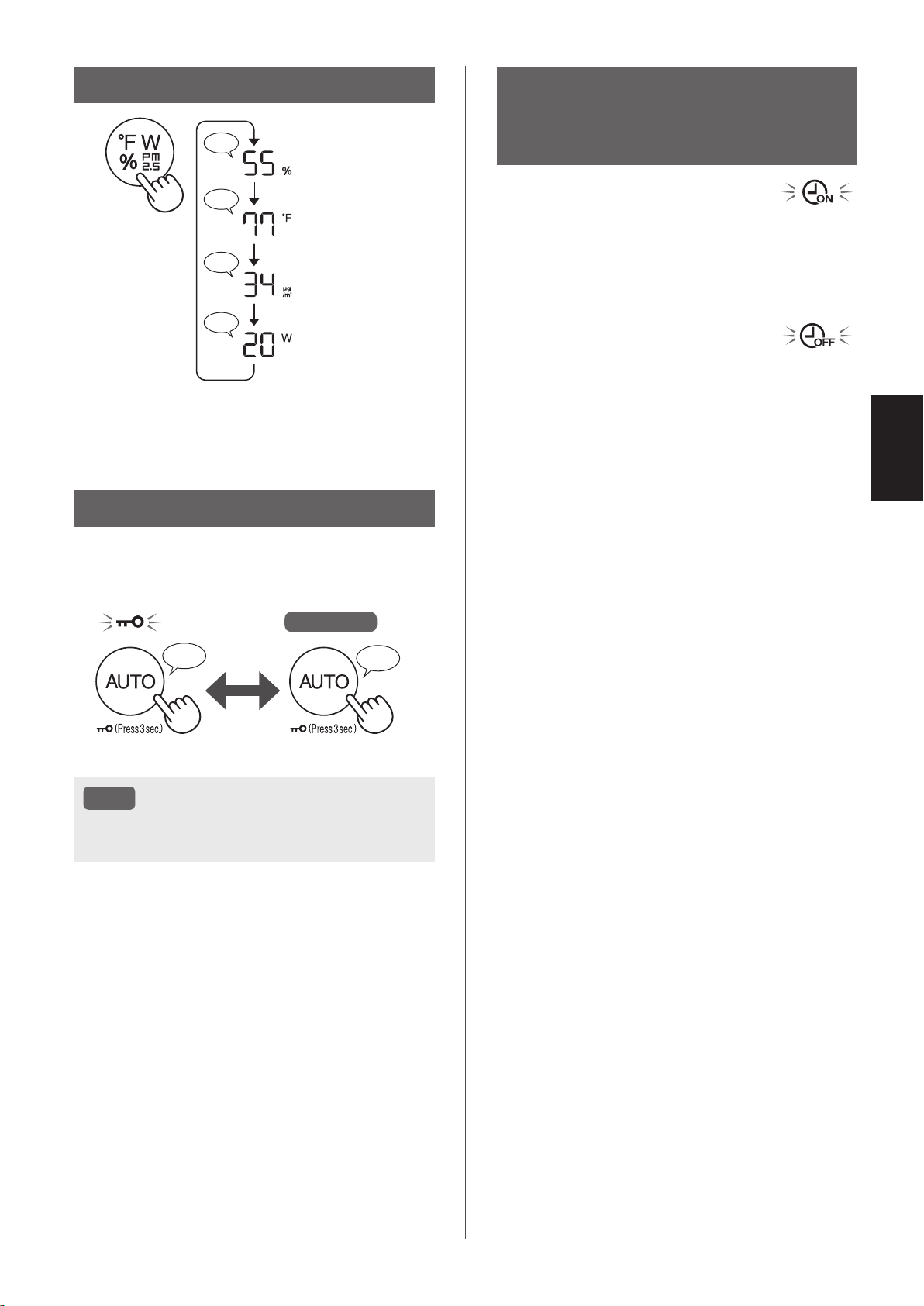
ES-13
ESPAÑOL
CAMBIAR PANTALLA
♪
♪♪
♪
♪
Humedad
Temperatura
*
1
Concentración de
PM2.5
Potencia
*
1
*1: Para el KCP110CW o KCP70CW, “
o
F ” en el panel de
control es “
o
C ”.
BLOQUEO INFANTIL
El panel de operación estará bloqueado.
Se apaga
ENCENDIDO CANCELACIÓN
♪
♪♪
Pulsar
durante 3 seg.
Pulsar
durante 3 seg.
NOTA
• Es posible desactivar el Wi-Fi mientras está en
el modo de bloqueo para niños.
PROGRAMADOR
SEMANAL:
SOLO APLICACIÓN
Temporizador de encendido:
Puede establecer un programador semanal para
que el purificador de aire inicie un modo específico
en un día y hora concretos. El indicador del
temporizador de encendido se encenderá mientras
haya un programa establecido.
Temporizador de apagado:
Puede establecer un programador semanal para
que el purificador de aire detenga la operación
en un día y hora concretos. El indicador del
temporizador de apagado se encenderá mientras
haya un programa establecido..
KCP110UW_70UW_110CW_70CW_2nd.indb 13KCP110UW_70UW_110CW_70CW_2nd.indb 13 2022/03/23 11:20:092022/03/23 11:20:09
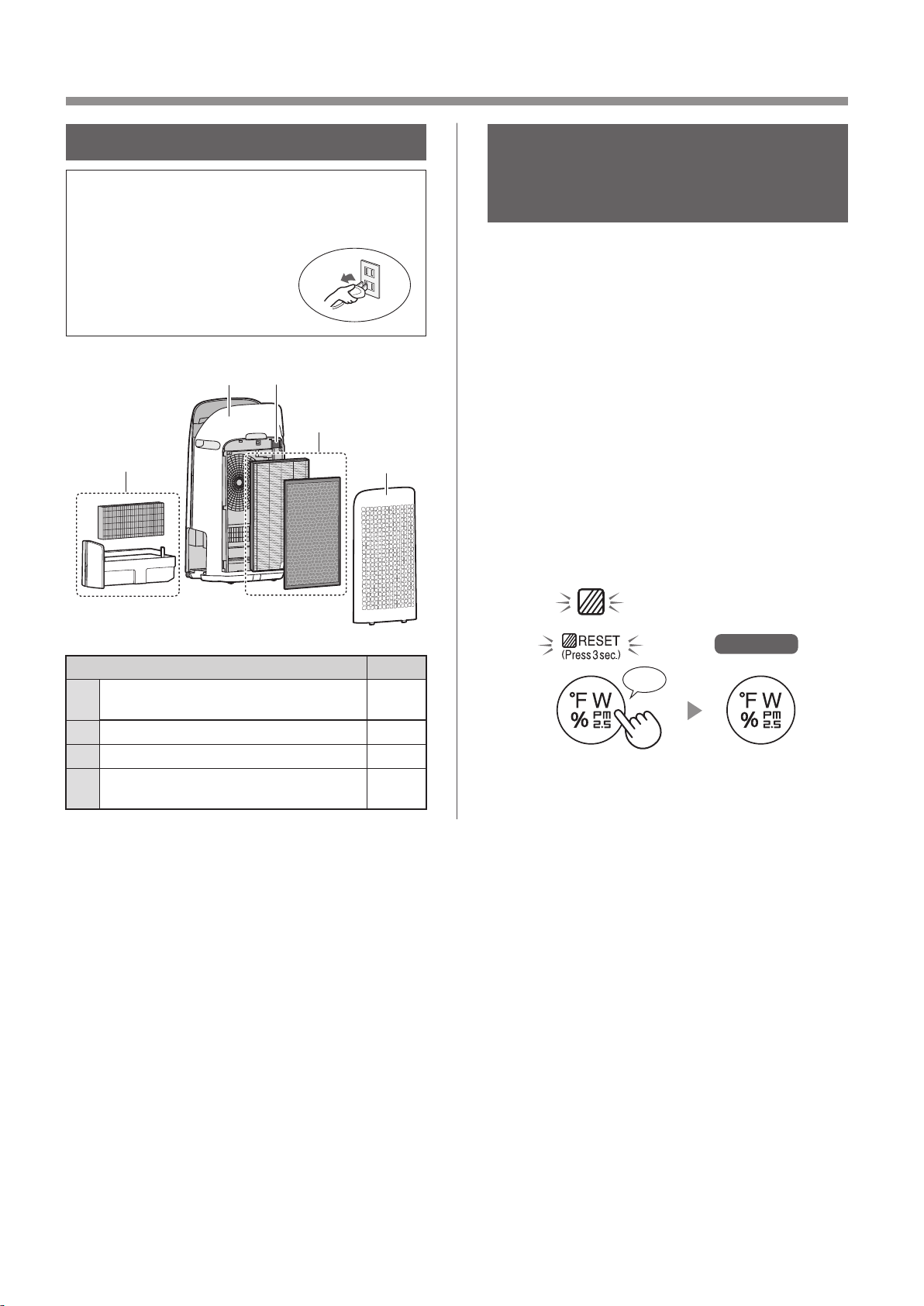
ES-14
CUIDADO Y MANTENIMIENTO
CUIDADO
• Para mantener el rendimiento óptimo de este
purifi cador de aire, limpie el producto
incluyendo el purifi cador periódicamente.
• Antes de cualquier
mantenimiento o sustituir
accesorios, asegúrese
de dejar de operar o
desconectar el producto.
1
23
4
2
Lugar Página
1
Filtro del humidificador /
Bandeja de humidificación
15
2
Panel posterior / Filtro de sensor 16
3
Cuerpo principal 16
4
Filtro True HEPA / Filtro desodorizante
de carbón activo
17
INDICADOR DE
MANTENIMIENTO DE
FILTRO
Si el período de funcionamiento acumulado o
el período de contención de agua es superior a
aproximadamente 720 horas, se encenderá el
indicador de mantenimiento del filtro.
• El tiempo transcurrido cuando el producto esté
desenchufado no será tenido en cuenta.
• 30 días × 24 horas = 720 horas
Este es un recordatorio para llevar a cabo el
mantenimiento descrito para el filtro y la bandeja
de humidificación, el cuerpo principal, el panel
posterior y los sensores.
Después del mantenimiento, conecte el enchufe
al tomacorriente de pared y pulse el botón
ENCENDIDO / APAGADO, luego pulse el botón
TEMPORIZADOR durante 3 segundos.
Se apaga
*
1
Pulsar durante 3 seg.
♪
*
1
*1: Para el KCP110CW o KCP70CW, “
o
F ” en el panel de
control es “
o
C ”.
KCP110UW_70UW_110CW_70CW_2nd.indb 14KCP110UW_70UW_110CW_70CW_2nd.indb 14 2022/03/23 11:20:122022/03/23 11:20:12
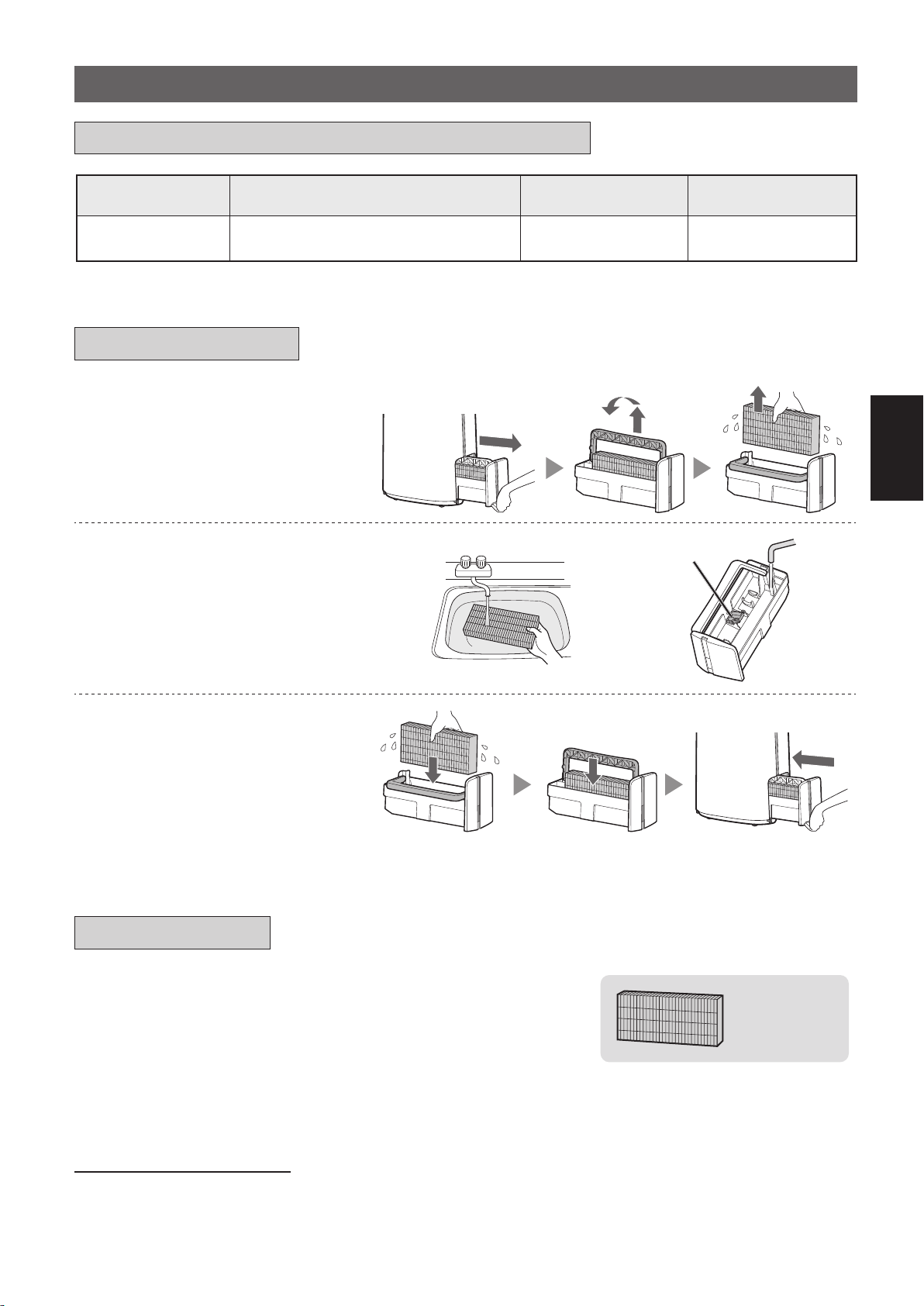
ES-15
ESPAÑOL
1.
Extraiga el filtro y la bandeja
de humidificación.
2.
Enjuague con abundante agua.
Flotador del humidificador
• No retire el flotador del humidificador.
Si se apaga, consulte la página 16.
• Consulte la página 16 para
obtener más información sobre cómo
limpiar el filtro del humidificador
cuando esté muy sucio.
3.
Instale el filtro y la bandeja
de humidificación.
• Después del mantenimiento,
vuelva a colocar correctamente
las piezas.
FILTRE D'HUMIDIFICATION / BAC D'HUMIDIFICATION
Nombre del filtro
Aproximadamente ciclo de
mantenimiento
Máxima vida del uso
Modelo para
reemplazar filtro
Filtro del
humidificador
Cuando el olor proviene de la salida de
aire o una vez al mes.
2 años FZ-P11MFU
REEMPLAZO Y CICLO DE MANTENIMIENTO
MANTENIMIENTO
REEMPLAZO
Consulte esta página para ver las pautas sobre cómo
instalar el filtro al reemplazar.
•
Consulte a su distribuidor para comprar el filtro de reemplazo.
•
Utilice únicamente el filtro diseñado para este producto..
FZ-P11MFU
(1 unidad)
Registre la fecha en la que reemplazó los filtros en la contraportada
de este manual.
•
Escanee el código QR para obtener información y accesorios del producto en
la página 1.
Eliminación de filtros
Deseche los filtros reemplazados en conformidad con las leyes y regulaciones de desecho locales.
Materiales del filtro del humidificador: Poliéster, rayón
KCP110UW_70UW_110CW_70CW_2nd.indb 15KCP110UW_70UW_110CW_70CW_2nd.indb 15 2022/03/23 11:20:162022/03/23 11:20:16
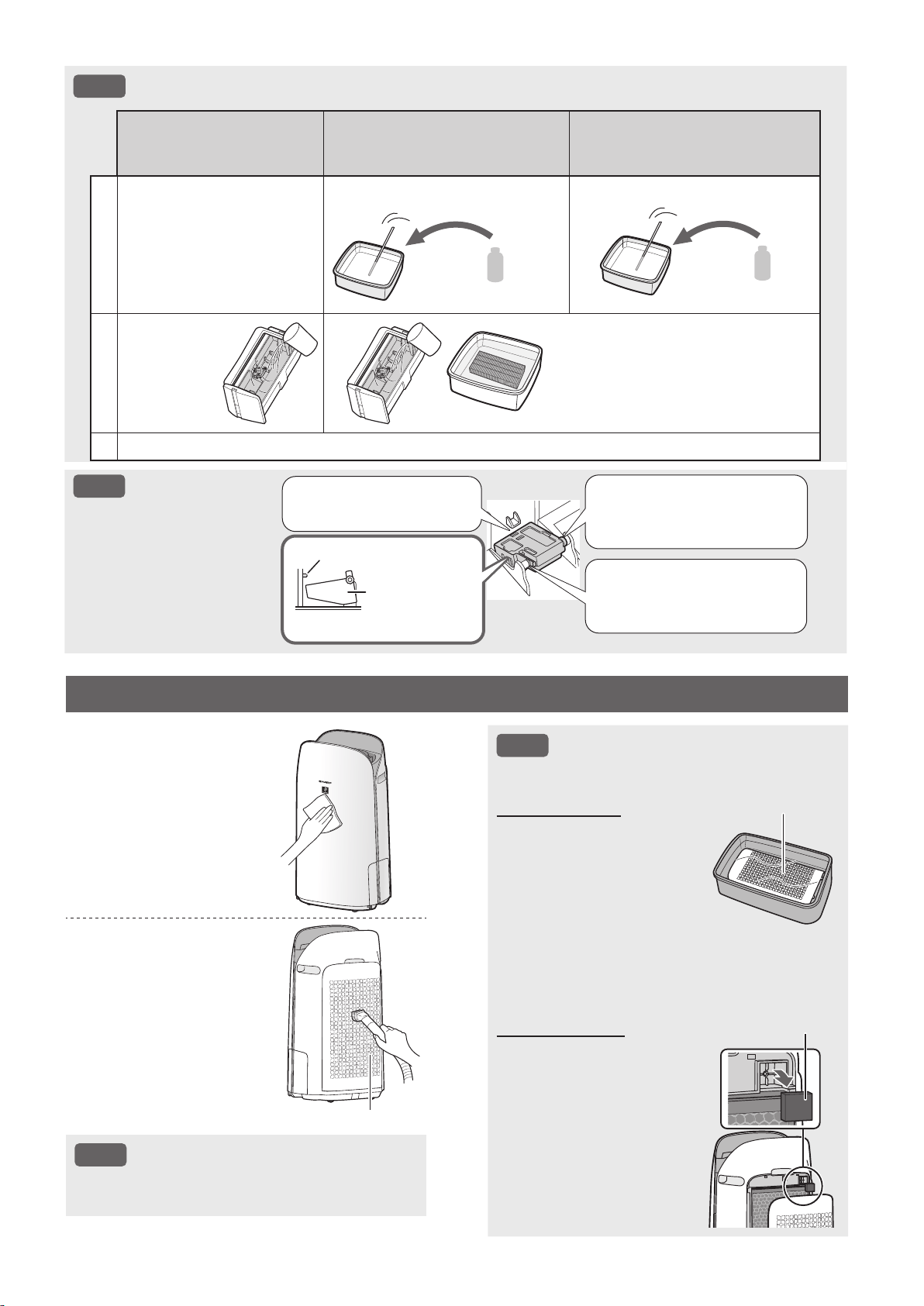
ES-16
NOTA
Cómo limpiar la suciedad más persistente.
Detergente de cocina suave
((solo para la bandeja de
humidificación)
Ácido cítrico
(disponible en algunos
establecimientos)
100 % de zumo
de limón sin pulpa
1
1. Llene la bandeja con
agua hasta la mitad.
2. Agregue una pequeña
cantidad de detergente
de cocina suave.
2 1/2 tazas de agua
3 cucharaditas
3 tazas de agua
1/4 taza
2
Deje a remojo
durante
30 minutos.
Deje a remojo durante 30 minutos.
(Cuando utilice zumo de limón como
su solución de descalcificación,
aumente el período en remojo).
3
Enjuague el detergente de cocina suave o la solución descalcificadora con agua limpia.
NOTA
Cómo instalar el
flotador del
humidificador.
2. Inserte la lengüeta del
flotador del humidificador
en el orificio.
1.
Inserte el flotador del humidificador
debajo de esta lengüeta.
Vista de la sección transversal.
Lengüeta
Flotador del
humidificador
3. Inserte la lengüeta del
otro lado del flotador del
humidificador en el orificio.
NOTA
Cómo limpiar fuerte para retirar suciedad.
Panel posterior
1. Añada una pequeña
cantidad de detergente
neutro al agua y remojar
durante unos 10 minutos.
2. Aclare el detergente
neutro con agua limpia.
3. Seque completamente
el filtro en una zona bien
ventilada.
Panel posterior
Filtro de sensor
1. Retire el panel posterior.
2. Retire el filtro del sensor.
3. ISi el filtro del sensor
está muy sucio, lávelo
con agua y séquelo bien.
Filtro de sensor
CUERPO PRINCIPAL / PANEL POSTERIOR / FILTRO DE SENSOR
Limpie con un paño
seco y suave.
Elimine el polvo
suavemente con
una herramienta de
limpieza tal como
una aspiradora.
Panel posterior (Pre-filtro)
NOTA
• No aplique una presión excesiva al cepillar
el panel posterior.
KCP110UW_70UW_110CW_70CW_2nd.indb 16KCP110UW_70UW_110CW_70CW_2nd.indb 16 2022/03/23 11:20:242022/03/23 11:20:24
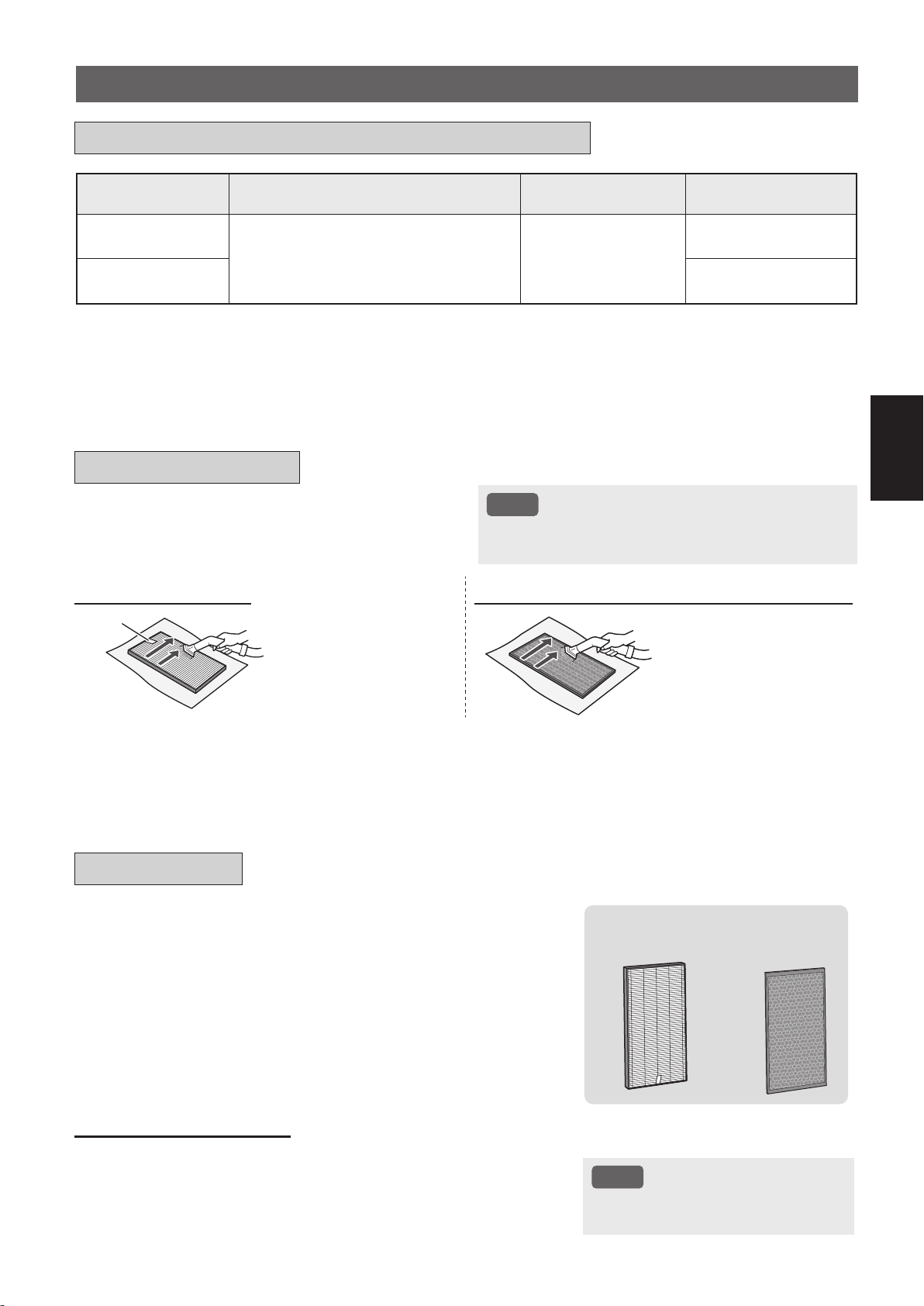
ES-17
ESPAÑOL
Nombre del filtro
Aproximadamente ciclo de
mantenimiento
Máxima vida del uso
Modelo para
reemplazar filtro
Filtro True HEPA
Cada vez que se acumule el polvo,
cuando el mal olor se libera de la salida
de aire, o una vez al mes.
2 años
*
1, 2
FZ-P11HFU
Filtro desodorizante
de carbón activo
FZ-J80DFU
*1: Según la norma JEM 1467 de la asociaciòn de Fabricación eléctrica de Japón, la vida de servicio màxima se basa en
la condición equivalente del humo producido por 5 cigarrillos al día. Bajo dicha condiciòn, la capacidad de recolecciòn
de polvo se reducen hasta la mitad a comparaciòn con el filtro nuevo. Se recomienda reemplazar el filtro con mayor
frecuencia encondiciones de uso màs severas.
*2: La aplicación designada notifica cuándo se deben reemplazar los filtros de acuerdo con el uso.
FILTRO TRUE HEPA / FILTRO DESODORIZANTE DE CARBÓN ACTIVO
Consulte la página 8 para ver las pautas sobre cómo
instalar el filtro al reemplazar.
•
Consulte a su distribuidor para comprar el filtro de reemplazo.
•
Use solo el filtro diseñado para este producto.
FZ-P11HFU
(1 unidad)
FZ-J80DFU
(1 unidad)
Registre la fecha en la que reemplazó los filtros en la
contraportada de este manual.
•
Escanee el código QR para obtener información y accesorios del producto
en la página 1 .
Eliminación de filtros
Deseche los filtros reemplazados en conformidad con las leyes y
regulaciones de desecho locales.
Materiales del Filtro True HEPA: Polipropileno, Polietileno
Material de filtro desodorizante de carbón activo: Polipropileno,
Poliéster, Carbón activado
NOTA
• No lave ni reutilice el filtro
reemplazado.
Eliminar el polvo de los filtros.
NOTA
• No lavar los filtros. No exponer a la luz del sol.
(De lo contrario, estos filtros pueden perder su eficacia).
FILTRO TRUE HEPA
FILTRO DESODORIZANTE DE CARBÓN ACTIVO
Etiqueta
Mantener solo la superficie
etiquetada. No limpie la
superficie opuesta.
El filtro es frágil, por lo tanto
tenga cuidado de no aplicar
demasiado presión.
Se pueden mantener ambas
superfícies.
El filtro es frágil, por lo tanto
tenga cuidado de no aplicar
demasiado presión.
Algunos olores absorbidos por los filtros pueden descomponerse con el paso del tiempo, causando olores adicionales.
Dependiendo del ambiente en el que se use el producto, especialmente cuando es usado en ambientes considerablemente
más severo que el uso doméstico normal, estos olores pueden volverse más perceptibles antes de lo esperado.
En esos casos sustituya el filtro o si no se puede eliminar el polvo después del mantenimiento.
REEMPLAZO Y CICLO DE MANTENIMIENTO
MANTENIMIENTO
REEMPLAZO
KCP110UW_70UW_110CW_70CW_2nd.indb 17KCP110UW_70UW_110CW_70CW_2nd.indb 17 2022/03/23 11:20:262022/03/23 11:20:26
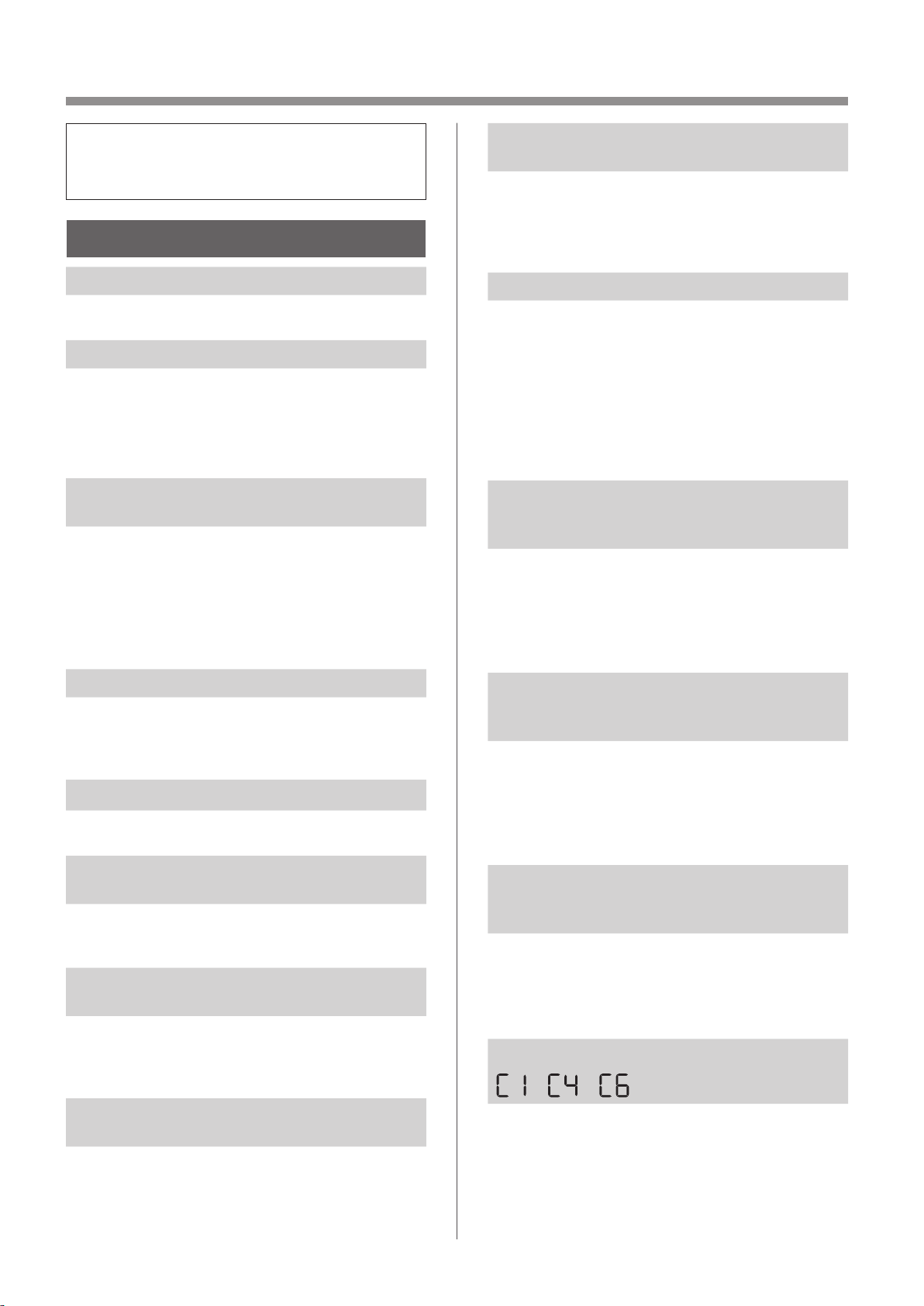
ES-18
EN ESTA SITUACIÓN
•
Antes de llamar a mantenimiento, por favor revise
la lista a continuación, ya que el problema puede
no ser un mal funcionamiento de la unidad.
SOBRE EL PRODUCTO
El olor y el humo persisten.
• Compruebe los filtros. Si parecen estar
extremadamente sucios, límpielos o reemplácelos.
El aire descargado del producto tiene un olor.
• Compruebe si los filtros están extremadamente sucios.
• Limpie o reemplace los filtros.
• Utilice únicamente agua corriente. El uso de otras
fuentes de agua aumenta el riesgo de aparición
de moho, hongos o bacterias.
El producto no funciona cuando
hay humo de cigarrillo en el aire.
• Asegúrese de que el producto esté instalado en
un lugar en el que los sensores puedan detectar
humo de cigarrillo.
• Compruebe si las aberturas del sensor de polvo
sensible están bloqueadas u obstruidas. Si están
bloqueados u obstruidos, limpie el filtro del senso
o el panel posterior.
Olor de un nuevo producto y/o filtro.
• Inmediatamente después de retirar la bolsa de
plástico, puede ocurrir un leve olor. Este olor
no es nocivo para el rendimiento del filtro o la
exposición humana.
El producto emite un sonido de clic o tictac.
• El producto puede emitir sonidos de clic o tictac
cuando genera iones.
El monitor de calidad del aire es azul
incluso cuando el aire no está limpio.
• El aire puede haber estado sucio cuando se
enchufó el producto. Desenchufe el producto,
espere un minuto y luego vuelva a enchufarlo.
El monitor de calidad del aire es rojo
incluso cuando el aire está limpio.
• Sucias u obstruidas las aberturas del sensor de
polvo sensible interfieren con el funcionamiento
del sensor. Limpie suavemente el filtro del sensor
o el panel posterior.
El monitor de calidad del aire cambia de
color frecuentemente.
• El monitor de calidad del aire cambia
automáticamente de color cuando el sensor
de polvo sensible y el sensor de olor detectan
impurezas. Si le preocupa el cambio, puede cambiar
la sensibilidad del sensor. (Página 20, 21)
La luz indicadora de mantenimiento del
filtro está encendida.
• Siempre después de realizar el mantenimiento
de los filtros, conecte el cable de alimentación
a un tomacorriente y presione el botón de
ENCENDIDO / APAGADO, luego presione el
botón de REINICIO DEL FILTRO. (Página 14)
La pantalla se apaga.
• Cuando el control de luces está ajustado en
apagado, la luz siempre está apagada
Si no desea que la luz esté apagada, establezca
el control de luz en el ajuste “Auto” o “Atenuar”.
(Página 20, 21)
• En el modo de suspensión, cuando el control
de luces está en “Auto”, la luz se apagará o se
atenuará automáticamente en función del brillo
de la habitación.
La pantalla del coincide con el informe
meteorológico u otro higrómetro o
termómetro en la habitación.
• Tanto exterior como interior, así como el entorno
del hogar (el volumen de tráfico cercano, la
cantidad de historias en el hogar, etc.) pueden
causar una lectura diferente a esos datos.
• Hay una diferencia en el nivel dentro de la misma
habitación.
El indicador de humedad de la pantalla
no se enciende cuando la bandeja de
humidificación está vacía.
• La habitación ha alcanzado el nivel de humedad
adecuado y ha dejado de humidificar..
• Compruebe que no haya impurezas en el
flotador del humidificador. Limpie la bandeja de
humidificación. Asegúrese de que el producto
esté en una superficie nivelada.
El nivel del agua en la bandeja de
humidificación no disminuye ni disminuye
lentamente.
• Compruebe si la bandeja de humidificación está
instalada correctamente. Compruebe el filtro del
humidificador.
• Si el filtro está demasiado sucio, límpielo o
sustitúyalo.
Se muestra una de las siguientes opciones.
• Desenchufe el producto, espere un minuto y, a
continuación, vuelva a conectarlo.
KCP110UW_70UW_110CW_70CW_2nd.indb 18KCP110UW_70UW_110CW_70CW_2nd.indb 18 2022/03/23 11:20:272022/03/23 11:20:27
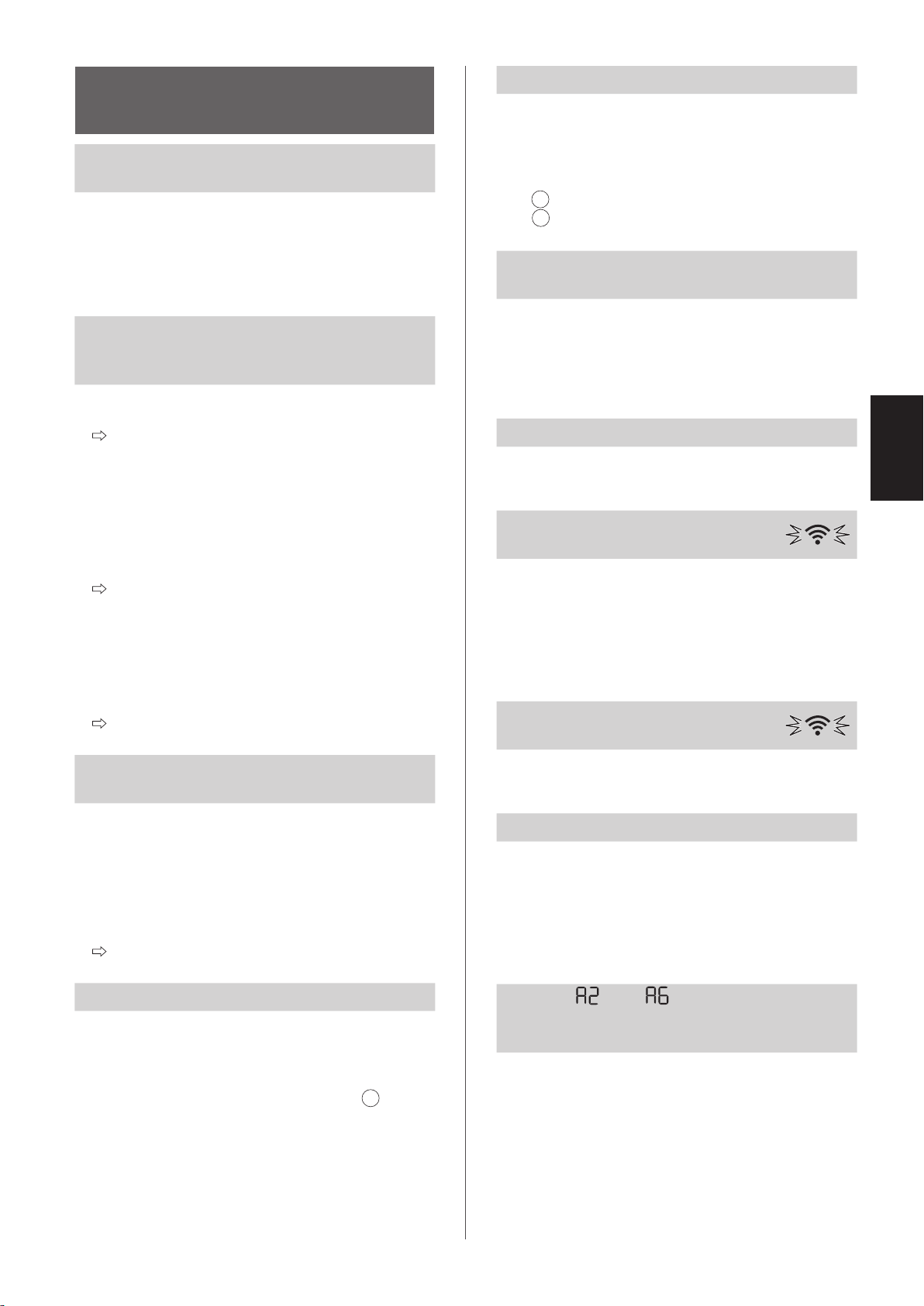
ES-19
ESPAÑOL
ACERCA DE LA
FUNCIÓN Wi-Fi
No se puede realizar la conexión Wi-Fi del
purificador de aire y del router.
• Compruebe las especificaciones del router en uso.
• Ajuste el router y la dirección de la antena,
mueva el router y la antena más cerca, y así
sucesivamente. Después de eso, vuelva a
cambiar para encender el router y realice las
configuraciones iniciales de nuevo.
No se puede establecer la conexión entre
el purificador de aire y su dispositivo
inteligente.
• ¿El purificador de aire y su dispositivo inteligente
están conectados al mismo enrutador?
Conecte el purificador de aire y su dispositivo
inteligente al mismo enrutador.
Si aún no puede conectarse, intente conectar
su dispositivo inteligente a la banda de 2,4 GHz
del enrutador.
• ¿El número total de dispositivos inteligentes en
uso supera el número máximo de registro en un
purificador de aire?
El número máximo de dispositivos inteligentes
que se pueden registrar en un purificador de
aire es 10.
• ¿El número total de productos (aires
acondicionados, purificadores de aire, etc.) para
registrarse con un dispositivo inteligente excede
el número máximo designado?
El número máximo de productos a registrar
con un dispositivo inteligente es de 30.
No se puede realizar la operación remota
desde un dispositivo inteligente.
• ¿Está encendido el indicador Wi-Fi del purificador
de aire?
Si el indicador Wi-Fi está apagado, realice “A1:
Adaptador Wi-Fi ENCENDIDO/APAGADO” para
encender el Wi-Fi del producto. (Página 22)
• ¿Se ha completado la conexión entre el
purificador de aire y su dispositivo inteligente?
Configure la conexión entre el purificador de
aire y su dispositivo inteligente. (Página 11)
Al cambiar el router
• Es necesario volver a conectar el purificador de
aire al router.
1. Mantenga pulsado el botón Wi-Fi durante
3 segundos para detener la función Wi-Fi.
2. Realice “Ajustes de conexión inicial: 2
Conexión del purificador de aire y un router”.
(Página 10)
Al cambiar el dispositivo inteligente
• Realice los pasos siguientes.
1. Elimine el registro del dispositivo inteligente
antiguo de la aplicación designada.
2. Utilice el nuevo dispositivo inteligente para
realizar “CONFIGURACIÓN INICIAL:
1 Descargar y Registrarse
3 Conexión entre el purificador de aire y un
dispositivo inteligente”. (Página 10, 11)
Cuando se vaya a desechar o entregar el
purificador de aire
• Realice los siguientes pasos para evitar la fuga
de información personal.
1. Elimine el registro del purificador de aire de la
aplicación designada.
2. Realice “A4: Inicialización de la función Wi-Fi”.
(Página 22)
En caso de ser entregado por un tercero
• Para evitar el acceso no autorizado de un tercero,
realice “A4: Inicialización de la función Wi-Fi”
(Página 22)
El indicador Wi-Fi parpadea
lentamente
• Es uno de los siguientes estados.
A. La conexión Wi-Fi del purificador de aire y un
router está en configuración.
B. La conexión del purificador de aire y un
dispositivo inteligente está en configuración.
C. El software de la función Wi-Fi del purificador
de aire está siendo actualizado.
El indicador Wi-Fi parpadea
rápidamente
• Error de red. Confirme el estado de la red Wi-
Fi desde “A7: Visualizar estado de red Wi-Fi”.
(Página 23)
El indicador Wi-Fi se apaga
• El purificador de aire no puede conectarse al
enrutador. Compruebe lo siguiente.
A. ¿El enchufe de alimentación está conectado
correctamente?
B. ¿Se ha detenido la función Wi-Fi? Confirme el
estado de la red Wi-Fi desde “A7: Visualizar
estado de red Wi-Fi”. (Página 23)
Uno de “ ” a “ ” no se puede
seleccionar en el modo de configuración
de Wi-Fi. (Página 22 - 23)
• Si el adaptador Wi-Fi está desactivado, puede
que no se pueda seleccionar uno de “A2” a “A6”.
KCP110UW_70UW_110CW_70CW_2nd.indb 19KCP110UW_70UW_110CW_70CW_2nd.indb 19 2022/03/23 11:20:292022/03/23 11:20:29
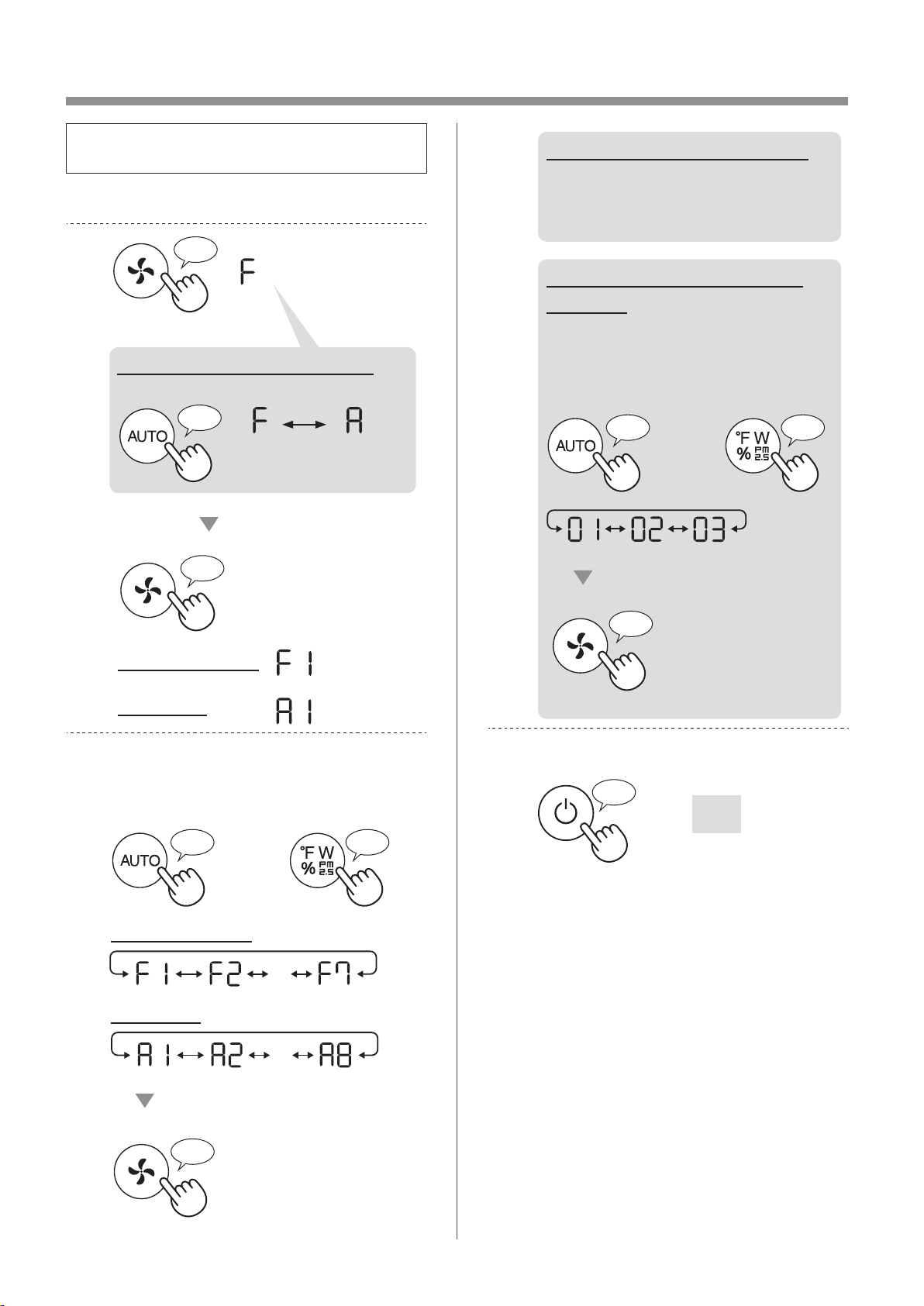
ES-20
CÓMO CAMBIAR VARIOS AJUSTES
• Puede cambiar las funciones del producto y del
Wi-Fi en la página 21 - 24.
1.
Poner el producto en APAGADO.
2.
Pulsar durante 3 seg.
♪
♪
Establecer
Ajuste Wi-Fi
Ajuste de producto
♪
Cuando se configura el Wi-Fi
Cambie “F” a “A”.
Ajuste de
producto
Ajuste
Wi-Fi
3.
Seleccionar “Número de función”.
(F1-F7 o A1-A8)” en la página 21 - 24.
o
IR ADELANTE
♪
IR ATRÁS
♪
・・・
Establecer
♪
Ajuste Wi-Fi
Ajuste de producto
・・・
4.
Cuando se configura el Wi-Fi
Consulte las páginas
22 - 24
para obtener detalles de cada
función.
Durante la configuración del
producto
Seleccione “Número de ajuste
01 - 03)” en la página 21.
Establecer
♪
~
o
IR ADELANTE
♪
IR ATRÁS
♪
5.
Finalizar el ajuste.
Se apaga
♪
~
KCP110UW_70UW_110CW_70CW_2nd.indb 20KCP110UW_70UW_110CW_70CW_2nd.indb 20 2022/03/23 11:20:452022/03/23 11:20:45
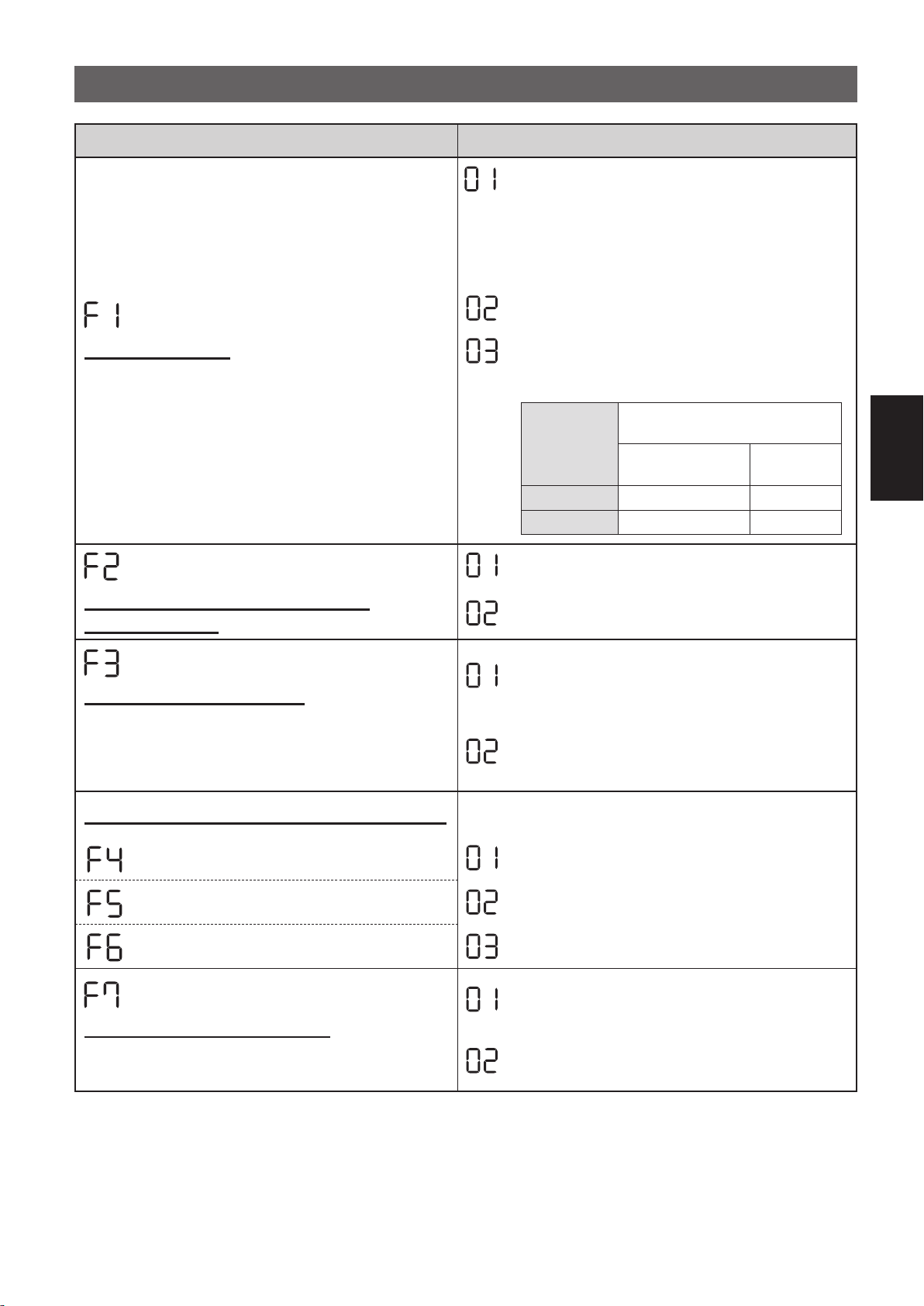
ES-21
ESPAÑOL
FUNCIONES DEL PRODUCTO (F1-F7)
Función Ajuste
Control de luces
Puede seleccionar el brillo de la pantalla frontal y el
indicador de calidad del aire.
APAGADO
Cuando se ajusta en “Apagar”, la luz “Atenuar”
se enciende durante 8 segundos después de
que comience la operación y luego se apaga.
Sin embargo, algunos indicadores que necesitan
notificación permanecerán atenuados.
Atenuar
Auto
(por defecto)
La luz cambia automáticamente en función de la
luminosidad de la habitación.
Luminosidad
de la habitación
Indicador de visualización y
calidad del aire
TODOS LOS MODOS
(excepto SUSPENSIÓN)
MODO DE
SUSPENSIÓN
Brillo ENCENDIDO Atenuar
Atenuar Atenuar APAGADO
Iones Plasmacluster ACTIVADO/
DESACTIVADO
OFF
ON
(por defecto)
Reanudación automática
Este modelo tiene la función de Reanudación
automática, la operación se reanuda en el modo y
configuración anteriores una vez que se restaura la
energía.
CANCELACIÓN
ENCENDIDO
(por defecto)
Ajustar la sensibilidad del sensor (F4 - F6)
Sensor de luz Baja
Sensor de polvo sensible Estándar
(por defecto)
Sensor de olor Alto
Ajuste del indicador sonoro
Puede configurar el producto para que emita un pitido
cuando la bandeja de humidificación esté vacía.
CANCELACIÓN
(por defecto)
ENCENDIDO
KCP110UW_70UW_110CW_70CW_2nd.indb 21KCP110UW_70UW_110CW_70CW_2nd.indb 21 2022/03/23 11:20:532022/03/23 11:20:53
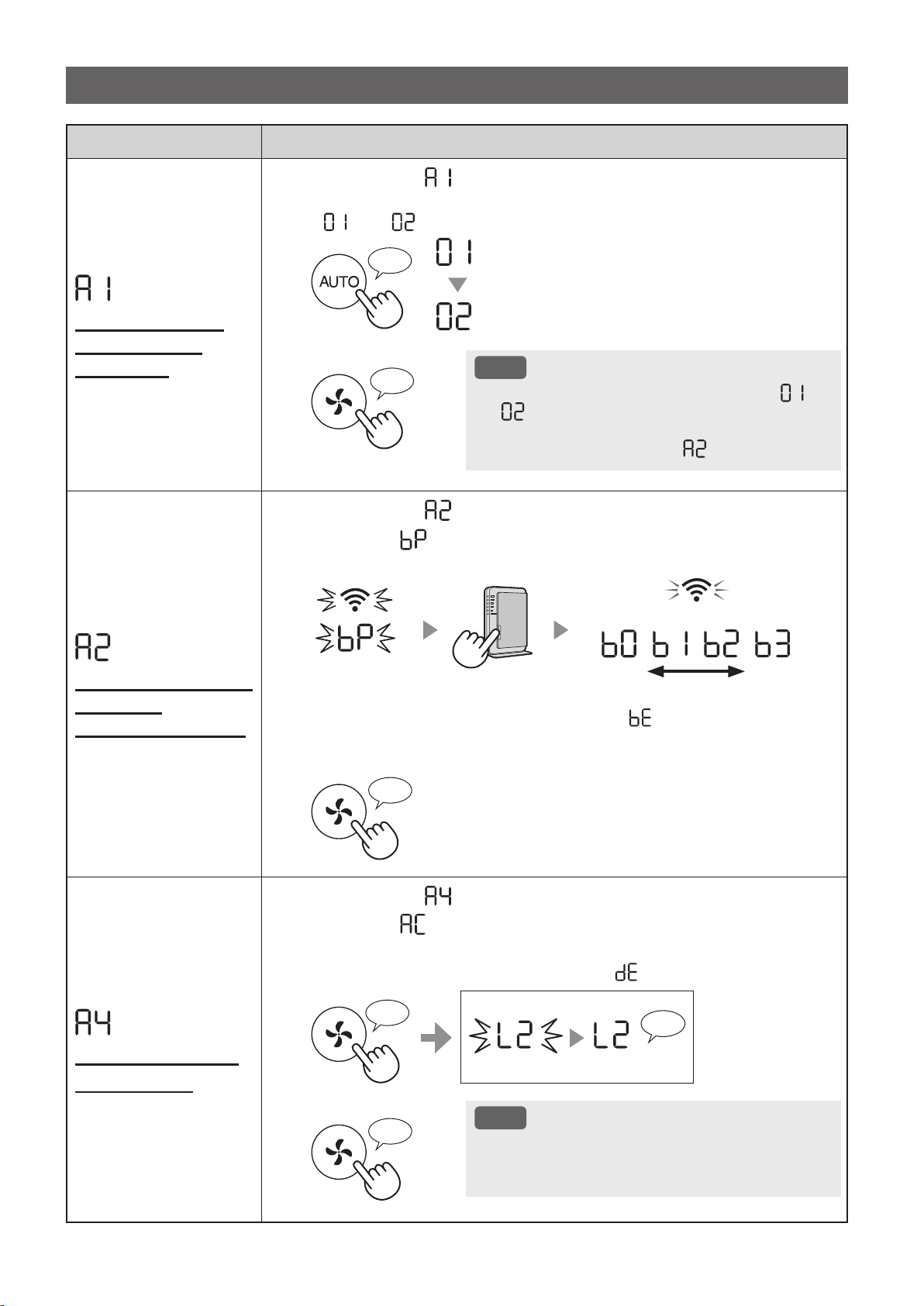
ES-22
Función Ajuste
Adaptador Wi-Fi
ENCENDIDO /
APAGADO
1.
Seleccionar “ ” siguiendo los Pasos 1 - 3 en la página 20.
2.
Presione el botón "AUTO" para seleccionar la configuración
"
" o " ".
Wi-Fi APAGADO
Wi-Fi ENCENDIDO
♪
3.
Completar
NOTA
• Cuando se cambia el número de ajuste (“ ” o
“
”), el cuadrado gira en la pantalla hasta que
se completa el ajuste. Cuando se completa la
configuración, se muestra “
”.
♪
~
Conexión Wi-Fi con
un router
(con el botón WPS)
1.
Seleccionar “ ” siguiendo los Pasos 1 - 3 en la página 20.
2.
Después “ ” de que se muestre, presione el botón de
configuración protegida de Wi-Fi (WPS) del router.
débil fuerte
Light up
Parpadeo
Una vez conectado, se visualizará el nivel del receptor..
Se está produciendo un error de conexión si “ ” se visualiza.
Confirme el router e inténtelo de nuevo.
3.
Completar
♪
Inicialización de la
función Wi-Fi
1.
Seleccionar “ ” siguiendo los Pasos 1 - 3 en la página 20.
2.
Después “ ” de que se muestre, presione el botón de “Fan
Speed” Button.
Se está produciendo un error si se muestra “ ”. Inténtalo de nuevo.
♪
♪
~
Completar
Parpadeo
Inicializando
3.
Completar
NOTA
• Elimine el registro del dispositivo de la aplicación
cuando se inicialice el purificador de aire que ya
está conectado a Wi-Fi.
♪
FUNCIONES Wi-Fi (A1-A8)
KCP110UW_70UW_110CW_70CW_2nd.indb 22KCP110UW_70UW_110CW_70CW_2nd.indb 22 2022/03/23 11:21:052022/03/23 11:21:05
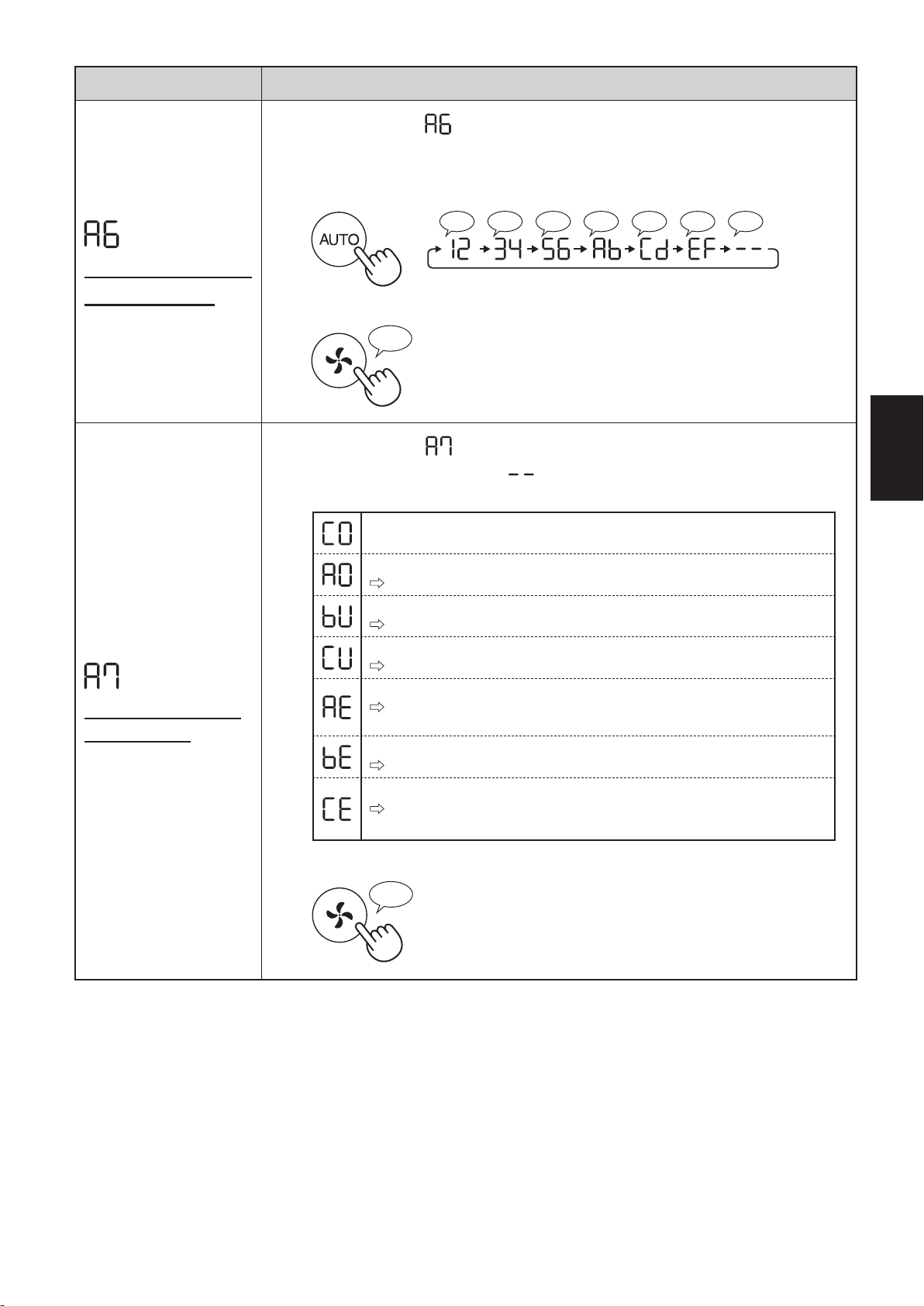
ES-23
ESPAÑOL
Función Ajuste
Confirmación de la
dirección MAC
1.
Seleccionar “ ” siguiendo los pasos 1 - 3 en la página 20.
2.
Presione el botón "AUTO" para mostrar la dirección MAC.
Por ejemplo :
En caso de que la dirección MAC sea “12:34:56:AB:CD:EF”.
♪♪♪♪♪♪♪
♪
~
3.
Completar
♪
Visualizar estado
de red Wi-Fi
1.
Seleccionar “ ” siguiendo los pasos 1 - 3 en la página 20.
2.
Después de visualizar “ ” durante unos segundos,
se visualizará el estado de red en el adaptador Wi-Fi.
La conexión es estable
El adaptador Wi-Fi está apagado
Encienda el adaptador Wi-Fi.
El router no está registrado
Realice la conexión Wi-Fi con el router.
No se ha realizado la configuración del enlace con la aplicación .
Realice la configuración de la vinculación con el teléfono inteligente.
Error de red del adaptador Wi-Fi
Apague el adaptador de Wi-Fi y enciéndalo de nuevo después de un
tiempo
Error de red entre el purificador de aire y el router
Confirme el estado de la red del router.
Error de servicio de red
Apague el purificador de aire y confirme el estado de Internet, luego
inténtelo de nuevo.
3.
Completar
♪
KCP110UW_70UW_110CW_70CW_2nd.indb 23KCP110UW_70UW_110CW_70CW_2nd.indb 23 2022/03/23 11:21:142022/03/23 11:21:14
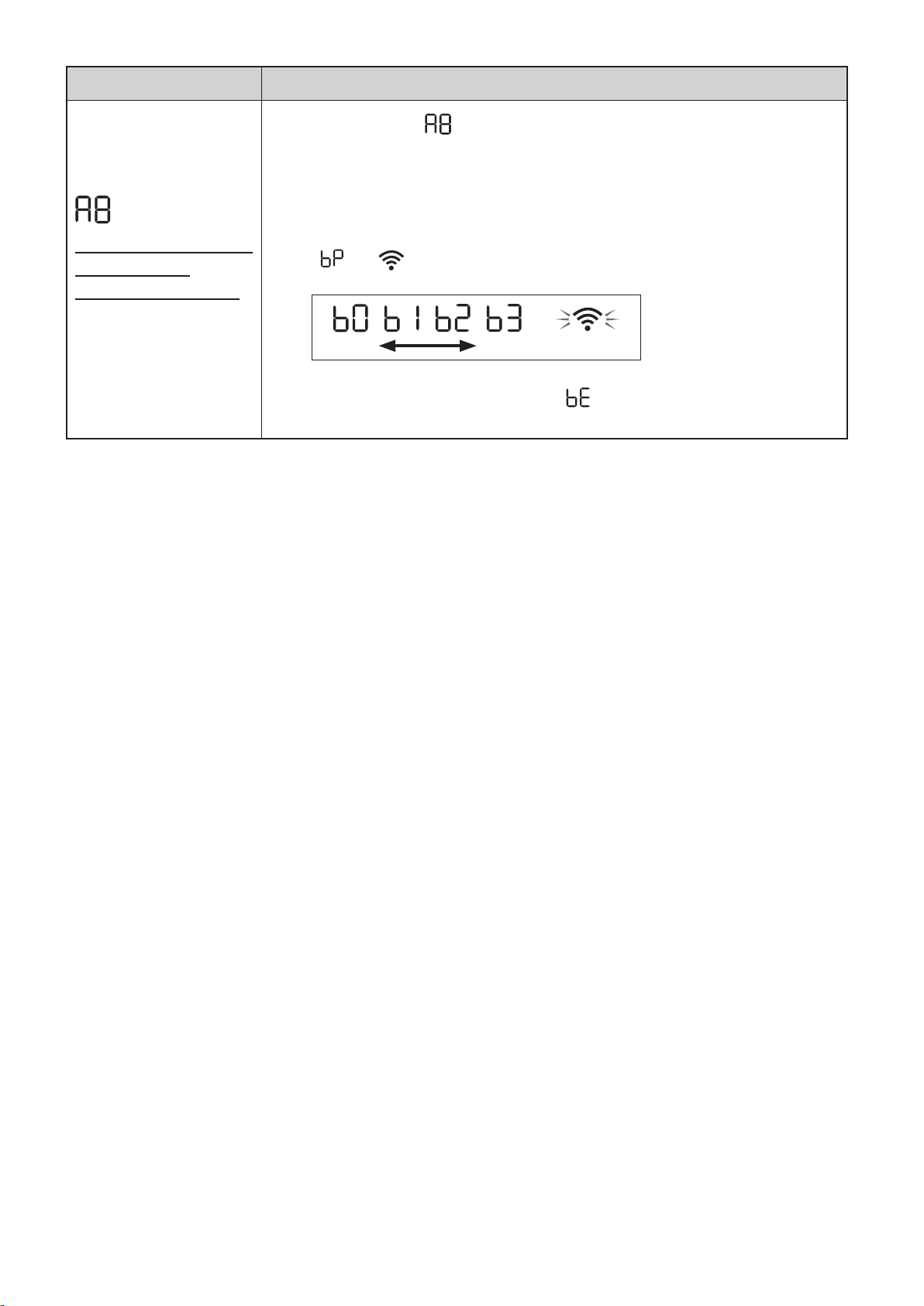
ES-24
Función Ajuste
Conexión Wi-Fi con
un enrutador
(sin el botón WPS)
- Modo PA (punto de
acceso) -
1.
Seleccionar “ ”siguiendo los Pasos 1 - 3 en la página 20.
2.
Realice la conexión Wi-Fi del purificador de aire y el router según
la pantalla de la aplicación.
Consulte la aplicación para obtener más información sobre otras
operaciones.
“ ” y “ ” parpadea mientras se configura la conexión entre el producto
y el router.
débil fuerte
Iluminar
Una vez conectado, se visualizará el nivel del receptor.
Se produce un error de conexión si “ ” se visualiza.
Confirme el router e inténtelo de nuevo.
KCP110UW_70UW_110CW_70CW_2nd.indb 24KCP110UW_70UW_110CW_70CW_2nd.indb 24 2022/03/23 11:21:172022/03/23 11:21:17
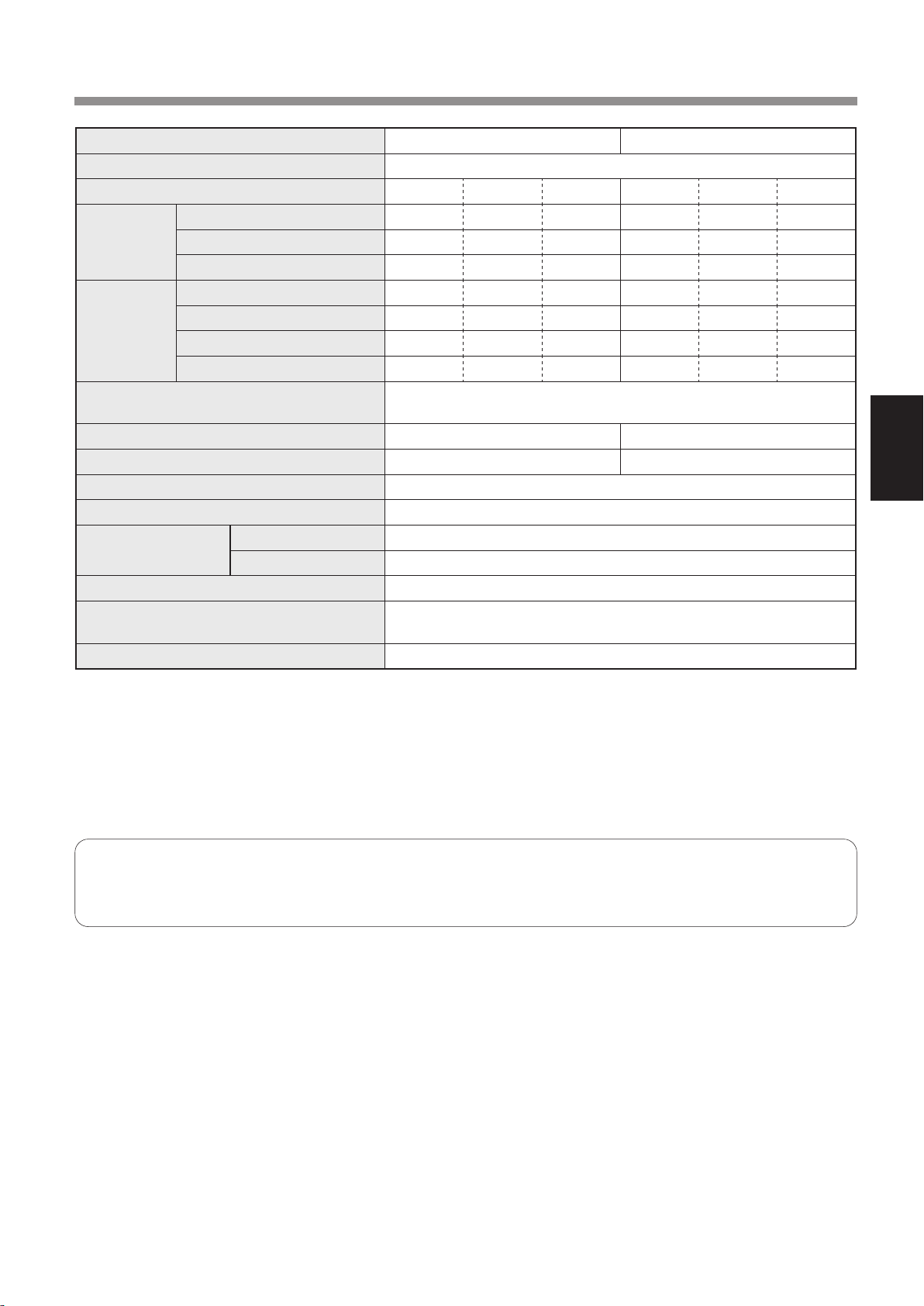
ES-25
ESPAÑOL
ESPECIFICACIONES
Modelo KCP110UW / KCP110CW KCP70UW / KCP70CW
Fuente de alimentación 120 V ~ 60 Hz
Ajuste de velocidad del ventilador MAX MED BAJO MAX MED BAJO
AIRE LIMPIO
Velocidad del ventilador (CFM) 381 222 64 272 190 64
Potencia nominal (Vatios) 94 27 4,8 40 19 4,8
Nivel de ruido (dBA) *
1
55 42 21 47 39 21
AIRE LIMPIO
&
HUMEDECER
Velocidad del ventilador (CFM) 381 222 64 272 190 64
Potencia nominal (Vatios) 94 27 4,8 40 19 4,8
Nivel de ruido (dBA) *
1
55 42 21 47 39 21
Humidificación (pintas / hora) *
2
0,70 0,47 0,15 0,55 0,42 0,15
Potencia en espera (W)
1,1 (Cuando el adaptador Wi-Fi está encendido.)
0,7 (Cuando el adaptador Wi-Fi está apagado.)
Tamaño recomendado de habitación *
3
538 sq. ft. (50 m
2
) 396 sq. ft. (37 m
2
)
CADR (Polvo/Humo/Polen) 352 / 347 / 443 260 / 255 / 259
Capacidad de la bandeja de humidificación (galón)
Aprox. 0,53
Sensores Polvo sensible/olor/luz/temperatura y humedad
Tipo de filtro
Recolección de polvo Filtro True HEPA
*
4
Desodorización Filtro desodorizante de carbón activo
Longitud del cable 6,6 ft. (2,0 m)
Dimensiones
15,8 in. (W) × 12,4 in. (D) × 28,6 in. (H)
(402 mm (W) × 315 mm (D) × 727 mm (H))
Peso Aprox. 22,3 lbs. (10,1 kg)
*1
•
El nivel de ruido se mide basado en norma JEM 1467 de la asociaciòn de Fabricación eléctrica de Japón.
*2
•
La cantidad de humidificación cambia en conformidad con la temperatura y humedad interior y exterior.
La cantidad de humidificación aumenta a medida que aumenta la temperatura o disminuye la humedad.
La cantidad de humidificación disminuye a medida que disminuye la temperatura o aumenta la humedad.
•
Condiciones de medición: 20 °C, 30 % de humedad (según JEM1426).
*3
•
El tamaño de la habitación recomendado es apropiado para operar el producto con la velocidad máxima del ventilador.
*4
•
El filtro elimina más del 99,97 % de las partículas de al menos 0,3 micras de tamaño.
Energía de reserva
Cuando se inserta la clavija de alimentación del producto en una toma de corriente de la pared, consume energía de
reserva para operar los circuitos eléctricos.
Para conservar energía, desenchufe el cable de alimentación cuando el producto no esté en uso.
KCP110UW_70UW_110CW_70CW_2nd.indb 25KCP110UW_70UW_110CW_70CW_2nd.indb 25 2022/03/23 11:21:172022/03/23 11:21:17

ES-26
MEMO
KCP110UW_70UW_110CW_70CW_2nd.indb 26KCP110UW_70UW_110CW_70CW_2nd.indb 26 2022/03/23 11:17:502022/03/23 11:17:50

ES-27
ESPAÑOL
MEMO
KCP110UW_70UW_110CW_70CW_2nd.indb 27KCP110UW_70UW_110CW_70CW_2nd.indb 27 2022/03/23 11:17:502022/03/23 11:17:50
Production
control code
TINSEA011KKRZ 22C 2
SHARP ELECTRONICS
CORPORATION
100 Paragon Drive, Montvale,
NJ 07645, U.S.A.
SHARP ELECTRONICS OF
CANADA LTD.
335 Britannia Road East,
Mississauga, Ontario L4Z 1W9
Canada
Record the date when you start or replace the lters
Notez la date à laquelle vous commencez ou remplacez les ltres
Replace the lters when they are no longer removing odor or dust.
Remplacez les ltres lorsqu'ils n’éliminent plus l’odeur ou la poussière.
Reemplace el ltro cuando éste remueva olor o polvo.
Registre la fecha cuando inicie o sustituya los ltros
True HEPA Filter
Filtre HEPA authentique
Filtro true HEPA
Model
Modèle
Modelo
FZ-P11HFU
Starting date of use
Date de début d’utilisation
Fecha de comienzo de uso
.
.
.
.
.
.
.
.
.
.
.
.
Active carbon Deodorizing Filter
Filtre déodorant de carbone actif
Filtro desodorizante de carbón activo
Model
Modèle
Modelo
FZ-J80DFU
Starting date of use
Date de début d’utilisation
Fecha de comienzo de uso
.
.
.
.
.
.
.
.
.
.
.
.
Humidifying filter
Filtre d’humidification
Filtro del humidificador
Model
Modèle
Modelo
FZ-P11MFU
Starting date of use
Date de début d’utilisation
Fecha de comienzo de uso
.
.
.
.
.
.
.
.
.
.
.
.
EPA Est. No. 088806-VNM-001
KCP110UW_70UW_110CW_70CW_2nd.indb 92KCP110UW_70UW_110CW_70CW_2nd.indb 92 2022/03/23 11:17:512022/03/23 11:17:51
