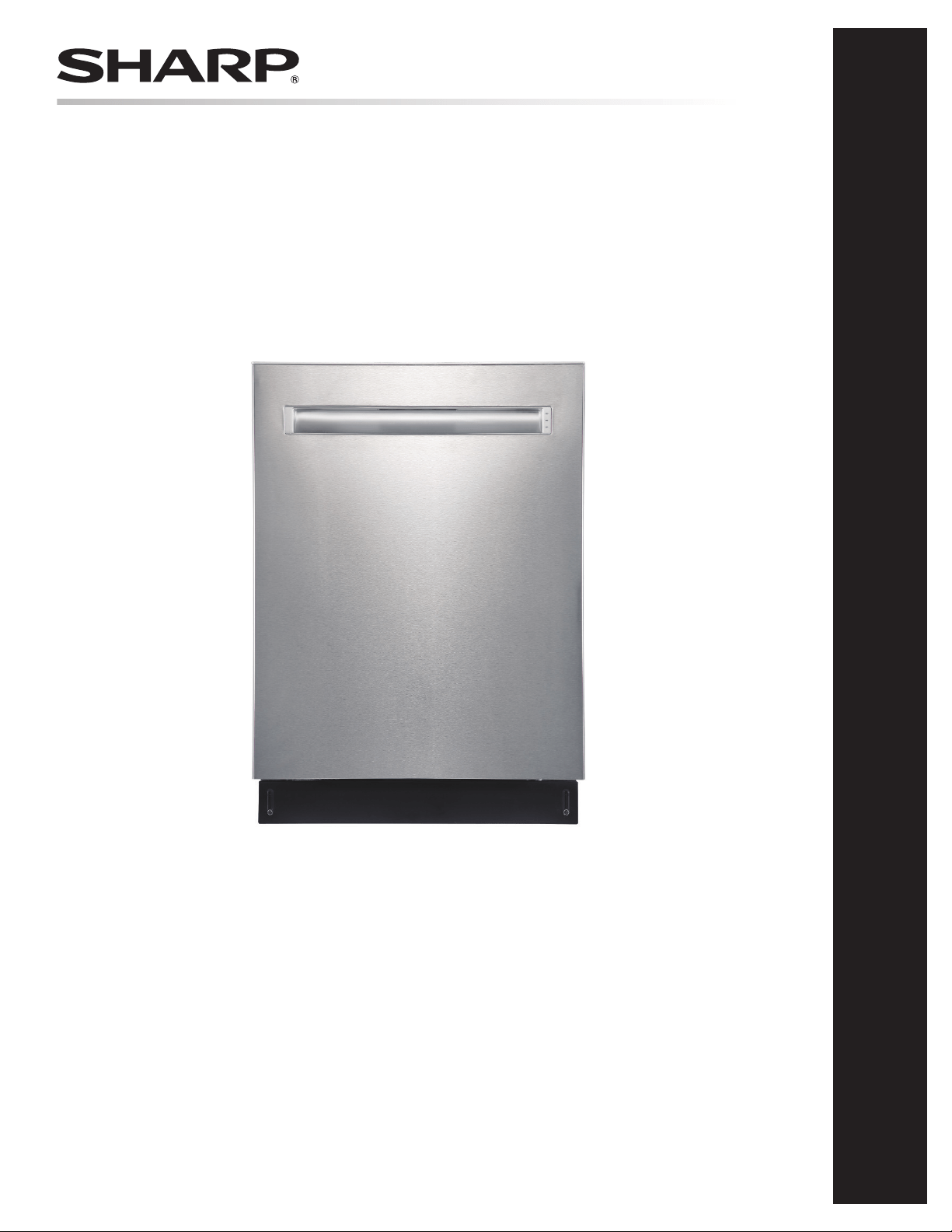
Dishwasher: Model SDW6767HS
OPERATION MANUAL
DISHWASHER
MODEL : SDW6767HS
Feb 23, 2022
CUSTOMER ASSISTANCE ....................................... 2
CONSUMER LIMITED WARRANTY ............................. 3
QUICK START GUIDE ............................................ 4
IMPORTANT SAFETY INSTRUCTIONS ......................... 7
APPEARANCE OVERVIEW ....................................... 8
CONTROL PANEL ................................................. 9
CONVENIENT FEATURES ....................................... 11
GETTING STARTED .............................................. 13
DISHWASHER CYCLE OPTIONS ............................... 17
CARE AND CLEANING .......................................... 19
TROUBLESHOOTING ............................................ 21
ERROR CODES .................................................. 23
DRAIN HOSE INSTALLATION .................................. 24
CUSTOMER ASSISTANCE UNITED STATES ONLY
REGISTER YOUR PRODUCT
Registering your new product is easy and offers benets that help you get the most
out of your Sharp product including:
9 Convenience: Ifyoueverneedwarrantysupport,yourproductinformationisalreadyonle.
9 Communication:StayuptodatewithimportantnoticationsandspecialoffersfromSHARP.
9 Support: Quickly access support content including Owner’s Manuals, FAQ’s,
How-toVideos,andmuchmore.
3 EASY WAYS TO REGISTER TODAY!
PRODUCT SUPPORT
If you have questions about the setup or operation of your product, please refer to
the corresponding section within this manual.
Additionally, visit www.sharpusa.com/support to access exclusive content about your
product including:
Æ FAQ’s and How-To Videos
Æ Find or Request Service
Æ Purchase an Extended Warranty
Æ Downloads including the Installation Guide, Spec Sheet, and Owner’s Manual
CONTACT US
If at any time you have questions or comments concerning your SHARP product,
please contact the SHARP Customer Assistance Center. We are available to
assist you through multiple contact methods for your convenience:
Scan this QR Code on your smart phone Visit http://www.sharpusa.com/register
ONLINE
Visit our sites to
learn more about
your product at
sharpusa.com and
sbl.sharpusa.com
See the Contact Us section on our sites U.S. | www.sharpusa.com/support Contact a Sharp Advisor on the phone
Contact a Sharp Advisor on the phone
CALL US
US 800-BE-SHARP
800-237-4277
Mon-Fri: 7am-7pm CST
Sat-Sun: 9am-7pm CST
CALL US
US 800-BE-SHARP
800-237-4277
Mon-Fri: 7am-7pm CST
Sat-Sun: 9am-7pm CST
EMAIL
Available 24/7
US: sharpusa.com
CHAT ONLINE
Mon-Fri: 7am-7pm CST
Sat-Sun: 9am-7pm CST
SCAN
Use the camera or
QR code scanning
application on your
smart phone
2

CONSUMER LIMITED WARRANTY
3
SHARP ELECTRONICS CORPORATION (“Sharp”) warrants to the rst consumer purchaser (“Purchaserˮ) that this SHARP brand
SHARP ELECTRONICS CORPORATION warrants to the rst consumer purchaser that this Sharp brand product (the “Product”),
when shipped in its original container, will be free from defective workmanship and materials, and agrees that it will, at its option,
either repair the defect or replace the defective Product or part thereof with a new or remanufactured equivalent at no charge to the
purchaser for parts or labor for the period(s) set forth below.
This warranty does not apply to any cosmetic or appearance items of the Product nor to the additional excluded item(s) set forth below
nor to any Product the exterior of which has been damaged or defaced, which has been subjected to misuse, abnormal service or
handling, or which has been altered or modied in design or construction. In order to enforce the rights under this limited warranty,
the purchaser should follow the steps set forth below and provide proof of purchase to the servicer.
The limited warranty described herein is in addition to whatever implied warranties may be granted to purchasers by law. ALL
IMPLIED WARRANTIES INCLUDING THE WARRANTIES OF MERCHANTABILITY AND FITNESS FOR USE ARE
LIMITED TO THE PERIOD(S) FROM THE DATE OF PURCHASE SET FORTH BELOW. Some states do not allow limitations
on how long an implied warranty lasts, so the above limitation may not apply to you.
Neither the sales personnel of the seller nor any other person is authorized to make any warranties other than those described herein,
or to extend the duration of any warranties beyond the time period described above on behalf of Sharp. The warranties described
herein shall be the sole and exclusive warranties granted by Sharp and shall be the sole and exclusive remedy available to the purchaser.
Correction of defects, in the manner and for the period of time described herein, shall constitute complete fulllment of all liabilities
and responsibilities of Sharp to the purchaser with respect to the Product, and shall constitute full satisfaction of all claims, whether
based on contract, negligence, strict liability or otherwise. In no event shall Sharp be liable, or in any way responsible, for any damages
or defects in the Product which were caused by repairs or attempted repairs performed by anyone other than an authorized servicer.
Nor shall Sharp be liable or in any way responsible for any incident or consequential economic or property damage. Some states do
not allow the exclusion of incidental or consequential damages, so the above exclusion may not apply to you.
THIS WARRANTY GIVES YOU SPECIFIC LEGAL RIGHTS.
YOU MAY ALSO HAVE OTHER RIGHTS WHICH VARY FROM STATE TO STATE.
Your product model number &
description
Model # SDW6767HS Dishwasher.
(Be sure to have this information available when you need service for your Product.)
Warranty period for this product: One (1) year parts and labor, including in-home service.
Five (5) year parts only, racks and electronic controls.
Additional item(s) excluded from
warranty coverage:
Commercial, non-residential, or use inconsistent with published installation and product
operational instructions.
In home instruction on how to use your product.
What to do to obtain service: In-home service eligibility is calculated from date of purchase. Service can be arranged by
calling 1-800-BE-SHARP. Be sure to have Proof of Purchase, Model, and Serial Number
available.
TO OBTAIN SUPPLY, ACCESSORY OR PRODUCT INFORMATION, CALL 1-800-BE-SHARP or visit www.sharpusa.com.
SAVE THE PROOF OF PURCHASE AS IT IS NEEDED SHOULD YOUR DISHWASHER EVER REQUIRE WARRANTY
SERVICE.
4
WI-FI CONNECTIVITY INSTRUCTIONS
1
4
S
Devices
Add Device
5
Dishwasher
Sharp
Proceed to Step 2:
Enable Remote
Command & Control
Step 1: Wi-Fi Connection
Option 1: With a Barcode
WI-FI SPECIFICATIONS
Wireless LAN: IEEE802.11b/g/n
Frequency range: 2.4GHz frequency band
2
1
The barcode is located
on the inner part of the
right side of the door
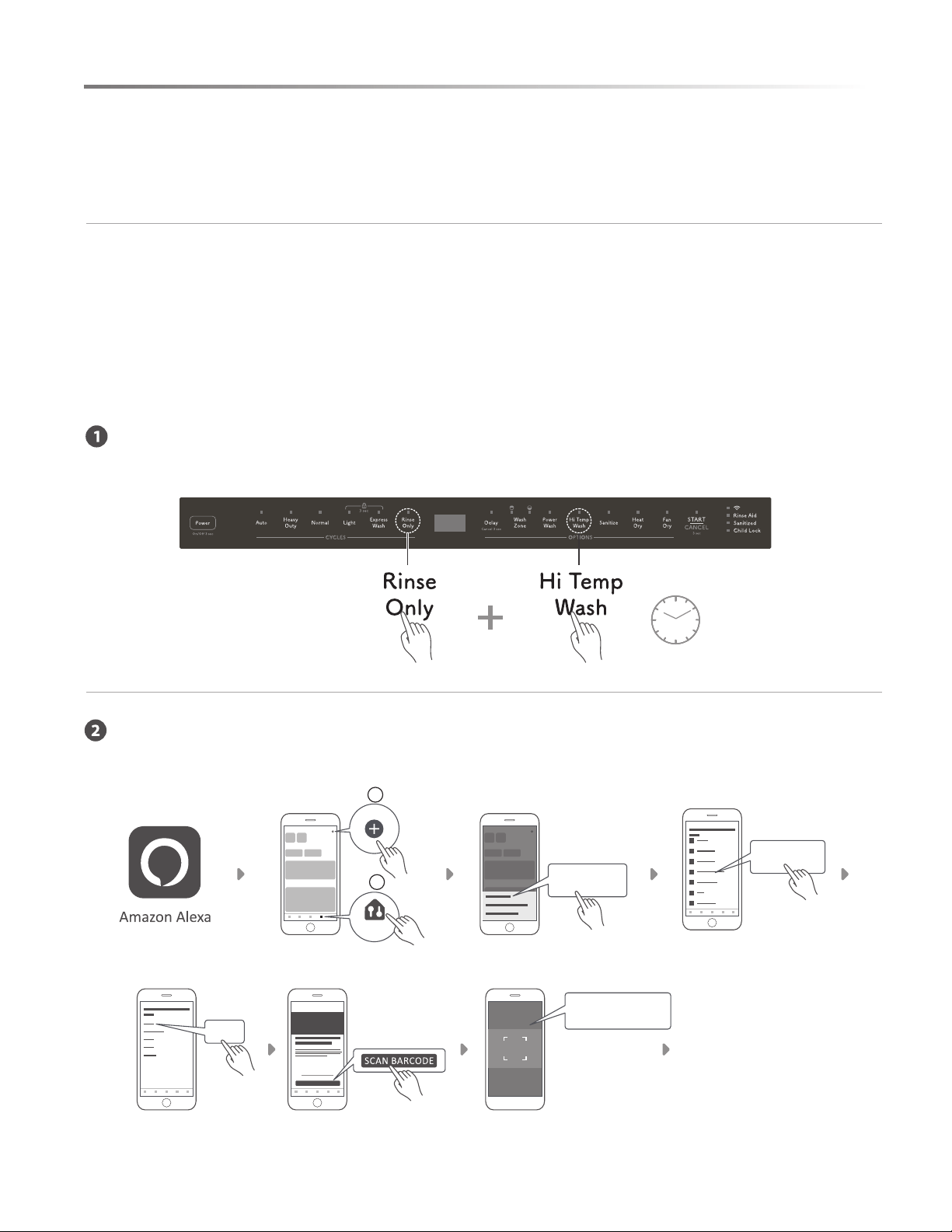
Touch Power to turn on the dishwasher, then touch and hold Rinse Only and Hi Temp Wash together
for 5 seconds until "FR" appears on the display.
Open the Amazon Alexa app, select Devices and touch + to add a device. Select the type of device and
follow instructions to scan the barcode located on the right side of the inner part of the door.
There are three dierent ways to connect your dishwasher to Amazon Alexa. First, download the Amazon
Alexa app, then connect your Dishwasher to Wi-Fi using one of three methods: With a Barcode, Without a
Barcode and Zero Touch Setup. Next, you need to enable Remote Command & Control.
Dishwasher Cycle and Washing Options
Washing Options
1. Delay – Touch and hold Delay until desired delay time is displayed.
2. Wash Zone – Not available for Auto and Rinse Only cycles.
3. Power Wash – Place heavily soiled dishes facedown in lower rack directly above the Power Wash arm in the back left
corner of the dishwasher.
4. Fan Dry – Extends drying time for improved drying performance.
5. High Temp Wash – Maintains 140°F (60°C) water temperature.
6. Heat dry – Operates heater during the drying process.
7. Sanitize - Maintains 158°F (70°C) water temperature.
Operations and Displays
1. POWER – Touch and hold Power for 3 seconds to turn on/o the dishwasher.
2. START/CANCEL – Select desired wash cycle, touch START/CANCEL and close the door within 4 seconds to start
wash cycle.
3. Display Window – Displays the remaining hours and minutes of the running cycle, delay hours, error codes, etc.
4. Wi-Fi Indicator Light – Indicates successful network connection.
5. Rinse Aid Indicator Light – Indicates low Rinse Aid level.
6. Sanitized Indicator Light – Indicates Sanitized function is complete.
7. Child Lock Indicator Light – Indicates Child Lock is enabled. Touch and hold Light and Express Wash together for
3 seconds to disable or enable Child Lock.
SHARP ELECTRONICS CORPORATION • 100 Paragon Drive • Montvale, New Jersey 07645 • USA
QUICK START GUIDE
DISHWASHER MODEL: SDW6767HS
QUICK START GUIDE
CYCLE
Available Washing Options
Zone Wash Power Wash Hi Temp Sanitize Heated Dry Fan Dry
Auto NA NA
Heavy Duty
Normal
Light NA
Express Wash
Rinse Only NA NA NA NA NA NA
5
WI-FI CONNECTIVITY INSTRUCTIONS
Option 2: Without a Barcode
Devices
2
1
Option 3: Zero Touch Setup
Devices
You have successfully connected
the dishwasher and enabled remote
command and control. Access your
Dishwasher on the Devices tab in
the Amazon Alexa app.
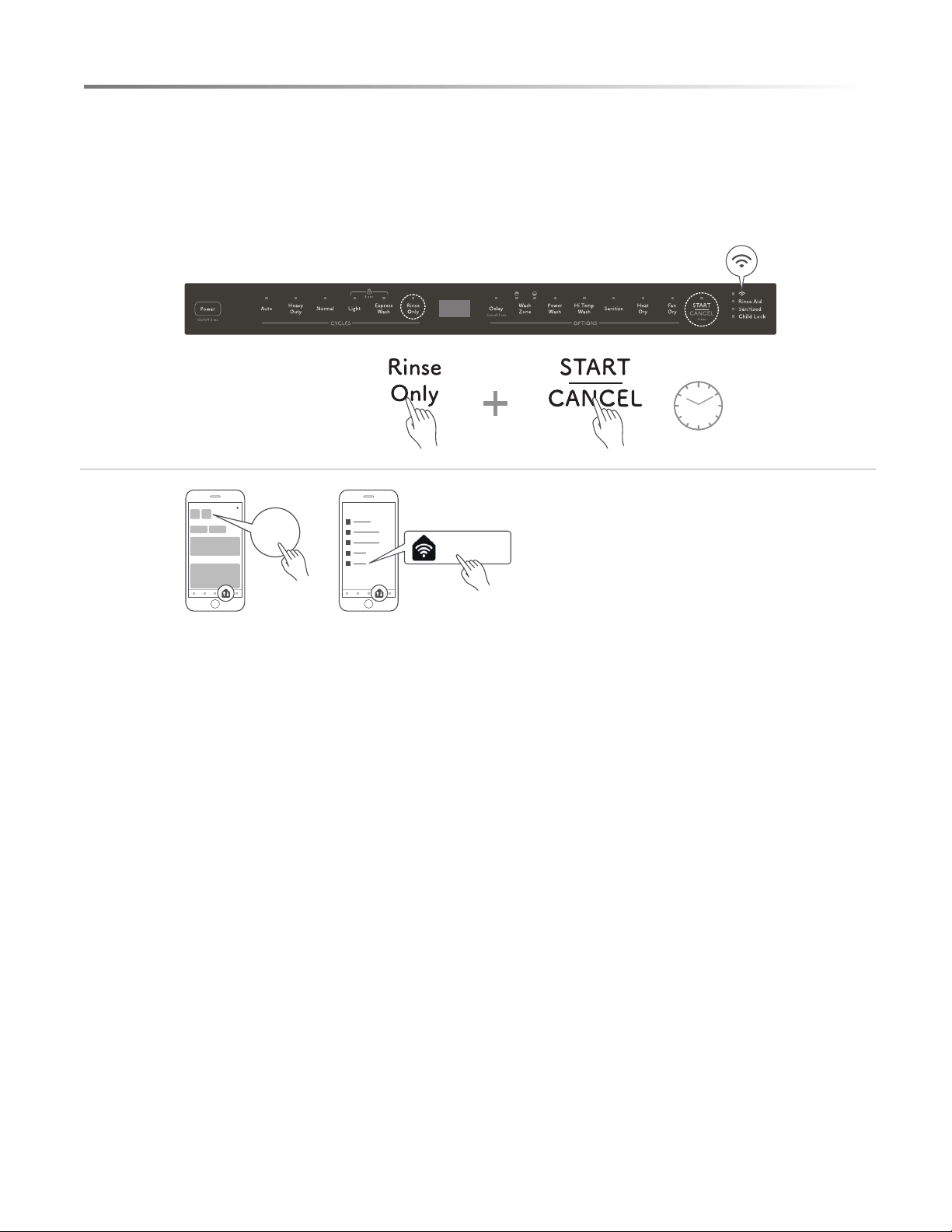
With the Dishwasher connected to Wi-Fi and paired to the mobile app, authorize your appliance to accept
control commands from your mobile app or voice commands.
To start the network control, touch and hold Rinse Only and START/CANCEL together for 5 seconds until the
Wi-Fi indicator stops ashing and remains lit.
Turn ON/OFF
Alexa, turn on dishwasher
A
Cycle
Mode
Program
Operation Mode
Alexa, set dishwasher “A” to “B”
(E.g. Alexa, set dishwasher cycle to auto.)
B
Auto
Heavy Duty
Normal
Light
Express Wash
Rinse Only
A
Engage
Enable
Turn On
Alexa, “A” “B”
(E.g. Alexa, turn on power wash.)
B
Power Wash
Heat Dry
High Temp Wash
Fan Dry
Sanitize
Washing Zone
Alexa, set wash zone to upper
Alexa, set wash zone to lower
Alexa, set wash zone to both
Child Lock
Alexa, turn on child lock
Delay Time
Alexa, set delay to x hour(s)
Alexa, set delay start to x hour(s)
A
Enable
Activate
Start
Turn On
Alexa, “A” or “B” Pause on my dishwasher
(E.g. Alexa, turn on pause on my dishwasher.)
B
Disable
Deactivate
Stop
Dishwasher Status
Check the current mode
Alexa, what is the dishwasher cycle?
Alexa, what is the dishwasher mode?
Check the current status
Alexa, what is the status of the dishwasher?
Alexa, what is the status in the dishwasher?
Remaining Wash Time Alexa, what is the dishwasher’s remaining time?
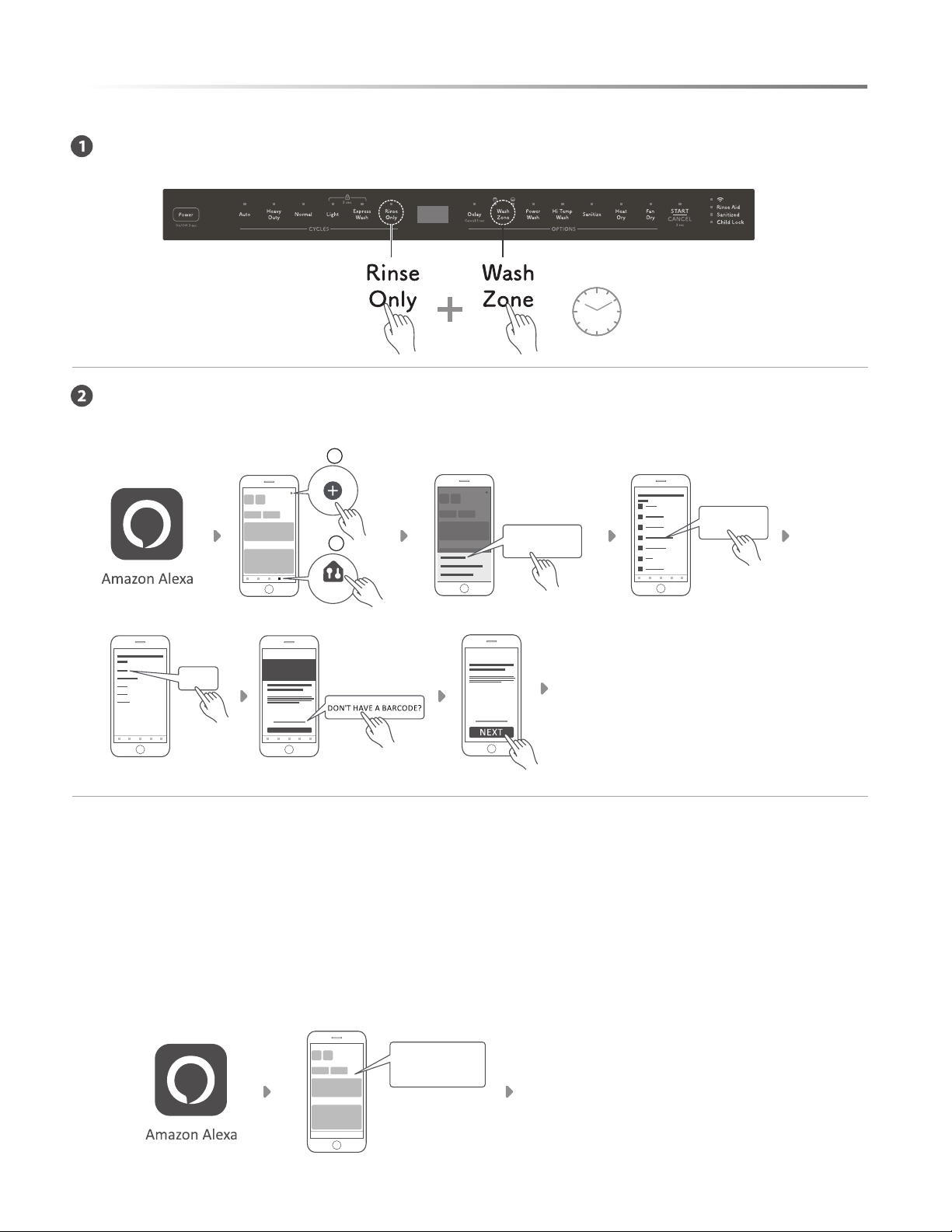
Touch Power to turn on the dishwasher, then touch and hold Rinse Only and Wash Zone together for
5 seconds until "UG" appears on the display.
Open the Amazon Alexa app, select Devices and touch + to add a device. Select the type of device, then
select DON'T HAVE A BARCODE? and touch NEXT.
Zero Touch Setup is only available if your dishwasher was purchased through Amazon.com and Zero Touch
Setup was applied to your personal Amazon account during checkout.
Touch Power to turn on the dishwasher. Open the Amazon Alexa app, and it will automatically pair to your
Dishwasher.
An active Echo Dot (2nd Gen or later) can also perform Zero Touch Setup.
Alexa Command List
Proceed to Step 2:
Enable Remote Command & Control
Proceed to Step 2:
Enable Remote Command & Control
S
5
Add Device
Dishwasher
Sharp
A pop up will appear
on mobile phone
once your device is
successfully paired
Step 2: Enable Remote Command & Control
S
5
First Dishwasher
Note: Alexa command list is subject to change without notice. For the latest command list, please visit shop.sharpusa.com.
2
QUICK START GUIDE QUICK START GUIDE
3
6
Option 2: Without a Barcode
Devices
2
1
Option 3: Zero Touch Setup
Devices
You have successfully connected
the dishwasher and enabled remote
command and control. Access your
Dishwasher on the Devices tab in
the Amazon Alexa app.
With the Dishwasher connected to Wi-Fi and paired to the mobile app, authorize your appliance to accept
control commands from your mobile app or voice commands.
To start the network control, touch and hold Rinse Only and START/CANCEL together for 5 seconds until the
Wi-Fi indicator stops ashing and remains lit.
Turn ON/OFF
Alexa, turn on dishwasher
A
Cycle
Mode
Program
Operation Mode
Alexa, set dishwasher “A” to “B”
(E.g. Alexa, set dishwasher cycle to auto.)
B
Auto
Heavy Duty
Normal
Light
Express Wash
Rinse Only
A
Engage
Enable
Turn On
Alexa, “A” “B”
(E.g. Alexa, turn on power wash.)
B
Power Wash
Heat Dry
High Temp Wash
Fan Dry
Sanitize
Washing Zone
Alexa, set wash zone to upper
Alexa, set wash zone to lower
Alexa, set wash zone to both
Child Lock
Alexa, turn on child lock
Delay Time
Alexa, set delay to x hour(s)
Alexa, set delay start to x hour(s)
A
Enable
Activate
Start
Turn On
Alexa, “A” or “B” Pause on my dishwasher
(E.g. Alexa, turn on pause on my dishwasher.)
B
Disable
Deactivate
Stop
Dishwasher Status
Check the current mode
Alexa, what is the dishwasher cycle?
Alexa, what is the dishwasher mode?
Check the current status
Alexa, what is the status of the dishwasher?
Alexa, what is the status in the dishwasher?
Remaining Wash Time Alexa, what is the dishwasher’s remaining time?
Touch Power to turn on the dishwasher, then touch and hold Rinse Only and Wash Zone together for
5 seconds until "UG" appears on the display.
Open the Amazon Alexa app, select Devices and touch + to add a device. Select the type of device, then
select DON'T HAVE A BARCODE? and touch NEXT.
Zero Touch Setup is only available if your dishwasher was purchased through Amazon.com and Zero Touch
Setup was applied to your personal Amazon account during checkout.
Touch Power to turn on the dishwasher. Open the Amazon Alexa app, and it will automatically pair to your
Dishwasher.
An active Echo Dot (2nd Gen or later) can also perform Zero Touch Setup.
Alexa Command List
Proceed to Step 2:
Enable Remote Command & Control
Proceed to Step 2:
Enable Remote Command & Control
S
5
Add Device
Dishwasher
Sharp
A pop up will appear
on mobile phone
once your device is
successfully paired
Step 2: Enable Remote Command & Control
S
5
First Dishwasher
Note: Alexa command list is subject to change without notice. For the latest command list, please visit shop.sharpusa.com.
2
QUICK START GUIDE QUICK START GUIDE
3
WI-FI CONNECTIVITY INSTRUCTIONS

7
WARNING
Follow these safety instructions to minimize
the risk of re, explosion, electric shock, property damage
and/or personal injury.
PROPER INSTALLATION
Follow this guide to install your dishwasher properly.
1 Water supply inlet temperature should be between 120℉
and 149℉.
2 Dispose of the discarded appliance and packing material
properly.
3 The dishwasher must be properly grounded to avoid a risk
of electric shock.
4 If there is any damage to the dishwasher, please contact
your dealer. Do not to attempt to repair or replace any part
by yourself.
BASIC PRECAUTION BEFORE USE
The manual does not cover every possible condition and situation
that may occur.
1 Read all instructions before using the dishwasher.
2 Use the dishwasher only for intended function as described
in this manual.
3 When loading items to be washed:
• Load sharp items and knives so they are not likely to
damage the door seal and tub.
• Load sharp items and knives with the handles up to reduce
risk of injury.
4 Do not wash plastic items unless they are marked
dishwasher safe. If not marked, check with manufacturer
for recommendation. Items that are not dishwasher safe may
melt and create a potential re hazard.
5 If the dishwasher drains into a food disposer, ensure the
disposer is completely empty before running dishwasher.
6 Do not tamper with controls.
7 Do not operate the dishwasher unless all enclosure panels
are in the proper place.
8 Do not touch the heating element during or immediately
after use, especially if the sanitize option has been selected.
9 Do not allow children to play in or on the dishwasher.
10 Do not let children abuse, sit or stand on door or racks of
the dishwasher.
11 Keep young children and infants away from dishwasher when
it is in operation.
12 If the hot water system has not been used for two weeks or
longer, BEFORE USING DISHWASHER turn on all hot
water faucets and let water run for several minutes to release
any accumulated hydrogen gas. Under certain conditions,
hydrogen gas may be produced in a hot water system not in
use for two weeks or longer.
WARNING
HYDROGEN GAS IS EXPLOSIVE AND
FLAMMABLE. DO NOT smoke or use an open ame while
releasing hydrogen gas.
13 Do not store or use combustible materials, gasoline or other
ammable vapors and liquids in the vicinity of this or any
other appliance.
14 Use only detergents or rinse agents recommended for use
in a dishwasher and keep them out of the reach of children.
15 Do not use the dishwasher if it has a damaged power line or
plug and do not plug the dishwasher into a damaged outlet.
Failure to observe these instructions may result in electric
shock.
SAVE THESE INSTRUCTIONS
IMPORTANT SAFETY INSTRUCTIONS

8
APPEARANCE OVERVIEW
SPECIFICATION
Capacity 14 place settings
Dimension (W x D x H) 23
7
/8" x 24
1
/2" x 33
7
/8" (606 x 622 x 858 mm)
Weight Unpacked 93.3 lb (42.3 kg)
Power Supply 120 volts, 60 Hz
Rated Power Usage Wash motor 50 W / Heater 840 W
Water Feed Pressure 20 ~ 120 psi (138 ~ 828 kPa)
Current 8.4 A
Noise (dB) 45 dB
PACKAGE CONTENTS
• Dishwasher
• Drain Hose
• Installaiton kits
(4 wood screws, 2 top mounting clip, 1 hose clamp)
• Operation Manual
• Installation Instructions
• Energy Guide
• Extended Warranty
Tub Gasket
Rating Label
Alexa Barcode
Power Wash Spray
Heating Element
Filter System
Control Panel
Cup Shelf
Adjustable 3
rd
Rack
Top Spray Arm
LED Light
Rinse Aid Dispenser
Adjustable Upper Rack
Upper Spray Arm
Lower Spray Arm
Lower Rack
Detergent Dispenser
9
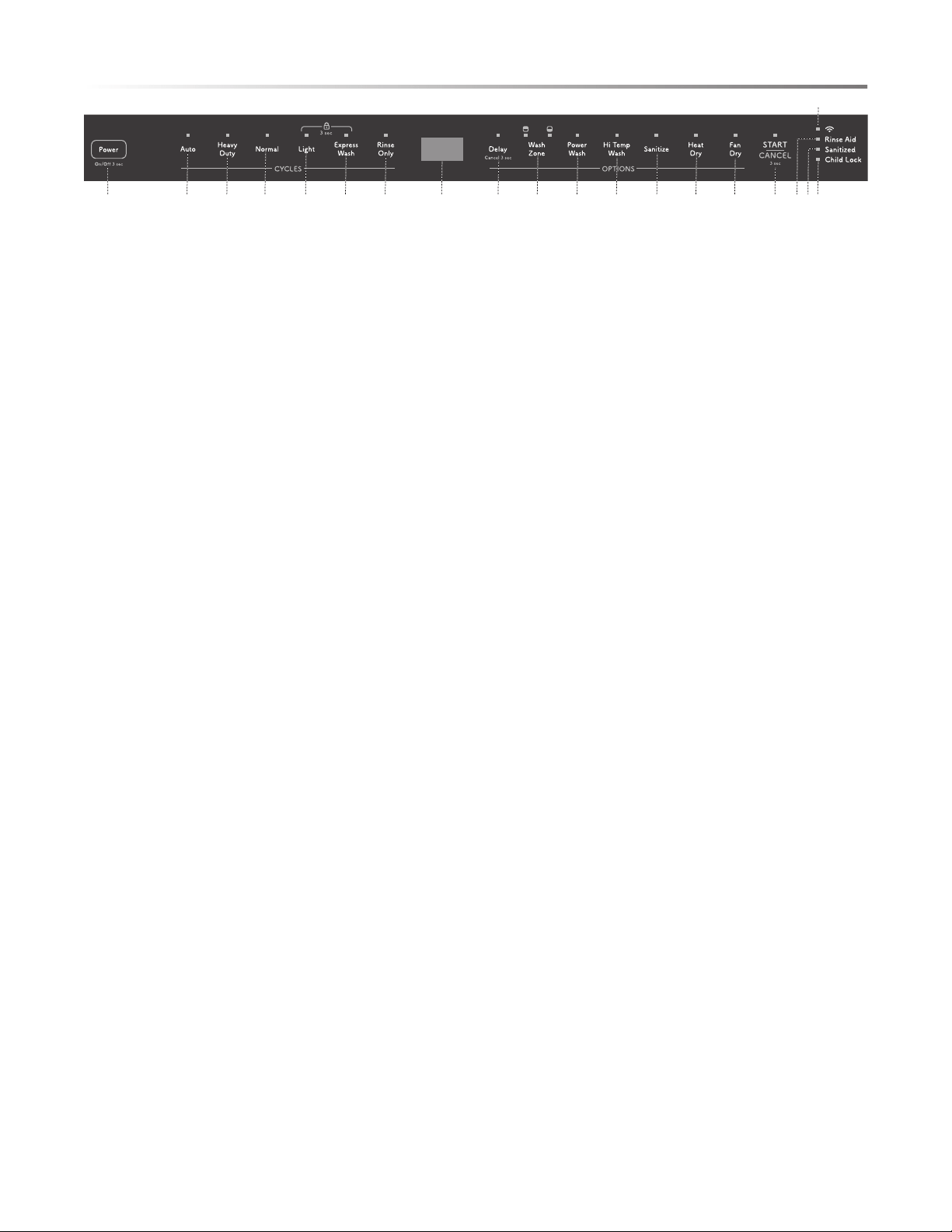
OPERATIONS & DISPLAYS
1 Power
Touch the Power pad and hold for 3 seconds to turn power
On/Off.
2 START/CANCEL
• To run the dishwasher, open the door and select desired
wash cycle. The indicator light will turn on. Touch the
START/CANCEL pad and close the door within 4 seconds.
The selected wash cycle light will begin to blink, and the
cycle progress indicator will turn on, indicating the wash
cycle is running.
NOTE: If the door is not closed within 4 seconds of
touching START/CANCEL, the cycle will time out, and
the dishwasher will not start.
• To modify or change a selected running wash cycle,
open the door, touch the START/CANCEL pad and hold
for 3 seconds. The dishwasher will drain the water for
60 seconds, and the screen will display “0:01” after draining
has completed. You may select a new cycle at this time.
• To pause the running dishwasher to load more dishes,
USE CAUTION and open the door slowly to avoid injury
by hot steam from inside the dishwasher. If the detergent
dispenser is still closed, indicating the main wash cycle has
not started, you may add more dishes to the dishwasher.
• To achieve the best washing results, it is strongly
recommended that all dishes be loaded before washing
cycle begins.
3 Display Window
Displays the remaining hours and minutes of the running
cycle, delay hours, error codes, etc.
4 Rinse Aid Indicator Light
When the dishwasher requires additional rinse aid, the
indicator light will be on.
5 Wi-Fi Indicator Light
When the network link is successful, the indicator light will
be on.
6 Sanitized Indicator Light
When a cycle with the sanitize function nishes, the indicator
light will be on. When the door is opened, the indicator light
will turn off after 30 seconds. The sanitize cycle is NSF
certied.
7 Child Lock Indicator Light
When the Child Lock function is selected, the indicator light
will be on.
• To lock all controls and prevent children from operating
or changing the dishwasher, touch the Light pad and the
Express Wash pad simultaneously. To cancel the Child Lock
function, repeat this process.
WASH CYCLE SELECTIONS
8 Auto
This cycle detects the turbidity degree and loading level of
the washing items and automatically selects an optimal wash
cycle for best performance.
9 Heavy Duty
This cycle is for hard-to-clean, heavily soiled dishes, pots
and pans.
10 Normal
This cycle is for commonly used, moderately soiled dishes
and silverware and has energy and water-saving benets.
11 Light
This cycle is for lightly to moderately soiled china and crystal.
12 Express Wash
This cycle is for lightly soiled, pre-rinsed dishes and
silverware.
13 Rinse Only
This cycle is for pre-rinsing dishes or glassware. The Rinse
Only cycle keeps food from drying on dishes and reduces
odor buildup before running a full load. Do not use detergent.
OPTIONS
14 Delay
To delay the start of a selected cycle, touch the Delay pad
until the desired delay time shows in the LED display. This
allows you to automatically start your dishwasher with 1 to
24 hours delay. To cancel the Delay Start option and begin
the cycle before the delay period is over, touch the START/
CANCEL pad.
15 Wash Zone
To select upper, lower or both racks to wash, touch Wash
Zone. This option is not available in Auto and Rinse Only
cycles.
81 9 10 11 12 13 14 23 15 16 17 18 18 19 4 6
7
5
Control Panel is located on the top edge of the door.
The door must be opened to select settings and operate the dishwasher.
CONTROL PANEL
10
CONTROL PANEL
16 Power Wash
Use this option to wash pots, pans, durable serving bowls
and other large, heavily soiled or hard-to-clean dishes. To
use Power Wash, place the dishes facedown in the lower rack
directly above the power wash arm in the back left corner
and touch Power Wash pad.
17 Hi Temp Wash
When the Hi Temp Wash function is selected, the temperature
of the water will be maintained at 140℉ (60 ℃) maximum.
18 Sanitize
To sanitize dishes and glassware, touch the Sanitize pad.
When the Sanitize function is selected, the temperature of
the water will be maintained at 158℉ (70 ℃) maximum.
NOTE: It is possible that 158℉ (70 ℃) may not be
reached if the water supply inlet temperature is lower than
recommended.
19 Heat Dry
When the Heat Dry function is selected, the heater will
operate during the drying process.
20 Fan Dry
When the Fan Dry option is selected, two fan operations
will create an airow within the dishwasher cavity and help
accelerate the drying process.
DISPLAY WINDOW
DE L AY TIM E
If the Delay option is selected, the number of Delay Start hours
will display in the Display Window.
While the dishwasher is running, if the remaining cycle time
exceeds an hour, the remaining number of hours and minutes
will alternate in the Display Window. One hour is displayed
as H:01.
CYCLE LIGHT
When a wash cycle is programed and the START/CANCEL
pad is touched, the Cycle Light will ash. The Cycle Light also
ashes if the door is opened during a wash cycle. Close the
dishwasher door to begin or continue the wash cycle.
SMART SENSOR
The remaining time may increase or decrease as the Smart
Sensor assesses the soil level and adjusts the number of water
lls required for the load.
ERROR INDICATION
In certain situations that are critical to the safe function and
operation of the dishwasher, the machine will shut down and
display an error code. See Error Codes on page 23.
If error codes are displayed, contact the dealer or servicer to
provide assistance in troubleshooting the problem or locate an
authorized service technician if needed.
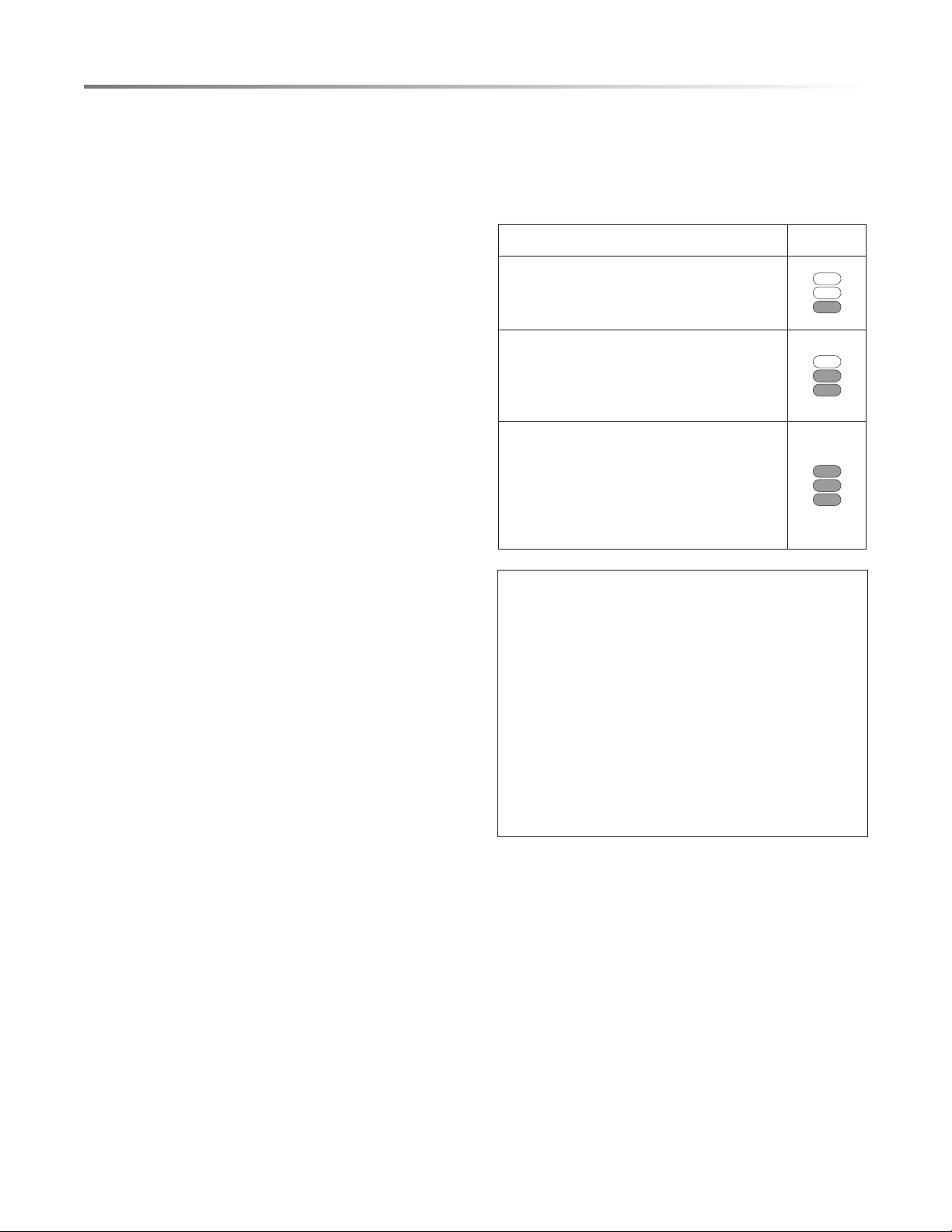
CYCLE PROGRESS INDICATOR
The cycle progress lights indicate the progress of the cycle while
the dishwasher is running. They are located on the front of the
dishwasher panel on the right side of the pocket handle.
PROCESS INDICATOR
WASH
When the dishwasher is in a wash or rinse
stage of a cycle, the WASH light is illuminated.
DRY
When the dishwasher is in a drying stage
of a cycle, the WASH and DRY lights are
illuminated.
CLEAN
When the dishwasher completes all stages of
a cycle, all indicator lights are illuminated.
If the door is opened when the CLEAN lights
are illuminated, all the lights will turn off
after 30 seconds.
DART SERVICE INFORMATION
AMAZON DASH REPLENISHMENT:
Amazon Dash Replenishment is a tool that you can add to
your dishwasher to make reordering dish detergent tablets
and rinse aid easy. You can track supply levels within the
Alexa app, receive notications from Alexa when your dish
detergent tablets, or rinse aid is running low, and smart
reorder quickly and easily from Amazon when needed.
To access your Dash Replenishment information and
settings, select Settings in the upper right corner of
your device control screen, and then select “Dishwasher
Detergent/Rinse Aid – Notication and Reorder Settings”.
11
CONVENIENT FEATURES
LED LIGHTS
When the door is opened, the two LED lights on the top of
the tub will automatically turn on.
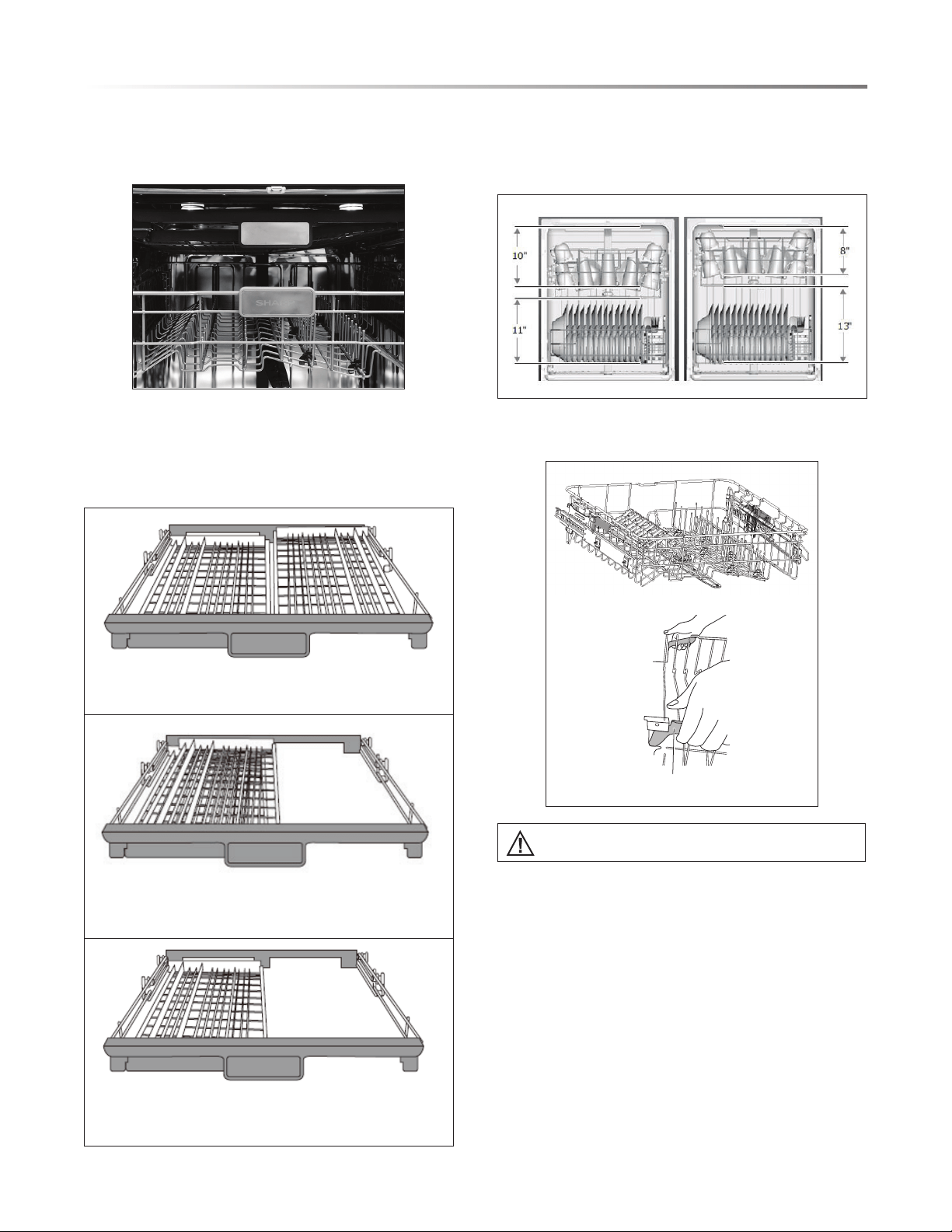
ADJUSTABLE 3RD RACK
Use the Adjustable 3rd Rack for cutlery or other utensils. When
space is needed for the Upper Rack, slide the right shelf of the
Adjustable 3rd Rack over the left shelf.
Lift the right basket up to make both left and right baskets
are at.
Move the right basket from right to left, and two baskets are
overlapping.
Remove the right basket from the tray, and the left basket
remains.
ADJUSTABLE UPPER RACK
The Upper Rack height can be raised or lowered to accommodate
loading taller dishes in either rack. The Upper Rack clearance
height is 8" to 10". The Lower Rack clearance height is 11" to 13".
To adjust the Upper Rack position, lift the Adjustment Arms on
both sides of the rack and pull up or push down the rack.
Adjustment Arm
Height should be adjusted without dishes in the racks.
12
CONVENIENT FEATURES
FOLDABLE TINES
The upper and lower racks include exible tines that can be
folded down to create more space for dishes. The tines may be
left in the up position for normal use or folded down for more
exible loading.
TO FOLD TINES DOWN
Grasp the tip of the tine, gently pull the tine out of the tine holder
and rotate the tine to the side.
• Upper Rack - Push the tines to the center of the rack.
• Lower Rack - Push the tines to the back of the rack.
TO STAND TINES UPRIGHT
Grasp and pull the tine until it is vertical and/or it clicks into
place. Verify the tines are secure before loading.
• Upper Rack - Push the tines to the right-hand side of the rack.
• Lower Rack - Push the tines to the front of the rack.
SMART WASH SYSTEM
The Smart Wash System determines the type of cycle required
to clean the dishes in the load with maximum efciency. When
a partial load of lightly soiled dishes is placed in the unit, a wash
cycle similar to a short wash will automatically run. When a
full load of heavily soiled dishes is placed in the unit, a heavy
wash cycle will automatically run.
POWER WASH SPRAY
The Power Wash Spray works with the upper spray arm and
the lower spray arm to effectively wash heavily soiled pots and
pans. It is located in the back left corner.
FILTER SYSTEM
The multiple lter system has four mesh lters that separate
soiled water and clean water into different chambers to help the
dishwasher run well, using less water and energy.
Cylinder Filter
Fine Filter
13
HOW YOUR DISHWASHER CLEANS
Your dishwasher cleans by spraying a mixture of hot water and
detergent through the spray arms against soiled surfaces.
The dishwasher lls with water, covering the lter area. Water
is then pumped through the multiple lter system and spray
arms. Separated soil particles go down the drain as the water is
pumped out and replaced with clean water.
The number of water lls will vary depending on the cycle.
BASIC OPERATIONS
1 Load dishwasher. (See Dish Preparation below.)
2 Add detergent. (See Filling the Detergent Dispenser, page 16.)
3 Add rinse aid if needed. (See Filling the Rinse Aid Dispenser,
page 16.)
4 Select desired cycle. (See Cycle Chart, pages 17–18.) The
indicator light above the pad will turn on when selected.
5 Select desired options. The indicator light above the pad will
turn on when selected.
6 To start, touch the START/CANCEL pad.
7 Close the door within 4 seconds to begin the cycle.
Your dishwasher has the top control panel.
Your selections will only be activated when the door is rmly
closed.
NOTE: The dishwasher is programmed to remember your
last cycle so you do not have to reset each time. To start the
dishwasher using the same cycle and options selected on the
previous wash, simply touch the START/CANCEL pad.
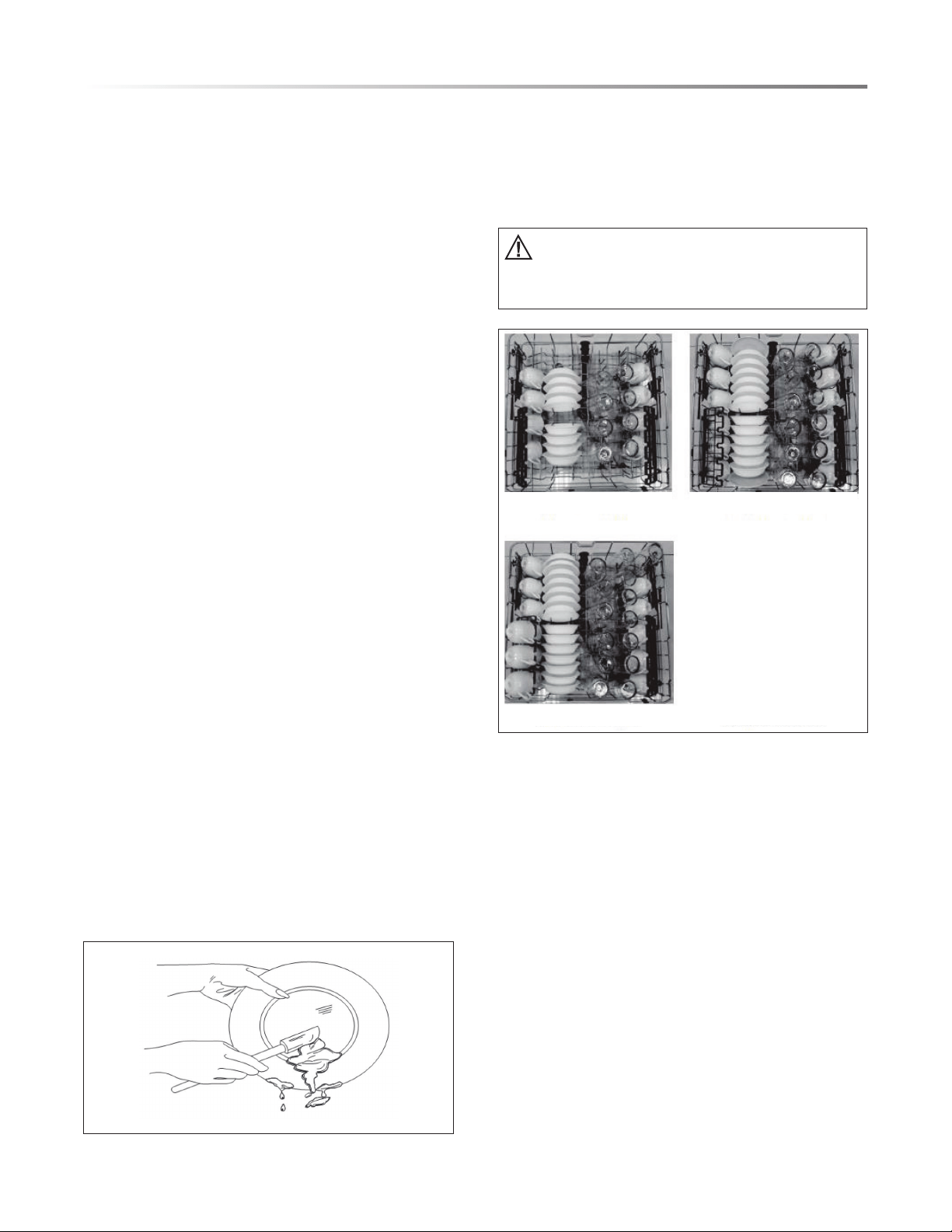
DISH PREPARATION
Before loading dishes into the dishwasher, dispose of large
pieces of food, bones, pits, toothpicks, etc.. The continuous
ltered wash system will remove the remaining food particles.
Burned-on foods should be loosened before loading. Empty
liquids from glasses and cups.
Foods such as mustard, mayonnaise, vinegar, lemon juice and
tomato-based products may cause discoloration of stainless
steel and plastics if allowed to sit for long periods of time. If not
operating the dishwasher immediately, it is best to rinse dishes
soiled with these types of foods.
If the dishwasher drains into a food disposer, ensure disposer is
completely empty before starting dishwasher.
GETTING STARTED
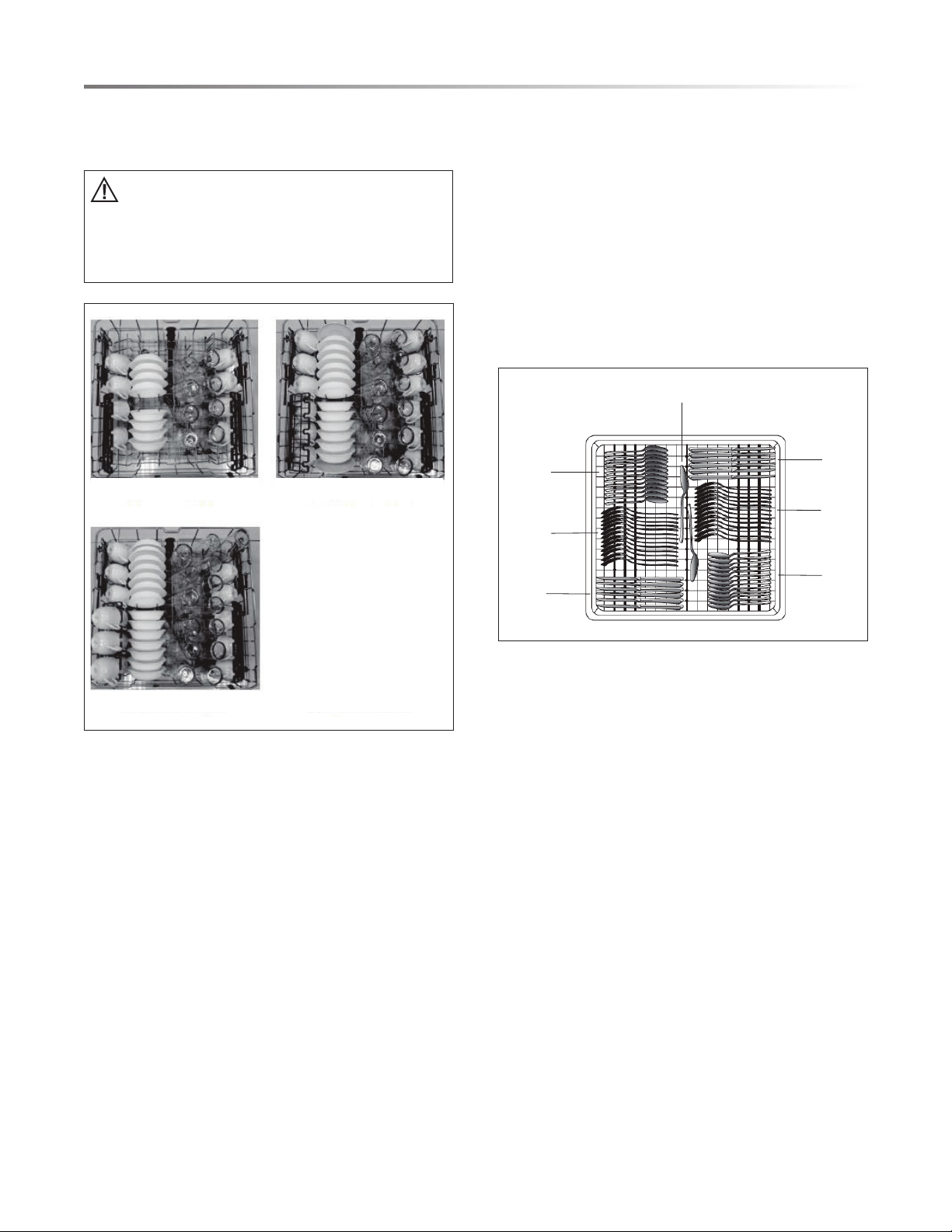
LOADING THE UPPER RACK
The Upper Rack is designed for cups, glasses, small plates, bowls
and plastic items marked dishwasher safe.
For best results, place bowls, cups, glasses and sauce pans with
soiled surfaces facing down or toward the center. Tilt dishes
slightly for better drainage.
Ensure loaded dishes do not interfere with the rotation
of the upper spray arm on the bottom of the Upper
Rack. To check, rotate the spray arm by hand after
loading the rack.
8 plate settings
14 plate settings
12 plate settings
14
GETTING STARTED
LOADING THE LOWER RACK
The Lower Rack is designed for plates, soup bowls, saucers and
cookware with 13" maximum height.
Large items should be placed along the edge to
avoid interference with the upper spray arm rotation
or prevent the detergent dispenser from opening.
Large items should be turned over so the inside faces
downward so the inside faces downward to avoid
interference with the lower spray arm.
8 plate settings
14 plate settings
12 plate settings
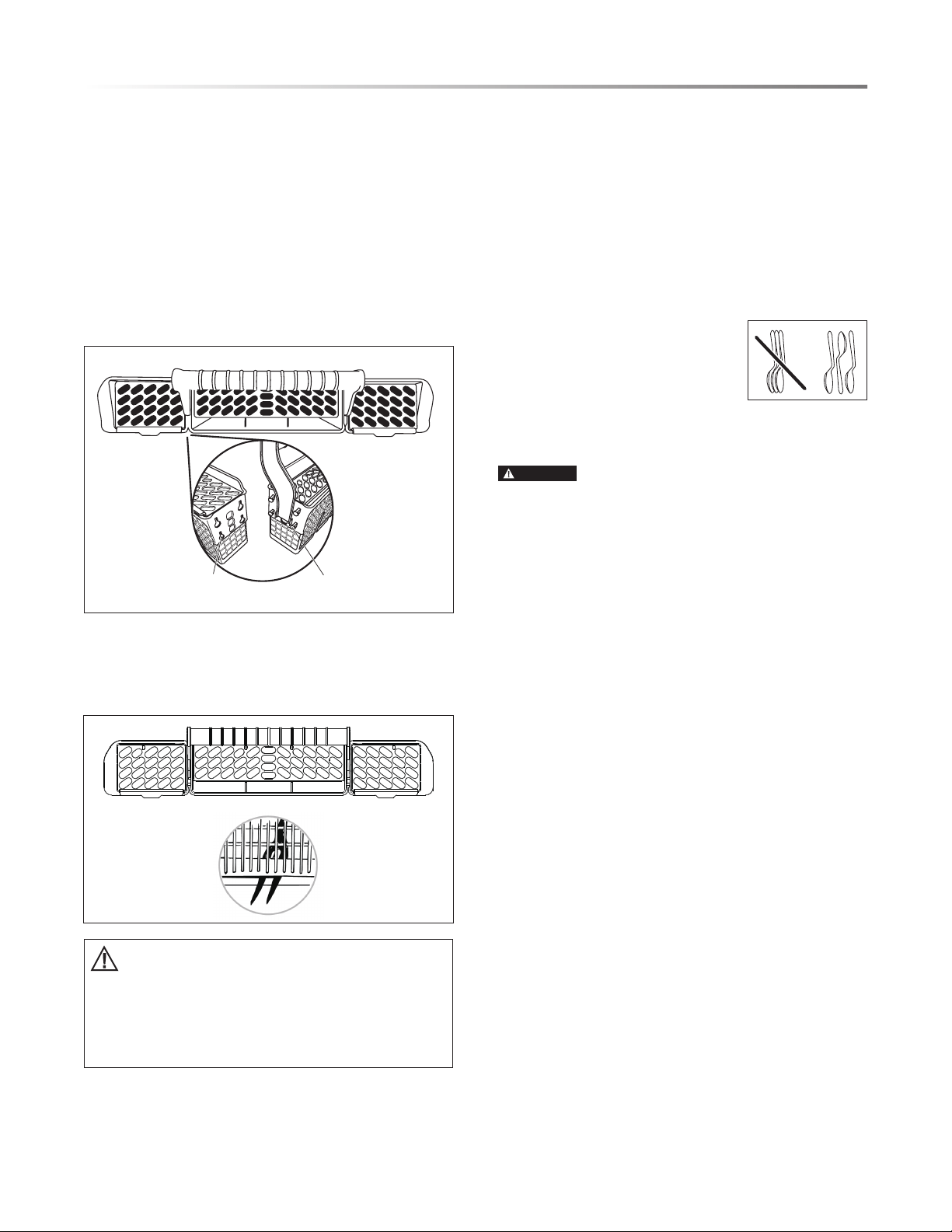
LOADING THE ADJUSTABLE 3RD RACK
Use the Adjustable 3rd Rack for cutlery or other utensils, such
as spatulas or cooking spoons. Silverware, knives and utensils
should be loaded separate from each other in the appropriate
positions in the third rack so they do not nest together.
NOTES:
• Do not load silver or silver-plated silverware with stainless
steel. These metals can be damaged by contact with each
other during washing.
• Some foods (such as salt, vinegar, milk products, fruit juices,
etc.) can pit or corrode silverware.
• DO NOT WASH ALUMINUM COOKWARE IN YOUR
DISHWASHER.
Large Utensils
Forks
Spoons
Spoons
Knives
Knives
Forks
15
GETTING STARTED
LOADING THE SILVERWARE BASKET
The silverware basket consists of three separate sections. For
optimum loading exibility, the center section of the basket
can be used individually, joined with one or both side sections
or removed.
• Lift handle to remove the silverware basket and set the basket
on a counter or table top.
• Lift up on each side section to disengage the center section
from the keyhole slots in the side sections.
• Load silverware into the basket while it sits on the counter or
replace the basket into the Lower Rack and load silverware
there.
Keyhole Slots Prongs
The three separated sections of the silverware basket can be
used in both Upper and Lower Racks.
1 Spoons
2 Knives
3 Salad forks
4 Forks
5 Large spoons
6 Large forks
2
2
2
2
2
2
4
4
4
4
3
3
3
3
4
4
3
3
1
1
1
1
1
1
1
1
1
1
1
1
1
1
1
11
1
1
1
1
1
1
1
4
4
3
3
3
3
3
3
4
4
4
4
2
2
2
22
2
6 5 6
• Do not let any item extend through the bottom.
• Ensure nothing protrudes through the bottom of
the silverware basket or rack that could block the
lower spray arm.
• Always load sharp items (knives, skewers, etc.)
pointing down.
FOR BEST RESULTS:
• To avoid injury, load utensils such as knives and skewers with
handles pointing up and sharp metal edges pointing down.
Items such as forks and spoons may be loaded with handles
pointing up or down, using separators to prevent the edges
of the silverware from nesting.
• Place small items such as baby bottle caps, jar lids, corncob
holders, etc. in the basket sections with hinged covers. Close
the covers to hold small items in place.
• Unload or remove the baskets before unloading the racks to
avoid water droplets falling on the silverware.
• When handles are up, mix items in
each section of the baskets with some
pointing up and some down to avoid
nesting. Spray cannot reach nested
items.
ADDING A DISH
To add or remove items after wash cycle starts:
CAUTION
TO AVOID BURN INJURY: Slightly open door
and wait until spray arms and wash action stop. Hot steam
may exit the dishwasher or hot water may splash out of it.
Failure to USE CAUTION may result in injury.
1 Open door slightly and wait a few seconds until wash action
stops before completely opening.
2 If the detergent dispenser is still closed, indicating the main
wash cycle has not started, you may add more dishes to the
dishwasher.
3 Touch the START/CANCEL pad, and close the door latch
rmly within 4 seconds. The cycle will automatically resume.
If the door is not closed within 4 seconds after touching
START/CANCEL, the cycle will time out and not start.
RINSE AID
Rinse aid greatly improves drying and reduces water spots and
lming. Without rinse aid, your dishes and dishwasher interior
will have excessive moisture. The Heat Dry option will not
perform as well without rinse aid. The Rinse Aid Dispenser,
located next to the Detergent Dispenser, automatically releases
a measured amount of rinse aid during the nal rinse.
If spotting and poor drying are a problem, increase the amount
of rinse aid dispensed by rotating the dial to a higher number.
The dial is located under the dispenser cap.
If the rinse aid is low, the Rinse Aid Light is illuminated at the
beginning and end of the cycle indicating that it is time to rell.
16
GETTING STARTED
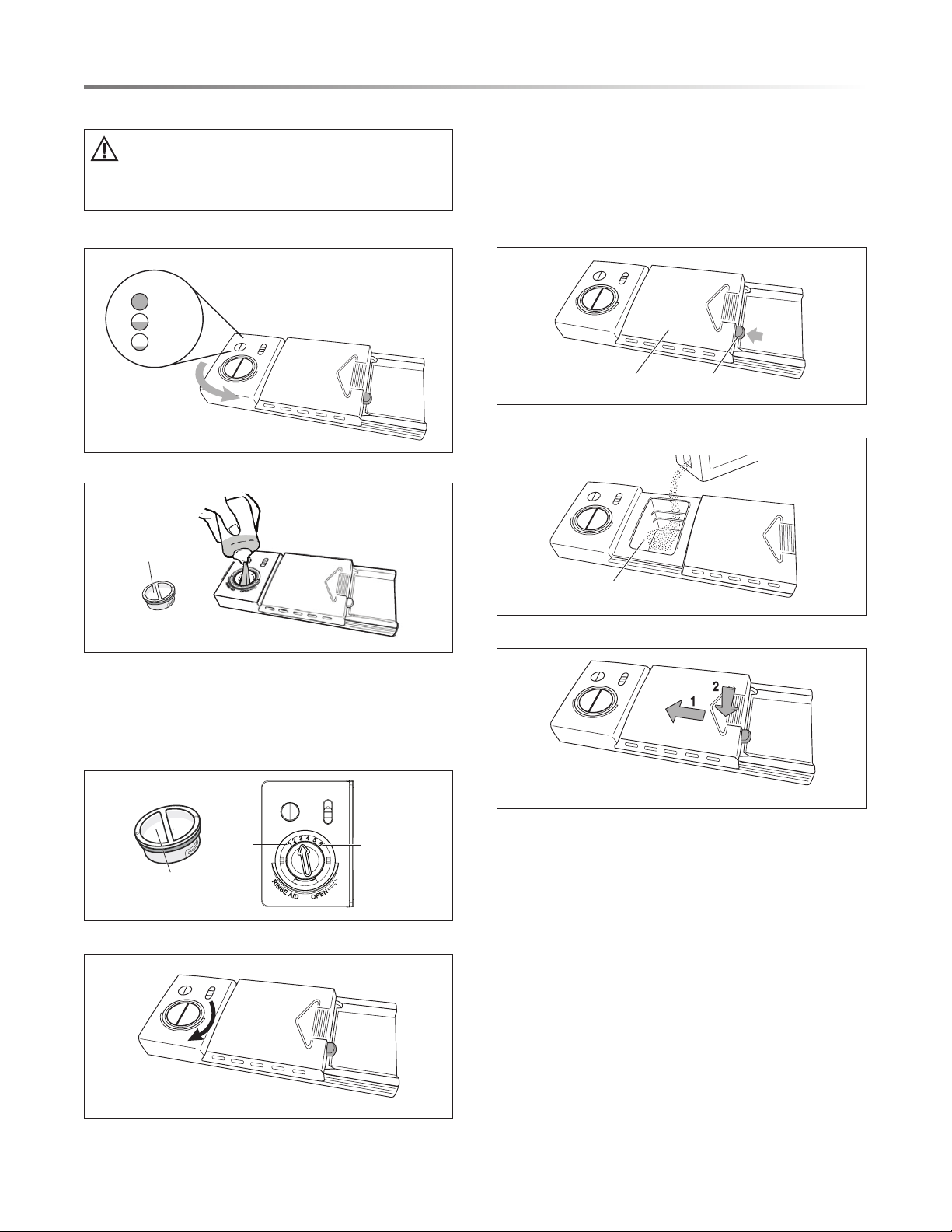
FILLING THE RINSE AID DISPENSER
Your dishwasher is designed to use a liquid rinse aid.
Do not use a solid or bar-type rinse aid. Under normal
conditions, the rinse aid will last approximately one
month. Try to keep the reservoir full, but do not overll.
1 Turn the dispenser cap to the left and lift it out.
Full
Sight Window when viewed from above
Add
2 Add rinse aid up to the maximum indicator level.
Dispenser cap
3 You can adjust the amount of the rinse aid released during the
rinse operation. A higher number indicates a larger amount
of rinse aid released. If dishes are not drying or are spotted,
adjust the dial to the next higher setting. If the dishes have
sticky, whitish stains, or if glassware or knife blades have a
bluish lm, adjust the dial to a lower setting.
Dispenser cap
Less
More
4 Replace the dispenser cap.
HEAT DRY FUNCTION
The Heat Dry function is used with rinse aid to enhance drying
performance. If Heat Dry is not selected, items in the load may
not be completely dry at the end of the cycle.
FILLING THE DETERGENT DISPENSER
1 Push the dispenser cover latch downward and open it.
Cover Blue Cover Latch
2 Add the detergent to the main wash compartment.
Detergent Cup
3 Close the dispenser cover.
17
DISHWASHER CYCLE OPTIONS
CYCLE CHART
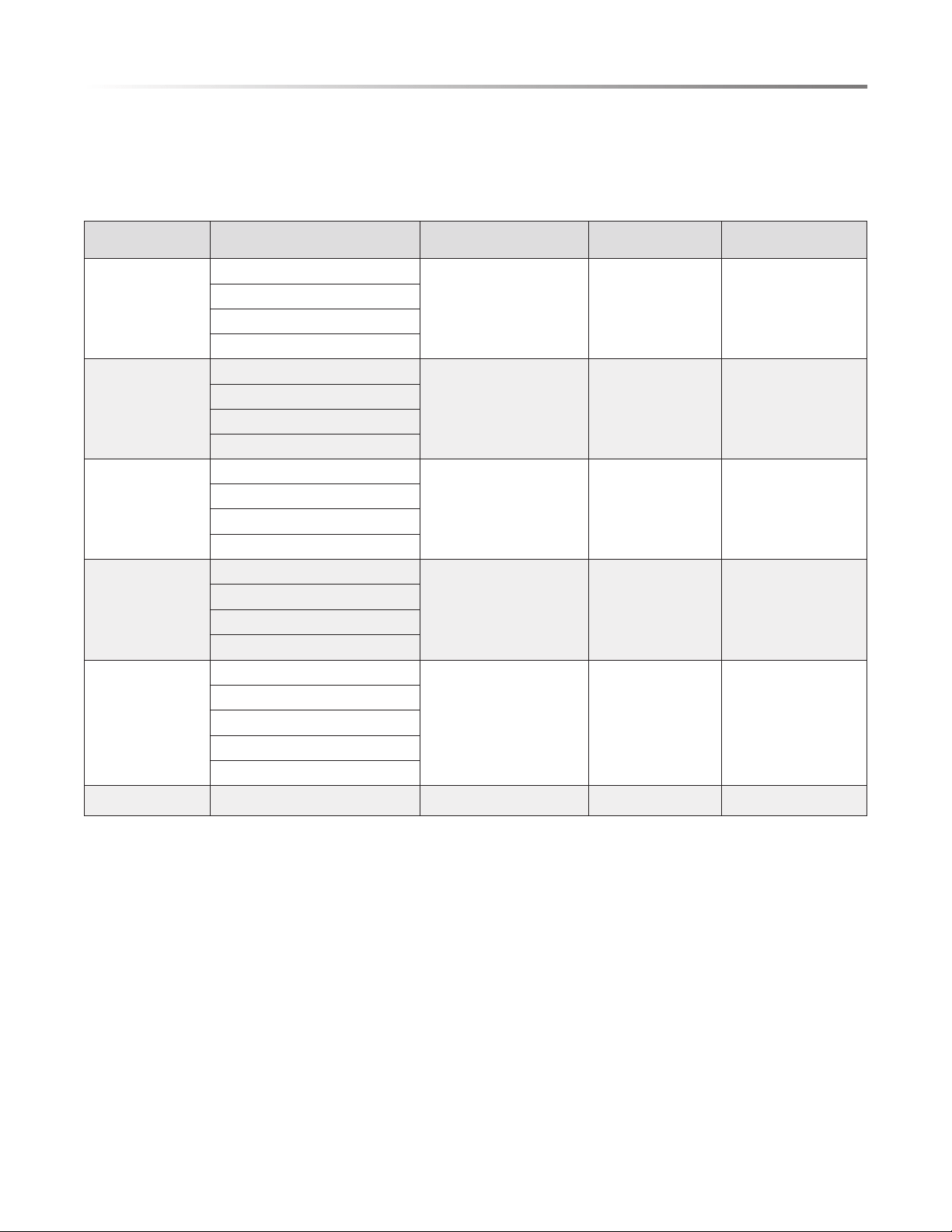
Select a cycle based on the type of dishes to be washed and the level of soil on the dishes.
Cycle times are approximate and will vary with options selected. The timer will be delayed to allow for the water to heat for the
main wash of all cycles if the sensor detects the water is not hot enough. The chart below indicates water use and cycle times under
standard conditions.
PROGRAM DESCRIPTION OF CYCLE
PRE-WASH/MAIN WASH
DETERGENT - OZ (G)
WATER - GAL (L) CYCLE TIME - MIN
AUTO
Pre-Wash
CU: 0.5/0.5 (1.5/1.5)
Others: 0/0.3 (0/9.9)
3.0–5.9
(11.4–22.5)
90–121
Wash 118˚F–126˚F (48°C–52°C)
Rinse 136˚F (58°C)
Dry
HEAVY DUTY
Pre-Wash
0/0.7 (0/19.8) 6.9 (26.2) 134
Wash 131˚F (55°C)
Rinse 144˚F (62°C)
Dry
NORMAL
Pre-Wash
AHM, NSF: 0.7 (19.8)
CU: 0.5/0.5 (15/15)
DOE: 0/0.3 (0/9.9)
3.0–5.9
(11.4–22.5)
96 –116
Wash 108˚F–126˚F (42°C–52°C)
Rinse 136˚F–144˚F (58°C–62°C)
Dry
LIGHT
Pre-Wash
0/0.7 (0/19.8) 5 (18.8) 106
Wash 122˚F (48°C)
Rinse 118˚F (58°C)
Dry
EX PR E SS WASH
Pre-Wash 104˚F (40°C)
0/0.7 (0/19.8) 4 (15.5) 60
Wash 131˚F (55°C)
Rinse 131˚F (55°C)
Rinse 136˚F (58°C)
Dry
RINSE ONLY Rinse Only 0 2 (7.7) 20
18
DISHWASHER CYCLE OPTIONS
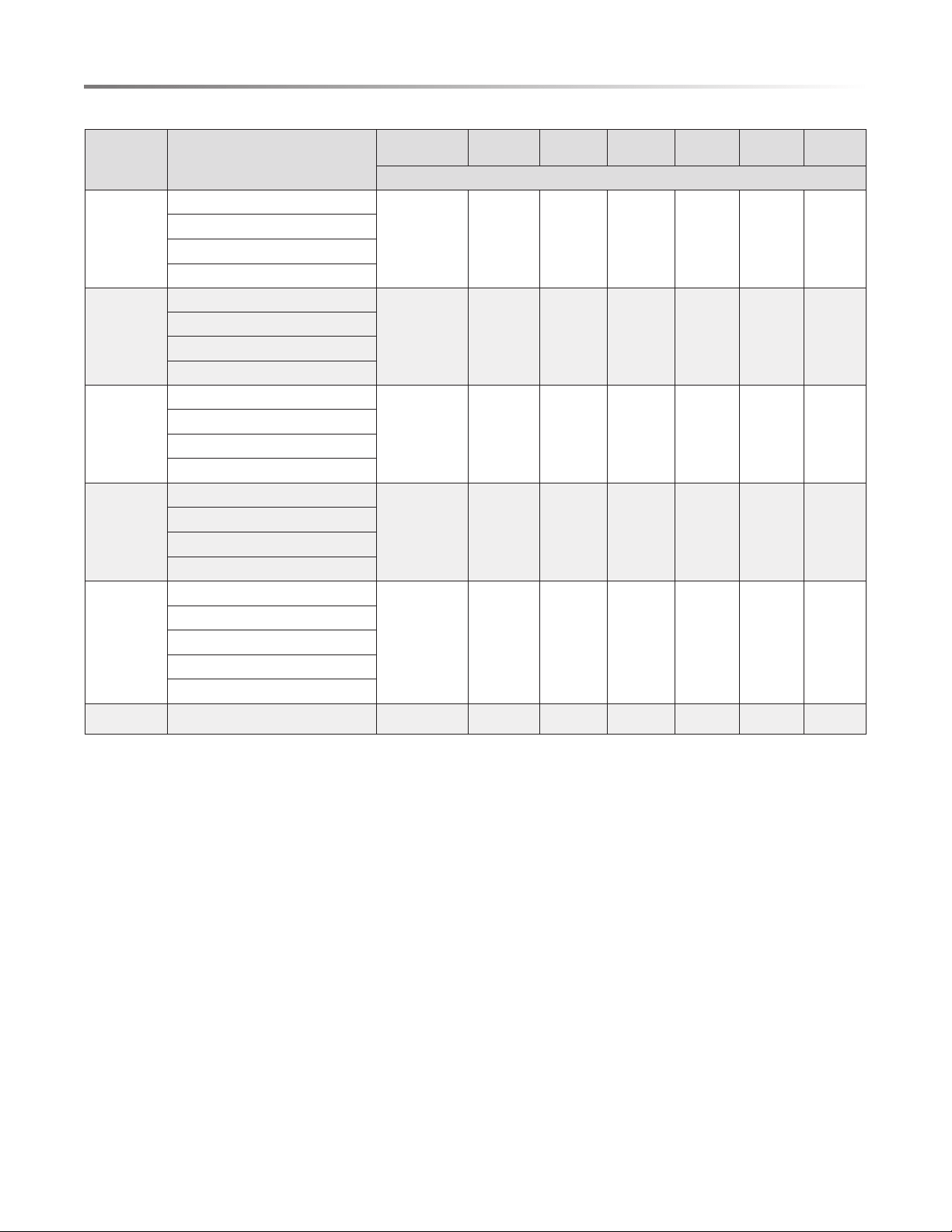
CYCLE TIME WITH OPTIONS
PROGRAM DESCRIPTION OF CYCLE
CYCLE TIME
W/O OPTIONS
WASH
ZONE
POWER
WASH
HI TEMP
WASH
SANITIZE
HEAT
DRY
FAN DRY
MINUTES
AUTO
Pre-Wash
90–121 N.A. N.A. 116 –148 123–158 108–145 165–202
Wash 118˚F–126˚F (48°C–52°C)
Rinse 136˚F (58°C)
Dry
H E AV Y
DUTY
Pre-Wash
134 153 158 163 166 158 208
Wash 131˚F (55°C)
Rinse 144˚F (62°C)
Dry
NORMAL
Pre-Wash
90–116 117–136 120–140 126–142 134–148 120 –140 177–197
Auto 108˚F–126˚F (42°C–52°C)
Rinse 136˚F–144˚F (58°C–62°C)
Dry
LIGHT
Pre-Wash
106 129 132 136 144 130 N.A.
Wash 118˚F (48°C)
Rinse 136˚F (58°C)
Dry
EXPRESS
WASH
Pre-Wash 104˚F (40°C)
60 60 60 N.A. 75 95 137
Wash 131˚F (55°C)
Rinse 131˚F (55°C)
Rinse 136˚F (58°C)
Dry
RINSE Rinse Only 20 N.A. N.A. N.A. N.A. N.A. N.A.
WASH CYCLE SELECTIONS
Cycle times are approximate and will vary with options selected. Hot water is necessary to activate dishwasher detergent and melt
fatty food soils. An automatic sensor will check the incoming water temperature, and, if it is not hot enough, the timer will be delayed
for automatic water heating in the main wash of all cycles. This happens even when Hi-Temp Wash is selected, as an even higher
temperature will be guaranteed to handle heavier soil loads.,
19
CARE AND CLEANING
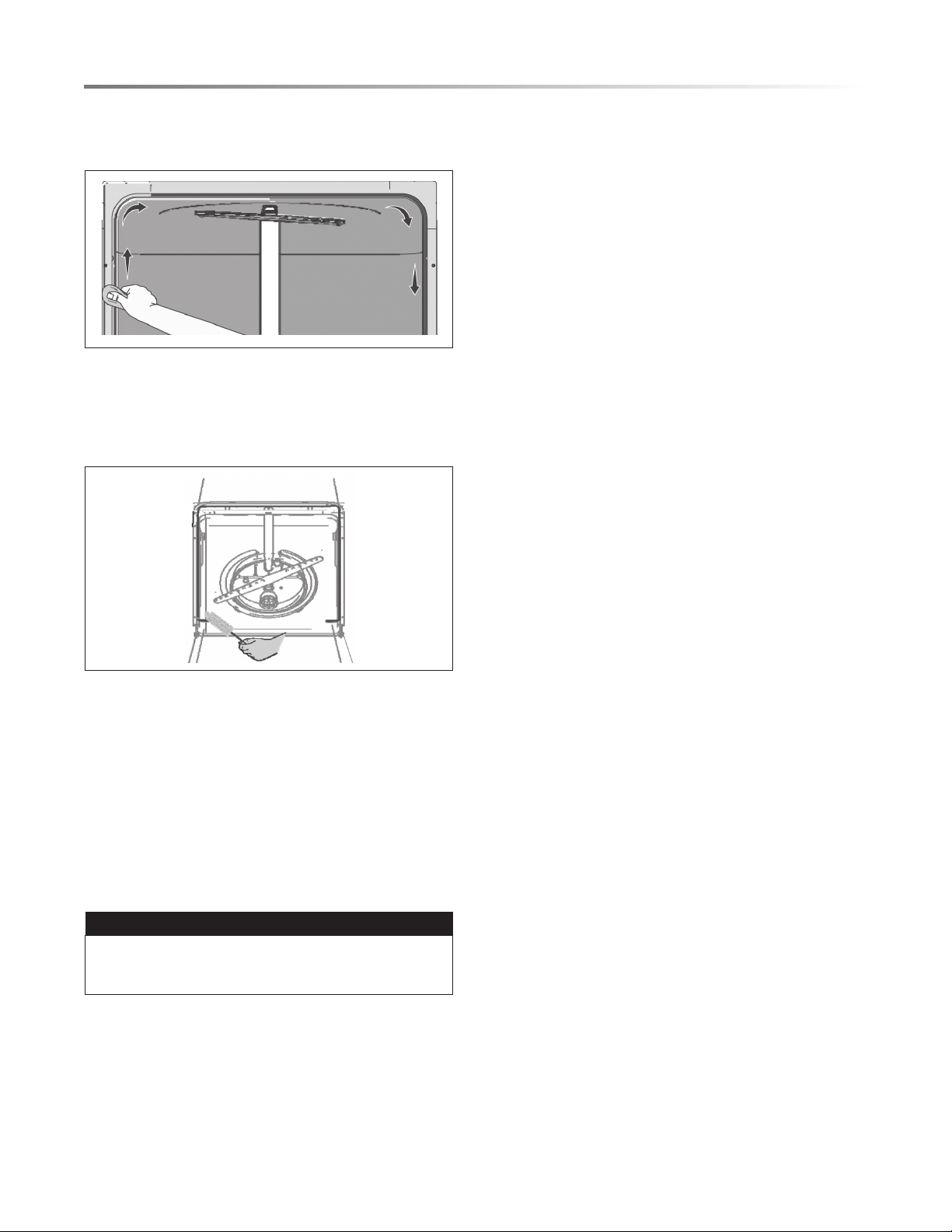
CLEANING THE EXTERIOR DOOR
AND CONTROL PANEL
1 Clean the stainless steel door and handle regularly with a soft
cloth to remove any debris.
Do not use appliance wax, polish, bleach or products
containing chlorine to clean the stainless steel door.
2 Gently clean the control panel with a damp cloth.
CLEAN THE STAINLESS STEEL
INNER DOOR AND TUB
The tub is made of stainless steel. It will not rust or corrode if
the dishwasher is scratched or dented.
Clean any spots on the steel inner door and tub with a
damp, nonabrasive cloth.
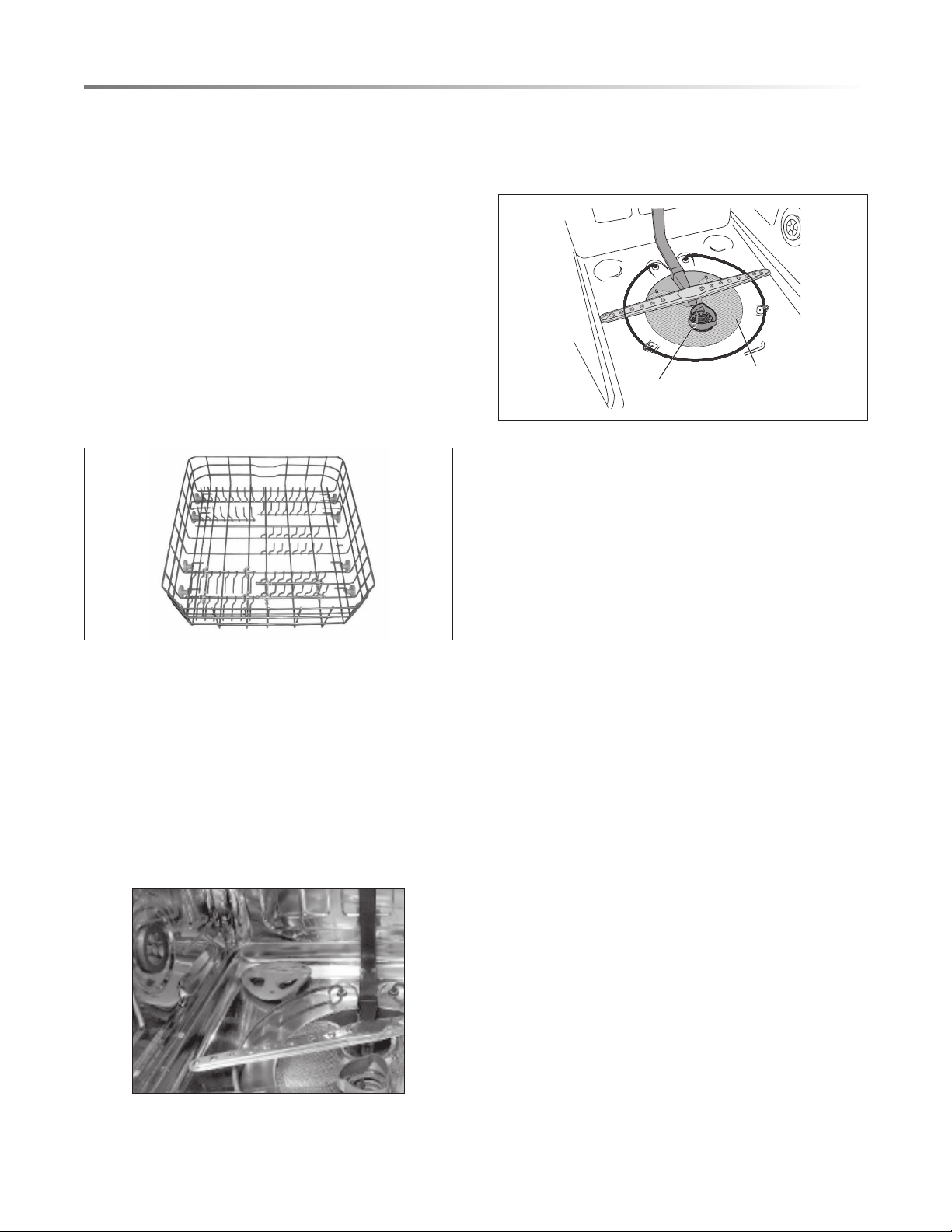
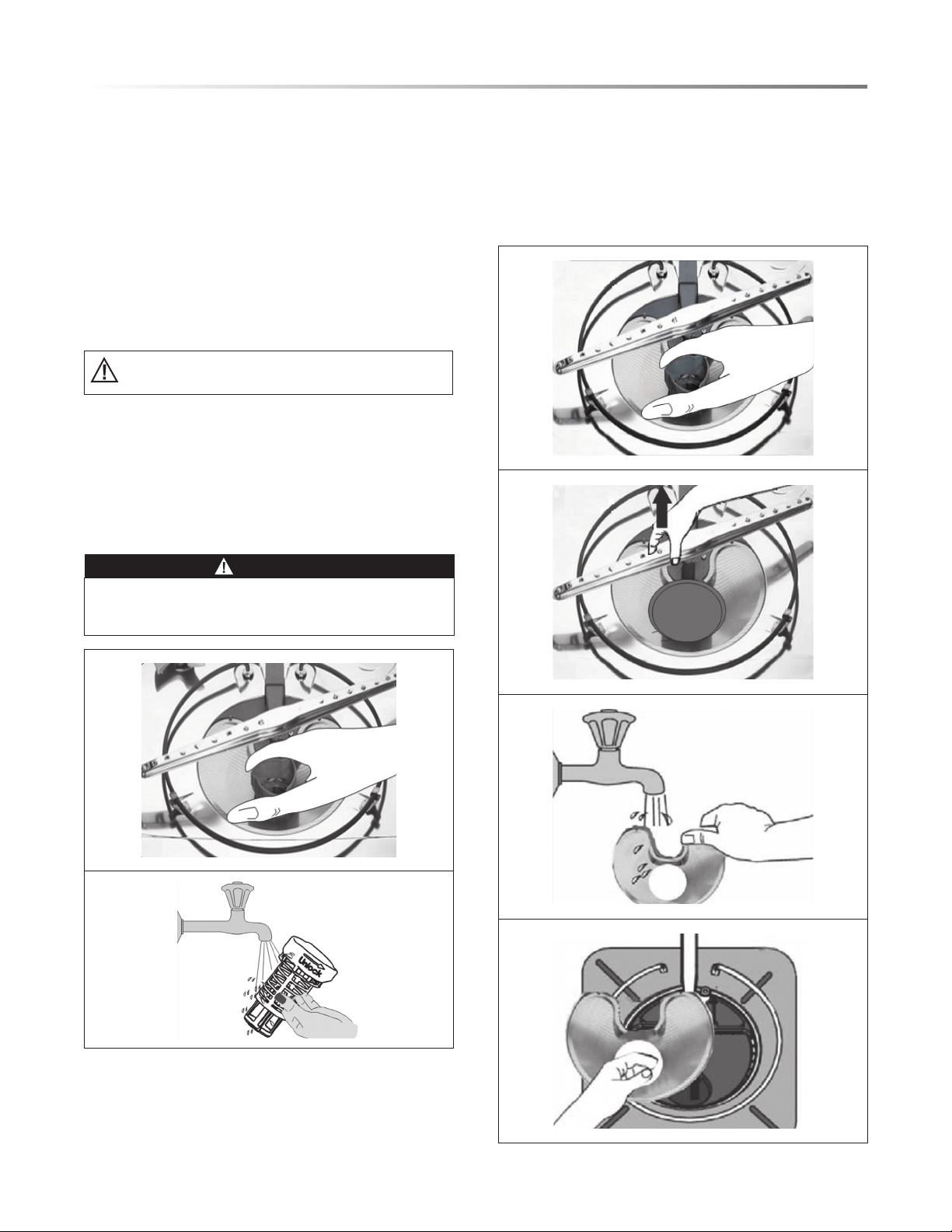
CLEAN THE CYLINDER FILTER
The Cylinder Filter is designed to collect some big items such
as broken glass, bones and pits. The Cylinder Filter needs to be
cleaned to maximize wash performance.
To remove the Cylinder Filter, remove the Lower Rack, rotate the
Cylinder Filter as shown and lift out the lter. Empty and clean
it by holding it under running water and replace it into position.
WARNING
BURN HAZARD
Allow the heating element to cool before cleaning the interior.
Failure to do so can result in burns.
CLEAN THE FINE FILTER
To remove the Fine Filter, remove the Lower Rack, then remove
the bottom spray arm as shown below and remove the Cylinder
Filter.
Remove the Fine Filter from the dishwasher tub bottom. Flush
it clean by holding it under running water and replace it into
position.
20
CARE AND CLEANING
CLEAN THE DOOR GASKET
Clean the door gasket with a damp cloth regularly to remove
food particles.
INSIDE
The inside of the dishwasher is self-cleaning with normal use.
If needed, clean the tub gasket with a damp cloth and use a
brush similar to the one shown below to clean the opening in
the end of the gasket.
WATER TEMPERATURE
Hot water is required for optimum dishwashing and drying
results. Water entering the dishwasher should be at least 120˚F
(49˚C) to achieve satisfactory results.
To check water temperature entering dishwater:
1 Turn on the hot water faucet near the dishwater and let it run
for several minutes.
2 Hold a thermometer (such as a candy or meat thermometer)
in the water stream to check the temperature. If temperature
is below 120˚F (49˚C), have a qualied person raise the hot
water heater thermostat setting.
IMPORTANT
To ensure the water entering the dishwasher is hot, run hot
water from the nearest hot water faucet to clear cool water
from the pipe before starting the cycle.
WATER PRESSURE
The hot water supply line for the dishwasher must provide water
pressure. During high-demand periods, such as when a laundry
washing machine or a shower is in use, water pressure may be
low. For optimum performance, wait until hot water demand is
reduced before operating the dishwasher.
AIR GAP
An air gap is an external plumbing device separate from the
dishwasher, usually located on the sink or countertop near the
dishwasher. Some state and local plumbing codes require the
use of an air gap between a built-in dishwasher and the home
drain system.
If an air gap is installed with your dishwasher, ensure it is clean
so the dishwasher drains properly. To clean the air gap, turn
off the dishwasher, lift the metal cover to remove, unscrew the
plastic air gap and clean it with a toothpick.
STORE DISHWASHER WHEN UNUSED
Your dishwasher should be properly protected from freezing
when left in an unheated place. Have a qualied technician
perform the steps listed below.
To Disconnect Service:
1 Turn off electrical power to the dishwasher at the supply
source by moving fuses or tripping the circuit breaker.
2 Turn off the water supply.
3 Place a pan under the inlet valve. Disconnect water line from
inlet valve and drain into pan.
4 Disconnect drain line from pump and drain water into pan.
To Restore Service:
1 Reconnect the water, drain and electrical power supply.
2 Turn on water and electrical power supply.
3 Fill both detergent cups and run dishwasher through a heated
wash cycle.
4 Check connections to make sure they do not leak.
21
TROUBLESHOOTING
BEFORE CALLING FOR SERVICE
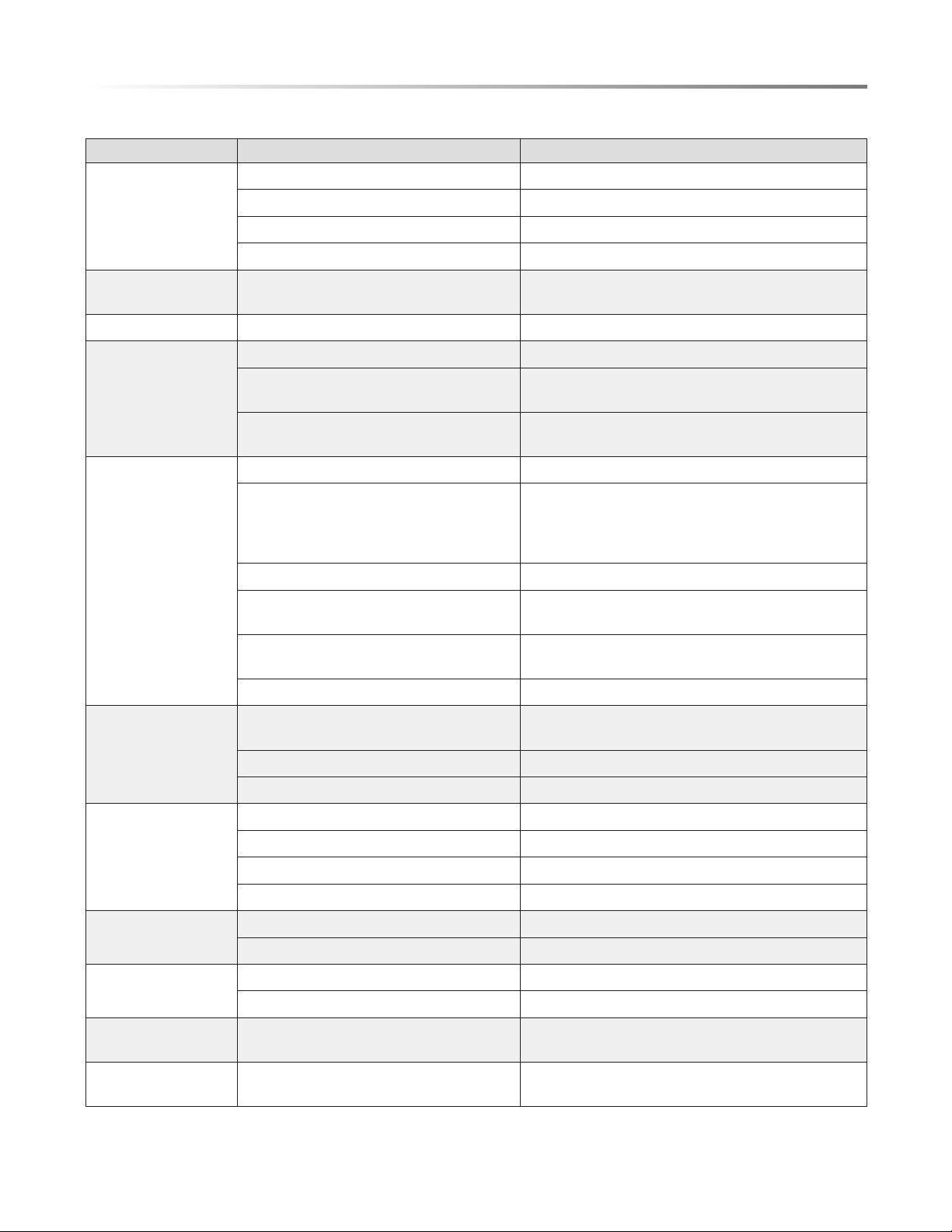
PROBLEM POSSIBLE CAUSE SOLUTION
Dishwasher won't start
Door is not closed properly Ensure the door is properly closed
Power supply or power line is not connected Ensure power supply is correctly connected
Delay Start option is selected Refer to Delay Start section in this manual to reset
Child Lock is activated (selected models) Refer to Child Lock section in this manual to deactivate
Dishwasher beeps at
the end of the cycle
Indicates the wash cycle is nished This is normal
Rinse Aid Light is on Rinse aid level is low Add rinse aid
Dishwasher operates
too long
Dishwasher is connected to cold water Ensure dishwasher is connected to the hot water supply
Loaded dishes have a heavy soil level When heavy soil is detected, the Auto and Normal
cycles will automatically increase the cycle time
Sanitize option is selected When Sanitize option is selected, the cycle time will
increase to meet the sanitize temperature requirement
Dishes are not clean
enough
Water pressure is temporarily low Use dishwasher when the water pressure is normal
Inlet water is low Ensure the dishwasher is connected to the hot water
supply
Avoid using the dishwasher when hot water is being
used elsewhere in the house
Dishes are loaded too close together Refer to the Loading sections in this manual to reload
Improper use of detergent Using fresh detergent, add the correct amount
depending on the water hardness and the selected cycle
Selected cycle is not suitable for food soil
condition
Choose another cycle for longer washing time
Spray arms are blocked by items Ensure the spray arms can rotate fully
Dishes are not dry
enough
Rinse aid dispenser is empty Fill Rinse Aid Dispenser or increase the amount of
rinse aid
Improper loading of dishes Refer to the Loading sections in this manual to reload
Selected cycle does not include drying Select a cycle with drying
Spots and lming on
dishes
Water hardness is too high For extremely hard water, install a water softener
Improper loading of dishes Refer to the Loading sections in this manual to reload
Rinse aid may be too old Use fresh rinse aid
Rinse Aid Dispenser is empty Fill Rinse Aid Dispenser
Etching
Use of too much detergent Use less detergent
Inlet water temperature exceeds 150℉ Lower the inlet water temperature
Detergent left in
dispenser cup
Detergent may be too old Use fresh detergent
Spray arms are blocked by items Ensure the spray arms can rotate fully
Detergent dispenser
will not close
Improper operation of the detergent cover Refer to the Dispenser sections in this manual to close
Water remains in the
dishwasher
Previous cycle has not nished or has been
interrupted
Select the proper cycle as indicated by the manual
22
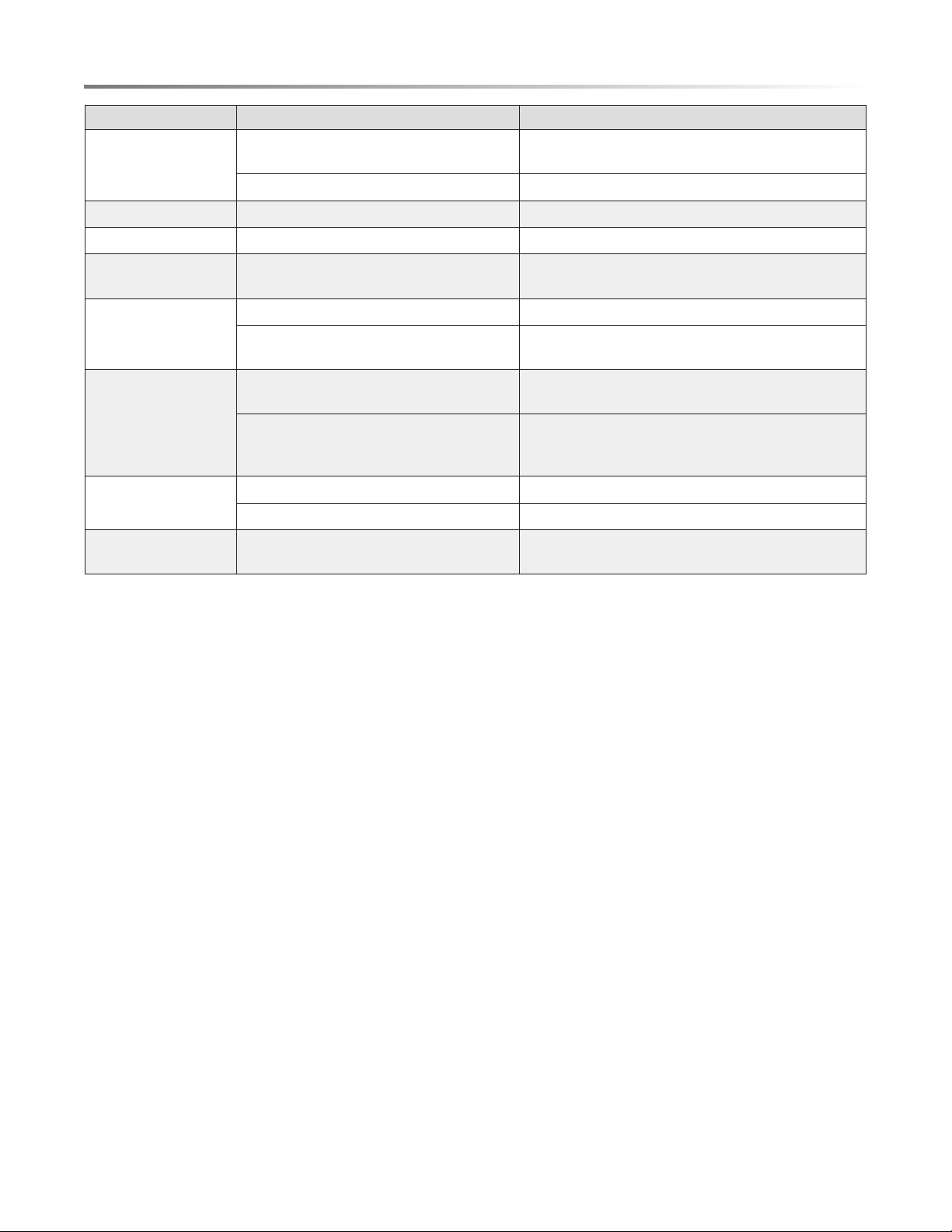
PROBLEM POSSIBLE CAUSE SOLUTION
Dishwasher does not
drain properly
Drain is clogged If an air gap is installed, check the air gap
If a food disposer is connected, empty the food disposer
Drain hose is kinked Ensure the drain hose is properly connected to the sink
Suds in the tub Improper detergent is used Only use automatic dishwasher detergent
Dishwasher leaks Dishwasher is not level Refer to the Installation Manual to level the dishwasher
Black or gray marks on
dishes
Aluminum utensils have rubbed against
dishes
Choose a cycle with a higher water temperature
Ensure the inlet water temperature is no less than 120℉
Stained tub interior
Coffee and tea soil Use a spot cleaner to remove the soil
Reddish stain, caused by tomato-based foods Use Rinse Only cycle right after loading to decrease
staining
Noise
Detergent cup opening
Drain pump running
This is normal
A hard object has entered the wash module. When the object is ground up, the sound should stop
If the noise persists after a complete cycle, call for
service
Dishwasher won't ll
Water valve is closed Ensure water valve is open
Door latch may not be properly seated Ensure the door is closed
Bad odor in dishwasher
tub
Drain Hose connected to sink drain between
sink trap and the wall
Be sure the Drain Hose is connected to the sink
between the sink and the sink trap
TROUBLESHOOTING

23
ERROR CODES
When some malfunctions occur, the appliance will display error codes to warn you:
CODES MEANING POSSIBLE CAUSES
E0 Communication exception The display can't receive signal or the main board can't send signal
Contact customer service
E1 Longer inlet time Faucet is not opened
Water intake is restricted
Water pressure is too low
Improper or Incomplete Draining Drain Hose is extended more than 10 ft from the dishwasher
Drain Hose is not properly looped underneath sink or not installed with
air gap
Drain Hose is kinked, compressed or otherwise damaged
Wrong Drain Hose used (use only supplied Sharp Dishwasher Drain
Hose)
E4 Overow Some element of dishwasher leaks
E8 Failure of orientation of distributary valve Open circuit or break of distributary valve
E9 Holding a button for longer than 30 seconds Water or some other material on the button
WARNING
• If overow occurs, turn off the main water supply before calling for service.
• If there is water in the base pan because of an overll or small leak, the water should be removed before restarting the dishwasher.
24
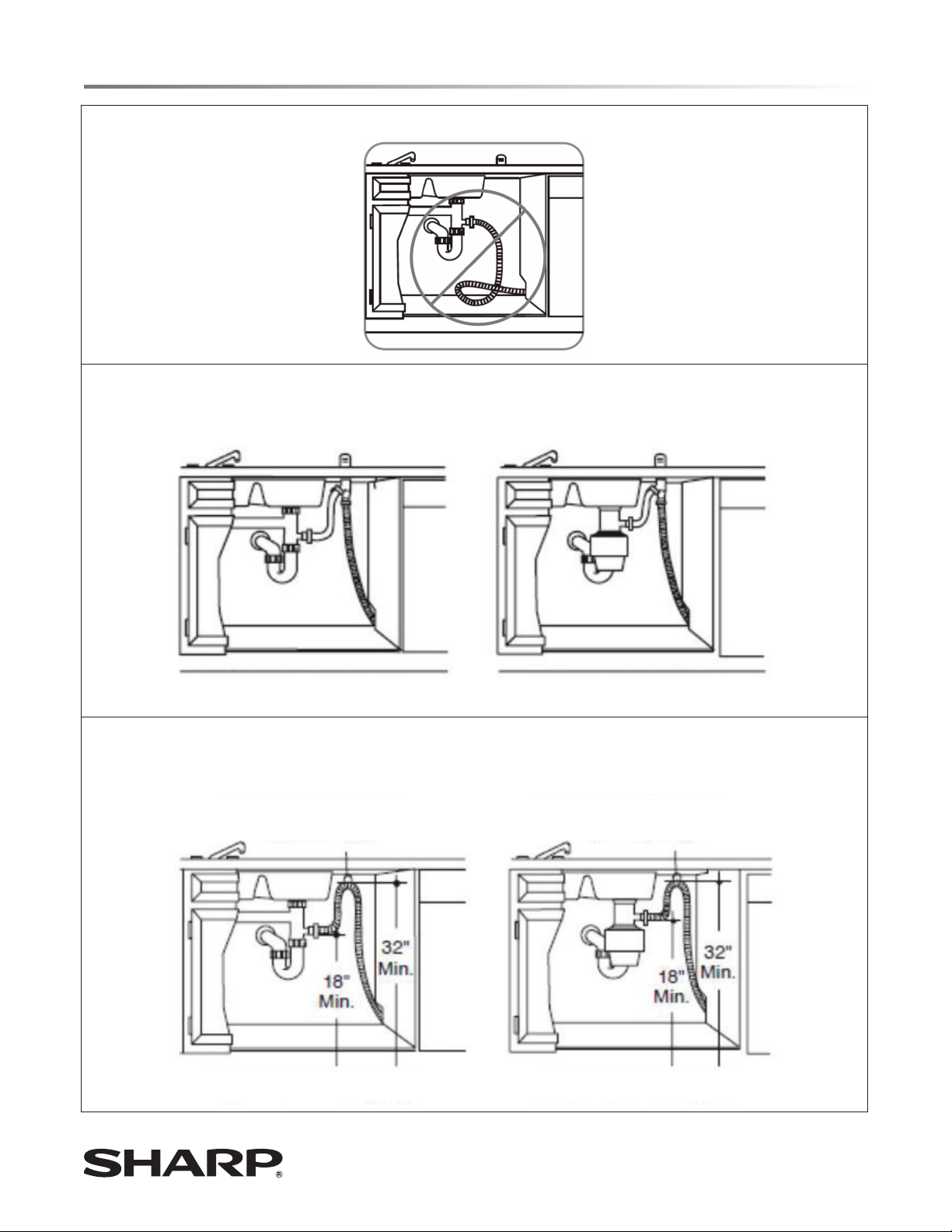
DRAIN HOSE INSTALLATION
INCORRECT
CORRECT - METHOD 1
AIR GAP WITH WASTE TEE OR DISPOSER
WASTE TEE INSTALLATION DISPOSER INSTALLATION
CORRECT - METHOD 2
HIGH DRAIN LOOP WITH WASTE TEE OR DISPOSER
FASTEN TO UNDERSIDE
OF CONTERTOP
FASTEN TO UNDERSIDE
OF CONTERTOP
WASTE TEE INSTALLATION DISPOSER INSTALLATION
SHARP ELECTRONICS CORPORATION • 100 Paragon Drive • Montvale, New Jersey 07645 • USA