16000-20.962.01
en Operator’s manual
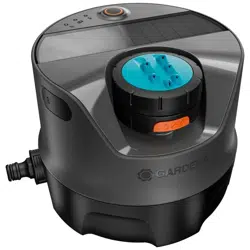
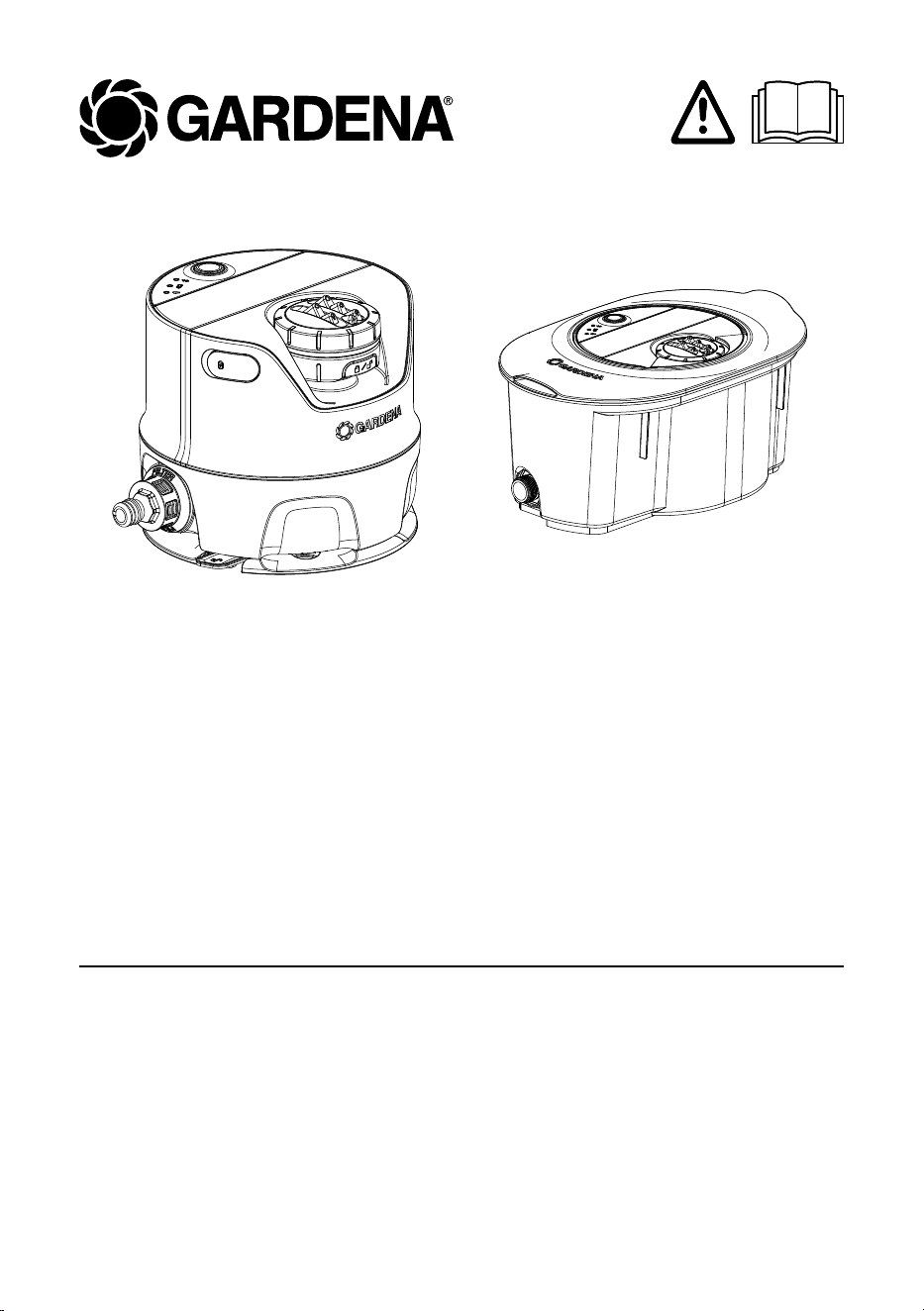
Irrigation system /
Pipeline irrigation system
AquaPrecise
(for above-ground installation)
Art. No. 16000
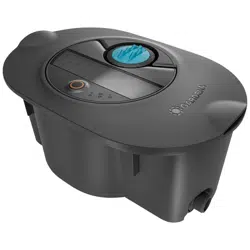
AquaPrecise
(for underground installation)
Art. No. 16001
Art. No. 16010

2
en Irrigation system /
Pipeline irrigation system
Translation of the original operator’s manual.
1. SAFETY INSTRUCTIONS ............................................ 3
2. INSTALLATION ................................................... 6
2.1 Included in delivery ............................................ 6
2.2 Preparing for installation ........................................ 6
2.3 Charging the battery via the USB port. . . . . . . . . . . . . . . . . . . . . . . . . . . . . . 7
2.4 Installing the GARDENA Bluetooth
®
App on yourmobile device .......... 8
2.5 Selecting the right location for the AquaPrecise ....................... 9
2.6 Connecting the AquaPrecise to the GARDENA Bluetooth
®
App .......... 10
2.7 Performing a spray distance test .................................. 12
2.8 Installing the AquaPrecise in the garden ............................ 13
3. OPERATION ..................................................... 18
3.1 Programming the AquaPrecise ................................... 18
3.2 Manual button ............................................... 20
3.3 LED display. . . . . . . . . . . . . . . . . . . . . . . . . . . . . . . . . . . . . . . . . . . . . . . . . . 22
4. MAINTENANCE ................................................... 23
4.1 Removing / disconnecting the AquaPrecise .......................... 23
4.2 Cleaning the solar cell .......................................... 25
4.3 Cleaning the dirt filter .......................................... 26
4.4 Cleaning the sprinkler head ...................................... 27
4.5 Cleaning the turbine area ....................................... 28
5. STORAGE ....................................................... 29
5.1 Shutting down ............................................... 29
6. TROUBLESHOOTING .............................................. 32
6.1 Replacing the battery .......................................... 32
6.2 Error table ................................................... 33
7. TECHNICAL DATA ................................................. 35
8. ACCESSORIES / SPARE PARTS ....................................... 36
9. SERVICE ........................................................ 36
10. DISPOSAL ....................................................... 37
10.1. Disposing of the product ........................................ 37
10.2. Disposing of the battery ........................................ 37
11. ASSIGNMENT OF TRADEMARKS ..................................... 38

3
1. SAFETY INSTRUCTIONS
1.1 Safety instructions for irrigation systems
WARNING!
Read all safety warnings, instructions, illus-
trations and specifications provided with this
machine.
Save all warnings and instructions for future reference.
Sand and other abrasive substances in the water cause faster
wear and reduced performance.
→ If the water used contains sand, use a filter (e. g. GARDENA
Pressure Regulator with integrated filter (Art. No. 8200)).
→ Do not use a lawn aerator or aerator rake over the ground-
level AquaPrecise.
→ Regularly check the AquaPrecise for damage and do not
use any damaged products.
→ Immediately remove any damaged parts.
→ Keep damaged parts away from children.
This reduces the risk of suffocation.
→ Check the height adjustment of robotic lawnmowers
whentheAquaPrecise is installed in the Pipeline box.
This prevents the AquaPrecise from being damaged.
→ Bury the Pipeline box at a sufficient depth and observe
theminimum and maximum burying depths.
This reduces the risk of tripping.
→ When the AquaPrecise is removed from the Pipeline box,
close the box using the box lid.
This reduces the risk of tripping.
→ Do not overload the box lid (maximum load of 120kg).
Thisreduces the risk of injury and damage to the sprinkler.
→ Do not use the AquaPrecise in explosive atmospheres.
There is a risk of explosion.
4
DANGER!
Risk of cardiac arrest!
This product generates an electromagnetic field during oper-
ation. This electromagnetic field may affect the functionality of
active or passive medical implants (e. g. pacemakers), which
may result in serious injury or death.
→ Consult your doctor and the manufacturer of your implant
before using this product.
→ Remove the battery when you are not using the product.
DANGER!
Risk of suffocation!
Smaller parts can be swallowed.
→ Keep toddlers away when you assemble the product.
1.2 Intended use
The GARDENA AquaPrecise irrigation system is for outdoor
irrigation of gardens and lawns in private gardens and allotments.
The product is not suitable for long-term use (professional opera-
tion).
DANGER!
Risk of injury!
The AquaPrecise irrigation system must not be used in indus-
trial or commercial applications, or in combination with chemi-
cals, foodstuffs or flammable or explosive substances.

5
1.3 Battery safety instructions
The AquaPrecise has a lithium-ion battery, which is automati-
cally charged via an integrated solar cell.
Irrigation cannot take place if the battery has run out of charge.
→ Check that the solar cell is not dirty.
This will ensure that the battery charges continuously.
If the AquaPrecise is operated with an upstream valve / control-
ler and is only used for irrigation, the valve will close as soon as
the battery has run out of charge.
To operate independently, the location should be exposed to
about 1 – 2 hours of direct sunlight (trickle charging).
Alternatively, the battery can also be charged via the USB port.
The battery should be charged via the USB port every six
months (spring and autumn).
→ Close the USB port cover after charging via the USB port.
Otherwise water may enter the AquaPrecise.
→ Only charge the AquaPrecise indoors.
This protects the USB port from moisture.
→ Fully charge the battery before storing for winter.
→ Do not charge the battery in direct sunlight.
The battery can overheat and cause a fire hazard.
→ Charge the battery on a fireproof surface.
The battery may become hot during charging and cause
afirehazard.
→ Only use original GARDENA spare parts.
Spare parts that have not been tested by GARDENA may
cause an increased risk of fire or defective products.
→ Do not charge the battery outside of the AquaPrecise.
Thisreduces the risk of fire.
→ When replacing batteries, handle the spare battery with care.
Adamaged battery can cause fire.

6
→ Only use the original GARDENA batteries recommended by
the manufacturer.
Other batteries do not guarantee product safety.
2. INSTALLATION
2.1 Included in delivery
Art. No. 16000 Art. No. 16001 Art. No. 16010
AquaPrecise x x x
Mounting plate x – –
Pipeline box – x x
Winter cover – x x
Quick Guide x x x
2.2 Preparing for installation
The steps listed below must be followed before installing the
AquaPrecise:
• “2.3 Charging the battery via the USB port”
• “2.4 Installing the GARDENA Bluetooth
®
App on your mobile
device”
• “2.5 Selecting the right location for the AquaPrecise”
• “2.6 Connecting the AquaPrecise to the GARDENA Bluetooth
®
App”
• “2.7 Performing a spray distance test”
7
2.3 Charging the battery via the USB port
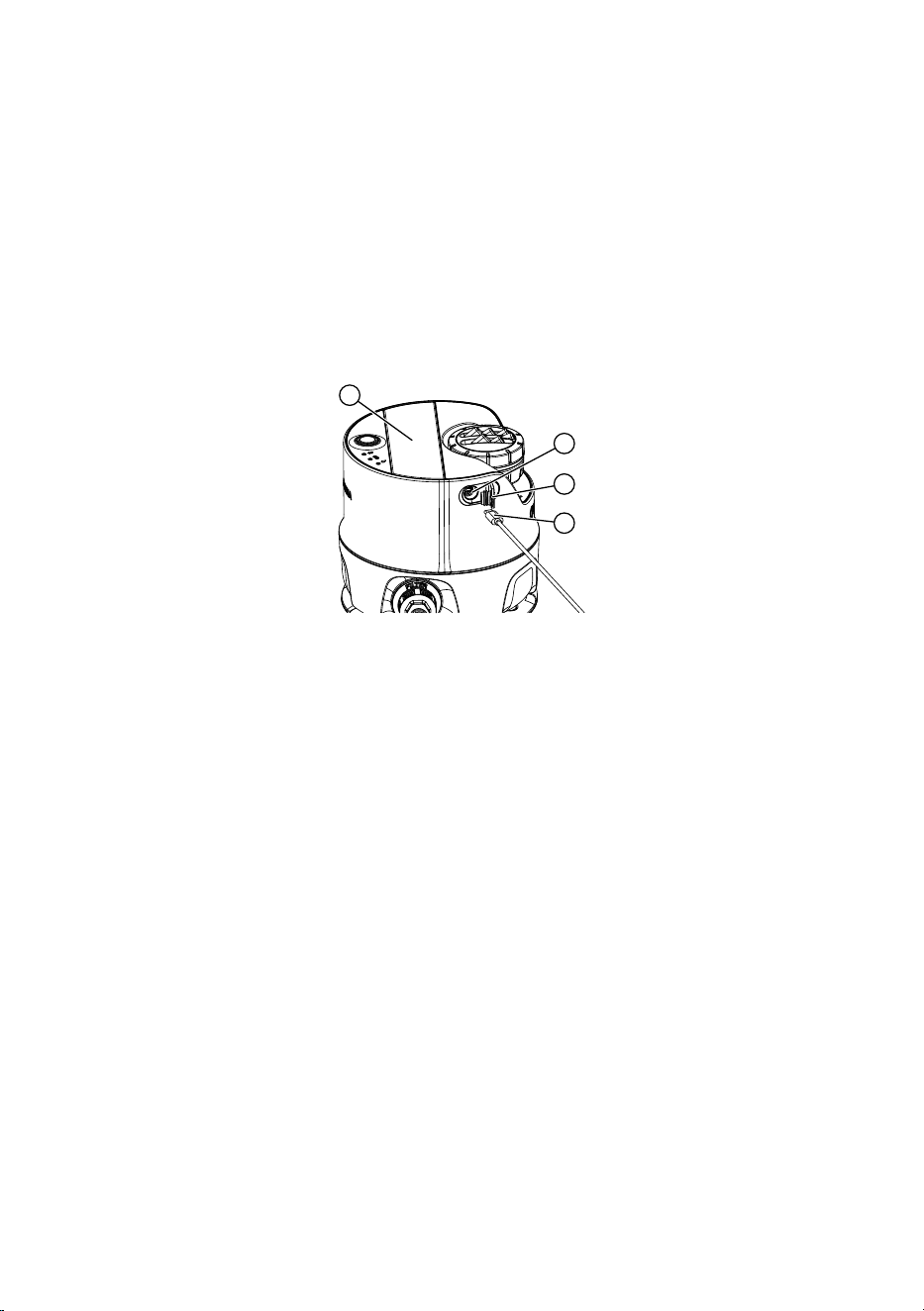
The battery can be charged using a USB-C cable. The USB con-
nector power supply unit with USB-C cable is not included in the
scope of delivery.
If the battery is not fully charged, it may become damaged and,
incertain cases, become exhausted or unusable.
The battery may only be charged indoors at ambient temperatures
between 5 °C and 40 °C.
8
9
10
11
1. Open the USB cover
.
2. Insert the USB-C connector
into the USB port
of the
AquaPrecise.
If the battery LED
flashes orange, the battery is charging.
If the battery LED
lights up permanently green, the battery
isfully charged (charging time, see 7. TECHNICAL DATA).
3. Examine the charge status regularly during the charging
process.
4. When the battery is fully charged, disconnect the USB-C
connector
from the USB port
of the AquaPrecise.
5. Close the USB cover
.
Note: Irrigation is not possible while charging via the USB-C cable
and the programmed watering cycles are skipped.

8
2.4 Installing the GARDENA Bluetooth
®
App on
yourmobile device
The free GARDENA Bluetooth
®
App must be installed on
yourmobile device (smartphone / tablet) before connecting the
AquaPrecise to the device.
You can download the GARDENA Bluetooth
®
App from the
Google Play Store or Apple Store or scan the following QR code:
https://eqrco.de/pa/R0NCo6
1. Download the GARDENA Bluetooth
®
App onto your mobile
device.
2. Install the GARDENA Bluetooth
®
App on your mobile device.
3. Open the GARDENA Bluetooth
®
App on your mobile device.
4. Select “Add product”.
5. Select AquaPrecise from the product list.
Note: The GARDENA Bluetooth
®
App will now also guide you
through the next steps for setting up the AquaPrecise in the right
location.
9
2.5 Selecting the right location for the AquaPrecise
You must first select the right location for the AquaPrecise before
installing it, based on the following criteria:
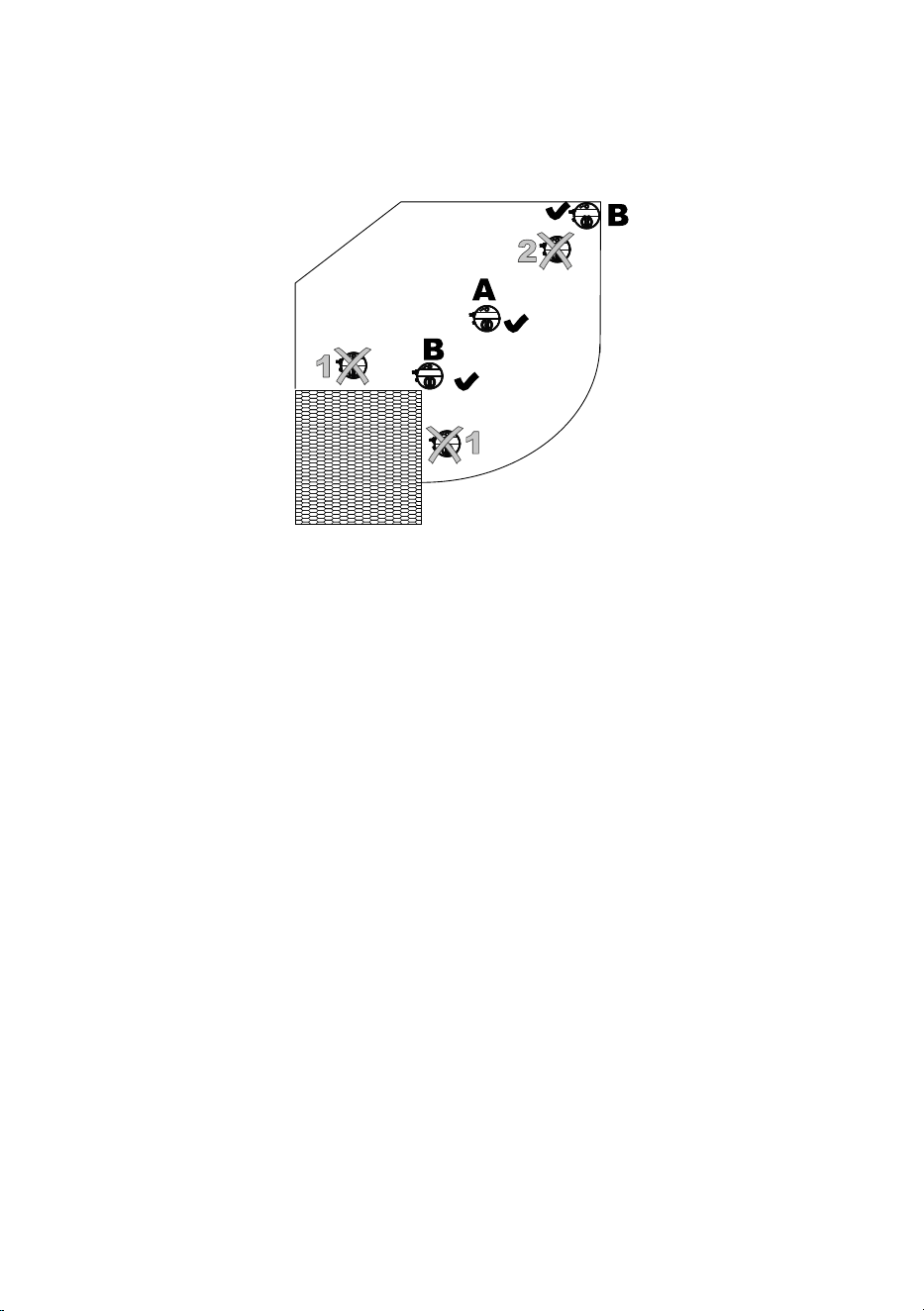
• The max. range is 10m. Therefore, no contour point may be
further than 10m away from the AquaPrecise.
• The min. range is 2m. Therefore, no contour point may be
within 2m of the AquaPrecise.
• No direct obstacles (e. g. trees) may be in the irrigation area.
• At maximum range, the water jet height can reach approx. 3m.
This means that even indirect obstacles (e. g. branches) can
obstruct the irrigation area.
• Avoid abrupt changes to the range, as gentle and large angles
describe the contour more accurately.
• The solar cell must receive enough direct sunlight
(1 – 2hours / day). Obstacles (e. g. trees) must not block
out sunlight.
• The AquaPrecise can also be installed on the very outer edge
of the area to be irrigated (e. g. lawn edge). The irrigation area
must be positioned between 25° and 360°.
10
2.6 Connecting the AquaPrecise to the GARDENA
Bluetooth
®
App
The AquaPrecise must be connected to the GARDENA
Bluetooth
®
App before using it for the first time.
1. Enable Bluetooth on your mobile device.
The Bluetooth icon is displayed in the status bar on your
mobiledevice.
Lw
Lb
Lp
M
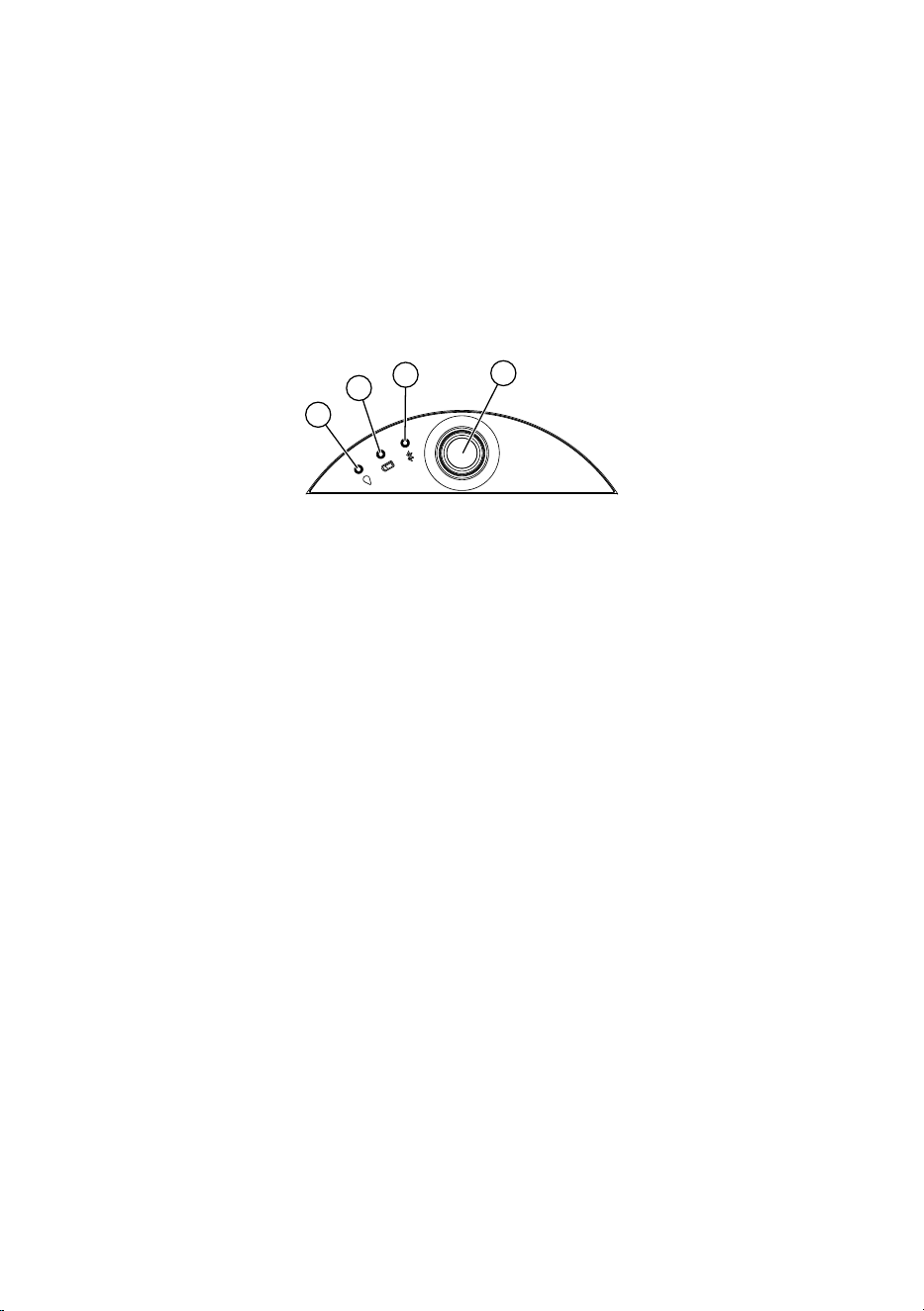
2. Briefly press the manual
button on the AquaPrecise.
The AquaPrecise is activated and the battery LED
shows
thebattery’s charge status (see “3.3.2 Battery LED
“).
3. Hold down the manual
button on the AquaPrecise for
threeseconds.
Connection mode is activated for three minutes and the
Bluetooth LED
flashes blue during this period.
4. Stand next to the AquaPrecise.
A connection can only be established if the mobile device is
close to the AquaPrecise.
5. Open the GARDENA Bluetooth
®
App on your mobile device.
6. Select AquaPrecise from the product list.
The Bluetooth LED
lights up blue for ten seconds and the
AquaPrecise is connected to the GARDENA Bluetooth
®
App.
The AquaPrecise can now be installed.

11
Note: The GARDENA Bluetooth
®
App will now also guide you
through the next steps for installation.
If the AquaPrecise has already been installed, it can now be pro-
grammed and configured via the GARDENA Bluetooth
®
App
(see“3.1 Programming the AquaPrecise”).

12
2.7 Performing a spray distance test
We recommend always carrying out the spray distance test before
installation (especially in the Pipeline box). The spray distance test
is used to check whether the required contour can be irrigated from
the selected location.
Note: The spray distance test is automatically prompted by the
GARDENA Bluetooth
®
App whenever a new location is added.
The AquaPrecise can be aligned in any direction. We recommend
setting up the AquaPrecise in the garden so that the connection
faces towards the water source.
1. Place the AquaPrecise on the lawn at ground level at the cor-
rectly selected location (see “2.7 Performing a spray distance
test”).
2. Temporarily connect the AquaPrecise to the water supply.
3. Turn on the water supply.
4. Briefly press the manual
button on the AquaPrecise.
The AquaPrecise is activated and the battery LED
shows
thebattery’s charge status (see “3.3.2 Battery LED
“).
5. Open the GARDENA Bluetooth
®
App on your mobile device.
6. Move the water jet within the irrigation area (left / right) using
the GARDENA Bluetooth App.
7. Increase / decrease the watering distance limit to see if all
corners / edges can be irrigated.
Tip: If there is anything in the way, you can set a second location
for complete coverage of the irrigation area.
8. You can end the spray distance test once you are sure that
each contour point can be reached and that there are no
obstacles within the area.
9. Shut off the water source.
10. Install the AquaPrecise in the garden.
13
2.8 Installing the AquaPrecise in the garden
2.8.1 (Art. No. 16000) Installing the AquaPrecise on the
mounting plate above ground
If you want to use the AquaPrecise at different locations, you can
use an additional GARDENA mounting plate (Art. No. 16022).
Note: Installation is automatically prompted in the GARDENA
Bluetooth
®
App after the spray distance test.
1
2
3
4
o
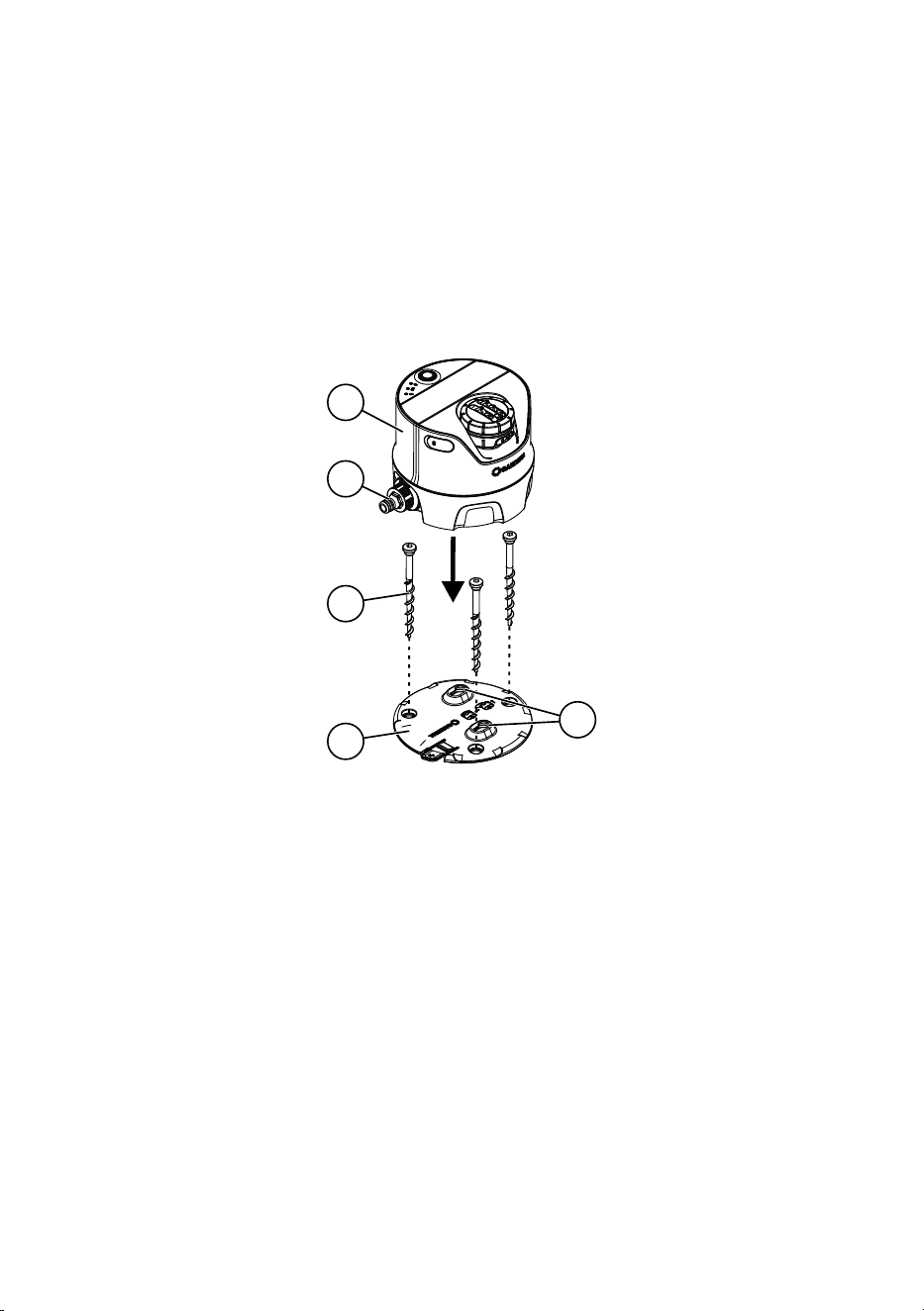
1. Place the mounting plate
at the specified position on the
lawn at ground level according to the spray distance test.
2. Use the supplied hex wrench to screw the three ground
screws
in the mounting plate
and into the ground
(perfectly level horizontally).
This will ensure that the AquaPrecise does not rotate.
3. Place the AquaPrecise
on the mounting plate
so that
both pins on the bottom are inserted into the openings
and
itis positioned flat on the ground on the mounting plate
.
14
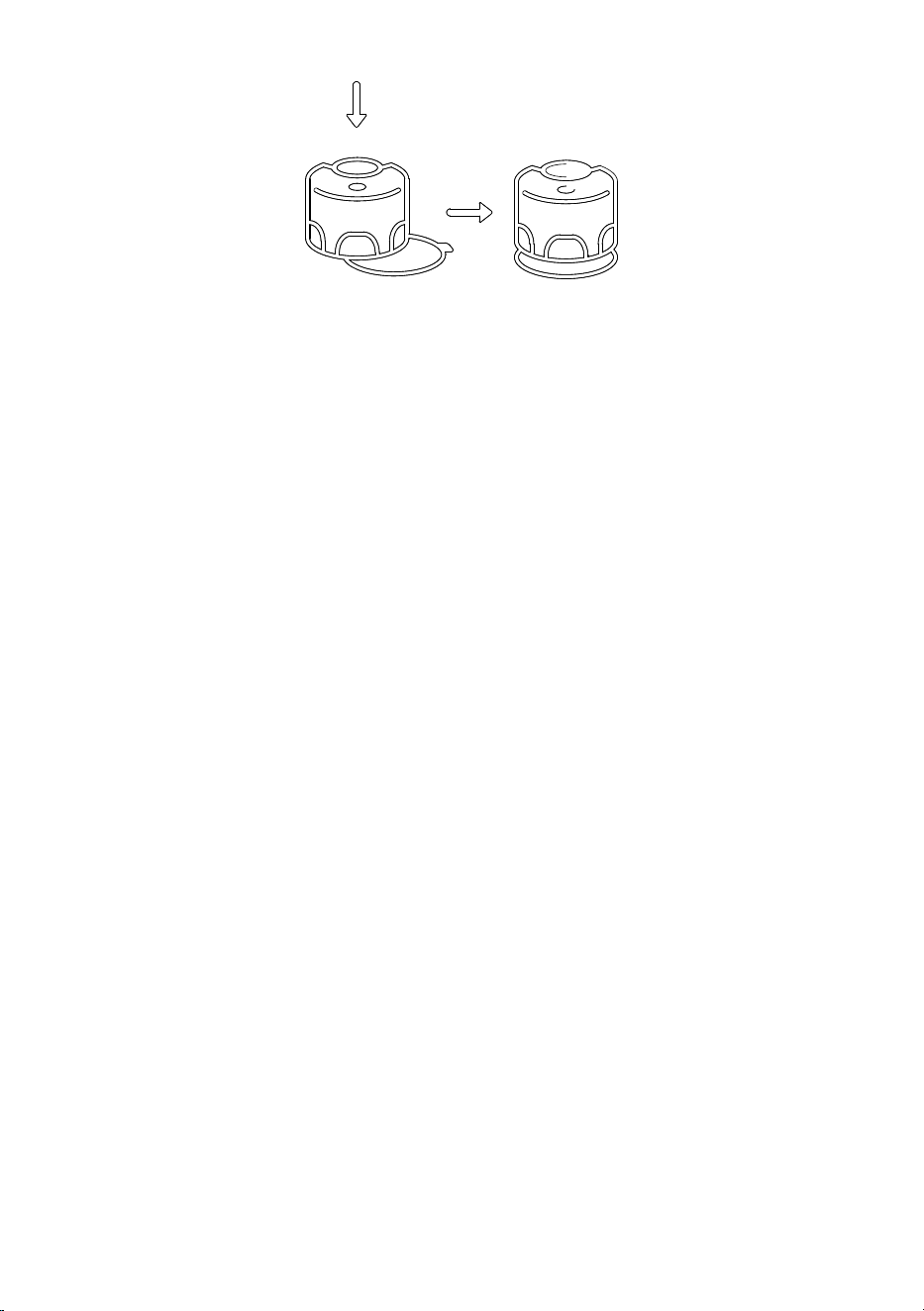
4. Push the AquaPrecise
towards the connection
until
itlocks onto the base plate
.
5. Connect the connection
to the water supply via the
OriginalGARDENA System.
15
2.8.2 (Art. No. 16001 / 16010) Underground installation
ofthe AquaPrecise in the Pipeline box
Note: Installation is automatically prompted in the GARDENA
Bluetooth
®
App after the spray distance test.
1. Place the Pipeline box
at the specified position on the lawn
according to the spray distance test.
2. Lay all components on the lawn.
3. Cut the pipes to length.
4. Dig the trenches for the pipes and the Pipeline box
(approx. 20 – 25cm deep).
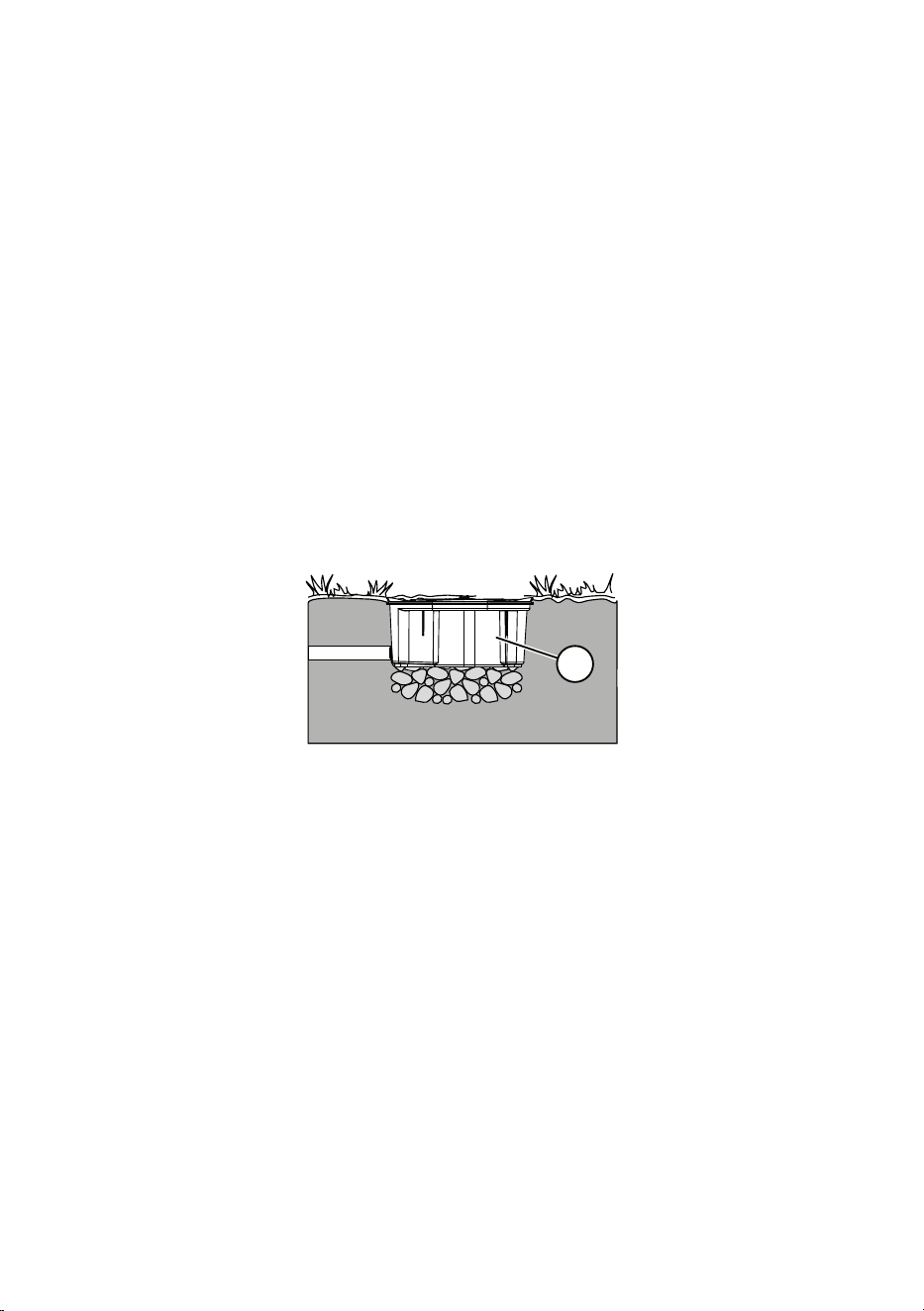
5. Fill the trench under the Pipeline box
with approx. 6cm of
gravel.
This ensures that the drainage slots in the box function properly.
5
6. Install the Pipeline box
in the ground so that the top is flush
with the turf.
This prevents damage when mowing the lawn.
16
5
2
3
6
4
7
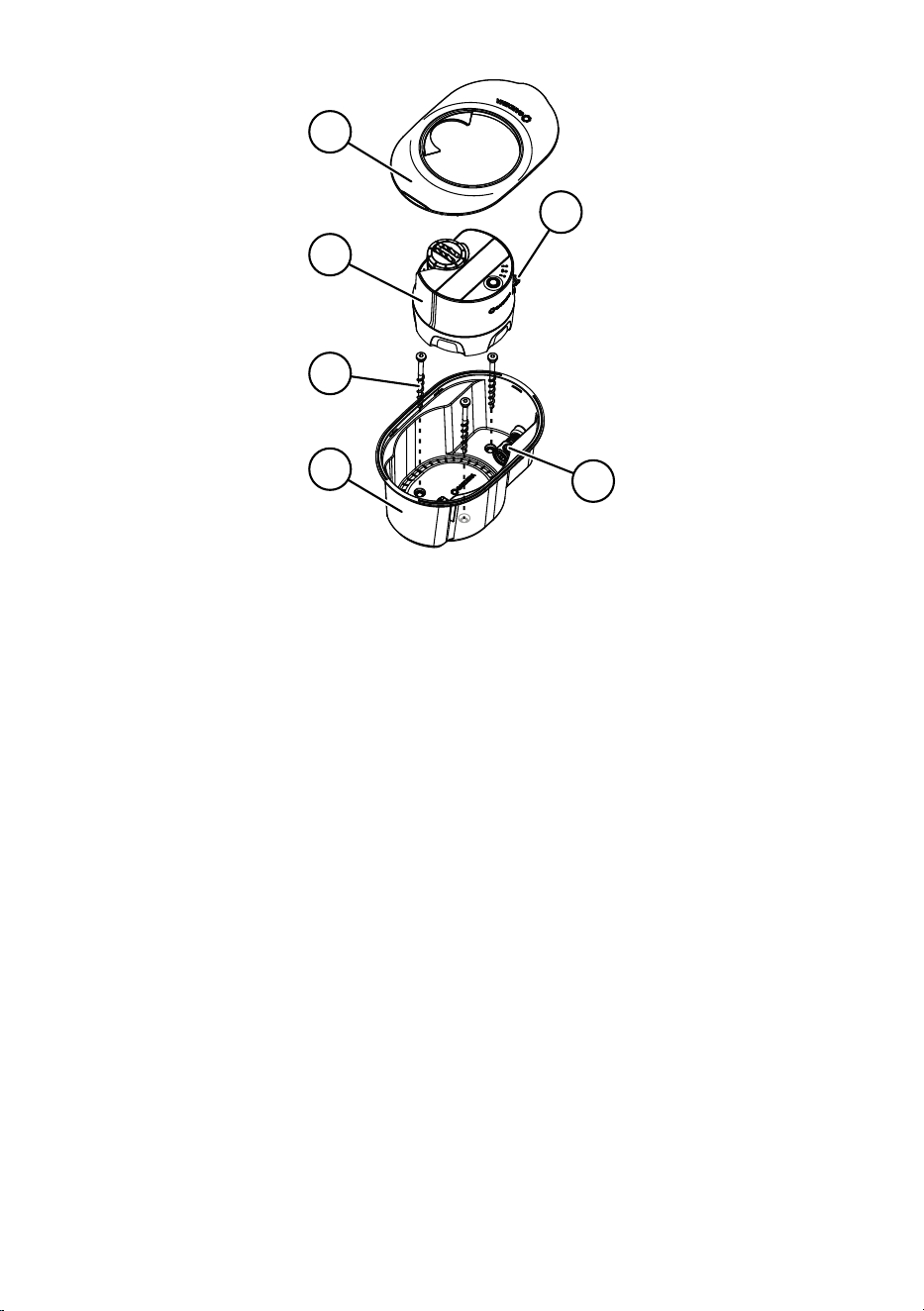
7. For an optional additional ground fastening: Pierce the
threeholes for the three ground screws in the Pipeline
box
.
8. Use the supplied hex wrench to screw the three ground
screws
in the Pipeline box
and into the ground.
9. Lay the pipes in the trenches.
10. Connect the 3/4" male thread of the Pipeline box
using the
connector (Art. No. 2761) and the GARDENA 25mm con-
necting pipe (Art. Nos 2700 / 2701 / 2718 / 2792 / 2793).
11. Refill the trenches with soil.
17
4
7
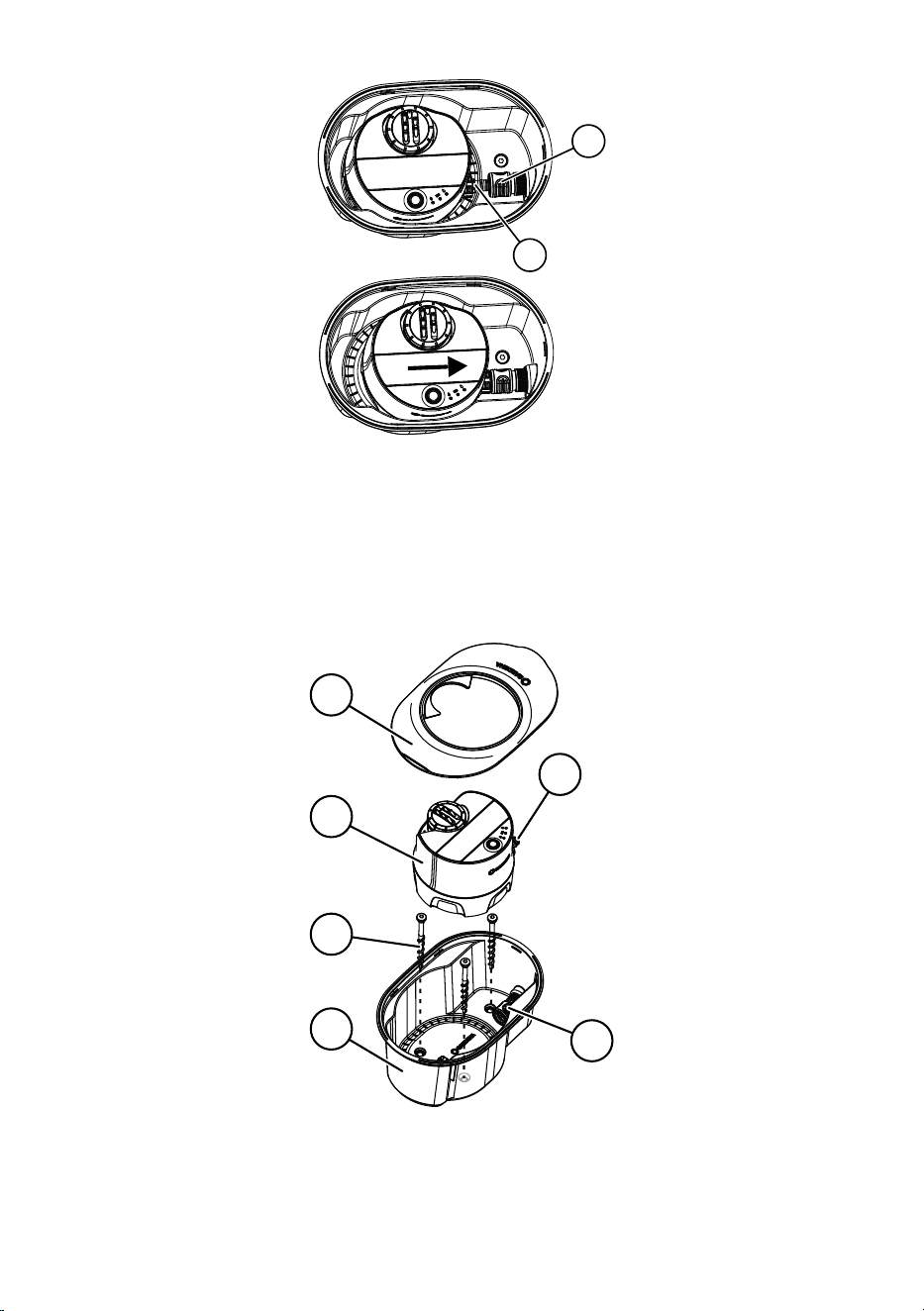
12. Place the AquaPrecise
in the Pipeline box
so that the
connection
of the AquaPrecise faces towards the slot
ofthe Pipeline box
.
13. Push the AquaPrecise
towards the slot
until the con-
nection
locks into the slot
.
5
2
3
6
4
7
14. Fit the box cover
onto the Pipeline box
.

18
3. OPERATION
3.1 Programming the AquaPrecise
3.1.1 Setting up the AquaPrecise
Use the GARDENA Bluetooth
®
App to set up the AquaPrecise.
1. Connect the AquaPrecise to the GARDENA Bluetooth
®
App
(see “2.5 Selecting the right location for the AquaPrecise”).
2. Open the GARDENA Bluetooth
®
App on your mobile device
and continue with the setup process.
Note: The GARDENA Bluetooth
®
App will now also guide you
through the next steps for setting up the AquaPrecise.
3.1.2 Functions of the GARDENA Bluetooth
®
App
The GARDENA Bluetooth
®
App includes the following functions
for the AquaPrecise:
• Setting locations
• Programming a contour
• Creating schedules
• Water consumption statistics
• Winter mode

19
3.1.3 Programming a contour
Up to five individual contours can be programmed on the
AquaPrecise using the GARDENA Bluetooth
®
App.
Each contour is assigned to a location.
A maximum of 15 schedules can be created to meet various
requirements.
Note: The GARDENA Bluetooth
®
App will now also guide you
through the next steps for programming.
Programming sequence:
Defining sites
Programming
contours
Creating
schedules
A contour consists of no fewer than two corner points and no more
than 360 corner points. Contours must be programmed in clock-
wise direction. Always start with the first contour point on the far
left of the required irrigation area. Contour points can be changed
afterwards.
Note: The AquaPrecise permanently regulates the water distri-
bution rate using the “flowBalance valve” and the contour sprinkler
head’s rotation speed. This enables water do be distributed evenly
without areas overlapping.
The GARDENA-supported schedule also considers the contour
size and adjusts irrigation times accordingly. For a manual sched-
ule, the irrigation time and frequency is set (irrigation volume in l/m²
is displayed in the GARDENA Bluetooth
®
App)
3.1.4 Upstream valve mode
The AquaPrecise can also be combined with upstream valves
(e. g. GARDENA Water Control).
The integrated valve will be permanently open in this case. The
AquaPrecise starts contour irrigation as soon as the integrated
turbine detects a water flow.

20
3.2 Manual button
Lw
Lb
Lp
M
Pressing the manual button can perform the following actions:
• press briefly: activates AquaPrecise, battery status display
• press twice briefly (within ten seconds): starts manual
irrigation
• hold down button (approx. 3 seconds): activates connection
mode
• hold down button (approx. 30 seconds): restarts the device
3.2.1 Manual irrigation
→ Briefly press the manual
button twice(within ten seconds).
Manual irrigation starts, and the irrigation LED
flashes.
The manual irrigation time is preset in the GARDENA Bluetooth
®
App. The contour most recently selected in the GARDENA
Bluetooth
®
App is always irrigated by default. The most recently
created contour is selected if manual irrigation has not yet been
carried out using the GARDENA Bluetooth
®
App.
If irrigation that has been started manually overlaps with a pro-
grammed schedule, the programmed start time is overridden.
Active irrigation can be stopped by briefly pressing the manual
button.

21
3.2.2 Bluetooth
®
connection mode
Close-range interaction between the AquaPrecise and themobile
device is referred to as Bluetooth
®
.
1. Hold down the manual
button on the AquaPrecise for
threeseconds.
Connection mode is activated for three minutes and the
Bluetooth LED
flashes blue during this period.
2. Connect the AquaPrecise to the GARDENA Bluetooth
®
App
(see “2.5 Selecting the right location for the AquaPrecise”).
3.2.3 Restarting devices
The AquaPrecise can be restarted.
→ Hold down the manual
button on the AquaPrecise
for 30 seconds.
All LEDs on the AquaPrecise light up and it will restart.

22
3.3 LED display
Lw
Lb
Lp
M
3.3.1 Irrigation LED
• Lights up blue for ten seconds: active irrigation
3.3.2 Battery LED
After briefly pressing the manual
button:
• Lights up green: battery > 20 % charged
• Lights up red: battery ≤ 20 % (irrigation cannot be started)
• Flashes red: battery ≤ 5 % (current irrigation is suspended)
When operating with an upstream valve (e. g. GARDENA Water
Control): internal valve closes if battery charge is ≤5 % and opens
if it is ≥ 20 %
During the charging process:
• Flashes orange: battery is charging
• Lights up green: battery is charged
3.3.3 Bluetooth LED
• Flashes blue: Bluetooth connection mode active
• Lights up blue for ten seconds: Connection with mobile device
active
23
4. MAINTENANCE
4.1 Removing / disconnecting the AquaPrecise
We recommend removing the AquaPrecise
from the mounting
plate
or removing it from the Pipeline box
before carrying out
any cleaning work.
4.1.1 (Art. No. 16000) Removal from the mounting plate
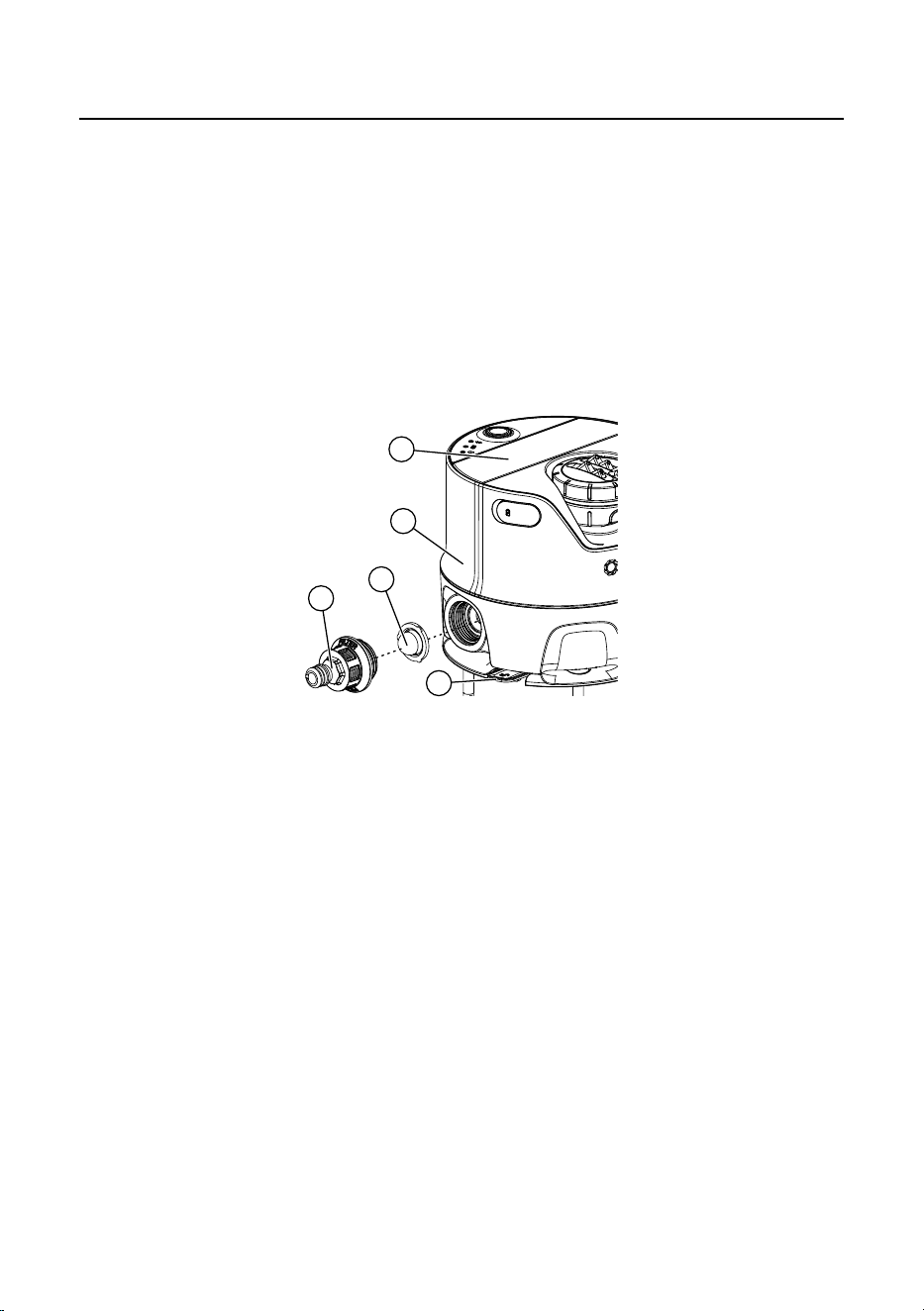
3
e
12
4
11
1. Press the locking mechanism
and pull the AquaPrecise
out of the connection
towards the rear.
2. Remove the AquaPrecise
from the mounting plate
by
pulling it upwards.
24
4.1.2 (Art. No. 16001 / 16010) Removal from the
Pipelinebox
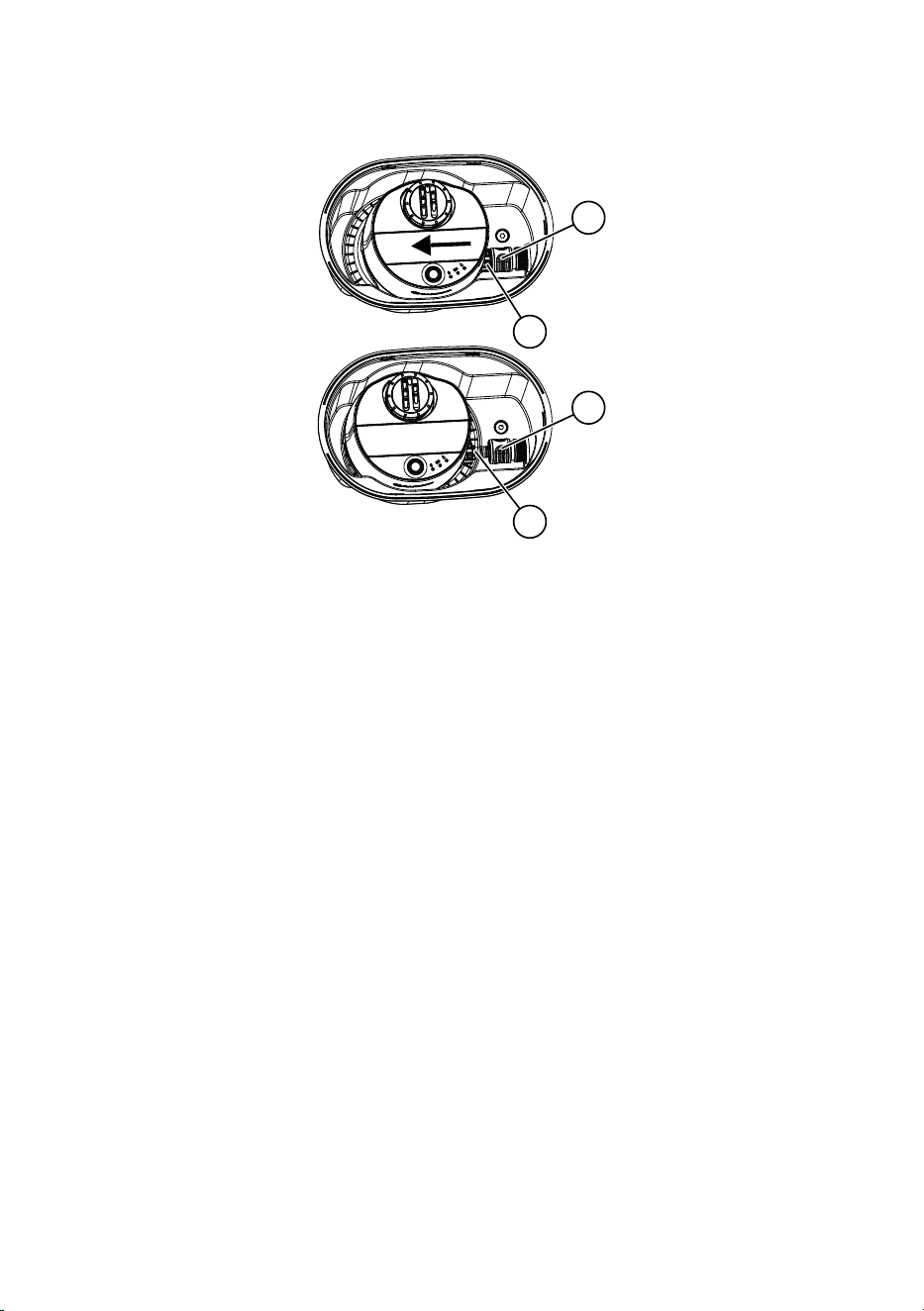
4
7
4
7
1. Pull the locking mechanism of the slot
towards the rear
andpull the AquaPrecise
forwards until the connection
isfree.
2. Remove the AquaPrecise
by pulling it upwards out of the
Pipeline box
.
25
4.2 Cleaning the solar cell
To ensure that the battery is always sufficiently charged, the solar
cell
must be cleaned if it is dirty.
Do not use corrosive or abrasive cleaning agents.
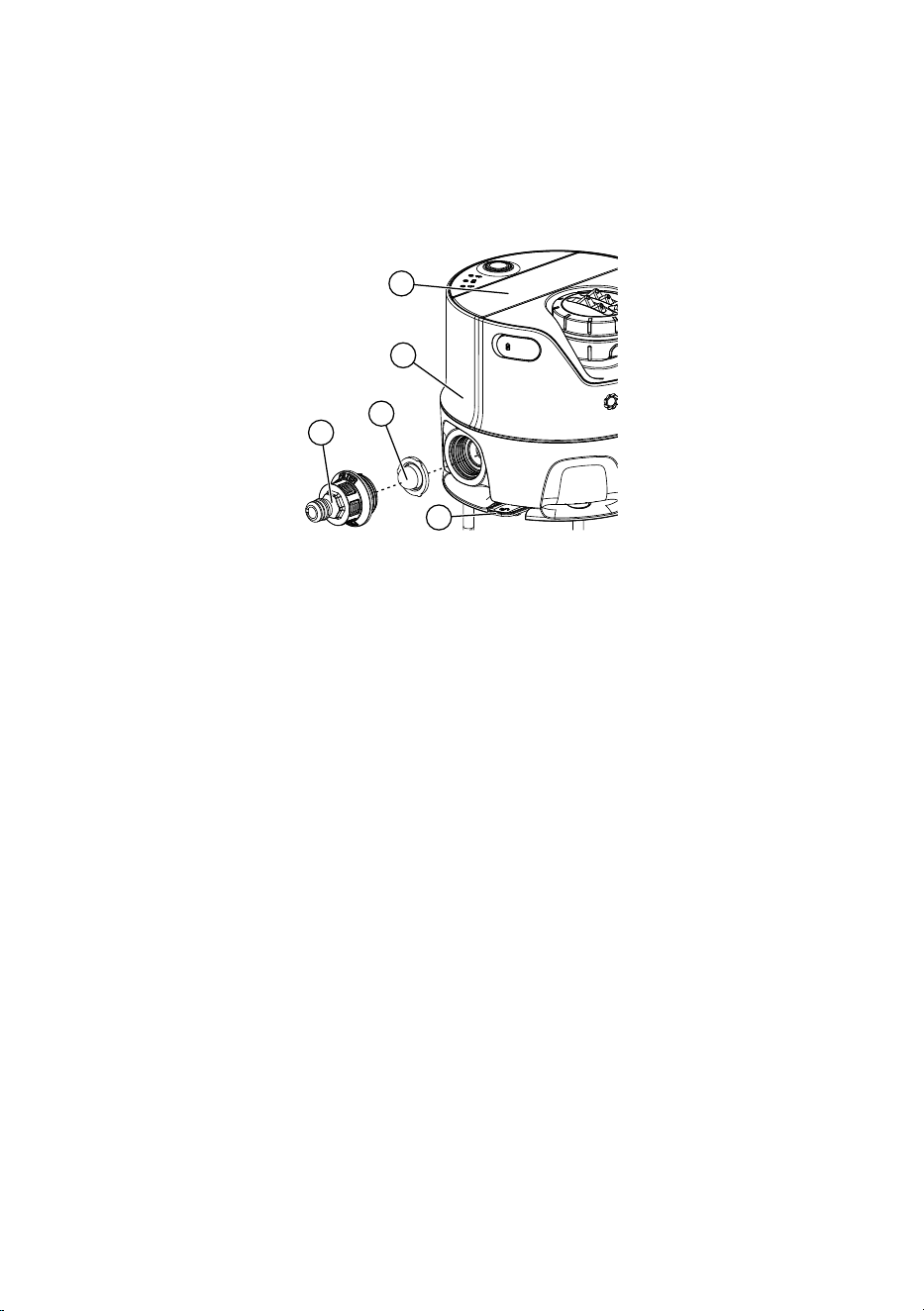
3
e
12
4
11
→ Use a damp cloth to clean the solar cell
.
26
4.3 Cleaning the dirt filter
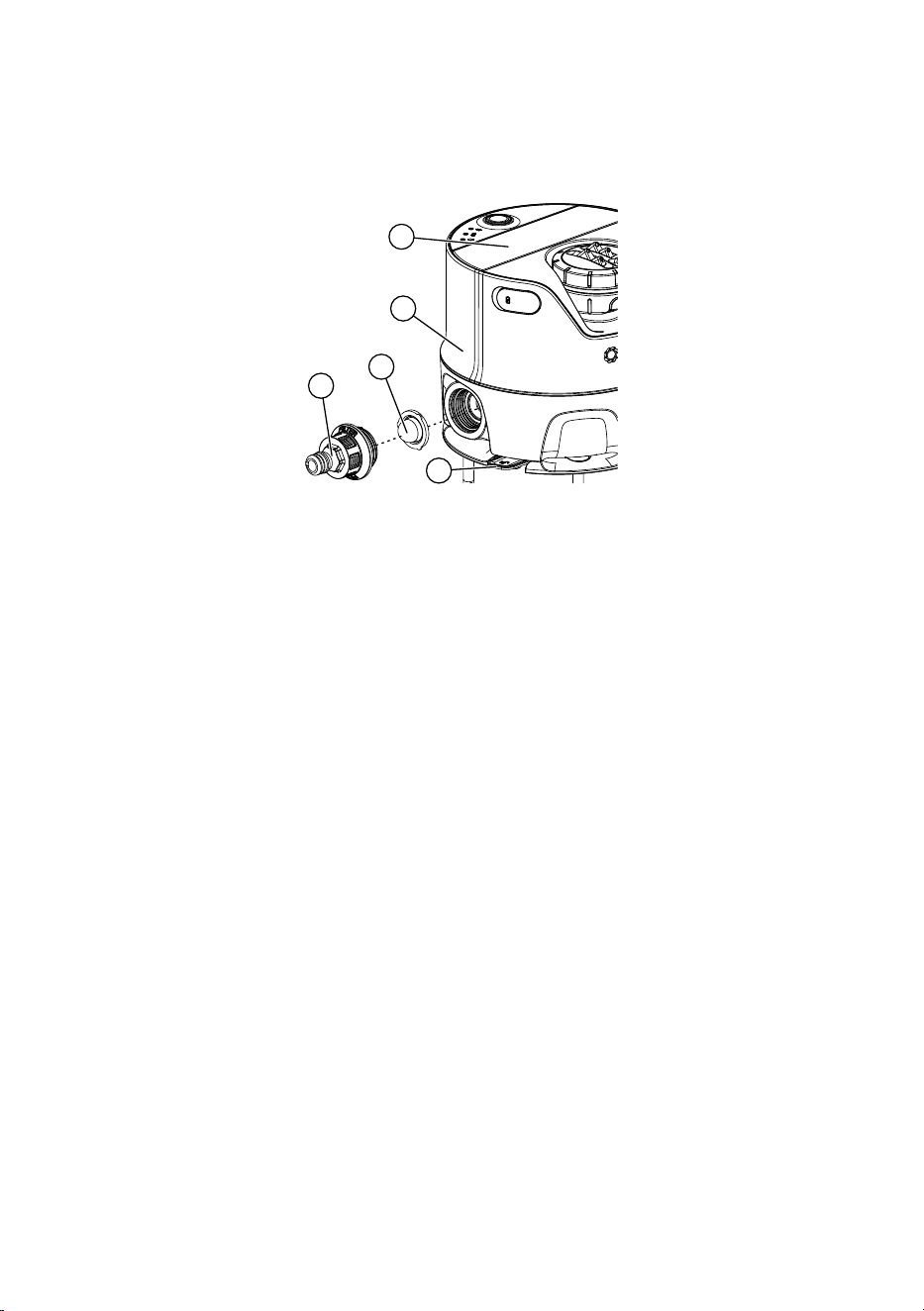
If the irrigation range decreases, this could indicate that the dirt filter
is dirty.
3
e
12
4
11
1. Unscrew the connection
from the AquaPrecise
.
2. Pull the dirt filter
out of the AquaPrecise
.
3. Clean the dirt filter
and the connection
under running
water.
4. Reinstall the dirt filter
by following the above steps in
reverse order.
27
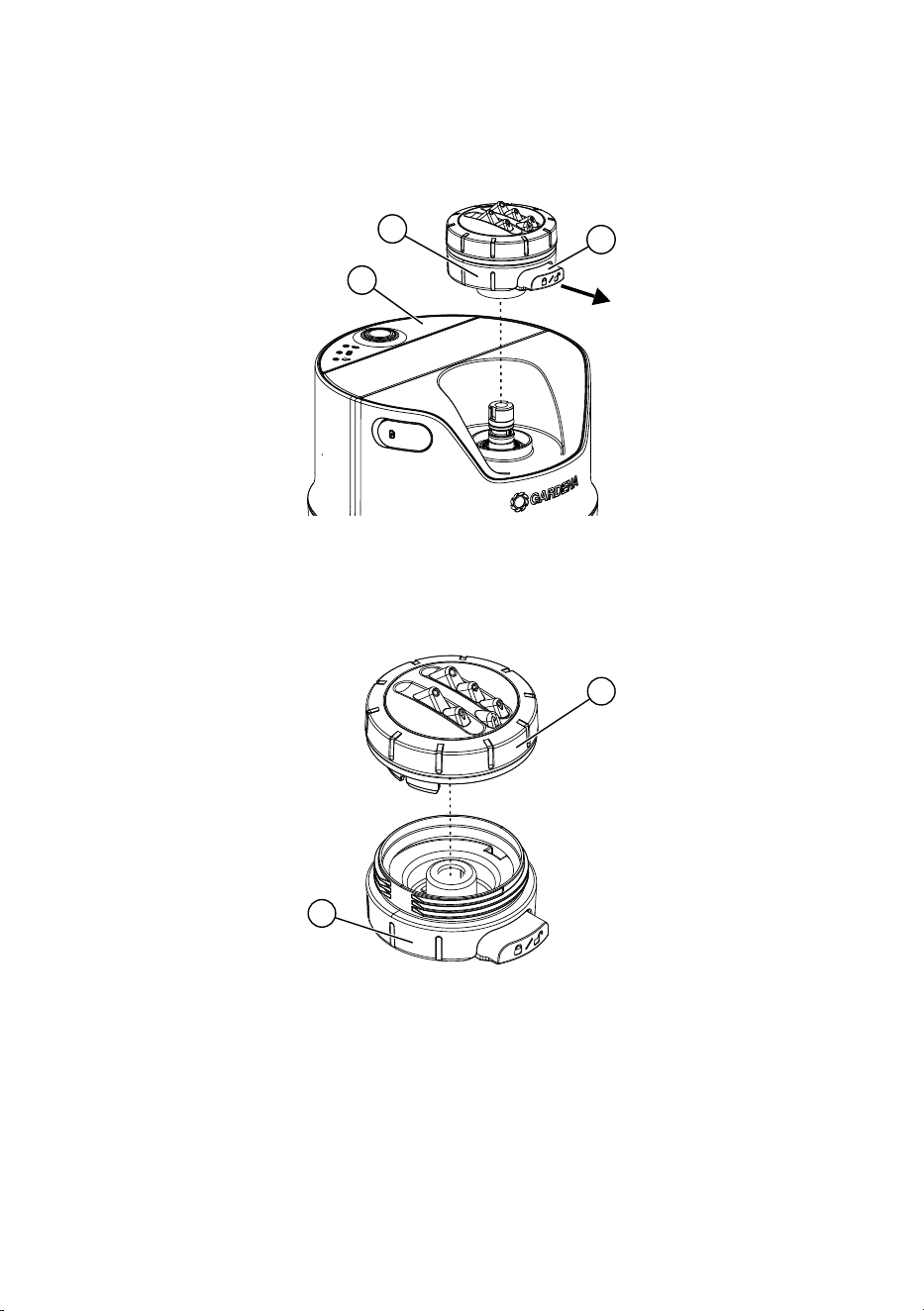
4.4 Cleaning the sprinkler head
An uneven irrigation pattern may indicate that the sprinkler head is
dirty.
3
13
a
1. Pull out the locking mechanism
on the sprinkler head
.
2. Remove the sprinkler head
by pulling it upwards from the
AquaPrecise
.
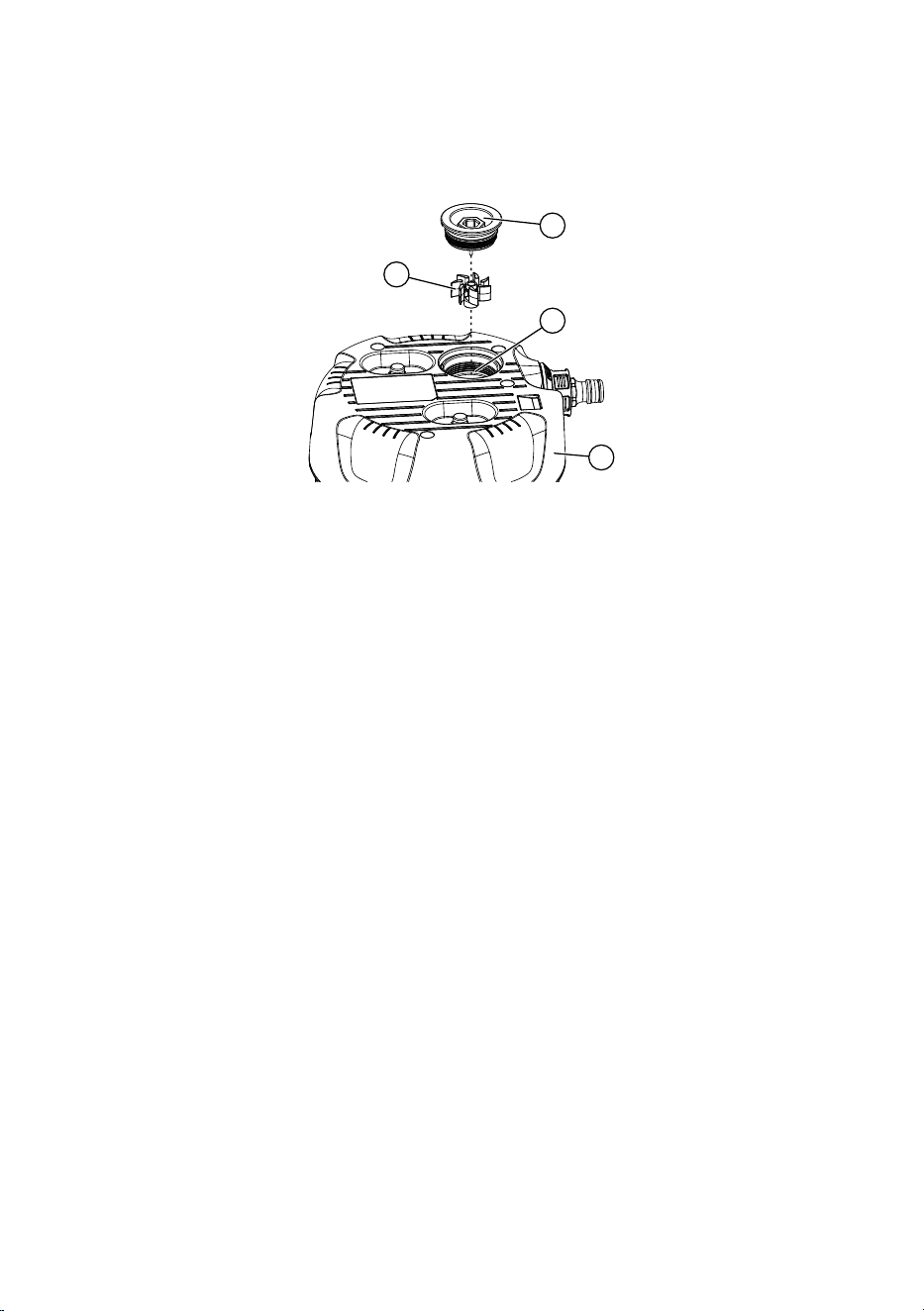
13
14
3. Unscrew the nozzle cover
from the sprinkler head
.
4. Clean the nozzle cover
and the sprinkler head
under
running water.
5. Reinstall the sprinkler head
by following the above steps in
reverse order.
6. Push the locking mechanism
back into the sprinkler head
.
28
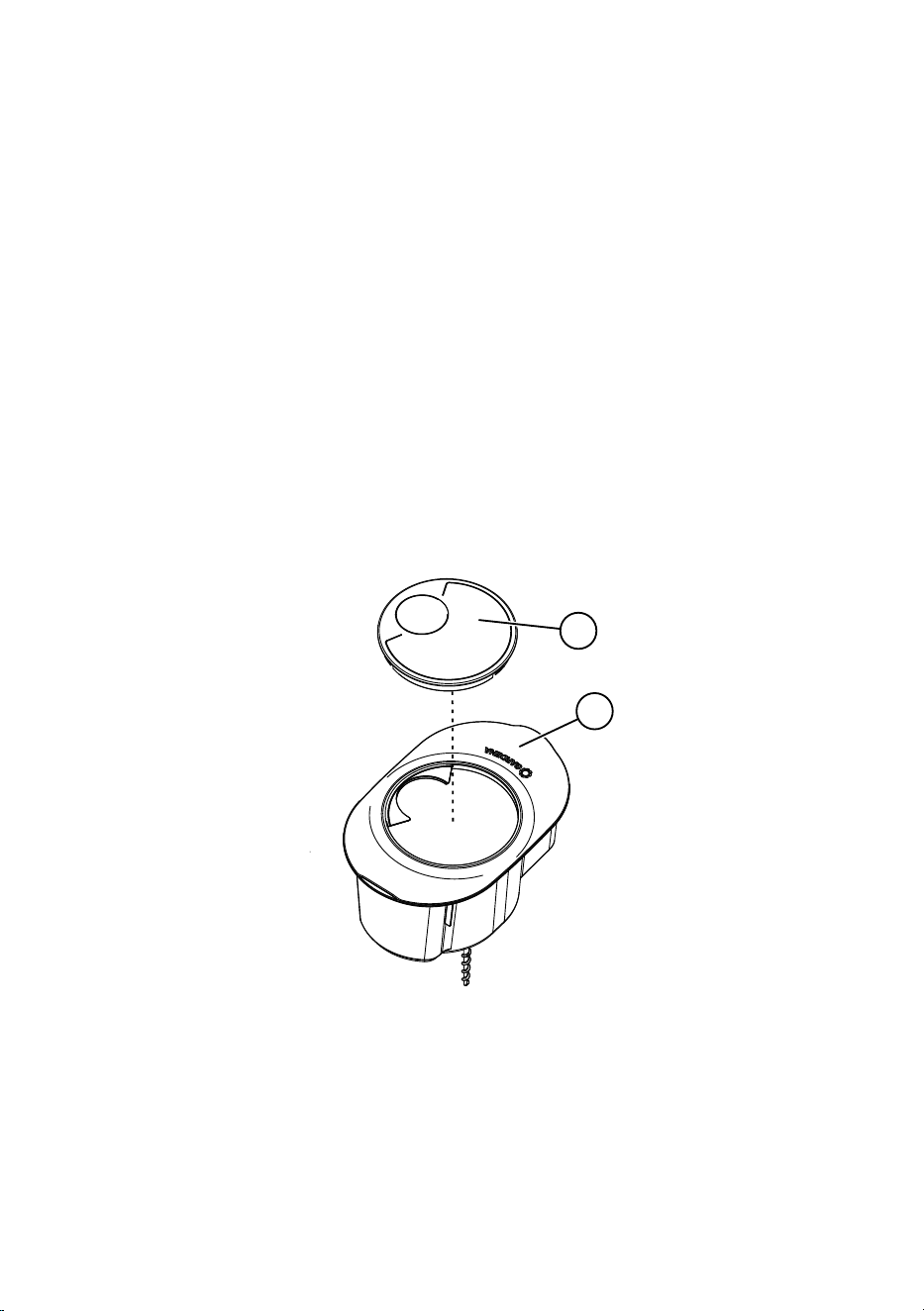
4.5 Cleaning the turbine area
If the irrigation range increases, this could indicate that the flow
turbine area is dirty.
17
19
15
16
1. Unscrew the turbine cover
from the bottom
of the
AquaPrecise
.
2. Remove the turbine
from the turbine cover
.
3. Rinse out the turbine area
with water.
4. Clean the turbine cover
and turbine
under running water.
5. Reinstall the turbine cover
and turbine
by following the
above steps in reverse order.

29
5. STORAGE
5.1 Shutting down
The product must be stored away from children.
The AquaPrecise is not frost-proof and must therefore be stored
in a frost-proof environment over the winter.
5.1.1 (16000) AquaPrecise above ground
1. Shut off the water source (tap) or detach the water supply from
the pump.
2. Connect the AquaPrecise to the GARDENA Bluetooth
®
App
(see “2.5 Selecting the right location for the AquaPrecise”).
3. In the GARDENA Bluetooth
®
App, go to the settings and
open the valve and suspend the schedules.
4. Disconnect the hose from the AquaPrecise.
5. Remove the AquaPrecise from the mounting plate
(see“4.1.1 (Art. No. 16000) Removal from the mounting
plate”).
6. Clean the AquaPrecise (solar cell, dirt filter, sprinkler head
andturbine area), see “4. MAINTENANCE”.
7. Charge the battery via the USB port
(see “2.3 Charging the
battery via the USB port”).
8. Store the AquaPrecise in a dry, enclosed and frost-proof
location.
9. Select “Winter mode” in the GARDENA Bluetooth
®
App.
The AquaPrecise is in standby mode to save energy and the
schedules are suspended.
30
5.1.2 (16001 / 16010) AquaPrecise underground
1. Shut off the water source (tap) or detach the water supply from
the pump.
2. Connect the AquaPrecise to the GARDENA Bluetooth
®
App
(see “2.5 Selecting the right location for the AquaPrecise”).
3. In the GARDENA Bluetooth
®
App, go to the settings and
open the valve and suspend the schedules.
4. Wait until the water drains away via the GARDENA drain
valve (Art. No. 2760) or purge the system using the
GARDENA drain valve set (Art. No. 2770).
5. Remove the AquaPrecise from the Pipeline box
(see“4.1.2 (Art. No. 16001/16010) Removal from the
Pipeline box”).
6. Clean the Pipeline box
.
18
6
7. Place the box lid
on the box cover
.
This prevents objects or animals from falling into the installation
box.
8. Clean the AquaPrecise (solar cell, dirt filter, sprinkler head and
turbine area), see “4. MAINTENANCE”.

31
9. Charge the battery via the USB port
(see “2.3 Charging the
battery via the USB port”).
10. Store the AquaPrecise in a dry, enclosed and frost-proof
location.
11. Select “Winter mode” in the GARDENA Bluetooth
®
App.
The AquaPrecise is in standby mode to save energy and the
schedules are suspended.
5.1.3 Reactivating AquaPrecise after winter
The Bluetooth connection is disabled in winter mode (standby) to
save energy.
1. Charge the battery via the USB port
(see “2.3 Charging the
battery via the USB port”).
2. Briefly press the manual
button on the AquaPrecise.
The AquaPrecise is activated and the battery LED
shows the
battery’s charge status (see “3.3.2 Battery LED
“).
3. Connect the AquaPrecise to the GARDENA Bluetooth
®
App (see “2.6 Connecting the AquaPrecise to the GARDENA
Bluetooth
®
App”).
The schedules are then automatically reactivated.
32
6. TROUBLESHOOTING
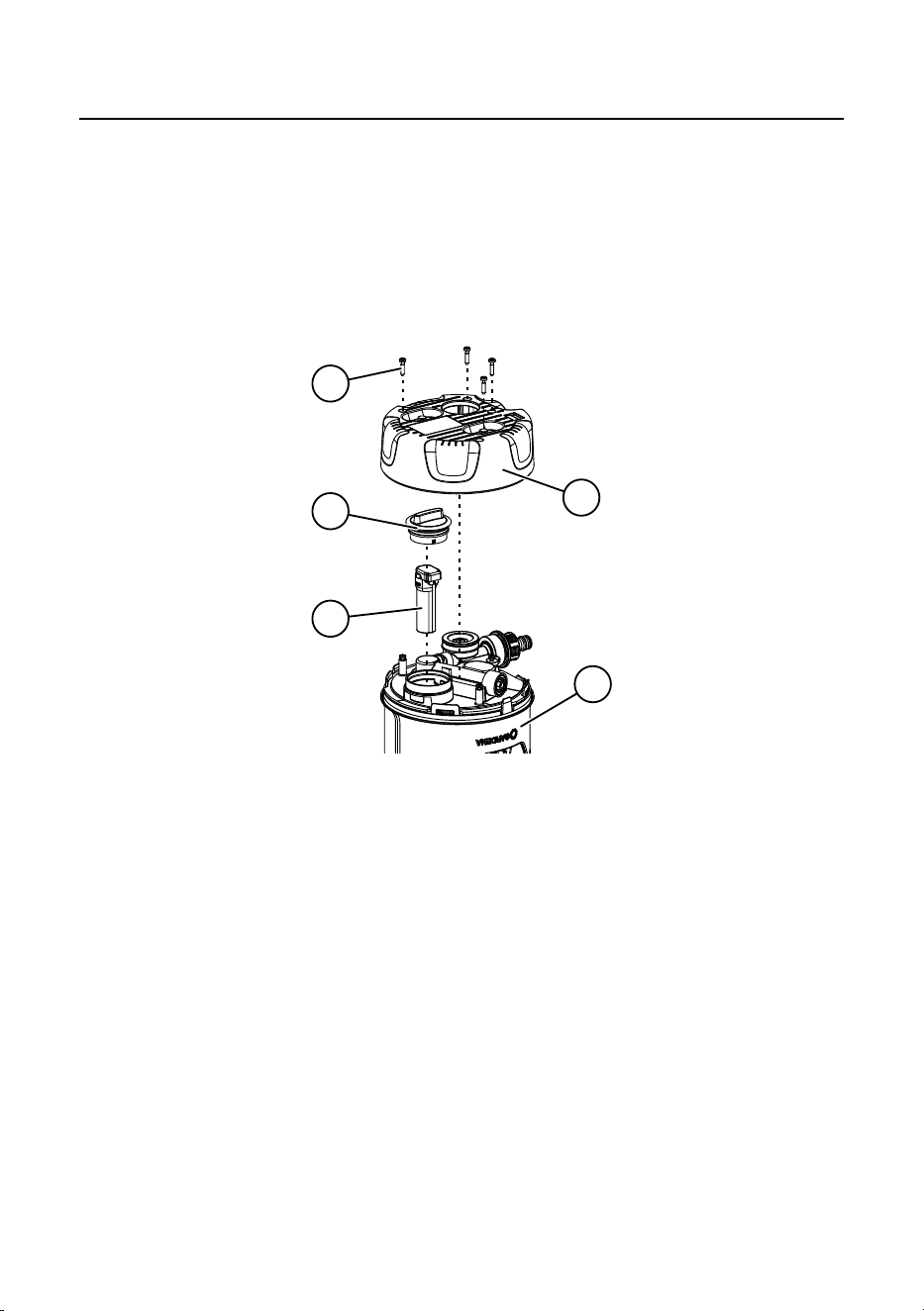
6.1 Replacing the battery
The GARDENA spare parts are available from your GARDENA
dealer or from GARDENA Service.
→ Only use an original GARDENA battery
(Art.No. 16000-00.690.00)
3
21
22
19
20
1. Unscrew the four screws
from the bottom
of the
AquaPrecise
.
2. Remove the bottom
from the AquaPrecise
.
3. Unscrew the battery lid
.
4. Remove the battery
.
5. Install the new battery
by following the above steps in
reverse order.

33
6.2 Error table
Problem Possible cause Remedy
Irrigation range is less
than during initial com-
missioning
The dirt filter is dirty. → Clean the dirt filter.
The tap is not opened far
enough.
→ Open the tap further.
Water pressure is too low. → Increase the water pres-
sure/water supply.
The sprinkler head is dirty. → Clean the sprinkler head.
The irrigation range is pro-
grammed incorrectly.
→ Reprogram the irrigation
range.
Irrigation range is greater
than during initial com-
missioning
The turbine is dirty. → Clean the turbine.
Irrigation pattern is
uneven
The sprinkler head is dirty. → Clean the sprinkler head.
The sprinkler head is
damaged.
→ Contact GARDENA Service.
The AquaPrecise is not
responding
The battery is empty. → Charge the battery via the
USB port.
The protective panel of the
solar cell is dirty or covered.
→ Clean the protective panel
or ensure sufficient sun-
light.
The battery is defective. → Replace the battery.
No irrigation, schedule is
not being carried out
The battery is empty. → Charge the battery via the
USB port.
No water flow. → Activate the water flow.
Bluetooth connection not
possible
Standby mode is active. → Briefly press the manual
button
.
Charging error:
Battery LED
flashes
red
Battery became too hot while
charging.
→ Allow the battery to cool
down.

34
NOTE:
Repairs must only be done by GARDENA service departments or
specialist dealers approved by GARDENA.
→ Please contact your GARDENA service department in the event
of other faults (see reverse).

35
7. TECHNICAL DATA
AquaPrecise Unit Value
(Art.No. 16000 / 16001 / 16010)
Lithium-ion battery mAh 5000
Charging time via USB port
(depending on the battery
charger)
h 3 – 8
Tap connector connection
(Art.No. 16001 / 16010)
Inch 3/4
Operating temperature range °C 5 – 60
Max. water temperature °C 30
Pressure range:
AquaPrecise
GARDENA Pipeline system
bar
bar
2 – 12
2 – 6
Irrigation range at 2bar m 2 – 10
Irrigation area at 2bar m² 320
Irrigation sector ° 25 – 360
Water flow:
Min. range
Max. range
l/h
l/h
200
600

36
8. ACCESSORIES / SPARE PARTS
GARDENA
Pipelinebox
For underground installation. Art. No. 16021
GARDENA
Mountingplate
For above-ground installation. Art. No. 16022
GARDENA
Wintercover
As a replacement for a damaged winter
cover.
Art. No. 16001-00.600.16
GARDENA
AquaPrecise nozzle
As a replacement for a damaged nozzle. Art. No. 16000-00.670.00
GARDENA
SpareBattery
As a replacement for a defective
battery.
Art. No. 16000-00.690.00
9. SERVICE
Up-to-date contact information can be found online at:
www.gardena.com/contact
37
10. DISPOSAL
10.1. Disposing of the product
(in accordance with Directive 2012/19/EU / S.I. 2013 No. 3113)
The product must not be disposed of with normal household waste.
Itmust be disposed of in line with local environmental regulations.
IMPORTANT!
→ Dispose of the product through or via your municipal recycling
collection centre.
10.2. Disposing of the battery
Li-ion
The battery contains lithium-ion cells that should not be disposed of
with normal household waste at the end of its life.
IMPORTANT!
1. Discharge the lithium-ion cells fully (contact GARDENA Service
about this).
2. Ensure that the lithium-ion cell contacts do not short-circuit by
placing tape over them.
3. Dispose of the lithium-ion cells properly at or through your local
recycling collection point.

38
11. ASSIGNMENT OF TRADEMARKS
The Bluetooth
®
word mark and logos are registered trademarks
owned by Bluetooth SIG, Inc. and any use of such trademarks by
GARDENA is under licence.
Apple and the Apple logo are trademarks of Apple Inc., registered
in the United States and other countries.
App Store is a service mark of Apple Inc., registered in the United
States and other countries.
Google and the Google Play logo are trademarks of Google LLC.
Other trademarks and trade names are those of their respective
owners.
39
en EU Declaration of conformity
The undersigned hereby certifies as the authorized representative of the man-
ufacturer, GARDENA Germany AB, PO Box 160 89, SE-103 92, Stockholm,
Sweden, that, when leaving our factory, the unit(s) indicated below is / are in
accordance with the harmonised EU guidelines, EU standards of safety and
product specific standards. This certificate becomes void if the unit(s) is / are
modified without our approval.
Name of the product: Irrigation System /
Pipeline Irrigation System
Type: AquaPrecise
Article number: 16000
16001 / 16010
EU directives: 2006/42/EG
2014/53/EU
2011/65/EU
Harmonised standards: EN ISO 12100
EN 60730-1
EN 60730-2-8
EN IEC 60730-2-8
Deposited documentation: GARDENA Manufacturing GmbH,
Technische Dokumentation, A. Ochs
Hans-Lorenser-Str. 40, D-89079 Ulm
Year of CE marking 2024
Ulm: 31.12.2024
Authorised representative:
Reinhard Pompe
Senior Vice President,
Business Unit Watering
40
en Declaration of Conformity
[only for UK]
The manufacturer, GARDENA Germany AB, PO Box 160 89,
SE-103 92, Stockholm Sweden, hereby certifies, when leaving our factory,
the unit(s) indicated below is / are in accordance with the UK Regulations,
designated standards of safety and product specific designated standards.
This certificate becomes void if the units are modified without our approval.
Description of the product: Irrigation System /
Pipeline Irrigation System
Type: AquaPrecise
Article number: 16000
16001 / 16010
UK regulations: S.I. 2008/1597
S.I. 2017/1206
S.I. 2012/3032
Designated standards: EN ISO 12100
EN 60730-1
EN 60730-2-8
EN IEC 60730-2-8
Deposited documentation: GARDENA Manufacturing GmbH,
Technische Dokumentation, A. Ochs
Hans-Lorenser-Str. 40, D-89079 Ulm
UK Importer: Husqvarna UK Limited
Preston Road, Aycliffe,
County Durham UK DL5 6UP
Ulm: 31.12.2024
Authorised representative:
Reinhard Pompe
Senior Vice President,
Business Unit Watering

41
Deutschland / Germany
GARDENA Manufacturing GmbH
Central Service
Hans-Lorenser-Straße 40
D-89079 Ulm
Produktfragen:
(+49) 731 490-123
Reparaturen:
(+49) 731 490-290
www.gardena.com/de/kontakt
Albania
KRAFT SHPK
Autostrada Tirane-Durres
Km 7
1051 Tirane
Phone: (+355) 69 877 7821
Argentina
ROBERTO C. RUMBO S.R.L.
Predio Norlog
Lote 7
Benavidez. ZC: 1621
Buenos Aires
Phone: (+54) 11 5263-7862
Armenia
AES Systems LLC
Marshal Babajanyan Avenue 56/2
0022 Yerevan
Phone: (+374) 60 651 651
masisohanyan@icloud.com
Australia
Husqvarna Australia Pty. Ltd.
Locked Bag 5
Central Coast BC
NSW 2252
Phone: (+ 61) (0) 2 4352 7400
customer[email protected]
Austria / Österreich
Husqvarna Austria GmbH
Industriezeile 36
4010 Linz
Tel.: (+43) 732 77 01 01-485
www.gardena.com/at/service/beratung/
kontakt/
Azerbaijan
Proqres Xüsusi Firması
Aliyar Aliyev 212, Baku, Azerbaijan
Sales: +994 70 326 07 14
Aftersales: +994 77 326 07 14
www.progress-garden.az
info@progress-garden.az
Bahrain
M.H. Al-Mahroos
BUILDING 208, BLOCK 356,
ROAD 328
Salhiya
Phone: +973 1740 8090
Belarus / Беларусь
ООО «Мастер Гарден»
220118, г. Минск,
улица Шаранговича, дом 7а
Тел. (+375) 17 257 00 33
mg@mastergarden.by
Belgium
Husqvarna Belgium nv
Gardena Division
Leuvensesteenweg 542
Planet II E
1930 Zaventem
België
Bosnia / Herzegovina
Silk Trade d.o.o.
Poslovna Zona Vila Br. 20
Phone: (+387) 61 165 593
Brazil
Nordtech Maquinas e Motores Ltd.
Avenida Juscelino Kubitschek
de Oliveira Curitiba
3003 Brazil
Phone: (+55) 41 3595-9600
contato@nordtech.com.br
www.nordtech.com.br
Bulgaria
AGROLAND България АД
бул. 8 Декември, № 13
Офис 5
1700 Студентски град
София
Тел.: (+359) 24 66 6910
info@agroland.eu
Canada / USA
GARDENA Canada Ltd.
125 Edgeware Road
Unit 15 A
Brampton L6Y 0P5
ON, Canada
Phone: (+1) 905 792 93 30
gardena.customerservice@
husqvarnagroup.com
Chile
REPRESENTACIONES JCE S.A.
AV. DEL VALLE NORTE 857 PISO 4
HUECHURABA, SANTIAGO, CHILE
Phone: (+ 56) 2 2414 2600
China
办公室地址:
上海市长宁区金钟路788号荟聚办公
楼D栋7楼03-05单元
Office Add:
Unit3-5, 7F, Livat Tower D, No.788, Jin
Zhong Rd., Chang Ning Dist., Shanghai,
PRC 200335
Colombia
Equipos de Toyama Colombia SAS
Cra. 68 D No 25 B 86 Of. 618
Edificio Torre Central
Bogota
Phone: +57 (1) 703 95 20 /
+57 (1) 703 95 22
www.toyama.com.co
Costa Rica
Exim CIA Costa Rica
Calle 25A, B°. Montealegre
Zapote
San José
Costa Rica
Phone: (+506) 2221-5654 /
(+506) 2221-5659
Croatia
Husqvarna Austria GmbH
Industriezeile 36
4010 Linz
Phone: (+43) 732 77 01 01-485
service.gardena@husqvarnagroup.com
Cyprus
Pantelis Papadopoulos S.A.
92 Athinon Avenue
Athens
10442 Greece
Phone: (+30) 21 0519 3100
Czech Republic
Gardena
Service Center Vrbno
c/o Husqvarna
Manufacturing CZ s.r.o.
Jesenická 146
79326 Vrbno pod Pradedem
Phone: 800 100 425
Denmark
GARDENA DANMARK
Lejrvej 19, st.
3500 Værløse
Tlf.: (+45) 70 26 47 70
gardenadk@husqvarnagroup.com
www.gardena.com/dk
Dominican Republic
BOSQUESA, S.R.L
Carretera Santiago Licey
Km. 5 ½
Esquina Copal II.
Santiago De Los Caballeros
51000 Dominican Republic
Phone: (+1) 809-562-0476
Egypt
Universal Agencies Co
26, Abdel Hamid Lotfy St.
Giza
Phone: (+20) 3 761 57 57
Estonia
Husqvarna Eesti OÜ
Valdeku 132
EE-11216 Tallinn
Finland
Oy Husqvarna Ab
Juurakkotie 5 B 2
01510 Vantaa
www.gardena.fi
France
Husqvarna France
9/11 Allée des pierres mayettes
92635 Gennevilliers Cedex
France
http://www.gardena.com/fr
N° AZUR: 0 810 00 78 23
(Prix d’un appel local)
Georgia
Transporter LLC
#70, Beliashvili street
0159 Tbilisi, Georgia
Number: (+995) 322 14 71 71
info@transporter.com.ge
www.transporter.com.ge
Service Address and
Im
porter to Great Britain
Husqvarna UK Ltd
Preston Road
Aycliffe Industrial Park
Newton Aycliffe
County Durham
DL5 6UP
Phone: (+44) (0) 344 844 4558
info.gar[email protected]
Greece
Π.ΠΑΠΑΔΟΠΟΥΛΟΣ ΑΕΒΕ
Λεωφ. Αθηνών 92
Αθήνα
Τ.Κ.104 42
Ελλάδα
Τηλ. (+30) 210 5193 100
Hong Kong
Tung Tai Company
151-153 Hoi Bun Road
Kwun Tong, Kowloon
Hong Kong
Phone: (+852) 3583 1662
Hungary
Husqvarna Magyarország Kft.
Ezred u. 1 – 3
1044 Budapest
Phone: (+36) 1 251-4161
vevoszolgalat.husqvarna@
husqvarnagroup.com
Iceland
BYKO ehf.
Skemmuvegi 2a
200 Kópavogur
Phone: (+354) 515 4000
byko@byko.is
MHG Verslun ehf
Víkurhvarf 8
203 Kópavogur
Phone: (+354) 544 4656
India
B K RAMAN AND CO
Plot No. 185, Industrial Area,
Phase-2, Ram Darbar
Chandigarh
160002 India
Phone: (+91) 98140 06530
raman@jaganhardware.com
Iraq
Alshiemal Alakhdar Company
Al-Faysalieah, Near Estate Bank
Mosul
Phone: (+964) 78 18 18 46 75
Ireland
Liffey Distributors Ltd.
309 NW Business Park, Ballycoolen
15 Dublin
Phone: (+353) 1 824 2600
info@liffeyd.com
Israel
HAGARIN LTD.
2 Nahal Harif St.
8122201 Yavne
Phone: (+972) 8-932-0400
Italy
Husqvarna Italia S.p.A.
Centro Direzionale Planum
Via del Lavoro 2, Scala B
22036 ERBA (CO)
Phone: (+39) (0) 31 4147700
[email protected]arna.com
Japan
Husqvarna Zenoah Co. Ltd. Japan
1-9 Minamidai, Kawagoe
350-1165 Saitama
Japan
gardena-jp@husqvarnagroup.com
Kazakhstan
ТОО “Ламэд”
Russian
Адрес: Казахстан, г. Алматы,
ул. Тажибаевой, 155/1
Тел.: (+7) (727) 355 64 00 /
(+7) (700) 355 64 00
Kazakh
Мекен-жайы: Қазақстан,
Алматы қ.,
көш. Тәжібаевой, 155/1
Тел.: (+7) (727) 355 64 00 /
(+7) (700) 355 64 00
Kuwait
Palms Agro Production Co
Al Rai- Fourth Ring Road – Block 56.
P.O Box: 1976 Safat
13020 Al-Rai
Phone: (+965) 24 73 07 45
info@palms-kw.com
Kyrgyzstan
OOsO Alye Maki
Av. Moladaya Guardia 83
720014 Bishkek
Phone: (+996) 312 322115
Latvia
Husqvarna Latvija SIA
Ulbrokas 19A
LV-1021 Rīga
Lebanon
Technomec
Safra Highway (Beirut – Tripoli) Center
622 Mezher Bldg.
P.O.Box 215
Jounieh
Phone: (+961) 9 853527 /
(+961) 3 855481
Lithuania
UAB Husqvarna Lietuva
Ateities pl. 77C
LT-52104 Kaunas
Luxembourg
Magasins Jules Neuberg
39, rue Jacques Stas
Luxembourg-Gasperich 2549
Case Postale No. 12
Luxembourg 2010
Phone: (+352) 40 14 01
Malaysia
Glomedic International Sdn Bhd
Jalan Ruang No. 30
Shah Alam, Selangor
40150 Malaysia
Phone: (+60) 3-7734 7997

42
Malta
I.V. Portelli & Sons Ltd.
85, 86, Triq San Pawl
Rabat - RBT 1240
Phone: (+356) 2145 4289
Mauritius
Espace Maison Ltée
La City Trianon, St Jean
Quatre Bornes
Phone: (+230) 460 85 85
Mexico
AFOSA
Av. Lopez Mateos Sur # 5019
Col. La Calma 45070
Zapopan, Jalisco, Mexico
Phone: (+52) 33 3818-3434
Moldova
Convel SRL
Republica Moldova,
mun. Chisinau,
sos. Muncesti 284
Phone: (+373) 22 857 126
www.convel.md
Mongolia
Soyolj Gardening Shop
Narnii Rd
Ulaanbaatar
14230 Mongolia
Phone: +976 7777 5080
soyolj@magicnet.mn
Morocco
Proekip
64 Rue de la Participation
Casablanca-Roches Noires
20303 Morocco
Phone: (+212) 661342107
Netherlands
Husqvarna Nederland B.V.
GARDENA Division
Postbus 50131
1305 AC ALMERE
Phone: (+31) 36 521 00 10
Neth. Antilles
Jonka Enterprises N.V.
Sta. Rosa Weg 196
P.O. Box 8200
Curaçao
Phone: (+599) 9 767 66 55
New Zealand
Husqvarna New Zealand Ltd.
PO Box 76-437
Manukau City 2241
Phone: (+64) (0) 9 9202410
North Macedonia
Sinpeks d.o.o.
Ul. Kravarski Pat Bb
7000 Bitola
Phone: (+389) 47 20 85 00
Norway
Husqvarna Norge AS
Gardena Division
Trøskenveien 36
1708 Sarpsborg
Northern Cyprus
Mediterranean Home & Garden
No 150 Alsancak, Karaoğlanoğlu
Caddesi Girne
Phone: (+90) 392 821 33 80
info@medgardener.com
Oman
General Development Services
PO 1475, PC - 111
Seeb
111 Oman
Phone: 96824582816
Paraguay
Agrofield SRL
AV. CHOFERES DEL CHACO
1449 C/25 DE MAYO
Asunción
Phone: (+595) 21 608 656
consultas@agrofield.com.py
Peru
Sierras y Herramientas Forestal SAC
Av. Las Gaviotas 833, Chorrillos
Lima
Phone: (+51) 1 2 52 02 52
www.siersac.com
Philippines
Royal Dragon Traders Inc
10 Linaw Street, Barangay
Saint Peter Quezon City
1114 Philippines
Phone: (+63) 2 7426893
aida.fernande[email protected]
Poland
Gardena Service Center Vrbno
c/o Husqvarna Manufacturing CZ
s.r.o. Jesenická 146
79326 Vrbno pod Pradedem
Czech Republic
Phone: (22) 336 78 90
Portugal
Husqvarna Portugal, SA
Lagoa - Albarraque
2635 - 595 Rio de Mouro
Phone: (+351) 21 922 85 30
Fax: (+351) 21 922 85 36
Romania
Madex International Srl
Soseaua Odaii 117 - 123,
RO 013603 Bucureşti, S1
Phone: (+40) 21 352 7603
Russia / Россия
ООО „Хускварна“
141400, Московская обл.,
г. Химки,
улица Ленинградская,
владение 39, стр.6
Бизнес Центр
„Химки Бизнес Парк“,
помещение ОВ02_04
http://www.gardena.ru
Saudi Arabia
SACO
Takhassusi Main Road
P.O. Box: 86387
Riyadh 12863
40011 Saudi Arabia
Phone: (966) 11 482 8877
Al Futtaim Pioneer Trading
5147 Al Farooq Dist.
Riyadh 7991
Phone: (+971) 4 206 6700
Serbia
Domel d.o.o.
Slobodana Đurića 21
11000 Belgrade
Phone: (+381) 11 409 57 12
Singapore
Hy-Ray PRIVATE LIMITED
40 Jalan Pemimpin
#02-08 Tat Ann Building
Singapore 577185
Phone: (+65) 6253 2277
info@hyray.com.sg
Slovak Republic
Gardena
Service Center Vrbno
c/o Husqvarna
Manufacturing CZ s.r.o.
Jesenická 146
79326 Vrbno pod Pradedem
Phone: 0800 154044
Slovenia
Husqvarna Austria GmbH
Industriezeile 36
4010 Linz
Phone: (+43) 732 77 01 01-485
service.gardena@husqvarnagroup.com
South Africa
Husqvarna South Africa (Pty) Ltd
Lifestyle Business Park –
Ground Floor Block A Cnr
Beyers Naude Drive and Ysterhout
Road Randpark Ridge, Randburg
Phone: (+27) 10 015 5750
South Korea
Kyung Jin Trading Co., Ltd
8F Haengbok Building, 210,
Gangnam-Daero 137-891 Seoul
Phone: (+82) 2 574 6300
Spain
Husqvarna España S.A.
Calle de Rivas nº 10
28052 Madrid
Phone: (+34) 91 708 05 00
atencioncliente@gardena.es
Sri Lanka
Hunter & Company Ltd.
130 Front Street
Colombo
Phone: 94-11 232 81 71
Suriname
Deto Handelmaatschappij N.V.
Kernkampweg 72-74
P
.O. Box: 12782
Paramaribo
Suriname
Phone: (+597) 43 80 50
info@deto.sr
Sweden
Husqvarna AB /
GARDENA Sverige
Drottninggatan 2
561 82 Huskvarna
Sverige
Phone: (+46) (0) 36-14 60 02
Switzerland / Schweiz
Husqvarna Schweiz AG
Consumer Products
Industriestrasse 10
5506 Mägenwil
Phone: (+ 41) (0) 62 887 37 90
Taiwan
Hong Ying Trading Co., Ltd.
No. 46 Wu-Kun-Wu Road
New Taipei City
Phone: (+886) (02) 2298 1486
Tajikistan
ARIERS JV LLC
39, Ayni Street, 734024
Dushanbe, Tajikistan
Thailand
Spica Co. Ltd
243/2 Onnuch Rd., Prawat
Bangkok
10250 Thailand
Phone: (+66) (0)2721 7373
Tunisia
Société du matériel agricole et maritime
Nouveau port de peche de Sfax Bp 33
Sfax 3065
Phone: (+216) 98 419047/
(+216) 74 497614
Türkiye
Dost Bahçe
Yunus Mah. Adil Sk. No:3
Kartal
Istanbul
34873 Türkiye
Phone: (+90) 216 389 39 39
Turkmenistan
I.E. Orazmuhammedov Nurmuhammet
80 Ataturk,
BERKARAR Shopping Center,
Ground floor, A77b,
Ashgabat 744000
TURKMENISTAN
Phone: (+993) 12 468859
Mob: (+993) 62 222887
info@jayhyzmat.com /
bekgiye[email protected]
www.jayhyzmat.com
UAE
Al-Futtaim ACE Company
L.L.C Building, Al Rebat Street
Festival City, Dubai
7880 UAE
Phone: (+971) 4 206 6700
Ukraine / Україна
АТ «Альцест»
вул Петропавлівська 4
08130, Київська обл.
Києво-Святошинський р-н. с.
Петропавлівська Борщагівка Україна
Тел.: (+38) 0 800 503 000
Uruguay
FELI SA
Entre Ríos 1083
11800 Montevideo
Phone: (+598) 22 03 18 44
info@felisa.com.uy
Uzbekistan
AGROHOUSE MChJ
O’zbekiston, 111112
Toshkent viloyati
Toshkent tumani
Hasanboy QFY, THAY yoqasida
Phone: (+998)-93-5414141 /
(+998)-71-2096868
info@agro.house
www.agro.house
Vietnam
Vision Joint Stock Company
BT1-17, Khu biet thu –
Khu Đoan ngoai giao Nguyen Xuan Khoat
Xuan Đinh, Bac Tu Liem
Hanoi, Vietnam
Phone: (+8424)-38462833/34
Zimbabwe
Cutting Edge
159 Citroen Rd, Msasa
Harare
Phone: (+263) 8677 008685
16000-20.962.01/12.24
© GARDENA Manufacturing GmbH
D-89079 Ulm
https://www.gardena.com