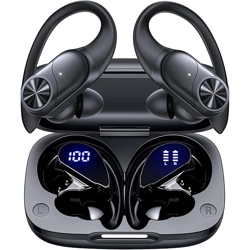

T60 User Manual
True Wireless Earbuds
❹
02 03
Overview
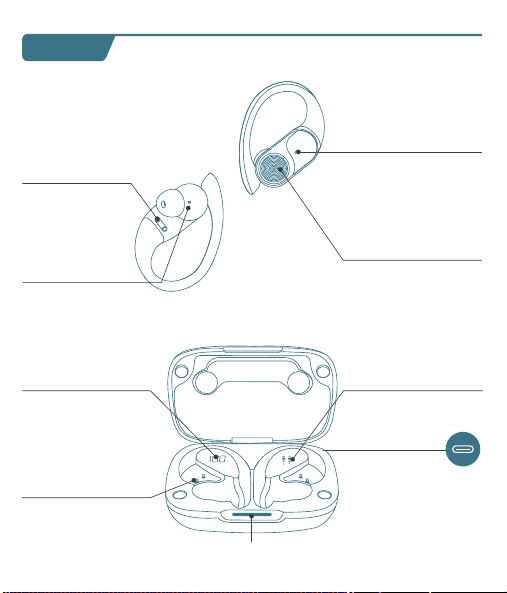
Type-C
Charging Port
Multi-functional
Button (MFB)
LED Indicator
of Earbud
Charging Contacts
Microphone
Power of
Charging Case
Earbud L&R
Charging Status
Charging Pins
Power Status
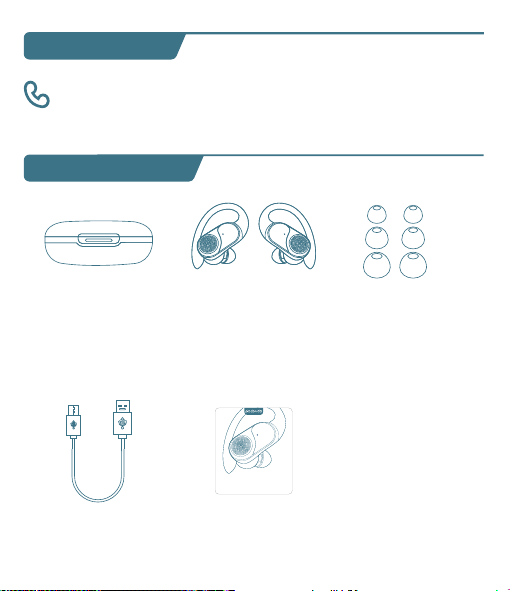
User Manual x1
Charging Case x1
Type-C
Charging Cable x1
Ear Tips Set x3
(Size M has been
preinstalled on earbuds)
Earbuds x2
What's in the box?
S
M
L
T60 User Manual
True Wireless Earbuds
Customer Service
06 07 08
First-use
1. Before the first use, please tear off the isolating film on the earbuds.
Put the earbuds into the case, then charge both earbuds and charging
case via supplied Type-C charging cable for at least 10mins (or after not
use for a long time), do not take out the earbuds during this period.
Wearing
1. Choose the Ear Tips that fit your ears best.
2. Insert the earbuds into the inner canal of your ears and turn gently
until you find the most comfortable and secure position.
Bluetooth Pairing
1. Open the charging case, and pick up the earbuds from the charging
case for 3 seconds to enter Bluetooth pairing mode.
09
Each time you power on your earbuds, they will automatically connect
to your last successfully connected device if available within the
Bluetooth range. If you wanna switch between devices, please first turn
off the Bluetooth of the last device.
10
10mins
Remove
S
M
L
T60
T60
MY DEVICES
T60
xxxxx
xxxxxxx
MY DEVICES
OTHER DEVICES
* When successfully connected, you will hear the prompt "connected"
and the LED indicators will turn off.
12:00
Bluetooth
Bluetooth
T60
Connected
12:00
Name
Disconnect
Forget This Device
Bluetooth
T60
Device Type
12:00
Bluetooth
Bluetooth
T60
Not Connected
MY DEVICES
12:00
Bluetooth
Bluetooth
First Device
Second Device
3s
2. Select "T60" on your device's Bluetooth list to connect.
Power On
2s
Tears off
the insulation film
MY DEVICES
12:00
Settings
APPLE ID
WLAN
xxxxx
Bluetooth
Off
T60
xxxxx
xxxxxxx
MY DEVICES
OTHER DEVICES
* If you don't see your buds in the list, you might need to reset the buds.
1. Go to the Bluetooth settings on the other device. For example, on
your phone, go to Settings Bluetooth.
2. Tap or click your earphones on the list of discovered devices.
Mono mode
◆ When Bluetooth connected, you can use either one of the earbuds
only by placing the other one into the charging case.
◆ When powered on and connected, if either one of the earbuds is out
of battery and powered off, you can keep using the other one.
◆ When you are on a call, place either one of the earbuds into the
charging case, and the microphone in the other earbud will be activated.
T60 T60
If you feel that the sound of your earbuds are too low, please follow the
steps below to adjust the volume:
❶ Long Press the "R" earbud to maximize the volume of the earbuds
until you hear a "du" sound.
❷ Increase the volume of your Android devices.
* This is only applicable to situations where the volume of the earbuds
and the Android devices are not synchronized.
11
Reset
You might need to reset the earbuds if you experience any connectivity
problems or function issues.
❶ Take the earbuds out for 5mins to consume some battery of both
buds. (Can't be reset if the earbuds are fully charged)
❷ Place the earbuds in the charging case and earbuds blink red.
❸ Press and hold the button on the buds for 8 seconds until the LED
indicators flash red-white 3 times. This confirms that the reset was
successful and your earbuds can be connected normally.
When resetting the earbuds, make sure the earbuds are properly
connected with charging points in the case, or it may cause resetting
failure.
hold for 8s
2. The earbuds are installed with a pair of size M ear tips by default. You
can select other suitable sizes for a secure fit.
Adjusting volume for low sound on earbudsSwitch from one device to another
01
◆ Keep away from children and pets to prevent accidental ingestion as
it has a battery. If swallowed, seek medical help. Store out of their reach
when not in use.
◆ The ear caps are made of soft silica gel, and the ear hooks are made
of elastic TPE material. A very small number of users may have allergic
reactions. If symptoms like itching or swelling of the skin on or around
the ears appear, stop wearing them immediately and seek medical
treatment.
◆ Pollen, dust and cosmetic residues are easy to attach to the earbuds,
which may easily lead to allergic situations. Please clean the earbuds
before and after use and avoid exposure to highly allergenic
environments.
◆ People with sensitive skin should test the earbuds on a small area of
skin around the ears before using them. If any discomfort occurs, stop
using them immediately and consult a dermatologist.
◆ To avoid hearing damage, do not use your earbuds at a high volume.
Turn the volume down on your product before placing the earbuds
in/on your ears, then turn the volume up gradually until you reach
acomfortable, moderate listening level.
◆ Long earbuds use may lead to ear fatigue, tinnitus and affect ear
blood circulation. It's recommended to take a 5-10 minute break per
hour of wearing to relax your ears and enjoy healthy listening.
Important Safety Information
04
Material Components
Earbuds Case: Made of plastic, free of heavy metals such as lead,
mercury and cadmium. It is environmentally friendly and durable.
Ear tips Part: Crafted from silica gel, this part is designed to softly
conform to the ear canal. While it is generally well-tolerated, a very
small fraction of individuals with allergies to Silica gel might experience
a mild allergic response.
Ear Hook Part: Made of TPE elastic material, which is wear-resistant
and stable. It is normally harmless, but people with extremely sensitive
skin may feel slightly uncomfortable.
It suits daily office, study, entertainment, sports lovers and travelers. But
some need caution or doctor's advice:
People with Sensitive Skin: Allergy-prone should do a local test. If
uncomfortable, stop and consult a dermatologist.
Patients with Ear Diseases: Those with ear diseases like otitis media
should consult an ENT doctor before use.
Applicable Population
05
Risk Warnings for Individual Differences
Differences in Ear Canal Structure: Different ear canal structures may
affect the wearing comfort and sound insulation. If there is any discomfort,
stop using it and check the wearing method or consult a doctor.
Differences in Skin Sensitivity: Allergic people may have symptoms
such as skin itching. Stop using it and wash it with water, then seek medi-
cal treatment and inform the doctor about the usage situation.
Differences in Hearing: Follow the "60 - 60" principle to protect your
hearing. If there is any discomfort, stop using it immediately and consult
a doctor.
◆ Force Control: Don't insert earbuds forcefully to protect ear canal.
Adjust ear hooks gently to avoid over-pressing ear skin.
◆ Adaptation for Sports: Ensure ear hook positions are right and
stable before exercise to prevent shaking/friction harm like abrasions.
◆ Stop if Uncomfy: If there's any discomfort like ear canal pain, skin
itch or foreign body feeling, stop using earbuds, check, and seek medical
help if needed.
◆ The LED indicators on the buds will flash white-red in sequence
continuously, the other bud will blink white slowly.
◆ If the earbuds are not connected to any devices over 5 minutes, they
will power off automatically. Turn on the earbuds manually by pressing
the MFB button for 2 seconds to hear the prompt "power on".
V1.1 2024.12.27
13 14
Maintenance
Care for your earbuds
Clean and dry your earbuds and your skin
after workouts or heavy sweating. Keep your
earbuds and charging case clean and dry.
Dual mode
15
16
Charging
Type-C USB charging
◆ Fully dry off the earbuds and the USB port before charging.
◆ Use a certified USB-C charging cable and charger to prevent any damage.
◆ Fully charge both the earbuds and the charging case before the first use.
Wireless charging
Easily charge the case without cables, just put your charging case on the
wireless charging pad. If the charging case is not being charged, please
try to reposition it.
What should I do if the earbuds disconnect or the sound is choppy?
Please note that this doesn't necessarily mean there is an issue with
the earbuds, but may have something to do with the connected
device and environment. Bluetooth signals may be influenced by
obstructions, such as walls, pillars, home appliances, Wi-Fi, and
more. To ensure a stable connection, we recommend avoiding such
obstructions. To fix this issue, please try the following:
1. Fully charge and reset your earbuds as stated above and re-pair
them.
2. Check the earbuds by listening to a downloaded song/video.
3. Check the earbuds with another Bluetooth device in a different
environment to see if it works well.
FAQ
17
What should I do if any of the following problems occur?
1. Cannot pair or reconnect with my device.
2. One side does not pair with the other side of my device.
3. No music plays after connecting with my device.
4. Only one earbud has sound.
1. Remove the protective film covering the connectors on the earbuds.
2. Reboot the Bluetooth device you're using (such as a phone or
What should I do if any of the following problems occur?
18
1. Confirm the charging case has power left (open the charging
case to check if there is white light flashing).
2. Clean the charging pins with a dry cloth and an alcohol-based
disinfectant. This is to ensure all charging contact pins on the
earbuds and charging case is completely clean and dry from sweat
and water. Then put the earbuds correctly into the case. The light
and display flash when the earbuds are placed in the case.
3. Please use the certified charging cable and wall charger.
4. Please check whether the ear tips are installed properly.
▶ During charging, the digital display flashes and shows the real-time
power until 100.
▶ The right display panel indicates the charging status per bud. There
are separated power consumption indicators by 4 grids in total, which
will be flashing when charging.
▶ The LED indicator on the charging case indicates the charging status.
❹
❶ ❷
❸
Press Once (R/L)
For Call
Answer/End a call
Reject a call
Press and hold for 2 seconds (R/L)
Voice Assistance
Press Thrice (R/L)
Activate Siri or other
voice assistant software
Music Mode
Press Once (R/L)
Press Twice (R)
Press Twice (L)
Long Press (R)
Long Press (L)
Play/Pause
Next Track
Previous Track
Volume+
Volume -
*Press and hold for 2s (R/L) in power-off state
*Pick up buds from the charging case
Power On/O
Power on
*Non-music playing, press and hold for 5s (R/L)
*Put back into the charging case.
*Not connected to any devices over 5mins
Power off
Power of
Charging Case
Charging
Status Per Bud
Note: This equipment has been tested and found to comply with the
limits for a Class B digital device, pursuant to part 15 of the FCC Rules.
These limits are designed to provide reasonable protection against
harmful interference in a residential installation.
This equipment generates, uses and can radiate radio frequency energy
and, if not installed and used in accordance with the instructions, may
cause harmful interference to radio communications. However, there is
no guarantee that interference will not occur in a particular installation.
If this equipment does cause harmful interference to radio or television
reception, which can be determined by turning the equipment off and on,
the user is encouraged to try to correct the interference by one or more
of the following measures:
— Reorient or relocate the receiving antenna.
— Increase the separation between the equipment and receiver.
— Connect the equipment into an outlet on a circuit different from that
to which the receiver is connected.
— Consult the dealer or an experienced radio/TV technician for help.
This equipment complies with FCC radiation exposure limits set forth for
an uncontrolled environment. This transmitter must not be co-located or
operating in conjunction with any other antenna or transmitter.
Any Changes or modifications not expressly approved by the party
responsible for compliance could void the user's authority to operate
the equipment.
This device complies with part 15 of the FCC Rules. Operation is subject
to the following two conditions:
(1) This device may not cause harmful interference, and
(2) This device must accept any interference received, including
interference that may cause undesired operation.
FCC Caution
19 20
1) The earbuds don’t recharge in the charging case.
2) The earbuds stay connected to the device even after being placed
in the charging case with the lid closed.
3) The earbuds don't turn on when taken out of the charging case.
Maintenance
Mono mode
Music Mode
Press Once (R/L)
Press Twice (R/L)
Unsupported
Long Press (R/L)
Unsupported
Play/Pause
Next Track
Previous Track
Volume+
Volume -
computer). Forget all the pairing records of your earbuds on your
device and turn off Bluetooth.
3. Reset the earbuds as per the steps above(make sure your earbuds
have enough battery).
4. Turn on the Bluetooth of your device and search for T60 and
pair. If there is a pop-up window to confirm pairing for "T60,"
please select "Pair." If you accidentally select "Cancel," you need to
refresh (turn off and turn on) the Bluetooth of your device and pair
the earbuds again.
1. Place the earbuds in the
charging case and close it.
2. Connect the charging case
to the power supply by using
a USB-C charging cable.
Wireless Charging Pad
(Not Included)
This device complies with Industry Canada licence-exempt RSS
standard(s). Operation is subject to the following two conditions:
(1) This device may not cause interference, and
(2) This device must accept any interference, including interference that
may cause undesired operation of the device.
Le présent appareil est conforme aux CNR d'Industrie Canada applicables
aux appareils radio exempts de licence. L'exploitation est autorisée aux
deux conditions suivantes:
(1) l'appareil ne doit pas produire de brouillage, et
(2) l'utilisateur de l'appareil doit accepter tout brouillage radioélectrique
subi, même si le brouillage est susceptible d'en compromettre le
fonctionnement.
The device is compliance with RF exposure guidelines, users can obtain
Canadian information on RF exposure and compliance.
Le présent appareil est conforme
Après examen de ce matériel aux conformité ou aux limites d’intensité
de champ RF, les utilisateurs peuvent sur l’exposition aux radiofréquenc-
es et la conformité and compliance d’acquérir les informations
correspondantes.
21 22
This product bears the selective sorting symbol for Waste electrical and
electronic equipment (WEEE).
This means that this product must be handled pursuant to European
directive 2012/19/EU in order to be recycled or dismantled to minimize
its impact on the environment. User has the choice to give his product
to a competent recycling organization or to the retailer when he buys a
new electrical or electronic equipment.
This product can be used across EU member states.
The device is low power device, it can meet the requirement of the RF
exposure.
NOTE:
1. High Sound Pressure
2. Hearing Damage Risk
3. Do not listen at high volume levels for long periods.
ISED Warning
The symbol indicates DC voltage
RECYCLING
DISPOSE OF USED BATTERIES ACCORDING TO THE INSTRUCTIONS
Caution
Battery Warning
Using the wrong battery can cause fire and other hazards (for example,
in the case of some lithium battery types)
1. Disposal of a battery into fire or a hot oven, or mechanically crushing
or cutting of abattery, that can result in an explosion.
2. Do not leaving a battery in an extremely high temperature surrounding
environment that can result in an explosion or the leakage of flammable
liquid or gas.
3. A battery subjected to extremely low air pressure that may result in an
explosion or the leakage of flammable liquid or gas.
Use a soft, dry, lint-free cloth to clean all other areas of the buds and
case. Here's how to clean your eartips.
12
Specifications
Specifications are subject to change without notice.
Maintenance
Clean your earbuds
Your earbuds are sweat and water-resistant, but not sweatproof or
waterproof. The charging case is not waterproof, so be careful not to
get moisture in any openings.
Remove the earbuds from the charging case.
Disconnect the charging cable from both the case and your computer
or power adapter.
To clean the charging contacts on buds, use a cotton swab slightly
dampened with warm water. To clean the charging pins on the case,
use a lint-free cloth slightly dampened with warm water. If necessary,
you can slightly dampen the cotton swab or cloth with 70 percent
isopropyl alcohol.
❶
❷
Model No.: T60
Input: 5V 1A
FCC ID: 2A33A-T60
IC: 32589-T60
HVIN: T60
Product Name: Wireless Sport Earbuds
Charging Cord Type: Type-C
Impedance: 32Ω
Battery Capacity: 3.7V 600mAh, 2.22Wh
Transmission Range: 33feet (Without Obstacles)
❸
◆ Clean earbuds weekly at least. Use in sweaty, dusty or allergen-rich
environments requires more frequent cleaning.
◆ After contact with pollen, dust or cosmetics, wipe the earbuds surface
with a clean damp cloth before use to reduce allergen residue. If you
know you're allergic, clean the earbuds promptly after use.
23

T60 User Manual
True Wireless Earbuds
❹
02 03
Overview
Type-C
Charging Port
Multi-functional
Button (MFB)
LED Indicator
of Earbud
Charging Contacts
Microphone
Power of
Charging Case
Earbud L&R
Charging Status
Charging Pins
Power Status
User Manual x1
Charging Case x1
Type-C
Charging Cable x1
Ear Tips Set x3
(Size M has been
preinstalled on earbuds)
Earbuds x2
What's in the box?
S
M
L
T60 User Manual
True Wireless Earbuds
Customer Service
06 07 08
First-use
1. Before the first use, please tear off the isolating film on the earbuds.
Put the earbuds into the case, then charge both earbuds and charging
case via supplied Type-C charging cable for at least 10mins (or after not
use for a long time), do not take out the earbuds during this period.
Wearing
1. Choose the Ear Tips that fit your ears best.
2. Insert the earbuds into the inner canal of your ears and turn gently
until you find the most comfortable and secure position.
Bluetooth Pairing
1. Open the charging case, and pick up the earbuds from the charging
case for 3 seconds to enter Bluetooth pairing mode.
09
Each time you power on your earbuds, they will automatically connect
to your last successfully connected device if available within the
Bluetooth range. If you wanna switch between devices, please first turn
off the Bluetooth of the last device.
10
10mins
Remove
S
M
L
T60
T60
MY DEVICES
T60
xxxxx
xxxxxxx
MY DEVICES
OTHER DEVICES
* When successfully connected, you will hear the prompt "connected"
and the LED indicators will turn off.
12:00
Bluetooth
Bluetooth
T60
Connected
12:00
Name
Disconnect
Forget This Device
Bluetooth
T60
Device Type
12:00
Bluetooth
Bluetooth
T60
Not Connected
MY DEVICES
12:00
Bluetooth
Bluetooth
First Device
Second Device
3s
2. Select "T60" on your device's Bluetooth list to connect.
Power On
2s
Tears off
the insulation film
MY DEVICES
12:00
Settings
APPLE ID
WLAN
xxxxx
Bluetooth
Off
T60
xxxxx
xxxxxxx
MY DEVICES
OTHER DEVICES
* If you don't see your buds in the list, you might need to reset the buds.
1. Go to the Bluetooth settings on the other device. For example, on
your phone, go to Settings Bluetooth.
2. Tap or click your earphones on the list of discovered devices.
Mono mode
◆ When Bluetooth connected, you can use either one of the earbuds
only by placing the other one into the charging case.
◆ When powered on and connected, if either one of the earbuds is out
of battery and powered off, you can keep using the other one.
◆ When you are on a call, place either one of the earbuds into the
charging case, and the microphone in the other earbud will be activated.
T60 T60
If you feel that the sound of your earbuds are too low, please follow the
steps below to adjust the volume:
❶ Long Press the "R" earbud to maximize the volume of the earbuds
until you hear a "du" sound.
❷ Increase the volume of your Android devices.
* This is only applicable to situations where the volume of the earbuds
and the Android devices are not synchronized.
11
Reset
You might need to reset the earbuds if you experience any connectivity
problems or function issues.
❶ Take the earbuds out for 5mins to consume some battery of both
buds. (Can't be reset if the earbuds are fully charged)
❷ Place the earbuds in the charging case and earbuds blink red.
❸ Press and hold the button on the buds for 8 seconds until the LED
indicators flash red-white 3 times. This confirms that the reset was
successful and your earbuds can be connected normally.
When resetting the earbuds, make sure the earbuds are properly
connected with charging points in the case, or it may cause resetting
failure.
hold for 8s
2. The earbuds are installed with a pair of size M ear tips by default. You
can select other suitable sizes for a secure fit.
Adjusting volume for low sound on earbudsSwitch from one device to another
01
◆ Keep away from children and pets to prevent accidental ingestion as
it has a battery. If swallowed, seek medical help. Store out of their reach
when not in use.
◆ The ear caps are made of soft silica gel, and the ear hooks are made
of elastic TPE material. A very small number of users may have allergic
reactions. If symptoms like itching or swelling of the skin on or around
the ears appear, stop wearing them immediately and seek medical
treatment.
◆ Pollen, dust and cosmetic residues are easy to attach to the earbuds,
which may easily lead to allergic situations. Please clean the earbuds
before and after use and avoid exposure to highly allergenic
environments.
◆ People with sensitive skin should test the earbuds on a small area of
skin around the ears before using them. If any discomfort occurs, stop
using them immediately and consult a dermatologist.
◆ To avoid hearing damage, do not use your earbuds at a high volume.
Turn the volume down on your product before placing the earbuds
in/on your ears, then turn the volume up gradually until you reach
acomfortable, moderate listening level.
◆ Long earbuds use may lead to ear fatigue, tinnitus and affect ear
blood circulation. It's recommended to take a 5-10 minute break per
hour of wearing to relax your ears and enjoy healthy listening.
Important Safety Information
04
Material Components
Earbuds Case: Made of plastic, free of heavy metals such as lead,
mercury and cadmium. It is environmentally friendly and durable.
Ear tips Part: Crafted from silica gel, this part is designed to softly
conform to the ear canal. While it is generally well-tolerated, a very
small fraction of individuals with allergies to Silica gel might experience
a mild allergic response.
Ear Hook Part: Made of TPE elastic material, which is wear-resistant
and stable. It is normally harmless, but people with extremely sensitive
skin may feel slightly uncomfortable.
It suits daily office, study, entertainment, sports lovers and travelers. But
some need caution or doctor's advice:
People with Sensitive Skin: Allergy-prone should do a local test. If
uncomfortable, stop and consult a dermatologist.
Patients with Ear Diseases: Those with ear diseases like otitis media
should consult an ENT doctor before use.
Applicable Population
05
Risk Warnings for Individual Differences
Differences in Ear Canal Structure: Different ear canal structures may
affect the wearing comfort and sound insulation. If there is any discomfort,
stop using it and check the wearing method or consult a doctor.
Differences in Skin Sensitivity: Allergic people may have symptoms
such as skin itching. Stop using it and wash it with water, then seek medi-
cal treatment and inform the doctor about the usage situation.
Differences in Hearing: Follow the "60 - 60" principle to protect your
hearing. If there is any discomfort, stop using it immediately and consult
a doctor.
◆ Force Control: Don't insert earbuds forcefully to protect ear canal.
Adjust ear hooks gently to avoid over-pressing ear skin.
◆ Adaptation for Sports: Ensure ear hook positions are right and
stable before exercise to prevent shaking/friction harm like abrasions.
◆ Stop if Uncomfy: If there's any discomfort like ear canal pain, skin
itch or foreign body feeling, stop using earbuds, check, and seek medical
help if needed.
◆ The LED indicators on the buds will flash white-red in sequence
continuously, the other bud will blink white slowly.
◆ If the earbuds are not connected to any devices over 5 minutes, they
will power off automatically. Turn on the earbuds manually by pressing
the MFB button for 2 seconds to hear the prompt "power on".
V1.1 2024.12.27
13 14
Maintenance
Care for your earbuds
Clean and dry your earbuds and your skin
after workouts or heavy sweating. Keep your
earbuds and charging case clean and dry.
Dual mode
15
16
Charging
Type-C USB charging
◆ Fully dry off the earbuds and the USB port before charging.
◆ Use a certified USB-C charging cable and charger to prevent any damage.
◆ Fully charge both the earbuds and the charging case before the first use.
Wireless charging
Easily charge the case without cables, just put your charging case on the
wireless charging pad. If the charging case is not being charged, please
try to reposition it.
What should I do if the earbuds disconnect or the sound is choppy?
Please note that this doesn't necessarily mean there is an issue with
the earbuds, but may have something to do with the connected
device and environment. Bluetooth signals may be influenced by
obstructions, such as walls, pillars, home appliances, Wi-Fi, and
more. To ensure a stable connection, we recommend avoiding such
obstructions. To fix this issue, please try the following:
1. Fully charge and reset your earbuds as stated above and re-pair
them.
2. Check the earbuds by listening to a downloaded song/video.
3. Check the earbuds with another Bluetooth device in a different
environment to see if it works well.
FAQ
17
What should I do if any of the following problems occur?
1. Cannot pair or reconnect with my device.
2. One side does not pair with the other side of my device.
3. No music plays after connecting with my device.
4. Only one earbud has sound.
1. Remove the protective film covering the connectors on the earbuds.
2. Reboot the Bluetooth device you're using (such as a phone or
What should I do if any of the following problems occur?
18
1. Confirm the charging case has power left (open the charging
case to check if there is white light flashing).
2. Clean the charging pins with a dry cloth and an alcohol-based
disinfectant. This is to ensure all charging contact pins on the
earbuds and charging case is completely clean and dry from sweat
and water. Then put the earbuds correctly into the case. The light
and display flash when the earbuds are placed in the case.
3. Please use the certified charging cable and wall charger.
4. Please check whether the ear tips are installed properly.
▶ During charging, the digital display flashes and shows the real-time
power until 100.
▶ The right display panel indicates the charging status per bud. There
are separated power consumption indicators by 4 grids in total, which
will be flashing when charging.
▶ The LED indicator on the charging case indicates the charging status.
❹
❶ ❷
❸
Press Once (R/L)
For Call
Answer/End a call
Reject a call
Press and hold for 2 seconds (R/L)
Voice Assistance
Press Thrice (R/L)
Activate Siri or other
voice assistant software
Music Mode
Press Once (R/L)
Press Twice (R)
Press Twice (L)
Long Press (R)
Long Press (L)
Play/Pause
Next Track
Previous Track
Volume+
Volume -
*Press and hold for 2s (R/L) in power-off state
*Pick up buds from the charging case
Power On/O
Power on
*Non-music playing, press and hold for 5s (R/L)
*Put back into the charging case.
*Not connected to any devices over 5mins
Power off
Power of
Charging Case
Charging
Status Per Bud
Note: This equipment has been tested and found to comply with the
limits for a Class B digital device, pursuant to part 15 of the FCC Rules.
These limits are designed to provide reasonable protection against
harmful interference in a residential installation.
This equipment generates, uses and can radiate radio frequency energy
and, if not installed and used in accordance with the instructions, may
cause harmful interference to radio communications. However, there is
no guarantee that interference will not occur in a particular installation.
If this equipment does cause harmful interference to radio or television
reception, which can be determined by turning the equipment off and on,
the user is encouraged to try to correct the interference by one or more
of the following measures:
— Reorient or relocate the receiving antenna.
— Increase the separation between the equipment and receiver.
— Connect the equipment into an outlet on a circuit different from that
to which the receiver is connected.
— Consult the dealer or an experienced radio/TV technician for help.
This equipment complies with FCC radiation exposure limits set forth for
an uncontrolled environment. This transmitter must not be co-located or
operating in conjunction with any other antenna or transmitter.
Any Changes or modifications not expressly approved by the party
responsible for compliance could void the user's authority to operate
the equipment.
This device complies with part 15 of the FCC Rules. Operation is subject
to the following two conditions:
(1) This device may not cause harmful interference, and
(2) This device must accept any interference received, including
interference that may cause undesired operation.
FCC Caution
19 20
1) The earbuds don’t recharge in the charging case.
2) The earbuds stay connected to the device even after being placed
in the charging case with the lid closed.
3) The earbuds don't turn on when taken out of the charging case.
Maintenance
Mono mode
Music Mode
Press Once (R/L)
Press Twice (R/L)
Unsupported
Long Press (R/L)
Unsupported
Play/Pause
Next Track
Previous Track
Volume+
Volume -
computer). Forget all the pairing records of your earbuds on your
device and turn off Bluetooth.
3. Reset the earbuds as per the steps above(make sure your earbuds
have enough battery).
4. Turn on the Bluetooth of your device and search for T60 and
pair. If there is a pop-up window to confirm pairing for "T60,"
please select "Pair." If you accidentally select "Cancel," you need to
refresh (turn off and turn on) the Bluetooth of your device and pair
the earbuds again.
1. Place the earbuds in the
charging case and close it.
2. Connect the charging case
to the power supply by using
a USB-C charging cable.
Wireless Charging Pad
(Not Included)
This device complies with Industry Canada licence-exempt RSS
standard(s). Operation is subject to the following two conditions:
(1) This device may not cause interference, and
(2) This device must accept any interference, including interference that
may cause undesired operation of the device.
Le présent appareil est conforme aux CNR d'Industrie Canada applicables
aux appareils radio exempts de licence. L'exploitation est autorisée aux
deux conditions suivantes:
(1) l'appareil ne doit pas produire de brouillage, et
(2) l'utilisateur de l'appareil doit accepter tout brouillage radioélectrique
subi, même si le brouillage est susceptible d'en compromettre le
fonctionnement.
The device is compliance with RF exposure guidelines, users can obtain
Canadian information on RF exposure and compliance.
Le présent appareil est conforme
Après examen de ce matériel aux conformité ou aux limites d’intensité
de champ RF, les utilisateurs peuvent sur l’exposition aux radiofréquenc-
es et la conformité and compliance d’acquérir les informations
correspondantes.
21 22
This product bears the selective sorting symbol for Waste electrical and
electronic equipment (WEEE).
This means that this product must be handled pursuant to European
directive 2012/19/EU in order to be recycled or dismantled to minimize
its impact on the environment. User has the choice to give his product
to a competent recycling organization or to the retailer when he buys a
new electrical or electronic equipment.
This product can be used across EU member states.
The device is low power device, it can meet the requirement of the RF
exposure.
NOTE:
1. High Sound Pressure
2. Hearing Damage Risk
3. Do not listen at high volume levels for long periods.
ISED Warning
The symbol indicates DC voltage
RECYCLING
DISPOSE OF USED BATTERIES ACCORDING TO THE INSTRUCTIONS
Caution
Battery Warning
Using the wrong battery can cause fire and other hazards (for example,
in the case of some lithium battery types)
1. Disposal of a battery into fire or a hot oven, or mechanically crushing
or cutting of abattery, that can result in an explosion.
2. Do not leaving a battery in an extremely high temperature surrounding
environment that can result in an explosion or the leakage of flammable
liquid or gas.
3. A battery subjected to extremely low air pressure that may result in an
explosion or the leakage of flammable liquid or gas.
Use a soft, dry, lint-free cloth to clean all other areas of the buds and
case. Here's how to clean your eartips.
12
Specifications
Specifications are subject to change without notice.
Maintenance
Clean your earbuds
Your earbuds are sweat and water-resistant, but not sweatproof or
waterproof. The charging case is not waterproof, so be careful not to
get moisture in any openings.
Remove the earbuds from the charging case.
Disconnect the charging cable from both the case and your computer
or power adapter.
To clean the charging contacts on buds, use a cotton swab slightly
dampened with warm water. To clean the charging pins on the case,
use a lint-free cloth slightly dampened with warm water. If necessary,
you can slightly dampen the cotton swab or cloth with 70 percent
isopropyl alcohol.
❶
❷
Model No.: T60
Input: 5V 1A
FCC ID: 2A33A-T60
IC: 32589-T60
HVIN: T60
Product Name: Wireless Sport Earbuds
Charging Cord Type: Type-C
Impedance: 32Ω
Battery Capacity: 3.7V 600mAh, 2.22Wh
Transmission Range: 33feet (Without Obstacles)
❸
◆ Clean earbuds weekly at least. Use in sweaty, dusty or allergen-rich
environments requires more frequent cleaning.
◆ After contact with pollen, dust or cosmetics, wipe the earbuds surface
with a clean damp cloth before use to reduce allergen residue. If you
know you're allergic, clean the earbuds promptly after use.
23
T60 User Manual
True Wireless Earbuds
❹
02 03
Overview
Type-C
Charging Port
Multi-functional
Button (MFB)
LED Indicator
of Earbud
Charging Contacts
Microphone
Power of
Charging Case
Earbud L&R
Charging Status
Charging Pins
Power Status
User Manual x1
Charging Case x1
Type-C
Charging Cable x1
Ear Tips Set x3
(Size M has been
preinstalled on earbuds)
Earbuds x2
What's in the box?
S
M
L
T60 User Manual
True Wireless Earbuds
Customer Service
06 07 08
First-use
1. Before the first use, please tear off the isolating film on the earbuds.
Put the earbuds into the case, then charge both earbuds and charging
case via supplied Type-C charging cable for at least 10mins (or after not
use for a long time), do not take out the earbuds during this period.
Wearing
1. Choose the Ear Tips that fit your ears best.
2. Insert the earbuds into the inner canal of your ears and turn gently
until you find the most comfortable and secure position.
Bluetooth Pairing
1. Open the charging case, and pick up the earbuds from the charging
case for 3 seconds to enter Bluetooth pairing mode.
09
Each time you power on your earbuds, they will automatically connect
to your last successfully connected device if available within the
Bluetooth range. If you wanna switch between devices, please first turn
off the Bluetooth of the last device.
10
10mins
Remove
S
M
L
T60
T60
MY DEVICES
T60
xxxxx
xxxxxxx
MY DEVICES
OTHER DEVICES
* When successfully connected, you will hear the prompt "connected"
and the LED indicators will turn off.
12:00
Bluetooth
Bluetooth
T60
Connected
12:00
Name
Disconnect
Forget This Device
Bluetooth
T60
Device Type
12:00
Bluetooth
Bluetooth
T60
Not Connected
MY DEVICES
12:00
Bluetooth
Bluetooth
First Device
Second Device
3s
2. Select "T60" on your device's Bluetooth list to connect.
Power On
2s
Tears off
the insulation film
MY DEVICES
12:00
Settings
APPLE ID
WLAN
xxxxx
Bluetooth
Off
T60
xxxxx
xxxxxxx
MY DEVICES
OTHER DEVICES
* If you don't see your buds in the list, you might need to reset the buds.
1. Go to the Bluetooth settings on the other device. For example, on
your phone, go to Settings Bluetooth.
2. Tap or click your earphones on the list of discovered devices.
Mono mode
◆ When Bluetooth connected, you can use either one of the earbuds
only by placing the other one into the charging case.
◆ When powered on and connected, if either one of the earbuds is out
of battery and powered off, you can keep using the other one.
◆ When you are on a call, place either one of the earbuds into the
charging case, and the microphone in the other earbud will be activated.
T60 T60
If you feel that the sound of your earbuds are too low, please follow the
steps below to adjust the volume:
❶ Long Press the "R" earbud to maximize the volume of the earbuds
until you hear a "du" sound.
❷ Increase the volume of your Android devices.
* This is only applicable to situations where the volume of the earbuds
and the Android devices are not synchronized.
11
Reset
You might need to reset the earbuds if you experience any connectivity
problems or function issues.
❶ Take the earbuds out for 5mins to consume some battery of both
buds. (Can't be reset if the earbuds are fully charged)
❷ Place the earbuds in the charging case and earbuds blink red.
❸ Press and hold the button on the buds for 8 seconds until the LED
indicators flash red-white 3 times. This confirms that the reset was
successful and your earbuds can be connected normally.
When resetting the earbuds, make sure the earbuds are properly
connected with charging points in the case, or it may cause resetting
failure.
hold for 8s
2. The earbuds are installed with a pair of size M ear tips by default. You
can select other suitable sizes for a secure fit.
Adjusting volume for low sound on earbudsSwitch from one device to another
01
◆ Keep away from children and pets to prevent accidental ingestion as
it has a battery. If swallowed, seek medical help. Store out of their reach
when not in use.
◆ The ear caps are made of soft silica gel, and the ear hooks are made
of elastic TPE material. A very small number of users may have allergic
reactions. If symptoms like itching or swelling of the skin on or around
the ears appear, stop wearing them immediately and seek medical
treatment.
◆ Pollen, dust and cosmetic residues are easy to attach to the earbuds,
which may easily lead to allergic situations. Please clean the earbuds
before and after use and avoid exposure to highly allergenic
environments.
◆ People with sensitive skin should test the earbuds on a small area of
skin around the ears before using them. If any discomfort occurs, stop
using them immediately and consult a dermatologist.
◆ To avoid hearing damage, do not use your earbuds at a high volume.
Turn the volume down on your product before placing the earbuds
in/on your ears, then turn the volume up gradually until you reach
acomfortable, moderate listening level.
◆ Long earbuds use may lead to ear fatigue, tinnitus and affect ear
blood circulation. It's recommended to take a 5-10 minute break per
hour of wearing to relax your ears and enjoy healthy listening.
Important Safety Information
04
Material Components
Earbuds Case: Made of plastic, free of heavy metals such as lead,
mercury and cadmium. It is environmentally friendly and durable.
Ear tips Part: Crafted from silica gel, this part is designed to softly
conform to the ear canal. While it is generally well-tolerated, a very
small fraction of individuals with allergies to Silica gel might experience
a mild allergic response.
Ear Hook Part: Made of TPE elastic material, which is wear-resistant
and stable. It is normally harmless, but people with extremely sensitive
skin may feel slightly uncomfortable.
It suits daily office, study, entertainment, sports lovers and travelers. But
some need caution or doctor's advice:
People with Sensitive Skin: Allergy-prone should do a local test. If
uncomfortable, stop and consult a dermatologist.
Patients with Ear Diseases: Those with ear diseases like otitis media
should consult an ENT doctor before use.
Applicable Population
05
Risk Warnings for Individual Differences
Differences in Ear Canal Structure: Different ear canal structures may
affect the wearing comfort and sound insulation. If there is any discomfort,
stop using it and check the wearing method or consult a doctor.
Differences in Skin Sensitivity: Allergic people may have symptoms
such as skin itching. Stop using it and wash it with water, then seek medi-
cal treatment and inform the doctor about the usage situation.
Differences in Hearing: Follow the "60 - 60" principle to protect your
hearing. If there is any discomfort, stop using it immediately and consult
a doctor.
◆ Force Control: Don't insert earbuds forcefully to protect ear canal.
Adjust ear hooks gently to avoid over-pressing ear skin.
◆ Adaptation for Sports: Ensure ear hook positions are right and
stable before exercise to prevent shaking/friction harm like abrasions.
◆ Stop if Uncomfy: If there's any discomfort like ear canal pain, skin
itch or foreign body feeling, stop using earbuds, check, and seek medical
help if needed.
◆ The LED indicators on the buds will flash white-red in sequence
continuously, the other bud will blink white slowly.
◆ If the earbuds are not connected to any devices over 5 minutes, they
will power off automatically. Turn on the earbuds manually by pressing
the MFB button for 2 seconds to hear the prompt "power on".
V1.1 2024.12.27
13 14
Maintenance
Care for your earbuds
Clean and dry your earbuds and your skin
after workouts or heavy sweating. Keep your
earbuds and charging case clean and dry.
Dual mode
15
16
Charging
Type-C USB charging
◆ Fully dry off the earbuds and the USB port before charging.
◆ Use a certified USB-C charging cable and charger to prevent any damage.
◆ Fully charge both the earbuds and the charging case before the first use.
Wireless charging
Easily charge the case without cables, just put your charging case on the
wireless charging pad. If the charging case is not being charged, please
try to reposition it.
What should I do if the earbuds disconnect or the sound is choppy?
Please note that this doesn't necessarily mean there is an issue with
the earbuds, but may have something to do with the connected
device and environment. Bluetooth signals may be influenced by
obstructions, such as walls, pillars, home appliances, Wi-Fi, and
more. To ensure a stable connection, we recommend avoiding such
obstructions. To fix this issue, please try the following:
1. Fully charge and reset your earbuds as stated above and re-pair
them.
2. Check the earbuds by listening to a downloaded song/video.
3. Check the earbuds with another Bluetooth device in a different
environment to see if it works well.
FAQ
17
What should I do if any of the following problems occur?
1. Cannot pair or reconnect with my device.
2. One side does not pair with the other side of my device.
3. No music plays after connecting with my device.
4. Only one earbud has sound.
1. Remove the protective film covering the connectors on the earbuds.
2. Reboot the Bluetooth device you're using (such as a phone or
What should I do if any of the following problems occur?
18
1. Confirm the charging case has power left (open the charging
case to check if there is white light flashing).
2. Clean the charging pins with a dry cloth and an alcohol-based
disinfectant. This is to ensure all charging contact pins on the
earbuds and charging case is completely clean and dry from sweat
and water. Then put the earbuds correctly into the case. The light
and display flash when the earbuds are placed in the case.
3. Please use the certified charging cable and wall charger.
4. Please check whether the ear tips are installed properly.
▶ During charging, the digital display flashes and shows the real-time
power until 100.
▶ The right display panel indicates the charging status per bud. There
are separated power consumption indicators by 4 grids in total, which
will be flashing when charging.
▶ The LED indicator on the charging case indicates the charging status.
❹
❶ ❷
❸
Press Once (R/L)
For Call
Answer/End a call
Reject a call
Press and hold for 2 seconds (R/L)
Voice Assistance
Press Thrice (R/L)
Activate Siri or other
voice assistant software
Music Mode
Press Once (R/L)
Press Twice (R)
Press Twice (L)
Long Press (R)
Long Press (L)
Play/Pause
Next Track
Previous Track
Volume+
Volume -
*Press and hold for 2s (R/L) in power-off state
*Pick up buds from the charging case
Power On/O
Power on
*Non-music playing, press and hold for 5s (R/L)
*Put back into the charging case.
*Not connected to any devices over 5mins
Power off
Power of
Charging Case
Charging
Status Per Bud
Note: This equipment has been tested and found to comply with the
limits for a Class B digital device, pursuant to part 15 of the FCC Rules.
These limits are designed to provide reasonable protection against
harmful interference in a residential installation.
This equipment generates, uses and can radiate radio frequency energy
and, if not installed and used in accordance with the instructions, may
cause harmful interference to radio communications. However, there is
no guarantee that interference will not occur in a particular installation.
If this equipment does cause harmful interference to radio or television
reception, which can be determined by turning the equipment off and on,
the user is encouraged to try to correct the interference by one or more
of the following measures:
— Reorient or relocate the receiving antenna.
— Increase the separation between the equipment and receiver.
— Connect the equipment into an outlet on a circuit different from that
to which the receiver is connected.
— Consult the dealer or an experienced radio/TV technician for help.
This equipment complies with FCC radiation exposure limits set forth for
an uncontrolled environment. This transmitter must not be co-located or
operating in conjunction with any other antenna or transmitter.
Any Changes or modifications not expressly approved by the party
responsible for compliance could void the user's authority to operate
the equipment.
This device complies with part 15 of the FCC Rules. Operation is subject
to the following two conditions:
(1) This device may not cause harmful interference, and
(2) This device must accept any interference received, including
interference that may cause undesired operation.
FCC Caution
19 20
1) The earbuds don’t recharge in the charging case.
2) The earbuds stay connected to the device even after being placed
in the charging case with the lid closed.
3) The earbuds don't turn on when taken out of the charging case.
Maintenance
Mono mode
Music Mode
Press Once (R/L)
Press Twice (R/L)
Unsupported
Long Press (R/L)
Unsupported
Play/Pause
Next Track
Previous Track
Volume+
Volume -
computer). Forget all the pairing records of your earbuds on your
device and turn off Bluetooth.
3. Reset the earbuds as per the steps above(make sure your earbuds
have enough battery).
4. Turn on the Bluetooth of your device and search for T60 and
pair. If there is a pop-up window to confirm pairing for "T60,"
please select "Pair." If you accidentally select "Cancel," you need to
refresh (turn off and turn on) the Bluetooth of your device and pair
the earbuds again.
1. Place the earbuds in the
charging case and close it.
2. Connect the charging case
to the power supply by using
a USB-C charging cable.
Wireless Charging Pad
(Not Included)
This device complies with Industry Canada licence-exempt RSS
standard(s). Operation is subject to the following two conditions:
(1) This device may not cause interference, and
(2) This device must accept any interference, including interference that
may cause undesired operation of the device.
Le présent appareil est conforme aux CNR d'Industrie Canada applicables
aux appareils radio exempts de licence. L'exploitation est autorisée aux
deux conditions suivantes:
(1) l'appareil ne doit pas produire de brouillage, et
(2) l'utilisateur de l'appareil doit accepter tout brouillage radioélectrique
subi, même si le brouillage est susceptible d'en compromettre le
fonctionnement.
The device is compliance with RF exposure guidelines, users can obtain
Canadian information on RF exposure and compliance.
Le présent appareil est conforme
Après examen de ce matériel aux conformité ou aux limites d’intensité
de champ RF, les utilisateurs peuvent sur l’exposition aux radiofréquenc-
es et la conformité and compliance d’acquérir les informations
correspondantes.
21 22
This product bears the selective sorting symbol for Waste electrical and
electronic equipment (WEEE).
This means that this product must be handled pursuant to European
directive 2012/19/EU in order to be recycled or dismantled to minimize
its impact on the environment. User has the choice to give his product
to a competent recycling organization or to the retailer when he buys a
new electrical or electronic equipment.
This product can be used across EU member states.
The device is low power device, it can meet the requirement of the RF
exposure.
NOTE:
1. High Sound Pressure
2. Hearing Damage Risk
3. Do not listen at high volume levels for long periods.
ISED Warning
The symbol indicates DC voltage
RECYCLING
DISPOSE OF USED BATTERIES ACCORDING TO THE INSTRUCTIONS
Caution
Battery Warning
Using the wrong battery can cause fire and other hazards (for example,
in the case of some lithium battery types)
1. Disposal of a battery into fire or a hot oven, or mechanically crushing
or cutting of abattery, that can result in an explosion.
2. Do not leaving a battery in an extremely high temperature surrounding
environment that can result in an explosion or the leakage of flammable
liquid or gas.
3. A battery subjected to extremely low air pressure that may result in an
explosion or the leakage of flammable liquid or gas.
Use a soft, dry, lint-free cloth to clean all other areas of the buds and
case. Here's how to clean your eartips.
12
Specifications
Specifications are subject to change without notice.
Maintenance
Clean your earbuds
Your earbuds are sweat and water-resistant, but not sweatproof or
waterproof. The charging case is not waterproof, so be careful not to
get moisture in any openings.
Remove the earbuds from the charging case.
Disconnect the charging cable from both the case and your computer
or power adapter.
To clean the charging contacts on buds, use a cotton swab slightly
dampened with warm water. To clean the charging pins on the case,
use a lint-free cloth slightly dampened with warm water. If necessary,
you can slightly dampen the cotton swab or cloth with 70 percent
isopropyl alcohol.
❶
❷
Model No.: T60
Input: 5V 1A
FCC ID: 2A33A-T60
IC: 32589-T60
HVIN: T60
Product Name: Wireless Sport Earbuds
Charging Cord Type: Type-C
Impedance: 32Ω
Battery Capacity: 3.7V 600mAh, 2.22Wh
Transmission Range: 33feet (Without Obstacles)
❸
◆ Clean earbuds weekly at least. Use in sweaty, dusty or allergen-rich
environments requires more frequent cleaning.
◆ After contact with pollen, dust or cosmetics, wipe the earbuds surface
with a clean damp cloth before use to reduce allergen residue. If you
know you're allergic, clean the earbuds promptly after use.
23
T60 User Manual
True Wireless Earbuds
❹
02 03
Overview
Type-C
Charging Port
Multi-functional
Button (MFB)
LED Indicator
of Earbud
Charging Contacts
Microphone
Power of
Charging Case
Earbud L&R
Charging Status
Charging Pins
Power Status
User Manual x1
Charging Case x1
Type-C
Charging Cable x1
Ear Tips Set x3
(Size M has been
preinstalled on earbuds)
Earbuds x2
What's in the box?
S
M
L
T60 User Manual
True Wireless Earbuds
Customer Service
06 07 08
First-use
1. Before the first use, please tear off the isolating film on the earbuds.
Put the earbuds into the case, then charge both earbuds and charging
case via supplied Type-C charging cable for at least 10mins (or after not
use for a long time), do not take out the earbuds during this period.
Wearing
1. Choose the Ear Tips that fit your ears best.
2. Insert the earbuds into the inner canal of your ears and turn gently
until you find the most comfortable and secure position.
Bluetooth Pairing
1. Open the charging case, and pick up the earbuds from the charging
case for 3 seconds to enter Bluetooth pairing mode.
09
Each time you power on your earbuds, they will automatically connect
to your last successfully connected device if available within the
Bluetooth range. If you wanna switch between devices, please first turn
off the Bluetooth of the last device.
10
10mins
Remove
S
M
L
T60
T60
MY DEVICES
T60
xxxxx
xxxxxxx
MY DEVICES
OTHER DEVICES
* When successfully connected, you will hear the prompt "connected"
and the LED indicators will turn off.
12:00
Bluetooth
Bluetooth
T60
Connected
12:00
Name
Disconnect
Forget This Device
Bluetooth
T60
Device Type
12:00
Bluetooth
Bluetooth
T60
Not Connected
MY DEVICES
12:00
Bluetooth
Bluetooth
First Device
Second Device
3s
2. Select "T60" on your device's Bluetooth list to connect.
Power On
2s
Tears off
the insulation film
MY DEVICES
12:00
Settings
APPLE ID
WLAN
xxxxx
Bluetooth
Off
T60
xxxxx
xxxxxxx
MY DEVICES
OTHER DEVICES
* If you don't see your buds in the list, you might need to reset the buds.
1. Go to the Bluetooth settings on the other device. For example, on
your phone, go to Settings Bluetooth.
2. Tap or click your earphones on the list of discovered devices.
Mono mode
◆ When Bluetooth connected, you can use either one of the earbuds
only by placing the other one into the charging case.
◆ When powered on and connected, if either one of the earbuds is out
of battery and powered off, you can keep using the other one.
◆ When you are on a call, place either one of the earbuds into the
charging case, and the microphone in the other earbud will be activated.
T60 T60
If you feel that the sound of your earbuds are too low, please follow the
steps below to adjust the volume:
❶ Long Press the "R" earbud to maximize the volume of the earbuds
until you hear a "du" sound.
❷ Increase the volume of your Android devices.
* This is only applicable to situations where the volume of the earbuds
and the Android devices are not synchronized.
11
Reset
You might need to reset the earbuds if you experience any connectivity
problems or function issues.
❶ Take the earbuds out for 5mins to consume some battery of both
buds. (Can't be reset if the earbuds are fully charged)
❷ Place the earbuds in the charging case and earbuds blink red.
❸ Press and hold the button on the buds for 8 seconds until the LED
indicators flash red-white 3 times. This confirms that the reset was
successful and your earbuds can be connected normally.
When resetting the earbuds, make sure the earbuds are properly
connected with charging points in the case, or it may cause resetting
failure.
hold for 8s
2. The earbuds are installed with a pair of size M ear tips by default. You
can select other suitable sizes for a secure fit.
Adjusting volume for low sound on earbudsSwitch from one device to another
01
◆ Keep away from children and pets to prevent accidental ingestion as
it has a battery. If swallowed, seek medical help. Store out of their reach
when not in use.
◆ The ear caps are made of soft silica gel, and the ear hooks are made
of elastic TPE material. A very small number of users may have allergic
reactions. If symptoms like itching or swelling of the skin on or around
the ears appear, stop wearing them immediately and seek medical
treatment.
◆ Pollen, dust and cosmetic residues are easy to attach to the earbuds,
which may easily lead to allergic situations. Please clean the earbuds
before and after use and avoid exposure to highly allergenic
environments.
◆ People with sensitive skin should test the earbuds on a small area of
skin around the ears before using them. If any discomfort occurs, stop
using them immediately and consult a dermatologist.
◆ To avoid hearing damage, do not use your earbuds at a high volume.
Turn the volume down on your product before placing the earbuds
in/on your ears, then turn the volume up gradually until you reach
acomfortable, moderate listening level.
◆ Long earbuds use may lead to ear fatigue, tinnitus and affect ear
blood circulation. It's recommended to take a 5-10 minute break per
hour of wearing to relax your ears and enjoy healthy listening.
Important Safety Information
04
Material Components
Earbuds Case: Made of plastic, free of heavy metals such as lead,
mercury and cadmium. It is environmentally friendly and durable.
Ear tips Part: Crafted from silica gel, this part is designed to softly
conform to the ear canal. While it is generally well-tolerated, a very
small fraction of individuals with allergies to Silica gel might experience
a mild allergic response.
Ear Hook Part: Made of TPE elastic material, which is wear-resistant
and stable. It is normally harmless, but people with extremely sensitive
skin may feel slightly uncomfortable.
It suits daily office, study, entertainment, sports lovers and travelers. But
some need caution or doctor's advice:
People with Sensitive Skin: Allergy-prone should do a local test. If
uncomfortable, stop and consult a dermatologist.
Patients with Ear Diseases: Those with ear diseases like otitis media
should consult an ENT doctor before use.
Applicable Population
05
Risk Warnings for Individual Differences
Differences in Ear Canal Structure: Different ear canal structures may
affect the wearing comfort and sound insulation. If there is any discomfort,
stop using it and check the wearing method or consult a doctor.
Differences in Skin Sensitivity: Allergic people may have symptoms
such as skin itching. Stop using it and wash it with water, then seek medi-
cal treatment and inform the doctor about the usage situation.
Differences in Hearing: Follow the "60 - 60" principle to protect your
hearing. If there is any discomfort, stop using it immediately and consult
a doctor.
◆ Force Control: Don't insert earbuds forcefully to protect ear canal.
Adjust ear hooks gently to avoid over-pressing ear skin.
◆ Adaptation for Sports: Ensure ear hook positions are right and
stable before exercise to prevent shaking/friction harm like abrasions.
◆ Stop if Uncomfy: If there's any discomfort like ear canal pain, skin
itch or foreign body feeling, stop using earbuds, check, and seek medical
help if needed.
◆ The LED indicators on the buds will flash white-red in sequence
continuously, the other bud will blink white slowly.
◆ If the earbuds are not connected to any devices over 5 minutes, they
will power off automatically. Turn on the earbuds manually by pressing
the MFB button for 2 seconds to hear the prompt "power on".
V1.1 2024.12.27
13 14
Maintenance
Care for your earbuds
Clean and dry your earbuds and your skin
after workouts or heavy sweating. Keep your
earbuds and charging case clean and dry.
Dual mode
15
16
Charging
Type-C USB charging
◆ Fully dry off the earbuds and the USB port before charging.
◆ Use a certified USB-C charging cable and charger to prevent any damage.
◆ Fully charge both the earbuds and the charging case before the first use.
Wireless charging
Easily charge the case without cables, just put your charging case on the
wireless charging pad. If the charging case is not being charged, please
try to reposition it.
What should I do if the earbuds disconnect or the sound is choppy?
Please note that this doesn't necessarily mean there is an issue with
the earbuds, but may have something to do with the connected
device and environment. Bluetooth signals may be influenced by
obstructions, such as walls, pillars, home appliances, Wi-Fi, and
more. To ensure a stable connection, we recommend avoiding such
obstructions. To fix this issue, please try the following:
1. Fully charge and reset your earbuds as stated above and re-pair
them.
2. Check the earbuds by listening to a downloaded song/video.
3. Check the earbuds with another Bluetooth device in a different
environment to see if it works well.
FAQ
17
What should I do if any of the following problems occur?
1. Cannot pair or reconnect with my device.
2. One side does not pair with the other side of my device.
3. No music plays after connecting with my device.
4. Only one earbud has sound.
1. Remove the protective film covering the connectors on the earbuds.
2. Reboot the Bluetooth device you're using (such as a phone or
What should I do if any of the following problems occur?
18
1. Confirm the charging case has power left (open the charging
case to check if there is white light flashing).
2. Clean the charging pins with a dry cloth and an alcohol-based
disinfectant. This is to ensure all charging contact pins on the
earbuds and charging case is completely clean and dry from sweat
and water. Then put the earbuds correctly into the case. The light
and display flash when the earbuds are placed in the case.
3. Please use the certified charging cable and wall charger.
4. Please check whether the ear tips are installed properly.
▶ During charging, the digital display flashes and shows the real-time
power until 100.
▶ The right display panel indicates the charging status per bud. There
are separated power consumption indicators by 4 grids in total, which
will be flashing when charging.
▶ The LED indicator on the charging case indicates the charging status.
❹
❶ ❷
❸
Press Once (R/L)
For Call
Answer/End a call
Reject a call
Press and hold for 2 seconds (R/L)
Voice Assistance
Press Thrice (R/L)
Activate Siri or other
voice assistant software
Music Mode
Press Once (R/L)
Press Twice (R)
Press Twice (L)
Long Press (R)
Long Press (L)
Play/Pause
Next Track
Previous Track
Volume+
Volume -
*Press and hold for 2s (R/L) in power-off state
*Pick up buds from the charging case
Power On/O
Power on
*Non-music playing, press and hold for 5s (R/L)
*Put back into the charging case.
*Not connected to any devices over 5mins
Power off
Power of
Charging Case
Charging
Status Per Bud
Note: This equipment has been tested and found to comply with the
limits for a Class B digital device, pursuant to part 15 of the FCC Rules.
These limits are designed to provide reasonable protection against
harmful interference in a residential installation.
This equipment generates, uses and can radiate radio frequency energy
and, if not installed and used in accordance with the instructions, may
cause harmful interference to radio communications. However, there is
no guarantee that interference will not occur in a particular installation.
If this equipment does cause harmful interference to radio or television
reception, which can be determined by turning the equipment off and on,
the user is encouraged to try to correct the interference by one or more
of the following measures:
— Reorient or relocate the receiving antenna.
— Increase the separation between the equipment and receiver.
— Connect the equipment into an outlet on a circuit different from that
to which the receiver is connected.
— Consult the dealer or an experienced radio/TV technician for help.
This equipment complies with FCC radiation exposure limits set forth for
an uncontrolled environment. This transmitter must not be co-located or
operating in conjunction with any other antenna or transmitter.
Any Changes or modifications not expressly approved by the party
responsible for compliance could void the user's authority to operate
the equipment.
This device complies with part 15 of the FCC Rules. Operation is subject
to the following two conditions:
(1) This device may not cause harmful interference, and
(2) This device must accept any interference received, including
interference that may cause undesired operation.
FCC Caution
19 20
1) The earbuds don’t recharge in the charging case.
2) The earbuds stay connected to the device even after being placed
in the charging case with the lid closed.
3) The earbuds don't turn on when taken out of the charging case.
Maintenance
Mono mode
Music Mode
Press Once (R/L)
Press Twice (R/L)
Unsupported
Long Press (R/L)
Unsupported
Play/Pause
Next Track
Previous Track
Volume+
Volume -
computer). Forget all the pairing records of your earbuds on your
device and turn off Bluetooth.
3. Reset the earbuds as per the steps above(make sure your earbuds
have enough battery).
4. Turn on the Bluetooth of your device and search for T60 and
pair. If there is a pop-up window to confirm pairing for "T60,"
please select "Pair." If you accidentally select "Cancel," you need to
refresh (turn off and turn on) the Bluetooth of your device and pair
the earbuds again.
1. Place the earbuds in the
charging case and close it.
2. Connect the charging case
to the power supply by using
a USB-C charging cable.
Wireless Charging Pad
(Not Included)
This device complies with Industry Canada licence-exempt RSS
standard(s). Operation is subject to the following two conditions:
(1) This device may not cause interference, and
(2) This device must accept any interference, including interference that
may cause undesired operation of the device.
Le présent appareil est conforme aux CNR d'Industrie Canada applicables
aux appareils radio exempts de licence. L'exploitation est autorisée aux
deux conditions suivantes:
(1) l'appareil ne doit pas produire de brouillage, et
(2) l'utilisateur de l'appareil doit accepter tout brouillage radioélectrique
subi, même si le brouillage est susceptible d'en compromettre le
fonctionnement.
The device is compliance with RF exposure guidelines, users can obtain
Canadian information on RF exposure and compliance.
Le présent appareil est conforme
Après examen de ce matériel aux conformité ou aux limites d’intensité
de champ RF, les utilisateurs peuvent sur l’exposition aux radiofréquenc-
es et la conformité and compliance d’acquérir les informations
correspondantes.
21 22
This product bears the selective sorting symbol for Waste electrical and
electronic equipment (WEEE).
This means that this product must be handled pursuant to European
directive 2012/19/EU in order to be recycled or dismantled to minimize
its impact on the environment. User has the choice to give his product
to a competent recycling organization or to the retailer when he buys a
new electrical or electronic equipment.
This product can be used across EU member states.
The device is low power device, it can meet the requirement of the RF
exposure.
NOTE:
1. High Sound Pressure
2. Hearing Damage Risk
3. Do not listen at high volume levels for long periods.
ISED Warning
The symbol indicates DC voltage
RECYCLING
DISPOSE OF USED BATTERIES ACCORDING TO THE INSTRUCTIONS
Caution
Battery Warning
Using the wrong battery can cause fire and other hazards (for example,
in the case of some lithium battery types)
1. Disposal of a battery into fire or a hot oven, or mechanically crushing
or cutting of abattery, that can result in an explosion.
2. Do not leaving a battery in an extremely high temperature surrounding
environment that can result in an explosion or the leakage of flammable
liquid or gas.
3. A battery subjected to extremely low air pressure that may result in an
explosion or the leakage of flammable liquid or gas.
Use a soft, dry, lint-free cloth to clean all other areas of the buds and
case. Here's how to clean your eartips.
12
Specifications
Specifications are subject to change without notice.
Maintenance
Clean your earbuds
Your earbuds are sweat and water-resistant, but not sweatproof or
waterproof. The charging case is not waterproof, so be careful not to
get moisture in any openings.
Remove the earbuds from the charging case.
Disconnect the charging cable from both the case and your computer
or power adapter.
To clean the charging contacts on buds, use a cotton swab slightly
dampened with warm water. To clean the charging pins on the case,
use a lint-free cloth slightly dampened with warm water. If necessary,
you can slightly dampen the cotton swab or cloth with 70 percent
isopropyl alcohol.
❶
❷
Model No.: T60
Input: 5V 1A
FCC ID: 2A33A-T60
IC: 32589-T60
HVIN: T60
Product Name: Wireless Sport Earbuds
Charging Cord Type: Type-C
Impedance: 32Ω
Battery Capacity: 3.7V 600mAh, 2.22Wh
Transmission Range: 33feet (Without Obstacles)
❸
◆ Clean earbuds weekly at least. Use in sweaty, dusty or allergen-rich
environments requires more frequent cleaning.
◆ After contact with pollen, dust or cosmetics, wipe the earbuds surface
with a clean damp cloth before use to reduce allergen residue. If you
know you're allergic, clean the earbuds promptly after use.
23
T60 User Manual
True Wireless Earbuds
❹
02 03
Overview
Type-C
Charging Port
Multi-functional
Button (MFB)
LED Indicator
of Earbud
Charging Contacts
Microphone
Power of
Charging Case
Earbud L&R
Charging Status
Charging Pins
Power Status
User Manual x1
Charging Case x1
Type-C
Charging Cable x1
Ear Tips Set x3
(Size M has been
preinstalled on earbuds)
Earbuds x2
What's in the box?
S
M
L
T60 User Manual
True Wireless Earbuds
Customer Service
06 07 08
First-use
1. Before the first use, please tear off the isolating film on the earbuds.
Put the earbuds into the case, then charge both earbuds and charging
case via supplied Type-C charging cable for at least 10mins (or after not
use for a long time), do not take out the earbuds during this period.
Wearing
1. Choose the Ear Tips that fit your ears best.
2. Insert the earbuds into the inner canal of your ears and turn gently
until you find the most comfortable and secure position.
Bluetooth Pairing
1. Open the charging case, and pick up the earbuds from the charging
case for 3 seconds to enter Bluetooth pairing mode.
09
Each time you power on your earbuds, they will automatically connect
to your last successfully connected device if available within the
Bluetooth range. If you wanna switch between devices, please first turn
off the Bluetooth of the last device.
10
10mins
Remove
S
M
L
T60
T60
MY DEVICES
T60
xxxxx
xxxxxxx
MY DEVICES
OTHER DEVICES
* When successfully connected, you will hear the prompt "connected"
and the LED indicators will turn off.
12:00
Bluetooth
Bluetooth
T60
Connected
12:00
Name
Disconnect
Forget This Device
Bluetooth
T60
Device Type
12:00
Bluetooth
Bluetooth
T60
Not Connected
MY DEVICES
12:00
Bluetooth
Bluetooth
First Device
Second Device
3s
2. Select "T60" on your device's Bluetooth list to connect.
Power On
2s
Tears off
the insulation film
MY DEVICES
12:00
Settings
APPLE ID
WLAN
xxxxx
Bluetooth
Off
T60
xxxxx
xxxxxxx
MY DEVICES
OTHER DEVICES
* If you don't see your buds in the list, you might need to reset the buds.
1. Go to the Bluetooth settings on the other device. For example, on
your phone, go to Settings Bluetooth.
2. Tap or click your earphones on the list of discovered devices.
Mono mode
◆ When Bluetooth connected, you can use either one of the earbuds
only by placing the other one into the charging case.
◆ When powered on and connected, if either one of the earbuds is out
of battery and powered off, you can keep using the other one.
◆ When you are on a call, place either one of the earbuds into the
charging case, and the microphone in the other earbud will be activated.
T60 T60
If you feel that the sound of your earbuds are too low, please follow the
steps below to adjust the volume:
❶ Long Press the "R" earbud to maximize the volume of the earbuds
until you hear a "du" sound.
❷ Increase the volume of your Android devices.
* This is only applicable to situations where the volume of the earbuds
and the Android devices are not synchronized.
11
Reset
You might need to reset the earbuds if you experience any connectivity
problems or function issues.
❶ Take the earbuds out for 5mins to consume some battery of both
buds. (Can't be reset if the earbuds are fully charged)
❷ Place the earbuds in the charging case and earbuds blink red.
❸ Press and hold the button on the buds for 8 seconds until the LED
indicators flash red-white 3 times. This confirms that the reset was
successful and your earbuds can be connected normally.
When resetting the earbuds, make sure the earbuds are properly
connected with charging points in the case, or it may cause resetting
failure.
hold for 8s
2. The earbuds are installed with a pair of size M ear tips by default. You
can select other suitable sizes for a secure fit.
Adjusting volume for low sound on earbudsSwitch from one device to another
01
◆ Keep away from children and pets to prevent accidental ingestion as
it has a battery. If swallowed, seek medical help. Store out of their reach
when not in use.
◆ The ear caps are made of soft silica gel, and the ear hooks are made
of elastic TPE material. A very small number of users may have allergic
reactions. If symptoms like itching or swelling of the skin on or around
the ears appear, stop wearing them immediately and seek medical
treatment.
◆ Pollen, dust and cosmetic residues are easy to attach to the earbuds,
which may easily lead to allergic situations. Please clean the earbuds
before and after use and avoid exposure to highly allergenic
environments.
◆ People with sensitive skin should test the earbuds on a small area of
skin around the ears before using them. If any discomfort occurs, stop
using them immediately and consult a dermatologist.
◆ To avoid hearing damage, do not use your earbuds at a high volume.
Turn the volume down on your product before placing the earbuds
in/on your ears, then turn the volume up gradually until you reach
acomfortable, moderate listening level.
◆ Long earbuds use may lead to ear fatigue, tinnitus and affect ear
blood circulation. It's recommended to take a 5-10 minute break per
hour of wearing to relax your ears and enjoy healthy listening.
Important Safety Information
04
Material Components
Earbuds Case: Made of plastic, free of heavy metals such as lead,
mercury and cadmium. It is environmentally friendly and durable.
Ear tips Part: Crafted from silica gel, this part is designed to softly
conform to the ear canal. While it is generally well-tolerated, a very
small fraction of individuals with allergies to Silica gel might experience
a mild allergic response.
Ear Hook Part: Made of TPE elastic material, which is wear-resistant
and stable. It is normally harmless, but people with extremely sensitive
skin may feel slightly uncomfortable.
It suits daily office, study, entertainment, sports lovers and travelers. But
some need caution or doctor's advice:
People with Sensitive Skin: Allergy-prone should do a local test. If
uncomfortable, stop and consult a dermatologist.
Patients with Ear Diseases: Those with ear diseases like otitis media
should consult an ENT doctor before use.
Applicable Population
05
Risk Warnings for Individual Differences
Differences in Ear Canal Structure: Different ear canal structures may
affect the wearing comfort and sound insulation. If there is any discomfort,
stop using it and check the wearing method or consult a doctor.
Differences in Skin Sensitivity: Allergic people may have symptoms
such as skin itching. Stop using it and wash it with water, then seek medi-
cal treatment and inform the doctor about the usage situation.
Differences in Hearing: Follow the "60 - 60" principle to protect your
hearing. If there is any discomfort, stop using it immediately and consult
a doctor.
◆ Force Control: Don't insert earbuds forcefully to protect ear canal.
Adjust ear hooks gently to avoid over-pressing ear skin.
◆ Adaptation for Sports: Ensure ear hook positions are right and
stable before exercise to prevent shaking/friction harm like abrasions.
◆ Stop if Uncomfy: If there's any discomfort like ear canal pain, skin
itch or foreign body feeling, stop using earbuds, check, and seek medical
help if needed.
◆ The LED indicators on the buds will flash white-red in sequence
continuously, the other bud will blink white slowly.
◆ If the earbuds are not connected to any devices over 5 minutes, they
will power off automatically. Turn on the earbuds manually by pressing
the MFB button for 2 seconds to hear the prompt "power on".
V1.1 2024.12.27
13 14
Maintenance
Care for your earbuds
Clean and dry your earbuds and your skin
after workouts or heavy sweating. Keep your
earbuds and charging case clean and dry.
Dual mode
15
16
Charging
Type-C USB charging
◆ Fully dry off the earbuds and the USB port before charging.
◆ Use a certified USB-C charging cable and charger to prevent any damage.
◆ Fully charge both the earbuds and the charging case before the first use.
Wireless charging
Easily charge the case without cables, just put your charging case on the
wireless charging pad. If the charging case is not being charged, please
try to reposition it.
What should I do if the earbuds disconnect or the sound is choppy?
Please note that this doesn't necessarily mean there is an issue with
the earbuds, but may have something to do with the connected
device and environment. Bluetooth signals may be influenced by
obstructions, such as walls, pillars, home appliances, Wi-Fi, and
more. To ensure a stable connection, we recommend avoiding such
obstructions. To fix this issue, please try the following:
1. Fully charge and reset your earbuds as stated above and re-pair
them.
2. Check the earbuds by listening to a downloaded song/video.
3. Check the earbuds with another Bluetooth device in a different
environment to see if it works well.
FAQ
17
What should I do if any of the following problems occur?
1. Cannot pair or reconnect with my device.
2. One side does not pair with the other side of my device.
3. No music plays after connecting with my device.
4. Only one earbud has sound.
1. Remove the protective film covering the connectors on the earbuds.
2. Reboot the Bluetooth device you're using (such as a phone or
What should I do if any of the following problems occur?
18
1. Confirm the charging case has power left (open the charging
case to check if there is white light flashing).
2. Clean the charging pins with a dry cloth and an alcohol-based
disinfectant. This is to ensure all charging contact pins on the
earbuds and charging case is completely clean and dry from sweat
and water. Then put the earbuds correctly into the case. The light
and display flash when the earbuds are placed in the case.
3. Please use the certified charging cable and wall charger.
4. Please check whether the ear tips are installed properly.
▶ During charging, the digital display flashes and shows the real-time
power until 100.
▶ The right display panel indicates the charging status per bud. There
are separated power consumption indicators by 4 grids in total, which
will be flashing when charging.
▶ The LED indicator on the charging case indicates the charging status.
❹
❶ ❷
❸
Press Once (R/L)
For Call
Answer/End a call
Reject a call
Press and hold for 2 seconds (R/L)
Voice Assistance
Press Thrice (R/L)
Activate Siri or other
voice assistant software
Music Mode
Press Once (R/L)
Press Twice (R)
Press Twice (L)
Long Press (R)
Long Press (L)
Play/Pause
Next Track
Previous Track
Volume+
Volume -
*Press and hold for 2s (R/L) in power-off state
*Pick up buds from the charging case
Power On/O
Power on
*Non-music playing, press and hold for 5s (R/L)
*Put back into the charging case.
*Not connected to any devices over 5mins
Power off
Power of
Charging Case
Charging
Status Per Bud
Note: This equipment has been tested and found to comply with the
limits for a Class B digital device, pursuant to part 15 of the FCC Rules.
These limits are designed to provide reasonable protection against
harmful interference in a residential installation.
This equipment generates, uses and can radiate radio frequency energy
and, if not installed and used in accordance with the instructions, may
cause harmful interference to radio communications. However, there is
no guarantee that interference will not occur in a particular installation.
If this equipment does cause harmful interference to radio or television
reception, which can be determined by turning the equipment off and on,
the user is encouraged to try to correct the interference by one or more
of the following measures:
— Reorient or relocate the receiving antenna.
— Increase the separation between the equipment and receiver.
— Connect the equipment into an outlet on a circuit different from that
to which the receiver is connected.
— Consult the dealer or an experienced radio/TV technician for help.
This equipment complies with FCC radiation exposure limits set forth for
an uncontrolled environment. This transmitter must not be co-located or
operating in conjunction with any other antenna or transmitter.
Any Changes or modifications not expressly approved by the party
responsible for compliance could void the user's authority to operate
the equipment.
This device complies with part 15 of the FCC Rules. Operation is subject
to the following two conditions:
(1) This device may not cause harmful interference, and
(2) This device must accept any interference received, including
interference that may cause undesired operation.
FCC Caution
19 20
1) The earbuds don’t recharge in the charging case.
2) The earbuds stay connected to the device even after being placed
in the charging case with the lid closed.
3) The earbuds don't turn on when taken out of the charging case.
Maintenance
Mono mode
Music Mode
Press Once (R/L)
Press Twice (R/L)
Unsupported
Long Press (R/L)
Unsupported
Play/Pause
Next Track
Previous Track
Volume+
Volume -
computer). Forget all the pairing records of your earbuds on your
device and turn off Bluetooth.
3. Reset the earbuds as per the steps above(make sure your earbuds
have enough battery).
4. Turn on the Bluetooth of your device and search for T60 and
pair. If there is a pop-up window to confirm pairing for "T60,"
please select "Pair." If you accidentally select "Cancel," you need to
refresh (turn off and turn on) the Bluetooth of your device and pair
the earbuds again.
1. Place the earbuds in the
charging case and close it.
2. Connect the charging case
to the power supply by using
a USB-C charging cable.
Wireless Charging Pad
(Not Included)
This device complies with Industry Canada licence-exempt RSS
standard(s). Operation is subject to the following two conditions:
(1) This device may not cause interference, and
(2) This device must accept any interference, including interference that
may cause undesired operation of the device.
Le présent appareil est conforme aux CNR d'Industrie Canada applicables
aux appareils radio exempts de licence. L'exploitation est autorisée aux
deux conditions suivantes:
(1) l'appareil ne doit pas produire de brouillage, et
(2) l'utilisateur de l'appareil doit accepter tout brouillage radioélectrique
subi, même si le brouillage est susceptible d'en compromettre le
fonctionnement.
The device is compliance with RF exposure guidelines, users can obtain
Canadian information on RF exposure and compliance.
Le présent appareil est conforme
Après examen de ce matériel aux conformité ou aux limites d’intensité
de champ RF, les utilisateurs peuvent sur l’exposition aux radiofréquenc-
es et la conformité and compliance d’acquérir les informations
correspondantes.
21 22
This product bears the selective sorting symbol for Waste electrical and
electronic equipment (WEEE).
This means that this product must be handled pursuant to European
directive 2012/19/EU in order to be recycled or dismantled to minimize
its impact on the environment. User has the choice to give his product
to a competent recycling organization or to the retailer when he buys a
new electrical or electronic equipment.
This product can be used across EU member states.
The device is low power device, it can meet the requirement of the RF
exposure.
NOTE:
1. High Sound Pressure
2. Hearing Damage Risk
3. Do not listen at high volume levels for long periods.
ISED Warning
The symbol indicates DC voltage
RECYCLING
DISPOSE OF USED BATTERIES ACCORDING TO THE INSTRUCTIONS
Caution
Battery Warning
Using the wrong battery can cause fire and other hazards (for example,
in the case of some lithium battery types)
1. Disposal of a battery into fire or a hot oven, or mechanically crushing
or cutting of abattery, that can result in an explosion.
2. Do not leaving a battery in an extremely high temperature surrounding
environment that can result in an explosion or the leakage of flammable
liquid or gas.
3. A battery subjected to extremely low air pressure that may result in an
explosion or the leakage of flammable liquid or gas.
Use a soft, dry, lint-free cloth to clean all other areas of the buds and
case. Here's how to clean your eartips.
12
Specifications
Specifications are subject to change without notice.
Maintenance
Clean your earbuds
Your earbuds are sweat and water-resistant, but not sweatproof or
waterproof. The charging case is not waterproof, so be careful not to
get moisture in any openings.
Remove the earbuds from the charging case.
Disconnect the charging cable from both the case and your computer
or power adapter.
To clean the charging contacts on buds, use a cotton swab slightly
dampened with warm water. To clean the charging pins on the case,
use a lint-free cloth slightly dampened with warm water. If necessary,
you can slightly dampen the cotton swab or cloth with 70 percent
isopropyl alcohol.
❶
❷
Model No.: T60
Input: 5V 1A
FCC ID: 2A33A-T60
IC: 32589-T60
HVIN: T60
Product Name: Wireless Sport Earbuds
Charging Cord Type: Type-C
Impedance: 32Ω
Battery Capacity: 3.7V 600mAh, 2.22Wh
Transmission Range: 33feet (Without Obstacles)
❸
◆ Clean earbuds weekly at least. Use in sweaty, dusty or allergen-rich
environments requires more frequent cleaning.
◆ After contact with pollen, dust or cosmetics, wipe the earbuds surface
with a clean damp cloth before use to reduce allergen residue. If you
know you're allergic, clean the earbuds promptly after use.
23
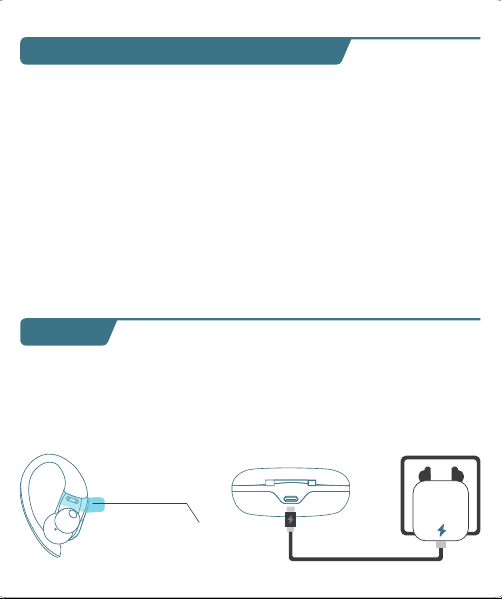
T60 User Manual
True Wireless Earbuds
❹
02 03
Overview
Type-C
Charging Port
Multi-functional
Button (MFB)
LED Indicator
of Earbud
Charging Contacts
Microphone
Power of
Charging Case
Earbud L&R
Charging Status
Charging Pins
Power Status
User Manual x1
Charging Case x1
Type-C
Charging Cable x1
Ear Tips Set x3
(Size M has been
preinstalled on earbuds)
Earbuds x2
What's in the box?
S
M
L
T60 User Manual
True Wireless Earbuds
Customer Service
06 07 08
First-use
1. Before the first use, please tear off the isolating film on the earbuds.
Put the earbuds into the case, then charge both earbuds and charging
case via supplied Type-C charging cable for at least 10mins (or after not
use for a long time), do not take out the earbuds during this period.
Wearing
1. Choose the Ear Tips that fit your ears best.
2. Insert the earbuds into the inner canal of your ears and turn gently
until you find the most comfortable and secure position.
Bluetooth Pairing
1. Open the charging case, and pick up the earbuds from the charging
case for 3 seconds to enter Bluetooth pairing mode.
09
Each time you power on your earbuds, they will automatically connect
to your last successfully connected device if available within the
Bluetooth range. If you wanna switch between devices, please first turn
off the Bluetooth of the last device.
10
10mins
Remove
S
M
L
T60
T60
MY DEVICES
T60
xxxxx
xxxxxxx
MY DEVICES
OTHER DEVICES
* When successfully connected, you will hear the prompt "connected"
and the LED indicators will turn off.
12:00
Bluetooth
Bluetooth
T60
Connected
12:00
Name
Disconnect
Forget This Device
Bluetooth
T60
Device Type
12:00
Bluetooth
Bluetooth
T60
Not Connected
MY DEVICES
12:00
Bluetooth
Bluetooth
First Device
Second Device
3s
2. Select "T60" on your device's Bluetooth list to connect.
Power On
2s
Tears off
the insulation film
MY DEVICES
12:00
Settings
APPLE ID
WLAN
xxxxx
Bluetooth
Off
T60
xxxxx
xxxxxxx
MY DEVICES
OTHER DEVICES
* If you don't see your buds in the list, you might need to reset the buds.
1. Go to the Bluetooth settings on the other device. For example, on
your phone, go to Settings Bluetooth.
2. Tap or click your earphones on the list of discovered devices.
Mono mode
◆ When Bluetooth connected, you can use either one of the earbuds
only by placing the other one into the charging case.
◆ When powered on and connected, if either one of the earbuds is out
of battery and powered off, you can keep using the other one.
◆ When you are on a call, place either one of the earbuds into the
charging case, and the microphone in the other earbud will be activated.
T60 T60
If you feel that the sound of your earbuds are too low, please follow the
steps below to adjust the volume:
❶ Long Press the "R" earbud to maximize the volume of the earbuds
until you hear a "du" sound.
❷ Increase the volume of your Android devices.
* This is only applicable to situations where the volume of the earbuds
and the Android devices are not synchronized.
11
Reset
You might need to reset the earbuds if you experience any connectivity
problems or function issues.
❶ Take the earbuds out for 5mins to consume some battery of both
buds. (Can't be reset if the earbuds are fully charged)
❷ Place the earbuds in the charging case and earbuds blink red.
❸ Press and hold the button on the buds for 8 seconds until the LED
indicators flash red-white 3 times. This confirms that the reset was
successful and your earbuds can be connected normally.
When resetting the earbuds, make sure the earbuds are properly
connected with charging points in the case, or it may cause resetting
failure.
hold for 8s
2. The earbuds are installed with a pair of size M ear tips by default. You
can select other suitable sizes for a secure fit.
Adjusting volume for low sound on earbudsSwitch from one device to another
01
◆ Keep away from children and pets to prevent accidental ingestion as
it has a battery. If swallowed, seek medical help. Store out of their reach
when not in use.
◆ The ear caps are made of soft silica gel, and the ear hooks are made
of elastic TPE material. A very small number of users may have allergic
reactions. If symptoms like itching or swelling of the skin on or around
the ears appear, stop wearing them immediately and seek medical
treatment.
◆ Pollen, dust and cosmetic residues are easy to attach to the earbuds,
which may easily lead to allergic situations. Please clean the earbuds
before and after use and avoid exposure to highly allergenic
environments.
◆ People with sensitive skin should test the earbuds on a small area of
skin around the ears before using them. If any discomfort occurs, stop
using them immediately and consult a dermatologist.
◆ To avoid hearing damage, do not use your earbuds at a high volume.
Turn the volume down on your product before placing the earbuds
in/on your ears, then turn the volume up gradually until you reach
acomfortable, moderate listening level.
◆ Long earbuds use may lead to ear fatigue, tinnitus and affect ear
blood circulation. It's recommended to take a 5-10 minute break per
hour of wearing to relax your ears and enjoy healthy listening.
Important Safety Information
04
Material Components
Earbuds Case: Made of plastic, free of heavy metals such as lead,
mercury and cadmium. It is environmentally friendly and durable.
Ear tips Part: Crafted from silica gel, this part is designed to softly
conform to the ear canal. While it is generally well-tolerated, a very
small fraction of individuals with allergies to Silica gel might experience
a mild allergic response.
Ear Hook Part: Made of TPE elastic material, which is wear-resistant
and stable. It is normally harmless, but people with extremely sensitive
skin may feel slightly uncomfortable.
It suits daily office, study, entertainment, sports lovers and travelers. But
some need caution or doctor's advice:
People with Sensitive Skin: Allergy-prone should do a local test. If
uncomfortable, stop and consult a dermatologist.
Patients with Ear Diseases: Those with ear diseases like otitis media
should consult an ENT doctor before use.
Applicable Population
05
Risk Warnings for Individual Differences
Differences in Ear Canal Structure: Different ear canal structures may
affect the wearing comfort and sound insulation. If there is any discomfort,
stop using it and check the wearing method or consult a doctor.
Differences in Skin Sensitivity: Allergic people may have symptoms
such as skin itching. Stop using it and wash it with water, then seek medi-
cal treatment and inform the doctor about the usage situation.
Differences in Hearing: Follow the "60 - 60" principle to protect your
hearing. If there is any discomfort, stop using it immediately and consult
a doctor.
◆ Force Control: Don't insert earbuds forcefully to protect ear canal.
Adjust ear hooks gently to avoid over-pressing ear skin.
◆ Adaptation for Sports: Ensure ear hook positions are right and
stable before exercise to prevent shaking/friction harm like abrasions.
◆ Stop if Uncomfy: If there's any discomfort like ear canal pain, skin
itch or foreign body feeling, stop using earbuds, check, and seek medical
help if needed.
◆ The LED indicators on the buds will flash white-red in sequence
continuously, the other bud will blink white slowly.
◆ If the earbuds are not connected to any devices over 5 minutes, they
will power off automatically. Turn on the earbuds manually by pressing
the MFB button for 2 seconds to hear the prompt "power on".
V1.1 2024.12.27
13 14
Maintenance
Care for your earbuds
Clean and dry your earbuds and your skin
after workouts or heavy sweating. Keep your
earbuds and charging case clean and dry.
Dual mode
15
16
Charging
Type-C USB charging
◆ Fully dry off the earbuds and the USB port before charging.
◆ Use a certified USB-C charging cable and charger to prevent any damage.
◆ Fully charge both the earbuds and the charging case before the first use.
Wireless charging
Easily charge the case without cables, just put your charging case on the
wireless charging pad. If the charging case is not being charged, please
try to reposition it.
What should I do if the earbuds disconnect or the sound is choppy?
Please note that this doesn't necessarily mean there is an issue with
the earbuds, but may have something to do with the connected
device and environment. Bluetooth signals may be influenced by
obstructions, such as walls, pillars, home appliances, Wi-Fi, and
more. To ensure a stable connection, we recommend avoiding such
obstructions. To fix this issue, please try the following:
1. Fully charge and reset your earbuds as stated above and re-pair
them.
2. Check the earbuds by listening to a downloaded song/video.
3. Check the earbuds with another Bluetooth device in a different
environment to see if it works well.
FAQ
17
What should I do if any of the following problems occur?
1. Cannot pair or reconnect with my device.
2. One side does not pair with the other side of my device.
3. No music plays after connecting with my device.
4. Only one earbud has sound.
1. Remove the protective film covering the connectors on the earbuds.
2. Reboot the Bluetooth device you're using (such as a phone or
What should I do if any of the following problems occur?
18
1. Confirm the charging case has power left (open the charging
case to check if there is white light flashing).
2. Clean the charging pins with a dry cloth and an alcohol-based
disinfectant. This is to ensure all charging contact pins on the
earbuds and charging case is completely clean and dry from sweat
and water. Then put the earbuds correctly into the case. The light
and display flash when the earbuds are placed in the case.
3. Please use the certified charging cable and wall charger.
4. Please check whether the ear tips are installed properly.
▶ During charging, the digital display flashes and shows the real-time
power until 100.
▶ The right display panel indicates the charging status per bud. There
are separated power consumption indicators by 4 grids in total, which
will be flashing when charging.
▶ The LED indicator on the charging case indicates the charging status.
❹
❶ ❷
❸
Press Once (R/L)
For Call
Answer/End a call
Reject a call
Press and hold for 2 seconds (R/L)
Voice Assistance
Press Thrice (R/L)
Activate Siri or other
voice assistant software
Music Mode
Press Once (R/L)
Press Twice (R)
Press Twice (L)
Long Press (R)
Long Press (L)
Play/Pause
Next Track
Previous Track
Volume+
Volume -
*Press and hold for 2s (R/L) in power-off state
*Pick up buds from the charging case
Power On/O
Power on
*Non-music playing, press and hold for 5s (R/L)
*Put back into the charging case.
*Not connected to any devices over 5mins
Power off
Power of
Charging Case
Charging
Status Per Bud
Note: This equipment has been tested and found to comply with the
limits for a Class B digital device, pursuant to part 15 of the FCC Rules.
These limits are designed to provide reasonable protection against
harmful interference in a residential installation.
This equipment generates, uses and can radiate radio frequency energy
and, if not installed and used in accordance with the instructions, may
cause harmful interference to radio communications. However, there is
no guarantee that interference will not occur in a particular installation.
If this equipment does cause harmful interference to radio or television
reception, which can be determined by turning the equipment off and on,
the user is encouraged to try to correct the interference by one or more
of the following measures:
— Reorient or relocate the receiving antenna.
— Increase the separation between the equipment and receiver.
— Connect the equipment into an outlet on a circuit different from that
to which the receiver is connected.
— Consult the dealer or an experienced radio/TV technician for help.
This equipment complies with FCC radiation exposure limits set forth for
an uncontrolled environment. This transmitter must not be co-located or
operating in conjunction with any other antenna or transmitter.
Any Changes or modifications not expressly approved by the party
responsible for compliance could void the user's authority to operate
the equipment.
This device complies with part 15 of the FCC Rules. Operation is subject
to the following two conditions:
(1) This device may not cause harmful interference, and
(2) This device must accept any interference received, including
interference that may cause undesired operation.
FCC Caution
19 20
1) The earbuds don’t recharge in the charging case.
2) The earbuds stay connected to the device even after being placed
in the charging case with the lid closed.
3) The earbuds don't turn on when taken out of the charging case.
Maintenance
Mono mode
Music Mode
Press Once (R/L)
Press Twice (R/L)
Unsupported
Long Press (R/L)
Unsupported
Play/Pause
Next Track
Previous Track
Volume+
Volume -
computer). Forget all the pairing records of your earbuds on your
device and turn off Bluetooth.
3. Reset the earbuds as per the steps above(make sure your earbuds
have enough battery).
4. Turn on the Bluetooth of your device and search for T60 and
pair. If there is a pop-up window to confirm pairing for "T60,"
please select "Pair." If you accidentally select "Cancel," you need to
refresh (turn off and turn on) the Bluetooth of your device and pair
the earbuds again.
1. Place the earbuds in the
charging case and close it.
2. Connect the charging case
to the power supply by using
a USB-C charging cable.
Wireless Charging Pad
(Not Included)
This device complies with Industry Canada licence-exempt RSS
standard(s). Operation is subject to the following two conditions:
(1) This device may not cause interference, and
(2) This device must accept any interference, including interference that
may cause undesired operation of the device.
Le présent appareil est conforme aux CNR d'Industrie Canada applicables
aux appareils radio exempts de licence. L'exploitation est autorisée aux
deux conditions suivantes:
(1) l'appareil ne doit pas produire de brouillage, et
(2) l'utilisateur de l'appareil doit accepter tout brouillage radioélectrique
subi, même si le brouillage est susceptible d'en compromettre le
fonctionnement.
The device is compliance with RF exposure guidelines, users can obtain
Canadian information on RF exposure and compliance.
Le présent appareil est conforme
Après examen de ce matériel aux conformité ou aux limites d’intensité
de champ RF, les utilisateurs peuvent sur l’exposition aux radiofréquenc-
es et la conformité and compliance d’acquérir les informations
correspondantes.
21 22
This product bears the selective sorting symbol for Waste electrical and
electronic equipment (WEEE).
This means that this product must be handled pursuant to European
directive 2012/19/EU in order to be recycled or dismantled to minimize
its impact on the environment. User has the choice to give his product
to a competent recycling organization or to the retailer when he buys a
new electrical or electronic equipment.
This product can be used across EU member states.
The device is low power device, it can meet the requirement of the RF
exposure.
NOTE:
1. High Sound Pressure
2. Hearing Damage Risk
3. Do not listen at high volume levels for long periods.
ISED Warning
The symbol indicates DC voltage
RECYCLING
DISPOSE OF USED BATTERIES ACCORDING TO THE INSTRUCTIONS
Caution
Battery Warning
Using the wrong battery can cause fire and other hazards (for example,
in the case of some lithium battery types)
1. Disposal of a battery into fire or a hot oven, or mechanically crushing
or cutting of abattery, that can result in an explosion.
2. Do not leaving a battery in an extremely high temperature surrounding
environment that can result in an explosion or the leakage of flammable
liquid or gas.
3. A battery subjected to extremely low air pressure that may result in an
explosion or the leakage of flammable liquid or gas.
Use a soft, dry, lint-free cloth to clean all other areas of the buds and
case. Here's how to clean your eartips.
12
Specifications
Specifications are subject to change without notice.
Maintenance
Clean your earbuds
Your earbuds are sweat and water-resistant, but not sweatproof or
waterproof. The charging case is not waterproof, so be careful not to
get moisture in any openings.
Remove the earbuds from the charging case.
Disconnect the charging cable from both the case and your computer
or power adapter.
To clean the charging contacts on buds, use a cotton swab slightly
dampened with warm water. To clean the charging pins on the case,
use a lint-free cloth slightly dampened with warm water. If necessary,
you can slightly dampen the cotton swab or cloth with 70 percent
isopropyl alcohol.
❶
❷
Model No.: T60
Input: 5V 1A
FCC ID: 2A33A-T60
IC: 32589-T60
HVIN: T60
Product Name: Wireless Sport Earbuds
Charging Cord Type: Type-C
Impedance: 32Ω
Battery Capacity: 3.7V 600mAh, 2.22Wh
Transmission Range: 33feet (Without Obstacles)
❸
◆ Clean earbuds weekly at least. Use in sweaty, dusty or allergen-rich
environments requires more frequent cleaning.
◆ After contact with pollen, dust or cosmetics, wipe the earbuds surface
with a clean damp cloth before use to reduce allergen residue. If you
know you're allergic, clean the earbuds promptly after use.
23
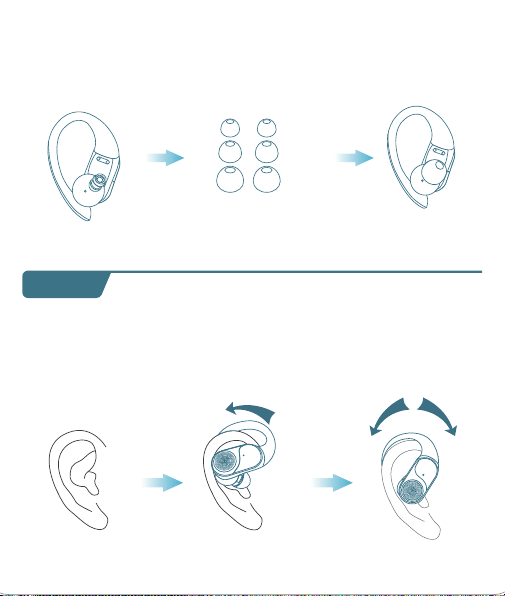
T60 User Manual
True Wireless Earbuds
❹
02 03
Overview
Type-C
Charging Port
Multi-functional
Button (MFB)
LED Indicator
of Earbud
Charging Contacts
Microphone
Power of
Charging Case
Earbud L&R
Charging Status
Charging Pins
Power Status
User Manual x1
Charging Case x1
Type-C
Charging Cable x1
Ear Tips Set x3
(Size M has been
preinstalled on earbuds)
Earbuds x2
What's in the box?
S
M
L
T60 User Manual
True Wireless Earbuds
Customer Service
06 07 08
First-use
1. Before the first use, please tear off the isolating film on the earbuds.
Put the earbuds into the case, then charge both earbuds and charging
case via supplied Type-C charging cable for at least 10mins (or after not
use for a long time), do not take out the earbuds during this period.
Wearing
1. Choose the Ear Tips that fit your ears best.
2. Insert the earbuds into the inner canal of your ears and turn gently
until you find the most comfortable and secure position.
Bluetooth Pairing
1. Open the charging case, and pick up the earbuds from the charging
case for 3 seconds to enter Bluetooth pairing mode.
09
Each time you power on your earbuds, they will automatically connect
to your last successfully connected device if available within the
Bluetooth range. If you wanna switch between devices, please first turn
off the Bluetooth of the last device.
10
10mins
Remove
S
M
L
T60
T60
MY DEVICES
T60
xxxxx
xxxxxxx
MY DEVICES
OTHER DEVICES
* When successfully connected, you will hear the prompt "connected"
and the LED indicators will turn off.
12:00
Bluetooth
Bluetooth
T60
Connected
12:00
Name
Disconnect
Forget This Device
Bluetooth
T60
Device Type
12:00
Bluetooth
Bluetooth
T60
Not Connected
MY DEVICES
12:00
Bluetooth
Bluetooth
First Device
Second Device
3s
2. Select "T60" on your device's Bluetooth list to connect.
Power On
2s
Tears off
the insulation film
MY DEVICES
12:00
Settings
APPLE ID
WLAN
xxxxx
Bluetooth
Off
T60
xxxxx
xxxxxxx
MY DEVICES
OTHER DEVICES
* If you don't see your buds in the list, you might need to reset the buds.
1. Go to the Bluetooth settings on the other device. For example, on
your phone, go to Settings Bluetooth.
2. Tap or click your earphones on the list of discovered devices.
Mono mode
◆ When Bluetooth connected, you can use either one of the earbuds
only by placing the other one into the charging case.
◆ When powered on and connected, if either one of the earbuds is out
of battery and powered off, you can keep using the other one.
◆ When you are on a call, place either one of the earbuds into the
charging case, and the microphone in the other earbud will be activated.
T60 T60
If you feel that the sound of your earbuds are too low, please follow the
steps below to adjust the volume:
❶ Long Press the "R" earbud to maximize the volume of the earbuds
until you hear a "du" sound.
❷ Increase the volume of your Android devices.
* This is only applicable to situations where the volume of the earbuds
and the Android devices are not synchronized.
11
Reset
You might need to reset the earbuds if you experience any connectivity
problems or function issues.
❶ Take the earbuds out for 5mins to consume some battery of both
buds. (Can't be reset if the earbuds are fully charged)
❷ Place the earbuds in the charging case and earbuds blink red.
❸ Press and hold the button on the buds for 8 seconds until the LED
indicators flash red-white 3 times. This confirms that the reset was
successful and your earbuds can be connected normally.
When resetting the earbuds, make sure the earbuds are properly
connected with charging points in the case, or it may cause resetting
failure.
hold for 8s
2. The earbuds are installed with a pair of size M ear tips by default. You
can select other suitable sizes for a secure fit.
Adjusting volume for low sound on earbudsSwitch from one device to another
01
◆ Keep away from children and pets to prevent accidental ingestion as
it has a battery. If swallowed, seek medical help. Store out of their reach
when not in use.
◆ The ear caps are made of soft silica gel, and the ear hooks are made
of elastic TPE material. A very small number of users may have allergic
reactions. If symptoms like itching or swelling of the skin on or around
the ears appear, stop wearing them immediately and seek medical
treatment.
◆ Pollen, dust and cosmetic residues are easy to attach to the earbuds,
which may easily lead to allergic situations. Please clean the earbuds
before and after use and avoid exposure to highly allergenic
environments.
◆ People with sensitive skin should test the earbuds on a small area of
skin around the ears before using them. If any discomfort occurs, stop
using them immediately and consult a dermatologist.
◆ To avoid hearing damage, do not use your earbuds at a high volume.
Turn the volume down on your product before placing the earbuds
in/on your ears, then turn the volume up gradually until you reach
acomfortable, moderate listening level.
◆ Long earbuds use may lead to ear fatigue, tinnitus and affect ear
blood circulation. It's recommended to take a 5-10 minute break per
hour of wearing to relax your ears and enjoy healthy listening.
Important Safety Information
04
Material Components
Earbuds Case: Made of plastic, free of heavy metals such as lead,
mercury and cadmium. It is environmentally friendly and durable.
Ear tips Part: Crafted from silica gel, this part is designed to softly
conform to the ear canal. While it is generally well-tolerated, a very
small fraction of individuals with allergies to Silica gel might experience
a mild allergic response.
Ear Hook Part: Made of TPE elastic material, which is wear-resistant
and stable. It is normally harmless, but people with extremely sensitive
skin may feel slightly uncomfortable.
It suits daily office, study, entertainment, sports lovers and travelers. But
some need caution or doctor's advice:
People with Sensitive Skin: Allergy-prone should do a local test. If
uncomfortable, stop and consult a dermatologist.
Patients with Ear Diseases: Those with ear diseases like otitis media
should consult an ENT doctor before use.
Applicable Population
05
Risk Warnings for Individual Differences
Differences in Ear Canal Structure: Different ear canal structures may
affect the wearing comfort and sound insulation. If there is any discomfort,
stop using it and check the wearing method or consult a doctor.
Differences in Skin Sensitivity: Allergic people may have symptoms
such as skin itching. Stop using it and wash it with water, then seek medi-
cal treatment and inform the doctor about the usage situation.
Differences in Hearing: Follow the "60 - 60" principle to protect your
hearing. If there is any discomfort, stop using it immediately and consult
a doctor.
◆ Force Control: Don't insert earbuds forcefully to protect ear canal.
Adjust ear hooks gently to avoid over-pressing ear skin.
◆ Adaptation for Sports: Ensure ear hook positions are right and
stable before exercise to prevent shaking/friction harm like abrasions.
◆ Stop if Uncomfy: If there's any discomfort like ear canal pain, skin
itch or foreign body feeling, stop using earbuds, check, and seek medical
help if needed.
◆ The LED indicators on the buds will flash white-red in sequence
continuously, the other bud will blink white slowly.
◆ If the earbuds are not connected to any devices over 5 minutes, they
will power off automatically. Turn on the earbuds manually by pressing
the MFB button for 2 seconds to hear the prompt "power on".
V1.1 2024.12.27
13 14
Maintenance
Care for your earbuds
Clean and dry your earbuds and your skin
after workouts or heavy sweating. Keep your
earbuds and charging case clean and dry.
Dual mode
15
16
Charging
Type-C USB charging
◆ Fully dry off the earbuds and the USB port before charging.
◆ Use a certified USB-C charging cable and charger to prevent any damage.
◆ Fully charge both the earbuds and the charging case before the first use.
Wireless charging
Easily charge the case without cables, just put your charging case on the
wireless charging pad. If the charging case is not being charged, please
try to reposition it.
What should I do if the earbuds disconnect or the sound is choppy?
Please note that this doesn't necessarily mean there is an issue with
the earbuds, but may have something to do with the connected
device and environment. Bluetooth signals may be influenced by
obstructions, such as walls, pillars, home appliances, Wi-Fi, and
more. To ensure a stable connection, we recommend avoiding such
obstructions. To fix this issue, please try the following:
1. Fully charge and reset your earbuds as stated above and re-pair
them.
2. Check the earbuds by listening to a downloaded song/video.
3. Check the earbuds with another Bluetooth device in a different
environment to see if it works well.
FAQ
17
What should I do if any of the following problems occur?
1. Cannot pair or reconnect with my device.
2. One side does not pair with the other side of my device.
3. No music plays after connecting with my device.
4. Only one earbud has sound.
1. Remove the protective film covering the connectors on the earbuds.
2. Reboot the Bluetooth device you're using (such as a phone or
What should I do if any of the following problems occur?
18
1. Confirm the charging case has power left (open the charging
case to check if there is white light flashing).
2. Clean the charging pins with a dry cloth and an alcohol-based
disinfectant. This is to ensure all charging contact pins on the
earbuds and charging case is completely clean and dry from sweat
and water. Then put the earbuds correctly into the case. The light
and display flash when the earbuds are placed in the case.
3. Please use the certified charging cable and wall charger.
4. Please check whether the ear tips are installed properly.
▶ During charging, the digital display flashes and shows the real-time
power until 100.
▶ The right display panel indicates the charging status per bud. There
are separated power consumption indicators by 4 grids in total, which
will be flashing when charging.
▶ The LED indicator on the charging case indicates the charging status.
❹
❶ ❷
❸
Press Once (R/L)
For Call
Answer/End a call
Reject a call
Press and hold for 2 seconds (R/L)
Voice Assistance
Press Thrice (R/L)
Activate Siri or other
voice assistant software
Music Mode
Press Once (R/L)
Press Twice (R)
Press Twice (L)
Long Press (R)
Long Press (L)
Play/Pause
Next Track
Previous Track
Volume+
Volume -
*Press and hold for 2s (R/L) in power-off state
*Pick up buds from the charging case
Power On/O
Power on
*Non-music playing, press and hold for 5s (R/L)
*Put back into the charging case.
*Not connected to any devices over 5mins
Power off
Power of
Charging Case
Charging
Status Per Bud
Note: This equipment has been tested and found to comply with the
limits for a Class B digital device, pursuant to part 15 of the FCC Rules.
These limits are designed to provide reasonable protection against
harmful interference in a residential installation.
This equipment generates, uses and can radiate radio frequency energy
and, if not installed and used in accordance with the instructions, may
cause harmful interference to radio communications. However, there is
no guarantee that interference will not occur in a particular installation.
If this equipment does cause harmful interference to radio or television
reception, which can be determined by turning the equipment off and on,
the user is encouraged to try to correct the interference by one or more
of the following measures:
— Reorient or relocate the receiving antenna.
— Increase the separation between the equipment and receiver.
— Connect the equipment into an outlet on a circuit different from that
to which the receiver is connected.
— Consult the dealer or an experienced radio/TV technician for help.
This equipment complies with FCC radiation exposure limits set forth for
an uncontrolled environment. This transmitter must not be co-located or
operating in conjunction with any other antenna or transmitter.
Any Changes or modifications not expressly approved by the party
responsible for compliance could void the user's authority to operate
the equipment.
This device complies with part 15 of the FCC Rules. Operation is subject
to the following two conditions:
(1) This device may not cause harmful interference, and
(2) This device must accept any interference received, including
interference that may cause undesired operation.
FCC Caution
19 20
1) The earbuds don’t recharge in the charging case.
2) The earbuds stay connected to the device even after being placed
in the charging case with the lid closed.
3) The earbuds don't turn on when taken out of the charging case.
Maintenance
Mono mode
Music Mode
Press Once (R/L)
Press Twice (R/L)
Unsupported
Long Press (R/L)
Unsupported
Play/Pause
Next Track
Previous Track
Volume+
Volume -
computer). Forget all the pairing records of your earbuds on your
device and turn off Bluetooth.
3. Reset the earbuds as per the steps above(make sure your earbuds
have enough battery).
4. Turn on the Bluetooth of your device and search for T60 and
pair. If there is a pop-up window to confirm pairing for "T60,"
please select "Pair." If you accidentally select "Cancel," you need to
refresh (turn off and turn on) the Bluetooth of your device and pair
the earbuds again.
1. Place the earbuds in the
charging case and close it.
2. Connect the charging case
to the power supply by using
a USB-C charging cable.
Wireless Charging Pad
(Not Included)
This device complies with Industry Canada licence-exempt RSS
standard(s). Operation is subject to the following two conditions:
(1) This device may not cause interference, and
(2) This device must accept any interference, including interference that
may cause undesired operation of the device.
Le présent appareil est conforme aux CNR d'Industrie Canada applicables
aux appareils radio exempts de licence. L'exploitation est autorisée aux
deux conditions suivantes:
(1) l'appareil ne doit pas produire de brouillage, et
(2) l'utilisateur de l'appareil doit accepter tout brouillage radioélectrique
subi, même si le brouillage est susceptible d'en compromettre le
fonctionnement.
The device is compliance with RF exposure guidelines, users can obtain
Canadian information on RF exposure and compliance.
Le présent appareil est conforme
Après examen de ce matériel aux conformité ou aux limites d’intensité
de champ RF, les utilisateurs peuvent sur l’exposition aux radiofréquenc-
es et la conformité and compliance d’acquérir les informations
correspondantes.
21 22
This product bears the selective sorting symbol for Waste electrical and
electronic equipment (WEEE).
This means that this product must be handled pursuant to European
directive 2012/19/EU in order to be recycled or dismantled to minimize
its impact on the environment. User has the choice to give his product
to a competent recycling organization or to the retailer when he buys a
new electrical or electronic equipment.
This product can be used across EU member states.
The device is low power device, it can meet the requirement of the RF
exposure.
NOTE:
1. High Sound Pressure
2. Hearing Damage Risk
3. Do not listen at high volume levels for long periods.
ISED Warning
The symbol indicates DC voltage
RECYCLING
DISPOSE OF USED BATTERIES ACCORDING TO THE INSTRUCTIONS
Caution
Battery Warning
Using the wrong battery can cause fire and other hazards (for example,
in the case of some lithium battery types)
1. Disposal of a battery into fire or a hot oven, or mechanically crushing
or cutting of abattery, that can result in an explosion.
2. Do not leaving a battery in an extremely high temperature surrounding
environment that can result in an explosion or the leakage of flammable
liquid or gas.
3. A battery subjected to extremely low air pressure that may result in an
explosion or the leakage of flammable liquid or gas.
Use a soft, dry, lint-free cloth to clean all other areas of the buds and
case. Here's how to clean your eartips.
12
Specifications
Specifications are subject to change without notice.
Maintenance
Clean your earbuds
Your earbuds are sweat and water-resistant, but not sweatproof or
waterproof. The charging case is not waterproof, so be careful not to
get moisture in any openings.
Remove the earbuds from the charging case.
Disconnect the charging cable from both the case and your computer
or power adapter.
To clean the charging contacts on buds, use a cotton swab slightly
dampened with warm water. To clean the charging pins on the case,
use a lint-free cloth slightly dampened with warm water. If necessary,
you can slightly dampen the cotton swab or cloth with 70 percent
isopropyl alcohol.
❶
❷
Model No.: T60
Input: 5V 1A
FCC ID: 2A33A-T60
IC: 32589-T60
HVIN: T60
Product Name: Wireless Sport Earbuds
Charging Cord Type: Type-C
Impedance: 32Ω
Battery Capacity: 3.7V 600mAh, 2.22Wh
Transmission Range: 33feet (Without Obstacles)
❸
◆ Clean earbuds weekly at least. Use in sweaty, dusty or allergen-rich
environments requires more frequent cleaning.
◆ After contact with pollen, dust or cosmetics, wipe the earbuds surface
with a clean damp cloth before use to reduce allergen residue. If you
know you're allergic, clean the earbuds promptly after use.
23
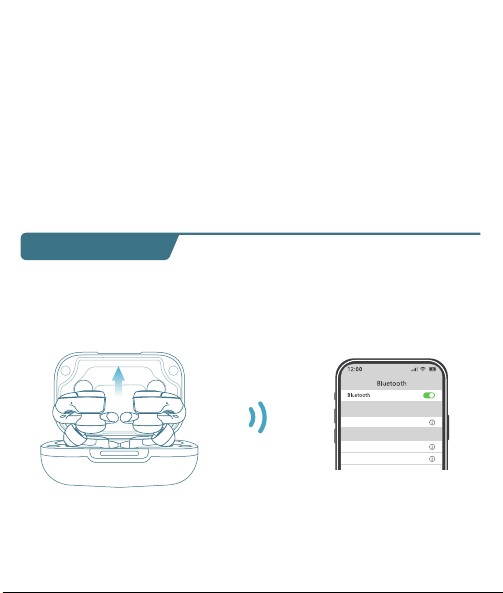
T60 User Manual
True Wireless Earbuds
❹
02 03
Overview
Type-C
Charging Port
Multi-functional
Button (MFB)
LED Indicator
of Earbud
Charging Contacts
Microphone
Power of
Charging Case
Earbud L&R
Charging Status
Charging Pins
Power Status
User Manual x1
Charging Case x1
Type-C
Charging Cable x1
Ear Tips Set x3
(Size M has been
preinstalled on earbuds)
Earbuds x2
What's in the box?
S
M
L
T60 User Manual
True Wireless Earbuds
Customer Service
06 07 08
First-use
1. Before the first use, please tear off the isolating film on the earbuds.
Put the earbuds into the case, then charge both earbuds and charging
case via supplied Type-C charging cable for at least 10mins (or after not
use for a long time), do not take out the earbuds during this period.
Wearing
1. Choose the Ear Tips that fit your ears best.
2. Insert the earbuds into the inner canal of your ears and turn gently
until you find the most comfortable and secure position.
Bluetooth Pairing
1. Open the charging case, and pick up the earbuds from the charging
case for 3 seconds to enter Bluetooth pairing mode.
09
Each time you power on your earbuds, they will automatically connect
to your last successfully connected device if available within the
Bluetooth range. If you wanna switch between devices, please first turn
off the Bluetooth of the last device.
10
10mins
Remove
S
M
L
T60
T60
MY DEVICES
T60
xxxxx
xxxxxxx
MY DEVICES
OTHER DEVICES
* When successfully connected, you will hear the prompt "connected"
and the LED indicators will turn off.
12:00
Bluetooth
Bluetooth
T60
Connected
12:00
Name
Disconnect
Forget This Device
Bluetooth
T60
Device Type
12:00
Bluetooth
Bluetooth
T60
Not Connected
MY DEVICES
12:00
Bluetooth
Bluetooth
First Device
Second Device
3s
2. Select "T60" on your device's Bluetooth list to connect.
Power On
2s
Tears off
the insulation film
MY DEVICES
12:00
Settings
APPLE ID
WLAN
xxxxx
Bluetooth
Off
T60
xxxxx
xxxxxxx
MY DEVICES
OTHER DEVICES
* If you don't see your buds in the list, you might need to reset the buds.
1. Go to the Bluetooth settings on the other device. For example, on
your phone, go to Settings Bluetooth.
2. Tap or click your earphones on the list of discovered devices.
Mono mode
◆ When Bluetooth connected, you can use either one of the earbuds
only by placing the other one into the charging case.
◆ When powered on and connected, if either one of the earbuds is out
of battery and powered off, you can keep using the other one.
◆ When you are on a call, place either one of the earbuds into the
charging case, and the microphone in the other earbud will be activated.
T60 T60
If you feel that the sound of your earbuds are too low, please follow the
steps below to adjust the volume:
❶ Long Press the "R" earbud to maximize the volume of the earbuds
until you hear a "du" sound.
❷ Increase the volume of your Android devices.
* This is only applicable to situations where the volume of the earbuds
and the Android devices are not synchronized.
11
Reset
You might need to reset the earbuds if you experience any connectivity
problems or function issues.
❶ Take the earbuds out for 5mins to consume some battery of both
buds. (Can't be reset if the earbuds are fully charged)
❷ Place the earbuds in the charging case and earbuds blink red.
❸ Press and hold the button on the buds for 8 seconds until the LED
indicators flash red-white 3 times. This confirms that the reset was
successful and your earbuds can be connected normally.
When resetting the earbuds, make sure the earbuds are properly
connected with charging points in the case, or it may cause resetting
failure.
hold for 8s
2. The earbuds are installed with a pair of size M ear tips by default. You
can select other suitable sizes for a secure fit.
Adjusting volume for low sound on earbudsSwitch from one device to another
01
◆ Keep away from children and pets to prevent accidental ingestion as
it has a battery. If swallowed, seek medical help. Store out of their reach
when not in use.
◆ The ear caps are made of soft silica gel, and the ear hooks are made
of elastic TPE material. A very small number of users may have allergic
reactions. If symptoms like itching or swelling of the skin on or around
the ears appear, stop wearing them immediately and seek medical
treatment.
◆ Pollen, dust and cosmetic residues are easy to attach to the earbuds,
which may easily lead to allergic situations. Please clean the earbuds
before and after use and avoid exposure to highly allergenic
environments.
◆ People with sensitive skin should test the earbuds on a small area of
skin around the ears before using them. If any discomfort occurs, stop
using them immediately and consult a dermatologist.
◆ To avoid hearing damage, do not use your earbuds at a high volume.
Turn the volume down on your product before placing the earbuds
in/on your ears, then turn the volume up gradually until you reach
acomfortable, moderate listening level.
◆ Long earbuds use may lead to ear fatigue, tinnitus and affect ear
blood circulation. It's recommended to take a 5-10 minute break per
hour of wearing to relax your ears and enjoy healthy listening.
Important Safety Information
04
Material Components
Earbuds Case: Made of plastic, free of heavy metals such as lead,
mercury and cadmium. It is environmentally friendly and durable.
Ear tips Part: Crafted from silica gel, this part is designed to softly
conform to the ear canal. While it is generally well-tolerated, a very
small fraction of individuals with allergies to Silica gel might experience
a mild allergic response.
Ear Hook Part: Made of TPE elastic material, which is wear-resistant
and stable. It is normally harmless, but people with extremely sensitive
skin may feel slightly uncomfortable.
It suits daily office, study, entertainment, sports lovers and travelers. But
some need caution or doctor's advice:
People with Sensitive Skin: Allergy-prone should do a local test. If
uncomfortable, stop and consult a dermatologist.
Patients with Ear Diseases: Those with ear diseases like otitis media
should consult an ENT doctor before use.
Applicable Population
05
Risk Warnings for Individual Differences
Differences in Ear Canal Structure: Different ear canal structures may
affect the wearing comfort and sound insulation. If there is any discomfort,
stop using it and check the wearing method or consult a doctor.
Differences in Skin Sensitivity: Allergic people may have symptoms
such as skin itching. Stop using it and wash it with water, then seek medi-
cal treatment and inform the doctor about the usage situation.
Differences in Hearing: Follow the "60 - 60" principle to protect your
hearing. If there is any discomfort, stop using it immediately and consult
a doctor.
◆ Force Control: Don't insert earbuds forcefully to protect ear canal.
Adjust ear hooks gently to avoid over-pressing ear skin.
◆ Adaptation for Sports: Ensure ear hook positions are right and
stable before exercise to prevent shaking/friction harm like abrasions.
◆ Stop if Uncomfy: If there's any discomfort like ear canal pain, skin
itch or foreign body feeling, stop using earbuds, check, and seek medical
help if needed.
◆ The LED indicators on the buds will flash white-red in sequence
continuously, the other bud will blink white slowly.
◆ If the earbuds are not connected to any devices over 5 minutes, they
will power off automatically. Turn on the earbuds manually by pressing
the MFB button for 2 seconds to hear the prompt "power on".
V1.1 2024.12.27
13 14
Maintenance
Care for your earbuds
Clean and dry your earbuds and your skin
after workouts or heavy sweating. Keep your
earbuds and charging case clean and dry.
Dual mode
15
16
Charging
Type-C USB charging
◆ Fully dry off the earbuds and the USB port before charging.
◆ Use a certified USB-C charging cable and charger to prevent any damage.
◆ Fully charge both the earbuds and the charging case before the first use.
Wireless charging
Easily charge the case without cables, just put your charging case on the
wireless charging pad. If the charging case is not being charged, please
try to reposition it.
What should I do if the earbuds disconnect or the sound is choppy?
Please note that this doesn't necessarily mean there is an issue with
the earbuds, but may have something to do with the connected
device and environment. Bluetooth signals may be influenced by
obstructions, such as walls, pillars, home appliances, Wi-Fi, and
more. To ensure a stable connection, we recommend avoiding such
obstructions. To fix this issue, please try the following:
1. Fully charge and reset your earbuds as stated above and re-pair
them.
2. Check the earbuds by listening to a downloaded song/video.
3. Check the earbuds with another Bluetooth device in a different
environment to see if it works well.
FAQ
17
What should I do if any of the following problems occur?
1. Cannot pair or reconnect with my device.
2. One side does not pair with the other side of my device.
3. No music plays after connecting with my device.
4. Only one earbud has sound.
1. Remove the protective film covering the connectors on the earbuds.
2. Reboot the Bluetooth device you're using (such as a phone or
What should I do if any of the following problems occur?
18
1. Confirm the charging case has power left (open the charging
case to check if there is white light flashing).
2. Clean the charging pins with a dry cloth and an alcohol-based
disinfectant. This is to ensure all charging contact pins on the
earbuds and charging case is completely clean and dry from sweat
and water. Then put the earbuds correctly into the case. The light
and display flash when the earbuds are placed in the case.
3. Please use the certified charging cable and wall charger.
4. Please check whether the ear tips are installed properly.
▶ During charging, the digital display flashes and shows the real-time
power until 100.
▶ The right display panel indicates the charging status per bud. There
are separated power consumption indicators by 4 grids in total, which
will be flashing when charging.
▶ The LED indicator on the charging case indicates the charging status.
❹
❶ ❷
❸
Press Once (R/L)
For Call
Answer/End a call
Reject a call
Press and hold for 2 seconds (R/L)
Voice Assistance
Press Thrice (R/L)
Activate Siri or other
voice assistant software
Music Mode
Press Once (R/L)
Press Twice (R)
Press Twice (L)
Long Press (R)
Long Press (L)
Play/Pause
Next Track
Previous Track
Volume+
Volume -
*Press and hold for 2s (R/L) in power-off state
*Pick up buds from the charging case
Power On/O
Power on
*Non-music playing, press and hold for 5s (R/L)
*Put back into the charging case.
*Not connected to any devices over 5mins
Power off
Power of
Charging Case
Charging
Status Per Bud
Note: This equipment has been tested and found to comply with the
limits for a Class B digital device, pursuant to part 15 of the FCC Rules.
These limits are designed to provide reasonable protection against
harmful interference in a residential installation.
This equipment generates, uses and can radiate radio frequency energy
and, if not installed and used in accordance with the instructions, may
cause harmful interference to radio communications. However, there is
no guarantee that interference will not occur in a particular installation.
If this equipment does cause harmful interference to radio or television
reception, which can be determined by turning the equipment off and on,
the user is encouraged to try to correct the interference by one or more
of the following measures:
— Reorient or relocate the receiving antenna.
— Increase the separation between the equipment and receiver.
— Connect the equipment into an outlet on a circuit different from that
to which the receiver is connected.
— Consult the dealer or an experienced radio/TV technician for help.
This equipment complies with FCC radiation exposure limits set forth for
an uncontrolled environment. This transmitter must not be co-located or
operating in conjunction with any other antenna or transmitter.
Any Changes or modifications not expressly approved by the party
responsible for compliance could void the user's authority to operate
the equipment.
This device complies with part 15 of the FCC Rules. Operation is subject
to the following two conditions:
(1) This device may not cause harmful interference, and
(2) This device must accept any interference received, including
interference that may cause undesired operation.
FCC Caution
19 20
1) The earbuds don’t recharge in the charging case.
2) The earbuds stay connected to the device even after being placed
in the charging case with the lid closed.
3) The earbuds don't turn on when taken out of the charging case.
Maintenance
Mono mode
Music Mode
Press Once (R/L)
Press Twice (R/L)
Unsupported
Long Press (R/L)
Unsupported
Play/Pause
Next Track
Previous Track
Volume+
Volume -
computer). Forget all the pairing records of your earbuds on your
device and turn off Bluetooth.
3. Reset the earbuds as per the steps above(make sure your earbuds
have enough battery).
4. Turn on the Bluetooth of your device and search for T60 and
pair. If there is a pop-up window to confirm pairing for "T60,"
please select "Pair." If you accidentally select "Cancel," you need to
refresh (turn off and turn on) the Bluetooth of your device and pair
the earbuds again.
1. Place the earbuds in the
charging case and close it.
2. Connect the charging case
to the power supply by using
a USB-C charging cable.
Wireless Charging Pad
(Not Included)
This device complies with Industry Canada licence-exempt RSS
standard(s). Operation is subject to the following two conditions:
(1) This device may not cause interference, and
(2) This device must accept any interference, including interference that
may cause undesired operation of the device.
Le présent appareil est conforme aux CNR d'Industrie Canada applicables
aux appareils radio exempts de licence. L'exploitation est autorisée aux
deux conditions suivantes:
(1) l'appareil ne doit pas produire de brouillage, et
(2) l'utilisateur de l'appareil doit accepter tout brouillage radioélectrique
subi, même si le brouillage est susceptible d'en compromettre le
fonctionnement.
The device is compliance with RF exposure guidelines, users can obtain
Canadian information on RF exposure and compliance.
Le présent appareil est conforme
Après examen de ce matériel aux conformité ou aux limites d’intensité
de champ RF, les utilisateurs peuvent sur l’exposition aux radiofréquenc-
es et la conformité and compliance d’acquérir les informations
correspondantes.
21 22
This product bears the selective sorting symbol for Waste electrical and
electronic equipment (WEEE).
This means that this product must be handled pursuant to European
directive 2012/19/EU in order to be recycled or dismantled to minimize
its impact on the environment. User has the choice to give his product
to a competent recycling organization or to the retailer when he buys a
new electrical or electronic equipment.
This product can be used across EU member states.
The device is low power device, it can meet the requirement of the RF
exposure.
NOTE:
1. High Sound Pressure
2. Hearing Damage Risk
3. Do not listen at high volume levels for long periods.
ISED Warning
The symbol indicates DC voltage
RECYCLING
DISPOSE OF USED BATTERIES ACCORDING TO THE INSTRUCTIONS
Caution
Battery Warning
Using the wrong battery can cause fire and other hazards (for example,
in the case of some lithium battery types)
1. Disposal of a battery into fire or a hot oven, or mechanically crushing
or cutting of abattery, that can result in an explosion.
2. Do not leaving a battery in an extremely high temperature surrounding
environment that can result in an explosion or the leakage of flammable
liquid or gas.
3. A battery subjected to extremely low air pressure that may result in an
explosion or the leakage of flammable liquid or gas.
Use a soft, dry, lint-free cloth to clean all other areas of the buds and
case. Here's how to clean your eartips.
12
Specifications
Specifications are subject to change without notice.
Maintenance
Clean your earbuds
Your earbuds are sweat and water-resistant, but not sweatproof or
waterproof. The charging case is not waterproof, so be careful not to
get moisture in any openings.
Remove the earbuds from the charging case.
Disconnect the charging cable from both the case and your computer
or power adapter.
To clean the charging contacts on buds, use a cotton swab slightly
dampened with warm water. To clean the charging pins on the case,
use a lint-free cloth slightly dampened with warm water. If necessary,
you can slightly dampen the cotton swab or cloth with 70 percent
isopropyl alcohol.
❶
❷
Model No.: T60
Input: 5V 1A
FCC ID: 2A33A-T60
IC: 32589-T60
HVIN: T60
Product Name: Wireless Sport Earbuds
Charging Cord Type: Type-C
Impedance: 32Ω
Battery Capacity: 3.7V 600mAh, 2.22Wh
Transmission Range: 33feet (Without Obstacles)
❸
◆ Clean earbuds weekly at least. Use in sweaty, dusty or allergen-rich
environments requires more frequent cleaning.
◆ After contact with pollen, dust or cosmetics, wipe the earbuds surface
with a clean damp cloth before use to reduce allergen residue. If you
know you're allergic, clean the earbuds promptly after use.
23
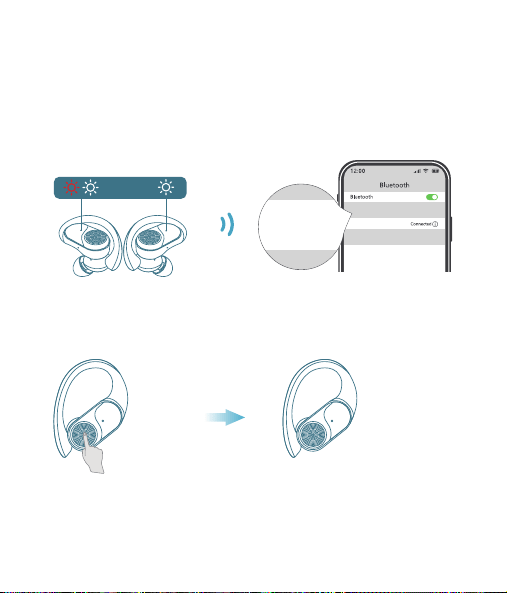
T60 User Manual
True Wireless Earbuds
❹
02 03
Overview
Type-C
Charging Port
Multi-functional
Button (MFB)
LED Indicator
of Earbud
Charging Contacts
Microphone
Power of
Charging Case
Earbud L&R
Charging Status
Charging Pins
Power Status
User Manual x1
Charging Case x1
Type-C
Charging Cable x1
Ear Tips Set x3
(Size M has been
preinstalled on earbuds)
Earbuds x2
What's in the box?
S
M
L
T60 User Manual
True Wireless Earbuds
Customer Service
06 07 08
First-use
1. Before the first use, please tear off the isolating film on the earbuds.
Put the earbuds into the case, then charge both earbuds and charging
case via supplied Type-C charging cable for at least 10mins (or after not
use for a long time), do not take out the earbuds during this period.
Wearing
1. Choose the Ear Tips that fit your ears best.
2. Insert the earbuds into the inner canal of your ears and turn gently
until you find the most comfortable and secure position.
Bluetooth Pairing
1. Open the charging case, and pick up the earbuds from the charging
case for 3 seconds to enter Bluetooth pairing mode.
09
Each time you power on your earbuds, they will automatically connect
to your last successfully connected device if available within the
Bluetooth range. If you wanna switch between devices, please first turn
off the Bluetooth of the last device.
10
10mins
Remove
S
M
L
T60
T60
MY DEVICES
T60
xxxxx
xxxxxxx
MY DEVICES
OTHER DEVICES
* When successfully connected, you will hear the prompt "connected"
and the LED indicators will turn off.
12:00
Bluetooth
Bluetooth
T60
Connected
12:00
Name
Disconnect
Forget This Device
Bluetooth
T60
Device Type
12:00
Bluetooth
Bluetooth
T60
Not Connected
MY DEVICES
12:00
Bluetooth
Bluetooth
First Device
Second Device
3s
2. Select "T60" on your device's Bluetooth list to connect.
Power On
2s
Tears off
the insulation film
MY DEVICES
12:00
Settings
APPLE ID
WLAN
xxxxx
Bluetooth
Off
T60
xxxxx
xxxxxxx
MY DEVICES
OTHER DEVICES
* If you don't see your buds in the list, you might need to reset the buds.
1. Go to the Bluetooth settings on the other device. For example, on
your phone, go to Settings Bluetooth.
2. Tap or click your earphones on the list of discovered devices.
Mono mode
◆ When Bluetooth connected, you can use either one of the earbuds
only by placing the other one into the charging case.
◆ When powered on and connected, if either one of the earbuds is out
of battery and powered off, you can keep using the other one.
◆ When you are on a call, place either one of the earbuds into the
charging case, and the microphone in the other earbud will be activated.
T60 T60
If you feel that the sound of your earbuds are too low, please follow the
steps below to adjust the volume:
❶ Long Press the "R" earbud to maximize the volume of the earbuds
until you hear a "du" sound.
❷ Increase the volume of your Android devices.
* This is only applicable to situations where the volume of the earbuds
and the Android devices are not synchronized.
11
Reset
You might need to reset the earbuds if you experience any connectivity
problems or function issues.
❶ Take the earbuds out for 5mins to consume some battery of both
buds. (Can't be reset if the earbuds are fully charged)
❷ Place the earbuds in the charging case and earbuds blink red.
❸ Press and hold the button on the buds for 8 seconds until the LED
indicators flash red-white 3 times. This confirms that the reset was
successful and your earbuds can be connected normally.
When resetting the earbuds, make sure the earbuds are properly
connected with charging points in the case, or it may cause resetting
failure.
hold for 8s
2. The earbuds are installed with a pair of size M ear tips by default. You
can select other suitable sizes for a secure fit.
Adjusting volume for low sound on earbudsSwitch from one device to another
01
◆ Keep away from children and pets to prevent accidental ingestion as
it has a battery. If swallowed, seek medical help. Store out of their reach
when not in use.
◆ The ear caps are made of soft silica gel, and the ear hooks are made
of elastic TPE material. A very small number of users may have allergic
reactions. If symptoms like itching or swelling of the skin on or around
the ears appear, stop wearing them immediately and seek medical
treatment.
◆ Pollen, dust and cosmetic residues are easy to attach to the earbuds,
which may easily lead to allergic situations. Please clean the earbuds
before and after use and avoid exposure to highly allergenic
environments.
◆ People with sensitive skin should test the earbuds on a small area of
skin around the ears before using them. If any discomfort occurs, stop
using them immediately and consult a dermatologist.
◆ To avoid hearing damage, do not use your earbuds at a high volume.
Turn the volume down on your product before placing the earbuds
in/on your ears, then turn the volume up gradually until you reach
acomfortable, moderate listening level.
◆ Long earbuds use may lead to ear fatigue, tinnitus and affect ear
blood circulation. It's recommended to take a 5-10 minute break per
hour of wearing to relax your ears and enjoy healthy listening.
Important Safety Information
04
Material Components
Earbuds Case: Made of plastic, free of heavy metals such as lead,
mercury and cadmium. It is environmentally friendly and durable.
Ear tips Part: Crafted from silica gel, this part is designed to softly
conform to the ear canal. While it is generally well-tolerated, a very
small fraction of individuals with allergies to Silica gel might experience
a mild allergic response.
Ear Hook Part: Made of TPE elastic material, which is wear-resistant
and stable. It is normally harmless, but people with extremely sensitive
skin may feel slightly uncomfortable.
It suits daily office, study, entertainment, sports lovers and travelers. But
some need caution or doctor's advice:
People with Sensitive Skin: Allergy-prone should do a local test. If
uncomfortable, stop and consult a dermatologist.
Patients with Ear Diseases: Those with ear diseases like otitis media
should consult an ENT doctor before use.
Applicable Population
05
Risk Warnings for Individual Differences
Differences in Ear Canal Structure: Different ear canal structures may
affect the wearing comfort and sound insulation. If there is any discomfort,
stop using it and check the wearing method or consult a doctor.
Differences in Skin Sensitivity: Allergic people may have symptoms
such as skin itching. Stop using it and wash it with water, then seek medi-
cal treatment and inform the doctor about the usage situation.
Differences in Hearing: Follow the "60 - 60" principle to protect your
hearing. If there is any discomfort, stop using it immediately and consult
a doctor.
◆ Force Control: Don't insert earbuds forcefully to protect ear canal.
Adjust ear hooks gently to avoid over-pressing ear skin.
◆ Adaptation for Sports: Ensure ear hook positions are right and
stable before exercise to prevent shaking/friction harm like abrasions.
◆ Stop if Uncomfy: If there's any discomfort like ear canal pain, skin
itch or foreign body feeling, stop using earbuds, check, and seek medical
help if needed.
◆ The LED indicators on the buds will flash white-red in sequence
continuously, the other bud will blink white slowly.
◆ If the earbuds are not connected to any devices over 5 minutes, they
will power off automatically. Turn on the earbuds manually by pressing
the MFB button for 2 seconds to hear the prompt "power on".
V1.1 2024.12.27
13 14
Maintenance
Care for your earbuds
Clean and dry your earbuds and your skin
after workouts or heavy sweating. Keep your
earbuds and charging case clean and dry.
Dual mode
15
16
Charging
Type-C USB charging
◆ Fully dry off the earbuds and the USB port before charging.
◆ Use a certified USB-C charging cable and charger to prevent any damage.
◆ Fully charge both the earbuds and the charging case before the first use.
Wireless charging
Easily charge the case without cables, just put your charging case on the
wireless charging pad. If the charging case is not being charged, please
try to reposition it.
What should I do if the earbuds disconnect or the sound is choppy?
Please note that this doesn't necessarily mean there is an issue with
the earbuds, but may have something to do with the connected
device and environment. Bluetooth signals may be influenced by
obstructions, such as walls, pillars, home appliances, Wi-Fi, and
more. To ensure a stable connection, we recommend avoiding such
obstructions. To fix this issue, please try the following:
1. Fully charge and reset your earbuds as stated above and re-pair
them.
2. Check the earbuds by listening to a downloaded song/video.
3. Check the earbuds with another Bluetooth device in a different
environment to see if it works well.
FAQ
17
What should I do if any of the following problems occur?
1. Cannot pair or reconnect with my device.
2. One side does not pair with the other side of my device.
3. No music plays after connecting with my device.
4. Only one earbud has sound.
1. Remove the protective film covering the connectors on the earbuds.
2. Reboot the Bluetooth device you're using (such as a phone or
What should I do if any of the following problems occur?
18
1. Confirm the charging case has power left (open the charging
case to check if there is white light flashing).
2. Clean the charging pins with a dry cloth and an alcohol-based
disinfectant. This is to ensure all charging contact pins on the
earbuds and charging case is completely clean and dry from sweat
and water. Then put the earbuds correctly into the case. The light
and display flash when the earbuds are placed in the case.
3. Please use the certified charging cable and wall charger.
4. Please check whether the ear tips are installed properly.
▶ During charging, the digital display flashes and shows the real-time
power until 100.
▶ The right display panel indicates the charging status per bud. There
are separated power consumption indicators by 4 grids in total, which
will be flashing when charging.
▶ The LED indicator on the charging case indicates the charging status.
❹
❶ ❷
❸
Press Once (R/L)
For Call
Answer/End a call
Reject a call
Press and hold for 2 seconds (R/L)
Voice Assistance
Press Thrice (R/L)
Activate Siri or other
voice assistant software
Music Mode
Press Once (R/L)
Press Twice (R)
Press Twice (L)
Long Press (R)
Long Press (L)
Play/Pause
Next Track
Previous Track
Volume+
Volume -
*Press and hold for 2s (R/L) in power-off state
*Pick up buds from the charging case
Power On/O
Power on
*Non-music playing, press and hold for 5s (R/L)
*Put back into the charging case.
*Not connected to any devices over 5mins
Power off
Power of
Charging Case
Charging
Status Per Bud
Note: This equipment has been tested and found to comply with the
limits for a Class B digital device, pursuant to part 15 of the FCC Rules.
These limits are designed to provide reasonable protection against
harmful interference in a residential installation.
This equipment generates, uses and can radiate radio frequency energy
and, if not installed and used in accordance with the instructions, may
cause harmful interference to radio communications. However, there is
no guarantee that interference will not occur in a particular installation.
If this equipment does cause harmful interference to radio or television
reception, which can be determined by turning the equipment off and on,
the user is encouraged to try to correct the interference by one or more
of the following measures:
— Reorient or relocate the receiving antenna.
— Increase the separation between the equipment and receiver.
— Connect the equipment into an outlet on a circuit different from that
to which the receiver is connected.
— Consult the dealer or an experienced radio/TV technician for help.
This equipment complies with FCC radiation exposure limits set forth for
an uncontrolled environment. This transmitter must not be co-located or
operating in conjunction with any other antenna or transmitter.
Any Changes or modifications not expressly approved by the party
responsible for compliance could void the user's authority to operate
the equipment.
This device complies with part 15 of the FCC Rules. Operation is subject
to the following two conditions:
(1) This device may not cause harmful interference, and
(2) This device must accept any interference received, including
interference that may cause undesired operation.
FCC Caution
19 20
1) The earbuds don’t recharge in the charging case.
2) The earbuds stay connected to the device even after being placed
in the charging case with the lid closed.
3) The earbuds don't turn on when taken out of the charging case.
Maintenance
Mono mode
Music Mode
Press Once (R/L)
Press Twice (R/L)
Unsupported
Long Press (R/L)
Unsupported
Play/Pause
Next Track
Previous Track
Volume+
Volume -
computer). Forget all the pairing records of your earbuds on your
device and turn off Bluetooth.
3. Reset the earbuds as per the steps above(make sure your earbuds
have enough battery).
4. Turn on the Bluetooth of your device and search for T60 and
pair. If there is a pop-up window to confirm pairing for "T60,"
please select "Pair." If you accidentally select "Cancel," you need to
refresh (turn off and turn on) the Bluetooth of your device and pair
the earbuds again.
1. Place the earbuds in the
charging case and close it.
2. Connect the charging case
to the power supply by using
a USB-C charging cable.
Wireless Charging Pad
(Not Included)
This device complies with Industry Canada licence-exempt RSS
standard(s). Operation is subject to the following two conditions:
(1) This device may not cause interference, and
(2) This device must accept any interference, including interference that
may cause undesired operation of the device.
Le présent appareil est conforme aux CNR d'Industrie Canada applicables
aux appareils radio exempts de licence. L'exploitation est autorisée aux
deux conditions suivantes:
(1) l'appareil ne doit pas produire de brouillage, et
(2) l'utilisateur de l'appareil doit accepter tout brouillage radioélectrique
subi, même si le brouillage est susceptible d'en compromettre le
fonctionnement.
The device is compliance with RF exposure guidelines, users can obtain
Canadian information on RF exposure and compliance.
Le présent appareil est conforme
Après examen de ce matériel aux conformité ou aux limites d’intensité
de champ RF, les utilisateurs peuvent sur l’exposition aux radiofréquenc-
es et la conformité and compliance d’acquérir les informations
correspondantes.
21 22
This product bears the selective sorting symbol for Waste electrical and
electronic equipment (WEEE).
This means that this product must be handled pursuant to European
directive 2012/19/EU in order to be recycled or dismantled to minimize
its impact on the environment. User has the choice to give his product
to a competent recycling organization or to the retailer when he buys a
new electrical or electronic equipment.
This product can be used across EU member states.
The device is low power device, it can meet the requirement of the RF
exposure.
NOTE:
1. High Sound Pressure
2. Hearing Damage Risk
3. Do not listen at high volume levels for long periods.
ISED Warning
The symbol indicates DC voltage
RECYCLING
DISPOSE OF USED BATTERIES ACCORDING TO THE INSTRUCTIONS
Caution
Battery Warning
Using the wrong battery can cause fire and other hazards (for example,
in the case of some lithium battery types)
1. Disposal of a battery into fire or a hot oven, or mechanically crushing
or cutting of abattery, that can result in an explosion.
2. Do not leaving a battery in an extremely high temperature surrounding
environment that can result in an explosion or the leakage of flammable
liquid or gas.
3. A battery subjected to extremely low air pressure that may result in an
explosion or the leakage of flammable liquid or gas.
Use a soft, dry, lint-free cloth to clean all other areas of the buds and
case. Here's how to clean your eartips.
12
Specifications
Specifications are subject to change without notice.
Maintenance
Clean your earbuds
Your earbuds are sweat and water-resistant, but not sweatproof or
waterproof. The charging case is not waterproof, so be careful not to
get moisture in any openings.
Remove the earbuds from the charging case.
Disconnect the charging cable from both the case and your computer
or power adapter.
To clean the charging contacts on buds, use a cotton swab slightly
dampened with warm water. To clean the charging pins on the case,
use a lint-free cloth slightly dampened with warm water. If necessary,
you can slightly dampen the cotton swab or cloth with 70 percent
isopropyl alcohol.
❶
❷
Model No.: T60
Input: 5V 1A
FCC ID: 2A33A-T60
IC: 32589-T60
HVIN: T60
Product Name: Wireless Sport Earbuds
Charging Cord Type: Type-C
Impedance: 32Ω
Battery Capacity: 3.7V 600mAh, 2.22Wh
Transmission Range: 33feet (Without Obstacles)
❸
◆ Clean earbuds weekly at least. Use in sweaty, dusty or allergen-rich
environments requires more frequent cleaning.
◆ After contact with pollen, dust or cosmetics, wipe the earbuds surface
with a clean damp cloth before use to reduce allergen residue. If you
know you're allergic, clean the earbuds promptly after use.
23
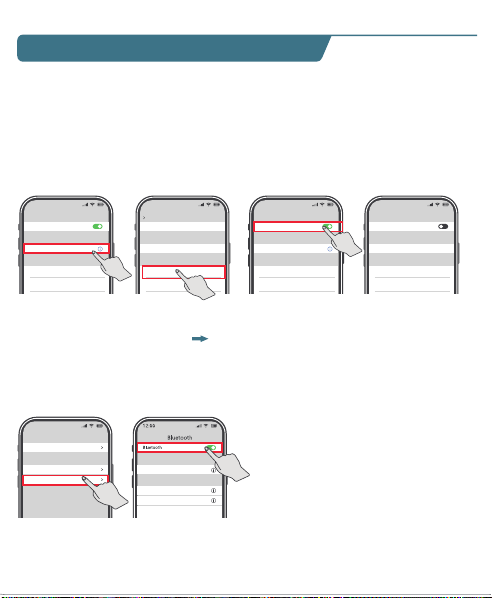
T60 User Manual
True Wireless Earbuds
❹
02 03
Overview
Type-C
Charging Port
Multi-functional
Button (MFB)
LED Indicator
of Earbud
Charging Contacts
Microphone
Power of
Charging Case
Earbud L&R
Charging Status
Charging Pins
Power Status
User Manual x1
Charging Case x1
Type-C
Charging Cable x1
Ear Tips Set x3
(Size M has been
preinstalled on earbuds)
Earbuds x2
What's in the box?
S
M
L
T60 User Manual
True Wireless Earbuds
Customer Service
06 07 08
First-use
1. Before the first use, please tear off the isolating film on the earbuds.
Put the earbuds into the case, then charge both earbuds and charging
case via supplied Type-C charging cable for at least 10mins (or after not
use for a long time), do not take out the earbuds during this period.
Wearing
1. Choose the Ear Tips that fit your ears best.
2. Insert the earbuds into the inner canal of your ears and turn gently
until you find the most comfortable and secure position.
Bluetooth Pairing
1. Open the charging case, and pick up the earbuds from the charging
case for 3 seconds to enter Bluetooth pairing mode.
09
Each time you power on your earbuds, they will automatically connect
to your last successfully connected device if available within the
Bluetooth range. If you wanna switch between devices, please first turn
off the Bluetooth of the last device.
10
10mins
Remove
S
M
L
T60
T60
MY DEVICES
T60
xxxxx
xxxxxxx
MY DEVICES
OTHER DEVICES
* When successfully connected, you will hear the prompt "connected"
and the LED indicators will turn off.
12:00
Bluetooth
Bluetooth
T60
Connected
12:00
Name
Disconnect
Forget This Device
Bluetooth
T60
Device Type
12:00
Bluetooth
Bluetooth
T60
Not Connected
MY DEVICES
12:00
Bluetooth
Bluetooth
First Device
Second Device
3s
2. Select "T60" on your device's Bluetooth list to connect.
Power On
2s
Tears off
the insulation film
MY DEVICES
12:00
Settings
APPLE ID
WLAN
xxxxx
Bluetooth
Off
T60
xxxxx
xxxxxxx
MY DEVICES
OTHER DEVICES
* If you don't see your buds in the list, you might need to reset the buds.
1. Go to the Bluetooth settings on the other device. For example, on
your phone, go to Settings Bluetooth.
2. Tap or click your earphones on the list of discovered devices.
Mono mode
◆ When Bluetooth connected, you can use either one of the earbuds
only by placing the other one into the charging case.
◆ When powered on and connected, if either one of the earbuds is out
of battery and powered off, you can keep using the other one.
◆ When you are on a call, place either one of the earbuds into the
charging case, and the microphone in the other earbud will be activated.
T60 T60
If you feel that the sound of your earbuds are too low, please follow the
steps below to adjust the volume:
❶ Long Press the "R" earbud to maximize the volume of the earbuds
until you hear a "du" sound.
❷ Increase the volume of your Android devices.
* This is only applicable to situations where the volume of the earbuds
and the Android devices are not synchronized.
11
Reset
You might need to reset the earbuds if you experience any connectivity
problems or function issues.
❶ Take the earbuds out for 5mins to consume some battery of both
buds. (Can't be reset if the earbuds are fully charged)
❷ Place the earbuds in the charging case and earbuds blink red.
❸ Press and hold the button on the buds for 8 seconds until the LED
indicators flash red-white 3 times. This confirms that the reset was
successful and your earbuds can be connected normally.
When resetting the earbuds, make sure the earbuds are properly
connected with charging points in the case, or it may cause resetting
failure.
hold for 8s
2. The earbuds are installed with a pair of size M ear tips by default. You
can select other suitable sizes for a secure fit.
Adjusting volume for low sound on earbudsSwitch from one device to another
01
◆ Keep away from children and pets to prevent accidental ingestion as
it has a battery. If swallowed, seek medical help. Store out of their reach
when not in use.
◆ The ear caps are made of soft silica gel, and the ear hooks are made
of elastic TPE material. A very small number of users may have allergic
reactions. If symptoms like itching or swelling of the skin on or around
the ears appear, stop wearing them immediately and seek medical
treatment.
◆ Pollen, dust and cosmetic residues are easy to attach to the earbuds,
which may easily lead to allergic situations. Please clean the earbuds
before and after use and avoid exposure to highly allergenic
environments.
◆ People with sensitive skin should test the earbuds on a small area of
skin around the ears before using them. If any discomfort occurs, stop
using them immediately and consult a dermatologist.
◆ To avoid hearing damage, do not use your earbuds at a high volume.
Turn the volume down on your product before placing the earbuds
in/on your ears, then turn the volume up gradually until you reach
acomfortable, moderate listening level.
◆ Long earbuds use may lead to ear fatigue, tinnitus and affect ear
blood circulation. It's recommended to take a 5-10 minute break per
hour of wearing to relax your ears and enjoy healthy listening.
Important Safety Information
04
Material Components
Earbuds Case: Made of plastic, free of heavy metals such as lead,
mercury and cadmium. It is environmentally friendly and durable.
Ear tips Part: Crafted from silica gel, this part is designed to softly
conform to the ear canal. While it is generally well-tolerated, a very
small fraction of individuals with allergies to Silica gel might experience
a mild allergic response.
Ear Hook Part: Made of TPE elastic material, which is wear-resistant
and stable. It is normally harmless, but people with extremely sensitive
skin may feel slightly uncomfortable.
It suits daily office, study, entertainment, sports lovers and travelers. But
some need caution or doctor's advice:
People with Sensitive Skin: Allergy-prone should do a local test. If
uncomfortable, stop and consult a dermatologist.
Patients with Ear Diseases: Those with ear diseases like otitis media
should consult an ENT doctor before use.
Applicable Population
05
Risk Warnings for Individual Differences
Differences in Ear Canal Structure: Different ear canal structures may
affect the wearing comfort and sound insulation. If there is any discomfort,
stop using it and check the wearing method or consult a doctor.
Differences in Skin Sensitivity: Allergic people may have symptoms
such as skin itching. Stop using it and wash it with water, then seek medi-
cal treatment and inform the doctor about the usage situation.
Differences in Hearing: Follow the "60 - 60" principle to protect your
hearing. If there is any discomfort, stop using it immediately and consult
a doctor.
◆ Force Control: Don't insert earbuds forcefully to protect ear canal.
Adjust ear hooks gently to avoid over-pressing ear skin.
◆ Adaptation for Sports: Ensure ear hook positions are right and
stable before exercise to prevent shaking/friction harm like abrasions.
◆ Stop if Uncomfy: If there's any discomfort like ear canal pain, skin
itch or foreign body feeling, stop using earbuds, check, and seek medical
help if needed.
◆ The LED indicators on the buds will flash white-red in sequence
continuously, the other bud will blink white slowly.
◆ If the earbuds are not connected to any devices over 5 minutes, they
will power off automatically. Turn on the earbuds manually by pressing
the MFB button for 2 seconds to hear the prompt "power on".
V1.1 2024.12.27
13 14
Maintenance
Care for your earbuds
Clean and dry your earbuds and your skin
after workouts or heavy sweating. Keep your
earbuds and charging case clean and dry.
Dual mode
15
16
Charging
Type-C USB charging
◆ Fully dry off the earbuds and the USB port before charging.
◆ Use a certified USB-C charging cable and charger to prevent any damage.
◆ Fully charge both the earbuds and the charging case before the first use.
Wireless charging
Easily charge the case without cables, just put your charging case on the
wireless charging pad. If the charging case is not being charged, please
try to reposition it.
What should I do if the earbuds disconnect or the sound is choppy?
Please note that this doesn't necessarily mean there is an issue with
the earbuds, but may have something to do with the connected
device and environment. Bluetooth signals may be influenced by
obstructions, such as walls, pillars, home appliances, Wi-Fi, and
more. To ensure a stable connection, we recommend avoiding such
obstructions. To fix this issue, please try the following:
1. Fully charge and reset your earbuds as stated above and re-pair
them.
2. Check the earbuds by listening to a downloaded song/video.
3. Check the earbuds with another Bluetooth device in a different
environment to see if it works well.
FAQ
17
What should I do if any of the following problems occur?
1. Cannot pair or reconnect with my device.
2. One side does not pair with the other side of my device.
3. No music plays after connecting with my device.
4. Only one earbud has sound.
1. Remove the protective film covering the connectors on the earbuds.
2. Reboot the Bluetooth device you're using (such as a phone or
What should I do if any of the following problems occur?
18
1. Confirm the charging case has power left (open the charging
case to check if there is white light flashing).
2. Clean the charging pins with a dry cloth and an alcohol-based
disinfectant. This is to ensure all charging contact pins on the
earbuds and charging case is completely clean and dry from sweat
and water. Then put the earbuds correctly into the case. The light
and display flash when the earbuds are placed in the case.
3. Please use the certified charging cable and wall charger.
4. Please check whether the ear tips are installed properly.
▶ During charging, the digital display flashes and shows the real-time
power until 100.
▶ The right display panel indicates the charging status per bud. There
are separated power consumption indicators by 4 grids in total, which
will be flashing when charging.
▶ The LED indicator on the charging case indicates the charging status.
❹
❶ ❷
❸
Press Once (R/L)
For Call
Answer/End a call
Reject a call
Press and hold for 2 seconds (R/L)
Voice Assistance
Press Thrice (R/L)
Activate Siri or other
voice assistant software
Music Mode
Press Once (R/L)
Press Twice (R)
Press Twice (L)
Long Press (R)
Long Press (L)
Play/Pause
Next Track
Previous Track
Volume+
Volume -
*Press and hold for 2s (R/L) in power-off state
*Pick up buds from the charging case
Power On/O
Power on
*Non-music playing, press and hold for 5s (R/L)
*Put back into the charging case.
*Not connected to any devices over 5mins
Power off
Power of
Charging Case
Charging
Status Per Bud
Note: This equipment has been tested and found to comply with the
limits for a Class B digital device, pursuant to part 15 of the FCC Rules.
These limits are designed to provide reasonable protection against
harmful interference in a residential installation.
This equipment generates, uses and can radiate radio frequency energy
and, if not installed and used in accordance with the instructions, may
cause harmful interference to radio communications. However, there is
no guarantee that interference will not occur in a particular installation.
If this equipment does cause harmful interference to radio or television
reception, which can be determined by turning the equipment off and on,
the user is encouraged to try to correct the interference by one or more
of the following measures:
— Reorient or relocate the receiving antenna.
— Increase the separation between the equipment and receiver.
— Connect the equipment into an outlet on a circuit different from that
to which the receiver is connected.
— Consult the dealer or an experienced radio/TV technician for help.
This equipment complies with FCC radiation exposure limits set forth for
an uncontrolled environment. This transmitter must not be co-located or
operating in conjunction with any other antenna or transmitter.
Any Changes or modifications not expressly approved by the party
responsible for compliance could void the user's authority to operate
the equipment.
This device complies with part 15 of the FCC Rules. Operation is subject
to the following two conditions:
(1) This device may not cause harmful interference, and
(2) This device must accept any interference received, including
interference that may cause undesired operation.
FCC Caution
19 20
1) The earbuds don’t recharge in the charging case.
2) The earbuds stay connected to the device even after being placed
in the charging case with the lid closed.
3) The earbuds don't turn on when taken out of the charging case.
Maintenance
Mono mode
Music Mode
Press Once (R/L)
Press Twice (R/L)
Unsupported
Long Press (R/L)
Unsupported
Play/Pause
Next Track
Previous Track
Volume+
Volume -
computer). Forget all the pairing records of your earbuds on your
device and turn off Bluetooth.
3. Reset the earbuds as per the steps above(make sure your earbuds
have enough battery).
4. Turn on the Bluetooth of your device and search for T60 and
pair. If there is a pop-up window to confirm pairing for "T60,"
please select "Pair." If you accidentally select "Cancel," you need to
refresh (turn off and turn on) the Bluetooth of your device and pair
the earbuds again.
1. Place the earbuds in the
charging case and close it.
2. Connect the charging case
to the power supply by using
a USB-C charging cable.
Wireless Charging Pad
(Not Included)
This device complies with Industry Canada licence-exempt RSS
standard(s). Operation is subject to the following two conditions:
(1) This device may not cause interference, and
(2) This device must accept any interference, including interference that
may cause undesired operation of the device.
Le présent appareil est conforme aux CNR d'Industrie Canada applicables
aux appareils radio exempts de licence. L'exploitation est autorisée aux
deux conditions suivantes:
(1) l'appareil ne doit pas produire de brouillage, et
(2) l'utilisateur de l'appareil doit accepter tout brouillage radioélectrique
subi, même si le brouillage est susceptible d'en compromettre le
fonctionnement.
The device is compliance with RF exposure guidelines, users can obtain
Canadian information on RF exposure and compliance.
Le présent appareil est conforme
Après examen de ce matériel aux conformité ou aux limites d’intensité
de champ RF, les utilisateurs peuvent sur l’exposition aux radiofréquenc-
es et la conformité and compliance d’acquérir les informations
correspondantes.
21 22
This product bears the selective sorting symbol for Waste electrical and
electronic equipment (WEEE).
This means that this product must be handled pursuant to European
directive 2012/19/EU in order to be recycled or dismantled to minimize
its impact on the environment. User has the choice to give his product
to a competent recycling organization or to the retailer when he buys a
new electrical or electronic equipment.
This product can be used across EU member states.
The device is low power device, it can meet the requirement of the RF
exposure.
NOTE:
1. High Sound Pressure
2. Hearing Damage Risk
3. Do not listen at high volume levels for long periods.
ISED Warning
The symbol indicates DC voltage
RECYCLING
DISPOSE OF USED BATTERIES ACCORDING TO THE INSTRUCTIONS
Caution
Battery Warning
Using the wrong battery can cause fire and other hazards (for example,
in the case of some lithium battery types)
1. Disposal of a battery into fire or a hot oven, or mechanically crushing
or cutting of abattery, that can result in an explosion.
2. Do not leaving a battery in an extremely high temperature surrounding
environment that can result in an explosion or the leakage of flammable
liquid or gas.
3. A battery subjected to extremely low air pressure that may result in an
explosion or the leakage of flammable liquid or gas.
Use a soft, dry, lint-free cloth to clean all other areas of the buds and
case. Here's how to clean your eartips.
12
Specifications
Specifications are subject to change without notice.
Maintenance
Clean your earbuds
Your earbuds are sweat and water-resistant, but not sweatproof or
waterproof. The charging case is not waterproof, so be careful not to
get moisture in any openings.
Remove the earbuds from the charging case.
Disconnect the charging cable from both the case and your computer
or power adapter.
To clean the charging contacts on buds, use a cotton swab slightly
dampened with warm water. To clean the charging pins on the case,
use a lint-free cloth slightly dampened with warm water. If necessary,
you can slightly dampen the cotton swab or cloth with 70 percent
isopropyl alcohol.
❶
❷
Model No.: T60
Input: 5V 1A
FCC ID: 2A33A-T60
IC: 32589-T60
HVIN: T60
Product Name: Wireless Sport Earbuds
Charging Cord Type: Type-C
Impedance: 32Ω
Battery Capacity: 3.7V 600mAh, 2.22Wh
Transmission Range: 33feet (Without Obstacles)
❸
◆ Clean earbuds weekly at least. Use in sweaty, dusty or allergen-rich
environments requires more frequent cleaning.
◆ After contact with pollen, dust or cosmetics, wipe the earbuds surface
with a clean damp cloth before use to reduce allergen residue. If you
know you're allergic, clean the earbuds promptly after use.
23
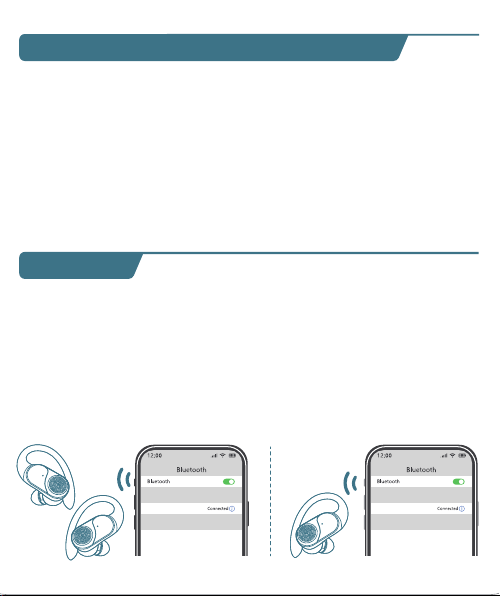
T60 User Manual
True Wireless Earbuds
❹
02 03
Overview
Type-C
Charging Port
Multi-functional
Button (MFB)
LED Indicator
of Earbud
Charging Contacts
Microphone
Power of
Charging Case
Earbud L&R
Charging Status
Charging Pins
Power Status
User Manual x1
Charging Case x1
Type-C
Charging Cable x1
Ear Tips Set x3
(Size M has been
preinstalled on earbuds)
Earbuds x2
What's in the box?
S
M
L
T60 User Manual
True Wireless Earbuds
Customer Service
06 07 08
First-use
1. Before the first use, please tear off the isolating film on the earbuds.
Put the earbuds into the case, then charge both earbuds and charging
case via supplied Type-C charging cable for at least 10mins (or after not
use for a long time), do not take out the earbuds during this period.
Wearing
1. Choose the Ear Tips that fit your ears best.
2. Insert the earbuds into the inner canal of your ears and turn gently
until you find the most comfortable and secure position.
Bluetooth Pairing
1. Open the charging case, and pick up the earbuds from the charging
case for 3 seconds to enter Bluetooth pairing mode.
09
Each time you power on your earbuds, they will automatically connect
to your last successfully connected device if available within the
Bluetooth range. If you wanna switch between devices, please first turn
off the Bluetooth of the last device.
10
10mins
Remove
S
M
L
T60
T60
MY DEVICES
T60
xxxxx
xxxxxxx
MY DEVICES
OTHER DEVICES
* When successfully connected, you will hear the prompt "connected"
and the LED indicators will turn off.
12:00
Bluetooth
Bluetooth
T60
Connected
12:00
Name
Disconnect
Forget This Device
Bluetooth
T60
Device Type
12:00
Bluetooth
Bluetooth
T60
Not Connected
MY DEVICES
12:00
Bluetooth
Bluetooth
First Device
Second Device
3s
2. Select "T60" on your device's Bluetooth list to connect.
Power On
2s
Tears off
the insulation film
MY DEVICES
12:00
Settings
APPLE ID
WLAN
xxxxx
Bluetooth
Off
T60
xxxxx
xxxxxxx
MY DEVICES
OTHER DEVICES
* If you don't see your buds in the list, you might need to reset the buds.
1. Go to the Bluetooth settings on the other device. For example, on
your phone, go to Settings Bluetooth.
2. Tap or click your earphones on the list of discovered devices.
Mono mode
◆ When Bluetooth connected, you can use either one of the earbuds
only by placing the other one into the charging case.
◆ When powered on and connected, if either one of the earbuds is out
of battery and powered off, you can keep using the other one.
◆ When you are on a call, place either one of the earbuds into the
charging case, and the microphone in the other earbud will be activated.
T60 T60
If you feel that the sound of your earbuds are too low, please follow the
steps below to adjust the volume:
❶ Long Press the "R" earbud to maximize the volume of the earbuds
until you hear a "du" sound.
❷ Increase the volume of your Android devices.
* This is only applicable to situations where the volume of the earbuds
and the Android devices are not synchronized.
11
Reset
You might need to reset the earbuds if you experience any connectivity
problems or function issues.
❶ Take the earbuds out for 5mins to consume some battery of both
buds. (Can't be reset if the earbuds are fully charged)
❷ Place the earbuds in the charging case and earbuds blink red.
❸ Press and hold the button on the buds for 8 seconds until the LED
indicators flash red-white 3 times. This confirms that the reset was
successful and your earbuds can be connected normally.
When resetting the earbuds, make sure the earbuds are properly
connected with charging points in the case, or it may cause resetting
failure.
hold for 8s
2. The earbuds are installed with a pair of size M ear tips by default. You
can select other suitable sizes for a secure fit.
Adjusting volume for low sound on earbudsSwitch from one device to another
01
◆ Keep away from children and pets to prevent accidental ingestion as
it has a battery. If swallowed, seek medical help. Store out of their reach
when not in use.
◆ The ear caps are made of soft silica gel, and the ear hooks are made
of elastic TPE material. A very small number of users may have allergic
reactions. If symptoms like itching or swelling of the skin on or around
the ears appear, stop wearing them immediately and seek medical
treatment.
◆ Pollen, dust and cosmetic residues are easy to attach to the earbuds,
which may easily lead to allergic situations. Please clean the earbuds
before and after use and avoid exposure to highly allergenic
environments.
◆ People with sensitive skin should test the earbuds on a small area of
skin around the ears before using them. If any discomfort occurs, stop
using them immediately and consult a dermatologist.
◆ To avoid hearing damage, do not use your earbuds at a high volume.
Turn the volume down on your product before placing the earbuds
in/on your ears, then turn the volume up gradually until you reach
acomfortable, moderate listening level.
◆ Long earbuds use may lead to ear fatigue, tinnitus and affect ear
blood circulation. It's recommended to take a 5-10 minute break per
hour of wearing to relax your ears and enjoy healthy listening.
Important Safety Information
04
Material Components
Earbuds Case: Made of plastic, free of heavy metals such as lead,
mercury and cadmium. It is environmentally friendly and durable.
Ear tips Part: Crafted from silica gel, this part is designed to softly
conform to the ear canal. While it is generally well-tolerated, a very
small fraction of individuals with allergies to Silica gel might experience
a mild allergic response.
Ear Hook Part: Made of TPE elastic material, which is wear-resistant
and stable. It is normally harmless, but people with extremely sensitive
skin may feel slightly uncomfortable.
It suits daily office, study, entertainment, sports lovers and travelers. But
some need caution or doctor's advice:
People with Sensitive Skin: Allergy-prone should do a local test. If
uncomfortable, stop and consult a dermatologist.
Patients with Ear Diseases: Those with ear diseases like otitis media
should consult an ENT doctor before use.
Applicable Population
05
Risk Warnings for Individual Differences
Differences in Ear Canal Structure: Different ear canal structures may
affect the wearing comfort and sound insulation. If there is any discomfort,
stop using it and check the wearing method or consult a doctor.
Differences in Skin Sensitivity: Allergic people may have symptoms
such as skin itching. Stop using it and wash it with water, then seek medi-
cal treatment and inform the doctor about the usage situation.
Differences in Hearing: Follow the "60 - 60" principle to protect your
hearing. If there is any discomfort, stop using it immediately and consult
a doctor.
◆ Force Control: Don't insert earbuds forcefully to protect ear canal.
Adjust ear hooks gently to avoid over-pressing ear skin.
◆ Adaptation for Sports: Ensure ear hook positions are right and
stable before exercise to prevent shaking/friction harm like abrasions.
◆ Stop if Uncomfy: If there's any discomfort like ear canal pain, skin
itch or foreign body feeling, stop using earbuds, check, and seek medical
help if needed.
◆ The LED indicators on the buds will flash white-red in sequence
continuously, the other bud will blink white slowly.
◆ If the earbuds are not connected to any devices over 5 minutes, they
will power off automatically. Turn on the earbuds manually by pressing
the MFB button for 2 seconds to hear the prompt "power on".
V1.1 2024.12.27
13 14
Maintenance
Care for your earbuds
Clean and dry your earbuds and your skin
after workouts or heavy sweating. Keep your
earbuds and charging case clean and dry.
Dual mode
15
16
Charging
Type-C USB charging
◆ Fully dry off the earbuds and the USB port before charging.
◆ Use a certified USB-C charging cable and charger to prevent any damage.
◆ Fully charge both the earbuds and the charging case before the first use.
Wireless charging
Easily charge the case without cables, just put your charging case on the
wireless charging pad. If the charging case is not being charged, please
try to reposition it.
What should I do if the earbuds disconnect or the sound is choppy?
Please note that this doesn't necessarily mean there is an issue with
the earbuds, but may have something to do with the connected
device and environment. Bluetooth signals may be influenced by
obstructions, such as walls, pillars, home appliances, Wi-Fi, and
more. To ensure a stable connection, we recommend avoiding such
obstructions. To fix this issue, please try the following:
1. Fully charge and reset your earbuds as stated above and re-pair
them.
2. Check the earbuds by listening to a downloaded song/video.
3. Check the earbuds with another Bluetooth device in a different
environment to see if it works well.
FAQ
17
What should I do if any of the following problems occur?
1. Cannot pair or reconnect with my device.
2. One side does not pair with the other side of my device.
3. No music plays after connecting with my device.
4. Only one earbud has sound.
1. Remove the protective film covering the connectors on the earbuds.
2. Reboot the Bluetooth device you're using (such as a phone or
What should I do if any of the following problems occur?
18
1. Confirm the charging case has power left (open the charging
case to check if there is white light flashing).
2. Clean the charging pins with a dry cloth and an alcohol-based
disinfectant. This is to ensure all charging contact pins on the
earbuds and charging case is completely clean and dry from sweat
and water. Then put the earbuds correctly into the case. The light
and display flash when the earbuds are placed in the case.
3. Please use the certified charging cable and wall charger.
4. Please check whether the ear tips are installed properly.
▶ During charging, the digital display flashes and shows the real-time
power until 100.
▶ The right display panel indicates the charging status per bud. There
are separated power consumption indicators by 4 grids in total, which
will be flashing when charging.
▶ The LED indicator on the charging case indicates the charging status.
❹
❶ ❷
❸
Press Once (R/L)
For Call
Answer/End a call
Reject a call
Press and hold for 2 seconds (R/L)
Voice Assistance
Press Thrice (R/L)
Activate Siri or other
voice assistant software
Music Mode
Press Once (R/L)
Press Twice (R)
Press Twice (L)
Long Press (R)
Long Press (L)
Play/Pause
Next Track
Previous Track
Volume+
Volume -
*Press and hold for 2s (R/L) in power-off state
*Pick up buds from the charging case
Power On/O
Power on
*Non-music playing, press and hold for 5s (R/L)
*Put back into the charging case.
*Not connected to any devices over 5mins
Power off
Power of
Charging Case
Charging
Status Per Bud
Note: This equipment has been tested and found to comply with the
limits for a Class B digital device, pursuant to part 15 of the FCC Rules.
These limits are designed to provide reasonable protection against
harmful interference in a residential installation.
This equipment generates, uses and can radiate radio frequency energy
and, if not installed and used in accordance with the instructions, may
cause harmful interference to radio communications. However, there is
no guarantee that interference will not occur in a particular installation.
If this equipment does cause harmful interference to radio or television
reception, which can be determined by turning the equipment off and on,
the user is encouraged to try to correct the interference by one or more
of the following measures:
— Reorient or relocate the receiving antenna.
— Increase the separation between the equipment and receiver.
— Connect the equipment into an outlet on a circuit different from that
to which the receiver is connected.
— Consult the dealer or an experienced radio/TV technician for help.
This equipment complies with FCC radiation exposure limits set forth for
an uncontrolled environment. This transmitter must not be co-located or
operating in conjunction with any other antenna or transmitter.
Any Changes or modifications not expressly approved by the party
responsible for compliance could void the user's authority to operate
the equipment.
This device complies with part 15 of the FCC Rules. Operation is subject
to the following two conditions:
(1) This device may not cause harmful interference, and
(2) This device must accept any interference received, including
interference that may cause undesired operation.
FCC Caution
19 20
1) The earbuds don’t recharge in the charging case.
2) The earbuds stay connected to the device even after being placed
in the charging case with the lid closed.
3) The earbuds don't turn on when taken out of the charging case.
Maintenance
Mono mode
Music Mode
Press Once (R/L)
Press Twice (R/L)
Unsupported
Long Press (R/L)
Unsupported
Play/Pause
Next Track
Previous Track
Volume+
Volume -
computer). Forget all the pairing records of your earbuds on your
device and turn off Bluetooth.
3. Reset the earbuds as per the steps above(make sure your earbuds
have enough battery).
4. Turn on the Bluetooth of your device and search for T60 and
pair. If there is a pop-up window to confirm pairing for "T60,"
please select "Pair." If you accidentally select "Cancel," you need to
refresh (turn off and turn on) the Bluetooth of your device and pair
the earbuds again.
1. Place the earbuds in the
charging case and close it.
2. Connect the charging case
to the power supply by using
a USB-C charging cable.
Wireless Charging Pad
(Not Included)
This device complies with Industry Canada licence-exempt RSS
standard(s). Operation is subject to the following two conditions:
(1) This device may not cause interference, and
(2) This device must accept any interference, including interference that
may cause undesired operation of the device.
Le présent appareil est conforme aux CNR d'Industrie Canada applicables
aux appareils radio exempts de licence. L'exploitation est autorisée aux
deux conditions suivantes:
(1) l'appareil ne doit pas produire de brouillage, et
(2) l'utilisateur de l'appareil doit accepter tout brouillage radioélectrique
subi, même si le brouillage est susceptible d'en compromettre le
fonctionnement.
The device is compliance with RF exposure guidelines, users can obtain
Canadian information on RF exposure and compliance.
Le présent appareil est conforme
Après examen de ce matériel aux conformité ou aux limites d’intensité
de champ RF, les utilisateurs peuvent sur l’exposition aux radiofréquenc-
es et la conformité and compliance d’acquérir les informations
correspondantes.
21 22
This product bears the selective sorting symbol for Waste electrical and
electronic equipment (WEEE).
This means that this product must be handled pursuant to European
directive 2012/19/EU in order to be recycled or dismantled to minimize
its impact on the environment. User has the choice to give his product
to a competent recycling organization or to the retailer when he buys a
new electrical or electronic equipment.
This product can be used across EU member states.
The device is low power device, it can meet the requirement of the RF
exposure.
NOTE:
1. High Sound Pressure
2. Hearing Damage Risk
3. Do not listen at high volume levels for long periods.
ISED Warning
The symbol indicates DC voltage
RECYCLING
DISPOSE OF USED BATTERIES ACCORDING TO THE INSTRUCTIONS
Caution
Battery Warning
Using the wrong battery can cause fire and other hazards (for example,
in the case of some lithium battery types)
1. Disposal of a battery into fire or a hot oven, or mechanically crushing
or cutting of abattery, that can result in an explosion.
2. Do not leaving a battery in an extremely high temperature surrounding
environment that can result in an explosion or the leakage of flammable
liquid or gas.
3. A battery subjected to extremely low air pressure that may result in an
explosion or the leakage of flammable liquid or gas.
Use a soft, dry, lint-free cloth to clean all other areas of the buds and
case. Here's how to clean your eartips.
12
Specifications
Specifications are subject to change without notice.
Maintenance
Clean your earbuds
Your earbuds are sweat and water-resistant, but not sweatproof or
waterproof. The charging case is not waterproof, so be careful not to
get moisture in any openings.
Remove the earbuds from the charging case.
Disconnect the charging cable from both the case and your computer
or power adapter.
To clean the charging contacts on buds, use a cotton swab slightly
dampened with warm water. To clean the charging pins on the case,
use a lint-free cloth slightly dampened with warm water. If necessary,
you can slightly dampen the cotton swab or cloth with 70 percent
isopropyl alcohol.
❶
❷
Model No.: T60
Input: 5V 1A
FCC ID: 2A33A-T60
IC: 32589-T60
HVIN: T60
Product Name: Wireless Sport Earbuds
Charging Cord Type: Type-C
Impedance: 32Ω
Battery Capacity: 3.7V 600mAh, 2.22Wh
Transmission Range: 33feet (Without Obstacles)
❸
◆ Clean earbuds weekly at least. Use in sweaty, dusty or allergen-rich
environments requires more frequent cleaning.
◆ After contact with pollen, dust or cosmetics, wipe the earbuds surface
with a clean damp cloth before use to reduce allergen residue. If you
know you're allergic, clean the earbuds promptly after use.
23
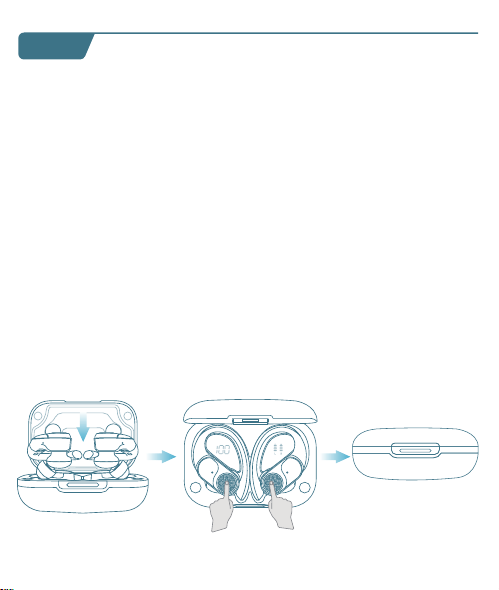
T60 User Manual
True Wireless Earbuds
❹
02 03
Overview
Type-C
Charging Port
Multi-functional
Button (MFB)
LED Indicator
of Earbud
Charging Contacts
Microphone
Power of
Charging Case
Earbud L&R
Charging Status
Charging Pins
Power Status
User Manual x1
Charging Case x1
Type-C
Charging Cable x1
Ear Tips Set x3
(Size M has been
preinstalled on earbuds)
Earbuds x2
What's in the box?
S
M
L
T60 User Manual
True Wireless Earbuds
Customer Service
06 07 08
First-use
1. Before the first use, please tear off the isolating film on the earbuds.
Put the earbuds into the case, then charge both earbuds and charging
case via supplied Type-C charging cable for at least 10mins (or after not
use for a long time), do not take out the earbuds during this period.
Wearing
1. Choose the Ear Tips that fit your ears best.
2. Insert the earbuds into the inner canal of your ears and turn gently
until you find the most comfortable and secure position.
Bluetooth Pairing
1. Open the charging case, and pick up the earbuds from the charging
case for 3 seconds to enter Bluetooth pairing mode.
09
Each time you power on your earbuds, they will automatically connect
to your last successfully connected device if available within the
Bluetooth range. If you wanna switch between devices, please first turn
off the Bluetooth of the last device.
10
10mins
Remove
S
M
L
T60
T60
MY DEVICES
T60
xxxxx
xxxxxxx
MY DEVICES
OTHER DEVICES
* When successfully connected, you will hear the prompt "connected"
and the LED indicators will turn off.
12:00
Bluetooth
Bluetooth
T60
Connected
12:00
Name
Disconnect
Forget This Device
Bluetooth
T60
Device Type
12:00
Bluetooth
Bluetooth
T60
Not Connected
MY DEVICES
12:00
Bluetooth
Bluetooth
First Device
Second Device
3s
2. Select "T60" on your device's Bluetooth list to connect.
Power On
2s
Tears off
the insulation film
MY DEVICES
12:00
Settings
APPLE ID
WLAN
xxxxx
Bluetooth
Off
T60
xxxxx
xxxxxxx
MY DEVICES
OTHER DEVICES
* If you don't see your buds in the list, you might need to reset the buds.
1. Go to the Bluetooth settings on the other device. For example, on
your phone, go to Settings Bluetooth.
2. Tap or click your earphones on the list of discovered devices.
Mono mode
◆ When Bluetooth connected, you can use either one of the earbuds
only by placing the other one into the charging case.
◆ When powered on and connected, if either one of the earbuds is out
of battery and powered off, you can keep using the other one.
◆ When you are on a call, place either one of the earbuds into the
charging case, and the microphone in the other earbud will be activated.
T60 T60
If you feel that the sound of your earbuds are too low, please follow the
steps below to adjust the volume:
❶ Long Press the "R" earbud to maximize the volume of the earbuds
until you hear a "du" sound.
❷ Increase the volume of your Android devices.
* This is only applicable to situations where the volume of the earbuds
and the Android devices are not synchronized.
11
Reset
You might need to reset the earbuds if you experience any connectivity
problems or function issues.
❶ Take the earbuds out for 5mins to consume some battery of both
buds. (Can't be reset if the earbuds are fully charged)
❷ Place the earbuds in the charging case and earbuds blink red.
❸ Press and hold the button on the buds for 8 seconds until the LED
indicators flash red-white 3 times. This confirms that the reset was
successful and your earbuds can be connected normally.
When resetting the earbuds, make sure the earbuds are properly
connected with charging points in the case, or it may cause resetting
failure.
hold for 8s
2. The earbuds are installed with a pair of size M ear tips by default. You
can select other suitable sizes for a secure fit.
Adjusting volume for low sound on earbudsSwitch from one device to another
01
◆ Keep away from children and pets to prevent accidental ingestion as
it has a battery. If swallowed, seek medical help. Store out of their reach
when not in use.
◆ The ear caps are made of soft silica gel, and the ear hooks are made
of elastic TPE material. A very small number of users may have allergic
reactions. If symptoms like itching or swelling of the skin on or around
the ears appear, stop wearing them immediately and seek medical
treatment.
◆ Pollen, dust and cosmetic residues are easy to attach to the earbuds,
which may easily lead to allergic situations. Please clean the earbuds
before and after use and avoid exposure to highly allergenic
environments.
◆ People with sensitive skin should test the earbuds on a small area of
skin around the ears before using them. If any discomfort occurs, stop
using them immediately and consult a dermatologist.
◆ To avoid hearing damage, do not use your earbuds at a high volume.
Turn the volume down on your product before placing the earbuds
in/on your ears, then turn the volume up gradually until you reach
acomfortable, moderate listening level.
◆ Long earbuds use may lead to ear fatigue, tinnitus and affect ear
blood circulation. It's recommended to take a 5-10 minute break per
hour of wearing to relax your ears and enjoy healthy listening.
Important Safety Information
04
Material Components
Earbuds Case: Made of plastic, free of heavy metals such as lead,
mercury and cadmium. It is environmentally friendly and durable.
Ear tips Part: Crafted from silica gel, this part is designed to softly
conform to the ear canal. While it is generally well-tolerated, a very
small fraction of individuals with allergies to Silica gel might experience
a mild allergic response.
Ear Hook Part: Made of TPE elastic material, which is wear-resistant
and stable. It is normally harmless, but people with extremely sensitive
skin may feel slightly uncomfortable.
It suits daily office, study, entertainment, sports lovers and travelers. But
some need caution or doctor's advice:
People with Sensitive Skin: Allergy-prone should do a local test. If
uncomfortable, stop and consult a dermatologist.
Patients with Ear Diseases: Those with ear diseases like otitis media
should consult an ENT doctor before use.
Applicable Population
05
Risk Warnings for Individual Differences
Differences in Ear Canal Structure: Different ear canal structures may
affect the wearing comfort and sound insulation. If there is any discomfort,
stop using it and check the wearing method or consult a doctor.
Differences in Skin Sensitivity: Allergic people may have symptoms
such as skin itching. Stop using it and wash it with water, then seek medi-
cal treatment and inform the doctor about the usage situation.
Differences in Hearing: Follow the "60 - 60" principle to protect your
hearing. If there is any discomfort, stop using it immediately and consult
a doctor.
◆ Force Control: Don't insert earbuds forcefully to protect ear canal.
Adjust ear hooks gently to avoid over-pressing ear skin.
◆ Adaptation for Sports: Ensure ear hook positions are right and
stable before exercise to prevent shaking/friction harm like abrasions.
◆ Stop if Uncomfy: If there's any discomfort like ear canal pain, skin
itch or foreign body feeling, stop using earbuds, check, and seek medical
help if needed.
◆ The LED indicators on the buds will flash white-red in sequence
continuously, the other bud will blink white slowly.
◆ If the earbuds are not connected to any devices over 5 minutes, they
will power off automatically. Turn on the earbuds manually by pressing
the MFB button for 2 seconds to hear the prompt "power on".
V1.1 2024.12.27
13 14
Maintenance
Care for your earbuds
Clean and dry your earbuds and your skin
after workouts or heavy sweating. Keep your
earbuds and charging case clean and dry.
Dual mode
15
16
Charging
Type-C USB charging
◆ Fully dry off the earbuds and the USB port before charging.
◆ Use a certified USB-C charging cable and charger to prevent any damage.
◆ Fully charge both the earbuds and the charging case before the first use.
Wireless charging
Easily charge the case without cables, just put your charging case on the
wireless charging pad. If the charging case is not being charged, please
try to reposition it.
What should I do if the earbuds disconnect or the sound is choppy?
Please note that this doesn't necessarily mean there is an issue with
the earbuds, but may have something to do with the connected
device and environment. Bluetooth signals may be influenced by
obstructions, such as walls, pillars, home appliances, Wi-Fi, and
more. To ensure a stable connection, we recommend avoiding such
obstructions. To fix this issue, please try the following:
1. Fully charge and reset your earbuds as stated above and re-pair
them.
2. Check the earbuds by listening to a downloaded song/video.
3. Check the earbuds with another Bluetooth device in a different
environment to see if it works well.
FAQ
17
What should I do if any of the following problems occur?
1. Cannot pair or reconnect with my device.
2. One side does not pair with the other side of my device.
3. No music plays after connecting with my device.
4. Only one earbud has sound.
1. Remove the protective film covering the connectors on the earbuds.
2. Reboot the Bluetooth device you're using (such as a phone or
What should I do if any of the following problems occur?
18
1. Confirm the charging case has power left (open the charging
case to check if there is white light flashing).
2. Clean the charging pins with a dry cloth and an alcohol-based
disinfectant. This is to ensure all charging contact pins on the
earbuds and charging case is completely clean and dry from sweat
and water. Then put the earbuds correctly into the case. The light
and display flash when the earbuds are placed in the case.
3. Please use the certified charging cable and wall charger.
4. Please check whether the ear tips are installed properly.
▶ During charging, the digital display flashes and shows the real-time
power until 100.
▶ The right display panel indicates the charging status per bud. There
are separated power consumption indicators by 4 grids in total, which
will be flashing when charging.
▶ The LED indicator on the charging case indicates the charging status.
❹
❶ ❷
❸
Press Once (R/L)
For Call
Answer/End a call
Reject a call
Press and hold for 2 seconds (R/L)
Voice Assistance
Press Thrice (R/L)
Activate Siri or other
voice assistant software
Music Mode
Press Once (R/L)
Press Twice (R)
Press Twice (L)
Long Press (R)
Long Press (L)
Play/Pause
Next Track
Previous Track
Volume+
Volume -
*Press and hold for 2s (R/L) in power-off state
*Pick up buds from the charging case
Power On/O
Power on
*Non-music playing, press and hold for 5s (R/L)
*Put back into the charging case.
*Not connected to any devices over 5mins
Power off
Power of
Charging Case
Charging
Status Per Bud
Note: This equipment has been tested and found to comply with the
limits for a Class B digital device, pursuant to part 15 of the FCC Rules.
These limits are designed to provide reasonable protection against
harmful interference in a residential installation.
This equipment generates, uses and can radiate radio frequency energy
and, if not installed and used in accordance with the instructions, may
cause harmful interference to radio communications. However, there is
no guarantee that interference will not occur in a particular installation.
If this equipment does cause harmful interference to radio or television
reception, which can be determined by turning the equipment off and on,
the user is encouraged to try to correct the interference by one or more
of the following measures:
— Reorient or relocate the receiving antenna.
— Increase the separation between the equipment and receiver.
— Connect the equipment into an outlet on a circuit different from that
to which the receiver is connected.
— Consult the dealer or an experienced radio/TV technician for help.
This equipment complies with FCC radiation exposure limits set forth for
an uncontrolled environment. This transmitter must not be co-located or
operating in conjunction with any other antenna or transmitter.
Any Changes or modifications not expressly approved by the party
responsible for compliance could void the user's authority to operate
the equipment.
This device complies with part 15 of the FCC Rules. Operation is subject
to the following two conditions:
(1) This device may not cause harmful interference, and
(2) This device must accept any interference received, including
interference that may cause undesired operation.
FCC Caution
19 20
1) The earbuds don’t recharge in the charging case.
2) The earbuds stay connected to the device even after being placed
in the charging case with the lid closed.
3) The earbuds don't turn on when taken out of the charging case.
Maintenance
Mono mode
Music Mode
Press Once (R/L)
Press Twice (R/L)
Unsupported
Long Press (R/L)
Unsupported
Play/Pause
Next Track
Previous Track
Volume+
Volume -
computer). Forget all the pairing records of your earbuds on your
device and turn off Bluetooth.
3. Reset the earbuds as per the steps above(make sure your earbuds
have enough battery).
4. Turn on the Bluetooth of your device and search for T60 and
pair. If there is a pop-up window to confirm pairing for "T60,"
please select "Pair." If you accidentally select "Cancel," you need to
refresh (turn off and turn on) the Bluetooth of your device and pair
the earbuds again.
1. Place the earbuds in the
charging case and close it.
2. Connect the charging case
to the power supply by using
a USB-C charging cable.
Wireless Charging Pad
(Not Included)
This device complies with Industry Canada licence-exempt RSS
standard(s). Operation is subject to the following two conditions:
(1) This device may not cause interference, and
(2) This device must accept any interference, including interference that
may cause undesired operation of the device.
Le présent appareil est conforme aux CNR d'Industrie Canada applicables
aux appareils radio exempts de licence. L'exploitation est autorisée aux
deux conditions suivantes:
(1) l'appareil ne doit pas produire de brouillage, et
(2) l'utilisateur de l'appareil doit accepter tout brouillage radioélectrique
subi, même si le brouillage est susceptible d'en compromettre le
fonctionnement.
The device is compliance with RF exposure guidelines, users can obtain
Canadian information on RF exposure and compliance.
Le présent appareil est conforme
Après examen de ce matériel aux conformité ou aux limites d’intensité
de champ RF, les utilisateurs peuvent sur l’exposition aux radiofréquenc-
es et la conformité and compliance d’acquérir les informations
correspondantes.
21 22
This product bears the selective sorting symbol for Waste electrical and
electronic equipment (WEEE).
This means that this product must be handled pursuant to European
directive 2012/19/EU in order to be recycled or dismantled to minimize
its impact on the environment. User has the choice to give his product
to a competent recycling organization or to the retailer when he buys a
new electrical or electronic equipment.
This product can be used across EU member states.
The device is low power device, it can meet the requirement of the RF
exposure.
NOTE:
1. High Sound Pressure
2. Hearing Damage Risk
3. Do not listen at high volume levels for long periods.
ISED Warning
The symbol indicates DC voltage
RECYCLING
DISPOSE OF USED BATTERIES ACCORDING TO THE INSTRUCTIONS
Caution
Battery Warning
Using the wrong battery can cause fire and other hazards (for example,
in the case of some lithium battery types)
1. Disposal of a battery into fire or a hot oven, or mechanically crushing
or cutting of abattery, that can result in an explosion.
2. Do not leaving a battery in an extremely high temperature surrounding
environment that can result in an explosion or the leakage of flammable
liquid or gas.
3. A battery subjected to extremely low air pressure that may result in an
explosion or the leakage of flammable liquid or gas.
Use a soft, dry, lint-free cloth to clean all other areas of the buds and
case. Here's how to clean your eartips.
12
Specifications
Specifications are subject to change without notice.
Maintenance
Clean your earbuds
Your earbuds are sweat and water-resistant, but not sweatproof or
waterproof. The charging case is not waterproof, so be careful not to
get moisture in any openings.
Remove the earbuds from the charging case.
Disconnect the charging cable from both the case and your computer
or power adapter.
To clean the charging contacts on buds, use a cotton swab slightly
dampened with warm water. To clean the charging pins on the case,
use a lint-free cloth slightly dampened with warm water. If necessary,
you can slightly dampen the cotton swab or cloth with 70 percent
isopropyl alcohol.
❶
❷
Model No.: T60
Input: 5V 1A
FCC ID: 2A33A-T60
IC: 32589-T60
HVIN: T60
Product Name: Wireless Sport Earbuds
Charging Cord Type: Type-C
Impedance: 32Ω
Battery Capacity: 3.7V 600mAh, 2.22Wh
Transmission Range: 33feet (Without Obstacles)
❸
◆ Clean earbuds weekly at least. Use in sweaty, dusty or allergen-rich
environments requires more frequent cleaning.
◆ After contact with pollen, dust or cosmetics, wipe the earbuds surface
with a clean damp cloth before use to reduce allergen residue. If you
know you're allergic, clean the earbuds promptly after use.
23
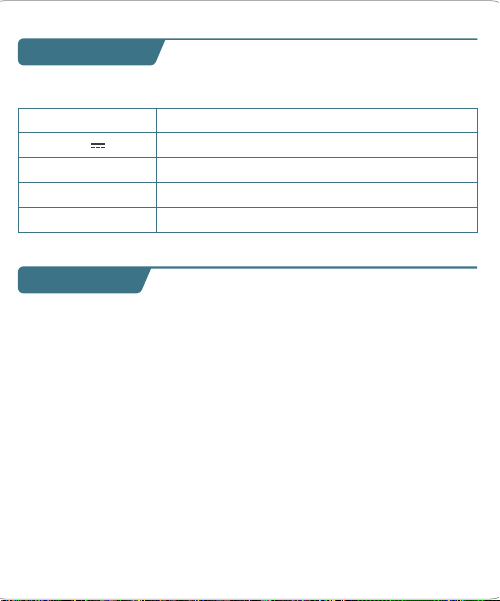
T60 User Manual
True Wireless Earbuds
❹
02 03
Overview
Type-C
Charging Port
Multi-functional
Button (MFB)
LED Indicator
of Earbud
Charging Contacts
Microphone
Power of
Charging Case
Earbud L&R
Charging Status
Charging Pins
Power Status
User Manual x1
Charging Case x1
Type-C
Charging Cable x1
Ear Tips Set x3
(Size M has been
preinstalled on earbuds)
Earbuds x2
What's in the box?
S
M
L
T60 User Manual
True Wireless Earbuds
Customer Service
06 07 08
First-use
1. Before the first use, please tear off the isolating film on the earbuds.
Put the earbuds into the case, then charge both earbuds and charging
case via supplied Type-C charging cable for at least 10mins (or after not
use for a long time), do not take out the earbuds during this period.
Wearing
1. Choose the Ear Tips that fit your ears best.
2. Insert the earbuds into the inner canal of your ears and turn gently
until you find the most comfortable and secure position.
Bluetooth Pairing
1. Open the charging case, and pick up the earbuds from the charging
case for 3 seconds to enter Bluetooth pairing mode.
09
Each time you power on your earbuds, they will automatically connect
to your last successfully connected device if available within the
Bluetooth range. If you wanna switch between devices, please first turn
off the Bluetooth of the last device.
10
10mins
Remove
S
M
L
T60
T60
MY DEVICES
T60
xxxxx
xxxxxxx
MY DEVICES
OTHER DEVICES
* When successfully connected, you will hear the prompt "connected"
and the LED indicators will turn off.
12:00
Bluetooth
Bluetooth
T60
Connected
12:00
Name
Disconnect
Forget This Device
Bluetooth
T60
Device Type
12:00
Bluetooth
Bluetooth
T60
Not Connected
MY DEVICES
12:00
Bluetooth
Bluetooth
First Device
Second Device
3s
2. Select "T60" on your device's Bluetooth list to connect.
Power On
2s
Tears off
the insulation film
MY DEVICES
12:00
Settings
APPLE ID
WLAN
xxxxx
Bluetooth
Off
T60
xxxxx
xxxxxxx
MY DEVICES
OTHER DEVICES
* If you don't see your buds in the list, you might need to reset the buds.
1. Go to the Bluetooth settings on the other device. For example, on
your phone, go to Settings Bluetooth.
2. Tap or click your earphones on the list of discovered devices.
Mono mode
◆ When Bluetooth connected, you can use either one of the earbuds
only by placing the other one into the charging case.
◆ When powered on and connected, if either one of the earbuds is out
of battery and powered off, you can keep using the other one.
◆ When you are on a call, place either one of the earbuds into the
charging case, and the microphone in the other earbud will be activated.
T60 T60
If you feel that the sound of your earbuds are too low, please follow the
steps below to adjust the volume:
❶ Long Press the "R" earbud to maximize the volume of the earbuds
until you hear a "du" sound.
❷ Increase the volume of your Android devices.
* This is only applicable to situations where the volume of the earbuds
and the Android devices are not synchronized.
11
Reset
You might need to reset the earbuds if you experience any connectivity
problems or function issues.
❶ Take the earbuds out for 5mins to consume some battery of both
buds. (Can't be reset if the earbuds are fully charged)
❷ Place the earbuds in the charging case and earbuds blink red.
❸ Press and hold the button on the buds for 8 seconds until the LED
indicators flash red-white 3 times. This confirms that the reset was
successful and your earbuds can be connected normally.
When resetting the earbuds, make sure the earbuds are properly
connected with charging points in the case, or it may cause resetting
failure.
hold for 8s
2. The earbuds are installed with a pair of size M ear tips by default. You
can select other suitable sizes for a secure fit.
Adjusting volume for low sound on earbudsSwitch from one device to another
01
◆ Keep away from children and pets to prevent accidental ingestion as
it has a battery. If swallowed, seek medical help. Store out of their reach
when not in use.
◆ The ear caps are made of soft silica gel, and the ear hooks are made
of elastic TPE material. A very small number of users may have allergic
reactions. If symptoms like itching or swelling of the skin on or around
the ears appear, stop wearing them immediately and seek medical
treatment.
◆ Pollen, dust and cosmetic residues are easy to attach to the earbuds,
which may easily lead to allergic situations. Please clean the earbuds
before and after use and avoid exposure to highly allergenic
environments.
◆ People with sensitive skin should test the earbuds on a small area of
skin around the ears before using them. If any discomfort occurs, stop
using them immediately and consult a dermatologist.
◆ To avoid hearing damage, do not use your earbuds at a high volume.
Turn the volume down on your product before placing the earbuds
in/on your ears, then turn the volume up gradually until you reach
acomfortable, moderate listening level.
◆ Long earbuds use may lead to ear fatigue, tinnitus and affect ear
blood circulation. It's recommended to take a 5-10 minute break per
hour of wearing to relax your ears and enjoy healthy listening.
Important Safety Information
04
Material Components
Earbuds Case: Made of plastic, free of heavy metals such as lead,
mercury and cadmium. It is environmentally friendly and durable.
Ear tips Part: Crafted from silica gel, this part is designed to softly
conform to the ear canal. While it is generally well-tolerated, a very
small fraction of individuals with allergies to Silica gel might experience
a mild allergic response.
Ear Hook Part: Made of TPE elastic material, which is wear-resistant
and stable. It is normally harmless, but people with extremely sensitive
skin may feel slightly uncomfortable.
It suits daily office, study, entertainment, sports lovers and travelers. But
some need caution or doctor's advice:
People with Sensitive Skin: Allergy-prone should do a local test. If
uncomfortable, stop and consult a dermatologist.
Patients with Ear Diseases: Those with ear diseases like otitis media
should consult an ENT doctor before use.
Applicable Population
05
Risk Warnings for Individual Differences
Differences in Ear Canal Structure: Different ear canal structures may
affect the wearing comfort and sound insulation. If there is any discomfort,
stop using it and check the wearing method or consult a doctor.
Differences in Skin Sensitivity: Allergic people may have symptoms
such as skin itching. Stop using it and wash it with water, then seek medi-
cal treatment and inform the doctor about the usage situation.
Differences in Hearing: Follow the "60 - 60" principle to protect your
hearing. If there is any discomfort, stop using it immediately and consult
a doctor.
◆ Force Control: Don't insert earbuds forcefully to protect ear canal.
Adjust ear hooks gently to avoid over-pressing ear skin.
◆ Adaptation for Sports: Ensure ear hook positions are right and
stable before exercise to prevent shaking/friction harm like abrasions.
◆ Stop if Uncomfy: If there's any discomfort like ear canal pain, skin
itch or foreign body feeling, stop using earbuds, check, and seek medical
help if needed.
◆ The LED indicators on the buds will flash white-red in sequence
continuously, the other bud will blink white slowly.
◆ If the earbuds are not connected to any devices over 5 minutes, they
will power off automatically. Turn on the earbuds manually by pressing
the MFB button for 2 seconds to hear the prompt "power on".
V1.1 2024.12.27
13 14
Maintenance
Care for your earbuds
Clean and dry your earbuds and your skin
after workouts or heavy sweating. Keep your
earbuds and charging case clean and dry.
Dual mode
15
16
Charging
Type-C USB charging
◆ Fully dry off the earbuds and the USB port before charging.
◆ Use a certified USB-C charging cable and charger to prevent any damage.
◆ Fully charge both the earbuds and the charging case before the first use.
Wireless charging
Easily charge the case without cables, just put your charging case on the
wireless charging pad. If the charging case is not being charged, please
try to reposition it.
What should I do if the earbuds disconnect or the sound is choppy?
Please note that this doesn't necessarily mean there is an issue with
the earbuds, but may have something to do with the connected
device and environment. Bluetooth signals may be influenced by
obstructions, such as walls, pillars, home appliances, Wi-Fi, and
more. To ensure a stable connection, we recommend avoiding such
obstructions. To fix this issue, please try the following:
1. Fully charge and reset your earbuds as stated above and re-pair
them.
2. Check the earbuds by listening to a downloaded song/video.
3. Check the earbuds with another Bluetooth device in a different
environment to see if it works well.
FAQ
17
What should I do if any of the following problems occur?
1. Cannot pair or reconnect with my device.
2. One side does not pair with the other side of my device.
3. No music plays after connecting with my device.
4. Only one earbud has sound.
1. Remove the protective film covering the connectors on the earbuds.
2. Reboot the Bluetooth device you're using (such as a phone or
What should I do if any of the following problems occur?
18
1. Confirm the charging case has power left (open the charging
case to check if there is white light flashing).
2. Clean the charging pins with a dry cloth and an alcohol-based
disinfectant. This is to ensure all charging contact pins on the
earbuds and charging case is completely clean and dry from sweat
and water. Then put the earbuds correctly into the case. The light
and display flash when the earbuds are placed in the case.
3. Please use the certified charging cable and wall charger.
4. Please check whether the ear tips are installed properly.
▶ During charging, the digital display flashes and shows the real-time
power until 100.
▶ The right display panel indicates the charging status per bud. There
are separated power consumption indicators by 4 grids in total, which
will be flashing when charging.
▶ The LED indicator on the charging case indicates the charging status.
❹
❶ ❷
❸
Press Once (R/L)
For Call
Answer/End a call
Reject a call
Press and hold for 2 seconds (R/L)
Voice Assistance
Press Thrice (R/L)
Activate Siri or other
voice assistant software
Music Mode
Press Once (R/L)
Press Twice (R)
Press Twice (L)
Long Press (R)
Long Press (L)
Play/Pause
Next Track
Previous Track
Volume+
Volume -
*Press and hold for 2s (R/L) in power-off state
*Pick up buds from the charging case
Power On/O
Power on
*Non-music playing, press and hold for 5s (R/L)
*Put back into the charging case.
*Not connected to any devices over 5mins
Power off
Power of
Charging Case
Charging
Status Per Bud
Note: This equipment has been tested and found to comply with the
limits for a Class B digital device, pursuant to part 15 of the FCC Rules.
These limits are designed to provide reasonable protection against
harmful interference in a residential installation.
This equipment generates, uses and can radiate radio frequency energy
and, if not installed and used in accordance with the instructions, may
cause harmful interference to radio communications. However, there is
no guarantee that interference will not occur in a particular installation.
If this equipment does cause harmful interference to radio or television
reception, which can be determined by turning the equipment off and on,
the user is encouraged to try to correct the interference by one or more
of the following measures:
— Reorient or relocate the receiving antenna.
— Increase the separation between the equipment and receiver.
— Connect the equipment into an outlet on a circuit different from that
to which the receiver is connected.
— Consult the dealer or an experienced radio/TV technician for help.
This equipment complies with FCC radiation exposure limits set forth for
an uncontrolled environment. This transmitter must not be co-located or
operating in conjunction with any other antenna or transmitter.
Any Changes or modifications not expressly approved by the party
responsible for compliance could void the user's authority to operate
the equipment.
This device complies with part 15 of the FCC Rules. Operation is subject
to the following two conditions:
(1) This device may not cause harmful interference, and
(2) This device must accept any interference received, including
interference that may cause undesired operation.
FCC Caution
19 20
1) The earbuds don’t recharge in the charging case.
2) The earbuds stay connected to the device even after being placed
in the charging case with the lid closed.
3) The earbuds don't turn on when taken out of the charging case.
Maintenance
Mono mode
Music Mode
Press Once (R/L)
Press Twice (R/L)
Unsupported
Long Press (R/L)
Unsupported
Play/Pause
Next Track
Previous Track
Volume+
Volume -
computer). Forget all the pairing records of your earbuds on your
device and turn off Bluetooth.
3. Reset the earbuds as per the steps above(make sure your earbuds
have enough battery).
4. Turn on the Bluetooth of your device and search for T60 and
pair. If there is a pop-up window to confirm pairing for "T60,"
please select "Pair." If you accidentally select "Cancel," you need to
refresh (turn off and turn on) the Bluetooth of your device and pair
the earbuds again.
1. Place the earbuds in the
charging case and close it.
2. Connect the charging case
to the power supply by using
a USB-C charging cable.
Wireless Charging Pad
(Not Included)
This device complies with Industry Canada licence-exempt RSS
standard(s). Operation is subject to the following two conditions:
(1) This device may not cause interference, and
(2) This device must accept any interference, including interference that
may cause undesired operation of the device.
Le présent appareil est conforme aux CNR d'Industrie Canada applicables
aux appareils radio exempts de licence. L'exploitation est autorisée aux
deux conditions suivantes:
(1) l'appareil ne doit pas produire de brouillage, et
(2) l'utilisateur de l'appareil doit accepter tout brouillage radioélectrique
subi, même si le brouillage est susceptible d'en compromettre le
fonctionnement.
The device is compliance with RF exposure guidelines, users can obtain
Canadian information on RF exposure and compliance.
Le présent appareil est conforme
Après examen de ce matériel aux conformité ou aux limites d’intensité
de champ RF, les utilisateurs peuvent sur l’exposition aux radiofréquenc-
es et la conformité and compliance d’acquérir les informations
correspondantes.
21 22
This product bears the selective sorting symbol for Waste electrical and
electronic equipment (WEEE).
This means that this product must be handled pursuant to European
directive 2012/19/EU in order to be recycled or dismantled to minimize
its impact on the environment. User has the choice to give his product
to a competent recycling organization or to the retailer when he buys a
new electrical or electronic equipment.
This product can be used across EU member states.
The device is low power device, it can meet the requirement of the RF
exposure.
NOTE:
1. High Sound Pressure
2. Hearing Damage Risk
3. Do not listen at high volume levels for long periods.
ISED Warning
The symbol indicates DC voltage
RECYCLING
DISPOSE OF USED BATTERIES ACCORDING TO THE INSTRUCTIONS
Caution
Battery Warning
Using the wrong battery can cause fire and other hazards (for example,
in the case of some lithium battery types)
1. Disposal of a battery into fire or a hot oven, or mechanically crushing
or cutting of abattery, that can result in an explosion.
2. Do not leaving a battery in an extremely high temperature surrounding
environment that can result in an explosion or the leakage of flammable
liquid or gas.
3. A battery subjected to extremely low air pressure that may result in an
explosion or the leakage of flammable liquid or gas.
Use a soft, dry, lint-free cloth to clean all other areas of the buds and
case. Here's how to clean your eartips.
12
Specifications
Specifications are subject to change without notice.
Maintenance
Clean your earbuds
Your earbuds are sweat and water-resistant, but not sweatproof or
waterproof. The charging case is not waterproof, so be careful not to
get moisture in any openings.
Remove the earbuds from the charging case.
Disconnect the charging cable from both the case and your computer
or power adapter.
To clean the charging contacts on buds, use a cotton swab slightly
dampened with warm water. To clean the charging pins on the case,
use a lint-free cloth slightly dampened with warm water. If necessary,
you can slightly dampen the cotton swab or cloth with 70 percent
isopropyl alcohol.
❶
❷
Model No.: T60
Input: 5V 1A
FCC ID: 2A33A-T60
IC: 32589-T60
HVIN: T60
Product Name: Wireless Sport Earbuds
Charging Cord Type: Type-C
Impedance: 32Ω
Battery Capacity: 3.7V 600mAh, 2.22Wh
Transmission Range: 33feet (Without Obstacles)
❸
◆ Clean earbuds weekly at least. Use in sweaty, dusty or allergen-rich
environments requires more frequent cleaning.
◆ After contact with pollen, dust or cosmetics, wipe the earbuds surface
with a clean damp cloth before use to reduce allergen residue. If you
know you're allergic, clean the earbuds promptly after use.
23
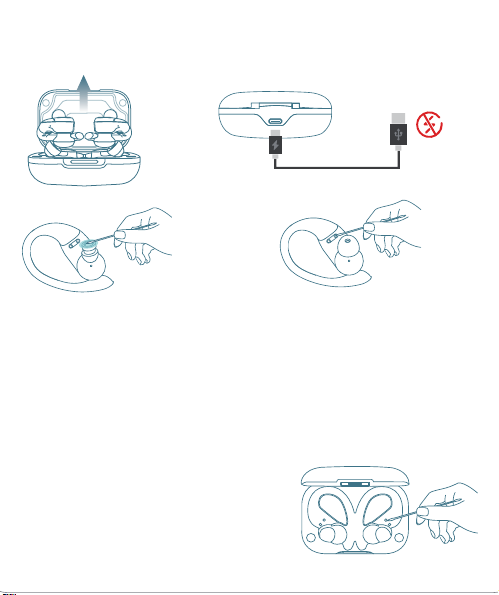
T60 User Manual
True Wireless Earbuds
❹
02 03
Overview
Type-C
Charging Port
Multi-functional
Button (MFB)
LED Indicator
of Earbud
Charging Contacts
Microphone
Power of
Charging Case
Earbud L&R
Charging Status
Charging Pins
Power Status
User Manual x1
Charging Case x1
Type-C
Charging Cable x1
Ear Tips Set x3
(Size M has been
preinstalled on earbuds)
Earbuds x2
What's in the box?
S
M
L
T60 User Manual
True Wireless Earbuds
Customer Service
06 07 08
First-use
1. Before the first use, please tear off the isolating film on the earbuds.
Put the earbuds into the case, then charge both earbuds and charging
case via supplied Type-C charging cable for at least 10mins (or after not
use for a long time), do not take out the earbuds during this period.
Wearing
1. Choose the Ear Tips that fit your ears best.
2. Insert the earbuds into the inner canal of your ears and turn gently
until you find the most comfortable and secure position.
Bluetooth Pairing
1. Open the charging case, and pick up the earbuds from the charging
case for 3 seconds to enter Bluetooth pairing mode.
09
Each time you power on your earbuds, they will automatically connect
to your last successfully connected device if available within the
Bluetooth range. If you wanna switch between devices, please first turn
off the Bluetooth of the last device.
10
10mins
Remove
S
M
L
T60
T60
MY DEVICES
T60
xxxxx
xxxxxxx
MY DEVICES
OTHER DEVICES
* When successfully connected, you will hear the prompt "connected"
and the LED indicators will turn off.
12:00
Bluetooth
Bluetooth
T60
Connected
12:00
Name
Disconnect
Forget This Device
Bluetooth
T60
Device Type
12:00
Bluetooth
Bluetooth
T60
Not Connected
MY DEVICES
12:00
Bluetooth
Bluetooth
First Device
Second Device
3s
2. Select "T60" on your device's Bluetooth list to connect.
Power On
2s
Tears off
the insulation film
MY DEVICES
12:00
Settings
APPLE ID
WLAN
xxxxx
Bluetooth
Off
T60
xxxxx
xxxxxxx
MY DEVICES
OTHER DEVICES
* If you don't see your buds in the list, you might need to reset the buds.
1. Go to the Bluetooth settings on the other device. For example, on
your phone, go to Settings Bluetooth.
2. Tap or click your earphones on the list of discovered devices.
Mono mode
◆ When Bluetooth connected, you can use either one of the earbuds
only by placing the other one into the charging case.
◆ When powered on and connected, if either one of the earbuds is out
of battery and powered off, you can keep using the other one.
◆ When you are on a call, place either one of the earbuds into the
charging case, and the microphone in the other earbud will be activated.
T60 T60
If you feel that the sound of your earbuds are too low, please follow the
steps below to adjust the volume:
❶ Long Press the "R" earbud to maximize the volume of the earbuds
until you hear a "du" sound.
❷ Increase the volume of your Android devices.
* This is only applicable to situations where the volume of the earbuds
and the Android devices are not synchronized.
11
Reset
You might need to reset the earbuds if you experience any connectivity
problems or function issues.
❶ Take the earbuds out for 5mins to consume some battery of both
buds. (Can't be reset if the earbuds are fully charged)
❷ Place the earbuds in the charging case and earbuds blink red.
❸ Press and hold the button on the buds for 8 seconds until the LED
indicators flash red-white 3 times. This confirms that the reset was
successful and your earbuds can be connected normally.
When resetting the earbuds, make sure the earbuds are properly
connected with charging points in the case, or it may cause resetting
failure.
hold for 8s
2. The earbuds are installed with a pair of size M ear tips by default. You
can select other suitable sizes for a secure fit.
Adjusting volume for low sound on earbudsSwitch from one device to another
01
◆ Keep away from children and pets to prevent accidental ingestion as
it has a battery. If swallowed, seek medical help. Store out of their reach
when not in use.
◆ The ear caps are made of soft silica gel, and the ear hooks are made
of elastic TPE material. A very small number of users may have allergic
reactions. If symptoms like itching or swelling of the skin on or around
the ears appear, stop wearing them immediately and seek medical
treatment.
◆ Pollen, dust and cosmetic residues are easy to attach to the earbuds,
which may easily lead to allergic situations. Please clean the earbuds
before and after use and avoid exposure to highly allergenic
environments.
◆ People with sensitive skin should test the earbuds on a small area of
skin around the ears before using them. If any discomfort occurs, stop
using them immediately and consult a dermatologist.
◆ To avoid hearing damage, do not use your earbuds at a high volume.
Turn the volume down on your product before placing the earbuds
in/on your ears, then turn the volume up gradually until you reach
acomfortable, moderate listening level.
◆ Long earbuds use may lead to ear fatigue, tinnitus and affect ear
blood circulation. It's recommended to take a 5-10 minute break per
hour of wearing to relax your ears and enjoy healthy listening.
Important Safety Information
04
Material Components
Earbuds Case: Made of plastic, free of heavy metals such as lead,
mercury and cadmium. It is environmentally friendly and durable.
Ear tips Part: Crafted from silica gel, this part is designed to softly
conform to the ear canal. While it is generally well-tolerated, a very
small fraction of individuals with allergies to Silica gel might experience
a mild allergic response.
Ear Hook Part: Made of TPE elastic material, which is wear-resistant
and stable. It is normally harmless, but people with extremely sensitive
skin may feel slightly uncomfortable.
It suits daily office, study, entertainment, sports lovers and travelers. But
some need caution or doctor's advice:
People with Sensitive Skin: Allergy-prone should do a local test. If
uncomfortable, stop and consult a dermatologist.
Patients with Ear Diseases: Those with ear diseases like otitis media
should consult an ENT doctor before use.
Applicable Population
05
Risk Warnings for Individual Differences
Differences in Ear Canal Structure: Different ear canal structures may
affect the wearing comfort and sound insulation. If there is any discomfort,
stop using it and check the wearing method or consult a doctor.
Differences in Skin Sensitivity: Allergic people may have symptoms
such as skin itching. Stop using it and wash it with water, then seek medi-
cal treatment and inform the doctor about the usage situation.
Differences in Hearing: Follow the "60 - 60" principle to protect your
hearing. If there is any discomfort, stop using it immediately and consult
a doctor.
◆ Force Control: Don't insert earbuds forcefully to protect ear canal.
Adjust ear hooks gently to avoid over-pressing ear skin.
◆ Adaptation for Sports: Ensure ear hook positions are right and
stable before exercise to prevent shaking/friction harm like abrasions.
◆ Stop if Uncomfy: If there's any discomfort like ear canal pain, skin
itch or foreign body feeling, stop using earbuds, check, and seek medical
help if needed.
◆ The LED indicators on the buds will flash white-red in sequence
continuously, the other bud will blink white slowly.
◆ If the earbuds are not connected to any devices over 5 minutes, they
will power off automatically. Turn on the earbuds manually by pressing
the MFB button for 2 seconds to hear the prompt "power on".
V1.1 2024.12.27
13 14
Maintenance
Care for your earbuds
Clean and dry your earbuds and your skin
after workouts or heavy sweating. Keep your
earbuds and charging case clean and dry.
Dual mode
15
16
Charging
Type-C USB charging
◆ Fully dry off the earbuds and the USB port before charging.
◆ Use a certified USB-C charging cable and charger to prevent any damage.
◆ Fully charge both the earbuds and the charging case before the first use.
Wireless charging
Easily charge the case without cables, just put your charging case on the
wireless charging pad. If the charging case is not being charged, please
try to reposition it.
What should I do if the earbuds disconnect or the sound is choppy?
Please note that this doesn't necessarily mean there is an issue with
the earbuds, but may have something to do with the connected
device and environment. Bluetooth signals may be influenced by
obstructions, such as walls, pillars, home appliances, Wi-Fi, and
more. To ensure a stable connection, we recommend avoiding such
obstructions. To fix this issue, please try the following:
1. Fully charge and reset your earbuds as stated above and re-pair
them.
2. Check the earbuds by listening to a downloaded song/video.
3. Check the earbuds with another Bluetooth device in a different
environment to see if it works well.
FAQ
17
What should I do if any of the following problems occur?
1. Cannot pair or reconnect with my device.
2. One side does not pair with the other side of my device.
3. No music plays after connecting with my device.
4. Only one earbud has sound.
1. Remove the protective film covering the connectors on the earbuds.
2. Reboot the Bluetooth device you're using (such as a phone or
What should I do if any of the following problems occur?
18
1. Confirm the charging case has power left (open the charging
case to check if there is white light flashing).
2. Clean the charging pins with a dry cloth and an alcohol-based
disinfectant. This is to ensure all charging contact pins on the
earbuds and charging case is completely clean and dry from sweat
and water. Then put the earbuds correctly into the case. The light
and display flash when the earbuds are placed in the case.
3. Please use the certified charging cable and wall charger.
4. Please check whether the ear tips are installed properly.
▶ During charging, the digital display flashes and shows the real-time
power until 100.
▶ The right display panel indicates the charging status per bud. There
are separated power consumption indicators by 4 grids in total, which
will be flashing when charging.
▶ The LED indicator on the charging case indicates the charging status.
❹
❶ ❷
❸
Press Once (R/L)
For Call
Answer/End a call
Reject a call
Press and hold for 2 seconds (R/L)
Voice Assistance
Press Thrice (R/L)
Activate Siri or other
voice assistant software
Music Mode
Press Once (R/L)
Press Twice (R)
Press Twice (L)
Long Press (R)
Long Press (L)
Play/Pause
Next Track
Previous Track
Volume+
Volume -
*Press and hold for 2s (R/L) in power-off state
*Pick up buds from the charging case
Power On/O
Power on
*Non-music playing, press and hold for 5s (R/L)
*Put back into the charging case.
*Not connected to any devices over 5mins
Power off
Power of
Charging Case
Charging
Status Per Bud
Note: This equipment has been tested and found to comply with the
limits for a Class B digital device, pursuant to part 15 of the FCC Rules.
These limits are designed to provide reasonable protection against
harmful interference in a residential installation.
This equipment generates, uses and can radiate radio frequency energy
and, if not installed and used in accordance with the instructions, may
cause harmful interference to radio communications. However, there is
no guarantee that interference will not occur in a particular installation.
If this equipment does cause harmful interference to radio or television
reception, which can be determined by turning the equipment off and on,
the user is encouraged to try to correct the interference by one or more
of the following measures:
— Reorient or relocate the receiving antenna.
— Increase the separation between the equipment and receiver.
— Connect the equipment into an outlet on a circuit different from that
to which the receiver is connected.
— Consult the dealer or an experienced radio/TV technician for help.
This equipment complies with FCC radiation exposure limits set forth for
an uncontrolled environment. This transmitter must not be co-located or
operating in conjunction with any other antenna or transmitter.
Any Changes or modifications not expressly approved by the party
responsible for compliance could void the user's authority to operate
the equipment.
This device complies with part 15 of the FCC Rules. Operation is subject
to the following two conditions:
(1) This device may not cause harmful interference, and
(2) This device must accept any interference received, including
interference that may cause undesired operation.
FCC Caution
19 20
1) The earbuds don’t recharge in the charging case.
2) The earbuds stay connected to the device even after being placed
in the charging case with the lid closed.
3) The earbuds don't turn on when taken out of the charging case.
Maintenance
Mono mode
Music Mode
Press Once (R/L)
Press Twice (R/L)
Unsupported
Long Press (R/L)
Unsupported
Play/Pause
Next Track
Previous Track
Volume+
Volume -
computer). Forget all the pairing records of your earbuds on your
device and turn off Bluetooth.
3. Reset the earbuds as per the steps above(make sure your earbuds
have enough battery).
4. Turn on the Bluetooth of your device and search for T60 and
pair. If there is a pop-up window to confirm pairing for "T60,"
please select "Pair." If you accidentally select "Cancel," you need to
refresh (turn off and turn on) the Bluetooth of your device and pair
the earbuds again.
1. Place the earbuds in the
charging case and close it.
2. Connect the charging case
to the power supply by using
a USB-C charging cable.
Wireless Charging Pad
(Not Included)
This device complies with Industry Canada licence-exempt RSS
standard(s). Operation is subject to the following two conditions:
(1) This device may not cause interference, and
(2) This device must accept any interference, including interference that
may cause undesired operation of the device.
Le présent appareil est conforme aux CNR d'Industrie Canada applicables
aux appareils radio exempts de licence. L'exploitation est autorisée aux
deux conditions suivantes:
(1) l'appareil ne doit pas produire de brouillage, et
(2) l'utilisateur de l'appareil doit accepter tout brouillage radioélectrique
subi, même si le brouillage est susceptible d'en compromettre le
fonctionnement.
The device is compliance with RF exposure guidelines, users can obtain
Canadian information on RF exposure and compliance.
Le présent appareil est conforme
Après examen de ce matériel aux conformité ou aux limites d’intensité
de champ RF, les utilisateurs peuvent sur l’exposition aux radiofréquenc-
es et la conformité and compliance d’acquérir les informations
correspondantes.
21 22
This product bears the selective sorting symbol for Waste electrical and
electronic equipment (WEEE).
This means that this product must be handled pursuant to European
directive 2012/19/EU in order to be recycled or dismantled to minimize
its impact on the environment. User has the choice to give his product
to a competent recycling organization or to the retailer when he buys a
new electrical or electronic equipment.
This product can be used across EU member states.
The device is low power device, it can meet the requirement of the RF
exposure.
NOTE:
1. High Sound Pressure
2. Hearing Damage Risk
3. Do not listen at high volume levels for long periods.
ISED Warning
The symbol indicates DC voltage
RECYCLING
DISPOSE OF USED BATTERIES ACCORDING TO THE INSTRUCTIONS
Caution
Battery Warning
Using the wrong battery can cause fire and other hazards (for example,
in the case of some lithium battery types)
1. Disposal of a battery into fire or a hot oven, or mechanically crushing
or cutting of abattery, that can result in an explosion.
2. Do not leaving a battery in an extremely high temperature surrounding
environment that can result in an explosion or the leakage of flammable
liquid or gas.
3. A battery subjected to extremely low air pressure that may result in an
explosion or the leakage of flammable liquid or gas.
Use a soft, dry, lint-free cloth to clean all other areas of the buds and
case. Here's how to clean your eartips.
12
Specifications
Specifications are subject to change without notice.
Maintenance
Clean your earbuds
Your earbuds are sweat and water-resistant, but not sweatproof or
waterproof. The charging case is not waterproof, so be careful not to
get moisture in any openings.
Remove the earbuds from the charging case.
Disconnect the charging cable from both the case and your computer
or power adapter.
To clean the charging contacts on buds, use a cotton swab slightly
dampened with warm water. To clean the charging pins on the case,
use a lint-free cloth slightly dampened with warm water. If necessary,
you can slightly dampen the cotton swab or cloth with 70 percent
isopropyl alcohol.
❶
❷
Model No.: T60
Input: 5V 1A
FCC ID: 2A33A-T60
IC: 32589-T60
HVIN: T60
Product Name: Wireless Sport Earbuds
Charging Cord Type: Type-C
Impedance: 32Ω
Battery Capacity: 3.7V 600mAh, 2.22Wh
Transmission Range: 33feet (Without Obstacles)
❸
◆ Clean earbuds weekly at least. Use in sweaty, dusty or allergen-rich
environments requires more frequent cleaning.
◆ After contact with pollen, dust or cosmetics, wipe the earbuds surface
with a clean damp cloth before use to reduce allergen residue. If you
know you're allergic, clean the earbuds promptly after use.
23
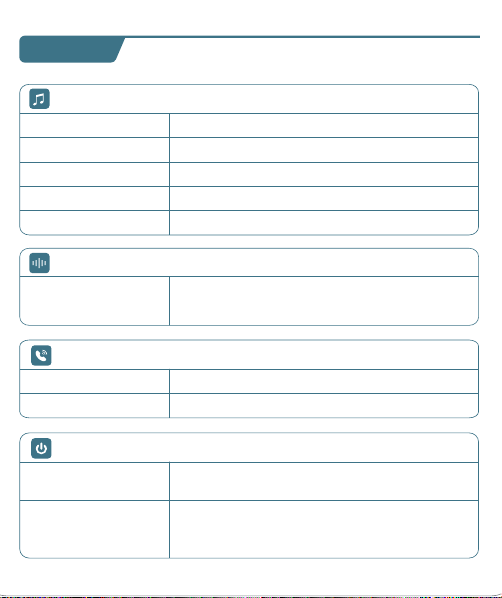
T60 User Manual
True Wireless Earbuds
❹
02 03
Overview
Type-C
Charging Port
Multi-functional
Button (MFB)
LED Indicator
of Earbud
Charging Contacts
Microphone
Power of
Charging Case
Earbud L&R
Charging Status
Charging Pins
Power Status
User Manual x1
Charging Case x1
Type-C
Charging Cable x1
Ear Tips Set x3
(Size M has been
preinstalled on earbuds)
Earbuds x2
What's in the box?
S
M
L
T60 User Manual
True Wireless Earbuds
Customer Service
06 07 08
First-use
1. Before the first use, please tear off the isolating film on the earbuds.
Put the earbuds into the case, then charge both earbuds and charging
case via supplied Type-C charging cable for at least 10mins (or after not
use for a long time), do not take out the earbuds during this period.
Wearing
1. Choose the Ear Tips that fit your ears best.
2. Insert the earbuds into the inner canal of your ears and turn gently
until you find the most comfortable and secure position.
Bluetooth Pairing
1. Open the charging case, and pick up the earbuds from the charging
case for 3 seconds to enter Bluetooth pairing mode.
09
Each time you power on your earbuds, they will automatically connect
to your last successfully connected device if available within the
Bluetooth range. If you wanna switch between devices, please first turn
off the Bluetooth of the last device.
10
10mins
Remove
S
M
L
T60
T60
MY DEVICES
T60
xxxxx
xxxxxxx
MY DEVICES
OTHER DEVICES
* When successfully connected, you will hear the prompt "connected"
and the LED indicators will turn off.
12:00
Bluetooth
Bluetooth
T60
Connected
12:00
Name
Disconnect
Forget This Device
Bluetooth
T60
Device Type
12:00
Bluetooth
Bluetooth
T60
Not Connected
MY DEVICES
12:00
Bluetooth
Bluetooth
First Device
Second Device
3s
2. Select "T60" on your device's Bluetooth list to connect.
Power On
2s
Tears off
the insulation film
MY DEVICES
12:00
Settings
APPLE ID
WLAN
xxxxx
Bluetooth
Off
T60
xxxxx
xxxxxxx
MY DEVICES
OTHER DEVICES
* If you don't see your buds in the list, you might need to reset the buds.
1. Go to the Bluetooth settings on the other device. For example, on
your phone, go to Settings Bluetooth.
2. Tap or click your earphones on the list of discovered devices.
Mono mode
◆ When Bluetooth connected, you can use either one of the earbuds
only by placing the other one into the charging case.
◆ When powered on and connected, if either one of the earbuds is out
of battery and powered off, you can keep using the other one.
◆ When you are on a call, place either one of the earbuds into the
charging case, and the microphone in the other earbud will be activated.
T60 T60
If you feel that the sound of your earbuds are too low, please follow the
steps below to adjust the volume:
❶ Long Press the "R" earbud to maximize the volume of the earbuds
until you hear a "du" sound.
❷ Increase the volume of your Android devices.
* This is only applicable to situations where the volume of the earbuds
and the Android devices are not synchronized.
11
Reset
You might need to reset the earbuds if you experience any connectivity
problems or function issues.
❶ Take the earbuds out for 5mins to consume some battery of both
buds. (Can't be reset if the earbuds are fully charged)
❷ Place the earbuds in the charging case and earbuds blink red.
❸ Press and hold the button on the buds for 8 seconds until the LED
indicators flash red-white 3 times. This confirms that the reset was
successful and your earbuds can be connected normally.
When resetting the earbuds, make sure the earbuds are properly
connected with charging points in the case, or it may cause resetting
failure.
hold for 8s
2. The earbuds are installed with a pair of size M ear tips by default. You
can select other suitable sizes for a secure fit.
Adjusting volume for low sound on earbudsSwitch from one device to another
01
◆ Keep away from children and pets to prevent accidental ingestion as
it has a battery. If swallowed, seek medical help. Store out of their reach
when not in use.
◆ The ear caps are made of soft silica gel, and the ear hooks are made
of elastic TPE material. A very small number of users may have allergic
reactions. If symptoms like itching or swelling of the skin on or around
the ears appear, stop wearing them immediately and seek medical
treatment.
◆ Pollen, dust and cosmetic residues are easy to attach to the earbuds,
which may easily lead to allergic situations. Please clean the earbuds
before and after use and avoid exposure to highly allergenic
environments.
◆ People with sensitive skin should test the earbuds on a small area of
skin around the ears before using them. If any discomfort occurs, stop
using them immediately and consult a dermatologist.
◆ To avoid hearing damage, do not use your earbuds at a high volume.
Turn the volume down on your product before placing the earbuds
in/on your ears, then turn the volume up gradually until you reach
acomfortable, moderate listening level.
◆ Long earbuds use may lead to ear fatigue, tinnitus and affect ear
blood circulation. It's recommended to take a 5-10 minute break per
hour of wearing to relax your ears and enjoy healthy listening.
Important Safety Information
04
Material Components
Earbuds Case: Made of plastic, free of heavy metals such as lead,
mercury and cadmium. It is environmentally friendly and durable.
Ear tips Part: Crafted from silica gel, this part is designed to softly
conform to the ear canal. While it is generally well-tolerated, a very
small fraction of individuals with allergies to Silica gel might experience
a mild allergic response.
Ear Hook Part: Made of TPE elastic material, which is wear-resistant
and stable. It is normally harmless, but people with extremely sensitive
skin may feel slightly uncomfortable.
It suits daily office, study, entertainment, sports lovers and travelers. But
some need caution or doctor's advice:
People with Sensitive Skin: Allergy-prone should do a local test. If
uncomfortable, stop and consult a dermatologist.
Patients with Ear Diseases: Those with ear diseases like otitis media
should consult an ENT doctor before use.
Applicable Population
05
Risk Warnings for Individual Differences
Differences in Ear Canal Structure: Different ear canal structures may
affect the wearing comfort and sound insulation. If there is any discomfort,
stop using it and check the wearing method or consult a doctor.
Differences in Skin Sensitivity: Allergic people may have symptoms
such as skin itching. Stop using it and wash it with water, then seek medi-
cal treatment and inform the doctor about the usage situation.
Differences in Hearing: Follow the "60 - 60" principle to protect your
hearing. If there is any discomfort, stop using it immediately and consult
a doctor.
◆ Force Control: Don't insert earbuds forcefully to protect ear canal.
Adjust ear hooks gently to avoid over-pressing ear skin.
◆ Adaptation for Sports: Ensure ear hook positions are right and
stable before exercise to prevent shaking/friction harm like abrasions.
◆ Stop if Uncomfy: If there's any discomfort like ear canal pain, skin
itch or foreign body feeling, stop using earbuds, check, and seek medical
help if needed.
◆ The LED indicators on the buds will flash white-red in sequence
continuously, the other bud will blink white slowly.
◆ If the earbuds are not connected to any devices over 5 minutes, they
will power off automatically. Turn on the earbuds manually by pressing
the MFB button for 2 seconds to hear the prompt "power on".
V1.1 2024.12.27
13 14
Maintenance
Care for your earbuds
Clean and dry your earbuds and your skin
after workouts or heavy sweating. Keep your
earbuds and charging case clean and dry.
Dual mode
15
16
Charging
Type-C USB charging
◆ Fully dry off the earbuds and the USB port before charging.
◆ Use a certified USB-C charging cable and charger to prevent any damage.
◆ Fully charge both the earbuds and the charging case before the first use.
Wireless charging
Easily charge the case without cables, just put your charging case on the
wireless charging pad. If the charging case is not being charged, please
try to reposition it.
What should I do if the earbuds disconnect or the sound is choppy?
Please note that this doesn't necessarily mean there is an issue with
the earbuds, but may have something to do with the connected
device and environment. Bluetooth signals may be influenced by
obstructions, such as walls, pillars, home appliances, Wi-Fi, and
more. To ensure a stable connection, we recommend avoiding such
obstructions. To fix this issue, please try the following:
1. Fully charge and reset your earbuds as stated above and re-pair
them.
2. Check the earbuds by listening to a downloaded song/video.
3. Check the earbuds with another Bluetooth device in a different
environment to see if it works well.
FAQ
17
What should I do if any of the following problems occur?
1. Cannot pair or reconnect with my device.
2. One side does not pair with the other side of my device.
3. No music plays after connecting with my device.
4. Only one earbud has sound.
1. Remove the protective film covering the connectors on the earbuds.
2. Reboot the Bluetooth device you're using (such as a phone or
What should I do if any of the following problems occur?
18
1. Confirm the charging case has power left (open the charging
case to check if there is white light flashing).
2. Clean the charging pins with a dry cloth and an alcohol-based
disinfectant. This is to ensure all charging contact pins on the
earbuds and charging case is completely clean and dry from sweat
and water. Then put the earbuds correctly into the case. The light
and display flash when the earbuds are placed in the case.
3. Please use the certified charging cable and wall charger.
4. Please check whether the ear tips are installed properly.
▶ During charging, the digital display flashes and shows the real-time
power until 100.
▶ The right display panel indicates the charging status per bud. There
are separated power consumption indicators by 4 grids in total, which
will be flashing when charging.
▶ The LED indicator on the charging case indicates the charging status.
❹
❶ ❷
❸
Press Once (R/L)
For Call
Answer/End a call
Reject a call
Press and hold for 2 seconds (R/L)
Voice Assistance
Press Thrice (R/L)
Activate Siri or other
voice assistant software
Music Mode
Press Once (R/L)
Press Twice (R)
Press Twice (L)
Long Press (R)
Long Press (L)
Play/Pause
Next Track
Previous Track
Volume+
Volume -
*Press and hold for 2s (R/L) in power-off state
*Pick up buds from the charging case
Power On/O
Power on
*Non-music playing, press and hold for 5s (R/L)
*Put back into the charging case.
*Not connected to any devices over 5mins
Power off
Power of
Charging Case
Charging
Status Per Bud
Note: This equipment has been tested and found to comply with the
limits for a Class B digital device, pursuant to part 15 of the FCC Rules.
These limits are designed to provide reasonable protection against
harmful interference in a residential installation.
This equipment generates, uses and can radiate radio frequency energy
and, if not installed and used in accordance with the instructions, may
cause harmful interference to radio communications. However, there is
no guarantee that interference will not occur in a particular installation.
If this equipment does cause harmful interference to radio or television
reception, which can be determined by turning the equipment off and on,
the user is encouraged to try to correct the interference by one or more
of the following measures:
— Reorient or relocate the receiving antenna.
— Increase the separation between the equipment and receiver.
— Connect the equipment into an outlet on a circuit different from that
to which the receiver is connected.
— Consult the dealer or an experienced radio/TV technician for help.
This equipment complies with FCC radiation exposure limits set forth for
an uncontrolled environment. This transmitter must not be co-located or
operating in conjunction with any other antenna or transmitter.
Any Changes or modifications not expressly approved by the party
responsible for compliance could void the user's authority to operate
the equipment.
This device complies with part 15 of the FCC Rules. Operation is subject
to the following two conditions:
(1) This device may not cause harmful interference, and
(2) This device must accept any interference received, including
interference that may cause undesired operation.
FCC Caution
19 20
1) The earbuds don’t recharge in the charging case.
2) The earbuds stay connected to the device even after being placed
in the charging case with the lid closed.
3) The earbuds don't turn on when taken out of the charging case.
Maintenance
Mono mode
Music Mode
Press Once (R/L)
Press Twice (R/L)
Unsupported
Long Press (R/L)
Unsupported
Play/Pause
Next Track
Previous Track
Volume+
Volume -
computer). Forget all the pairing records of your earbuds on your
device and turn off Bluetooth.
3. Reset the earbuds as per the steps above(make sure your earbuds
have enough battery).
4. Turn on the Bluetooth of your device and search for T60 and
pair. If there is a pop-up window to confirm pairing for "T60,"
please select "Pair." If you accidentally select "Cancel," you need to
refresh (turn off and turn on) the Bluetooth of your device and pair
the earbuds again.
1. Place the earbuds in the
charging case and close it.
2. Connect the charging case
to the power supply by using
a USB-C charging cable.
Wireless Charging Pad
(Not Included)
This device complies with Industry Canada licence-exempt RSS
standard(s). Operation is subject to the following two conditions:
(1) This device may not cause interference, and
(2) This device must accept any interference, including interference that
may cause undesired operation of the device.
Le présent appareil est conforme aux CNR d'Industrie Canada applicables
aux appareils radio exempts de licence. L'exploitation est autorisée aux
deux conditions suivantes:
(1) l'appareil ne doit pas produire de brouillage, et
(2) l'utilisateur de l'appareil doit accepter tout brouillage radioélectrique
subi, même si le brouillage est susceptible d'en compromettre le
fonctionnement.
The device is compliance with RF exposure guidelines, users can obtain
Canadian information on RF exposure and compliance.
Le présent appareil est conforme
Après examen de ce matériel aux conformité ou aux limites d’intensité
de champ RF, les utilisateurs peuvent sur l’exposition aux radiofréquenc-
es et la conformité and compliance d’acquérir les informations
correspondantes.
21 22
This product bears the selective sorting symbol for Waste electrical and
electronic equipment (WEEE).
This means that this product must be handled pursuant to European
directive 2012/19/EU in order to be recycled or dismantled to minimize
its impact on the environment. User has the choice to give his product
to a competent recycling organization or to the retailer when he buys a
new electrical or electronic equipment.
This product can be used across EU member states.
The device is low power device, it can meet the requirement of the RF
exposure.
NOTE:
1. High Sound Pressure
2. Hearing Damage Risk
3. Do not listen at high volume levels for long periods.
ISED Warning
The symbol indicates DC voltage
RECYCLING
DISPOSE OF USED BATTERIES ACCORDING TO THE INSTRUCTIONS
Caution
Battery Warning
Using the wrong battery can cause fire and other hazards (for example,
in the case of some lithium battery types)
1. Disposal of a battery into fire or a hot oven, or mechanically crushing
or cutting of abattery, that can result in an explosion.
2. Do not leaving a battery in an extremely high temperature surrounding
environment that can result in an explosion or the leakage of flammable
liquid or gas.
3. A battery subjected to extremely low air pressure that may result in an
explosion or the leakage of flammable liquid or gas.
Use a soft, dry, lint-free cloth to clean all other areas of the buds and
case. Here's how to clean your eartips.
12
Specifications
Specifications are subject to change without notice.
Maintenance
Clean your earbuds
Your earbuds are sweat and water-resistant, but not sweatproof or
waterproof. The charging case is not waterproof, so be careful not to
get moisture in any openings.
Remove the earbuds from the charging case.
Disconnect the charging cable from both the case and your computer
or power adapter.
To clean the charging contacts on buds, use a cotton swab slightly
dampened with warm water. To clean the charging pins on the case,
use a lint-free cloth slightly dampened with warm water. If necessary,
you can slightly dampen the cotton swab or cloth with 70 percent
isopropyl alcohol.
❶
❷
Model No.: T60
Input: 5V 1A
FCC ID: 2A33A-T60
IC: 32589-T60
HVIN: T60
Product Name: Wireless Sport Earbuds
Charging Cord Type: Type-C
Impedance: 32Ω
Battery Capacity: 3.7V 600mAh, 2.22Wh
Transmission Range: 33feet (Without Obstacles)
❸
◆ Clean earbuds weekly at least. Use in sweaty, dusty or allergen-rich
environments requires more frequent cleaning.
◆ After contact with pollen, dust or cosmetics, wipe the earbuds surface
with a clean damp cloth before use to reduce allergen residue. If you
know you're allergic, clean the earbuds promptly after use.
23
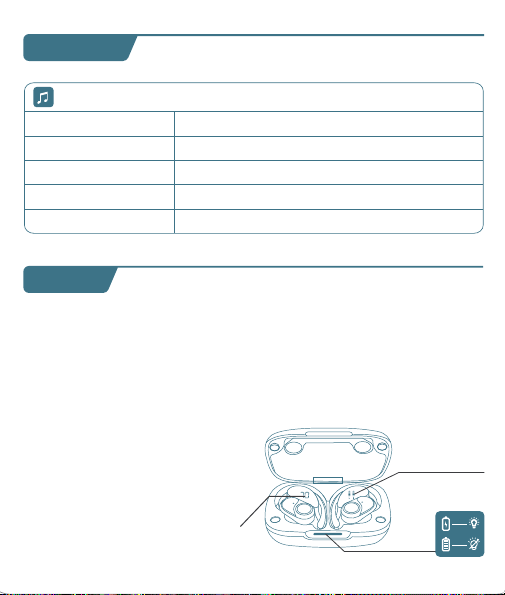
T60 User Manual
True Wireless Earbuds
❹
02 03
Overview
Type-C
Charging Port
Multi-functional
Button (MFB)
LED Indicator
of Earbud
Charging Contacts
Microphone
Power of
Charging Case
Earbud L&R
Charging Status
Charging Pins
Power Status
User Manual x1
Charging Case x1
Type-C
Charging Cable x1
Ear Tips Set x3
(Size M has been
preinstalled on earbuds)
Earbuds x2
What's in the box?
S
M
L
T60 User Manual
True Wireless Earbuds
Customer Service
06 07 08
First-use
1. Before the first use, please tear off the isolating film on the earbuds.
Put the earbuds into the case, then charge both earbuds and charging
case via supplied Type-C charging cable for at least 10mins (or after not
use for a long time), do not take out the earbuds during this period.
Wearing
1. Choose the Ear Tips that fit your ears best.
2. Insert the earbuds into the inner canal of your ears and turn gently
until you find the most comfortable and secure position.
Bluetooth Pairing
1. Open the charging case, and pick up the earbuds from the charging
case for 3 seconds to enter Bluetooth pairing mode.
09
Each time you power on your earbuds, they will automatically connect
to your last successfully connected device if available within the
Bluetooth range. If you wanna switch between devices, please first turn
off the Bluetooth of the last device.
10
10mins
Remove
S
M
L
T60
T60
MY DEVICES
T60
xxxxx
xxxxxxx
MY DEVICES
OTHER DEVICES
* When successfully connected, you will hear the prompt "connected"
and the LED indicators will turn off.
12:00
Bluetooth
Bluetooth
T60
Connected
12:00
Name
Disconnect
Forget This Device
Bluetooth
T60
Device Type
12:00
Bluetooth
Bluetooth
T60
Not Connected
MY DEVICES
12:00
Bluetooth
Bluetooth
First Device
Second Device
3s
2. Select "T60" on your device's Bluetooth list to connect.
Power On
2s
Tears off
the insulation film
MY DEVICES
12:00
Settings
APPLE ID
WLAN
xxxxx
Bluetooth
Off
T60
xxxxx
xxxxxxx
MY DEVICES
OTHER DEVICES
* If you don't see your buds in the list, you might need to reset the buds.
1. Go to the Bluetooth settings on the other device. For example, on
your phone, go to Settings Bluetooth.
2. Tap or click your earphones on the list of discovered devices.
Mono mode
◆ When Bluetooth connected, you can use either one of the earbuds
only by placing the other one into the charging case.
◆ When powered on and connected, if either one of the earbuds is out
of battery and powered off, you can keep using the other one.
◆ When you are on a call, place either one of the earbuds into the
charging case, and the microphone in the other earbud will be activated.
T60 T60
If you feel that the sound of your earbuds are too low, please follow the
steps below to adjust the volume:
❶ Long Press the "R" earbud to maximize the volume of the earbuds
until you hear a "du" sound.
❷ Increase the volume of your Android devices.
* This is only applicable to situations where the volume of the earbuds
and the Android devices are not synchronized.
11
Reset
You might need to reset the earbuds if you experience any connectivity
problems or function issues.
❶ Take the earbuds out for 5mins to consume some battery of both
buds. (Can't be reset if the earbuds are fully charged)
❷ Place the earbuds in the charging case and earbuds blink red.
❸ Press and hold the button on the buds for 8 seconds until the LED
indicators flash red-white 3 times. This confirms that the reset was
successful and your earbuds can be connected normally.
When resetting the earbuds, make sure the earbuds are properly
connected with charging points in the case, or it may cause resetting
failure.
hold for 8s
2. The earbuds are installed with a pair of size M ear tips by default. You
can select other suitable sizes for a secure fit.
Adjusting volume for low sound on earbudsSwitch from one device to another
01
◆ Keep away from children and pets to prevent accidental ingestion as
it has a battery. If swallowed, seek medical help. Store out of their reach
when not in use.
◆ The ear caps are made of soft silica gel, and the ear hooks are made
of elastic TPE material. A very small number of users may have allergic
reactions. If symptoms like itching or swelling of the skin on or around
the ears appear, stop wearing them immediately and seek medical
treatment.
◆ Pollen, dust and cosmetic residues are easy to attach to the earbuds,
which may easily lead to allergic situations. Please clean the earbuds
before and after use and avoid exposure to highly allergenic
environments.
◆ People with sensitive skin should test the earbuds on a small area of
skin around the ears before using them. If any discomfort occurs, stop
using them immediately and consult a dermatologist.
◆ To avoid hearing damage, do not use your earbuds at a high volume.
Turn the volume down on your product before placing the earbuds
in/on your ears, then turn the volume up gradually until you reach
acomfortable, moderate listening level.
◆ Long earbuds use may lead to ear fatigue, tinnitus and affect ear
blood circulation. It's recommended to take a 5-10 minute break per
hour of wearing to relax your ears and enjoy healthy listening.
Important Safety Information
04
Material Components
Earbuds Case: Made of plastic, free of heavy metals such as lead,
mercury and cadmium. It is environmentally friendly and durable.
Ear tips Part: Crafted from silica gel, this part is designed to softly
conform to the ear canal. While it is generally well-tolerated, a very
small fraction of individuals with allergies to Silica gel might experience
a mild allergic response.
Ear Hook Part: Made of TPE elastic material, which is wear-resistant
and stable. It is normally harmless, but people with extremely sensitive
skin may feel slightly uncomfortable.
It suits daily office, study, entertainment, sports lovers and travelers. But
some need caution or doctor's advice:
People with Sensitive Skin: Allergy-prone should do a local test. If
uncomfortable, stop and consult a dermatologist.
Patients with Ear Diseases: Those with ear diseases like otitis media
should consult an ENT doctor before use.
Applicable Population
05
Risk Warnings for Individual Differences
Differences in Ear Canal Structure: Different ear canal structures may
affect the wearing comfort and sound insulation. If there is any discomfort,
stop using it and check the wearing method or consult a doctor.
Differences in Skin Sensitivity: Allergic people may have symptoms
such as skin itching. Stop using it and wash it with water, then seek medi-
cal treatment and inform the doctor about the usage situation.
Differences in Hearing: Follow the "60 - 60" principle to protect your
hearing. If there is any discomfort, stop using it immediately and consult
a doctor.
◆ Force Control: Don't insert earbuds forcefully to protect ear canal.
Adjust ear hooks gently to avoid over-pressing ear skin.
◆ Adaptation for Sports: Ensure ear hook positions are right and
stable before exercise to prevent shaking/friction harm like abrasions.
◆ Stop if Uncomfy: If there's any discomfort like ear canal pain, skin
itch or foreign body feeling, stop using earbuds, check, and seek medical
help if needed.
◆ The LED indicators on the buds will flash white-red in sequence
continuously, the other bud will blink white slowly.
◆ If the earbuds are not connected to any devices over 5 minutes, they
will power off automatically. Turn on the earbuds manually by pressing
the MFB button for 2 seconds to hear the prompt "power on".
V1.1 2024.12.27
13 14
Maintenance
Care for your earbuds
Clean and dry your earbuds and your skin
after workouts or heavy sweating. Keep your
earbuds and charging case clean and dry.
Dual mode
15
16
Charging
Type-C USB charging
◆ Fully dry off the earbuds and the USB port before charging.
◆ Use a certified USB-C charging cable and charger to prevent any damage.
◆ Fully charge both the earbuds and the charging case before the first use.
Wireless charging
Easily charge the case without cables, just put your charging case on the
wireless charging pad. If the charging case is not being charged, please
try to reposition it.
What should I do if the earbuds disconnect or the sound is choppy?
Please note that this doesn't necessarily mean there is an issue with
the earbuds, but may have something to do with the connected
device and environment. Bluetooth signals may be influenced by
obstructions, such as walls, pillars, home appliances, Wi-Fi, and
more. To ensure a stable connection, we recommend avoiding such
obstructions. To fix this issue, please try the following:
1. Fully charge and reset your earbuds as stated above and re-pair
them.
2. Check the earbuds by listening to a downloaded song/video.
3. Check the earbuds with another Bluetooth device in a different
environment to see if it works well.
FAQ
17
What should I do if any of the following problems occur?
1. Cannot pair or reconnect with my device.
2. One side does not pair with the other side of my device.
3. No music plays after connecting with my device.
4. Only one earbud has sound.
1. Remove the protective film covering the connectors on the earbuds.
2. Reboot the Bluetooth device you're using (such as a phone or
What should I do if any of the following problems occur?
18
1. Confirm the charging case has power left (open the charging
case to check if there is white light flashing).
2. Clean the charging pins with a dry cloth and an alcohol-based
disinfectant. This is to ensure all charging contact pins on the
earbuds and charging case is completely clean and dry from sweat
and water. Then put the earbuds correctly into the case. The light
and display flash when the earbuds are placed in the case.
3. Please use the certified charging cable and wall charger.
4. Please check whether the ear tips are installed properly.
▶ During charging, the digital display flashes and shows the real-time
power until 100.
▶ The right display panel indicates the charging status per bud. There
are separated power consumption indicators by 4 grids in total, which
will be flashing when charging.
▶ The LED indicator on the charging case indicates the charging status.
❹
❶ ❷
❸
Press Once (R/L)
For Call
Answer/End a call
Reject a call
Press and hold for 2 seconds (R/L)
Voice Assistance
Press Thrice (R/L)
Activate Siri or other
voice assistant software
Music Mode
Press Once (R/L)
Press Twice (R)
Press Twice (L)
Long Press (R)
Long Press (L)
Play/Pause
Next Track
Previous Track
Volume+
Volume -
*Press and hold for 2s (R/L) in power-off state
*Pick up buds from the charging case
Power On/O
Power on
*Non-music playing, press and hold for 5s (R/L)
*Put back into the charging case.
*Not connected to any devices over 5mins
Power off
Power of
Charging Case
Charging
Status Per Bud
Note: This equipment has been tested and found to comply with the
limits for a Class B digital device, pursuant to part 15 of the FCC Rules.
These limits are designed to provide reasonable protection against
harmful interference in a residential installation.
This equipment generates, uses and can radiate radio frequency energy
and, if not installed and used in accordance with the instructions, may
cause harmful interference to radio communications. However, there is
no guarantee that interference will not occur in a particular installation.
If this equipment does cause harmful interference to radio or television
reception, which can be determined by turning the equipment off and on,
the user is encouraged to try to correct the interference by one or more
of the following measures:
— Reorient or relocate the receiving antenna.
— Increase the separation between the equipment and receiver.
— Connect the equipment into an outlet on a circuit different from that
to which the receiver is connected.
— Consult the dealer or an experienced radio/TV technician for help.
This equipment complies with FCC radiation exposure limits set forth for
an uncontrolled environment. This transmitter must not be co-located or
operating in conjunction with any other antenna or transmitter.
Any Changes or modifications not expressly approved by the party
responsible for compliance could void the user's authority to operate
the equipment.
This device complies with part 15 of the FCC Rules. Operation is subject
to the following two conditions:
(1) This device may not cause harmful interference, and
(2) This device must accept any interference received, including
interference that may cause undesired operation.
FCC Caution
19 20
1) The earbuds don’t recharge in the charging case.
2) The earbuds stay connected to the device even after being placed
in the charging case with the lid closed.
3) The earbuds don't turn on when taken out of the charging case.
Maintenance
Mono mode
Music Mode
Press Once (R/L)
Press Twice (R/L)
Unsupported
Long Press (R/L)
Unsupported
Play/Pause
Next Track
Previous Track
Volume+
Volume -
computer). Forget all the pairing records of your earbuds on your
device and turn off Bluetooth.
3. Reset the earbuds as per the steps above(make sure your earbuds
have enough battery).
4. Turn on the Bluetooth of your device and search for T60 and
pair. If there is a pop-up window to confirm pairing for "T60,"
please select "Pair." If you accidentally select "Cancel," you need to
refresh (turn off and turn on) the Bluetooth of your device and pair
the earbuds again.
1. Place the earbuds in the
charging case and close it.
2. Connect the charging case
to the power supply by using
a USB-C charging cable.
Wireless Charging Pad
(Not Included)
This device complies with Industry Canada licence-exempt RSS
standard(s). Operation is subject to the following two conditions:
(1) This device may not cause interference, and
(2) This device must accept any interference, including interference that
may cause undesired operation of the device.
Le présent appareil est conforme aux CNR d'Industrie Canada applicables
aux appareils radio exempts de licence. L'exploitation est autorisée aux
deux conditions suivantes:
(1) l'appareil ne doit pas produire de brouillage, et
(2) l'utilisateur de l'appareil doit accepter tout brouillage radioélectrique
subi, même si le brouillage est susceptible d'en compromettre le
fonctionnement.
The device is compliance with RF exposure guidelines, users can obtain
Canadian information on RF exposure and compliance.
Le présent appareil est conforme
Après examen de ce matériel aux conformité ou aux limites d’intensité
de champ RF, les utilisateurs peuvent sur l’exposition aux radiofréquenc-
es et la conformité and compliance d’acquérir les informations
correspondantes.
21 22
This product bears the selective sorting symbol for Waste electrical and
electronic equipment (WEEE).
This means that this product must be handled pursuant to European
directive 2012/19/EU in order to be recycled or dismantled to minimize
its impact on the environment. User has the choice to give his product
to a competent recycling organization or to the retailer when he buys a
new electrical or electronic equipment.
This product can be used across EU member states.
The device is low power device, it can meet the requirement of the RF
exposure.
NOTE:
1. High Sound Pressure
2. Hearing Damage Risk
3. Do not listen at high volume levels for long periods.
ISED Warning
The symbol indicates DC voltage
RECYCLING
DISPOSE OF USED BATTERIES ACCORDING TO THE INSTRUCTIONS
Caution
Battery Warning
Using the wrong battery can cause fire and other hazards (for example,
in the case of some lithium battery types)
1. Disposal of a battery into fire or a hot oven, or mechanically crushing
or cutting of abattery, that can result in an explosion.
2. Do not leaving a battery in an extremely high temperature surrounding
environment that can result in an explosion or the leakage of flammable
liquid or gas.
3. A battery subjected to extremely low air pressure that may result in an
explosion or the leakage of flammable liquid or gas.
Use a soft, dry, lint-free cloth to clean all other areas of the buds and
case. Here's how to clean your eartips.
12
Specifications
Specifications are subject to change without notice.
Maintenance
Clean your earbuds
Your earbuds are sweat and water-resistant, but not sweatproof or
waterproof. The charging case is not waterproof, so be careful not to
get moisture in any openings.
Remove the earbuds from the charging case.
Disconnect the charging cable from both the case and your computer
or power adapter.
To clean the charging contacts on buds, use a cotton swab slightly
dampened with warm water. To clean the charging pins on the case,
use a lint-free cloth slightly dampened with warm water. If necessary,
you can slightly dampen the cotton swab or cloth with 70 percent
isopropyl alcohol.
❶
❷
Model No.: T60
Input: 5V 1A
FCC ID: 2A33A-T60
IC: 32589-T60
HVIN: T60
Product Name: Wireless Sport Earbuds
Charging Cord Type: Type-C
Impedance: 32Ω
Battery Capacity: 3.7V 600mAh, 2.22Wh
Transmission Range: 33feet (Without Obstacles)
❸
◆ Clean earbuds weekly at least. Use in sweaty, dusty or allergen-rich
environments requires more frequent cleaning.
◆ After contact with pollen, dust or cosmetics, wipe the earbuds surface
with a clean damp cloth before use to reduce allergen residue. If you
know you're allergic, clean the earbuds promptly after use.
23
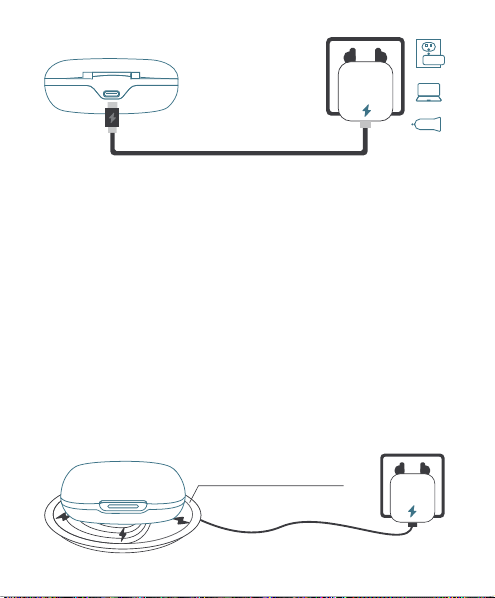
T60 User Manual
True Wireless Earbuds
❹
02 03
Overview
Type-C
Charging Port
Multi-functional
Button (MFB)
LED Indicator
of Earbud
Charging Contacts
Microphone
Power of
Charging Case
Earbud L&R
Charging Status
Charging Pins
Power Status
User Manual x1
Charging Case x1
Type-C
Charging Cable x1
Ear Tips Set x3
(Size M has been
preinstalled on earbuds)
Earbuds x2
What's in the box?
S
M
L
T60 User Manual
True Wireless Earbuds
Customer Service
06 07 08
First-use
1. Before the first use, please tear off the isolating film on the earbuds.
Put the earbuds into the case, then charge both earbuds and charging
case via supplied Type-C charging cable for at least 10mins (or after not
use for a long time), do not take out the earbuds during this period.
Wearing
1. Choose the Ear Tips that fit your ears best.
2. Insert the earbuds into the inner canal of your ears and turn gently
until you find the most comfortable and secure position.
Bluetooth Pairing
1. Open the charging case, and pick up the earbuds from the charging
case for 3 seconds to enter Bluetooth pairing mode.
09
Each time you power on your earbuds, they will automatically connect
to your last successfully connected device if available within the
Bluetooth range. If you wanna switch between devices, please first turn
off the Bluetooth of the last device.
10
10mins
Remove
S
M
L
T60
T60
MY DEVICES
T60
xxxxx
xxxxxxx
MY DEVICES
OTHER DEVICES
* When successfully connected, you will hear the prompt "connected"
and the LED indicators will turn off.
12:00
Bluetooth
Bluetooth
T60
Connected
12:00
Name
Disconnect
Forget This Device
Bluetooth
T60
Device Type
12:00
Bluetooth
Bluetooth
T60
Not Connected
MY DEVICES
12:00
Bluetooth
Bluetooth
First Device
Second Device
3s
2. Select "T60" on your device's Bluetooth list to connect.
Power On
2s
Tears off
the insulation film
MY DEVICES
12:00
Settings
APPLE ID
WLAN
xxxxx
Bluetooth
Off
T60
xxxxx
xxxxxxx
MY DEVICES
OTHER DEVICES
* If you don't see your buds in the list, you might need to reset the buds.
1. Go to the Bluetooth settings on the other device. For example, on
your phone, go to Settings Bluetooth.
2. Tap or click your earphones on the list of discovered devices.
Mono mode
◆ When Bluetooth connected, you can use either one of the earbuds
only by placing the other one into the charging case.
◆ When powered on and connected, if either one of the earbuds is out
of battery and powered off, you can keep using the other one.
◆ When you are on a call, place either one of the earbuds into the
charging case, and the microphone in the other earbud will be activated.
T60 T60
If you feel that the sound of your earbuds are too low, please follow the
steps below to adjust the volume:
❶ Long Press the "R" earbud to maximize the volume of the earbuds
until you hear a "du" sound.
❷ Increase the volume of your Android devices.
* This is only applicable to situations where the volume of the earbuds
and the Android devices are not synchronized.
11
Reset
You might need to reset the earbuds if you experience any connectivity
problems or function issues.
❶ Take the earbuds out for 5mins to consume some battery of both
buds. (Can't be reset if the earbuds are fully charged)
❷ Place the earbuds in the charging case and earbuds blink red.
❸ Press and hold the button on the buds for 8 seconds until the LED
indicators flash red-white 3 times. This confirms that the reset was
successful and your earbuds can be connected normally.
When resetting the earbuds, make sure the earbuds are properly
connected with charging points in the case, or it may cause resetting
failure.
hold for 8s
2. The earbuds are installed with a pair of size M ear tips by default. You
can select other suitable sizes for a secure fit.
Adjusting volume for low sound on earbudsSwitch from one device to another
01
◆ Keep away from children and pets to prevent accidental ingestion as
it has a battery. If swallowed, seek medical help. Store out of their reach
when not in use.
◆ The ear caps are made of soft silica gel, and the ear hooks are made
of elastic TPE material. A very small number of users may have allergic
reactions. If symptoms like itching or swelling of the skin on or around
the ears appear, stop wearing them immediately and seek medical
treatment.
◆ Pollen, dust and cosmetic residues are easy to attach to the earbuds,
which may easily lead to allergic situations. Please clean the earbuds
before and after use and avoid exposure to highly allergenic
environments.
◆ People with sensitive skin should test the earbuds on a small area of
skin around the ears before using them. If any discomfort occurs, stop
using them immediately and consult a dermatologist.
◆ To avoid hearing damage, do not use your earbuds at a high volume.
Turn the volume down on your product before placing the earbuds
in/on your ears, then turn the volume up gradually until you reach
acomfortable, moderate listening level.
◆ Long earbuds use may lead to ear fatigue, tinnitus and affect ear
blood circulation. It's recommended to take a 5-10 minute break per
hour of wearing to relax your ears and enjoy healthy listening.
Important Safety Information
04
Material Components
Earbuds Case: Made of plastic, free of heavy metals such as lead,
mercury and cadmium. It is environmentally friendly and durable.
Ear tips Part: Crafted from silica gel, this part is designed to softly
conform to the ear canal. While it is generally well-tolerated, a very
small fraction of individuals with allergies to Silica gel might experience
a mild allergic response.
Ear Hook Part: Made of TPE elastic material, which is wear-resistant
and stable. It is normally harmless, but people with extremely sensitive
skin may feel slightly uncomfortable.
It suits daily office, study, entertainment, sports lovers and travelers. But
some need caution or doctor's advice:
People with Sensitive Skin: Allergy-prone should do a local test. If
uncomfortable, stop and consult a dermatologist.
Patients with Ear Diseases: Those with ear diseases like otitis media
should consult an ENT doctor before use.
Applicable Population
05
Risk Warnings for Individual Differences
Differences in Ear Canal Structure: Different ear canal structures may
affect the wearing comfort and sound insulation. If there is any discomfort,
stop using it and check the wearing method or consult a doctor.
Differences in Skin Sensitivity: Allergic people may have symptoms
such as skin itching. Stop using it and wash it with water, then seek medi-
cal treatment and inform the doctor about the usage situation.
Differences in Hearing: Follow the "60 - 60" principle to protect your
hearing. If there is any discomfort, stop using it immediately and consult
a doctor.
◆ Force Control: Don't insert earbuds forcefully to protect ear canal.
Adjust ear hooks gently to avoid over-pressing ear skin.
◆ Adaptation for Sports: Ensure ear hook positions are right and
stable before exercise to prevent shaking/friction harm like abrasions.
◆ Stop if Uncomfy: If there's any discomfort like ear canal pain, skin
itch or foreign body feeling, stop using earbuds, check, and seek medical
help if needed.
◆ The LED indicators on the buds will flash white-red in sequence
continuously, the other bud will blink white slowly.
◆ If the earbuds are not connected to any devices over 5 minutes, they
will power off automatically. Turn on the earbuds manually by pressing
the MFB button for 2 seconds to hear the prompt "power on".
V1.1 2024.12.27
13 14
Maintenance
Care for your earbuds
Clean and dry your earbuds and your skin
after workouts or heavy sweating. Keep your
earbuds and charging case clean and dry.
Dual mode
15
16
Charging
Type-C USB charging
◆ Fully dry off the earbuds and the USB port before charging.
◆ Use a certified USB-C charging cable and charger to prevent any damage.
◆ Fully charge both the earbuds and the charging case before the first use.
Wireless charging
Easily charge the case without cables, just put your charging case on the
wireless charging pad. If the charging case is not being charged, please
try to reposition it.
What should I do if the earbuds disconnect or the sound is choppy?
Please note that this doesn't necessarily mean there is an issue with
the earbuds, but may have something to do with the connected
device and environment. Bluetooth signals may be influenced by
obstructions, such as walls, pillars, home appliances, Wi-Fi, and
more. To ensure a stable connection, we recommend avoiding such
obstructions. To fix this issue, please try the following:
1. Fully charge and reset your earbuds as stated above and re-pair
them.
2. Check the earbuds by listening to a downloaded song/video.
3. Check the earbuds with another Bluetooth device in a different
environment to see if it works well.
FAQ
17
What should I do if any of the following problems occur?
1. Cannot pair or reconnect with my device.
2. One side does not pair with the other side of my device.
3. No music plays after connecting with my device.
4. Only one earbud has sound.
1. Remove the protective film covering the connectors on the earbuds.
2. Reboot the Bluetooth device you're using (such as a phone or
What should I do if any of the following problems occur?
18
1. Confirm the charging case has power left (open the charging
case to check if there is white light flashing).
2. Clean the charging pins with a dry cloth and an alcohol-based
disinfectant. This is to ensure all charging contact pins on the
earbuds and charging case is completely clean and dry from sweat
and water. Then put the earbuds correctly into the case. The light
and display flash when the earbuds are placed in the case.
3. Please use the certified charging cable and wall charger.
4. Please check whether the ear tips are installed properly.
▶ During charging, the digital display flashes and shows the real-time
power until 100.
▶ The right display panel indicates the charging status per bud. There
are separated power consumption indicators by 4 grids in total, which
will be flashing when charging.
▶ The LED indicator on the charging case indicates the charging status.
❹
❶ ❷
❸
Press Once (R/L)
For Call
Answer/End a call
Reject a call
Press and hold for 2 seconds (R/L)
Voice Assistance
Press Thrice (R/L)
Activate Siri or other
voice assistant software
Music Mode
Press Once (R/L)
Press Twice (R)
Press Twice (L)
Long Press (R)
Long Press (L)
Play/Pause
Next Track
Previous Track
Volume+
Volume -
*Press and hold for 2s (R/L) in power-off state
*Pick up buds from the charging case
Power On/O
Power on
*Non-music playing, press and hold for 5s (R/L)
*Put back into the charging case.
*Not connected to any devices over 5mins
Power off
Power of
Charging Case
Charging
Status Per Bud
Note: This equipment has been tested and found to comply with the
limits for a Class B digital device, pursuant to part 15 of the FCC Rules.
These limits are designed to provide reasonable protection against
harmful interference in a residential installation.
This equipment generates, uses and can radiate radio frequency energy
and, if not installed and used in accordance with the instructions, may
cause harmful interference to radio communications. However, there is
no guarantee that interference will not occur in a particular installation.
If this equipment does cause harmful interference to radio or television
reception, which can be determined by turning the equipment off and on,
the user is encouraged to try to correct the interference by one or more
of the following measures:
— Reorient or relocate the receiving antenna.
— Increase the separation between the equipment and receiver.
— Connect the equipment into an outlet on a circuit different from that
to which the receiver is connected.
— Consult the dealer or an experienced radio/TV technician for help.
This equipment complies with FCC radiation exposure limits set forth for
an uncontrolled environment. This transmitter must not be co-located or
operating in conjunction with any other antenna or transmitter.
Any Changes or modifications not expressly approved by the party
responsible for compliance could void the user's authority to operate
the equipment.
This device complies with part 15 of the FCC Rules. Operation is subject
to the following two conditions:
(1) This device may not cause harmful interference, and
(2) This device must accept any interference received, including
interference that may cause undesired operation.
FCC Caution
19 20
1) The earbuds don’t recharge in the charging case.
2) The earbuds stay connected to the device even after being placed
in the charging case with the lid closed.
3) The earbuds don't turn on when taken out of the charging case.
Maintenance
Mono mode
Music Mode
Press Once (R/L)
Press Twice (R/L)
Unsupported
Long Press (R/L)
Unsupported
Play/Pause
Next Track
Previous Track
Volume+
Volume -
computer). Forget all the pairing records of your earbuds on your
device and turn off Bluetooth.
3. Reset the earbuds as per the steps above(make sure your earbuds
have enough battery).
4. Turn on the Bluetooth of your device and search for T60 and
pair. If there is a pop-up window to confirm pairing for "T60,"
please select "Pair." If you accidentally select "Cancel," you need to
refresh (turn off and turn on) the Bluetooth of your device and pair
the earbuds again.
1. Place the earbuds in the
charging case and close it.
2. Connect the charging case
to the power supply by using
a USB-C charging cable.
Wireless Charging Pad
(Not Included)
This device complies with Industry Canada licence-exempt RSS
standard(s). Operation is subject to the following two conditions:
(1) This device may not cause interference, and
(2) This device must accept any interference, including interference that
may cause undesired operation of the device.
Le présent appareil est conforme aux CNR d'Industrie Canada applicables
aux appareils radio exempts de licence. L'exploitation est autorisée aux
deux conditions suivantes:
(1) l'appareil ne doit pas produire de brouillage, et
(2) l'utilisateur de l'appareil doit accepter tout brouillage radioélectrique
subi, même si le brouillage est susceptible d'en compromettre le
fonctionnement.
The device is compliance with RF exposure guidelines, users can obtain
Canadian information on RF exposure and compliance.
Le présent appareil est conforme
Après examen de ce matériel aux conformité ou aux limites d’intensité
de champ RF, les utilisateurs peuvent sur l’exposition aux radiofréquenc-
es et la conformité and compliance d’acquérir les informations
correspondantes.
21 22
This product bears the selective sorting symbol for Waste electrical and
electronic equipment (WEEE).
This means that this product must be handled pursuant to European
directive 2012/19/EU in order to be recycled or dismantled to minimize
its impact on the environment. User has the choice to give his product
to a competent recycling organization or to the retailer when he buys a
new electrical or electronic equipment.
This product can be used across EU member states.
The device is low power device, it can meet the requirement of the RF
exposure.
NOTE:
1. High Sound Pressure
2. Hearing Damage Risk
3. Do not listen at high volume levels for long periods.
ISED Warning
The symbol indicates DC voltage
RECYCLING
DISPOSE OF USED BATTERIES ACCORDING TO THE INSTRUCTIONS
Caution
Battery Warning
Using the wrong battery can cause fire and other hazards (for example,
in the case of some lithium battery types)
1. Disposal of a battery into fire or a hot oven, or mechanically crushing
or cutting of abattery, that can result in an explosion.
2. Do not leaving a battery in an extremely high temperature surrounding
environment that can result in an explosion or the leakage of flammable
liquid or gas.
3. A battery subjected to extremely low air pressure that may result in an
explosion or the leakage of flammable liquid or gas.
Use a soft, dry, lint-free cloth to clean all other areas of the buds and
case. Here's how to clean your eartips.
12
Specifications
Specifications are subject to change without notice.
Maintenance
Clean your earbuds
Your earbuds are sweat and water-resistant, but not sweatproof or
waterproof. The charging case is not waterproof, so be careful not to
get moisture in any openings.
Remove the earbuds from the charging case.
Disconnect the charging cable from both the case and your computer
or power adapter.
To clean the charging contacts on buds, use a cotton swab slightly
dampened with warm water. To clean the charging pins on the case,
use a lint-free cloth slightly dampened with warm water. If necessary,
you can slightly dampen the cotton swab or cloth with 70 percent
isopropyl alcohol.
❶
❷
Model No.: T60
Input: 5V 1A
FCC ID: 2A33A-T60
IC: 32589-T60
HVIN: T60
Product Name: Wireless Sport Earbuds
Charging Cord Type: Type-C
Impedance: 32Ω
Battery Capacity: 3.7V 600mAh, 2.22Wh
Transmission Range: 33feet (Without Obstacles)
❸
◆ Clean earbuds weekly at least. Use in sweaty, dusty or allergen-rich
environments requires more frequent cleaning.
◆ After contact with pollen, dust or cosmetics, wipe the earbuds surface
with a clean damp cloth before use to reduce allergen residue. If you
know you're allergic, clean the earbuds promptly after use.
23

T60 User Manual
True Wireless Earbuds
❹
02 03
Overview
Type-C
Charging Port
Multi-functional
Button (MFB)
LED Indicator
of Earbud
Charging Contacts
Microphone
Power of
Charging Case
Earbud L&R
Charging Status
Charging Pins
Power Status
User Manual x1
Charging Case x1
Type-C
Charging Cable x1
Ear Tips Set x3
(Size M has been
preinstalled on earbuds)
Earbuds x2
What's in the box?
S
M
L
T60 User Manual
True Wireless Earbuds
Customer Service
06 07 08
First-use
1. Before the first use, please tear off the isolating film on the earbuds.
Put the earbuds into the case, then charge both earbuds and charging
case via supplied Type-C charging cable for at least 10mins (or after not
use for a long time), do not take out the earbuds during this period.
Wearing
1. Choose the Ear Tips that fit your ears best.
2. Insert the earbuds into the inner canal of your ears and turn gently
until you find the most comfortable and secure position.
Bluetooth Pairing
1. Open the charging case, and pick up the earbuds from the charging
case for 3 seconds to enter Bluetooth pairing mode.
09
Each time you power on your earbuds, they will automatically connect
to your last successfully connected device if available within the
Bluetooth range. If you wanna switch between devices, please first turn
off the Bluetooth of the last device.
10
10mins
Remove
S
M
L
T60
T60
MY DEVICES
T60
xxxxx
xxxxxxx
MY DEVICES
OTHER DEVICES
* When successfully connected, you will hear the prompt "connected"
and the LED indicators will turn off.
12:00
Bluetooth
Bluetooth
T60
Connected
12:00
Name
Disconnect
Forget This Device
Bluetooth
T60
Device Type
12:00
Bluetooth
Bluetooth
T60
Not Connected
MY DEVICES
12:00
Bluetooth
Bluetooth
First Device
Second Device
3s
2. Select "T60" on your device's Bluetooth list to connect.
Power On
2s
Tears off
the insulation film
MY DEVICES
12:00
Settings
APPLE ID
WLAN
xxxxx
Bluetooth
Off
T60
xxxxx
xxxxxxx
MY DEVICES
OTHER DEVICES
* If you don't see your buds in the list, you might need to reset the buds.
1. Go to the Bluetooth settings on the other device. For example, on
your phone, go to Settings Bluetooth.
2. Tap or click your earphones on the list of discovered devices.
Mono mode
◆ When Bluetooth connected, you can use either one of the earbuds
only by placing the other one into the charging case.
◆ When powered on and connected, if either one of the earbuds is out
of battery and powered off, you can keep using the other one.
◆ When you are on a call, place either one of the earbuds into the
charging case, and the microphone in the other earbud will be activated.
T60 T60
If you feel that the sound of your earbuds are too low, please follow the
steps below to adjust the volume:
❶ Long Press the "R" earbud to maximize the volume of the earbuds
until you hear a "du" sound.
❷ Increase the volume of your Android devices.
* This is only applicable to situations where the volume of the earbuds
and the Android devices are not synchronized.
11
Reset
You might need to reset the earbuds if you experience any connectivity
problems or function issues.
❶ Take the earbuds out for 5mins to consume some battery of both
buds. (Can't be reset if the earbuds are fully charged)
❷ Place the earbuds in the charging case and earbuds blink red.
❸ Press and hold the button on the buds for 8 seconds until the LED
indicators flash red-white 3 times. This confirms that the reset was
successful and your earbuds can be connected normally.
When resetting the earbuds, make sure the earbuds are properly
connected with charging points in the case, or it may cause resetting
failure.
hold for 8s
2. The earbuds are installed with a pair of size M ear tips by default. You
can select other suitable sizes for a secure fit.
Adjusting volume for low sound on earbudsSwitch from one device to another
01
◆ Keep away from children and pets to prevent accidental ingestion as
it has a battery. If swallowed, seek medical help. Store out of their reach
when not in use.
◆ The ear caps are made of soft silica gel, and the ear hooks are made
of elastic TPE material. A very small number of users may have allergic
reactions. If symptoms like itching or swelling of the skin on or around
the ears appear, stop wearing them immediately and seek medical
treatment.
◆ Pollen, dust and cosmetic residues are easy to attach to the earbuds,
which may easily lead to allergic situations. Please clean the earbuds
before and after use and avoid exposure to highly allergenic
environments.
◆ People with sensitive skin should test the earbuds on a small area of
skin around the ears before using them. If any discomfort occurs, stop
using them immediately and consult a dermatologist.
◆ To avoid hearing damage, do not use your earbuds at a high volume.
Turn the volume down on your product before placing the earbuds
in/on your ears, then turn the volume up gradually until you reach
acomfortable, moderate listening level.
◆ Long earbuds use may lead to ear fatigue, tinnitus and affect ear
blood circulation. It's recommended to take a 5-10 minute break per
hour of wearing to relax your ears and enjoy healthy listening.
Important Safety Information
04
Material Components
Earbuds Case: Made of plastic, free of heavy metals such as lead,
mercury and cadmium. It is environmentally friendly and durable.
Ear tips Part: Crafted from silica gel, this part is designed to softly
conform to the ear canal. While it is generally well-tolerated, a very
small fraction of individuals with allergies to Silica gel might experience
a mild allergic response.
Ear Hook Part: Made of TPE elastic material, which is wear-resistant
and stable. It is normally harmless, but people with extremely sensitive
skin may feel slightly uncomfortable.
It suits daily office, study, entertainment, sports lovers and travelers. But
some need caution or doctor's advice:
People with Sensitive Skin: Allergy-prone should do a local test. If
uncomfortable, stop and consult a dermatologist.
Patients with Ear Diseases: Those with ear diseases like otitis media
should consult an ENT doctor before use.
Applicable Population
05
Risk Warnings for Individual Differences
Differences in Ear Canal Structure: Different ear canal structures may
affect the wearing comfort and sound insulation. If there is any discomfort,
stop using it and check the wearing method or consult a doctor.
Differences in Skin Sensitivity: Allergic people may have symptoms
such as skin itching. Stop using it and wash it with water, then seek medi-
cal treatment and inform the doctor about the usage situation.
Differences in Hearing: Follow the "60 - 60" principle to protect your
hearing. If there is any discomfort, stop using it immediately and consult
a doctor.
◆ Force Control: Don't insert earbuds forcefully to protect ear canal.
Adjust ear hooks gently to avoid over-pressing ear skin.
◆ Adaptation for Sports: Ensure ear hook positions are right and
stable before exercise to prevent shaking/friction harm like abrasions.
◆ Stop if Uncomfy: If there's any discomfort like ear canal pain, skin
itch or foreign body feeling, stop using earbuds, check, and seek medical
help if needed.
◆ The LED indicators on the buds will flash white-red in sequence
continuously, the other bud will blink white slowly.
◆ If the earbuds are not connected to any devices over 5 minutes, they
will power off automatically. Turn on the earbuds manually by pressing
the MFB button for 2 seconds to hear the prompt "power on".
V1.1 2024.12.27
13 14
Maintenance
Care for your earbuds
Clean and dry your earbuds and your skin
after workouts or heavy sweating. Keep your
earbuds and charging case clean and dry.
Dual mode
15
16
Charging
Type-C USB charging
◆ Fully dry off the earbuds and the USB port before charging.
◆ Use a certified USB-C charging cable and charger to prevent any damage.
◆ Fully charge both the earbuds and the charging case before the first use.
Wireless charging
Easily charge the case without cables, just put your charging case on the
wireless charging pad. If the charging case is not being charged, please
try to reposition it.
What should I do if the earbuds disconnect or the sound is choppy?
Please note that this doesn't necessarily mean there is an issue with
the earbuds, but may have something to do with the connected
device and environment. Bluetooth signals may be influenced by
obstructions, such as walls, pillars, home appliances, Wi-Fi, and
more. To ensure a stable connection, we recommend avoiding such
obstructions. To fix this issue, please try the following:
1. Fully charge and reset your earbuds as stated above and re-pair
them.
2. Check the earbuds by listening to a downloaded song/video.
3. Check the earbuds with another Bluetooth device in a different
environment to see if it works well.
FAQ
17
What should I do if any of the following problems occur?
1. Cannot pair or reconnect with my device.
2. One side does not pair with the other side of my device.
3. No music plays after connecting with my device.
4. Only one earbud has sound.
1. Remove the protective film covering the connectors on the earbuds.
2. Reboot the Bluetooth device you're using (such as a phone or
What should I do if any of the following problems occur?
18
1. Confirm the charging case has power left (open the charging
case to check if there is white light flashing).
2. Clean the charging pins with a dry cloth and an alcohol-based
disinfectant. This is to ensure all charging contact pins on the
earbuds and charging case is completely clean and dry from sweat
and water. Then put the earbuds correctly into the case. The light
and display flash when the earbuds are placed in the case.
3. Please use the certified charging cable and wall charger.
4. Please check whether the ear tips are installed properly.
▶ During charging, the digital display flashes and shows the real-time
power until 100.
▶ The right display panel indicates the charging status per bud. There
are separated power consumption indicators by 4 grids in total, which
will be flashing when charging.
▶ The LED indicator on the charging case indicates the charging status.
❹
❶ ❷
❸
Press Once (R/L)
For Call
Answer/End a call
Reject a call
Press and hold for 2 seconds (R/L)
Voice Assistance
Press Thrice (R/L)
Activate Siri or other
voice assistant software
Music Mode
Press Once (R/L)
Press Twice (R)
Press Twice (L)
Long Press (R)
Long Press (L)
Play/Pause
Next Track
Previous Track
Volume+
Volume -
*Press and hold for 2s (R/L) in power-off state
*Pick up buds from the charging case
Power On/O
Power on
*Non-music playing, press and hold for 5s (R/L)
*Put back into the charging case.
*Not connected to any devices over 5mins
Power off
Power of
Charging Case
Charging
Status Per Bud
Note: This equipment has been tested and found to comply with the
limits for a Class B digital device, pursuant to part 15 of the FCC Rules.
These limits are designed to provide reasonable protection against
harmful interference in a residential installation.
This equipment generates, uses and can radiate radio frequency energy
and, if not installed and used in accordance with the instructions, may
cause harmful interference to radio communications. However, there is
no guarantee that interference will not occur in a particular installation.
If this equipment does cause harmful interference to radio or television
reception, which can be determined by turning the equipment off and on,
the user is encouraged to try to correct the interference by one or more
of the following measures:
— Reorient or relocate the receiving antenna.
— Increase the separation between the equipment and receiver.
— Connect the equipment into an outlet on a circuit different from that
to which the receiver is connected.
— Consult the dealer or an experienced radio/TV technician for help.
This equipment complies with FCC radiation exposure limits set forth for
an uncontrolled environment. This transmitter must not be co-located or
operating in conjunction with any other antenna or transmitter.
Any Changes or modifications not expressly approved by the party
responsible for compliance could void the user's authority to operate
the equipment.
This device complies with part 15 of the FCC Rules. Operation is subject
to the following two conditions:
(1) This device may not cause harmful interference, and
(2) This device must accept any interference received, including
interference that may cause undesired operation.
FCC Caution
19 20
1) The earbuds don’t recharge in the charging case.
2) The earbuds stay connected to the device even after being placed
in the charging case with the lid closed.
3) The earbuds don't turn on when taken out of the charging case.
Maintenance
Mono mode
Music Mode
Press Once (R/L)
Press Twice (R/L)
Unsupported
Long Press (R/L)
Unsupported
Play/Pause
Next Track
Previous Track
Volume+
Volume -
computer). Forget all the pairing records of your earbuds on your
device and turn off Bluetooth.
3. Reset the earbuds as per the steps above(make sure your earbuds
have enough battery).
4. Turn on the Bluetooth of your device and search for T60 and
pair. If there is a pop-up window to confirm pairing for "T60,"
please select "Pair." If you accidentally select "Cancel," you need to
refresh (turn off and turn on) the Bluetooth of your device and pair
the earbuds again.
1. Place the earbuds in the
charging case and close it.
2. Connect the charging case
to the power supply by using
a USB-C charging cable.
Wireless Charging Pad
(Not Included)
This device complies with Industry Canada licence-exempt RSS
standard(s). Operation is subject to the following two conditions:
(1) This device may not cause interference, and
(2) This device must accept any interference, including interference that
may cause undesired operation of the device.
Le présent appareil est conforme aux CNR d'Industrie Canada applicables
aux appareils radio exempts de licence. L'exploitation est autorisée aux
deux conditions suivantes:
(1) l'appareil ne doit pas produire de brouillage, et
(2) l'utilisateur de l'appareil doit accepter tout brouillage radioélectrique
subi, même si le brouillage est susceptible d'en compromettre le
fonctionnement.
The device is compliance with RF exposure guidelines, users can obtain
Canadian information on RF exposure and compliance.
Le présent appareil est conforme
Après examen de ce matériel aux conformité ou aux limites d’intensité
de champ RF, les utilisateurs peuvent sur l’exposition aux radiofréquenc-
es et la conformité and compliance d’acquérir les informations
correspondantes.
21 22
This product bears the selective sorting symbol for Waste electrical and
electronic equipment (WEEE).
This means that this product must be handled pursuant to European
directive 2012/19/EU in order to be recycled or dismantled to minimize
its impact on the environment. User has the choice to give his product
to a competent recycling organization or to the retailer when he buys a
new electrical or electronic equipment.
This product can be used across EU member states.
The device is low power device, it can meet the requirement of the RF
exposure.
NOTE:
1. High Sound Pressure
2. Hearing Damage Risk
3. Do not listen at high volume levels for long periods.
ISED Warning
The symbol indicates DC voltage
RECYCLING
DISPOSE OF USED BATTERIES ACCORDING TO THE INSTRUCTIONS
Caution
Battery Warning
Using the wrong battery can cause fire and other hazards (for example,
in the case of some lithium battery types)
1. Disposal of a battery into fire or a hot oven, or mechanically crushing
or cutting of abattery, that can result in an explosion.
2. Do not leaving a battery in an extremely high temperature surrounding
environment that can result in an explosion or the leakage of flammable
liquid or gas.
3. A battery subjected to extremely low air pressure that may result in an
explosion or the leakage of flammable liquid or gas.
Use a soft, dry, lint-free cloth to clean all other areas of the buds and
case. Here's how to clean your eartips.
12
Specifications
Specifications are subject to change without notice.
Maintenance
Clean your earbuds
Your earbuds are sweat and water-resistant, but not sweatproof or
waterproof. The charging case is not waterproof, so be careful not to
get moisture in any openings.
Remove the earbuds from the charging case.
Disconnect the charging cable from both the case and your computer
or power adapter.
To clean the charging contacts on buds, use a cotton swab slightly
dampened with warm water. To clean the charging pins on the case,
use a lint-free cloth slightly dampened with warm water. If necessary,
you can slightly dampen the cotton swab or cloth with 70 percent
isopropyl alcohol.
❶
❷
Model No.: T60
Input: 5V 1A
FCC ID: 2A33A-T60
IC: 32589-T60
HVIN: T60
Product Name: Wireless Sport Earbuds
Charging Cord Type: Type-C
Impedance: 32Ω
Battery Capacity: 3.7V 600mAh, 2.22Wh
Transmission Range: 33feet (Without Obstacles)
❸
◆ Clean earbuds weekly at least. Use in sweaty, dusty or allergen-rich
environments requires more frequent cleaning.
◆ After contact with pollen, dust or cosmetics, wipe the earbuds surface
with a clean damp cloth before use to reduce allergen residue. If you
know you're allergic, clean the earbuds promptly after use.
23

T60 User Manual
True Wireless Earbuds
❹
02 03
Overview
Type-C
Charging Port
Multi-functional
Button (MFB)
LED Indicator
of Earbud
Charging Contacts
Microphone
Power of
Charging Case
Earbud L&R
Charging Status
Charging Pins
Power Status
User Manual x1
Charging Case x1
Type-C
Charging Cable x1
Ear Tips Set x3
(Size M has been
preinstalled on earbuds)
Earbuds x2
What's in the box?
S
M
L
T60 User Manual
True Wireless Earbuds
Customer Service
06 07 08
First-use
1. Before the first use, please tear off the isolating film on the earbuds.
Put the earbuds into the case, then charge both earbuds and charging
case via supplied Type-C charging cable for at least 10mins (or after not
use for a long time), do not take out the earbuds during this period.
Wearing
1. Choose the Ear Tips that fit your ears best.
2. Insert the earbuds into the inner canal of your ears and turn gently
until you find the most comfortable and secure position.
Bluetooth Pairing
1. Open the charging case, and pick up the earbuds from the charging
case for 3 seconds to enter Bluetooth pairing mode.
09
Each time you power on your earbuds, they will automatically connect
to your last successfully connected device if available within the
Bluetooth range. If you wanna switch between devices, please first turn
off the Bluetooth of the last device.
10
10mins
Remove
S
M
L
T60
T60
MY DEVICES
T60
xxxxx
xxxxxxx
MY DEVICES
OTHER DEVICES
* When successfully connected, you will hear the prompt "connected"
and the LED indicators will turn off.
12:00
Bluetooth
Bluetooth
T60
Connected
12:00
Name
Disconnect
Forget This Device
Bluetooth
T60
Device Type
12:00
Bluetooth
Bluetooth
T60
Not Connected
MY DEVICES
12:00
Bluetooth
Bluetooth
First Device
Second Device
3s
2. Select "T60" on your device's Bluetooth list to connect.
Power On
2s
Tears off
the insulation film
MY DEVICES
12:00
Settings
APPLE ID
WLAN
xxxxx
Bluetooth
Off
T60
xxxxx
xxxxxxx
MY DEVICES
OTHER DEVICES
* If you don't see your buds in the list, you might need to reset the buds.
1. Go to the Bluetooth settings on the other device. For example, on
your phone, go to Settings Bluetooth.
2. Tap or click your earphones on the list of discovered devices.
Mono mode
◆ When Bluetooth connected, you can use either one of the earbuds
only by placing the other one into the charging case.
◆ When powered on and connected, if either one of the earbuds is out
of battery and powered off, you can keep using the other one.
◆ When you are on a call, place either one of the earbuds into the
charging case, and the microphone in the other earbud will be activated.
T60 T60
If you feel that the sound of your earbuds are too low, please follow the
steps below to adjust the volume:
❶ Long Press the "R" earbud to maximize the volume of the earbuds
until you hear a "du" sound.
❷ Increase the volume of your Android devices.
* This is only applicable to situations where the volume of the earbuds
and the Android devices are not synchronized.
11
Reset
You might need to reset the earbuds if you experience any connectivity
problems or function issues.
❶ Take the earbuds out for 5mins to consume some battery of both
buds. (Can't be reset if the earbuds are fully charged)
❷ Place the earbuds in the charging case and earbuds blink red.
❸ Press and hold the button on the buds for 8 seconds until the LED
indicators flash red-white 3 times. This confirms that the reset was
successful and your earbuds can be connected normally.
When resetting the earbuds, make sure the earbuds are properly
connected with charging points in the case, or it may cause resetting
failure.
hold for 8s
2. The earbuds are installed with a pair of size M ear tips by default. You
can select other suitable sizes for a secure fit.
Adjusting volume for low sound on earbudsSwitch from one device to another
01
◆ Keep away from children and pets to prevent accidental ingestion as
it has a battery. If swallowed, seek medical help. Store out of their reach
when not in use.
◆ The ear caps are made of soft silica gel, and the ear hooks are made
of elastic TPE material. A very small number of users may have allergic
reactions. If symptoms like itching or swelling of the skin on or around
the ears appear, stop wearing them immediately and seek medical
treatment.
◆ Pollen, dust and cosmetic residues are easy to attach to the earbuds,
which may easily lead to allergic situations. Please clean the earbuds
before and after use and avoid exposure to highly allergenic
environments.
◆ People with sensitive skin should test the earbuds on a small area of
skin around the ears before using them. If any discomfort occurs, stop
using them immediately and consult a dermatologist.
◆ To avoid hearing damage, do not use your earbuds at a high volume.
Turn the volume down on your product before placing the earbuds
in/on your ears, then turn the volume up gradually until you reach
acomfortable, moderate listening level.
◆ Long earbuds use may lead to ear fatigue, tinnitus and affect ear
blood circulation. It's recommended to take a 5-10 minute break per
hour of wearing to relax your ears and enjoy healthy listening.
Important Safety Information
04
Material Components
Earbuds Case: Made of plastic, free of heavy metals such as lead,
mercury and cadmium. It is environmentally friendly and durable.
Ear tips Part: Crafted from silica gel, this part is designed to softly
conform to the ear canal. While it is generally well-tolerated, a very
small fraction of individuals with allergies to Silica gel might experience
a mild allergic response.
Ear Hook Part: Made of TPE elastic material, which is wear-resistant
and stable. It is normally harmless, but people with extremely sensitive
skin may feel slightly uncomfortable.
It suits daily office, study, entertainment, sports lovers and travelers. But
some need caution or doctor's advice:
People with Sensitive Skin: Allergy-prone should do a local test. If
uncomfortable, stop and consult a dermatologist.
Patients with Ear Diseases: Those with ear diseases like otitis media
should consult an ENT doctor before use.
Applicable Population
05
Risk Warnings for Individual Differences
Differences in Ear Canal Structure: Different ear canal structures may
affect the wearing comfort and sound insulation. If there is any discomfort,
stop using it and check the wearing method or consult a doctor.
Differences in Skin Sensitivity: Allergic people may have symptoms
such as skin itching. Stop using it and wash it with water, then seek medi-
cal treatment and inform the doctor about the usage situation.
Differences in Hearing: Follow the "60 - 60" principle to protect your
hearing. If there is any discomfort, stop using it immediately and consult
a doctor.
◆ Force Control: Don't insert earbuds forcefully to protect ear canal.
Adjust ear hooks gently to avoid over-pressing ear skin.
◆ Adaptation for Sports: Ensure ear hook positions are right and
stable before exercise to prevent shaking/friction harm like abrasions.
◆ Stop if Uncomfy: If there's any discomfort like ear canal pain, skin
itch or foreign body feeling, stop using earbuds, check, and seek medical
help if needed.
◆ The LED indicators on the buds will flash white-red in sequence
continuously, the other bud will blink white slowly.
◆ If the earbuds are not connected to any devices over 5 minutes, they
will power off automatically. Turn on the earbuds manually by pressing
the MFB button for 2 seconds to hear the prompt "power on".
V1.1 2024.12.27
13 14
Maintenance
Care for your earbuds
Clean and dry your earbuds and your skin
after workouts or heavy sweating. Keep your
earbuds and charging case clean and dry.
Dual mode
15
16
Charging
Type-C USB charging
◆ Fully dry off the earbuds and the USB port before charging.
◆ Use a certified USB-C charging cable and charger to prevent any damage.
◆ Fully charge both the earbuds and the charging case before the first use.
Wireless charging
Easily charge the case without cables, just put your charging case on the
wireless charging pad. If the charging case is not being charged, please
try to reposition it.
What should I do if the earbuds disconnect or the sound is choppy?
Please note that this doesn't necessarily mean there is an issue with
the earbuds, but may have something to do with the connected
device and environment. Bluetooth signals may be influenced by
obstructions, such as walls, pillars, home appliances, Wi-Fi, and
more. To ensure a stable connection, we recommend avoiding such
obstructions. To fix this issue, please try the following:
1. Fully charge and reset your earbuds as stated above and re-pair
them.
2. Check the earbuds by listening to a downloaded song/video.
3. Check the earbuds with another Bluetooth device in a different
environment to see if it works well.
FAQ
17
What should I do if any of the following problems occur?
1. Cannot pair or reconnect with my device.
2. One side does not pair with the other side of my device.
3. No music plays after connecting with my device.
4. Only one earbud has sound.
1. Remove the protective film covering the connectors on the earbuds.
2. Reboot the Bluetooth device you're using (such as a phone or
What should I do if any of the following problems occur?
18
1. Confirm the charging case has power left (open the charging
case to check if there is white light flashing).
2. Clean the charging pins with a dry cloth and an alcohol-based
disinfectant. This is to ensure all charging contact pins on the
earbuds and charging case is completely clean and dry from sweat
and water. Then put the earbuds correctly into the case. The light
and display flash when the earbuds are placed in the case.
3. Please use the certified charging cable and wall charger.
4. Please check whether the ear tips are installed properly.
▶ During charging, the digital display flashes and shows the real-time
power until 100.
▶ The right display panel indicates the charging status per bud. There
are separated power consumption indicators by 4 grids in total, which
will be flashing when charging.
▶ The LED indicator on the charging case indicates the charging status.
❹
❶ ❷
❸
Press Once (R/L)
For Call
Answer/End a call
Reject a call
Press and hold for 2 seconds (R/L)
Voice Assistance
Press Thrice (R/L)
Activate Siri or other
voice assistant software
Music Mode
Press Once (R/L)
Press Twice (R)
Press Twice (L)
Long Press (R)
Long Press (L)
Play/Pause
Next Track
Previous Track
Volume+
Volume -
*Press and hold for 2s (R/L) in power-off state
*Pick up buds from the charging case
Power On/O
Power on
*Non-music playing, press and hold for 5s (R/L)
*Put back into the charging case.
*Not connected to any devices over 5mins
Power off
Power of
Charging Case
Charging
Status Per Bud
Note: This equipment has been tested and found to comply with the
limits for a Class B digital device, pursuant to part 15 of the FCC Rules.
These limits are designed to provide reasonable protection against
harmful interference in a residential installation.
This equipment generates, uses and can radiate radio frequency energy
and, if not installed and used in accordance with the instructions, may
cause harmful interference to radio communications. However, there is
no guarantee that interference will not occur in a particular installation.
If this equipment does cause harmful interference to radio or television
reception, which can be determined by turning the equipment off and on,
the user is encouraged to try to correct the interference by one or more
of the following measures:
— Reorient or relocate the receiving antenna.
— Increase the separation between the equipment and receiver.
— Connect the equipment into an outlet on a circuit different from that
to which the receiver is connected.
— Consult the dealer or an experienced radio/TV technician for help.
This equipment complies with FCC radiation exposure limits set forth for
an uncontrolled environment. This transmitter must not be co-located or
operating in conjunction with any other antenna or transmitter.
Any Changes or modifications not expressly approved by the party
responsible for compliance could void the user's authority to operate
the equipment.
This device complies with part 15 of the FCC Rules. Operation is subject
to the following two conditions:
(1) This device may not cause harmful interference, and
(2) This device must accept any interference received, including
interference that may cause undesired operation.
FCC Caution
19 20
1) The earbuds don’t recharge in the charging case.
2) The earbuds stay connected to the device even after being placed
in the charging case with the lid closed.
3) The earbuds don't turn on when taken out of the charging case.
Maintenance
Mono mode
Music Mode
Press Once (R/L)
Press Twice (R/L)
Unsupported
Long Press (R/L)
Unsupported
Play/Pause
Next Track
Previous Track
Volume+
Volume -
computer). Forget all the pairing records of your earbuds on your
device and turn off Bluetooth.
3. Reset the earbuds as per the steps above(make sure your earbuds
have enough battery).
4. Turn on the Bluetooth of your device and search for T60 and
pair. If there is a pop-up window to confirm pairing for "T60,"
please select "Pair." If you accidentally select "Cancel," you need to
refresh (turn off and turn on) the Bluetooth of your device and pair
the earbuds again.
1. Place the earbuds in the
charging case and close it.
2. Connect the charging case
to the power supply by using
a USB-C charging cable.
Wireless Charging Pad
(Not Included)
This device complies with Industry Canada licence-exempt RSS
standard(s). Operation is subject to the following two conditions:
(1) This device may not cause interference, and
(2) This device must accept any interference, including interference that
may cause undesired operation of the device.
Le présent appareil est conforme aux CNR d'Industrie Canada applicables
aux appareils radio exempts de licence. L'exploitation est autorisée aux
deux conditions suivantes:
(1) l'appareil ne doit pas produire de brouillage, et
(2) l'utilisateur de l'appareil doit accepter tout brouillage radioélectrique
subi, même si le brouillage est susceptible d'en compromettre le
fonctionnement.
The device is compliance with RF exposure guidelines, users can obtain
Canadian information on RF exposure and compliance.
Le présent appareil est conforme
Après examen de ce matériel aux conformité ou aux limites d’intensité
de champ RF, les utilisateurs peuvent sur l’exposition aux radiofréquenc-
es et la conformité and compliance d’acquérir les informations
correspondantes.
21 22
This product bears the selective sorting symbol for Waste electrical and
electronic equipment (WEEE).
This means that this product must be handled pursuant to European
directive 2012/19/EU in order to be recycled or dismantled to minimize
its impact on the environment. User has the choice to give his product
to a competent recycling organization or to the retailer when he buys a
new electrical or electronic equipment.
This product can be used across EU member states.
The device is low power device, it can meet the requirement of the RF
exposure.
NOTE:
1. High Sound Pressure
2. Hearing Damage Risk
3. Do not listen at high volume levels for long periods.
ISED Warning
The symbol indicates DC voltage
RECYCLING
DISPOSE OF USED BATTERIES ACCORDING TO THE INSTRUCTIONS
Caution
Battery Warning
Using the wrong battery can cause fire and other hazards (for example,
in the case of some lithium battery types)
1. Disposal of a battery into fire or a hot oven, or mechanically crushing
or cutting of abattery, that can result in an explosion.
2. Do not leaving a battery in an extremely high temperature surrounding
environment that can result in an explosion or the leakage of flammable
liquid or gas.
3. A battery subjected to extremely low air pressure that may result in an
explosion or the leakage of flammable liquid or gas.
Use a soft, dry, lint-free cloth to clean all other areas of the buds and
case. Here's how to clean your eartips.
12
Specifications
Specifications are subject to change without notice.
Maintenance
Clean your earbuds
Your earbuds are sweat and water-resistant, but not sweatproof or
waterproof. The charging case is not waterproof, so be careful not to
get moisture in any openings.
Remove the earbuds from the charging case.
Disconnect the charging cable from both the case and your computer
or power adapter.
To clean the charging contacts on buds, use a cotton swab slightly
dampened with warm water. To clean the charging pins on the case,
use a lint-free cloth slightly dampened with warm water. If necessary,
you can slightly dampen the cotton swab or cloth with 70 percent
isopropyl alcohol.
❶
❷
Model No.: T60
Input: 5V 1A
FCC ID: 2A33A-T60
IC: 32589-T60
HVIN: T60
Product Name: Wireless Sport Earbuds
Charging Cord Type: Type-C
Impedance: 32Ω
Battery Capacity: 3.7V 600mAh, 2.22Wh
Transmission Range: 33feet (Without Obstacles)
❸
◆ Clean earbuds weekly at least. Use in sweaty, dusty or allergen-rich
environments requires more frequent cleaning.
◆ After contact with pollen, dust or cosmetics, wipe the earbuds surface
with a clean damp cloth before use to reduce allergen residue. If you
know you're allergic, clean the earbuds promptly after use.
23
T60 User Manual
True Wireless Earbuds
❹
02 03
Overview
Type-C
Charging Port
Multi-functional
Button (MFB)
LED Indicator
of Earbud
Charging Contacts
Microphone
Power of
Charging Case
Earbud L&R
Charging Status
Charging Pins
Power Status
User Manual x1
Charging Case x1
Type-C
Charging Cable x1
Ear Tips Set x3
(Size M has been
preinstalled on earbuds)
Earbuds x2
What's in the box?
S
M
L
T60 User Manual
True Wireless Earbuds
Customer Service
06 07 08
First-use
1. Before the first use, please tear off the isolating film on the earbuds.
Put the earbuds into the case, then charge both earbuds and charging
case via supplied Type-C charging cable for at least 10mins (or after not
use for a long time), do not take out the earbuds during this period.
Wearing
1. Choose the Ear Tips that fit your ears best.
2. Insert the earbuds into the inner canal of your ears and turn gently
until you find the most comfortable and secure position.
Bluetooth Pairing
1. Open the charging case, and pick up the earbuds from the charging
case for 3 seconds to enter Bluetooth pairing mode.
09
Each time you power on your earbuds, they will automatically connect
to your last successfully connected device if available within the
Bluetooth range. If you wanna switch between devices, please first turn
off the Bluetooth of the last device.
10
10mins
Remove
S
M
L
T60
T60
MY DEVICES
T60
xxxxx
xxxxxxx
MY DEVICES
OTHER DEVICES
* When successfully connected, you will hear the prompt "connected"
and the LED indicators will turn off.
12:00
Bluetooth
Bluetooth
T60
Connected
12:00
Name
Disconnect
Forget This Device
Bluetooth
T60
Device Type
12:00
Bluetooth
Bluetooth
T60
Not Connected
MY DEVICES
12:00
Bluetooth
Bluetooth
First Device
Second Device
3s
2. Select "T60" on your device's Bluetooth list to connect.
Power On
2s
Tears off
the insulation film
MY DEVICES
12:00
Settings
APPLE ID
WLAN
xxxxx
Bluetooth
Off
T60
xxxxx
xxxxxxx
MY DEVICES
OTHER DEVICES
* If you don't see your buds in the list, you might need to reset the buds.
1. Go to the Bluetooth settings on the other device. For example, on
your phone, go to Settings Bluetooth.
2. Tap or click your earphones on the list of discovered devices.
Mono mode
◆ When Bluetooth connected, you can use either one of the earbuds
only by placing the other one into the charging case.
◆ When powered on and connected, if either one of the earbuds is out
of battery and powered off, you can keep using the other one.
◆ When you are on a call, place either one of the earbuds into the
charging case, and the microphone in the other earbud will be activated.
T60 T60
If you feel that the sound of your earbuds are too low, please follow the
steps below to adjust the volume:
❶ Long Press the "R" earbud to maximize the volume of the earbuds
until you hear a "du" sound.
❷ Increase the volume of your Android devices.
* This is only applicable to situations where the volume of the earbuds
and the Android devices are not synchronized.
11
Reset
You might need to reset the earbuds if you experience any connectivity
problems or function issues.
❶ Take the earbuds out for 5mins to consume some battery of both
buds. (Can't be reset if the earbuds are fully charged)
❷ Place the earbuds in the charging case and earbuds blink red.
❸ Press and hold the button on the buds for 8 seconds until the LED
indicators flash red-white 3 times. This confirms that the reset was
successful and your earbuds can be connected normally.
When resetting the earbuds, make sure the earbuds are properly
connected with charging points in the case, or it may cause resetting
failure.
hold for 8s
2. The earbuds are installed with a pair of size M ear tips by default. You
can select other suitable sizes for a secure fit.
Adjusting volume for low sound on earbudsSwitch from one device to another
01
◆ Keep away from children and pets to prevent accidental ingestion as
it has a battery. If swallowed, seek medical help. Store out of their reach
when not in use.
◆ The ear caps are made of soft silica gel, and the ear hooks are made
of elastic TPE material. A very small number of users may have allergic
reactions. If symptoms like itching or swelling of the skin on or around
the ears appear, stop wearing them immediately and seek medical
treatment.
◆ Pollen, dust and cosmetic residues are easy to attach to the earbuds,
which may easily lead to allergic situations. Please clean the earbuds
before and after use and avoid exposure to highly allergenic
environments.
◆ People with sensitive skin should test the earbuds on a small area of
skin around the ears before using them. If any discomfort occurs, stop
using them immediately and consult a dermatologist.
◆ To avoid hearing damage, do not use your earbuds at a high volume.
Turn the volume down on your product before placing the earbuds
in/on your ears, then turn the volume up gradually until you reach
acomfortable, moderate listening level.
◆ Long earbuds use may lead to ear fatigue, tinnitus and affect ear
blood circulation. It's recommended to take a 5-10 minute break per
hour of wearing to relax your ears and enjoy healthy listening.
Important Safety Information
04
Material Components
Earbuds Case: Made of plastic, free of heavy metals such as lead,
mercury and cadmium. It is environmentally friendly and durable.
Ear tips Part: Crafted from silica gel, this part is designed to softly
conform to the ear canal. While it is generally well-tolerated, a very
small fraction of individuals with allergies to Silica gel might experience
a mild allergic response.
Ear Hook Part: Made of TPE elastic material, which is wear-resistant
and stable. It is normally harmless, but people with extremely sensitive
skin may feel slightly uncomfortable.
It suits daily office, study, entertainment, sports lovers and travelers. But
some need caution or doctor's advice:
People with Sensitive Skin: Allergy-prone should do a local test. If
uncomfortable, stop and consult a dermatologist.
Patients with Ear Diseases: Those with ear diseases like otitis media
should consult an ENT doctor before use.
Applicable Population
05
Risk Warnings for Individual Differences
Differences in Ear Canal Structure: Different ear canal structures may
affect the wearing comfort and sound insulation. If there is any discomfort,
stop using it and check the wearing method or consult a doctor.
Differences in Skin Sensitivity: Allergic people may have symptoms
such as skin itching. Stop using it and wash it with water, then seek medi-
cal treatment and inform the doctor about the usage situation.
Differences in Hearing: Follow the "60 - 60" principle to protect your
hearing. If there is any discomfort, stop using it immediately and consult
a doctor.
◆ Force Control: Don't insert earbuds forcefully to protect ear canal.
Adjust ear hooks gently to avoid over-pressing ear skin.
◆ Adaptation for Sports: Ensure ear hook positions are right and
stable before exercise to prevent shaking/friction harm like abrasions.
◆ Stop if Uncomfy: If there's any discomfort like ear canal pain, skin
itch or foreign body feeling, stop using earbuds, check, and seek medical
help if needed.
◆ The LED indicators on the buds will flash white-red in sequence
continuously, the other bud will blink white slowly.
◆ If the earbuds are not connected to any devices over 5 minutes, they
will power off automatically. Turn on the earbuds manually by pressing
the MFB button for 2 seconds to hear the prompt "power on".
V1.1 2024.12.27
13 14
Maintenance
Care for your earbuds
Clean and dry your earbuds and your skin
after workouts or heavy sweating. Keep your
earbuds and charging case clean and dry.
Dual mode
15
16
Charging
Type-C USB charging
◆ Fully dry off the earbuds and the USB port before charging.
◆ Use a certified USB-C charging cable and charger to prevent any damage.
◆ Fully charge both the earbuds and the charging case before the first use.
Wireless charging
Easily charge the case without cables, just put your charging case on the
wireless charging pad. If the charging case is not being charged, please
try to reposition it.
What should I do if the earbuds disconnect or the sound is choppy?
Please note that this doesn't necessarily mean there is an issue with
the earbuds, but may have something to do with the connected
device and environment. Bluetooth signals may be influenced by
obstructions, such as walls, pillars, home appliances, Wi-Fi, and
more. To ensure a stable connection, we recommend avoiding such
obstructions. To fix this issue, please try the following:
1. Fully charge and reset your earbuds as stated above and re-pair
them.
2. Check the earbuds by listening to a downloaded song/video.
3. Check the earbuds with another Bluetooth device in a different
environment to see if it works well.
FAQ
17
What should I do if any of the following problems occur?
1. Cannot pair or reconnect with my device.
2. One side does not pair with the other side of my device.
3. No music plays after connecting with my device.
4. Only one earbud has sound.
1. Remove the protective film covering the connectors on the earbuds.
2. Reboot the Bluetooth device you're using (such as a phone or
What should I do if any of the following problems occur?
18
1. Confirm the charging case has power left (open the charging
case to check if there is white light flashing).
2. Clean the charging pins with a dry cloth and an alcohol-based
disinfectant. This is to ensure all charging contact pins on the
earbuds and charging case is completely clean and dry from sweat
and water. Then put the earbuds correctly into the case. The light
and display flash when the earbuds are placed in the case.
3. Please use the certified charging cable and wall charger.
4. Please check whether the ear tips are installed properly.
▶ During charging, the digital display flashes and shows the real-time
power until 100.
▶ The right display panel indicates the charging status per bud. There
are separated power consumption indicators by 4 grids in total, which
will be flashing when charging.
▶ The LED indicator on the charging case indicates the charging status.
❹
❶ ❷
❸
Press Once (R/L)
For Call
Answer/End a call
Reject a call
Press and hold for 2 seconds (R/L)
Voice Assistance
Press Thrice (R/L)
Activate Siri or other
voice assistant software
Music Mode
Press Once (R/L)
Press Twice (R)
Press Twice (L)
Long Press (R)
Long Press (L)
Play/Pause
Next Track
Previous Track
Volume+
Volume -
*Press and hold for 2s (R/L) in power-off state
*Pick up buds from the charging case
Power On/O
Power on
*Non-music playing, press and hold for 5s (R/L)
*Put back into the charging case.
*Not connected to any devices over 5mins
Power off
Power of
Charging Case
Charging
Status Per Bud
Note: This equipment has been tested and found to comply with the
limits for a Class B digital device, pursuant to part 15 of the FCC Rules.
These limits are designed to provide reasonable protection against
harmful interference in a residential installation.
This equipment generates, uses and can radiate radio frequency energy
and, if not installed and used in accordance with the instructions, may
cause harmful interference to radio communications. However, there is
no guarantee that interference will not occur in a particular installation.
If this equipment does cause harmful interference to radio or television
reception, which can be determined by turning the equipment off and on,
the user is encouraged to try to correct the interference by one or more
of the following measures:
— Reorient or relocate the receiving antenna.
— Increase the separation between the equipment and receiver.
— Connect the equipment into an outlet on a circuit different from that
to which the receiver is connected.
— Consult the dealer or an experienced radio/TV technician for help.
This equipment complies with FCC radiation exposure limits set forth for
an uncontrolled environment. This transmitter must not be co-located or
operating in conjunction with any other antenna or transmitter.
Any Changes or modifications not expressly approved by the party
responsible for compliance could void the user's authority to operate
the equipment.
This device complies with part 15 of the FCC Rules. Operation is subject
to the following two conditions:
(1) This device may not cause harmful interference, and
(2) This device must accept any interference received, including
interference that may cause undesired operation.
FCC Caution
19 20
1) The earbuds don’t recharge in the charging case.
2) The earbuds stay connected to the device even after being placed
in the charging case with the lid closed.
3) The earbuds don't turn on when taken out of the charging case.
Maintenance
Mono mode
Music Mode
Press Once (R/L)
Press Twice (R/L)
Unsupported
Long Press (R/L)
Unsupported
Play/Pause
Next Track
Previous Track
Volume+
Volume -
computer). Forget all the pairing records of your earbuds on your
device and turn off Bluetooth.
3. Reset the earbuds as per the steps above(make sure your earbuds
have enough battery).
4. Turn on the Bluetooth of your device and search for T60 and
pair. If there is a pop-up window to confirm pairing for "T60,"
please select "Pair." If you accidentally select "Cancel," you need to
refresh (turn off and turn on) the Bluetooth of your device and pair
the earbuds again.
1. Place the earbuds in the
charging case and close it.
2. Connect the charging case
to the power supply by using
a USB-C charging cable.
Wireless Charging Pad
(Not Included)
This device complies with Industry Canada licence-exempt RSS
standard(s). Operation is subject to the following two conditions:
(1) This device may not cause interference, and
(2) This device must accept any interference, including interference that
may cause undesired operation of the device.
Le présent appareil est conforme aux CNR d'Industrie Canada applicables
aux appareils radio exempts de licence. L'exploitation est autorisée aux
deux conditions suivantes:
(1) l'appareil ne doit pas produire de brouillage, et
(2) l'utilisateur de l'appareil doit accepter tout brouillage radioélectrique
subi, même si le brouillage est susceptible d'en compromettre le
fonctionnement.
The device is compliance with RF exposure guidelines, users can obtain
Canadian information on RF exposure and compliance.
Le présent appareil est conforme
Après examen de ce matériel aux conformité ou aux limites d’intensité
de champ RF, les utilisateurs peuvent sur l’exposition aux radiofréquenc-
es et la conformité and compliance d’acquérir les informations
correspondantes.
21 22
This product bears the selective sorting symbol for Waste electrical and
electronic equipment (WEEE).
This means that this product must be handled pursuant to European
directive 2012/19/EU in order to be recycled or dismantled to minimize
its impact on the environment. User has the choice to give his product
to a competent recycling organization or to the retailer when he buys a
new electrical or electronic equipment.
This product can be used across EU member states.
The device is low power device, it can meet the requirement of the RF
exposure.
NOTE:
1. High Sound Pressure
2. Hearing Damage Risk
3. Do not listen at high volume levels for long periods.
ISED Warning
The symbol indicates DC voltage
RECYCLING
DISPOSE OF USED BATTERIES ACCORDING TO THE INSTRUCTIONS
Caution
Battery Warning
Using the wrong battery can cause fire and other hazards (for example,
in the case of some lithium battery types)
1. Disposal of a battery into fire or a hot oven, or mechanically crushing
or cutting of abattery, that can result in an explosion.
2. Do not leaving a battery in an extremely high temperature surrounding
environment that can result in an explosion or the leakage of flammable
liquid or gas.
3. A battery subjected to extremely low air pressure that may result in an
explosion or the leakage of flammable liquid or gas.
Use a soft, dry, lint-free cloth to clean all other areas of the buds and
case. Here's how to clean your eartips.
12
Specifications
Specifications are subject to change without notice.
Maintenance
Clean your earbuds
Your earbuds are sweat and water-resistant, but not sweatproof or
waterproof. The charging case is not waterproof, so be careful not to
get moisture in any openings.
Remove the earbuds from the charging case.
Disconnect the charging cable from both the case and your computer
or power adapter.
To clean the charging contacts on buds, use a cotton swab slightly
dampened with warm water. To clean the charging pins on the case,
use a lint-free cloth slightly dampened with warm water. If necessary,
you can slightly dampen the cotton swab or cloth with 70 percent
isopropyl alcohol.
❶
❷
Model No.: T60
Input: 5V 1A
FCC ID: 2A33A-T60
IC: 32589-T60
HVIN: T60
Product Name: Wireless Sport Earbuds
Charging Cord Type: Type-C
Impedance: 32Ω
Battery Capacity: 3.7V 600mAh, 2.22Wh
Transmission Range: 33feet (Without Obstacles)
❸
◆ Clean earbuds weekly at least. Use in sweaty, dusty or allergen-rich
environments requires more frequent cleaning.
◆ After contact with pollen, dust or cosmetics, wipe the earbuds surface
with a clean damp cloth before use to reduce allergen residue. If you
know you're allergic, clean the earbuds promptly after use.
23

T60 User Manual
True Wireless Earbuds
❹
02 03
Overview
Type-C
Charging Port
Multi-functional
Button (MFB)
LED Indicator
of Earbud
Charging Contacts
Microphone
Power of
Charging Case
Earbud L&R
Charging Status
Charging Pins
Power Status
User Manual x1
Charging Case x1
Type-C
Charging Cable x1
Ear Tips Set x3
(Size M has been
preinstalled on earbuds)
Earbuds x2
What's in the box?
S
M
L
T60 User Manual
True Wireless Earbuds
Customer Service
06 07 08
First-use
1. Before the first use, please tear off the isolating film on the earbuds.
Put the earbuds into the case, then charge both earbuds and charging
case via supplied Type-C charging cable for at least 10mins (or after not
use for a long time), do not take out the earbuds during this period.
Wearing
1. Choose the Ear Tips that fit your ears best.
2. Insert the earbuds into the inner canal of your ears and turn gently
until you find the most comfortable and secure position.
Bluetooth Pairing
1. Open the charging case, and pick up the earbuds from the charging
case for 3 seconds to enter Bluetooth pairing mode.
09
Each time you power on your earbuds, they will automatically connect
to your last successfully connected device if available within the
Bluetooth range. If you wanna switch between devices, please first turn
off the Bluetooth of the last device.
10
10mins
Remove
S
M
L
T60
T60
MY DEVICES
T60
xxxxx
xxxxxxx
MY DEVICES
OTHER DEVICES
* When successfully connected, you will hear the prompt "connected"
and the LED indicators will turn off.
12:00
Bluetooth
Bluetooth
T60
Connected
12:00
Name
Disconnect
Forget This Device
Bluetooth
T60
Device Type
12:00
Bluetooth
Bluetooth
T60
Not Connected
MY DEVICES
12:00
Bluetooth
Bluetooth
First Device
Second Device
3s
2. Select "T60" on your device's Bluetooth list to connect.
Power On
2s
Tears off
the insulation film
MY DEVICES
12:00
Settings
APPLE ID
WLAN
xxxxx
Bluetooth
Off
T60
xxxxx
xxxxxxx
MY DEVICES
OTHER DEVICES
* If you don't see your buds in the list, you might need to reset the buds.
1. Go to the Bluetooth settings on the other device. For example, on
your phone, go to Settings Bluetooth.
2. Tap or click your earphones on the list of discovered devices.
Mono mode
◆ When Bluetooth connected, you can use either one of the earbuds
only by placing the other one into the charging case.
◆ When powered on and connected, if either one of the earbuds is out
of battery and powered off, you can keep using the other one.
◆ When you are on a call, place either one of the earbuds into the
charging case, and the microphone in the other earbud will be activated.
T60 T60
If you feel that the sound of your earbuds are too low, please follow the
steps below to adjust the volume:
❶ Long Press the "R" earbud to maximize the volume of the earbuds
until you hear a "du" sound.
❷ Increase the volume of your Android devices.
* This is only applicable to situations where the volume of the earbuds
and the Android devices are not synchronized.
11
Reset
You might need to reset the earbuds if you experience any connectivity
problems or function issues.
❶ Take the earbuds out for 5mins to consume some battery of both
buds. (Can't be reset if the earbuds are fully charged)
❷ Place the earbuds in the charging case and earbuds blink red.
❸ Press and hold the button on the buds for 8 seconds until the LED
indicators flash red-white 3 times. This confirms that the reset was
successful and your earbuds can be connected normally.
When resetting the earbuds, make sure the earbuds are properly
connected with charging points in the case, or it may cause resetting
failure.
hold for 8s
2. The earbuds are installed with a pair of size M ear tips by default. You
can select other suitable sizes for a secure fit.
Adjusting volume for low sound on earbudsSwitch from one device to another
01
◆ Keep away from children and pets to prevent accidental ingestion as
it has a battery. If swallowed, seek medical help. Store out of their reach
when not in use.
◆ The ear caps are made of soft silica gel, and the ear hooks are made
of elastic TPE material. A very small number of users may have allergic
reactions. If symptoms like itching or swelling of the skin on or around
the ears appear, stop wearing them immediately and seek medical
treatment.
◆ Pollen, dust and cosmetic residues are easy to attach to the earbuds,
which may easily lead to allergic situations. Please clean the earbuds
before and after use and avoid exposure to highly allergenic
environments.
◆ People with sensitive skin should test the earbuds on a small area of
skin around the ears before using them. If any discomfort occurs, stop
using them immediately and consult a dermatologist.
◆ To avoid hearing damage, do not use your earbuds at a high volume.
Turn the volume down on your product before placing the earbuds
in/on your ears, then turn the volume up gradually until you reach
acomfortable, moderate listening level.
◆ Long earbuds use may lead to ear fatigue, tinnitus and affect ear
blood circulation. It's recommended to take a 5-10 minute break per
hour of wearing to relax your ears and enjoy healthy listening.
Important Safety Information
04
Material Components
Earbuds Case: Made of plastic, free of heavy metals such as lead,
mercury and cadmium. It is environmentally friendly and durable.
Ear tips Part: Crafted from silica gel, this part is designed to softly
conform to the ear canal. While it is generally well-tolerated, a very
small fraction of individuals with allergies to Silica gel might experience
a mild allergic response.
Ear Hook Part: Made of TPE elastic material, which is wear-resistant
and stable. It is normally harmless, but people with extremely sensitive
skin may feel slightly uncomfortable.
It suits daily office, study, entertainment, sports lovers and travelers. But
some need caution or doctor's advice:
People with Sensitive Skin: Allergy-prone should do a local test. If
uncomfortable, stop and consult a dermatologist.
Patients with Ear Diseases: Those with ear diseases like otitis media
should consult an ENT doctor before use.
Applicable Population
05
Risk Warnings for Individual Differences
Differences in Ear Canal Structure: Different ear canal structures may
affect the wearing comfort and sound insulation. If there is any discomfort,
stop using it and check the wearing method or consult a doctor.
Differences in Skin Sensitivity: Allergic people may have symptoms
such as skin itching. Stop using it and wash it with water, then seek medi-
cal treatment and inform the doctor about the usage situation.
Differences in Hearing: Follow the "60 - 60" principle to protect your
hearing. If there is any discomfort, stop using it immediately and consult
a doctor.
◆ Force Control: Don't insert earbuds forcefully to protect ear canal.
Adjust ear hooks gently to avoid over-pressing ear skin.
◆ Adaptation for Sports: Ensure ear hook positions are right and
stable before exercise to prevent shaking/friction harm like abrasions.
◆ Stop if Uncomfy: If there's any discomfort like ear canal pain, skin
itch or foreign body feeling, stop using earbuds, check, and seek medical
help if needed.
◆ The LED indicators on the buds will flash white-red in sequence
continuously, the other bud will blink white slowly.
◆ If the earbuds are not connected to any devices over 5 minutes, they
will power off automatically. Turn on the earbuds manually by pressing
the MFB button for 2 seconds to hear the prompt "power on".
V1.1 2024.12.27
13 14
Maintenance
Care for your earbuds
Clean and dry your earbuds and your skin
after workouts or heavy sweating. Keep your
earbuds and charging case clean and dry.
Dual mode
15
16
Charging
Type-C USB charging
◆ Fully dry off the earbuds and the USB port before charging.
◆ Use a certified USB-C charging cable and charger to prevent any damage.
◆ Fully charge both the earbuds and the charging case before the first use.
Wireless charging
Easily charge the case without cables, just put your charging case on the
wireless charging pad. If the charging case is not being charged, please
try to reposition it.
What should I do if the earbuds disconnect or the sound is choppy?
Please note that this doesn't necessarily mean there is an issue with
the earbuds, but may have something to do with the connected
device and environment. Bluetooth signals may be influenced by
obstructions, such as walls, pillars, home appliances, Wi-Fi, and
more. To ensure a stable connection, we recommend avoiding such
obstructions. To fix this issue, please try the following:
1. Fully charge and reset your earbuds as stated above and re-pair
them.
2. Check the earbuds by listening to a downloaded song/video.
3. Check the earbuds with another Bluetooth device in a different
environment to see if it works well.
FAQ
17
What should I do if any of the following problems occur?
1. Cannot pair or reconnect with my device.
2. One side does not pair with the other side of my device.
3. No music plays after connecting with my device.
4. Only one earbud has sound.
1. Remove the protective film covering the connectors on the earbuds.
2. Reboot the Bluetooth device you're using (such as a phone or
What should I do if any of the following problems occur?
18
1. Confirm the charging case has power left (open the charging
case to check if there is white light flashing).
2. Clean the charging pins with a dry cloth and an alcohol-based
disinfectant. This is to ensure all charging contact pins on the
earbuds and charging case is completely clean and dry from sweat
and water. Then put the earbuds correctly into the case. The light
and display flash when the earbuds are placed in the case.
3. Please use the certified charging cable and wall charger.
4. Please check whether the ear tips are installed properly.
▶ During charging, the digital display flashes and shows the real-time
power until 100.
▶ The right display panel indicates the charging status per bud. There
are separated power consumption indicators by 4 grids in total, which
will be flashing when charging.
▶ The LED indicator on the charging case indicates the charging status.
❹
❶ ❷
❸
Press Once (R/L)
For Call
Answer/End a call
Reject a call
Press and hold for 2 seconds (R/L)
Voice Assistance
Press Thrice (R/L)
Activate Siri or other
voice assistant software
Music Mode
Press Once (R/L)
Press Twice (R)
Press Twice (L)
Long Press (R)
Long Press (L)
Play/Pause
Next Track
Previous Track
Volume+
Volume -
*Press and hold for 2s (R/L) in power-off state
*Pick up buds from the charging case
Power On/O
Power on
*Non-music playing, press and hold for 5s (R/L)
*Put back into the charging case.
*Not connected to any devices over 5mins
Power off
Power of
Charging Case
Charging
Status Per Bud
Note: This equipment has been tested and found to comply with the
limits for a Class B digital device, pursuant to part 15 of the FCC Rules.
These limits are designed to provide reasonable protection against
harmful interference in a residential installation.
This equipment generates, uses and can radiate radio frequency energy
and, if not installed and used in accordance with the instructions, may
cause harmful interference to radio communications. However, there is
no guarantee that interference will not occur in a particular installation.
If this equipment does cause harmful interference to radio or television
reception, which can be determined by turning the equipment off and on,
the user is encouraged to try to correct the interference by one or more
of the following measures:
— Reorient or relocate the receiving antenna.
— Increase the separation between the equipment and receiver.
— Connect the equipment into an outlet on a circuit different from that
to which the receiver is connected.
— Consult the dealer or an experienced radio/TV technician for help.
This equipment complies with FCC radiation exposure limits set forth for
an uncontrolled environment. This transmitter must not be co-located or
operating in conjunction with any other antenna or transmitter.
Any Changes or modifications not expressly approved by the party
responsible for compliance could void the user's authority to operate
the equipment.
This device complies with part 15 of the FCC Rules. Operation is subject
to the following two conditions:
(1) This device may not cause harmful interference, and
(2) This device must accept any interference received, including
interference that may cause undesired operation.
FCC Caution
19 20
1) The earbuds don’t recharge in the charging case.
2) The earbuds stay connected to the device even after being placed
in the charging case with the lid closed.
3) The earbuds don't turn on when taken out of the charging case.
Maintenance
Mono mode
Music Mode
Press Once (R/L)
Press Twice (R/L)
Unsupported
Long Press (R/L)
Unsupported
Play/Pause
Next Track
Previous Track
Volume+
Volume -
computer). Forget all the pairing records of your earbuds on your
device and turn off Bluetooth.
3. Reset the earbuds as per the steps above(make sure your earbuds
have enough battery).
4. Turn on the Bluetooth of your device and search for T60 and
pair. If there is a pop-up window to confirm pairing for "T60,"
please select "Pair." If you accidentally select "Cancel," you need to
refresh (turn off and turn on) the Bluetooth of your device and pair
the earbuds again.
1. Place the earbuds in the
charging case and close it.
2. Connect the charging case
to the power supply by using
a USB-C charging cable.
Wireless Charging Pad
(Not Included)
This device complies with Industry Canada licence-exempt RSS
standard(s). Operation is subject to the following two conditions:
(1) This device may not cause interference, and
(2) This device must accept any interference, including interference that
may cause undesired operation of the device.
Le présent appareil est conforme aux CNR d'Industrie Canada applicables
aux appareils radio exempts de licence. L'exploitation est autorisée aux
deux conditions suivantes:
(1) l'appareil ne doit pas produire de brouillage, et
(2) l'utilisateur de l'appareil doit accepter tout brouillage radioélectrique
subi, même si le brouillage est susceptible d'en compromettre le
fonctionnement.
The device is compliance with RF exposure guidelines, users can obtain
Canadian information on RF exposure and compliance.
Le présent appareil est conforme
Après examen de ce matériel aux conformité ou aux limites d’intensité
de champ RF, les utilisateurs peuvent sur l’exposition aux radiofréquenc-
es et la conformité and compliance d’acquérir les informations
correspondantes.
21 22
This product bears the selective sorting symbol for Waste electrical and
electronic equipment (WEEE).
This means that this product must be handled pursuant to European
directive 2012/19/EU in order to be recycled or dismantled to minimize
its impact on the environment. User has the choice to give his product
to a competent recycling organization or to the retailer when he buys a
new electrical or electronic equipment.
This product can be used across EU member states.
The device is low power device, it can meet the requirement of the RF
exposure.
NOTE:
1. High Sound Pressure
2. Hearing Damage Risk
3. Do not listen at high volume levels for long periods.
ISED Warning
The symbol indicates DC voltage
RECYCLING
DISPOSE OF USED BATTERIES ACCORDING TO THE INSTRUCTIONS
Caution
Battery Warning
Using the wrong battery can cause fire and other hazards (for example,
in the case of some lithium battery types)
1. Disposal of a battery into fire or a hot oven, or mechanically crushing
or cutting of abattery, that can result in an explosion.
2. Do not leaving a battery in an extremely high temperature surrounding
environment that can result in an explosion or the leakage of flammable
liquid or gas.
3. A battery subjected to extremely low air pressure that may result in an
explosion or the leakage of flammable liquid or gas.
Use a soft, dry, lint-free cloth to clean all other areas of the buds and
case. Here's how to clean your eartips.
12
Specifications
Specifications are subject to change without notice.
Maintenance
Clean your earbuds
Your earbuds are sweat and water-resistant, but not sweatproof or
waterproof. The charging case is not waterproof, so be careful not to
get moisture in any openings.
Remove the earbuds from the charging case.
Disconnect the charging cable from both the case and your computer
or power adapter.
To clean the charging contacts on buds, use a cotton swab slightly
dampened with warm water. To clean the charging pins on the case,
use a lint-free cloth slightly dampened with warm water. If necessary,
you can slightly dampen the cotton swab or cloth with 70 percent
isopropyl alcohol.
❶
❷
Model No.: T60
Input: 5V 1A
FCC ID: 2A33A-T60
IC: 32589-T60
HVIN: T60
Product Name: Wireless Sport Earbuds
Charging Cord Type: Type-C
Impedance: 32Ω
Battery Capacity: 3.7V 600mAh, 2.22Wh
Transmission Range: 33feet (Without Obstacles)
❸
◆ Clean earbuds weekly at least. Use in sweaty, dusty or allergen-rich
environments requires more frequent cleaning.
◆ After contact with pollen, dust or cosmetics, wipe the earbuds surface
with a clean damp cloth before use to reduce allergen residue. If you
know you're allergic, clean the earbuds promptly after use.
23

T60 User Manual
True Wireless Earbuds
❹
02 03
Overview
Type-C
Charging Port
Multi-functional
Button (MFB)
LED Indicator
of Earbud
Charging Contacts
Microphone
Power of
Charging Case
Earbud L&R
Charging Status
Charging Pins
Power Status
User Manual x1
Charging Case x1
Type-C
Charging Cable x1
Ear Tips Set x3
(Size M has been
preinstalled on earbuds)
Earbuds x2
What's in the box?
S
M
L
T60 User Manual
True Wireless Earbuds
Customer Service
06 07 08
First-use
1. Before the first use, please tear off the isolating film on the earbuds.
Put the earbuds into the case, then charge both earbuds and charging
case via supplied Type-C charging cable for at least 10mins (or after not
use for a long time), do not take out the earbuds during this period.
Wearing
1. Choose the Ear Tips that fit your ears best.
2. Insert the earbuds into the inner canal of your ears and turn gently
until you find the most comfortable and secure position.
Bluetooth Pairing
1. Open the charging case, and pick up the earbuds from the charging
case for 3 seconds to enter Bluetooth pairing mode.
09
Each time you power on your earbuds, they will automatically connect
to your last successfully connected device if available within the
Bluetooth range. If you wanna switch between devices, please first turn
off the Bluetooth of the last device.
10
10mins
Remove
S
M
L
T60
T60
MY DEVICES
T60
xxxxx
xxxxxxx
MY DEVICES
OTHER DEVICES
* When successfully connected, you will hear the prompt "connected"
and the LED indicators will turn off.
12:00
Bluetooth
Bluetooth
T60
Connected
12:00
Name
Disconnect
Forget This Device
Bluetooth
T60
Device Type
12:00
Bluetooth
Bluetooth
T60
Not Connected
MY DEVICES
12:00
Bluetooth
Bluetooth
First Device
Second Device
3s
2. Select "T60" on your device's Bluetooth list to connect.
Power On
2s
Tears off
the insulation film
MY DEVICES
12:00
Settings
APPLE ID
WLAN
xxxxx
Bluetooth
Off
T60
xxxxx
xxxxxxx
MY DEVICES
OTHER DEVICES
* If you don't see your buds in the list, you might need to reset the buds.
1. Go to the Bluetooth settings on the other device. For example, on
your phone, go to Settings Bluetooth.
2. Tap or click your earphones on the list of discovered devices.
Mono mode
◆ When Bluetooth connected, you can use either one of the earbuds
only by placing the other one into the charging case.
◆ When powered on and connected, if either one of the earbuds is out
of battery and powered off, you can keep using the other one.
◆ When you are on a call, place either one of the earbuds into the
charging case, and the microphone in the other earbud will be activated.
T60 T60
If you feel that the sound of your earbuds are too low, please follow the
steps below to adjust the volume:
❶ Long Press the "R" earbud to maximize the volume of the earbuds
until you hear a "du" sound.
❷ Increase the volume of your Android devices.
* This is only applicable to situations where the volume of the earbuds
and the Android devices are not synchronized.
11
Reset
You might need to reset the earbuds if you experience any connectivity
problems or function issues.
❶ Take the earbuds out for 5mins to consume some battery of both
buds. (Can't be reset if the earbuds are fully charged)
❷ Place the earbuds in the charging case and earbuds blink red.
❸ Press and hold the button on the buds for 8 seconds until the LED
indicators flash red-white 3 times. This confirms that the reset was
successful and your earbuds can be connected normally.
When resetting the earbuds, make sure the earbuds are properly
connected with charging points in the case, or it may cause resetting
failure.
hold for 8s
2. The earbuds are installed with a pair of size M ear tips by default. You
can select other suitable sizes for a secure fit.
Adjusting volume for low sound on earbudsSwitch from one device to another
01
◆ Keep away from children and pets to prevent accidental ingestion as
it has a battery. If swallowed, seek medical help. Store out of their reach
when not in use.
◆ The ear caps are made of soft silica gel, and the ear hooks are made
of elastic TPE material. A very small number of users may have allergic
reactions. If symptoms like itching or swelling of the skin on or around
the ears appear, stop wearing them immediately and seek medical
treatment.
◆ Pollen, dust and cosmetic residues are easy to attach to the earbuds,
which may easily lead to allergic situations. Please clean the earbuds
before and after use and avoid exposure to highly allergenic
environments.
◆ People with sensitive skin should test the earbuds on a small area of
skin around the ears before using them. If any discomfort occurs, stop
using them immediately and consult a dermatologist.
◆ To avoid hearing damage, do not use your earbuds at a high volume.
Turn the volume down on your product before placing the earbuds
in/on your ears, then turn the volume up gradually until you reach
acomfortable, moderate listening level.
◆ Long earbuds use may lead to ear fatigue, tinnitus and affect ear
blood circulation. It's recommended to take a 5-10 minute break per
hour of wearing to relax your ears and enjoy healthy listening.
Important Safety Information
04
Material Components
Earbuds Case: Made of plastic, free of heavy metals such as lead,
mercury and cadmium. It is environmentally friendly and durable.
Ear tips Part: Crafted from silica gel, this part is designed to softly
conform to the ear canal. While it is generally well-tolerated, a very
small fraction of individuals with allergies to Silica gel might experience
a mild allergic response.
Ear Hook Part: Made of TPE elastic material, which is wear-resistant
and stable. It is normally harmless, but people with extremely sensitive
skin may feel slightly uncomfortable.
It suits daily office, study, entertainment, sports lovers and travelers. But
some need caution or doctor's advice:
People with Sensitive Skin: Allergy-prone should do a local test. If
uncomfortable, stop and consult a dermatologist.
Patients with Ear Diseases: Those with ear diseases like otitis media
should consult an ENT doctor before use.
Applicable Population
05
Risk Warnings for Individual Differences
Differences in Ear Canal Structure: Different ear canal structures may
affect the wearing comfort and sound insulation. If there is any discomfort,
stop using it and check the wearing method or consult a doctor.
Differences in Skin Sensitivity: Allergic people may have symptoms
such as skin itching. Stop using it and wash it with water, then seek medi-
cal treatment and inform the doctor about the usage situation.
Differences in Hearing: Follow the "60 - 60" principle to protect your
hearing. If there is any discomfort, stop using it immediately and consult
a doctor.
◆ Force Control: Don't insert earbuds forcefully to protect ear canal.
Adjust ear hooks gently to avoid over-pressing ear skin.
◆ Adaptation for Sports: Ensure ear hook positions are right and
stable before exercise to prevent shaking/friction harm like abrasions.
◆ Stop if Uncomfy: If there's any discomfort like ear canal pain, skin
itch or foreign body feeling, stop using earbuds, check, and seek medical
help if needed.
◆ The LED indicators on the buds will flash white-red in sequence
continuously, the other bud will blink white slowly.
◆ If the earbuds are not connected to any devices over 5 minutes, they
will power off automatically. Turn on the earbuds manually by pressing
the MFB button for 2 seconds to hear the prompt "power on".
V1.1 2024.12.27
13 14
Maintenance
Care for your earbuds
Clean and dry your earbuds and your skin
after workouts or heavy sweating. Keep your
earbuds and charging case clean and dry.
Dual mode
15
16
Charging
Type-C USB charging
◆ Fully dry off the earbuds and the USB port before charging.
◆ Use a certified USB-C charging cable and charger to prevent any damage.
◆ Fully charge both the earbuds and the charging case before the first use.
Wireless charging
Easily charge the case without cables, just put your charging case on the
wireless charging pad. If the charging case is not being charged, please
try to reposition it.
What should I do if the earbuds disconnect or the sound is choppy?
Please note that this doesn't necessarily mean there is an issue with
the earbuds, but may have something to do with the connected
device and environment. Bluetooth signals may be influenced by
obstructions, such as walls, pillars, home appliances, Wi-Fi, and
more. To ensure a stable connection, we recommend avoiding such
obstructions. To fix this issue, please try the following:
1. Fully charge and reset your earbuds as stated above and re-pair
them.
2. Check the earbuds by listening to a downloaded song/video.
3. Check the earbuds with another Bluetooth device in a different
environment to see if it works well.
FAQ
17
What should I do if any of the following problems occur?
1. Cannot pair or reconnect with my device.
2. One side does not pair with the other side of my device.
3. No music plays after connecting with my device.
4. Only one earbud has sound.
1. Remove the protective film covering the connectors on the earbuds.
2. Reboot the Bluetooth device you're using (such as a phone or
What should I do if any of the following problems occur?
18
1. Confirm the charging case has power left (open the charging
case to check if there is white light flashing).
2. Clean the charging pins with a dry cloth and an alcohol-based
disinfectant. This is to ensure all charging contact pins on the
earbuds and charging case is completely clean and dry from sweat
and water. Then put the earbuds correctly into the case. The light
and display flash when the earbuds are placed in the case.
3. Please use the certified charging cable and wall charger.
4. Please check whether the ear tips are installed properly.
▶ During charging, the digital display flashes and shows the real-time
power until 100.
▶ The right display panel indicates the charging status per bud. There
are separated power consumption indicators by 4 grids in total, which
will be flashing when charging.
▶ The LED indicator on the charging case indicates the charging status.
❹
❶ ❷
❸
Press Once (R/L)
For Call
Answer/End a call
Reject a call
Press and hold for 2 seconds (R/L)
Voice Assistance
Press Thrice (R/L)
Activate Siri or other
voice assistant software
Music Mode
Press Once (R/L)
Press Twice (R)
Press Twice (L)
Long Press (R)
Long Press (L)
Play/Pause
Next Track
Previous Track
Volume+
Volume -
*Press and hold for 2s (R/L) in power-off state
*Pick up buds from the charging case
Power On/O
Power on
*Non-music playing, press and hold for 5s (R/L)
*Put back into the charging case.
*Not connected to any devices over 5mins
Power off
Power of
Charging Case
Charging
Status Per Bud
Note: This equipment has been tested and found to comply with the
limits for a Class B digital device, pursuant to part 15 of the FCC Rules.
These limits are designed to provide reasonable protection against
harmful interference in a residential installation.
This equipment generates, uses and can radiate radio frequency energy
and, if not installed and used in accordance with the instructions, may
cause harmful interference to radio communications. However, there is
no guarantee that interference will not occur in a particular installation.
If this equipment does cause harmful interference to radio or television
reception, which can be determined by turning the equipment off and on,
the user is encouraged to try to correct the interference by one or more
of the following measures:
— Reorient or relocate the receiving antenna.
— Increase the separation between the equipment and receiver.
— Connect the equipment into an outlet on a circuit different from that
to which the receiver is connected.
— Consult the dealer or an experienced radio/TV technician for help.
This equipment complies with FCC radiation exposure limits set forth for
an uncontrolled environment. This transmitter must not be co-located or
operating in conjunction with any other antenna or transmitter.
Any Changes or modifications not expressly approved by the party
responsible for compliance could void the user's authority to operate
the equipment.
This device complies with part 15 of the FCC Rules. Operation is subject
to the following two conditions:
(1) This device may not cause harmful interference, and
(2) This device must accept any interference received, including
interference that may cause undesired operation.
FCC Caution
19 20
1) The earbuds don’t recharge in the charging case.
2) The earbuds stay connected to the device even after being placed
in the charging case with the lid closed.
3) The earbuds don't turn on when taken out of the charging case.
Maintenance
Mono mode
Music Mode
Press Once (R/L)
Press Twice (R/L)
Unsupported
Long Press (R/L)
Unsupported
Play/Pause
Next Track
Previous Track
Volume+
Volume -
computer). Forget all the pairing records of your earbuds on your
device and turn off Bluetooth.
3. Reset the earbuds as per the steps above(make sure your earbuds
have enough battery).
4. Turn on the Bluetooth of your device and search for T60 and
pair. If there is a pop-up window to confirm pairing for "T60,"
please select "Pair." If you accidentally select "Cancel," you need to
refresh (turn off and turn on) the Bluetooth of your device and pair
the earbuds again.
1. Place the earbuds in the
charging case and close it.
2. Connect the charging case
to the power supply by using
a USB-C charging cable.
Wireless Charging Pad
(Not Included)
This device complies with Industry Canada licence-exempt RSS
standard(s). Operation is subject to the following two conditions:
(1) This device may not cause interference, and
(2) This device must accept any interference, including interference that
may cause undesired operation of the device.
Le présent appareil est conforme aux CNR d'Industrie Canada applicables
aux appareils radio exempts de licence. L'exploitation est autorisée aux
deux conditions suivantes:
(1) l'appareil ne doit pas produire de brouillage, et
(2) l'utilisateur de l'appareil doit accepter tout brouillage radioélectrique
subi, même si le brouillage est susceptible d'en compromettre le
fonctionnement.
The device is compliance with RF exposure guidelines, users can obtain
Canadian information on RF exposure and compliance.
Le présent appareil est conforme
Après examen de ce matériel aux conformité ou aux limites d’intensité
de champ RF, les utilisateurs peuvent sur l’exposition aux radiofréquenc-
es et la conformité and compliance d’acquérir les informations
correspondantes.
21 22
This product bears the selective sorting symbol for Waste electrical and
electronic equipment (WEEE).
This means that this product must be handled pursuant to European
directive 2012/19/EU in order to be recycled or dismantled to minimize
its impact on the environment. User has the choice to give his product
to a competent recycling organization or to the retailer when he buys a
new electrical or electronic equipment.
This product can be used across EU member states.
The device is low power device, it can meet the requirement of the RF
exposure.
NOTE:
1. High Sound Pressure
2. Hearing Damage Risk
3. Do not listen at high volume levels for long periods.
ISED Warning
The symbol indicates DC voltage
RECYCLING
DISPOSE OF USED BATTERIES ACCORDING TO THE INSTRUCTIONS
Caution
Battery Warning
Using the wrong battery can cause fire and other hazards (for example,
in the case of some lithium battery types)
1. Disposal of a battery into fire or a hot oven, or mechanically crushing
or cutting of abattery, that can result in an explosion.
2. Do not leaving a battery in an extremely high temperature surrounding
environment that can result in an explosion or the leakage of flammable
liquid or gas.
3. A battery subjected to extremely low air pressure that may result in an
explosion or the leakage of flammable liquid or gas.
Use a soft, dry, lint-free cloth to clean all other areas of the buds and
case. Here's how to clean your eartips.
12
Specifications
Specifications are subject to change without notice.
Maintenance
Clean your earbuds
Your earbuds are sweat and water-resistant, but not sweatproof or
waterproof. The charging case is not waterproof, so be careful not to
get moisture in any openings.
Remove the earbuds from the charging case.
Disconnect the charging cable from both the case and your computer
or power adapter.
To clean the charging contacts on buds, use a cotton swab slightly
dampened with warm water. To clean the charging pins on the case,
use a lint-free cloth slightly dampened with warm water. If necessary,
you can slightly dampen the cotton swab or cloth with 70 percent
isopropyl alcohol.
❶
❷
Model No.: T60
Input: 5V 1A
FCC ID: 2A33A-T60
IC: 32589-T60
HVIN: T60
Product Name: Wireless Sport Earbuds
Charging Cord Type: Type-C
Impedance: 32Ω
Battery Capacity: 3.7V 600mAh, 2.22Wh
Transmission Range: 33feet (Without Obstacles)
❸
◆ Clean earbuds weekly at least. Use in sweaty, dusty or allergen-rich
environments requires more frequent cleaning.
◆ After contact with pollen, dust or cosmetics, wipe the earbuds surface
with a clean damp cloth before use to reduce allergen residue. If you
know you're allergic, clean the earbuds promptly after use.
23
T60 User Manual
True Wireless Earbuds
❹
02 03
Overview
Type-C
Charging Port
Multi-functional
Button (MFB)
LED Indicator
of Earbud
Charging Contacts
Microphone
Power of
Charging Case
Earbud L&R
Charging Status
Charging Pins
Power Status
User Manual x1
Charging Case x1
Type-C
Charging Cable x1
Ear Tips Set x3
(Size M has been
preinstalled on earbuds)
Earbuds x2
What's in the box?
S
M
L
T60 User Manual
True Wireless Earbuds
Customer Service
06 07 08
First-use
1. Before the first use, please tear off the isolating film on the earbuds.
Put the earbuds into the case, then charge both earbuds and charging
case via supplied Type-C charging cable for at least 10mins (or after not
use for a long time), do not take out the earbuds during this period.
Wearing
1. Choose the Ear Tips that fit your ears best.
2. Insert the earbuds into the inner canal of your ears and turn gently
until you find the most comfortable and secure position.
Bluetooth Pairing
1. Open the charging case, and pick up the earbuds from the charging
case for 3 seconds to enter Bluetooth pairing mode.
09
Each time you power on your earbuds, they will automatically connect
to your last successfully connected device if available within the
Bluetooth range. If you wanna switch between devices, please first turn
off the Bluetooth of the last device.
10
10mins
Remove
S
M
L
T60
T60
MY DEVICES
T60
xxxxx
xxxxxxx
MY DEVICES
OTHER DEVICES
* When successfully connected, you will hear the prompt "connected"
and the LED indicators will turn off.
12:00
Bluetooth
Bluetooth
T60
Connected
12:00
Name
Disconnect
Forget This Device
Bluetooth
T60
Device Type
12:00
Bluetooth
Bluetooth
T60
Not Connected
MY DEVICES
12:00
Bluetooth
Bluetooth
First Device
Second Device
3s
2. Select "T60" on your device's Bluetooth list to connect.
Power On
2s
Tears off
the insulation film
MY DEVICES
12:00
Settings
APPLE ID
WLAN
xxxxx
Bluetooth
Off
T60
xxxxx
xxxxxxx
MY DEVICES
OTHER DEVICES
* If you don't see your buds in the list, you might need to reset the buds.
1. Go to the Bluetooth settings on the other device. For example, on
your phone, go to Settings Bluetooth.
2. Tap or click your earphones on the list of discovered devices.
Mono mode
◆ When Bluetooth connected, you can use either one of the earbuds
only by placing the other one into the charging case.
◆ When powered on and connected, if either one of the earbuds is out
of battery and powered off, you can keep using the other one.
◆ When you are on a call, place either one of the earbuds into the
charging case, and the microphone in the other earbud will be activated.
T60 T60
If you feel that the sound of your earbuds are too low, please follow the
steps below to adjust the volume:
❶ Long Press the "R" earbud to maximize the volume of the earbuds
until you hear a "du" sound.
❷ Increase the volume of your Android devices.
* This is only applicable to situations where the volume of the earbuds
and the Android devices are not synchronized.
11
Reset
You might need to reset the earbuds if you experience any connectivity
problems or function issues.
❶ Take the earbuds out for 5mins to consume some battery of both
buds. (Can't be reset if the earbuds are fully charged)
❷ Place the earbuds in the charging case and earbuds blink red.
❸ Press and hold the button on the buds for 8 seconds until the LED
indicators flash red-white 3 times. This confirms that the reset was
successful and your earbuds can be connected normally.
When resetting the earbuds, make sure the earbuds are properly
connected with charging points in the case, or it may cause resetting
failure.
hold for 8s
2. The earbuds are installed with a pair of size M ear tips by default. You
can select other suitable sizes for a secure fit.
Adjusting volume for low sound on earbudsSwitch from one device to another
01
◆ Keep away from children and pets to prevent accidental ingestion as
it has a battery. If swallowed, seek medical help. Store out of their reach
when not in use.
◆ The ear caps are made of soft silica gel, and the ear hooks are made
of elastic TPE material. A very small number of users may have allergic
reactions. If symptoms like itching or swelling of the skin on or around
the ears appear, stop wearing them immediately and seek medical
treatment.
◆ Pollen, dust and cosmetic residues are easy to attach to the earbuds,
which may easily lead to allergic situations. Please clean the earbuds
before and after use and avoid exposure to highly allergenic
environments.
◆ People with sensitive skin should test the earbuds on a small area of
skin around the ears before using them. If any discomfort occurs, stop
using them immediately and consult a dermatologist.
◆ To avoid hearing damage, do not use your earbuds at a high volume.
Turn the volume down on your product before placing the earbuds
in/on your ears, then turn the volume up gradually until you reach
acomfortable, moderate listening level.
◆ Long earbuds use may lead to ear fatigue, tinnitus and affect ear
blood circulation. It's recommended to take a 5-10 minute break per
hour of wearing to relax your ears and enjoy healthy listening.
Important Safety Information
04
Material Components
Earbuds Case: Made of plastic, free of heavy metals such as lead,
mercury and cadmium. It is environmentally friendly and durable.
Ear tips Part: Crafted from silica gel, this part is designed to softly
conform to the ear canal. While it is generally well-tolerated, a very
small fraction of individuals with allergies to Silica gel might experience
a mild allergic response.
Ear Hook Part: Made of TPE elastic material, which is wear-resistant
and stable. It is normally harmless, but people with extremely sensitive
skin may feel slightly uncomfortable.
It suits daily office, study, entertainment, sports lovers and travelers. But
some need caution or doctor's advice:
People with Sensitive Skin: Allergy-prone should do a local test. If
uncomfortable, stop and consult a dermatologist.
Patients with Ear Diseases: Those with ear diseases like otitis media
should consult an ENT doctor before use.
Applicable Population
05
Risk Warnings for Individual Differences
Differences in Ear Canal Structure: Different ear canal structures may
affect the wearing comfort and sound insulation. If there is any discomfort,
stop using it and check the wearing method or consult a doctor.
Differences in Skin Sensitivity: Allergic people may have symptoms
such as skin itching. Stop using it and wash it with water, then seek medi-
cal treatment and inform the doctor about the usage situation.
Differences in Hearing: Follow the "60 - 60" principle to protect your
hearing. If there is any discomfort, stop using it immediately and consult
a doctor.
◆ Force Control: Don't insert earbuds forcefully to protect ear canal.
Adjust ear hooks gently to avoid over-pressing ear skin.
◆ Adaptation for Sports: Ensure ear hook positions are right and
stable before exercise to prevent shaking/friction harm like abrasions.
◆ Stop if Uncomfy: If there's any discomfort like ear canal pain, skin
itch or foreign body feeling, stop using earbuds, check, and seek medical
help if needed.
◆ The LED indicators on the buds will flash white-red in sequence
continuously, the other bud will blink white slowly.
◆ If the earbuds are not connected to any devices over 5 minutes, they
will power off automatically. Turn on the earbuds manually by pressing
the MFB button for 2 seconds to hear the prompt "power on".
V1.1 2024.12.27
13 14
Maintenance
Care for your earbuds
Clean and dry your earbuds and your skin
after workouts or heavy sweating. Keep your
earbuds and charging case clean and dry.
Dual mode
15
16
Charging
Type-C USB charging
◆ Fully dry off the earbuds and the USB port before charging.
◆ Use a certified USB-C charging cable and charger to prevent any damage.
◆ Fully charge both the earbuds and the charging case before the first use.
Wireless charging
Easily charge the case without cables, just put your charging case on the
wireless charging pad. If the charging case is not being charged, please
try to reposition it.
What should I do if the earbuds disconnect or the sound is choppy?
Please note that this doesn't necessarily mean there is an issue with
the earbuds, but may have something to do with the connected
device and environment. Bluetooth signals may be influenced by
obstructions, such as walls, pillars, home appliances, Wi-Fi, and
more. To ensure a stable connection, we recommend avoiding such
obstructions. To fix this issue, please try the following:
1. Fully charge and reset your earbuds as stated above and re-pair
them.
2. Check the earbuds by listening to a downloaded song/video.
3. Check the earbuds with another Bluetooth device in a different
environment to see if it works well.
FAQ
17
What should I do if any of the following problems occur?
1. Cannot pair or reconnect with my device.
2. One side does not pair with the other side of my device.
3. No music plays after connecting with my device.
4. Only one earbud has sound.
1. Remove the protective film covering the connectors on the earbuds.
2. Reboot the Bluetooth device you're using (such as a phone or
What should I do if any of the following problems occur?
18
1. Confirm the charging case has power left (open the charging
case to check if there is white light flashing).
2. Clean the charging pins with a dry cloth and an alcohol-based
disinfectant. This is to ensure all charging contact pins on the
earbuds and charging case is completely clean and dry from sweat
and water. Then put the earbuds correctly into the case. The light
and display flash when the earbuds are placed in the case.
3. Please use the certified charging cable and wall charger.
4. Please check whether the ear tips are installed properly.
▶ During charging, the digital display flashes and shows the real-time
power until 100.
▶ The right display panel indicates the charging status per bud. There
are separated power consumption indicators by 4 grids in total, which
will be flashing when charging.
▶ The LED indicator on the charging case indicates the charging status.
❹
❶ ❷
❸
Press Once (R/L)
For Call
Answer/End a call
Reject a call
Press and hold for 2 seconds (R/L)
Voice Assistance
Press Thrice (R/L)
Activate Siri or other
voice assistant software
Music Mode
Press Once (R/L)
Press Twice (R)
Press Twice (L)
Long Press (R)
Long Press (L)
Play/Pause
Next Track
Previous Track
Volume+
Volume -
*Press and hold for 2s (R/L) in power-off state
*Pick up buds from the charging case
Power On/O
Power on
*Non-music playing, press and hold for 5s (R/L)
*Put back into the charging case.
*Not connected to any devices over 5mins
Power off
Power of
Charging Case
Charging
Status Per Bud
Note: This equipment has been tested and found to comply with the
limits for a Class B digital device, pursuant to part 15 of the FCC Rules.
These limits are designed to provide reasonable protection against
harmful interference in a residential installation.
This equipment generates, uses and can radiate radio frequency energy
and, if not installed and used in accordance with the instructions, may
cause harmful interference to radio communications. However, there is
no guarantee that interference will not occur in a particular installation.
If this equipment does cause harmful interference to radio or television
reception, which can be determined by turning the equipment off and on,
the user is encouraged to try to correct the interference by one or more
of the following measures:
— Reorient or relocate the receiving antenna.
— Increase the separation between the equipment and receiver.
— Connect the equipment into an outlet on a circuit different from that
to which the receiver is connected.
— Consult the dealer or an experienced radio/TV technician for help.
This equipment complies with FCC radiation exposure limits set forth for
an uncontrolled environment. This transmitter must not be co-located or
operating in conjunction with any other antenna or transmitter.
Any Changes or modifications not expressly approved by the party
responsible for compliance could void the user's authority to operate
the equipment.
This device complies with part 15 of the FCC Rules. Operation is subject
to the following two conditions:
(1) This device may not cause harmful interference, and
(2) This device must accept any interference received, including
interference that may cause undesired operation.
FCC Caution
19 20
1) The earbuds don’t recharge in the charging case.
2) The earbuds stay connected to the device even after being placed
in the charging case with the lid closed.
3) The earbuds don't turn on when taken out of the charging case.
Maintenance
Mono mode
Music Mode
Press Once (R/L)
Press Twice (R/L)
Unsupported
Long Press (R/L)
Unsupported
Play/Pause
Next Track
Previous Track
Volume+
Volume -
computer). Forget all the pairing records of your earbuds on your
device and turn off Bluetooth.
3. Reset the earbuds as per the steps above(make sure your earbuds
have enough battery).
4. Turn on the Bluetooth of your device and search for T60 and
pair. If there is a pop-up window to confirm pairing for "T60,"
please select "Pair." If you accidentally select "Cancel," you need to
refresh (turn off and turn on) the Bluetooth of your device and pair
the earbuds again.
1. Place the earbuds in the
charging case and close it.
2. Connect the charging case
to the power supply by using
a USB-C charging cable.
Wireless Charging Pad
(Not Included)
This device complies with Industry Canada licence-exempt RSS
standard(s). Operation is subject to the following two conditions:
(1) This device may not cause interference, and
(2) This device must accept any interference, including interference that
may cause undesired operation of the device.
Le présent appareil est conforme aux CNR d'Industrie Canada applicables
aux appareils radio exempts de licence. L'exploitation est autorisée aux
deux conditions suivantes:
(1) l'appareil ne doit pas produire de brouillage, et
(2) l'utilisateur de l'appareil doit accepter tout brouillage radioélectrique
subi, même si le brouillage est susceptible d'en compromettre le
fonctionnement.
The device is compliance with RF exposure guidelines, users can obtain
Canadian information on RF exposure and compliance.
Le présent appareil est conforme
Après examen de ce matériel aux conformité ou aux limites d’intensité
de champ RF, les utilisateurs peuvent sur l’exposition aux radiofréquenc-
es et la conformité and compliance d’acquérir les informations
correspondantes.
21 22
This product bears the selective sorting symbol for Waste electrical and
electronic equipment (WEEE).
This means that this product must be handled pursuant to European
directive 2012/19/EU in order to be recycled or dismantled to minimize
its impact on the environment. User has the choice to give his product
to a competent recycling organization or to the retailer when he buys a
new electrical or electronic equipment.
This product can be used across EU member states.
The device is low power device, it can meet the requirement of the RF
exposure.
NOTE:
1. High Sound Pressure
2. Hearing Damage Risk
3. Do not listen at high volume levels for long periods.
ISED Warning
The symbol indicates DC voltage
RECYCLING
DISPOSE OF USED BATTERIES ACCORDING TO THE INSTRUCTIONS
Caution
Battery Warning
Using the wrong battery can cause fire and other hazards (for example,
in the case of some lithium battery types)
1. Disposal of a battery into fire or a hot oven, or mechanically crushing
or cutting of abattery, that can result in an explosion.
2. Do not leaving a battery in an extremely high temperature surrounding
environment that can result in an explosion or the leakage of flammable
liquid or gas.
3. A battery subjected to extremely low air pressure that may result in an
explosion or the leakage of flammable liquid or gas.
Use a soft, dry, lint-free cloth to clean all other areas of the buds and
case. Here's how to clean your eartips.
12
Specifications
Specifications are subject to change without notice.
Maintenance
Clean your earbuds
Your earbuds are sweat and water-resistant, but not sweatproof or
waterproof. The charging case is not waterproof, so be careful not to
get moisture in any openings.
Remove the earbuds from the charging case.
Disconnect the charging cable from both the case and your computer
or power adapter.
To clean the charging contacts on buds, use a cotton swab slightly
dampened with warm water. To clean the charging pins on the case,
use a lint-free cloth slightly dampened with warm water. If necessary,
you can slightly dampen the cotton swab or cloth with 70 percent
isopropyl alcohol.
❶
❷
Model No.: T60
Input: 5V 1A
FCC ID: 2A33A-T60
IC: 32589-T60
HVIN: T60
Product Name: Wireless Sport Earbuds
Charging Cord Type: Type-C
Impedance: 32Ω
Battery Capacity: 3.7V 600mAh, 2.22Wh
Transmission Range: 33feet (Without Obstacles)
❸
◆ Clean earbuds weekly at least. Use in sweaty, dusty or allergen-rich
environments requires more frequent cleaning.
◆ After contact with pollen, dust or cosmetics, wipe the earbuds surface
with a clean damp cloth before use to reduce allergen residue. If you
know you're allergic, clean the earbuds promptly after use.
23

T60 User Manual
True Wireless Earbuds
❹
02 03
Overview
Type-C
Charging Port
Multi-functional
Button (MFB)
LED Indicator
of Earbud
Charging Contacts
Microphone
Power of
Charging Case
Earbud L&R
Charging Status
Charging Pins
Power Status
User Manual x1
Charging Case x1
Type-C
Charging Cable x1
Ear Tips Set x3
(Size M has been
preinstalled on earbuds)
Earbuds x2
What's in the box?
S
M
L
T60 User Manual
True Wireless Earbuds
Customer Service
06 07 08
First-use
1. Before the first use, please tear off the isolating film on the earbuds.
Put the earbuds into the case, then charge both earbuds and charging
case via supplied Type-C charging cable for at least 10mins (or after not
use for a long time), do not take out the earbuds during this period.
Wearing
1. Choose the Ear Tips that fit your ears best.
2. Insert the earbuds into the inner canal of your ears and turn gently
until you find the most comfortable and secure position.
Bluetooth Pairing
1. Open the charging case, and pick up the earbuds from the charging
case for 3 seconds to enter Bluetooth pairing mode.
09
Each time you power on your earbuds, they will automatically connect
to your last successfully connected device if available within the
Bluetooth range. If you wanna switch between devices, please first turn
off the Bluetooth of the last device.
10
10mins
Remove
S
M
L
T60
T60
MY DEVICES
T60
xxxxx
xxxxxxx
MY DEVICES
OTHER DEVICES
* When successfully connected, you will hear the prompt "connected"
and the LED indicators will turn off.
12:00
Bluetooth
Bluetooth
T60
Connected
12:00
Name
Disconnect
Forget This Device
Bluetooth
T60
Device Type
12:00
Bluetooth
Bluetooth
T60
Not Connected
MY DEVICES
12:00
Bluetooth
Bluetooth
First Device
Second Device
3s
2. Select "T60" on your device's Bluetooth list to connect.
Power On
2s
Tears off
the insulation film
MY DEVICES
12:00
Settings
APPLE ID
WLAN
xxxxx
Bluetooth
Off
T60
xxxxx
xxxxxxx
MY DEVICES
OTHER DEVICES
* If you don't see your buds in the list, you might need to reset the buds.
1. Go to the Bluetooth settings on the other device. For example, on
your phone, go to Settings Bluetooth.
2. Tap or click your earphones on the list of discovered devices.
Mono mode
◆ When Bluetooth connected, you can use either one of the earbuds
only by placing the other one into the charging case.
◆ When powered on and connected, if either one of the earbuds is out
of battery and powered off, you can keep using the other one.
◆ When you are on a call, place either one of the earbuds into the
charging case, and the microphone in the other earbud will be activated.
T60 T60
If you feel that the sound of your earbuds are too low, please follow the
steps below to adjust the volume:
❶ Long Press the "R" earbud to maximize the volume of the earbuds
until you hear a "du" sound.
❷ Increase the volume of your Android devices.
* This is only applicable to situations where the volume of the earbuds
and the Android devices are not synchronized.
11
Reset
You might need to reset the earbuds if you experience any connectivity
problems or function issues.
❶ Take the earbuds out for 5mins to consume some battery of both
buds. (Can't be reset if the earbuds are fully charged)
❷ Place the earbuds in the charging case and earbuds blink red.
❸ Press and hold the button on the buds for 8 seconds until the LED
indicators flash red-white 3 times. This confirms that the reset was
successful and your earbuds can be connected normally.
When resetting the earbuds, make sure the earbuds are properly
connected with charging points in the case, or it may cause resetting
failure.
hold for 8s
2. The earbuds are installed with a pair of size M ear tips by default. You
can select other suitable sizes for a secure fit.
Adjusting volume for low sound on earbudsSwitch from one device to another
01
◆ Keep away from children and pets to prevent accidental ingestion as
it has a battery. If swallowed, seek medical help. Store out of their reach
when not in use.
◆ The ear caps are made of soft silica gel, and the ear hooks are made
of elastic TPE material. A very small number of users may have allergic
reactions. If symptoms like itching or swelling of the skin on or around
the ears appear, stop wearing them immediately and seek medical
treatment.
◆ Pollen, dust and cosmetic residues are easy to attach to the earbuds,
which may easily lead to allergic situations. Please clean the earbuds
before and after use and avoid exposure to highly allergenic
environments.
◆ People with sensitive skin should test the earbuds on a small area of
skin around the ears before using them. If any discomfort occurs, stop
using them immediately and consult a dermatologist.
◆ To avoid hearing damage, do not use your earbuds at a high volume.
Turn the volume down on your product before placing the earbuds
in/on your ears, then turn the volume up gradually until you reach
acomfortable, moderate listening level.
◆ Long earbuds use may lead to ear fatigue, tinnitus and affect ear
blood circulation. It's recommended to take a 5-10 minute break per
hour of wearing to relax your ears and enjoy healthy listening.
Important Safety Information
04
Material Components
Earbuds Case: Made of plastic, free of heavy metals such as lead,
mercury and cadmium. It is environmentally friendly and durable.
Ear tips Part: Crafted from silica gel, this part is designed to softly
conform to the ear canal. While it is generally well-tolerated, a very
small fraction of individuals with allergies to Silica gel might experience
a mild allergic response.
Ear Hook Part: Made of TPE elastic material, which is wear-resistant
and stable. It is normally harmless, but people with extremely sensitive
skin may feel slightly uncomfortable.
It suits daily office, study, entertainment, sports lovers and travelers. But
some need caution or doctor's advice:
People with Sensitive Skin: Allergy-prone should do a local test. If
uncomfortable, stop and consult a dermatologist.
Patients with Ear Diseases: Those with ear diseases like otitis media
should consult an ENT doctor before use.
Applicable Population
05
Risk Warnings for Individual Differences
Differences in Ear Canal Structure: Different ear canal structures may
affect the wearing comfort and sound insulation. If there is any discomfort,
stop using it and check the wearing method or consult a doctor.
Differences in Skin Sensitivity: Allergic people may have symptoms
such as skin itching. Stop using it and wash it with water, then seek medi-
cal treatment and inform the doctor about the usage situation.
Differences in Hearing: Follow the "60 - 60" principle to protect your
hearing. If there is any discomfort, stop using it immediately and consult
a doctor.
◆ Force Control: Don't insert earbuds forcefully to protect ear canal.
Adjust ear hooks gently to avoid over-pressing ear skin.
◆ Adaptation for Sports: Ensure ear hook positions are right and
stable before exercise to prevent shaking/friction harm like abrasions.
◆ Stop if Uncomfy: If there's any discomfort like ear canal pain, skin
itch or foreign body feeling, stop using earbuds, check, and seek medical
help if needed.
◆ The LED indicators on the buds will flash white-red in sequence
continuously, the other bud will blink white slowly.
◆ If the earbuds are not connected to any devices over 5 minutes, they
will power off automatically. Turn on the earbuds manually by pressing
the MFB button for 2 seconds to hear the prompt "power on".
V1.1 2024.12.27
13 14
Maintenance
Care for your earbuds
Clean and dry your earbuds and your skin
after workouts or heavy sweating. Keep your
earbuds and charging case clean and dry.
Dual mode
15
16
Charging
Type-C USB charging
◆ Fully dry off the earbuds and the USB port before charging.
◆ Use a certified USB-C charging cable and charger to prevent any damage.
◆ Fully charge both the earbuds and the charging case before the first use.
Wireless charging
Easily charge the case without cables, just put your charging case on the
wireless charging pad. If the charging case is not being charged, please
try to reposition it.
What should I do if the earbuds disconnect or the sound is choppy?
Please note that this doesn't necessarily mean there is an issue with
the earbuds, but may have something to do with the connected
device and environment. Bluetooth signals may be influenced by
obstructions, such as walls, pillars, home appliances, Wi-Fi, and
more. To ensure a stable connection, we recommend avoiding such
obstructions. To fix this issue, please try the following:
1. Fully charge and reset your earbuds as stated above and re-pair
them.
2. Check the earbuds by listening to a downloaded song/video.
3. Check the earbuds with another Bluetooth device in a different
environment to see if it works well.
FAQ
17
What should I do if any of the following problems occur?
1. Cannot pair or reconnect with my device.
2. One side does not pair with the other side of my device.
3. No music plays after connecting with my device.
4. Only one earbud has sound.
1. Remove the protective film covering the connectors on the earbuds.
2. Reboot the Bluetooth device you're using (such as a phone or
What should I do if any of the following problems occur?
18
1. Confirm the charging case has power left (open the charging
case to check if there is white light flashing).
2. Clean the charging pins with a dry cloth and an alcohol-based
disinfectant. This is to ensure all charging contact pins on the
earbuds and charging case is completely clean and dry from sweat
and water. Then put the earbuds correctly into the case. The light
and display flash when the earbuds are placed in the case.
3. Please use the certified charging cable and wall charger.
4. Please check whether the ear tips are installed properly.
▶ During charging, the digital display flashes and shows the real-time
power until 100.
▶ The right display panel indicates the charging status per bud. There
are separated power consumption indicators by 4 grids in total, which
will be flashing when charging.
▶ The LED indicator on the charging case indicates the charging status.
❹
❶ ❷
❸
Press Once (R/L)
For Call
Answer/End a call
Reject a call
Press and hold for 2 seconds (R/L)
Voice Assistance
Press Thrice (R/L)
Activate Siri or other
voice assistant software
Music Mode
Press Once (R/L)
Press Twice (R)
Press Twice (L)
Long Press (R)
Long Press (L)
Play/Pause
Next Track
Previous Track
Volume+
Volume -
*Press and hold for 2s (R/L) in power-off state
*Pick up buds from the charging case
Power On/O
Power on
*Non-music playing, press and hold for 5s (R/L)
*Put back into the charging case.
*Not connected to any devices over 5mins
Power off
Power of
Charging Case
Charging
Status Per Bud
Note: This equipment has been tested and found to comply with the
limits for a Class B digital device, pursuant to part 15 of the FCC Rules.
These limits are designed to provide reasonable protection against
harmful interference in a residential installation.
This equipment generates, uses and can radiate radio frequency energy
and, if not installed and used in accordance with the instructions, may
cause harmful interference to radio communications. However, there is
no guarantee that interference will not occur in a particular installation.
If this equipment does cause harmful interference to radio or television
reception, which can be determined by turning the equipment off and on,
the user is encouraged to try to correct the interference by one or more
of the following measures:
— Reorient or relocate the receiving antenna.
— Increase the separation between the equipment and receiver.
— Connect the equipment into an outlet on a circuit different from that
to which the receiver is connected.
— Consult the dealer or an experienced radio/TV technician for help.
This equipment complies with FCC radiation exposure limits set forth for
an uncontrolled environment. This transmitter must not be co-located or
operating in conjunction with any other antenna or transmitter.
Any Changes or modifications not expressly approved by the party
responsible for compliance could void the user's authority to operate
the equipment.
This device complies with part 15 of the FCC Rules. Operation is subject
to the following two conditions:
(1) This device may not cause harmful interference, and
(2) This device must accept any interference received, including
interference that may cause undesired operation.
FCC Caution
19 20
1) The earbuds don’t recharge in the charging case.
2) The earbuds stay connected to the device even after being placed
in the charging case with the lid closed.
3) The earbuds don't turn on when taken out of the charging case.
Maintenance
Mono mode
Music Mode
Press Once (R/L)
Press Twice (R/L)
Unsupported
Long Press (R/L)
Unsupported
Play/Pause
Next Track
Previous Track
Volume+
Volume -
computer). Forget all the pairing records of your earbuds on your
device and turn off Bluetooth.
3. Reset the earbuds as per the steps above(make sure your earbuds
have enough battery).
4. Turn on the Bluetooth of your device and search for T60 and
pair. If there is a pop-up window to confirm pairing for "T60,"
please select "Pair." If you accidentally select "Cancel," you need to
refresh (turn off and turn on) the Bluetooth of your device and pair
the earbuds again.
1. Place the earbuds in the
charging case and close it.
2. Connect the charging case
to the power supply by using
a USB-C charging cable.
Wireless Charging Pad
(Not Included)
This device complies with Industry Canada licence-exempt RSS
standard(s). Operation is subject to the following two conditions:
(1) This device may not cause interference, and
(2) This device must accept any interference, including interference that
may cause undesired operation of the device.
Le présent appareil est conforme aux CNR d'Industrie Canada applicables
aux appareils radio exempts de licence. L'exploitation est autorisée aux
deux conditions suivantes:
(1) l'appareil ne doit pas produire de brouillage, et
(2) l'utilisateur de l'appareil doit accepter tout brouillage radioélectrique
subi, même si le brouillage est susceptible d'en compromettre le
fonctionnement.
The device is compliance with RF exposure guidelines, users can obtain
Canadian information on RF exposure and compliance.
Le présent appareil est conforme
Après examen de ce matériel aux conformité ou aux limites d’intensité
de champ RF, les utilisateurs peuvent sur l’exposition aux radiofréquenc-
es et la conformité and compliance d’acquérir les informations
correspondantes.
21 22
This product bears the selective sorting symbol for Waste electrical and
electronic equipment (WEEE).
This means that this product must be handled pursuant to European
directive 2012/19/EU in order to be recycled or dismantled to minimize
its impact on the environment. User has the choice to give his product
to a competent recycling organization or to the retailer when he buys a
new electrical or electronic equipment.
This product can be used across EU member states.
The device is low power device, it can meet the requirement of the RF
exposure.
NOTE:
1. High Sound Pressure
2. Hearing Damage Risk
3. Do not listen at high volume levels for long periods.
ISED Warning
The symbol indicates DC voltage
RECYCLING
DISPOSE OF USED BATTERIES ACCORDING TO THE INSTRUCTIONS
Caution
Battery Warning
Using the wrong battery can cause fire and other hazards (for example,
in the case of some lithium battery types)
1. Disposal of a battery into fire or a hot oven, or mechanically crushing
or cutting of abattery, that can result in an explosion.
2. Do not leaving a battery in an extremely high temperature surrounding
environment that can result in an explosion or the leakage of flammable
liquid or gas.
3. A battery subjected to extremely low air pressure that may result in an
explosion or the leakage of flammable liquid or gas.
Use a soft, dry, lint-free cloth to clean all other areas of the buds and
case. Here's how to clean your eartips.
12
Specifications
Specifications are subject to change without notice.
Maintenance
Clean your earbuds
Your earbuds are sweat and water-resistant, but not sweatproof or
waterproof. The charging case is not waterproof, so be careful not to
get moisture in any openings.
Remove the earbuds from the charging case.
Disconnect the charging cable from both the case and your computer
or power adapter.
To clean the charging contacts on buds, use a cotton swab slightly
dampened with warm water. To clean the charging pins on the case,
use a lint-free cloth slightly dampened with warm water. If necessary,
you can slightly dampen the cotton swab or cloth with 70 percent
isopropyl alcohol.
❶
❷
Model No.: T60
Input: 5V 1A
FCC ID: 2A33A-T60
IC: 32589-T60
HVIN: T60
Product Name: Wireless Sport Earbuds
Charging Cord Type: Type-C
Impedance: 32Ω
Battery Capacity: 3.7V 600mAh, 2.22Wh
Transmission Range: 33feet (Without Obstacles)
❸
◆ Clean earbuds weekly at least. Use in sweaty, dusty or allergen-rich
environments requires more frequent cleaning.
◆ After contact with pollen, dust or cosmetics, wipe the earbuds surface
with a clean damp cloth before use to reduce allergen residue. If you
know you're allergic, clean the earbuds promptly after use.
23
