
Charging the Charging Case
Insert the USB-A to USB-C charging cable into the charging case and USB-A
power supply or certified wall charger. A solid red light on the charging case
indicates that the charging case is charging. A solid blue light indicates the
charging case is fully charged.
08
Model No.
Bluetooth Version
Battery capacity
Charging port
Transmission range
Charging Time
OW7
5.3
50mAh* 2 (earbuds), 500mAh (charging case)
Type-C
10m/33ft (with no obstacle)
1.5h-2hrs for earbuds, 2hrs for charging case
Product Parameters
11
Auto Connect
1. When the earbuds are on, they will automatically try to connect to the
most recently connected device and issue a prompt when the connection
is successful.
2. During use, the earbud may disconnect from the paired device due to
limitations of connection range. If the earbud automatically re-connects
within 5 minutes, it will issue a prompt.
* The paired devices must be within connection range (10m) and must be
powered on. Make sure your intended device has Bluetooth enabled.
* Please note:
• It takes approx. 2 hours for the charging case to be fully charged. The
charging case uses the standard 5V±5A USB voltage. Using a high-voltage
power source to charge the earbuds is not recommended. It may also take
longer to charge the charging case with a third-party charging cable.
• Before charging, ensure that the charging port is dry and free of liquid
residue like sweat. Use a soft dry cloth to wipe any liquid residue from the
charging port.
Input: DC 5V
A solid blue light indicates the
charging case is fully charged.
Cleaning
1. Earbuds:
It is recommended to use a soft and clean dry cloth to clean the earbuds.
When cleaning the earphone mesh, gently brush away dirt and earwax
with a clean and dry cotton swab, then wipe with a soft cloth.
09
* Please note:
• Before cleaning and maintenance, please stop using the earbuds and
disconnect all connections with other devices.
• This product does not support washing with water. Do not wash the
earbuds directly with water or use ultrasonic cleaning.
• Do not allow liquid to enter any opening of the earbuds.
• To avoid damage, deformation, and discoloration of the earbuds, please
do not use an abrasive cleaner or spray, high-concentration cleaner,
chemical cleaner, alcohol, or acetone solvent for cleaning. Do not use any
sharp or abrasive objects.
2. Charging Case:
It is recommended to clean the charging case with a soft and clean, dry
cloth. Use a clean, dry, soft brush to remove debris from the charging
interface. Use a clean and dry cotton swab to wipe the charging contact
surface of the charging box gently.
Charging Contact
Charging Pin
10
* Please note:
• Before cleaning and maintenance, please disconnect the charging case
from the charging cable.
• Do not use abrasive items to clean the charging case.
Q
A
FCC Caution
What should I do if the earbuds disconnect or the sound is choppy?
Q
A
Please note that this doesn't necessarily mean there is an issue with the
earbuds, but may have something to do with the connected device and
environment, Bluetooth signals may be influenced by obstructions,
such as walls, pillars, home appliances, Wi-Fi, and more. To ensure a
stable connection, we recommend avoiding such obstructions. To fix
this issue, please try the following.
1. Fully charge and reset your earbuds as stated above and re-pair
them (see page 12).
2. Check the earbuds by listening to a downloaded song/video.
3. Check the earbuds with another Bluetooth device in a different
environment to see if it works well.
FAQ
What should I do if any of the following problems occur?
1. Cannot pair or reconnect with my device.
2. One side does not pair with the other side of my device.
3. No music plays after connecting with my device.
4. Only one earbud has sound.
Q
A
1. Remove the protective film covering the connectors on the earbuds.
2. Forget all the pairing records of your earbuds on your device and
turn off Bluetooth.
3. Reset the earbuds refer to page 12 (make sure your earbuds have
enough battery).
13
What should I do if any of the following problems occur?
1 ) The earbuds don't recharge in the charging case.
2 ) The earbuds stay connected to the device even after being placed in
the charging case with the lid closed.
3 ) The earbuds don't turn on when taken out of the charging case.
1. Confirm the charging case has power left.
2. Clean the charging pins with a dry cloth and an alcohol-based
disinfectant. This is to ensure all charging contact pins on the earbuds
and charging case are completely clean and dry from sweat and water.
Then put the earbuds correctly into the case, The light will flash when
the earbuds are placed in the case.
3. Please use the certified charging cable and wall charger.
4. Turn on the Bluetooth of your device and search for “OW7” and pair.
If there is a pop-up window to confirm pairing for “OW7”, please select
“Pair”. If you accidentally select “Cancel”, you need to refresh (turn off
and turn on) the Bluetooth of your device and pair the earbuds again.
14
Changes or modifications not expressly approved by the party responsible
for compliance could void the user's authority to operate the equipment.
This equipment has been tested and found to comply with the limits for a
Class B digital device, pursuant to Part 15 of the FCC Rules. These limits
are designed to provide reasonable protection against harmful interference
in aresidential installation. This equipment generates uses and can radiate
radio frequency energy and, if not installed and used in accordance with
the instructions, may cause harmful interference to radio communications.
However, there is no guarantee that interference will not occur in a
particular installation. If this equipment does cause harmful interference
toradio or television reception, which can be determined by turning the
equipment off and on, the user is encouraged to try to correct the
interference by one or more of the following measures:
1. Reorient or relocate the receiving antenna.
2. Increase the separation between the equipment and receiver.
3. Connect the equipment into an outlet on a circuit different from that to
which the receiver is connected.
4. Consult the dealer or an experienced Radio/TV technician for help.
This device complies with part 15 of the FCC Rules.
Operation is subject to the following two conditions:
(1) This device may not cause harmful interference, and (2) this device
must accept any interference received, including interference that may
cause undesired operation.
Any questions, please send message to us, we'll help you solve it as soon
as possible. You can choose us with confidence. Thanks.
www.pocbuds.tech
Kindly scan the QR code to activate the lifetime warranty
of your earbuds within 15 days.
15
Customer Sevice
What should I do if any of the following problems occur?
- The sound and video are out of sync
- There's no sound in one earbud
- The earbuds keep disconnecting or cutting in and out from time to time
- The earbuds can't pair with my device
- Cannot be searched in the Bluetooth list
You can follow these steps below:
How to reset
1. Turn off the Bluetooth of all devices
2. Out of the case, tap the touch area on the R and L earbud 5 times
simultaneously
3. Both earbuds flash red and blue simultaneously 3 times, and the voice
prompt "power off", indicating that the reset is complete
4. Put the earbuds back into the charging case
5. Take out the earbuds from the charging case and they enter pairing
mode (one earbud will flash red-blue alternately and the other earbud will
blink blue slowly to enter pairing mode)
6. Search for "OW7" and tap to connect on your device.
12:00
Bluetooth
Bluetooth
OW7
Connected
Tap both buds 5 times
12
flash alternately
OW7 User Manual
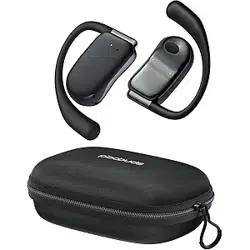
True Wireless Earbuds
Note: Prior to the first use, please remove the insulating film of the earbuds.
Charging Case *1 Type-C Charging Cable *1
User Manual *1
V2
OW7 User Manual
True Wireless Earbuds
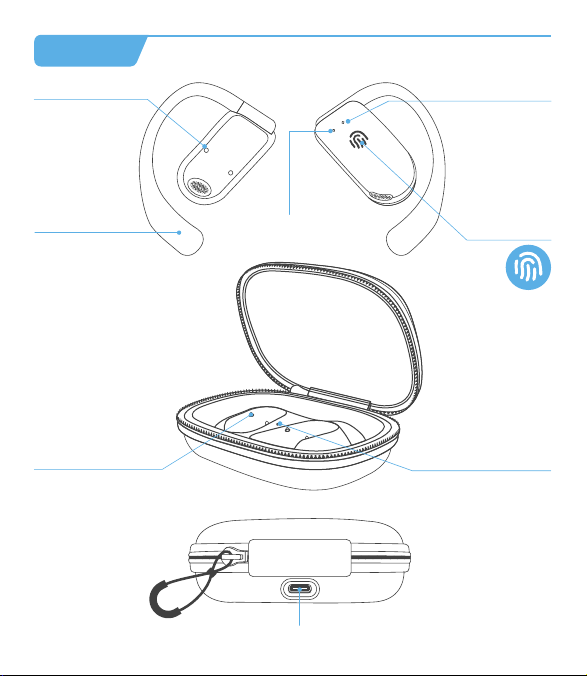
Charging Indicator
of Earbuds
Charging Contacts
Microphone
Earhook
Charging Pin
Charging
Indicator of Case
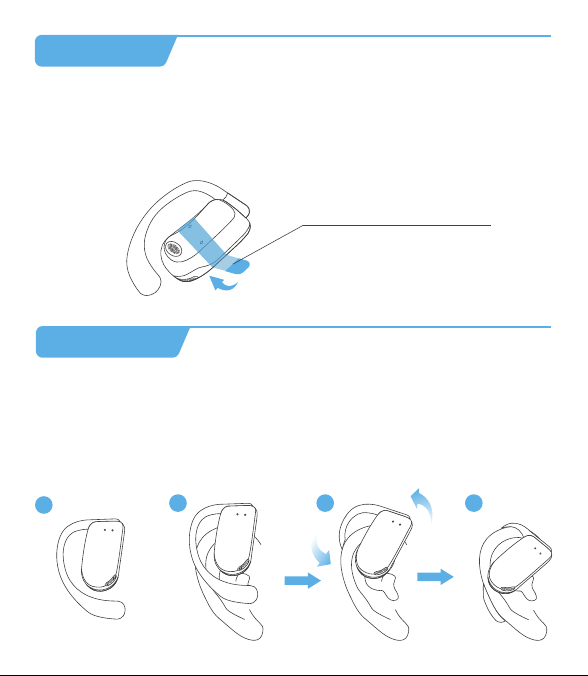
Before the first use, please tear off the isolating film on the earbuds. Put
the earbuds into the case, then charge both earbuds and charging case via
supplied Type-C charging cable for at least 10mins (or after not use for a
long time), do not take out the earbuds during this period.
What's in the box?
Diagram
First to Use
Tear off the isolating film
How to Wear
1. Take the earbuds out of the charging case;
2. Hold them just above your ears;
3. Rotate the ear hooks downward along the auricle of the ear to achieve
proper positioning;
4. Complete insertion.
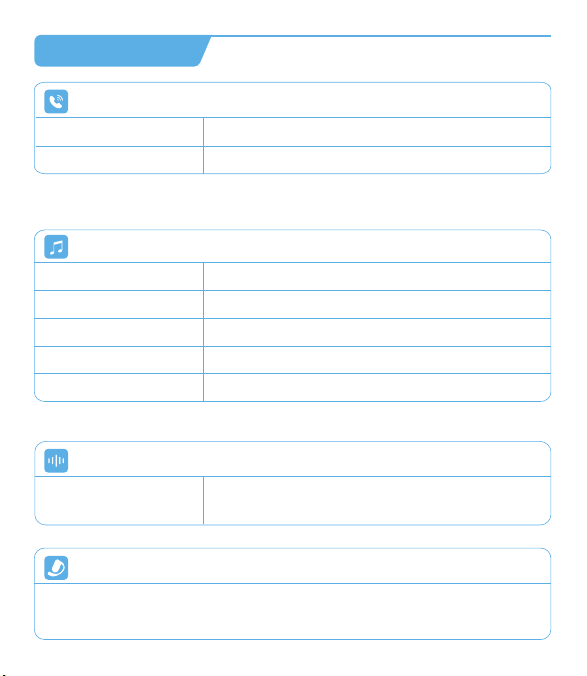
Double-tap (R/L)
Call Control
Answer/End a call
Reject a call
Tap and hold for 2 seconds (R/L)
Voice Assistant
Triple-tap R/L (No music program is running)
Activate/Stop Siri or
other voice assistant
Music Control
Double-tap (R/L)
Triple-tap (R)
Triple-tap (L)
Tap and hold (R)
Tap and hold (L)
Play/Pause
Next Track
Previous Track
Volume+
Volume -
Single Earbud Control
Mode Control
Power On/Off
Tap 2 seconds
Power On
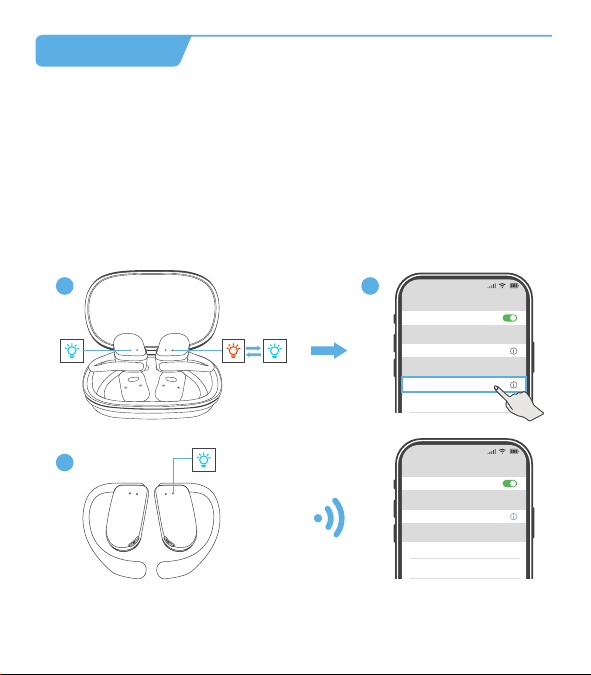
How to Pair
1. Open the charging case and take the earbuds out to immediately enter
Bluetooth pairing mode, with the indicator lights of the main earbud
flashing red-blue alternately and the secondary earbud blinks blue slowly,
which indicates the earbuds have entered pairing mode.
2. Enable the Bluetooth function and select "OW7".
3. The device will display the successfully connected when complete, and
play the "connected" tone. The indicator lights of the main earbud blinks
blue for 2 seconds and then turns off.
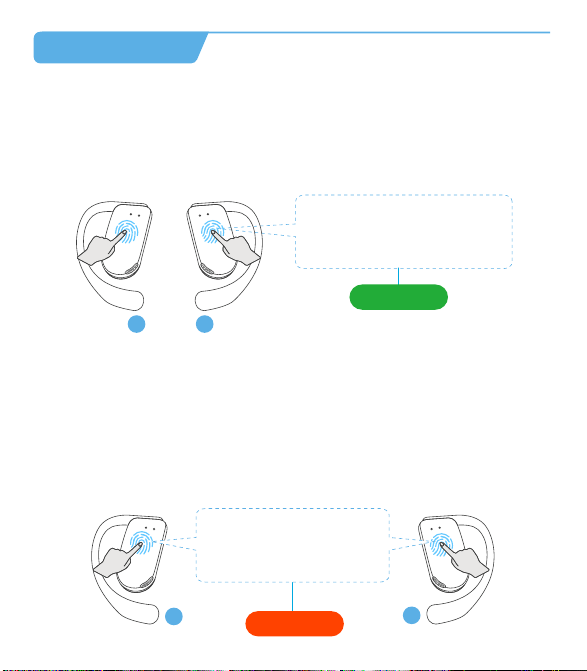
Power On
1. Pick up buds from the charging case
2. Tap and hold for 2s
(* Each bud needs to be powered on separately.)
Power O
1. Put back into the charging case
2. Not connected to any devices over 5mins
3. Non-music playing and calling, tap and hold for 5s any buds
(* Earbuds will be powered off simultaneously.)
Power O
or
R
L
R
L
* Call volume adjustment: Use the volume control button on the paired Bluetooth
device.
* In single ear mode, the volume of the earbuds could not be adjusted.
Both earbuds support independent use for mono music or calls. When used
alone, the earbuds could not adjust the volume, only switch music to next song.
1
2 3 4
Touch Area
Type-C Charging Port
* If the earbuds are not connected to any devices over 5 minutes, they
will power off automatically.
OW7
12:00
Bluetooth
Bluetooth
Laptop
OW7
xxxxxxx
12:00
Bluetooth
Bluetooth
OW7
Connected
1 2
3
V2 0401 02 03 05 06
How to Charge
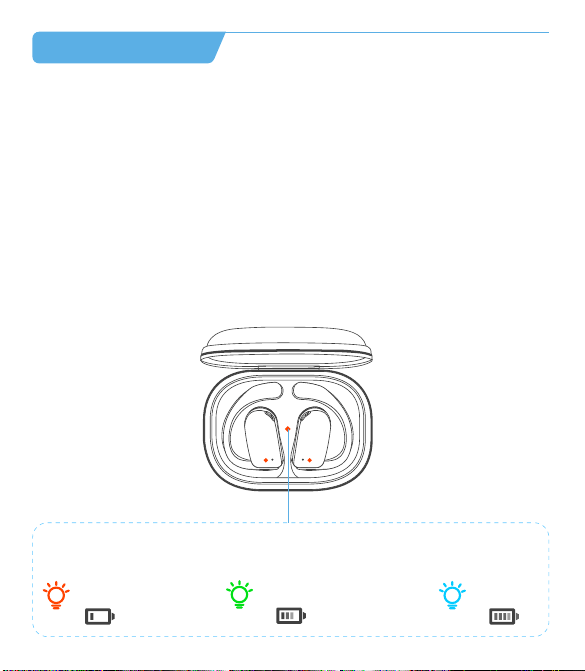
Charging the Earbuds
• Place the earbuds in the charging case until they are magnetically attached.
• The indicator light of the earbuds blinks red slowly.
• The LED indicator in the charging case will show the state of the
remaining power of the charging case for 10 seconds, and then it is turned
off. A blue light indicates a high battery level (71-100%), a green light
indicates a middle battery level (31-70%), and a red light indicates a low
battery level (0-30%).
• The earbuds will be fully charged after approx. 1.5h-2hrs in the charging
case and the indicator light of the earbuds goes out.
There are three colors of the indicator light, each color represents different
battery levels.
0-30%
31-70%
71-100%
07
True Wireless Earbuds *2
This area is the
touch control region.
OW7-小尺寸使用说明书
尺寸: 94*108mm
材料: 128g双铜
工艺: 四色印刷,风琴折
Tap 5 seconds
2s
Charging the Charging Case
Insert the USB-A to USB-C charging cable into the charging case and USB-A
power supply or certified wall charger. A solid red light on the charging case
indicates that the charging case is charging. A solid blue light indicates the
charging case is fully charged.
08
Model No.
Bluetooth Version
Battery capacity
Charging port
Transmission range
Charging Time
OW7
5.3
50mAh* 2 (earbuds), 500mAh (charging case)
Type-C
10m/33ft (with no obstacle)
1.5h-2hrs for earbuds, 2hrs for charging case
Product Parameters
11
Auto Connect
1. When the earbuds are on, they will automatically try to connect to the
most recently connected device and issue a prompt when the connection
is successful.
2. During use, the earbud may disconnect from the paired device due to
limitations of connection range. If the earbud automatically re-connects
within 5 minutes, it will issue a prompt.
* The paired devices must be within connection range (10m) and must be
powered on. Make sure your intended device has Bluetooth enabled.
* Please note:
• It takes approx. 2 hours for the charging case to be fully charged. The
charging case uses the standard 5V±5A USB voltage. Using a high-voltage
power source to charge the earbuds is not recommended. It may also take
longer to charge the charging case with a third-party charging cable.
• Before charging, ensure that the charging port is dry and free of liquid
residue like sweat. Use a soft dry cloth to wipe any liquid residue from the
charging port.
Input: DC 5V
A solid blue light indicates the
charging case is fully charged.
Cleaning
1. Earbuds:
It is recommended to use a soft and clean dry cloth to clean the earbuds.
When cleaning the earphone mesh, gently brush away dirt and earwax
with a clean and dry cotton swab, then wipe with a soft cloth.
09
* Please note:
• Before cleaning and maintenance, please stop using the earbuds and
disconnect all connections with other devices.
• This product does not support washing with water. Do not wash the
earbuds directly with water or use ultrasonic cleaning.
• Do not allow liquid to enter any opening of the earbuds.
• To avoid damage, deformation, and discoloration of the earbuds, please
do not use an abrasive cleaner or spray, high-concentration cleaner,
chemical cleaner, alcohol, or acetone solvent for cleaning. Do not use any
sharp or abrasive objects.
2. Charging Case:
It is recommended to clean the charging case with a soft and clean, dry
cloth. Use a clean, dry, soft brush to remove debris from the charging
interface. Use a clean and dry cotton swab to wipe the charging contact
surface of the charging box gently.
Charging Contact
Charging Pin
10
* Please note:
• Before cleaning and maintenance, please disconnect the charging case
from the charging cable.
• Do not use abrasive items to clean the charging case.
Q
A
FCC Caution
What should I do if the earbuds disconnect or the sound is choppy?
Q
A
Please note that this doesn't necessarily mean there is an issue with the
earbuds, but may have something to do with the connected device and
environment, Bluetooth signals may be influenced by obstructions,
such as walls, pillars, home appliances, Wi-Fi, and more. To ensure a
stable connection, we recommend avoiding such obstructions. To fix
this issue, please try the following.
1. Fully charge and reset your earbuds as stated above and re-pair
them (see page 12).
2. Check the earbuds by listening to a downloaded song/video.
3. Check the earbuds with another Bluetooth device in a different
environment to see if it works well.
FAQ
What should I do if any of the following problems occur?
1. Cannot pair or reconnect with my device.
2. One side does not pair with the other side of my device.
3. No music plays after connecting with my device.
4. Only one earbud has sound.
Q
A
1. Remove the protective film covering the connectors on the earbuds.
2. Forget all the pairing records of your earbuds on your device and
turn off Bluetooth.
3. Reset the earbuds refer to page 12 (make sure your earbuds have
enough battery).
13
What should I do if any of the following problems occur?
1 ) The earbuds don't recharge in the charging case.
2 ) The earbuds stay connected to the device even after being placed in
the charging case with the lid closed.
3 ) The earbuds don't turn on when taken out of the charging case.
1. Confirm the charging case has power left.
2. Clean the charging pins with a dry cloth and an alcohol-based
disinfectant. This is to ensure all charging contact pins on the earbuds
and charging case are completely clean and dry from sweat and water.
Then put the earbuds correctly into the case, The light will flash when
the earbuds are placed in the case.
3. Please use the certified charging cable and wall charger.
4. Turn on the Bluetooth of your device and search for “OW7” and pair.
If there is a pop-up window to confirm pairing for “OW7”, please select
“Pair”. If you accidentally select “Cancel”, you need to refresh (turn off
and turn on) the Bluetooth of your device and pair the earbuds again.
14
Changes or modifications not expressly approved by the party responsible
for compliance could void the user's authority to operate the equipment.
This equipment has been tested and found to comply with the limits for a
Class B digital device, pursuant to Part 15 of the FCC Rules. These limits
are designed to provide reasonable protection against harmful interference
in aresidential installation. This equipment generates uses and can radiate
radio frequency energy and, if not installed and used in accordance with
the instructions, may cause harmful interference to radio communications.
However, there is no guarantee that interference will not occur in a
particular installation. If this equipment does cause harmful interference
toradio or television reception, which can be determined by turning the
equipment off and on, the user is encouraged to try to correct the
interference by one or more of the following measures:
1. Reorient or relocate the receiving antenna.
2. Increase the separation between the equipment and receiver.
3. Connect the equipment into an outlet on a circuit different from that to
which the receiver is connected.
4. Consult the dealer or an experienced Radio/TV technician for help.
This device complies with part 15 of the FCC Rules.
Operation is subject to the following two conditions:
(1) This device may not cause harmful interference, and (2) this device
must accept any interference received, including interference that may
cause undesired operation.
Any questions, please send message to us, we'll help you solve it as soon
as possible. You can choose us with confidence. Thanks.
www.pocbuds.tech
Kindly scan the QR code to activate the lifetime warranty
of your earbuds within 15 days.
15
Customer Sevice
What should I do if any of the following problems occur?
- The sound and video are out of sync
- There's no sound in one earbud
- The earbuds keep disconnecting or cutting in and out from time to time
- The earbuds can't pair with my device
- Cannot be searched in the Bluetooth list
You can follow these steps below:
How to reset
1. Turn off the Bluetooth of all devices
2. Out of the case, tap the touch area on the R and L earbud 5 times
simultaneously
3. Both earbuds flash red and blue simultaneously 3 times, and the voice
prompt "power off", indicating that the reset is complete
4. Put the earbuds back into the charging case
5. Take out the earbuds from the charging case and they enter pairing
mode (one earbud will flash red-blue alternately and the other earbud will
blink blue slowly to enter pairing mode)
6. Search for "OW7" and tap to connect on your device.
12:00
Bluetooth
Bluetooth
OW7
Connected
Tap both buds 5 times
12
flash alternately
OW7 User Manual
True Wireless Earbuds
Note: Prior to the first use, please remove the insulating film of the earbuds.
Charging Case *1 Type-C Charging Cable *1
User Manual *1
V2
OW7 User Manual
True Wireless Earbuds
Charging Indicator
of Earbuds
Charging Contacts
Microphone
Earhook
Charging Pin
Charging
Indicator of Case
Before the first use, please tear off the isolating film on the earbuds. Put
the earbuds into the case, then charge both earbuds and charging case via
supplied Type-C charging cable for at least 10mins (or after not use for a
long time), do not take out the earbuds during this period.
What's in the box?
Diagram
First to Use
Tear off the isolating film
How to Wear
1. Take the earbuds out of the charging case;
2. Hold them just above your ears;
3. Rotate the ear hooks downward along the auricle of the ear to achieve
proper positioning;
4. Complete insertion.
Double-tap (R/L)
Call Control
Answer/End a call
Reject a call
Tap and hold for 2 seconds (R/L)
Voice Assistant
Triple-tap R/L (No music program is running)
Activate/Stop Siri or
other voice assistant
Music Control
Double-tap (R/L)
Triple-tap (R)
Triple-tap (L)
Tap and hold (R)
Tap and hold (L)
Play/Pause
Next Track
Previous Track
Volume+
Volume -
Single Earbud Control
Mode Control
Power On/Off
Tap 2 seconds
Power On
How to Pair
1. Open the charging case and take the earbuds out to immediately enter
Bluetooth pairing mode, with the indicator lights of the main earbud
flashing red-blue alternately and the secondary earbud blinks blue slowly,
which indicates the earbuds have entered pairing mode.
2. Enable the Bluetooth function and select "OW7".
3. The device will display the successfully connected when complete, and
play the "connected" tone. The indicator lights of the main earbud blinks
blue for 2 seconds and then turns off.
Power On
1. Pick up buds from the charging case
2. Tap and hold for 2s
(* Each bud needs to be powered on separately.)
Power O
1. Put back into the charging case
2. Not connected to any devices over 5mins
3. Non-music playing and calling, tap and hold for 5s any buds
(* Earbuds will be powered off simultaneously.)
Power O
or
R
L
R
L
* Call volume adjustment: Use the volume control button on the paired Bluetooth
device.
* In single ear mode, the volume of the earbuds could not be adjusted.
Both earbuds support independent use for mono music or calls. When used
alone, the earbuds could not adjust the volume, only switch music to next song.
1
2 3 4
Touch Area
Type-C Charging Port
* If the earbuds are not connected to any devices over 5 minutes, they
will power off automatically.
OW7
12:00
Bluetooth
Bluetooth
Laptop
OW7
xxxxxxx
12:00
Bluetooth
Bluetooth
OW7
Connected
1 2
3
V2 0401 02 03 05 06
How to Charge
Charging the Earbuds
• Place the earbuds in the charging case until they are magnetically attached.
• The indicator light of the earbuds blinks red slowly.
• The LED indicator in the charging case will show the state of the
remaining power of the charging case for 10 seconds, and then it is turned
off. A blue light indicates a high battery level (71-100%), a green light
indicates a middle battery level (31-70%), and a red light indicates a low
battery level (0-30%).
• The earbuds will be fully charged after approx. 1.5h-2hrs in the charging
case and the indicator light of the earbuds goes out.
There are three colors of the indicator light, each color represents different
battery levels.
0-30%
31-70%
71-100%
07
True Wireless Earbuds *2
This area is the
touch control region.
OW7-小尺寸使用说明书
尺寸: 94*108mm
材料: 128g双铜
工艺: 四色印刷,风琴折
Tap 5 seconds
2s
Charging the Charging Case
Insert the USB-A to USB-C charging cable into the charging case and USB-A
power supply or certified wall charger. A solid red light on the charging case
indicates that the charging case is charging. A solid blue light indicates the
charging case is fully charged.
08
Model No.
Bluetooth Version
Battery capacity
Charging port
Transmission range
Charging Time
OW7
5.3
50mAh* 2 (earbuds), 500mAh (charging case)
Type-C
10m/33ft (with no obstacle)
1.5h-2hrs for earbuds, 2hrs for charging case
Product Parameters
11
Auto Connect
1. When the earbuds are on, they will automatically try to connect to the
most recently connected device and issue a prompt when the connection
is successful.
2. During use, the earbud may disconnect from the paired device due to
limitations of connection range. If the earbud automatically re-connects
within 5 minutes, it will issue a prompt.
* The paired devices must be within connection range (10m) and must be
powered on. Make sure your intended device has Bluetooth enabled.
* Please note:
• It takes approx. 2 hours for the charging case to be fully charged. The
charging case uses the standard 5V±5A USB voltage. Using a high-voltage
power source to charge the earbuds is not recommended. It may also take
longer to charge the charging case with a third-party charging cable.
• Before charging, ensure that the charging port is dry and free of liquid
residue like sweat. Use a soft dry cloth to wipe any liquid residue from the
charging port.
Input: DC 5V
A solid blue light indicates the
charging case is fully charged.
Cleaning
1. Earbuds:
It is recommended to use a soft and clean dry cloth to clean the earbuds.
When cleaning the earphone mesh, gently brush away dirt and earwax
with a clean and dry cotton swab, then wipe with a soft cloth.
09
* Please note:
• Before cleaning and maintenance, please stop using the earbuds and
disconnect all connections with other devices.
• This product does not support washing with water. Do not wash the
earbuds directly with water or use ultrasonic cleaning.
• Do not allow liquid to enter any opening of the earbuds.
• To avoid damage, deformation, and discoloration of the earbuds, please
do not use an abrasive cleaner or spray, high-concentration cleaner,
chemical cleaner, alcohol, or acetone solvent for cleaning. Do not use any
sharp or abrasive objects.
2. Charging Case:
It is recommended to clean the charging case with a soft and clean, dry
cloth. Use a clean, dry, soft brush to remove debris from the charging
interface. Use a clean and dry cotton swab to wipe the charging contact
surface of the charging box gently.
Charging Contact
Charging Pin
10
* Please note:
• Before cleaning and maintenance, please disconnect the charging case
from the charging cable.
• Do not use abrasive items to clean the charging case.
Q
A
FCC Caution
What should I do if the earbuds disconnect or the sound is choppy?
Q
A
Please note that this doesn't necessarily mean there is an issue with the
earbuds, but may have something to do with the connected device and
environment, Bluetooth signals may be influenced by obstructions,
such as walls, pillars, home appliances, Wi-Fi, and more. To ensure a
stable connection, we recommend avoiding such obstructions. To fix
this issue, please try the following.
1. Fully charge and reset your earbuds as stated above and re-pair
them (see page 12).
2. Check the earbuds by listening to a downloaded song/video.
3. Check the earbuds with another Bluetooth device in a different
environment to see if it works well.
FAQ
What should I do if any of the following problems occur?
1. Cannot pair or reconnect with my device.
2. One side does not pair with the other side of my device.
3. No music plays after connecting with my device.
4. Only one earbud has sound.
Q
A
1. Remove the protective film covering the connectors on the earbuds.
2. Forget all the pairing records of your earbuds on your device and
turn off Bluetooth.
3. Reset the earbuds refer to page 12 (make sure your earbuds have
enough battery).
13
What should I do if any of the following problems occur?
1 ) The earbuds don't recharge in the charging case.
2 ) The earbuds stay connected to the device even after being placed in
the charging case with the lid closed.
3 ) The earbuds don't turn on when taken out of the charging case.
1. Confirm the charging case has power left.
2. Clean the charging pins with a dry cloth and an alcohol-based
disinfectant. This is to ensure all charging contact pins on the earbuds
and charging case are completely clean and dry from sweat and water.
Then put the earbuds correctly into the case, The light will flash when
the earbuds are placed in the case.
3. Please use the certified charging cable and wall charger.
4. Turn on the Bluetooth of your device and search for “OW7” and pair.
If there is a pop-up window to confirm pairing for “OW7”, please select
“Pair”. If you accidentally select “Cancel”, you need to refresh (turn off
and turn on) the Bluetooth of your device and pair the earbuds again.
14
Changes or modifications not expressly approved by the party responsible
for compliance could void the user's authority to operate the equipment.
This equipment has been tested and found to comply with the limits for a
Class B digital device, pursuant to Part 15 of the FCC Rules. These limits
are designed to provide reasonable protection against harmful interference
in aresidential installation. This equipment generates uses and can radiate
radio frequency energy and, if not installed and used in accordance with
the instructions, may cause harmful interference to radio communications.
However, there is no guarantee that interference will not occur in a
particular installation. If this equipment does cause harmful interference
toradio or television reception, which can be determined by turning the
equipment off and on, the user is encouraged to try to correct the
interference by one or more of the following measures:
1. Reorient or relocate the receiving antenna.
2. Increase the separation between the equipment and receiver.
3. Connect the equipment into an outlet on a circuit different from that to
which the receiver is connected.
4. Consult the dealer or an experienced Radio/TV technician for help.
This device complies with part 15 of the FCC Rules.
Operation is subject to the following two conditions:
(1) This device may not cause harmful interference, and (2) this device
must accept any interference received, including interference that may
cause undesired operation.
Any questions, please send message to us, we'll help you solve it as soon
as possible. You can choose us with confidence. Thanks.
www.pocbuds.tech
Kindly scan the QR code to activate the lifetime warranty
of your earbuds within 15 days.
15
Customer Sevice
What should I do if any of the following problems occur?
- The sound and video are out of sync
- There's no sound in one earbud
- The earbuds keep disconnecting or cutting in and out from time to time
- The earbuds can't pair with my device
- Cannot be searched in the Bluetooth list
You can follow these steps below:
How to reset
1. Turn off the Bluetooth of all devices
2. Out of the case, tap the touch area on the R and L earbud 5 times
simultaneously
3. Both earbuds flash red and blue simultaneously 3 times, and the voice
prompt "power off", indicating that the reset is complete
4. Put the earbuds back into the charging case
5. Take out the earbuds from the charging case and they enter pairing
mode (one earbud will flash red-blue alternately and the other earbud will
blink blue slowly to enter pairing mode)
6. Search for "OW7" and tap to connect on your device.
12:00
Bluetooth
Bluetooth
OW7
Connected
Tap both buds 5 times
12
flash alternately
OW7 User Manual
True Wireless Earbuds
Note: Prior to the first use, please remove the insulating film of the earbuds.
Charging Case *1 Type-C Charging Cable *1
User Manual *1
V2
OW7 User Manual
True Wireless Earbuds
Charging Indicator
of Earbuds
Charging Contacts
Microphone
Earhook
Charging Pin
Charging
Indicator of Case
Before the first use, please tear off the isolating film on the earbuds. Put
the earbuds into the case, then charge both earbuds and charging case via
supplied Type-C charging cable for at least 10mins (or after not use for a
long time), do not take out the earbuds during this period.
What's in the box?
Diagram
First to Use
Tear off the isolating film
How to Wear
1. Take the earbuds out of the charging case;
2. Hold them just above your ears;
3. Rotate the ear hooks downward along the auricle of the ear to achieve
proper positioning;
4. Complete insertion.
Double-tap (R/L)
Call Control
Answer/End a call
Reject a call
Tap and hold for 2 seconds (R/L)
Voice Assistant
Triple-tap R/L (No music program is running)
Activate/Stop Siri or
other voice assistant
Music Control
Double-tap (R/L)
Triple-tap (R)
Triple-tap (L)
Tap and hold (R)
Tap and hold (L)
Play/Pause
Next Track
Previous Track
Volume+
Volume -
Single Earbud Control
Mode Control
Power On/Off
Tap 2 seconds
Power On
How to Pair
1. Open the charging case and take the earbuds out to immediately enter
Bluetooth pairing mode, with the indicator lights of the main earbud
flashing red-blue alternately and the secondary earbud blinks blue slowly,
which indicates the earbuds have entered pairing mode.
2. Enable the Bluetooth function and select "OW7".
3. The device will display the successfully connected when complete, and
play the "connected" tone. The indicator lights of the main earbud blinks
blue for 2 seconds and then turns off.
Power On
1. Pick up buds from the charging case
2. Tap and hold for 2s
(* Each bud needs to be powered on separately.)
Power O
1. Put back into the charging case
2. Not connected to any devices over 5mins
3. Non-music playing and calling, tap and hold for 5s any buds
(* Earbuds will be powered off simultaneously.)
Power O
or
R
L
R
L
* Call volume adjustment: Use the volume control button on the paired Bluetooth
device.
* In single ear mode, the volume of the earbuds could not be adjusted.
Both earbuds support independent use for mono music or calls. When used
alone, the earbuds could not adjust the volume, only switch music to next song.
1
2 3 4
Touch Area
Type-C Charging Port
* If the earbuds are not connected to any devices over 5 minutes, they
will power off automatically.
OW7
12:00
Bluetooth
Bluetooth
Laptop
OW7
xxxxxxx
12:00
Bluetooth
Bluetooth
OW7
Connected
1 2
3
V2 0401 02 03 05 06
How to Charge
Charging the Earbuds
• Place the earbuds in the charging case until they are magnetically attached.
• The indicator light of the earbuds blinks red slowly.
• The LED indicator in the charging case will show the state of the
remaining power of the charging case for 10 seconds, and then it is turned
off. A blue light indicates a high battery level (71-100%), a green light
indicates a middle battery level (31-70%), and a red light indicates a low
battery level (0-30%).
• The earbuds will be fully charged after approx. 1.5h-2hrs in the charging
case and the indicator light of the earbuds goes out.
There are three colors of the indicator light, each color represents different
battery levels.
0-30%
31-70%
71-100%
07
True Wireless Earbuds *2
This area is the
touch control region.
OW7-小尺寸使用说明书
尺寸: 94*108mm
材料: 128g双铜
工艺: 四色印刷,风琴折
Tap 5 seconds
2s
Charging the Charging Case
Insert the USB-A to USB-C charging cable into the charging case and USB-A
power supply or certified wall charger. A solid red light on the charging case
indicates that the charging case is charging. A solid blue light indicates the
charging case is fully charged.
08
Model No.
Bluetooth Version
Battery capacity
Charging port
Transmission range
Charging Time
OW7
5.3
50mAh* 2 (earbuds), 500mAh (charging case)
Type-C
10m/33ft (with no obstacle)
1.5h-2hrs for earbuds, 2hrs for charging case
Product Parameters
11
Auto Connect
1. When the earbuds are on, they will automatically try to connect to the
most recently connected device and issue a prompt when the connection
is successful.
2. During use, the earbud may disconnect from the paired device due to
limitations of connection range. If the earbud automatically re-connects
within 5 minutes, it will issue a prompt.
* The paired devices must be within connection range (10m) and must be
powered on. Make sure your intended device has Bluetooth enabled.
* Please note:
• It takes approx. 2 hours for the charging case to be fully charged. The
charging case uses the standard 5V±5A USB voltage. Using a high-voltage
power source to charge the earbuds is not recommended. It may also take
longer to charge the charging case with a third-party charging cable.
• Before charging, ensure that the charging port is dry and free of liquid
residue like sweat. Use a soft dry cloth to wipe any liquid residue from the
charging port.
Input: DC 5V
A solid blue light indicates the
charging case is fully charged.
Cleaning
1. Earbuds:
It is recommended to use a soft and clean dry cloth to clean the earbuds.
When cleaning the earphone mesh, gently brush away dirt and earwax
with a clean and dry cotton swab, then wipe with a soft cloth.
09
* Please note:
• Before cleaning and maintenance, please stop using the earbuds and
disconnect all connections with other devices.
• This product does not support washing with water. Do not wash the
earbuds directly with water or use ultrasonic cleaning.
• Do not allow liquid to enter any opening of the earbuds.
• To avoid damage, deformation, and discoloration of the earbuds, please
do not use an abrasive cleaner or spray, high-concentration cleaner,
chemical cleaner, alcohol, or acetone solvent for cleaning. Do not use any
sharp or abrasive objects.
2. Charging Case:
It is recommended to clean the charging case with a soft and clean, dry
cloth. Use a clean, dry, soft brush to remove debris from the charging
interface. Use a clean and dry cotton swab to wipe the charging contact
surface of the charging box gently.
Charging Contact
Charging Pin
10
* Please note:
• Before cleaning and maintenance, please disconnect the charging case
from the charging cable.
• Do not use abrasive items to clean the charging case.
Q
A
FCC Caution
What should I do if the earbuds disconnect or the sound is choppy?
Q
A
Please note that this doesn't necessarily mean there is an issue with the
earbuds, but may have something to do with the connected device and
environment, Bluetooth signals may be influenced by obstructions,
such as walls, pillars, home appliances, Wi-Fi, and more. To ensure a
stable connection, we recommend avoiding such obstructions. To fix
this issue, please try the following.
1. Fully charge and reset your earbuds as stated above and re-pair
them (see page 12).
2. Check the earbuds by listening to a downloaded song/video.
3. Check the earbuds with another Bluetooth device in a different
environment to see if it works well.
FAQ
What should I do if any of the following problems occur?
1. Cannot pair or reconnect with my device.
2. One side does not pair with the other side of my device.
3. No music plays after connecting with my device.
4. Only one earbud has sound.
Q
A
1. Remove the protective film covering the connectors on the earbuds.
2. Forget all the pairing records of your earbuds on your device and
turn off Bluetooth.
3. Reset the earbuds refer to page 12 (make sure your earbuds have
enough battery).
13
What should I do if any of the following problems occur?
1 ) The earbuds don't recharge in the charging case.
2 ) The earbuds stay connected to the device even after being placed in
the charging case with the lid closed.
3 ) The earbuds don't turn on when taken out of the charging case.
1. Confirm the charging case has power left.
2. Clean the charging pins with a dry cloth and an alcohol-based
disinfectant. This is to ensure all charging contact pins on the earbuds
and charging case are completely clean and dry from sweat and water.
Then put the earbuds correctly into the case, The light will flash when
the earbuds are placed in the case.
3. Please use the certified charging cable and wall charger.
4. Turn on the Bluetooth of your device and search for “OW7” and pair.
If there is a pop-up window to confirm pairing for “OW7”, please select
“Pair”. If you accidentally select “Cancel”, you need to refresh (turn off
and turn on) the Bluetooth of your device and pair the earbuds again.
14
Changes or modifications not expressly approved by the party responsible
for compliance could void the user's authority to operate the equipment.
This equipment has been tested and found to comply with the limits for a
Class B digital device, pursuant to Part 15 of the FCC Rules. These limits
are designed to provide reasonable protection against harmful interference
in aresidential installation. This equipment generates uses and can radiate
radio frequency energy and, if not installed and used in accordance with
the instructions, may cause harmful interference to radio communications.
However, there is no guarantee that interference will not occur in a
particular installation. If this equipment does cause harmful interference
toradio or television reception, which can be determined by turning the
equipment off and on, the user is encouraged to try to correct the
interference by one or more of the following measures:
1. Reorient or relocate the receiving antenna.
2. Increase the separation between the equipment and receiver.
3. Connect the equipment into an outlet on a circuit different from that to
which the receiver is connected.
4. Consult the dealer or an experienced Radio/TV technician for help.
This device complies with part 15 of the FCC Rules.
Operation is subject to the following two conditions:
(1) This device may not cause harmful interference, and (2) this device
must accept any interference received, including interference that may
cause undesired operation.
Any questions, please send message to us, we'll help you solve it as soon
as possible. You can choose us with confidence. Thanks.
www.pocbuds.tech
Kindly scan the QR code to activate the lifetime warranty
of your earbuds within 15 days.
15
Customer Sevice
What should I do if any of the following problems occur?
- The sound and video are out of sync
- There's no sound in one earbud
- The earbuds keep disconnecting or cutting in and out from time to time
- The earbuds can't pair with my device
- Cannot be searched in the Bluetooth list
You can follow these steps below:
How to reset
1. Turn off the Bluetooth of all devices
2. Out of the case, tap the touch area on the R and L earbud 5 times
simultaneously
3. Both earbuds flash red and blue simultaneously 3 times, and the voice
prompt "power off", indicating that the reset is complete
4. Put the earbuds back into the charging case
5. Take out the earbuds from the charging case and they enter pairing
mode (one earbud will flash red-blue alternately and the other earbud will
blink blue slowly to enter pairing mode)
6. Search for "OW7" and tap to connect on your device.
12:00
Bluetooth
Bluetooth
OW7
Connected
Tap both buds 5 times
12
flash alternately
OW7 User Manual
True Wireless Earbuds
Note: Prior to the first use, please remove the insulating film of the earbuds.
Charging Case *1 Type-C Charging Cable *1
User Manual *1
V2
OW7 User Manual
True Wireless Earbuds
Charging Indicator
of Earbuds
Charging Contacts
Microphone
Earhook
Charging Pin
Charging
Indicator of Case
Before the first use, please tear off the isolating film on the earbuds. Put
the earbuds into the case, then charge both earbuds and charging case via
supplied Type-C charging cable for at least 10mins (or after not use for a
long time), do not take out the earbuds during this period.
What's in the box?
Diagram
First to Use
Tear off the isolating film
How to Wear
1. Take the earbuds out of the charging case;
2. Hold them just above your ears;
3. Rotate the ear hooks downward along the auricle of the ear to achieve
proper positioning;
4. Complete insertion.
Double-tap (R/L)
Call Control
Answer/End a call
Reject a call
Tap and hold for 2 seconds (R/L)
Voice Assistant
Triple-tap R/L (No music program is running)
Activate/Stop Siri or
other voice assistant
Music Control
Double-tap (R/L)
Triple-tap (R)
Triple-tap (L)
Tap and hold (R)
Tap and hold (L)
Play/Pause
Next Track
Previous Track
Volume+
Volume -
Single Earbud Control
Mode Control
Power On/Off
Tap 2 seconds
Power On
How to Pair
1. Open the charging case and take the earbuds out to immediately enter
Bluetooth pairing mode, with the indicator lights of the main earbud
flashing red-blue alternately and the secondary earbud blinks blue slowly,
which indicates the earbuds have entered pairing mode.
2. Enable the Bluetooth function and select "OW7".
3. The device will display the successfully connected when complete, and
play the "connected" tone. The indicator lights of the main earbud blinks
blue for 2 seconds and then turns off.
Power On
1. Pick up buds from the charging case
2. Tap and hold for 2s
(* Each bud needs to be powered on separately.)
Power O
1. Put back into the charging case
2. Not connected to any devices over 5mins
3. Non-music playing and calling, tap and hold for 5s any buds
(* Earbuds will be powered off simultaneously.)
Power O
or
R
L
R
L
* Call volume adjustment: Use the volume control button on the paired Bluetooth
device.
* In single ear mode, the volume of the earbuds could not be adjusted.
Both earbuds support independent use for mono music or calls. When used
alone, the earbuds could not adjust the volume, only switch music to next song.
1
2 3 4
Touch Area
Type-C Charging Port
* If the earbuds are not connected to any devices over 5 minutes, they
will power off automatically.
OW7
12:00
Bluetooth
Bluetooth
Laptop
OW7
xxxxxxx
12:00
Bluetooth
Bluetooth
OW7
Connected
1 2
3
V2 0401 02 03 05 06
How to Charge
Charging the Earbuds
• Place the earbuds in the charging case until they are magnetically attached.
• The indicator light of the earbuds blinks red slowly.
• The LED indicator in the charging case will show the state of the
remaining power of the charging case for 10 seconds, and then it is turned
off. A blue light indicates a high battery level (71-100%), a green light
indicates a middle battery level (31-70%), and a red light indicates a low
battery level (0-30%).
• The earbuds will be fully charged after approx. 1.5h-2hrs in the charging
case and the indicator light of the earbuds goes out.
There are three colors of the indicator light, each color represents different
battery levels.
0-30%
31-70%
71-100%
07
True Wireless Earbuds *2
This area is the
touch control region.
OW7-小尺寸使用说明书
尺寸: 94*108mm
材料: 128g双铜
工艺: 四色印刷,风琴折
Tap 5 seconds
2s
Charging the Charging Case
Insert the USB-A to USB-C charging cable into the charging case and USB-A
power supply or certified wall charger. A solid red light on the charging case
indicates that the charging case is charging. A solid blue light indicates the
charging case is fully charged.
08
Model No.
Bluetooth Version
Battery capacity
Charging port
Transmission range
Charging Time
OW7
5.3
50mAh* 2 (earbuds), 500mAh (charging case)
Type-C
10m/33ft (with no obstacle)
1.5h-2hrs for earbuds, 2hrs for charging case
Product Parameters
11
Auto Connect
1. When the earbuds are on, they will automatically try to connect to the
most recently connected device and issue a prompt when the connection
is successful.
2. During use, the earbud may disconnect from the paired device due to
limitations of connection range. If the earbud automatically re-connects
within 5 minutes, it will issue a prompt.
* The paired devices must be within connection range (10m) and must be
powered on. Make sure your intended device has Bluetooth enabled.
* Please note:
• It takes approx. 2 hours for the charging case to be fully charged. The
charging case uses the standard 5V±5A USB voltage. Using a high-voltage
power source to charge the earbuds is not recommended. It may also take
longer to charge the charging case with a third-party charging cable.
• Before charging, ensure that the charging port is dry and free of liquid
residue like sweat. Use a soft dry cloth to wipe any liquid residue from the
charging port.
Input: DC 5V
A solid blue light indicates the
charging case is fully charged.
Cleaning
1. Earbuds:
It is recommended to use a soft and clean dry cloth to clean the earbuds.
When cleaning the earphone mesh, gently brush away dirt and earwax
with a clean and dry cotton swab, then wipe with a soft cloth.
09
* Please note:
• Before cleaning and maintenance, please stop using the earbuds and
disconnect all connections with other devices.
• This product does not support washing with water. Do not wash the
earbuds directly with water or use ultrasonic cleaning.
• Do not allow liquid to enter any opening of the earbuds.
• To avoid damage, deformation, and discoloration of the earbuds, please
do not use an abrasive cleaner or spray, high-concentration cleaner,
chemical cleaner, alcohol, or acetone solvent for cleaning. Do not use any
sharp or abrasive objects.
2. Charging Case:
It is recommended to clean the charging case with a soft and clean, dry
cloth. Use a clean, dry, soft brush to remove debris from the charging
interface. Use a clean and dry cotton swab to wipe the charging contact
surface of the charging box gently.
Charging Contact
Charging Pin
10
* Please note:
• Before cleaning and maintenance, please disconnect the charging case
from the charging cable.
• Do not use abrasive items to clean the charging case.
Q
A
FCC Caution
What should I do if the earbuds disconnect or the sound is choppy?
Q
A
Please note that this doesn't necessarily mean there is an issue with the
earbuds, but may have something to do with the connected device and
environment, Bluetooth signals may be influenced by obstructions,
such as walls, pillars, home appliances, Wi-Fi, and more. To ensure a
stable connection, we recommend avoiding such obstructions. To fix
this issue, please try the following.
1. Fully charge and reset your earbuds as stated above and re-pair
them (see page 12).
2. Check the earbuds by listening to a downloaded song/video.
3. Check the earbuds with another Bluetooth device in a different
environment to see if it works well.
FAQ
What should I do if any of the following problems occur?
1. Cannot pair or reconnect with my device.
2. One side does not pair with the other side of my device.
3. No music plays after connecting with my device.
4. Only one earbud has sound.
Q
A
1. Remove the protective film covering the connectors on the earbuds.
2. Forget all the pairing records of your earbuds on your device and
turn off Bluetooth.
3. Reset the earbuds refer to page 12 (make sure your earbuds have
enough battery).
13
What should I do if any of the following problems occur?
1 ) The earbuds don't recharge in the charging case.
2 ) The earbuds stay connected to the device even after being placed in
the charging case with the lid closed.
3 ) The earbuds don't turn on when taken out of the charging case.
1. Confirm the charging case has power left.
2. Clean the charging pins with a dry cloth and an alcohol-based
disinfectant. This is to ensure all charging contact pins on the earbuds
and charging case are completely clean and dry from sweat and water.
Then put the earbuds correctly into the case, The light will flash when
the earbuds are placed in the case.
3. Please use the certified charging cable and wall charger.
4. Turn on the Bluetooth of your device and search for “OW7” and pair.
If there is a pop-up window to confirm pairing for “OW7”, please select
“Pair”. If you accidentally select “Cancel”, you need to refresh (turn off
and turn on) the Bluetooth of your device and pair the earbuds again.
14
Changes or modifications not expressly approved by the party responsible
for compliance could void the user's authority to operate the equipment.
This equipment has been tested and found to comply with the limits for a
Class B digital device, pursuant to Part 15 of the FCC Rules. These limits
are designed to provide reasonable protection against harmful interference
in aresidential installation. This equipment generates uses and can radiate
radio frequency energy and, if not installed and used in accordance with
the instructions, may cause harmful interference to radio communications.
However, there is no guarantee that interference will not occur in a
particular installation. If this equipment does cause harmful interference
toradio or television reception, which can be determined by turning the
equipment off and on, the user is encouraged to try to correct the
interference by one or more of the following measures:
1. Reorient or relocate the receiving antenna.
2. Increase the separation between the equipment and receiver.
3. Connect the equipment into an outlet on a circuit different from that to
which the receiver is connected.
4. Consult the dealer or an experienced Radio/TV technician for help.
This device complies with part 15 of the FCC Rules.
Operation is subject to the following two conditions:
(1) This device may not cause harmful interference, and (2) this device
must accept any interference received, including interference that may
cause undesired operation.
Any questions, please send message to us, we'll help you solve it as soon
as possible. You can choose us with confidence. Thanks.
www.pocbuds.tech
Kindly scan the QR code to activate the lifetime warranty
of your earbuds within 15 days.
15
Customer Sevice
What should I do if any of the following problems occur?
- The sound and video are out of sync
- There's no sound in one earbud
- The earbuds keep disconnecting or cutting in and out from time to time
- The earbuds can't pair with my device
- Cannot be searched in the Bluetooth list
You can follow these steps below:
How to reset
1. Turn off the Bluetooth of all devices
2. Out of the case, tap the touch area on the R and L earbud 5 times
simultaneously
3. Both earbuds flash red and blue simultaneously 3 times, and the voice
prompt "power off", indicating that the reset is complete
4. Put the earbuds back into the charging case
5. Take out the earbuds from the charging case and they enter pairing
mode (one earbud will flash red-blue alternately and the other earbud will
blink blue slowly to enter pairing mode)
6. Search for "OW7" and tap to connect on your device.
12:00
Bluetooth
Bluetooth
OW7
Connected
Tap both buds 5 times
12
flash alternately
OW7 User Manual
True Wireless Earbuds
Note: Prior to the first use, please remove the insulating film of the earbuds.
Charging Case *1 Type-C Charging Cable *1
User Manual *1
V2
OW7 User Manual
True Wireless Earbuds
Charging Indicator
of Earbuds
Charging Contacts
Microphone
Earhook
Charging Pin
Charging
Indicator of Case
Before the first use, please tear off the isolating film on the earbuds. Put
the earbuds into the case, then charge both earbuds and charging case via
supplied Type-C charging cable for at least 10mins (or after not use for a
long time), do not take out the earbuds during this period.
What's in the box?
Diagram
First to Use
Tear off the isolating film
How to Wear
1. Take the earbuds out of the charging case;
2. Hold them just above your ears;
3. Rotate the ear hooks downward along the auricle of the ear to achieve
proper positioning;
4. Complete insertion.
Double-tap (R/L)
Call Control
Answer/End a call
Reject a call
Tap and hold for 2 seconds (R/L)
Voice Assistant
Triple-tap R/L (No music program is running)
Activate/Stop Siri or
other voice assistant
Music Control
Double-tap (R/L)
Triple-tap (R)
Triple-tap (L)
Tap and hold (R)
Tap and hold (L)
Play/Pause
Next Track
Previous Track
Volume+
Volume -
Single Earbud Control
Mode Control
Power On/Off
Tap 2 seconds
Power On
How to Pair
1. Open the charging case and take the earbuds out to immediately enter
Bluetooth pairing mode, with the indicator lights of the main earbud
flashing red-blue alternately and the secondary earbud blinks blue slowly,
which indicates the earbuds have entered pairing mode.
2. Enable the Bluetooth function and select "OW7".
3. The device will display the successfully connected when complete, and
play the "connected" tone. The indicator lights of the main earbud blinks
blue for 2 seconds and then turns off.
Power On
1. Pick up buds from the charging case
2. Tap and hold for 2s
(* Each bud needs to be powered on separately.)
Power O
1. Put back into the charging case
2. Not connected to any devices over 5mins
3. Non-music playing and calling, tap and hold for 5s any buds
(* Earbuds will be powered off simultaneously.)
Power O
or
R
L
R
L
* Call volume adjustment: Use the volume control button on the paired Bluetooth
device.
* In single ear mode, the volume of the earbuds could not be adjusted.
Both earbuds support independent use for mono music or calls. When used
alone, the earbuds could not adjust the volume, only switch music to next song.
1
2 3 4
Touch Area
Type-C Charging Port
* If the earbuds are not connected to any devices over 5 minutes, they
will power off automatically.
OW7
12:00
Bluetooth
Bluetooth
Laptop
OW7
xxxxxxx
12:00
Bluetooth
Bluetooth
OW7
Connected
1 2
3
V2 0401 02 03 05 06
How to Charge
Charging the Earbuds
• Place the earbuds in the charging case until they are magnetically attached.
• The indicator light of the earbuds blinks red slowly.
• The LED indicator in the charging case will show the state of the
remaining power of the charging case for 10 seconds, and then it is turned
off. A blue light indicates a high battery level (71-100%), a green light
indicates a middle battery level (31-70%), and a red light indicates a low
battery level (0-30%).
• The earbuds will be fully charged after approx. 1.5h-2hrs in the charging
case and the indicator light of the earbuds goes out.
There are three colors of the indicator light, each color represents different
battery levels.
0-30%
31-70%
71-100%
07
True Wireless Earbuds *2
This area is the
touch control region.
OW7-小尺寸使用说明书
尺寸: 94*108mm
材料: 128g双铜
工艺: 四色印刷,风琴折
Tap 5 seconds
2s
Charging the Charging Case
Insert the USB-A to USB-C charging cable into the charging case and USB-A
power supply or certified wall charger. A solid red light on the charging case
indicates that the charging case is charging. A solid blue light indicates the
charging case is fully charged.
08
Model No.
Bluetooth Version
Battery capacity
Charging port
Transmission range
Charging Time
OW7
5.3
50mAh* 2 (earbuds), 500mAh (charging case)
Type-C
10m/33ft (with no obstacle)
1.5h-2hrs for earbuds, 2hrs for charging case
Product Parameters
11
Auto Connect
1. When the earbuds are on, they will automatically try to connect to the
most recently connected device and issue a prompt when the connection
is successful.
2. During use, the earbud may disconnect from the paired device due to
limitations of connection range. If the earbud automatically re-connects
within 5 minutes, it will issue a prompt.
* The paired devices must be within connection range (10m) and must be
powered on. Make sure your intended device has Bluetooth enabled.
* Please note:
• It takes approx. 2 hours for the charging case to be fully charged. The
charging case uses the standard 5V±5A USB voltage. Using a high-voltage
power source to charge the earbuds is not recommended. It may also take
longer to charge the charging case with a third-party charging cable.
• Before charging, ensure that the charging port is dry and free of liquid
residue like sweat. Use a soft dry cloth to wipe any liquid residue from the
charging port.
Input: DC 5V
A solid blue light indicates the
charging case is fully charged.
Cleaning
1. Earbuds:
It is recommended to use a soft and clean dry cloth to clean the earbuds.
When cleaning the earphone mesh, gently brush away dirt and earwax
with a clean and dry cotton swab, then wipe with a soft cloth.
09
* Please note:
• Before cleaning and maintenance, please stop using the earbuds and
disconnect all connections with other devices.
• This product does not support washing with water. Do not wash the
earbuds directly with water or use ultrasonic cleaning.
• Do not allow liquid to enter any opening of the earbuds.
• To avoid damage, deformation, and discoloration of the earbuds, please
do not use an abrasive cleaner or spray, high-concentration cleaner,
chemical cleaner, alcohol, or acetone solvent for cleaning. Do not use any
sharp or abrasive objects.
2. Charging Case:
It is recommended to clean the charging case with a soft and clean, dry
cloth. Use a clean, dry, soft brush to remove debris from the charging
interface. Use a clean and dry cotton swab to wipe the charging contact
surface of the charging box gently.
Charging Contact
Charging Pin
10
* Please note:
• Before cleaning and maintenance, please disconnect the charging case
from the charging cable.
• Do not use abrasive items to clean the charging case.
Q
A
FCC Caution
What should I do if the earbuds disconnect or the sound is choppy?
Q
A
Please note that this doesn't necessarily mean there is an issue with the
earbuds, but may have something to do with the connected device and
environment, Bluetooth signals may be influenced by obstructions,
such as walls, pillars, home appliances, Wi-Fi, and more. To ensure a
stable connection, we recommend avoiding such obstructions. To fix
this issue, please try the following.
1. Fully charge and reset your earbuds as stated above and re-pair
them (see page 12).
2. Check the earbuds by listening to a downloaded song/video.
3. Check the earbuds with another Bluetooth device in a different
environment to see if it works well.
FAQ
What should I do if any of the following problems occur?
1. Cannot pair or reconnect with my device.
2. One side does not pair with the other side of my device.
3. No music plays after connecting with my device.
4. Only one earbud has sound.
Q
A
1. Remove the protective film covering the connectors on the earbuds.
2. Forget all the pairing records of your earbuds on your device and
turn off Bluetooth.
3. Reset the earbuds refer to page 12 (make sure your earbuds have
enough battery).
13
What should I do if any of the following problems occur?
1 ) The earbuds don't recharge in the charging case.
2 ) The earbuds stay connected to the device even after being placed in
the charging case with the lid closed.
3 ) The earbuds don't turn on when taken out of the charging case.
1. Confirm the charging case has power left.
2. Clean the charging pins with a dry cloth and an alcohol-based
disinfectant. This is to ensure all charging contact pins on the earbuds
and charging case are completely clean and dry from sweat and water.
Then put the earbuds correctly into the case, The light will flash when
the earbuds are placed in the case.
3. Please use the certified charging cable and wall charger.
4. Turn on the Bluetooth of your device and search for “OW7” and pair.
If there is a pop-up window to confirm pairing for “OW7”, please select
“Pair”. If you accidentally select “Cancel”, you need to refresh (turn off
and turn on) the Bluetooth of your device and pair the earbuds again.
14
Changes or modifications not expressly approved by the party responsible
for compliance could void the user's authority to operate the equipment.
This equipment has been tested and found to comply with the limits for a
Class B digital device, pursuant to Part 15 of the FCC Rules. These limits
are designed to provide reasonable protection against harmful interference
in aresidential installation. This equipment generates uses and can radiate
radio frequency energy and, if not installed and used in accordance with
the instructions, may cause harmful interference to radio communications.
However, there is no guarantee that interference will not occur in a
particular installation. If this equipment does cause harmful interference
toradio or television reception, which can be determined by turning the
equipment off and on, the user is encouraged to try to correct the
interference by one or more of the following measures:
1. Reorient or relocate the receiving antenna.
2. Increase the separation between the equipment and receiver.
3. Connect the equipment into an outlet on a circuit different from that to
which the receiver is connected.
4. Consult the dealer or an experienced Radio/TV technician for help.
This device complies with part 15 of the FCC Rules.
Operation is subject to the following two conditions:
(1) This device may not cause harmful interference, and (2) this device
must accept any interference received, including interference that may
cause undesired operation.
Any questions, please send message to us, we'll help you solve it as soon
as possible. You can choose us with confidence. Thanks.
www.pocbuds.tech
Kindly scan the QR code to activate the lifetime warranty
of your earbuds within 15 days.
15
Customer Sevice
What should I do if any of the following problems occur?
- The sound and video are out of sync
- There's no sound in one earbud
- The earbuds keep disconnecting or cutting in and out from time to time
- The earbuds can't pair with my device
- Cannot be searched in the Bluetooth list
You can follow these steps below:
How to reset
1. Turn off the Bluetooth of all devices
2. Out of the case, tap the touch area on the R and L earbud 5 times
simultaneously
3. Both earbuds flash red and blue simultaneously 3 times, and the voice
prompt "power off", indicating that the reset is complete
4. Put the earbuds back into the charging case
5. Take out the earbuds from the charging case and they enter pairing
mode (one earbud will flash red-blue alternately and the other earbud will
blink blue slowly to enter pairing mode)
6. Search for "OW7" and tap to connect on your device.
12:00
Bluetooth
Bluetooth
OW7
Connected
Tap both buds 5 times
12
flash alternately
OW7 User Manual
True Wireless Earbuds
Note: Prior to the first use, please remove the insulating film of the earbuds.
Charging Case *1 Type-C Charging Cable *1
User Manual *1
V2
OW7 User Manual
True Wireless Earbuds
Charging Indicator
of Earbuds
Charging Contacts
Microphone
Earhook
Charging Pin
Charging
Indicator of Case
Before the first use, please tear off the isolating film on the earbuds. Put
the earbuds into the case, then charge both earbuds and charging case via
supplied Type-C charging cable for at least 10mins (or after not use for a
long time), do not take out the earbuds during this period.
What's in the box?
Diagram
First to Use
Tear off the isolating film
How to Wear
1. Take the earbuds out of the charging case;
2. Hold them just above your ears;
3. Rotate the ear hooks downward along the auricle of the ear to achieve
proper positioning;
4. Complete insertion.
Double-tap (R/L)
Call Control
Answer/End a call
Reject a call
Tap and hold for 2 seconds (R/L)
Voice Assistant
Triple-tap R/L (No music program is running)
Activate/Stop Siri or
other voice assistant
Music Control
Double-tap (R/L)
Triple-tap (R)
Triple-tap (L)
Tap and hold (R)
Tap and hold (L)
Play/Pause
Next Track
Previous Track
Volume+
Volume -
Single Earbud Control
Mode Control
Power On/Off
Tap 2 seconds
Power On
How to Pair
1. Open the charging case and take the earbuds out to immediately enter
Bluetooth pairing mode, with the indicator lights of the main earbud
flashing red-blue alternately and the secondary earbud blinks blue slowly,
which indicates the earbuds have entered pairing mode.
2. Enable the Bluetooth function and select "OW7".
3. The device will display the successfully connected when complete, and
play the "connected" tone. The indicator lights of the main earbud blinks
blue for 2 seconds and then turns off.
Power On
1. Pick up buds from the charging case
2. Tap and hold for 2s
(* Each bud needs to be powered on separately.)
Power O
1. Put back into the charging case
2. Not connected to any devices over 5mins
3. Non-music playing and calling, tap and hold for 5s any buds
(* Earbuds will be powered off simultaneously.)
Power O
or
R
L
R
L
* Call volume adjustment: Use the volume control button on the paired Bluetooth
device.
* In single ear mode, the volume of the earbuds could not be adjusted.
Both earbuds support independent use for mono music or calls. When used
alone, the earbuds could not adjust the volume, only switch music to next song.
1
2 3 4
Touch Area
Type-C Charging Port
* If the earbuds are not connected to any devices over 5 minutes, they
will power off automatically.
OW7
12:00
Bluetooth
Bluetooth
Laptop
OW7
xxxxxxx
12:00
Bluetooth
Bluetooth
OW7
Connected
1 2
3
V2 0401 02 03 05 06
How to Charge
Charging the Earbuds
• Place the earbuds in the charging case until they are magnetically attached.
• The indicator light of the earbuds blinks red slowly.
• The LED indicator in the charging case will show the state of the
remaining power of the charging case for 10 seconds, and then it is turned
off. A blue light indicates a high battery level (71-100%), a green light
indicates a middle battery level (31-70%), and a red light indicates a low
battery level (0-30%).
• The earbuds will be fully charged after approx. 1.5h-2hrs in the charging
case and the indicator light of the earbuds goes out.
There are three colors of the indicator light, each color represents different
battery levels.
0-30%
31-70%
71-100%
07
True Wireless Earbuds *2
This area is the
touch control region.
OW7-小尺寸使用说明书
尺寸: 94*108mm
材料: 128g双铜
工艺: 四色印刷,风琴折
Tap 5 seconds
2s
Charging the Charging Case
Insert the USB-A to USB-C charging cable into the charging case and USB-A
power supply or certified wall charger. A solid red light on the charging case
indicates that the charging case is charging. A solid blue light indicates the
charging case is fully charged.
08
Model No.
Bluetooth Version
Battery capacity
Charging port
Transmission range
Charging Time
OW7
5.3
50mAh* 2 (earbuds), 500mAh (charging case)
Type-C
10m/33ft (with no obstacle)
1.5h-2hrs for earbuds, 2hrs for charging case
Product Parameters
11
Auto Connect
1. When the earbuds are on, they will automatically try to connect to the
most recently connected device and issue a prompt when the connection
is successful.
2. During use, the earbud may disconnect from the paired device due to
limitations of connection range. If the earbud automatically re-connects
within 5 minutes, it will issue a prompt.
* The paired devices must be within connection range (10m) and must be
powered on. Make sure your intended device has Bluetooth enabled.
* Please note:
• It takes approx. 2 hours for the charging case to be fully charged. The
charging case uses the standard 5V±5A USB voltage. Using a high-voltage
power source to charge the earbuds is not recommended. It may also take
longer to charge the charging case with a third-party charging cable.
• Before charging, ensure that the charging port is dry and free of liquid
residue like sweat. Use a soft dry cloth to wipe any liquid residue from the
charging port.
Input: DC 5V
A solid blue light indicates the
charging case is fully charged.
Cleaning
1. Earbuds:
It is recommended to use a soft and clean dry cloth to clean the earbuds.
When cleaning the earphone mesh, gently brush away dirt and earwax
with a clean and dry cotton swab, then wipe with a soft cloth.
09
* Please note:
• Before cleaning and maintenance, please stop using the earbuds and
disconnect all connections with other devices.
• This product does not support washing with water. Do not wash the
earbuds directly with water or use ultrasonic cleaning.
• Do not allow liquid to enter any opening of the earbuds.
• To avoid damage, deformation, and discoloration of the earbuds, please
do not use an abrasive cleaner or spray, high-concentration cleaner,
chemical cleaner, alcohol, or acetone solvent for cleaning. Do not use any
sharp or abrasive objects.
2. Charging Case:
It is recommended to clean the charging case with a soft and clean, dry
cloth. Use a clean, dry, soft brush to remove debris from the charging
interface. Use a clean and dry cotton swab to wipe the charging contact
surface of the charging box gently.
Charging Contact
Charging Pin
10
* Please note:
• Before cleaning and maintenance, please disconnect the charging case
from the charging cable.
• Do not use abrasive items to clean the charging case.
Q
A
FCC Caution
What should I do if the earbuds disconnect or the sound is choppy?
Q
A
Please note that this doesn't necessarily mean there is an issue with the
earbuds, but may have something to do with the connected device and
environment, Bluetooth signals may be influenced by obstructions,
such as walls, pillars, home appliances, Wi-Fi, and more. To ensure a
stable connection, we recommend avoiding such obstructions. To fix
this issue, please try the following.
1. Fully charge and reset your earbuds as stated above and re-pair
them (see page 12).
2. Check the earbuds by listening to a downloaded song/video.
3. Check the earbuds with another Bluetooth device in a different
environment to see if it works well.
FAQ
What should I do if any of the following problems occur?
1. Cannot pair or reconnect with my device.
2. One side does not pair with the other side of my device.
3. No music plays after connecting with my device.
4. Only one earbud has sound.
Q
A
1. Remove the protective film covering the connectors on the earbuds.
2. Forget all the pairing records of your earbuds on your device and
turn off Bluetooth.
3. Reset the earbuds refer to page 12 (make sure your earbuds have
enough battery).
13
What should I do if any of the following problems occur?
1 ) The earbuds don't recharge in the charging case.
2 ) The earbuds stay connected to the device even after being placed in
the charging case with the lid closed.
3 ) The earbuds don't turn on when taken out of the charging case.
1. Confirm the charging case has power left.
2. Clean the charging pins with a dry cloth and an alcohol-based
disinfectant. This is to ensure all charging contact pins on the earbuds
and charging case are completely clean and dry from sweat and water.
Then put the earbuds correctly into the case, The light will flash when
the earbuds are placed in the case.
3. Please use the certified charging cable and wall charger.
4. Turn on the Bluetooth of your device and search for “OW7” and pair.
If there is a pop-up window to confirm pairing for “OW7”, please select
“Pair”. If you accidentally select “Cancel”, you need to refresh (turn off
and turn on) the Bluetooth of your device and pair the earbuds again.
14
Changes or modifications not expressly approved by the party responsible
for compliance could void the user's authority to operate the equipment.
This equipment has been tested and found to comply with the limits for a
Class B digital device, pursuant to Part 15 of the FCC Rules. These limits
are designed to provide reasonable protection against harmful interference
in aresidential installation. This equipment generates uses and can radiate
radio frequency energy and, if not installed and used in accordance with
the instructions, may cause harmful interference to radio communications.
However, there is no guarantee that interference will not occur in a
particular installation. If this equipment does cause harmful interference
toradio or television reception, which can be determined by turning the
equipment off and on, the user is encouraged to try to correct the
interference by one or more of the following measures:
1. Reorient or relocate the receiving antenna.
2. Increase the separation between the equipment and receiver.
3. Connect the equipment into an outlet on a circuit different from that to
which the receiver is connected.
4. Consult the dealer or an experienced Radio/TV technician for help.
This device complies with part 15 of the FCC Rules.
Operation is subject to the following two conditions:
(1) This device may not cause harmful interference, and (2) this device
must accept any interference received, including interference that may
cause undesired operation.
Any questions, please send message to us, we'll help you solve it as soon
as possible. You can choose us with confidence. Thanks.
www.pocbuds.tech
Kindly scan the QR code to activate the lifetime warranty
of your earbuds within 15 days.
15
Customer Sevice
What should I do if any of the following problems occur?
- The sound and video are out of sync
- There's no sound in one earbud
- The earbuds keep disconnecting or cutting in and out from time to time
- The earbuds can't pair with my device
- Cannot be searched in the Bluetooth list
You can follow these steps below:
How to reset
1. Turn off the Bluetooth of all devices
2. Out of the case, tap the touch area on the R and L earbud 5 times
simultaneously
3. Both earbuds flash red and blue simultaneously 3 times, and the voice
prompt "power off", indicating that the reset is complete
4. Put the earbuds back into the charging case
5. Take out the earbuds from the charging case and they enter pairing
mode (one earbud will flash red-blue alternately and the other earbud will
blink blue slowly to enter pairing mode)
6. Search for "OW7" and tap to connect on your device.
12:00
Bluetooth
Bluetooth
OW7
Connected
Tap both buds 5 times
12
flash alternately
OW7 User Manual
True Wireless Earbuds
Note: Prior to the first use, please remove the insulating film of the earbuds.
Charging Case *1 Type-C Charging Cable *1
User Manual *1
V2
OW7 User Manual
True Wireless Earbuds
Charging Indicator
of Earbuds
Charging Contacts
Microphone
Earhook
Charging Pin
Charging
Indicator of Case
Before the first use, please tear off the isolating film on the earbuds. Put
the earbuds into the case, then charge both earbuds and charging case via
supplied Type-C charging cable for at least 10mins (or after not use for a
long time), do not take out the earbuds during this period.
What's in the box?
Diagram
First to Use
Tear off the isolating film
How to Wear
1. Take the earbuds out of the charging case;
2. Hold them just above your ears;
3. Rotate the ear hooks downward along the auricle of the ear to achieve
proper positioning;
4. Complete insertion.
Double-tap (R/L)
Call Control
Answer/End a call
Reject a call
Tap and hold for 2 seconds (R/L)
Voice Assistant
Triple-tap R/L (No music program is running)
Activate/Stop Siri or
other voice assistant
Music Control
Double-tap (R/L)
Triple-tap (R)
Triple-tap (L)
Tap and hold (R)
Tap and hold (L)
Play/Pause
Next Track
Previous Track
Volume+
Volume -
Single Earbud Control
Mode Control
Power On/Off
Tap 2 seconds
Power On
How to Pair
1. Open the charging case and take the earbuds out to immediately enter
Bluetooth pairing mode, with the indicator lights of the main earbud
flashing red-blue alternately and the secondary earbud blinks blue slowly,
which indicates the earbuds have entered pairing mode.
2. Enable the Bluetooth function and select "OW7".
3. The device will display the successfully connected when complete, and
play the "connected" tone. The indicator lights of the main earbud blinks
blue for 2 seconds and then turns off.
Power On
1. Pick up buds from the charging case
2. Tap and hold for 2s
(* Each bud needs to be powered on separately.)
Power O
1. Put back into the charging case
2. Not connected to any devices over 5mins
3. Non-music playing and calling, tap and hold for 5s any buds
(* Earbuds will be powered off simultaneously.)
Power O
or
R
L
R
L
* Call volume adjustment: Use the volume control button on the paired Bluetooth
device.
* In single ear mode, the volume of the earbuds could not be adjusted.
Both earbuds support independent use for mono music or calls. When used
alone, the earbuds could not adjust the volume, only switch music to next song.
1
2 3 4
Touch Area
Type-C Charging Port
* If the earbuds are not connected to any devices over 5 minutes, they
will power off automatically.
OW7
12:00
Bluetooth
Bluetooth
Laptop
OW7
xxxxxxx
12:00
Bluetooth
Bluetooth
OW7
Connected
1 2
3
V2 0401 02 03 05 06
How to Charge
Charging the Earbuds
• Place the earbuds in the charging case until they are magnetically attached.
• The indicator light of the earbuds blinks red slowly.
• The LED indicator in the charging case will show the state of the
remaining power of the charging case for 10 seconds, and then it is turned
off. A blue light indicates a high battery level (71-100%), a green light
indicates a middle battery level (31-70%), and a red light indicates a low
battery level (0-30%).
• The earbuds will be fully charged after approx. 1.5h-2hrs in the charging
case and the indicator light of the earbuds goes out.
There are three colors of the indicator light, each color represents different
battery levels.
0-30%
31-70%
71-100%
07
True Wireless Earbuds *2
This area is the
touch control region.
OW7-小尺寸使用说明书
尺寸: 94*108mm
材料: 128g双铜
工艺: 四色印刷,风琴折
Tap 5 seconds
2s
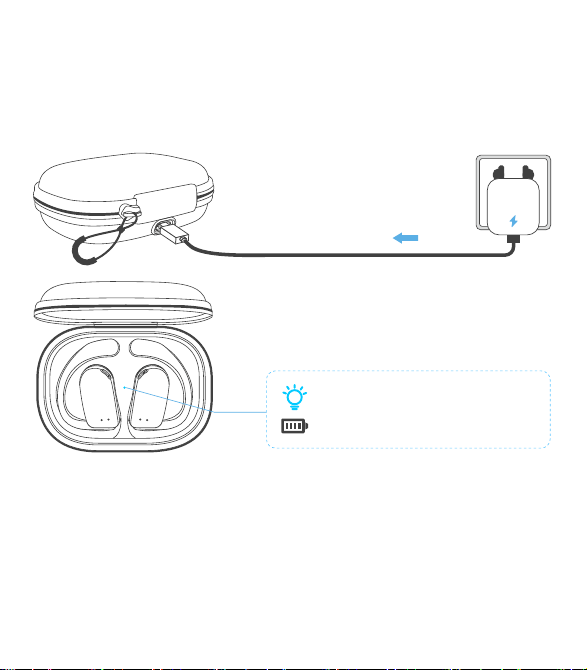
Charging the Charging Case
Insert the USB-A to USB-C charging cable into the charging case and USB-A
power supply or certified wall charger. A solid red light on the charging case
indicates that the charging case is charging. A solid blue light indicates the
charging case is fully charged.
08
Model No.
Bluetooth Version
Battery capacity
Charging port
Transmission range
Charging Time
OW7
5.3
50mAh* 2 (earbuds), 500mAh (charging case)
Type-C
10m/33ft (with no obstacle)
1.5h-2hrs for earbuds, 2hrs for charging case
Product Parameters
11
Auto Connect
1. When the earbuds are on, they will automatically try to connect to the
most recently connected device and issue a prompt when the connection
is successful.
2. During use, the earbud may disconnect from the paired device due to
limitations of connection range. If the earbud automatically re-connects
within 5 minutes, it will issue a prompt.
* The paired devices must be within connection range (10m) and must be
powered on. Make sure your intended device has Bluetooth enabled.
* Please note:
• It takes approx. 2 hours for the charging case to be fully charged. The
charging case uses the standard 5V±5A USB voltage. Using a high-voltage
power source to charge the earbuds is not recommended. It may also take
longer to charge the charging case with a third-party charging cable.
• Before charging, ensure that the charging port is dry and free of liquid
residue like sweat. Use a soft dry cloth to wipe any liquid residue from the
charging port.
Input: DC 5V
A solid blue light indicates the
charging case is fully charged.
Cleaning
1. Earbuds:
It is recommended to use a soft and clean dry cloth to clean the earbuds.
When cleaning the earphone mesh, gently brush away dirt and earwax
with a clean and dry cotton swab, then wipe with a soft cloth.
09
* Please note:
• Before cleaning and maintenance, please stop using the earbuds and
disconnect all connections with other devices.
• This product does not support washing with water. Do not wash the
earbuds directly with water or use ultrasonic cleaning.
• Do not allow liquid to enter any opening of the earbuds.
• To avoid damage, deformation, and discoloration of the earbuds, please
do not use an abrasive cleaner or spray, high-concentration cleaner,
chemical cleaner, alcohol, or acetone solvent for cleaning. Do not use any
sharp or abrasive objects.
2. Charging Case:
It is recommended to clean the charging case with a soft and clean, dry
cloth. Use a clean, dry, soft brush to remove debris from the charging
interface. Use a clean and dry cotton swab to wipe the charging contact
surface of the charging box gently.
Charging Contact
Charging Pin
10
* Please note:
• Before cleaning and maintenance, please disconnect the charging case
from the charging cable.
• Do not use abrasive items to clean the charging case.
Q
A
FCC Caution
What should I do if the earbuds disconnect or the sound is choppy?
Q
A
Please note that this doesn't necessarily mean there is an issue with the
earbuds, but may have something to do with the connected device and
environment, Bluetooth signals may be influenced by obstructions,
such as walls, pillars, home appliances, Wi-Fi, and more. To ensure a
stable connection, we recommend avoiding such obstructions. To fix
this issue, please try the following.
1. Fully charge and reset your earbuds as stated above and re-pair
them (see page 12).
2. Check the earbuds by listening to a downloaded song/video.
3. Check the earbuds with another Bluetooth device in a different
environment to see if it works well.
FAQ
What should I do if any of the following problems occur?
1. Cannot pair or reconnect with my device.
2. One side does not pair with the other side of my device.
3. No music plays after connecting with my device.
4. Only one earbud has sound.
Q
A
1. Remove the protective film covering the connectors on the earbuds.
2. Forget all the pairing records of your earbuds on your device and
turn off Bluetooth.
3. Reset the earbuds refer to page 12 (make sure your earbuds have
enough battery).
13
What should I do if any of the following problems occur?
1 ) The earbuds don't recharge in the charging case.
2 ) The earbuds stay connected to the device even after being placed in
the charging case with the lid closed.
3 ) The earbuds don't turn on when taken out of the charging case.
1. Confirm the charging case has power left.
2. Clean the charging pins with a dry cloth and an alcohol-based
disinfectant. This is to ensure all charging contact pins on the earbuds
and charging case are completely clean and dry from sweat and water.
Then put the earbuds correctly into the case, The light will flash when
the earbuds are placed in the case.
3. Please use the certified charging cable and wall charger.
4. Turn on the Bluetooth of your device and search for “OW7” and pair.
If there is a pop-up window to confirm pairing for “OW7”, please select
“Pair”. If you accidentally select “Cancel”, you need to refresh (turn off
and turn on) the Bluetooth of your device and pair the earbuds again.
14
Changes or modifications not expressly approved by the party responsible
for compliance could void the user's authority to operate the equipment.
This equipment has been tested and found to comply with the limits for a
Class B digital device, pursuant to Part 15 of the FCC Rules. These limits
are designed to provide reasonable protection against harmful interference
in aresidential installation. This equipment generates uses and can radiate
radio frequency energy and, if not installed and used in accordance with
the instructions, may cause harmful interference to radio communications.
However, there is no guarantee that interference will not occur in a
particular installation. If this equipment does cause harmful interference
toradio or television reception, which can be determined by turning the
equipment off and on, the user is encouraged to try to correct the
interference by one or more of the following measures:
1. Reorient or relocate the receiving antenna.
2. Increase the separation between the equipment and receiver.
3. Connect the equipment into an outlet on a circuit different from that to
which the receiver is connected.
4. Consult the dealer or an experienced Radio/TV technician for help.
This device complies with part 15 of the FCC Rules.
Operation is subject to the following two conditions:
(1) This device may not cause harmful interference, and (2) this device
must accept any interference received, including interference that may
cause undesired operation.
Any questions, please send message to us, we'll help you solve it as soon
as possible. You can choose us with confidence. Thanks.
www.pocbuds.tech
Kindly scan the QR code to activate the lifetime warranty
of your earbuds within 15 days.
15
Customer Sevice
What should I do if any of the following problems occur?
- The sound and video are out of sync
- There's no sound in one earbud
- The earbuds keep disconnecting or cutting in and out from time to time
- The earbuds can't pair with my device
- Cannot be searched in the Bluetooth list
You can follow these steps below:
How to reset
1. Turn off the Bluetooth of all devices
2. Out of the case, tap the touch area on the R and L earbud 5 times
simultaneously
3. Both earbuds flash red and blue simultaneously 3 times, and the voice
prompt "power off", indicating that the reset is complete
4. Put the earbuds back into the charging case
5. Take out the earbuds from the charging case and they enter pairing
mode (one earbud will flash red-blue alternately and the other earbud will
blink blue slowly to enter pairing mode)
6. Search for "OW7" and tap to connect on your device.
12:00
Bluetooth
Bluetooth
OW7
Connected
Tap both buds 5 times
12
flash alternately
OW7 User Manual
True Wireless Earbuds
Note: Prior to the first use, please remove the insulating film of the earbuds.
Charging Case *1 Type-C Charging Cable *1
User Manual *1
V2
OW7 User Manual
True Wireless Earbuds
Charging Indicator
of Earbuds
Charging Contacts
Microphone
Earhook
Charging Pin
Charging
Indicator of Case
Before the first use, please tear off the isolating film on the earbuds. Put
the earbuds into the case, then charge both earbuds and charging case via
supplied Type-C charging cable for at least 10mins (or after not use for a
long time), do not take out the earbuds during this period.
What's in the box?
Diagram
First to Use
Tear off the isolating film
How to Wear
1. Take the earbuds out of the charging case;
2. Hold them just above your ears;
3. Rotate the ear hooks downward along the auricle of the ear to achieve
proper positioning;
4. Complete insertion.
Double-tap (R/L)
Call Control
Answer/End a call
Reject a call
Tap and hold for 2 seconds (R/L)
Voice Assistant
Triple-tap R/L (No music program is running)
Activate/Stop Siri or
other voice assistant
Music Control
Double-tap (R/L)
Triple-tap (R)
Triple-tap (L)
Tap and hold (R)
Tap and hold (L)
Play/Pause
Next Track
Previous Track
Volume+
Volume -
Single Earbud Control
Mode Control
Power On/Off
Tap 2 seconds
Power On
How to Pair
1. Open the charging case and take the earbuds out to immediately enter
Bluetooth pairing mode, with the indicator lights of the main earbud
flashing red-blue alternately and the secondary earbud blinks blue slowly,
which indicates the earbuds have entered pairing mode.
2. Enable the Bluetooth function and select "OW7".
3. The device will display the successfully connected when complete, and
play the "connected" tone. The indicator lights of the main earbud blinks
blue for 2 seconds and then turns off.
Power On
1. Pick up buds from the charging case
2. Tap and hold for 2s
(* Each bud needs to be powered on separately.)
Power O
1. Put back into the charging case
2. Not connected to any devices over 5mins
3. Non-music playing and calling, tap and hold for 5s any buds
(* Earbuds will be powered off simultaneously.)
Power O
or
R
L
R
L
* Call volume adjustment: Use the volume control button on the paired Bluetooth
device.
* In single ear mode, the volume of the earbuds could not be adjusted.
Both earbuds support independent use for mono music or calls. When used
alone, the earbuds could not adjust the volume, only switch music to next song.
1
2 3 4
Touch Area
Type-C Charging Port
* If the earbuds are not connected to any devices over 5 minutes, they
will power off automatically.
OW7
12:00
Bluetooth
Bluetooth
Laptop
OW7
xxxxxxx
12:00
Bluetooth
Bluetooth
OW7
Connected
1 2
3
V2 0401 02 03 05 06
How to Charge
Charging the Earbuds
• Place the earbuds in the charging case until they are magnetically attached.
• The indicator light of the earbuds blinks red slowly.
• The LED indicator in the charging case will show the state of the
remaining power of the charging case for 10 seconds, and then it is turned
off. A blue light indicates a high battery level (71-100%), a green light
indicates a middle battery level (31-70%), and a red light indicates a low
battery level (0-30%).
• The earbuds will be fully charged after approx. 1.5h-2hrs in the charging
case and the indicator light of the earbuds goes out.
There are three colors of the indicator light, each color represents different
battery levels.
0-30%
31-70%
71-100%
07
True Wireless Earbuds *2
This area is the
touch control region.
OW7-小尺寸使用说明书
尺寸: 94*108mm
材料: 128g双铜
工艺: 四色印刷,风琴折
Tap 5 seconds
2s
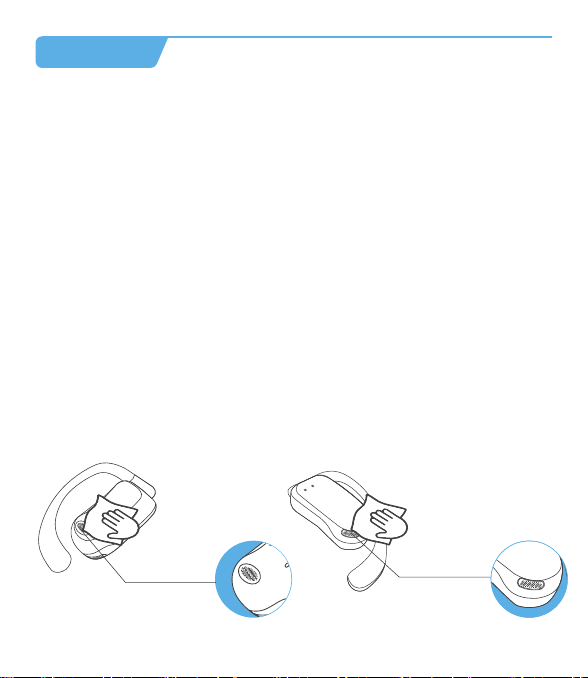
Charging the Charging Case
Insert the USB-A to USB-C charging cable into the charging case and USB-A
power supply or certified wall charger. A solid red light on the charging case
indicates that the charging case is charging. A solid blue light indicates the
charging case is fully charged.
08
Model No.
Bluetooth Version
Battery capacity
Charging port
Transmission range
Charging Time
OW7
5.3
50mAh* 2 (earbuds), 500mAh (charging case)
Type-C
10m/33ft (with no obstacle)
1.5h-2hrs for earbuds, 2hrs for charging case
Product Parameters
11
Auto Connect
1. When the earbuds are on, they will automatically try to connect to the
most recently connected device and issue a prompt when the connection
is successful.
2. During use, the earbud may disconnect from the paired device due to
limitations of connection range. If the earbud automatically re-connects
within 5 minutes, it will issue a prompt.
* The paired devices must be within connection range (10m) and must be
powered on. Make sure your intended device has Bluetooth enabled.
* Please note:
• It takes approx. 2 hours for the charging case to be fully charged. The
charging case uses the standard 5V±5A USB voltage. Using a high-voltage
power source to charge the earbuds is not recommended. It may also take
longer to charge the charging case with a third-party charging cable.
• Before charging, ensure that the charging port is dry and free of liquid
residue like sweat. Use a soft dry cloth to wipe any liquid residue from the
charging port.
Input: DC 5V
A solid blue light indicates the
charging case is fully charged.
Cleaning
1. Earbuds:
It is recommended to use a soft and clean dry cloth to clean the earbuds.
When cleaning the earphone mesh, gently brush away dirt and earwax
with a clean and dry cotton swab, then wipe with a soft cloth.
09
* Please note:
• Before cleaning and maintenance, please stop using the earbuds and
disconnect all connections with other devices.
• This product does not support washing with water. Do not wash the
earbuds directly with water or use ultrasonic cleaning.
• Do not allow liquid to enter any opening of the earbuds.
• To avoid damage, deformation, and discoloration of the earbuds, please
do not use an abrasive cleaner or spray, high-concentration cleaner,
chemical cleaner, alcohol, or acetone solvent for cleaning. Do not use any
sharp or abrasive objects.
2. Charging Case:
It is recommended to clean the charging case with a soft and clean, dry
cloth. Use a clean, dry, soft brush to remove debris from the charging
interface. Use a clean and dry cotton swab to wipe the charging contact
surface of the charging box gently.
Charging Contact
Charging Pin
10
* Please note:
• Before cleaning and maintenance, please disconnect the charging case
from the charging cable.
• Do not use abrasive items to clean the charging case.
Q
A
FCC Caution
What should I do if the earbuds disconnect or the sound is choppy?
Q
A
Please note that this doesn't necessarily mean there is an issue with the
earbuds, but may have something to do with the connected device and
environment, Bluetooth signals may be influenced by obstructions,
such as walls, pillars, home appliances, Wi-Fi, and more. To ensure a
stable connection, we recommend avoiding such obstructions. To fix
this issue, please try the following.
1. Fully charge and reset your earbuds as stated above and re-pair
them (see page 12).
2. Check the earbuds by listening to a downloaded song/video.
3. Check the earbuds with another Bluetooth device in a different
environment to see if it works well.
FAQ
What should I do if any of the following problems occur?
1. Cannot pair or reconnect with my device.
2. One side does not pair with the other side of my device.
3. No music plays after connecting with my device.
4. Only one earbud has sound.
Q
A
1. Remove the protective film covering the connectors on the earbuds.
2. Forget all the pairing records of your earbuds on your device and
turn off Bluetooth.
3. Reset the earbuds refer to page 12 (make sure your earbuds have
enough battery).
13
What should I do if any of the following problems occur?
1 ) The earbuds don't recharge in the charging case.
2 ) The earbuds stay connected to the device even after being placed in
the charging case with the lid closed.
3 ) The earbuds don't turn on when taken out of the charging case.
1. Confirm the charging case has power left.
2. Clean the charging pins with a dry cloth and an alcohol-based
disinfectant. This is to ensure all charging contact pins on the earbuds
and charging case are completely clean and dry from sweat and water.
Then put the earbuds correctly into the case, The light will flash when
the earbuds are placed in the case.
3. Please use the certified charging cable and wall charger.
4. Turn on the Bluetooth of your device and search for “OW7” and pair.
If there is a pop-up window to confirm pairing for “OW7”, please select
“Pair”. If you accidentally select “Cancel”, you need to refresh (turn off
and turn on) the Bluetooth of your device and pair the earbuds again.
14
Changes or modifications not expressly approved by the party responsible
for compliance could void the user's authority to operate the equipment.
This equipment has been tested and found to comply with the limits for a
Class B digital device, pursuant to Part 15 of the FCC Rules. These limits
are designed to provide reasonable protection against harmful interference
in aresidential installation. This equipment generates uses and can radiate
radio frequency energy and, if not installed and used in accordance with
the instructions, may cause harmful interference to radio communications.
However, there is no guarantee that interference will not occur in a
particular installation. If this equipment does cause harmful interference
toradio or television reception, which can be determined by turning the
equipment off and on, the user is encouraged to try to correct the
interference by one or more of the following measures:
1. Reorient or relocate the receiving antenna.
2. Increase the separation between the equipment and receiver.
3. Connect the equipment into an outlet on a circuit different from that to
which the receiver is connected.
4. Consult the dealer or an experienced Radio/TV technician for help.
This device complies with part 15 of the FCC Rules.
Operation is subject to the following two conditions:
(1) This device may not cause harmful interference, and (2) this device
must accept any interference received, including interference that may
cause undesired operation.
Any questions, please send message to us, we'll help you solve it as soon
as possible. You can choose us with confidence. Thanks.
www.pocbuds.tech
Kindly scan the QR code to activate the lifetime warranty
of your earbuds within 15 days.
15
Customer Sevice
What should I do if any of the following problems occur?
- The sound and video are out of sync
- There's no sound in one earbud
- The earbuds keep disconnecting or cutting in and out from time to time
- The earbuds can't pair with my device
- Cannot be searched in the Bluetooth list
You can follow these steps below:
How to reset
1. Turn off the Bluetooth of all devices
2. Out of the case, tap the touch area on the R and L earbud 5 times
simultaneously
3. Both earbuds flash red and blue simultaneously 3 times, and the voice
prompt "power off", indicating that the reset is complete
4. Put the earbuds back into the charging case
5. Take out the earbuds from the charging case and they enter pairing
mode (one earbud will flash red-blue alternately and the other earbud will
blink blue slowly to enter pairing mode)
6. Search for "OW7" and tap to connect on your device.
12:00
Bluetooth
Bluetooth
OW7
Connected
Tap both buds 5 times
12
flash alternately
OW7 User Manual
True Wireless Earbuds
Note: Prior to the first use, please remove the insulating film of the earbuds.
Charging Case *1 Type-C Charging Cable *1
User Manual *1
V2
OW7 User Manual
True Wireless Earbuds
Charging Indicator
of Earbuds
Charging Contacts
Microphone
Earhook
Charging Pin
Charging
Indicator of Case
Before the first use, please tear off the isolating film on the earbuds. Put
the earbuds into the case, then charge both earbuds and charging case via
supplied Type-C charging cable for at least 10mins (or after not use for a
long time), do not take out the earbuds during this period.
What's in the box?
Diagram
First to Use
Tear off the isolating film
How to Wear
1. Take the earbuds out of the charging case;
2. Hold them just above your ears;
3. Rotate the ear hooks downward along the auricle of the ear to achieve
proper positioning;
4. Complete insertion.
Double-tap (R/L)
Call Control
Answer/End a call
Reject a call
Tap and hold for 2 seconds (R/L)
Voice Assistant
Triple-tap R/L (No music program is running)
Activate/Stop Siri or
other voice assistant
Music Control
Double-tap (R/L)
Triple-tap (R)
Triple-tap (L)
Tap and hold (R)
Tap and hold (L)
Play/Pause
Next Track
Previous Track
Volume+
Volume -
Single Earbud Control
Mode Control
Power On/Off
Tap 2 seconds
Power On
How to Pair
1. Open the charging case and take the earbuds out to immediately enter
Bluetooth pairing mode, with the indicator lights of the main earbud
flashing red-blue alternately and the secondary earbud blinks blue slowly,
which indicates the earbuds have entered pairing mode.
2. Enable the Bluetooth function and select "OW7".
3. The device will display the successfully connected when complete, and
play the "connected" tone. The indicator lights of the main earbud blinks
blue for 2 seconds and then turns off.
Power On
1. Pick up buds from the charging case
2. Tap and hold for 2s
(* Each bud needs to be powered on separately.)
Power O
1. Put back into the charging case
2. Not connected to any devices over 5mins
3. Non-music playing and calling, tap and hold for 5s any buds
(* Earbuds will be powered off simultaneously.)
Power O
or
R
L
R
L
* Call volume adjustment: Use the volume control button on the paired Bluetooth
device.
* In single ear mode, the volume of the earbuds could not be adjusted.
Both earbuds support independent use for mono music or calls. When used
alone, the earbuds could not adjust the volume, only switch music to next song.
1
2 3 4
Touch Area
Type-C Charging Port
* If the earbuds are not connected to any devices over 5 minutes, they
will power off automatically.
OW7
12:00
Bluetooth
Bluetooth
Laptop
OW7
xxxxxxx
12:00
Bluetooth
Bluetooth
OW7
Connected
1 2
3
V2 0401 02 03 05 06
How to Charge
Charging the Earbuds
• Place the earbuds in the charging case until they are magnetically attached.
• The indicator light of the earbuds blinks red slowly.
• The LED indicator in the charging case will show the state of the
remaining power of the charging case for 10 seconds, and then it is turned
off. A blue light indicates a high battery level (71-100%), a green light
indicates a middle battery level (31-70%), and a red light indicates a low
battery level (0-30%).
• The earbuds will be fully charged after approx. 1.5h-2hrs in the charging
case and the indicator light of the earbuds goes out.
There are three colors of the indicator light, each color represents different
battery levels.
0-30%
31-70%
71-100%
07
True Wireless Earbuds *2
This area is the
touch control region.
OW7-小尺寸使用说明书
尺寸: 94*108mm
材料: 128g双铜
工艺: 四色印刷,风琴折
Tap 5 seconds
2s
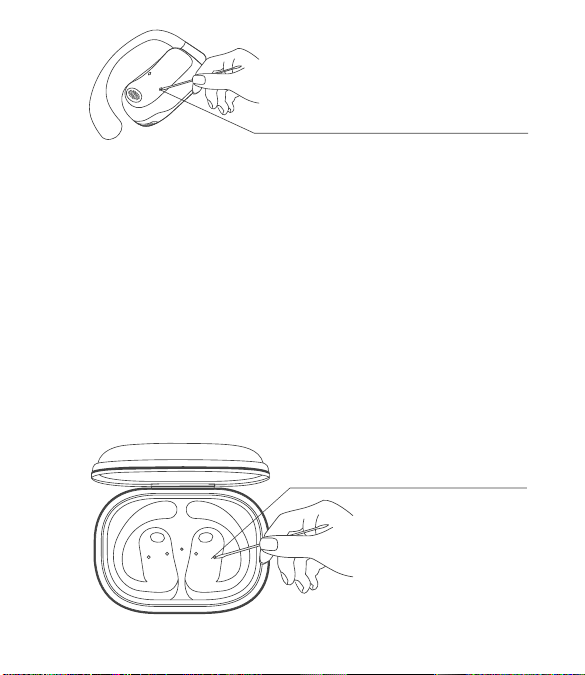
Charging the Charging Case
Insert the USB-A to USB-C charging cable into the charging case and USB-A
power supply or certified wall charger. A solid red light on the charging case
indicates that the charging case is charging. A solid blue light indicates the
charging case is fully charged.
08
Model No.
Bluetooth Version
Battery capacity
Charging port
Transmission range
Charging Time
OW7
5.3
50mAh* 2 (earbuds), 500mAh (charging case)
Type-C
10m/33ft (with no obstacle)
1.5h-2hrs for earbuds, 2hrs for charging case
Product Parameters
11
Auto Connect
1. When the earbuds are on, they will automatically try to connect to the
most recently connected device and issue a prompt when the connection
is successful.
2. During use, the earbud may disconnect from the paired device due to
limitations of connection range. If the earbud automatically re-connects
within 5 minutes, it will issue a prompt.
* The paired devices must be within connection range (10m) and must be
powered on. Make sure your intended device has Bluetooth enabled.
* Please note:
• It takes approx. 2 hours for the charging case to be fully charged. The
charging case uses the standard 5V±5A USB voltage. Using a high-voltage
power source to charge the earbuds is not recommended. It may also take
longer to charge the charging case with a third-party charging cable.
• Before charging, ensure that the charging port is dry and free of liquid
residue like sweat. Use a soft dry cloth to wipe any liquid residue from the
charging port.
Input: DC 5V
A solid blue light indicates the
charging case is fully charged.
Cleaning
1. Earbuds:
It is recommended to use a soft and clean dry cloth to clean the earbuds.
When cleaning the earphone mesh, gently brush away dirt and earwax
with a clean and dry cotton swab, then wipe with a soft cloth.
09
* Please note:
• Before cleaning and maintenance, please stop using the earbuds and
disconnect all connections with other devices.
• This product does not support washing with water. Do not wash the
earbuds directly with water or use ultrasonic cleaning.
• Do not allow liquid to enter any opening of the earbuds.
• To avoid damage, deformation, and discoloration of the earbuds, please
do not use an abrasive cleaner or spray, high-concentration cleaner,
chemical cleaner, alcohol, or acetone solvent for cleaning. Do not use any
sharp or abrasive objects.
2. Charging Case:
It is recommended to clean the charging case with a soft and clean, dry
cloth. Use a clean, dry, soft brush to remove debris from the charging
interface. Use a clean and dry cotton swab to wipe the charging contact
surface of the charging box gently.
Charging Contact
Charging Pin
10
* Please note:
• Before cleaning and maintenance, please disconnect the charging case
from the charging cable.
• Do not use abrasive items to clean the charging case.
Q
A
FCC Caution
What should I do if the earbuds disconnect or the sound is choppy?
Q
A
Please note that this doesn't necessarily mean there is an issue with the
earbuds, but may have something to do with the connected device and
environment, Bluetooth signals may be influenced by obstructions,
such as walls, pillars, home appliances, Wi-Fi, and more. To ensure a
stable connection, we recommend avoiding such obstructions. To fix
this issue, please try the following.
1. Fully charge and reset your earbuds as stated above and re-pair
them (see page 12).
2. Check the earbuds by listening to a downloaded song/video.
3. Check the earbuds with another Bluetooth device in a different
environment to see if it works well.
FAQ
What should I do if any of the following problems occur?
1. Cannot pair or reconnect with my device.
2. One side does not pair with the other side of my device.
3. No music plays after connecting with my device.
4. Only one earbud has sound.
Q
A
1. Remove the protective film covering the connectors on the earbuds.
2. Forget all the pairing records of your earbuds on your device and
turn off Bluetooth.
3. Reset the earbuds refer to page 12 (make sure your earbuds have
enough battery).
13
What should I do if any of the following problems occur?
1 ) The earbuds don't recharge in the charging case.
2 ) The earbuds stay connected to the device even after being placed in
the charging case with the lid closed.
3 ) The earbuds don't turn on when taken out of the charging case.
1. Confirm the charging case has power left.
2. Clean the charging pins with a dry cloth and an alcohol-based
disinfectant. This is to ensure all charging contact pins on the earbuds
and charging case are completely clean and dry from sweat and water.
Then put the earbuds correctly into the case, The light will flash when
the earbuds are placed in the case.
3. Please use the certified charging cable and wall charger.
4. Turn on the Bluetooth of your device and search for “OW7” and pair.
If there is a pop-up window to confirm pairing for “OW7”, please select
“Pair”. If you accidentally select “Cancel”, you need to refresh (turn off
and turn on) the Bluetooth of your device and pair the earbuds again.
14
Changes or modifications not expressly approved by the party responsible
for compliance could void the user's authority to operate the equipment.
This equipment has been tested and found to comply with the limits for a
Class B digital device, pursuant to Part 15 of the FCC Rules. These limits
are designed to provide reasonable protection against harmful interference
in aresidential installation. This equipment generates uses and can radiate
radio frequency energy and, if not installed and used in accordance with
the instructions, may cause harmful interference to radio communications.
However, there is no guarantee that interference will not occur in a
particular installation. If this equipment does cause harmful interference
toradio or television reception, which can be determined by turning the
equipment off and on, the user is encouraged to try to correct the
interference by one or more of the following measures:
1. Reorient or relocate the receiving antenna.
2. Increase the separation between the equipment and receiver.
3. Connect the equipment into an outlet on a circuit different from that to
which the receiver is connected.
4. Consult the dealer or an experienced Radio/TV technician for help.
This device complies with part 15 of the FCC Rules.
Operation is subject to the following two conditions:
(1) This device may not cause harmful interference, and (2) this device
must accept any interference received, including interference that may
cause undesired operation.
Any questions, please send message to us, we'll help you solve it as soon
as possible. You can choose us with confidence. Thanks.
www.pocbuds.tech
Kindly scan the QR code to activate the lifetime warranty
of your earbuds within 15 days.
15
Customer Sevice
What should I do if any of the following problems occur?
- The sound and video are out of sync
- There's no sound in one earbud
- The earbuds keep disconnecting or cutting in and out from time to time
- The earbuds can't pair with my device
- Cannot be searched in the Bluetooth list
You can follow these steps below:
How to reset
1. Turn off the Bluetooth of all devices
2. Out of the case, tap the touch area on the R and L earbud 5 times
simultaneously
3. Both earbuds flash red and blue simultaneously 3 times, and the voice
prompt "power off", indicating that the reset is complete
4. Put the earbuds back into the charging case
5. Take out the earbuds from the charging case and they enter pairing
mode (one earbud will flash red-blue alternately and the other earbud will
blink blue slowly to enter pairing mode)
6. Search for "OW7" and tap to connect on your device.
12:00
Bluetooth
Bluetooth
OW7
Connected
Tap both buds 5 times
12
flash alternately
OW7 User Manual
True Wireless Earbuds
Note: Prior to the first use, please remove the insulating film of the earbuds.
Charging Case *1 Type-C Charging Cable *1
User Manual *1
V2
OW7 User Manual
True Wireless Earbuds
Charging Indicator
of Earbuds
Charging Contacts
Microphone
Earhook
Charging Pin
Charging
Indicator of Case
Before the first use, please tear off the isolating film on the earbuds. Put
the earbuds into the case, then charge both earbuds and charging case via
supplied Type-C charging cable for at least 10mins (or after not use for a
long time), do not take out the earbuds during this period.
What's in the box?
Diagram
First to Use
Tear off the isolating film
How to Wear
1. Take the earbuds out of the charging case;
2. Hold them just above your ears;
3. Rotate the ear hooks downward along the auricle of the ear to achieve
proper positioning;
4. Complete insertion.
Double-tap (R/L)
Call Control
Answer/End a call
Reject a call
Tap and hold for 2 seconds (R/L)
Voice Assistant
Triple-tap R/L (No music program is running)
Activate/Stop Siri or
other voice assistant
Music Control
Double-tap (R/L)
Triple-tap (R)
Triple-tap (L)
Tap and hold (R)
Tap and hold (L)
Play/Pause
Next Track
Previous Track
Volume+
Volume -
Single Earbud Control
Mode Control
Power On/Off
Tap 2 seconds
Power On
How to Pair
1. Open the charging case and take the earbuds out to immediately enter
Bluetooth pairing mode, with the indicator lights of the main earbud
flashing red-blue alternately and the secondary earbud blinks blue slowly,
which indicates the earbuds have entered pairing mode.
2. Enable the Bluetooth function and select "OW7".
3. The device will display the successfully connected when complete, and
play the "connected" tone. The indicator lights of the main earbud blinks
blue for 2 seconds and then turns off.
Power On
1. Pick up buds from the charging case
2. Tap and hold for 2s
(* Each bud needs to be powered on separately.)
Power O
1. Put back into the charging case
2. Not connected to any devices over 5mins
3. Non-music playing and calling, tap and hold for 5s any buds
(* Earbuds will be powered off simultaneously.)
Power O
or
R
L
R
L
* Call volume adjustment: Use the volume control button on the paired Bluetooth
device.
* In single ear mode, the volume of the earbuds could not be adjusted.
Both earbuds support independent use for mono music or calls. When used
alone, the earbuds could not adjust the volume, only switch music to next song.
1
2 3 4
Touch Area
Type-C Charging Port
* If the earbuds are not connected to any devices over 5 minutes, they
will power off automatically.
OW7
12:00
Bluetooth
Bluetooth
Laptop
OW7
xxxxxxx
12:00
Bluetooth
Bluetooth
OW7
Connected
1 2
3
V2 0401 02 03 05 06
How to Charge
Charging the Earbuds
• Place the earbuds in the charging case until they are magnetically attached.
• The indicator light of the earbuds blinks red slowly.
• The LED indicator in the charging case will show the state of the
remaining power of the charging case for 10 seconds, and then it is turned
off. A blue light indicates a high battery level (71-100%), a green light
indicates a middle battery level (31-70%), and a red light indicates a low
battery level (0-30%).
• The earbuds will be fully charged after approx. 1.5h-2hrs in the charging
case and the indicator light of the earbuds goes out.
There are three colors of the indicator light, each color represents different
battery levels.
0-30%
31-70%
71-100%
07
True Wireless Earbuds *2
This area is the
touch control region.
OW7-小尺寸使用说明书
尺寸: 94*108mm
材料: 128g双铜
工艺: 四色印刷,风琴折
Tap 5 seconds
2s

Charging the Charging Case
Insert the USB-A to USB-C charging cable into the charging case and USB-A
power supply or certified wall charger. A solid red light on the charging case
indicates that the charging case is charging. A solid blue light indicates the
charging case is fully charged.
08
Model No.
Bluetooth Version
Battery capacity
Charging port
Transmission range
Charging Time
OW7
5.3
50mAh* 2 (earbuds), 500mAh (charging case)
Type-C
10m/33ft (with no obstacle)
1.5h-2hrs for earbuds, 2hrs for charging case
Product Parameters
11
Auto Connect
1. When the earbuds are on, they will automatically try to connect to the
most recently connected device and issue a prompt when the connection
is successful.
2. During use, the earbud may disconnect from the paired device due to
limitations of connection range. If the earbud automatically re-connects
within 5 minutes, it will issue a prompt.
* The paired devices must be within connection range (10m) and must be
powered on. Make sure your intended device has Bluetooth enabled.
* Please note:
• It takes approx. 2 hours for the charging case to be fully charged. The
charging case uses the standard 5V±5A USB voltage. Using a high-voltage
power source to charge the earbuds is not recommended. It may also take
longer to charge the charging case with a third-party charging cable.
• Before charging, ensure that the charging port is dry and free of liquid
residue like sweat. Use a soft dry cloth to wipe any liquid residue from the
charging port.
Input: DC 5V
A solid blue light indicates the
charging case is fully charged.
Cleaning
1. Earbuds:
It is recommended to use a soft and clean dry cloth to clean the earbuds.
When cleaning the earphone mesh, gently brush away dirt and earwax
with a clean and dry cotton swab, then wipe with a soft cloth.
09
* Please note:
• Before cleaning and maintenance, please stop using the earbuds and
disconnect all connections with other devices.
• This product does not support washing with water. Do not wash the
earbuds directly with water or use ultrasonic cleaning.
• Do not allow liquid to enter any opening of the earbuds.
• To avoid damage, deformation, and discoloration of the earbuds, please
do not use an abrasive cleaner or spray, high-concentration cleaner,
chemical cleaner, alcohol, or acetone solvent for cleaning. Do not use any
sharp or abrasive objects.
2. Charging Case:
It is recommended to clean the charging case with a soft and clean, dry
cloth. Use a clean, dry, soft brush to remove debris from the charging
interface. Use a clean and dry cotton swab to wipe the charging contact
surface of the charging box gently.
Charging Contact
Charging Pin
10
* Please note:
• Before cleaning and maintenance, please disconnect the charging case
from the charging cable.
• Do not use abrasive items to clean the charging case.
Q
A
FCC Caution
What should I do if the earbuds disconnect or the sound is choppy?
Q
A
Please note that this doesn't necessarily mean there is an issue with the
earbuds, but may have something to do with the connected device and
environment, Bluetooth signals may be influenced by obstructions,
such as walls, pillars, home appliances, Wi-Fi, and more. To ensure a
stable connection, we recommend avoiding such obstructions. To fix
this issue, please try the following.
1. Fully charge and reset your earbuds as stated above and re-pair
them (see page 12).
2. Check the earbuds by listening to a downloaded song/video.
3. Check the earbuds with another Bluetooth device in a different
environment to see if it works well.
FAQ
What should I do if any of the following problems occur?
1. Cannot pair or reconnect with my device.
2. One side does not pair with the other side of my device.
3. No music plays after connecting with my device.
4. Only one earbud has sound.
Q
A
1. Remove the protective film covering the connectors on the earbuds.
2. Forget all the pairing records of your earbuds on your device and
turn off Bluetooth.
3. Reset the earbuds refer to page 12 (make sure your earbuds have
enough battery).
13
What should I do if any of the following problems occur?
1 ) The earbuds don't recharge in the charging case.
2 ) The earbuds stay connected to the device even after being placed in
the charging case with the lid closed.
3 ) The earbuds don't turn on when taken out of the charging case.
1. Confirm the charging case has power left.
2. Clean the charging pins with a dry cloth and an alcohol-based
disinfectant. This is to ensure all charging contact pins on the earbuds
and charging case are completely clean and dry from sweat and water.
Then put the earbuds correctly into the case, The light will flash when
the earbuds are placed in the case.
3. Please use the certified charging cable and wall charger.
4. Turn on the Bluetooth of your device and search for “OW7” and pair.
If there is a pop-up window to confirm pairing for “OW7”, please select
“Pair”. If you accidentally select “Cancel”, you need to refresh (turn off
and turn on) the Bluetooth of your device and pair the earbuds again.
14
Changes or modifications not expressly approved by the party responsible
for compliance could void the user's authority to operate the equipment.
This equipment has been tested and found to comply with the limits for a
Class B digital device, pursuant to Part 15 of the FCC Rules. These limits
are designed to provide reasonable protection against harmful interference
in aresidential installation. This equipment generates uses and can radiate
radio frequency energy and, if not installed and used in accordance with
the instructions, may cause harmful interference to radio communications.
However, there is no guarantee that interference will not occur in a
particular installation. If this equipment does cause harmful interference
toradio or television reception, which can be determined by turning the
equipment off and on, the user is encouraged to try to correct the
interference by one or more of the following measures:
1. Reorient or relocate the receiving antenna.
2. Increase the separation between the equipment and receiver.
3. Connect the equipment into an outlet on a circuit different from that to
which the receiver is connected.
4. Consult the dealer or an experienced Radio/TV technician for help.
This device complies with part 15 of the FCC Rules.
Operation is subject to the following two conditions:
(1) This device may not cause harmful interference, and (2) this device
must accept any interference received, including interference that may
cause undesired operation.
Any questions, please send message to us, we'll help you solve it as soon
as possible. You can choose us with confidence. Thanks.
www.pocbuds.tech
Kindly scan the QR code to activate the lifetime warranty
of your earbuds within 15 days.
15
Customer Sevice
What should I do if any of the following problems occur?
- The sound and video are out of sync
- There's no sound in one earbud
- The earbuds keep disconnecting or cutting in and out from time to time
- The earbuds can't pair with my device
- Cannot be searched in the Bluetooth list
You can follow these steps below:
How to reset
1. Turn off the Bluetooth of all devices
2. Out of the case, tap the touch area on the R and L earbud 5 times
simultaneously
3. Both earbuds flash red and blue simultaneously 3 times, and the voice
prompt "power off", indicating that the reset is complete
4. Put the earbuds back into the charging case
5. Take out the earbuds from the charging case and they enter pairing
mode (one earbud will flash red-blue alternately and the other earbud will
blink blue slowly to enter pairing mode)
6. Search for "OW7" and tap to connect on your device.
12:00
Bluetooth
Bluetooth
OW7
Connected
Tap both buds 5 times
12
flash alternately
OW7 User Manual
True Wireless Earbuds
Note: Prior to the first use, please remove the insulating film of the earbuds.
Charging Case *1 Type-C Charging Cable *1
User Manual *1
V2
OW7 User Manual
True Wireless Earbuds
Charging Indicator
of Earbuds
Charging Contacts
Microphone
Earhook
Charging Pin
Charging
Indicator of Case
Before the first use, please tear off the isolating film on the earbuds. Put
the earbuds into the case, then charge both earbuds and charging case via
supplied Type-C charging cable for at least 10mins (or after not use for a
long time), do not take out the earbuds during this period.
What's in the box?
Diagram
First to Use
Tear off the isolating film
How to Wear
1. Take the earbuds out of the charging case;
2. Hold them just above your ears;
3. Rotate the ear hooks downward along the auricle of the ear to achieve
proper positioning;
4. Complete insertion.
Double-tap (R/L)
Call Control
Answer/End a call
Reject a call
Tap and hold for 2 seconds (R/L)
Voice Assistant
Triple-tap R/L (No music program is running)
Activate/Stop Siri or
other voice assistant
Music Control
Double-tap (R/L)
Triple-tap (R)
Triple-tap (L)
Tap and hold (R)
Tap and hold (L)
Play/Pause
Next Track
Previous Track
Volume+
Volume -
Single Earbud Control
Mode Control
Power On/Off
Tap 2 seconds
Power On
How to Pair
1. Open the charging case and take the earbuds out to immediately enter
Bluetooth pairing mode, with the indicator lights of the main earbud
flashing red-blue alternately and the secondary earbud blinks blue slowly,
which indicates the earbuds have entered pairing mode.
2. Enable the Bluetooth function and select "OW7".
3. The device will display the successfully connected when complete, and
play the "connected" tone. The indicator lights of the main earbud blinks
blue for 2 seconds and then turns off.
Power On
1. Pick up buds from the charging case
2. Tap and hold for 2s
(* Each bud needs to be powered on separately.)
Power O
1. Put back into the charging case
2. Not connected to any devices over 5mins
3. Non-music playing and calling, tap and hold for 5s any buds
(* Earbuds will be powered off simultaneously.)
Power O
or
R
L
R
L
* Call volume adjustment: Use the volume control button on the paired Bluetooth
device.
* In single ear mode, the volume of the earbuds could not be adjusted.
Both earbuds support independent use for mono music or calls. When used
alone, the earbuds could not adjust the volume, only switch music to next song.
1
2 3 4
Touch Area
Type-C Charging Port
* If the earbuds are not connected to any devices over 5 minutes, they
will power off automatically.
OW7
12:00
Bluetooth
Bluetooth
Laptop
OW7
xxxxxxx
12:00
Bluetooth
Bluetooth
OW7
Connected
1 2
3
V2 0401 02 03 05 06
How to Charge
Charging the Earbuds
• Place the earbuds in the charging case until they are magnetically attached.
• The indicator light of the earbuds blinks red slowly.
• The LED indicator in the charging case will show the state of the
remaining power of the charging case for 10 seconds, and then it is turned
off. A blue light indicates a high battery level (71-100%), a green light
indicates a middle battery level (31-70%), and a red light indicates a low
battery level (0-30%).
• The earbuds will be fully charged after approx. 1.5h-2hrs in the charging
case and the indicator light of the earbuds goes out.
There are three colors of the indicator light, each color represents different
battery levels.
0-30%
31-70%
71-100%
07
True Wireless Earbuds *2
This area is the
touch control region.
OW7-小尺寸使用说明书
尺寸: 94*108mm
材料: 128g双铜
工艺: 四色印刷,风琴折
Tap 5 seconds
2s
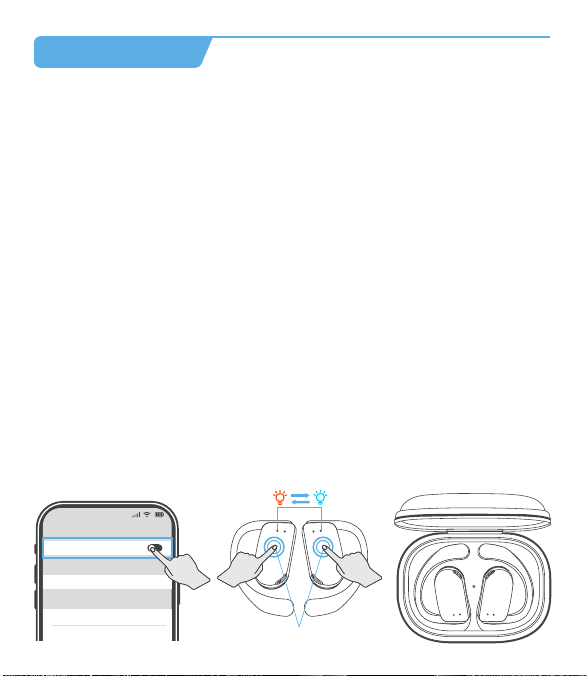
Charging the Charging Case
Insert the USB-A to USB-C charging cable into the charging case and USB-A
power supply or certified wall charger. A solid red light on the charging case
indicates that the charging case is charging. A solid blue light indicates the
charging case is fully charged.
08
Model No.
Bluetooth Version
Battery capacity
Charging port
Transmission range
Charging Time
OW7
5.3
50mAh* 2 (earbuds), 500mAh (charging case)
Type-C
10m/33ft (with no obstacle)
1.5h-2hrs for earbuds, 2hrs for charging case
Product Parameters
11
Auto Connect
1. When the earbuds are on, they will automatically try to connect to the
most recently connected device and issue a prompt when the connection
is successful.
2. During use, the earbud may disconnect from the paired device due to
limitations of connection range. If the earbud automatically re-connects
within 5 minutes, it will issue a prompt.
* The paired devices must be within connection range (10m) and must be
powered on. Make sure your intended device has Bluetooth enabled.
* Please note:
• It takes approx. 2 hours for the charging case to be fully charged. The
charging case uses the standard 5V±5A USB voltage. Using a high-voltage
power source to charge the earbuds is not recommended. It may also take
longer to charge the charging case with a third-party charging cable.
• Before charging, ensure that the charging port is dry and free of liquid
residue like sweat. Use a soft dry cloth to wipe any liquid residue from the
charging port.
Input: DC 5V
A solid blue light indicates the
charging case is fully charged.
Cleaning
1. Earbuds:
It is recommended to use a soft and clean dry cloth to clean the earbuds.
When cleaning the earphone mesh, gently brush away dirt and earwax
with a clean and dry cotton swab, then wipe with a soft cloth.
09
* Please note:
• Before cleaning and maintenance, please stop using the earbuds and
disconnect all connections with other devices.
• This product does not support washing with water. Do not wash the
earbuds directly with water or use ultrasonic cleaning.
• Do not allow liquid to enter any opening of the earbuds.
• To avoid damage, deformation, and discoloration of the earbuds, please
do not use an abrasive cleaner or spray, high-concentration cleaner,
chemical cleaner, alcohol, or acetone solvent for cleaning. Do not use any
sharp or abrasive objects.
2. Charging Case:
It is recommended to clean the charging case with a soft and clean, dry
cloth. Use a clean, dry, soft brush to remove debris from the charging
interface. Use a clean and dry cotton swab to wipe the charging contact
surface of the charging box gently.
Charging Contact
Charging Pin
10
* Please note:
• Before cleaning and maintenance, please disconnect the charging case
from the charging cable.
• Do not use abrasive items to clean the charging case.
Q
A
FCC Caution
What should I do if the earbuds disconnect or the sound is choppy?
Q
A
Please note that this doesn't necessarily mean there is an issue with the
earbuds, but may have something to do with the connected device and
environment, Bluetooth signals may be influenced by obstructions,
such as walls, pillars, home appliances, Wi-Fi, and more. To ensure a
stable connection, we recommend avoiding such obstructions. To fix
this issue, please try the following.
1. Fully charge and reset your earbuds as stated above and re-pair
them (see page 12).
2. Check the earbuds by listening to a downloaded song/video.
3. Check the earbuds with another Bluetooth device in a different
environment to see if it works well.
FAQ
What should I do if any of the following problems occur?
1. Cannot pair or reconnect with my device.
2. One side does not pair with the other side of my device.
3. No music plays after connecting with my device.
4. Only one earbud has sound.
Q
A
1. Remove the protective film covering the connectors on the earbuds.
2. Forget all the pairing records of your earbuds on your device and
turn off Bluetooth.
3. Reset the earbuds refer to page 12 (make sure your earbuds have
enough battery).
13
What should I do if any of the following problems occur?
1 ) The earbuds don't recharge in the charging case.
2 ) The earbuds stay connected to the device even after being placed in
the charging case with the lid closed.
3 ) The earbuds don't turn on when taken out of the charging case.
1. Confirm the charging case has power left.
2. Clean the charging pins with a dry cloth and an alcohol-based
disinfectant. This is to ensure all charging contact pins on the earbuds
and charging case are completely clean and dry from sweat and water.
Then put the earbuds correctly into the case, The light will flash when
the earbuds are placed in the case.
3. Please use the certified charging cable and wall charger.
4. Turn on the Bluetooth of your device and search for “OW7” and pair.
If there is a pop-up window to confirm pairing for “OW7”, please select
“Pair”. If you accidentally select “Cancel”, you need to refresh (turn off
and turn on) the Bluetooth of your device and pair the earbuds again.
14
Changes or modifications not expressly approved by the party responsible
for compliance could void the user's authority to operate the equipment.
This equipment has been tested and found to comply with the limits for a
Class B digital device, pursuant to Part 15 of the FCC Rules. These limits
are designed to provide reasonable protection against harmful interference
in aresidential installation. This equipment generates uses and can radiate
radio frequency energy and, if not installed and used in accordance with
the instructions, may cause harmful interference to radio communications.
However, there is no guarantee that interference will not occur in a
particular installation. If this equipment does cause harmful interference
toradio or television reception, which can be determined by turning the
equipment off and on, the user is encouraged to try to correct the
interference by one or more of the following measures:
1. Reorient or relocate the receiving antenna.
2. Increase the separation between the equipment and receiver.
3. Connect the equipment into an outlet on a circuit different from that to
which the receiver is connected.
4. Consult the dealer or an experienced Radio/TV technician for help.
This device complies with part 15 of the FCC Rules.
Operation is subject to the following two conditions:
(1) This device may not cause harmful interference, and (2) this device
must accept any interference received, including interference that may
cause undesired operation.
Any questions, please send message to us, we'll help you solve it as soon
as possible. You can choose us with confidence. Thanks.
www.pocbuds.tech
Kindly scan the QR code to activate the lifetime warranty
of your earbuds within 15 days.
15
Customer Sevice
What should I do if any of the following problems occur?
- The sound and video are out of sync
- There's no sound in one earbud
- The earbuds keep disconnecting or cutting in and out from time to time
- The earbuds can't pair with my device
- Cannot be searched in the Bluetooth list
You can follow these steps below:
How to reset
1. Turn off the Bluetooth of all devices
2. Out of the case, tap the touch area on the R and L earbud 5 times
simultaneously
3. Both earbuds flash red and blue simultaneously 3 times, and the voice
prompt "power off", indicating that the reset is complete
4. Put the earbuds back into the charging case
5. Take out the earbuds from the charging case and they enter pairing
mode (one earbud will flash red-blue alternately and the other earbud will
blink blue slowly to enter pairing mode)
6. Search for "OW7" and tap to connect on your device.
12:00
Bluetooth
Bluetooth
OW7
Connected
Tap both buds 5 times
12
flash alternately
OW7 User Manual
True Wireless Earbuds
Note: Prior to the first use, please remove the insulating film of the earbuds.
Charging Case *1 Type-C Charging Cable *1
User Manual *1
V2
OW7 User Manual
True Wireless Earbuds
Charging Indicator
of Earbuds
Charging Contacts
Microphone
Earhook
Charging Pin
Charging
Indicator of Case
Before the first use, please tear off the isolating film on the earbuds. Put
the earbuds into the case, then charge both earbuds and charging case via
supplied Type-C charging cable for at least 10mins (or after not use for a
long time), do not take out the earbuds during this period.
What's in the box?
Diagram
First to Use
Tear off the isolating film
How to Wear
1. Take the earbuds out of the charging case;
2. Hold them just above your ears;
3. Rotate the ear hooks downward along the auricle of the ear to achieve
proper positioning;
4. Complete insertion.
Double-tap (R/L)
Call Control
Answer/End a call
Reject a call
Tap and hold for 2 seconds (R/L)
Voice Assistant
Triple-tap R/L (No music program is running)
Activate/Stop Siri or
other voice assistant
Music Control
Double-tap (R/L)
Triple-tap (R)
Triple-tap (L)
Tap and hold (R)
Tap and hold (L)
Play/Pause
Next Track
Previous Track
Volume+
Volume -
Single Earbud Control
Mode Control
Power On/Off
Tap 2 seconds
Power On
How to Pair
1. Open the charging case and take the earbuds out to immediately enter
Bluetooth pairing mode, with the indicator lights of the main earbud
flashing red-blue alternately and the secondary earbud blinks blue slowly,
which indicates the earbuds have entered pairing mode.
2. Enable the Bluetooth function and select "OW7".
3. The device will display the successfully connected when complete, and
play the "connected" tone. The indicator lights of the main earbud blinks
blue for 2 seconds and then turns off.
Power On
1. Pick up buds from the charging case
2. Tap and hold for 2s
(* Each bud needs to be powered on separately.)
Power O
1. Put back into the charging case
2. Not connected to any devices over 5mins
3. Non-music playing and calling, tap and hold for 5s any buds
(* Earbuds will be powered off simultaneously.)
Power O
or
R
L
R
L
* Call volume adjustment: Use the volume control button on the paired Bluetooth
device.
* In single ear mode, the volume of the earbuds could not be adjusted.
Both earbuds support independent use for mono music or calls. When used
alone, the earbuds could not adjust the volume, only switch music to next song.
1
2 3 4
Touch Area
Type-C Charging Port
* If the earbuds are not connected to any devices over 5 minutes, they
will power off automatically.
OW7
12:00
Bluetooth
Bluetooth
Laptop
OW7
xxxxxxx
12:00
Bluetooth
Bluetooth
OW7
Connected
1 2
3
V2 0401 02 03 05 06
How to Charge
Charging the Earbuds
• Place the earbuds in the charging case until they are magnetically attached.
• The indicator light of the earbuds blinks red slowly.
• The LED indicator in the charging case will show the state of the
remaining power of the charging case for 10 seconds, and then it is turned
off. A blue light indicates a high battery level (71-100%), a green light
indicates a middle battery level (31-70%), and a red light indicates a low
battery level (0-30%).
• The earbuds will be fully charged after approx. 1.5h-2hrs in the charging
case and the indicator light of the earbuds goes out.
There are three colors of the indicator light, each color represents different
battery levels.
0-30%
31-70%
71-100%
07
True Wireless Earbuds *2
This area is the
touch control region.
OW7-小尺寸使用说明书
尺寸: 94*108mm
材料: 128g双铜
工艺: 四色印刷,风琴折
Tap 5 seconds
2s

Charging the Charging Case
Insert the USB-A to USB-C charging cable into the charging case and USB-A
power supply or certified wall charger. A solid red light on the charging case
indicates that the charging case is charging. A solid blue light indicates the
charging case is fully charged.
08
Model No.
Bluetooth Version
Battery capacity
Charging port
Transmission range
Charging Time
OW7
5.3
50mAh* 2 (earbuds), 500mAh (charging case)
Type-C
10m/33ft (with no obstacle)
1.5h-2hrs for earbuds, 2hrs for charging case
Product Parameters
11
Auto Connect
1. When the earbuds are on, they will automatically try to connect to the
most recently connected device and issue a prompt when the connection
is successful.
2. During use, the earbud may disconnect from the paired device due to
limitations of connection range. If the earbud automatically re-connects
within 5 minutes, it will issue a prompt.
* The paired devices must be within connection range (10m) and must be
powered on. Make sure your intended device has Bluetooth enabled.
* Please note:
• It takes approx. 2 hours for the charging case to be fully charged. The
charging case uses the standard 5V±5A USB voltage. Using a high-voltage
power source to charge the earbuds is not recommended. It may also take
longer to charge the charging case with a third-party charging cable.
• Before charging, ensure that the charging port is dry and free of liquid
residue like sweat. Use a soft dry cloth to wipe any liquid residue from the
charging port.
Input: DC 5V
A solid blue light indicates the
charging case is fully charged.
Cleaning
1. Earbuds:
It is recommended to use a soft and clean dry cloth to clean the earbuds.
When cleaning the earphone mesh, gently brush away dirt and earwax
with a clean and dry cotton swab, then wipe with a soft cloth.
09
* Please note:
• Before cleaning and maintenance, please stop using the earbuds and
disconnect all connections with other devices.
• This product does not support washing with water. Do not wash the
earbuds directly with water or use ultrasonic cleaning.
• Do not allow liquid to enter any opening of the earbuds.
• To avoid damage, deformation, and discoloration of the earbuds, please
do not use an abrasive cleaner or spray, high-concentration cleaner,
chemical cleaner, alcohol, or acetone solvent for cleaning. Do not use any
sharp or abrasive objects.
2. Charging Case:
It is recommended to clean the charging case with a soft and clean, dry
cloth. Use a clean, dry, soft brush to remove debris from the charging
interface. Use a clean and dry cotton swab to wipe the charging contact
surface of the charging box gently.
Charging Contact
Charging Pin
10
* Please note:
• Before cleaning and maintenance, please disconnect the charging case
from the charging cable.
• Do not use abrasive items to clean the charging case.
Q
A
FCC Caution
What should I do if the earbuds disconnect or the sound is choppy?
Q
A
Please note that this doesn't necessarily mean there is an issue with the
earbuds, but may have something to do with the connected device and
environment, Bluetooth signals may be influenced by obstructions,
such as walls, pillars, home appliances, Wi-Fi, and more. To ensure a
stable connection, we recommend avoiding such obstructions. To fix
this issue, please try the following.
1. Fully charge and reset your earbuds as stated above and re-pair
them (see page 12).
2. Check the earbuds by listening to a downloaded song/video.
3. Check the earbuds with another Bluetooth device in a different
environment to see if it works well.
FAQ
What should I do if any of the following problems occur?
1. Cannot pair or reconnect with my device.
2. One side does not pair with the other side of my device.
3. No music plays after connecting with my device.
4. Only one earbud has sound.
Q
A
1. Remove the protective film covering the connectors on the earbuds.
2. Forget all the pairing records of your earbuds on your device and
turn off Bluetooth.
3. Reset the earbuds refer to page 12 (make sure your earbuds have
enough battery).
13
What should I do if any of the following problems occur?
1 ) The earbuds don't recharge in the charging case.
2 ) The earbuds stay connected to the device even after being placed in
the charging case with the lid closed.
3 ) The earbuds don't turn on when taken out of the charging case.
1. Confirm the charging case has power left.
2. Clean the charging pins with a dry cloth and an alcohol-based
disinfectant. This is to ensure all charging contact pins on the earbuds
and charging case are completely clean and dry from sweat and water.
Then put the earbuds correctly into the case, The light will flash when
the earbuds are placed in the case.
3. Please use the certified charging cable and wall charger.
4. Turn on the Bluetooth of your device and search for “OW7” and pair.
If there is a pop-up window to confirm pairing for “OW7”, please select
“Pair”. If you accidentally select “Cancel”, you need to refresh (turn off
and turn on) the Bluetooth of your device and pair the earbuds again.
14
Changes or modifications not expressly approved by the party responsible
for compliance could void the user's authority to operate the equipment.
This equipment has been tested and found to comply with the limits for a
Class B digital device, pursuant to Part 15 of the FCC Rules. These limits
are designed to provide reasonable protection against harmful interference
in aresidential installation. This equipment generates uses and can radiate
radio frequency energy and, if not installed and used in accordance with
the instructions, may cause harmful interference to radio communications.
However, there is no guarantee that interference will not occur in a
particular installation. If this equipment does cause harmful interference
toradio or television reception, which can be determined by turning the
equipment off and on, the user is encouraged to try to correct the
interference by one or more of the following measures:
1. Reorient or relocate the receiving antenna.
2. Increase the separation between the equipment and receiver.
3. Connect the equipment into an outlet on a circuit different from that to
which the receiver is connected.
4. Consult the dealer or an experienced Radio/TV technician for help.
This device complies with part 15 of the FCC Rules.
Operation is subject to the following two conditions:
(1) This device may not cause harmful interference, and (2) this device
must accept any interference received, including interference that may
cause undesired operation.
Any questions, please send message to us, we'll help you solve it as soon
as possible. You can choose us with confidence. Thanks.
www.pocbuds.tech
Kindly scan the QR code to activate the lifetime warranty
of your earbuds within 15 days.
15
Customer Sevice
What should I do if any of the following problems occur?
- The sound and video are out of sync
- There's no sound in one earbud
- The earbuds keep disconnecting or cutting in and out from time to time
- The earbuds can't pair with my device
- Cannot be searched in the Bluetooth list
You can follow these steps below:
How to reset
1. Turn off the Bluetooth of all devices
2. Out of the case, tap the touch area on the R and L earbud 5 times
simultaneously
3. Both earbuds flash red and blue simultaneously 3 times, and the voice
prompt "power off", indicating that the reset is complete
4. Put the earbuds back into the charging case
5. Take out the earbuds from the charging case and they enter pairing
mode (one earbud will flash red-blue alternately and the other earbud will
blink blue slowly to enter pairing mode)
6. Search for "OW7" and tap to connect on your device.
12:00
Bluetooth
Bluetooth
OW7
Connected
Tap both buds 5 times
12
flash alternately
OW7 User Manual
True Wireless Earbuds
Note: Prior to the first use, please remove the insulating film of the earbuds.
Charging Case *1 Type-C Charging Cable *1
User Manual *1
V2
OW7 User Manual
True Wireless Earbuds
Charging Indicator
of Earbuds
Charging Contacts
Microphone
Earhook
Charging Pin
Charging
Indicator of Case
Before the first use, please tear off the isolating film on the earbuds. Put
the earbuds into the case, then charge both earbuds and charging case via
supplied Type-C charging cable for at least 10mins (or after not use for a
long time), do not take out the earbuds during this period.
What's in the box?
Diagram
First to Use
Tear off the isolating film
How to Wear
1. Take the earbuds out of the charging case;
2. Hold them just above your ears;
3. Rotate the ear hooks downward along the auricle of the ear to achieve
proper positioning;
4. Complete insertion.
Double-tap (R/L)
Call Control
Answer/End a call
Reject a call
Tap and hold for 2 seconds (R/L)
Voice Assistant
Triple-tap R/L (No music program is running)
Activate/Stop Siri or
other voice assistant
Music Control
Double-tap (R/L)
Triple-tap (R)
Triple-tap (L)
Tap and hold (R)
Tap and hold (L)
Play/Pause
Next Track
Previous Track
Volume+
Volume -
Single Earbud Control
Mode Control
Power On/Off
Tap 2 seconds
Power On
How to Pair
1. Open the charging case and take the earbuds out to immediately enter
Bluetooth pairing mode, with the indicator lights of the main earbud
flashing red-blue alternately and the secondary earbud blinks blue slowly,
which indicates the earbuds have entered pairing mode.
2. Enable the Bluetooth function and select "OW7".
3. The device will display the successfully connected when complete, and
play the "connected" tone. The indicator lights of the main earbud blinks
blue for 2 seconds and then turns off.
Power On
1. Pick up buds from the charging case
2. Tap and hold for 2s
(* Each bud needs to be powered on separately.)
Power O
1. Put back into the charging case
2. Not connected to any devices over 5mins
3. Non-music playing and calling, tap and hold for 5s any buds
(* Earbuds will be powered off simultaneously.)
Power O
or
R
L
R
L
* Call volume adjustment: Use the volume control button on the paired Bluetooth
device.
* In single ear mode, the volume of the earbuds could not be adjusted.
Both earbuds support independent use for mono music or calls. When used
alone, the earbuds could not adjust the volume, only switch music to next song.
1
2 3 4
Touch Area
Type-C Charging Port
* If the earbuds are not connected to any devices over 5 minutes, they
will power off automatically.
OW7
12:00
Bluetooth
Bluetooth
Laptop
OW7
xxxxxxx
12:00
Bluetooth
Bluetooth
OW7
Connected
1 2
3
V2 0401 02 03 05 06
How to Charge
Charging the Earbuds
• Place the earbuds in the charging case until they are magnetically attached.
• The indicator light of the earbuds blinks red slowly.
• The LED indicator in the charging case will show the state of the
remaining power of the charging case for 10 seconds, and then it is turned
off. A blue light indicates a high battery level (71-100%), a green light
indicates a middle battery level (31-70%), and a red light indicates a low
battery level (0-30%).
• The earbuds will be fully charged after approx. 1.5h-2hrs in the charging
case and the indicator light of the earbuds goes out.
There are three colors of the indicator light, each color represents different
battery levels.
0-30%
31-70%
71-100%
07
True Wireless Earbuds *2
This area is the
touch control region.
OW7-小尺寸使用说明书
尺寸: 94*108mm
材料: 128g双铜
工艺: 四色印刷,风琴折
Tap 5 seconds
2s

Charging the Charging Case
Insert the USB-A to USB-C charging cable into the charging case and USB-A
power supply or certified wall charger. A solid red light on the charging case
indicates that the charging case is charging. A solid blue light indicates the
charging case is fully charged.
08
Model No.
Bluetooth Version
Battery capacity
Charging port
Transmission range
Charging Time
OW7
5.3
50mAh* 2 (earbuds), 500mAh (charging case)
Type-C
10m/33ft (with no obstacle)
1.5h-2hrs for earbuds, 2hrs for charging case
Product Parameters
11
Auto Connect
1. When the earbuds are on, they will automatically try to connect to the
most recently connected device and issue a prompt when the connection
is successful.
2. During use, the earbud may disconnect from the paired device due to
limitations of connection range. If the earbud automatically re-connects
within 5 minutes, it will issue a prompt.
* The paired devices must be within connection range (10m) and must be
powered on. Make sure your intended device has Bluetooth enabled.
* Please note:
• It takes approx. 2 hours for the charging case to be fully charged. The
charging case uses the standard 5V±5A USB voltage. Using a high-voltage
power source to charge the earbuds is not recommended. It may also take
longer to charge the charging case with a third-party charging cable.
• Before charging, ensure that the charging port is dry and free of liquid
residue like sweat. Use a soft dry cloth to wipe any liquid residue from the
charging port.
Input: DC 5V
A solid blue light indicates the
charging case is fully charged.
Cleaning
1. Earbuds:
It is recommended to use a soft and clean dry cloth to clean the earbuds.
When cleaning the earphone mesh, gently brush away dirt and earwax
with a clean and dry cotton swab, then wipe with a soft cloth.
09
* Please note:
• Before cleaning and maintenance, please stop using the earbuds and
disconnect all connections with other devices.
• This product does not support washing with water. Do not wash the
earbuds directly with water or use ultrasonic cleaning.
• Do not allow liquid to enter any opening of the earbuds.
• To avoid damage, deformation, and discoloration of the earbuds, please
do not use an abrasive cleaner or spray, high-concentration cleaner,
chemical cleaner, alcohol, or acetone solvent for cleaning. Do not use any
sharp or abrasive objects.
2. Charging Case:
It is recommended to clean the charging case with a soft and clean, dry
cloth. Use a clean, dry, soft brush to remove debris from the charging
interface. Use a clean and dry cotton swab to wipe the charging contact
surface of the charging box gently.
Charging Contact
Charging Pin
10
* Please note:
• Before cleaning and maintenance, please disconnect the charging case
from the charging cable.
• Do not use abrasive items to clean the charging case.
Q
A
FCC Caution
What should I do if the earbuds disconnect or the sound is choppy?
Q
A
Please note that this doesn't necessarily mean there is an issue with the
earbuds, but may have something to do with the connected device and
environment, Bluetooth signals may be influenced by obstructions,
such as walls, pillars, home appliances, Wi-Fi, and more. To ensure a
stable connection, we recommend avoiding such obstructions. To fix
this issue, please try the following.
1. Fully charge and reset your earbuds as stated above and re-pair
them (see page 12).
2. Check the earbuds by listening to a downloaded song/video.
3. Check the earbuds with another Bluetooth device in a different
environment to see if it works well.
FAQ
What should I do if any of the following problems occur?
1. Cannot pair or reconnect with my device.
2. One side does not pair with the other side of my device.
3. No music plays after connecting with my device.
4. Only one earbud has sound.
Q
A
1. Remove the protective film covering the connectors on the earbuds.
2. Forget all the pairing records of your earbuds on your device and
turn off Bluetooth.
3. Reset the earbuds refer to page 12 (make sure your earbuds have
enough battery).
13
What should I do if any of the following problems occur?
1 ) The earbuds don't recharge in the charging case.
2 ) The earbuds stay connected to the device even after being placed in
the charging case with the lid closed.
3 ) The earbuds don't turn on when taken out of the charging case.
1. Confirm the charging case has power left.
2. Clean the charging pins with a dry cloth and an alcohol-based
disinfectant. This is to ensure all charging contact pins on the earbuds
and charging case are completely clean and dry from sweat and water.
Then put the earbuds correctly into the case, The light will flash when
the earbuds are placed in the case.
3. Please use the certified charging cable and wall charger.
4. Turn on the Bluetooth of your device and search for “OW7” and pair.
If there is a pop-up window to confirm pairing for “OW7”, please select
“Pair”. If you accidentally select “Cancel”, you need to refresh (turn off
and turn on) the Bluetooth of your device and pair the earbuds again.
14
Changes or modifications not expressly approved by the party responsible
for compliance could void the user's authority to operate the equipment.
This equipment has been tested and found to comply with the limits for a
Class B digital device, pursuant to Part 15 of the FCC Rules. These limits
are designed to provide reasonable protection against harmful interference
in aresidential installation. This equipment generates uses and can radiate
radio frequency energy and, if not installed and used in accordance with
the instructions, may cause harmful interference to radio communications.
However, there is no guarantee that interference will not occur in a
particular installation. If this equipment does cause harmful interference
toradio or television reception, which can be determined by turning the
equipment off and on, the user is encouraged to try to correct the
interference by one or more of the following measures:
1. Reorient or relocate the receiving antenna.
2. Increase the separation between the equipment and receiver.
3. Connect the equipment into an outlet on a circuit different from that to
which the receiver is connected.
4. Consult the dealer or an experienced Radio/TV technician for help.
This device complies with part 15 of the FCC Rules.
Operation is subject to the following two conditions:
(1) This device may not cause harmful interference, and (2) this device
must accept any interference received, including interference that may
cause undesired operation.
Any questions, please send message to us, we'll help you solve it as soon
as possible. You can choose us with confidence. Thanks.
www.pocbuds.tech
Kindly scan the QR code to activate the lifetime warranty
of your earbuds within 15 days.
15
Customer Sevice
What should I do if any of the following problems occur?
- The sound and video are out of sync
- There's no sound in one earbud
- The earbuds keep disconnecting or cutting in and out from time to time
- The earbuds can't pair with my device
- Cannot be searched in the Bluetooth list
You can follow these steps below:
How to reset
1. Turn off the Bluetooth of all devices
2. Out of the case, tap the touch area on the R and L earbud 5 times
simultaneously
3. Both earbuds flash red and blue simultaneously 3 times, and the voice
prompt "power off", indicating that the reset is complete
4. Put the earbuds back into the charging case
5. Take out the earbuds from the charging case and they enter pairing
mode (one earbud will flash red-blue alternately and the other earbud will
blink blue slowly to enter pairing mode)
6. Search for "OW7" and tap to connect on your device.
12:00
Bluetooth
Bluetooth
OW7
Connected
Tap both buds 5 times
12
flash alternately
OW7 User Manual
True Wireless Earbuds
Note: Prior to the first use, please remove the insulating film of the earbuds.
Charging Case *1 Type-C Charging Cable *1
User Manual *1
V2
OW7 User Manual
True Wireless Earbuds
Charging Indicator
of Earbuds
Charging Contacts
Microphone
Earhook
Charging Pin
Charging
Indicator of Case
Before the first use, please tear off the isolating film on the earbuds. Put
the earbuds into the case, then charge both earbuds and charging case via
supplied Type-C charging cable for at least 10mins (or after not use for a
long time), do not take out the earbuds during this period.
What's in the box?
Diagram
First to Use
Tear off the isolating film
How to Wear
1. Take the earbuds out of the charging case;
2. Hold them just above your ears;
3. Rotate the ear hooks downward along the auricle of the ear to achieve
proper positioning;
4. Complete insertion.
Double-tap (R/L)
Call Control
Answer/End a call
Reject a call
Tap and hold for 2 seconds (R/L)
Voice Assistant
Triple-tap R/L (No music program is running)
Activate/Stop Siri or
other voice assistant
Music Control
Double-tap (R/L)
Triple-tap (R)
Triple-tap (L)
Tap and hold (R)
Tap and hold (L)
Play/Pause
Next Track
Previous Track
Volume+
Volume -
Single Earbud Control
Mode Control
Power On/Off
Tap 2 seconds
Power On
How to Pair
1. Open the charging case and take the earbuds out to immediately enter
Bluetooth pairing mode, with the indicator lights of the main earbud
flashing red-blue alternately and the secondary earbud blinks blue slowly,
which indicates the earbuds have entered pairing mode.
2. Enable the Bluetooth function and select "OW7".
3. The device will display the successfully connected when complete, and
play the "connected" tone. The indicator lights of the main earbud blinks
blue for 2 seconds and then turns off.
Power On
1. Pick up buds from the charging case
2. Tap and hold for 2s
(* Each bud needs to be powered on separately.)
Power O
1. Put back into the charging case
2. Not connected to any devices over 5mins
3. Non-music playing and calling, tap and hold for 5s any buds
(* Earbuds will be powered off simultaneously.)
Power O
or
R
L
R
L
* Call volume adjustment: Use the volume control button on the paired Bluetooth
device.
* In single ear mode, the volume of the earbuds could not be adjusted.
Both earbuds support independent use for mono music or calls. When used
alone, the earbuds could not adjust the volume, only switch music to next song.
1
2 3 4
Touch Area
Type-C Charging Port
* If the earbuds are not connected to any devices over 5 minutes, they
will power off automatically.
OW7
12:00
Bluetooth
Bluetooth
Laptop
OW7
xxxxxxx
12:00
Bluetooth
Bluetooth
OW7
Connected
1 2
3
V2 0401 02 03 05 06
How to Charge
Charging the Earbuds
• Place the earbuds in the charging case until they are magnetically attached.
• The indicator light of the earbuds blinks red slowly.
• The LED indicator in the charging case will show the state of the
remaining power of the charging case for 10 seconds, and then it is turned
off. A blue light indicates a high battery level (71-100%), a green light
indicates a middle battery level (31-70%), and a red light indicates a low
battery level (0-30%).
• The earbuds will be fully charged after approx. 1.5h-2hrs in the charging
case and the indicator light of the earbuds goes out.
There are three colors of the indicator light, each color represents different
battery levels.
0-30%
31-70%
71-100%
07
True Wireless Earbuds *2
This area is the
touch control region.
OW7-小尺寸使用说明书
尺寸: 94*108mm
材料: 128g双铜
工艺: 四色印刷,风琴折
Tap 5 seconds
2s
Charging the Charging Case
Insert the USB-A to USB-C charging cable into the charging case and USB-A
power supply or certified wall charger. A solid red light on the charging case
indicates that the charging case is charging. A solid blue light indicates the
charging case is fully charged.
08
Model No.
Bluetooth Version
Battery capacity
Charging port
Transmission range
Charging Time
OW7
5.3
50mAh* 2 (earbuds), 500mAh (charging case)
Type-C
10m/33ft (with no obstacle)
1.5h-2hrs for earbuds, 2hrs for charging case
Product Parameters
11
Auto Connect
1. When the earbuds are on, they will automatically try to connect to the
most recently connected device and issue a prompt when the connection
is successful.
2. During use, the earbud may disconnect from the paired device due to
limitations of connection range. If the earbud automatically re-connects
within 5 minutes, it will issue a prompt.
* The paired devices must be within connection range (10m) and must be
powered on. Make sure your intended device has Bluetooth enabled.
* Please note:
• It takes approx. 2 hours for the charging case to be fully charged. The
charging case uses the standard 5V±5A USB voltage. Using a high-voltage
power source to charge the earbuds is not recommended. It may also take
longer to charge the charging case with a third-party charging cable.
• Before charging, ensure that the charging port is dry and free of liquid
residue like sweat. Use a soft dry cloth to wipe any liquid residue from the
charging port.
Input: DC 5V
A solid blue light indicates the
charging case is fully charged.
Cleaning
1. Earbuds:
It is recommended to use a soft and clean dry cloth to clean the earbuds.
When cleaning the earphone mesh, gently brush away dirt and earwax
with a clean and dry cotton swab, then wipe with a soft cloth.
09
* Please note:
• Before cleaning and maintenance, please stop using the earbuds and
disconnect all connections with other devices.
• This product does not support washing with water. Do not wash the
earbuds directly with water or use ultrasonic cleaning.
• Do not allow liquid to enter any opening of the earbuds.
• To avoid damage, deformation, and discoloration of the earbuds, please
do not use an abrasive cleaner or spray, high-concentration cleaner,
chemical cleaner, alcohol, or acetone solvent for cleaning. Do not use any
sharp or abrasive objects.
2. Charging Case:
It is recommended to clean the charging case with a soft and clean, dry
cloth. Use a clean, dry, soft brush to remove debris from the charging
interface. Use a clean and dry cotton swab to wipe the charging contact
surface of the charging box gently.
Charging Contact
Charging Pin
10
* Please note:
• Before cleaning and maintenance, please disconnect the charging case
from the charging cable.
• Do not use abrasive items to clean the charging case.
Q
A
FCC Caution
What should I do if the earbuds disconnect or the sound is choppy?
Q
A
Please note that this doesn't necessarily mean there is an issue with the
earbuds, but may have something to do with the connected device and
environment, Bluetooth signals may be influenced by obstructions,
such as walls, pillars, home appliances, Wi-Fi, and more. To ensure a
stable connection, we recommend avoiding such obstructions. To fix
this issue, please try the following.
1. Fully charge and reset your earbuds as stated above and re-pair
them (see page 12).
2. Check the earbuds by listening to a downloaded song/video.
3. Check the earbuds with another Bluetooth device in a different
environment to see if it works well.
FAQ
What should I do if any of the following problems occur?
1. Cannot pair or reconnect with my device.
2. One side does not pair with the other side of my device.
3. No music plays after connecting with my device.
4. Only one earbud has sound.
Q
A
1. Remove the protective film covering the connectors on the earbuds.
2. Forget all the pairing records of your earbuds on your device and
turn off Bluetooth.
3. Reset the earbuds refer to page 12 (make sure your earbuds have
enough battery).
13
What should I do if any of the following problems occur?
1 ) The earbuds don't recharge in the charging case.
2 ) The earbuds stay connected to the device even after being placed in
the charging case with the lid closed.
3 ) The earbuds don't turn on when taken out of the charging case.
1. Confirm the charging case has power left.
2. Clean the charging pins with a dry cloth and an alcohol-based
disinfectant. This is to ensure all charging contact pins on the earbuds
and charging case are completely clean and dry from sweat and water.
Then put the earbuds correctly into the case, The light will flash when
the earbuds are placed in the case.
3. Please use the certified charging cable and wall charger.
4. Turn on the Bluetooth of your device and search for “OW7” and pair.
If there is a pop-up window to confirm pairing for “OW7”, please select
“Pair”. If you accidentally select “Cancel”, you need to refresh (turn off
and turn on) the Bluetooth of your device and pair the earbuds again.
14
Changes or modifications not expressly approved by the party responsible
for compliance could void the user's authority to operate the equipment.
This equipment has been tested and found to comply with the limits for a
Class B digital device, pursuant to Part 15 of the FCC Rules. These limits
are designed to provide reasonable protection against harmful interference
in aresidential installation. This equipment generates uses and can radiate
radio frequency energy and, if not installed and used in accordance with
the instructions, may cause harmful interference to radio communications.
However, there is no guarantee that interference will not occur in a
particular installation. If this equipment does cause harmful interference
toradio or television reception, which can be determined by turning the
equipment off and on, the user is encouraged to try to correct the
interference by one or more of the following measures:
1. Reorient or relocate the receiving antenna.
2. Increase the separation between the equipment and receiver.
3. Connect the equipment into an outlet on a circuit different from that to
which the receiver is connected.
4. Consult the dealer or an experienced Radio/TV technician for help.
This device complies with part 15 of the FCC Rules.
Operation is subject to the following two conditions:
(1) This device may not cause harmful interference, and (2) this device
must accept any interference received, including interference that may
cause undesired operation.
Any questions, please send message to us, we'll help you solve it as soon
as possible. You can choose us with confidence. Thanks.
www.pocbuds.tech
Kindly scan the QR code to activate the lifetime warranty
of your earbuds within 15 days.
15
Customer Sevice
What should I do if any of the following problems occur?
- The sound and video are out of sync
- There's no sound in one earbud
- The earbuds keep disconnecting or cutting in and out from time to time
- The earbuds can't pair with my device
- Cannot be searched in the Bluetooth list
You can follow these steps below:
How to reset
1. Turn off the Bluetooth of all devices
2. Out of the case, tap the touch area on the R and L earbud 5 times
simultaneously
3. Both earbuds flash red and blue simultaneously 3 times, and the voice
prompt "power off", indicating that the reset is complete
4. Put the earbuds back into the charging case
5. Take out the earbuds from the charging case and they enter pairing
mode (one earbud will flash red-blue alternately and the other earbud will
blink blue slowly to enter pairing mode)
6. Search for "OW7" and tap to connect on your device.
12:00
Bluetooth
Bluetooth
OW7
Connected
Tap both buds 5 times
12
flash alternately
OW7 User Manual
True Wireless Earbuds
Note: Prior to the first use, please remove the insulating film of the earbuds.
Charging Case *1 Type-C Charging Cable *1
User Manual *1
V2
OW7 User Manual
True Wireless Earbuds
Charging Indicator
of Earbuds
Charging Contacts
Microphone
Earhook
Charging Pin
Charging
Indicator of Case
Before the first use, please tear off the isolating film on the earbuds. Put
the earbuds into the case, then charge both earbuds and charging case via
supplied Type-C charging cable for at least 10mins (or after not use for a
long time), do not take out the earbuds during this period.
What's in the box?
Diagram
First to Use
Tear off the isolating film
How to Wear
1. Take the earbuds out of the charging case;
2. Hold them just above your ears;
3. Rotate the ear hooks downward along the auricle of the ear to achieve
proper positioning;
4. Complete insertion.
Double-tap (R/L)
Call Control
Answer/End a call
Reject a call
Tap and hold for 2 seconds (R/L)
Voice Assistant
Triple-tap R/L (No music program is running)
Activate/Stop Siri or
other voice assistant
Music Control
Double-tap (R/L)
Triple-tap (R)
Triple-tap (L)
Tap and hold (R)
Tap and hold (L)
Play/Pause
Next Track
Previous Track
Volume+
Volume -
Single Earbud Control
Mode Control
Power On/Off
Tap 2 seconds
Power On
How to Pair
1. Open the charging case and take the earbuds out to immediately enter
Bluetooth pairing mode, with the indicator lights of the main earbud
flashing red-blue alternately and the secondary earbud blinks blue slowly,
which indicates the earbuds have entered pairing mode.
2. Enable the Bluetooth function and select "OW7".
3. The device will display the successfully connected when complete, and
play the "connected" tone. The indicator lights of the main earbud blinks
blue for 2 seconds and then turns off.
Power On
1. Pick up buds from the charging case
2. Tap and hold for 2s
(* Each bud needs to be powered on separately.)
Power O
1. Put back into the charging case
2. Not connected to any devices over 5mins
3. Non-music playing and calling, tap and hold for 5s any buds
(* Earbuds will be powered off simultaneously.)
Power O
or
R
L
R
L
* Call volume adjustment: Use the volume control button on the paired Bluetooth
device.
* In single ear mode, the volume of the earbuds could not be adjusted.
Both earbuds support independent use for mono music or calls. When used
alone, the earbuds could not adjust the volume, only switch music to next song.
1
2 3 4
Touch Area
Type-C Charging Port
* If the earbuds are not connected to any devices over 5 minutes, they
will power off automatically.
OW7
12:00
Bluetooth
Bluetooth
Laptop
OW7
xxxxxxx
12:00
Bluetooth
Bluetooth
OW7
Connected
1 2
3
V2 0401 02 03 05 06
How to Charge
Charging the Earbuds
• Place the earbuds in the charging case until they are magnetically attached.
• The indicator light of the earbuds blinks red slowly.
• The LED indicator in the charging case will show the state of the
remaining power of the charging case for 10 seconds, and then it is turned
off. A blue light indicates a high battery level (71-100%), a green light
indicates a middle battery level (31-70%), and a red light indicates a low
battery level (0-30%).
• The earbuds will be fully charged after approx. 1.5h-2hrs in the charging
case and the indicator light of the earbuds goes out.
There are three colors of the indicator light, each color represents different
battery levels.
0-30%
31-70%
71-100%
07
True Wireless Earbuds *2
This area is the
touch control region.
OW7-小尺寸使用说明书
尺寸: 94*108mm
材料: 128g双铜
工艺: 四色印刷,风琴折
Tap 5 seconds
2s