1
Installation Guide
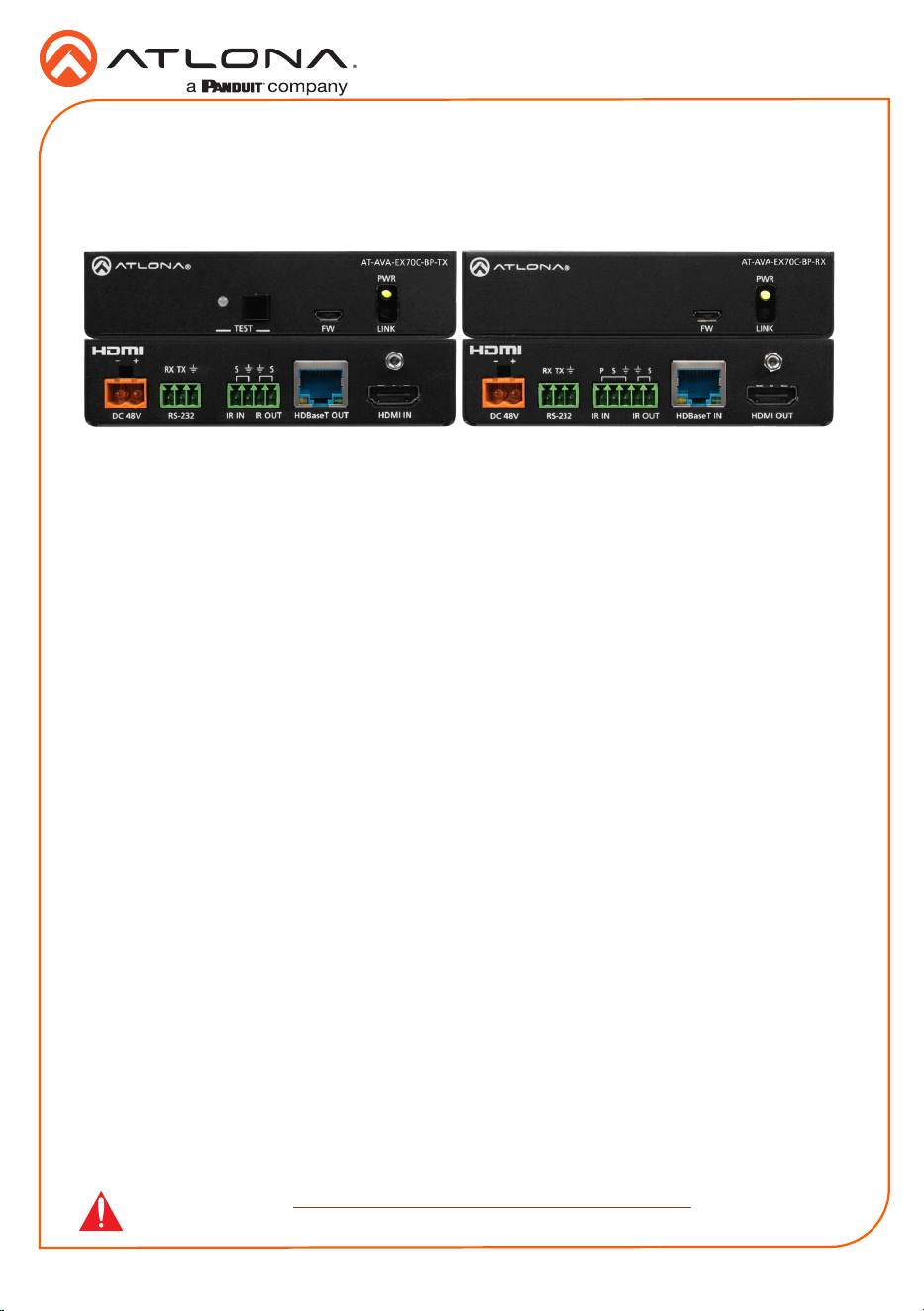
AT-AVA-EX70C-BP-KIT
4K/UHD HDMI Extender Kit with Control and
Bidirectional Remote Power
AT-AVA-EX70C-BP-KIT
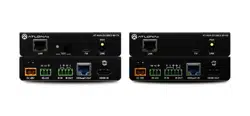
The Atlona AT-AVA-EX70C-BP-KIT is an Avance™ Series HDBaseT transmitter and receiver
set that supports control pass-through and bidirectional remote power capabilities. The kit
transmits 4K/UHD 60Hz 4:2:0 video up to 130 feet (40 meters) or 1080P 60Hz video up to 230
feet (70 meters). In addition to video with embedded multi-channel audio, RS-232 and IR control
signals, and remote powering by either the transmitter or the receiver are supported on the
single CAT6A/7 cable. Integrated HDBaseT link status testing allows quick verication of cable,
termination, and link quality. HDMI clock stretching and EDID ltering are included to ensure
the integrity of video transmission as well as compatibility with the widest array of sources and
display devices. ARC is available on the HDMI connections to minimize cabling in audio return
applications. Compact enclosures and included brackets allow the transmitter and receiver
endpoints to be surface mounted in furniture or behind a display. The AT-AVA-EX70C-BP-KIT
delivers a cost-eective solution for extension of video, audio, control, and bidirectional power at
resolutions up to 4K/UHD.
IMPORTANT: Visit https://atlona.com/product/AT-AVA-EX70C-BP-KIT for the latest
rmware updates and Installation Guide.
1 x AT-AVA-EX70C-BP-TX
1 x AT-AVA-EX70C-BP-RX
1 x 2-pin captive screw connector
2 x 3-pin captive screw connector
1 x 4-pin captive screw connector
1 x 5-pin captive screw connector
1 x IR emitter
4 x Mounting brackets
8 x Mounting screws
1 x 48V DC power supply
1 x IEC cable
1 x Installation Guide
Package Contents
2
Installation Guide
AT-AVA-EX70C-BP-KIT
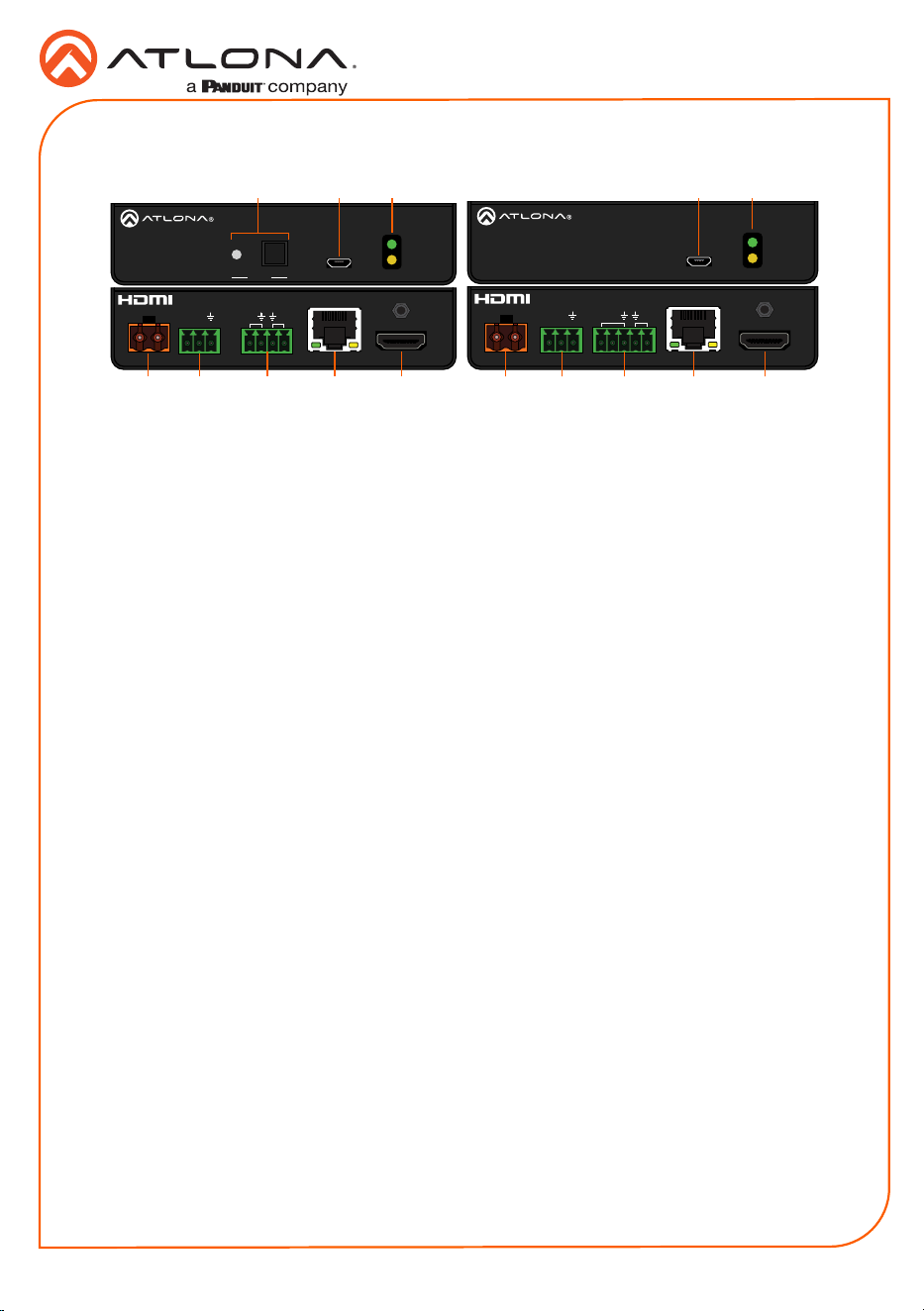
Panel Descriptions
HDBaseT IN
HDMI OUT
AT-AVA-EX70C-BP-RX
PWR
LINKFW
S
SP
IR IN IR OUT
RX
TX
RS-232
DC 48V
+-
DC 48V HDBaseT OUT
HDMI IN
AT-AVA-EX70C-BP-TX
PWR
LINKFW
+-
RX
TX
RS-232
S S
IR IN
IR OUT
TEST
1 TEST
Quick and easy test for category cables.
Use the button to start the test and the
LED to determine pass or fail.
2 FW
Connect a micro-USB to USB-A type
cable from this port to a computer, to
update the rmware.
3 POWER and LINK LEDs
The power LED will illuminate green when
receiving power. The link LED will glow
yellow when signal is being sent/received
between the transmitter and the receiver.
4 DC 48V *Optional*
Connect the included power supply to
either this port or the power port on the
receiver.
5 RS-232
Bidirectional control port, used for pass
through of commands to or from the
receiver.
6 IR IN/OUT
Connect a 3rd party controller to the IR IN
port or an IR emitter to the IR OUT port.
7 HDBaseT OUT
Connect an HDBaseT cable from this port
to the HDBaseT IN port on the receiver.
8 HDMI IN
Connect an HDMI cable from a source to
this port. e.g. HDR BluRay Player
9 FW
Not used at this time.
10 POWER and LINK LEDs
The power LED will illuminate green when
receiving power. The link LED will glow
yellow when signal is being sent/received
between the transmitter and the receiver.
11 DC 48V *Optional*
Connect the included power supply to
either this port or the power port on the
transmitter.
12 RS-232
Bidirectional control port, used for pass
through of commands to or from the
transmitter.
13 IR IN/OUT
Connect an IR receiver to the IR IN port or
an IR emitter to the IR OUT port.
14 HDBaseT IN
Connect an HDBaseT cable from this
port to the HDBaseT OUT port on the
transmitter.
15 HDMI OUT
Connect an HDMI cable from this port to
an HDMI display.
1211
5 6 7 8
13 14 15
4
10
3
9
21
3
Installation Guide
AT-AVA-EX70C-BP-KIT
HDBaseT IN
HDMI OUT
AT-AVA-EX70C-BP-RX
PWR
LINKFW
S
SP
IR IN IR OUT
RX
TX
RS-232
DC 48V
+-
DC 48V
HDBaseT OUT
HDMI IN
AT-AVA-EX70C-BP-TX
PWR
LINKFW
+-
RX
TX
RS-232
S S
IR IN
IR OUT
TEST
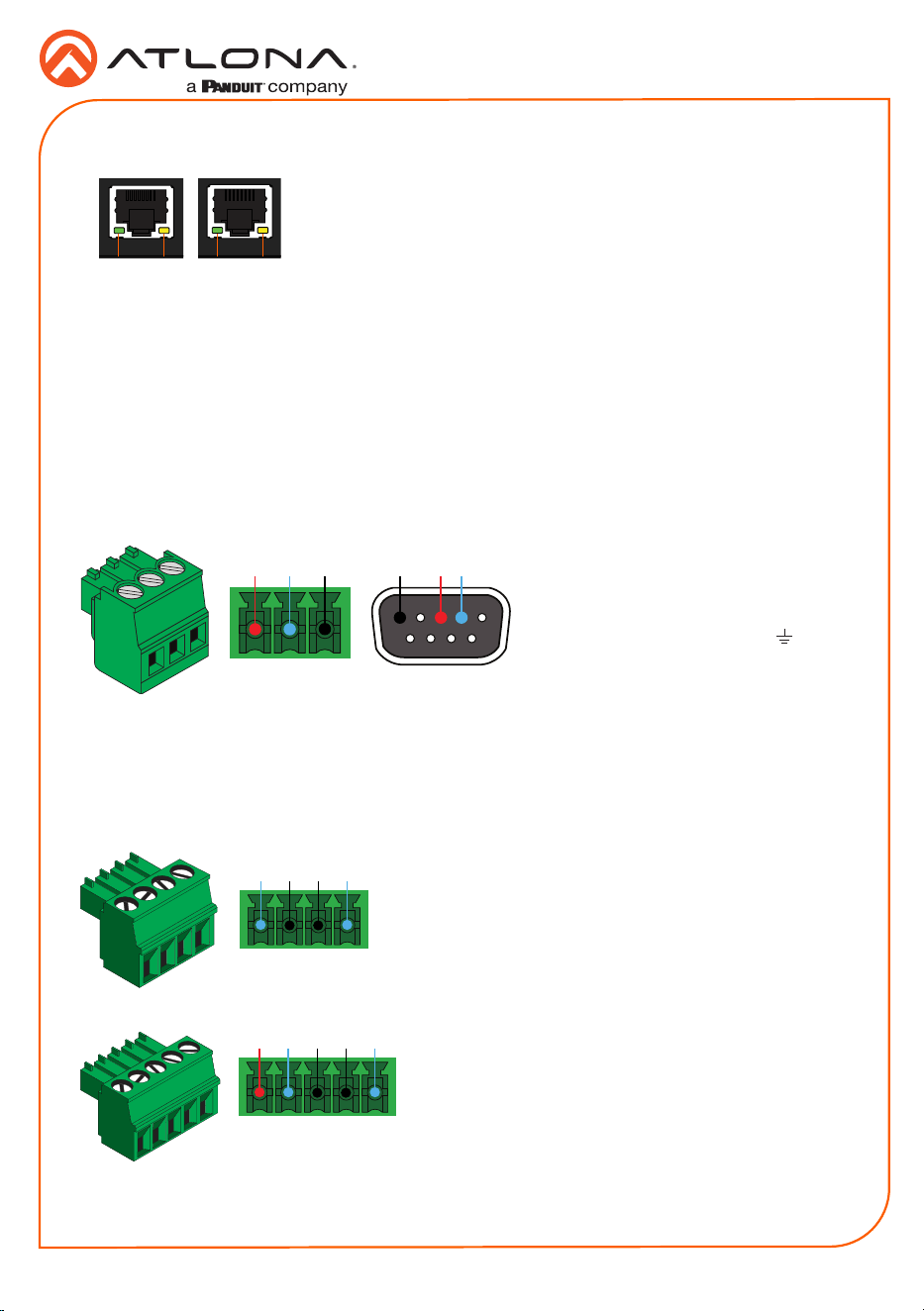
HDBaseT LED Descriptions
a Green LED
When a category cable is connected
and receiving signal this LED will be
illuminated. If no cable or signal is being
received, the LED will be o.
b Yellow LED
This LED displays the status of the
HDBaseT rmware. When the LED is
blinking slowly, the rmware is good. If
the LED is blinking rapidly or o, there
is no rmware or the rmware has been
corrupted.
b ba a
Pin out will be determined by the
RS-232 cable and connect as
RX (receive), TX (transmit) and
(Ground).
A 3-pin captive screw connector for RS-232 has been included.
Two captive screw connectors for IR have been included. A 4-pin connector for the transmitter
and a 3-pin connector for the receiver.
IR IN is connected by a power, ground, and signal
wire. Use a 12V IR receiver with it (e.g. AT-IR-CS-RX
purchasable through atlona.com).
IR IN is connected by a ground and signal wire. Use
with 3rd party control systems. For easy termination,
Atlona recommends using the 2 meter IR cable AT-LC-
CS-IR-2M (purchasable through atlona.com).
IR OUT is connected by a ground and signal wire.
Use the included IR emitter with this port.
IR OUT is connected by a ground and signal wire.
Use the included IR emitter with this port.
RS-232
IR
IR IN
IR OUT
GND
S
S
P
GND RX
TX
GNDRX TX
IR IN IR OUT
GND
S
S
4
Installation Guide
AT-AVA-EX70C-BP-KIT
-
+
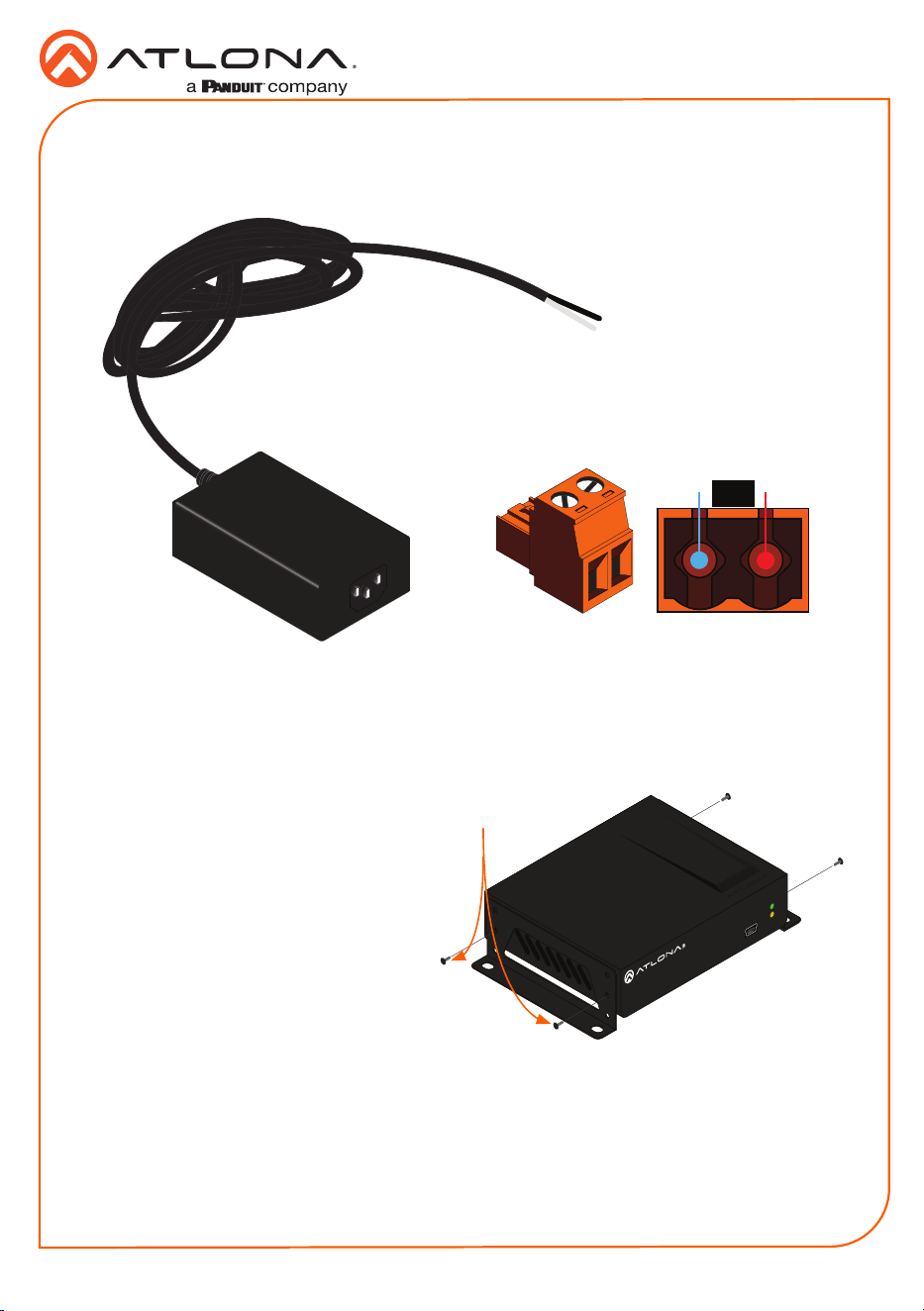
The power cable will be white for the
positive connection and black for the
negative connection. These should be
placed in the corresponding captive
screw ports.
A 2-pin captive screw connector for the power supply has been included.
Power
-
+
+
-
The AT-AVA-EX70C-BP-KIT includes two mounting brackets and four mounting screws each,
which can be used to attach the units to any at surface.
1. Position one of the mounting brackets,
as shown below, aligning the holes on
the side of the enclosure with one set of
holes on the mounting bracket.
2. Use the enclosure screws to secure the
mounting bracket to the enclosure.
3. Repeat the above steps to attach
the second mounting bracket to the
opposite side of the unit.
Mounting Instructions
FW
AT-AVA-EX70C-BP-RX
POWER
LINK
Included screws
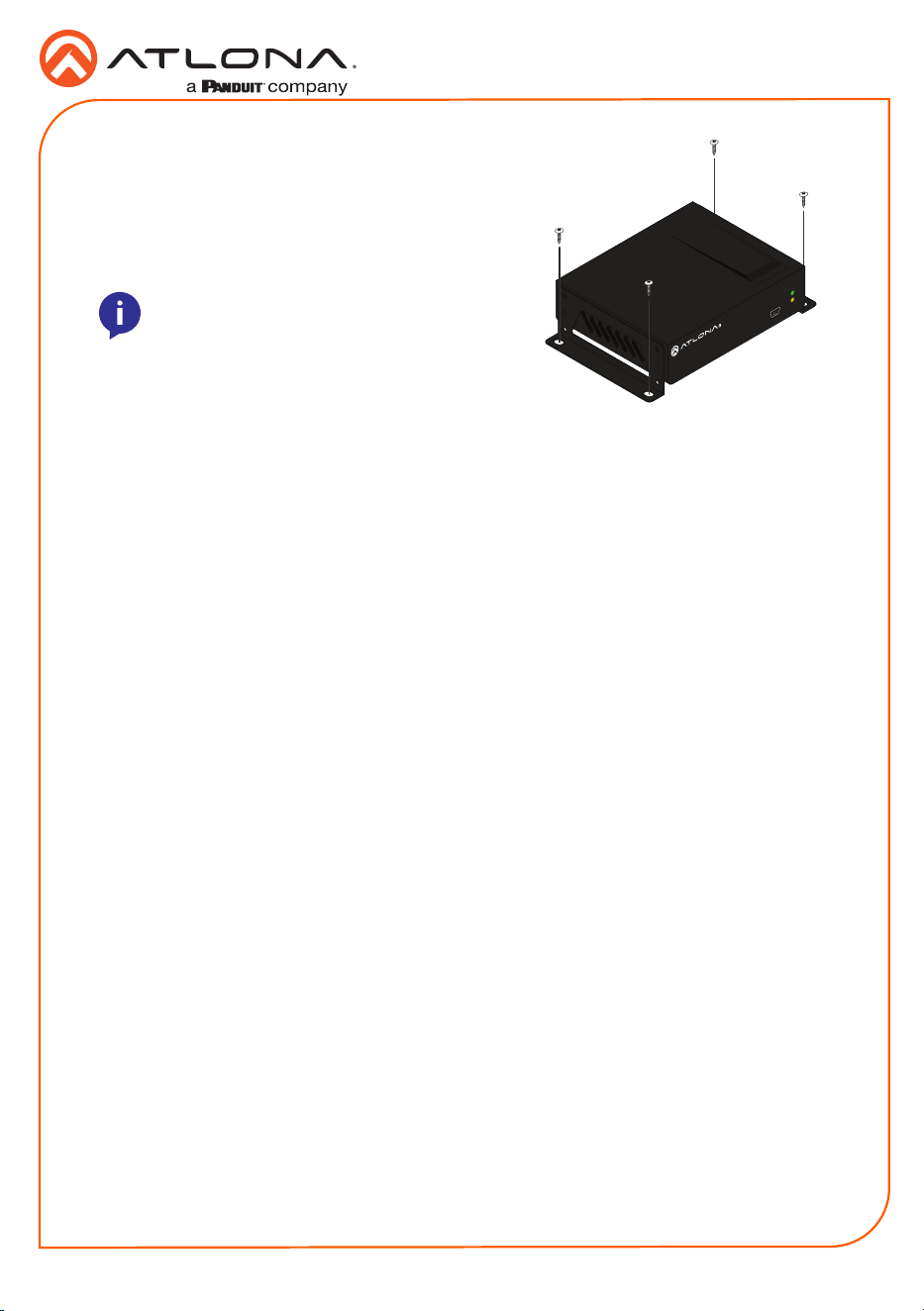
4. Mount the unit using the oval-shaped holes, on each mounting bracket. If using a drywall
surface, a #6 drywall screw is recommended.
5
Installation Guide
AT-AVA-EX70C-BP-KIT
1. Connect a source to the HDMI IN port on the transmitter.
2. Connect a display to the HDMI OUT port on the receiver.
3. Connect an HDBaseT cable, from the HDBaseT OUT port on the transmitter, to the
HDBaseT IN port on the receiver.
4. *Optional* Connect a 3rd party controller to the transmitter using either the 3-pin RS-232
or the 2-pin IR IN ports.
5. *Optional* Connect an IR receiver to the IR IN port of the receiver.
6. *Optional* Connect an IR emitter to the IR OUT port of the transmitter or receiver.
7. Connect the included 48V power supply into the transmitter or receiver.
8. Connect power supply to an AC outlet.
Installation
NOTE: Mounting brackets can also be inverted
to mount the unit under a table or other at
surface.
FW
AT-AVA-EX70C-BP-RX
POWER
LINK
6
Installation Guide
AT-AVA-EX70C-BP-KIT
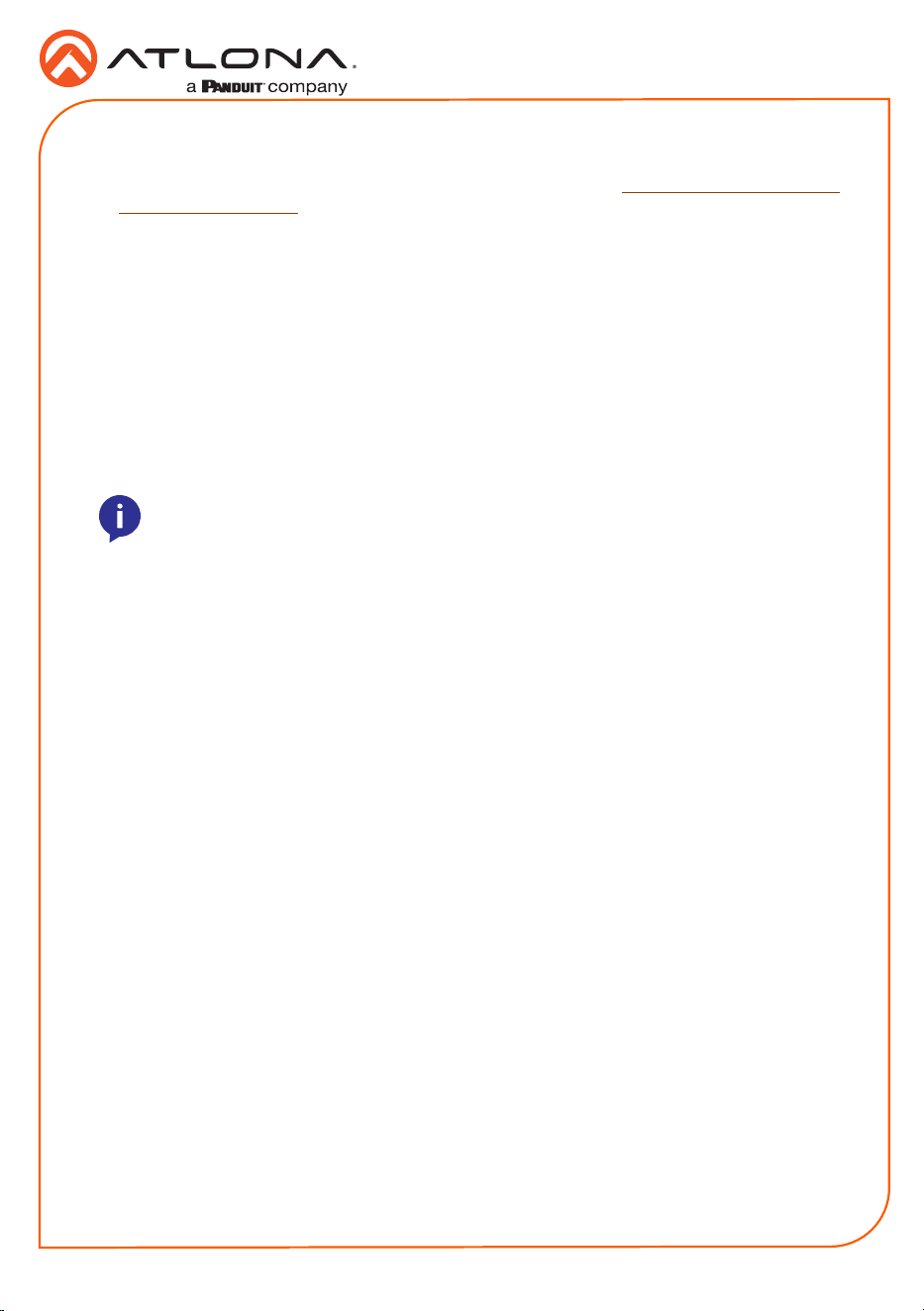
Button:
• Blue Blinking: The test is running properly
and the button will blink 10 times during
the testing process.
• Red Light: There is no signal for the test
to check.
LED:
• No Light: There is no HDBaseT cable
plugged in.
• Blinking: There is no HDBaseT signal
coming through.
• Solid Green: The HDBaseT cable is good.
• Solid Yellow: One or two HDBaseT pairs
are not working, reterminate the cable.
• Solid Red: Multiple pairs are not working.
Reterminate the cable and if the LED turns
yellow or red again, replace the cable.
DC 48V HDBaseT OUT
HDMI IN
AT-AVA-EX70C-BP-TX
PWR
LINKFW
+-
RX
TX
RS-232
S S
IR IN
IR OUT
TEST
TEST TEST TEST TEST
Refer to the tables below for recommended cabling when using Altona products with HDBaseT.
The green bars indicate the signal quality when using each type of cable. Higher-quality signals
are represented by more bars.
Cable Recommendation Guidelines
Core Shielding CAT5e CAT6 CAT6a CAT7
Solid UTP (unshielded) N/A
STP (shielded)
Performance Rating (MHz) 350 500 600 800
*Atlona recommends TIA/EIA 568-B termination for optimal performance.
Cable* Max. Distance @ 4K Max. Distance @ 1080p
CAT5e/6 115 feet (35 meters) 200 feet (60 meters)
CAT6a/7 130 feet (40 meters) 230 feet (70 meters)
IMPORTANT: It is recommended to use UTP6A (https://atlona.com/product/utp6a/)
and STP6X (https://atlona.com/product/stp6x/) if a stranded/patch cable is needed.
These cables have been tested and approved to work with these extenders for full
functionality.
TEST
The transmitter has the ability to test the HDBaseT cable quality through the front panel. Press
the test button on the front panel of the transmitter to start the test, the LED will display the
testing results.
7
Installation Guide
AT-AVA-EX70C-BP-KIT
Updating Firmware
1. Download the rmware .zip le from the rmware tab located at https://atlona.com/product/
AT-AVA-EX70C-BP-KIT.
2. Unzip the .bin le to an easy to locate area of the local PC.
3. Connect the transmitter’s FW micro USB port to a PC using a micro USB to USB A cable
(purchased separately).
4. The PC should automatically detect the unit and display the autorun options. Select the
view les in folder option. A new window will open.
5. If there are any les inside the folder, delete them, otherwise drag and drop the .bin le into
the folder. While the rmware loads to the unit, the green power LED on the front panel will
ash. This process can take up to 5 minutes to complete.
6. Once the green LED goes solid, disconnect the unit from the PC. The rmware update is
nished.
NOTE: Only the transmitter will be used for updating rmware. The receiver will be
updated once it has been connected to the transmitter if it is not connected at the
time of the rmware update.
8
Installation Guide
AT-AVA-EX70C-BP-KIT
Version 3
The terms HDMI, HDMI High-Denition Multimedia Interface, and the HDMI Logo are trademarks or
registered trademarks of HDMI licensing Administrator, Inc.
25147-R3
The English version can be found under the resources tab at:
https://atlona.com/product/at-ava-ex70c-bp-kit/.
English Declaration of Conformity
Warranty
Chinese Declaration of Conformity 中国RoHS合格声明
To view the product warranty, use the following link or QR code:
https://atlona.com/warranty/.
由SKU列出於:
https://atlona.com/about-us/china-rohs/.
© 2024 Atlona Inc. All rights reserved. “Atlona” and the Atlona logo are registered trademarks of Atlona Inc. All other brand names and trademarks or registered
trademarks are the property of their respective owners. Pricing, specications and availability subject to change without notice. Actual products, product images,
and online product images may vary from images shown here.
US International
atlona.com • 408.962.0515 • 41.43.508.4321