CA
Operating instructions
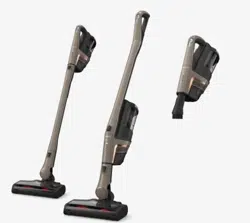
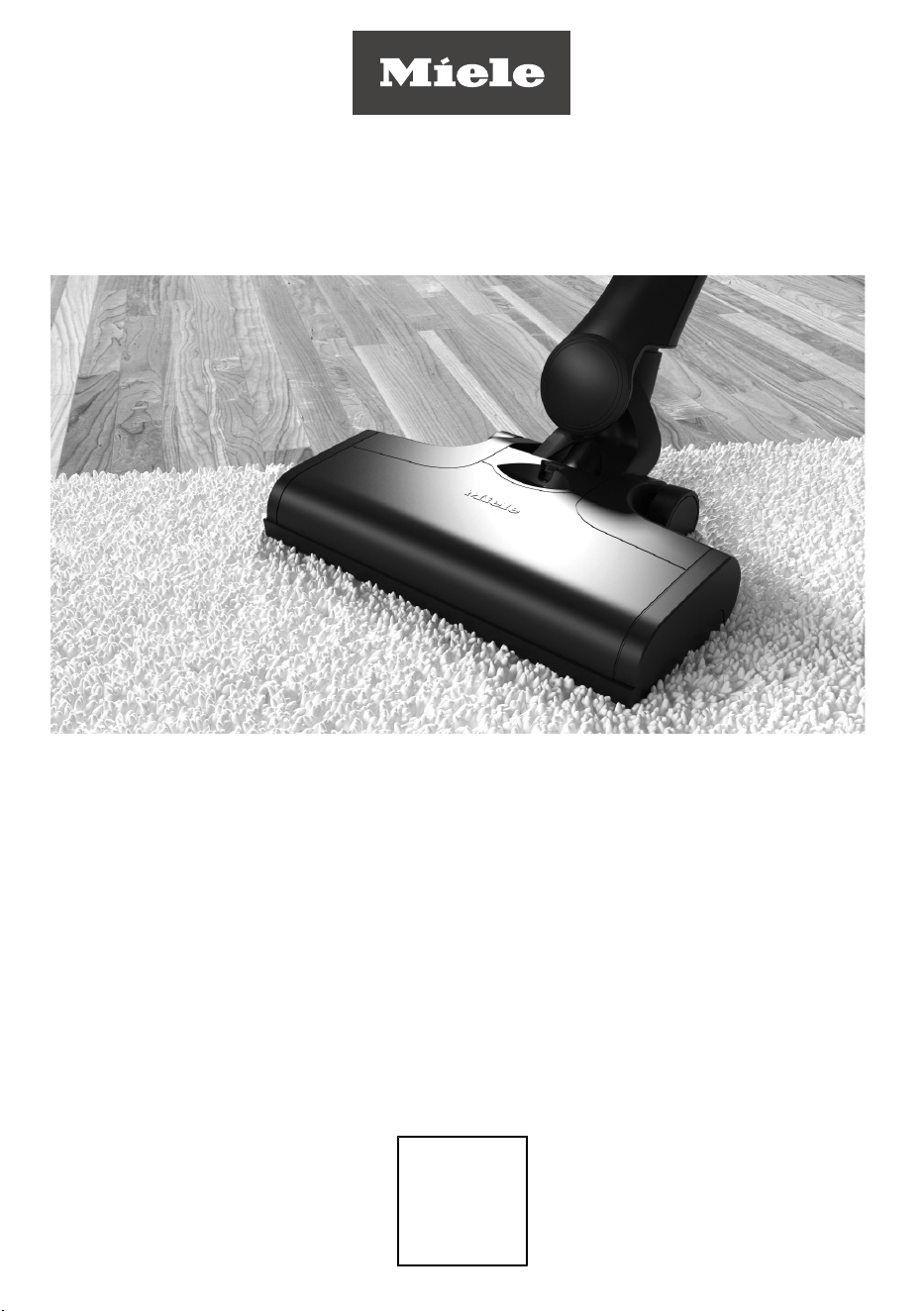
Battery-powered stick vacuum
cleaner
Mode d’emploi aspirateur-balai sans fil
MX
US
Instrucciones de funcionamiento
Aspiradora vertical in-alámbrica
Operating Instructions Cordless Stick Vacuum Cleaner
M.-Nr. 12 414 570
HS19
CA

2
en-CA ................................................................................................................. 5
fr-CA ................................................................................................................... 35
es-MX ................................................................................................................ 73
en-US ................................................................................................................. 110

en-CA - Contents
3
Warning and Safety instructions ............................................................................... 5
Warnings and safety instructions for AP01 / AP02 / AP03 battery,
LG01/LG02charger, LS03/LS04 battery charger cradle (depending on the
model) ..............................................................................................................................
10
Caring for the environment......................................................................................... 15
Guide to the appliance................................................................................................. 16
References to figures ................................................................................................... 18
Installation and connection ........................................................................................ 18
Assembling the vacuum cleaner .................................................................................
18
PowerUnit Solo ..............................................................................................................
18
Connecting the Comfort handle ..................................................................................
18
Connecting the PowerUnit and the suction tube .....................................................
18
Inserting the battery .....................................................................................................
19
Connecting the Electrobrush .......................................................................................
19
General battery information..........................................................................................
19
Charging the battery (without wall mounting) ..........................................................
19
Charging the battery (with wall mounting) ................................................................
20
Wall mounting ................................................................................................................
20
Battery charging state indicator (while charging) .....................................................
21
Battery charging state indicator (while in use) .........................................................
21
Using the supplied accessories ................................................................................ 22
Accessories holder for the suction tube ....................................................................
22
MultiFloorXXLElectrobrush .......................................................................................
22
HardfloorCaresoftroller(HXHC) .............................................................................
22
ElectroCompact handheld brush ...............................................................................
23
Additional battery (HXLA) ............................................................................................
23
Battery charger cradle (HXLS) ...................................................................................
23
Use ................................................................................................................................... 24
Switching on and off .....................................................................................................
24
Regulating the suction power ......................................................................................
24
Illuminating the work area.............................................................................................
24
Self-standing function for short pauses in vacuuming .............................................
24
Maintenance .................................................................................................................. 24
Filter system ...................................................................................................................
25
Activating the ComfortClean function .......................................................................
25
Emptying the dust container .......................................................................................
25
Cleaning the pre-filter and fine dust filter ..................................................................
26
Cleaning the dust container..........................................................................................
26
Cleaning the Electrobrush/handheld brush (depending on model) .....................
27
Replacing the rechargeable battery.............................................................................
27

en-CA - Contents
4
Fault messages.............................................................................................................. 28
Problem solving guide.................................................................................................. 29
Technical Service .......................................................................................................... 31
Contact in case of a fault ..............................................................................................
31
Maintenance .................................................................................................................. 31
Optional accessories.................................................................................................... 31
Purchasing accessories.................................................................................................
31
Universal brush (HX-UB)...............................................................................................
32
Extendable flexible XL crevice nozzle (HX-CNXL).....................................................
32
Hose extension (HX-FSH20) ......................................................................................
32

en-CA - Warning and Safety instructions
5
READ ALL INSTRUCTIONS BEFORE USING THIS
APPLIANCE
This vacuum cleaner complies with all current local and
national safety requirements. Improper use can lead to
personal injury and damage to property.
Please read the operating instructions before using the
vacuum cleaner for the first time. They contain important
information on the safety, use, and maintenance of the
vacuum cleaner. This prevents both personal injury and
damage to the appliance.
Miele expressly and strongly advises that you read and
follow the instructions in the “Installation and
connection” chapter as well as the safety instructions and
warnings.
Miele cannot be held liable for injury or damage caused
by non-compliance with these instructions.
Keep these operating instructions in a safe place and
pass them on to any future owner.
Always disconnect the vacuum cleaner from the power
supply when you have finished using it, before changing
any accessories, as well as for maintenance work,
cleaning, and troubleshooting. Use the On/Off switch on
the Comfort handle to do this.
Correct use
This vacuum cleaner is intended for cleaning flooring in
domestic households and similar residential environments.
This vacuum cleaner is not suitable for use on construction
sites.
This vacuum cleaner is not intended for outdoor use.
This vacuum cleaner can be used for daily cleaning of
carpets, rugs, and robust hard floors.

en-CA - Warning and Safety instructions
6
This vacuum cleaner is intended for use at altitudes of up
to 4,000m above sea level.
The vacuum cleaner must only be used to vacuum dry
floor surfaces. Do not vacuum people or animals. Any other
types of use, modifications, or alterations are not
permitted.
People (including children) with reduced physical,
sensory, or mental capabilities, or lack of experience or
knowledge, who are unable to use the vacuum cleaner
safely, may only use the vacuum cleaner if they are
supervised while using it or have been shown how to use it
in a safe way and understand and recognize the
consequences of incorrect operation.
Use only as described in this manual.
Use only manufacturer's recommended attachments.
Safety with children
Children under 8 years of age must be kept away from
the vacuum cleaner unless they are constantly supervised.
Children aged 8 and older may only use the vacuum
cleaner without supervision if they have been shown how
to use it in a safe manner. Children must be able to
understand and recognize the possible dangers caused by
incorrect operation.
Children must not be allowed to clean or maintain the
vacuum cleaner unsupervised.
Children should be supervised in the vicinity of the
vacuum cleaner. Never allow children to play with the
vacuum cleaner.
Danger of suffocation! Ensure that any plastic
wrappings, bags, etc. are disposed of safely and kept out of
the reach of children.

en-CA - Warning and Safety instructions
7
WARNING
To reduce the risk of fire, electric shock or injury:
Check the voltage rating of the vacuum cleaner before
connecting the power cord to an electrical outlet. Your
power source should correspond with the voltage rating
plate located on the underside of the vacuum. Use only
household AC outlets. Never use DC power sources. If you
are not sure of your home’s voltage supply, consult a
qualified electrician. Connecting the vacuum cleaner to a
higher voltage than indicated in these instructions may
result in damage to the vacuum cleaner or injury.
To reduce the risk of electric shock, this appliance has a
polarized plug (one blade is wider than the other.) This plug
will fit in a polarized outlet only one way. If the plug does
not fit fully in the outlet, reverse the plug. If it still does not
fit, contact a qualified electrician to install the proper
outlet. Do not alter the plug in any way.
Technical safety
The vacuum cleaner operates at 25.2V.
It is classified as a classII appliance and is designed as a
classIII appliance in its construction.
This appliance is supplied by a safety extra-low voltage
(SELV) power source where the voltage is low enough to
protect users from the risk of electrical shock. A ClassII
charger is used for supplying power to charge the vacuum
cleaner.
Compare the connection data on the data plate of the
charger (voltage and frequency) with that of the electricity
supply. This data must match exactly. Without
modifications, the charger is suitable for 50Hz and 60Hz.
The electrical outlet must be fitted with a 16A or 10A
slow-blow fuse.

en-CA - Warning and Safety instructions
8
Check both the vacuum cleaner and all accessories
supplied with it for any visible signs of damage before use.
Do not use a damaged vacuum cleaner or damaged
accessory.
The Miele Multi Floor XXL Electrobrush and the Miele
Electro Compact handheld brush (varies according to the
model) are additional motor-driven devices designed
specially for this Miele vacuum cleaner. For safety reasons,
the vacuum cleaner must not be used with a different
MieleElectrobrush/handheld brush or an electrobrush/
handheld brush produced by another manufacturer.
Before and during use, make sure that no coarse dirt or
debris is/gets trapped in the bottom of the Multi Floor
XXL Electrobrush or in the bottom of the Electro Compact
handheld brush (supplied depending on model).
Store the vacuum cleaner and all accessories at an
ambient temperature between 32°F and 113°F (0°C and
45°C).
While the vacuum cleaner is under warranty, repairs
should only be undertaken by a service technician
authorized by Miele. Otherwise the warranty will be
invalidated.
Repairs should only be carried out by a Miele-authorized
service technician. Repairs and other work by unqualified
persons can cause considerable danger to users.
Proper use
Do not use the vacuum cleaner without the dust
container, pre-filter, and fine dust filter fitted.
Do not use with damaged cord or plug.
If appliance is not working as it should, has been dropped,
damaged, left outdoors, or dropped into water, return it to a
service center.

en-CA - Warning and Safety instructions
9
Do not put any object into openings. Do not use with any
opening blocked; keep free of dust, lint, hair, and anything
that may reduce air flow.
Do not vacuum up anything which has been burning or
smoking, e.g., cigarettes, ashes or hot ash, whether glowing
or apparently extinguished.
Do not use the vacuum cleaner to vacuum up any water,
liquid or damp dirt. Wait until any freshly cleaned or
shampooed rugs or carpets are completely dry before
attempting to vacuum.
Do not vacuum any toner dust. Toner used in printers or
copiers, for example, can be electrically conductive.
Do not vacuum up any flammable or combustible liquids
or gases and do not vacuum in areas where such
substances are stored.
Never touch the MultiFloorXXLElectrobrush or
ElectroCompacthandheldbrush (varies according to the
model) while it is rotating.
Do not use the MultiFloorXXLElectrobrush or the
ElectroCompacthandheldbrush (varies according to the
model) at head height.
Do not vacuum at head height and do not let the suction
get anywhere near a person’s head.
Keep hair, loose clothing, fingers, and all part of body
away from openings and moving parts.
Use extra care when cleaning on stairs.

en-CA - Warning and Safety instructions
10
Warnings and safety instructions for AP01 / AP02 /
AP03 battery, LG01/LG02charger, LS03/LS04 battery
charger cradle (depending on the model)
Safety with children
People (including children) with reduced physical,
sensory, or mental capabilities, or lack of experience or
knowledge, who are unable to use the LG01 / LG02
charger or LS03 / LS04 battery charger cradle safely, may
only use this vacuum cleaner if they are supervised while
using it or have been shown how to use it in a safe way and
understand and recognize the consequences of incorrect
operation.
Keep the AP01 / AP02 / AP03 battery out of the reach
of children.
Children must be kept away from the LG01 / LG02
charger and the LS03 / LS04 battery charger cradle unless
they are constantly supervised.
en-CA - Warning and Safety instructions
11
Technical safety
The AP01 / AP02 / AP03 battery, the LG01 / LG02
charger, and the LS03 / LS04batterychargercradle are
designed for use with the MieleHS19VacuumCleaner. For
safety reasons, the vacuum cleaner must not be used with
a battery, charger, or battery charger cradle produced by
another manufacturer.
Only the LG01/xx or LG02/xxcharger supplied or the
LS03/xx or LS04/xxbatterychargercradle supplied or
purchased as an optional accessory should be used to
charge the AP01 / AP02 / AP03 battery.
xx stands for 01, 02, 03, 04, 05, 06, 07, or 08; these
numbers identify the version of your LG01/LG02charger
and your LS03/LS04batterychargercradle.
XX LG01/LS03/LS04 LG02
01 AT, BE, BG, CH, CL, CZ, DE, DK, EE,
ES, FI, FR, GR, HR, HU, IT, KZ, LT,
LU, LV, NL, NO, PL, PT, RO, RS, RU,
SE, SI, SK, TR, UA, ZA
AT, BE, BG, CH, CL, CZ, DE, DK, EE,
ES, FI, FR, GR, HR, HU, IT, KZ, LT,
LU, LV, NL, NO, PL, PT, RO, RS, RU,
SE, SI, SK, TR, UA, ZA
02 AE, HK, IE, MY, SG, UK AE, HK, IE, MY, SG
03 BR, CA, MX, US BR, CA, JP, MX, US
04 AU, NZ AU, NZ
05 CN CN
06 KR KR
07 JP UK
08 IN
If you are using a plug adapter, make sure that it is
approved for continuous operation.

en-CA - Warning and Safety instructions
12
Temporary or permanent operation on an autonomous
power supply system or a power supply system that is not
synchronized with the grid power supply (e.g., island
networks, back-up systems) is possible. A prerequisite for
operation is that the power supply system complies with
the specifications of EN50160 or an equivalent local
standard.
The function and operation of the protective measures
provided in the domestic electrical installation and in this
Miele product must also be maintained in isolated
operation or in operation that is not synchronized with the
grid power supply, or these measures must be replaced by
equivalent measures in the installation. As described, for
example, in the current version of VDE-AR-E 2510-2 or an
equivalent local standard.
Charge and use the battery at an ambient temperature
between 32°F and 113°F (0°C and 45°C).
Using the battery outside of this ambient temperature
range will limit its performance.
Stop using the AP01 / AP02 / AP03battery immediately
if you notice an unusual smell from it, if liquid is leaking
from it, if it is significantly overheating, or if it is discolored
or deformed. Dispose of the AP01/AP02/AP03battery
immediately (see safety notice “Disposing of the AP01 /
AP02 / AP03 battery” at the end of this chapter as well as
“Caring for the environment – Disposing of old batteries”).
Batteries will deplete over time. They can then leak
corrosive fluids. Avoid contact with the eyes and skin. In
the event of contact, rinse thoroughly with water and seek
medical advice.

en-CA - Warning and Safety instructions
13
The AP01 / AP02 / AP03lithium-ionbattery is subject
to the dangerous goods legislation. The user is permitted to
transport the AP01/AP02/AP03battery by road without
having to observe any further requirements. Please contact
Miele Service before sending the AP01 / AP02 / AP03
battery. Only send AP01 / AP02 / AP03 batteries that are
undamaged and have been fully run down. Insulate the
metal contacts with adhesive tape to prevent short circuits.
Pack the AP01 / AP02 / AP03 battery in such a way that it
is not able to move around inside the packaging.
Proper use
Do not drop or throw the AP01/AP02/AP03battery.
For safety reasons, do not continue to use an AP01 /
AP02 / AP03 battery which has been damaged.
Keep the AP01 / AP02 / AP03battery away from naked
flames or other heat sources. Do not heat the AP01 /
AP02 / AP03 battery. Do not expose the rechargeable
battery to direct sunlight.
Do not dismantle the AP01/AP02/AP03battery.
Do not cause a short circuit by bridging the contacts of
the AP01/AP02/AP03battery, either unintentionally or
deliberately.
Do not allow the AP01/AP02/AP03battery to come
into contact with liquids.
Disposing of the AP01 / AP02 / AP03 battery: remove
the AP01 / AP02 / AP03 battery from the vacuum cleaner.
Insulate the metal contacts with adhesive tape to prevent
short circuits. Dispose of the AP01 / AP02 / AP03 battery
in a municipal recycling facility. Do not dispose of the
AP01 / AP02 / AP02 battery with your household waste.

en-CA - Warning and Safety instructions
14
Cleaning
Do not immerse the vacuum cleaner or any accessories
supplied with it in water.
The MultiFloorXXLElectrobrush and the Electro
Compact handheld brush (depending on the model), the
PowerUnit, the suction tube, and the Comfort handle
contain electrical wires. The plug connectors must not
come into contact with water – damp cleaning of these
items is therefore not permitted.
Clean the vacuum cleaner and accessories only with a
dry or slightly damp cloth when disconnected from the
power supply.
Exception:
Dust container: empty the dust container and remove the
pre-filter. Clean the dust container using a mild solution of
water and liquid dish soap only. Then dry the dust container
carefully. Replace the pre-filter in the dust container.
Accessories and spare parts
Only use genuine accessories with the Miele logo on the
packaging. The manufacturer cannot otherwise guarantee
the safety of the product.
Miele can only guarantee the safety of the appliance
when genuine Miele replacement parts are used. Faulty
components should only be replaced with genuine Miele
parts.
The packaging material protects the vacuum cleaner
from transport damage. We recommend you keep the
packaging for transport purposes.
SAVE THESE INSTRUCTIONS
en-CA - Caring for the environment
15
Disposing of sales packaging
The packaging material protects the
vacuum cleaner from transport damage.
We recommend you keep the packaging
for transport purposes.
The packaging materials used are
selected from materials which are
environmentally friendly for disposal and
can therefore be recycled. Recycling the
packaging material reduces the use of
raw materials in the manufacturing
process and also reduces the amount of
waste in landfill sites. Make sure the
packaging is disposed of in the proper
manner for your area.
Disposal of your old appliance
Before disposing of your old appliance,
remove the fine dust filter and dispose
of it with your household waste.
Electrical and electronic appliances
contain valuable materials. They also
contain certain substances, compounds
and components which are essential for
the proper functioning and safe use of
the equipment. Handling these
materials improperly by disposing of
them in your household waste can be
harmful to your health and the
environment. Therefore, please do not
dispose of your old appliance with your
regular household waste.
Instead, use the official collection and
disposal points provided by local
authorities, dealers or Miele, in order to
dispose of and recycle electrical and
electronic appliances. You are legally
responsible for deleting any personal
data on the old appliance you wish to
dispose of. Please ensure that your old
appliance is kept away from children
until removal.
Disposal of old batteries
Many electrical and electronic
appliances contain batteries which must
not be disposed of with household
waste after use. You are legally obliged
to remove any old batteries which are
not securely enclosed by the appliance
and take them to a suitable collection
site (e.g., retailer) where they can be
handed in free of charge. Insulate the
metal contacts with adhesive tape to
prevent short circuits. Batteries may
contain substances which can be
hazardous to human health and the
environment.
The labeling on the battery will provide
further information. For example,
batteries containing lithium are marked
“Li-ion”. The bin symbol with a cross
through it means that the batteries
must not be disposed of in household
waste. We are also required to inform
you that a bin with a cross through it
which also has one or more chemical
symbols on it indicates that the battery
contains lead (Pb), cadmium (Cd), and/
or mercury (Hg).
3E&G+J
Old batteries contain important raw
materials and can be recycled.
Disposing of batteries separately makes
them easier to handle and recycle.
en-CA - Guide to the appliance
16

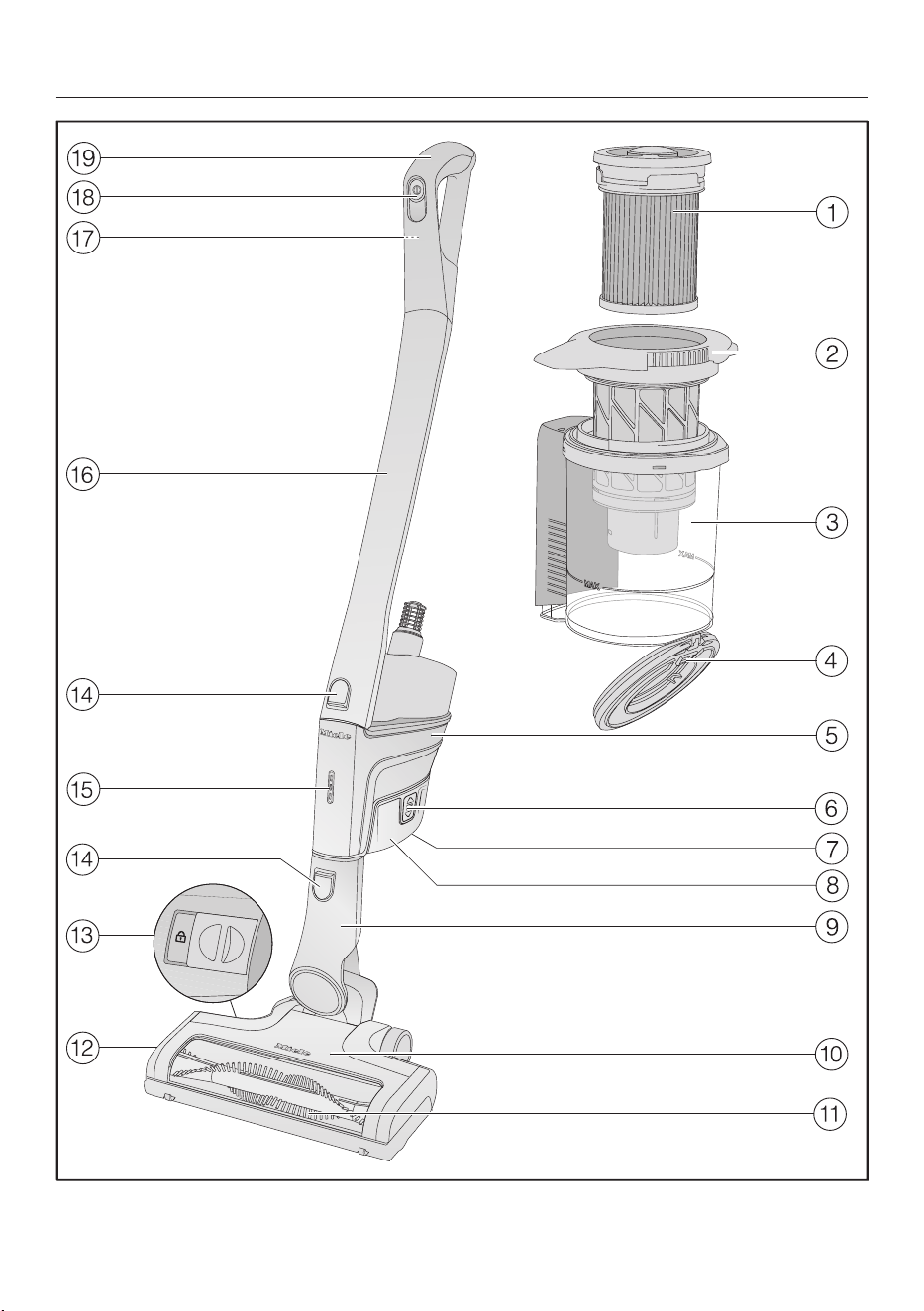
en-CA - Guide to the appliance
17
a
Fine dust filter (HXFSF-2)
b
Pre-filter
c
Dust container
d
Dust container flap
e
PowerUnit with a connection at the bottom for the battery, a connector at the
bottom for the suction tube and Electrobrush, and a connector at the top for the
suction tube and Comforthandle
f
Release catches for battery (on both sides of the battery)
g
Charging socket (at the bottom of the battery)
h
AP01 / AP02 / AP03lithium-ionbattery (HXLA)
i
Electrobrush connector
j
MultiFloorXXLElectrobrush (some models feature BrilliantLight lighting)
k
Removable roller brush
l
Flap
m
Release catch for opening the Electrobrush
n
Release catches
o
Battery charging state indicator
p
Suction tube
q
Release catch for Comforthandle (on the back)
r
On/Off switch with suction power selector
s
Comforthandle

en-CA
18
References to figures
The figures referred to in the sections
are on the fold-out pages at the end of
these operating instructions.
Installation and connection
Assembling the vacuum cleaner
(Fig. 01)
You can assemble the vacuum cleaner in
2 different ways.
You can place the suction tube either
above or below the PowerUnit.
Take care to assemble the vacuum
cleaner exactly as shown in the
diagram.
The advantages of placing the
PowerUnit at the bottom of the
vacuum cleaner are as follows:
- Secure self-standing function possible
(see “Use” – “Self-standing function for
short pauses in vacuuming”)
- Ergonomic (reduced strain on the
wrist)
- Convenient cleaning of large surfaces
The advantages of placing the
PowerUnit at the top of the vacuum
cleaner are as follows:
- Convenient cleaning underneath
furniture
- PowerUnit can be removed quickly
PowerUnit Solo (Fig. 02)
The PowerUnit can be used on its own
without the suction tube and
electrobrush as a quick way of
vacuuming up crumbs and lint in
specific areas.
Useful tip: This configuration is
particularly suitable when using the
three-piece accessory set (see “Using
the accessories supplied”).
Connecting the Comfort handle
(Fig. 03)
Depending on how you decide to
configure your vacuum cleaner, you can
connect the Comforthandle to either
the suction tube or the PowerUnit.
Push the Comfort handle down on to
the suction tube connection from
above until it audibly clicks into place
(left image detail).
Slide the Comfort handle along the
guide line on the dust container
handle and down on to the PowerUnit
connector from above until it audibly
clicks into place (right image detail).
Switch off the vacuum cleaner using
the On/Off switch on the front of the
Comfort handle if you want to
separate the sections.
Press the release catch and remove
the Comforthandle by pulling it
upward (Fig. 04).
Connecting the PowerUnit and the
suction tube (Fig. 05)
Depending on how you decide to
configure your vacuum cleaner, the
suction tube is located either above or
below the PowerUnit.
Slide the suction tube along the guide
line on the dust container handle and
down on to the PowerUnit connector
from above until it audibly clicks into
place (left image detail).
Push the PowerUnit connector down
on to the suction tube from above
until it audibly clicks into place (right
image detail).
Press the release catch to separate
the individual sections from each
other (Fig. 06).

en-CA
19
Inserting the battery (Fig. 07)
Push the battery along the guide lines
until it audibly clicks into place in the
PowerUnit.
If you want to separate the sections
again, press both release catches at
the side of the battery to remove the
battery (Fig. 08).
Connecting the Electrobrush (Fig. 09)
Depending on how you decide to
configure your vacuum cleaner, you can
connect either the PowerUnit connector
or the suction tube connector to the
Electrobrush.
Insert the connector down into the
Electrobrush from above until it
audibly clicks into place.
To separate the individual sections
from each other, press the release
catch on the Electrobrush and pull the
connector out of the Electrobrush
(Fig. 10).
General battery information
The rechargeable battery is supplied not
fully charged.
Charge the battery completely before
using it for the first time. Allow
approximately 4hours for this.
To activate the battery, it is essential to
place it in the PowerUnit when charging
it for the first time.
Once the battery is fully charged, the
battery charging state indicator on the
PowerUnit switches off to conserve
energy.
The maximum charging capacity is
only achieved once the battery has
been charged and run down five times.
A full charge provides enough power for
14minutes if the vacuum cleaner is
used at the maximum power level in its
fully assembled state.
However, if you use the PowerUnit solo
and select the minimum power level,
you can vacuum for up to 60minutes at
a time.
Charging the battery (without wall
mounting) (Fig. 11)
You can store the vacuum cleaner
upright and charge the battery directly.
Before charging the battery for the first
time, you must read the information in
“Installation and connection” –
“General battery information”.
Connect the PowerUnit to the
Electrobrush to provide a secure base
for the vacuum cleaner.
Swing the vacuum cleaner forward
until the Electrobrush connector
audibly clicks into place.
Plug the supplied charging cable into
the charging socket on the bottom of
the battery.
Plug the charger into a power socket.
The charging process will start.
You can read more about this in
“Battery charging state indicator (while
charging)”.

en-CA
20
Charging the battery (with wall
mounting) (Fig. 12)
There are 2 ways to store and charge
the vacuum cleaner in the supplied wall
bracket.
Before charging the battery for the first
time, you must read the information in
“Installation and connection” –
“General battery information”.
You will need a suitable location near a
free power socket for mounting the
appliance on the wall.
Wall mounting (Figs.13+14)
The supplied wall bracket has a
mounting plate with a bag of screws
attached to the back.
Attach the mounting plate to the point
on the wall where you want the wall
mounting to be.
Remove the bag of screws.
Press the release catch at the bottom
of the wall bracket (Fig. 13).
Remove the mounting plate from the
wall bracket by sliding it downward
(Fig. 14).
Attaching the mounting plate
(Figs.15+16)
2 plugs and 2 T20TORX screws are
supplied for attaching the mounting
plate to the wall.
You will also need a battery-operated
screwdriver or a drill (with a drilling
diameter of 1/4" (6mm)).
Depending on how you decide to
configure your vacuum cleaner, select a
distance of 17 3/4" (45cm) or 38 9/16"
(98cm) between the bottom edge of
the mounting plate and the floor (Fig.
15).
Be careful not to damage any cables
laid in the wall.
Attach the mounting plate to the wall
(Fig. 16).
Attaching the charging cable to the
wall bracket (Figs. 17, 18+19)
A cable compartment is located on the
underside of the wall bracket.
Press both release catches on the
underside of the wall bracket and
remove the cable compartment cover
(Fig. 17).
Plug the supplied charging cable into
the opening from above (Fig. 18).
Lay the charging cable in its guide
(Fig. 18).
Refit the cover and lock the cable
compartment (Fig. 19).
Connecting the accessories holder
(if required) (Fig. 20)
An accessories holder is supplied for
storing the three-piece accessory set on
the wall bracket (see “Using the
accessories supplied”).
Push the accessories holder on to the
wall bracket as far as it will go.
Connecting the wall bracket
(Figs.21+22)
Slide the wall bracket down into the
mounting plate from above until it
audibly clicks into place (Fig. 21).
Slide the PowerUnit of the fully
assembled vacuum cleaner, with the
battery inserted, down into the wall
bracket from above (Fig. 22).
Plug the charger into the power
socket.
The charging process will start.

en-CA
21
Battery charging state indicator (while
charging) (Fig. 23)
The battery charging state is displayed
on the PowerUnit.
Battery life Indicator
Approx. 0–34% Bottom light
flashes slowly
Approx. 35–
69%
Bottom light is lit
up; middle light
flashes slowly
Approx. 70–
90%
Bottom and middle
lights are lit up; top
light flashes slowly
Approx. 91–99%
100%
Bottom, middle,
and top lights are lit
up
Switches off
Once the battery is fully charged, the
battery charging state indicator
switches off to conserve energy.
If the battery has not been used for a
long time and has run down, it will go
into safe mode. As a result, the battery
charging state indicator will only
respond after approximately 30–
60minutes when charging in the
PowerUnit.
Battery charging state indicator (while
in use) (Fig. 23)
The battery charging state is displayed
on the PowerUnit.
Battery life Display
Approx. 100–
70%
Top, middle, and
bottom lights are
lit up
Approx. 69–35% Middle and
bottom lights are
lit up
Approx. 34–15% Bottom light is lit
up
Approx. 14–0% Bottom light
flashes slowly
We recommend allowing the battery to
run down completely before recharging
it. In this way, you will benefit from the
battery’s full capacity.

en-CA
22
Using the supplied accessories
(Fig. 24)
Miele offers a range of suitable
accessories for many special modes
(see “Optional accessories”).
Upholstery nozzle XL
Accessory for cleaning upholstery,
mattresses, and cushions.
Crevice nozzle
Accessory for cleaning in folds,
crevices, or corners.
Dusting brush
Accessory for vacuuming skirting
boards, carved furniture, or
ornaments.
The head can be swiveled to
adjust the angle.
d Accessories holder for wall
bracket
For storing the three-piece
accessory set.
Symbols on the holder show where to
attach the different accessories.
You can fit the accessories holder to the
wall bracket (see “Installation and
connection” – “Connecting the
accessories holder”).
Accessories holder for the suction
tube (Fig. 25)
This accessories holder allows you to
carry around 2accessories from the
three-piece accessory set while you
vacuum.
MultiFloorXXLElectrobrush (Fig. 26)
Follow the flooring manufacturer’s
cleaning and care instructions.
Damage caused by trapped
material.
Risk of the flooring getting scratched.
Make sure that there is no coarse dirt
or debris trapped in the bottom of
the Electrobrush, e.g., shards or
stones.
The Electrobrush can be used for daily
cleaning of carpets, rugs, and hard
floors.
Useful tip: The suction tube is not a
convenient option for cleaning carpeted
stairs.
Useful tip: If you ever need to vacuum
up substantial amounts of coarse dirt or
debris, use the PowerUnit solo (see
“Installation and connection” – “Using
the PowerUnit solo”).
HardfloorCaresoftroller(HXHC)
(Figs.27+28)
(depending on model)
Follow the flooring manufacturer’s
cleaning and care instructions.
When fitted with the Hardfloor Care soft
brush, the Electrobrush can be used to
clean delicate hard floors.
Insert the HardfloorCaresoftbrush into
the Electrobrush instead of the roller
brush fitted as standard (Fig. 28).
When you use the Hardfloor Care soft
roller, the Electrobrush power
consumption is automatically set to
the optimum level – this can lead to a
change in the operating noise.
Unlock the cover on the side of the
Electrobrush so that the symbol
becomes visible a.
Lift the cover up as far as it will go b.

en-CA
23
Remove the roller brush that has been
fitted as standard c.
Insert the HardfloorCaresoftroller.
Close and lock the cover.
ElectroCompact handheld brush
(Fig. 29)
(depending on model)
Follow the flooring manufacturer’s
cleaning and care instructions.
Damage caused by trapped
material.
Risk of the flooring getting scratched.
Make sure that there is no coarse dirt
or debris trapped in the bottom of
the handheld brush, e.g., shards or
stones.
The handheld brush is particularly
suitable for intensive cleaning of car
seats and carpeted stairs.
For optimum cleaning results on
upholstery, use the upholstery nozzle
XL.
Useful tip: The suction tube is not a
convenient option for cleaning car seats
or stairs.
Useful tip: If you ever need to vacuum
up substantial amounts of coarse dirt or
debris, use the PowerUnit solo (see
“Installation and connection” – “Using
the PowerUnit solo”).
Additional battery (HXLA)
(depending on model)
Using the additional battery doubles the
amount of time the vacuum cleaner can
be used for.
Before charging for the first time, you
must read the information in
“Installation and connection” –
“General battery information”.
Battery charger cradle (HXLS)
(Fig. 30)
(depending on model)
Before charging for the first time, you
must read the information in
“Installation and connection” –
“General battery information”.
When charging the battery for the first
time, you must use the PowerUnit. As of
the second charging operation, you can
use the battery charger cradle instead.
Push the battery into the charger
cradle until it audibly clicks into place.
Insert the plug into a power socket.
The charging process will start. The
battery charging state indicator flashes
on the left.
You can find out more about the battery
charging state indicator in “Installation
and connection” – “Battery charging
state indicator”.
If you place the run-down battery in
the charger cradle straight after use, it
will only start charging once the
battery has cooled down.
The cooling process can take up to
60minutes. The battery charging state
indicator on the charger cradle will not
respond during this time.

en-CA
24
Use
Switching on and off(Fig. 31)
If you have charged the battery in the
wall bracket, take the vacuum cleaner
out of the wall bracket.
If you have charged the battery
directly, unplug the charging plug from
the charging socket on the bottom of
the battery.
For the best possible cleaning results,
always activate the ComfortClean
function before switching on the
vacuum cleaner (see “Maintenance” –
“Activating the ComfortClean
function”).
Press the On/Off switch on the
Comfort handle.
Regulating the suction power (Fig. 31)
The suction power can be regulated to
suit the type of flooring being cleaned.
Reducing the suction power reduces the
amount of effort required to manoeuvre
the Electrobrush.
There are 3 power levels to choose from
on the Comfort handle:
Min. Lowest power level for light
soiling
Eco Medium power level for
normal soiling
Max. Highest power level for
heavy soiling
The floor covering detection function is
activated at every power level.
The Electrobrush power consumption is
automatically set to the optimum level
based on the type of flooring and roller
brush used – this can lead to a change
in the operating noise.
Illuminating the work area
(depending on model)
The Electrobrush on your vacuum
cleaner is equipped with BrilliantLight to
illuminate the work area.
Self-standing function for short
pauses in vacuuming
(For safety reasons, this function can
only be used when the PowerUnit is
fitted at the bottom of the vacuum
cleaner)
If you are vacuuming with the
PowerUnit fitted at the bottom of the
vacuum cleaner, you can easily interrupt
operation while the appliance is
switched on.
Swing the vacuum cleaner forwards
until the Electrobrush connector
audibly clicks into place.
The vacuum cleaner stays securely
upright, the Electrobrush switches itself
off and the battery is conserved.
If you then unlock the connector on the
Electrobrush, the Electrobrush will
switch on again.
Maintenance
Risk of injury caused by rotating
roller brush.
You can injure yourself on the rotating
roller brush.
Switch the vacuum cleaner off before
doing any maintenance work. Use the
On/Off switch on the Comfort handle
to do this.

en-CA
25
It is recommended to use only genuine
Miele accessories bearing the
“ORIGINAL Miele” logo on the
packaging. Only these will guarantee
the optimum performance of your
vacuum cleaner and the best possible
cleaning results.
Please note that faults and damage
caused by use of accessories which do
not bear the “ORIGINAL Miele” logo
on the packaging are not covered by
the vacuum cleaner warranty.
Filter system (Fig. 32)
Fine dust filter (HXFSF-2)
Pre-filter
Dust container
d Dust container flap
Activating the ComfortClean function
(Fig. 33)
Always run the interim cleaning function
for the fine dust filter before emptying
the dust container. You should also run
it whenever the suction power begins to
drop.
This enables the vacuum cleaner to
achieve the very best cleaning
performance again right away.
The fine dust filter is located in the lid
of the dust container. Twist it
counterclockwise by three 180° turns.
Use the recesses to help you.
You will hear an operating noise, which
is a normal part of how the
ComfortClean function works.
Emptying the dust
container(Figs. 34–38)
Empty the dust container at the latest
when the dust has reached the MAX
marking on the dust container.
Turn the lid of the dust container in
the direction of the arrow as far as the
first stop. Use the grey gripping
surfaces to help you do this (Fig. 34).
Lift the dust container upward to
remove it (Fig. 35).
Provided that no prohibited
substances are present, the contents
of the dust container can be disposed
of with normal household waste.
Hold the dust container close to the
trash can so that as little dust billows
out as possible.
Turn the lid of the dust container in
the direction of the arrow as far as the
next stop. Use the grey gripping
surfaces to help you do this (Fig. 36).
The dust container flap will open and
the dust will fall out (Fig. 37).
If chunks of dust, hair, or coarse debris
do not fall out, remove the pre-filter by
pulling it upward (see “Cleaning the
pre-filter and fine dust filter” below).
Turn the lid of the dust container back
to its original position.
Close the dust container flap, making
sure it clicks into place.
Slide the dust container handle along
the guide line and down onto the
PowerUnit connector from above until
the dust container audibly clicks into
place (Fig. 38).

en-CA
26
Cleaning the pre-filter and fine dust
filter (Figs. 39–42)
Clean both filters thoroughly at least
once every 3 months.
When cleaning them, it is essential to
follow the steps in the order described.
Remove the dust container.
Empty the dust container over a bin.
Turn the lid of the dust container
beyond the stop until the arrow tips
are aligned at the top a (Fig. 39).
Remove the pre-filter by pulling it
upward b (Fig. 39).
Twist the fine dust filter anti-
clockwise by ten 180° turns. Use the
recesses to help you (Fig. 33).
You will hear an operating noise, which
is a normal part of how the
ComfortClean function works.
Twist the fine dust filter clockwise.
Use the recesses to help you (Fig.
40).
Remove the fine dust filter (Fig. 40).
Risk of damage caused by
incorrect cleaning.
The fine dust filter can become
damaged and be less effective as a
result.
Do not clean the fine dust filter with
water and avoid cleaning the inside.
Do not use pointed or sharp-edged
objects to clean the filter. Do not
brush the fine dust filter.
Hold the fine dust filter over a bin.
Carefully knock the fine dust filter
with the rubberized lower edge.
Turn the fine dust filter slightly while
you do this to free the dirt from all of
the crevices.
Risk of damage caused by
incorrect cleaning.
The pre-filter can become damaged
and be less effective as a result.
Do not clean the pre-filter with water.
Do not use pointed or sharp-edged
objects to clean the filter.
Clean the pre-filter with the dusting
brush supplied or with a dry cloth.
After cleaning the fine dust filter and
pre-filter, reinsert the former into the
latter by pressing the round cap on
top of the fine dust filter down as far
as it will go.
To continue achieving the best
possible cleaning results, replace the
fine dust filter (HXFSF-2) with a new
one after approx. 3years.
Reinsert the pre-filter in the dust
container (Fig. 41).
To do this, line up the guides (arrows)
and turn the pre-filter back to its
original position (Fig. 42).
Close the dust container flap, making
sure it clicks into place.
Replace the dust container on the
PowerUnit connector.
Cleaning the dust container
Clean the dust container as required.
Remove the dust container.
Empty the dust container over a bin
and lift the pre-filter upward to
remove it (Fig. 39).
Clean the dust container using water
and mild detergent.

en-CA
27
Dry the dust container carefully.
Reinsert the pre-filter in the dust
container and turn the pre-filter back
to its original position (Figs.41+42).
Replace the dust container on the
PowerUnit connector.
Cleaning the Electrobrush/handheld
brush (depending on model) (Fig. 43)
Disconnect the
Electrobrush/handheld brush from
the vacuum cleaner (Fig. 10).
Place the Electrobrush/handheld
brush upside down on a level, clean
surface.
Use a pair of scissors to cut any
threads or hairs that have wound
themselves around the roller brush. To
guide the scissors, move along the
guide track on the roller brush.
Then run the vacuum cleaner to vacuum
up the cut threads and hairs.
If the small running wheels are very
heavily soiled or blocked, you can
remove them for easier cleaning (not
necessary in the case of the handheld
brush). To remove them, use a flat-
head screwdriver.
Removing the roller brush from the
Electrobrush (Fig. 44)
(Not possible with the handheld brush)
You can take the roller brush out of the
Electrobrush in order to remove
stubborn soiling and clean the inside of
the Electrobrush.
Unlock the cover on the side of the
Electrobrush so that the symbol
becomes visible a.
Lift the cover up as far as it will go b.
Remove the roller brushc.
Remove the roller brush handle if you
identify heavy soiling there d.
Clean the roller brush and the roller
brush handle, and remove any
stubborn soiling inside the
Electrobrush.
Reassemble the Electrobrush in
reverse order.
Replacing the rechargeable battery
An original Miele AP01 / AP02 / AP03
lithium-ion rechargeable battery (HX LA)
is required.
Follow the instructions regarding the
handling and disposal of rechargeable
batteries found in the following
sections: “Warnings and safety
instructions”, “Caring for the
environment”, and “Installation and
connection” (“General battery
information”).

en-CA
28
Fault messages
Risk of injury caused by rotating roller brush.
You can injure yourself on the rotating roller brush.
Switch the vacuum cleaner off before dealing with any problems. Use the On/
Off switch on the Comfort handle to do this.
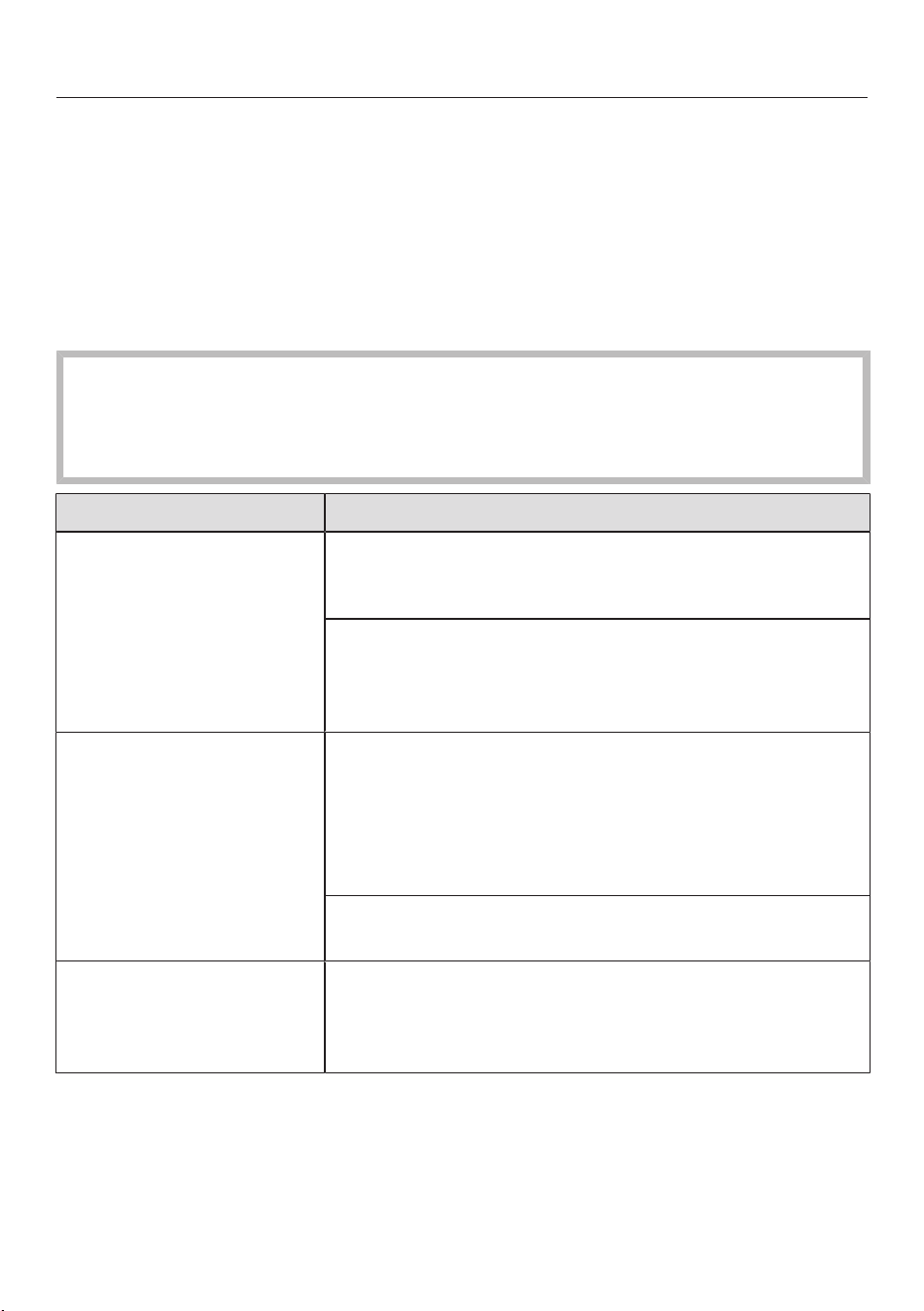
Fault messages are displayed with a quick flashing light on the battery charging
state indicator on the PowerUnit.
Problem Possible cause and solution
Top light is flashing
quickly
“Comfort handle not recognized” error
Remove the Comfort handle and reconnect it (see
“Installation and connection” – “Connecting the
Comfort handle”).
Remove the battery, wait for 10seconds, then
reinsert it.
Middle light is flashing
quickly
“Motor overheating” error
Empty and clean the dust container, pre-filter and
fine dust filter (see “Maintenance”).
Remove the battery, wait for 10seconds, then
reinsert it.
Wait for approximately 30minutes before switching
the vacuum cleaner back on again.
Bottom and top lights
are flashing quickly
Internal system error
Remove the battery, wait for 10seconds, reinsert it,
and charge it.
Bottom and middle
lights are flashing
quickly
“Battery overheating” or “Battery not recognized”
error
Wait for approximately 30minutes before switching
the vacuum cleaner back on again.
Insert an original Miele AP01 / AP02 / AP03
lithium-ion rechargeable battery (HX LA).
en-CA
29
Problem solving guide
Many malfunctions and errors that can occur in daily operation can be easily
remedied. You can save time and money in many cases, as you do not need to
contact Miele Customer Service.
Information to help you rectify malfunctions yourself can be found at
www.miele.com/service.
The following tables are designed to help you to find the cause of a malfunction or
an error and to resolve it.
Risk of injury caused by rotating roller brush.
You can injure yourself on the rotating roller brush.
Switch the vacuum cleaner off before dealing with any problems. Use the On/
Off switch on the Comfort handle to do this.
Problem Possible cause and solution
The cleaning
performance is poor.
The dust container is full.
Empty and clean the dust container (see
“Maintenance”).
The Electrobrush is dirty/blocked.
Clean the Electrobrush (see “Maintenance” –
“Cleaning the Electrobrush” and “Removing the
roller brush from the Electrobrush”).
Cleaning performance is
reduced.
The fine dust filter/pre-filter is soiled.
Run the interim cleaning function for the fine dust
filter (see “Maintenance” – “Activating the
ComfortClean function”).
Clean both filters thoroughly (see “Maintenance” –
“Cleaning the pre-filter and fine dust filter”).
The fine dust filter is worn.
Insert a new fine dust filter (HXFSF-2).
The roller brush is not
rotating.
The roller brush is dirty.
Clean the roller brush (see “Maintenance” –
“Cleaning the Electrobrush” and “Removing the
roller brush from the Electrobrush”).

en-CA
30
Problem Possible cause and solution
The vacuum cleaner
does not start when it is
switched on.
There is no battery inserted or the battery is inserted
incorrectly.
Insert the battery or check how the battery is
positioned (see “Installation and connection” –
“Inserting the battery”).
The rechargeable battery is not sufficiently charged.
Charge the battery exactly as described in these
operating instructions (see “Installation and
connection” – “General battery information” and
“Charging the battery”).
An original Miele battery has not been inserted.
Insert an original Miele AP01 / AP02 / AP03
lithium-ion rechargeable battery (HX LA).
The battery was not placed in the PowerUnit when
charging it for the first time.
To activate the battery, it must be placed in the
PowerUnit the first time it is charged (see
“Installation and connection” – “General battery
information” and “Charging the battery”).
The charging plug is still plugged in.
Pull the plug out of the charging socket on the
bottom of the battery.
The operating noise is
changing during
vacuuming.
The Electrobrush power consumption is automatically
set to the optimum level based on the type of flooring
and roller brush used.
The noise is not unusual – the vacuum cleaner is
functioning normally.
The Electrobrush
switches itself off.
The Electrobrush is overloaded – this can happen on
surfaces like deep-pile carpet.
Switch the vacuum cleaner off and switch it on again
at a reduced suction power level. Use the On/Off
switch on the Comfort handle to do this.
The vacuum cleaner
keeps falling over.
You have configured the vacuum cleaner with the
PowerUnit at the top.
Reassemble the vacuum cleaner so that it is
configured with the PowerUnit at the bottom (see
“Installation and connection” – “Assembling the
vacuum cleaner”).

en-CA
31
Technical Service
Information to help you rectify
malfunctions yourself and about Miele
spare parts can be found at
www.miele.com/service.
Contact in case of a fault
In the event of any faults which you
cannot remedy yourself, please contact
your Miele Dealer or the Miele Service
Department.
Contact information for Miele Service
can be found at the end of this
document.
Maintenance
Risk of injury caused by rotating
roller brush.
You can injure yourself on the rotating
roller brush.
Switch the vacuum cleaner off before
cleaning it. Use the On/Off switch
on the Comfort handle to do this.
Vacuum cleaner and accessories
Risk of electric shock from
voltage.
If moisture gets into the charger,
there is a risk of electric shock.
Do not let the charger get wet.
Follow the special cleaning
instructions for the dust container in
the “Maintenance” section.
The vacuum cleaner and all plastic
accessories can be cleaned with a
commercially available cleaner suitable
for plastic.
Damage due to unsuitable
cleaning agents.
All surfaces are susceptible to
scratching. Contact with unsuitable
cleaning agents can alter or discolour
the external surfaces.
Do not use abrasive cleaning agents,
glass cleaning agents, all-purpose
cleaners, or oil-based conditioning
agents.
Optional accessories
Follow the flooring manufacturer’s
cleaning and care instructions.
It is recommended to use only genuine
Miele accessories bearing the Miele
logo on the packaging. Only these will
guarantee the optimum performance
of your vacuum cleaner and the best
possible cleaning results.
Please note that faults and damage
caused by use of accessories which do
not bear the Miele logo on the
packaging are not covered by the
vacuum cleaner warranty.
Purchasing accessories
Original Miele accessories are available
from the Miele web store, Miele
Service, and your Miele dealer.
Original Miele accessories are identified
by the Miele logo on the packaging.
With 3D4U, Miele also offers free
accessories to download for your 3D
printer (www.miele.ca > Customer
Support > Spare parts & accessories >
3D4U – 3D printing instructions).
en-CA
32
Certain models are supplied as standard
with one or more of the following
accessories.
ElectroCompact handheld brush
(HXSEB)
For intensive cleaning of car seats and
carpeted stairs.
HardfloorCaresoftroller (HXHC)
For cleaning delicate hard floors.
Universal brush (HX-UB)
For gentle vacuuming of books, shelves
or similar.
Slats/radiator brush (SHB30)
For removing dust from radiator ribs,
narrow shelves, or crevices.
Mattress nozzle (SMD10)
For vacuuming mattresses, upholstery,
and their crevices.
Crevice nozzle, 300mm (SFD10)
Extra long crevice nozzle for cleaning in
folds, crevices, and corners.
Crevice nozzle, 560mm (SFD20)
Flexible crevice nozzle for vacuuming
difficult-to-reach areas.
Extendable flexible XL crevice nozzle
(HX-CNXL)
The flexible crevice nozzle can reach
60cm for cleaning hard-to-reach areas.
Hose extension (HX-FSH20)
For increasing the vacuuming radius by
maximum 120cm.
AP01 / AP02 / AP03additional
battery (HXLA)
For doubling the amount of time the
vacuum cleaner can be used for.
Before charging for the first time, you
must read the information in
“Installation and connection” –
“General battery information”.
LS03/LS04 (HXLS) battery charger
cradle
For charging the additional battery
independently of the appliance, i.e.,
while the appliance is in use.
Before charging for the first time, you
must read the information in
“Installation and connection” –
“General battery information”.
Fine dust filter (HXFSF-2)
To continue achieving the best possible
cleaning results, replace the fine dust
filter that is fitted as standard with a
new one after approx. 3years (see
“Maintenance” – “Cleaning the pre-
filter and fine dust filter”).

fr-CA - Table des matières
33
CONSIGNES DE SÉCURITÉ IMPORTANTES........................................................ 35
Avertissements et consignes de sécurité pour la batterieAP01/AP02/AP03,
le chargeur LG01/LG02 et le socle de chargementLS03/LS04 (selon le mo-
dèle)..................................................................................................................................
40
Description de l’appareil.............................................................................................. 46
Protection de l’environnement................................................................................... 48
Références aux illustrations ....................................................................................... 50
Installation et branchement ....................................................................................... 50
Assemblage de l’aspirateur ..........................................................................................
50
PowerUnitSolo..............................................................................................................
50
Raccordement de la poignée Comfort .......................................................................
50
Raccorder le bloc moteur PowerUnit et le tube d’aspiration ..................................
50
Insertion de la batterie ..................................................................................................
51
Raccordement de l’électrobrosse ...............................................................................
51
Renseignements généraux sur la batterie...................................................................
51
Recharge de la batterie (sans fixation murale) ..........................................................
51
Recharge de la batterie (avec fixation murale) ..........................................................
52
Montage mural ...............................................................................................................
52
Indicateur du niveau de charge de la batterie (pendant le chargement) ...............
53
Indicateur du niveau de charge de la batterie (pendant l’utilisation) .....................
53
Porte-accessoires du tube d’aspiration .....................................................................
54
ÉlectrobrosseMultiFloorXXL .....................................................................................
54
Brosse douce HardfloorCare (HXHC) ......................................................................
54
Brosse à main ElectroCompact ..................................................................................
55
Batterie supplémentaire (HXLA).................................................................................
55
Socle de chargement (HXLS) .....................................................................................
55
Utilisation........................................................................................................................ 56
Mise en marche et arrêt ...............................................................................................
56
Réglage de la puissance d’aspiration ..........................................................................
56
Éclairage de la zone de travail.......................................................................................
56
Fonction de maintien autonome pour les courtes pauses.......................................
56
Entretien.......................................................................................................................... 57
Système de filtration .....................................................................................................
57
Activation de la fonctionComfortClean .....................................................................
57
Vidange du réservoir à poussière ................................................................................
57
Nettoyage du premier filtre et du filtre à poussières fines ......................................
58
Nettoyage du réservoir à poussière.............................................................................
59
Nettoyage de l’électrobrosse/la brosse à main (selon le modèle) .........................
59
Remplacement de la batterie rechargeable................................................................
60
Messages d’erreur ........................................................................................................ 61

fr-CA - Table des matières
34
Guide de dépannage .................................................................................................... 62
Service technique ......................................................................................................... 65
Contact en cas d'anomalies .........................................................................................
65
Nettoyage et entretien................................................................................................. 65
Accessoires en option.................................................................................................. 66
Achat d’accessoires .......................................................................................................
66
Brosse universelle (HX-UB)..........................................................................................
66
Suceur plat XL amovible et flexible (HX-CNXL) ........................................................
66
Rallonge (HX-FSH20)...................................................................................................
67
GARANTIE LIMITÉE–Aspirateurs É.-U.................................................................. 68
Garantie restreinte – Aspirateurs Canada............................................................... 69

fr-CA - CONSIGNES DE SÉCURITÉ IMPORTANTES
35
LISEZ ATTENTIVEMENT TOUTES LES INSTRUCTIONS
AVANT D'UTILISER L'APPAREIL
Cet aspirateur est conforme à l’ensemble des exigences
réglementaires locales et nationales en vigueur en ma-
tière de sécurité. Une utilisation inappropriée de l’appareil
peut entraîner des blessures corporelles et des dom-
mages matériels.
Veuillez lire le mode d’emploi avant d’utiliser l’aspirateur
pour la première fois. Il contient des renseignements im-
portants sur la sécurité, l’utilisation et l’entretien de l’ap-
pareil. Vous éviterez ainsi de vous blesser et d’endomma-
ger l’appareil.
Miele vous conseille expressément et vivement de lire et
de suivre les instructions du chapitre «Installation et
branchement» ainsi que les consignes de sécurité et
avertissements.
Miele ne peut pas être tenue pour responsable des bles-
sures et des dommages causés par le non-respect de ces
instructions.
Conservez ce mode d’emploi en lieu sûr afin de pouvoir le
consulter au besoin et remettez-le au prochain proprié-
taire éventuel.
Débranchez toujours l’aspirateur de l’alimentation élec-
trique après utilisation, avant de changer les accessoires,
ainsi que pour toute intervention d’entretien, de net-
toyage et de réparation. Pour ce faire, utilisez l’interrup-
teur Marche/Arrêt situé sur la poignée Comfort.
Utilisation conforme
Conçu pour nettoyer les planchers, cet aspirateur est
prévu pour un usage domestique ou dans un environne-
ment similaire. Cet aspirateur n’est pas adapté à une utili-
sation sur les chantiers de construction.

fr-CA - CONSIGNES DE SÉCURITÉ IMPORTANTES
36
Cet aspirateur n’est pas conçu pour être utilisé à l’exté-
rieur.
Cet aspirateur peut être utilisé pour le nettoyage normal
de la moquette, des tapis et des surfaces dures.
Cet aspirateur est conçu pour une utilisation jusqu'à
4000m (13000pi) d'altitude au-dessus du niveau de la
mer.
L’aspirateur ne doit être utilisé que sur les planchers
secs. Ne passez pas l’aspirateur sur les personnes ou les
animaux. Toute autre utilisation, modification ou altération
est interdite.
Les personnes (y compris les enfants) dont les capacités
physiques, sensorielles ou mentales sont réduites, ou qui
manquent d’expérience ou de connaissances, et qui ne
sont pas en mesure d’utiliser l’aspirateur en toute sécurité
ne peuvent utiliser cet aspirateur que si elles sont surveil-
lées pendant son utilisation ou si on leur a montré com-
ment l’utiliser en toute sécurité et qu’elles comprennent et
reconnaissent les conséquences d’une utilisation incor-
recte.
Utilisez-le uniquement comme décrit dans ce mode
d’emploi.
Utilisez exclusivement les accessoires recommandés par le
fabricant.
Sécurité des enfants
Ne laissez pas les enfants s’approcher de l’aspirateur à
moins d’être supervisés en permanence.
Les enfants de 8ans et plus peuvent utiliser l’aspirateur
sans surveillance uniquement s’ils ont appris à l’utiliser en
toute sécurité. Les enfants doivent être capables de com-
prendre et de reconnaître les dangers potentiels liés à une
utilisation inadéquate.

fr-CA - CONSIGNES DE SÉCURITÉ IMPORTANTES
37
Les enfants ne doivent pas procéder au nettoyage ou à
l’entretien de l’aspirateur sans surveillance.
Assurez-vous que l’aspirateur n’est pas utilisé comme un
jouet. La vigilance s’impose lorsque l’aspirateur est utilisé
en présence d’enfants.
Risque de suffocation! Jetez les emballages, sacs et
autres produits en plastique et gardez-les en tout temps
hors de la portée des enfants.
AVERTISSEMENT
Pour diminuer le risque d'incendie, de décharge élec-
trique ou de blessure, respectez les instructions ci-
après:
Vérifiez la tension nominale de l’aspirateur avant de bran-
cher le cordon d’alimentation dans une prise électrique.
Votre source d’alimentation doit correspondre à la tension
indiquée sur la plaque signalétique située en dessous de
l’aspirateur. N’utilisez que les prises de courant domes-
tiques. N’utilisez jamais de sources d’alimentation en cou-
rant continu. Consultez un électricien professionnel si vous
avez des doutes sur votre source d’alimentation. Le bran-
chement de l’aspirateur à une tension supérieure à celle in-
diquée dans ces instructions peut endommager l’appareil
ou causer des blessures.
Pour réduire le risque de décharge électrique, cet appa-
reil est équipé d’une fiche polarisée (une lame est plus
large que l’autre.) Cette fiche ne s’insère dans une prise po-
larisée que dans un seul sens. Si elle ne s’insère pas com-
plètement dans la prise de courant, inversez la fiche. Si elle
ne s’insère toujours pas, appelez un électricien profession-
nel pour installer la prise appropriée. Ne modifiez en aucun
cas la fiche.

fr-CA - CONSIGNES DE SÉCURITÉ IMPORTANTES
38
Sécurité technique
L’aspirateur fonctionne sur 25,2V.
Il s'agit d'un appareil de classe II , conçu pour la classe
de protection III.
Doté d’une source d’alimentation à très basse tension de
sécurité (TBTS), il protège les utilisateurs des risques de
décharge électrique. Un chargeur de classe II est utilisé
pour recharger l’aspirateur.
Comparez les données de raccordement indiquées sur la
plaque signalétique du chargeur (tension et fréquence ré-
seau) avec celles du réseau électrique. Elles doivent abso-
lument être les mêmes. Sans modification, le chargeur
convient à une fréquence de 50Hz et 60Hz.
L’intensité nominale de la prise électrique doit être 15A.
Avant chaque utilisation, vérifiez que ni l’aspirateur ni
tous les accessoires fournis ne présentent de signes vi-
sibles de dommages. N’utilisez pas un aspirateur ou un ac-
cessoire endommagé.
La brosse électrique Miele Multi Floor XXL et la brosse
manuelle Miele Electro Compact (selon le modèle) sont
des dispositifs motorisés supplémentaires conçus spécia-
lement pour cet aspirateur Miele. L’utilisation de l’aspirateur
avec une brosse électrique ou une brosse manuelle Miele
différente ou d’une autre marque n’est pas autorisée pour
des raisons de sécurité.
Avant et pendant l’utilisation, vérifiez que d’aucune salis-
sure de gros calibre ni débris ne soient coincés/ne se
coincent sous l’électrobrosseMultiFloorXXL ou sous la
brosse à main ElectroCompact (fournie selon le modèle).
Rangez l’aspirateur et tous ses accessoires à une tempé-
rature ambiante comprise entre 0°C (32°F) et 45°C
(113°F).

fr-CA - CONSIGNES DE SÉCURITÉ IMPORTANTES
39
Les réparations ne doivent être effectuées que par un
technicien autorisé, conformément aux normes de sécurité
nationales et locales. Les réparations non autorisées
peuvent causer des blessures ou endommager l’appareil.
Autrement, la garantie peut être annulée.
Les réparations doivent être effectuées exclusivement
par des techniciens autorisés par Miele. Une réparation ou
des travaux réalisés par une personne non compétente
peut mettre les utilisateurs en danger.
Utilisation correcte
N’utilisez pas l’aspirateur sans le réservoir à poussière, le
premier filtre et le filtre à poussières fines.
N’utilisez pas si le cordon d’alimentation ou la fiche sont
endommagés.
Si l’appareil ne fonctionne pas comme prévu, s’il a été
échappé, endommagé, laissé à l’extérieur ou submergé
dans l’eau, retournez-le à un centre de réparation.
Ne mettez aucun objet dans les ouvertures. N’utilisez
pas lorsqu’une ouverture est bloquée; gardez à l’abri de la
poussière, des peluches, des cheveux et de tout objet qui
peut réduire l’écoulement de l’air.
N’aspirez rien qui a brûlé ou qui fume, qu’il soit incandes-
cent ou apparemment éteint (cigarettes, cendres ou
cendres chaudes, etc.).
N’utilisez pas l’aspirateur pour aspirer l’eau, les liquides
ou la saleté humide. Attendez que les tapis ou moquettes
fraîchement nettoyés ou shampouinés soient complète-
ment secs avant d’essayer de passer l’aspirateur.
N’utilisez pas l’aspirateur pour aspirer les particules
d’encre en poudre. L’encre utilisée dans les imprimantes et
les photocopieurs est conductrice d’électricité.

fr-CA - CONSIGNES DE SÉCURITÉ IMPORTANTES
40
N’aspirez pas de liquides ou de gaz inflammables ou
combustibles et ne passez pas l’aspirateur dans les zones
où ces substances sont stockées.
Ne touchez jamais l’électrobrosse MultiFloorXXL ou la
brosse à main ElectroCompact (selon le modèle) lors-
qu’elle tourne.
N’utilisez pas l’électrobrosse MultiFloorXXL ou la
brosse à main ElectroCompact (selon le modèle) à hauteur
de tête.
N’aspirez pas à hauteur de tête et n’approchez pas le
tuyau d’aspiration de la tête d’une personne.
Tenez les cheveux, les vêtements amples, les doigts et
toutes les parties du corps à l’écart des ouvertures et des
parties mobiles.
Soyez particulièrement vigilant lorsque vous nettoyez les
escaliers.
Avertissements et consignes de sécurité pour la batte-
rieAP01/AP02/AP03, le chargeur LG01/LG02 et le
socle de chargementLS03/LS04 (selon le modèle)
Sécurité des enfants
Les personnes (y compris les enfants) dont les capacités
physiques, sensorielles ou mentales sont réduites, ou qui
manquent d’expérience ou de connaissance, et qui ne sont
pas en mesure d’utiliser le chargeurLG01/LG02 ou le socle
de chargementLS03/LS04 en toute sécurité ne peuvent
utiliser cet aspirateur que si elles sont surveillées pendant
son utilisation ou s’il leur a été montré comment l’utiliser en
toute sécurité et qu’elles comprennent et reconnaissent les
conséquences d’une utilisation incorrecte.
Gardez la batterie AP01/AP02/AP03 hors de la portée
des enfants.
fr-CA - CONSIGNES DE SÉCURITÉ IMPORTANTES
41
Ne laissez pas les enfants s’approcher du chargeur
LG01/LG02 ou du socle de chargement LS03/LS04 à
moins qu’ils ne soient surveillés en permanence.
Sécurité technique
La batterieAP01/AP02/AP03, le chargeurLG01/LG02
et le socle de chargementLS03/LS04 sont conçus pour
être utilisés avec l’aspirateurHS19 de Miele. Pour des rai-
sons de sécurité, l’aspirateur ne doit pas être utilisé avec
une batterie, un chargeur ou un socle de chargement d’une
autre marque.
Seuls les chargeursLG01/xx ou LG02/xx fournis ou le
socle de chargementLS03/xx ou LS04/xx fourni ou ache-
té séparément doivent être utilisés pour charger la batte-
rieAP01/AP02/AP03.
xx signifie 01, 02, 03, 04, 05, 06, 07 ou 08 et ces numé-
ros indiquent le modèle de votre chargeurLG01/LG02 et
de votre socle de chargementLS03/LS04.
XX LG01/LS03/LS04 LG02
01 AT, BE, BG, CH, CL, CZ, DE, DK, EE,
ES, FI, FR, GR, HR, HU, IT, KZ, LT,
LU, LV, NL, NO, PL, PT, RO, RS, RU,
SE, SI, SK, TR, UA, ZA
AT, BE, BG, CH, CL, CZ, DE, DK, EE,
ES, FI, FR, GR, HR, HU, IT, KZ, LT,
LU, LV, NL, NO, PL, PT, RO, RS, RU,
SE, SI, SK, TR, UA, ZA
02 AE, HK, IE, MY, SG, UK AE, HK, IE, MY, SG
03 BR, CA, MX, US BR, CA, JP, MX, US
04 AU, NZ AU, NZ
05 CN CN
06 KR KR
07 JP UK
08 IN
Si vous utilisez un adaptateur de prise, assurez-vous qu’il
est approuvé pour un fonctionnement continu.

fr-CA - CONSIGNES DE SÉCURITÉ IMPORTANTES
42
Un fonctionnement permanent ou temporaire est pos-
sible sur un système d’alimentation électrique autonome ou
un système d’alimentation qui n’est pas synchronisé avec
l’alimentation électrique du réseau (parex. réseaux insu-
laires, systèmes auxiliaire). Pour faire fonctionner l’appareil,
le système d’alimentation électrique doit être conforme aux
spécifications de la norme EN50160 ou d’une norme lo-
cale équivalente.
La fonction et le fonctionnement des mesures préventives
fournies dans l’installation électrique domestique et dans
ce produit Miele doivent être conservés en fonctionnement
ponctuel ou en fonctionnement non synchronisé avec l’ali-
mentation électrique du réseau, ou alors les mesures
doivent être remplacées par des mesures équivalentes
dans l’installation. Comme le décrit par exemple la version
actuelle de la norme VDE-AR-E 2510-2 ou une norme lo-
cale équivalente.
Chargez et utilisez la batterie à une température am-
biante comprise entre 0°C (32°F) et 45°C (113°F).
Utiliser la batterie à une température située en-dehors de
cette plage limitera sa performance.
Cessez immédiatement d’utiliser la batterie AP01/
AP02/AP03 si vous sentez une odeur inhabituelle, si du li-
quide s’en échappe, si elle surchauffe considérablement, ou
si elle est décolorée ou déformée. Éliminez immédiatement
la batterie AP01/AP02/AP03 (voir l’avis de sécurité «Éli-
mination de la batterie AP01/AP02/AP03» à la fin de ce
chapitre ainsi que «Protection de l’environnement–Élimi-
nation des batteries usagées»).
Les batteries s’épuisent au fil du temps. Le liquide corro-
sif qui s’y trouve est alors susceptible de fuir. Évitez tout
contact de ce liquide avec les yeux et la peau. En cas de
contact avec les yeux, rincez immédiatement à grande eau
et consultez un médecin.

fr-CA - CONSIGNES DE SÉCURITÉ IMPORTANTES
43
La batterie au lithium-ionAP01/AP02/AP03 est sou-
mise à la législation relative aux marchandises dange-
reuses. L’utilisateur est autorisé à transporter la batte-
rieAP01/AP02/AP03 par la route sans avoir à respecter
d’autres exigences. Veuillez contacter le service technique
Miele avant d’envoyer la batterieAP01/AP02/AP03. En-
voyez uniquement des batteriesAP01/AP02/AP03 non
endommagées et complètement déchargées. Isolez les
contacts métalliques avec du ruban adhésif pour éviter tout
court-circuit. Emballez la batterieAP01/AP02/AP03 de
sorte qu’elle ne puisse pas se déplacer à l’intérieur de l’em-
ballage.
Utilisation correcte
Ne laissez pas tomber ou ne jetez pas la batterie AP01/
AP02/AP03. Pour des raisons de sécurité, cessez d’utiliser
une batterie AP01/AP02/AP03 qui a été endommagée.
Gardez la batterie AP01/AP02/AP03 à l’abri d’une
flamme nue ou de toute autre source de chaleur. Ne ré-
chauffez pas la batterie AP01/AP02/AP03. N’exposez pas
la batterie rechargeable aux rayons directs du soleil.
Ne démontez pas la batterie AP01/AP02/AP03.
Ne causez pas de court-circuit en faisant le pontage des
contacts de la batterie AP01/AP02/AP03, de façon acci-
dentelle ou délibérée.
Ne laissez pas la batterie AP01/AP02/AP03 entrer en
contact avec des liquides.
Élimination de la batterie AP01/AP02/AP03: retirez la
batterie AP01/AP02/AP03 de l’aspirateur. Isolez les
contacts métalliques avec du ruban adhésif pour éviter tout
court-circuit. Jetez la batterie AP01/AP02/AP03 dans un
centre de recyclage municipal. Ne jetez pas la batte-
rieAP01/AP02/AP03 dans vos ordures ménagères nor-
males.

fr-CA - CONSIGNES DE SÉCURITÉ IMPORTANTES
44
Nettoyage
Ne plongez pas l’aspirateur ou ses accessoires dans
l’eau.
L’électrobrosse MultiFloorXXL et la brosse à main Elec-
troCompact (selon le modèle), le bloc moteur PowerUnit,
le tube d’aspiration et la poignée Comfort comportent des
fils électriques. Les fiches de connexion ne doivent pas en-
trer en contact avec de l’eau–il est donc interdit de net-
toyer ces éléments avec un chiffon humide.
Utilisez uniquement un chiffon sec ou légèrement hu-
mide pour nettoyer l’appareil une fois qu’il est débranché,
ainsi que les accessoires.
Exception:
Réservoir à poussière: videz le réservoir à poussière et dé-
posez le pré-filtre. Nettoyez le réservoir à poussière unique-
ment avec une solution d’eau et de détergent doux. En-
suite, séchez bien le réservoir à poussière. Reposez le pré-
filtre dans le réservoir à poussière.

fr-CA - CONSIGNES DE SÉCURITÉ IMPORTANTES
45
Accessoires et pièces de rechange
Utilisez uniquement des accessoires d’origine portant le
logo Miele sur l’emballage. Sinon, le fabricant ne peut pas
garantir la sécurité de ce produit.
Miele ne peut garantir la sécurité de l’appareil que si des
pièces de rechange d’origine Miele sont utilisées. Les com-
posants défectueux ne doivent être remplacés que par des
pièces d’origine Miele.
Transport
L’emballage protège l’aspirateur contre d’éventuels dé-
gâts pendant le transport. Il est conseillé de le conserver
pour le transport futur.
CONSERVEZ CES INSTRUCTIONS
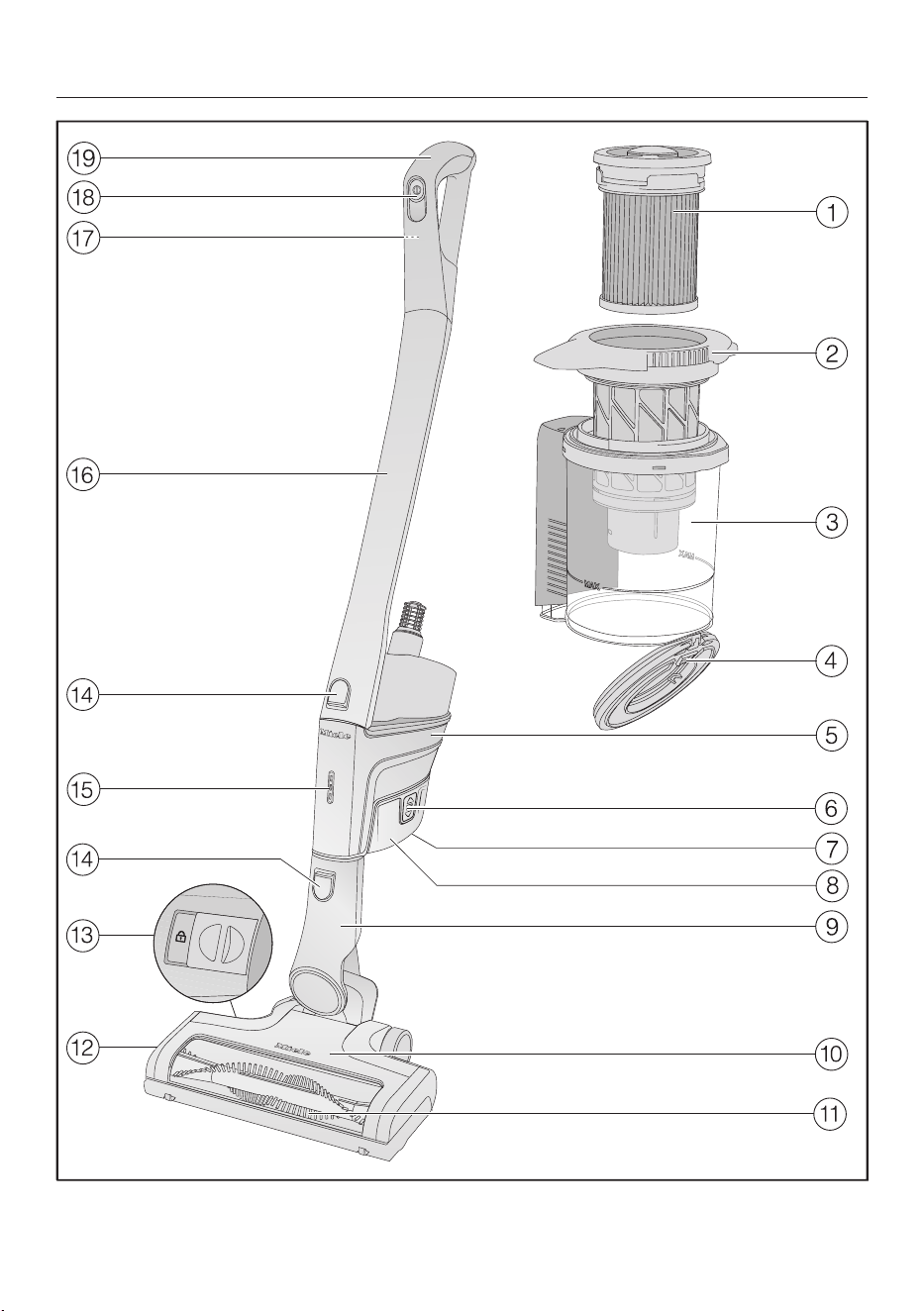
fr-CA - Description de l’appareil
46

fr-CA - Description de l’appareil
47
a
Filtre à poussières fines (HXFSF-2)
b
Premier filtre
c
Réservoir à poussière
d
Rabat du réservoir à poussière
e
Bloc moteur PowerUnit avec un raccordement en bas pour la batterie, un rac-
cord en bas pour le tube d’aspiration et l’électrobrosse, et un raccord en haut
pour le tube d’aspiration et la poignéeComfort
f
Touches de déverrouillage pour la batterie (des deux côtés)
g
Prise de charge (en dessous de la batterie)
h
Batterielithium-ionAP01/AP02/AP03 (HXLA)
i
Raccord de l’électrobrosse
j
ÉlectrobrosseMultiFloorXXL (certains modèles sont équipés d’un éclairage
BrilliantLight)
k
Brosse cylindrique amovible
l
Rabat
m
Touche de déverrouillage pour ouvrir l’électrobrosse
n
Touches de déverrouillage
o
Indicateur du niveau de charge de la batterie
p
Tube d’aspiration
q
Touche de déverrouillage pour la poignée Comfort (au dos)
r
Interrupteur Marche/Arrêt avec sélecteur de puissance d’aspiration
s
Poignée Comfort

fr-CA - Protection de l’environnement
48
Élimination de l’emballage
L’emballage protège l’aspirateur contre
d’éventuels dégâts pendant le transport.
Nous vous recommandons de le
conserver pour l’utiliser lors d’un éven-
tuel transport.
Les matériaux d’emballage utilisés sont
sélectionnés en fonction de critères
écologiques pour en faciliter le recy-
clage. Le recyclage de l’emballage per-
met d’économiser les matières pre-
mières lors de la fabrication et de ré-
duire le volume des déchets dans les
sites d’enfouissement. Assurez-vous
que l’emballage est éliminé conformé-
ment à la réglementation de votre ré-
gion.
Mise au rebut de votre ancien
appareil
Avant de mettre au rebut votre ancien
appareil, retirez le filtre à poussières
fines et jetez-le avec les ordures ména-
gères.
Les appareils électriques et électro-
niques contiennent des matériaux pré-
cieux. Cependant, ils contiennent aussi
des substances, des composés et des
éléments nécessaires au bon fonction-
nement et à la sécurité des appareils. La
manipulation inadéquate de ces maté-
riaux, si vous mettez votre appareil à re-
but avec vos ordures ménagères, peut
poser un risque pour votre santé et l'en-
vironnement. Donc, il est important de
ne pas jeter vos anciens appareils avec
vos ordures ménagères.
Utilisez plutôt les points de collecte mis
en place par votre localité, votre reven-
deur ou Miele pour jeter ou recycler les
appareils électriques ou électroniques.
Vous êtes tenu, par la loi, de supprimer
toutes vos données personnelles figu-
rant sur l'ancien appareil à éliminer.
Jusqu'à son enlèvement, veillez à ce que
votre ancien appareil ne présente aucun
danger pour les enfants.
fr-CA - Protection de l’environnement
49
Mise au rebut des batteries
usagées
De nombreux appareils électriques et
électroniques contiennent des batteries
qui ne doivent pas être jetées avec les
ordures ménagères après utilisation.
Vous êtes légalement tenu d’enlever les
batteries usagées qui ne sont pas scel-
lées dans l’appareil et de les remettre
gratuitement à un point de collecte ap-
proprié (détaillant, etc.). Isolez les
contacts métalliques avec du ruban ad-
hésif pour éviter tout court-circuit. Les
batteries peuvent contenir des substan-
ces qui peuvent être dangereuses pour
la santé et l’environnement.
L’étiquetage de la batterie fournira de
plus amples renseignements. Par
exemple, des batteries contenant du
lithium portent l’inscription «Li-ion».
Le symbole de la poubelle barrée signi-
fie que les batteries ne doivent pas être
jetées avec les ordures ménagères.
Nous sommes également tenus de vous
informer qu’une poubelle barrée d’une
croix qui porte également un ou plu-
sieurs symboles chimiques indique que
la batterie contient du plomb (Pb), du
cadmium (Cd) et/ou du mercure (Hg).
3E&G+J
Les batteries usagées contiennent des
matières premières importantes qui
peuvent être recyclées. L’élimination des
batteries de façon séparée facilite leur
manipulation et leur recyclage.

fr-CA
50
Références aux illustrations
Les illustrations mentionnées dans le
texte figurent sur les pages dépliantes
à la fin de ce mode d’emploi.
Installation et branchement
Assemblage de l’aspirateur (figure 01)
Vous pouvez assembler l’aspirateur de
2manières différentes.
Vous pouvez placer le tube d’aspira-
tion au-dessus ou au-dessous du bloc
moteur PowerUnit.
Veillez à assembler l’aspirateur exacte-
ment comme indiqué sur le schéma.
Les avantages d’installer le bloc moteur
PowerUnit dans la partie inférieure de
l’aspirateur sont les suivants:
- possibilité de fonction parking (voir
«Utilisation»–«Fonction parking
pour les courtes pauses»)
- ergonomie (réduction de la tension sur
le poignet)
- nettoyage pratique de grandes sur-
faces
Les avantages d’installer le bloc moteur
PowerUnit dans la partie supérieure
de l’aspirateur sont les suivants:
- nettoyage pratique sous les meubles
- le bloc moteur PowerUnit peut être
démonté rapidement
PowerUnitSolo(figure 02)
Le PowerUnit peut être utilisé seul, sans
le tube d’aspiration et l’électrobrosse,
pour aspirer rapidement les miettes et
la poussière dans des endroits particu-
liers.
Conseil : Ce mode est particulièrement
adapté à l’utilisation du jeu de trois ac-
cessoires (voir «Utilisation des acces-
soires fournis»).
Raccordement de la poignée Comfort
(figure 03)
En fonction de la configuration que vous
avez choisie pour votre aspirateur, vous
pouvez raccorder la poignéeComfort
soit au tube d’aspiration, soit au bloc
moteur PowerUnit.
Appuyez sur la poignée Comfort sur le
raccord du tube d’aspiration jusqu’à
ce qu’elle s’enclenche avec un déclic
(détail de l’image de gauche).
Faites glisser la poignée Comfort le
long de la ligne guide de la poignée du
réservoir à poussière et vers le bas sur
le raccord du bloc moteur PowerUnit
jusqu’à ce qu’elle s’enclenche avec un
déclic (détail de l’image de droite).
Éteignez l’aspirateur à l’aide de l’inter-
rupteur Marche/Arrêt situé à l’avant
de la poignéeComfort si vous souhai-
tez détacher les sections.
Appuyez sur la touche de déverrouil-
lage et retirez la poignéeComfort en
la tirant vers le haut (figure 04).
Raccorder le bloc moteur PowerUnit
et le tube d’aspiration (figure 05)
Selon la configuration que vous avez
choisie pour votre aspirateur, le tube
d’aspiration se trouve au-dessus ou au-
dessous du bloc moteur PowerUnit.
Faites glisser le tube d’aspiration le
long de la ligne guide de la poignée du
réservoir à poussière et vers le bas sur
le raccord du bloc moteur PowerUnit
jusqu’à ce qu’il s’enclenche avec un
déclic (détail de l’image de gauche).
Poussez le raccord du bloc moteur
PowerUnit vers le bas sur le tube
d’aspiration jusqu’à ce qu’il s’en-
clenche avec un déclic (détail de
l’image de droite).

fr-CA
51
Pour séparer les différentes sections,
appuyez sur la touche de déverrouil-
lage (figure 06).
Insertion de la batterie (figure 07)
Poussez la batterie le long des lignes
guides jusqu’à ce qu’elle s’enclenche
avec un déclic dans le bloc moteur
PowerUnit.
Si vous voulez séparer à nouveau les
sections, appuyez sur les touches de
déverrouillage sur le côté de la batte-
rie pour la retirer (figure 08).
Raccordement de l’électrobrosse
(figure 09)
En fonction de la configuration que vous
avez choisie pour votre aspirateur, vous
pouvez raccorder soit le raccord du bloc
moteur PowerUnit soit le raccord du
tube d’aspiration à l’électrobrosse.
Insérez le raccord dans l’élec-
trobrosse par le haut jusqu’à ce qu’il
s’enclenche avec un déclic.
Pour séparer les différentes sections,
appuyez sur la touche de déverrouil-
lage de l’électrobrosse et retirez le
raccord de l’électrobrosse (figure 10).
Renseignements généraux sur la bat-
terie
À la livraison, la batterie rechargeable
n’est pas complètement chargée.
Chargez complètement la batterie avant
sa première utilisation. Prévoyez environ
4heures pour qu’elle soit complète-
ment chargée.
Pour activer la batterie, il est essentiel
de la mettre en place dans le bloc mo-
teur PowerUnit lorsqu’elle charge pour
la première fois.
Une fois la batterie complètement char-
gée, l’indicateur du niveau de charge de
la batterie sur le bloc moteur PowerUnit
s’éteint pour économiser l’énergie.
La capacité de charge maximale n’est
atteinte qu’une fois que la batterie a
été chargée et déchargée cinqfois.
Une charge complète fournit suffisam-
ment d’énergie pour 14minutes si l’aspi-
rateur est utilisé au niveau de puissance
maximum dans son état entièrement
assemblé.
Cependant, si vous utilisez le bloc mo-
teur PowerUnit Solo et que vous sélec-
tionnez le niveau de puissance mini-
mum, vous pouvez passer l’aspirateur
jusqu’à 60minutes sans interruption.
Recharge de la batterie (sans fixation
murale) (figure 11)
Vous pouvez ranger l’aspirateur à la ver-
ticale et charger directement la batterie.
Avant de charger la batterie pour la
première fois, vous devez lire les infor-
mations figurant dans la section «Ins-
tallation et branchement»–«Rensei-
gnements généraux sur la batterie».
Raccordez le bloc moteur PowerUnit
à l’électrobrosse pour créer une base
sûre pour l’aspirateur.
Faites pivoter l’aspirateur vers l’avant
jusqu’à ce que le raccord de l’élec-
trobrosse s’enclenche avec un déclic.
Branchez le câble de charge fourni
dans la prise de charge située au bas
de la batterie.
Branchez le chargeur sur une prise de
courant.
Le processus de chargement com-
mence.

fr-CA
52
Pour de plus amples informations à ce
sujet, consultez «Indicateur du niveau
de charge de la batterie (pendant le
chargement)».
Recharge de la batterie (avec fixation
murale) (figure 12)
Il existe 2manières de ranger et charger
l’aspirateur sur le support mural.
Avant de charger la batterie pour la
première fois, vous devez lire les infor-
mations figurant dans la section «Ins-
tallation et branchement»–«Rensei-
gnements généraux sur la batterie».
Vous aurez besoin d’un endroit appro-
prié près d’une prise électrique libre
pour le montage mural de l’appareil.
Montage mural (figures 13 + 14)
Le support mural fourni comporte une
plaque de montage et un sachet de vis
fixé à l’arrière.
Fixez la plaque de montage sur le mur à
l’endroit qui vous convient.
Retirez le sachet de vis.
Appuyez sur la touche de déverrouil-
lage située au bas du support mural
(figure 13).
Retirez la plaque de montage du sup-
port mural en la faisant glisser vers le
bas (figure 14).
Fixation de la plaque de montage
(figures 15 + 16)
2chevilles et 2vis T20TORX sont four-
nies pour fixer la plaque de montage au
mur.
Vous aurez également besoin d’un
tournevis électrique à batterie ou d’une
perceuse (avec une mèche de 6mm
(1/4 po)).
En fonction de la configuration que vous
avez choisie pour votre aspirateur, choi-
sissez une distance de 45cm (173/4
po) ou 98cm (389/16 po) entre le bord
inférieur de la plaque de montage et le
plancher (figure 15).
Faites attention à ne pas percer un
câble passant dans le mur.
Fixez la plaque de montage au mur (fi-
gure 16).
Fixation du câble de charge au support
mural (figures 17, 18 + 19)
Un compartiment à câble se trouve
sous le support mural.
Appuyez sur les deuxtouches de dé-
verrouillage situées sous le support
mural et retirez le capot du comparti-
ment à câble (figure 17).
Branchez le câble de charge fourni
dans l’ouverture par le haut (figure
18).
Faites passer le câble de charge dans
son guide (figure 18).
Remettez le capot en place et ver-
rouillez le compartiment à câble (fi-
gure 19).
Raccordement du porte-accessoires
(si nécessaire) (figure 20)
Un porte-accessoires est fourni pour
ranger le jeu de trois accessoires sur le
support mural (voir «Utilisation des ac-
cessoires fournis»).
Poussez le porte-accessoires sur le
support mural jusqu’à la butée.

fr-CA
53
Raccordement du support mural
(figures 21 + 22)
Faites glisser le support mural vers le
bas dans la plaque de montage
jusqu’à ce qu’il s’enclenche avec un
déclic (figure 21).
Faites glisser le bloc moteur
PowerUnit de l’aspirateur entièrement
assemblé, avec la batterie insérée,
vers le bas dans le support mural (fi-
gure 22).
Branchez le chargeur sur la prise de
courant.
Le processus de chargement com-
mence.
Indicateur du niveau de charge de la
batterie (pendant le chargement)
(figure 23)
Le niveau de charge de la batterie est in-
diqué sur le bloc moteur PowerUnit.
Durée de vie de
la batterie
Indicateur
Env. 0–34% Le voyant du bas
clignote lentement
Env. 35–69% Le voyant du bas
est allumé; celui du
milieu clignote len-
tement
Env. 70–90% Les voyants du bas
et du milieu sont al-
lumés; le voyant du
haut clignote lente-
ment
Env. 91–99%
100%
Les voyant du bas,
du milieu et du
haut sont allumés
Éteint
Une fois la batterie complètement char-
gée, l’indicateur du niveau de charge de
la batterie s’éteint pour économiser
l’énergie.
Si la batterie n’a pas été utilisée pen-
dant longtemps et qu’elle est déchar-
gée, elle passe en mode de sécurité.
L’indicateur du niveau de charge de la
batterie ne réagit alors qu’après env.
30 à 60minutes de chargement dans
le bloc moteur PowerUnit.
Indicateur du niveau de charge de la
batterie (pendant l’utilisation)
(figure 23)
Le niveau de charge de la batterie est in-
diqué sur le bloc moteur PowerUnit.
Durée de vie de
la batterie
Affichage
Env. 100–70% Les voyant du
haut, du milieu et
du bas sont allu-
més
Env. 69–35% Les voyants du
milieu et du bas
sont allumés
Env. 34–15% Le voyant du bas
est allumé
Env. 14–0% Le voyant du bas
clignote lente-
ment
Nous recommandons de laisser la bat-
terie se décharger complètement avant
de la recharger. Cela vous permettra de
profiter de la pleine capacité de la batte-
rie.

fr-CA
54
Utilisation des accessoires four-
nis (figure 24)
Miele propose une gamme d’acces-
soires adaptés à de nombreuses fonc-
tions spéciales (voir «Accessoires en
option»).
Embout à coussins XL
Pour nettoyer meubles rembour-
rés, matelas et coussins.
Embout à interstices
Pour nettoyer dans les plis, fentes
et recoins.
Brosse à meuble
Pour aspirer plinthes, meubles
sculptés ou objets de décoration.
La tête pivote pour ajuster l’angle.
d Porte-accessoires pour support
mural
Pour ranger le jeu de trois acces-
soires.
Les symboles sur le porte-accessoires
indiquent l’emplacement des différents
accessoires.
Vous pouvez fixer le porte-accessoires
sur le support mural (voir «Installation
et branchement–Raccordement du
porte-accessoires»).
Porte-accessoires du tube d’aspiration
(figure 25)
Ce porte-accessoires vous permet de
transporter avec vous deuxaccessoires
du jeu de troisaccessoires pendant que
vous passez l’aspirateur.
ÉlectrobrosseMultiFloorXXL
(figure 26)
Veuillez suivre les consignes de net-
toyage et d’entretien du fabricant du
revêtement de sol.
Dommages causés par du maté-
riau coincé.
Risque d’éraflure du revêtement de
sol.
Vérifiez qu’il n’y a pas de salissures
de gros calibre ni de débris coincés
sous l’électrobrosse, parex. des
éclats de verre ou des pierres.
L’électrobrosse peut être utilisée pour le
nettoyage quotidien des moquettes, ta-
pis et sols durs.
Conseil : Le tube d’aspiration n’est pas
une option pratique pour nettoyer les
escaliers revêtus de moquette.
Conseil : Si vous avez besoin d’aspirer
une quantité substantielle de salissures
de gros calibre ou de débris, utilisez le
bloc moteur PowerUnit Solo (voir «Ins-
tallation et branchement»–«Utilisa-
tion du bloc moteur PowerUnitSolo»).
Brosse douce HardfloorCare (HXHC)
(figures 27 + 28)
(selon le modèle)
Veuillez suivre les consignes de net-
toyage et d’entretien du fabricant du
revêtement de sol.
Lorsqu’elle est équipée de la brosse
douce HardfloorCare, l’électrobrosse
peut être utilisée pour nettoyer les sols
durs délicats.
Insérez la brosse douce HardfloorCare
dans l’électrobrosse au lieu de la brosse
cylindrique standard (figure 28).
Lorsque vous utilisez la brosse douce
HardfloorCare, la puissance de l’élec-
trobrosse est automatiquement réglée
sur le niveau optimal, ce qui peut en-
traîner une modification du bruit de
fonctionnement.

fr-CA
55
Déverrouillez le capot sur le côté de
l’électrobrosse de sorte que le sym-
bole devienne visible a.
Soulevez le capot jusqu’au maximum
b.
Retirez la brosse cylindrique fournie
avec l’aspirateurc.
Insérez la brosse douce Hard-
floorCare.
Fermez et verrouillez le capot.
Brosse à main ElectroCompact
(figure 29)
(selon le modèle)
Veuillez suivre les consignes de net-
toyage et d’entretien du fabricant du
revêtement de sol.
Dommages causés par du maté-
riau coincé.
Risque d’éraflure du revêtement de
sol.
Vérifiez qu’il n’y a pas de salissures
de gros calibre ni de débris coincés
sous la brosse à main, parex. des
éclats de verre ou des pierres.
La brosse à main convient particulière-
ment bien au nettoyage intensif des
sièges de voiture et des escaliers revê-
tus de moquette.
Pour des résultats de nettoyage opti-
maux sur les tissus d’ameublement,
utilisez l’embout à coussinsXL.
Conseil : Le tube d’aspiration n’est pas
une option pratique pour nettoyer les
sièges de voiture ou les escaliers.
Conseil : Si vous avez besoin d’aspirer
une quantité substantielle de salissures
de gros calibre ou de débris, utilisez le
bloc moteur PowerUnit Solo (voir «Ins-
tallation et branchement»–«Utilisa-
tion du bloc moteur PowerUnitSolo»).
Batterie supplémentaire (HXLA)
(selon le modèle)
L’utilisation de la batterie supplémentai-
re permet de doubler la durée d’utilisa-
tion de l’aspirateur.
Avant de charger pour la première fois,
vous devez lire les informations figu-
rant dans la section «Installation et
branchement»–«Renseignements
généraux sur la batterie».
Socle de chargement (HXLS)
(figure 30)
(selon le modèle)
Avant de charger pour la première fois,
vous devez lire les informations figu-
rant dans la section «Installation et
branchement»–«Renseignements
généraux sur la batterie».
Il faut utiliser le bloc moteur PowerUnit
pour charger la batterie pour la première
fois. Vous pouvez utiliser le socle de
chargement à partir de la deuxième
charge.
Poussez la batterie dans le socle de
chargement jusqu’à ce qu’elle s’en-
clenche avec un déclic.
Insérez la fiche dans une prise de
courant.
Le processus de chargement com-
mence. L’indicateur du niveau de charge
de la batterie clignote à gauche.
Vous trouverez de plus amples informa-
tions sur l’indicateur du niveau de

fr-CA
56
charge de la batterie dans «Installation
et branchement»–«Indicateur du ni-
veau de charge de la batterie».
Si vous placez la batterie déchargée
dans le socle de chargement juste
après l’avoir utilisée, elle ne commen-
cera à charger que lorsqu’elle aura re-
froidi.
Le processus de refroidissement peut
durer jusqu’à 60minutes. Pendant ce
temps, l’indicateur du niveau de
charge de la batterie sur le socle de
chargement ne réagit pas.
Utilisation
Mise en marche et arrêt(figure 31)
Si vous avez chargé la batterie sur le
support mural, retirez l’aspirateur du
support mural.
Si vous avez chargé la batterie direc-
tement, débranchez la fiche de charge
de la prise de charge au bas de la bat-
terie.
Pour obtenir les meilleurs résultats de
nettoyage possibles, activez toujours
la fonctionComfortClean avant de
mettre en marche l’aspirateur (voir
«Entretien»–«Activation de la fonc-
tionComfortClean»).
Appuyez sur l’interrupteur Marche/Ar-
rêt situé sur la poignée Comfort.
Réglage de la puissance d’aspiration
(figure 31)
La puissance d’aspiration peut être ré-
glée selon le type de sol à nettoyer.
Lorsque vous réduisez la puissance
d’aspiration, l’électrobrosse devient plus
facile à manœuvrer.
Vous pouvez choisir 3niveaux de puis-
sance sur la poignée Comfort:
Min. Niveau de puissance le plus
bas pour les salissures lé-
gères
Eco Niveau de puissance moyen
pour les salissures normales
Max. Niveau de puissance le plus
élevé pour les salissures im-
portantes
La fonction de détection des revête-
ments de sol est activée à tous les ni-
veaux de puissance.
La puissance de l’électrobrosse est au-
tomatiquement réglée sur le niveau op-
timal en fonction du type de revêtement
de sol et de la brosse cylindrique utili-
sée, ce qui peut entraîner une modifica-
tion du bruit de fonctionnement.
Éclairage de la zone de travail
(selon le modèle)
L’électrobrosse de votre aspirateur est
équipée de l’éclairage BrilliantLight pour
éclairer la zone de travail.
Fonction de maintien autonome pour
les courtes pauses
(Pour des raisons de sécurité, cette
fonction ne peut être utilisée que
lorsque le bloc moteur PowerUnit est
installé dans la partie inférieure de l’as-
pirateur)
Si vous passez l’aspirateur avec la
PowerUnit installée dans la partie infé-
rieure de l’aspirateur, vous pouvez facile-
ment interrompre le fonctionnement
lorsque l’appareil est allumé.
Faites pivoter l’aspirateur vers l’avant
jusqu’à ce que le raccord de l’élec-
trobrosse s’enclenche avec un déclic.
L’aspirateur reste bien en place, l’élec-
trobrosse s’éteint et l’autonomie de la
batterie est préservée.

fr-CA
57
Si vous déclenchez ensuite le raccord
de l’électrobrosse, celle-ci se remettra
en marche.
Entretien
Risque de blessures dues à la ro-
tation de la brosse cylindrique.
Vous pouvez vous blesser sur la
brosse cylindrique qui tourne.
Mettez l’aspirateur hors tension
avant d’effectuer tout travail d’entre-
tien. Pour cela, utilisez l’interrupteur
marche-arrêt situé sur la poignée
Comfort.
Nous recommandons l’utilisation ex-
clusive d’accessoires d’origine portant
le logo «ORIGINAL Miele» sur l’em-
ballage. Seuls ces accessoires vous
garantissent l’efficacité optimale de
votre aspirateur et les meilleurs résul-
tats de nettoyage possibles.
Veuillez noter que les erreurs et dom-
mages résultant de l’utilisation d’ac-
cessoires qui ne portent pas le logo
«ORIGINAL Miele» ne seront pas
couverts par la garantie de l’aspirateur.
Système de filtration (figure 32)
Filtre à poussières fines
(HXFSF-2)
Premier filtre
Réservoir à poussière
d Rabat du réservoir à poussière
Activation de la fonctionCom-
fortClean (figure 33)
Exécutez toujours la fonction de net-
toyage intermédiaire pour le filtre à
poussières fines avant de vider le réser-
voir à poussière. Vous devez également
l’exécuter chaque fois que la puissance
d’aspiration commence à baisser.
Cela permet à l’aspirateur de toujours
fournir la meilleure performance de net-
toyage.
Le filtre à poussières fines se trouve
dans le couvercle du réservoir à pous-
sière. Faites-le tourner dans le sens
antihoraire de troistours à 180°. Utili-
sez les renfoncements pour vous ai-
der.
Vous entendrez un bruit, qui est normal
et fait partie de la façon dont la fonc-
tionComfortClean marche.
Vidange du réservoir à poussière
(figures 34-38)
Videz le réservoir à poussière au plus
tard lorsque la poussière a atteint le re-
père MAX.
Tournez le couvercle du réservoir à
poussière dans le sens de la flèche
jusqu’à la première butée. Utilisez les
surfaces de saisie grises pour vous ai-
der dans cette opération (figure 34).
Soulevez le réservoir à poussière pour
le retirer (figure 35).
Le contenu du réservoir à poussière
peut être jeté avec les ordures ména-
gères normales, tant qu’il ne contient
pas de substances interdites.
Tenez le réservoir à poussière au-des-
sus de la poubelle de sorte à réduire
les nuages de poussière autant que
possible.
Tournez le couvercle du réservoir à
poussière dans le sens de la flèche
jusqu’à la butée suivante. Utilisez les
surfaces de saisie grises pour vous ai-
der dans cette opération (figure 36).
Le rabat du réservoir s’ouvre et la pous-
sière tombe (figure 37).

fr-CA
58
Si des agglomérations de poussière,
de cheveux ou de débris de gros ca-
libre restent dans le réservoir, retirez le
premier filtre en le tirant vers le haut
(voir «Nettoyage du premier filtre et
du filtre à poussières fines» ci-des-
sous).
Tournez le couvercle du réservoir à
poussière pour le remettre dans sa
position d’origine.
Refermez le rabat du réservoir à pous-
sière en vous assurant qu’il s’en-
clenche.
Faites glisser la poignée du réservoir à
poussière le long de la ligne guide et
vers le bas sur le raccord du bloc mo-
teur PowerUnit jusqu’à ce que le ré-
servoir s’enclenche avec un déclic (fi-
gure 38).
Nettoyage du premier filtre et du filtre
à poussières fines (figure 39-42)
Nettoyez les deux filtres soigneusement
au moins tous les 3mois.
Lorsque vous les nettoyez, il est es-
sentiel de suivre les étapes dans
l’ordre indiqué.
Retirez le réservoir à poussière.
Videz-le au-dessus d’une poubelle.
Tournez le couvercle du réservoir à
poussière au-delà de la butée, jusqu’à
ce que les pointes de flèche soient
alignées en haut a (figure 39).
Retirez le premier filtre en le tirant
vers le haut b (figure 39).
Faites tourner le filtre à poussières
fines dans le sens antihoraire de
dixtours à 180°. Utilisez les renfonce-
ments pour vous aider (figure 33).
Vous entendrez un bruit, qui est normal
et fait partie de la façon dont la fonc-
tionComfortClean marche.
Faites tourner le filtre à poussières
fines dans le sens horaire. Utilisez les
renfoncements pour vous aider (figure
40).
Enlevez le filtre à poussières fines (fi-
gure 40).
Risque de dommages dus à un
nettoyage incorrect.
Le filtre à poussières fines peut être
endommagé et donc moins efficace.
Ne nettoyez pas le filtre à poussières
fines à l’eau, et évitez d’en nettoyer
l’intérieur. N’utilisez pas d’objets
pointus ou tranchants pour nettoyer
le filtre. Ne brossez pas le filtre à
poussières fines.
Tenez le filtre à poussières fines au-
dessus d’une poubelle.
Tapez délicatement le bord inférieur
caoutchouté du filtre à poussières
fines.
Tournez légèrement le filtre pendant
cette opération afin de déloger les
poussières de tous les recoins.
Risque de dommages dus à un
nettoyage incorrect.
Le premier filtre peut être endomma-
gé et donc moins efficace.
Ne nettoyez pas le premier filtre à
l’eau. N’utilisez pas d’objets pointus
ou tranchants pour nettoyer le filtre.
Nettoyez le premier filtre à l’aide de la
brosse à meuble fournie ou avec un
chiffon sec.

fr-CA
59
Après avoir nettoyé le filtre à pous-
sières fines et le premier filtre, réinsé-
rez le premier dans le deuxième en
appuyant sur le cache rond en haut du
filtre à poussières fines jusqu’à la bu-
tée.
Pour des résultats de nettoyage opti-
maux, remplacez le filtre à poussières
fines (HXFSF-2) par un neuf au bout
de 3ans environ.
Réinsérez le premier filtre dans le ré-
servoir à poussière (figure 41).
Pour ce faire, alignez les guides
(flèches) et tournez le premier filtre
pour le remettre dans sa position ini-
tiale (figure 42).
Refermez le rabat du réservoir à pous-
sière en vous assurant qu’il s’en-
clenche.
Replacez le réservoir à poussière sur
le raccord du bloc moteur PowerUnit.
Nettoyage du réservoir à poussière
Nettoyez le réservoir à poussière selon
les besoins.
Retirez le réservoir à poussière.
Videz le réservoir à poussière au-des-
sus d’une poubelle et soulevez le pre-
mier filtre pour le retirer (figure 39).
Nettoyez le réservoir à poussière avec
de l’eau et un détergent doux.
Séchez bien le réservoir à poussière.
Réinsérez le premier filtre dans le ré-
servoir à poussière et tournez le pre-
mier filtre pour le remettre dans sa
position initiale (figures 41 + 42).
Replacez le réservoir à poussière sur
le raccord du bloc moteur PowerUnit.
Nettoyage de l’électrobrosse/la
brosse à main (selon le modèle)
(figure 43)
Séparez l’électrobrosse/la brosse à
main de l’aspirateur (figure 10).
Placez l’électrobrosse/la brosse à
main à l’envers sur une surface plane
et propre.
À l’aide d’une paire de ciseaux, cou-
pez les fils ou les cheveux qui se sont
enroulés autour de la brosse cylin-
drique. Pour guider les ciseaux, dépla-
cez-les le long de la rainure sur la
brosse cylindrique.
Puis utilisez l’aspirateur pour aspirer les
fils et cheveux coupés.
Si les roulettes sont très sales ou blo-
quées, vous pouvez les retirer pour les
nettoyer plus facilement (cela n’est
pas nécessaire pour la brosse à main).
Pour les retirer, utilisez un tournevis
plat.
Dépose de la brosse cylindrique de
l’électrobrosse (figure 44)
(Cela n’est pas possible avec la brosse à
main)
Vous pouvez retirer la brosse cylindrique
de l’électrobrosse pour éliminer les sa-
lissures tenaces et nettoyer l’intérieur
de l’électrobrosse.
Déverrouillez le capot sur le côté de
l’électrobrosse de sorte que le sym-
bole devienne visible a.
Soulevez le capot jusqu’au maximum
b.
Retirez la brosse cylindriquec.
Retirez la poignée de la brosse cylin-
drique si vous y voyez des salissures
importantes d.

fr-CA
60
Nettoyez la brosse cylindrique et sa
poignée, et éliminez toute salissure
tenace de l’intérieur de l’élec-
trobrosse.
Remontez l’électrobrosse dans l’ordre
inverse.
Remplacement de la batterie rechar-
geable
Il est nécessaire d’utiliser une batterie
rechargeable au lithium-ionAP01/
AP02/AP03Miele d’origine (HXLA).
Suivez les consignes concernant la
manipulation et l’élimination des batte-
ries rechargeables qui figurent dans les
sections suivantes: «Consignes de
sécurité et avertissements», «Pro-
tection de l’environnement» et «Ins-
tallation et branchement» («Rensei-
gnements généraux sur la batterie»).

fr-CA
61
Messages d’erreur
Risque de blessures dues à la rotation de la brosse cylindrique.
Vous pouvez vous blesser sur la brosse cylindrique qui tourne.
Mettez l’aspirateur hors tension avant de résoudre une anomalie quelconque.
Pour cela, utilisez l’interrupteur marche-arrêt situé sur la poignée Comfort.
Les messages d’erreur sont affichés par un clignotement rapide du témoin du ni-
veau de charge de la batterie sur le bloc moteur PowerUnit.
Problème Cause et solution possibles
Le voyant du haut cli-
gnote rapidement
Erreur «Poignée Comfort non reconnue»
Retirez la poignée Comfort et remettez-la (voir
«Installation et branchement–Raccordement de la
poignée Comfort»).
Retirez la batterie, attendez 10secondes, puis réin-
sérez-la.
Le voyant du milieu cli-
gnote rapidement
Erreur de «Surchauffe du moteur»
Videz et nettoyez le réservoir à poussière, le premier
filtre et le filtre à poussières fines (voir «Entre-
tien»).
Retirez la batterie, attendez 10secondes, puis réin-
sérez-la.
Attendez environ 30minutes avant de remettre l’as-
pirateur en marche.
Les voyants du bas et du
haut clignotent rapide-
ment
Erreur système interne
Retirez la batterie, attendez 10secondes, réinsérez-
la et rechargez-la.
Les voyants du bas et du
milieu clignotent rapide-
ment
Erreur «Batterie en surchauffe» ou «Batterie non re-
connue»
Attendez environ 30minutes avant de remettre l’as-
pirateur en marche.
Insérez une batterie rechargeable au lithium-ion
AP01/AP02/AP03 Miele d’origine (HX LA).
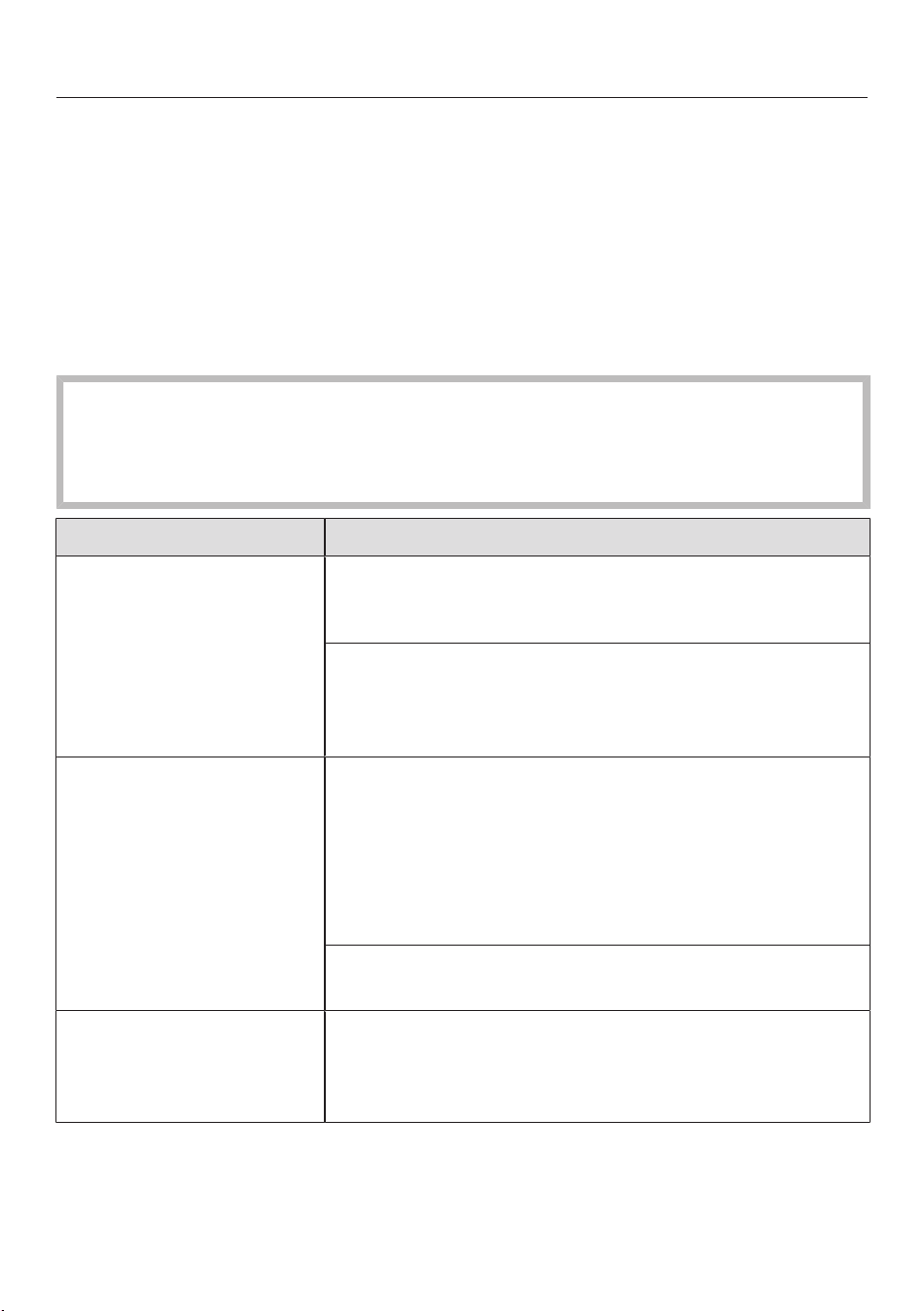
fr-CA
62
Guide de dépannage
De nombreux dysfonctionnements et erreurs pouvant survenir au quotidien
peuvent être résolus facilement. Dans bon nombre de cas, cela vous permet d’éco-
nomiser du temps et de l’argent, car vous n’avez pas besoin de faire appel au ser-
vice à la clientèle Miele.
Vous pouvez trouver des informations vous aidant à résoudre des dysfonctionne-
ments sur www.miele.com/service.
Les tableaux suivants vous aideront à déceler la cause d’une panne ou d’une erreur
et à y remédier.
Risque de blessures dues à la rotation de la brosse cylindrique.
Vous pouvez vous blesser sur la brosse cylindrique qui tourne.
Mettez l’aspirateur hors tension avant de résoudre une anomalie quelconque.
Pour cela, utilisez l’interrupteur marche-arrêt situé sur la poignée Comfort.
Problème Cause et solution possibles
La performance de net-
toyage est médiocre.
Le réservoir à poussière est plein.
Videz et nettoyez le réservoir à poussière (voir «En-
tretien»).
L’électrobrosse est sale/bloquée.
Nettoyez l’électrobrosse (voir «Entretien»–«Net-
toyage de l’électrobrosse» et «Dépose de la
brosse cylindrique de l’électrobrosse»).
Qualité de nettoyage ré-
duite.
Le filtre à poussières fines/le premier filtre est sale.
Exécutez la fonction de nettoyage intermédiaire pour
le filtre à poussières fines (voir «Entretien»–«Ac-
tivation de la fonctionComfortClean»).
Nettoyez soigneusement les deuxfiltres (voir «En-
tretien»–«Nettoyage du premier filtre et du filtre à
poussières fines»).
Le filtre à poussières fines est usé.
Insérez un filtre à poussières fines neuf (HXFSF-2).
La brosse cylindrique ne
tourne pas.
La brosse cylindrique est sale.
Nettoyez la brosse cylindrique (voir «Entretien»–
«Nettoyage de l’électrobrosse» et «Dépose de la
brosse cylindrique de l’électrobrosse»).

fr-CA
63
Problème Cause et solution possibles
L’aspirateur ne démarre
pas lorsqu’il est allumé.
Il n’y a pas de batterie ou la batterie est mal insérée.
Insérez la batterie ou vérifiez sa position (voir «Ins-
tallation et branchement»–«Insertion de la batte-
rie»).
La batterie rechargeable n’est pas suffisamment char-
gée.
Rechargez la batterie exactement comme décrit
dans ce mode d’emploi (voir «Installation et bran-
chement»–«Renseignements généraux sur la bat-
terie» et «Chargement de la batterie»).
La batterie utilisée n’est pas d’origine Miele.
Insérez une batterie rechargeable au lithium-ion
AP01/AP02/AP03 Miele d’origine (HX LA).
La batterie n’a pas été placée dans le bloc moteur
PowerUnit lors de sa première charge.
Pour être activée, la batterie doit être placée dans le
bloc moteur PowerUnit la première fois qu’elle est
chargée (voir «Installation et branchement»–
«Renseignements généraux sur la batterie» et
«Recharge de la batterie»).
La fiche de charge est encore branchée.
Débranchez la fiche de la prise de charge au bas de
la batterie.
Le bruit de fonctionne-
ment change pendant
l’aspiration.
La puissance de l’électrobrosse est automatiquement
réglée sur le niveau optimal en fonction du type de re-
vêtement de sol et de la brosse cylindrique utilisée.
Le bruit n’est pas inhabituel–l’aspirateur fonctionne
normalement.
L’électrobrosse s’arrête. L’électrobrosse est surchargée–cela peut arriver sur
certains revêtements, comme les tapis à poils longs.
Éteindre l’aspirateur et le rallumer à un niveau de
puissance d’aspiration réduit. Pour cela, utilisez l’in-
terrupteur marche-arrêt situé sur la poignée Com-
fort.

fr-CA
64
Problème Cause et solution possibles
L’aspirateur ne tient pas
debout.
Vous avez configuré votre aspirateur avec le bloc mo-
teur PowerUnit en haut.
Réassemblez l’aspirateur de sorte que le bloc mo-
teur PowerUnit soit placé en bas (voir «Installation
et branchement»–«Assemblage de l’aspira-
teur»).

fr-CA
65
Service technique
Vous pouvez trouver des informations
sur les pièces de rechange Miele et
des informations vous aidant à ré-
soudre des dysfonctionnements sur
www.miele.com/service.
Contact en cas d'anomalies
Vous n'arrivez pas à résoudre la panne
par vous même? Contactez le service
après-vente Miele ou votre revendeur
Miele.
Les coordonnées du service après-
vente Miele figurent en fin de notice.
Nettoyage et entretien
Risque de blessures dues à la ro-
tation de la brosse cylindrique.
Vous pouvez vous blesser sur la
brosse cylindrique lorsqu’elle tourne.
Éteignez l’aspirateur avant de le net-
toyer. Pour ce faire, utilisez l’interrup-
teur Marche/Arrêt situé sur la poi-
gnée Comfort.
Aspirateur et accessoires
Risque de décharge électrique
due à la tension.
La présence d’humidité dans le char-
geur peut provoquer des décharges
électriques.
Assurez-vous de ne pas mouiller le
chargeur.
Respectez les consignes de nettoyage
spéciales pour le réservoir à poussière
dans la section «Entretien».
L’aspirateur et tous les accessoires en
plastique peuvent être nettoyés à l’aide
d’un produit nettoyant pour le plastique
disponible dans le commerce.
Dommages dus à des produits
nettoyants inappropriés.
Toutes les surfaces peuvent se rayer.
Le contact avec des produits net-
toyants inappropriés peut altérer ou
décolorer les surfaces extérieures.
N’utilisez pas de nettoyants abrasifs,
de produits pour vitres, de nettoyants
multi-usages ni de nettoyants à base
d’huile.

fr-CA
66
Accessoires en option
Veuillez suivre les consignes de net-
toyage et d’entretien du fabricant du
revêtement de sol.
Nous recommandons d’utiliser exclusi-
vement des accessoires d’origine por-
tant le logo Miele sur l’emballage.
Seuls ces accessoires garantissent
l’efficacité optimale de votre aspirateur
et les meilleurs résultats de nettoyage
possibles.
Veuillez noter que les erreurs et dom-
mages résultant de l’utilisation d’ac-
cessoires qui ne portent pas le logo
Miele ne seront pas couverts par la ga-
rantie de l’aspirateur.
Achat d’accessoires
Les accessoires Miele d’origine sont
disponibles sur la boutique en ligne
Miele, auprès du service technique
Miele et chez votre revendeur Miele.
Les accessoires Miele d’origine sont re-
connaissables par le logo Miele sur
l’emballage.
Avec 3D4U, Miele propose également
des accessoires à télécharger gratuite-
ment pour votre imprimante 3D
(www.miele.ca/fr > Support > Produits
d'entretien et pièces détachées >
3D4U – instructions d’impression en
3D).
Certains modèles sont équipés en série
d’un ou plusieurs des accessoires sui-
vants.
Brosse à main ElectroCompact (HX-
EC10)
Pour le nettoyage intensif des sièges de
voiture et des escaliers revêtus de mo-
quette.
Brosse douce HardfloorCare (HXHC)
Pour nettoyer les sols durs délicats.
Brosse universelle (HX-UB)
Pour aspirer en douceur les livres, les
étagères, etc.
Brosse pour radiateur (SHB 30)
Pour épousseter les radiateurs, les éta-
gères étroites et les fentes.
Brosse pour matelas (SMD 10)
Pour nettoyer des meubles rembourrés,
des matelas, des coussins, des rideaux,
des housses, etc.
Suceur long à interstices, 12 po
(300mm)
(SFD 10)
Suceur très long à interstices pour net-
toyer les plis, les fentes et les recoins.
Suceur très long à interstices, 22 po
(560mm)
(SFD 20)
Suceur long à interstices flexible pour
aspirer les endroits difficiles d’accès.
Suceur plat XL amovible et flexible
(HX-CNXL)
Suceur plat flexible avec une portée de
60cm pour nettoyer les endroits diffi-
ciles d'accès.

fr-CA
67
Rallonge (HX-FSH20)
Pour étendre le rayon d'aspiration de
120cm maximum.
Batterie supplémentaire AP01/AP02/
AP03 (HX LA)
Permet de doubler la durée d’utilisation
de l’aspirateur.
Avant de charger pour la première fois,
vous devez lire les informations figu-
rant dans la section «Installation et
branchement»–«Renseignements
généraux sur la batterie».
Socle de chargement LS03/LS04
(HXLS)
Pour charger la batterie supplémentaire
indépendamment de l’appareil, c’est-à-
dire pendant que l’aspirateur est en
cours d’utilisation.
Avant de la charger pour la première
fois, vous devez lire les informations fi-
gurant dans la section «Installation et
branchement»–«Renseignements
généraux sur la batterie».
Filtre à poussières fines (HXFSF-2)
Pour des résultats de nettoyage opti-
maux, remplacez le filtre à poussières
fines fourni par un neuf au bout de 3ans
environ (voir «Entretien»–«Net-
toyage du premier filtre et du filtre à
poussières fines»).

fr-CA - GARANTIE LIMITÉE–Aspirateurs É.-U.
68
What This Warranty Covers and For What Period The Coverage Extends
Miele, Inc. (hereinafter “Miele”) warrants to the original purchaser of this product, living in the United States of
America, who purchased their vacuum from a Miele Authorized Dealer:
a. That this product, including all of its Miele authorized parts is free of defects in material and workmanship.
b. That this product, if found to be defective within the stated warranty period, will be repaired free of charge to the
consumer (both parts and labor) by an authorized Miele service agent.
c. The warranty period for vacuum cleaners, with the exception of “HomeCare” sub-models, is as follows:
Vacuum Series Term
Classic Series Canister Vacuums 1 year
Swing Series H1 Vacuums 1 year
Compact Series Canister Vacuums 2 years
Scout Robotic Vacuums 2 years
Triflex HX1 / HX2 Series Cordless Vacuums 2 years
Complete Series Canister Vacuums 3 years
Dynamic Series Upright Vacuums 3 years
Blizzard Bagless Series Canister Vacuums 3 years
Boost CX1 Bagless Series Canister Vacuums 3 years
d. The warranty period for all “HomeCare” sub-model types is 5 (five) full years from the date of purchase, while the
Triflex HX1 HomeCare is 3 (three) full years from the date of purchase.
e. This warranty only applies while the product remains within the United States, and is null and void in any other US
territories, possessions, or foreign countries.
Commercial Use
Vacuum cleaners other than the Scout RX1 and Scout RX2 used for commercial purposes will be warranted for a
period of six (6) months from the date of purchase. There is no warranty for the Scout RX1 or Scout RX2 used for
commercial purposes. Thereafter this Limited Warranty shall be null and void.
What is not covered by this Warranty
This warranty does not cover damage or defects caused by or resulting from repairs, service or alterations to the
product or any of its parts or accessories which have been performed by service centers or repairmen not authorized
by Miele, or damage or defects caused by negligence, accident, abuse, misuse, improper or abnormal usage or
maintenance of the product, its parts or accessories, or damages caused by the use or installation of non-genuine
Miele parts Ordinary wear and tear or cosmetic damage (scuffs, scratches, gouges, dents, etc.) shall not be
considered a defect in materials or workmanship.
Exclusion of Other Warranties
Except for the limited warranty provided herein, Miele disclaims any and all other express warranties with respect to
the product. Any warranty of merchantability or fitness for a particular purpose is limited in its duration to the term of
the limited warranty provided herein.
Some states do not allow limitations on how long an implied warranty lasts, so the above limitation may not apply to
you.
Some states do not allow limitations on how long an implied warranty lasts, so the above limitation may not apply to
you.
Limitation of Liability for Special, Incidental or Consequential Damages
Miele will assume no liability, or other obligation with respect to any personal injury or property damage resulting
from the use of a vacuum cleaner, or its accessories, replacement parts, etc., which has not been purchased from, or
serviced by an Authorized Miele Dealer. Any purchaser who obtains a vacuum cleaner, accessories, replacement parts,
etc., from someone other than an Authorized Miele dealer proceeds at their own risk.
Miele specifically disclaims any and all liability, whether directly or by way of indemnity, for special incidental,
consequential or other damages, whether based on breach of contract, tort, strict or product liability, or any other legal
theory.
Some states do not allow the exclusion or limitation of incidental or consequential damages, so the above limitation
may not apply to you.
Special State Laws
This Limited Warranty gives you specific legal rights; you may have other rights, which vary, from state to state.
Service
For service under this Limited Warranty, or to find an Authorized Miele Dealer in your area, please visit the “Find a
Miele Partner Near You” section at mieleusa.com.
Effective Date: August 1, 2023
©2020 Miele, Inc.

fr-CA - Garantie restreinte – Aspirateurs Canada
69
Les conditions de la garantie suivante sont valides au Canada seulement.
Miele limitée, (ci-après nommée «Miele») garantit à l’acheteur original que ce produit, y compris tous ses accessoires
et pièces autorisés par Miele, est libre de tout défaut de matériel et de fabrication.
1. Entrée en vigueur et durée de la garantie
Cette garantie est valide durant la période de temps suivante :
a) Appareils électroménagers aux fins d’utilisation domestique normale et non commerciale :
– Un (1) an, pièces et main-d’œuvre.
– Modules RemoteVision® : veuillez vous reporter à la «Garantie restreinte - Module RemoteVision® -
Canada» de Miele.
– Garantie supplémentaire de 5 et 10 ans sur les systèmes scellés de réfrigération : la garantie sur le
système scellé de réfrigération couvre tous les compresseurs, les condensateurs, les évaporateurs et les
déshydrateurs-filtres d'origine, ainsi que le fluide frigorigène et les tuyaux de raccordement d'origine.
– Garantie de cinq (5) ans - Si une plainte concernant un matériau défectueux ou un défaut de fabrication lié
au système scellé de réfrigération utilisé dans les réfrigérateurs, les caves à vin et les congélateurs Miele est
adressée à Miele dans les cinq (5) ans suivant la date d'achat de l'appareil, les défauts du système scellé de
réfrigération couverts par la garantie seront réparés gratuitement (pièces et main-d'œuvre comprises).
– Garantie de dix (10) ans - Si une plainte concernant les défauts susmentionnés est adressée à Miele à
partir de la sixième (6
e
) année et jusqu'au dernier jour de la dixième (10
e
) année suivant la date d'achat
de l'appareil, la garantie couvrira le remplacement ou la réparation de tous les éléments du système
scellé de réfrigération présentant un défaut matériel ou un défaut de fabrication couvert par la garantie,
excepté les frais de main-d'œuvre. Si le client en fait la demande, Miele se chargera de la réparation ou du
remplacement des pièces, mais aux frais du client.
b) Appareils électroménagers aux fins d’utilisation commerciale :
– Six (6) mois, pour pièces et main-d’œuvre.
c) Aspirateurs destinés à une utilisation domestique, non commerciale dans des conditions normales :
– Un (1) an, pour les aspirateurs verticaux, aspirateurs-balais sans fil et aspirateurs-chariots. Pièces et main
d'œuvre.
– Deux (2) ans, pour le moteur des aspirateurs verticaux S170 - S189. Pièces et main d'œuvre.
– Deux (2) ans, pour la batterie Varta ou Huizhou Blueway des aspirateurs-balais sans fil. Pièces et main
d'œuvre.
– Sept (7) ans, pour le moteur Vortex
TM
des aspirateurs-chariots, aspirateurs verticaux et aspirateurs-balais
sans fil, excepté pour les modèles d’aspirateurs verticaux S170-S189 dont le moteur est garanti deux (2)
ans. Pièces et main d'œuvre.
d) Aspirateurs aux fins d’utilisation commerciale :
– Six (6) mois, pour les produits à utilisation commerciale. Pièces et main-d’œuvre.
– Un (1) an, pour le moteur des aspirateurs verticaux et des aspirateurs-chariots. Pièces et main-d’œuvre.
e) Appareils commerciaux:
– Un (1) an, pièces et main d’œuvre dans la zone de service direct Miele.
– Un (1) an, pièces uniquement en dehors de la zone de service direct Miele.
Contactez Miele Professional pour déterminer si vous êtes dans la zone de service direct Miele.
f) Appareils commerciaux à usage domestique:
– Deux (2) ans, laveuse Petits géants, sécheuse Petits géants, lave-vaisselle Profi. Pièces et main d'oeuvre.
2. Date d’entrée en vigueur
La garantie entre en vigeur à la date de livraison. En cas de remplacement par Miele d'un produit couvert par une
garantie, la période de garantie initiale n'est pas prolongée; sa date d'entrée en vigueur correspond à la date de la
livraison initiale.
3. Conditions préalables liées à la garantie
3.1 Miele assume la responsabilité en vertu de la garantie à la condition que les conditions suivantes aient été
respectées :
a) vous êtes l'acheteur initial et votre produit ne provient pas d'une revente;
b) le produit a été acheté auprès de Miele ou auprès d'un détaillant Miele autorisé au Canada;
c) le cas échéant, le produit a été installé par une personne compétente, autorisée par Miele, conformément
aux instructions d'installation en vigueur;
d) le produit se trouve au Canada.
3.2 Les réclamations en vertu de la garantie seront honorées uniquement si la non-conformité aux dispositions
de la garantie est signalée par écrit et si le produit est retourné à Miele ou à un détaillant Miele autorisé
accompagné d'une preuve de la date d'achat, pendant la période prévue à l'article 1 ci-dessus.

fr-CA - Garantie restreinte – Aspirateurs Canada
70
4. Étendue de la garantie
En cas de matériaux défectueux ou de défaut de fabrication pendant la période prévue à l'article 1 ci-dessus, Miele
réparera ou, à son choix, remplacera dans un délai raisonnable le produit ou toute pièce ou tout accessoire Miele
dont la fabrication ou les matériaux sont défectueux. Les produits ou les pièces défectueux deviennent la propriété de
Miele lorsqu'ils sont remplacés.
5. Exclusions de la garantie
La garantie ne couvre pas les produits, y compris les pièces et les accessoires de ces produits, qui :
a) n'ont pas été installés conformément aux instructions d'installation de Miele;
b) ont été endommagés par négligence, à la suite d'un accident ou d'une utilisation mauvaise, inappropriée ou
anormale, ou encore en raison de l'entretien ou du transport inapproprié ou anormal;
c) contiennent des accessoires ou des pièces de rechange non fabriqués par Miele, y compris les filtres, les
sacs à poussière et tout autre produit non fabriqué par Miele;
d) ont été réparés, entretenus ou modifiés par une personne autre qu'une personne du centre de services ou un
technicien autorisé par Miele.
6. Usure normale
L'usure normale ne constitue pas un défaut de fabrication ni un défaut de matériaux.
7. Limitation de responsabilité
7.1 À moins d'acheter une garantie prolongée auprès de Miele avant l'échéance de la présente garantie, celle-ci
est la seule garantie que vous offre Miele. Miele se désiste de toute autre garantie maximale permise par la
loi, expresse ou implicite, y compris toute garantie de qualité marchande ou d'usage à une fin particulière, à
l'exception de la présente garantie.
7.2 Les recours décrits dans le présent document constituent vos seuls recours en vertu de la présente garantie. À
moins d'une autre mention, la responsabilité de Miele pour les dommages réels, quelle que soit leur nature, est
limitée au montant que vous avez payé pour le produit. Miele se dégage de toute responsabilité, de tout dommage
indirect ou de tout autre dommage, qu'il soit attribuable à la violation du contrat, à la responsabilité délictuelle (y
compris la négligence), à la responsabilité du fait du produit ou à toute autre théorie juridique. En aucun cas les deux
parties ne seront tenues responsables de toute perte de bénéfices ou d'économies, de dommage consécutif ou de
tout autre dommage financier.
8. Lois provinciales particulières
La présente garantie accorde à l'acheteur des droits légaux particuliers. L'acheteur peut également exercer d'autres
droits qui peuvent varier d'une province à l'autre au Canada. Certaines provinces interdisent la restriction ou l'exclusion
des garanties implicites. Par conséquent, il est possible que certaines restrictions et exclusions ne s'appliquent pas.
9. Service à la clientèle
9.1 Pour faire exécuter des travaux d'entretien couverts en vertu de la présente garantie ou pour obtenir de plus
amples renseignements, veuillez communiquer avec Miele à l'adresse ou aux numéros suivants :
Miele limitée N° sans frais: 1-800-565-6435
Vaughan (Ontario)
Canada L4K 4V8
9.2 Si des travaux d'entretien sont nécessaires, l'appareil devra peut-être être déplacé par une personne
autorisée par Miele et emporté à un centre de services Miele autorisé. Si vous demandez un entretien et que
vous habitez une région éloignée, tel qu'il a été déterminé par Miele, à sa seule discrétion, à l'occasion, vous
devrez, selon le choix de Miele, assumer certains frais :
a) soit les frais de déplacement qu'engage Miele pour se présenter à votre lieu de résidence;
b) soit les frais de déplacement et d'envoi de l'appareil, de votre lieu de résidence au centre de services
Miele autorisé le plus près.
Miele limitée
Siège social au Canada et Centre Miele
161 Four Valley Drive
Vaughan, ON L4K 4V8
miele.ca
customercar[email protected]
[email protected] (questions commerciales)
Service à la clientèle
Téléphone: 1-800-565-6435
customercar[email protected] (questions générales et service technique)

es-MX - Indice
71
INSTRUCCIONES IMPORTANTES DE SEGURIDAD........................................... 73
INSTRUCCIONES DE SEGURIDAD IMPORTANTES para la bateríaAP01/
AP02/AP03, el cargadorLG01/LG02 y la basedecargadebateríaLS03/
LS04 (dependiendo del modelo).................................................................................
78
Descripción del aparato............................................................................................... 84
Medidas para la protección del medioambiente ................................................... 86
Referencias de las ilustraciones ................................................................................ 88
Instalación y conexión ................................................................................................. 88
Montaje de la aspiradora ..............................................................................................
88
Uso de la Unidad de potencia únicamente ...............................................................
88
Cómo conectar el mango Comfort .............................................................................
88
Conexión de la unidad de potencia y el mango de succión ....................................
88
Inserción de la batería ...................................................................................................
89
Conexión del cepillo Electrobrush ..............................................................................
89
Información general sobre la batería ...........................................................................
89
Cómo cargar la batería (sin montaje en la pared) .....................................................
89
Cómo cargar la batería (con montaje en la pared) ...................................................
90
Montaje en la pared ......................................................................................................
90
Indicador del estado de carga de la batería (durante la carga) ...............................
91
Indicador del estado de carga de la batería (mientras se usa) ...............................
92
Uso de los accesorios suministrados ...................................................................... 92
Soporte de accesorios para el tubo de aspiración ...................................................
92
CepilloElectrobrushmultipisosXXL ..........................................................................
92
Rodillosuave para pisos duros HardfloorCare (HXHC) .........................................
93
Cepilloportátilelectrocompacto ................................................................................
93
Batería adicional (HXLA) ..............................................................................................
94
Base de carga de batería (HXLS) ...............................................................................
94
Uso ................................................................................................................................... 94
Encendido y apagado....................................................................................................
94
Cómo regular la potencia de succión .........................................................................
94
Cómo iluminar el área de trabajo.................................................................................
95
Función autónoma para pausas breves en la limpieza de la aspiradora.................
95
Mantenimiento .............................................................................................................. 95
Sistema de filtro ............................................................................................................
95
Activación de la función ComfortClean .....................................................................
95
Vaciar el contenedor de polvo .....................................................................................
96
Limpieza del pre-filtro y del filtro de polvo fino .........................................................
96
Limpiar el contenedor de polvo....................................................................................
97
Cómo limpiar el cepillo Electrobrush/cepillo portátil (dependiendo del modelo)
..........................................................................................................................................
98

es-MX - Indice
72
Cómo reemplazar la batería recargable ......................................................................
98
Mensajes de error......................................................................................................... 99
Preguntas frecuentes ................................................................................................... 100
Servicio de Atención al Cliente.................................................................................. 103
Contacto en caso de anomalías...................................................................................
103
Garantía ...........................................................................................................................
103
Limpieza y cuidado ....................................................................................................... 103
Accesorios opcionales................................................................................................. 104
Cepillo Universal (HX-UB) ............................................................................................
104
Accesorio plano XL extraíble y flexible (HX-CNXL)...................................................
104
Prolongación de la manguera (HX-FSH20)...............................................................
104
POLIZA DE GARANTIA - Aspiradoras México....................................................... 106

es-MX - INSTRUCCIONES IMPORTANTES DE SEGURIDAD
73
LEA TODAS LAS INSTRUCCIONES ANTES DE USAR EL
APARATO
Esta aspiradora cumple con todos los requisitos de segu-
ridad nacionales y locales actuales. El uso inapropiado
puede causar lesiones personales y daños materiales.
Lea detenidamente las instrucciones de funcionamiento
antes de usar la aspiradora la primera vez. Estas instruc-
ciones incluyen información importante sobre la seguri-
dad, el uso y el mantenimiento de la aspiradora. Esto pre-
viene tanto lesiones personales como daños en el apara-
to.
Miele le recomienda expresa y encarecidamente que lea y
siga las instrucciones del capítulo “Instalación y cone-
xión”, así como las INSTRUCCIONES DE SEGURIDAD
IMPORTANTES .
Miele no se hará responsable por lesiones o daños causa-
dos por el incumplimiento de estas instrucciones.
Conserve estas instrucciones de funcionamiento en un
lugar seguro y compártalas con cualquier futuro usuario.
Desconecte siempre la aspiradora del suministro eléctri-
co cuando termine de utilizarla, antes de cambiar cual-
quier accesorio y para realizar trabajos de mantenimiento,
limpieza y solución de problemas. Use el interruptor de
encendido y apagado del mango Comfort para hacer es-
to.
Uso correcto
Esta aspiradora está diseñada para limpiar los pisos del
hogar así como para limpiar entornos residenciales simila-
res. Esta aspiradora no es adecuada para su uso en obras
de construcción.
Esta aspiradora no está diseñada para su uso al aire libre.

es-MX - INSTRUCCIONES IMPORTANTES DE SEGURIDAD
74
La aspiradora puede utilizarse para realizar la limpieza
habitual de alfombras, tapetes y pisos firmes.
Esta aspiradora está diseñada para su uso a altitudes de
hasta 13000 pies (4 000m) por encima del nivel del mar.
La aspiradora solo se debe usar para aspirar superficies
de piso secas. No aspire a personas o animales. No se per-
mite ningún otro tipo de uso, modificación o alteración.
Las personas con capacidades físicas, sensoriales o
mentales reducidas, o que carezcan de experiencia o cono-
cimientos, que no puedan utilizar la aspiradora de forma se-
gura, solo podrán utilizarla si cuentan con supervisión
mientras la utilizan o si se les ha mostrado cómo utilizarla
de forma segura y comprenden y reconocen las consecuen-
cias de un funcionamiento incorrecto.
Solo se debe usar como se describe en este manual.
Solo use los accesorios recomendados por el fabricante.
Seguridad con los niños
Los niños deben mantenerse alejados de la aspiradora a
menos que sean supervisados constantemente.
Los niños solo pueden utilizar la aspiradora sin vigilancia
si se les ha demostrado cómo usarla y si son capaces de
hacerlo de manera segura. Los niños deben ser capaces de
reconocer y comprender los riesgos potenciales del uso in-
debido.
Los niños no deben limpiar la aspiradora ni realizar tareas
de mantenimiento a esta sin la debida supervisión.
Supervise a los niños que se encuentren cerca de la as-
piradora y no les permita que jueguen con ella.
Peligro de asfixia. Asegúrese de que los envoltorios de
plástico, las bolsas, etc. se desechen de manera segura y
se mantengan lejos del alcance de los niños.

es-MX - INSTRUCCIONES IMPORTANTES DE SEGURIDAD
75
ADVERTENCIA
Para reducir el riesgo de incendio, descarga eléctrica o
lesiones:
Verifique el voltaje nominal de la aspiradora antes de co-
nectar el cable eléctrico al tomacorriente. El suministro
eléctrico debe corresponderse con el voltaje nominal de la
placa de información ubicada en la parte inferior de la aspi-
radora. Utilice únicamente tomacorrientes residenciales
ca . Nunca utilice fuentes de alimentación cc . Utiliza 127 V
ca . Si no está seguro del voltaje del suministro eléctrico re-
sidencial, consulte a un electricista calificado. Conectar la
aspiradora a un voltaje mayor al indicado en estas instruc-
ciones puede causar daños en la aspiradora o lesiones per-
sonales.
Para reducir el riesgo de choque eléctrico, este aparato
cuenta con un enchufe polarizado (una pata es más ancha
que la otra). Este enchufe encajará en un tomacorriente po-
larizado en una sola posición. Si el enchufe no encastra to-
talmente en el tomacorriente, revierta su posición. Si aún
no encaja, comuníquese con un electricista calificado para
instalar el tomacorriente adecuado. No modifique el enchu-
fe de ningún modo.
Seguridad técnica
La aspiradora funciona a 25,2V ca.
Aparato de la clase de protecciónII , construido en clase
de protecciónIII.
Este aparato es alimentado por una fuente de energía de
voltaje de seguridad extra-bajo (SELV), en donde el voltaje
es suficientemente bajo para proteger a los usuarios del
riesgo de descarga eléctrica. Se utiliza un cargador de Cla-
seII para suministrar energía para cargar la aspiradora.

es-MX - INSTRUCCIONES IMPORTANTES DE SEGURIDAD
76
Compare los datos de conexión que aparecen en la placa
de información del cargador (voltaje y frecuencia) con los
de la red eléctrica. Estos datos deben corresponder exacta-
mente. Sin modificaciones, el cargador se adapta a 50Hz o
60Hz
El tomacorriente debe usarse con un fusible de 15A y al
voltaje nominal indicado en la placa de información del
equipo.
Revise tanto la aspiradora como todos los accesorios su-
ministrados para detectar signos visibles de daños antes
de su uso. No utilice una aspiradora o un accesorio dañado.
El Cepillo Electrobrush Multi Piso XXL de Miele y el Ce-
pillo Portátil Electro Compacto de Miele (varía según el
modelo) son dispositivos adicionales accionados por motor
diseñados especialmente para esta aspiradora de Miele.
Por razones de seguridad, la aspiradora no debe utilizarse
con un cepillo Electrobrush/Cepillo portátil de Miele dife-
rente o con un cepillo eléctrico/portátil de otro fabricante.
Antes y durante el uso, asegúrese de que los desechos o
polvo grueso no queden atrapados en la parte inferior del
CepilloElectrobrushmultipisosXXL o en la parte inferior
del cepilloportátilElectroCompacto (suministrado depen-
diendo del modelo).
Guarde la aspiradora y todos los accesorios a una tem-
peratura ambiente entre 32°F y 113°F (0°C y 45°C).
Durante el período de vigencia de la garantía de la aspi-
radora, las reparaciones deben ser realizadas únicamente
por técnicos autorizados por Miele. De lo contrario, se anu-
lará la garantía.
Las reparaciones solo pueden ser realizadas por un téc-
nico autorizado de Miele. Las reparaciones y los demás tra-
bajos realizados por personas no autorizadas pueden cau-
sar daños considerables a los usuarios.

es-MX - INSTRUCCIONES IMPORTANTES DE SEGURIDAD
77
Uso correcto
No use la aspiradora sin el contenedor de polvo, el pre-
filtro, y el filtro de polvo fino instalados.
No utilice con el cable o el enchufe dañado.
Si el aparato no funciona como debería, se ha caído, daña-
do, se ha dejado al aire libre o se ha caído al agua, devuél-
valo a un centro de servicio.
No ponga ningún objeto en las aberturas. No lo utilice
con ninguna abertura bloqueada; manténgalo libre de
polvo, pelusa, pelo y cualquier cosa que reduzca el flujo de
aire.
No aspire nada que haya estado en llamas o que aún se
encuentre encendido, p. ej., cigarrillos, cenizas o brasas, ya
sea que se encuentren encendidos o que parezcan haberse
apagado.
No utilice la aspiradora para limpiar agua, líquidos o su-
ciedad que esté húmeda. Espere a que los tapetes o las al-
fombras que se hayan limpiado o lavado recientemente se
sequen por completo antes de limpiarlos.
No utilice la aspiradora para aspirar tóner. El tóner, como
el que se usa en las impresoras y fotocopiadoras, puede
conducir electricidad.
No aspire líquidos ni gases inflamables ni combustibles
ni áreas donde se hayan almacenado estas sustancias.
Nunca toque el cepilloElectrobrushmultipisosXXL o el
cepilloportátilElectroCompacto (varía dependiendo del
modelo) mientras esté girando.
No utilice el cepilloElectrobrushmultipisosXXL o el ce-
pilloportátilElectroCompacto (varía dependiendo del mo-
delo) a la altura del cabezal.
No aspire a la altura de la cabeza y no permita que la
succión se acerque a la cabeza de una persona.

es-MX - INSTRUCCIONES IMPORTANTES DE SEGURIDAD
78
Mantenga el pelo, la ropa suelta, los dedos y todas las
partes del cuerpo alejados de las aberturas y las partes
móviles.
Tome precauciones extra cuando limpie las escaleras.
INSTRUCCIONES DE SEGURIDAD IMPORTANTES para
la bateríaAP01/AP02/AP03, el cargadorLG01/LG02 y
la basedecargadebateríaLS03/LS04 (dependiendo
del modelo)
Seguridad con los niños
Las personas (incluidos los niños) con capacidades físi-
cas, sensoriales o mentales reducidas, o que carezcan de
experiencia o conocimientos, que no puedan utilizar el car-
gadorLG01/LG02 o la basedecargadebateríaLS03/
LS04 de forma segura, solo podrán utilizar esta aspiradora
si cuentan con supervisión mientras la utilizan o si se les ha
mostrado cómo utilizarla de forma segura y comprenden y
reconocen las consecuencias de un funcionamiento inco-
rrecto.
Mantenga la batería AP01/AP02/AP03 fuera del alcance
de los niños.
Los niños deben mantenerse alejados del cargador
LG01/LG02 y de la basedecargadebateríaLS03/LS04 a
menos que sean supervisados constantemente.

es-MX - INSTRUCCIONES IMPORTANTES DE SEGURIDAD
79
Seguridad técnica
La bateríaAP01/AP02/AP03, el cargadorLG01/LG02 y
la basedecargadebateríaLS03/LS04 están diseñados
para su uso con la AspiradoraHS19deMiele. Por razones
de seguridad, la aspiradora no debe utilizarse con una bate-
ría, un cargador o una base de carga de otros fabricantes.
Solo el cargadorLG01/xx o LG02/xxsuministrado o la
basedecargadelabateríaLS03/xx o LS04/xxsuministra-
da o adquirida como accesorio opcional puede usarse para
cargar la bateríaAP01/AP02/AP03.
xx significa 01, 02, 03, 04, 05, 06, 07, o 08, estos núme-
ros identifican la versión de su cargadorLG01/LG02 y su
basedecargadebateríaLS03/LS04.
XX LG01/LS03/LS04 LG02
01 AT, BE, BG, CH, CL, CZ, DE, DK, EE,
ES, FI, FR, GR, HR, HU, IT, KZ, LT,
LU, LV, NL, NO, PL, PT, RO, RS, RU,
SE, SI, SK, TR, UA, ZA
AT, BE, BG, CH, CL, CZ, DE, DK, EE,
ES, FI, FR, GR, HR, HU, IT, KZ, LT,
LU, LV, NL, NO, PL, PT, RO, RS, RU,
SE, SI, SK, TR, UA, ZA
02 AE, HK, IE, MY, SG, UK AE, HK, IE, MY, SG
03 BR, CA, MX, US BR, CA, JP, MX, US
04 AU, NZ AU, NZ
05 CN CN
06 KR KR
07 JP UK
08 IN
Si utiliza un adaptador de enchufe, verifique que esté
aprobado para el funcionamiento continuo.

es-MX - INSTRUCCIONES IMPORTANTES DE SEGURIDAD
80
Es posible el funcionamiento temporal o permanente en
un sistema de suministro de energía autosuficiente o no
sincronizado con la red (como redes autónomas, sistemas
de respaldo). Un requisito previo para el funcionamiento es
que el sistema de suministro de energía cumpla con las es-
pecificaciones de las normas oficiales.
Las medidas de protección previstas en la instalación do-
méstica y en este producto de Miele deberán quedar tam-
bién garantizadas en su función y funcionamiento tanto en
funcionamiento aislado como en funcionamiento no sincro-
nizado con la red, o bien ser sustituidas por medidas equi-
valentes en la instalación.
Cargue y use la batería a una temperatura ambiente en-
tre 32°F y 113°F (0°C y 45°C).
Usar la batería fuera de este rango de temperatura ambien-
te limitará su desempeño.
Deje de usar la batería AP01/AP02/AP03 inmediata-
mente si detecta un olor atípico en la misma, si presenta
fuga de líquido, si se sobrecalienta significativamente o si
se decolora o deforma. Deseche la batería AP01/AP02/
AP03 inmediatamente (véase el aviso de seguridad «Elimi-
nación de la batería AP01/AP02/AP03» al final de este ca-
pítulo, así como «Cuidado del medio ambiente – Elimina-
ción de baterías viejas»).
Las baterías se agotan con el tiempo. Pueden tener fu-
gas de fluidos corrosivos. Evite el contacto con los ojos y la
piel. En caso de contacto, lave profundamente con agua y
consulte un médico.

es-MX - INSTRUCCIONES IMPORTANTES DE SEGURIDAD
81
La bateríadeionesdelitioAP01/AP02/AP03 está suje-
ta a la legislación de productos peligrosos. Se permite al
usuario transportar la batería AP01/AP02/AP03 por vía te-
rrestre sin tener que cumplir requisitos adicionales. Pónga-
se en contacto con el Servicio de Atención al Cliente antes
de enviar la batería AP01/AP02/AP03. Envíe solo baterías
AP01/AP02/AP03 que no estén dañadas y que se hayan
descargado por completo. Aísle los contactos de metal con
cinta adhesiva para evitar cortocircuitos. Empaque la bate-
ría AP01/AP02/AP03 de manera que no se pueda mover
dentro del embalaje.
Uso correcto
No tire ni aviente la batería AP01/AP02/AP03. Por razo-
nes de seguridad, no continúe usando una batería AP01/
AP02/AP03 que se encuentre dañada.
Mantenga la batería AP01/AP02/AP03 alejada de fuego
abierto u otras fuentes de calor. No caliente la batería
AP01/AP02/AP03. No exponga la batería recargable a la
luz solar directa.
No desmantele la batería AP01/AP02/AP03.
No produzca un cortocircuito puenteando los contactos
de la batería AP01/AP02/AP03, ni de manera inadvertida
ni deliberada.
No permita que la batería AP01/AP02/AP03 entre en
contacto con líquidos.
Desechar la batería AP01/AP02/AP03: quite la batería
AP01/AP02/AP03 de la aspiradora. Aísle los contactos de
metal con cinta adhesiva para evitar cortocircuitos. Des-
eche la batería AP01/AP02/AP03 en un centro municipal
de reciclaje. No deseche la batería AP01/AP02/AP03 junto
con los desperdicios domésticos habituales.

es-MX - INSTRUCCIONES IMPORTANTES DE SEGURIDAD
82
Limpieza
No permita que se moje la aspiradora o los accesorios.
El cepilloElectrobrushmultipisosXXL o el cepilloportá-
tilElectroCompacto (dependiendo del modelo), la Unidad
de Potencia, el mango de succión, y el mangoComfort
contienen cables eléctricos. Los conectores del enchufe no
deben entrar en contacto con el agua. Peligro de descarga
eléctrica. Solo se deben limpiar con un paño seco.
Limpie la aspiradora y los accesorios solo con un paño
seco o un paño ligeramente húmedo, cuando se encuentre
desconectada de la red eléctrica.
Excepción:
contenedor de polvo: vacíe el contenedor de polvo y retire
el pre-filtro. Limpie el contenedor de polvo con una solu-
ción suave de agua y jabón líquido para platos solamente.
Después seque el contenedor de polvo con cuidado. Vuelva
a colocar el pre-filtro en el contenedor de polvo.

es-MX - INSTRUCCIONES IMPORTANTES DE SEGURIDAD
83
Accesorios y partes
Utilice solamente accesorios originales que tengan im-
preso el logotipo “Miele ORIGINAL” en el embalaje. De lo
contrario, el fabricante no puede garantizar la seguridad del
producto.
Miele solo puede garantizar la seguridad del aparato si
se usan piezas de repuesto originales de Miele. Los com-
ponentes defectuosos solo deben sustituirse por partes
originales de Miele.
Transporte
El material de embalaje protege a la aspiradora de los
daños causados por el transporte. Le recomendamos que
guarde el embalaje para el transporte.
CONSERVE ESTAS INSTRUCCIONES
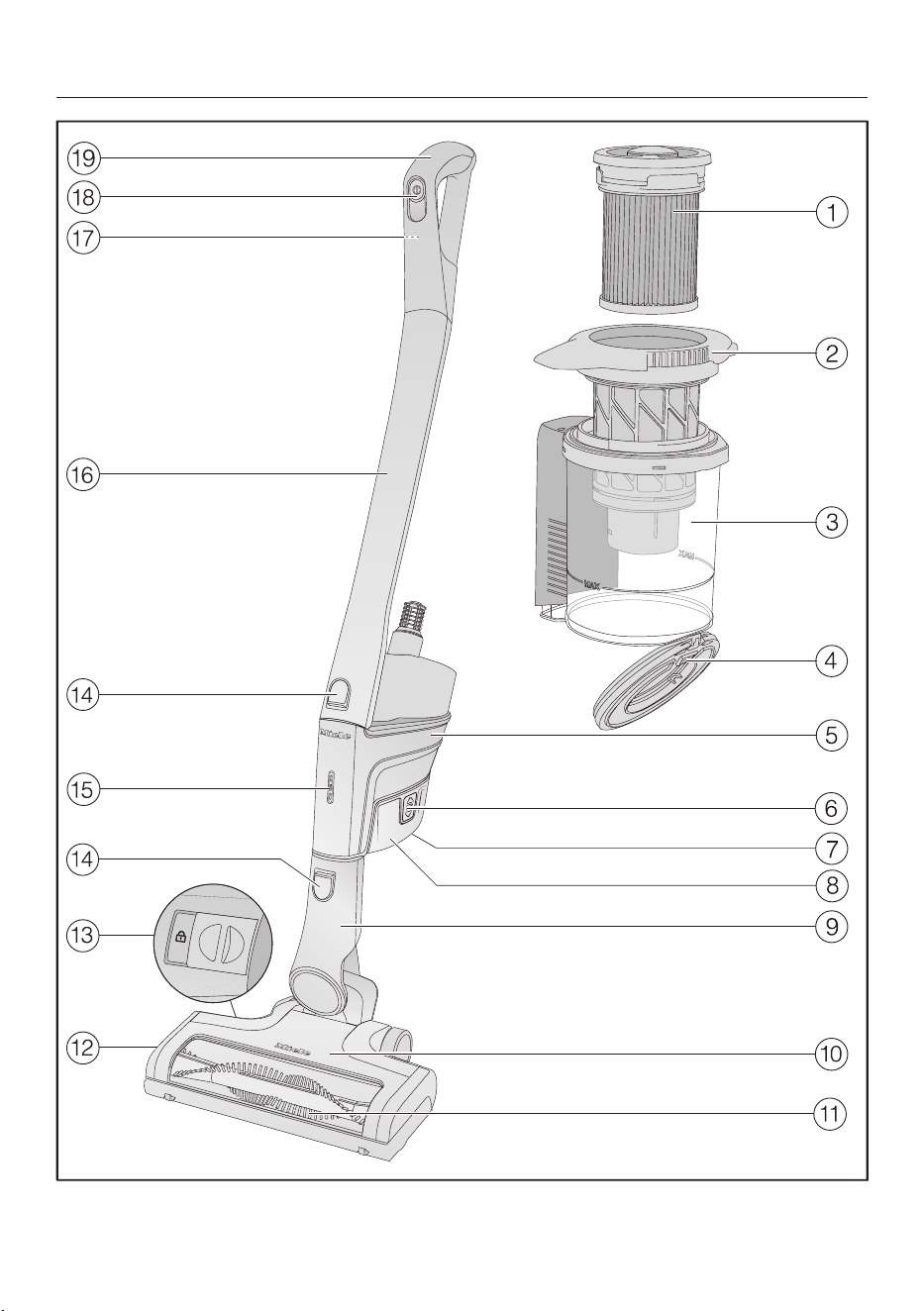
es-MX - Descripción del aparato
84

es-MX - Descripción del aparato
85
a
Filtro de polvo fino (HXFSF-2)
b
Pre-filtro
c
Contenedor de polvo
d
Solapa del contenedor de polvo
e
Unidad de potencia con una conexión en la parte inferior para la batería, un co-
nector en la parte inferior para el mango de succión y el cepillo Electrobrush, y
un conector en la parte superior para el mango de succión y el mangoComfort
f
Botones de liberación para batería (en ambos lados de la batería)
g
Enchufe de carga (en la parte inferior de la batería)
h
Batería de iones de litioAP01/AP02/AP03 (HXLA)
i
Conector del cepillo Electrobrush
j
CepilloElectrobrushmultipisosXXL (algunos modelos tienen iluminación Bri-
lliantLight)
k
Cepillo de rodillo removible
l
Tapa
m
Botón de liberación para abrir el cepillo Electrobrush
n
Botones de liberación
o
Indicador del estado de carga de la batería
p
Mango de succión
q
Botón de liberación del mangoComfort (en la parte posterior)
r
Interruptor de encendido/apagado con selector de potencia de succión
s
MangoComfort

es-MX - Medidas para la protección del medioambiente
86
Eliminación del empaque co-
mercial
El material de embalaje protege a la as-
piradora de los daños causados por el
transporte. Le recomendamos que guar-
de el embalaje para el transporte.
Los materiales de empaque utilizados
son materiales ecológicos y por lo tanto
pueden reciclarse. El reciclaje del mate-
rial de empaque reduce el uso de mate-
rias primas en el proceso de fabricación
y también disminuye la cantidad de resi-
duos en los basureros. Asegúrese de
que el empaque se elimine del modo
adecuado para su área.
Eliminación de su aparato anti-
guo
Antes de eliminar su aparato antiguo re-
tire el filtro para polvo fino y elimínelo
junto con los desperdicios residenciales.
Los aparatos eléctricos y electrónicos
contienen materiales valiosos. También
contienen ciertas sustancias que son
esenciales para el buen funcionamiento
y el uso correcto de este equipo. Utilizar
estos materiales de manera inadecuada
desechándolos en la basura doméstica
puede ser perjudicial para su salud y el
medio ambiente. Por lo tanto, no des-
eche su antiguo aparato en la basura
doméstica.
En lugar de eso, utilice los puntos oficia-
les de recolección y desecho provistos
por las autoridades locales, proveedores
o Miele para el desecho y reciclaje de
aparatos eléctricos y electrónicos. Us-
ted es legalmente responsable respecto
a la eliminación de datos personales en
el aparato viejo que desee desechar.
Asegúrese de mantener su aparato anti-
guo alejado de menores de edad hasta
que sea retirado.
es-MX - Medidas para la protección del medioambiente
87
Desecho de baterías y fuentes
de energía viejas
Los aparatos eléctricos y electrónicos
con frecuencia contienen baterías y
fuentes de alimentación que no se de-
ben desechar en la basura doméstica
después de su uso. Retire todas las ba-
terías que estén accesibles y llévelas a
un sitio de recolección adecuado donde
las puedan recibir gratuitamente. Las
baterías y las fuentes de alimentación
pueden contener sustancias que son
perjudiciales para su salud y el medio
ambiente.
La etiqueta en la batería o la fuente de
alimentación le proporciona mayor infor-
mación. El bote de basura tachado sig-
nifica que nunca debe poner baterías y
fuentes de alimentación en la basura
doméstica. Si el bote de basura tachado
tiene uno o más de los símbolos quími-
cos enlistados, contiene plomo (Pb),
cadmio (Cd) y/o mercurio (Hg).
3E&G+J
Las baterías y fuentes de alimentación
viejas contienen materias primas impor-
tantes y se pueden reciclar. Acumular
baterías y fuentes de alimentación vie-
jas por separado facilita su manejo y re-
ciclaje.

es-MX
88
Referencias de las ilustraciones
Las ilustraciones mencionadas en el
texto se muestran en las páginas des-
plegables que se encuentran al final de
estas instrucciones de funcionamien-
to.
Instalación y conexión
Montaje de la aspiradora (Fig. 01)
Puede montar la aspiradora de 2mane-
ras diferentes.
Puede colocar el mango de succión
por encima o por debajo de la unidad
de potencia.
Tenga cuidado para ensamblar la aspi-
radora exactamente como se muestra
en el diagrama.
Las ventajas de colocar la unidad de
potencia en la parte inferior de la aspi-
radora son las siguientes:
– es posible una función segura y autó-
noma (consulte “Uso” – “Función autó-
noma para pausas cortas en la aspira-
ción”)
– ergonómica (menor tensión en la mu-
ñeca)
– conveniente limpieza de grandes su-
perficies
Las ventajas de colocar la unidad de
potencia en la parte superior de la as-
piradora son las siguientes:
– limpieza cómoda debajo de los mue-
bles
– la unidad de potencia se puede retirar
rápidamente
Uso de la Unidad de potencia única-
mente (Fig. 02)
La Unidad de potencia se puede utilizar
sola, sin el tubo de aspiración ni el cepi-
llo eléctrico, para aspirar rápidamente
migas y pelusas en zonas específicas.
Consejo: Esta configuración es espe-
cialmente adecuada cuando se utiliza el
juego de tres accesorios (consulte “Uso
de los accesorios proporcionados”).
Cómo conectar el mango Comfort
(Fig. 03)
Dependiendo de cómo decida configu-
rar su aspiradora, puede conectar el
mangoComfort al mango de succión o
a la unidad de potencia.
Empuje el mango Comfort hacia abajo
en la conexión del mango de succión
desde arriba hasta que haga un clic
audible en su posición (detalle de la
imagen izquierda).
Deslice el mango Comfort por la línea
de guía del mango del contenedor de
polvo y baje hasta el conector de la
unidad de potencia desde arriba hasta
que haga un clic audible en su posi-
ción (detalle de la imagen derecha).
Apague la aspiradora con el interrup-
tor de encendido/apagado en la parte
delantera del mango Comfort si quie-
re separar las secciones.
Presione el cierre de liberación y retire
el mango Comfort jalando hacia arriba
(Fig. 04).
Conexión de la unidad de potencia y el
mango de succión (Fig. 05)
Dependiendo de cómo decida configu-
rar su aspiradora, el mango de succión
se encuentra por encima o por debajo
de la unidad de potencia.

es-MX
89
Deslice el mango de succión por la lí-
nea de guía del mango del contenedor
de polvo y baje hasta el conector de la
unidad de potencia desde arriba hasta
que haga un clic audible en su posi-
ción (detalle de la imagen derecha).
Empuje el conector de la unidad de
potencia hacia abajo en la conexión
del mango de succión desde arriba
hasta que haga un clic audible en su
posición (detalle de la imagen dere-
cha).
Presione el cierre de liberación para
separar las partes individuales (Fig.
06).
Inserción de la batería (Fig. 07)
Empuje la batería a lo largo de las lí-
neas guía hasta que haga un clic audi-
ble en su posición en la unidad de po-
tencia.
Si desea volver a separar las seccio-
nes, presione los dos cierres de libe-
ración que se encuentran en la parte
lateral de la batería para retirarla (Fig.
08).
Conexión del cepillo Electrobrush
(Fig. 09)
Dependiendo de cómo decida configu-
rar su aspiradora, puede conectar el co-
nector de la unidad de potencia o el co-
nector del mango de succión al cepillo
Electrobrush.
Inserte el conector en el Cepillo Elec-
trobrush desde arriba hasta que haga
un clic audible en su posición.
Para separar las secciones individua-
les entre sí, presione el cierre de libe-
ración del cepillo Electrobrush y sa-
que el conector del cepillo Electro-
brush (Fig. 10).
Información general sobre la batería
La batería recargable se suministra sin
estar totalmente cargada.
Cargue la batería totalmente antes de
usarla por primera vez. Permita unas
4horas para esto.
Para activar la batería, es esencial colo-
carla en la unidad de potencia al cargar-
la por primera vez.
Una vez que la batería está completa-
mente cargada, el indicador del estado
de carga de la batería de la unidad de
potencia se apaga para ahorrar energía.
La capacidad máxima de carga se logra
solo después de que la batería se ha
cargado y descargado cincoveces.
Una carga completa proporciona sufi-
ciente energía para 14minutos si se usa
la aspiradora al máximo nivel de poten-
cia en su estado completamente mon-
tada.
Sin embargo, si usa la unidad de poten-
cia sola y selecciona el nivel de potencia
mínimo, puede aspirar hasta 60minu-
tos a la vez.
Cómo cargar la batería (sin montaje en
la pared) (Fig. 11)
Puede guardar la aspiradora en posición
vertical y cargar la batería directamente.
Antes de cargar la batería por primera
vez, debe leer la información en “Insta-
lación y conexión” – “Información ge-
neral sobre la batería”.
Conecte la unidad de potencia al ce-
pillo Electrobrush para darle una base
segura a la aspiradora.
Gire la aspiradora hacia adelante has-
ta que el conector del Cepillo Electro-
brush haga un clic audible en su posi-
ción.

es-MX
90
Enchufe el cable de carga suministra-
do en el enchufe de carga en la parte
inferior de la batería.
Enchufe el cargador a un tomacorrien-
te.
El proceso de carga comenzará.
Puede leer más sobre este asunto en
“Indicador del estado de carga de la
batería (durante la carga)”.
Cómo cargar la batería (con montaje
en la pared) (Fig. 12)
Hay 2maneras de almacenar y cargar la
aspiradora en el soporte de pared sumi-
nistrado.
Antes de cargar la batería por primera
vez, debe leer la información en “Insta-
lación y conexión” – “Información ge-
neral sobre la batería”.
Necesitará un lugar adecuado cerca de
un tomacorriente libre para montar el
aparato en la pared.
Montaje en la pared (Figs. 13+14)
El soporte de pared suministrado tiene
una placa de montaje con una bolsa de
tornillos en la parte trasera.
Fije la placa de montaje en el punto de
la pared en el que quiera que esté el
montaje de la pared.
Retire la bolsa de tornillos.
Presione el cierre de liberación en la
parte inferior del soporte de la pared
(Fig. 13).
Retire la placa de montaje del soporte
de la pared deslizándola hacia abajo
(Fig. 14).
Fijar la placa de montaje (Figs. 15+16)
Se suministran 2enchufes y 2tornillos
TORXT20 para fijar la placa de montaje
a la pared.
También necesitará un destornillador
eléctrico de batería o un taladro (con un
diámetro de perforación de 6mm).
Dependiendo de cómo decida configu-
rar su aspiradora, seleccione una distan-
cia de 17 11/16" o 38 9/16"
(45cm o 98cm) entre el borde inferior
de la placa de montaje y el piso (Fig. 15).
Tenga cuidado para no dañar ningún
elemento eléctrico de la pared.
Fije la placa de montaje a la pared
(Fig. 16).
Fije el cable de carga al soporte de la
pared (Figs. 17, 18,+19)
Un compartimento de cables se en-
cuentra en la parte inferior del soporte
de la pared.
Presione los dos cierres de liberación
en la parte inferior del soporte de la
pared y retire la tapa del comparti-
mento de cables (Fig. 17).
Enchufe el cable de carga suministra-
do en la abertura desde arriba (Fig.
18).
Extienda el cable de carga en su guía
(Fig. 18).
Vuelva a colocar la tapa y cierre el
compartimiento de cables (Fig. 19).
Conexión del soporte de accesorios
(si es necesario) (Fig. 20)
Se suministra un soporte de accesorios
para guardar el juego de accesorios de
trespiezas en el soporte de pared (con-
sulte “Utilización de los accesorios su-
ministrados”).

es-MX
91
Empuje el soporte de accesorios en el
soporte de la pared hasta que haga
tope.
Conexión del soporte de pared
(Figs. 21+22)
Deslice el soporte de la pared hacia
abajo en la placa de montaje desde
arriba hasta que haga un clic audible
en su posición (Fig. 21).
Deslice la unidad de potencia de la
aspiradora completamente montada,
con la batería insertada, hacia abajo
en el soporte de la pared desde arriba
(Fig. 22).
Enchufe el cargador en el tomaco-
rriente.
El proceso de carga comenzará.
Indicador del estado de carga de la
batería (durante la carga) (Fig. 23)
El estado de carga de la batería se
muestra en la unidad de potencia.
Vida útil de la
batería
Indicador
Aprox. 0–34% La luz inferior par-
padea lentamente
Aprox. 35–69% La luz inferior está
encendida, la luz
del medio parpadea
lentamente
Aprox. 70–90% Las luces de abajo
y del centro están
encendidas, la luz
de arriba parpadea
lentamente
Aprox. 91–99%
100%
Las luces inferiores,
centrales y superio-
res están encendi-
das
Se apaga
Una vez que la batería está completa-
mente cargada, el indicador del estado
de carga de la batería se apaga para
ahorrar energía.
Si la batería no se ha usado durante un
tiempo prolongado y se ha descarga-
do, entrará en modo seguro. Como re-
sultado, el indicador del estado de car-
ga de la batería solo responderá des-
pués de aproximadamente 30–60mi-
nutos cuando se cargue en la unidad
de potencia.

es-MX
92
Indicador del estado de carga de la
batería (mientras se usa) (Fig. 23)
El estado de carga de la batería se
muestra en la unidad de potencia.
Vida útil de la ba-
tería
Indicador
Aprox. 100–70% Las luces superio-
res, centrales e in-
feriores están en-
cendidas
Aprox. 69–35% Las luces centra-
les e inferiores es-
tán encendidas
Aprox. 34–15% La luz inferior está
encendida
Aprox. 14–0% La luz inferior par-
padea lentamente
Le recomendamos que permita que la
batería se descargue por completo an-
tes de volverla a cargar. De esta manera,
aprovechará la capacidad total de la ba-
tería.
Uso de los accesorios suminis-
trados (Fig. 24)
Miele ofrece una variedad de acceso-
rios adecuados para muchas funciones
especiales (consulte “Accesorios op-
cionales”).
Tobera para tapizadosXL
Accesorio para limpiar tapicerías,
colchones y cojines.
Tobera plana
Accesorio para limpiar en pliegues,
grietas y rincones.
Cepillo para polvo
Cepillo para polvo Accesorio para
aspirar zócalos, muebles tallados
o adornos.
Se puede girar la cabeza para ajus-
tar el ángulo.
d Soporte de accesorios para so-
porte de pared
Para guardar el juego de acceso-
rios de trespiezas.
Los símbolos del soporte muestran
dónde se deben unir los diferentes ac-
cesorios.
Puede colocar el soporte de accesorios
en el soporte de pared (consulte “Insta-
lación y conexión” – “Conexión del so-
porte de accesorios”).
Soporte de accesorios para el tubo de
aspiración (Fig. 25)
Este soporte para accesorios le permite
llevar 2 accesorios del juego de tres ac-
cesorios mientras aspira.
CepilloElectrobrushmultipisosXXL
(Fig. 26)
Siga las instrucciones de limpieza y
cuidado del fabricante de pisos.

es-MX
93
Daños ocasionados por material
atrapado.
Riesgo de que se raye el piso.
Asegúrese de que no haya desechos
o polvo grueso atrapados en la parte
inferior del cepilloElectrobrush, p.ej.,
fragmentos o piedras.
El cepillo Electrobrush puede utilizarse
para realizar la limpieza diaria de alfom-
bras, tapetes y pisos duros.
Consejo: El mango de succión no una
opción conveniente para limpiar escale-
ras alfombradas.
Consejo: Si alguna vez necesita aspirar
cantidades considerables de desechos
o polvo grueso, use la unidad de poten-
cia sola (consulte “Instalación y cone-
xión” – “Uso de la unidad de potencia
sola”).
Rodillosuave para pisos duros Hard-
floorCare (HXHC) (Figs. 27+28)
(según el modelo)
Siga las instrucciones de limpieza y
cuidado del fabricante de pisos.
Si se instala el cepillo suave para pisos
duros Hardfloor Care, el cepillo Electro-
brush se puede usar para limpiar pisos
duros delicados.
Inserte el cepillosuave para pisos du-
rosHardfloor Care en el cepillo Electro-
brush en lugar del cepillo de rodillo ins-
talado de manera estándar (Fig. 28).
Cuando utiliza el rodillo suave para pi-
sos duros Hardfloor Care, el consumo
de energía del cepillo Electrobrush se
ajusta automáticamente al nivel ópti-
mo según el tipo de piso y el cepillo de
rodillo utilizado – esto puede provocar
un cambio en el ruido de funciona-
miento.
Desbloquee la solapa de la parte late-
ral del cepillo Electrobrush para que el
símbolo se haga visiblea.
Levante la solapa hasta lo máximo po-
sibleb.
Retire el cepillo de rodillo instalado de
manera estándarc.
Inserte el rodillosuave para pisos du-
ros HardfloorCare.
Cliente y bloquee la solapa.
Cepilloportátilelectrocompacto
(Fig. 29)
(según el modelo)
Siga las instrucciones de limpieza y
cuidado del fabricante de pisos.
Daños ocasionados por material
atrapado.
Riesgo de que se raye el piso.
Asegúrese de que no haya desechos
o polvo grueso atrapados en la parte
inferior del cepillo portátil, p.ej., frag-
mentos o piedras.
El cepillo portátil es especialmente ade-
cuado para la limpieza intensiva de
asientos de coche y escaleras alfombra-
das.
Para resultados óptimos en tapizados,
utilice la tobera para tapizadosXL.

es-MX
94
Consejo: El mango de succión no una
opción conveniente para limpiar los
asientos del coche o escaleras.
Consejo: Si alguna vez necesita aspirar
cantidades considerables de desechos
o polvo grueso, use la unidad de poten-
cia sola (consulte “Instalación y cone-
xión” – “Uso de la unidad de potencia
sola”).
Batería adicional (HXLA)
(según el modelo)
El uso de la batería adicional duplica el
tiempo de uso de la aspiradora.
Antes de cargar por primera vez, por
favor tenga en cuenta la información
en “Instalación y conexión” – “Infor-
mación general sobre la batería”.
Base de carga de batería (HXLS)
(Fig. 30)
(según el modelo)
Antes de cargar por primera vez, por
favor tenga en cuenta la información
en “Instalación y conexión” – “Infor-
mación general sobre la batería”.
Debe usar la unidad de potencia la pri-
mera vez que cargue la batería. En cam-
bio, a partir de la segunda operación de
carga puede usar la base de carga de
batería.
Empuje la batería en la base de carga
hasta que haga un clic audible en su
posición.
Enchufe el aparato a un tomacorrien-
te.
El proceso de carga comenzará. El indi-
cador del estado de carga de la batería
parpadea a la izquierda.
Puede encontrar más información sobre
el indicador de estado de carga de la ba-
tería en “Instalación y conexión” – “Indi-
cador de estado de carga de la batería”.
Si coloca la batería descargada en la
base de carga inmediatamente des-
pués de su uso, solo comenzará a car-
garse una vez que la batería se haya
enfriado.
El proceso de enfriamiento puede tar-
dar hasta 60minutos. El indicador del
estado de carga de la batería en la ba-
se de carga no responderá durante es-
te tiempo.
Uso
Encendido y apagado(Fig. 31)
Si ha cargado la batería en el soporte
de pared, saque la aspiradora del so-
porte de pared.
Si cargó la batería directamente, des-
conecte la clavija de carga del enchu-
fe de carga en la parte inferior de la
batería.
Para los mejores resultados posibles
de limpieza, siempre active la función
de ComfortClean antes de encender la
aspiradora (consulte “Mantenimiento”
– “Activación de la función Comfort-
Clean”).
Presione el interruptor de encendido y
apagado del mango Comfort.
Cómo regular la potencia de succión
(Fig. 31)
La potencia de succión se puede regular
para adaptarla al tipo de piso que desea
limpiar. Reducir la potencia de succión
reduce el esfuerzo que se necesita para
mover el cepillo ELectrobrush.
Hay tresniveles de potencia para elegir
en el mango Comfort:

es-MX
95
Mín. Nivel de potencia más bajo
para la suciedad ligera
Eco Nivel de potencia medio pa-
ra la suciedad normal
Máx. Nivel de potencia más alto
para la suciedad rebelde
La función de detección del revesti-
miento del piso se activa en cada nivel
de potencia.
El consumo de energía del cepillo Elec-
trobrush se ajusta automáticamente al
nivel óptimo según el tipo de piso y el
cepillo de rodillo utilizado – esto puede
provocar un cambio en el ruido de fun-
cionamiento.
Cómo iluminar el área de trabajo
(según el modelo)
El cepillo Electrobrush de su aspiradora
está equipado con BrilliantLight para ilu-
minar el área de trabajo.
Función autónoma para pausas breves
en la limpieza de la aspiradora
(Por razones de seguridad, esta función
solo puede utilizarse cuando la unidad
de potencia está instalada en la parte
inferior de la aspiradora)
Si está aspirando con la unidad de po-
tencia instalada en la parte inferior de la
aspiradora, puede interrumpir fácilmen-
te el funcionamiento mientras el aparato
está encendido.
Gire la aspiradora hacia adelante has-
ta que el conector del Cepillo Electro-
brush haga un clic audible en su posi-
ción.
La aspiradora se mantiene en posición
vertical, el cepillo Electrobrush se apaga
y la batería se conserva.
Si posteriormente desbloquea el conec-
tor del cepillo Electrobrush, éste se en-
cenderá de nuevo.
Mantenimiento
Riesgo de lesiones causadas por
el cepillo de rodillo giratorio.
Puede lesionarse con el cepillo de ro-
dillos giratorio.
Apague la aspiradora antes de hacer
cualquier trabajo de mantenimiento.
Use el interruptor de encendido y
apagado de la manija Comfort para
hacer esto.
Se recomienda usar solo accesorios
originales de Miele con el logotipo
“ORIGINAL Miele” en el empaque.
Solo éstos garantizarán el rendimiento
óptimo de su aspiradora y los mejores
resultados de limpieza posibles.
Tenga en cuenta que la garantía de la
aspiradora no cubre las fallas y los da-
ños ocasionados por el uso de acceso-
rios que no tengan el logotipo de
“ORIGINAL Miele” en el empaque.
Sistema de filtro (Fig. 32)
Filtro de polvo fino (HXFSF-2)
Pre-filtro
Contenedor de polvo
d Solapa del contenedor de polvo
Activación de la función ComfortClean
(Fig. 33)
Encienda siempre la función de limpieza
temporal para el filtro de polvo fino an-
tes de vaciar el contenedor de polvo.
También debe encenderla siempre que
la potencia de succión comience a caer.

es-MX
96
Esto permite que la aspiradora logre el
mejor desempeño de limpieza de nuevo
y de inmediato.
El filtro de polvo fino se encuentra en
la tapa del contenedor de polvo. Gíre-
lo hacia la izquierda 3 vueltas de 180°.
Use las hendiduras para ayudarle.
Escuchará un ruido de funcionamiento
que es parte normal del funcionamiento
de la función ComfortClean.
Vaciar el contenedor de polvo
(Fig. 34–38)
Vacíe el contenedor de polvo antes de
que el polvo haya alcanzado la marca de
MÁX. en el contenedor de polvo.
Gire la tapa del contenedor de polvo
en la dirección de la flecha hasta el
primer tope. Use las superficies de
sujeción grises como ayuda para ha-
cerlo (Fig. 34).
Saque el contenedor de polvo hacia
arriba (Fig. 35).
Siempre que no existan sustancias
prohibidas, el contenido del contene-
dor de polvo se puede desechar con
los desperdicios residenciales norma-
les.
Mantenga el contenedor de polvo cer-
ca de la basura para que se alce tan
poco polvo como sea posible.
Gire la tapa del contenedor de polvo
en la dirección de la flecha hasta el
próximo tope. Use las superficies de
sujeción grises como ayuda para ha-
cerlo (Fig. 36).
La solapa del contenedor de polvo se
abrirá y el polvo saldrá (Fig. 37).
Si los trozos de polvo, cabello o dese-
chos gruesos no salen, retire el pre-fil-
tro jalándolo hacia arriba (consulte
“Limpieza del pre-filtro y del filtro de
polvo fino” a continuación).
Vuelva a colocar la tapa del contene-
dor de polvo en su posición original.
Cierre la solapa del contenedor de
polvo, asegurándose de que encaje en
su posición.
Deslice la manija del contenedor de
polvo por la línea de guía y baje hasta
el conector de la unidad de potencia
desde arriba hasta que haga un clic
audible en su posición (Fig. 38).
Limpieza del pre-filtro y del filtro de
polvo fino (Fig. 39–42)
Limpie ambos filtros minuciosamente
por lo menos una vez cada tresmeses.
Es esencial seguir los pasos en el or-
den descrito al limpiarlos.
Saque el contenedor de polvo.
Vacíe el contenedor de polvo en un
bote de basura.
Gire la tapa del contenedor de polvo
después del tope hasta que las pun-
tas de flecha estén alineadas en la
parte superiora (Fig. 39).
Retire el pre-filtro jalándolo hacia arri-
bab (Fig. 39).
Gire el filtro de polvo fino hacia la iz-
quierda 10 vueltas de 180°. Use las
hendiduras para ayudarle (Fig. 33).
Escuchará un ruido de funcionamiento
que es parte normal del funcionamiento
de la función ComfortClean.
Gire el filtro de polvo fino hacia la de-
recha. Use las hendiduras para ayu-
darle (Fig. 40).

es-MX
97
Retire el filtro de polvo fino (Fig. 40).
Riesgo de sufrir daños causado
por una limpieza incorrecta.
El filtro de polvo fino puede dañarse y
ser menos efectivo en consecuencia.
No limpie el filtro de polvo fino con
agua y evite limpiar el interior. No uti-
lice objetos puntiagudos o de bordes
afilados para limpiar el filtro. No cepi-
lle el filtro de polvo fino.
Sostenga el filtro de polvo fino sobre
un bote de basura.
Golpee con cuidado el filtro de polvo
fino con el borde inferior engomado.
Gire ligeramente el filtro de polvo fino
mientras lo hace para liberar la sucie-
dad de todas las grietas.
Riesgo de sufrir daños causado
por una limpieza incorrecta.
El pre-filtro puede dañarse y ser me-
nos efectivo en consecuencia.
No limpie el pre-filtro con agua. No
utilice objetos puntiagudos o de bor-
des afilados para limpiar el filtro.
Limpie el pre-filtro con el cepillo para
polvo suministrado o con un paño se-
co.
Después de limpiar el filtro de polvo
fino y el pre-filtro, reinserte el primero
en el segundo presionando la tapa re-
donda encima del filtro de polvo fino
hacia abajo hasta el tope.
Para seguir logrando los mejores resul-
tados de limpieza posibles, reemplace
el filtro de polvo fino (HXFSF-2) con
uno nuevo después de aproximada-
mente tresaños.
Reinserte el pre-filtro en el contene-
dor de polvo (Fig. 41).
Para ello, alinee las guías (flechas) y
gire el pre-filtro a su posición original
(Fig. 42).
Cierre la solapa del contenedor de
polvo, asegurándose de que encaje en
su posición.
Vuelva a colocar el contenedor de
polvo en el conector de la unidad de
potencia.
Limpiar el contenedor de polvo
Limpie el contenedor de polvo conforme
sea necesario.
Saque el contenedor de polvo.
Vacíe el contenedor de polvo sobre un
bote de basura y levante el pre-filtro
hacia arriba para sacarlo (Fig. 39).
Limpie el contenedor de polvo con
agua y un detergente suave.
Seque el contenedor de polvo con
cuidado.
Reinserte el pre-filtro en el contene-
dor de polvo y vuelva a colocar el pre-
filtro en su posición original (Figs.
41+42).
Vuelva a colocar el contenedor de
polvo en el conector de la unidad de
potencia.

es-MX
98
Cómo limpiar el cepillo Electrobrush/
cepillo portátil (dependiendo del mo-
delo) (Fig. 43)
Desconecte el cepillo Electrobrush/
cepillo portátil de la aspiradora (Fig.
10).
Coloque el cepillo Electrobrush/cepi-
llo portátil al revés en una superficie
nivelada y limpia.
Use un par de tijeras para cortar hilos
o pelos que se hayan enrollado alre-
dedor del cepillo de rodillo. Para guiar
las tijeras, muévalas a lo largo del ca-
rril guía en el cepillo de rodillo.
Después encienda la aspiradora para
aspirar los hilos y pelos cortados.
Si las rueditas están demasiado sucias
o bloqueadas, las puede retirar para
una limpieza más fácil (no es necesario
en el caso del cepillo portátil). Use un
desarmador de cabeza plana para reti-
rarlas.
Cómo retirar el cepillo de rodillo del
cepillo Electrobrush (Fig. 44)
(No es posible con el cepillo portátil)
Puede sacar el cepillo de rodillo del ce-
pillo Electrobrush para eliminar la sucie-
dad más resistente y limpiar el interior
del cepillo Electrobrush.
Desbloquee la solapa de la parte late-
ral del cepillo Electrobrush para que el
símbolo se haga visiblea.
Levante la solapa hasta lo máximo po-
sibleb.
Retire el cepillo de rodilloc.
Retire el mango del cepillo de rodillo
si observa suciedad rebelde ahíd.
Limpie el cepillo de rodillo y el mango
del cepillo de rodillo, y elimine cual-
quier suciedad resistente dentro del
cepillo Electrobrush.
Vuelva a montar el cepillo Electro-
brush en orden inverso.
Cómo reemplazar la batería recargable
Se requiere una batería recargable de io-
nes de litio original Miele AP01/AP02/
AP03 (HX LA).
Siga las instrucciones sobre el manejo
y la eliminación de las baterías recar-
gables que se encuentran en las si-
guientes secciones: “INSTRUCCIO-
NES DE SEGURIDAD IMPORTAN-
TES”, “Cuidado del medio ambiente” e
“Instalación y conexión” (“Información
general sobre las baterías”).

es-MX
99
Mensajes de error
Riesgo de lesiones causadas por el cepillo de rodillo giratorio.
Puede lesionarse con el cepillo de rodillos giratorio.
Apague la aspiradora antes de tratar cualquier problema. Use el interruptor de
encendido y apagado de la manija Comfort para hacer esto.
Los mensajes de error se muestran con una luz intermitente rápida en el indicador
de estado de carga de la batería en la unidad de potencia.
Problema Causa y solución
La luz superior parpadea
rápidamente
Error “No se reconoce el mango Comfort”
Retire el mango Comfort y vuelva a conectarla (con-
sulte “Instalación y conexión” – “Conexión del man-
go Comfort”).
Retire la batería, espere 10segundos y vuelva a co-
locarla.
La lámpara del centro
parpadea rápidamente
Error de “Sobrecalentamiento del motor”
Vacíe y limpie el contenedor de polvo, el pre-filtro y
el filtro de polvo fino (consulte “Mantenimiento”).
Retire la batería, espere 10segundos y vuelva a co-
locarla.
Espere aproximadamente 30minutos antes de vol-
ver a encender la aspiradora.
Las luces inferiores y su-
periores están parpa-
deando rápidamente
Falla interna del sistema
Retire la batería, espere 10segundos, vuelva a colo-
carla y cárguela.
Las luces inferiores y
centrales parpadean rá-
pidamente
Error de “Sobrecalentamiento de batería” o de “Bate-
ría no reconocida”
Espere aproximadamente 30minutos antes de vol-
ver a encender la aspiradora.
Inserte una bateríarecargabledeionesdelitioorigi-
nalMieleAP01/AP02/AP03 (HXLA).
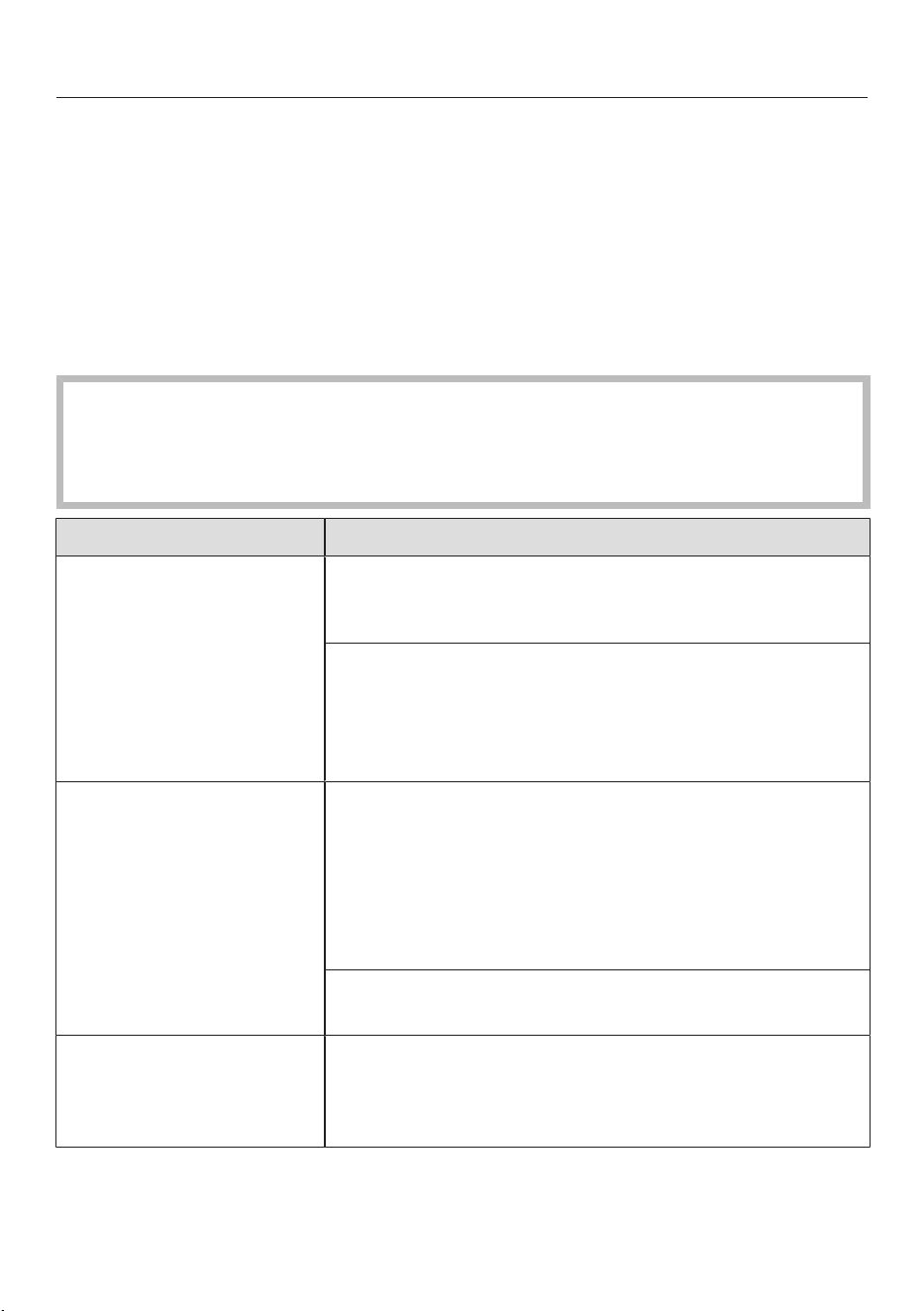
es-MX
100
Preguntas frecuentes
Muchos errores y fallas de funcionamiento que pueden ocurrir en el uso diario pue-
den solucionarse fácilmente. Puede ahorrar tiempo y dinero en muchos casos, ya
que no necesita ponerse en contacto con el Servicio de Atención al Cliente de
Miele.
Puede encontrar información que le ayudará a corregir las fallas usted mismo en
www.miele.com/service.
Las siguientes tablas están diseñadas para ayudarlo a encontrar la causa de un mal
funcionamiento o una falla y resolverlo.
Riesgo de lesiones causadas por el cepillo de rodillo giratorio.
Puede lesionarse con el cepillo de rodillos giratorio.
Apague la aspiradora antes de tratar cualquier problema. Use el interruptor de
encendido y apagado de la manija Comfort para hacer esto.
Problema Causa y solución
El rendimiento de la lim-
pieza es deficiente.
El contenedor de polvo está lleno.
Vacíe y limpie el contenedor de polvo (consulte
“Mantenimiento”).
El cepillo Electrobrush está sucio/bloqueado.
Limpie el cepillo Electrobrush (consulte “Manteni-
miento” – “Limpieza del cepillo Electrobrush” y “Có-
mo retirar el cepillo de rodillo del cepillo Electro-
brush”).
El rendimiento de la lim-
pieza se reduce.
El filtro de polvo fino/pre-filtro está sucio.
Encienda la función de limpieza temporal para el fil-
tro de polvo fino (consulte “Mantenimiento” – “Acti-
vación de la función ComfortClean”).
Limpie ambos filtros minuciosamente (consulte
“Mantenimiento” – “Limpieza del pre-filtro y del fil-
tro de polvo fino”).
El filtro de polvo fino está desgastado.
Inserte un filtro de polvo fino nuevo (HXFSF-2).
El cepillo de rodillo no
está rotando.
El cepillo de rodillo está sucio.
Limpie el cepillo de rodillo (consulte “Mantenimien-
to” – “Limpieza del cepillo Electrobrush” y “Cómo
retirar el cepillo de rodillo del cepillo Electrobrush”).

es-MX
101
Problema Causa y solución
La aspiradora no arranca
cuando está encendida.
No hay ninguna batería insertada o la batería está in-
sertada incorrectamente.
Inserte la batería o revise la posición de la misma
(consulte “Instalación y conexión” – “Inserción de la
batería”).
La batería recargable no está suficientemente cargada.
Cargue la batería exactamente como se describe en
este manual de instrucciones (consulte “Instalación
y conexión” – “Información general sobre la batería”
y “Carga de la batería”).
No se ha insertado una batería original de Miele.
Inserte una bateríarecargabledeionesdelitioorigi-
nalMieleAP01/AP02/AP03 (HXLA).
La batería no se colocó en la unidad de potencia para
cargarla la primera vez.
Para activar la batería, se debe colocar en la unidad
de potencia la primera vez que se cargue (consulte
“Instalación y conexión” – “Información general so-
bre la batería” y “Carga de la batería”).
El cargador aún está enchufado.
Saque el enchufe de la base de carga en la parte in-
ferior de la batería.
El ruido de funciona-
miento está cambiando
durante la aspiración.
El consumo de energía del cepillo Electrobrush se
ajusta automáticamente al nivel óptimo según el tipo
de piso y el cepillo de rodillo utilizado.
El ruido no es inusual, la aspiradora funciona nor-
malmente.
El cepillo Electrobrush
se apaga.
El cepillo Electrobrush está sobrecargado – esto pue-
de ocurrir en superficies como la alfombra de pelo lar-
go.
Apaga la aspiradora y enciéndela de nuevo con un
nivel de potencia de succión reducido. Use el inte-
rruptor de encendido y apagado de la manija Com-
fort para hacer esto.

es-MX
102
Problema Causa y solución
La aspiradora se sigue
cayendo.
Ha configurado la aspiradora con la unidad de poten-
cia en la parte superior.
Vuelva a montar la aspiradora para que esté configu-
rada con la unidad de potencia en la parte inferior
(consulte “Instalación y conexión” – “Montaje de la
aspiradora”).

es-MX
103
Servicio de Atención al Cliente
En www.miele.com/service encontrará
información que le ayudará a solucio-
nar los fallos usted mismo y acerca de
las piezas de repuesto de Miele.
Contacto en caso de anomalías
En caso de fallas que no pueda solucio-
nar por usted mismo, comuníquese con
su Distribuidor Autorizado Miele o bien,
con Servicio Post-venta de Miele.
La información de contacto para el
Servicio de Atención al Cliente de
Miele se puede encontrar al final de
este documento.
Garantía
La duración de la garantía es de 2 años.
Para obtener información adicional so-
bre las condiciones de garantía en su
país, póngase en contacto con Servicio
Post-venta de Miele.
Limpieza y cuidado
Riesgo de lesiones causadas por
el cepillo de rodillo giratorio.
Puede lesionarse con el cepillo de ro-
dillos giratorio.
Apague la aspiradora antes de lim-
piarla. Use el interruptor de encendi-
do y apagado del mango Comfort pa-
ra hacer esto.
Aspiradora y accesorios
Riesgo de descarga eléctrica de-
bido al voltaje.
Si ingresa humedad en el cargador,
existe el riesgo de recibir una descar-
ga eléctrica.
No permita que el cargador se moje.
Siga las instrucciones especiales de
limpieza del contenedor de polvo en la
sección “Mantenimiento”.
La aspiradora y todos los accesorios de
plástico se pueden limpiar con un lim-
piador comercial patentado apropiado
para plástico.
Daños debidos a agentes limpia-
dores inadecuados.
Todas las superficies pueden sufrir
rayaduras. El contacto con agentes
limpiadores inadecuados puede alte-
rar o decolorar las superficies exter-
nas.
No utilice agentes limpiadores abra-
sivos, limpiadores para vidrio, limpia-
dores multiusos ni a base de aceite.
es-MX
104
Accesorios opcionales
Siga las instrucciones de limpieza y
cuidado del fabricante de pisos.
Se recomienda usar solo accesorios
originales de Miele con el logotipo
“ORIGINAL Miele” en el empaque.
Solo éstos garantizarán el rendimiento
óptimo de su aspiradora y los mejores
resultados de limpieza posibles.
Tenga en cuenta que la garantía de la
aspiradora no cubre las fallas y los da-
ños ocasionados por el uso de acceso-
rios que no tengan el logotipo de
“ORIGINAL Miele” en el empaque.
Accesorios opcionales
Los accesorios Miele originales están
disponibles en la tienda web de Miele,
en el Servicio de Atención al Cliente de
Miele y en su distribuidor Miele.
Los accesorios Miele originales están
identificados por el logotipo de “Miele”
en el empaque.
Con 3D4U, Miele también ofrece ac-
cesorios gratuitos para descargar de
su impresora 3D (www.miele.com,
servicio, 3D4U).
Algunos modelos vienen de fábrica con
uno o más de los siguientes accesorios.
Cepillo portátil electrocompacto (HX-
EC10)
Para la limpieza intensiva de asientos
del coche y escaleras alfombradas.
Rodillosuave para pisos duros Hard-
floorCare (HXHC)
Para la limpieza de pisos duros delica-
dos.
Cepillo Universal (HX-UB)
Para aspirar con cuidado libros, bases
de estanterías y similares.
Cepillo para radiadores (SHB 30)
Para limpiar radiadores, estantes estre-
chos y grietas.
Tobera para colchón (SMD 10)
Para limpiar tapizados, colchones, almo-
hadones, cortinas, cobertores, etc.
Tobera plana de 30cm (12")
(SFD 10)
Tobera extra larga para grietas para lim-
piar en pliegues, grietas y esquinas.
Tobera plana de 56cm (22")
(SFD 20)
Tobera para grietas flexible para limpiar
sitios de difícil acceso.
Accesorio plano XL extraíble y flexible
(HX-CNXL)
Accesorio plano con un alcance de
60cm para limpiar los lugares de difícil
acceso.
Prolongación de la manguera (HX-
FSH20)
Para ampliar el radio de aspiración hasta
120cm.

es-MX
105
Batería adicional AP01/AP02/AP03
(HX LA)
Para duplicar el tiempo de uso de la as-
piradora.
Antes de cargar por primera vez, por
favor tenga en cuenta la información
en “Instalación y conexión” – “Infor-
mación general sobre la batería”.
Base de carga de bateríaLS03/LS04
(HXLS)
Para cargar la batería adicional indepen-
dientemente del aparato, es decir, mien-
tras el aparato está en uso.
Antes de cargar por primera vez, por
favor tenga en cuenta la información
en “Instalación y conexión” – “Infor-
mación general sobre la batería”.
Filtro de polvo fino (HXFSF-2)
Para seguir logrando los mejores resul-
tados de limpieza posibles, reemplace
el filtro de polvo fino instalado de forma
estándar con uno nuevo después de
aproximadamente tres años (consulte
“Mantenimiento” – “Limpieza del pre-
filtro y del filtro de polvo fino”).

es-MX - POLIZA DE GARANTIA - Aspiradoras México
106
Lo que cubre la garantía y por qué periodo se extiende:
Miele S.A. de C.V. garantiza la compra original de este electrodoméstico marca Miele que el comprador con domicilio
en los Estados Unidos Mexicanos haya realizado a un distribuidor autorizado, tienda o a la empresa misma de:
a. Cualquier defecto de fabricación en sus materiales, mano de obra, partes y/o componentes que generen fallas en
el funcionamiento y/o desempeño del equipo con base en las especificaciones técnicas incluídas en el manual de
uso y manejo del mismo.
b. El periodo de garantía para el electrodoméstico, sus accesorios, partes y/o componentes, es de 2 años a partir
de la fecha de instalación.
c. La garantía no cubre daños o defectos en los siguientes casos:
- Cuando el equipo ha sido utilizado en condiciones distintas a las normales.
- Cuando el equipo no ha sido operado con base en las instrucciones y/o manual de uso que lo acompaña.
- Cuando el equipo ha sido instalado, alterado o reparado por terceros no autorizados por Miele México.
- Cuando el equipo ha sido extraído de su empaque original y no cuenta con los sellos de seguridad al
momento de ser realizada su instalación por parte de un Técnico Autorizado Miele.
d. Cualquier desperfecto o falla ocasionada por una instalación deficiente realizada por algún técnico distinto al
Servicio Técnico Autorizado de Miele inválida la garantía. La empresa no se hará responsable por reclamaciones
de Cliente Final derivadas de una instalación deficiente por un tercero no autorizado por Miele México.
e. El Técnico Autorizado Miele, al momento de realizar la instalación, sellará la Póliza de Garantía de cada equipo
instalado con su nombre, firma y fecha de instalación.
f. En caso de equipos "Free-Standing", la tienda o Distribuidor Autorizado Miele sellará la Póliza de Garantía de
cada equipo vendido con su nombre, firma y fecha de venta.
g. Miele México desconoce cualquier otra garantía expresa o implícita en el equipo o cualquier otra garantía que
haya sido ofrecida por un tercero.
h. Miele México no asume ninguna responsabilidad o cualquier otra obligación con respecto a daño a personas
o bienes que resulte del uso de algún equipo de nuestra marca o sus accesorios, partes, componentes,
refacciones, etc., cuando dicho equipo, accesorios, partes, componentes, refacciones, etc., no hayan sido
comprados a algún distribuidor, tienda, etc., autorizado por Miele México.
i. Cualquier compra de equipos, accesorios, partes, componentes, refacciones, etc., de cualquier otro origen,
distribuidor o tienda no autorizados por Miele México será bajo el propio riesgo del comprador.
Procedimiento para hacer efectiva la garantía:
Si este electrodoméstico resulta defectuoso y se encuentra dentro del periodo de garantía, el comprador deberá:
a. Presentar el electrodoméstico defectuoso en el Centro de Servicio abajo indicado y presentar la Póliza de
Garantía debidamente sellada por el técnico que lo instaló. Esta garantía incluye los gastos de transportación del
electrodoméstico razonablemente erogados que deriven de su cumplimiento dentro de la red de servicio de Miele.
b. Los establecimientos en los Estados Unidos Mexicanos donde se puede hacer efectiva la garantía son los siguientes:
Miele SA de CV
Miele Experience Center
Arquímedes 43
Col. Chapultepec Polanco.
C.P.11560
Ciudad de México.
Tel. 800 MIELE 00
(800 64353 00)
Correo electrónico:
Exclusión de otras garantías:
Excepto por la garantía limitada ofrecida en este documento, Miele desconoce cualquier otra garantía expresa o
implícita con respecto al electrodoméstico, aparato eléctrico o electrónico. Cualquier garantía de comercialización o
propiedad para un propósito en particular, está limitada en su duración o término a la garantía limitada otorgada en
este documento.
es-MX - POLIZA DE GARANTIA - Aspiradoras México
107
Limitantes de responsabilidad para daños especiales, incidentales o consecuenciales:
Miele no asume ninguna responsabilidad o cualquier otra obligación con respecto a daño a personas o bienes que
resulte del uso de algún electrodoméstico de nuestra marca o sus accesorios, partes, componentes, refacciones,
etc., cuando dicho electrodoméstico, accesorios, partes, componentes, refacciones, etc., no hayan sido comprados
a algún distribuidor, tienda, etc., autorizado por Miele. Cualquier compra de un electrodoméstico, accesorios, partes,
componentes, refacciones, etc., de cualquier otro origen, distribuidor o tienda no autorizados será bajo el propio
riesgo del comprador. Miele específicamente no se responsabiliza, directa o indirectamente, y desconoce cualquier
daño incidental, especial o consecuencial o cualquier otro tipo de daño derivado de cualquier incumplimiento,
agravio, falta de responsabilidad o de cualquier otra teoría legal derivado del mal uso de este producto, al no seguir
las indicaciones estipuladas en el manual.
Leyes de los Estados Unidos Mexicanos:
Las limitaciones contendidas en la presente garantía limitada serán válidas en la medida en que lo permitan las leyes
de los Estados Unidos Mexicanos.
Servicios:
Para mayor información sobre cualquier aspecto relacionado con la presente garantía o con el electrodoméstico
amparado por la misma, y para obtener partes, componentes, consumibles y accesorios, favor de contactar a:
Miele SA de CV
Miele Experience Center
Arquímedes # 43
Col. Polanco Chapultepec
Delg. Miguel Hidalgo
C.P. 11560 México, D.F.
Servicio post venta:
Tel. 800 MIELE 00
(800 64353 00)
Correo electrónico:
www.miele.com.mx
Miele SA de CV
Miele Experience Center
Arquímedes 43
Col. Chapultepec Polanco.
C.P.11560
Ciudad de México.
Tel. 800 MIELE 00
(800 64353 00)
Correo electrónico:

en-US - Contents
108
IMPORTANT SAFETY INSTRUCTIONS................................................................... 110
IMPORTANT SAFETY INSTRUCTIONS for AP01/AP02/AP03battery, LG01/
LG02charger, LS03/LS04battery charger cradle (depending on the model) ....
115
Caring for the environment......................................................................................... 121
Appliance description .................................................................................................. 122
References to illustrations .......................................................................................... 124
Installation and connection ........................................................................................ 124
Assembling the vacuum cleaner .................................................................................
124
Using the PowerUnit solo ............................................................................................
124
Connecting the Comfort handle ..................................................................................
124
Connecting the PowerUnit and the suction wand ...................................................
124
Inserting the battery .....................................................................................................
125
Connecting the Electrobrush .......................................................................................
125
General battery information..........................................................................................
125
Charging the battery (without wall mounting) ..........................................................
125
Charging the battery (with wall mounting) ................................................................
126
Wall mounting ................................................................................................................
126
Battery charging state indicator (while charging) .....................................................
127
Battery charging state indicator (while in use) .........................................................
127
Using the accessories supplied ................................................................................ 128
Accessories holder for the suction wand ...................................................................
128
Multi Floor XXL Electrobrush .......................................................................................
128
HardfloorCaresoftroller (HXHC) .............................................................................
128
ElectroCompacthandheldbrush ...............................................................................
129
Additional battery (HXLA) ............................................................................................
129
Battery charger cradle (HXLS) ...................................................................................
129
Use ................................................................................................................................... 129
Switching on and off .....................................................................................................
129
Regulating the suction power ......................................................................................
130
Illuminating the work area.............................................................................................
130
Self-standing function for short pauses in vacuuming .............................................
130
Maintenance .................................................................................................................. 130
Filter system ...................................................................................................................
131
Activating the ComfortClean function .......................................................................
131
Emptying the dust container .......................................................................................
131
Cleaning the pre-filter and fine dust filter ..................................................................
131
Cleaning the dust container..........................................................................................
132
Cleaning the Electrobrush/handheld brush (depending on model) .......................
132
Replacing the rechargeable battery.............................................................................
133

en-US - Contents
109
Fault messages.............................................................................................................. 134
Frequently asked questions........................................................................................ 135
Customer Service ......................................................................................................... 137
Contact in case of fault..................................................................................................
137
Cleaning and care ......................................................................................................... 137
Optional accessories.................................................................................................... 138
Universal brush (HX-UB)...............................................................................................
138
Extendable flexible XL crevice nozzle (HX-CNXL).....................................................
138
Hose extension (HS-FSH20) ......................................................................................
138
LIMITED WARRANTY - Vacuum Cleaners USA..................................................... 140

en-US - IMPORTANT SAFETY INSTRUCTIONS
110
READ ALL INSTRUCTIONS BEFORE USING
This vacuum cleaner complies with all current local and
national safety requirements. Improper use can lead to
personal injury and damage to property.
Please read the operating instructions before using the
vacuum cleaner for the first time. They contain important
information on the safety, use, and maintenance of the
vacuum cleaner. This prevents both personal injury and
damage to the appliance.
Miele expressly and strongly advises that you read and
follow the instructions in the “Installation and connec-
tion” chapter as well as the IMPORTANT SAFETY IN-
STRUCTIONS.
Miele cannot be held liable for injury or damage caused
by non-compliance with these instructions.
Keep these operating instructions in a safe place and
pass them on to any future user.
Always disconnect the vacuum cleaner from the power
supply when you have finished using it, before changing
any accessories, as well as for maintenance work, clean-
ing, and troubleshooting. Use the On/Off switch on the
Comfort handle to do this.

en-US - IMPORTANT SAFETY INSTRUCTIONS
111
Correct use
This vacuum cleaner is intended for cleaning flooring in
domestic households and similar residential environments.
This vacuum cleaner is not suitable for use on construction
sites.
This vacuum cleaner is not intended for outdoor use.
This vacuum cleaner can be used for all normal cleaning
of carpets, rugs and hard flooring.
This vacuum cleaner is intended for use at altitudes of up
to 13,000ft (4000m) above sea level.
The vacuum cleaner must only be used to vacuum dry
floor surfaces. Do not vacuum people or animals. Any other
types of use, modifications, or alterations are not permit-
ted.
People with reduced physical, sensory, or mental capa-
bilities, or lack of experience or knowledge, who are unable
to use the vacuum cleaner safely, may only use the vacuum
cleaner if they are supervised while using it or have been
shown how to use it in a safe way and understand and rec-
ognize the consequences of incorrect operation.
Use only as described in this manual.
Use only manufacturer's recommended attachments.

en-US - IMPORTANT SAFETY INSTRUCTIONS
112
Safety with children
Children must be kept away from the vacuum cleaner
unless they are constantly supervised.
Do not allow the vacuum cleaner to be used as a toy.
Close attention is necessary when used near children.
Danger of suffocation! Ensure that any plastic wrap-
pings, bags, etc. are disposed of safely and kept out of the
reach of children.
WARNING
To reduce the risk of fire, electric shock or injury:
Check the voltage rating of the vacuum cleaner before
connecting the power cord to an electrical outlet. Your
power source should correspond with the voltage rating
plate located on the underside of the vacuum. Use only
household AC outlets. Never use DC power sources. If you
are not sure of your home’s voltage supply, consult a quali-
fied electrician. Connecting the vacuum cleaner to a higher
voltage than indicated in these instructions may result in
damage to the vacuum cleaner or injury.
To reduce the risk of electric shock, this appliance has a
polarized plug (one blade is wider than the other.) This plug
will fit in a polarized outlet only one way. If the plug does
not fit fully in the outlet, reverse the plug. If it still does not
fit, contact a qualified electrician to install the proper out-
let. Do not alter the plug in any way.

en-US - IMPORTANT SAFETY INSTRUCTIONS
113
Technical safety
The vacuum cleaner operates at 25.2V.
It is classified as a classII appliance and is designed as a
classIII appliance in its construction.
This appliance is supplied by a safety extra-low voltage
(SELV) power source where the voltage is low enough to
protect users from the risk of electrical shock. A Class II
charger is used for supplying power to charge the vacuum
cleaner.
Compare the connection data on the data plate of the
charger (voltage and frequency) with that of the electricity
supply. This data must match exactly. Without modifica-
tions, the charger is suitable for 50Hz and 60Hz.
The electrical outlet must be rated at 15A.
Check both the vacuum cleaner and all accessories sup-
plied with it for any visible signs of damage before use. Do
not use a damaged vacuum cleaner or damaged accessory.
The Miele Multi Floor XXL Electrobrush and the Miele
Electro Compact handheld brush (varies according to the
model) are additional motor-driven devices designed spe-
cially for this Miele vacuum cleaner. For safety reasons, the
vacuum cleaner must not be used with a different
MieleElectrobrush/handheld brush or an electrobrush/
handheld brush produced by another manufacturer.
Before and during use, make sure that no coarse dirt or
debris is/gets trapped in the bottom of the
MultiFloorXXLElectrobrush or in the bottom of the Elec-
troCompacthandheldbrush (supplied depending on
model).
Store the vacuum cleaner and all accessories at an ambi-
ent temperature between 32°F and 113°F (0°C and 45°C).

en-US - IMPORTANT SAFETY INSTRUCTIONS
114
Repairs should be performed by an authorized service
agent in accordance with national and local safety regula-
tions. Unauthorized repairs could cause injury or machine
damage. Otherwise the warranty may be void.
Repairs should be carried out by a Miele-authorized ser-
vice technician. Repairs and other work by unqualified per-
sons can cause considerable danger to users.
Proper use
Do not use the vacuum cleaner without the dust con-
tainer, pre-filter, and fine dust filter fitted.
Do not use with damaged cord or plug.
If appliance is not working as it should, has been dropped,
damaged, left outdoors, or dropped into water, return it to a
service center.
Do not put any object into openings. Do not use with any
opening blocked; keep free of dust, lint, hair, and anything
that may reduce air flow.
Do not vacuum up anything which has been burning or
smoking, e.g., cigarettes, ashes or hot ash, whether glowing
or apparently extinguished.
Do not use the vacuum cleaner to vacuum up any water,
liquid or damp dirt. Wait until any freshly cleaned or sham-
pooed rugs or carpets are completely dry before attempting
to vacuum.
Do not use the vacuum cleaner to vacuum toner dust.
Toner, such as that used in printers and photocopiers, can
conduct electricity.
Do not vacuum up any flammable or combustible liquids
or gases and do not vacuum in areas where such sub-
stances are stored.
Never touch the MultiFloorXXLElectrobrush or Elec-
troCompacthandheldbrush (varies according to the
model) while it is rotating.

en-US - IMPORTANT SAFETY INSTRUCTIONS
115
Do not use the MultiFloorXXLElectrobrush or the Elec-
troCompacthandheldbrush (varies according to the
model) at head height.
Do not vacuum at head height and do not let the suction
get anywhere near a person's head.
Keep hair, loose clothing, fingers, and all part of body
away from openings and moving parts.
Use extra care when cleaning on stairs.
IMPORTANT SAFETY INSTRUCTIONS for AP01/AP02/
AP03battery, LG01/LG02charger, LS03/LS04battery
charger cradle (depending on the model)
Safety with children
People (including children) with reduced physical, sen-
sory, or mental capabilities, or lack of experience or knowl-
edge, who are unable to use the LG01/LG02charger or
LS03/LS04batterychargercradle safely, may only use this
vacuum cleaner if they are supervised while using it or have
been shown how to use it in a safe way and understand
and recognize the consequences of incorrect operation.
Keep the AP01/AP02/AP03battery out of the reach of
children.
Children must be kept away from the LG01/LG02
charger and the LS03/LS04 battery charger cradle unless
they are constantly supervised.
en-US - IMPORTANT SAFETY INSTRUCTIONS
116
Technical safety
The AP01/AP02/AP03battery, the LG01/LG02charger,
and the LS03/LS04batterychargercradle are designed for
use with the MieleHS19VacuumCleaner. For safety rea-
sons, the vacuum cleaner must not be used with a battery,
charger, or charger cradle produced by another manufac-
turer.
Only the LG01/xx or LG02/xxcharger supplied or the
LS03/xx or LS04/xxbatterychargercradle supplied or
purchased as an optional accessory should be used to
charge the AP01/AP02/AP03battery.
xx stands for 01, 02, 03, 04, 05, 06, 07, or 08; these num-
bers identify the version of your LG01/LG02charger and
your LS03/LS04batterychargercradle.
XX LG01/LS03/LS04 LG02
01 AT, BE, BG, CH, CL, CZ, DE, DK, EE,
ES, FI, FR, GR, HR, HU, IT, KZ, LT,
LU, LV, NL, NO, PL, PT, RO, RS, RU,
SE, SI, SK, TR, UA, ZA
AT, BE, BG, CH, CL, CZ, DE, DK, EE,
ES, FI, FR, GR, HR, HU, IT, KZ, LT,
LU, LV, NL, NO, PL, PT, RO, RS, RU,
SE, SI, SK, TR, UA, ZA
02 AE, HK, IE, MY, SG, UK AE, HK, IE, MY, SG
03 BR, CA, MX, US BR, CA, JP, MX, US
04 AU, NZ AU, NZ
05 CN CN
06 KR KR
07 JP UK
08 IN
If you are using a plug adapter, make sure that it is ap-
proved for continuous operation.

en-US - IMPORTANT SAFETY INSTRUCTIONS
117
Temporary or permanent operation on an autonomous
power supply system or a power supply system that is not
synchronized with the grid power supply (e.g., island net-
works, back-up systems) is possible. A prerequisite for op-
eration is that the power supply system complies with na-
tional and local codes.
The function and operation of the protective measures pro-
vided in the domestic electrical installation and in this
Miele product must also be maintained in isolated opera-
tion or in operation that is not synchronized with the grid
power supply, or these measures must be replaced by
equivalent measures in the installation.
Charge and use the battery at an ambient temperature
between 32°F and 113°F (0°C and 45°C).
Using the battery outside of this ambient temperature
range will limit its performance.
Stop using the AP01/AP02/AP03battery immediately if
you notice an unusual smell from it, if liquid is leaking from
it, if it is significantly overheating, or if it is discolored or de-
formed. Dispose of the AP01/AP02/AP03battery immedi-
ately (see safety notice “Disposing of the AP01/AP02/
AP03battery” at the end of this chapter as well as “Caring
for the environment – Disposing of old batteries”).
Batteries will deplete over time. They can then leak cor-
rosive fluids. Avoid contact with the eyes and skin. In the
event of contact, rinse thoroughly with water and seek
medical advice.

en-US - IMPORTANT SAFETY INSTRUCTIONS
118
The AP01/AP02/AP03lithium-ionbattery is subject to
dangerous goods legislation. The user is permitted to trans-
port the AP01/AP02/AP03battery by road without having
to observe any further requirements. Please contact Cus-
tomer Service before sending the AP01/AP02/AP03 bat-
tery. Only send AP01/AP02/AP03 batteries that are un-
damaged and have been fully run down. Insulate the metal
contacts with adhesive tape to prevent short circuits. Pack
the AP01/AP02/AP03 battery in such a way that it is not
able to move around inside the packaging.
Proper use
Do not drop or throw the AP01/AP02/AP03battery. For
safety reasons, do not continue to use an AP01/AP02/
AP03battery which has been damaged.
Keep the AP01/AP02/AP03battery away from naked
flames or other heat sources. Do not heat the AP01/AP02/
AP03battery. Do not expose the rechargeable battery to
direct sunlight.
Do not dismantle the AP01/AP02(AP03battery.
Do not cause a short circuit by bridging the contacts of
the AP01/AP02/AP03battery, either unintentionally or de-
liberately.
Do not allow the AP01/AP02/AP03battery to come into
contact with liquids.
Disposing of the AP01/AP02/AP03battery: remove the
AP01/AP02/AP03battery from the vacuum cleaner. Insu-
late the metal contacts with adhesive tape to prevent short
circuits. Dispose of the AP01/AP02/AP03battery in a mu-
nicipal recycling facility. Do not dispose of the AP01/AP02/
AP03battery with your household waste.

en-US - IMPORTANT SAFETY INSTRUCTIONS
119
Cleaning
Do not immerse the vacuum cleaner or any accessories
supplied with it in water.
The MultiFloorXXLElectrobrush and the ElectroCom-
pacthandheldbrush (depending on the model), the
PowerUnit, the suction wand, and the Comforthandle con-
tain electrical wires. The plug connectors must not come
into contact with water. Danger of electric shock. They
should only be cleaned with a dry cloth.
Clean the vacuum cleaner and accessories only with a
dry or slightly damp cloth when disconnected from the
power supply.
Exception:
Dust container: empty the dust container and remove the
pre-filter. Clean the dust container using a mild solution of
water and liquid dish soap only. Then dry the dust container
carefully. Replace the pre-filter in the dust container.

en-US - IMPORTANT SAFETY INSTRUCTIONS
120
Accessories and parts
Only use genuine accessories with the Miele logo on the
packaging. The manufacturer cannot otherwise guarantee
the safety of the product.
Miele may only guarantee the safety of the appliance
when genuine Miele replacement parts are used. Faulty
components should only be replaced with genuine Miele
parts.
Transport
The packaging material protects the vacuum cleaner
from transport damage. We recommend you keep the
packaging for transport purposes.
California Proposition 65
THE FOLLOWING WARNING IS REQUIRED BY THE STATE OF
CALIFORNIA FOR CALIFORNIA RESIDENTS ONLY:
WARNING:
Cancer and Reproductive Harm - www.P65Warn-
ings.ca.gov.
SAVE THESE INSTRUCTIONS
en-US - Caring for the environment
121
Disposing of packaging
The packaging material protects the
vacuum cleaner from transport damage.
We recommend you keep the packaging
for transport purposes.
The packaging materials used are se-
lected from materials which are environ-
mentally friendly for disposal and can
therefore be recycled. Recycling the
packaging material reduces the use of
raw materials in the manufacturing
process and also reduces the amount of
waste in landfill sites. Make sure the
packaging is disposed of in the proper
manner for your area.
Disposal of your old appliance
Before disposing of your old appliance,
remove the fine dust filter and dispose
of it with your household waste.
Electrical and electronic appliances con-
tain valuable materials. They also con-
tain certain substances, compounds
and components which are essential for
the proper functioning and safe use of
the equipment. Handling these materi-
als improperly by disposing of them in
your household waste can be harmful to
your health and the environment. There-
fore, please do not dispose of your old
appliance with your regular household
waste.
Instead, use the official collection and
disposal points provided by local au-
thorities, dealers or Miele, in order to
dispose of and recycle electrical and
electronic appliances. You are legally re-
sponsible for deleting any personal data
on the old appliance you wish to dis-
pose of. Please ensure that your old ap-
pliance is kept away from children until
removal.
Disposal of old batteries and
power packs
Electrical and electronic appliances of-
ten contain batteries and power packs
which must not go into household
waste after use. Please remove all ac-
cessible batteries and take them to a
suitable collection site where they can
be collected free of charge. Batteries
and power packs may contain sub-
stances which are harmful to your
health and the environment.
The labeling on the battery or power
pack gives further information. The
crossed-out trash can means that bat-
teries and power packs must not be dis-
posed of with the household waste. If
the crossed-out has one or more of the
listed chemical symbols, it contains lead
(Pb), cadmium (Cd) and/or mercury
(Hg).
3E&G+J
Old batteries and power packs contain
important raw materials and can be re-
cycled. Separately collecting old batter-
ies and power packs facilitates handling
and recycling.
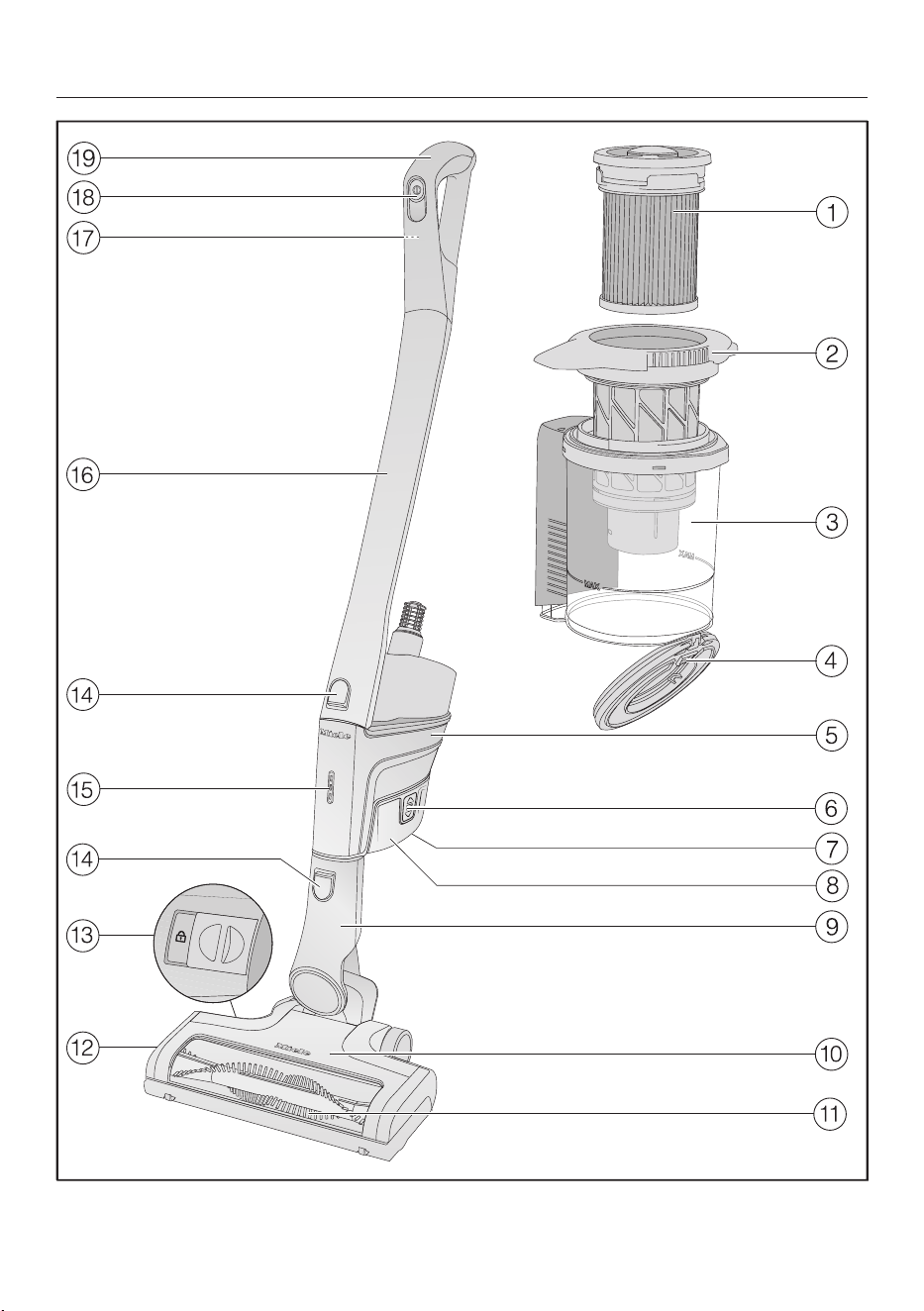
en-US - Appliance description
122

en-US - Appliance description
123
a
Fine dust filter (HXFSF-2)
b
Pre-filter
c
Dust container
d
Dust container flap
e
PowerUnit with a connection at the bottom for the battery, a connector at the
bottom for the suction wand and Electrobrush, and a connector at the top for
the suction wand and Comforthandle
f
Release buttons for battery (on both sides of the battery)
g
Charging socket (at the bottom of the battery)
h
AP01/AP02/AP03lithium-ionbattery (HXLA)
i
Electrobrush connector
j
MultiFloorXXLElectrobrush (some models feature BrilliantLight lighting)
k
Removable roller brush
l
Flap
m
Release button for opening the Electrobrush
n
Release buttons
o
Battery charging state indicator
p
Suction wand
q
Release button for Comforthandle (on the back)
r
On/Off switch with suction power selector
s
Comforthandle

en-US
124
References to illustrations
The illustrations referred to in the text
are shown on the fold-out pages at the
end of these Operating Instructions.
Installation and connection
Assembling the vacuum cleaner
(Fig. 01)
You can assemble the vacuum cleaner in
2 different ways.
You can place the suction wand either
above or below the PowerUnit.
Take care to assemble the vacuum
cleaner exactly as shown in the dia-
gram.
The advantages of placing the
PowerUnit at the bottom of the vac-
uum cleaner are as follows:
– secure self-standing function possible
(see “Use” – “Self-standing function for
short pauses in vacuuming”)
– ergonomic (reduced strain on the
wrist)
– convenient cleaning of large surfaces
The advantages of placing the
PowerUnit at the top of the vacuum
cleaner are as follows:
– convenient cleaning underneath furni-
ture
– PowerUnit can be removed quickly
Using the PowerUnit solo (Fig. 02)
The PowerUnit can be used on its own
without the suction wand and electro-
brush as a quick way of vacuuming up
crumbs and lint in specific areas.
Tip: This configuration is particularly
suitable when using the three-piece ac-
cessory set (see “Using the accessories
supplied”).
Connecting the Comfort handle
(Fig. 03)
Depending on how you decide to con-
figure your vacuum cleaner, you can
connect the Comforthandle to either
the suction wand or the PowerUnit.
Push the Comfort handle down on to
the suction wand connection from
above until it audibly clicks into place
(left image detail).
Slide the Comfort handle along the
guide line on the dust container han-
dle and down on to the PowerUnit
connector from above until it audibly
clicks into place (right image detail).
Switch off the vacuum cleaner using
the On/Off switch on the front of the
Comfort handle if you want to sepa-
rate the sections.
Press the release catch and remove
the Comfort handle by pulling upward
(Fig. 04).
Connecting the PowerUnit and the
suction wand (Fig. 05)
Depending on how you decide to con-
figure your vacuum cleaner, the suction
wand is located either above or below
the PowerUnit.
Slide the suction wand along the
guide line on the dust container han-
dle and down on to the PowerUnit
connector from above until it audibly
clicks into place (left image detail).
Push the PowerUnit connector down
on to the suction wand from above
until it audibly clicks into place (right
image detail).
Press the release catch to separate
the individual sections from each
other (Fig. 06).

en-US
125
Inserting the battery (Fig. 07)
Push the battery along the guide lines
until it audibly clicks into place in the
PowerUnit.
If you want to separate the sections
again, press both release catches at
the side of the battery to remove the
battery (Fig. 08).
Connecting the Electrobrush (Fig. 09)
Depending on how you decide to con-
figure your vacuum cleaner, you can
connect either the PowerUnit connector
or the suction wand connector to the
Electrobrush.
Insert the connector down into the
Electrobrush from above until it audi-
bly clicks into place.
To separate the individual sections
from each other, press the release
catch on the Electrobrush and pull the
connector out of the Electrobrush
(Fig. 10).
General battery information
The rechargeable battery is supplied not
fully charged.
Charge the battery completely before
using it for the first time. Allow approxi-
mately 4hours for this.
To activate the battery, it is essential to
place it in the PowerUnit when charging
it for the first time.
Once the battery is fully charged, the
battery charging state indicator on the
PowerUnit switches off to conserve en-
ergy.
The maximum charging capacity is
only achieved once the battery has
been charged and run down five times.
A full charge provides enough power for
14minutes if the vacuum cleaner is
used at the maximum power level in its
fully assembled state.
However, if you use the PowerUnit solo
and select the minimum power level,
you can vacuum for up to 60minutes at
a time.
Charging the battery (without wall
mounting) (Fig. 11)
You can store the vacuum cleaner up-
right and charge the battery directly.
Before charging the battery for the first
time, you must read the information in
“Installation and connection” – “Gen-
eral battery information”.
Connect the PowerUnit to the Elec-
trobrush to provide a secure base for
the vacuum cleaner.
Swing the vacuum cleaner forward
until the Electrobrush connector audi-
bly clicks into place.
Plug the supplied charging cable into
the charging socket on the bottom of
the battery.
Plug the charger into a power socket.
The charging process will start.
You can read more about this in “Bat-
tery charging state indicator (while
charging)”.

en-US
126
Charging the battery (with wall mount-
ing) (Fig. 12)
There are 2 ways to store and charge
the vacuum cleaner in the supplied wall
bracket.
Before charging the battery for the first
time, you must read the information in
“Installation and connection” – “Gen-
eral battery information”.
You will need a suitable location near a
free power socket for mounting the ap-
pliance on the wall.
Wall mounting (Figs. 13 + 14)
The supplied wall bracket has a mount-
ing plate with a bag of screws attached
to the back.
Attach the mounting plate to the point
on the wall where you want the wall
mounting to be.
Remove the bag of screws.
Press the release catch at the bottom
of the wall bracket (Fig. 13).
Remove the mounting plate from the
wall bracket by sliding it downward
(Fig. 14).
Attaching the mounting plate
(Figs. 15 + 16)
2 plugs and 2 T20TORX screws are
supplied for attaching the mounting
plate to the wall.
You will also need a battery-operated
screwdriver or a drill (with a drilling di-
ameter of 6mm).
Depending on how you decide to con-
figure your vacuum cleaner, select a dis-
tance of 17 11/16" or 38 9/16"
(45 cm or 98 cm) between the bottom
edge of the mounting plate and the floor
(Fig. 15).
Be careful not to damage any electrical
in the wall.
Attach the mounting plate to the wall
(Fig. 16).
Attaching the charging cable to the
wall bracket (Figs. 17, 18, + 19)
A cable compartment is located on the
underside of the wall bracket.
Press both release catches on the un-
derside of the wall bracket and re-
move the cable compartment cover
(Fig. 17).
Plug the supplied charging cable into
the opening from above (Fig. 18).
Lay the charging cable in its guide
(Fig. 18).
Refit the cover and close the cable
compartment (Fig. 19).
Connecting the accessories holder
(if required) (Fig. 20)
An accessories holder is supplied for
storing the three-piece accessory set on
the wall bracket (see “Using the acces-
sories supplied”).
Push the accessories holder on to the
wall bracket as far as it will go.
Connecting the wall bracket
(Figs. 21 + 22)
Slide the wall bracket down into the
mounting plate from above until it au-
dibly clicks into place (Fig. 21).
Slide the PowerUnit of the fully as-
sembled vacuum cleaner, with the
battery inserted, down into the wall
bracket from above (Fig. 22).
Plug the charger into the power
socket.
The charging process will start.

en-US
127
Battery charging state indicator (while
charging) (Fig. 23)
The battery charging state is displayed
on the PowerUnit.
Battery life Indicator
Approx. 0–34% Bottom light
flashes slowly
Approx. 35–
69%
Bottom light is lit
up; middle light
flashes slowly
Approx. 70–
90%
Bottom and middle
lights are lit up; top
light flashes slowly
Approx. 91–99%
100%
Bottom, middle,
and top lights are lit
up
Switches off
Once the battery is fully charged, the
battery charging state indicator
switches off to conserve energy.
If the battery has not been used for a
long time and has run down, it will go
into safe mode. As a result, the battery
charging state indicator will only re-
spond after approximately 30–
60minutes when charging in the
PowerUnit.
Battery charging state indicator (while
in use) (Fig. 23)
The battery charging state is displayed
on the PowerUnit.
Battery life Indicator
Approx. 100–
70%
Top, middle, and
bottom lights are
lit up
Approx. 69–35% Middle and bot-
tom lights are lit
up
Approx. 34–15% Bottom light is lit
up
Approx. 14–0% Bottom light
flashes slowly
We recommend allowing the battery to
run down completely before recharging
it. In this way, you will benefit from the
battery’s full capacity.

en-US
128
Using the accessories supplied
(Fig. 24)
Miele offers a range of suitable acces-
sories for many Special Modes (see
“Optional accessories”).
Upholstery nozzle XL
Accessory for cleaning upholstery,
mattresses, and cushions.
Crevice nozzle
Accessory for cleaning in folds,
crevices, or corners.
Dusting brush
Accessory for vacuuming skirting
boards, carved furniture, or orna-
ments.
The head can be swiveled to ad-
just the angle.
d Accessories holder for wall
bracket
For storing the three-piece acces-
sory set.
Symbols on the holder show where to
attach the different accessories.
You can fit the accessories holder to the
wall bracket (see “Installation and con-
nection” – “Connecting the accessories
holder”).
Accessories holder for the suction
wand (Fig. 25)
This accessories holder allows you to
carry around 2 accessories from the
three-piece accessory set while you
vacuum.
Multi Floor XXL Electrobrush (Fig. 26)
Follow the flooring manufacturer’s
cleaning and care instructions.
Damage caused by trapped ma-
terial.
Risk of the flooring getting scratched.
Make sure that there is no coarse dirt
or debris trapped in the bottom of
the Electrobrush, e.g., shards or
stones.
The Electrobrush can be used for daily
cleaning of carpets, rugs, and hard
floors.
Tip: The suction wand is not a conve-
nient option for cleaning carpeted stairs.
Tip: If you ever need to vacuum up sub-
stantial amounts of coarse dirt or de-
bris, use the PowerUnit solo (see “In-
stallation and connection“ – “Using the
PowerUnit solo”).
HardfloorCaresoftroller (HXHC)
(Figs. 27 + 28)
(depending on model)
Follow the flooring manufacturer’s
cleaning and care instructions.
When fitted with the Hardfloor Care soft
brush, the Electrobrush can be used to
clean delicate hard floors.
Insert the HardfloorCaresoftbrush into
the Electrobrush instead of the roller
brush fitted as standard (Fig. 28).
When you use the Hardfloor Care soft
roller, the Electrobrush power con-
sumption is automatically set to the
optimum level – this can lead to a
change in the operating noise.
Unlock the flap on the side of the
Electrobrush so that the symbol
becomes visible a.
Lift the flap up as far as it will go b.

en-US
129
Remove the roller brush that has been
fitted as standard c.
Insert the HardfloorCaresoftroller.
Close and lock the flap.
ElectroCompacthandheldbrush
(Fig. 29)
(depending on model)
Follow the flooring manufacturer’s
cleaning and care instructions.
Damage caused by trapped ma-
terial.
Risk of the flooring getting scratched.
Make sure that there is no coarse dirt
or debris trapped in the bottom of
the handheld brush, e.g., shards or
stones.
The handheld brush is particularly suit-
able for intensive cleaning of car seats
and carpeted stairs.
For optimum cleaning results on up-
holstery, use the upholstery nozzle XL.
Tip: The suction wand is not a conve-
nient option for cleaning car seats or
stairs.
Tip: If you ever need to vacuum up sub-
stantial amounts of coarse dirt or de-
bris, use the PowerUnit solo (see “In-
stallation and connection“ – “Using the
PowerUnit solo”).
Additional battery (HXLA)
(depending on model)
Using the additional battery doubles the
amount of time the vacuum cleaner can
be used for.
Before charging for the first time,
please note the information in “Instal-
lation and connection” – “General bat-
tery information”.
Battery charger cradle (HXLS)
(Fig. 30)
(depending on model)
Before charging for the first time,
please note the information in “Instal-
lation and connection” – “General bat-
tery information”.
When charging the battery for the first
time, you must use the PowerUnit. As of
the second charging operation, you can
use the battery charger cradle instead.
Push the battery into the charger cra-
dle until it audibly clicks into place.
Insert the plug into a power socket.
The charging process will start. The bat-
tery charging state indicator flashes on
the left.
You can find out more about the battery
charging state indicator in “Installation
and connection” – “Battery charging
state indicator”.
If you place the run-down battery in
the charger cradle straight after use, it
will only start charging once the bat-
tery has cooled down.
The cooling process can take up to
60minutes. The battery charging state
indicator on the charger cradle will not
respond during this time.
Use
Switching on and off(Fig. 31)
If you have charged the battery in the
wall bracket, take the vacuum cleaner
out of the wall bracket.

en-US
130
If you have charged the battery di-
rectly, unplug the charging plug from
the charging socket on the bottom of
the battery.
For the best possible cleaning results,
always activate the ComfortClean
function before switching on the vac-
uum cleaner (see “Maintenance” –
“Activating the ComfortClean func-
tion”).
Press the On/Off switch on the Com-
fort handle.
Regulating the suction power (Fig. 31)
The suction power can be regulated to
suit the type of flooring being cleaned.
Reducing the suction power reduces the
amount of effort required to maneuver
the Electrobrush.
There are 3 power levels to choose from
on the Comfort handle:
Min. Lowest power level for light
soiling
Eco Medium power level for nor-
mal soiling
Max. Highest power level for
heavy soiling
The floor covering detection function is
activated at every power level.
The Electrobrush power consumption is
automatically set to the optimum level
based on the type of flooring and roller
brush used – this can lead to a change
in the operating noise.
Illuminating the work area
(depending on model)
The Electrobrush on your vacuum
cleaner is equipped with BrilliantLight to
illuminate the work area.
Self-standing function for short
pauses in vacuuming
(For safety reasons, this function can
only be used when the PowerUnit is fit-
ted at the bottom of the vacuum
cleaner)
If you are vacuuming with the
PowerUnit fitted at the bottom of the
vacuum cleaner, you can easily interrupt
operation while the appliance is
switched on.
Swing the vacuum cleaner forwards
until the Electrobrush connector audi-
bly clicks into place.
The vacuum cleaner stays securely up-
right, the Electrobrush switches itself off
and the battery is conserved.
If you then unlock the connector on the
Electrobrush, the Electrobrush will
switch on again.
Maintenance
Risk of injury caused by rotating
roller brush.
You can injure yourself on the rotating
roller brush.
Switch the vacuum cleaner off before
doing any maintenance work. Use the
On/Off switch on the Comfort handle
to do this.
It is recommended to use only genuine
Miele accessories bearing the “ORIGI-
NAL Miele” logo on the packaging.
Only these will guarantee the optimum
performance of your vacuum cleaner
and the best possible cleaning results.
Please note that faults and damage
caused by use of accessories which do
not bear the “ORIGINAL Miele” logo
on the packaging are not covered by
the vacuum cleaner warranty.

en-US
131
Filter system (Fig. 32)
Fine dust filter (HXFSF-2)
Pre-filter
Dust container
d Dust container flap
Activating the ComfortClean function
(Fig. 33)
Always run the interim cleaning function
for the fine dust filter before emptying
the dust container. You should also run
it whenever the suction power begins to
drop.
This enables the vacuum cleaner to
achieve the very best cleaning perfor-
mance again right away.
The fine dust filter is located in the lid
of the dust container. Twist it counter-
clockwise by 3 180° turns. Use the
recesses to help you.
You will hear an operating noise, which
is a normal part of how the Comfort-
Clean function works.
Emptying the dust
container(Fig. 34–38)
Empty the dust container before the
dust has reached the MAX marking on
the dust container.
Turn the lid of the dust container in
the direction of the arrow as far as the
first stop. Use the gray gripping sur-
faces to help you do this (Fig. 34).
Remove the dust container upward
(Fig. 35).
Provided that no prohibited sub-
stances are present, the contents of
the dust container can be disposed of
with normal household waste.
Hold the dust container close to the
trash can so that as little dust billows
out as possible.
Turn the lid of the dust container in
the direction of the arrow as far as the
next stop. Use the gray gripping sur-
faces to help you do this (Fig. 36).
The dust container flap will open and
the dust will fall out (Fig. 37).
If chunks of dust, hair, or coarse debris
do not fall out, remove the pre-filter by
pulling it upward (see “Cleaning the
pre-filter and fine dust filter” below).
Turn the lid of the dust container back
to its original position.
Close the dust container flap, making
sure it clicks into place.
Slide the dust container handle along
the guide line and down on to the
PowerUnit connector from above until
it audibly clicks into place (Fig. 38).
Cleaning the pre-filter and fine dust fil-
ter (Fig. 39–42)
Clean both filters thoroughly at least
once every 3 months.
When cleaning them, it is essential to
follow the steps in the order described.
Remove the dust container.
Empty the dust container over a
garbage can.
Turn the lid of the dust container be-
yond the stop until the arrow tips are
aligned at the top a (Fig. 39).
Remove the pre-filter by pulling it up-
ward b (Fig. 39).
Twist the fine dust filter counterclock-
wise by 10 180° turns. Use the re-
cesses to help you (Fig. 33).

en-US
132
You will hear an operating noise, which
is a normal part of how the Comfort-
Clean function works.
Twist the fine dust filter clockwise.
Use the recesses to help you (Fig.
40).
Remove the fine dust filter (Fig. 40).
Risk of damage caused by incor-
rect cleaning.
The fine dust filter can become dam-
aged and be less effective as a result.
Do not clean the fine dust filter with
water and avoid cleaning the inside.
Do not use pointed or sharp-edged
objects to clean the filter. Do not
brush the fine dust filter.
Hold the fine dust filter over a garbage
can.
Carefully knock the fine dust filter
with the rubberized lower edge.
Turn the fine dust filter slightly while
you do this to free the dirt from all of
the crevices.
Risk of damage caused by incor-
rect cleaning.
The pre-filter can become damaged
and be less effective as a result.
Do not clean the pre-filter with water.
Do not use pointed or sharp-edged
objects to clean the filter.
Clean the pre-filter with the dusting
brush supplied or with a dry cloth.
After cleaning the fine dust filter and
pre-filter, reinsert the former into the
latter by pressing the round cap on
top of the fine dust filter down as far
as it will go.
To continue achieving the best possi-
ble cleaning results, replace the fine
dust filter (HXFSF-2) with a new one
after approx. 3years.
Reinsert the pre-filter in the dust con-
tainer (Fig. 41).
To do this, line up the guides (arrows)
and turn the pre-filter back to its origi-
nal position (Fig. 42).
Close the dust container flap, making
sure it clicks into place.
Replace the dust container on the
PowerUnit connector.
Cleaning the dust container
Clean the dust container as required.
Remove the dust container.
Empty the dust container over a
garbage can and lift the pre-filter up-
ward to remove it (Fig. 39).
Clean the dust container using water
and mild detergent.
Dry the dust container carefully.
Reinsert the pre-filter in the dust con-
tainer and turn the pre-filter back to
its original position (Figs. 41 + 42).
Replace the dust container on the
PowerUnit connector.
Cleaning the Electrobrush/handheld
brush (depending on model) (Fig. 43)
Disconnect the Electrobrush/hand-
held brush from the vacuum cleaner
(Fig. 10).
Place the Electrobrush/handheld
brush upside down on a level, clean
surface.

en-US
133
Use a pair of scissors to cut any
threads or hairs that have wound
themselves around the roller brush. To
guide the scissors, move along the
guide track on the roller brush.
Then run the vacuum cleaner to vacuum
up the cut threads and hairs.
If the small running wheels are very
heavily soiled or blocked, you can re-
move them for easier cleaning (not
necessary in the case of the handheld
brush). To remove them, use a flat-
head screwdriver.
Removing the roller brush from the
Electrobrush (Fig. 44)
(Not possible with the handheld brush)
You can take the roller brush out of the
Electrobrush in order to remove stub-
born soiling and clean the inside of the
Electrobrush.
Unlock the flap on the side of the
Electrobrush so that the symbol
becomes visible a.
Lift the flap up as far as it will go b.
Remove the roller brushc.
Remove the roller brush handle if you
identify heavy soiling there d.
Clean the roller brush and the roller
brush handle, and remove any stub-
born soiling inside the Electrobrush.
Reassemble the Electrobrush in re-
verse order.
Replacing the rechargeable battery
An original Miele AP01/AP02/AP03
lithium-ion rechargeable battery (HX LA)
is required.
Follow the instructions regarding the
handling and disposal of rechargeable
batteries found in the following sec-
tions: “IMPORTANT SAFETY IN-
STRUCTIONS”, “Caring for the envi-
ronment”, and “Installation and con-
nection” (“General battery informa-
tion”).

en-US
134
Fault messages
Risk of injury caused by rotating roller brush.
You can injure yourself on the rotating roller brush.
Switch the vacuum cleaner off before dealing with any problems. Use the On/
Off switch on the Comfort handle to do this.
Fault messages are displayed with a quick flashing light on the battery charging
state indicator on the PowerUnit.
Problem Possible cause and solution
Top light flashes quickly “Comfort handle not recognized” error
Remove the Comfort handle and reconnect it (see
“Installation and connection” – “Connecting the
Comfort handle”).
Remove the battery, wait for 10seconds, then rein-
sert it.
Middle light is flashing
quickly
“Motor overheating” error
Empty and clean the dust container, pre-filter, and
fine dust filter (see “Maintenance”).
Remove the battery, wait for 10seconds, then rein-
sert it.
Wait for approximately 30minutes before switching
the vacuum cleaner back on again.
Bottom and top lights
are flashing quickly
Internal system fault
Remove the battery, wait for 10seconds, reinsert it,
and charge it.
Bottom and middle
lights flash quickly
“Battery overheating” or “Battery not recognized” er-
ror
Wait for approximately 30minutes before switching
the vacuum cleaner back on again.
Insert an original MieleAP01/AP02/AP03lithium-
ionrechargeablebattery (HXLA).
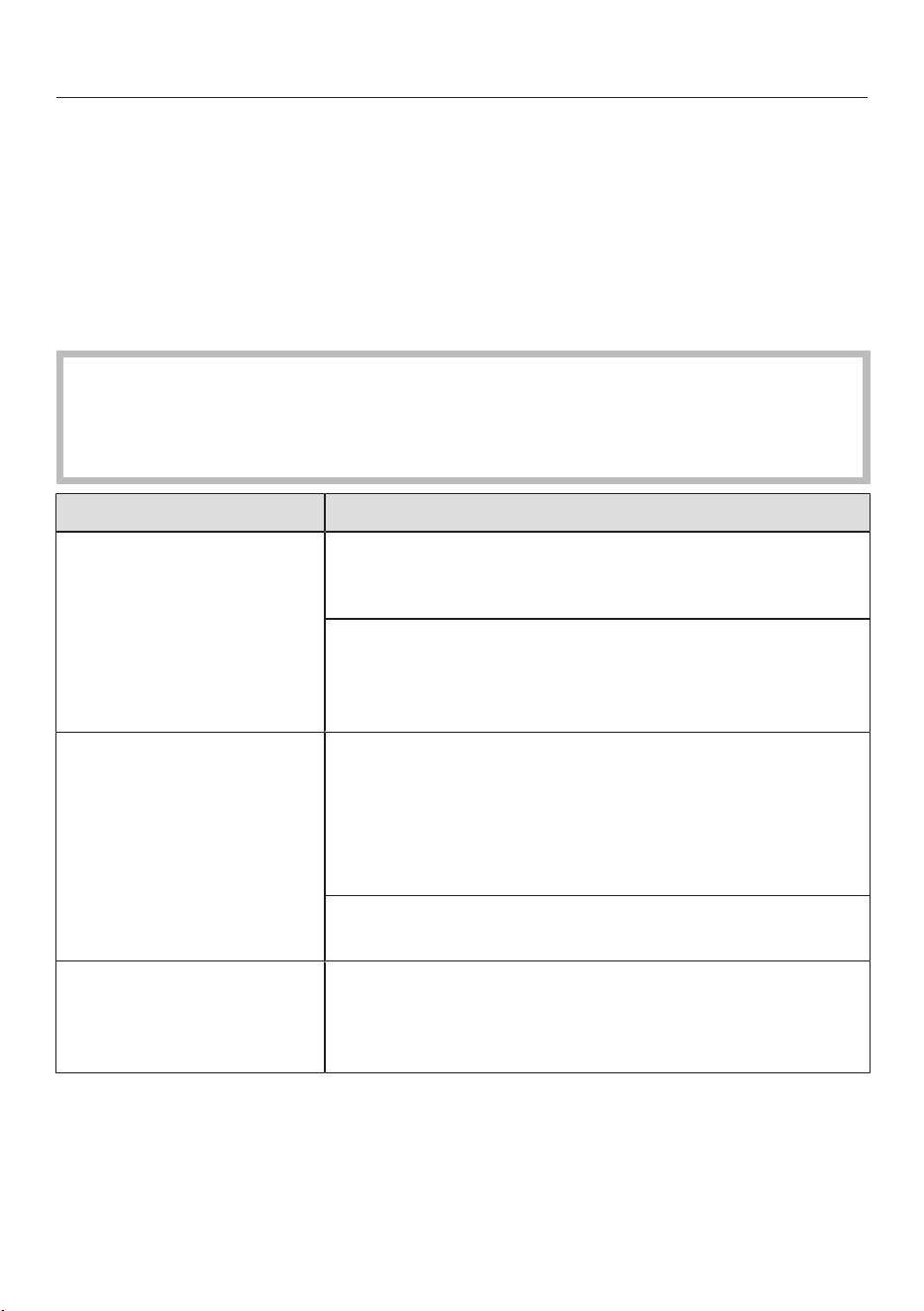
en-US
135
Frequently asked questions
Many malfunctions and faults that can occur in daily operation can be easily reme-
died. You can save time and money in many cases, as you do not need to contact
Miele Customer Service.
Information to help you rectify faults yourself can be found at www.miele.com/ser-
vice.
The following tables are designed to help you to find the cause of a malfunction or a
fault and to resolve it.
Risk of injury caused by rotating roller brush.
You can injure yourself on the rotating roller brush.
Switch the vacuum cleaner off before dealing with any problems. Use the On/
Off switch on the Comfort handle to do this.
Problem Possible cause and solution
The cleaning perfor-
mance is poor.
The dust container is full.
Empty and clean the dust container (see “Mainte-
nance”).
The Electrobrush is dirty/blocked.
Clean the Electrobrush (see “Maintenance” –
“Cleaning the Electrobrush” and “Removing the
roller brush from the Electrobrush”).
Cleaning performance is
reduced.
The fine dust filter/pre-filter is soiled.
Run the interim cleaning function for the fine dust
filter (see “Maintenance” – “Activating the Comfort-
Clean function”).
Clean both filters thoroughly (see “Maintenance” –
“Cleaning the pre-filter and fine dust filter”).
The fine dust filter is worn.
Insert a new fine dust filter (HXFSF-2).
The roller brush is not
rotating.
The roller brush is dirty.
Clean the roller brush (see “Maintenance” – “Clean-
ing the Electrobrush” and “Removing the roller
brush from the Electrobrush”).

en-US
136
Problem Possible cause and solution
The vacuum cleaner
does not start when it is
switched on.
There is no battery inserted or the battery is inserted
incorrectly.
Insert the battery or check how the battery is posi-
tioned (see “Installation and connection” – “Insert-
ing the battery”).
The rechargeable battery is not sufficiently charged.
Charge the battery exactly as described in these op-
erating instructions (see “Installation and connec-
tion” – “General battery information” and “Charging
the battery”).
An original Miele battery has not been inserted.
Insert an original MieleAP01/AP02/AP03lithium-
ionrechargeablebattery (HXLA).
The battery was not placed in the PowerUnit when
charging it for the first time.
To activate the battery, it must be placed in the
PowerUnit the first time it is charged (see “Installa-
tion and connection” – “General battery informa-
tion” and “Charging the battery”).
The charger is still plugged in.
Pull the plug out of the charging socket on the bot-
tom of the battery.
The operating noise is
changing during vacu-
uming.
The Electrobrush power consumption is automatically
set to the optimum level based on the type of flooring
and roller brush used.
The noise is not unusual – the vacuum cleaner is
functioning normally.
The Electrobrush
switches itself off.
The Electrobrush is overloaded – this can happen on
surfaces like deep-pile carpet.
Switch the vacuum cleaner off and switch it on again
at a reduced suction power level. Use the On/Off
switch on the Comfort handle to do this.
The vacuum cleaner
keeps falling over.
You have configured the vacuum cleaner with the
PowerUnit at the top.
Reassemble the vacuum cleaner so that it is config-
ured with the PowerUnit at the bottom (see “Instal-
lation and connection” – “Assembling the vacuum
cleaner”).

en-US
137
Customer Service
Information to help you rectify faults
yourself and about Miele spare parts
can be found at www.miele.com/ser-
vice.
Contact in case of fault
In the event of a fault which you cannot
remedy yourself, please contact your
Miele dealer or Miele Service.
Contact information for Miele Service
can be found at the end of this docu-
ment.
Cleaning and care
Risk of injury caused by rotating
roller brush.
You can injure yourself on the rotating
roller brush.
Switch the vacuum cleaner off before
cleaning it. Use the On/Off switch on
the Comfort handle to do this.
Vacuum cleaner and accessories
Risk of electric shock from volt-
age.
If moisture gets into the charger,
there is a risk of electric shock.
Do not let the charger get wet.
Follow the special cleaning instruc-
tions for the dust container in the
“Maintenance” section.
The vacuum cleaner and all plastic ac-
cessories can be cleaned with a com-
mercially available cleaner suitable for
plastic.
Damage due to unsuitable clean-
ing agents.
All surfaces are susceptible to
scratching. Contact with unsuitable
cleaning agents can alter or discolor
the external surfaces.
Do not use abrasive cleaning agents,
glass cleaning agents, all-purpose
cleaners, or oil-based conditioning
agents.
en-US
138
Optional accessories
Follow the flooring manufacturer’s
cleaning and care instructions.
It is recommended to use only genuine
Miele accessories bearing the Miele
logo on the packaging. Only these will
guarantee the optimum performance
of your vacuum cleaner and the best
possible cleaning results.
Please note that faults and damage
caused by use of accessories which do
not bear the Miele logo on the packag-
ing are not covered by the vacuum
cleaner warranty.
Optional accessories
Original Miele accessories are available
from the Miele Webshop, Miele Cus-
tomer Service, and your Miele dealer.
Original Miele accessories are identified
by the Miele logo on the packaging.
With 3D4U, Miele also offers free ac-
cessories to download from your 3D
printer (www.miele.com, Service,
3D4U).
Certain models are supplied as standard
with one or more of the following acces-
sories.
Electro Compact handheld brush
(HXSEB)
For intensive cleaning of car seats and
carpeted stairs.
HardfloorCaresoftroller (HXHC)
For cleaning delicate hard floors.
Universal brush (HX-UB)
For gentle vacuuming of books, shelves
or similar.
Radiator brush (SHB 30)
For dusting radiators, narrow shelves
and crevices.
Mattress tool (SMD 10)
For vacuuming upholstery, mattresses,
cushions, curtains, covers, etc.
Crevice nozzle, 12" (300mm)
(SFD 10)
Extra long crevice nozzle for cleaning in
folds, crevices and corners.
Crevice nozzle, 22" (560mm)
(SFD 20)
Flexible crevice nozzle for vacuuming
hard to reach places.
Extendable flexible XL crevice nozzle
(HX-CNXL)
The flexible crevice nozzle can reach
24" (60cm) for cleaning hard-to-reach
areas.
Hose extension (HS-FSH20)
For increasing the vacuuming radius by
maximum 47" (120cm).
AP01/AP02/AP03additional battery
(HXLA)
For doubling the amount of time the
vacuum cleaner can be used for.
Before charging for the first time,
please note the information in “Instal-
lation and connection” – “General bat-
tery information”.

en-US
139
LS03/LS04 (HXLS) battery charger
cradle
For charging the additional battery inde-
pendently of the appliance, i.e., while
the appliance is in use.
Before charging for the first time,
please note the information in “Instal-
lation and connection” – “General bat-
tery information”.
Fine dust filter (HXFSF-2)
To continue achieving the best possible
cleaning results, replace the fine dust fil-
ter that is installed as standard with a
new one after approx. 3years (see
“Maintenance” – “Cleaning the pre-fil-
ter and fine dust filter”).

en-US - LIMITED WARRANTY - Vacuum Cleaners USA
140
What This Warranty Covers and For What Period The Coverage Extends
Miele, Inc. (hereinafter “Miele”) warrants to the original purchaser of this product, living in the United States of
America, who purchased their vacuum from a Miele Authorized Dealer:
a. That this product, including all of its Miele authorized parts is free of defects in material and workmanship.
b. That this product, if found to be defective within the stated warranty period, will be repaired free of charge to the
consumer (both parts and labor) by an authorized Miele service agent.
c. The warranty period for vacuum cleaners, with the exception of “HomeCare” sub-models, is as follows:
Vacuum Series Term
Classic Series Canister Vacuums 1 year
Swing Series H1 Vacuums 1 year
Compact Series Canister Vacuums 2 years
Scout Robotic Vacuums 2 years
Triflex HX1 / HX2 Series Cordless Vacuums 2 years
Complete Series Canister Vacuums 3 years
Dynamic Series Upright Vacuums 3 years
Blizzard Bagless Series Canister Vacuums 3 years
Boost CX1 Bagless Series Canister Vacuums 3 years
d. The warranty period for all “HomeCare” sub-model types is 5 (five) full years from the date of purchase, while the
Triflex HX1 HomeCare is 3 (three) full years from the date of purchase.
e. This warranty only applies while the product remains within the United States, and is null and void in any other US
territories, possessions, or foreign countries.
Commercial Use
Vacuum cleaners other than the Scout RX1 and Scout RX2 used for commercial purposes will be warranted for a
period of six (6) months from the date of purchase. There is no warranty for the Scout RX1 or Scout RX2 used for
commercial purposes. Thereafter this Limited Warranty shall be null and void.
What is not covered by this Warranty
This warranty does not cover damage or defects caused by or resulting from repairs, service or alterations to the
product or any of its parts or accessories which have been performed by service centers or repairmen not authorized
by Miele, or damage or defects caused by negligence, accident, abuse, misuse, improper or abnormal usage or
maintenance of the product, its parts or accessories, or damages caused by the use or installation of non-genuine
Miele parts Ordinary wear and tear or cosmetic damage (scuffs, scratches, gouges, dents, etc.) shall not be
considered a defect in materials or workmanship.
Exclusion of Other Warranties
Except for the limited warranty provided herein, Miele disclaims any and all other express warranties with respect to
the product. Any warranty of merchantability or fitness for a particular purpose is limited in its duration to the term of
the limited warranty provided herein.
Some states do not allow limitations on how long an implied warranty lasts, so the above limitation may not apply to
you.
Some states do not allow limitations on how long an implied warranty lasts, so the above limitation may not apply to
you.
Limitation of Liability for Special, Incidental or Consequential Damages
Miele will assume no liability, or other obligation with respect to any personal injury or property damage resulting
from the use of a vacuum cleaner, or its accessories, replacement parts, etc., which has not been purchased from, or
serviced by an Authorized Miele Dealer. Any purchaser who obtains a vacuum cleaner, accessories, replacement parts,
etc., from someone other than an Authorized Miele dealer proceeds at their own risk.
Miele specifically disclaims any and all liability, whether directly or by way of indemnity, for special incidental,
consequential or other damages, whether based on breach of contract, tort, strict or product liability, or any other legal
theory.
Some states do not allow the exclusion or limitation of incidental or consequential damages, so the above limitation
may not apply to you.
Special State Laws
This Limited Warranty gives you specific legal rights; you may have other rights, which vary, from state to state.
Service
For service under this Limited Warranty, or to find an Authorized Miele Dealer in your area, please visit the “Find a
Miele Partner Near You” section at mieleusa.com.
Effective Date: August 1, 2023
©2020 Miele, Inc.


Importateur
Miele limitée
Siège social au Canada et Centre Miele
161 Four Valley Drive
Vaughan, ON L4K 4V8
www.miele.ca
Service à la clientèle
Téléphone : 1-800-565-6435
Canada
Veuillez indiquer le modèle et le numéro
de série de votre appareil lorsque vous
contactez le service à la clientèle.
Allemagne
Fabricant
Miele & Cie. KG
Carl-Miele-Straße 29
33332 Gütersloh

Endereço do fabricante
Alameda Gabriel Monteiro da Silva 819
Sao Paulo – SP – CEP 01441 000
Fone: (11) 3061-0430
Brasil
www.mielebrasil.com.br
Miele do Brasil
Miele & Cie. KG
Carl-Miele-Straße 29
33332 Gütersloh
Alemanha
MIELE S.A. de C.V.
MIELE EXPERIENCE CENTER
Dirección del fabricante
Miele & Cie. KG
Carl-Miele-Straße 29
33332 Gütersloh
Alemania
Arquímedes No. 43
Colonia Polanco Chapultepec
Alcaldía Miguel Hidalgo
C.P. 11560, Cd. de México
800 MIELE 00
www.miele.com.mx
www.shop.miele.com.mx
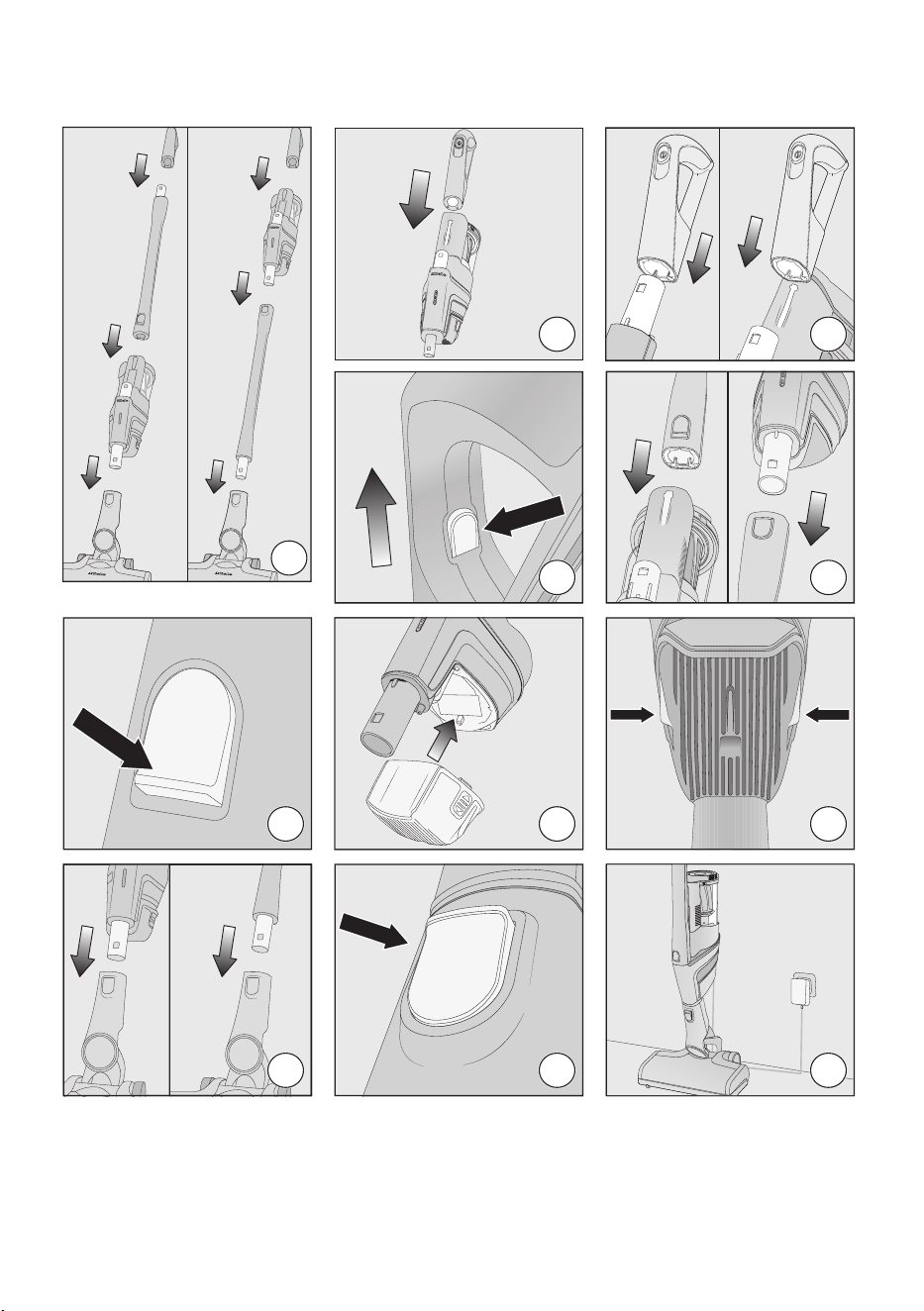
01
02
04
03
05
06
07
08
09
10
11
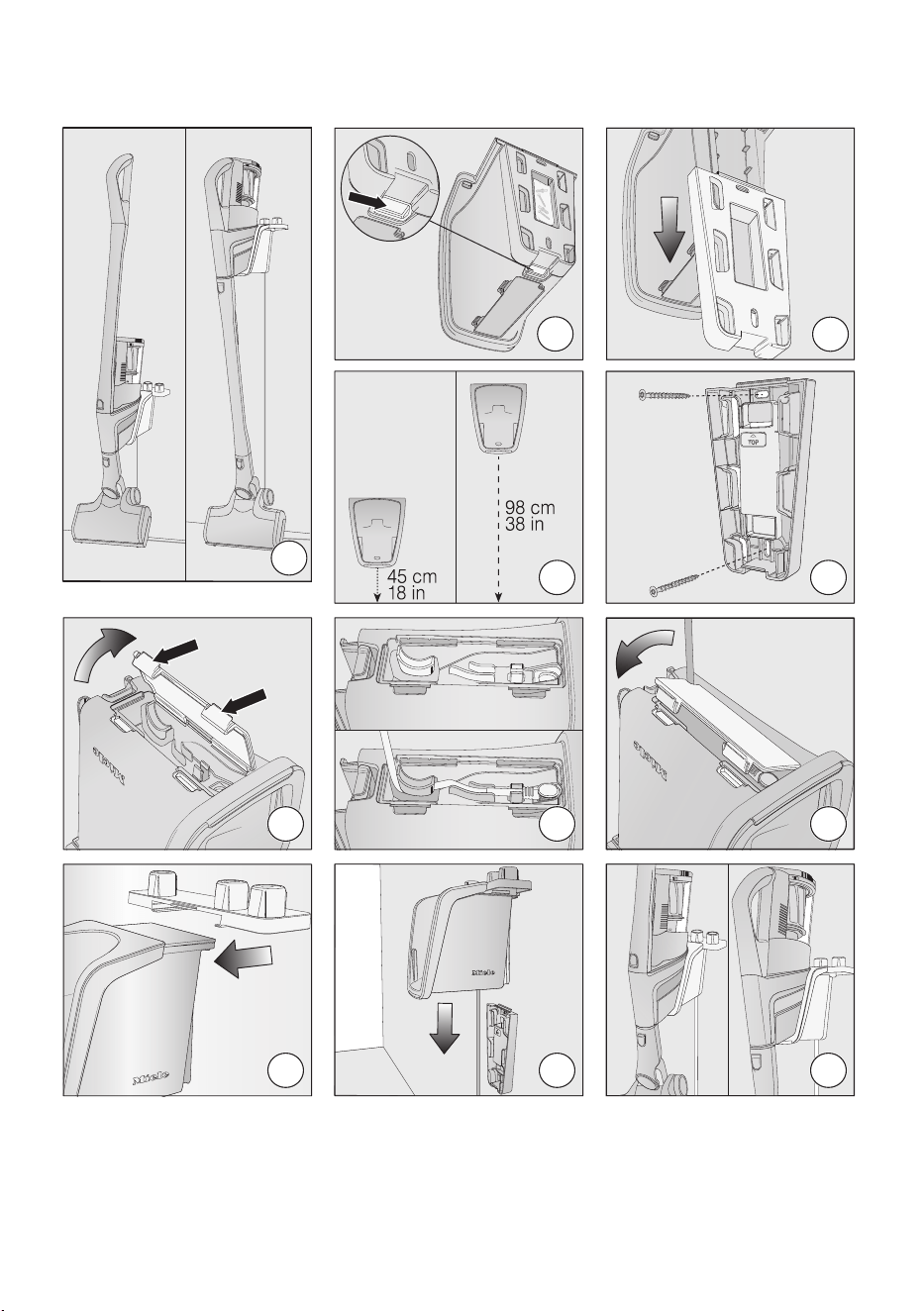
12
13
15
14
16
17
18
19
20
21
22
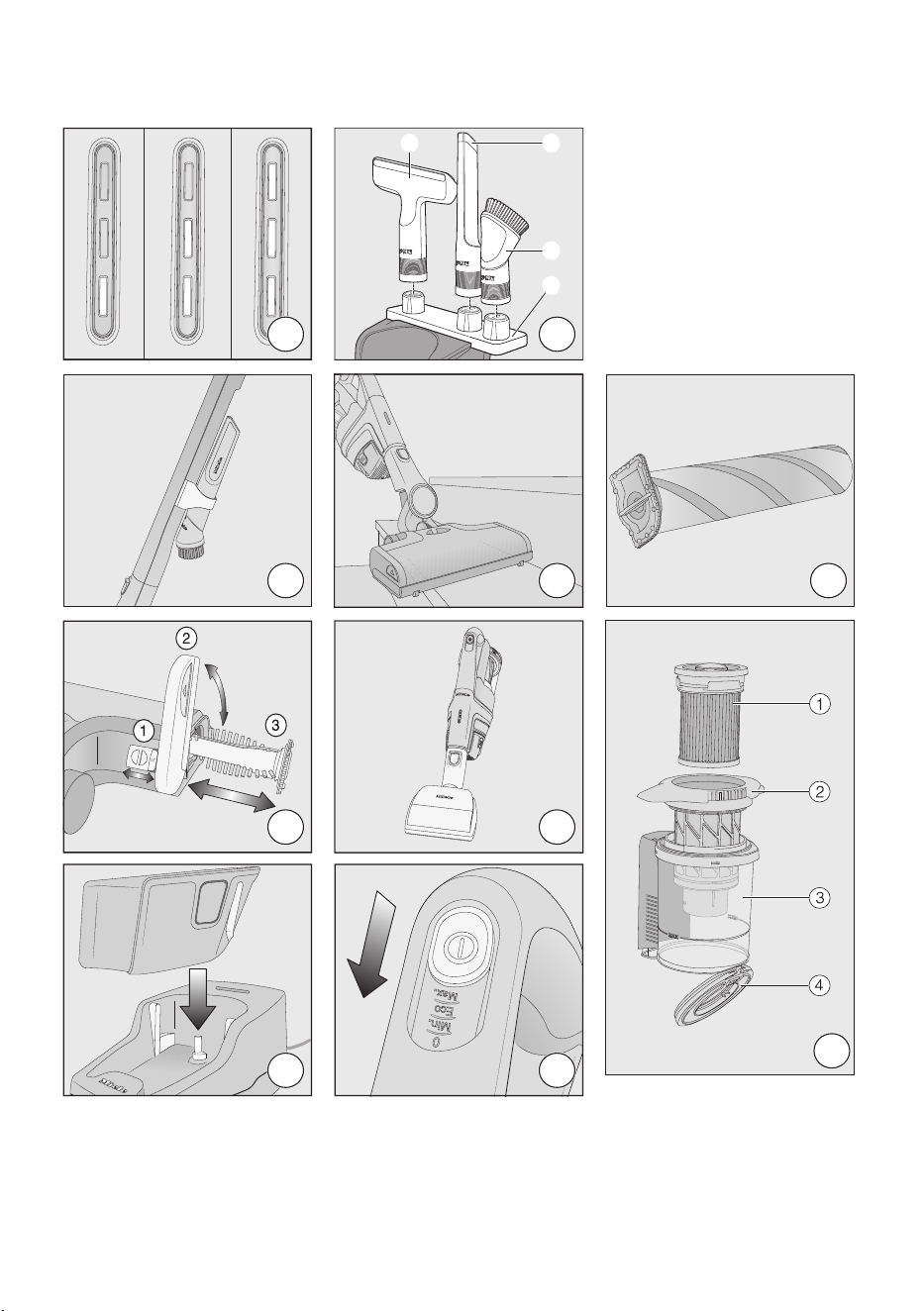
23
24
25
26
27
28
30
29
31
32
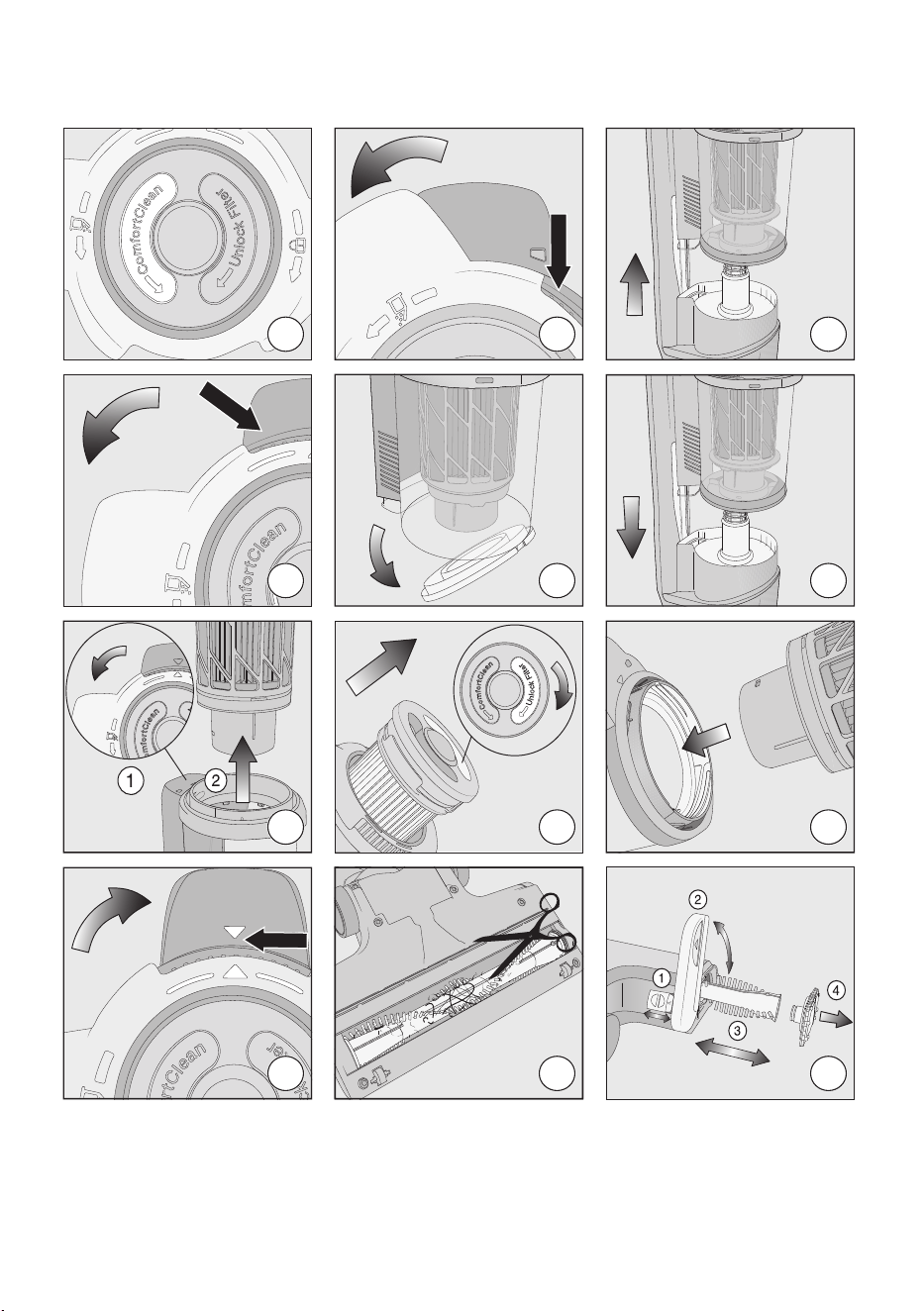
33
34
35
36
37
38
39
40
41
42
43
44

9 Independence Way
Princeton, NJ 08540
www.mieleusa.com
U.S.A.
Miele, Inc.
National Headquarters
Please have the model and serial number
of your appliance available when
contacting Customer Service.
Canada
Importer
Miele Limited
Headquarters and Miele Centre
Customer Support
Phone: 888-99-MIELE (64353)
161 Four Valley Drive
Vaughan, ON L4K 4V8
www.miele.ca
Customer Care Centre
Phone:
1-800-565-6435
905-532-2272
International Headquarters
Miele & Cie. KG
Carl-Miele-Straße 29
33332 Gütersloh
Germany
SOxxx - 4524 M.-Nr. 12 414 570 / 02
