Robotic Pool Cleaner LIBERTY
User Instructions
EN
600

2
Robotic Pool Cleaner LIBERTY | User Instructions
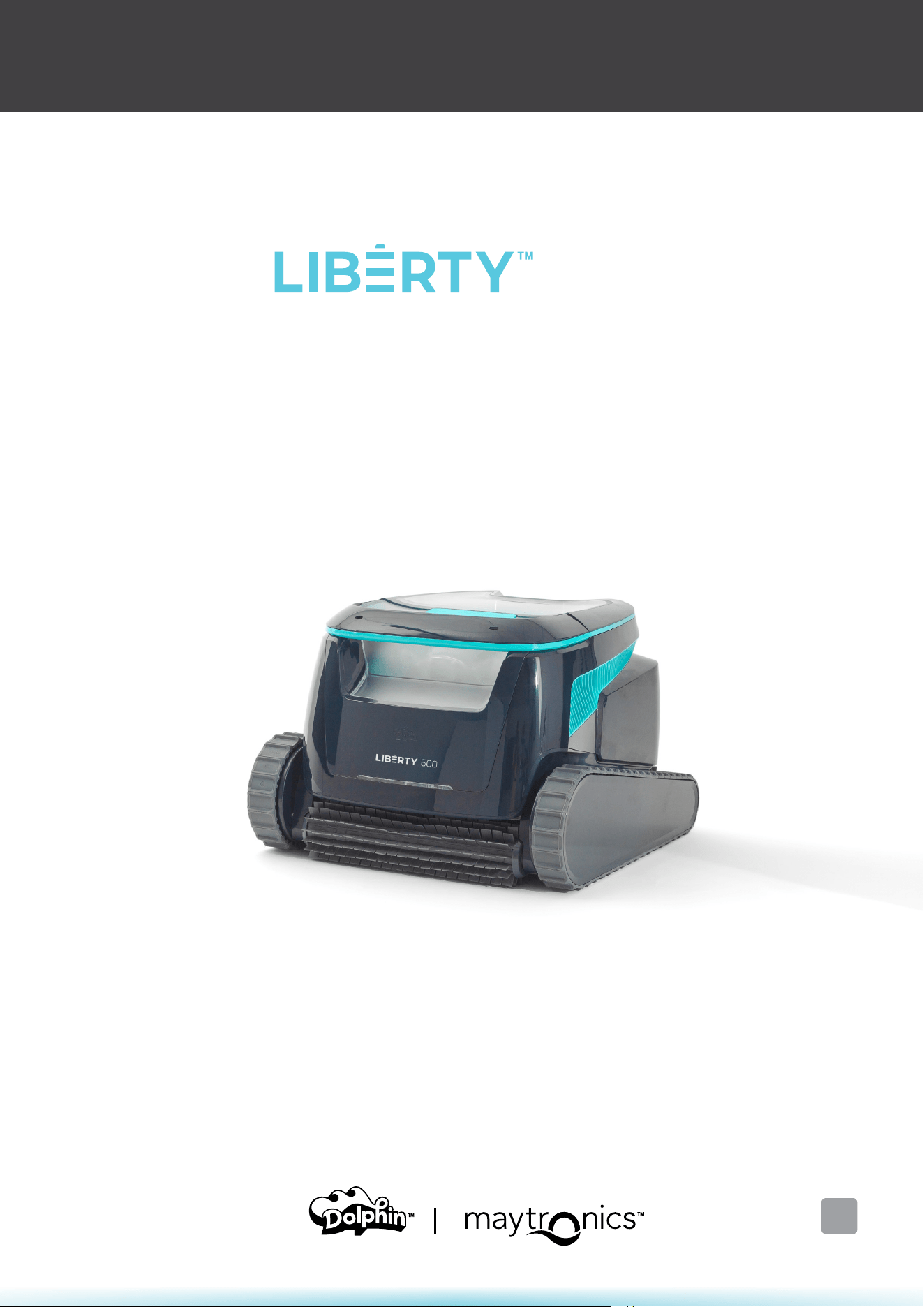
LIBERTY 600
Cordless Robotic Pool Cleaner
User Instructions
EN
Content
Safety Instructions
1. Getting Started ...................................................................................................................................................................... 5
1.1 What's in the Box .......................................................................................................................................................... 5
1.2 First Time Use .................................................................................................................................................................. 5
1.3 Removing the Robot from the Pool ..................................................................................................................... 6
1.4 Cleaning the Filter Basket .......................................................................................................................................... 6
1.5 Features and Indications ............................................................................................................................................. 7
1.6 Charging Recommendations .................................................................................................................................... 8
2. Specifications.......................................................................................................................................................................... 8
2.1 Robot ................................................................................................................................................................................... 8
2.2 Water Conditions ........................................................................................................................................................... 8
2.3 Battery Charger .............................................................................................................................................................. 8
3. Steps Jet-Cleaning ................................................................................................................................................................. 9
4. Periodic Cleaning ................................................................................................................................................................... 9
4.1 Cleaning the Impeller and Step Jet ...................................................................................................................... 10
5. Maytronics One™ App User Guide ................................................................................................................................ 11
5.1 Getting Started with the Maytronics One™ App ............................................................................................. 11
6. Activate the Pool Cleaner Using your Mobile Phone ............................................................................................ 11
6.1 Maytronics One™ App Features Guide ............................................................................................................... 11
6.2 Choose Preferred Parking Wall ............................................................................................................................... 12
7. Maytronics One™ Troubleshooting ............................................................................................................................ 12
8.
Robotic Pool Cleaner
Troubleshooting
......................................................................................................................... 13
9.
O-Season Storage
.............................................................................................................................................................. 13
10.
Contact Maytronics Customer Care
................................................................................................................................. 14

3
Robotic Pool Cleaner LIBERTY | User Instructions
IMPORTANT SAFETY INSTRUCTIONS
READ AND FOLLOW ALL INSTRUCTIONS
Please adhere strictly to following WARNINGS:
1. If the charger is damaged, including falling into the water, quickly and safely disconnect it from the
power outlet. Do not use a charger that has been damaged.
2. Remove the robotic pool cleaner from the pool before allowing people to enter the pool.
3. When examining the robotic pool cleaner, make sure the robotic pool cleaner is switched OFF.
4. Charge the battery only in the temperature range between 6°C to 35°C / 43°F - 95°F.
5. Keep the robotic pool cleaner out of the reach of children or persons with reduced physical, sensory,
or mental capabilities, or lack of experience and knowledge, unless they have been given supervision
or instruction.
Cleaning and maintenance shall not be done by children.
6. Use only the original battery charger.
7. The battery charger must be supplied through a power circuit protected by a residual current device
(RCD) having a rated residual operating current not exceeding 30mA.
8. The power cord is not user-replaceable. If the power cord is damaged, stop using the battery charger
and contact the service center for repair. Do not use extension cord to connect the battery charger to
electric supply; provide a properly located outlet.
9. DO NOT USE the robotic pool cleaner and/or its battery / power pack in case of mechanical damage to
the robotic pool cleaner and/or its battery.
10. To avoid the risk of fire and burns, DO NOT open, crush, heat, or burn the battery case.
Please ensure that the following
PRECAUTIONS are implemented:
1. For continuous protection against possible electric shock, place the battery charger at least
11 cm / 4 in above ground.
2. Position the battery charger at least 3 m / 9.8 ft from pool edge during operation.
3. When cleaning the impeller, use the impeller safety tool. See section 4.1.
4. Keep hands and fingers away from impeller motor area and driving belt mechanism to avoid injury.
5. When lifting the robotic pool cleaner, take care to prevent back injury.
6. Do not use the robotic pool cleaner if you have added liquid flocculant or any other clarifier to the pool
water. These substances obstruct and damage the robot filters.
CAUTION
WARNING

4
Robotic Pool Cleaner LIBERTY | User Instructions
IMPORTANT SAFETY INSTRUCTIONS
The Lithium-Ion battery in this product is non-replaceable. It should be
recycled at certified battery electronics recyclers that accept batteries.
Batteries should NOT be discarded in the trash or put in municipal
recycling bins. Do not disassemble the battery.
Impeller blades hazard
WARNING
Read User Instructions before servicing
This product complies with EU Directives 2014/35/EU, 2014/53/EU, 2014/30/EU, RoHS and REACH.
For full information, please contact us at www.maytronics.com/contact-us-en
and ask for the EU Declaration of Conformity.
SAVE THESE INSTRUCTIONS
5
Robotic Pool Cleaner LIBERTY | User Instructions
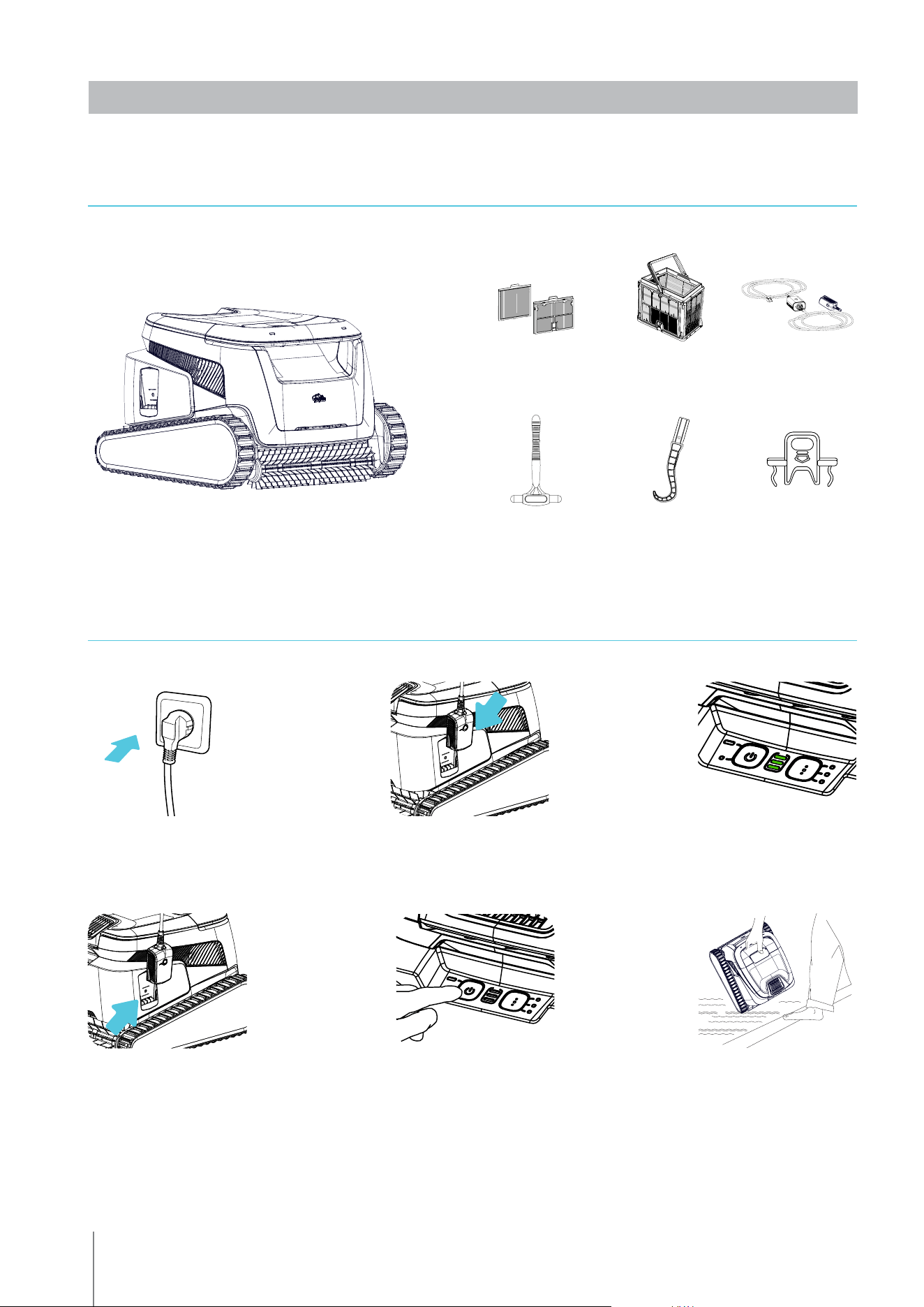
Filter basket
1.2 First Time Use
1.1 What's in the Box
1. Plug the charger
into the wall outlet
2. Connect the charger
to the robot
3. Charge the battery
to 100% - 3 green bars
4. Unplug the charger
5. Press the power
button
6. Put the robot in
the pool. It will start
cleaning within 30
seconds
Grab hook
Extra filter
panels
Charger
Clicker
Safety tool
for impeller
cleaning
1. GETTING STARTED
6
Robotic Pool Cleaner LIBERTY | User Instructions
1.4 Cleaning the Filter Basket
To prevent debris from hardening on the filter, we highly recommend quick-rinsing the filter immediately
after removing the robot from the pool.
Use the ultra-fine panels for more thorough, but shorter cycles. The fine (translucent) filter panels catch
rough debris such as leaves and sand. They require less energy to push the water through.
The ultra-fine (opaque, corrugated) panels catch ultra-fine debris such as silt and tiny particles. They get
the water cleaner, but use more power to push the water through, thus shortening the cleaning cycles.
1 2 3 4
ClickUp
TM
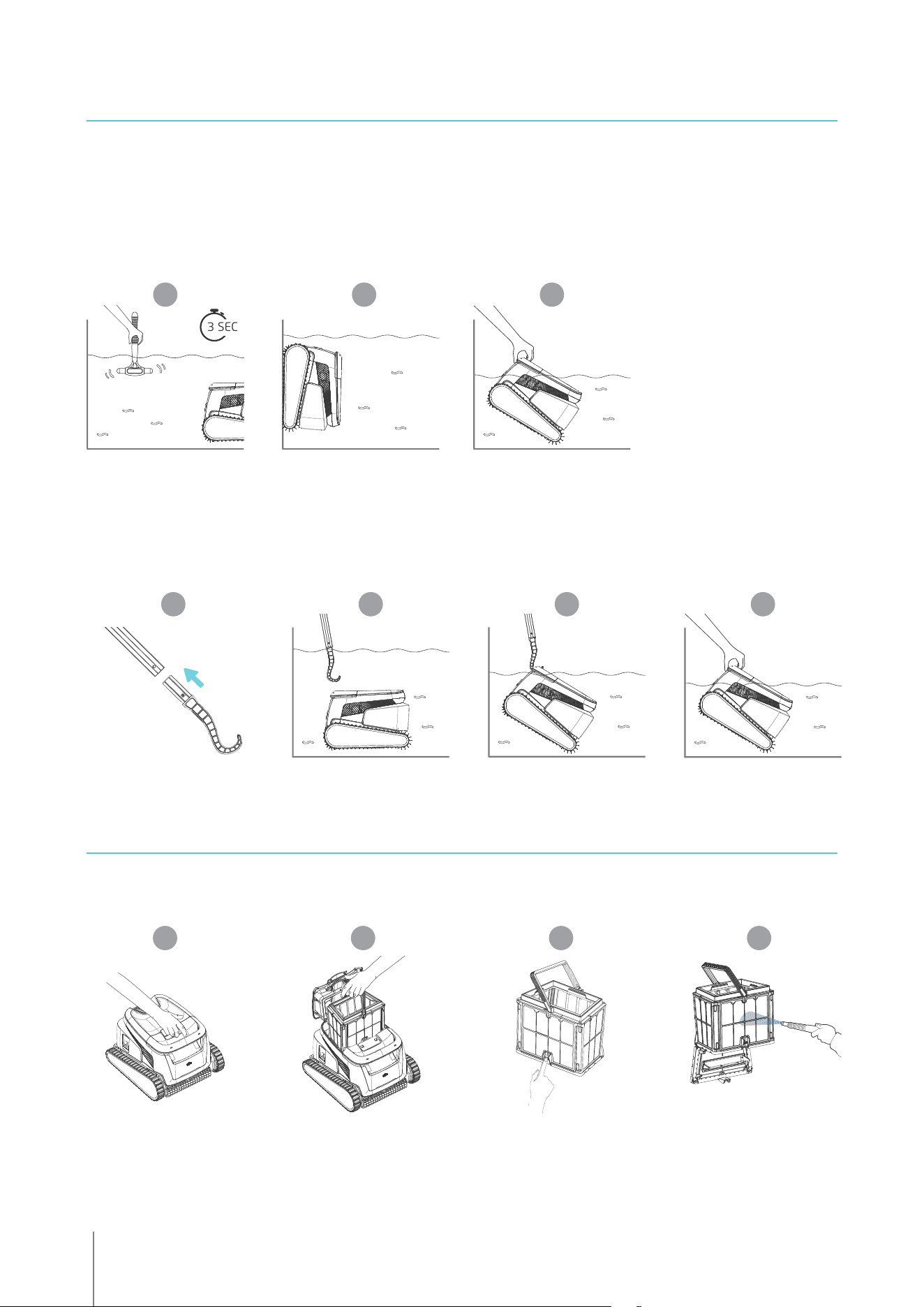
After the cleaning cycle, shake the Clicker inside the water for over 3 seconds and the robot will climb the
preferred wall. If LIBERTY is in the middle of a cycle, shake the Clicker for 3 seconds once and it will stop.
Shake it again and it will climb the wall to be taken out.
The feature has enough battery on standby for up to 14 days.
Please note: Using the Clicker in Eco Mode to remove the robot from the pool will cancel scheduled
cycles - start Eco Mode again before returning the robot to the pool.
1 2 3
3 SEC
Grab hook - Pull robot to waterline, then grab it with your hand to pull it out of the water.
1 2 3
*
4
* Standard pole, not included
1.3 Removing the robot from the pool
7
Robotic Pool Cleaner LIBERTY | User Instructions
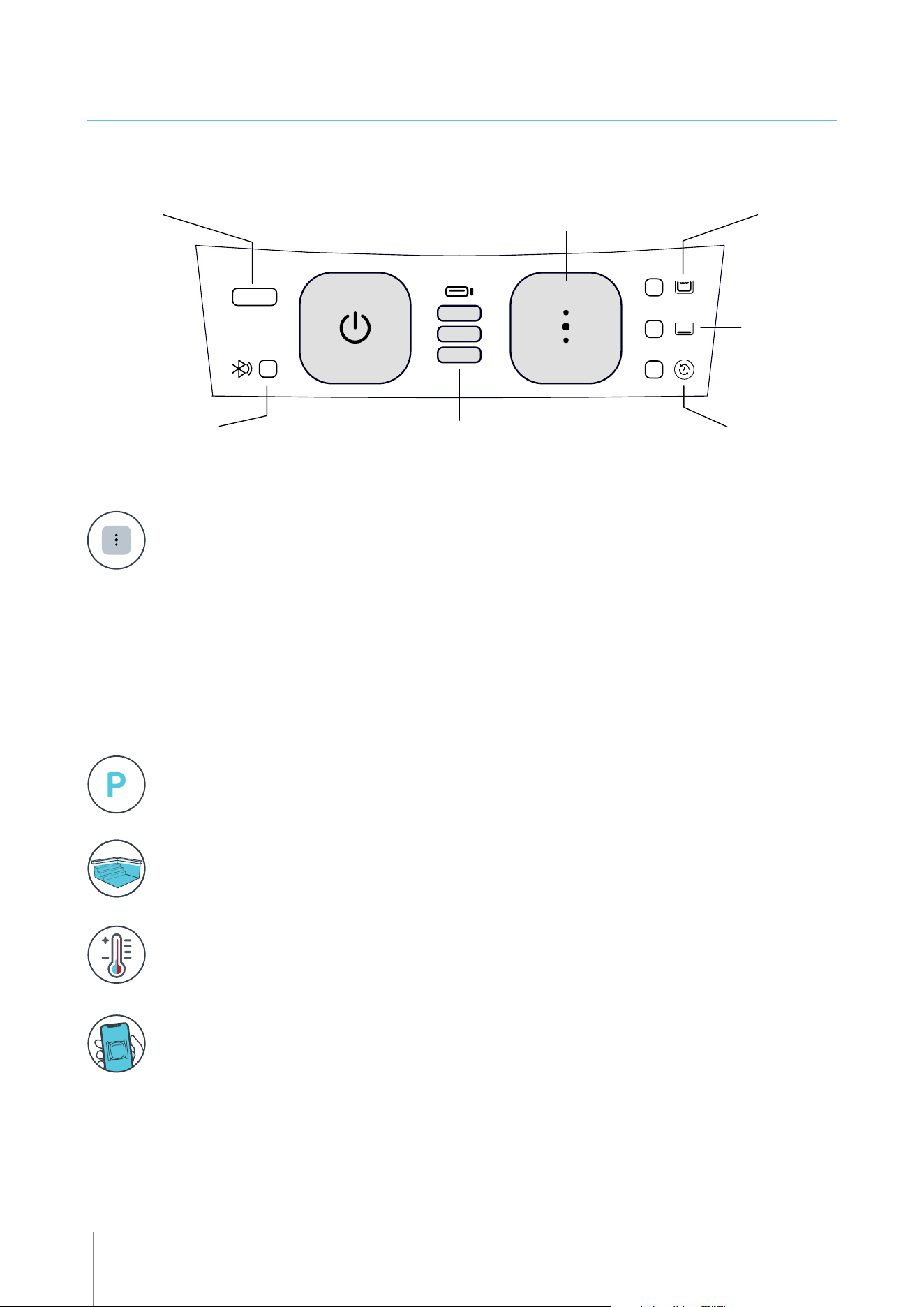
Power indicator Full Coverage Mode
Floor-only
Mode
Eco Mode
(Cleaning Scheduler)
Connection indicator
Power button Cleaning Mode
selection button
Battery status indicator
flashes if empty or hot
1.5 Features and Indications
Steps Jet-Cleaning
LIBERTY 600 maximizes cleaning coverage by identifying and properly cleaning steps and
shallow water. It does this automatically in the Full Coverage cleaning mode.
Maytronics One
TM
Mobile App
You can customize the robot’s settings, such as Eco Mode schedules and Homing to park at your
chosen wall. You can also check the filter and battery status, view cleaning history, troubleshoot
issues, and order accessories or parts. Download the app, sign-up and follow the app instructions to
pair with your robot. You can connect to and configure it with the Maytronics One
TM
app while the
robot is out of the water. To pair, activate Bluetooth® on your phone and press the robot's power
button for 3 seconds. Select the robot from your Bluetooth® connections list in phone settings.
Optional - You can also connect via Wi-Fi® for additional features such as remote status checks,
auto-updates, and smoother customer service.
Temperature Warning
If the battery LEDs flash alternately between the middle light and the others, move the robot to
a shaded area and charge it in a location with a temperature between 5°C and 35°C (41°F - 95°F).
Homing
LIBERTY 600 selects a default preferred wall where it always parks at the end of a cleaning
cycle, including between Eco Mode cycles. You can change the default wall in the app.
Cleaning Mode Selection
Use cleaning mode selector to easily choose between three cleaning modes.
The mode you select will remain until you change it.
1. Press the power button to activate until the LED lights up.
2. Press the cleaning mode selection button to choose your preferred mode:
Full Coverage Mode - Cleans the floor, walls, waterline, and stairs for 3 hours.
Floor-only Mode - Cleans the pool floor for 3 hours.
Eco Mode cleaning scheduler - Multiple shorter floor-only cycles on one battery charge. Eco Mode
can keep your pool floor clean for 1-2 weeks. The default setting is three 1-hour cycles every two
days for one week. To adjust to your needs, there are more scheduling options in the mobile app
Maytronics One
TM
.

8
Robotic Pool Cleaner LIBERTY | User Instructions
2.1 Robot
Water depth range: 0.4m - 3m (1.3ft - 9.8ft)
Motor protection: IP 68
Battery Lithium-ion | 9800mAh | 25.2V ; 5Ah / 126Wh
Radio communication:
Bluetooth® 5.0 - 2402-2480 MHz - Maximum power 2.1mW
Wi-Fi® - 2412 - 2484 MHz - Maximum power 99mW
2.2 Water Conditions
Use the robotic pool cleaner only in the following water conditions:
• Chlorine: 4 ppm max.
• pH: 7.0 – 7.8
• Temperature: 5°C – 35°C / 41°F – 95°F
• NaCl: 5000 ppm max.
2.3 Battery Charger
• Protection: IP55 Splashproof - Do not immerse or expose to strong streams or heavy rain.
• Output: <30 VDC
1.6 Charging Recommendations
• We recommend charging the robot immediately after removing it from the water so it will be
ready when you need it.
• When the battery is low the battery status indicator will flash, signifying that it needs to be
charged.
• Charge in shade until you see 3 green bars in the battery status indicator (up to 4.5 hours).
• The charger is splash-proof, but strong streams of water such as heavy rain or hoses, and
immersion in puddles or the pool could damage it. Place it above ground in a protected location.
• The robot can be charged when wet after removing from the pool. However, be sure that the
charger doesn't sit or fall in water.
2. SPECIFICATIONS
9
Robotic Pool Cleaner LIBERTY | User Instructions
3. STEPS JET-CLEANING
Steps Cleaning
LIBERTY 600 maximizes cleaning coverage by identifying and properly cleaning steps and sun-ledges.
It does this automatically in the Full Coverage cleaning and in the 1/2 week or 1 week Eco Modes.
The 2 week Eco Mode is floor-only. It does not clean the steps.
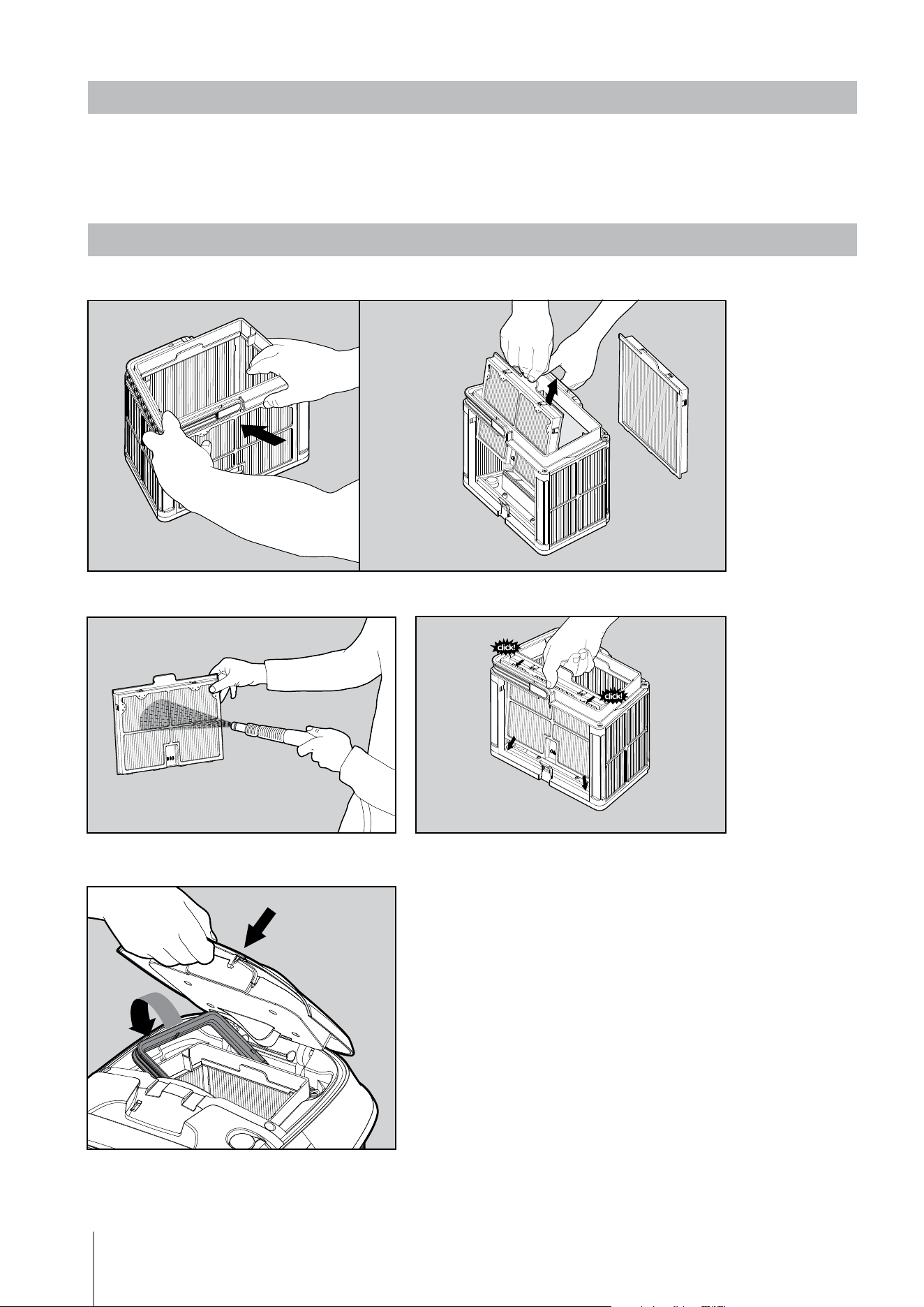
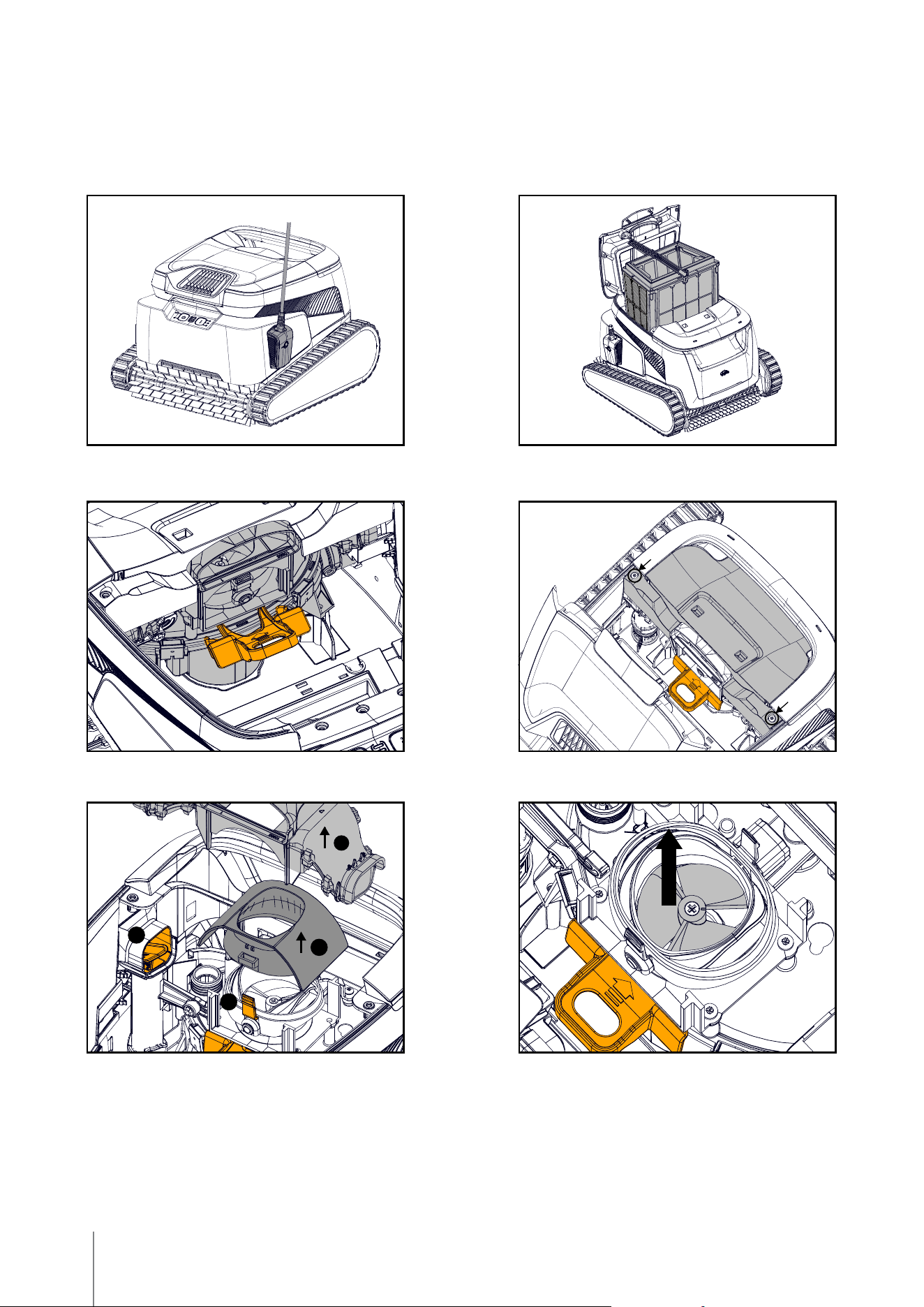
Dismantle the 2 ultra-fine filter panels of the basket, using the following steps:
Insert the clean filter basket and close the
filter cover.
Clean the filter panels with a hose.
Re-assemble the filter panels
.
4. PERIODIC CLEANING - RECOMMENDED ABOUT ONCE A MONTH
Dismantle the 2 panels with your thumbs.
10
Robotic Pool Cleaner LIBERTY | User Instructions
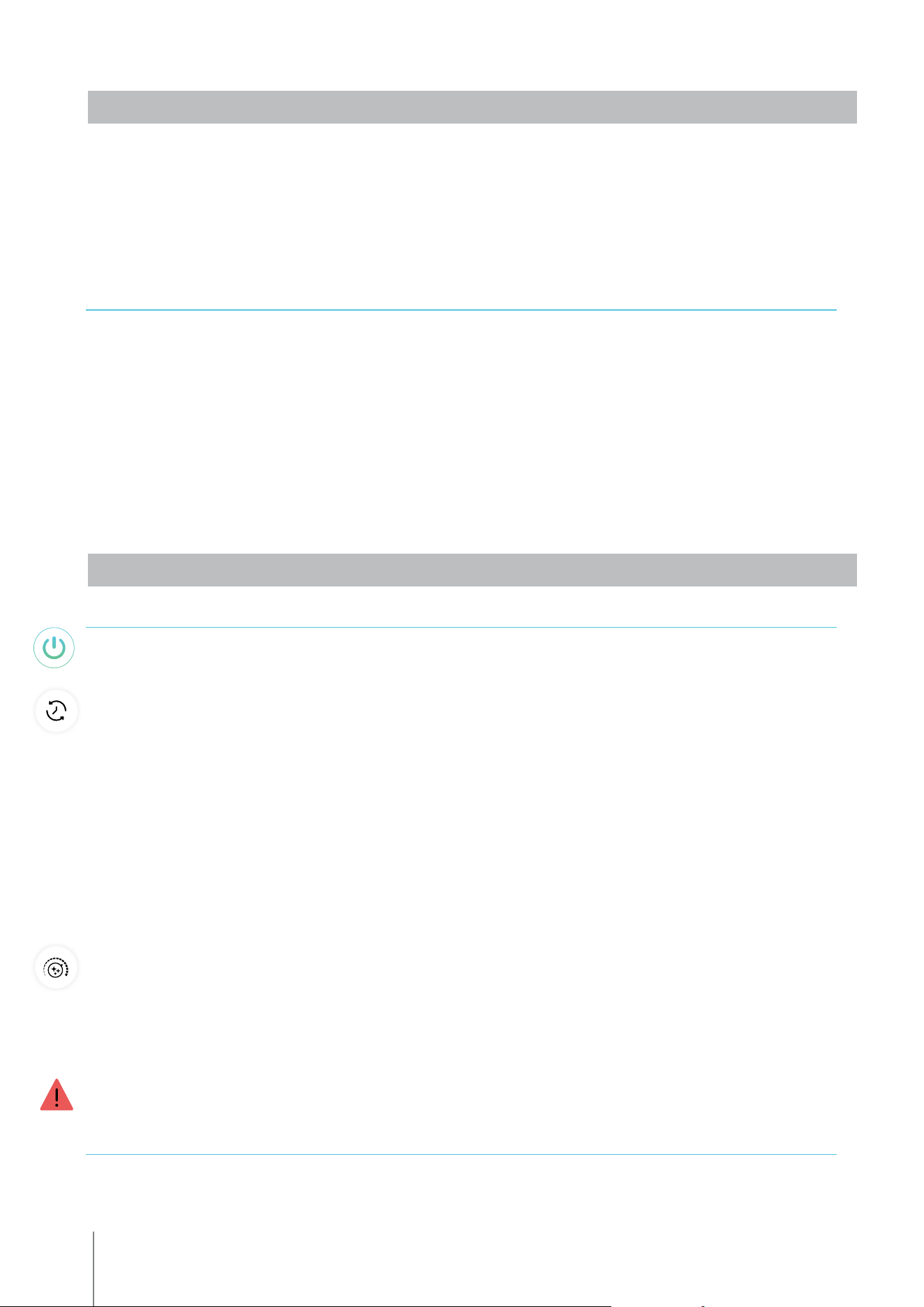
4.1 Cleaning the Impeller and Step Jet
Hair and other debris can get stuck in the impeller causing the robot not to work well.
Clean the impeller and step jet periodically to improve the robot's performance.
CAUTION: Make sure you connect the charger to turn the robot OFF and insert the impeller
cleaning safety tool.
7. Gently return the impeller, impeller cap, exhaust manifold, and cover.
Be sure not to break the plastic when inserting screws.
8. Remove the safety tool.
9. Return the filter basket and close the lid.
1. Turn the robot OFF and connect the charger to
the robot. Keep the robot OFF during this process.
5. a. Remove the exhaust manifold.
b. Squeeze the two tabs on the sides to remove the servo cap.
c. Check and clean any debris from the Steps Jet pipe.
2. Open the lid and remove the filter basket.
6. Carefully remove debris and hair. Use tweezers
or pliers. The impeller blades are sharp. If needed,
remove the impeller screw and carefully but
assertively lift the impeller out to clean the debris.
a
b
c
b
4. Remove 2 screws and remove the cover.3. Insert the impeller safety tool between the
clear plastic and above the black motor.
11
Robotic Pool Cleaner LIBERTY | User Instructions
5.1 Getting Started with the Maytronics One
TM
App
1. Ensure Bluetooth® is enabled on your smartphone.
2. Download the app.
3. Press and hold the power button for 3 seconds to start pairing.
4. Start the app, sign up, and enter the validation code that is sent to your email.
5. Follow instructions in the app to connect via Bluetooth®.
6. Connect via Wi-Fi® for more features.
7. After removing from water, to re-establish a connection between the robot and app, either press
the power button or connect the charger. Also, it will automatically connect an hour after removing
the robot with the Clicker.
8. Up to 1 user can connect at a time via Bluetooth®, but to 5 users can connect to the robot via
Wi-Fi®. You can unpair irrelevant users in the settings.
App features: You can customize the robot’s settings, such as Eco Mode schedules and Homing to
park at your chosen wall. You can also check the filter and battery status, view last cleaning cycle,
troubleshoot issues independently, contact support, and order accessories or parts.
Connection options: First, the robot connects to your phone via Bluetooth®, then to Wi-Fi® for
added features like auto-updates, smoother customer service, and remote status checks.
Note that while the robot is in the water, the app cannot control or communicate with it.
To reconnect, remove the robot and press the power button or connect the charger.
6.1 Maytronics One
TM
App Features Guide
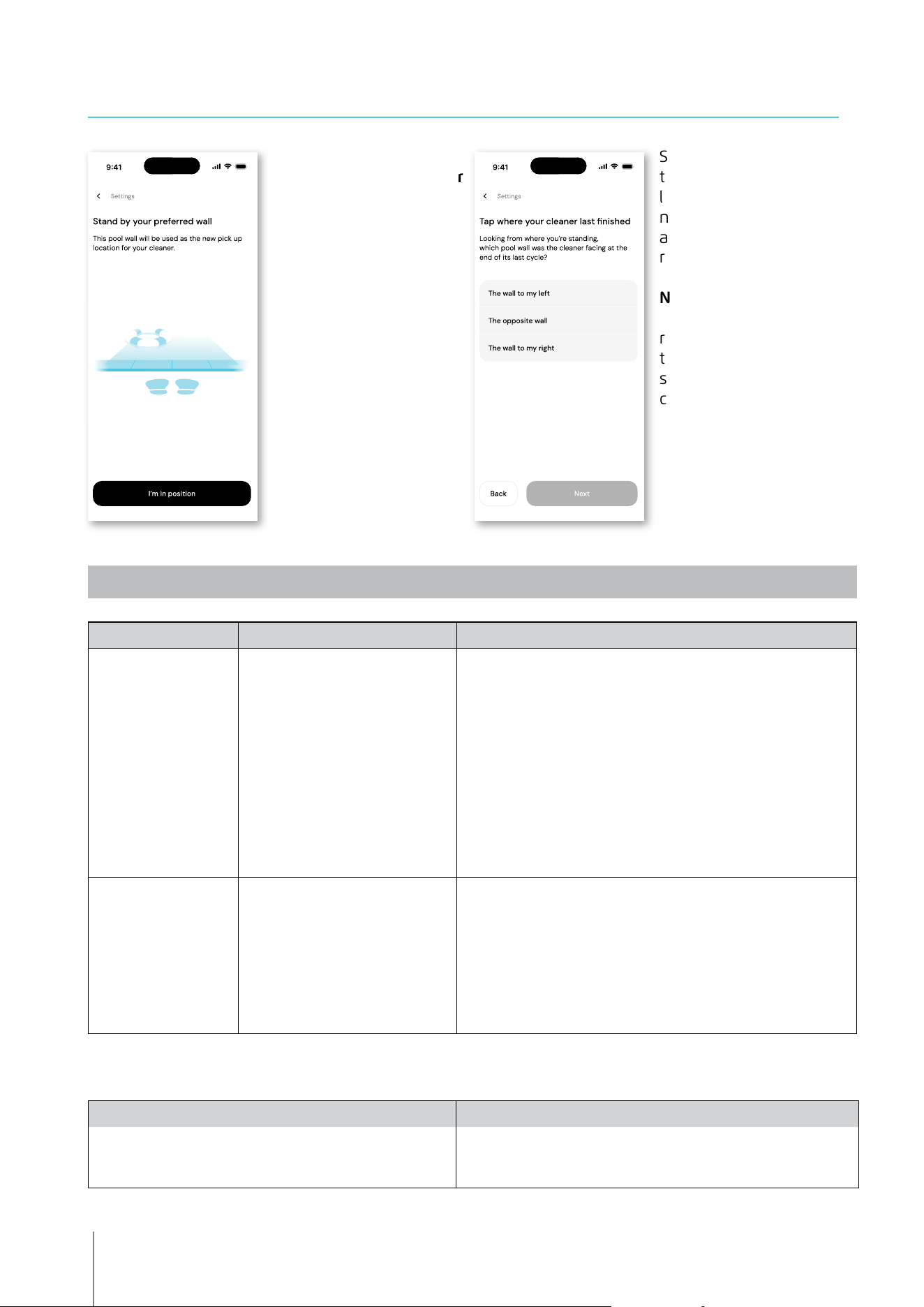
Starting the Pool Cleaner Via the App
Tap Clean and place the robot in the water. You will get a notification when the cycle has finished if
you start the pool cleaner via the app.
Eco Mode Cleaning Scheduler
To keep the pool clean for 1-2 weeks on one charge, select Eco Mode and leave the robot in the pool.
You can select which Eco Mode cleaning schedule you prefer in the app.
At the end of the schedule period, take the pool cleaner out to rinse the filter basket and recharge
the battery.
There are 3 Eco Modes:
Half week (full-coverage) 2 sessions x 90 min. every 72 hours
Full week (full-coverage) 3 sessions x 60 min. every 72 hours
2 weeks (floor-only) 6 sessions x 45 min. every 48 hours
Filter Status
The robot indications bar in your app home page shows your filter status with the basket icon.
Click on the indications bar for more details.
Cleaning Mode
Choose the cycle according to your pool's needs.
Full Coverage - Cleans pool floor, walls, waterline, and steps.
Floor - Cleans pool floor.
Eco Mode Cleaning Scheduler - See "Eco Mode" above. Choose your preferred schedule in the app.
Ultra Clean Mode - Intensive cleaning with stronger suction, but shorter cycle.
Robot Error Notification
If there was an error, the app home screen will show the last error. Tap and the app will guide you
to troubleshoot the problem.
The app is compatible with the following smart devices:
• Apple (iOS) – version 10 and up – iPhone, iPad, iPod
• Android – version 5 and up operating system
5. MAYTRONICS ONE
TM
APP USER GUIDE
6. ACTIVATE THE POOL CLEANER USING YOUR MOBILE PHONE
12
Robotic Pool Cleaner LIBERTY | User Instructions
Symptom Possible reason Corrective action
Cannot pair the
Maytronics One
TM
app to
the robotic pool cleaner.
• The Bluetooth® on one of your
devices is either OFF or not in
pairing mode.
• The mobile phone is too far from
the robot.
• Mobile phone location is OFF.
You did not give the required
permissions when installing the
app.
• Turn the Bluetooth® OFF and on in your smartphone.
For iOS – Go to settings → Bluetooth®.
• Get closer to the robot.
• Turn mobile phone location ON
• Check that the robot's charger is connected well and that your
mobile phone's Bluetooth® is searching for nearby devices.
• Try uninstalling and reinstalling the Maytronics One
TM
app, and
give all permissions. If it still doesn't find your robot, try restarting
your mobile phone.
• If none of the above troubleshooting helps,
contact wecare@maytronics.com
The Wi-Fi® doesn't stay
connected. It works via
Bluetooth® when near
the robot, but loses
Wi-Fi® frequently.
• The Wi-Fi® router alternates
between 2.4 and 5 GHz
frequencies causing disconnection
when the 2.4 one is lost.
• The Wi-Fi® signal is too weak to
maintain a connection.
• The device connects only to the standard 2.4 GHz Wi-Fi®
frequency. If you have a dual or quad band router, to prevent
connectivity issues, split and give separate names to the 2.4
and 5GHz networks. Consult your internet provider or see online
instructions for your specific router brand.
• If the signal near the power supply is not strong enough to
easily stream an online video, consider installing a 2.4GHz Wi-Fi®
extender.
Issue Suggested Action
Robot does not turn ON from the app. • Make sure that the robot is charged with all three LEDs green.
• After turning it ON, place it in the water. It is designed not to work
outside of the water.
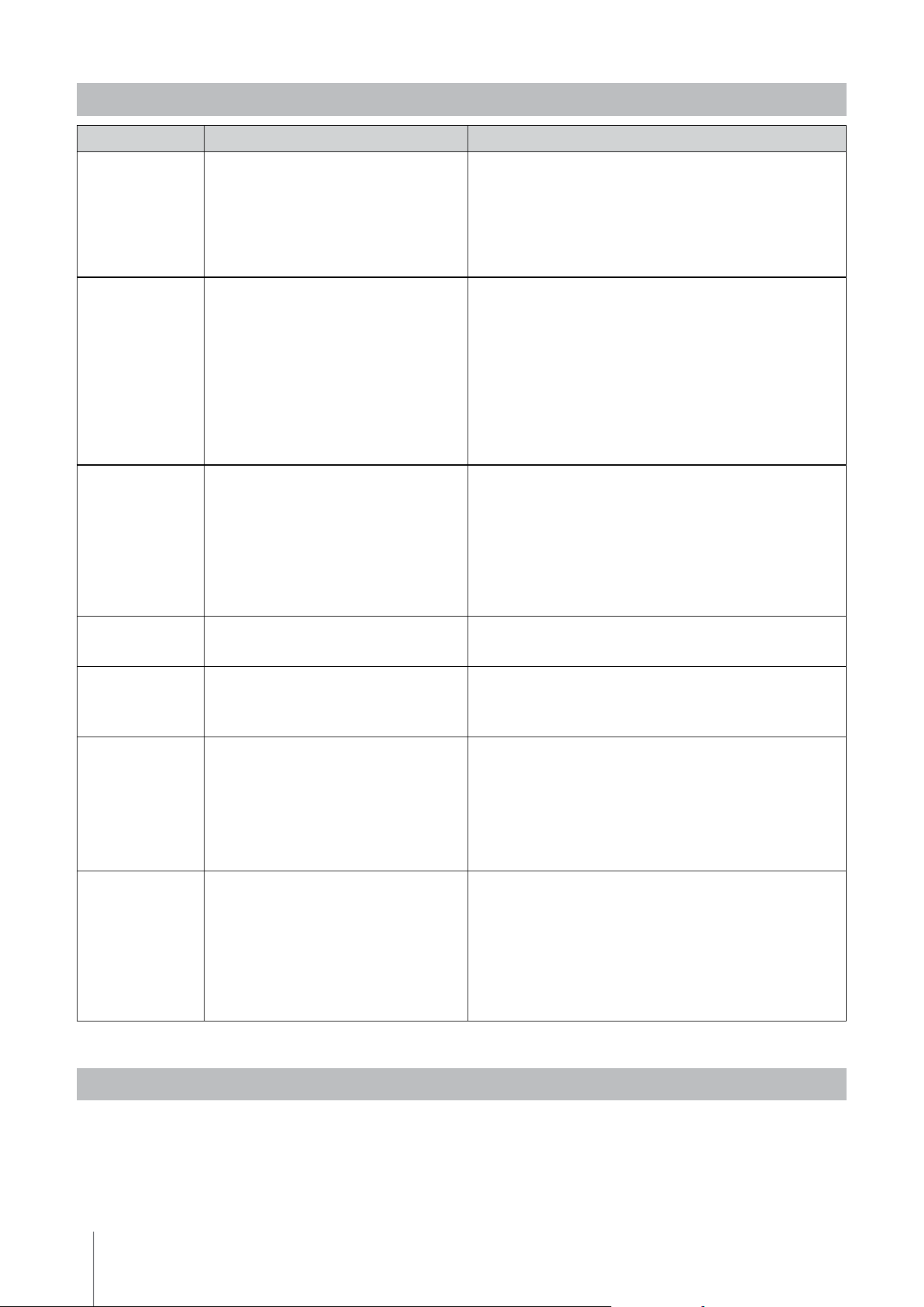
6.2 Choose Preferred Parking Wall
At the end of the robot's
cleaning cycle, remember
which wall the robot
stopped at and waited
to be taken out. This is
the current Homing wall
where the robot is set to
wait to be taken out.
If you want to change
the Homing wall, stand
next to your preferred
pool wall, facing the
pool.
Tap the 3 dots on
the home screen for
settings. Select "Home
wall". Tap "I'm in
position".
Select the wall where
the robot finished it's
last cycle. If the pool is
not rectangular, select
approximately where the
robot parked.
NOTE: This feature works
with a compass. The
robot will home in on
the approximate location
selected according to the
compass.
7. MAYTRONICS ONE
TM
- TROUBLESHOOTING
13
Robotic Pool Cleaner LIBERTY | User Instructions
8. ROBOTIC POOL CLEANER - TROUBLESHOOTING
Symptom Possible reason Corrective action
The robot does
NOT start.
• An object is stuck in the tracks or wheels.
• An object or hair is stuck in the impeller.
• The robot is not fully charged.
• The robot is out of the water.
• The red error indicator LED is ON.
• Carefully remove the object from tracks or wheels.
• Clean the impeller (see section 4.1).
• Charge the battery to 100% -3 green bars.
• Place the robot in the water within 30 seconds after starting it.
• Check app for error message and troubleshooting.
• If none of the above troubleshooting helps,
contact wecare@maytronics.com
The robot is moving
in circles.
• Clogged filter basket.
• Debris stuck in the impeller housing or
impeller cover.
• An object is stuck in the tracks or wheels.
• The pool's surface is too glossy for this
robot model.
• Algae buildup or pool water does not
meet specifications.
• Clean the filter basket. It should be white and clean when
touching. If it is brown or green, clean it with a hose. If it stays
brown, it may be time for a replacement filter.
• Clean the impeller (see section 4.1).
• Carefully remove the object from tracks or wheels.
• Correct pool and water conditions.
The robot doesn't
charge properly.
• The wall power outlet isn't working.
• An object or dirt is preventing a proper
magnetic connection between the charger
and the robot.
• The robot is too hot or cold to be charged
properly.
• It hasn't charged for enough time.
• The charger has a green LED when it gets electricity from the
wall outlet. Test the power outlet with another device or try
charging the robot from an outlet that works.
• Make sure that the charger connections are clean on the robot
• Charge in the shade or indoors. If summer, try charging at
night.
• It can take up to 4.5 hours for a full charge.
The robot does not
turn or moves in
one direction only.
• Debris stuck in the impeller housing or
impeller cover.
• Clean the impeller (see section 4.1).
The robot moves
but does not clean
the pool.
• Clogged filter basket.
• Debris stuck in the impeller housing or
impeller cover.
• Clean the filter basket. It should be white. If it is brown or
green, clean it with a hose.
• Clean the impeller (see section 4.1).
The robot does not
climb up the walls.
• The filter is too full to allow proper jet
propulsion up the wall.
• Debris is stuck in the impeller housing.
• The pool surface is too slippery.
• Algae on walls.
• Unsuitable pH level.
• Clean the filter and make sure that there is nothing stuck in
the impeller. The filter should be white. If it is brown or green,
clean it with a hose.
• Clean the impeller (see section 4.1).
• Consider buying a "Combined Brush" at your local service center.
• Check the level of chemicals in the water. Improper levels may
allow the growth of algae, making the walls slippery.
If so, adjust the levels and scrub the walls.
Robot is not waiting
at the waterline
when I arrived. It
is standing near a
wall.
At the end of each cycle, the robot waits on
the floor next to its home wall.
• When shaking the Clicker in the water for over 3 seconds, the
robot will climb and wait for 1 minute.
• The Clicker feature is available for up to 14 days after a normal
3 hour cycle if the battery was full when started.
• After Eco Mode or if the battery wasn't full when started, the
Clicker feature is available for at least 2 days.
• If the robot is not taken out after 1 minute of waiting, it will climb
down and turn to face another wall. The next time you use the
Clicker in the water, the robot will climb up a different wall.
Before o-season storage - we recommend charging the battery to about 50% (2 green bars in the
battery indicator panel).
Recommended storage temperature range: -10°C - 40°C / 14°F - 104°F.
Storing the robot in a hot location will likely damage the battery.
After o-season storage, charge the robot to its fullest.
If this troubleshooting guide didn't solve your problem contact Customer Care: [email protected]
9. OFF-SEASON STORAGE
Australia, NZ, South Africa
1 300 693 657
infoau@maytronics.com
Rest of the world / Maytronics HQ
00 800 69694141 (toll free number)
00 972 77 96 14 204 (international call)
wecare@maytronics.com
10. CONTACT MAYTRONICS CUSTOMER CARE:
North America
US 1-888-365-7446
Canada 1-855-634-8572
customersupport@maytronicsus.com
France
+33 (0)4 42 98 14 90
support@maytronics.fr
EN
8159460