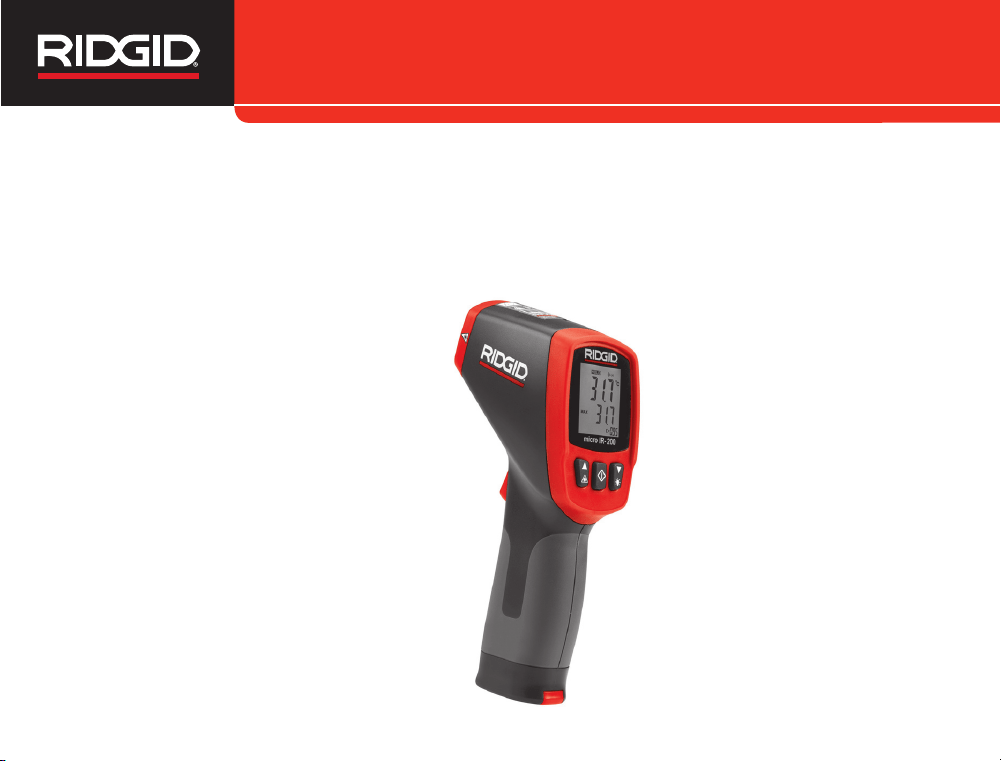
micro IR-200
Non-Contact Infrared Thermometer
micro IR-200 Operator’s Manual
English – ii
• Japanese – 13
micro IR-200 Non-Contact Infrared Thermometer
999-995-066.07_REV. F
II
Menu Button Use ..................................................................11
High Alarm ............................................................................11
Low Alarm .............................................................................11
Temperature Display Units-C/F .............................................11
Emissivity ..............................................................................11
Cleaning...................................................................................11
Storage ....................................................................................11
Service and Repair .................................................................12
Disposal ..................................................................................12
Battery Disposal .....................................................................12
EC Declaration of Conformity ......................Inside Back Cover
Lifetime Warranty .....................................................Back Cover
*Original Instructions - English
Table of Contents
Recording Form for Machine Serial Number .........................1
Safety Symbols.........................................................................2
General Safety Rules
Work Area Safety....................................................................3
Electrical Safety......................................................................3
Personal Safety.......................................................................3
Equipment Use and Care .......................................................3
Service....................................................................................4
Specific Safety Information
Infrared Thermometer Safety..................................................4
Description, Specifications and Standard Equipment
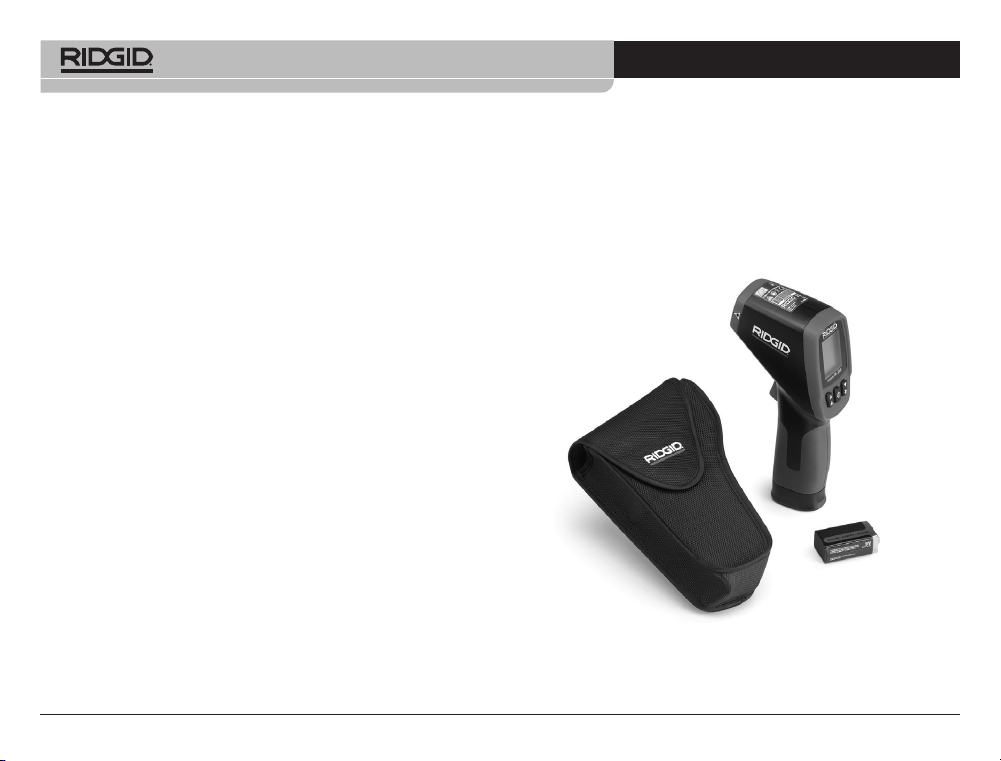
Description..............................................................................4
Specifications .........................................................................4
Parts .......................................................................................6
LCD Display Icons ..................................................................6
Standard Equipment...............................................................6
Laser Classification .................................................................7
FCC Statement..........................................................................7
Electromagnetic Compatibility (EMC) ....................................7
Changing/Installing Batteries..................................................7
Pre-Operation Inspection.........................................................8
Set-Up and Operation
Set-Up ....................................................................................9
Operation
Turning ON and OFF (Taking Measurements)......................10
micro IR-200 Controls
Continuous Measurement (Scanning) Mode ........................10
Laser Enabled/Disabled........................................................10
Backlight ...............................................................................11
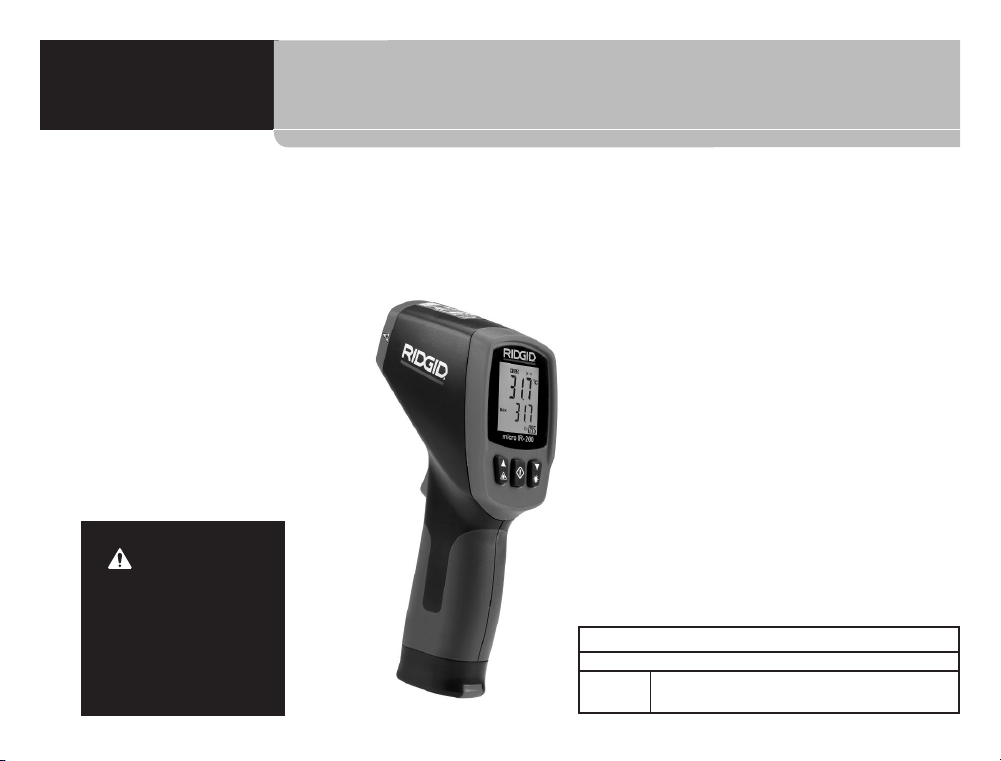
micro IR-200
Non-Contact Infrared Thermometer
micro IR-200 Non-Contact Infrared Thermometer
Record Serial Number below and retain product serial number which is located on nameplate.
Serial
No.
micro IR-200
WARNING!
Read this Operator’s Man -
ual carefully before using
this tool. Failure to under-
stand and follow the con-
tents of this manual may
result in electrical shock,
fire and/or serious person -
al injury.
micro IR-200 Non-Contact Infrared Thermometer
999-995-066.07_REV. F
2
Safety Symbols
In this operator’s manual and on the product, safety symbols and signal words are used to communicate important safety information. This
section is provided to improve understanding of these signal words and symbols.
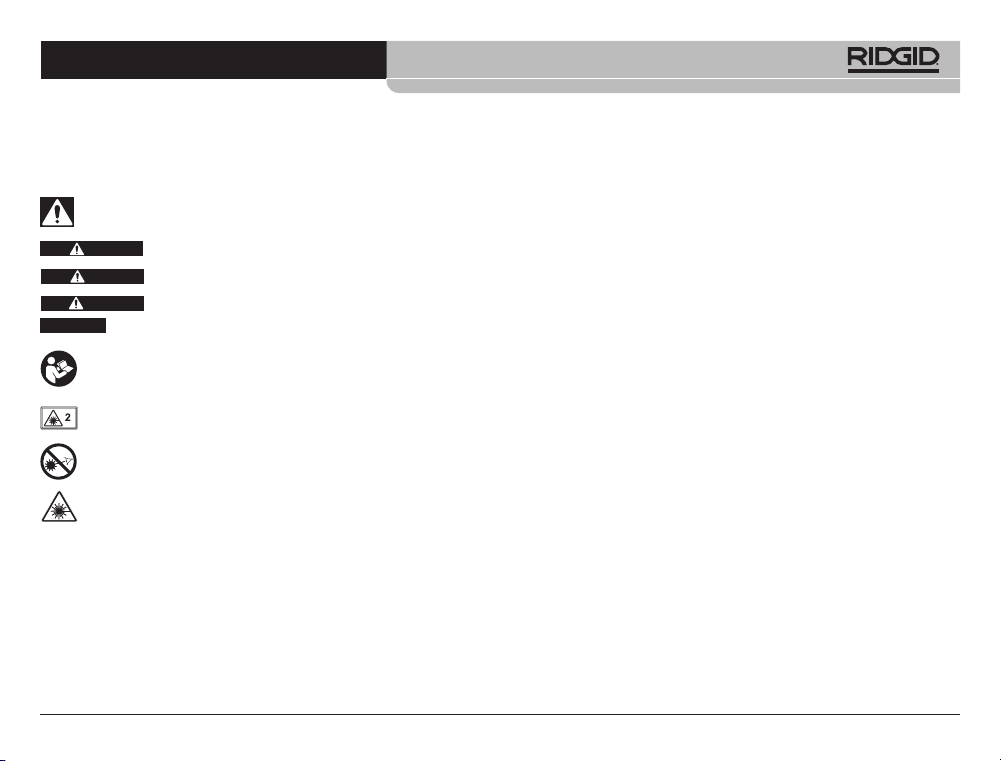
This is the safety alert symbol. It is used to alert you to potential personal injury hazards. Obey all safety messages that follow this
symbol to avoid possible injury or death.
DANGER indicates a hazardous situation which, if not avoided, will result in death or serious injury.
WARNING indicates a hazardous situation which, if not avoided, could result in death or serious injury.
CAUTION indicates a hazardous situation which, if not avoided, could result in minor or moderate injury.
NOTICE indicates information that relates to the protection of property.
This symbol means read the operator’s manual carefully before using the equipment. The operator’s manual contains important in-
formation on the safe and proper operation of the equipment.
NOTICE
DANGER
WARNING
CAUTION
This symbol means this device contains a Class 2 Laser.
This symbol means do not stare into the laser beam.
This symbol warns of the presence and hazard of a laser beam.
micro IR-200 Non-Contact Infrared Thermometer
999-995-066.07_REV. F
3
shoes, hard hat, or hearing protection used for appropriate con-
ditions will reduce personal injuries.
• Do not overreach. Keep proper footing and balance at all
times. This enables better control of the power tool in unexpected
situations.
Equipment Use and Care
• Do not force equipment. Use the correct equipment for your
application. The correct equipment will do the job better and
safer at the rate for which it is designed.
• Do not use equipment if the switch does not turn it ON and
OFF. Any tool that cannot be controlled with the switch is dan-
gerous and must be repaired.
• Disconnect the batteries from the equipment before making
any adjustments, changing accessories, or storing. Such
preventive safety measures reduce the risk of injury.
• Store idle equipment out of the reach of children and do not
allow persons unfamiliar with the equipment or these in-
structions to operate the equipment. Equipment can be dan-
gerous in the hands of untrained users.
• Maintain equipment. Check for misalignment or binding of mov-
ing parts, missing parts, breakage of parts and any other condi-
tion that may affect the equipment’s operation. If damaged, have
the equipment repaired before use. Many accidents are caused
by poorly maintained equipment.
• Use the equipment and accessories in accordance with
these instructions, taking into account the working condi-
tions and the work to be performed. Use of the equipment for
operations different from those intended could result in a haz-
ardous situation.
• Use only accessories that are recommended by the manu-
facturer for your equipment. Accessories that may be suitable
General Safety Rules
WARNING
Read all safety warnings and in struc tions. Failure to follow the
warn ings and instructions may result in electric shock, fire
and/or serious injury.
SAVE THESE INSTRUCTIONS!
Work Area Safety
• Keep your work area clean and well lit. Cluttered or dark areas
invite accidents.
• Do not operate equipment in explosive atmospheres, such
as in the presence of flammable liquids, gases or dust. E -
quip ment can create sparks which may ignite the dust or fumes.
• Keep children and by-standers a way while operating equip-
ment. Distrac tions can cause you to lose control.
Electrical Safety
• Avoid body contact with earthed or grounded surfaces such
as pipes, radiators, ranges and refrigerators. There is an in -
creased risk of electrical shock if your body is earthed or
grounded.
• Do not expose equipment to rain or wet conditions. Water
en tering equipment will increase the risk of electrical shock.
Personal Safety
• Stay alert, watch what you are doing and use common sense
when operating equipment. Do not use equipment while you
are tired or under the influence of drugs, alcohol or medica-
tion. A moment of inattention while operating equipment may re-
sult in serious personal injury.
• Use personal protective equipment. Always wear eye protec-
tion. Protective equipment such as dust mask, non-skid safety
micro IR-200 Non-Contact Infrared Thermometer
999-995-066.07_REV. F
4
• Take appropriate precautions when working near electrical,
moving or hot parts. Close contact may cause electrical shock,
entanglement, burns and other serious injury. Protective equip-
ment may be required.
Use of controls or adjustments or performance of
procedures other than those specified herein may result in haz-
ardous radiation exposure.
If you have any question concerning this RIDGID
®
product:
• Contact your local RIDGID distributor.
• Visit RIDGID.com to find your local RIDGID contact point.
• Contact Ridge Tool Technical Service Department at rtctechser-
vices@emerson.com, or in the U.S. and Canada call (800) 519-
3456.
Description, Specifications
And Standard Equipment
Description
The RIDGID
®
micro IR-200 Non-Contact Infrared Thermometer pro-
vides simple, quick, and accurate surface temperature readings at
the push of a button. You simply squeeze the trigger and point the
ultra-sharp dual class II lasers at the surface being measured. The
micro IR-200 provides an immediate temperature measurement on
a clear, easy-to-read backlit LCD display. In addition to numerous
other uses, this rugged, compact instrument enables professional
tradesman to diagnose heating and ventilation problems, perform
preventative monitoring of electrical motors and systems, trou-
bleshoot steam traps and quickly check fuses or circuit breakers for
overheating without contact.
The micro IR-200 uses optics to sense emitted, reflected and trans-
mitted energy, which is collected and focused onto a detector. The
unit’s electronics translate the information into a temperature read-
ing, which is displayed. Lasers are used to assist in aiming.
for one piece of equipment may become hazardous when used
with other equipment.
• Keep handles dry and clean; free from oil and grease. Allows
for better control of the equipment.
Service
• Have your equipment serviced by a qualified repair person
using on ly identical replacement parts. This will ensure that
the safety of the tool is maintained.
Specific Safety Information
WARNING
This section contains important safety information that is
specific to this tool.
Read these precautions carefully before using the RIDGID
®
micro IR-200 Non-Contact Infrared Thermometer to reduce the
risk of eye injury or other serious personal injury.
SAVE THESE INSTRUCTIONS!
Keep this manual with the tool for use by the operator.
Infrared Thermometer Safety
• Do not look into the laser beam. Looking into the laser beam
may be hazardous to the eyes. Do not look at the laser beam with
optical aids (such as binoculars or telescopes).
• Do not direct the laser beam towards other people. Make
sure the laser is aimed above or below eye level. Laser beams
may be hazardous to the eyes.
• Do not use this device for personal inspection or medical
use in any way. This is not a medical device. This could cause
personal injury.
CAUTION
Specifications
Temperature Range ......................-58°F to 2192°F
(-50°C to 1200°C)
Distance To Spot Ratio .................30 to 1
Measuring Accuracy .....................-58°F ~68°F (-50°C ~20°C) :
±4.5°F (2.5°C)
68°F ~1472°F (20°C ~800°C)
±1.0% or ±1.8°F (1.0°C)
Repeatability...................................-58°F ~68°F (-50°C ~20°C) :
±2.3°F (1.3°C)
68°F ~1472°F (20°C ~800°C)
±0.5% or ±0.9°F (0.5°C)
Response Time ..............................150ms
Spectral Response.........................8~14um
Emissivity .......................................Adjustable, 0.10 - 1.00
Over Range Indication ...................LCD will show “----”
Diode Laser ..................................Output <1mW, Wavelength
630~670nm, Class 2 Laser
Product
Temperature Display .....................Current Temperature, MAX
Temperature
Measuring Units............................Fahrenheit, Celsius
Operating Temperature .................32°F to 122°F (0°C to 50°C)
Storage Temperature ....................14°F to 140°F (-10°C to 60°C)
Display Resolution ..........................0.1°F (0.1°C)
Relative Humidity..........................10%~90% RH Operating,
<80% RH Storage
Batteries........................................ 9V Battery (1), NEDA 1604A
or IEC 6LR61, or Equivalent
IP Rating.......................................IP54
Weight...........................................0.6 lbs (0.3 kg)
micro IR-200 Non-Contact Infrared Thermometer
999-995-066.07_REV. F
5
• Backlight LCD Display
• Trigger Lock
• Set High and Low Alarms
• Adjustable Emissivity
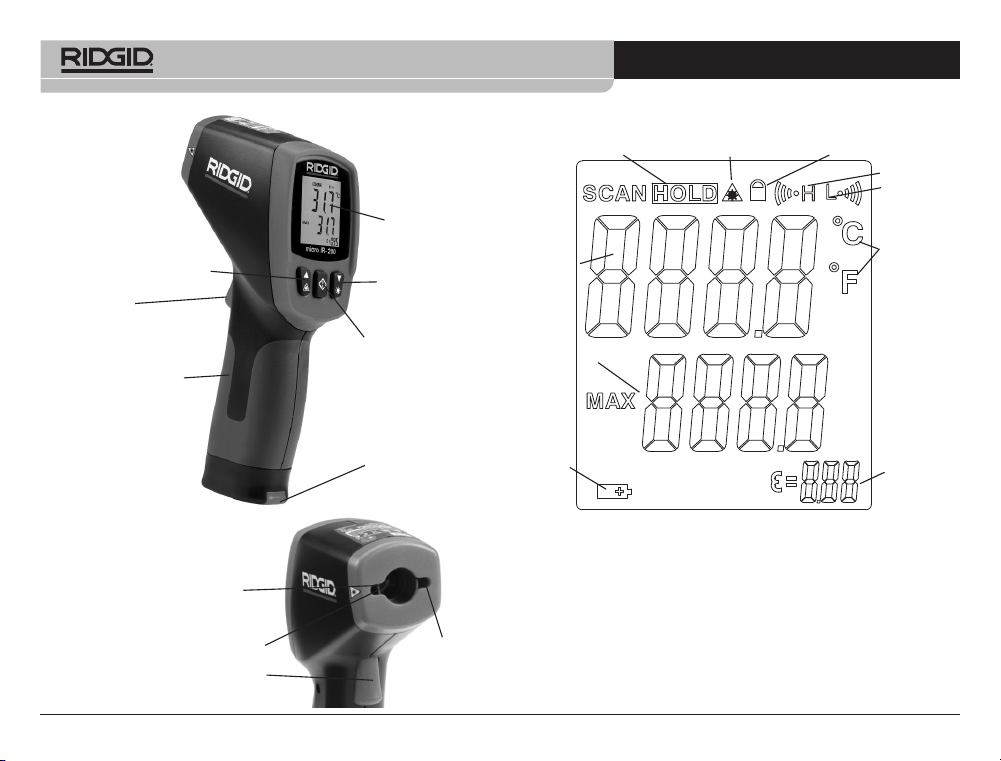
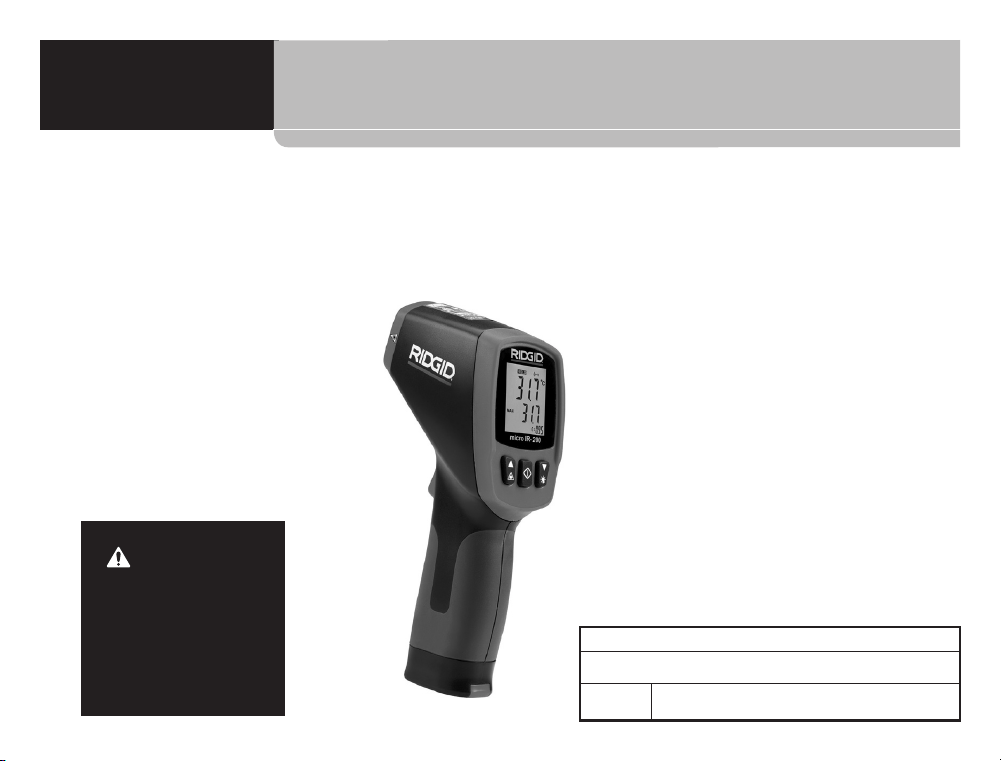
Figure 1 – micro IR-200 Non-Contact Infrared Thermometer
Features
• Rapid Detection Function
• Dual Class II Laser Sighting
• Automatic Data Hold
• MAX Temperature Displays
• Precise Non-Contact Measurements
• Automatic Selection Range and Display Resolution 0.1°F (0.1°C)
micro IR-200 Non-Contact Infrared Thermometer
999-995-066.07_REV. F
6
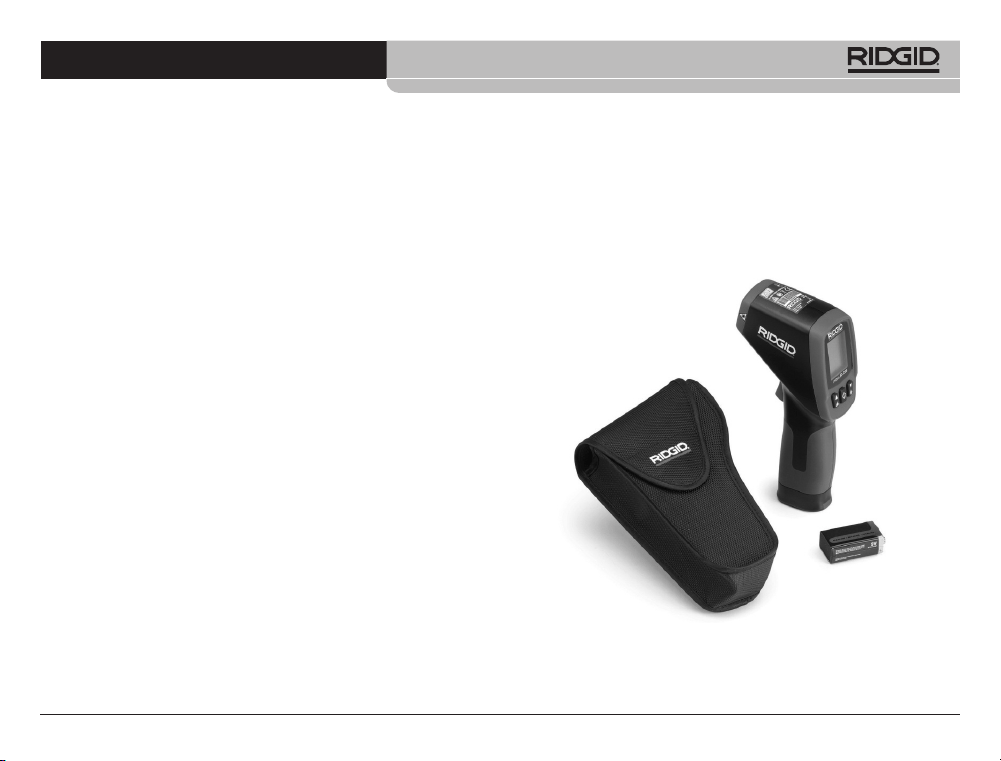
Standard Equipment
• micro IR-200
• Carrying Case
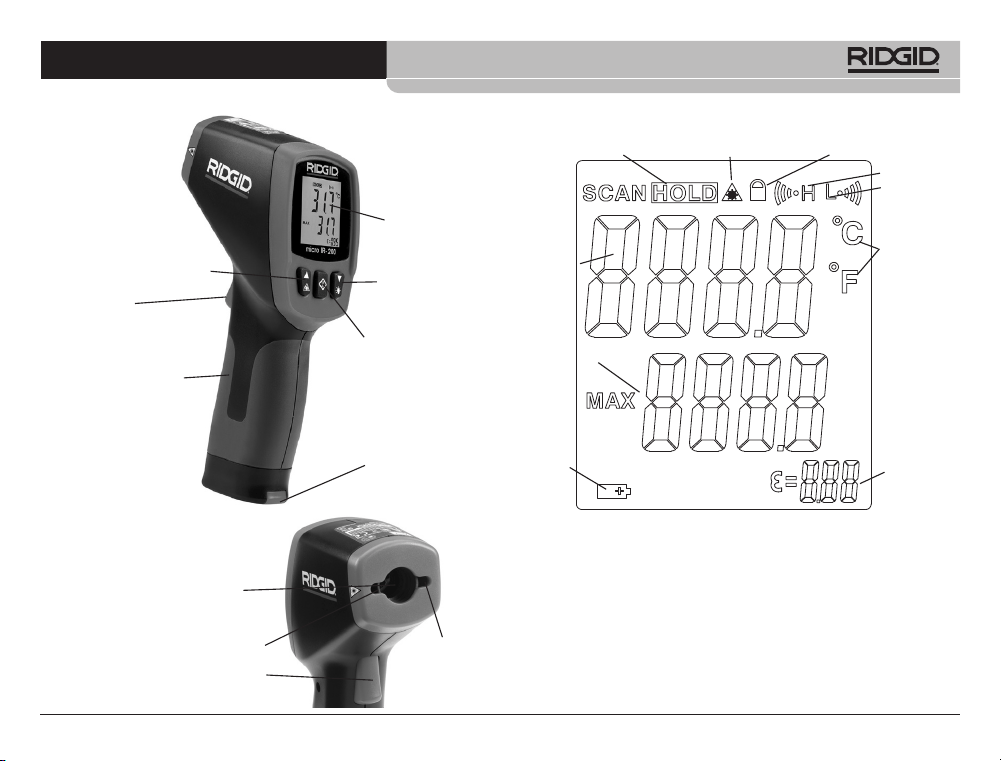
Current
Temperature
Value
Lock
Low
Battery
High Alarm
Low Alarm
Celsius/ -
Fahrenheit
Temperature
Units
Maximum
Temperature
Value
Data Hold
Emissivity
Value
Figure 3 – micro IR-200 Display Icons
LCD Display Icons
Laser Enable
• Battery 1 x 9V
• Operator's Manual
Battery
Compartment
Handle Grip
Trigger
Menu Button
Up Button/ Laser Enable
LCD Display
Down Button/ -
Backlight
Figure 2 – micro IR-200 Parts
Parts
Trigger
Infrared Sensor
Laser
Laser
micro IR-200 Non-Contact Infrared Thermometer
999-995-066.07_REV. F
7
Electromagnetic Compatibility (EMC)
The term electromagnetic compatibility is taken to mean the capa-
bility of the product to function smoothly in an environment where
electromagnetic radiation and electrostatic discharges are present
and without causing electromagnet interference to other equipment.
The RIDGID micro IR-200 conforms to all applicable
EMC standards. However, the possibility of it causing interference in
other devices cannot be precluded.
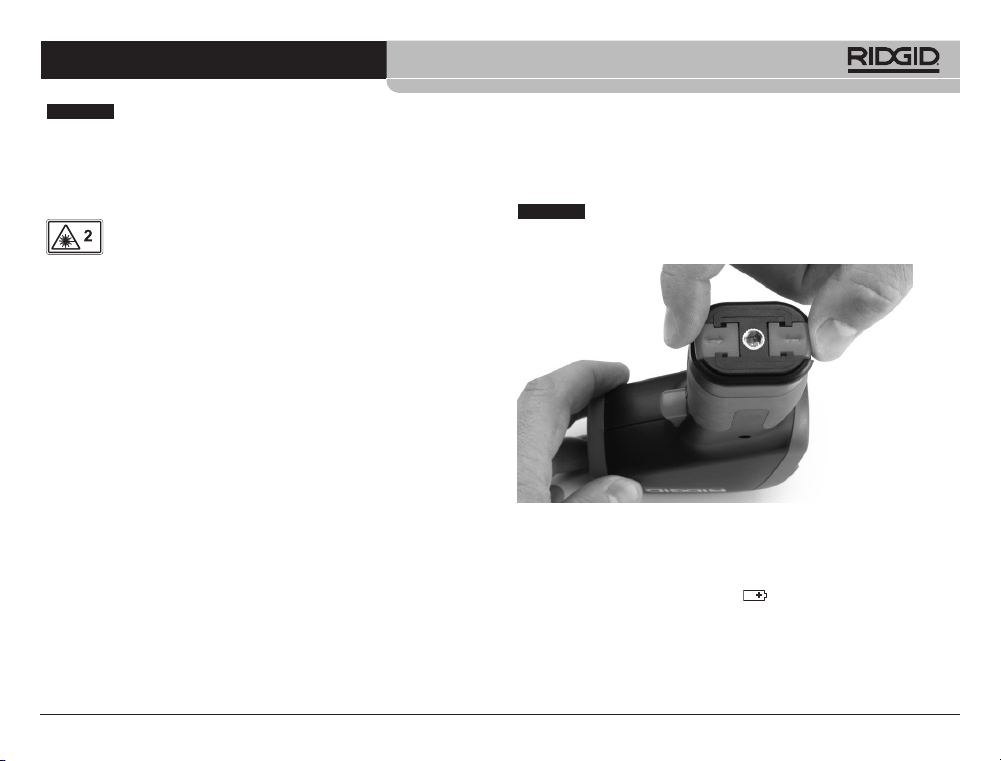
Figure 4 – Removing Battery Compartment
Changing/Installing Batteries
The micro IR-200 is supplied without a battery installed. If the bat-
tery indicator (Figure 3) displays , the battery needs to be re-
placed. Remove the battery prior to long term storage to avoid
battery leakage.
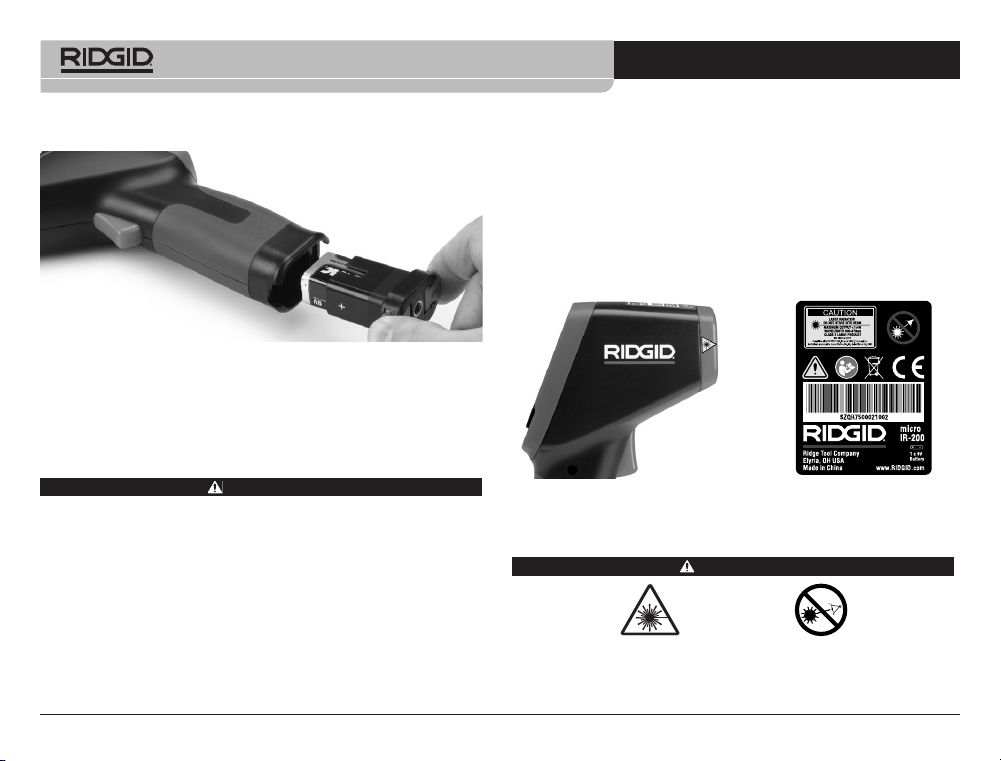
1. Squeeze the battery clips and remove battery compartment
from the thermometer (See Figure 4). If needed, remove bat-
tery.
This equipment is used to make temperature measure-
ments. Incorrect use or improper application may result in incorrect
or inaccurate measurements. Selection of appropriate measure-
ment methods for the conditions is the responsibility of the user.
Laser Classification
The RIDGID micro IR-200 generates a visible laser beam
that is emitted from the front of the device.
The device complies with class 2 lasers according to: IEC 60825-
1:2007
FCC Statement
This equipment has been tested and found to comply with the lim-
its for a Class B digital device, pursuant to part 15 of the FCC Rules.
These limits are designed to provide reasonable protection against
harmful interference in a residential installation.
This equipment generates, uses, and can radiate radio frequency
energy and, if not installed and used in accordance with the instruc-
tions, may cause harmful interference to radio communications.
However, there is no guarantee that interference will not occur in a
particular installation.
If this equipment does cause harmful interference to radio or tele-
vision reception, which can be determined by turning the equip-
ment off and on, the user is encouraged to try to correct the
interference by one or more of the following measures:
• Reorient or relocate the receiving antenna.
• Increase the separation between the equipment and receiver.
• Consult the dealer or an experienced radio/TV technician for
help.
NOTICE
NOTICE
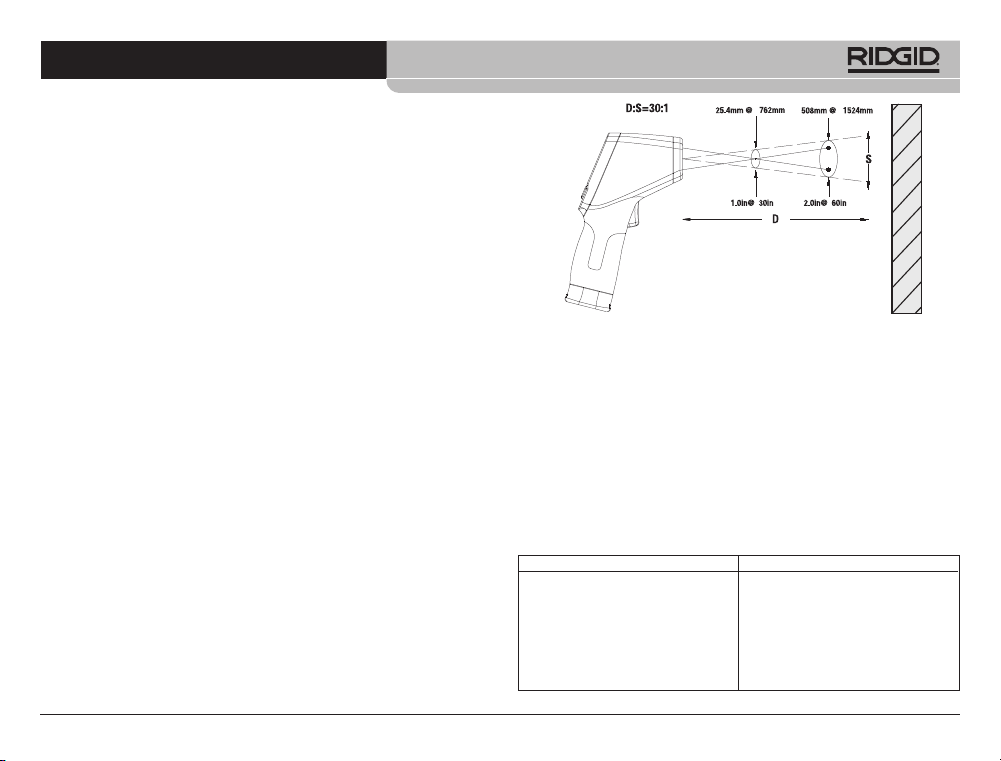
3. Check that the warning labels are present, firmly attached and
readable. (See Figure 6.)
4. If any issues are found during the inspection, do not use the in-
frared thermometer until it has been properly serviced.
5. Following the Operation Instructions, turn the infrared ther-
mometer ON, make a measurement and confirm the same
measurement with another instrument (contact thermometer,
etc.). If the correlation be tween the measurements is not ac-
ceptable, do not use the infrared thermometer until it has been
properly serviced.
Figure 6 – Warning Labels
Set-Up and Operation
WARNING
Do not look into the laser beam. Looking into the laser beam
may be hazardous to the eyes. Do not look at the laser beam
with optical aids (such as binoculars or telescopes).
2. Install 9V alkaline battery (6LR61), observing the correct polar-
ity as indicated on the battery compartment.
Figure 5 – Battery Holder and Polarity Marking
3. Squeeze the clips and firmly insert into thermometer. The
holder will only go in one way. Do not force. Confirm securely at-
tached.
Pre-Operation Inspection
WARNING
Before each use, inspect your infrared thermometer and cor-
rect any problems to reduce the risk of injury or incorrect
measurements.
Do not look into the laser beam. Looking into the laser beam
may be hazardous to the eyes.
1. Clean any oil, grease or dirt from equipment. This aids inspec-
tion.
2. Inspect the micro IR-200 for any broken, worn, missing, mis-
aligned or binding parts, or any other condition which may pre-
vent safe and normal operation.
micro IR-200 Non-Contact Infrared Thermometer
999-995-066.07_REV. F
8
micro IR-200 Non-Contact Infrared Thermometer
999-995-066.07_REV. F
9
Figure 7 – Field Of View
The spot should always be smaller than the surface. The smaller
the surface, the closer the micro IR-200 should be to the sur-
face. For the best accuracy, the surface should be twice as large
as the spot.
Emissivity – Emissivity is a term use to describe energy emit-
ting characteristics of materials and has a value ranging from 0
to 1. The micro IR-200 allows adjustment of the emissivity value
from 0.10 to 1.00 to calculate temperatures. If the emissive prop-
erty of a surface is unknown, an emissivity of 0.95 can be ap-
propriate for many applications, such as painted surfaces.
Values of emissivity for common materials are included in Fig-
ure 8.
Figure 8 – Emissivity Values of Common Materials
Do not direct the laser beam towards other people. Make sure
the laser is aimed above or below eye level. Laser beams may
be hazardous to the eyes.
Take appropriate precautions when working near electrical,
moving or hot parts. Close contact may cause electrical shock,
entanglement, burns and other serious injury. Protective equip-
ment may be required.
Set up and operate the infrared thermometer according to
these procedures to reduce the risk of injury or incorrect meas-
urements.
Set-Up
1. Check for an appropriate work area as indicated in the General
Safety Section.
2. Inspect the object being measured to and confirm that you have
correct equipment for the application. See the Specifications
section for range, accuracy and other information.
There are a variety of factors that can affect the accuracy of the
micro IR-200, including:
Field of view – The micro IR-200 uses two lasers to project
points on either side of the area to be measured. These points
indicate the approximate diameter of the area (the “Spot”) that
the temperature is being measured in. As the micro IR-200
moves further (D) away from the surface, that area and spot
size (S) increases. The area is approximately
1
/
30
times the dis-
tance to the surface. (See Figure 7.)
Surface
Material Emissivity
Aluminum, polished 0.05
Asphalt 0.88
Brick 0.90
Concrete, rough 0.91
Copper, polished 0.04
Glass 0.95
Limestone 0.92
Marble, polished 0.90
Material Emissivity
Paint 0.95
Paper, white 0.90
Plaster, rough 0.89
Rubber 0.93
Steel, galvanized 0.28
Steel, oxidized 0.88
Water 0.96
micro IR-200 Non-Contact Infrared Thermometer
999-995-066.07_REV. F
10
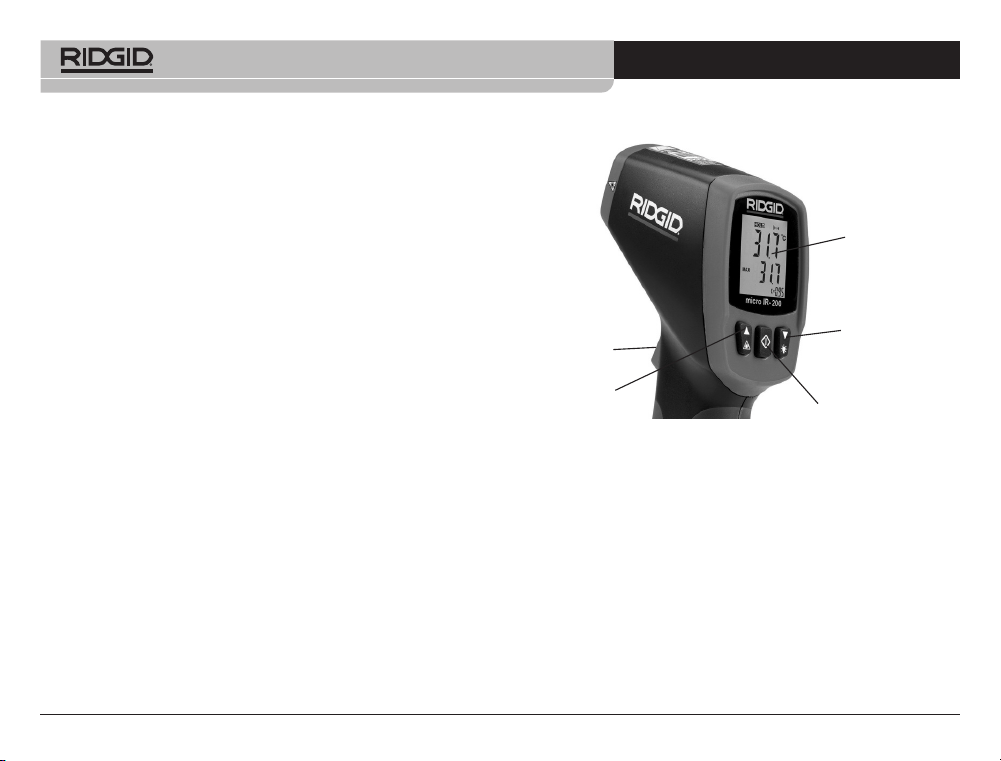
micro IR-200 Controls
Figure 8 – micro IR-200 Display/Buttons
Continuous Measurement (Scanning) Mode
The micro IR-200 can be locked ON to allow measurements with-
out holding the trigger. Make sure that the unit is pointed in a safe
direction away from any bystanders before turning ON. Turn the
micro IR-200 ON by squeezing and holding the trigger. While hold-
ing the trigger, press and release the menu button. The SCAN and
Lock icons will be ON. Release the trigger, and the micro IR-200
will continuously update the measured temperature until the trigger
switch is squeezed and released again.
Laser Enabled/Disabled
If needed, the lasers used for aiming can be turned off to help con-
serve battery life. If this is done, extra care must be used when aim-
Temperature – While the micro IR-200 compensates for vari-
ation from ambient temperature, large changes in ambient and
measured temperatures can reduce accuracy. When significant
changes in ambient temperature (more than 30°F or 17°C) are
encountered, allow fifteen minutes for the micro IR-200 to ad-
just for best accuracy.
Obstructions – Steam, dust, smoke and other obstructions
like glass or plastic between the micro IR-200 and the surface
being measured can decrease accuracy. These obstruct the
unit optics or give false readings (measure the temperature of
the glass instead of the surface). Do not use when obstructions
are present.
3. Make sure that all equipment has been properly inspected.
Operation
Turning ON and OFF (Taking Measurements)
1. Hold the micro IR-200 by the handle grip and point it at the
surface to be measured. Keep away from any electrical, mov-
ing or hot parts. Make sure that the unit is pointed in a safe di-
rection away from any bystanders before turning ON.
2. Squeeze the trigger to turn the micro IR-200 ON. When the trig-
ger is squeezed, the SCAN icon will be ON, and the micro IR-
200 will continuously update the displayed current temperature
value and display the maximum temperature value since the
unit was turned ON.
The micro IR-200 can be moved slowly over the surface to lo-
cate hot or cool areas. See the High Alarm and Low Alarm sec-
tions for information on high and low alarm settings.
3. When the trigger is released, the HOLD icon will be ON. The
micro IR-200 will automatically turn OFF after seven seconds
unless the unit is in Continuous Measurement mode.
Menu Button
Trigger
LCD Display
Down Button/ -
Backlight
Laser
micro IR-200 Non-Contact Infrared Thermometer
999-995-066.07_REV. F
11
value line. Press and release the menu button again. The Low Alarm
icon will continue to flash, and the Low Alarm temperature will ap-
pear. Use the up/down buttons to change the Low Alarm tempera-
ture as desired. Squeeze the trigger to exit the Settings mode and
save your selection.
Temperature Display Units - °C/°F
The micro IR-200 can display temperatures in either degrees Celsius
(C) or Fahrenheit (F). To change the display unit, squeeze and re-
lease the trigger, and then press and release the menu button until
the temperature unit on the screen is flashing. Use the up/down but-
tons to switch between F or C as desired. Squeeze the trigger to exit
the Settings mode and save your selection.
Emissivity
The emissivity value can be set from 0.10 to 1.00. See the Set-Up
section to determine an appropriate value for your application. To ad-
just this value, squeeze and release the trigger, and then press and
release the menu button until the emissivity value on the screen is
flashing. Use the up/down buttons to increase or decrease the emis-
sivity value. Squeeze the trigger to exit the Settings mode and save
your selection.
Cleaning
Do not immerse the RIDGID micro IR-200 Non-Contact Infrared
Thermometer in water. Wipe off dirt with a damp soft cloth. Do not
use aggressive cleaning agents or solutions. Treat the instrument as
you would a telescope or camera.
Storage
The RIDGID micro IR-200 Infrared Thermometer must be stored in
a dry secure area between -10°C (14°F) and 60°C (140°F).
Store the tool in a locked area out of the reach of children and peo-
ple unfamiliar with the micro IR-200.
ing the micro IR-200 to ensure good readings. To enable or disable,
while squeezing the trigger, press and release the laser enable but-
ton. The Laser Enable icon will be ON when the laser is enabled.
Backlight
If using in a low lit area, the micro IR-200 is equipped with a display
backlight. To turn the backlight ON and OFF, with the unit ON, press
the backlight button.
Menu Button Use
After squeezing the trigger, pressing and releasing the menu button
will allow you to cycle through the following settings in this order:
High Alarm ON/OFF, High Alarm Temperature Setting, Low Alarm
ON/OFF, Low Alarm Temperature Setting, Temperature Display
Units, Emissivity.
High Alarm
High Alarm will give an audible tone when the current temperature
exceeds a preset limit. To turn the High Alarm ON, squeeze and re-
lease the trigger, and then press and release the menu button until
the High Alarm icon is flashing. Use the up/down buttons to turn the
High Alarm feature ON/OFF as indicated on the current temperature
value line. Press and release the menu button again. The High
Alarm icon will continue to flash, and the High Alarm temperature
will appear. Use the up/down buttons to change the High Alarm tem-
perature as desired. Squeeze the trigger to exit the Settings mode
and save your selection.
Low Alarm
Low Alarm will give an audible tone when the current temperature
falls below a preset limit. To turn the Low Alarm ON, squeeze and re-
lease the trigger, and then press and release the menu button until
the Low Alarm icon is flashing. Use the up/down buttons to turn the
Low Alarm feature ON/OFF as indicated on the current temperature
micro IR-200 Non-Contact Infrared Thermometer
999-995-066.07_REV. F
12
Remove the battery before any long period of storage or shipping
to avoid battery leakage.
Service and Repair
WARNING
Improper service or repair can make the RIDGID micro IR-200
Non-Contact Infrared Thermometer unsafe to operate.
Service and repair of the micro IR-200 must be performed by a
RIDGID Authorized Independent Service Center.
For information on your nearest RIDGID Authorized Independent
Service Center or any service or repair questions:
• Contact your local RIDGID distributor.
• Visit RIDGID.com to find your local RIDGID contact point.
• Contact Ridge Tool Technical Service Department at rtctechser-
vices@emerson.com, or in the U.S. and Canada call (800) 519-
3456.
Disposal
Parts of the RIDGID micro IR-200 Non-Contact Infrared Thermo -
meter contain valuable materials and can be recycled. There are
companies that specialize in recycling that may be found locally.
Dispose of the com ponents in compliance with all applicable regu-
lations. Contact your local waste management authority for more
information.
For EC Countries: Do not dispose of elec trical equip-
ment with household waste!
According to the European Guideline 2012/19/EU for
Waste Electrical and Electronic Equipment and its imple -
men tation into national legislation, electrical equipment
that is no longer usable must be collected separately and disposed
of in an environmentally correct manner.
Battery Disposal
For EC countries: Defective or used batteries must be recycled ac-
cording to the guideline 2012/19/EU.
micro IR-200 非接触赤外線放射温度計
micro IR-200
警 告!
本機器を使用する前に
取 扱説 明 書をよくお 読
み く だ さ い 。取 扱 説 明 書
の内容を正しく理解せ
ず に 使 用 す る と 、感 電 や
火 災 、大 け が を 負 う 場 合
があります。
micro IR-200 非接触赤外線放射温度計
下記のシリアル番号を記録し、銘板に記載されている製品のシリアル番号を保管し
てください。
シリアル
番号
micro IR-200 非接触赤外線放射温度計
999-995-066.07_REV. F
14
メニューボタンの使用 .......................................................... 25
上限アラーム ........................................................................ 25
下限アラーム ........................................................................ 25
温度表示単位 - ℃/℉ ............................................................ 25
放射率 .................................................................................. 25
手入れ ...................................................................................... 25
保管 ......................................................................................... 25
整備と修理 ............................................................................... 26
廃棄 ......................................................................................... 26
電池の廃棄について ................................................................. 26
EC 適合宣言 ...........................................................裏表紙の内側
製品寿命期間保証 ..............................................................裏表紙
*取扱説明書原本(英語)
目次
機器シリアル番号記録欄 .......................................................... 15
安全に関する記号表示 ............................................................. 16
一般的な安全規則
作業区域に関する安全事項 .................................................. 17
電気に関する安全事項 ......................................................... 17
作業者に関する安全 ............................................................. 17
機器の使用と手入れ ............................................................. 17
保守点検 .............................................................................. 18
本機の安全に関する安全情報
赤外線温度計の安全性 ......................................................... 18
機能概要、仕様および標準装備
概要 ..................................................................................... 18
仕様 ..................................................................................... 18
部品 ..................................................................................... 20
LCD 表示アイコン ................................................................ 20
標準装備 .............................................................................. 20
レーザー分類 ............................................................................ 21
FCC 声明 ................................................................................. 21
電磁両立性 (EMC) ................................................................... 21
電池の交換および取り付け ....................................................... 21
操作前の点検 ........................................................................... 22
セ ット ア ップ と 操 作
セ ット ア ッ プ .......................................................................... 23
操作
電源のオン/オフの切り替え(測定の実施).............................. 24
micro IR-200 制御部分
連続測定(スキャン)モード .................................................... 24
レーザーの有効/無効 ............................................................ 24
バ ッ ク ラ イト .......................................................................... 25
micro IR-200 非接触赤外線放射温度計
999-995-066.07_REV. F
15
安全に関する記号表示
この取扱説明書および製品では、安全に関する重要な情報を伝えるための記号や表示が使用されています。このセクションではこれ
らの記号と表示の意味を解説します。
この記号は、安全に関する警告記号です。けがを負う危険があることを警告しています。けがや死亡につながる危険を避ける
ため、この記号を伴った安全注意事項すべてに従ってください。
危険
「危険」は、適切な対応を取らない場合に、死亡や大けがにつながる危険な状況を示しています。
警告
「警告」は、適切な対応を取らない場合に、死亡または大けがにつながる可能性のある危険な状況を示しています。
注意
「注意」は、適切な対応を取らない場合に、軽度または中度のけがにつながる可能性のある危険な状況を示しています。
注
この表示は、機器の保全に関する情報を示しています。
この記号は、本機器を使用する前に取扱説明書をよくお読みいただく必要があることを示します。取扱説明書には、本機器の
安全かつ適切な操作に関する重要な情報が記載されています。
この記号は、本機器にクラス 2 のレーザーが含まれていることを示します。
この記号は、レーザー光を直接見てはいけないことを示します。
この記号は、レーザー光の存在と危険性を警告しています。
micro IR-200 非接触赤外線放射温度計
999-995-066.07_REV. F
16
• 腕を伸ばしすぎないようにしてください。常に足元をしっかりさせ、
バラン ス を 保ってください 。このようにすることで、予期しない状況
でも電動工具をより適切に制御することが可能になります。
機器の使用と手入れ
• 機器に無理な力をかけないでください。用途に合った機器を使用
してください 。正しい機器を使用することにより、設計された速度
で、より円滑に、より安全に仕事をこなすことができます。
• スイッチで電源のオン/オフができない場合は、機器を使用しな
い でください 。スイッチで制御できなくなった工具は、危険です。
必ず修理してください。
• 機器の調整、付属品の交換、保管の際は、機器から電池の接続を
解 除してください 。こうした予防措置を講じることにより、けがのリ
スクを軽減できます。
• 使用していない機器は、小児の手の届かない場所に保管してく
ださい。機器やその操作手順に不慣れな人に操作をさせないで
ください 。適切な訓練を受けていない人が機器が操作すること
は危険を伴います。
• 機器の保守を実施してください。可動部分が位置ずれしていた
り、動かなくなっていないか、なくなっていたり破損のある部品は
ないかなど、本機器の操作に影響及ぼすおそれのある状態がな
いか確認してください。損傷している場合、機器を使用する前に
修理してください。事故の多くは、点検保守が不十分な機器から
起きています。
• 機器や付属品は、それぞれの説明書に従い、作業状況と作業内容
を考慮した上で使用してください。意図された用途以外に使用す
ると、危険を伴う状況が発生する可能性があります。
• 機器のメーカーが推奨する付属品のみを使用してください。一
つの機器に適した付属品を別の機器に流用すると、危険になる
可能性があります。
• ハンドル部分は乾燥した清潔な状態を保ち、油やグリスなどが付
着しな い ようにしてください 。このようにすることによって、機器の
正確な操作が可能になります。
一般的な安全規則
警告
安全上の注意および指示事項をすべてお読みください。これらを守らない
と、感電、火災および/または重傷事故の危険があります。
説明書はすべて大切に保管してください。
作業区域に関する安全事項
• 作業場はきれいに保ち、十分に明るくしてください。散らかった場
所や暗い場所での作業は事故につながる恐れがあります。
• 可燃性の液体、気体、粉じんなど、爆発性雰囲気が存在する場所
では機器を操作しないでください。機器で火花が発生し、粉じん
やガスに引火する可能性があります。
• 機器の操作中は、小児や近くにいる人を近づけないようにしてく
ださい。作業中に注意が乱されると、操作のコントロールを失う恐
れ が ありま す 。
電気に関する安全事項
• パイプ、ラジエーター、レンジ、冷却器などの接地面やアース面に
身体が触れないようにしてください。体が触れると感電の危険が
大 きくなりま す 。
• 機器を降雨や湿気に晒さないようにしてください。水分が機器に
入ると、感電の危険が高まります。
作業者の安全に関する注意事項
• 作業中は十分に注意し、作業から目を離さず、常識にそった操作
を行ってください。疲労しているあるいは薬物、アルコール、医薬
品の影響下にある状態で機器を使用しないでください。機器の操
作中の一瞬の不注意が重傷につながる可能性があります。
• 個人用保護具を使用してください。常に安全メガネを着用してく
ださい。けがを防止するため、作業条件に応じた防塵マスク、滑り
止め付き安全靴、ヘルメット、耳栓などの個人用保護具を着用して
ください 。
micro IR-200 非接触赤外線放射温度計
999-995-066.07_REV. F
17
注意
ここで指定されている手順以外の制御、調整また
は実行を使用すると、危険な放射線被曝を引き起こす可能性があ
りま す 。
RIDGID
®
製品についてのお問い合わせ先:
• 日本エマソン株式会社 リッジ事業部
• TEL:(03) 5769 6953 FAX:(03) 4496-4286 (祝祭日を除く月曜日
から金曜日 9:30~17:00)
• メールアドレス:[email protected]
ホームページ: ridgid.jp
機能概要、仕様および標準装備
概要
RIDGID
®
micro IR-200 非接触赤外線放射温度計は、簡単なボタ
ン操作で正確かつ迅速に表面温度を計測しますトリガーを押し
込んで、被測定面にウルトラシャープデュアルクラス II レーザ
ーを当てるだけです。micro IR-200 では、鮮明で読みやすいバッ
クライト付き LCD ディスプレイに温度測定値がすぐに表示さ
れます。この頑丈な小型の計測器を使用すれば、被測定面に接
触することなく、熱や換気に関する問題の診断、電動モータや
システムの予防的モニタリング、蒸気トラップのトラブルシュ
ーティング、ヒューズや回路遮断器の過熱のチェックなどをす
ばやく行うことができます。
micro IR-200は、光学部品を使用して放出、反射、透過したエネ
ルギーを感知し、収集して検出器に焦点を合わせます。装置の
電子部品は、情報を温度の読み取り値に変換し、表示します。
レーザーは対象の位置照準を容易にするために使用されます。
保守点検
• 機器の保守点検は、有資格の修理担当者により、使用部品と同一
の交換部品のみを使用して実施してください。これにより、工具の
安全性の維持が確実になります。
本機の安全に関する安全情報
警告
このセクションには、本工具に特有の安全上の重要事項が記載されています。
RIDGID
®
microIR-200非接触赤外線温度計を使用する前に、これらの注意事
項を注意深くお読みになり、目の怪我やその他の重大な人身傷害のリスクを
軽 減してください 。
説明書はすべて大切に保管してください。
この説明書は、操作者が使用時に参照できるよう、工具と一緒に保
管してくだ さい 。
赤外線温度計の安全性
• レーザー光を直接見ないでください。レーザー光を直接見ると、
目に危険な場合があります。光学補助機器(双眼鏡や望遠鏡な
ど)を使用してレーザー光を見ないでください。
• レーザー光を他の人に直接向けないでください。レーザー光が目
の高さより上または下に向けられていることを確認してください。
レーザー光は目に危険な場合があります。
• この装置を個人の検査や医療目的で使用しないでください。これ
は医療機器ではありません。けがの原因になる場合があります。
• 電気部品、可動部品、または高温部品の近くで作業する場合は、
適切な予防措置を講じてください。これらの部分位近づくと、感電
したり、引き込まれたり、やけどやその他の重傷を負う可能性があ
ります。保護具が必要な場合があります。
micro IR-200 非接触赤外線放射温度計
999-995-066.07_REV. F
18
仕様
測定温度範囲 ........................................ -58°F ~ 2192°F
(-50°C ~ 1200°C)
D/S比(距離と測定視野の比) ........ 30 ~ 1
測定精度 ................................................ -58°F~68°F (-50°C~20°C):
±4.5°F (2.5°C)
68°F ~1472°F (20°C~800°C)
±1.0% または ±1.8°F (1.0°C)
再現性 ..................................................... -58°F~68°F (-50°C~20°C):
±2.3°F (1.3°C)
68°F ~1472°F (20°C~800°C)
±0.5% または ±0.9°F (0.5°C)
応答時間 ................................................ 150ms
測定波長 ................................................ 8~14um
放射率 ..................................................... 0.10~1.00 の間で調整可能
許容範囲外表示 .................................... LCD画面上に “----” を表示
ダイオードレーザー ............................ 出力 < 1mW、波長
630〜670 nm、クラス 2 レー
ザー製品
温度表示 ................................................ 現在温度、最高温度
測定単位 ................................................ 華氏、摂氏
動作温度 ................................................ 32°F ~ 122°F (0°C ~ 50°C)
保管温度 ................................................ 14°F ~ 140°F (-10°C ~ 60°C)
画面表示解像度 .................................... 0.1°F (0.1°C)
相対湿度 ................................................ 10%~90% RH 動作時、
<80% RH 保管時
電池 ......................................................... 9V 電池 (1)、NEDA 1604A ま
たは IEC 6LR61、または同等
品
IP 定格 .................................................... IP54
重量 ......................................................... 0.6 lbs (0.3 kg)
図 1 – micro IR-200 非接触赤外線放射温度計
特徴
• 迅速な検出機能 • バックライト LCD 画面
• デュアルクラス II レーザー照準 • トリガーロック
• 自動データ保持 • 上下限アラーム設定
• 最高温度表示 • 調整可能な放射率
• 高精度の非接触測定
• 自動選択範囲と表示解像度 0.1°F (0.1°C)
micro IR-200 非接触赤外線放射温度計
999-995-066.07_REV. F
19
標準装備
• micro IR-200 • 電池 1 x 9V
• キャリングケース • 取扱説明書
現在
温度値
ロック
電池
残量低
上限アラーム
下限アラーム
摂氏/華氏
温度単位
最高
温度値
データ保持
放射率値
図 3 – micro IR-200 表示アイコン
LCD表示アイコン
レーザー有効
電池
コン パ ートメ ント
ハ ンドル グリップ
トリガ ー
メニューボタン
上ボタン/レーザー有効
LCD ディスプレイ
下ボタン/バック
ラ イト
図 2 – micro IR-200 の部品
部品
トリガ ー
赤外線センサー
レーザー
レーザー
micro IR-200 非接触赤外線放射温度計
999-995-066.07_REV. F
20
電磁両立性 (EMC)
電磁両立性という用語は、電磁放射と静電放電が存在し、他の
機器に対し電磁妨害をもたらさずに、ある特定の環境の中で製
品が円滑に機能できる能力を示します。
注
RIDGID micro IR-200 は、該当するすべての EMC 規
格に準拠しています。ただし、他のデバイスに対して妨害を引
き起こす可能性を完全に排除することはできません。
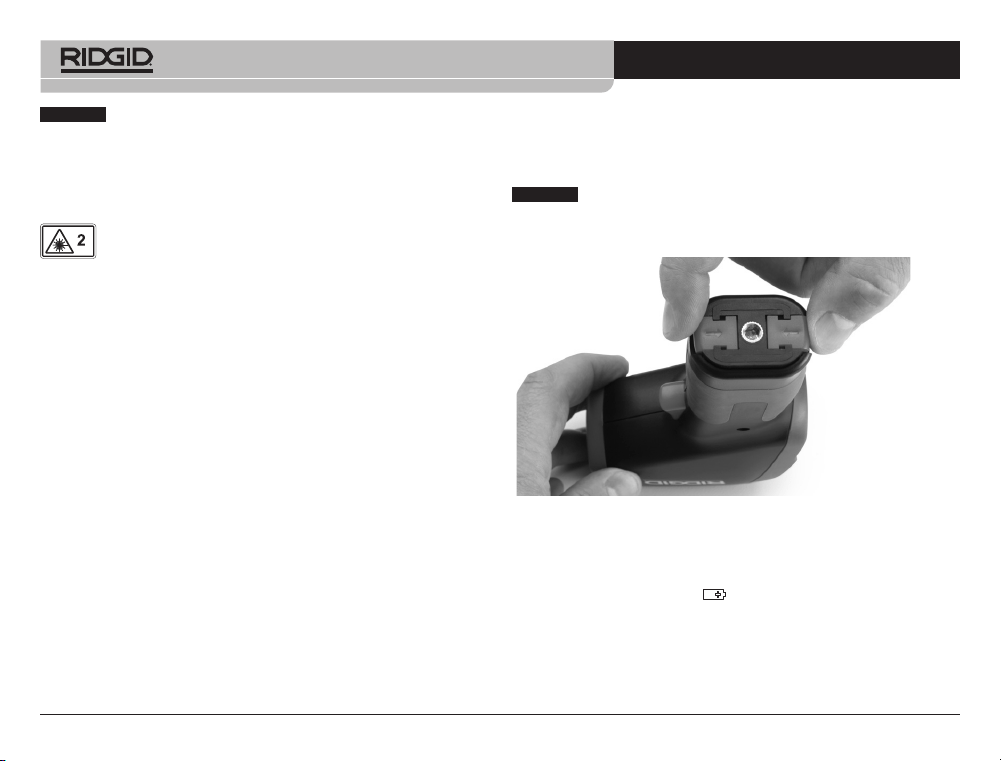
図 4 – 電池コンパートメントの取り外し
電池の交換および取り付け
micro IR-200 は、電池が取り付けられていない状態で供給され
ます。電池インジケーター
(図3)
が表示された場合は、電池
を交換する必要があります。電池の液漏れを防ぐため、長期保
管の前に電池を取り外してください。
1. 電池クリップを押し込み、温度計から電池コンパートメン
トを取り外します
(図4を参照)
。必要な場合は、電池を取り
外してください。
注
この装置は温度測定を行うために使用されます。使
用方法を 誤ったり、用途以外に使用すると、正しく測定できな
いことがあります。条件に適した測定方法の選択は、ユーザー
の責任です。
レーザー分類
RIDGID micro IR-200 は、デバイスの前面から放射さ
れる可視レーザー光を生成します。
デバイスはクラス 2 レーザーに準拠しています: IEC 60825-
1:2007
FCC 声明
この機器は試験の結果、クラス B デジタルデバイス (FCC の規
則のパート15 に準拠) の制限に適合していることが証明されて
います。これらの制限は、住居地区での設置にあたり有害な妨
害に対し合理的な保護を提供できるように設計されています。
この機器は無線周波エネルギーを生成、使用、放射するため、
適切な手順と指示に従って設置および使用を行わない場合は、
無線通信に有害な妨害を引き起こす可能性があります。
ただし、特定の設置状況においては妨害が生じないという保証
はありません。
この機器がラジオあるいはテレビ電波受信に妨害を引き起こし
ているかどうかは、機器のオフとオンを切り替えることで判定
することができます。電波妨害が発生している場合、次の手段
の1つ以上を行い、妨害を訂正することが奨励されます:
• 受信アンテナを別の方向に向けるか、配置を変更する。
• 機器とレシーバーの間の距離を増やす。
• 販売店または信頼できるラジオ/テレビ技術者に相談する。
micro IR-200 非接触赤外線放射温度計
999-995-066.07_REV. F
21
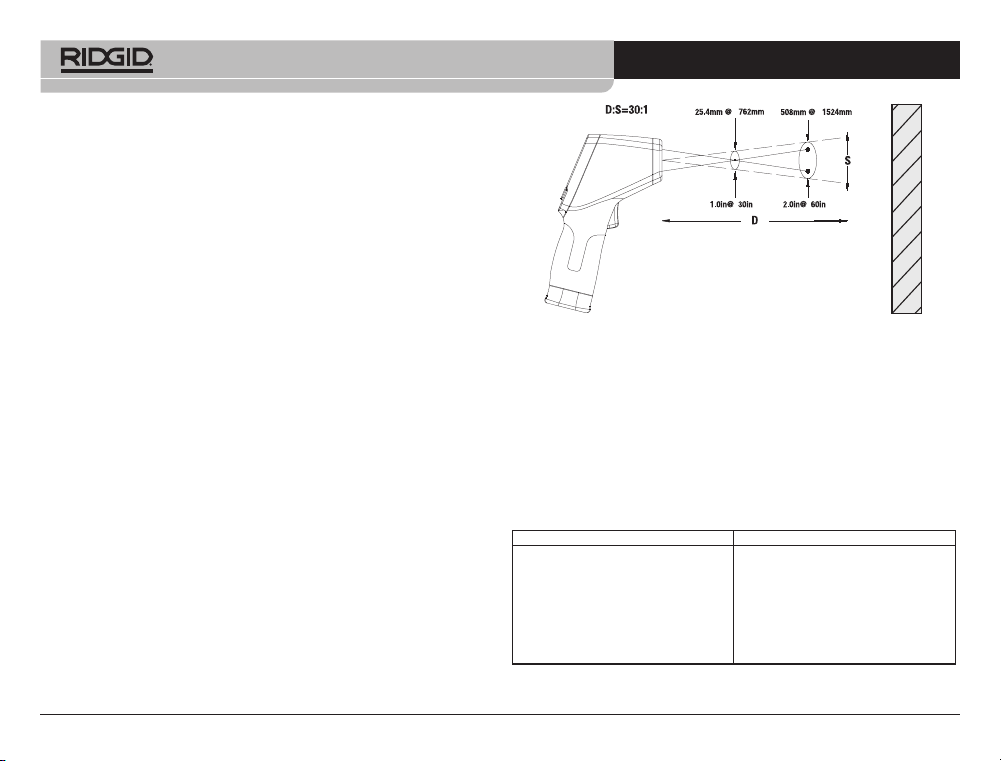
3. 警告ラベルが貼付され、警告内容が判読可能であることを
確認してください。
(図 6 参照)
4. 点検中に問題が見つかった場合は、正しく修理されるまで
当該赤外線温度計を使用しないでください。
5. 取扱説明書に従って本赤外線温度計の電源を入れて測定を
行い、他の機器(接触型の温度計など)で測定結果を確認
してください。測定値の間の相違が許容範囲にない場合
は、修理が正しく行われるまで本赤外線温度計を使用しな
いでください。
図 6 – 警告ラベル
セ ット ア ッ プ と 操 作
警告
レーザー光を直接見ないでください。レーザー光を直接見ると、目に危険な場
合があります。光学補助機器(双眼鏡や望遠鏡など)を使用してレーザー光を
見ないでください。
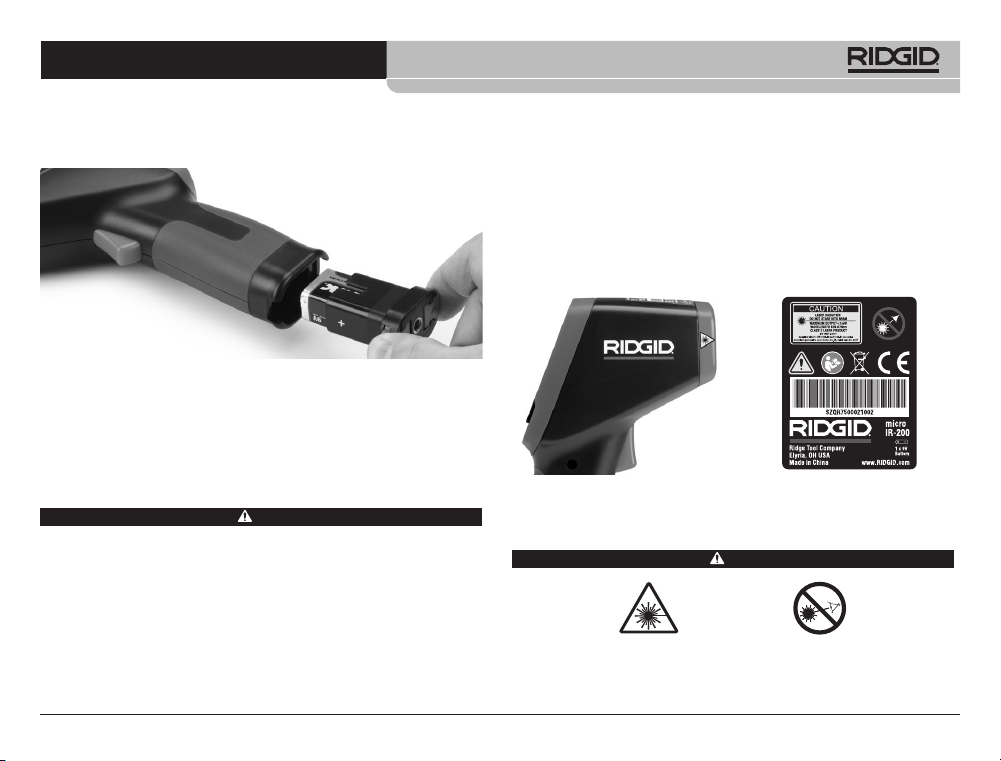
2. 電池コンパートメントに示されているように極性が正しい
ことを確認しながら、9Vアルカリ電池(6LR61)を取り付
けてください。
図 5 – 電池ホルダーと極性記号
3. クリップを握り、温度計にしっかりと挿入します。ホルダーの移
動は一方向のみです。無理に押し入れないでください。確実に
固定されていることを確認します。
使用前の点検
警告
毎回使用する前に、赤外線温度計を検査し、問題を正して、けがや誤った測定の
リス クを 減らし てくだ さい 。
レーザー光を直接見ないでくださいレーザー光を直接見ると、目に危険な場
合 が あります 。
1. 機器から油やグリス、汚れを除いてください。これは検査
の際に役立ちます。
2. micro IR-200を、部品の破損、摩耗、欠落、位置ずれ、引っ
掛かりがないか、または安全で正常な動作を妨げる可能性
のあるその他の状態がないか点検します。
micro IR-200 非接触赤外線放射温度計
999-995-066.07_REV. F
22
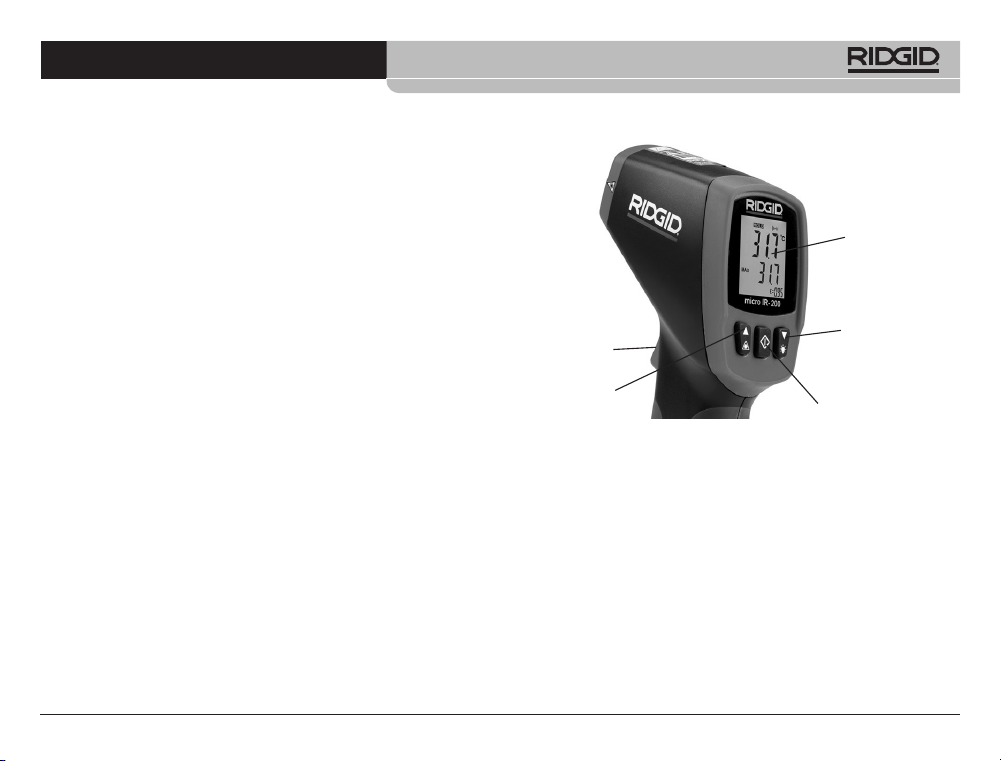
図 7 – 視野
スポットは常に測定表面よりも小さくする必要がありま
す。表面が小さいほど、micro IR-200 を表面に近づける必
要があります。最高の精度を得るには、表面をスポットの2
倍の大きさにする必要があります。
放射率– 放射率は、材質のエネルギー放出特性を表すために
使用される用語であり、0〜1の範囲の値です。micro IR-200
を使用すると、放射率の値を0.10〜1.00に調整して温度
を計算することができます。表面の放射率が不明な場合
は、0.95の放射率が塗装面などの多くの用途に適切となり
ます。一般的な材料の放射率の値は、
図 8
に含まれています
材質 放射率 材質 放射率
アルミニウム、研磨仕上げ 0.05
アスファルト 0.88
レンガ 0.90
コンクリート、粗 0.91
銅、研磨仕上げ 0.04
ガラス 0.95
石灰岩 0.92
大理石、研磨仕上げ 0.90
塗料 0.95
紙、白 0.90
石こう、粗 0.89
ゴム 0.93
鋼、亜鉛メッキ仕上げ 0.28
鋼、酸化 0.88
水 0.96
図 8 – 一般的な材料の放射率値
レーザー光を他の人に直接向けないでください。レーザーが目の高さより上ま
たは下に向けられていることを確認してください。レーザー光は目に危険な場
合 が あります 。
電気部品、可動部品、または高温部品の近くで作業する場合は、適切な予防措
置を講じてください。これらの部分位近づくと、感電したり、引き込まれたり、やけ
どやその他の重傷を負う可能性があります。保護具が必要な場合があります。
けがや測定エラーのリスクを減らすために、これらの手順に従って赤外線温度
計をセットアップして操作してください。
セ ット ア ッ プ
1.
「安全についての一般情報」
セクションに示されていると
おり、作業区域が適切に確保されていることを確認してく
ださい。
2. 測定対象物を点検し、用途に適した機器を使用しているこ
とを確認してください。
測定範囲、精度、およびその他の
情報については、「仕様」のセクションを参照してくださ
い。
micro IR-200の精度は、以下を含め、いくつかの要因によっ
て影響を受けます:
視野 – micro IR-200は、測定する領域のいずれかの面にあ
る測定ポイントに2本のレーザー光を当てます。これらのポ
イントは、温度を測定している領域(「スポット」)のお
およその直径を示します。micro IR-200と測定表面との距
離(D)が大きくなると、その領域とスポットサイズ(S)
が増加します。この領域は表面までの距離の約
1
/
30
倍です。
(図 7 参照。)
表面
micro IR-200 非接触赤外線放射温度計
999-995-066.07_REV. F
23
micro IR-200 制御部分
図 8 – micro IR-200 ディスプレイ/ボタン
連続測定(スキャン)モード
micro IR-200をロック状態にして、トリガーを押し込み続けなくても
測定できるようにすることができます。電源を入れる前に、装置が
周辺の人から離れた安全な方向を向いていることを確認してくだ
さい。トリガーを押し込んだ状態にして、micro IR-200の電源を入れ
ます。 トリガーを押し込みながら、メニューボタンを押して解放しま
す。「SCAN」アイコンと「ロック」アイコンがオンに な り ま す 。ト リ ガ ー
を解放すると、micro IR-200は、トリガースイッチが押されて再度解
放されるまで、測定された温度を継続的に更新します。
レーザーの有効/無効
必要に応じて、照準に使用するレーザーをオフにして、電池を
長持ちさせることができます。これを行う場合は、micro IR-200
温度– micro IR-200 は周囲温度の変動を補正しますが、周
囲温度と測定温度に大きな変化があると精度が低下する可
能性があります。周囲温度の大幅な変化(30°F(17°C)
を超える)が見られた場合は、最高の精度が得られるよう
にmicro IR-200で15分間の調整を行わせてください。
障害物– micro IR-200と測定面の間に蒸気、ほこり、煙、お
よびガラスやプラスチックなどの他の障害物が存在する場
合は、精度が低下する可能性があります。これらは、装置
の光学部品の働きを妨害したり、誤った測定値を示したり
します(測定表面ではなくガラスの温度を測定します)。
障害物がある場合は、使用しないでください。
3. 機器がすべて適切に検査されていることを確かめてください。
操作
電源のオン/オフの切り替え(測定の実施)
1. micro IR-200をハンドルグリップで保持して、測定する表面
に向けます。電気部品、可動部品、または高温の部品に近づ
けないでください。電源を入れる前に、装置が周辺の人から
離れた安全な方向を向いていることを確認してください。
2. トリガーを押し込んで micro IR-200をオンにします。トリガーを
押し込むと「SCAN」アイコンが点灯します。micro IR-200は表示
されている現在の温度値を継続的に更新し、本機の電源を入れ
てからの最高温度値を表示します。
高温または低温の領域を見つけるために、micro IR-200を表面
上でゆっくりと移動させることができます。
上限アラームと下限
アラームの設定については、「上限アラーム」と「下限アラーム」
のセクションを参照してください。
3. トリガーを解放すると、「HOLD」アイコンがオンに なりま
す。micro IR-200は、連続測定モードになっていない限り、7秒
後に自動的に オフに な り ま す 。
メニューボタン
トリガ ー
LCD ディスプレイ
下ボタン/バック
ラ イト
レーザー
micro IR-200 非接触赤外線放射温度計
999-995-066.07_REV. F
24
現在の温度値の表示行に示されるように、下限アラーム機能を
オン/オフにします。メニューボタンをもう一度押して解放しま
す。下限アラームアイコンが点滅し続け、下限アラーム温度が
表示されます。上/下ボタンを使用して、必要に応じて下限アラ
ーム温度を変更します。トリガーを押し込んで「設定」モード
を終了し、選択内容を保存します。
温度表示単位 - °C/°F
micro IR-200 は、摂氏(C)または華氏(F)のいずれかで温度
を表示できます。表示単位を変更するには、トリガーを押し込
んで解放し、画面の温度単位が点滅するまでメニューボタンを
押して解放します。上/下ボタンを使用して、必要に応じてFま
たはCを切り替えます。トリガーを押し込んで「設定」モード
を終了し、選択内容を保存します。
放射率
放射率の値は0.10~1.00に設定できます。用途に適切な値を決
定するには、「セットアップ」セクションを参照してくださ
い。この値を調整するには、トリガーを押し込んで解放し、画
面の放射率の値が点滅するまでメニューボタンを繰り返して押
して解放します。上/下ボタンを使用して、放射率の値を増減し
ます。トリガーを押し込んで「設定」モードを終了し、選択内
容を保存します。
手入れ
RIDGID micro IR-200 非接触赤外線温度計を水に浸さないでく
ださい。湿らせた柔らかい布で汚れ拭き取ってください。強い
洗剤や溶剤は使用しないでください。望遠鏡やカメラと同じよ
うに本機器を取り扱ってください。
保管
RIDGID micro IR-200 赤外線温度計は、-10°C(14°F)~
60°C(140°F)間の乾燥した安全な場所に保管してください。
の照準を合わせるときに、良好な読み取りが保証されるように
特別な注意を払う必要があります。有効・無効の切り替えは、
トリガーを押し込みながら、レーザー有効ボタンを押すまたは
解放します。レーザーが有効になると、レーザー有効アイコン
が点灯します。
バ ック ラ イト
暗い場所で使用する場合のために、micro IR-200にはディスプレイ
バックライト機能が装備されています。バックライトのオンとオフを
切り替えるには、装置をオンにした状態で、バックライトボタンを押
します 。
メニューボタンの使用
トリガーを押し込んだ後、メニューボタンを押して解放する
と、設定項目を以下の順序で切り替えることができます:上限
アラームオン/オフ、上限アラーム温度設定、下限アラームオ
ン/オフ、下限アラーム温度設定、温度表示単位、放射率。
上限アラーム
上限アラームは、現在の温度が事前に設定された制限を超えると、
音で知らせます。上限アラームをオンにするには、トリガーを押し
込んで解放し、「上限アラーム」アイコンが点滅するまでメニューボ
タンを繰り返し押して解放します。上/下ボタンを使用して、現在の
温度値の表示行に示されるように、上限アラーム機能をオン/オフ
にします。メニューボタンをもう一度押して解放します。上限アラー
ムアイコンが点滅し続け、上限アラーム温度が表示されます。上/下
ボタンを使用して、必要に応じて上限温度を変更します。トリガーを
押し込んで「設定」モードを終了し、選択内容を保存します。
下限アラーム
下限アラームは、現在の温度が事前設定された制限を下回る
と、音で知らせます。下限をオンにするには、トリガーを押し
込んで解放し、下限アラームアイコンが点滅するまでメニュー
ボタンを繰り返し押して解放します。上/下ボタンを使用して、
micro IR-200 非接触赤外線放射温度計
999-995-066.07_REV. F
25
子供や micro IR-200 の取り扱いに慣れていない人の手の届かな
い鍵のかかる場所に保管してください。
電池の液漏れを防ぐため、長期間の保管または輸送の前に電池
を取り外してください。
点検と修理
警告
不適切なサービスまたは修理を行うと、RIDGID microIR-200 非接触赤外線
温度計の操作の安全性が損なわれる可能性があります。
micro IR-200 のサービスと修理は、必ずRIDGID 正規修理代行店
に依頼してください。
最寄りのRIDGID 正規修理代行店または本機のサービスや修理に
関する質問は、下記まで電話またはメールでご連絡ください。
• 日本エマソン株式会社 リッジ事業部
• TEL:(03) 5769 6953 FAX:(03) 4496-4286 (祝祭日を除く月曜日
から金曜日 9:30~17:00)
• メールアドレス:[email protected]
ホームページ: ridgid.jp
廃棄
RIDGID micro IR-200非接触赤外線温度計の部品には貴重な材料
が含まれており、リサイクルすることができます。お客様の地
域のリサイクル専門業者までお問い合わせください。構成部品
はすべての該当する規則に従って処分してください。詳細につ
いては、各地域の廃棄物管理当局までお問い合わせください。
EC 加盟国の場合: 電気機器は家庭ゴミと一緒に廃棄す
ることはできません!
廃電気電子機器に関するEU指針2012/19/EU (European
Guideline 2012/19/EU for Waste Electrical and Electronic
Equipment)、および各国におけるその施行により、使
用不能になった電子機器は、個別に回収するとともに環境に悪
影響を及ぼさない方法で廃棄しなければなりません。
電池の廃棄について
EU 加盟国の場合: 不良あるいは使用済み電池は、2012/19/EU 指
針に従って再利用してください。
micro IR-200 非接触赤外線放射温度計
999-995-066.07_REV. F
26
micro IR-200 非接触赤外線放射温度計
999-995-066.07_REV. F
27
EC Declaration
RIDGID
®
micro IR-200 Non-Contact Infrared Thermometer
RIDGE TOOL COMPANY Ridge Tool Europe NV (RIDGID)
400 Clark Street Ondernemerslaan 5428
Elyria, Ohio 44035-6001 3800 Sint-Truiden
U.S.A. Belgium
EC DECLARATION OF CONFORMITY
We declare that the machines listed above, when used in accordance with
the operator’s manual, meet the relevant requirements of the Directives and
Standards listed below.
DéCLARATION DE CONFORMITé CE
Nous déclarons que lorsqu’elles sont utilisées selon leur mode d’emploi, les
machines indiquées ci-dessus répondent aux exigences applicables des di-
rectives et normes ci-après.
DECLARACIóN DE CONFORMIDAD DE LA CE
Declaramos que las máquinas listadas más arriba, cuando se usan conforme
al manual del operario, cumplen con los requisitos pertinentes de las directri-
ces y normas listadas a continuación.
PROHLÁŠENÍ O SHODĚ ES
Prohlašujeme, že výše uvedené nástroje a zařízení splňují při použití v
souladu s jejich návodem k obsluze příslušné požadavky níže uvedených
směrnic a nařízení.
EF-OVERENSSTEMMELSESERKLÆRING
Vi erklærer, at de ovenfor anførte maskiner, ved brug i over ensstemmelse
med brugervejledningen, opfylder de relevante krav i de nedenfor anførte di-
rektiver og standarder.
EG KONFORMITÄTSERKLÄRUNG
Wir erklären, dass die oben aufgeführten Maschinen, wenn sie entsprechend
der Bedienungsanleitung verwendet werden, die einschlägigen Anforderun-
gen der folgenden Richtlinien und Normen erfüllen.
ΔΗΛΩΣΗ ΣΥΜΜΟΡΦΩΣΗΣ ΕΚ
Δηλώνουμε ότι τα μηχανήματα που αναφέρονται παραπάνω, όταν χρησι-
μοποιούνται σύμφωνα με το εγχειρίδιο χειρισμού, πληρούν τις σχετικές
απαιτήσεις των παρακάτω Οδηγιών και Προτύπων.
EY-VAATIMUSTENMUKAISUUSVAKUUTUS
Vakuutamme, että edellä luetellut koneet täyttävät käyttö ohjekirjan mukaisesti
käytettynä seuraavien direktiivien ja standardien vaatimukset.
EU IZJAVA O SUKLADNOSTI
Izjavljujemo da su gore navedeni strojevi, kada se koriste u skladu s
priručnikom za korisnike, sukladni s relevantnim zah tjevima dolje navedenih
direktiva i standarda.
EK MEGFELELŐSÉGI NYILATKOZAT
Kijelentjük, hogy a fent felsorolt gépek - amennyiben a kezelési útmutatónak
megfelelően használják őket - megfe l elnek az alább felsorolt Irányelvek és
Szabványok követel ményeinek.
DICHIARAZIONE DI CONFORMITÀ CE
Dichiariamo che le macchine elencate in alto, se utilizzate in conformità con il
manuale dell'operatore, soddisfano i relativi requisiti delle Direttive e degli Stan-
dard specificati di seguito.
ЕО СӘЙКЕСТІК МӘЛІМДЕМЕСІ
Біз жоғарыда көрсетілген құрылғылардың пайдаланушы нұсқаулығына
сәйкес пайдаланылған жағдайда төменде көрсетілген Директивалар мен
Стан дарт тар дың тиісті талаптарына жауап беретінін мәлімдейміз.
EG-CONFORMITEITSVERKLARING
Hierbij verklaren wij dat de hierboven vermelde machines, mits gebruikt in
overeenstemming met de handleiding, voldoen aan de relevante eisen van
de hieronder vermelde richtlijnen en normen.
CE-SAMSVARSERKLÆRING
Vi erklærer at maskinene oppført over oppfyller de relevante kravene i direk-
tiver og standarder oppført under dersom de brukes i henhold til bruksanvis-
ningen.
EC Declaration
Signature:
Name: Harald Krondorfer
Qualification: V.P. Engineering
Date: 09/01/2021
2004/108/EC, 2011/65/EU, EU 2015/863
EN61326-1, EN61326-2-2
DEKLARACJA ZGODNOŚCI WE
Deklarujemy, że maszyny wymienione powyżej, gdy są używane zgodnie z
podręcznikiem użytkownika, spełniają właściwe wymagania Dyrektyw i Stan-
dardów, wymienione poniżej.
DECLARAÇÃO DE CONFORMIDADE CE
Declaramos que as máquinas listadas acima, quando utilizadas de acordo
com o manual do operador, cumprem os requisitos relevantes das Diretivas e
Normas listadas abaixo.
DECLARAȚIE DE CONFORMITATE CE
Declarăm că mașina specificată mai jos, atunci când este utilizată în confor-
mitate cu manualul de exploatare, îndeplinește cerințele relevante ale Direc-
tivelor și standardelor specificate mai jos.
ДЕКЛАРАЦИЯ СООТВЕТСТВИЯ EC
Мы заявляем, что инструменты, перечисленные выше, при условии ис-
пользования согласно руководству по эксплуатации, отвечают соот-
ветствующим требованиям указанных ниже директив и стандартов.
ES PREHLÁSENIE O ZHODE
Vyhlasujeme, že stroje uvedené vyššie spĺňajú relevantné požiadavky
smerníc a noriem uvedených nižšie, ak sa používajú podľa návodu na použi-
tie.
IZJAVA ES O SKLADNOSTI
Izjavljamo, da zgoraj omenjeni stroji, ko se uporabljajo skladno z uporabniškim
priročnikom, izpolnjujejo relevantne zahteve spodaj omenjenih direktiv in stan-
dardov.
EC DEKLARACIJA O USAGLAŠENOSTI
Izjavljujemo da gore navedeni strojevi, ako se koriste u skladu s priručnikom
za korisnike, zadovoljavaju relevantne zahteve direktiva i standarda koji se
navode dole.
EG-FÖRSÄKRAN OM ÖVERENSSTÄMMELSE
Vi meddelar att maskinen som anges ovan uppfyller de aktuella kraven i de an-
givna direktiven och standarderna nedan när den används enligt bruksanvis-
ningen.
AB UYGUNLUK BEYANI
Yukarıda listelenen makinelerin, kullanıcı kılavuzuna göre kullanıldığında,
aşağıda listelenen Direktiflerin ve Standartların ilgili gereksinimlerini
karşıladığını beyan ederiz.
EÜ VASTAVUSDEKLARATSIOON
Kinnitame, et eelpool loetletud masinad vastavad allpool loetletud direktii-
vide ja standardite asjakohastele nõuetele, kui neid kasutatakse vastavalt
kasutusjuhendile.
EK ATBILSTĪBAS DEKLARĀCIJA
Mēs apliecinām, ka iepriekšminētās iekārtas, izmantojot tās saskaņā ar
operatora rokasgrāmatu, atbilst attiecīgajām tālāk norādīto direktīvu un
standartu prasībām.
DEARBHÚ COMHRéIREACHTA AN CE
Fógraímid go bhfuil na hinnill sa liosta thuas i gcomhréir le
riachtanais ábhartha na dTreoracha agus na gCaighdeán sa liosta thíos,
ach iad a úsáid de réir an lámhleabhair don oibreoir.
EB ATITIKTIES DEKLARACIJA
Deklaruojame, kad pirmiau išvardytos mašinos, jei naudojamos pagal nau-
dotojo vadovą, atitinka atitinkamus toliau išvardytų direktyvų ir standartų
reikalavimus.
ЕО ДЕКЛАРАЦИЯ ЗА СЪОТВЕТСТВИЕ
Декларираме, че изброените по-горе машини, когато се използват в
съответствие с Ръководство за оператора, отговарят на съответ-
ните изисквания на директи вите и стандартите, изброени по-долу.
Printed 4/22 999-995-066.07
ECN000501 REV. F
©2015, 2022 Ridge Tool Company
RIDGID and the Emerson logo are registered trademarks of Emerson Electric Co. or its subsidiaries in the US and other countries.
Any other trademarks belong to their respective holders.
Against Material Defects
& Workmanship
FULL LIFETIME
WARRANTY
FULL LIFETIME WARRANTY (garantie légale étendue à la durée de vie du produit,
voir conditions de garantie / legal warranty extended to the product lifecyle,
see warranty conditions)
For Warranty Information for your World Region
visit RIDGID.com
〒140-0002
東京都品川区東品川1-2リバーサイド品川港南ビ
ル5階
TEL:(03)5769-6953
FAX:(03)4496-4286
(祝祭日を除く月曜日から金曜日9:30 ~ 17:00
)
メールアドレス:[email protected]
ホームページ:ridgid.jp