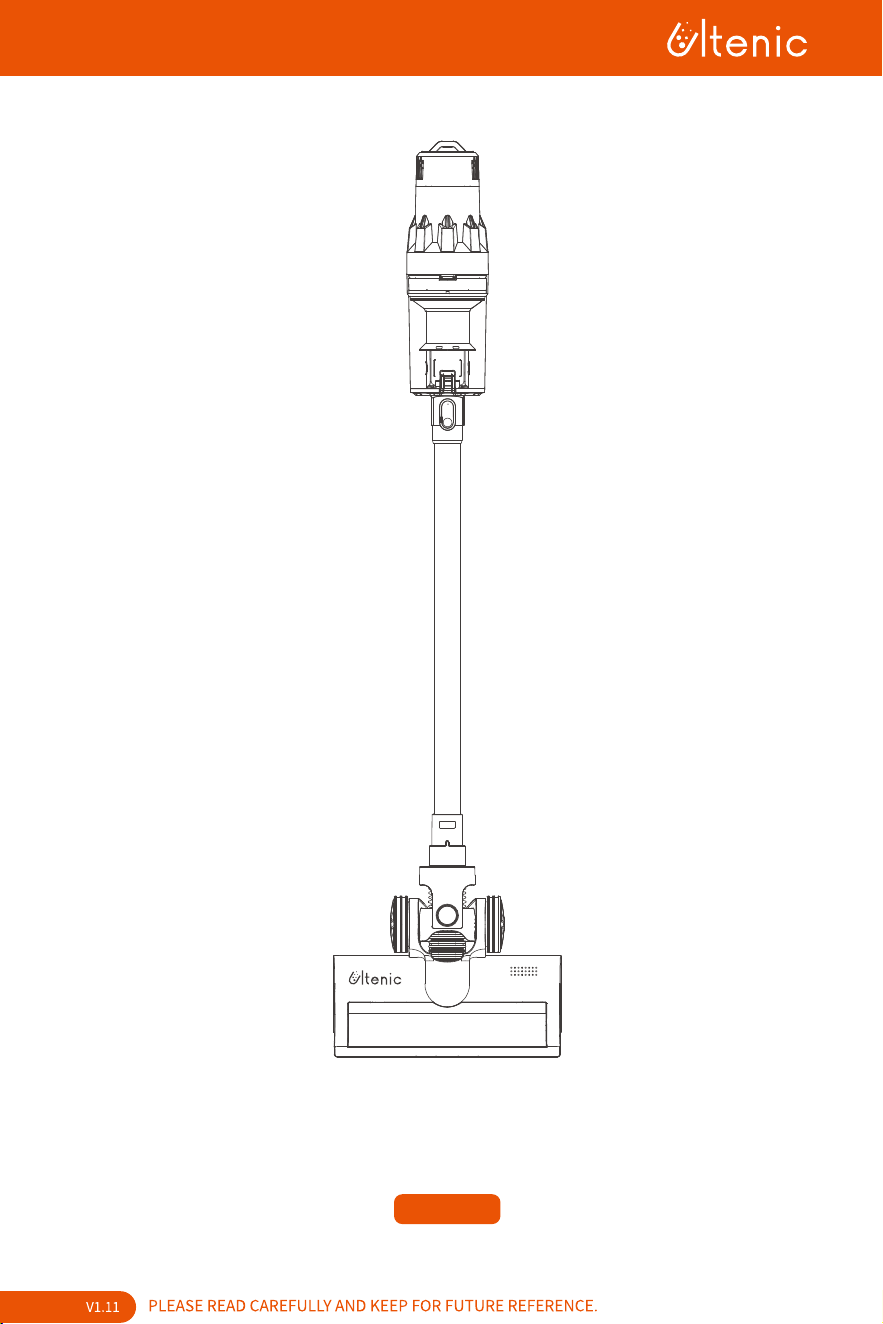
User Manual
U11 PRO

Contents
English 1-14
15-28
Deutsch
29-42
Español
43-56
Français
57-70
Italiano

Precaution
Please read all contents of this manual carefully before using this product.
Please do not use the vacuum cleaner to vacuum detergents, kerosene, broken glasses,
needles, soot, wet items, sewage, matches, etc.
Please do not use the vacuum cleaner to vacuum cement, plaster, building materials etc., or toy
balls and other large objects, as these can cause failures such as the vacuum cleaner being
blocked, the motor burning out, etc.
Please keep the vacuum cleaner away from fires and places with high temperatures.
When using the vacuum cleaner, please make sure to install the filter module and the roller
brush of the floor brush.
When using the vacuum cleaner, please be sure not to block the suction inlet or block the
rotation of the brush roller, as this may cause motor failure.
Please do not pour or splash water or other liquids into the machine, so as to avoid short
circuits and burning out the electronics.
When using a new battery, or for the first time after long-term storage, please fully charge the
battery. When the machine is not going to be used for a long time, please make sure to charge
and discharge the battery at least once every three months.
When your vacuum cleaner is fully charged and needs to be cleaned or serviced, unplug the
charger promptly and do not pull it by the power cord.
When cleaning the vacuum cleaner, use a dry cloth to wipe it, do not use gasoline, thinners or
other cleaners as they may crack the housing or cause discoloration.
Please do not use or store the vacuum cleaner in extreme conditions such as very high or low
temperatures. It is recommended to use the vacuum cleaner indoors at ambient temperatures
between 0 and 40℃. Please store it in a cool and dry place, and do not expose it to sunlight for a
long time.
Do not allow children to use or play with the machine.
If the machine does not work when it's fully charged, it must be inspected and repaired at a
designated service centre. Do not disassemble the machine without permission.
Old battery packs should be recycled safely and not be discarded in the normal garbage.
If the power cord is damaged, in order to avoid any danger, it must be replaced by a profession-
al in the manufacturer's local service department or a similar service centre.
After use, it is necessary to put it back on the wall or hanger, and it cannot be put on its own to
prevent hitting people.
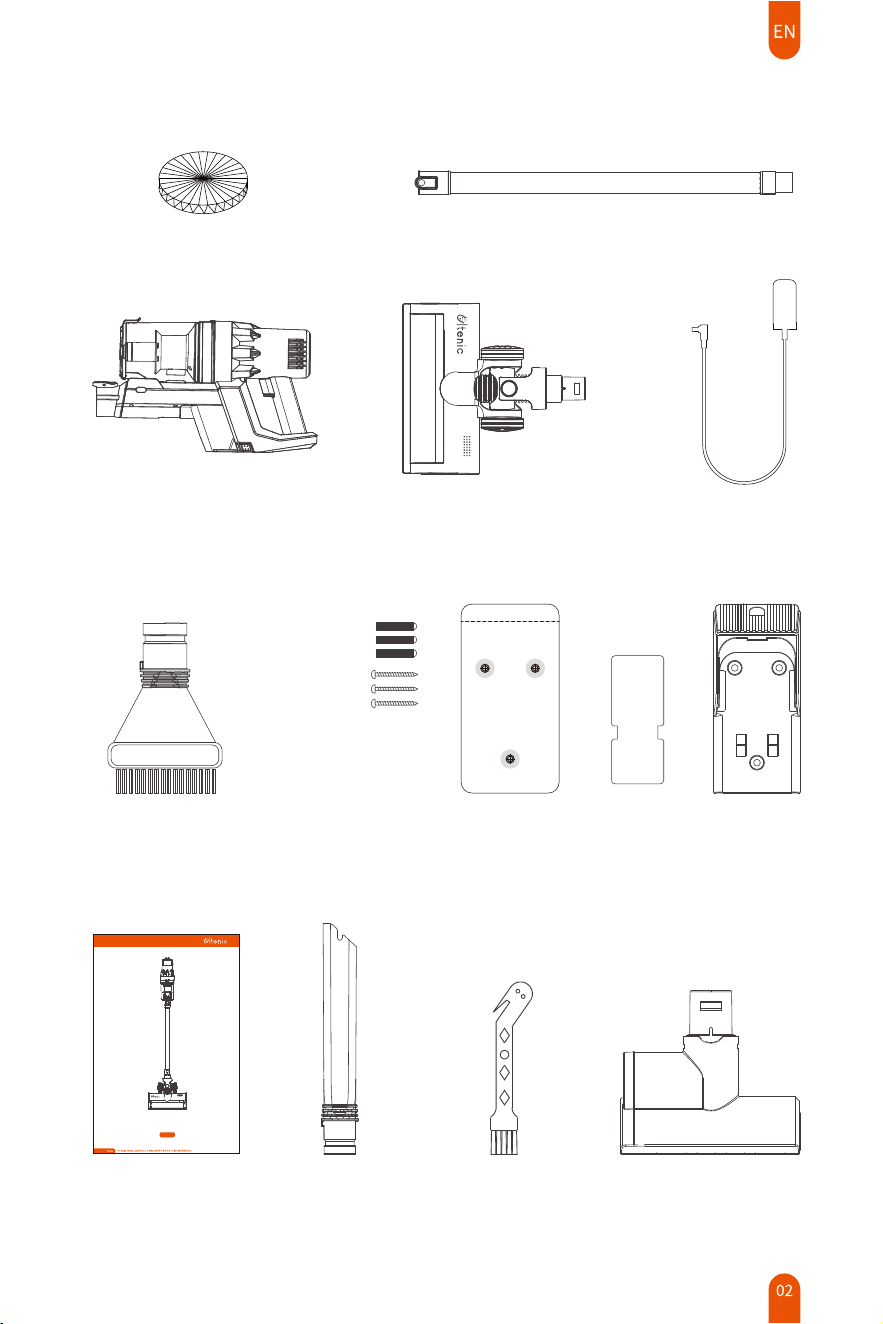
1 x Mini-Motorized Tool
1 x Round Dusting
Brush
1 x User Manual 1 x Cleaning Tool
1 x Crevice Brush
What’s in the Box
1 x Main Body 1 x Power Adapter1 x Electric Floor Brush
1 x Metal Extension Tube
User Manual
U11 PRO
1 x Wall-mounted Charging Stand Installation Kit
1 x Filter Sponge
Note:
�. Wash filters with cold water regularly. Ensure the filters are completely dry before refitting.
�. Your vacuum cleaner is designed to be used regularly. Regular use may cause build-up around
brushes and HEPA filter. We recommend performing regular maintenance to keep your vacuum
cleaner running at optimal
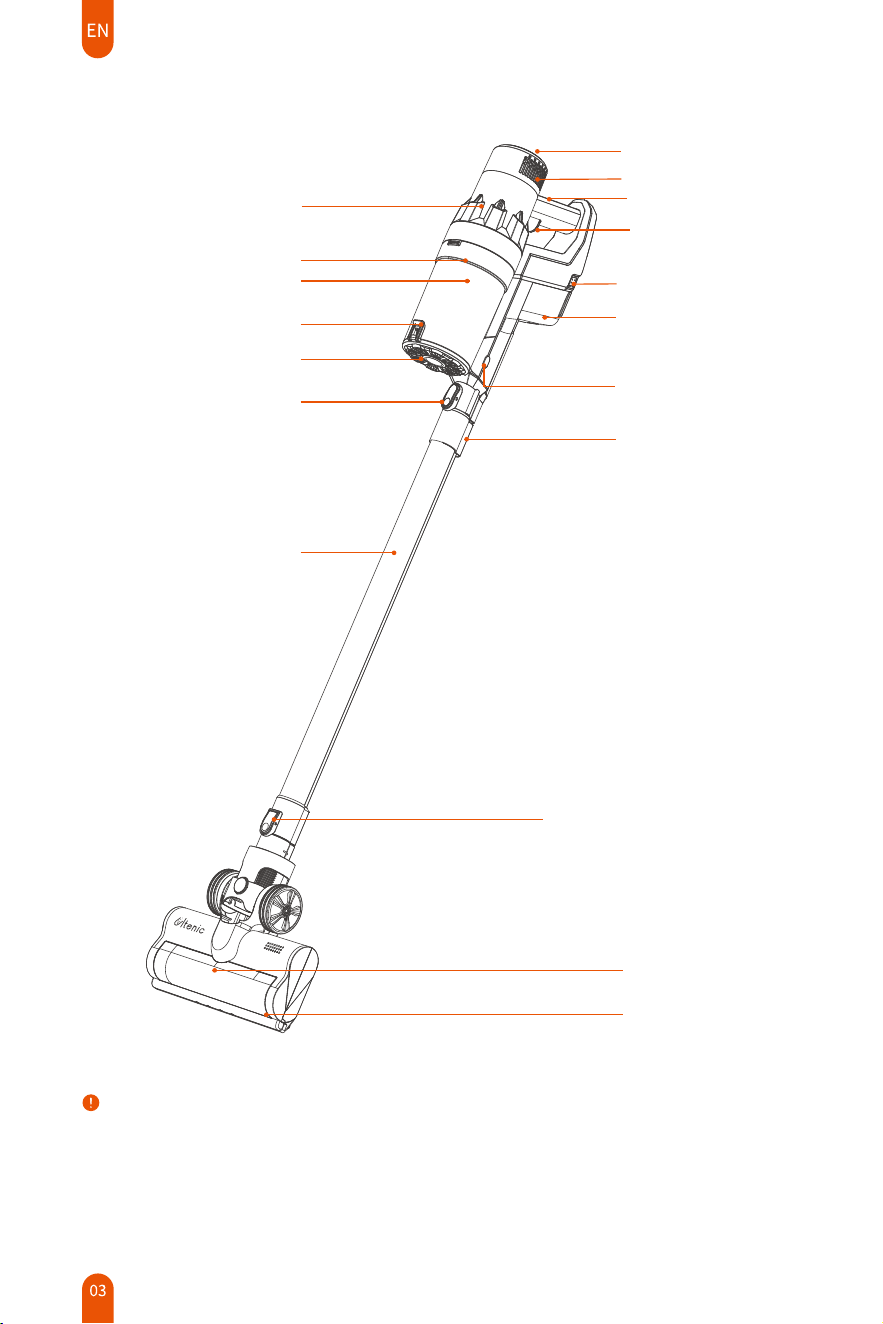
Product Overview
Joint Button for the Main Unit
EElectric Floor Brush
LED Light
Joint Button for the Electric Brush
Tip Holder
Dust Container Release
Button
Power Switch
Handle
Led Touch Screen
Removable Battery
Battery Release Button
Metal Extension Tube
Dust Container Cover Buckle
Dust Container Cover
Dust Container
Main Body
Exhaust Grids
Filter Assembly
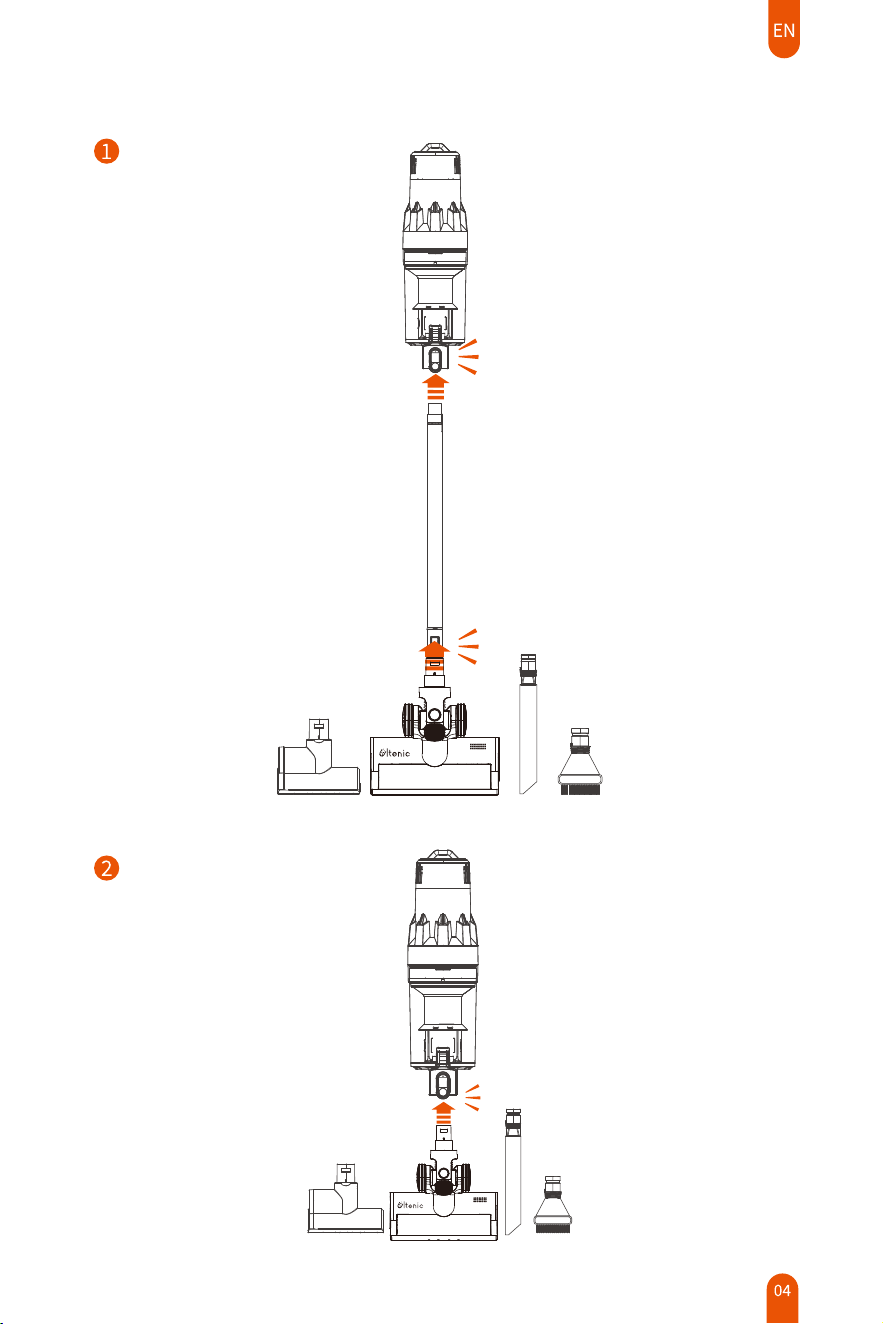
Accessory Installation
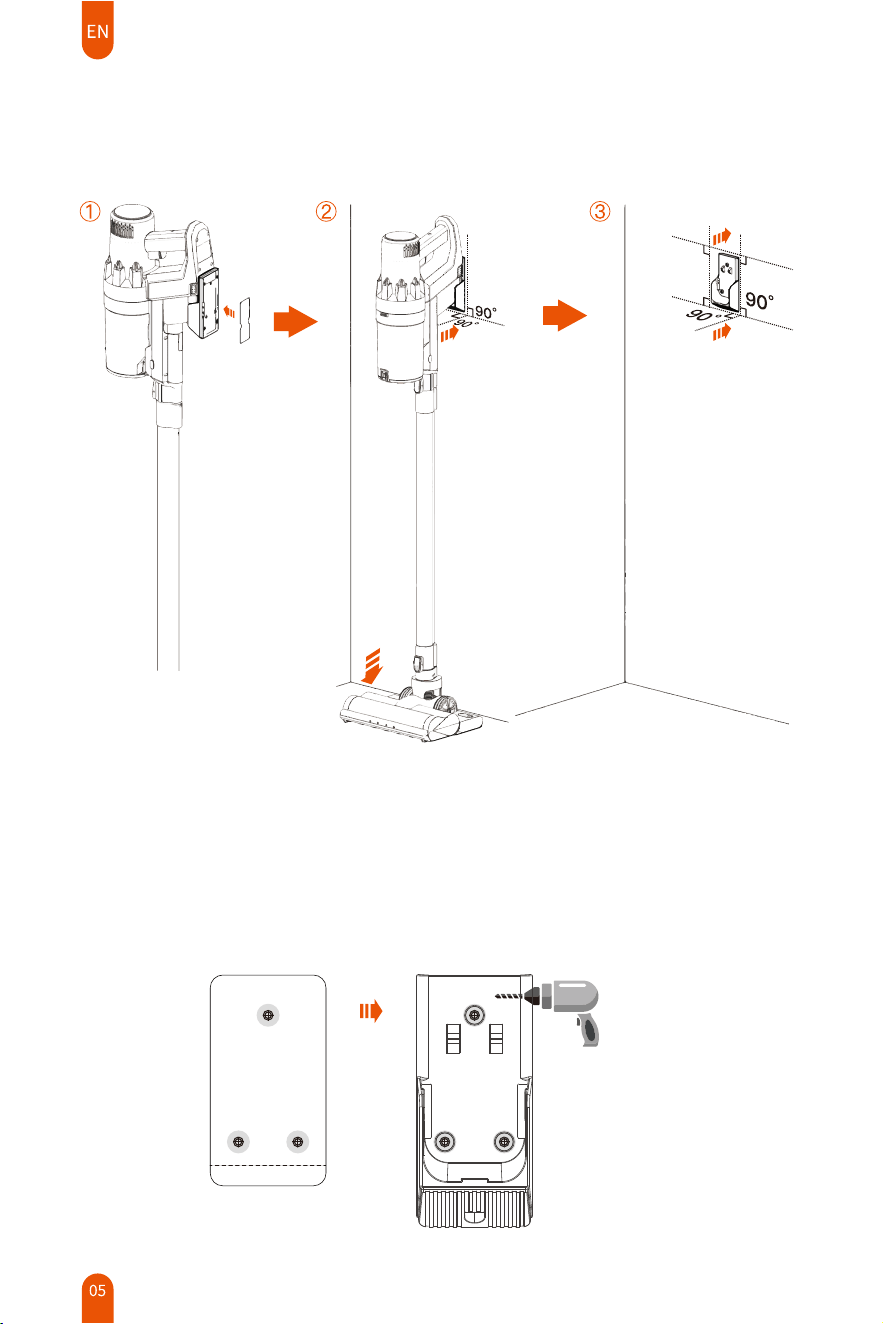
�. Drill � screws according to the hole position of the alignment sticker;
�. Insert the plastic expansion tube into the screw hole;
�. Align the hanger with the screw holes, and then install and tighten the screws.
Wall-mounted Charging Stand Installation
Method �: Sticker Installation
Method �: Screw Installation
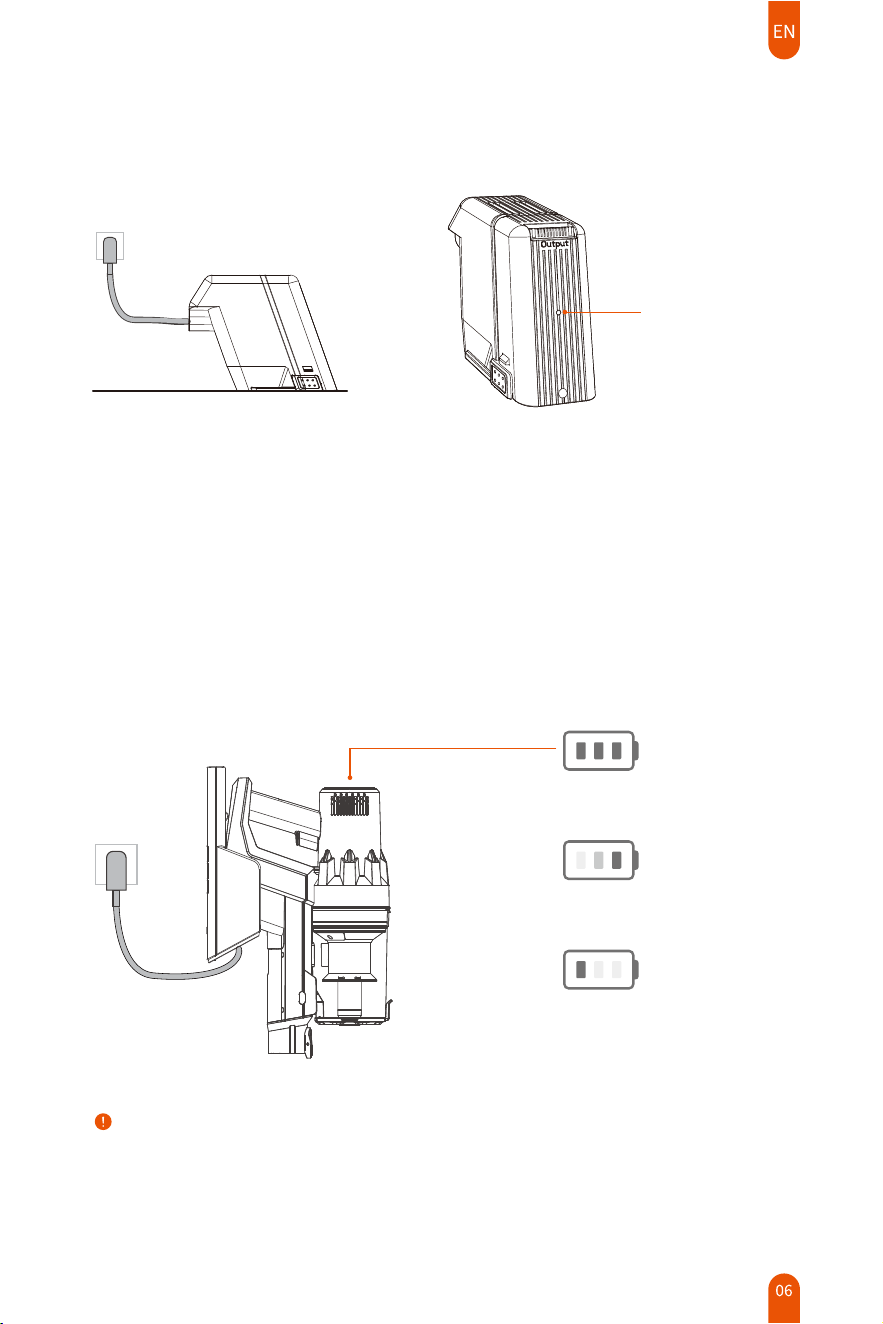
DC port charging
Wall-mounted charging dock charging
Main Body Charging
When the battery gets low, the first bar of the power indicator light is flashing white, please
charge it in time.
When the power is too low, the machine will automatically shut down to protect the battery.
At this time, the machine will not work when the power button is pressed. The first bar of the
power indicator light flashes white. You must charge the battery or replace with a fully charged
battery.
Note:
�. This machine can only be charged with the original power adapter;
�. The machine can not be operated and the power switch does not work during the process of
charging.
Red:Charging
Green:Fully Charged
Fully Charged
Charging
Low Battery
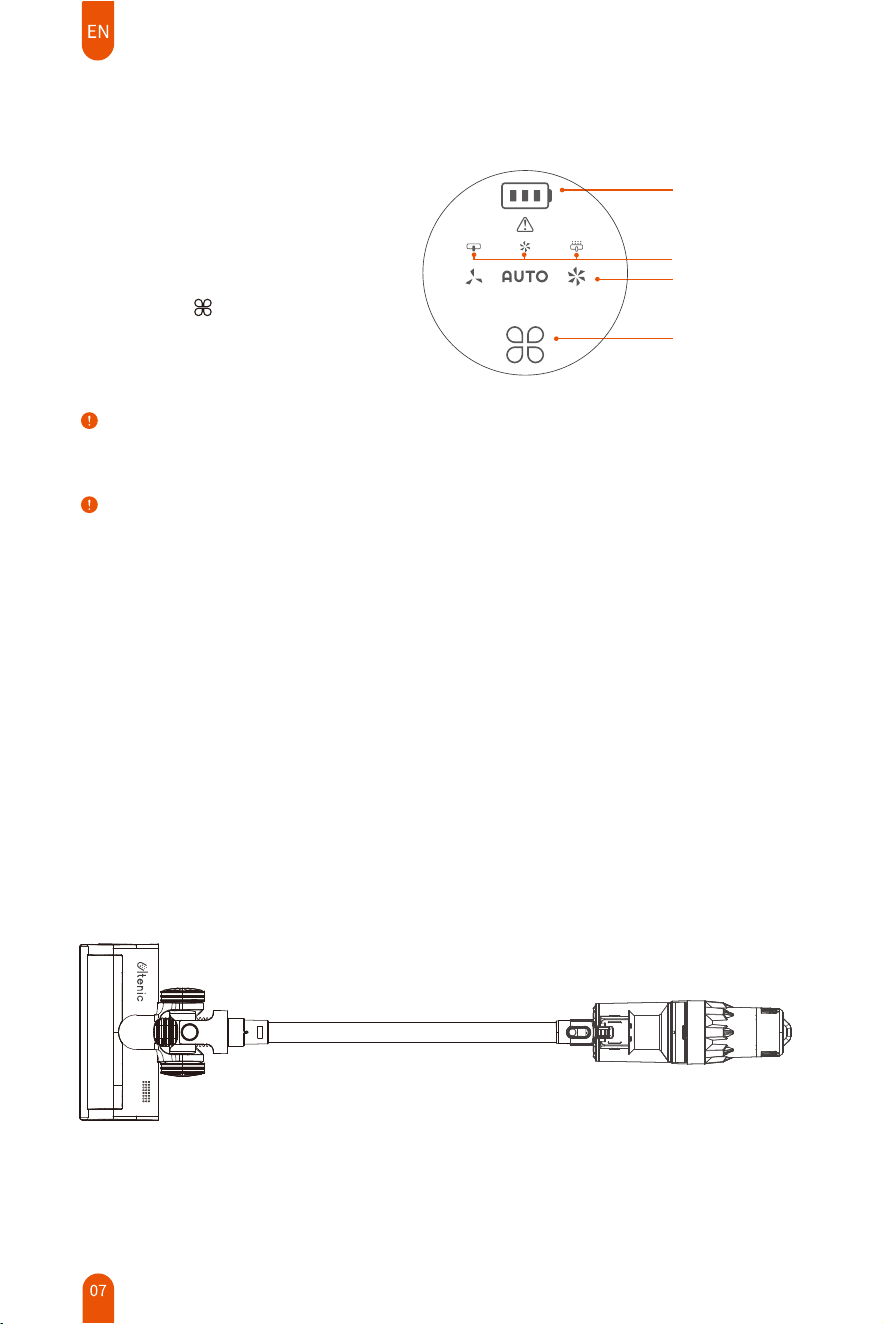
Product Usage
Usage of the main body
There are 3 levels of suction power in total.
Press the icon " " on the display panel
at the end of the main body to adjust power
levels by selecting the ECO mode, AUTO
mode and MAX mode.
Power on/off: Press the Power On/Off
button to start the machine; Press again
to stop the machine.
Battery Status
Gear Display
Gear Selection
Error Code
Note:
The power switch is a push button which only needs to be turned on/off with a single tap.
Note:
In order to achieve the best cleaning effect, the vacuum cleaner will automatically switch to the
strong gear for � seconds after you press the power-off button. This is a normal phenomenon, please
rest assured to use it.
Usage of attachments
Attach the required suction nozzle into the holder.
The metal extension tube can be added depending on the actual situation.
Usage of the electric floor brush
The electric floor brush can be used to clean hard floors, floor tiles or short-haired carpets. It is
recommended to use a metal extension tube for a better experience.
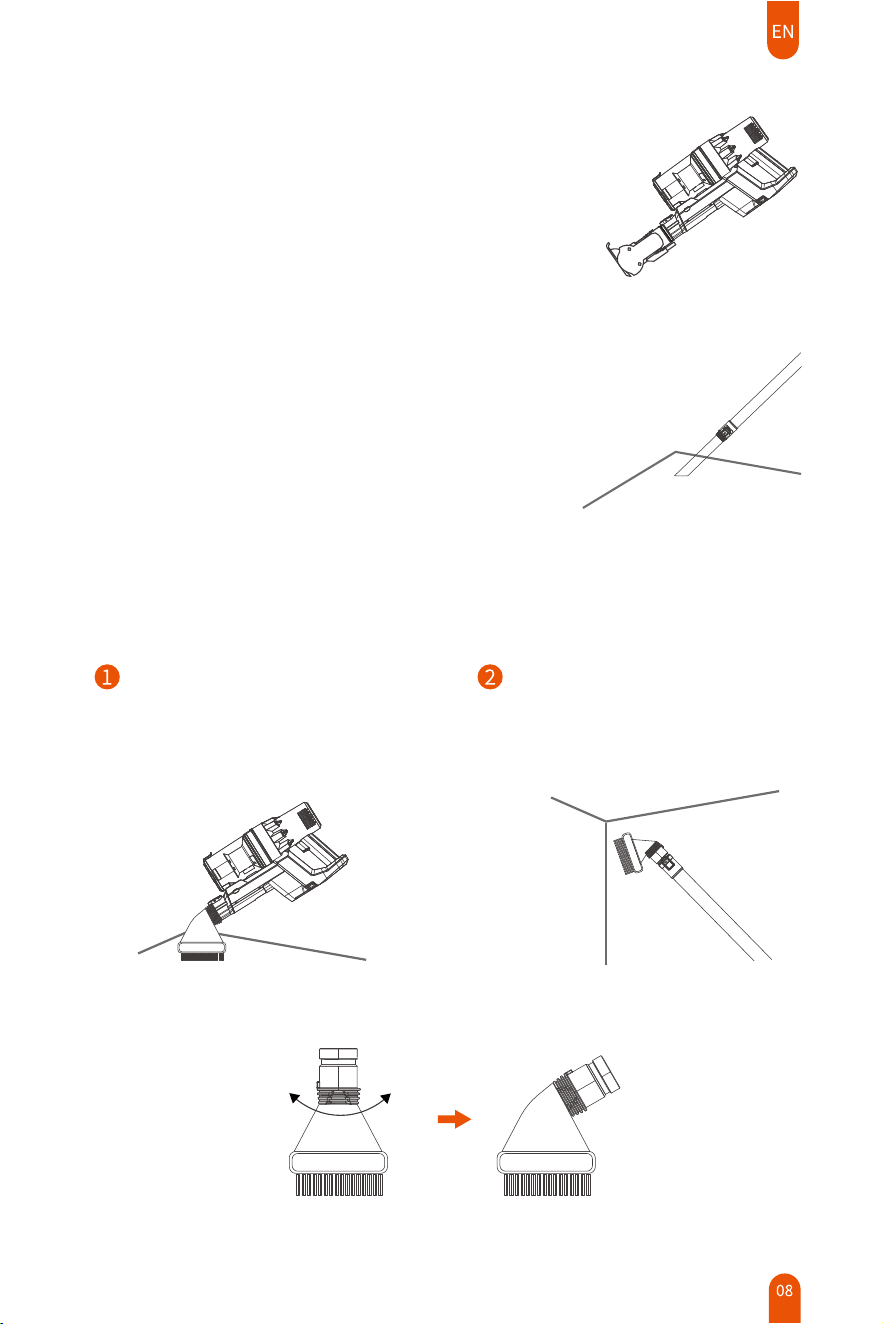
Usage of the electric mini motorized tool
The mini motorized tool can be used to clean sofas,
mattresses, cribs, etc.
Usage of the crevice brush
The crevice brush can be used to clean hard-to-reach
spots, such as ceilings, bookshelves, keyboards and
narrow gaps etc.
Usage of the round dusting brush
Connect the round dusting brush to
the main unit directly. It can be used
to clean the desktop, cabinet, sofa,
low pile carpet and so on.
The metal extension tube can be
attached to the round dusting brush
for cleaning high places such as the
ceiling, curtains, etc.
90°
Note:
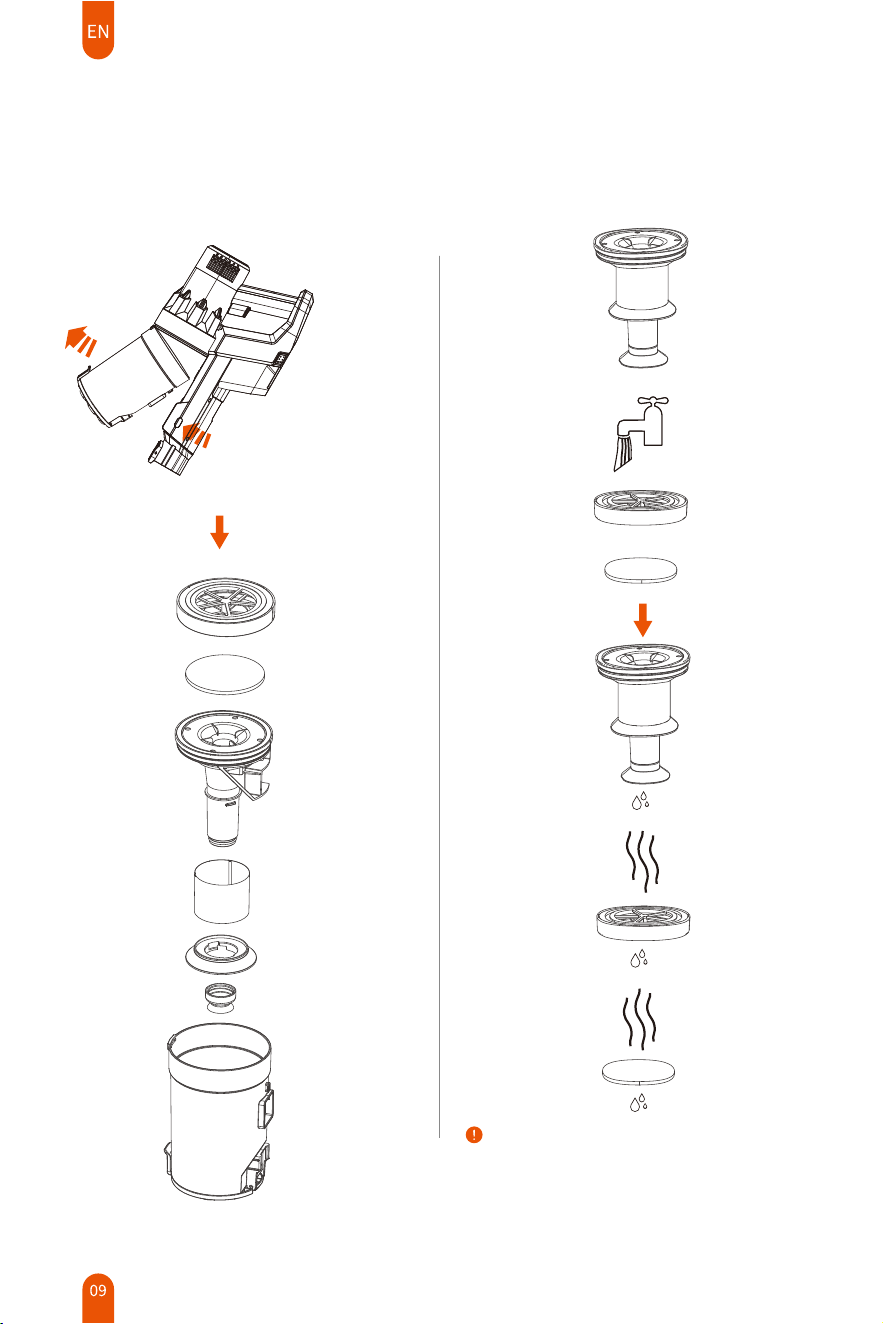
The HEPA filter and sponge filter can be washed
with cold water. Ensure the filters are completely
dry before refitting.
(Do not expose them to the sun)
Disassembly and Maintenance
Remove the dust container Clean filter assembly
① Press the release button on
the dust container on both
sides simultaneously.
②
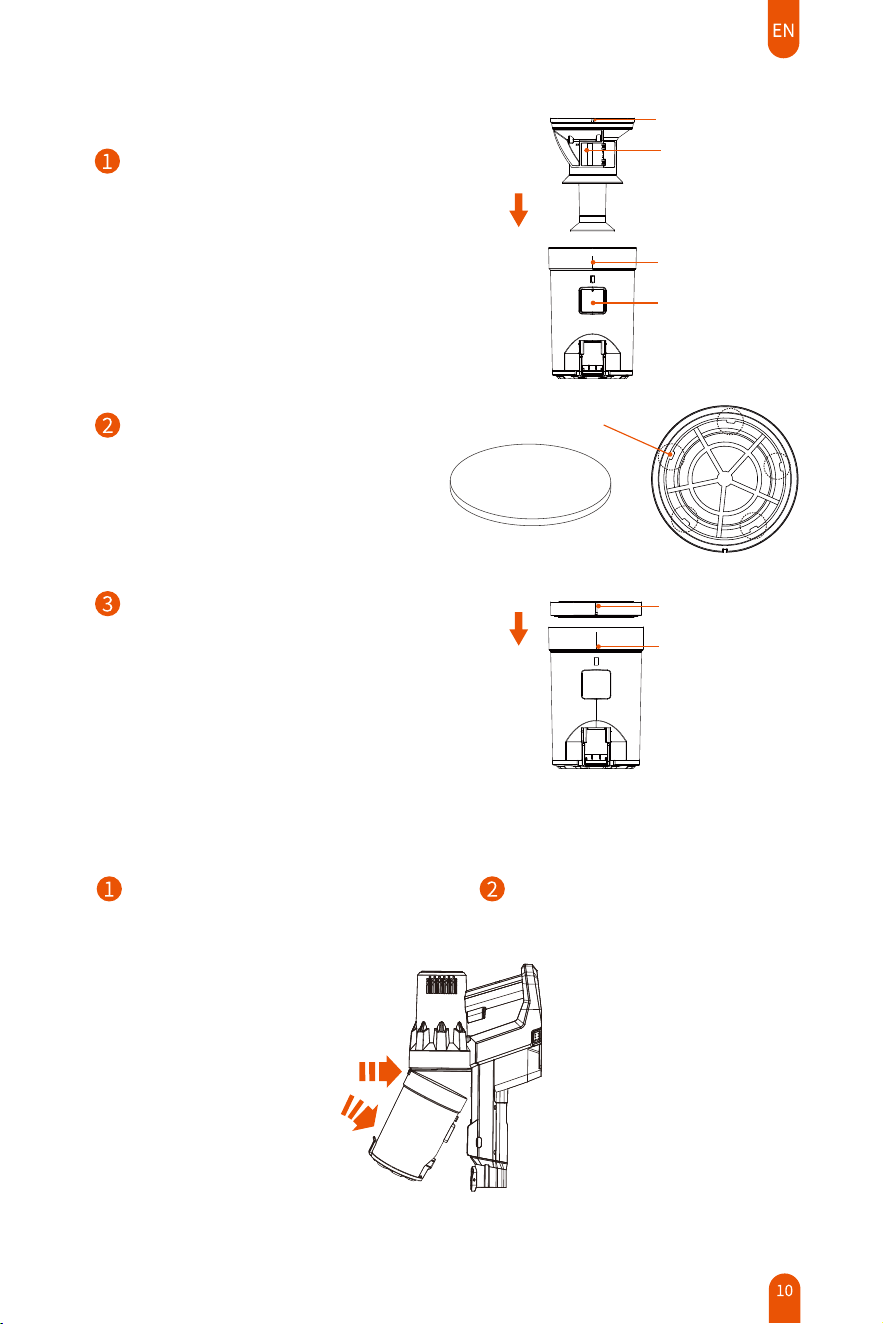
Installation of filter components
Keep the air guiding block of the stainless
steel filter assembly on the same side as
the dust container inlet,and install the
stainless steel filter assembly into the
dust container from the top of the dust
container. Note that the limit slot must
be aligned with the dust container limit
bar.
Put the filter sponge into the bottom of
the HEPA cover. The filter sponge needs
fixing completely with 5 slots.Otherwise
it will affect the filtering effect.
Air Guiding Block
Limit Bar
Inlet
Limit Slot
Fixing Slot
Keep the side of the HEPA assembly
with the rope upward and put it into
the dust container from the top.
Please note that the limit slot of the
HEPA assembly must be aligned with
the dust container's limit bar.
Limit Bar
Limit Bayonet
Installation of the dust container
Snap the dust container into the main
unit. Please note that the snap must be
in place.
Push the bottom of the dust container
in the direction shown in the picture,
until you hear a click.
①
②
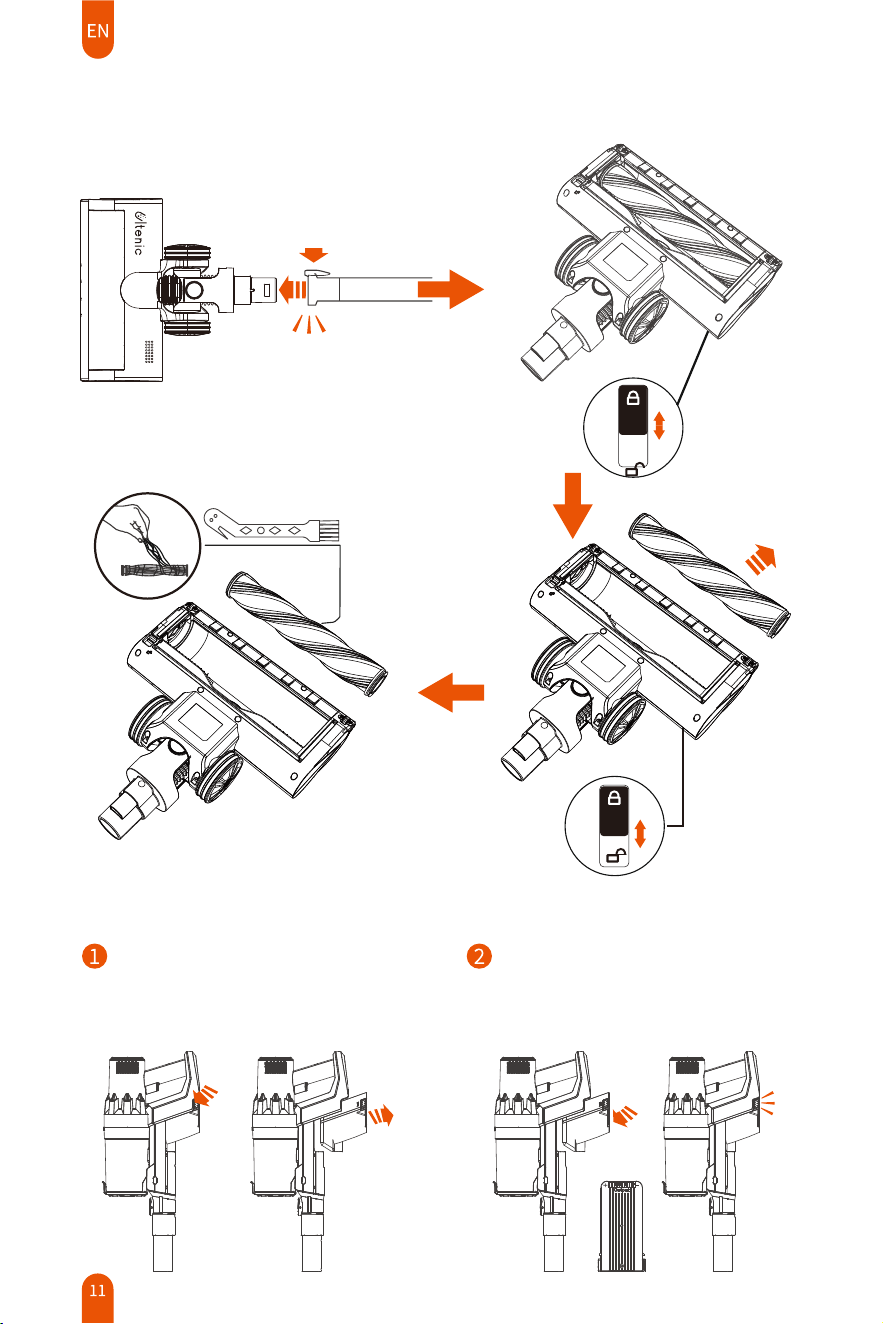
Battery disassembly
Remove the battery: Press the battery
release buttons on both sides
simultaneously, then grab and pull the
battery at the same time to take it out.
Install the battery: Align the battery slot
with the card slot, press the bottom to
slide into the battery slot until it snaps
tightly.
The floor brush and the roller brush
①
②
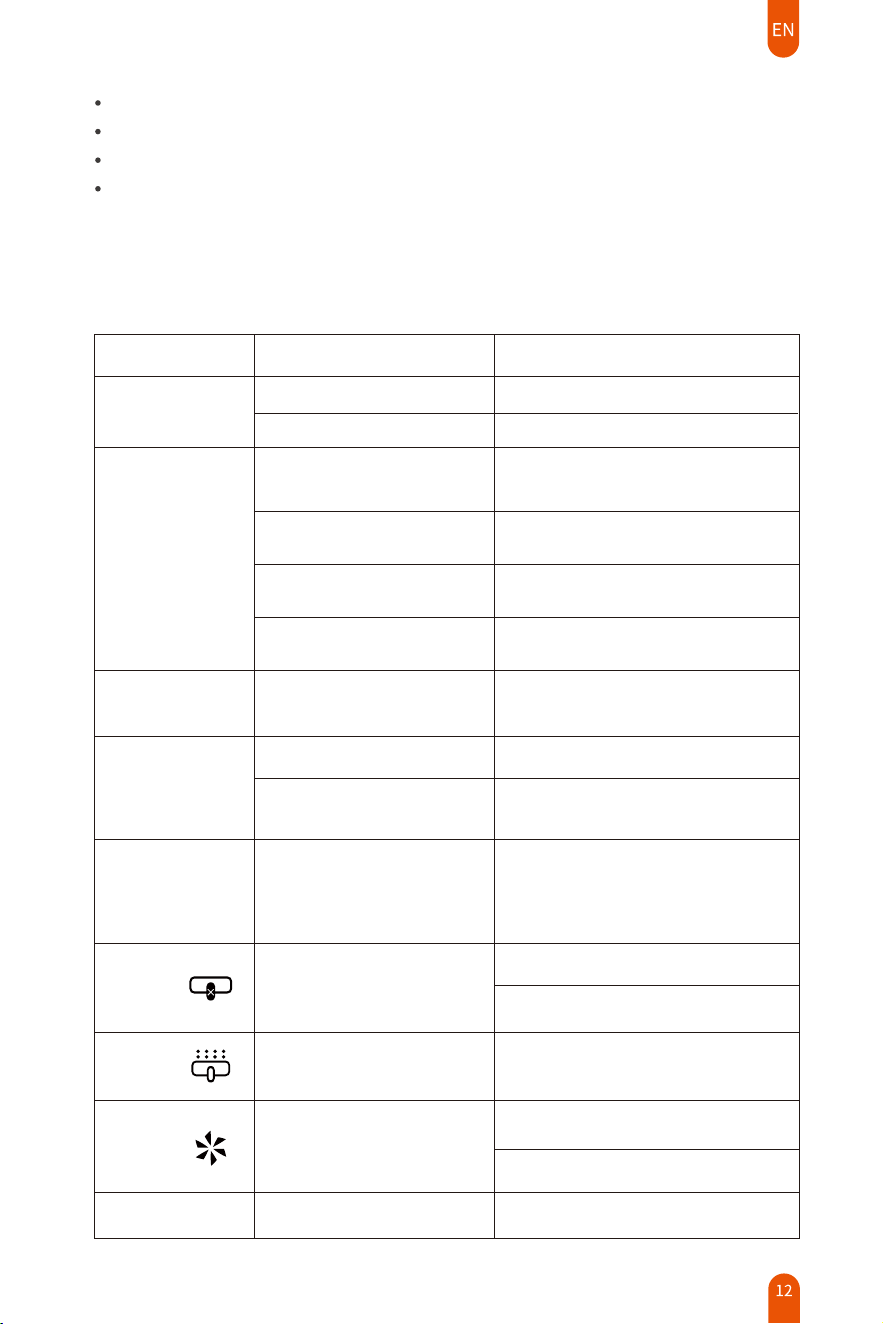
Solutions
Suction
diminishes
The dust container is full
of dust
The blockages happens in hose,
accessories, and inlet openings.
The dust container and the
HEPA filter are not installed
well
The HEPA filter is used for a
long time
Empty the dust container
Install the dust container and HEPA
filter correctly
Replace the HEPA filter
Check and clear any blockage
Charging indicator
does not light up
while charging
The charging terminal is not
fully inserted into the DC
terminal
Insert the charging terminal completely
into the charging port
Insufficient
use time
Insufficient charging time
Battery age
Fully charge the battery according to
the instructions in the charging section
The battery is a consumable item and
needs to be replaced at a designated
service center
Rolling brush
stops
Clean the roller brush and restart the
machine
Error code
Clear the windings of the floor brush
Please contact Ultenic customer
service to replace the floor brush
Ensure that the floor brush and metal
extension tube are assembled firmly
Error code
Error code
Check if the suction port is blocked
and clean up the bloackage.
If the machine is hot, turn it off and
wait for a while
Oversized foreign bodies
are sucked up
The roller brush is
entangled an excessive
amount of fiber
The floor brush is blocked
Short circuit of the floor
brush
The fan is abnormal
The filter assembly is blockedThe air outlet is hot
Clean the dust container and the
HEPA filter
The machine does
not work
Battery is flat
Battery is not installed
Please install the battery correctly
Charge the battery
Fault scenarios
Causes
Troubleshooting
Battery Type: Li-ion battery;
Dispose of the battery in accordance with local ordinances or regulations.
Do not use non-rechargeable battery.
In the unlikely event that liquid leaks from the battery, do not allow the liquid to come in contact
with skin or eyes. Place the battery in a sealed plastic bag and dispose of safely according to local
environmental regulation.
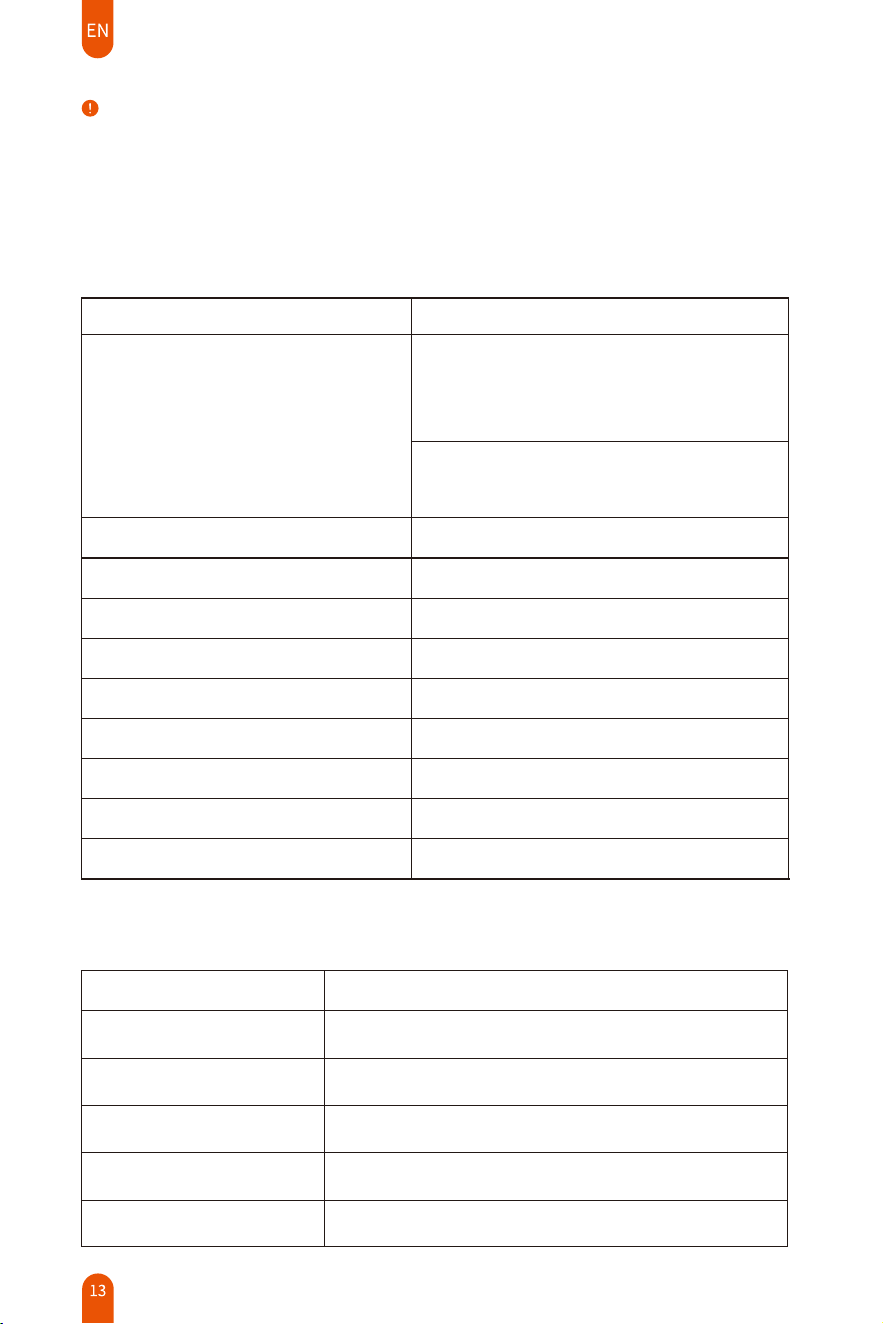
Parameters
Adapter:
Nominal voltage 28.8V
Rated power 350W
Rated input current 1A
Adapter rated input 100-240V~50/60Hz
Adapter rated output 34.2V
Charging time 2-2.5h
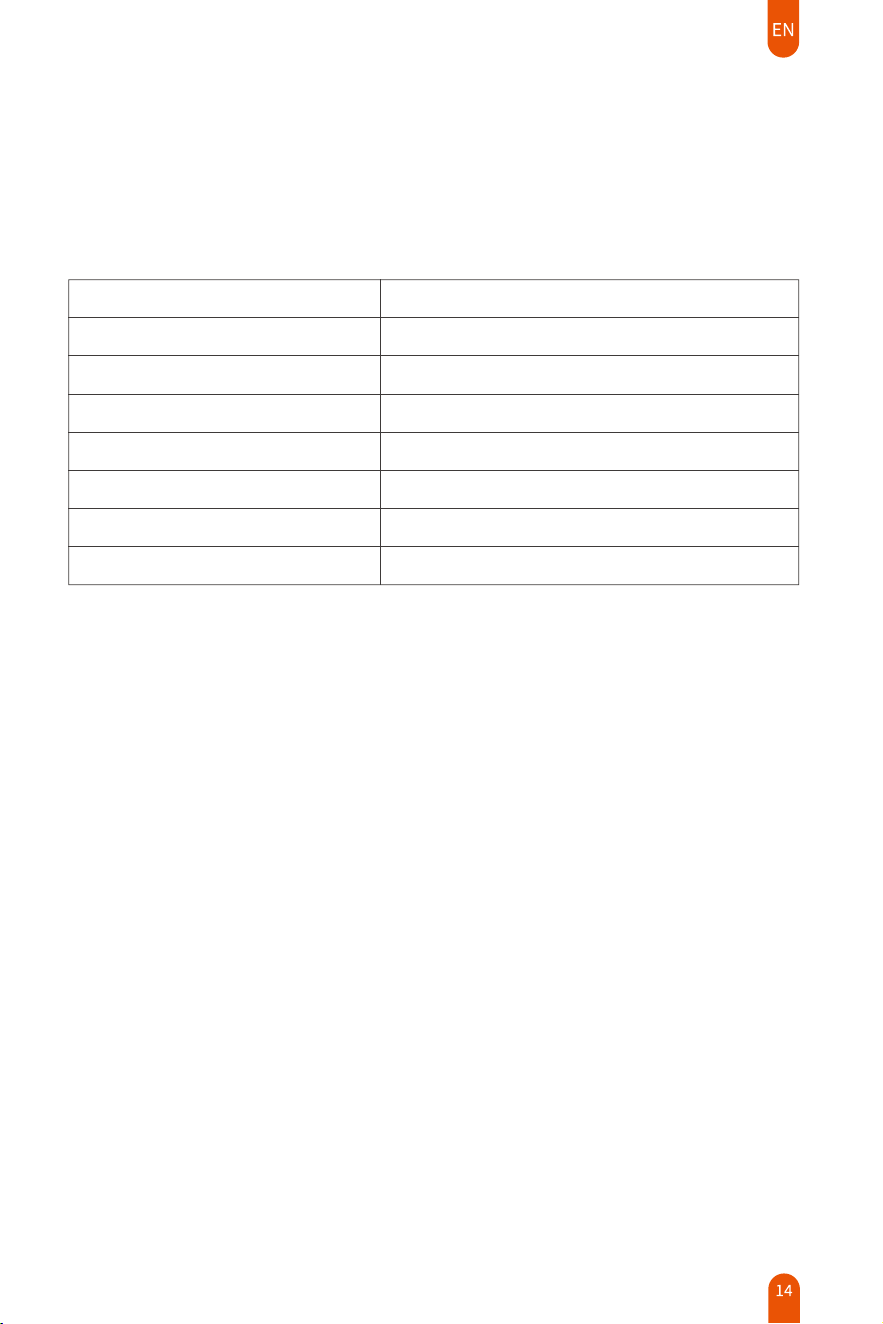
Information published
Model identifier
GQ48-324100-AG
100-240
50/60
34.2V
34.2W
84.31
81.97
0.09
1.0A
Input voltage
Input AC frequency
Output voltage
Output current
Output power
Average active efficiency
Efficiency at low load (10%)
No-load power consumption
Manufacturer's name or trademark,
commercial registrationnumber and
address
Information declared
Importer name: xxx
Address: xxx
Commercial registration number: xxx
Manufacturer: Dong Guan City GangQi
Electronic Co., Ltd
Address: Privately Operated Industrial District,
ShiYong 532600 Heng Li Town, Dong Guan,
Guangdong PEOPLE′S REPUBLIC OF CHINA
Note:
If the power cord is damaged, it must be replaced at a manufacturer's designated service center in
order to avoid a hazard.
If you need to purchase spare parts such like HEPA filter, battery etc., please contact Ultenic customer
service.
After-Sale Service
Ultenic professional customer service team will be responsible and provide support to all products that
come with a warranty of �� months from the date of your purchase.
Please contact Ultenic Support and Service via Email below.
United States
Deutschland
France
España
Canada
United Kingdom
Italia
日本
service-us@ultenic.com
service-de@ultenic.com
service-fr@ultenic.com
service-es@ultenic.com
service-ca@ultenic.com
service-uk@ultenic.com
service-it@ultenic.com
service-jp@ultenic.com
United States
Deutschland
France
España
Canada
United Kingdom
Italia
日本
service-us@ultenic.com
service-de@ultenic.com
service-fr@ultenic.com
service-es@ultenic.com
service-ca@ultenic.com
service-uk@ultenic.com
service-it@ultenic.com
service-jp@ultenic.com
Customer Service
ULTENIC FRANCE
320 rue Saint-Honoré 75001 Paris
E-mail: [email protected]om Tel:+33753753975
