DEHUMIDIFIER USER MANUAL
(US STANDARD)
NINGBO AQUART ENVIRONMENTAL APPLIANCE CO.,LTD.
Thank you very much for choosing our brand's product.
To ensure your safety, proper, and efficient use of this
product, please read the instructions carefully and keep
them properly.
AP138-2302工业除湿机说明书
BC0240429001
2024/07/15
143×210 mm
128g铜版纸
双面彩印,上油,骑马钉
三页空白页放在封面、封底背面和最后一页
Emall:sean@edendirect-brand.com
Product Structure
Function Instructions
Usage Precautions
Troubleshooting
Special Reminder
Special Reminder
Product Introduction
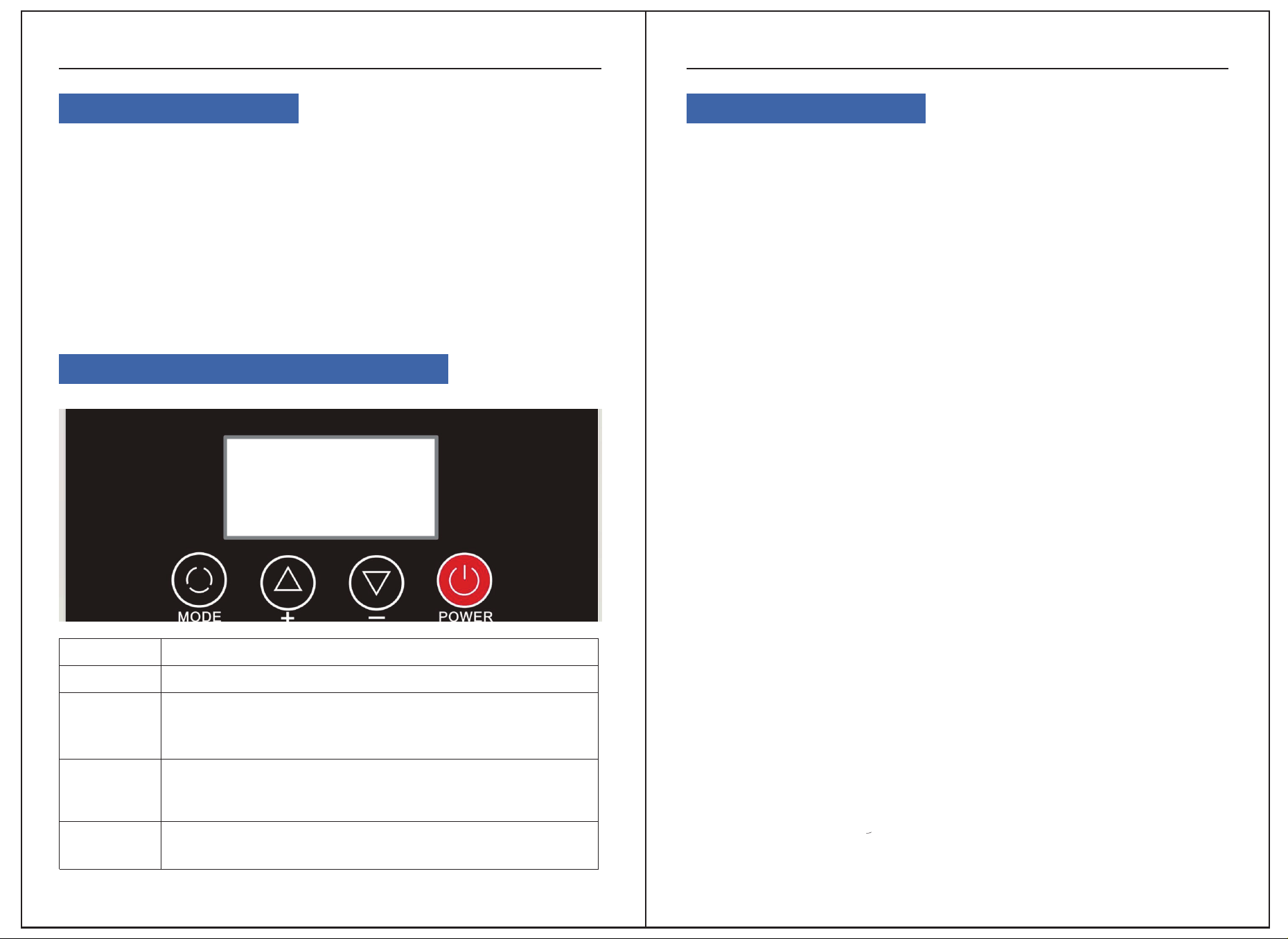
Control Panel Instructions
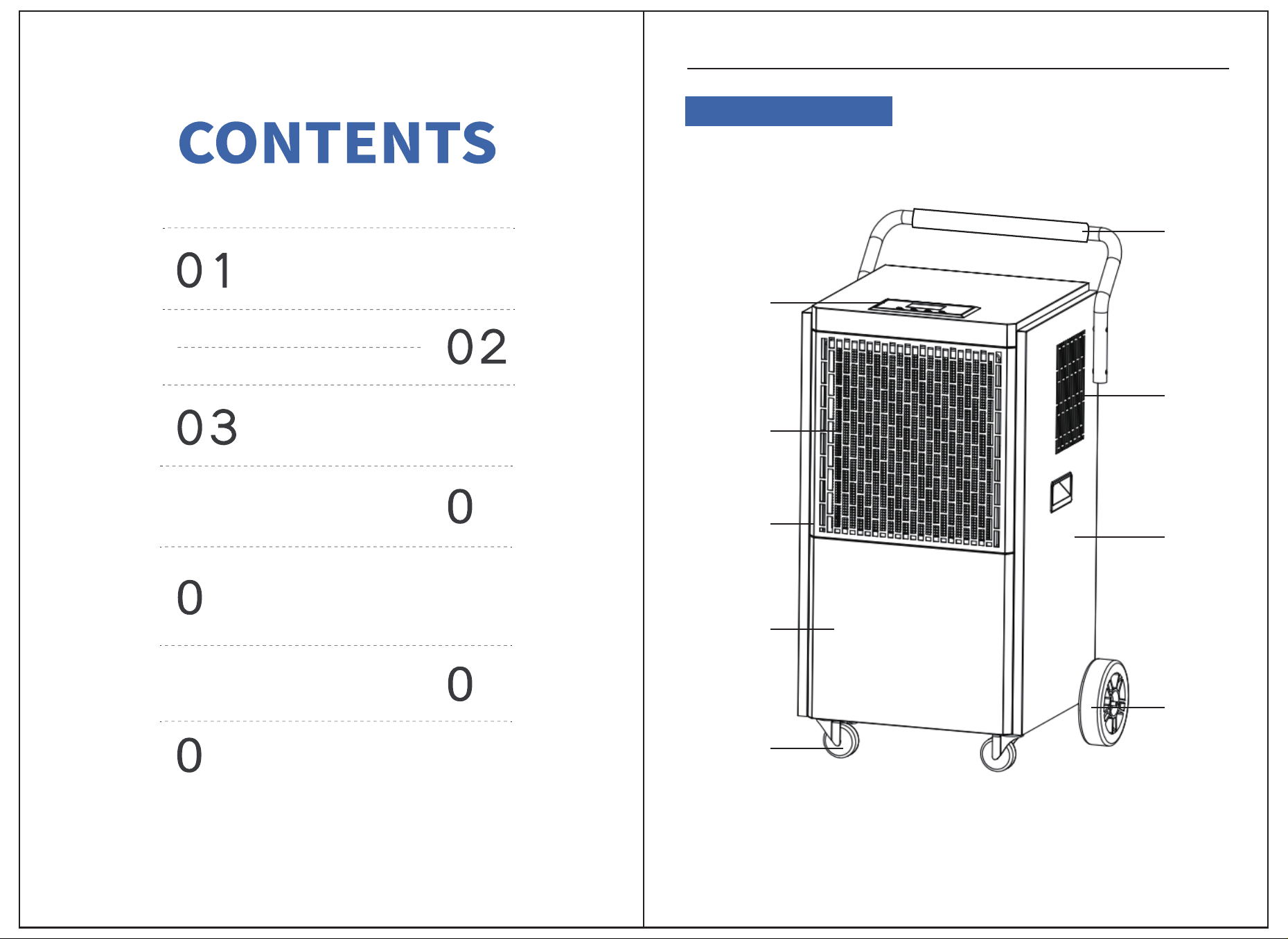
PRODUCT STRUCTURE
Control
Panel
Air Inlet
Left Side
Panel
Front Shell
Lower Cover
Swivel
Casters
Upper Steel
Pipe
Air Outlet
Right Side
Panel
Large
Wheels
Product Structure
01
5
8
6
9
DEHUMIDIFIER
Control Panel Operation Instructions
Product Introduction Function Description
DEHUMIDIFIER
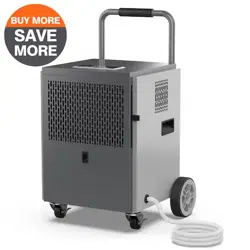
Our dehumidifiers are designed to reduce the humidity in the installed space,
making it suitable for human living and storing items. Equipped with branded
compressors and microcomputer humidity control, our company's dehumidifiers
feature intuitive humidity display, sleek design, superior performance, and easy
operation. They are widely used in scientific research, industrial settings, medical
facilities, instrumentation, goods storage, underground construction, computer
rooms, data rooms, archives, warehouses, and bathhouses, among other places.
They prevent damage caused by dampness, corrosion, and mold to instruments,
computers, telecommunications materials, goods, and data.
1. Humidity Control:
When the set humidity is reached, the fan and compressor shut off together; when
the humidity exceeds the set level, the fan and compressor operate together.
Notes:
● When the humidity set value is at its lowest, it defaults to continuous dehumidifi-
cation mode.
● If the humidity sensor malfunctions, it defaults to continuous dehumidification
mode.
● If the coil sensor malfunctions, it switches to fixed timed defrost mode (refer to
defrosting method).
● Upon startup, there is a 3-second delay before the compressor starts, and upon
shutdown, there is a 3-second delay before the fan stops.
● If the humidity drops to the compressor shutdown condition, there is a 10-second
delay before the fan stops.
● Power-off memory: In the event of a sudden power outage while the system is
running and the power plug is not securely inserted, the system automatically stores
the current operating state. Upon the next power-up, the system will automatically
resume the previous operating state before the power outage.
2. Specific Function Description:
Upon initial power-up, press the power button power to enter the startup mode. The
default humidity is set to 50% RH, displaying the current humidity and temperature.
The entire unit operates with both the compressor and fan starting up.
Press the setting button "mode" to enter the timer setting function. Press the "+" or
"-" buttons to set the timer for shutdown. At this time, the timer indicator on the
screen flashes. Press the "+" or "-" buttons to adjust the time. Each press increases or
decreases the display incrementally. The setting range is from 0 to 24 hours, with a
default of 0 hours. If there is no operation on the interface for 5 seconds, the system
will automatically execute the current timer setting.
Press the setting button “mode” again to enter the humidity adjustment setting
function. Press the "+" or "-" buttons to adjust the humidity setting. The humidity
control range cycles between "10% - 95% - CO". The "CO" mode is the forced dehu-
midification mode, which is not restricted by temperature and humidity. In this
mode, both the fan and compressor run continuously.
Buttons
POWER
MODE
Button Operation Instructions
Press once to switch between on and off.
1、Adjust different set values in different states:
2、 Increase humidity set value (range RH 10% to 95%)
3、 Increase timer time (hours) set value (range 00 to 24)
Adjust different set values in different states:
1. Increase humidity set value (range RH 10% to 95%)
2. Increase timer time (hours) set value (range 00 to 24)
Each short press of the mode key cycles through the following:
Set timer and humidity adjustment functions Exit
+
-
02 03

Usage Precautions
DEHUMIDIFIER
DEHUMIDIFIER
1. Do not use a rusty power cord:
- Do not use a rusty power cord, extension cord, or plug.
- Otherwise, it may cause a fire, electric shock, or overheating.
2. Do not place this machine near stoves, heaters, or other heating devices:
- Otherwise, plastic parts may melt, potentially causing a fire.
3. Do not use the dehumidifier in places where it may be exposed to direct sunlight,
wind, or rain:
- This machine is for indoor use only.
4. If any problems occur (such as a burning smell), immediately turn off the machine
and unplug the power cord:
- Otherwise, it may cause a fire, electric shock, or new malfunctions.
5. Tips for extending the life of the air purification filter:
- When not in use for a long time, seal the air purification filter in a plastic bag.
6. Do not use the dehumidifier in places where it may get wet:
- If the machine gets wet, it may cause an electric shock, resulting in fire or other
electrical accidents.
7. Use an appropriate power switch:
- Otherwise, it may cause a fire or electrical accident.
8. Do not damage or alter the power cord:
- Do not place heavy objects on, heat, or alter the power cord, as this can damage it
and cause a fire or electric shock.
9. Ensure the power cord is securely connected to the power switch:
- A loose power cord may pose an electric shock hazard.
10. Do not stop the dehumidifier by pulling out the power cord:
- Doing so may cause a fire or electric shock.
4. Timer Switch Instructions:
● While in the on state, you can set a timer for automatic shutdown. While in the off
state, you can set a timer for automatic startup. Setting both timer on and timer off
will activate the cyclic timer mode.
A. Timer On Setting: While in the off state, press the "Mode" button. The "timer On"
icon will flash, and the time display area will also flash to indicate the timer setting.
Press the "+" or "-" button to adjust the timer setting. Each press will produce a beep,
and if you press and hold for 2 seconds while adjusting by 1, the adjustment will
continue automatically. After adjusting to the desired time, if there's no operation for
10 seconds, the machine will accept the setting, and the "timer On" icon will continue
to flash. (Setting range: 0 to 24 hours, default is 0 hours)
B. Timer Off Setting: While in the on state, press the "Mode" button. The "timer Off"
icon will flash, and the time display area will also flash to indicate the timer setting.
Press the "+" or "-" button to adjust the timer setting. Each press will produce a beep,
and if you press and hold for 2 seconds while adjusting by 1, the adjustment will
continue automatically. After adjusting to the desired time, if there's no operation for
10 seconds, the machine will accept the setting, and the "timer Off" icon will contin-
ue to flash. (Setting range: 0 to 24 hours, default is 0 hours)
Defrosting Method Explanation:
Automatic Defrost:
Defrost on a timer
Sensors are normal
1、"Entering condition (simulta-
neously satisfied):
2、1. The compressor runs
continuously for 30 minutes,
and the detected coil tempera-
ture is ≤ 30℉, triggering the
defrost mode.""2. During
defrosting, the compressor
stops running, while the fan
continues to operate, and the
defrost indicator light is on."
3、Defrosting Method
When in defrost mode, defrost for 8 minutes, then exit
the defrost mode once the time is up.
04 05
Troubleshooting
DEHUMIDIFIER
DEHUMIDIFIER
2. If the above issues still cannot be resolved, please contact sean@edendi-
rect-brand.com or authorized dealer directly. Do not dismantle the machine without
authorization.
3. When the machine is running, you may hear the sound of refrigerant circulation,
which is a normal phenomenon.
4. The machine will emit hot air from the outlet, causing the room temperature to rise
by 34-37℉. This is normal, so please feel free to use it.
5. When moving, do not tilt the machine body more than 45 degrees to prevent
damage to the compressor.
6. The operating temperature of this machine is 41-95℉.
7. When the room temperature is below 50℉ and the ambient absolute humidity is
very low, the dehumidifier may not need to be used.
8. The air inlet and outlet must be at least 1 meter away from the wall or obstacles to
avoid affecting the dehumidification effect.
9. Accumulated dust on the air filter will affect the dehumidification effect and may
even cause malfunctions. It must be cleaned regularly, at least once a month. If there
is a lot of dust in the environment, it must be cleaned once a week or even daily.
When cleaning, gently tap the filter or use a vacuum cleaner to remove the dust on
the filter, or soak the filter in warm water (≤104℉) with a small amount of detergent,
then rinse it with clean water and air dry it.
10. If a fault code appears during the operation of the machine, turn off the machine
immediately and report it to the after-sales staff for repair.
Continuous operation of the machine for 24 hours will affect its service life. It is
recommended to stop the machine for 2 hours after every 10 hours of operation. If
there are special requirements for continuous operation for 24 hours, the machine
must be supervised by dedicated personnel. Otherwise, in case of accidents, the
company will not be liable.
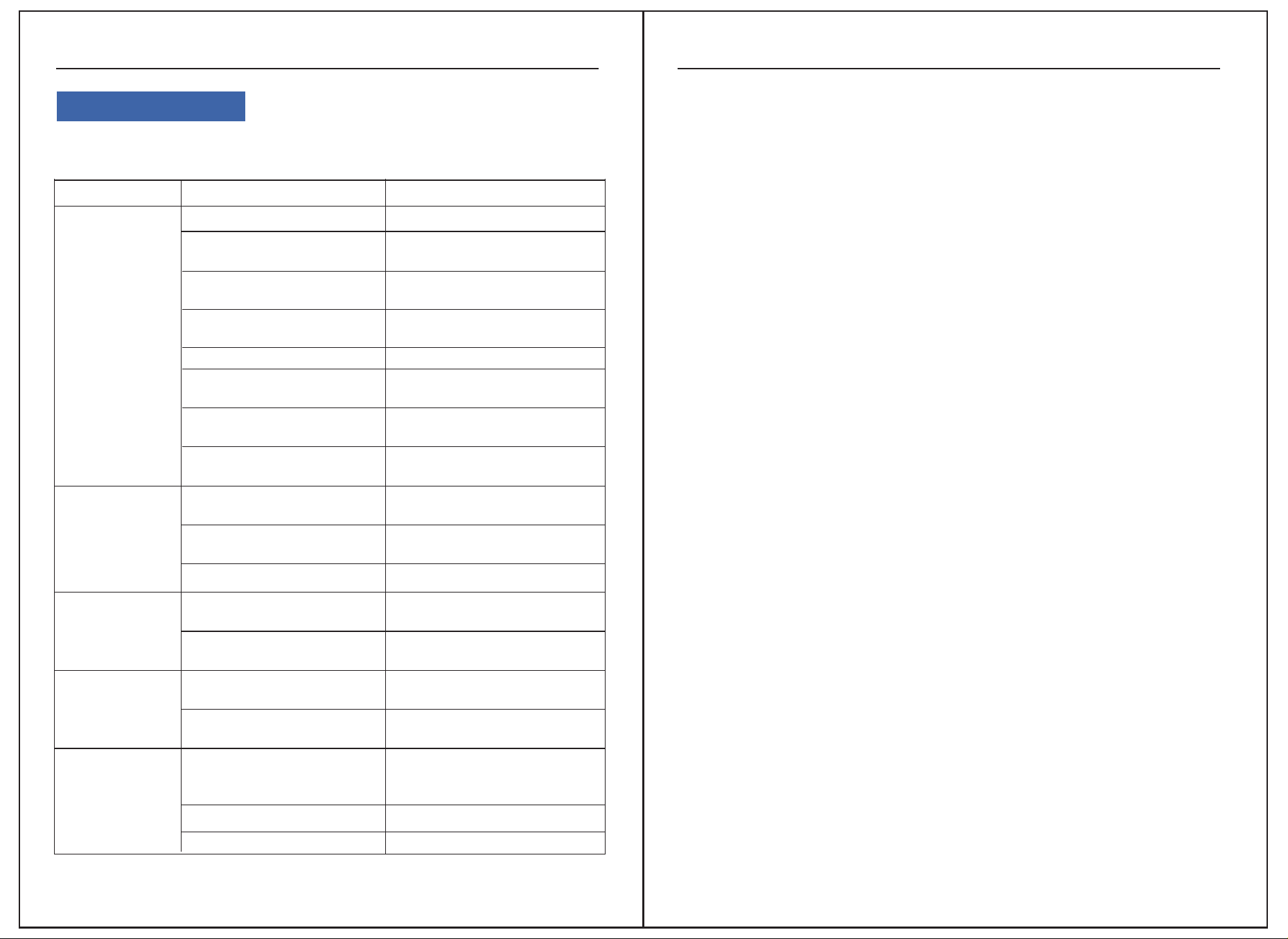
1. If the dehumidifier malfunctions, immediately cut off the power supply and unplug
the power cord from the socket. Check the following items:
Problem
Machine not
operating
Poor
dehumidification
Loud noise
Water leakage
Error codes
Possible cause solutions
no power display
power outage or no
power at socket
Check if power supply is
normal
Power plug not properly
inserted
Insert the power plug into
the socket
Fuse on the control
board blown
Replace the fuse
Control board transformer
damaged
Replace the transformer
Power display on
Ambient humidity lower
than set value
Reset the humidity level
as needed
Machine in defrosting
mode
Wait for defrosting to
complete
Air inlet or outlet blocked
Remove the obstructions
Windows or doors open
Close the windows and
doors
Room temperature too low
Do not use the dehumidifier
Ground not solid or flat
Relocate to a solid and flat
surface
Dehumidifier not placed
stably
Reposition the dehumidifier
stably
Machine tilted
Adjust the machine to be
level
Drain pipe/outlet blocked
Remove the front panel and
clear debris
E1: Coil fault
Switch to timed defrost,
cancel system error, can be
restored
E2: Temperature sensor fault Replace the temperature sensor
E3: Humidity sensor fault Replace the humidity sensor
06 07
Special Reminder
DEHUMIDIFIER
Specification Overview
DEHUMIDIFIER
1.Special Reminder to Users:
1. The humidity sensor is a precision component. Its use in environments with strong
corrosive gases and high dust levels may cause the sensor to malfunction.
2. This machine does not have explosion-proof capabilities. It is strictly prohibited to
use it in environments with flammable or explosive gases, dust, chemicals, biological
products, or other special requirements.
3. If the machine is damaged due to use in the above environments, it is not covered
by the warranty.
4. When installing this machine, grounding protection measures must be taken to
ensure safety during use.
5. Water discharge will occur after the machine has been running for a period of time.
Please pay attention to proper drainage.
6. To reduce malfunctions and extend the lifespan, avoid using excessive force when
operating the buttons.
7. The humidity sensor may have slight deviations from actual humidity due to its
position, environment, and temperature. This is a normal phenomenon.
8. During operation, cooled air will be discharged after passing through the condens-
er, resulting in higher outlet temperatures compared to ambient temperatures. The
emission of hot air is a normal phenomenon.
9. Dehumidification capacity is dependent on environmental temperature and
humidity. Higher temperatures and humidity levels result in greater dehumidifica-
tion capacity, while lower temperatures or low humidity conditions will lead to
reduced dehumidification capacity. This is a normal phenomenon.
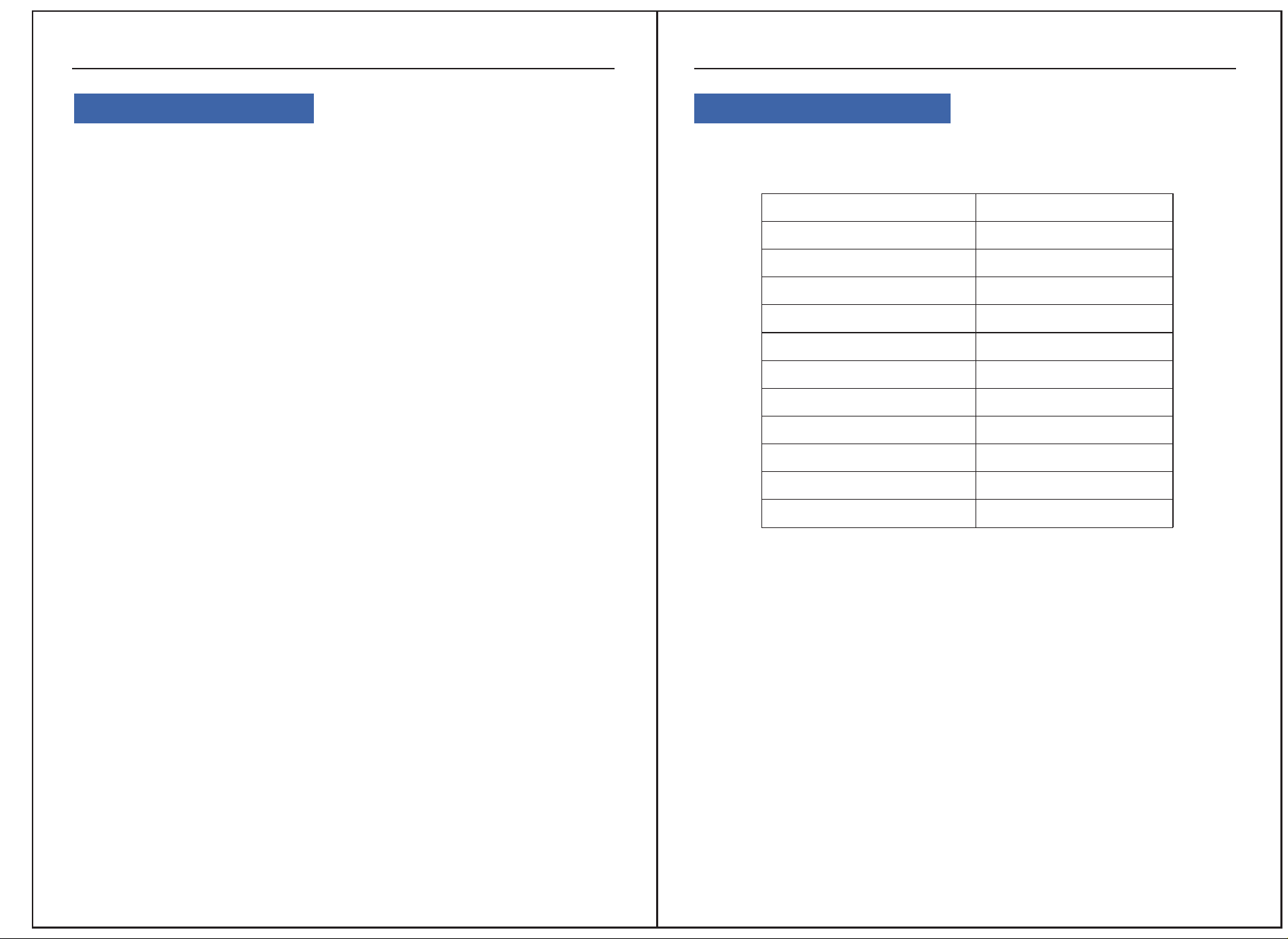
Specification Table:
MODEL
Power Supply
Rated Power (86°F 80% RH)
Rated Current (86°F 80% RH)
Low Side Pressure
High Side Pressure
Refrigerant:
Motor FLA:
Motor Compressor:
Product Dimensions:
Gross Weight:
Applicable temperature:
AP138-2302
AC 115V/60Hz
1410 W
12.5 A
290psig
650psig
R32/(16.22oz)(460g)
2.13A
RLA:11.8A ;LRA:54A
21.65*19.57*37.6 in
86lb
41-95℉
08 09