
Technical Support and E-Warranty Certificate www.vevor.com/support
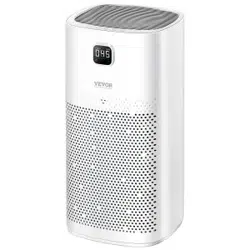
AIR PURIFIER
MODEL:GANYMEDE
We continue to be committed to provide you tools with competitive price.
"Save Half", "Half Price" or any other similar expressions used by us only
represents an estimate of savings you might benefit from buying certain tools
with us compared to the major top brands and does not necessarily mean to cover
all categories of tools offered by us. You are kindly reminded to verify carefully
when you are placing an order with us if you are actually Saving
Half in comparison with the top major brands.
1
MODEL:GANYMEDE
NEED HELP? CONTACT US!
Have product questions? Need technical support? Please feel free to
contact us:
Technical Support and E-Warranty Certificate
www.vevor.com/support
This is the original instruction, please read all manual instructions
carefully before operating. VEVOR reserves a clear interpretation of our
user manual. The appearance of the product shall be subject to the
product you received. Please forgive us that we won't inform you again if
there are any technology or software updates on our product.
Air purifier

2
01 / Precautions
Please read the user manual carefully before use and keep it for future
reference.
Warning against danger1.
1. Please keep the product away from water or other liquids or flammable
detergents to avoid electric shock and fire disaster.
2. Do not use water or other liquids or flammable detergents to clean the
product to avoid electric shock and fire disaster.
3. Please do not spray any inflammable materials such as pesticides or
perfume around the product.
READ AND SAVE THESE INSTRUCTIONS.
WARNING- To Reduce The Risk Of Fire Or Electric Shock, Do Not Use
This Fan With Any Solid-State Speed Control Device.
AVERTISSEMENT: NE CONVIENT PAS À DES RÉGULATEURS DE
VITESSE À SEMI-CONDUCTEURS.
WARNING- To Reduce The Risk Of Fire, Electric Shock Or Injury To
Persons, Do Not Use
Replacement Parts That Have Not Been Recommended By The
Manufacturer.
This appliance has a polarized plug (one blade is wider than the other). To
reduce the risk of electric shock, this plug is intended to fit in a polarized
outlet only one way. If the plug does not fit fully in the outlet, reverse the
plug. If it still does not fit, contact a qualified electrician. Do not attempt to
defeat this safety feature.
Warning for safety
1. Please check whether the voltage for the product is consistent with the
local power supply voltage before connecting the product to the power
supply.
2. If the power cord is damaged, it must be replaced by electricians or

3
specialized professionals to prevent hazards.
3. Please avoid using the product if the power plug, power cord or the
product is damaged.
4. Do not block the air inlet and outlet, for example, do not place objects on
the air outlet or in front of the air inlet.
5. Do not allow any foreign matters to get inside the product through the air
inlet.
6. The product must not be operated by any persons with physical
disabilities, mental disorders or without relevant experience and skills
(including children), unless they are instructed or explained by the safety
personnel to use the product. Do not allow any children to play with the
product. Do not allow any children to clean and maintain the product
without supervision.
Warning for use
1. This product is not a substitution to normal ventilation, daily dust
collection, or the range hood used for cooking.
2. The power plug of the product may be heated if the power socket
connecting the product has poor contact. Ensure that the connected power
socket is in good contact.
3. Do not place anything on the product.
4. Please make sure to place and use the product on a stable, flat and
horizontal surface.
5. A minimum clearance of 30cm should be reserved for the inlet of the
product, and a minimum clearance 50cm should be reserved above the air
outlet of the product.
6. Do not place the product directly under the air conditioner to prevent
condensate water dripping into the product.
7. Before powering on the product, make sure that the filter screen and
screen cover are correctly installed.
a) This appliance can be used by children aged from 8 years and above

4
under supervision.
• This appliance can be used by persons with reduced physical, sensory or
mental capabilities or lack of experience and knowledge if they have been
given supervision or instruction concerning use of the appliance in a safe
way and understand the hazards involved. (For EU)
• children shall not play with the appliance.
b) The appliance is only to be used with the adapter provided.
c) Clean the surface of the product with gloves using a clean cloth and a
soft brush.
8. Only use the original filter screen designed by Invitop. Do not use any
other filter screens.
9. Combustion of the filter screen may cause irreversible damage or
endanger other lives. Do not burn the filter screen or otherwise use it for
other purposes.
10. Do not knock this product with hard objects (especially the air outlet
and inlet).
11. Do not insert fingers or other objects into the air inlet or outlet to
prevent the product from physical damage or failure.
12. Do not use this product when you use indoor spray type insect
repellents or in places full of oil, flammable gas or chemical smoke.
13. Please make sure to unplug the product after use and before cleaning
or performing any maintenance.
14. Please disconnect the power supply before moving the product. Do not
move the product by pulling or tugging the power cord.
5

6
02 / Specification
03 / Instructions
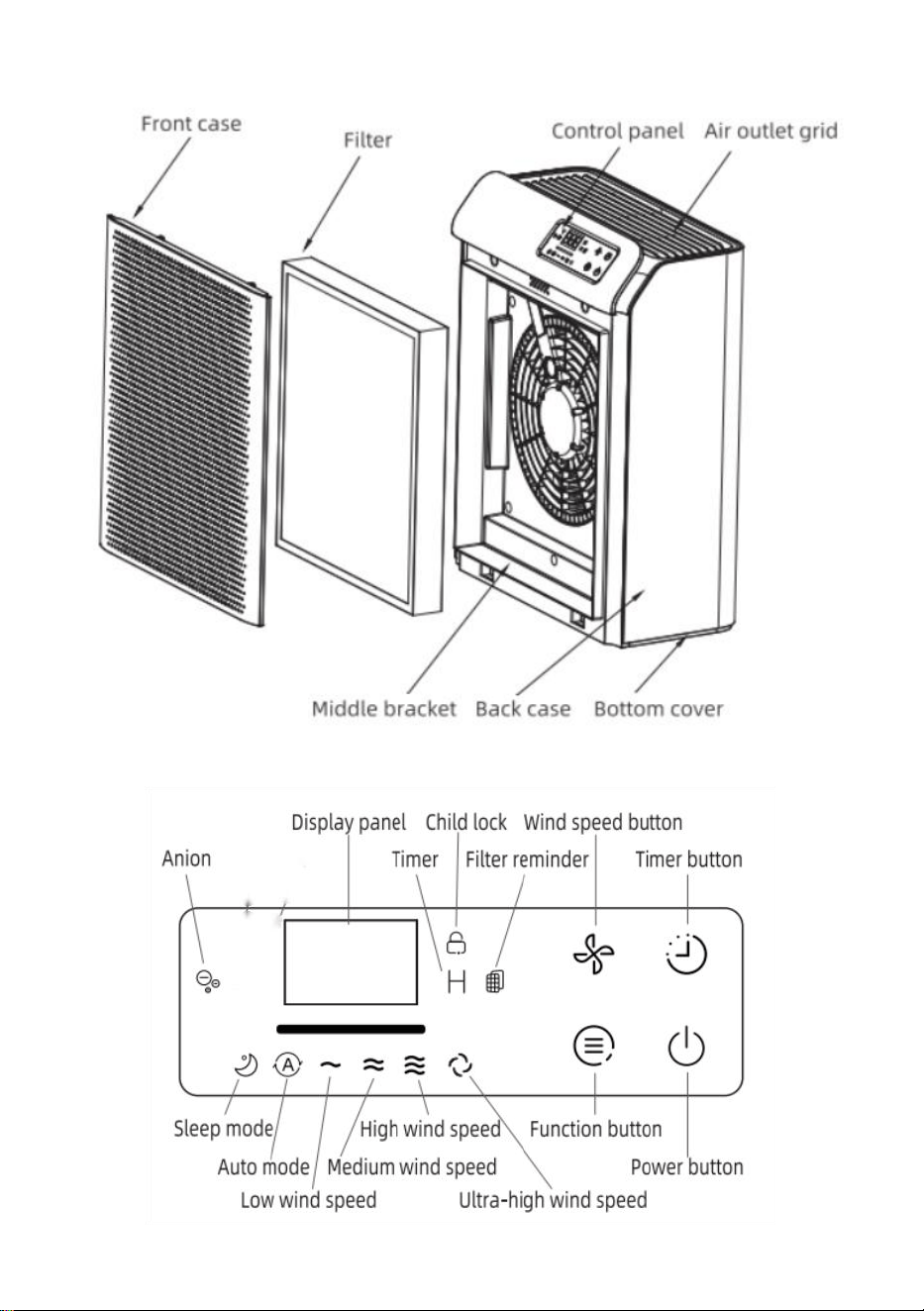
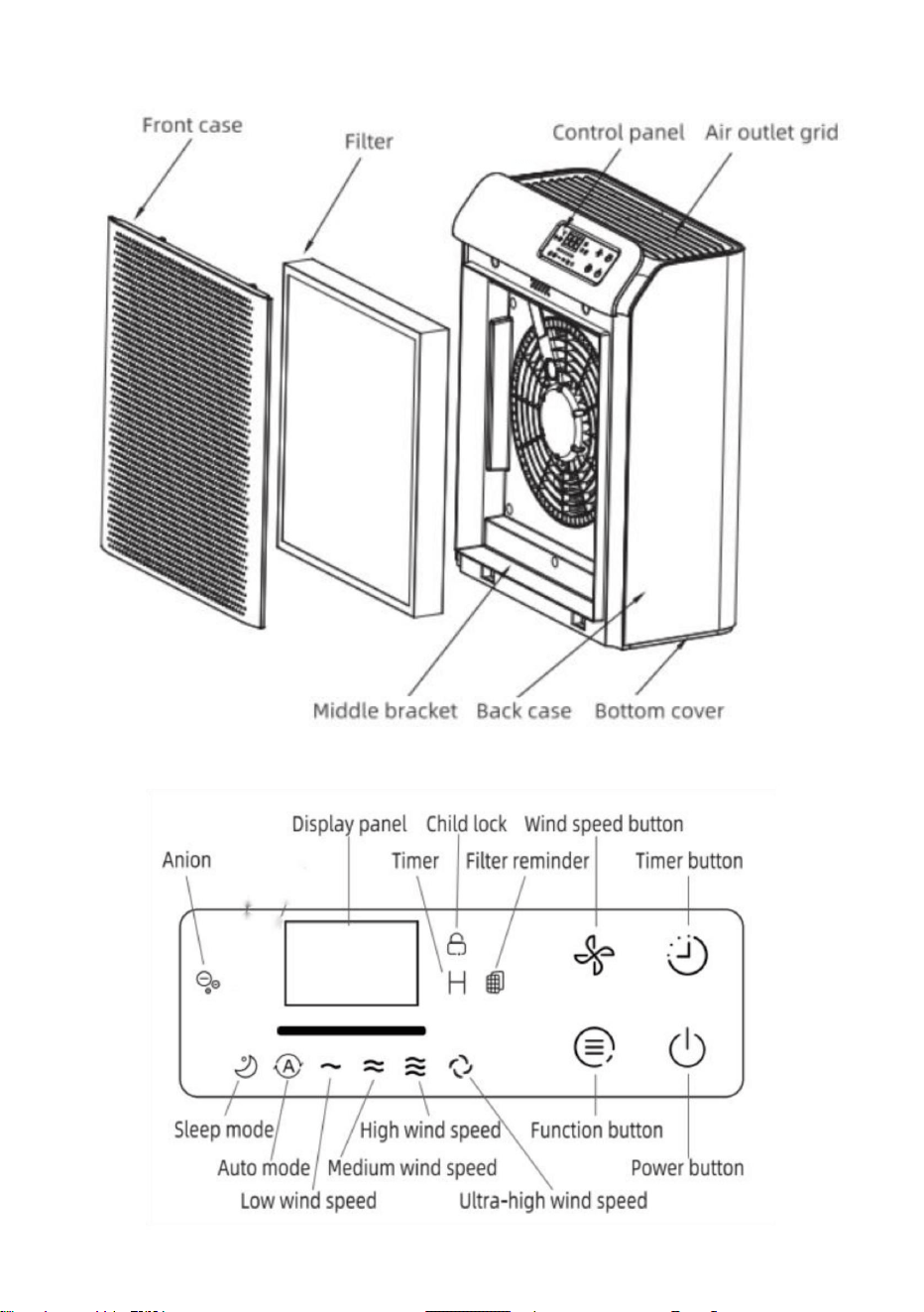
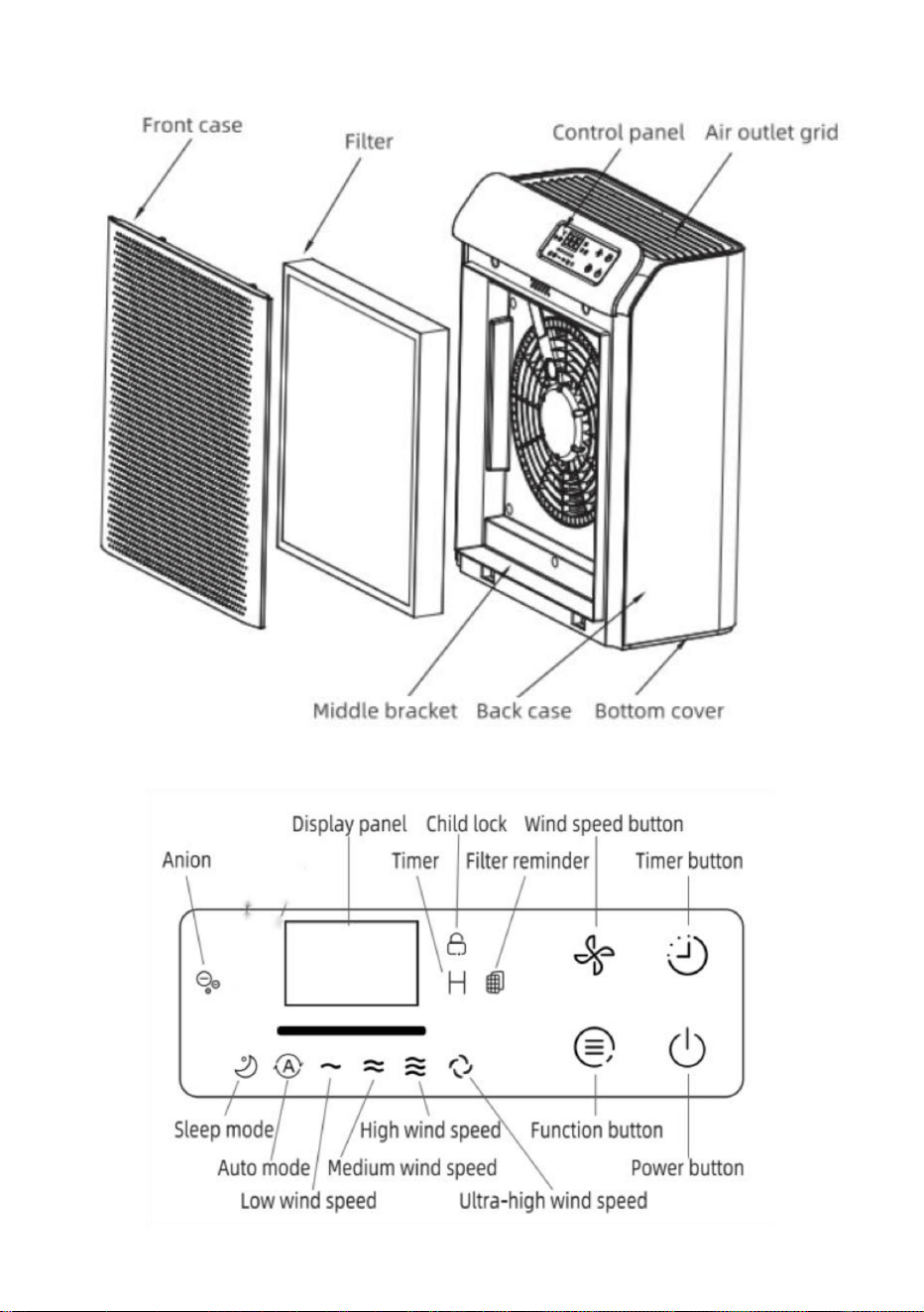
Buttons Instructions:
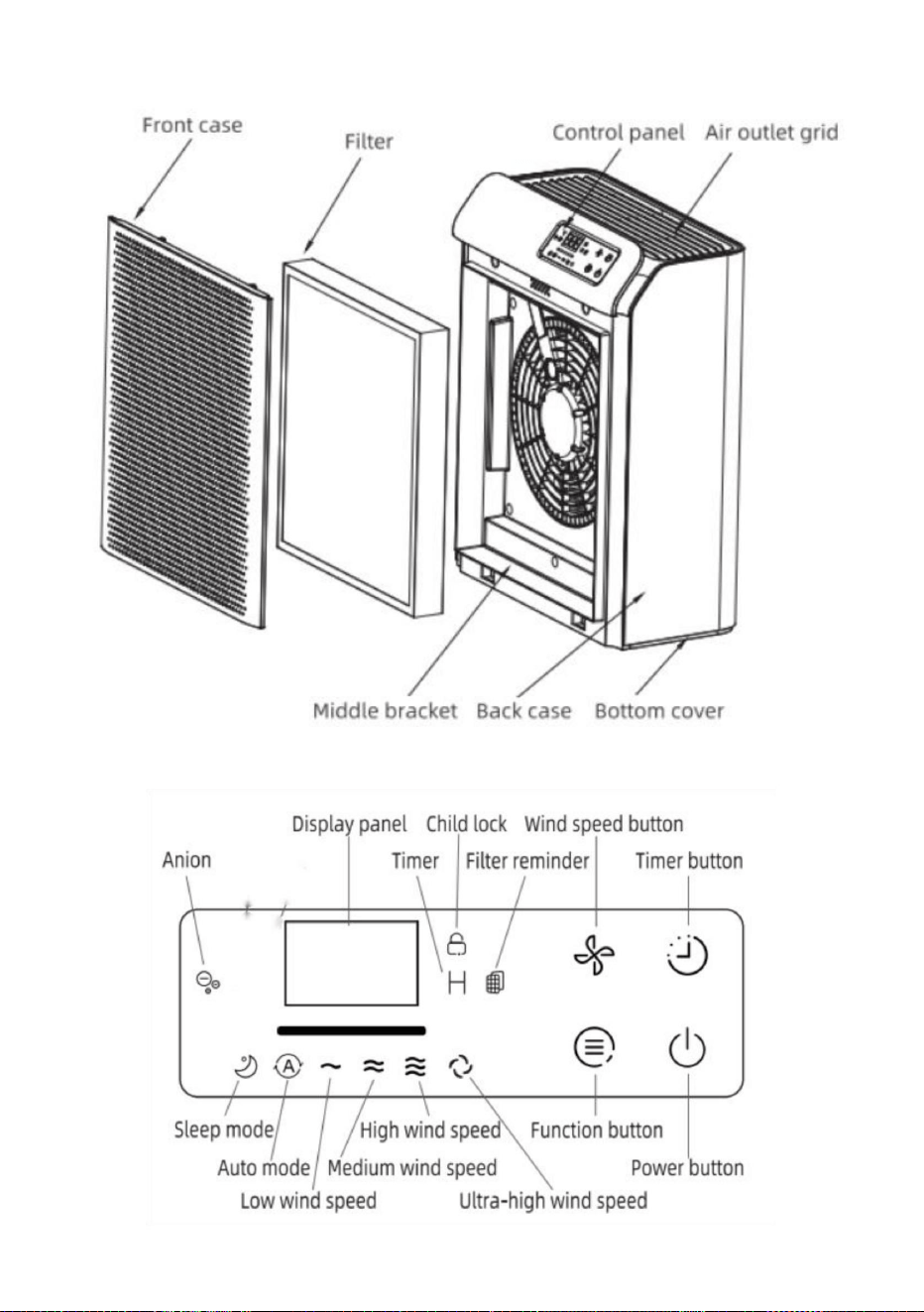
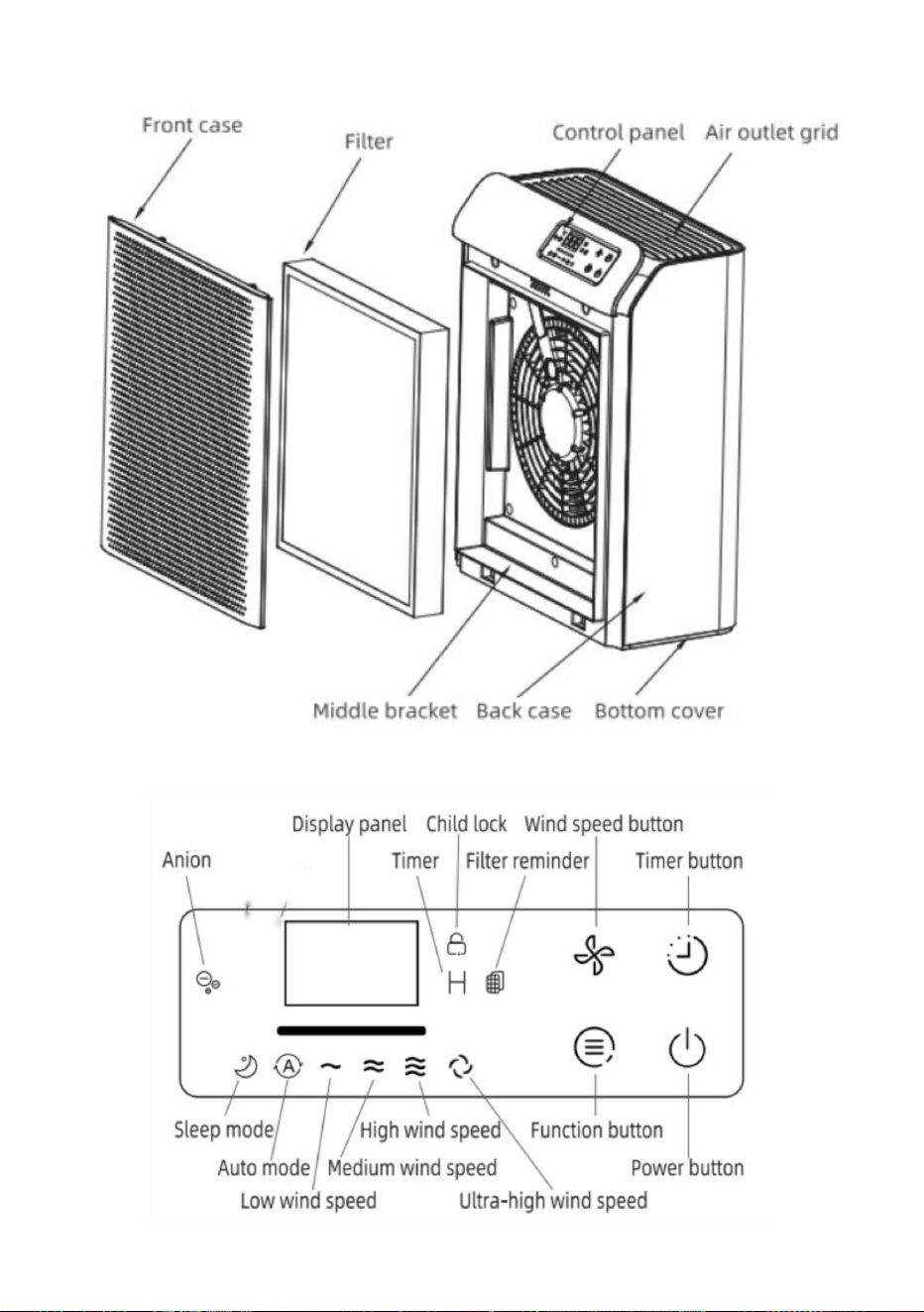
There are 4 touch buttons on the panel, including power button, function
button (UV/Anion), timer button and wind speed button.
Operating Instructions:
Plug in
Plug in, then all LED indicators will light up for around 1s. The buzzer will
ring for once and the power indicator will dimly light up, and the machine
will enter standby mode.
Power button
If it is the first time powering on the machine, touching the power button will
make it run at medium wind speed, and indicators of all buttons and
medium wind speed will light up. The machine will detect the value of
PM2.5 for around 10s. During this process, the display panel will keep
showing "---" and the background light will change color constantly. After
detecting, the background light will fix the color corresponding to the
current value of PM2.5. Touch the power button again, and the machine
will resume standby mode.
Model
GANYMEDE
product size
316*158*398mm
product weight
3.56 kg
voltage
100-240V~ 50/60Hz
power
32W
CADR
300m³/h

7
If it is not the first time powering on the machine, touch the power button
then the machine will run at the wind speed set before the last time
shutdown. And the background light will fix the color corresponding to the
current value of PM2.5. Touch the power button again, and the machine
will resume standby mode.
Wind speed button
In the condition of working, touch the wind speed button can adjust the
wind speed mode between: sleep mode, auto mode, low wind speed,
medium wind speed, high wind speed and ultra-high wind speed. During
the button touching, the wind speed indicator lights change synchronously
with the wind speed mode.
In Auto Mode, the corresponding indicator light up, and the machine runs at
corresponding wind speed according to the detected interval value of the
PM2.5 module. In Sleep Mode, the corresponding indicator light up, and
the machine runs at low wind speed, without lighting up the low wind speed
indicator. After 5 seconds of no button operation, the power indicator light
and sleep indicator light dim, and other LEDs turn off. Touching any button
will reactivate the display interface.
Timer button
In the condition of working, touch the timer button can set the timer to 2, 4,
8, 16, 24 hours, or cancels the timer.
When touching the button, the digital display panel changes synchronously
with the timer. After setting the timer, the machine works at a fixed time.
After 5 seconds of no operation, the digital display returns to showing the
PM2.5 value. The machine will enter standby mode automatically at the
scheduled time.
Function button
This button can also function as child lock button. Long touch the function
button for 3 seconds to activate child lock. The child lock indicator on the
right side of the panel will illuminate. Touching other buttons will be
ineffective in this mode, and the child lock indicator will blink for 2 seconds.
To unlock, long touch the function button for 3 seconds again.

8
Filter replacement reminder
When the machine has been running for more than 2200 hours, the filter
indicator blinks, indicating that the filter needs to be replaced. After
replacing the filter, long touch the Power button for around 7s to clear the
data and reset the timer. The filter in dicator will turn off.
PM2.5 value and corresponding colors
In the condition of working, the RGB light will show different colors
according to the PM2.5 value.
PM2.5<=50ug Excellent: Blue
50ug<PM2.5<=100ug Good: Green
100ug<PM2.5<=150ug Normal: Orange
PM2.5>150ug Bad: Red
Reset the working time of filter
In standby mode, long touch the wind speed button and the timer button for
about 3 seconds until the buzzer beeps, then the machine will clear the
data of filter's working time and start counting anew.
04 /Replacing the filter
When the display panel indicates that the service working life of the filter
drops to 0%, please replace the filter. Please use the original filter from
Invitop. Do not use any other filters.
Notes: Please remove the dust on the filter regularly. The filter cannot be
rinsed or reused.
Before filter replacement, make sure to turn off and unplug the air purifier.
Do not use a vacuum cleaner to clean the filter.
Please regularly put the filter in direct sunlight for sterilization.
When the total operating time of the air purifier reaches 2200
hours, please replace the filter.

9
Remove the packing materials of the filter
Before using the new product, please remove the packaging material of the
filter first. Make sure to unplug the adapter of the air purifier from the
electrical outlet before removing /installing the filter.
05 / Maintenance
Notes
• Make sure to power off and unplug the air purifier prior to maintenance.
• Do not immerse the air purifier in water or any liquids.
• Do not clean any parts of the air purifier by abrasive, corrosive or
flammable detergents (such as bleach or alcohol).
• The filter can't be rinsed.
• Do not use a vacuum cleaner to clean the filter.
Cleaning
1. Power off the machine and unplug the power adapter;
2. Take out the filter, and remove the dust on the outer surface of the filter;
3. Clean the air inlet/outlet, and wipe the shell of the air purifier with neutral
detergent and soft cotton cloth;
4. After the air purifier is dried, install the filter into the air purifier, and you
can turn it on for use.
Notes: When wiping the air outlet, water should be prevented from
dripping into the machine.
Storage
1. Power off the machine and unplug the power plug, arrange and bundle
the power cord;
2. Take out the filter, and remove the dust on the outer surface of the filter;
3. Clean the air inlet/outlet, and wipe the machine body with neutral
detergent and soft cloth;

10
4. Secure the machine with the dust cover/bag and place it in a
well-ventilated place without direct sunlight after the machine body is dry;
5. When the air purifier is left unused for a period of time, it shall be
powered on for a few minutes from time to time to ensure good
performance.
06 / Troubleshooting
Problem
Solutions
Not working
- Is it plugged into a power socket? Is there a
power outage?
- Is the home leakage switch or fuse cut off?
- If the filter's service life runs out?
The air volume
becomes smaller
- Is there any dust in the surface of original
filter?
- Is the air inlet/outlet of the device blocked by
something?
Significant noise
- Is there anything stuck on the fan in the air
outlet?
- Is the device tilted?
- If not the above reasons, you can adjust the
wind speed to lower mode.
Nasty smell
- It is normal that air purifiers may smell plastic
the first few times they are used. If the filters are
dirty, the air purifiers will also give off nasty
smell. Please clean or replace the filter in this
case.
- If the burning smell emits from the device,
please unplug the power socket and contact
with seller or customer service.
The reminder of
- Please press the power button for 7S to reset

11
replacing filter keeps
flashing after new filter
has been replaced
the machine and the life counter of the filter will
start.
Notes: If any of the above failures cannot be eliminated and filter cannot
be rinsed or reused and repair is necessarily required, please contact the
vendor or customer service center, and do not disassemble the unplugged
air purifier machine without authorization.
Technical Support and E-Warranty Certificate
www.vevor.com/support

PURIFICATEURD'AIR
«Économisezlamoitié»,«Moitiéprix»outouteautreexpressionsimilaireutiliséepar
nousnereprésentequ'uneestimationdeséconomiesquevouspourriezréaliserenachetant
certainsoutilscheznousparrapportauxgrandesmarquesetnecouvrepasnécessairementtoutes
lescatégoriesd'outilsquenousproposons.Nousvousrappelonsdebienvouloirvérifier
soigneusementlorsquevouspassezunecommandecheznoussivous
économisezréellementlamoitiéparrapportauxgrandesmarques.
Nouscontinuonsànousengageràvousfournirdesoutilsàdesprixcompétitifs.
MODÈLE:GANYMÈDE
Assistancetechniqueetcertificatdegarantieélectroniquewww.vevor.com/support
Machine Translated by Google
Vousavezdesquestionssurnosproduits?Vousavezbesoind'assistancetechnique?
N'hésitezpas
ànouscontacter:Assistancetechniqueetcertificatdegarantie
électroniquewww.vevor.com/support
MODÈLE:GANYMÈDE
Ils'agitdelanoticed'utilisationd'origine.Veuillezlireattentivementtoutesles
instructionsdumanuelavantdel'utiliser.VEVORseréserveledroitd'interpréterclairement
notremanueld'utilisation.L'apparenceduproduitdépendduproduitquevousavez
reçu.Veuilleznousexcuser,nousnevousinformeronsplusencasdemiseàjourtechnologique
oulogicielledenotreproduit.
1
BESOIND'AIDE?CONTACTEZNOUS!
Purificateurd'air
Machine Translated by Google

AVERTISSEMENTPourréduirelerisqued'incendie,dechocélectriqueoudeblessure
vaincrecettefonctiondesécurité.
détergentspouréviterleschocsélectriquesetlesincendies.
VITESSEÀSEMICONDUCTEURS.
Avertissementdesécurité
AVERTISSEMENT:NECONVIENTPASÀDESRÉGULATEURSDE
1.Veuillezgarderleproduitàl'écartdel'eauoud'autresliquidesousubstancesinflammables.
fiche.Siellenes'adaptetoujourspas,contactezunélectricienqualifié.N'essayezpasde
prisedansunseulsens.Silafichenes'insèrepascomplètementdanslaprise,inversezla
Avertissementcontreledanger1.
Ceventilateuravecn'importequeldispositifdecontrôledevitesseàsemiconducteurs.
AVERTISSEMENTPourréduirelerisqued'incendieoudechocélectrique,n'utilisezpas
référence.
réduirelerisquedechocélectrique,cetteficheestconçuepours'insérerdansuneprisepolarisée
2.Silecordond'alimentationestendommagé,ildoitêtreremplacépardesélectriciensou
LISEZETCONSERVEZCESINSTRUCTIONS.
Veuillezlireattentivementlemanueld'utilisationavantutilisationetconservezlepouruneutilisationultérieure.
Cetappareilestéquipéd'unefichepolarisée(unebrocheestpluslargequel'autre).
Fabricant.
parfumautourduproduit.
fournir.
tensiond'alimentationlocaleavantdeconnecterleproduitàl'alimentation
3.Veuilleznepaspulvériserdematièresinflammablestellesquedespesticidesou
Piècesderechangequin'ontpasétérecommandéesparle
Personnes,nepasutiliser
produitpouréviterleschocsélectriquesetlesincendies.
1.Veuillezvérifiersilatensionduproduitestconformeàla
2.N'utilisezpasd'eauoud'autresliquidesoudétergentsinflammablespournettoyerle
01/Précautions
2
Machine Translated by Google

3
eaudecondensations'égouttantdansleproduit.
handicaps,troublesmentauxousansexpérienceetcompétencespertinentes
3.Veuillezéviterd'utiliserleproduitsilafiched'alimentation,lecordond'alimentationoule
personnelqualifiépourutiliserleproduit.Nelaissezaucunenfantjoueravecleproduit.
3.Neplacezriensurleproduit.
leproduitconnectéprésenteunmauvaiscontact.Assurezvousquel'alimentationconnectée
collection,oulahottedecuisinièreutiliséepourcuisiner.
sortieduproduit.
entrée.
Avertissementd'utilisation
lasortied'airoudevantl'entréed'air.
5.Unespacelibreminimumde30cmdoitêtreréservépourl'entréedel'
produit.Nelaissezpaslesenfantsnettoyeretentretenirleproduit
leproduitestendommagé.
4.Assurezvousdeplaceretd'utiliserleproduitsurunesurfacestable,plateet
desprofessionnelsspécialiséspourprévenirlesdangers.
(ycomprislesenfants),àmoinsqu'ilsnesoientinstruitsouexpliquésparleservicedesécurité
lapriseestenboncontact.
7.Avantdemettreleproduitsoustension,assurezvousquelefiltreet
2.Lafiched'alimentationduproduitpeutchauffersilaprisedecourant
6.Leproduitnedoitpasêtreutilisépardespersonneshandicapéesphysiques.
6.Neplacezpasleproduitdirectementsousleclimatiseurpouréviter
produit,etunespacelibreminimumde50cmdoitêtreréservéaudessusdel'air
5.Nelaissezaucuncorpsétrangerpénétrerdansleproduitparl'air.
1.Ceproduitneremplacepasuneventilationnormale,unedépoussiéragequotidien
a)Cetappareilpeutêtreutilisépardesenfants
âgésde8ansetplus.
surfacehorizontale.
4.Nebloquezpasl'entréeetlasortied'air,parexemple,neplacezpasd'objetsdessus.
sanssurveillance.
Machine Translated by Google

4
11.N'insérezpaslesdoigtsoud'autresobjetsdansl'entréeoulasortied'airpour
b)L'appareilnedoitêtreutiliséqu'avecl'adaptateurfourni.
etentrée).
10.Nefrappezpasceproduitavecdesobjetsdurs(enparticulierlasortied'air).
•lesenfantsnedoiventpasjoueravecl'appareil.
Déplacezleproduitentirantouentirantsurlecordond'alimentation.
14.Veuillezdébrancherl'alimentationélectriqueavantdedéplacerleproduit.Ne
avoirreçuunesupervisionoudesinstructionsconcernantl'utilisationdel'appareildansunenvironnementsûr
d'autresfins.
mettreendangerd'autresvies.Nebrûlezpaslefiltreetnel'utilisezpasàd'autresfins.
capacitésmentalesoumanqued'expérienceetdeconnaissancess'ilsontété
oueffectuertouteopérationdemaintenance.
•Cetappareilpeutêtreutilisépardespersonnesàmobilitéréduite,sensorielleouphysique.
9.Lacombustiondufiltrepeutprovoquerdesdommagesirréversiblesou
13.Assurezvousdedébrancherleproduitaprèsutilisationetavantdelenettoyer.
desrépulsifsoudansdesendroitsremplisd'huile,degazinflammableoudefuméechimique.
soussurveillance.
autresécransfiltrants.
8.Utilisezuniquementlefiltred'origineconçuparInvitop.N'utilisezpas
12.N'utilisezpasceproduitlorsquevousutilisezuninsectifugedetypesprayd'intérieur.
empêcherleproduitdesubirdesdommagesphysiquesouunedéfaillance.
brossedouce.
c)Nettoyezlasurfaceduproduitavecdesgantsenutilisantunchiffonpropreetun
Machine Translated by Google
5
Machine Translated by Google

tailleduproduit
6
300m³/h
Ilya4boutonstactilessurlepanneau,dontleboutond'alimentationetleboutondefonction
Sic'estlapremièrefoisquevousallumezlamachine,appuyezsurleboutond'alimentation
32W
Instructionspourlesboutons:
Boutond'alimentation
faiteslefonctionneràunevitessedeventmoyenneetlesindicateursdetouslesboutonset
100240V50/60Hz
3,56kg
CADR
entreraenmodeveille.
reprendralemodeveille.
316*158*398mm
pouvoir
sonnezunefoisetlevoyantd'alimentations'allumerafaiblement,etlamachine
endétectant,lalumièredefondfixeralacouleurcorrespondantàla
valeuractuelledePM2,5.Appuyezànouveausurleboutond'alimentationetlamachine
GANYMÈDE
tension
Brancher
Branchez,puistouslesindicateursLEDs'allumerontpendantenviron1s.Lebuzzer
poidsduproduit
Moded'emploi:
PM2,5pendantenviron10secondes.Pendantceprocessus,lepanneaud'affichagegardera
affichant""etlalumièred'arrièreplanchangeraconstammentdecouleur.Après
Modèle
bouton(UV/Anion),boutonminuterieetboutonvitesseduvent.
vitessemoyenneduvents'allumera.Lamachinedétecteralavaleurde
03/Moded'emploi
02/Spécification
Machine Translated by Google

7
pendant3secondespouractiverleverrouillageenfant.L'indicateurdeverrouillageenfantsurle
entouchantlebouton,lesvoyantsdel'indicateurdevitesseduventchangentdemanièresynchrone
alorslamachinefonctionneraàlavitesseduventrégléeavantladernièrefois
EnmodeAuto,l'indicateurcorrespondants'allumeetlamachinefonctionneà
Enappuyantsurlebouton,lepanneaud'affichagenumériquechangedemanièresynchrone
Boutondeminuterie
Enétatdefonctionnement,appuyezsurleboutondevitesseduventpourréglerlavitesseduvent.
etlevoyantdeveilles'éteintetlesautresLEDs'éteignent.Enappuyantsurn'importequelbouton
Boutondefonction
lamachinefonctionneàfaiblevitesseduvent,sansallumerlafaiblevitesseduvent
ValeurPM2,5.Lamachineentreraautomatiquementenmodeveilleàla
reprendralemodeveille.
vitesseduventcorrespondanteenfonctiondelavaleurd'intervalledétectéedela
arrêt.Etlalumièredefondfixeralacouleurcorrespondantàla
aveclaminuterie.Aprèsavoirréglélaminuterie,lamachinefonctionneàuneheurefixe.
Pourdéverrouiller,appuyezlonguementsurleboutondefonctionpendant3secondesànouveau.
Sicen'estpaslapremièrefoisquevousallumezlamachine,appuyezsurleboutond'alimentation
aveclemodevitesseduvent.
Enétatdefonctionnement,appuyezsurleboutondelaminuteriepourréglerlaminuteriesur2,4,8,
16,24heuresouannulerlaminuterie.
Lecôtédroitdupanneaus'allume.Toucherd'autresboutonss'allume
réactiveral'interfaced'affichage.
modedevitesseduvententre:modeveille,modeautomatique,vitesseduventfaible,vitesse
duventmoyenne,vitesseduventélevéeetvitesseduventultraélevée.
Ceboutonpeutégalementfonctionnercommeboutondeverrouillageenfant.Appuyezlonguementsurlafonction
heureprévue.
Boutondevitesseduvent
indicateur.Après5secondessansopérationsurlebouton,levoyantd'alimentation
inefficacedanscemode,etlevoyantdeverrouillageenfantclignoterapendant2secondes.
Après5secondesd'inactivité,l'affichagenumériquerevientàl'affichagedu
valeuractuelledePM2,5.Appuyezànouveausurleboutond'alimentationetlamachine
ModulePM2.5.Enmodeveille,levoyantcorrespondants'allumeet
Machine Translated by Google

04/Remplacementdufiltre
Enétatdefonctionnement,lalumièreRVBafficheradifférentescouleurs
donnéesdutempsdefonctionnementdufiltreetrecommenceràcompter.
N'utilisezpasd'aspirateurpournettoyerlefiltre.
ValeurPM2,5etcouleurscorrespondantes
Enmodeveille,appuyezlonguementsurleboutondevitesseduventetsurleboutondelaminuteriependant
environ3secondesjusqu'àcequelebuzzerémetteunbip,puislamachineeffacerale
Avantderemplacerlefiltre,assurezvousd’éteindreetdedébrancherlepurificateurd’air.
donnéesetréinitialiserlaminuterie.Lefiltreindicators'éteindra.
enremplaçantlefiltre,appuyezlonguementsurleboutond'alimentationpendantenviron7secondespoureffacerle
Réinitialiserletempsdefonctionnementdufiltre
rincéouréutilisé.
Veuillezplacerrégulièrementlefiltreàlalumièredirectedusoleilpourlestériliser.
L'indicateurclignote,indiquantquelefiltredoitêtreremplacé.Après
PM2,5>150ugMauvais:Rouge
Remarques:Veuillezretirerrégulièrementlapoussièredufiltre.Lefiltrenepeutpasêtre
Lorsquelamachineafonctionnépendantplusde2200heures,lefiltre
100ug<PM2,5<=150ugNormale:Orange
tombeà0%,veuillezremplacerlefiltre.Veuillezutiliserlefiltred'originede
Invitop.N'utilisezaucunautrefiltre.
Rappelderemplacementdufiltre
50ug<PM2.5<=100ugBon:Vert
PM2,5<=50ugExcellent:Bleu
Lorsquelepanneaud'affichageindiquequeladuréedeviedufiltre
heures,veuillezremplacerlefiltre.
selonlavaleurPM2,5.
Lorsqueladuréetotaledefonctionnementdupurificateurd'airatteint2200
8
Machine Translated by Google

05/Entretien
•Assurezvousd’éteindreetdedébrancherlepurificateurd’airavantl’entretien.
détergentetchiffondouxencoton;
2.Retirezlefiltreetretirezlapoussièresurlasurfaceextérieuredufiltre;
Remarques
2.Retirezlefiltreetretirezlapoussièresurlasurfaceextérieuredufiltre;
3.Nettoyezl'entrée/sortied'airetessuyezlacoquedupurificateurd'airavecunnettoyantneutre.
lecordond'alimentation;
3.Nettoyezl'entrée/sortied'airetessuyezlecorpsdelamachineavecunnettoyantneutre.
1.Éteignezlamachineetdébranchezl’adaptateursecteur;
priseélectriqueavantderetirer/installerlefiltre.
1.Éteignezlamachineetdébranchezlaprised'alimentation,organisezetregroupez
filtrezd'abord.Assurezvousdedébrancherl'adaptateurdupurificateurd'airdela
Nettoyage
Stockage
Avantd'utiliserlenouveauproduit,veuillezretirerlematériaud'emballagedel'
•N’utilisezpasd’aspirateurpournettoyerlefiltre.
Remarques:Lorsdel'essuyagedelasortied'air,l'eaudoitêtreempêchéedepénétrer.
s'égouttantdanslamachine.
Retirezlesmatériauxd'emballagedufiltre
détergentsinflammables(telsquel’eaudeJaveloul’alcool).
•Lefiltrenepeutpasêtrerincé.
peutl'allumerpourl'utiliser.
•Nepasimmergerlepurificateurd'airdansl'eauoudanstoutautre
liquide.•Nepasnettoyerlespiècesdupurificateurd'airavecdesproduitsabrasifs,corrosifsou
4.Unefoislepurificateurd'airséché,installezlefiltredanslepurificateurd'airetvous
détergentetchiffondoux;
9
Machine Translated by Google

06/Dépannage
Nefonctionnepas
Sicen'estpaspourlesraisonscidessus,vouspouvezrégler
lavitesseduventsurunmodeinférieur.
L'interrupteurdefuiteoulefusibledelamaisonestilcoupé?
Bruitimportant
L'appareilestilincliné?
Estilbranchésuruneprisedecourant?Yatilunepannede
courant?
Problème
Yatilquelquechosedecoincésurleventilateurdansla
sortied'air?
Veuillezappuyersurleboutond'alimentationpendant7secondespourréinitialiser
Solutions
L'entrée/sortied'airdel'appareilestellebloquéeparquelque
chose?
Lerappelde
devientpluspetit
cas.
Siuneodeurdebrûlésedégagedel'appareil,veuillez
débrancherlaprisedecourantetcontacterlevendeuroule
serviceclient.
4.Fixezlamachineaveclecouvercle/sacantipoussièreetplacezladansunendroitbien
ventilésanslumièredirectedusoleilunefoislecorpsdelamachinesec;5.Lorsquelepurificateurd'air
n'estpasutilisépendantuncertaintemps,ildoitêtremissoustensionpendantquelques
minutesdetempsentempspourgarantirdebonnesperformances.
Yatildelapoussièreàlasurfacedufiltred'origine?
Levolumed'air
Odeurdésagréable
Siladuréedeviedufiltreexpire?
Ilestnormalquelespurificateursd'airsententleplastiqueles
premièresfoisqu'ilssontutilisés.Silesfiltressontsales,les
purificateursd'airdégagerontégalementuneodeur
désagréable.Veuilleznettoyerouremplacerlefiltredanscecas.
10
Machine Translated by Google

11
leremplacementdufiltre
continuedeclignoteraprèsle
remplacementdunouveaufiltre
Remarques:Sil'unedesdéfaillancescidessusnepeutpasêtreéliminéeetquelefiltrenepeutpas
êtrerincéouréutiliséetqu'uneréparationestnécessairementnécessaire,veuillezcontacterle
fournisseuroulecentredeserviceclientetnedémontezpaslepurificateurd'airdébranchésans
autorisation.
commencer.
lamachineetlecompteurdeduréedeviedufiltre
Assistancetechniqueetcertificatdegarantieélectronique
www.vevor.com/support
Machine Translated by Google

LUFTREINIGER
„Sparen Sie die Hälfte“, „Halber Preis“ oder andere ähnliche Ausdrücke, die wir verwenden,
stellen nur eine Schätzung der Ersparnis dar, die Sie beim Kauf bestimmter Werkzeuge bei uns
im Vergleich zu den großen Topmarken erzielen können, und decken nicht unbedingt alle von uns
angebotenen Werkzeugkategorien ab. Wir möchten Sie freundlich daran erinnern, bei der
Bestellung bei uns sorgfältig zu prüfen, ob Sie im Vergleich zu den großen
Topmarken tatsächlich die Hälfte sparen.
Wir sind weiterhin bestrebt, Ihnen Werkzeuge zu wettbewerbsfähigen Preisen anzubieten.
MODELL:GANYMEDE
Technischer Support und E-Garantie-Zertifikat www.vevor.com/support
Machine Translated by Google
Brauchen Sie Hilfe? Kontaktieren Sie uns!
1
Haben Sie Fragen zum Produkt? Benötigen Sie technischen Support? Bitte kontaktieren Sie
uns:
Technischer Support und E-Garantie-Zertifikat www.vevor.com/
support
MODELL:GANYMEDE
Dies ist die Originalanleitung. Bitte lesen Sie alle Anweisungen sorgfältig durch, bevor
Sie das Gerät in Betrieb nehmen. VEVOR behält sich eine klare Auslegung unserer
Bedienungsanleitung vor. Das Erscheinungsbild des Produkts richtet sich nach dem
Produkt, das Sie erhalten haben. Bitte verzeihen Sie uns, dass wir Sie nicht erneut informieren,
wenn es Technologie- oder Software-Updates für unser Produkt gibt.
Luftreiniger
Machine Translated by Google

Reinigungsmittel, um Stromschläge und Brände zu vermeiden.
SOLID-STATE-GESCHWINDIGKEIT.
liefern.
diese Sicherheitsfunktion zu umgehen.
1. Bitte halten Sie das Produkt fern von Wasser oder anderen Flüssigkeiten oder brennbaren
ACHTUNG: NICHT FÜR REGLER GEEIGNET
Stecker. Wenn er immer noch nicht passt, wenden Sie sich an einen qualifizierten Elektriker. Versuchen Sie nicht,
Steckdose nur in eine Richtung. Wenn der Stecker nicht vollständig in die Steckdose passt, drehen Sie die
Warnung vor Gefahr1.
Dieser Lüfter ist mit einem beliebigen Halbleiter-Drehzahlregler ausgestattet.
2. Wenn das Netzkabel beschädigt ist, muss es durch einen Elektriker oder
WARNUNG - Um das Risiko eines Brandes oder Stromschlags zu verringern, verwenden Sie nicht
Referenz.
Um das Risiko eines elektrischen Schlags zu verringern, ist dieser Stecker für den Einsatz in einer polarisierten
Hersteller.
LESEN UND BEWAHREN SIE DIESE ANWEISUNGEN AUF.
Bitte lesen Sie die Bedienungsanleitung vor der Verwendung sorgfältig durch und bewahren Sie sie für
Dieses Gerät hat einen polarisierten Stecker (ein Stift ist breiter als der andere).
3. Bitte sprühen Sie keine brennbaren Stoffe wie Pestizide oder
Parfüm um das Produkt herum.
Ersatzteile, die nicht vom Hersteller empfohlen werden
Personen, Nicht verwenden
Produkt, um Stromschläge und Brände zu vermeiden.
1. Bitte überprüfen Sie, ob die Spannung des Produkts mit der
lokale Netzspannung, bevor Sie das Produkt an das Stromnetz anschließen
2. Verwenden Sie kein Wasser oder andere Flüssigkeiten oder brennbare Reinigungsmittel zum Reinigen des
WARNUNG - Um das Risiko von Feuer, Stromschlag oder Verletzungen zu verringern
Warnung zur Sicherheit
01 / Vorsichtsmaßnahmen
2
Machine Translated by Google

3
Kondenswasser, das in das Produkt tropft.
Behinderungen, psychische Störungen oder ohne entsprechende Erfahrung und Fähigkeiten
3. Bitte vermeiden Sie die Verwendung des Produkts, wenn der Netzstecker, das Netzkabel oder die
Personal, das das Produkt benutzt. Erlauben Sie Kindern nicht, mit dem Produkt zu spielen.
3. Stellen Sie nichts auf das Produkt.
Das angeschlossene Produkt hat einen schlechten Kontakt. Stellen Sie sicher, dass das angeschlossene
Einlass.
Sammlung oder die zum Kochen verwendete Dunstabzugshaube.
Auslass des Produkts.
Warnhinweise zur Verwendung
dem Luftauslass oder vor dem Lufteinlass.
5. Für den Einlass des
Erlauben Sie Kindern nicht, das Produkt zu reinigen und zu warten.
Das Produkt ist beschädigt.
4. Stellen Sie sicher, dass Sie das Produkt auf einem stabilen, ebenen und
Fachkräfte zur Gefahrenvorbeugung hinzuziehen.
(einschließlich Kinder), es sei denn, sie werden vom Sicherheitspersonal angewiesen oder
7. Bevor Sie das Produkt einschalten, vergewissern Sie sich, dass das Filtersieb und
Buchse hat guten Kontakt.
2. Der Netzstecker des Produkts kann sich erhitzen, wenn die Steckdose
6. Das Produkt darf nicht von Personen mit körperlichen
6. Stellen Sie das Produkt nicht direkt unter die Klimaanlage, um
Produkt, und ein Mindestabstand von 50 cm sollte über der Luft bleiben
5. Achten Sie darauf, dass keine Fremdkörper durch die Luft in das Produkt gelangen.
1. Dieses Produkt ist kein Ersatz für normale Belüftung, tägliche Staub
Bildschirmabdeckung richtig installiert sind.
a) Dieses Gerät kann von Kindern ab 8 Jahren verwendet werden
horizontale Oberfläche.
4. Blockieren Sie den Lufteinlass und -auslass nicht, z. B. indem Sie keine Gegenstände auf
ohne Aufsicht.
Machine Translated by Google

4
b) Das Gerät ist ausschließlich mit dem mitgelieferten Adapter zu verwenden.
und Einlass).
Weise und verstehen Sie die damit verbundenen Gefahren. (Für EU) •
Kinder dürfen nicht mit dem Gerät spielen.
10. Schlagen Sie nicht mit harten Gegenständen auf das Produkt (insbesondere nicht auf den Luftauslass
Bewegen Sie das Produkt nicht, indem Sie am Netzkabel ziehen oder daran zerren.
14. Trennen Sie bitte die Stromversorgung, bevor Sie das Produkt bewegen.
Aufsicht oder Einweisung in die sichere Verwendung des Gerätes
andere Zwecke.
andere Leben gefährden. Verbrennen Sie das Filtersieb nicht und verwenden Sie es nicht für
geistigen Fähigkeiten oder Mangel an Erfahrung und Wissen, wenn sie
oder die Durchführung von Wartungsarbeiten.
Abwehrmitteln oder an Orten voller Öl, brennbarem Gas oder chemischem Rauch.
• Dieses Gerät kann von Personen mit eingeschränkten physischen, sensorischen oder
9. Die Verbrennung des Filtersiebes kann zu irreversiblen Schäden führen oder
13. Bitte ziehen Sie nach Gebrauch und vor der Reinigung unbedingt den Stecker aus der Steckdose.
8. Verwenden Sie nur das Originalfiltersieb von Invitop. Verwenden Sie keine
unter Aufsicht.
andere Filtersiebe.
um physische Schäden oder Ausfälle des Produkts zu verhindern.
weiche Bürste.
12. Verwenden Sie dieses Produkt nicht, wenn Sie Insektenspray für den Innenbereich verwenden.
c) Reinigen Sie die Oberfläche des Produkts mit Handschuhen, einem sauberen Tuch und einem
11. Stecken Sie keine Finger oder andere Gegenstände in den Lufteinlass oder -auslass, um
Machine Translated by Google
5
Machine Translated by Google

Produktgröße
6
32W
Tastenanweisungen:
aktuellen Wert von PM2.5. Berühren Sie den Netzschalter erneut, und das Gerät
Wenn Sie das Gerät zum ersten Mal einschalten, wird durch Berühren des Netzschalters
100-240 Vÿ 50/60 Hz
wird der Standby-Modus wieder aufgenommen.
Netztaste
wechselt in den Standby-Modus.
3,56 kg
CADR
Erkennung, das Hintergrundlicht wird die Farbe entsprechend der
Leistung
316*158*398 mm
klingeln Sie einmal und die Betriebsanzeige leuchtet schwach auf.
Einstecken
Stromspannung
GANYMED
Stecken Sie den Stecker ein, dann leuchten alle LED-Anzeigen für ca. 1s auf. Der Summer ertönt
Bedienungsanleitung:
Produktgewicht
PM2.5 für etwa 10 Sekunden. Während dieses Vorgangs wird das Display
Taste (UV/Anion), Timer-Taste und Windgeschwindigkeitstaste.
Modell
mittlere Windgeschwindigkeit leuchtet auf. Die Maschine erkennt den Wert von
zeigt "---" an und das Hintergrundlicht ändert ständig seine Farbe. Nach
300m³/h
Auf dem Bedienfeld befinden sich 4 Touch-Tasten, darunter die Einschalttaste, die Funktionstaste
Lassen Sie es bei mittlerer Windgeschwindigkeit laufen und die Anzeigen aller Tasten und
03 / Anleitung
02 / Spezifikation
Machine Translated by Google

7
Im Automatik-Modus leuchtet die entsprechende Anzeige auf und die Maschine läuft mit
Beim Berühren der Taste ändert sich die digitale Anzeige synchron
In diesem Modus ist die Funktion unwirksam und die Anzeige für die Kindersicherung blinkt 2 Sekunden lang.
Nach 5 Sekunden ohne Bedienung zeigt die Digitalanzeige wieder die
aktuellen Wert von PM2.5. Berühren Sie den Netzschalter erneut, und das Gerät
PM2.5-Modul. Im Schlafmodus leuchtet die entsprechende Anzeige auf und
Windgeschwindigkeitstaste
Anzeige. Nach 5 Sekunden ohne Tastenbetätigung leuchtet die Betriebsanzeige
zur geplanten Zeit.
wird die Anzeigeschnittstelle reaktiviert.
Windgeschwindigkeitsmodus zwischen: Schlafmodus, Automatikmodus, niedrige Windgeschwindigkeit,
mittlere Windgeschwindigkeit, hohe Windgeschwindigkeit und ultrahohe Windgeschwindigkeit. Während
Diese Taste kann auch als Kindersicherungstaste verwendet werden. Berühren Sie die Funktion lange
Wenn Sie das Gerät nicht zum ersten Mal einschalten, berühren Sie den Netzschalter
mit dem Windgeschwindigkeitsmodus.
Die rechte Seite des Bedienfelds leuchtet auf. Das Berühren anderer Tasten wird
Während des Betriebs können Sie durch Berühren der Timer-Taste den Timer auf 2, 4, 8, 16 oder 24 Stunden
einstellen oder den Timer abbrechen.
entsprechende Windgeschwindigkeit entsprechend dem erfassten Intervallwert des
Herunterfahren. Und das Hintergrundlicht wird die Farbe entsprechend der
mit dem Timer. Nach dem Einstellen des Timers arbeitet die Maschine zu einer festgelegten Zeit.
Zum Entsperren berühren Sie die Funktionstaste erneut 3 Sekunden lang.
wird der Standby-Modus wieder aufgenommen.
die Maschine läuft bei geringer Windgeschwindigkeit, ohne die geringe Windgeschwindigkeit zu beleuchten
PM2.5-Wert. Das Gerät wechselt automatisch in den Standby-Modus, wenn
Im Betriebszustand können Sie durch Berühren der Windgeschwindigkeitstaste die
und die Schlafanzeige wird schwächer und andere LEDs erlöschen. Durch Berühren einer beliebigen Taste
Funktionstaste
3 Sekunden lang gedrückt, um die Kindersicherung zu aktivieren. Die Kindersicherungsanzeige auf dem
Wenn Sie die Taste berühren, ändern sich die Windgeschwindigkeitsanzeigeleuchten synchron
Timer-Taste
dann läuft die Maschine mit der Windgeschwindigkeit, die vor dem letzten Mal eingestellt wurde
Machine Translated by Google

04 /Filterwechsel
PM2,5-Wert und entsprechende Farben
ca. 3 Sekunden, bis der Summer ertönt, dann löscht die Maschine die
Verwenden Sie zum Reinigen des Filters keinen Staubsauger.
Daten und setzen Sie den Timer zurück. Der Filter im Indikator wird ausgeschaltet.
Berühren Sie im Standby-Modus lange die Windgeschwindigkeitstaste und die Timer-Taste für
Schalten Sie den Luftreiniger vor dem Filterwechsel unbedingt aus und ziehen Sie den Stecker.
gespült oder wiederverwendet werden.
Wenn Sie den Filter austauschen, halten Sie die Einschalttaste etwa 7 Sekunden lang gedrückt, um den
Setzen Sie die Arbeitszeit des Filters zurück
PM2.5>150ÿug Schlecht: Rot
Die Anzeige blinkt und zeigt damit an, dass der Filter ausgetauscht werden muss.
Hinweise: Bitte entfernen Sie regelmäßig den Staub vom Filter. Der Filter kann nicht
auf 0% sinkt, ersetzen Sie bitte den Filter. Bitte verwenden Sie den Originalfilter von
Wenn die Maschine mehr als 2200 Stunden in Betrieb war, muss der Filter
100 µg < PM2,5 <= 150 µg Normal: Orange
Invitop. Verwenden Sie keine anderen Filter.
PM2.5<=50ug Ausgezeichnet: Blau
Filterwechsel-Erinnerung
50ÿµg<PM2,5<=100ÿµg Gut: Grün
Wenn das Display anzeigt, dass die Lebensdauer des Filters
nach dem PM2,5-Wert.
Wenn die Gesamtbetriebszeit des Luftreinigers 2200 erreicht
Stunden, bitte ersetzen Sie den Filter.
Im Betriebszustand zeigt das RGB-Licht verschiedene Farben
Daten zur Filterbetriebszeit und beginnen Sie von neuem zu zählen.
Bitte legen Sie den Filter zur Sterilisation regelmäßig in direktes Sonnenlicht.
8
Machine Translated by Google

05 / Wartung
Hinweise
3. Reinigen Sie den Lufteinlass/-auslass und wischen Sie das Gehäuse des Luftreinigers mit neutralem
2. Nehmen Sie den Filter heraus und entfernen Sie den Staub auf der Außenfläche des Filters.
2. Nehmen Sie den Filter heraus und entfernen Sie den Staub auf der Außenfläche des Filters.
das Netzkabel;
1. Maschine ausschalten und Netzstecker ziehen, ordnen und bündeln
bevor Sie den Filter entfernen/installieren.
1. Schalten Sie die Maschine aus und ziehen Sie das Netzteil ab.
Reinigung
Filter zuerst. Achten Sie darauf, den Adapter des Luftreinigers vom
Lagerung
Hinweise: Beim Abwischen des Luftauslasses sollte vermieden werden, dass Wasser
Bevor Sie das neue Produkt verwenden, entfernen Sie bitte das Verpackungsmaterial des
• Verwenden Sie zum Reinigen des Filters keinen Staubsauger.
tropft in die Maschine.
brennbare Reinigungsmittel (wie Bleichmittel oder Alkohol).
Entfernen Sie das Verpackungsmaterial des Filters
• Der Filter kann nicht ausgespült werden.
4. Nachdem der Luftreiniger getrocknet ist, installieren Sie den Filter in den Luftreiniger, und Sie
• Tauchen Sie den Luftreiniger nicht in Wasser oder andere Flüssigkeiten. •
Reinigen Sie keine Teile des Luftreinigers mit scheuernden, ätzenden oder
können Sie es zur Verwendung einschalten.
Reinigungsmittel und weiches Tuch;
• Achten Sie darauf, den Luftreiniger vor der Wartung auszuschalten und den Stecker zu ziehen.
Reinigungsmittel und weiches Baumwolltuch;
3. Reinigen Sie den Lufteinlass/-auslass und wischen Sie das Maschinengehäuse mit neutralem
9
Machine Translated by Google

06 / Fehlerbehebung
- Ist der Fehlerstrom-Schutzschalter oder die Sicherung im Haus ausgeschaltet?
- Steht das Gerät schräg?
- Ist es an einer Steckdose angeschlossen? Liegt ein
Stromausfall vor?
Deutlicher Lärm
- Bitte drücken Sie den Netzschalter für 7S zum Zurücksetzen
Problem
- Steckt etwas am Lüfter im Luftauslass fest?
- Ist der Lufteinlass/-auslass des Geräts durch etwas
blockiert?
Lösungen
Die Erinnerung an
Fall.
wird kleiner
- Wenn aus dem Gerät Brandgeruch austritt, ziehen
Sie bitte den Netzstecker und wenden Sie sich an den
Verkäufer oder den Kundendienst.
- Befindet sich Staub auf der Oberfläche des
Originalfilters?
4. Sichern Sie das Gerät mit der Staubschutzhülle/-tasche und legen Sie es,
nachdem das Gerätegehäuse trocken ist, an einen gut belüfteten Ort ohne direkte
Sonneneinstrahlung. 5. Wenn der Luftreiniger längere Zeit nicht verwendet wird, sollte
er von Zeit zu Zeit für einige Minuten eingeschaltet werden, um eine gute Leistung
sicherzustellen.
Das Luftvolumen
- Es ist normal, dass Luftreiniger bei den ersten paar
Einsätzen nach Plastik riechen. Wenn die Filter verschmutzt
sind, verströmen die Luftreiniger auch unangenehme
Gerüche. Bitte reinigen oder ersetzen Sie den Filter in diesem
- Wenn die Lebensdauer des Filters abgelaufen ist?
Unangenehmer Geruch
Funktioniert nicht
- Wenn die oben genannten Gründe nicht vorliegen, können Sie die
Windgeschwindigkeit auf einen niedrigeren Modus einstellen.
10
Machine Translated by Google

Start.
Technischer Support und E-Garantie-Zertifikat
www.vevor.com/support
Filterwechsel blinkt
weiterhin, nachdem der neue
Filter ausgetauscht wurde
die Maschine und der Lebensdauerzähler des Filters werden
Hinweise: Wenn einer der oben genannten Fehler nicht behoben werden kann und der Filter
nicht ausgespült oder wiederverwendet werden kann und unbedingt eine Reparatur erforderlich
ist, wenden Sie sich bitte an den Verkäufer oder das Kundendienstzentrum und zerlegen Sie das
ausgesteckte Luftreinigungsgerät nicht eigenmächtig.
11
Machine Translated by Google

PURIFICATORE D'ARIA
MODELLO:GANYMEDE
Supporto tecnico e certificato di garanzia elettronica www.vevor.com/support
"Risparmia la metà", "Metà prezzo" o qualsiasi altra espressione simile da noi
utilizzata rappresenta solo una stima del risparmio che potresti ottenere acquistando
determinati utensili con noi rispetto ai principali marchi principali e non significa
necessariamente coprire tutte le categorie di utensili da noi offerti. Ti ricordiamo
gentilmente di verificare attentamente quando effettui un ordine con noi
se stai effettivamente risparmiando la metà rispetto ai principali marchi principali.
Continuiamo a impegnarci per fornirvi strumenti a prezzi competitivi.
Machine Translated by Google
HAI BISOGNO DI AIUTO? CONTATTACI!
Hai domande sul prodotto? Hai bisogno di supporto tecnico? Non esitare a contattarci:
Supporto
tecnico e certificato di garanzia elettronica www.vevor.com/
support
MODELLO:GANYMEDE
Questa è l'istruzione originale, si prega di leggere attentamente tutte le istruzioni del
manuale prima di utilizzare. VEVOR si riserva una chiara interpretazione del nostro manuale
utente. L'aspetto del prodotto sarà soggetto al prodotto ricevuto. Vi preghiamo di
perdonarci se non vi informeremo di nuovo se ci sono aggiornamenti tecnologici o software sul
nostro prodotto.
Purificatore d'aria
1
Machine Translated by Google

detersivi per evitare scosse elettriche e incendi.
VELOCITÀ A STATO SOLIDO.
2. Non utilizzare acqua o altri liquidi o detergenti infiammabili per pulire l'
ATTENZIONE - Per ridurre il rischio di incendio, scosse elettriche o lesioni
Avviso per la sicurezza
prodotto per evitare scosse elettriche e incendi.
Persone, non usare
1. Verificare che la tensione del prodotto sia coerente con quella
profumo attorno al prodotto.
3. Si prega di non spruzzare materiali infiammabili come pesticidi o
Parti di ricambio che non sono state consigliate dal
tensione di alimentazione locale prima di collegare il prodotto all'alimentazione
LEGGERE E CONSERVARE QUESTE ISTRUZIONI.
Si prega di leggere attentamente il manuale utente prima dell'uso e di conservarlo per uso futuro.
Produttore.
riferimento.
ATTENZIONE - Per ridurre il rischio di incendio o scossa elettrica, non utilizzare
Questo apparecchio è dotato di una spina polarizzata (una lama è più larga dell'altra).
ridurre il rischio di scosse elettriche, questa spina è progettata per adattarsi a una presa polarizzata
Avvertimento contro il pericolo1.
Questa ventola con qualsiasi dispositivo di controllo della velocità a stato solido.
presa solo in un modo. Se la spina non entra completamente nella presa, invertire la
fornitura.
ATTENZIONE: NON ADATTO AI REGOLATORI
spina. Se ancora non si adatta, contattare un elettricista qualificato. Non tentare di
2. Se il cavo di alimentazione è danneggiato, deve essere sostituito da elettricisti o
1. Tenere il prodotto lontano dall'acqua o da altri liquidi o sostanze infiammabili
disattivare questa funzione di sicurezza.
01 / Precauzioni
2
Machine Translated by Google

3
personale per utilizzare il prodotto. Non permettere ai bambini di giocare con il
3. Non appoggiare nulla sul prodotto.
la copertura dello schermo siano installati
correttamente. a) Questo apparecchio può essere utilizzato da bambini di età pari o superiore a 8 anni
superficie orizzontale.
4. Non bloccare l'ingresso e l'uscita dell'aria, ad esempio non appoggiare oggetti su
senza supervisione.
5. Non permettere che corpi estranei penetrino nel prodotto attraverso l'aria
1. Questo prodotto non sostituisce la normale ventilazione, la polvere quotidiana
prodotto e deve essere mantenuta una distanza minima di 50 cm sopra l'aria
2. La spina di alimentazione del prodotto potrebbe riscaldarsi se la presa di corrente
6. Il prodotto non deve essere utilizzato da persone con capacità fisiche
6. Non posizionare il prodotto direttamente sotto il condizionatore per evitare
professionisti specializzati per prevenire i pericoli.
(compresi i bambini), a meno che non siano istruiti o spiegati dal responsabile della sicurezza
la presa è in buon contatto.
7. Prima di accendere il prodotto, assicurarsi che lo schermo del filtro e
prodotto. Non permettere ai bambini di pulire e manutenere il prodotto
il prodotto è danneggiato.
4. Assicurarsi di posizionare e utilizzare il prodotto su una superficie stabile, piana e
all'uscita dell'aria o davanti all'entrata dell'aria.
Avvertenza per l'uso
5. Per l'ingresso dell'acqua deve essere riservata una distanza minima di 30 cm.
ingresso.
raccolta, o la cappa utilizzata per cucinare.
punto vendita del prodotto.
acqua di condensa che gocciola nel prodotto.
disabilità, disturbi mentali o senza esperienza e competenze rilevanti
il collegamento del prodotto ha un contatto scadente. Assicurarsi che l'alimentazione collegata
3. Evitare di utilizzare il prodotto se la spina di alimentazione, il cavo di alimentazione o il
Machine Translated by Google

4
b) L'apparecchio deve essere utilizzato esclusivamente con l'adattatore in dotazione.
e ingresso).
c) Pulire la superficie del prodotto con i guanti utilizzando un panno pulito e un
11. Non inserire dita o altri oggetti nell'ingresso o nell'uscita dell'aria per
spazzola morbida.
impedire che il prodotto subisca danni fisici o guasti.
sotto supervisione.
8. Utilizzare solo lo schermo filtrante originale progettato da Invitop. Non utilizzare alcun
altri filtri.
12. Non utilizzare questo prodotto quando si utilizzano spray per insetti per interni.
• Questo apparecchio può essere utilizzato da persone con ridotte capacità fisiche, sensoriali o
9. La combustione dello schermo del filtro può causare danni irreversibili o
repellenti o in luoghi pieni di petrolio, gas infiammabili o fumi chimici.
capacità mentali o mancanza di esperienza e conoscenza se sono stati
mettere in pericolo altre vite. Non bruciare il filtro o utilizzarlo in altro modo per
13. Assicurarsi di scollegare il prodotto dopo l'uso e prima della pulizia
o eseguire qualsiasi tipo di manutenzione.
supervisione o istruzioni riguardanti l'uso dell'apparecchio in modo sicuro
altri scopi.
14. Scollegare l'alimentazione prima di spostare il prodotto. Non
10. Non urtare questo prodotto con oggetti duri (in particolare la presa d'aria
spostare il prodotto tirando o strattonando il cavo di alimentazione.
modo e comprendere i pericoli connessi. (Per l'UE) • I bambini
non devono giocare con l'apparecchio.
Machine Translated by Google
5
Machine Translated by Google

32 W
Istruzioni per i pulsanti:
300m³/ora
Ci sono 4 pulsanti touch sul pannello, tra cui il pulsante di accensione e quello di funzione
farlo funzionare a velocità media del vento e gli indicatori di tutti i pulsanti e
Modello
pulsante (UV/anione), pulsante timer e pulsante velocità vento.
si accenderà la velocità media del vento. La macchina rileverà il valore di
peso del prodotto
Istruzioni per l'uso:
PM2.5 per circa 10 secondi. Durante questo processo, il pannello del display manterrà
GANIMEDE
voltaggio
Collegare
316*158*398mm
energia
Collega, quindi tutti gli indicatori LED si accenderanno per circa 1 secondo. Il cicalino si accenderà
suona una volta e la spia di alimentazione si illuminerà debolmente e la macchina
CADR
3,56 kg
entrerà in modalità standby.
mostrando "---" e la luce di sfondo cambierà colore costantemente. Dopo
Pulsante di accensione
rilevando, la luce di fondo fisserà il colore corrispondente al
valore attuale di PM2.5. Tocca di nuovo il pulsante di accensione e la macchina
100-240 V ~ 50/60 Hz
Se è la prima volta che si accende la macchina, toccando il pulsante di accensione
riprenderà la modalità standby.
dimensione del prodotto
03 / Istruzioni
02 / Specifica
6
Machine Translated by Google

7
pulsante per 3 secondi per attivare il blocco bambini. L'indicatore del blocco bambini sul
toccando il pulsante, le spie dell'indicatore della velocità del vento cambiano in modo sincrono
Pulsante timer
quindi la macchina funzionerà alla velocità del vento impostata prima dell'ultima volta
In modalità Auto, la spia corrispondente si accende e la macchina funziona a
Toccando il pulsante, il pannello del display digitale cambia in modo sincrono
In condizioni di lavoro, toccare il pulsante della velocità del vento può regolare la
e la spia di sospensione si attenua e gli altri LED si spengono. Toccando un pulsante qualsiasi
Pulsante funzione
la macchina funziona a bassa velocità del vento, senza accendere la bassa velocità del vento
Valore PM2.5. La macchina entrerà automaticamente in modalità standby al
riprenderà la modalità standby.
velocità del vento corrispondente in base al valore dell'intervallo rilevato del
spegnimento. E la luce di fondo fisserà il colore corrispondente al
con il timer. Dopo aver impostato il timer, la macchina funziona a un orario fisso.
Per sbloccare, toccare nuovamente e a lungo il tasto funzione per 3 secondi.
Se non è la prima volta che accendi la macchina, tocca il pulsante di accensione
con la modalità velocità del vento.
Durante il funzionamento, toccando il pulsante del timer è possibile impostare il timer su 2, 4, 8, 16,
24 ore oppure annullarlo.
il lato destro del pannello si illuminerà. Toccando altri pulsanti sarà
riattiverà l'interfaccia di visualizzazione.
modalità velocità vento tra: modalità sleep, modalità auto, bassa velocità vento, media
velocità vento, alta velocità vento e velocità vento ultra-alta. Durante
Questo pulsante può anche funzionare come pulsante di blocco bambini. Tocca a lungo la funzione
orario programmato.
Pulsante velocità vento
indicatore. Dopo 5 secondi senza che venga premuto alcun pulsante, la spia di alimentazione
inefficace in questa modalità e l'indicatore di blocco bambini lampeggerà per 2 secondi.
Dopo 5 secondi di inattività, il display digitale torna a visualizzare
valore attuale di PM2.5. Tocca di nuovo il pulsante di accensione e la macchina
Modulo PM2.5. In modalità Sleep, l'indicatore corrispondente si accende e
Machine Translated by Google

04 /Sostituzione del filtro
Valore PM2.5 e colori corrispondenti
circa 3 secondi fino a quando il cicalino emette un segnale acustico, quindi la macchina cancellerà il
Durante il funzionamento, la luce RGB mostrerà colori diversi
dati del tempo di funzionamento del filtro e ricominciare il conteggio.
Si prega di esporre regolarmente il filtro alla luce diretta del sole per sterilizzarlo.
secondo il valore PM2.5.
Quando il tempo di funzionamento totale del purificatore d'aria raggiunge 2200
Promemoria sostituzione filtro
50ug<PM2.5<=100ug Buono: Verde
PM2.5<=50ug Eccellente: Blu
Quando il pannello di visualizzazione indica che la durata utile del filtro è scaduta
Quando la macchina è in funzione da più di 2200 ore, il filtro
100ug<PM2.5<=150ug Normale: Arancione
scende allo 0%, sostituire il filtro. Utilizzare il filtro originale da
l'indicatore lampeggia, indicando che il filtro deve essere sostituito. Dopo
PM2.5>150ug Cattivo: Rosso
Invitop. Non utilizzare altri filtri.
Note: Si prega di rimuovere regolarmente la polvere dal filtro. Il filtro non può essere
sostituendo il filtro, toccare a lungo il pulsante di accensione per circa 7 secondi per cancellare il
Reimposta il tempo di lavoro del filtro
risciacquati o riutilizzati.
ore, sostituire il filtro.
In modalità standby, toccare a lungo il pulsante della velocità del vento e il pulsante del timer per
Prima di sostituire il filtro, assicurarsi di spegnere e scollegare il purificatore d'aria.
dati e reimpostare il timer. Il filtro nell'indicatore si spegnerà.
Non utilizzare un aspirapolvere per pulire il filtro.
8
Machine Translated by Google

05 / Manutenzione
Appunti
3. Pulire l'ingresso/uscita dell'aria e pulire la scocca del purificatore d'aria con un detergente neutro
• Assicurarsi di spegnere e scollegare il purificatore d'aria prima della manutenzione.
detersivo e panno morbido di cotone;
3. Pulire l'ingresso/uscita dell'aria e pulire il corpo della macchina con un detergente neutro.
• Non immergere il purificatore d'aria in acqua o altri liquidi. • Non pulire
alcuna parte del purificatore d'aria con prodotti abrasivi, corrosivi o
4. Dopo che il purificatore d'aria si è asciugato, installare il filtro nel purificatore d'aria e
detersivo e panno morbido;
Rimuovere i materiali di imballaggio del filtro
detergenti infiammabili (come candeggina o alcol).
• Il filtro non può essere risciacquato.
può accenderlo per utilizzarlo.
Prima di utilizzare il nuovo prodotto, rimuovere il materiale di imballaggio del
• Non utilizzare un aspirapolvere per pulire il filtro.
Note: Quando si pulisce l'uscita dell'aria, evitare che l'acqua entri
filtro prima. Assicurati di scollegare l'adattatore del purificatore d'aria dalla
Pulizia
gocciolando nella macchina.
Magazzinaggio
presa elettrica prima di rimuovere/installare il filtro.
1. Spegnere la macchina e scollegare l'adattatore di alimentazione;
1. Spegnere la macchina e scollegare la spina di alimentazione, disporre e raggruppare
2. Estrarre il filtro e rimuovere la polvere dalla superficie esterna del filtro;
il cavo di alimentazione;
2. Estrarre il filtro e rimuovere la polvere dalla superficie esterna del filtro;
9
Machine Translated by Google

06 / Risoluzione dei problemi
- L'interruttore differenziale o il fusibile domestico sono staccati?
- Il dispositivo è inclinato?
Non funziona
- In caso contrario, è possibile regolare la velocità del vento
su una modalità più bassa.
- Se la durata utile del filtro si esaurisce?
- È normale che i purificatori d'aria possano emanare odore di
plastica le prime volte che vengono utilizzati. Se i filtri sono
sporchi, i purificatori d'aria emetteranno anche un cattivo
odore. Si prega di pulire o sostituire il filtro in questo
4. Proteggere la macchina con la copertura antipolvere/sacchetto e posizionarla in un
luogo ben ventilato e al riparo dalla luce solare diretta dopo che il corpo della macchina si è
asciugato; 5. Quando il purificatore d'aria non viene utilizzato per un periodo di tempo,
accenderlo di tanto in tanto per alcuni minuti per garantirne buone prestazioni.
- C'è polvere sulla superficie del filtro originale?
Il volume d'aria
Odore sgradevole
diventa più piccolo
caso.
- Se dal dispositivo si diffonde odore di bruciato, scollegare
la presa di corrente e contattare il venditore o il servizio
clienti.
Soluzioni
- L'ingresso/uscita dell'aria del dispositivo è bloccato da
qualcosa?
Il promemoria di
Problema
- C'è qualcosa incastrato nella ventola nella presa d'aria?
- Premere il pulsante di accensione per 7 secondi per ripristinare
Rumore significativo
- È collegato a una presa di corrente? C'è un'interruzione di
corrente?
10
Machine Translated by Google

11
la sostituzione del filtro
continua a lampeggiare dopo
che è stato sostituito il nuovo filtro
Note: Se uno dei guasti sopra indicati non può essere eliminato e il filtro non può essere risciacquato
o riutilizzato ed è necessariamente necessaria una riparazione, contattare il fornitore o il centro di
assistenza clienti e non smontare il purificatore d'aria scollegato senza autorizzazione.
inizio.
la macchina e il contatore della durata del filtro
Supporto tecnico e certificato di garanzia elettronica
www.vevor.com/support
Machine Translated by Google

MODELO:GANIMEDES
Seguimoscomprometidosabrindarleherramientasaprecioscompetitivos.
"Ahorrelamitad","mitaddeprecio"ocualquierotraexpresiónsimilarqueutilicemos
solorepresentaunaestimacióndelahorroquepodríaobteneralcomprarciertas
herramientasconnosotrosencomparaciónconlasprincipalesmarcasynonecesariamente
significaquecubratodaslascategoríasdeherramientasqueofrecemos.Lerecordamos
que,alrealizarunpedidoconnosotros,verifiquecuidadosamentesi
realmenteestáahorrandolamitadencomparaciónconlasprincipalesmarcas.
PURIFICADORDEAIRE
Soportetécnicoycertificadodegarantíaelectrónicawww.vevor.com/support
Machine Translated by Google
¿NECESITAAYUDA?¡CONTÁCTENOS!
1
¿Tienepreguntassobreelproducto?¿Necesitaasistenciatécnica?Nodudeenponerseen
contactocon
nosotros:Asistenciatécnicaycertificadodegarantíaelectrónica
www.vevor.com/support
MODELO:GANIMEDES
Estassonlasinstruccionesoriginales,leaatentamentetodaslasinstruccionesdel
manualantesdeutilizarelproducto.VEVORsereservaunainterpretaciónclaradenuestro
manualdeusuario.Laaparienciadelproductoestarásujetaalproductoquerecibió.
Perdónenospornoinformarlenuevamentesihayactualizacionesdetecnologíaosoftwareen
nuestroproducto.
Purificadordeaire
Machine Translated by Google

2.Noutiliceaguauotroslíquidosodetergentesinflamablesparalimpiarel
ADVERTENCIA:Parareducirelriesgodeincendio,descargaeléctricaolesionesa
anularestafuncióndeseguridad.
detergentesparaevitardescargaseléctricasydesastresdeincendio.
ADVERTENCIA:NOAPTOPARAREGULADORES
VELOCIDADDEESTADOSÓLIDO.
enchufe.Siaúnasínoencaja,contacteaunelectricistacalificado.Nointente
1.Mantengaelproductoalejadodelaguauotroslíquidososustanciasinflamables.
Advertenciadepeligro1.
Esteventiladorconcualquierdispositivodecontroldevelocidaddeestadosólido.
Latomadecorrientetieneunasoladirección.Sielenchufenoencajacompletamenteenlatomadecorriente,inviertaladirección.
Advertenciadeseguridad
referencia.
ADVERTENCIA:Parareducirelriesgodeincendioodescargaeléctrica,noutilice
reducirelriesgodedescargaeléctrica,esteenchufeestádiseñadoparaencajarenuntomacorrientepolarizado
2.Sielcabledealimentaciónestádañado,debeserreemplazadoporelectricistaso
Leaatentamenteelmanualdelusuarioantesdeusarloyconsérveloparafuturasconsultas.
LEAYGUARDEESTASINSTRUCCIONES.
Fabricante.
Esteaparatotieneunenchufepolarizado(unaclavijaesmásanchaquelaotra).
Perfumealrededordelproducto.
3.Norocíeningúnmaterialinflamablecomopesticidaso
Piezasderepuestoquenohansidorecomendadasporel
Voltajedelafuentedealimentaciónlocalantesdeconectarelproductoalafuentedealimentación.
suministrar.
Productoparaevitardescargaseléctricasydesastresdeincendio.
Personas,NoUtilizar
1.Verifiquesielvoltajedelproductoesconsistenteconel
01/Precauciones
2
Machine Translated by Google

3
producto.Nopermitaquelosniñoslimpienymantenganelproducto.
Elproductoestádañado.
4.Asegúresedecolocaryutilizarelproductosobreunasuperficieestable,planay
Advertenciadeuso
5.Sedebereservarunespaciolibremínimode30cmparalaentradadel
lasalidadeaireodelantedelaentradadeaire.
entrada.
colección,olacampanaextractorautilizadaparacocinar.
salidadelproducto.
3.Eviteutilizarelproductosielenchufe,elcabledealimentaciónoel
Nopermitaqueningúnniñojuegueconelproducto.
3.Nocoloquenadasobreelproducto.
aguacondensadaquegoteadentrodelproducto.
discapacidades,trastornosmentalesosinexperienciayhabilidadesrelevantes
superficiehorizontal.
4.Nobloqueelaentradaysalidadeaire,porejemplo,nocoloqueobjetossobre
sinsupervisión.
Elproductoconectadotieneunmalcontacto.Asegúresedequelafuentedealimentaciónconectada
Lacubiertadelapantallaestácorrectamente
instalada.a)Esteaparatopuedeserutilizadoporniñosmayoresde8años.
producto,ysedebereservarunespaciolibremínimode50cmporencimadelaire
5.Nopermitaqueningúncuerpoextrañoentreenelproductoatravésdelaire.
1.Esteproductonosustituyealaventilaciónnormalnialaeliminacióndiariadelpolvo.
2.Elenchufedealimentacióndelproductopuedecalentarsesilatomadecorriente
6.Elproductonodebeserutilizadoporningunapersonacondiscapacidadfísica.
6.Nocoloqueelproductodirectamentedebajodelaireacondicionadoparaevitar
Elzócaloestáenbuencontacto.
Profesionalesespecializadosparaprevenirriesgos.
(incluidoslosniños),amenosqueelpersonaldeseguridadlesindiqueoexpliquelocontrario.
7.Antesdeencenderelproducto,asegúresedequelapantalladelfiltroy
Machine Translated by Google

4
c)Limpielasuperficiedelproductoconguantesutilizandounpañolimpioyun
11.Nointroduzcalosdedosniotrosobjetosenlaentradaosalidadeairepara
b)Elaparatosólodebeutilizarseconeladaptadorsuministrado.
10.Nogolpeeesteproductoconobjetosduros(especialmentelasalidadeaire).
yentrada).
Muevaelproductotirandoojalandoelcabledealimentación.
maneraycomprendalospeligrosqueimplica.(ParalaUE)•Los
niñosnodebenjugarconelaparato.
Selehadadosupervisiónoinstrucciónsobreelusodelaparatodeformasegura.
otrosfines.
14.Desconectelafuentedealimentaciónantesdemoverelproducto.No
capacidadesmentalesofaltadeexperienciayconocimientossihansido
ponerenpeligrootrasvidas.Noquemeelfiltroniloutilicedeningunaotraforma.
orealizarcualquiermantenimiento.
•Esteaparatopuedeserutilizadoporpersonascondiscapacidadesfísicas,sensorialeso
9.Lacombustióndelamalladelfiltropuedecausardañosirreversibleso
repelentesoenlugaresllenosdeaceite,gasinflamableohumoquímico.
13.Asegúresededesenchufarelproductodespuésdeusarloyantesdelimpiarlo.
bajosupervisión.
Otraspantallasdefiltro.
8.UtiliceúnicamenteelfiltrodepantallaoriginaldiseñadoporInvitop.Noutiliceningúnotro
12.Noutiliceesteproductocuandoutiliceinsecticidasenaerosolparainteriores.
cepillosuave.
Evitarqueelproductosufradañosfísicosofallas.
Machine Translated by Google
5
Machine Translated by Google

Tamañodelproducto
6
300m³/h
Hay4botonestáctilesenelpanel,incluidoelbotóndeencendidoyelbotóndefunción.
Sieslaprimeravezqueenciendelamáquina,altocarelbotóndeencendido
32W
Instruccionesdelosbotones:
Botóndeencendido
Hazlofuncionaravelocidadmediadelvientoylosindicadoresdetodoslosbotonesy
100240V50/60Hz
CADR
3,56kilos
Entraráenmododeespera.
reanudaráelmododeespera.
316*158*398mm
fuerza
Sueneunavezyelindicadordeencendidoseiluminarátenuementeylamáquina
Aldetectar,laluzdefondofijaráelcolorcorrespondienteala
ValoractualdePM2.5.Toqueelbotóndeencendidonuevamenteylamáquina
Ganimedes
Voltaje
Conectar
ConécteloytodoslosindicadoresLEDseiluminaránduranteaproximadamente1segundo.Eltimbresonará.
Pesodelproducto
Instruccionesdefuncionamiento:
PM2.5duranteunos10segundos.Duranteesteproceso,elpaneldevisualizaciónsemantendrá
mostrando""ylaluzdefondocambiarádecolorconstantemente.Después
Modelo
Botón(UV/Anión),botóntemporizadorybotóndevelocidaddelviento.
Seiluminarálavelocidadmediadelviento.Lamáquinadetectaráelvalorde
03/Instrucciones
02/Especificación
Machine Translated by Google

7
velocidaddelvientocorrespondientesegúnelvalordelintervalodetectado
Apagado.Ylaluzdefondofijaráelcolorcorrespondienteala
Coneltemporizador.Despuésdeprogramareltemporizador,lamáquinafuncionaaunahorafija.
Paradesbloquear,toqueprolongadamenteelbotóndefuncióndurante3segundosnuevamente.
Lamáquinafuncionaabajavelocidaddelviento,sinencenderlamáquinaabajavelocidaddelviento.
ValorPM2.5.Lamáquinaentraráenmododeesperaautomáticamenteenel
reanudaráelmododeespera.
Encondicionesdefuncionamiento,toqueelbotóndevelocidaddelvientoparaajustarla
ylaluzindicadoradesuspensiónseatenúaylosdemásLEDseapagan.Altocarcualquierbotón
Botóndefunción
Entonceslamáquinafuncionaráalavelocidaddelvientoestablecidaantesdelaúltimavez.
Enelmodoautomático,elindicadorcorrespondienteseiluminaylamáquinafuncionaa
Altocarelbotón,elpaneldevisualizacióndigitalcambiasincrónicamente
durante3segundosparaactivarelbloqueoparaniños.Elindicadordebloqueoparaniñosenel
Altocarelbotón,laslucesindicadorasdevelocidaddelvientocambiansincrónicamente
Despuésde5segundosdeinactividad,lapantalladigitalvuelveamostrarel
ValoractualdePM2.5.Toqueelbotóndeencendidonuevamenteylamáquina
MóduloPM2.5.Enmododesuspensión,seenciendeelindicadorcorrespondientey
Botóndeltemporizador
ineficazenestemodoyelindicadordebloqueoparaniñosparpadearádurante2segundos.
horaprogramada
Botóndevelocidaddelviento
Indicador.Despuésde5segundossinpulsarningúnbotón,laluzindicadoradeencendido
reactivarálainterfazdevisualización.
Mododevelocidaddelvientoentre:mododesuspensión,modoautomático,velocidaddelviento
baja,velocidaddelvientomedia,velocidaddelvientoaltayvelocidaddelvientoultraalta.
Estebotóntambiénpuedefuncionarcomobotóndebloqueoparaniños.Mantengapresionadalafunción.
Enlacondicióndetrabajo,toqueelbotóndeltemporizadorparaconfigurareltemporizadora2,4,8,16,
24horasocancelareltemporizador.
Sinoeslaprimeravezqueenciendelamáquina,toqueelbotóndeencendido
conelmododevelocidaddelviento.
Elladoderechodelpanelseiluminará.Tocarotrosbotonesserá
Machine Translated by Google

04/Sustitucióndelfiltro
Encondicionesdefuncionamiento,laluzRGBmostrarádiferentescolores.
datosdeltiempodefuncionamientodelfiltroycomenzaracontardenuevo.
Noutiliceunaaspiradoraparalimpiarelfiltro.
ValorPM2.5ycolorescorrespondientes
Enelmododeespera,mantengapresionadoelbotóndevelocidaddelvientoyelbotóndeltemporizador.
aproximadamente3segundoshastaquesueneeltimbre,luegolamáquinaborraráel
Antesdereemplazarelfiltro,asegúresedeapagarydesenchufarelpurificadordeaire.
datosyreiniciareltemporizador.Elindicadordelfiltroseapagará.
Parareemplazarelfiltro,mantengapresionadoelbotóndeencendidoduranteaproximadamente7segundosparaborrarelfiltro.
Restablecereltiempodefuncionamientodelfiltro
enjuagadosoreutilizados.
Coloqueperiódicamenteelfiltrobajolaluzsolardirectaparaesterilizarlo.
Elindicadorparpadea,loqueindicaqueesnecesarioreemplazarelfiltro.Después
PM2.5>150ugMalo:Rojo
Notas:Elimineelpolvodelfiltroconregularidad.Elfiltronosepuede
Cuandolamáquinahaestadofuncionandodurantemásde2200horas,elfiltro
100ug<PM2.5<=150ugNormal:Naranja
bajaal0%,reemplaceelfiltro.Utiliceelfiltrooriginalde
Invitop.Noutiliceningúnotrofiltro.
Recordatoriodereemplazodefiltro
PM2.5<=50ugExcelente:Azul
50ug<PM2.5<=100ugBueno:Verde
Cuandoelpaneldevisualizaciónindicaquelavidaútildelfiltrohaexpirado
horas,porfavorreemplaceelfiltro.
segúnelvalorPM2.5.
Cuandoeltiempototaldefuncionamientodelpurificadordeairealcancelos2200
8
Machine Translated by Google

05/Mantenimiento
•Asegúresedeapagarydesenchufarelpurificadordeaireantesderealizarlemantenimiento.
detergenteypañodealgodónsuave;
2.Retireelfiltroyelimineelpolvodelasuperficieexteriordelfiltro;
Notas
2.Retireelfiltroyelimineelpolvodelasuperficieexteriordelfiltro;
3.Limpielaentrada/salidadeaireylimpielacarcasadelpurificadordeaireconunpañoneutro.
elcabledealimentación;
3.Limpielaentrada/salidadeaireylimpieelcuerpodelamáquinaconunpañoneutro.
tomadecorrienteeléctricaantesderetirar/instalarelfiltro.
1.Apaguelamáquinaydesconecteeladaptadordecorriente;
1.Apaguelamáquinaydesconecteelcabledealimentación,acomódeloyagrupe
Primero,filtre.Asegúresededesconectareladaptadordelpurificadordeairedel
Limpieza
Almacenamiento
Antesdeutilizarelnuevoproducto,retireelmaterialdeembalajedelmismo.
•Noutiliceunaaspiradoraparalimpiarelfiltro.
Notas:Allimpiarlasalidadeaire,sedebeevitarqueentreagua.
goteandoenlamáquina.
Retirelosmaterialesdeembalajedelfiltro.
detergentesinflamables(comolejíaoalcohol).
•Elfiltronosepuedeenjuagar.
Puedeencenderloparausarlo.
•Nosumerjaelpurificadordeaireenaguanienningúnlíquido.•No
limpieningunapiezadelpurificadordeaireconproductosabrasivos,corrosivoso
4.Despuésdequeelpurificadordeairesehayasecado,instaleelfiltroenelpurificadordeairey
detergenteypañosuave;
9
Machine Translated by Google

06/Solucióndeproblemas
Nofunciona
Sinosedanlasrazonesanteriores,puedeajustarlavelocidad
delvientoaunmodomásbajo.
¿Estácortadoelinterruptorofusibledefugadelacasa?
Ruidosignificativo
¿Eldispositivoestáinclinado?
¿Estáenchufadoaunatomadecorriente?¿Hayuncortede
luz?
Problema
¿Hayalgoatascadoenelventiladorenlasalidadeaire?
Presioneelbotóndeencendidodurante7segundosparareiniciar.
Soluciones
¿Laentrada/salidadeairedeldispositivoestábloqueadapor
algo?
Elrecordatoriode
sevuelvemáspequeño
caso.
Sieldispositivoemiteoloraquemado,desenchufeel
enchufedealimentaciónycomuníqueseconelvendedoro
elserviciodeatenciónalcliente.
4.Asegurelamáquinaconlafunda/bolsaantipolvoycolóquelaenunlugarbien
ventiladosinluzsolardirectadespuésdequeelcuerpodelamáquinaestéseco;5.Cuandoel
purificadordeairenoseuseduranteunperíododetiempo,sedebeencenderduranteunos
minutosdevezencuandoparagarantizarunbuenrendimiento.
¿Haypolvoenlasuperficiedelfiltrooriginal?
Elvolumendeaire
Malolor
¿Quépasasiseagotalavidaútildelfiltro?
Esnormalquelospurificadoresdeairehuelanaplásticolas
primerasvecesqueseusan.Silosfiltrosestánsucios,los
purificadoresdeairetambiéndesprenderánunolor
desagradable.Limpieoreemplaceelfiltrodeestamanera.
10
Machine Translated by Google

11
Elmensajedereemplazodel
filtrosigueparpadeandodespués
dereemplazarelfiltronuevo
Notas:Sialgunadelasfallasanterioresnosepuedeeliminaryelfiltronosepuedeenjuagarnireutilizary
esnecesariamentenecesariaunareparación,comuníqueseconelproveedoroelcentrodeatenciónal
clienteynodesarmeelpurificadordeairedesenchufadosinautorización.
comenzar.
Lamáquinayelcontadordevidadelfiltroseactivarán.
Soportetécnicoycertificadodegarantíaelectrónicawww.vevor.com/
support
Machine Translated by Google

MODEL:GANYMEDE
„Oszczędzaj połowę”, „Połowa ceny” lub inne podobne wyrażenia używane przez
nas stanowią jedynie szacunkowe oszczędności, jakie możesz uzyskać, kupując u nas
określone narzędzia w porównaniu z głównymi markami i niekoniecznie oznaczają one
objęcie wszystkich kategorii oferowanych przez nas narzędzi. Uprzejmie przypominamy,
aby przy składaniu zamówienia dokładnie sprawdzić, czy faktycznie
oszczędzasz połowę w porównaniu z głównymi markami.
Nadal staramy się oferować Państwu narzędzia w konkurencyjnych cenach.
OCZYSZCZACZ POWIETRZA
Wsparcie techniczne i certyfikat gwarancji elektronicznej www.vevor.com/support
Machine Translated by Google
POTRZEBUJESZ POMOCY? SKONTAKTUJ SIĘ Z NAMI!
1
To jest oryginalna instrukcja, przed użyciem należy uważnie przeczytać wszystkie
instrukcje. VEVOR zastrzega sobie jasną interpretację naszej instrukcji obsługi. Wygląd produktu
będzie zależał od produktu, który otrzymałeś. Prosimy o wybaczenie, że nie
poinformujemy Cię ponownie, jeśli w naszym produkcie pojawią się jakiekolwiek aktualizacje
technologiczne lub oprogramowania.
MODEL:GANYMEDE
Masz pytania dotyczące produktu? Potrzebujesz wsparcia technicznego? Skontaktuj się z nami:
Wsparcie
techniczne i certyfikat E-Gwarancji www.vevor.com/support
Oczyszczacz powietrza
Machine Translated by Google

2
01 / Środki ostrożności
detergenty zapobiegające porażeniom prądem i pożarom.
PRĘDKOŚĆ PÓŁPRZEWODNIKOWA.
dostarczać.
obejścia tego zabezpieczenia.
1. Trzymaj produkt z dala od wody i innych płynów lub materiałów łatwopalnych.
OSTRZEŻENIE: NIE NADAJE SIĘ DO REGULATORÓW
wtyczka. Jeśli nadal nie pasuje, skontaktuj się z wykwalifikowanym elektrykiem. Nie próbuj
tylko w jedną stronę. Jeśli wtyczka nie pasuje całkowicie do gniazdka, odwróć
Ostrzeżenie przed niebezpieczeństwem1.
Ten wentylator może być wyposażony w układ kontroli prędkości obrotowej w stanie stałym.
2. W przypadku uszkodzenia przewodu zasilającego należy zlecić jego wymianę elektrykowi lub
OSTRZEŻENIE – Aby zmniejszyć ryzyko pożaru lub porażenia prądem, nie należy używać
odniesienie.
aby zmniejszyć ryzyko porażenia prądem, ta wtyczka jest przeznaczona do stosowania w spolaryzowanych
Producent.
Przed użyciem należy uważnie przeczytać instrukcję obsługi i zachować ją na przyszłość.
PRZECZYTAJ I ZACHOWAJ TE INSTRUKCJE.
To urządzenie ma spolaryzowaną wtyczkę (jeden bolec jest szerszy od drugiego).
3. Nie rozpylaj żadnych materiałów łatwopalnych, takich jak pestycydy lub
perfumy wokół produktu.
Części zamienne, które nie zostały zalecone przez
Osoby, nie używaj
Produkt zapobiegający porażeniu prądem elektrycznym i pożarowi.
1. Sprawdź, czy napięcie zasilania produktu jest zgodne z napięciem
napięcie zasilania lokalnego przed podłączeniem produktu do zasilania
2. Do czyszczenia nie należy używać wody ani innych płynów ani łatwopalnych detergentów.
OSTRZEŻENIE – Aby zmniejszyć ryzyko pożaru, porażenia prądem lub obrażeń ciała,
Ostrzeżenie dla bezpieczeństwa
Machine Translated by Google

podłączenie produktu ma słaby kontakt. Upewnij się, że podłączone zasilanie
osłona ekranu jest prawidłowo zainstalowana.
a) Urządzenie to może być używane przez dzieci w wieku od 8 lat
powierzchnia pozioma.
4. Nie blokuj wlotu i wylotu powietrza, np. nie umieszczaj na nich żadnych przedmiotów.
bez nadzoru.
produktu i należy zachować minimalny odstęp 50 cm nad powietrzem
5. Nie dopuść, aby do wnętrza produktu dostały się przez powietrze żadne ciała obce.
1. Produkt ten nie zastępuje normalnej wentylacji ani codziennego usuwania kurzu.
2. Wtyczka zasilająca produktu może się nagrzewać, jeżeli gniazdo zasilania
6. Produkt nie powinien być obsługiwany przez osoby o ograniczonej sprawności fizycznej.
wyspecjalizowani profesjonaliści w celu zapobiegania zagrożeniom.
(w tym dzieci), chyba że zostaną poinstruowane lub wyjaśnione przez osobę odpowiedzialną za bezpieczeństwo
6. Nie umieszczaj produktu bezpośrednio pod klimatyzatorem, aby zapobiec
7. Przed włączeniem produktu należy upewnić się, że ekran filtra i
produkt. Nie pozwalaj dzieciom czyścić i konserwować produktu
Produkt jest uszkodzony.
4. Upewnij się, że produkt jest umieszczony i używany na stabilnym, płaskim i
gniazdo ma dobry kontakt.
Ostrzeżenie dotyczące stosowania
wylot powietrza lub przed wlotem powietrza.
5. Należy zachować minimalny odstęp 30 cm na wlocie
wlot.
kolekcja lub okap kuchenny używany do gotowania.
wylot produktu.
skroplona woda kapie do produktu.
niepełnosprawności, zaburzeń psychicznych lub nieposiadających odpowiedniego doświadczenia i umiejętności
3. Unikaj używania produktu, jeśli wtyczka zasilająca, przewód zasilający lub
personelowi do korzystania z produktu. Nie pozwalaj dzieciom bawić się produktem
3. Nie kładź niczego na produkcie.
3
Machine Translated by Google

b) Urządzenie należy używać wyłącznie z dołączonym adapterem.
i wlot).
sposób i rozumieć związane z tym zagrożenia. (Dla UE) • dzieci nie
powinny bawić się urządzeniem.
10. Nie uderzaj tego produktu twardymi przedmiotami (zwłaszcza wylotem powietrza).
Nie należy przenosić produktu ciągnąc lub szarpiąc za przewód zasilający.
14. Przed przenoszeniem produktu należy odłączyć zasilanie. Nie
zapewniono nadzór lub instruktaż dotyczący bezpiecznego korzystania z urządzenia
inne cele.
narażać na niebezpieczeństwo życie innych osób. Nie spalaj filtra ani nie używaj go w żaden inny sposób
zdolności umysłowe lub brak doświadczenia i wiedzy, jeżeli zostały
lub wykonywania jakichkolwiek prac konserwacyjnych.
środków odstraszających owady lub w miejscach wypełnionych olejem, łatwopalnym gazem lub dymem chemicznym.
• Z urządzenia mogą korzystać osoby o ograniczonej sprawności fizycznej, sensorycznej lub
9. Spalenie sitka filtra może spowodować nieodwracalne uszkodzenie lub
13. Pamiętaj o odłączeniu produktu od zasilania po użyciu i przed czyszczeniem.
8. Używaj wyłącznie oryginalnego filtra siatkowego zaprojektowanego przez Invitop. Nie używaj żadnego
pod nadzorem.
inne sita filtrujące.
zapobiec uszkodzeniu fizycznemu lub awarii produktu.
miękka szczotka.
12. Nie należy używać tego produktu w przypadku stosowania środka owadobójczego w pomieszczeniach zamkniętych.
c) Powierzchnię produktu należy czyścić w rękawicach, używając czystej szmatki i
11. Nie wkładaj palców ani innych przedmiotów do wlotu lub wylotu powietrza, aby
4
Machine Translated by Google
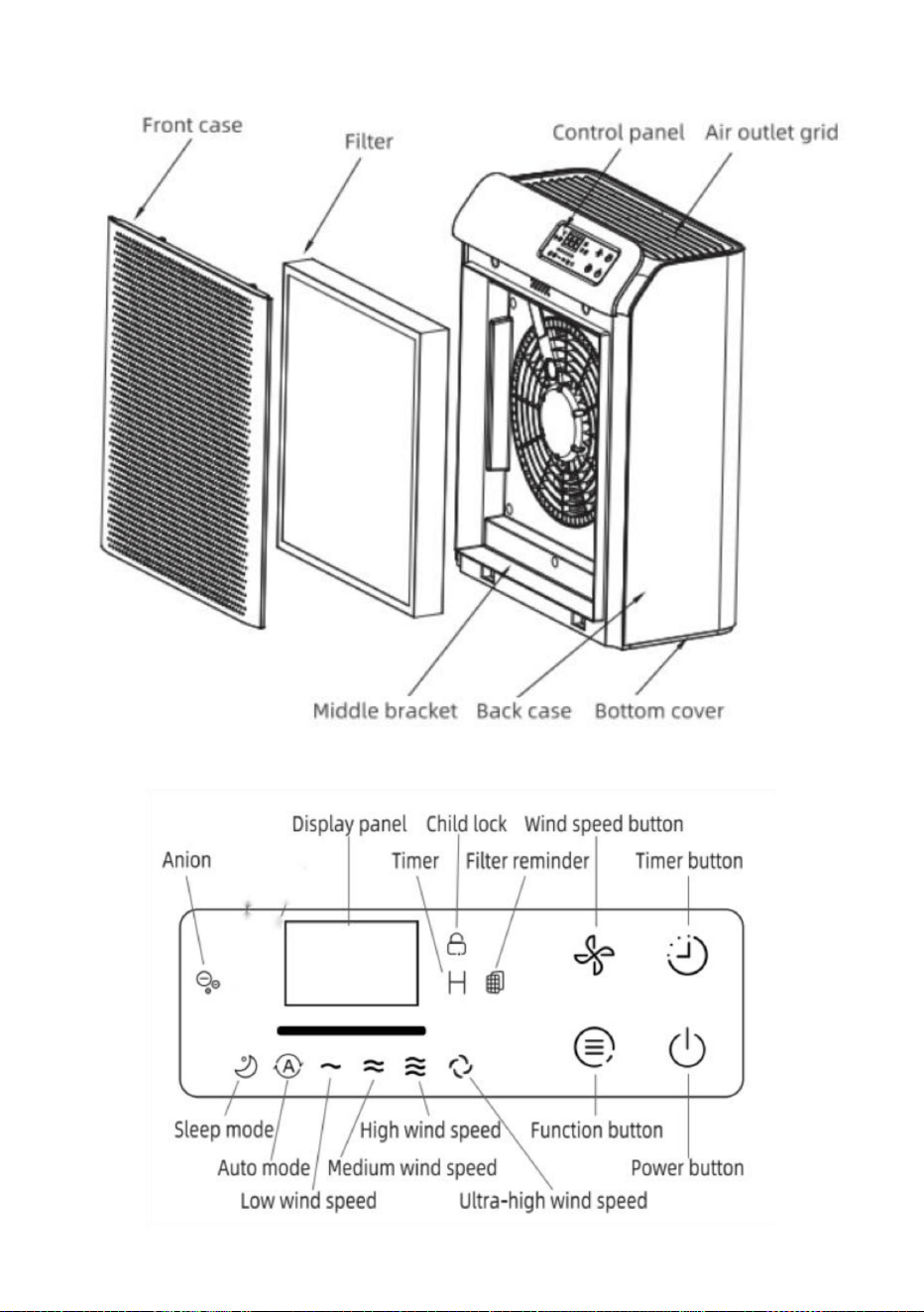
5
Machine Translated by Google

rozmiar produktu
6
32 W
Instrukcje dotyczące przycisków:
aktualna wartość PM2,5. Naciśnij ponownie przycisk zasilania, a urządzenie
Jeżeli włączasz maszynę po raz pierwszy, dotknięcie przycisku zasilania spowoduje:
100-240 V 50/60 Hz
powróci do trybu czuwania.
Przycisk zasilania
przejdzie w tryb czuwania.
3,56 kg
CADR
wykrywając, światło tła ustali kolor odpowiadający
moc
Wymiary: 316*158*398mm
zadzwoń raz, a wskaźnik zasilania zacznie słabo świecić, a urządzenie
Włączać do kontaktu
GANIMEDE
woltaż
Podłącz, a następnie wszystkie wskaźniki LED zaświecą się na około 1 sekundę. Brzęczyk będzie
Instrukcja obsługi:
waga produktu
PM2.5 przez około 10 sekund. Podczas tego procesu panel wyświetlacza będzie utrzymywał
przycisk (UV/Anion), przycisk timera i przycisk prędkości wiatru.
Model
średnia prędkość wiatru zaświeci się. Maszyna wykryje wartość
pokazując „---” i światło tła będzie stale zmieniać kolor. Po
300m³/godz.
Na panelu znajdują się 4 przyciski dotykowe, w tym przycisk zasilania, przycisk funkcyjny
spraw, aby działał przy średniej prędkości wiatru i wskaźnikach wszystkich przycisków i
02 / Specyfikacja
03 / Instrukcje
Machine Translated by Google

7
odpowiednia prędkość wiatru zgodnie z wykrytą wartością interwału
wyłączenie. A światło tła naprawi kolor odpowiadający
z timerem. Po ustawieniu timera maszyna pracuje o ustalonej porze.
Aby odblokować, ponownie przytrzymaj przycisk funkcyjny przez 3 sekundy.
maszyna pracuje przy niskiej prędkości wiatru, bez zapalania światła przy niskiej prędkości wiatru
powróci do trybu czuwania.
Wartość PM2.5. Maszyna automatycznie przejdzie w tryb czuwania przy
W stanie roboczym dotknij przycisku prędkości wiatru, aby dostosować
i kontrolka snu przygasają, a inne diody LED wyłączają się. Dotknięcie dowolnego przycisku
W trybie automatycznym odpowiednia kontrolka zapala się, a maszyna pracuje z prędkością
następnie maszyna będzie pracować z prędkością wiatru ustawioną przed ostatnim razem
Po naciśnięciu przycisku wyświetlacz cyfrowy zmienia się synchronicznie
Przycisk funkcyjny
przycisk przez 3 sekundy, aby aktywować blokadę dziecięcą. Wskaźnik blokady dziecięca na
po dotknięciu przycisku kontrolki prędkości wiatru zmieniają się synchronicznie
Po 5 sekundach bezczynności wyświetlacz cyfrowy powraca do wyświetlania
aktualna wartość PM2,5. Naciśnij ponownie przycisk zasilania, a urządzenie
Moduł PM2.5. W trybie uśpienia odpowiedni wskaźnik zapala się, a
Przycisk timera
nieskuteczne w tym trybie, a kontrolka blokady dziecięcej będzie migać przez 2 sekundy.
zaplanowany czas.
Przycisk prędkości wiatru
wskaźnik. Po 5 sekundach bezczynności przycisku, wskaźnik zasilania zaświeci się
ponownie aktywuje interfejs wyświetlacza.
tryb prędkości wiatru pomiędzy: trybem uśpienia, trybem automatycznym, niską prędkością
wiatru, średnią prędkością wiatru, wysoką prędkością wiatru i ultra wysoką prędkością wiatru. Podczas
Ten przycisk może również działać jako przycisk blokady dziecięcej. Długie dotknięcie funkcji
prawa strona panelu zostanie podświetlona. Dotknięcie innych przycisków będzie
Podczas pracy dotknij przycisku timera, aby ustawić timer na 2, 4, 8, 16, 24 godziny lub anulować
timer.
Jeżeli nie jest to pierwsze włączenie urządzenia, naciśnij przycisk zasilania
z trybem prędkości wiatru.
Machine Translated by Google

04 /Wymiana filtra
Wartość PM2,5 i odpowiadające jej kolory
około 3 sekundy, aż usłyszysz sygnał dźwiękowy, a następnie urządzenie wyczyści
Nie czyścić filtra odkurzaczem.
dane i zresetuj timer. Filtr w kontrolce wyłączy się.
W trybie czuwania naciśnij i przytrzymaj przycisk prędkości wiatru i przycisk timera, aby
Przed wymianą filtra należy wyłączyć oczyszczacz powietrza i odłączyć go od zasilania.
wypłukane lub ponownie użyte.
wymieniając filtr, przytrzymaj przycisk zasilania przez około 7 sekund, aby wyczyścić
Zresetuj czas pracy filtra
PM2.5>150ug Zły: Czerwony
wskaźnik miga, wskazując, że filtr należy wymienić. Po
Uwagi: Proszę regularnie usuwać kurz z filtra. Filtr nie może być
spadnie do 0%, proszę wymienić filtr. Proszę użyć oryginalnego filtra z
100ug<PM2.5<=150ug Normalny: Pomarańczowy
Po przepracowaniu przez maszynę ponad 2200 godzin filtr
Invitop. Nie używaj żadnych innych filtrów.
PM2.5<=50ug Doskonały: Niebieski
Przypomnienie o wymianie filtra
50ug<PM2.5<=100ug Dobrze: Zielony
Gdy na panelu wyświetlacza pojawi się informacja o upływie okresu eksploatacji filtra
zgodnie z wartością PM2,5.
Gdy całkowity czas pracy oczyszczacza powietrza osiągnie 2200
godzin, należy wymienić filtr.
W stanie roboczym światło RGB będzie wyświetlać różne kolory
dane dotyczące czasu pracy filtra i rozpocząć liczenie od nowa.
Należy regularnie wystawiać filtr na bezpośrednie działanie promieni słonecznych w celu sterylizacji.
8
Machine Translated by Google

05 / Konserwacja
Notatki
3. Wyczyść wlot/wylot powietrza i przetrzyj obudowę oczyszczacza powietrza neutralnym płynem.
2. Wyjmij filtr i usuń kurz z jego zewnętrznej powierzchni;
2. Wyjmij filtr i usuń kurz z jego zewnętrznej powierzchni;
przewód zasilający;
1. Wyłącz maszynę i odłącz wtyczkę zasilającą, ułóż i zwiąż
gniazdka elektrycznego przed wyjęciem/zamontowaniem filtra.
1. Wyłącz maszynę i odłącz zasilacz;
Czyszczenie
najpierw filtr. Upewnij się, że odłączyłeś adapter oczyszczacza powietrza od
Składowanie
Uwagi: Podczas czyszczenia otworu wylotowego powietrza należy unikać dostania się wody.
Przed użyciem nowego produktu należy usunąć opakowanie.
• Nie czyścić filtra odkurzaczem.
kapanie do maszyny.
łatwopalne detergenty (takie jak wybielacz lub alkohol).
Usuń materiały opakowaniowe filtra
• Filtra nie można płukać.
4. Po wysuszeniu oczyszczacza powietrza zamontuj filtr w oczyszczaczu powietrza i
• Nie zanurzaj oczyszczacza powietrza w wodzie ani żadnych płynach.
• Nie czyść żadnych części oczyszczacza powietrza środkami ściernymi, żrącymi lub
Można go włączyć i używać.
detergent i miękka ściereczka;
• Przed przystąpieniem do konserwacji należy wyłączyć oczyszczacz powietrza i odłączyć go od zasilania.
detergent i miękka bawełniana ściereczka;
3. Wyczyść wlot/wylot powietrza i przetrzyj obudowę maszyny neutralnym płynem.
9
Machine Translated by Google

06 / Rozwiązywanie problemów
- Czy wyłącznik różnicowoprądowy lub bezpiecznik w domu są wyłączone?
- Czy urządzenie jest przechylone?
- Czy jest podłączony do gniazdka? Czy nastąpiła przerwa w
dostawie prądu?
Znaczny hałas
- Aby zresetować, naciśnij przycisk zasilania na 7 sekund
Problem
- Czy coś utknęło na wentylatorze w wylocie powietrza?
- Czy wlot/wylot powietrza urządzenia jest zablokowany przez coś?
Rozwiązania
Przypomnienie
sprawa.
staje się mniejszy
- Jeżeli z urządzenia wydobywa się zapach spalenizny, należy
odłączyć urządzenie od gniazdka elektrycznego i skontaktować
się ze sprzedawcą lub działem obsługi klienta.
- Czy na powierzchni oryginalnego filtra znajduje się kurz?
4. Zabezpiecz maszynę osłoną przeciwpyłową/workiem i umieść ją w dobrze wentylowanym
miejscu, bez bezpośredniego światła słonecznego, po wyschnięciu korpusu maszyny; 5. Gdy oczyszczacz
powietrza nie będzie używany przez dłuższy czas, należy go od czasu do czasu włączyć na kilka
minut, aby zapewnić dobrą wydajność.
Objętość powietrza
- Oczyszczacze powietrza mogą wydzielać zapach plastiku podczas
pierwszych kilku użyć. Jeśli filtry są brudne, oczyszczacze powietrza
będą również wydzielać nieprzyjemny zapach. Wyczyść lub
wymień filtr w tym
- Co się stanie, jeśli filtr straci żywotność?
Nieprzyjemny zapach
Nie działa
- Jeżeli nie występują powyższe przyczyny, można ustawić
niższą prędkość wiatru.
10
Machine Translated by Google

11
start.
Uwagi: Jeżeli którejkolwiek z powyższych usterek nie da się usunąć, a filtra nie da się
wypłukać lub ponownie użyć i konieczna jest naprawa, skontaktuj się ze sprzedawcą lub
punktem obsługi klienta i nie rozbieraj oczyszczacza powietrza odłączonego od zasilania bez
upoważnienia.
wymiana filtra nadal miga
po wymianie nowego filtra
maszyna i licznik żywotności filtra będą
Wsparcie techniczne i certyfikat gwarancji elektronicznej
www.vevor.com/support
Machine Translated by Google

MODEL: GANYMEDE
"Save Half", "Half Price" of andere soortgelijke uitdrukkingen die wij gebruiken, geven alleen
een schatting weer van de besparingen die u kunt behalen door bepaalde gereedschappen bij ons
te kopen in vergelijking met de grote topmerken en betekent niet noodzakelijkerwijs dat alle categorieën
gereedschappen die wij aanbieden, worden gedekt. Wij herinneren u eraan om zorgvuldig te
controleren of u daadwerkelijk de helft bespaart in vergelijking met de grote
topmerken wanneer u een bestelling bij ons plaatst.
Wij streven er voortdurend naar om u gereedschappen tegen concurrerende prijzen te leveren.
LUCHTREINIGER
Technische ondersteuning en e-garantiecertificaat www.vevor.com/support
Machine Translated by Google
HULP NODIG? NEEM CONTACT MET ONS OP!
1
Heeft u vragen over het product? Heeft u technische ondersteuning nodig? Neem dan gerust
contact met
ons op: Technische ondersteuning en E-garantiecertificaat
www.vevor.com/support
MODEL: GANYMEDE
Dit is de originele instructie, lees alle handleidingen zorgvuldig door voordat u het
product gebruikt. VEVOR behoudt zich een duidelijke interpretatie van onze gebruikershandleiding
voor. Het uiterlijk van het product is afhankelijk van het product dat u hebt ontvangen.
Vergeef ons dat we u niet opnieuw zullen informeren als er technologie- of software-updates
voor ons product zijn.
Luchtreiniger
Machine Translated by Google

2. Gebruik geen water of andere vloeistoffen of ontvlambare reinigingsmiddelen om het apparaat schoon te maken.
WAARSCHUWING - Om het risico op brand, elektrische schokken of letsel te verminderen
om deze veiligheidsvoorziening te omzeilen.
reinigingsmiddelen om elektrische schokken en brand te voorkomen.
SNELHEID IN SOLID-STATE.
WAARSCHUWING: NIET GESCHIKT VOOR REGELAARS
stekker. Als het nog steeds niet past, neem dan contact op met een gekwalificeerde elektricien. Probeer niet om
1. Houd het product uit de buurt van water of andere vloeistoffen of ontvlambare stoffen.
Waarschuwing voor gevaar1.
Deze ventilator is voorzien van een solid-state snelheidsregelapparaat.
stopcontact maar één kant op. Als de stekker niet helemaal in het stopcontact past, draai de stekker dan om
Waarschuwing voor veiligheid
referentie.
WAARSCHUWING - Om het risico op brand of elektrische schokken te verminderen, mag u dit apparaat niet gebruiken.
om het risico op een elektrische schok te verminderen, is deze stekker bedoeld om in een gepolariseerde
2. Als het netsnoer beschadigd is, moet het vervangen worden door elektriciens of
Lees de gebruiksaanwijzing zorgvuldig door voordat u het product gebruikt en bewaar deze voor toekomstig gebruik.
LEES EN BEWAAR DEZE INSTRUCTIES.
Fabrikant.
Dit apparaat heeft een gepolariseerde stekker (één pen is breder dan de andere).
parfum rondom het product.
3. Spuit geen ontvlambare materialen zoals pesticiden of
Vervangende onderdelen die niet door de fabrikant zijn aanbevolen
Controleer de lokale netspanning voordat u het product op het elektriciteitsnet aansluit.
levering.
product om elektrische schokken en brand te voorkomen.
Personen, Niet Gebruiken
1. Controleer of de spanning van het product overeenkomt met de
01 / Voorzorgsmaatregelen
2
Machine Translated by Google

3
product. Laat geen kinderen het product schoonmaken en onderhouden
product is beschadigd.
4. Zorg ervoor dat u het product op een stabiele, vlakke en
Waarschuwing voor gebruik
5. Voor de inlaat van de
de luchtuitlaat of vóór de luchtinlaat.
inlaat.
opvang, of de afzuigkap die gebruikt wordt om te koken.
uitlaat van het product.
3. Gebruik het product niet als de stekker, het netsnoer of de
personeel om het product te gebruiken. Laat geen kinderen met de
3. Plaats niets op het product.
condenswater dat in het product druppelt.
beperkingen, psychische stoornissen of zonder relevante ervaring en vaardigheden
horizontaal oppervlak.
4. Blokkeer de luchtinlaat en -uitlaat niet, plaats bijvoorbeeld geen voorwerpen op
zonder toezicht.
het product heeft slecht contact. Zorg ervoor dat de aangesloten voeding
a) Dit apparaat kan worden gebruikt door
kinderen vanaf 8 jaar en ouder
product, en er moet een minimale vrije ruimte van 50 cm boven de lucht worden gereserveerd
5. Zorg ervoor dat er geen vreemde stoffen via de lucht in het product terechtkomen.
1. Dit product is geen vervanging voor normale ventilatie, dagelijkse stofafzuiging en
2. De stekker van het product kan verhit raken als het stopcontact
6. Het product mag niet worden bediend door personen met een lichamelijke beperking.
6. Plaats het product niet direct onder de airconditioner om lekkage te voorkomen.
stopcontact goed contact maakt.
gespecialiseerde professionals om gevaren te voorkomen.
(inclusief kinderen), tenzij ze instructies of uitleg krijgen van de veiligheidsfunctionaris.
7. Controleer voordat u het product inschakelt of het filterscherm en
Machine Translated by Google

4
c) Reinig het oppervlak van het product met handschoenen, een schone doek en een
11. Steek geen vingers of andere voorwerpen in de luchtinlaat of -uitlaat om
b) Het apparaat mag uitsluitend worden gebruikt met de meegeleverde adapter.
10. Stoot niet met harde voorwerpen op dit product (vooral niet op de luchtuitlaat).
en inlaat).
Verplaats het product door aan het netsnoer te trekken of te rukken.
op de hoogte zijn van de gevaren en deze begrijpen. (Voor de EU) •
kinderen mogen niet met het apparaat spelen.
toezicht of instructies krijgen over het gebruik van het apparaat op een veilige manier
andere doeleinden.
14. Koppel de voeding los voordat u het product verplaatst.
mentale vermogens of gebrek aan ervaring en kennis als ze zijn
andere levens in gevaar brengen. Verbrand het filterscherm niet en gebruik het niet op een andere manier voor
of het uitvoeren van onderhoud.
• Dit apparaat kan worden gebruikt door personen met een lichamelijke, zintuiglijke of verstandelijke beperking.
9. Verbranding van het filterscherm kan onherstelbare schade veroorzaken of
insectenwerende middelen of op plaatsen vol olie, brandbaar gas of chemische rook.
13. Zorg ervoor dat u het product na gebruik en vóór het schoonmaken uit het stopcontact haalt
onder toezicht.
8. Gebruik alleen het originele filterscherm dat is ontworpen door Invitop. Gebruik geen
andere filterschermen.
12. Gebruik dit product niet als u binnenshuis een insectenspray gebruikt
zachte borstel.
voorkomen dat het product fysiek beschadigd raakt of defect raakt.
Machine Translated by Google
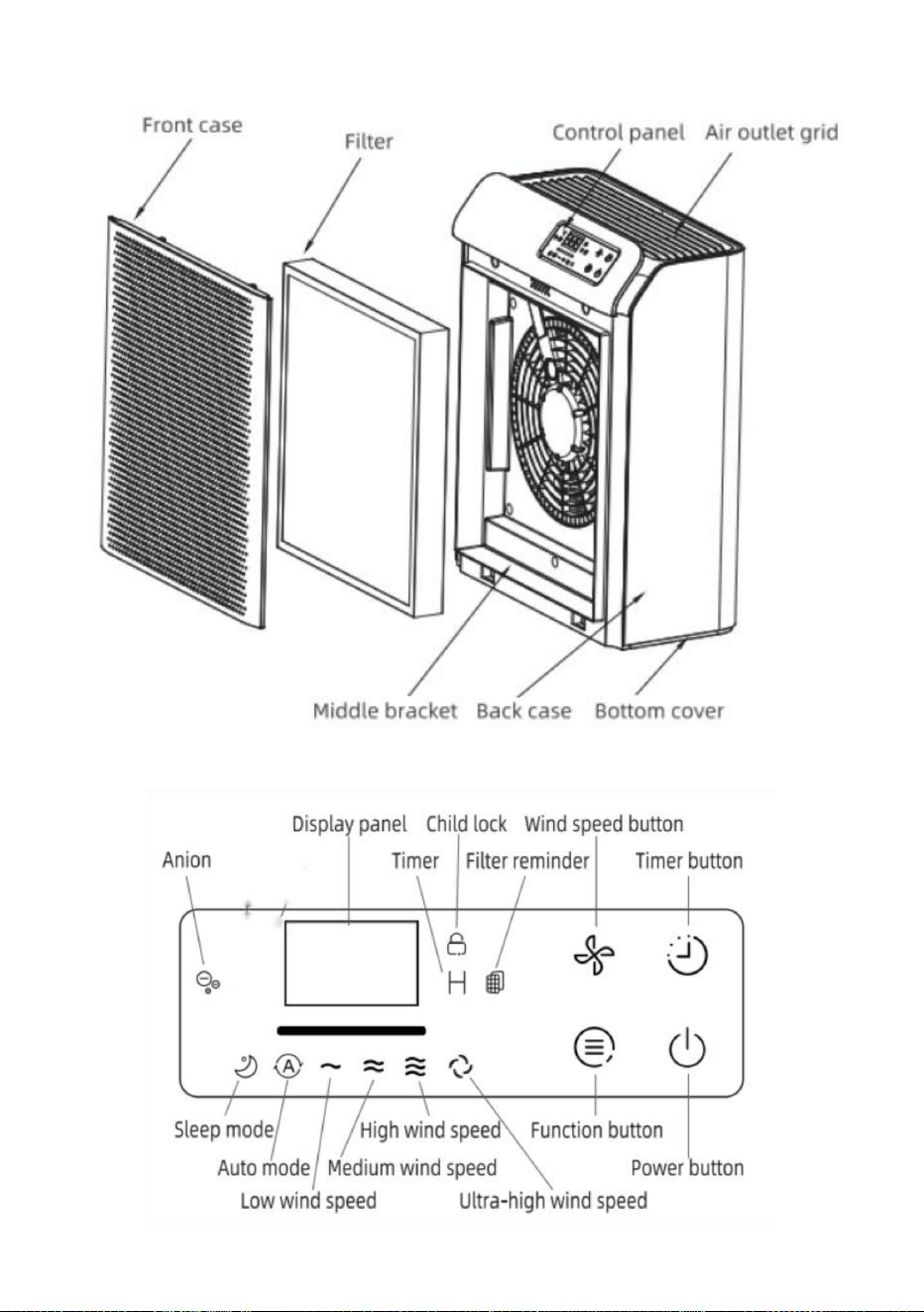
5
Machine Translated by Google

productgrootte
6
300m³/u
Er zijn 4 aanraakknoppen op het paneel, waaronder de aan/uit-knop, de functieknop en de aan/uit-knop.
Als u de machine voor het eerst inschakelt, zal het aanraken van de aan/uit-knop
32W
Knoppen Instructies:
Aan/uit-knop
laat het draaien op een gemiddelde windsnelheid, en de indicatoren van alle knoppen en
100-240Vÿ 50/60Hz
CADR
3,56kg
gaat naar de stand-bymodus.
zal de stand-bymodus hervatten.
316*158*398mm
stroom
bel voor een keer en de stroomindicator zal zwakjes oplichten, en de machine
detecteren, zal het achtergrondlicht de kleur vastleggen die overeenkomt met de
huidige waarde van PM2.5. Raak de aan/uit-knop nogmaals aan en het apparaat start
GANYMEDES
spanning
Inpluggen
Steek de stekker in het stopcontact, dan zullen alle LED-indicatoren ongeveer 1 seconde oplichten. De zoemer zal
productgewicht
Gebruiksaanwijzing:
PM2.5 gedurende ongeveer 10 seconden. Tijdens dit proces blijft het displaypaneel
"---" weergeven en de achtergrondverlichting verandert constant van kleur. Na
Model
knop (UV/Anion), timerknop en windsnelheidsknop.
gemiddelde windsnelheid zal oplichten. De machine zal de waarde van detecteren
02 / Specificatie
03 / Instructies
Machine Translated by Google

7
overeenkomstige windsnelheid volgens de gedetecteerde intervalwaarde van de
afsluiten. En het achtergrondlicht zal de kleur fixeren die overeenkomt met de
met de timer. Na het instellen van de timer werkt de machine op een vaste tijd.
Om te ontgrendelen, houdt u de functietoets nogmaals 3 seconden lang ingedrukt.
de machine draait bij lage windsnelheid, zonder de lage windsnelheid te verlichten
PM2.5-waarde. De machine gaat automatisch in de stand-bymodus bij de
zal de stand-bymodus hervatten.
In de werkende staat, raak de windsnelheidsknop aan om de
en slaapindicator licht dimmen, en andere LED's gaan uit. Als u een knop aanraakt
Functieknop
dan zal de machine draaien op de windsnelheid die voor de laatste keer is ingesteld
In de automatische modus licht het bijbehorende indicatielampje op en draait de machine op
Bij het aanraken van de knop verandert het digitale displaypaneel synchroon
knop 3 seconden ingedrukt om het kinderslot te activeren. De kinderslotindicator op de
de knop raakt, de windsnelheidsindicatorlampjes veranderen synchroon
Na 5 seconden zonder bediening keert het digitale display terug naar de weergave van de
huidige waarde van PM2.5. Raak de aan/uit-knop nogmaals aan en het apparaat start
PM2.5-module. In de slaapstand licht de bijbehorende indicator op en
Timerknop
in deze modus niet effectief en knippert de kinderslotindicator gedurende 2 seconden.
geplande tijd.
Windsnelheidsknop
indicator. Na 5 seconden zonder bediening van de knop, gaat het stroomindicatorlampje uit
activeert de weergave-interface opnieuw.
windsnelheidsmodus tussen: slaapmodus, automatische modus, lage windsnelheid,
gemiddelde windsnelheid, hoge windsnelheid en ultrahoge windsnelheid. Tijdens
Deze knop kan ook functioneren als kinderslotknop. Raak de functie lang aan
Als het apparaat aan staat, kunt u met de timerknop de timer instellen op 2, 4, 8, 16 of 24 uur,
of de timer annuleren.
Als het niet de eerste keer is dat u het apparaat inschakelt, raakt u de aan/uit-knop aan
met de windsnelheidsmodus.
rechterkant van het paneel zal oplichten. Het aanraken van andere knoppen zal
Machine Translated by Google

04 / Het filter vervangen
In werkende staat zal het RGB-licht verschillende kleuren weergeven
gegevens over de werktijd van het filter en begin opnieuw met tellen.
Gebruik geen stofzuiger om het filter schoon te maken.
PM2.5-waarde en bijbehorende kleuren
In de stand-bymodus houdt u de windsnelheidsknop en de timerknop lang ingedrukt
ongeveer 3 seconden totdat de zoemer piept, dan zal de machine de
Zorg ervoor dat u de luchtreiniger uitschakelt en de stekker uit het stopcontact haalt voordat u het filter vervangt.
data en reset de timer. Het filter in de indicator schakelt uit.
het vervangen van het filter, houd de aan/uit-knop ongeveer 7 seconden ingedrukt om het filter te wissen
De werktijd van het filter resetten
gespoeld of hergebruikt.
Plaats het filter regelmatig in direct zonlicht om het te steriliseren.
indicator knippert, wat aangeeft dat het filter vervangen moet worden. Na
PM2.5>150ug Slecht: Rood
Opmerkingen: Verwijder regelmatig het stof op het filter. Het filter kan niet worden
Wanneer de machine meer dan 2200 uur heeft gedraaid, wordt het filter
100ug<PM2.5<=150ug Normaal: Oranje
daalt tot 0%, vervang het filter. Gebruik het originele filter van
Invitop. Gebruik geen andere filters.
Herinnering voor vervanging van filter
PM2.5<=50ug Uitstekend: Blauw
50ug<PM2.5<=100ug Goed: Groen
Wanneer het displaypaneel de levensduur van het filter aangeeft
uren, vervang dan het filter.
volgens de PM2.5-waarde.
Wanneer de totale bedrijfstijd van de luchtreiniger 2200 bereikt,
8
Machine Translated by Google

05 / Onderhoud
• Zorg ervoor dat u de luchtreiniger uitschakelt en de stekker uit het stopcontact haalt voordat u onderhoud uitvoert.
wasmiddel en zachte katoenen doek;
2. Haal het filter eruit en verwijder het stof van het buitenste oppervlak van het filter;
Notities
2. Haal het filter eruit en verwijder het stof van het buitenste oppervlak van het filter;
3. Reinig de luchtinlaat/-uitlaat en veeg de behuizing van de luchtreiniger schoon met een neutrale doek.
het netsnoer;
3. Reinig de luchtinlaat/-uitlaat en veeg de machinebehuizing schoon met een neutrale
stopcontact voordat u het filter verwijdert/installeert.
1. Schakel het apparaat uit en haal de stroomadapter uit het stopcontact;
1. Schakel de machine uit en trek de stekker uit het stopcontact, schik en bundel
filter eerst. Zorg ervoor dat u de adapter van de luchtreiniger uit het stopcontact haalt.
Schoonmaak
Opslag
Verwijder het verpakkingsmateriaal van het nieuwe product voordat u het gebruikt.
• Gebruik geen stofzuiger om het filter schoon te maken.
Opmerkingen: Bij het afvegen van de luchtuitlaat moet worden voorkomen dat er water in komt.
druppelt in de machine.
Verwijder de verpakkingsmaterialen van het filter
• Het filter kan niet worden uitgespoeld.
ontvlambare reinigingsmiddelen (zoals bleekmiddel of alcohol).
kan het aanzetten voor gebruik.
• Dompel de luchtreiniger niet onder in water of andere vloeistoffen. • Reinig
geen onderdelen van de luchtreiniger met schurende, bijtende of
4. Nadat de luchtreiniger is gedroogd, installeert u het filter in de luchtreiniger en u
schoonmaakmiddel en zachte doek;
9
Machine Translated by Google

06 / Problemen oplossen
Werkt niet
- Als bovenstaande redenen niet gelden, kunt u de
windsnelheid verlagen.
- Is de aardlekschakelaar of zekering in huis doorgeslagen?
Aanzienlijk geluid
- Is het apparaat gekanteld?
- Zit de stekker in het stopcontact? Is er een stroomstoring?
Probleem
- Zit er iets vast op de ventilator in de luchtuitlaat?
- Druk op de aan/uit-knop om de 7S te resetten
Oplossingen
- Wordt de luchtinlaat/-uitlaat van het apparaat door iets
geblokkeerd?
De herinnering aan
wordt kleiner
geval.
- Als er een brandlucht uit het apparaat komt, haal dan de
stekker uit het stopcontact en neem contact op met de
verkoper of de klantenservice.
4. Bevestig het apparaat met de stofkap/zak en plaats het op een goed geventileerde
plaats zonder direct zonlicht nadat de behuizing van het apparaat is opgedroogd; 5. Wanneer de
luchtreiniger gedurende een bepaalde tijd niet wordt gebruikt, moet deze van tijd tot tijd
een paar minuten worden ingeschakeld om goede prestaties te garanderen.
Het luchtvolume
- Zit er stof op het oppervlak van het originele filter?
Vieze geur
- Als de levensduur van het filter verstreken is?
- Het is normaal dat luchtreinigers de eerste paar keer dat ze
worden gebruikt naar plastic ruiken. Als de filters vuil zijn, geven
de luchtreinigers ook een nare geur af. Maak het filter
schoon of vervang het in deze
10
Machine Translated by Google

11
Het vervangen van het
filter blijft knipperen nadat
het nieuwe filter is vervangen
Opmerkingen: Als een van de bovenstaande storingen niet kan worden verholpen en het
filter niet kan worden gespoeld of hergebruikt en reparatie noodzakelijk is, neem dan contact
op met de leverancier of het klantenservicecentrum en demonteer het luchtzuiveringsapparaat
niet zonder toestemming als het niet is aangesloten.
begin.
de machine en de levensduurteller van het filter zullen
Technische ondersteuning en e-garantiecertificaat
www.vevor.com/support
Machine Translated by Google

MODELL: GANYMEDE
Vi fortsätter att vara engagerade i att ge dig verktyg till konkurrenskraftiga priser.
"Spara hälften", "halva priset" eller andra liknande uttryck som används av oss
representerar bara en uppskattning av besparingar du kan dra nytta av att köpa vissa
verktyg hos oss jämfört med de stora toppmärkena och betyder inte nödvändigtvis att täcka
alla kategorier av verktyg som erbjuds av oss. Du påminns om att noggrant kontrollera
när du gör en beställning hos oss om du verkligen sparar hälften i
jämförelse med de främsta varumärkena.
LUFTRENARE
Teknisk support och e-garanticertifikat www.vevor.com/support
Machine Translated by Google
BEHÖVER HJÄLP? KONTAKTA OSS!
1
Har du produktfrågor? Behöver du teknisk support? Kontakta oss gärna: Teknisk support och
e-
garanticertifikat www.vevor.com/support
MODELL: GANYMEDE
Detta är den ursprungliga instruktionen, läs alla instruktioner noggrant innan du
använder den. VEVOR reserverar sig för en tydlig tolkning av vår användarmanual. Utseendet
på produkten är beroende av den produkt du fått. Ursäkta oss att vi inte kommer att
informera dig igen om det finns någon teknik eller mjukvaruuppdateringar på vår produkt.
Luftrenare
Machine Translated by Google

rengöringsmedel för att undvika elektriska stötar och brandkatastrofer.
HASTIGHET I SOLID TILLSTÅND.
förse.
besegra denna säkerhetsfunktion.
1. Håll produkten borta från vatten eller andra vätskor eller brandfarliga
VARNING: EJ LÄMPLIG FÖR REGULATORER
plugg. Om den fortfarande inte passar, kontakta en behörig elektriker. Försök inte
uttag endast på ett sätt. Om kontakten inte passar helt i uttaget, vänd på
Denna fläkt med valfri fast-tillstånd hastighetskontrollenhet.
Varning för fara1.
2. Om nätsladden är skadad måste den bytas ut av elektriker eller
VARNING- För att minska risken för brand eller elektriska stötar, använd inte
hänvisning.
minska risken för elektriska stötar, denna kontakt är avsedd att passa i en polariserad
Tillverkare.
Läs bruksanvisningen noggrant före användning och spara den för framtida bruk
LÄS OCH SPARA DESSA INSTRUKTIONER.
Denna apparat har en polariserad kontakt (det ena bladet är bredare än det andra). Till
3. Spraya inte lättantändliga material såsom bekämpningsmedel eller
parfym runt produkten.
Ersättningsdelar som inte har rekommenderats av The
Personer, Använd inte
produkt för att undvika elektriska stötar och brandkatastrofer.
1. Kontrollera om spänningen för produkten överensstämmer med
lokal nätspänning innan du ansluter produkten till elnätet
2. Använd inte vatten eller andra vätskor eller brandfarliga rengöringsmedel för att rengöra
VARNING- För att minska risken för brand, elektriska stötar eller skada på
Varning för säkerheten
01 / Försiktighetsåtgärder
2
Machine Translated by Google

3
anslutning av produkten har dålig kontakt. Se till att den anslutna strömmen
skärmskyddet är korrekt installerat. a) Denna
apparat kan användas av barn från 8 år och uppåt
horisontell yta.
4. Blockera inte luftintaget och utloppet, t.ex. placera inga föremål på
utan tillsyn.
produkt, och ett minsta utrymme på 50 cm bör reserveras ovanför luften
5. Låt inte främmande föremål komma in i produkten genom luften
1. Denna produkt ersätter inte normal ventilation, dagligt damm
2. Strömkontakten till produkten kan värmas upp om eluttaget
6. Produkten får inte användas av personer med fysiska
specialiserade yrkesmän för att förebygga faror.
(inklusive barn), såvida de inte instrueras eller förklaras av säkerheten
6. Placera inte produkten direkt under luftkonditioneringen för att förhindra
7. Innan du slår på produkten, se till att filterskärmen och
produkt. Låt inga barn rengöra och underhålla produkten
produkten är skadad.
4. Se till att placera och använda produkten på en stabil, platt och
uttaget är i god kontakt.
Varning för användning
luftutloppet eller framför luftintaget.
5. Ett minsta utrymme på 30 cm bör reserveras för inloppet av
inlopp.
samling, eller spiskåpan som används för matlagning.
produktens uttag.
kondensvatten droppar in i produkten.
funktionshinder, psykiska störningar eller utan relevant erfarenhet och kompetens
3. Undvik att använda produkten om nätkontakten, nätsladden eller den
personal för att använda produkten. Tillåt inga barn att leka med
3. Placera ingenting på produkten.
Machine Translated by Google

4
b) Apparaten får endast användas med den medföljande adaptern.
och inlopp).
sätt och förstå de risker som är involverade. (För EU) • barn får
inte leka med apparaten.
10. Slå inte på produkten med hårda föremål (särskilt luftutloppet).
flytta produkten genom att dra eller dra i nätsladden.
14. Koppla bort strömförsörjningen innan du flyttar produkten. Gör inte det
övervakning eller instruktioner angående användning av apparaten i ett kassaskåp
andra ändamål.
äventyra andra liv. Bränn inte filtersilen eller använd den på annat sätt till
mentala förmågor eller brist på erfarenhet och kunskap om de har varit det
eller utföra något underhåll.
repellenter eller på platser fulla av olja, brandfarlig gas eller kemikalierök.
• Denna apparat kan användas av personer med nedsatt fysisk, sensorisk eller
9. Förbränning av filtersilen kan orsaka oåterkalleliga skador eller
13. Se till att koppla ur produkten efter användning och före rengöring
8. Använd endast originalfilterskärmen designad av Invitop. Använd inga
under uppsikt.
andra filterskärmar.
förhindra att produkten skadas eller skadas fysiskt.
mjuk borste.
12. Använd inte denna produkt när du använder insekter av spraytyp inomhus
c) Rengör produktens yta med handskar med en ren trasa och a
11. För inte in fingrar eller andra föremål i luftintaget eller utloppet till
Machine Translated by Google
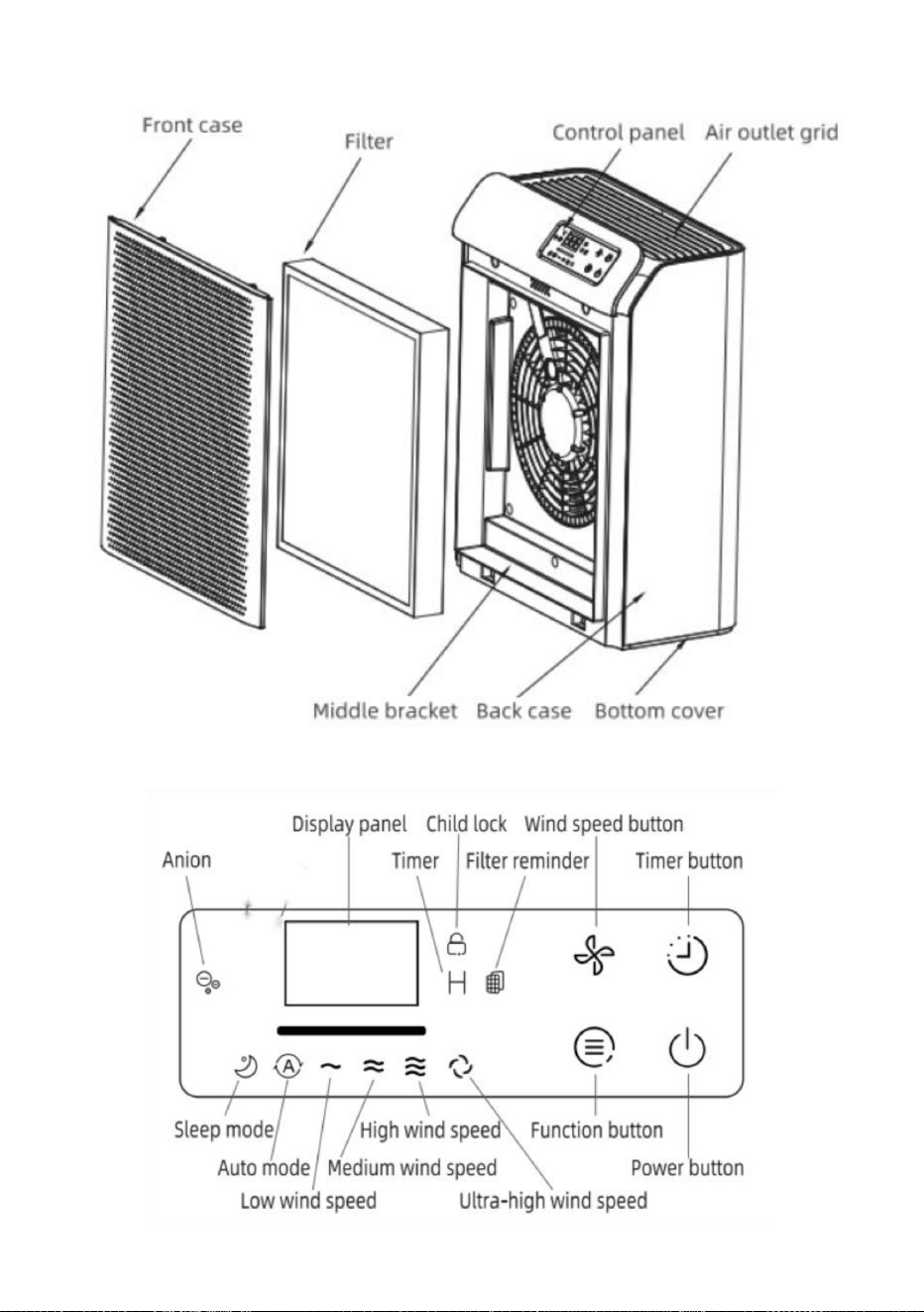
5
Machine Translated by Google

32W
Knappinstruktioner:
aktuellt värde på PM2,5. Tryck på strömbrytaren igen och maskinen
Om det är första gången du slår på maskinen, kommer att trycka på strömknappen
100-240Vÿ 50/60Hz
kommer att återuppta standbyläge.
Strömknapp
kommer att gå in i standbyläge.
3,56 kg
CADR
upptäcker, kommer bakgrundsljuset att fixa färgen som motsvarar
driva
316*158*398 mm
ring för en gångs skull och strömindikatorn tänds svagt och maskinen
Ansluta
GANYMEDE
spänning
Koppla in, sedan tänds alla LED-indikatorer i cirka 1s. Summern kommer
Bruksanvisning:
produktvikt
PM2,5 i cirka 10 s. Under denna process kommer displaypanelen att behålla
knapp (UV/Anion), timerknapp och vindhastighetsknapp.
Modell
medelvindhastighet tänds. Maskinen kommer att upptäcka värdet på
visar "---" och bakgrundsljuset kommer att ändra färg konstant. Efter
300m³/h
Det finns 4 pekknappar på panelen, inklusive strömknapp, funktion
få den att köras med medelvindhastighet, och indikatorer på alla knappar och
6
produktstorlek
03 / Instruktioner
02 / Specifikation
Machine Translated by Google

7
Timerknapp
ineffektiv i detta läge och barnlåsindikatorn blinkar i 2 sekunder.
Efter 5 sekunder utan användning återgår den digitala displayen till att visa
aktuellt värde på PM2,5. Tryck på strömknappen igen och maskinen
PM2.5 modul. I viloläge tänds motsvarande indikator, och
schemalagd tid.
Vindhastighetsknapp
indikator. Efter 5 sekunder utan knapptryckning tänds strömindikatorn
kommer att återaktivera displaygränssnittet.
vindhastighetsläge mellan: viloläge, autoläge, låg vindhastighet, medelvindhastighet,
hög vindhastighet och ultrahög vindhastighet. Under
Om det inte är första gången du slår på maskinen, tryck på strömknappen
med vindhastighetsläget.
Denna knapp kan även fungera som barnlåsknapp. Tryck länge på funktionen
höger sida av panelen kommer att lysa. Att trycka på andra knappar kommer att vara
motsvarande vindhastighet enligt det detekterade intervallvärdet för
stängning. Och bakgrundsljuset kommer att fixa färgen som motsvarar
med timern. Efter inställning av timern arbetar maskinen vid en fast tidpunkt.
Om den fungerar kan du trycka på timerknappen för att ställa in timern på 2, 4, 8, 16, 24
timmar eller avbryta timern.
För att låsa upp, tryck länge på funktionsknappen i 3 sekunder igen.
maskinen går med låg vindhastighet, utan att tända den låga vindhastigheten
kommer att återuppta standbyläge.
PM2,5 värde. Maskinen går automatiskt in i standby-läge vid
I tillståndet att arbeta, tryck på vindhastighetsknappen kan justera
och sömnindikatorlampan dämpas och andra lysdioder släcks. Tryck på valfri knapp
Funktionsknapp
knappen i 3 sekunder för att aktivera barnlåset. Barnlåsindikatorn på
Om du trycker på knappen ändras vindhastighetsindikatorerna synkront
då kommer maskinen att köra med den vindhastighet som ställts in före sista gången
I autoläge tänds motsvarande indikator och maskinen körs kl
När du trycker på knappen ändras den digitala displayen synkront
Machine Translated by Google

04 /Byte av filter
PM2,5-värde och motsvarande färger
ca 3 sekunder tills summern piper, då rensar maskinen
Använd inte en dammsugare för att rengöra filtret.
data och återställ timern. Filtret i indikatorn stängs av.
I standbyläge, tryck länge på vindhastighetsknappen och timerknappen för
Innan filterbyte, se till att stänga av och koppla ur luftrenaren.
sköljs eller återanvänds.
byt ut filtret, tryck länge på strömknappen i cirka 7 sekunder för att rensa
Återställ filtrets arbetstid
PM2.5>150ug Dålig: Röd
indikatorn blinkar, vilket indikerar att filtret måste bytas ut. Efter
Anmärkningar: Ta bort damm från filtret regelbundet. Filtret kan inte vara det
sjunker till 0 %, byt ut filtret. Använd originalfiltret från
När maskinen har varit igång i mer än 2200 timmar, filtret
100ug<PM2.5<=150ug Normal: Orange
Invitop. Använd inga andra filter.
PM2.5<=50ug Utmärkt: Blå
Påminnelse om filterbyte
50ug<PM2.5<=100ug Bra: Grönt
När displayen visar att filtrets livslängd
enligt PM2,5-värdet.
När den totala drifttiden för luftrenaren når 2200
timmar, byt ut filtret.
I tillståndet att fungera kommer RGB-ljuset att visa olika färger
data om filtrets arbetstid och börja räkna på nytt.
Ställ filtret regelbundet i direkt solljus för sterilisering.
8
Machine Translated by Google

05 / Underhåll
Anteckningar
3. Rengör luftintaget/utloppet och torka av luftrenarens skal med neutral
2. Ta ut filtret och ta bort damm på filtrets yttre yta;
2. Ta ut filtret och ta bort damm på filtrets yttre yta;
nätsladden;
1. Stäng av maskinen och dra ur kontakten, ordna och bunta
eluttag innan du tar bort/installerar filtret.
1. Stäng av maskinen och koppla ur nätadaptern;
Rengöring
filtrera först. Se till att koppla ur adaptern till luftrenaren från
Lagring
Anmärkningar: När du torkar av luftutloppet bör vatten förhindras från
Innan du använder den nya produkten, ta bort förpackningsmaterialet från den
• Använd inte en dammsugare för att rengöra filtret.
droppar in i maskinen.
brandfarliga rengöringsmedel (som blekmedel eller alkohol).
Ta bort filtrets förpackningsmaterial
• Filtret kan inte sköljas.
4. Efter att luftrenaren har torkat, installera filtret i luftrenaren, och du
• Sänk inte ned luftrenaren i vatten eller andra vätskor. • Rengör inte
några delar av luftrenaren med slipmedel, frätande eller
kan slå på den för användning.
tvättmedel och mjuk trasa;
• Se till att stänga av och koppla ur luftrenaren innan underhåll.
tvättmedel och mjuk bomullsduk;
3. Rengör luftintaget/utloppet och torka av maskinkroppen med neutral
9
Machine Translated by Google

06 / Felsökning
- Är hemläckagebrytaren eller säkringen avbruten?
- Lutas enheten?
- Är den ansluten till ett eluttag? Är det strömavbrott?
Betydande ljud
- Tryck på strömknappen för 7S för att återställa
Problem
- Har något fastnat på fläkten i luftuttaget?
- Är enhetens luftintag/utlopp blockerad av något?
Lösningar
Påminnelsen om
fall.
blir mindre
- Om den brinnande lukten avges från enheten, koppla ur
eluttaget och kontakta säljaren eller kundtjänst.
- Finns det damm på originalfiltrets yta?
4. Säkra maskinen med dammskyddet/påsen och placera den på en väl ventilerad
plats utan direkt solljus efter att maskinkroppen har torkat; 5. När luftrenaren lämnas oanvänd
under en tid, ska den vara påslagen i några minuter då och då för att säkerställa god
prestanda.
Luftvolymen
– Det är normalt att luftrenare kan lukta plast de första
gångerna de används. Om filtren är smutsiga kommer luftrenarna
också att avge otäck lukt. Rengör eller byt ut filtret i denna
- Om filtrets livslängd tar slut?
Otrevlig lukt
Fungerar inte
- Om inte ovanstående skäl kan du justera vindhastigheten
till lägre läge.
10
Machine Translated by Google

byte av filter fortsätter att
blinka efter att nytt filter har
bytts ut
Anmärkningar: Om något av ovanstående misslyckanden inte kan elimineras och filtret
inte kan sköljas eller återanvändas och reparation nödvändigtvis krävs, vänligen kontakta
säljaren eller kundtjänst, och ta inte isär den urkopplade luftrenaren utan tillstånd.
start.
maskinen och filtrets livslängdsräknare
Teknisk support och e-garanticertifikat
www.vevor.com/support
11
Machine Translated by Google