124
UN AÑO DE GARANTÍA LIMITADA
El fabricante garantiza este producto contra defectos de materiales y mano
de obra durante un período de UN (1) AÑO a partir de la fecha de compra
del producto por el comprador usuario final (“Período de Garantía”). Si
hay un defecto y una reclamación válida se recibe dentro del período
de garantía, el producto defectuoso puede ser reemplazado o reparado
en el las siguientes maneras: (1) Devuelva el producto al fabricante para
reparación o reemplazo, a opción del fabricante. La prueba de compra
puede ser requerida por el fabricante. (2) Devuelva el producto a la
tienda donde el producto fue comprado para un intercambio (siempre y
cuando se trate de un minorista participante). Devoluciones al minorista
deben hacerse dentro del plazo de póliza de devoluciones del minorista
para intercambios solamente (por lo general 30 a 90 días después de
la fecha de compra). La prueba de compra puede ser requerida por el
minorista. Por favor consulte la póliza de devoluciones del minorista sobre
devoluciones que están fuera del plazo establecido para intercambios.
Esta garantía no se aplica a los accesorios, bombillos, fusibles y baterías;
defectos a consecuencias de desgaste normal; accidentes; daños y
perjuicios sufridos durante el envío y manejo, alteraciones, reparaciones
o uso no autorizado, negligencia, abuso, y si no se siguen instrucciones
para el cuidado y mantenimiento del producto.
Esta garantía le otorga al comprador usuario final, derechos legales
específicos y usted puede tener otros derechos que varían de estado a
estado o de provincia a provincia. Este producto no está diseñado para
uso comercial.
Asegúrese de registrar su producto en https://www.baccusglobal.com/
registration para recibir información importante sobre el producto,
promociones y ofertas especiales, y más.
ESPECIFICACIONES
Amperios de impulso: 12V CC, 500A instante
Tipo de batería: De plomo sin necesidad de mantenimiento,
sellada, 12 voltios CC
Entrada de CA: 120V CA, 60Hz, 14W
Luz de área: 3 LED blancos
Puerto del USB: 5V CC, 2.1 A
Enchufe accesorio de la CC: 12V CC, 5A
Tomacorriente de la CA dual: 120V CA, 60Hz, 500W continuo
Presión máxima del aparato
para compresor: 120 PSI
Importados por Baccus Global LLC,
621 NW 53rd St., Suite 450, Boca Raton, FL 33487
www.Baccusglobal.com 1-877-571-2391
RD102621
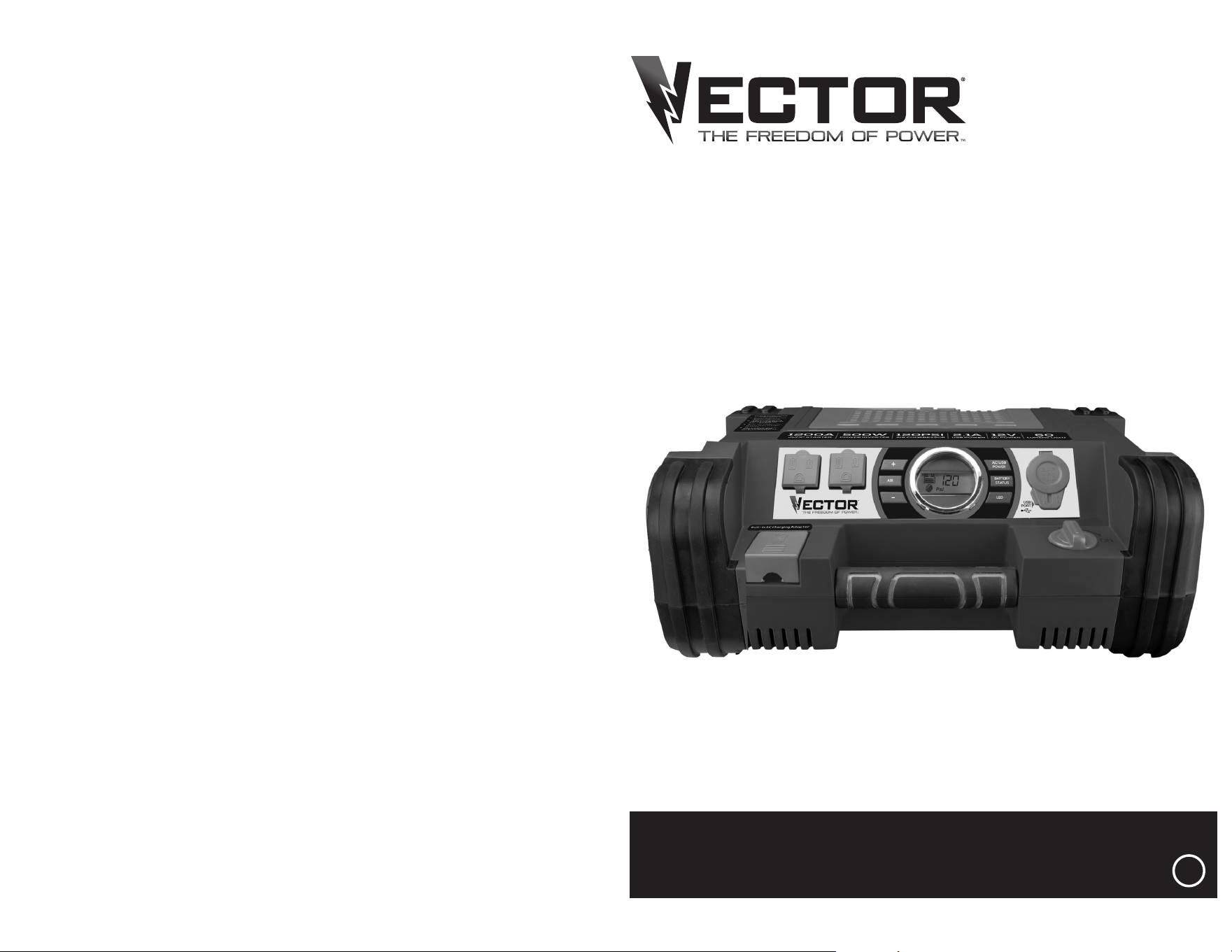
PROFESSIONAL POWER STATION
INSTRUCTION MANUAL
PPRH5V
SAVE THIS INSTRUCTION MANUAL FOR FUTURE REFERENCE.
© 2021 Baccus Global LLC
Boca Raton, FL 33487
(877) 571-2391
BC
2 3
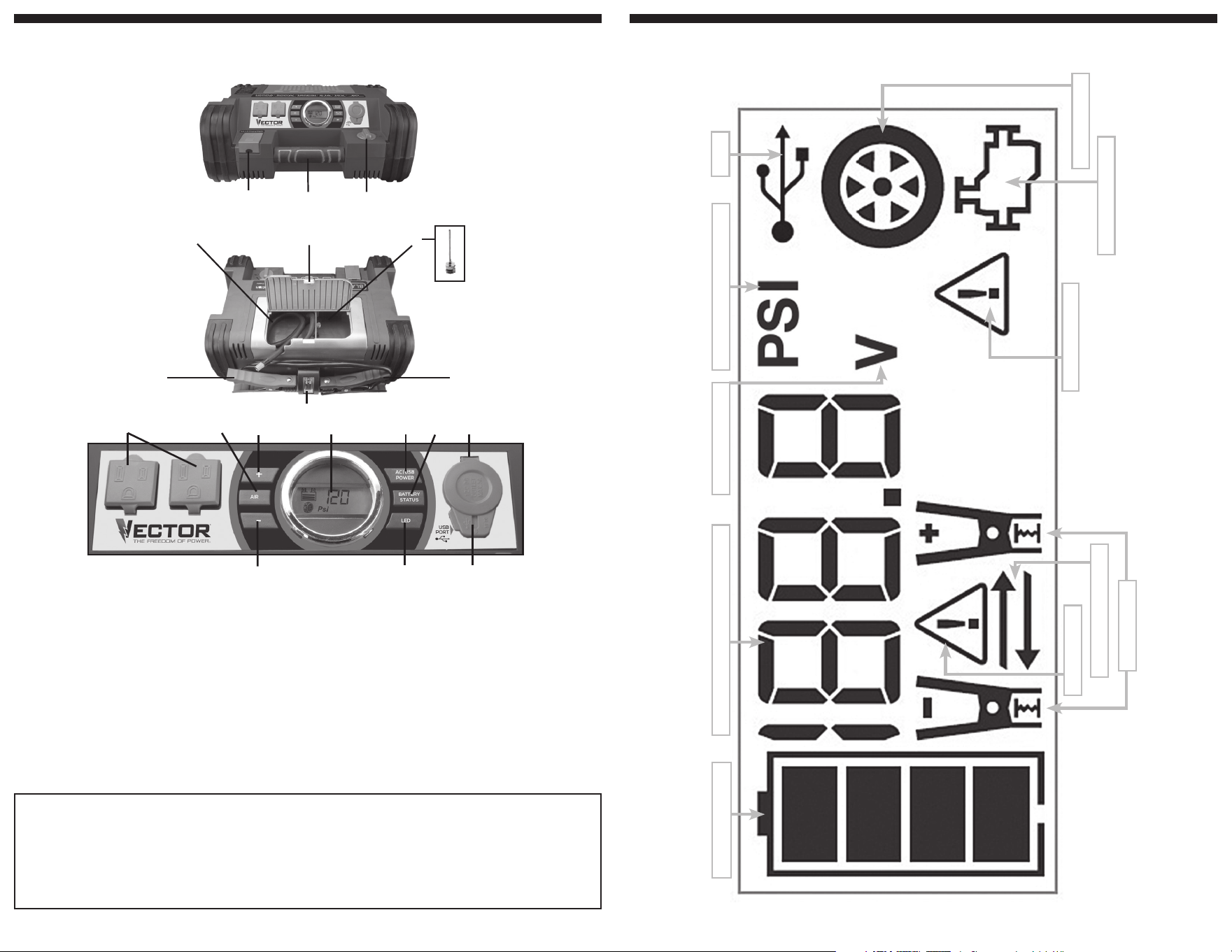
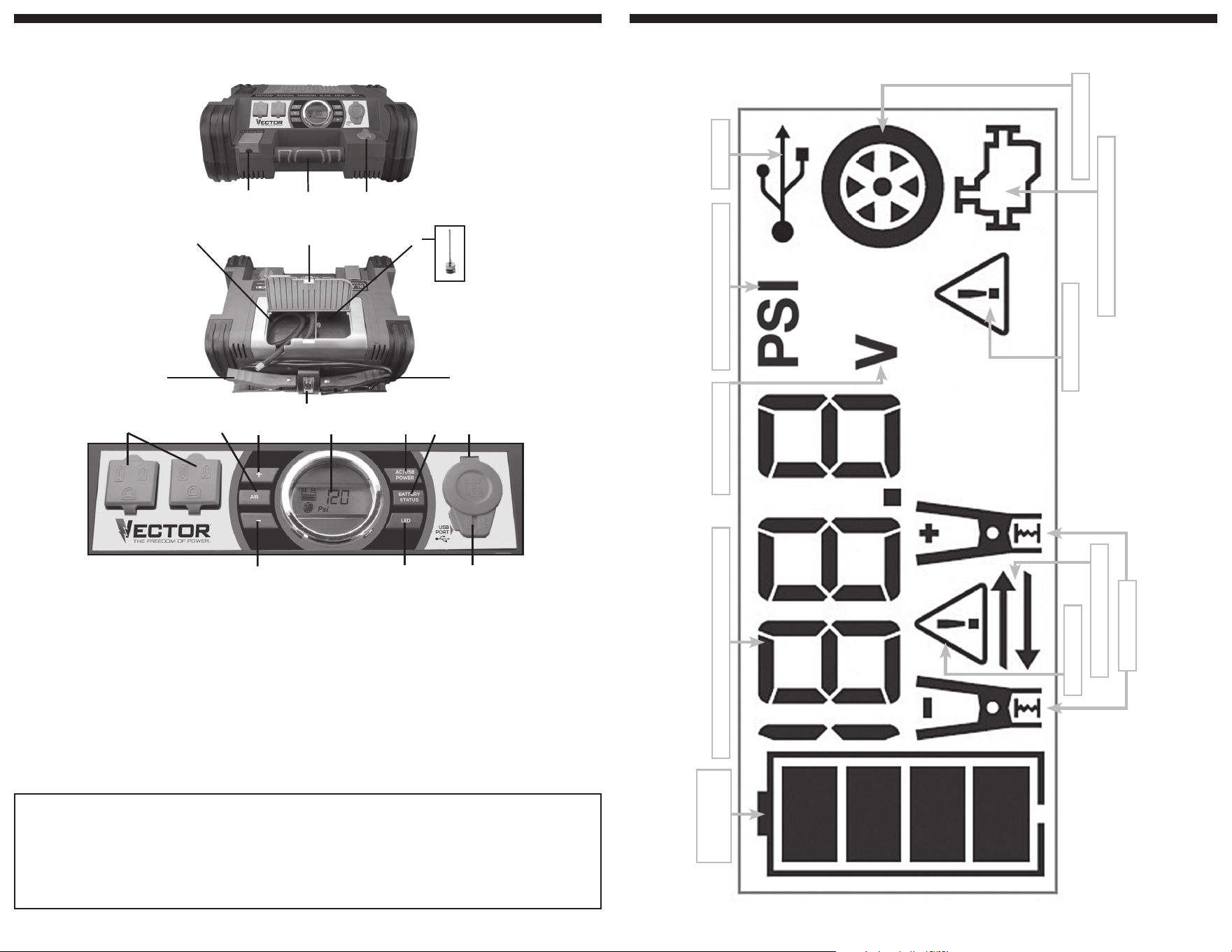
LCD DISPLAY DETAIL
BATTERY STATUS ICON
DIGITAL DISPLAY (VARIES BY FUNCTION)
ALARM ICON
REVERSE POLARITY ICONS
CLAMP ICONS
COMPRESSOR PRESSURE INDICATOR
USB ICON
COMPRESSOR ICON
JUMP STARTER ICON
FAULT ICON
VOLTAGE INDICATOR
This device complies with part 15 of the FCC rules. Operation is subject to the following two conditions: (1) this device may not cause harmful interference, and (2) this device must accept any interference
received, including interference that may cause undesired operation.
This equipment has been tested and found to comply with the limits for a Class B digital device, pursuant to part 15 of the FCC Rules. These limits are designed to provide reasonable protection against harmful
interference in a residential installation. This equipment generates, uses and can radiate radio frequency energy and, if not installed and used in accordance with the instructions, may cause harmful interference
to radio communications. However, there is no guarantee that interference will not occur in a particular installation. If equipment does cause harmful interference to radio or television reception, which can be
determined by turning the equipment off and on, the user is encouraged to try to correct the interference by one or more of the following measures:
• Reorient or relocate the receiving antenna.
• Increase the separation between equipment and receiver.
• Connect the equipment into an outlet on a circuit different from that to which the receiver is connected.
• Consult the dealer or an experienced radio/TV technician for help.
Changes or modifications not approved by the party responsible for compliance could void user’s authority to operate the equipment.
FEATURES
1. Built-in 120 volt AC charger (under protective cover)
2. Rubber grip handle
3. Jump-starter power switch
4. Air hose and Sure Fit
®
nozzle connector
5. Storage compartment cover
6. Nozzle adapter
7. Positive (+) red clamp
8. LED area light
9. Negative (–) black clamp
10. Dual 120 volt AC outlets (under protective covers)
11. Compressor power button
12. Compressor pressure control button (+)
13. LCD screen
14. AC/USB power button
15. Battery status button
16. 12 volt DC accessory outlet (under protective cover)
17. Compressor pressure control button (–)
18. LED area light power button
19. USB charging port (under protective cover)
FEATURES
5
4
6
7
8
9
1
2 3
10 11 12 13 15 16
17
18
14
19
4 5
WARNING: Risk of explosive gases
• Working in the vicinity of a lead acid battery is dangerous. Batteries
generate explosive gases during normal battery operation. For this reason,
it is of the utmost importance that each time before using the jump starter
you read this manual and follow instructions exactly.
• To reduce the risk of battery explosion, follow these instructions and those
published by the battery manufacturer and manufacturer of any equipment
you intend to use in the vicinity of the battery. Review cautionary markings
on these products and on the engine.
CAUTION – To reduce the risk of injury or property damage:
• NEVER ATTEMPT TO JUMP-START OR CHARGE A FROZEN BATTERY.
• Vehicles that have on-board computerized systems may be damaged if
vehicle battery is jump-started. Before jump-starting, read the vehicle’s
owner’s manual to confirm that external-starting assistance is suitable.
• Never smoke or allow a spark or flame in vicinity of vehicle battery, engine
or power station.
• Stay clear of fan blades, belts, pulleys, and other parts that can cause
injury to persons.
• Remove personal metal items such as rings, bracelets, necklaces and
watches when working with a lead acid battery. A lead acid battery can
produce a short circuit current high enough to weld a ring, or similar metal
object, to skin, causing a severe burn.
• Do not wear vinyl clothing when jump-starting a vehicle. Friction can
cause dangerous static-electrical sparks.
• Be extra careful to avoid dropping a metal tool onto the battery. It might
spark or short-circuit the battery or another electrical part and could cause
an explosion.
• Jump-start procedures should only be performed in a safe, dry, well-
ventilated area.
• Always store battery clamps when not in use. Never touch battery
clamps together. This can cause dangerous sparks, power arcing and/
or explosion.
• When using this unit close to the vehicle’s battery and engine, stand
the unit on a flat, stable surface, and be sure to keep all clamps, cords,
clothing and body parts away from moving vehicle parts.
• Never allow red and black clamps to touch each other or another
common metal conductor — this could cause damage to the unit and/or
create a sparking/explosion hazard.
a) For negative-grounded systems, connect the positive (red) clamp to
the positive ungrounded battery post and the negative (black) clamp
to the vehicle chassis or engine block away from the battery. Do not
connect the clamp to the carburetor, fuel lines or sheet-metal body
parts. Connect to a heavy gauge metal part of the frame or engine
block.
b) For positive-grounded systems, connect the negative (black) clamp
to the negative ungrounded battery post and the positive (red) clamp
to the vehicle chassis or engine block away from the battery. Do not
connect the clamp to the carburetor, fuel lines or sheet-metal body
parts. Connect to a heavy gauge metal part of the frame or engine
block.
• If the clamps are connected incorrectly with regard to polarity, the backlit
LCD screen will display the Battery Status Icon, Battery Voltage Indicator,
and the Clamp Icons. The Alarm Icon, the “+” and ”–” signs and the
Reverse Polarity Icons will flash and the unit will sound a continuous alarm
until the clamps are disconnected. Disconnect the clamps and reconnect
to battery with correct polarity.
• Always disconnect the negative (black) jumper cable first, followed by the
positive (red) jumper cable, except for positive grounded systems.
• Do not expose battery to fire or intense heat since it may explode. Before
disposing of the battery, protect exposed terminals with heavy-duty
electrical tape to prevent shorting (shorting can result in injury or fire).
• Place this unit as far away from the battery as cables permit.
• Never allow battery acid to come in contact with this unit.
• Do not operate this unit in a closed area or restrict ventilation in any way.
• This system is designed to be used only on vehicles with a 12 volt DC
battery system. Do not connect to a 6 volt or 24 volt battery system.
• This system is not designed to be used as a replacement for a vehicular
battery. Do not attempt to operate a vehicle that does not have a battery
installed.
• Excessive engine cranking can damage a vehicle’s starter motor. If
the engine fails to start after the recommended number of attempts,
discontinue jump-start procedures and look for other problems that may
need to be corrected.
• Do not use this jump starter on a watercraft. It is not qualified for marine
applications.
• Although this unit contains a non-spillable battery, it is recommended that
unit be kept upright during storage, use and recharging. To avoid possible
damage that may shorten the unit’s working life, protect it from direct
sunlight, direct heat and/or moisture.
SPECIFIC SAFETY INSTRUCTIONS FOR
INVERTERS
WARNING – To reduce the risk of electric shock:
• Do not connect to AC distribution wiring.
• Do not make any electrical connections or disconnections in areas
designated as IGNITION PROTECTED. This inverter is NOT approved for
ignition protected areas.
• Never immerse the unit in water or any other liquid, or use when wet.
WARNING – To reduce the risk of fire:
• Do not operate near flammable materials, fumes or gases.
• Do not expose to extreme heat or flames.
CAUTION – To reduce the risk of injury or property damage:
• Disconnect appliance plug from inverter outlet before attempting any
repairs to the appliance.
• When an appliance plugged into this unit is used outdoors, use only
extension cords intended for use outdoors and so marked.
• Do not attempt to connect the inverter while operating your vehicle. Not
paying attention to the road may result in a serious accident.
• Always use the inverter where there is adequate ventilation.
• Always turn the inverter off when not in use.
• Keep in mind that this inverter will not operate high wattage appliances
or equipment that produce heat, such as hair dryers, microwave ovens
and toasters.
• Do not use this inverter with medical devices. It is not tested for medical
applications.
• Operate inverter only as described in this Instruction Manual.
SPECIFIC SAFETY INSTRUCTIONS FOR THE
USB PORT
• Do not insert foreign objects into the USB Port.
• Do not attach USB hubs or more than one personal electronic device to
the USB Port.
• Some household USB-powered electronics will not operate with this unit.
SPECIFIC SAFETY INSTRUCTIONS FOR
COMPRESSORS
CAUTION – To reduce the risk of injury or property damage:
Never leave the compressor unattended while in use.
WARNING – Burst hazard: Bursting articles can cause serious
injury.
• Carefully follow instructions on articles to be inflated.
• Never exceed the recommended pressure listed in instructions on articles
to be inflated. If no pressure is given, contact article manufacturer before
inflating.
• Monitor the pressure at all times on the pressure gauge.
CAUTION – To reduce the risk of property damage:
Do not operate compressor continuously for longer than approximately
10 minutes, depending on ambient temperatures, as it may overheat. This
could damage the compressor.
FIRST AID
When working with lead acid batteries, always make sure immediate
assistance is available in case of accident or emergency.
Always have protective eyewear when using this product: contact with
battery acid may cause blindness and/or severe burns. Be aware of first
aid procedures in case of accidental contact with battery acid.
Have plenty of fresh water and soap nearby in case battery acid contacts
skin.
SAFETY GUIDELINES /
DEFINITIONS
DANGER: Indicates an imminently hazardous situation which, if not
avoided, will result in death or serious injury.
WARNING: Indicates a potentially hazardous situation which, if not
avoided, could result in death or serious injury.
CAUTION: Indicates a potentially hazardous situation which, if not
avoided, may result in minor or moderate injury.
CAUTION: Used without the safety alert symbol indicates potentially
hazardous situation which, if not avoided, may result in property damage.
RISK OF UNSAFE OPERATION. When using tools or equipment,
basic safety precautions should always be followed to reduce the risk of
personal injury. Improper operation, maintenance or modification of tools
or equipment could result in serious injury and property damage. There
are certain applications for which tools and equipment are designed.
Manufacturer strongly recommends that this product NOT be modified
and/or used for any application other than for which it was designed. Read
and understand all warnings and operating instructions before using any
tool or equipment.
READ ALL INSTRUCTIONS
WARNING: Read all instructions before operating power station.
Failure to follow all instructions listed below may result in electric
shock, fire and/or serious injury.
IMPORTANT SAFETY
INSTRUCTIONS
GENERAL SAFETY WARNINGS AND
INSTRUCTIONS
• This unit was designed for household use only.
WARNING – Risk of fire, electric shock, burst hazard, or injury to
persons or property
• Avoid dangerous environments. Don’t use appliances in damp or wet
locations. Don’t use appliances in the rain.
• Keep children away. All visitors should be kept at a distance from work
area.
• Dress properly. Do not wear loose clothing or jewelry. They can be
caught in moving parts. Rubber gloves and substantial, non-skid footwear
are recommended when working outdoors. Wear protective hair covering
to contain long hair.
• Store idle appliance indoors. When not in use, appliances should be
stored indoors in a dry and high or locked-up place – out of reach of
children.
• Don’t abuse cord. Never carry appliance by cord or yank it to disconnect
from receptacle. Keep cord from heat, oil, and sharp edges.
• Disconnect appliances. Disconnect the appliance from the power supply
when not in use, before servicing, and when changing accessories.
• Ground Fault Circuit Interrupter (GFCI) protection should be provided
on the circuits or outlets to be used. Receptacles are available having built
in GFCI protection and may be used for this measure of safety.
• Use of accessories and attachments. The use of any accessory or
attachment not recommended for use with this appliance could be
hazardous. Refer to the accessory section of this manual for further
details.
• Stay alert. Use common sense. Do not operate this equipment when you
are tired or impaired.
• Check for damaged parts. Any part that is damaged should be replaced
by the manufacturer before further use. Do not use tool if switch does not
turn it on and off. Contact the manufacturer at (877) 571-2391 for more
information.
• Do not operate this appliance near flammable liquids or in gaseous
or explosive atmospheres. Motors in these tools normally spark, and the
sparks might ignite fumes.
• Never submerge this unit in water; do not expose it to rain, snow or
use when wet.
• To reduce risk of electric shock, disconnect the unit from any power
source before attempting maintenance or cleaning. Turning off controls
without disconnecting will not reduce this risk.
• This equipment employs parts (switches, relays, etc.) that produce
arcs or sparks. Therefore, if used in a garage or enclosed area, the unit
MUST be placed not less than 18 inches above the floor.
• Do not use this unit to operate appliances that need more than 5
amps to operate from the 12 volt DC accessory outlet.
• Do not insert foreign objects into the USB port, the 12 volt DC
accessory outlet or the 120 volt AC outlet.
SPECIFIC SAFETY INSTRUCTIONS FOR
CHARGING THIS UNIT
• IMPORTANT: This unit is delivered in a partially charged state. Fully
charge unit with a household extension cord for a full 40 hours before
using for the first time. You cannot overcharge the unit using the AC
charging method.
• To recharge this unit, use only the built-in AC charger.
• All Power switches should be in the OFF position when the unit is
charging or not in use. Make sure all switches are in the OFF position
before connection to a power source or load.
EXTENSION CORDS:
WARNING: Use of improper extension cord could result in a risk of
fire and electric shock. When using an extension cord, make sure that the
pins of the extension cord are the same number, size and shape as those
in the charger; and be sure to use one heavy enough to carry the current
your product will draw. An undersized cord will cause a drop in line voltage
resulting in loss of power and overheating. The following table shows the
correct size to use depending on cord length and nameplate ampere rating.
If in doubt, use the next heavier gauge. The smaller the gauge number, the
heavier the cord.
MINIMUM GAUGE FOR CORD SETS
Volts Total Length of Cord in Feet
120V 0-25 26-50 51-100 101-150
(0-7.6m) (7.6-15.2m) (15.2-30.4m) (30.4-45.7m)
240V 0-50 51-100 101-200 201-300
(0-15.2m) (15.2-30.4m) (30.4-60.9m) (60.9-91.4m)
Ampere Rating Extension Cord Length
More Not more
0'-25' 26'-50' 51'-100' 101' -150'
Than Than American Wire Gauge (AWG)
0 - 6 18 16 16 14
6 - 10 18 16 14 12
10 - 12 16 16 14 12
12 - 16 14 12 Not Recommended
When an extension cord is used, make sure that:
– the pins of extension cord are the same number, size and shape as
those in the charger,
– the extension cord is properly wired and in good electrical condition,
– the wire size is large enough for the AC rating of the charger.
CAUTION – To reduce the risk of injury or property damage: Pull the
extension cord by the plug rather than the cord when disconnecting from
the built-in 120 volt AC charger or the AC outlet.
SPECIFIC SAFETY INSTRUCTIONS FOR
JUMP STARTERS
WARNING: Burst hazard
Do not use the unit for charging dry-cell batteries that are commonly
used with home appliances. These batteries may burst and cause injury
to persons and damage property. Use the unit for charging/boosting a
lead-acid battery only. It is not intended to supply power to a low-voltage
electrical system other than in a starter-motor application.
• Use of an attachment not supplied, recommended or sold by
manufacturer specifically for use with this unit may result in a risk of
electrical shock and injury to persons.
6 7
3. When charging is complete, unplug the AC extension cord from the AC
outlet and then disconnect it from the unit.
JUMP STARTER
This unit is equipped with a Jump Starter Power Switch that allows energy
to flow only when proper connections are made to battery and frame.
1. For negative-grounded systems, connect the positive (red) clamp to the
positive ungrounded battery post and the negative (black) clamp to the
vehicle chassis or engine block away from the battery. Do not connect
the clamp to the carburetor, fuel lines or sheet-metal body parts.
Connect to a heavy gage metal part of the frame or engine block.
2. For positive-grounded systems, connect the negative (black) clamp
to the negative ungrounded battery post and the positive (red) clamp
to the vehicle chassis or engine block away from the battery. Do not
connect the clamp to the carburetor, fuel lines or sheet-metal body
parts. Connect to a heavy gage metal part of the frame or engine
block.
IMPORTANT: Make sure the Compressor Power Button has been turned
off before attempting to use the unit as a Jump Starter.
WARNING – To reduce the risk of serious injury or property
damage:
• Follow all safety instructions found in the “Specific Safety Instructions for
Jump Starters” section of this Instruction Manual.
• Never touch red and black clamps together. This can cause dangerous
sparks, power arcing, and/or explosion.
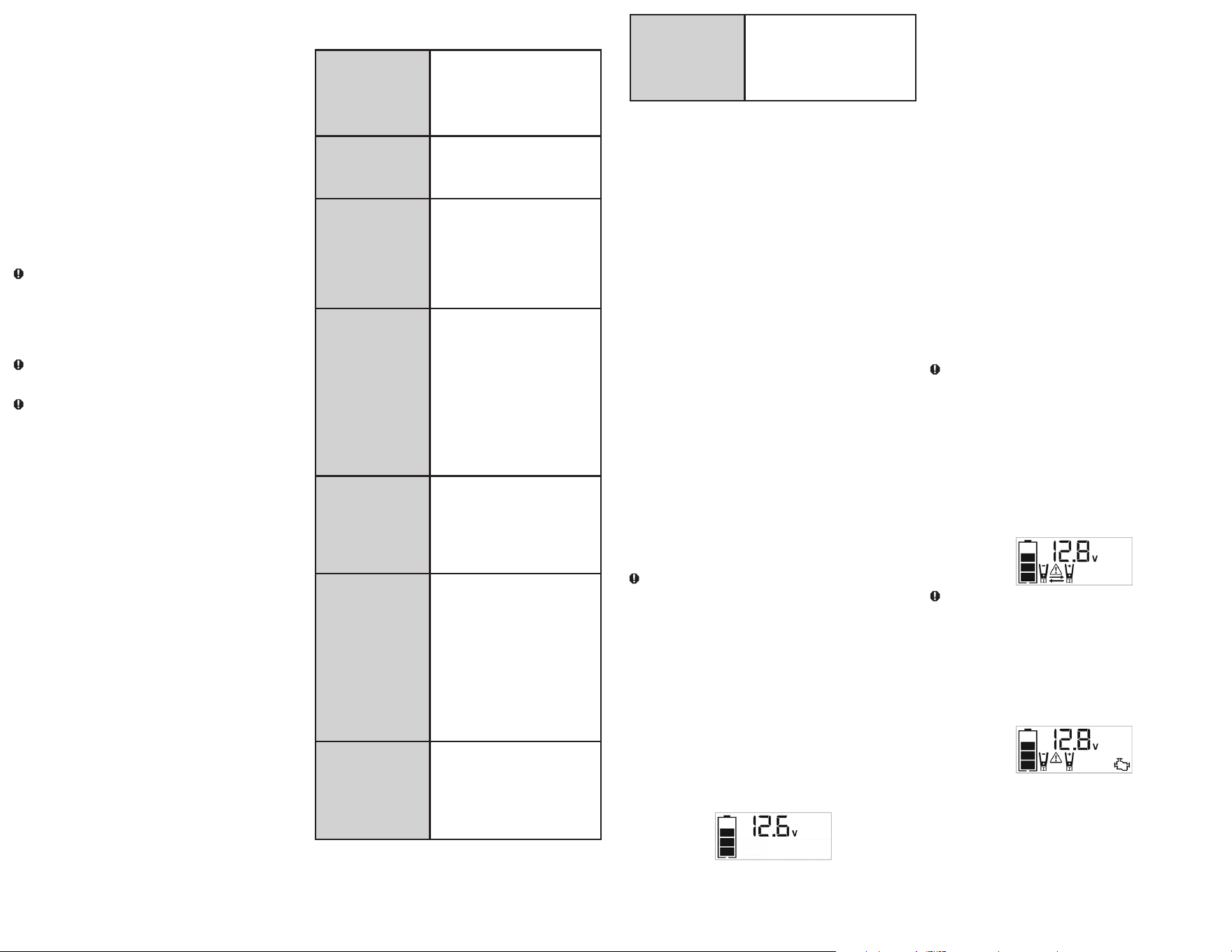
• If the clamps are connected incorrectly with regard to polarity, the unit will
sound a continuous alarm until the clamps are disconnected. The backlit
LCD Screen will display the Battery Status Icon, the Battery Voltage
Indicator and the Clamp Icons. The “+” and”–” signs above the Clamp
Icons, the Arrow Icons and the Alarm Icon will flash. The backlit LCD
screen will display the following:
CAUTION: The unit will suffer permanent damage if the Jump Starter
Power Switch is turned on while the clamps connected with reverse
polarity. Disconnect the clamps and reconnect to battery with correct
polarity.
• If the Jump Starter Power Switch is turned on and the unit detects that
the clamps are not connected to a battery, a two-second warning will
sound every 10 seconds. The LCD screen will display the Battery Status
Icon, the Battery Voltage Indicator, and the Clamp Icons with the “+”
and”–” signs. The Alarm Icon and the Jump Starter Icon will flash. The
backlit LCD screen will display the following:
Turn off the Jump Starter Power Switch; connect the clamps to the
battery, making sure the clamps are connected with correct polarity; then
turn the Jump Starter Power Switch back on.
• Always disconnect the negative (black) jumper cable first, followed by the
positive (red) jumper cable, except for positive grounded systems.
Procedure
Take the following steps, observing all cautions and warnings in the
“Important Safety Instructions” section at the front of this manual.
1. Turn off vehicle ignition and all accessories (radio, A/C, lights,
connected cell phone chargers, etc.). Place vehicle in “park” and set
the emergency brake.
2. Make sure the Jump Starter Power Switch is in the off position.
3. Remove jumper clamps from clamp tabs. Connect the red clamp first,
then the black clamp.
4. Procedure for jump-starting a NEGATIVE GROUNDED
SYSTEM (negative battery terminal is connected to chassis)
(MOST COMMON)
4a. Connect positive (+) red clamp to vehicle battery’s positive
terminal.
4b. Connect negative (–) black clamp to chassis or a solid, non-
moving, metal vehicle component or body part. Never clamp
directly to negative battery terminal or moving part. Refer to the
automobile owner’s manual.
5. Procedure for jump-starting POSITIVE GROUND SYSTEMS
NOTE:
In the rare event that the vehicle to be started has a Positive Grounded System (positive battery terminal is connected to chassis),
replace steps 4a and 4b above with steps 5a and 5b, then proceed to step 6.
5a. Connect negative (–) black clamp to vehicle battery’s negative
terminal.
5b. Connect positive (+) red clamp to vehicle chassis or a solid, non-
moving, metal vehicle component or body part. Never clamp
directly to positive battery terminal or moving part. Refer to the
automobile owner’s manual.
6. When the clamps are connected properly, the backlit LCD screen will
display the following to indicate the unit is ready to jump-start:
The Battery Status icon, Battery Voltage Indicator, Clamp Icons and the
“+” and”–” signs light solid. The jump starter icon will flash to indicate
the clamps are properly connected.
7. Turn the Jump Starter Power Switch on. Turn on the ignition and crank
the engine in 5-6 second bursts until engine starts. The backlit LCD
screen will display the following:
The Battery Status Icon, the Battery Voltage Indicator, Clamp Icons and
the “+” and”–” signs light solid to indicate the unit is jump-starting. The
Jump Starter Icon flashes. The Jump Starter Icon lights solid if vehicle
is started.
8. Turn the Jump Starter Power Switch off.
9. Disconnect the negative (–) engine or chassis clamp first, then
disconnect the positive (+) battery clamp.
IMPORTANT: Always turn the unit off when not in use. Recharge this unit
fully after each use.
CAUTION – To reduce the risk of property damage:
• Vehicles that have on-board computerized systems may be damaged if
vehicle battery is jump-started. Before jump-starting this type of vehicle,
read the vehicle manual to confirm that external-starting assistance is
advised.
• Excessive engine cranking can damage the vehicle’s starter motor. If
the engine fails to start after the recommended number of attempts,
discontinue jump-start procedure and look for other problems that need
to be corrected.
• If vehicle fails to start, turn off the ignition, turn off the Jump Starter Power
Switch, disconnect the jump-start system’s leads and contact a qualified
technician to investigate why the engine did not start.
LED AREA LIGHT
The built-in 3-LED area light is controlled by the area light power button on
the control panel (refer to the Features section to locate). Press the area
light power button once to turn the light on. Press the area light power
button again to turn the area light off.
IMPORTANT: When the area light power button is pressed to turn it on, a
beep will sound. The backlit LCD screen will turn on for 10 seconds (only)
and will then continuously display the Battery Status Icon and Battery
Voltage Indicator.
Periodically check the unit’s Battery Status on the backlit LCD screen.
Four solid bars in the battery icon indicates a full battery. When the battery
level is nearly empty with only one solid bar or completely empty with 4
empty bars, the unit must be recharged at this time or the unit’s built-in
low voltage protection will activate. The empty Battery Status Icon will
flash for a short period of time before automatic shut down.
Make sure the area light and the unit are turned off when the unit is being
recharged or stored.
• Skin: If battery acid comes in contact with skin, rinse immediately with
water, then wash thoroughly with soap and water. If redness, pain, or
irritation occurs, seek immediate medical attention.
• Eyes: If battery acid comes in contact with eyes, flush eyes immediately,
for a minimum of 15 minutes and seek immediate medical attention.
• LCD liquid crystal display: If liquid crystal comes in contact
with your skin: Wash area off completely with plenty of water. Remove
contaminated clothing. If liquid crystal gets into your eye: Flush the
affected eye with clean water and then seek medical attention. If liquid
crystal is swallowed: Flush your mouth thoroughly with water. Drink large
quantities of water and induce vomiting. Then seek medical attention.
SAVE THESE
INSTRUCTIONS
INTRODUCTION
Congratulations on purchasing your new
Professional Digital Power
Station.
Read this Instruction Manual and follow the instructions
carefully before using this unit.
OVERVIEW
Common Actions and Unit Responses
Press the LED Area
Light Power Button.
A beep will sound and the Area Light will turn
on. The backlight will turn on for 10 seconds
(only). The LCD screen will continue to display
the Battery Status and Voltage Indicator. The
LED Area Light remains on until switched off.
Press the Battery
Status Button.
A beep will sound and the backlit LCD screen
will display the Battery Status and Voltage
Indicator for 10 seconds before the unit
automatically turns off.
Press the AC/USB
Power Button.
A beep will sound and the backlit LCD screen
will display the Battery Status Icon and the
USB Icon; the Digital Display shows “AC”,
indicating the AC Outlet and the USB charging
port are ready to use. The unit remains on until
the AC/USB Power Button is pressed again to
turn both off.
Press the Compressor
Power Button.
A beep will sound and the backlit LCD
screen will display the Battery Status and the
Compressor Icon and will alternately show
the flashing pre-set PSI value (that was last
set using the compressor pressure control
buttons) and the current pressure of the item
being inflated (which will light solid). If no
further actions are taken after 1 minute, the
unit will display the Battery Status and Voltage
Indicator for 10 seconds before automatically
turning off.
Whenever the
clamps are properly
connected to a battery
(refer to the “Jump
Starter” section) …
… a beep will sound and the backlit LCD
screen will display the Battery Status Icon,
Battery Voltage Indicator, the Clamp Icons, and
the “+” and ”–” signs, as well as the flashing
Jump Starter Icon. The unit remains on until
the clamps are disconnected from the battery.
If the Jump Starter
Power Switch is
rotated to the on
position and the
clamps are not
connected to a battery
(refer to the “Jump
Starter” section) …
... a two-second warning will sound every 10
seconds. The backlit LCD screen will display
the Battery Status Icon, Battery Voltage
Indicator, the Clamp Icons, and the “+” and
”–” signs. The Alarm Icon and the Jump Starter
Icon will flash. The unit remains on until the
Jump Starter Power Switch is switched off and
then displays the Battery Status Icon and the
voltage of digital display for 10 seconds before
automatic shut down.
If the clamp
connections to the
battery’s positive and
negative terminals are
reversed …
… the backlit LCD screen will display the
Battery Status Icon, Battery Voltage Indicator,
and the Clamp Icons. The Alarm Icon, the “+”
and ”–” signs and the Reverse Polarity Icons
will flash and the unit will sound continuously
until the clamps are disconnected from the
battery.
When the unit is
charging or
recharging using the
built-in 120 Volt AC
Charger …
… the backlight will turn on for 10 seconds
(only). The LCD screen will continue to display
the Battery Status Icon and Battery Voltage
Indicator. The bars on the battery icon will
change from empty to solid (bottom to top)
repeatedly.
Note:
The unit will automatically power off once ALL the functions are turned off.
VIEWING BATTERY STATUS
To check the unit’s battery charge level, press the Battery Status Button.
The Battery Icon will indicate the battery charge level as follows:
• If the battery charge level is at full capacity, four solid bars will display.
• If the battery is partially charged, two or three solid bars will display.
• If the battery is nearly empty, one solid bar will display. The unit should be
charged at this time.
• If the battery is completely empty, four blank bars will display. The unit
MUST be charged at this time or the unit’s built-in low voltage protection
will activate. The empty Battery Status Icon will flash for a short period
of time before automatic shut down. The unit will not operate until the
battery is recharged.
CHARGING/RECHARGING
Lead-acid batteries require routine maintenance to ensure a full charge
and long battery life. All batteries lose energy from self- discharge over
time and more rapidly at higher temperatures. Therefore, batteries need
periodic charging to replace energy lost through self-discharge. When the
unit is not in frequent use, manufacturer recommends the battery should be
recharged at least every 30 days and after each use.
IMPORTANT: If you attempt to use the unit when the unit’s battery charge
level is too low, the unit will automatically shut down. Recharge the unit
with all other functions turned off as soon as possible.
Notes:
This unit is delivered in a partially charged state – you must fully charge it before using it for the first
time. Initial AC charge should be for 40 hours.
Recharging battery after each use will prolong battery life; frequent heavy discharges between recharges
and/or overcharging will reduce battery life.
Make sure all other unit functions are turned off during recharging, as this can slow the recharging
process.
CAUTION – Risk of property damage: Failure to keep the battery
charged will cause permanent damage and result in poor jump starting
performance.
IMPORTANT: If you know the unit is discharged, but the battery icon
displays four solid bars as if the unit is fully charged when connected to
a charging power source, this may be due to the internal battery having
high impedance. The manufacturer suggests leaving the unit charging for a
period of 40 hours using the built-in AC charger before use.
Charging/Recharging Using the Built-In 120 Volt AC
Charger and AC Extension Cord (not included)
1. Lift the protective cover of the built-in 120 volt AC charger located on
the lower left front of the unit (refer to the Features section to locate).
Connect an extension cord to the unit. Plug the other end of the cord
into a standard 120-volt AC wall outlet. When the unit is properly
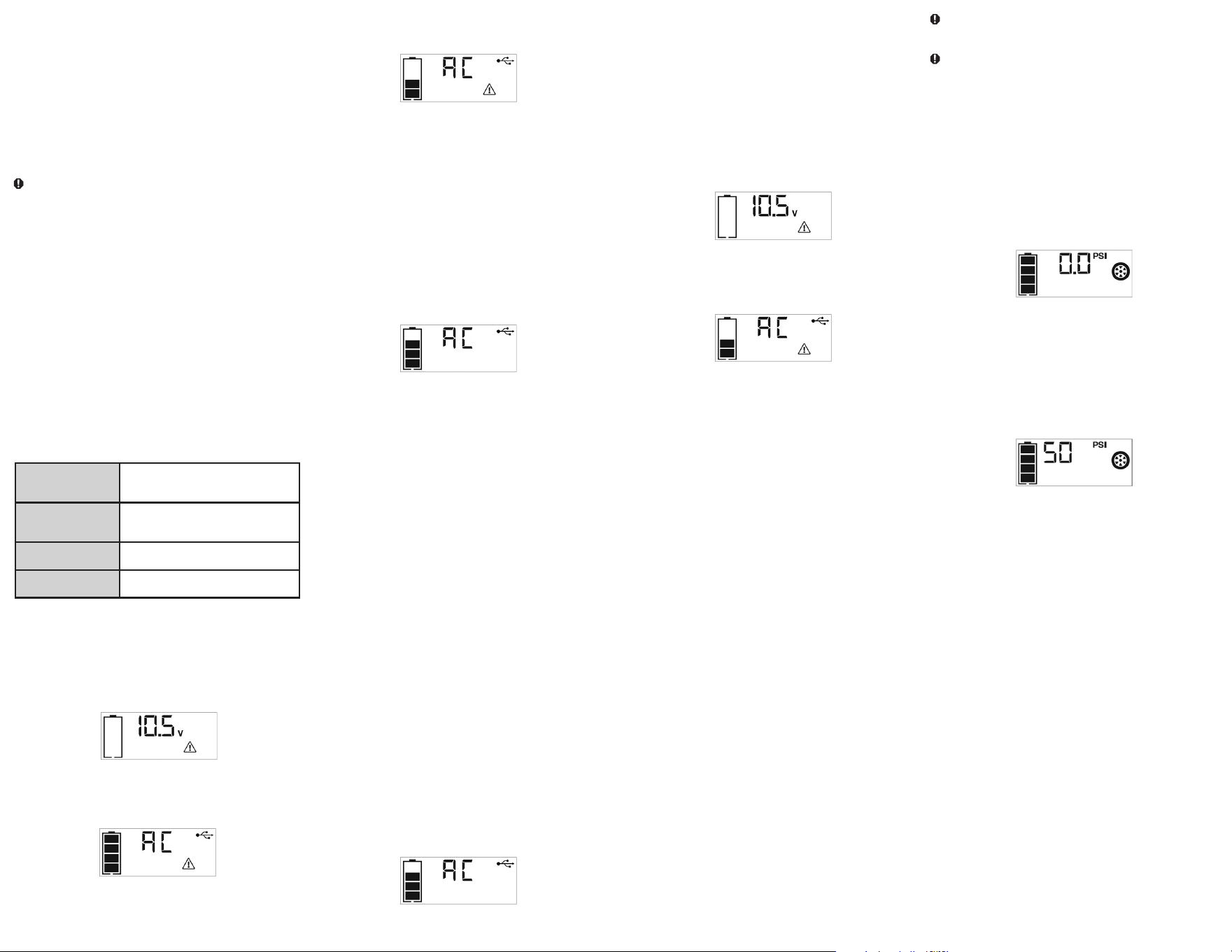
connected to an AC power source, the LCD screen will display the
following (the screen will be backlit):
The bars on the battery icon represent the capacity level of the unit’s
internal battery. After 10 seconds, the backlight will shut off.
The bars on the battery icon will change from empty to solid (bottom to
top) repeatedly to indicate the unit is charging.
2. Charge for approximately 40 hours or until the battery icon shows 4
solid bars.
8 9
The “5V USB” icon indicates that the USB port is ready to use.
2. Plug the USB-powered device into the USB power port and operate
normally.
The USB power port remains on until the AC/USB Power button is
pressed again to turn it off. Make sure the USB port is turned off when the
unit is being recharged or stored.
IMPORTANT NOTES:
When the USB Port is in use, the unit will monitor for the following USB
fault conditions on the USB Port: low battery voltage fault, overload and
short circuit.
If a low internal battery voltage fault condition exists, the USB port and AC
Power Outlets will shut down automatically and the backlit LCD screen will
display the following until the fault is corrected:
The Digital Display will show the Battery Voltage Indicator; the EMPTY
Battery Status Icon and Fault Icon on the LCD Screen will flash.
If overload or short circuit fault condition exists, the USB port and AC
Power Outlets will shut down automatically and the backlit LCD screen will
display the following until the fault is corrected:
The Battery Status Icon will light solid; the “AC” and USB icon on the
Digital Display and the Fault Icon on the LCD Screen will flash.
Should any of the above fault conditions occur:
• Disconnect the USB-powered device and press the AC/USB Power
Button again to turn it off immediately.
• Allow the unit to cool down for several minutes before attempting to use
the USB port again.
• If a fault occurs again, make sure that the total draw of the USB device
plugged into the USB Port does not exceed 2.1 A.
• If individual USB device is within specifications and the fault occurs, have
the USB device checked for malfunction and do not continue to use it
with the USB port.
Periodically check the unit’s Battery Status on the backlit LCD screen.
Four solid bars in the battery icon indicates a full battery. When the battery
level is nearly empty with only one solid bar or completely empty with 4
empty bars, the unit must be recharged at this time or the unit’s built-in
low voltage protection will activate. The empty Battery Status Icon will
flash for a short period of time before automatic shut down.
Note:
This unit’s USB power port does not support data communication. It only provides 5V DC/2.1 A power
to an external USB-powered device.
PORTABLE COMPRESSOR
The built-in 12 volt DC compressor is the ultimate compressor for vehicle
tires, trailer tires and recreational inflatables. A nozzle adaptor is supplied
that screws onto the end of the Sure Fit
®
nozzle at the free end of the
compressor hose. The compressor hose with tire fitting is stored in the
storage compartment. Refer to the “Features” illustration for locations of
compressor hose. The Compressor Power Button and Increase (+) and
Decrease (–) Compressor Pressure Control Buttons are located on the
control panel on the front of the unit.
Before proceeding, check the unit’s Battery Status on the LCD screen.
Four solid bars in the battery icon indicates a full battery. When the battery
level is nearly empty with only one solid bar, the unit MUST be recharged
before use or the unit’s built-in low voltage protection will activate. The
empty Battery Status Icon will flash for a short period of time before
automatic shut down.
The compressor is capable of inflating up to 120 pounds per square inch
(PSI) pressure. The compressor can operate long enough to fill up to 3
average sized tires before the battery must be recharged. Return hose to
the storage compartment after use.
IMPORTANT: Make sure the Jump Starter Power Button has been turned
off before attempting to use the unit as a Compressor.
WARNING – To reduce the risk of serious injury or property
damage: Follow all safety instructions found in the “Specific Safety
Instructions for Compressors” section of this instruction manual.
CAUTION – To reduce the risk of serious injury or property
damage: When the compressor is operated at a low PSI, the unit may
start slowly and gradually rev up. When the compressor is operated at
higher PSIs, the unit may operate normally for several minutes, then rev
down for a few minutes before returning to normal operation. This feature
protects the unit from overheating during normal use. In any event, do not
operate compressor continuously for longer than 10 minutes, as it may
overheat. This could damage the compressor. If the compressor must
be operated for longer periods: every 10 minutes press the Compressor
Power Button to turn the compressor off, then restart after a cooling down
period of approximately 30 minutes.
Inflating Tires or Products With Valve Stems
1. Screw the Sure Fit
®
nozzle onto the valve stem. Do not overtighten.
2. Press the Compressor Power Button. A beep will sound and the backlit
LCD screen will display the following:
The Compressor Icon will light and the digital display will alternately
show the flashing pre-set PSI value (that was last set by the
compressor pressure control buttons) and the current pressure of the
item being inflated (which will light solid).
3. Press the “+” and “–” Pressure Control Buttons to set the desired
pressure from a range pre-set values (between 3 and 120), which will
display on the backlit LCD screen. The unit will sound a beep with
each press of the buttons (holding the button speeds up the upward
or downward value selection). Once the desired pressure has been
entered, release the button and the flashing digital display will show the
new selected pressure, as follows:
4. Press the Compressor Power Button once more to begin inflating. The
Compressor Icon will flash and the digital display will only show the
current pressure value (which will light solid) to indicate the compressor
is activated. Monitor the pressure on the LCD screen.
IMPORTANT NOTE: To interrupt during inflation, press the
Compressor Power Button again.
5. When desired pre-set pressure is reached, the compressor will
automatically stop.
6. Press the Compressor Power Button again to turn off the unit.
7. Unscrew and remove the Sure Fit
®
nozzle from the valve stem.
8. Allow the unit to cool, then recharge before storing away.
9. Store the compressor hose and Sure Fit
®
nozzle in storage
compartment.
Inflating Other Inflatables Without Valve Stems
Inflation of other items requires use of the nozzle adapter.
1. Screw the nozzle adapter into the Sure Fit
®
nozzle. Do not overtighten.
2. Insert the nozzle adapter into item to be inflated.
3. Follow steps 2 through 4 of the “Inflating Tires or Products With Valve
Stems” section.
IMPORTANT: Small items such as volleyballs, footballs, etc. inflate very
rapidly. Keep this in mind when setting pressure. Take extra care not
to over-inflate.
4. When the desired pressure is reached, the compressor will
automatically stop. Press the Compressor Power Button again to turn
off the unit.
5. Disconnect the adapter from the inflated item.
6. Unscrew and remove the nozzle adapter from the Sure Fit
®
nozzle.
7. Allow the unit to cool, then recharge before storing away.
8. Store the compressor hose, Sure Fit
®
nozzle and nozzle adapter in the
storage compartment.
120 VOLT AC PORTABLE POWER SUPPLY
Rated Versus Actual Current Draw of Equipment
Most electrical tools, appliances, electronic devices and audio/visual
equipment have labels that indicate the power consumption in amps or
watts. Be sure that the power consumption of the item to be operated is
below 500 watts. If the power consumption is rated in amps AC, simply
multiply by the AC volts (120) to determine the wattage.
Resistive loads are the easiest for this unit to run; however, it will not run
larger resistive loads (such as electric stoves and heaters), which require
far more wattage than the unit can deliver on a continuous basis. Inductive
loads (such as TVs and stereos) require more current to operate than do
resistive loads of the same wattage rating.
CAUTION: Rechargeable devices
• Certain rechargeable devices are designed to be charged by plugging
them directly into an AC receptacle. These devices may damage the
inverter or the charging circuit.
• When using a rechargeable device, monitor its temperature for the initial
ten minutes of use to determine if it produces excessive heat.
• If excessive heat is produced, this indicates the device should not be
used with this inverter.
• This problem does not occur with most of the battery-operated
equipment. Most of these devices use a separate charger or transformer
that is plugged into an AC receptacle.
• The inverter is capable of running most chargers and transformers.
Note: Some laptop computers may not operate with this inverter.
Power Inverter Output Waveform
The AC output waveform of this inverter is known as a modified sine wave.
It is a stepped waveform that has characteristics similar to the sine wave
shape of utility power. This type of waveform is suitable for most AC loads,
including linear and switching power supplies used in electronic equipment,
transformers, and small motors.
Protective Features
The inverter monitors the following conditions:
Low internal battery
voltage
The inverter will automatically shut down
when the battery voltage drops too low, as
this can harm the battery.
High internal battery
voltage
The inverter will automatically shut down
when the battery voltage is too high, as this
can harm the unit.
Thermal shutdown
protection
The inverter will automatically shut down
when the unit becomes overheated.
Overload/short circuit
protection
The inverter will automatically shut down
when an overload or short circuit occurs.
IMPORTANT NOTES:
The AC Power Outlets provide a total power draw of 500W.
When the AC Power Outlets are in use, the unit will monitor for the
following fault conditions: thermal fault, low and high battery voltage fault,
overload and short circuit (refer to the “Protective Features” section).
1. If a low internal battery voltage fault condition exists, the AC Power
Outlets and the USB port will shut down automatically and the backlit
LCD screen will display the following until the fault is corrected:
The Digital Display will show the Battery Voltage Indicator; the EMPTY
Battery Status Icon and Fault Icon on the LCD Screen will flash.
2. If the high internal battery voltage fault condition exists, the AC Power
Outlets and the USB port will shut down automatically and the backlit
LCD screen will display the following until the fault is corrected:
The Digital Display will show the FULL Battery Status Icon; the “AC,”
USB icon and Fault Icon on the LCD Screen will flash.
3. If a thermal, overload or short circuit fault condition exists, the AC
Power Outlets and the USB port will shut down automatically and the
backlit LCD screen will display the following until the fault is corrected:
4. The Battery Status Icon will light solid; the “AC” and USB icon on the
Digital Display and the Fault Icon on the LCD Screen will flash.
Should any of the above fault conditions occur:
1. Disconnect the appliance from the unit.
2. Press the AC/USB Power Button to turn the AC Power Outlets off.
3. Make sure the unit does not need to be recharged.
4. Allow the unit to cool down for several minutes.
5. Make sure the rating of the appliance plugged into the unit is 500 watts
or lower and that the appliance cord and plug are not damaged.
6. Assure there is adequate ventilation around the unit before proceeding.
Using the 120 Volt AC Outlets
The 120 Volt AC Outlets are located on the front of the unit. The outlets
support a maximum power draw of 500 watts.
1. Press the AC/USB Power Button to turn on the 120V AC Power
Outlets. A beep will sound and the LCD Screen will display the
following:
The Battery Status Icon lights solid and the Digital Display shows “AC”
and USB icon, indicating the AC outlet is ready to use.
2. Insert the 120 volt AC plug from the appliance into the 120 Volt AC
Outlets.
3. Switch on the appliance and operate as usual.
Note:
Ensure that the wattage of the equipment plugged into the 120V AC Power Outlets do not exceed 500 watts continuous.
4. Press the AC/USB Power Button again to turn off the 120V AC Power
Outlets.
Periodically check the unit’s Battery Status on the backlit LCD screen.
Four solid bars in the battery icon indicates a full battery. When the battery
level is nearly empty with only one solid bar or completely empty with 4
empty bars, the unit must be recharged at this time or the unit’s built-in
low voltage protection will activate. The empty Battery Status Icon will
flash for a short period of time before automatic shut down.
IMPORTANT: Make sure the AC Power Outlets are turned off when the
unit is being recharged or stored.
12 VOLT DC PORTABLE POWER SUPPLY
The 12 volt DC power supply is located under a protective cover on the
front of the unit. Refer to the Features section to locate.
This portable power source is also for use with all 12 volt DC accessories
equipped with a male accessory outlet plug and rated up to 5 amps.
1. Lift up the cover of the unit’s 12 volt DC outlet.
2. Insert the 12 volt DC plug from the appliance into the 12 volt accessory
outlet on the unit. DO NOT EXCEED A 5 AMP LOAD.
3. Switch on the appliance and operate as usual.
4. Periodically check the unit’s Battery Status on the LCD screen by
pressing the Battery Status Button. (Four solid bars in the battery icon
indicates a full battery. One bar indicates that the unit needs to be
recharged.)
USB CHARGING PORT
The USB charging port is under the same protective cover as the 12 volt
DC outlet. Refer to the Features section to locate.
1. Press the AC/USB power power button to turn the USB port on. A
beep will sound and the backlit LCD screen will continuously display
the following:

10 11
SPECIFICATIONS
Boost Ampere: 12V DC, 500A instant
Battery type: Maintenance-free, sealed lead acid, 12V DC
AC input: 120V AC, 60Hz, 14W
Area light: 3 white LEDs
USB port: 5V DC, 2.1 A
DC accessory outlet: 12V DC, 5A
Dual 120V AC outlets: 120V AC, 60Hz, 500W continuous
Compressor maximum pressure: 120 PSI
Imported by Baccus Global LLC,
621 NW 53rd St., Suite 450, Boca Raton, FL 33487
www.Baccusglobal.com 1-877-571-2391
RD102621
CARE AND MAINTENANCE
All batteries lose energy from self-discharge over time and more rapidly at
higher temperatures. When the unit is not in use, we recommend that the
battery is charged at least every 30 days.
Never submerge the unit in water. If the unit gets dirty, gently clean the
outer surfaces of the unit with a soft cloth.
There are no user-replaceable parts. Periodically inspect the condition
of adapters, connectors and wires. Contact manufacturer to replace any
components that have become worn or broken.
Battery replacement/disposal
BATTERY REPLACEMENT
The battery should last the service life of the unit. Service life is dependent
on a number of factors including but not limited to the number of recharge
cycles, and proper care and maintenance of the battery by the end user.
Contact manufacturer for any information you may need.
SAFE BATTERY DISPOSAL
Contains a maintenance-free, sealed, non-spillable, lead
acid battery, which must be disposed of properly.
Recycling is required. Failure to comply with local, state
and federal regulations can result in fines, or
imprisonment.
Please recycle.
WARNINGS:
• Do not dispose of the battery in fire as this may result in an explosion.
• Before disposing of the battery, protect exposed terminals
with heavy-duty electrical tape to prevent shorting (shorting can result in
injury or fire).
• Do not expose battery to fire or intense heat as it may explode.
TROUBLESHOOTING
Unit will not charge
• Make sure the AC/USB power button has been pressed to turn the
inverter off.
• Make sure a suitable gauge extension cord is properly connected to both
the unit and a functioning AC outlet.
Unit fails to jump-start
• Make sure the unit is not being operated in the Compressor mode.
• Make sure unit’s Jump Starter Power Switch is in the on position.
• Make sure a proper polarity cable connection has been established.
• Check that unit has a full charge. Recharge unit if necessary.
120 volt AC outlet will not power appliance
• Make sure the AC/USB power button has been pressed to turn the
inverter on.
• Make sure you have followed all the steps in the 120 AC portable power
supply instructions carefully.
• Make sure the appliance being powered does not draw more than 500
watts
• Refer to the important notes included in that section that explain common
problems and solutions.
• Check that unit has a full charge. Recharge unit if necessary.
12 volt DC accessory outlet will not power appliance
• Make sure the the appliance does not draw more than 5 amps.
• Check that unit has a full charge. Recharge unit if necessary.
USB power port will not power appliance
• Make sure that the total draw of the USB device plugged into the USB
port does not exceed 2.1 A.
• Make sure the AC/USB power button has been pressed to turn the USB
ports on.
• Some USB-powered household electronics will not operate with this USB
charging/power port. Check the manual of the corresponding electronic
device to confirm that it can be used with this type of USB charging/
power port.
• Check that unit has a full charge. Recharge unit if necessary.
LED area light does not come on
• Make sure the area light power button has been pressed to turn the area
light on.
• Check that unit has a full charge. Recharge unit if necessary.
Portable compressor will not inflate
• Make sure the unit is not being operated in Jump Starter mode.
• Make sure the compressor power button has been pressed to turn the
compressor on.
• Make sure the Sure Fit
®
nozzle connector is securely screwed on to the
valve stem when attempting to inflate tires; or that the nozzle adapter
is securely screwed into the Sure Fit
®
nozzle connector and is inserted
properly into the item to be inflated on all other inflatables.
• The compressor may be overheated. Press the compressor power
button to turn the compressor off. Restart after a cooling down period of
approximately 30 minutes.
• Check that unit has a full charge. Recharge unit if necessary.
ACCESSORIES
Recommended accessories for use with your tool may be available from
the manufacturer. If you need assistance regarding accessories, please
contact the manufacturer at (877) 571-2391.
WARNING: The use of any accessory not recommended for use
with this appliance could be hazardous.
SERVICE INFORMATION
Whether you need technical advice, repair, or genuine factory replacement
parts, contact the manufacturer at (877) 571-2391.
FULL ONE-YEAR HOME USE WARRANTY
The manufacturer warrants this product against defects in materials and
workmanship for a period of ONE (1) YEAR from the date of retail purchase
by the original end-user purchaser (“Warranty Period”).
If there is a defect and a valid claim is received within the Warranty Period,
the defective product can be replaced or repaired in the following ways:
(1) Return the product to the manufacturer for repair or replacement
at manufacturer’s option. Proof of purchase may be required by
manufacturer. (2) Return the product to the retailer where product was
purchased for an exchange (provided that the store is a participating
retailer). Returns to retailer should be made within the time period of the
retailer’s return policy for exchanges only (usually 30 to 90 days after the
sale). Proof of purchase may be required. Please check with the retailer for
their specific return policy regarding returns that are beyond the time set
for exchanges.
This warranty does not apply to accessories, bulbs, fuses and batteries;
defects resulting from normal wear and tear, accidents; damages
sustained during shipping; alterations; unauthorized use or repair; neglect,
misuse, abuse; and failure to follow instructions for care and maintenance
for the product.
This warranty gives you, the original retail purchaser, specific legal rights
and you may have other rights which vary from state to state or province
to province. This product is not intended for commercial use.
Be sure to register your product at https://www.baccusglobal.com/
registration to receive important product information, special promotions
and offers, and more.
12 13
FUENTE DE ENERGÍA DIGITAL
MANUAL DE INSTRUCCIÓN
PPRH5V
CONSERVE ESTE MANUAL PARA FUTURAS CONSULTAS.
Derechos Reservados © 2021 Baccus Global LLC
Boca Raton, FL 33487
(877) 571-2391
BC
14 15
PANTALLA DEL LCD DIGITAL
ICONO DE ESTADO DE
LA BATERÍA
INDICADOR DIGITAL (VARÍA DEPENDIENDO DE LA FUNCIÓN)
ICONO DE ALARMA
ICONOS DE POLARIDAD INVERSA
ICONOS DE PINZAS
INDICADOR DE PRESIÓN DEL COMPRESOR
ICONO DE USB
ICONO DEL COMPRESOR
ICONO DEL PUENTE AUXILIAR DE ARRANQUE
ICONO DEL FALLO
INDICADOR DEL VOLTAJE
Este dispositivo cumple con la parte 15 de las normas de la Comisión Federal de Comunicaciones de Estados Unidos (FCC). La operación está sujeta a las dos condiciones siguientes: (1) este dispositivo no
puede causar interferencia perjudicial y (2) este mecanismo debe aceptar cualquier interferencia recibida, incluida la in-terferencia que puede provocar una operación no deseada.
Este equipo ha sido probado y se encontró que cumple con los límites para dispositivo digital Clase B, según la parte 15 de las normas de la FCC. Estos límites están diseñados para brindar protección razonable
contra interferencia perjudicial en una instalación residencial. Este equipo genera, usa y puede irradiar energía en frecuencia de radio y, si no se instala y se usa de acuerdo con las instrucciones, puede provocar
interferencia perjudicial en las comunicaciones de radio. Sin embargo, no hay garantía de que la interferencia no ocurra en una instalación en particular. Si el equipo provoca interferencia perjudicial en la recepción
de radio o televisión, lo que se puede determinar al apagar y encender el equipo, el usuario debe tratar de corregir la interferencia mediante una o más de las siguientes medidas:
• Cambiar la orientación o la ubicación de la antena de recepción.
• Aumentar la separación entre el equipo y el receptor.
• Conectar el equipo a un tomacorriente sobre un circuito diferente de aquel al que está conectado el receptor.
• Consultar al vendedor o pedir la ayuda de un técnico en radio y televisión con experiencia.
Los cambios o las modificaciones no aprobados por el partido responsable de conformidad podían anular la autoridad del usuario para funcionar el equipo.
CARACTERÍSTICAS
1. Cargador de 120 voltios CA incorporado (bajo cubierta protectora)
2. Manija de goma
3. Interruptor del puente auxiliar de arranque
4. Manguera e Sure Fit
®
conector para la boquilla
5. Cubierta del compartimiento del almacenaje
6. Adaptador de boquilla
7. Pinza roja del positivo (+)
8. Luz de área LED
9. Pinza negra del negativo (–)
10. Se doblan los enchufes de la CA de 120 voltios (bajo cubiertas
protectoras)
11. Botón de alimentación del compresor
12. Botón de control de presión del compresor (+)
13. Pantalla del LCD
14. Botón de alimentación AC/USB
15. Botón de estado de la batería
16. Tomacorriente para accesorios de 12V CC (bajo cubierta protectora)
17. Botón de control de presión del compresor (–)
18. Botón de encendido del área de luz LED
19. Puerto de carga del USB (bajo cubierta protectora)
CARACTERÍSTICAS
5
4
6
7
8
9
1
2 3
10 11 12 13 15 16
17
18
14
19
16 17
– el cable prolongador posea los conductores correctos y esté en
buenas condiciones eléctricas,
– la medida del conductor sea suficientemente grande para la capacidad
nominal en amperios.
PRECAUCIÓN – Para reducir el riesgo de lesiones o daño a la
propiedad: Cuando desconecte el cable de extensión desde el cargador
de CA de 120 voltios incorporado o la toma de CA, tire por el conectador
y no por el cable.
INSTRUCCIONES DE SEGURIDAD
ESPECÍFICAS PARA AUXILIARES DE
ARRANQUE
ADVERTENCIA, Peligro de estallido
No utilice la unidad para cargar las baterías secas que se usan
normalmente con los aparatos domésticos. Estas baterías pueden estallar
y provocar lesiones a las personas y daños a la propiedad. Use la unidad
para carga/ refuerzo solamente de una batería de plomo-ácido. No está
diseñada para proveer energía a un sistema eléctrico de bajo voltaje que
no sea para arrancar un motor.
• El uso de un dispositivo no suministrado, recomendado o vendido por el
fabricante específicamente para el uso con esta unidad puede provocar
riesgo de descarga eléctrica y lesiones a las personas.
ADVERTENCIA: Riesgo de gases explosivos
• Trabajar cerca de una batería de plomo ácido es peligroso. Las baterías
generan gases explosivos durante su funcionamiento normal. Por esta
razón, es muy importante que siempre lea este manual antes de utilizar el
puente auxiliar de arranque y que siga las instrucciones con exactitud.
• Para reducir el riesgo de explosión de la batería, siga estas instrucciones
y las publicadas por el fabricante de la batería y el fabricante de cualquier
equipo que tenga la intención de utilizar cerca de la batería. Revise las
indicaciones sobre precauciones en estos productos y en el motor.
PRECAUCIÓN – Para reducir el riesgo de lesiones o daño a la
propiedad:
• NUNCA INTENTE ARRANCAR MEDIANTE PUENTE NI CARGAR UNA
BATERÍA CONGELADA.
• Los vehículos que tienen sistemas computarizados incorporados pueden
resultar dañados si la batería del vehículo se arranca mediante puente.
Antes de arrancar mediante puente, lea el manual del cliente del vehículo
para confirmar que la ayuda externa para arrancar es adecuada.
• Nunca fume o permita que haya una chispa o llama cerca de la batería, el
motor o la central de energía.
• Manténgase alejado de las paletas de ventilador, correas, poleas y otras
partes que pueden provocar lesiones a las personas.
• Quítese los elementos personales metálicos, como anillos, pulseras,
collares y relojes cuando trabaja con una batería de plomo-ácido. Una
batería de plomo-ácido puede producir un cortocircuito con bastante
corriente como para soldar un anillo u objeto metálico similar a la piel y
provocar una quemadura grave.
• No use ropa de vinilo cuando arranque un vehículo mediante puente.
La fricción puede provocar chispas peligrosas a causa de la electricidad
estática.
• Tenga mucho cuidado de no dejar caer una herramienta de metal sobre la
batería. Puede ser que producir chispas o un cortocircuito en la batería o
en otra parte eléctrica y podría causar una explosión.
• Almacene siempre las pinzas de la batería cuando no se usa. Nunca
toque las pinzas de la batería entre sí. Esto puede generar chispas
peligrosas, arcos eléctricos o explosión.
• Cuando use esta unidad cerca de la batería y el motor del vehículo,
coloque la unidad sobre una superficie plana y estable, y asegúrese de
mantener todas las pinzas, los cables, la ropa y las partes del cuerpo
alejados de los elementos móviles del vehículo.
• Nunca deje que las pinzas roja y negra se toquen entre sí o con otro
conductor metálico común, esto podría provocar daños a la unidad o
crear un riesgo de chispas/explosión.
– Para los sistemas con negativo a tierra, conecte la pinza del positivo
(roja) al borne sin conexión a tierra de la batería y la pinza del negativo
(NEGRA) al bastidor del vehículo o al bloque del motor, lejos de la
batería. No conecte la pinza al carburador, las cañerías de combustible
o a las piezas de chapa de la carrocería. Conecte a una pieza de metal
sólida del bastidor o del bloque del motor.
– Para los sistemas con positivo a tierra, conecte la pinza del negativo
(negra) al borne sin conexión a tierra negativo de la batería y la pinza
del positivo (roja) al bastidor del vehículo o al bloque del motor, lejos
de la batería. No conecte la pinza al carburador, las cañerías de
combustible o a las piezas de chapa de la carrocería. Conecte a una
pieza de metal sólida del bastidor o del bloque del motor.
• Si las pinzas están conectadas incorrectamente con respecto a polaridad,
la pantalla LCD retroiluminada mostrará
• el icono de estado de la batería, el indicador de voltaje de la batería y
los iconos de abrazadera. El icono de alarma, los signos “+” y “–” y los
iconos de polaridad inversa parpadearán y la unidad emitirá una alarma
continua hasta que se desconectan las pinzas. Desconecte y vuelva a
conectar las pinzas de la batería con la polaridad correcta.
• Siempre desconecte primero el cable del puente del negativo (negro) y
luego el cable del puente del positivo (rojo), excepto para los sistemas
con positivo a tierra.
• No exponga la batería al fuego o a un calor intenso, porque puede
explotar. Antes de eliminar la batería, proteja los terminales expuestos
con cinta aislante para trabajo pesado para evitar cortocircuitos (un
cortocircuito puede producir lesiones o incendio).
• Coloque esta unidad lo más lejos posible de la batería que los cables
permitan.
• Nunca permita que el ácido de la batería entre en contacto con esta
unidad.
• No opere esta unidad en un área cerrada ni restrinja la ventilación de
alguna forma.
• Este sistema está diseñado para ser utilizado únicamente en vehículos
con sistema de batería de CC de 12 voltios. No lo conecte a un sistema
de batería de 6 o 24 voltios.
• Este sistema no está diseñado para ser utilizado en reemplazo de una
batería de vehículo. No intente hacer funcionar un vehículo que no tenga
la batería instalada.
• El exceso de revoluciones del motor puede dañar el mecanismo de
arranque de un vehículo. Si el motor no arranca después de la cantidad
recomendada de intentos, abandone los procedimientos de arranque
mediante puente y busque otros problemas que deban solucionarse.
• No utilice este puente auxiliar de arranque en una moto de agua. No fue
diseñado para prácticas marinas.
• Si bien esta unidad contiene una batería que no derrama, se recomienda
que la unidad se conserve parada durante el almacenamiento, el uso y la
recarga. Para evitar daños posibles que puedan acortar la duración de la
unidad, protéjala de la luz solar directa, el calor directo o la humedad.
INSTRUCCIONES DE SEGURIDAD
ESPECÍFICAS PARA INVERTIDORES
ADVERTENCIA – Para reducir el riesgo de descarga eléctrica:
• No conecte al cableado de distribución de CA.
• No realice conexiones o desconexiones eléctricas en áreas designadas
como PROTEGIDAS CONTRA IGNICIÓN. Esta unidad NO está aprobada
para áreas protegidas contra ignición.
• Nunca sumerja la unidad en el agua ni en ningún otro líquido, ni la utilice
cuando esté húmeda.
ADVERTENCIA – Para reducir el riesgo de incendio:
• No opere cerca de materiales, vapores o gases inflamables.
• No lo exponga al calor extremo o a las llamas.
PRECAUCIÓN – Para reducir el riesgo de lesiones o daño a la
propiedad:
• Desconecte el enchufe de la aplicación del enchufe del convertidor antes
de intentar cualesquiera reparaciones a la aplicación.
• Cuando un artefacto conectado a esta unidad se usa al aire libre, utilice
sólo cables de extensión diseñados para uso en exteriores y marcado.
• No intente conectar el inversor mientras que funciona su vehículo.
El hecho de no prestar atención a la carretera puede tener como
consecuencia un accidente grave.
• Siempre utilice el convertidor en lugares adecuadamente ventilados.
• Apague siempre el convertidor cuando es parado.
NORMAS DE SEGURIDAD
/ DEFINICIONES
PELIGRO: Indica una situación de peligro inminente que, si no se
evita, provocará la muerte o lesiones graves.
ADVERTENCIA: Indica una situación de peligro inminente que, si
no se evita, provocará la muerte o lesiones graves.
PRECAUCIÓN: Indica una situación de peligro potencial que, si no
se evita, puede provocar lesiones leves o moderadas.
PRECAUCIÓN: Utilizado sin el símbolo de alerta de seguridad indica
una situación de peligro potencial que, si no se evita, puede provocar
daños a la propiedad.
RIESGO DE OPERACIÓN INSEGURA. Cuando se utilizan
herramientas o equipos, siempre se deben respetar las precauciones de
seguridad para reducir el riesgo de lesiones personales. La operación,
el mantenimiento o la modificación incorrectos de herramientas o
equipos pueden provocar lesiones graves y daños a la propiedad. Las
herramientas y los equipos están diseñados para usos determinados.
Fabricante recomienda encarecidamente que NO se modifique este
producto y que NO se utilice para ningún otro uso que aquél para el que
fue diseñado. Lea y comprenda todas las instrucciones operativas y las
advertencias antes de utilizar cualquier herramienta o equipo.
LEA TODAS LAS
INSTRUCCIONES
ADVERTENCIA: Lea y comprenda este manual de instrucciones
antes de utilizar esta unidad. El incumplimiento de todas las
instrucciones enumeradas a continuación puede provocar una
descarga eléctrica, un incendio o lesiones graves.
INSTRUCCIONES
IMPORTANTES DE
SEGURIDAD
ADVERTENCIAS E INSTRUCCIONES
GENERALES DE SEGURIDAD
• Esta unidad fue diseñada para el uso domestico.
ADVERTENCIA – Riesgo de incendios, descargas eléctricas,
peligro de explosión o lesiones a personas o propiedades:
• Evite las condiciones ambientales peligrosas. No utilice artefactos en
zonas húmedas o mojadas. No utilice artefactos bajo la lluvia.
• Mantenga a los niños alejados. Los visitantes deben mantenerse a
cierta distancia del área de trabajo.
• Use la vestimenta adecuada. No use ropas holgadas o joyas. Pueden
atascarse en las piezas en movimiento. Se recomienda utilizar guantes
de goma y calzado antideslizante considerable al trabajar al aire libre.
Recójase y cubra el cabello largo.
• Use anteojos de seguridad y cualquier otro equipo de seguridad.
Use anteojos protectores o lentes de seguridad con protección lateral
que cumplan con las normas de seguridad aplicables. Puede conseguir
anteojos de seguridad o similares a un costo adicional en su distribuidor
local.
• Guarde los artefactos que no utilice en el interior. Cuando no los
utilice, los artefactos deben guardarse bajo techo, en un lugar seco, alto o
bajo llave, lejos del alcance de los niños.
• No tire del cable. Nunca transporte el aparato por el cable ni lo jale para
desconectarlo dla toma de corriente. Mantenga el cable alejado del calor,
el aceite y los bordes afilados.
• Desconecte los aparatos. Desconecte el aparato de la fuente de energía
cuando no lo utilice, antes de realizar un mantenimiento y al cambiar
accesorios como hojas y elementos semejantes.
• La protección del interruptor de corte por falla a tierra (GFCI) debe
aplicarse a los circuitos o los tomacorrientes que se utilizarán. Hay
tomacorrientes con protección GFCI incorporada que pueden utilizarse
para tomar esta medida de seguridad.
• Uso de accesorios y suplementos. El uso de accesorios o dispositivos
no recomendados para utilizar con este aparato puede resultar peligroso.
Consulte la sección “Accesorios” de este manual para obtener detalles
adicionales.
• Manténgase alerta. Use el sentido común. No opere este equipo si está
cansado o con impedimentos.
• Compruebe para saber si hay piezas dañadas. Cualquier parte que
esté dañada debe ser reemplazado por el fabricante antes de su uso
posterior. No utilice la herramienta si el interruptor no le da vuelta por
intervalos. Contacto con el fabricante en (877) 571-2391 para más
información.
• No funcione el aparato cerca de líquidos inflamables o en atmósferas
gaseosas o explosivas. Los motores de estas herramientas normalmente
chispean, y las chispas pueden encender los vapores.
• Nunca sumerja esta unidad en agua; no la exponga a la lluvia, la nieve,
ni la use cuando esté mojada.
• Para reducir el riesgo de descarga eléctrica, desconecte la unidad
de cualquier fuente de energía antes de intentar limpiarla o realizarle
un mantenimiento. Apagar los controles sin desenchufar la unidad no
reducirá este riesgo.
• Este equipo emplea piezas (interruptores y relés) que producen
arcos o chispas. Por lo tanto, si utiliza la unidad en una cochera o un
área cerrada, DEBE colocarla a no menos de 457 mm (18 pulgadas) por
encima del piso.
• No utilice esta unidad para operar aparatos que necesitan más de
5 A para funcionar dla toma de corriente para accesorios de CC de
12 voltios.
• No inserte los objetos extranjeros en el puerto del USB, el enchufe
accesorio de la CC de 12 voltios o el enchufe de la CA de 120 voltios.
INSTRUCCIONES DE SEGURIDAD
ESPECÍFICAS PARA CARGAR ESTA UNIDAD
• IMPORTANTE: Esta unidad se entrega en un estado de carga parcial.
Cargue la unidad completamente con el cable prolongador para uso
doméstico durante 40 horas antes de utilizarla por primera vez. No puede
sobrecargar la unidad utilizando el método de carga CA.
• Para recargar esta unidad, utilice sólo el cargador incorporado CA.
• Todos los interruptores de ENCENDIDO/APAGADO (Power) deben estar
en la posición de apagado (OFF) cuando se carga la unidad o cuando
no está en uso. Asegúrese de que todos los interruptores estén en la
posición de apagado (OFF) antes de realizar la conexión a una fuente de
energía o carga.
CABLES DE EXTENSIÓN:
ADVERTENCIA: El uso de un cable de extensión incorrecta
podría dar lugar a un riesgo de fuego y descarga eléctrica. Al usar un
cable de extensión, cerciórese de que los pernos del cable de extensión
son el mismo número, tamaño y forma que ésos en el cargador; y
esté seguro de utilizar uno bastante pesado para llevar la corriente que
su producto dibujará. Un cable de menor capacidad provocará una
disminución en el voltaje de la línea, lo cual producirá una pérdida de
potencia y sobrecalentamiento. La siguiente tabla muestra la medida
correcta que debe utilizar según la longitud del cable y la capacidad
nominal en amperios indicada en la placa. En caso de duda, utilice el
calibre inmediatamente superior. Cuanto menor es el número de calibre,
más grueso es el cable.
CALIBRE MÍNIMO PARA LOS JUEGOS DE CABLES
Voltios Largo total del cable en pies
120V 0-25 26-50 51-100 101-150
(0-7.6m) (7.6-15.2m) (15.2-30.4m) (30.4-45.7m)
240V 0-50 51-100 101-200 201-300
(0-15.2m) (15.2-30.4m) (30.4-60.9m) (60.9-91.4m)
Grado del amperio Longitud de la cable de extensión
Más No más
0’-25’ 26’-50’ 51 ’-100 ’ 101’ -150 ’
que que Calibrador de alambre Americano (AWG)
0 - 6 18 16 16 14
6 - 10 18 16 14 12
10 - 12 16 16 14 12
12 - 16 14 12 Not Recommended
• Cuando se utiliza un cable prolongador, asegúrese de que:
– las patas del cable prolongador sean del mismo número, el mismo
tamaño y la misma forma que las del cargador,
18 19
Cuando la unidad se
está cargando o recarga
mediante el cargador
de 120 voltios de CA
incorporado …
… la retroiluminación se encenderá durante
10 segundos (sólo). La pantalla LCD
continuará mostrando el Icono de estado
de la batería e indicador de voltaje de la
batería. Las barras del icono de la batería
cambiará de vacía a sólido (de abajo hacia
arriba) repetidamente.
Nota:
La unidad se apagará automáticamente una vez que todas las funciones están desactivadas.
VIENDO EL ESTADO DE LA BATERÍA
Para comprobar el nivel de carga de la batería de la unidad, pulse el botón
del estado de la batería. El icono de la batería indica el nivel de carga de la
batería de la siguiente manera:
• Si el nivel de carga de la batería está a plena capacidad, cuatro barras
sólidas se muestran.
• Si la batería está parcialmente cargada, dos o tres barras sólidas se
mostrarán.
• Si la batería está casi agotada, se mostrará una barra sólida. La unidad
debe cargarse en este momento.
• Si la batería está completamente vacía, se mostrarán cuatro barras en
blanco. La unidad DEBE cargarse en este momento o se activará la
protección de baja tensión incorporada en la unidad. El icono de estado
de la batería vacía parpadeará durante un corto período de tiempo antes
del apagado automático. La unidad no funcionará hasta que se recargue
la batería.
CARGAR/RECARGAR
Las baterías de plomo-ácido requieren mantenimiento de rutina para
asegurar una carga completa y una mayor duración de la batería. Todas
las baterías pierden energía por descarga espontánea, se descargan con
el paso del tiempo, y con mayor rapidez cuando están a temperaturas más
altas. Por lo tanto, las baterías necesitan ser cargadas periódicamente para
reemplazar la energía perdida por descarga espontánea. Cuando la unidad
no se usa, fabricante recomienda que se debe ser recargada la batería al
menos cada 30 días y después de cada uso.
IMPORTANTE: Si usted intenta utilizar la unidad cuando el nivel de la
carga de la batería de la unidad es demasiado bajo, la unidad cerrará
automáticamente. Recargue la unidad con el resto de las funciones
apagadas cuanto antes.
Notas:
Esta unidad se entrega en un estado parcialmente cargado - usted debe cargarlo completamente antes
de usarlo para la primera vez. La carga inicial de la CA debe ser por 40 horas.
Recargar la batería luego de cada uso prolongará la vida de la batería; las descargas importantes
frecuentes entre recargas o el cargarla en exceso reducirán la duración de la batería.
Cerciórese de que el resto de las funciones de unidad estén apagadas durante la recarga, pues ésta
puede retardar el proceso de recarga.
PRECAUCIÓN – Para reducir el riesgo de daño a la propiedad:
Si no se mantiene la batería cargada puede causar daños permanentes y
resultar en un pobre rendimiento de arranque.
IMPORTANTE: Si usted sabe que la unidad se descarga, pero el icono de
la batería muestra cuatro barras sólidas, como si la unidad está totalmente
cargada cuando se conecta a una fuente de alimentación de carga, esto
puede ser debido a la batería interna que tiene una alta impedancia. El
fabricante sugiere salir de la unidad de carga por un período de 40 horas
usando el cargador de CA incorporado antes de su uso.
Cargar/recargar con el cargador de incorporado
120V CA y el cable de extensión CA (no incluido)
1. Levante la cubierta protectora del cargador incorporado 120 voltios CA
situado en la parte frontal inferior izquierda de la unidad (consulte la
sección Características de localizar). Conecte un cable de extensión de
la unidad. Conecte el otro extremo del cable a una toma de corriente
CA estándar de 120 voltios. Cuando la unidad esté bien conectado
a una fuente de alimentación de CA, la pantalla LCD mostrará lo
siguiente (la pantalla será retroiluminado):
Las barras en el icono de la batería representan el nivel de la capacidad
de la batería interna de la unidad. Después de 10 segundos, la
retroiluminación se apagará.
Las barras en el icono de la batería cambiarán de vacío al sólido (parte
inferior a la tapa) en varias ocasiones.
2. Carga por aproximadamente 40 horas o hasta que el icono de la
batería demuestra 4 barras sólidas.
3. Cuando la carga esté completa, desconecte el cable de extensión de
CA dla toma de corriente de CA y, a continuación, desconecte el cable
de la unidad.
PUENTE AUXILIAR DE ARRANQUE
Esta unidad se equipa de un botón con./desc. (power) del puente auxiliar
de arranque que permita que fluya la energía solamente cuando las
conexiones apropiadas se hacen a la batería y al marco.
1. Para los sistemas con negativo a tierra, conecte la pinza del positivo
(roja) al borne sin conexión a tierra de la batería y la pinza del negativo
(NEGRA) al bastidor del vehículo o al bloque del motor, lejos de la
batería. No conecte la pinza al carburador, las cañerías de combustible
o a las piezas de chapa de la carrocería. Conecte a una pieza de metal
sólida del bastidor o del bloque del motor.
2. Para los sistemas con positivo a tierra, conecte la pinza del negativo
(negra) al borne sin conexión a tierra negativo de la batería y la pinza
del positivo (roja) al bastidor del vehículo o al bloque del motor, lejos
de la batería. No conecte la pinza al carburador, las cañerías de
combustible o a las piezas de chapa de la carrocería. Conecte a una
pieza de metal sólida del bastidor o del bloque del motor.
IMPORTANTE: Asegúrese de que el botón de alimentación del compresor
se ha apagado antes de intentar utilizar la unidad como un puente auxiliar
de arranque.
ADVERTENCIA – Para reducir el riesgo de lesiones o daño a la
propiedad:
• Siga todas las instrucciones de seguridad encontradas en la sección de
las “Instrucciones de seguridad específicas para auxiliares de arranque”
de este manual.
• Nunca toque entre sí las pinzas roja y negra de la batería: esto puede
provocar chispas peligrosas, arco eléctrico o explosión.
• Si las pinzas están conectados incorrectamente con respecto a la
polaridad, la unidad sonará una alarma continua hasta que las pinzas
estén desconectados. La pantalla LCD mostrará el icono de estado de
la batería, el indicador del voltaje de la batería y los iconos de pinzas.
Los signos “+” y “–” por encima de los iconos de pinzas, los iconos de
polaridad inversa y el icono de la alarma parpadeará. La pantalla LCD
retroiluminada mostrará siguiento:
PRECAUCIÓN: La unidad sufrirá daños permanentes si el Interruptor
del puente auxiliar de arranque se enciende mientras que las pinzas
conectadas con la polaridad inversa. Desconecte y vuelva a conectar las
pinzas a la batería con la polaridad correcta.
• Si el interruptor del puente auxiliar de arranque se encuentre encendido
y la unidad detecta que las pinzas no están conectados a una batería,
una advertencia de dos segundos sonará cada 10 segundos. La pantalla
LCD retroiluminada mostrará el icono de estado de la batería, indicador
de voltaje de la batería, los iconos de pinzas, y los signos “+” y “–”. El
icono de alarma y el icono del puente auxiliar de arranque parpadean. La
pantalla LCD retroiluminada mostrará siguiento:
Apague el interruptor del puente auxiliar de arranque; conectar las pinzas
a la batería, asegurándose de que las pinzas están conectados con la
polaridad correcta; luego gire el interruptor del puente auxiliar de arranque
de encendido de nuevo.
• Siempre desconecte primero el cable del puente del negativo (negro) y
luego el cable del puente del positivo (rojo), excepto para los sistemas
con positivo a tierra.
• Tenga en cuenta que este convertidor no funcionará con aparatos o
equipos de alta potencia en vatios que produzcan calor, como secadores
de cabello, hornos de microondas y tostadores.
• No utilice este convertidor con dispositivos médicos. No se ha
comprobado su funcionamiento en aplicaciones médicas.
• Opere la unidad solamente como se describe en este manual de
instrucciones.
INSTRUCCIONES DE SEGURIDAD
ESPECÍFICAS PARA EL PUERTO USB
• No introduzca objetos extraños dentro el puerto USB.
• No conecte un concentrador USB y no conecte más de un dispositivo
electrónico personal al puerto USB.
• Una cierta electrónica USB-accionada hogar no funcionará con esta
unidad.
INSTRUCCIONES DE SEGURIDAD
ESPECÍFICAS PARA COMPRESORES
ADVERTENCIA, Peligro de estallido: los artículos que estallan
pueden provocar lesiones graves.
• Siga cuidadosamente las instrucciones en los artículos de ser inflado.
• Nunca exceda la presión recomendada enumerada en instrucciones en
los artículos de ser inflado. Si no se da ninguna presión, contacto con el
fabricante del artículo antes de inflar.
• Supervise la presión siempre sobre el calibrador de presión.
PRECAUCIÓN – Para reducir el riesgo de lesiones o daño a la
propiedad: Nunca deje el compresor sin supervisión mientras se está
usando.
PRECAUCIÓN – Para reducir el riesgo de daño a la propiedad:
No funcione el aparato para inflar con aire continuamente por más de
largo que aproximadamente 10 minutos, dependiendo de temperaturas
ambiente, como puede recalentarse. Esto podría dañar el compresor.
PRIMEROS AUXILIOS
Cuando trabaje con baterías de plomo-ácido, asegúrese de que siempre
haya ayuda inmediata disponible en caso de accidente o emergencia.
Utilice siempre protección para los ojos al emplear este producto; el
contacto con el ácido de la batería puede producir ceguera o quemaduras
graves. Conozca los procedimientos de primeros auxilios para el caso de
contacto accidental con el ácido de la batería.
Tenga al alcance mucha agua potable y jabón en el caso de que el ácido
de la batería entre en contacto con la piel.
• Piel: Si el ácido de la batería entra en contacto con la piel, enjuáguese
inmediatamente con agua, luego lávese con agua y jabón. Si se presenta
enrojecimiento, dolor o irritación, busque asistencia médica de inmediato.
• Ojos: Si el ácido de la batería entra en contacto con los ojos, lávese
los ojos inmediatamente durante 15 minutos como mínimo y busque
asistencia médica de inmediato.
• Indicador de cristal líquido del Lcd: Si es líquido el cristal viene en
contacto con su piel: Lave el área apagado totalmente con el un montón
de agua. Quite la ropa contaminada. Si es líquido el cristal consigue en
su ojo: Limpie el ojo con un chorro de agua afectado con agua limpia
y después busque la atención médica. Si es líquido se traga el cristal:
Limpie su boca con un chorro de agua a fondo con agua. Beba las
cantidades grandes de agua e induzca vomitar. Entonces busque la
atención médica.
CONSERVE ESTAS
INSTRUCCIONES
INTRODUCCIÓN
Felicitaciones por adquirir su nuevo
Vector
®
fuente de energía profesional
digital.
Lea el manual de instrucción y siga las instrucciones
cuidadosamente antes de utilizar esta unidad.
DESCRIPCIÓN GENERAL
Acciones comunes y respuestas de la unidad
Presione el botón de
encendido de la luz de
área LED.
Sonará un bip y la luz de área LED
se encenderá. La retroiluminación se
encenderá durante 10 segundos (sólo).
La pantalla LCD continuará mostrando
el estado de la batería y el indicador de
tensión. La luz de área LED permanece
encendido hasta que se desactive.
Presione el botón de
estado de la batería.
Sonará un bip y la pantalla retroiluminada
LCD mostrará el estado de la batería
y el indicador de voltaje durante 10
segundos antes de que la unidad se apaga
automáticamente.
Pulse el botón de
encendido de CC/USB.
Sonará un pitido y la pantalla LCD
retroiluminada mostrará el icono de estado
de la batería y el icono USB; la pantalla
digital mostrará “CC”, indicando el valor
de CC La salida y el puerto de carga
USB doble están listos para usar. La
unidad permanece encendida hasta que la
alimentación CC/USB El botón se pulsa de
nuevo para apagar ambos.
Presione el botón con./
desc. (power) del
compresor.
Sonará un pitido y la pantalla LCD
retroiluminada mostrará el estado de
la batería y el icono de compresor; y
alternativamente el valor parpadeante
preestablecido psi (que se estableció
último utilizando los botones de control
de presión del compresor) y la presión
actual del artículo que siendo inflado (que
se iluminara sostenidamente). Si no se
toman medidas adicionales, después de
1 minuto, la unidad mostrará el estado
de la batería y el indicador de tensión
durante 10 segundos antes de apagarse
automáticamente.
Siempre que las pinzas
estén conectadas
correctamente a una
batería (consulte la
sección “Puente Auxiliar
de Arranque”) …
… sonará un pitido y la pantalla LCD
retroiluminada mostrará el icono de estado
de la batería, el indicador de voltaje de
la batería, los iconos de abrazadera y los
signos “+” y “-”, así como el icono de
arranque rápido intermitente. La unidad
permanece encendida hasta que las
abrazaderas se desconectan de la batería.
Si el interruptor de
encendido del Jump
Starter se gira a la
posición de encendido
y las pinzas no están
conectadas a una batería
(consulte la sección
“Puente Auxiliar de
Arranque”)....
.... una advertencia de dos segundos
sonará cada 10 segundos. La pantalla LCD
retroiluminada mostrará el icono de estado
de la batería, el indicador de voltaje de la
batería, los iconos de las abrazaderas y
el icono de estado de la batería. Signos
“+” y”-”. El icono de alarma y el icono de
arranque de salto parpadearán. La unidad
permanece encendida hasta que se apaga
el interruptor de alimentación del Jump
Starter y luego muestra el icono de estado
de la batería y el voltaje de la pantalla
digital durante 10 segundos antes del
apagado automático.
Si se invierten las
conexiones de pinza de
bornes positivo y negativo
de la batería …
… la pantalla LCD retroiluminada mostrará
el icono de estado de la batería, el
indicador de voltaje de la batería y los
iconos de abrazadera. El icono de alarma,
los signos “+” y “-” y los iconos de
polaridad inversa parpadearán y la unidad
sonará continuamente hasta que las pinzas
estén desconectados de la batería.
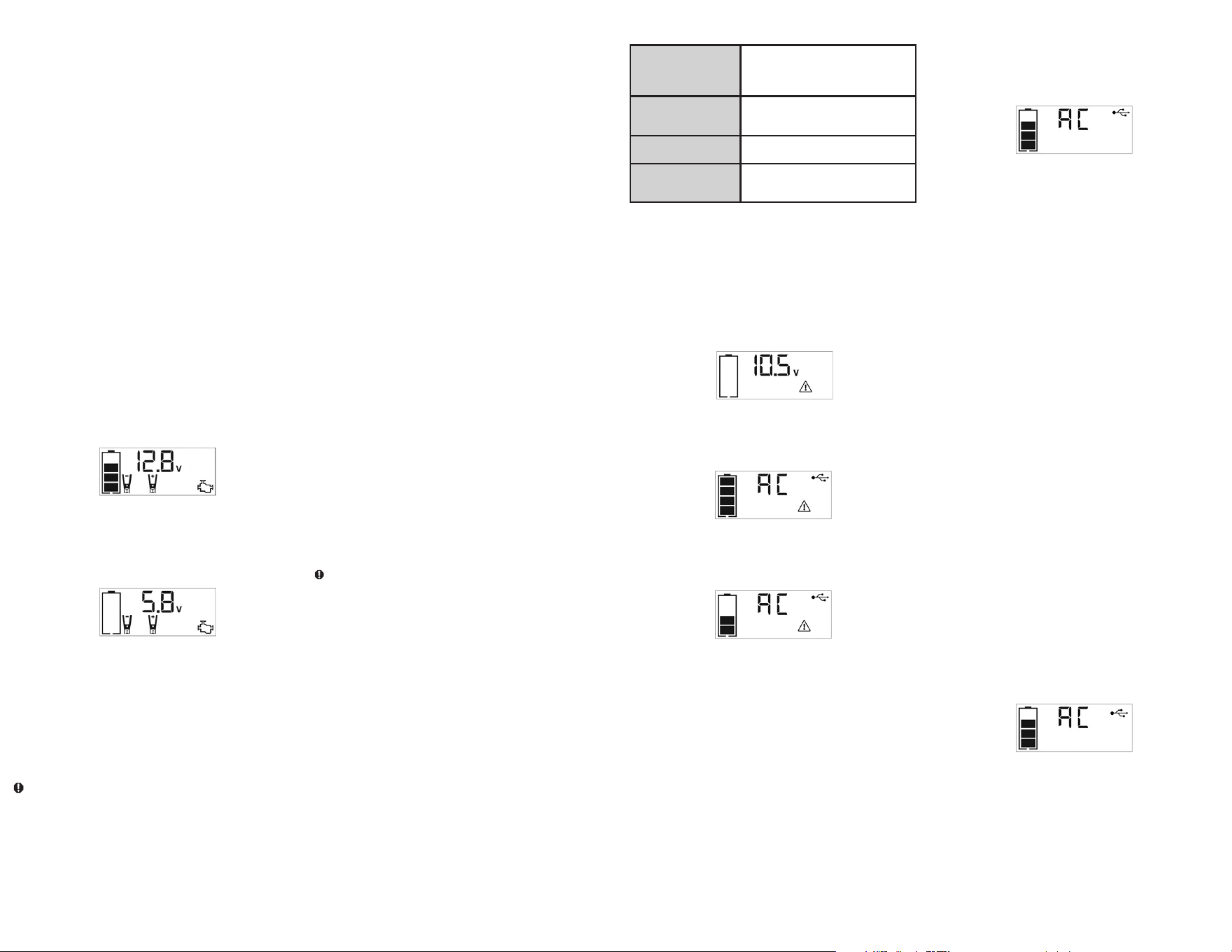
20 21
Características de protección
El inversor supervisa las siguientes condiciones:
Voltaje interno bajo de
la batería
El inversor cerrará automáticamente
cuando las caídas de voltaje de la batería
demasiado bajas, como esto pueden dañar
la batería.
Alto voltaje interno de la
batería
El inversor cerrará automáticamente cuando
el voltaje de la batería es demasiado alto,
pues éste puede dañar la unidad.
Protección de apagado
térmico
El inversor se apagará automáticamente
cuando la unidad se sobrecaliente.
Protección contra
cortocircuitos o
sobrecargas
El inversor se apagará automáticamente en
presencia de un cortocircuito o sobrecargas.
NOTAS IMPORTANTE:
Los tomacorrientes de CA proporciona un consumo total de energía de
500W.
Cuando los tomacorrientes CA están en uso, la unidad vigilará para las
siguientes condiciones de fallo: batería alta o baja, fallo térmico, fallo en
la tensión de la batería, sobrecarga y cortocircuito (consulte la sección
“Características de protección”).
1. Si existe un fallo de baja voltaje de la batería interna en
los tomacorrientes CA, los tomacorrientes CA se apagará
automáticamente y la pantalla LCD retroiluminada se mostrará lo
siguiento hasta que se corrija la falla:
La pantalla digital mostrará “AC/USB”; el icono de estado de la
batería VACÍO y el icono de fallo en la pantalla LCD parpadearán.
2. Si existe un fallo de alta voltaje de la batería interna en el tomacorriente
CA, el tomacorriente CA y la USB se apagarán automáticamente y
la pantalla LCD retroiluminada se mostrará lo siguiento hasta que se
corrija la falla:
La pantalla digital mostrará “AC/USB”; el icono de estado de la
batería LLENA y el icono de fallo en la pantalla LCD parpadearán.
3. Si existe un fallo térmico, cortocircuitos o sobrecargas en el
tomacorriente CA, el tomacorriente CA se apagará automáticamente
y la pantalla LCD retroiluminada se mostrará lo siguiento hasta que se
corrija la falla:
El icono de estado de la batería se encenderá de forma sólida; y
“AC/USB” en la pantalla digital y el icono de fallo en la pantalla LCD
parpadearán.
En caso de que se produzca alguna de las condiciones de falla
anteriores:
1. Desconecta el dispositivo de la unidad.
2. Pulse el botón de alimentación de CA para desactivar las tomas de
corriente CA.
3. Asegúrese de que la unidad no necesita ser recargada.
4. Deje que la unidad se enfríe durante varios minutos.
5. Asegúrese de que la calificación del aparato conectado a la unidad es de
500 vatios o más bajas y que el cable del aparato y la toma de correinte
CA no estén dañados.
6. Asegurar que haya suficiente ventilación alrededor de la unidad antes
de continuar.
Usando los tomacorrientes de 120 voltios CA
Los tomacorrientes de CA de 120 voltios se encuentra en la parte frontal
de la unidad. Los tomacorrientes admiten un consumo de energía máximo
de 500 vatios.
1. Pulse el botón de alimentación de CA para encender la toma de
corriente de 120 voltios CA. Sonará un pitido y la pantalla LCD
mostrará el siguiente:
El icono de estado de la batería y la pantalla digital muestra “AC”, que
indica las tomas de corriente CA está listo para usar.
2. Inserte el enchufe de la CA de 120 voltios del aparato en una de las
tomas de corriente CA.
3. Encender el aparato y operar como de costumbre.
Nota: Asegúrese de que la potencia del equipo conectado a la toma de corriente de 120V
CA no exceda los 500 vatios continuos.
4. Presione el botón de alimentación de “AC/USB” nuevamente para
apagar la toma de corriente de 120V CA.
Compruebe periódicamente el estado de la batería de la unidad en la
pantalla del LCD. Cuatro barras sólidas en el icono de la batería indican
una batería llena. Cuando el nivel de la batería está casi vacía con
sólo una única de barras sólidas o 4 bares vacíos, la unidad debe ser
recargada en este momento o protección integrada de baja tensión de la
unidad se activará. El icono de estado de la batería vacía parpadeará para
un corto período de tiempo antes de apagado automático.
IMPORTANTE: Asegúrese de que los tomacorrientes de CA esté apagada
cuando la unidad se está recargando o almacenando.
FUENTE DE ENERGÍA PORTÁTIL DE 12 V CC
La fuente de CC de 12 voltios está situada bajo cubierta protectora en
el frente de la unidad. Refiera a la ilustración de las características en la
página 2 para localizar. Esta fuente de energía portátil también se puede
usar con accesorios de CC de 12V equipados con un enchufe macho y
que esté indicado hasta 5A.
1. Levante la tapa dla toma de corriente de CC de 12 V de la unidad.
2. Inserte el enchufe de CC de 12 V del aparato en la toma de corriente
para accesorios de 12V de la unidad. NO EXCEDA UNA CARGA DE
5 AMPERIOS.
3. Encienda el aparato y opérelo como de costumbre.
4. Compruebe periódicamente el estado de la batería de la unidad en la
pantalla del LCD por pulsando el botón estado de la batería. (Cuatro
barras sólidas en el icono de la batería indican una batería llena. Una
barra sólida indica que la unidad necesita ser recargada.)
PUERTO DE CARGA DEL USB
El puerto de carga del USB está bajo misma cubierta protectora que la
toma de corriente para accesorios de 12 V. Refiera a la sección de las
características para localizar.
1. Presione el botón de alimentación CC/USB para activar el puerto
de carga USB. Sonará un pitido y la pantalla LCD retroiluminada se
mostrará continuamente los siguientes:
El icono del “5V USB” indica que el puerto del USB es listo para
utilizar.
2. Tape el dispositivo USB-accionado en el puerto de la energía del USB
del inversor y funcione normalmente.
El puerto de alimentación USB permanece encendida hasta que se vuelve
a pulsar el botón de la energía del “AC/USB” para apagarla. Asegúrese
de que el botón de alimentación USB se encuentra en la posición de
apagado cuando la unidad se está recargando o almacenada.
Procedimiento
Tome las medidas siguientes, observando todas las precauciones y
advertencias en la sección de las “instrucciones de seguridad importantes”
en el frente de este manual.
1. Apague la ignición del vehículo y todos los accesorios (radio, aire
acondicionado, luces, cargadores de teléfono celular conectados, etc.).
Ubique el vehículo en “estacionar” y coloque el freno de emergencia.
2. Asegúrese de que el interruptor de encendido del puente auxiliar de
arranque está en la posición de apagado.
3. Retire las pinzas del puente de sus respectivas lengüetas. Conecte
primero la pinza roja, luego la pinza negra.
4. Procedimiento para arrancar mediante puente un SISTEMA CON
NEGATIVO A TIERRA (el terminal de la batería está conectado al
bastidor) (LO MÁS COMÚN)
4a. Conecte la pinza roja del positivo (+) al terminal del positivo de la
batería del vehículo.
4b. Conecte la pinza negra del negativo (–) al bastidor o a un
componente metálico no móvil y sólido, o una parte de la
carrocería. Nunca fije la pinza directamente al terminal del negativo
de la batería o a una pieza móvil. Refiera al manual del dueño del
automóvil.
5. Procedimiento para arrancar SISTEMAS CON POSITIVO A TIERRA
Nota: En el caso poco habitual de que el vehículo que se debe arrancar tenga un sistema de
positivo a tierra (el terminal positivo de la batería está conectado al bastidor), reemplace
los pasos 4a y 4b anteriores con los pasos 5a y 5b, luego continúe con el paso 6.
5a. Conecte la pinza negra del negativo (–) al terminal del negativo de
la batería del vehículo.
5b. Conecte la pinza roja del positivo (+) al bastidor del vehículo o
a un componente metálico no móvil y sólido, o una parte de la
carrocería. Nunca fije la pinza directamente al terminal del positivo
de la batería o a una pieza móvil. Refiera al manual del dueño del
automóvil.
6. Cuando las pinzas están conectadas correctamente, la pantalla LCD
retroiluminada demostrará que lo que sigue para indicar que la unidad
está lista para arrancar el motor:
El icono de estado de la batería, el indicador del voltaje de la batería,
los iconos de pinzas y los signos “+” y “–” se iluminan sólidamente. El
icono del puente auxiliar de arranque se parpadeará para indicar que
las pinzas están conectadas correctamente.
7. Encienda el interruptor de encendido. Encienda la ignición y acelere el
motor en etapas de 5 a 6 segundos hasta que arranque. La pantalla
LCD retroiluminada mostrará siguiento:
El icono de estado de la batería, el indicador del voltaje de la batería,
los iconos de pinzas y los signos “+” y “–” se iluminan sólidamente
para indicar que la unidad está de iniciar la batería. El icono del
Arrancador parpadea. El ícono del Arrancador se ilumina sólido si el
vehículo está arrancado.
8. Coloque el interruptor de encendido del puente auxiliar de arranque en
la posición de apagado (off) nuevamente.
9. Desconecte la pinza del negativo (–) del motor o bastidor primero y
luego desconecte la pinza del positivo (+) de la batería.
IMPORTANTE: Siempre apague la unidad cuando no está en uso. Vuelva
a cargar la unidad completamente después de cada uso.
PRECAUCIÓN – Para reducir el riesgo de daño a la propiedad:
• Los vehículos que tienen sistemas computarizados incorporados pueden
resultar dañados si la batería del vehículo se arranca mediante puente.
Antes de arrancar mediante puente este tipo de vehículo, lea el manual
del vehículo para confirmar que se aconseja ayuda externa para arrancar.
• El exceso de revoluciones del motor puede dañar el mecanismo de
arranque del vehículo. Si el motor no arranca después de la cantidad
recomendada de intentos, abandone el procedimiento de arranque
mediante puente y busque otros problemas que puedan ser solucionados.
• Si el vehículo no arranca, apague la ignición, coloque el interruptor
de encendido del puente auxiliar de arranque en la posición de
apagado, desconecte los conductores del puente auxiliar de arranque y
comuníquese con un técnico calificado para investigar por qué no arrancó
el motor.
LUZ DE ÁREA LED
La luz de área LED incorporada del tres LEDs es controlada por el botón
de encendido de la luz de área en el panel de control (refiera a la sección
de las características para localizar). Presione el botón de encendido de la
luz de área una vez encender la luz. Presione el botón de encendido de la
luz de área nuevamente para apagar la luz zonal.
IMPORTANTE: Cuando se pulsa el botón de encendido luz de área para
encenderlo, sonará un pitido. La pantalla retroiluminada LCD se encenderá
durante 10 segundos (solamente) y luego mostrará continuamente el Icono
de estado de la batería e indicador de voltaje de la batería.
Compruebe periódicamente el estado de la batería de la unidad en la
pantalla LCD retroiluminada. Cuatro barras sólidas en el icono de batería
indican que la batería está llena. Cuando el nivel de la batería está casi
vacío con sólo una barra sólida o completamente vacío con 4 barras
vacías, la unidad debe recargarse en este momento o se activará la
protección de baja tensión incorporada en la unidad. El icono de estado
de la batería vacía parpadeará durante un corto período de tiempo antes
del apagado automático.
Cerciórese de que la luz de área y la unidad estén dadas vuelta de
cuando se está recargando o se está almacenando la unidad.
FUENTES DE ENERGÍA PORTÁTIL DE 120V CA
Consumo de corriente real versus calificado del equipo
La mayoría de las herramientas eléctricas, los aparatos, los dispositivos
electrónicos y los equipos visuales/de audio poseen etiquetas que
indican el consumo de energía en amperios o vatios. Asegúrese de que el
consumo de energía del artículo que desee operar sea menor a 500 vatios.
Si el consumo de energía se clasifica en CA de amperios, simplemente
multiplique por los voltios de CA (120) para determinar la vatiaje.
La unidad puede transportar las cargas resistivas con más facilidad. No
obstante, las cargas resistivas más grandes, como estufas o calentadores
eléctricos, generalmente requieren más potencia en vatios de la que
puede suministrar la unidad en forma continua. Las cargas inductivas,
como televisores y estéreos, requieren más corriente para funcionar que
las cargas resistivas de la misma clasificación de potencia en vatios.
PRECAUCIÓN: Dispositivos recargables
• Algunos dispositivos recargables están diseñados para cargarse al ser
enchufados directamente en un tomacorriente de CA. Estos dispositivos
pueden dañar el inversor o el circuito que se está cargando.
• Al utilizar un dispositivo recargable, supervise la temperatura durante los
primeros 10 minutos de uso para determinar si genera calor en exceso.
• Si produce calor en exceso, esto indica que el dispositivo no debe
utilizarse con este inversor.
• Este problema no se presenta con la mayoría de los equipos operados
con batería. La mayoría de estos dispositivos utiliza un cargador o
transformador por separado que está enchufado en un tomacorriente
de CA.
• El inversor puede funcionar con la mayoría de los cargadores y
transformadores.
Note: Algunas computadoras portátiles no funcionen con este inversor.
La forma de onda de salida del inversor eléctrico
La forma de onda de la salida de CA de este inversor se conoce como una
onda senoidal modificada. Es una forma de onda escalonada que posee
características similares a la forma de onda senoidal de la electricidad. Este
tipo de forma de onda es adecuado para la mayoría de las cargas de CA,
incluidas las fuentes de energía por conmutación y lineales utilizadas en
equipos electrónicos, transformadores y motores pequeños.
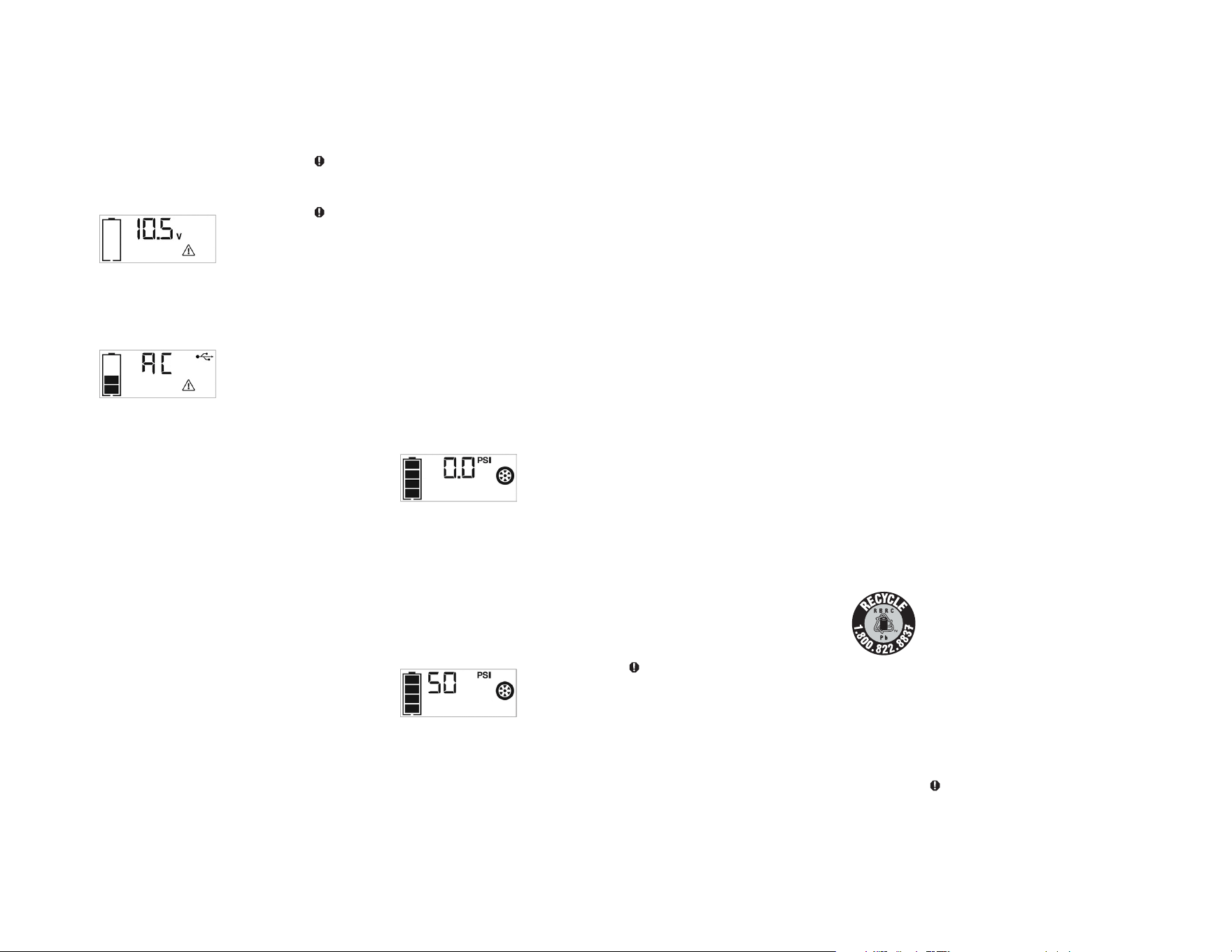
22 23
8. Permita que la unidad se refresque, después recargue antes de
almacenarla.
9. Almacene la manguera del compresor y la boquilla Sure Fit
®
en el
compartimiento de almacenamiento.
Cómo inflar otros artículos inflables sin vástago de
válvula
El inflado de otros artículos requiere el uso del adaptador de la boquilla.
1. Atornille el adaptador dentro la boquilla Sure Fit
®
. No apriete
demasiado.
2. Inserte el adaptador en el artículo a ser inflado.
3. Siga los pasos 2 a 4 de la sección “Cómo inflar neumáticos o
productos con vástagos de válvulas.”
NOTA IMPORTANTE: Los artículos pequeños como las pelotas de
voleibol, fútbol, etc. se inflan muy rápidamente. No infle demasiado.
4. Cuando se alcanza la presión deseada, el compresor se parará
automáticamente. Pulse el botón de alimentación del compresor para
apagar la unidad.
5. Desconecte el adaptador del artículo inflado.
6. Desatornille y retire el adaptador dla boquilla Sure Fit
®
.
7. Permita que la unidad se enfríe antes de almacenarla.
8. Almacene la manguera del compresor, la boquilla Sure Fit
®
y el
adaptador de la boquilla en el compartimiento de almacenamiento.
CUIDADO Y MANTENIMIENTO
Con el tiempo, todas las baterías pierden energía debido a la descarga
automática y con mayor rapidez en ambientes con temperaturas elevadas.
Cuando la unidad no esté en uso, recomendamos cargar la batería al
menos cada 30 días.
No sumerja este reflector en agua. Si la unidad se ensucia, limpie las
superficies exteriores con cuidado. Utilize una tela suave humedecida con
una mezcla diluida de agua y detergente.
No hay ningún usuario-sustituibles piezas. Periódicamente inspeccione la
condición de adaptadores, conectores y alambres. Contacto fabricante
para sustituir los componentes que han pasado a ser gastado o rotas.
Reemplazo/desecho de la batería
REEMPLAZO DE LA BATERÍA
La batería debe durar la vida útil de la unidad. La vida de servicio depende
en un número de factores, incluyendo pero no limitado al número de ciclos
de recarga, y el cuidado y mantenimiento adecuado de la batería por el
usuario. Comuníquese con el fabricante para cualquier información que
pueda necesitar.
ELIMINACIÓN DE LA BATERÍA
Contiene una batería de plomo ácido, que se deben
desechar de manera adecuada. Reciclar es necesario. El
incumplimiento de regulaciones locales, estatales y
federales, puede resultar en multas o prisión.
Por favor recicle.
ADVERTENCIAS:
• No deseche la batería en el fuego ya que puede ocasionar una explosión.
• Antes de desechar la batería, proteja las terminales descubiertas con cinta
eléctrica para trabajos pesados. De esta manera previene cortos circuitos
(los cortos circuitos pueden ocasionar lesiones e incendios).
• No exponga la batería al fuego o al calor extremo ya que puede explotar.
DETECCIÓN DE PROBLEMAS
La unidad no cargará
• Cerciórese de que se ha pulsado el botón para apagar el inversor.
• Cerciórese de que una cuerda de extensión del calibrador correcto esté
conectada correctamente con la unidad y un enchufe de funcionamiento
de la CA.
La luz de área LED no enciende
• Asegúrese de que se ha pulsado el botón de encendido de la luz de área
para encender la luz de área.
• Compruebe que la unidad tiene una carga completa. Recargue la unidad
en caso de necesidad.
La unidad no puede saltar comienzo el motor
• Asegúrese de que la unidad no está siendo operada en el modo
Compresor.
• Asegúrese de que el Interruptor del puente auxiliar de arranque de la
unidad está en la posición encendido (on).
• Controle que el puente auxiliar de arranque tenga la carga completa.
Recargue la unidad en caso de necesidad.
• Asegúrese de que se han realizado las conexiones de los cables con la
polaridad correcta.
El enchufe de la ca de 120 voltios no accionará la
aplicación
• Asegúrese de que se ha pulsado el botón de alimentación AC/USB para
encender el inversor.
• Cerciórese de que el interruptor del inversor esté en la posición de
trabajo.
• Cerciórese de le para haber seguido todos los pasos en las 120
instrucciones portables de la fuente de alimentación de la CA
cuidadosamente.
• Asegúrese de que el aparato está alimentado no extrae más de 500
vatios.
• Refiera a las notas importantes incluidas en esa sección que explican
problemas comunes y soluciones.
• Compruebe que la unidad tiene una carga completa. Recargue la unidad
en caso de necesidad.
El enchufe accesorio de la CC de 12 voltios no accionará la
aplicación
• Cerciórese de que el aplicación no dibuje más de 5 amperios.
• Compruebe que la unidad tiene una carga completa. Recargue la unidad
en caso de necesidad.
El puerto de la energía del USB no accionará la aplicación
• Asegúrese de que el consumo total del dispositivo USB conectado al
puerto USB no exceda de 2.1 A.
• Asegúrese de que se ha pulsado el botón de alimentación AC/USB para
encender los puertos USB.
• Algunos productos electrónicos de uso doméstico alimentados por USB
no funcionan con esta puerto de carga / potencia del USB. Compruebe el
manual del dispositivo electrónico correspondiente para confirmar que se
puede utilizar con este tipo de puerto de carga / potencia del USB.
• Compruebe que la unidad tiene una carga completa. Recargue la unidad
en caso de necesidad.
El compresor portátil no inflará
• Asegúrese de que la unidad no está siendo operada en el modo de
arranque rápido.
• Asegúrese de que el botón de encendido del compresor se ha presionado
para activar el compresor.
• Asegúrese de que el conector de la boquilla Sure Fit
®
está firmemente
atornillada al vástago de válvula cuando se intenta inflar los neumáticos; o
que el adaptador de la boquilla se atornilla firmemente en el conector de
la boquilla Sure Fit
®
y está insertado correctamente en el elemento a ser
inflado en todos los otros objetos inflables.
• El compresor puede sobrecalentarse. Pulse el botón de encendido del
compresor para apagar el compresor. Reinicie después de un período de
enfriamiento de 30 minutos aproximadamente.
• Compruebe que la unidad tiene una carga completa. Recargue la unidad
en caso de necesidad.
ACCESORIOS
Accesorios recomendados para uso con esta unidad puede ser disponibles
a través del fabricante. Si necesita ayuda con respecto a los accesorios,
por favor póngase en contacto con el fabricante al (877) 571-2391.
ADVERTENCIA: El uso de cualquier accesorio no recomendado
para el uso con esta unidad podía ser peligroso.
INFORMACIÓN DE SERVICIO
Si usted necesita asesoramiento técnico, reparación, o partes genuinas del
fabricante, póngase en contacto con el fabricante al (877) 571-2391.
Compruebe periódicamente el estado de la batería de la unidad en la pantalla
LCD retroiluminada. Cuatro barras sólidas en el icono de batería indican que
la batería está llena. Cuando el nivel de la batería está casi vacío con sólo
una barra sólida o completamente vacío con 4 barras vacías, la unidad debe
recargarse en este momento o se activará la protección de baja tensión
incorporada en la unidad. El icono de estado de la batería vacía parpadeará
durante un corto período de tiempo antes del apagado automático.
Nota:
Los puertos de la energía del USB de esta unidad NO admiten comunicación de datos. Sólo
proporcionan un máximo de energía de 5 voltios CC/1000 mA a un dispositivo eléctrico USB externo.
NOTAS IMPORTANTES:
Cuando el puerto USB está en uso, la unidad controlará las siguientes
condiciones de fallo USB en el puerto USB: fallo de baja tensión de la
batería, sobrecarga y cortocircuito.
Si existe una condición de falla por bajo voltaje de la batería interna, el
puerto USB y los tomacorrientes de CA se apagarán automáticamente y
la pantalla LCD retroiluminada mostrará lo siguiente hasta que se corrija
la falla:
La pantalla digital mostrará el indicador de voltaje de la batería; el
ícono de estado de batería vacía y el ícono de falla en la pantalla LCD
parpadearán.
Si existe una condición de sobrecarga o fallo de cortocircuito, el puerto
USB y las tomacorrientes de CA se apagarán automáticamente y la
pantalla LCD retroiluminada mostrará lo siguiente hasta que se corrija el
fallo:
El icono de estado de la batería se iluminará; el icono “AC” y USB de la
pantalla digital y el icono de fallo de la pantalla LCD parpadearán.
En caso de que se produzca alguna de las condiciones de fallo anteriores:
• Desconecte el dispositivo alimentado por USB y pulse de nuevo el botón
de alimentación AC/USB para apagarlo inmediatamente.
• Deje que la unidad se enfríe durante varios minutos antes de intentar
utilizar el puerto USB de nuevo.
• Si vuelve a ocurrir un fallo, asegúrese de que el consumo total del
dispositivo USB conectado al puerto USB no exceda de 2.1 A.
• Si un dispositivo USB individual está dentro de las especificaciones y
se produce el fallo, haga que el dispositivo USB se ha comprobado si
hay algún fallo de funcionamiento y no se puede seguir utilizando con el
puerto USB.
Compruebe periódicamente el estado de la batería de la unidad en la
pantalla LCD retroiluminada. Cuatro barras sólidas en el icono de batería
indican que la batería está llena. Cuando el nivel de la batería está casi
vacío con sólo una barra sólida o completamente vacío con 4 barras
vacías, la unidad debe recargarse en este momento o se activará la
protección de baja tensión incorporada en la unidad. El icono de estado
de la batería vacía parpadeará durante un corto período de tiempo antes
del apagado automático.
Nota:
Los puertos de la energía del USB de esta unidad NO admiten comunicación de datos. Sólo
proporcionan un máximo de energía de 5 voltios CC/1000 mA a un dispositivo eléctrico USB externo.
COMPRESOR PORTÁTIL
El compresor incorporado de CC de 12 voltios es el compresor de última
generación para los neumáticos de todos los vehículos, remolques
y artículos inflables para recreación. Un adaptador de la boquilla se
suministra que los tornillos en el extremo de la boquilla Sure Fit
®
en el
extremo libre
de la manguera del compresor. La manguera del compresor con montaje
de los neumáticos se almacena en el compartimiento de almacenamiento
(consulte la sección “Características” para localizar). El botón de
alimentación del compresor y botones para aumentar (+) y disminuir (–) la
presión del compresor están localizados en el panel de control en la parte
frontal de la unidad.
Antes de continuar, compruebe el estado de la batería de la unidad en
la pantalla LCD. Cuatro barras sólidas en el icono de la batería indica
una batería llena. Cuando el nivel de la batería está casi vacío con sólo
una barra sólida, la unidad se debe recargar antes de usar o protección
integrada de baja tensión de la unidad se activará. El icono de estado
de la batería vacía parpadeará para un corto período de tiempo antes de
apagado automático.
El compresor es capaz de inflar hasta 120 libras por la presión de la
pulgada cuadrada (PSI). El compresor puede funcionar lo suficiente
para llenar hasta 3 neumáticos de medida promedio antes de tener que
recargar la batería. Vuelva a colocar la manguera en el compartimiento de
almacenamiento después del uso.
IMPORTANTE: Asegúrese de que el interruptor del puente auxiliar de
arranque se ha apagado antes de intentar utilizar la unidad como un
compresor.
ADVERTENCIA – Para reducir el riesgo de lesiones graves o
daños materiales: Siga todas las instrucciones de seguridad encontradas
en la sección de las “instrucciones de seguridad específicas para
compresores” de este manual de la instrucción.
PRECAUCIÓN – Para reducir el riesgo de daños materiales:
Cuando el compresor es operado a un PSI baja, la unidad puede
comenzar en baja y acelerar gradualmente. Cuando el compresor es
operado a más alto PSIs, la unidad puede funcionar normalmente
durante varios minutos, luego decelerar durante unos minutos antes de
volver a la operación normal. Esta característica protege la unidad del
sobrecalentamiento durante uso normal. En cualquier caso, no haga
funcionar el compresor de forma continua durante más de 10 minutos,
ya que se puede sobrecalentar. Esto podría dañar el compresor. Si
el compresor debe funcionar durante más tiempo: cada 10 minutos,
pulse el botón de encendido para encender compresor del compresor,
a continuación, reiniciar después de un periodo de enfriamiento de
aproximadamente 30 minutos.
Cómo inflar neumáticos o productos con vástagos de
válvulas
1. Atornille la boquilla Sure Fit
®
en el vástago de la válvula. No apriete
demasiado.
2. Presione el botón de alimentación del compresor. Sonará un pitido y la
pantalla LCD retroiluminada demostrará siguiento:
El icono del compresor se encenderá y la pantalla LCD retroiluminada
mostrará alternativamente el preajustado valor psi que parpadea (el
último valor introducido por los botones de control de presión del
compresor) y la actual psi presión del artículo al ser inflado (que se
ilumina sólido).
3. Presione los botones “+” y “–” de control de presión para ajustar la
presión deseada entre una gama de valores predefinidos (entre 3 y
120), que se mostrará en la pantalla LCD retroiluminada. La unidad
emitirá un pitido cada vez que pulsa los botones (sosteniendo el botón
acelera la selección de valor hacia arriba o hacia abajo). Una vez que
se ha entrado en la presión deseada, suelte el botón y la pantalla LCD
retroiluminada intermitente mostrará la nueva presión seleccionado, de
la siguiente manera:
El valor seleccionado nuevo se guarda en la memoria de la unidad
hasta que se resetea manualmente.
4. Presione el botón de alimentación del compresor una vez más para
comenzar a inflar. El icono del compresor parpadea y la pantalla digital
sólo se mostrará el valor de la presión actual (que se ilumina sólido)
para indicar que el compresor se activa. Supervise la presión sobre la
pantalla del LCD.
NOTA IMPORTANTE: Para interrumpir durante el inflado, pulse el
botón de alimentación del compresor una vez más.
5. Cuando se alcance la presión predefinido deseada, el compresor
parará automáticamente.
6. Pulse el botón de alimentación del compresor para apagar la unidad.
7. Desatornille y retire el conector de la boquilla Sure Fit
®
desde el vástago
de la válvula.