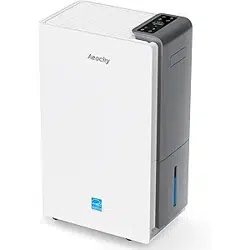
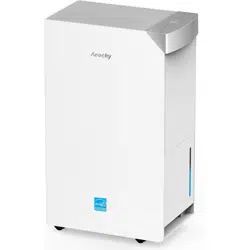
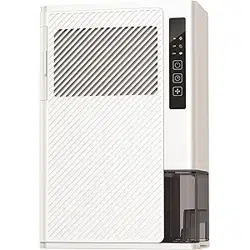
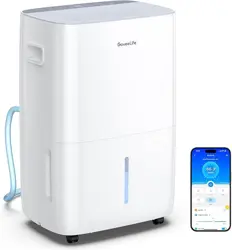
Aeocky RHEA-001 / RHEA-O Dehumidifier User Manual
Thanks for Choosing Aeocky!
Your support means the world to us. We hope you enjoy our product as much as we did creating it.
24/7 SUPPORT
We promise to respond within 24 hours.
Free Assistance or Replacement
Not collecting water? Leakage? Missing accessories? Missed 30-day return window? No worries!
Email: [email protected] for Free Assistance or Replacement! (The official sole contact channel for the brand)
WE PROMISE:
- We will respond to you within 24 hours.
- We offer an extra 30 days, making a total of 60 days for the return and refund window. You can enjoy better service than any platforms of purchase. Even if the initial 30-day no-reason return window provided by platforms has passed, we are committed to continuing our service.
- We provide 3 year warranty for machine and 5 year for compressor, allowing you to use it with peace of mind, without worrying about after-sales support issues.
We are confident in our product's reliability. Should you encounter issues such as not collecting water, being stuck in defrost mode indefinitely, or experiencing water leakage within the warranty period, please send us a video of the issue along with your order number. We will promptly provide a free replacement!
IMPORTANT SAFETY INSTRUCTIONS
When using electrical appliances, basic precautions should always be followed to reduce the risk of fire, electric shock, and injury to persons, including the following:
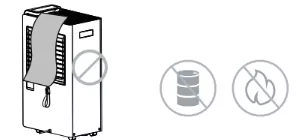
Do not cover the air inlet and outlet while in operation.
Do not use the dehumidifier near flammables and combustibles.
REFRIGERANT (FOR R32 ONLY)
Risk of Fire or Explosion. This unit contains flammable refrigerant. Additional safety precautions must be followed.
- Do not use means to accelerate the defrosting process or to clean, other than those recommended by the manufacturer.
- The appliance shall be stored in a room without continuously operating ignition sources (for example: open flames, an operating gas appliance or an operating electric heater).
- Do not pierce or burn refrigerant tubing. Be aware that refrigerants may not contain an odor.
- Keep ventilation openings clear of obstruction.
- When handling, installing and operating the appliance, care should be taken to avoid damage to the refrigerant tube.
- Do not drill holes in the unit.
- Maintenance, cleaning and service should only be performed by technicians properly trained and qualified in the use of flammable refrigerants.
- Dispose of dehumidifier in accordance with Federal and Local Regulations. Flammable refrigerants don’t require special disposal procedures.
GENERAL SAFETY
- Do not alter or modify the appliance’s characteristics in any way. Should repairs be necessary, contact Aeocky’s Service Centre. Self-servicing or unauthorised servicing can be dangerous.
- The appliance must be installed in accordance with the relevant national legislation.
- The appliance is not intended for use by persons (including children) with reduced physical, sensory or mental capabilities, or lack of experience and knowledge, unless they have been given supervision or instruction concerning the use of the appliance by a person responsible for their safety.
- Children and pets should be supervised to ensure they do not play with the appliance.
- Clean the filter regularly based on your usage to avoid dust building up internally causing overheating and malfunction.
- Ensure the air inlet and outlet are not blocked or covered when in use.
- It is not recommended to operate or store the appliance under direct sunlight. Otherwise, the machine may overheat and shut down or malfunction.
- Do not leave the appliance running or plugged in over a long period of time unattended. Leaving unattended electrical appliances running for long is unsafe.
- Only operate the appliance within the specified operating temperature range (41°F~95°F) / (5°C~35°C).
- Do not run power cord under carpeting, or cover with rugs or runners. Arrange the cord away from areas where it may become a trip hazard.
- Always clean the filter and cover the dehumidifier with a dust sheet when storing the dehumidifier.
LOCATION SAFETY
- The appliance must always be placed in an upright position on an even level surface to avoid any damage, during use or transportation and when put into storage.
- To avoid poor heat dissipation of the machine due to being too close to the wall, it is recommended to allow a minimum of 20 cm clearance the air inlet from being unable to inhale air.
- Always make sure your hands are dry when operating the appliance.
ELECTRICITY SAFETY
- Do not use the appliance if the power cable cord is damaged. It must be replaced by an Aeocky’s Service Centre.
- The appliance must be plugged into a 3-prong outlet and ensure that the voltage matches the rated specifications. If in doubt, check with a qualified technician.
- Be sure the dehumidifier is properly grounded. To minimize shock and fire hazards, proper grounding is important. This power cord is equipped with a three-prong grounding plug for protection against shock hazards.
- Do not pull or place strain on the power cord when moving appliance.
- Always unplug the appliance before cleaning or maintenance or when not in use.
- To protect against electric shocks, do not immerse or spray the appliance or any of its parts in water.
- Do not insert fingers or any objects into the air inlet or outlet openings.
- Always switch off the power before unplugging from the socket.
FOR HOUSEHOLD USE ONLY
READ AND SAVE THESE INSTRUCTIONS
DO NOT COVER: Do not block the air inlet or outlet of the dehumidifier.
OPERATING TEMPERATURE: (41°F ~ 95°F) / (5°C ~ 35°C)
KEEP DISTANCE: Do not use the dehumidifier near flammables and combustibles.
PLEASE PLACE VERTICALLY: Do not tilt or place the machine sideways.
Note: We kindly recommend keeping the machine away from valuable or moisture-sensitive items to prevent potential damage from rare accidents, such as water overflow caused by incorrect pouring or accidental tilting of the unit.
Note: We recommend using the product in a relatively enclosed space; otherwise, due to the continuous influx of outdoor moisture, the indoor humidity may not decrease effectively.
KNOWING YOUR DEHUMIDIFIER
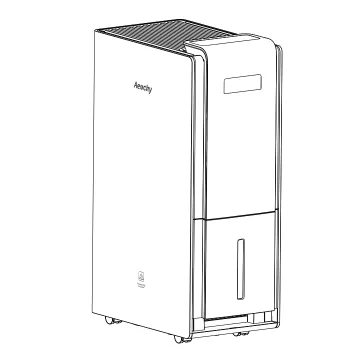
PACKAGE CONTENTS
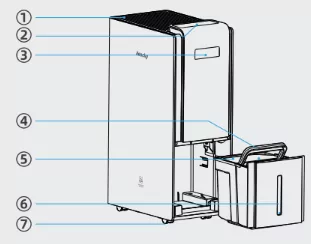
- 1. Air outlet
- 2. Control Panel
- 3. Handle
- 4. Water Tank Handle
- 5. Water Tank Cover
- 6. Visual Window
- 7. Case
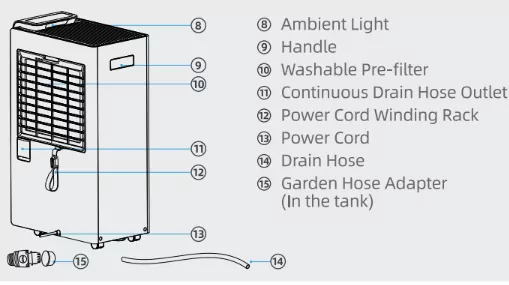
- 8. Ambient Light
- 9 . Handle
- 10. Washable Pre-filter
- 11. Continuous Drain Hose Outlet
- 12. Power Cord Winding Rack
- 13. Power Cord
- 14. Drain Hose
- 15. Garden Hose Adapter (In the tank)
USING YOUR DEHUMIDIFIER
CONTROL PANEL
Power On/Off
Touch to turn the dehumidifier on or off. Subsequent power-on will automatically restore the last working mode. The timer settings will be reset.

Mode Select
Press to select the following 5 modes:

Note: In order to protect the compressor and avoid frequent starts and stops, for the mode that can control humidity, the compressor stops working when the ambient humidity reaches the set value. The fan stops after running at low fan speed for 2 minutes to detect the humidity. When the ambient humidity is detected to be 5% higher than the set target value, the compressor will restart and resume normal operation. This is an energy efficiency requirement and the industry's default rule applicable to compressor products.
Continuous Mode

It is default mode and low wind speed when turned on. The display shows CO first, and then switches to ambient humidity after 5 seconds. In this mode, the fan speed can be adjusted, but the target humidity cannot be adjusted.
Sleep Mode

Press to the button to switch to sleep mode. After 5 seconds of no operation, The ambient light goes out and the brightness of other lights decreases by 50%. The machine defaults to low fan speed and continuous dehumidification.
Note: Target humidity and fan speed cannot be set in this mode. The alarm will not sound when the water is full, and the display will display "FL" at 20% brightness (all other indicators will be off).
Constant Humidity Mode

Press again to switch to constant humidity mode, and the display shows the current ambient humidity value. Press + or - to select the desired humidity level, the initial state is 40%. Each time you press + or -, the humidity adjustment amount is 5%. Adjustable range is 40% ~ 80%. After 5 seconds of setting the humidity, the display will show the realtime ambient humidity again.
Smart Drying Mode

Press again to switch to smart drying mode. In this mode, the fan speed defaults to high fan speed. In this mode, fan speed and target humidity cannot be set.
Auto Mode

Press again to switch to auto mode, and the humidity is automatically maintained between 45% and 55%. The fan speed can be adjusted according to needs, but the target humidity value cannot be adjusted.
Fan Speed

Low Fan Speed / High Fan Speed. The sleep mode defaults to low fan speed, and the smart drying mode defaults to high fan speed. In other modes, the wind speed can be adjusted automatically or according to your own needs.
Child Lock

Press and hold for about 3 seconds to enter the child lock state. At this mode, pressing any other buttons except the child lock is considered an invalid operation. When any button is pressed, a beep sound will be heard and the child lock indicator will flash at the same time.
Timer Setting

Press to set the dehumidifier to automatically turn on or off within the selected time. The time range can be set from 1 to 24 hours.
Turn Off Timer: Press the button, and displays the set time. At this time, you can press + or - to select the scheduled shutdown time. The ambient humidity display resumes, and the small icon on the display is always on. When the timer is triggered, it shuts down and enters standby mode.
Turn On Timer: In standby state, press the timer button, and you can press + or - to select the time for scheduled power on. The display will show the time for scheduled power on, and the small icon on the display will always be on. When the timer is triggered, the machine will start on its own and enter the working state before the machine was shut down.
Notice: If there is no operation within 5 seconds, the setting procedure is completed. If you press the power button before the timer expires, the timer setting will be cancelled. If the timer has been set, press the timer button again to reset the timer. If you want to cancel any timer settings, press the timer button twice continuously and the "H" icon on the display will go out.
Ambient Light Button

Press to adjust the brightness of the machine light, switching between under 4 states.
- AMBIENT LIGHT OFF: The ambient light/panel light bar goes out, and the button light/display screen remains fully bright.
- SLIGHTLY BRIGHT: The button light/display brightness is reduced to 50%.
- ALL LIGHT OFF: Except for the power button, which is slightly bright, other LED lights are off. At this time, you can press any key to wake up and check the working status of the machine.
- FULL BRIGHTNESS: The ambient light/button light/display brightness returns to 100%.
The indicator lights change according to the detected humidity level, allowing you to easily gauge the general humidity range even from a distance.
- Blue light: <45% RH
- Green light: 45%-65% RH
- Orange light: >65% RH
- Red light: water tank is full
Water Tank Full Alarm

When the water tank is full, the machine stops working, and three beeps sound. The red ambient light is always on, and the display shows "FL" (all other indicator lights are off); You can directly pull out the water tank. After the water tank is emptied and reset, the indicator light goes out and the machine returns to normal working status (The fan will continue to work).
Automatic Defrost

Due to the working principle of the compressor, frost may form on the internal coils of this product. When frost forms, the internal compressor shuts down and the fan continues to run until the frost melts. Once the frost on the internal coils has been removed and dried, the compressor or fan will automatically restart and resume normal operation.
MORE SAFETY
Auto Restart Function: This product is equipped with an automatic restart function. In the event of a power outage, the dehumidifier will automatically restore its previous settings after power is restored.
Compressor protection function: In order to extend the product life, the compressor will rest for 8 minutes after continuous operation for 8 hours, and then start again.
MORE FEATURES
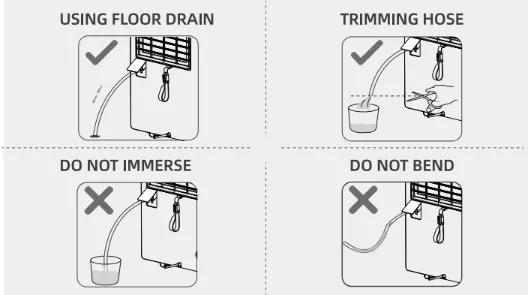
USING FLOOR DRAIN | TRIMMING HOSE
Ensure that the drain hose is not submerged in water and always positioned below the horizontal line of the appliance. Otherwise, it may not be able to drain properly due to air pressure.
Continuous Draining: Water can be automatically emptied into a floor drain by attaching the dehumidifier to a drain hose.
- Make sure the connection is tight and there is no leaking.
- We have left a sufficient length for you to trim the drain hose. If necessary, you can trim the drain hose to the appropriate length based on your needs.
- Be sure to run the drain hose sloping downward to let the water flow out smoothly, otherwise water will back up into the water tank.
- When the continuous drain feature is not being used, remove the drain hose from the outlet and make sure to insert the water tank tightly.
- Different manufacturers' garden hoses may vary slightly in diameter. If there are gaps after connecting the adapter, we suggest using thread seal tape to reinforce the connection.
CLEANING AND MAINTENANCE
How to use Winding Rack

- Arrange the power cords and put them on the Winding Rack
- Put the end of the Winding Rack into the groove
Outer Surface: Use a soft, dry cloth to gently wipe clean the outer surface.
Tips: Never use chemical solvents such as benzene, alcohol or gasoline, otherwise, the machine casing may be damaged or even deformed.
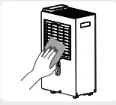
Washable Pre-filter
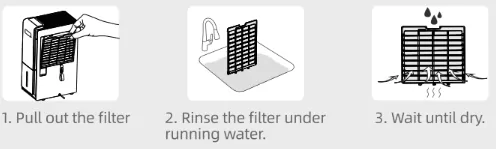
- Pull out the filter
- Rinse the filter under running water.
- Wait until dry.
TIP: For best performance, please clean the filter every 2-4 weeks. Please make sure the filter is completely dry before reassembling.
Clean the bottom and edges of the water tank every 1-2 weeks to prevent the long-term accumulation of water, which can lead to the growth of bacteria.
TROUBLESHOOTING
| PROBLEM |
REASON |
SOLUTION |
| Not Collecting Water |
Did not allow enough time to remove the moisture. |
Be patient and check the water tank capacity once every half a day. |
| There is a heater or something giving off water vapor in the room and cause a decrease in relative humidity. |
With a lower relative humidity, it takes a longer time to dehumidify. |
| A lower room temperature can lead to a decrease in absolute humidity which requires a longer time for dehumidification. |
Increase the room temperature or use the appliance in a warm room. |
| Filter dusty |
Clean the air filter or replace it |
| Initial defects |
Please contact our helpful service center. |
| The high room temperature is causing the machine to exceed its normal operating temperature. |
Turn off the dehumidifier. Make sure that room temperature is in operating temperature range. |
| Water Leaking |
Dehumidifier on uneven surface or water tank fitted incorrectly. |
Ensure the dehumidifier is on a flat, even surface, use a spirit level to check, remove tank and replace correctly. |
| Removing the tank whilst the dehumidifier is running. |
Always unplug the dehumidifier and allow 90s before removing the tank. |
| Moving or tilting the dehumidifier whilst water residue remains inside the dehumidifier. |
Always turn off the dehumidifier, wait 90s, empty the tank and reinsert the tank before moving the dehumidifier. |
| Damaged water tank. |
Remove the water tank, fill with water and place on a hard even surface to test for leakage |
| The continuous drainage is clogged or loose. |
Check the continuous drainage hose and its connection. |
| Dehumidifier Does Not Start |
A lower room temperature can lead to a decrease in absolute humidity which requires a longer time for dehumidification. |
Increase the room temperature or use the appliance in a warm room. |
| No power |
Make sure the dehumidifier's plug is inserted completely into the outlet. |
| Initial defects |
Please contact our helpful service center. |
| Water tank is not in the proper position |
Reset the water tank. |
| Dehumidifier Suddenly Stopped Working While Running |
The blockage of the object will cause the internal temperature of the machine to be too high, which will cause the machine to start the protection program and stop to work. |
Check whether there is any foreign object in the air inlet/outlet of the machine. |
| The dehumidifier will stop running when the water tank is full. |
Check bucket and indicator. |
| Error Code/ Technical Code |
E1/E2 Code (Sensor failure) |
Cut off the power for half an hour and then restart the machine after it returns to normal operating temperature. |
| L3 Code (Overheat) |
| L4 Code (Too cold) |
Cut off the power for half an hour and then restart the machine after it returns to normal operating temperature. |
| C8 Code (Initial Defects) |
Please contact our helpful service center. |
| LO Code (Environmental Relative Humidity ≤30%) |
In this state, the machine works normally. The machine will resume operation after the relative humidity rises. |
| HI Code (Environmental Relative Humidity ≥90%) |
In this state, the machine works normally. After the relative humidity drops, the normal ambient humidity will be displayed. |
| HS Code (Defrosting) |
The machine will exit the defrost program and resume normal operation when the defrost time is >10 minutes and the coil temperature is ≥35.6°F (2°C). |
Additional notes: The amount of environmental humidity detection is inaccurate. In order to save energy, when the environmental humidity reaches the set value, the compressor and the fan will be suspended. At this time, the air flow rate is slow, and the air near the humidity sensor above the air inlet is still relatively dry. As the humidity of the indoor environment rises and the air circulation, the air near the sensor will gradually become humid again. When the specified conditions are met, or a manual switch mode to restart the machine, the fan will automatically restart. Subsequently, the humidity sensor will be re-monitored to the latest and accurate environmental humidity.
Dust can buildup internally inside the dehumidifier, causing obstruction to airflow and over-heating. This will cause malfunction. When this happens, you will need to request a service at our [email protected]. We will respond as soon as possible within 24 hours.
Clean the filter regularly based on your usage to avoid malfunction.
Absolute humidity (the amount of moisture present per 1 cubic meter of air). Relative humidity (the percentage of moisture in the air).
If your problem is not listed or still persists, please contact our Customer Support and we will do our best.
AEOCKY CUSTOMER CARE
Default 36-Month Warranty
This appliance is covered by Aeocky warranty for 36 months from the date of its original purchase. The compressor is covered by an additional 24 months, for a total of 60 months (5 years).
The warranty will not apply in cases of:
- Accident, misuse, or repairs performed by unauthorized personnel.
- Any unit that has been tampered with or used for commercial purposes.
- Normal wear and tear of wearable parts.
- Use of force, damage caused by external influences.
- Damage caused by non-observance of the User Manual, e.g. connection to an unsuitable mains supply or noncompliance with the instructions.
- Partially or completely dismantled appliances.
- Defects caused by or resulting from damages from shipping or from repairs, service, or alteration to the product or any of its parts that have been performed by a repair person not authorized by Aeocky.
Products purchased through unofficial channels are not covered under warranty. Check the Aeocky official site for details on official sales channels. If you have purchased the appliance from a different place, please contact your seller for return and warranty issues.
We're Here to Help!
We provide services that exceed industry standards. Feel free to contact us anytime.
Email: [email protected]
We will respond as soon as possible within 24 hours.