
2
Thank you for purchasing the
VacMaster
®
VP321 Chamber Vacuum Sealer.
You are about to use one of the most powerful vacuum sealers available.
With the help of the VP321, you will now be able to keep food fresh for
longer, deliver consistent portion control, and streamline your operations
with programmable seal and vacuum time settings.
The VP321 is a chamber vacuum system, which offers two distinct
advantages over non-chamber, external suction units. First, a much
higher level of vacuum can be achieved, which means a longer shelf life
for foods that you package. Secondly, liquids and liquid-rich foods can be
effectively vacuum packaged. Foods like fresh meats, sh, soups, stews and
marinated vegetables are packaged quickly with ease and no mess. The
VacMaster
®
VP321 is perfect for storage, cook chill, portion control, sous vide,
processing game and more.
For your safety and protection, carefully read and follow this guide.
For more information, to Register your
product or get support
please visit us at VacMasterFresh.com
Welcome
ARY, Inc. | 11880 College Blvd., Suite 550, Overland Park, KS 66210 | VacMasterFresh.com | 800.821.7849
VP321 Chamber Vacuum Sealer |
User Guide
Safeguards ................................................................................................................................ 4
Features ....................................................................................................................................... 6
Control Panel ...........................................................................................................................7
How To..........................................................................................................................................8
Troubleshooting ..................................................................................................................14
Cleaning and Storage ......................................................................................................15
Maintenance .........................................................................................................................16
Vacuum Packaging Guidelines ................................................................................ 18
Parts .............................................................................................................................................19
Packaging Info ..................................................................................................................... 22
Specs ........................................................................................................................................... 23
More Resources ..................................................................................................................24
Warranty and Registration .......................................................................................... 25
Notes ...........................................................................................................................................26
Contents
3
ARY, Inc. | 11880 College Blvd., Suite 550, Overland Park, KS 66210 | VacMasterFresh.com | 800.821.7849
VP321 Chamber Vacuum Sealer |
User Guide
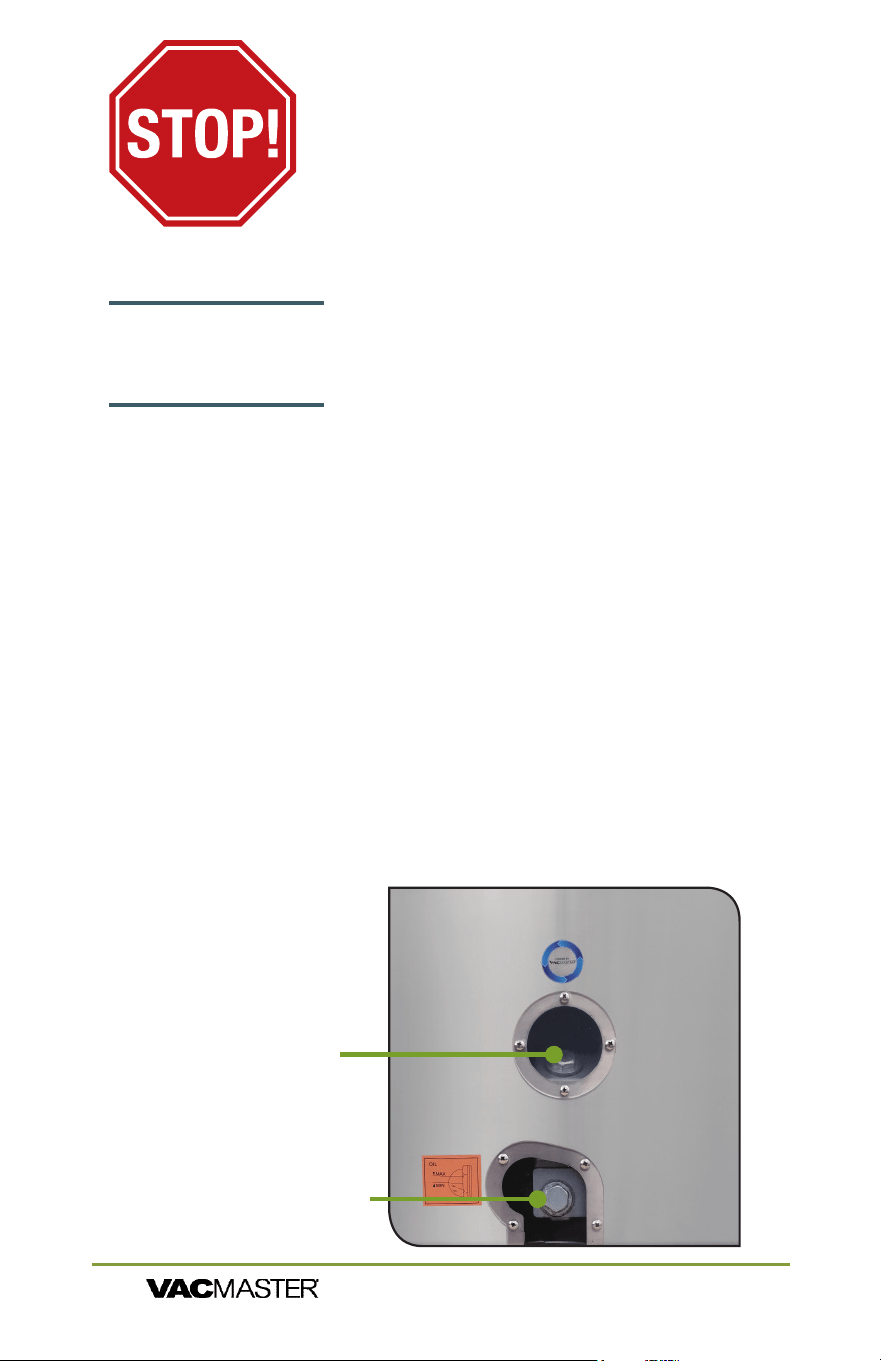
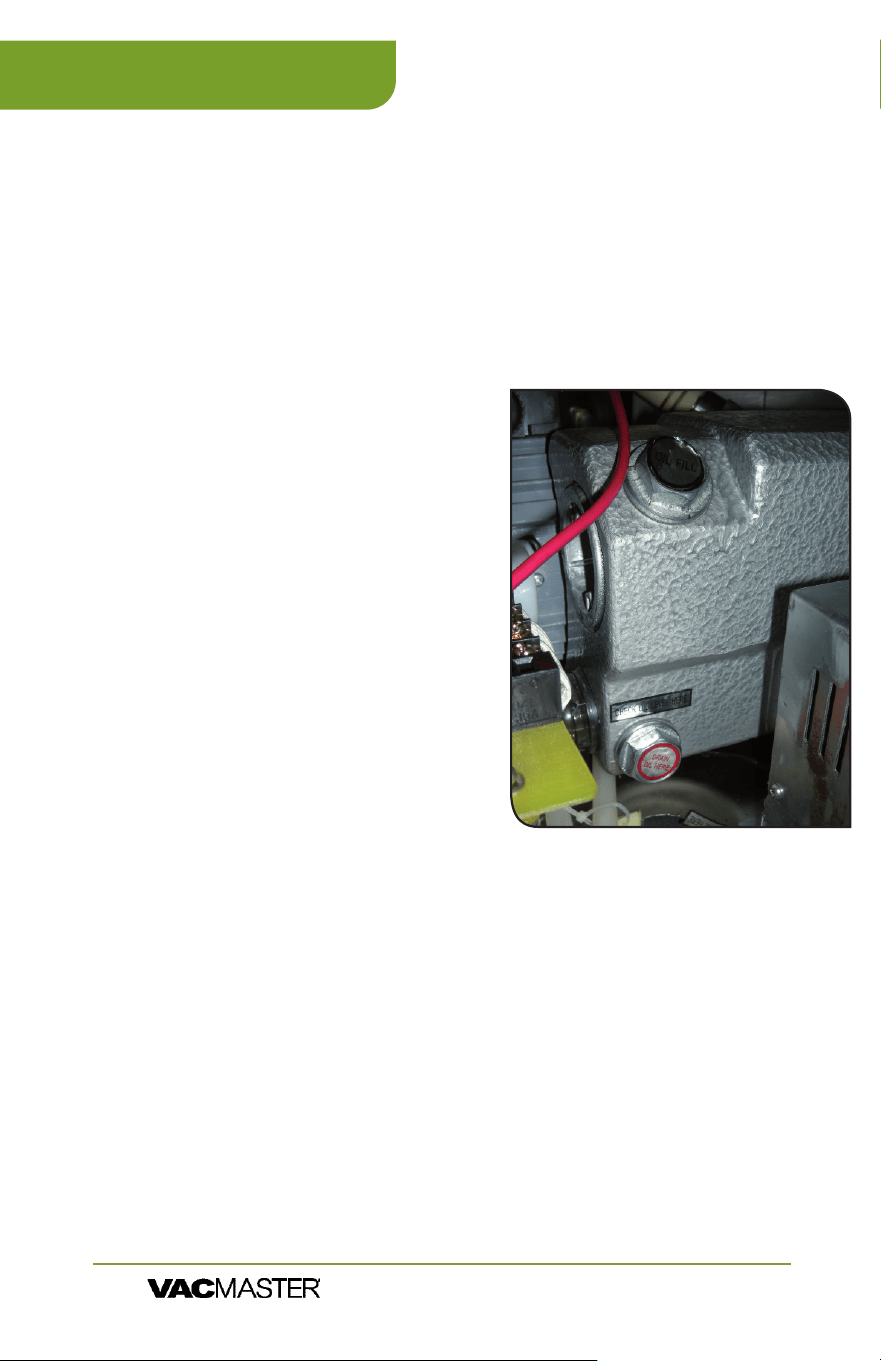
A. Oil Fill Bolt
Side of
Cabinet
Housing
B. Oil Site Glass
NOTE: Pump requires approximately 8 uid ounces of oil
(approx. 1 cup). Use only approved VacMaster vacuum oil.
Adding Oil to Vacuum Pump
Turn off and unplug machine to prevent electrocution.
1. Using VacMaster approved 10W non-detergent hydraulic oil ,
ll the enclosed plastic oil bottle.
2. Locate the oil ll bolt (A) on the top of the vacuum pump.
3. Remove oil ll bolt.
4. Watching oil site glass (B) insert end of oil bottle into hole.
5. Fill oil level between 1/2 to 3/4 of site glass.
6. Do not overll. Overfill can cause damage to vacuum pump
7. Replace and tighten bolt to vacuum pump.
YOU MUST ADD OIL
BEFORE USE!
FAILURE TO DO SO WILL
DAMAGE THE PUMP!
Read and complete the following to prevent any damage.
Oil must be added to the vacuum pump before using.
VacMaster
®
model VP540 uses an oil vacuum pump.
For shipping purposes there is no oil in the pump.
Oil must be added.

4
WARNING:
When using electrical appliances, basic safety
precautions should always be followed to reduce the risk of fire,
electric shock, and/or injury to persons, including the following:
1. Read all instructions.
2. This appliance is not intended for use by persons with reduced physical,
sensory, or mental capabilities, or lack of experience and knowledge,
unless they are closely supervised and instructed concerning use of the
appliance by a person responsible for their safety.
3. This appliance is not to be used by children. Close supervision is
necessary when any appliance is used near children. Children should be
supervised to ensure that they do not play with the appliance.
4. Never let the vacuum sealer run unattended. Disconnect the vacuum
sealer from the power source before leaving the work area.
5. To protect against risk of electric shock, do not immerse cord, plug, or
vacuum sealer in water or other liquid.
6. To reduce the risk of electric shock and injury to persons, disconnect
from power supply when not in use, before cleaning and before servicing.
7. To provide continued protection against risk, do not operate any
appliance with a damaged supply cord or plug, or after the appliance
malfunctions or has been dropped or damaged in any manner. Supply
cord replacement and repairs must be conducted by the manufacturer,
its service agent, or similarly qualied persons in order to avoid a
hazard. Call the provided customer service number for information on
examination, repair, or adjustment.
8. The use of accessory attachments not recommended by the appliance
manufacturer may cause injuries.
9. Do not use outdoors. Optimal operating temperature range is 65° to 75°.
10. Do not let cord hang over edge of table or counter, or touch hot
surfaces, including stove.
11. Do not disassemble this appliance beyond instructions provided. Doing
so may result in personal injury.
12. Do not place on or near a hot gas or electric burner, or in a heated
oven.
13. Do not use for other than intended purpose.
14. This appliance is designed for a maximum vacuum ON time of 70
seconds and a minimum OFF time of 10 seconds between cycles. Stop the
appliance and allow it to cool to ambient temperature if the appliance has
been in use for 45 minutes.
15. This appliance is for commercial use only.
VP321 Important Safeguards
ARY, Inc. | 11880 College Blvd., Suite 550, Overland Park, KS 66210 | VacMasterFresh.com | 800.821.7849
VP321 Chamber Vacuum Sealer |
User Guide

5
VP321 Important Safeguards
h
Vacuum packaging is not a substitute for canning. All
perishables still need to be refrigerated or frozen.
h
Follow all food safety regulations as outlined by the FDA at
www.FDA.gov.
h
This is an ETL certied machine. It conforms to
NSF Standard 169 for sanitation.
h
Use only VacMaster
®
Vacuum Chamber Pouches and
accessories.
h
Some fruits and vegetables may release gases, known as
outgassing. When packaging these fruits and vegetables,
outgassing can cause the vacuum to be gradually lost over
time. Blanching or freezing before vacuum packaging helps
prevent this from occurring.
h
Delicate foods can be frozen prior to packaging to protect
them from getting crushed by the vacuum.
h
Use VacMaster
®
Bone Guards to cover an item’s sharp edges
to prevent pouch punctures.
h
Allow foods and liquids to cool to room temperature before
vacuum packaging.
h
Avoidoverllingthepouch.Leaveaminimumof3"ofspace
between the contents and the open end of the pouch. This is
called head space. This will prevent spills during the vacuum
sealing process.
h
To prevent wrinkles from forming in the seal, gently stretch
thepouchatalongthesealbarbeforeclosingthelid.
h
VacMaster
®
pouches are boilable, freezable, and
microwavable. When microwaving, it is important to pierce
or make a small cut in the pouch.
ARY, Inc. | 11880 College Blvd., Suite 550, Overland Park, KS 66210 | VacMasterFresh.com | 800.821.7849
VP321 Chamber Vacuum Sealer |
User Guide
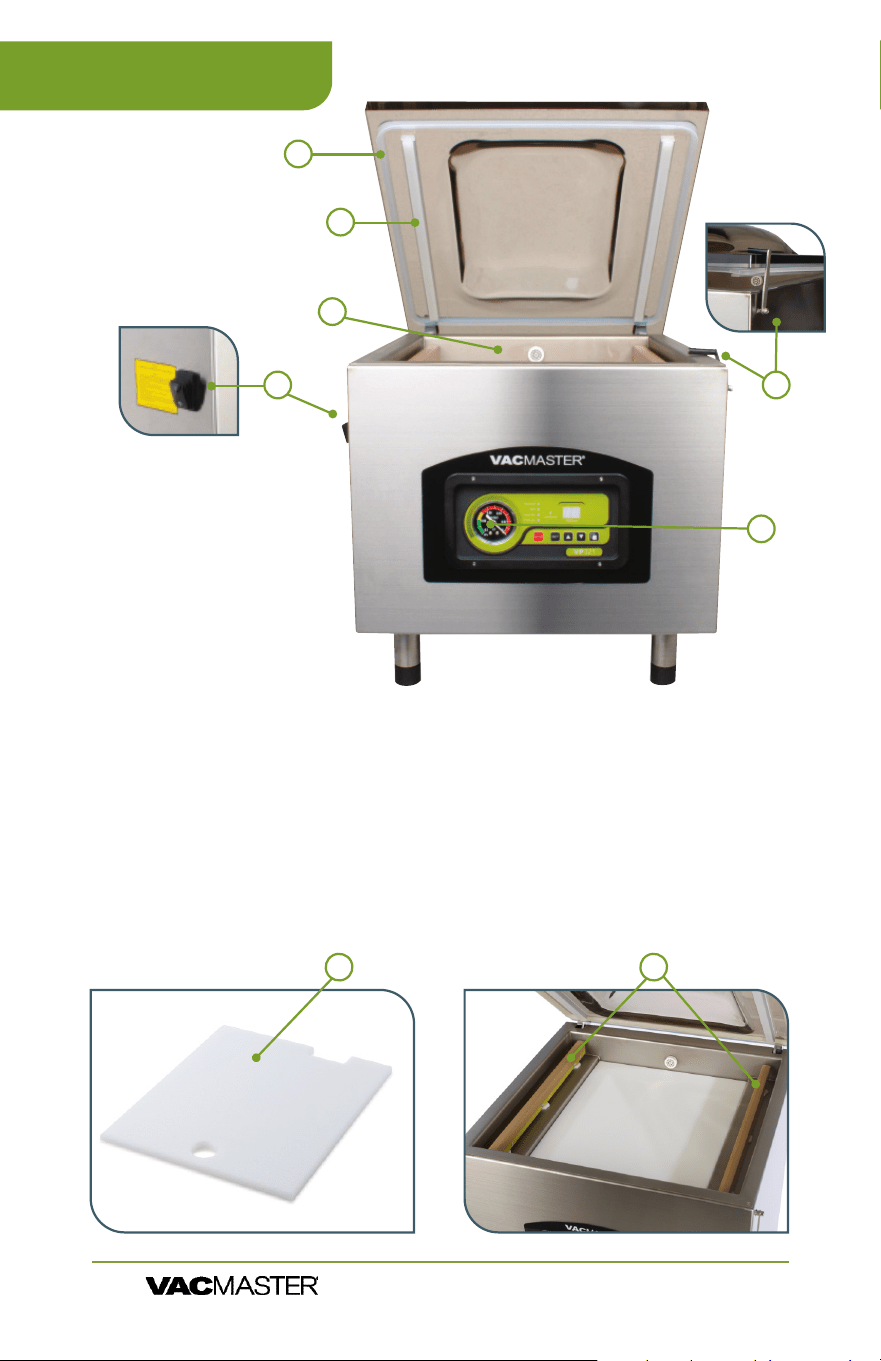
1. Lid Gasket
2. Seal Pads
3. Vacuum Chamber
4. Power Switch
5. Lid Lock - This feature is used to keep the lid closed while
the machine is in storage. DO NOT USE while the machine
is operating.
6. Control Panel
7. Filler Plates - Used to occupy space in the chamber.
The plates allow for faster vacuum. When more space is
occupied, there is less air to be removed from the chamber.
8. Seal Bars
6
1
2
5
4
3
6
VP321 Features
ARY, Inc. | 11880 College Blvd., Suite 550, Overland Park, KS 66210 | VacMasterFresh.com | 800.821.7849
VP321 Chamber Vacuum Sealer |
User Guide
87
7
VP321 Control Panel
ARY, Inc. | 11880 College Blvd., Suite 550, Overland Park, KS 66210 | VacMasterFresh.com | 800.821.7849
VP321 Chamber Vacuum Sealer |
User Guide
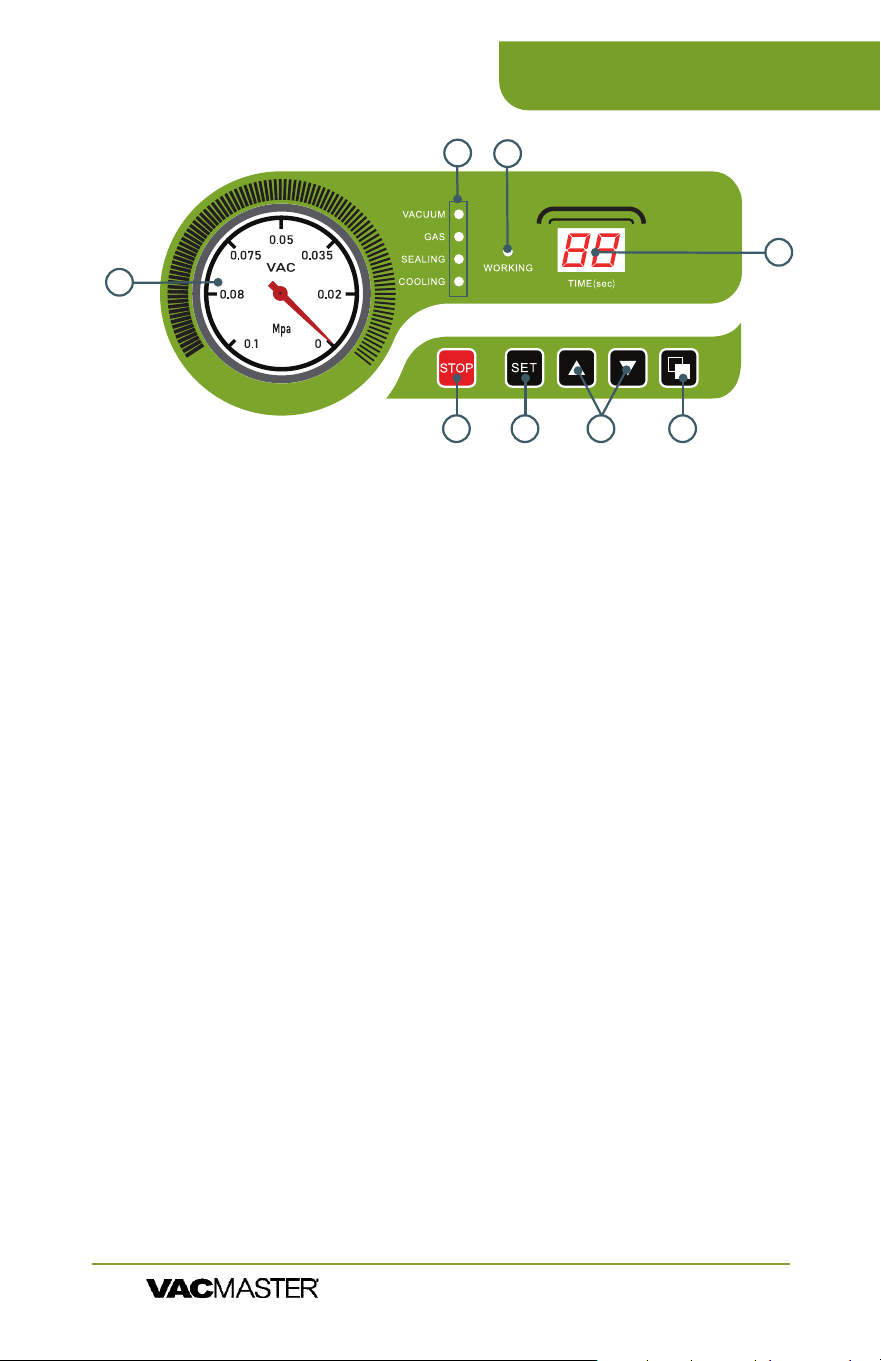
1. Vacuum Gauge - Indicates the vacuum level inside the
chamber.
2. Function Lights:
Vacuum - Illuminates to adjust vacuum time as well as during
the vacuum process. During set up, adjust the vacuum time
using the UP/DOWN Buttons.
Gas - This model does not offer the gas ush option.
Sealing - Illuminates to adjust vacuum time as well as during
the sealing process. During set up, adjust the sealing time
using the UP/DOWN Buttons.
Cooling - Illuminates to adjust vacuum time as well as during
the cooling process. During set up, adjust the cooling using the
UP/DOWN buttons.
3. Working Indicator Light - Illuminates to indicate the machine
is in use.
4. LED Screen (Time) - Displays current function or cycle time,
measured in seconds.
5. STOP Button - Press to stop the cycle and immediately seal the
pouch. This button will only work when the machine is in the
vacuum process.
6. SET Button - Press to select the vacuum time, sealing time, or
cooling time. Use with the UP/DOWN buttons.
7. UP/DOWN Buttons - Press to increase or decrease vacuum
time, sealing time, or cooling time.
8. Program Button - Use to program 10 unique vacuum and
seal time cycles
6
8
1
4
7
5
2
3
1. Run vacuum process a couple of times to "warm up" the oil.
2. Turn off machine and unplug to prevent electrocution.
3. Locate the drain & ll plugs on the side of the unit.
4. Locate drain bolt on underneath side of vacuum pump.
5. For access and ease of draining the oil, position machine so the
drain bolt is "clear" and the dirty
oil can be captured.
6. Oil will ow immediately
when bolt is removed. Place
catch cup underneath before
removing drain bolt.
7. Capture oil from pump. When
oil is completely drained,
replace and tighten bolt.
(Dispose of old oil properly,
according to your local and
state regulations.)
8. Follow the "Adding Oil to
Vacuum Pump" instructions at
beginning of manual. Do not
use machine until oil has been
added.
8
VP321 How to Use
ARY, Inc. | 11880 College Blvd., Suite 550, Overland Park, KS 66210 | VacMasterFresh.com | 800.821.7849
VP321 Chamber Vacuum Sealer |
User Guide
Vacuum Pump Maintenance
The VP321 vacuum pump requires periodic oil changes.
Required oil change schedule:
▫ First oil change: 1 week after use.
▫ Future oil changes: every 3 months or 250 cycles.
Using pump site glass, check the oil level and color frequently.
▫ Oil must remain between
1
/
2
and
3
/
4
of site glass.
▫ With use, the pump oil will become cloudy, dark or
even "milky". Once oil becomes discolored, change oil
replacing with new VacMaster
®
vacuum oil.
How to Change the Oil
Set Up - Powering up the VP321
1. Attach the power cord and plug the machine into a
grounded electrical outlet - Properly insert the electrical
cord into the power outlet on the back of the machine
and then plug the cord into the wall outlet.
2. Open the machine lid - Release the lid lock, located on
the right side of the machine, and allow the lid to lift and
remain open.
3. Do not stand over the lid
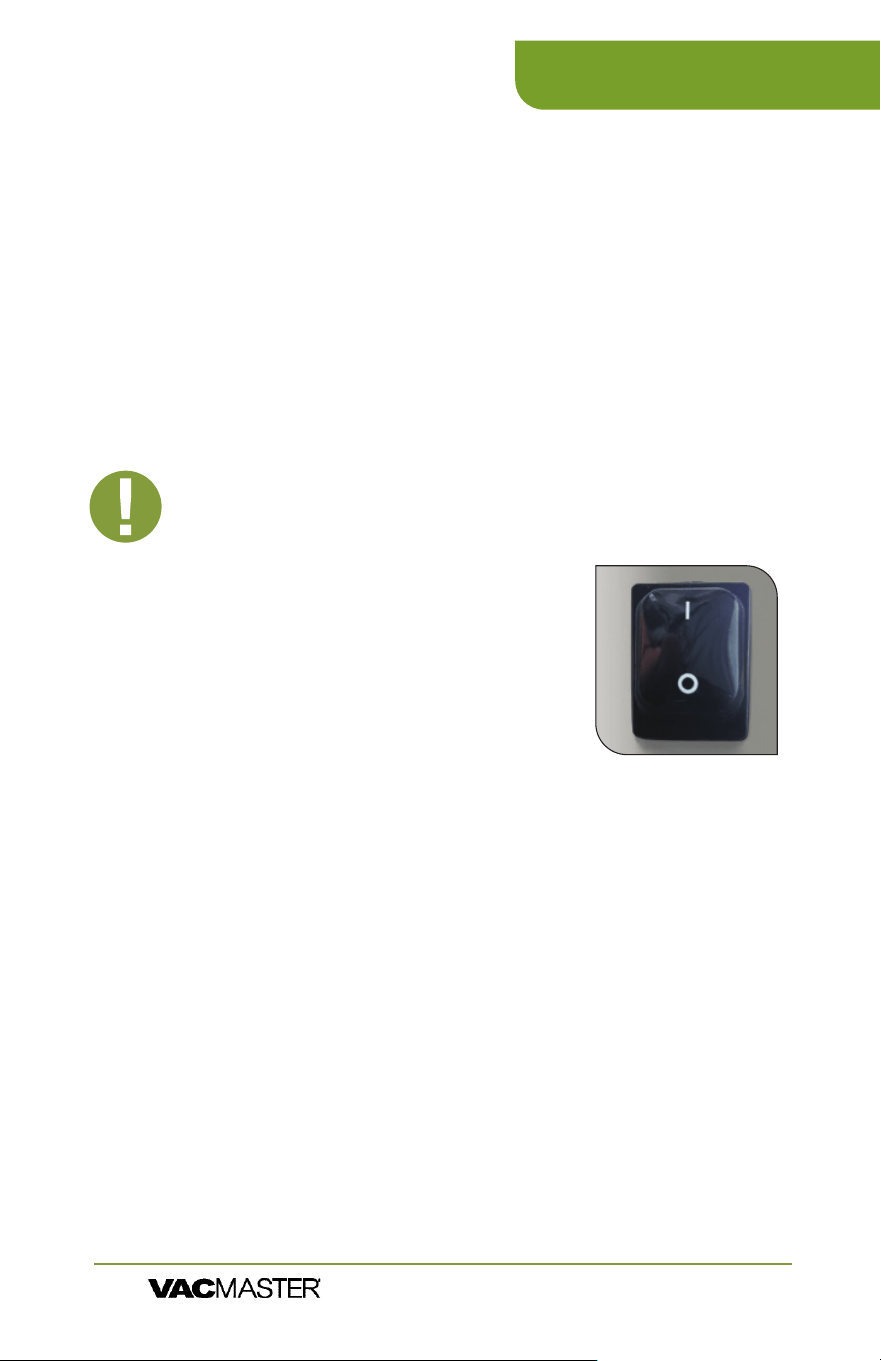
4. To power ON press "I" on the
power switch.
5. To power OFF, press "O" on the
power switch.
Set Up - Adjusting the VP321 Timing Controls
To adjust/set the timing controls, press the SET button on the control panel
until the required label (Vacuum, Sealing or Cooling) is illuminated. For
each selection, the current time setting will show on the LED Screen. All
time settings are displayed in seconds. For initial testing, the time settings
should be:
Vacuum Time - 40 seconds
Sealing Time - 1.2 seconds
Cooling Time - 2.2 seconds
To change the settings, please read the instructions for each control on
Page 7.
9
VP321 How to Use
ARY, Inc. | 11880 College Blvd., Suite 550, Overland Park, KS 66210 | VacMasterFresh.com | 800.821.7849
VP321 Chamber Vacuum Sealer |
User Guide
IMPORTANT: DO NOT turn the machine on until the lid
lock has been released, The lid lock feature is used ONLY
to keep the lid closed while the machine is in storage.
NOTE: All timing adjustments must be
made with the lid lock off and the lid open.

ARY, Inc. | 11880 College Blvd., Suite 550, Overland Park, KS 66210 | VacMasterFresh.com | 800.821.7849
VP321 Chamber Vacuum Sealer |
User Guide
Set Up - Adjusting the VP321 Timing Controls
Vacuum Time: To increase or decrease the vacuum time, press the
SET button until VACUUM is illuminated and then use the UP/DOWN
buttons to adjust the vacuum time accordingly. The time setting will
display on the LED Screen on the control panel.
Sealing Time: To increase or decrease the sealing time, press the
SET button until SEALING is illuminated and then use the UP/DOWN
buttons to adjust the sealing time to accommodate your application. It
is recommended that you make adjustments in 0.2 second increments
to avoid melting the pouch.
Cooling Time: To increase or decrease the cooling time, press the
SET button until COOLING is illuminated and then use the UP/DOWN
buttons to adjust the cooling time accordingly.
1. Select a vacuum chamber pouch
Select the proper size of vacuum chamber pouch for the
product that you are packaging. Make sure that the mouth
of the pouch does not exceed the length of the seal bar and
make sure the entire pouch ts inside the chamber. Allow 3”
of extra headspace at the top of the pouch to ensure a quality,
air-tight seal. The VP321 accepts vacuum chamber pouches up
to 16”W x 18”L in size.
10
VP321 How to Use
TIP: To prolong the life of your seal bar, set the cooling
time to twice the sealing time.
NOTE: Filler plates can be used to reduce the vacuum time required.
Place the ller plates inside the chamber as desired. Filler plates
occupy space, leaving less air to be removed from the chamber. If
you require more space inside the chamber, remove the ller plates
to accommodate your product.
NOTE: For thicker pouches, increase the seal time in 0.2 second
increments until the pouch seals completely. In addition, for thinner
pouches, decrease the seal time in 0.2 second increments to avoid
over-sealing the pouch.
NOTE: The VP321 settings will always default to the most recently
used settings on the machine.
NOTE: After setting the timing controls, press the SET button until
the function lights on the Control Panel are no longer illuminated.
The machine will not start until all function lights are off.
ARY, Inc. | 11880 College Blvd., Suite 550, Overland Park, KS 66210 | VacMasterFresh.com | 800.821.7849
VP321 Chamber Vacuum Sealer |
User Guide
2. Fill the pouch and place inside the chamber
Fill the pouch with the product to be vacuum packaged and place the
pouch inside the chamber. Keep pouches that contain liquids or wet
product below the height of the seal bar. Lay the pouch at inside the
chamber, with the opening of the pouch across the seal bar. Make sure
that the pouch lies at across the seal bar and is free of wrinkles.
Note: The entire pouch, including the opening, must remain inside the
chamber.
3. Close the machine lid to vacuum and seal
Close the lid and press down rmly for 2-3 seconds or until the vacuum
gauge begins to move.
4. Inspect the pouch
When the lid opens, remove and inspect the pouch.
Vacuum conrmation - Check the quality of the vacuum by looking at
the tightness of the pouch and the product. Look for air pockets or air
leaks. If you notice that the product is not vacuum packaged tightly, then
increase the vacuum time by 5 seconds, vacuum and seal again.
Seal conrmation – Inspect the pouch seal. A positive seal will appear
clear upon inspection. If the seal is spotty or incomplete, increase the seal
time by 0.1 second. If the seal appears white or milky, decrease the seal
time by 0.1 second. Once the settings are determined for your application,
vacuum and seal again. If the product is vacuumed and sealed tightly,
then the process is complete.
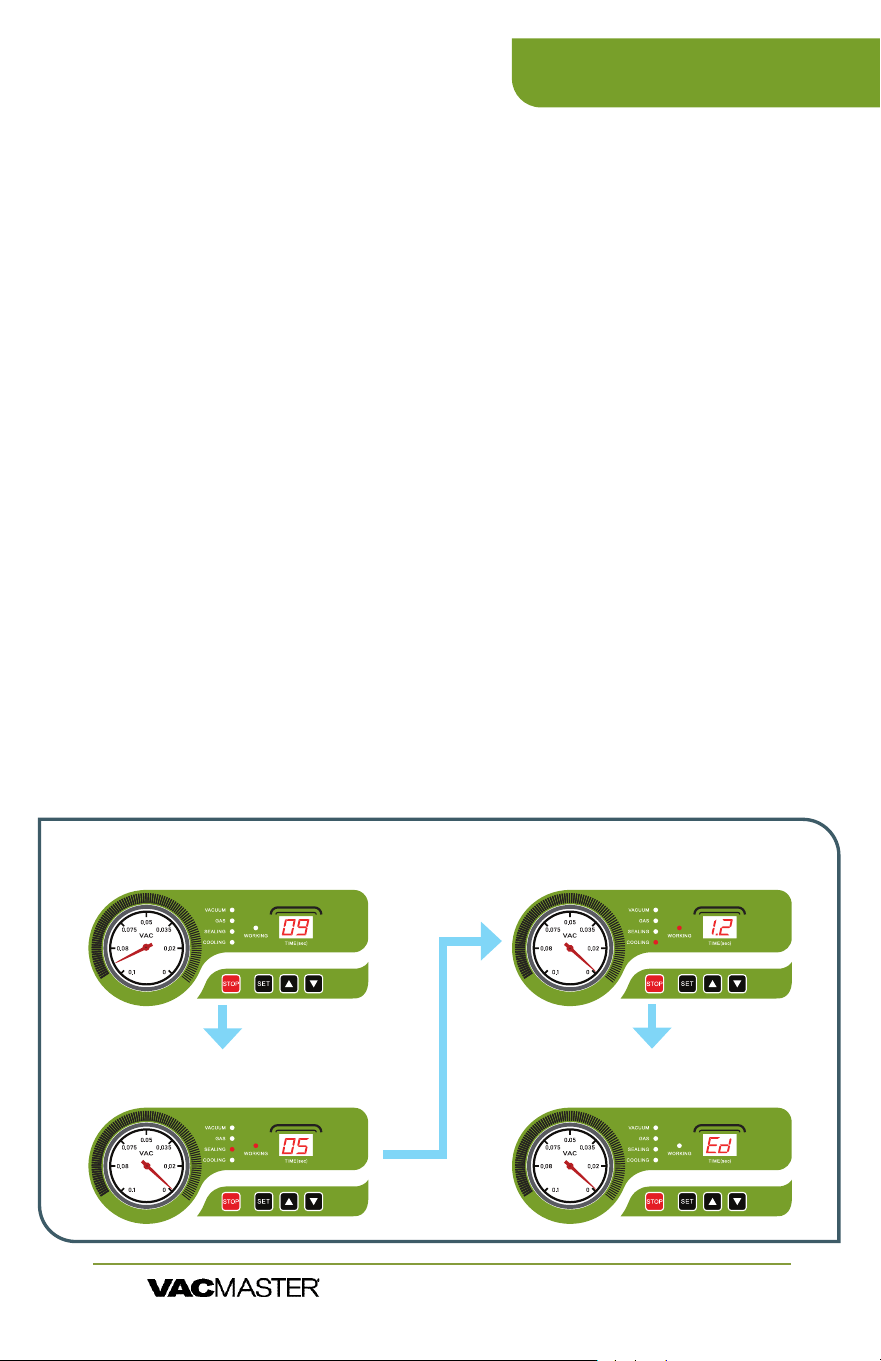
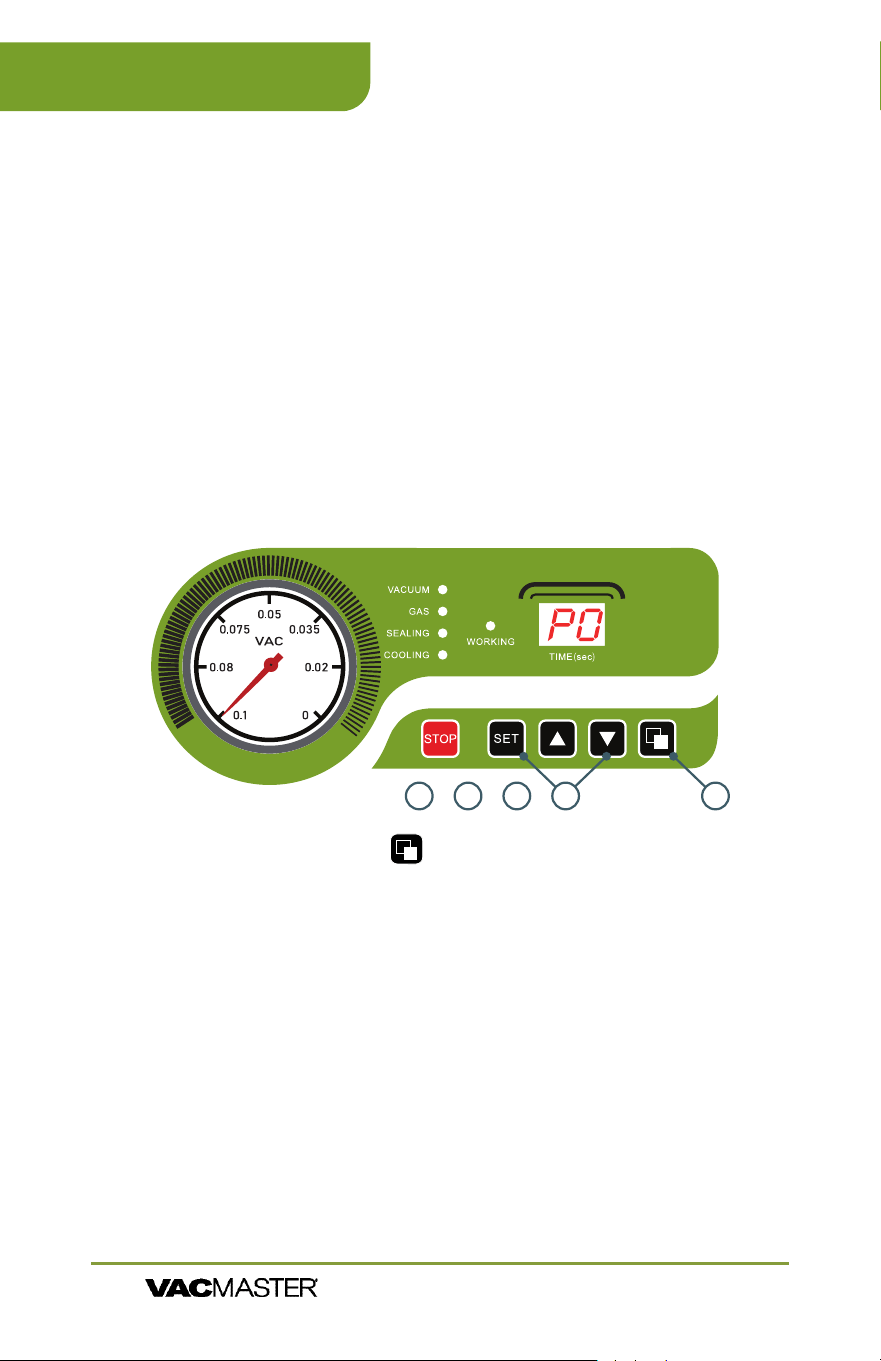
5. ED Code - stands for end of demonstration. You are ready for a new cycle.
Mpa
Mpa
Mpa
Mpa
Vacuum Cycle
Runs for a set time - counting down to zero
Sealing Cycle
Runs for a set time - counting down to zero
Cooling Cycle
Runs for a set time - counting down to zero
Lid Release
Indicates the end of the process
11
VP321 How to Use
12
Instructions
1. Press the program button on the right side of the control panel
to bring up P0 on the LED Display.
2. Press the SET button to change your desired vacuum time. Use up
or down arrows to adjust desired vacuum time.
3. Press SET again to change the seal time. Use up or down arrows to
adjust desired seal time.
4. Press SET button again to change your cool-down time. Use up
or down arrows to adjust desired cool-down time. Add at least 1
Second more to cooling time over sealing time.
5. Press SET one last time to save the settings.
6. You are now ready to vacuum seal.
7. To create a new preset, press the program button to change to P1
and repeat the process stated above.
8. Set up and save up to 10 unique settings.
9. To change programmed setting, simply press the program button.
Programmable Vacuum Cycle Instructions
This VacMaster chamber vacuum sealer is now equipped with a
new feature that allows you to program and store up to 10 different
seal cycle settings. Changing from liquids to solids to delicate items
has never been easier to get that perfect amount of vacuum and a
double seal for an additional layer of protection.
Also included is an oil change alert that, after 250 uses, reminds you
to change the oil. This reminder is intended to keep your machine
in tip-top shape. As a rule of thumb change your oil at the 250 uses
alert or after 3 months whichever comes rst.
CO Code - This stands for change oil.
Once complete, press "Set" " Up" "Down" (all 3) at the same time for 3
seconds. This will reset and clear this code.
Mpa
12345
VP321 How to Use
ARY, Inc. | 11880 College Blvd., Suite 550, Overland Park, KS 66210 | VacMasterFresh.com | 800.821.7849
VP321 Chamber Vacuum Sealer |
User Guide

13
Tips & Suggestions for Program Settings
• The vacuum time can be adjusted to your desired length.
• Suggested vacuum time should be set to
• 18-20 for liquids/powders.
• 35-40 is a good starting point for other products.
All settings are for 3 mil bags. The seal time and cool down time
should only be changed if you move up in thickness of bags. For
different thickness bags, increase both seal and cool down times by
.2 seconds at a time until you get a good seal.
Please scan the QR code for
an instructional video on the
programmable functions.
VP321 How to Use
ARY, Inc. | 11880 College Blvd., Suite 550, Overland Park, KS 66210 | VacMasterFresh.com | 800.821.7849
VP321 Chamber Vacuum Sealer |
User Guide

14
VP321 Troubleshooting
VP321 will not turn on -
h
Make sure the machine is properly plugged into a grounded outlet.
h
Check the power cord for tears and frays. Do not use this machine if the
power cord is damaged.
h
Make sure the power switch is turned on. The LED screen will be
illuminated when on.
h
If you see ‘F1’ displayed on the LED screen and the machine will not
function, make sure the lid is open and turn the power off. Turn the
machine back on and it should return to working order.
VP321 does not pull a complete vacuum with pouch -
h
The vacuum time may not be set high enough. Set the vacuum time
higher and vacuum again.
h
To vacuum and seal properly, the opening of the pouch must be within
the vacuum chamber. For detailed instructions, refer to “How To Use the
VacMaster
®
VP321 Chamber Vacuum Sealer”.
h
The seal bar, lid gasket and vacuum pouch need to be clean, dry and free
of debris for the vacuum process to be successful. Wipe surface of the
seal bar, lid gasket and the inside of the pouch and try again.
Vacuum pouch loses vacuum after being sealed -
h
Sharp items can poke small holes in pouches. To prevent this, cover sharp
edges with VacMaster
®
Bone Guard and vacuum in a new pouch.
h
Some fruits and vegetables can release gases (out gassing) if not
properly blanched or frozen before packaging. Open the pouch. If you
think food spoilage has begun, discard the food. If food spoilage has
not yet begun, consume immediately. If in doubt, discard the food.
VP321 is not sealing pouch properly -
h
The seal time may not be long enough. Increase the seal time and try
again.
h
Pouches will not seal if any moisture, food particles or debris are present
in the seal area. Wipe the inside of the pouch clean and
try again.
h
Pouches must be properly placed along the seal bar. Make sure the
entire pouch is over the seal bar and there are no wrinkles in the pouch
material.
If problems persist, contact Customer Service at
(800) 821-7849 or [email protected]
NOTE:
High elevation may cause the gauge to not go
all the way into the green. You may have to increase
the vacuum time by 5-10 seconds in higher elevation.
ARY, Inc. | 11880 College Blvd., Suite 550, Overland Park, KS 66210 | VacMasterFresh.com | 800.821.7849
VP321 Chamber Vacuum Sealer |
User Guide
2
3
5
6
15
h
Disconnect the power cord from the electrical outlet by unplugging it.
DO NOT disconnect by pulling on the cord.
h
DO NOT immerse in water or spray directly with liquid.
h
Check the Vacuum Chamber and Gasket, making sure they are clean
and free of debris. If needed, use a clean, damp cloth with mild soap.
a. Wipe the vacuum chamber clean.
b. Wipe the gasket clean.
c. Wipe the seal area clean.
h
DO NOT store the VP321 outside. 65° to 75° recommended.
h
DO NOT use any acetone-based or abrasive cleaners on the lid or other
plastic parts. Only clean lid with a damp cloth and mild soap.
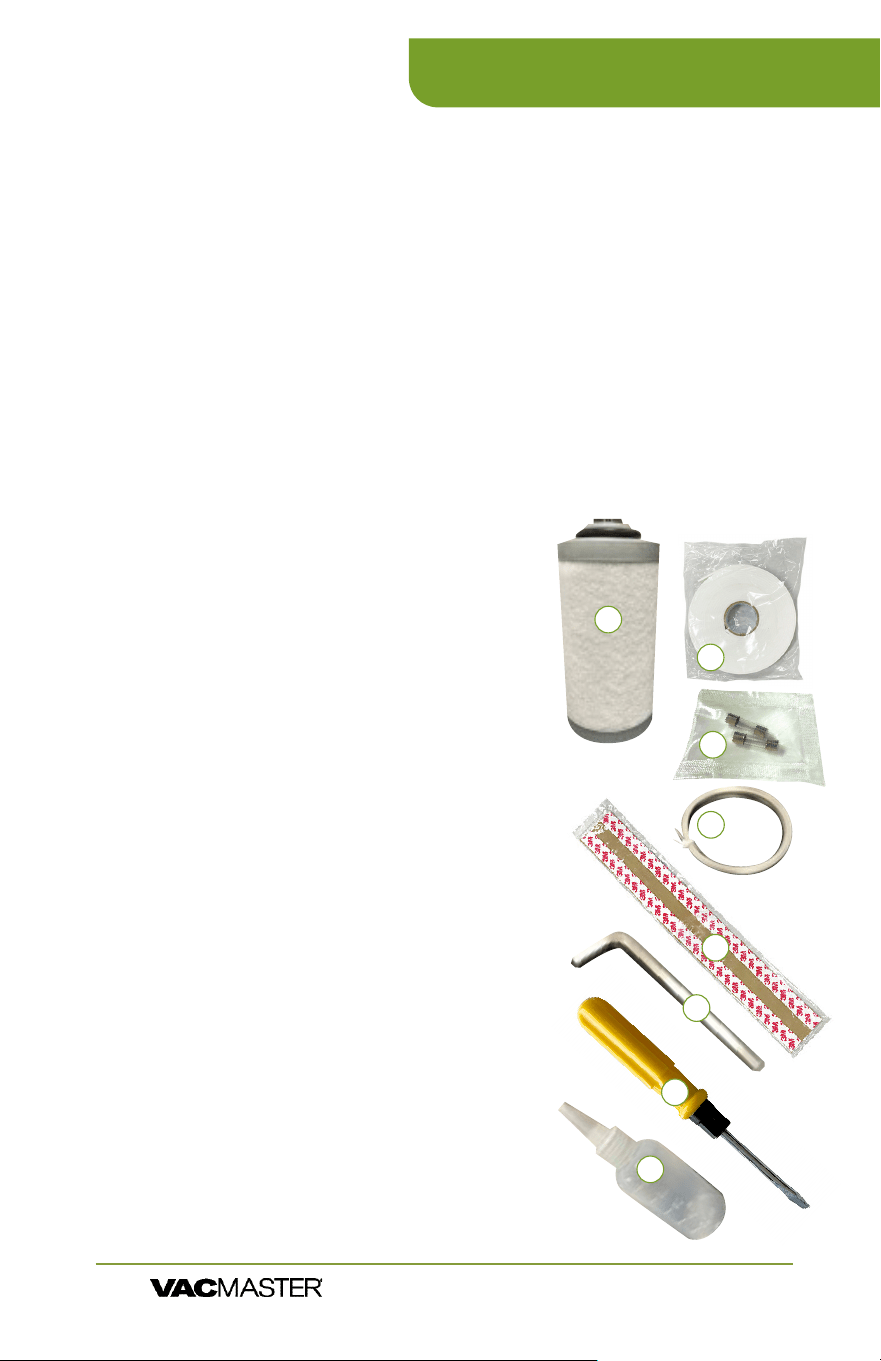
Maintenance Kit
1. Exhaust Filter: Spare lter; should be
checked every 6-12 months. If the lter looks
dirty or saturated in oil; it will need to be
changed. If the lter looks clean; it is ok to
put back into the pump & motor assembly.
2. Double-Sided Tape: Used for adhering the top
bar that holds the seal pad in the lid.
3. 5-AMP Fuses (2x): Used for replacing fuses
located on the control transformer.
4. Seal Wire: Used to replace seal wire that spans
the length of the seal bar; should be replaced if
the wire shows heavy discoloration.
5. Seal Tape: Used to replace seal tape the covers
the seal wires; should be replaced if the tape
shows heavy discoloration, is torn, or is starting
to lose the adhesive.
6. Hex/Allen Wrench: Used to remove tension
blocks that hold the seal wire to the base of the
seal bar.
7. Reversible Screwdriver: Used to un-thread
screws on the cabinet of the machine and the
screws to move the chamber.
8. Oil Fill Bottle/Oil: Used to ll pump with oil.
VP321 Cleaning & Storage
ARY, Inc. | 11880 College Blvd., Suite 550, Overland Park, KS 66210 | VacMasterFresh.com | 800.821.7849
VP321 Chamber Vacuum Sealer |
User Guide
4
1
7
8
16
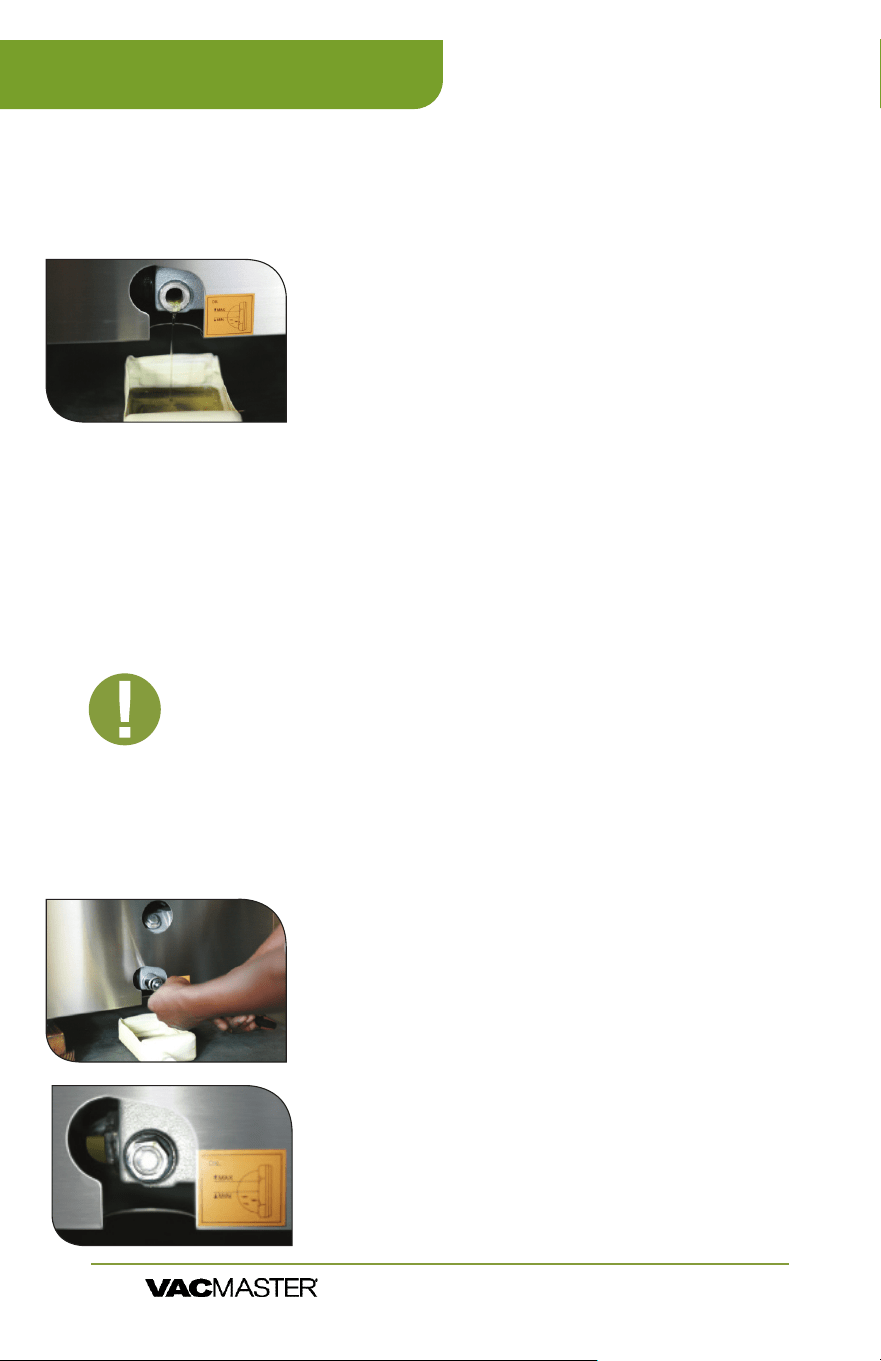
Using the pump site glass, check the oil level and color frequently.
1. Oil must remain between ½ to ¾ of site glass.
2. With use, the pump oil will become cloudy,
dark, or even “milky.” Once oil becomes
discolored, change the oil using new
VacMaster
®
vacuum oil.
Maintaining the Vacuum Pump
• First oil change: one week after use.
• Future oil changes: every 3 months, or 250 cycles; whichever comes rst.
Remove the oil drain bolt - Locate the oil ll bolt
on the side of the machine. Place an oil catch cup
under drain bolt. Using your 7/8” socket wrench,
remove the oil drain bolt. Oil will immediately
begin to ow out of the machine.
Capture oil - When oil is completely drained,
replace the drain bolt. Dispose of old oil properly,
according to your local and state regulations.
Rell pump with new oil - Follow the “Adding Oil to
the VP321” instructions on page 3.
NOTE:
The VP321 vacuum pump requires periodic oil changes. Follow
this oil change schedule to ensure proper maintenance of your VP321.
IMPORTANT: Make sure the VP321 is turned OFF and
unplugged before adding oil. Do not plug in or use
machine until oil has been properly lled.
Changing/Replacing Oil
NOTE:
Prepare oil in the pump - Run the vacuum process
a few times. This will warm up the oil, allowing it to drain
freely and remove any contaminants.
VP321 Maintenance
ARY, Inc. | 11880 College Blvd., Suite 550, Overland Park, KS 66210 | VacMasterFresh.com | 800.821.7849
VP321 Chamber Vacuum Sealer |
User Guide
17
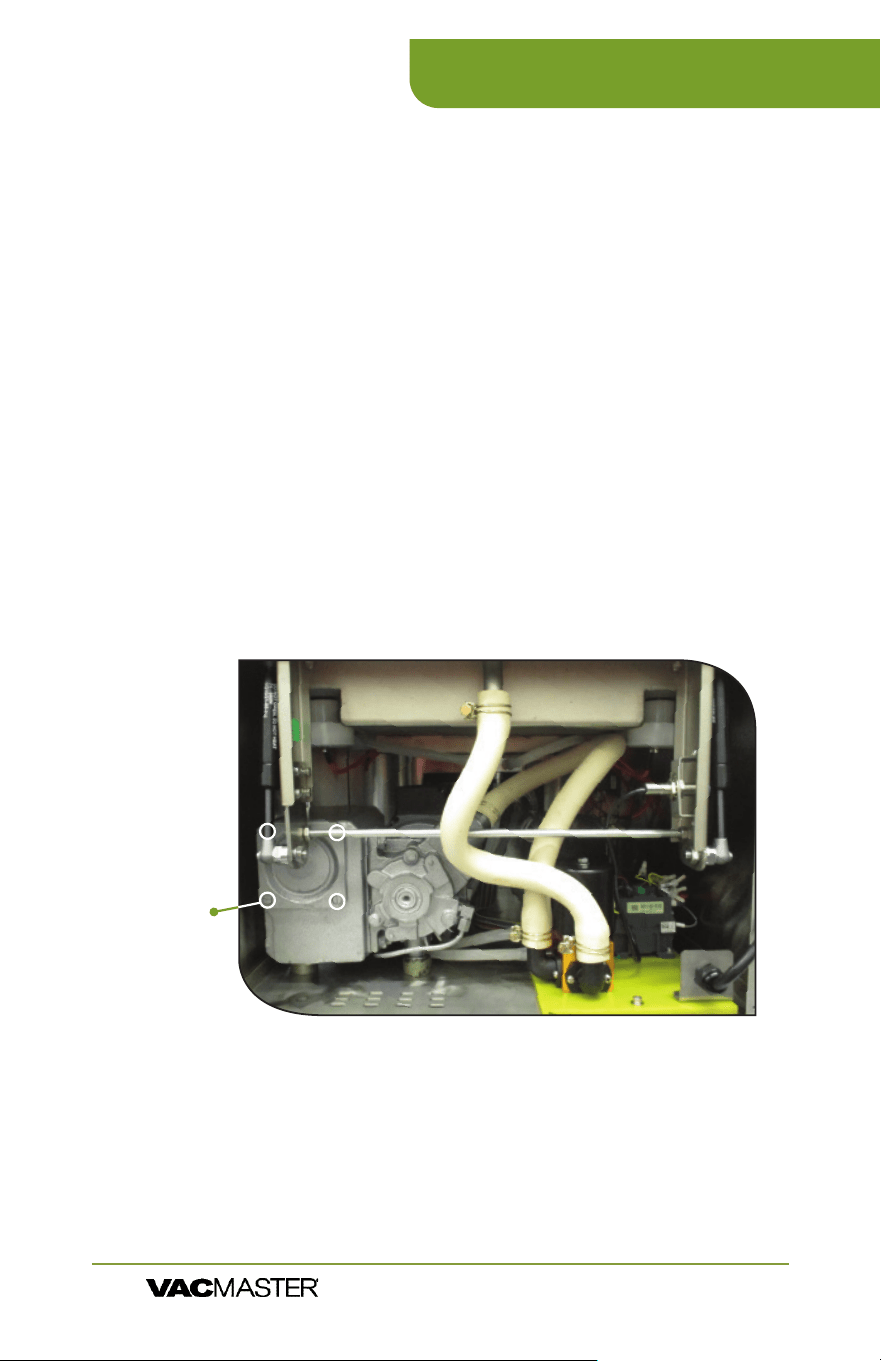
1. Remove the back panel
2. Remove the screws that hold the Upper Chamber
in place - Two located on the front corners and two
located on the back.
3. Pull the chamber assembly back about 3-4 inches
4. Remove the 4 screws that hold the lter plate on
the end of the pump
5. Remove the plate and spring
6. Remove the exhaust lter
7. Install new lter
8. Reassemble all of the
pieces in reverse order!
Changing the Filter
VP321 Maintenance
ARY, Inc. | 11880 College Blvd., Suite 550, Overland Park, KS 66210 | VacMasterFresh.com | 800.821.7849
VP321 Chamber Vacuum Sealer |
User Guide
Plate
Screws
(Step #4)

18
VP321 Vacuum Packaging Guidelines
ARY, Inc. | 11880 College Blvd., Suite 550, Overland Park, KS 66210 | VacMasterFresh.com | 800.821.7849
VP321 Chamber Vacuum Sealer |
User Guide
h
Follow all food safety regulations as outlined by the FDA at
www.FDA.gov.
h
Vacuum packaging is NOT a substitute for canning. All perishables
still need to be refrigerated or frozen.
h
Vacuum packaging cannot reverse the deterioration of foods.
h
Vacuum packaging is NOT a substitute for refrigeration or freezing.
h
Some fruits and vegetables may release gases, known as outgassing.
When packaging these fruits and vegetables, outgassing can cause
the vacuum to be gradually lost over time. Blanching or freezing
before vacuum packaging helps prevent this from occurring.
h
It is critical that food handling and storage are maintained at low
temperatures. You can reduce the growth of microorganisms
at temperatures of 34ºF or less. Freezing at 0ºF will not kill
microorganisms, but reduces the chances of them growing.
For long-term food storage, always freeze foods that have been
vacuumed packaged.
h
Delicate foods can be frozen prior to packaging to protect them
from getting crushed by the vacuum.
h
Use VacMaster
®
Bone Guards to cover an item’s sharp edges to
prevent pouch punctures.
h
Allow foods and liquids to cool to room temperature before vacuum
packaging.
h
Avoid overlling the pouch. Leave 3” minimum of space between
the contents and the open end of the pouch. This is called head
space. This prevents spills during the vacuum sealing process.
h
To prevent wrinkles from forming in the seal, gently stretch the
pouch at along the seal bar before closing the lid.
h
VacMaster
®
pouches are boilable, freezable, and microwavable.
When microwaving, it is important to pierce the pouch.
NOTE: Due to the risk of anaerobic bacteria, soft cheeses,
fresh mushrooms, garlic and onions should never be
vacuum packaged.
NOTE: Beef and other proteins may look darker after being
vacuum packaged. This is due to the removal of oxygen and
is not an indication of spoilage.
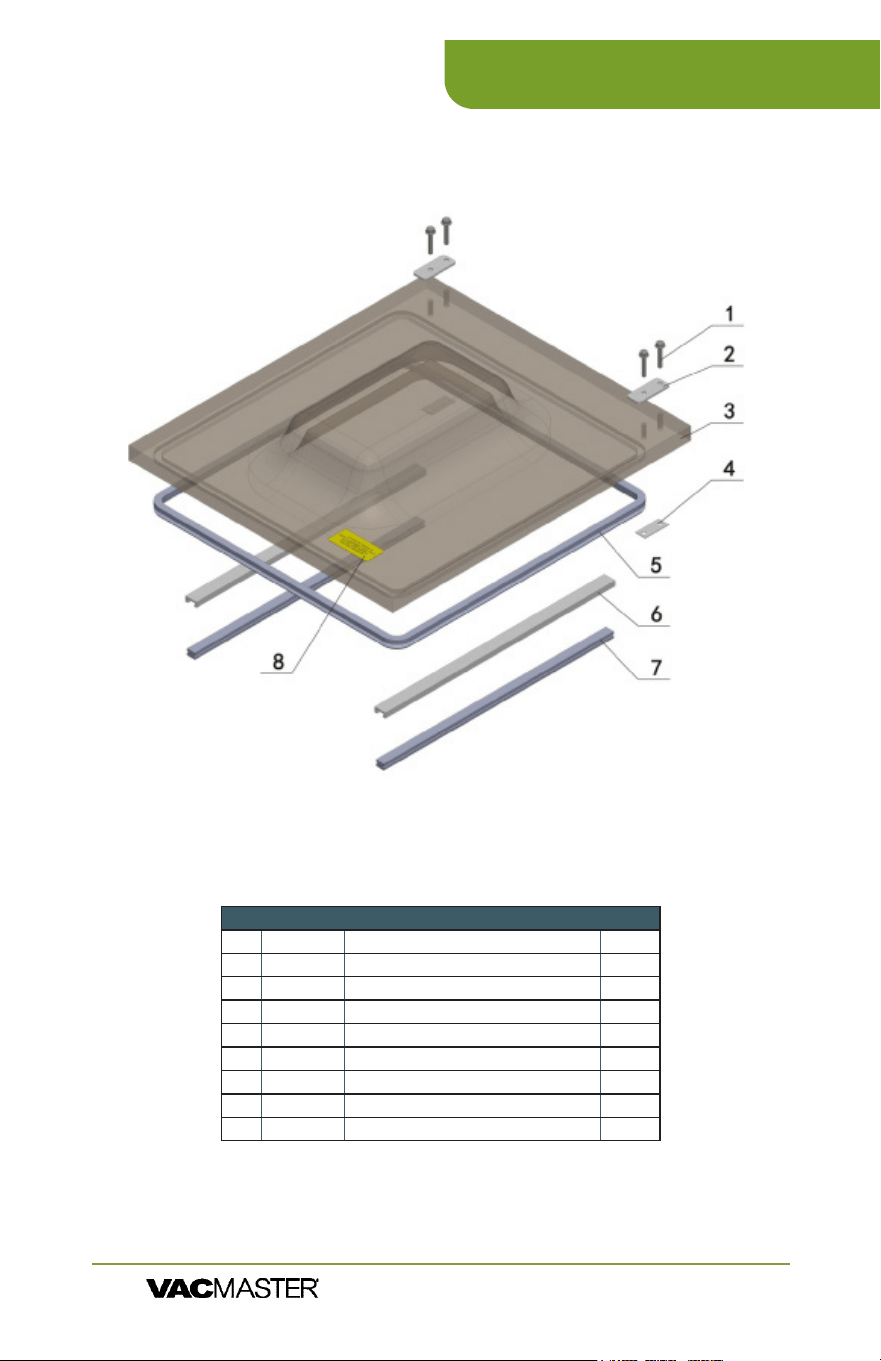
LID ASSEMBLY
19
VP321 Parts Information
ARY, Inc. | 11880 College Blvd., Suite 550, Overland Park, KS 66210 | VacMasterFresh.com | 800.821.7849
VP321 Chamber Vacuum Sealer |
User Guide
Part # Part Name Qty
1 Bolt 4
2 Upper Pressing Plate 2
3 979302 Lid 1
4 Lower Pressing Plate 2
5 979426 Lid Gasket 1
979263 Lid Gasket 6 / ft
6 979310 Top Bar 2
7 979418 Seal Pad 2
8 Warning Label 1
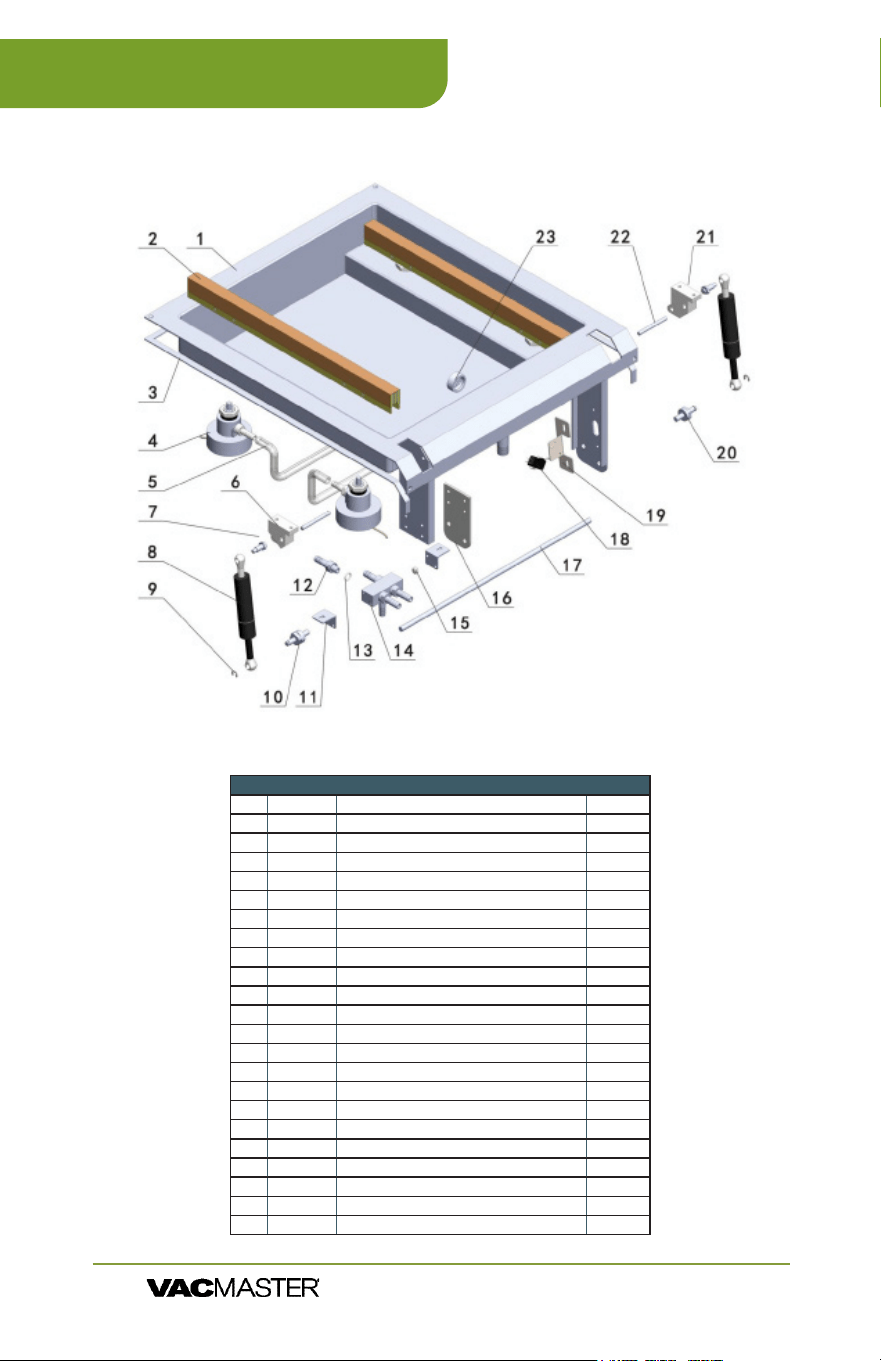
CHAMBER ASSEMBLY
20
VP321 Parts Information
ARY, Inc. | 11880 College Blvd., Suite 550, Overland Park, KS 66210 | VacMasterFresh.com | 800.821.7849
VP321 Chamber Vacuum Sealer |
User Guide
Part # Part Name Qty
1 Chamber Assembly 1
2 979321 Seal Bar Assembly 1
3 White Rubber Strip 3 / Meter
4 979380 Piston Assembly 4 / Set
5 979156 Hose 24
6 979352 Hinge Set (Right & Left) 1
7 979358-8 Upper Bolt 2 / Set
8 979356 Gas Shock 2
9 Washer 2
10 979357 Lower Bolt 2 / Set
11 Installation foot 2
12 M10x1 Pipe Joint 5
13 O Ring 5
14 Distributor 1
15 Plug 1
16 Gash shock support 1
17 Hinge Support 1
18 979468 Microswitch NSF 1
19 979399 Seat, microswitch 1
20 979357 Lower Anchor Bolt 1
21 979352 Hinge Seat (Right & Left) 2
22 979353 Hinge Pin 2
23 Cover, nozzle 1
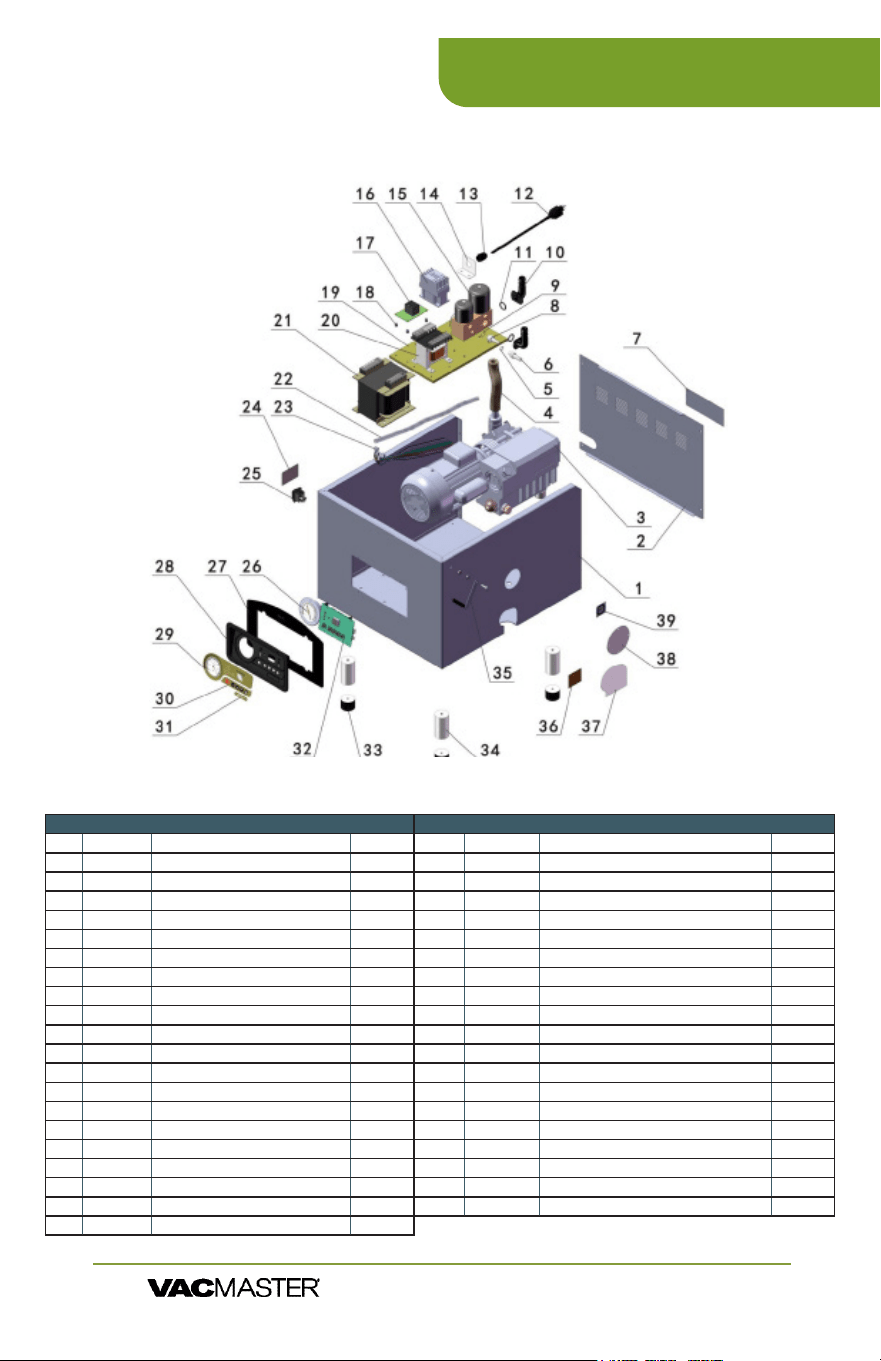
MACHINE HULL
21
VP321 Parts Information
ARY, Inc. | 11880 College Blvd., Suite 550, Overland Park, KS 66210 | VacMasterFresh.com | 800.821.7849
VP321 Chamber Vacuum Sealer |
User Guide
Part # Part Name Qty
1 Machine Hull 1
2 Back Cover 1
3 979320 Pump/Motor 1
4 977264 Hose/Tubing 3 ft
5 O Ring 1
6 M10x1 Pipe Joint 1
7 Adhesive Label 1
8 M14x1 Pipe Joint 1
9 O Ring 1
10 Right Angle Joint 2
11 O Ring 2
12 979404 Power Cord 1
13 Joint 1
14 Bracket 1
15 979360 Solenoid Valve 1
16 979141 AC (Relay) Contactor 1
17 979136 Relay, Timer 1
18 Relay Set 4
19 Installation Board 1
20 979139 Transformer, Control 1
21 979341 Transformer, Sealing 1
Part # Part Name Qty
22 979156 Hose 24 in
23 979342 Cable, Control (Wire Harness) 1
24 Adhesive Label 1
25 979468 Power Switch NSF 1
979138 Power Switch 1
26 979126 Gauge, Vacuum 1
27 979125 Panel, Instrument 1
28 979131 Faceplate, Panel 1
29/30 977504 Stickers, Green Panel Programmable Decal 1 / set
31 977506 Sticker,Single Green Panel Decal 1
32 NEW921650 Control Board: 3 prong 1
979129 Main Board: 2 prong (Non-programmable) 1
977501 Board, Green Panel Programmable 1
33 979159 Rubber Foot 4
34 Foot Assembly 4
35 979170 Lid Latch Assembly 1
36 Adhesive Label 1
37 976156 Cover, for Oil Drain 1
38 976155 Cover, for Fill Hole 1
39 Adhesive Label 1
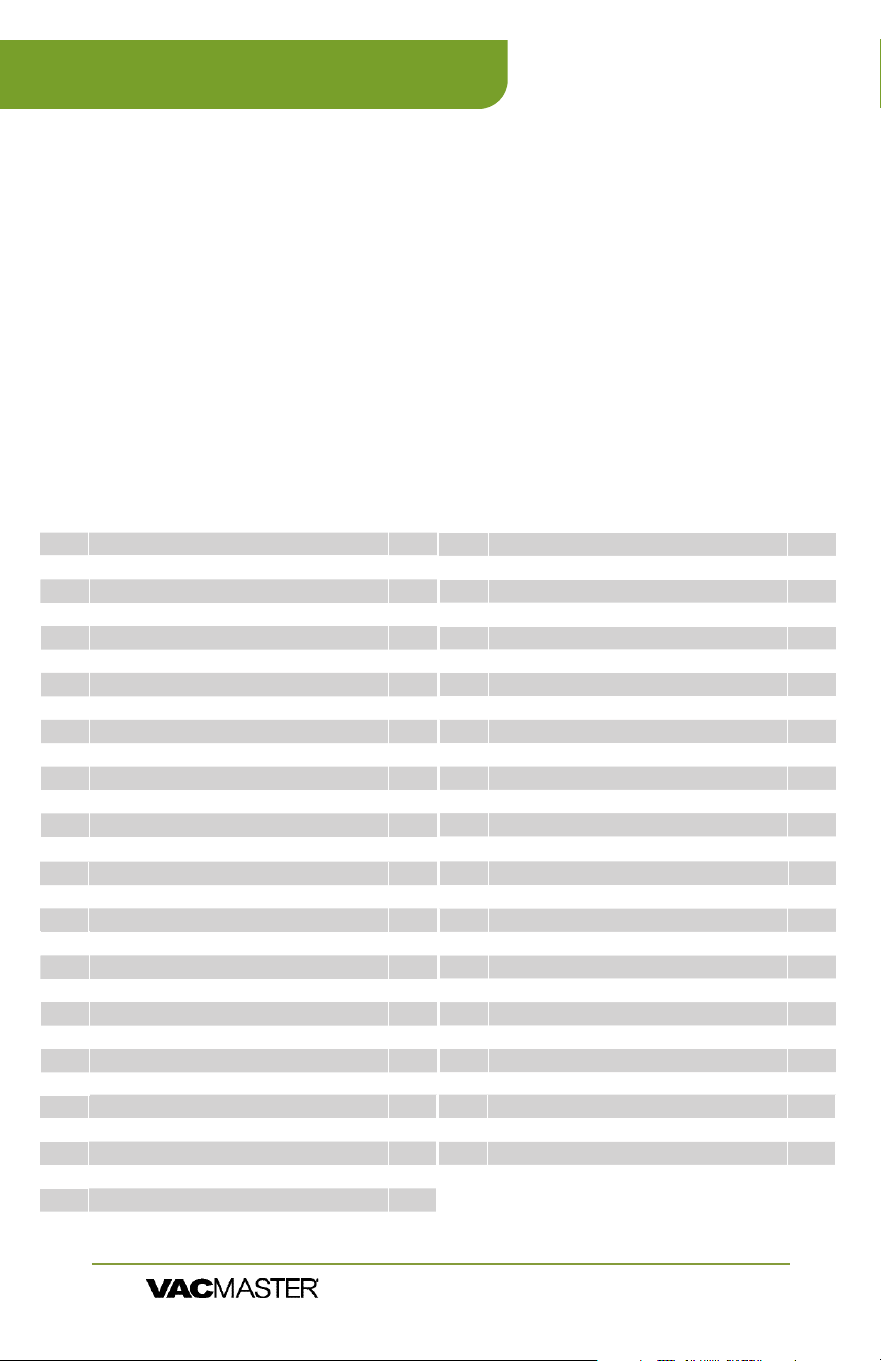
22
VP321 Packaging Information
ARY, Inc. | 11880 College Blvd., Suite 550, Overland Park, KS 66210 | VacMasterFresh.com | 800.821.7849
VP321 Chamber Vacuum Sealer |
User Guide
With the VP321, you can easily package a wide variety of sizes and shapes.
You can also prep and store smaller individual serving portions as well as
bulk items.
▫ Re-Therm pouches are reinforced to be able to
handle being boiled for up to 30 minutes. The
other bags can be boiled, but not for that long
without being compromised. When a normal
bag becomes compromised, the pouch will
begin to delaminate.
▫ Bag thickness available in standard 3mil or
heavy duty 4mil.
▫ Bags are economically priced, giving you a
better value.
▫ Keeps food fresh 3-5 times
longer than conventional
storage bags.
▫ Several sizes available to
meet your packaging needs.
▫ Terric for hundreds of
applications in and out of
the kitchen
▫ Safe for freezer, refrigeration,
and microwave use.
The chamber of the VP321 can easily vacuum package the following sizes of
vacuum pouches:
30777 9 X 12 Vacuum Chamber Pouches 3-Mil 1000/Box 2x
ITEM # DESCRIPTION #
30765 2.5” X 10” Vacuum Chamber Pouches 3-Mil 2000/Box 12x
30766 6” X 7” Vacuum Chamber Pouches 3-Mil - 1000/Box 4x
30742 6” X 8” Vacuum Chamber Pouches 3-Mil - 1000/Box 4x
30608 6” X 8” Vacuum Chamber Pouches 4-Mil - 1000/Box 4x
30720 6” X 8.5” Vacuum Chamber Pouches 3-Mil - 1000 /Box 4x
30750 6” X 8.5” Re-Therm Vacuum Chamber Pouches 3-Mil 1- 000/Box 4x
30721 6” X 10” Vacuum Chamber Pouches 3-Mil - 1000/Box 4x
30610 6” X 10” Vacuum Chamber Pouches 4-Mil - 1000/Box 4x
50717 6” X 10” Zipper Vacuum Chamber Pouches 3-Mil - 1000/Box 4x
40721 6” X 12” Pouches 3-Mil Flat Vacuum Chamber Pouches - 500/Box 4x
30743 6” X 12” Vacuum Chamber Pouches 3-Mil - 1000/Box 4x
30612 6” X 12” Vacuum Chamber Pouches 4-Mil - 1000/Box 4x
50718 6” X 12” Zipper Vacuum Chamber Pouches 3-Mil - 1000/Box 4x
30787 6” X 15” Vacuum Chamber Pouches 3-Mil - 1000/Box 4x
30788 7 X 9 Vacuum Chamber Pouches 3-Mil 1000/Box 4x
30789 7 X 11 Vacuum Chamber Pouches 3-Mil 1000/Box 4x
30791 7 X 12 Vacuum Chamber Pouches 3-Mil 1000/Box 4x
50720 8 X 12 Zipper Vacuum Chamber Pouches 3-Mil 1000/Box 4x
30744 8” X 15” Vacuum Chamber Pouches 3-Mil 1000/Box 4x
30618 8 X 15 Vacuum Chamber Pouches 4-Mil 1000/Box 4x
50722 8 X 16 Zipper Vacuum Chamber Pouches 3-Mil 1000/Box 4x
30767 8 X 20 Vacuum Chamber Pouches 4-Mil 1000/Box 4x
40731 10 X 8 Horizontal Vacuum Chamber Pouches 3-Mil 250/Box 2x
30724 10” X 10” Vacuum Chamber Pouches 3-Mil 1000/Box 2x
50724 10 X 12 Zipper Vacuum Chamber Pouches 3-Mil 1000/Box 2x
30620 10 X 12 Vacuum Chamber Pouches 4-Mil 1000/Box 2x
40725 10” X 13” Pouches 3-Mil Vacuum Chamber Pouches 250/Box 2x
30725 10” X 13” Vacuum Chamber Pouches 3-Mil 1000/Box 2x
30778 10” X 13” Vacuum Chamber Pouches 4-Mil 1000/Box 2x
30776 10 X 13 Vacuum Chamber Pouches 5-Mil 1000/Box 2x
30726 10” X 15” Vacuum Chamber Pouches 3-Mil 1000/Box 2x
30749 10 X 15 Re-Therm Vacuum Chamber Pouches 3-Mil 1000/Box 2x
50721 10 X 15 Zipper Vacuum Chamber Pouches 3-Mil 1000/Box 2x
30752 10 X 16 Re-Therm Vacuum Chamber Pouches 3-Mil 1000/Box 2x
30755 10 X 16 Vacuum Chamber Pouches 4-Mil 1000/Box 2x
40722 8” X 10” Pouches 3-Mil Flat Vacuum Chamber Pouches 500/Box 4x
30722 8” X 10” Vacuum Chamber Pouches 3-Mil 1000/Box 4x
30614 8 X 10 Vacuum Chamber Pouches 4-Mil 1000/Box 4x
50719 8 X 10 Zipper Vacuum Chamber Pouches 3-Mil 1000/Box 4x
30723 8” X 12” Vacuum Chamber Pouches 3-Mil 1 000/Box 4x
40751 8 X 12 Re-Therm Vacuum Chamber Pouches 3-Mil 1000/Box 4x
30754 8 X 12 Vacuum Chamber Pouches 4-Mil 1000/Box 4x
40726 11.5 X 13 Vacuum Chamber Pouches 3-Mil 250/Box 2x
40732 12 X 8 Horizontal Vacuum Chamber Pouches 3-Mil 250/Box 2x
40733 12 X 10 Horizontal Vacuum Chamber Pouches 3-Mil 250/Box 2x
30727 12” X 12” Vacuum Chamber Pouches 3-Mil 1000/Box 2x
40728 12 X 14 Vacuum Chamber Pouches 3-Mil 250/Box 2x
30728 12” X 14” Vacuum Chamber Pouches 3-Mil 1000/Box 2x
30624 12 X 14 Vacuum Chamber Pouches 4-Mil 1000/Box 2x
50726 12 X 14 Zipper Vacuum Chamber Pouches 3-Mil 1000/Box 2x
30746 12” X 15” Vacuum Chamber Pouches 3-Mil 500/Box 2x
30731 12” X 16” Vacuum Chamber Pouches 3-Mil 500/Box 2x
30786 12 X 16 Vacuum Chamber Pouches 4-Mil 500/Box 2x
40796 12” X 16” Re-Therm Vacuum Chamber Pouches 4-Mil 500/Box 2x
30734 14” X 16” Vacuum Chamber Pouches 3-Mil 500 /Box 2x
30683 16 X 16 Vacuum Chamber Pouches 3-Mil 500/Box 2x
ITEM # DESCRIPTION #

23
VP321 Specs
ARY, Inc. | 11880 College Blvd., Suite 550, Overland Park, KS 66210 | VacMasterFresh.com | 800.821.7849
VP321 Chamber Vacuum Sealer |
User Guide
SKU: Machine Type: Chamber Size:
VP321 Tabletop Chamber (NSF) 16.50” x 17.25” x 7”
Seal Bar Length: Distance Between Bars: Vacuum Pump:
2 @ 17.25" 15.25” 1.5 HP Rotary Oil Pump
Cycle Time: Electrical Specs: Machine Dimensions:
20-40 Seconds 110V, 20 Amps 22.25” x 20” x 20”
Weight: Maximum Bag/Pouch
Size:
Compatible Bags/
Pouches:
210 lbs 16” x 16” Chamber Vacuum Sealer
Pouches
Includes:
60 Assorted Vacuum Chamber Pouches:
• 20 (8" X 8")
• 20 (8” X 12")
• 20 (10" X 13")
2 Filler Plates
Maintenance Kit
User’s Guide

24
VP321
More Resources
ARY, Inc. | 11880 College Blvd., Suite 550, Overland Park, KS 66210 | VacMasterFresh.com | 800.821.7849
VP321 Chamber Vacuum Sealer |
User Guide
Want Recipes, Tips and Videos?
Check out our Blog or nd us on Online!
Check out our Blog:
vacmasterfresh.com/fresh-bites-blog/
Check out our Channel:
youtube.com/@VacMasterFresh
Or Find Us On Social:
https://www.facebook.com/vacmasterfresh
https://twitter.com/VacMasterFresh
https://www.instagram.com/vacmasterfresh

25
VP321
Limited Warranty
ARY, Inc. | 11880 College Blvd., Suite 550, Overland Park, KS 66210 | VacMasterFresh.com | 800.821.7849
VP321 Chamber Vacuum Sealer |
User Guide
ARY, Inc., a distributor and manufacturer of vacuum packaging and other
machines (collectively, the "Goods"), extends to the purchaser of the Goods a
Limited One Year Warranty, from the receipt of the Goods, under terms and
conditions set out herein.
All Goods sold by ARY, Inc. are warranted to be free from defects in material
and workmanship at the time of delivery to purchaser. Defective material may
be returned to ARY, Inc. after inspection by an agent of ARY, Inc. and upon
receipt from ARY, Inc. of shipping instructions specic to the defective Goods
authorized by ARY, Inc. to be returned. ARY, Inc. at its sole option, may either
(i) replace or repair any defective materials and workmanship (and return the
Goods to purchaser without charge), (ii) refund the purchase price, or (iii) grant
a reasonable allowance with the foregoing procedure.
This warranty is subject to the following limitations:
i. ARY, Inc.’s responsibility and the purchaser’s exclusive remedy under
this warranty is limited to the repair or replacement of defects in material
and workmanship, refund of the purchase price, or grant of a reasonable
allowance on account of such defects, all as set forth above. ARY, Inc. is not
responsible for any consequential damages resulting from the breach of this
or any other express or implied warranty with respect to the Goods.
ii. This express warranty is the only warranty applicable. It excludes all other
express oral or written warranties and all warranties implied by law with
respect to the Goods, including any warranties or merchantability or tness
for a particular purpose.
iii. Every claim under this warranty shall be deemed waived by purchaser
unless made in writing within one (1) year of the receipt of the Goods to which
such claim relates.
iv. This warranty, as to the Goods, is void (a) to repairs made by anyone other
than ARY, Inc. without prior authorization from ARY, Inc., (b) to performance
of any system of which ARY, Inc.’s Goods are a component part, (c) to
deterioration by corrosion or any cause of failure other than defect of material
or workmanship, (d) to any components of the Goods, including, without
limitation, Teon tape, lid gaskets and seal wire, or (e) if any of the Good or
parts thereof have been tampered with or altered by someone other than
ARY, Inc., or subjected to misuse, neglect, abuse, or misuse in application.
ARY, Inc.’s maximum liability hereunder, arising from any cause whatsoever,
whether based in contract, tort (including negligence), strict liability, or any
other theory of law, shall not exceed the purchase price. A suit based on any
aforementioned cause of action must be commenced within one year from the
date said action accrues.
Register your product and get technical support at:
www.vacmasterfresh.com/product-registration/
vacmasterfresh.com/contact-us/
26
ARY, Inc. | 11880 College Blvd., Suite 550, Overland Park, KS 66210 | VacMasterFresh.com | 800.821.7849
VP321 Chamber Vacuum Sealer |
User Guide
VP321
Notes
27
ARY, Inc. | 11880 College Blvd., Suite 550, Overland Park, KS 66210 | VacMasterFresh.com | 800.821.7849
VP321 Chamber Vacuum Sealer |
User Guide
VP321
Notes

All Rights Reserved. VacMaster
®
is a trademark or registered trademark of ARY, Inc.
in the United States and other countries.
P.O. Box 412888
Kansas City, MO 64141
VacMasterFresh.com
800.821.7849
A Product of