User Manual
ULTRAGAIN PRO MIC2200
Audiophile Vacuum Tube Microphone/Line Preamplier

2 ULTRAGAIN PRO MIC2200 User Manual
Table of Contents
Thank you .......................................................................2
Important Safety Instructions ...................................... 3
Legal Disclaimer ............................................................. 3
Limited warranty ............................................................ 3
1. Introduction ............................................................... 4
1.1 Online registration .............................................................. 4
1.2 Technical background ....................................................... 4
1.2.1 Noise as a physical phenomenon ........................... 4
1.2.2 What are audio dynamics? ........................................ 5
1.3 The tube used in the ULTRAGAIN PRO ........................ 5
1.3.1 Tube history .................................................................... 5
1.3.2 Design and functional principle of tubes ............ 6
1.3.3 Properties of tubes ...................................................... 6
1.3.4 The best of both worlds ............................................. 7
1.3.5 Studio applications ...................................................... 7
2. The Design Concept .................................................. 7
2.1 High quality components and design......................... 7
2.2 Inputs and outputs ............................................................ 7
2.2.1 Balanced inputs and outputs ................................... 7
3. Installation ................................................................. 7
3.1 Rack mounting ..................................................................... 7
3.2 Mains voltage ....................................................................... 7
3.3 Audio connections ............................................................. 7
4. Control Elements ....................................................... 8
4.1 Front panel control elements ......................................... 8
4.2 Rear panel control elements .......................................... 9
5. Applications ............................................................... 9
5.1 The ULTRAGAIN PRO as a
microphonepreamplier ........................................................ 9
5.1.1 Basic setting .................................................................... 9
5.1.2 MIC GAIN control .......................................................... 9
5.1.3 PHASE REV. switch ........................................................ 9
5.1.4 LO CUT function ............................................................ 9
5.1.5 Phantom power ........................................................... 10
5.2 The ULTRAGAIN PRO as a level translator ............... 10
5.3 The ULTRAGAIN PRO as a direct-injection box ..... 10
5.4 The ULTRAGAIN PRO’s parametric equalizer .......... 11
5.5 The ULTRAGAIN PRO as a tube interface ................. 11
6. Specications ........................................................... 11
3 ULTRAGAIN PRO MIC2200 User Manual
Important Safety
Instructions
LEGAL DISCLAIMER
LIMITED WARRANTY
Terminals marked with this symbol carry
electrical current of su cient magnitude
to constitute risk of electric shock.
Use only high-quality professional speaker cables with
¼" TS or twist-locking plugs pre-installed. Allother
installation or modi cation should be performed only
by quali edpersonnel.
This symbol, wherever it appears,
alertsyou to the presence of uninsulated
dangerous voltage inside the
enclosure-voltage that may be su cient to constitute a
risk ofshock.
This symbol, wherever it appears,
alertsyou to important operating and
maintenance instructions in the
accompanying literature. Please read the manual.
Caution
To reduce the risk of electric shock, donot
remove the top cover (or the rear section).
No user serviceable parts inside. Refer servicing to
quali ed personnel.
Caution
To reduce the risk of re or electric shock,
do not expose this appliance to rain and
moisture. The apparatus shall not be exposed to dripping
or splashing liquids and no objects lled with liquids,
suchas vases, shall be placed on the apparatus.
Caution
These service instructions are for use
by quali ed service personnel only.
Toreduce the risk of electric shock do not perform any
servicing other than that contained in the operation
instructions. Repairs have to be performed by quali ed
servicepersonnel.
1. Read these instructions.
2. Keep these instructions.
3. Heed all warnings.
4. Follow all instructions.
5. Do not use this apparatus near water.
6. Clean only with dry cloth.
7. Do not block any ventilation openings. Install in
accordance with the manufacturer’s instructions.
8. Do not install near any heat sources such as
radiators, heat registers, stoves, or other apparatus
(including ampli ers) that produce heat.
9. Do not defeat the safety purpose of the polarized
or grounding-type plug. A polarized plug has two blades
with one wider than the other. A grounding-type plug
has two blades and a third grounding prong. The wide
blade or the third prong are provided for your safety. Ifthe
provided plug does not t into your outlet, consult an
electrician for replacement of the obsolete outlet.
10. Protect the power cord from being walked on or
pinched particularly at plugs, convenience receptacles,
and the point where they exit from the apparatus.
11. Use only attachments/accessories speci ed by
themanufacturer.
12. Use only with the
cart, stand, tripod, bracket,
or table speci ed by the
manufacturer, orsold with
the apparatus. When a cart
is used, use caution when
moving the cart/apparatus
combination to avoid
injury from tip-over.
13. Unplug this apparatus during lightning storms or
when unused for long periods of time.
14. Refer all servicing to quali ed service personnel.
Servicing is required when the apparatus has been
damaged in any way, such as power supply cord or plug
is damaged, liquid has been spilled or objects have fallen
into the apparatus, the apparatus has been exposed
to rain or moisture, does not operate normally, or has
beendropped.
15. The apparatus shall be connected to a MAINS socket
outlet with a protective earthing connection.
16. Where the MAINS plug or an appliance coupler is
used as the disconnect device, the disconnect device shall
remain readily operable.
TECHNICAL SPECIFICATIONS AND APPEARANCES
ARE SUBJECT TO CHANGE WITHOUT NOTICE AND
ACCURACY IS NOT GUARANTEED. BEHRINGER,
KLARKTEKNIK, MIDAS, BUGERA, AND TURBOSOUND
ARE PART OF THE MUSIC GROUP (MUSIC-GROUP.COM).
ALL TRADEMARKS ARE THE PROPERTY OF THEIR
RESPECTIVE OWNERS. MUSICGROUP ACCEPTS NO
LIABILITY FOR ANY LOSS WHICH MAY BE SUFFERED
BY ANY PERSON WHO RELIES EITHER WHOLLY OR
IN PART UPON ANY DESCRIPTION, PHOTOGRAPH
OR STATEMENT CONTAINED HEREIN. COLORS AND
SPECIFICATIONS MAY VARY FROM ACTUAL PRODUCT.
MUSIC GROUP PRODUCTS ARE SOLD THROUGH
AUTHORIZED FULLFILLERS AND RESELLERS ONLY.
FULLFILLERSAND RESELLERS ARE NOT AGENTS OF
MUSICGROUP AND HAVE ABSOLUTELY NO AUTHORITY
TO BIND MUSICGROUP BY ANY EXPRESS OR IMPLIED
UNDERTAKING OR REPRESENTATION. THIS MANUAL
IS COPYRIGHTED. NO PART OF THIS MANUAL MAY
BE REPRODUCED OR TRANSMITTED IN ANY FORM
OR BY ANY MEANS, ELECTRONIC OR MECHANICAL,
INCLUDING PHOTOCOPYING AND RECORDING OF ANY
KIND, FOR ANY PURPOSE, WITHOUT THE EXPRESS
WRITTEN PERMISSION OF MUSICGROUPIPLTD.
ALL RIGHTS RESERVED.
© 2013 MUSICGroupIPLtd.
Trident Chambers, Wickhams Cay, P.O. Box 146,
Road Town, Tortola, British Virgin Islands
For the applicable warranty terms and conditions
and additional information regarding MUSIC Group’s
Limited Warranty, please see complete details online at
www.music-group.com/warranty.

4 ULTRAGAIN PRO MIC2200 User Manual
1. Introduction
With the ULTRAGAIN PRO you have purchased an extremely musical and
exible microphone preamplier. Our ULTRAGAIN range of devices has been a
hit ever since we introduced our rst model some 5 years ago. This high-end
microphone preamp is based on many years of experience and ndings in
amplier technology and is used throughout the world in renowned studios,
sound reinforcement systems as well as in broadcast and television studios.
Improvingthe legendary ULTRAGAIN even further was a real challenge, andwe
are proud of our success. The BEHRINGER ULTRAGAIN PRO meets highest and
no-compromise requirements in terms of operation, sound, specications
andworkmanship.
Future-oriented BEHRINGER technology
Compared to its predecessor models, the ULTRAGAIN PRO not only has additional
features, but also boasts dramatically enhanced audio qualities. For example,
it uses a special tube stage to provide the program material with typical tube
“warmth”, and has a fully parametric equalizer per channel, which gives you even
more sound-processing exibility.
The heart of the ULTRAGAIN PRO is an extremely low-noise microphone preamp
circuit that uses discrete components to produce a highly transparent sound.
Incombination with our BEHRINGER tube technology, the operational ampliers
4580 and a sophisticated circuit topology, the ULTRAGAIN PRO yields excellent
noise and distortion properties! The switchable +48 V phantom power supply
allows for connecting almost any kind of microphone and suppresses power-up
thumps with its “soft mute” function.
BEHRINGER tube circuitry
Our engineering team has made it possible to enhance the traditional tube
circuitry (particularly for our ULTRAGAIN PRO) and adapt it to meet the
high sound quality and dynamics requirements of modern, pro-level audio
technology. The fact that we are still fascinated by “antique” tube radios and
amps as well as the ne and warm tonal character that we usually associate
with them, are the reasons why vacuum tubes have kept their ground even
in state-of-the-art circuit topologies used especially in professional audio
technology or so-called high-end devices. We are particularly proud that we have
found a highly eective symbiosis between solid-state and tube technologies
making them aordable to almost anybody in audio technology.
The parametric equalizer
Parametric equalizers represent the most advanced form of equalization systems.
Basically, the user has control over the three parameters that dene the so-called
Gaussian equalization curve: bandwidth, frequency and amplitude.
The ULTRAGAIN PRO’s on-board parametric equalizer combines the technical
properties of a parametric equalizer with those of a narrow-band notch lter.
Capable of eliminating feedback frequencies, a parametric equalizer is a
perfect match for a microphone preamp. Moreover, as its design is based on our
well-known ULTRA-Q, the ULTRAGAIN PRO’s audio qualities and specications
are well within the so-called “high-end” class. Its on-board equalizer can be used
not only to “tweak” the frequency response but also to creatively process audio
material, thus giving you undreamed of equalization exibility. Both in creative
audio-processing applications in recording and broadcast/TV studios, in video
post-production, and on stage, equalizers are highly ecient and all-purpose
audio tools ideally complementing microphone preamps.
The universal level translator
In addition to a high-grade microphone preamp, the ULTRAGAIN PRO features a
separate level translator which can both raise and lower line level signals. Youcan
use it to translate home recording to studio levels so as to easily connect tape/
video recorders and other hi- devices to professional equipment (and vice versa,
i.e. reducing studio levels to match those of semi-professional equipment).
◊ The following operational manual will introduce you to the BEHRINGER
ULTRAGAIN PRO and its various functions. After reading the manual
carefully, make sure it is always on hand for future reference.
1.1 Online registration
Please register your new BEHRINGER equipment right after your purchase
by visiting http://behringer.com and read the terms and conditions of our
warrantycarefully.
Should your BEHRINGER product malfunction, it is our intention to have it
repaired as quickly as possible. To arrange for warranty service, please contact
the BEHRINGER retailer from whom the equipment was purchased. Shouldyour
BEHRINGER dealer not be located in your vicinity, you may directly contact
one of our subsidiaries. Corresponding contact information is included in the
original equipment packaging (Global Contact Information/European Contact
Information). Should your country not be listed, please contact the distributor
nearest you. A list of distributors can be found in the support area of our website
(http://behringer.com).
Registering your purchase and equipment with us helps us process your repair
claims more quickly and eciently.
Thank you for your cooperation!
1.2 Technical background
By employing current modern analog technology it is possible to manufacture
audio equipment with a dynamic range of up to 130 dB. In contrast to analog
techniques, the dynamic range of digital equipment is approximately 25dB
less. With conventional record and tape recorder technology, as well as
broadcasting, this value is further reduced. Generally, dynamic restrictions are
due to noisy storage in transmission media and also the maximum headroom of
thesesystems.
1.2.1 Noise as a physical phenomenon
All electrical components produce a certain level of inherent noise.
Currentowing through a conductor leads to uncontrolled random electron
movements. For statistical reasons, this produces frequencies within the
whole audio spectrum. If these currents are highly amplied, the result will be
perceived as noise. Since all frequencies are equally aected, we term this white
noise. Itis fairly obvious that electronics cannot function without components.
Even if special low-noise components are used, a certain degree of basic noise
cannot beavoided.
This eect is similar when replaying a tape. The non-directional magnetic
particles passing the replay head can also cause uncontrolled currents and
voltages. The resulting sound of the various frequencies is heard as noise.
Even the best possible tape biasing can “only” provide signal-to-noise ratios of
about 70 dB, which is not acceptable today since the demands of listeners have
increased. Due to the laws of physics, improving the design of the magnetic
carrier is impossible using conventional means.
5 ULTRAGAIN PRO MIC2200 User Manual
1.2.2 What are audio dynamics?
A remarkable feature of the human ear is that it can detect the most wide
ranging amplitude changes—from the slightest whisper to the deafening roar
of a jet-plane. If one tried to record or reproduce this wide spectrum of sound
with the help of ampliers, cassette recorders, records or even digital recorders
(CD, DAT etc.), one would immediately be restricted by the physical limitations of
electronic and acoustic sound reproduction technology.
The usable dynamic range of electro-acoustic equipment is limited as much
at the low end as at the high end. The thermal noise of the electrons in the
components results in an audible basic noise oor and thus represents the
bottom limit of the transmission range. The upper limit is determined by the
levels of the internal operating voltages; if they are exceeded, audible signal
distortion is the result. Although in theory, the usable dynamic range sits
between these two limits, it is considerably smaller in practice, since a certain
reserve must be maintained to avoid distortion of the audio signal if sudden level
peaks occur. Technically speaking, we refer to this reserve as “headroom”—
usually this is about 10 - 20 dB. A reduction of the operating level would allow for
greater headroom, i.e. the risk of signal distortion due to level peaks would be
reduced. However, at the same time, the basic noise oor of the program material
would be increased considerably.
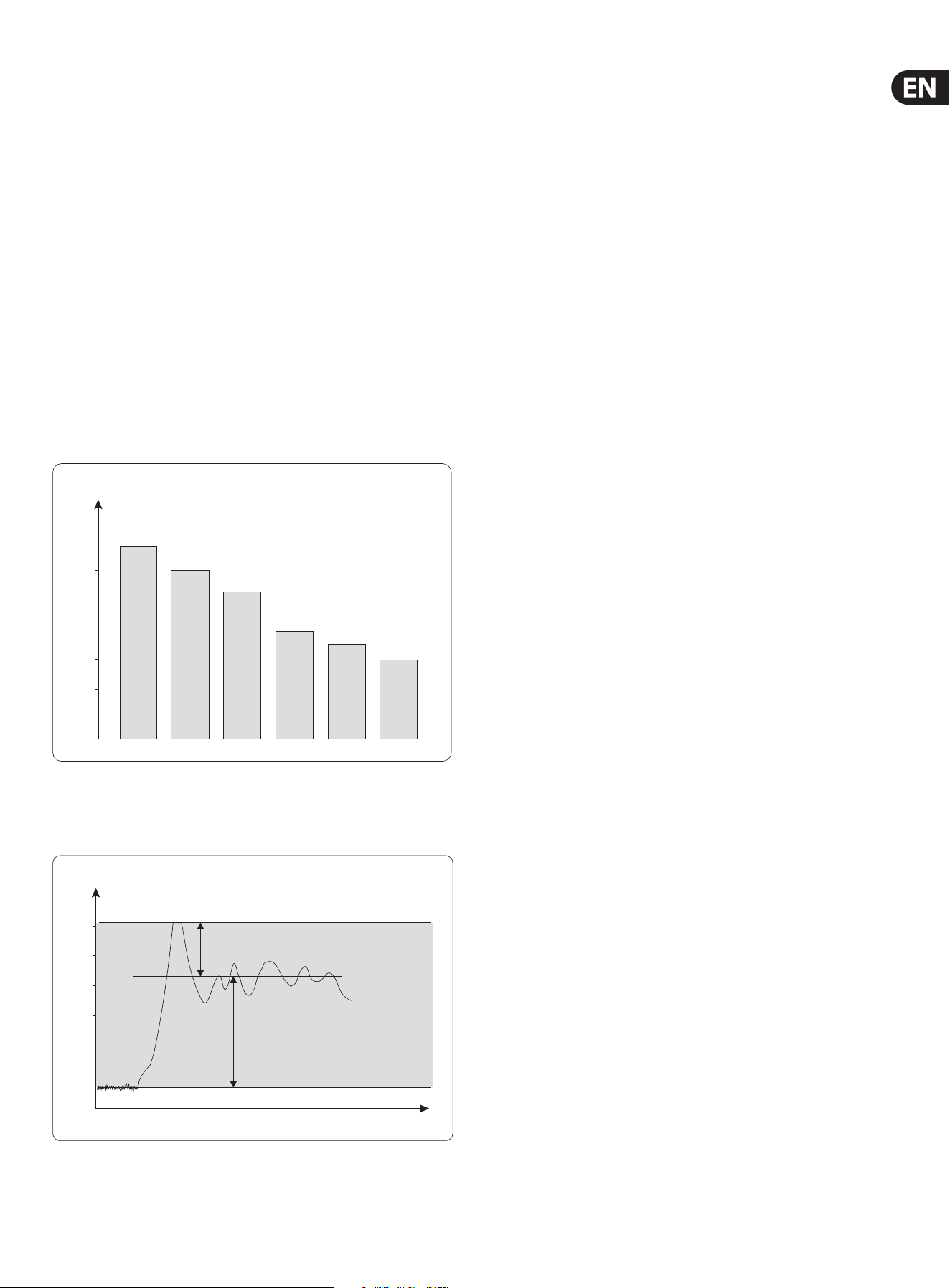
Ear
Microphone Amplier
Power Amplier
Tape Recorder
Radio
Cassette
Recorder
P/dB
140
120
100
80
60
40
Fig. 1.1: The dynamic range capabilities of various devices
It is therefore useful to keep the operating level as high as possible without
risking signal distortion in order to achieve optimum transmission quality.
t
P/dB
+20
0
-20
-40
-60
-80
Clipping
Headroom
Operating level
Eective SNR
Noise oor
Fig. 1.2: The interactive relationship between the operating level and the headroom
1.3 The tube used in the ULTRAGAIN PRO
A closer look at developments and trends in audio technology shows that tubes
are enjoying a renaissance today, in a time when even amateur musicians are free
to use digital eects processors and recording media, and ever more aordable
digital mixing consoles are becoming a natural part of the equipment of many
semi-professional studios. Manufacturers try with ever new algorithms to get the
most out of DSP’s (Digital Signal Processors), the heart of any digital system.
Still, many audio engineers, particularly old hands often prefer using both old
and new tube-equipped devices. As they want to use their warm sound character
for their productions, they are ready to accept that these “littledarlings”
producea higher noise oor than modern, transistor-based devices. Asa
consequence, you can nd a variety of tube-based microphones, equalizers,
preamps and compressors in today’s recording and mastering environments.
Thecombination of semiconductor and tube technologies gives you the
additional possibility of using the best of both worlds, while being able to make
up for their specic drawbacks.
1.3.1 Tube history
Due to many patent litigations, it is dicult to determine exactly when the tube
was “born”. First developments in tube technology were reported between
1904 and 1906. It was a research task of that time to nd a suitable method for
receiving and rectifying high frequencies. On April 12, 1905, a certain Mr. Fleming
was granted a patent for his “hot-cathode valve” which was based on Edison’s
incandescent lamp. This valve was used as a rectier for high-frequency signals.
Robert von Lieben was the rst to discover (probably by chance) that the anode
current can be controlled by means of a perforated metal plate (grid)—one of
the milestones in the development of amplication tubes. In 1912, Robert van
Lieben nally developed the rst tube for the amplication of low-frequency
signals. Initially, the biggest problem was to produce sucient volume levels,
which is why resonance step-ups (though impairing the frequency response)
were used to maximize the attainable volume. Later, the objective was to
optimize the electroacoustic transducers of ampliers in such a way that a broad
frequency band could be transmitted with the least distortion possible.
However, a tube-specic problem is its non-linear amplication curve, i.e.
it modies the sound character of the source material. Despite all eorts to
ensure a largely linear frequency response, it had to be accepted that tube
devices produce a “bad” sound. Additionally, the noise oor generated by the
tubes limited the usable dynamics of connected storage media (magnetic tape
machines). Thus, a one-to-one reproduction of the audio signal’s dynamics
(expressed as the dierence between the highest and lowest loudness
levels of the program material) proved impossible. To top it all, tube devices
required the use of high-quality and often costly transducers and sophisticated
voltagesupplies.
With the introduction of semiconductor technologies in the eld of audio
amplication, it soon became clear that the tube would have to give way to
the transistor, as this device featured an enormously enhanced signal-to-noise
ratio, required a less complex power supply and yielded an improved frequency
response. Plus, semiconductor-based circuits can be realized much more easily—
for less money.
Two decades later, the introduction of binary signal processing meant the
beginning of a new era of recording media that provided plenty of dynamic
response and allowed for the loss-free copying of audio signals. As digital media
were enhanced, however, many people began to miss the warmth, power and
liveliness they knew from analog recordings. This is why purists still today
consider digital recordings as “sterile” in sound.
6 ULTRAGAIN PRO MIC2200 User Manual
1.3.2 Design and functional principle of tubes
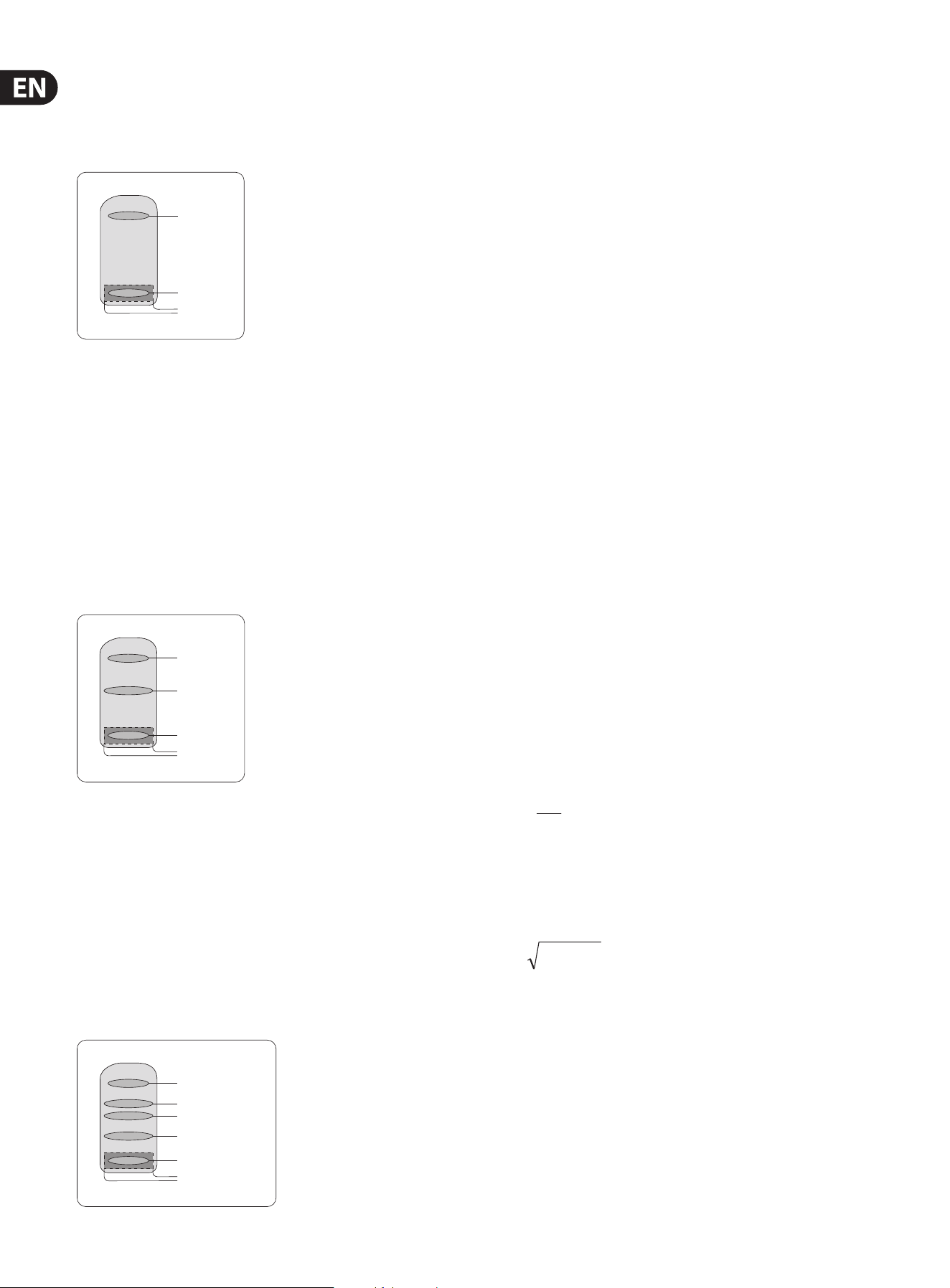
Tubes can be roughly classied according to the number of electrodes they use.
There are tubes with two, three or ve electrodes usually referred to as diodes,
triodes or pentodes.
vacuum
anode
cathode
heating
Fig. 1.3: diode
The diode contains two electrodes in a vacuum glass bulb that have electrical
connection to the outside. The vacuum allows for a free movement of electrons.
When one of the electrodes is heated up (= thus becoming a cathode), it begins
to emit electrons. When a positive DC voltage is applied to the other electrode
(= anode), the negative electrons start to migrate from the cathode to the
anode. With reverse polarity between cathode and anode, a current ow is not
possible because the unheated anode emits more or less no electrons. Thisdesign
was used, for example, as a rectier in the power supplies of ampliers.
Themagnitude and velocity of the ow of electrons depend on the cathode’s
temperature, the material it consists of, and the magnitude of the anode voltage.
When the electrons hit the anode they produce heat that is dissipated by using
large anode plates.
vacuum
anode
grid
cathode
heating
Fig. 1.4: triode
The triode has an additional metal grid between anode and cathode.
Byapplying a negative voltage, this grid can be used to control the internal
resistance of the tube, and hence the anode current. When the grid bias voltage
(voltagebetween cathode and grid) becomes negative, the current owing to
the anode is reduced because the negatively charged grid repels the arriving
electrons. As a consequence, there are less electrons to reach the anode.
Whenthe bias voltage is raised towards zero, the ow of electrons accelerates.
Whenit nally becomes zero or even positive, the grid current begins to ow
which considerably reduces the current owing to the anode and can possibly
destroy the tube. Triodes are most commonly used in preamps, often in pairs
arranged in one tube (twintriode).
vacuum
anode
suppressor grid
screen grid
control grid
cathode
heating
Fig. 1.5: pentode
In a triode the capacitance between grid and anode is a problem with regard to
high frequencies and large amplication factors. For this reason, the pentode
has a positively charged screen grid between the control grid and the anode.
However, the positive charge of the screen grid attracts electrons emitted from
the anode plate when it is hit by arriving electrons. To prevent this electron
emission, a decelerating or suppressor grid is placed between anode and screen
grid. As it is negatively charged it blocks the electrons, so that they cannot reach
the screen grid. Pentodes are most commonly used in power stages.
1.3.3 Properties of tubes
In general, the saturation (overdriving) of both transistor and tube-based circuits
results in various types of distortion. These phenomena are quite complex in the
real world, but for the sake of a straightforward mathematical description we
are going to classify them as linear and non-linear distortion. Linear distortion
is produced by frequency-dependent amplication or attenuation processes
such as they occur in all kinds of lters and equalizers. Linear-distortion signals
have the same frequency portions both on the input and output sides, but with
dierent phase positions and amplitudes. Non-linear distortions have additional
harmonics and distortion components that were not contained in the original
input signal.
For example, when the simplest of all oscillations, a sine wave with a xed
frequency f, is overdriven, new oscillations with frequencies of 2*f, 3*f,
etc. (integral multiples of the original frequency) are produced. Thesenew
frequencies are referred to as upper harmonics grouped as odd and
evenharmonics.
Unlike the transistor, saturated tubes mostly produce even harmonics which
are perceived by the human ear as more pleasant in sound than odd harmonics.
Another important aspect lies in the fact that tubes produce distortion more
gradually than transistors, which is why we speak of the “saturation” of a tube
stage. When you overdrive a transistor you get a sudden square deformation
of the sine signal applied at the input, which produces an extreme harmonic
spectrum at the output.
Non-linear distortions are measured with a distortion factor that consists of the
total harmonic distortion [k] and partial harmonic distortions [kn]. The latter are
dened as the ratio between the voltage of a single harmonic and the voltage of
the distorted overall signal. Thus, the content of even harmonics is expressed as
k2, k4, ... and that of odd harmonics as k1, k3, ... .
U
U
n
k
n
=
Formula for calculating partial harmonic distortion
The total harmonic distortion is the root of all squared distortion factors of the
second and third degrees. Since the higher harmonics have only little impact on
the measured results, they can be neglected.
k = k
2
2
k
2
3
+
Formula for calculating total harmonic distortion
In tube circuits the distortion factor k2 is used to describe an eect which the
human ear classies as “pleasant”. Also the frequency bands in which distortion
occurs play an important role because the human ear dierentiates very clearly,
in particular, in the frequency range of human speech.

7 ULTRAGAIN PRO MIC2200 User Manual
1.3.4 The best of both worlds
Despite many eorts neither manufacturers nor developers have succeeded
so far in simulating these positive properties of the tube by means of other
devices. Additionally, the natural capabilities of the tube to act as a soft limiter
can only be mimicked with highly sophisticated circuitry. Today’s studio
technology requirements are therefore met by a combination of both high-grade
semiconductor and tube technologies. In this context, tubes do not serve any
longer their original purpose as ampliers, but are used for the detailed shaping
of the sound.
1.3.5 Studio applications
In a recording studio tubes have not the same task as they have in an overdriven
guitar amp, where the considerably higher saturation of the tube(s) leads to a full
and often deliberate modication of the input signal (in many cases combined
with a heavy increase in noise oor levels). In the studio more subtle eects are
needed. Here, tube circuits add life to the signal’s tonal character and increase
its power to make itself heard. Often, tubes also increase the signal’s perceived
loudness (in relation to the unprocessed signal), i.e. the perceived loudness goes
up although the volume level remains the same. This is because the dynamic
range of the applied audio signal is limited by the tube circuit, while the
amplitude of the signal with the lowest loudness is raised. Thus, increasing tube
saturation produces a slight compression eect over the entire dynamic range.
A similar eect can be perceived when analog tape is saturated. Thissaturation
eect also compresses the recorded audio material and produces
additionalharmonics.
2. The Design Concept
2.1 High quality components and design
The philosophy behind BEHRINGER products guarantees a no-compromise circuit
design and employs the best choice of components. The operational ampliers
NJM4580 which are used in the ULTRAGAIN PRO, are exceptional. They boast
extreme linearity and very low distortion characteristics. To complement this
design the choice of components includes high tolerance resistors and capacitors,
detent potentiometers and several other stringently selected elements.
For the rst time, the ULTRAGAIN PRO MIC2200 uses SMD technology
(SurfaceMounted Device). These sub-miniature components known from
aerospace technology allow for an extreme packing density, plus the unit’s
reliability could be improved. Additionally, the unit is manufactured in
compliance with a ISO9000 certied management system.
2.2 Inputs and outputs
2.2.1 Balanced inputs and outputs
As standard, the BEHRINGER ULTRAGAIN PRO is installed with electronically
servo-balanced inputs and outputs. The new circuit design features automatic
hum and noise reduction for balanced signals and thus allows for trouble-free
operation, even at high operating levels. Externally induced mains hum etc.
willbe eectively suppressed. The automatic servo-function recognizes the
presence of unbalanced connectors and adjusts the nominal level internally to
avoid level dierences between the input and output signals (correction 6 dB).
3. Installation
Your BEHRINGER ULTRAGAIN PRO was carefully packed in the factory and
the packaging was designed to protect the unit from rough handling.
Nevertheless,we recommend that you carefully examine the packaging and its
contents for any signs of physical damage, which may have occurred in transit.
◊ If the unit is damaged, please do not return it to us, but notify your
dealer and the shipping company immediately, otherwise claims for
damage or replacement may not be granted. Shipping claims must be
made by the consignee.
3.1 Rack mounting
The BEHRINGER ULTRAGAIN PRO ts into one standard 19" rack unit of space
(1¾"). Please allow at least an additional 4" depth for the connectors on the
back panel. Be sure that there is enough air space around the unit for cooling
and please do not place the ULTRAGAIN PRO on high temperature devices such as
power ampliers etc. to avoid overheating.
3.2 Mains voltage
Before you connect your ULTRAGAIN PRO to the mains, please make
sure that your local voltage matches the voltage required by the
unit! Thefuse holder on the female mains connector has 3 triangular markers,
withtwo of these triangles opposing each other. Your ULTRAGAIN PRO is set
to the operating voltage printed next to these markers, and can be set to
another voltage by turning the fuse holder by 180°. CAUTION: this instruction
does not apply to export models exclusively designed, e.g. for
115 V operation!
◊ Please refer to the specifications for detailed information about
specific voltage supplies!
3.3 Audio connections
The audio inputs and outputs on the BEHRINGER ULTRAGAIN PRO are
fully balanced. If possible, connect the unit to other devices in a balanced
conguration to allow for maximum interference immunity.
◊ Please ensure that only qualified persons install and operate the
ULTRAGAIN PRO. During installation and operation the user must have
sufficient electrical contact to earth. Electrostatic charges might affect
the operation of the ULTRAGAIN PRO!
strain relief clamp
sleeve
tip
sleeve
(ground/shield)
Unbalanced ¼" TS connector
tip
(signal)
8 ULTRAGAIN PRO MIC2200 User Manual
output
For unbalanced use, pin 1 and pin 3
have to be bridged
1 = ground/shield
2 = hot (+ve)
3 = cold (-ve)
input
12
3
1
2
3
Balanced use with XLR connectors
Fig. 3.1: Dierent plug types
◊ Never use unbalanced XLR connections with microphone cables, as this
would short-circuit any phantom power transmitted over these cables!
4. Control Elements
4.1 Front panel control elements
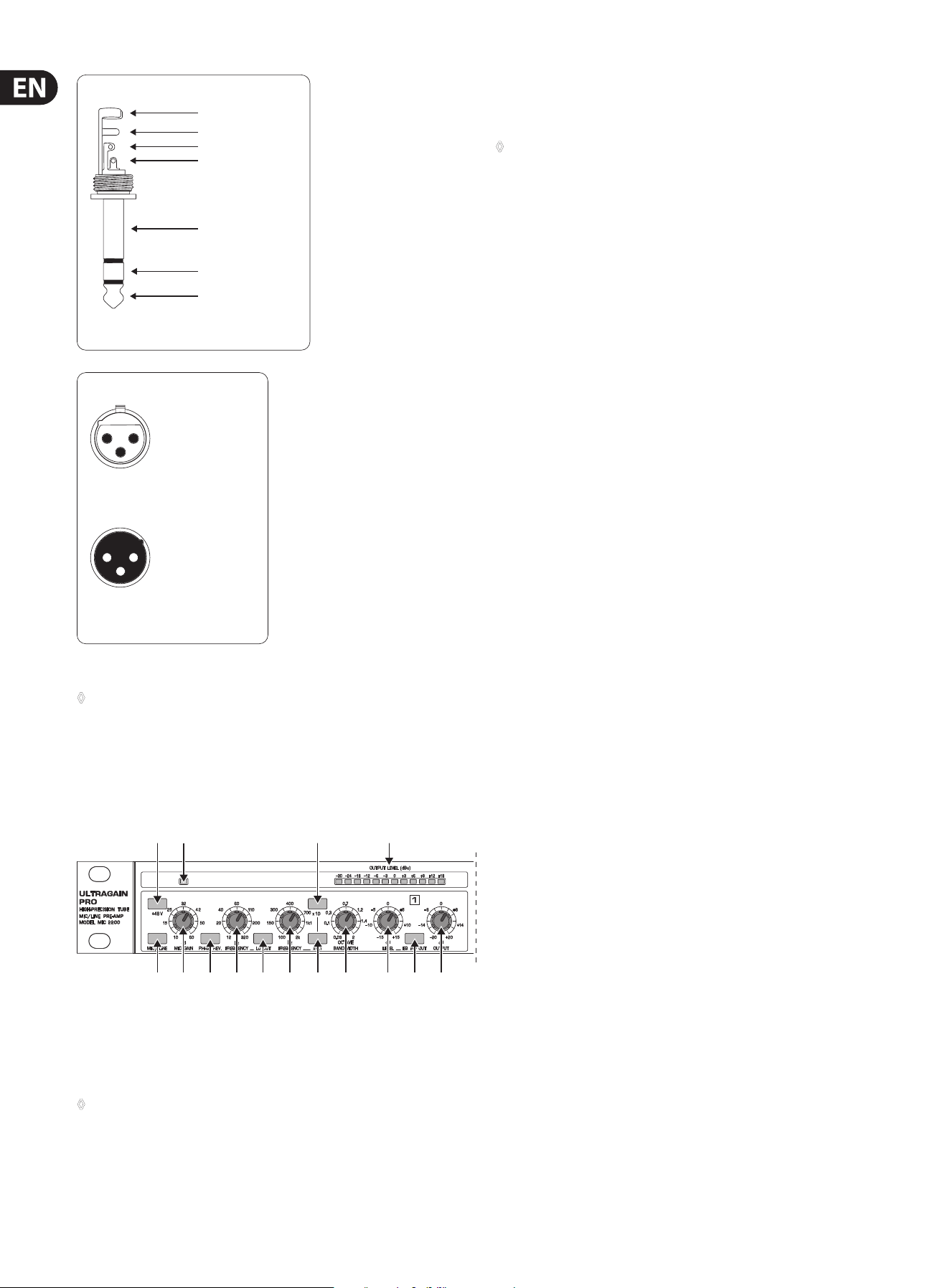
(1) (4)
(2) (5) (7)(3) (6) (8) (11) (12) (14)(9) (13)
(10) (15)
Fig. 4.1: Control elements on the front panel
(1) This +48 V switch activates the +48 V phantom power circuit that uses
the signal leads to supply condenser microphones with the required
operatingvoltage.
◊ Please check the connected signal source for matching specifications
before you switch phantom power on, so as to avoid damage to the
microphone, etc.
(2) Use the MIC/LINE switch to toggle between MIC and LINE modes. When the
switch is pressed, the unit works in MIC mode (now you can press the +48 V
switch if required; in LINE mode this function is disabled).
◊ Please note that the input phone jack is disabled in MIC mode, i.e. you
must use the XLR connector to access the microphone amp.
(3) The MIC GAIN control is enabled in MIC mode only and allows for applying
gain from 10 to 60 dB to the input signal. In view of the extremely high gain
levels that can be applied, you should verify that the gain control is properly
set before you power up the unit. In case of doubt, set the control fully
counter-clockwise, and start from there slowly raising the gain. High gain
settings and the resulting levels can damage subsequent devices.
(4) The CLIP LED signals that a level of at least +18 dBu is present after the
microphone amp stage. With too high a level the CLIP LED warns you to
reduce the gain with the MIC GAIN control, so as to avoid distortion caused
by overloading. During normal operation, the LED should not light up at all.
(5) With the PHASE REV. switch the input signal is reversed in phase by 180°.
This function is available both in MIC and LINE modes.
(6) When the high-pass lter is switched on (LO CUT switch pressed),
theFREQUENCY control denes the lter’s cut-o frequency. With a setting
range from 12 to 320 Hz the lter’s main task is to eliminate bottom-end
rumble noise, etc.
(7) The LO CUT switch activates/deactivates the high-pass lter.
The following 6 control elements refer to the parametric
equalizer only.
(8) The FREQUENCY control is used to select the frequency to be modied.
Please note that the frequency range can be lowered/raised with the
switches x0.1 and x10. In this way, you can process the entire audio range
between 10 Hz and 20 kHz. With both switches out, the FREQUENCY control
can be swept over a range from 100 Hz to 2 kHz.
(9) The x 0.1 switch lowers the working range of the FREQUENCY control to
10 - 200 Hz, so that you can process the bass end of the audio spectrum.
(10) The x 10 switch raises the working range of the FREQUENCY control to
1 - 20 kHz, so that you can process the treble end of the audio spectrum.
(11) The BANDWIDTH control determines the slope or quality of the lter.
Bandwidth ranges from 0.03 (Q = 43) to 2 octaves (Q = 0,67).
(12) With the LEVEL control you can set the amount of level reduction/gain
applied to the lter. The setting range is from -15 to +15 dB.
(13) The EQ IN/OUT switch activates/deactivates the parametric EQ.
Pleaseswitch the EQ o unless you need it for your specic audio application.
(14) The OUTPUT control raises/lowers the output level of the device by a
maximum of 20 dB (±20 dB). With the control in mid-travel position,
nolevel change is applied. Available both in MIC and LINE modes.
(15) The OUTPUT LEVEL LED chain displays the output level within a range from
-30 to +18 dB. The display is referenced to a level of +4 dBu.
strain relief clamp
sleeve
ring
tip
sleeve
ground/shield
For connection of balanced and unbalanced plugs,
ring and sleeve have to be bridged at the stereo plug.
Balanced ¼" TRS connector
ring
cold (-ve)
tip
hot (+ve)
9 ULTRAGAIN PRO MIC2200 User Manual
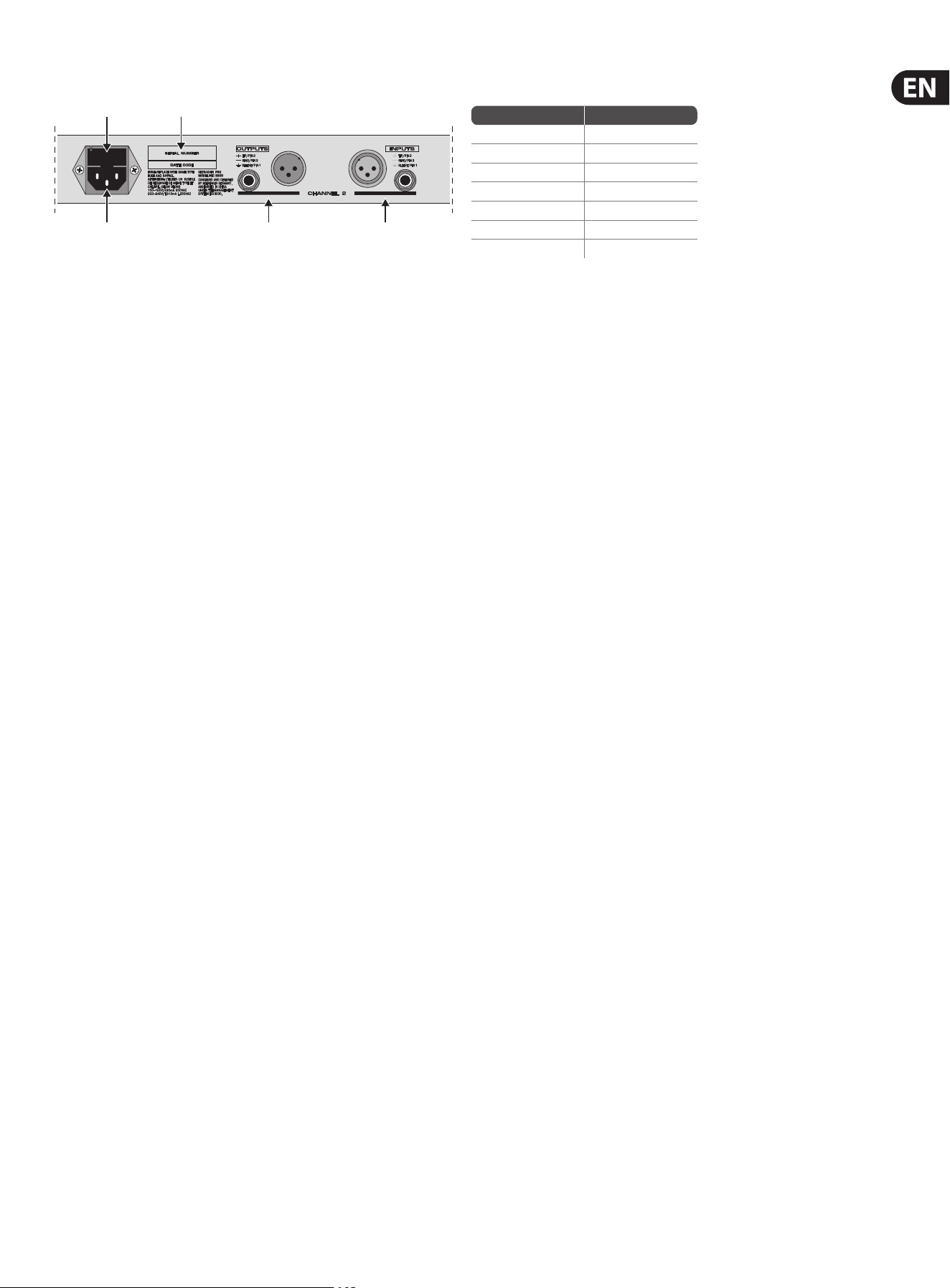
4.2 Rear panel control elements
(16)(17)
(18) (20) (19)
Fig. 4.2: Rear panel elements of the ULTRAGAIN PRO
(16) SERIAL NUMBER. Please take the time to ll in and return the warranty card
within 14 days after the date of purchase, so as to benet from our extended
warranty. Or use our online registration option available on the World Wide
Web at behringer.com.
(17) FUSE HOLDER / VOLTAGE SELECTOR. Please make sure that your local
voltage matches the voltage indicated on the unit, before you attempt to
connect and operate the ULTRAGAIN PRO. Blown fuses may only be replaced
by fuses of the same type and rating.
(18) MAINS CONNECTION. Use the enclosed power cord to connect the
unit to the mains. Please also note the instructions given in the
“Installation”chapter.
(19) AUDIO IN. These are the audio inputs of your ULTRAGAIN PRO. The XLR
connector is the common mic/line input. The line input is based on
jackconnection.
(20) AUDIO OUT. These are the audio outputs of your ULTRAGAIN PRO.
Matchingphone jack and XLR connectors are wired in parallel.
5. Applications
This section describes some typical applications of the BEHRINGER ULTRAGAIN
PRO. Starting from the following basic settings you can use it to solve the
majority of audio problems.
Please take your time to study the application examples, so as to be able to fully
exploit the ULTRAGAIN PRO and its variety of features.
Basically, the ULTRAGAIN PRO can be used in ve areas of application:
1. Using the ULTRAGAIN PRO as a high-quality microphone preamp.
2. Using the ULTRAGAIN PRO to convert home recording to studio levels,
andvice versa.
3. Using the ULTRAGAIN PRO to balance unbalanced signals (DI box).
4. Using the ULTRAGAIN PRO as a parametric equalizer specically “tweaking”
the frequency response.
5. Using the ULTRAGAIN PRO to enhance the sound of the program material by
adding “tube warmth”.
5.1 The ULTRAGAIN PRO as a
microphonepreamplier
Before you can use the BEHRINGER ULTRAGAIN PRO as a preamp, we recommend
that you study the various functions of the device. The high gain factors provided
by the microphone preamp can produce extreme levels on the output side,
which may damage subsequent devices. So, you should start with the following
basicsetting:
5.1.1 Basic setting
Control elements position
+48 V switch OUT
MIC GAIN control 10 dB
MIC/LINE switch LINE
PHASE REV. Control OUT
LO CUT switch OUT
EQ IN/OUT switch OUT
OUTPUT control 0 dB
Tab. 5.1: Basic setting of the ULTRAGAIN PRO
Reduce the volume level of the subsequent audio system to a minimum,
andconnect a microphone to the XLR input connector on the BEHRINGER
ULTRAGAIN PRO. Use either the jack or XLR output connectors to connect the
audio system. Owing to its output-side servo balancing circuit, the ULTRAGAIN
PRO detects whether you use a balanced or unbalanced conguration and adjusts
the levelinternally.
Now, power up the entire equipment and press the MIC/LINE switch to activate
the microphone preamp. If you wish to use a condenser mic requiring +48 V
phantom power, please press the +48 V switch (to avoid electrical damage,
please read chapter 5.1.5 “+48 V switch” below).
5.1.2 MIC GAIN control
Congure the equipment according to the application on hand, speak into
the microphone and turn the GAIN control clockwise until the 0 dB LED lights
up. If your DAT recorder, mixing console or other subsequent devices have
high-precision level meters, you can use these to verify the correct level setting.
The maximum output level depends on the device that follows next in the audio
chain, and must therefore be set specically. The high-precision level meter on
the ULTRAGAIN PRO indicates the current operating level. The CLIP LED lights
up at a level of +18 dBu signaling that you have an additional headroom of
5dB available, before the microphone preamp starts overloading. If distortion/
overloading occurs at high volume levels, you should reduce the gain with the
MIC GAIN control.
5.1.3 PHASE REV. switch
The PHASE REV. switch reverses the audio signal’s phase by 180°. Usually,you
won’t need this switch. However, in some cases, it might be necessary to reverse
the signal phase, for example, if a microphone cable has been connected
incorrectly (pins 2 and 3 interchanged), or if several microphones are used and
specic circumstances with regard to room acoustics are causing problems
(e.g.frequency cancellations are usually caused by phase problems). The phase
reverse function will help you locate and eliminate any such problem.
5.1.4 LO CUT function
When you pick up acoustic signals with microphones, it is usually necessary
to eliminate low-end signal portions, such as rumble or pop noise, or other
interference frequencies. Often, such frequencies have very high amplitudes and
do not only deteriorate the sound quality but can also damage the power amps
or speakers. Your ULTRAGAIN PRO features a tunable high-pass lter with a very
high slope. Press the LO CUT switch and adjust the FREQUENCY control, sothat
any disturbing frequencies are faded out as much as possible, with the least
damage done to the actual audio signals. Press/release the LO CUT switch several
times to make an A/B comparison.
10 ULTRAGAIN PRO MIC2200 User Manual
microphone
preamplier
microphone
microphone
transformer
+48 V
+48 V
microphone
cable
microphone
amplier
output
A
B
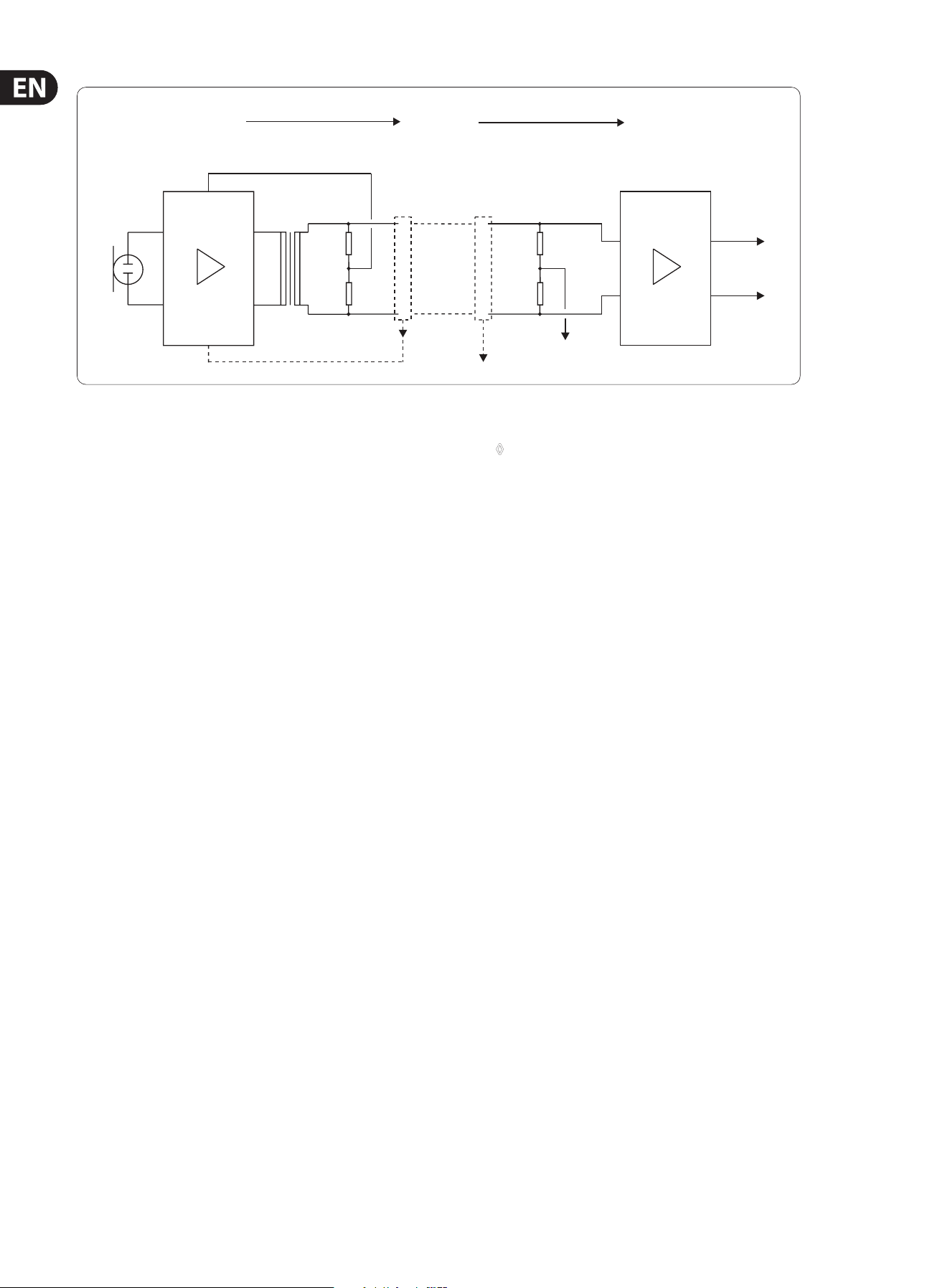
Fig. 5.1: Functional diagram of phantom power supply
5.1.5 Phantom power
Condenser microphones need a specic supply voltage polarizing the condenser
diaphragm. This voltage can be furnished from an internal battery, or an external
power supply that is either connected directly to the microphone or supplies
the voltage through the microphone cable. In practice, this technique is usually
referred to as +48 V or phantom power supply, and uses the microphone cable to
carry both the audio signal and the supply voltage required for the microphone.
Please read this chapter thoroughly: phantom power can damage the
microphone, if used improperly.
We speak of phantom power when a microphone cable is used to carry several
signals, with a DC voltage “layered” on the actual audio signal. The typical
phantom DC voltage is +48 V, which is applied both to the positive (pin 2) and
negative inputs (pin 3) of the XLR connector, using current-limiting resistors.
Asthe phantom voltage is split up in a balanced conguration among the signal
leads, there is no need to apply it directly to the microphone transducer or the
microphone itself, where it could damage the transducer and/or capsule. In an
unbalanced conguration, DC voltage would be applied directly, which would
inevitably lead to disturbing noise or could even damage the electronics.
To eliminate this risk, the BEHRINGER ULTRAGAIN PRO automatically disables the
unbalanced phone jack in MIC mode. Microphones can thus only be connected to
the XLR connector.
Never switch on the +48 V supply when you use unbalanced microphones,
as this could cause electrical damage.
Some people hold that the sound of dynamic microphones is aected when the
+48 V supply is on, or that ribbon microphones cannot be operated from an input
equipped with +48 V phantom power. None of these statements is true. As a
matter of fact, problems of this kind are caused by one of the following reasons:
When the output transformer of the microphone suers from a short circuit or
leakage current at any point, disturbing noise, clicks or hum can occur. Inthis
case, you should have the microphone repaired.
When you connect a microphone while the +48 V supply is switched
on, itcannot be guaranteed that both signal leads of the XLR connectors
establish the electrical contact precisely at the same point of time. Therefore,
detrimentalcurrent could ow because the connection is temporarily
unbalanced. Werecommend that you switch o the +48 V supply before you
attempt to connect a microphone.
◊ Please make sure that you are using an appropriate microphone before
you switch on the +48 V supply. Read the operating instructions
accompanying the microphone. Some condenser mics might need
another type of power supply, older dynamic microphones could be
damaged by the +48 V voltage, and unbalanced microphones should
never be operated in combination with a +48 V power supply.
5.2 The ULTRAGAIN PRO as a level translator
Semi-professional devices in hi- and home recording environments are usually
operated with a nominal level of -10 dBV (0.316 V), while the level used in studios
is 0 dBu (0.775 V) or +4 dBu (1.23 V). So, when you connect devices of both types
to each other, you should do this via some kind of level translator.
The BEHRINGER ULTRAGAIN PRO is excellently suited for this application. In LINE
mode, the OUTPUT control allows you to raise or lower the input signal level
by as much as 20 dB. The functions PHASE REV. and LO CUT are also enabled in
thismode.
5.3 The ULTRAGAIN PRO as a
direct-injection box
When electrical signals delivered by instruments such as guitars, keyboards, etc.
are transported over long unbalanced lines, the transmission quality may be
aected by hum or other interference signals induced in the cable. This problem
is usually encountered in studio or stage environments, where long cable lengths
and magnetic elds of great magnitude may produce interference.
So-called direct-injection (DI) boxes are used to counter this eect: the DI box
converts the unbalanced signal coming from the instrument into a balanced
signal that is sent over the line. Interference induced in balanced cables is then
eliminated by a subsequent dierential amplier (as explained in chapter 3.3).
Using the ULTRAGAIN PRO for this kind of application is easy. Simply connect the
line output of your keyboard to the phone jack input on the ULTRAGAIN PRO.
Thenuse the ULTRAGAIN PRO’s balanced output to send the signal to a stage box
or other transmission chain. You can use both the XLR and phone jack connectors
of the ULTRAGAIN PRO. Set the unit to LINE mode, with any additional functions
switched o (an exception being the OUTPUT control which can be used to adjust
levels, if necessary).

11 ULTRAGAIN PRO MIC2200 User Manual
5.4 The ULTRAGAIN PRO’s parametric equalizer
In contrast to graphic equalizers with their xed frequencies and qualities,
parametric EQs allow for setting all lter parameters, such as center frequency,
bandwidth and amplitude.
The possibility of determining both the bandwidth and center frequency as well
as frequency boost/cut adds a new dimension to your EQ applications. The high
precision of the state-variable lter used in the ULTRAGAIN PRO enables you to
ne-tune frequencies and process your audio material in such a creative way that
has been impossible up to now. The frequency-selection feature allows you to
process the entire audio range from 20 Hz to 20 kHz.
Parametric equalizers can be used both as separate signal processors and in
combination with conventional 1/3-oct. equalizers, for example, in a sound
reinforcement system: while the 1/3-oct. equalizer does the “rough” correction
of the overall frequency response, the ULTRAGAIN PRO could be used to ne-tune
the sound.
“Notching out” specic interference frequencies and narrow-band resonances
(uncontrolled frequency peaks) is one of the ULTRAGAIN PRO’s major tasks:
by tuning the EQ in to the precise trouble frequency, interference such as hum
and noise caused by air conditioners, etc. can be eliminated without aecting
adjacent frequency ranges. Basic acoustic problems usually encountered in
studios and stage systems can be solved elegantly with the ULTRAGAIN PRO.
It has proven useful in practice to start with all controls set to mid-travel position
and the EQ IN/OUT switch set to OUT, so as to avoid even before powering up
the system that applied input signals with high amplitudes are raised in level
by the ULTRAGAIN PRO and hence lead to distortion or damage in subsequent
devices or speakers, or to annoying feedback in P.A. systems caused by improper
basicsettings.
Once the lter curve of your choice has been set, it can be necessary to correct
the overall level. If the lter setting used raises the overall level, you can use the
OUTPUT control to lower it again and avoid possible distortion.
When the overall level is lowered by the lter setting, the OUTPUT control
allows for raising it by a maximum amount of +20 dB. Use the EQ IN/OUT switch
for a direct A/B comparison, so that you can estimate the required amount of
levelcompensation.
5.5 The ULTRAGAIN PRO as a tube interface
In your daily studio work, the ULTRAGAIN PRO can be used for a variety of
applications that provide subtle sound enhancement. For example, it gives
percussion instruments more “punch”, or improves the transparency of other
instruments, particularly those rich in upper harmonics. The source material
is enriched in sound volume and brilliance. Enhanced “depth” makes it easier
to locate individual instruments. Vocal sounds gain in presence and volume,
without masking other instruments. Thus, voices become a more integral part of
the overall mix. Synthetic sound, especially MIDI guitar sounds become more real
and natural than without the ULTRAGAIN PRO. So, with the ULTRAGAIN PRO you
can adopt a more active approach during the mix-down process and work out
subtleties, while focusing particularly on the musical aspects of your recordings.
For this purpose, connect the device to the insert points on your mixing console
or recording/playback machine, and operate the ULTRAGAIN PRO in LINE mode.
Ifyou wish to use the tube function only, make sure that all PHASE REV., LO CUT
and EQ IN/OUT switches are OUT. Set the OUTPUT control to mid-travel position
and enjoy the “warmth” of pure tube sound.
6. Specications
Audio Input
Microphone
Connectors XLR
Type transformerless, DC-decoupled input
Impedance 3 k Ohms balanced
Maximum input level +10 dBu balanced and unbalanced
CMRR typ. 40 dB, >55 dB @ 1 kHz
Line
Connectors XLR and ¼" jack
Type transformerless, DC-decoupled input
Impedance 60 kOhms balanced
Maximum input level +23 dBu balanced and unbalanced
CMRR typ. 40 dB, >55 dB @ 1kHz
Audio Output
Connectors XLR and ¼" jack
Type electronically servo-balanced
outputstage
Impedance 60 Ohms balanced,
30 Ohms unbalanced
Maximum output level +21 dBu balanced and unbalanced
System Specications
Frequency response 10 Hz to 200 kHz, ±3 dB
Noise >94 dBu, unweighted, 22 Hz to 22 kHz
THD 0.011% typ. @ +4 dBu, 1 kHz, Gain 1
IMD 0.01% typ. SMPTE
Crosstalk <-88 dB, 22 Hz to 22 kHz
Function Controls
Mic gain variable (+10 dB to +60 dB)
Frequency (lo cut) variable (12 to 320 Hz)
Frequency (PEQ) variable (10 Hz to 20 kHz),
dependent on x10 and x0.1 switch
Bandwidth variable (0.03 to 2 octaves)
Level variable (-15 dB to +15 dB)
Output variable (-20 dB to +20 dB)

12 ULTRAGAIN PRO MIC2200 User Manual
Function Switches
+48 V activates phantom power
Mic/line switches from line to mic preamplier
Phase rev. phase reverse (180°)
Lo cut activates the high-pass lter
x0.1 switches the frequency control to
10Hz - 200 Hz
x10 switches the frequency control to
1 kHz - 20 kHz
EQ in/out activates the parametric lter
Indicators
Clip clipping control LED
Output level 12-segment LED display:
-30/-24/-18/-12/-6/-3/0/+3/+6/
+9/+12/+18 dB
function switch LED indicator of every switch
Power Supply
Mains voltages
USA/Canada 120 V~, 60 Hz
U.K./Australia 240 V~, 50 Hz
Europe 230 V~, 50 Hz
General Export Model 100 - 120 V~, 200 - 240 V~, 50 - 60 Hz
Power consumption max. 20 Watts
Fuse 100 - 120 V~: T 500 mA H
200 - 240 V~: T 250 mA H
Mains connection standard IEC receptacle
Physical
Dimensions (W x D x H) approx. 8.5 x 1.8 x 19"
approx. 217 x 44.5 x 483 mm
Net weight approx. 2.3 kg
Shipping weight approx. 3.4 kg
BEHRINGER is constantly striving to maintain the highest professional standards. As a result of these efforts,
modifications may be made from time to time to existing products without prior notice. Specifications and
appearance may differ from those listed or illustrated.

We Hear You