USE AND CARE GUIDE
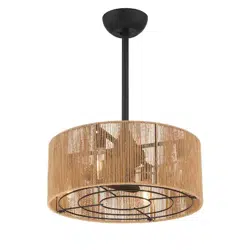
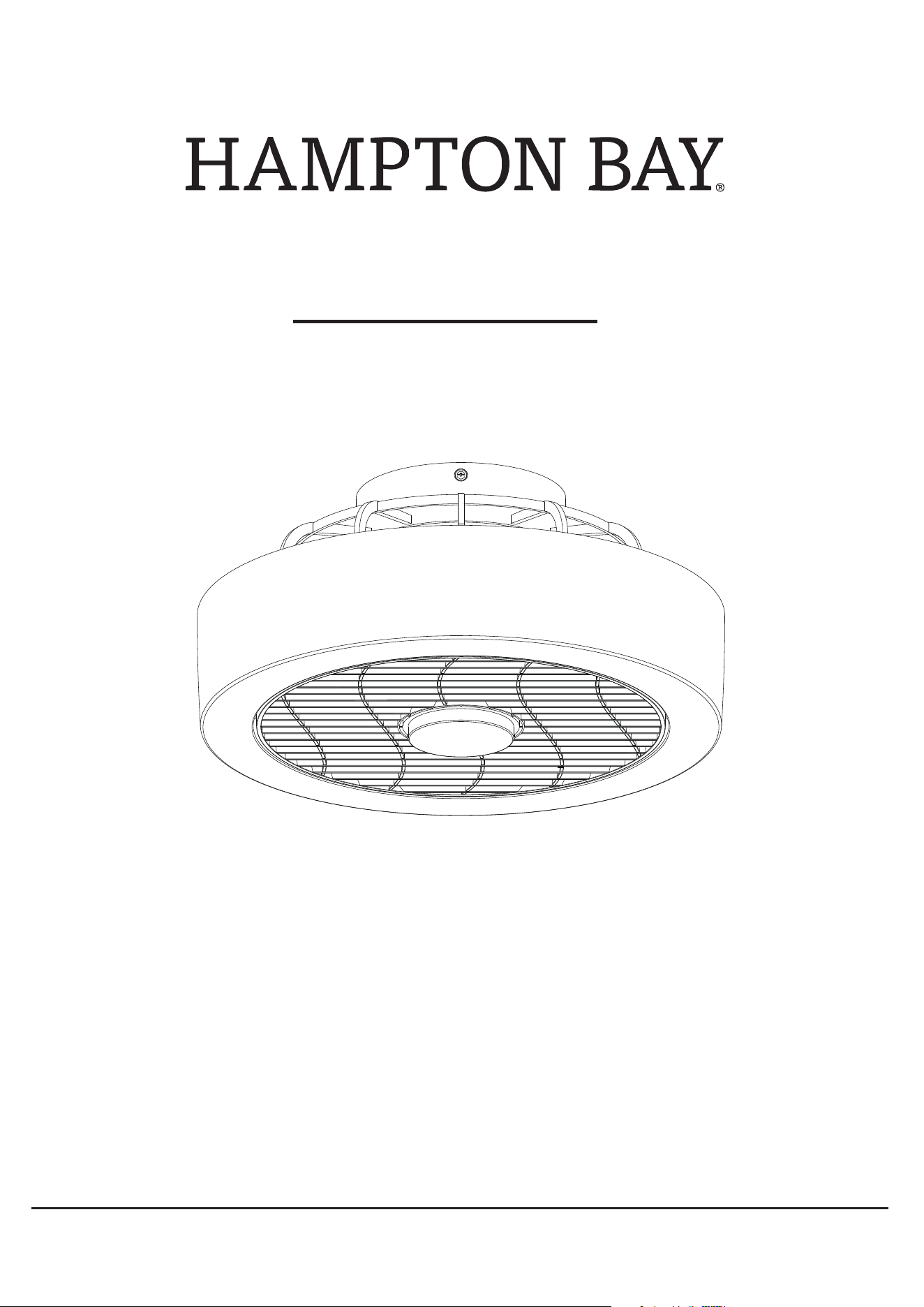
POMPTON 20IN INTEGRATED LED FAN
THANK YOU
1-855-HD-HAMPTON
HAMPTONBAY.COM
Questions, problems, missing parts? Before returning to the store,
call Hampton Bay Customer Service
8 a.m. - 7 p.m., EST, Monday-Friday, 9 a.m. - 6 p.m., EST, Saturday.
Item #1009 554 608
Model #44001-030
We appreciate the trust and confidence you have placed in Hampton Bay through the purchase of this ceiling fan. We strive to continually create
quality products designed to enhance your home. Visit us online to see our full line of products available for your home improvement needs.
Thank you for choosing Hampton Bay!
2
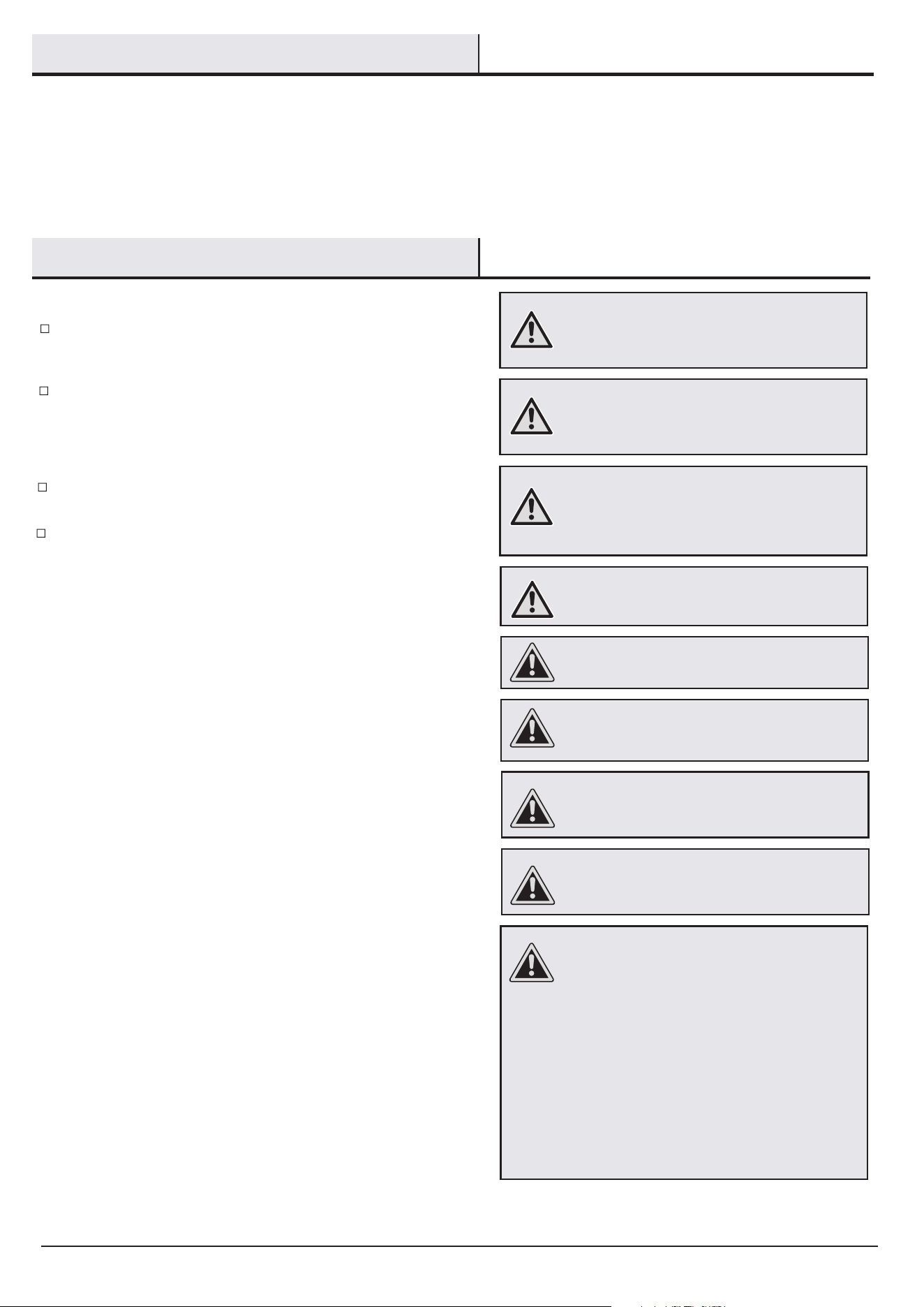
All wiring must be in accordance with the National Electrical
Code
ANSI/NFPA 70 and local electrical codes. Electrical
electrician.
Safety Information
Table of Contents
READ AND SAVE THESE INSTRUCTIONS.
installation
should
be performed by a qualified licensed
WARNING: To reduce the risk of personal injury, do not
WARNING:
WARNING: To avoid possible electrical shock,
turn the electricity off at the main fuse box before
wiring. If you feel you do not have enough electrical
wiring knowledge or experience, contact a licensed
electrician.
CAUTION: To reduce the risk of personal injury,
use only the screws provided with the outlet box.
CAUTION: To avoid personal injury or damage to the
fan
and other items, use caution when working around or
cleaning the fan.
bend the blade brackets when installing the brackets,
balancing the blades, or cleaning the fan. Do not insert
foreign objects in between rotating fan blades.
To reduce the risk of fire, electric shock
or personal injury, mount to an outlet box marked
“acceptable for fan support of 15.9 kg (35 lbs)
or less”.
The fan must be mounted with a minimumCAUTION:
of
10 ft. (3. 05 m) of clearance from the trailing edge of
the blades to the floor.
After making electrical connections, spliced conductors should be
turned upward and pushed carefully up into the outlet box. The
All set screws must be checked and retightened where necessary
Changes or modifications not expresslyCAUTION:
approved by the party responsible for compliance could
void the user’s authority to operate the equipment.
Any changes or modications not CAUTION:
WARNING:
shock, do not use this fan with any solid-state speed
control device.
To reduce the risk of fire or electric
This equipment has been tested and found to comply with the limits
for a Class B digital device, pursuant to Part 15 of the FCC Rules.
These limits are designed to provide reasonable protection against
harmful interference in a residential installation. This equipment
generates, uses and can radiate radio frequency energy and, if not
installed and used in accordance with the instructions, may cause
harmful interference to radio communications. However, there is no
guarantee that interference will not occur in a particular installation.
If this equipment does cause harmful interference to radio or
television reception, which can be determined by turning the
equipment off and on, the user is encouraged to try to correct the
interference by one or more of the following measures:
--Reorient or relocate the receiving antenna.
--Increase the separation between the equipment and receiver.
--Connect the equipment into an outlet on a circuit different from that
to which the receiver is connected.
--Consult the dealer or an experienced radio/TV technician for help.
Table of Contents . . . . . . . . . . . . . . . . . . . . . . . . . . . . . . . . . . . 2
Safety Information . . . . . . . . . . . . . . . . . . . . . . . . . . . . . . . . . . 2
Warranty . . . . . . . . . . . . . . . . . . . . . . . . . . . . . . . . . . . . . . . . . . 3
Pre-Assembly . . . . . . . . . . . . . . . . . . . . . . . . . . . . . . . . . . . . . 3-5
Tools Required . . . . . . . . . . . . . . . . . . . . . . . . . . . . . . . . . . . . 3
Specications . . . . . . . . . . . . . . . . . . . . . . . . . . . . . . . . . . . . 3
Hardware Included . . . . . . . . . . . . . . . . . . . . . . . . . . . . . . . . . 4
Assembly
. . . . . . . . . . . . . . . . . . . . . . . . . . . . . . . . . . . . . . . . . . 6-8
Care and Cleaning
. . . . . . . . . . . . . . . . . . . . . . . . . . . . . . . . . . 11
Package Contents
. . . . . . . . . . . . . . . . . . . . . . . . . . . 5. . . . . .
Troubleshooting
. . . . . . . . . . . . . . . . . . . . . . . . . . . . . . . . . . 11 . . .
Operation
. . . . . . . . . . . . . . . . . . . . . . . . . . . . . . . . . . . . . .
9-10
. . . .
before installation.
wires should be spread apart with the grounded conductor and the
equipment-grounding conductor on one side of the outlet box and
ungrounded conductor on the other side of the outlet box.
expressly approved by the grantee of this device
could void the user’s authority to operate the
equipment. This device complies with Part 15 of
the FCC Rules. Operation is subject to the
following two conditions: (1) This device may not
cause harmful interference, and (2) this device
must accept any interference received, including
interference that may cause undesired operation.
Import name: Eurofase.Inc.
Address: 33 West Beaver Creek Road, Richmond
Hill Ontario L4B 1L8
Internet contact information: www.eurofase.com
3
Pre-Assembly
Warranty
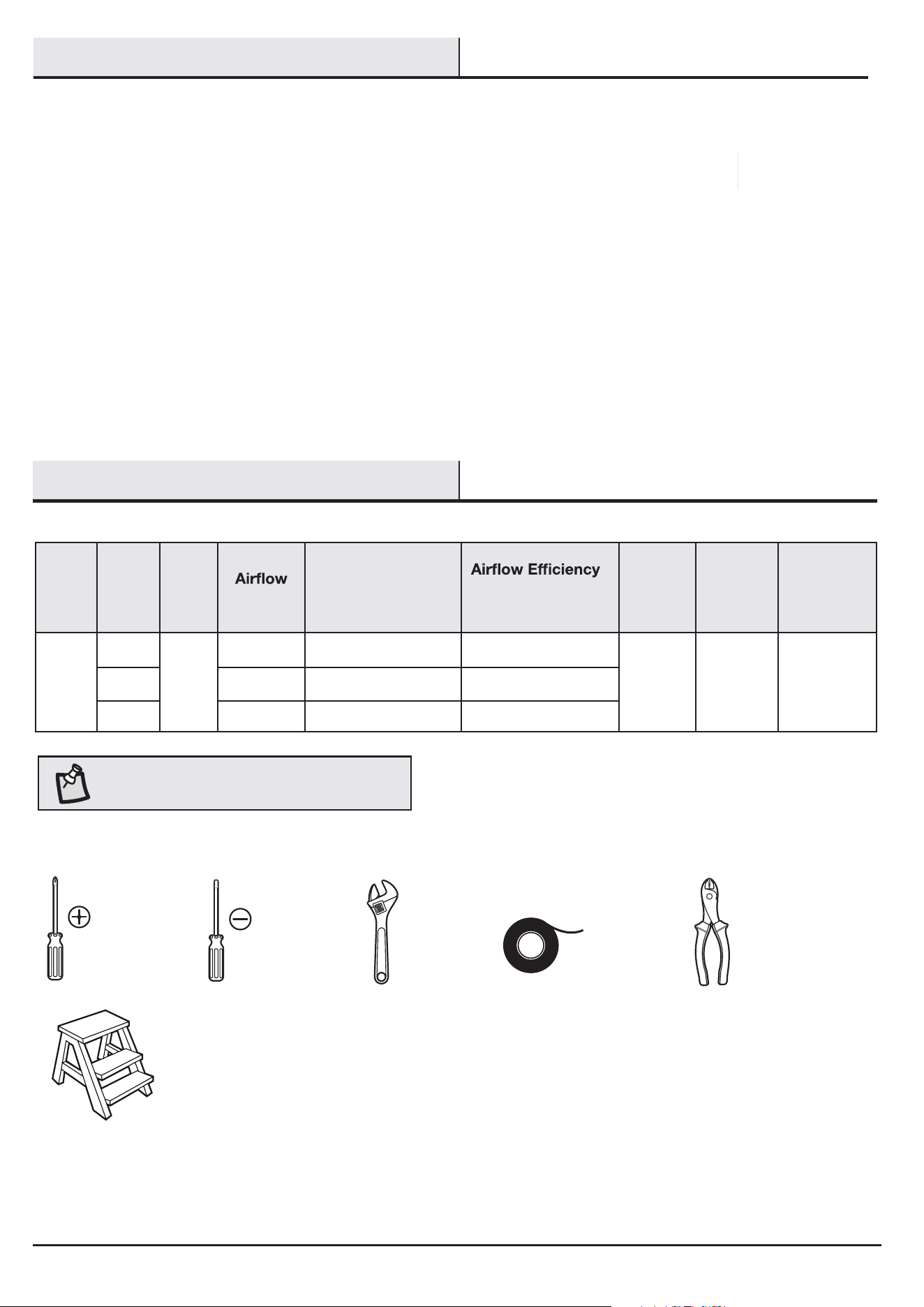
TOOLS REQUIRED
NOTE: These are approximate measures. They do not
include the amps and wattage used by the light kit.
Phillips
screwdriver
Flat head
screwdriver
Adjustable
wrench
Electrical
tape
Wire
cutter
Step ladder
Contact the Customer Service Team at 1-855-HD-HAMPTON or visit www.HamptonBay.com.
We warrant the fan motor to be free from defects in workmanship and material present at time of shipment from the factory for a period
of a lifetime after the date of purchase by the original purchaser. We also warrant that all other fan parts, excluding any glass or acrylic
blades, to be free from defects in workmanship and material at the time of shipment from the factory for a period of three years after the
date of purchase by the original purchaser. We agree to correct such defects without charge or at our option replace with a comparable or
superior model if the product is returned. To obtain warranty service, you must present a copy of the receipt as proof of purchase. All
costs of removing and reinstalling the product are your responsibility. Damage to any part such as by accident, misuse, improper installa-
tion, or by affixing any accessories, is not covered by this warranty. Because of varying climatic conditions, this warranty does not cover
any changes in brass finish, including rusting, pitting, corroding, tarnishing or peeling. Brass finishes of this type give their longest useful
life when protected from varying weather conditions. A certain amount of “wobble” is normal and should not be considered a defect.
Servicing performed by unauthorized persons shall render the warranty invalid. There is no other express warranty. We hereby disclaim
any and all warranties, including but not limited to those of merchantability and fitness for a particular purpose to the extent permitted by
law. The duration of any implied warranty which cannot be disclaimed is limited to the time period as specified in the express warranty.
Some states do not allow limitation on how long an implied warranty lasts, so the above limitation may not apply to you. The retailer shall
not be liable for incidental, consequential, or special damages arising out of or in connection with product use or performance except as
may otherwise be accorded by law. Some states do not allow the exclusion of incidental or consequential damages, so the above
exclusion or limitation may not apply to you. This warranty gives specific legal rights, and you may also have other rights which vary from
state to state. This warranty supersedes all prior warranties. Shipping costs for any return of the product as part of a claim on the warranty
must be paid by the customer.
SPECIFICATIONS
24.6
24.9
29.2
357
266
254
Size Speed Volts
CFM
Fan Power
Consumption
(Without Lights)
WATT
(Higher Is Better)
CFM/WATT
Net
Weight
Gross
Weight
Cubic Feet
20 in.
Low
120
8.7
2.5 cu. ft.
Medium 10.7
High 14.5
8.22 lbs
(3.73 kg)
13.12 lbs
(5.95 kg)
HAMPTONBAY.COM
Please contact 1-855-HD-HAMPTON for further assistance.
4
Pre-Assembly (continued)
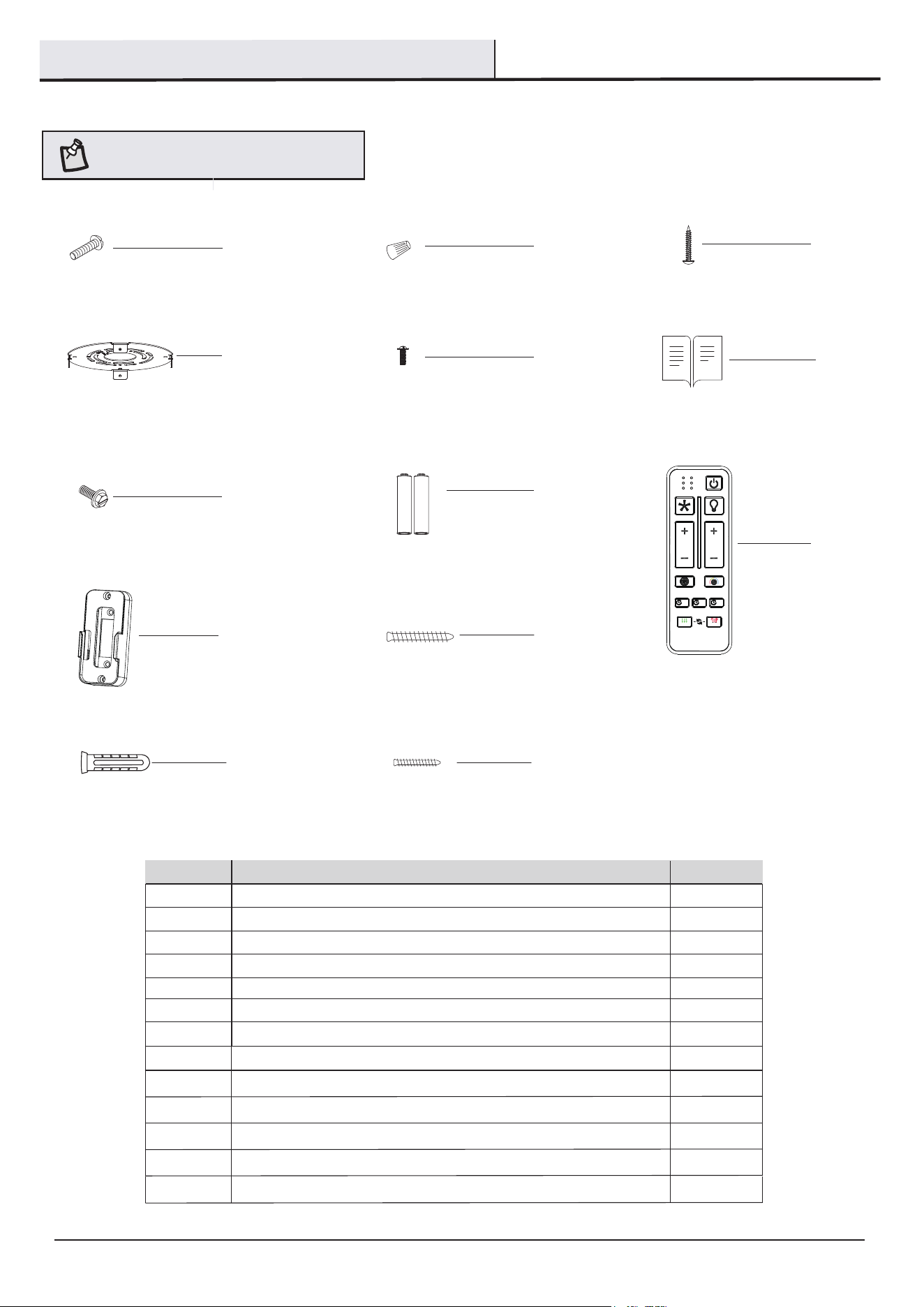
HARDWARE INCLUDED
: Hardware not shown to actual size.
AA
BB
CC
DD
GG
Mounting Screw 2
Wire nuts 3
1
Tapping Screw
1
Green ground screw
Part
Description
Quantity
Hanging Board (preassembled)
NOTE
EE
4
Hanging Board Screw (preassembled)
FF
1
Instructions
AA
BB
CC
DD
EE
HH
II
GG
HH
II
2
1
AAA Battery
Transmitter
FF
4
JJ
ALL
ON / OFF
ON / OFF
6 SPEED BRIGHTNESS
GRILLE
SUMMER
2HR
COLOR TEMP.
4HR
TIMER
WINTER
FAN DIRECTION
HOLD 3 SEC.
8HR
KK
MM
LL
JJ
KK
1
2
Remote control holder
Remote control holder screw
LL 2Plastic anchor
MM
2Remote control holder screw
5
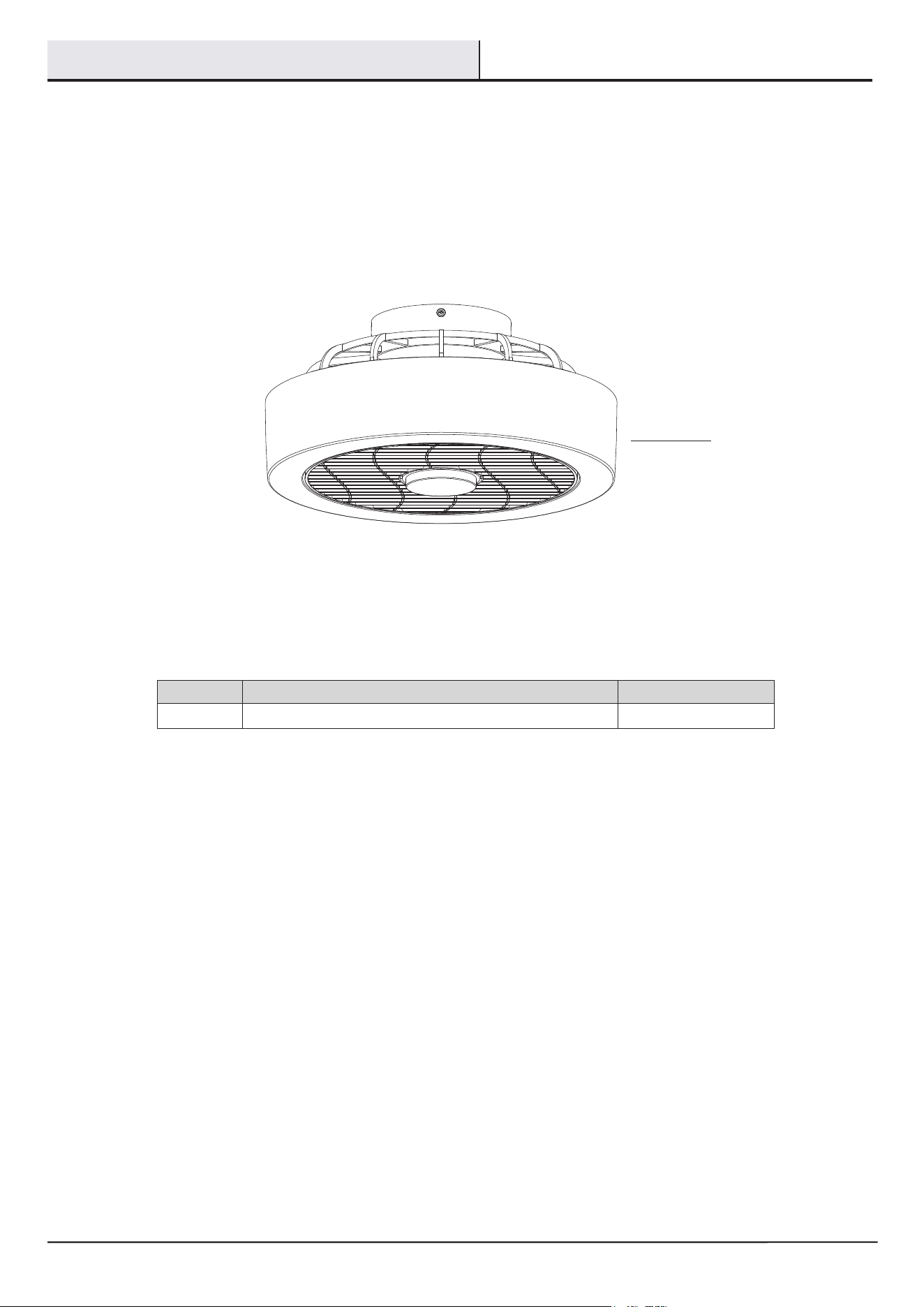
PACKAGE CONTENTS
Pre-
Assembly
(continued)
A Fixture body
1
Part
Description
Quantity
A
HAMPTONBAY.COM
Please contact 1-855-HD-HAMPTON for further assistance.
6
Assembly
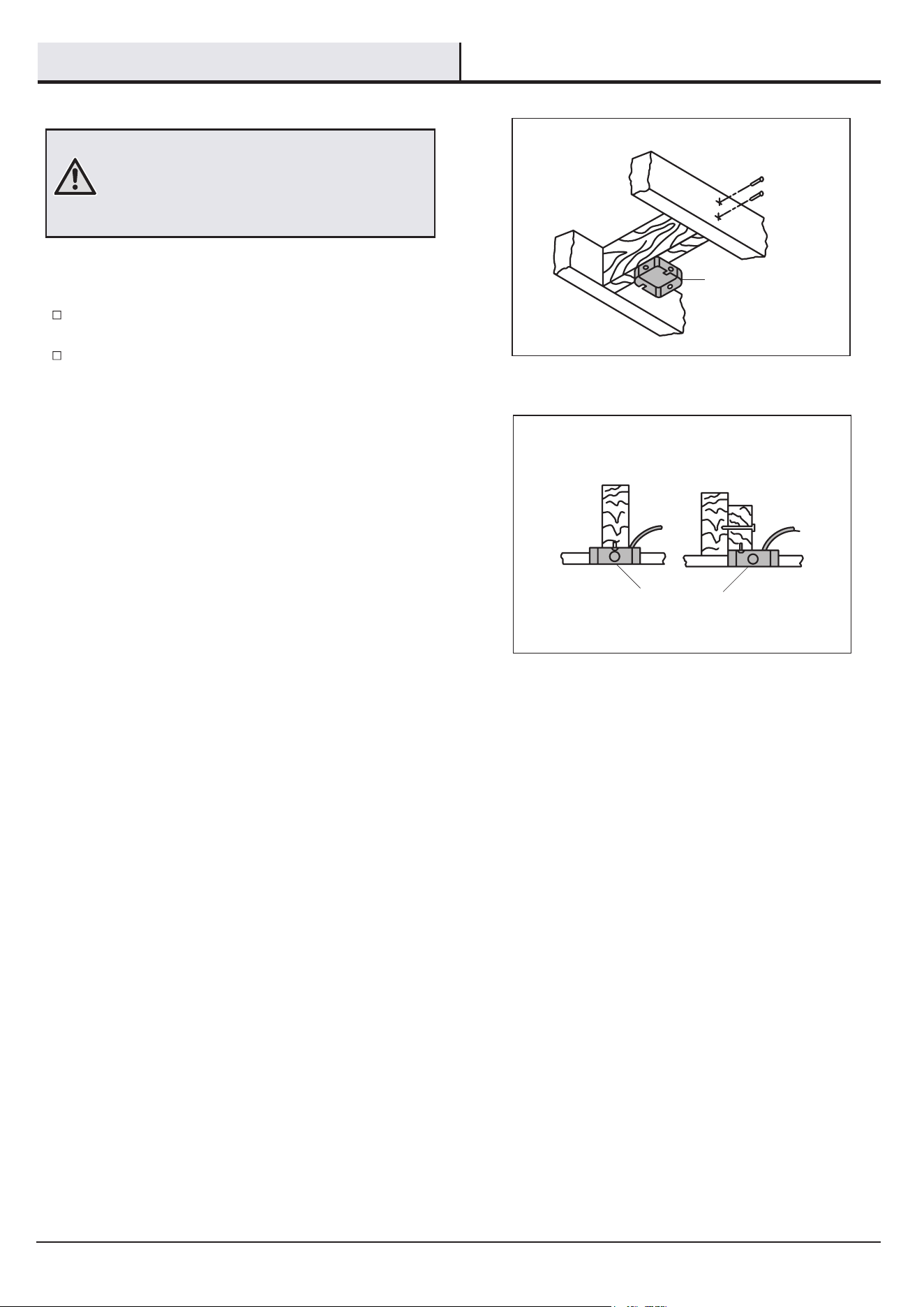
MOUNTING OPTIONS
WARNING:
personal injury, mount to outlet box marked “acceptable
for fan support of 15.9 kg (35 lbs) or less” using the
screws provided with the outlet box. An outlet box
not be acceptable for fan support and may need to be
If your ceiling fan does not h
Option 1:
Option 2:
ave an existing UL-listed mounting
box, then install one using the following instructions:
Disconnect the power by removing the fuses or turning off
the circuit breakers.
Secure the outlet box directly to the building structure.
Use the appropriate fasteners and materials. The outlet box
and its bracing must be able to fully support the weight
of the moving fan (at least 15.9 kg). Do not use a plastic
outlet box.
The illustrations on the right show two different ways to mount
the outlet box.
Outlet Box
Outlet Box
To reduce the risk of fire, electric shock, or
commonly used for the support of lighting fixtures may
replaced. If in doubt, consult a qualified electrician.
7
Assembly - Standard Ceiling
Mount
(continued)
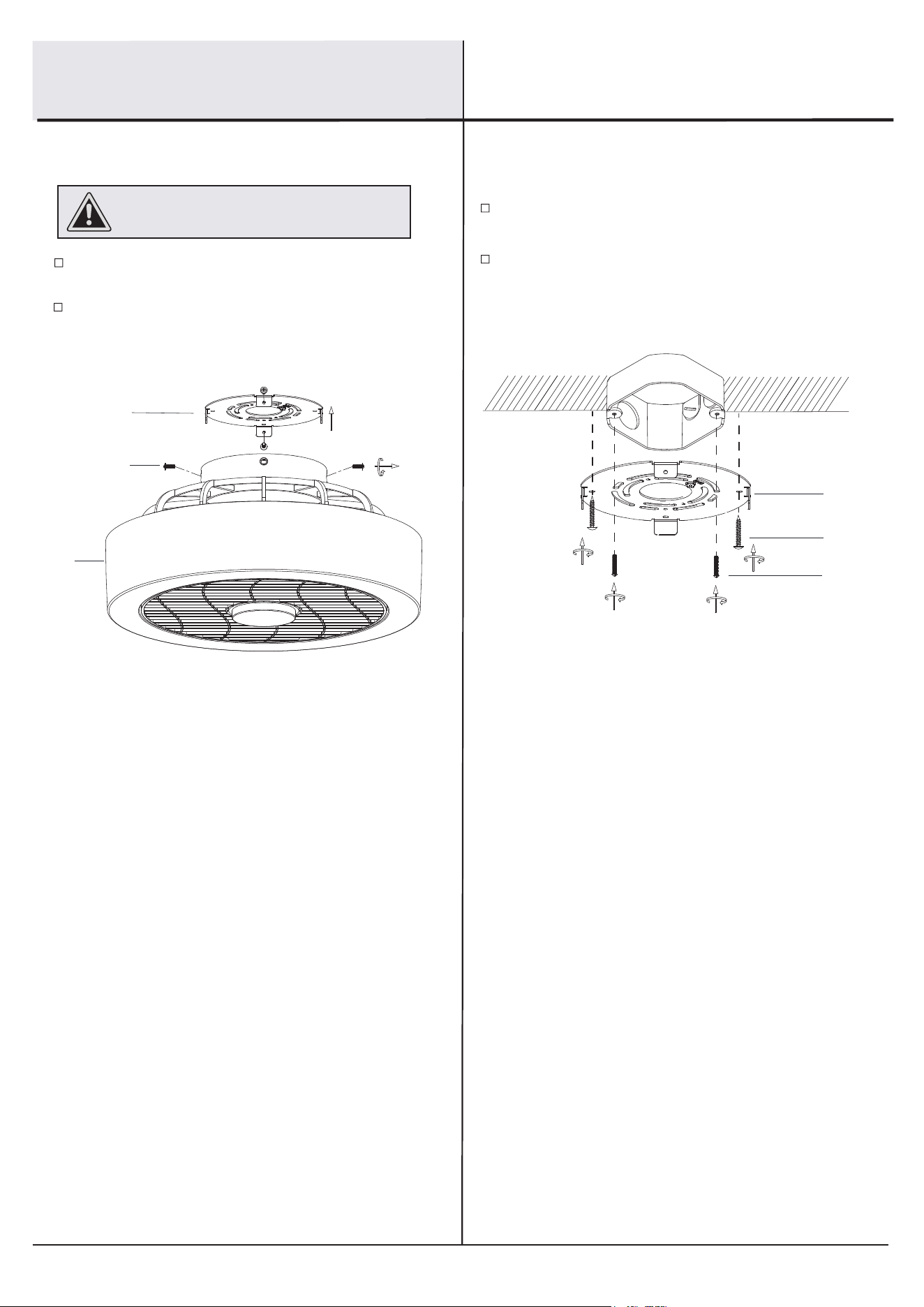
Installing the hanging board Routing the wires
Unlock the hanging board screws (EE) from the hanging
board (DD).
Remove the hanging board (DD) from the xture body (A).
21
Attach the hanging board (DD) to the outlet box (not included)
with the two mounting screws (AA).
Secure the hanging board (DD) to the ceilings with the
tapping screws (CC).
Make sure power is off before attempting
installation.
WARNING:
DD
EE
A
AA
CC
DD
HAMPTONBAY.COM
Please contact 1-855-HD-HAMPTON for further assistance.
8
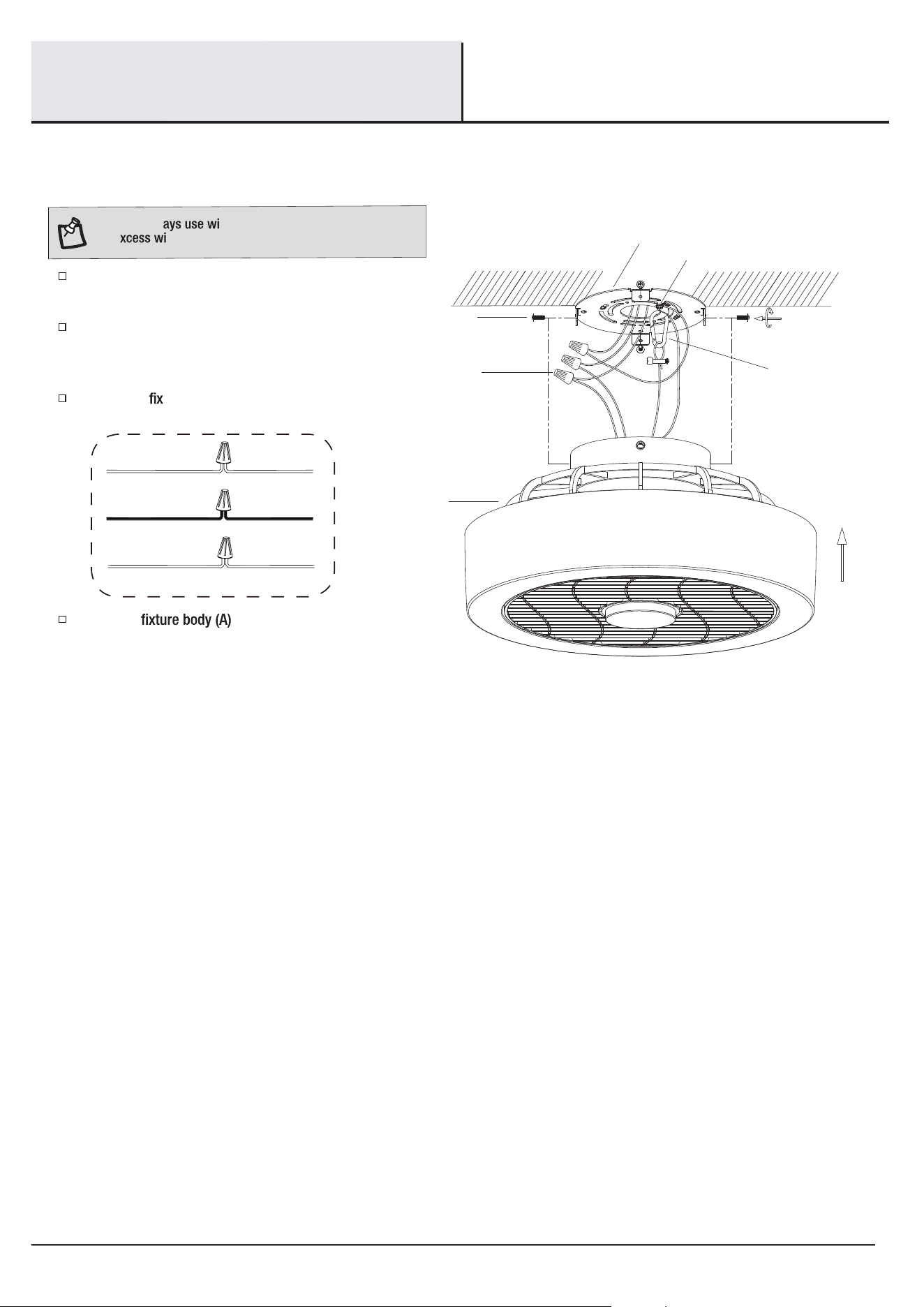
Making the electrical connections and installing the ceiling fan assembly
3
GND
Connect the ground wire from the xture body (A) to the
green ground screw (GG) on the hanging board (DD) and
then connect to the ground wire from house.
Attach the hanging buckle from the xture body (A) to the
hanging board (DD).
NOTE: Alw re nuts (BB) to conect wires and push
all e res and connections back into the outlet box.
Connect the ture wires as follows:
Attach the
to the hanging board (DD),
and secure it with the hanging board screws (EE).
WHITE WIRE
BLACK WIRE
GROUND WIRE
GROUND WIRE
FROM FIXTURE
FROM FIXTURE
FROM FIXTURE
WHITE WIRE
BLACK WIRE
FROM HOUSE
FROM HOUSE
FROM HOUSE
Hanging buckle
EE
BB
A
GG
DD
Assembly - Standard Ceiling
Mount
(continued)
9
Operation
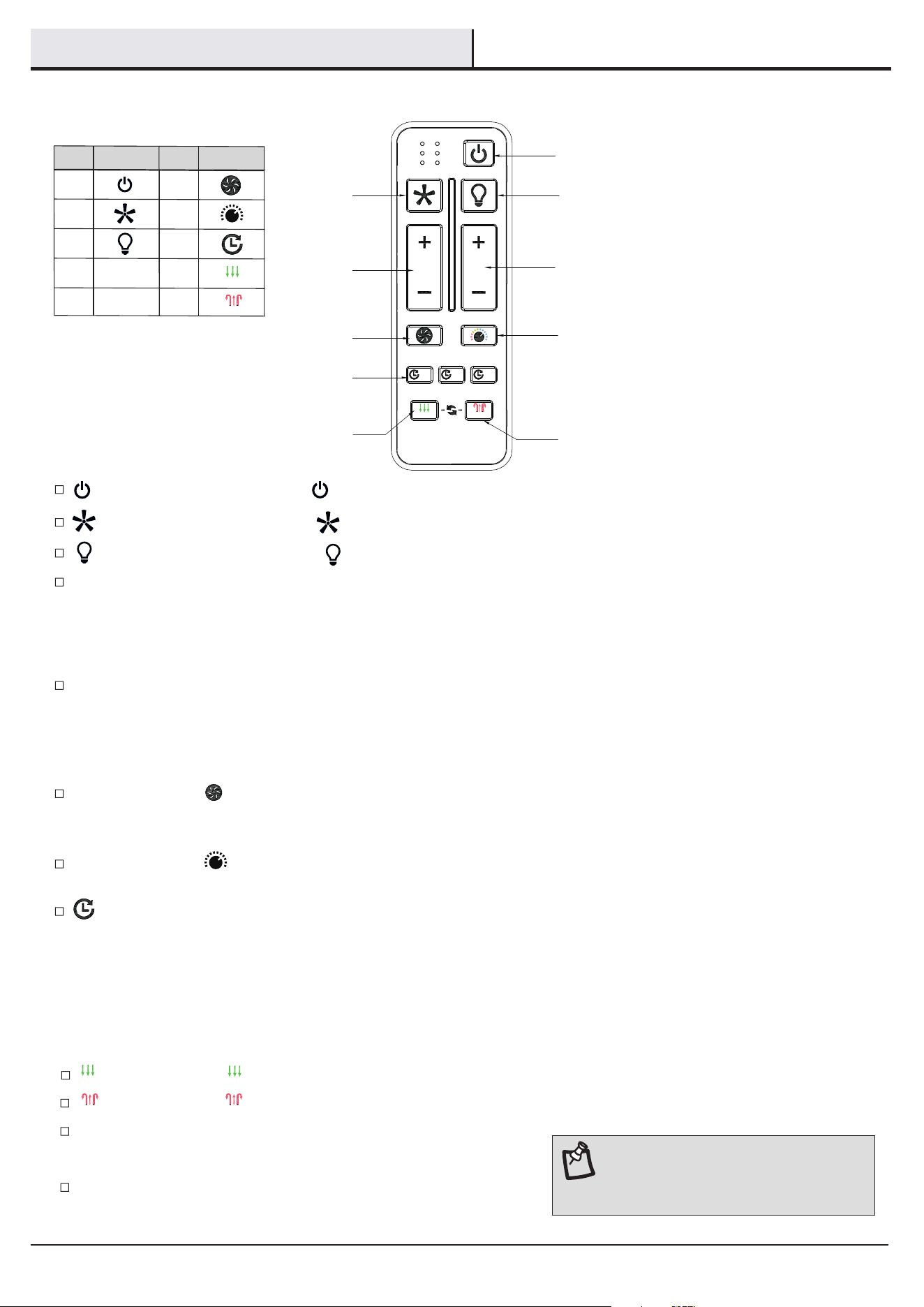
REMOTE CONTROL OPERATING INSTRUCTIONS
REVERSE SWITCH OPERATING INSTRUCTIONS
NOTE: On start up, your ceiling fan will oscillate
back and forth. This is NORMAL OPERATION for a
DC ceiling fan as it goes through its calibration
cycle. The fan is NOT DEFECTIVE.
ALL
ON / OFF
ON / OFF
6 SPEED BRIGHTNESS
GRILLE
SUMMER
2HR
COLOR TEMP.
4HR
TIMER
WINTER
FAN DIRECTION
HOLD 3 SEC.
8HR
A
C
E
G
B
D
F
H
I
J
Light ON/ OFF: Press and release the button (C), the light will turn ON and OFF accordingly.
Speed functions:
Fan ON/ OFF: Press and release the button (B), the fan will turn ON and OFF accordingly.
Press and release the button (F) will activate the wind deector rotation.
- This function can only be activated when the fan is ON.
- Hold and press the button (F) for 3 seconds to cancel the function.
Press and hold the button (I) for 3 seconds to activate the summer model, the fan will rotate counterclockwise.
All ON/ OFF: Press and release the button (A) to turn the fan and light ON or OFF.
Press and release the button (G) to cycle through the three color temperature options:
3000K (Warm White), 4000K (Cool White), and 5000K (Daylight).
SUMMER
SUMMER
WINTER WINTER
HAMPTONBAY.COM
Please contact 1-855-HD-HAMPTON for further assistance.
Button (D): Increases the fan speed
Press and release the button (D) one time will increase the speed of the fan.
-
-
-
+
+
-+
+
Button (D): Decreases fan speed
Press and release the button (D) one time will decrease the speed of the fan.
Timer function
Press and hold the button (J) for 3 seconds to activate the winter model, the fan will rotate clockwise.
Dimmer functions:
Button (E): Increases the brightness of the light
Press and release the button (E) one time will increase the brightness of the light.
-
-
+
+
Button (E): Decreases the brightness of the light
Press and release the button (E) one time will decrease the brightness of the light.
- The timer function is only available for fan, not for the light kit.
- The timer function can only be activated when the fan is ON.
- Press the (2H/4H/8H) button (H) to set the timer.
- Hold and press the (2H/4H/8H) button (H) for 3 seconds to cancel the timer.
- When the timer is activate, press the (2H/4H/8H) button (H) again will reset the timer.
Warm weather
(Clockwise direction) A downward air flow creates a cooling effect. This allows you
to set your air conditioner on a warmer setting without affecting your comfort.
Cool weather
(Counterclockwise direction) An upward air flow moves warm air off the ceiling. This
allows you to set your heating unit on a cooler setting without affecting your comfort.
SUMMER
WINTER
A
B
C
D
E
F
G
H
I
J
Part Symbol
Part Symbol
10
Operation (continued)
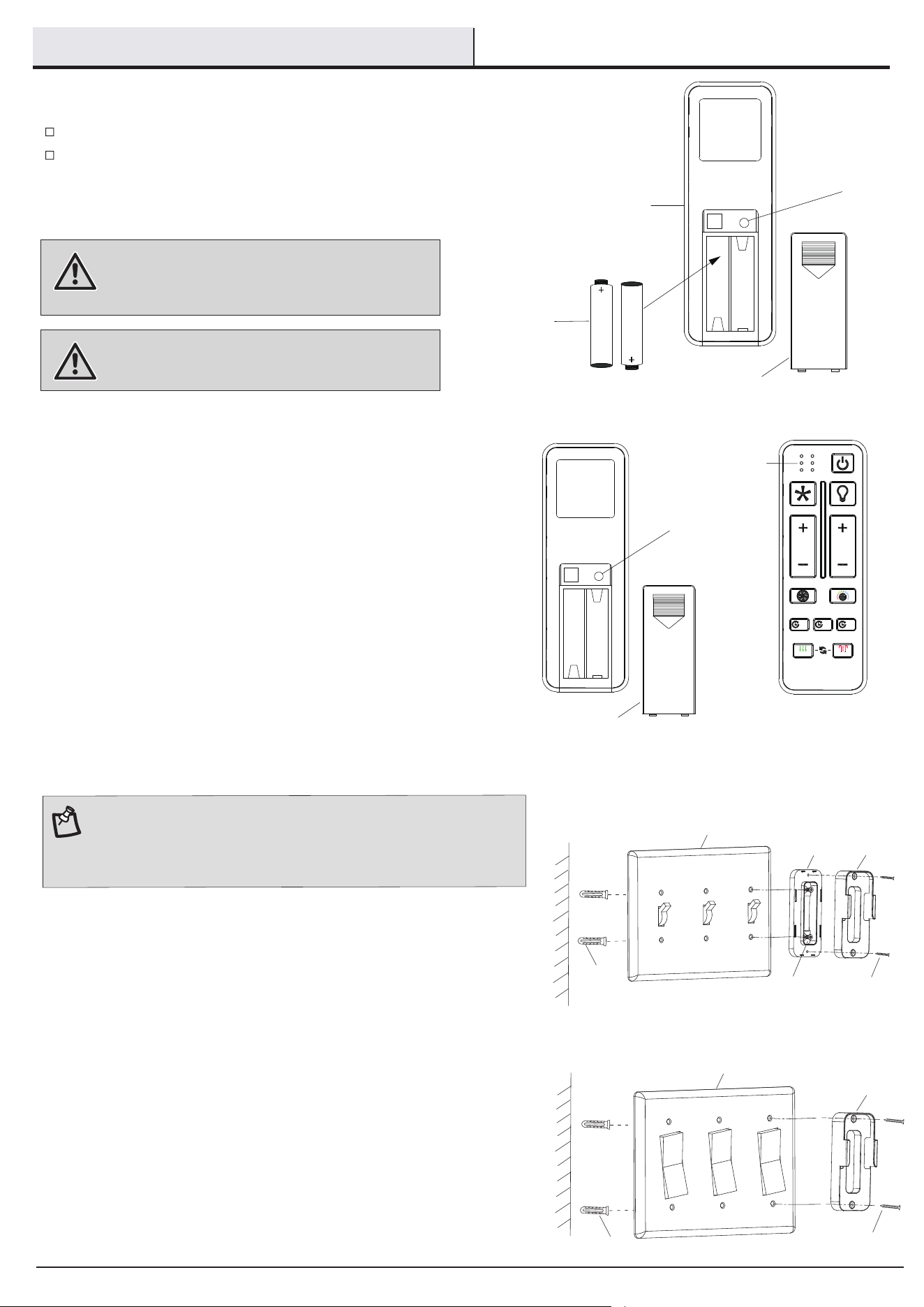
INSTALLING THE REMOTE CONTROL HOLDER
LEARNING PROCESS
Turn the main power source off to begin the learning process.
Return the power to the unit.
Within 5 seconds of turning the fan’s AC power ON, quickly press
the “LEARN” button three times. After “Indicator light” lights up
once, the pairing is successfully.
Should you desire to use another transmitter (II) unit with your new fan,
install one using the steps below:
Should you need to unpair the transmitter, please do the following:
□
□
□
Back cover
LEARN
Indicator light
ALL
ON / OFF
ON / OFF
6 SP
E
E
D BR
IGHTN
ES
S
GRILLE
SUMMER
2HR
COLOR TEMP.
4HR
TIMER
WINTER
FAN DIRECTION
H
O
LD
3
SEC.
8HR
Turn the main power source off to begin the learning process.
Return the power to the unit.
Within 5 seconds of turning the fan’s AC power ON, hold and press
the “LEARN” button for 3 seconds. After “Indicator light” lights up
once, the pairing is released successfully.
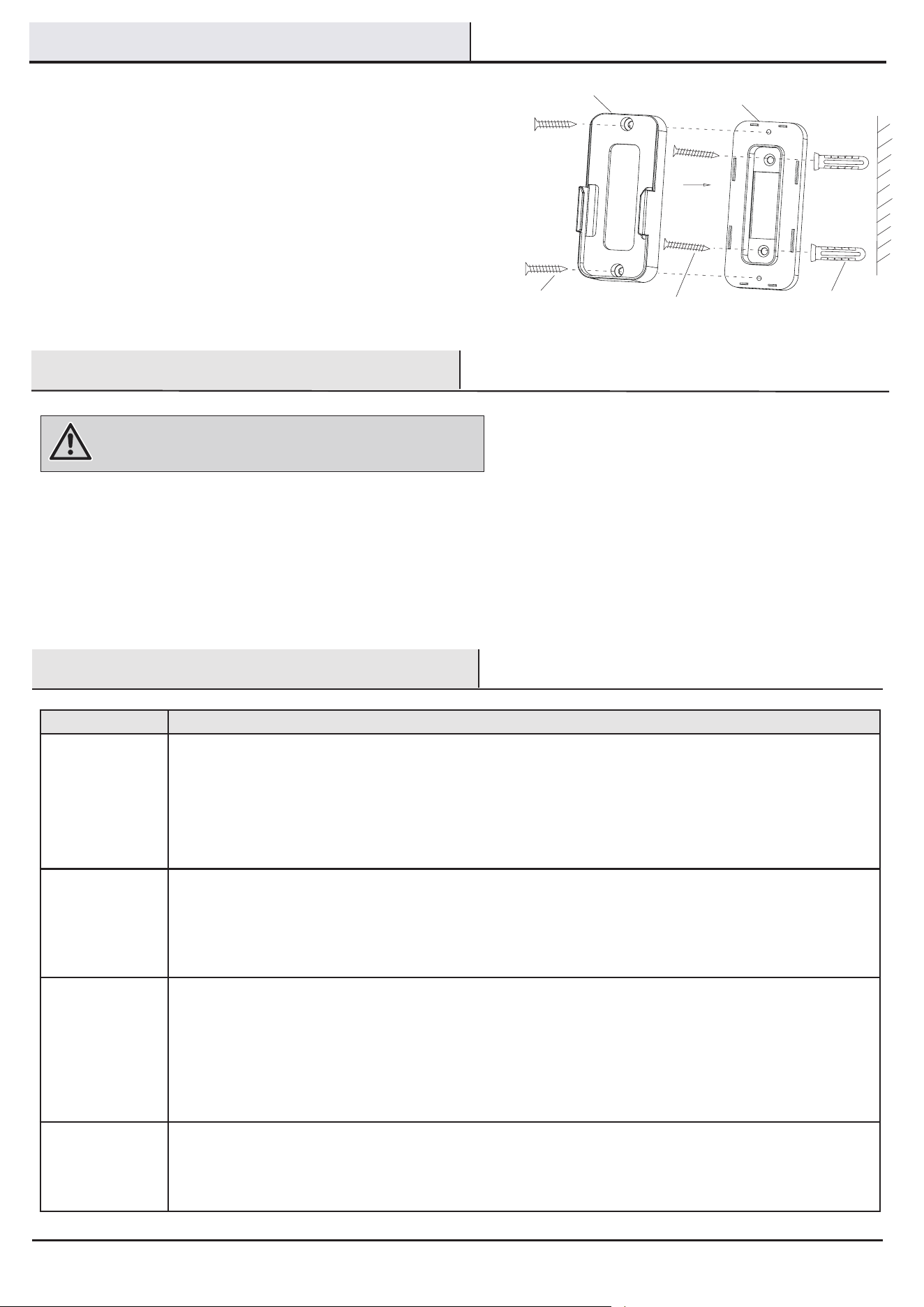
1a. Attaching over a standard toggle switch
1b. Attaching over a paddle switch
□
□
□
Remove the two screws from the toggle switch face plate.
□
Remove the two screws from the paddle switch face plate.
□
Install the plastic anchors (LL) onto the wall, place the remote control holder
(JJ) over the paddle switch and align the two holes of the remote control
holder (JJ) with the holes in the face plate. Secure the remote control holder
(JJ) to the face plate by using the two included longer remote control holder
screws (KK).
□
Install the plastic anchors (LL) onto the wall, place the toggle switch spacer
over the toggle switch face plate and align the two large holes of the toggle
switch spacer with the holes in the face plate. Secure the toggle switch
spacer to the face plate by using the two included longer remote control
holder screws (KK).
□
Attach the remote control holder (JJ) to the toggle switch spacer by using the
included two short remote control holder screws (MM). Screw a short remote
control holder screws (MM) into the top hole and bottom hole of the remote
control holder and into the toggle switch spacer until tight.
□
INSTALLING THE BATTERY
Remove the transmitter (II) battery back cover.
Install two AAA batteries (HH) into the transmitter (II), then put the back cover
back on.
HH
II
Back cover
LEARN
To prevent damage to the transmitter, remove the battery if not used for long
periods of time.
WARNING: Do not short-circuit, disassemble, heat up,
connect improperly, or dispose of used batteries in fire. Do
not recharge or mix batteries with used or other battery
types. Immediately remove used batteries.
WARNING: a) The batteries shall be disposed of properly,
including keeping them away from children; and
b) Even used batteries may cause injury.
+
+
JJ
Toggle switch
spacer
Toggle switch face plate
KK
MM
Paddle switch face plate
JJ
KK
NOTE:
The remote control holder is designed to allow you to access an
existing switch. The remote control holder can be mounted on the wall
or to the face plate of a standard toggle switch or a paddle switch.
Follow the instructions below for the option that best suits your needs.
LL
LL
□
11
Troubleshooting
Problem Solution
The fan will not
start.
□ Check the main and branch circuit fuses or breakers.
□
□
Check the line wire connections to the fan.
□
Check the battery in the remote control.
□
Ensure you are in the normal range of 10-20 feet.
Turn the main power source off and then restore the power to the unit. Within 3 seconds of turning the fan’s AC
power ON,press and hold the “ON/OFF” button for 5 seconds to complete the “pairing process”. Once the receiver
has detected the set frequency, the LED light of the fan will blink once.
The fan is noisy.
□ Ensure all motor housing screws are snug.
This fan has a one-piece blade design, fan blade balancing kit is not applicable to this product.
If the fan wobbles, disconnect the power by removing the fuses or turning off the circuit breakers from the main
power source, then check with the following:
Remove the grille from the fan body by rst removing the decorative cap at the center of the grille by rotating the
decorative cap anti-clockwise, use a Philips screwdriver to tighten the screw inside of the plastic threaded nipple.
If the wobbling peresits, adjust the angle of the grille slightly to make it more perpendicular to the ground.
If the problem persists, please contact our customer service.
□
□
Ensure the wire nut connections are not rattling against each other.
□
Allow a 24-hour “breaking in” period. Most noises associated with a new fan disappear during this time.
□
Ensure the canopy is a short distance from the ceiling. It should not touch the ceiling.
Ensure your outlet box is secure and rubber isolator pads were used between the mounting plate and outlet box.
The fan is wobbles. □
□
□
□
This is normal start-up procedure for DC motor fans. The partial movement during start-up is the result of the DC
motor aligning the internal magnetic poles for proper motor operation. This design saves electricity and allows
the fan to operate much quieter than standard AC motor fans.
Fan moves
backwards and
forwards when
turned on.
□
□
Because of the fan’s natural movement, some connections may become loose. Check the support connections and blade attachments
twice a year. Make sure they are secure. It is not necessary to remove the fan from the ceiling.
□
□
□
Care and Cleaning
Clean your fan periodically to help maintain its new appearance over the years. Do not use water when cleaning, as this could
damage the motor, or possibly cause an electrcial shock. Use only a soft brush or lint-free cloth to avoid scratching the nish.
You do not need to oil your fan. The motor has permanently-lubricated sealed ball bearings.
Always unplug the fan before cleaning, disassembly or servicing.
WARNING: Make sure the power is off before cleaning your fan.
Operation (continued)
JJ
Spacer
KKMM
LL
Install the plastic anchors (LL) onto the wall, install the remote control
holder spacer onto the wall using two longer remote control holder
screws (KK). Attach the remote control holder (JJ) onto the spacer,
ensure two parts t together and no gaps, install the two shorter
remote control holder screws (MM) to the wall and secure tightly.
1c. Attaching to the wall

Retain this manual for future use.
Questions, problems, missing parts? Before returning to the store,
call Hampton Bay Customer Service
8 a.m. – 7 p.m., EST, Monday – Friday, 9 a.m. – 6 p.m., EST, Saturday
1-855-HD-HAMPTON
HAMPTONBAY.COM