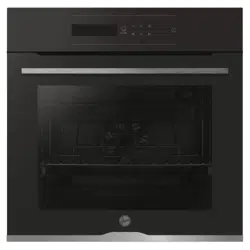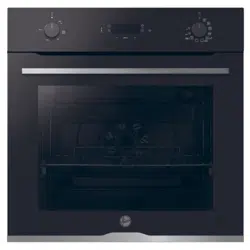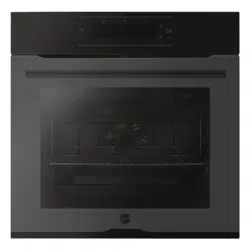
CANDY HOOVER GROUP Via Comolli 16 Brugherio – Italy
User Instructions
OVENS
2EN

EN 2
Safety Indications
General Instructions
Product description
Display
Heat Feel Sensor enrollment
Connectivity
General notes on cleaning
Maintenance
Troubleshooting
Installation
Summary
3
8
10
14
20
22
26
26
30
120

EN 3
• During cooking, moisture may condense inside the oven cavity or
on the glass of the door. This is a normal condition; the condensation
disappears when the oven reaches the cooking temperature.
• Cook the vegetables in a container with a lid instead of an open
tray.
• WARNING: the appliance and accessible parts become hot dur-
ing use. Be careful not to touch any hot parts.
• WARNING: the accessible parts can become hot when the oven
is in use. Young children should be kept at a safe distance.
• WARNING: the accessible parts can become hot when the grill
is in use. Children should be kept at a safe distance.
• WARNING: ensure that the appliance is switched o before re-
placing the bulb, to avoid the possibility of electric shocks.
• Disconnect the appliance from the mains electricity supply be-
fore carrying out any work or maintenance.
• WARNING: in order to avoid any danger caused by the accidental
resetting of the thermal interruption device, the appliance should
not be powered by an external switching device, such as a timer,
or be connected to a circuit that is regularly switched on and o.
• Children under 8 should be kept at a safe distance from the appli-
ance if not continuously supervised.
• Children should not play with the appliance.
• The appliance can be used by those aged 8 or over and by those
with limited physical, sensorial or mental capacities, without ex-
perience or knowledge of the product, only if supervised or pro-
vided with instruction as to the operation of the appliance, in a
safe way with awareness of the possible risks.
• Cleaning and maintenance should not be carried out by
unsupervised children.
• Do not use rough or abrasive materials or sharp metal scrapers
to clean the oven door glasses, as they can scratch the surface
and cause the glass to shatter.
• The oven must be switched o before removing the removable
Safety Indications

EN 4
parts. After cleaning, reassemble them according the instruc-
tions.
• Only use the meat probe recommended for this oven.
• Do not use a steam cleaner or high pressure spray for cleaning
operations.
• IF THE OVEN IS PROVIDED BY THE MANUFACTURER WITHOUT
PLUG:
THE APPLIANCE MUST NOT BE CONNECTED TO THE POWER
SOURCE USING PLUG OR SOCKETS, BUT MUST BE DIRECTLY
CONNECTED TO THE SUPPLY MAINS. The connection to
the power source must be carried out by a suitably qualied
professional. In order to have an installation compliant to the
current safety legislation the oven must be connected only
placing an omnipolar breaker, with contact separation compliant
to the requirements for overvoltage category III, between the
appliance and the power source. The omnipolar breaker must
bear the maximum connected load and must be in line with
current legislation. The yellow-green earth cable should not be
interrupted by the breaker. The omnipolar breaker used for the
connection must be easily accessible when the appliance is
installed.
The connection to the power source must be carried out by a
suitably qualied professional considering the polarity of the
oven and of the power source.
The disconnection must be achieved incorporating a switch in
the xed wiring in accordance with the wiring rules
• IF THE OVEN IS PROVIDED BY THE MANUFACTURER WITH
PLUG:
The socket must be suitable for the load indicated on the tag
and must have ground contact connected and in operation.
The earth conductor is yellow-green in colour. This operation
should be carried out by a suitably qualied professional. ln case
of incompatibility between the socket and the appliance plug,
ask a qualied electrician to substitute the socket with another

EN 5
suitable type. The plug and the socket must be conformed to
the current norms of the installation country. Connection to the
power source can also be made by placing an omnipolar breaker,
with contact separation compliant to the requirements for
overvoltage category III, between the appliance and the power
source that can bear the maximum connected load and that is in
line with current legislation. The yellow-green earth cable should
not be interrupted by the breaker. The socket or omnipolar
breaker used for the connection should be easily accessible when
the appliance is installed.
The disconnection may be achieved by having the plug accessi-
ble or by incorporating a switch in the xed wiring in accordance
with the wiring rules.
• lf the power cable is damaged, it should be substituted with a
cable or special bundle available from the manufacturer or by
contacting the customer service department. The type of pow-
er cable must be H05V2V2-F. This operation should be carried
out by a suitably qualied professional. The earth conductor (yel-
low-green) must be approximately 10 mm longer than the other
conductors. For any repairs, refer only to the Customer Care De-
partment and request the use of original spare parts.
• Failure to comply with the above can compromise the safety of
the appliance and invalidate the guarantee.
• Any excess of spilled material should be removed before clean-
ing.
• A long power supply failure during an occurring cooking phase
may cause a malfunction of the monitor. ln this case contact
customer service.
• The appliance must not be installed behind a decorative door in
order to avoid overheating.
• When you place the shelf inside, make sure that the stop is
directed upwards and in the back of the cavity. The shelf must be
inserted completely into the cavity.
• When inserting the grid tray pay attention that the anti-slide edge

EN 6
is positioned rearwards and upwards.
• WARNING: Do not line the oven walls with aluminium foil or single-
use protection available from stores. Aluminium foil or any other
protection, in direct contact with the hot enamel, risk melting and
deteriorating the enamel of the insides.
• WARNING: Never remove the oven door seal.
• CAUTION: Do not rell the cavity bottom with water during
cooking or when the oven is hot.
• No additional operation/setting is required in order to operate
the appliance at the rated frequencies.
• The oven can be located high in a column or under a worktop.
Before xing, you must ensure good ventilation in the oven space
to allow proper circulation of the fresh air required for cooling and
protecting the internal parts. Make the openings specied on last
page according to the type of tting.
• For a correct use of the oven it is advisable not to put the food in
direct contact with the racks and trays, but to use oven papers
and/ or special containers.
• WARNING: before initiating the automatic cleaning cycle:
- Clean the oven door;
- Remove large or coarse food residues from the inside of the oven
using a damp sponge. Do not use detergents;
- Remove all accessories and the sliding rack kit (where present);
-Do not place tea towels.
• ln ovens with meat probe it is necessary, before making the
cleaning cycle, close the hole with the nut provided. Always close
the hole with the nut when the meat probe is not used.
• During the pyrolytic cleaning process, surfaces can heat up more
than usual, children must therefore be kept at a safe distance.
• If a hob has been tted above the oven, never use the hob while
the Pyrolizer is working, this will prevent the hob from overheating.
EN 7
WARNINGS:
•This product is exclusive for oven appliances.
It should only beused as described in this User Manual.
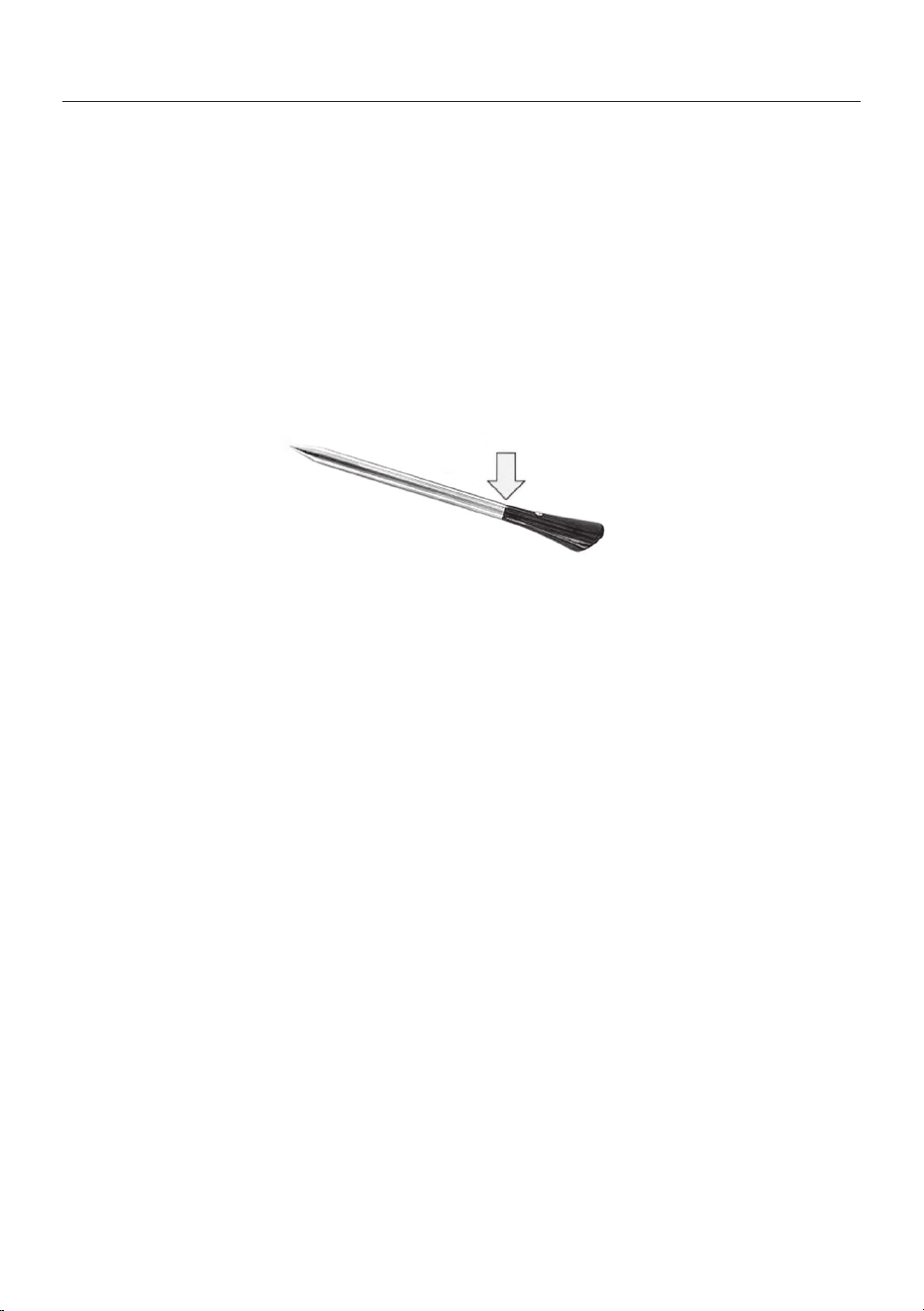
• DO NOT TOUCH Heat Feel Sensor WITH BARE HANDS
JUSTAFTER COOKING. Always wear oven gloves to remove Heat
Feel Sensor from the food after cooking.
• It is required to FULLY INSERT Heat Feel Sensormetal bar
properlyinto the food until the BLACK ceramic EDGE of it during
cooking.
• Do not expose the metal part of Heat Feel Sensor to the heat
generated by oven directly. Do not expose the metal part of Heat
Feel Sensor to the heat generated by the appliance.
• Do not use Heat Feel Sensor in another appliance except for the
built-in oven.
• Do not use Heat Feel Sensor in a microwave oven.
• Heat Feel Sensor can be cleaned and washed but do not immerse
itlong in water.
• This product is not intended for use by persons with ages 12and
under.
• The supplier will not be liable for any damage of Heat Feel Sensor
due to misuse of the device.
• Clean the Heat Feel Sensor before the use
• Probe can work in this range of temperature: 10 °C to an internal
maximum temperature of 100°C of the metal part. Ceramic part
can reach 350°C.
• If the Heat Feel Sensor temperature exceeds 100°C, cooking will
stopand the Heat Feel Sensor must be removed from the oven as
soon aspossible, wearing gloves, to avoid damage to the probe
.
insert Heat Feel Sensor
in the food up to here
Heat Feel (Wireless temperature probe) WARNINGS

EN 8
General Instructions
Safety Indications
We thank you for choosing one of our products. For the best results with your oven, you should
read this manual carefully and retain it for future reference. Before installing the oven, take note
of the serial number so that you can give it to customer service sta if any repairs are required.
Having removed the oven from its packaging, check that it has not been damaged during trans-
portation. If you have doubts, do not use the oven and refer to a qualied technician for advice.
Keep all of the packaging material (plastic bags, polystyrene, nails) out of the reach of children.
When the oven is switched on for the rst time, strong smelling smoke can develop, which is
caused by the glue on the insulation panels surrounding the oven heating for the rst time. This
is absolutely normal and, if it occurs, you should wait for the smoke to dissipate before putting
food in the oven. The manufacturer accepts no responsibility in cases where the instructions
contained in this document are not observed.
NOTE: the oven functions, properties and accessories cited in this manual will vary, depending
on the model you have purchased.
Only use the oven for its intended purpose, that is only for the cooking of foods; any other use, for
example as a heat source, is considered improper and therefore dangerous. The manufacturer
cannot be held responsible for any damage resulting from improper, incorrect or unreasonable
usage.
The use of any electrical appliance implies the observance of some fundamental rules:
- do not pull on the power cable to disconnect the product from the socket;
- do not touch the appliance with wet or damp hands or feet;
- in general the use of adaptors, multiple sockets and extension cables is not recommended;
- in case of malfunction and/or poor operation, switch o the appliance and do not tamper with it.
Electrical Safety
ENSURE THAT AN ELECTRICIAN OR QUALIFIED TECHNICIAN MAKES THE ELECTRICAL
CONNECTIONS. The power supply to which the oven is connected must conform with the
laws in force in the country of installation. The manufacturer accepts no responsibility for any
damage caused by the failure to observe these instructions. The oven must be connected to
an electrical supply with an earthed wall outlet or a disconnector with multiple poles, depending
on the laws in force in the country of installation. The electrical supply should be protected with
suitable fuses and the cables used must have a transverse section that can ensure correct sup-
ply to the oven.
CONNECTION
The oven is supplied with a power cable that should only be connected to an electrical supply
with 220-240 Vac power between the phases or between the phase and neutral. Before the oven
is connected to the electrical supply, it is important to check:
- power voltage indicated on the gauge;
- the setting of the disconnector.

EN 9
The grounding wire connected to the oven’s earth terminal must be connected to the earth ter-
minal of the power supply.
WARNING
Before connecting the oven to the power supply, ask a qualied electrician to check the conti-
nuity of the power supply’s earth terminal. The manufacturer accepts no responsibility for any
accidents or other problems caused by failure to connect the oven to the earth terminal or by an
earth connection that has defective continuity.
NOTE: as the oven could require maintenance work, it is advisable to keep another wall socket
available so that the oven can be connected to this if it is removed from the space in which it is
installed. The power cable must only be substituted by technical service sta or by technicians
with equivalent qualications.
Recommendations
Installation
After each use of the oven, a minimum of cleaning will help keep the oven perfectly clean.
Do not line the oven walls with aluminium foil or single-use protection available from stores. Al-
uminium foil or any other protection, in direct contact with the hot enamel, risks melting and de-
teriorating the enamel of the insides. In order to prevent excessive dirtying of your oven and the
resulting strong smokey smells, we recommend not using the oven at very high temperature. It
is better to extend the cooking time and lower the temperature a little. In addition to the acces-
sories supplied with the oven, we advise you only use dishes and baking moulds resistant to very
high temperatures.
The manufacturers have no obligation to carry this out. If the assistance of the manufacturer is
required to rectify faults arising from incorrect installation, this assistance is not covered by the
guarantee. The installation instructions for professionally qualied personnel must be followed.
Incorrect installation may cause harm or injury to people, animals or belongings. The manufac-
turer cannot be held responsible for such harm or injury.
The oven can be located high in a column or under a worktop. Before xing, you must ensure good
ventilation in the oven space to allow proper circulation of the fresh air required for cooling and
protecting the internal parts. Make the openings specied on last page according to the type of
tting.
First Use
PRELIMINARY CLEANING; Clean the oven before using for the rst time. Wipe over external surfaces
with a damp soft cloth. Wash all accessories and wipe inside the oven with a solution of hot water and
washing up liquid. Set the empty oven to the maximum temperature and leave on for about 1 hour, this
will remove any lingering smells of newness.
EN 10
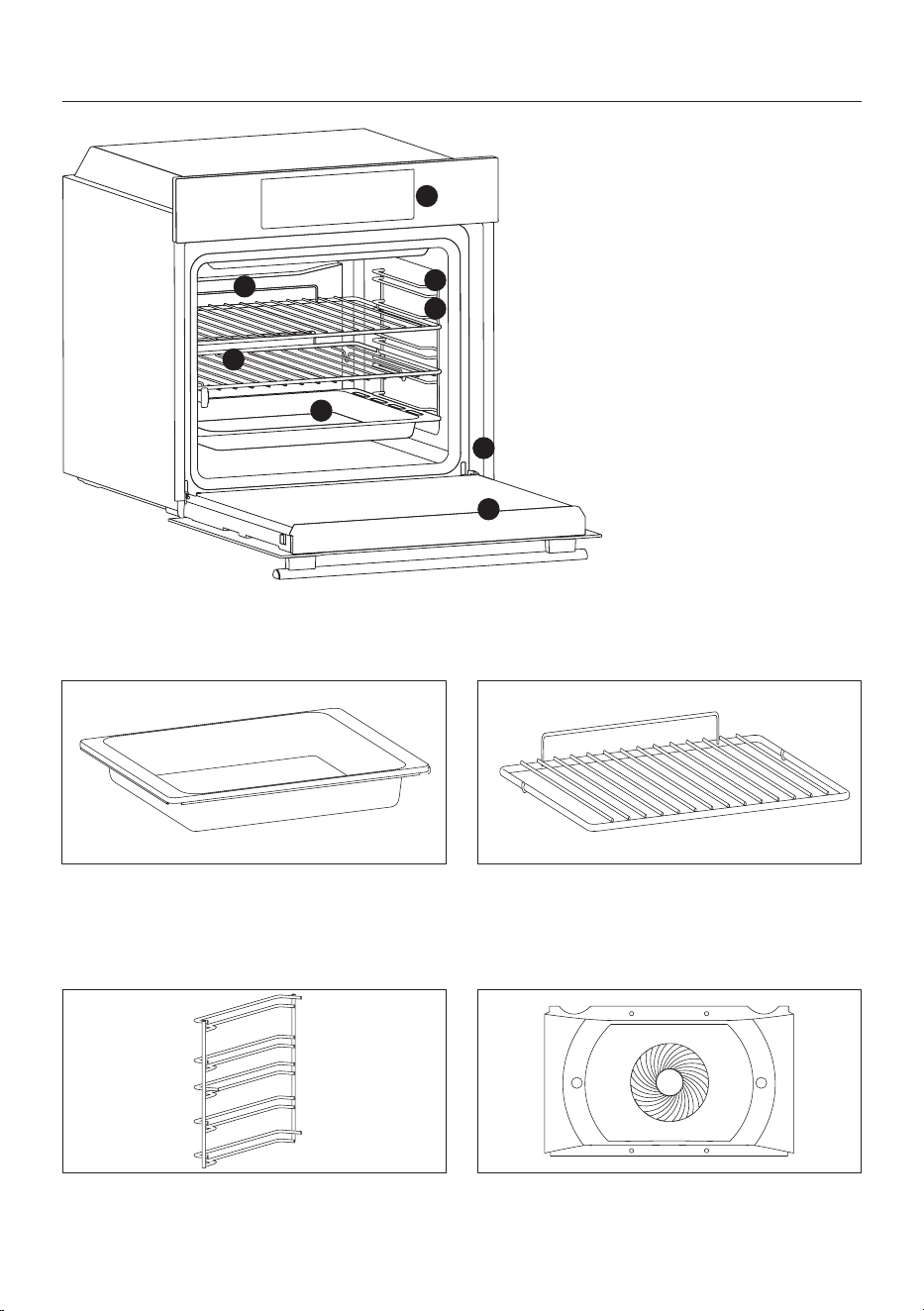
1. Control panel
2. Shelf positions (lateral wire
grid if included)
3. Grids
4. Trays
5. Fan (if present)
6. Oven door
7. Lateral wire grids (if present:
only for at cavity)
8. Serial number
Product description
ACCESSORIES
Drip tray
Metal grid
1
2
7
3
8
4
6
5
Collects residues that drip when cooking food
on the grills.
Holds baking trays and plates.
Lateral wire grids (only if present)
Located on both sides of the oven cavity, holds
metal grills and drip pans.
Chef panel (only if present)
An air conveyor that increases air circulation
inside the oven. This enables improved cooking
EN 11
Hinges which ensure an automatic soft and
smooth movement during the closing phase of
the oven door.
Two guide rails which facilitate the cooking
status check as they allow easily the extraction
and repositioning of trays and grids inside the
oven cavity.
Telescopic guides (only if present)
Softclose (only if present)
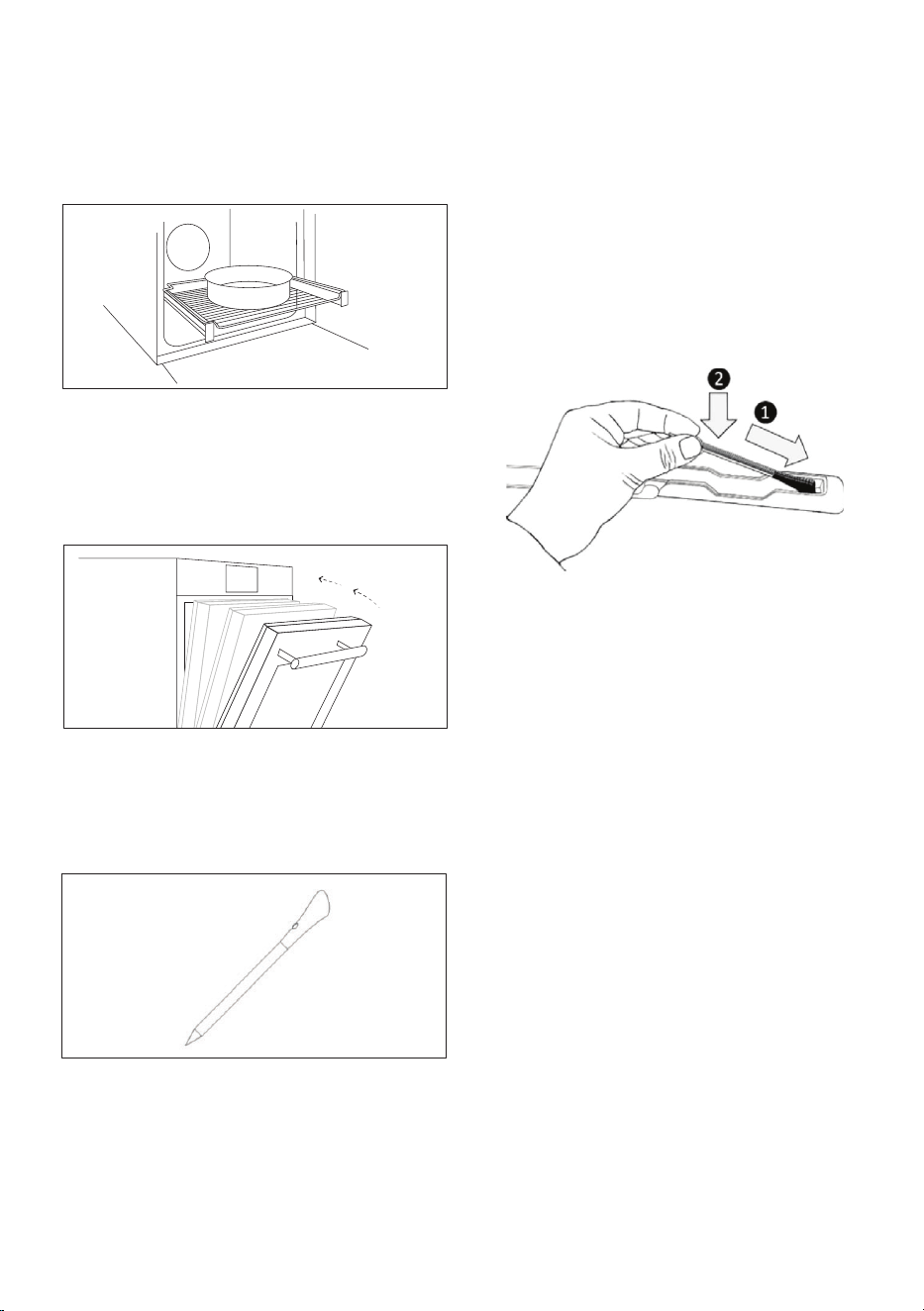
Heat Feel Sensor (only if present)
HEAT FEEL SENSOR
• Before the use verify the charge of the Heat
Feel Sensor:
1.Put Heat Feel Sensor into the charger and
close the cover.
performance, more even cooking of food at
all temperatures, shorter cooking times and,
lastly, an even temperature distribution inside
the oven.
Measures the internal temperature of food
during cooking. Insert into the hole on the top
of the cavity. Should be inserted while oven is
cool.
2.Connect the charger to a USB power source,
such as USB adapter or USB socket of PC/
notebook with the USB cable. The charger
may not be working properly with power bank
because of its auto switch-o function.
3.LED of the charger will turn on and is ashing
during charging. It will turn o when Heat Feel
Sensor is fully charged.
• Verify that Bluetooth of the oven is turned on.
• Make sure the Heat Feel Sensor is within
the range of monitoring distance. With long
distances the Heat Feel Sensor cannot be
detected by the oven.
• If the Heat Feel Sensor is covered by an
insulated material doses not communicate
with the oven. If the probe is disconnected
while standard cooking using the probe is
underway (at battery, Bluetooth turned o,
etc.…), the cooking process will be interrupted
after a brief interval. During cooking with recipe
and probe, the cooking process continues for
the remaining scheduled time if disconnected.

EN 12
Turnspit (only if present)
No pre-heating is required for rotisserie cooking.
Cooking with the door closed.
The energy consumption is 90-95% less than tradi-
tional system.
• Unscrew the hooks
• Insert the spit into the meat to be cooked
• Secure the meat with the hooks
• Tighten the screws
• Insert the spindle into the hole where the motor is
located.
• Remove the handle and use it at the end of cooking
to avoid burn when taking the food out of the oven

EN 13
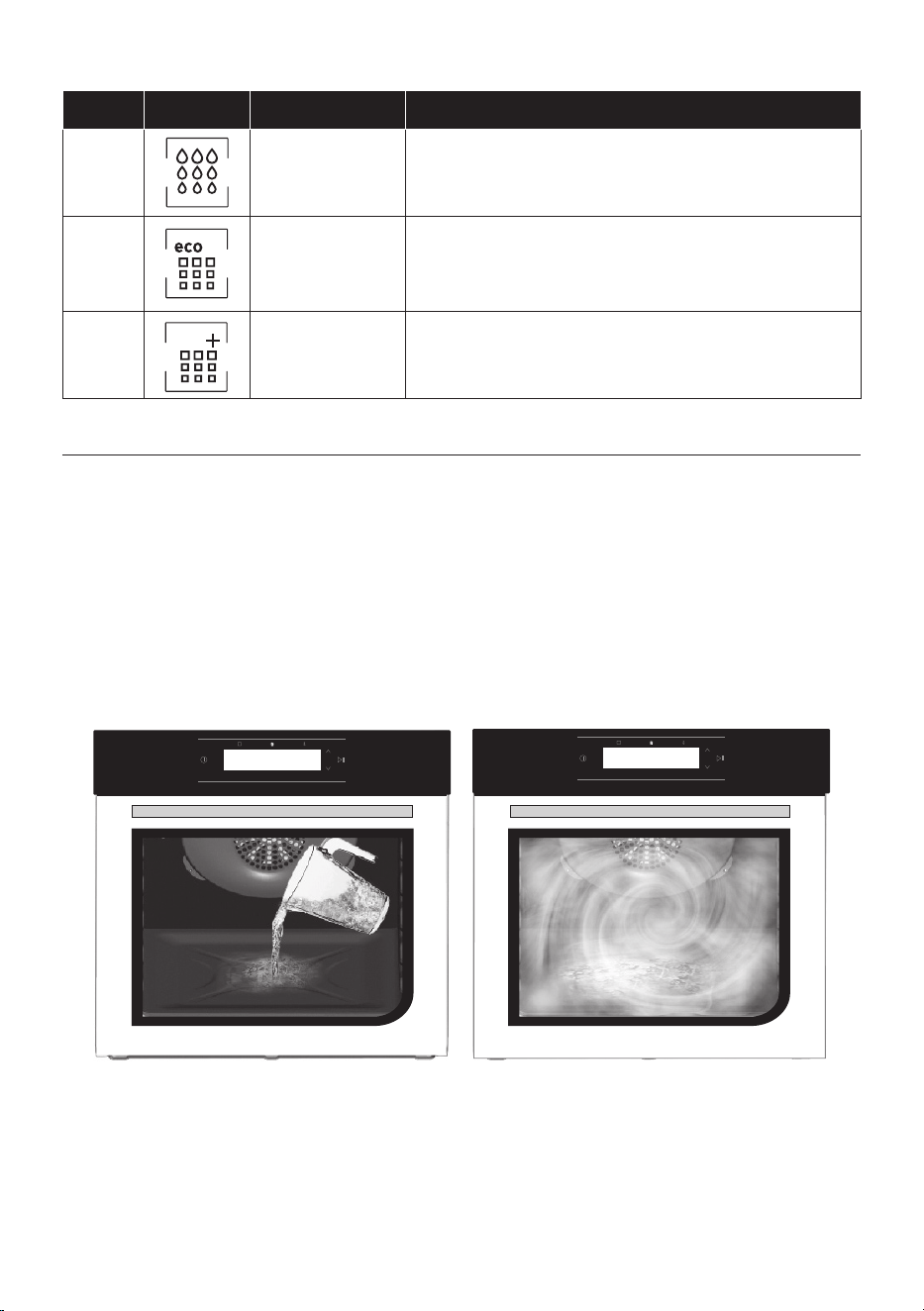
1. Please push slowly and pull the drawer in order to
pour water.
(Figure 1)
2. Pour water with a jug or remove the tank and ll in
with the water from the sink. (Figure 2)
3. Please insert 300 ml of water.
4. Select from steam functions the proper cycle
among sh, meat, vegetables , pasta&bakery.
5. For more details, please refer to section n.
Figure 1 Figure 2
6. Set temperature and timing according to the rec-
ipe.
7. Please push start.
NOTE: The display will show “COOKING”. Some drops
of water could fall into the cavity even during cooking.
It’s normal and it doesn’t aect proper cooking.
- At the beginning of the cycle the pump will make a
noise for around 1 minute: it’s normal working.
- At the end of cooking a buzzer will sound and the dis-
play will show: “COOKING ENDED”.
- Before starting another steam cooking cycle, please
wait around 60-90 minutes that the oven completely
cooled down.
- The possible remaining water will be loaded back to
the tank after one hour from end of cooking. A buzzer
will notify.
- The pump will make a noise for around 1 minute: it’s
normal working.
8. Discharge water by extracting the tank.
Please refer to chapter Function Descriptions and
chapter Steam Functions mode.
By touching the electronic button it is possible to
steam all the water at once.
It’s ideal to cook vegetables or sh in the gentlest and
healthiest way since the needed amount of fat and oil
is reduced.
1. The user can have a steam bump by pressing the
steam button.
2. When the button is pressed the steam icon blinks.
3. During the steam generation the icon is switched
on without blinking; at the end of the steam genera-
tion the steam icon is switched o.
4. The rst time that the steam button is pressed, the
screen askes to load the water.
5. Follow the steps at paragraph “Use of steam func-
tions” before starting the cycle.
6. Push for a maximum of 5 times the steam button
on the user interface to inject steam into the cavity.
WARNING
Take note that this function is only allowed in combi-
nation with fan-assisted cycles which are ;
- Bottom heating + fan
- Convection + fan
- Grill +fan
- Multilevel
SANIFICATION CYCLE
• Sanication is useful to sterilize the cyrcuit. A mes-
sage will appear in order to activate it at rst use, then
the user can decide whether to use it or not.
• It is required to add disinfectant detergent to wa-
ter and afterwards the oven will guide the user in the
whole process.
• Sanication cycle is present in the cleaning system
menu.
DESCALING
• After 10 times water loaded, the display shows the
message cycles “DESCALING SUGGESTED”.
• After 15 times water loaded, the display shows
the message “DESCALING MANDATORY” and the
steam function is no more available if the user doesn’t
perform a descaling cycle.
• Descaling cycle is present in the cleaning system
menu.
• Descaling cycle must be performed with a commer-
cial food compliant descaling product.
WATER DRAWER
Operating In Steam Cooking Mode
STEAM BUMP
Use of steam functions
WARNING
- Water should only be lled into the tank, no liquids
other than water.
- Tank must be lled to 300 ml.
- The water in the tank must be drained after each
use.
- If water lled less than 300 ml, steam generation can
be nished before steam program ended.
- If water lled more than 300 ml, water presence can
be occur at the end of steam program.
- Please close the drawer properly. If the drawer is not
closed properly, a message will appear on the display:
“tank is missing”.
- Water must be at room temperature.
- Do not open the drawer into cooking.
- Do not add water during cooking cycle.
- Avoid to open the door during cooking to ensure ef-
ciency and steam cooking performances .
EN 14
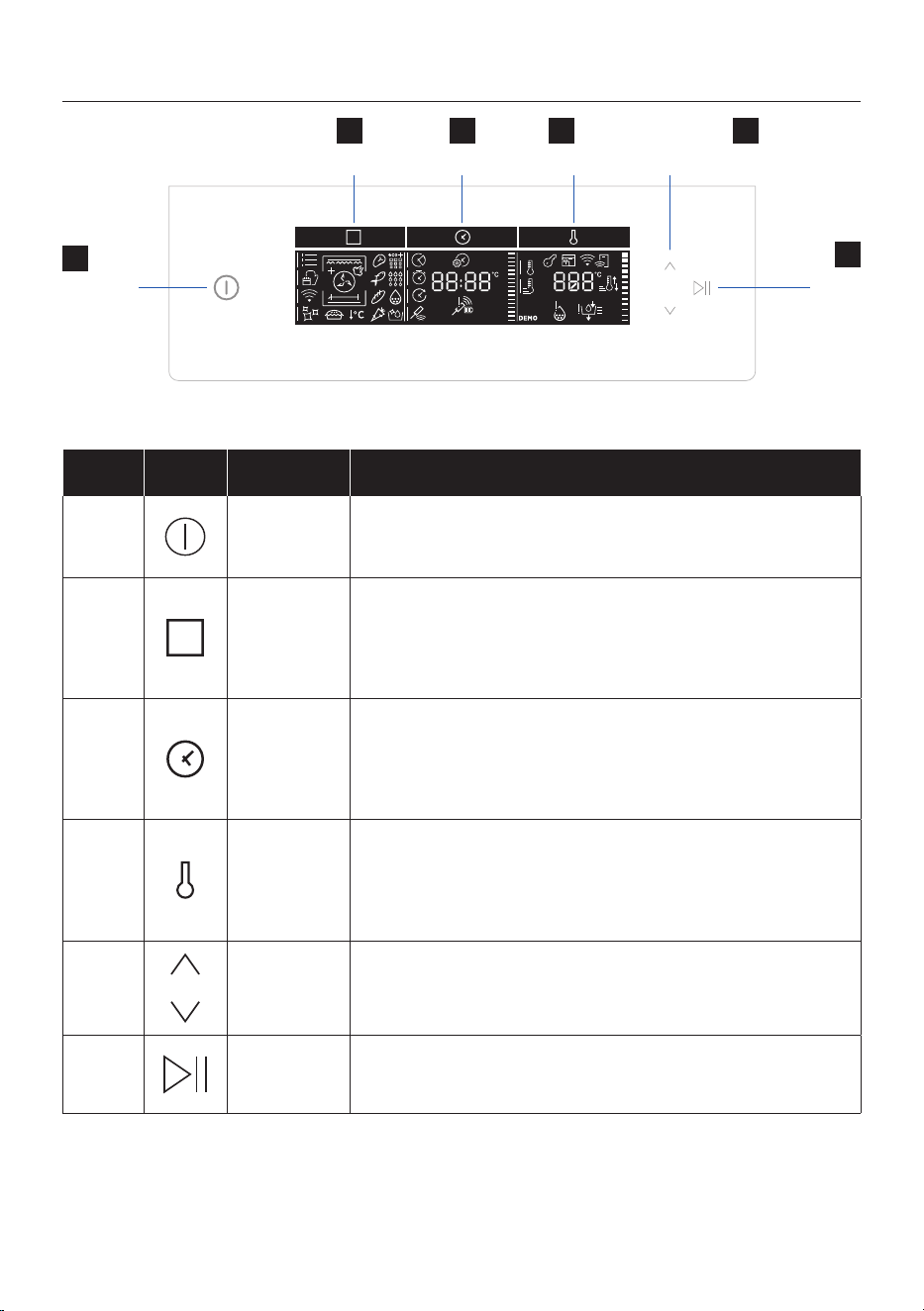
Control panel
Start
Pause
Functions Time Temperature
On/o
1
6
2 3 4
Navigation buttons
5
Symbol Function Description
1
On/o
Turning the oven on and o. The rst time you turn on the oven, you
must set the time, using the navigations buttons (5) to select hours
and minutes and the Time button (3) to conrm.
2
Functions
Accessing manual functions (a) and food cooking categories (b),
Tailor bake (a2) and Gentle cooking function (a3), WiFi menu (e)
and cleaning options (which dier depending on model). To save a
favourite function and display it rst when your oven is turned on,
hold down the (2) key for 5 seconds
3
Time
Accessing settings for cooking time (e), kitchen timer (f) and start
delay (g). Start delay and end of cooking can only be set after entering
cooking time. With the oven on standby, press Time (3) normally to
turn on the Minute Minder timer ; hold it down for 3 seconds to set
the time of day (i).
4
Temperature
Accessing temperature setting (r), preheating (j) and fast preheating
(k) options. To activate/deactivate the screen lock (m) hold the (4) key
down for 5 seconds. During pyrolysis, the oven door will automatically
be locked and feedback will be displayed (d4). Automatic rapid
heating is available for a number of manual functions (p2). .
5
Navigation
Buttons
Navigation buttons for setting functions and parameters.
6
Start
Pause
Start/Pause of the cooking or conrm the functions.
Please refer to next pages for detailed information on the display areas
EN 15
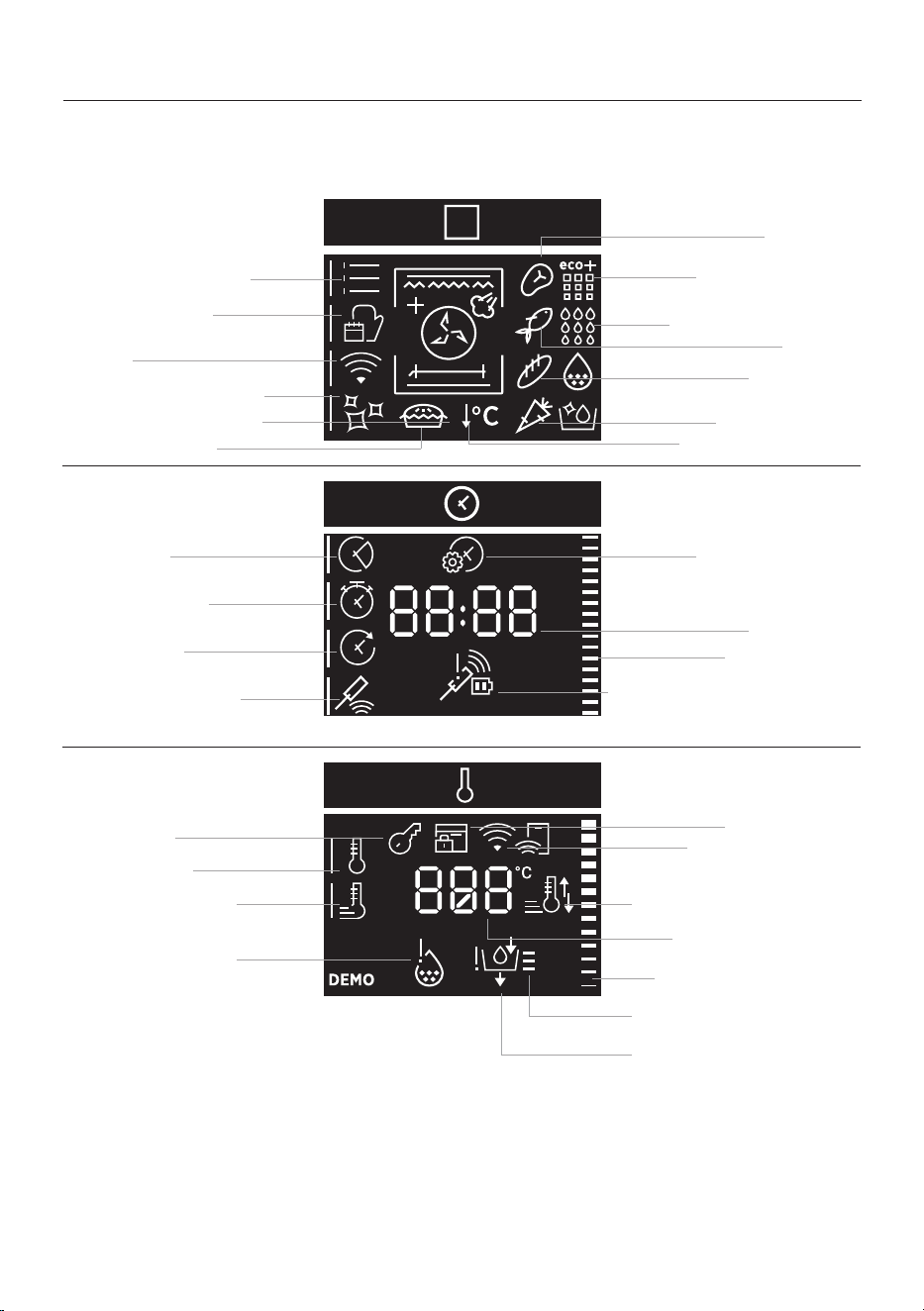
Display
The display is divided into three areas, accessed by pressing the (2), (3) and (4) keys. The same keys
may be used to select the submenu (signalled by the indicator), using the navigation buttons to set
functions and parameters
a. Manual functions
d. Cleaning functions
d2. Pyrolysis Eco
d3. Pyrolysis +
i. Set time of day
d4. Door Lock
e. Duration
d1. Hydroeasyclean
Time value
l. Preheat and cool down
feedback
o. Water tank feedback
f. Kitchen timer
b3. Bakery
Time indicator
Temperature indicator
g. Delay start
b4. Vegetables
h. Heat feel sensor
k. Fast preheating
m. Descaling
c. WiFi
m. Key Lock
b. Food cooking
categories
FUNCTIONS AREA
TIME AREA
TEMPERATURE AREA
c1. Wi-Fi feedback
a1. Function symbols
h1. Heat feel sensor feedback
(battery and signal status)
j. Preheating
b2. Fish
b1. Meat
Temperature value
Tempera level of water in
the water tank ture value
a2. Master bake
a3. Gentle cooking
EN 16
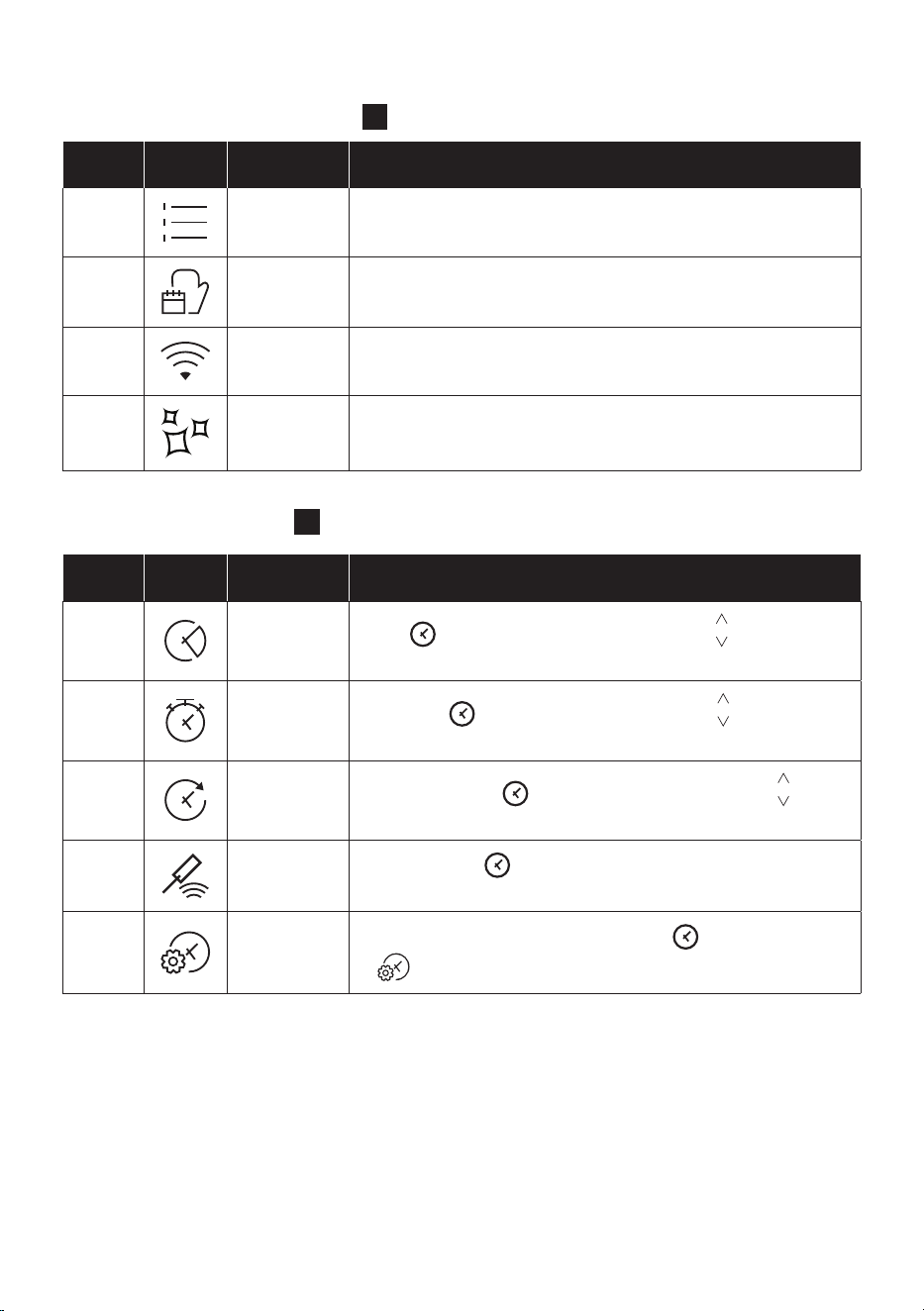
MAIN MENU – TIME AREA
3
Symbol Function Description
e
Duration
Press
to set the cooking duration, use the keys to regulate
the time.
f
Kitchen
timer
Press twice
to set the kitchen timer, use the keys to regulate
the time.
g
Delay start
Press three times
to set the delay start, use the keys to
regulate the time.
h
Heat feel
sensor
Press four times
to active the cooking with probe, see page 20
to see how it works.
i
Set time of
day
With the oven on standby, press and hold
down for 3 seconds
to
.
Symbol Function Description
a
Manual
functions
This function allows to choose cooking functions, temperature
and duration.
b
Food
categories
In this menu you can access a 4 food cooking categories already
integrated on your oven to cook them with steam.
c
WiFi
In this mode you can connect your oven to a network and enroll it
with the hOn App.
d
Cleaning
functions
This function allows to choose a cleaning system available on your
oven.
The menus in overview
MAIN MENU – FUNCTIONS AREA
2
EN 17
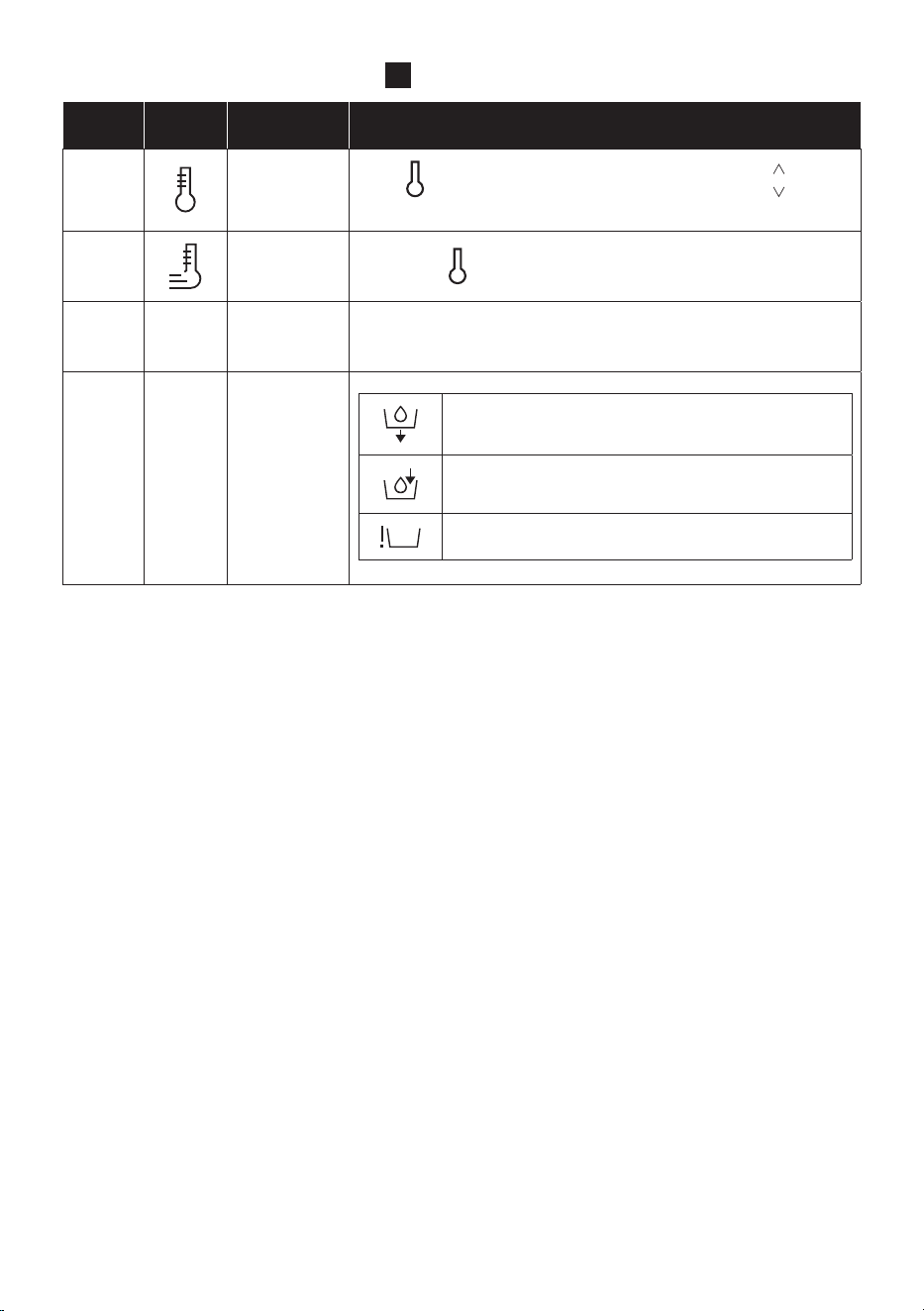
MAIN MENU – TEMPERATURE AREA
4
Symbol Function Description
j
Preheating
Press
to set the preheating temperature, use the keys to
regulate the value.
k
Fast
preheating
Press twice
to set the fast temperature.
m
Descaling Follow the descaling instruction at page EN13
o
Water tank
feedback
Empty and dry water tank.
The water tank is empty. Fill it with water up to the
“max” mark.
The water tank is not present.
EN 18
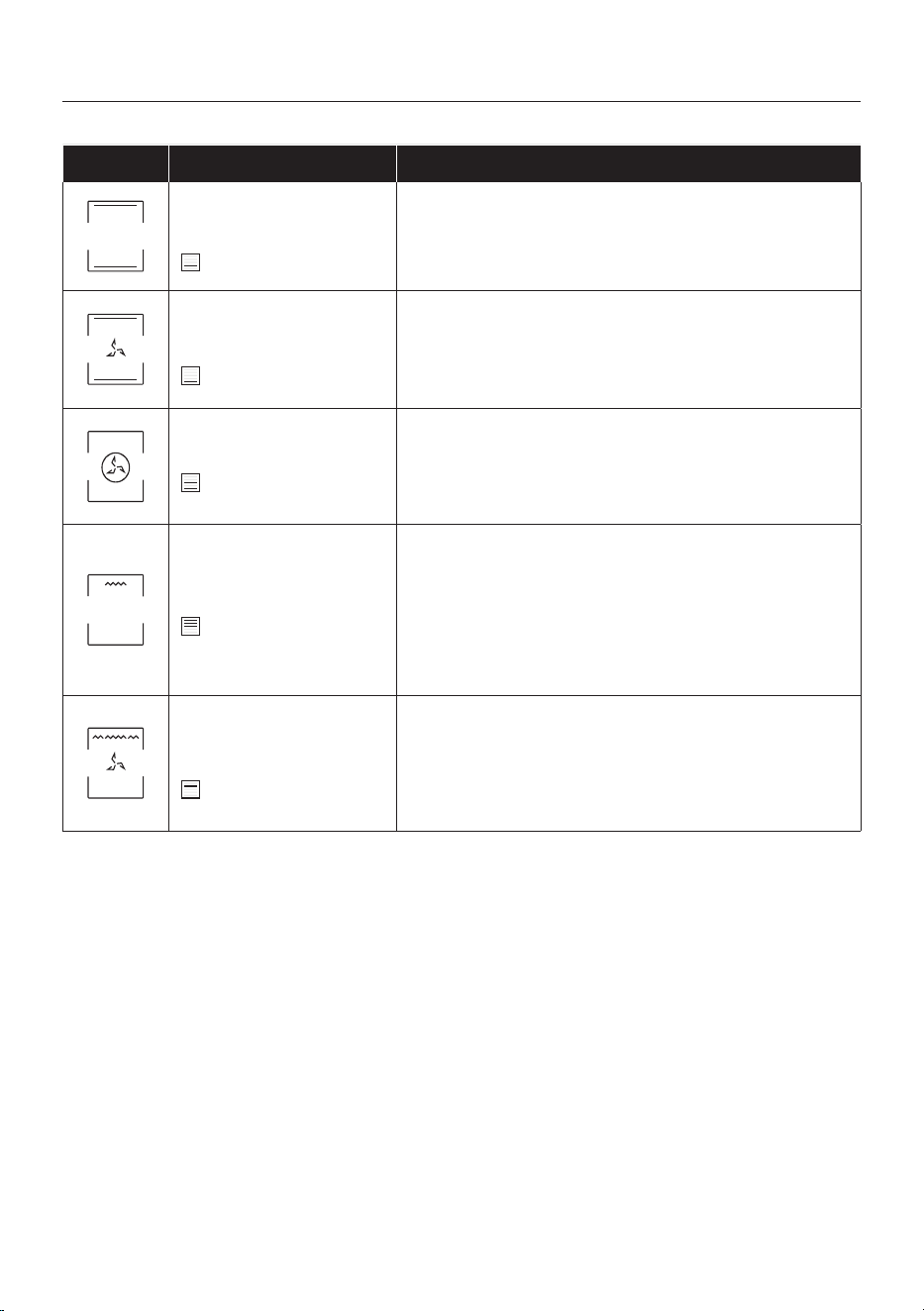
* Depending on the oven model.
** Ideal temperature for suggested foods.
***Tested in accordance with the EN 60350-1 for the purpose of energy consumption declaration and energy class
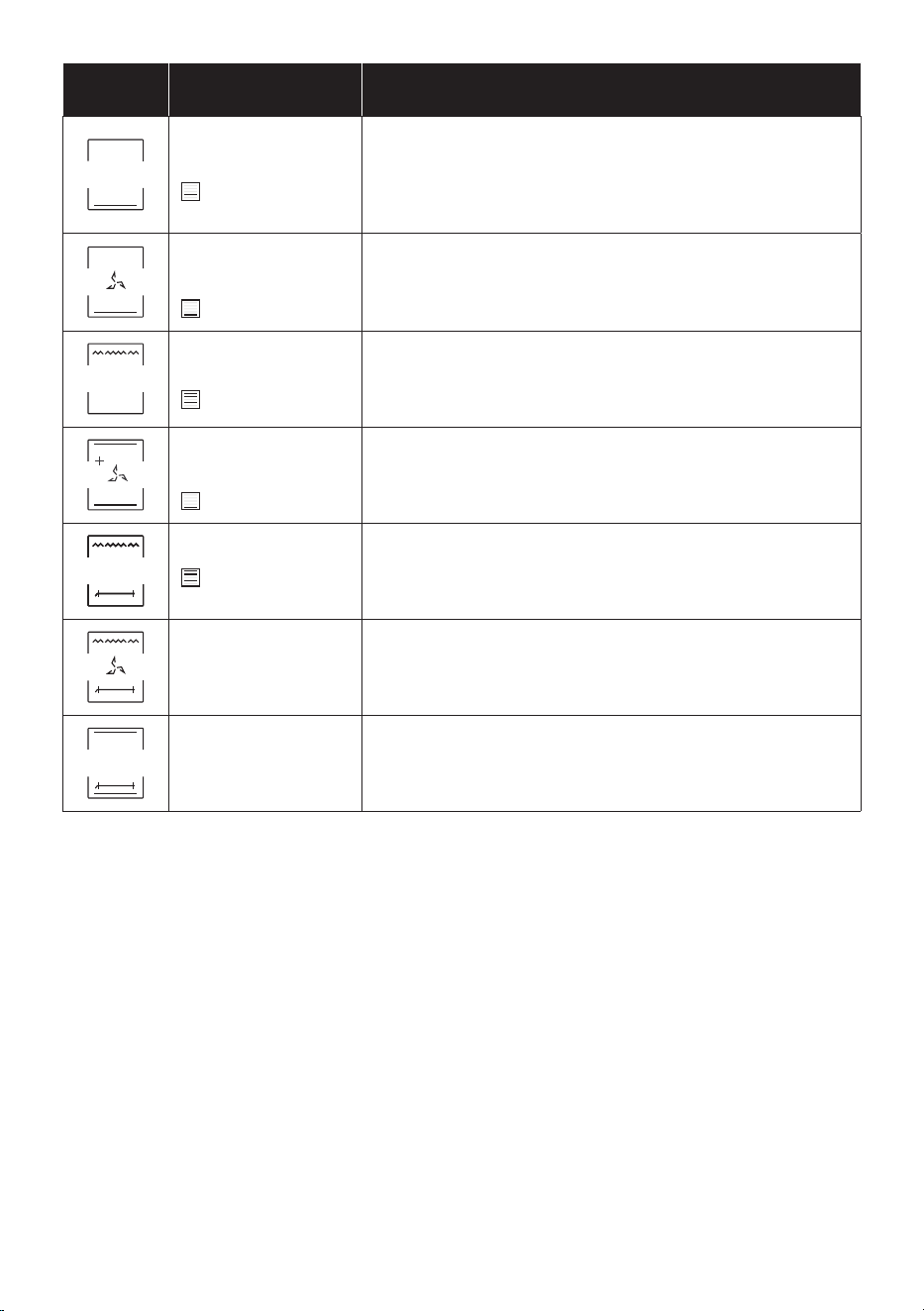
Symbol Description Suggestions
Conventional ***
150-200°C **
2
nd
/3
rd
level
IDEAL FOR: cakes, breads, biscuits, quiches on one level
using both upper and lower heating.
Can be used with Heat Feel sensor.
Fast Preheat option available.
Convection + Fan
180-200°C **
2
nd
/3
rd
level
IDEAL FOR: roasts, casseroles, vegetables and pies with
moist llings on one level. Ideal for cooking foods with high
water content.
Can be used with Heat Feel sensor.
Fast Preheat option available.
Multi-level
150-230°C **
3
rd
for single level
1
st
+3
rd
for double level
IDEAL FOR: cakes, biscuits and pizzas on one or more lev-
els. Ideal to cook dierent foods.
Can be used with Heat Feel sensor.
Fast Preheat option available.
Grill
L3 (power) **
5
th
level for thin food
3
rd
/ 4
th
level for thick food
IDEAL FOR: gratin, grilled meat, fish, vegetables.
This function uses only the top heating element, and the grill
level can be adjusted. Use with the door closed. Place white
meats at a distance from the grill. Red meats and fish fillets
can be placed on the shelf with the drip tray underneath.
Preheat for 5 minutes. Turn food two thirds of the way
through cooking (If necessary).
Grill + Fan
200°C **
2
nd
/ 3
rd
/4
th
level
IDEAL FOR: whole pieces of meat (roasts).
Uses the top heating element with the fan to circulate the
air inside the oven. Use with the door closed. Slide the drip
tray under the shelf to collect juices. Turn food over halfway
through cooking. Preheating is required for red meats but
not for white meats.
COOKING MODES *
Manual functions (a1)
EN 19
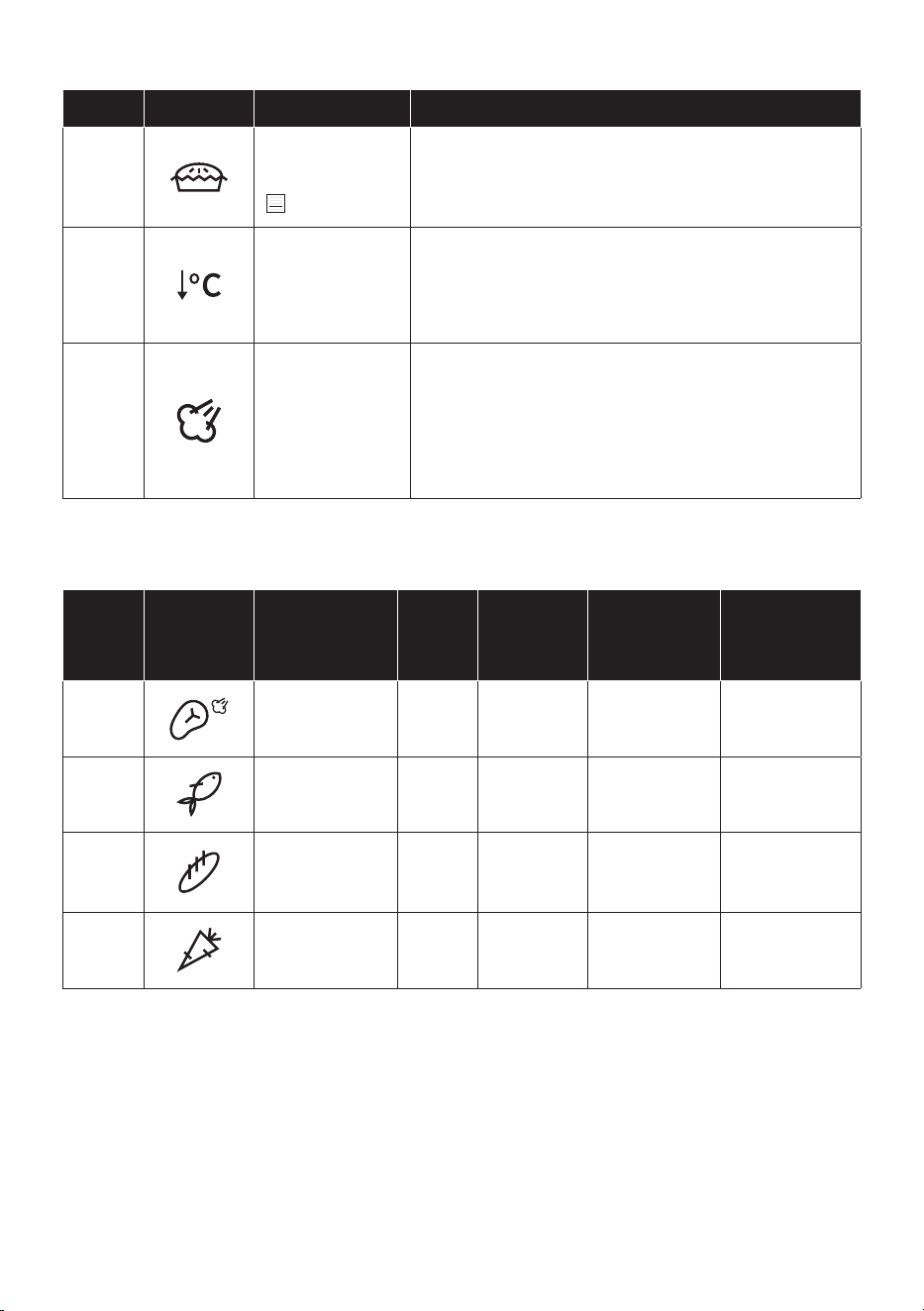
Symbol Description Suggestions
Bottom heating
160-180°C **
1
st
/2
nd
level
IDEAL FOR: crème caramel, puddings and bain marie on one
level. This function can be also used for nishing a preparation.
Can be used with Heat Feel sensor.
Fast Preheat option available.
Bottom heating + Fan
170-210°C **
1
st
and 2
nd
level
IDEAL FOR: pizzas, salty cakes, tarts and foods with liquid
toppings on one level .
Can be used with Heat Feel sensor.
Fast Preheat option available.
Supergrill
L3 (power) **
4
sth
and 5
th
level
IDEAL FOR: big quantities of sausages, steaks and toast bread.
The entire area below the grill element becomes hot. Use
with the door closed. Turn food two thirds of the way through
cooking (If necessary).
Soft +
150-200°C
2
nd
/3
rd
level
IDEAL FOR: cakes and breads on one level.
Grill+Turnspit
L3 power
IDEAL FOR roasting foods such as chicken breasts, quails or
sh llets both sides at the same time.
Place a baking tray underneath the food at Level 1 to collect
drips and juices.
Grill+Fan+Turnspit
200°C
IDEAL FOR roasting foods such as large chicken or turkey on
both sides at the same time.
Place a baking tray underneath the food at Level 1 to collect
drips and juices.
Conventional+
Turnspit
200-240°C
IDEAL FOR: Roasting beef or pork roasts. Place a baking tray
underneath the food at level 1 to collect drips and juices.
* Depending on the oven model.
** Ideal temperature for suggested foods.
***Tested in accordance with the EN 60350-1 for the purpose of energy consumption declaration and energy class
EN 20
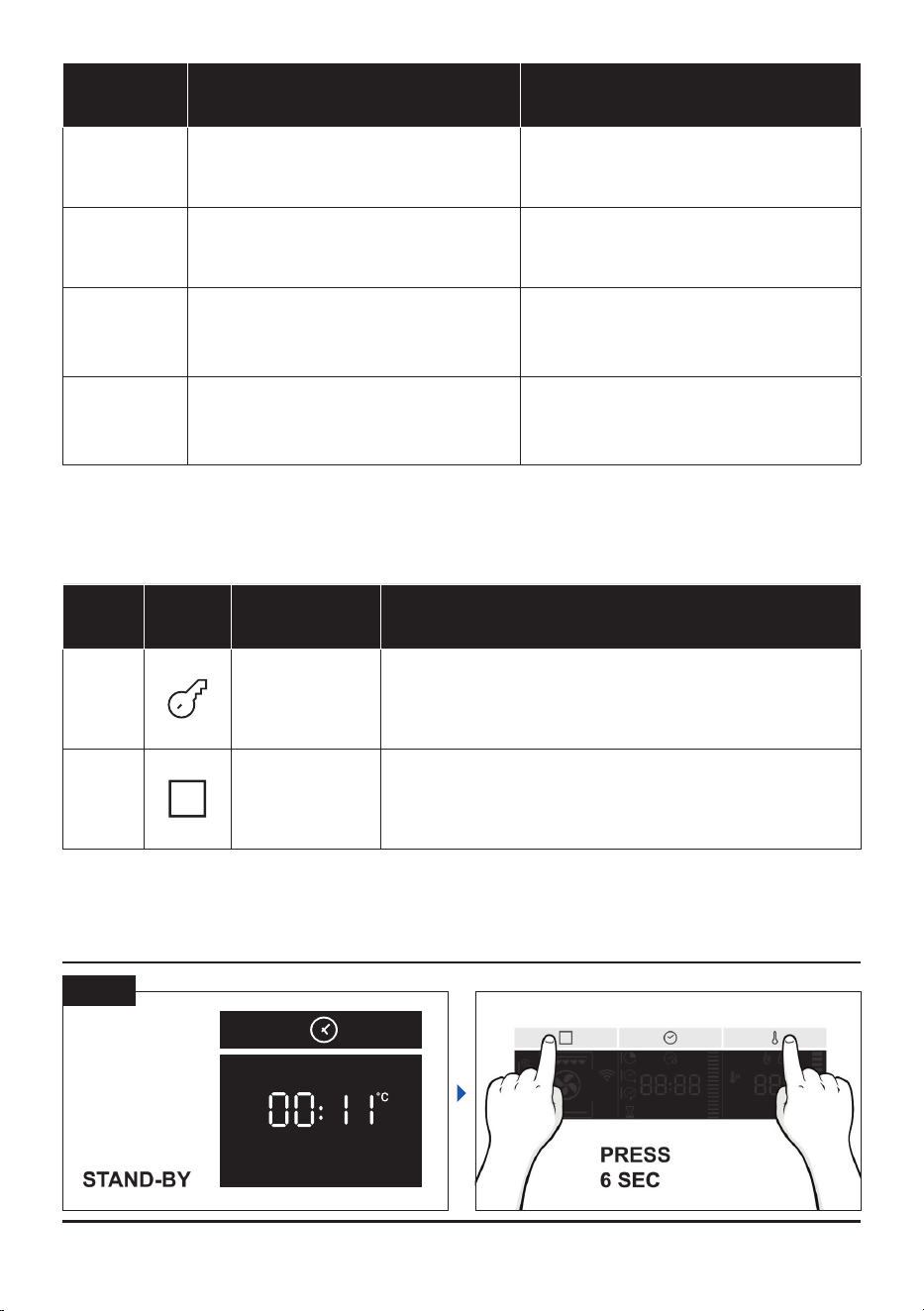
SPECIAL FUNCTIONS *
Symbol Description Suggestions
a2
Master bake ***
180-200°C **
2° level
Ideal to keep food soft inside and crunchy outside.
For healthy cooking, this function reduces the amount of
fat or oil required. The combination of heating elements
with a pulsating cycle of air ensures even baking results.
a3
Gentle cooking
This function ensures the food remains tender and
succulent; thanks to the lower temperature, the surface
browning is minimized. This function is ideal for meat
roasts and whole sh. For optimal results, use the Heat
Feel sensor (if provided).
a4
Steam cooking
Selecting a steam cooking program, the steam icon is
switched on.
After the selection of the steam program, when it is
conrmed, the display askes to load the water (the user
should have put the tank with water in the oven).
The display has in charge to manage the water load, the
water unload, steam blow, descaling and sanication.
FOOD COOKING CATEGORIES
Symbol Description
Pre-
heat
Cooking
position
Heat Feel
tempera-
tures (°C)
Description
b1
Meat Y 2-3
58-62-65°C
for beef
For roasts and
cuts of beef,
veal and pork.
b2
Fish Y 2-3
65°C For whole sh
and llets.
b3
Bakery Y 1-2
95° for bread
and pasta
baked
For breads,
lasagne and
pastries.
b4
Vegetables Y 3-4 70°C
For roasted
vegetables and
potatoes.
Perfect cooking results guaranteed thanks to the pre-set parameters by category. The default
values of time and temperature refer to quantities for 4 servings. Use the table below to set the
cooking time correctly; use the Heat Feel sensor for best results.
* Depending on the oven model.
** Ideal temperature for suggested foods.
***Tested in accordance with the EN 60350-1 for the purpose of energy consumption declaration and energy class
EN 21
Demo mode
ON / OFF
ADDITIONAL FUNCTIONS
Sym-
bol
Description Suggestions
m
Key lock
This function enables to lock the screen in order to
prevent any unwanted use by minors. Press and hold down
Temperature (4) for 5 seconds to activate the screen lock. Do
the same to deactivate it.
Favourite
function
To save a favourite function and display it rst when your
oven is turned on, hold down the (2) key for 5 seconds.
Food
Category
Serving size/grams (in bold,
default setting)
Cooking time (min)* *
after preheat
Meat 4/800; 6/1200; 8/1600 40; 43; 45
Fish 4/600; 6/900; 8/1200 29; 30; 32
Bakery 4/600; 6/900; 8/1000 42; 50; 56
Vegetables 4/800; 6/1200; 8/1600 42; 44; 48
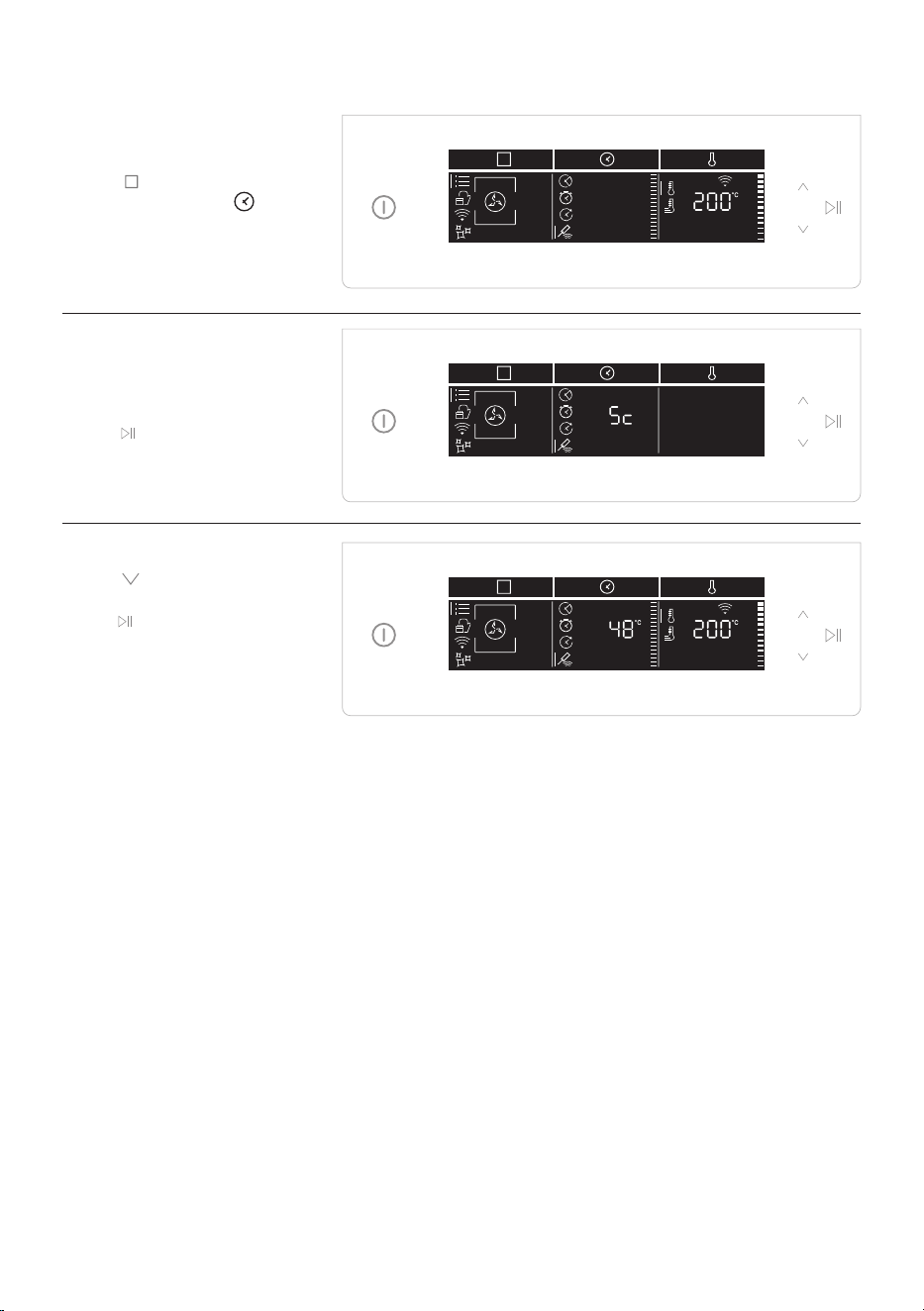
Heat Feel Sensor enrollment
Step 1
• Tap
icon to select the
function and Tap
to select Heat feel sensor.
Step 2
• After a while, the oven will
recognize the probe code.
Tap
icon to set the target
temperature.
Step 3
• Tap , set the desired
temperature target, and
tap
.

EN 23
Cooking tips - Heat Feel Sensor
The Heat Feel sensor can be used with manual functions (Static, static+fan, grill, supergrill, grill +
fan, bottom and bottom + fan) and with FOOD COOKING CATEGORIES.
The Heat Feel sensor has one measuring point, insert it fully into the food with the metal tip located
at the centre of the food.
That point should be placed as close as possible to the thickest (coldest) part of the food in order
to correctly monitor the cooking process.
Thanks to its wireless design, the Heat Feel sensor can be used also to monitor foods that change
volume during cooking (i.e. breads).
MEAT/ROASTS/STEAKS: insert the probe diagonally in the thickest part. For cylindrical shape
foods (i.e. beef roasts) place the tip as close as possible to the geometric center.
Suggested core temperatures:
- 45°C for roast beef (then wrap in foil and let it
rest for 15-20’ before serving)
- 55 – 60 – 65°C for other roasted meats
POULTRY: Insert the Heat Feel sensor into the thickest part of the breast. Suggested core
temperature for poultry is 83-85°C
FISH (WHOLE/STEAKS): insert the probe diagonally in the thickest part
Suggested core temperature: 65°C
BREAD/CASSEROLES: insert the Heat Feel sensor close to the geometric center of the food.
Suggested core temperature: 90°C

EN 24
Technology Wi-Fi Bluetooth
Standard IEEE 802.11 b/g/n Bluetooth v4.2, BR/EDR, BLE
Frequency Band(s) [MHz] 2401÷2483 2402÷2480
Maximum Power [mW] 100 10
WIRELESS PARAMETERS
PRODUCT INFORMATION FOR NETWORKED EQUIPMENT
• Power consumption of the product in networked standby if all wired network ports
are connected and all wireless network ports are activated: 2,0 W
Connectivity
How to activate wireless network port:
• If the oven is not enrolled, please follow the instruction for enrollment to enable WiFi.
• If the oven is enrolled, in WiFi menu select WiFi and set to On or hOn.
How to deactivate wireless network port:
• If the oven is not enrolled, WiFi module is on for the rst 30 minutes after oven activation, to turn
it o wait 30 minutes or before 30 minutes in WiFi menu set wi to o.
• If the oven is enrolled, in WiFi menu select WiFi and set to O.
Quick Pair
The rst time you turn on the product, the WiFi network is already active for 30 minutes, and you
can proceed with enrollment on page 23.
If the oven is not enrolled within 30 minutes, the WiFi turns o. This happens every time you turn
on the oven until you enroll it.
To avoid WiFi to turn on, switch the WiFi o from the WiFi menu within 30 minutes from the oven
turn on.
To enroll the oven after 30 minutes, follow the instructions on page 24.
Technology
W Bluetooth i-Fi
Standard Bluetooth v4.0 BLE
Frequency Band(s) [MHz] 2400÷2480
Maximum Power [mW] 2.5 – (4dBm)
Heat Feel Temperature Probe Model Et180:
EN 25
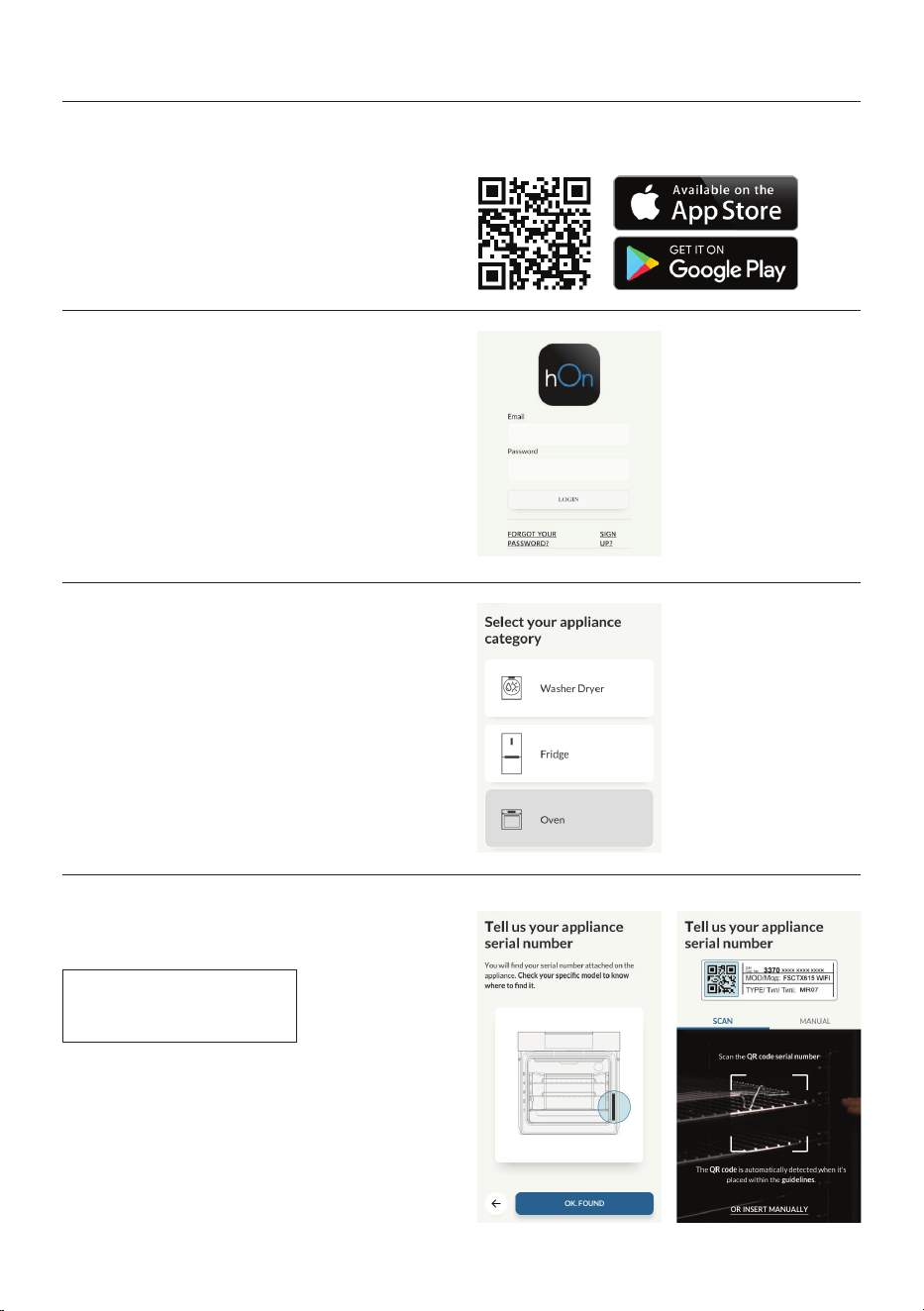
Oven enrollment on app
ON THE SMARTPHONE
Step 1
• Download hOn app
Step 2
• Log in or sign up.
Step 3
• Add new appliance
Step 4
• Scan the QR code or insert the serial number
Write here your serial number for future reference.
EN 26
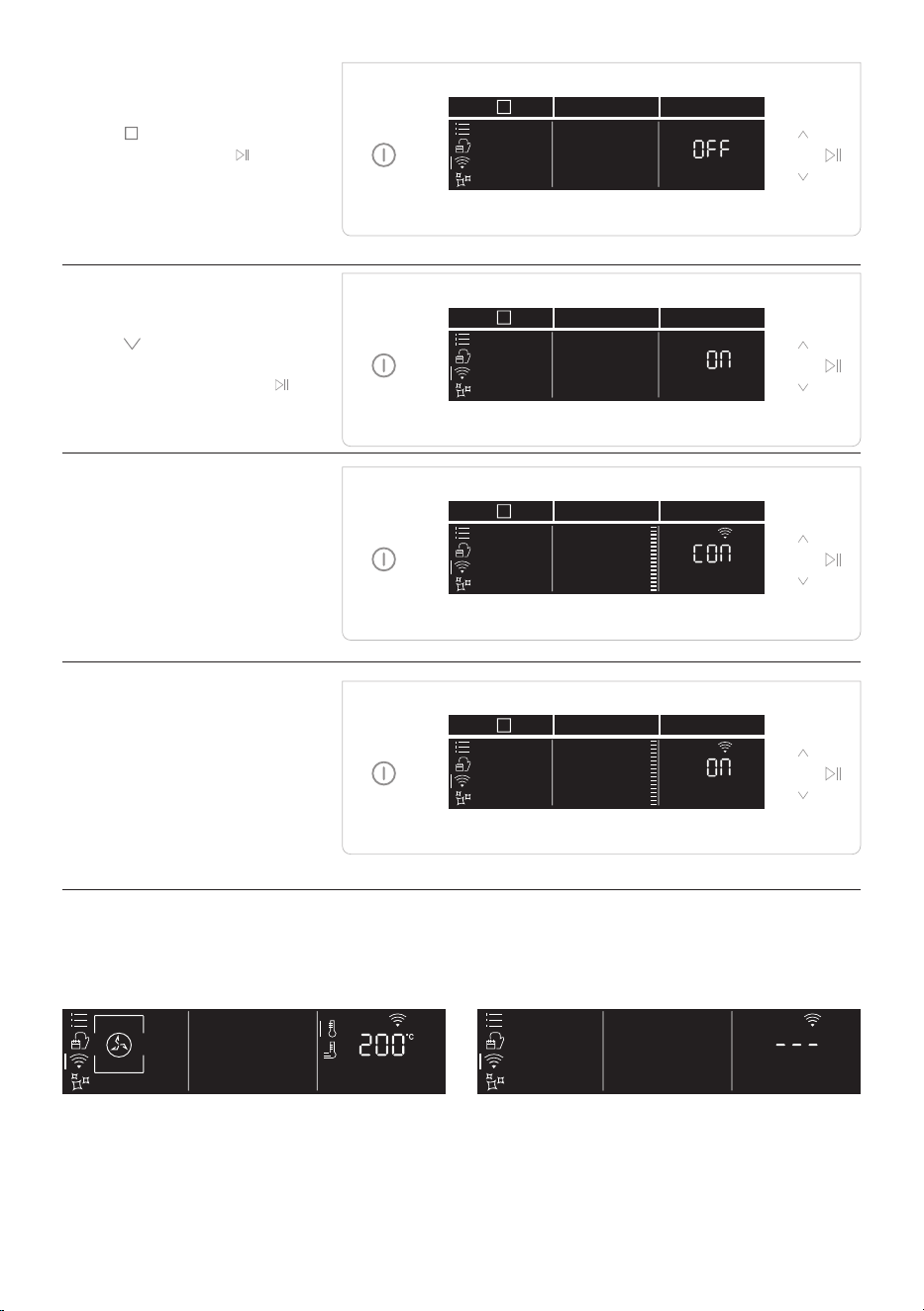
ON THE APPLIANCE
Step 5
• Tap
icon to select the
wi mode and tap
.
Step 6
• Tap and select On or
hOn (see dierences on
page 23 ) and tap start
.
Step 7
• After a while, the text
Connect begins to scroll.
Continue the pairing
process via app.
Step 8
• When pairing is nished,
the oven status will
automatically switch
the Wi “ON” or hOn,
according to your choice.
NOTE:
• Make sure to have minimum a 2.4GHz Home Wi-Fi network.
• Make sure to have your Home Wi-Fi password and name ready. You will need them later.
• Make sure your appliance is in a place where there is an excellent Home Wi-Fi signal.
• And yes, stay close to your appliance.
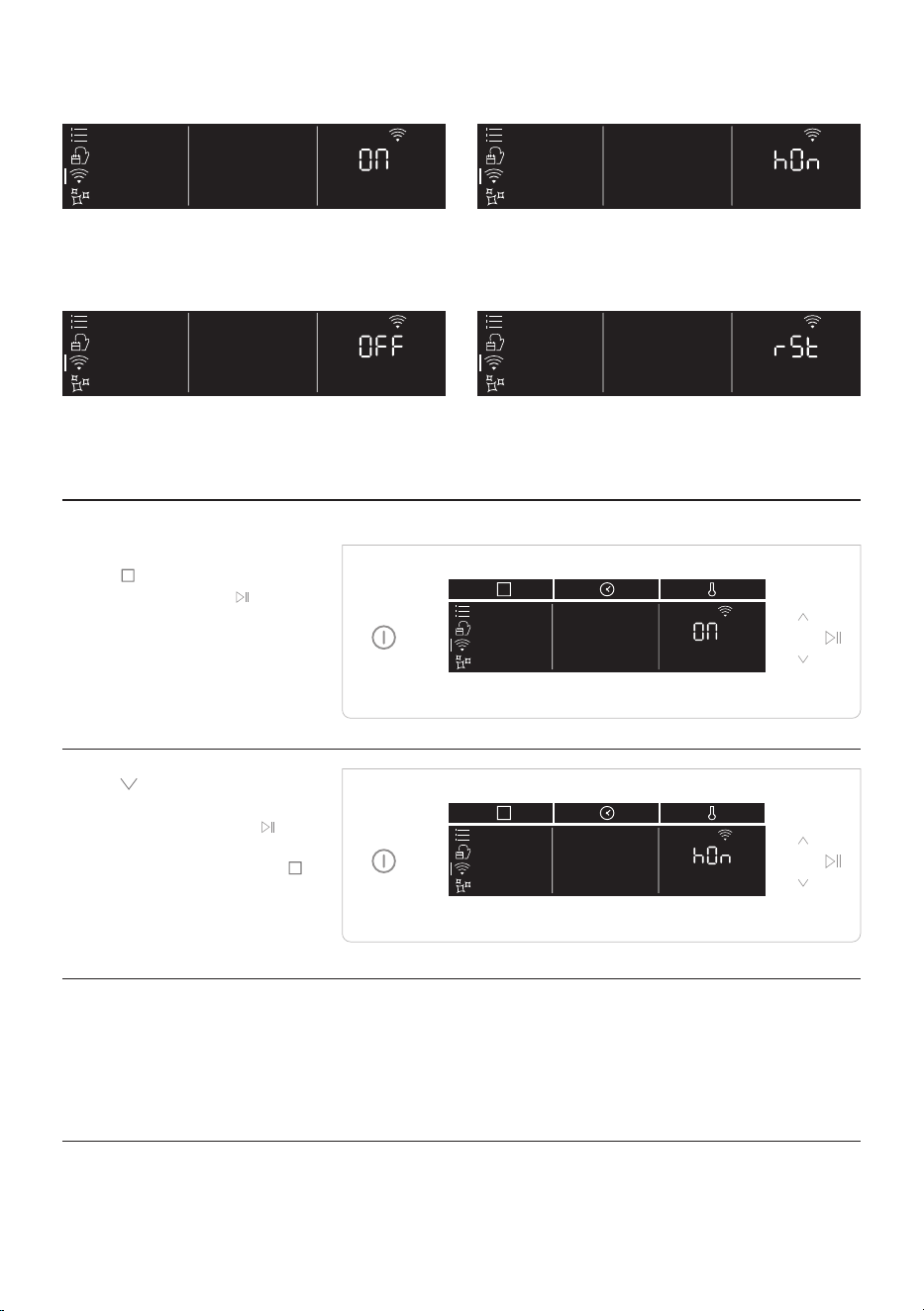
Router connection lost
While cooking - WiFi icon blinking Inside WiFi menu - Digits blinking
EN 27
Hereby, Candy Hoover Group Srl declares that the radio equipment is in compliance with Directive
2014/53/EU and with the relevant Statutory Requirements (for the UKCA market). The full text of
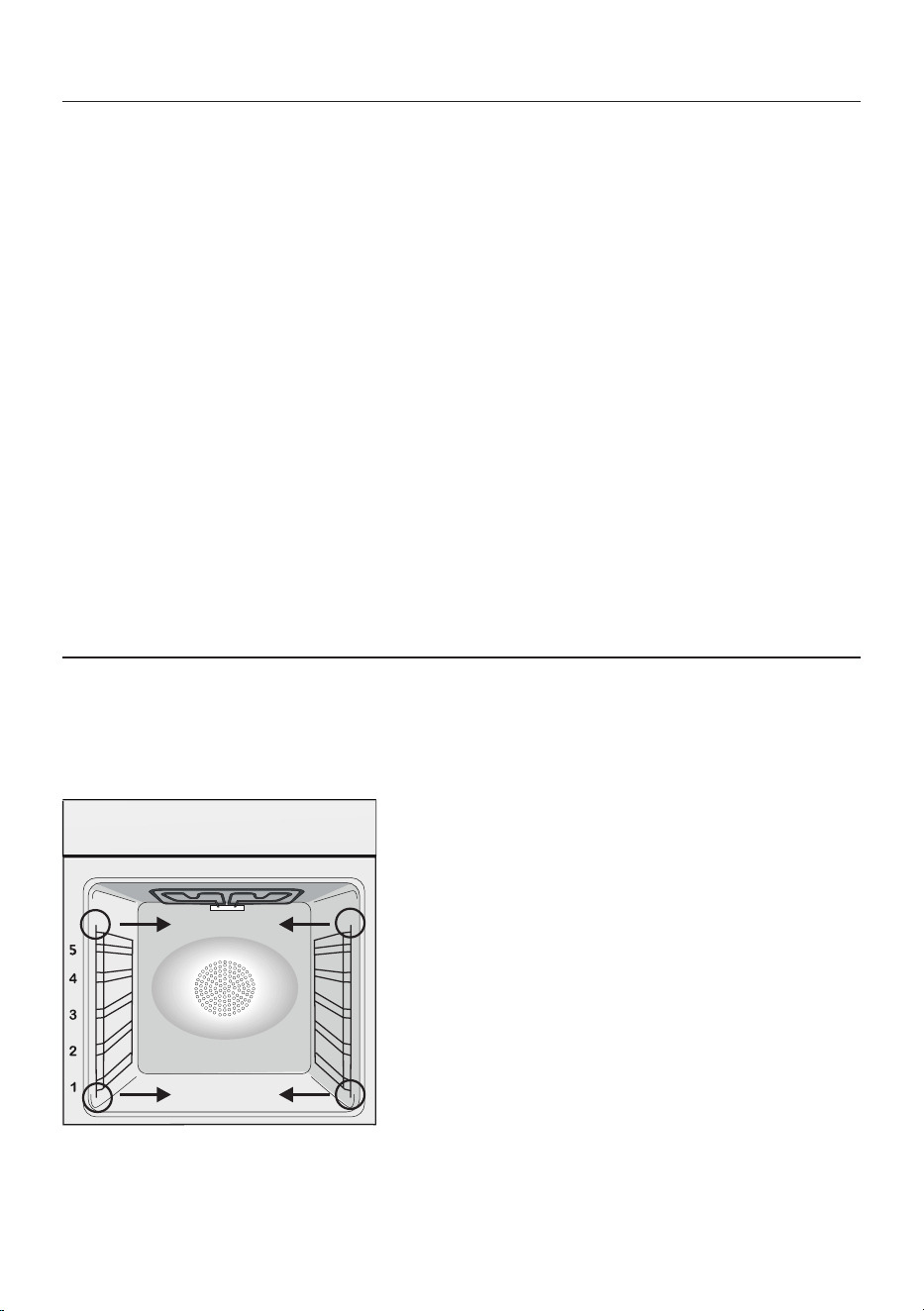
the declaration of conformity is available at the following internet address: www.candy-group.com
WiFi ON
It is only possible to monitor the oven status
by App.
WiFi OFF
The oven is not connected but still enrolled
with network credentials saved.
WiFi hOn
The oven can be used exclusively by App.
WiFi Reset
The connection is reset and a new enrollment
is possible.
Step 1
• Tap
icon to select the
wi mode and tap
“On”
will start blinking.
Step 2
• Tap icon to select the
“hOn” mode and tap
to
activate remote control.
• Press “function button”
to exit “hOn” mode
Remote control mode
EN 28
The lifecycle of the appliance can be extended
through regular cleaning. Wait for the oven to
cool before carrying out manual cleaning op
-
erations. Never use abrasive detergents, steel
wool or sharp objects for cleaning, so as to not
irreparably damage the enamelled parts. Use
only water, soap or bleach-based detergents
(ammonia).
GLASS PARTS
It is advisable to clean the glass window with
absorbent kitchen towel after every use of
the oven. To remove more obstinate stains,
you can use a detergent-soaked sponge, well
wrung out, and then rinse with water.
OVEN WINDOW SEAL
If dirty, the seal can be cleaned with a slightly
damp sponge.
General notes on cleaning
REMOVAL AND CLEANING OF THE SIDE RACKS
1. Remove the wire racks by pulling them in the direction of the arrows (see below)
2. To clean the wire racks either put them in the dishwasher or use a wet sponge, ensuring that they
are dried afterwards.
3. After the cleaning process install the wire racks in reverse order.”
Maintenance
ACCESSORIES
Clean accessories with a wet, soapy sponge
before rinsing and drying them: avoid using
abrasive detergents.
DRIP PAN
After using the grill, remove the pan from the
oven. Pour the hot fat into a container and
wash the pan in hot water, using a sponge and
washing-up liquid.
If greasy residues remain, immerse the pan in
water and detergent. Alternatively, you can
wash the pan in the dishwasher or use a com
-
mercial oven detergent. Never put a dirty pan
back into the oven.
CHANGING THE BULB
1. Disconnect the oven from the mains supply.
2. Undo the glass cover, unscrew the bulb and
replace it with a new bulb of the same type.
3. Once the defective bulb is replaced, replace
the glass cover.
This product contains one or more light
sources of energy eciency class G (Lamp) /F
(10 Led).
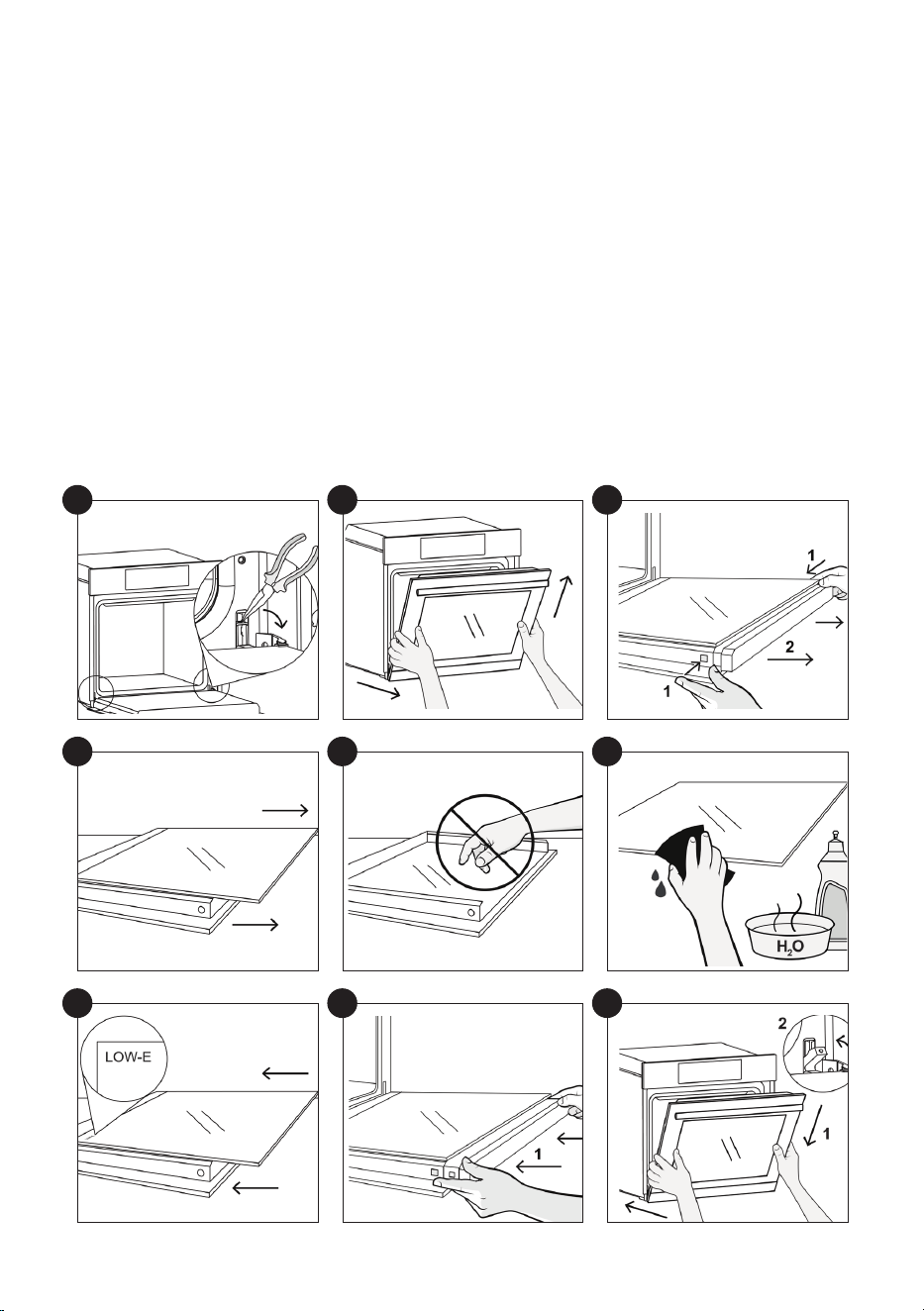
EN 29
1
4
7
2
5
8
3
6
9
REMOVAL AND CLEANING OF THE GLASS DOOR
1. Open the door 90° and pull the hinge xing tabs toward the outside of the oven.
2. Put the door at a 45° angle, then pull the door forwards and upwards at the same time to release
it. Remove the oven door and place it on a cushioned surface (e.g. on top of a piece of fabric) with
the handle facing down.
3. Press the two buttons on the left and right at the same time and pull the upper door cover
towards you to remove it.
4. Carefully remove the glass inside the oven, holding it rmly with two hands and placing it on a
soft, at surface.
5.If there are glass panels in between, remove them and place them on a soft surface.
ATTENTION: the outer panel of glass is not removable
6. Clean the glass with a soft cloth using an appropriate cleaning product.
7. After cleaning, reassemble the parts in the opposite order to removal. On all glass panels, the
“Low-E” indication must be correctly legible and positioned on the left side of the door, near the
left side hinge. This ensures that the printed label on the rst glass panel remains inside the door.
8. Ret the oven door cover by pushing inwards until you hear the two side buttons click into place.
9. Holding the door at 45°, simultaneously insert the right and left male parts of the hinge into the
holes of the hinges released, until you hear them click in place. Bring the door to an angle of 90° and
lock the xing tabs in place by pushing them towards the inside of the oven.
EN 30
Hydro Easy Clean
The Hydro Easy Clean procedure uses steam to help remove remaining fat and food particles from the
oven.
1. Pour 300 ml of water into the Hydro Easy Clean container at the bottom of the oven.
2. Select the dedicated function (d1).
4. Allow the program to operate.
5. After the cycle, allow the oven to cool down.
6. When the appliance is cool, clean the inner surfaces of the oven with a cloth.
Warning: Make sure that the appliance is cool before you touch it.
Care must be taken with all hot surfaces as there is a risk of burns. Use distilled or drinkable water.
Symbol Function Description
d1
Hydroeasyclean For simple, ecient cleaning of the oven.
d2
Pyrolysis Eco
For perfect, regular cleaning of the oven cavity.
This function enables to lock the door during the process
(d4).
d3
Pyrolysis+
CLEANING FUNCTIONS *
300 ml
For extremely thorough cleaning and removing large
amounts of dirt from the oven cavity.
This function enables to lock the door during the
process (d4).

EN 31
Pyrolysis
The oven is equipped with a pyrolyser clea-
ning system, which destroys food residues at
high temperature. The operation is carried out
automatically by means of the programmer.
The resulting fumes are rendered “clean” by
passing over a Pyrolyser wich starts as soon
as cooking begins. As very high temperatures
are required by the Pyrolyser, the oven door is
tted with a safety lock. The pyrolyser can be
stopped at any time. The door cannot be ope-
ned until the safety lock is displayed.
NOTE : If a hob has been tted above the
oven, never use the gas burners or the electric
hot-plates while the Pyrolyser is working, this
will prevent the hob from overheating.
TWO PYROLYTIC CYCLE are pre-set:
PYROLYSIS ECO : Cleans a moderately stained
oven. Operates for a period of 90 minutes.
PYROLYSIS + : Cleans a heavily stained oven.
Operates for a period of 120 minutes.
Never use commercially available cleaning pro-
ducts on a Pyrolytic oven!
Tip : Carrying out Pyrolytic cleaning immedia-
tely after cooking allows you to take advantage
of residual heat, thus saving energy.
Before executing a pyrolytic cycle:
•Remove all the accessories from the oven
because they are not able to tolerate the
high temperatures used during the pyrolytic
cleaning cycle ; in particular removing grids,
side racks and the telescopic guides (refer
to the chapter REMOVING GRIDS AND SIDE
RACKS) .
•Remove any large spillages or stains as it
would take too long to destroy them. Also
excessively large amounts of grease could
ignite when subject to the very high tempe-
ratures of the Pyrolytic cycle.
•Close the oven door.
•Excess spillage must be removed before
cleaning.
• Clean the oven door;
• Remove large or coarse food residues from
the inside of the oven using a damp sponge.
Do not use detergents;
• Remove all accessories and the sliding rack
kit (where present);
• Do not place tea towels.
Using the pyrolitic cycle:
1- Tap
icon to select the cleaning functions
(d) and, using the navigation buttons, choose
the preferred pyrolitic cycle.
2- It is possible to defer the start time of the
pyroclean cycle by changing the END time via
the programmer.
3- After few minutes, when the oven reaches a
high temperature, the door locks automatical-
ly. The pyroclean cycle can be stopped at any
time by pushing On/O button.
4- Once the pyroclean cycle is nished, the
pyrolysis will switch o automatically.

EN 32
Waste management and environmental protection
This appliance is labelled in
accordance with European Di-
rective 2012/19/EU regarding
electric and electronic appli-
ances (WEEE). The WEEE con-
tain both polluting substances
(that can have a negative ef-
fect on the environment) and base elements
(that can be reused). It is important that the
WEEE undergo specic treatments to cor-
rectly remove and dispose of the pollutants
and recover all the materials. Individuals can
play an important role in ensuring that the
WEEE do not become an environmental prob-
lem; it is essential to follow a few basic rules:
- the WEEE should not be treated as domestic
waste;
- the WEEE should be taken to dedicated col-
lection areas managed by the town council or a
registered company.
In many countries, domestic collections may
be available for large WEEEs. When you buy a
new appliance, the old one can be returned to
the vendor who must accept it free of charge
as a one-o, as long as the appliance is of an
equivalent type and has the same functions as
the purchased appliance.
Troubleshooting
Problem Possible cause Solution
the oven does not heat
up
The clock is not set Set the clock
The oven does not
heat up
A cooking function and temperature has
not been set
Ensure that the necessary settings
are correct
No reaction of the
touch user interface
Steam and condensation on the user in-
terface panel
Clean with a microber cloth the
user interface panel to remove the
condensation layer
SAVING AND RESPECTING THE ENVIRON-
MENT
Where possible, avoid pre-heating the oven
and always try to ll it. Open the oven door as
infrequently as possible, because heat from
the cavity disperses every time it is opened.
For a signicant energy saving, switch o the
oven between 5 and 10 minutes before the
planned end of the cooking time, and use the
residual heat that the oven continues to gen-
erate. Keep the seals clean and in order, to
avoid any heat dispersal outside of the cavity.
If you have an electric contract with an hour-
ly tari, the “delayed cooking” programme
makes energy saving more simple, moving the
cooking process to start at the reduced tari
time slot.
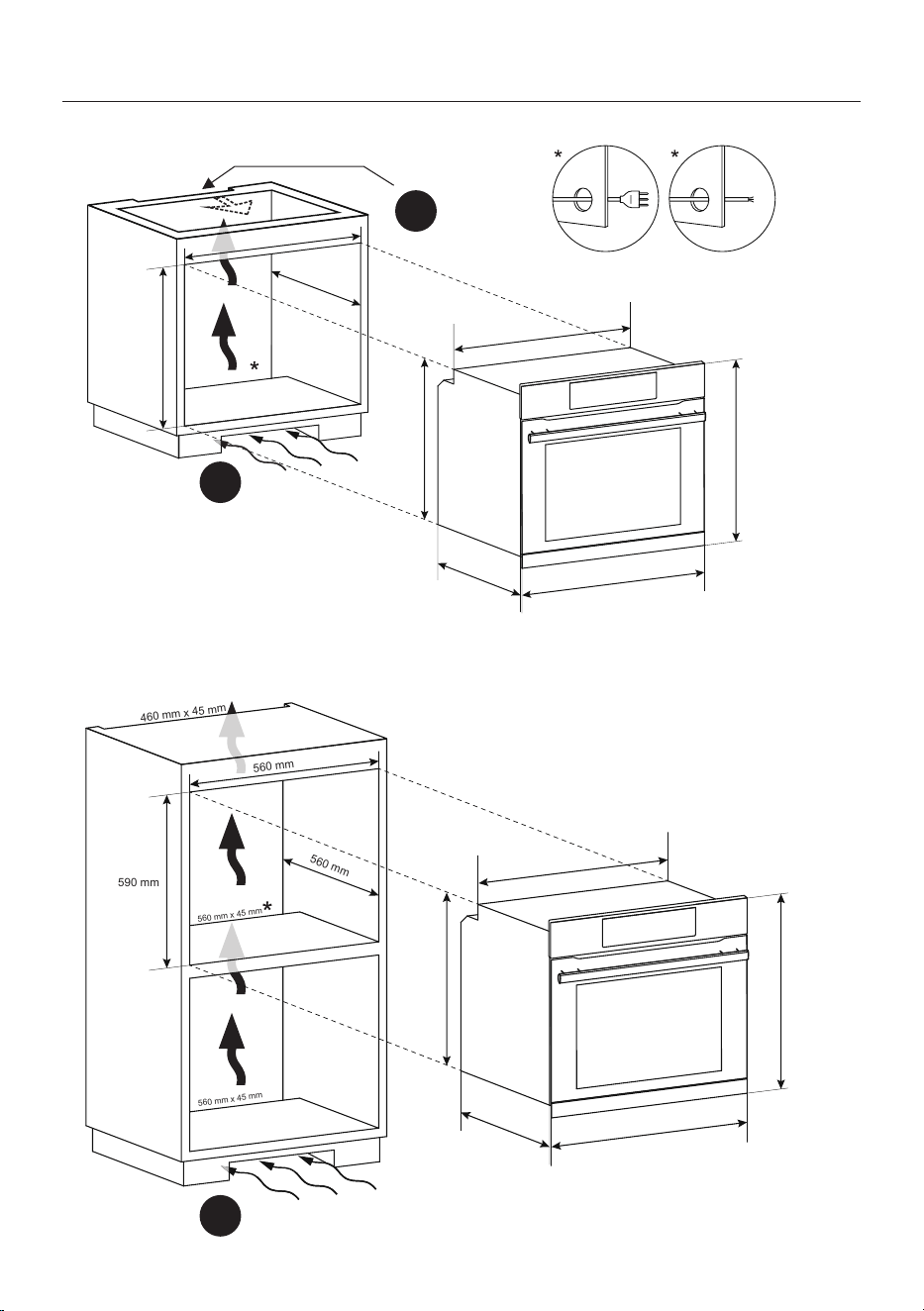
INSTALLATION 31
Installation
A
A
B
560 mm
560 mm
600 mm
560 mm x 45 mm
595 mm
560 mm
548,5 mm
595 mm
577,5 mm
20 mm
560 mm
560 mm
590 mm
560 mm x 45 mm
560 mm x 45 mm
460 mm x 45 mm
595 mm
560 mm
548,5 mm
595 mm
577,5 mm
20 mm

INSTALLATION 32
A
B
EN If the mounting of the plinth does not al-
low air circulation, it is necessary to create an
opening of 500x10 mm or the same surface in
5000 mm
2
.
EN If the furniture is coverage with a bottom at
the back part, provide an opening for the power
supply cable.
EN If the oven does not have a cooling fan, cre-
ate an opening 460 mm x 15 mm
EN The manufacturer will not be responsible for any inaccuracy resulting from printing or transcript errors
contained in this brochure. We reserve the right to carry out modications to products as required, includ-
ing the interests of consumption, without prejudice to the characteristics relating tosafety or function.

70018420